User Manual
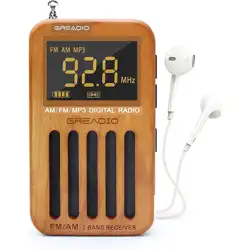
AM/FM/MP3 Digital Radio
Thank you for purchasing our products.
Please read this manual carefully before
using this product. lf you encounter any
difficulties or problems during use, please
contact us for further assistance.
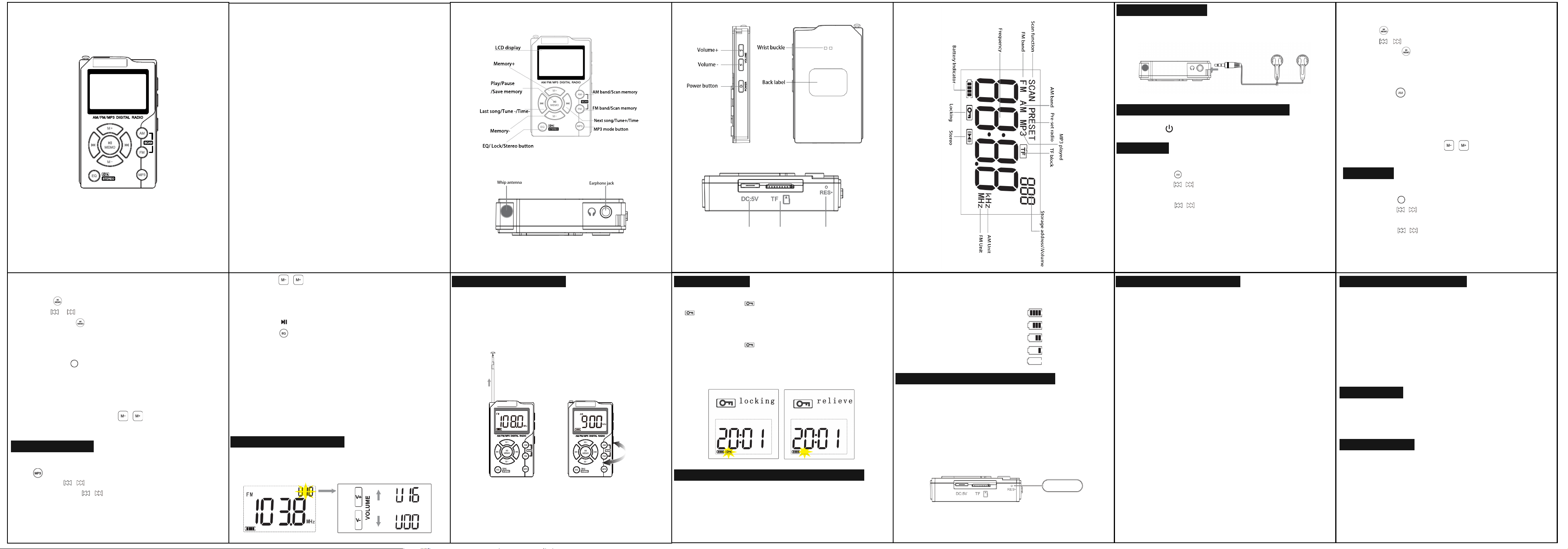
FM band/Scan memory
AM band/Scan memory
Next song/Tune+/Time+
MP3 mode button
Memory-
EQ/ Lock/Stereo button
Last song/Tune -/Time-
Play/Pause
/Save memory
LCD display
Memory+
Contents:
※EARPHONE JACK
※RADIO OPERATION TURN ON/OFF
※AM MODE
※FM MODE
※MP3 PLAYBACK
※ADJUST THE VOLUME
※USE THE ANTENNA
※LOCK SWITCH
※BATTERY INDICATOR REFERENCE
※RESTORE FACTORY SETTINGS
※SAFETY INSTRUCTIONS
※TECHNICAL INDICATORS
※WARRANTY
※PACKING LIST
EARPHONE JACK
EARPHONE JACK
AM MODE
ADJUST THE VOLUME
ADJUST THE VOLUME LOCK SWITCH
BATTERY INDICATOR REFERENCE
RESTORE FACTORY SETTINGS
SAFETY INSTRUCTIONS SAFETY INSTRUCTIONSTECHNICAL INDICATORS
WARRANTY
PACKING LIST
FM MODE
MP3 PLAYBACK
RADIO OPERATION TURN ON/OFF
NOTE:This product doesn't have a speaker, please plug in
headphones to hear sound.
Long press" " for 2 seconds,turn on/off the radio.
Manual-set radio:
1.Short press " " to enter AM mode.
2.Short press " / " to adjusted frequency up or down.
Auto-set radio:
1. Long press " / " for 2 seconds and release it.
2. it will automatically pause when it searches for a station
and play the searched station.
Manual-set radio:
1.Short press " " to enter FM mode.
2.Short press " / " to adjusted frequency up or down.
Auto-set radio:
1. Long press " / " for 2 seconds and release it.
2. it will automatically pause when it searches for a station
and play the searched station.
Manual-preset radio:
1.Choose one station you want to preset.
2.Press " " to enter the stored station.
3.Press " / " to adjust "P0_" what you want to set.
4.Finally, Press" "to save the preset settings.
5. Call out the preset station then you can see the"P0_"
that what you want.
Auto-preset radio(Scan):
1.Long press " " for 2 seconds to scan the stations.
2.After scanning,"SCAN" on the display screen will flash.
3.When station searching is completed, the radio will
automatically save the received station as preset station
"P01-20" and play the first station currently stored.
4.After scanning, press the " / " button to call out the
preset station (P01-20).
Manual-preset radio:
1.Choose one station you want to preset.
2.Press " " to enter the stored station.
3.Press " / " to adjust "P0_" what you want to set.
4.Finally, Press" "to save the preset settings.
5. Call out the preset station then you can see the"P0_"
that what you want.
Auto-preset radio(Scan):
1.Long press " " for 2 seconds to scan the stations.
2.After scanning,"SCAN" on the display screen will flash.
3.When station searching is completed, the radio will
automatically save the received station as preset station
"P01-20" and play the first station currently stored.
4.After scanning, press the " / " button to call out the
preset station (P01-20).
1.Insert the "TF card" at the bottom of the radio,Short press
the" "button to enter MP3 mode.
2.Press the " / " button to adjust the last/next song.
3.Long press the " / " button to fast forward/fast rewind
play.
4.Press the " / " button toadjust the last /next by ten
songs.
Note:If there are less than10 songs or a non-integer
number of songs, the notation is "P---".
5.Press the " " button to play/pause.
6.Press the " " button to switch the tone quality.
a.NORMAL b.ROCK c.POP
d.CLASSIC e.JAZZ f.COUNTRY
Note:
a:When you turn off and then turn on the MP3 player again,
it will resume the last position the music was playing .
b:The playback sequence is based on the order of files
being inserted into the TF card. If you want to customize the
playlist order, you can rearrange the files and insert them in
the desired order into the TF card.
Press the “V+” button to increase the volume.
Press the “V-” button to decrease the volume.
Range of volume levels: “V00-V16”.
1.When listening to FM radio, please pull out the antenna,
expand the length and direction to achieve the best
reception.
2.When listening to the AM radio, please rotate the radio
direction or position to achieve the best reception.
1.Long press the " " key for 2 seconds, the lock symbol
" " will show on the display .When you lock the screen,
other buttons can't work at this time.
2.Long press the " " key for 2 seconds to cunlock the
radio.
In the lock mode the backlight will not work pressing other
control button (except for the Lock button).
3.Please use 5V /1A power adapter to charge the radio.
The fully charge time is about 2 hours.
4.Battery indicator reference:
A.4-bar power 100%
B.3-bar power 75%
C.2-bar power 50%
D.1-bar power 25%
E.0-bar power 0%
1. Avoid violent impact, or fall to the ground.
2. Do not place in direct sunlight, high temperature or humid
places.
3. Do not use, install or store near fire.
4. If there is debris into the machine, please find qualified
maintenance personnel to check before use.
5. When cleaning the housing, use a soft cloth with a wet
detergent solution to wipe. Do not use alcohol, thinner, and
other strong solvents to clean.
6. In walking or driving, please try not to use the headset,
may cause the risk of traffic accidents.
7. Do not pull or fold the headset wire, which may cause the
headset wire internal copper wire breakage.
8. Keep the appropriate volume to listen, you can pay
attention to the surrounding environment to ensure safety.
9. Please unplug the USB charging cable when not in use for
a long time.
10. In the dry and cold season, chemical fiber silk, and other
items that easily generate static electricity will affect or
damage the sensitive devices inside the radio. This machine
has corresponding protection measures, but please try to
avoid friction with the above items.
1.Frequency range
FM:87.5-108 MHz (US/EU)
AM:522-1710 kHz(EU)
AM:520-1710 kHz(US)
2.Headphone specification: 3.5mm
4.Input voltage: DC-5V (1A 600mAh)
5.MP3 playback format: MP3, WMA, WAV
6.Size: 16X60X100mm/0.63x2.36x3.93in
7.Net weight: 90g/0.20lb
This radio has full 12 months warranty against manufacturing
defects.
The warranty period begins from the date of purchase.
Radio *1
User Manual *1
Type-C Cable*1
Earphone *1
Card Pin*1
The product has battery protection measures, please reset
it when the device crashes, can't be charged, or can't use
any function after charging. It can be reactivated and used
after resetting.
Insert a card pin into “RES.” and press it. The radio can be
reset immediately.
1.During charging , battery indicator is jumping.
2.After full charge, the battery indicates full and stops
beating.
Reset holeTFType-C
-1- -2- -3- -4- -5- -6-
-7- -8- -9- -10- -11- -12- -13-
FFMM
FFMM