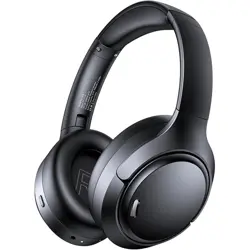

ANC and ENC Headphones
User Manual
A18 Product Description
Note: The power button shares the same function as the play/pause button. Long press
2S this button to power the headset on or o, and single click it to control media
playback or calls.
❼ Earmu
❽ Play/Pause/Power Button
❾ Volume -/Previous Track
❿ Volume +/Next Track
Adjustable Headband
❶ ANC Button
❷ Microphone
❸ 3.5mm AUX Audio Jack
❹ Connect Indicator Light
❺ USB-C Charging Port
❻ Charging Connect Indicator Light
R
L
R
L
Customer Service
After-sales Service Phone Number: +1 (781) 430-4818 Mon.-Fri.
(If you have any issue, please feel free to contact us, and we will reply within 48 Hrs)
Product Specifications
Model No.
Product Name
Input
FCC ID
Stereo Mode
Battery Capacity
Support Mode
Speaker Size
Connect Range
Charging Time
Charging Cable
Supported Profiles
Support Device
A18
Wireless Headset
5V 1A
2AWUL-A18
ANC/ Transparency
3.7V 750mAh, 2.77Wh
Music/Game Mode
40mm
33Feet/10m
1.5Hrs
Type-C
A2DP, AVRCP, HSP, HFP
Smartphones, PC, Laptop, Computer, Watch, TV
Packaging List
Headphone
Pouch x1
Reminder:
Before using headphones for the first time, please fully charge it using a standard
compliant charger. It is recommended to use a 5V/1A charging adapter. The Type-C
Charging cable comes with the package.
Power On:
Press and hold the Play/Pause button for about 2S. The indicator light turns blue
1S with a prompt sound "Power On".
Power On & O
Power O:
Press and hold the Play/Pause button for about 2s until the indicator light turns
white and turns o.
ANC & Transparency Mode Switching
Pairing the Headset with Your Device
For first-time use, press and hold the power button for 2 seconds to power on the
headset. The indicator light turn blue and will turn on, and the headset will enter Bluetooth
pairing mode. On your device, search for “A18” in the Bluetooth settings and click to
connect. Once successfully connected, the indicator light will turn o and the headset will
prompt“connected”. After the initial pairing is completed, it will automatically reconnect to
the last paired device (as long as Bluetooth is enabled and the device is within range).
Reset Headphones
While the headset is powered on, press and hold both the “+” and “–” buttons for 5
seconds. The headset will clear all pairing records and re-enter pairing mode. The
indicator light will flash blue rapidly for 3 seconds to indicate the reset.
Troubleshooting
The charging light doesn't turn on or headset won’t charge.
Check the cable and adapter. Use a standard 5V/1A charger. Try cleaning the charging
port and reconnecting.
Q
A
The headset cannot connect to a Bluetooth device.
Ensure the headset is in pairing mode (indicator light flash blue). If not, press and hold
the power button to re-enter pairing. Also make sure Bluetooth is enabled on your
device.
Q
A
The headset disconnects randomly.
Ensure the device is within the 10-meter Bluetooth range and that there are no major
obstructions. If it happens frequently, reset the pairing and reconnect.
Q
A
ANC mode doesn't switch or respond.
Make sure the headset is powered on and connected. Press and hold the ANC button
for 3 seconds. If unresponsive, try restarting the headset.
Q
A
Why does the batte seem to drain quickly when I rst use the headset?
The battery may not be fully charged after storage or shipping. If used without first
fully charging, or left on in pairing/standby mode, it may drain quickly. For best
performance, fully charge the headset before first use and power it o when not in
use.
Q
A
Battery Warning
FCC Caution
Using the wrong battery can cause fire and other hazards (for example, in the case of some
lithium battery types).
1. Disposal of a battery into fire or a hot oven, or mechanically crushing or cutting of a
battery, that can result in an explosion.
2. Do not leaving a battery in an extremely high temperature surrounding environment that
can result in an explosion or the leakage of flammable liquid or gas.
3. A battery subjected to extremely low air pressure that may result in an explosion or the
leakage of flammable liquid or gas.
Any Changes or modifications not expressly approved by the party responsible for
compliance could void the user's authority to operate the equipment.
This device complies with part 15 of the FCC Rules. Operation is subject to the following
two conditions:
(1)This device may not cause harmful interference, and
(2) this device must accept any interference received, including interference that may
cause undesired operation.
Note: This equipment has been tested and found to comply with the limits for a Class B
digital device, pursuant to part 15 of the FCC Rules. These limits are designed to provide
reasonable protection against harmful interference in a residential installation. This
equipment generates, uses and can radiate radio frequency energy and, if not installed
and used in accordance with the instructions,may cause harmful interference to radio
communications. However, there is no guarantee that interference will not occur in a
particular installation. If this equipment does cause harmful interference to radio or
television reception, which can be determined by turning the equipment o and on, the
user is encouraged to try to correct the interference by one or more of the following
measures:
— Reorient or relocate the receiving antenna.
— Increase the separation between the equipment and receiver.
— Connect the equipment into an outlet on a circuit dierent from that to which the
receiver is connected.
— Consult the dealer or an experienced radio/TV technician for help.
This equipment complies with FCC radiation exposure limits set forth for an uncontrolled
environment.
This transmitter must not be co-located or operating in conjunction with any other
antenna or transmitter.
This device complies with Industry Canada licence-exempt RSS standard(s). Operation is
subject to the following two conditions:
(1) this device may not cause interference, and
(2) this device must accept any interference, including interference that may cause
undesired operation of the device.
Le présent appareil est conforme aux CNR d'Industrie Canada applicables aux appareils
radio exempts de licence. L'exploitation est autorisée aux deux conditions suivantes:
(1) l'appareil ne doit pas produire de brouillage, et
(2) l'utilisateur de l'appareil doit accepter tout brouillage radioélectrique subi, même si le
brouillage est susceptible d'en compromettre le fonctionnement.
The device is compliance with RF exposure guidelines, users can obtain Canadian informa-
tion on RF exposure and compliance.
Le présent appareil est conforme Après examen de ce matériel aux conformité ou aux
limites d’intensité de champ RF, les utilisateurs peuvent sur l’exposition aux radiofréquenc-
es et la conformité and compliance d’acquérir les informations correspondantes.
ISED Warning
The symbol indicates DC voltage
RECYCLING
DISPOSE OF USED BATTERIES ACCORDING TO THE INSTRUCTIONS
This product bears the selective sorting symbol for Waste electrical and electronic
equipment (WEEE).
This means that this product must be handled pursuant to European
directive 2012/19/EU in order to be recycled or dismantled to minimize its impact on the
environment. User has the choice to give his product to a competent recycling organiza-
tion or to the retailer when he buys a new electrical or electronic equipment.
This product can be used across EU member states.
The device is low power device, it can meet the requirement of the RF exposure.
NOTES:
1. High Sound Pressure
2. Hearing Damage Risk
3. Do not listen at high volume levels for long periods.
Caution
ANC
3
4 5
6 8
10
9
7
11
2
ANC
ANC and ENC Headphones
User Manual
A18
A18
Headphones x1
Type-C
Charging Cable x1
3.5mm
Audio Cable x1
User
Manual x1
Input: DC 5V
Press and hold 2s
1s
Press and hold 2s
1s
Note: If no device is connected within 3 minutes after powering on, the headphones will
automatically power o. Indicator light will turn white for 1S before shutdown.
If headphones is disconnected from the device, the indicator light will start flashing blue. If
no reconnection occurs within 3 minutes, the headset will automatically power o.
ANC
ANC Mode
Transparency Mode
Press and hold 2s
1s
12:00
Bluetooth
Bluetooth
MY DEVICES
A18
Now discoverable as "My iphone".
OTHER DEVICES
Connected
12:00
Bluetooth
Bluetooth
MY DEVICES
A18
Now discoverable as "My iphone".
OTHER DEVICES
Connected
5s
3s
R
R
R
L
R
Wired Mode & AUX Audio Support
This headset supports AUX wired connection. A 3.5mm audio cable is included. When the
battery is low or Bluetooth is unavailable, connect the headset to your phone, computer,
or tablet via the audio cable to use it as a standard wired headphone—no power-on or
pairing required.
Note: Active Noise Cancellation (ANC) is not available in wired mode.
3.5mm AUX audio cable
The device must
have an AUX jack
ANC
R
01 02 03 04 05 06 07 08
09
10 11
Music/Game Mode
This headset supports switching between Game Mode and Music Mode. While the
headset is powered on and connected, quickly press the ANC button 4 times to toggle
between modes:
ANC
ANC
4x
Game Mode:
Ultra-low latency for enhanced
audio-visual sync in gaming
Music Mode:
High-fidelity audio optimized
for music and media playback
L
1
Voice Assistant
End Voice Assistant:
Triple clicks power button
Activate:
Triple clicks power button
3x
3x
With Transparency Mode, you can stay connected to your surroundings while enjoying
your music. Whether you're jogging on busy streets or waiting for a flight announcement,
this feature lets in ambient sounds for added safety and awareness.
Advanced ANC technology reduces unwanted ambient sounds, allowing you to fully
immerse yourself in music, calls, or podcasts. Whether you're on a noisy commute, in an
oce, or on a plane, ANC creates a quieter, more focused listening experience.
ANC
Press and hold 3s
Press and hold 3s
V0.2 20250828
Music Controls
Call Controls
Answer Call:
Single Click
Power Button
Button Control
Pause/Play:
Single Click Power Button
Increase Volume:
Single click "+"
Decrease Volume:
Single click "–"
Next Track:
Double clicks "+"
Previous Track:
Double clicks "–"
Reject Call:
Long Press Power
Button for 2 Seconds
2x
2x
1x
1x
1x
1x
2s
End Call:
Long Press Power
Button for 2 Seconds
2s

