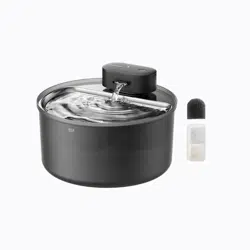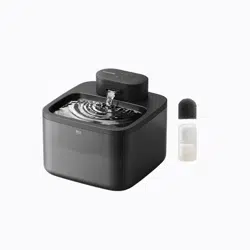
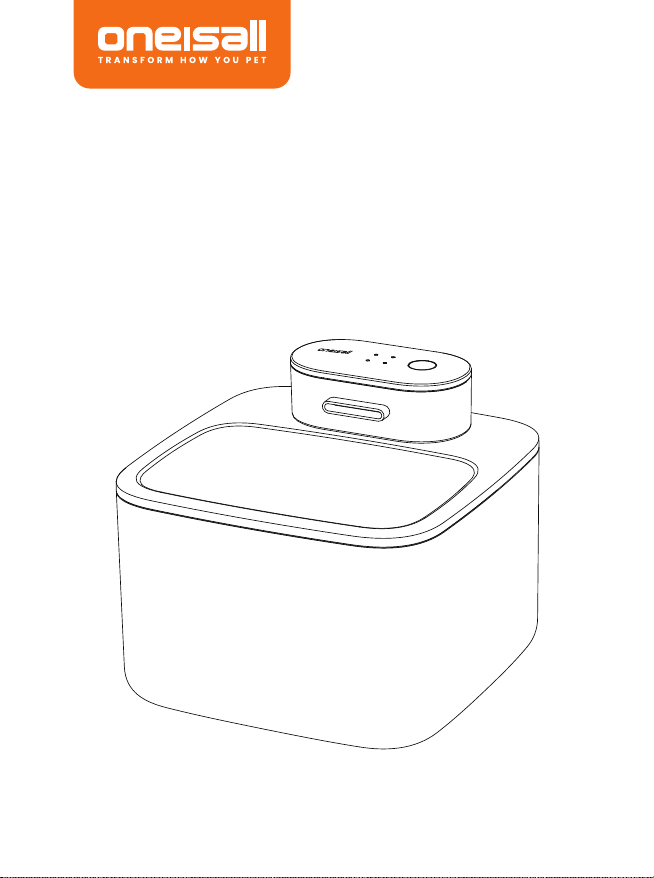
Hale 2.2L
Wireless Water Fountain
User Manual
GPSR Product information
Troubleshooting
1.Where to find the replacement filter and pump.
Here is the replacement filter with ASIN: B0F8QVV6KC , and battery
module with ASIN: B0F8QTZYTS
2. No water flows and the working indicator light is not on.
Please check if the machine is in a shutdown state; or is the power
supply in normal connected.
3. Working indicator lights up but no water flows out.
Please check if the fountain is in a low water level.
4. Charging indicator doesn't work after plugging in the Type-C charger.
Check if the adapter is full connected with the outlet, ensure they are in
well connection.
5. How often should the filter be replaced?
It is recommended to replace the filter every 2-4 weeks and clean the
water dispenser every 1-2 weeks.
6. What happen if the noise increase and water output decrease?
Possible impeller blockage of the bottom Motor, please disassemble the
bottom component and thoroughly clean the impeller according to the
cleaning instruction.
Troubleshooting
Cleaning and Maintenance
@Oneisall Official
Warranty Information
WE ARE READY TO HELP
Oneisall offers a standard 2-year warranty. lf you have any issues with your
Oneisall product, please do not hesitate to contact us. Be sure to include
your proof of purchase, model number, and any relevant photos or videos
in your message to expedite the process.Our Oneisall support team is
available 7 days a week and will respond to your inquiry within 24 hours.
Thank you for choosing Oneisall.
Please note that the Oneisall warranty does not apply to used products or
purchases made from unauthorized sellers. lt's important to be aware that
the warranty also does not cover consumable parts, such as blades,
guards, filters, brushes, and similar items. These parts may require regular
replacement or maintenance.
support@oneisall.com
+1877-522-8578 (US) Mon-Fri 8am-5pm (PST)
www.oneisall.com
PW13 饮水机说明书
尺 寸 :1 0 5 x 1 4 0 m m
材 质 :1 2 8 g 双 铜
印刷:四色印刷 哑油
折叠方式:6折页
CMYK:0 63 100 00
Model:PW13
Product Name: Hale 2.2L Wireless Water Fountain
Brand: Oneisall
Product Model: PW13
Product Capacity: 2.2L
Battery Capacity: 4000mAh
Rated Voltage/Current: DC 5V 1A
Name: Apex CE Specialists GmbH
Add: Grafenberger Allee 277-287,40237 Düsseldorf,DE
Contact Person: Wells Yan
Tel:+353212066339
E-Mail: Info@apex-ce.de
Name: APEX CE SPECIALISTS LIMITED
Add: 6f East Union Street, Manchester, England, M16 9AE
Contact: Wells
Tel: +441616371080
E-Mail: Info@apex-ce.com
GPSR Product information
Business Name: Shenzhenbenfendianzishangwuyouxiangongsi
Manufacturer's address: CN, 518000, GuangDong Sheng, Shenzhen,
Longhua District, Minxin Community Bishui Longting Building 6 Unit, 7B
Tel: +86 185 6587 6424
E-Mail: topservice4u@hotmail.com
Made in China
Note:
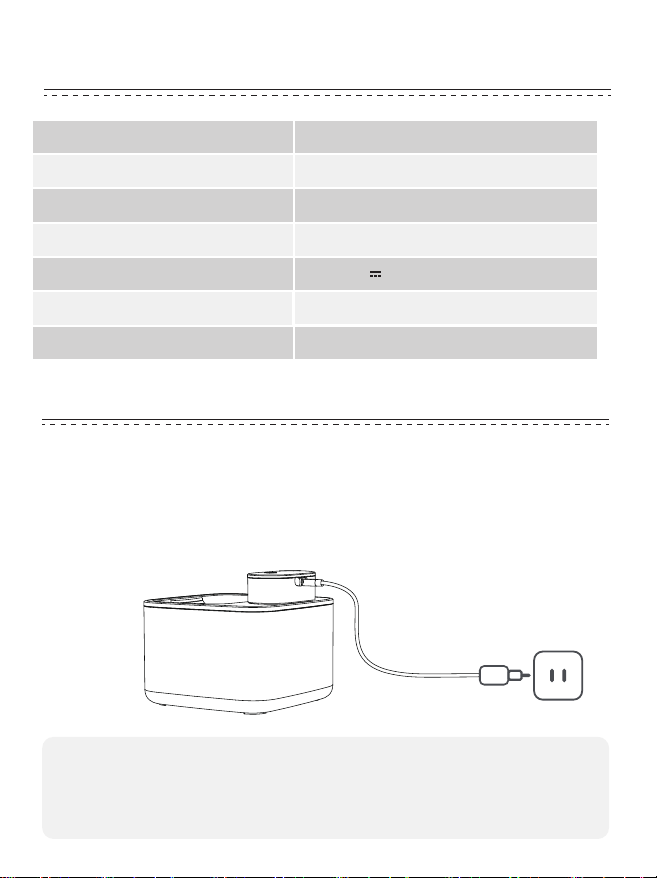
1.Please charge with the 5V/1A adapter included.
105mm
140mm
1. Please use it indoors, keep it out of direct sunlight, and away from any
potential fire sources.
2. Please use the 5V/1A adapter provided with this product to charge the
water fountain. Using any other adapter may cause the machine to
malfunction or be damaged.
3. Before installing or replacing the filter, please rinse the filter by
soaking it in water for 5 minutes.
4. For first-time use, the motor will exhaust air for 30 seconds, which
may cause a decrease in water flow. Normal flow will resume soon.
5. In order to prevent pets from knocking over the water fountain, it is
recommended to place it against the wall or placed in a safe location.
6. Please replace the filter regularly and thoroughly clean the bottom
components of the motor.
7. When cleaning the whole machine, please disconnect the power
supply and turn off the product.
8. Do not rinse or soak the Motor with water; if accidentally getting wet
during the cleaning process, please dry it in time to avoid damage to
the equipment.
9. When going on vacation, ensure the water fountain is fully charged
and check the remaining water level.
Safety Warning Package List
Operating Instructions
Specifications
Product Name
Model
Product Size
Battery
Rated Voltage/Current
Capacity
Material
Hale 2.2L Wireless Water Fountain
PW13
6.49 x 6.49 x 5.39 inch
4000mAh
DC 5V 1A
2.2L
PP+ABS
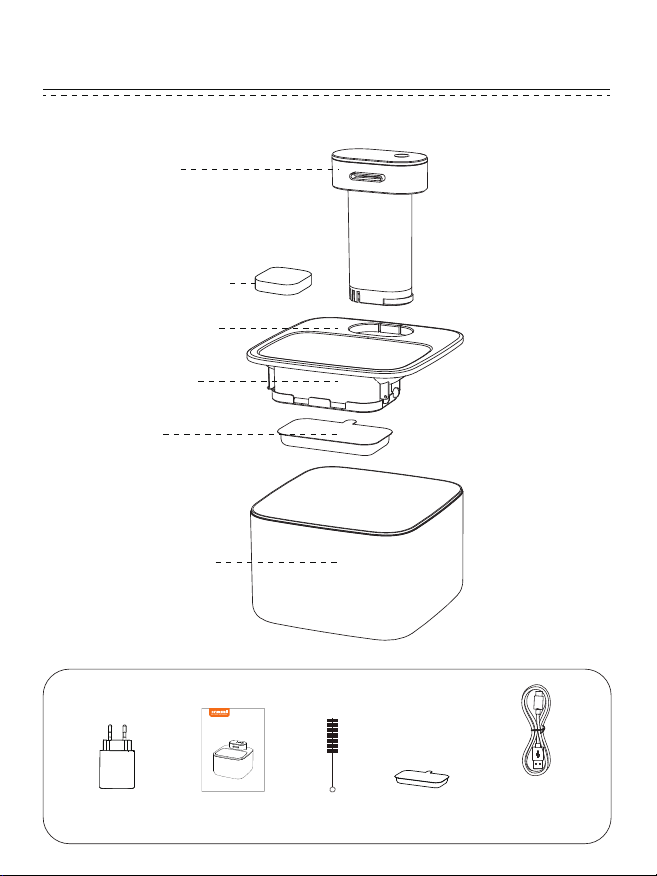
Accessories
5V/1A Adapter User Manual Brush Filter x 1
59-Inch
Type-C Cord
Motor
Water Tray
Filter
Filter Box
Water Tank
Filter Sponge
Wireless
Pet Water Fou ntain
User Manual
Model:PW13
1.Fully Charged Before Using the New Fountain
Remove the waterproof silicone lid of the power port on the Motor, connect
the Type-C cable to the power port and the adapter(5V/1A adapter
included), then turn on the fountain.
The charging time is 5 hours.
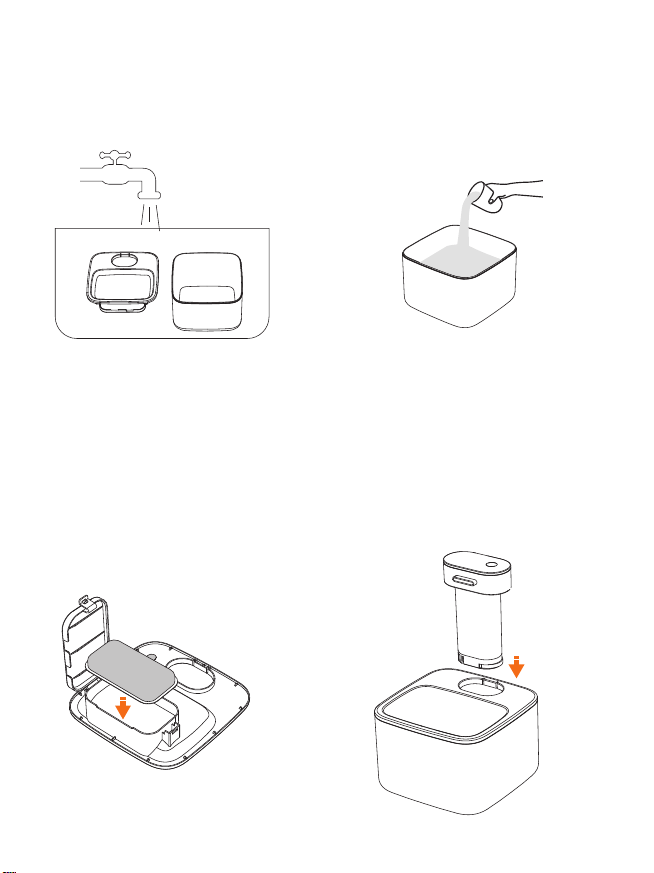
2. Assemble the Fountain
Step 1:Rinse the water tray and
water tank.
Step 2: Fill in the water tank with
an appropriate amount of clean
water (Do not exceed the max
line).
Step 3: Install the filter to the filter
box;
(Please soak the filter by water for
5 minutes before install)
Fixed the water tray to the water
tank.
Step 4: Install the Motor and turn
on the fountain by long pressing
the on/off button for 3 seconds.
3. Operation Description
2. Power Supply Introduction
Plug-in Mode
Plug in the power cable, and the water fountain will automatically enter
continuous flow mode.
Just short press the ON/OFF button to switch to other water modes.
Wireless Mode
Built in a 4000mAh rechargeable battery, it can be used wirelessly after
charging.
3.Water Modes Introduction
Constant Mode
Plug in the power cable, and the water fountain will automatically enter
constant flow mode.
Please Note: continuous water mode only works when plugged in,
wireless mode does not support continuous water flow.
Motion Sensing Mode
Short press the on/off button to switch to motion sensing mode.
When pets move within 0.8 meter in front of the water fountain, it triggers
the sensor mode and water flows for 30 seconds.
Intermittent Mode
Short press on/off button to switch to intermittent water mode.
The water fountain flows 30 seconds every 2 hours.
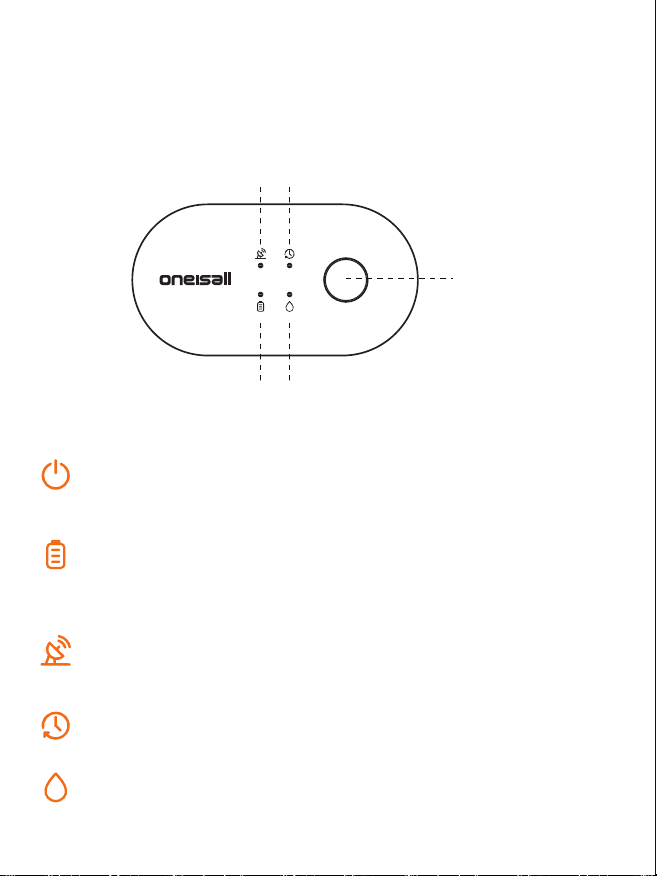
ON/OFF button
Long press it for 3 seconds to switch on/ off
Short press it to switch the water modes
Battery Power Indicator
LED Indicator Flashes Quickly: low battery
LED Indicator Glows Slowly: charging
LED Indicator On: fully charged
Motion Sensing Mode Indicator
LED Indicator On: water flows
LED Indicator Off: water stops
Intermittent Water Mode Indicator
LED Indicator On: this water mode is active
Low Water Level Indicator
Red LED Indicator On: water shortage
1. Controls and Indicators Introduction
ON/OFF button
Motion Sensing
Mode Indicator
Intermittent
Water Mode Indicator
Battery Power Indicator Low Water Level Indicator
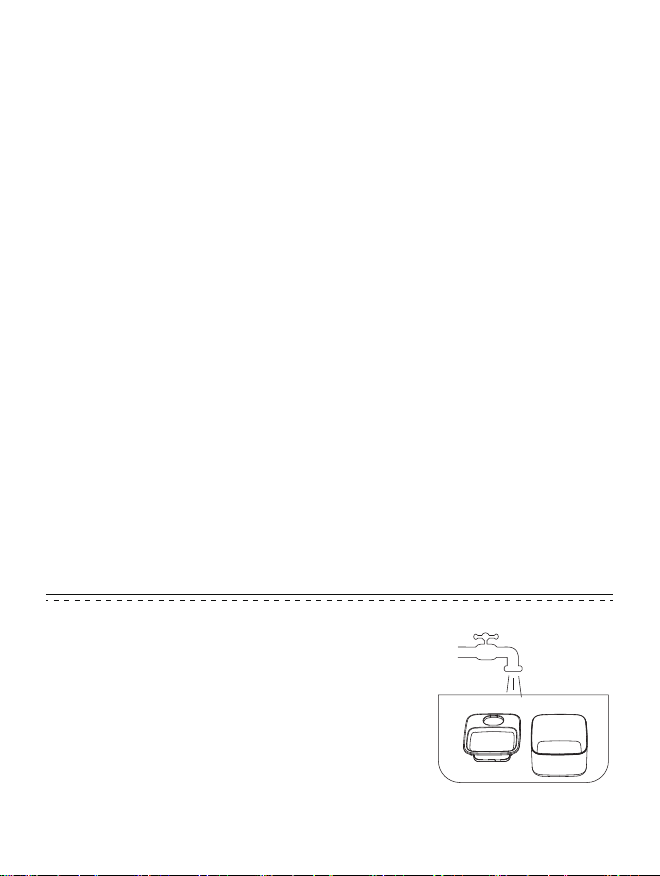
1. Daily Cleaning and Maintenance
Turn off the fountain and unplug the power
before cleaning.
Take off the Motor, water tray and filter.
Clean the water tank and water tray with water.
Rinse the bottom components of the Motor.
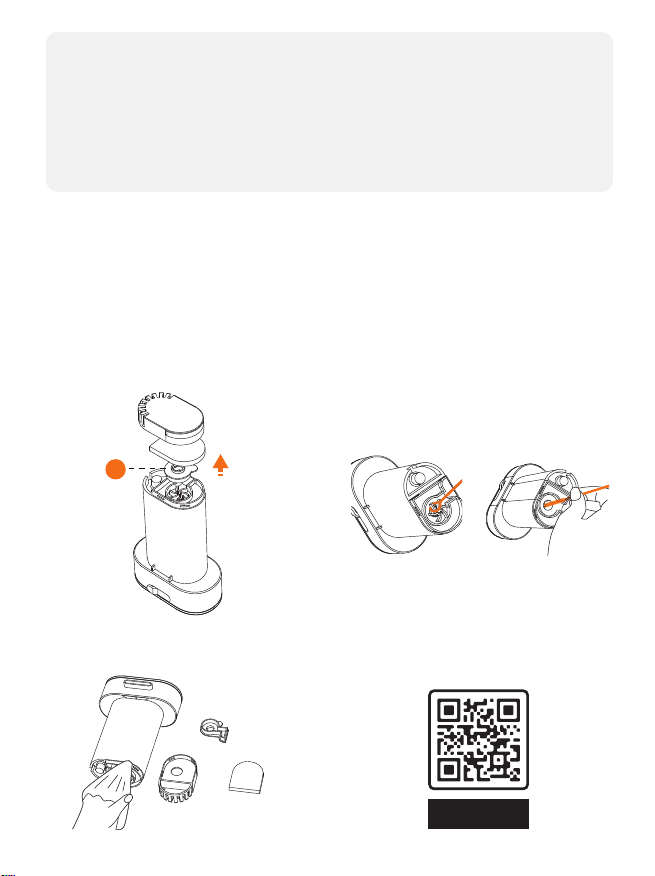
2.Cleaning the bottom components of the motor
To extend the lifespan of the fountain, it is recommended to clean the
bottom components of the Motor once a week.
3. Filter Replacement
① For the health of your pet, it is recommended to change the filter
every 15 days.
② Before replacing the filter, please soak the new filter in water for 5
minutes to remove the powder produced by the activated carbon
during transportation.
Do not immerse the control panel of the Motor into water, always
keep it dry.
After cleaning, wipe all components with a dry cloth and
assemble the fountain according to the assemble instruction.
NOTE:
② Use included brush to take off
the impeller, and clean the
inside components with water.
① Gently break to open then take
off the cover A and remove the
cover B.
③ Use a clean, dry cloth to wipe
the components before assem-
bling.
Please scan QR code to check the
video about how to clean the
bottom of the motor.
Maintenance
Tutorial
Installation
Tutorial
Clean and
maintenance
video
ON-D207
FCC WARNING
This device complies with part 15 of the FCC Rules. Operation is subject to
the following two conditions:
① this device may not cause harmful interference, and (2) this device
must accept any interference received, including interference that may
cause undesired operation.
Any changes or modifications not expressly approved by the party
responsible for compliance could void the user's authority to operate the
equipment.
NOTE: This equipment has been tested and found to comply with the limits
for a Class B digital device, pursuant to Part 15 of the FCC Rules. These limits
are designed to provide reasonable protection against harmful interfer-
ence in a residential installation. This equipment generates, uses and can
radiate radio frequency energy and, if not installed and used in accor-
dance with the instructions, may cause harmful interference to radio
communications.
However, there is no guarantee that interference will not occur in a
particular installation.
If this equipment does cause harmful interference to radio or television
reception, which can be determined by turning the equipment off and on,
the user is encouraged to try to correct the interference by one or more of
the following measures:
-- Reorient or relocate the receiving antenna.
-- Increase the separation between the equipment and receiver.
-- Connect the equipment into an outlet on a circuit different
from that to which the receiver is connected.
-- Consult the dealer or an experienced radio/TV technician for help.
B

Hale 2.2L
Wireless Water Fountain
User Manual
GPSR Product information
Troubleshooting
1.Where to find the replacement filter and pump.
Here is the replacement filter with ASIN: B0F8QVV6KC , and battery
module with ASIN: B0F8QTZYTS
2. No water flows and the working indicator light is not on.
Please check if the machine is in a shutdown state; or is the power
supply in normal connected.
3. Working indicator lights up but no water flows out.
Please check if the fountain is in a low water level.
4. Charging indicator doesn't work after plugging in the Type-C charger.
Check if the adapter is full connected with the outlet, ensure they are in
well connection.
5. How often should the filter be replaced?
It is recommended to replace the filter every 2-4 weeks and clean the
water dispenser every 1-2 weeks.
6. What happen if the noise increase and water output decrease?
Possible impeller blockage of the bottom Motor, please disassemble the
bottom component and thoroughly clean the impeller according to the
cleaning instruction.
Troubleshooting
Cleaning and Maintenance
@Oneisall Official
Warranty Information
WE ARE READY TO HELP
Oneisall offers a standard 2-year warranty. lf you have any issues with your
Oneisall product, please do not hesitate to contact us. Be sure to include
your proof of purchase, model number, and any relevant photos or videos
in your message to expedite the process.Our Oneisall support team is
available 7 days a week and will respond to your inquiry within 24 hours.
Thank you for choosing Oneisall.
Please note that the Oneisall warranty does not apply to used products or
purchases made from unauthorized sellers. lt's important to be aware that
the warranty also does not cover consumable parts, such as blades,
guards, filters, brushes, and similar items. These parts may require regular
replacement or maintenance.
support@oneisall.com
+1877-522-8578 (US) Mon-Fri 8am-5pm (PST)
www.oneisall.com
PW13 饮水机说明书
尺 寸 :1 0 5 x 1 4 0 m m
材 质 :1 2 8 g 双 铜
印刷:四色印刷 哑油
折叠方式:6折页
CMYK:0 63 100 00
Model:PW13
Product Name: Hale 2.2L Wireless Water Fountain
Brand: Oneisall
Product Model: PW13
Product Capacity: 2.2L
Battery Capacity: 4000mAh
Rated Voltage/Current: DC 5V 1A
Name: Apex CE Specialists GmbH
Add: Grafenberger Allee 277-287,40237 Düsseldorf,DE
Contact Person: Wells Yan
Tel:+353212066339
E-Mail: Info@apex-ce.de
Name: APEX CE SPECIALISTS LIMITED
Add: 6f East Union Street, Manchester, England, M16 9AE
Contact: Wells
Tel: +441616371080
E-Mail: Info@apex-ce.com
GPSR Product information
Business Name: Shenzhenbenfendianzishangwuyouxiangongsi
Manufacturer's address: CN, 518000, GuangDong Sheng, Shenzhen,
Longhua District, Minxin Community Bishui Longting Building 6 Unit, 7B
Tel: +86 185 6587 6424
E-Mail: topservice4u@hotmail.com
Made in China
Note:
1.Please charge with the 5V/1A adapter included.
105mm
140mm
1. Please use it indoors, keep it out of direct sunlight, and away from any
potential fire sources.
2. Please use the 5V/1A adapter provided with this product to charge the
water fountain. Using any other adapter may cause the machine to
malfunction or be damaged.
3. Before installing or replacing the filter, please rinse the filter by
soaking it in water for 5 minutes.
4. For first-time use, the motor will exhaust air for 30 seconds, which
may cause a decrease in water flow. Normal flow will resume soon.
5. In order to prevent pets from knocking over the water fountain, it is
recommended to place it against the wall or placed in a safe location.
6. Please replace the filter regularly and thoroughly clean the bottom
components of the motor.
7. When cleaning the whole machine, please disconnect the power
supply and turn off the product.
8. Do not rinse or soak the Motor with water; if accidentally getting wet
during the cleaning process, please dry it in time to avoid damage to
the equipment.
9. When going on vacation, ensure the water fountain is fully charged
and check the remaining water level.
Safety Warning Package List
Operating Instructions
Specifications
Product Name
Model
Product Size
Battery
Rated Voltage/Current
Capacity
Material
Hale 2.2L Wireless Water Fountain
PW13
6.49 x 6.49 x 5.39 inch
4000mAh
DC 5V 1A
2.2L
PP+ABS
Accessories
5V/1A Adapter User Manual Brush Filter x 1
59-Inch
Type-C Cord
Motor
Water Tray
Filter
Filter Box
Water Tank
Filter Sponge
Wireless
Pet Water Fou ntain
User Manual
Model:PW13
1.Fully Charged Before Using the New Fountain
Remove the waterproof silicone lid of the power port on the Motor, connect
the Type-C cable to the power port and the adapter(5V/1A adapter
included), then turn on the fountain.
The charging time is 5 hours.
2. Assemble the Fountain
Step 1:Rinse the water tray and
water tank.
Step 2: Fill in the water tank with
an appropriate amount of clean
water (Do not exceed the max
line).
Step 3: Install the filter to the filter
box;
(Please soak the filter by water for
5 minutes before install)
Fixed the water tray to the water
tank.
Step 4: Install the Motor and turn
on the fountain by long pressing
the on/off button for 3 seconds.
3. Operation Description
2. Power Supply Introduction
Plug-in Mode
Plug in the power cable, and the water fountain will automatically enter
continuous flow mode.
Just short press the ON/OFF button to switch to other water modes.
Wireless Mode
Built in a 4000mAh rechargeable battery, it can be used wirelessly after
charging.
3.Water Modes Introduction
Constant Mode
Plug in the power cable, and the water fountain will automatically enter
constant flow mode.
Please Note: continuous water mode only works when plugged in,
wireless mode does not support continuous water flow.
Motion Sensing Mode
Short press the on/off button to switch to motion sensing mode.
When pets move within 0.8 meter in front of the water fountain, it triggers
the sensor mode and water flows for 30 seconds.
Intermittent Mode
Short press on/off button to switch to intermittent water mode.
The water fountain flows 30 seconds every 2 hours.
ON/OFF button
Long press it for 3 seconds to switch on/ off
Short press it to switch the water modes
Battery Power Indicator
LED Indicator Flashes Quickly: low battery
LED Indicator Glows Slowly: charging
LED Indicator On: fully charged
Motion Sensing Mode Indicator
LED Indicator On: water flows
LED Indicator Off: water stops
Intermittent Water Mode Indicator
LED Indicator On: this water mode is active
Low Water Level Indicator
Red LED Indicator On: water shortage
1. Controls and Indicators Introduction
ON/OFF button
Motion Sensing
Mode Indicator
Intermittent
Water Mode Indicator
Battery Power Indicator Low Water Level Indicator
1. Daily Cleaning and Maintenance
Turn off the fountain and unplug the power
before cleaning.
Take off the Motor, water tray and filter.
Clean the water tank and water tray with water.
Rinse the bottom components of the Motor.
2.Cleaning the bottom components of the motor
To extend the lifespan of the fountain, it is recommended to clean the
bottom components of the Motor once a week.
3. Filter Replacement
① For the health of your pet, it is recommended to change the filter
every 15 days.
② Before replacing the filter, please soak the new filter in water for 5
minutes to remove the powder produced by the activated carbon
during transportation.
Do not immerse the control panel of the Motor into water, always
keep it dry.
After cleaning, wipe all components with a dry cloth and
assemble the fountain according to the assemble instruction.
NOTE:
② Use included brush to take off
the impeller, and clean the
inside components with water.
① Gently break to open then take
off the cover A and remove the
cover B.
③ Use a clean, dry cloth to wipe
the components before assem-
bling.
Please scan QR code to check the
video about how to clean the
bottom of the motor.
Maintenance
Tutorial
Installation
Tutorial
Clean and
maintenance
video
ON-D207
FCC WARNING
This device complies with part 15 of the FCC Rules. Operation is subject to
the following two conditions:
① this device may not cause harmful interference, and (2) this device
must accept any interference received, including interference that may
cause undesired operation.
Any changes or modifications not expressly approved by the party
responsible for compliance could void the user's authority to operate the
equipment.
NOTE: This equipment has been tested and found to comply with the limits
for a Class B digital device, pursuant to Part 15 of the FCC Rules. These limits
are designed to provide reasonable protection against harmful interfer-
ence in a residential installation. This equipment generates, uses and can
radiate radio frequency energy and, if not installed and used in accor-
dance with the instructions, may cause harmful interference to radio
communications.
However, there is no guarantee that interference will not occur in a
particular installation.
If this equipment does cause harmful interference to radio or television
reception, which can be determined by turning the equipment off and on,
the user is encouraged to try to correct the interference by one or more of
the following measures:
-- Reorient or relocate the receiving antenna.
-- Increase the separation between the equipment and receiver.
-- Connect the equipment into an outlet on a circuit different
from that to which the receiver is connected.
-- Consult the dealer or an experienced radio/TV technician for help.
B
Hale 2.2L
Wireless Water Fountain
User Manual
GPSR Product information
Troubleshooting
1.Where to find the replacement filter and pump.
Here is the replacement filter with ASIN: B0F8QVV6KC , and battery
module with ASIN: B0F8QTZYTS
2. No water flows and the working indicator light is not on.
Please check if the machine is in a shutdown state; or is the power
supply in normal connected.
3. Working indicator lights up but no water flows out.
Please check if the fountain is in a low water level.
4. Charging indicator doesn't work after plugging in the Type-C charger.
Check if the adapter is full connected with the outlet, ensure they are in
well connection.
5. How often should the filter be replaced?
It is recommended to replace the filter every 2-4 weeks and clean the
water dispenser every 1-2 weeks.
6. What happen if the noise increase and water output decrease?
Possible impeller blockage of the bottom Motor, please disassemble the
bottom component and thoroughly clean the impeller according to the
cleaning instruction.
Troubleshooting
Cleaning and Maintenance
@Oneisall Official
Warranty Information
WE ARE READY TO HELP
Oneisall offers a standard 2-year warranty. lf you have any issues with your
Oneisall product, please do not hesitate to contact us. Be sure to include
your proof of purchase, model number, and any relevant photos or videos
in your message to expedite the process.Our Oneisall support team is
available 7 days a week and will respond to your inquiry within 24 hours.
Thank you for choosing Oneisall.
Please note that the Oneisall warranty does not apply to used products or
purchases made from unauthorized sellers. lt's important to be aware that
the warranty also does not cover consumable parts, such as blades,
guards, filters, brushes, and similar items. These parts may require regular
replacement or maintenance.
support@oneisall.com
+1877-522-8578 (US) Mon-Fri 8am-5pm (PST)
www.oneisall.com
PW13 饮水机说明书
尺 寸 :1 0 5 x 1 4 0 m m
材 质 :1 2 8 g 双 铜
印刷:四色印刷 哑油
折叠方式:6折页
CMYK:0 63 100 00
Model:PW13
Product Name: Hale 2.2L Wireless Water Fountain
Brand: Oneisall
Product Model: PW13
Product Capacity: 2.2L
Battery Capacity: 4000mAh
Rated Voltage/Current: DC 5V 1A
Name: Apex CE Specialists GmbH
Add: Grafenberger Allee 277-287,40237 Düsseldorf,DE
Contact Person: Wells Yan
Tel:+353212066339
E-Mail: Info@apex-ce.de
Name: APEX CE SPECIALISTS LIMITED
Add: 6f East Union Street, Manchester, England, M16 9AE
Contact: Wells
Tel: +441616371080
E-Mail: Info@apex-ce.com
GPSR Product information
Business Name: Shenzhenbenfendianzishangwuyouxiangongsi
Manufacturer's address: CN, 518000, GuangDong Sheng, Shenzhen,
Longhua District, Minxin Community Bishui Longting Building 6 Unit, 7B
Tel: +86 185 6587 6424
E-Mail: topservice4u@hotmail.com
Made in China
Note:
1.Please charge with the 5V/1A adapter included.
105mm
140mm
1. Please use it indoors, keep it out of direct sunlight, and away from any
potential fire sources.
2. Please use the 5V/1A adapter provided with this product to charge the
water fountain. Using any other adapter may cause the machine to
malfunction or be damaged.
3. Before installing or replacing the filter, please rinse the filter by
soaking it in water for 5 minutes.
4. For first-time use, the motor will exhaust air for 30 seconds, which
may cause a decrease in water flow. Normal flow will resume soon.
5. In order to prevent pets from knocking over the water fountain, it is
recommended to place it against the wall or placed in a safe location.
6. Please replace the filter regularly and thoroughly clean the bottom
components of the motor.
7. When cleaning the whole machine, please disconnect the power
supply and turn off the product.
8. Do not rinse or soak the Motor with water; if accidentally getting wet
during the cleaning process, please dry it in time to avoid damage to
the equipment.
9. When going on vacation, ensure the water fountain is fully charged
and check the remaining water level.
Safety Warning Package List
Operating Instructions
Specifications
Product Name
Model
Product Size
Battery
Rated Voltage/Current
Capacity
Material
Hale 2.2L Wireless Water Fountain
PW13
6.49 x 6.49 x 5.39 inch
4000mAh
DC 5V 1A
2.2L
PP+ABS
Accessories
5V/1A Adapter User Manual Brush Filter x 1
59-Inch
Type-C Cord
Motor
Water Tray
Filter
Filter Box
Water Tank
Filter Sponge
Wireless
Pet Water Fou ntain
User Manual
Model:PW13
1.Fully Charged Before Using the New Fountain
Remove the waterproof silicone lid of the power port on the Motor, connect
the Type-C cable to the power port and the adapter(5V/1A adapter
included), then turn on the fountain.
The charging time is 5 hours.
2. Assemble the Fountain
Step 1:Rinse the water tray and
water tank.
Step 2: Fill in the water tank with
an appropriate amount of clean
water (Do not exceed the max
line).
Step 3: Install the filter to the filter
box;
(Please soak the filter by water for
5 minutes before install)
Fixed the water tray to the water
tank.
Step 4: Install the Motor and turn
on the fountain by long pressing
the on/off button for 3 seconds.
3. Operation Description
2. Power Supply Introduction
Plug-in Mode
Plug in the power cable, and the water fountain will automatically enter
continuous flow mode.
Just short press the ON/OFF button to switch to other water modes.
Wireless Mode
Built in a 4000mAh rechargeable battery, it can be used wirelessly after
charging.
3.Water Modes Introduction
Constant Mode
Plug in the power cable, and the water fountain will automatically enter
constant flow mode.
Please Note: continuous water mode only works when plugged in,
wireless mode does not support continuous water flow.
Motion Sensing Mode
Short press the on/off button to switch to motion sensing mode.
When pets move within 0.8 meter in front of the water fountain, it triggers
the sensor mode and water flows for 30 seconds.
Intermittent Mode
Short press on/off button to switch to intermittent water mode.
The water fountain flows 30 seconds every 2 hours.
ON/OFF button
Long press it for 3 seconds to switch on/ off
Short press it to switch the water modes
Battery Power Indicator
LED Indicator Flashes Quickly: low battery
LED Indicator Glows Slowly: charging
LED Indicator On: fully charged
Motion Sensing Mode Indicator
LED Indicator On: water flows
LED Indicator Off: water stops
Intermittent Water Mode Indicator
LED Indicator On: this water mode is active
Low Water Level Indicator
Red LED Indicator On: water shortage
1. Controls and Indicators Introduction
ON/OFF button
Motion Sensing
Mode Indicator
Intermittent
Water Mode Indicator
Battery Power Indicator Low Water Level Indicator
1. Daily Cleaning and Maintenance
Turn off the fountain and unplug the power
before cleaning.
Take off the Motor, water tray and filter.
Clean the water tank and water tray with water.
Rinse the bottom components of the Motor.
2.Cleaning the bottom components of the motor
To extend the lifespan of the fountain, it is recommended to clean the
bottom components of the Motor once a week.
3. Filter Replacement
① For the health of your pet, it is recommended to change the filter
every 15 days.
② Before replacing the filter, please soak the new filter in water for 5
minutes to remove the powder produced by the activated carbon
during transportation.
Do not immerse the control panel of the Motor into water, always
keep it dry.
After cleaning, wipe all components with a dry cloth and
assemble the fountain according to the assemble instruction.
NOTE:
② Use included brush to take off
the impeller, and clean the
inside components with water.
① Gently break to open then take
off the cover A and remove the
cover B.
③ Use a clean, dry cloth to wipe
the components before assem-
bling.
Please scan QR code to check the
video about how to clean the
bottom of the motor.
Maintenance
Tutorial
Installation
Tutorial
Clean and
maintenance
video
ON-D207
FCC WARNING
This device complies with part 15 of the FCC Rules. Operation is subject to
the following two conditions:
① this device may not cause harmful interference, and (2) this device
must accept any interference received, including interference that may
cause undesired operation.
Any changes or modifications not expressly approved by the party
responsible for compliance could void the user's authority to operate the
equipment.
NOTE: This equipment has been tested and found to comply with the limits
for a Class B digital device, pursuant to Part 15 of the FCC Rules. These limits
are designed to provide reasonable protection against harmful interfer-
ence in a residential installation. This equipment generates, uses and can
radiate radio frequency energy and, if not installed and used in accor-
dance with the instructions, may cause harmful interference to radio
communications.
However, there is no guarantee that interference will not occur in a
particular installation.
If this equipment does cause harmful interference to radio or television
reception, which can be determined by turning the equipment off and on,
the user is encouraged to try to correct the interference by one or more of
the following measures:
-- Reorient or relocate the receiving antenna.
-- Increase the separation between the equipment and receiver.
-- Connect the equipment into an outlet on a circuit different
from that to which the receiver is connected.
-- Consult the dealer or an experienced radio/TV technician for help.
B
Hale 2.2L
Wireless Water Fountain
User Manual
GPSR Product information
Troubleshooting
1.Where to find the replacement filter and pump.
Here is the replacement filter with ASIN: B0F8QVV6KC , and battery
module with ASIN: B0F8QTZYTS
2. No water flows and the working indicator light is not on.
Please check if the machine is in a shutdown state; or is the power
supply in normal connected.
3. Working indicator lights up but no water flows out.
Please check if the fountain is in a low water level.
4. Charging indicator doesn't work after plugging in the Type-C charger.
Check if the adapter is full connected with the outlet, ensure they are in
well connection.
5. How often should the filter be replaced?
It is recommended to replace the filter every 2-4 weeks and clean the
water dispenser every 1-2 weeks.
6. What happen if the noise increase and water output decrease?
Possible impeller blockage of the bottom Motor, please disassemble the
bottom component and thoroughly clean the impeller according to the
cleaning instruction.
Troubleshooting
Cleaning and Maintenance
@Oneisall Official
Warranty Information
WE ARE READY TO HELP
Oneisall offers a standard 2-year warranty. lf you have any issues with your
Oneisall product, please do not hesitate to contact us. Be sure to include
your proof of purchase, model number, and any relevant photos or videos
in your message to expedite the process.Our Oneisall support team is
available 7 days a week and will respond to your inquiry within 24 hours.
Thank you for choosing Oneisall.
Please note that the Oneisall warranty does not apply to used products or
purchases made from unauthorized sellers. lt's important to be aware that
the warranty also does not cover consumable parts, such as blades,
guards, filters, brushes, and similar items. These parts may require regular
replacement or maintenance.
support@oneisall.com
+1877-522-8578 (US) Mon-Fri 8am-5pm (PST)
www.oneisall.com
PW13 饮水机说明书
尺 寸 :1 0 5 x 1 4 0 m m
材 质 :1 2 8 g 双 铜
印刷:四色印刷 哑油
折叠方式:6折页
CMYK:0 63 100 00
Model:PW13
Product Name: Hale 2.2L Wireless Water Fountain
Brand: Oneisall
Product Model: PW13
Product Capacity: 2.2L
Battery Capacity: 4000mAh
Rated Voltage/Current: DC 5V 1A
Name: Apex CE Specialists GmbH
Add: Grafenberger Allee 277-287,40237 Düsseldorf,DE
Contact Person: Wells Yan
Tel:+353212066339
E-Mail: Info@apex-ce.de
Name: APEX CE SPECIALISTS LIMITED
Add: 6f East Union Street, Manchester, England, M16 9AE
Contact: Wells
Tel: +441616371080
E-Mail: Info@apex-ce.com
GPSR Product information
Business Name: Shenzhenbenfendianzishangwuyouxiangongsi
Manufacturer's address: CN, 518000, GuangDong Sheng, Shenzhen,
Longhua District, Minxin Community Bishui Longting Building 6 Unit, 7B
Tel: +86 185 6587 6424
E-Mail: topservice4u@hotmail.com
Made in China
Note:
1.Please charge with the 5V/1A adapter included.
105mm
140mm
1. Please use it indoors, keep it out of direct sunlight, and away from any
potential fire sources.
2. Please use the 5V/1A adapter provided with this product to charge the
water fountain. Using any other adapter may cause the machine to
malfunction or be damaged.
3. Before installing or replacing the filter, please rinse the filter by
soaking it in water for 5 minutes.
4. For first-time use, the motor will exhaust air for 30 seconds, which
may cause a decrease in water flow. Normal flow will resume soon.
5. In order to prevent pets from knocking over the water fountain, it is
recommended to place it against the wall or placed in a safe location.
6. Please replace the filter regularly and thoroughly clean the bottom
components of the motor.
7. When cleaning the whole machine, please disconnect the power
supply and turn off the product.
8. Do not rinse or soak the Motor with water; if accidentally getting wet
during the cleaning process, please dry it in time to avoid damage to
the equipment.
9. When going on vacation, ensure the water fountain is fully charged
and check the remaining water level.
Safety Warning Package List
Operating Instructions
Specifications
Product Name
Model
Product Size
Battery
Rated Voltage/Current
Capacity
Material
Hale 2.2L Wireless Water Fountain
PW13
6.49 x 6.49 x 5.39 inch
4000mAh
DC 5V 1A
2.2L
PP+ABS
Accessories
5V/1A Adapter User Manual Brush Filter x 1
59-Inch
Type-C Cord
Motor
Water Tray
Filter
Filter Box
Water Tank
Filter Sponge
Wireless
Pet Water Fou ntain
User Manual
Model:PW13
1.Fully Charged Before Using the New Fountain
Remove the waterproof silicone lid of the power port on the Motor, connect
the Type-C cable to the power port and the adapter(5V/1A adapter
included), then turn on the fountain.
The charging time is 5 hours.
2. Assemble the Fountain
Step 1:Rinse the water tray and
water tank.
Step 2: Fill in the water tank with
an appropriate amount of clean
water (Do not exceed the max
line).
Step 3: Install the filter to the filter
box;
(Please soak the filter by water for
5 minutes before install)
Fixed the water tray to the water
tank.
Step 4: Install the Motor and turn
on the fountain by long pressing
the on/off button for 3 seconds.
3. Operation Description
2. Power Supply Introduction
Plug-in Mode
Plug in the power cable, and the water fountain will automatically enter
continuous flow mode.
Just short press the ON/OFF button to switch to other water modes.
Wireless Mode
Built in a 4000mAh rechargeable battery, it can be used wirelessly after
charging.
3.Water Modes Introduction
Constant Mode
Plug in the power cable, and the water fountain will automatically enter
constant flow mode.
Please Note: continuous water mode only works when plugged in,
wireless mode does not support continuous water flow.
Motion Sensing Mode
Short press the on/off button to switch to motion sensing mode.
When pets move within 0.8 meter in front of the water fountain, it triggers
the sensor mode and water flows for 30 seconds.
Intermittent Mode
Short press on/off button to switch to intermittent water mode.
The water fountain flows 30 seconds every 2 hours.
ON/OFF button
Long press it for 3 seconds to switch on/ off
Short press it to switch the water modes
Battery Power Indicator
LED Indicator Flashes Quickly: low battery
LED Indicator Glows Slowly: charging
LED Indicator On: fully charged
Motion Sensing Mode Indicator
LED Indicator On: water flows
LED Indicator Off: water stops
Intermittent Water Mode Indicator
LED Indicator On: this water mode is active
Low Water Level Indicator
Red LED Indicator On: water shortage
1. Controls and Indicators Introduction
ON/OFF button
Motion Sensing
Mode Indicator
Intermittent
Water Mode Indicator
Battery Power Indicator Low Water Level Indicator
1. Daily Cleaning and Maintenance
Turn off the fountain and unplug the power
before cleaning.
Take off the Motor, water tray and filter.
Clean the water tank and water tray with water.
Rinse the bottom components of the Motor.
2.Cleaning the bottom components of the motor
To extend the lifespan of the fountain, it is recommended to clean the
bottom components of the Motor once a week.
3. Filter Replacement
① For the health of your pet, it is recommended to change the filter
every 15 days.
② Before replacing the filter, please soak the new filter in water for 5
minutes to remove the powder produced by the activated carbon
during transportation.
Do not immerse the control panel of the Motor into water, always
keep it dry.
After cleaning, wipe all components with a dry cloth and
assemble the fountain according to the assemble instruction.
NOTE:
② Use included brush to take off
the impeller, and clean the
inside components with water.
① Gently break to open then take
off the cover A and remove the
cover B.
③ Use a clean, dry cloth to wipe
the components before assem-
bling.
Please scan QR code to check the
video about how to clean the
bottom of the motor.
Maintenance
Tutorial
Installation
Tutorial
Clean and
maintenance
video
ON-D207
FCC WARNING
This device complies with part 15 of the FCC Rules. Operation is subject to
the following two conditions:
① this device may not cause harmful interference, and (2) this device
must accept any interference received, including interference that may
cause undesired operation.
Any changes or modifications not expressly approved by the party
responsible for compliance could void the user's authority to operate the
equipment.
NOTE: This equipment has been tested and found to comply with the limits
for a Class B digital device, pursuant to Part 15 of the FCC Rules. These limits
are designed to provide reasonable protection against harmful interfer-
ence in a residential installation. This equipment generates, uses and can
radiate radio frequency energy and, if not installed and used in accor-
dance with the instructions, may cause harmful interference to radio
communications.
However, there is no guarantee that interference will not occur in a
particular installation.
If this equipment does cause harmful interference to radio or television
reception, which can be determined by turning the equipment off and on,
the user is encouraged to try to correct the interference by one or more of
the following measures:
-- Reorient or relocate the receiving antenna.
-- Increase the separation between the equipment and receiver.
-- Connect the equipment into an outlet on a circuit different
from that to which the receiver is connected.
-- Consult the dealer or an experienced radio/TV technician for help.
B
Hale 2.2L
Wireless Water Fountain
User Manual
GPSR Product information
Troubleshooting
1.Where to find the replacement filter and pump.
Here is the replacement filter with ASIN: B0F8QVV6KC , and battery
module with ASIN: B0F8QTZYTS
2. No water flows and the working indicator light is not on.
Please check if the machine is in a shutdown state; or is the power
supply in normal connected.
3. Working indicator lights up but no water flows out.
Please check if the fountain is in a low water level.
4. Charging indicator doesn't work after plugging in the Type-C charger.
Check if the adapter is full connected with the outlet, ensure they are in
well connection.
5. How often should the filter be replaced?
It is recommended to replace the filter every 2-4 weeks and clean the
water dispenser every 1-2 weeks.
6. What happen if the noise increase and water output decrease?
Possible impeller blockage of the bottom Motor, please disassemble the
bottom component and thoroughly clean the impeller according to the
cleaning instruction.
Troubleshooting
Cleaning and Maintenance
@Oneisall Official
Warranty Information
WE ARE READY TO HELP
Oneisall offers a standard 2-year warranty. lf you have any issues with your
Oneisall product, please do not hesitate to contact us. Be sure to include
your proof of purchase, model number, and any relevant photos or videos
in your message to expedite the process.Our Oneisall support team is
available 7 days a week and will respond to your inquiry within 24 hours.
Thank you for choosing Oneisall.
Please note that the Oneisall warranty does not apply to used products or
purchases made from unauthorized sellers. lt's important to be aware that
the warranty also does not cover consumable parts, such as blades,
guards, filters, brushes, and similar items. These parts may require regular
replacement or maintenance.
support@oneisall.com
+1877-522-8578 (US) Mon-Fri 8am-5pm (PST)
www.oneisall.com
PW13 饮水机说明书
尺 寸 :1 0 5 x 1 4 0 m m
材 质 :1 2 8 g 双 铜
印刷:四色印刷 哑油
折叠方式:6折页
CMYK:0 63 100 00
Model:PW13
Product Name: Hale 2.2L Wireless Water Fountain
Brand: Oneisall
Product Model: PW13
Product Capacity: 2.2L
Battery Capacity: 4000mAh
Rated Voltage/Current: DC 5V 1A
Name: Apex CE Specialists GmbH
Add: Grafenberger Allee 277-287,40237 Düsseldorf,DE
Contact Person: Wells Yan
Tel:+353212066339
E-Mail: Info@apex-ce.de
Name: APEX CE SPECIALISTS LIMITED
Add: 6f East Union Street, Manchester, England, M16 9AE
Contact: Wells
Tel: +441616371080
E-Mail: Info@apex-ce.com
GPSR Product information
Business Name: Shenzhenbenfendianzishangwuyouxiangongsi
Manufacturer's address: CN, 518000, GuangDong Sheng, Shenzhen,
Longhua District, Minxin Community Bishui Longting Building 6 Unit, 7B
Tel: +86 185 6587 6424
E-Mail: topservice4u@hotmail.com
Made in China
Note:
1.Please charge with the 5V/1A adapter included.
105mm
140mm
1. Please use it indoors, keep it out of direct sunlight, and away from any
potential fire sources.
2. Please use the 5V/1A adapter provided with this product to charge the
water fountain. Using any other adapter may cause the machine to
malfunction or be damaged.
3. Before installing or replacing the filter, please rinse the filter by
soaking it in water for 5 minutes.
4. For first-time use, the motor will exhaust air for 30 seconds, which
may cause a decrease in water flow. Normal flow will resume soon.
5. In order to prevent pets from knocking over the water fountain, it is
recommended to place it against the wall or placed in a safe location.
6. Please replace the filter regularly and thoroughly clean the bottom
components of the motor.
7. When cleaning the whole machine, please disconnect the power
supply and turn off the product.
8. Do not rinse or soak the Motor with water; if accidentally getting wet
during the cleaning process, please dry it in time to avoid damage to
the equipment.
9. When going on vacation, ensure the water fountain is fully charged
and check the remaining water level.
Safety Warning Package List
Operating Instructions
Specifications
Product Name
Model
Product Size
Battery
Rated Voltage/Current
Capacity
Material
Hale 2.2L Wireless Water Fountain
PW13
6.49 x 6.49 x 5.39 inch
4000mAh
DC 5V 1A
2.2L
PP+ABS
Accessories
5V/1A Adapter User Manual Brush Filter x 1
59-Inch
Type-C Cord
Motor
Water Tray
Filter
Filter Box
Water Tank
Filter Sponge
Wireless
Pet Water Fou ntain
User Manual
Model:PW13
1.Fully Charged Before Using the New Fountain
Remove the waterproof silicone lid of the power port on the Motor, connect
the Type-C cable to the power port and the adapter(5V/1A adapter
included), then turn on the fountain.
The charging time is 5 hours.
2. Assemble the Fountain
Step 1:Rinse the water tray and
water tank.
Step 2: Fill in the water tank with
an appropriate amount of clean
water (Do not exceed the max
line).
Step 3: Install the filter to the filter
box;
(Please soak the filter by water for
5 minutes before install)
Fixed the water tray to the water
tank.
Step 4: Install the Motor and turn
on the fountain by long pressing
the on/off button for 3 seconds.
3. Operation Description
2. Power Supply Introduction
Plug-in Mode
Plug in the power cable, and the water fountain will automatically enter
continuous flow mode.
Just short press the ON/OFF button to switch to other water modes.
Wireless Mode
Built in a 4000mAh rechargeable battery, it can be used wirelessly after
charging.
3.Water Modes Introduction
Constant Mode
Plug in the power cable, and the water fountain will automatically enter
constant flow mode.
Please Note: continuous water mode only works when plugged in,
wireless mode does not support continuous water flow.
Motion Sensing Mode
Short press the on/off button to switch to motion sensing mode.
When pets move within 0.8 meter in front of the water fountain, it triggers
the sensor mode and water flows for 30 seconds.
Intermittent Mode
Short press on/off button to switch to intermittent water mode.
The water fountain flows 30 seconds every 2 hours.
ON/OFF button
Long press it for 3 seconds to switch on/ off
Short press it to switch the water modes
Battery Power Indicator
LED Indicator Flashes Quickly: low battery
LED Indicator Glows Slowly: charging
LED Indicator On: fully charged
Motion Sensing Mode Indicator
LED Indicator On: water flows
LED Indicator Off: water stops
Intermittent Water Mode Indicator
LED Indicator On: this water mode is active
Low Water Level Indicator
Red LED Indicator On: water shortage
1. Controls and Indicators Introduction
ON/OFF button
Motion Sensing
Mode Indicator
Intermittent
Water Mode Indicator
Battery Power Indicator Low Water Level Indicator
1. Daily Cleaning and Maintenance
Turn off the fountain and unplug the power
before cleaning.
Take off the Motor, water tray and filter.
Clean the water tank and water tray with water.
Rinse the bottom components of the Motor.
2.Cleaning the bottom components of the motor
To extend the lifespan of the fountain, it is recommended to clean the
bottom components of the Motor once a week.
3. Filter Replacement
① For the health of your pet, it is recommended to change the filter
every 15 days.
② Before replacing the filter, please soak the new filter in water for 5
minutes to remove the powder produced by the activated carbon
during transportation.
Do not immerse the control panel of the Motor into water, always
keep it dry.
After cleaning, wipe all components with a dry cloth and
assemble the fountain according to the assemble instruction.
NOTE:
② Use included brush to take off
the impeller, and clean the
inside components with water.
① Gently break to open then take
off the cover A and remove the
cover B.
③ Use a clean, dry cloth to wipe
the components before assem-
bling.
Please scan QR code to check the
video about how to clean the
bottom of the motor.
Maintenance
Tutorial
Installation
Tutorial
Clean and
maintenance
video
ON-D207
FCC WARNING
This device complies with part 15 of the FCC Rules. Operation is subject to
the following two conditions:
① this device may not cause harmful interference, and (2) this device
must accept any interference received, including interference that may
cause undesired operation.
Any changes or modifications not expressly approved by the party
responsible for compliance could void the user's authority to operate the
equipment.
NOTE: This equipment has been tested and found to comply with the limits
for a Class B digital device, pursuant to Part 15 of the FCC Rules. These limits
are designed to provide reasonable protection against harmful interfer-
ence in a residential installation. This equipment generates, uses and can
radiate radio frequency energy and, if not installed and used in accor-
dance with the instructions, may cause harmful interference to radio
communications.
However, there is no guarantee that interference will not occur in a
particular installation.
If this equipment does cause harmful interference to radio or television
reception, which can be determined by turning the equipment off and on,
the user is encouraged to try to correct the interference by one or more of
the following measures:
-- Reorient or relocate the receiving antenna.
-- Increase the separation between the equipment and receiver.
-- Connect the equipment into an outlet on a circuit different
from that to which the receiver is connected.
-- Consult the dealer or an experienced radio/TV technician for help.
B
Hale 2.2L
Wireless Water Fountain
User Manual
GPSR Product information
Troubleshooting
1.Where to find the replacement filter and pump.
Here is the replacement filter with ASIN: B0F8QVV6KC , and battery
module with ASIN: B0F8QTZYTS
2. No water flows and the working indicator light is not on.
Please check if the machine is in a shutdown state; or is the power
supply in normal connected.
3. Working indicator lights up but no water flows out.
Please check if the fountain is in a low water level.
4. Charging indicator doesn't work after plugging in the Type-C charger.
Check if the adapter is full connected with the outlet, ensure they are in
well connection.
5. How often should the filter be replaced?
It is recommended to replace the filter every 2-4 weeks and clean the
water dispenser every 1-2 weeks.
6. What happen if the noise increase and water output decrease?
Possible impeller blockage of the bottom Motor, please disassemble the
bottom component and thoroughly clean the impeller according to the
cleaning instruction.
Troubleshooting
Cleaning and Maintenance
@Oneisall Official
Warranty Information
WE ARE READY TO HELP
Oneisall offers a standard 2-year warranty. lf you have any issues with your
Oneisall product, please do not hesitate to contact us. Be sure to include
your proof of purchase, model number, and any relevant photos or videos
in your message to expedite the process.Our Oneisall support team is
available 7 days a week and will respond to your inquiry within 24 hours.
Thank you for choosing Oneisall.
Please note that the Oneisall warranty does not apply to used products or
purchases made from unauthorized sellers. lt's important to be aware that
the warranty also does not cover consumable parts, such as blades,
guards, filters, brushes, and similar items. These parts may require regular
replacement or maintenance.
support@oneisall.com
+1877-522-8578 (US) Mon-Fri 8am-5pm (PST)
www.oneisall.com
PW13 饮水机说明书
尺 寸 :1 0 5 x 1 4 0 m m
材 质 :1 2 8 g 双 铜
印刷:四色印刷 哑油
折叠方式:6折页
CMYK:0 63 100 00
Model:PW13
Product Name: Hale 2.2L Wireless Water Fountain
Brand: Oneisall
Product Model: PW13
Product Capacity: 2.2L
Battery Capacity: 4000mAh
Rated Voltage/Current: DC 5V 1A
Name: Apex CE Specialists GmbH
Add: Grafenberger Allee 277-287,40237 Düsseldorf,DE
Contact Person: Wells Yan
Tel:+353212066339
E-Mail: Info@apex-ce.de
Name: APEX CE SPECIALISTS LIMITED
Add: 6f East Union Street, Manchester, England, M16 9AE
Contact: Wells
Tel: +441616371080
E-Mail: Info@apex-ce.com
GPSR Product information
Business Name: Shenzhenbenfendianzishangwuyouxiangongsi
Manufacturer's address: CN, 518000, GuangDong Sheng, Shenzhen,
Longhua District, Minxin Community Bishui Longting Building 6 Unit, 7B
Tel: +86 185 6587 6424
E-Mail: topservice4u@hotmail.com
Made in China
Note:
1.Please charge with the 5V/1A adapter included.
105mm
140mm
1. Please use it indoors, keep it out of direct sunlight, and away from any
potential fire sources.
2. Please use the 5V/1A adapter provided with this product to charge the
water fountain. Using any other adapter may cause the machine to
malfunction or be damaged.
3. Before installing or replacing the filter, please rinse the filter by
soaking it in water for 5 minutes.
4. For first-time use, the motor will exhaust air for 30 seconds, which
may cause a decrease in water flow. Normal flow will resume soon.
5. In order to prevent pets from knocking over the water fountain, it is
recommended to place it against the wall or placed in a safe location.
6. Please replace the filter regularly and thoroughly clean the bottom
components of the motor.
7. When cleaning the whole machine, please disconnect the power
supply and turn off the product.
8. Do not rinse or soak the Motor with water; if accidentally getting wet
during the cleaning process, please dry it in time to avoid damage to
the equipment.
9. When going on vacation, ensure the water fountain is fully charged
and check the remaining water level.
Safety Warning Package List
Operating Instructions
Specifications
Product Name
Model
Product Size
Battery
Rated Voltage/Current
Capacity
Material
Hale 2.2L Wireless Water Fountain
PW13
6.49 x 6.49 x 5.39 inch
4000mAh
DC 5V 1A
2.2L
PP+ABS
Accessories
5V/1A Adapter User Manual Brush Filter x 1
59-Inch
Type-C Cord
Motor
Water Tray
Filter
Filter Box
Water Tank
Filter Sponge
Wireless
Pet Water Fou ntain
User Manual
Model:PW13
1.Fully Charged Before Using the New Fountain
Remove the waterproof silicone lid of the power port on the Motor, connect
the Type-C cable to the power port and the adapter(5V/1A adapter
included), then turn on the fountain.
The charging time is 5 hours.
2. Assemble the Fountain
Step 1:Rinse the water tray and
water tank.
Step 2: Fill in the water tank with
an appropriate amount of clean
water (Do not exceed the max
line).
Step 3: Install the filter to the filter
box;
(Please soak the filter by water for
5 minutes before install)
Fixed the water tray to the water
tank.
Step 4: Install the Motor and turn
on the fountain by long pressing
the on/off button for 3 seconds.
3. Operation Description
2. Power Supply Introduction
Plug-in Mode
Plug in the power cable, and the water fountain will automatically enter
continuous flow mode.
Just short press the ON/OFF button to switch to other water modes.
Wireless Mode
Built in a 4000mAh rechargeable battery, it can be used wirelessly after
charging.
3.Water Modes Introduction
Constant Mode
Plug in the power cable, and the water fountain will automatically enter
constant flow mode.
Please Note: continuous water mode only works when plugged in,
wireless mode does not support continuous water flow.
Motion Sensing Mode
Short press the on/off button to switch to motion sensing mode.
When pets move within 0.8 meter in front of the water fountain, it triggers
the sensor mode and water flows for 30 seconds.
Intermittent Mode
Short press on/off button to switch to intermittent water mode.
The water fountain flows 30 seconds every 2 hours.
ON/OFF button
Long press it for 3 seconds to switch on/ off
Short press it to switch the water modes
Battery Power Indicator
LED Indicator Flashes Quickly: low battery
LED Indicator Glows Slowly: charging
LED Indicator On: fully charged
Motion Sensing Mode Indicator
LED Indicator On: water flows
LED Indicator Off: water stops
Intermittent Water Mode Indicator
LED Indicator On: this water mode is active
Low Water Level Indicator
Red LED Indicator On: water shortage
1. Controls and Indicators Introduction
ON/OFF button
Motion Sensing
Mode Indicator
Intermittent
Water Mode Indicator
Battery Power Indicator Low Water Level Indicator
1. Daily Cleaning and Maintenance
Turn off the fountain and unplug the power
before cleaning.
Take off the Motor, water tray and filter.
Clean the water tank and water tray with water.
Rinse the bottom components of the Motor.
2.Cleaning the bottom components of the motor
To extend the lifespan of the fountain, it is recommended to clean the
bottom components of the Motor once a week.
3. Filter Replacement
① For the health of your pet, it is recommended to change the filter
every 15 days.
② Before replacing the filter, please soak the new filter in water for 5
minutes to remove the powder produced by the activated carbon
during transportation.
Do not immerse the control panel of the Motor into water, always
keep it dry.
After cleaning, wipe all components with a dry cloth and
assemble the fountain according to the assemble instruction.
NOTE:
② Use included brush to take off
the impeller, and clean the
inside components with water.
① Gently break to open then take
off the cover A and remove the
cover B.
③ Use a clean, dry cloth to wipe
the components before assem-
bling.
Please scan QR code to check the
video about how to clean the
bottom of the motor.
Maintenance
Tutorial
Installation
Tutorial
Clean and
maintenance
video
ON-D207
FCC WARNING
This device complies with part 15 of the FCC Rules. Operation is subject to
the following two conditions:
① this device may not cause harmful interference, and (2) this device
must accept any interference received, including interference that may
cause undesired operation.
Any changes or modifications not expressly approved by the party
responsible for compliance could void the user's authority to operate the
equipment.
NOTE: This equipment has been tested and found to comply with the limits
for a Class B digital device, pursuant to Part 15 of the FCC Rules. These limits
are designed to provide reasonable protection against harmful interfer-
ence in a residential installation. This equipment generates, uses and can
radiate radio frequency energy and, if not installed and used in accor-
dance with the instructions, may cause harmful interference to radio
communications.
However, there is no guarantee that interference will not occur in a
particular installation.
If this equipment does cause harmful interference to radio or television
reception, which can be determined by turning the equipment off and on,
the user is encouraged to try to correct the interference by one or more of
the following measures:
-- Reorient or relocate the receiving antenna.
-- Increase the separation between the equipment and receiver.
-- Connect the equipment into an outlet on a circuit different
from that to which the receiver is connected.
-- Consult the dealer or an experienced radio/TV technician for help.
B
Hale 2.2L
Wireless Water Fountain
User Manual
GPSR Product information
Troubleshooting
1.Where to find the replacement filter and pump.
Here is the replacement filter with ASIN: B0F8QVV6KC , and battery
module with ASIN: B0F8QTZYTS
2. No water flows and the working indicator light is not on.
Please check if the machine is in a shutdown state; or is the power
supply in normal connected.
3. Working indicator lights up but no water flows out.
Please check if the fountain is in a low water level.
4. Charging indicator doesn't work after plugging in the Type-C charger.
Check if the adapter is full connected with the outlet, ensure they are in
well connection.
5. How often should the filter be replaced?
It is recommended to replace the filter every 2-4 weeks and clean the
water dispenser every 1-2 weeks.
6. What happen if the noise increase and water output decrease?
Possible impeller blockage of the bottom Motor, please disassemble the
bottom component and thoroughly clean the impeller according to the
cleaning instruction.
Troubleshooting
Cleaning and Maintenance
@Oneisall Official
Warranty Information
WE ARE READY TO HELP
Oneisall offers a standard 2-year warranty. lf you have any issues with your
Oneisall product, please do not hesitate to contact us. Be sure to include
your proof of purchase, model number, and any relevant photos or videos
in your message to expedite the process.Our Oneisall support team is
available 7 days a week and will respond to your inquiry within 24 hours.
Thank you for choosing Oneisall.
Please note that the Oneisall warranty does not apply to used products or
purchases made from unauthorized sellers. lt's important to be aware that
the warranty also does not cover consumable parts, such as blades,
guards, filters, brushes, and similar items. These parts may require regular
replacement or maintenance.
support@oneisall.com
+1877-522-8578 (US) Mon-Fri 8am-5pm (PST)
www.oneisall.com
PW13 饮水机说明书
尺 寸 :1 0 5 x 1 4 0 m m
材 质 :1 2 8 g 双 铜
印刷:四色印刷 哑油
折叠方式:6折页
CMYK:0 63 100 00
Model:PW13
Product Name: Hale 2.2L Wireless Water Fountain
Brand: Oneisall
Product Model: PW13
Product Capacity: 2.2L
Battery Capacity: 4000mAh
Rated Voltage/Current: DC 5V 1A
Name: Apex CE Specialists GmbH
Add: Grafenberger Allee 277-287,40237 Düsseldorf,DE
Contact Person: Wells Yan
Tel:+353212066339
E-Mail: Info@apex-ce.de
Name: APEX CE SPECIALISTS LIMITED
Add: 6f East Union Street, Manchester, England, M16 9AE
Contact: Wells
Tel: +441616371080
E-Mail: Info@apex-ce.com
GPSR Product information
Business Name: Shenzhenbenfendianzishangwuyouxiangongsi
Manufacturer's address: CN, 518000, GuangDong Sheng, Shenzhen,
Longhua District, Minxin Community Bishui Longting Building 6 Unit, 7B
Tel: +86 185 6587 6424
E-Mail: topservice4u@hotmail.com
Made in China
Note:
1.Please charge with the 5V/1A adapter included.
105mm
140mm
1. Please use it indoors, keep it out of direct sunlight, and away from any
potential fire sources.
2. Please use the 5V/1A adapter provided with this product to charge the
water fountain. Using any other adapter may cause the machine to
malfunction or be damaged.
3. Before installing or replacing the filter, please rinse the filter by
soaking it in water for 5 minutes.
4. For first-time use, the motor will exhaust air for 30 seconds, which
may cause a decrease in water flow. Normal flow will resume soon.
5. In order to prevent pets from knocking over the water fountain, it is
recommended to place it against the wall or placed in a safe location.
6. Please replace the filter regularly and thoroughly clean the bottom
components of the motor.
7. When cleaning the whole machine, please disconnect the power
supply and turn off the product.
8. Do not rinse or soak the Motor with water; if accidentally getting wet
during the cleaning process, please dry it in time to avoid damage to
the equipment.
9. When going on vacation, ensure the water fountain is fully charged
and check the remaining water level.
Safety Warning Package List
Operating Instructions
Specifications
Product Name
Model
Product Size
Battery
Rated Voltage/Current
Capacity
Material
Hale 2.2L Wireless Water Fountain
PW13
6.49 x 6.49 x 5.39 inch
4000mAh
DC 5V 1A
2.2L
PP+ABS
Accessories
5V/1A Adapter User Manual Brush Filter x 1
59-Inch
Type-C Cord
Motor
Water Tray
Filter
Filter Box
Water Tank
Filter Sponge
Wireless
Pet Water Fou ntain
User Manual
Model:PW13
1.Fully Charged Before Using the New Fountain
Remove the waterproof silicone lid of the power port on the Motor, connect
the Type-C cable to the power port and the adapter(5V/1A adapter
included), then turn on the fountain.
The charging time is 5 hours.
2. Assemble the Fountain
Step 1:Rinse the water tray and
water tank.
Step 2: Fill in the water tank with
an appropriate amount of clean
water (Do not exceed the max
line).
Step 3: Install the filter to the filter
box;
(Please soak the filter by water for
5 minutes before install)
Fixed the water tray to the water
tank.
Step 4: Install the Motor and turn
on the fountain by long pressing
the on/off button for 3 seconds.
3. Operation Description
2. Power Supply Introduction
Plug-in Mode
Plug in the power cable, and the water fountain will automatically enter
continuous flow mode.
Just short press the ON/OFF button to switch to other water modes.
Wireless Mode
Built in a 4000mAh rechargeable battery, it can be used wirelessly after
charging.
3.Water Modes Introduction
Constant Mode
Plug in the power cable, and the water fountain will automatically enter
constant flow mode.
Please Note: continuous water mode only works when plugged in,
wireless mode does not support continuous water flow.
Motion Sensing Mode
Short press the on/off button to switch to motion sensing mode.
When pets move within 0.8 meter in front of the water fountain, it triggers
the sensor mode and water flows for 30 seconds.
Intermittent Mode
Short press on/off button to switch to intermittent water mode.
The water fountain flows 30 seconds every 2 hours.
ON/OFF button
Long press it for 3 seconds to switch on/ off
Short press it to switch the water modes
Battery Power Indicator
LED Indicator Flashes Quickly: low battery
LED Indicator Glows Slowly: charging
LED Indicator On: fully charged
Motion Sensing Mode Indicator
LED Indicator On: water flows
LED Indicator Off: water stops
Intermittent Water Mode Indicator
LED Indicator On: this water mode is active
Low Water Level Indicator
Red LED Indicator On: water shortage
1. Controls and Indicators Introduction
ON/OFF button
Motion Sensing
Mode Indicator
Intermittent
Water Mode Indicator
Battery Power Indicator Low Water Level Indicator
1. Daily Cleaning and Maintenance
Turn off the fountain and unplug the power
before cleaning.
Take off the Motor, water tray and filter.
Clean the water tank and water tray with water.
Rinse the bottom components of the Motor.
2.Cleaning the bottom components of the motor
To extend the lifespan of the fountain, it is recommended to clean the
bottom components of the Motor once a week.
3. Filter Replacement
① For the health of your pet, it is recommended to change the filter
every 15 days.
② Before replacing the filter, please soak the new filter in water for 5
minutes to remove the powder produced by the activated carbon
during transportation.
Do not immerse the control panel of the Motor into water, always
keep it dry.
After cleaning, wipe all components with a dry cloth and
assemble the fountain according to the assemble instruction.
NOTE:
② Use included brush to take off
the impeller, and clean the
inside components with water.
① Gently break to open then take
off the cover A and remove the
cover B.
③ Use a clean, dry cloth to wipe
the components before assem-
bling.
Please scan QR code to check the
video about how to clean the
bottom of the motor.
Maintenance
Tutorial
Installation
Tutorial
Clean and
maintenance
video
ON-D207
FCC WARNING
This device complies with part 15 of the FCC Rules. Operation is subject to
the following two conditions:
① this device may not cause harmful interference, and (2) this device
must accept any interference received, including interference that may
cause undesired operation.
Any changes or modifications not expressly approved by the party
responsible for compliance could void the user's authority to operate the
equipment.
NOTE: This equipment has been tested and found to comply with the limits
for a Class B digital device, pursuant to Part 15 of the FCC Rules. These limits
are designed to provide reasonable protection against harmful interfer-
ence in a residential installation. This equipment generates, uses and can
radiate radio frequency energy and, if not installed and used in accor-
dance with the instructions, may cause harmful interference to radio
communications.
However, there is no guarantee that interference will not occur in a
particular installation.
If this equipment does cause harmful interference to radio or television
reception, which can be determined by turning the equipment off and on,
the user is encouraged to try to correct the interference by one or more of
the following measures:
-- Reorient or relocate the receiving antenna.
-- Increase the separation between the equipment and receiver.
-- Connect the equipment into an outlet on a circuit different
from that to which the receiver is connected.
-- Consult the dealer or an experienced radio/TV technician for help.
B
Hale 2.2L
Wireless Water Fountain
User Manual
GPSR Product information
Troubleshooting
1.Where to find the replacement filter and pump.
Here is the replacement filter with ASIN: B0F8QVV6KC , and battery
module with ASIN: B0F8QTZYTS
2. No water flows and the working indicator light is not on.
Please check if the machine is in a shutdown state; or is the power
supply in normal connected.
3. Working indicator lights up but no water flows out.
Please check if the fountain is in a low water level.
4. Charging indicator doesn't work after plugging in the Type-C charger.
Check if the adapter is full connected with the outlet, ensure they are in
well connection.
5. How often should the filter be replaced?
It is recommended to replace the filter every 2-4 weeks and clean the
water dispenser every 1-2 weeks.
6. What happen if the noise increase and water output decrease?
Possible impeller blockage of the bottom Motor, please disassemble the
bottom component and thoroughly clean the impeller according to the
cleaning instruction.
Troubleshooting
Cleaning and Maintenance
@Oneisall Official
Warranty Information
WE ARE READY TO HELP
Oneisall offers a standard 2-year warranty. lf you have any issues with your
Oneisall product, please do not hesitate to contact us. Be sure to include
your proof of purchase, model number, and any relevant photos or videos
in your message to expedite the process.Our Oneisall support team is
available 7 days a week and will respond to your inquiry within 24 hours.
Thank you for choosing Oneisall.
Please note that the Oneisall warranty does not apply to used products or
purchases made from unauthorized sellers. lt's important to be aware that
the warranty also does not cover consumable parts, such as blades,
guards, filters, brushes, and similar items. These parts may require regular
replacement or maintenance.
support@oneisall.com
+1877-522-8578 (US) Mon-Fri 8am-5pm (PST)
www.oneisall.com
PW13 饮水机说明书
尺 寸 :1 0 5 x 1 4 0 m m
材 质 :1 2 8 g 双 铜
印刷:四色印刷 哑油
折叠方式:6折页
CMYK:0 63 100 00
Model:PW13
Product Name: Hale 2.2L Wireless Water Fountain
Brand: Oneisall
Product Model: PW13
Product Capacity: 2.2L
Battery Capacity: 4000mAh
Rated Voltage/Current: DC 5V 1A
Name: Apex CE Specialists GmbH
Add: Grafenberger Allee 277-287,40237 Düsseldorf,DE
Contact Person: Wells Yan
Tel:+353212066339
E-Mail: Info@apex-ce.de
Name: APEX CE SPECIALISTS LIMITED
Add: 6f East Union Street, Manchester, England, M16 9AE
Contact: Wells
Tel: +441616371080
E-Mail: Info@apex-ce.com
GPSR Product information
Business Name: Shenzhenbenfendianzishangwuyouxiangongsi
Manufacturer's address: CN, 518000, GuangDong Sheng, Shenzhen,
Longhua District, Minxin Community Bishui Longting Building 6 Unit, 7B
Tel: +86 185 6587 6424
E-Mail: topservice4u@hotmail.com
Made in China
Note:
1.Please charge with the 5V/1A adapter included.
105mm
140mm
1. Please use it indoors, keep it out of direct sunlight, and away from any
potential fire sources.
2. Please use the 5V/1A adapter provided with this product to charge the
water fountain. Using any other adapter may cause the machine to
malfunction or be damaged.
3. Before installing or replacing the filter, please rinse the filter by
soaking it in water for 5 minutes.
4. For first-time use, the motor will exhaust air for 30 seconds, which
may cause a decrease in water flow. Normal flow will resume soon.
5. In order to prevent pets from knocking over the water fountain, it is
recommended to place it against the wall or placed in a safe location.
6. Please replace the filter regularly and thoroughly clean the bottom
components of the motor.
7. When cleaning the whole machine, please disconnect the power
supply and turn off the product.
8. Do not rinse or soak the Motor with water; if accidentally getting wet
during the cleaning process, please dry it in time to avoid damage to
the equipment.
9. When going on vacation, ensure the water fountain is fully charged
and check the remaining water level.
Safety Warning Package List
Operating Instructions
Specifications
Product Name
Model
Product Size
Battery
Rated Voltage/Current
Capacity
Material
Hale 2.2L Wireless Water Fountain
PW13
6.49 x 6.49 x 5.39 inch
4000mAh
DC 5V 1A
2.2L
PP+ABS
Accessories
5V/1A Adapter User Manual Brush Filter x 1
59-Inch
Type-C Cord
Motor
Water Tray
Filter
Filter Box
Water Tank
Filter Sponge
Wireless
Pet Water Fou ntain
User Manual
Model:PW13
1.Fully Charged Before Using the New Fountain
Remove the waterproof silicone lid of the power port on the Motor, connect
the Type-C cable to the power port and the adapter(5V/1A adapter
included), then turn on the fountain.
The charging time is 5 hours.
2. Assemble the Fountain
Step 1:Rinse the water tray and
water tank.
Step 2: Fill in the water tank with
an appropriate amount of clean
water (Do not exceed the max
line).
Step 3: Install the filter to the filter
box;
(Please soak the filter by water for
5 minutes before install)
Fixed the water tray to the water
tank.
Step 4: Install the Motor and turn
on the fountain by long pressing
the on/off button for 3 seconds.
3. Operation Description
2. Power Supply Introduction
Plug-in Mode
Plug in the power cable, and the water fountain will automatically enter
continuous flow mode.
Just short press the ON/OFF button to switch to other water modes.
Wireless Mode
Built in a 4000mAh rechargeable battery, it can be used wirelessly after
charging.
3.Water Modes Introduction
Constant Mode
Plug in the power cable, and the water fountain will automatically enter
constant flow mode.
Please Note: continuous water mode only works when plugged in,
wireless mode does not support continuous water flow.
Motion Sensing Mode
Short press the on/off button to switch to motion sensing mode.
When pets move within 0.8 meter in front of the water fountain, it triggers
the sensor mode and water flows for 30 seconds.
Intermittent Mode
Short press on/off button to switch to intermittent water mode.
The water fountain flows 30 seconds every 2 hours.
ON/OFF button
Long press it for 3 seconds to switch on/ off
Short press it to switch the water modes
Battery Power Indicator
LED Indicator Flashes Quickly: low battery
LED Indicator Glows Slowly: charging
LED Indicator On: fully charged
Motion Sensing Mode Indicator
LED Indicator On: water flows
LED Indicator Off: water stops
Intermittent Water Mode Indicator
LED Indicator On: this water mode is active
Low Water Level Indicator
Red LED Indicator On: water shortage
1. Controls and Indicators Introduction
ON/OFF button
Motion Sensing
Mode Indicator
Intermittent
Water Mode Indicator
Battery Power Indicator Low Water Level Indicator
1. Daily Cleaning and Maintenance
Turn off the fountain and unplug the power
before cleaning.
Take off the Motor, water tray and filter.
Clean the water tank and water tray with water.
Rinse the bottom components of the Motor.
2.Cleaning the bottom components of the motor
To extend the lifespan of the fountain, it is recommended to clean the
bottom components of the Motor once a week.
3. Filter Replacement
① For the health of your pet, it is recommended to change the filter
every 15 days.
② Before replacing the filter, please soak the new filter in water for 5
minutes to remove the powder produced by the activated carbon
during transportation.
Do not immerse the control panel of the Motor into water, always
keep it dry.
After cleaning, wipe all components with a dry cloth and
assemble the fountain according to the assemble instruction.
NOTE:
② Use included brush to take off
the impeller, and clean the
inside components with water.
① Gently break to open then take
off the cover A and remove the
cover B.
③ Use a clean, dry cloth to wipe
the components before assem-
bling.
Please scan QR code to check the
video about how to clean the
bottom of the motor.
Maintenance
Tutorial
Installation
Tutorial
Clean and
maintenance
video
ON-D207
FCC WARNING
This device complies with part 15 of the FCC Rules. Operation is subject to
the following two conditions:
① this device may not cause harmful interference, and (2) this device
must accept any interference received, including interference that may
cause undesired operation.
Any changes or modifications not expressly approved by the party
responsible for compliance could void the user's authority to operate the
equipment.
NOTE: This equipment has been tested and found to comply with the limits
for a Class B digital device, pursuant to Part 15 of the FCC Rules. These limits
are designed to provide reasonable protection against harmful interfer-
ence in a residential installation. This equipment generates, uses and can
radiate radio frequency energy and, if not installed and used in accor-
dance with the instructions, may cause harmful interference to radio
communications.
However, there is no guarantee that interference will not occur in a
particular installation.
If this equipment does cause harmful interference to radio or television
reception, which can be determined by turning the equipment off and on,
the user is encouraged to try to correct the interference by one or more of
the following measures:
-- Reorient or relocate the receiving antenna.
-- Increase the separation between the equipment and receiver.
-- Connect the equipment into an outlet on a circuit different
from that to which the receiver is connected.
-- Consult the dealer or an experienced radio/TV technician for help.
B

Hale 2.2L
Wireless Water Fountain
User Manual
GPSR Product information
Troubleshooting
1.Where to find the replacement filter and pump.
Here is the replacement filter with ASIN: B0F8QVV6KC , and battery
module with ASIN: B0F8QTZYTS
2. No water flows and the working indicator light is not on.
Please check if the machine is in a shutdown state; or is the power
supply in normal connected.
3. Working indicator lights up but no water flows out.
Please check if the fountain is in a low water level.
4. Charging indicator doesn't work after plugging in the Type-C charger.
Check if the adapter is full connected with the outlet, ensure they are in
well connection.
5. How often should the filter be replaced?
It is recommended to replace the filter every 2-4 weeks and clean the
water dispenser every 1-2 weeks.
6. What happen if the noise increase and water output decrease?
Possible impeller blockage of the bottom Motor, please disassemble the
bottom component and thoroughly clean the impeller according to the
cleaning instruction.
Troubleshooting
Cleaning and Maintenance
@Oneisall Official
Warranty Information
WE ARE READY TO HELP
Oneisall offers a standard 2-year warranty. lf you have any issues with your
Oneisall product, please do not hesitate to contact us. Be sure to include
your proof of purchase, model number, and any relevant photos or videos
in your message to expedite the process.Our Oneisall support team is
available 7 days a week and will respond to your inquiry within 24 hours.
Thank you for choosing Oneisall.
Please note that the Oneisall warranty does not apply to used products or
purchases made from unauthorized sellers. lt's important to be aware that
the warranty also does not cover consumable parts, such as blades,
guards, filters, brushes, and similar items. These parts may require regular
replacement or maintenance.
support@oneisall.com
+1877-522-8578 (US) Mon-Fri 8am-5pm (PST)
www.oneisall.com
PW13 饮水机说明书
尺 寸 :1 0 5 x 1 4 0 m m
材 质 :1 2 8 g 双 铜
印刷:四色印刷 哑油
折叠方式:6折页
CMYK:0 63 100 00
Model:PW13
Product Name: Hale 2.2L Wireless Water Fountain
Brand: Oneisall
Product Model: PW13
Product Capacity: 2.2L
Battery Capacity: 4000mAh
Rated Voltage/Current: DC 5V 1A
Name: Apex CE Specialists GmbH
Add: Grafenberger Allee 277-287,40237 Düsseldorf,DE
Contact Person: Wells Yan
Tel:+353212066339
E-Mail: Info@apex-ce.de
Name: APEX CE SPECIALISTS LIMITED
Add: 6f East Union Street, Manchester, England, M16 9AE
Contact: Wells
Tel: +441616371080
E-Mail: Info@apex-ce.com
GPSR Product information
Business Name: Shenzhenbenfendianzishangwuyouxiangongsi
Manufacturer's address: CN, 518000, GuangDong Sheng, Shenzhen,
Longhua District, Minxin Community Bishui Longting Building 6 Unit, 7B
Tel: +86 185 6587 6424
E-Mail: topservice4u@hotmail.com
Made in China
Note:
1.Please charge with the 5V/1A adapter included.
105mm
140mm
1. Please use it indoors, keep it out of direct sunlight, and away from any
potential fire sources.
2. Please use the 5V/1A adapter provided with this product to charge the
water fountain. Using any other adapter may cause the machine to
malfunction or be damaged.
3. Before installing or replacing the filter, please rinse the filter by
soaking it in water for 5 minutes.
4. For first-time use, the motor will exhaust air for 30 seconds, which
may cause a decrease in water flow. Normal flow will resume soon.
5. In order to prevent pets from knocking over the water fountain, it is
recommended to place it against the wall or placed in a safe location.
6. Please replace the filter regularly and thoroughly clean the bottom
components of the motor.
7. When cleaning the whole machine, please disconnect the power
supply and turn off the product.
8. Do not rinse or soak the Motor with water; if accidentally getting wet
during the cleaning process, please dry it in time to avoid damage to
the equipment.
9. When going on vacation, ensure the water fountain is fully charged
and check the remaining water level.
Safety Warning Package List
Operating Instructions
Specifications
Product Name
Model
Product Size
Battery
Rated Voltage/Current
Capacity
Material
Hale 2.2L Wireless Water Fountain
PW13
6.49 x 6.49 x 5.39 inch
4000mAh
DC 5V 1A
2.2L
PP+ABS
Accessories
5V/1A Adapter User Manual Brush Filter x 1
59-Inch
Type-C Cord
Motor
Water Tray
Filter
Filter Box
Water Tank
Filter Sponge
Wireless
Pet Water Fou ntain
User Manual
Model:PW13
1.Fully Charged Before Using the New Fountain
Remove the waterproof silicone lid of the power port on the Motor, connect
the Type-C cable to the power port and the adapter(5V/1A adapter
included), then turn on the fountain.
The charging time is 5 hours.
2. Assemble the Fountain
Step 1:Rinse the water tray and
water tank.
Step 2: Fill in the water tank with
an appropriate amount of clean
water (Do not exceed the max
line).
Step 3: Install the filter to the filter
box;
(Please soak the filter by water for
5 minutes before install)
Fixed the water tray to the water
tank.
Step 4: Install the Motor and turn
on the fountain by long pressing
the on/off button for 3 seconds.
3. Operation Description
2. Power Supply Introduction
Plug-in Mode
Plug in the power cable, and the water fountain will automatically enter
continuous flow mode.
Just short press the ON/OFF button to switch to other water modes.
Wireless Mode
Built in a 4000mAh rechargeable battery, it can be used wirelessly after
charging.
3.Water Modes Introduction
Constant Mode
Plug in the power cable, and the water fountain will automatically enter
constant flow mode.
Please Note: continuous water mode only works when plugged in,
wireless mode does not support continuous water flow.
Motion Sensing Mode
Short press the on/off button to switch to motion sensing mode.
When pets move within 0.8 meter in front of the water fountain, it triggers
the sensor mode and water flows for 30 seconds.
Intermittent Mode
Short press on/off button to switch to intermittent water mode.
The water fountain flows 30 seconds every 2 hours.
ON/OFF button
Long press it for 3 seconds to switch on/ off
Short press it to switch the water modes
Battery Power Indicator
LED Indicator Flashes Quickly: low battery
LED Indicator Glows Slowly: charging
LED Indicator On: fully charged
Motion Sensing Mode Indicator
LED Indicator On: water flows
LED Indicator Off: water stops
Intermittent Water Mode Indicator
LED Indicator On: this water mode is active
Low Water Level Indicator
Red LED Indicator On: water shortage
1. Controls and Indicators Introduction
ON/OFF button
Motion Sensing
Mode Indicator
Intermittent
Water Mode Indicator
Battery Power Indicator Low Water Level Indicator
1. Daily Cleaning and Maintenance
Turn off the fountain and unplug the power
before cleaning.
Take off the Motor, water tray and filter.
Clean the water tank and water tray with water.
Rinse the bottom components of the Motor.
2.Cleaning the bottom components of the motor
To extend the lifespan of the fountain, it is recommended to clean the
bottom components of the Motor once a week.
3. Filter Replacement
① For the health of your pet, it is recommended to change the filter
every 15 days.
② Before replacing the filter, please soak the new filter in water for 5
minutes to remove the powder produced by the activated carbon
during transportation.
Do not immerse the control panel of the Motor into water, always
keep it dry.
After cleaning, wipe all components with a dry cloth and
assemble the fountain according to the assemble instruction.
NOTE:
② Use included brush to take off
the impeller, and clean the
inside components with water.
① Gently break to open then take
off the cover A and remove the
cover B.
③ Use a clean, dry cloth to wipe
the components before assem-
bling.
Please scan QR code to check the
video about how to clean the
bottom of the motor.
Maintenance
Tutorial
Installation
Tutorial
Clean and
maintenance
video
ON-D207
FCC WARNING
This device complies with part 15 of the FCC Rules. Operation is subject to
the following two conditions:
① this device may not cause harmful interference, and (2) this device
must accept any interference received, including interference that may
cause undesired operation.
Any changes or modifications not expressly approved by the party
responsible for compliance could void the user's authority to operate the
equipment.
NOTE: This equipment has been tested and found to comply with the limits
for a Class B digital device, pursuant to Part 15 of the FCC Rules. These limits
are designed to provide reasonable protection against harmful interfer-
ence in a residential installation. This equipment generates, uses and can
radiate radio frequency energy and, if not installed and used in accor-
dance with the instructions, may cause harmful interference to radio
communications.
However, there is no guarantee that interference will not occur in a
particular installation.
If this equipment does cause harmful interference to radio or television
reception, which can be determined by turning the equipment off and on,
the user is encouraged to try to correct the interference by one or more of
the following measures:
-- Reorient or relocate the receiving antenna.
-- Increase the separation between the equipment and receiver.
-- Connect the equipment into an outlet on a circuit different
from that to which the receiver is connected.
-- Consult the dealer or an experienced radio/TV technician for help.
B
Hale 2.2L
Wireless Water Fountain
User Manual
GPSR Product information
Troubleshooting
1.Where to find the replacement filter and pump.
Here is the replacement filter with ASIN: B0F8QVV6KC , and battery
module with ASIN: B0F8QTZYTS
2. No water flows and the working indicator light is not on.
Please check if the machine is in a shutdown state; or is the power
supply in normal connected.
3. Working indicator lights up but no water flows out.
Please check if the fountain is in a low water level.
4. Charging indicator doesn't work after plugging in the Type-C charger.
Check if the adapter is full connected with the outlet, ensure they are in
well connection.
5. How often should the filter be replaced?
It is recommended to replace the filter every 2-4 weeks and clean the
water dispenser every 1-2 weeks.
6. What happen if the noise increase and water output decrease?
Possible impeller blockage of the bottom Motor, please disassemble the
bottom component and thoroughly clean the impeller according to the
cleaning instruction.
Troubleshooting
Cleaning and Maintenance
@Oneisall Official
Warranty Information
WE ARE READY TO HELP
Oneisall offers a standard 2-year warranty. lf you have any issues with your
Oneisall product, please do not hesitate to contact us. Be sure to include
your proof of purchase, model number, and any relevant photos or videos
in your message to expedite the process.Our Oneisall support team is
available 7 days a week and will respond to your inquiry within 24 hours.
Thank you for choosing Oneisall.
Please note that the Oneisall warranty does not apply to used products or
purchases made from unauthorized sellers. lt's important to be aware that
the warranty also does not cover consumable parts, such as blades,
guards, filters, brushes, and similar items. These parts may require regular
replacement or maintenance.
support@oneisall.com
+1877-522-8578 (US) Mon-Fri 8am-5pm (PST)
www.oneisall.com
PW13 饮水机说明书
尺 寸 :1 0 5 x 1 4 0 m m
材 质 :1 2 8 g 双 铜
印刷:四色印刷 哑油
折叠方式:6折页
CMYK:0 63 100 00
Model:PW13
Product Name: Hale 2.2L Wireless Water Fountain
Brand: Oneisall
Product Model: PW13
Product Capacity: 2.2L
Battery Capacity: 4000mAh
Rated Voltage/Current: DC 5V 1A
Name: Apex CE Specialists GmbH
Add: Grafenberger Allee 277-287,40237 Düsseldorf,DE
Contact Person: Wells Yan
Tel:+353212066339
E-Mail: Info@apex-ce.de
Name: APEX CE SPECIALISTS LIMITED
Add: 6f East Union Street, Manchester, England, M16 9AE
Contact: Wells
Tel: +441616371080
E-Mail: Info@apex-ce.com
GPSR Product information
Business Name: Shenzhenbenfendianzishangwuyouxiangongsi
Manufacturer's address: CN, 518000, GuangDong Sheng, Shenzhen,
Longhua District, Minxin Community Bishui Longting Building 6 Unit, 7B
Tel: +86 185 6587 6424
E-Mail: topser[email protected]
Made in China
Note:
1.Please charge with the 5V/1A adapter included.
105mm
140mm
1. Please use it indoors, keep it out of direct sunlight, and away from any
potential fire sources.
2. Please use the 5V/1A adapter provided with this product to charge the
water fountain. Using any other adapter may cause the machine to
malfunction or be damaged.
3. Before installing or replacing the filter, please rinse the filter by
soaking it in water for 5 minutes.
4. For first-time use, the motor will exhaust air for 30 seconds, which
may cause a decrease in water flow. Normal flow will resume soon.
5. In order to prevent pets from knocking over the water fountain, it is
recommended to place it against the wall or placed in a safe location.
6. Please replace the filter regularly and thoroughly clean the bottom
components of the motor.
7. When cleaning the whole machine, please disconnect the power
supply and turn off the product.
8. Do not rinse or soak the Motor with water; if accidentally getting wet
during the cleaning process, please dry it in time to avoid damage to
the equipment.
9. When going on vacation, ensure the water fountain is fully charged
and check the remaining water level.
Safety Warning Package List
Operating Instructions
Specifications
Product Name
Model
Product Size
Battery
Rated Voltage/Current
Capacity
Material
Hale 2.2L Wireless Water Fountain
PW13
6.49 x 6.49 x 5.39 inch
4000mAh
DC 5V 1A
2.2L
PP+ABS
Accessories
5V/1A Adapter User Manual Brush Filter x 1
59-Inch
Type-C Cord
Motor
Water Tray
Filter
Filter Box
Water Tank
Filter Sponge
Wireless
Pet Water Fou ntain
User Manual
Model:PW13
1.Fully Charged Before Using the New Fountain
Remove the waterproof silicone lid of the power port on the Motor, connect
the Type-C cable to the power port and the adapter(5V/1A adapter
included), then turn on the fountain.
The charging time is 5 hours.
2. Assemble the Fountain
Step 1:Rinse the water tray and
water tank.
Step 2: Fill in the water tank with
an appropriate amount of clean
water (Do not exceed the max
line).
Step 3: Install the filter to the filter
box;
(Please soak the filter by water for
5 minutes before install)
Fixed the water tray to the water
tank.
Step 4: Install the Motor and turn
on the fountain by long pressing
the on/off button for 3 seconds.
3. Operation Description
2. Power Supply Introduction
Plug-in Mode
Plug in the power cable, and the water fountain will automatically enter
continuous flow mode.
Just short press the ON/OFF button to switch to other water modes.
Wireless Mode
Built in a 4000mAh rechargeable battery, it can be used wirelessly after
charging.
3.Water Modes Introduction
Constant Mode
Plug in the power cable, and the water fountain will automatically enter
constant flow mode.
Please Note: continuous water mode only works when plugged in,
wireless mode does not support continuous water flow.
Motion Sensing Mode
Short press the on/off button to switch to motion sensing mode.
When pets move within 0.8 meter in front of the water fountain, it triggers
the sensor mode and water flows for 30 seconds.
Intermittent Mode
Short press on/off button to switch to intermittent water mode.
The water fountain flows 30 seconds every 2 hours.
ON/OFF button
Long press it for 3 seconds to switch on/ off
Short press it to switch the water modes
Battery Power Indicator
LED Indicator Flashes Quickly: low battery
LED Indicator Glows Slowly: charging
LED Indicator On: fully charged
Motion Sensing Mode Indicator
LED Indicator On: water flows
LED Indicator Off: water stops
Intermittent Water Mode Indicator
LED Indicator On: this water mode is active
Low Water Level Indicator
Red LED Indicator On: water shortage
1. Controls and Indicators Introduction
ON/OFF button
Motion Sensing
Mode Indicator
Intermittent
Water Mode Indicator
Battery Power Indicator Low Water Level Indicator
1. Daily Cleaning and Maintenance
Turn off the fountain and unplug the power
before cleaning.
Take off the Motor, water tray and filter.
Clean the water tank and water tray with water.
Rinse the bottom components of the Motor.
2.Cleaning the bottom components of the motor
To extend the lifespan of the fountain, it is recommended to clean the
bottom components of the Motor once a week.
3. Filter Replacement
① For the health of your pet, it is recommended to change the filter
every 15 days.
② Before replacing the filter, please soak the new filter in water for 5
minutes to remove the powder produced by the activated carbon
during transportation.
Do not immerse the control panel of the Motor into water, always
keep it dry.
After cleaning, wipe all components with a dry cloth and
assemble the fountain according to the assemble instruction.
NOTE:
② Use included brush to take off
the impeller, and clean the
inside components with water.
① Gently break to open then take
off the cover A and remove the
cover B.
③ Use a clean, dry cloth to wipe
the components before assem-
bling.
Please scan QR code to check the
video about how to clean the
bottom of the motor.
Maintenance
Tutorial
Installation
Tutorial
Clean and
maintenance
video
ON-D207
FCC WARNING
This device complies with part 15 of the FCC Rules. Operation is subject to
the following two conditions:
① this device may not cause harmful interference, and (2) this device
must accept any interference received, including interference that may
cause undesired operation.
Any changes or modifications not expressly approved by the party
responsible for compliance could void the user's authority to operate the
equipment.
NOTE: This equipment has been tested and found to comply with the limits
for a Class B digital device, pursuant to Part 15 of the FCC Rules. These limits
are designed to provide reasonable protection against harmful interfer-
ence in a residential installation. This equipment generates, uses and can
radiate radio frequency energy and, if not installed and used in accor-
dance with the instructions, may cause harmful interference to radio
communications.
However, there is no guarantee that interference will not occur in a
particular installation.
If this equipment does cause harmful interference to radio or television
reception, which can be determined by turning the equipment off and on,
the user is encouraged to try to correct the interference by one or more of
the following measures:
-- Reorient or relocate the receiving antenna.
-- Increase the separation between the equipment and receiver.
-- Connect the equipment into an outlet on a circuit different
from that to which the receiver is connected.
-- Consult the dealer or an experienced radio/TV technician for help.
B
Hale 2.2L
Wireless Water Fountain
User Manual
GPSR Product information
Troubleshooting
1.Where to find the replacement filter and pump.
Here is the replacement filter with ASIN: B0F8QVV6KC , and battery
module with ASIN: B0F8QTZYTS
2. No water flows and the working indicator light is not on.
Please check if the machine is in a shutdown state; or is the power
supply in normal connected.
3. Working indicator lights up but no water flows out.
Please check if the fountain is in a low water level.
4. Charging indicator doesn't work after plugging in the Type-C charger.
Check if the adapter is full connected with the outlet, ensure they are in
well connection.
5. How often should the filter be replaced?
It is recommended to replace the filter every 2-4 weeks and clean the
water dispenser every 1-2 weeks.
6. What happen if the noise increase and water output decrease?
Possible impeller blockage of the bottom Motor, please disassemble the
bottom component and thoroughly clean the impeller according to the
cleaning instruction.
Troubleshooting
Cleaning and Maintenance
@Oneisall Official
Warranty Information
WE ARE READY TO HELP
Oneisall offers a standard 2-year warranty. lf you have any issues with your
Oneisall product, please do not hesitate to contact us. Be sure to include
your proof of purchase, model number, and any relevant photos or videos
in your message to expedite the process.Our Oneisall support team is
available 7 days a week and will respond to your inquiry within 24 hours.
Thank you for choosing Oneisall.
Please note that the Oneisall warranty does not apply to used products or
purchases made from unauthorized sellers. lt's important to be aware that
the warranty also does not cover consumable parts, such as blades,
guards, filters, brushes, and similar items. These parts may require regular
replacement or maintenance.
support@oneisall.com
+1877-522-8578 (US) Mon-Fri 8am-5pm (PST)
www.oneisall.com
PW13 饮水机说明书
尺 寸 :1 0 5 x 1 4 0 m m
材 质 :1 2 8 g 双 铜
印刷:四色印刷 哑油
折叠方式:6折页
CMYK:0 63 100 00
Model:PW13
Product Name: Hale 2.2L Wireless Water Fountain
Brand: Oneisall
Product Model: PW13
Product Capacity: 2.2L
Battery Capacity: 4000mAh
Rated Voltage/Current: DC 5V 1A
Name: Apex CE Specialists GmbH
Add: Grafenberger Allee 277-287,40237 Düsseldorf,DE
Contact Person: Wells Yan
Tel:+353212066339
E-Mail: Info@apex-ce.de
Name: APEX CE SPECIALISTS LIMITED
Add: 6f East Union Street, Manchester, England, M16 9AE
Contact: Wells
Tel: +441616371080
E-Mail: Info@apex-ce.com
GPSR Product information
Business Name: Shenzhenbenfendianzishangwuyouxiangongsi
Manufacturer's address: CN, 518000, GuangDong Sheng, Shenzhen,
Longhua District, Minxin Community Bishui Longting Building 6 Unit, 7B
Tel: +86 185 6587 6424
E-Mail: topservice4u@hotmail.com
Made in China
Note:
1.Please charge with the 5V/1A adapter included.
105mm
140mm
1. Please use it indoors, keep it out of direct sunlight, and away from any
potential fire sources.
2. Please use the 5V/1A adapter provided with this product to charge the
water fountain. Using any other adapter may cause the machine to
malfunction or be damaged.
3. Before installing or replacing the filter, please rinse the filter by
soaking it in water for 5 minutes.
4. For first-time use, the motor will exhaust air for 30 seconds, which
may cause a decrease in water flow. Normal flow will resume soon.
5. In order to prevent pets from knocking over the water fountain, it is
recommended to place it against the wall or placed in a safe location.
6. Please replace the filter regularly and thoroughly clean the bottom
components of the motor.
7. When cleaning the whole machine, please disconnect the power
supply and turn off the product.
8. Do not rinse or soak the Motor with water; if accidentally getting wet
during the cleaning process, please dry it in time to avoid damage to
the equipment.
9. When going on vacation, ensure the water fountain is fully charged
and check the remaining water level.
Safety Warning Package List
Operating Instructions
Specifications
Product Name
Model
Product Size
Battery
Rated Voltage/Current
Capacity
Material
Hale 2.2L Wireless Water Fountain
PW13
6.49 x 6.49 x 5.39 inch
4000mAh
DC 5V 1A
2.2L
PP+ABS
Accessories
5V/1A Adapter User Manual Brush Filter x 1
59-Inch
Type-C Cord
Motor
Water Tray
Filter
Filter Box
Water Tank
Filter Sponge
Wireless
Pet Water Fou ntain
User Manual
Model:PW13
1.Fully Charged Before Using the New Fountain
Remove the waterproof silicone lid of the power port on the Motor, connect
the Type-C cable to the power port and the adapter(5V/1A adapter
included), then turn on the fountain.
The charging time is 5 hours.
2. Assemble the Fountain
Step 1:Rinse the water tray and
water tank.
Step 2: Fill in the water tank with
an appropriate amount of clean
water (Do not exceed the max
line).
Step 3: Install the filter to the filter
box;
(Please soak the filter by water for
5 minutes before install)
Fixed the water tray to the water
tank.
Step 4: Install the Motor and turn
on the fountain by long pressing
the on/off button for 3 seconds.
3. Operation Description
2. Power Supply Introduction
Plug-in Mode
Plug in the power cable, and the water fountain will automatically enter
continuous flow mode.
Just short press the ON/OFF button to switch to other water modes.
Wireless Mode
Built in a 4000mAh rechargeable battery, it can be used wirelessly after
charging.
3.Water Modes Introduction
Constant Mode
Plug in the power cable, and the water fountain will automatically enter
constant flow mode.
Please Note: continuous water mode only works when plugged in,
wireless mode does not support continuous water flow.
Motion Sensing Mode
Short press the on/off button to switch to motion sensing mode.
When pets move within 0.8 meter in front of the water fountain, it triggers
the sensor mode and water flows for 30 seconds.
Intermittent Mode
Short press on/off button to switch to intermittent water mode.
The water fountain flows 30 seconds every 2 hours.
ON/OFF button
Long press it for 3 seconds to switch on/ off
Short press it to switch the water modes
Battery Power Indicator
LED Indicator Flashes Quickly: low battery
LED Indicator Glows Slowly: charging
LED Indicator On: fully charged
Motion Sensing Mode Indicator
LED Indicator On: water flows
LED Indicator Off: water stops
Intermittent Water Mode Indicator
LED Indicator On: this water mode is active
Low Water Level Indicator
Red LED Indicator On: water shortage
1. Controls and Indicators Introduction
ON/OFF button
Motion Sensing
Mode Indicator
Intermittent
Water Mode Indicator
Battery Power Indicator Low Water Level Indicator
1. Daily Cleaning and Maintenance
Turn off the fountain and unplug the power
before cleaning.
Take off the Motor, water tray and filter.
Clean the water tank and water tray with water.
Rinse the bottom components of the Motor.
2.Cleaning the bottom components of the motor
To extend the lifespan of the fountain, it is recommended to clean the
bottom components of the Motor once a week.
3. Filter Replacement
① For the health of your pet, it is recommended to change the filter
every 15 days.
② Before replacing the filter, please soak the new filter in water for 5
minutes to remove the powder produced by the activated carbon
during transportation.
Do not immerse the control panel of the Motor into water, always
keep it dry.
After cleaning, wipe all components with a dry cloth and
assemble the fountain according to the assemble instruction.
NOTE:
② Use included brush to take off
the impeller, and clean the
inside components with water.
① Gently break to open then take
off the cover A and remove the
cover B.
③ Use a clean, dry cloth to wipe
the components before assem-
bling.
Please scan QR code to check the
video about how to clean the
bottom of the motor.
Maintenance
Tutorial
Installation
Tutorial
Clean and
maintenance
video
ON-D207
FCC WARNING
This device complies with part 15 of the FCC Rules. Operation is subject to
the following two conditions:
① this device may not cause harmful interference, and (2) this device
must accept any interference received, including interference that may
cause undesired operation.
Any changes or modifications not expressly approved by the party
responsible for compliance could void the user's authority to operate the
equipment.
NOTE: This equipment has been tested and found to comply with the limits
for a Class B digital device, pursuant to Part 15 of the FCC Rules. These limits
are designed to provide reasonable protection against harmful interfer-
ence in a residential installation. This equipment generates, uses and can
radiate radio frequency energy and, if not installed and used in accor-
dance with the instructions, may cause harmful interference to radio
communications.
However, there is no guarantee that interference will not occur in a
particular installation.
If this equipment does cause harmful interference to radio or television
reception, which can be determined by turning the equipment off and on,
the user is encouraged to try to correct the interference by one or more of
the following measures:
-- Reorient or relocate the receiving antenna.
-- Increase the separation between the equipment and receiver.
-- Connect the equipment into an outlet on a circuit different
from that to which the receiver is connected.
-- Consult the dealer or an experienced radio/TV technician for help.
B

Hale 2.2L
Wireless Water Fountain
User Manual
GPSR Product information
Troubleshooting
1.Where to find the replacement filter and pump.
Here is the replacement filter with ASIN: B0F8QVV6KC , and battery
module with ASIN: B0F8QTZYTS
2. No water flows and the working indicator light is not on.
Please check if the machine is in a shutdown state; or is the power
supply in normal connected.
3. Working indicator lights up but no water flows out.
Please check if the fountain is in a low water level.
4. Charging indicator doesn't work after plugging in the Type-C charger.
Check if the adapter is full connected with the outlet, ensure they are in
well connection.
5. How often should the filter be replaced?
It is recommended to replace the filter every 2-4 weeks and clean the
water dispenser every 1-2 weeks.
6. What happen if the noise increase and water output decrease?
Possible impeller blockage of the bottom Motor, please disassemble the
bottom component and thoroughly clean the impeller according to the
cleaning instruction.
Troubleshooting
Cleaning and Maintenance
@Oneisall Official
Warranty Information
WE ARE READY TO HELP
Oneisall offers a standard 2-year warranty. lf you have any issues with your
Oneisall product, please do not hesitate to contact us. Be sure to include
your proof of purchase, model number, and any relevant photos or videos
in your message to expedite the process.Our Oneisall support team is
available 7 days a week and will respond to your inquiry within 24 hours.
Thank you for choosing Oneisall.
Please note that the Oneisall warranty does not apply to used products or
purchases made from unauthorized sellers. lt's important to be aware that
the warranty also does not cover consumable parts, such as blades,
guards, filters, brushes, and similar items. These parts may require regular
replacement or maintenance.
support@oneisall.com
+1877-522-8578 (US) Mon-Fri 8am-5pm (PST)
www.oneisall.com
PW13 饮水机说明书
尺 寸 :1 0 5 x 1 4 0 m m
材 质 :1 2 8 g 双 铜
印刷:四色印刷 哑油
折叠方式:6折页
CMYK:0 63 100 00
Model:PW13
Product Name: Hale 2.2L Wireless Water Fountain
Brand: Oneisall
Product Model: PW13
Product Capacity: 2.2L
Battery Capacity: 4000mAh
Rated Voltage/Current: DC 5V 1A
Name: Apex CE Specialists GmbH
Add: Grafenberger Allee 277-287,40237 Düsseldorf,DE
Contact Person: Wells Yan
Tel:+353212066339
E-Mail: Info@apex-ce.de
Name: APEX CE SPECIALISTS LIMITED
Add: 6f East Union Street, Manchester, England, M16 9AE
Contact: Wells
Tel: +441616371080
E-Mail: Info@apex-ce.com
GPSR Product information
Business Name: Shenzhenbenfendianzishangwuyouxiangongsi
Manufacturer's address: CN, 518000, GuangDong Sheng, Shenzhen,
Longhua District, Minxin Community Bishui Longting Building 6 Unit, 7B
Tel: +86 185 6587 6424
E-Mail: topservice4u@hotmail.com
Made in China
Note:
1.Please charge with the 5V/1A adapter included.
105mm
140mm
1. Please use it indoors, keep it out of direct sunlight, and away from any
potential fire sources.
2. Please use the 5V/1A adapter provided with this product to charge the
water fountain. Using any other adapter may cause the machine to
malfunction or be damaged.
3. Before installing or replacing the filter, please rinse the filter by
soaking it in water for 5 minutes.
4. For first-time use, the motor will exhaust air for 30 seconds, which
may cause a decrease in water flow. Normal flow will resume soon.
5. In order to prevent pets from knocking over the water fountain, it is
recommended to place it against the wall or placed in a safe location.
6. Please replace the filter regularly and thoroughly clean the bottom
components of the motor.
7. When cleaning the whole machine, please disconnect the power
supply and turn off the product.
8. Do not rinse or soak the Motor with water; if accidentally getting wet
during the cleaning process, please dry it in time to avoid damage to
the equipment.
9. When going on vacation, ensure the water fountain is fully charged
and check the remaining water level.
Safety Warning Package List
Operating Instructions
Specifications
Product Name
Model
Product Size
Battery
Rated Voltage/Current
Capacity
Material
Hale 2.2L Wireless Water Fountain
PW13
6.49 x 6.49 x 5.39 inch
4000mAh
DC 5V 1A
2.2L
PP+ABS
Accessories
5V/1A Adapter User Manual Brush Filter x 1
59-Inch
Type-C Cord
Motor
Water Tray
Filter
Filter Box
Water Tank
Filter Sponge
Wireless
Pet Water Fou ntain
User Manual
Model:PW13
1.Fully Charged Before Using the New Fountain
Remove the waterproof silicone lid of the power port on the Motor, connect
the Type-C cable to the power port and the adapter(5V/1A adapter
included), then turn on the fountain.
The charging time is 5 hours.
2. Assemble the Fountain
Step 1:Rinse the water tray and
water tank.
Step 2: Fill in the water tank with
an appropriate amount of clean
water (Do not exceed the max
line).
Step 3: Install the filter to the filter
box;
(Please soak the filter by water for
5 minutes before install)
Fixed the water tray to the water
tank.
Step 4: Install the Motor and turn
on the fountain by long pressing
the on/off button for 3 seconds.
3. Operation Description
2. Power Supply Introduction
Plug-in Mode
Plug in the power cable, and the water fountain will automatically enter
continuous flow mode.
Just short press the ON/OFF button to switch to other water modes.
Wireless Mode
Built in a 4000mAh rechargeable battery, it can be used wirelessly after
charging.
3.Water Modes Introduction
Constant Mode
Plug in the power cable, and the water fountain will automatically enter
constant flow mode.
Please Note: continuous water mode only works when plugged in,
wireless mode does not support continuous water flow.
Motion Sensing Mode
Short press the on/off button to switch to motion sensing mode.
When pets move within 0.8 meter in front of the water fountain, it triggers
the sensor mode and water flows for 30 seconds.
Intermittent Mode
Short press on/off button to switch to intermittent water mode.
The water fountain flows 30 seconds every 2 hours.
ON/OFF button
Long press it for 3 seconds to switch on/ off
Short press it to switch the water modes
Battery Power Indicator
LED Indicator Flashes Quickly: low battery
LED Indicator Glows Slowly: charging
LED Indicator On: fully charged
Motion Sensing Mode Indicator
LED Indicator On: water flows
LED Indicator Off: water stops
Intermittent Water Mode Indicator
LED Indicator On: this water mode is active
Low Water Level Indicator
Red LED Indicator On: water shortage
1. Controls and Indicators Introduction
ON/OFF button
Motion Sensing
Mode Indicator
Intermittent
Water Mode Indicator
Battery Power Indicator Low Water Level Indicator
1. Daily Cleaning and Maintenance
Turn off the fountain and unplug the power
before cleaning.
Take off the Motor, water tray and filter.
Clean the water tank and water tray with water.
Rinse the bottom components of the Motor.
2.Cleaning the bottom components of the motor
To extend the lifespan of the fountain, it is recommended to clean the
bottom components of the Motor once a week.
3. Filter Replacement
① For the health of your pet, it is recommended to change the filter
every 15 days.
② Before replacing the filter, please soak the new filter in water for 5
minutes to remove the powder produced by the activated carbon
during transportation.
Do not immerse the control panel of the Motor into water, always
keep it dry.
After cleaning, wipe all components with a dry cloth and
assemble the fountain according to the assemble instruction.
NOTE:
② Use included brush to take off
the impeller, and clean the
inside components with water.
① Gently break to open then take
off the cover A and remove the
cover B.
③ Use a clean, dry cloth to wipe
the components before assem-
bling.
Please scan QR code to check the
video about how to clean the
bottom of the motor.
Maintenance
Tutorial
Installation
Tutorial
Clean and
maintenance
video
ON-D207
FCC WARNING
This device complies with part 15 of the FCC Rules. Operation is subject to
the following two conditions:
① this device may not cause harmful interference, and (2) this device
must accept any interference received, including interference that may
cause undesired operation.
Any changes or modifications not expressly approved by the party
responsible for compliance could void the user's authority to operate the
equipment.
NOTE: This equipment has been tested and found to comply with the limits
for a Class B digital device, pursuant to Part 15 of the FCC Rules. These limits
are designed to provide reasonable protection against harmful interfer-
ence in a residential installation. This equipment generates, uses and can
radiate radio frequency energy and, if not installed and used in accor-
dance with the instructions, may cause harmful interference to radio
communications.
However, there is no guarantee that interference will not occur in a
particular installation.
If this equipment does cause harmful interference to radio or television
reception, which can be determined by turning the equipment off and on,
the user is encouraged to try to correct the interference by one or more of
the following measures:
-- Reorient or relocate the receiving antenna.
-- Increase the separation between the equipment and receiver.
-- Connect the equipment into an outlet on a circuit different
from that to which the receiver is connected.
-- Consult the dealer or an experienced radio/TV technician for help.
B