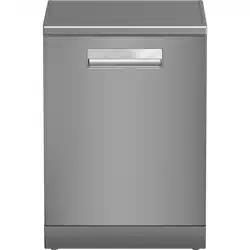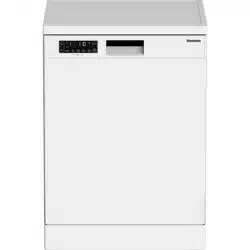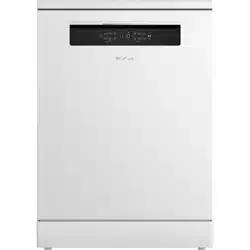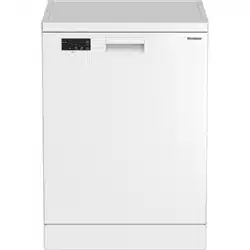
Dishwasher
User Manual
LDF31310W
15 2998 0100/ EN/ AA/ 10/04/2025 15:27
7645293877
EN / 2
Please read this manual first!
Dear Customer,
Blomberg thank you for choosing the product. We hope that you get the best results from
your product which has been manufactured with high quality and state-of-the-art techno-
logy. Therefore, please read this entire user manual and all other accompanying docu-
ments carefully before using the product.
Follow all warnings and information in the user manual. By this way, you will protect your-
self and your product against possible dangers.
Keep the user manual as a reference for future use. If you handover the product to
someone else, give the user manual as well. The warranty conditions, usage and
troubleshooting methods for your product are provided in this manual.
Symbols and Their Explanations
Throughout this user manual the following symbols are used:
Danger that may result in death or injury.
Important information or useful hints about usage.
Read the user manual.
NOTICE Danger to the product or its surroundings that may result in material damage.
EN / 3
1 Safety Instructions......................... 4
1.1 Intended Use.................................. 4
1.2 Child, vulnerable person and pet
safety..............................................
4
1.3 Electrical safety ............................. 5
1.4 Transportation Safety ................... 6
1.5 Installation Safety.......................... 6
1.6 Operation Safety............................ 7
1.7 Maintenance and Cleaning Safety 8
2 Environmental Instructions ............ 8
2.1 Compliance with WEEE Regula-
tion and Disposal of Waste
Products.........................................
8
2.2 Package Information..................... 9
2.3 Compliance with WEEE Directive
and Disposing of the Waste
Product...........................................
9
2.4 Note for Test Institutes................. 9
2.5 Standard conformity and test in-
formation / EC declaration of
conformity......................................
9
2.6 This section applies for products
with Wifi feature. ...........................
9
2.7 Energy Label .................................. 10
3 Technical Specifications ................ 11
4 General View.................................. 12
5 Installation..................................... 13
5.1 Correct location for installation.... 13
5.2 Connecting to the water supply.... 13
5.3 Connecting to the water drain ...... 14
5.4 Adjusting the feet .......................... 14
5.5 Electricity connection.................... 14
6 Preparation.................................... 15
6.1 Considerations for energy saving 15
6.2 Water softening system................ 15
6.3 Setting the Water Softening Sys-
tem .................................................
15
6.4 Filling the salt ................................ 17
6.5 Detergent ....................................... 18
6.6 Rinse aid......................................... 20
6.7 Parts not suitable for washing in
the dishwasher ..............................
21
6.8 Placing the dishes in the dish-
washer............................................
21
6.9 Cutlery basket ................................ 23
6.10 Cutlery basket ................................ 23
6.11 Foldable lower basket wires ......... 24
6.12 Lower basket multi-purpose /
height-adjustable serving rack......
24
6.13 Height Adjustable Upper Basket
Rack ................................................
25
6.14 Lower basket with bottle wire....... 26
6.15 Upper basket multi-function ser-
vice rack .........................................
26
6.16 Upper basket multi-function ser-
vice rack .........................................
26
6.17 Adjusting the height of the upper
basket .............................................
27
6.18 Adjusting the height of the upper
basket .............................................
28
6.19 Adjusting the height of the upper
basket .............................................
28
6.20 Foldable upper basket wires ......... 29
6.21 Cutlery basket ................................ 29
6.22 Cutlery basket ............................... 29
6.23 Lower Spray Arm ........................... 30
6.24 Upper Spray Arm............................ 30
7 Operating the product .................... 31
7.1 Program Information and Aver-
age Consumption Values Table....
32
7.2 Additional functions ...................... 33
7.3 Functions........................................ 34
7.4 Starting the Cycle........................... 34
7.5 Cancelling the Cycle ...................... 35
7.6 Low Salt Warning Indicator ........... 35
7.7 Low Rinse Aid Warning Indicator.. 35
7.8 Setting the Rinse Aid Amount ....... 35
7.9 End of Cycle ................................... 35
8 Maintenance and Cleaning............. 36
8.1 Maintenance and cleaning............ 36
8.2 Cleaning the filters......................... 36
8.3 Cleaning the hose filter.................. 37
8.4 Cleaning the propellers.................. 37
8.5 Micro Filter Cleaning Mechanism. 38
9 Troubleshooting ............................ 39
9.1 Error Codes, Causes and Solu-
tions................................................
39
9.2 Troubleshooting............................. 39
10 Guarantee Details .......................... 43
11 DISCLAIMER / WARNING ............... 46
EN / 4
1 Safety Instructions
This section contains safety in-
structions that will help protect
from risk of personal injury or
property damage.
Our company shall not be held
responsible for any damages
that may arise in case of non-
compliance with these instruc-
tions.
• Installation and repair proced-
ures must always be per-
formed by Authorised Service
Agents.
• Use only original spare parts
and accessories.
• Do not repair or replace any
component of the product un-
less it is clearly specified in the
user manual.
• Do not make technical modific-
ations to the product.
1.1 Intended Use
This product is intended for use
in homes and in the following
types of enclosed spaces: For
example;
- Staff kitchens of shops, offices
and other working environments;
- Farm houses;
- Areas for the use of guests of
hotels, motels and other accom-
modation facilities;
- Places serving bed and break-
fast, hostel-like environments.
- The product should only be
used for household dish wash-
ing.
• The product is not suitable for
commercial or public use.
• The lifetime of the product you
have purchased is 10 years.
This is the period for which the
spare parts required for the op-
eration of this product as
defined.
• This product is intended for
use in the home and under
counter.
1.2 Child, vulnerable
person and pet safety
• 8 years and older children and
people with reduced physical,
sensory, and mental abilities
as well as unskilled or inexperi-
enced persons can use this ap-
pliance provided that they are
supervised and instructed on
safe use of the appliance as
well as to the related dangers.
• Children under 3 years of age
should be kept away from the
product unless constantly su-
pervised.
• Children should not play with
the appliance.

EN / 5
• Electrical products are danger-
ous for children and pets. Chil-
dren and pets must not play
with, climb on or enter into the
product.
• Remember to close the door of
the product when leaving the
room where the product is loc-
ated. Children and pets can be
locked inside the product and
suffocate.
• Cleaning and user mainten-
ance must not be made by
children without supervision.
• Keep the packing materials
away from the children. Risk of
injury and suffocation.
• Keep all detergents and addit-
ives used in the product out of
the reach of children.
• For the safety of children, dis-
connect the power plug and
break the locking mechanism
before disposing of the
product.
1.3 Electrical safety
• The product must not be
plugged in during installation,
maintenance, cleaning, repair
and transport.
• If the power cord is damaged,
it must be replaced by an au-
thorised service centre to pre-
vent possible hazards.
• Do not pinch the power cord
under or behind the product.
Do not place a heavy object on
the power cord. The power
cord must not be excessively
bent or crushed, and must not
come into contact with any
heat source.
• Do not use an extension cord,
multiple power outlets, or ad-
apters to operate the product.
• Portable multiple power out-
lets or portable power supplies
can overheat and cause a fire.
Therefore, do not keep multiple
power outlets behind and near
the product.
• The plug must be within easy
reach. If this is not possible,
the electrical installation to
which the product is connec-
ted must be equipped with a
device (fuse, switch, circuit
breaker, etc.) that complies
with electrical regulations and
disconnects all poles from the
mains.
• Do not touch the plug with wet
hands.
• When removing the plug from
the socket, pull it by the plug,
not by the cable.
EN / 6
1.4 Transportation
Safety
• Before transporting the
product, unplug the plug and
disconnect the drain and water
supply connections. Drain the
water remaining inside the
product completely.
• Do not carry the product alone
as it is heavy.
NOTICE Do not hold the door or
panel to move the product.
NOTICE If you have to move the
product, move it in an upright
position and hold it by the back.
Tilting the product towards the
front may cause the electronic
parts inside to get wet and dam-
aged.
NOTICE When putting the
product in place after installa-
tion or cleaning, take care not to
fold, pinch or break the hoses.
1.5 Installation Safety
• To make the product ready for
use, check the information in
the manual and installation in-
structions to make sure that
the electrical installation, clean
water installation and drainage
are appropriate. Otherwise, call
a qualified electrician and
plumber to make the neces-
sary arrangements. These pro-
cesses are at the customer's
expense.
• Before installing the product,
inspect the product for any
damage. Do not install the
product if it is damaged.
• Do not install the product in
places where the temperature
drops below 0 ºC.
• Do not place the product on a
carpet or similar surface. It
causes fire risk since it cannot
get air from the bottom.
• Place the product on a clean,
flat and hard floor and balance
it with the help of adjustable
feet. If the feet are not adjus-
ted properly, the door may not
close completely and hot va-
pour may escape. It may cause
serious burns and injuries and
may also damage your fur-
niture.
• Do not install the product near
heat sources (radiators,
stoves, etc.) and do not install
it under the cooking area of a
hob.
• If the product is intended to be
used in a cupboard/cabinet/
module, keep the cupboard
doors open during operation if
there are no gaps to ensure
sufficient air circulation.

EN / 7
• Connect the product to an
earth-grounded socket protec-
ted by a fuse rated in accord-
ance with the current ratings
indicated on the rating plate.
Have the earthing installation
done by a qualified electrician.
Do not use the product without
earthing in accordance with
local/national regulations.
• Plug the product into an outlet
complying with the voltage and
frequency values indicated on
the rating plate.
• Do not plug the product into
sockets that are loose, out of
the socket, broken, dirty,
greasy, at risk of contact with
water (e.g. water that may leak
from the workbench).
NOTICE The new hose sets sup-
plied with the product must be
used. Do not reuse old hose as-
semblies. Do not splice the
hoses.
NOTICE Connect the water inlet
hose directly to the water tap.
The pressure supplied from the
tap must be at least 0.03 MPa
(0.3 bar) and no more than 1
MPa (10 bar). If the water pres-
sure exceeds 1 MPa (10 Bar), a
pressure reducing valve must be
installed. Maximum allowable
water temperature is 25°C.
• Position the power cable and
hoses so that there is no risk
of tripping.
1.6 Operation Safety
Only detergents, rinse agents
and additives intended for dish-
washers should be used.
Never use chemical solvents in
the product. These substances
pose a risk of explosion.
Do not drink the wash water in
your product.
Dishwasher detergents contain
strong alkali, which can be ex-
tremely dangerous if swallowed.
Avoid contact with skin and eyes
and do not allow children near
the product when the lid is open.
Check that the detergent tank is
empty after the wash cycle is
completed.
When you pull out the upper and
lower baskets completely, the
door of the product takes the en-
tire load of the baskets. Do not
sit or place other loads on the
door, otherwise the product may
tip over.
Product's Maximum Washing capa-
city: Indicated on the Energy Label
and Quick Use Card under Cycle
Table.
To avoid possible injury, always
place long and pointed dishes
such as serving forks, bread
knives, etc. in the cutlery basket
EN / 8
with the pointed end downwards
or horizontally on the dishwash-
ing baskets.
If you need to open the door
while the product is running,
open it carefully. Be careful of
hot steam and splashes of hot
water.
Do not operate a faulty or dam-
aged product. Unplug the
product (or switch off the fuse
to which it is connected), turn
off the water tap and call for au-
thorised service.
Do not place a flame source
(burning candle, cigarette, etc.)
on or near the product. Do not
place flammable/explosive ma-
terials near the product.
Do not climb on the product.
Unplug the product and switch
off the tap when you will not use
the product for a long time.
This product is designed to op-
erate up to 2000 m. above sea
level.
1.7 Maintenance and
Cleaning Safety
Do not wash the product by spray-
ing or pouring water on it.
Do not use sharp or abrasive tools
to clean the product. Do not use
materials such as household clean-
ing agents, detergents, gas, gasol-
ine, alcohol, wax, etc.
Wear gloves worn when cleaning
the product.
Be careful of possible injuries when
cleaning sharp surfaces on the
back of the product!
NOTICE!Remember to install
the filter of your machine back
after cleaning it. Otherwise,
the pumps may get clogged
and the product may get dam-
aged.
Interior Lighting
Contact a service when you need to
replace the LED/bulb used for light-
ing according to the model of your
machine.
2 Environmental Instructions
Frequency Band : 2.400-2.484 Ghz
Max. Transmission Power : < 100mWCon-
formity declaration for UKCA
Blomberg hereby declares that this appli-
ance complies with The Radio Equipment
Regulations 2017.
The complete text of the UK declaration of
conformity is available in the following in-
ternet address:
support.blombergappliances.com
2.1 Compliance with WEEE Regula-
tion and Disposal of Waste
Products
This product does not contain harmful and
prohibited substances specified in the
"Regulation on the Control of Waste Elec-
trical and Electronic Equipment" published
by the Ministry of Environment and Urban-
isation of the Republic of Turkey. It com-
plies with WEEE Regulation.
EN / 9
This product is manufactured
from high quality parts and ma-
terials that are recyclable and
reusable. Therefore, do not dis-
pose of the product with
household or other waste at
the end of its service life. Take it to a col-
lection point for recycling electrical and
electronic equipment. Ask the local author-
ity in your area for these collection points.
Help protect the environment and natural
resources by recycling used products. Be-
fore disposing of the product, disconnect
the power plug for the safety of children
and break the locking mechanism of the
loading door to render it inoperable.
2.2 Package Information
The packaging of the product is made of re-
cyclable materials in accordance with our
National Legislation. Do not dispose of
packaging waste with household or other
waste, dispose of it at the packaging collec-
tion points specified by the local authorit-
ies.
2.3 Compliance with WEEE Direct-
ive and Disposing of the Waste
Product
This product complies with EU
WEEE Directive (2012/19/EU).
This product bears a classifica-
tion symbol for waste electrical
and electronic equipment
(WEEE).
This symbol indicates that this product
shall not be disposed with other household
wastes at the end of its service life. Used
device must be returned to official collec-
tion point for recycling of electrical and
electronic devices. To find these collection
systems please contact to your local au-
thorities or retailer where the product was
purchased. Each household performs im-
portant role in recovering and recycling of
old appliance. Appropriate disposal of used
appliance helps prevent potential negative
consequences for the environment and hu-
man health.
Compliance with RoHS Directive:
The product you have purchased complies
with EU RoHS Directive (2011/65/EU). It
does not contain harmful and prohibited
materials specified in the Directive.
2.4 Note for Test Institutes
The information required for performance
tests is available on request.
You can send your request via the e-mail
address below:
In your enquiry e-mail, be sure to include
your contact details as well as the code,
stock number and serial number of the
product to be tested. The product code,
stock number and serial number can be
found on the type label attached to the side
of the door
2.5 Standard conformity and test in-
formation / EC declaration of
conformity
The development, production and
sale of this product are carried out
in accordance with the safety regu-
lations of all relevant directives of
the European Community.
2014/35/EU, 2014/30/EU, 93/68/
EC, IEC 60436 / EN 60436
2.6 This section applies for
products with Wifi feature.
Frequency Band 2.4Ghz
Max. Conduction Power : < 100mW
Declaration of conformity for CE Arçelik
A.Ş. hereby declares that this appliance
complies with Directive 2014/53/EU.
The full text of EU Conformity Declaration
is on the web site:
Products, address
support.blombergappliances.com
EN / 10
2.7 Energy Label
You can access technical informa-
tion about the product by scanning
the QR code on the energy label
with a mobile device connected to
the internet.
EN / 11
3 Technical Specifications
Maximum washing capacity: Indicated on the Energy Label and Quick Use Card under Cycle Table.
Height: See installation manual for height information.
Width: 60
Depth:57
Electricity input:220-240 V, 50 Hz
Total power:1800-2100 W
Heater power:1800 W
Total current: 10 A *
Pump power:90 W
Drain pump power: 30 W *
* For detailed electrical values see the type label on the dishwasher's door.
Water Pressure 0.3 -10 bar
(= 3 – 100 N/cm² = 0.03-1.0 Mpa)
Technical specifications may be amended without prior notice to improve product
quality.
The figures in the manual are schematic and may not be in exact harmony with the
product.
The values provided with the appliance or its accompanying documents are labor-
atory readings in accordance with the respective standards. These values may dif-
fer depending on the use and ambient conditions.
EN / 12
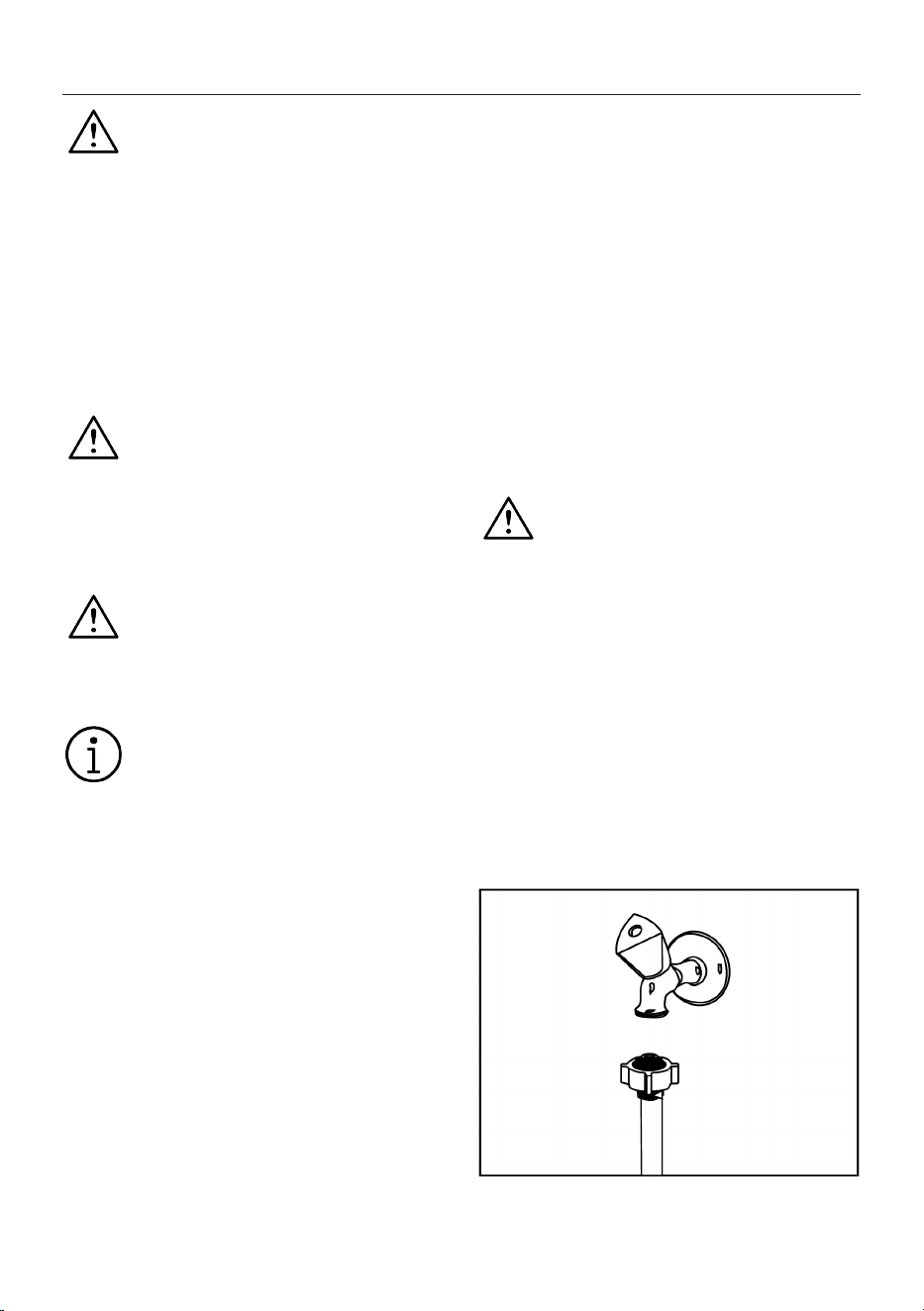
4 General View
1
2
3
4
5
6
7
8
9
10
11
12
13
14
15
1 Upper Basket 2 Upper Spray Arm
3 Lower Spray Arm 4 Cutlery Basket(depends on the
model)
5 Door 6 Type Label
7 Control Panel 8 Detergent Compartment
9 Lower Basket 10 Filters
11 Salt Compartment Cover 12 Upper Basket Rail
13 Ceiling Cutlery Basket (depends on
the model)
14 Upper Rack (depends on the model)
15 Upper Impeller (depends on the
model)
Type label varies depending on the model.
Illustration1:
EN / 13
5 Installation
Read the ‘Safety Instructions’ sec-
tion first!
The preparation of the electrical, clean wa-
ter and waste water installation of the
place where the product will be placed is
under the responsibility of the customer.
Before calling the authorised service to
make the product ready for use, if the elec-
trical installation, clean water installation
and water drainage are not suitable, call a
qualified electrician and plumber to make
the necessary arrangements.
Installation and electrical connec-
tions must be carried out by the au-
thorised service. The manufacturer
cannot be held responsible for any
damages that may arise from the
operations performed by unauthor-
ised persons.
Before installing the product, in-
spect the product for any damage.
Do not install the product if it is
damaged. Damaged products pose
a danger to your safety.
For free-standing and under-
counter models, do not remove the
kick plate of the appliance. This will
void the warranty.
• When placing the product in place after
installation or cleaning, make sure that
the water inlet and drain hoses are not
folded, pinched or broken.
• Be careful not to damage the floor, wall,
pipes, etc. when placing the product. Do
not hold the door or panel to move the
product.
5.1 Correct location for installation
• There must not be any lockable, sliding or
hinged doors in the place where the
product is installed, which would restrict
the full opening of the door.
• Place the product on a solid and level
surface with sufficient load-bearing capa-
city! Placing the dishwasher on a level
surface is essential for the door to close
properly and tightly.
• Do not install the product in places where
the temperature drops below 0 ºC.
• Place the product on a hard floor. Do not
place it on a long-pile carpet or similar
surface.
• Choose a place where you can load and
unload the dishes easily and quickly.
• Place the product close to the tap and
drain. Choose the location of the product
in such a way that you do not change it
after it has been connected.
Do not place the product on the
power cable. The cable may be
damaged, causing a risk of electric
shock or fire.
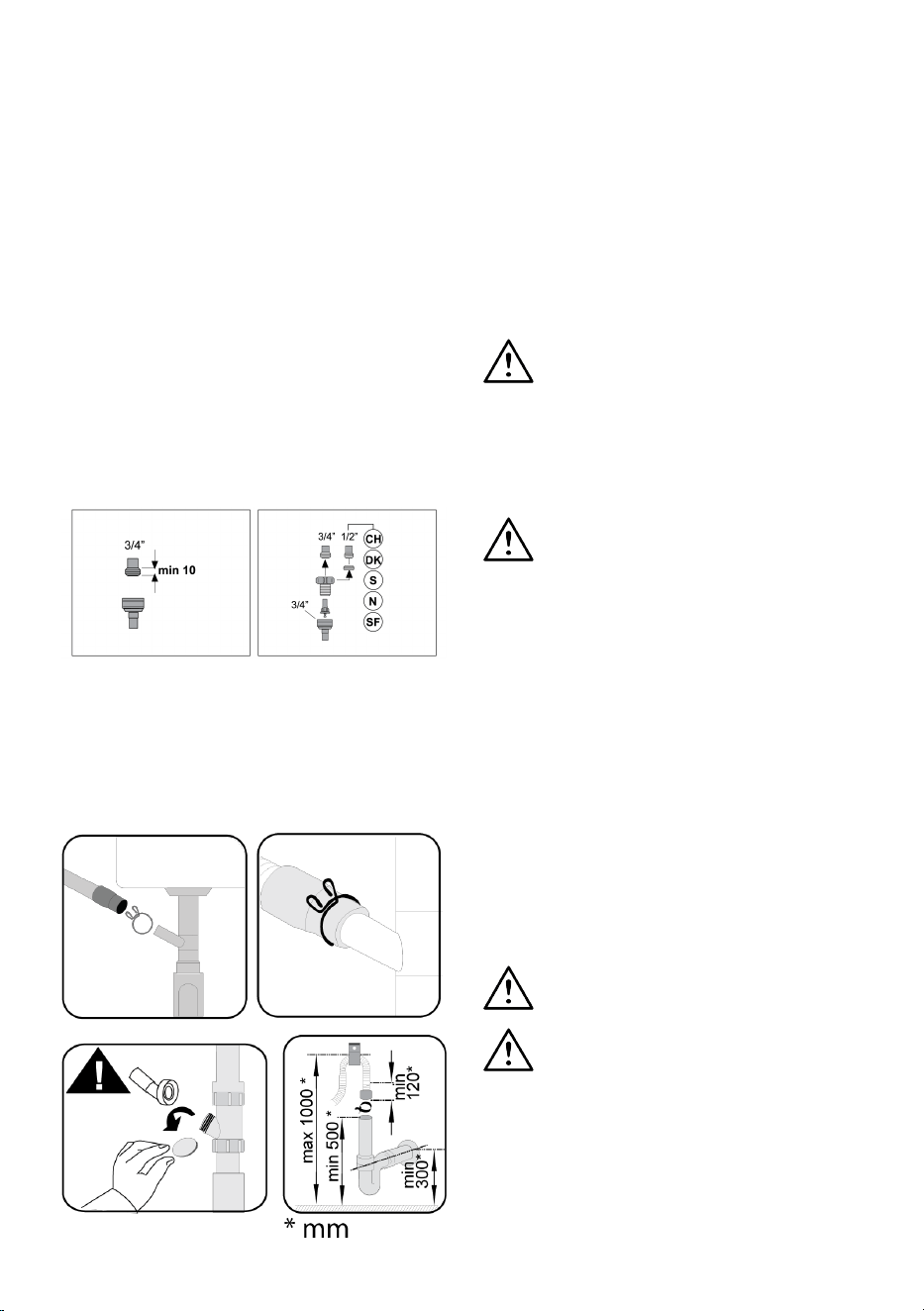
5.2 Connecting to the water supply
To prevent dirt (sand, clay, rust, etc.) from
the city network or your water supply sys-
tem from damaging the dishwasher and
your dishes, we recommend installing a fil-
ter on the water inlet.
Maximum allowable water inlet temperat-
ure:
• With AquAvoid feature containing mod-
els, it is 60 °C.
• Up to 25 °C for other models.
EN / 14
The dishwasher must not be connected to
warm water appliances or running water
heaters.
NOTICE Do not use an old or used water in-
let hose on a new product. Use the new wa-
ter inlet hose supplied with the dishwasher.
Do not splice the hoses.
NOTICE Connect the water inlet hose dir-
ectly to the water tap. The pressure sup-
plied from the tap must be at least 0.3 and
no more than 10 bar. If the water pressure
exceeds 10 Bar, a pressure reducing valve
must be installed.
NOTICE The water supply and drain hose
must be securely fastened and undam-
aged.
NOTE After making the connections, open
the tap fully and check for water leaks.
5.3 Connecting to the water drain
The water drain hose can be connected dir-
ectly to the waste water drain or to the
drain of the sink. For more detailed inform-
ation, refer to the installation instructions
supplied with your dishwasher.
The waste water drain must be connected
to the sewer and must not be connected to
surface water.
5.4 Adjusting the feet
If the door of the product does not close
properly or shakes when you push it gently
with your hand, this means that the feet are
not adjusted. Adjust the feet of the product
as shown in the installation manual sup-
plied with the product.
Hot steam may escape if the dish-
washer door is not adjusted prop-
erly. Serious burns can cause injury
and damage your furniture.
5.5 Electricity connection
Connect the product to a grounded
socket protected by a fuse in ac-
cordance with the values in the
"Technical specifications" table.
Our company shall not be respons-
ible for any damages that may oc-
cur if the product is used without
grounding in accordance with local
regulations.
• The connection must comply with na-
tional regulations.
• The plug of the power cord must be eas-
ily accessible following the installation.
• Connect the product to a grounded
socket protected by a 16 ampere fuse.
• The specified voltage must be equivalent
to your mains voltage.
Do not connect with extension
cords or multiple sockets.
A damaged power cord must be re-
placed by authorised service.
EN / 15
6 Preparation
Read the ‘Safety Instructions’ sec-
tion first!
6.1 Considerations for energy sav-
ing
The following information will help you to
use the product in an ecological and en-
ergy-saving way.
Remove all coarse waste before placing the
dishes in the dishwasher.
It is not recommended to pre-clean
the dishes before loading them into
the dishwasher as this will con-
sume energy and water.
Washing the dishes in the dish-
washer consumes less energy and
water than washing them by hand.
Start the dishwasher after it is fully loaded.
Pay attention to the "Cycle Information and
Average Consumption Table" when select-
ing a cycle.
Do not use more detergent than recom-
mended on the detergent packaging.
6.2 Water softening system
The dishwasher is equipped with a special
water softening system that reduces the
hardness of the mains water. This system
softens the water to the level required for
washing dishes to the desired quality.
Mains water must be softened if its
hardness is above 7°dH. Otherwise
hardness ions will accumulate on
the washing utensils and may af-
fect the washing, rinsing and drying
performance of the dishwasher.
Setting the water softening system
Washing efficiency will be improved when
the water softening system is set correctly.
Read the section on adjusting the water
softening system first.
Regeneration of the water softening sys-
tem can take place in all cycles during the
drying step. When regeneration is per-
formed, the duration of the cycle, energy
and water consumption are increased. For
the regeneration process, the table below
shows the frequency of the regeneration
process, maximum additional time, water
and energy consumption depending on the
water consumption for the Eco 50 °C cycle
when the dishwasher is operated under
standard conditions with a water supply of
14 dH.
Eco 50 °C
water consumption (l)
renew after .... cycle Additional time (min)
Additional water con-
sumption (l)
Additional energy
consumption (kWh)
12.3-14.7 5 5 3.0 0.05
9.6-12.2 6 5 3.0 0.05
9.0-9.5 7 5 3.0 0.05
8.0-9.0 8 5 3.0 0.05
7.0-7.9 9 5 3.0 0.05
For water consumption in the Eco 50 °C
cycle of your dishwasher, refer to the Cycle
Information and Average Consumption Val-
ues Table given in the Cycle Table.
6.3 Setting the Water Softening
System
Setting the water softening system cor-
rectly will improve your dishwasher’s wash-
ing, rinsing, and drying performance.
EN / 16
NOTICE! To set the system, first find out
your water hardness level from the au-
thorised service in your region and set it
as follows.
After determining the water hardness:
1. Press the Delay and Program keys simul-
taneously for 3 seconds to enter the set-
tings menu after turning your dishwasher
on.
2. Keep the program knob pressed until the
low salt warning indicator starts to flash.
Current regeneration level is indicated on
the program indicator.
3. Set the water hardness to a proper level
for the hardness of your mains water with
the Delay key. For the correct setting, refer
to the "Water hardness level setting table”.
4. Save by pressing On / Off key.
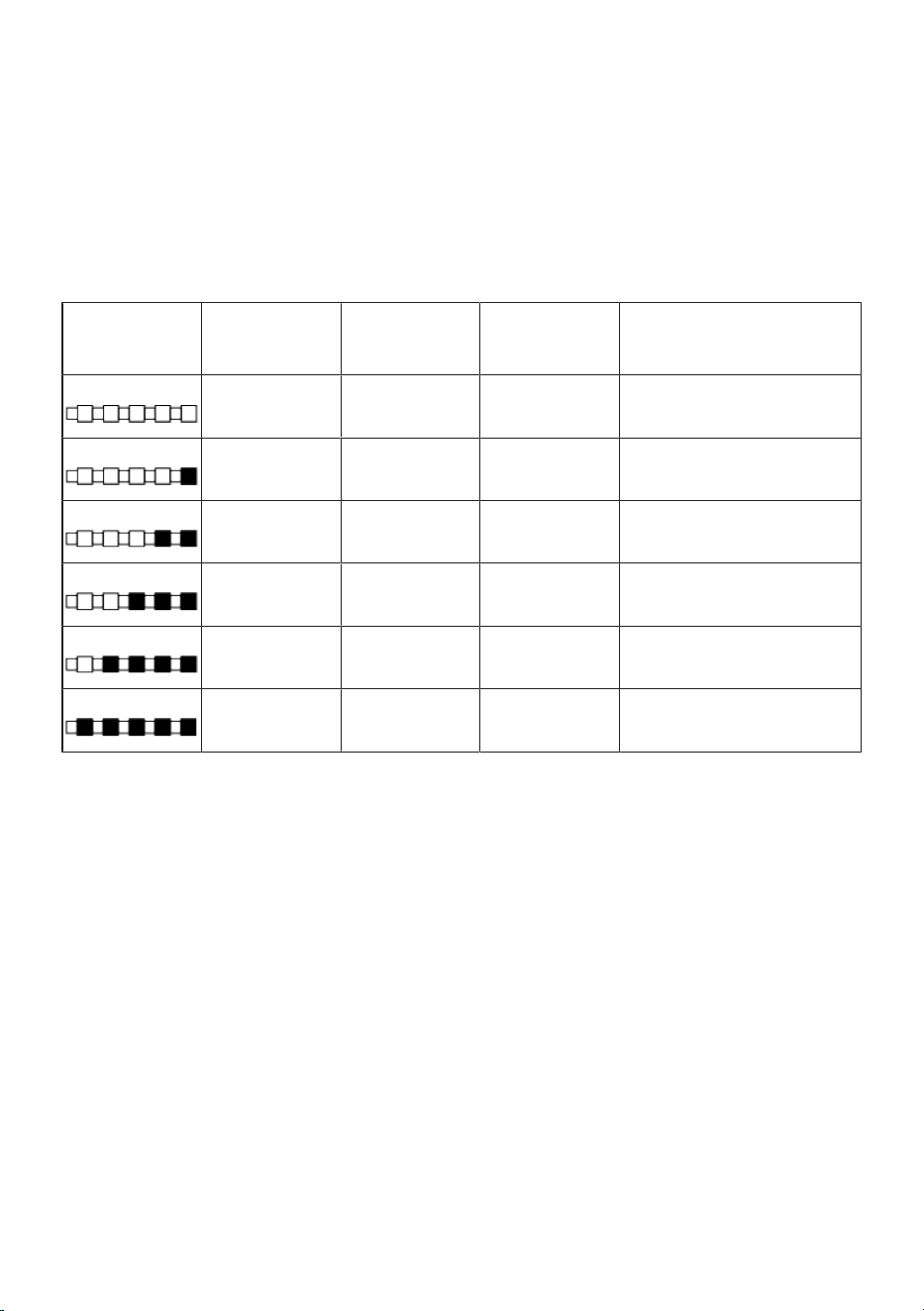
Hardness Level
English Hardness
°dE
German Hardness
°dH
French Hardness
°dF
Water Hardness Level Indicator
0. Level
0-5 0-4 0-8
Bring the water hardness setting
to position 1 by pressing the Se-
lect key. (P1)
1. Level
6-9 5-7 9-13
Bring the water hardness setting
to position 1 by pressing the Se-
lect key. (P1)
2. Level
10-15 8-12 14-22
Bring the water hardness setting
to position 2 by pressing the Se-
lect key. (P2)
3. Level
16-19 13-15 23-27
Bring the water hardness setting
to position 3 by pressing the Se-
lect key. (P3)
4. Level
20-24 16-19 28-34
Bring the water hardness setting
to position 4 by pressing the Se-
lect key. (P4)
5. Level
25-62 20-50 35-90
Bring the water hardness setting
to position 5 by pressing the Se-
lect key. (P5)
Table1: Water Hardness Level Setting
Table
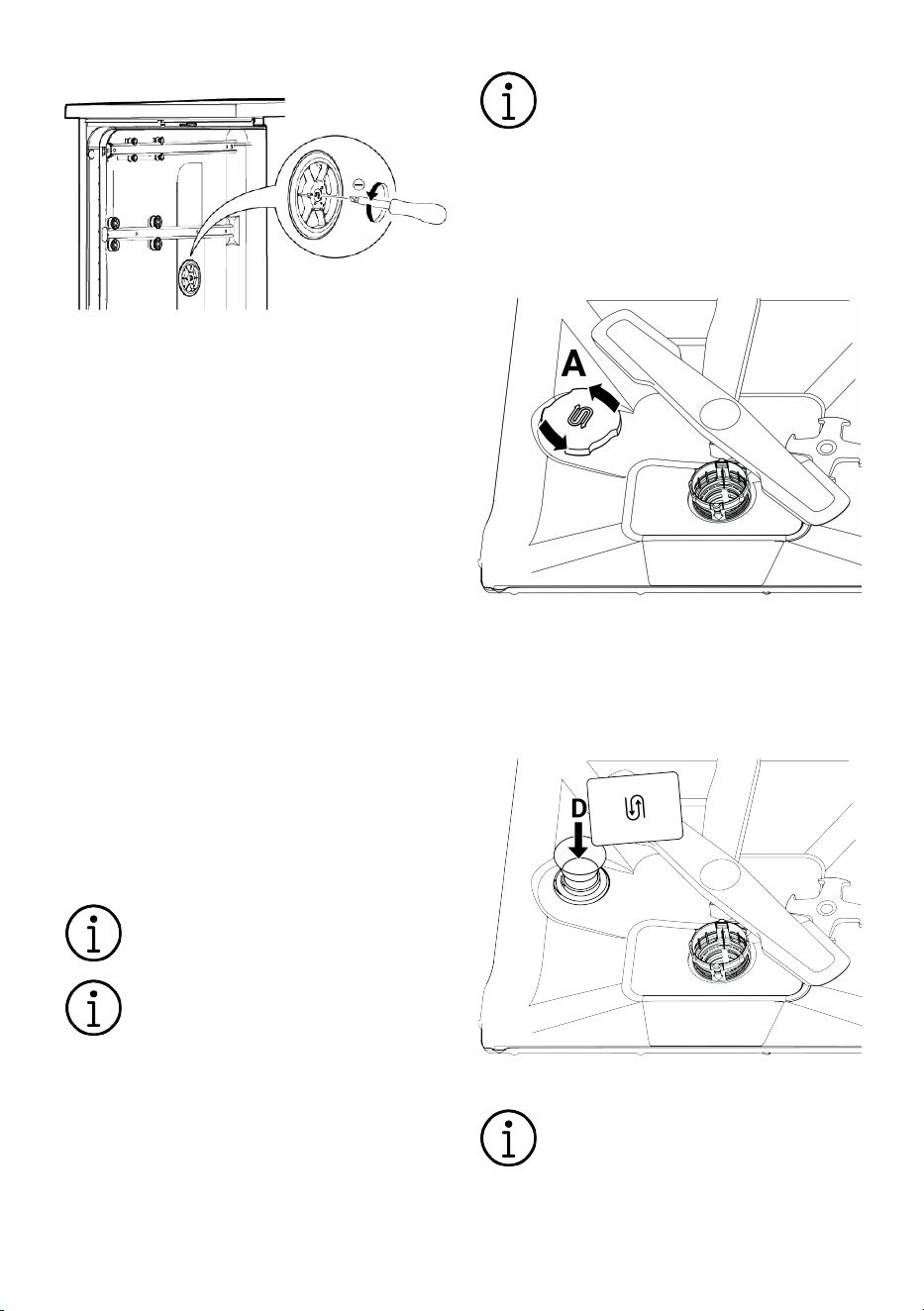
Using a flat head screwdriver, turn the re-
generation setting switch to the same posi-
tion as the hardness level you set on the
control panel. For example, if the setting on
the control panel is 3, turn the regeneration
setting switch to 3.
• If the hardness of the water you use is
above 50°dH (French hardness) or if you
use well water, you should use filters and
water purifiers.
• If the hardness of the water you use is
below 7°dH, you do not need to use salt
in your dishwasher. In this case, the "Low
Salt Indicator Light" on your dishwasher
control panel will be on continuously.
• If your water hardness setting is at level
1, the "Low Salt Indicator Light" will re-
main on continuously even though you
do not need to use salt. If you do add salt
in this position, the salt will not be con-
sumed and the lamp will not come on.
NOTICE!If you move house, you may
need to adjust the water hardness set-
ting of your dishwasher again according
to the water hardness of the place you
move to, taking into account the inform-
ation given above. If the water hardness
setting of your dishwasher has been ad-
justed before, the last water hardness
setting will be displayed on your dish-
washer’s display panel.
EN / 17
Mechanical Water Hardness Adjustment
The glassware care setting is used to alter
the hardness of the pre-softened wash wa-
ter in the dishwasher. Make the adjustment
according to the water hardness setting.
Make the adjustment using a wide, flat
screwdriver. Use the screwdriver to turn the
mechanical glassware care adjustment
switch. Simply turn the mechanical switch
to the same position as the water hardness
setting.
For example,
Set the Mechanical Glassware Care adjust-
ment switch to position 3 for water hard-
ness setting "r3"
Set the Mechanical Glassware Care adjust-
ment switch to position 4 for water hard-
ness setting "r4"
6.4 Filling the salt
The water softening system must be re-
newed in order for the dishwasher to oper-
ate at the same performance at all times.
Dishwasher salt is used for this purpose.
Only use special softening salt for
use in dishwashers.
It is recommended to use granu-
lated or powdered softening salts in
the water softening system. Do not
use salts such as table salt and
rock salt that do not dissolve com-
pletely in water. Otherwise, the per-
formance of the system may deteri-
orate over time.
The salt compartment fills with wa-
ter when you switch on the dish-
washer. Therefore, fill the salt com-
partment before starting the dish-
washer.
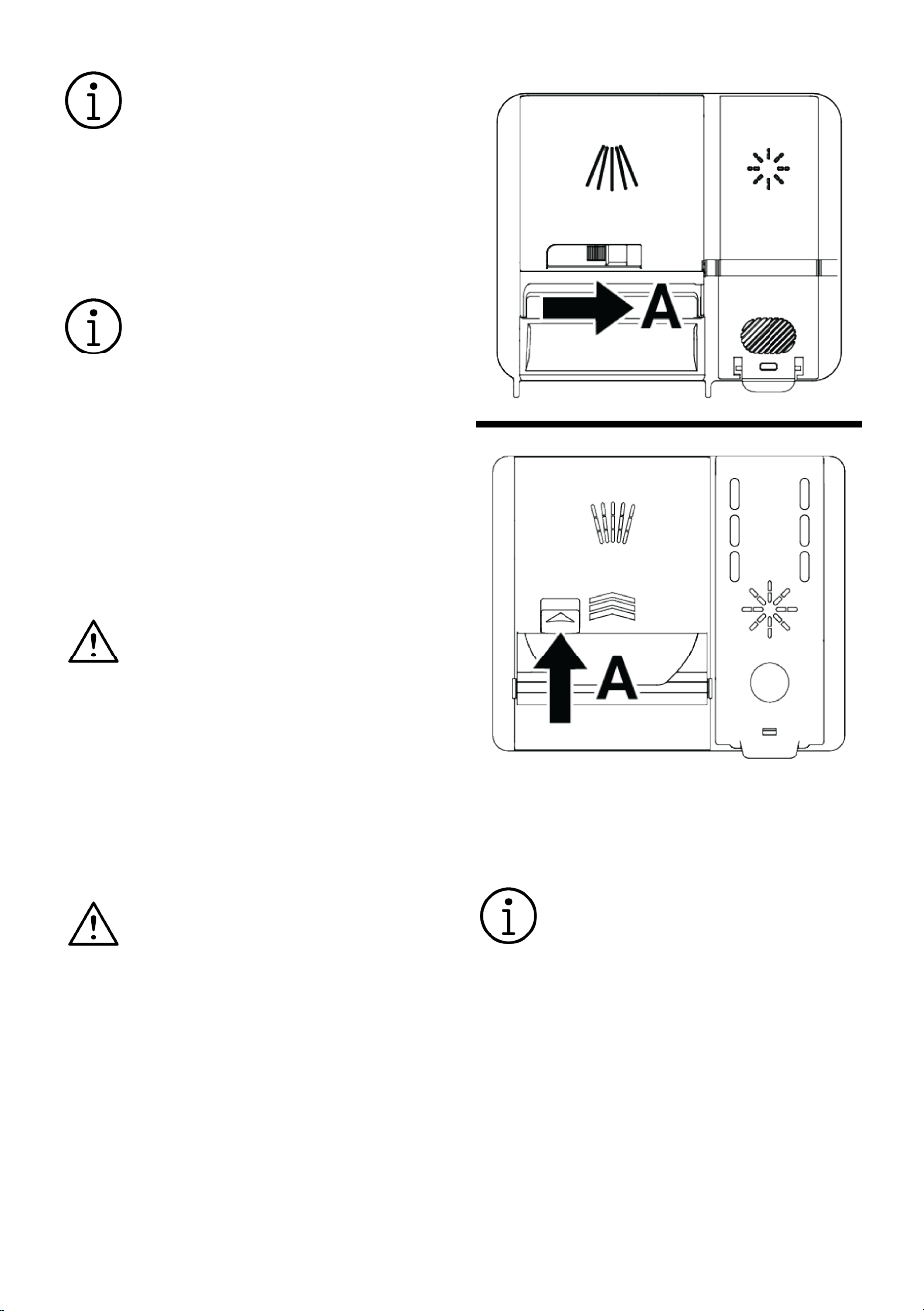
1. Initially remove the lower basket to
load softening salt.
2. Open the salt compartment lid by turn-
ing it anti-clockwise (A).
3. Only add 1 litre of water to the salt
compartment when using your dish-
washer for the first time.
4. Fill the salt compartment with salt (D).
Stir with a spoon to speed up the dis-
solution of the salt in the water.
You can put approx. 2 kg of soften-
ing salt in the salt compartment.
1. When the compartment is full, replace
the lid and close by turning.
EN / 18
Adding salt should be performed
just before starting the dishwasher.
In this way, the overflowing brine is
cleaned immediately and the risk of
corrosion inside the dishwasher is
prevented. If you are not going to
wash immediately, run the dish-
washer empty and without deter-
gent in the shortest cycle.
Depending on the different salt
particle sizes of different brands on
the market and the water hardness,
it may take several hours for the
salt to dissolve in the water. For
this reason, the "Salt Shortage
Warning Indicator" will remain on
for a certain period of time after the
salt is filled into the dishwasher.
6.5 Detergent
You can use powder, liquid / gel and tablet
detergent in the dishwasher.
Use only detergents intended for
use in dishwashers. We recom-
mend that you do not use deter-
gents containing chlorine and phos-
phates as these are harmful to the
environment.
Filling the detergent
For good washing and drying results, ob-
serve the instructions on the detergent
packaging. Contact the detergent manufac-
turer for further questions.
Do not put solvents in the detergent
compartment. There is a risk of ex-
plosion!
Put the detergent in the detergent compart-
ment as follows immediately before start-
ing the dishwasher.
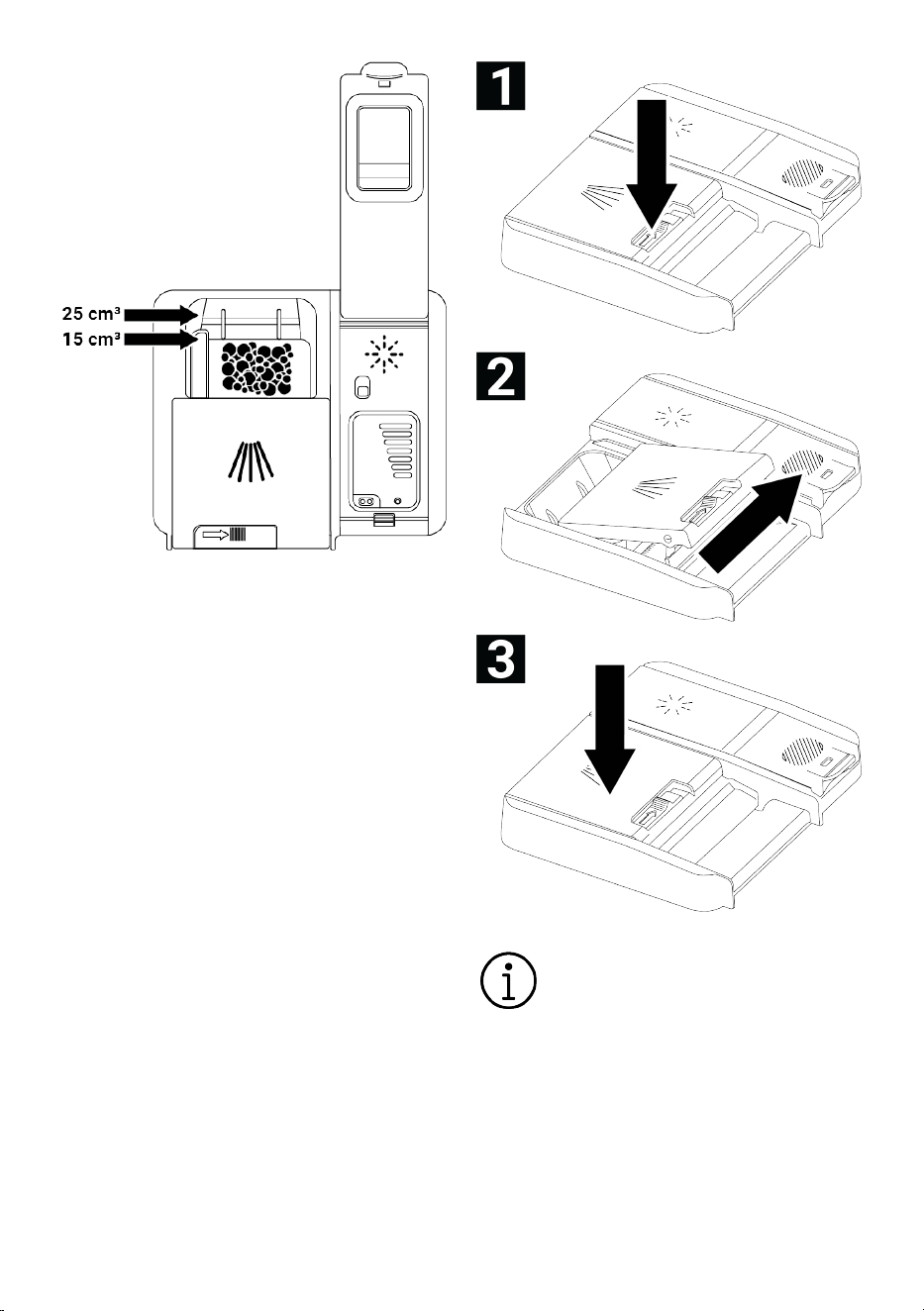
1. Open the detergent compartment door
by pushing the latch to the right (A).(de-
pends on the model)
2. Put the specified amount of powder, li-
quid/gel or tablet detergent into the
compartment.
There are level lines on the inside of
the detergent compartment to help
you use the correct amount of
powdered detergent. The detergent
compartment holds 45 cm³ of de-
tergent when fully loaded. Fill the
detergent compartment up to the
level lines of 15 cm³ or 25 cm³ of
detergent, depending on how full
the dishwasher is and/or how dirty
your dishes are. If tablet detergent
is used, one tablet is sufficient.
EN / 19
3. Close the lid of the detergent compart-
ment by pushing it in the direction of the
arrow. A "click" sound is heard when the
lid is closed.
Since the solubility of tablet deter-
gents varies depending on temper-
ature and time, always use powder
or liquid/gel detergent in short
cycles without pre-wash.
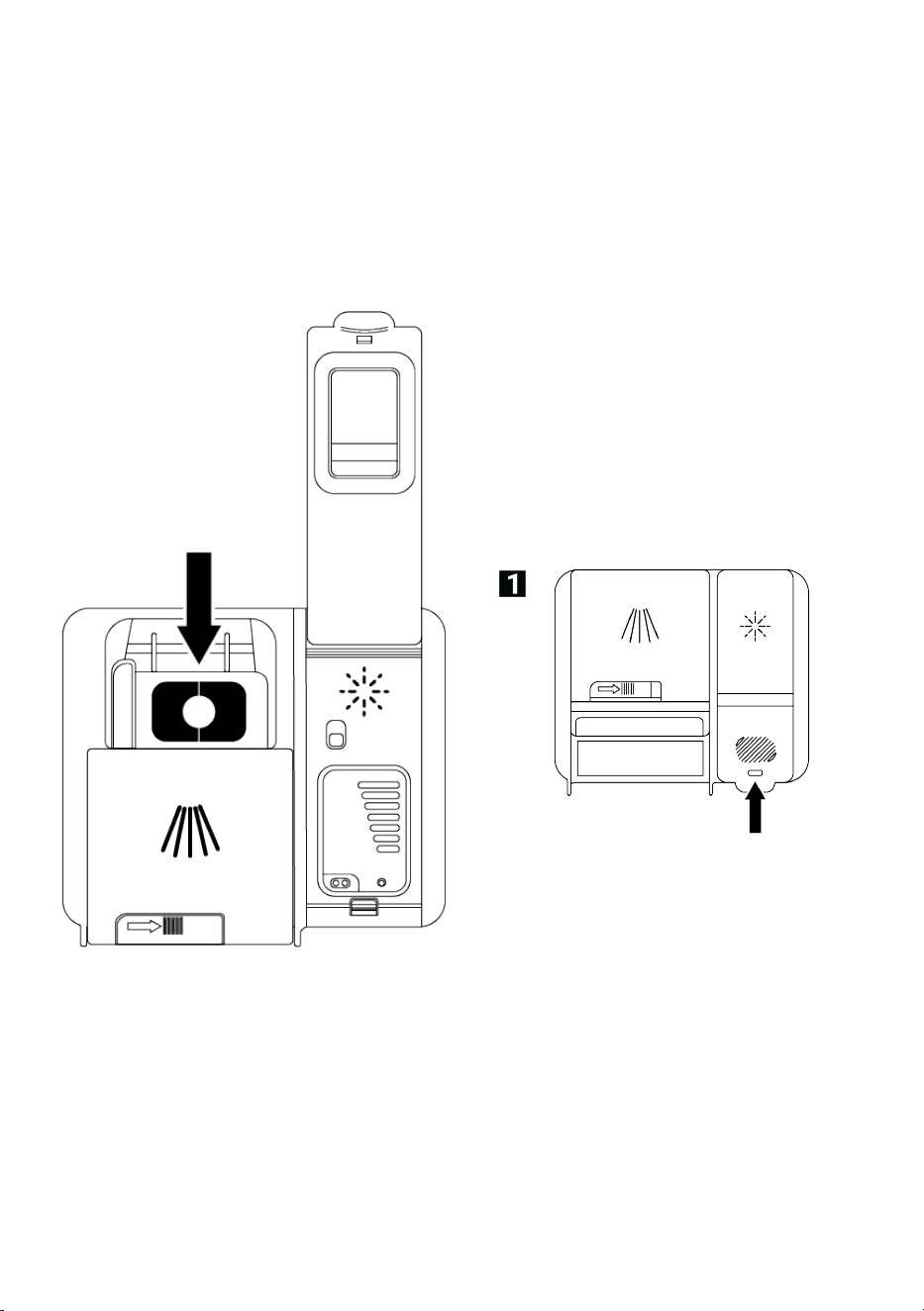
Tablet detergents
In addition to conventional tablet deter-
gents, there are also tablet detergents on
the market that contain water softening
salt and/or rinse aid. Some of them also
EN / 20
contain special components such as glass
preservatives and stainless steel preservat-
ives. These tablets work up to a certain wa-
ter hardness level (21°dH). Water softening
salt and rinse aid should be used together
with the tablet detergent above this level.
The best washing performance in dish-
washers is achieved by using detergent,
rinse aid and water softening salt separ-
ately.
When using tablet detergents, follow the
manufacturer's instructions on the deter-
gent packaging.
When using tablet detergent, contact the
detergent manufacturer if your dishes are
wet when the wash cycle has finished and/
or if you notice limescale stains, especially
on glasses.
When you change from tablet detergent
to powder detergent:
• Make sure the salt and rinse aid compart-
ment is full.
• Set the water hardness setting to the
highest position and run a wash cycle
with the dishwasher empty.
• After the empty wash cycle, read the in-
struction manual and adjust the water
hardness setting again according to your
mains water.
• Set the appropriate rinse aid setting.
6.6 Rinse aid
The rinse aid used in dishwashers is a spe-
cial compound to improve drying efficiency
and to prevent traces of water or limescale
from remaining on the washed items. For
this reason, make sure that there is rinse
aid in the rinse aid compartment and use
only rinse aid that is intended for use in
dishwashers.
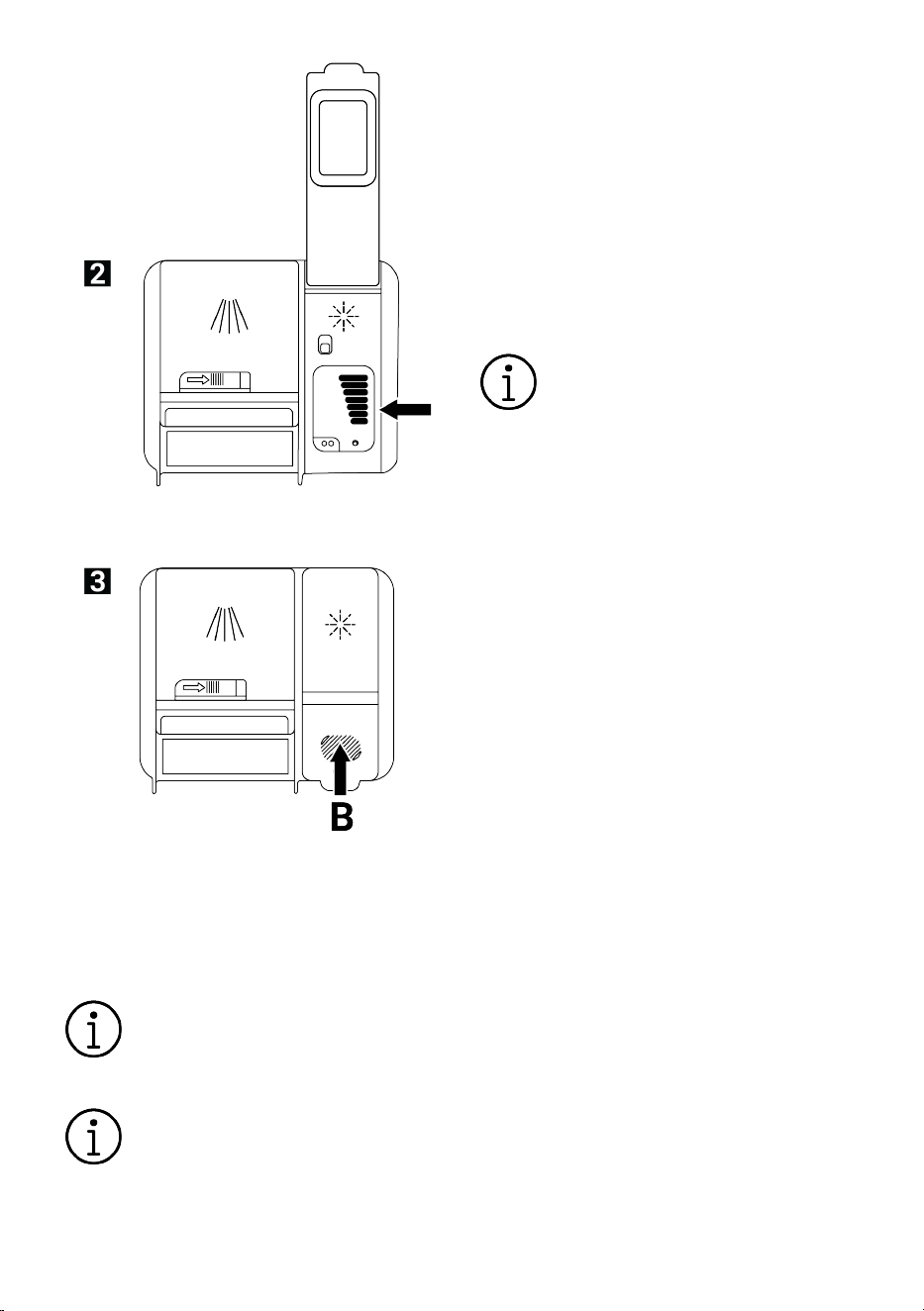
Filling the rinse aid
1. Open the rinse aid cap with the latch.
2. Fill the compartment to the MAX level.
EN / 21
3. Close the compartment lid by pressing
it lightly against point (B).
4. Increase the setting if water marks ap-
pear on the crockery after washing, or
decrease it if a blue mark remains
when wiped by hand. This setting is set
to position 3 at the factory.
The rinse aid setting is described
under the heading "Adjusting the
rinse aid quantity" in the operation
of dishwasher section.
Wipe off any rinse aid spilled out-
side the chamber. Accidental
spillage of rinse aid will cause
foaming and reduce washing per-
formance.
6.7 Parts not suitable for washing in
the dishwasher
• Do not wash dishes contaminated with
cigarette ash, wax residue, varnish, paint,
chemicals, etc. in the dishwasher.
• Do not wash forks, spoons and knives
with wooden or bone handles, glued
parts, non-heat-resistant plastic parts,
copper and pewter utensils in the dish-
washer.
As with hand washing, the dish-
washer may discolour and tarnish
decorative prints on porcelain, alu-
minium and silver. Some types of
delicate glass and crystals may
lose their transparency over time.
We recommend that you pay partic-
ular attention to the fact that the
new tableware you buy is appropri-
ate for washing in the dishwasher.
6.8 Placing the dishes in the dish-
washer
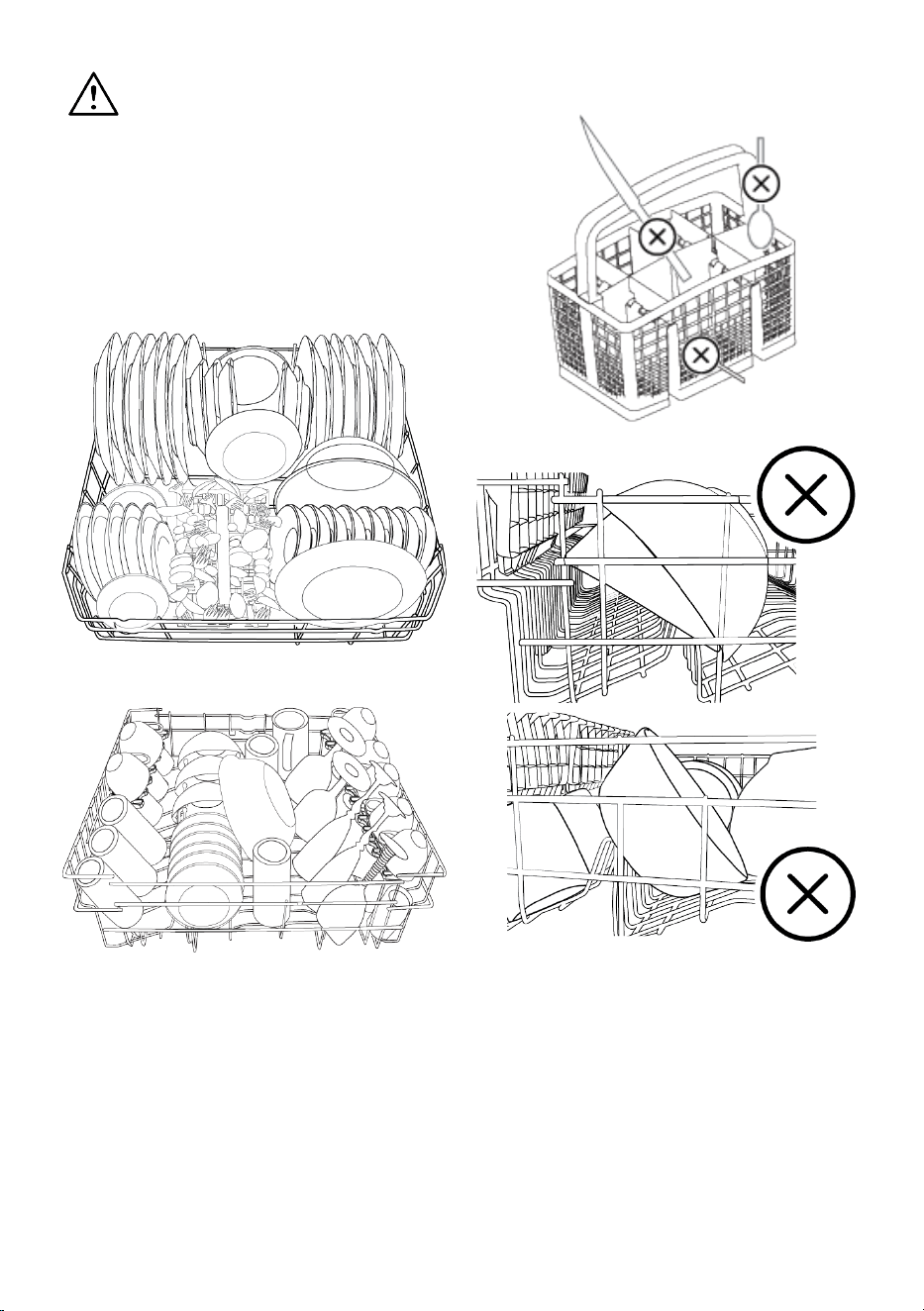
If you place the dishes correctly in accord-
ance with the washing capacity of your
dishwasher, you will make the best use of
the dishwasher in terms of energy con-
sumption, washing and drying perform-
ance.
• Remove any food residues (bones, fruit
pits, etc.) from the dishes before placing
them in the dishwasher.
• If possible, place thin, narrow-bodied
items in the centre compartments of the
baskets.
• Place very dirty and large items in the
lower basket and small, delicate and light
items in the upper basket.
• Place deep containers such as bowls,
glasses and pots with their mouths
downwards. This prevents water from ac-
cumulating in them.
EN / 22
To avoid possible injury, always
place long and pointed dishes such
as serving forks, bread knives, etc.
in the cutlery basket with the poin-
ted end downwards or horizontally
on the dishwashing baskets.
Empty the dishes in the lower basket first,
then the dishes in the upper basket.
Alternative Basket Layout Examples
Lower Basket
Upper Basket
Incorrect Placements
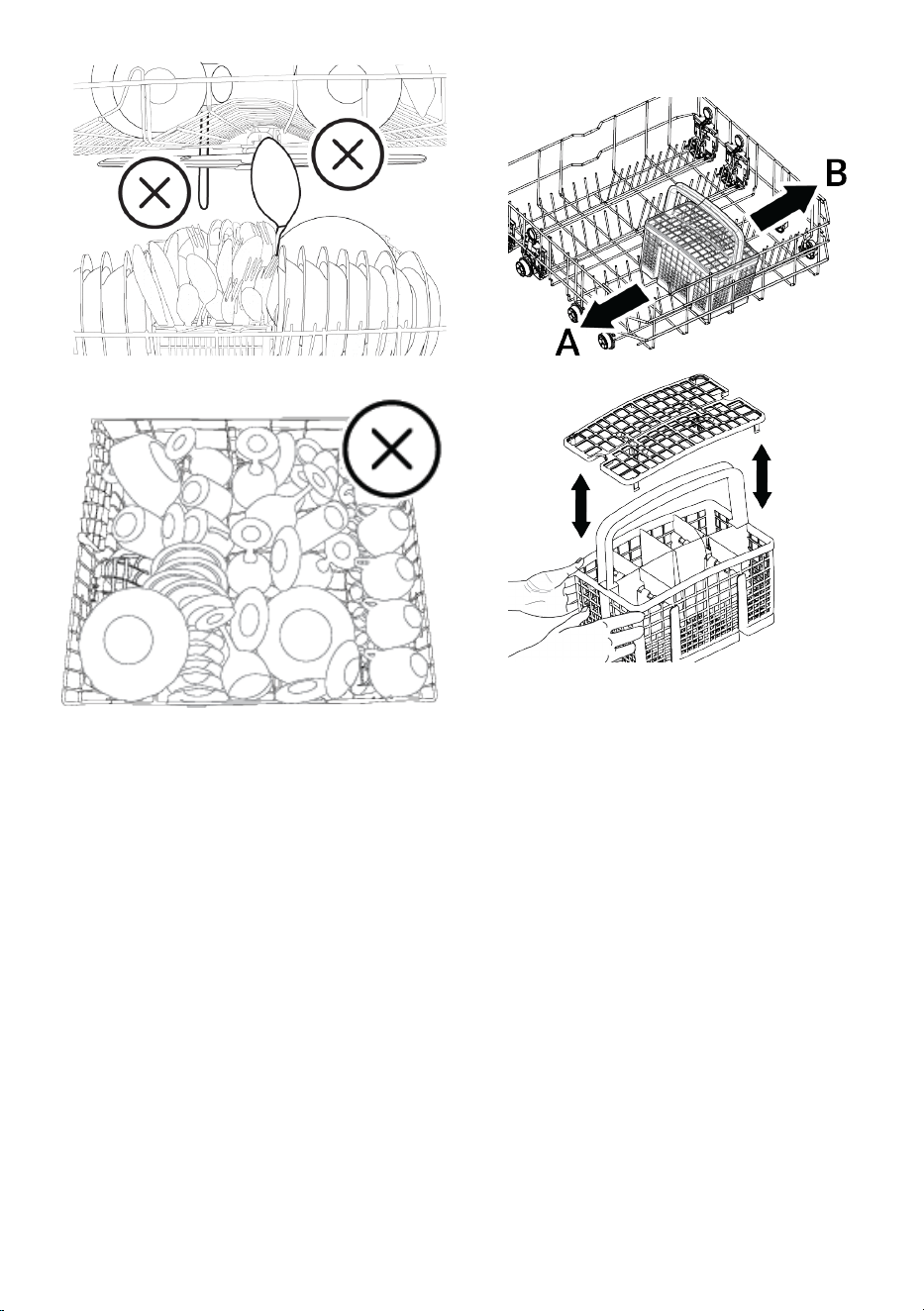
EN / 23
6.9 Cutlery basket
(depends on the model)
The cutlery basket is specially designed for
cleaner washing of knives, forks, spoons,
etc.
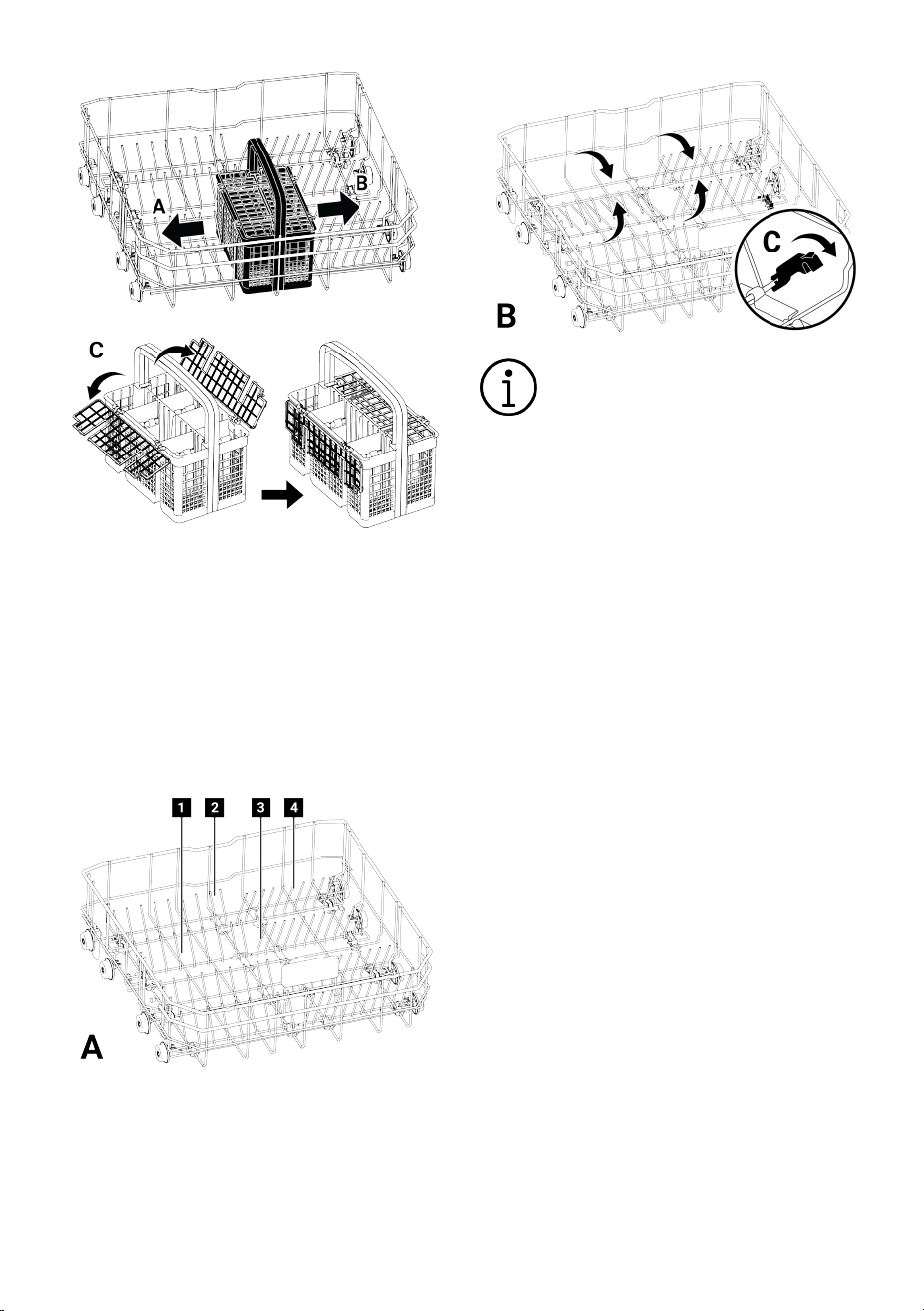
Thanks to the movable (A, B) feature of the
cutlery basket, you can create wider areas
when placing your dishes in the lower bas-
ket and open space for your dishes of dif-
ferent sizes.
6.10 Cutlery basket
(depends on the model)
The cutlery basket is specially designed for
cleaner washing of knives, forks, spoons,
etc.
Thanks to the movable (A, B) feature of the
cutlery basket, you can create wider areas
when placing your dishes in the lower bas-
ket and open space for your dishes of dif-
ferent sizes. If you want to place more cut-
lery, you can fold the separators to the side.
(C)
EN / 24
6.11 Foldable lower basket wires
(depends on the model)
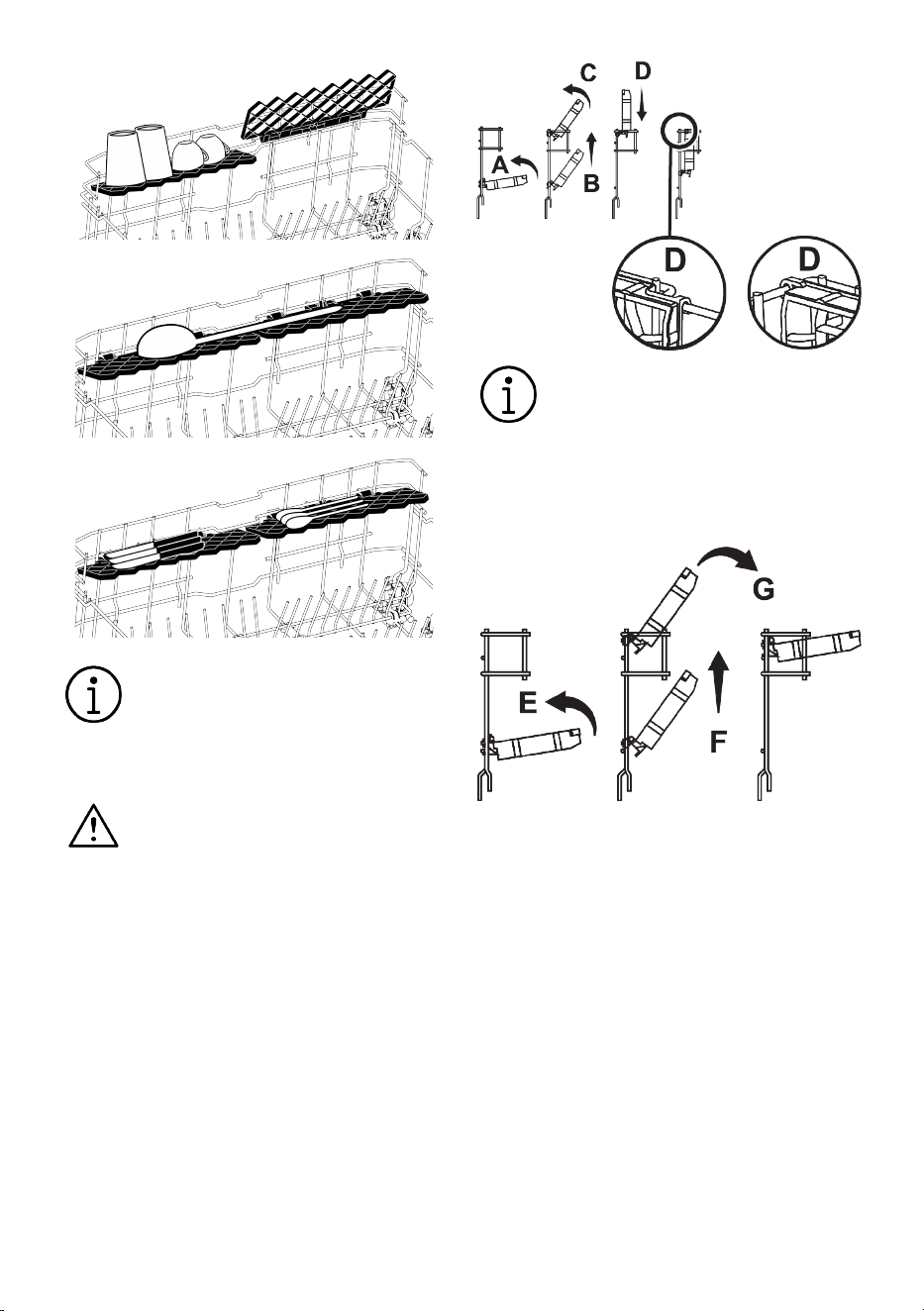
The folding wires in the lower basket of the
dishwasher, consisting of six parts (A), are
designed for you to place large items such
as pots, bowls, etc. more easily. If you
want, you can create larger spaces by fold-
ing each piece individually or all together.
To fold the foldable wires into the lying pos-
ition, push the wires in the direction of the
arrows by holding them in the centre (B).
Lift upwards to return the wires to the up-
right position. The foldable wires will snap
back into the latch (C).
Bringing the wires to horizontal po-
sition by holding them from their
ends may cause them to be bent.
Therefore, grasp the centre wires by
the bottom and push them in the
direction of the arrow to bring them
into a lying or upright position.
6.12 Lower basket multi-purpose /
height-adjustable serving rack
(depends on the model)
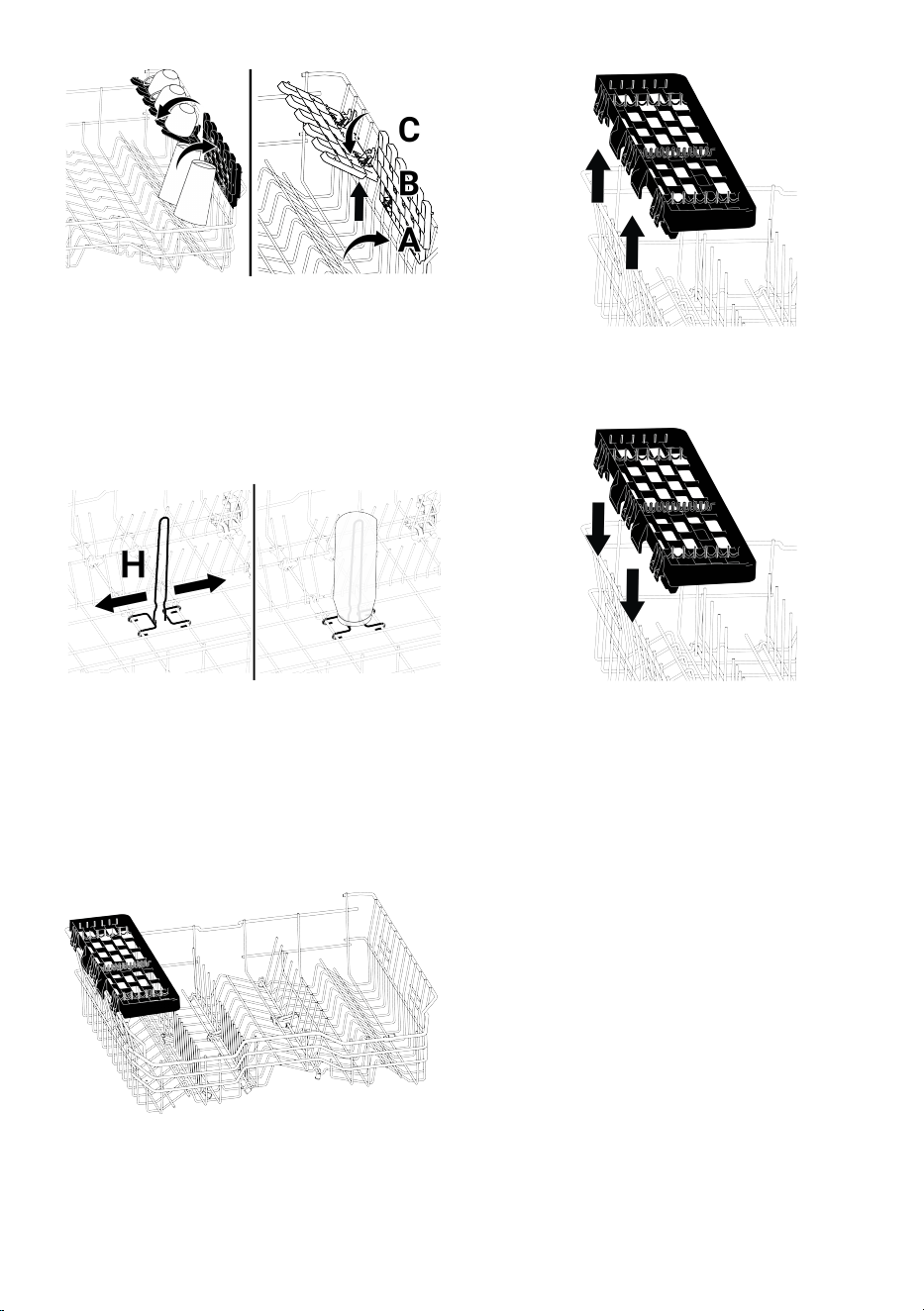
Thanks to this accessory in the lower bas-
ket of your dishwasher, you can easily wash
your extra glasses or pieces such as long
ladles and bread knives.
EN / 25
You can use the racks as you wish
by positioning them up or down, or
you can close them to create a
large space in the lower basket.
Make sure that the spray arm does
not hit the dishes placed on the
racks
To return the racks to the closed position;
1. Fold the rack (A).
2. Slide the rack upwards (B).
3. Bring the rack to the upright position
(C).
4. Slide the rack downwards and lock it
with the tabs (D).
You can switch the rack to open po-
sition by doing the same operations
in reverse.
To adjust the height of the racks:
1. Fold the rack (E).
2. Slide the rack upwards (F).
3. Open the rack to the desired level (G).
6.13 Height Adjustable Upper Bas-
ket Rack
(depends on the model)
You can use the upper and lower sides of
the height-adjustable racks in the upper
basket of the dishwasher as you wish by
positioning them up or down according to
the height of the dishes such as glasses,
cups, etc. (A, B, C).
EN / 26
6.14 Lower basket with bottle wire
(depends on the model)
The bottle wire is designed to make it
easier for you to wash wide-mouthed and
high items. When not in use, you can re-
move the bottle wire from the basket by
pulling it outwards from both sides (H).
6.15 Upper basket multi-function
service rack
(depends on the model)
Thanks to this accessory in the upper bas-
ket of your dishwasher, you can easily wash
the pieces such as long ladles and bread
knives.
You may remove the upper basket multi-
function service rack by lifting it upwards
when you do not want to use it.
You may reinstall the upper basket multi-
function service rack on the side of your up-
per basket easily to use it again.
Illustration2:
6.16 Upper basket multi-function
service rack
(depends on the model)
Thanks to the upper basket multi-function
service rack on the upper basket of your ap-
pliance, you may load and wash long ser-
vice-ware and kitchen-ware easily. Also, the
wineglass securing compartments avail-
able on the front side of this accessory al-
lows easier placing of the stemware with
proper sizes on the upper basket.
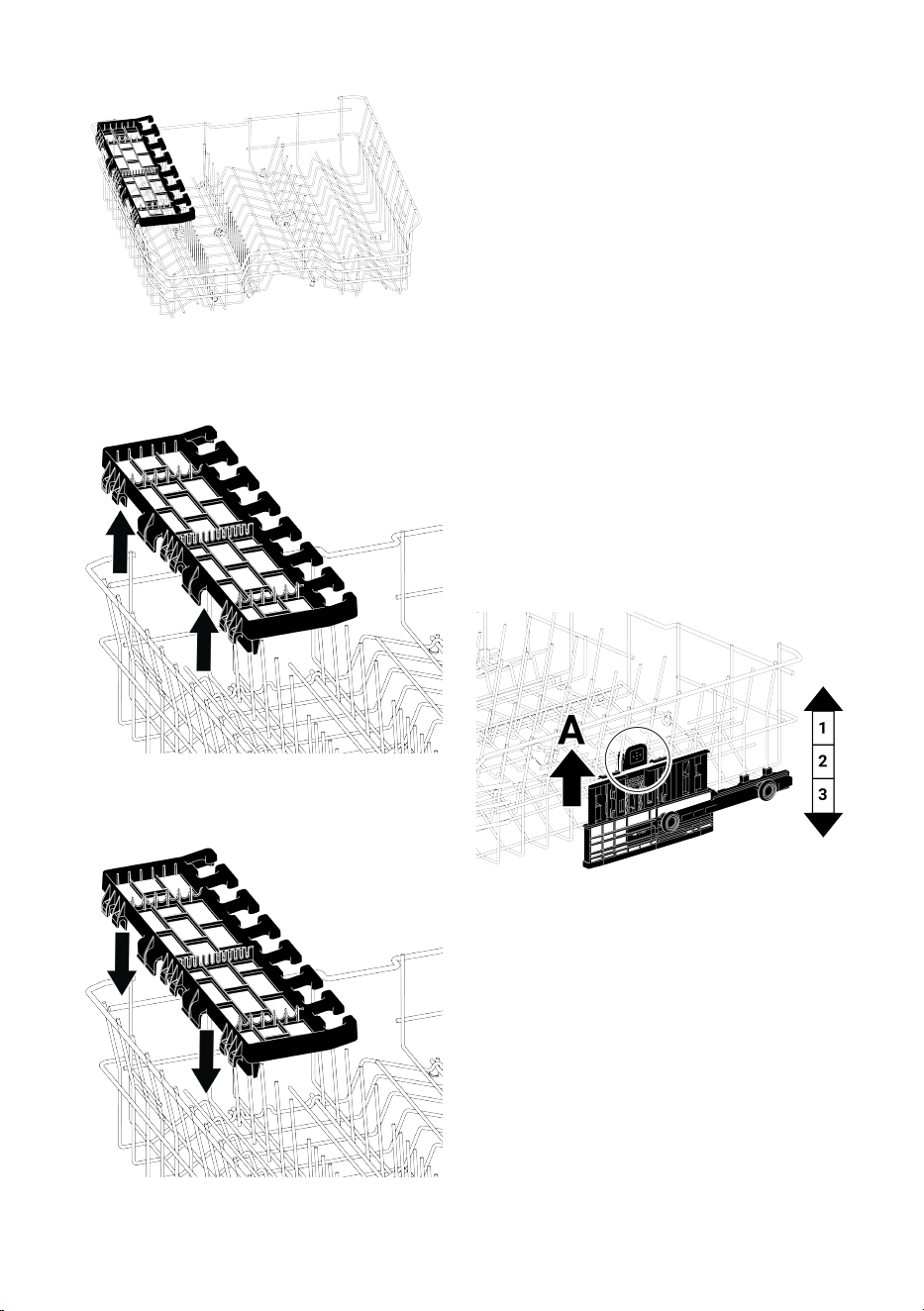
EN / 27
You may remove the upper basket multi-
function service rack by lifting it upwards
when you do not want to use it.
You may reinstall the upper basket multi-
function service rack on the side of your up-
per basket easily to use it again.
Illustration3:
6.17 Adjusting the height of the up-
per basket
(depends on the model)
Upper basket height adjustment mechan-
ism is designed so that you can create wide
spaces on the upper or lower compartment
of the dishwasher by adjusting the basket
upwards or downwards either while it is
empty or full.
Thanks to this mechanism, you may use
your basket in three different positions,
namely lower, centre or upper positions.
1. To raise the basket, hold the wires of
the basket and pull the basket upwards
with both hands while the basket is at
the lowermost position (A)
2. Release the basket when the basket
catches on to the next upper position
with a “Click” that may be heard from
the right and left mechanisms.
Repeat the same operation if the height is
not adequate.
To lower the basket, perform the following
while the basket is at uppermost position;
1. Holding the upper basket wires with
both hands and lifting the basket
slightly upwards, press and release the
latches shown in the figure (B) at the
same time.
2. Lower the basket to the next lower pos-
ition.
3. Release the basket when it catches on
to the next lower position.
Repeat the same operation if the height is
not adequate.
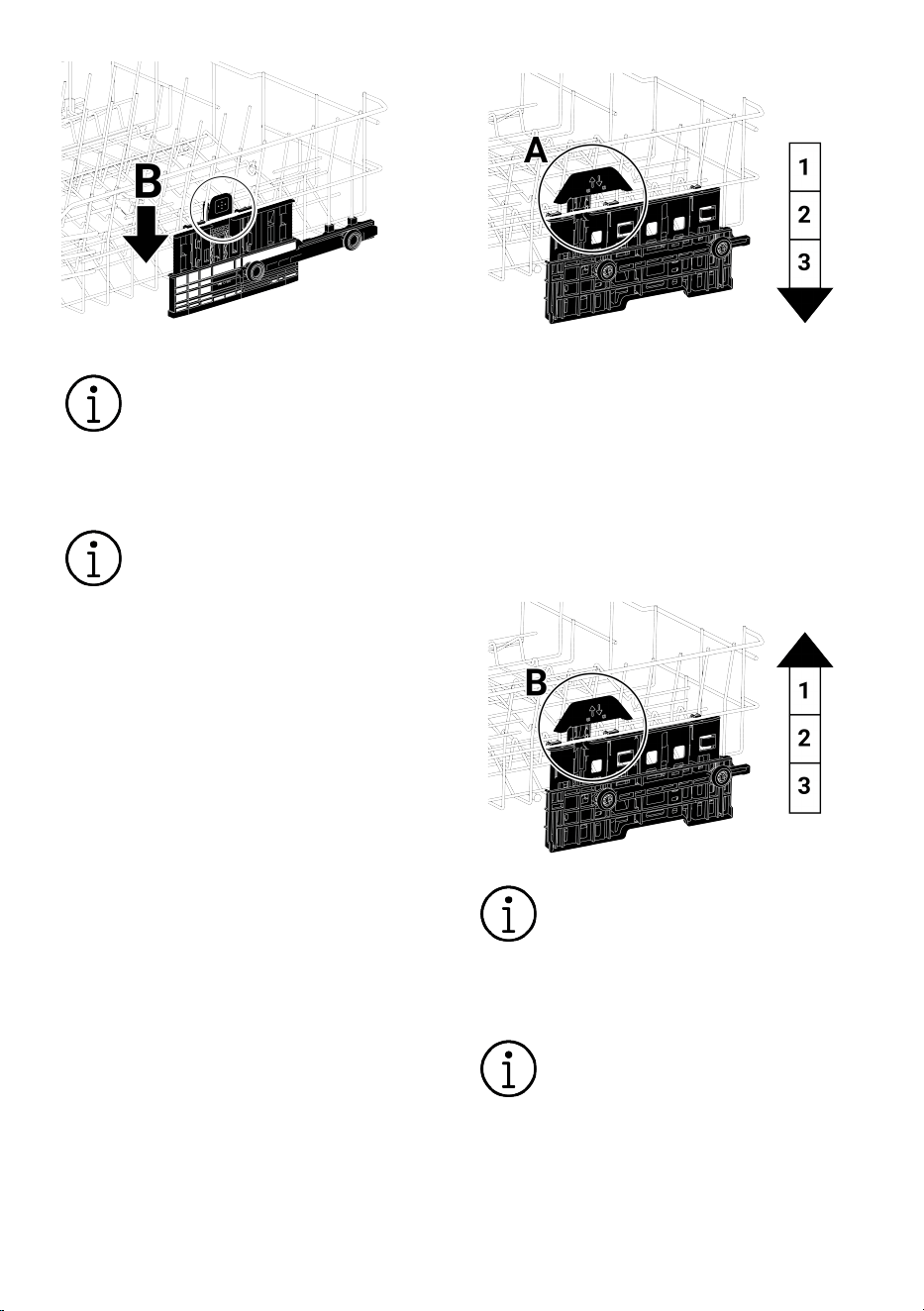
EN / 28
The movement mechanism may
not work properly when the upper
basket is overloaded or when the
load is unbalanced. And it may fall
to the next lower position in heavier
conditions.
Ensure that the adjustment mech-
anisms on the right and left of the
upper basket are aligned.
6.18 Adjusting the height of the up-
per basket
(depends on the model)
Upper basket height adjustment mechan-
ism is designed so that you can create wide
spaces on the upper or lower compartment
of the dishwasher by adjusting the basket
upwards or downwards either while it is
empty or full.
Thanks to this mechanism, you may use
your basket in three different positions,
namely lower, center or upper positions.
To lower the basket, perform the following
while the basket is at uppermost position;
1. Hold the wires of the upper basket and
raise the handle of the mechanism up-
wards as shown in the figure (A).
2. Lower the basket to the next lower pos-
ition.
3. Release the basket when it catches on
to the next lower position.
Repeat the same operation if the height is
not adequate.
1. To raise the basket, hold the wires of
the basket and pull the basket upwards
with both hands while the basket is at
the lowermost position (B)
2. Release the basket when it catches on
to the next upper position with a “Click”
that may be heard from the right and
left mechanisms.
Repeat the same operation if the height is
not adequate.
The movement mechanism may
not work properly when the upper
basket is overloaded or when the
load is unbalanced. And it may fall
to the next lower position in heavier
conditions.
Ensure that the adjustment mech-
anisms on the right and left of the
upper basket are aligned.
6.19 Adjusting the height of the up-
per basket
(depends on the model)
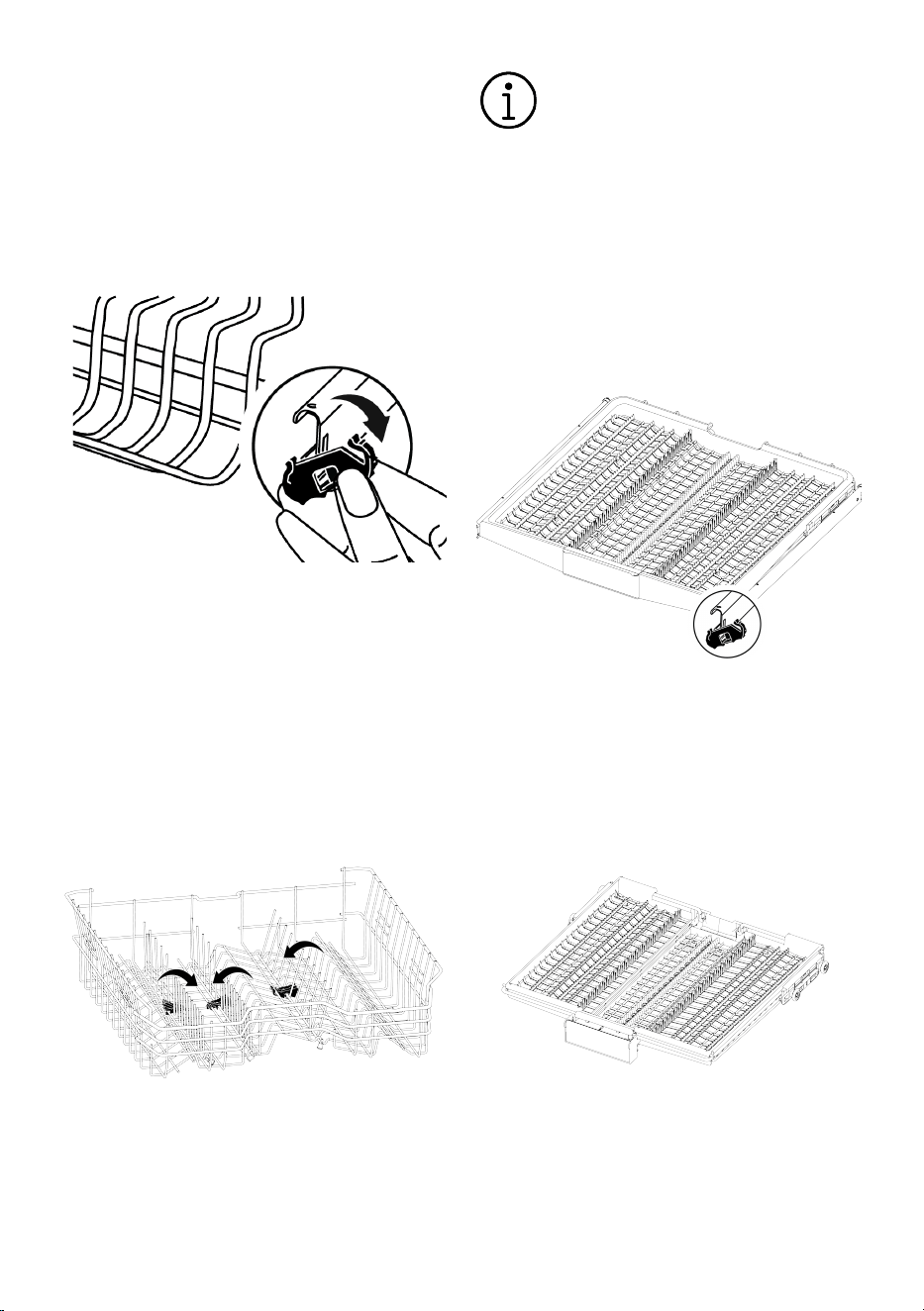
EN / 29
Place the large pieces, such as pots, to the
lower basket. You can adjust the height of
upper basket according to the size of your
dishes. To adjust basket height; using the
basket wheels, open the holders at the end
of upper basket rails by rotating them to
the side and remove the basket. Change
the position of wheels, re-insert the basket
to the rail and close the holders.
6.20 Foldable upper basket wires
(depends on the model)
You can use the folding wires when you
need more space in the upper basket of the
dishwasher for your large dishes.
To fold the foldable wires into the lying pos-
ition, hold the wires in the centre and push
them in the direction of the arrow in the pic-
ture. Place your large dishes in the space
created. Lift up to return the wires to the
upright position.
Bringing the wires to horizontal po-
sition by holding them from their
ends may cause them to be bent.
Therefore, grasp the centre wires by
the bottom and push them in the
direction of the arrow to bring them
into a lying or upright position.
6.21 Cutlery basket
(depends on the model)
The ceiling cutlery basket is designed for
washing your forks, spoons, etc. by placing
them between the combs on the tray.
6.22 Cutlery basket
(depends on the model)
The ceiling cutlery basket is designed for
washing your forks, spoons, etc. by placing
them between the combs on the tray.
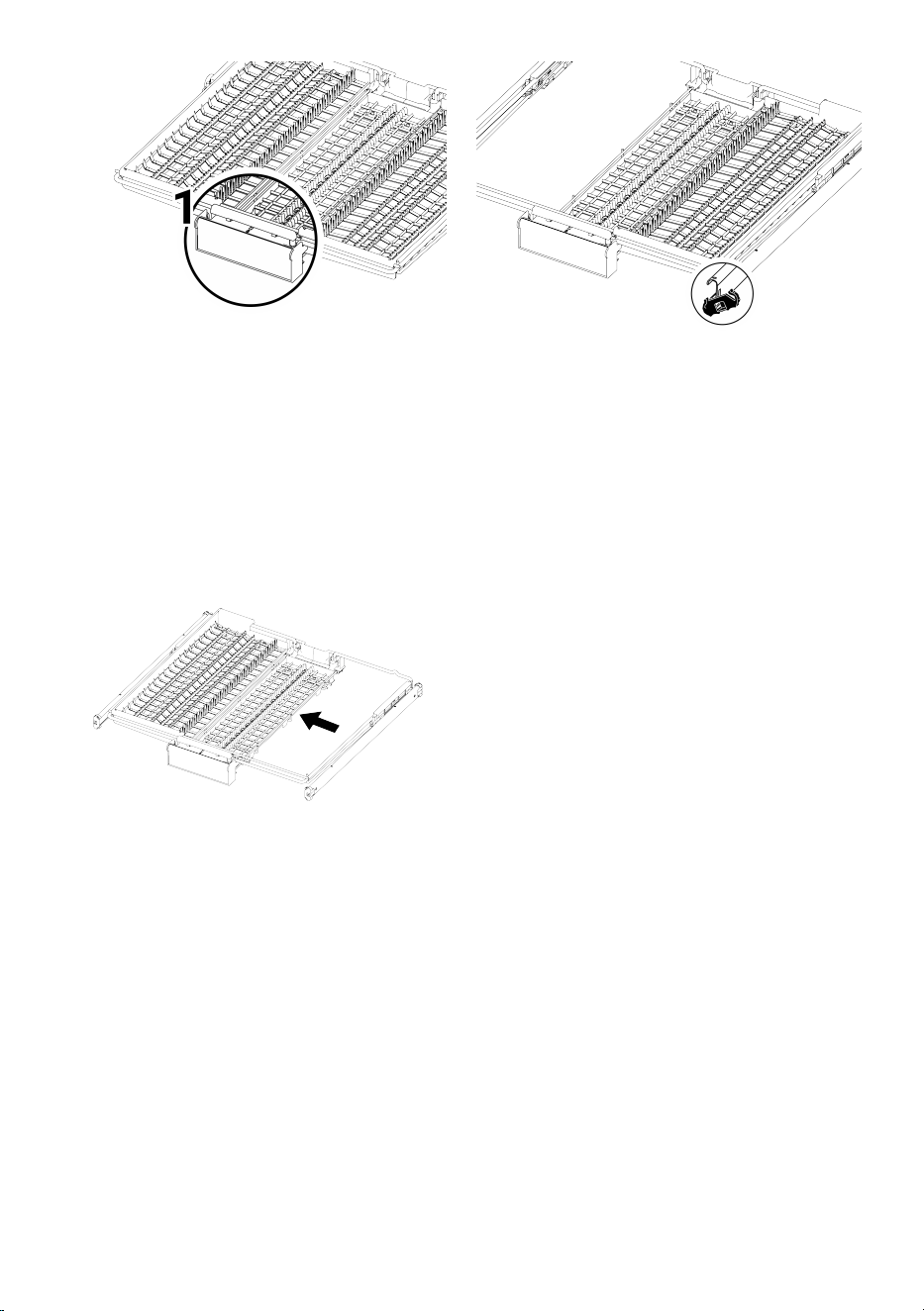
EN / 30
In the models with partial movement fea-
ture, when the arm (1) on the handle is
pushed, the tray on the middle part of bas-
ket goes down to the lower position; sys-
tem is unlocked and the right and left side
trays can be freely moved.
The free area established by moving the
side trays allows loading long dishes to the
upper basket.
When the middle tray is in the lower posi-
tion, it is possible to place long dishes such
as coffee cups, ladles etc. on the tray.
When the side trays are leaned to both
sides, it is possible to pull the handle and
ensure rising the middle tray and locking
the system.
6.23 Lower Spray Arm
The lower spray arm washes the dishes in
the lower basket.
6.24 Upper Spray Arm
The upper spray arm washes the dishes in
the upper basket.
EN / 31
7 Operating the product
1 2 3
4
5
6
1 On/Off Button 2 Display
3 Start / Pause / Cancel Key 4 Program Selection Key
5 Function Buttons 6 Delay Key
1
2
3
4
5
6
7 8
9 10
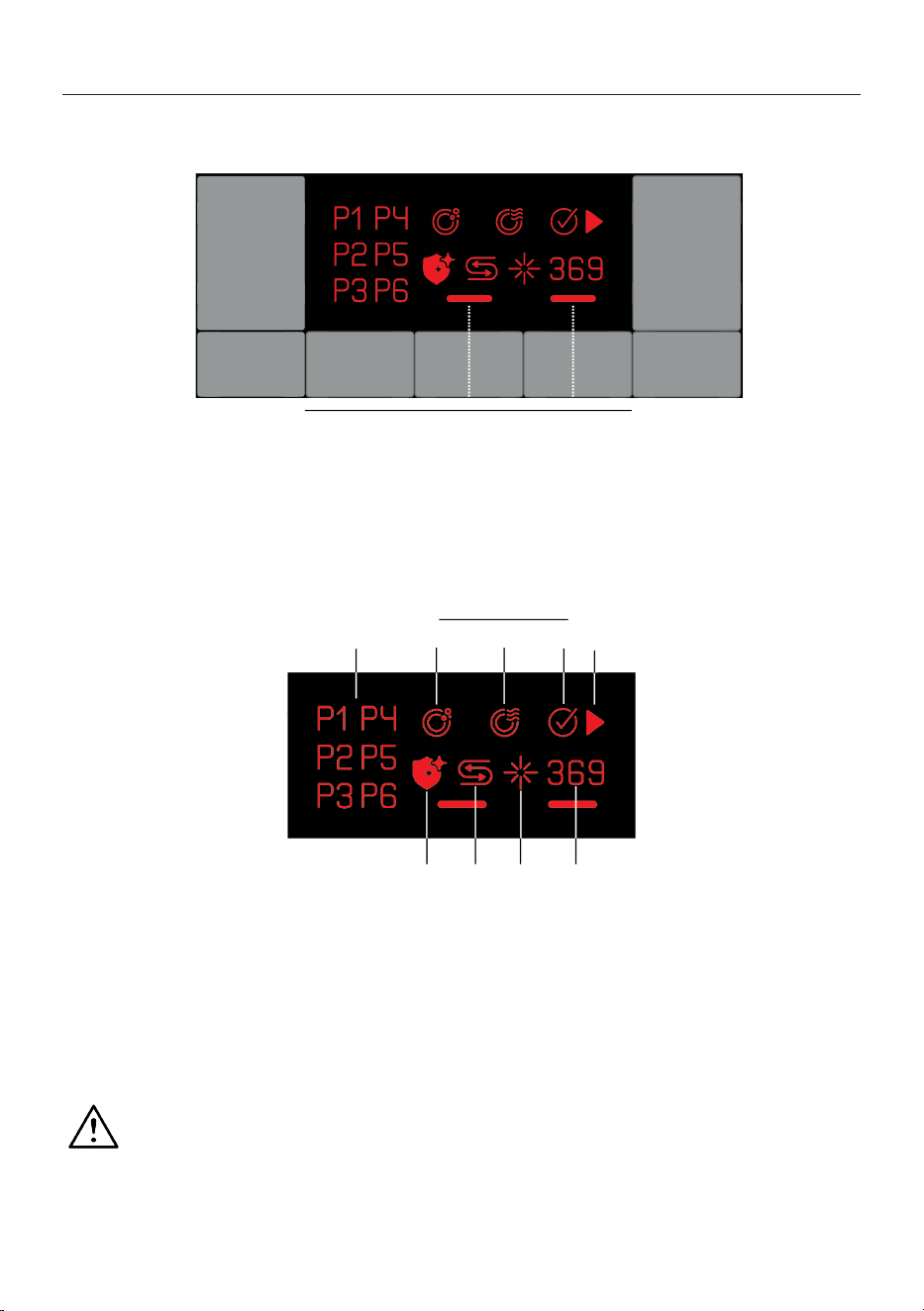
1 Program Indicator 2 Program Monitoring Indicator
3 Washing Indicator 4 Drying Indicator
5 Cycle Ended Indicator 6 Start/Hold Indicator
7 Hygiene Indicator 8 Low Salt Indicator
9 Low Rinse Aid Indicator 10 Delay Indicator
Please read the safety warnings
first.
Power On/Off Button
Used to turn the dishwasher on or off.
When this key is brought to ON, the dish-
washer is started with the economy pro-
gram and the number of the economy pro-
gram is displayed on the program indicator.
The indicators on the screen go off.

EN / 32
Start / Hold / Cancel key
Used for starting, holding or cancelling the
selected program.
Program Selection key
Used to select the proper washing program
that you specified from the program in-
formation and average consumption table.
Delay key
Used for setting the delaying period.
Preparing the dishwasher
1.Open the door of the dishwasher.
2.Load your dishes as described in the user
manual.
3.Ensure that lower and upper spray arms
are rotating freely.
4.Add adequate amount of detergent in the
detergent compartment.
5.Inspect whether low salt and low rinse aid
indicators are illuminated; and add salt
and/or rinse aid if required.
6.Close the door of the dishwasher.
Program Selection
1.Turn your dishwasher on by pressing the
On / Off key.
2.Select the proper washing cycle for your
dishes considering the cycle information
and average consumption values table.
3.Press the Program Selection key until the
number of the program you have decided is
displayed on the Program indicator
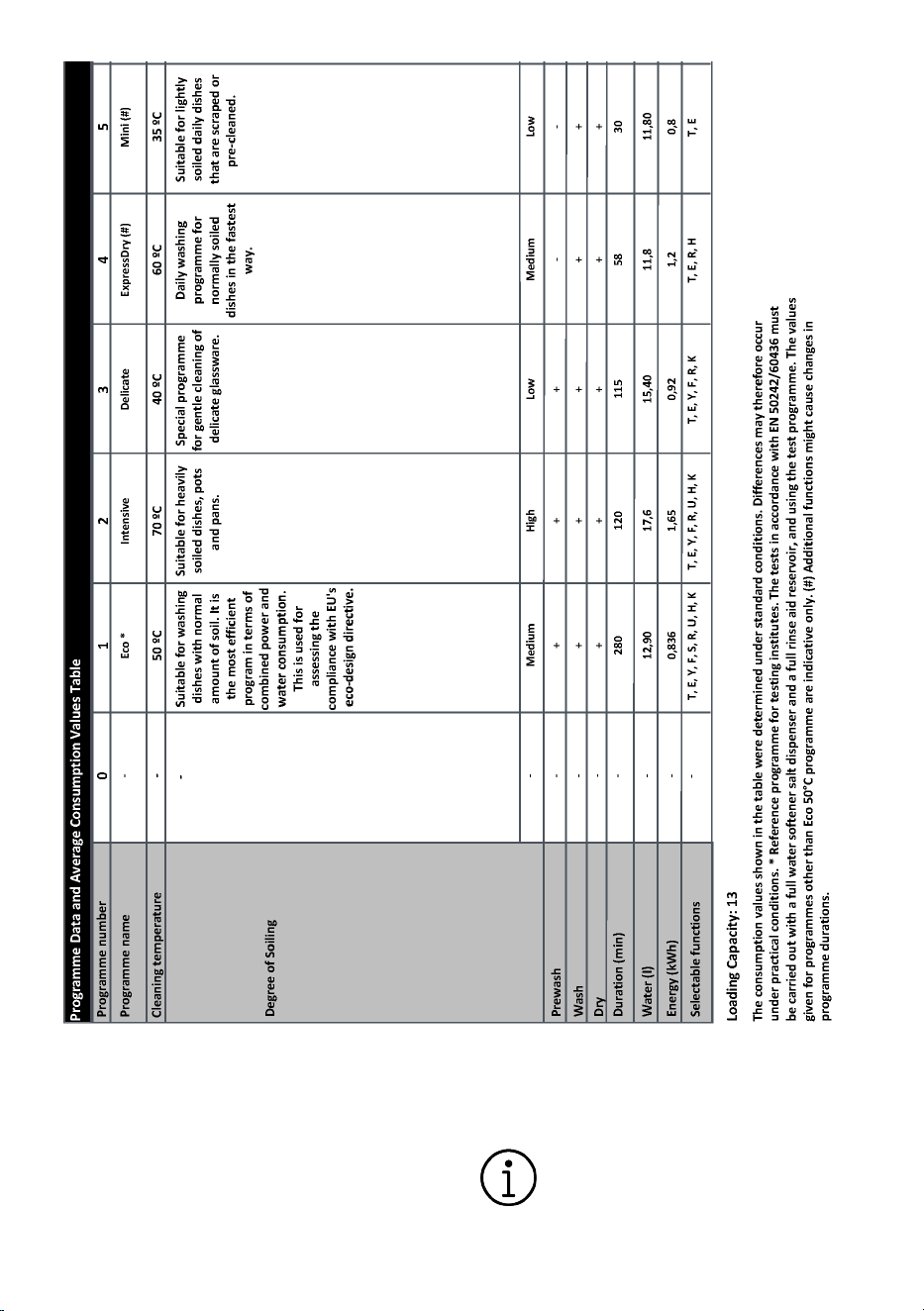
7.1 Program Information and Aver-
age Consumption Values Table
EN / 33
7.2 Additional functions
The dishwasher’s cycles are designed to
deliver the best cleaning performance by
considering the type and amount of dirt and
the properties of the dishes to be washed.
Additional functions have been added to
help you save time, water and energy, and
for a more convenient and hygienic wash
with its customisable settings.
Additional functions may alter the
duration of the selected cycle.
EN / 34
Additional functions are not avail-
able for all programs. A function’s
indicator will not show if is not
available for the programme.
Functions that can be used in
washing programmes are shown
with letters such as ‘A, B,D,E,G,F,K...’
in the 'Cycle Information and Aver-
age Consumption Values Table’.
You can find instructions on the
use of these functions in the 'Addi-
tional functions' section of the user
manual.
Some auxiliary functions cannot be
used together. If the function you
have selected does not show even
though it appears in the "Cycle In-
formation And Average Consump-
tion Values Table", you can activate
it after switching off other auxiliary
functions.
To add additional functions to the cycle:
1. Select the desired washing pro-
gramme.
2. When you select an additional function,
the indicator for the additional function
will light up. When you press the func-
tion button again, the indicator goes
out and the selection is cancelled.
If your dishwasher has sub-menu functions
depending on the model, see the instruc-
tions in the additional functions section for
their use.
Not all of the functions indicated
with letters such as "A,B,D,E,G,F,K..."
in the Cycle Information and Aver-
age Consumption Values Table can
be used in your dishwasher; the
functions that can be used in your
dishwasher are explained in the ad-
ditional functions section of this
manual.
7.3 Functions
Extra Rinse function (R)
(model dependent)
Depending on the type of detergent you
use, it provides the best rinsing perform-
ance by removing the stains that will re-
main on your dishes in case you have deter-
gent dissolution problems.
It can increase the duration of the
selected program by 25-35
minutes.
Half Load function (Y)
(Depending on the model)
It is used when you want to start your ma-
chine before it is full.
1.Load dishes into the dishwasher as de-
sired.
2.Turn the machine on using the On/Off
button.
3.After selecting the program you want,
press the Half Load button.
4.Press the Start/Pause/Cancel button to
run the program.
Thanks to the Half Load function, you can
use the upper and lower baskets of your
machine at the same time, saving water
and energy.
7.4 Starting the Cycle
Press the Start / Hold / Cancel key to start
your dishwasher after selecting the cycle
and additional functions.
Dishwasher softens the water as
per the hardness of the mains wa-
ter. The washing period may differ
due to the water softening process.
Moreover, program period may also
change while the program is being
executed as a result of the room
temperature, mains water temper-
ature and the amount of dishes.
EN / 35
Care to avoid opening of the door
while the dishwasher is being oper-
ated. If you need to open the door,
stop the dishwasher by pressing
the Start / Hold / Cancel key. Then
open the door of the dishwasher.
Be careful as steam may come out
when you open the dishwasher’s
door. Press the Start / Hold / Can-
cel key again after closing the dish-
washer door. Cycle shall be re-
sumed.
After rinsing, the dishwasher will be
quiet for a while in pause mode
then will proceed to the drying step
to drain all the water left on the
dishes and inside the dishwasher
and to clean the water softener.
a
7.5 Cancelling the Cycle
1.Press the Start / Hold / Cancel key for 3
seconds to cancel the cycle.
2.Release the key when the Program indic-
ator starts flashing. The dishwasher will ex-
ecute the necessary operations for a few
minutes to cancel the program.
Detergent or rinse aid may remain
inside the dishwasher and/or the
dishes being washed as per the
step of the cycle you have can-
celled.
7.6 Low Salt Warning Indicator
Check the low salt indicator on the screen
of your dishwasher to see if you have
softening salt in your dishwasher. Add salt
to the salt reservoir when the low salt indic-
ator on the display comes on.
The Water Softening System sec-
tion describes how to set the water
hardness level.
7.7 Low Rinse Aid Warning Indic-
ator
Check the low rinse aid indicator on the
screen of your dishwasher to see in you
have enough rinse aid in your dishwasher.
Add rinse aid to the rinse aid reservoir
when the low salt indicator on the display
comes on.
7.8 Setting the Rinse Aid Amount
1.Press the Delay and P keys for 3 seconds
and enter the settings menu after turning
your dishwasher on.
2.Press the P key until the drying indicator
starts flashing.
3.Set to a proper level with the Delay key.
4.Press the On/Off key to save the setting.
Applies no rinse aid in P:1 position during
washing programme.
Applies 2 dose of rinse aid in the P:1 posi-
tion.
Applies 3 dose of rinse aid in the P:2 posi-
tion.
Applies 4 dose of rinse aid in the P:3 posi-
tion.
Applies 5 dose of rinse aid in the P:4 posi-
tion.
7.9 End of Cycle
Program End indicator illuminates when the
washing program has ended.
1.Turn your dishwasher off by pressing the
On / Off key.
2.Switch off the tap.
3.Remove the plug from the outlet.
Your dishwasher turns off automat-
ically after a certain period to save
energy when the cycle is ended or
not started.
After washing your dishes, keep
them inside the dishwasher for ap-
proximately 15 minutes to cool.
Your dishes will dry faster if you
leave the door of your dishwasher
ajar during this time. This will im-
prove the drying efficiency of the
dishwasher
EN / 36
8 Maintenance and Cleaning
8.1 Maintenance and cleaning
Read “Safety Instructions” section
first!
Before cleaning the machine, un-
plug it and turn off the tap.
Do not use abrasive materials when
cleaning.
For the machine to work efficiently,
clean the filters and impellers at
least once a week.
If cleaned at regular intervals, the life of the
product will be extended and frequently en-
countered problems will be reduced.
Cleaning the exterior of the machine
Gently wipe the exterior of your machine
and the door seals with a delicate cleaning
agent and a damp cloth. Wipe the "control
panel" only with a slightly damp cloth.
Cleaning the inside of the machine
Clean the machine monthly by running it at
the highest possible temperature with de-
tergent or special machine cleaning agents.
This will help to remove residues and limes-
cale from the inside of the machine.
If there is water left in the machine, drain
the water in the machine by following the
procedures in the “Cancelling the program”
section. If the water cannot be drained, re-
move the filters as indicated in the “Clean-
ing the filters” section and check if there
are any dirt particles that have accumu-
lated at the bottom of the machine and
blocked the water path, and clean them if
necessary.
8.2 Cleaning the filters
(Depending on Model)
For the machine to work efficiently, clean
the filters at least once a week. Check if
there is any food residue on the filters. If
there is food residue, remove the filters and
clean them thoroughly under the tap.
1. Remove the micro filter and coarse fil-
ter group by turning it counterclock-
wise and pulling it out.
2. Pull the metal/plastic filter (3) out of its
place.
3. Press the two tabs on the coarse filter
inwards to separate the coarse filter
from the assembly.
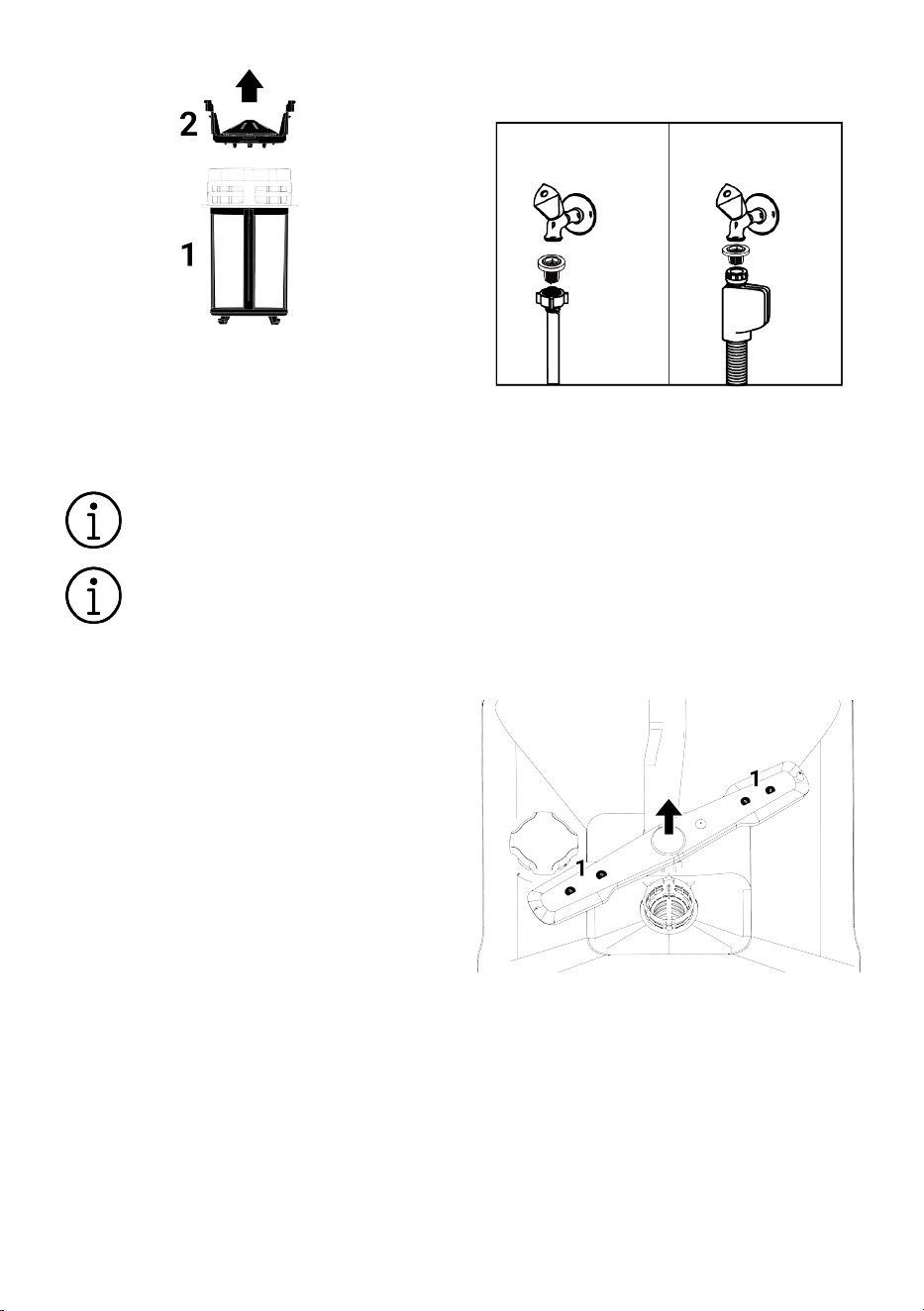
EN / 37
4. Clean all three filters under the tap with
a brush.
5. Replace the metal/plastic filter.
6. Place the coarse filter into the micro fil-
ter. Make sure it is properly seated.
Turn clockwise until you hear a click.
The machine should not be used
without a filter.
Failure to install the filters correctly
will reduce washing effectiveness.
8.3 Cleaning the hose filter
The filter on the water inlet hose prevents
dirt (sand, clay, rust, etc.) that may come
from the city network or your water system
from damaging the machine. Check the fil-
ter and hose from time to time and clean
them if necessary.
1. Turn off the tap and remove the hose.
2. After removing the filter from the hose,
clean it under the tap.
3. Place the cleaned filter back into its
place inside the hose.
4. Attach the hose to the faucet.
(Model dependent)
8.4 Cleaning the propellers
Clean the impellers at least once a week to
ensure efficient operation of the machine.
Lower propeller
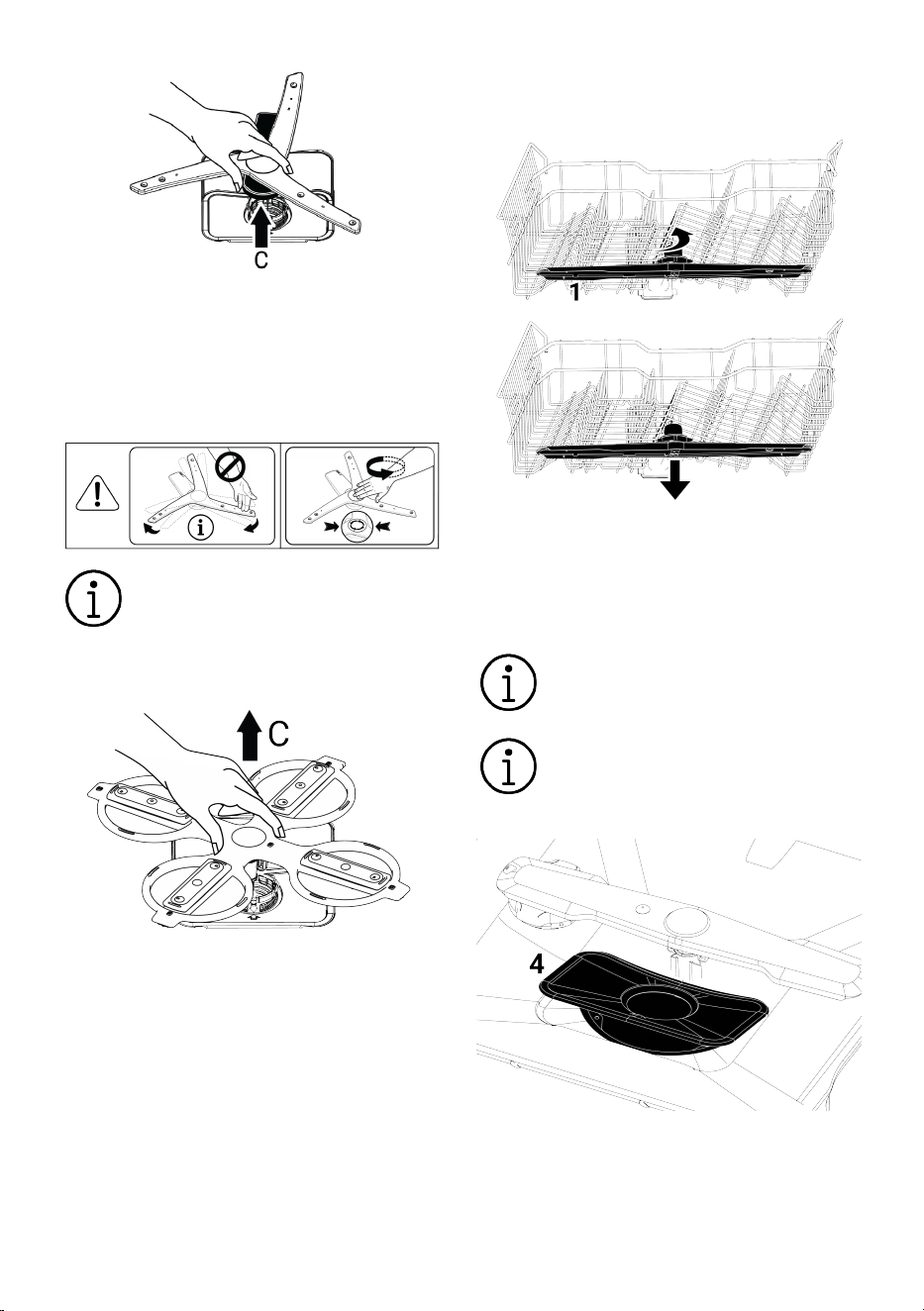
Check if the lower impeller (1) holes are
clogged. If there is a blockage, remove the
impeller and clean it. You can remove the
lower impeller by pulling it upwards (de-
pending on the model)
Check if the holes of the impeller assembly
are clogged. If there is a blockage, remove
the impeller assembly and clean it. (De-
pending on the model)
EN / 38
To remove and clean the lower propeller
group, hold it with one hand from the points
(C) shown in the figure and pull it upwards.
After cleaning, reattach the propeller group
by following the same steps in reverse. (De-
pending on the model)
Do not attempt to turn the propeller
by holding the ends. Trying to turn it
by the ends may cause the gear
system inside the propeller to
break.
To remove and clean the lower propeller
group, hold it with one hand from the points
(C) shown in the figure and pull it upwards.
After cleaning, reattach the propeller group
by following the same steps in reverse. (De-
pending on the model)
Upper propeller
Check if the upper impeller (1) holes are
clogged. If there is a blockage, remove the
impeller and clean it. You can remove the
upper impeller by turning its nut to the left.
When reattaching the upper propeller, be
sure to tighten the nut fully.
8.5 Micro Filter Cleaning Mechan-
ism
(depends on model)
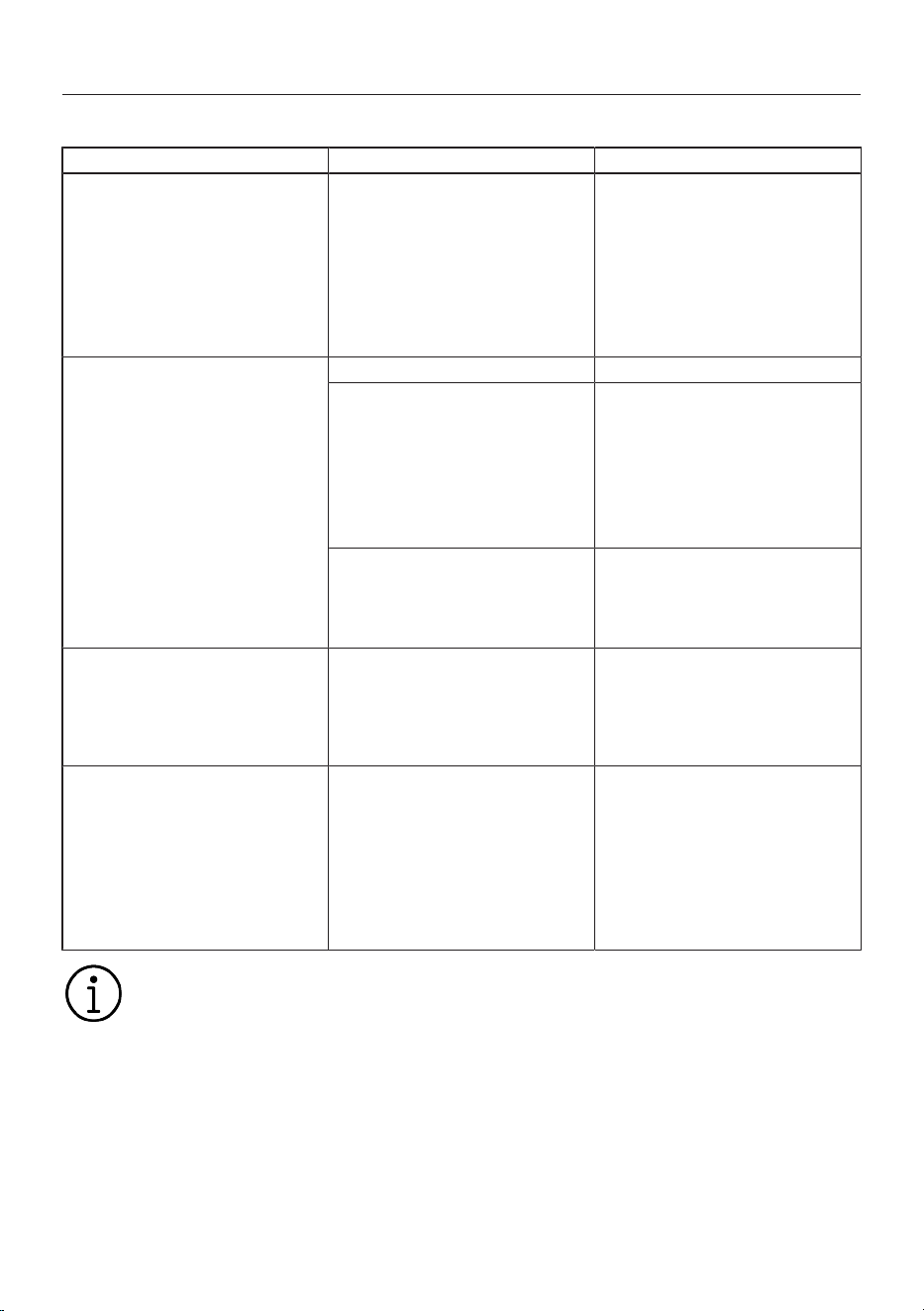
Filter cleanliness is increased by
80% with the micro filter cleaning
system available on your machine.
If your machine has auto filter
cleaning feature do not remove the
micro filter cleaning mechanism (4)
for cleaning.
EN / 39
9 Troubleshooting
9.1 Error Codes, Causes and Solutions
Error Code Cause Solution
E01 Warning
P1 Blinks
Power led flashes
Chassis water filling fault
1-Error algorithm is activated.
2-Cycle ends.
If you see the error continuously,
1-Cut off the electricity.
2-Close the valve.
3-Get in touch with the authorized
service.
E02 Warning
P2 Blinks
The Water outage icon illuminates.
The Washing led illuminates.
Water outage error Check the water supply.
Filter is blocked
1-Cut off the electricity connection.
2-Cut off the water connection.
3-Remove water inlet hose.
4-Check and clean the filter.
5-Establish the water connection.
6-Establish the electricity connection.
Other
If the error continues,
1-Close your dishwasher.
2-Get in touch with the authorized
service.
E06 Warning
P2 flashes
P6 flashes
Temperature sensor in the dish-
washer is faulty
If you see this error continuously and
washing performance has reduced,
1-Close your dishwasher.
2-Get in touch with the authorized
service.
E07 Warning
P2 flashes
F1 and F2 flashes
Flowmeter is faulty
1-Error algorithm is activated.
2-Cycle ends.
If you see the error continuously,
1-Cut off the electricity.
2-Close the valve.
3-Get in touch with the authorized
service.
The error codes can change de-
pend the model.
9.2 Troubleshooting
Machine does not work.
• The mains plug may not be plugged in.
>>> Check that the mains plug is plugged
in.
• The fuse may have blown. >>> Check the
fuses in your house.
• Water may not be coming out. >>> Make
sure that the water inlet tap is open.
• The dishwasher door may be open. >>>
Make sure that the dishwasher door is
closed.
• "On/Off button" may not have been
pressed. >>> Make sure to switch on the
dishwasher by pressing the "On/Off but-
ton".

EN / 40
Dishes are not cleanly washed
• Dishes are placed irregularly. >>> Place
the dishes as specified in the user
manual.
• The proper cycle is not selected. >>> Se-
lect a cycle with a higher temperature
and washing for a longer time.
• Dishes are very dirty >>> Remove the
coarse dirt of your dishes with a napkin
and then place them into your dish-
washer.
• Spray arms are stuck. >>> Before starting
the cycle, make sure that the upper and
lower spray arms rotate freely by rotating
them with your hand.
• The holes of the spray arms are clogged.
>>> Upper or lower holes of the spray
arms may be clogged with food residues
such as lemon seeds. Clean the spray
arms regularly as shown in the Section
"Cleaning and maintenance."
• Filters are clogged. >>> Check whether
the filter system is cleaned. Clean the fil-
ter system regularly as shown in the
"Cleaning and maintenance" section.
• Filters are not installed correctly. >>> In-
spect the filter system and make sure
that it is installed correctly.
• Baskets are overloaded. >>> Do not load
baskets above their capacity.
• Detergent is stored under improper con-
ditions. >>> If you are using a powder de-
tergent, do not store the detergent pack-
age in humid environments. If possible,
store the detergent in a storage container
with a lid. We recommend you to use tab-
let detergent for easy storage.
• Adequate amount of detergent is not ad-
ded. >>> If you are using a powder deter-
gent, put the amount of detergent suit-
able for the soil level of your dishes and
for the definitions of the cycles. We re-
commend using tablet detergents to
achieve the best results.
• Insufficient amount of rinse aid. >>> In-
spect the low rinse aid warning indicator
and add rinse aid, if required. If adequate
amount of rinse aid is available in the
dishwasher, increase the setting for rinse
aid.
• Detergent compartment cover is not
closed. >>> Always close the cover of the
detergent compartment after adding de-
tergent.
Dishes are not dried
• Dishes are placed irregularly. >>> Place
your dishes so that water shall not collect
inside them during washing.
• Insufficient amount of rinse aid. >>> In-
spect the low rinse aid warning indicator
and add rinse aid, if required. If adequate
amount of rinse aid is available in the
dishwasher, increase the setting for rinse
aid.
• Machine is unloaded right after the end
of washing cycle. >>> Do not unload your
dishwasher right after the end of washing
cycle. Keep the door ajar and let the
steam come out for some time and un-
load the dishwasher when the dishes are
cooled so that they are OK to be contac-
ted by hand. Start the unloading opera-
tion from the lower basket. Thus, the wa-
ter remaining on any dish on the upper
basket is prevented from dripping on the
dishes on the lower basket.
• The proper cycle is not selected. >>> Dry-
ing performance is low as the rinsing
temperature is also low in short cycles.
For a higher drying performance, select
longer cycles.
• Tablet detergent is used, and tablet but-
ton is not pressed >>> If your dishwasher
has a "tablet detergent" function, activate
it while using multi-purpose detergents.
• Surface quality of the kitchenware is
poor. >>> You may achieve the expected
washing performance on kitchenware
with damaged surfaces, and the use of
such kitchenware is not correct in terms
of hygiene. Moreover, it is difficult for wa-
ter to flow over damaged surfaces. It is
not recommended to wash such kitchen-
ware in the dishwasher.

EN / 41
• It is natural to have concerns about dry-
ing for Teflon kitchenware. This condition
is a result of the structure of Teflon. As
the surface tensions of Teflon and water
are different, water particles remain like
beads on the Teflon surface.
Tea, coffee or lipstick stains are left on
the dishes.
• The proper cycle is not selected. >>> Se-
lect a cycle with a higher temperature
and washing for a longer time.
• Surface quality of the kitchenware is
poor. >>> When tea, coffee stains and
other stains caused by dyeing materials
penetrate the damaged surfaces, it is not
possible to remove such stains dish-
washers. You may achieve the expected
washing performance on kitchenware
with damaged surfaces, and the use of
such kitchenware is not correct in terms
of hygiene. It is not recommended to
wash such kitchenware in the dish-
washer.
• Detergent is stored under improper con-
ditions. >>> If you are using a powder de-
tergent, do not store the detergent pack-
age in humid environments. If possible,
store the detergent in a storage container
with a lid. We recommend you to use tab-
let detergent for easy storage.
Lime stains remain on dishes and glass-
ware looks blurred
• Insufficient amount of rinse aid. >>> In-
spect the low rinse aid warning indicator
and add rinse aid, if required. If adequate
amount of rinse aid is available in the
dishwasher, increase the setting for rinse
aid.
• Water hardness setting is low or salt level
is inadequate. >>> Check the water hard-
ness setting by measuring the hardness
of the mains water accurately.
• There is a leak of salt. >>> Take care not
to pour salt around the filler opening
while adding salt. Ensure that the water
softener lid is closed after adding salt.
Clean the salt spilt into the dishwasher by
running the pre-wash cycle. Check the lid
once more at the end of the cycle, as the
salt particles remaining under the lid will
dissolve in the pre-wash step, and thus
the lid may loosen.
There is a different smell inside the
dishwasher
• New machines have a certain smell. This
smell shall disappear after a few washing
cycles.
• Filters are clogged. >>> Check whether
the filter system is cleaned. Clean the fil-
ter system regularly as shown in the
"Cleaning and maintenance" section.
• Chemicals that may cause odour are put
inside the rinse aid reservoir. >>> Do not
use chemicals such as vinegar, hand
washing detergents, and descaling
agents.
• Soiled dishes were kept in the dish-
washer for 2-3 days. >>> If you shall start
the dishwasher immediately after putting
the dishes into the dishwasher, remove
the soil on the dishes and run the Pre-
Wash cycle without detergent every two
days. Do not close the door of the dish-
washer completely to prevent occurrence
of odour inside the dishwasher in such
cases. You may also use commercially
available deodorizing and dishwasher
cleaning agents.
Rust stains, tarnishing, surface deterior-
ation on the dishes
• There is a leak of salt. >>> Salt may
cause deterioration and corrosion on
metal surfaces. Take care not to pour
salt around the filler opening while
adding salt. Ensure that the water
softener lid is closed after adding salt.
Clean the salt spilt into the dishwasher by
running the pre-wash cycle. Check the lid
once more at the end of the cycle, as the
salt particles remaining under the lid will
dissolve in the pre-wash step, and thus
the lid may loosen.
• Salty food residues have remained on the
dishes for a long period of time. >>> If kit-
chenware soiled with such foods are to
be kept in the dishwasher, the soil shall

EN / 42
be removed from the surface of the dish
by the pre-washing cycle or the dishes
shall be washed without waiting.
• There is no earth line in the electrical in-
stallation. >>> Check if your dishwasher
is connected to a true earth line. Other-
wise, the static electricity generated in
the dishwasher causes arcs and pits on
the surface of the metal objects, remov-
ing the protective layer on the surface,
and cause tarnishing of the surface.
• Intensive cleaning agents such as bleach
are used. >>> The protective layer on
metal surfaces gets damaged when it
comes into contact with cleaning agents
such as bleach, and thus loses its effect
over time. Do not wash your dishes with
bleach. If you want to wash your dishes
using bleach, your dishwasher shall have
a special equipment and a function that
allows washing with bleach. With this
equipment and function, the appropriate
amount of bleach shall be taken into the
washing environment in the right step,
then we may benefit from its hygienic ef-
fect and rinse the dishes in the best way.
• Metal items, such as knives in particular,
were used outside of their intended use.
>>> If the knives are used for purposes
such as opening the cans, the protective
layer on their ends shall be damaged. Do
not use metal kitchenware outside of
their intended use.
• Cutlery are made of low quality stainless
steel. >>> It is inevitable that such items
will rust, thus they shall not be washed in
the dishwashers.
• Previously rusted kitchenware are
washed in the dishwasher. >>> Rust on a
corroded item may migrate to other
stainless steel surfaces during washing
and cause rust to appear on those sur-
faces, too. Such items shall not be
washed in dishwashers.
Detergent residues are present in the
detergent reservoir.
• Detergent was put in a long time before
the washing procedure. >>> Take care to
put in the detergent just before starting
the washing operation.
• Opening of the detergent reservoir lid is
prevented during washing operation. >>>
Place the dishes in a way that does not
prevent the detergent reservoir lid from
opening and water from the spray arms
flowing into the reservoir.
• Detergent is stored under improper con-
ditions. >>> If you are using a powder de-
tergent, do not store the detergent pack-
age in humid environments. If possible,
store the detergent in a storage container
with a lid. We recommend you to use tab-
let detergent for easy storage.
• The holes of the spray arms are clogged.
>>> Upper or lower holes of the spray
arms may be clogged with food residues
such as lemon seeds. Clean the spray
arms regularly as shown in the Section
"Cleaning and maintenance."
Patterns and decorations on kitchen-
ware are erased.
• Patterned glasses and porcelain items
with a pattern on the glaze are not suit-
able for washing in the dishwasher. Glass
and porcelain tableware manufacturers
do not recommend washing such kitch-
enware in the dishwasher.
The dishes are being scratched.
• Kitchenware and accessories made of
aluminium or that contain aluminium
shall not be washed in the dishwasher.
• There is a leak of salt. >>> Take care not
to pour salt around the filler opening
while adding salt. Salt spread around
may cause scratching. Ensure that the
water softener lid is closed after adding
salt. Clean the salt spilt into the dish-
washer by running the pre-wash cycle.
Check the lid once more at the end of the
cycle, as the salt particles remaining un-
der the lid will dissolve in the pre-wash
step, and thus the lid may loosen.

EN / 43
• Water hardness setting is low or salt level
is inadequate. >>> Check the water hard-
ness setting by measuring the hardness
of the mains water accurately.
• The dishes are not placed properly. >>>
When placing glasses and other glass kit-
chenware in the basket, do not lean them
against other dishes, but on the edges of
the basket, on the racks or on the glass
supporting wire. When two glasses or
other dishes being washed hit each other
due to the impact of water during wash-
ing operation, this may cause scratching/
breaks on the surfaces.
• A blurred stain that looks like a milk soil
remains on glasses, which cannot be re-
moved when wiped by hand. When ex-
posed to light, a bluish /rainbow coloured
appearance is observed.
• Excessive amount of rinse aid is used.
>>> Lower the setting of rinse aid. While
adding the rinse aid, always clean the
rinse aid overflown to the surroundings.
• Corrosion has occurred on the glass due
to soft water. >>> Check the water hard-
ness setting by measuring the hardness
of the mains water accurately. Do not use
salt if your mains water is soft (<5 dH).
Use cycles with a higher temperature set-
ting (e.g. 60-65 degrees) for washing.
You may also use commercially available
glass-protecting detergents.
Foam occurs in the dishwasher.
• Dishes are washed by hand with dish
washing detergent and then put into the
dishwasher without rinsing before they
are placed in the dishwasher. >>> No
foam control characteristics are available
in dish washing detergents intended for
hand washing. You do not need to hand
wash the dishes with detergent before
placing them in the dishwasher. Simply
rinse off the coarse soil on the surface of
the dish with water or scrape it off with a
paper napkin or a fork.
• Rinse aid was spilt into the dishwasher
while adding rinse aid. >>> Take care not
to spill rinse aid into the dishwasher
while adding rinse aid. Clean spilt rinse
aid with a paper napkin/towel.
• The rinse aid reservoir lid has been left
open. >>> Make sure to close the rinse
aid reservoir lid after adding rinse aid.
Kitchenware break.
• Dishes are placed irregularly. >>> Place
the dishes as specified in the user
manual.
• Baskets are overloaded. >>> Do not load
baskets above their capacity.
• Water remains in the dishwasher after
the end of the cycle.
• Filters are clogged. >>> Check whether
the filter system is cleaned. Clean the fil-
ter system regularly as shown in the
"Cleaning and maintenance" section.
• The drain hose is clogged / blocked. >>>
Inspect the drain hose. Remove the hose
if required to remove the blockage and
then install it again as described in the in-
stallation instructions.
10 Guarantee Details
Your new Blomberg product is guaran-
teed against faulty materials, defective
components or manufacturing defects.
The guarantee starts from the date of
original purchase of the product for a
period of three (3) years, unless Beko
plc (the “Manufacturer”) agrees to ex-
tend the guarantee for the product in
writing.
If you have any questions about the
guarantee on your product (including
how long it is valid), please contact your
retailer or our Call Centre on 0333 207
9870. This guarantee does not in any
way diminish or affect your statutory
rights in connection with the product.
This guarantee is in addition to your

EN / 44
statutory rights as a consumer. If you
have any questions about these rights,
please contact the retailer from which
you purchased the product. In certain
circumstances, it is possible that your
statutory rights may offer additional or
higher levels of protection than those
offered under the terms of this guaran-
tee.
What is covered by this guarantee?
•Repairs to the product required as a result
of faulty materials, defective components
or manufacturing defects.
•Functional replacement parts to repair a
product.
•The costs of a Blomberg Approved Engin-
eer to carry out the repair.
What is not covered?
•Transit and delivery damage
•Cabinet or appearance parts, including but
not limited to control knobs, flaps and
handles.
•Accessories and/or consumable items in-
cluding but not limited to ice trays,
scrapers, cutlery baskets, filters and light
bulbs.
•Repairs necessary as a direct or indirect
result of:
-Accidental damage, misuse or abuse of a
product.
-An attempted repair of a product by any-
one other than a Blomberg Approved Engin-
eer (the “Engineer”).
-Installation or use of a product where such
installation or use fails to meet the require-
ments contained in this guarantee or the
User Instructions Booklet.
•Repairs to a product operated at any time
on commercial or non-residential house-
hold premises (unless we have previously
agreed to the installation environment).
This guarantee is limited to the cost of re-
pairing the product. To the extent permitted
by law, Beko plc (the “Manufacturer”) does
not accept and will not be held liable for
any financial loss incurred in connection
with the failure of any product to operate in
accordance with the expected standards.
Such financial loss includes but is not lim-
ited to loss arising from:
•Time taken off work
•Damaged food, clothing or other items.
•Meals taken at restaurants or from
takeaways.
•General compensation for inconvenience.
Important Notes
•Your product is designed and built for do-
mestic household use only.
•The guarantee will automatically be void if
the product is installed or is used in com-
mercial or non-residential domestic house-
hold premises, unless we have previously
agreed to the installation environment.
•The product must be correctly installed,
located and operated in accordance with
the instructions contained in the User In-
structions Booklet provided with your
product.
•Professional installation by a qualified
Electrical Domestic Appliance Installer is
recommended for all Washing Machines,
Dishwashers and Electric Cookers (as in-
correct installation may result in you having
to pay for the cost of repairing the product).
•Gas Cookers must be professionally in-
stalled by a Gas Safe (or Gas Networks Ire-
land for Republic of Ireland) registered gas
installer.
•This guarantee is given in respect of
products purchased and used within the
United Kingdom and the Republic of Ire-
land.
•This guarantee is effective from the initial
date of purchase of a new product from an
authorised retailer and will be void if the
product is resold.
•This guarantee does not apply to graded
sales (where the product is purchased as a
“second”).
•Possession of a copy of these terms and
conditions does not necessarily mean that
a product has the benefit of this guarantee.
If you have any questions, please call our
Call Centre on the number set out above.

EN / 45
•The Manufacturer reserves the right to ter-
minate the guarantee if its staff or repres-
entatives are subjected to physical or
verbal abuse in the course of carrying out
their duties.
•Optional extras, where available (i.e. ex-
tendable feet) are supplied on a chargeable
basis only.
Does Blomberg offer replacements?
This is a repair-only guarantee. On occa-
sion the Manufacturer may at its sole dis-
cretion, replace your product with a new
product instead of carrying out a repair.
Where a replacement is offered, this would
normally be an identical model, but when
this is not possible, a model of similar spe-
cification will be provided. The Manufac-
turer will cover the costs and arrange for
the delivery of the new product and for the
return of the old product. Any costs related
to disconnecting the faulty product and in-
stalling the replacement product will not be
borne by the Manufacturer unless previ-
ously agreed to in writing. The original guar-
antee will continue to apply to the replace-
ment product; the new product will not
come with a new guarantee.
When will the repair take place?
Our engineers work Monday to Friday
9.00am to 5.00pm. Appointments outside
these hours may be possible at the sole
discretion of the Manufacturer but cannot
be guaranteed. Whilst our Engineers will en-
deavour to minimize inconvenience and to
meet requests for specific timed appoint-
ments, this cannot be guaranteed. The
Manufacturer will not be liable for delays or
if it is unable to carry out a repair because a
convenient appointment cannot be ar-
ranged.
Will there be any charge for the repairs?
It is your responsibility to provide evidence
to the Engineer that your product is covered
by this guarantee with a proof of purchase.
The Manufacturer reserves the right to
charge for the reasonable cost of any ser-
vice call if:
•You cannot provide evidence that your
product is covered by this guarantee.
•Where a service call has been made and
the engineer finds that there is no fault with
your product.
•That your product has not been installed or
operated in accordance with the User In-
structions Booklet.
•That the fault was caused by something
other than faulty materials, defective com-
ponents or manufacturing defects.
•For missed appointments.
Payment of these costs are due immedi-
ately upon the Engineer providing you with
an invoice. If you fail to pay the costs for
the service call in a timely manner, the
Manufacturer reserves the right to termin-
ate the guarantee. If you are a resident of
the United Kingdom, this guarantee will be
governed by English law and subject to the
English Courts, save where you live in an-
other part of the United Kingdom, in which
case the law and courts of that location will
apply. If you are resident in the Republic of
Ireland, this guarantee will be governed by
Irish law and the Irish courts will have juris-
diction.
How to obtain service
Please keep your purchase receipt or other
proof of purchase in a safe place; you will
need to have it should the product require
attention under guarantee. It will be useful
if you complete the details below, as it will
help us assist you when requesting service.
(The model number is printed on the In-
struction Booklet and the serial number is
printed on the Rating Label affixed to the
appliance). Recording of these details
alone will not count as proof of purchase. A
valid proof of purchase is required for un-
der guarantee service.
The area around the product must be easily
accessible to the Engineer without the need
for cabinets or furniture being removed. It
is your responsibility to ensure our Engin-
eers have a clean and safe environment to
carry out any repairs.

EN / 46
………...………………………………………………………………
……………………
Model No:
Serial No:
Retailer:
Date of purchase:
…………………………………………….……………………………
…………………..
For service under guarantee simply tele-
phone the appropriate number below
UK Mainland & Northern Ireland: 0333
207 9870.
Republic of Ireland: 01 691 0160
Register your appliance at www.blomber-
guk.com/register
Before requesting service please check the
troubleshooting guide in the Operating In-
structions as a charge may be levied where
no fault is found even though your product
may still be under guarantee.
Service once the manufacturers guaran-
tee has expired
If you have purchased an extended guaran-
tee please refer to the instructions con-
tained within the extended guarantee
agreement document, otherwise please call
the appropriate number above where ser-
vice can be obtained at a charge. Should
you experience any difficulty in obtaining
service contact the Blomberg Customer
Helpline on Tel: 0333 207 9870 or e-mail:
guk.com
………………………………………………...........................
......................................
This guarantee is provided by Beko plc.
Beko House, 1 Greenhill Crescent, Watford,
Herts, WD18 8QU. Beko plc is registered in
England and Wales with company registra-
tion number 02415578.
11 DISCLAIMER / WARNING
Some (simple) faults can be repaired by
end users without causing any safety prob-
lems or unsafe use, provided that they are
carried out in accordance with the follow-
ing instructions. (See the section "I Want To
Repair Myself").
Therefore, except for the parts specified in
the "I Want to Repair Myself" section that
can be repaired by end users, repair by an
authorised service station is strongly re-
commended to prevent safety problems
and is mandatory for the continuation of
the Blomberg product warranty.
I WANT TO REPAIR MYSELF
Repairs to be carried out by end users can
be performed for the following spare parts:
External Power Supplies, Remote Control.
(Current spare parts list is available at ad-
dress as of 1 March 2021)
In addition, to ensure product safety and to
avoid the risk of serious injury, repairs must
be carried out according to the instructions
in the instruction manual or at address. For
your safety, unplug the product before car-
rying out any repair work.
Cannot be held responsible for any safety
problems that may arise due to repair oper-
ations or attempts by end-users to repair
parts other than those specified in the user
manuals or in accordance with the instruc-
tions in the address and parts in the current
parts list available at the Blomberg ad-
dress. In such a case, the Blomberg
product warranty will be invalid.
Therefore, end-users are strongly recom-
mended to refrain from performing repair
operations for parts other than the spare
parts mentioned above by themselves and
to contact an authorised service station if
necessary. Such repair attempts by end
users may cause safety issues; damage the
product and subsequently result in fire,
flooding, electric shock and serious per-
sonal injury.
Repair processes of the following parts, but
not limited to those listed, should be per-
formed by authorised service stations: In-
ternal Power Supply, Capacitors, Battery
and Accumulators, etc.

EN / 47
The manufacturer/seller cannot be held re-
sponsible for any failure of end users to
comply with the above.