AVPROEDGE ~ 2222 E 52ND ST N SIOUX FALLS, SD 57104 ~ 1.877.886.5112 ~ +1.605.274.6055 ~ SUPPORT@AVPROEDGE.COMAVPROEDGE ~ 2222 E 52ND ST N SIOUX FALLS, SD 57104 ~ 1.877.886.5112 ~ +1.605.274.6055 ~ SUPPORT@AVPROEDGE.COM
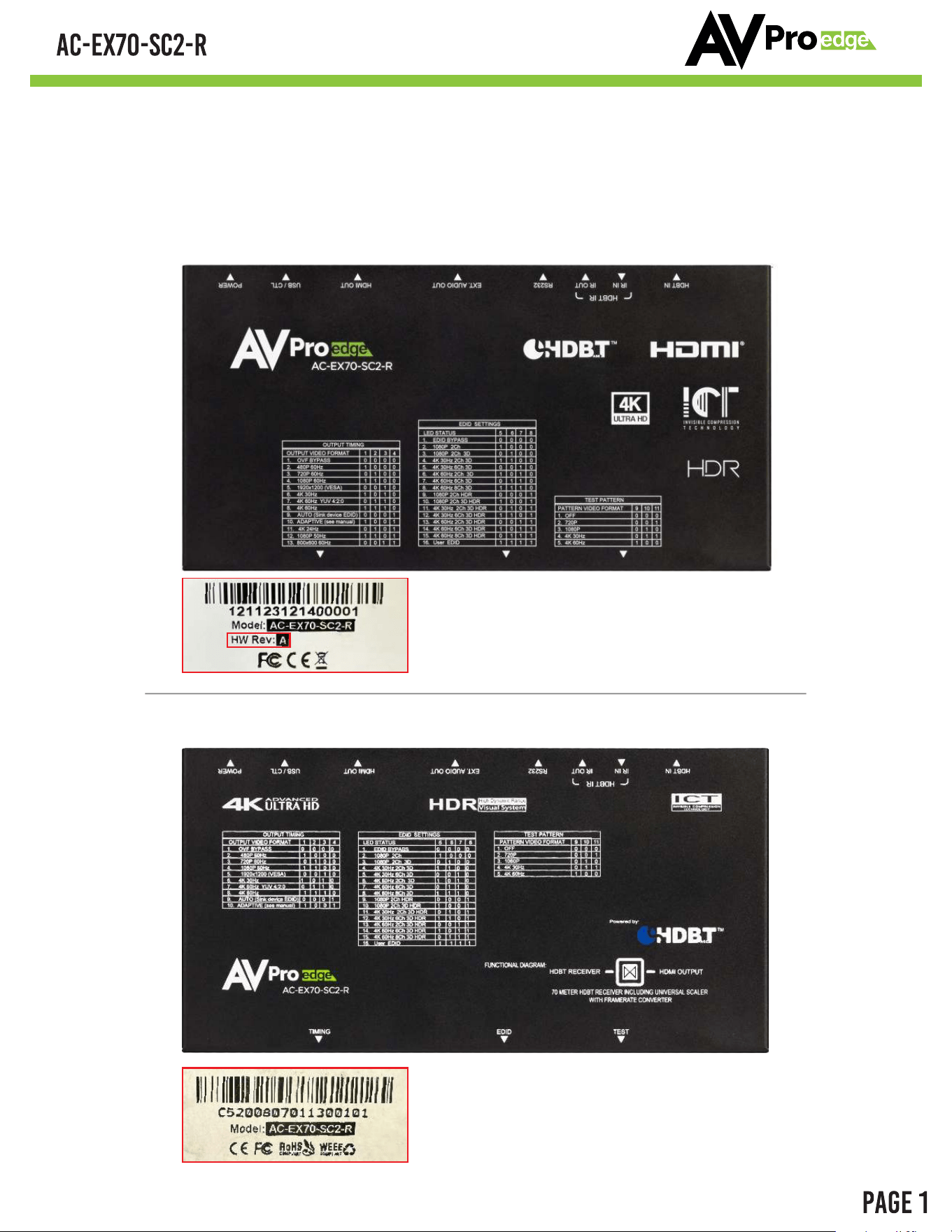
This sticker is located on the back of the unit,
specifically on its bottom, and it indicates
the hardware version of the unit.
*This is the example of the HW Rev: A unit
This sticker is located on the back of the unit,
specifically on its bottom, and it indicates
the hardware version of the unit.
*This is the example of the legacy unit
Legacy Unit - Shipped before January 2024
HW Rev: A Unit - Shipped after January 2024
USER MANUAL
The AVPro Edge's AC-EX70-SC2-R is the ideal solution for integrators that are needing to distribute
a signal to a variety of displays and keep an optimal picture. Integrators will enjoy it's versatility of
not only being able to control up/down scaling but handling EDID issues (including 4K HDR EDID's)
and being able to access audio from the stream. This scaler is ready for future content as well as it's
able to distribute 18Gbps signaling. Yet if you have 480, 720, or 1080 displays the AC-SC2-AUHD-
GEN2 will make sure it's getting the right picture.
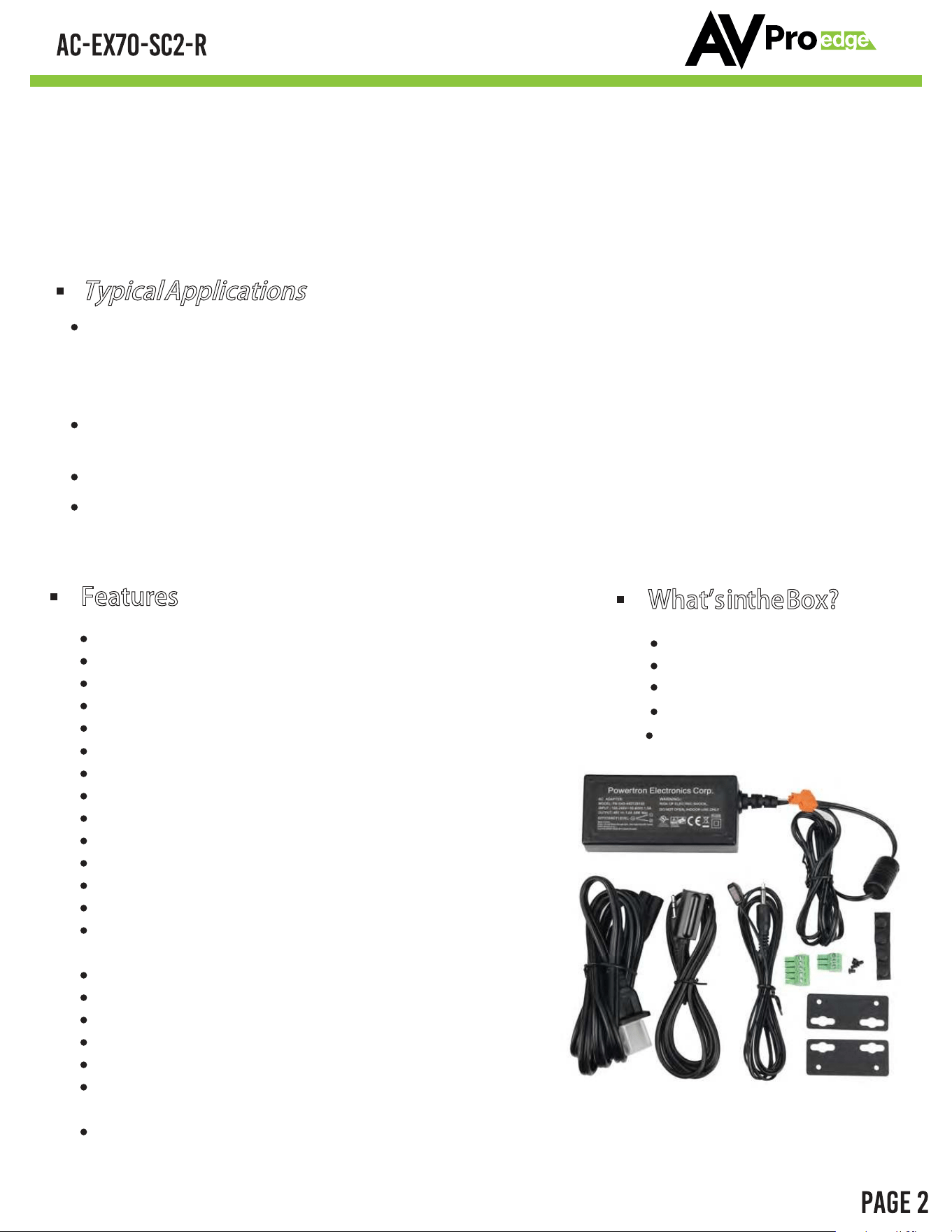
What's in the Box?
AC-EX70-SC2-R
48V 1A Power Supply
Mounting Brackets
IR RX & TX
Terminal Connectors
Features
HDMI 2.0(a/b)
Fixed Output Options 480P, 720P, 1080P & 4K
Adaptive Scaling Mode
Plug & Play Match Display Preference Mode
16 EDID Options (Including Auto & HDR EDID Options)
L/R Audio De-embedding (PCM only, DOES NOT DOWNMIX)
Test Pattern Generation
Simple, easy to use. 3-Button Operation
18Gbps Bandwidth Support
Up to 4K60 4:4:4 Support
Full HDR Support (HDR 10 & 12 Bit)
HDR, HDR10+ and HLG Support
EDID Management and EDID emulate
720P, 1080P & 4K Test Patterns built in for
troubleshooting
HDCP 2.2 (and all earlier versions supported)
CEC Pass Through
3D Support
LED Status, Link, Power indication lights
Micro USB port for control
Supports uncompressed PCM 2- Ch., LPCM 5.1 & 7.1,
Dolby Digital, DTS, Dolby TrueHD, DTS HD-Master Audio, Atmos on HDMI
Can Cascade
Typical Applications
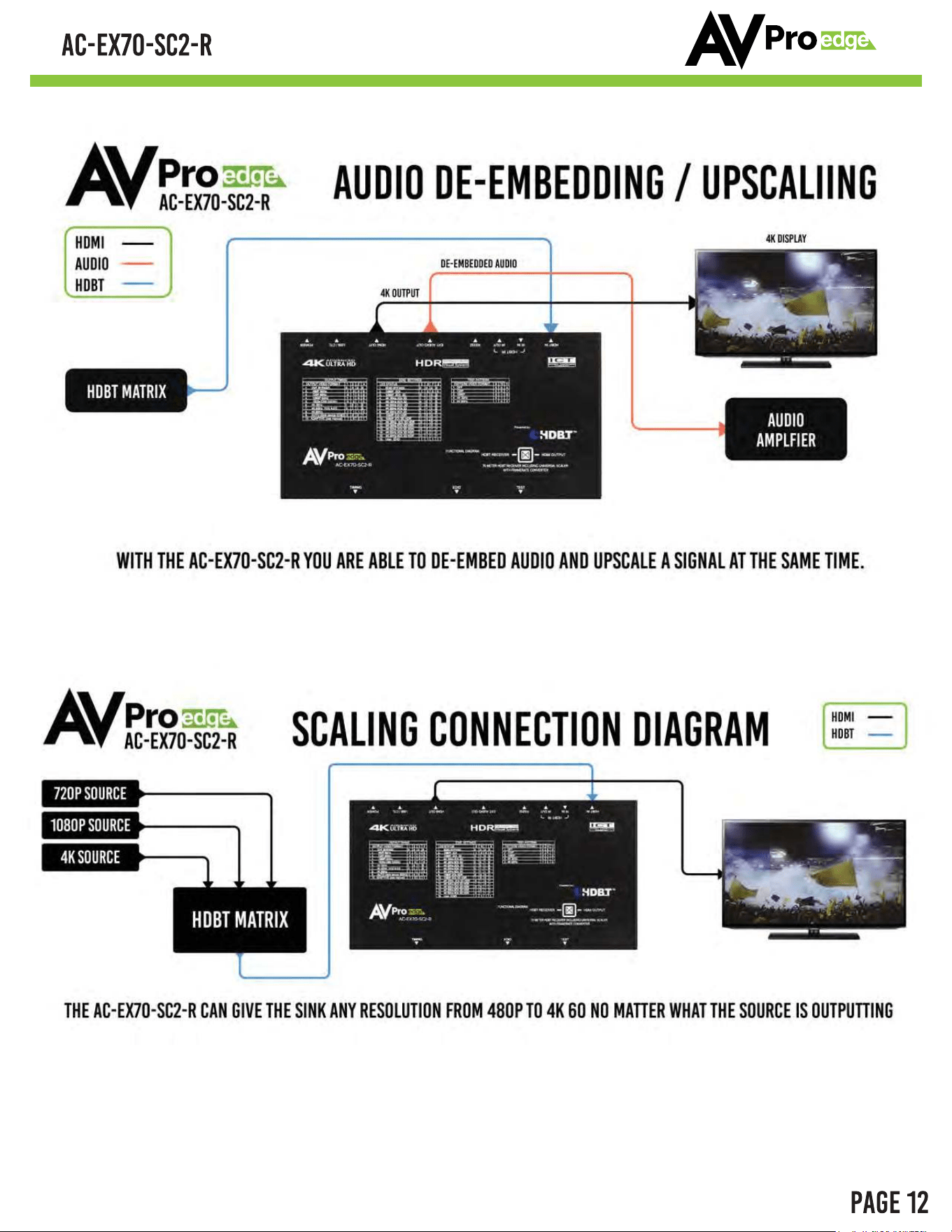
For mixed systems with SD, HD and UHD displays within a matrix. Since a matrix will typically
“down-clock” to the lowest common format, putting a scaler in will essentially “trick” the
matrix into sending 4K UHD material. The scaler will downscale the content to 480 for the HD
display.
As an Audio Extractor – Stand-alone audio extractors cost about the same thing, so purchasing
the AC-SC2-AUHD which does so much more, is a no brainer.
EDID causes about 80% of HDMI connectivity issues – TheAC-EX70-SC2-R can fix them all.
EDID capture and emulation – would you like to test end points prior to hanging that 600 pound
projector 100 feet up on the ceiling? Use the AC-EX70-SC2-R and your problem is solved
AVPROEDGE ~ 2222 E 52ND ST N SIOUX FALLS, SD 57104 ~ 1.877.886.5112 ~ +1.605.274.6055 ~ SUPPORT@AVPROEDGE.COM
AVPROEDGE ~ 2222 E 52ND ST N SIOUX FALLS, SD 57104 ~ 1.877.886.5112 ~ +1.605.274.6055 ~ SUPPORT@AVPROEDGE.COM

AVPROEDGE ~ 2222 E 52ND ST N SIOUX FALLS, SD 57104 ~ 1.877.886.5112 ~ +1.605.274.6055 ~ SUPPORT@AVPROEDGE.COM
Introduction, Features, In the Box 2
Specifications 3
Overview 5
Output Timing 6
EDID Settings 7
Test Patterns 8
CTRL/ISP Command List 9
Application Examples 12
Troubleshooting 13
Maintenance, Damage Requiring Service 14
Support, Warranty 15
Notes 16
Thank you 18
. . . . . . . . . . . . . . .
. . . . . . . . . . . . . . . . . . . . . . . . . . . . . . . . . .
. . . . . . . . . . . . . . . . . . . . . . . . . . . . . . . . . . . . . .
. . . . . . . . . . . . . . . . . . . . . . . . . . . . . . . . .
. . . . . . . . . . . . . . . . . . . . . . . . . . . . . . . . . .
. . . . . . . . . . . . . . . . . . . . . . . . . . . . . . . . . . .
. . . . . . . . . . . . . . . . . . . . . . . .
. . . . . . . . . . . . . . . . . . . . . . . . . . .
. . . . . . . . . . . . . . . . . . . . . . . . . . . . . . . .
. . . . . . . .
. . . . . . . . . . . . . . . . . . . . . . . . . . . . . .
. . . . . . . . . . . . . . . . . . . . . . . . . . . . . . . . . . . . . . . . . .
. . . . . . . . . . . . . . . . . . . . . . . . . . . . . . . . . . . . . .
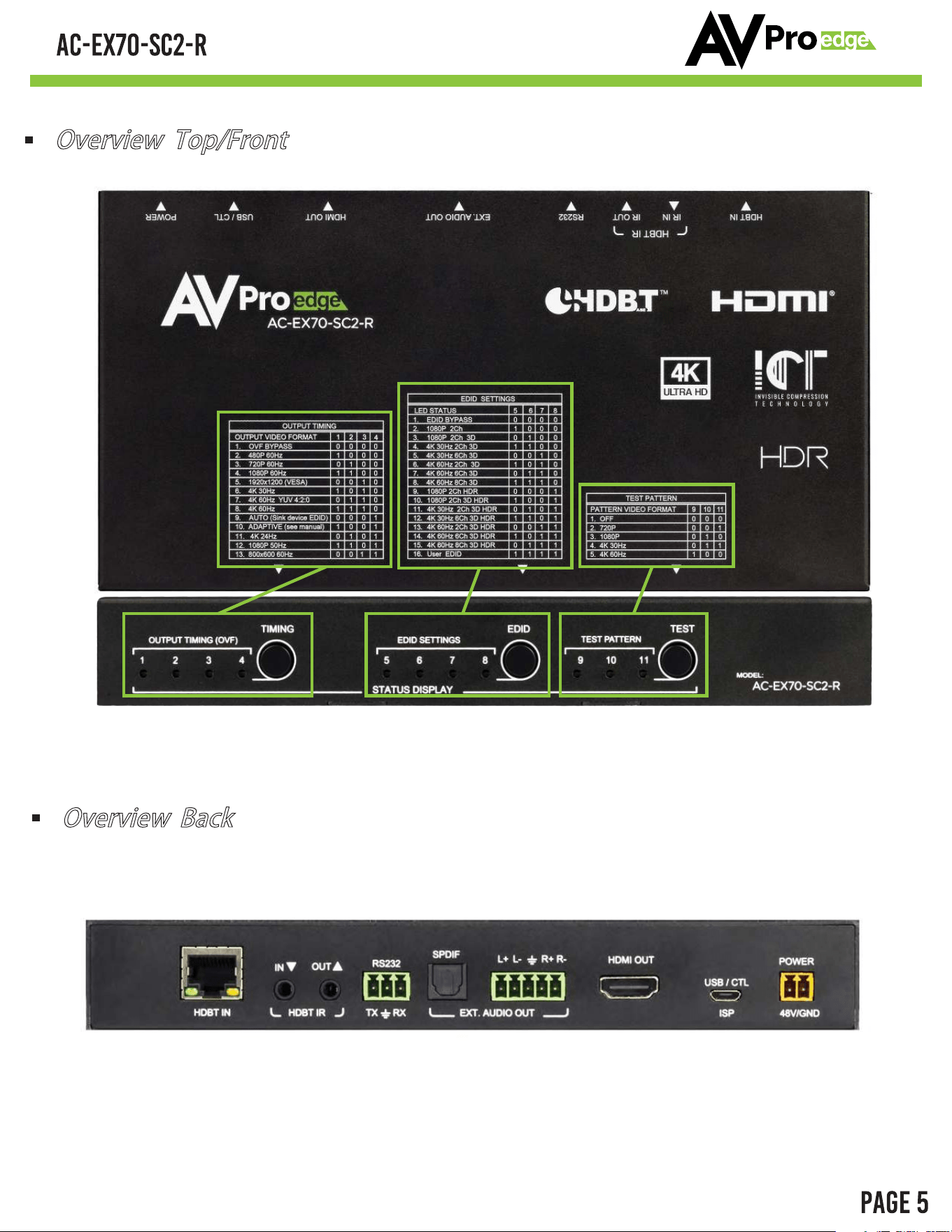
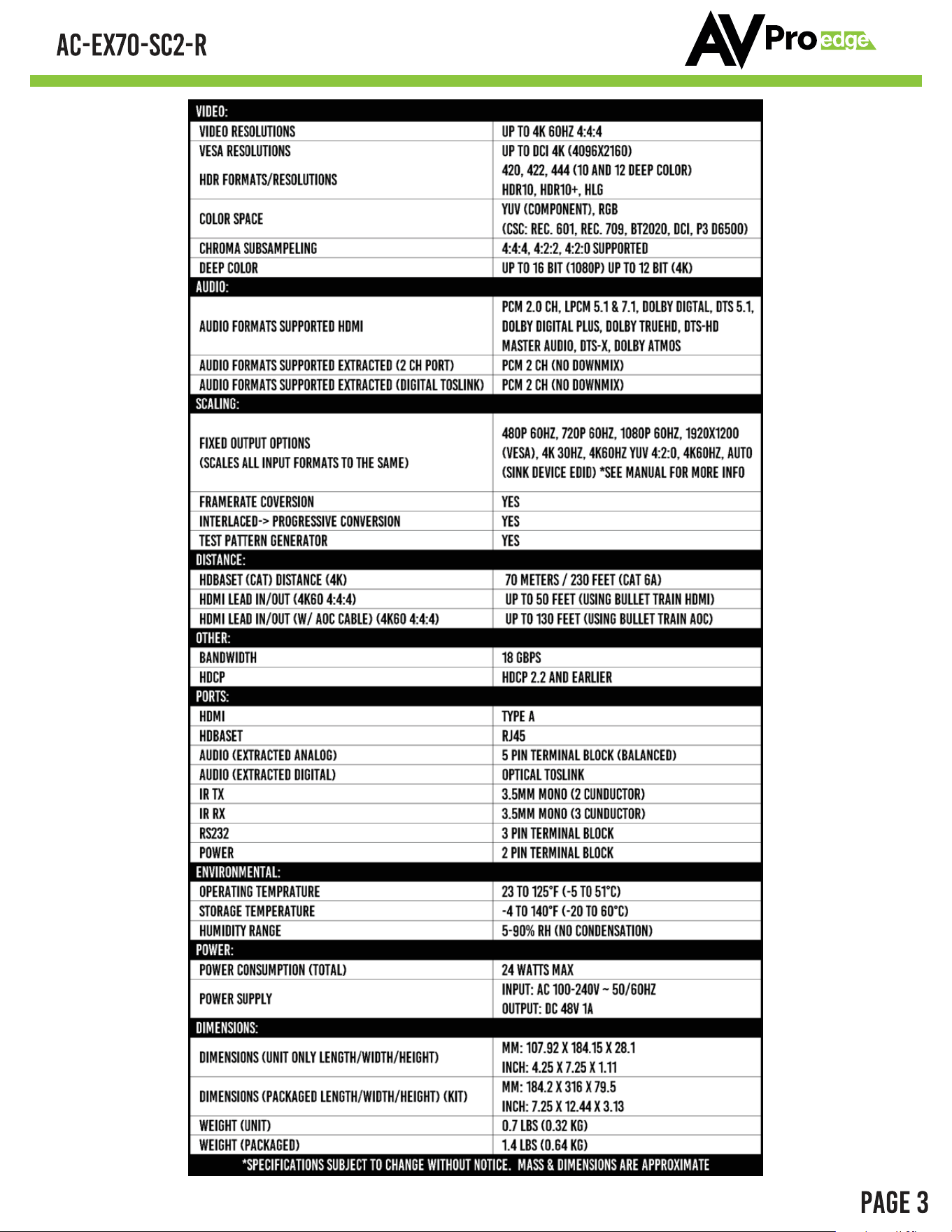
Overview Top/Front
EDID ButtonTest Pattern ButtonOutput Timing Button
See Page 6 For More DetailsSee Page 7 For More DetailsSee Page 8 For More Details
HDBaseT Input port
IR Input/Output
RS232 Control
Extracted Audio
TOS/Balanced 2Ch
HDMI Output
Micro USB
Control
48V Power
+/-
Overview Back
AVPROEDGE ~ 2222 E 52ND ST N SIOUX FALLS, SD 57104 ~ 1.877.886.5112 ~ +1.605.274.6055 ~ SUPPORT@AVPROEDGE.COM
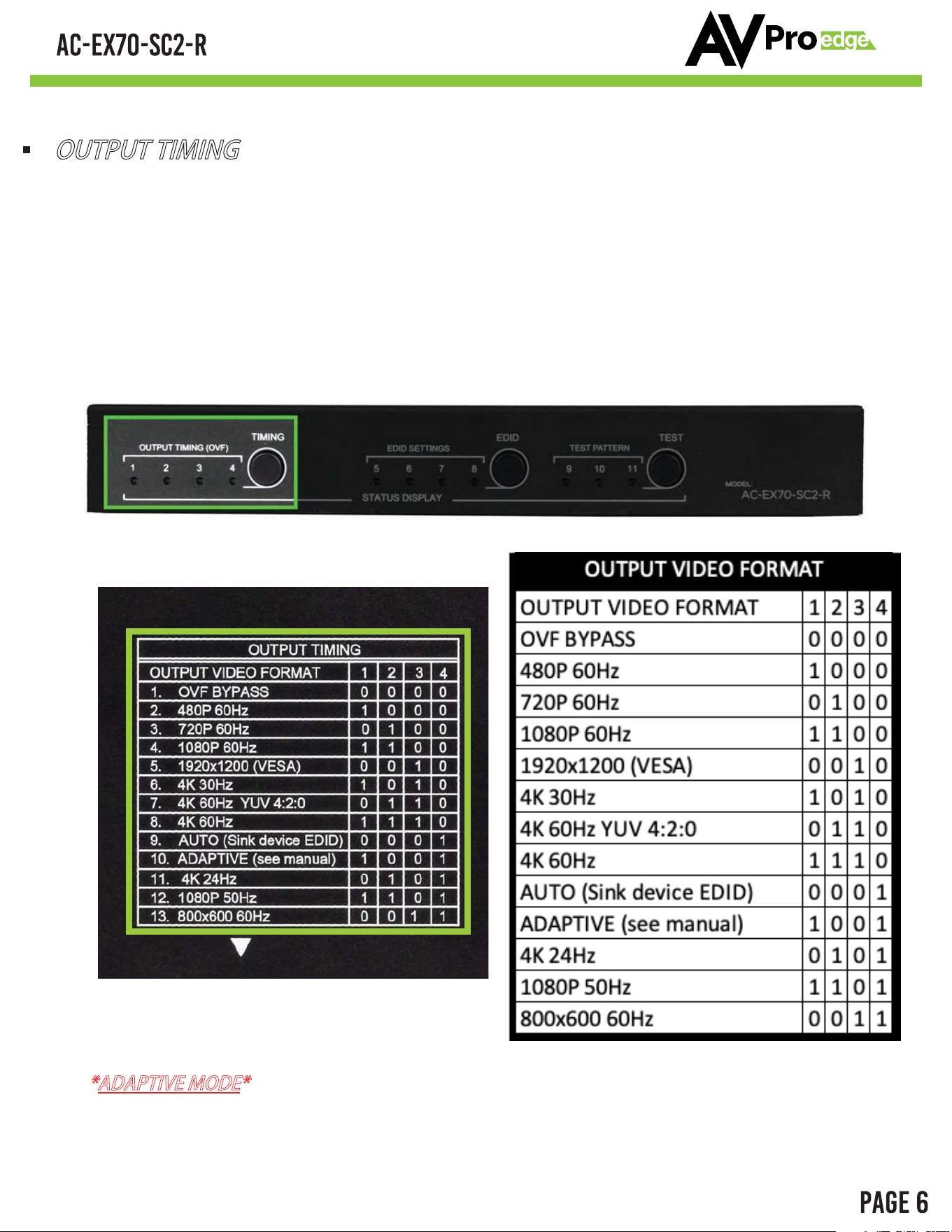
OUTPUT TIMING
The AVPro Edge's AC-EX70-SC2-R is the ideal solution for integrators that are needing to
distribute a signal to a variety of displays and keep an optimal picture. Integrators will enjoy its
versatility of not only being able to control up/down scaling but handling EDID issues (including
4K HDR EDID's), image enhancement, and being able to access audio from the stream. This
scaling Receiver is ready for future content as well as it's able to distribute 18Gbps signaling. Yet
if you have 480, 720, or 1080 displays the AC-EX70-SC2-R will make sure it's getting the right
picture.
*ADAPTIVE MODE*
- Anything below 1080p will be automatically up converted to 1080p.
1080p and above will be left untouched.
Top of device
AVPROEDGE ~ 2222 E 52ND ST N SIOUX FALLS, SD 57104 ~ 1.877.886.5112 ~ +1.605.274.6055 ~ SUPPORT@AVPROEDGE.COM
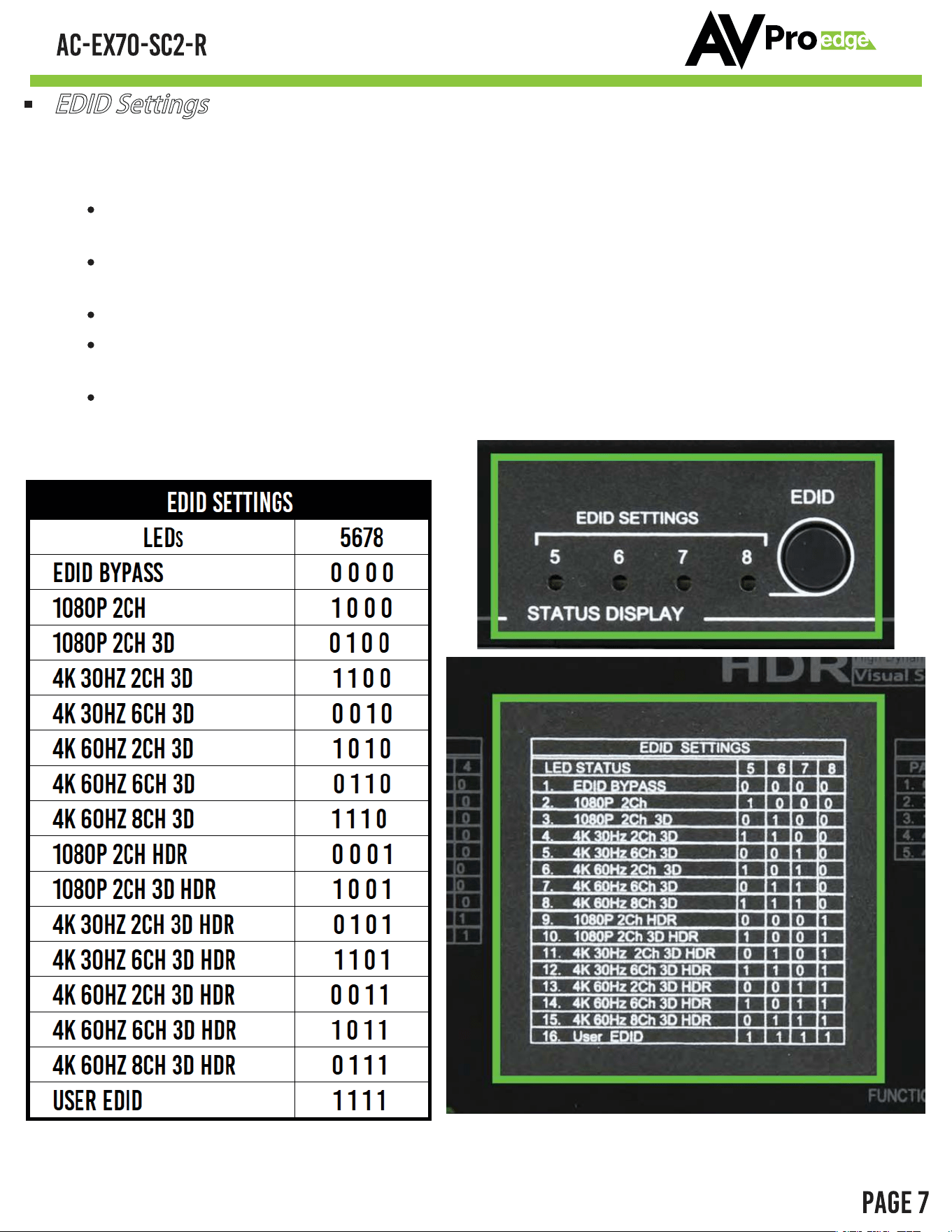
EDID Settings
With EDID Settings you can manage the sources devices and force a certain output. This is
especially important on newer sources that rely on EDID communications in implement
high bandwidth and HDR signals.
1080 EDIDs
– Legacy EDIDs, these will ask the sources (especially high bandwidth ones) to
output 1080 to function in 1080 Systems.
4K30 EDIDs
– Asks the sources to output 4K30 and/or 4K60 4:2:0 (Ideal to force source
device to work on common extension infrastructure that are less than 10G like HDBaseT)
4K60 EDIDs
– Asks the source to output 4K60 4:4:4 or signals above 9G
HDR EDIDs
– When you see HDR in the EDID, the EDID will ask the source to send HDR
regardless of resolution.
USER EDID – If you press and hold the EDID SETTINGS button for 2 seconds while
connected to a display that's powered on the SC2 will copy and store the displays EDID
here.
Top of device
AVPROEDGE ~ 2222 E 52ND ST N SIOUX FALLS, SD 57104 ~ 1.877.886.5112 ~ +1.605.274.6055 ~ SUPPORT@AVPROEDGE.COM
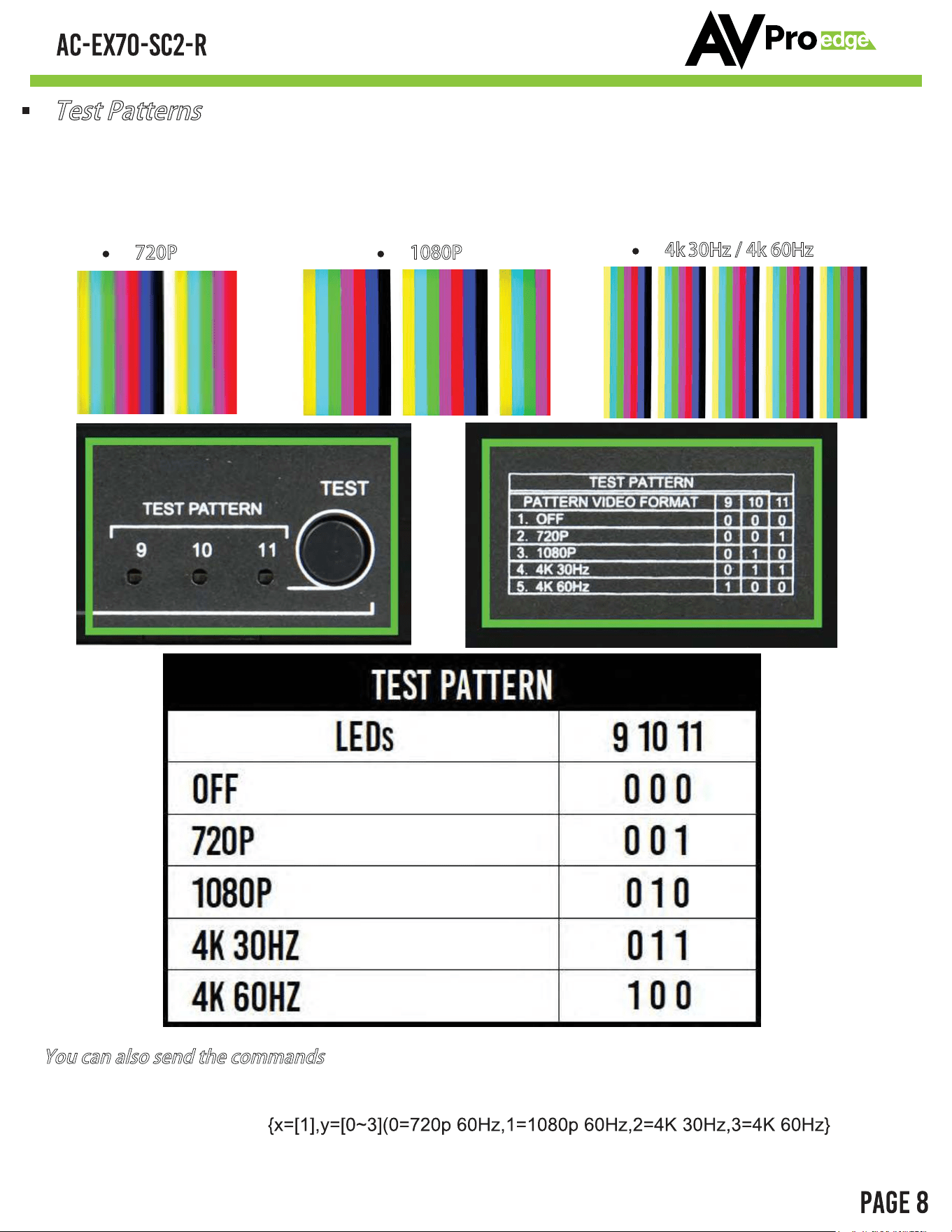
There are four built in Test patterns available
To Enable and Disable press "TEST" button to cycle through the 3 resolutions.
720P
You can also send the commands
1080P
4k 30Hz / 4k 60Hz
SET OUTx SGM EN/DIS : Set Output Signal Generator Enable/Disable{x=[1]}
SET OUTx SGMT y : Set Output Signal Generator Timing
Test Patterns
AVPROEDGE ~ 2222 E 52ND ST N SIOUX FALLS, SD 57104 ~ 1.877.886.5112 ~ +1.605.274.6055 ~ SUPPORT@AVPROEDGE.COM
AVPROEDGE ~ 2222 E 52ND ST N SIOUX FALLS, SD 57104 ~ 1.877.886.5112 ~ +1.605.274.6055 ~ SUPPORT@AVPROEDGE.COM
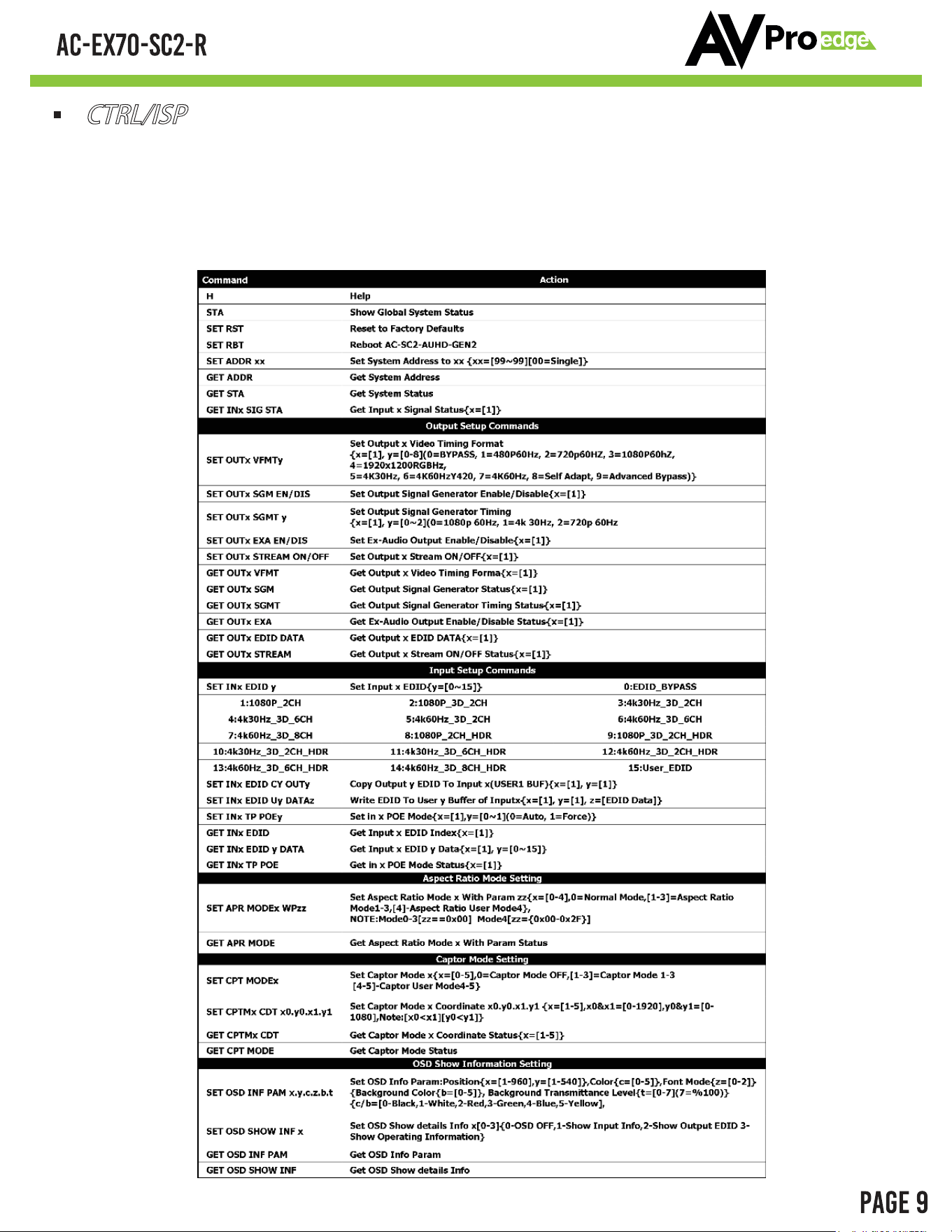
This CTRL/ISP is for the Legacy version (shipped before January 2024)
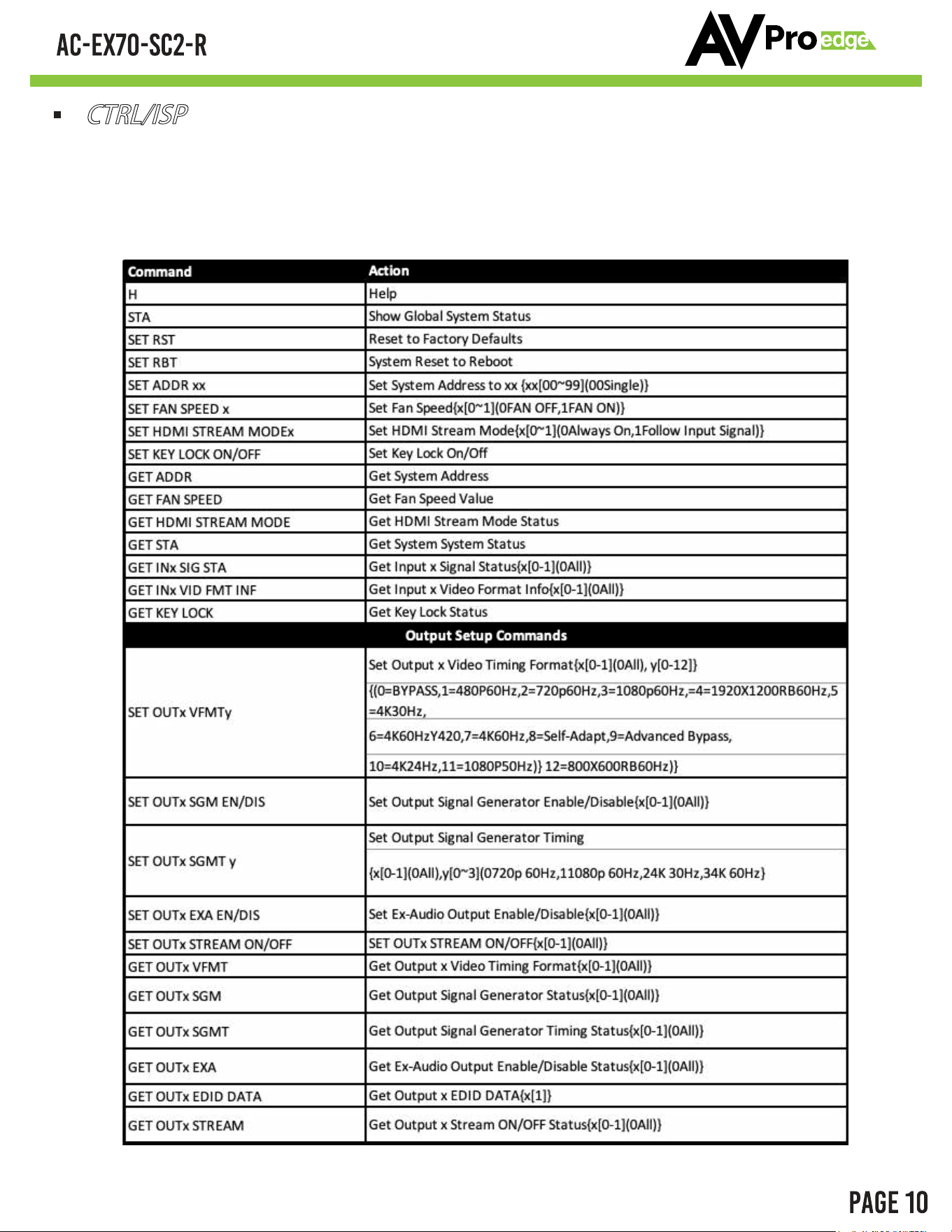
If you have the HW Rev: A (Shipped after January 2024) skip to pages 10-11 for the updated CTRL/ISP
CTRL/ISP
1.Micro USB Port for firmware and control.
2.Command list below.
For CTRL, use a Micro to USB cable and set the serial communications to: 57600,n,8,1 (baud: 57600, no parity, 8
data bits and 1 stop bit) with no handshaking.
AVPROEDGE ~ 2222 E 52ND ST N SIOUX FALLS, SD 57104 ~ 1.877.886.5112 ~ +1.605.274.6055 ~ SUPPORT@AVPROEDGE.COM
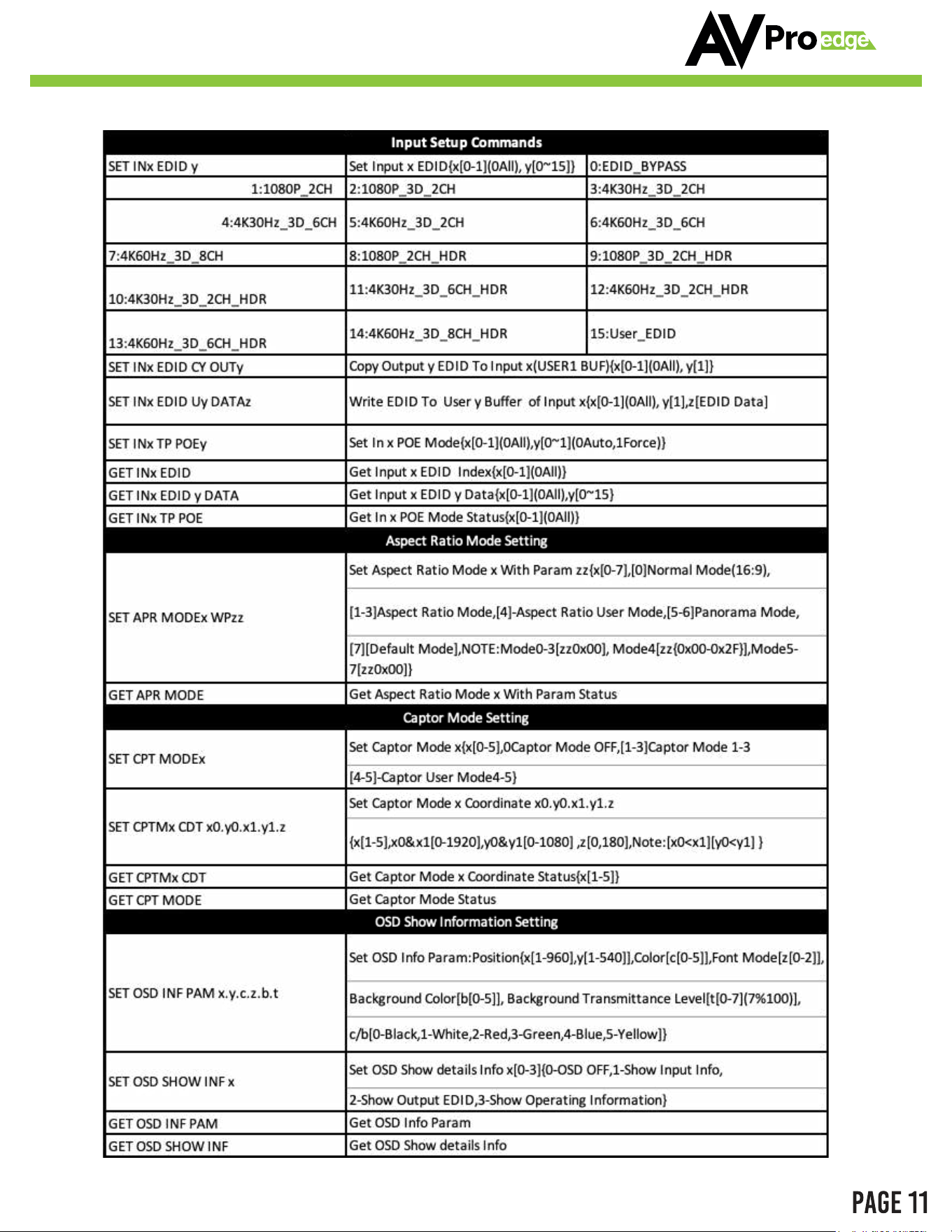
CTRL/ISP
1.Micro USB Port for firmware and control.
2.Command list below.
For CTRL, use a Micro to USB cable and set the serial communications
data bits and 1 stop bit) with no handshaking.
This CTRL/ISP is for HW Rev: A (Shipped after January 2024)
AVPROEDGE ~ 2222 E 52ND ST N SIOUX FALLS, SD 57104 ~ 1.877.886.5112 ~ +1.605.274.6055 ~ SUPPORT@AVPROEDGE.COM
AVPROEDGE ~ 2222 E 52ND ST N SIOUX FALLS, SD 57104 ~ 1.877.886.5112 ~ +1.605.274.6055 ~ SUPPORT@AVPROEDGE.COM
Troubleshooting
Verify Power - When power is applied all lights on the front of the device will flash. You can also press
any of the 3 buttons on the side to change settings, the corresponding lights should change if the unit
is powered up.
Verify Connections - Make sure all connected cables are properly connected.
You can use the built in Test Pattern Generator to verify signal path from AC-EX70-SC2-R to the
display
Extracted Audio not working - This unit DOES NOT DOWNMIX, the source must be set to 2ch for the
extracted 5 pin balanced audio port to work. For Toslink, audio must be set to 5.1 or less to work.
Still having issues, contact us
Support Direct - +1-605-977-3477
All inquiries - +1-605-274-6055
Submit a support request ticket
https://support.avproedge.com/hc/en-us/request
AVPROEDGE ~ 2222 E 52ND ST N SIOUX FALLS, SD 57104 ~ 1.877.886.5112 ~ +1.605.274.6055 ~ SUPPORT@AVPROEDGE.COM
Maintenance
To ensure reliable operation of this product as well as protecting the safety of any person using
or handling this device while powered, please observe the following instructions.
Use the power supplies provided. If an alternate supply is required, check voltage,
polarity and that it has sufficient power to supply the device it is connected to.
Do not operate these products outside the specified temperature and humidity
range given in the above specifications.
Ensure there is adequate ventilation to allow this product to operate efficiently.
Repair of the equipment should only be carried out by qualified professionals as
these products contain sensitive components that may be damaged by any
mistreatment.
Only use this product in a dry environment. Do not allow any liquids or harmful
chemicals to come into contact with these products.
Clean this unit with a soft, dry cloth. Never use alcohol, paint thinner or benzene to
clean this unit.
Damage Requiring Service
The unit should be serviced by qualified service personnel if:
The DC power supply cord orneeb sah rotpada CA damaged
Objects or liquids have gotten into the unit
The unit has been exposed to rain
The unit does not operate normally or exhibits a marked change in performance
The unit has been dropped or the housing damaged
AVPROEDGE ~ 2222 E 52ND ST N SIOUX FALLS, SD 57104 ~ 1.877.886.5112 ~ +1.605.274.6055 ~ SUPPORT@AVPROEDGE.COM
Support
Should you experience any problems while using this product, first, refer to the
Troubleshooting section of this manual before contacting Technical Support. When
calling, the following information should be provided:
Product name and model number
Product serial number
Details of the issue and any conditions under which the issue is
occurring
Warranty
If your product does not work properly because of a defect in materials or
workmanship, AVProEdge (referred to as “the warrantor”) will, for the length
of the period indicated as below, (Parts/Labor (10) Years), which starts with the
date of original purchase (“Limited Warranty period”), at its option either (a)
repair your product with new or refurbished parts, or (b) replace it with a new or
a refurbished product. The decision to repair or replace will be made by the
warrantor. During the “Labor” Limited Warranty period there will be no charge
for labor. During the “Parts” warranty period, there will be no charge for parts.
You must mail-in your product during the warranty period. This Limited Warranty
is extended only to the original purchaser and only covers product purchased as
new. A purchase receipt or other proof of original purchase date is required for
Limited Warranty service.
This warranty extends to products purchased directly from AVPro or an
authorized dealer. AVPro is not liable to honor this warranty if the product has
been used in any application other than that for which it was intended, has been
subjected to misuse, accidental damage, modification or improper installation
procedures, unauthorized repairs or is outside of the warranty period. Please
direct any questions or issues you may have to your local dealer before
contacting AVPro.
AVPROEDGE ~ 2222 E 52ND ST N SIOUX FALLS, SD 57104 ~ 1.877.886.5112 ~ +1.605.274.6055 ~ SUPPORT@AVPROEDGE.COM
AVPROEDGE ~ 2222 E 52ND ST N SIOUX FALLS, SD 57104 ~ 1.877.886.5112 ~ +1.605.274.6055 ~ SUPPORT@AVPROEDGE.COM
AVPROEDGE ~ 2222 E 52ND ST N SIOUX FALLS, SD 57104 ~ 1.877.886.5112 ~ +1.605.274.6055 ~ SUPPORT@AVPROEDGE.COM
AVProEdge
2222 E 52nd St N ~ Sioux Falls, SD 57104
1
-877-886-5112 ~ 605-274-6055
support@avproedge.com
Thank you for choosing AVProEdge!
Please contact us with any questions. We are happy
to be of service!
AVPROEDGE ~ 2222 E 52ND ST N SIOUX FALLS, SD 57104 ~ 1.877.886.5112 ~ +1.605.274.6055 ~ SUPPORT@AVPROEDGE.COM