Midland Radio Corporation
5900 Parretta Drive, Kansas City, Missouri, United States
This document is proprietary and confidential. No part of this document may be disclosed in any manner
to a third party without the prior written consent of Midland Radio.
ClipTalk
Transceiver
Ultra small low power two-way UHF radio
User Interface Specifications
Revision History
Version
Description Date Author
0 Release 9-17-2025 R Hollis
A Added “BT Connected mode under programming mode 10-18-2025 R Hollis
B Clarified UI volume and channel behavior 10/18/2025 J Paulson
C Rewritten for clarity. Added “double beep” requirement for max and min
volume. Eliminated flash requirement for channel display during Tx.
Added double beep requirement for Tx 1minute timeout.
11-03-2025 R Hollis
ClipTalk User Manual.docx Page 2 of 6
Midland Radio Corporation
5900 Parretta Drive, Kansas City, Missouri, United States
This document is proprietary and confidential. No part of this document may be disclosed in any manner
to a third party without the prior written consent of Midland Radio.
User Operation
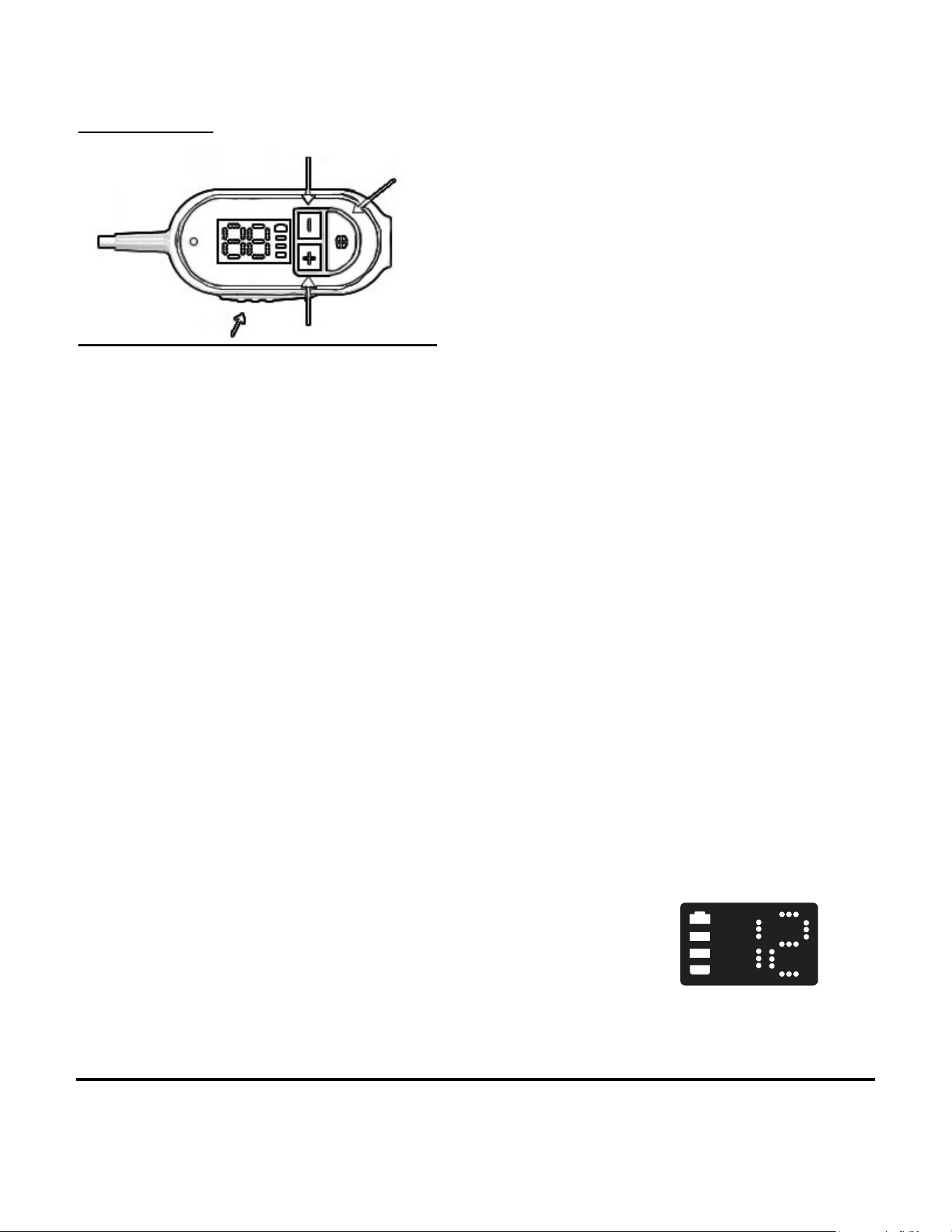
• User controls
o PTT button (side)
o Select button
o + button
o - button
• Power on/off
o Press and hold Select for 2 seconds to turn the
radio power on.
The display will light with battery icon
and channel number.
If there is no key activity for 5 seconds,
the display will turn off.
If there is no key activity, the bottom
segment of the battery icon will flash
every 5 seconds to indicate that the unit
is active and power is on.
o Press and hold Select for 2 seconds to turn the
radio power off.
• Transmit
o Press the PTT button to transmit. This is a
momentary key and the radio will transmit while
the key is depressed.
User Operation
User Operation
- button
Select button
+ button
PTT button (side)
- button
Select button
+ button
PTT button (side)

ClipTalk User Manual.docx Page 3 of 6
Midland Radio Corporation
5900 Parretta Drive, Kansas City, Missouri, United States
This document is proprietary and confidential. No part of this document may be disclosed in any manner
to a third party without the prior written consent of Midland Radio.
If the PTT is pressed for 1 minute the unit will stop
transmitting, the display will go blank and the user will
hear a “double beep”. The radio will not transmit again
until the PTT is released and pressed again.
o The channel number will show steady during
transmission.
• Display Channel & Volume
o If the display is blank, pressing SELECT will
cause the display to turn on and show the current
Channel.
o The current Channel will always be shown when
the display is active.
• Volume Up/Down
o A quick press of the “+” (less than 2 seconds) will
increase the volume one level and play a 400 Hz
tone at the corresponding volume level selected.
If he volume setting reaches maximum (9) the
next press of the “+” key will produce a “double
beep” to indicate that volume is at the maximum.
o A quick press of the “-” (less than 2 seconds) will
decrease the volume one level and play a 400 Hz
tone at the corresponding volume level selected.
If he volume setting reaches minimum (1) the
next press of the “-” key will produce a “double
beep” to indicate that volume is at the maximum.
o The volume level is never shown on the display.
• Channel selection
o A long press on the + or – button greater than 2
seconds will adjust the channel in the appropriate
direction.
o Once the “+” channel change occurs, a tone of
1000 Hz will be played to indicate an increased
channel.
o Once the “-” channel change occurs, a tone of
1000 Hz will be played to indicate an increased
ClipTalk User Manual.docx Page 4 of 6
Midland Radio Corporation
5900 Parretta Drive, Kansas City, Missouri, United States
This document is proprietary and confidential. No part of this document may be disclosed in any manner
to a third party without the prior written consent of Midland Radio.
channel.
o Continuing to hold the + or – button for another
0.5 seconds will increment or decrement the
continuously at a 2 Hz rate until the button is
released.
o The channel display has a value of 1 to 22 and
rolls from 22 to 1 when increased and 1 to 22
when decreased.
• Key timeout
o After 5 seconds of no key activity, the display will
go blank.
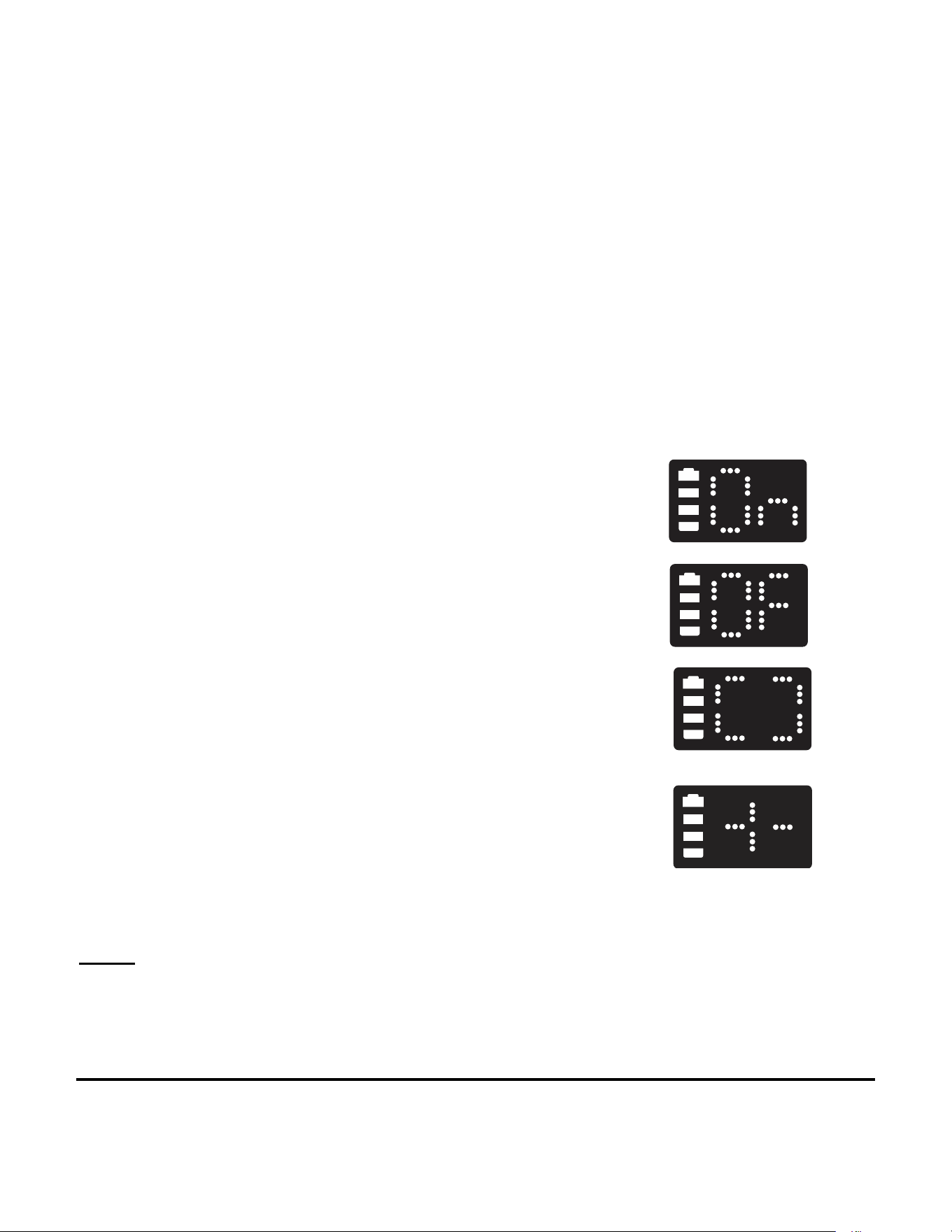
• ANC (Noise canceling) On/Off
o Holding down the PTT when turning the radio on will
cause ANC to toggle between on and off. When the
unit powers on, the display will show either “On” or
“Of” depending on the previous state. “On” and OFF”
are displayed for 1 second and then display returns
to standby.
• Programming mode
o To enter programming mode, confirm that the
unit is turned on then hold down the + and – keys
together for 3 seconds. The display will show the
3 dots in each outside segment in a racetrack
pattern. The unit is now discoverable with the
ClipTalk phone app.
o When the unit is connected to the app, the unit
will display a “cross” patter that will blink at a 1Hz
rate.
o Pressing PTT will cause the radio to exit
programming mode and return to FRS standby.
Power:
TX
/RX:462.5500-462.7250MHz:23.75dBm; 467.5625-467.7125MHz: 23.25 dBm
BLE: 2402-2480MHz: 0.67dBm

ClipTalk User Manual.docx Page 5 of 6
Midland Radio Corporation
5900 Parretta Drive, Kansas City, Missouri, United States
This document is proprietary and confidential. No part of this document may be disclosed in any manner
to a third party without the prior written consent of Midland Radio.
FCC Statement
Any Changes or modifications not expressly approved by the party responsible for compliance
could void the user’s authority to operate the equipment.
This device complies with part 15 of the FCC Rules. Operation is subject to the following two
conditions:
(1) This device may not cause harmful interference, and
(2) This device must accept any interference received, including interference that may cause
undesired operation.
Note: This equipment has been tested and found to comply with the limits for a Class B digital
device, pursuant to part 15 of the FCC Rules. These limits are designed to provide reasonable
protection against harmful interference in a residential installation. This equipment
generates,uses and can radiate radio frequency energy and, if not installed and used in
accordance with the instructions, may cause harmful interference to radio communications.
However, there is no guarantee that interference will not occur in a particular installation. If this
equipment does cause harmful interference to radio or television reception, which can be
determined by turning the equipment off and on, the user is encouraged to try to correct the
interference by one or more of the following measures:
—Reorient or relocate the receiving antenna.
—Increase the separation between the equipment and receiver.
—Connect the equipment into an outlet on a circuit different from that to which the receiver is
connected.
—Consult the dealer or an experienced radio/TV technician for help.
SAR tests are conducted using standard operating positions accepted by the FCC/ISEDC with
the device transmitting at its highest certified power level in all tested frequency bands, although
the SAR is determined at the highest certified power level, the actual SAR level of the device
while operating can be well below the maximum value.
Before a new model device is a available for sale to the public, it must be tested and certified to
the FCC/ISEDC that it does not exceed the exposure limit established by the FCC/ISEDC,
Tests for each product are performed in positions and locations as required by the FCC/ISEDC.
For body worn operation, this device has been tested and meets the FCC/ISEDC RF exposure
guidelines when used with for this product or when used with and accessory that contains no
metal.
To maintain compliance with the FCC/ISEDC's RF exposure guidelines, hold the transmitter
and antenna at least 1 inch(2.5 centimeters) from your face and speak in a normal voice, with
the antenna pointed up and away from the face. This equipment complies with FCC/ISEDC

ClipTalk User Manual.docx Page 6 of 6
Midland Radio Corporation
5900 Parretta Drive, Kansas City, Missouri, United States
This document is proprietary and confidential. No part of this document may be disclosed in any manner
to a third party without the prior written consent of Midland Radio.
radiation axposure limits set forth for an uncontrolled environment. in order to comply with the
FCC/ISEDC RF exposure requirements, the antenna installation must comply with following:
Users must be fully aware of the hazards of the exposure and able to exercise control over their
RF exposure to qualify for the higher exposure limits.
Your wireless hand-held portable transceiver contains a low power transmitter. This product
sends out radiot Push-to-Talk (PTT) Button is pressed. T he device is authorized to operate at a
duty factor not to exceed 50%.
ISED RSS Warning:
This device complies with Innovation, Science and Economic Development Canada licence-
exempt RSS standard(s). Operation is subject to the following two conditions: (1) this device
may not cause interference, and (2) this device must accept any interference, including
interference that may cause undesired operation of the device.
Le présent appareil est conforme aux CNR d'ISED applicables aux appareils radio exempts de
licence. L'exploitation est autorisée aux deux conditions suivantes:
(1) l'appareil ne doit pas produire de brouillage, et
(2) l'utilisateur de l'appareil doit accepter tout brouillage radioélectrique subi, même si le
brouillage est susceptible d'en compromettre le fonctionnement.
Les Les tests SAR sont effectués à laide dune position de fonctionnement standard acceptée
par la isedc, o léquipement transmet à son niveau de puissance certifié le plus élevé dans toutes
les bandes de frequences testées, et bien que le SAR soit déterminé au niveau de puissance
certifié le plus élevé, le niveau de SAR réel de Léquipement en fonctionnement peut être bien inf
érieur au maximum. Les vehicules neufs doivent être testés et certifiés à lisedc avant dêtre
vendus au public et ne doivent pas dépasser les limites dexposition fixées par lisedc. Les tests
de chaque produit sont effectués aux endroits endroits et aux endroits requis par isedc. Pour
une utilisation sur le corps, lappareil est testé et conforme aux directives dexposition aux RF de
lisedc lorsquil utilisé avec les accessoires spécifies pour ce produit ou avec des accessoires
sans métal. Pour rester en conformité avec les directives d'exposition aux RF de I'isedc,
maintenez l'émetteur et l'antenne à au m oins 1 pouce (2,5 cm) du visage et parlez d'une voix
normale, l'antenne étant dirigée vers le haut et éloignée du visage. Lappareil est conforme aux
limites dexposition aux rayonnements specifiées par lisedc pour les environnements non contrlé
s. Pour être conforme aux exigences dexposition aux RF de lisedc, linstallation de lantenne doit
répondre aux exigences suivantes: Les utilisateurs doivent être pleinement conscients des
dangers de lexposition et être en mesure de contrler leur exposition aux RF afin de se
conformer aux limites dexposition plus élevées.Votre émetteur - récepteur portatif sans fil
contient un émetteur de faible puissance. Ce produit émet un signal de radiofréquence (RF)
Lorsque vous appuyez sur le bouton Push to talk (PTT). doivent pas dépasser les limites
dexposition fixées par lisedc. Les tests de chaque produit sont effectués aux endroits
Linstallation est autorisée à fonctionner avec un facteur doccupation ne dépassant pas 50%.