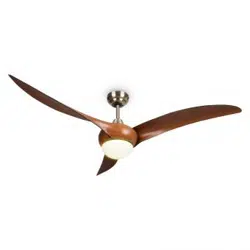
ZEN BREEZE
Deckenventilator
Ceiling Fan
Ventilateur de plafond
Ventilador de techo
Ventilatore a sotto
www.klarstein.eu
10048235 10048236

3
DE
Sehr geehrte Kundin, sehr geehrter Kunde,
wir gratulieren Ihnen zum Erwerb Ihres Geräts. Lesen Sie
die folgende Anleitung sorgfältig durch und befolgen Sie
sie, um mögliche Schäden zu vermeiden. Für Schäden, die
durch Nichtbeachtung der Anleitung und unsachgemäßen
Gebrauch entstehen, übernehmen wir keine Haftung.
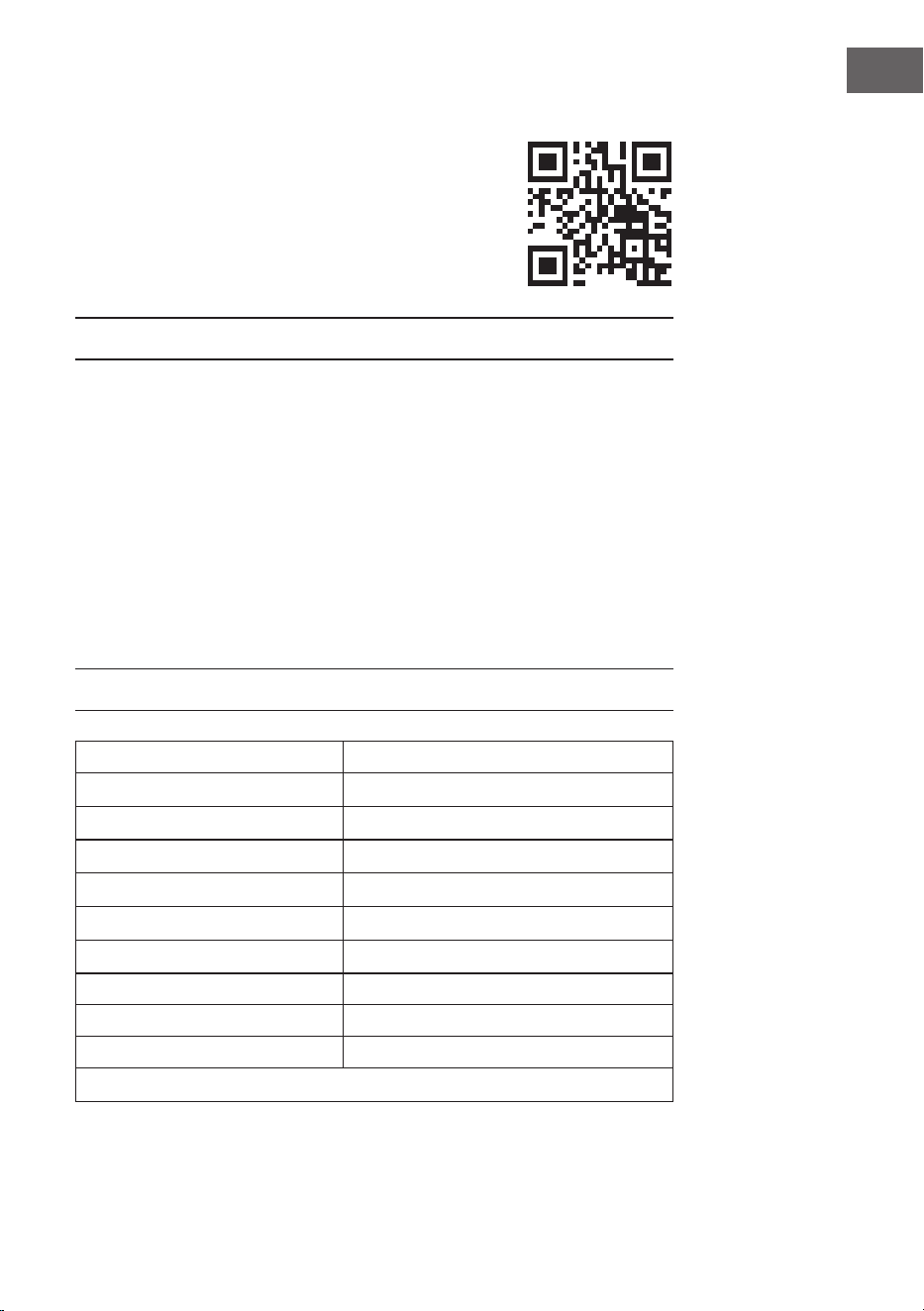
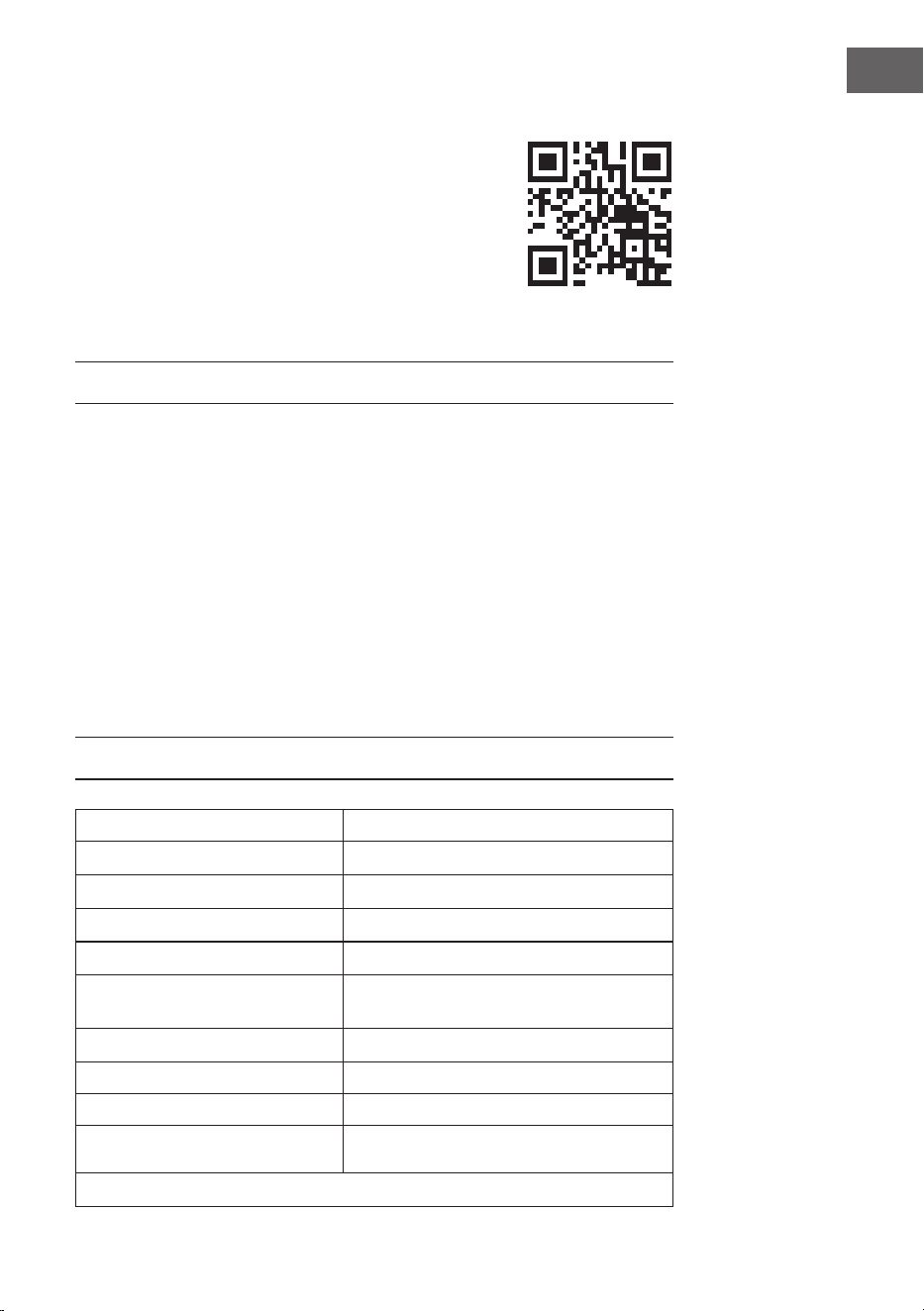
Scannen Sie den QR-Code, um Zugriff auf die aktuellste
Bedienungsanleitung und weitere Informationen rund um
das Produkt zu erhalten.
INHALT
TECHNISCHE DATEN
Artikelnummer 10048235, 10048236
Stromversorgung 220–240 V~/50 Hz
Ventilatorleistung 20 W
Lampentyp LED
Farbtemperatur 3000 K/4500 K/6500 K
Farbwiedergabeindex (CRI) ≥80
Maximaler Luftstrom 77 m
3
/min
WLAN-Standard
802,11 b/g/n
WLAN-Frequenz
2,4 GHz
WLAN-Funkfrequenzleistung
(max.)
20 dBm
Dieses Produkt enthält eine Lichtquelle der Energieezienzklasse
Sicherheitshinweise 4
Lieferumfang 5
Lieferumfang 7
Installation 8
Sichern des Ventilators 12
Verbindung der Fernbedienung 13
Gerätesteuerung per Smartphone 14
Reinigung und Pege 16
Fehlersuche und Fehlerbehebung 16
Datenblätter 17
Hinweise zur Entsorgung 18
Konformitätserklärung 18
English 19
Español 35
Français 51
Italiano 67
4
DE
SICHERHEITSHINWEISE
• Befestigen Sie den Ventilator niemals an einer Steckdose, sondern direkt an
der Decke.
• Der Mindestabstand zwischen den Flügeln des Ventilators und dem Boden
muss mehr als 2,3 m betragen. Die Tragfähigkeit des Hakens, an dem der
Ventilator aufgehängt wird, muss mindestens 100 kg betragen.
• Achten Sie darauf, dass Sie in der Zuleitung zum Deckenventilator einen
allpoligen Trennschalter mit einem Kontaktabstand von mindestens 3 mm
zwischen den Polen installieren.
• Alle Verkabelungen müssen den örtlichen und nationalen Vorschriften
entsprechen. Wenn Sie mit der Verkabelung nicht vertraut sind, wenden Sie
sich an einen qualizierten Elektriker.
• Um einen möglichen Stromschlag zu vermeiden, schalten Sie vor der
Installation des Ventilators den Strom ab, indem Sie die Sicherungen im
Sicherungskasten und den zugehörigen Wandschalter ausschalten. Wenn Sie
die Sicherungsschalter nicht in der Aus-Stellung verriegeln können, bringen
Sie eine auffällige Warnvorrichtung, z. B. ein Schild, an der Schalttafel an.
• Das Modell oder die Typenbezeichnung von Leuchtmitteln, die in Ventilatoren
eingebaut werden können, die für diesen Zweck vorgesehen sind.
• Schalten Sie das Gerät vor dem Anschließen aus.
• Die elektrische Verkabelung muss den örtlichen Vorschriften entsprechen.
• Der Ventilator muss ordnungsgemäß geerdet sein, um das Risiko eines
Stromschlags zu vermeiden.
• Montieren Sie den Ventilator niemals in einem feuchten oder nassen Raum.
• Seien Sie vorsichtig, wenn Sie in der Nähe der rotierenden Flügel arbeiten.
• Um die Gefahr von Verletzungen zu verringern, befestigen Sie den Ventilator
gemäß dieser Anleitung direkt an der Tragkonstruktion des Gebäudes und
verwenden Sie nur die mitgelieferten Teile.
• Dieses Gerät kann von Kindern ab 8 Jahren sowie von Personen mit
verringerten körperlichen, sensorischen oder mentalen Fähigkeiten oder
Mangel an Erfahrung und Wissen benutzt werden, wenn sie beaufsichtigt
oder bezüglich des sicheren Gebrauchs des Geräts angeleitet wurden und die
damit verbundenen Gefahren verstehen.
• Um das Risiko eines Brandes, eines Stromschlags oder eines Motorschadens
zu verringern, verwenden Sie keinen Halbleiter-Drehzahlregler mit diesem
Ventilator. Verwenden Sie nur Antriebe mit variabler Geschwindigkeit.
• Kinder dürfen mit dem Gerät nicht spielen.
• Vergewissern Sie sich, dass der Ventilator vom Stromnetz getrennt ist, bevor
Sie die Schutzvorrichtung entfernen.
• Treffen Sie Vorsichtsmaßnahmen, um zu verhindern, dass Gase aus dem
offenen Abzug von Geräten, die mit Gas oder anderen Brennstoffen betrieben
werden, in den Raum zurückströmen (bei Kanal- und Trennventilatoren).
Hinweis: Lassen Sie den Ventilator immer von jemandem installieren, der sich
mit elektrischer Verkabelung auskennt.
5
DE
LIEFERUMFANG
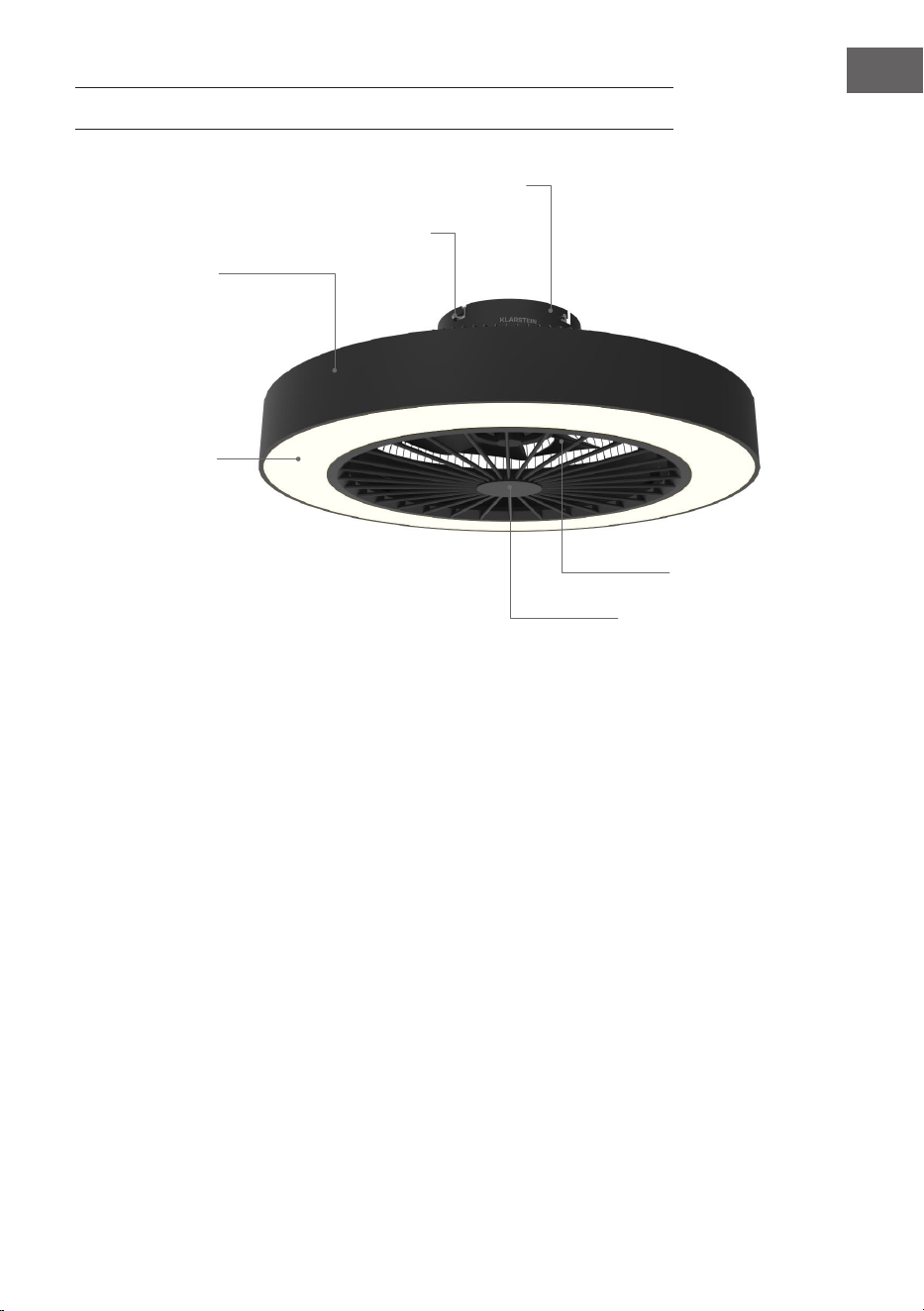
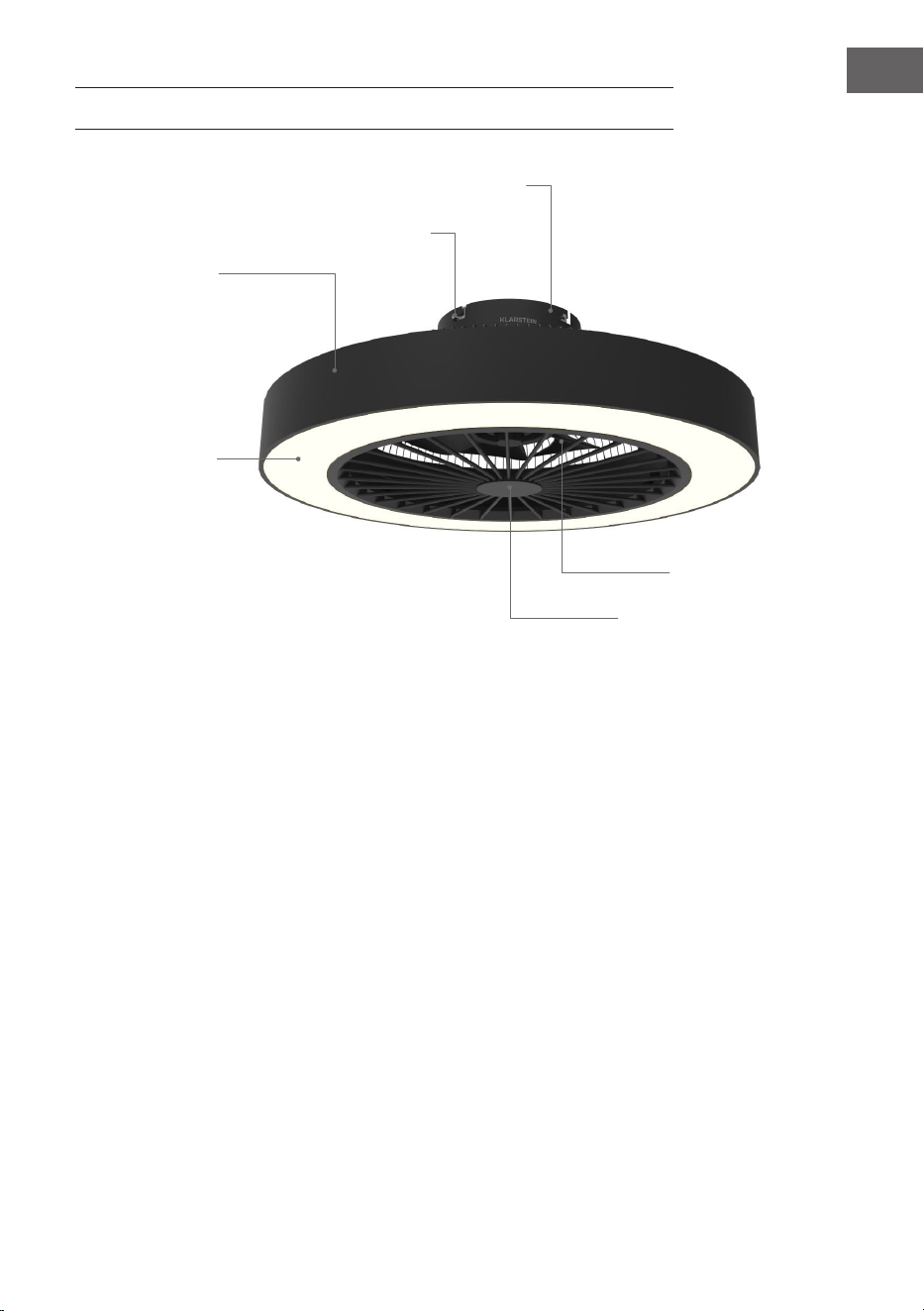
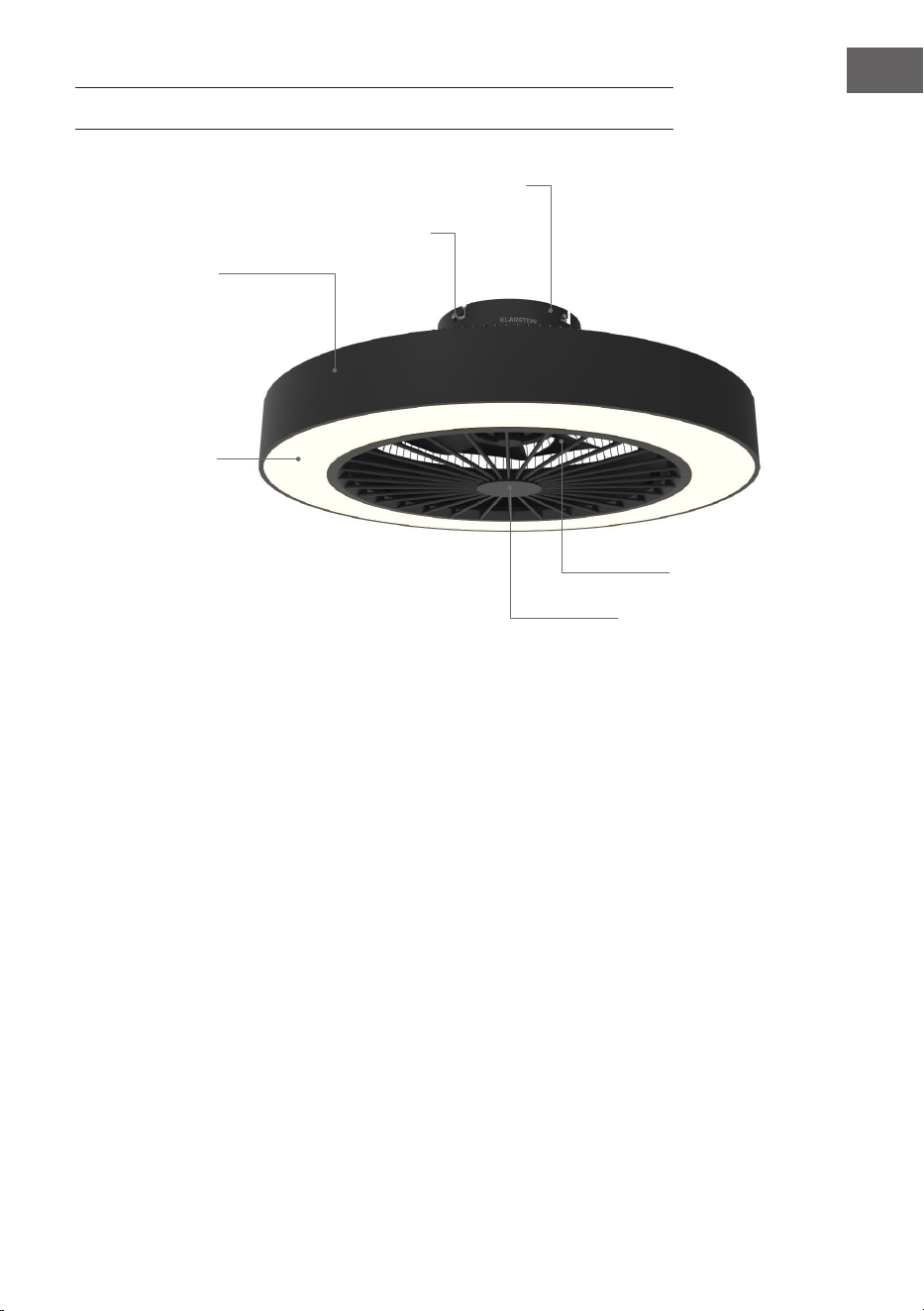
Basis
Schrauben
Gehäuse
Beleuchtung
Ventilatorabdeckung
Flügel
6
DE
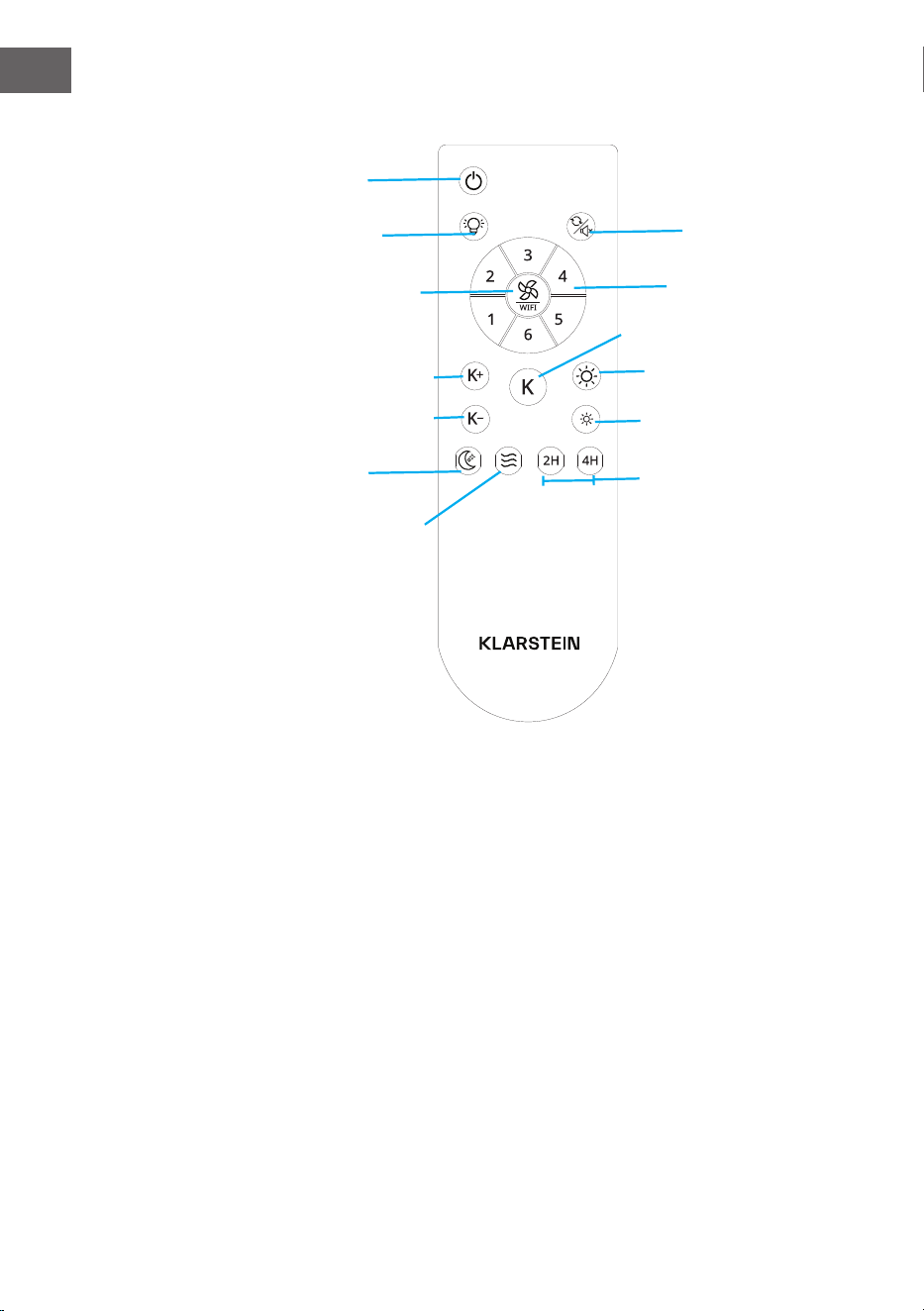
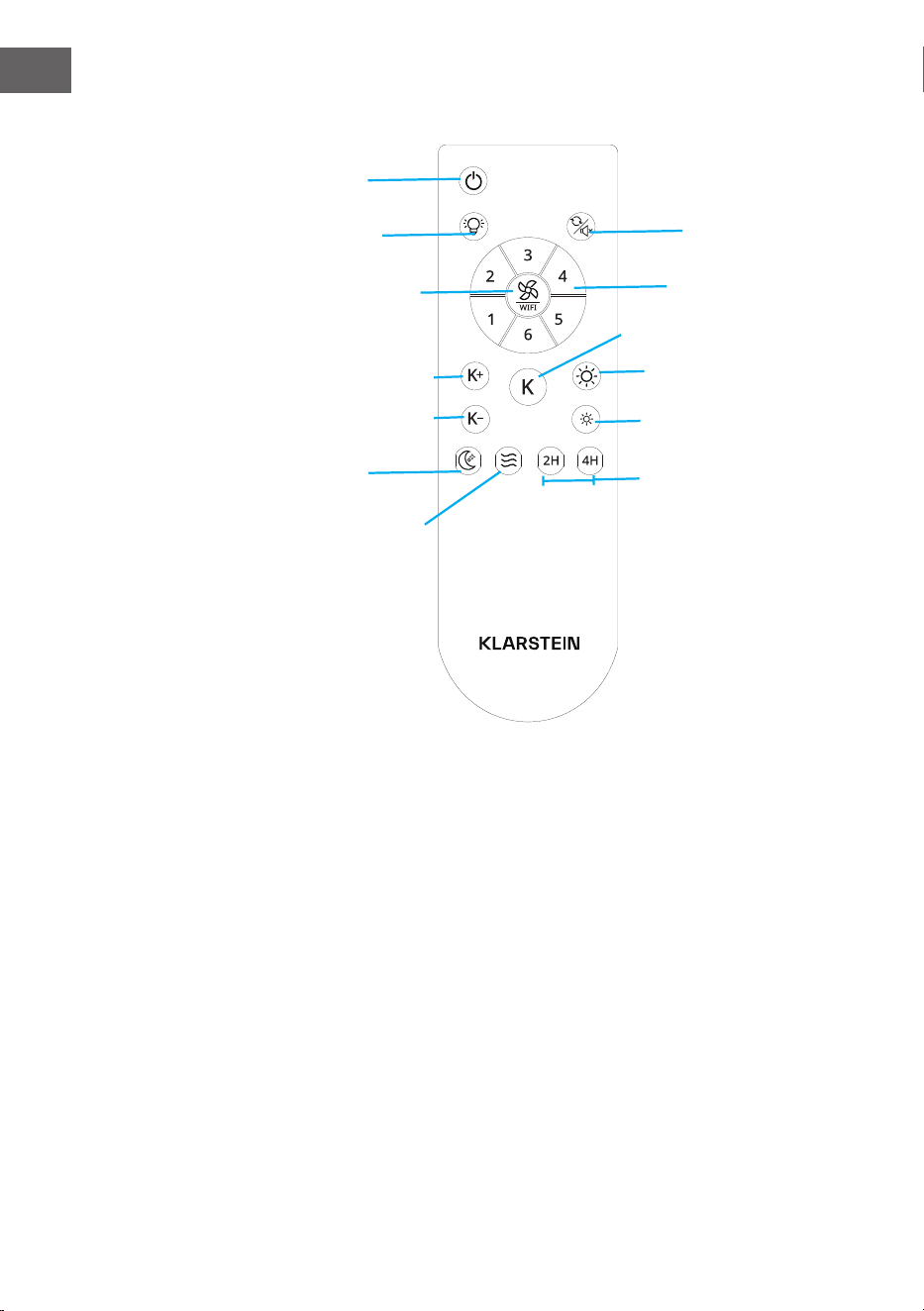
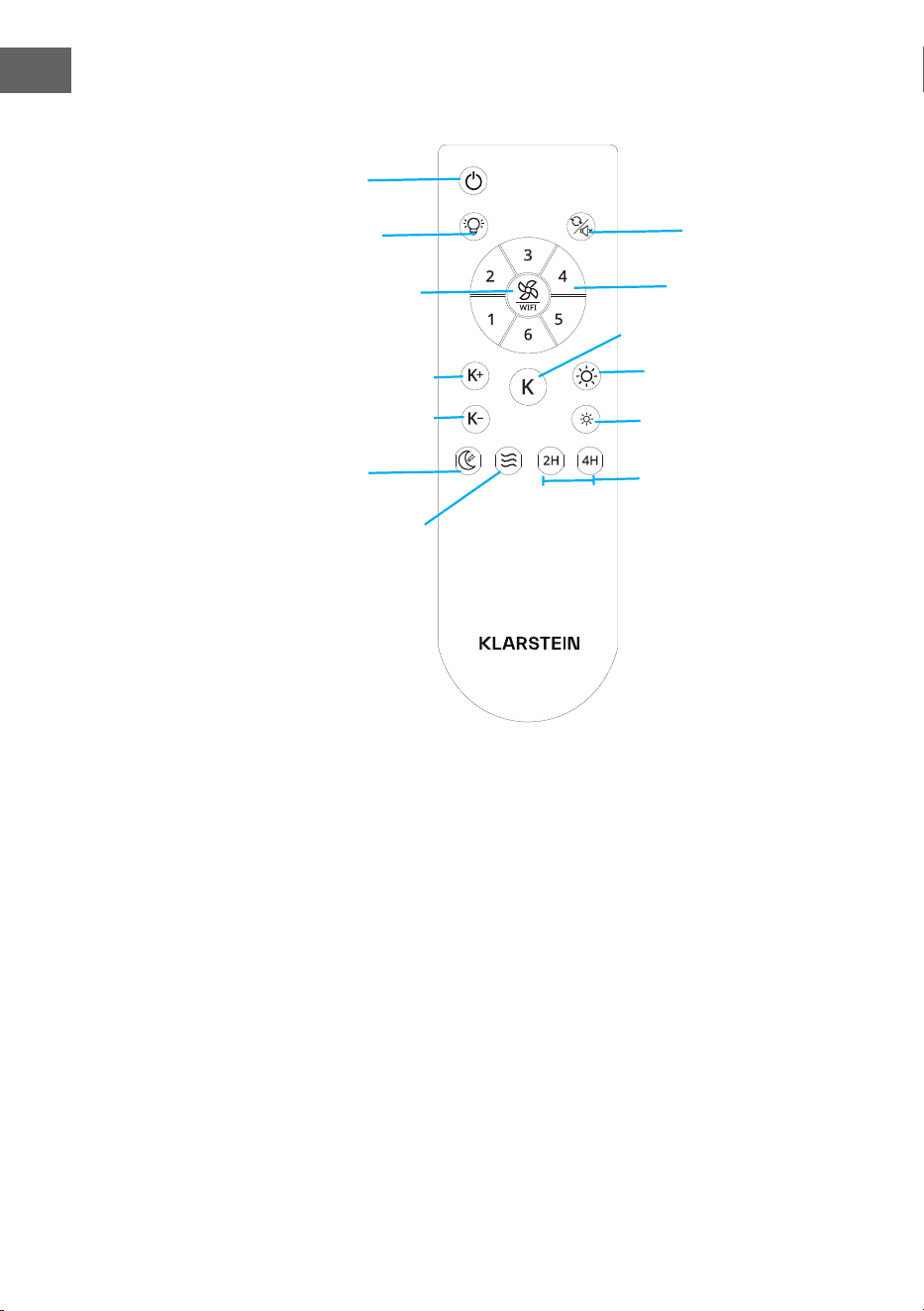
Fernbedienung
Ventilator umkehren/
Flüstermodus
Ein/Aus
Natürlicher Wind
Licht ein/aus
Ventilatorstufe/WLAN
2 Stunden/4 Stunden
Nachtlicht
Lichthelligkeit erhöhen
Temperatur reduzieren
Temperatur erhöhen
Lichthelligkeit reduzieren
LED-Farbwechsel
Ventilatorstufen 1-6
7
DE
LIEFERUMFANG
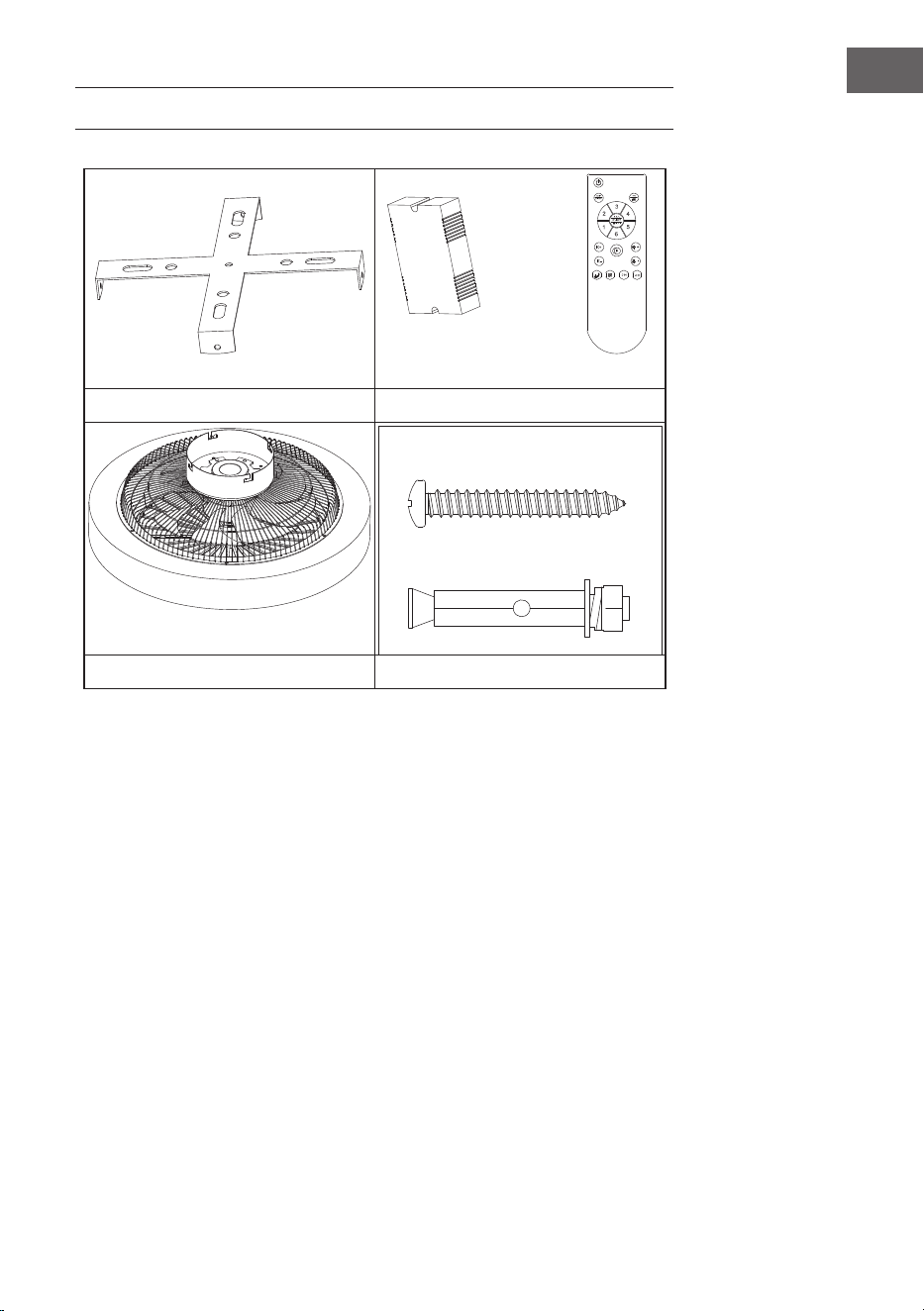
Befestigungsklammer Fernbedienung
Motor Schraubenpackung
• Öffnen Sie die Verpackung vorsichtig. Entfernen Sie die Gegenstände aus den
Styroporeinsätzen.
• Legen Sie das Motorgehäuse auf einen Teppich oder ein Stück Styropor, um
eine Beschädigung der Lackierung zu vermeiden.
• Überprüfen Sie anhand der Zubehörliste, ob alle Teile enthalten sind.
8
DE
INSTALLATION
Installationsvorbereitung
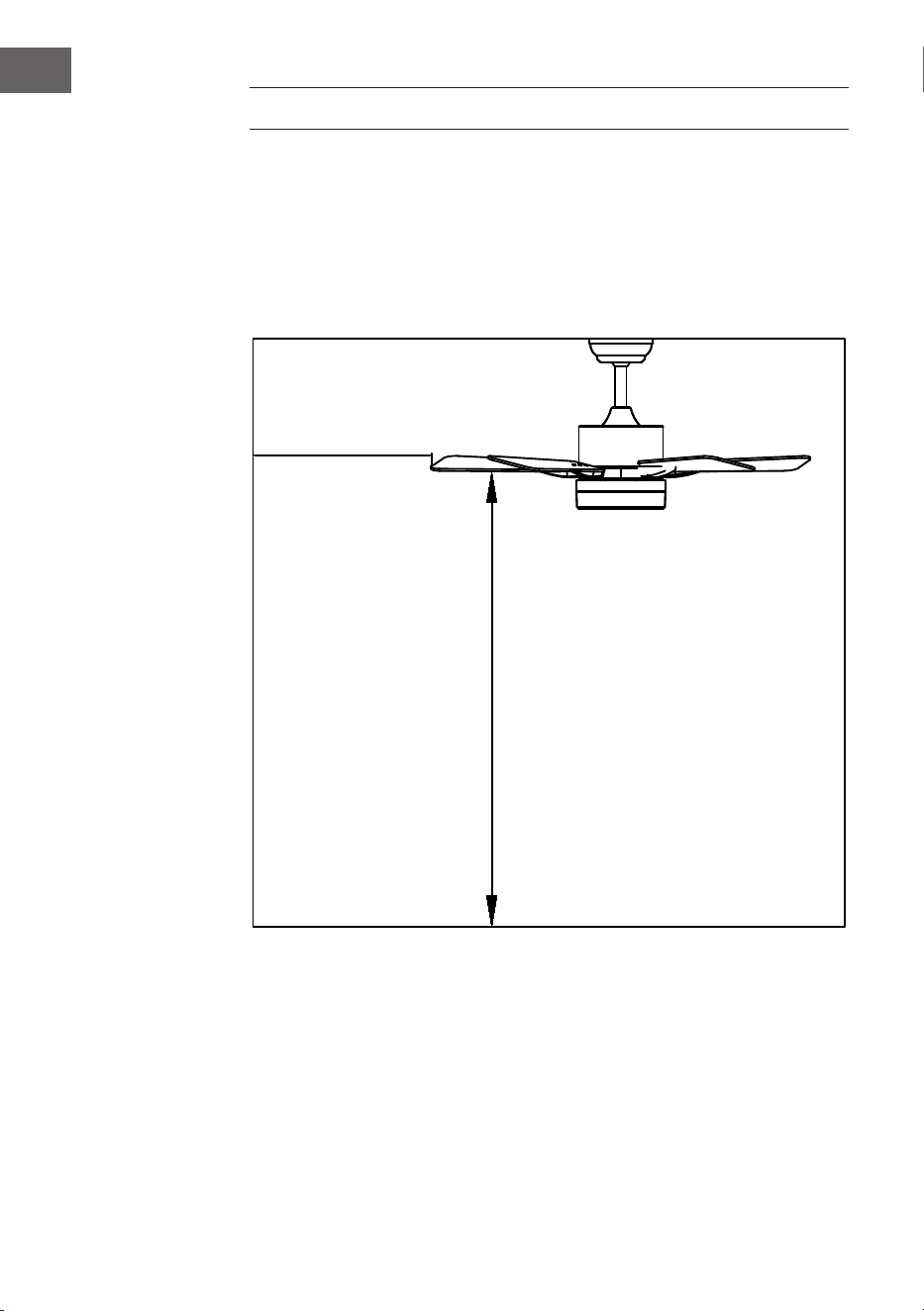
Um Verletzungen und Schäden zu vermeiden, stellen Sie sicher, dass die Flügel in
einem Abstand von 2,3 m vom Boden und 76 cm von Wänden oder Hindernissen
aufgehängt werden können. Vergewissern Sie sich, dass der Anschlusskasten
sicher an der Gebäudestruktur befestigt ist und das volle Gewicht des Ventilators
tragen kann.
Für die Installation sind folgende Werkzeuge erforderlich
Schraubenzieher, Schlitzschraubendreher, verstellbare Zange oder
Schraubenschlüssel, Trittleiter, Drahtschneider und Isolierband.
76 cm von der
Wand oder dem
nächstgelegenen
Hindernis
2,3 m von den
Flügeln bis zum
Boden
9
DE
Den Installationsort des Ventilators vorbereiten
Installation der Fallstange
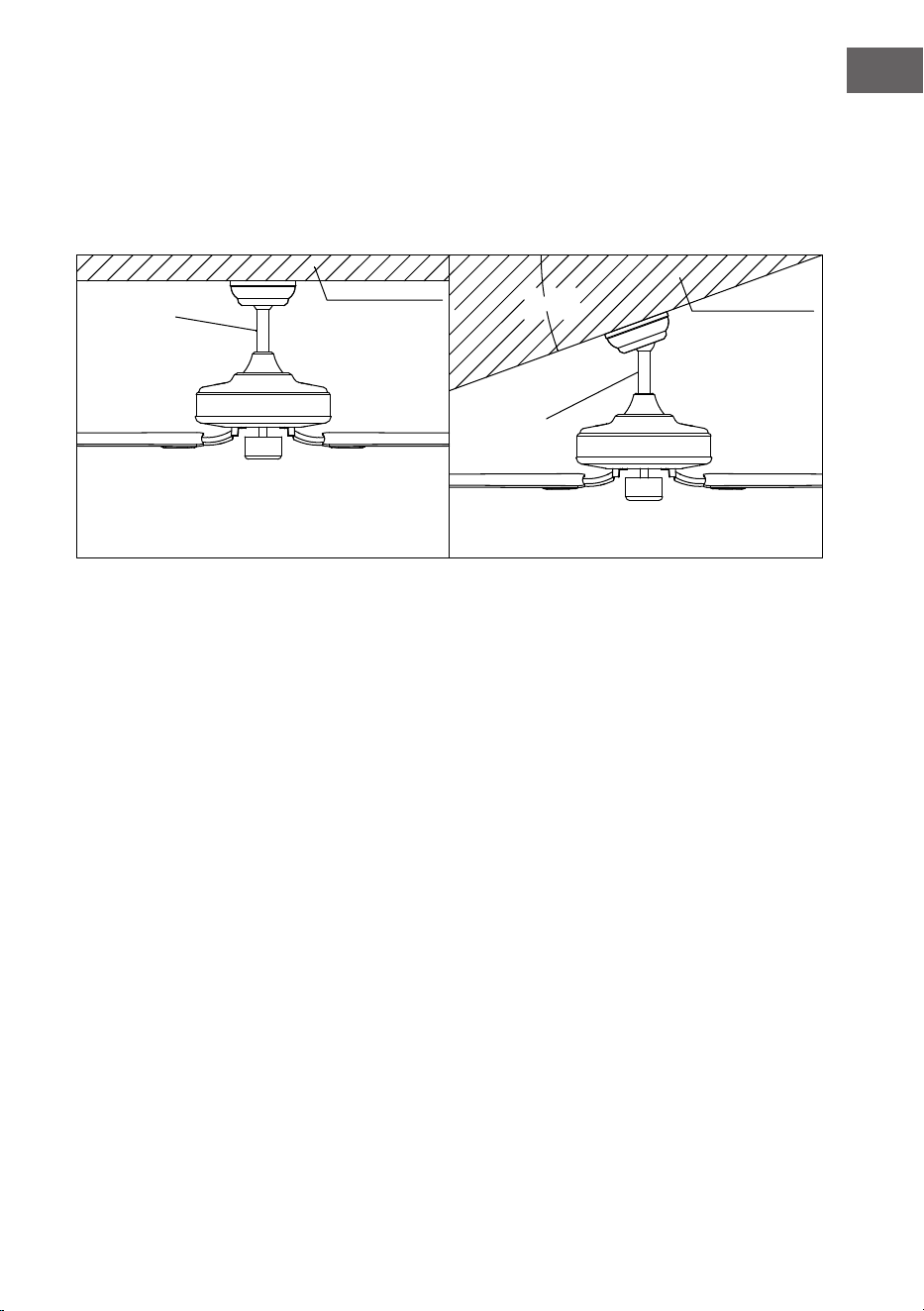
Dieser Ventilator kann mit einer Deckenstange an einer normalen oder gewölbten
Decke montiert werden. Die Aufhängelänge kann durch Verwendung einer
längeren Deckenstange vergrößert werden.
20°
Standard-
Montageart
Stützstrebe
Stützstrebe
Schräge
Montage
Die Standardmontage hängt mit einer
Deckenstange von der Decke
Bei einer gewölbten oder schrägen Decken wird
eine schräge Montage empfohlen
10
DE
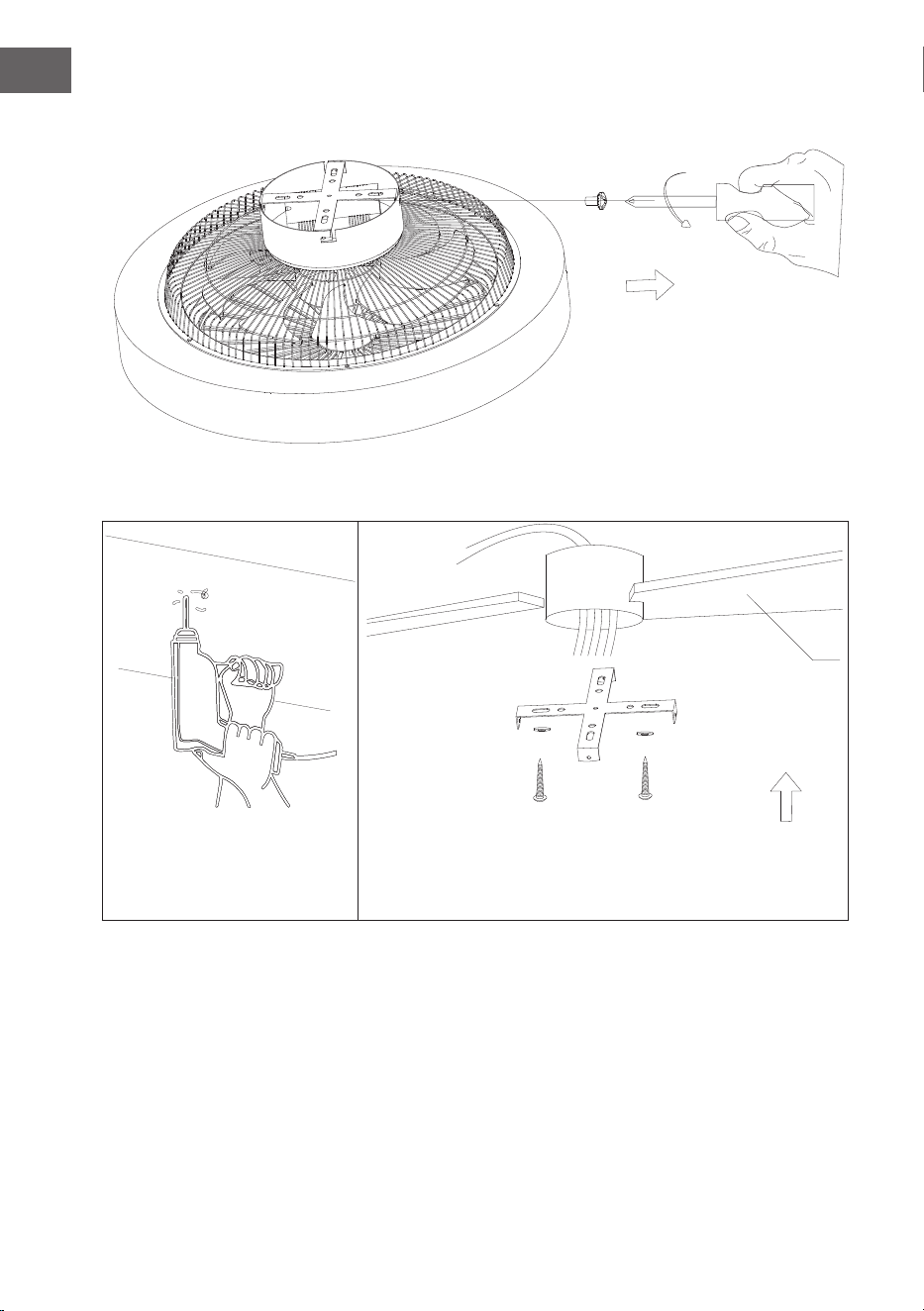
Anbringen der Befestigungsklammer
Entfernen Sie die Schrauben der seitlichen Aufhängung und nehmen Sie die Aufhängung ab.
Holzdecke
11
DE
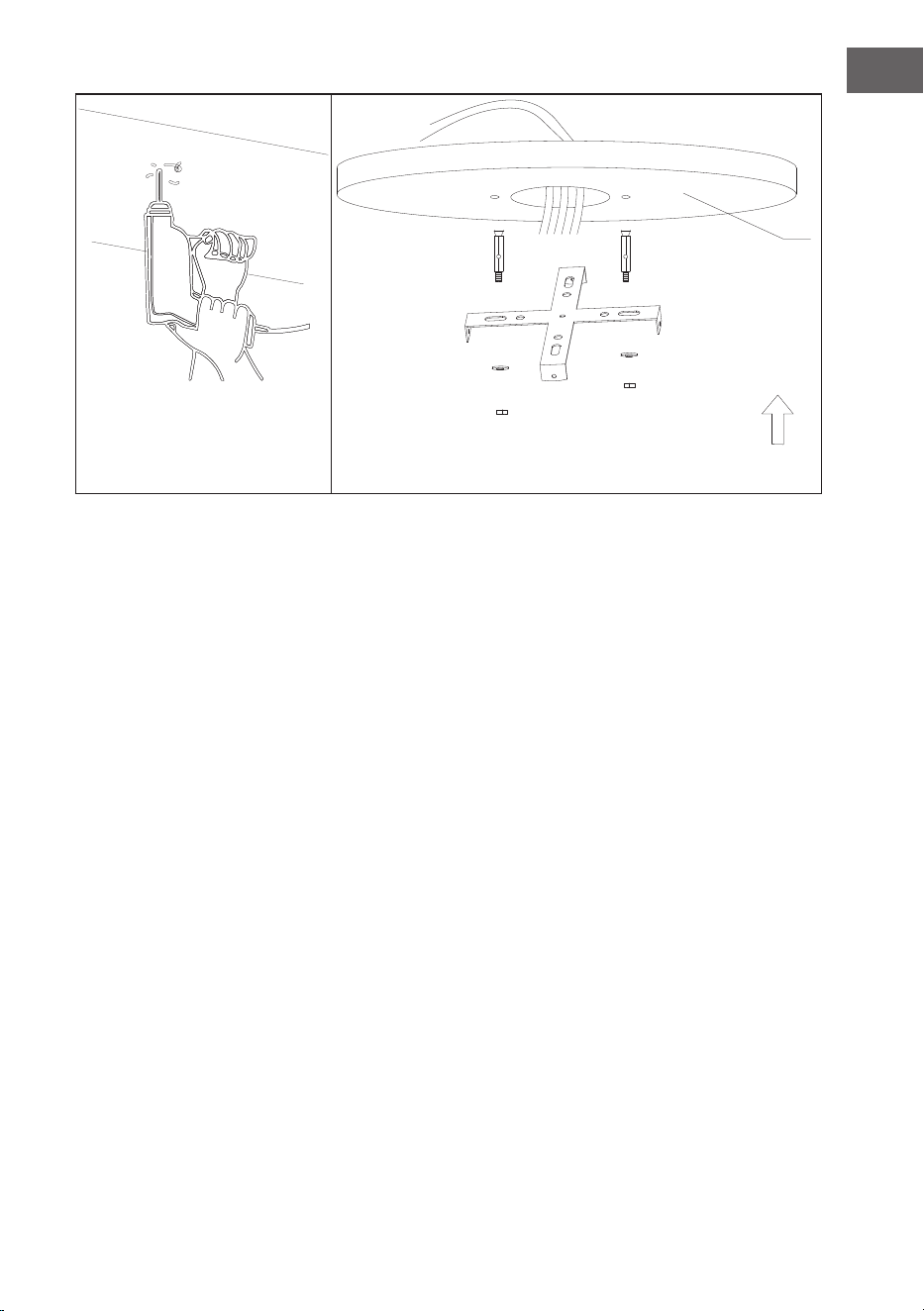
Bohren Sie ein Loch von Ø 8 mm in die Betondecke und setzen Sie die Schrauben
ein. Richten Sie die Halterung an der Bohrung aus und ziehen Sie die Mutter fest.
Betondecke
12
DE
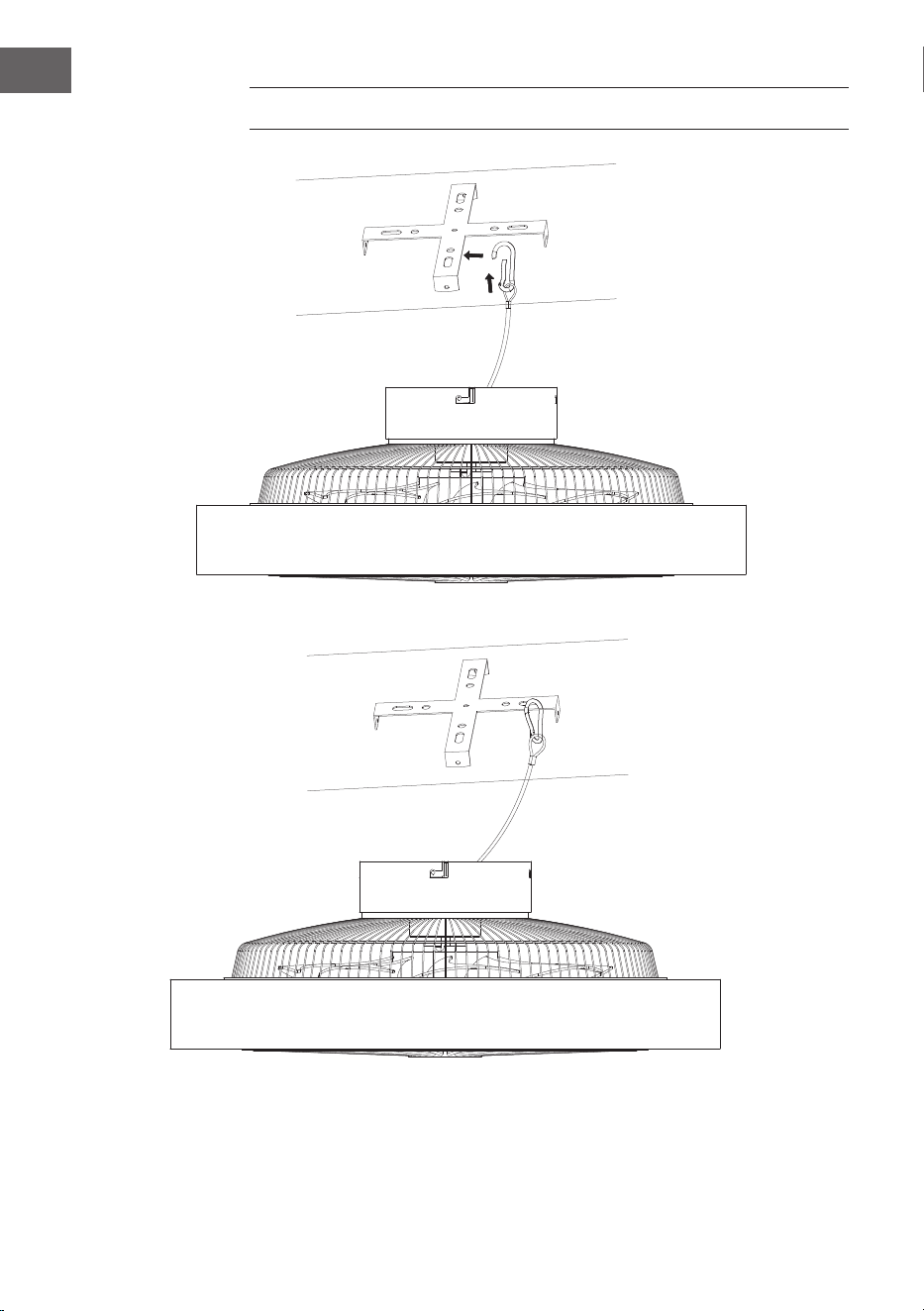
SICHERN DES VENTILATORS
Stahlseilaufhängung zur Stabilisierung des Ventilators und zur Sicherung.
13
DE
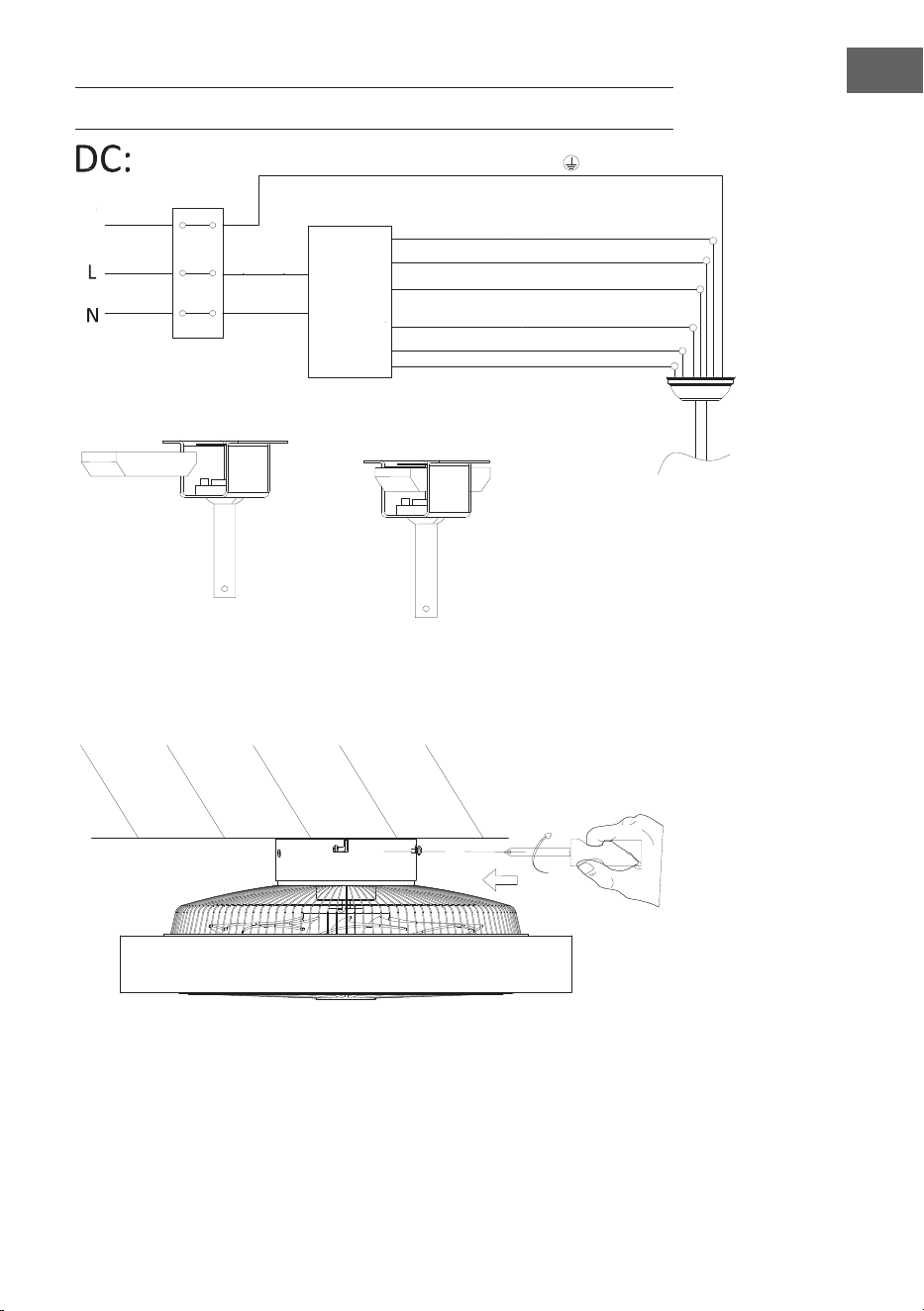
VERBINDUNG DER FERNBEDIENUNG
Montage der Abdeckung
Ziehen Sie die Schrauben fest, um den Deckenventilator zu befestigen.
grün/gelb gestreift
Licht L (grau)
Schwarz Gleichstrommotor L
Rot Gleichstrommotor L
Platzierung Empfänger
Eingang
N (blau)
Eingang L
(braun)
Erdungs-
Neutral N (gelb)
Neutral N (weiß)
Draht
Weiß Gleichstrommotor L
Fern-
bedienungs-
empfänger
14
DE
GERÄTESTEUERUNG PER SMARTPHONE
Wenn Sie Ihr Klarstein-Gerät in Ihr heimisches WLAN einbinden, können Sie es
ganz bequem über die dazugehörige Klarstein-App bedienen. Die App ermöglicht
es Ihnen, nicht nur das Gerät über Ihr Smartphone fernzusteuern, sondern bietet
Ihnen zudem Zugang zu Rezepten und weiterführenden Informationen.
Gehen Sie folgendermaßen vor, um Ihr Smartphone mit Ihrem Klarstein-Gerät zu
verbinden:
1. Laden Sie zuerst die Klarstein-App herunter, indem Sie mit Ihrem Smartphone
den QR-Code scannen (siehe unten) oder laden Sie diese direkt aus dem App
Store oder bei Google Play herunter.
2. Versichern Sie sich, dass Ihr Smartphone mit demselben WLAN-Netzwerk
verbunden ist, mit dem Ihr Klarstein-Gerät verbunden werden soll.
3. Öffnen Sie die Klarstein-App.
4. Melden Sie sich mit Ihrem Konto an. Wenn Sie noch keinen Account haben,
registrieren Sie sich in der Klarstein-App.
5. Folgen Sie den Anweisungen der App.
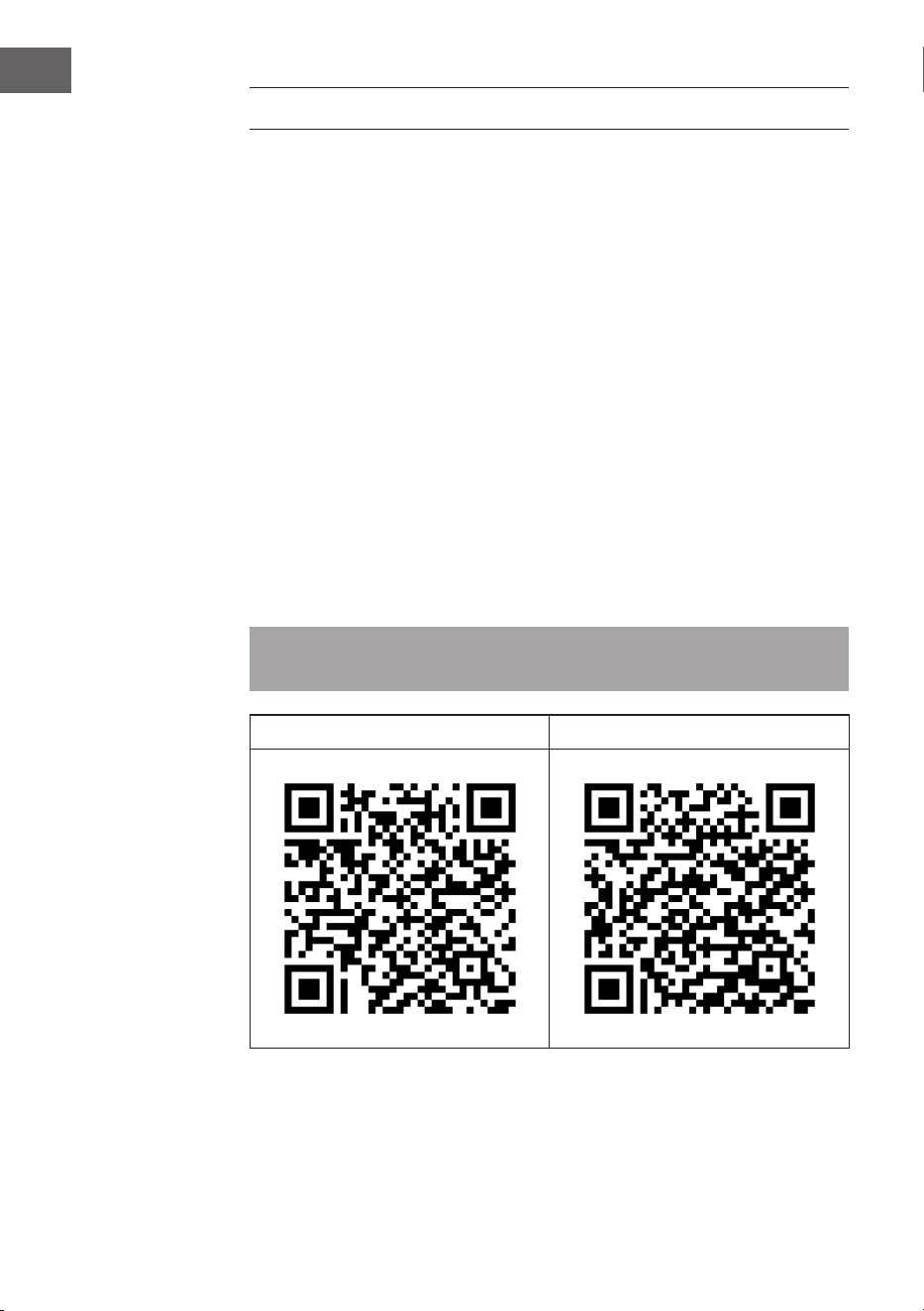
App-Download
Verwenden Sie die Scan-Funktion Ihres Handys, um den QR-Code zu scannen,
und speichern Sie die App auf Ihrem Smartphone.
Hinweis: Weitere Hinweise zur Bedienung der App und Hilfestellungen zur
Herstellung der Verbindung mit Ihrem Gerät liefert Ihnen die App, sobald Sie sie
das erste Mal öffnen.
iOS Android

15
DE
Fehlerbehebung bei Verbindungsproblemen
Wenn Ihr Klarstein-Gerät im WLAN nicht gefunden werden kann, überprüfen Sie
Folgendes:
1. Das Gerät ist nicht eingesteckt. Stellen Sie sicher, dass Ihr Gerät an eine
Steckdose angeschlossen ist.
2. Das Gerät bendet sich nicht im Kopplungsmodus. Stellen Sie sicher, dass
die WLAN-Anzeige (LED) auf dem Bedienfeld des Smart-Geräts blinkt, wie
in der Anweisung „WLAN-Einstellungen zurücksetzen“ Ihres Smart-Geräts
beschrieben (Anweisungen nden Sie in der Regel unter Geräteanschluss).
3. Der WLAN-Zugangspunkt arbeitet nicht auf 5 GHz. Vergewissern Sie sich, dass
Ihr Zugangspunkt auf dem 2,4-GHz-Band arbeitet und Sie eine eigene SSID
auf dem 2,4-GHz-Band haben. Wenn Sie sich über das Betriebsband Ihres
Zugangspunkts unsicher sind, wenden Sie sich bitte an Ihren Internetanbieter.
Wichtig: Bitte beachten Sie, dass, wenn Ihr WLAN-Router über ein Dualband
verfügt - also sowohl im 2,4-GHz- als auch im 5-GHz-Band arbeitet - Sie die SSIDs
für jedes Band trennen und die 2,4-GHz-SSID für die Verbindung verwenden
müssen.
4. Überprüfen Sie die Firewall-Einstellungen Ihres WLAN-Netzwerks. Die Firewall-
Einstellung Ihres WLAN-Netzwerks erlaubt der Klarstein-App möglicherweise
nicht, die WLAN-Einstellungen auf Ihrem Smart-Gerät zu kongurieren. Bitte
stellen Sie sicher, dass Sie kein öffentliches WLAN-Netzwerk nutzen, z. B.
Flughäfen, Wohnheime, Firmen, etc.
5. Unterschiedliche Anmeldedaten im Smartphone und in der App. Stellen Sie
sicher, dass die in der Klarstein-App eingegebenen WLAN-Anmeldedaten mit
denen übereinstimmen, mit denen Ihr Smartphone verbunden ist.
Wenn Sie die oben genannten Punkte befolgt haben und Ihr Smartphone sich
immer noch nicht mit der App verbinden kann, wenden Sie sich bitte per E-Mail
an uns, um Unterstützung zu erhalten: [email protected]
16
DE
REINIGUNG UND PFLEGE
• Trennen Sie das Gerät immer vom Stromnetz, bevor Sie das Gerät reinigen
oder Wartungsarbeiten durchführen.
• Verwenden Sie zur Reinigung des Geräts niemals einen nassen Schwamm.
• Um das Produkt nicht zu beschädigen, empehlt es sich, geeignete Mittel
für die empndlichen Oberächen und Produkte zu verwenden, die die
Abnutzung des Geräts verlangsamen.
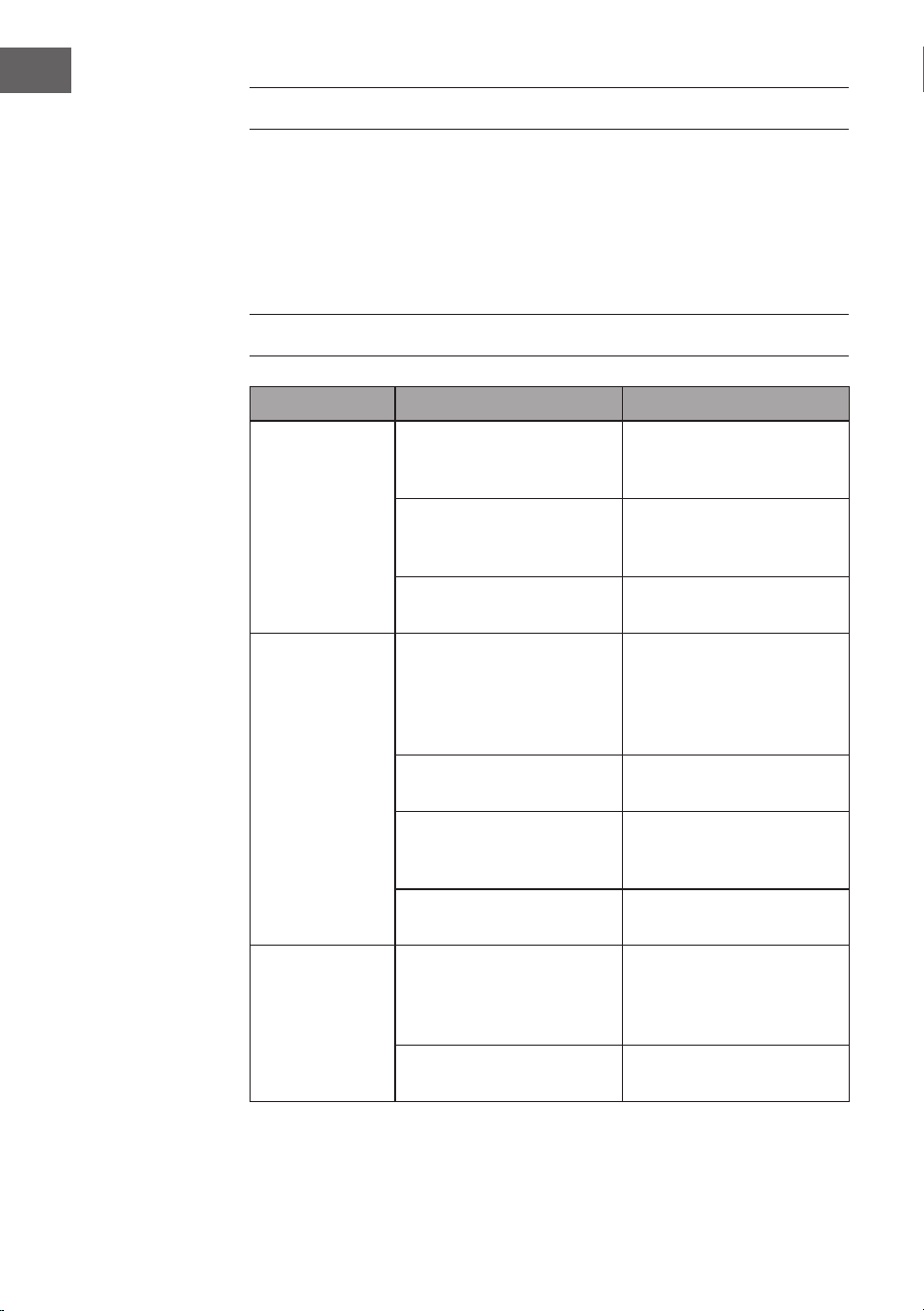
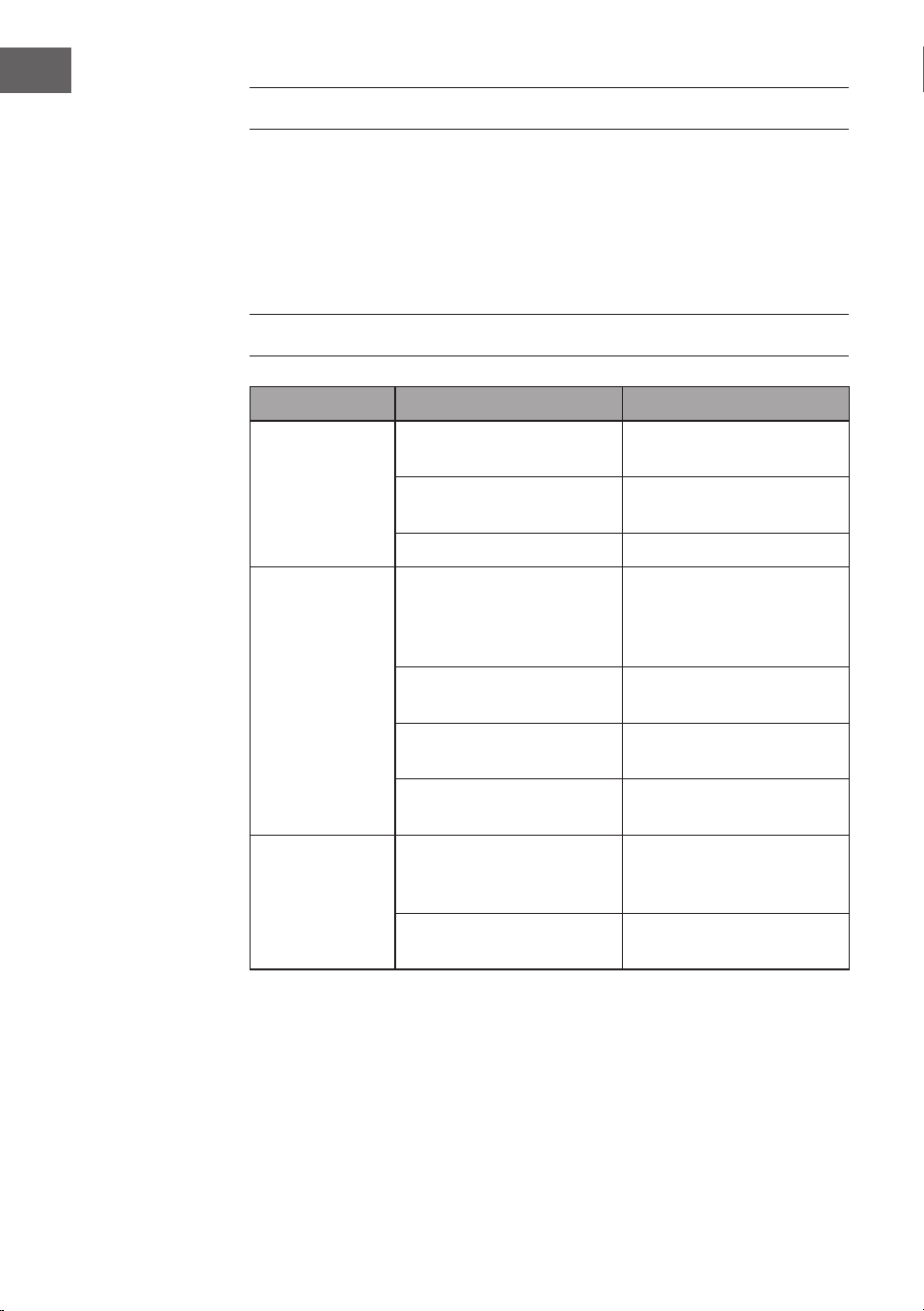
FEHLERSUCHE UND FEHLERBEHEBUNG
Problem Mögliche Ursache Ansatz
Der Ventilator
läuft nicht.
Sicherung oder
Sicherungsschalter
durchgebrannt.
Prüfen Sie Ihre Sicherungen.
Lose Kabelverbindungen. Überprüfen Sie alle
Verbindungen auf lose
Kabel.
Die Geschwindigkeit wurde
nicht korrekt eingestellt.
Wählen Sie eine
Geschwindigkeit.
Der Ventilator
macht
Geräusche.
Die obere Kappe berührt die
Decke.
Achten Sie darauf, dass
zwischen der oberen
Kappe und der Decke ein
Mindestabstand von 3 mm
besteht.
Die Schrauben der
Rotorblätter sind lose.
Ziehen Sie alle Schrauben
an.
Der Deckenventilator ist
nicht richtig an der Decke
befestigt.
Ziehen Sie alle Schrauben in
der Aufhängeplatte fest.
Die Geschwindigkeit ist nicht
richtig eingestellt.
Wählen Sie eine
Geschwindigkeit.
Der Ventilator
wackelt.
Die Rotorblätter sind nicht
waagerecht zur Decke
ausgerichtet.
Stellen Sie den Ventilator
so ein, dass sich alle Flügel
auf gleicher Höhe zur Decke
benden.
Die Schrauben der
Rotorblätter sind lose.
Ziehen Sie alle Schrauben
an.
17
DE
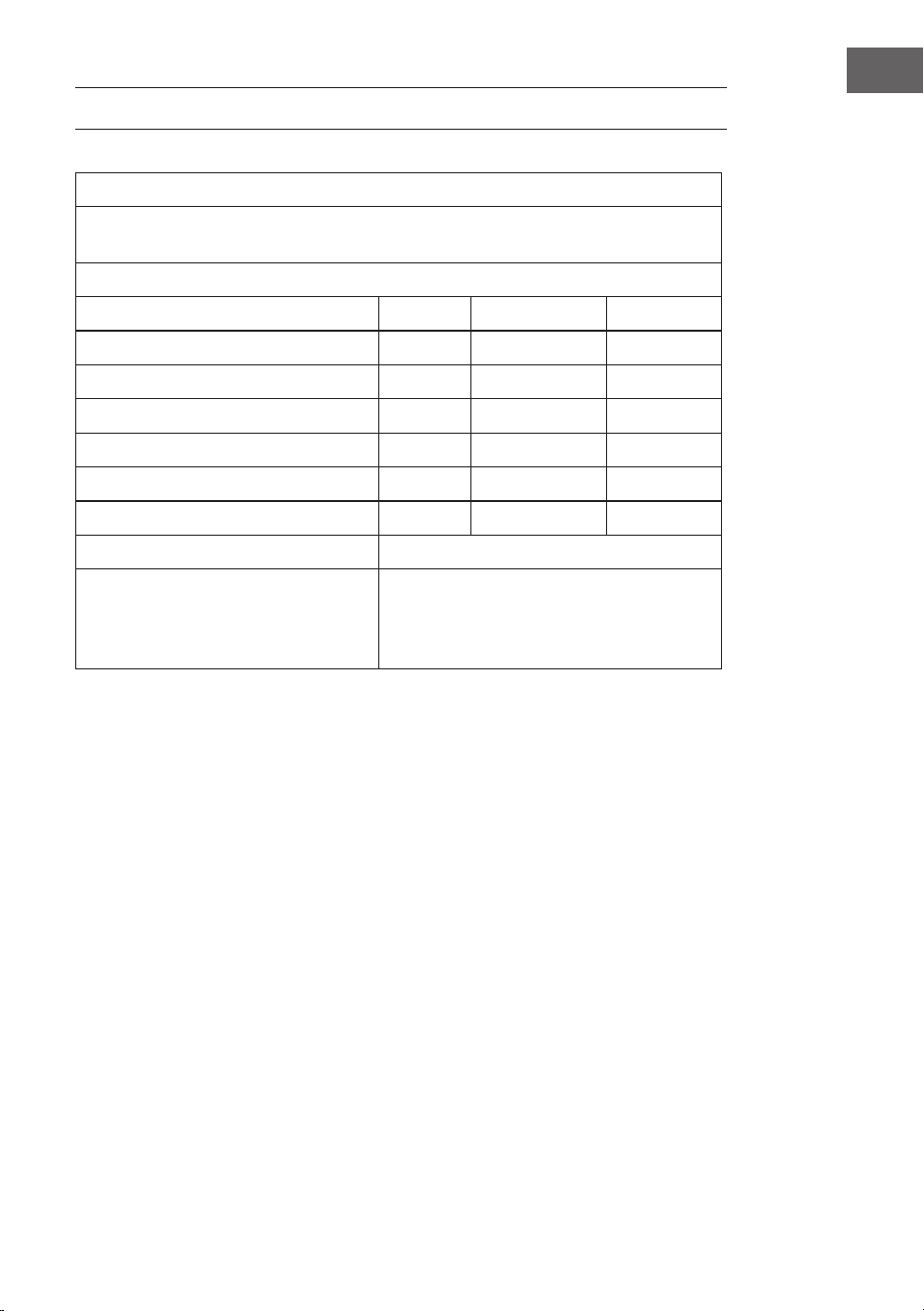
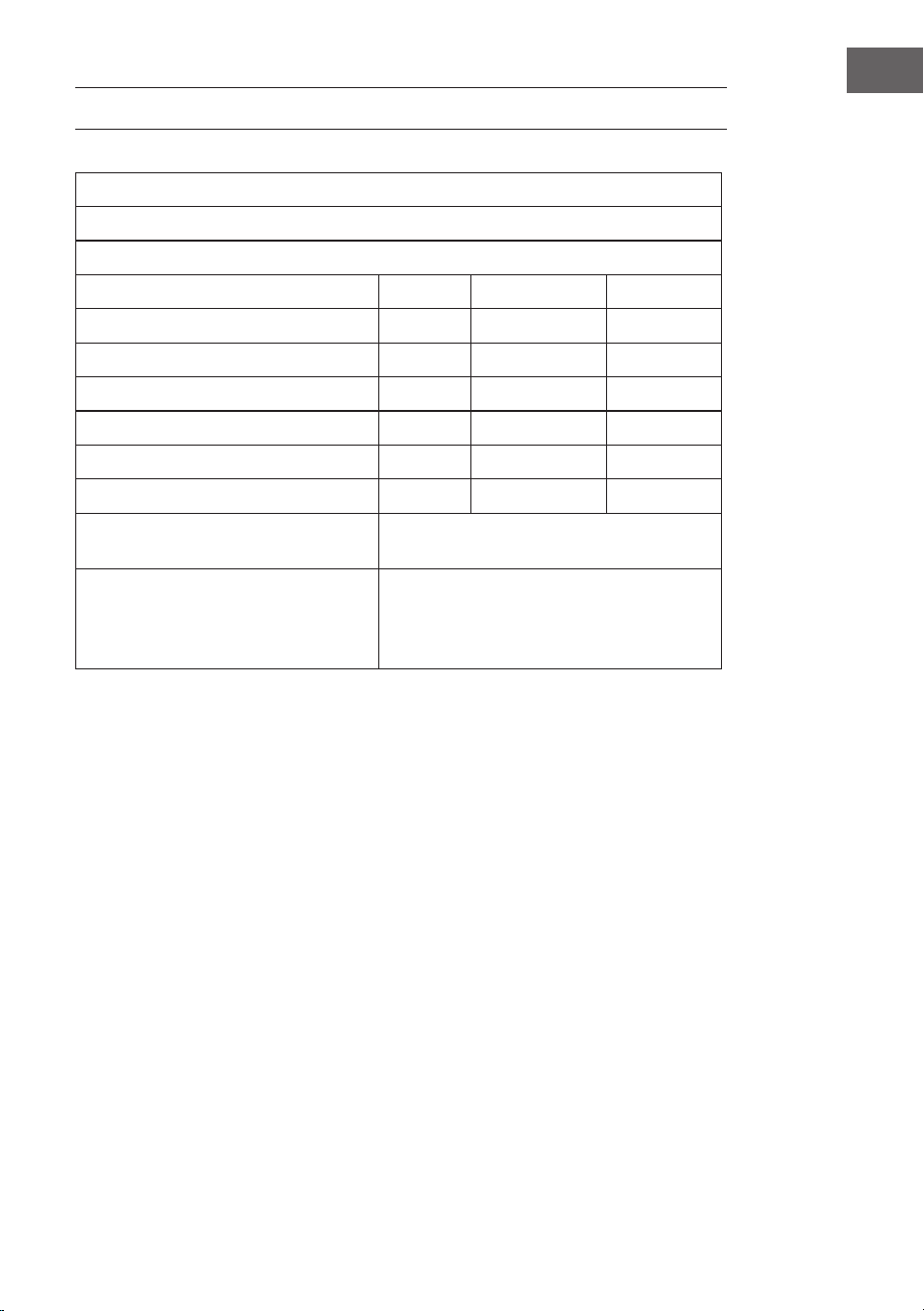
DATENBLÄTTER
Produktinformationspichten gemäß VERORDNUNG (EU) Nr. 206/2012
Informationen zur Identizierung des Modells/der Modelle, auf das/die sich die
Informationen beziehen
10048235, 10048236 Zen Breeze
Beschreibung Symbol Wert Einheit
Maximaler Ventilatordurchsatz F 37,3 m3/min
Eingangsleistung Ventilator P 16,4 W
Servicewert SV 2,3 (m3/min)/W
Stromverbrauch im Standby-Modus PSB 0,5 W
Geräuschpegel Ventilator LWA 53 dB(A)
Maximale Luftgeschwindigkeit c 1,8 m/s
Messstandard für den Servicewert IEC 60879:2019
Kontaktangaben für weitere
Informationen
Chal-Tec GmbH
Mühlenstraße 25
10243 Berlin
Deutschland
18
DE
HINWEISE ZUR ENTSORGUNG
Wenn es in Ihrem Land eine gesetzliche Regelung
zur Entsorgung von elektrischen und elektronischen
Geräten gibt, weist dieses Symbol auf dem Produkt oder
auf der Verpackung darauf hin, dass dieses Produkt
nicht im Hausmüll entsorgt werden darf. Stattdessen
muss es zu einer Sammelstelle für das Recycling von
elektrischen und elektronischen Geräten gebracht
werden. Durch regelkonforme Entsorgung schützen
Sie die Umwelt und die Gesundheit Ihrer Mitmenschen
vor negativen Konsequenzen. Informationen zum
Recycling und zur Entsorgung dieses Produkts,
erhalten Sie von Ihrer örtlichen Verwaltung oder Ihrem
Hausmüllentsorgungsdienst.
Dieses Produkt enthält Batterien. Wenn es in Ihrem
Land eine gesetzliche Regelung zur Entsorgung von
Batterien gibt, dürfen die Batterien nicht im Hausmüll
entsorgt werden. Informieren Sie sich über die örtlichen
Bestimmungen zur Entsorgung von Batterien. Durch
regelkonforme Entsorgung schützen Sie die Umwelt
und die Gesundheit Ihrer Mitmenschen vor negativen
Konsequenzen.
KONFORMITÄTSERKLÄRUNG
Hersteller:
Chal-Tec GmbH, Mühlenstraße 25, 10243 Berlin
Kontakt: [email protected]
Hiermit erklärt Chal-Tec GmbH, dass der Funkanlagentyp
Zen Breeze der Richtlinie 2014/53/EU entspricht. Der
vollständige Text der EU-Konformitätserklärung ist
unter der folgenden Internetadresse verfügbar: use.
berlin/10048235
19
EN
Dear Customer,
Congratulations on purchasing this device. Please read the
following instructions carefully and follow them to prevent
possible damages. We assume no liability for damage
caused by disregard of the instructions and improper use.
Scan the QR code to get access to the latest user manual
and more product information.
CONTENTS
TECHNICAL DATA
Item number 10048235, 10048236
Power supply 220-240 V~/ 50Hz
Fan power 20 W
Lamp type LED
Colour temperature 3000K/ 4500K/ 6500K
Colour Rendering Index (CRI) ≥80
Maximum volume ow 77 m
3
/min
WiFi standard
802.11 b/g/n
WiFi frequency
2.4 GHz
WiFi radio-frequency power (max.)
20 dBm
This product contains a light source of energy eciency class
Safety Instructions 20
Scope of delivery 21
Scope of delivery 23
Installation 24
Securing the fan 28
Remote control connection 29
Device Control by Smartphone 30
Cleaning and Care 32
Troubleshooting 32
Data Sheet 33
Disposal Considerations 34
Declaration of Conformity 34
20
EN
SAFETY INSTRUCTIONS
• Never attach the fan to a power point,but to the ceiling itself.
• The minimum distance between the blades of the fan and the oor must be
more than 2.3 m. The minimum carrying capacity of the hook from which the
fan is hung must be 100 kg.
• Make sure to install all poles disconnection switch having a contact separation
of at least 3 mm between poles in the supply wiring to the ceiling fan.
• All wiring must comply with national and local electrical codes. If you are
unfamiliar with wiring, consult a qualied electrician.
• To avoid possible electric shock, before installing your fan, disconnect the
power by turning off the circuit breakers to the fuse box and associated wall
switch location. If you cannot lock the circuit breakers in the off position,
securely attach a conspicuous warning device, such as a sign, to the service
panel.
• The model or type reference of luminaries which may be installed in fans
which are constructed for his purpose.
• Switch off the power before connecting.
• The electrical wiring must be in accordance with the local regulation.
• The fan must be properly earthed to avoid the risk of electric shocks.
• Never mount the fan in a moist or wet room.
• Be careful when working near the rotating blades.
• To reduce the risk of personal injury, secure the fan directly to the building’s
support structure according to these instructions and use only the hardware
supplied.
• This device may be only used by children 8 years old or older and persons with
limited physical, sensory and mental capabilities and / or lack of experience
and knowledge, provided that they have been instructed in use of the device
by a responsible person who understands the associated risks.
• To reduce the risk of re, electric shock or motor damage, do not use a solid-
state speed controller with this fan. Use only variable speed drives.
• Children shall not play with the appliance.
• Ensure that the fan is switched off from the supply mains before removing the
guard.
• Take precautions to avoid the back-ow of gases into the room from the open
ue of gas or other fuel-burning appliances (for duct and partition fans).
Note: Always have your fan installed by someone who is knowledgeable about
electrical wiring.
21
EN
SCOPE OF DELIVERY
Base
Screws
Housing
Lighting
Ventilator cover
Blades
22
EN
Remote control
Reverse fan/ mute
on/off
natural wind
light on/off
fan speed/ Wi-Fi
2 hours/ 4 hours
Night light
Increase light brightness
Decrease temperature
Increase temperature
Decrease light brightness
LED colour change
Fan speed levels 1–6
23
EN
SCOPE OF DELIVERY
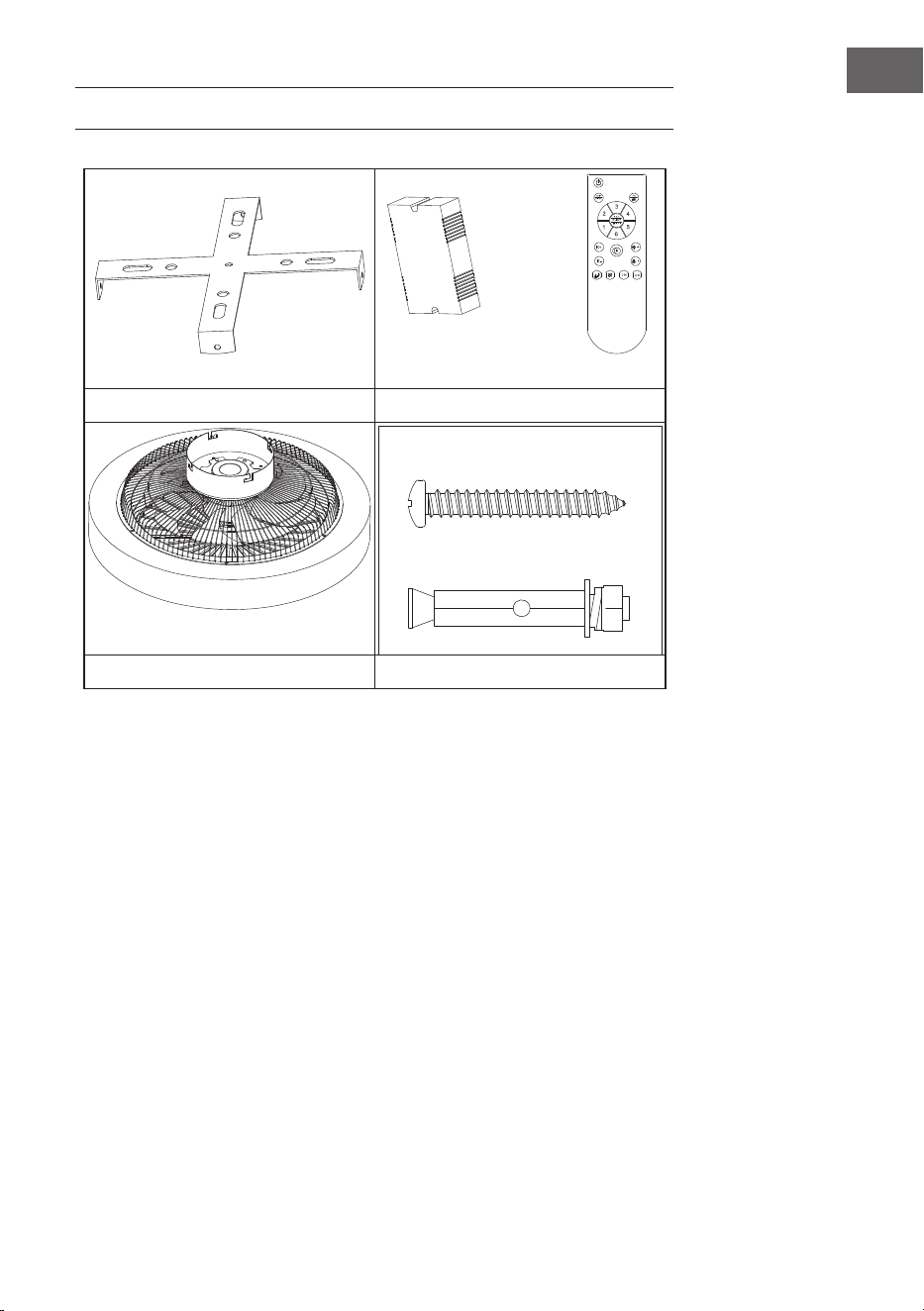
Hanger bracket Remote control
Motor Spiral package
• Open the packaging carefully. Remove the items from the Styrofoam inserts.
• Place the motor housing on a carpet or a piece of Styrofoam to avoid
damaging the nish.
• Check the parts inventory to ensure that all parts have been included.
24
EN
INSTALLATION
Installation Preparation
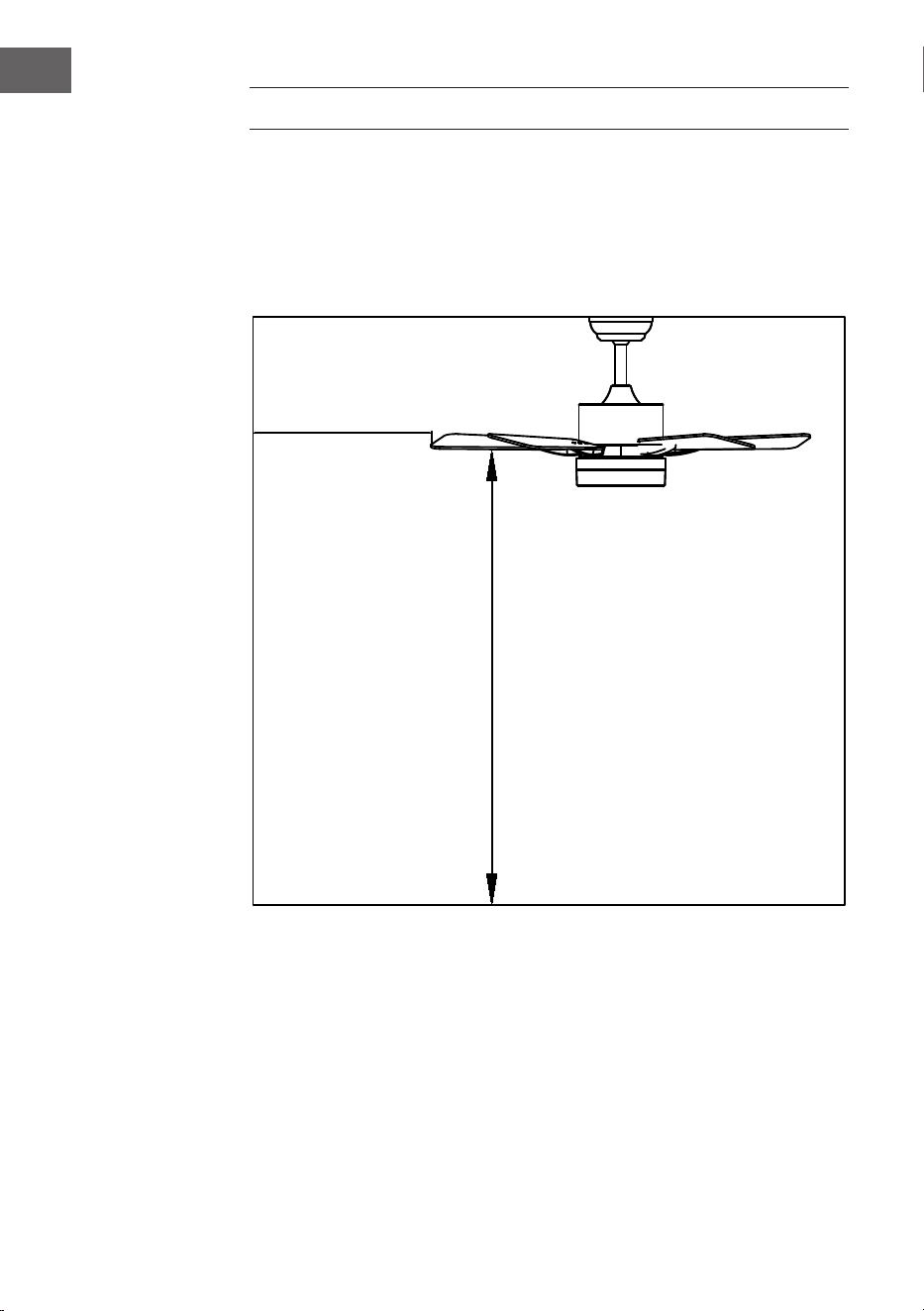
To prevent personal injury and damage, ensure that the hanging location allows
the blades to be 2.3 m from the oor and 76 cm from any wall or obstruction.
Ensure that the junction box is securely attached to the building structure and can
support the full weight of the fan.
Installation requires these tools
Screwdriver, at head screwdriver, adjustable pliers or wrench, stepladder, wire
cutters and electrical tape.
76 cm from
wall or nearest
obstruction
2.3 m from the
blades to the
oor
25
EN
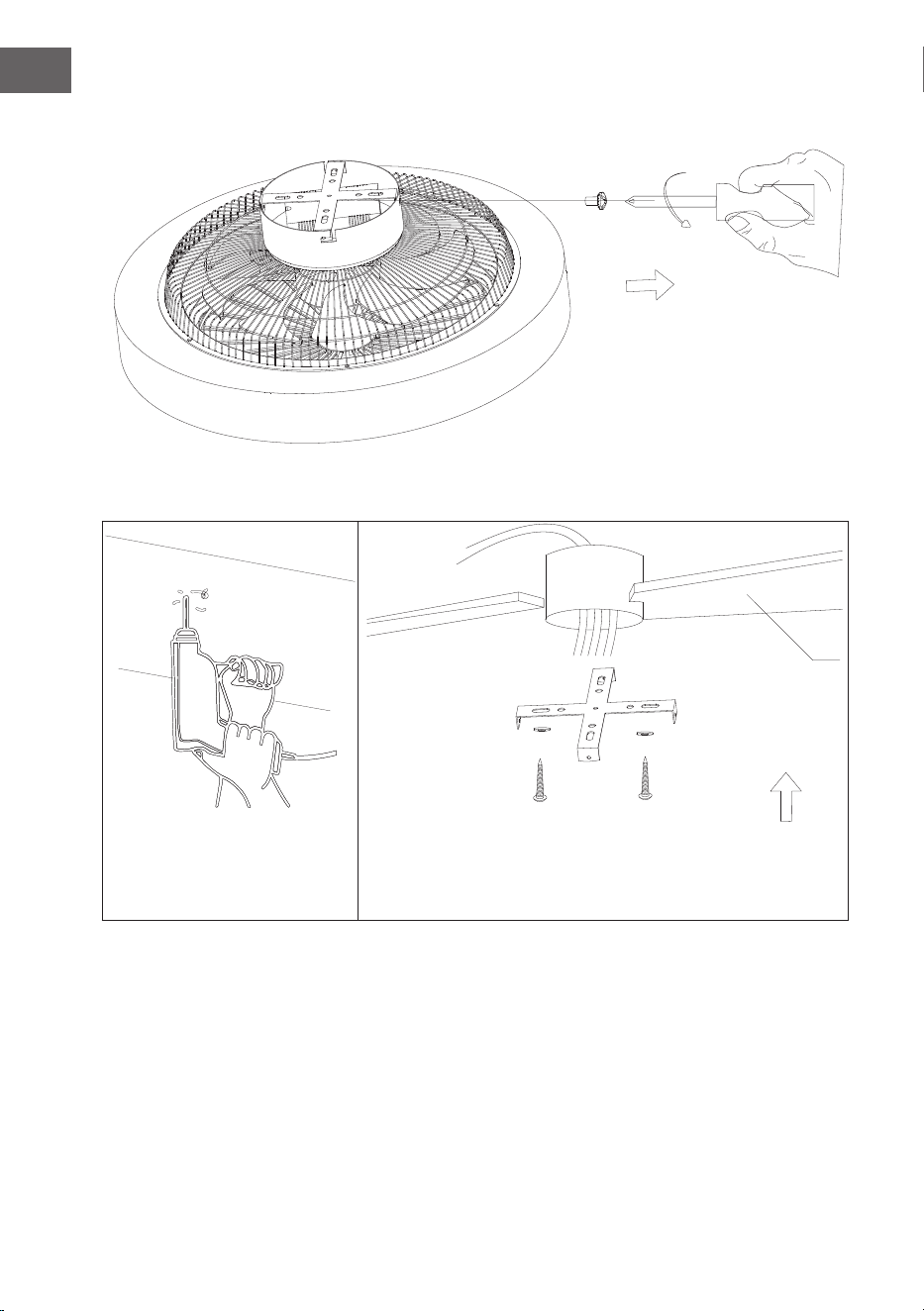
Preparing the fan site
Downrod installation
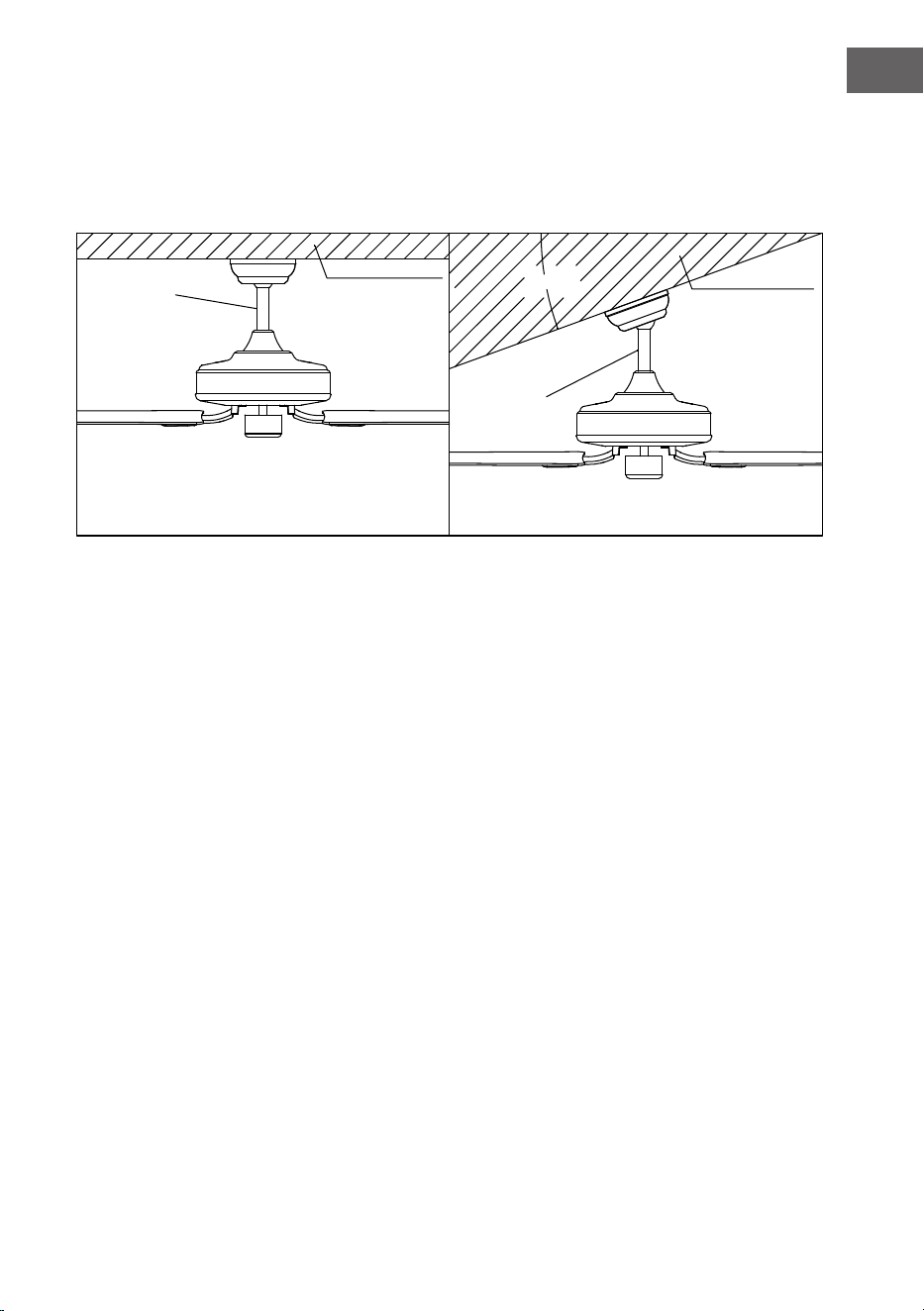
This fan can be mounted on a normal or vaulted ceiling using a down rod. The
hanging length can be increased by using a longer down rod.
20°
Standard
Mounting
Style
Support brace
Support brace
Angled
Mounting
Style
Standard mounting hangs from the ceiling by a
down rod
Angled mounting recommended for a vaulted or
angled ceiling
26
EN
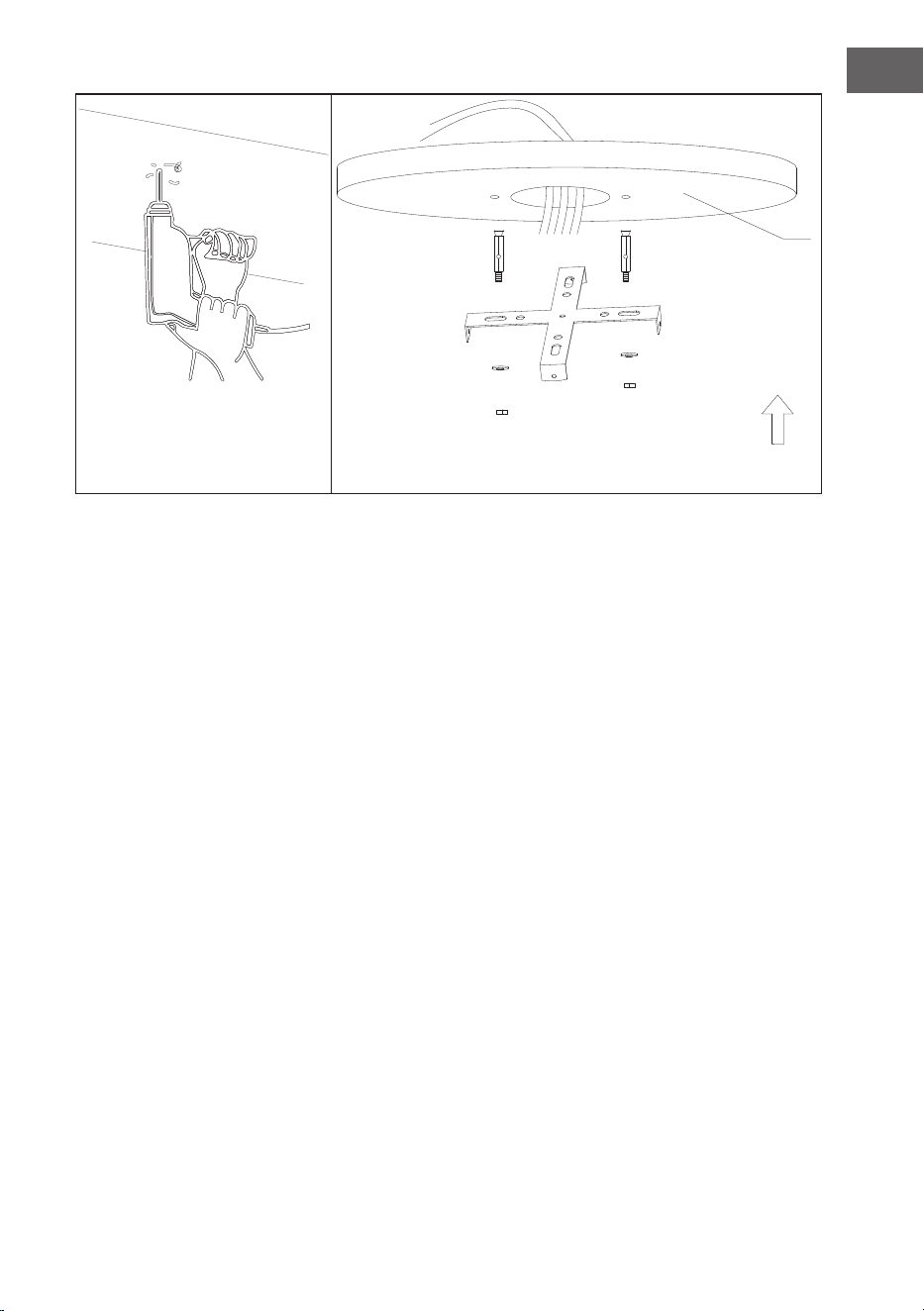
Installing the hanger bracket
Remove the side lock hanger screws and remove the hanger.
Wood ceiling
27
EN
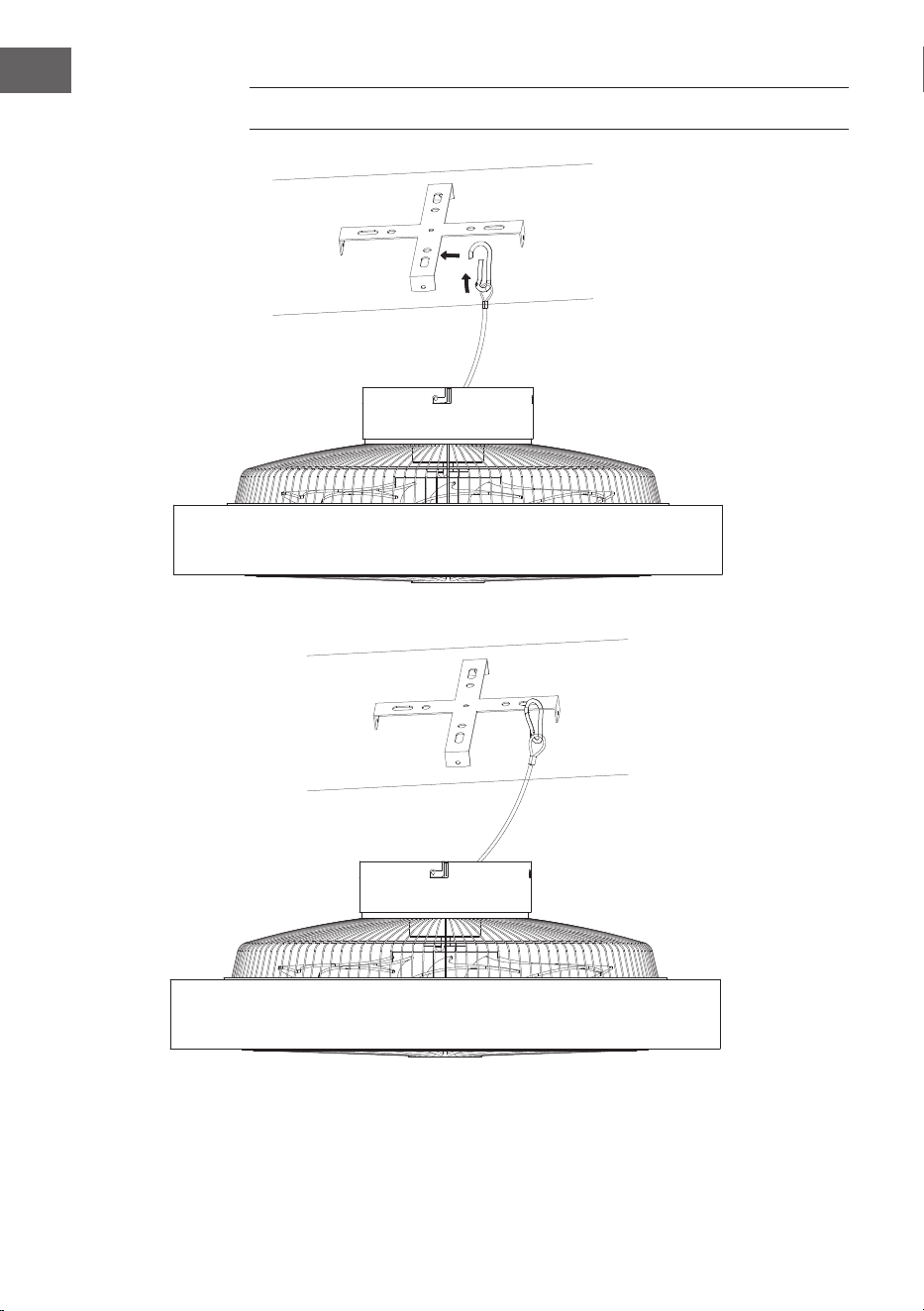
Please drill an ɸ8 mm hole in the concrete ceiling and insert the bolt. Align the
bracket with the hole and tighten it with the nut.
Concrete ceiling
28
EN
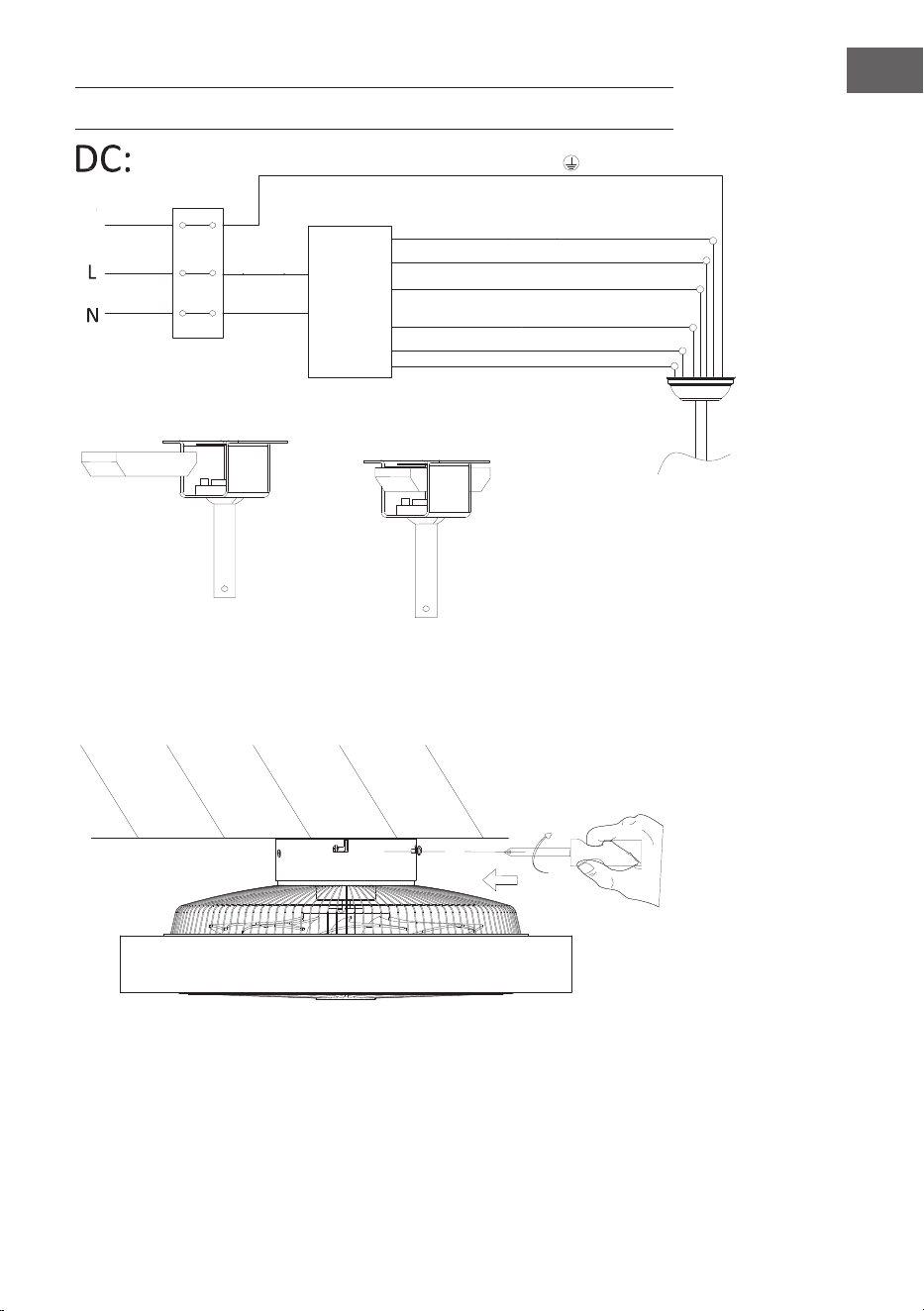
SECURING THE FAN
Steel wire rope suspension hanger for stabilizing the fan and saftey protection.
29
EN
REMOTE CONTROL CONNECTION
Canopy assembly
Lock the screws to secure the ceiling fan in place.
green/ yellow stripe
Light L (grey)
Black DC motor L
Red DC motor L
Receiver place
input N
(blue)
input L
(brown)
Ground
Neutral N (yellow)
Neutral N (white)
wire
WhiteDC motor L
Remote
control
receiver
30
EN
DEVICE CONTROL BY SMARTPHONE
If you integrate the device into your home WiFi, you can conveniently operate it via
the associated Klarstein app. The app not only allows you to remotely control the
device via your smartphone, but also gives you access to recipes and additional
information.
Follow these steps to connect your smartphone to your Klarstein device:
1. Download the Klarstein app rst by scanning the QR code with your
smartphone (see below), or download it directly from App Store or Google
Play.
2. Make sure your smartphone is connected to the same WiFi network that your
Klarstein device is to be connected to.
3. Open the Klarstein app.
4. Sign in to your account. If you do not have an account, sign up in the Klarstein
app.
5. Follow the instructions from the app.
App Download
Use the scan function of your smartphone to scan the QR code and save the app
on your smartphone.
Note: the app provides further information on how to use the app and help on
how to connect to your device as soon as you open it for the rst time.
iOS Android

31
EN
Troubleshooting connection problems
If your Klarstein device cannot be found in the WiFi, check the following:
1. The device is not plugged in. Make sure that your device is plugged into an
electric socket.
2. The device is not in pairing mode. Make sure that the WiFi indicator (LED)
on the smart device control panel is blinking as described in the ‘Reset WiFi
settings‘ instruction of your smart device (instructions are usually available on
device connection process).
3. The WiFi access point does not operate on 5 GHz. Make sure that your access
point operates on 2.4 GHz band and you have a separate SSID on 2.4 GHz
band. If you are not sure about the operating band of your access point,
please contact your internet provider company.
Important: please note that if your WiFi router is dual band - operating on both
2.4 GHz and 5 GHz band - you need to separate the SSIDs for each band and use
the 2.4 GHz SSID for connection.
4. Firewall settings of your WiFi network; the rewall setting of your WiFi network
may not allow the Klarstein app to congure the WiFi settings on your smart
device. Please make sure that you are not using a public WiFi network, e.g.
airports, dormitories, companies, etc.
5. Different credentials used in smartphone and the app. Make sure that the WiFi
credentials entered in the Klarstein app are the same as the ones that your
smartphone is connected to.
Following the above mentioned points, if your smart device still fails to connect
to the app, please contact us via email for support:
32
EN
CLEANING AND CARE
• Always disconnect the appliance from the power supply before cleaning the
appliance or carrying out maintenance work.
• Never use a wet sponge to clean the appliance.
• In order not to damage the product, it is advisable to use equipment adapted
to the sensitive surfaces and products, which will slow down the wear of the
device.
TROUBLESHOOTING
Problem Possible cause Approach
The fan does not
start.
Fuse or circuit breaker
blown.
Check your fuses.
Loose cable connections. Check all connections for
loose cables.
Speed was not set correctly. Select a speed.
The fan makes
noise.
The upper cap touches the
ceiling.
Make sure there is a
minimum distance of 3 mm
between the top cap and the
ceiling.
Screws of rotor blades are
loose.
Tighten all screws.
Ceiling fan is not properly
attached to the ceiling.
Tighten all screws in the
suspension plate.
Speed is not adjusted
correctly.
Select a speed.
The fan is
wobbling.
Rotor blades are not
adjusted horizontally to the
ceiling.
Move the fan so that all
blades are at the same
height to the ceiling.
Screws of the rotor blades
are loose.
Tighten all screws.
33
EN
DATA SHEET
Product information requirements according to REGULATION (EU) No 206/2012
Information to identify the model(s) to which the information relates to
10048235, 10048236 Zen Breeze
Description Symbol Value Unit
Maximum fan ow rate F 37.3 m3/min
Fan power input P 16.4 W
Service value SV 2.3 (m3/min)/W
Standby power consumption PSB 0.5 W
Fan sound power level LWA 53 dB(A)
Maximum air velocity c 1.8 m/s
Measurement standard for service
value
IEC 60879:2019
Contact details for obtaining more
information
Chal-Tec GmbH
Mühlenstraße 25
10243 Berlin
Deutschland
34
EN
DISPOSAL CONSIDERATIONS
If there is a legal regulation for the disposal of electrical
and electronic devices in your country, this symbol on the
product or on the packaging indicates that this product
must not be disposed of with household waste. Instead,
it must be taken to a collection point for the recycling
of electrical and electronic equipment. By disposing of
it in accordance with the rules, you are protecting the
environment and the health of your fellow human beings
from negative consequences. For information about the
recycling and disposal of this product, please contact your
local authority or your household waste disposal service.
This product contains batteries. If there is a legal regulation
for the disposal of batteries in your country, the batteries must
not be disposed of with household waste. Find out about local
regulations for disposing of batteries. By disposing of them in
accordance with the rules, you are protecting the environment
and the health of your fellow human beings from negative
consequences.
DECLARATION OF CONFORMITY
Manufacturer & Importer for Great Britain:
Chal-Tec GmbH, Mühlenstraße 25, 10243 Berlin, Germany.
Contact: [email protected]
Hereby, Chal-Tec GmbH declares that the radio equipment
type Zen Breeze in compliance with Directive 2014/53/EU. The
full text of the EU declaration of conformity is available at the
following internet address: use.berlin/10048235
For Great Britain: Hereby, Chal-Tec GmbH declares that
the radio equipment type Zen Breeze is in compliance with
the relevant statutory requirements. The full text of the
declaration of conformity is available at the following internet
address: use.berlin/10048235
35
ES
Estimado cliente:
Le felicitamos por la adquisición de este producto. Lea
atentamente el siguiente manual y siga cuidadosamente
las instrucciones de uso con el n de evitar posibles
daños. La empresa no se responsabiliza por los daños
ocasionados por un uso indebido del producto o por haber
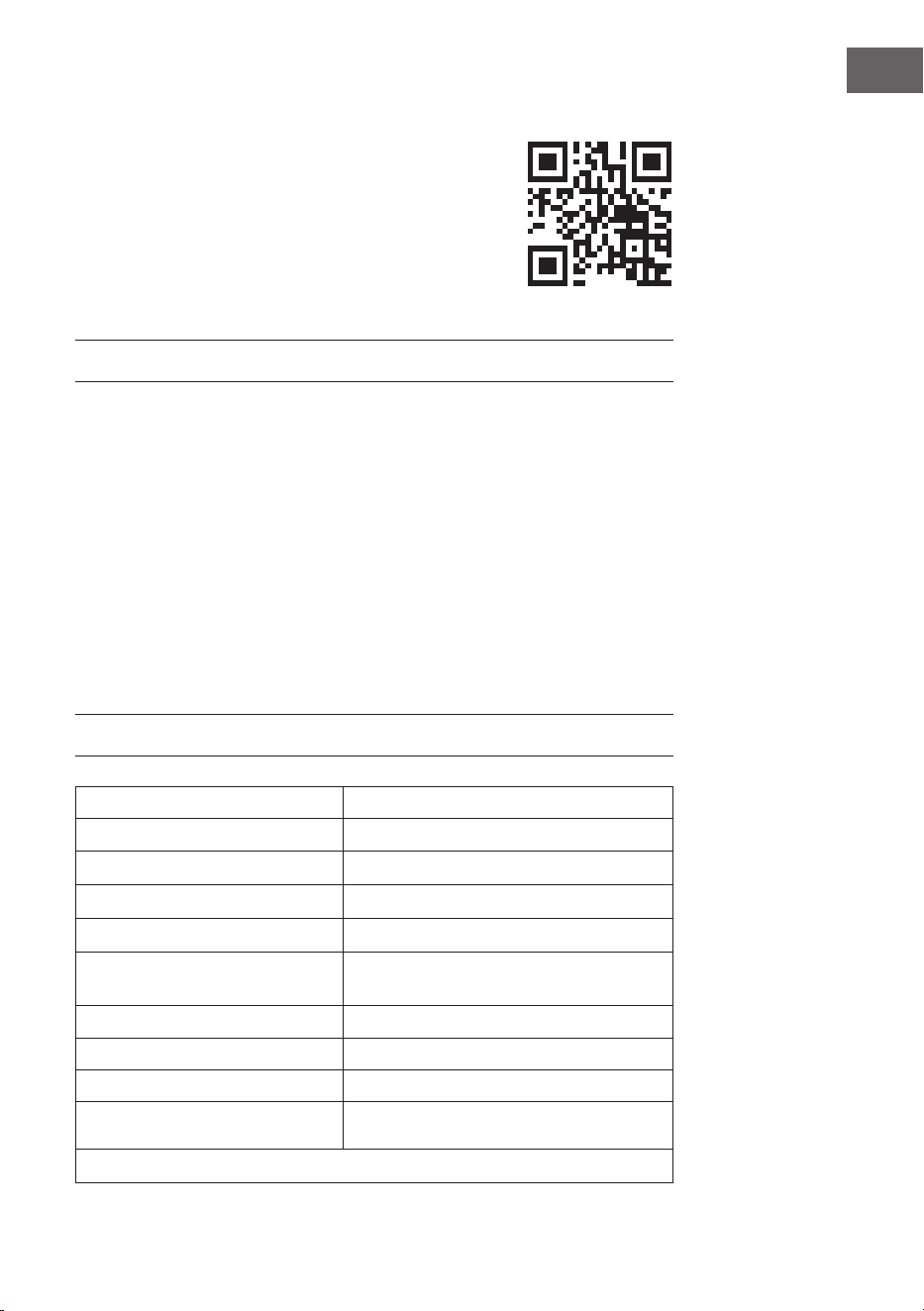
desatendido las indicaciones de seguridad. Escanee el
código QR para acceder al manual de usuario más reciente
y a más información sobre el producto.
ÍNDICE
DATOS TÉCNICOS
Número de artículo 10048235, 10048236
Alimentación 220–240V~/50 Hz
Potencia del ventilador 20 W
Tipo de lámpara LED
Temperatura de color 3000K/ 4500K/ 6500K
Índice de reproducción cromática
(CRI)
≥80
Caudal máximo 77 m
3
/min
Estándar de WiFi
802.11 b/g/n
Frecuencia del WiFi
2,4 GHz
Potencia de radiofrecuencia WiFi
(máx.)
20 dBm
Este producto contiene una fuente de luz con clase de eciencia energética
Indicaciones de seguridad 36
Volumen de suministro 37
Volumen de suministro 39
Instalación 40
Fijación del ventilador 44
Conexión del mando a distancia 45
Control del dispositivo por smartphone 46
Limpieza y cuidado 48
Detección y reparación de anomalías 48
Ficha técnica 49
Retirada del aparato 50
Declaración de conformidad 50
36
ES
INDICACIONES DE SEGURIDAD
• No je nunca el ventilador a una toma de corriente, sino al propio techo.
• La distancia mínima entre las aspas del ventilador y el suelo debe ser superior
a 2,3 m. La capacidad de carga mínima del gancho del que cuelga el ventilador
debe ser de 100 kg.
• Asegúrese de instalar un interruptor de desconexión de todos los polos con
una separación de contactos de al menos 3 mm entre polos en el cableado de
alimentación del ventilador de techo.
• Todo el cableado debe cumplir los códigos eléctricos nacionales y locales. Si
no está familiarizado con el cableado, consulte a un electricista cualicado.
• Para evitar posibles descargas eléctricas, antes de instalar su ventilador,
desconecte la corriente apagando los disyuntores de la caja de fusibles y
la ubicación del interruptor de pared asociado. Si no puede bloquear los
disyuntores en la posición de apagado, je un dispositivo de advertencia bien
visible, como un cartel, al panel de servicio.
• El modelo o tipo de referencia de las luminarias que pueden instalarse en los
ventiladores construidos a tal efecto.
• Desconecte la alimentación antes de conectar.
• El cableado eléctrico debe ser conforme a la normativa local.
• El ventilador debe estar correctamente conectado a tierra para evitar el riesgo
de descargas eléctricas.
• Nunca monte el ventilador en una habitación húmeda o mojada.
• Tenga cuidado al trabajar cerca de las aspas giratorias.
• Para reducir el riesgo de lesiones personales, je el ventilador directamente
a la estructura de soporte del edicio de acuerdo con estas instrucciones y
utilice únicamente los herrajes suministrados.
• Los niños mayores de 8 años y las personas con discapacidad física, sensorial
o psíquica, o con falta de experiencia y conocimientos pueden utilizar el
aparato si han sido previamente instruidos por su tutor o supervisor sobre
el funcionamiento del mismo y conocen las funciones, las indicaciones de
seguridad y los riesgos asociados.
• Para reducir el riesgo de incendio, descarga eléctrica o daños en el motor, no
utilice un regulador de velocidad de estado sólido con este ventilador. Utilice
únicamente variadores de velocidad.
• Los niños no deben jugar con el aparato.
• Asegúrese de que el ventilador esté desconectado de la red eléctrica antes de
retirar la protección.
• Tome precauciones para evitar el reujo de gases a la habitación desde la
chimenea abierta de aparatos de gas u otros combustibles (para ventiladores
de conductos y tabiques).
Nota: Encargue siempre la instalación de su ventilador a una persona con
conocimientos de cableado eléctrico.
37
ES
VOLUMEN DE SUMINISTRO
Base
Tornillos
Carcasa
Iluminación
Cubierta del ventilador
Cuchillas
38
ES
Mando a distancia
Inversión del
ventilador/
silenciamiento
Encendido/apagado
Viento natural
Luz encendida/
apagada
Velocidad del
ventilador/ Wi-Fi
2 horas/ 4 horas
Luz nocturna
Aumentar el brillo de la luz
Disminuir la temperatura
Subir temperatura
Disminuir el brillo de la luz
Cambio de color LED
Niveles de velocidad del
ventilador 1–6
39
ES
VOLUMEN DE SUMINISTRO
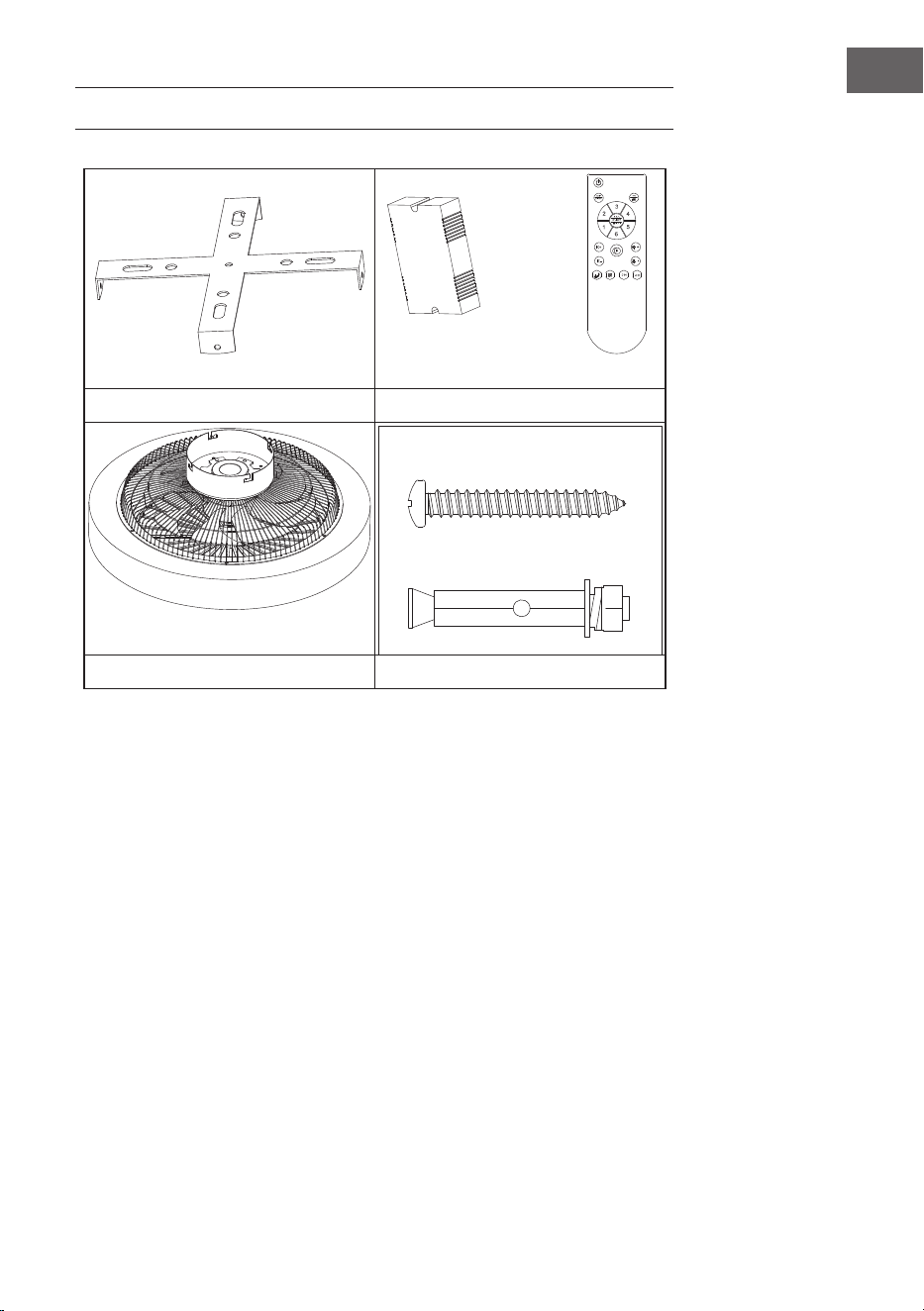
Soporte de techo Mando a distancia
Motor Kit espiral
• Abra el envase con cuidado. Retire los artículos de los insertos de espuma de
poliestireno.
• Coloque la carcasa del motor sobre una alfombra o un trozo de espuma de
poliestireno para evitar dañar el acabado.
• Compruebe el inventario de piezas para asegurarse de que se han incluido
todas las piezas.
40
ES
INSTALACIÓN
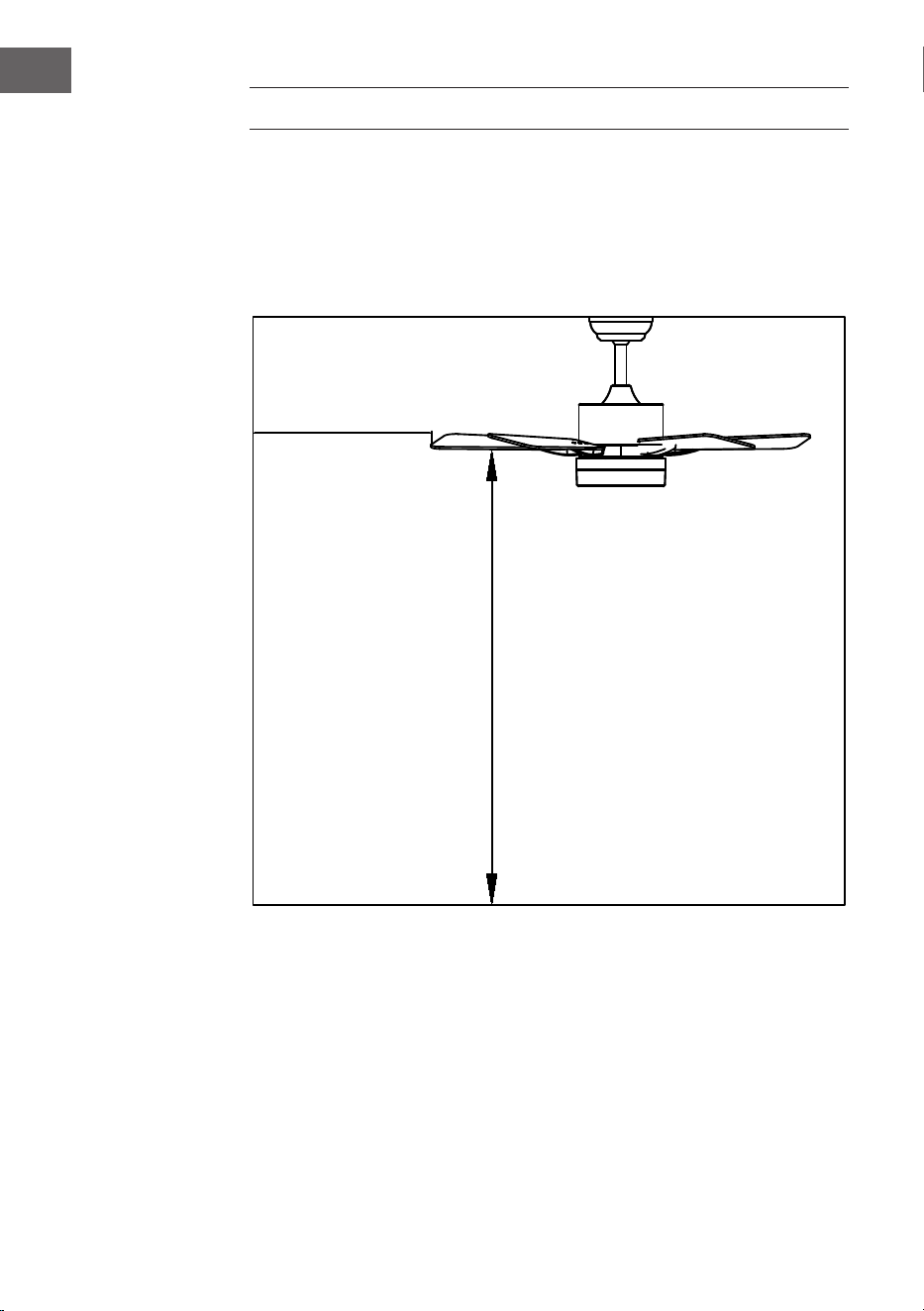
Preparación de la instalación
Para evitar lesiones personales y daños, asegúrese de que la ubicación para colgar
las aspas permite que estén a 2,3 m del suelo y a 76 cm de cualquier pared u
obstáculo. Asegúrese de que la caja de conexiones esté bien sujeta a la estructura
del edicio y pueda soportar todo el peso del ventilador.
La instalación requiere estas herramientas
Destornillador, destornillador plano, alicates ajustables o llave inglesa, escalera de
mano, cortaalambres y cinta aislante.
76 cm de la pared
o del obstáculo
más cercano
2.3 m de las aspas
al suelo
41
ES
Preparación del lugar de instalación del ventilador
Instalación de la barra de suspensión
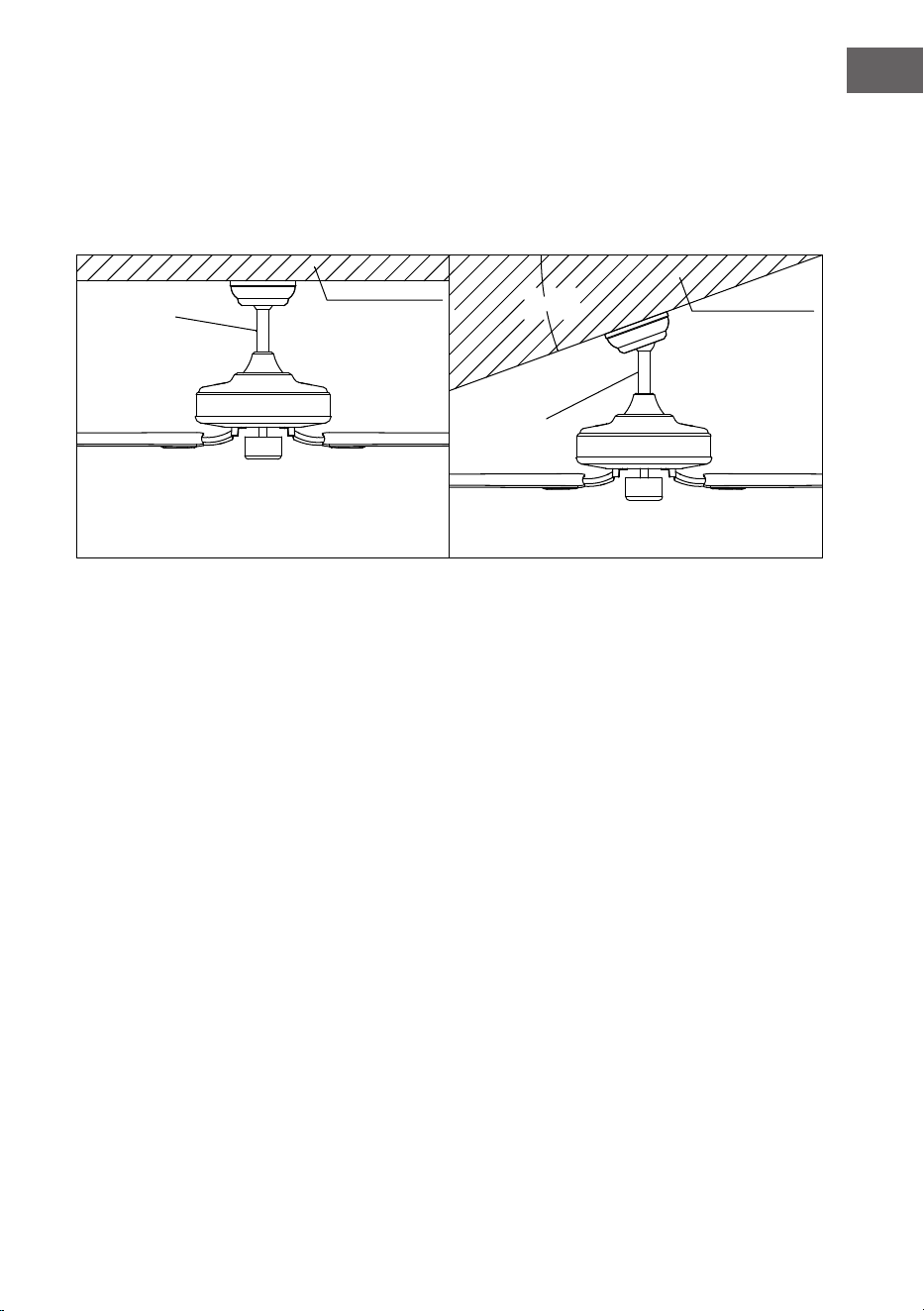
Este ventilador puede montarse en un techo normal o abovedado utilizando una
barra de techo. La longitud de suspensión puede aumentarse utilizando una barra
de techo más larga.
20°
Estilo de
montaje
estándar
Soporte
Soporte
Estilo de
montaje en
ángulo
El montaje estándar cuelga del techo mediante
una barra de techo
El montaje en ángulo está recomendado para
techos abovedados o en ángulo
42
ES
Instalación del soporte de techo
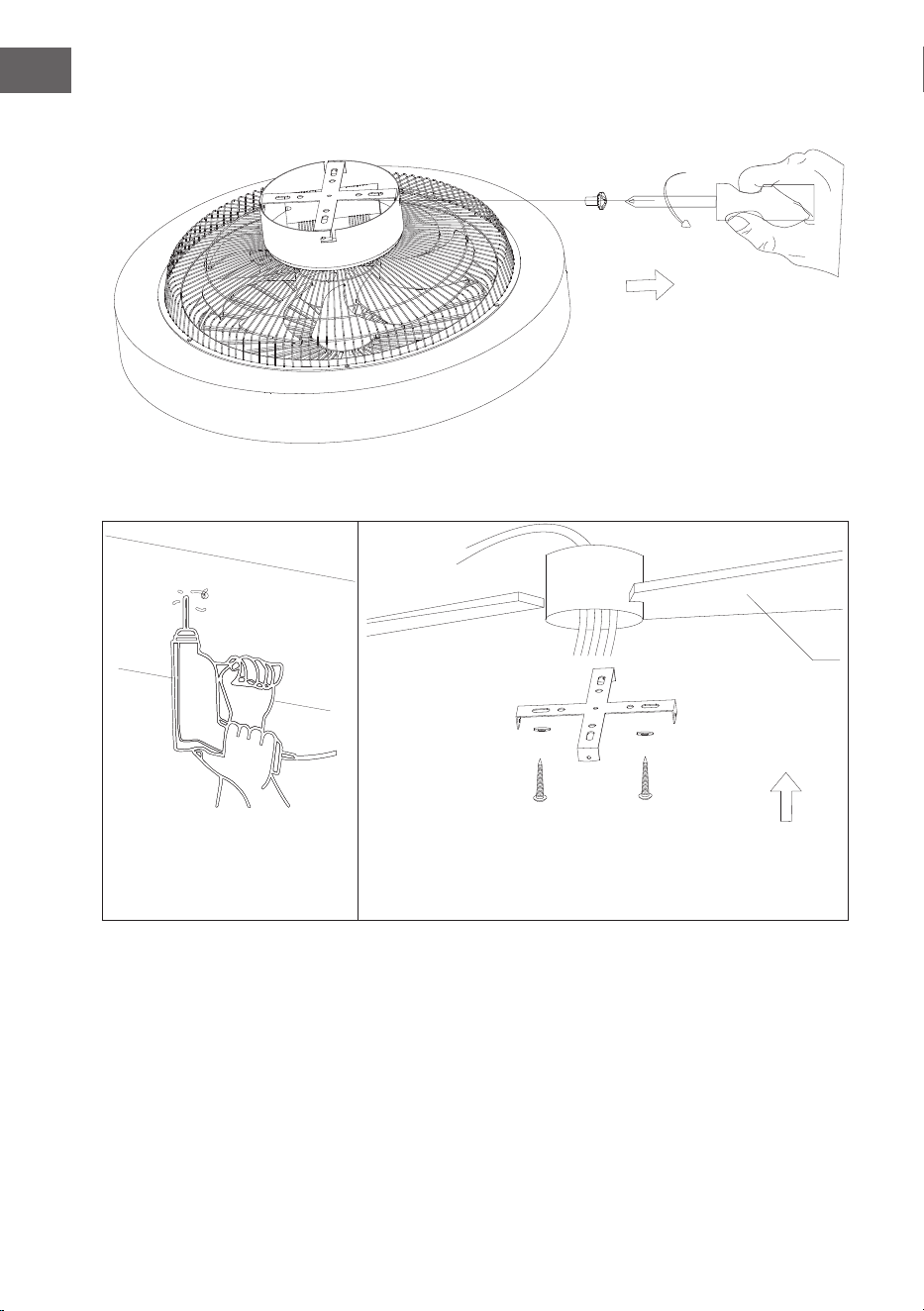
Retire los tornillos laterales del cierre del colgador y retire el colgador.
Techo de madera
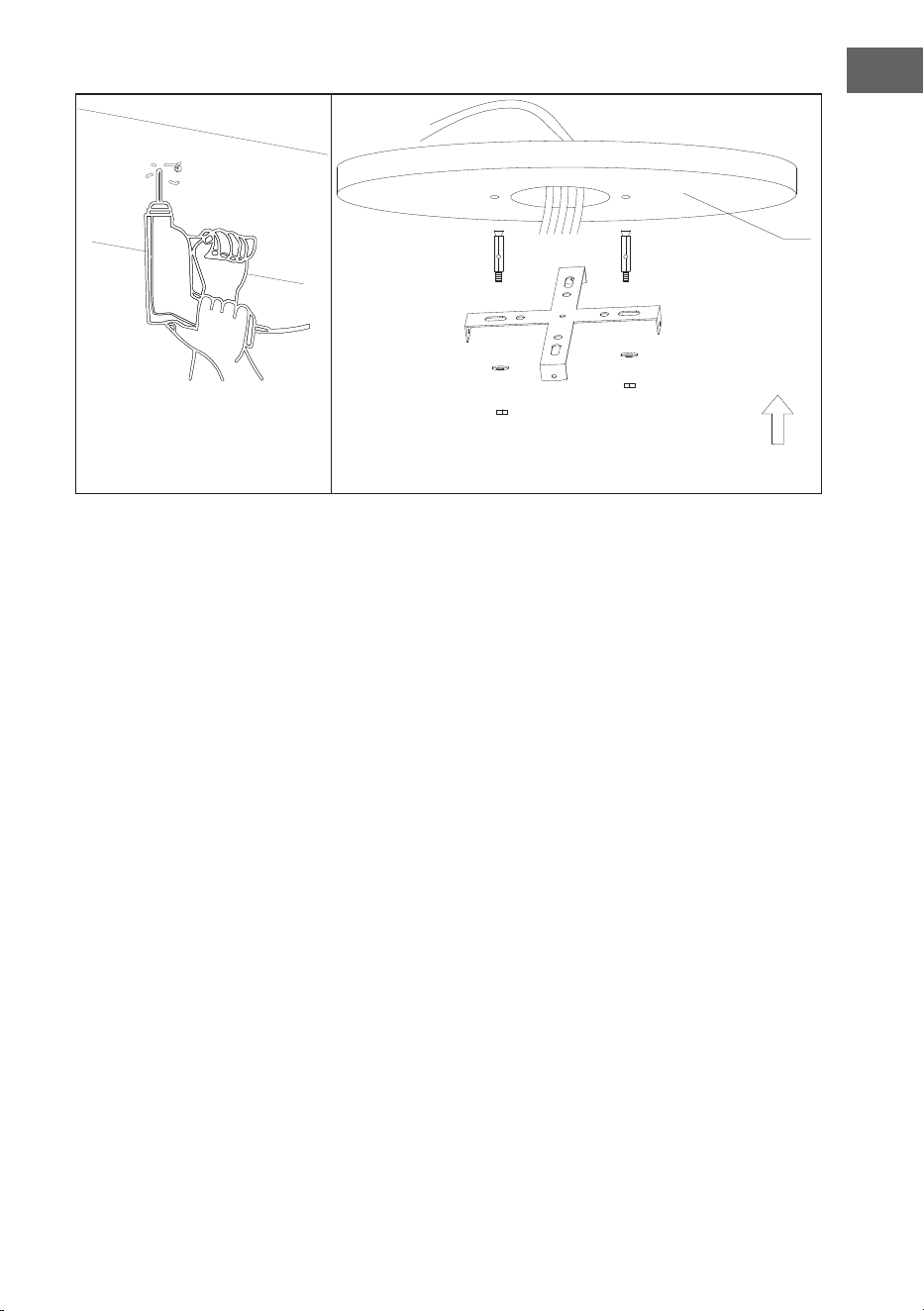
43
ES
Por favor, taladre un agujero de ɸ8mm en el techo de hormigón e inserte el perno.
Alinee el soporte con el oricio y apriételo con la tuerca.
Techo de hormigón
44
ES
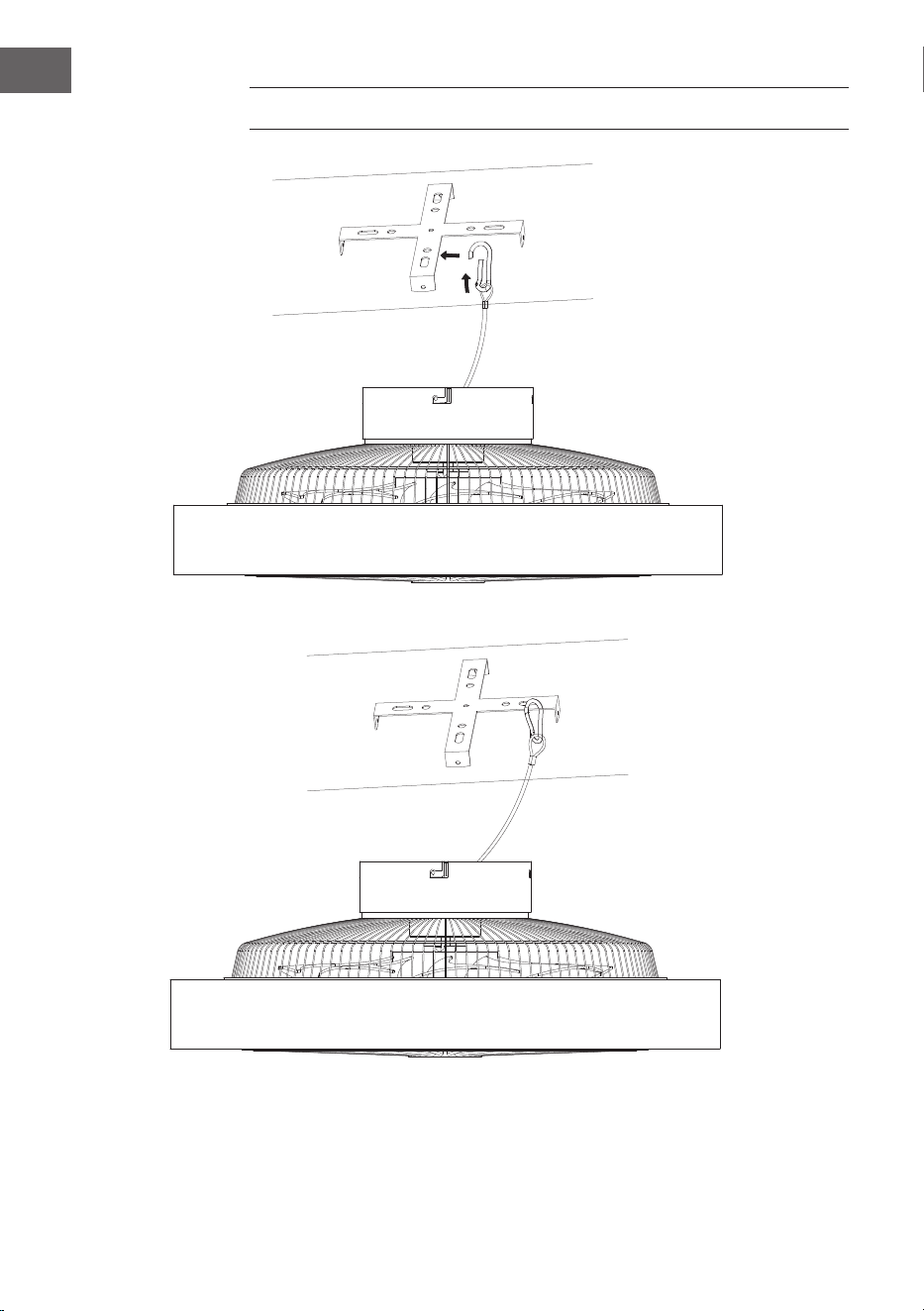
FIJACIÓN DEL VENTILADOR
Suspensión con cable de acero para estabilizar el ventilador y garantizar la
seguridad.
45
ES
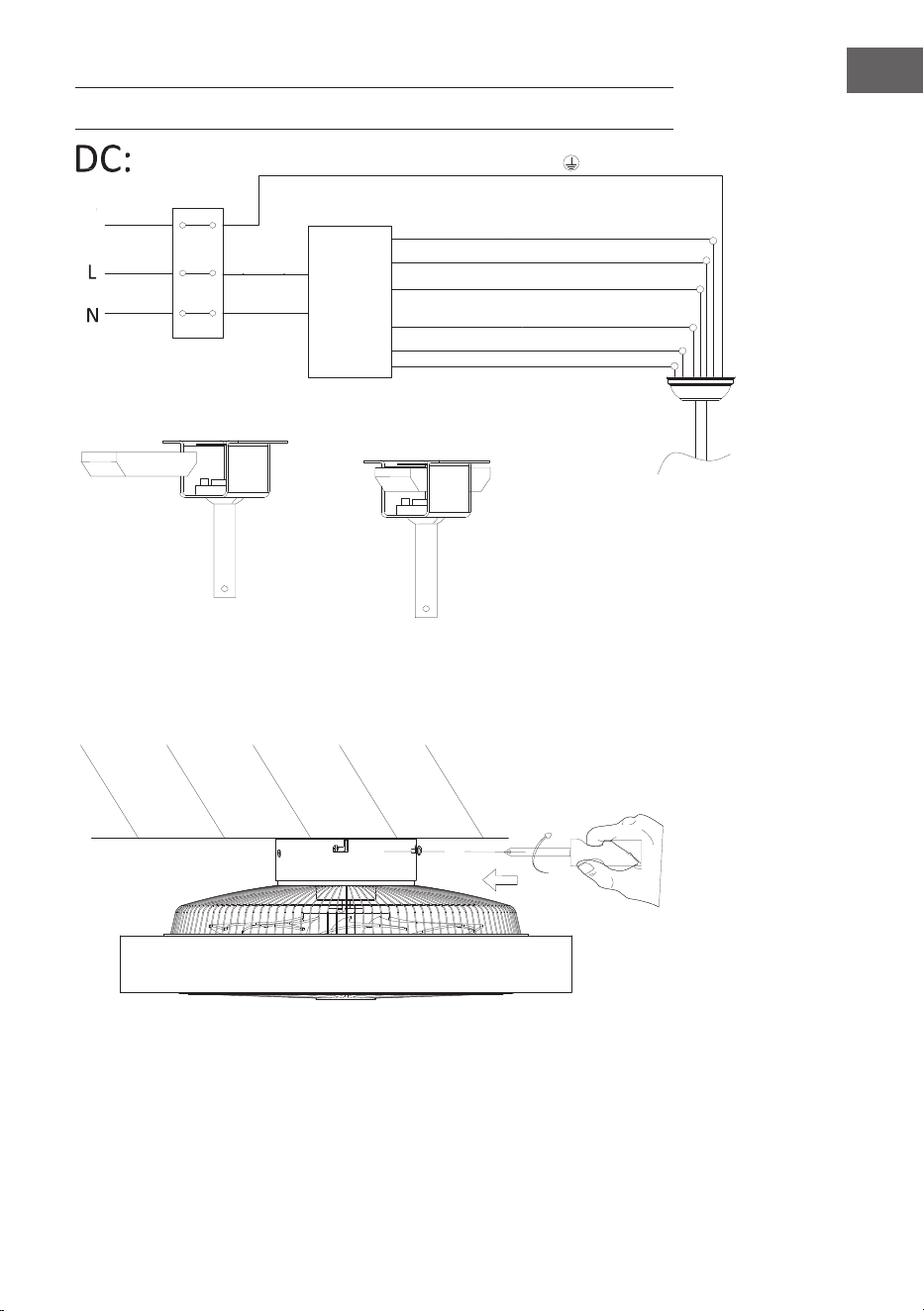
CONEXIÓN DEL MANDO A DISTANCIA
Montaje de la cubierta
Apriete los tornillos para jar el ventilador de techo en su sitio.
Raya verde/amarilla
Luz L (gris)
Motor DC negro L
Motor DC rojo L
Lugar del receptor
Entrada
N (azul)
Entrada L
(marrón)
Suelo
Neutro N (amarillo)
Neutro N (blanco)
Cable
Motor DC blanco L
Receptor
del mando a
distancia
46
ES
CONTROL DEL DISPOSITIVO POR SMARTPHONE
Si conecta el aparato a su red WLAN doméstica, podrá controlarlo cómodamente
mediante la App correspondiente de Blumfeldt. La App le permite no solo
controlar el aparato mediante su smartphone, sino que también le ofrece acceso a
recetas y otra información adicional.
Proceda del siguiente modo para conectar su smartphone al dispositivo
Blumfeldt.
1. Descargue primero la App de Blumfeldt escaneando el código QR con su
smartphone (véase más abajo) o descárguelo directamente de la App Store o
de Google Play.
2. Asegúrese de que su smartphone esté conectado a la misma red WiFi a la que
debe conectarse su dispositivo Blumfeldt.
3. Abra la App de Blumfeldt.
4. Inicie sesión con su cuenta. Si aún no tiene una cuenta, regístrese en la
aplicación Blumfeldt.
5. Siga las instrucciones que aparecerán en la app.
Descarga la aplicación
Utilice la función de escaneado de su teléfono para escanear el código QR y
guarde la app en su smartphone.
Nota: La aplicación proporciona más información sobre cómo usar la aplicación
y ayuda sobre cómo conectarse al dispositivo tan pronto como se abre por
primera vez.
iOS Android

47
ES
Solución de problemas de conexión
Si su dispositivo Blumfeldt no se puede encontra en su WiFi, verique lo siguiente:
1. El aparato no está enchufado. Asegúrese de que su dispositivo esté conectado
a un enchufe.
2. El aparato no se encuentra en modo sincronización. Asegúrese de que el
indicador de WiFi (LED) parpadea en el panel de control del dispositivo
inteligente, tal y como se describe en las instrucciones „Restablecer la
conguración de WiFi“ de su dispositivo inteligente (las instrucciones en
general se encuentran en el apartado „Conexión del dispositivo“).
3. El punto de acceso WiFi no funciona en 5 GHz. Asegúrese de que su punto
de acceso funcione en la banda de 2,4 GHz y que tenga su propio SSID en la
banda de 2,4 GHz. Si no está seguro de la banda operativa de su punto de
acceso, comuníquese con su proveedor de Internet.
Importante: tenga en cuenta que si su enrutador WiFi tiene una banda dual, es
decir, si funciona tanto en la banda de 2,4 GHz como en la de 5 GHz, separe los
SSID para cada banda y use el SSID de 2,4 GHz para conectarse.
4. Supervise los ajustes Firewall de su red WiFi. Es posible que la conguración
del Firewall de su red WiFi no permita que la aplicación Blumfeldt congure
los ajustes de WiFi en su dispositivo inteligente. Asegúrese de que no está
usando ninguna red WiFi pública, como por ejemplo de aeropuertos, otros
hogares, empresas, etc.
5. Los diferentes datos de inicio de sesión en el teléfono inteligente y en
la aplicación le aseguran de que los datos de inicio de sesión WiFi de la
aplicación de Blumfeldt coincidan con los que está conectado su teléfono
inteligente.
Si ha seguido todos los pasos anteriores y su teléfono inteligente aún no puede
conectarse a la aplicación, envíenos un correo electrónico para obtener ayuda:
48
ES
LIMPIEZA Y CUIDADO
• Desconecte siempre el aparato de la red eléctrica antes de limpiarlo o realizar
trabajos de mantenimiento.
• No utilice nunca una esponja húmeda para limpiar el aparato.
• Para no dañar el producto, es aconsejable utilizar equipos adaptados a las
supercies y productos sensibles, que ralentizarán el desgaste del aparato.
DETECCIÓN Y REPARACIÓN DE ANOMALÍAS
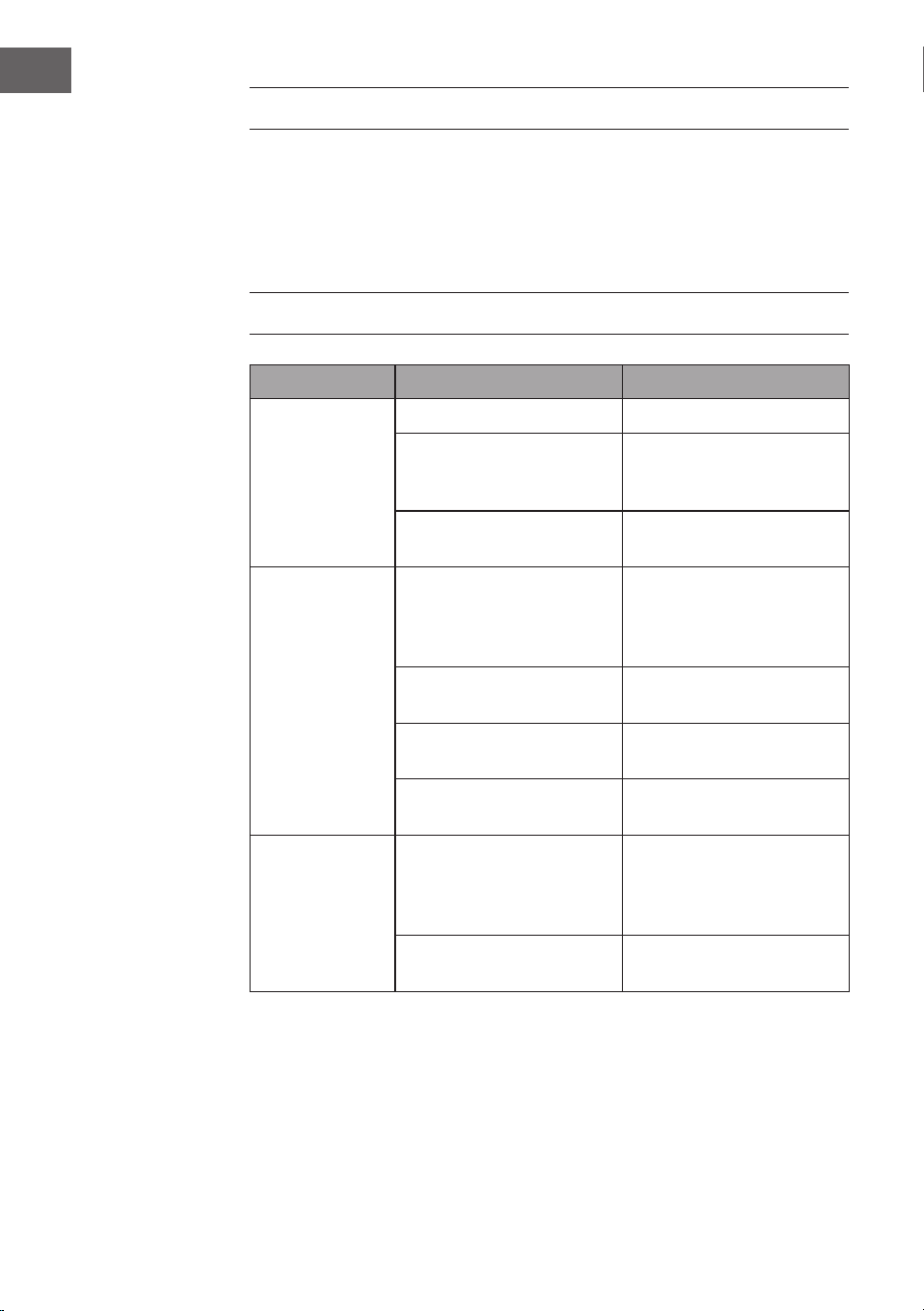
Problema Posible causa Solución
El ventilador no
gira.
Fusible o disyuntor fundido. Compruebe los fusibles.
Conexiones de cables
sueltas.
Compruebe si hay cables
sueltos en todas las
conexiones.
La velocidad no se ha
ajustado correctamente.
Seleccione una velocidad.
El ventilador
hace ruido.
La tapa superior toca el
techo.
Asegúrese de que haya una
distancia mínima de 3 mm
entre la tapa superior y el
techo.
Los tornillos de las aspas del
rotor están sueltos.
Apriete todos los tornillos.
El ventilador de techo no
está bien sujeto al techo.
Apriete todos los tornillos de
la placa de suspensión.
La velocidad no está
ajustada correctamente.
Seleccione una velocidad.
El ventilador se
tambalea.
Las palas del rotor no están
ajustadas horizontalmente
al techo.
Mueva el ventilador de
modo que todas las aspas
queden a la misma altura
del techo.
Los tornillos de las palas del
rotor están sueltos.
Apriete todos los tornillos.
49
ES
FICHA TÉCNICA
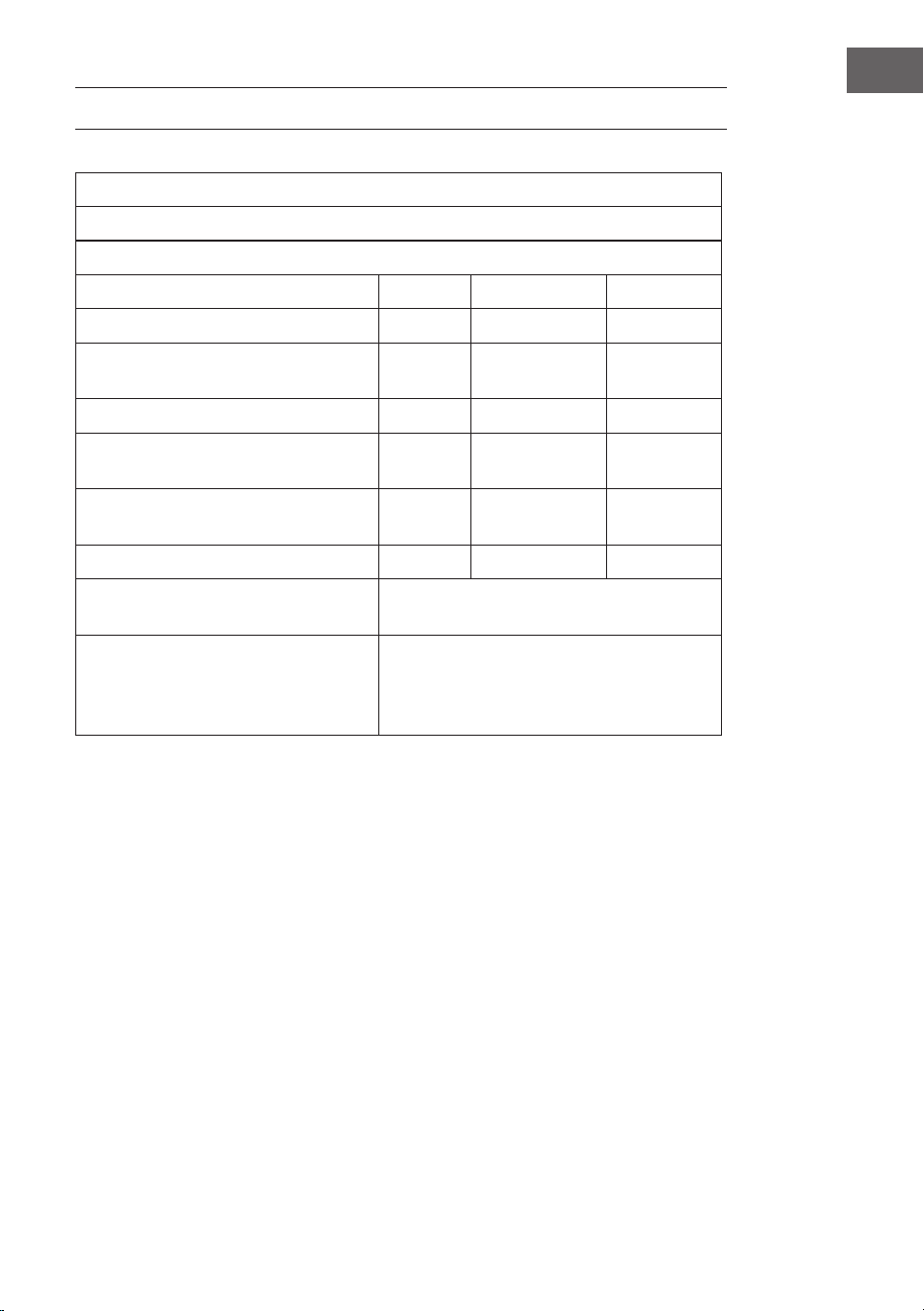
Requisitos de información del producto según REGLAMENTO (UE) nº 206/2012
Información para identicar el modelo o modelos a los que se reere la información
10048235, 10048236 Zen Breeze
Descripción Símbolo Valor Unidad
Caudal máximo del ventilador F 37,3 m3/min
Entrada de alimentación para el
ventilador
P 16,4 W
Valor del servicio SV 2,3 (m3/min)/W
Consumo de energía en modo de
espera
PSB 0,5 W
Nivel de potencia acústica del
ventilador
LWA 53 dB(A)
Velocidad máxima del aire c 1,8 m/s
Norma de medición del valor del
servicio
IEC 60879:2019
Datos de contacto para obtener más
información
Chal-Tec GmbH,
Mühlenstrasse 25,
10243 Berlín
, Alemania.
50
ES
RETIRADA DEL APARATO
Si en su país existe una disposición legal relativa a la
eliminación de aparatos eléctricos y electrónicos, este
símbolo estampado en el producto o en el embalaje
advierte que no debe eliminarse como residuo doméstico.
En lugar de ello, debe depositarse en un punto de
recogida de reciclaje de aparatos eléctricos y electrónicos.
Una gestión adecuada de estos residuos previene
consecuencias potencialmente negativas para el medio
ambiente y la salud de las personas. Puede consultar más
información sobre el reciclaje y la eliminación de este
producto contactando con su administración local o con
su servicio de recogida de residuos.
Este producto contiene baterías. Si en su país existe una
disposición legal relativa a la eliminación de baterías,
estas no deben eliminarse como residuo doméstico.
Infórmese sobre la normativa vigente relacionada con
la eliminación de baterías. Una gestión adecuada de
estos residuos previene consecuencias potencialmente
negativas para el medio ambiente y la salud de las
personas.
DECLARACIÓN DE CONFORMIDAD
Fabricante:
Chal-Tec GmbH, Mühlenstraße 25, 10243 Berlín, Alemania.
Contacto: [email protected]
Por la presente, Chal-Tec GmbH declara que el tipo de
equipo radioeléctrico Zen Breeze es conforme con la
Directiva 2014/53/UE. El texto completo de la declaración
UE de conformidad está disponible en la dirección Internet
siguiente: use.berlin/10048235
51
FR
Chère cliente, cher client,
Nous vous félicitons d'avoir acheté cet appareil. Veuillez
lire attentivement les instructions suivantes et les
respecter an d'éviter tout dommage potentiel. Nous
déclinons toute responsabilité pour les dommages causés
par le non-respect des instructions et une utilisation
inappropriée. Scannez le code QR pour accéder au dernier
mode d'emploi et à d'autres informations sur le produit.
SOMMAIRE
FICHE TECHNIQUE
Numéro d'article 10048235, 10048236
Alimentation 220–240 V~/50 Hz
Puissance du ventilateur 20 W
Type de lampe LED
Température de couleur 3000 K/ 4500 K/ 6500 K
Indice de rendu des couleurs
(CRI)
≥80
Débit maximal 77 m
3
/min
Norme WiFi
802.11 b/g/n
Fréquence de WiFi
2,4 GHz
Puissance radiofréquence WiFi
(max.)
20 dBm
Le produit contient une source lumineuse de classe d'ecacité énergétique
Consignes de sécurité 52
Contenu de la livraison 53
Contenu de la livraison 55
Installation 56
Fixation du ventilateur 60
Connexion de la télécommande 61
Contrôle de l‘appareil par smartphone 62
Nettoyage et entretien 64
Dépannage 64
Fiche technique 65
Conseils pour le recyclage 66
Déclaration de conformité 66
52
FR
CONSIGNES DE SÉCURITÉ
• Ne jamais xer le ventilateur à une prise de courant, mais au plafond lui-
même.
• La distance minimale entre les pales du ventilateur et le sol doit être
supérieure à 2,3 m. La capacité de charge minimale du crochet auquel le
ventilateur est suspendu doit être de 100 kg.
• Veillez à installer un interrupteur de déconnexion à tous les pôles avec une
séparation de contact d'au moins 3 mm entre les pôles dans le câblage
d'alimentation du ventilateur de plafond.
• Tout le câblage doit être conforme aux codes électriques nationaux et locaux.
Si vous n'êtes pas familier avec le câblage, consultez un électricien qualié.
• Pour éviter tout risque d'électrocution, avant d'installer votre ventilateur,
coupez l'alimentation en éteignant les disjoncteurs de la boîte à fusibles et de
l'interrupteur mural associé. Si vous ne pouvez pas verrouiller les disjoncteurs
en position d'arrêt, xez solidement un dispositif d'avertissement visible, tel
qu'un panneau, sur le panneau de service.
• La référence du modèle ou du type de luminaires qui peuvent être installés
dans les ventilateurs construits à cet effet.
• Couper l'alimentation avant de procéder à la connexion.
• Le câblage électrique doit être conforme à la réglementation locale.
• Le ventilateur doit être correctement mis à la terre pour éviter tout risque de
choc électrique.
• Ne jamais installer le ventilateur dans une pièce humide ou mouillée.
• Soyez prudent lorsque vous travaillez à proximité des pales en rotation.
• Pour réduire les risques de blessures, xez le ventilateur directement à la
structure de soutien du bâtiment conformément à ces instructions et n'utilisez
que le matériel fourni.
• Cet appareil ne peut être utilisé que par des enfants âgés de 8 ans ou plus
et des personnes dont les capacités physiques, sensorielles et mentales sont
limitées et/ou dénuées d'expérience et de connaissances, à condition qu'elles
aient été initiées à l'utilisation de l'appareil par une personne responsable qui
comprend les risques associés.
• Pour réduire les risques d'incendie, d'électrocution ou d'endommagement
du moteur, n'utilisez pas de variateur de vitesse à semi-conducteurs avec ce
ventilateur. Utilisez uniquement des variateurs de vitesse.
• Les enfants ne doivent pas jouer avec l'appareil.
• Assurez-vous que le ventilateur est hors tension avant de retirer la protection.
• Prendre des précautions pour éviter le reux de gaz dans la pièce à partir du
conduit ouvert d'un appareil à gaz ou d'un autre appareil à combustible (pour
les ventilateurs de gaine et de cloison).
Remarque : Faites toujours installer votre ventilateur par un spécialiste en
matière de câblage électrique.
53
FR
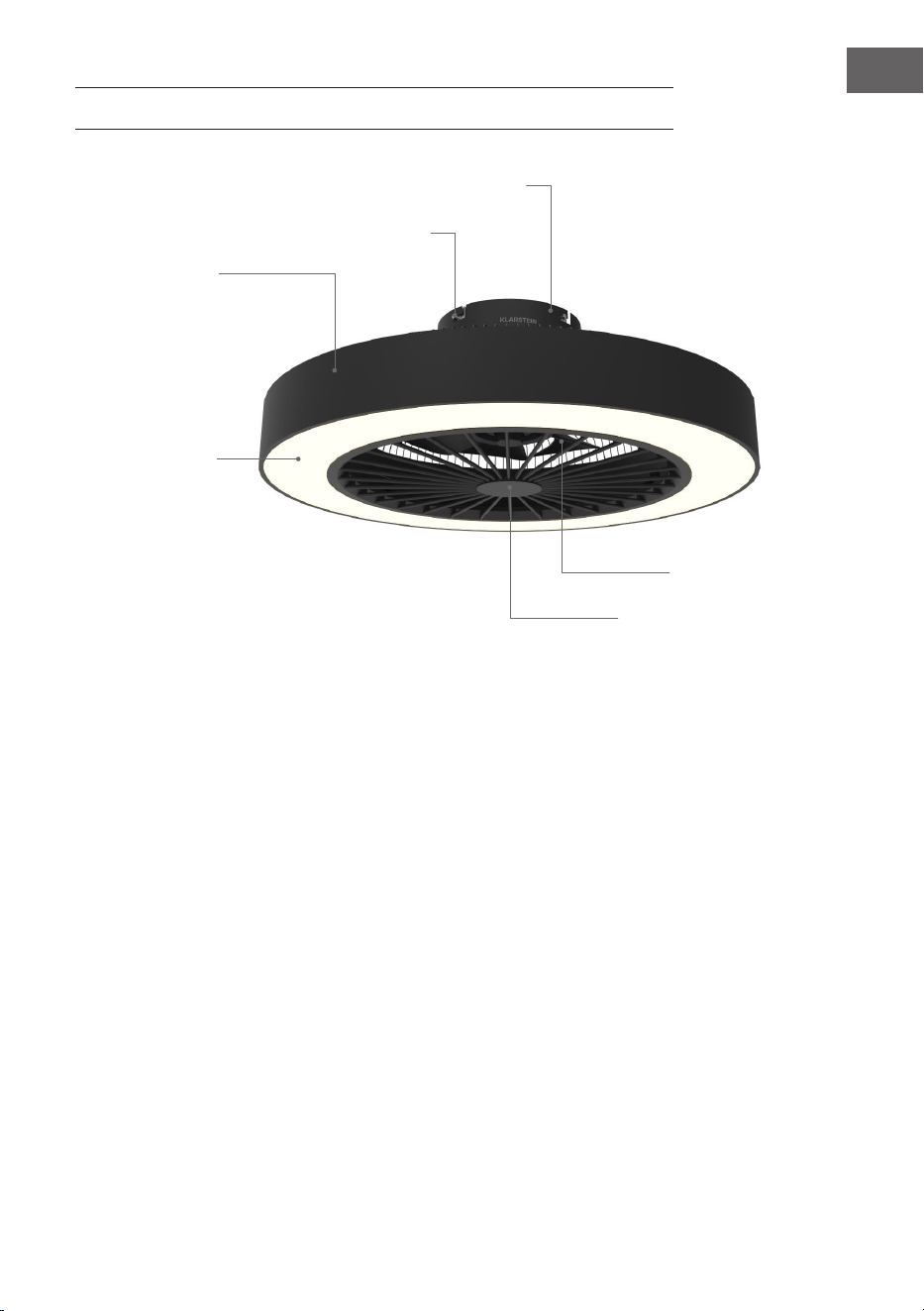
CONTENU DE LA LIVRAISON
Base
Vis
Boîtier
Éclairage
Couvercle du ventilateur
Pales
54
FR
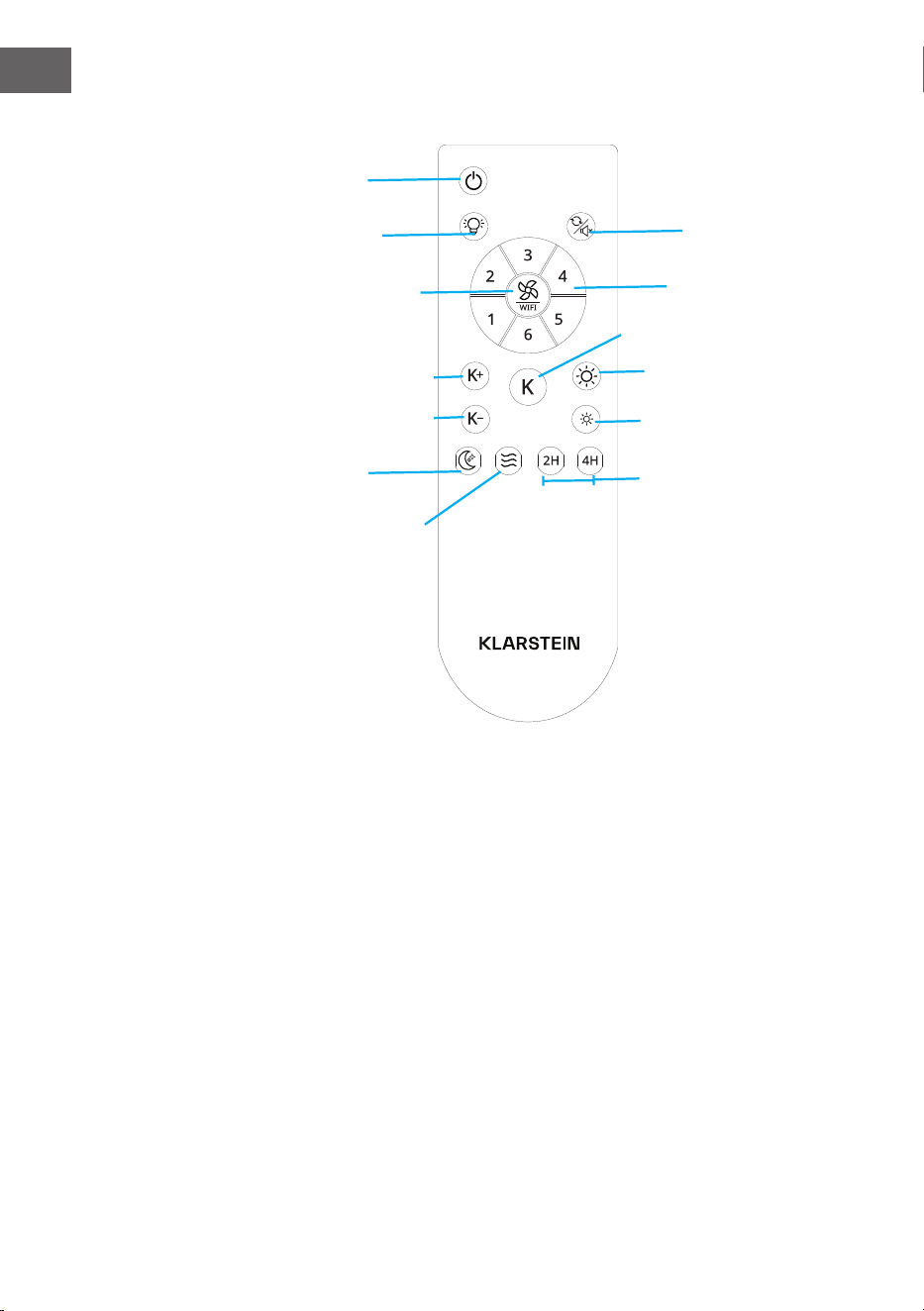
Télécommande
Ventilateur inversé/
muet
ON/OFF
vent naturel
Éclairage (marche/
arrêt)
vitesse du ventilateur/
Wi-Fi
2 heures / 4 heures
Veilleuse
Augmenter la luminosité
Diminution de la température
Augmentation de la
température
Diminution de la luminosité
Changement de couleur
des LED
Vitesses du
ventilateur 1-6
55
FR
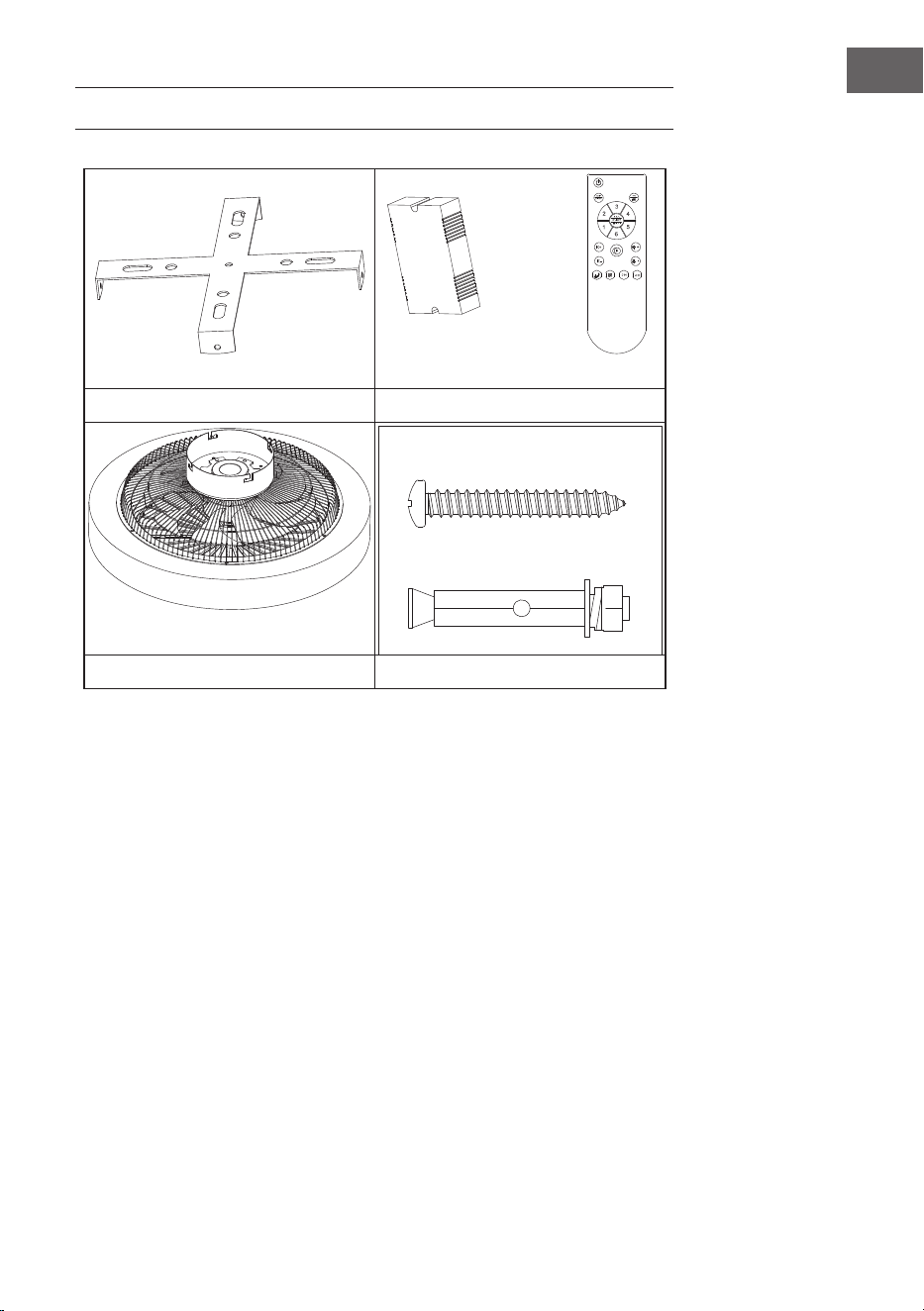
CONTENU DE LA LIVRAISON
Support de suspension Télécommande
Moteur Paquet en spirale
• Ouvrez soigneusement l'emballage. Retirez les articles des inserts en
polystyrène.
• Placez le boîtier du moteur sur un tapis ou un morceau de polystyrène pour
éviter d'endommager la nition.
• Vériez dans l'inventaire des pièces que toutes les pièces sont bien présentes.
56
FR
INSTALLATION
Préparatifs de l'installation
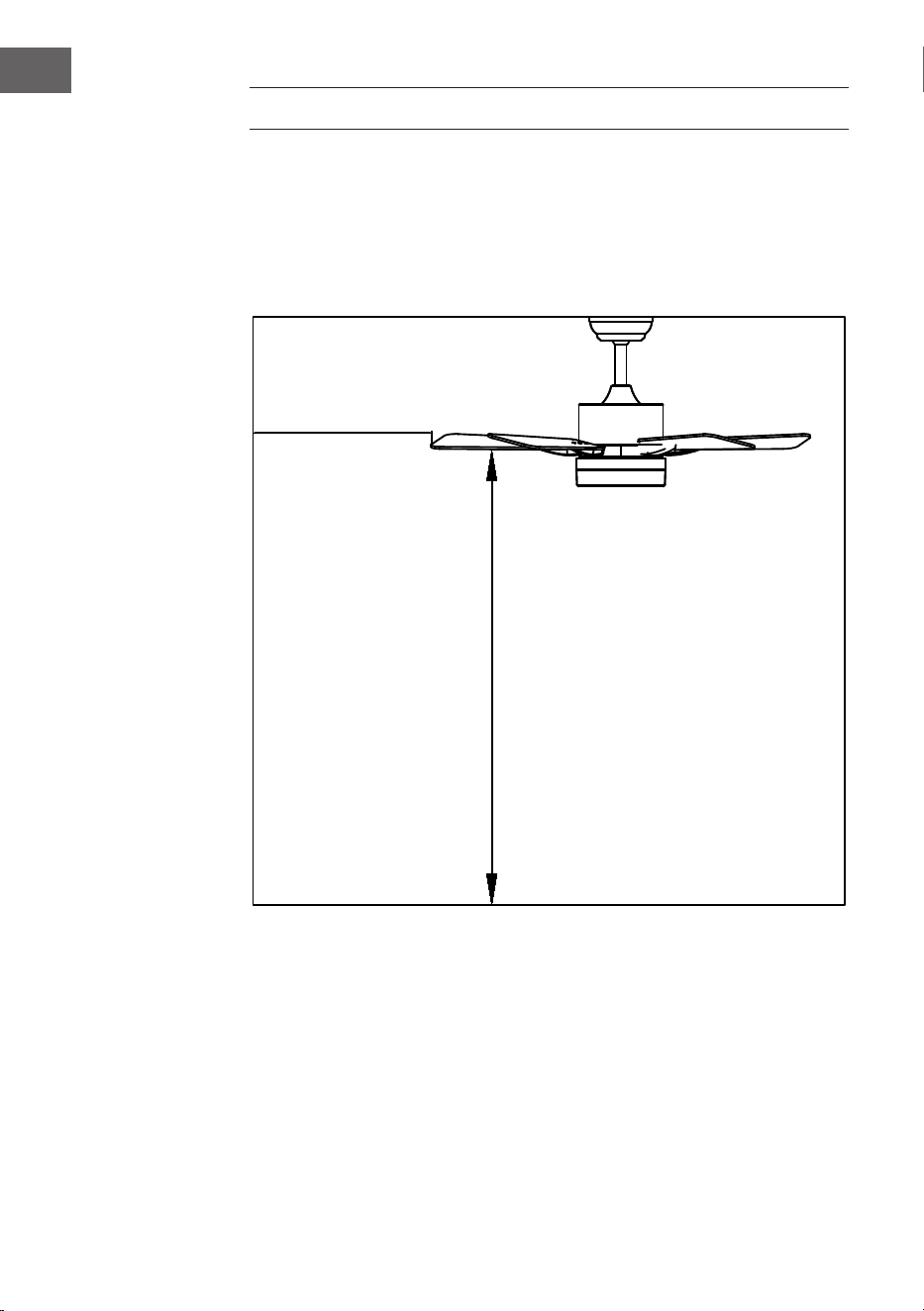
Pour éviter les blessures et les dommages, veillez à ce que l'emplacement de
suspension permette aux pales d'être à 2,3 m du sol et à 76 cm d'un mur ou d'un
obstacle. Assurez-vous que la boîte de jonction est solidement xée à la structure
du bâtiment et qu'elle peut supporter tout le poids du ventilateur.
L'installation nécessite les outils suivants
Tournevis, tournevis plat, pince ou clé à molette, escabeau, pince coupante et
ruban adhésif.
76 cm du mur ou
de l'obstacle le
plus proche
2.3 m entre les
pales et le sol
57
FR
Préparation de l'emplacement du ventilateur
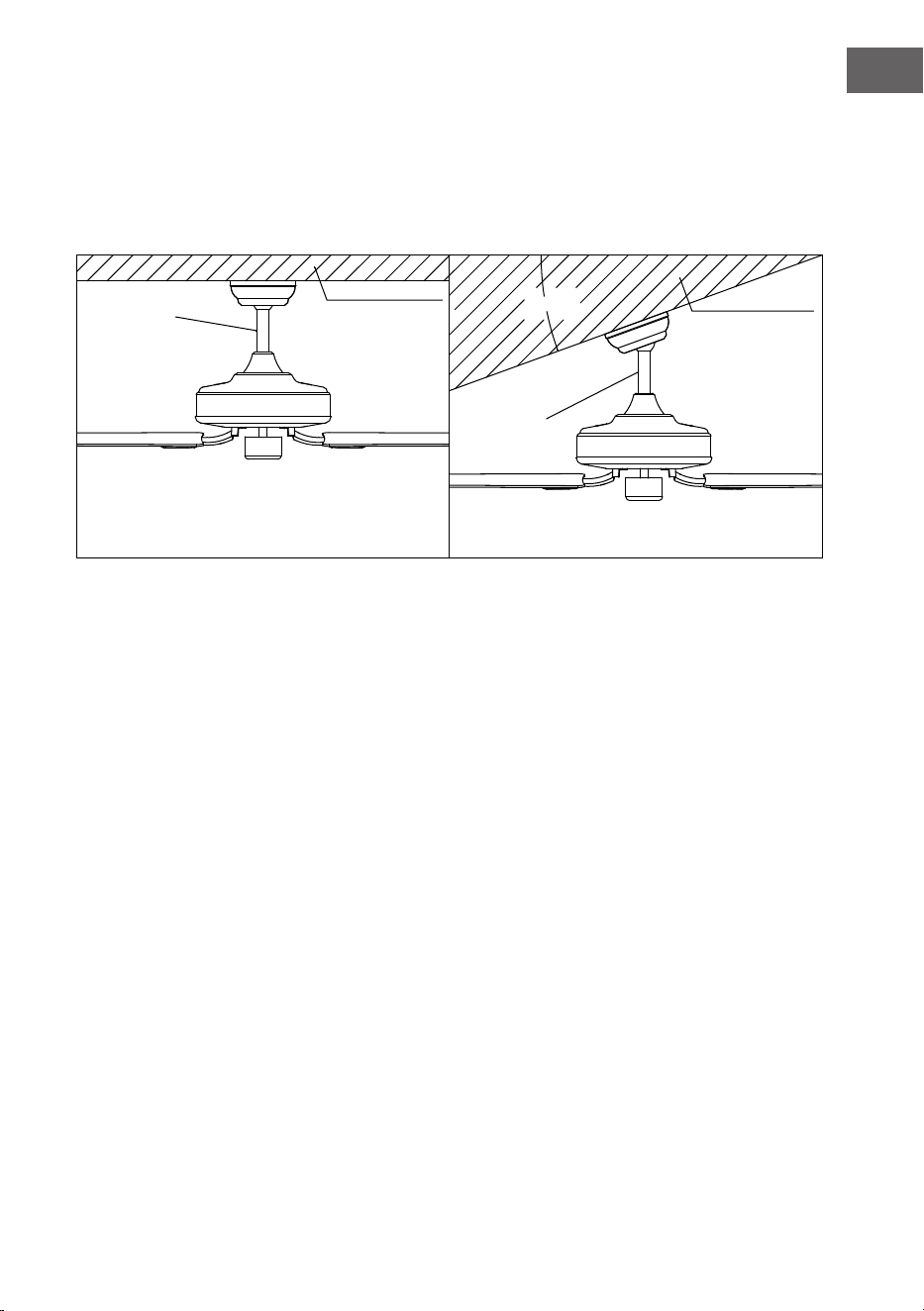
Installation de la tige de suspension
Ce ventilateur peut être monté sur un plafond normal ou voûté à l'aide d'une tige
de suspension. La longueur de suspension peut être augmentée en utilisant une
tige plus longue.
20°
Montage
standard
Support de
soutien
Support de
soutien
Montage
angulaire
Le montage standard est suspendu au plafond
par une tige de descente
Montage en angle recommandé pour un plafond
voûté ou en angle
58
FR
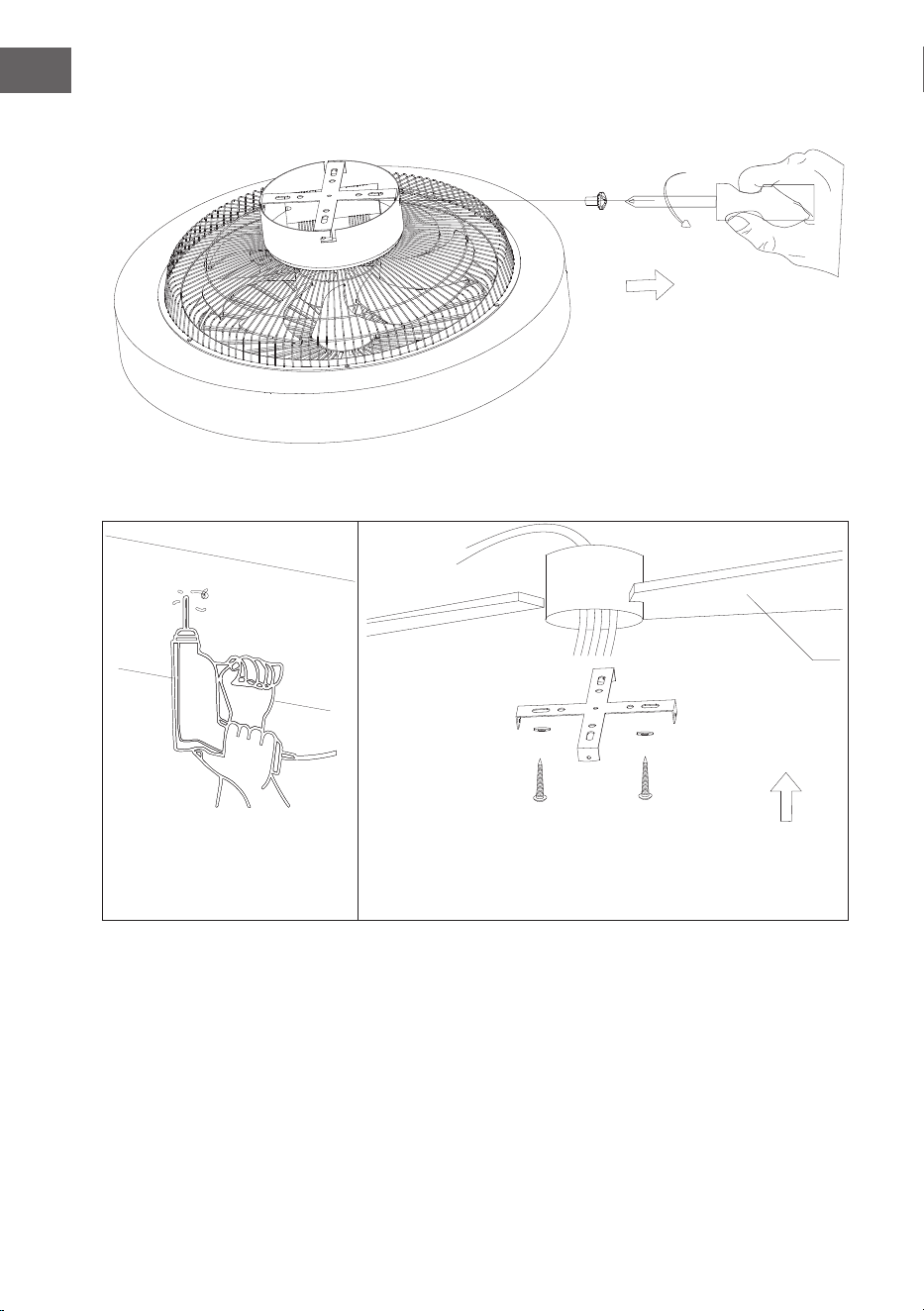
Installation du support de suspension
Retirer les vis de l'étrier de verrouillage latéral et retirer l'étrier.
Plafond en bois
59
FR
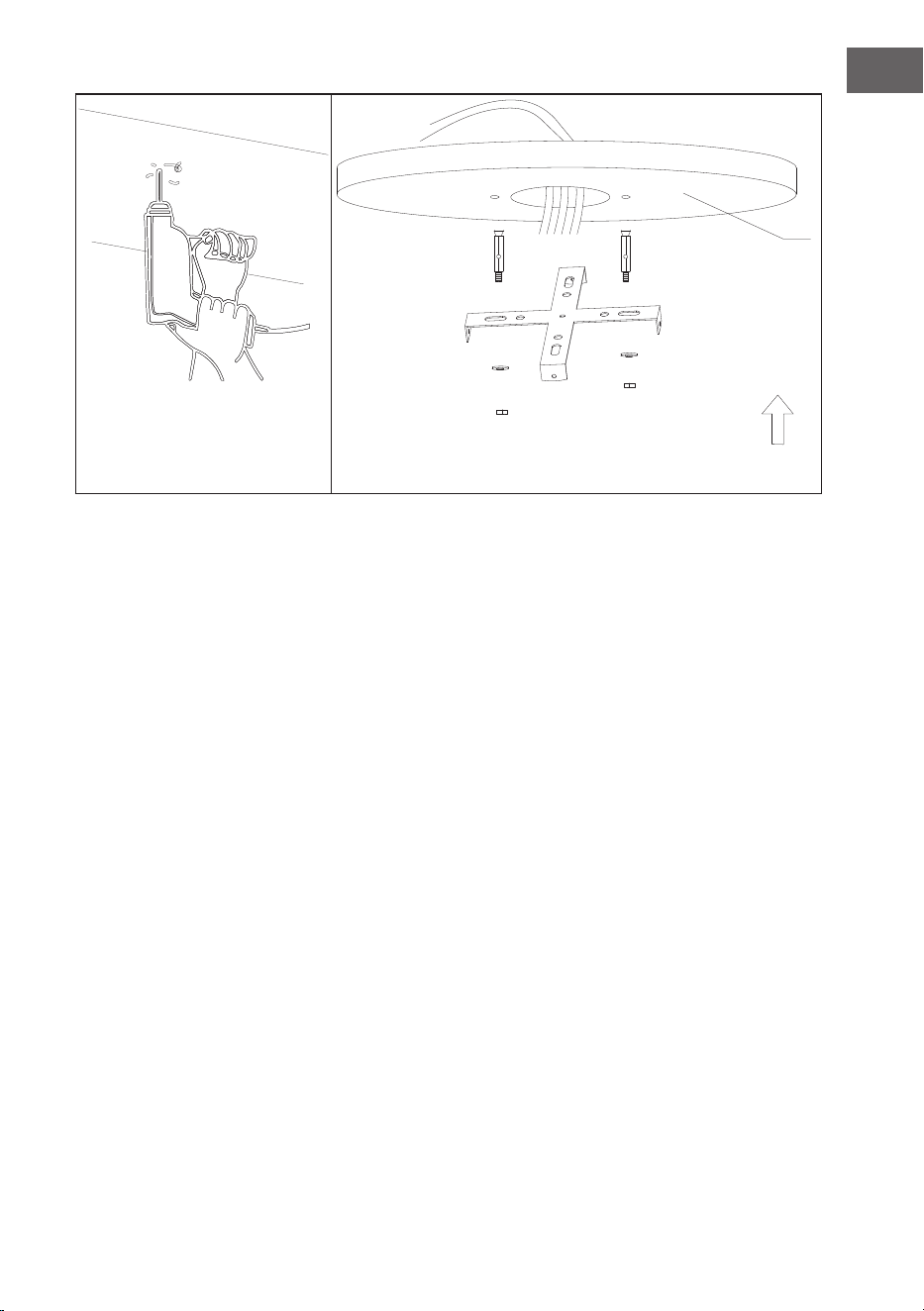
Percez un trou de Ø 8 mm dans le plafond en béton et insérez le boulon. Alignez le
support avec le trou et serrez l'écrou.
Plafond en béton
60
FR
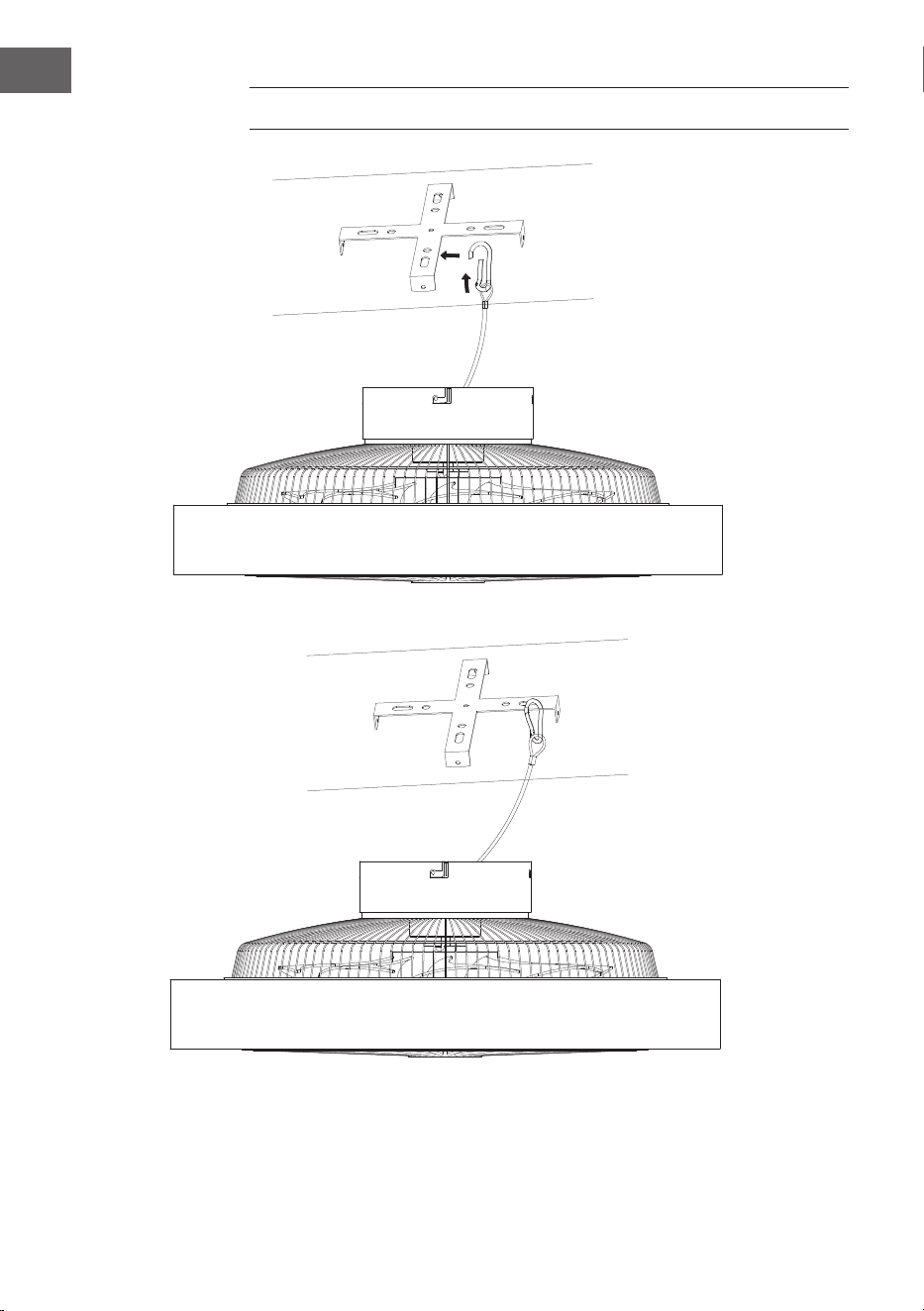
FIXATION DU VENTILATEUR
Suspension en câble d'acier pour stabiliser le ventilateur et assurer la sécurité.
61
FR
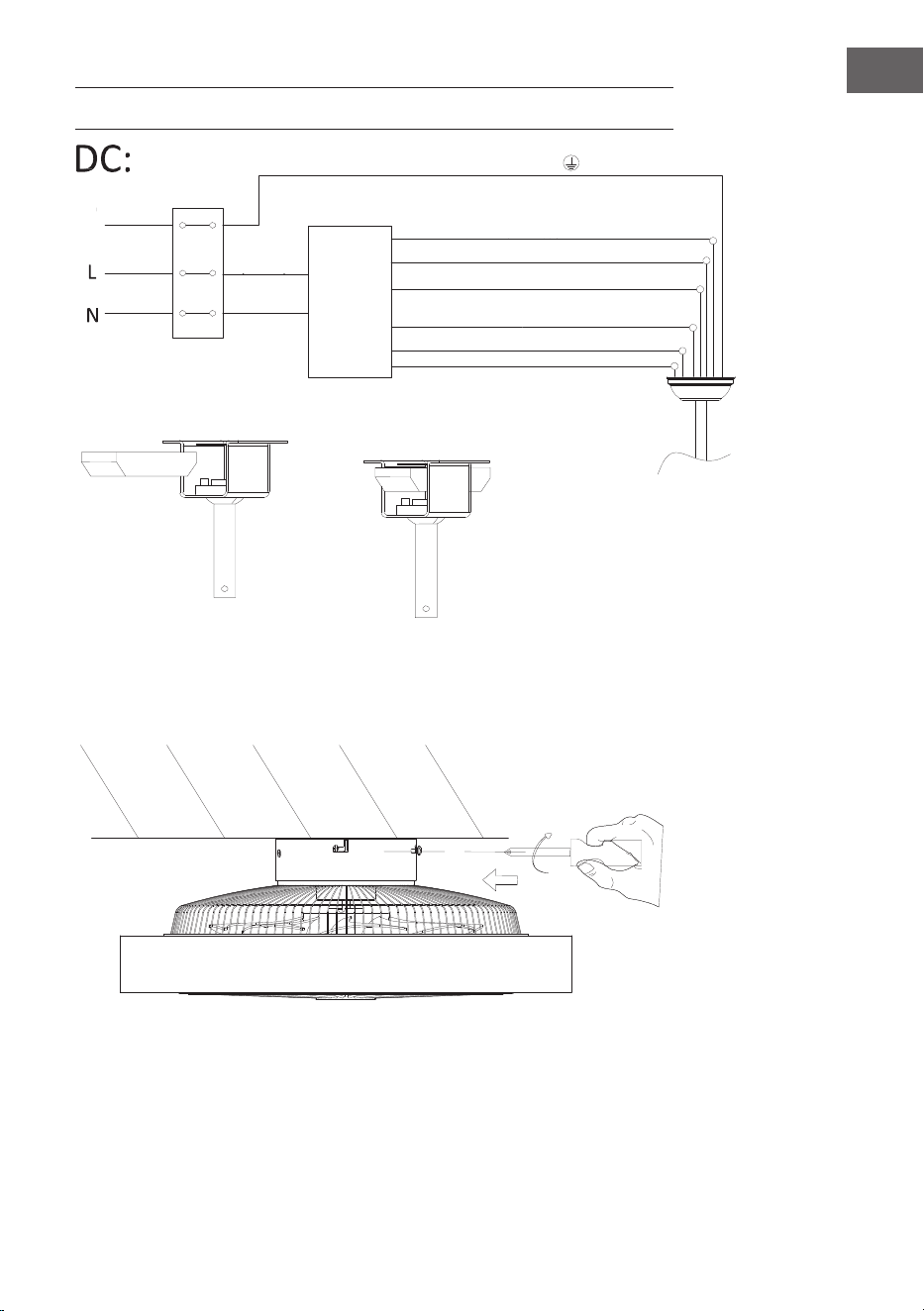
CONNEXION DE LA TÉLÉCOMMANDE
Assemblage de l'abat-jour
Verrouillez les vis pour xer le ventilateur de plafond en place.
rayures vertes/ jaunes
Lumière L (gris)
Moteur CC noir L
Rouge Moteur CC L
Emplacement du
récepteur
entrée N
(bleu)
entrée L
(Marron)
Sol
Neutre N (jaune)
Neutre N (blanc)
câble
Moteur blanc DC L
Récepteur
de télé-
commande
62
FR
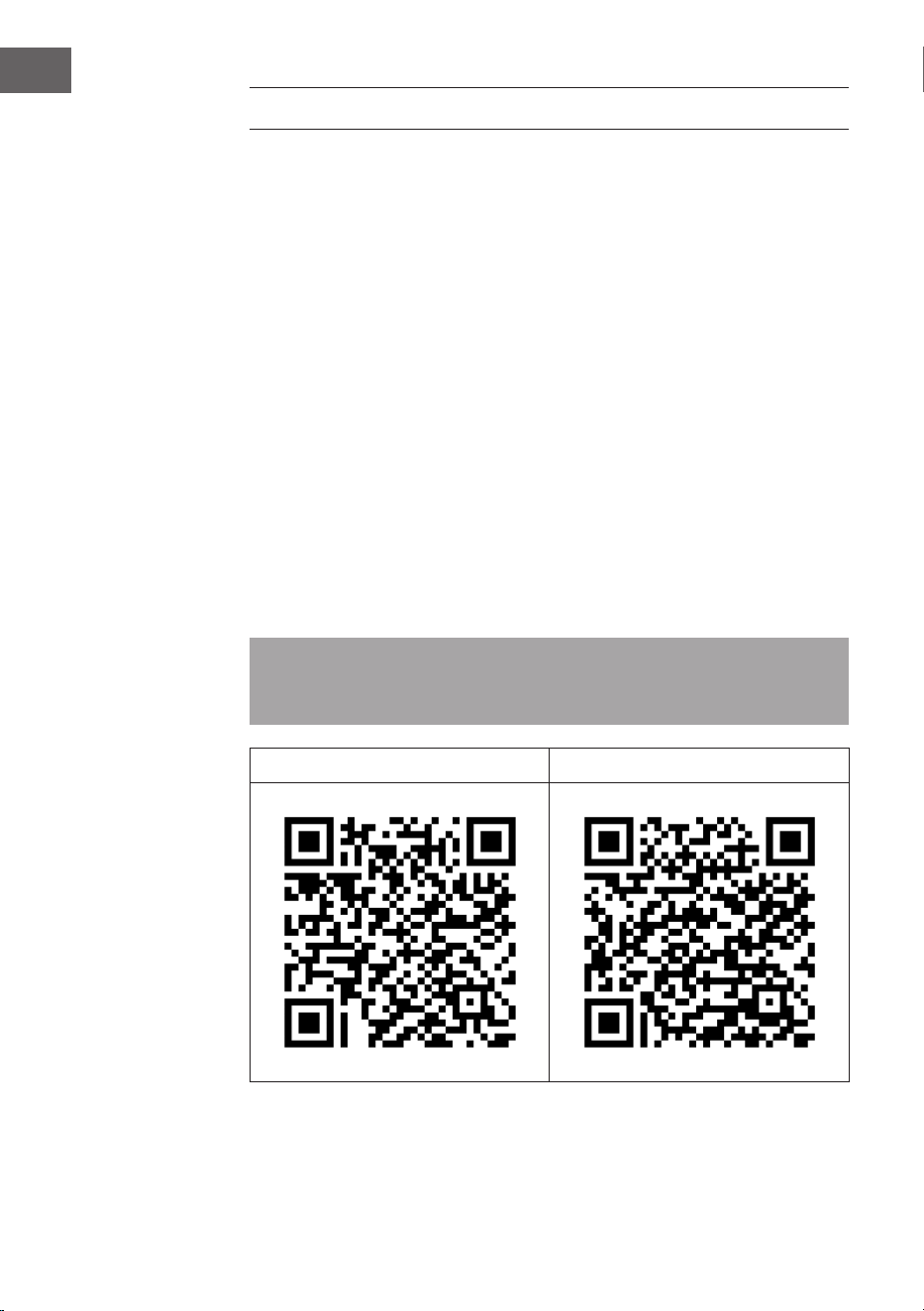
CONTRÔLE DE L‘APPAREIL PAR SMARTPHONE
Si vous connectez l‘appareil à votre réseau Wi-Fi domestique, vous pouvez l‘utiliser
facilement via l‘application Klarstein associée. L‘application vous permet non
seulement de contrôler à distance l‘appareil via votre smartphone, mais vous
donne également accès à des recettes et à des informations supplémentaires.
Procédez comme suit pour connecter votre smartphone avec votre appareil
Klarstein :
1. Téléchargez d‘abord l‘application Klarstein en scannant le code QR avec votre
smartphone (voir ci-dessous) ou téléchargez-le directement depuis l‘App
Store ou Google Play.
2. Assurez-vous que votre smartphone est connecté au même réseau WiFi que
votre appareil Klarstein.
3. Ouvrez l‘application Klarstein.
4. Connectez-vous avec votre compte. Si vous n‘avez pas encore de compte,
inscrivez-vous dans l‘application Klarstein.
5. Suivez les indications de l‘application.
Téléchargement de l‘application
Utilisez la fonction de scan de votre téléphone portable pour scanner le QR Code
et télécharger l‘application sur votre smartphone.
Remarque : L‘application fournit des informations supplémentaires sur la façon
d‘utiliser l‘application et de l‘aide sur la façon de se connecter à votre appareil
dès que vous l‘ouvrez pour la première fois.
iOS Android

63
FR
Résolution des problèmes de connexion
Si votre appareil Klarstein est introuvable dans le Wi, vériez les points suivants :
1. L‘appareil n‘est pas branché. Vériez que votre appareil est branché à une
prise.
2. L‘appareil ne se trouve pas en mode d‘appairage. Vériez que le voyant WiFi
(LED) du panneau de commande de l‘appareil intelligent clignote comme
décrit dans les instructions „Réinitialiser les paramètres WiFi“ pour votre
appareil intelligent (les instructions se trouvent généralement sous Connexion
de l‘appareil).
3. Le point d‘accès WiFi ne fonctionne pas sur 5 GHz. Assurez-vous que votre
point d‘accès fonctionne sur la bande 2,4 GHz et que vous disposez de votre
propre SSID sur la bande 2,4 GHz. Si vous n‘êtes pas sûr de la bande de
fonctionnement de votre point d‘accès, veuillez contacter votre fournisseur
d‘accès Internet.
Important : veuillez noter que si votre routeur WiFi a une double bande - c‘est-
à-dire qu‘il fonctionne à la fois dans les bandes 2,4 GHz et 5 GHz - vous devez
séparez les SSID pour chaque bande et les 2,4 GHz Utilisez le SSID GHz pour
vous connecter.
4. Vériez les paramètres du pare-feu de votre réseau WiFi. Le paramétrage de
pare-feu de votre réseau Wi-Fi peut ne pas permettre à l‘application Klarstein
de congurer les paramètres Wi-Fi sur votre appareil connecté. Veuillez vous
assurer que vous n‘utilisez pas un réseau WiFi public, par ex. aéroports,
dortoirs, entreprises, etc.
5. Différentes données de connexion dans le smartphone et dans l‘application.
Vériez que les données de connexion WiFi saisies dans l‘application Klarstein
correspondent à celles de votre smartphone.
Si vous avez suivi les instructions ci-dessus et que votre smartphone ne parvient
toujours pas à se connecter à l‘application, veuillez nous envoyer un e-mail pour
obtenir de l‘aide : [email protected]
64
FR
NETTOYAGE ET ENTRETIEN
• Débranchez toujours l'appareil de l'alimentation électrique avant de le
nettoyer ou d'effectuer des travaux d'entretien.
• N'utilisez jamais une éponge mouillée pour nettoyer l'appareil.
• An de ne pas endommager le produit, il est conseillé d'utiliser un
équipement adapté aux surfaces et produits sensibles pour ralentir l'usure de
l'appareil.
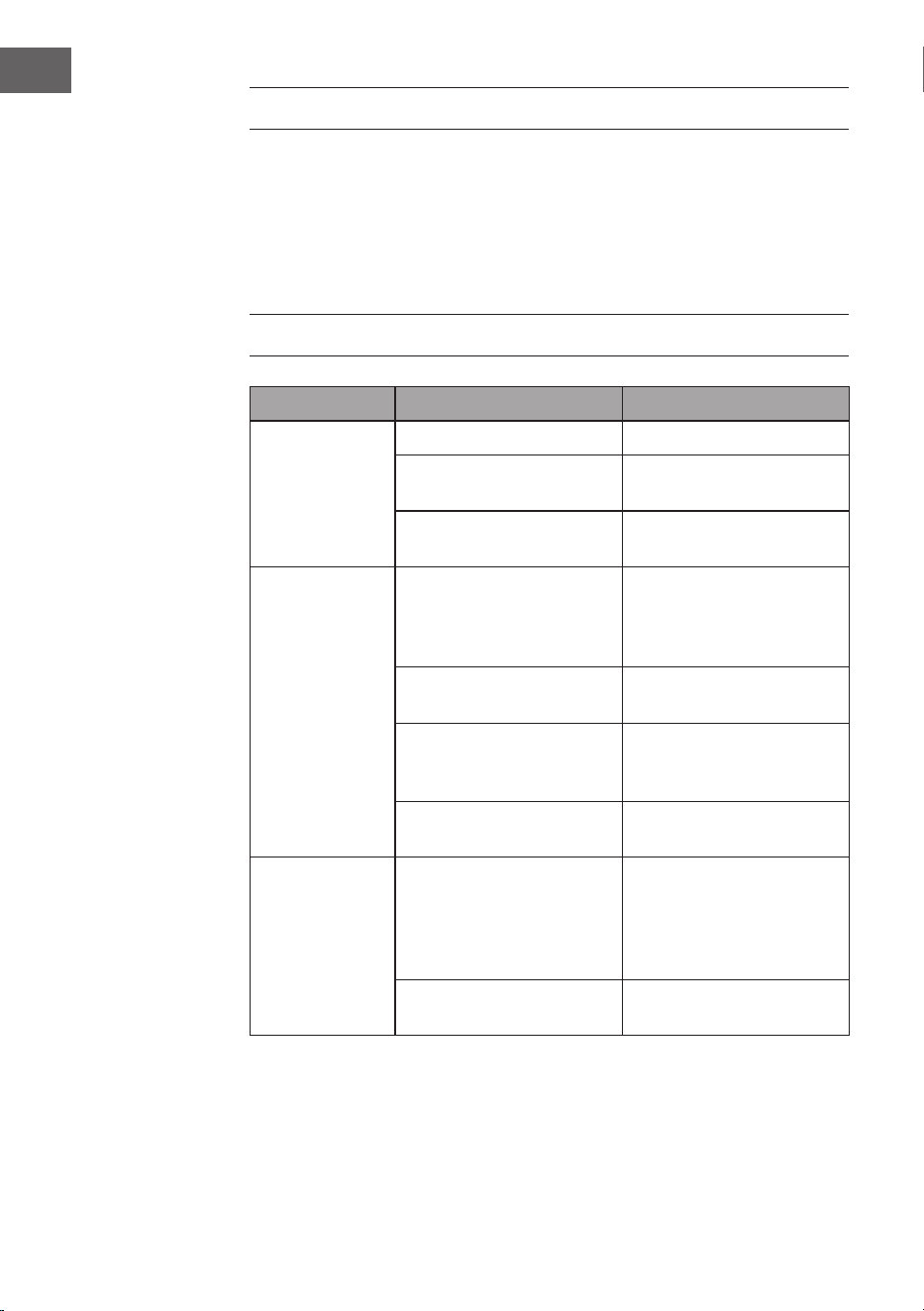
DÉPANNAGE
Problème Cause possible Approche
Le ventilateur ne
tourne pas.
Fusible ou disjoncteur grillé. Vériez vos fusibles.
Câbles desserrés. Vérier que les connexions
ne sont pas desserrées.
La vitesse n'a pas été réglée
correctement.
Sélectionner une vitesse.
Le ventilateur fait
du bruit.
Le cache supérieur touche le
plafond.
Veillez à ce qu'il y ait une
distance minimale de 3 mm
entre le cache supérieur et
le plafond.
Les vis des pales du rotor
sont desserrées.
Serrer les vis.
Le ventilateur de plafond
n'est pas correctement xé
au plafond.
Serrer toutes les vis de la
platine de suspension.
La vitesse n'est pas réglée
correctement.
Sélectionner une vitesse.
Le ventilateur
oscille.
Les pales du rotor ne sont
pas réglées horizontalement
par rapport au plafond.
Déplacez le ventilateur de
manière à ce que toutes
les pales soient à la même
hauteur par rapport au
plafond.
Les vis des pales du rotor
sont desserrées.
Serrez les vis.
65
FR
FICHE TECHNIQUE
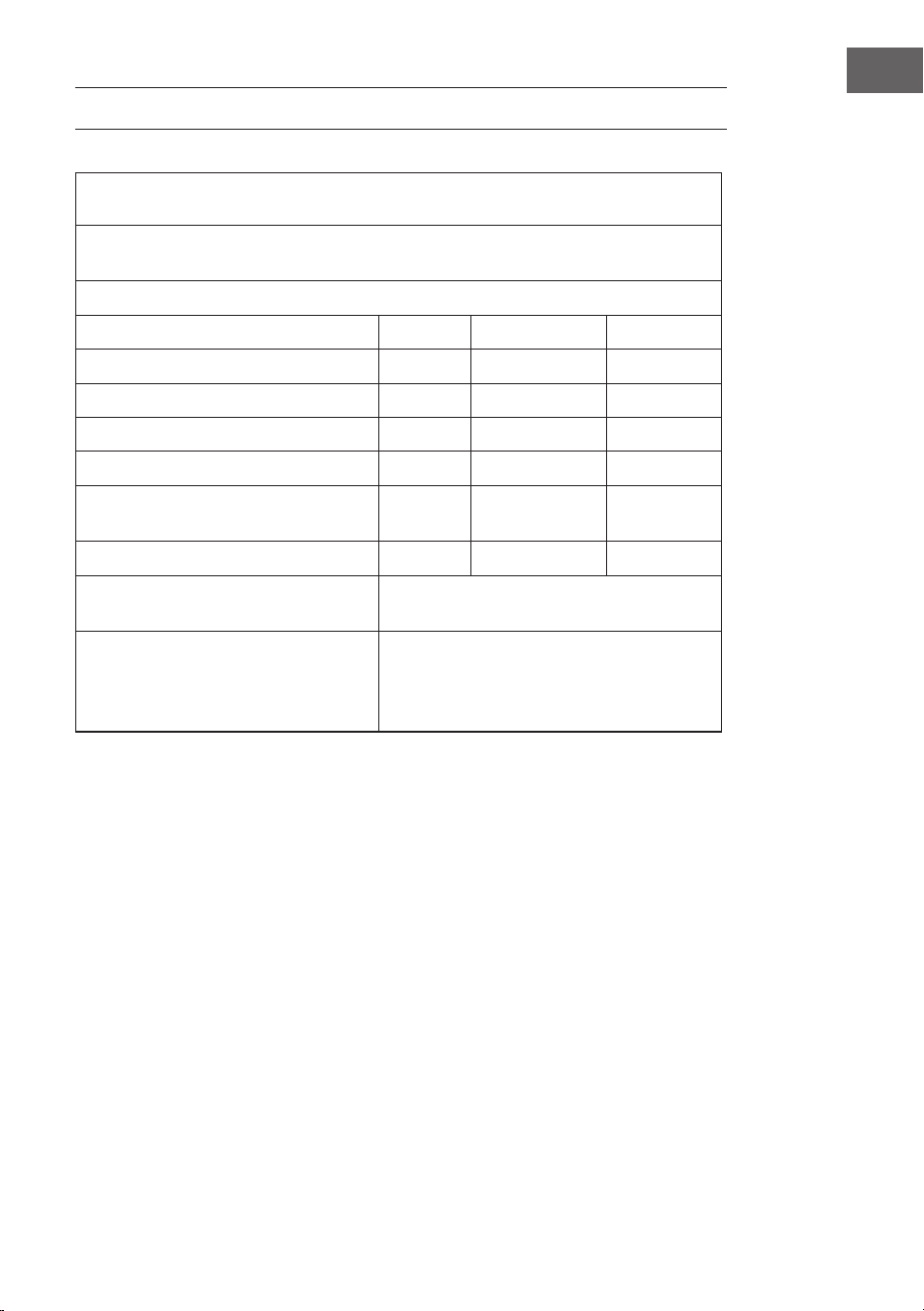
Exigences en matière d'informations sur les produits conformément à RÈGLE-
MENT (UE) No 206/2012
Informations permettant d'identier le(s) modèle(s) auquel (auxquels) les
informations se rapportent
10048235, 10048236 Zen Breeze
Description Symbole Valeur Appareil
Débit maximal du ventilateur F 37,3 m3/min
alimentation du ventilateur P 16,4 W
Valeur correspondante SV 2,3 (m3/min)/W
Consommation électrique en veille PSB 0,5 W
Niveau de puissance acoustique du
ventilateur
LWA 53 dB(A)
Vitesse maximale de l'air c 1,8 m/s
Norme de mesure de la valeur des
services
IEC 60879:2019
Coordonnées pour obtenir plus
d'informations
Chal-Tec GmbH,
Mühlenstrasse 25,
10243 Berlin,
Allemagne.
66
FR
CONSEILS POUR LE RECYCLAGE
S‘il existe une réglementation pour l‘élimination ou le
recyclage des appareils électriques et électroniques dans
votre pays, ce symbole sur le produit ou sur l‘emballage
indique que cet appareil ne doit pas être jeté avec les
ordures ménagères. Vous devez le déposer dans un point
de collecte pour le recyclage des équipements électriques
et électroniques. La mise au rebut conforme aux règles
protège l‘environnement et la santé de vos semblables
des conséquences négatives. Pour plus d‘informations
sur le recyclage et l‘élimination de ce produit, veuillez
contacter votre autorité locale ou votre service de
recyclage des déchets ménagers.
Ce produit contient des piles. S‘il existe une
réglementation pour l‘élimination ou le recyclage des
piles dans votre pays, vous ne devez pas les jeter avec les
ordures ménagères. Renseignez-vous sur les dispositions
locales relatives à la collecte des piles usagées. La mise au
rebut conforme aux règles protège l‘environnement et la
santé de vos semblables des conséquences négatives.
DÉCLARATION DE CONFORMITÉ
Fabricant :
Chal-Tec GmbH, Mühlenstraße 25, 10243 Berlin,
Allemagne.
Contact: [email protected]
Le soussigné, Chal-Tec GmbH, déclare que l’équipement
radioélectrique du type Zen Breeze est conforme à la
directive 2014/53/UE. Le texte complet de la déclaration UE
de conformité est disponible à l’adresse internet suivante :
use.berlin/10048235
67
IT
Gentile cliente,
La ringraziamo per aver acquistato questo dispositivo. La
invitiamo a leggere attentamente le seguenti istruzioni e
a seguirle per evitare possibili danni. Non ci assumiamo
alcuna responsabilità per danni causati dalla mancata
osservanza delle istruzioni e da un uso improprio.
Scansionare il codice QR per accedere al manuale d'uso
più recente e a maggiori informazioni sul prodotto.
INDICE
DATI TECNICI
Numero dell'articolo 10048235, 10048236
Alimentazione 220-240 V ~/50 Hz
Potenza del ventilatore 20 W
Tipo di lampadina LED
Temperatura di colore 3000K/4500K/6500K
Indice di resa cromatica (CRI) ≥80
Flusso massimo 77 m
3
/min
Standard WiFi
802.11 b/g/n
Frequenza WiFi
2,4 GHz
Potenza della radiofrequenza WiFi
(max.)
20 dBm
Questo prodotto contiene una lampadina con classe di ecienza energetica
Avvertenze di sicurezza 68
Volume di consegna 69
Volume di consegna 71
Installazione 72
Fissare il ventilatore 76
Connessione del telecomando 77
Gestione tramite smartphone 78
Pulizia e manutenzione 80
Risoluzione dei problemi 80
Scheda tecnica 81
Smaltimento 82
Dichiarazione di conformità 82
68
IT
AVVERTENZE DI SICUREZZA
• Non ssare mai il ventilatore a una presa di corrente, ma al sotto stesso.
• La distanza minima tra le pale del ventilatore e il pavimento deve essere
superiore a 2,3 metri. La portata minima del gancio a cui è appeso il
ventilatore deve essere di 100 kg.
• Assicurarsi di installare nel cablaggio di alimentazione del ventilatore a sotto
un sezionatore onnipolare con una separazione dei contatti di almeno 3 mm
tra i poli.
• Tutti i cablaggi devono essere conformi alle norme elettriche nazionali e
locali. Se non si ha dimestichezza con il cablaggio, rivolgersi a un elettricista
qualicato.
• Per evitare possibili scosse elettriche, prima di installare il ventilatore,
scollegare l'alimentazione spegnendo gli interruttori della scatola dei fusibili
e l'interruttore a parete associato. Se non è possibile spegnere tutti gli
interruttori, ssare saldamente un avvertimento ben visibile, come un cartello,
al pannello di controllo.
• Il modello o la tipologia di riferimento delle lampade che possono essere
installate nei ventilatori costruiti per questo scopo.
• Spegnere l'alimentazione prima di effettuare il collegamento.
• Il cablaggio elettrico deve essere conforme alla normativa locale.
• Il ventilatore deve essere adeguatamente messo a terra per evitare il rischio di
scosse elettriche.
• Non montare mai il ventilatore in un ambiente umido o bagnato.
• Prestare attenzione quando si lavora vicino alle pale rotanti.
• Per ridurre il rischio di lesioni personali, ssare il ventilatore direttamente alla
struttura portante dell'edicio secondo queste istruzioni e utilizzare solo gli
accessori forniti.
• Questo dispositivo può essere utilizzato solo da bambini di età pari o
superiore a 8 anni e da persone con capacità siche, sensoriali e mentali
limitate e/o prive di esperienza e conoscenza, a condizione che siano stati
istruiti all'uso del dispositivo da una persona responsabile che comprenda i
rischi associati.
• Per ridurre il rischio di incendio, scosse elettriche o danni al motore, non
utilizzare un regolatore di velocità a stato solido con questo ventilatore.
Utilizzare esclusivamente regolatori a velocità variabile.
• I bambini non devono giocare con il dispositivo.
• Prima di rimuovere la protezione, assicurarsi che il ventilatore sia scollegato
dalla rete di alimentazione.
• Prendere le precauzioni necessarie per evitare il riusso di gas nel locale dalla
canna fumaria aperta di dispositivi a gas o di altri combustibili (per i ventilatori
a condotto e divisori).
Nota: il ventilatore deve essere installato da una persona esperta di cablaggio
elettrico.
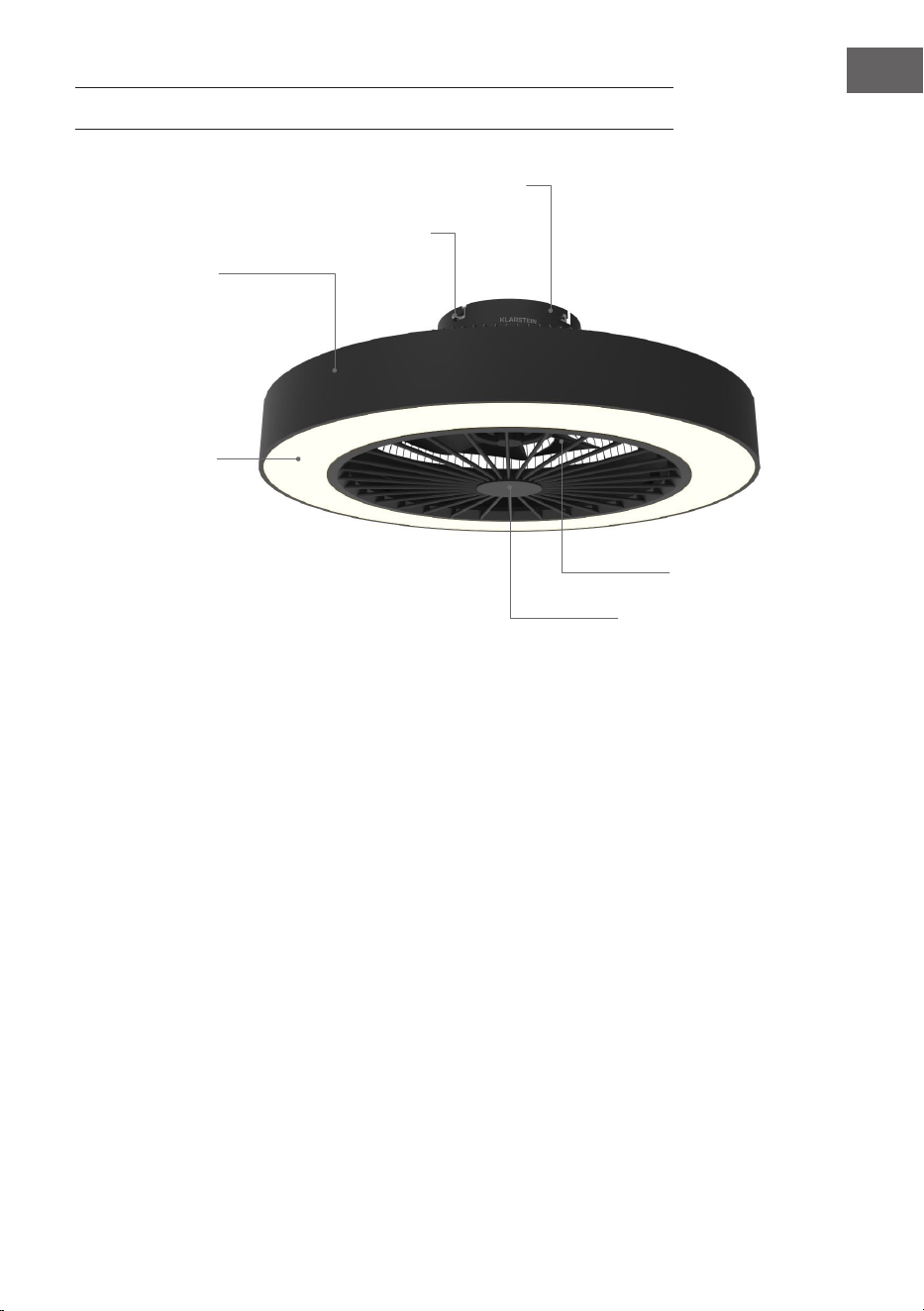
69
IT
VOLUME DI CONSEGNA
Base
Viti
Alloggiamento
Illuminazione
Copertura del ventilatore
Pale
70
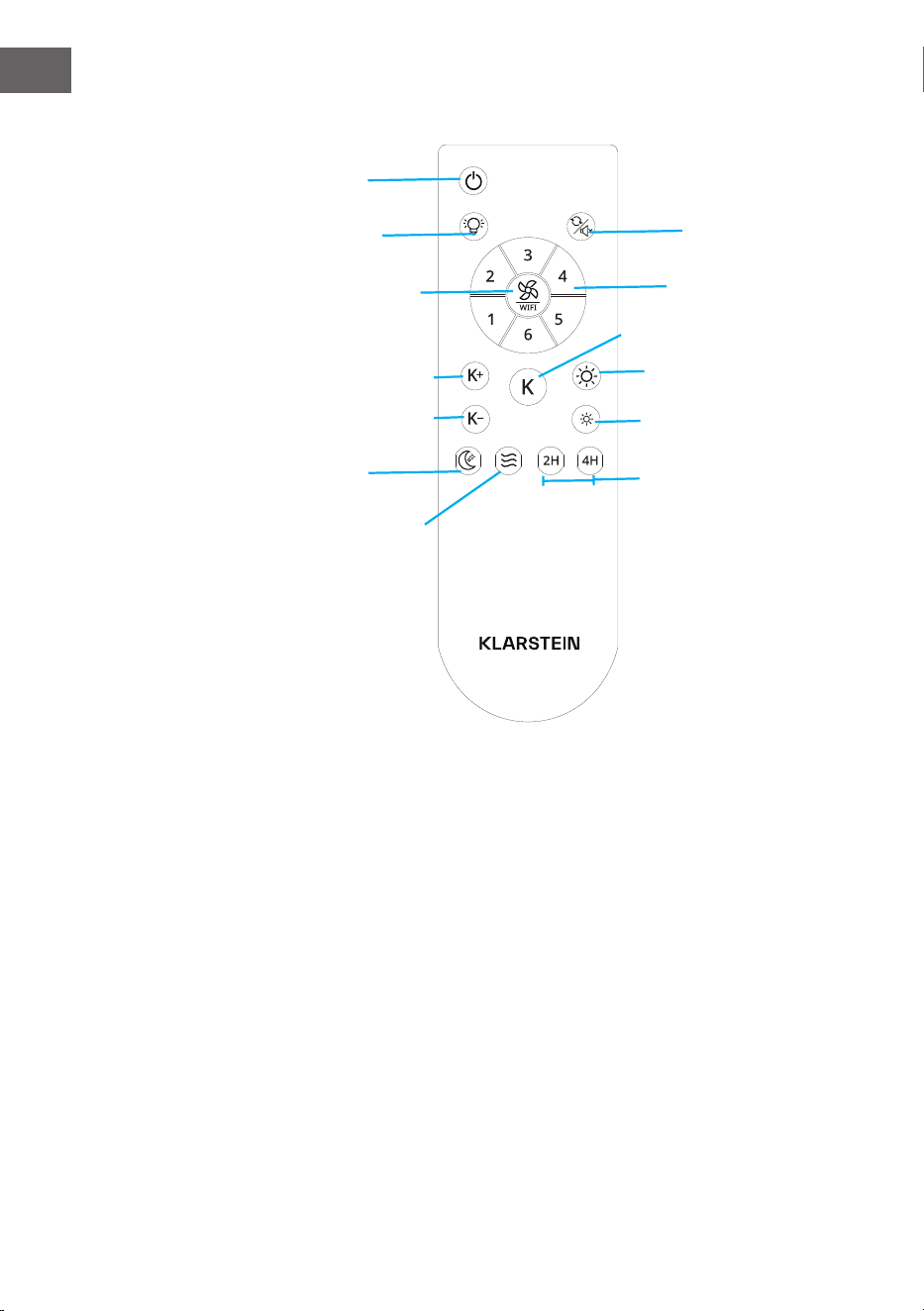
IT
Telecomando
Inversione rotazione/
disattivazione suoni
On/off
Ventilazione naturale
Luce on/off
Velocità del
ventilatore/WiFi
2 ore/4 ore
Luce notturna
Aumento dell'intensità della
luce
Diminuzione della temperatura
Aumento della temperatura
Diminuzione dell'intensità
della luce
Cambiamento cromatico dei
LED
Livelli di velocità del
ventilatore 1-6
71
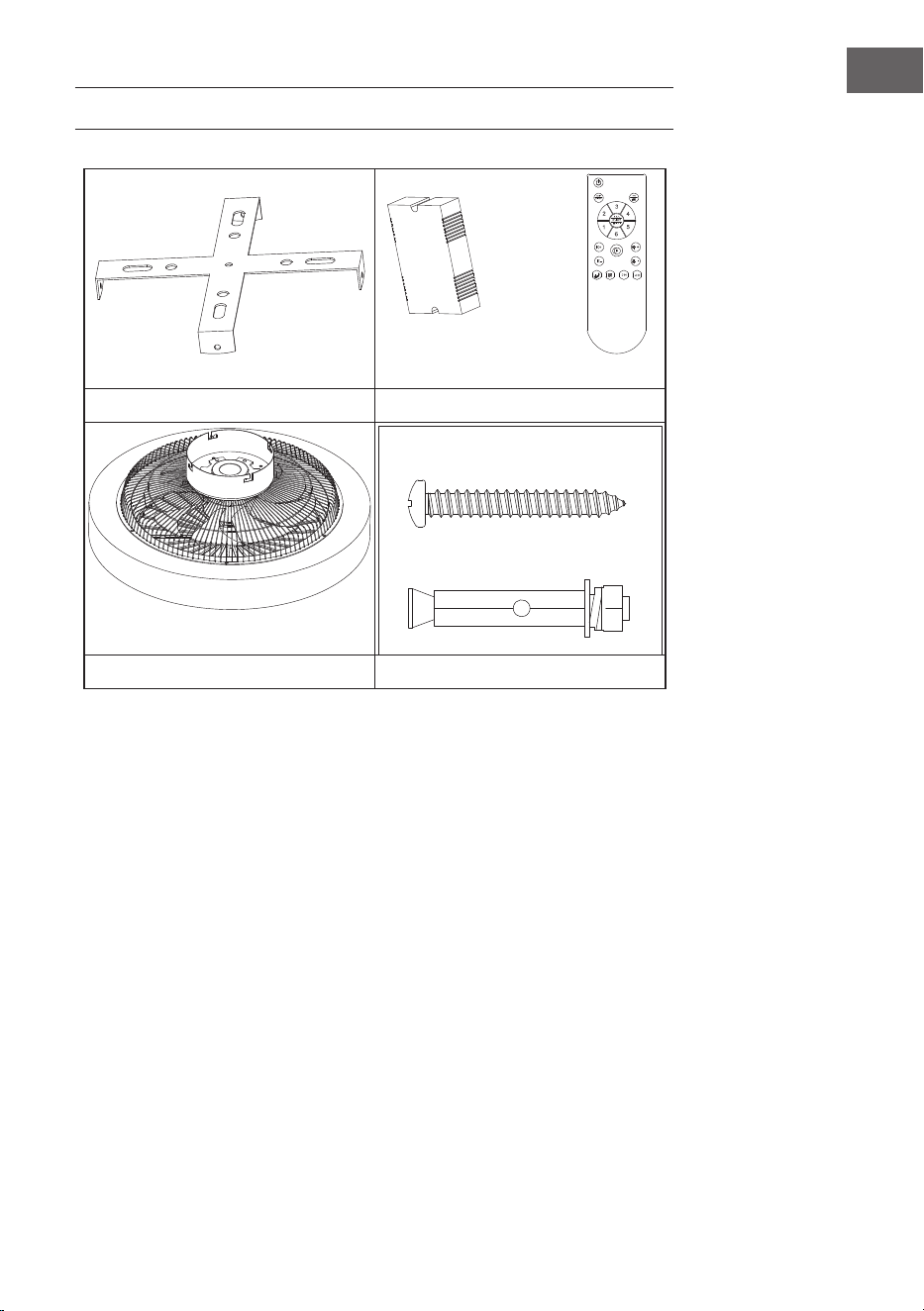
IT
VOLUME DI CONSEGNA
Staffa di sospensione Telecomando
Motore Modulo a spirale
• Aprire la confezione con cura. Rimuovere gli articoli dagli inserti in polistirolo.
• Posizionare l'alloggiamento del motore su un tappeto o su un pezzo di
polistirolo per evitare di danneggiarne la nitura.
• Vericare la lista dei componenti per assicurarsi che tutti i pezzi siano inclusi.
72
IT
INSTALLAZIONE
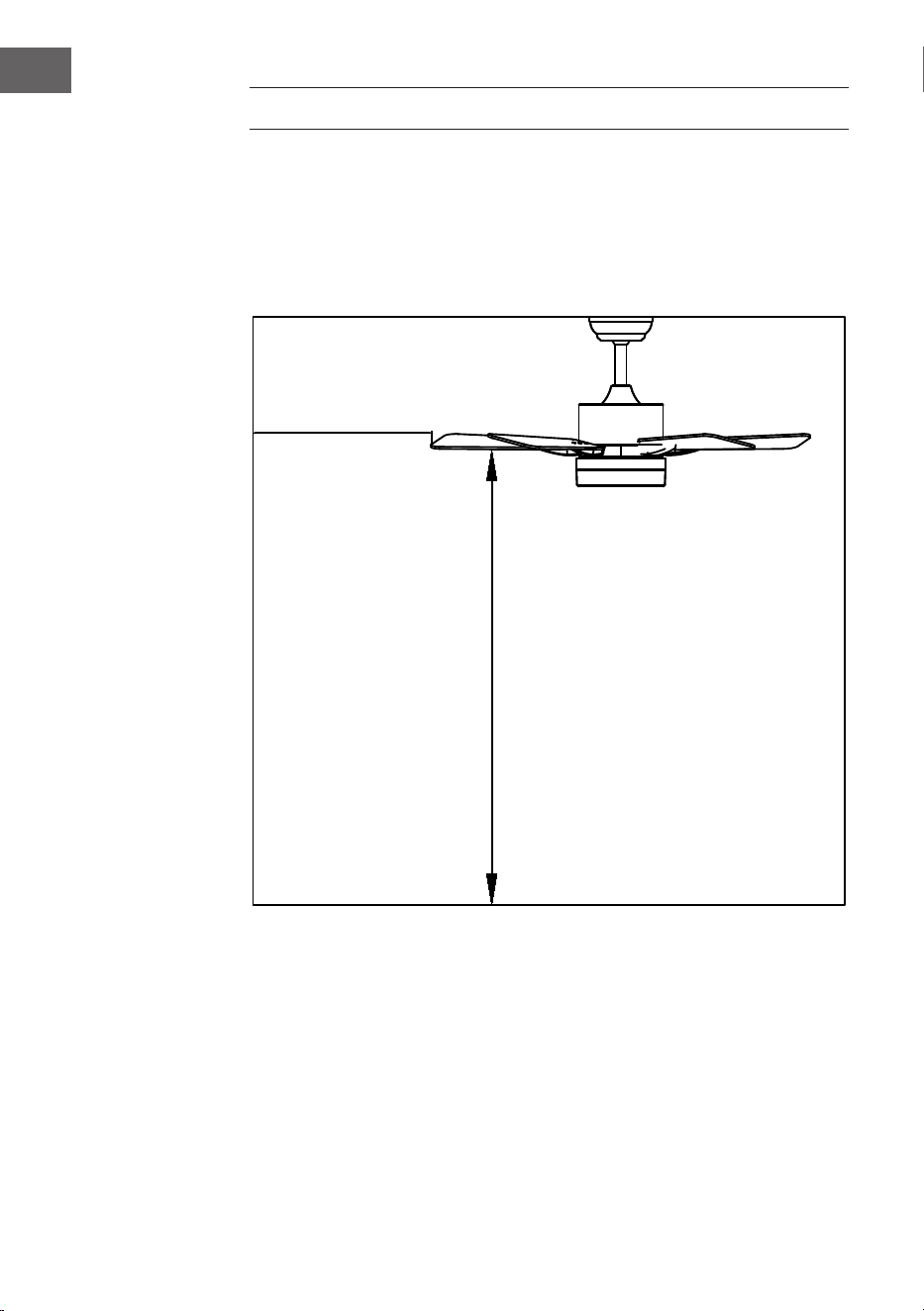
Preparazione all'installazione
Per evitare lesioni e danni alle persone, assicurarsi che la posizione di ssaggio
consenta alle pale di trovarsi a 2,3 m dal pavimento e a 76 cm da qualsiasi parete
o ostacolo. Assicurarsi che la scatola di giunzione sia ssata saldamente alla
struttura dell'edicio e possa sostenere l'intero peso del ventilatore.
L'installazione richiede questi attrezzi
Cacciavite, cacciavite a testa piatta, pinze o chiavi regolabili, scaletta, tronchesi e
nastro isolante.
76 cm dalla
parete o
dall'ostacolo più
vicino
2,3 m dalle pale al
pavimento
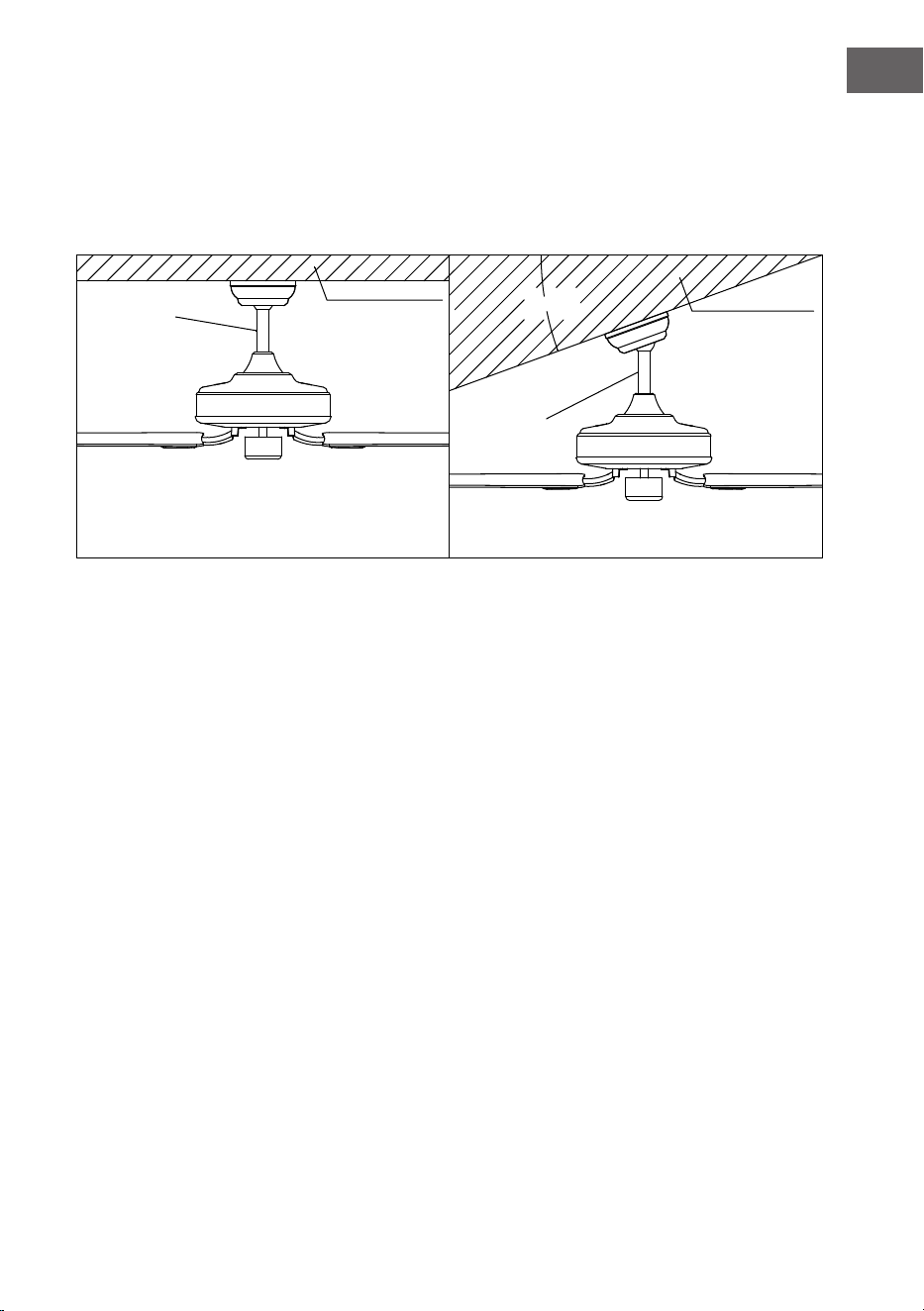
73
IT
Preparazione del luogo di posizionamento per il ventilatore
Installazione con asta di sostegno
Questo ventilatore può essere montato su un sotto normale o a volta utilizzando
un'asta. La distanza dal sotto può essere aumentata utilizzando un'asta più
lunga.
20°
Stile di
montaggio
standard
Sostegno
Sostegno
Stile di
montaggio
inclinato
Il montaggio standard prevede la sospensione
dal sotto tramite un'asta
Montaggio inclinato consigliato per sotti a
volta o inclinati
74
IT
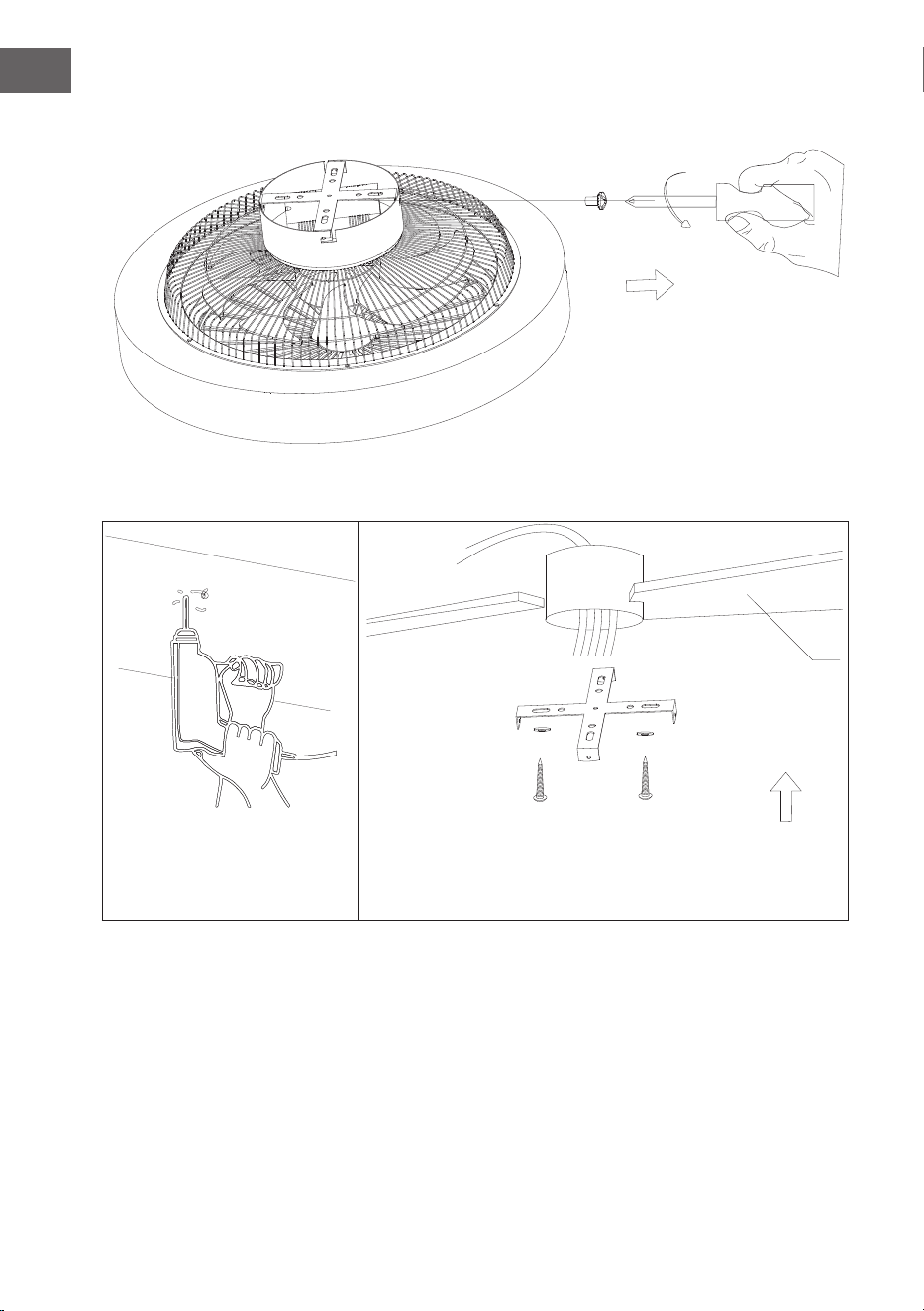
Installazione della staffa di sospensione
Rimuovere le viti del gancio di bloccaggio laterale e staccare il gancio.
Sotto in legno
75
IT
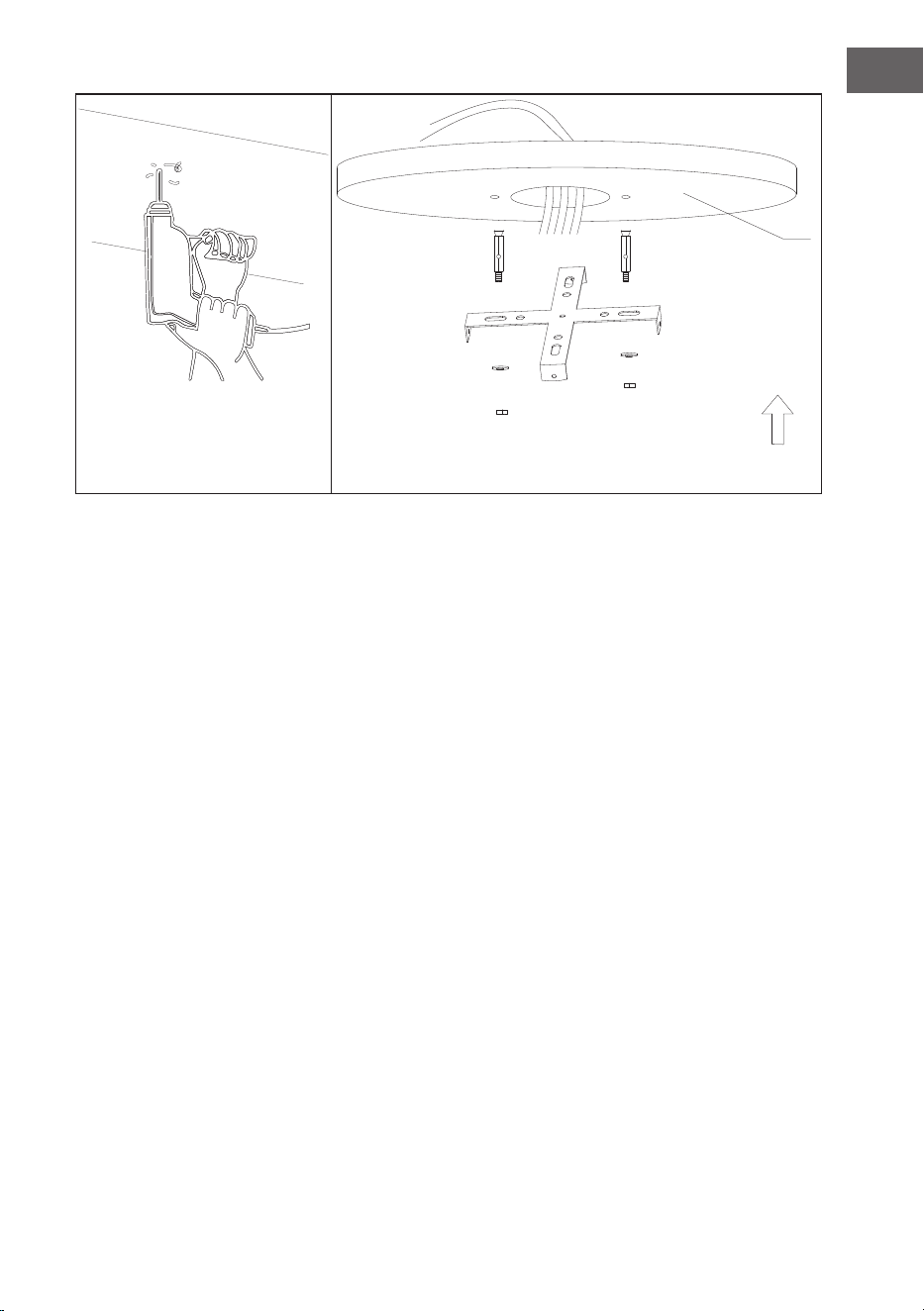
Si prega di praticare un foro di ɸ 8 mm nel sotto in calcestruzzo e inserire il
bullone. Allineare la staffa al foro e serrarla con il dado.
Sotto in
calcestruzzo
76
IT
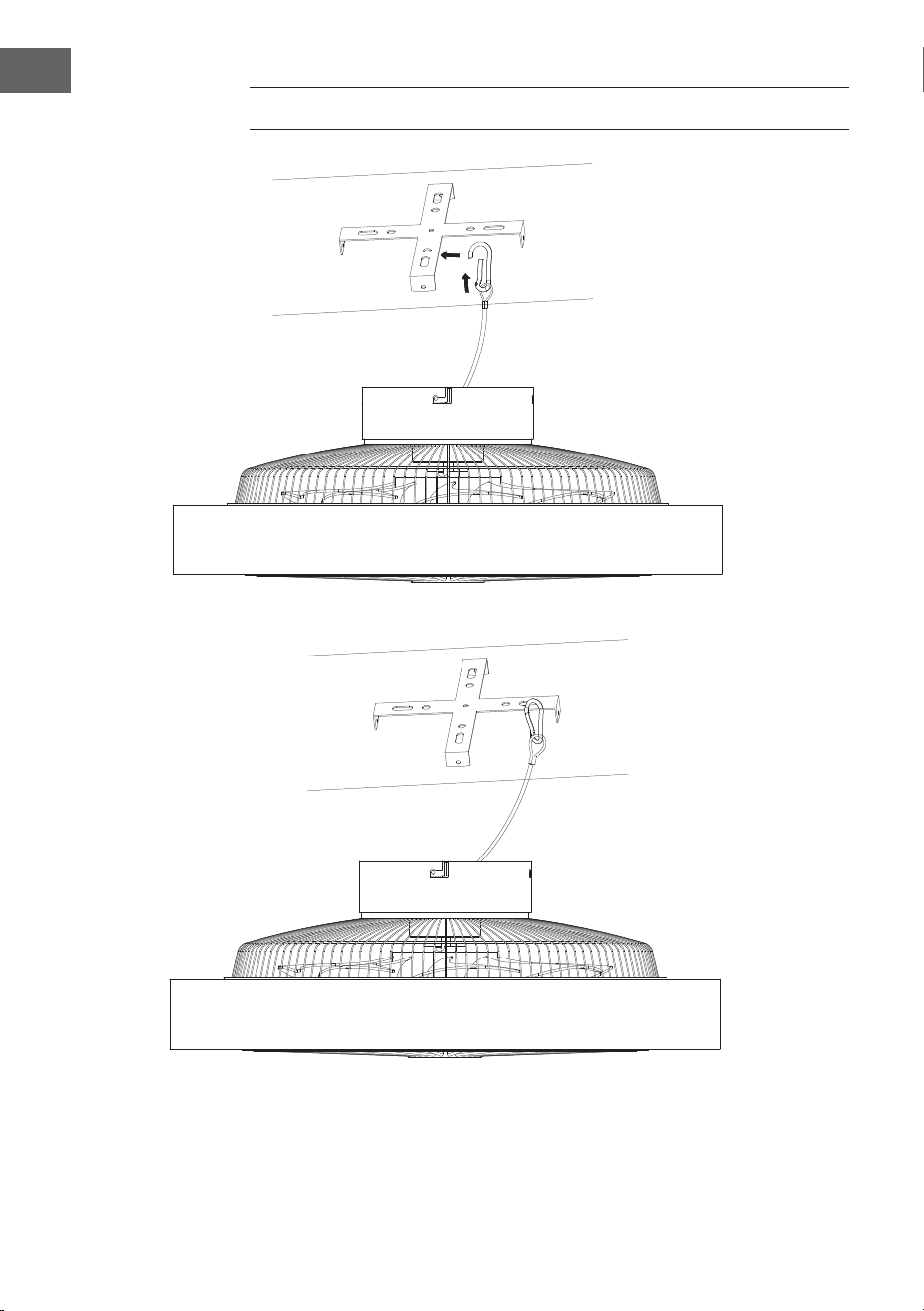
FISSARE IL VENTILATORE
Gancio di sospensione in fune d'acciaio per stabilizzare il ventilatore e garantire la
sicurezza.
77
IT
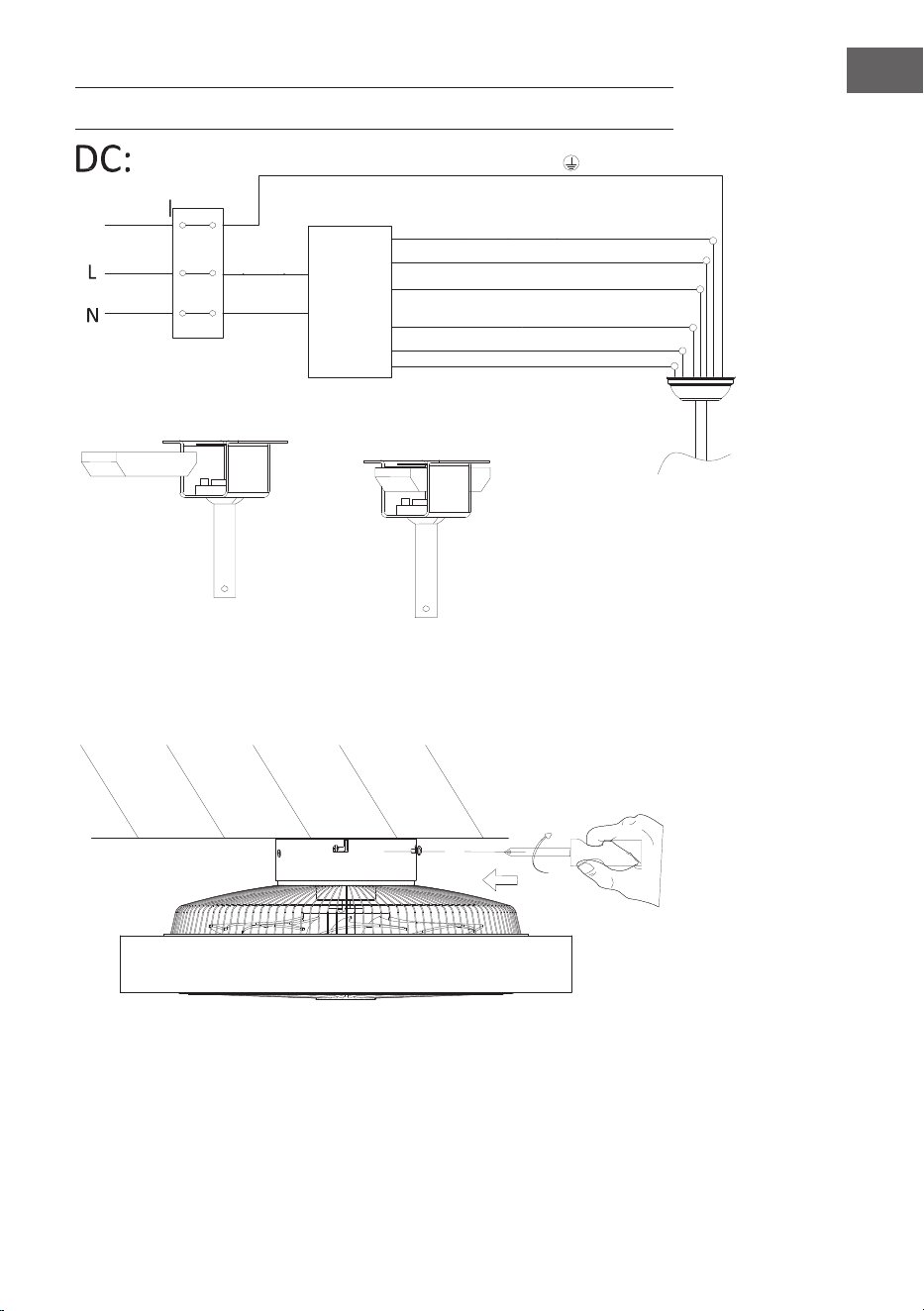
CONNESSIONE DEL TELECOMANDO
Montaggio della copertura
Serrare le viti per ssare il ventilatore a sotto in posizione.
Striscia verde/gialla
Luce L (grigio chiaro)
Motore CC L (nero)
Motore CC L (rosso)
Posizione del ricevitore
Ingresso
N (blu)
Ingresso L
(marrone)
Messa a
terra
Neutro N (giallo)
Neutro N (bianco)
lo
Motore CC L (bianco)
Ricevitore del
telecomando
78
IT
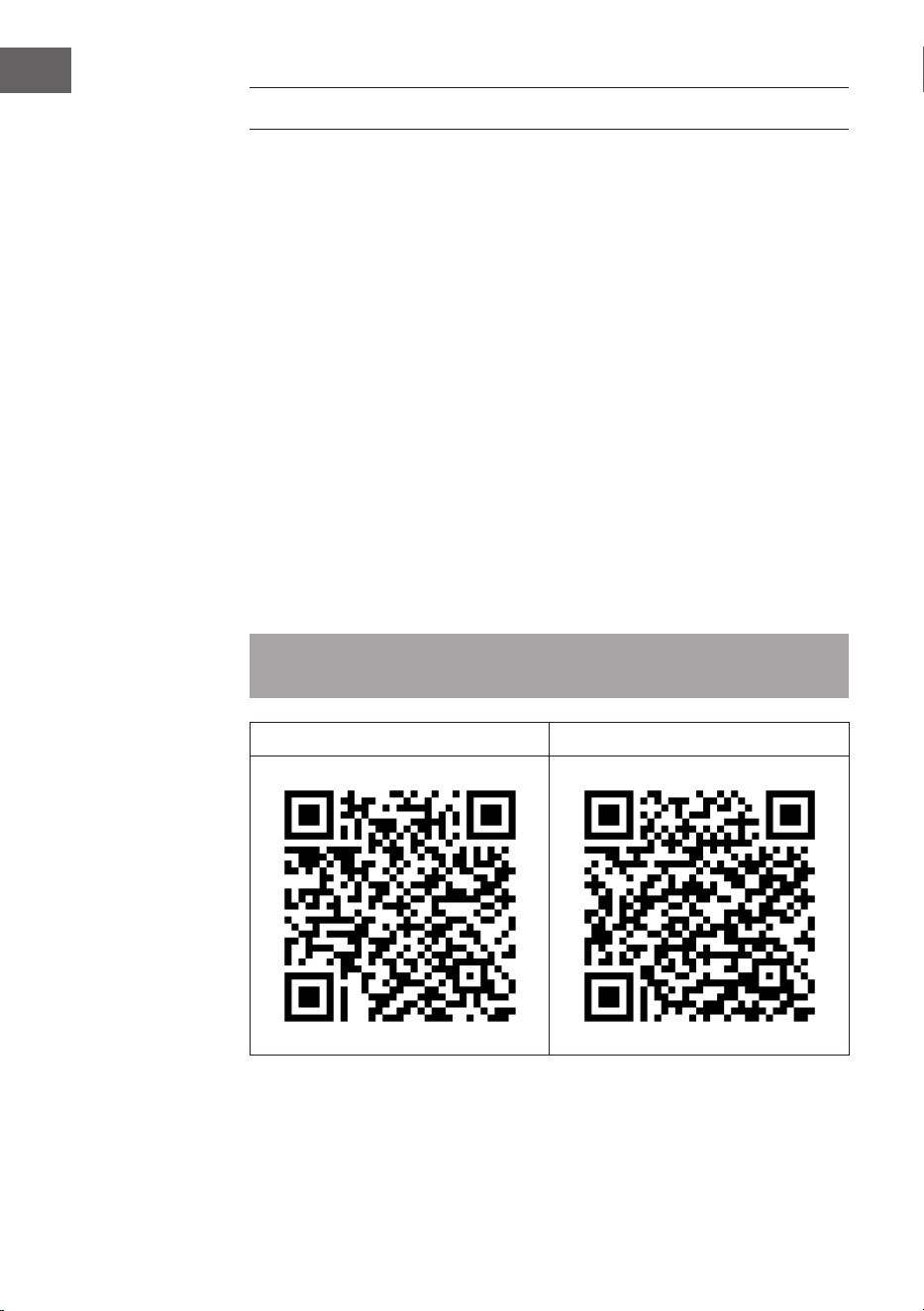
GESTIONE TRAMITE SMARTPHONE
Se si collega l‘apparecchio al WiFi, è possibile gestirlo comodamente con la relativa
applicazione Klarstein. L‘app non solo consente di controllare l´apparecchio da
remoto dal proprio smartphone, ma consente anche di accedere a ricette e ad
altre informazioni.
Per collegare il telefono al dispositivo Klarstein, procedere come segue:
1. Per prima cosa scaricare l‘app Klarstein scansionando il codice QR con lo
smartphone (vedere sotto) o scaricarla direttamente dall‘App Store o da
Google Play.
2. Accertarsi che lo smartphone sia connesso alla stessa rete WiFi a cui deve
collegarsi il dispositivo Klarstein.
3. Aprire l‘applicazione Klarstein.
4. Accedere con il proprio account. Se non si possiede ancora un account,
registrarsi nell‘app Klarstein.
5. Seguire le istruzioni contenute nell‘App.
App-Download
Utilizzare la funzione di scansione del telefono per eseguire la scansione del
codice QR e salvare l‘applicazione sullo smartphone.
Nota: L‘applicazione fornisce ulteriori informazioni su come utilizzarla e su
come connettersi al dispositivo non appena viene aperta per la prima volta.
iOS Android

79
IT
Correzione degli errori in caso di problemi di connessione
Se non è possibile trovare il dispositivo Klarstein nella rete Wi-Fi, controllare i
seguenti punti:
1. La spina non è collegata. Assicurarsi che il dispositivo sia collegato a una presa
elettrica.
2. Il dispositivo non si trova in modalità di accoppiamento. Assicurarsi che
l‘indicazione Wi-Fi (LED) sul pannello di controllo del dispositivo smart
lampeggi come descritto alla voce „Resettare le impostazioni Wi-Fi“ del
dispositivo smart in questione (indicazioni a riguardo possono essere
normalmente trovate alla voce „Connessione dei dispositivi“).
3. Il punto di accesso Wi-Fi non opera sulla banda da 5 GHz. Assicurarsi che il
punto di accesso utilizzato operi sulla banda da 2,4 GHz e che sia disponibile
un SSID personale sulla banda da 2,4 GHz. Se non si è sicuri del tipo di banda
del punto di accesso, rivolgersi al fornitore di Internet.
Importante: tenere presente che se il router Wi-Fi è dotato di dualband e opera
dunque sia sulla banda da 2,4 GHz che su quella da 5 GHz, è necessario dividere
gli SSID per ogni banda e utilizzare per il collegamento l‘SSID della banda da 2,4
GHz.
4. Controllare le impostazioni del rewall della rete Wi-Fi. L‘impostazione
del rewall della rete Wi-Fi potrebbe non permettere alla app Klarstein di
congurare le impostazioni Wi-Fi sul dispositivo smart. Assicurarsi di non
utilizzare reti Wi-Fi pubbliche, come ad es. presso aeroporti, hotel, aziende,
ecc.
5. Diversi dati di registrazione su smartphone e app. Assicurarsi che i dati di
registrazione Wi-Fi inseriti nella app Klarstein corrispondano a quelli con cui è
collegato lo smartphone.
Se sono stati rispettati i punti citati in precedenza e lo smartphone continua a
non connettersi alla app, si prega di inviare un‘email al seguente indirizzo per
ricevere supporto: [email protected]
80
IT
PULIZIA E MANUTENZIONE
• Scollegare sempre il dispositivo dall'alimentazione elettrica prima di pulirlo o
di effettuare interventi di manutenzione.
• Non utilizzare mai una spugna bagnata per pulire il dispositivo.
• Per non danneggiare il prodotto, si consiglia di utilizzare attrezzature adatte
alle superci e ai prodotti sensibili, che rallenteranno l'usura del dispositivo.
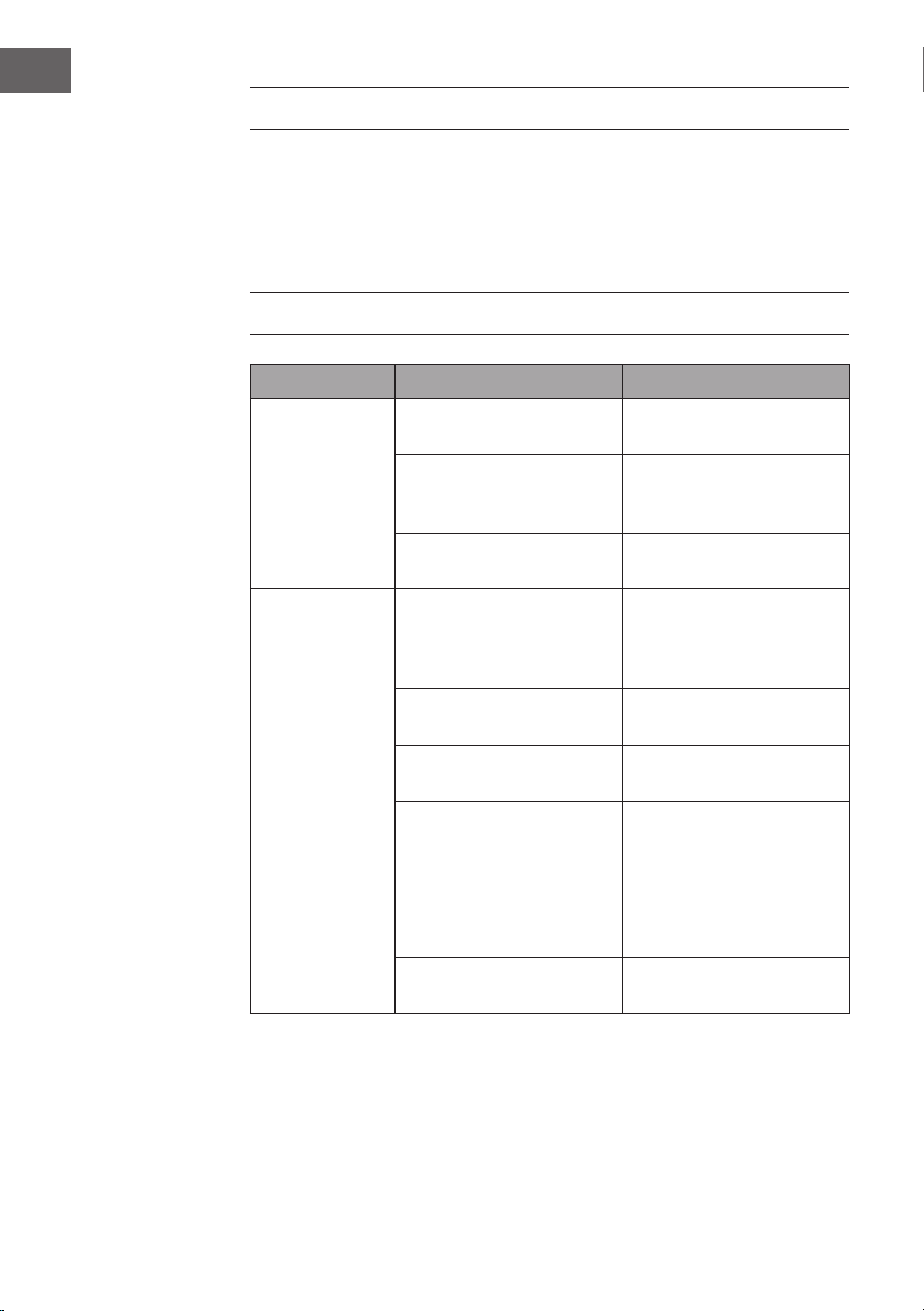
RISOLUZIONE DEI PROBLEMI
Problema Possibile causa Approccio
Il ventilatore non
si avvia.
Fusibile o interruttore
automatico bruciato.
Controllare i fusibili.
Collegamenti dei cavi
allentati.
Controllare che tutti i
collegamenti non siano
allentati.
La velocità non è stata
impostata correttamente.
Selezionare una velocità.
Il ventilatore fa
rumore.
La calotta superiore tocca il
sotto.
Assicurarsi che vi sia una
distanza minima di 3 mm
tra la calotta superiore e il
sotto.
Le viti delle pale del rotore
sono allentate.
Serrare tutte le viti.
Il ventilatore non è ssato
correttamente al sotto.
Serrare tutte le viti del
pannello di sospensione.
La velocità non è regolata
correttamente.
Selezionare una velocità.
Il ventilatore
traballa.
Le pale del rotore non sono
regolate orizzontalmente
rispetto al sotto.
Spostare il ventilatore in
modo che tutte le pale siano
alla stessa altezza rispetto al
sotto.
Le viti delle pale del rotore
sono allentate.
Serrare tutte le viti.
81
IT
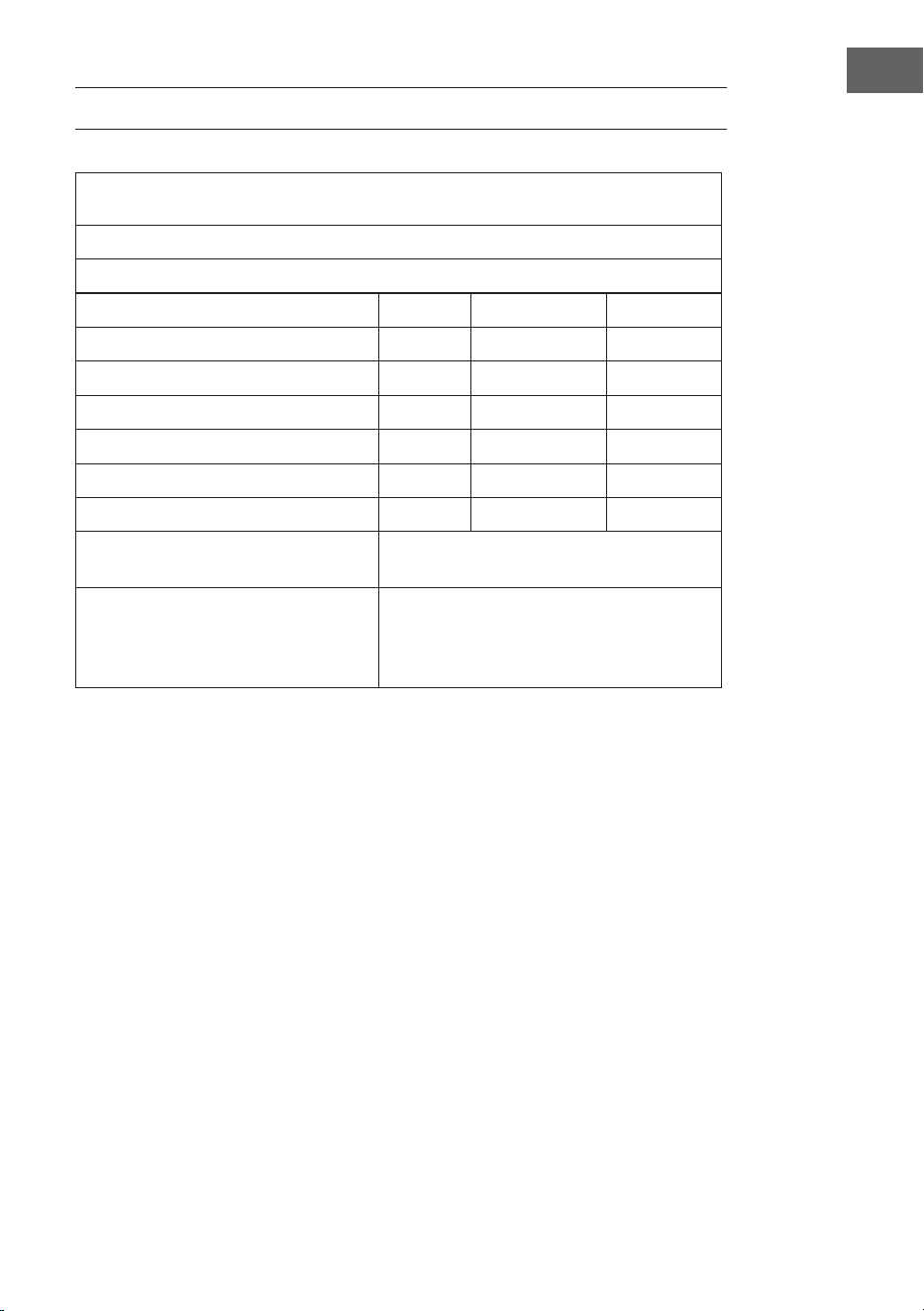
SCHEDA TECNICA
Requisiti relativi alle informazioni sul prodotto secondo il REGOLAMENTO (UE) N.
206/2012
Informazioni per identicare il modello o i modelli a cui si riferiscono le informazioni
10048235, 10048236 Zen Breeze
Descrizione Simbolo Valore Unità
Flusso massimo del ventilatore F 37,3 m3/min
Potenza in ingresso del ventilatore P 16,4 W
Valore di servizio SV 2,3 (m3/min)/W
Consumo di energia in standby PSB 0,5 W
Rumorosità operativa del ventilatore LWA 53 dB(A)
Velocità massima dell'aria c 1,8 m/s
Standard di misurazione del valore di
servizio
IEC 60879:2019
Contatti per ottenere maggiori
informazioni
Chal-Tec GmbH
Mühlenstraße 25
10243 Berlino
Germania
82
IT
SMALTIMENTO
Se nel proprio paese si applicano le regolamentazioni
inerenti lo smaltimento di dispositivi elettrici ed
elettronici, questo simbolo sul prodotto o sulla confezione
segnala che questi prodotti non possono essere
smaltiti con i riuti normali e devono essere portati a
un punto di raccolta di dispositivi elettrici ed elettronici.
Grazie al corretto smaltimento dei vecchi dispositivi si
tutela il pianeta e la salute delle persone da possibili
conseguenze negative. Informazioni riguardanti il riciclo
e lo smaltimento di questi prodotti si ottengono presso
l’amministrazione locale oppure il servizio di gestione dei
riuti domestici.
Il prodotto contiene batterie. Se nel proprio paese si
applicano le regolamentazioni inerenti lo smaltimento
di batterie, non possono essere smaltite con i normali
riuti domestici. Preghiamo di informarvi sulle
regolamentazioni vigenti sullo smaltimento delle
batterie. Grazie al corretto smaltimento dei vecchi
dispositivi si tutela l’ambiente e la salute delle persone da
conseguenze negative.
DICHIARAZIONE DI CONFORMITÀ
Produttore:
Chal-Tec GmbH, Mühlenstraße 25, 10243 Berlino,
Germania.
Contattateci: [email protected]
Il fabbricante, Chal-Tec GmbH, dichiara che il tipo di
apparecchiatura radio Zen Breeze è conforme alla direttiva
2014/53/UE. Il testo completo della dichiarazione di
conformità UE è disponibile al seguente indirizzo Internet:
use.berlin/10047235