Made in China | 705-V100C0-12
www.godox.com
深圳市神牛摄影器材有限公司
Wechat
Ofcial Account
神牛微信公众号
地址:深圳市宝安区福海街道塘尾社区耀川工业园厂房 2 栋
电话:0755-29609320(8062) 传真:0755-25723423 邮箱:godox@godox. com
合格证
GODOX Photo Equipment Co., Ltd.
Add.: Building 2, Yaochuan Industrial Zone, Tangwei Community, Fuhai Street, Bao'an
District, Shenzhen 518103, China Tel: +86-755-29609320(8062)
Fax: +86-755-25723423 E-mail: [email protected]
使用手册
Instruction Manual
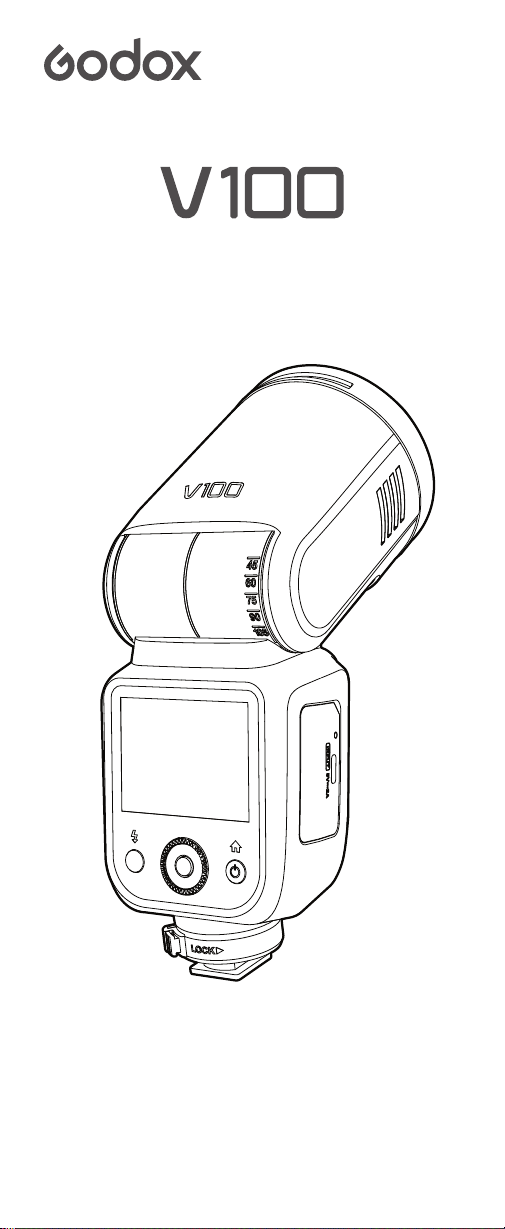
TTL Li-ion Round Head Camera Flash
TTL 锂电圆头机顶闪光灯

关于本手册
重要的安全说明及注意事项
前言
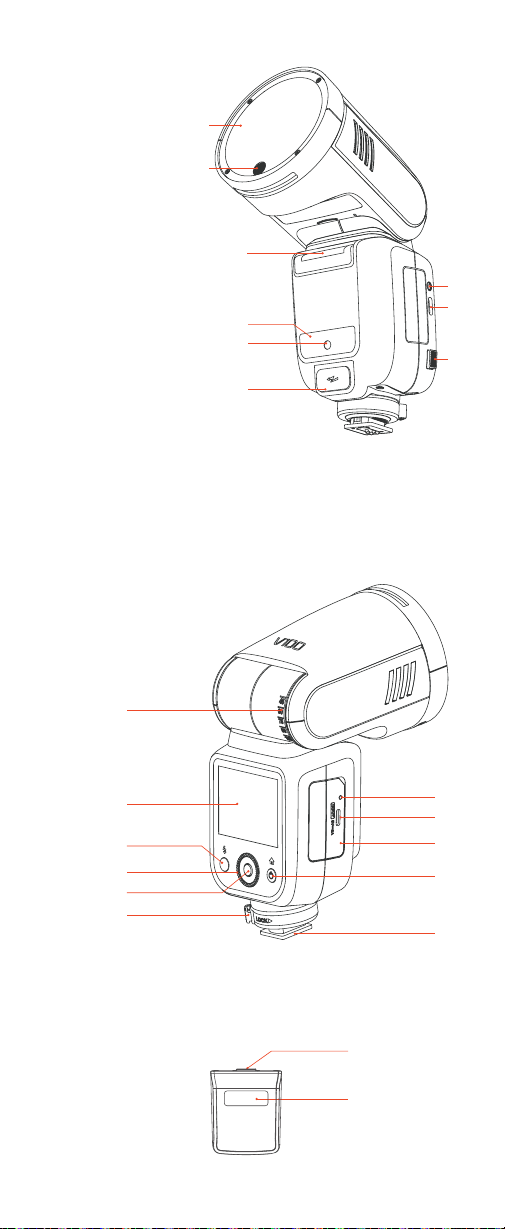
部件名称
物品清单
可选购附件
装卸电池
电池电量指示
安装闪光灯 / 拆卸闪光灯
安装 / 拆卸分体式副闪光灯 SU-1
电源管理
机顶模式
主控模式
从属模式
其他功能
无线设置
菜单设置
无线闪光拍摄 (2.4G 无线传输 )
无线主控 / 从属设置
关于主控单元
主控单位(闪光灯)闪光开 / 关 (仅 V100 C 具备此功能 )
TTL: 全自动无线闪光拍摄
M 手动闪光的无线 ( 多重闪光 ) 拍摄
频闪闪光的无线 ( 多重闪光 ) 拍摄
其他应用
机身
分体式副闪光灯 SU-1
2.3 寸触控彩屏
M:手动闪光模式
TTL:TTL 自动闪光模式
变焦 : 设置闪光灯覆盖范围
副灯:分体式副闪光灯 SU-1
组别
M 手动闪光—闪光功率
TTL 自动闪光—闪光曝光补偿量
全组参数统一调节
变焦 : 设置闪光灯覆盖范围
组别
TTL:TTL 自动闪光模式
M:手动闪光模式
闪光功率设置
变焦 : 设置闪光灯覆盖范围
同步方式
自动辅助对焦灯
光控引闪 (V100 O)
蜂鸣器设置
造型灯设置
屏幕锁定
频闪闪光
扫描空闲频道
频道设置
识别号设置
无线同步
同步插孔触发
01
02
04
05
06
06
07
07
08
08
09
10
12
13
14
17
18
19
20
20
20
21
23
23
24
目录

25
26
27
28
29
30
30
31
用相机菜单控制闪光灯 ( 仅 V100 C 具备此功能 )
全域快门同步拍摄(仅 V100 S 具备此功能)
保护功能
神牛 2.4G 无线漏闪原因及解决办法
规格参数
故障排除指南
固件升级
兼容相机列表
造型闪光
反射闪光
电池电量低警示

01
关于本手册
本手册操作说明假定相机和机顶闪光灯的电源开关已开启。
本手册中,
此图标所列事项是为避免产生拍摄问题,您需要注意的事
项,
此图标所列信息是文中某项功能的补充信息。

02
重要的安全说明及注意事项
本产品属于专业摄影设备,需要专业人员操作使用。
使用前必须拆除产品上的所有运输保护材料和包装。
使用时必须遵守以下基本安全预防措施:
使用本产品前,请仔细阅读并完全理解产品说明书,严格按照说明
书中的安全提示操作。否则,可能导致死亡、严重伤害、产品损坏
或其他财产损失的安全隐患。
本产品为专业灯具,儿童禁止使用。儿童接近时,成人必须密切监督,
防止儿童碰撞灯具或私自使用灯具,造成人身伤害。
本灯具并非普通灯具,不可用于普通照明,任何有过眼部损伤或眼
部敏感的人群均应避免使用本灯具或直视本灯具。
使用时必须小心,严禁接触如闪光管等高温部件,以避免烫伤。
任何情况下均禁止将闪光灯直接对准人眼(特别是婴儿眼睛),否
则短时间内可能导致视力损伤。如感到眼睛不适,应立即关闭灯具,
停止使用并及时就医。
严禁使用损坏的设备或配件,必须等待专业维修人员检查维修并确
认设备正常后,才可继续使用。
使用过程中,如果产品因跌落、挤压或强力冲击导致外壳破裂,应
立即停止使用,避免接触内部电子部件而触电受伤。
本设备不防水,请保持干燥,不能浸入水或其他液体;应安装在通
风干燥位置,避免在雨天、潮湿、多尘或过热环境中使用。不要在
设备上方放置物品,或让液体流入内部,防止发生危险。
未经授权,请不要自行拆卸本产品。产品若出现故障,必须由本公
司或授权维修人员检查和维修。
存放设备前,请确保设备已完全冷却。
请勿将设备放置在酒精、汽油等易燃挥发性溶剂或气体如甲烷、乙
烷等附近。
本设备禁止在有爆炸危险的环境中使用或存放。
运行期间和之后,设备灯头与用户和其他人员,以及热敏或可燃物
品之间,距离必须始终保持至少 1 米。
请勿使用未经本公司认可的配件,以免造成火灾、触电或人身伤害。
清洁设备时,请用干燥软布轻轻擦拭,不可使用湿布,否则可能会
损坏设备。
本使用说明基于严格测试制定,设计和规格变更恕不另行通知。您
可登录我们官方网站查看最新电子版使用说明,了解产品最新资讯。
产品使用锂电池供电。这类锂离子电池使用寿命有限,会逐渐失去
储电能力,这种能力下降不可逆。电池老化时,产品续航时间会减少。
锂离子电池使用寿命预计 2—3 年。请定期检查电池情况,如果充电
时间明显增加或续航时间明显减少,请考虑更换新电池。
产品配备锂电池,其储存建议如下: 储存前,将电池充放电至约
50% 电量;至少每 6 个月充电一次,至约 50% 电量; 可拆卸电池
应单独存放; 储存温度在 0° C 至 40° C 范围内。
使用锂电池的注意事项:
处理任何电池前,请确认并遵守当地相关法律法规。
不要拆卸、压碎或刺穿电池;
电池没有防水功能,不要把电池浸泡在雾、水中;
避免使电池触点短路;
电池不要靠近和放置于火中;
不要将电池暴露在 60° C 以上高温下;
将电池放在儿童接触不到的位置;
防止电池遭受过度冲击或振动;
不要使用已损坏的电池;
如果电池出现泄漏,请避免接触泄漏液体;
如果眼睛接触电池液体,立即用水冲洗至少 15 分钟,抬起眼睑直
到没有液体的迹象后及时就医。
●
●
●
●
●
●
●
●
●
●
1.
2.
3.
4.
5.
6.
7.
8.
9.
10.
11.
12.
13.
14.
15.
16.
17.
18.
19.
20.

03
本设备整机的保修期为一年。消耗品(如电池)、适配器、电源线
等配件不在保修范围内。
私自维修将取消保修资格,需支付维修费用。
请收到锂电池时及时检查电池状态、电量情况,如有任何质量问题
及时在保修期内联系神牛或神牛所授权的经销商。
不当操作导致故障不在保修范围。
21.
22.
23.
24.

04
前言
感谢您购买神牛产品。
触控屏圆头闪光灯— V100,以其卓越的兼容性,完美贴合 TTL 自动闪
光技术。采用此闪光灯,即便是面对光线环境的频繁变换,您也能享受
到前所未有的拍摄便利。此系列闪光灯具有以下核心特点 :
快速操控 :
2.3 英寸触控彩屏和物理按键双重操作选择 , 直观易用。
高速连拍 (V100 S):
与全域快门相机无缝协作 , 突破闪光同步速度限制。
圆头透镜设计:
圆头设计 , 提供均匀、柔和的补光效果。
强劲闪光性能:
100Ws 闪光功率 ,81 级功率调节 , 满足各种拍摄需求。
LED 造型灯 :
内置 LED 造型灯 , 亮度可调 , 方便预先观察光影效果。
高效电源 :
配备 7.2V / 2980mAh 锂电池 , 全功率闪光 400 次 , 回电速度
快 (1.7s)。
TTL 兼容 :
支持 TTL 自动闪光 , 简化操作流程。
无线功能 :
内置 2.4G 无线引闪 , 扩展拍摄可能性。
扩展配件 :
支持外接电源盒 (PB960, 需另购 ), 提升拍摄效率 ; 支持 SU-1
副闪光灯。
专业功能 :
支持手动闪光、频闪、高速同步、后帘同步、闪光曝光补偿等。
稳定输出 :
保证高速连拍时 , 闪光输出的色彩和亮度一致。
固件升级 :
定期更新固件 , 兼容最新的相机型号 , 确保最佳性能。
兼容性 :
V100 C 适用于佳能相机 ,V100 S 适用于索尼相机 ,V100 N 适用
于尼康相机,V100 O 适用于奥林巴斯/ 松下相机 ,V100 F 适用于富士相机。
注:闪光灯电源盒 PB960 需另购。
05
部件名称
机身
分体式副闪光灯 SU-1
7
2
14
1
17
16
11
15
8
9
10
12
13
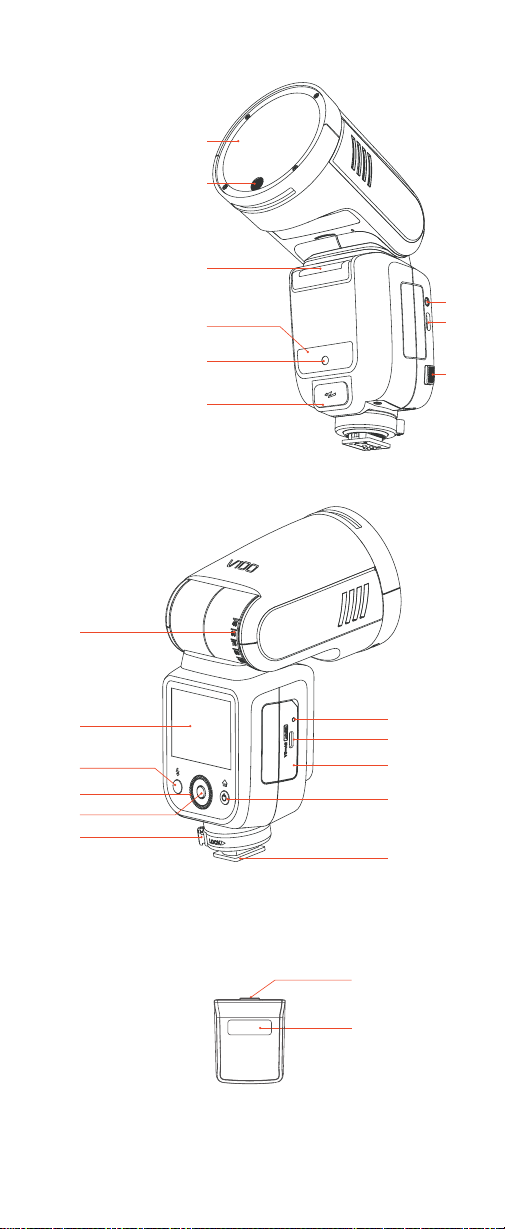
1. 灯管
2. 拆卸推制
1. 闪光灯头
2. LED 造型灯
3. 外置闪光灯接口
(可安装 SU-1 副灯等附件)
4. 无线传感器
5. 辅助对焦灯
6. 外接电源盒接口
(用于连接 PB960 电源盒 , 电源盒需另购 )
7. 反射角度刻度
8. 电池充电指示灯
(充电时指示灯变红,充满变绿)
9. USB Type-C 充电接口
(用于电池充电 )
10. 锂电池
11. 触控彩屏
12. 电源按键
(短按一次进入模式 / 返回模式界面,短按两
次 , 其他功能界面出现。)
13. 热靴
14. 固定热靴扣钮
15. 试闪按键 / 回电指示灯
16. 调节拨轮
17. 设置按键
(短按选中某项或确认某项 )
18. 同步插孔
19.USB-C 固件升级接口
(用于机器升级固件 )
20. 电池释放按钮
1
2
18
19
3
4
5
6
20
06
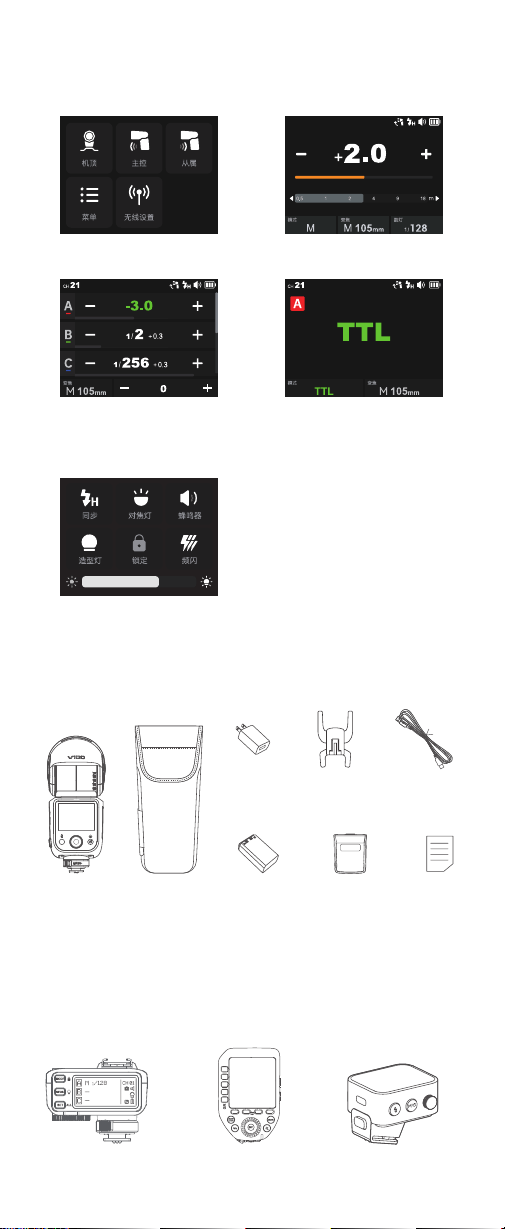
机顶模式
主控模式
( 展示界面为 V100 C 主控界面 , 其他型
号界面有所区别 )
(V100 O 无对焦辅助灯显示 )
2.3 寸触控彩屏
模式界面
从属模式
其他功能界面
物品清单
灯体
×1
分体式副闪光
灯 SU-1 ×1
USB Type-C
充电线 ×1
锂电池
×1
微型底座
×1
充电器
×1
收纳包
×1
说明书
×1
您可另购本公司以下摄影附件,以获得最佳的拍摄效果和使用体验。
可选购附件
引闪器 X2T 系列 引闪器 XProII 系列 引闪器 X3 系列
07
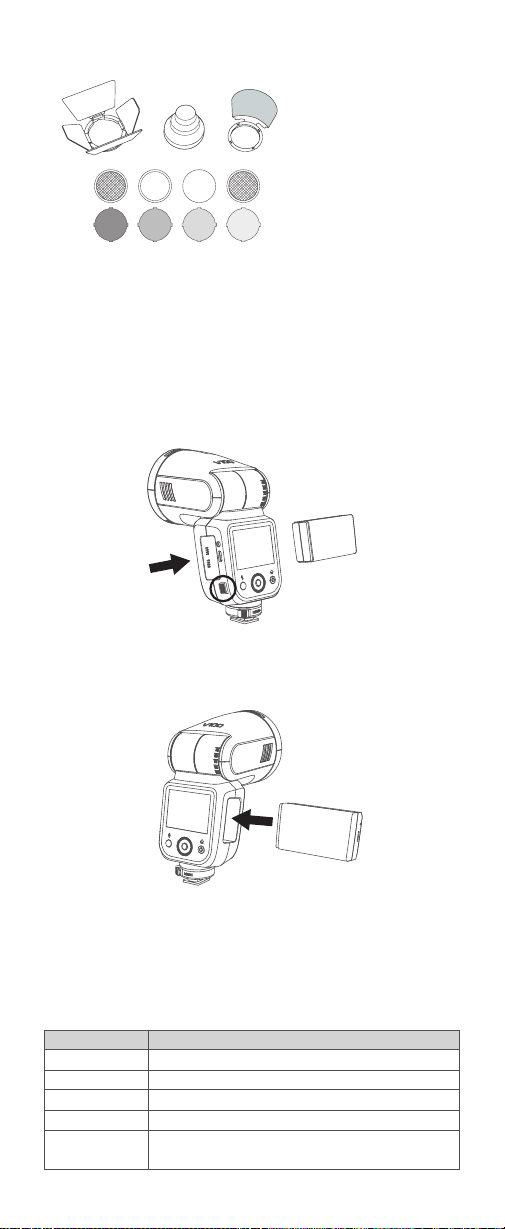
拆卸电池:
按住电池释放按钮 , 然后推出电池。
将锂电池正确安装在闪光灯上,即可给闪光灯供电。使用时请查看闪光
灯屏幕上电池图标,即可随时掌握电量状态。
电池电量显示
3格
2格
1格
无格
全屏显示低电符号
说明
满电
中电
低电
电量少,请及时充电
电量即将用尽,此状态不支持闪光灯工作。
注:此状态请尽快 (10 天内 ) 充电,才可使用或放置。
安装电池:
将电池依照电池仓内的指示方向插入。直至电池卡入到位。
装卸电池
电池电量指示
AK-R1 圆形灯头附件套装
注 : 根据所购闪光灯机型 , 购买对应的附件型号 , 请勿错误购买。
08
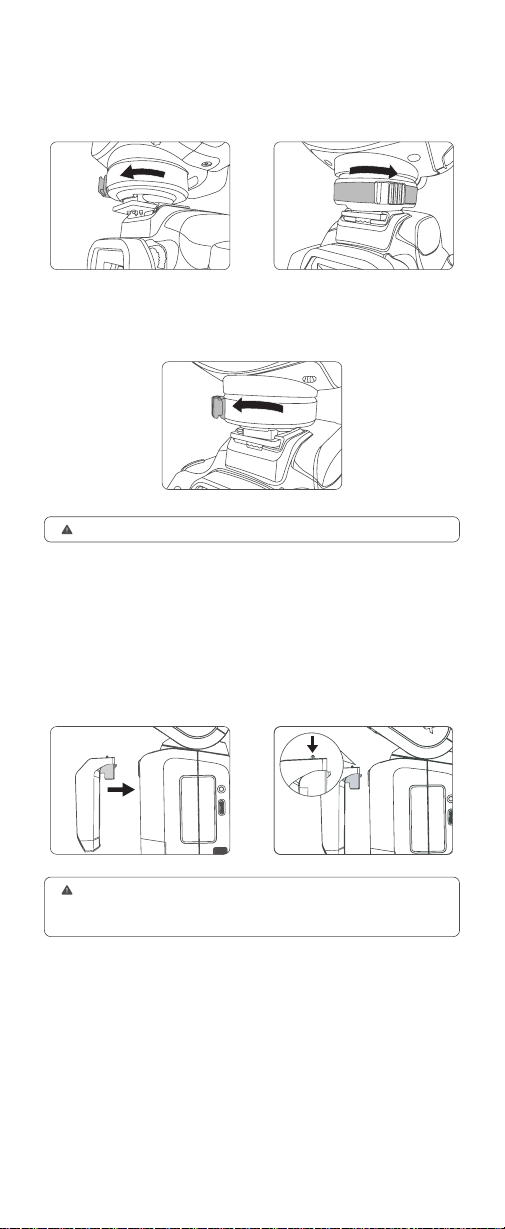
安装 :
按住固定热靴扣钮的同时旋转到左边 , 即可插入相机热靴,随即
转动闪光灯锁环到右边便可锁定热靴。
拆卸:
按住固定热靴扣钮的同时旋转到左边,即可解锁热靴,此时取下
闪光灯完成拆卸。
安装闪光灯 / 拆卸闪光灯
安装:
您只需将分体式副闪光灯
SU-1 对准机顶闪光灯 V100 外接
闪光灯接口平行卡入后下压,听
到“咔”一声即可安装完成。
请先关闭闪光灯 V100 的电源,再进行 SU-1 副闪光灯的安装和拆卸操作。
主灯电源开启或工作状态下切勿强行插入或拔出 SU-1 副闪光灯,以免造成
SU-1 的损坏。
拆卸:
您推动分体式副闪光灯拆
卸推制的同时,往上取出即可拆
卸完成。
安装 / 拆卸分体式副闪光灯 SU-1
请务必在安装和拆卸闪光灯时 , 关闭相机和闪光灯的电源 , 以防止损坏设备。

09
休眠 :
处于机顶模式 / 主控模式且开启待机后 , 若长时间无操作 ( 约 90 秒 ), 闪
光灯将自动休眠。可通过半按快门或触碰机身任意键唤醒。
开机:
长按电源按键直至屏幕出现
< SET > 图标,您可跟着箭头方向轻触
屏幕开机或顺时针拨动调节拨轮开机。
电源管理
注意:开机后若 15 秒内无操作 , 屏幕背光将
自动熄灭 , 轻触屏幕即可重新点亮。
自动关机 :
机顶 / 主控模式 :
待机关闭且自动关机功能开启。若超过 60 分钟 ( 可调
至 30 或 90 分钟 ) 无操作后 , 闪光灯自动关机。
从属模式 :
自动关机功能开启 , 若超过 60 分钟 ( 可调至 30 或 90 分钟 )
无操作后 , 闪光灯自动关机。离机使用时 , 支持手动关闭自动关机功能。
10
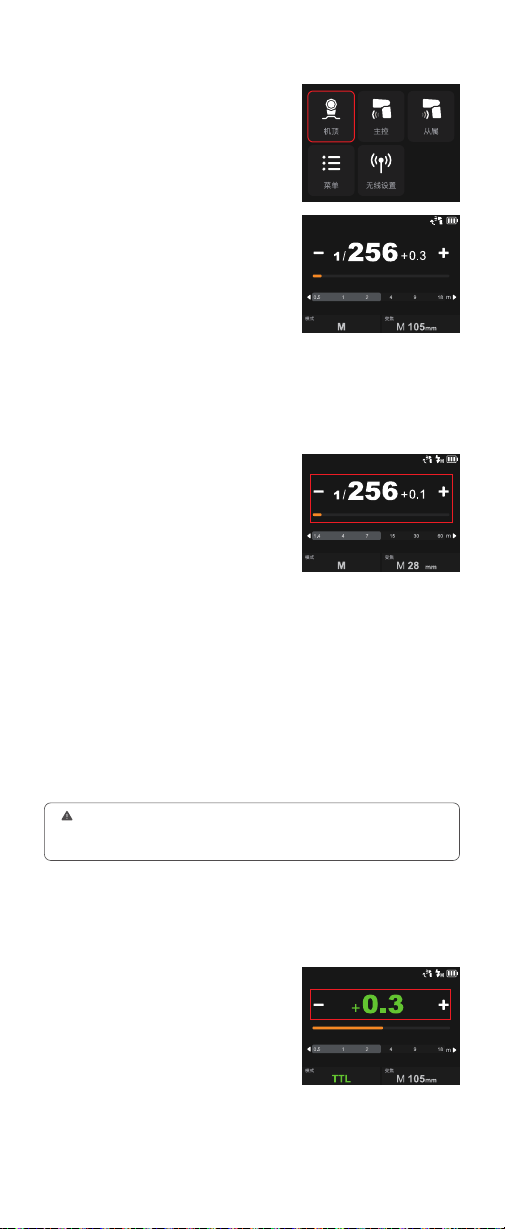
触控使用:
从屏幕左边往右滑动,屏
幕出现模式界面。轻触屏幕上“机顶”
图标,进入机顶模式主界面。
拨轮与按键使用:
短按电源按键,屏
幕出现模式界面。旋转调节拨轮选中
“机顶”图标,短按设置按键进入机顶
模式主界面。
机顶模式
您可以在 1/256~1/1 或 2.0~10 之间以 0.1 档或 0.3 档为增量设置闪光
输出。为获得正确的闪光曝光,请使用手持的闪光测光表确定所需的闪
光输出。
触控使用:
轻触模式图标可切换 M 模
式,您可点击屏幕的-图标或 + 图标,
进行 ±0.1 档或 ±0.3 档精确调节,或拉
动黄色进度条进行快速调节。
拨轮与按键使用:
旋转调节拨轮选中“模
式”图标,短按设置按键进入模式设置,
旋转调节拨轮选择 M 模式,选好短按
设置按键退出。旋转调节拨轮选中功率范围,短按设置按键进入功率范
围调节,旋转调节拨轮进行 ±0.1 档或 ±0.3 档精确调节,您也可快速转
动调节拨轮进行快调。
S1 光控单元设置:
在 M 手动闪光模式下,可以使用 S1 功能,闪光灯
可作为副灯使用,创造多种照明效果,适用于手动闪光环境。它会与主
闪光灯的第一次闪光同步触发闪光,效果与使用无线引闪器一致。
S2 光控单元设置:
在 M 手动闪光模式下,可以使用 S2 功能,闪光灯
可作为副灯使用,适用于 TTL 闪光环境;具有防预闪功能,使用带一次
预闪功能的相机能用光控实现同步拍摄。它会与主闪光灯的第二次闪光
同步触发闪光,即 2 次光控引闪。
M :手 动 闪 光 模 式
1. 只有在 M 模式下才支持 S1/S2 光控引闪。
2. 您可前往菜单设置,可切换 S1 光控或 S2 光控或关闭此功能。
3. 当您使用的是 V100 O 机型 , 可在其他功能界面找到光控引闪 , 可开启或关闭。
在 TTL 模式下,相机的测光系统会侦查从主体反射回来的闪光照明,从
而自动调节闪光输出量,使主体和背景得到均衡曝光。
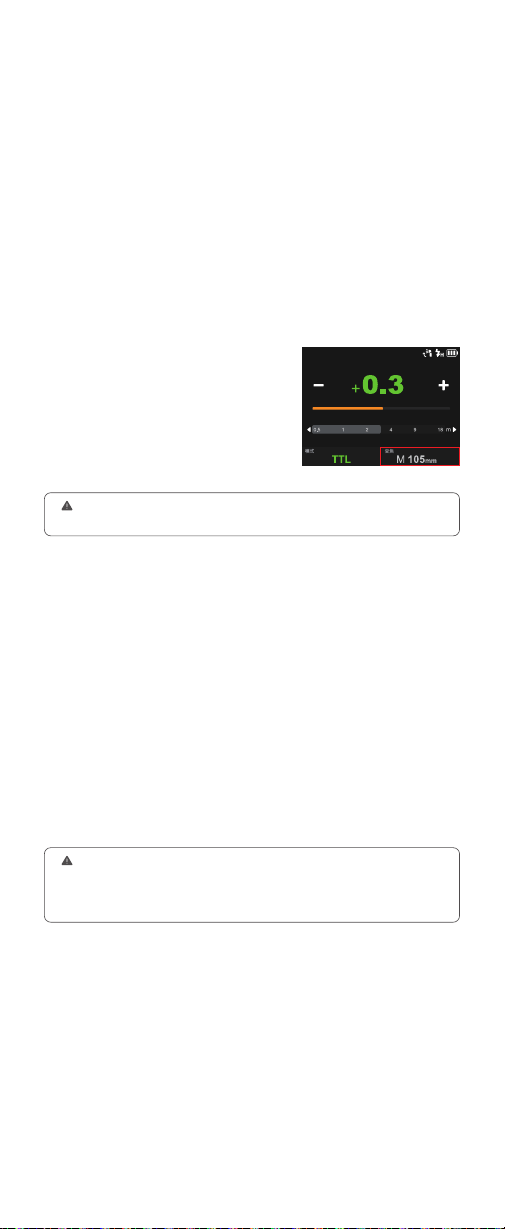
触控使用:
轻触模式图标可切换 TTL
模式,您可点击屏幕的-图标或 + 图
标,在 ±3 档间进行 ±1/3 精确调节闪
光曝光补偿量,或拉动黄色进度条进
行快速调节闪光曝光补偿量。
拨轮与按键使用:
旋转调节拨轮选中“模
式”图标,短按设置按键进入模式设置,
TTL:TTL 自动闪光模式
旋转调节拨轮选择 TTL 模式,选好短按设置按键退出。旋转调节拨轮选
中闪光曝光补偿量范围,短按设置按键进入闪光曝光补偿量调节,旋转
调节拨轮在 ±3 档间进行 ±1/3 精确调节,您也可快速转动调节拨轮进行
快调。
11
半按相机快门按钮进行对焦,有效闪光范围将会显示在显示屏上。
在快门释放前的瞬间进行一次预闪,闪光灯接收相机信息进行主闪光。
●
●
该闪光灯有两种变焦方式:自动变焦和手动变焦。自动变焦时,焦距会
随相机变焦镜头的改变而变化,以提供最佳闪光效果。
自动变焦:
A-mm,此状态下,闪光灯将自动设置闪光覆盖范围。
手动变焦:
28mm-105mm(V100 C/V100 S/V100 N)
28mm-105mm 或 14-52mm(V100 O)
28mm-105mm 或 18-69mm(V100 F)
变焦 : 设置闪光灯覆盖范围。
触控使用:
轻触“变焦”图标进入变焦
设置界面 , 您可轻触屏幕选择自动变焦
A--mm 或手动变焦。
拨轮与按键使用:
旋转调节拨轮选中
“变焦”图标 , 短按设置按键进入变焦设
置 , 旋转调节拨轮选择自动变焦或所需
焦距 , 选好短按设置按键退出。
如果手动设置闪光覆盖范围,确保其覆盖镜头焦距,这样照片就不会出现阴
影边缘。
使用分体式副闪光灯 SU-1,可以在 M 档手动闪光输出 /TTL 自动闪光
输出时,给予物体更好的补光效果,此功能常用于人像拍摄。
使用步骤:
您只需将分体式副闪光灯 SU-1 对准机顶闪光灯 V100 外接
闪光灯接口平行卡入,听到“咔”一声即可安装完成。
分体式副闪光灯 SU-1 闪光功率范围:
1/128-1/1 或 3.0~10,共 8 档,
每档以+ 1/3 档为增量调节。
触控使用:
轻触“副灯”图标进入副灯设置界面 , 您可轻触“-”或“+”图标
调节功率 , 也可以拉动进度条快速调节功率。您还可轻触界面下面开关
按钮 , 开启或关闭副灯。
拨轮与按键使用:
旋转调节拨轮选中“副灯”图标,短按设置按键进入副
灯设置,旋转调节拨轮选择所需闪光功率 / 关闭 (OFF),选好短按设置
按键退出。
副灯:分体式副闪光灯 SU-1
1. 安装或拆卸前 , 务必关闭闪光灯电源。
2. 处于主控或从属模式时不能使用外接闪光灯 SU-1。
3. 闪光灯灯头需抬起,外置闪光灯方可正常使用。
4. 外挂闪光灯不支持高速闪光。
12
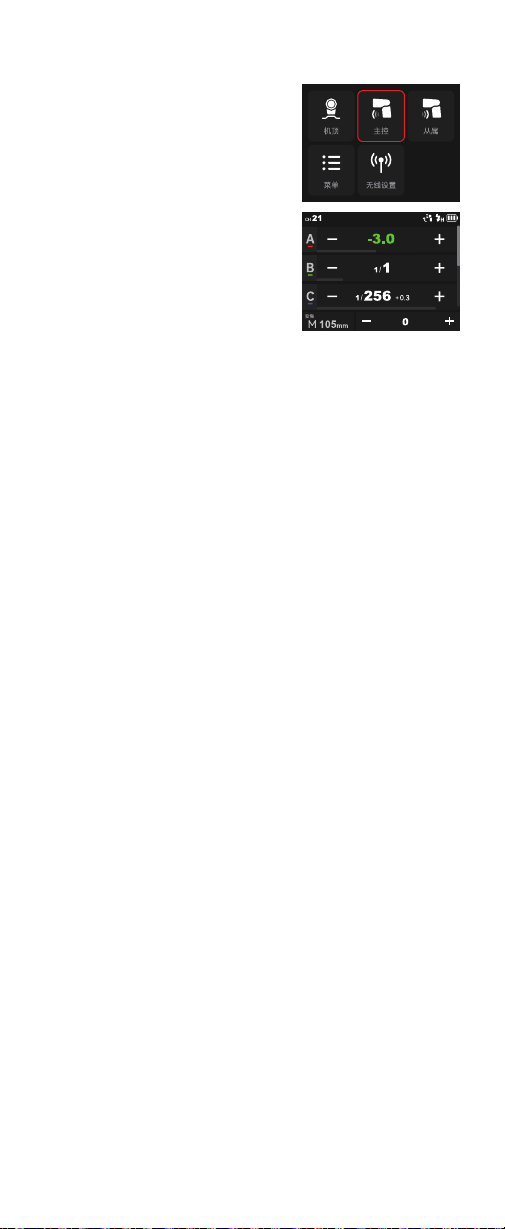
触控使用:
从屏幕左边往右滑动,屏
幕出现模式界面。轻触屏幕上“主控”
图标,进入主控模式主界面,往下滑
动可查看更多组别。
拨轮与按键使用:
短按电源按键,屏
幕出现模式界面。旋转调节拨轮选中“主
控”图标,短按设置按键进入主控模式
主界面,旋转调节拨轮可查看更多组
别。
主控模式
当处于主控模式时,无线默认开启。
五组组别:
A 组、B 组、C 组、D 组、E 组 (V100 C)。
M 组、A 组、B 组、C 组、D 组 (V100 S、V100 N、V100 O、V100 F)。
触控使用:
长按组框切换 M 手动闪光 /TTL 自动闪光 /OFF,此组框值
若在 1/256-1/1 或 2.0~10 之间,当前组为 M 档手动闪光模式,此值为
闪光功率值。您可轻触-图标或 + 图标调节闪光功率,或拉动组框底部
进度条快速调节闪光功率。
拨轮与按键使用:
旋转调节拨轮选中某组组别,短按设置按键进入设
置,长按设置按键切换 M 手动闪光或 TTL 自动闪光 /OFF,此组框值若
在 1/256-1/1 或 2.0~10 之间,当前组为 M 档手动闪光模式,此值为闪
光功率值。旋转调节拨轮可选择功率,设置完毕短按设置按键退出。
触控使用:
您可轻触 - 图标或 + 图标统一调节闪光功率或闪光曝光补偿
量。
拨轮与按键使用:
旋转调节拨轮选中组框,短按设置按键进入统一调节
设置,旋转调节拨轮统一调节闪光功率或闪光曝光补偿量。设置完毕短
按设置按键退出。
触控使用:
长按组框切换 M 手动闪光 /TTL 自动闪光 /OFF,此组框值
若在 -3.0~+3.0 间,当前组为 TTL 自动闪光模式,此值为闪光曝光补偿
量。您可轻触-图标或 + 图标调节闪光曝光补偿量,或拉动组框底部进
度条快速调节闪光曝光补偿量。
拨轮与按键使用:
旋转调节拨轮选中组框,短按设置按键进入设置,
长按设置按键切换 M 手动闪光或 TTL 自动闪光 /OFF,此组框值若
在 -3.0~+3.0 间,当前组为 TTL 自动闪光模式,此值为闪光曝光补偿量。
旋转调节拨轮选择闪光曝光补偿量,设置完毕短按设置按键退出。
您可选自动变焦和手动变焦 28mm-105mm(更多关于变焦的详细介绍
可查看机顶模式中的变焦设置)。
组别:
M 手动闪光 - 闪光功率
全组参数统一调节
TTL 自动闪光 - 闪光曝光补偿量
变焦 : 设置闪光灯覆盖范围
13
触控使用:
从屏幕左边往右滑动,屏
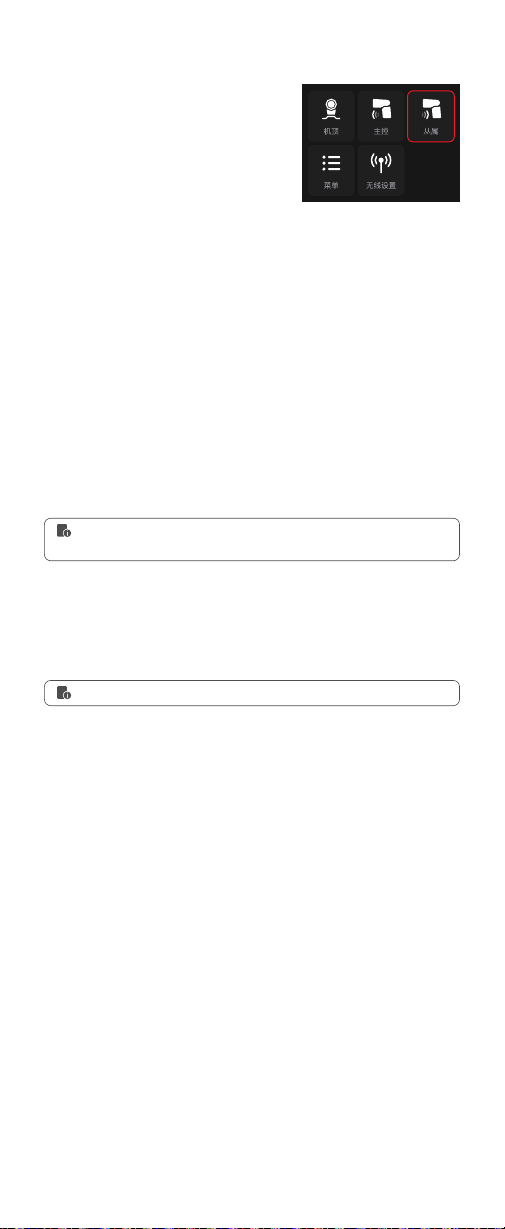
幕出现模式界面。轻触屏幕上“从属”
图标,进入从属模式主界面。
拨轮与按键使用:
短按电源按键,屏
幕出现模式界面。旋转调节拨轮选中“从
属”图标,短按设置按键进入从属模式
主界面。
当处于从属模式时,无线默认开启。
从属模式
当前从属模式组别,可选范围:A、B、C、D、E。
触控使用:
轻触模式图标可切换 TTL 模式。
拨轮与按键使用:
旋转调节拨轮选中“模式”图标,短按设置按键进入模
式设置,旋转调节拨轮选择 TTL 模式,选好短按设置按键退出。
触控使用:
轻触屏幕的组别图标进入组别设置界面 , 轻触所需组别即可
切换。
拨轮与按键使用:
旋转调节拨轮选中组别图标,短按设置按键进入组别
设置,旋转调节拨轮可切换组别,设置完毕短按设置按键退出。
组别
TTL:TTL 自动闪光模式
更多 TTL 自动闪光相关内容可参考机顶模式主界面→ TTL 自动闪光模式章
节。
触控使用:轻触模式图标可切换 M 模式。
拨轮与按键使用:旋转调节拨轮选中“模式”图标,短按设置按键进入模
式设置,旋转调节拨轮选择 M 模式,选好短按设置按键退出。
当模式选择 M 手动闪光,组框参数可设置,调节范围:1/256-1/1 或
2.0~10。
触控使用:
您可轻触-图标或 + 图标调节闪光功率,或拉动组框底部进
度条快速调节闪光功率。
拨轮与按键使用:
旋转调节拨轮选中功率框,短按设置按键进入功率调
节设置,旋转调节拨轮选择功率,设置完毕短按设置按键退出。
M :手 动 闪 光 模 式
闪光功率设置
更多 M 手动闪光相关内容可参考机顶模式主界面→ M 手动闪光模式章节。
您可选自动变焦和手动变焦 28mm-105mm(更多关于变焦的详细介绍
可查看机顶模式中的变焦设置)。
变焦 : 设置闪光灯覆盖范围
14
处于机顶 / 主控 / 从属模式界面时 , 从
屏幕顶部往下滑动 , 其他功能出现 , 设
置完毕 , 从下往上滑动返回上一级。
处于机顶 / 主控 / 从属模式界面时 , 短
按两次电源按键 , 其他功能出现 , 设置
完毕 , 短按电源按键返回上一级。
其他功能
使用高速同步 (FP 闪光 ),您可以在任意快门速度下同步使用闪光灯。
高速同步闪光在使用光圈优先对人像进行填充时,闪光时特别方便。
使用慢速快门和后帘同步,您可以在被摄体后创建一条光线轨迹,在快
门关闭前的瞬间闪光。
注意事项 : 当你使用 V100 N 闪光灯且连接尼康相机 , 尼康相机快门设为高速快门时 ,
闪光灯自动开启高速同步 , 当快门转为低速时 , 闪光灯自动关闭高速同步。
在低亮度或低对比度的拍摄情况下,闪光灯内置的自动对焦辅助灯将开
启,使自动对焦更容易。当对焦困难时,红色辅助对焦灯亮起;当对焦
准确,辅助对焦灯自动熄灭。
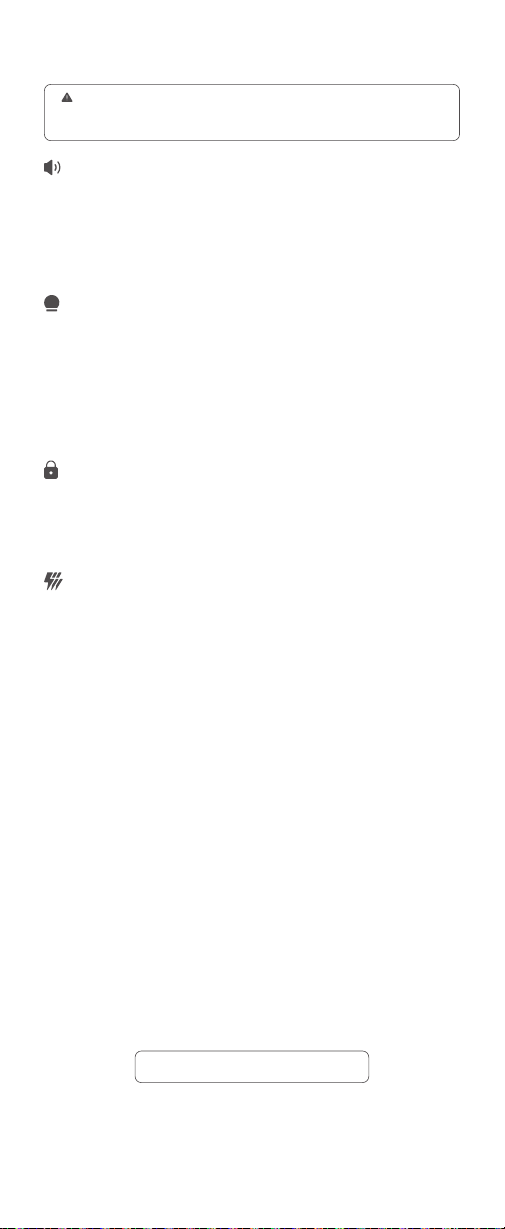
触控使用 : 轻触“光控”图标切换 OFF/S1/S2。
拨轮与按键使用 : 旋转调节波轮选“光控”图标 , 短按设置按键切换 OFF/
S1/S2。
位置
中央
边缘
有效范围
0.6~10 米 / 2.0~32.8 英尺
0.6~5 米 / 2.0~16.4 英尺
触控使用:
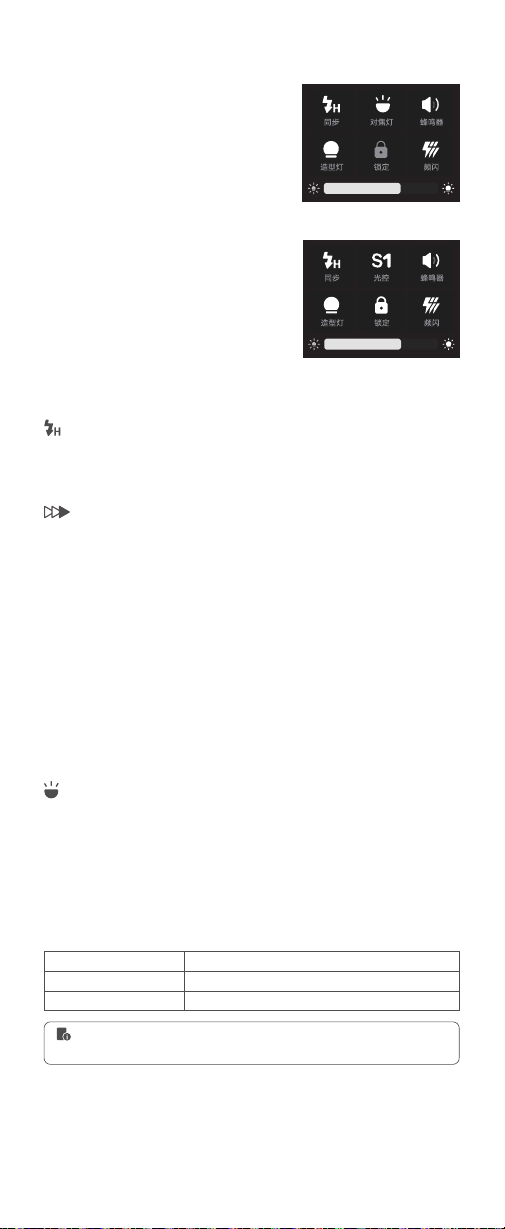
轻触屏幕的“同步”图标可切换同步方式 (V100 C)。当机型为
V100 S 或 V100 O 或 V100 F 或机型为 V100N 但不连接尼康相机时 , 轻
触屏幕“同步”仅开启或关闭高速同步 , 后帘同步需在相机上设置。
拨轮与按键使用:
旋转调节拨轮选中“同步”图标,短按设置按键切换
同步方式 (V100 C)。当机型为 V100 S 或 V100 O 或 V100 F 或机型为
V100N 但不连接尼康相机时 , 短按设置按键仅开启或关闭高速同步 , 后
帘同步需在相机上设置。
触控使用:
轻触屏幕的“对焦灯”图标可开启或关闭。
拨轮与按键使用:
旋转调节拨轮选中“对焦灯”图标,短按设置按键可开
启或关闭。
同步方式
自动辅助对焦灯 (V100 O 无此功能 )
光控引闪 (V100 O)
高速同步
后帘同步
用户在使用时,如发现辅助对焦灯未亮起,是因为相机已经处于准确对焦状
态。
(V100 C/S/N/F 界面 )
(V100 O 界面 )
15
开启蜂鸣器时,闪光会发出提示音。
触控使用:
轻触屏幕的“蜂鸣器”图标可开启或关闭。
拨轮与按键使用:
旋转调节拨轮选中“蜂鸣器”图标,短按设置按键可开
启或关闭。
蜂鸣器设置
当你使用机型为 V100 O 时 , 此界面可开启或关闭光控引闪 , 其他机型光控
引闪需在菜单开启或关闭。更多关于光控引闪内容可参考说明书机顶模式 M
档手动模式章节。
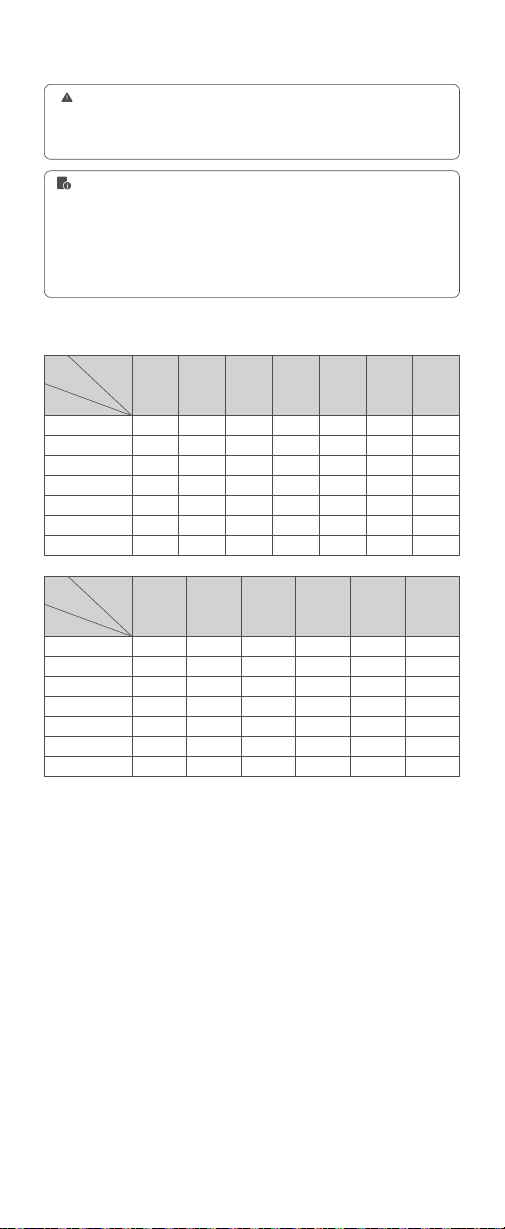
以慢速快门使用频闪闪光时,可以在一张照片上拍摄出多个连贯的动作。
您可以设置闪光频率 ( 每秒闪光次数,以 Hz 表示 )、闪光次数和闪光输
出。
闪光功率范围:1/256-1/4 或 2.0~8.0
闪光次数:1-100
闪光频率:1-100
变焦调节范围:自动变焦或手动变焦
频闪闪光
频闪闪光停止之前,快门应保持开启状态。使用下面公式计算快门速度,
然后用相机进行设置。
例如,如果闪光次数设为 10( 次)且闪光频率设为 5(Hz),需将快门速度设为 2 秒或
更长。
闪光次数 ÷ 闪光频率=快门速度
触控使用 :
轻触屏幕的“频闪”图标可开启或关闭。开启后,从屏幕下方
往上滑动,频闪闪光设置界面出现。滑动闪光次数值选择次数,滑动赫
兹选择闪光频率,轻触-图标或 + 图标调整闪光功率。变焦设置 : 轻触
界面变焦图标进入设置界面 , 轻触选择自动变焦或所需焦距 , 设置完毕 ,
轻触返回图标返回频闪界面。
拨轮与按键使用:
旋转调节拨轮选中“频闪”图标,短按设置按键可开启
或关闭。开启后,短按电源按键,频闪闪光设置界面出现。旋转调节拨
轮可选闪光功率 / 闪光次数 / 闪光频率 / 变焦,选中某项后,短按设置
按键进入闪光功率 / 闪光次数 / 闪光频率 / 变焦设置,旋转调节拨轮设
置闪光功率 / 闪光次数 / 闪光频率 / 变焦,设置完毕短按设置按键退出。
使用频闪闪光,如何确定快门速度
触控使用:
轻触屏幕“锁定”图标可开启锁定屏幕功能 , 长按屏幕 2s 解锁。
拨轮与按键使用:
旋转调节拨轮选中“锁定”图标 , 短按设置按键可开启
锁定屏幕功能 , 长按设置按键 2s 解锁。
屏幕锁定
触控使用:
轻触屏幕的“造型灯”图标可开启或关闭。造型灯开启时,可
滑动下方的进度条进行 1-10 档位调节。
拨轮与按键使用:
旋转调节拨轮选中“造型灯”图标,短按设置按键可开
启或关闭。造型灯开启时,可旋转调节拨轮选中下方的进度条,短按设
置按键进入亮度调节,旋转调节拨轮进行 1-10 档位调节,设置完毕短
按设置按键退出。
造型灯设置
16
为防止闪光灯头过热导致损坏,请勿执行连续 10 次以上的频闪闪光。频闪
闪光 10 次后,请让闪光灯至少冷却 15 分钟。如果您执行连续 10 次以上的
频闪闪光连拍,为防止闪光灯头过热,闪光可能自动停止。如果发生了这种
情况,请让闪光灯至少冷却 15 分钟。
1. 反光很强的被摄体在暗背景前使用频闪闪光更加有效。
2. 推荐使用三脚架和 TTL 引闪器 XPROII。
3. 无法设置 1/1 和 1/2 闪光输出。
4. 即使相机拍摄模式设置为 B 门拍摄(buLb),也可以进行频闪闪光。
5. 频闪闪光模式无法设置高速同步。
6. 不使用频闪闪光时,请关闭频闪闪光,否则设置不了 TTL 闪光或 M 手动
闪光。
1
8
14
30
60
90
100
100
2
6
14
30
60
90
100
100
3
4
12
30
60
90
100
100
4
3
10
20
50
80
100
100
5
3
8
20
50
80
100
100
6-7
2
6
20
40
70
90
90
8-9
2
5
10
30
60
80
80
最大连续闪光次数
1/4
1/8
1/16
1/32
1/64
1/128
1/256
闪光频率
(Hz)
闪光功率
闪光
次数
1/4
1/8
1/16
1/32
1/64
1/128
1/256
闪光频率
(Hz)
闪光功率
闪光
次数
11
2
4
8
20
40
70
70
10
2
4
10
20
50
70
70
12-14
2
4
8
20
40
60
60
15-19
2
4
8
18
35
50
50
20-50
2
4
8
16
30
40
40
60-100
2
4
8
12
20
40
40
17
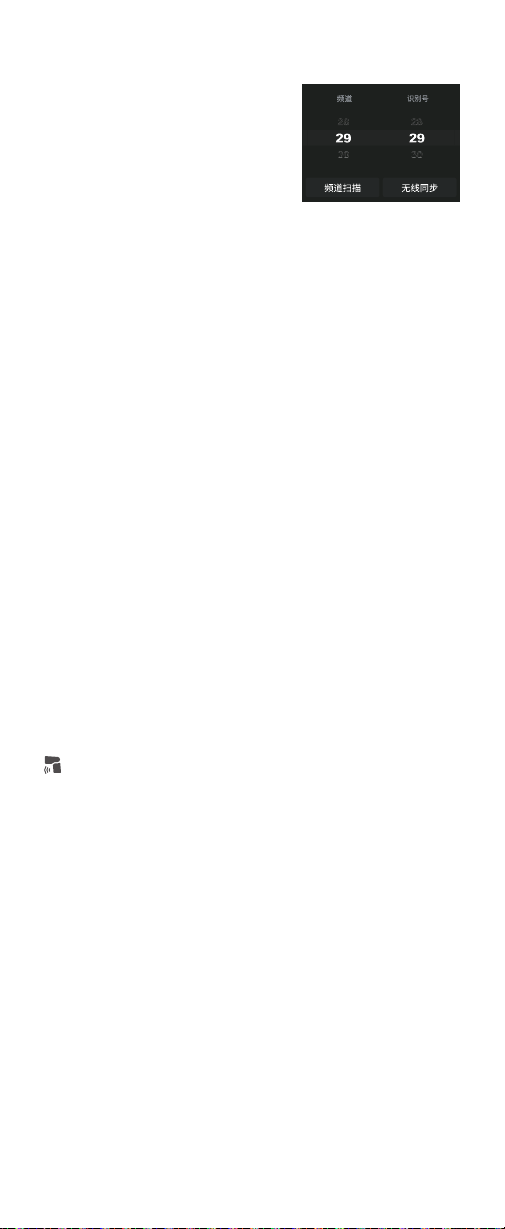
为了避免其他人使用同样频道受到干扰,可以使用频道扫描功能。
如果在拍摄现场不止一个无线闪光系统,您可以通过更改无线频道来防
止信号干扰,但需保证主控单元和从属单元设置为相同频道。调节范围:
范围为 01-32。
触控使用:
轻触屏幕上“频道扫描”图标后开始扫描,不一会界面出现 8
组空闲频道,此时轻触您想要的频道,频道自动设置完毕。
拨轮与按键使用:
旋转调节拨轮选中“频道扫描”图标,短按设置按键开
始扫描,不一会界面出现 8 组空闲频道,此刻旋转调节拨轮选中您想要
的频道,短按设置按键,频道自动设置。
触控使用:
滑动频道框,选择您所需的频道。
拨轮与按键使用:
旋转调节拨轮选中频道范围,短按设置按键进入频道
设置,旋转调节拨轮选中频道,设置完毕短按设置按键退出。
扫描空闲频道
频道设置
触控使用:
从屏幕左边往右滑动,屏
幕出现模式界面。轻触屏幕上“无线设置”
图标,进入无线设置界面。设置完毕,
从屏幕左边往右滑动返回模式界面。
拨轮与按键使用:
短按电源按键,屏
幕出现模式界面。旋转调节拨轮选中“无
线设置”图标,短按设置按键进入无线
无线设置
为了避免信号干扰,除了改变无线通讯频道还可以通过改变无线 ID 来
防止干扰;主控单元和从控单元设为相同的频道和无线 ID 即可。调节
范围为 OFF/01-99。
识别号设置
无线同步协助发射器与接收器,快速设置相同的频道与识别号。
触控使用:
滑动频道框,选择您所需的识别号或关闭识别号。
拨轮与按键使用:
旋转调节拨轮选中识别号范围,短按设置按键进入识
别号设置,旋转调节拨轮选中识别号,设置完毕短按设置按键退出。
无线同步
前提:
前提:
触控使用:
轻触 V100 上的无线同步,轻触复古闪光灯 LUX MASTER 上
的无线同步即可无线同步。
拨轮与按键使用:
旋转调节拨轮选中 V100 上的无线同步,短按设置按
键进行无线同步,旋转调节拨盘选中复古闪光灯 LUX MASTER 上的无
线同步,短按 SET 按键即可无线同步。
无线同步接收器:
无线同步发射器:
1. 设置机器 V100 为主控模式,主界面上主控图标呈黄色。
2. 接收器假定为复古闪光灯 LUX MASTER。
1. 设置机器 V100 为从属模式,主界面上从属图标呈黄色。
2. 发射器假定为引闪器 X3。
触控使用:
轻触 V100 上的无线同步,轻触引闪器 X3 上的无线同步即
可无线同步。
拨轮与按键使用:
旋转调节拨轮选中 V100 上的无线同步,短按设置按
键进行无线同步,旋转调节旋钮选中引闪器 X3 的无线同步,短按调节
旋钮即可无线同步。
V100 无线同步 :
当主控单元和从属单元均为 V100 时 , 也能实现无线同
步。
设置界面。设置完毕,短按电源按键返回模式界面。
18
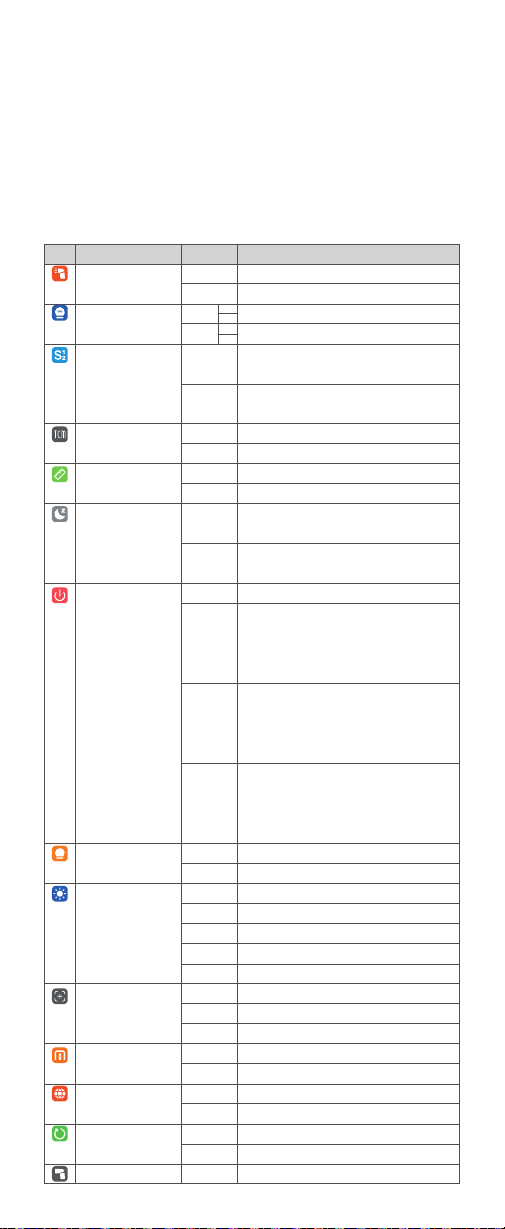
因不同机型的菜单顺序有所区别 , 具体菜单排序以实物显示为准 , 以下
仅说明菜单功能。
触控使用:
从屏幕左边往右滑动,屏幕出现模式界面。轻触屏幕上“菜单”
图标,进入菜单界面。设置完毕,从屏幕左边往右滑动返回模式界面。
拨轮与按键使用:
短按电源按键,屏幕出现模式界面。旋转调节拨轮选
中“菜单”图标,短按设置按键进入菜单界面。设置完毕,短按电源按键
返回模式界面。
菜单设置
图标
功能
主控闪光
( 仅 V100 C 具备此功能 )
功率显示
光控引闪
(V100 O 可前往其他功能
界面设置 )
TCM
距离单位
待机
自动关机
造型灯
屏幕设置
变焦
新协议
( 仅 V100 S 具备此功能 )
语言 /Language
恢复出厂
设备信息
选项
关闭
开启
1/256
2.0
S1
S2
开启
关闭
m
ft
开
关
关
30 分钟
60 分钟
90 分钟
持续
闪灭
无
30 秒钟
1 分钟
2 分钟
3 分钟
4/3
APS
135
开启
关闭
中文
English
否
是
无
0.1
0.3
0.1
0.3
备注
主控单元闪光灯闪光关闭
主控单元闪光灯闪光开启
最小功率档位显示为 1/256、可选 0.1 档或0.3 档为增量。
最小功率档位显示为 2.0、可选 0.1 档或 0.3 档为增量。
支持在 M 手动闪光模式下使用,它会与主闪光
灯的第一次闪光同步触发闪光
支持在 M 手动闪光模式下使用,它会与主闪光
灯的第二次闪光同步触发闪光
可将 TTL 模式的闪光值转换为 M 模式功率值
此功能不生效
米
英尺
开启后 , 超过规定时间 ( 约 90 秒 ) 无人操作 ,
闪光灯会自动休眠
关闭后 , 超过规定时间 ( 约 90 秒 ) 无人操作 ,
闪光灯不会自动休眠
关闭自动关机功能
1. 待机关闭 , 处于机顶或主控模式 , 超过 30 分
钟无人操作自动关机。
2. 处于从属模式 , 超过 30 分钟无人操作自动关
机。
1. 待机关闭 , 处于机顶或主控模式 , 超过 60 分
钟无人操作自动关机。
2. 处于从属模式 , 超过 60 分钟无人操作自动关
机。
1. 待机关闭 , 处于机顶或主控模式 , 超过 90 分
钟无人操作自动关机。
2. 处于从属模式 , 超过 90 分钟无人操作自动关
机。
造型灯在闪光灯闪光时,持续点亮
造型灯在闪光灯闪光时,自动灭
屏幕亮度无极调节
超过 30 秒无人操作屏幕待机
超过 1 分钟无人操作屏幕待机
超过 2 分钟无人操作屏幕待机
超过 3 分钟无人操作屏幕待机
4/3 系统 ( 仅 V100 O 具备 )
APS 系统 ( 仅 V100 F 具备 )
135 系统 (V100 C/V100 S/V100 N 默认此系统 )
此协议默认开启
相机与闪光灯出现不兼容情况时 , 关闭此项。
机器语言为中文
机器语言为英文
取消恢复出厂设置操作
恢复出厂设置
此界面显示机器型号及其固件版本号
19
1. 开始拍摄前请进行测试闪光和试拍。
2. 受从属单元的位置、周围环境、天气状况等影响,传输距离可能更短。
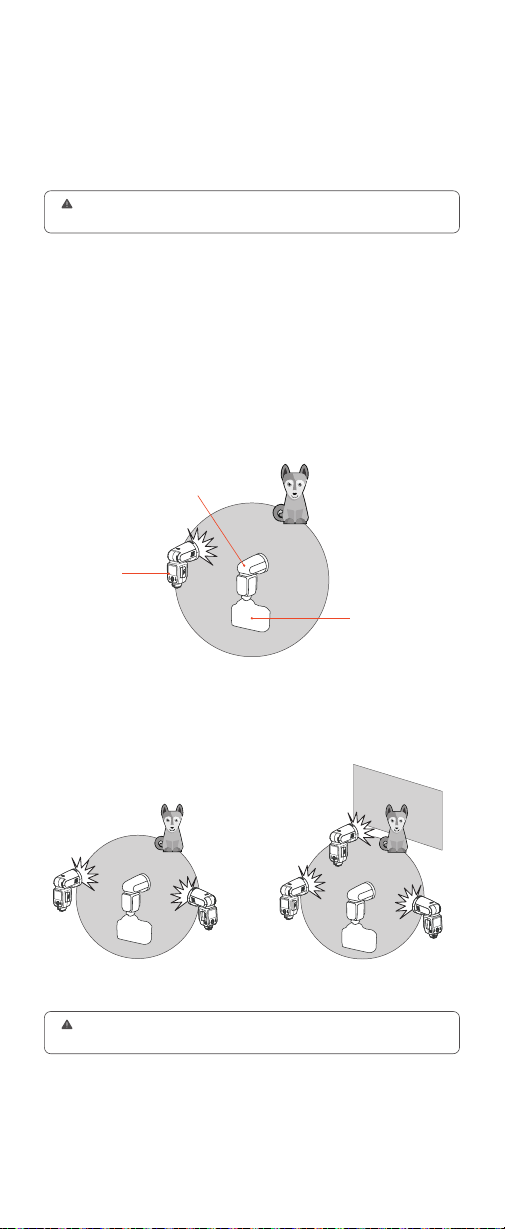
定位和操作范围
使用 1 个从属单元自动闪光
使用多个从属单元自动闪光
您可以使用两个从属单元或三个从属单元进行 TTL 自动闪光拍摄
并且可以改变闪光光比。
(2 组:A、B)
A
A
B
B
C
(3 组:A、B、C)
●
●
传输距离约 100 米
主控单元
从属单元
当相机的拍摄模式设为全自动模式或程序影像控制区模式时,无法利用本章
中的操作。您需将相机的拍摄模式设为 Fv/P/Tv/Av/M/B门 ( 创意拍摄区模式 )。
使用具有无线电传输无线闪光摄影的闪光灯,利用无线多重闪光进行拍
摄跟通常 TTL 自动闪光拍摄一样简单。
只要主控单元和从属单元设置的频道、组别、ID 保持一致,V100( 主控
单元 ) 上的设置会自动应用到无线受控的 V100( 从属单元 )。因此在拍
摄期间不需要操作接收单元。
本章介绍使用发射器与接收器的无线电传输无线闪光摄影
本章将安装在相机上的 V100 称为“主控单元”,受无线控制的 V100 称
为从属单元。
此外,您还可以另购 TTL 引闪器 XPROII 无线控制设为从属单元的
V100,具体关于引闪器的详细说明,请参考另购的引闪器说明书。
无线闪光拍摄 (2.4G 无线传输 )
20
TTL
TTL
手动闪光
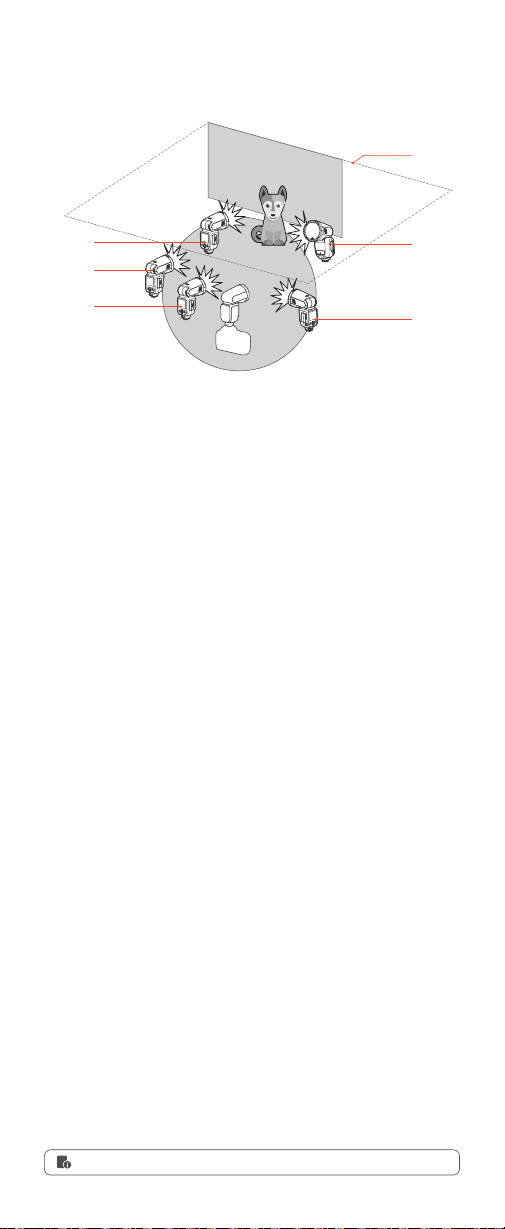
为各组设定不同的闪光模式进行拍摄
A
●
手动闪光
手动闪光
B
C
D
E
天花板
触控设置:
从屏幕左边往右滑动 , 屏幕出现模式界面选项。轻触主控图
标设置为主控单元,设置完毕,从屏幕左边往右滑动返回上一级。
拨轮与按键设置:
短按电源按键 , 屏幕出现模式界面选项。旋转调节拨
轮选中主控图标,短按设置按键设置为主控单元,设置完毕,短按电源
按键返回上一级。
您可以使用两个或两个以上主控单元,通过准备多台装有主控单元的相
机,可以在保持相同照明 ( 从属单元 ) 期间更换相机进行拍摄。
触控使用:
从屏幕左边往右滑动,屏幕出现模式界面选项。轻触从属图
标设置为从属单元,设置完毕,从屏幕左边往右滑动返回上一级。
拨轮与按键使用:
短按电源按键,屏幕出现模式界面选项。旋转调节拨
轮选中从属图标,短按设置按键设置为从属单元,设置完毕,短按电源
按键返回上一级。
设置为主控单元
设置为从属单元
无线主控 / 从属设置
关于主控单元
您可以设置主控单元闪光灯是否闪光,当主控单元闪光灯闪光设置开启
时,主控单元闪光灯作为闪光 A 组进行闪光。
触控使用:
从屏幕左边往右滑动,屏幕出现模式界面选项。轻触屏幕上
“菜单”图标,进入菜单设置界面。滑动屏幕找到主控闪光图标,轻触主
控闪光图标→轻触关闭或开启。
拨轮与按键使用:
短按电源按键,屏幕出现模式界面选项。旋转调节拨
轮选中“菜单”图标,短按设置按键进入菜单设置界面。旋转调节拨轮选
中主控闪光,短按设置按键进入主控闪光设置,旋转调节拨轮选关闭或
开启,短按设置按键完成设置。设置完毕,短按电源按键返回上一级。
主控单元(闪光灯)闪光开 / 关 ( 仅 V100 C 具备此
功能 )
主控单元闪光灯闪光关闭,并不影响传输无线闪光信号。
21
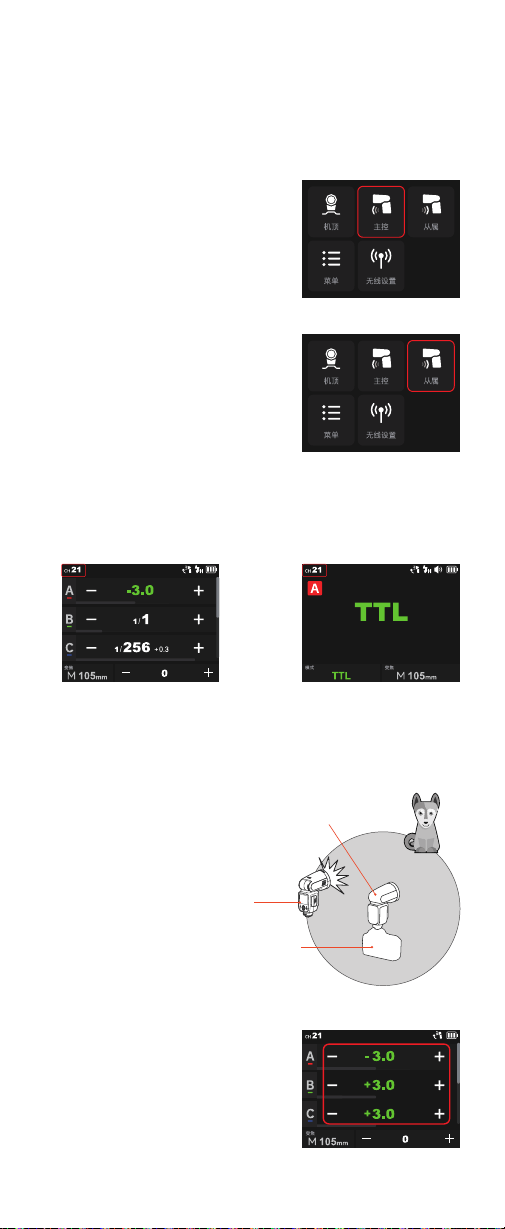
以下说明使用触控方式,实际上,您也可使用拨轮与按键。
使用一个从属单元的自动闪光拍摄
1. 设置主控单元
轻触屏幕的主控模式,将安装在相机
上的 V100 设为主控单元。
TTL: 全自动无线闪光拍摄
2. 设置从属单元
3. 检查传输频道 / 识别号
4. 定位相机和闪光灯
5. 将闪光模式设为 <TTL >
轻触屏幕的从属模式,将闪光灯 V100
设为从属单元。
您也可以使用引闪器 X2T 作为主控单
元。X2T 可以控制 V100 的变焦值,但
变焦值必须调至自动(A)模式。
主控单元和从属单元的无线频道和识别号需设一致,举例,主控单元频
道为 1,识别号为 1,从属单元也为 1 和 1。
您也可以使用无线同步功能 , 无需手动设置 , 极速同步频道和识别号。
界面为 V100 C 主控界面 , 其他
型号界面有所区别
界面为 V100 C 主控界面 , 其他
型号界面有所区别
主控单元与从属单元传输距离最大约
100 米。
轻触主控单元闪光灯屏幕上的主控图标
进入主控设置,长按组框切换至 TTL 自
动闪光补偿值。
为了让主控单元闪光灯也闪光,您可进
入菜单将主控闪光灯闪光设置为开启(仅
V100 C 支持开启主控单元闪光 )。
●
传输距离约 100 米
主控单元
从属单元
22
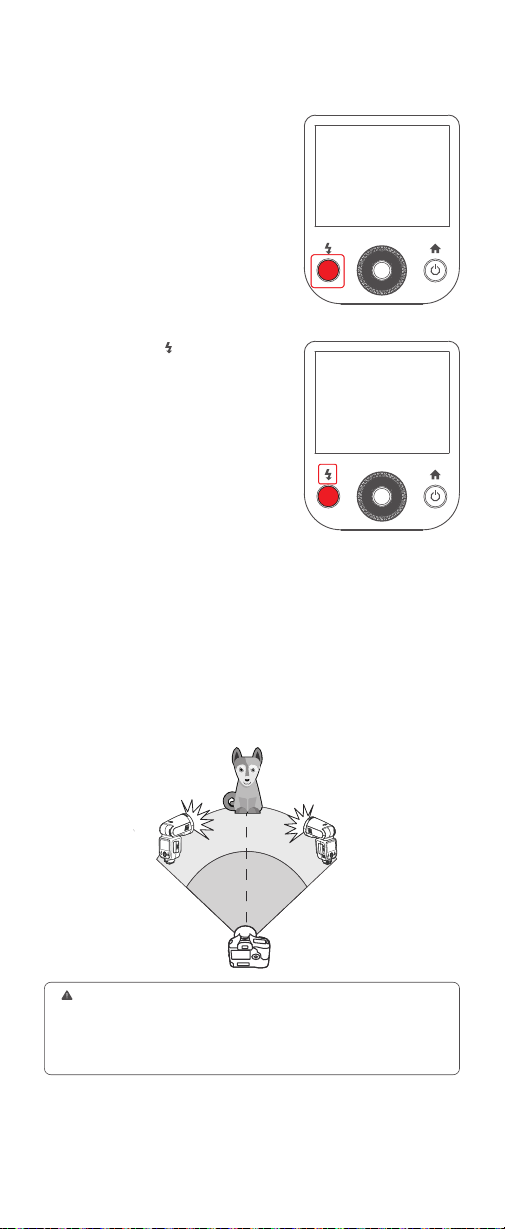
6. 检查闪光灯是否准备就绪。
7. 检查操作
检查主控闪光灯就绪指示灯点亮。
按下主控闪光灯的 <
> 试闪按钮,从
属单元闪光。如果从属单元不闪光,
检查是否将其放置在操作范围内。
使用多个从属单元的自动闪光拍摄
当需要更大的闪光输出或想要更加轻松地进行照明时,可以增加从属单
元的数量并将其作为单个闪光灯闪光。
要添加从属单元,使用与“使用一个从属单元的自动闪光拍摄”相同的步
骤 ,可以设定任何闪光组 (A/B/C/D/E)。
当增加了从属单元的数量或主控闪光灯闪光设为开启时,执行自动控制
以使所有闪光灯以相同的闪光输出闪光并确保总闪光输出能够达到标准
曝光。
1. 短按相机上的景深预示按钮进行造型闪光 (V100 C)。
2. 如果从属单元的自动关闭电源生效,按下主控单元的试闪按键可以开启从
属单元,请注意在相机的测光定时工作期间,无法进行测试闪光。
3. 您可以进入菜单,更改从属单元自动关闭电源时间,可以将自动关机时间
改为 30 分钟或 90 分钟。

23
使用手动闪光的无线( 多重闪光 )拍摄,可以在主控单元上设定所有参数,
为每个从属单元 ( 闪光组 ) 设定不同的闪光输出进行拍摄。
轻触主控单元闪光灯屏幕上的主控模式图标进入主控设置,长按组框令
组框出现 M 手动闪光的功率值。
轻触 - 图标或 + 图标设置各组闪光输出。
主控单元和从属单元的无线频道和识别号需设一致,举例,主控单元频
道为 1,识别号为 1,从属单元也为 1 和 1。
您也可以使用无线同步功能 , 无需手动设置 , 极速同步频道和识别号。
各组从属单元以设定的闪光输出闪光。
轻触主控单元闪光灯屏幕上的主控图标进入主控设置。从屏幕上方往
下拉动,屏幕出现频闪图标,轻触图标开启,再从屏幕下方往上滑动,
令屏幕出现无线频闪闪光的相关参数。
轻触 - 图标或 + 图标设置闪光输出。
滑动闪光次数选择所需闪光次数,滑动闪光频率选择所需闪光频率。
您可以直接在主控单元上设置从属单元 A/B/C/D/E 的无线频闪的开关。
1. 轻触屏幕的主控图标,将安装在相机的 V100 设为主控单元。
2. 设置各组闪光组的闪光输出
3. 设置频道和识别号
4. 拍摄照片
1. 将主控单元设为频闪闪光
2. 设置无线频闪的闪光输出、闪光次数、闪光频率
5. 设置从属闪光组无线频闪开 / 关
M 手动闪光的无线 ( 多重闪光 ) 拍摄
频闪闪光的无线 ( 多重闪光 ) 拍摄
轻触从属单元闪光灯屏幕上的从属图标进入从属设置。
举例,主控单元频道为 1,识别号为 1,从属单元也为 1 和 1。
3. 设置从属单元
4. 设置频道和识别号
在保证主控单元和从属单元频道 ,ID 设为一致的前提下,从属单元无需调节
其参数,可直接在主控单元上调节参数。
24
同步插孔规格为 Φ2.5mm,此处可插入同步线或者触发器触发插头对
闪光灯进行同步引闪。
如果相机有景深预视按钮,按下该按钮将会进行 1 秒钟的连续闪光,
这种现象称之为造型闪光。您可以通过造型闪光查看被摄体上的光影
效果及照明平衡,不管是无线拍摄还是普通闪光拍摄,都可以进行造
型闪光。
通过将闪光灯头指向墙壁或天花板,闪光在照亮被摄体前被墙面反射。
这可以减轻被摄物体背后的阴影,获得更自然的摄影效果。称之为反射
闪光。
电池电量低时,电池符号 <
> 变成
红色,此时请更换电池或及时给电池
充电。
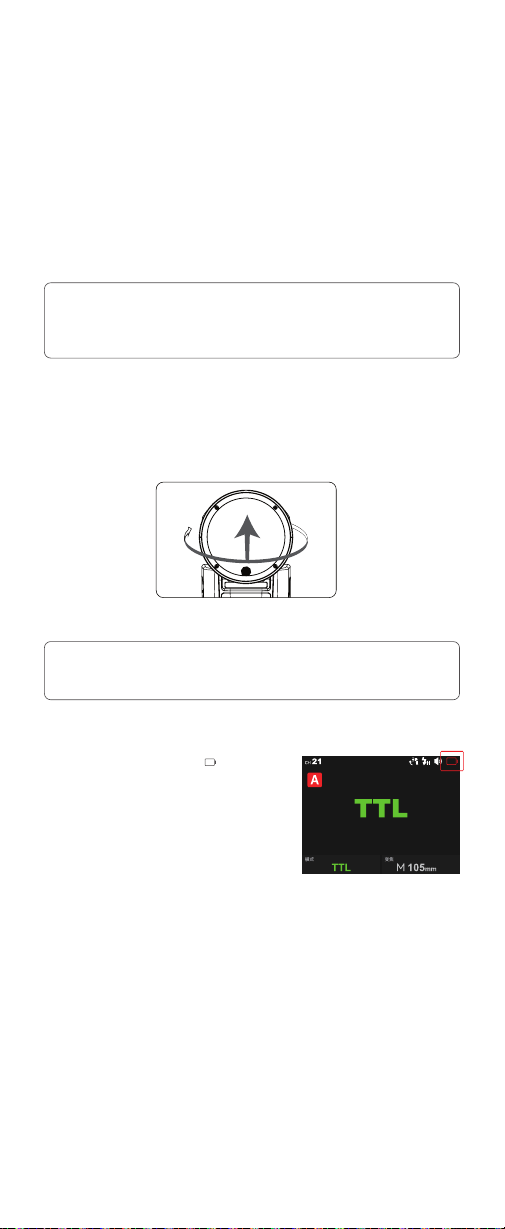
旋转闪光灯头来设置反射方向。
1. 请勿连续触发 10 次以上造型闪光。如果连续进行 10 次造型闪光,请让闪
光灯至少冷却 10 分钟,以防止闪光灯头过热或损坏。
2. 佳能 EOS 300 和 B 型相机不支持造型闪光。
3. V100 S/V100 F/V100 O 闪光灯不支持造型闪光。
1. 如果墙壁或天花板太远,反射闪光可能太弱并导致曝光不足。
2. 墙壁或天花板应该是平坦的、白色的,有利于高效的反射。如果反射表面
不是白色的,照片将出现偏色。
注:
注:
同步插孔触发
造型闪光 (V100 C 和 V100 N 具备此功能 )
反射闪光
电池电量低警示
其他应用
330°
-7-120
°
25
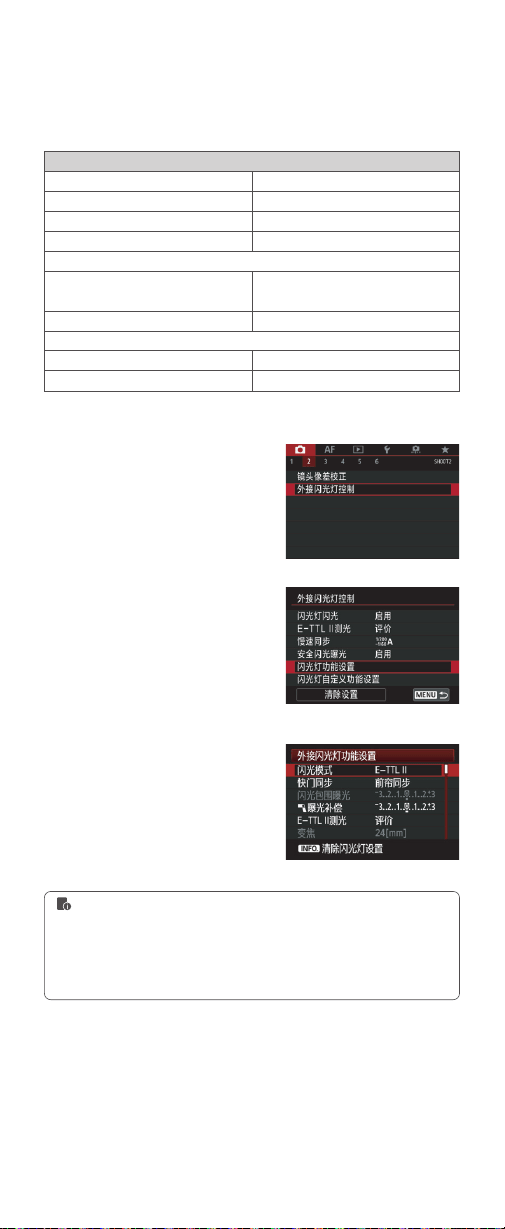
1. 选择 < 闪光灯控制 > 或 < 外接闪光
灯控制 >。
2. 选择 < 闪光灯功能设置 > 或 < 外接
闪光灯功能设置 >
3. 根据相机的不同,设置画面和显示
的项目会有所不同。
闪光灯功能设置
将闪光灯安装在EOS 相机上,可以从相机菜单为闪光灯设定自定义功能。
可配置的主要功能如下。根据闪光模式、无线闪光功能设置和其他条件
的不同,可用设置会有所不同
用相机菜单控制闪光灯 ( 仅 V100 C 具备此功能 )
闪光灯闪光
E-TTL 平衡
TTL 测光
连拍闪光灯控制
光圈优化模式下的闪光同步速度
闪光模式
无线闪光功能
闪光灯变焦(闪光覆盖范围)
快门同步
闪光曝光补偿
功能
启动 / 关闭
氛围优先 / 标准 / 闪光优先
评价(面部优先)/ 评价 / 平均
每次拍摄 E-TTL/ 首次拍摄 E-TTL
TTL 闪光测光(自动闪光)/ 手动闪光 /
多次闪光(频闪)
无线闪光:关 / 无线电传输
前帘同步 / 后帘同步 / 高速同步
1. 要清除闪光灯的所有自定义功能设置,您可选择步骤 2 画面中的 < 清除设
置 >,然后清除所有闪光灯自定义功能或清除外接闪光灯的自定义功能设置。
2. 如果已经使用闪光灯设置了闪光曝光补偿,则无法用相机设置闪光曝光补
偿,要用相机进行设置时,首先将闪光灯的闪光曝光补偿设置为“0”。
3. 如果用相机和闪光灯设置闪光曝光补偿以外的闪光灯自定义功能和闪光灯
功能设置,最后所进行的设置将生效。
26
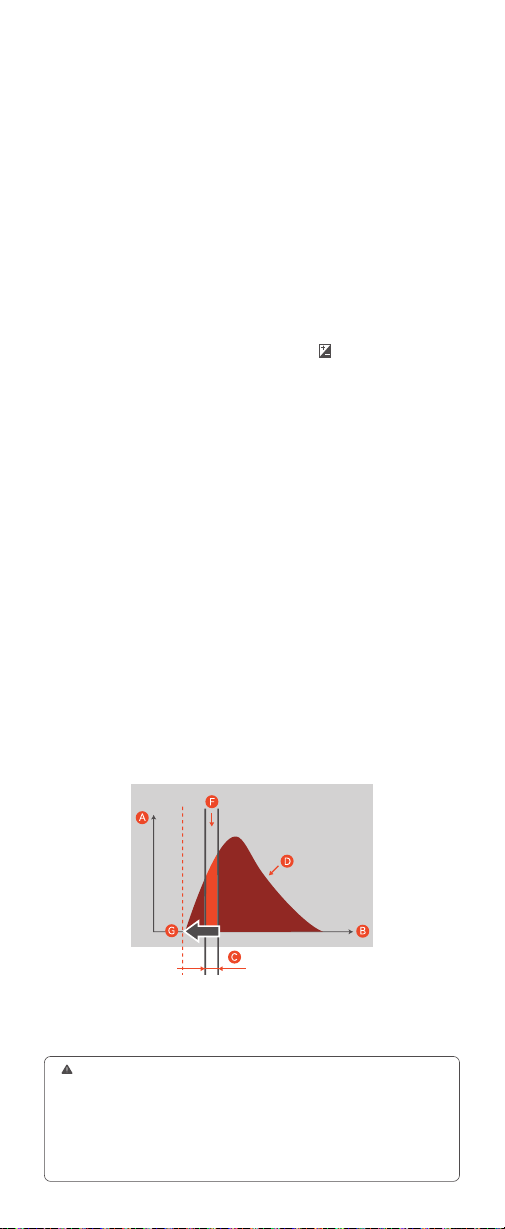
通过使用闪光灯 V100 S 和全域快门图像传感器的相机,闪光可以与
相机上可用的整个快门速度范围同步,从而实现比传统高速同步拍摄
(HSS) 更有效的闪光曝光。
2. 当您的闪光灯 V100 S 使用 M 手动闪光模式,但想在高速快门(快门
速度快于 1/600)时采用单波闪光(非高速同步),您可以通过调整相
机的闪光延迟时间来匹配相机的曝光时间,能够以更合适的光量进行拍
摄。在此模式下,跟高速同步模式比,相同功率下得到更好的闪光指数。
A:闪光灯光量
B:时间
C:快门速度
相机 ADJ 闪光时间设置菜单如下:
开:手动调整闪光时间(0 微秒到 1000 微秒)。
关:不调整闪光时间 ( 当快门速度达到 1/600 选关 , 闪光的方式为非单
波闪光 )。
闪光和快门对齐调试方法 :
高速快门单波闪光需要非常严格的时间对齐 , 原理如图 , 需要在闪光灯
最佳光效里开启快门。
调试方法如下 :
把闪光灯模式设到 M 档下 , 进入相机菜单 , 找到相机闪光时间设置 , 开
启 ADJ。输入 ADJ 参数 ,ADJ 参数与您使用的相机及闪光灯有关 , 您如
果使用的是 V100S 和 A9MIII, 在 V100S 没有开启无线的情况下这个参
数大约在 160 微秒 , 开启无线的情况下大约在 560 微秒 ( 如使用其它全
域快门相机时 , 需要全时间调试确定对齐时间 )。调到以上参数后 , 把相
机快门调到 1/80000, 闪光灯功率调到 1/256( 快门越快、功率越小时对
齐要求越高 , 如果调好这个组合 , 其它的组合通常合适使用。当设置为
快门速度快,功率高时,由于闪光的时间远大于快门时间,这时可以把
时间向后移,选择闪光灯的发光峰值 ), 如果发现闪光不同步时可以微调
ADJ 参数 , 调到曝光最佳时 , 这时可以测试其它快门下的拍摄情况。
相机闪光时间设置所在位置:
相机的 MENU →
(曝光/颜色)→[闪
光灯]→[闪光时间设置]→[开]→将闪光时间设为所需值。
1. 闪光灯 V100 S 使用 TTL 自动闪光模式时,搭配全域快门相机,无论
低速快门还是高速快门,闪光灯都能正常同步闪光。相对于非全域快门
相机,使用全域快门相机,闪光灯高速同步闪光时间更短,约 2-5 毫秒,
闪光灯回电更快,相机可拍摄更多张数。
全域快门同步拍摄(仅 V100 S 具备此功能)
1. 如果将相机的快门速度设为快于 1/10000 并拍摄照片,亮度和颜色可能会
有所不同。
2. 对于配备全局快门图像传感器的相机,无论高速同步设置是否为 [ON]/
[OFF],相机上都不会显示 HSS 图标。
3. 当闪光灯使用同步线与相机连接,进行拍摄时,相机不再采用全域快门同
步拍摄,而是采用传统的高速同步拍摄方式进行,因此闪光灯的光线可到达
的距离缩短。
D:以 1/256 闪光时的闪光灯光量
F:曝光的闪光灯光量
G:闪光开始时间
27
为防止闪光灯头过热并损坏,请勿在 1/1 档位时进行超过 70 次的快
速连续闪光。70 次连续闪光后,要让闪光灯至少冷却 10 分钟。
如您在进行超过 70 次连续闪光后马上继续进行更多次闪光,内部的
防过热功能可能会被激活,使回电时间变为 10 秒以上。如果发生这
种现象,请让闪光灯冷却约 10 分钟,闪光灯便会恢复正常。
热保护启动后,显示屏上的符号会显示。
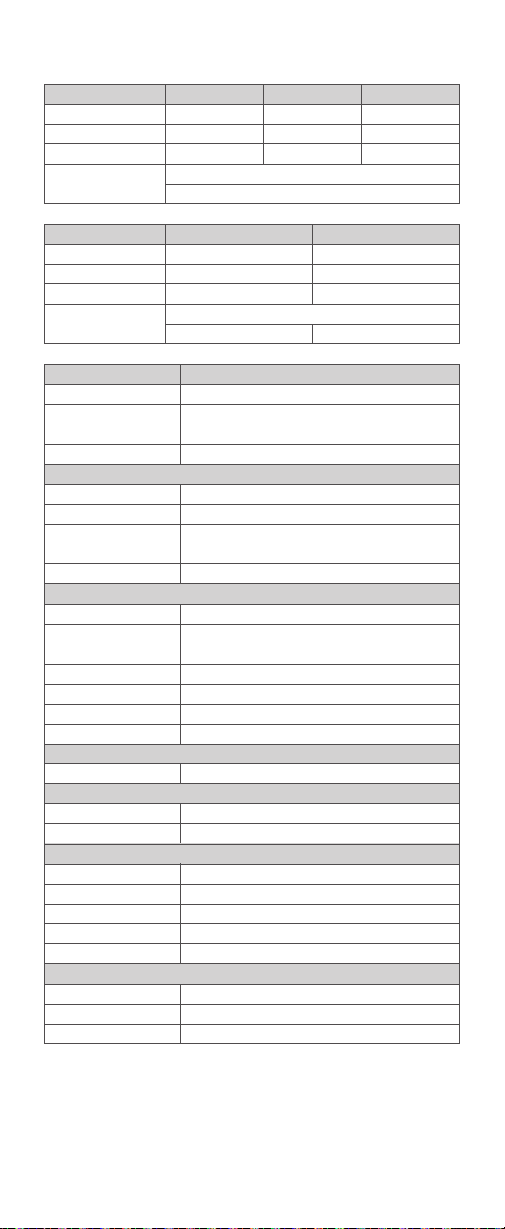
为了保证设备安全的工作,系统时刻进行预防保护,以下提示符号供您
参考:
热保护
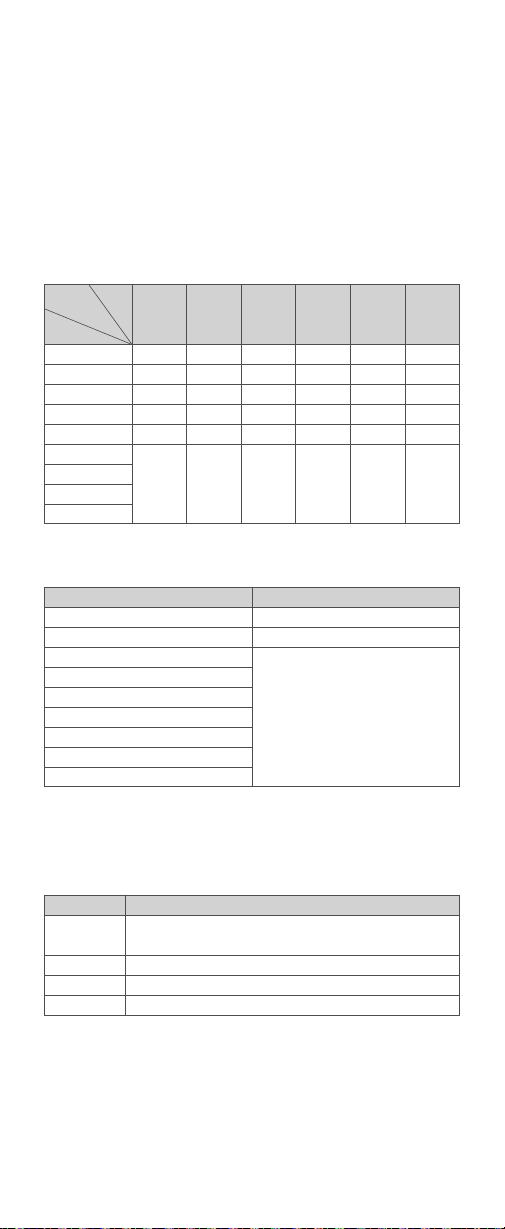
激活过热保护功能的连续闪光次数:
高速同步模式下,激活热保护功能的连续闪光次数:
保护功能
其他保护
●
●
●
功率档位
1/1
1/2 (+0.1~+0.9)
1/4(+0.1~+0.9)
1/8(+0.1~+0.9)
1/16(+0.1~+0.9)
1/32(+0.1~+0.9)
1/64(+0.1~+0.9)
1/128(+0.1~+0.9)
1/256(+0.1~+0.9)
LCD 显示
Error1
Error3
Error5
Error9
连续闪光次数
60
70
100
警示内容
闪光灯回电系统出现问题,无法回电引闪,请重新开机,如无法
解决请维修
闪光灯管两端电压过高,请维修
闪光电路出现异常,请维修
固件升级有误,请进行正确固件升级
28mm
70
106
215
300
1200
3500
35mm
75
114
231
300
1200
3500
50mm
80
120
240
300
1200
3500
70mm
90
134
273
300
1200
3500
80mm
100
150
300
300
1200
3500
105mm
100
150
300
300
1200
3500
1/1
1/2
1/4
1/8
1/16
1/32
1/64
1/128
1/256
焦距
功率档位
闪光次数

28
→ 请更换电池或及时充电。
→请升级引闪器固件,具体固件升级请参考引闪器说明书。
→请升级相机固件 , 具体固件升级请参考相机说明书。
4. 是否引闪器和接收端设备在低电状态
5. 引闪器固件为旧版本
6. 相机固件为旧版本
→ 请调节引闪器的频道 CH 设置 ( 建议 +10),找到无干扰的频道来工作,
或者在工作时关闭其他 2.4G 设备。
→ 请下调闪光灯的档位,如是 TTL 模式可以尝试改为 M 模式 (TTL 模
式下需要预闪一次 )。
→ 请在引闪器上打开“近距离无线模式”:
X1 系列:按住引闪按钮不放,然后开机,直至指示灯闪 2 次。
Xpro、X2T 系列:设置 C.Fn-DIST 为 0-30m。
X3 系列:设置引闪距离为 0-30m。
1. 外部环境 2.4G 信号干扰 ( 如无线基站、2.4Gwi 路由、蓝牙设备等 )
2. 请确认闪光灯是否已经回电或者回电速度已经跟上连拍速度 ( 闪光
灯就绪指示灯已经亮起 ),并且没有处于过热保护或者其他异常状态中
3. 是否引闪器和闪光灯距离太近 ( 距离 <0.5m)
神牛 2.4G 无线漏闪原因及解决办法
29
规格参数
型号
功率 (1/1 档位 )
灯头旋转范围
闪光持续时间
曝光控制
曝光控制系统
闪光曝光补偿 (FEC)
同步方式
频闪闪光
无线闪光 ( 无线电 2.4G 传输 )
无线功能
主控单元组
可控制从属单元组
传输范围 ( 约 )
频道
ID
自动对焦辅助光 (V100 O 无此功能 )
有效范围 ( 约 )
LED 造型灯
功率
色温
电源
锂电池
回电时间
全功率闪光次数
节能
同步触发方式
尺寸
体积
净重(不含电池)
净重(含电池)
型号
全域快门同步拍摄
无线电无线全域快门同步
造型闪光
闪光覆盖范围
型号
全域快门同步拍摄
无线电无线全域快门同步
造型闪光
闪光覆盖范围
V100 C/V100 S/V100 N/V100 O/V100 F
100Ws
闪光灯头旋转 / 倾斜,水平 0~330°,垂直 -7° ~120° ( 反
射闪光 )
1/300 秒- 1/20000 秒
TTL 自动闪光、手动闪光
在 ±3 档间以 1/3 档为增量调节
高速同步 ( 最高 1/8000 秒,Sony 全域快门相机最高可
达 1/80000 秒 )、前帘同步、后帘同步
具备 ( 最大闪光次数 100 次;最大闪光频率 100Hz)
主控单元 / 从属单元
A、B、C、D、E(V100 C) 或 M、A、B、C、D(V100 S/
V100 N/V100 O/V100 F)
A,B,C,D,E
100m
32 组:01~32
OFF/01~99
中央:0.6-10 米 / 边缘:0.6-5 米
2W
3300K±200K
7.2V/2980mAh 锂电池
约 1.7 秒,闪光灯准备就绪,回电指示灯亮起
约 400 次
具备待机 / 自动关机功能
热靴,2.5mm 同步线
71.5×76×206mm
约 496g
约 616g
V100 C
不支持
不支持
支持
自动变焦 ( 自动设置适合镜头焦距和图像尺寸的闪光覆盖范围 )
手动变焦 (28-105 毫米 )
V100 O
不支持
不支持
不支持
自动变焦 ( 自动设置适合镜头焦距和图像尺寸的闪光覆盖范围 )
手动变焦 (28-105 毫米或 14-52mm)
规格和参数如有变更 , 恕不另行通知。
V100 S
支持
支持
不支持
V100 F
不支持
不支持
不支持
手动变焦 (28-105 毫米或 18-69mm)
V100 N
不支持
不支持
支持

30
如果遇到问题,请参阅此故障排除指南。
闪光灯不闪光
闪光曝光不足或过度
电源自动关闭
自动变焦不工作
相片出现暗角或者被摄物体只有局部能照亮
闪光灯没有牢固地安装在相机上。
闪光灯和相机的电子触点变脏。
<
> 图标或 < > 图标未出现在相机取景器中。
本产品 USB 接口为 USB Type-C 接口,请使用 USB Type-C 充电线。
产品升级固件需要 Godox G3 V1.1 程序软件支持,升级固件前请先下
载安装“Godox G3 V1.1 固件升级软件”再选择相应的固件文件。
由于产品进行固件升级,说明书请以最新电子版为准。
Godox G3 V1.1 固件升级软件下载地址 :
https://www.godox.com.cn/rmware-G3/
使用高速同步。
闪光灯使用手动曝光模式。
当灯处于机顶模式 / 主控模式时 , 待机开启 , 超过 90 秒无人操作时 ,
闪光灯会进入休眠状态
当灯处于机顶模式 / 主控模式时 , 待机关闭 , 自动关机开启 , 超过 60
分钟 ( 或 30 分钟或 90 分钟 ) 无人操作时 , 闪光灯会自动关机。
当灯处于从属模式时 , 自动关机开启 , 超过 60 分钟 ( 或 30 分钟或 90
分钟 ) 无人操作时 , 闪光灯会自动关机。
闪光灯没有牢固地安装在相机上。
相机镜头焦距超出闪光灯的覆盖范围。
将闪光灯热靴座牢固地安装在相机上。
请清洁触点。
请等待闪光灯回电完成,闪光灯准备就绪指示灯亮起。
如果闪光灯准备就绪指示灯已经亮起,相机取景器中的 <
> 图标
或< > 图标仍未亮起,请检查热靴连接,确保闪光灯可靠地装
配在相机热靴上。
若等待较长时间,闪光灯准备就绪指示灯一直没有亮起,请检
查电池是否有电。如果电量低(闪光灯屏幕上电池图标变红),请
更换电池或及时充电。
使用高速同步,有效的闪光范围会更小,需要确保被摄体位于显示
的有效闪光范围内。
改为 TTL 模式或修改闪光输出功率设置。
半按快门按键或机身任意键唤醒闪光灯
重新开机
重新开机
将闪光灯的热靴座牢固地安装在相机上。
请检查闪光灯当前的闪光覆盖范围,本产品的灯头变焦范围是全画
幅系统 28-105mm。
故障排除指南
固件升级
●
●
●
●
●
●
●
●
●
●
●
●
●
●
→
→
→
→
→
→
→
→
→
→
→
→
31
V100 C 可兼容以下佳能 EOS 系列的相机型号:
V100 S 可兼容以下索尼的相机型号 :
V100 O 可兼容以下奥林巴斯或松下相机型号 :
V100 F 可兼容以下富士相机型号 :
V100 N 可兼容以下尼康相机型号 :
80D、90D、7D、6D、70D、750D、760D、5DMarkIV、EOS 1DX、
6DMarkII、77D、800D、5DMarkIII、5DMarkII、60D、7D Mark II、
600D、50D、30D、40D、500D、M5、M3、M50、R、RP、M6II、
R5、1500D、3000D、R7、R6II、R50、R8、R5C、R10、R100、R5II、
R3、200DII
α77II、α99、α77、DSC-RX10、α6000、α7R、α6400、α7RII、
α7RIII、α7M3、α9、α7RIV、α7R5、α7MIV、ZV-E10、α58、
ILCE6000L、α7R3、α350、α9III
奥林巴斯 :E-M1、PEN-F、E-M10II、E-PL8、E-P5、E-M10III
松下 :GH4、LX100、DMC-GF1、DMC-G85、DMC-GX85、DMC-
LX100、DMC-FZ2500GK、S1
根据富士对闪光灯的控制不同,分为以下类别进行区分:
A 类:X-Pro2、X-T20、X-T2、X-T1、GFX50s、GFX50R、X-T30、X-T4、
X-T3、X-S20、X-T5、X-H2、X-T50
B 类:X-Pro1,X-T10,X-E1,X-A3
C 类:X100F,X100T
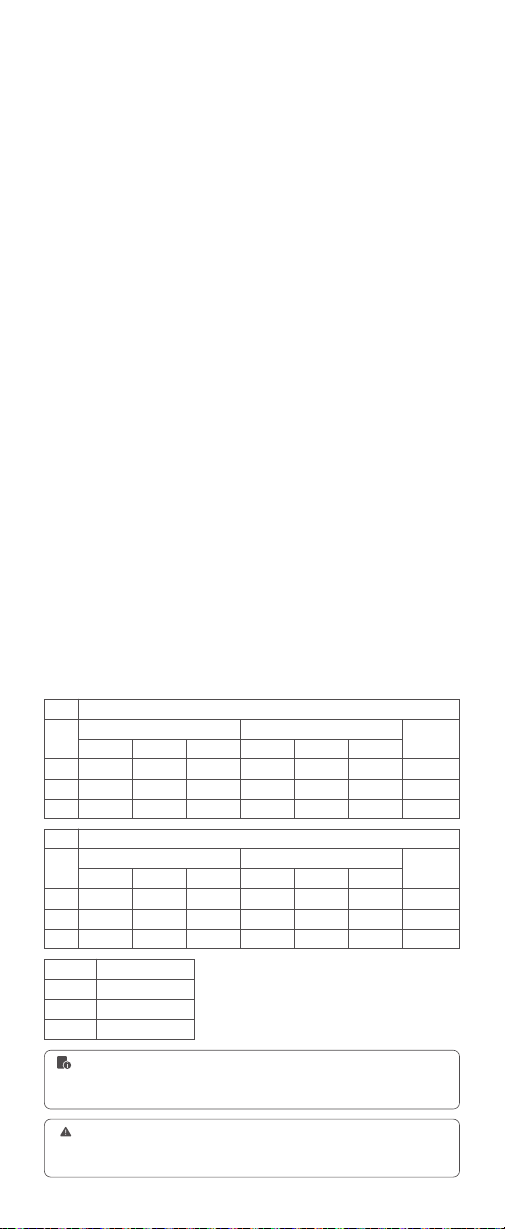
相机兼容及功能支持对照表:
D800、D750 D700、D610、D500、D200、D300S、D5、D4、D810、
D780、D5300、D5200、D5100、D5000、D3300、D3100、D60、
Z6、Z7II、Z8、ZFC
兼容相机列表
1. 此表格仅列举目前已测试的相机型号 , 未涵盖所有相机型号。其他相机型号 ,
用户可自行测试。
2. 本公司保留未来修改此表格内容的权利。
相机
A类
B类
C类
相机
A类
B类
C类
AF 辅助对焦灯
√
--
--
相机
A类
B类
C类
机顶闪光灯
2.4G 主控从属闪光灯
TTL 闪光控制
TTL 闪光控制
前帘同步
√
√
√
前帘同步
√
√
√
前帘同步
√
√
√
前帘同步
√
√
√
后帘同步
√
√
√
后帘同步
√
√
--
后帘同步
√
--
√
后帘同步
√
√
--
高速同步
√
--
√
高速同步
√
--
--
高速同步
√
--
√
高速同步
√
--
--
重复闪光
√
√
√
重复闪光
√
√
√
M 闪光控制
M 闪光控制
1. 相机 X100T 不支持后帘同步和高速拍摄功能 , 且不支持对焦辅助灯。
2. 相机 X-Pro1/X-T10 不支持高速拍摄功能 , 且不支持对焦辅助灯。当闪光灯
设置为 M 模式时 , 无法更改相机的前帘和后帘模式。

32
About This Instruction Manual
Important Safety Instructions
Foreword
Name of Parts
What's Inside
Separately Sold Accessories
Installing/Disassembling Battery
Battery Level Indication
Installing/Disassembling the Camera Flash
Installing/Disassembling SU-1
Power Management
Wi-Off Mode
Sender Mode
Receiver Mode
Other Functions
Wireless Settings
Menu
Wireless Flash Shooting (2.4G Wireless Transmission)
Wireless Sender/Receiver Settings
About the Sender Unit
Sender Unit's (Flash) ON/OFF(Only available in V100 C)
TTL: Fully Automatic Wireless Flash Shooting
M: Wireless Stroboscopic Flash Shooting with Manual Flash
Wireless Stroboscopic Flash Shooting with Multi Flash
Other Applications
Control with the Camera's Menu(Only available in V100 C)
Global Shutter Sync Photography(Only available in V100 S)
Protection Function
Contents
34
35
37
38
39
39
40
40
41
41
42
43
45
46
47
50
51
53
54
54
54
55
57
57
58
59
59
61
Contents
Body
Detachable Sub Flash SU-1
2.3 " LCD Panel
M: Manual Flash
TTL: TTL Auto Flash
ZOOM: Setting the Flash Coverage
SUB
:
Detachable Sub Flash SU-1
Group
M: Manual Flash—Flash Power
TTL Auto Flash—Flash Exposure Compensation Amount
Adjust the Paremeters Uniformly
ZOOM: Setting the Flash Coverage
Group
TTL: TTL Auto Flash
M: Manual Flash
Flash Power Settings
ZOOM: Setting the Flash Coverage
Sync Mode
Auto Focus Assist Beam
Photocell (V100 O)
Beep
Modeling Lamp
Screen Lock
Multi Flash
Scan the Spare Channel
Channel Settings
ID Settings
Wireless Sync
Sync Triggering
Modeling Flash(Only available in V100 C)
Bounce Flash
Low Battery Warning

33
Contents
62
63
64
64
65
The Reason & Solution of Not Triggering in Godox 2.4G Wireless
Technical Data
Troubleshooting
Firmware Upgrade
Compatible Camera Models

34
About This Instruction Manual
This manual is based on the assumption that both the camera and camera
flash's power switches are turned on.
The following alert symbols are used in this manual:
The caution symbol
indicates a warning to prevent shooting problem.
The note symbol gives supplemental information.

35
Important Safety Instructions
This product is a professional photographic equipment, to be operated by
professional personnel only.
All transport protective materials and packaging on the product must be
removed before use.
The following basic safety precautions must be followed when using this
product:
Carefully read and fully understand the instruction manual before use and
strictly follow the safety instructions. Failure to do so may result in death,
serious injury, damage to the product, or other property damage.
This product is a professional lighting xture, children are prohibited from
using it. Children must be closely supervised by adults when approaching
the xture, to prevent collisions with the xture or unauthorized use that
could cause personal injury.
This is not an ordinary lighting xture and must not be used for general
illumination. Anyone with a history of eye damage or sensitivity should
avoid using this xture or looking directly at it.
Extreme caution must be exercised when using it, do not touch high-
temperature parts such as flash tubes to avoid burns.
Do not point the flash directly at the eyes (especially baby's eyes) under
any circumstances, as this could impair vision in a short time. Turn off
immediately if discomfort occurs, stop using, and seek medical attention
promptly.
If the flash tube is damaged, stop using it immediately and contact the
manufacturer, service agent, or qualied repair personnel for a replacement
to prevent accidents.
Stop using immediately if the product shell is cracked due to falling,
squeezing, or strong impact, to avoid touching the internal electronic
components and getting an electric shock.
This device is not waterproof. Keep it dry and avoid immersing it in water
or other liquids. It should be installed in a ventilated and dry location and
avoid using in rainy, humid, dusty, or overheated environments. Do not
place items above the device or allow liquids to flow into it to prevent
danger.
Do not disassemble without authorization. If the product malfunctions,
it must be inspected and repaired by our company or authorized repair
personnel.
Before storing the device, make sure it is completely cooled.
Do not place the device near alcohol, gasoline, or other flammable volatile
solvents or gases such as methane and ethane.
Do not use or store this device in potentially explosive environments.
Maintain at least 1 meter distance between the lamp head and the user,
other people, and heat-sensitive or flammable items during and after use.
Do not use accessories not been approved by our company, as this may
cause re, electric shock or personal injury.
Clean gently with a dry cloth. Do not use a wet cloth as it may damage the
device.
This instruction manual is based on rigorous testing. Changes in design
and specications are subject to change without notice. Check ofcial
website for latest instruction manual and product updates.
This product is powered by lithium batteries, who have limited lifespans
and will gradually lose their charging capacities, which is irreversible. As
the battery ages, the product's battery life will decrease. The lifespan of
lithium battery is estimated to be 2 to 3 years. Please regularly check the
battery, and if the charging time signicantly increases or the battery life
signicantly decreases, consider replacing the battery.
This product is equipped with lithium batteries. The following are the
storage recommendations: Charge the battery to about 50% before
storage. Charge it to about 50% at least every six months. Removable
batteries should be stored separately. The storage temperature should be
between 0°C and 40°C.
1.
2.
3.
4.
5.
6.
7.
8.
9.
10.
11.
12.
13.
14.
15.
16.
17.
18.

36
Precautions for using lithium batteries:
Conrm and comply with all relevant local laws and regulations when
handling any batteries.
The warranty period for this device as a whole is one year. Consumables
(such as batteries), adapters, power cords, and other accessories are not
covered by the warranty.
Unauthorized repairs will void the warranty and will incur charges.
Please check the status and power of the lithium battery upon receipt. If
there are any quality issues, please contact Godox or our authorized dealer
within the warranty period.
Failures from improper operation is not covered under warranty.
19.
20.
21.
22.
23.
24.
Do not disassemble, crush, or puncture the battery;
The battery is not waterproof, do not immerse it in fog or water;
Avoid short-circuiting the battery contacts;
Do not expose the battery to or put it into re;
Do not expose the battery to temperatures above 60°C;
Keep out of reach of children;
Protect the battery from excessive shock or vibration;
Do not use a damaged battery;
If the battery leaks, avoid contact with the leaking fluid;
If the battery fluid comes into contact with your eyes, immediately rinse
with water for at least 15 minutes. Lift your eyelids until there are no
signs of fluid and seek medical attention promptly.
●
●
●
●
●
●
●
●
●
●

37
Foreword
Note: The power box PB960 is sold separately.
Thank you for purchasing!
TTL li-ion round head camera flash V100 is perfect for TTL auto flash with its
excellent compatibility, you can enjoy unprecedented shooting convenience
even with frequent changes in lighting conditions. Its main features include:
Quick Operations: 2.3" touch screen together with traditional buttons to
achieve clear and easy operations.
High-speed Continuous Shooting (V100 S): Works seamlessly with global
shutter cameras to break through flash sync speed limitations.
Round Flash Head: Well-crafted round flash head offers round, soft and even
light effects.
Powerful Flash Functions: 100Ws flash power and 81 adjustable steps are
suitable for full range of shooting needs.
LED Modeling Lamp: Built-in LED modeling lamp with adjustable brightness
to preview light effects conveniently.
Effective Power Supply: 7.2V/2980mAh lithium battery provides 400 flashes
and merely 1.7s recycle time at full power.
TTL Compatibility: Perfectly supports TTL auto flash to simplify the shooting
procedure.
Wireless Control Ability: 2.4G wireless flash triggering extends more shooting
possibilities.
Abundant Accessories Choices: Optional external power box PB960 improves
shooting efciency, while sub flash SU-1 brings better effects.
Professional Other Functions: Supports manual flash, Multi flash, high-speed
sync, second-curtain sync, FEC, etc.
Stable Continuous Shooting: The output color and brightness remain
consistent even in high-speed continuous shooting.
Firmware Upgrade: Firmware is updated regularly to be compatible with the
latest camera models and ensure optimal performance.
Camera Compatibility: V100 C is compatible with Canon cameras, V100 S
is compatible with Sony cameras, V100 N is compatible with Nikon
cameras, V100 O is compatible with Olympus/Panasonic cameras, V100 F is
compatible with Fujilm cameras.
38
Name of Parts
Body
Detachable Sub Flash SU-1
1. Flash Head
2. LED Modeling Lamp
3. External Flash Interface
(for accessories such as sub flash SU-1)
4. Wireless Sensor
5. Focus Assist Beam
6. External Power Box Port
(for optional external power box PB960)
7. Bounce Angle Scale
8. Battery Charging Indicator
(red in charging, green in fully charged)
9. USB Type-C Charging Port
(for charging the battery)
10. Lithium Battery
11. Touch Screen
12. Power Switch Button
(Short press once to enter mode/return interface, press
twice to enter other functions interface)
13. Hot Shoe
14. Hot Shoe Fixing Buckle
15. Test Button/Recycle Indicator
16. Select Dial
17. Set Button
(Short press to select or conrm)
18. Sync Cord Jack
19. USB-C Firmware Upgrade Port
(for upgrading the rmware)
20. Battery Remove Button
1. Flash Tube
2. Detaching Pusher
2
1
13
7
14
17
16
11
15
8
9
10
12
1
2
18
19
3
4
5
6
20
39
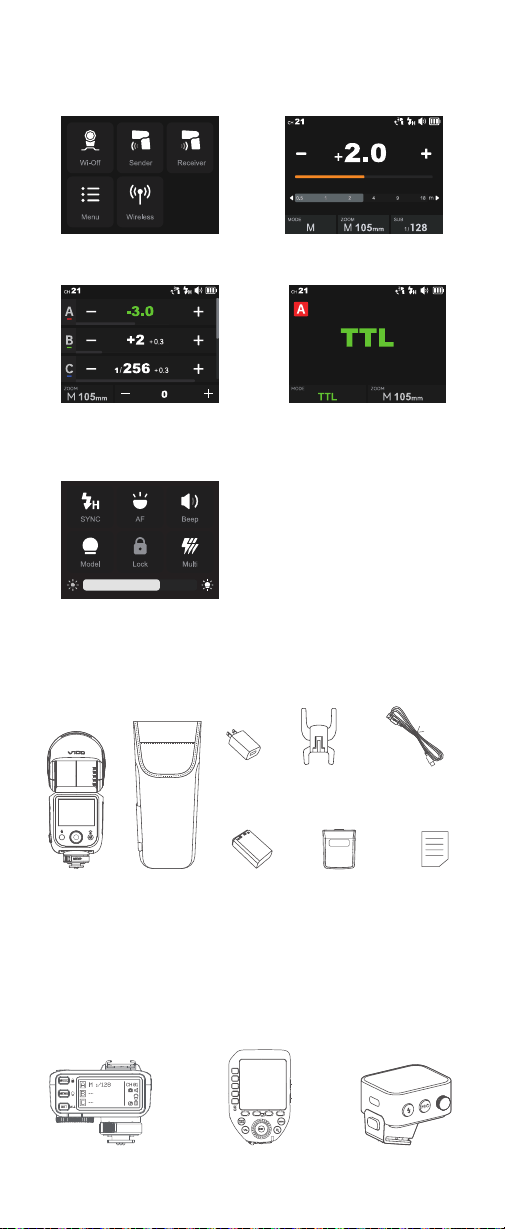
Wi-Off Mode
Sender Mode
2.3 " LCD Panel
Mode Interface
Receiver Mode
Other Functions
What's Inside
Flash Body
×1
USB-C Charging
Cable×1
Detachable Sub
Flash SU-1 x1
Mini Stand
x1
Lithium
Battery×1
Storage
Bag×1
Adapter
×1
Instruction
Manual×1
Separately Sold Accessories
The product can be used in combination with the following accessories
sold separately, so as to achieve the best photography effects:
Flash Trigger X2T Series Flash Trigger XProII Series Flash Trigger X3 Series
(This interface takes V100 C as an example,
other models interfaces may differ)
(V100 O doesn't have AF function)
40
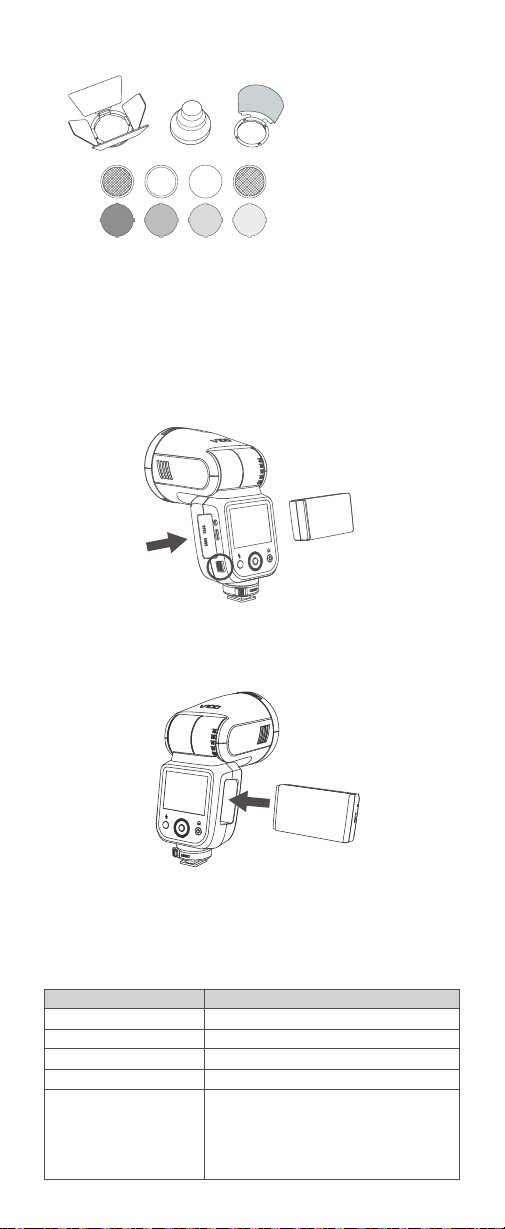
Installing/Disassembling Battery
Battery Level Indication
Disassembling the battery: Press and hold the battery remove button, then
push the battery out of the battery compartment.
Make sure the battery pack is securely loaded in the flash. Check the
battery level indication on the LCD panel to see the remaining battery level.
Installing the battery: Insert the battery into the battery compartment in
the direction as referred below until it’s rmly locked.
Battery Level Indication
3 grids
2 grids
1 grid
Blank grid
No battery alert blinking
Meaning
Full
Middle
Low
Lower battery, please recharge it.
The battery level is going to be used out, and the
flash is not functional in this status.
Note: Please recharge the battery as soon as
possible (within 10 days). Then, the battery can be
used or be placed for long period.
Accessory Kit for Round Flash Head AK-R1
Note: Please purchase the correct accessories according to your flash models.
41
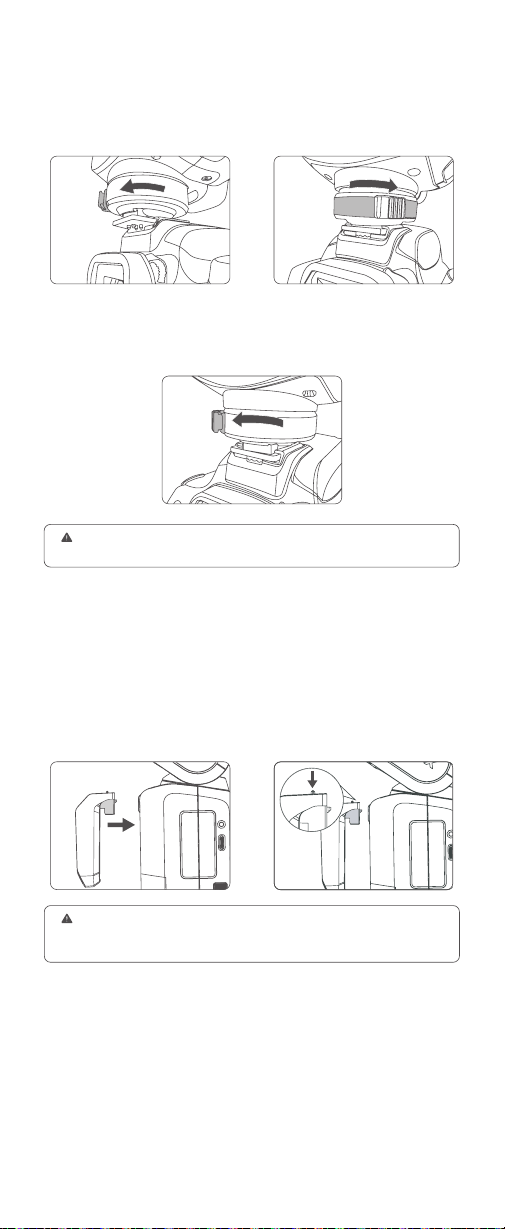
Installing/Disassembling the Camera Flash
Installing the camera flash: Rotate the hot shoe xing buckle and rotate it
to the left, insert the camera flash into the camera's hot shoe. Then rotate it
to the right until it locks up.
Disassembling the camera flash: Press and rotate the hot shoe xing
buckle to the left until it is loosened, then take off the camera flash.
Installing/Disassembling SU-1
Installing: Align the detachable
sub flash SU-1 with the external
flash interface of V100 and insert
it parallelly, then press it down, a
"click" sound means it’s properly
installed.
Disassembling: Push the detaching
pusher on SU-1 and pull it up at the
same time to detach it.
Note: Please turn off V100 before installing and disassembling SU-1. Do not
insert in or pull out SU-1 when V100 is in power on status or working, otherwise
malfunctions may occur.
Be sure to power off the camera and flash when installing and disassembling the
flash to prevent damage to the devices.

42
Power Management
Power On: Long press the power switch
button until the < SET > icon appears on
the panel, then slide the screen or rotate
the select dial in the direction showed on
the panel to turn it on.
Note: The screen backlight automatically turns
off after 15 seconds of no operation in power-on
status, and it can be lit up by touching.
Standby: Setting as wi-off/sender mode when the standby function is
on, the flash will enter standby mode automatically after a certain period
(approx. 90 seconds) of idle use. Press the camera shutter halfway or press
any button will wake up the flash unit.
Auto Off:
Setting as wi-off/sender mode when the auto off function is on, the flash
will automatically shut down after 60 minutes (or 30 minutes, 90 minutes)
of idle use.
Setting as receiver mode and the auto off function is on, the flash will
automatically shut down after 60 minutes (or 30 minutes, 90 minutes) of
idle use. The auto off function can be turned off manually when using off-
camera as a receiver unit.
43
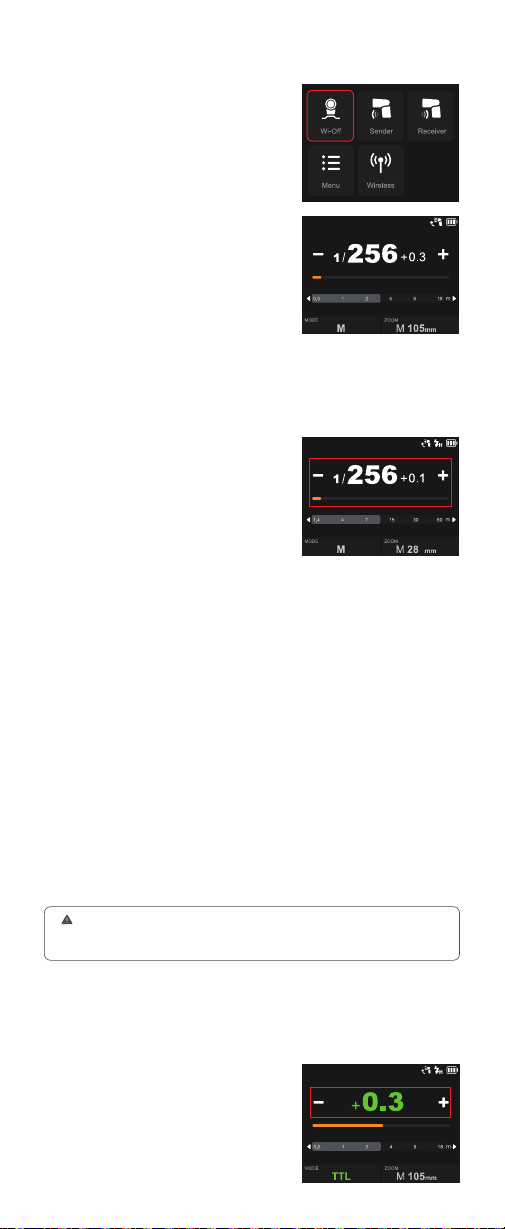
Wi-Off Mode
M: Manual Flash
Touch Screen: Slide the screen from
the left to the right to make the mode
interface appears, click the “Wi-Off” icon
to enter Wi-Off mode.
Touch Screen: Click the “MODE” icon to
switch to M mode, press the – or + icon
to adjust the power with ±0.1 or ±0.3
increment each step, or directly pull the
progress bar to achieve quick adjustment.
The flash output is adjustable from 1/1 to 1/256 or from 2.0 to 10 with 0.1
or 0.3 increment each step. To obtain a correct flash exposure, use a hand-
held flash meter to determine the required flash output.
Buttons and Select Dial: Press the
power switch button to make the mode
interface appears, rotate the select dial
and press the set button to choose and
enter Wi-Off mode.
Buttons and Select Dial: Rotate the
select dial and press the set button to
S1 Photocell Unit Setting
In M manual flash mode, this flash can function as an optic S1 secondary
flash with optic sensor. With this function, the flash will re synchronously
when the main flash res, the same effect as that by the use of wireless
triggers. This helps create multiple lighting effects.
S2 Photocell Unit Setting
In M manual flash mode, this flash can also function as an optic S2
secondary flash with optic sensor. This is useful when cameras have pre-
flash function. With this function, the flash will ignore a single “pre-flash”
from the main flash and will only re in response to the second, actual flash
from the main flash.
1. S1 and S2 Photocell triggering is only available in M manual flash mode.
2. Enter menu setting to switch between S1/S2 Photocell or turn off this function.
3. The Photocell function can be turned on or off in other function interface for V100 O.
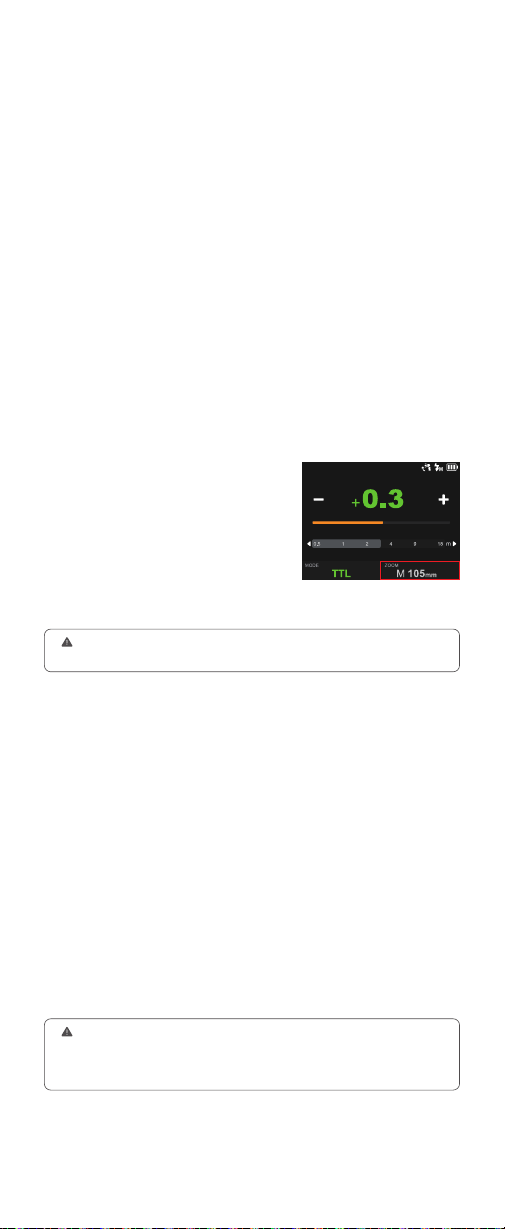
Touch Screen: Click the “MODE” icon
to switch to TTL mode, press the – or +
icon to adjust the FEC amount among
±3 with ±1/3 increment each step, or
directly pull the progress bar to achieve
quick adjustment.
TTL: TTL Auto Flash
In TTL mode, the camera's metering system detects the flash reflected
from the subject and automatically adjusts the flash output so that the
subject and background are evenly exposed.
choose “MODE” icon, then rotate and press again to choose “M”. Rotate up
to choose the power value, then rotate and press again to adjust power with
±0.1 or ±0.3 increment each step, quick adjustment is also available by fast
rotation.
44
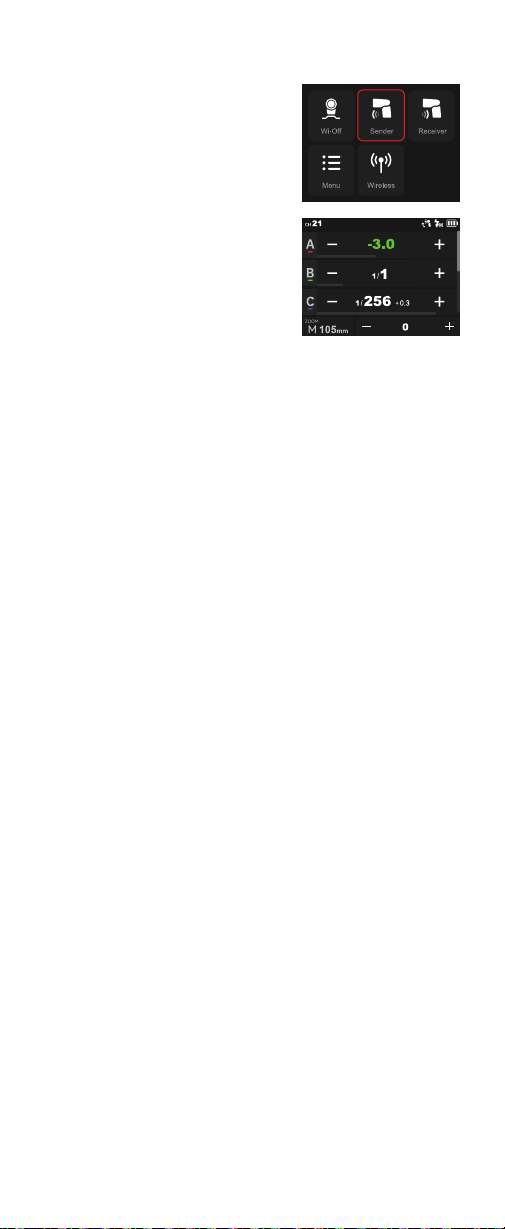
Touch Screen: Click the “ZOOM” icon
to switch between auto zoom(A--mm)
mode or manual zoom mode.
ZOOM: Setting the Flash Coverage
The flash coverage can be set automatically or manually. In auto zoom
mode, the focal length changes in response to the camera's zoom lens to
provide optimal flash results.
Press the camera shutter halfway to focus. The effective flash range will be
displayed in the LCD panel.
When the shutter is fully pressed, the flash will re a pre-flash that the
camera will use to calculate exposure and flash output the instant before
the photo is taken.
●
●
Buttons and Select Dial: Rotate the select dial and press the set button to
choose “MODE” icon, then rotate and press again to choose “TTL”. Rotate
up to choose the FEC amount, then rotate and press again to adjust the FEC
amount among ±3 with ±1/3 increment each step, quick adjustment is also
available by fast rotation.
Auto Zoom Mode: A-mm, and the flash coverage will be set automatically.
Manual Zoom Mode: 28mm-105mm (V100 C/V100 S/V100 N), 28mm-
105mm or 14-52mm (V100 O), 28mm-105mm or 18-69mm (V100 F)
Buttons and Select Dial: Rotate the
select dial and press the set button to
choose “ZOOM” icon, then rotate and
press again to choose the needed zoom
mode.
Installation: Mount SU-1 directly to the external flash interface of V100, a
"click" sound means it’s properly installed.
SUB: Detachable Sub Flash SU-1
With detachable sub flash SU-1 attached to the external flash interface,
better lling light effects can be achieved in M (manual) flash/TTL auto
flash mode, this is helpful for portrait shooting.
1. Be sure to power off the flash before installing and disassembling the sub flash.
2. SU-1 is not useable in sender or receiver mode.
3. The flash head need to be uplifted in order to use SU-1 properly.
4. External flash do not support HSS.
Flash Power Range: From 1/128 to 1/1 or from 3.0 to 10 in 8 steps, with
+1/3 increment each step.
Touch Screen: Click the “SUB” icon to adjust its flash power by pressing "-"
or "+" icon or sliding the progress bar. Turn on or off the sub flash by clicking
the on/off icon down the screen.
Buttons and Select Dial: Rotate the select dial and press the set button to
choose “SUB” icon, then rotate and press it again to adjust its flash power
or turn it on/off.
If you set the flash coverage manually, make sure it covers the lens focal length so
that the picture will not have a dark periphery.
45
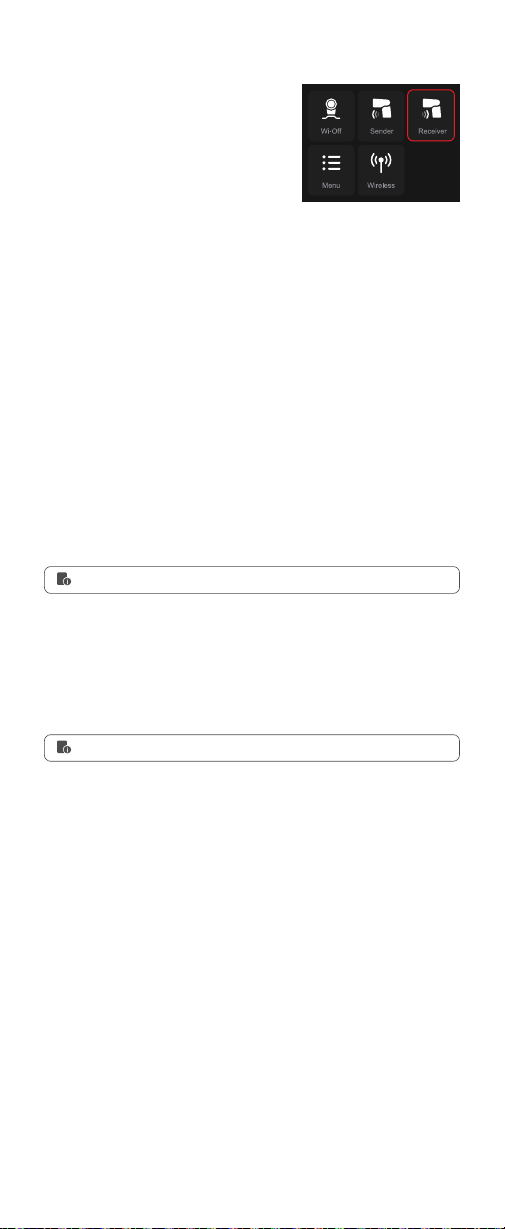
Touch Screen: Slide the screen from
the left to the right to make the mode
interface appears, click the “Sender”
icon to enter sender mode, slide upward
can check more groups.
Sender Mode
Group
M: Manual Flash—Flash Power
Five groups: A, B, C, D, E(V100 C)
M, A, B, C, D(V100 S, V100 N, V100 O, V100 F)
Touch Screen: Press and hold the group box to switch among M (manual)
flash, TTL auto flash and OFF. If the value inside is from 1/256 to 1/1 or
from 2.0 to 10, this group is in M (manual) flash mode and the value inside
is the flash power. The flash power is adjustable by clicking the – or + icon,
or quickly adjustable by pulling the progress bar.
Buttons and Select Dial: Press the
power switch button to make the mode
interface appears, rotate the select dial
and press the set button to choose and
enter sender mode, rotate the select dial
can check more groups.
Buttons and Select Dial: Rotate the select dial and press the set button to
choose and enter a certain group, press and hold the set button to switch
among M (manual) flash, TTL auto flash and OFF. If the value inside is
between 1/256 to 1/1 or from 2.0 to 10, this group is in M (manual) flash
mode and the value inside is the flash power. The flash power is adjustable
by rotating the select dial, then press the set button to exit.
The wireless is turned on by default in
sender mode.
TTL Auto Flash—Flash Exposure Compensation Amount
Adjust the Paremeters Uniformly
ZOOM: Setting the Flash Coverage
Touch Screen: Press and hold the group box to switch among M (manual)
flash, TTL auto flash and OFF. If the value inside is from -3.0 to +3.0,
this group is in TTL auto flash mode and the value inside is the flash
compensation amount. The flash compensation amount is adjustable by
clicking the – or + icon, or quickly adjustable by pulling the progress bar.
Touch Screen: Click the – or + icon can increase or decrease the flash
power or FEC amount uniformly.
You can choose auto zoom mode or manual zoom mode (28mm-105mm).
The details of which please refer to the ZOOM section in the Wi-Off mode
above.
Buttons and Select Dial: Rotate the select dial and press the set button to
choose and enter a certain group, press and hold the set button to switch
among M (manual) flash, TTL auto flash and OFF. If the value inside is
between -3.0 to +3.0, this group is in TTL auto flash mode and the value
inside is the flash compensation amount. The flash compensation amount
is adjustable by rotating the select dial, then press the set button to exit.
Buttons and Select Dial: Rotate the select dial and press the set button
to choose and enter a certain group, press the set button to enter uniform
adjustment and rotate the select dial to increase or decrease the flash
power or FEC amount uniformly, then press the set button to exit.
46
Touch Screen: Slide the screen from
the left to the right to make the mode
interface appears, click the “Receiver”
icon to enter receiver mode.
Five receiver groups: A, B, C, D, E
The wireless is turned on by default in receiver mode.
Touch Screen: Click the “MODE” icon to switch to TTL mode.
Touch Screen: Click the “MODE” icon to switch to M mode.
Receiver Mode
Group
TTL: TTL Auto Flash
M: Manual Flash
Touch Screen: Click the group icon to switch groups.
The details of which please refer to the section Wi-Off mode
→
TTL auto flash above.
The details of which please refer to the section Wi-Off mode
→
M: manual flash above.
The flash power adjustable from 1/256 to 1/1 or from 2.0 to 10 when
choosing M (flash) mode.
You can choose auto zoom mode or manual zoom mode (28mm-105mm).
The details of which please refer to the ZOOM section in the Wi-Off mode
above.
Touch Screen: The flash power is adjustable by clicking the – or + icon, or
quickly adjustable by pulling the progress bar.
Flash Power Settings
ZOOM: Setting the Flash Coverage
Buttons and Select Dial: Press the
power switch button to make the mode
interface appears, rotate the select dial
and press the set button to choose and
enter receiver mode.
Buttons and Select Dial: Rotate the select dial to choose the group icon,
then press the set button to enter group settings and rotate the select dial to
switch groups, nally press the set button again to exit.
Buttons and Select Dial: Rotate the select dial to choose the “MODE” icon,
then press the set button to enter MODE settings and rotate the select dial
to switch to TTL mode, nally press the set button again to exit.
Buttons and Select Dial: Rotate the select dial to choose the “MODE” icon,
then press the set button to enter MODE settings and rotate the select dial
to switch to M mode, nally press the set button again to exit.
Buttons and Select Dial: Rotate the select dial to choose the flash power
box, press the set button to enter flash power settings and rotate the select
dial to adjust, nally press the set button again to exit.
47
Touch Screen: When in Wi-Off/Sender/
Receiver mode, slide the screen down to
make other functions appear, slide up to
return to the main interface.
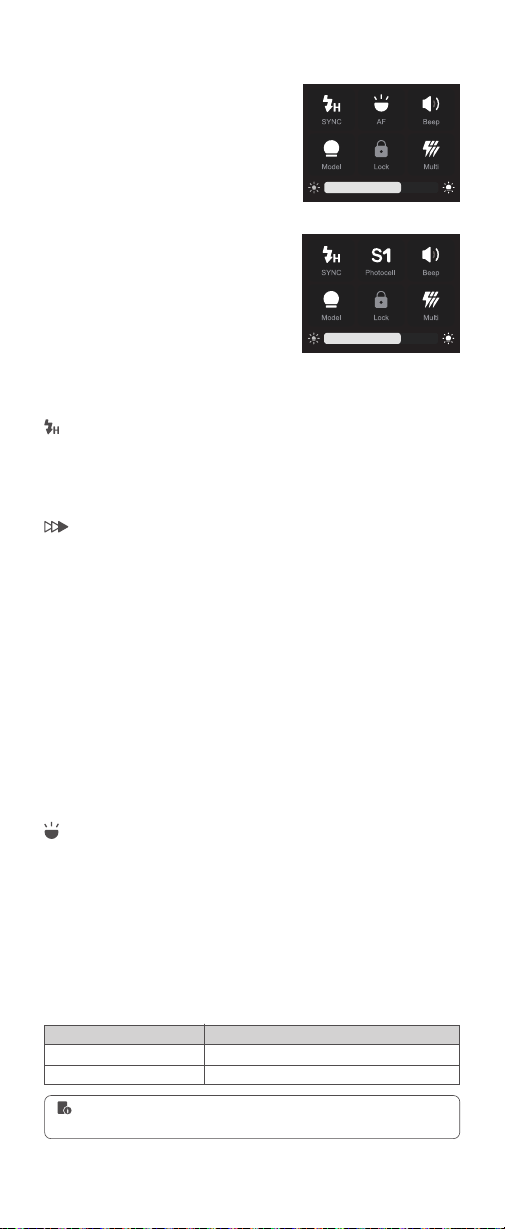
Sync Mode
Other Functions
High speed sync (FP flash) enables the flash to synchronize with all camera
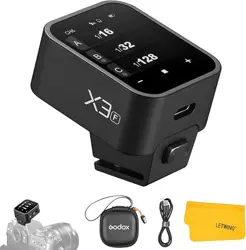
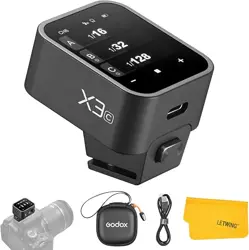
shutter speeds. This is convenient when you want to use aperture priority
for ll-flash portraits.
With a slow shutter speed and second-curtain sync, you can create a light
train following the subject. The flash res right before the shutter closes.
Note:When using V100 N and connected to Nikon cameras,the HSS will be automatically
turned on if the Nikon camera is set to fast shutter speed, while be automatically turned off if
the Nikon camera is set to low shutter speed.
Touch Screen: Click the “SYNC” icon to switch sync mode(V100 C). Click
the “SYNC” icon can only turn on or off HSS, second-curtain sync need to
be set on cameras (V100 S/V100 O/V100 F, or V100 N but not connected to
Nikon cameras).
High-speed Sync
Second-curtain Sync
Auto Focus Assist Beam(unavailable in V100 O)
In poorly-lit or low-contrast shooting environments, the built-in auto focus
assist beam will automatically light on to make it easier for autofocus. The
beam will light up only when autofocus is difcult and get out as soon as
the autofocus becomes correct.
Touch Screen: Click the “AF” icon to turn on or off the auto focus assist
beam.
Position
Center
Periphery
Effective Range
0.6~10m / 2.0~32.8 feet
0.6~5m / 2.0~16.4 feet
If you nd the auto focus assist beam does not light up, this is because the
camera has got a correct autofocus.
Buttons and Select Dial: When in Wi-
Off/Sender/Receiver mode, short press
the power switch button twice to make
other functions appear, press it again to
return to the main interface.
Buttons and Select Dial: Rotate the select dial to choose “AF” icon, then
press the set button to turn on or off the auto focus assist beam.
Buttons and Select Dial: Rotate the select dial to choose “SYNC” icon, then
press the set button to switch sync mode(V100 C). Press the set button can
only turn on or off HSS, second-curtain sync need to be set on cameras
(V100 S/V100 O/V100 F, or V100 N but not connected to Nikon cameras).
V100 C/S/N/F
V100 O
48
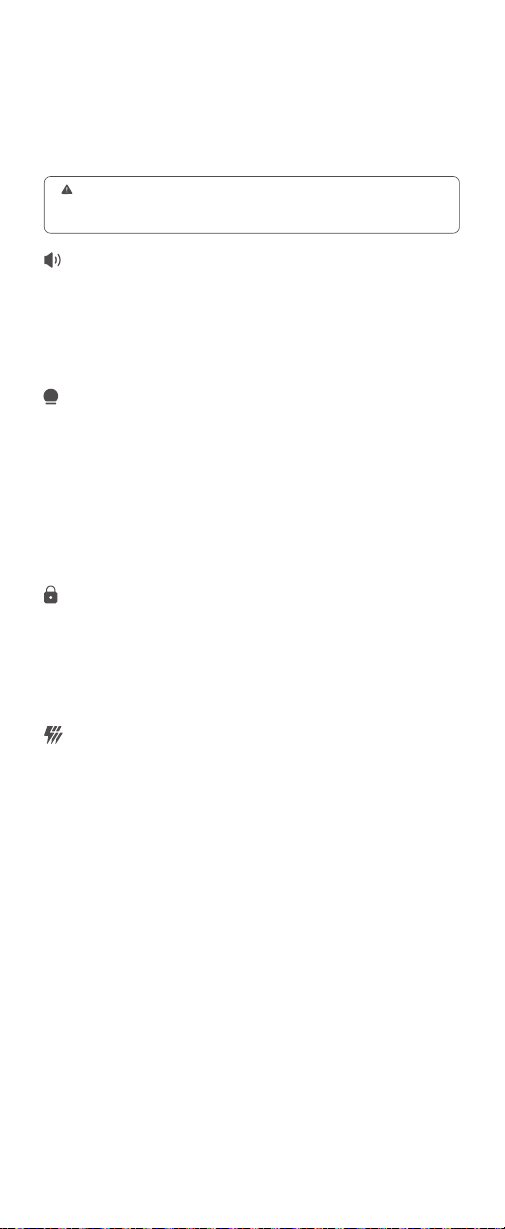
Beep
The flash will re with a prompt tone if the beep is turned on.
Touch Screen: Click the “Beep” icon to turn on or off the beep.
Buttons and Select Dial: Rotate the select dial to choose “Beep” icon, then
press the set button to turn on or off the beep.
Modeling Lamp
Touch Screen: Click the “Model” icon to turn on or off the modeling lamp.
The brightness of it is adjustable from 1 to 10 by pulling the progress bar
down when it’s turned on.
Buttons and Select Dial: Rotate the select dial to choose “Model” icon, then
press the set button turn on or off the modeling lamp. When the modeling
lamp is on, its brightness is adjustable from 1 to 10 by rotating the select
dial and pressing the set button after selecting the progress bar down, then
press the set button again to exit.
Screen Lock
Multi Flash
Touch Screen: Click the “Lock” icon to turn on the screen lock, press and
hold for 2s to unlock.
With slow shutter speed in multi flash mode, a rapid series of flashes is
red. It can be used to capture multiple images of a moving subject in a
single photograph.
You can set the flash frequency (number of flashes per sec. expressed as
Hz), the number of flashes, and the flash output.
Flash output range: 1/256-1/4 or 2.0-8.0.
Number of flashes: 1-100
Flash frequency: 1-100
ZOOM range: auto zoom or manual zoom.
Touch Screen: Click the “Multi” icon to turn on or off the multi flash. When
the multi flash is turned on, slide the screen up can adjust the parameters.
Slide the number in front of “Times” can adjust the number of flashes, slide
number in front of “Hz” can adjust the flash frequency, click the – or + icon
can adjust the flash power, press the “ZOOM” icon down to enter the ZOOM
setting interface and choose auto zoom or manual zoom, then adjust the
ZOOM value. Finally press the return icon to back to the multi flash interface.
Buttons and Select Dial: Rotate the select dial to choose “Lock” icon, then
press the set button to turn on the screen lock, press and hold for 2s to
unlock.
Buttons and Select Dial: Rotate the select dial to choose “Multi” icon, then
press the set button to turn on or off the multi flash. When the multi flash is
turned on, press the power switch button to make the parameters interface
appears, then the flash power, number of flashes, flash frequency and
ZOOM value are all adjustable by rotating the select dial, nally press the set
button again to exit.
Photocell (V100 O)
Touch Screen: Click the “Photocell” icon to switch among OFF, S1 or S2.
Buttons and Select Dial: Rotate the select dial to choose “Photocell” icon,
then press the set button to switch among OFF, S1 or S2.
The photocell function can be turned on or off in this interface for V100 O, while
other models need to be turned on or off in the menu. The details of which please
refer to the M: manual flash section in the Wi-Off mode above.
49
Calculating the Shutter Speed
During multi flash, the shutter remains open until the ring stops. Use the
formula below to calculate the shutter speed and set it with the camera.
Number of Flashes ÷ Flash Frequency = Shutter Speed
To avoid overheating and deteriorating the flash head, do not use multi flash more
than 10 times in succession. After 10 times, allow the camera flash to rest for at
least 15 minutes. If you try to use the multi flash more than 10 times in succession,
the ring might stop automatically to protect the flash head. If this happens, allow
at least 15 minutes’ rest for the camera flash.
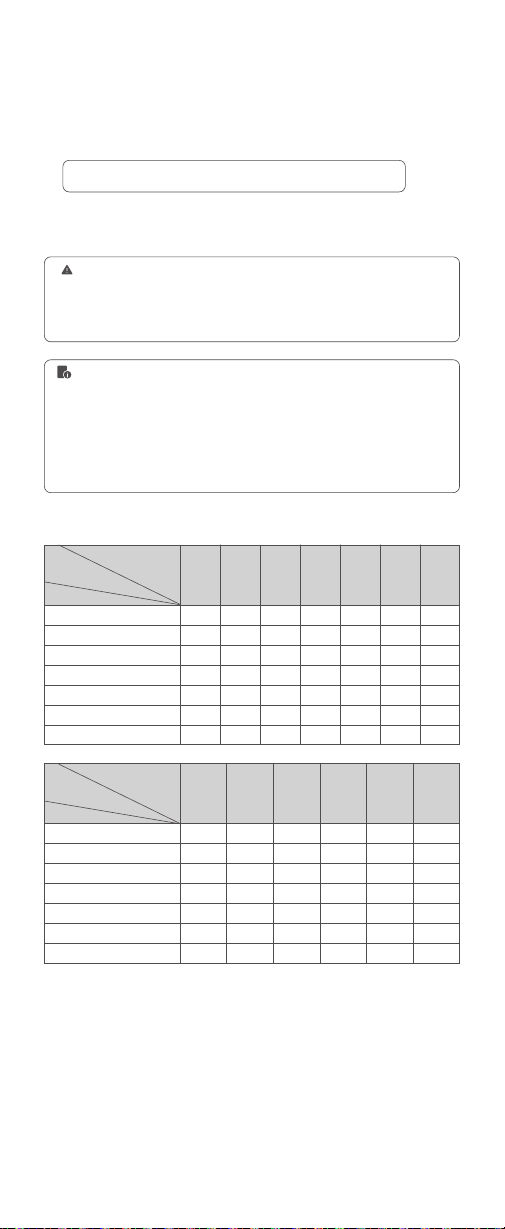
Maximum Time of Consecutive Flashes
1/4
1/8
1/16
1/32
1/64
1/128
1/256
Flash Output
Flash Output
Flash
Frequency(Hz)
Flash
Frequency(Hz)
Number
of Flashes
Number
of Flashes
1/4
1/8
1/16
1/32
1/64
1/128
1/256
1
8
14
30
60
90
100
100
2
6
14
30
60
90
100
100
3
4
12
30
60
90
100
100
4
3
10
20
50
80
100
100
5
3
8
20
50
80
100
100
6-7
2
6
20
40
70
90
90
8-9
2
5
10
30
60
80
80
11
2
4
8
20
40
70
70
10
2
4
10
20
50
70
70
12-14
2
4
8
20
40
60
60
15-19
2
4
8
18
35
50
50
20-50
2
4
8
16
30
40
40
60-100
2
4
8
12
20
40
40
1. Multi flash is most effective with a highly reflective subject against a dark
background.
2. Using a tripod and TTL flash trigger XPROII is recommended.
3. A flash output of 1/1 and 1/2 cannot be set for multi flash.
4. Multi flash can also be used with “buLb” mode.
5. Multi flash mode cannot be set in high-speed sync mode.
6. Please turn off the multi flash when not using, otherwise TTL flash and M flash
are not available.
For example, if the number of flashes is 10 and the flash frequency is 5Hz,
the shutter speed should be at least 2 seconds.
50
Touch Screen: Slide the screen from
the left to the right to make the mode
interface appears, click the “Wireless”
icon to enter wireless mode. Then slide
from the left to the right to return to the
main interface.
Wireless Settings
You can scan the spare channel to avoid the interference of using the same
channel by others.
If there are other wireless flash systems nearby, you can change the
wireless channels to prevent signal interference. The wireless channels (01-
32) of the sender unit and the receiver unit(s) must be set to the same.
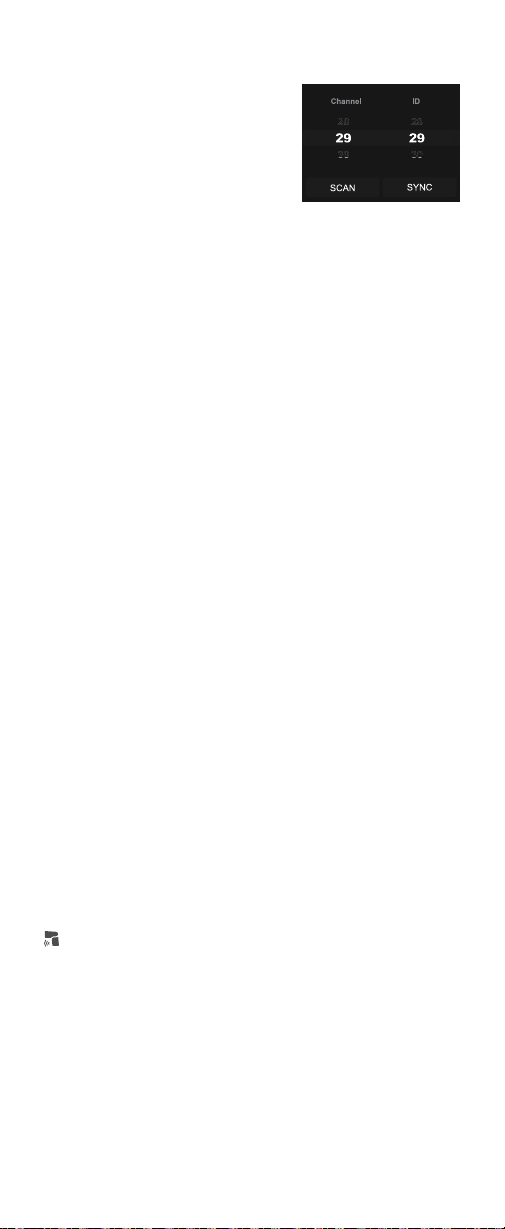
Touch Screen: Click the “SCAN” icon to start scanning, and the 8 spare
channels will be displayed, click your desired channel.
Touch Screen: Slide the “Channel” box to choose your desired channel.
Scan the Spare Channel
Channel Settings
Buttons and Select Dial: Press the
power switch button to make the mode
interface appears, rotate the select dial
and press the set button to choose and
enter wireless mode. Short press the
power switch button to return to the
main interface.
Buttons and Select Dial: Rotate the select dial to choose “SCAN” icon,
then press the set button to start scanning, and the 8 spare channels will
be displayed, rotate the select dial and press the set button to choose your
desired channel.
Buttons and Select Dial: Rotate the select dial to choose “Channel” box,
then press the set button to enter channel settings, rotate the select dial
and press the set button to choose your desired channel, nally press the
set button to exit.
Change the wireless ID to avoid interference for it can only be triggered after
the wireless IDs (OFF/01-99) of the sender unit and the receiver unit are set
to the same.
The wireless sync function helps the sender and receiver to quickly set the
same channel and ID.
Touch Screen: Click the “SYNC” icon on both V100 and Lux Master.
Preconditions:
1. Set V100 to sender mode and the “Sender” icon on the panel is yellow.
2. Assume retro camera flash Lux Master as the receiver.
Touch Screen: Slide the “ID” box to turn off the ID, or choose your desired ID.
ID Settings
Wireless Sync
Receiver Wireless Sync
Buttons and Select Dial: Rotate the select dial to choose “ID” box, then
press the set button to enter ID settings, rotate the select dial and press the
set button to choose your desired ID, nally press the set button to exit.
Buttons and Select Dial: Rotate the select dial on V100 to choose “SYNC”
icon, then press the set button. Rotate the select dial on Lux Master to
choose “SYNC” icon, then press the SET button.
51
Touch Screen: Click the “SYNC” icon on both V100 and X3.
When the sender unit and receiver unit are both V100, wireless sync is also
available.
Buttons and Select Dial: Rotate the select dial on V100 to choose “SYNC”
icon, then press the set button. Rotate the select dial on X3 to choose “SYNC”
icon, then press the select dial.
Touch Screen: Slide the screen from the left to the right to make the mode
interface appears, click the “Menu” icon to enter the menu interface. Then
slide from the left to the right to return to the main interface.
Menu
Buttons and Select Dial: Press the power switch button to make the mode
interface appears, rotate the select dial and press the set button to choose
and enter the menu interface. Short press the power switch button to return
to the main interface.
Due to the difference in the menu order of different models, the specic
menu ordering is subject to the actual product models, the following only
explains the menu functions.
Preconditions:
1. Set V100 to receiver mode and the “Receiver” icon on the panel is yellow.
2. Assume flash trigger X3 as the sender.
Sender Wireless Sync
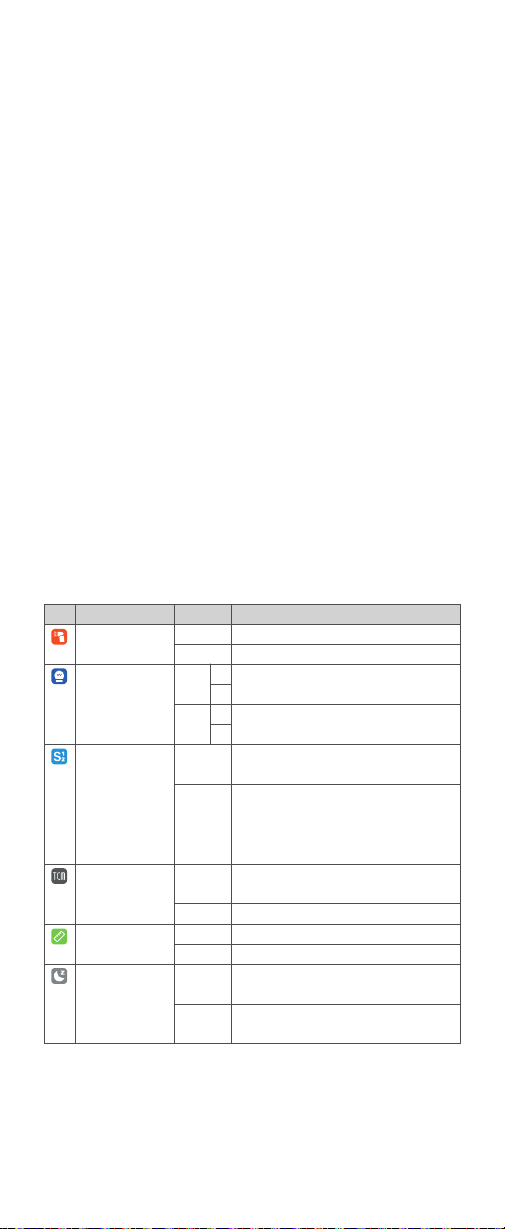
Icon Function
Sender Flash
(only available in V100 C)
Power Type
Photocell
(Available in other
interface for V100 O)
TCM
m/ft
Standby
Options
Off
On
1/256
2.0
S1
S2
On
Off
m
ft
On
Off
Description
Sender flash off
Sender flash on
Minimum power step is 1/256, 0.1 or 0.3
increment are available for choice
Minimum power step is 2.0, 0.1 or 0.3 increment
are available for choice
Only available in M (manual) flash mode, the flash
will re synchronously when the main flash res.
Only available in M (manual) flash mode, the flash
will ignore a single “pre-flash” from the main flash
and will only re in response to the second, actual
flash from the main flash.
Flash value of TTL mode can be converted to the
power value of M mode
Turn off this function
Meter
Feet
Automatically standby after the set time (90
seconds) of idle use.
Do not automatically standby after the set time (90
seconds) of idle use.
0.1
0.3
0.1
0.3
52
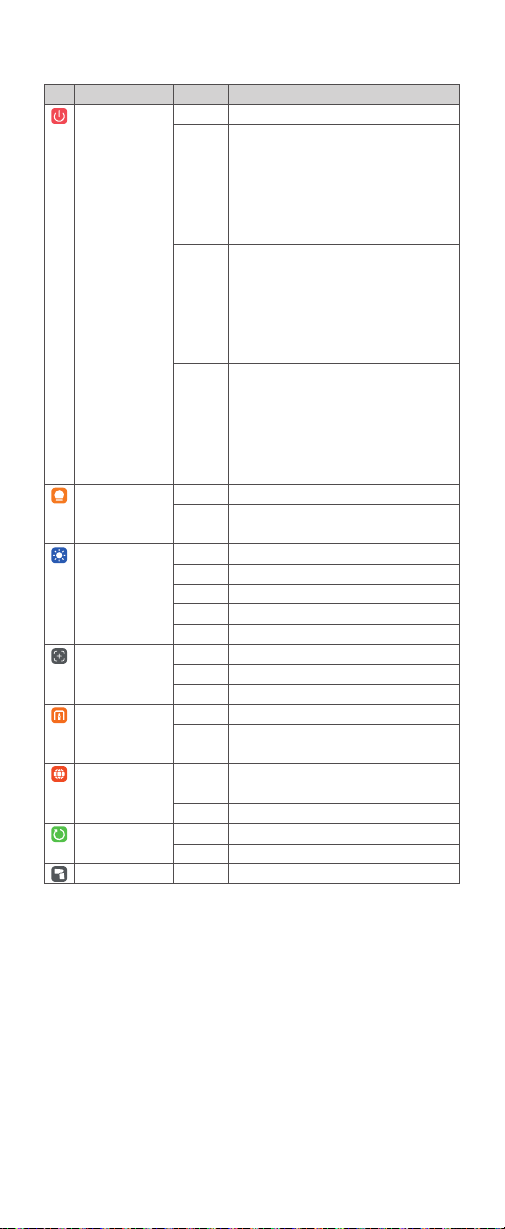
Icon Function
Auto Off
Model
Screen
Zoom
New Agreement
(only available in V100 S)
Language
Factory Reset
Device Info
Options
Off
30 min
60 min
90 min
Continue
Interrupt
/
30 sec
1 min
2 min
3 min
4/3
APS
135
On
Off
Simplied
Chinese
English
Cancel
Apply
/
Description
Turn off auto power off function
1. Setting as wi-off/sender mode when the
standby function is off, the flash will automatically
shut down after 30 minutes of idle use.
2. Setting as receiver mode, the flash will
automatically shut down after 30 minutes of idle
use.
1. Setting as wi-off/sender mode when the
standby function is off, the flash will automatically
shut down after 60 minutes of idle use.
2. Setting as receiver mode, the flash will
automatically shut down after 60 minutes of idle
use.
1. Setting as wi-off/sender mode when the
standby function is off, the flash will automatically
shut down after 90 minutes of idle use.
2. Setting as receiver mode, the flash will
automatically shut down after 90 minutes of idle
use.
The modeling lamp is constant on when flashing.
The modeling lamp automatically turns off when
flashing.
Screen brightness is steplessly adjustable.
Screen standby after 30 seconds of idle use.
Screen standby after 1 minute of idle use.
Screen standby after 2 minutes of idle use.
Screen standby after 3 minutes of idle use.
4/3 system (only available in V100 O)
APS system (only available in V100 F)
135 system (default in V100 C/V100 S/V100 N)
The new agreement is turned on by default.
Turn off the new agreement in case of
incompatibility of flash and camera.
Simplied Chinese system
English system
Cancel factory reset
Factory reset
Display the device model and rmware version
53
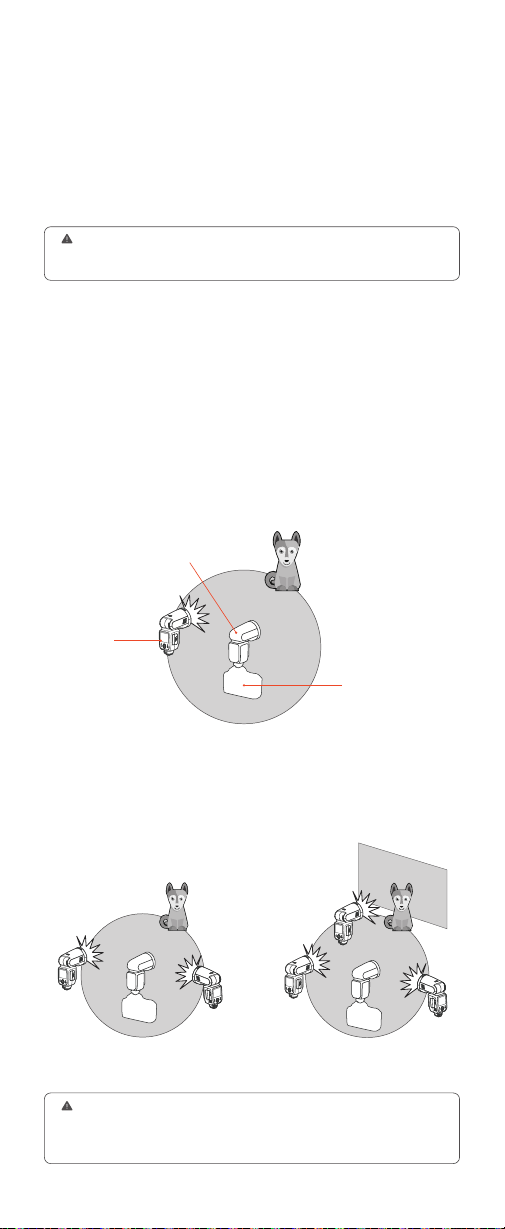
This section explains wireless sending/receiving flash shooting.
The V100 attached to the camera is referred as the sender unit, while a
V100 that is wirelessly controlled is referred as the receiver unit.
Using a flash with a radio transmission wireless shooting function make it
easy to shoot with advanced wireless multiple flash shooting, in the same
way as TTL auto flash shooting.
You can divide the receiver units into two or three groups and perform TTL
auto flash while changing the flash ratio (flash output ratio).
Two groups: A, B Three groups: A, B, C
Wireless Flash Shooting (2.4G Wireless
Transmission)
When the camera’s shooting mode is set to a fully automatic mode or an image
zone mode, the operations in this section are not available. Please set the camera’s
shooting mode to Fv/P/Tv/Av/M/B.
Auto Flash Shooting with One Receiver Unit
Auto Flash Shooting with Multiple Receiver Groups
Transmission distance
is about 100m
Receiver
Sender
Positioning and Operation Range
●
●
1. Before shooting, perform a test flash and test shooting.
2. The transmission distance might be shorter depending on the conditions
such as positioning of receiver units, the surrounding environment and whether
conditions.
A
A
B
B
C
You can also wirelessly control the V100 set as the receiver unit with the
TTL flash trigger XPROII (sold separately). For details on setting the flash
trigger functions, see the its instruction manual.
As long as the channel, group, ID, and other relevant wireless settings of
the sender and receiver units are set to the same, the settings on the V100
(sender unit) will be automatically applied to the wirelessly controlled V100
(receiver unit). Therefore, there is no need to operate the receiver unit during
shooting.
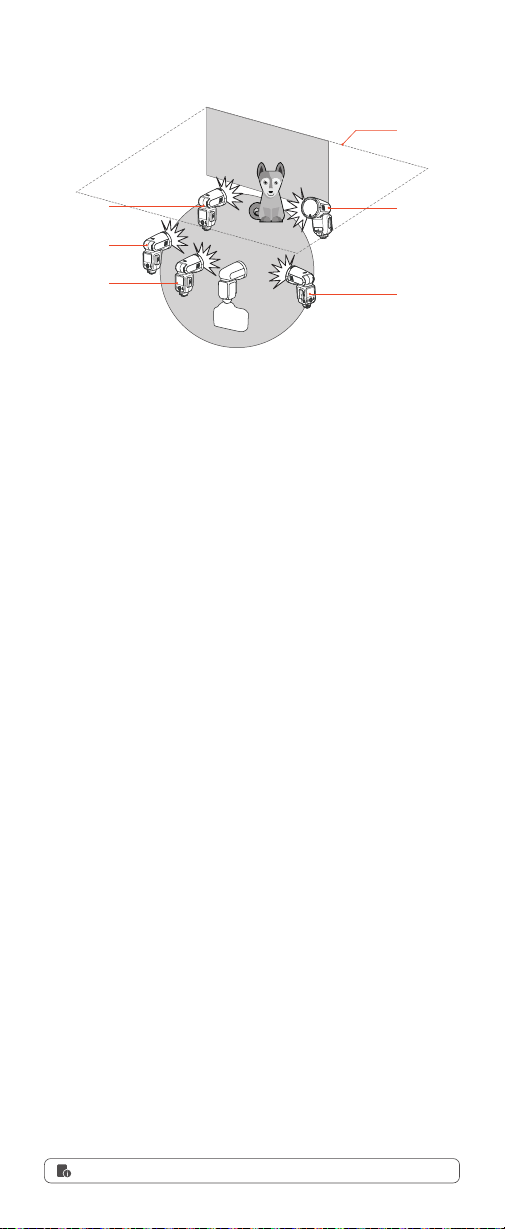
54
A
B
C
D
E
Touch Screen: Slide the screen from the left to the right to make the mode
interface appears, click the “Sender” icon to enter sender mode, slide from
the left to the right to return to the main interface.
Touch Screen: Slide the screen from the left to the right to make the mode
interface appears, click the “Receiver” icon to enter receiver mode, slide
from the left to the right to return to the main interface.
Wireless Sender/Receiver Settings
About the Sender Unit
Sender Unit's (Flash) ON/OFF(Only available in
V100 C)
Set as a Sender Unit
Use two or more sender units. By preparing several cameras that with
sender units attached, cameras can be changed in shooting while keeping
the same lighting source (receiver unit).
You can set whether the sender unit flash that sends wireless signal flashes
or not, and when the sender unit flash setting is on, the flash res as a flash
A group.
Touch Screen: Slide the screen from the left to the right to make the mode
interface appears, click the “Menu” icon to enter menu interface, choose
“Sender Flash” icon and click to turn on or off the sender flash.
Set as a Receiver Unit
Shooting with a Different Flash Mode Set for Each Group
●
Even if the sender unit flash ring is off, it still sends wireless flash signals.
Ceiling
Manual Flash
Manual Flash
Manual Flash
TTL
TTL
Buttons and Select Dial: Press the power switch button to make the mode
interface appears, rotate the select dial and press the set button to choose
and enter sender mode. Short press the power switch button to return to
the main interface.
Buttons and Select Dial: Press the power switch button to make the mode
interface appears, rotate the select dial and press the set button to choose
and enter receiver mode. Short press the power switch button to return to
the main interface.
Buttons and Select Dial: Press the power switch button to make the mode
interface appears, rotate the select dial and press the set button to enter
menu interface and choose “Sender Flash”, then rotate the select dial and
press the set button to turn on or off the sender flash. Short press the
power switch button to return to the main interface.
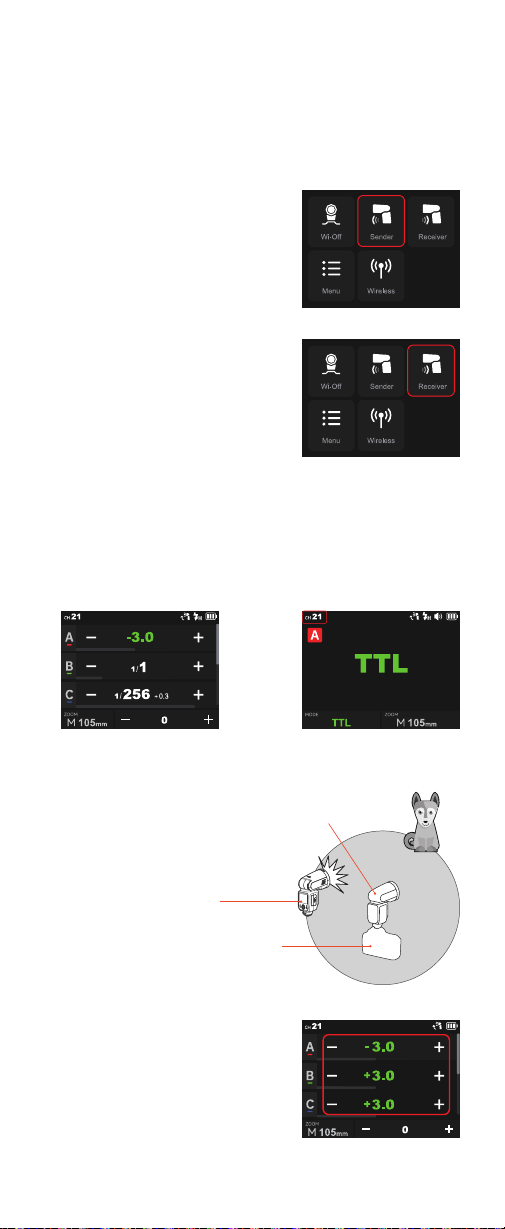
55
TTL: Fully Automatic Wireless Flash Shooting
The below instructions are described in touch screen operation, you can
also use buttons and select dial.
Click the “Sender” icon on the panel,
then the V100 attached to the camera is
set as the sender unit.
Click the “Receiver” icon on the panel,
then the V100 wirelessly controlled is set
as the receiver unit.
Set the wireless channels and IDs of sender unit and receiver unit to the
same. For example, if the sender unit channel is set to 1, then the receiver
unit channel needs to be 1 as well.
You can also use the wireless sync function to set the channels and ID to
the same quickly.
The transmission distance of the sender
unit and receiver unit is about 100m.
Click the “Sender” icon on the panel to
enter sender mode. Press and hold the
group box to switch to TTL auto flash
compensation amount.
Please set the sender unit's flash to
ON in order to make the sender unit re
flashes(only available in V100 C).
X2T can also be set as sender unit. X2T
can control V100's ZOOM value when
the ZOOM is adjusted to auto (A) mode.
Using Automatic Wireless Flash with a Single Receiver Unit
1. Sender Unit Setting
2. Receiver Unit Setting
3. Check the Communication Channel /ID
4. Position the Camera and Flashes
5. Set the Flash Mode to <TTL>
●
Transmission distance
is about 100m
Receiver
Sender
(This interface takes V100 C as an example,
other models interfaces may differ)
(This interface takes V100 C as an
example, other models interfaces
may differ)
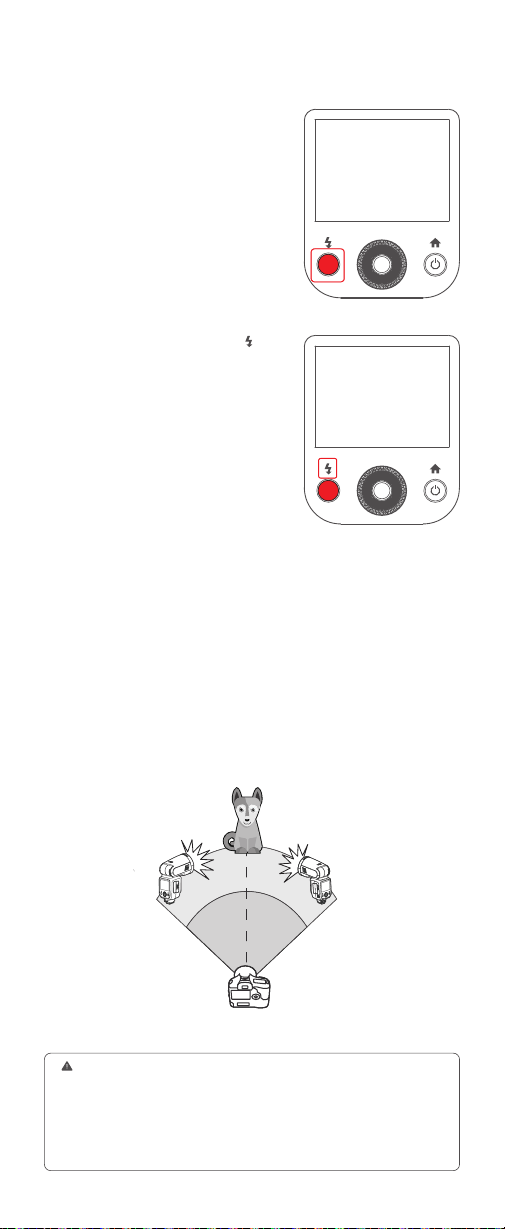
56
When stronger flash output or more convenient lighting operation is needed,
increase the number of receiver units and set it as a single receiver unit.
To add receiver units, use the same steps as setting “using automatic
wireless flash with a single receiver unit”. Any flash group can be set (A/B/
C/D/E).
When the number of receiver units is increased or the sender unit flash
ring is ON, automatic control is implemented to make all groups of flashes
re the same flash output and ensure the total flash output is up to standard
exposure.
Check whether the sender unit’s flash
ready indicator is lightened.
Press the sender unit’s test button <
>.
Then, the receiver unit will re. If not,
adjust the distance from the sender unit.
Using Automatic Wireless Flash with Multiple Receiver Units
6. Check Whether the Flash is Ready
7. Check the Flash Operation
●
1. Press the depth-of-eld preview button on the camera to re a modeling
flash(V100 C).
2. If the receiver unit’s auto power off function is on, press the sender unit’s test
button to power it on. Please note that test ring is unavailable during the camera’s
regular metering time.
3. The effective time of receiver unit’s auto power off is changeable between
30min or 90min in the menu settings.

57
M: Wireless Stroboscopic Flash Shooting with
Manual Flash
Wireless Stroboscopic Flash Shooting with
Multi Flash
Using wireless (multiple flash) shooting with manual flash, you can shoot
with a different flash output setting for each receiver unit (flash group) while
setting all parameters on the sender unit.
Click the “Sender” icon on the panel to enter sender mode. Press and hold
the group box to switch to M manual flash power.
For example, if the sender unit channel is set to 1, then the receiver unit
channel needs to be 1 as well.
You can also use the wireless sync function to set the channels and ID to
the same quickly.
Click the – or + icon can adjust the flash output, slide the number in front of
“Times” can adjust the number of flashes, slide number in front of “Hz” can
adjust the flash frequency.
For example, if the sender unit channel is set to 1, then the receiver
unit channel needs to be 1 as well.
Click the – or + icon to adjust the flash output of each flash group.
Click the “Sender” icon onto the sender unit’ LCD panel to enter sender
settings. Slide the screen down to make the “Multi” icon appears and click
to turn it on, then slide up to make the wireless multi flash parameters
appear.
The wireless multi flash of receiver unit A/B/C/D/E can be turned on or off
directly on the sender unit.
Click the “Receiver” icon onto the sender unit’ LCD panel to enter receiver
settings.
Each receiver unit res at the set flash ratio.
1. Click the “Sender” icon on the panel, then the V100 attached to the
camera is set as the sender unit.
3. Set the wireless channels and IDs of sender unit and receiver unit to
the same.
2. Set the Flash Output, Number of Flashes and Flash Frequency of the
Wireless Multi Flash
4. Set the Wireless Channels and IDs of Sender Unit and Receiver Unit to
the Same
2. Set the flash output of each flash group
1. Set the Sender Unit to Wireless Multi Flash
5. Turn On/Off the Wireless Multi Flash of Receiver Unit Group
3. Set the Receiver Unit
4. Take Picture
The parameters of receiver unit can be directly set on the sender unit on the
condition that channels and IDs of them are set to the same.
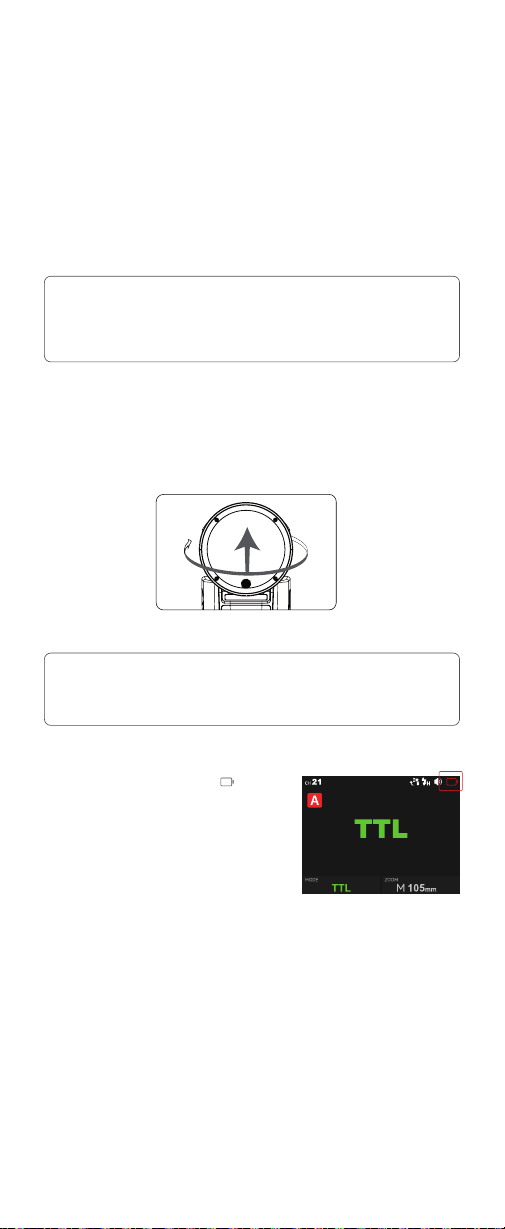
58
Other Applications
The sync cord jack is a Φ2.5mm plug. Insert a trigger plug here and the
flash will be red synchronously with the camera shutter.
If the camera has a depth-of-eld preview button, pressing it will re the
flash continuously for 1 second. This is called modeling flash. It enables
you to see the shadow effects on the subject and the lighting balance. You
can re the modeling flash during wireless or normal flash shooting.
By pointing the flash head toward a wall or ceiling, the flash will bounce off
the surface before illuminating the subject. This can soften shadows behind
the subject for a more natural-looking shot. This is called bounce flash.
If the battery power is low, the <
> icon
will turn red. Please replace or charge the
battery immediately.
Note:
Note:
Sync Triggering
Modeling Flash(Only available in V100 C and V100 N)
Bounce Flash
Low Battery Warning
1. To avoid overheating and deteriorating the flash head, do not re the modeling
flash for more than 10 consecutive times. If you re the modeling flash 10
consecutive times, allow at least 10 minutes’ break for the camera flash.
2. The modeling flash cannot be red with the Canon EOS 300 and Type-B cameras.
3. V100 S, V100 F and V100 O do not support modeling flash.
1. If the wall or ceiling is too far away, the bounced flash might be too weak and
result in underexposure.
2. The wall or ceiling should be a plain, white color for high reflectance. If the
bounce surface is not white, a color cast may appear in the picture.
To set the bounce direction, hold the flash head and turn it to a satisfying angle.
330°
-7-120
°
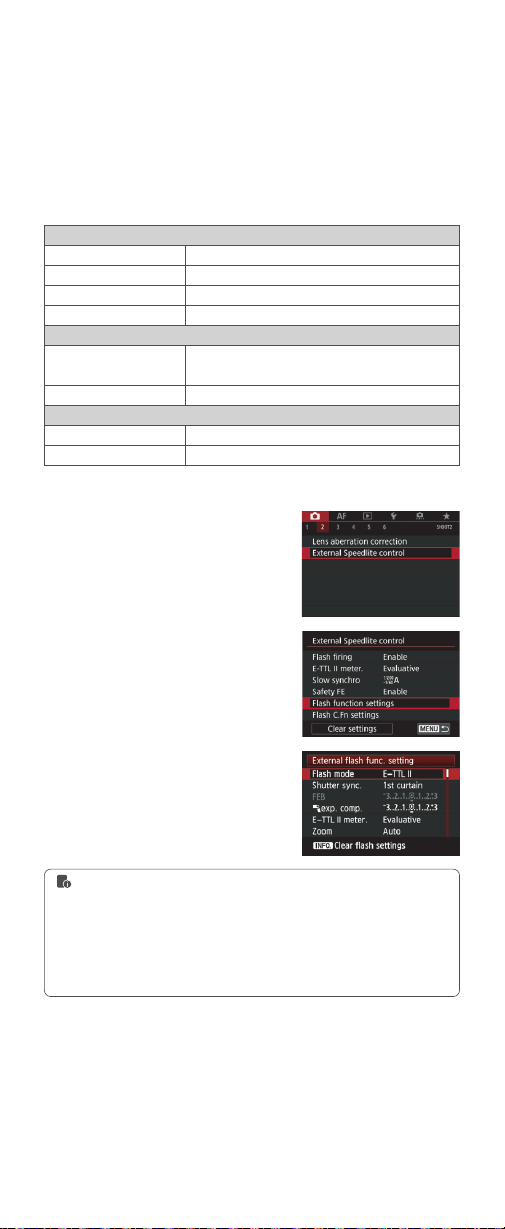
59
Control with the Camera's Menu(Only available in
V100 C)
Global Shutter Sync Shooting(Only available in
V100 S)
If the camera flash is attached to an EOS camera which has a camera
control function, the flash can be controlled using the camera’s menu
screen.
By using a combination of V100 S and a camera equipped with global
shutter image sensor, flash photography can be synchronized with the
entire range of shutter speeds available on the camera, enabling more
effective flash exposures than conventional high-speed sync photography
(HSS).
The functions that can be set are as follows. The available settings vary
depending on the flash mode, wireless flash function settings, and other
conditions.
Flash Firing
E-TTL Balance
TTL Metering
Continuous Flash Control
Flash synchronization speed in aperture-priority mode
Flash Mode
Wireless Functions
Zoom (Flash Coverage
)
Shutter Sync
Flash Exposure Compensation
Function
On/Off
Ambience priority/Standard/Flash priority
Evaluative
(
Face priority
)
/ Evaluative / Average
E-TTL shooting every time / E-TTL shooting for the rst time
TTL flash metering
(
auto flash
)
/manual flash/multi flash
(
stroboscopic
)
Wireless flash
:
Off/Radio transmission
First-curtain Sync/Second-curtain Sync /High-speed Sync
1. Select <Flash control> or <External
Speedlite control>.
2. Select <Flash function settings> or
<External func. setting >.
3. The setting screen and items
displayed vary depending on the camera.
Setting Camera Flash Functions
1. To clear all custom function settings, you can enter the [Clear settings] in step 2
and select [Clear all Speedlite C.Fn's] or [Clear ext. flash C.Fn set.].
2. If flash exposure compensation has already been set with the camera flash, flash
exposure compensation cannot be set with the camera. To set it with the camera,
the camera flash’s flash exposure compensation must be set to zero.
3. If any flash custom functions and flash settings other than flash exposure
compensation have been set by both the camera and the flash, the latest settings
will take effect.
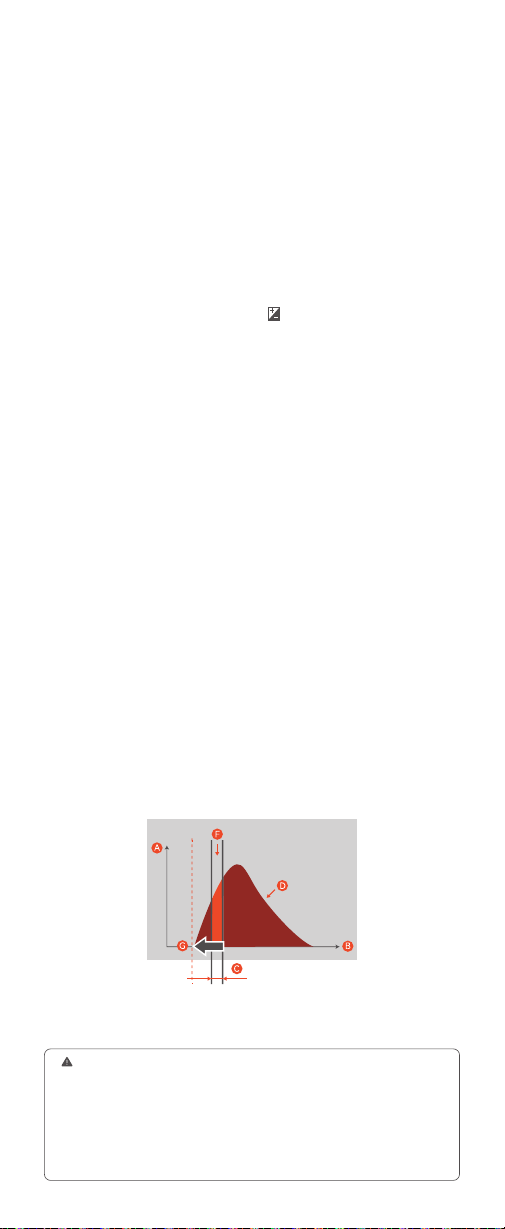
60
1. When V100 S is used in TTL auto flash mode with a global shutter
camera, the flash will be synchronized properly at both low and high shutter
speeds. Compared to a non-global shutter camera, with a global shutter
camera, the HSS flash time is shorter (about 2-5 milliseconds), the recycle
time is faster, and the camera can take more shots.
On: Adjusts the flash timing manually(0 microseconds to 1000
microseconds).
Off: Does not adjust the flash timing(the flash will re in single pulse flash
when the shutter speed is 1/600).
High-speed shutter single pulse flash requires very strict time alignment.
As shown in the gure, the shutter needs to be turned on at the optimal light
effect of the flash. Matching method is as follows:
Set the flash to M (manual) flash mode and enter the menu, turn on ADJ
in the camera flash timing settings. Input ADJ parameter which is related
to the camera and flash used. If you are using V100S with A9MIII, this
parameter is about 160 microseconds when V100S is wireless off, and
about 560 microseconds when V100S is wireless on (if you are using other
global shutter cameras, you need to full-time match to determine the time).
After setting the above parameters, adjust the camera shutter to 1/80000
and the flash power to 1/256 (The matching requirements are higher for
faster shutter speed and lower power, if you adjust the right combination,
other combinations are usually suitable. When set to a fast shutter speed
and high power, since the flash timing is much longer than the shutter time,
you can move the time back and select the peak of the flash.), you can ne-
tune the ADJ parameters to the optimal exposure time in case the flash is
out of sync, then you can test the shootings under other shutters.
A: Amount of flash light
B: Time
C: Shutter speed
D: Amount of flash light in 1/256 power
F: Exposed amount of flash light
G: Flash starting timing
Flash timing settings: Camera Menu
→
(Exposure/Color)
→
[Flash]
→
[Flash Timing Setting]
→
[On]
→
Set the flash timing to the desired value.
How to Match the Flash and the Shutter
ADJ flash timing settings menu:
2. When V100 S is used in M (manual) flash mode and you want to use
single pulse flash (not HSS) in high-speed shutter (with a shutter speed
faster than 1/600), you can adjust the camera's flash delay time to match
the exposure time, so that you can shoot with a more appropriate amount
of light. Compared to HSS mode, this mode has a better flash index with the
same power.
1. If you set the camera's shutter speed to faster than 1/10000 and take a picture,
the brightness and color may vary.
2. For camera equipped with a global shutter image sensor, the HSS icon will not
be displayed on the panel regardless of whether the high-speed sync setting is [ON]
or [OFF].
3. When the flash is connected to the camera using a sync cord, the camera
shoots with a traditional high-speed sync instead of using the global shutter sync,
so the distance that the flash's light can reach is shortened.
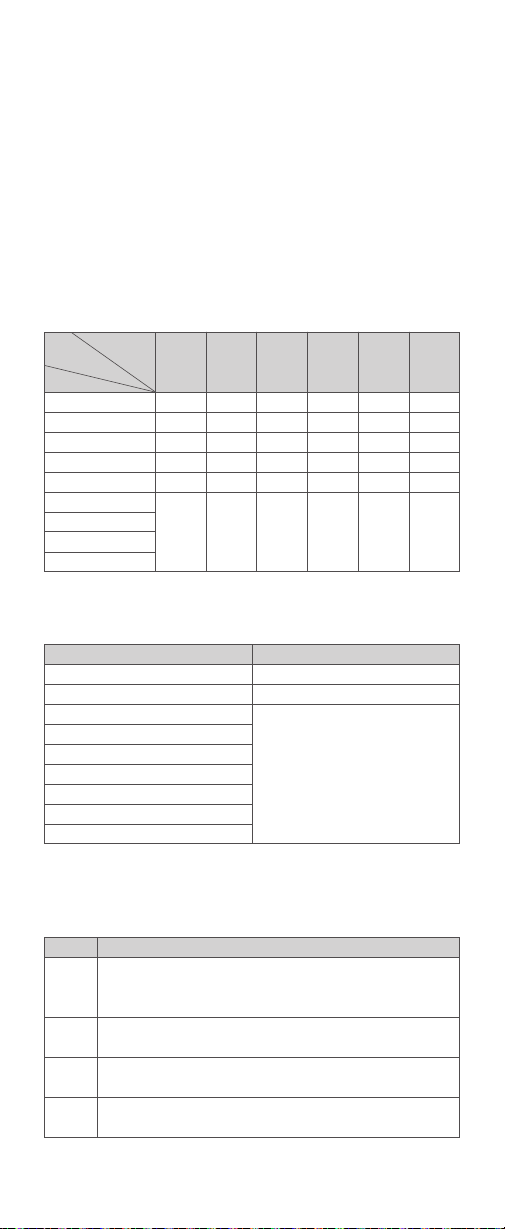
61
Protection Function
To avoid overheating and deteriorating the flash head, do not re more
than 70 continuous flashes in fast succession at 1/1 full power. After 70
continuous flashes, allow a rest time of at least 10 minutes.
If you re more than 70 continuous flashes and then re more flashes
in short intervals, the inner over-temperature protection function may
be activated and make the recycle time over 10 seconds. If this occurs,
allow a rest time of about 10 minutes, and the flash unit will then return to
normal.
When the over-temperature protection is started, the icon is shown on the
LCD display.
Power Output Level
1/1
1/2 (+0.1~+0.9)
1/4(+0.1~+0.9)
1/8(+0.1~+0.9)
1/16(+0.1~+0.9)
1/32(+0.1~+0.9)
1/64(+0.1~+0.9)
1/128(+0.1~+0.9)
1/256(+0.1~+0.9)
Display
Error1
Error3
Error5
Error9
Number of Flashes
60
70
100
Meaning
A failure occurs on the recycling system so that the flash cannot re. Please
restart the flash unit. If the problem still exists, please send this product to a
maintenance center.
The voltage on two outlets of the flash tube is too high. Please send this
product to a maintenance center.
Abnormalities in the flash circuit. Please send this product to a maintenance
center.
There are some errors occurred during the upgrading process. Please using
the correct rmware upgrade method.
Over-Temperature Protection
Number of flashes that will activate over-temperature protection:
Number of flashes that will activate over-temperature protection in
HSS mode:
Other Protections
The system provides real-time protection to secure the device and your
safety. The following lists prompts for your reference:
●
●
●
Flash Power
Focal Length
Number
of Flash
1/1
1/2
1/4
1/8
1/16
1/32
1/64
1/128
1/256
28mm
70
106
215
300
1200
3500
35mm
75
114
231
300
1200
3500
50mm
80
120
240
300
1200
3500
70mm
90
134
273
300
1200
3500
80mm
100
150
300
300
1200
3500
105mm
100
150
300
300
1200
3500

62
3. Whether the distance between the flash trigger and the flash is too
close or not (
<
0.5m).
4. Whether the flash trigger and the receiver end equipment are in the low
battery states or not
5. The flash trigger’s rmware is an older version
6. The camera’s rmware is an older version
→
Please turn on the “close distance wireless mode”:
→
Please replace the battery or charge it in time.
→
Please upgrade the rmware of the flash trigger referring to the
instruction manual for specic rmware upgrades.
→
Please upgrade the rmware of the camera referring to its instruction
manual.
X1 Series: Press and hold the triggering button then turn on the device until
the indicator blinks twice.
Xpro and X2T Series: Set the C.Fn-DIST to 0-30m.
X3 Series: Set the triggering distance to 0-30m.
The Reason & Solution of Not Triggering in Godox
2.4G Wireless
1. Disturbed by the 2.4G signal in outer environment (e.g. wireless base
station, 2.4G wi router, Bluetooth, etc.)
2. Please make sure that whether the flash has nished its recycle or
caught up with the continuous shooting speed or not (the flash ready
indicator is lightened) and the flash is not under the state of over-heat
protection or other abnormal situations.
→
To adjust the channel CH setting on the flash trigger (add 10+ channels)
and use the channel which is not disturbed. Or turn off the other 2.4G
equipment in working.
→
Please downgrade the flash power output. If the flash is in TTL mode,
please try to change it to M mode (a pre-flash is needed in TTL mode).
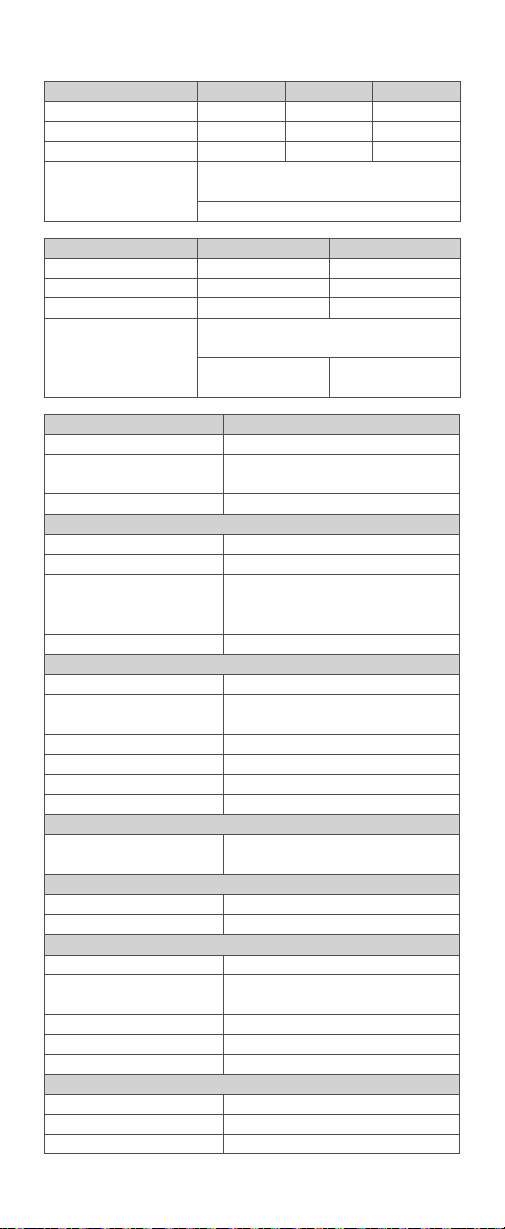
63
Model
Power (1/1 output)
Flash Head Angle
Flash Duration
Exposure Control
Exposure Control System
Flash Exposure Compensation (FEC)
Sync Mode
Multi Flash
Wireless Flash (Radio 2.4G Transmission)
Wireless Function
Sender Groups
Controllable Receiver Groups
Transmission Range (approx.)
Channels
ID
Auto Focus Assist Beam(Unavailable in V100 O)
Effective Range (approx.)
LED Modeling Lamp
Power
Color Temperature
Power Supply
Built-in Lithium Battery
Recycle Time
Full Power Flashes
Power Saving
Sync Triggering Mode
Dimension
W x H x D
Net Weight Without Battery
Net Weight With Battery
V100 C/V100 S/V100 N/V100 O/V100 F
100Ws
Swinging/tilting flash head (bounce flash): 0 to 330°
horizontally and -7° to 120° vertically
1/300s - 1/20000s
TTL auto flash and manual flash
3 steps with 1/3 increment each step
High-speed sync (up to 1/8000 seconds or 1/80000
seconds with Sony cameras equipped with global
shutter), rst-curtain sync, and second-curtain sync
Provided (up to 100 times, 100Hz)
Sender, Receiver
A, B, C, D, E(V100 C)
M, A, B, C, D(V100 S/V100 N/V100 O/V100 F)
A, B, C, D, E
100m
32: 01~32
OFF/01~99
Center: 0.6~10m / 2.0~32.8 feet
Periphery:0.6~5m/2.0~16.4 feet
2W
3300K±200K
7.2V/2980mAh
Approx. 1.7 seconds. LED indicator will light up when
the flash is ready.
Approx. 400
Provide standby and auto off functions
Hot shoe, 2.5mm sync cord
2.81"*2.99"*8.11"
≈ 496g
≈ 616g
Specications and data may subject to changes without notice.
Technical Data
Model
Global Shutter Sync
Radio Wireless Global Shutter Sync
Modeling Flash
Flash Coverage
Model
Global Shutter Sync
Radio Wireless Global Shutter Sync
Modeling Flash
Flash Coverage
V100 C
Unprovided
Unprovided
Provided
Auto zoom (flash coverage is set automatically to match
the lens focal length and image size)
Manual zoom(28-105mm)
V100 O
Unprovided
Unprovided
Unprovided
Auto zoom (flash coverage is set automatically to match
the lens focal length and image size)
Manual zoom (28-105mm
or 14-52mm)
Manual zoom (28-105mm
or 18-69mm)
V100 S
Provided
Provided
Unprovided
V100 N
Unprovided
Unprovided
Provided
V100 F
Unprovided
Unprovided
Unprovided

64
Troubleshooting
If there is a problem, refer to this troubleshooting guide.
The camera flash does not re.
The power turns off by itself.
Auto zoom does not work.
Photos have dark corners or only parts of the target subject are
illuminated.
The flash exposure is underexposed or overexposed.
The camera flash is not attached securely to the camera.
The electrical contacts of the camera flash and camera are dirty.
<
>or< > is not displayed in the view nder of camera.
The camera flash is not attached securely to the camera.
The focal length of lens exceeds the flash coverage.
You used high-speed sync.
You used manual flash mode.
Setting as wi-off/sender mode when the standby function is on, the
flash will enter sleep mode automatically after 90 seconds of idle use.
Setting as wi-off/sender mode when the standby function is off while
the auto off function is on, the flash will automatically shut down after
60 minutes (or 30 minutes, 90 minutes) of idle use.
Setting as receiver mode when the auto off function is on, the flash will
automatically shut down after 60 minutes (or 30 minutes, 90 minutes) of
idle use.
Attach the camera’s mounting foot securely to the camera.
Clean the contacts.
Wait until the flash is fully recycled and the flash ready indicator lights up.
If the flash ready indicator lights up, but<
>or< >is not displayed in
the view nder, check whether this flash unit is securely attached to the
camera hot shoe.
If the flash ready indicator does not light up after a long wait, check
whether the battery power is enough. If the battery power is low, <
>
will appear red on the LCD panel. Please replace or charge the battery
immediately.
Attach the camera flash’s mounting foot to the camera.
Check the flash coverage you set. This flash unit has the flash coverage
between 28 and 105mm, which ts medium-format cameras.
With high-speed sync, the effective flash range will be shorter. Make sure
the subject is within the effective flash range displayed.
Set the flash mode to TTL or modify the flash output.
Press the camera shutter halfway or press any button will wake up the
flash unit.
Restart the flash unit.
Restart the flash unit.
●
●
●
●
●
●
●
●
●
●
→
→
→
→
→
→
→
→
→
→
→
→
Firmware Upgrade
This product supports rmware upgrade through the USB-C port, please
use USB-C cable (sold separately).
As the rmware upgrade needs the support of Godox G3 V1.1 software,
please download and install the "Godox G3 V1.1 rmware upgrade
software" before upgrading. Then, choose the related rmware le.
Please refer to the latest electronic version of the instruction manual.
The download website of rmware upgrade is:
https://www.godox.com/rmware-flash/
●
●
●
●
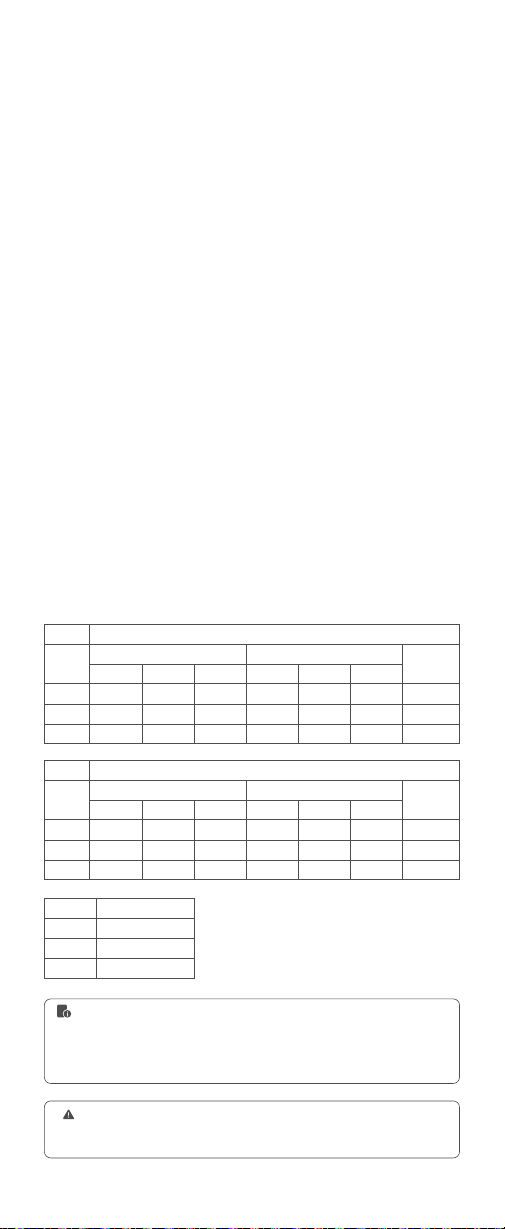
65
Compatible Camera Models
V100 C unit can be used on the following Canon EOS series camera models:
V100 S unit can be used on the following Sony series camera models:
V100 N can be used on the following Nikon series camera models:
V100 O unit can be used on the following camera models:
V100 F unit can be used on the following Fujilm series camera models:
Fujilm cameras are divided into three kinds according to their different
controlling ways to camera flash:
Compatible camera models & functions support:
80D, 90D, 7D, 6D, 70D, 750D, 760D, 5DMarkIV, EOS 1DX, 6DMarkII, 77D,
800D, 5DMarkIII, 5DMarkII, 60D, 7D Mark II, 600D, 50D, 30D, 40D, 500D,
M5, M3, M50, R, RP, M6II, R5, 1500D, 3000D, R7, R6II, R50, R8, R5C, R10,
R100, R5II, R3, 200DII
α77II, α99, α77, DSC-RX10, α6000, α7R, α6400, α7RII, α7RIII, α7M3, α9,
α7RIV, α7R5, α7MIV, ZV-E10, α58, ILCE6000L, α7R3, α350, α9III
D800, D750, D700, D610, D500, D200, D300S, D5, D4, D810, D780, D5300,
D5200, D5100, D5000, D3300, D3100, D60, Z6, Z7II, Z8, ZFC
Olympus:E-M1, PEN-F, E-M10II, E-PL8, E-P5, E-M10III
Panasonic:GH4, LX100, DMC-GF1, DMC-G85, DMC-GX85, DMC-LX100,
DMC-FZ2500GK, S1
A: X-Pro2, X-T20, X-T2, X-T1, GFX50s, GFX50R, X-T30, X-T4, X-T3, X-S20,
X-T5, X-H2, X-T50
B: X-Pro1, X-T10, X-E1, X-A3
C: X100F, X100T
Camera
A
B
C
Camera
A
B
C
Camera
A
B
C
AF-assist Beam
√
--
--
Camera Flash
2.4G Wireless Control
TTL Flash
TTL Flash
Front
√
√
√
Front
√
√
√
Front
√
√
√
Front
√
√
√
Rear
√
√
√
Rear
√
√
--
Rear
√
--
√
Rear
√
√
--
HSS
√
--
√
HSS
√
--
--
HSS
√
--
√
HSS
√
--
--
Multi
√
√
√
Multi
√
√
√
M Flash
M Flash
1. This table only lists the tested camera models, not all cameras. For the
compatibility of other camera models, a self-test is recommended.
2. Rights to modify this table are retained.
1. X100T does not have second curtain sync (REAR) , high-speed shooting and AF-
assist beam functions.
2. X-Pro1 and X-T10 does not have high-speed shooting and AF-assist beam
functions. The front curtain sync (FRONT) and second curtain sync (REAR) are
unadjustable in M manual flash mode.

IC Warning
Le présent appareil est conforme aux CNR d'Industrie Canada applicables
aux appareils radio exempts de licence. L'exploitation est autorisée aux
deux conditions suivantes:
(1) l'appareil ne doit pas produire de brouillage, et
(2) l'utilisateur de l'appareil doit accepter tout brouillage radioélectrique subi,
même si le brouillage est susceptible d'en compromettre le fonctionnement
Tout changement ou modication non expressément approuvé par la partie
responsable de la réglementation de l'OCDE peut faire perdre à l'utilisateur
le droit d'utiliser l'appareil.
Avertissement RF pour les appareils portables:
L'appareil a été évalué pour répondre aux exigences générales d'exposition
aux radiofréquences. Équipement Peut être utilisé sans restriction dans des
conditions d'exposition portables.
Remarque: cet appareil a été testé pour répondre aux limites des appareils
numériques de classe B conformément à la partie 15 des règles de la
Federal Communications Commission des États - Unis. Ces limites sont
conçues pour fournir une protection raisonnable contre les interférences
nuisibles dans les installations résidentielles. L'appareil génère de l'énergie
RF utilisée et rayonne, ce qui peut causer des interférences nocives pour
les communications radio s'il n'est pas installé et utilisé conformément aux
instructions. Cependant, aucun
Garantie contre les interférences dans une installation spécique. Si
l'appareil cause des interférences nuisibles à la réception de la radio ou
de la télévision, qui peuvent être déterminées en éteignant et en allumant
l'appareil, l'utilisateur est encouragé à tenter de corriger les interférences
par une ou plusieurs des mesures suivantes:
- redirection ou repositionnement de l'antenne de réception.
- augmenter l'espacement entre l'appareil et le récepteur.
- Connecter l'appareil à une prise sur un circuit différent de celui auquel le
récepteur est connecté.
- consultez votre revendeur ou un technicien radio / tv expérimenté pour
obtenir de l'aide.

Declaration of Conformity
GODOX Photo Equipment Co.,Ltd. hereby declares that this equipment are
in compliance with the essential requirements and other relevant provisions
of Directive 2014/53/EU. In accordance with Article 10(2) and Article
10(10), this product is allowed to be used in all EU member states.For more
information of DoC, Please click this web link:
https://www.godox.com/eu-declaration-of-conformity/
The device complies with RF specications when the device used at 0mm
from your body.
Warning
Operating frequency: 2412.99MHz – 2464.49MHz
Maximum EIRP Power:5.0dBm
FCC Statement
This device complies with part 15 of the FCC Rules. Operation is subject
to the following two conditions: (1) This device may not cause harmful
interference, and (2) this device must accept any interference received,
including interference that may cause undesired operation.
Any Changes or modications not expressly approved by the party
responsible for compliance could void the user's authority to operate the
equipment.
Note: This equipment has been tested and found to comply with the limits
for a Class B digital device, pursuant to part 15 of the FCC Rules. These
limits are designed to provide reasonable protection against harmful
interference in a residential installation. This equipment generates uses
and can radiate radio frequency energy and, if not installed and used in
accordance with the instructions, may cause harmful interference to radio
communications. However, there is no guarantee that interference will not
occur in a particular
installation. If this equipment does cause harmful interference to radio or
television reception, which can be determined by turning the equipment off
and on, the user is encouraged to try to correct the interference by one or
more of the following measures:
- Reorient or relocate the receiving antenna.
- Increase the separation between the equipment and receiver.
- Connect the equipment into an outlet on a circuit different from that to
which the receiver is connected.
- Consult the dealer or an experienced radio/TV technician for help.
The device has been evaluated to meet general RF exposure requirement.
The device can be used in portable exposure condition without restriction.
产品保修
产品保修
尊敬的用户,本保修卡是申请保修服务的重要凭证,请您配合销售商填写并妥
善保管,谢谢!
产品的保修期和服务类型按以下《产品保修信息》执行:
产品信息
用户信息
销售商信息
备注
型号
姓名
通信地址
名称
联系电话
通信地址
销售日期
产品条码
联系电话
注:此表应由销售商盖章确认。
本文件适用于相关《产品保修资讯》(见后面说明)所列产品,其他非属此范
围的产品或部件(如促销品、赠品及其他出厂后附加的部件等)不在此保修承
诺内。
适用产品
产品及部件的相应保修期按相关的产品保修信息执行。保修期自产品首次购买
日起算,购买日以购买产品时保修卡登记日期为准。
保修期
您可直接与产品销售商或授权服务机构联系,也可拨打神牛产品售后服务电话,
与我们联系,由我们的服务人员为您安排服务。申请保修时,您应提供有效的
保修卡作为保修凭证,方可获得保修。如您不能提供有效的保修卡,则在我们
确认产品或部件属于保修范围的情况下,也可以为您提供保修,但这不作为我
们的义务。
如何获得保修服务
如产品存在下列情况,本文件项下的保证和服务将不适用 :
①产品或部件超过
相应保修期;②错误或不适当使用、维护或保管导致的故障或损坏,如:不当
搬运;非按产品合理预期用途使用;不当插拨外接设备;跌落或外力挤压;接
触或暴露于不适当温度、溶剂、酸碱、水浸或潮湿环境;③由非神牛授权机构
或人员安装、修理、更改、添加或拆卸造成的故障或损坏;④产品或部件原有
识别信息被修改变更或除去;⑤无有效保修卡;⑥使用非合法授权、非标准或
非公开发行的软件造成的故障或损坏;⑦因不可抗力或意外事件造成的故障或
损坏;⑧其他非因产品本身质量问题导致的故障或损坏。
遇上述情况,您应向
相关责任方寻求解决,神牛对此不承担任何责任。因非在保修期或保修范围内
的部件、附件或软件导致产品不能正常使用的,不是保修范围内的故障。产品
使用过程中正常的脱色,磨损和消耗,不是保修范围内的故障。
不适用保修的情况
产品类别
部件
其他
选件名称
主机
电池
充电器等带电性能的部件。
如闪光管、造型灯泡、外壳、
保护罩、锁紧装置、包装等。
保修期(月)
12
3
12
无
保修服务类型
客户送修
客户送修
客户送修
无保修
神牛产品售后服务电话:0755-29609320-8062
Warranty
Dear customers, as this warranty card is an important certicate to apply for
our maintenance service, please ll in the following form in coordination with
the seller and safe-keep it. Thank you!
Product
Information
Customer
Information
Seller
Information
Note
Model
Name
Address
Name
Contact Number
Address
Date of Sale
Product Code Number
Contact Number
Note: This form shall be sealed by the seller.
The document applies to the products listed on the Product Maintenance
lnformation (see below for further information). Other products or accessories
(e.g. promotional items,giveaways and additional accessories attached,etc.)
are not included in this warranty scope.
Applicable Products
The warranty period of products and accessories isimplemented according
to the relevant Product Maintenance Information. The warranty period is
calculated from the day(purchase date) when the product is bought for the
rst time,And the purchase date is considered as the date registered onthe
warranty card when buying the product.
Warranty Period
If maintenance service is needed, you can directly contact the product
distributor or authorized service institutions. You can also contact the
Godox after-sale service call and we will offer you service. When applying for
maintenance service, you should provide valid warranty card. If you cannot
provide valid warranty card, we may offer you maintenance service once
conrmed that the product or accessory is involved in the maintenance scope,
but that shall not be considered as our obligation.
How to Get the Maintenance Service
The guarantee and service offered by this document are not applicable in the
following cases:
①
The product or accessory has expired its warranty period;
②
Breakage or damage caused by inappropriate usage, maintenance
or preservation, such as improper packing, improper usage, improper
plugging in/out external equipment, falling off or squeezing by external
force, contacting or exposing to the improper temperature, solvent, acid,
base, flooding and damp environments, etc;
③
Breakage or damage
caused by non-authorized institution or staff in the process of installation,
maintenance, alternation, addition and detachment;
④
The original
identifying information of product or accessory is modied, alternated, or
removed;
⑤
No valid warranty card;
⑥
Breakage or damage caused by
using illegally authorized, nonstandard or non-public released software;
⑦
Breakage or damage caused by force majeure or accident;
⑧
Breakage or
damage that could not be attributed to the product itself. Once met these
situations above, you should seek solutions from the related responsible
parties and Godox assumes no responsibility. The damage caused by parts,
accessories and software that beyond the warranty period or scope is not
included in our maintenance scope. The normal discoloration, abrasion and
consumption are not the breakage within the maintenance scope.
Inapplicable Cases

Name
Circuit board
Battery
Electrical parts e.g.battery
charger, etc.
Flash tube, modeling lamp,
lamp body, lamp cover,
locking device, package, etc.
Maintenance and Service Support Information
The warranty period and seice types of products are implemented
according to the following Product Maintenance Information:
Product
Type
Parts
Other Items
Maintenance
Period(month)
12
3
12
No
Warranty Service
Type
Customer sends
the product to
designated site
Customer sends
the product to
designated site
Customer sends
the product to
designated site
Without warranty
Godox After-sale Seice Call +86-755-29609320(8062)