Operating and installation
instructions
Induction hobs
It is essential to read the operating and installation instructions be-
fore setup, installation, and commissioning. This prevents both per-
sonal injury and damage to the appliance.
en-GB M.-Nr. 12 985 300

Contents
Warnings and safety notes ............ 5
Sustainability and environmental
protection ..........................................
12
Installation......................................... 13
Safety notes for installation .............
13
Additional safety notes for sur-
face-mounted installation ..........
13
Additional safety notes for
flush-fit installation......................
14
Safety distances ................................
15
Installation dimensions for surface-
mounted installation .........................
22
KM8462FR................................. 22
KM8462FL ................................. 23
KM8482FR................................. 24
KM8482FL ................................. 25
Installation dimensions for flush-fit
installation ..........................................
26
KM8462FL ................................. 26
KM8463FX................................. 27
KM8482FL ................................. 28
KM8483FX................................. 29
KM8483FXGlass...................... 30
Installing a surface-mounted hob...
31
Preparing the worktop for sur-
face-mounted installation ..........
31
Installing a surface-mounted
hob .................................................
31
Installing the hob flush with the
worktop...............................................
31
Preparing the worktop for flush-
fit installation................................
31
Installing a flush-fit hob .............. 31
Electrical connection ........................
32
Familiarisation................................... 35
Your hob..............................................
35
KM8462FR, KM8462FL,
KM8463FX.................................
35
KM8482FR, KM8482FL........ 36
KM8483FX,
KM8483FXGlass......................
37
Controls and indicators ....................
38
Cooking zone data.............................
39
Power management...........................
42
Operation ............................................
42
Networking..........................................
43
Special functions................................
43
Controlling a cooker hood ........... 43
Permanent pan recognition......... 44
Pan size recognition ..................... 44
PowerFlex/PowerFlexXL cook-
ing area...........................................
44
Hob Booster.................................. 44
Stop&Go........................................ 44
Hob power levels.......................... 44
Auto heat-up ................................. 44
Timer functions............................. 44
System lock................................... 45
Keypad lock ................................... 45
Recall.............................................. 45
Keeping warm ............................... 45
Settings.......................................... 45
Demo mode................................... 45
Residual heat indicator ................ 45
Safety switch-off .......................... 45
Overheating protection................ 46
Model identifier and serial num-
ber...................................................
46
Software version........................... 46
Optional accessories.........................
46
Commissioning ................................. 47
Unpacking the hob.............................
47
Cleaning the hob for the first time...
47
Switching on the hob for the first
time ......................................................
47
Networking..........................................
47
Requirements for networking
with your home network..............
47
Performing Scan & Connect....... 47
Requirements for direct net-
working with your Miele cooker
hood................................................
48
Networking your hob with your
Miele cooker hood........................
48
Resetting settings ........................ 48
2

Contents
Operation........................................... 49
Safety notes for operation................
49
Switching the hob on........................
49
Switching the hob/a cooking zone
off.........................................................
49
Positioning cookware on PowerFlex
cooking areas: KM8462FR,
KM8462FL, KM8463FX,
KM8483FX, KM8483FXGlas ....
50
Positioning cookware on
PowerFlexXL cooking areas:
KM8482FR, KM8482FL .............
50
Hob power levels...............................
51
Setting the power level for a
cooking zone.................................
51
Setting the power level for a
cooking zone – without inter-
mediate levels ..............................
51
Changing the power level for a
cooking zone.................................
52
PowerFlex/PowerFlexXL cooking
area......................................................
52
Booster ...............................................
52
Activating the Booster ................ 52
Deactivating the Booster............ 52
Activating/deactivating Stop&Go ..
52
Auto heat-up ......................................
53
Activating auto heat-up............... 53
Deactivating auto heat-up.......... 53
Timer functions...................................
53
Setting the time............................ 53
Setting the timer........................... 54
Changing the timer....................... 54
Deleting the timer......................... 54
Setting the duration of a cook-
ing process ....................................
54
Changing the duration of a
cooking process............................
54
Deleting the duration of a cook-
ing process ....................................
55
Setting a duration for further
cooking processes........................
55
Displaying the duration of a
cooking process............................
55
Starting elapsed time measure-
ment of a cooking process ..........
55
Cancelling elapsed time meas-
urement of a cooking process ....
55
Starting elapsed time measure-
ment of further cooking pro-
cesses ............................................
55
Displaying elapsed time meas-
urement of a cooking process ....
55
Using timer functions simultan-
eously .............................................
56
System lock.........................................
56
Activating the system lock .......... 56
Deactivating the system lock...... 56
Keypad lock.........................................
56
Activating the keypad lock .......... 56
Deactivating the keypad lock...... 56
Recall ...................................................
57
Activating the Recall function..... 57
Discarding the Recall function.... 57
Hob data..............................................
57
Displaying the model identifier/
serial number ................................
57
Displaying the software version . 57
Activating/deactivating demo
mode....................................................
58
Setting ranges for the hob power
levels....................................................
59
Notes for test institutes....................
60
3

Contents
Good to know.................................... 61
How induction hobs work ................
61
Noises .................................................
61
Cookware............................................
61
Adjusting settings ............................ 63
Displaying the model identifier/
serial number .....................................
67
Displaying the software version ......
67
Cleaning and care ............................ 68
Safety notes on cleaning and care..
68
When to clean....................................
68
Cleaning the ceramic glass sur-
faces....................................................
68
Unsuitable cleaning agents..............
69
Troubleshooting................................ 70
Messages in the display...................
70
Unexpected behaviour......................
71
Unsatisfactory results.......................
72
General problems or technical
faults....................................................
73
Customer Service ............................ 74
Contact in the event of a fault.........
74
Data plate ...........................................
74
Warranty .............................................
74
Technical data................................... 75
Technical data ....................................
75
Product data sheets..........................
75
EU Conformity declaration...............
76
UK Conformity declaration ..............
77
4

Warnings and safety notes
This hob complies with all relevant local and national safety re-
quirements. Inappropriate use can, however, lead to personal injury
and material damage.
Read the operating and installation instructions carefully before us-
ing the hob. They contain important information on safety, installa-
tion, use and maintenance. This prevents both personal injury and
damage to the hob.
In accordance with standard IEC60335-1, Miele expressly and
strongly advises that you read and follow the instructions in the
chapter on installing the hob as well as the warnings and safety
notes.
Miele cannot be held liable for injury or damage caused by non-
compliance with these instructions.
Keep the operating and installation instructions in a safe place and
pass them on to any future owner.
Correct application
This hob is intended for domestic use and use in other similar en-
vironments.
This hob is not intended for outdoor use.
It is intended for domestic use only to cook food and keep it warm.
Any other use is not supported by the manufacturer and could be
dangerous.
This hob is not intended for use by people with reduced physical,
sensory or mental capabilities or lack of experience and knowledge,
unless they have been given supervision and instruction concerning
its use by a person responsible for their safety. They may only use the
hob unsupervised if they have been shown how to use it in a safe
way. They must be able to recognise and understand the dangers of
misuse.
Safety with children
Children under 8 years of age must be kept away from the hob un-
less they are constantly supervised.
5

Warnings and safety notes
Children over 8years of age may use the hob without supervision
if its operation has been clearly explained to them and they are able
to use it safely. Children must be able to understand and recognise
the possible dangers caused by incorrect operation.
Children must not be allowed to clean the hob unsupervised.
Children should be supervised in the vicinity of the hob. Never al-
low children to play with the hob.
The hob gets hot when in use and remains hot for a while after be-
ing switched off. Keep children well away from the hob until it has
cooled down and there is no danger of burning.
Danger of burning. Do not store anything which might arouse a
child’s interest in storage areas above or behind the hob. Otherwise
they could be tempted to climb onto the hob.
Risk of burning and scalding. Place pots and pans on the cooking
zone in such a way that children cannot pull them down and burn
themselves.
Danger of suffocation! Whilst playing, children may become en-
tangled in packaging material (such as plastic wrapping) or pull it over
their head with the risk of suffocation. Keep packaging material away
from children.
Activate the system lock to ensure that children cannot switch on
the hob inadvertently. Use the keypad lock when the hob is in use to
prevent children from altering the settings selected.
Technical safety
Unauthorised installation, maintenance and repairs can pose a
considerable risk to the user. Installation, maintenance and repairs
must only be carried out by a Miele authorised technician.
Damage to the hob can compromise your safety. Check the hob for
visible signs of damage. Do not use the hob if it is damaged.
6

Warnings and safety notes
Temporary or permanent operation on an autonomous power sup-
ply system or a power supply system that is not synchronised with
the mains power supply (e.g. island networks, back-up systems) is
possible. A prerequisite for operation is that the power supply system
complies with the specifications of EN50160 or an equivalent stand-
ard.
The function and operation of the protective measures provided in
the domestic electrical installation and in this Miele product must
also be maintained in isolated operation or in operation that is not
synchronised with the mains power supply, or these measures must
be replaced by equivalent measures in the installation. As described,
for example, in the current version of BS OHSAS 18001–2 ISO
45001.
The electrical safety of this hob can only be guaranteed when cor-
rectly earthed. It is essential that this basic safety requirement is ful-
filled. If in doubt, the electrical installation should be checked by a
qualified electrician.
The connection data (voltage and frequency) on the data plate of
the hob must match the mains power supply in order to avoid the risk
of damage to the hob.
Compare this data before connecting the appliance. If in any doubt,
consult a qualified electrician.
Do not connect the hob to the mains electrical supply by a multi-
socket adapter or extension lead. These are a fire hazard and do not
guarantee the required safety of the appliance.
For safety reasons, this hob may only be used after it has been
built in.
This hob must not be used in a non-stationary location (e.g. on a
ship).
Any contact with live connections or tampering with the electrical
or mechanical components of the hob will endanger your safety and
may lead to the hob malfunctioning.
Do not open the hob housing under any circumstances.
While the hob is under warranty, repairs should only be undertaken
by a Miele authorised service technician. Otherwise the warranty is
invalidated.
Miele can only guarantee the safety of the appliance when genuine
original Miele replacement parts are used. Faulty components must
only be replaced by Miele spare parts.
7

Warnings and safety notes
The hob is not intended for use with an external timer switch or a
remote control system.
The hob must be connected to the mains power supply by a quali-
fied electrician.
If the mains connection cable is damaged, it must be replaced
with a special mains connection cable by a qualified electrician.
During installation, maintenance and repair work, the hob must be
completely disconnected from the electricity supply. It is only com-
pletely isolated from the electricity supply when:
- The mains fuse has been disconnected or
- The screw-out fuses have been fully unscrewed or
- The mains plug (if present) is removed from the socket. To do this,
pull the mains plug and not the mains connection cable.
Risk of electric shock. Do not use the hob if it is faulty, or if the
ceramic surface is cracked, chipped or damaged in any way. Switch it
off immediately. Disconnect the hob from the mains electricity sup-
ply. Contact the Customer Service Department.
If the hob is installed behind a furniture front, do not close the door
while the hob is in use. Heat and moisture can build up behind the
furniture front when closed. This can result in damage to the hob, the
housing unit and the floor. Do not close the furniture front until the
residual heat indicators go out.
In areas which may be subject to infestation by cockroaches or
other vermin, pay particular attention to keeping the appliance and its
surroundings clean at all times. Any damage caused by cockroaches
or other vermin will not be covered by the warranty.
Correct use
The hob gets hot when in use and remains hot for quite a while
after being switched off. There is a risk of burning until the residual
heat indicators go out.
Oil and fat can overheat and catch fire. Do not leave the hob unat-
tended when cooking with oil and fat. If it does ignite do not attempt
to put the flames out with water.
Disconnect the hob from the mains and use a suitable fire blanket,
saucepan lid, damp towel or similar to smother the flames.
Do not leave the hob unattended whilst it is being used. It should
be continually monitored whilst boiling and flash frying.
8

Warnings and safety notes
Flames could set the grease filters of a cooker hood on fire. Do not
flambé under a cooker hood.
Spray canisters, aerosols and other inflammable substances can
ignite when heated. Therefore do not store such items or substances
in a drawer under the hob. Cutlery inserts must be heat-resistant.
Do not heat an empty pan.
Do not heat up food in closed containers e.g. tins or sealed jars on
the hob, as pressure can build up in the container, causing it to ex-
plode.
Do not cover the hob, e.g. with a hob cover, a cloth or protective
foil. The material could catch fire, shatter or melt if the hob is
switched on by mistake or if residual heat is still present.
When the hob is switched on either deliberately or by mistake, or
when there is residual heat present, there is the risk of metal items
placed on the hob heating up. Other materials can melt or catch fire.
Damp pan lids might adhere to the ceramic surface and be difficult to
dislodge. Do not use the hob as a resting place for anything. Always
switch the cooking zones off after use.
Switch the hob off after use. Do not wait until the hob switches off
automatically because there is no longer any cookware on it. This can
cause food to catch fire.
You could burn yourself on the hot hob. Protect your hands with
heat-resistant pot holders or gloves when working on the hot hob. Do
not let them get wet or damp. Heat transfers through damp and wet
material more quickly with the risk of scalding or burning yourself.
When using an electrical appliance (e.g. a hand mixer) near the
hob, ensure that the cable of the electrical appliance cannot come
into contact with the hot hob. The cable’s insulation could become
damaged.
Grains of salt, sugar, or sand (e.g. from cleaning vegetables) can
cause scratches if they get under the cookware. Make sure the
ceramic glass surface and the underside of the cookware are clean
before placing down the cookware.
Even a light object can cause damage in certain circumstances. Do
not drop anything on the ceramic surface.
Hot items placed down on the sensor controls and displays can
damage the electronic modules underneath. Never place hot pots or
pans on the sensor controls and displays.
9

Warnings and safety notes
Do not allow solid or liquid sugar, or pieces of plastic or aluminium
foil to get onto the hob when it is hot, as they can damage the
ceramic surface when it cools down. If this should occur, turn off the
hob immediately and scrape off all the sugar, plastic or aluminium
residues while still hot, using a shielded scraper blade. Wear oven
gloves when doing this. Allow the ceramic surface to cool down and
then clean it with a suitable ceramic glass cleaner.
Do not heat empty pans on the hob as this can damage the
ceramic glass and/or the cookware. Never leave the hob unattended
during use!
Rough bases can scratch the ceramic glass. Use only pots and
pans with smooth bases.
Always lift cookware to move it. This will help prevent scratching.
Because induction heating works so quickly, the base of the cook-
ware could, under certain circumstances, heat up to the temperature
at which oil or fat self-ignites within a very short time. Never leave
the hob unattended during use!
Heat oil or fat for a maximum of one minute. Never use the
Booster function to heat oil or fat.
For people fitted with a heart pacemaker: please note that the area
immediately surrounding the hob is electromagnetically charged
when it is switched on. It is very unlikely to affect a pacemaker. How-
ever, if in any doubt, consult the manufacturer of the pacemaker or
your doctor.
When switched on, the electromagnetic field of the hob can impair
the function of magnetisable objects. Do not leave credit cards, di-
gital storage devices, pocket calculators, etc. in the immediate vicin-
ity of the hob.
Metal utensils stored in a drawer under the hob can become hot if
the appliance is used intensively for a long time.
The hob is fitted with a cooling fan. If a drawer is fitted directly un-
derneath the hob, ensure that there is sufficient space between the
drawer and its contents and the underside of the hob in order to en-
sure sufficient ventilation for the hob.
If a drawer is fitted directly underneath the hob, do not store any
pointed or small items, paper, serviettes, etc. in the drawer. They
could get in through the ventilation slots or be sucked into the casing
by the fan and damage the fan or impair cooling.
10

Warnings and safety notes
Never use two items of cookware on a PowerFlex cooking zone or
PowerFlexXL cooking area at the same time.
If the cookware only partially covers a cooking zone or extended
zone, the handle could become very hot.
Always place cookware in the middle of a cooking or extended zone!
The induction generators could be damaged or even destroyed if
you use an induction adapter plate for cookware. Do not use induc-
tion adapter plates.
Cleaning and care
The steam from a steam cleaner could reach live electrical com-
ponents and cause a short circuit.
Do not use a steam cleaner to clean the hob.
If the hob is installed above a pyrolytic oven or cooker, do not use
the hob during a pyrolytic cleaning programme as this could trigger
the overheating protection mechanism on the hob.
Miele will guarantee to supply functional spare parts for a min-
imum of 10years and up to 15years following the discontinuation of
your hob.
11

Sustainability and environmental protection
Energy saving tips when cook-
ing
- Cook in covered pots and pans if pos-
sible. This prevents heat escaping un-
necessarily.
- Cook with as little water as possible.
- Once food has come to the boil or the
pan is hot for frying, reduce the heat
to a lower power level.
- Use a pressure cooker to reduce
cooking durations.
Disposing of the packaging ma-
terial
The packaging material is used for hand-
ling and protects the appliance from
transport damage. The packaging ma-
terial used is selected from materials
which are environmentally friendly for
disposal and can generally be recycled.
Recycling the packaging material re-
duces the use of raw materials. Use ma-
terial-specific collection points for valu-
able materials and take advantage of re-
turn options. Your Miele dealer will take
the packaging material away.
Disposing of your old appliance
Electrical and electronic appliances con-
tain many valuable materials. They also
contain certain materials, compounds
and components which were essential
for their correct functioning and safety.
These could be hazardous to human
health and to the environment if dis-
posed of with household waste or if
handled incorrectly. Please do not,
therefore, dispose of your old appliance
with household waste.
Instead, please make use of officially
designated collection and disposal
points to dispose of and recycle elec-
trical and electronic appliances in your
local community, with your dealer or
with Miele, free of charge. By law, you
are solely responsible for deleting any
personal data from the old appliance
prior to disposal. You are legally obliged
to remove any old batteries which are
not securely enclosed by the appliance
and to remove any lamps without des-
troying them, where this is possible.
These must be taken to a suitable col-
lection point where they can be handed
in free of charge. Please ensure that
your old appliance poses no risk to chil-
dren while being stored for disposal.
12
Installation
Safety notes for installation
Risk of damage from incor-
rect installation.
Incorrect installation can cause
damage to the hob.
The hob must only be installed
by a qualified specialist.
Risk of electric shock from
mains voltage.
Incorrect connection to the
mains supply may result in an
electric shock.
The hob must be connected to
the electrical supply by a quali-
fied electrician only.
Damage from falling ob-
jects.
Take care not to damage the
hob when fitting wall units or a
cooker hood above it.
Fit the wall units and the
cooker hood before the hob.
Dismantling the hob for service
purposes may damage the
sealing strip underneath the
edge of the hob.
Always replace the sealing strip
before reinstalling.
The hob must not be installed
over refrigeration appliances,
dishwashers, washing machines,
washer-dryers or tumble dryers.
This hob may only be installed
above a cooker or oven if they
have a built-in cooling fan.
Ensure that the mains connec-
tion cable cannot be touched
after the hob has been installed.
After installation, the mains
connection cable of the hob must
not come into contact with any
moving kitchen components
(such as a drawer) or be subject
to mechanical loads.
The veneers or laminate coat-
ings of worktops must be treated
with 100°C heat-resistant ad-
hesive so they do not come loose
or warp. Any wall strips must be
of heat-resistant material.
Remember to maintain the
minimum safety distances.
Additional safety notes for surface-
mounted installation
13
Installation
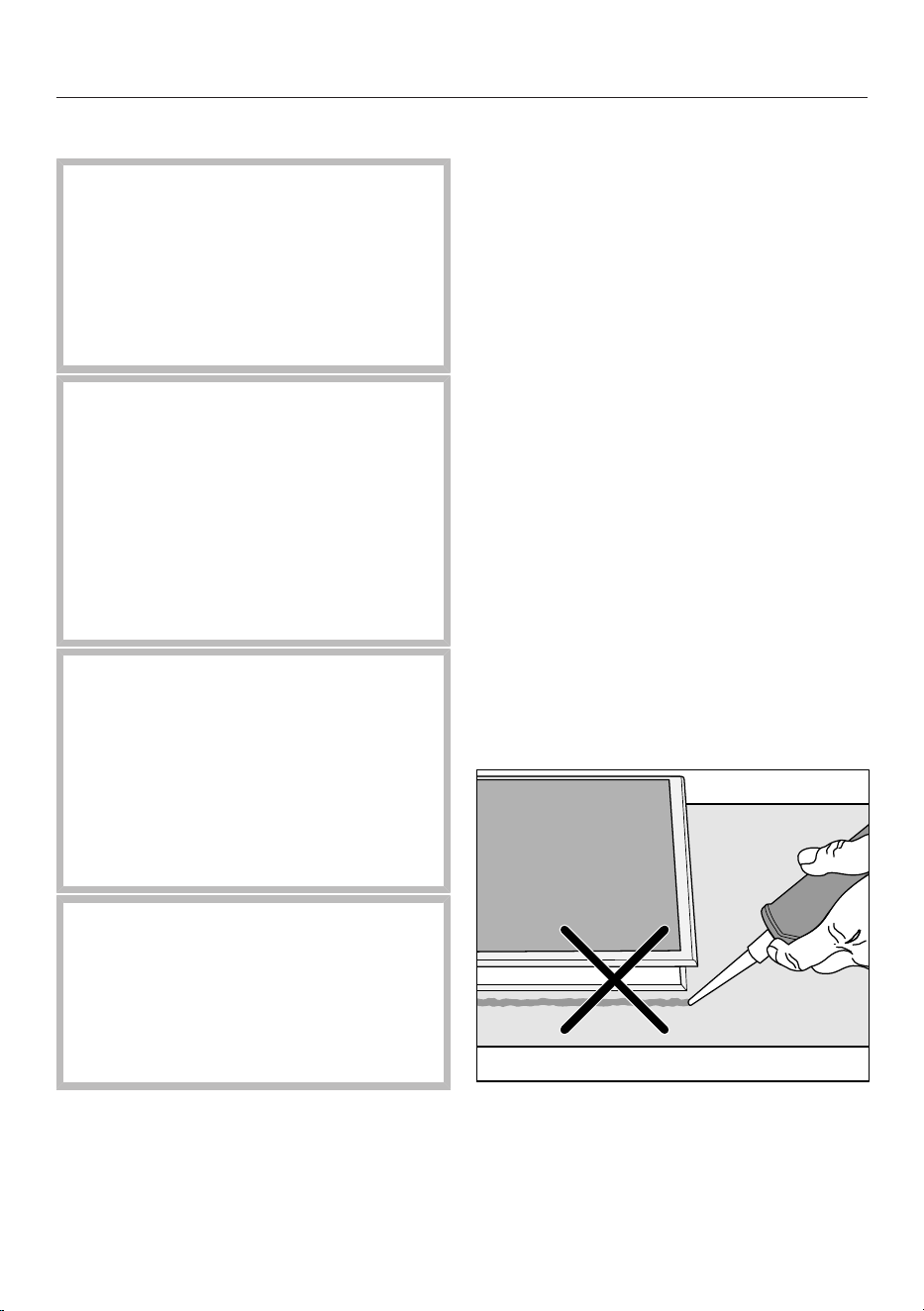
Damage caused by incor-
rect installation.
Using sealant under the hob
could result in damage to the
hob and the worktop if the hob
ever needs to be removed.
Do not use sealant between
the hob and the worktop.
The sealing strip under the
edge of the hob provides a suf-
ficient seal for the worktop.
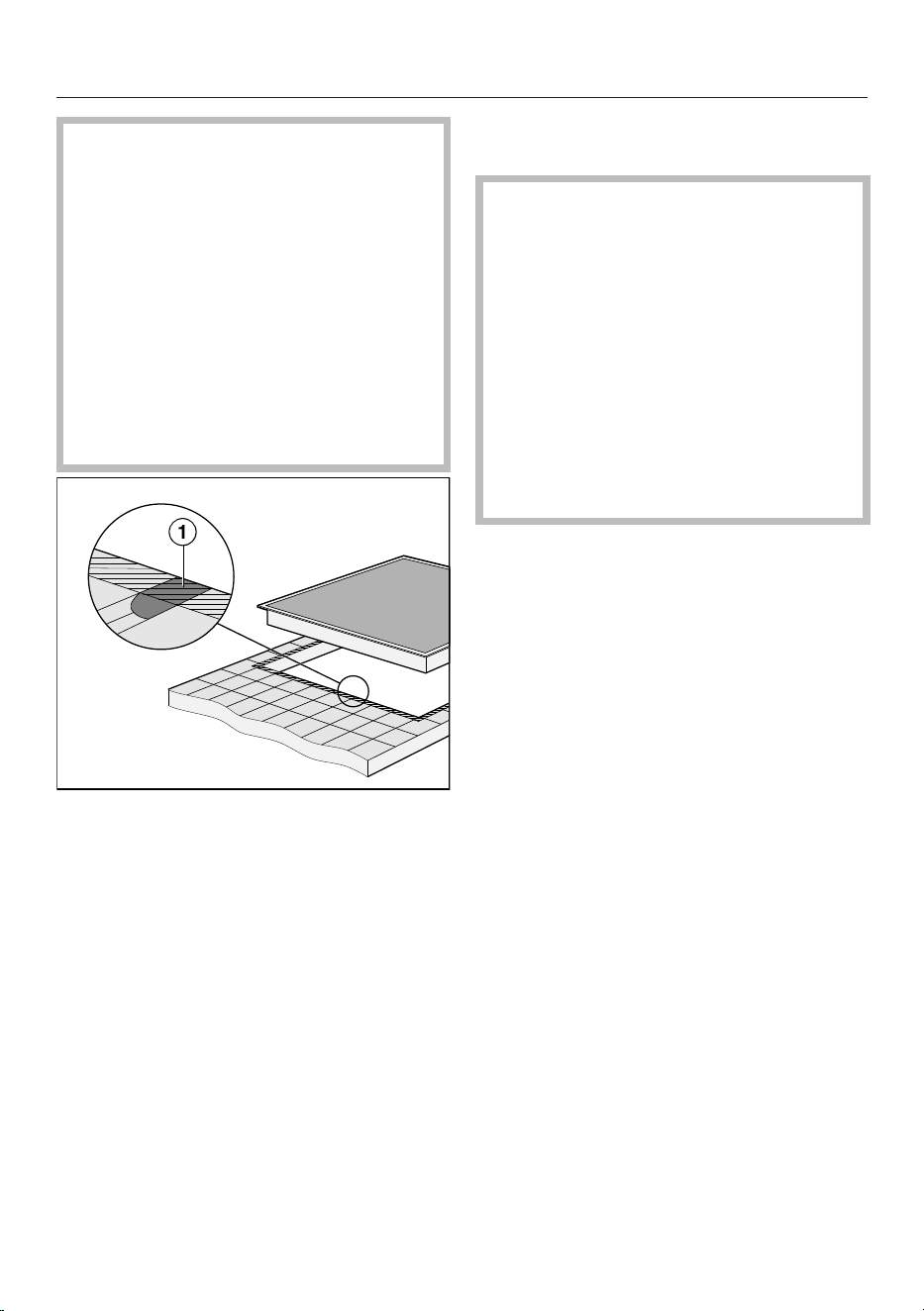
Grout lines and the hatched
area underneath the hob frame
must be smooth and even. If they
are not, the hob will not sit flush
with the worktop and the sealing
strip underneath the hob will not
provide a good seal between the
hob and the worktop.
Additional safety notes for flush-fit in-
stallation
Damage caused by using
an unsuitable sealant.
Unsuitable sealant can damage
natural stone.
For natural stone worktops and
natural stone tiles, only use sil-
icone sealant that is temperat-
ure-resistant (min. 160°C) and
specially formulated for natural
stone. Follow the manufac-
turer’s instructions.
The internal width of the base
unit underneath the appliance
must be at least as wide as the
inner worktop cut-out so that the
hob is easily accessible from be-
low after installation and the cas-
ing can be removed for mainten-
ance. If the underside of the hob
is not freely accessible after in-
stallation, any sealant must be
removed to enable the hob to be
lifted out.
A flush-fit hob is suitable only
for installation in natural stone
(granite, marble), solid wood and
tiled worktops. When using a
worktop made from any other
material, please check first with
the worktop manufacturer that
the material is suitable for in-
stalling a flush-fit hob.
14
Installation
- Natural stone worktops: the
hob is set directly in the cut-
out.
- Solid wood worktops, tiled
worktops: the hob is secured
inside the cut-out with
wooden battens. The battens
must be provided on site and
are not included in the scope
of delivery.
Safety distances
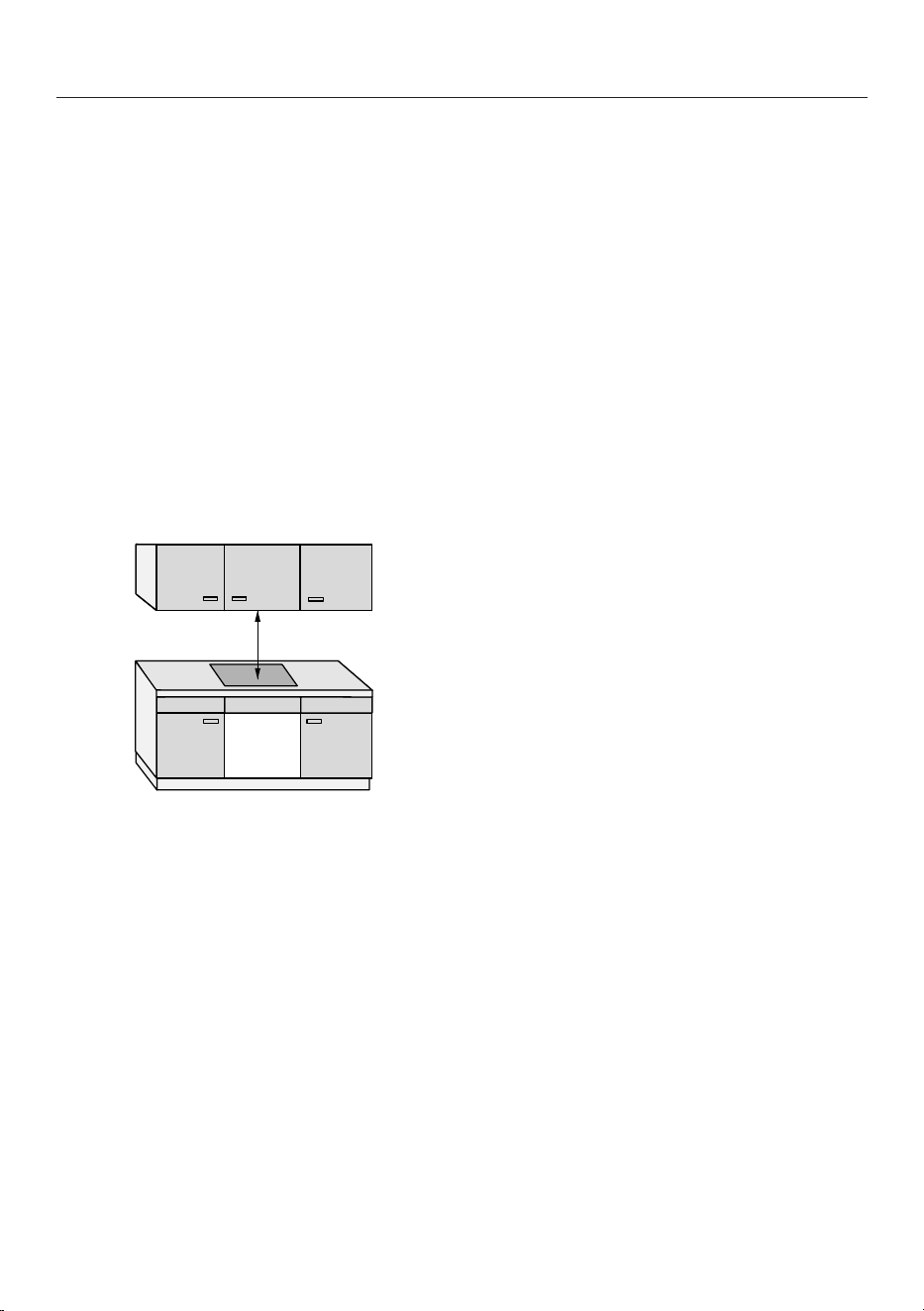
Safety distance above the hob
The following must be ensured between
the hob and the cooker hood above it:
- The safety distance specified by the
manufacturer of the cooker hood must
be maintained.
- When two or more appliances which
have different safety distances are in-
stalled together below a cooker hood,
the greatest specified safety distance
must be maintained.
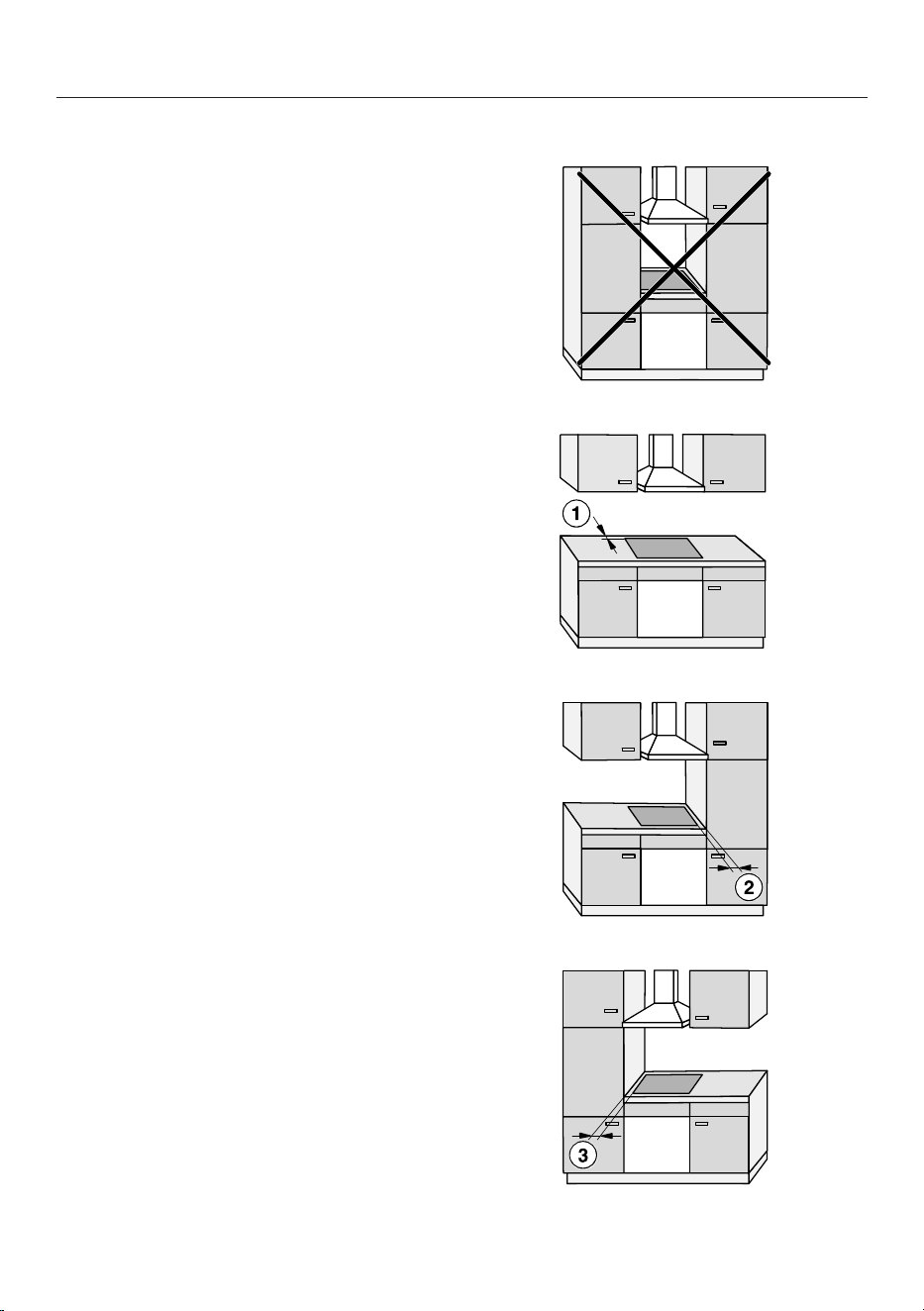
If combustible objects are installed
above the hob (e.g. cabinets, utensil rail,
etc.), a minimum safety distance of 500
mm must be maintained.
15
Installation
Safety distance behind and to the side of the hob
The minimum safety distances shown
below must be maintained between the
appliance and a tall unit or wall:
- Between the back of the worktop
cut-out and the rear edge of the
worktop:
50mm
and
- On the right side between the
worktop cut-out and the closest adja-
cent piece of furniture (e.g. tall unit)
or a room wall:
50mm and on the opposite side a
minimum safety distance of 200mm
or
- On the left side between the
worktop cut-out and the closest adja-
cent piece of furniture (e.g. tall unit)
or a room wall:
50mm and on the opposite side a
minimum safety distance of 200mm
Not permitted
Highly recommended
Not recommended
Not recommended
16
Installation
Safety distance underneath the hob
To install the hob while maintaining the
safety distances, you can choose from
3variants:
1. Without intermediate shelf or base
panel
2. With intermediate shelf
3. With an air intake-optimised base
panel
Further instructions are described in the
relevant section.
An air intake-optimised base panel
and an intermediate shelf cannot be
combined.
If they are combined, more warm air
is drawn in. The hob is not ad-
equately cooled.
The hob is ventilated from below.
A drawer underneath the hob is
heated.
If you wish to install a drawer under-
neath the hob, we recommend in-
stalling the hob with an air intake-op-
timised base panel to reduce the
waste heat from the hob.
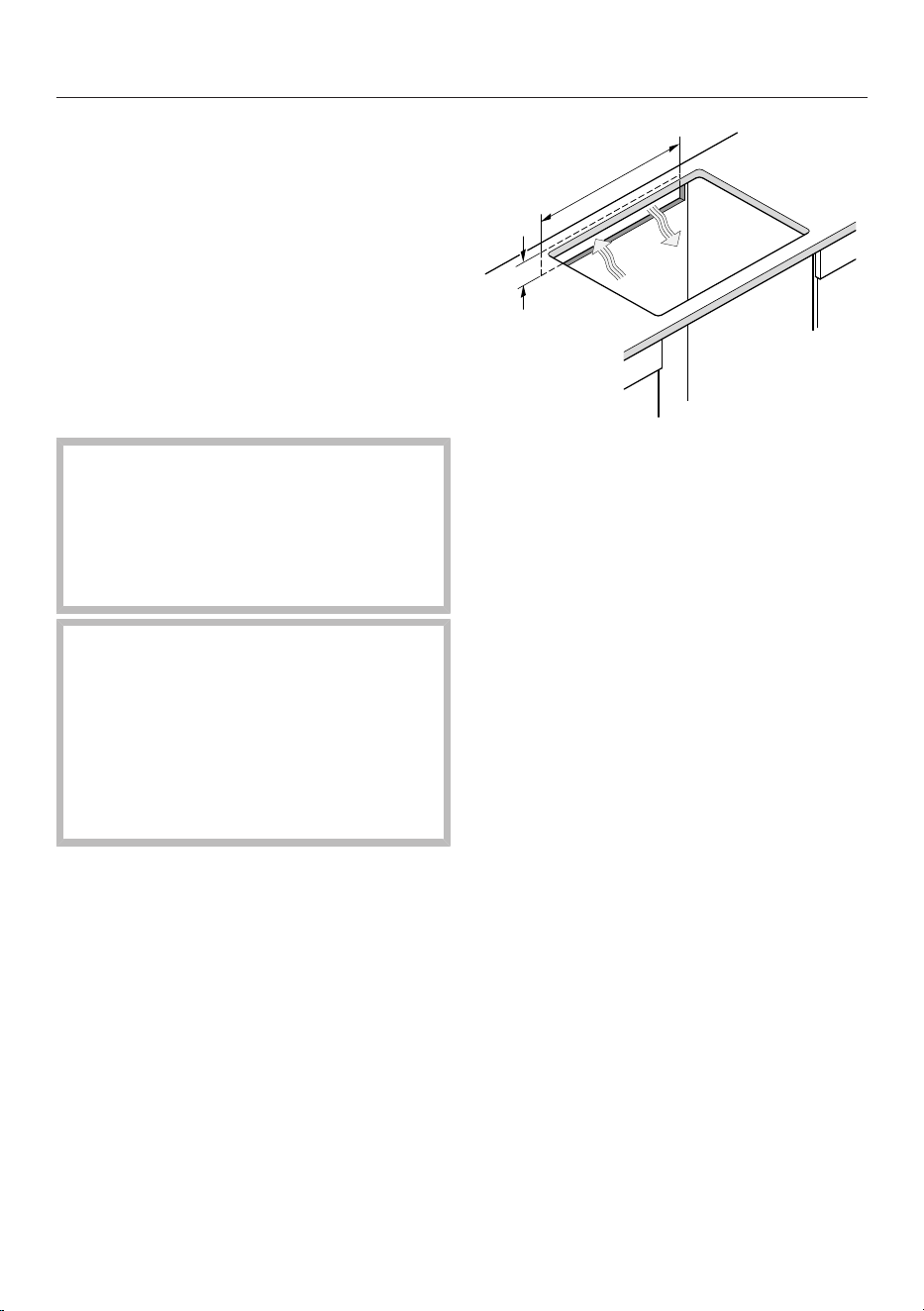
Rear panel cut-out
For ventilation and accommodating the
mains connection cable, you will need
to create a cut-out in the rear panel.
Create a cut-out in the rear panel using
the following instructions:
≥ 45 mm
≥ 550 mm
17
Installation
*INSTALLATION*
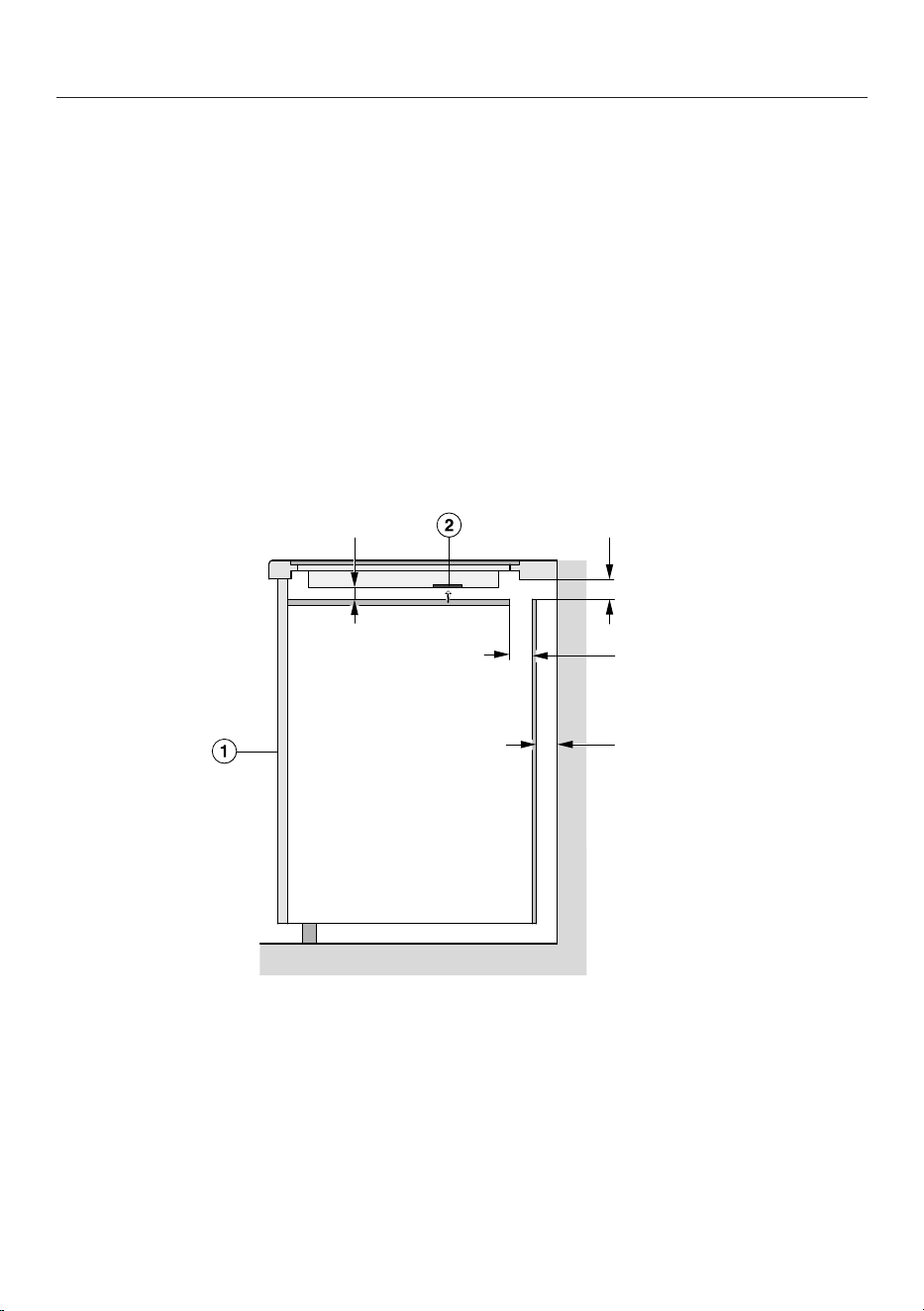
1. Without intermediate shelf or base panel
To ensure sufficient ventilation to the hob, a minimum safety distance must be left
between the underside of the hob and any drawer or oven.
The minimum safety distance between the underside
1
of the hob and:
- Upper edge of drawer: ≥ 5 mm
- Base of drawer: ≥ 75 mm
- Upper edge of oven: ≥ 15 mm
1
The underside is the outside of the hob casing. Other items that are attached
lower down, such as connection boxes and shims, do not count as the lowest point
and are not relevant when calculating the minimum safety distance.
2. Intermediate shelf
The dimensions shown in brackets are recommendations.
≥ 10 mm ≥ 45 mm
(≥ 15 mm)
≥ 20 mm
Side view
a
Front
b
Fan
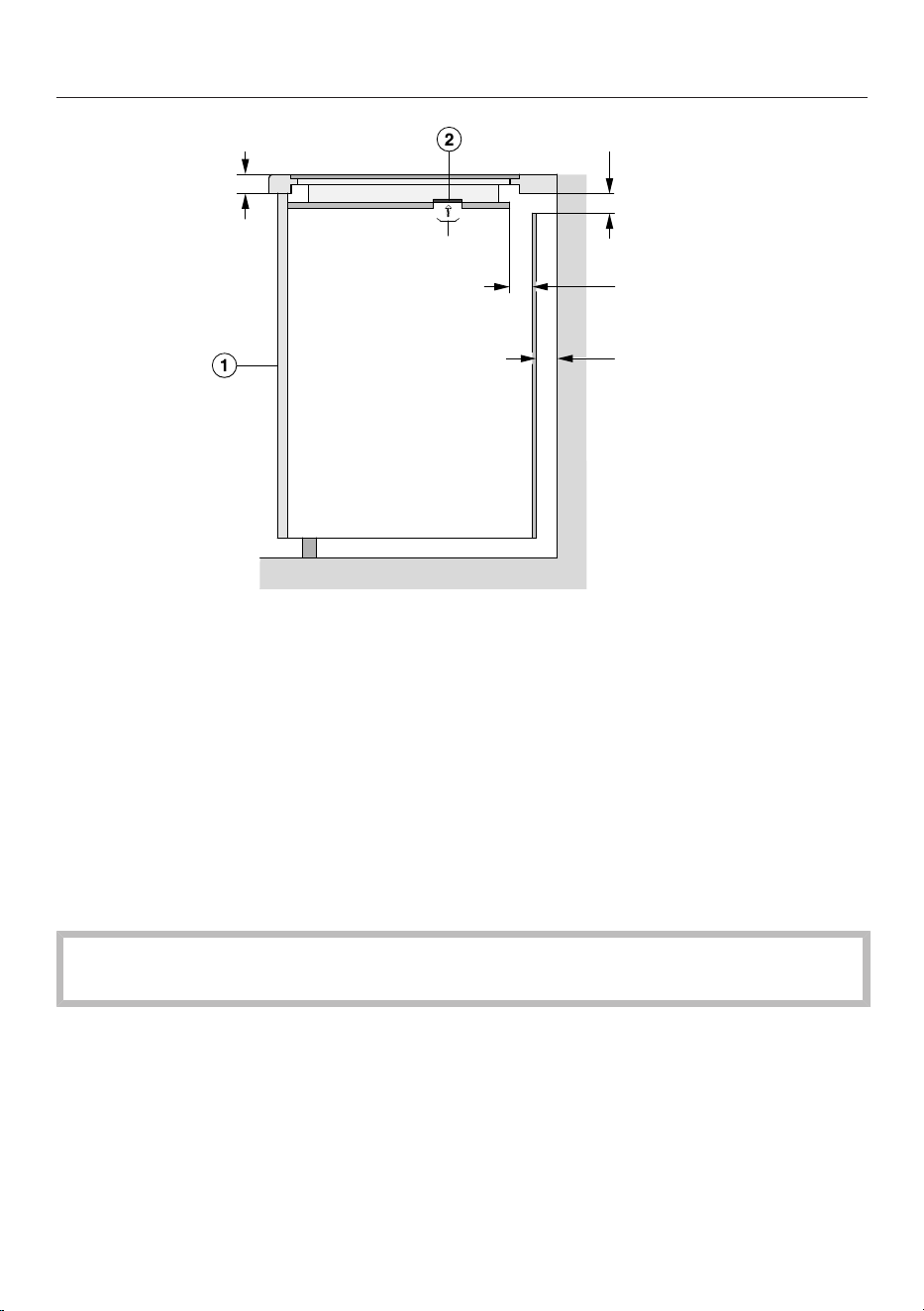
3. Air intake-optimised base panel
The performance of the hob depends on the ventilation.
The air intake-optimised base panel has openings where the fans are positioned.
This section contains instructions for creating an air intake-optimised base panel.
18
Installation
*INSTALLATION*
≤ 40 mm
≥ 45 mm
≥ 15 mm
≥ 20 mm
Ø 60–80 mm
Side view
a
Front
b
Fan
To ensure sufficient ventilation to the hob, a minimum safety distance must be left
between the underside of the air intake-optimised base panel and any drawer.
Minimum safety distance between the underside of the air intake-optimised base
panel to the:
- Upper edge of drawer: ≥ 5 mm
- Base of drawer: ≥ 75 mm
- Upper edge of intermediate shelf: not permitted
There must be no gap between the air intake-optimised base panel and the hob.
A gap causes more warm air to be drawn in. The hob is not adequately cooled.
19
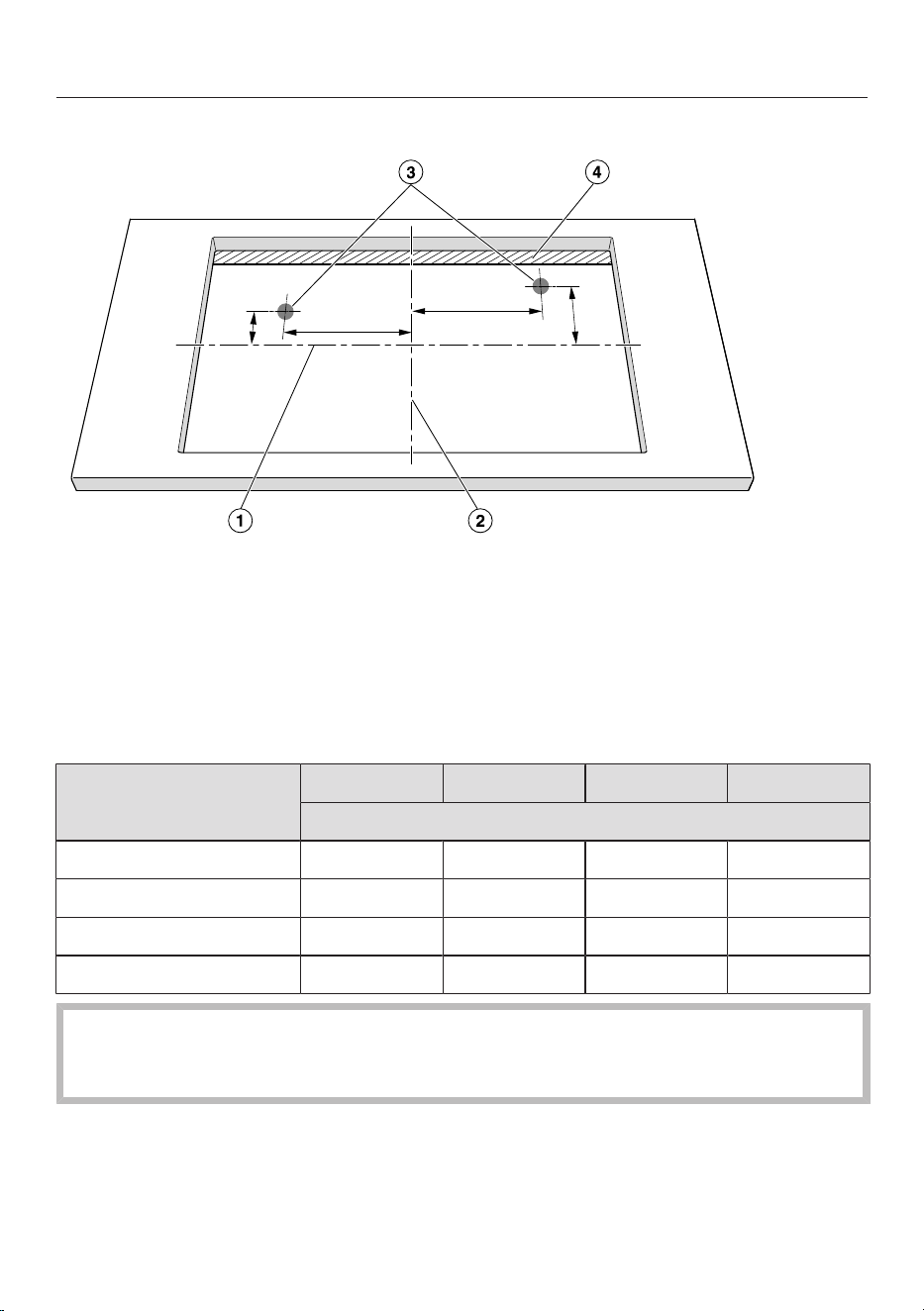
Installation
*INSTALLATION*
Positions and cut-outs of the ventilation openings
Y2.1
X2.1
X1.1
Y1.1
Not to scale. View from above. Surface-mounted cut-out shown.
Also applies to flush-fit installation.
a
Middle of the cut-out height
b
Middle of the cut-out width
c
Cut-out for fan, round (Ø 60–80 mm)
d
Gap (≥ 15 mm)
X1.1 Y1.1 X2.1 Y2.1
Distance from the middle of the cut-out in mm
KM8462FR/FL 184 93 147 78
KM8463FX 184 93 147 78
KM8482FR/FL 184 102 147 87
KM8483FX/FXGlass 184 84 174 69
Position the hob so that the fans are above the cut-outs.
If the fans are not positioned above the cut-outs, the air flow may be obstructed.
The hob is not adequately cooled.
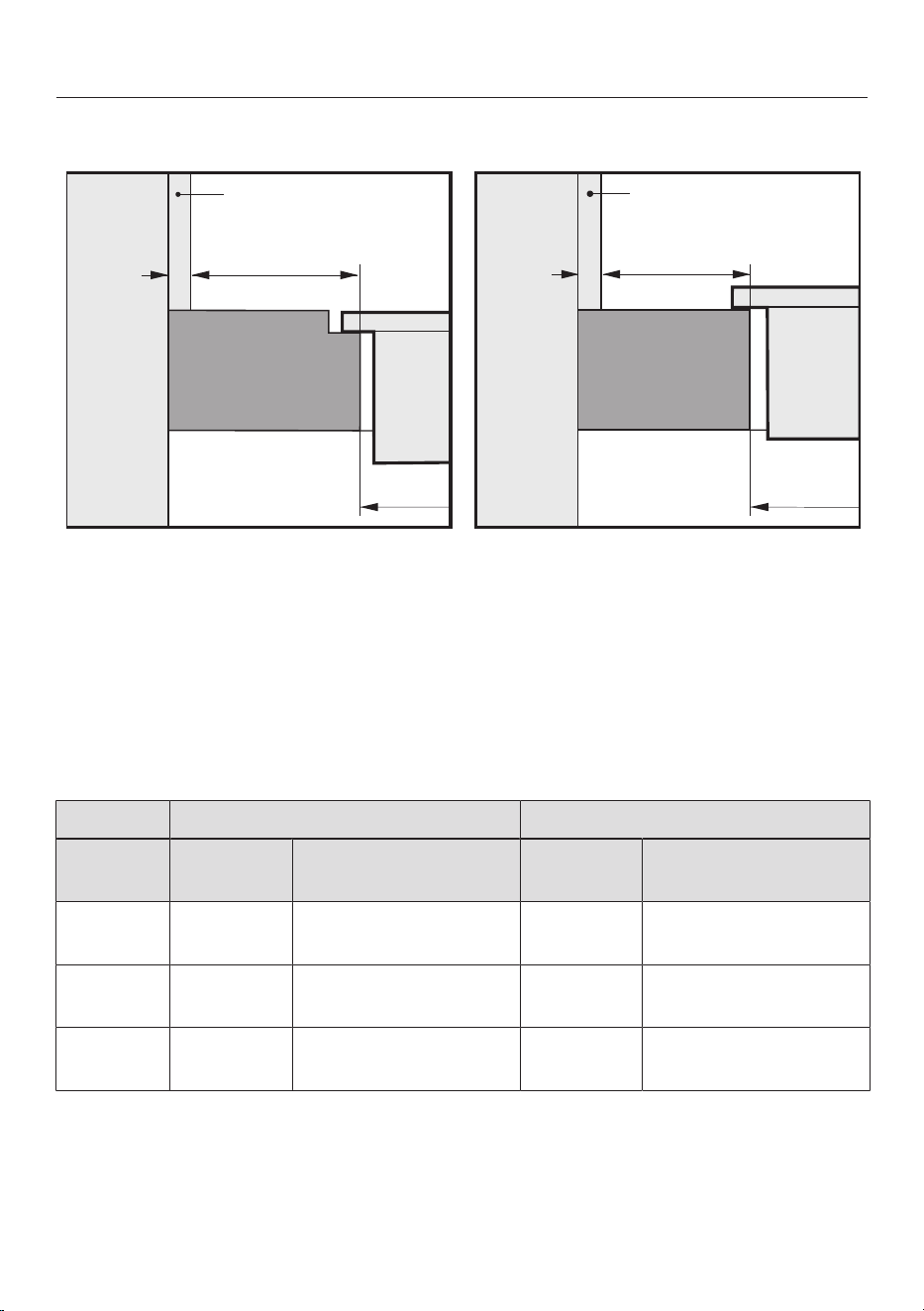
Minimum safety distance from the niche cladding
If niche cladding is installed, a minimum safety distance must be maintained
between the worktop cut-out and the cladding. High temperatures can alter or
damage these materials.
20
Installation
*INSTALLATION*
Flush-fit installation Surface-mounted installation
b
b
c
a
a
d
d
c
x
x
e
e
a
Masonry
b
Dimensionx= thickness of the niche cladding material
c
Worktop
d
Worktop cut-out
e
Minimum safety distance to
combustible materials (e.g. wood)
non-combustible materials (e.g. metal, natural stone, ceramic tiles)
Side Opposite side
Material Combust-
ible
Non-combustible Combust-
ible
Non-combustible
Back 50mm 50mm – dimen-
sionx
– –
Right 50mm 50mm – dimen-
sionx
200mm 200mm – dimen-
sionx
Left 50mm 50mm – dimen-
sionx
200mm 200mm – dimen-
sionx
Example: 15mm thick non-combustible niche cladding
50mmminus15mm = minimum safety distance of 35mm
21
Installation
*INSTALLATION*
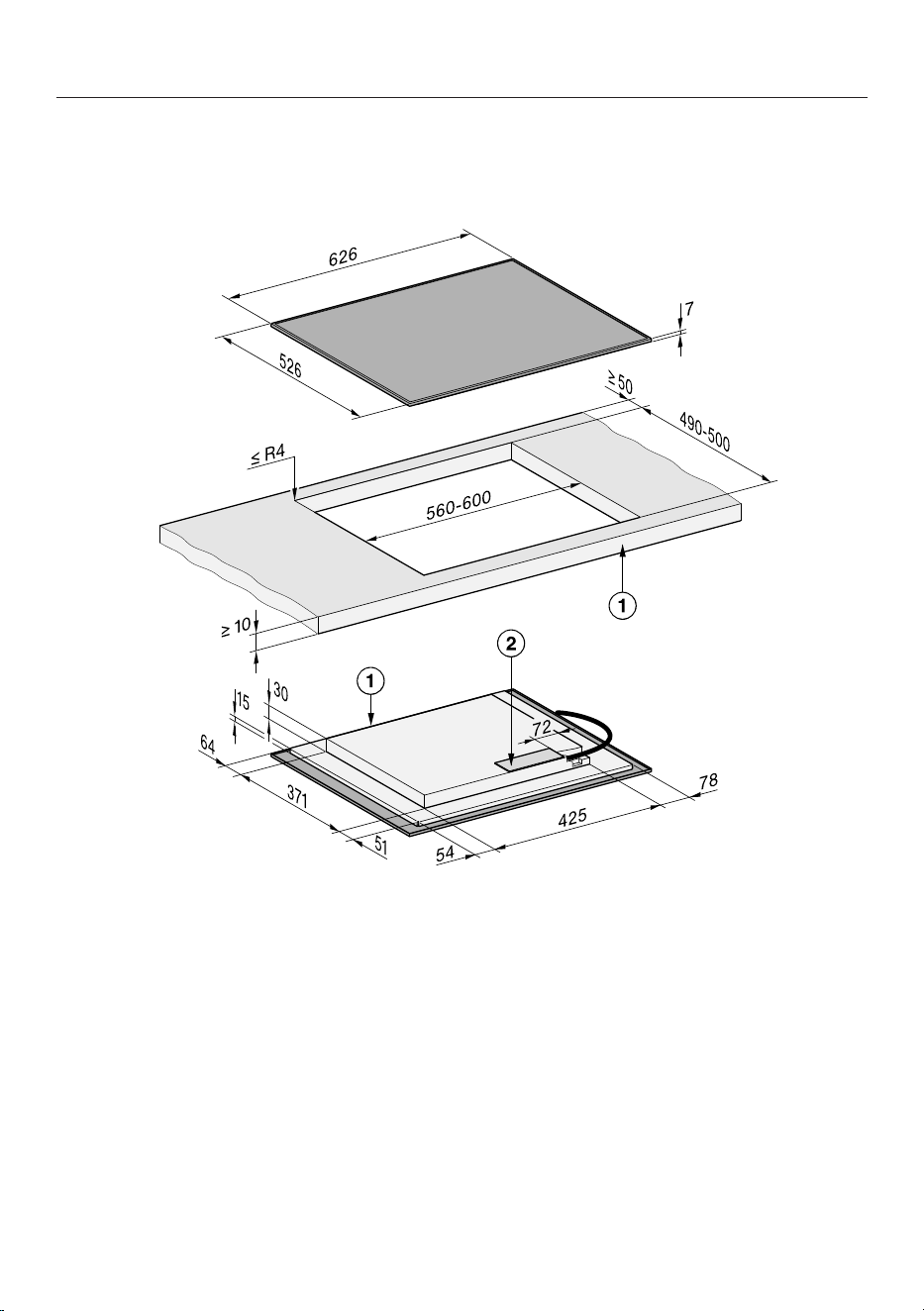
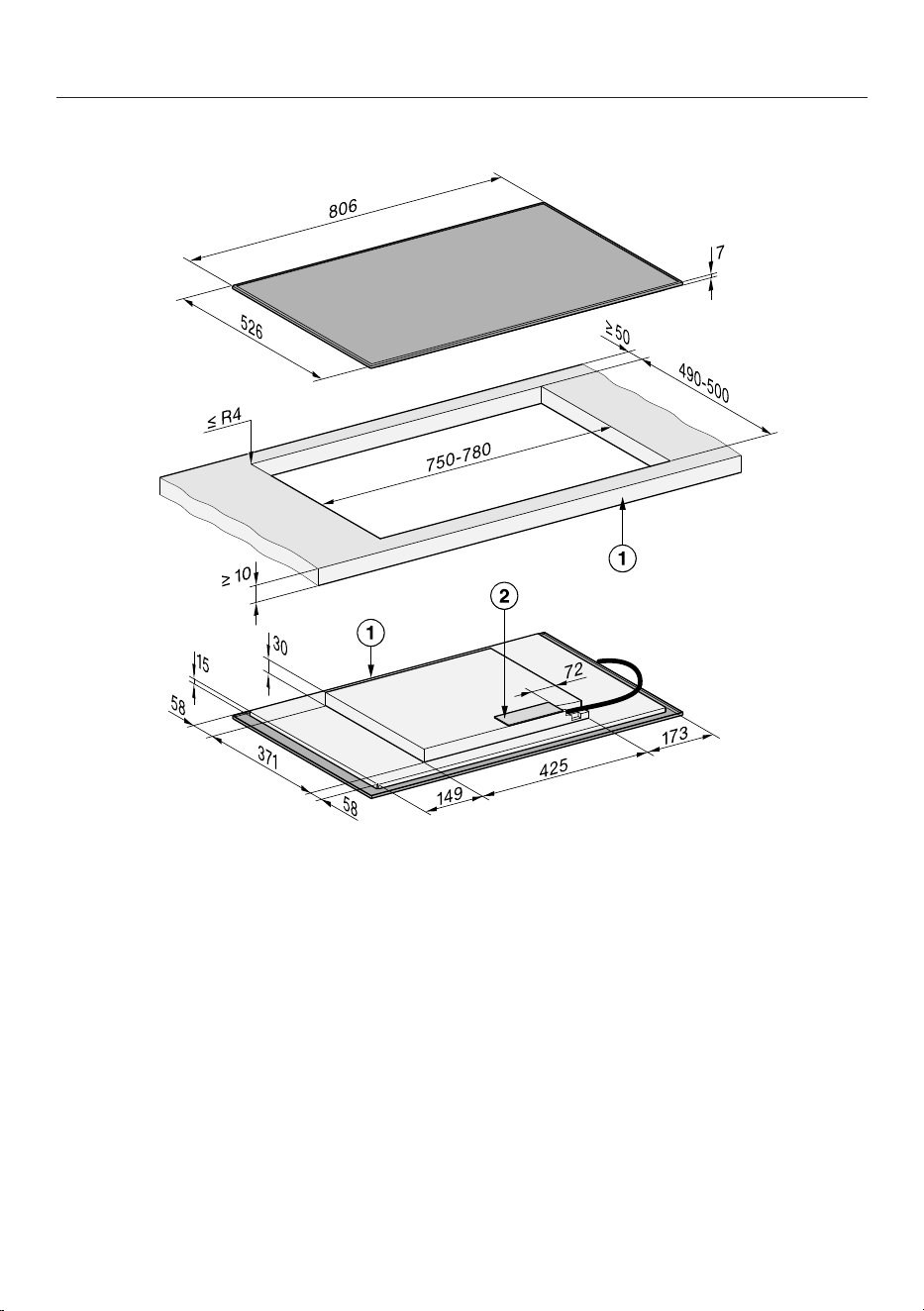
Installation dimensions for surface-mounted installation
KM8462FR
All dimensions are given in mm.
a
Front
b
Mains connection box
The mains connection cable (L=1440mm) is supplied loose
22
Installation
*INSTALLATION*
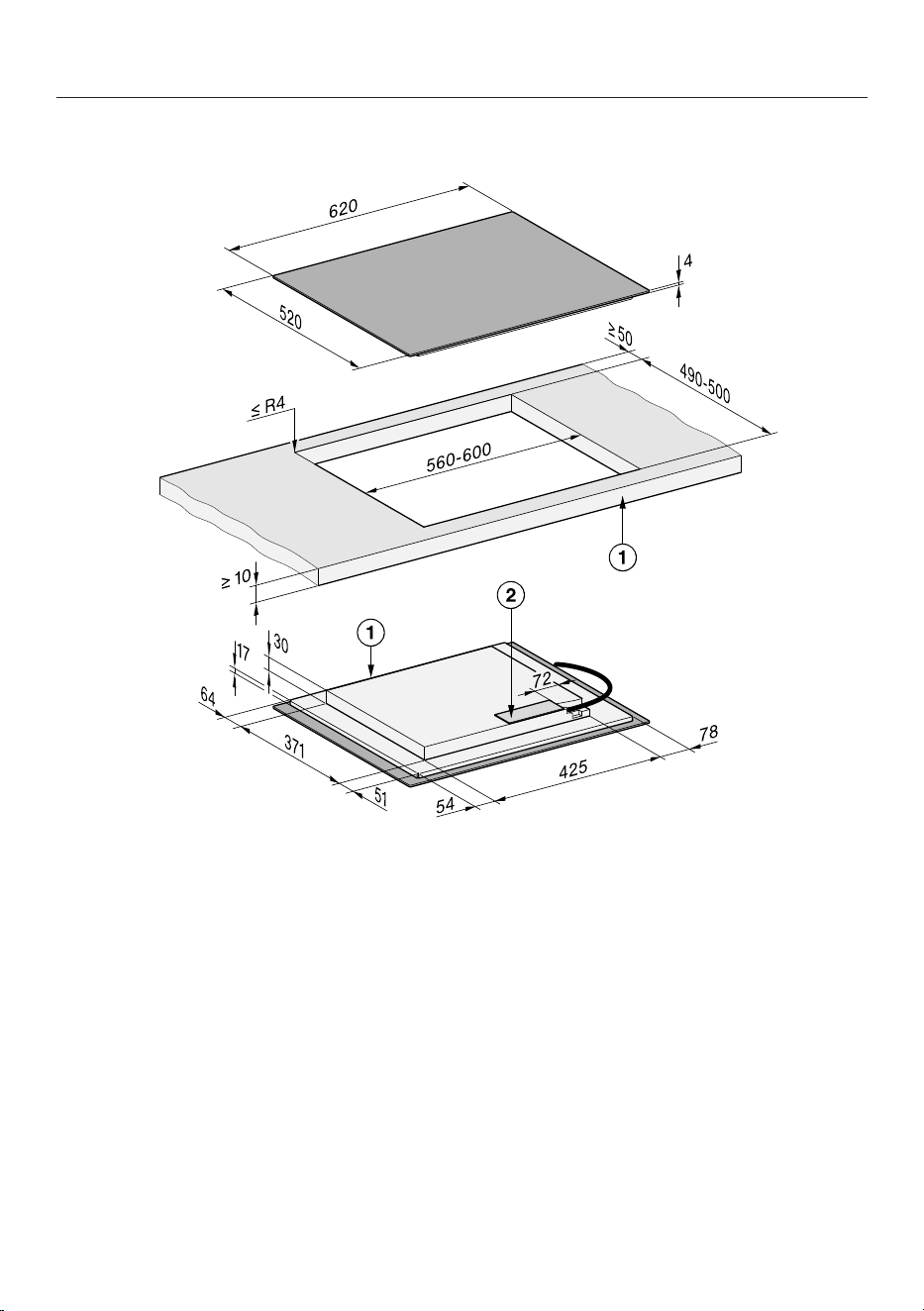
KM8462FL
All dimensions are given in mm.
a
Front
b
Mains connection box
The mains connection cable (L=1440mm) is supplied loose
23
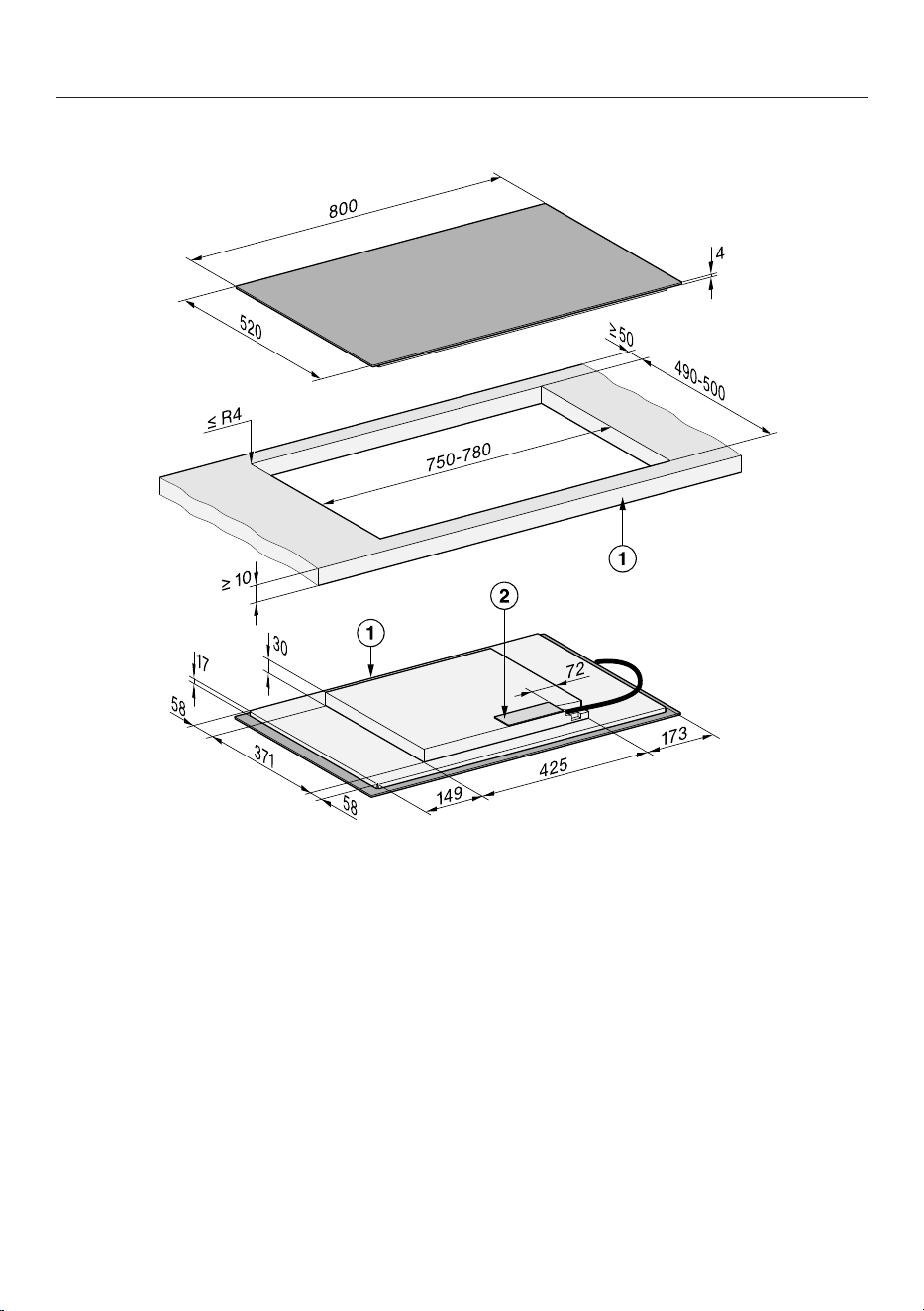
Installation
*INSTALLATION*
KM8482FR
All dimensions are given in mm.
a
Front
b
Mains connection box
The mains connection cable (L=1440mm) is supplied loose
24
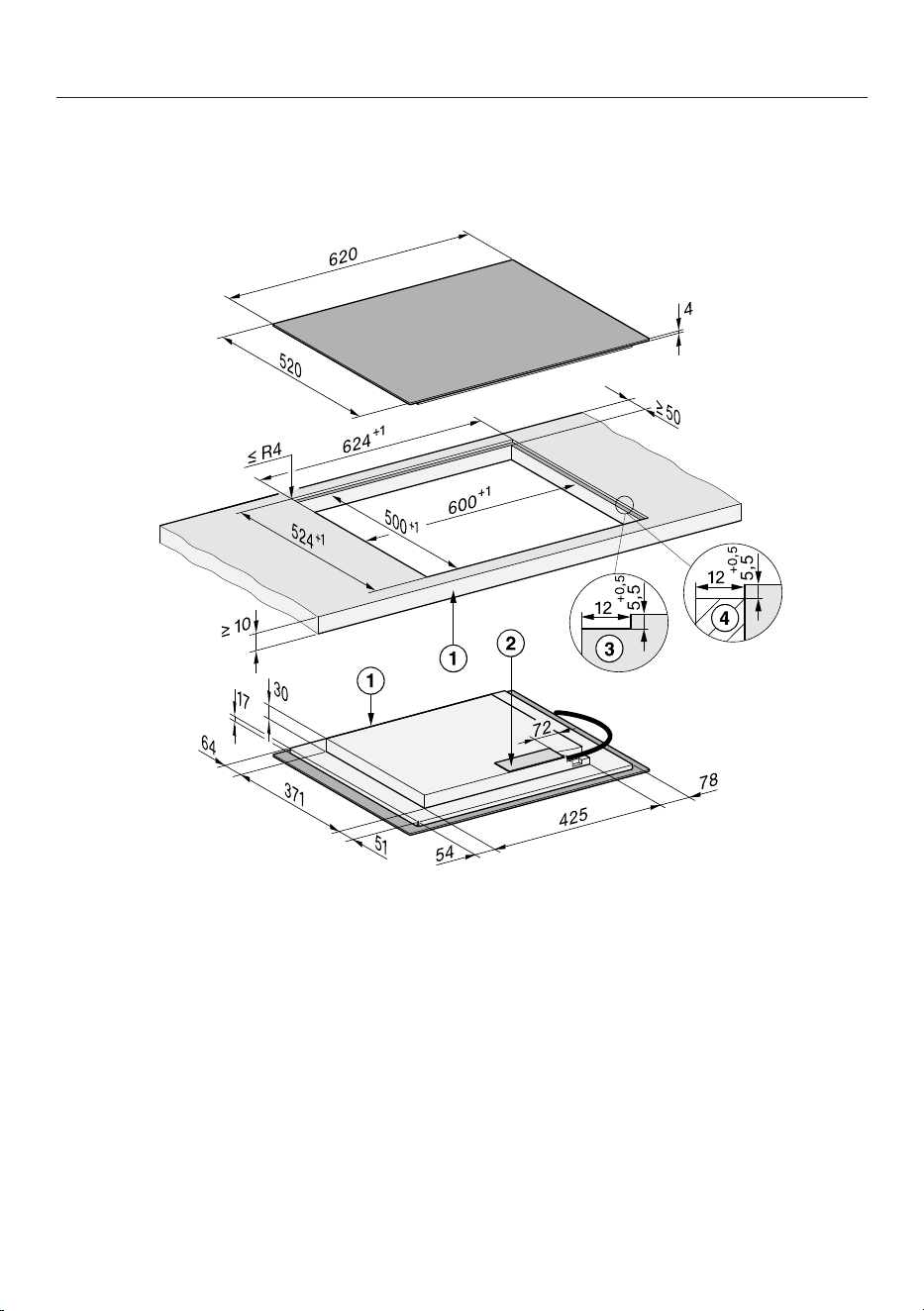
Installation
*INSTALLATION*
KM8482FL
All dimensions are given in mm.
a
Front
b
Mains connection box
The mains connection cable (L=1440mm) is supplied loose
25
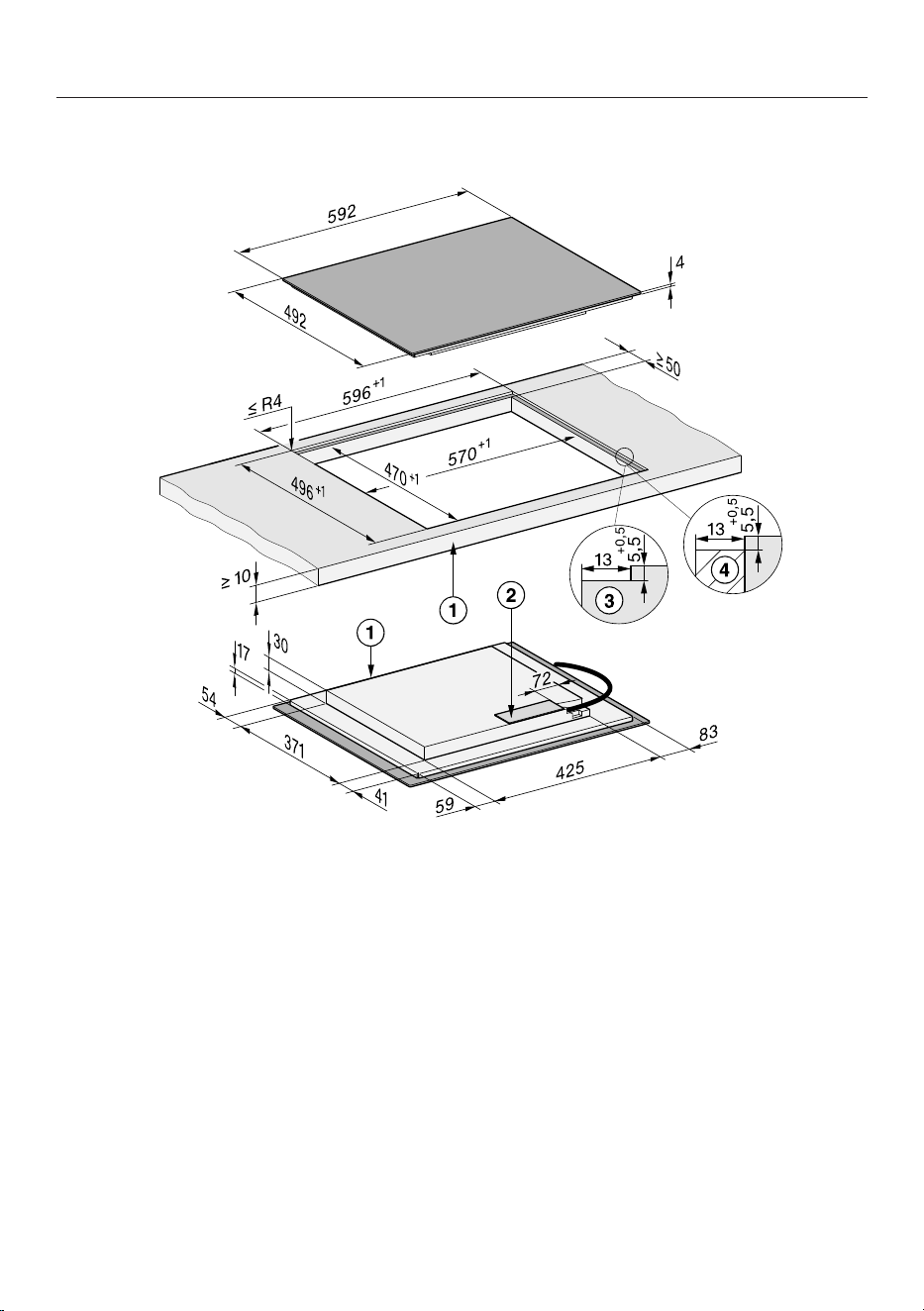
Installation
*INSTALLATION*
Installation dimensions for flush-fit installation
KM8462FL
All dimensions are given in mm.
a
Front
b
Mains connection box
The mains connection cable (L=1440mm) is supplied loose
c
Stepped cut-out, natural stone worktop
d
Wooden batten 13mm (accessories not included)
26
Installation
*INSTALLATION*
KM8463FX
All dimensions are given in mm.
a
Front
b
Mains connection box
The mains connection cable (L=1440mm) is supplied loose
c
Stepped cut-out, natural stone worktop
d
Wooden batten 13mm (accessories not included)
27
Installation
*INSTALLATION*
KM8482FL
All dimensions are given in mm.
a
Front
b
Mains connection box
The mains connection cable (L=1440mm) is supplied loose
c
Stepped cut-out, natural stone worktop
d
Wooden batten 13mm (accessories not included)
28
Installation
*INSTALLATION*
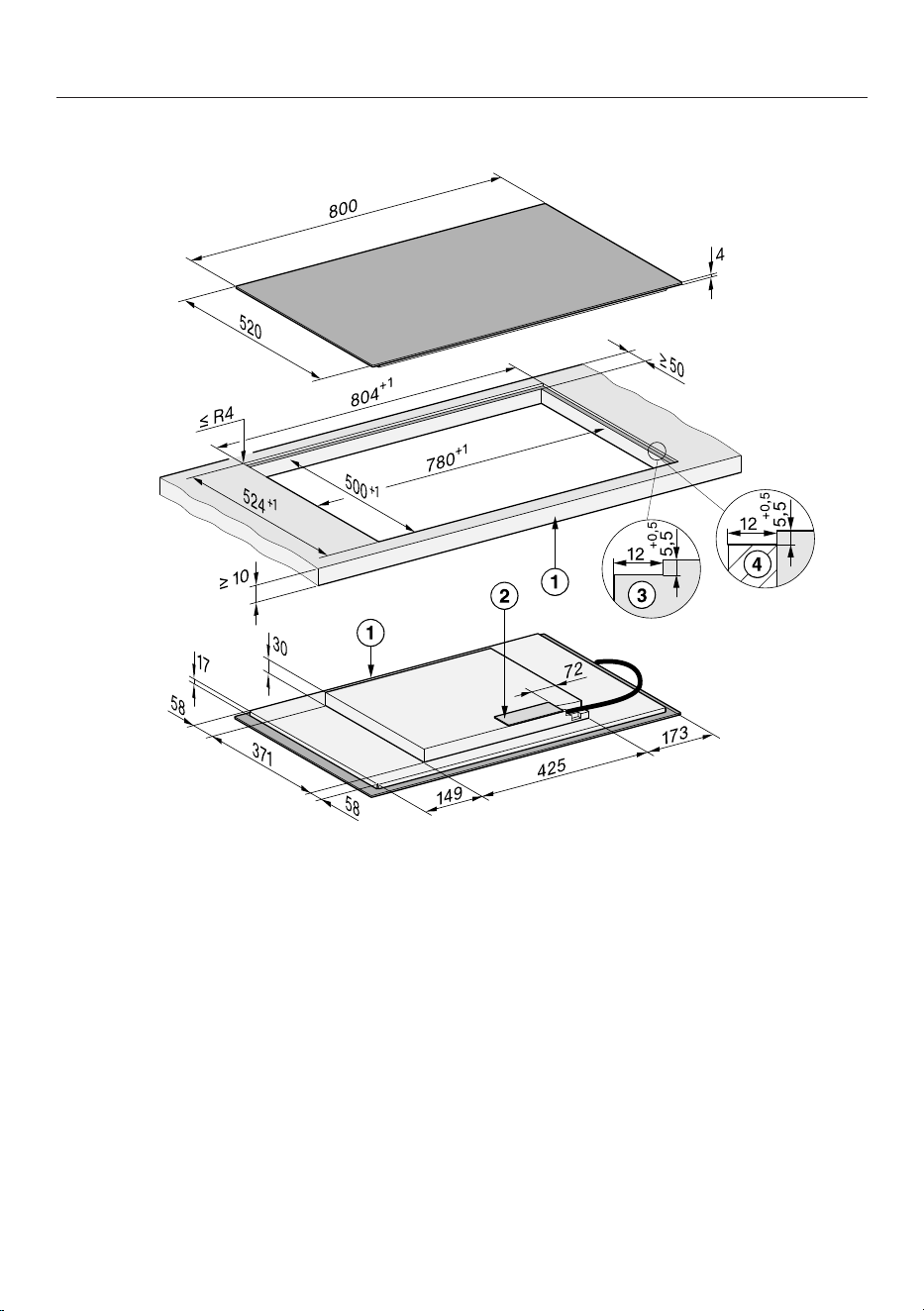
KM8483FX
All dimensions are given in mm.
a
Front
b
Mains connection box
The mains connection cable (L=1440mm) is supplied loose
c
Stepped cut-out, natural stone worktop
d
Wooden batten 13mm (accessories not included)
29
Installation
*INSTALLATION*
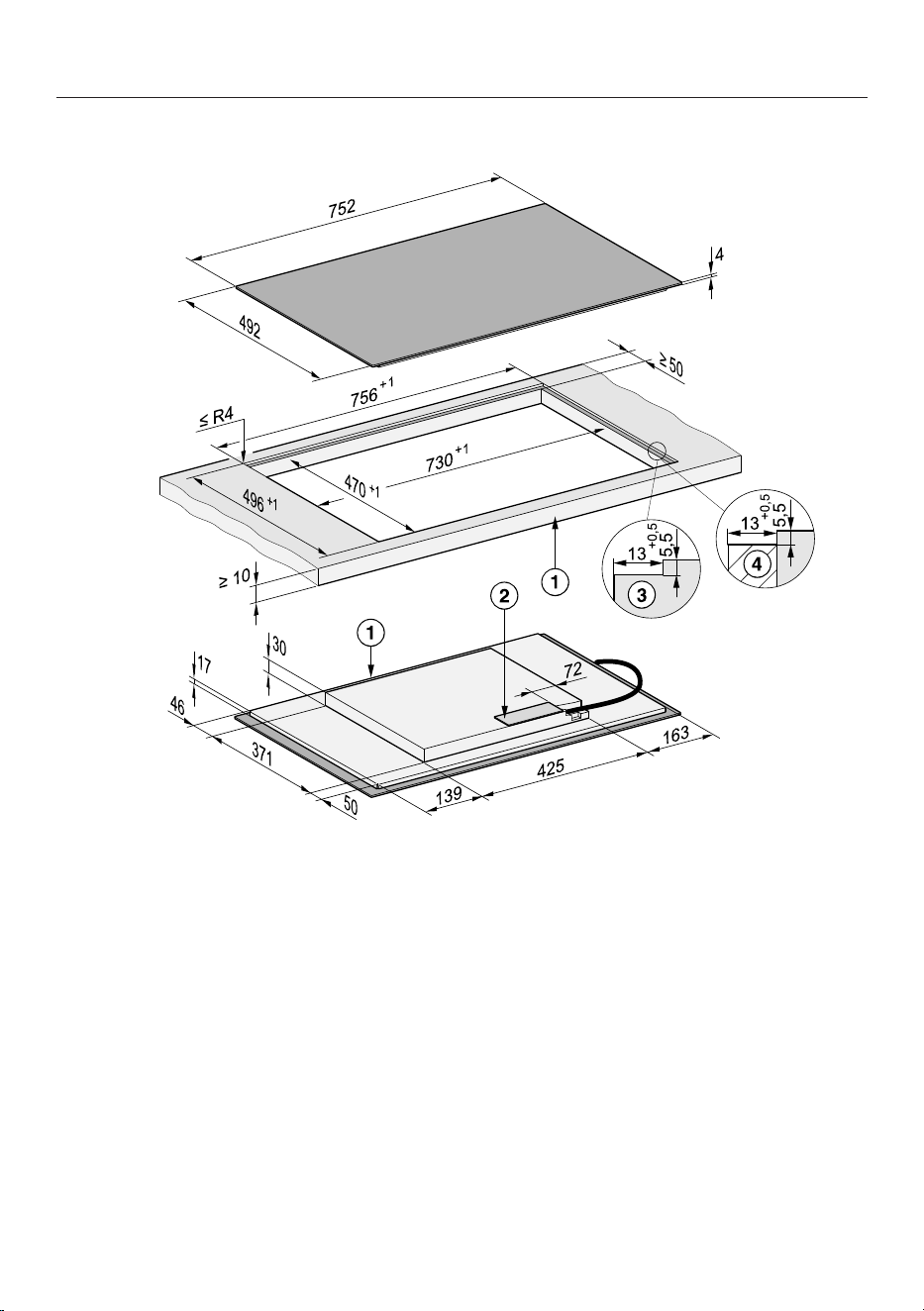
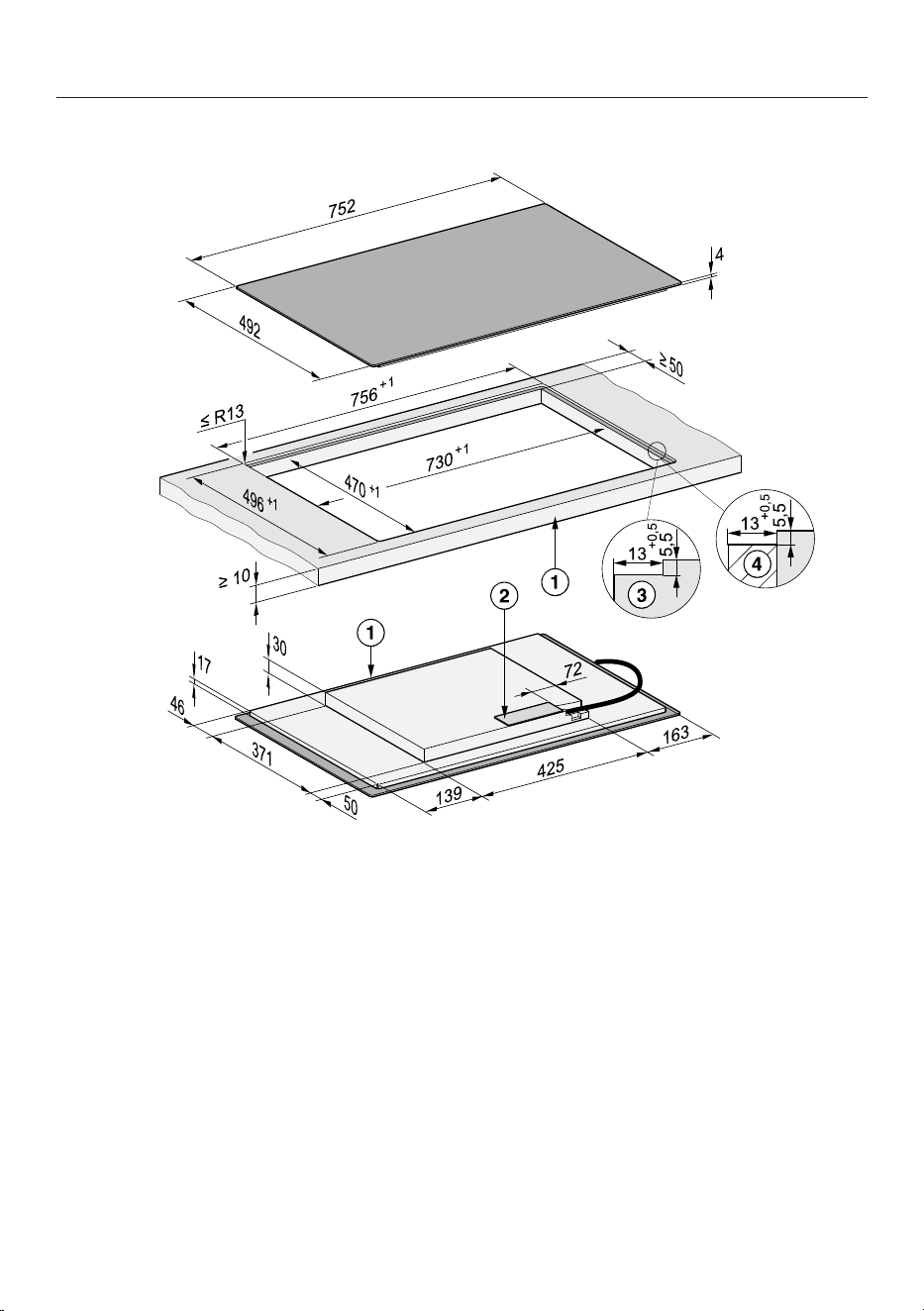
KM8483FXGlass
All dimensions are given in mm.
a
Front
b
Mains connection box
The mains connection cable (L=1440mm) is supplied loose
c
Stepped cut-out, natural stone worktop
d
Wooden batten 13mm (accessories not included)
30
Installation
Installing a surface-mounted
hob
Preparing the worktop for surface-
mounted installation
Remember to maintain the minimum
safety distances.
Create the worktop cut-out.
Wooden worktops:
Seal any cut surfaces with a special
varnish, silicone sealant or resin to
prevent the wood from swelling as a
result of moisture ingress. The sealant
must be heat-resistant.
Make sure that the sealant does not
come into contact with the top of the
worktop.
Installing a surface-mounted hob
The seal ensures that the hob will sit se-
curely in the cut-out without slipping.
Any gap between the appliance frame
and worktop will become smaller over
time.
Attach the sealing strip included in
the scope of delivery underneath the
edge of the hob. The joint edge (start
and end) of the sealing strip must not
be in a corner. Apply some silicone
joint sealant to the joint edge of the
sealing strip. Do not apply the sealing
strip under tension.
Risk of damage from incorrect
connection.
The hob electronic module may be
damaged if a short-circuit occurs.
The mains connection cable must be
connected to the hob by a qualified
electrician.
Follow the instructions in the wiring
diagram to connect the mains con-
nection cable to the hob.
Feed the mains connection cable for
the hob down through the worktop
cut-out.
Place the hob centrally in the cut-out.
When doing this, make sure that the
seal of the appliance sits flush with
the worktop on all sides. This is im-
portant to ensure effective sealing all
round.
If the seal does not sit flush with the
worktop in the corners, the corner ra-
dius (≤R4) can be carefully cut to fit
using a jigsaw.
If an air intake-optimised base panel
is installed, position the hob so that
the fans are located above the cut-
outs.
Connect the hob to the electricity
supply.
Check that the hob is working.
Installing the hob flush with the
worktop
Preparing the worktop for flush-fit in-
stallation
Remember to maintain the minimum
safety distances.
Create the worktop cut-out.
Solid wood and tiled worktops:
Secure the wooden frame 5,5mm be-
low the top edge of the worktop.
Installing a flush-fit hob
The seal ensures that the hob will sit se-
curely in the cut-out without slipping.
Any gap between the appliance frame
and worktop will become smaller over
time.
31
Installation
Attach the sealing strip included in
the scope of delivery underneath the
edge of the hob. The joint edge (start
and end) of the sealing strip must not
be in a corner. Apply some silicone
joint sealant to the joint edge of the
sealing strip. Do not apply the sealing
strip under tension.
Risk of damage from incorrect
connection.
The hob electronic module may be
damaged if a short-circuit occurs.
The mains connection cable must be
connected to the hob by a qualified
electrician.
Follow the instructions in the wiring
diagram to connect the mains con-
nection cable to the hob.
Feed the mains connection cable for
the hob down through the worktop
cut-out.
The gap between the ceramic surface
and the worktop must be at least
2mm wide.
This is required so that the hob can be
sealed.
Centre the hob in the cut-out.
If an air intake-optimised base panel
is installed, position the hob so that
the fans are located above the cut-
outs.
Connect the hob to the mains power
supply.
Check that the hob is working.
Seal the gap between the hob and
worktop with a suitable silicone seal-
ant that is heat-resistant to at least
160°C.
Electrical connection
Risk of damage from incorrect
connection.
Unauthorised installation, mainten-
ance and repairs can cause consider-
able danger for the user.
Miele cannot be held liable for dam-
age or injury caused by unauthorised
installation, maintenance or repair
work, or by an inadequate or faulty
on-site earthing system (e.g. electric
shock).
This hob must be connected to the
mains power supply by a qualified
electrician.
The qualified electrician must be fa-
miliar with and comply with the na-
tional regulations and any additional
regulations of the local electricity
provider.
After installation, ensure that all elec-
trical components are shielded and
cannot be accessed by users.
Total power rating
See data plate
Connection data
The connection data is quoted on the
data plate. Please ensure these match
the household mains supply.
Please see wiring diagrams for connec-
tion. (N.B. This appliance is supplied
single phase only in the UK / AUS / NZ).
Residual current device
For extra safety, it is advisable to protect
the hob with a suitable residual current
device (RCD) with a trip range of
30mA.
32
Installation
Disconnecting devices
It must be possible to disconnect the
hob from the mains at all poles using
disconnecting devices. A contact dis-
tance of at least 3mm must be ob-
served in the switched-off state. The
disconnecting devices include overcur-
rent protection devices and residual cur-
rent protection devices.
Disconnecting from the mains
Risk of electric shock from mains
voltage.
There is a risk of electric shock if the
appliance is reconnected to the
mains voltage supply during repair or
service work.
After disconnection, ensure the appli-
ance cannot be switched back on by
mistake.
To disconnect the appliance from the
mains power supply, do one of the fol-
lowing depending on installation:
Fine-wire fuses
Completely remove the fuse links
from the screw caps.
Automatic circuit breakers
Press the test button (red) until the
middle button (black) springs out.
Built-in circuit breakers
For circuit breakers of at least typeB
or C, switch the lever from1 (on) to
0(off).
Residual current device
Residual current device: switch the
main switch from1 (on) to 0(off) or
press the test button.
Mains connection cable
The hob must be connected to the elec-
trical supply with a special connection
cable, type H05VV-F (PVC insulated)
with a suitable diameter.
Please see wiring diagrams for connec-
tion.
See the data plate on the hob for the
correct voltage and rated load.
Replacing the mains connection cable
Risk of electric shock.
Incorrect connection to the power
supply may result in an electric
shock.
The mains cable must only be re-
placed by a qualified electrician.
When replacing the mains cable only
use cable type H05VV-F (PVC insu-
lated) with a suitable cross section. A
suitable connection cable is available to
order from Miele.
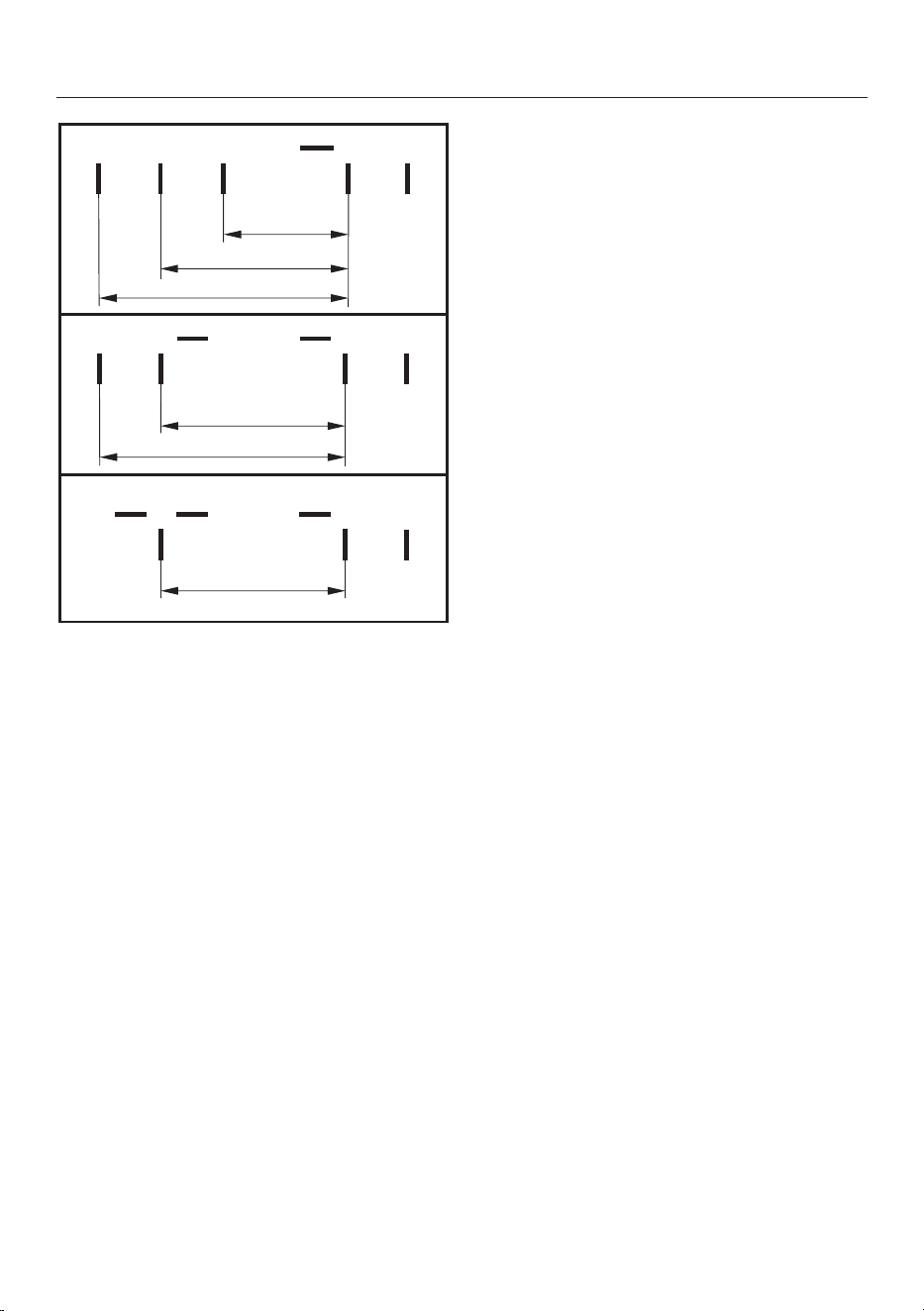
Wiring diagram
Some connection methods are not
permitted in all installation locations.
Ensure compliance with national reg-
ulations and any additional regula-
tions issued by the local electricity
provider.
The maximum load per connected live
conductor is 3650W.
The first and second live conductors are
required for connecting the hob. Further
appliances can be connected to the
third live conductor.
33
Installation
L1
200-240 V~
200-240 V~
200-240 V~
a b
c d e
-
L2 L3 N
-
L2
b
L1
a c d
N
e
(L3)
200-240 V~
200-240 V~
a
L1
b c d
N
e
-
(L2)
200-240 V~
34
Familiarisation
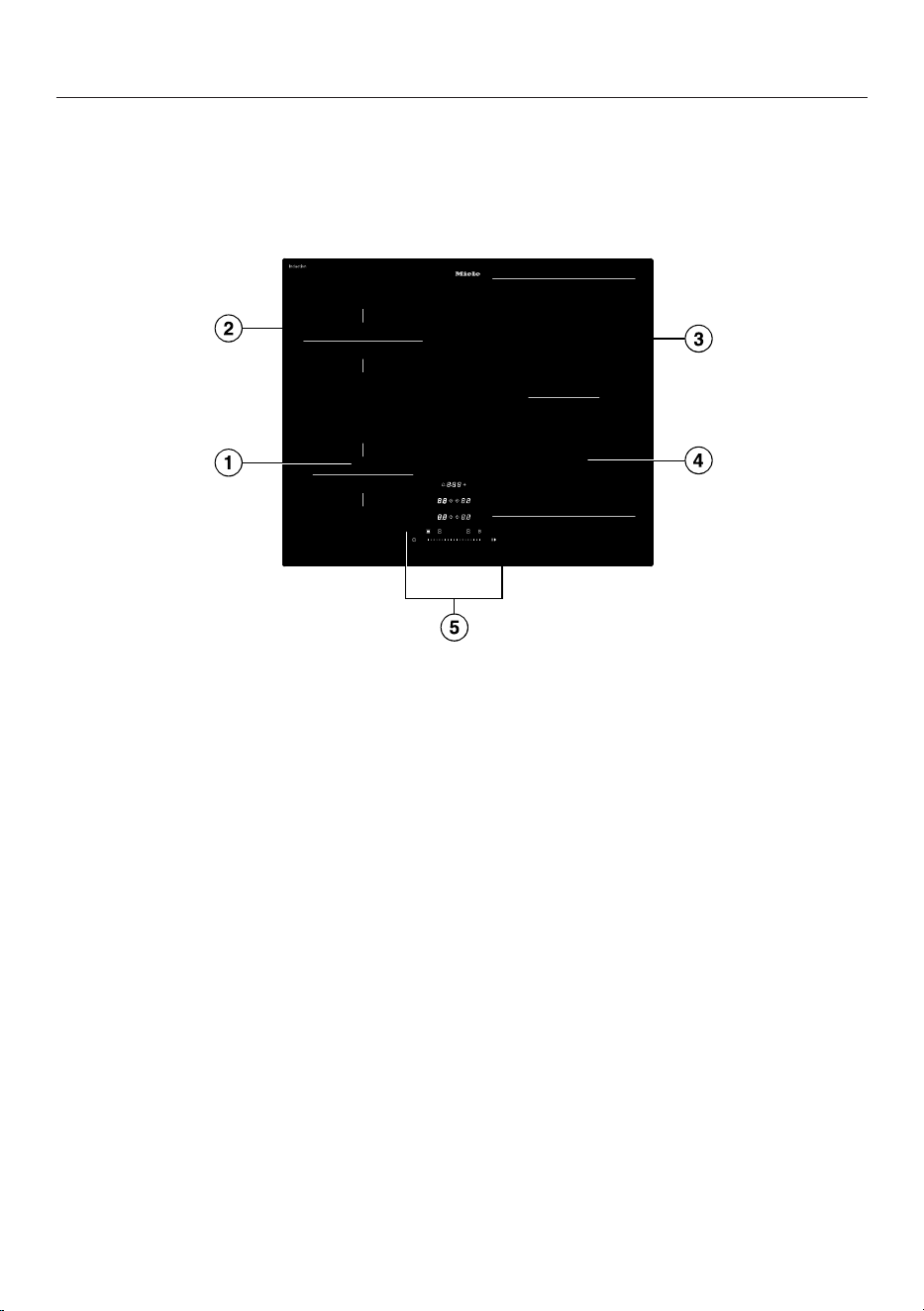
Your hob
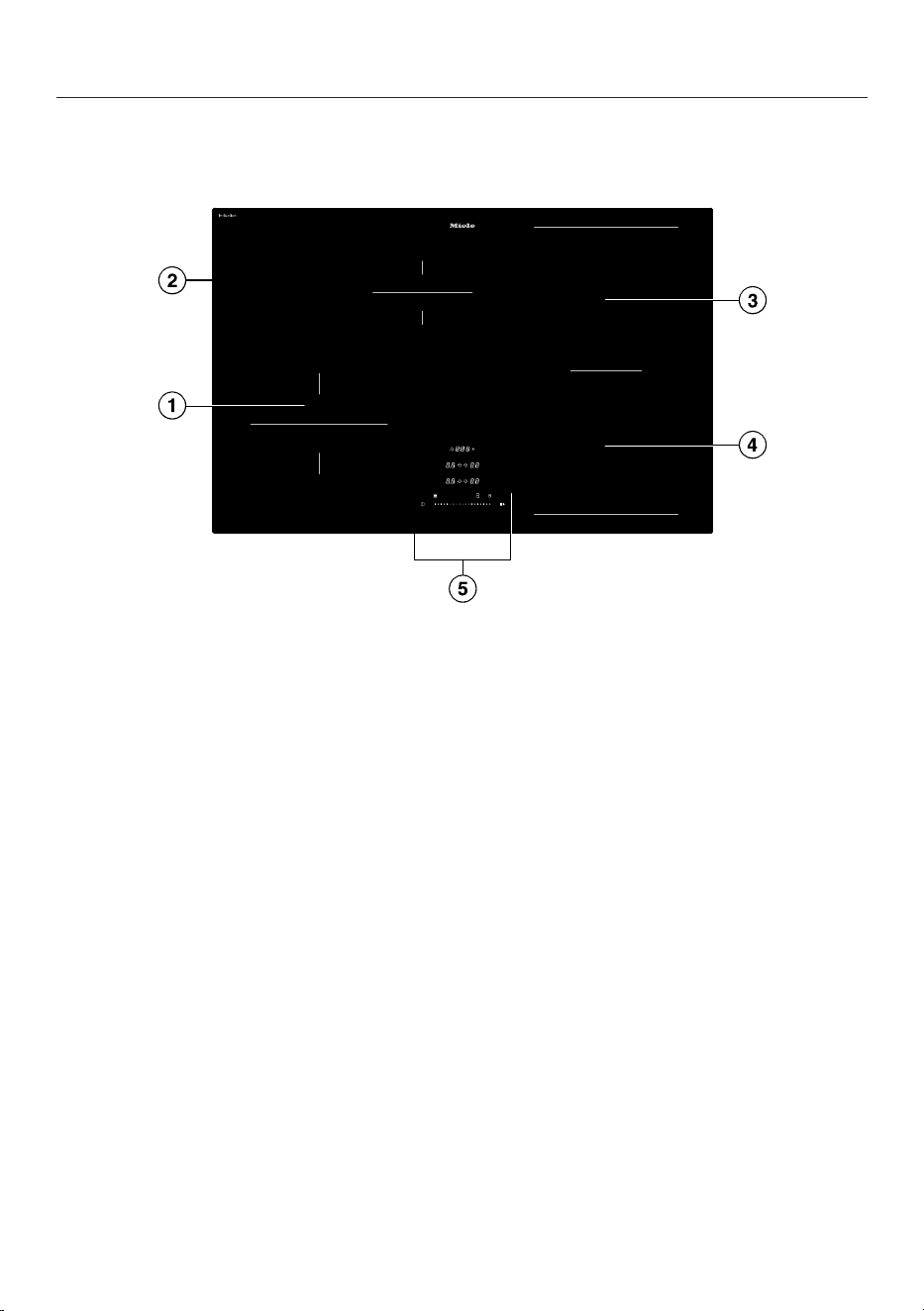
KM8462FR, KM8462FL, KM8463FX
a
Cooking zone with Booster function
b
Cooking zone with Booster function
c
PowerFlex cooking zone with Booster
can be combined with PowerFlex cooking zone to form PowerFlex cooking
area
d
PowerFlex cooking zone with Booster
e
Controls and indicators
35
Familiarisation
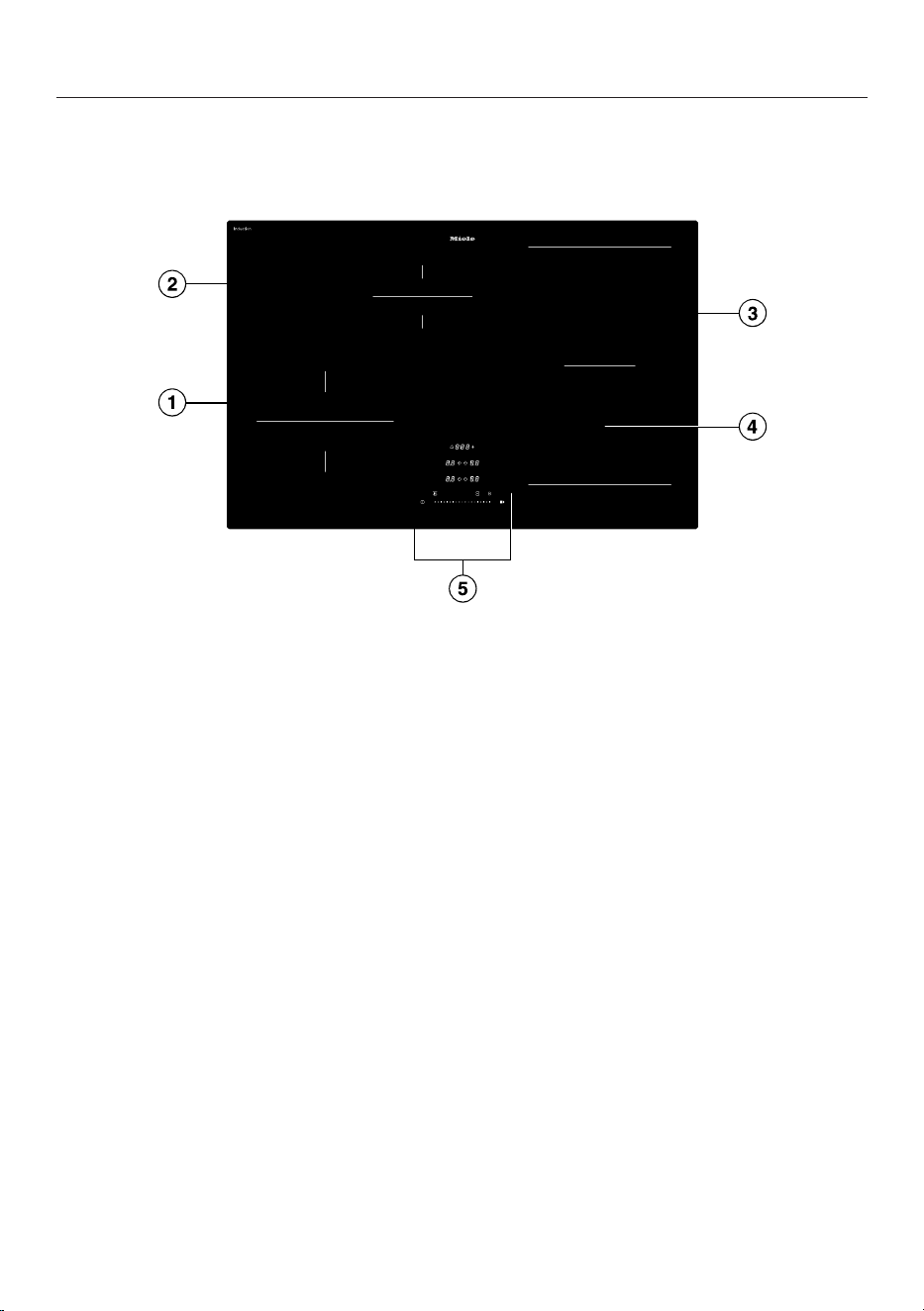
KM8482FR, KM8482FL
a
Cooking zone with Booster function
b
Cooking zone with Booster function
c
PowerFlex cooking zone with Booster
can be combined with PowerFlex cooking zone to form PowerFlexXL cooking
area
d
PowerFlex cooking zone with Booster
e
Controls and indicators
36
Familiarisation
KM8483FX, KM8483FXGlass
a
Cooking zone with Booster function
b
Cooking zone with Booster function
c
PowerFlex cooking zone with Booster
can be combined with PowerFlex cooking zone to form PowerFlex cooking
area
d
PowerFlex cooking zone with Booster
e
Controls and indicators
37
Familiarisation
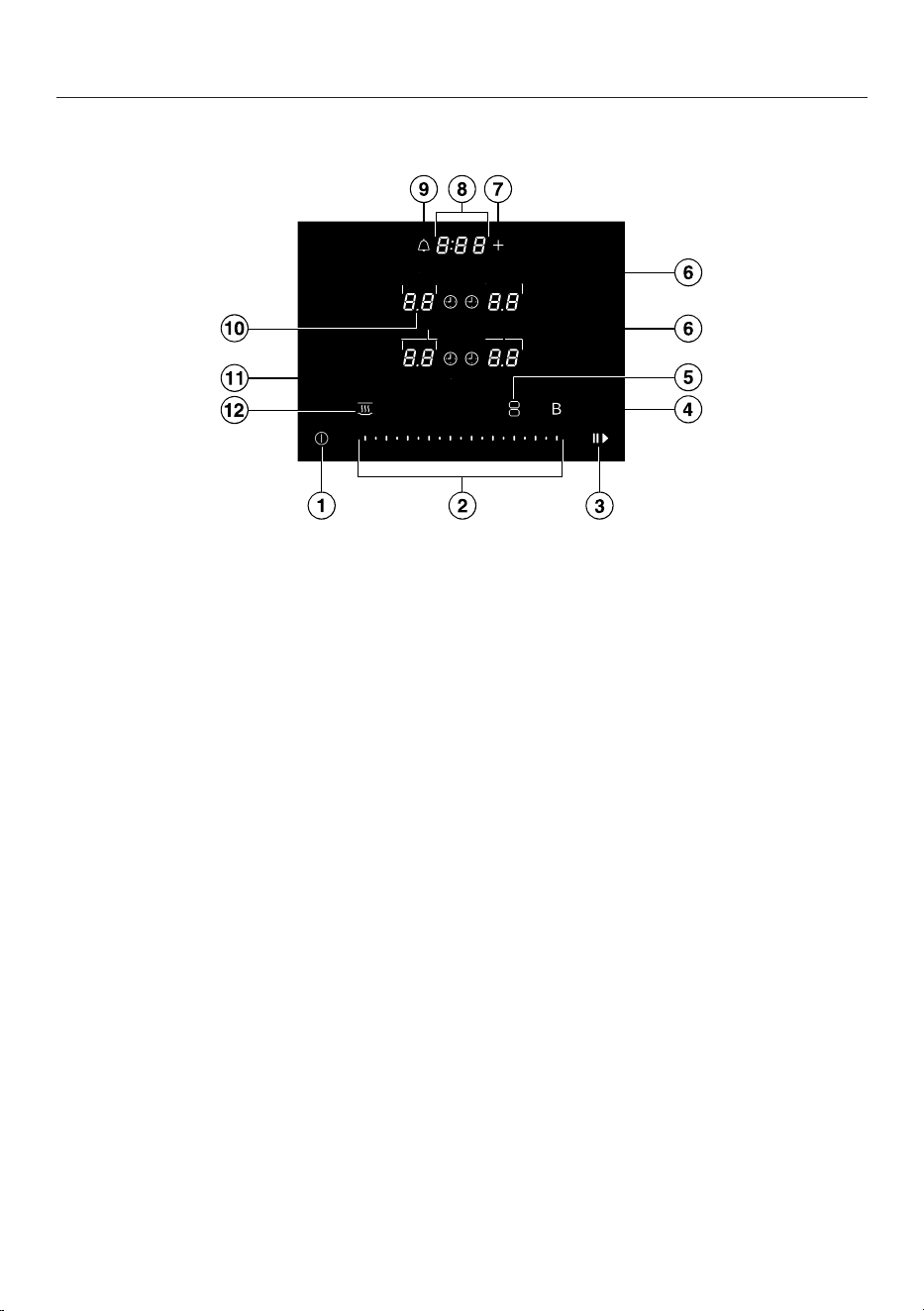
Controls and indicators
a
On/Off
sensor control
b
Slider
– To set the power level
– To set the times
c
Stop&Go
sensor control
To stop/start a cooking process in progress
d
Booster
Bsensor control
e
Sensor control for
PowerFlex
/
PowerFlexXL
cooking zones
(only displayed if a corresponding cooking zone has been selected)
To link/unlink PowerFlex/PowerFlexXL cooking zones manually
f
Cooking zone display
Cooking zone is ready for operation
to Power level
Residual heat indicator level 1
Residual heat indicator level 2
Residual heat indicator level 3
Cookware missing or unsuitable
Booster
Keeping warm
g
Input
sensor control
– To adjust the settings
– To adjust the times
38
Familiarisation
h
Hob display
:–: Time
/ System lock/Keypad lock is activated/deactivated
/ Demo mode is activated/deactivated
i
Timer
sensor control
j
Separator display
Display of intermediate power levels
k
Sensor control for
Duration
of a cooking process
Switches the cooking zones off automatically after a set period of time
Measures the time a cooking process takes
l
Keeping warm
sensor control
To activate/deactivate the Keeping warm special function
Cooking zone data
KM8462FR, KM8462FL, KM8463FX
Cooking
zone
Size in cm
1
Max. rating
in watts for 230V
2
Linked
cooking
zone
3
Ø
10–16 –
Normal
Booster
1400
2200
12–19 –
Normal
Booster
1850
3000
12–23
12x12
–
23x19
Normal
Booster
2100
3650
12–23
12x12
–
23x19
Normal
Booster
2100
3650
+
22–23
22x22
–
23x39
Normal
Booster
4200
7300
-
Total 7300
1
Cookware with a base diameter or surface (widthxdepth) within the given range may be used.
2
The rating given may vary depending on the size and material of the cookware used.
3
The cooking zone is linked to this cooking zone electrically so that the rating can be increased.
39
Familiarisation
KM8482FR, KM8482FL
Cooking
zone
Size in cm
1
Max. rating
in watts for 230V
2
Linked
cooking
zone
3
Ø
14–22 –
Normal
Booster
2300
3650
10–16 –
Normal
Booster
1400
2200
12–23
12x12
–
23x19
Normal
Booster
2100
3650
12–23
12x12
–
23x19
Normal
Booster
2100
3650
+
–
22x22
–
23x46
Normal
Booster
4200
7300
-
Total 7300
1
Cookware with a base diameter or surface (widthxdepth) within the given range may be used.
2
The rating given may vary depending on the size and material of the cookware used.
3
The cooking zone is linked to this cooking zone electrically so that the rating can be increased.
40
Familiarisation
KM8483FX, KM8483FXGlass
Cooking
zone
Size in cm
1
Max. rating
in watts for 230V
2
Linked
cooking
zone
3
Ø
14–22 –
Normal
Booster
2300
3650
10–16 –
Normal
Booster
1400
2200
12–23
12x12
–
23x19
Normal
Booster
2100
3650
12–23
12x12
–
23x19
Normal
Booster
2100
3650
+
22–23
22x22
–
23x39
Normal
Booster
4200
7300
-
Total 7300
1
Cookware with a base diameter or surface (widthxdepth) within the given range may be used.
2
The rating given may vary depending on the size and material of the cookware used.
3
The cooking zone is linked to this cooking zone electrically so that the rating can be increased.
41
Familiarisation
Power management
Total permitted power consumption
The hob has a maximum total permitted
power consumption which cannot be
exceeded for safety reasons. You can re-
duce the maximum total permitted
power consumption.
The higher the total permitted power
consumption of the hob, the more
power levels/special functions can be
used on all cooking zones at the same
time.
If the set power levels/special functions
require more power than can be
provided in accordance with the total
permitted power consumption, the hob
will distribute the maximum permitted
power between the cooking zones.
Distribution of power
Cooking zones can be linked together in
pairs on the hob. This allows power to
be transferred from one cooking zone
(A) to another (B). As a result, the power
of cooking zone (A) is reduced.
Example: the Booster function for cook-
ing zone (B) is activated.
Cooking zone (B) which requires addi-
tional power is determined by the most
recent setting on the hob.
The values for the maximum total per-
mitted power consumption and which
cooking zones are linked together can
be found in the cooking zone data.
You can reduce the maximum total
permitted power consumption.
Effects of power distribution
If a cooking zone gives power to another
zone, this can have the following effects
on the zone giving the power:
- The power level is reduced.
- Auto heat-up is deactivated. Cooking
continues at the set level. If the power
is not sufficient, the power level will
be reduced again.
- The Booster function is deactivated.
- The cooking zone is switched off.
When the cooking zone stops transfer-
ring power to another zone, the power
level can be increased again.
Tip: If you wish to cook a large quantity
of food on one cooking zone, switch the
other cooking zones to lower power
levels.
Operation
Hob when switched off
Only the printed symbol for the On/
Off
On/Off
sensor control is visible
when the hob is switched off. More
sensor controls light up when the hob is
switched on.
Operation
a
Area for sensor controls and displays
42

Familiarisation
This ceramic glass hob is equipped with
sensor controls which react to finger
contact.
Each time a sensor control is activated,
a buzzer sounds.
For safety reasons, the On/Off
On/
Off
sensor control needs to be touched
for a little longer than the other sensors
in order to switch the appliance on.
Selecting a cooking zone
If you want to configure settings for a
cooking zone, the cooking zone must be
selected first. To select a cooking zone,
touch the correspondingCooking zone
display. After you touch the Cooking
zone display, it lights up brightly. When
the Cooking zone display appears
bright, the cooking zone is selected and
you can configure settings for the cook-
ing zone. If cookware is detected on the
other cooking zones, the other cooking
zone indicators light up dimly. Excep-
tion: if only one of the cooking zones is
in operation, you can configure settings
without selecting the cooking zone.
Networking
Your hob is equipped with an integrated
WiFi module. The hob can be connected
to your home network or just to your
Miele cooker hood. The WiFi module
enables the Miele app to be used on a
mobile device.
Once your hob has been connected via
WiFi, the connection is automatically re-
established every time it is switched on.
Make sure that your WiFi network sig-
nal is strong enough in the place where
you intend to install your hob.
Connecting your hob to your WiFi net-
work will increase energy consump-
tion, even when the hob is switched
off.
Smart Extras via the Miele app*
Networking via the Miele app gives you
access to numerous Smart Extras, in-
cluding:
- Access status information.
- Use additional helpful functions.
- Keep your hob up to date with the
latest Miele developments via soft-
ware updates (only possible via WiFi
connection).
You can find more detailed information
about Smart Extras on the Miele web-
site, in the Apple App Store
®
or in the
Google Play Store™.
*This is a separate digital offer from
Miele & Cie. KG. The range of func-
tions can vary depending on the model
and the country. Acceptance of the
Terms and Conditions and Privacy
Policy for Miele digital products & ser-
vices in the Miele app required. Miele
reserves the right to change or discon-
tinue the digital offer at any time.
Special functions
Controlling a cooker hood
Con@ctivity3.0
Con@ctivity3.0 is the direct commu-
nication system between your hob and a
Miele cooker hood. Communication is
achieved by means of networking.
43

Familiarisation
Con@ctivity3.0 enables the cooker
hood to operate automatically depend-
ing on the operating status of your hob.
The Con@ctivity versions of the hob
and cooker hood must match.
Further information can be found in the
operating and installation instructions
for your cooker hood.
Permanent pan recognition
When you place cookware on a cooking
zone, the Slideris activated automatic-
ally.
Pan size recognition
The size of the cookware is detected
within a cooking zone. The release of
energy is adapted to the size of the pan.
PowerFlex/PowerFlexXL cooking area
A PowerFlex/PowerFlexXL cooking area
links together 2 PowerFlex cooking
zones, making it possible to use larger
cookware.
The PowerFlex cooking zones link auto-
matically to form a PowerFlex/
PowerFlexXL cooking area when you
place sufficiently large items of cook-
ware on them. The PowerFlex cooking
zones can also be linked manually.
Hob Booster
When the Booster function is activated,
the power is boosted so that large
quantities can be heated up quickly, e.g.
when boiling water for cooking pasta.
Stop&Go
When Stop&Go is activated, the power
of all cooking zones in use is reduced to
power level1. When Stop&Go is deac-
tivated, the cooking zones will operate
at the power level previously selected.
Tip: Use this special function when the
control elements need to be cleaned
quickly or there is a risk of boiling over.
Hob power levels
You can set the power for the cookware
in levels from 1 to 9.
There is an intermediate level between
each power level. The intermediate
levels allow you to fine-tune the power
settings.
If you do not need the intermediate
levels, you can deactivate the intermedi-
ate levels via the settings.
Auto heat-up
When auto heat-up has been activated,
the cooking zone switches on automat-
ically at the highest setting (heat-up
boost) and then switches to the power
level (continued cooking setting) which
you have previously selected.
Timer functions
There are 3 timer functions:
- Timer
- Duration of a cooking process
- Elapsed time of a cooking process
You can use the functions simultan-
eously.
Timer
You can set an alarm for activities that
are independent of the hob.
Duration of a cooking process
You can set a time after which a cooking
zone will switch off automatically. This
function can be used for all cooking
zones at the same time.
44

Familiarisation
Elapsed time of a cooking process
You can measure how long a cooking
process takes.
System lock
If the system lock is activated, then the
hob cannot be switched on.
Keypad lock
The keypad lock is activated when the
hob is switched on. When the keypad
lock is activated, the hob can be oper-
ated only under certain conditions.
Recall
If the hob is switched off by mistake
during use, this special function can be
used to restore all settings.
Keeping warm
This special function enables food to be
kept warm after it has finished cooking.
Settings
You can adapt the settings of the hob to
your personal needs.
Demo mode
This special function enables the hob to
be demonstrated in dealer showrooms
without heating up.
Residual heat indicator
If a cooking zone is still hot, the residual
heat indicator will light up after all cook-
ing zones have been switched off.
The bars of the residual heat indicator
go out one after the other as the cook-
ing zone cools down. The last bar only
goes out when the cooking zone is safe
to touch.
Safety switch-off
Sensor controls are covered
Your hob will switch off automatically if
one or several of the sensor controls re-
main covered for longer than
10seconds; for example, by finger con-
tact, food boiling over or by an object.
will flash briefly in the Hob display and a
buzzer will sound.
will go out once you have removed the
obstruction and/or soiling and the hob
will be ready to use again.
Excessive operating time
The safety switch-off is triggered auto-
matically if a cooking zone is heated for
an unusually long period of time. This
time depends on the power level selec-
ted. If it has been exceeded, the cooking
zone switches off and the residual heat
indicator appears. If you switch the
cooking zone off and on again, it is ready
for operation again.
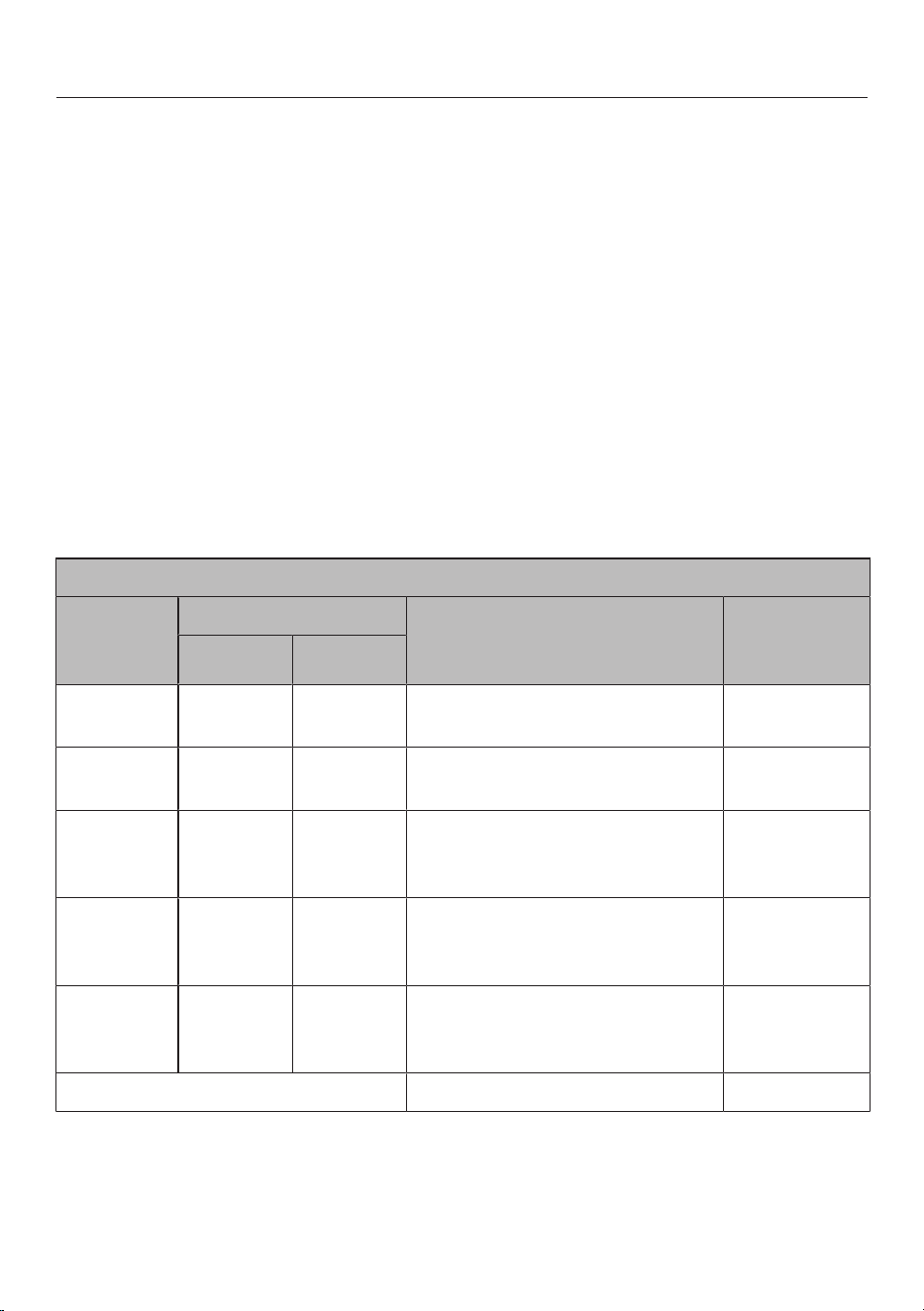
You can adjust the safety switch-off by
changing the safety setting.
45
Familiarisation
Special function/
power level
Maximum operating time
[h:min]
Safety setting
0
1
1 2
Keeping warm 2:00 2:00 2:00
1.0 10:00 8:00 5:00
1.5 10:00 7:00 4:00
2.0/2.5 5:00 4:00 3:00
3.0/3.5 5:00 3:30 2:00
4.0/4.5 4:00 2:00 1:30
5.0/5.5 4:00 1:30 1:00
6.0/6.5 4:00 1:00 0:30
7.0/7.5 4:00 0:42 0:24
8.0 4:00 0:30 0:20
8.5 4:00 0:30 0:18
9.0 1:00 0:24 0:10
1
Factory default setting
Overheating protection
In order to prevent the hob from being
damaged by excessive temperatures,
the overheating protection mechanism
intervenes in one of the following ways:
Overheating protection measures
- If the Booster function is switched on,
it will stop.
- The set power level will be reduced.
- A cooking zone will switch off.
flashes alternately with in the
Hob display.
- All cooking zones will switch off.
Triggering the overheating protection
mechanism
The overheating protection mechanism
may be activated under the following
circumstances:
- The cookware being heated is empty.
- Fat or oil is being heated on a high
power level.
- Insufficient ventilation to the under-
side of the hob.
- A hot cooking zone is switched back
on after an interruption to the power
supply.
Model identifier and serial number
Your hob can display the model identi-
fier and serial number.
Software version
Your hob can display its software status.
Optional accessories
Products specially tailored to your hob –
such as cookware and cleaning agents –
are available from the Miele online shop,
Miele Customer Service or your Miele
specialist dealer.
You can access the Miele online shop
via the following QR code:
46
Commissioning
Unpacking the hob
Please stick the data plate for the ap-
pliance, supplied with this document-
ation, in the space provided in the
“After sales service” section of this
booklet.
Remove any protective foil and stick-
ers.
Cleaning the hob for the first
time
Before using for the first time, clean
the hob with a damp cloth.
Wipe the hob dry.
Switching on the hob for the
first time
The metal components have a protect-
ive coating. When the hob is used for
the first time, this causes a smell and
possibly also vapour. The heating of the
induction coils also causes odours in
the first few hours of operation. With
each subsequent use, the odour is re-
duced until it disappears completely.
The odour and any vapours given off do
not indicate a faulty connection or appli-
ance and they are not hazardous to
health.
Networking
You can use your hob:
- To connect to your home network with
your mobile device
- To network directly with your Miele
cooker hood
Both types of networking allow you to
control your cooker hood.
Networking with your mobile device al-
lows you to utilise additional functions.
See “Familiarisation – Networking” for
more information.
Requirements for networking with
your home network
Note the following requirements for net-
working:
1. A home network is available at the
installation site.
Have the WiFi password ready.
2. The Miele app is available on a mo-
bile device.
3. You have a user account in the Miele
app.
4. There is no direct WiFi connection
between the hob and your Miele
cooker hood.
Performing Scan & Connect
Scan the QR code.
If you have installed the Miele app and
have a user account, you will be taken
directly to the networking steps.
If you have not yet installed the Miele
app, you will be taken to the Apple App
Store
®
or the Google Play Store™.
Install the Miele app and set up a user
account.
Scan the QR code again.
The Miele app will guide you through
the setup process.
47

Commissioning
Requirements for direct networking
with your Miele cooker hood
Note the following requirements for net-
working:
1. Your Miele cooker hood has
Con@ctivity3.0.
2. The hob is not networked with your
home network.
Networking your hob with your Miele
cooker hood
You can find the necessary information
on connecting the cooker hood in the
associated operating and installation in-
structions.
Start the connection setup on the
cooker hood.
Switch the hob on.
If the connection was successful, the
code: appears in the Hob display. If
the connection could not be estab-
lished, the Hob display will show the
code:. Repeat the steps above.
Con@ctivity3.0 is now activated.
Resetting settings
- Reset the settings when you switch
from one networking option to an-
other.
- Reset the settings if you are disposing
of your hob, selling it or putting a used
hob into operation. This is the only
way to ensure that all personal data
has been removed and the previous
owner will no longer be able to access
the hob.
Resetting is not required when replacing
the router.
Switch the hob off.
Touch
On/Off
for approx.
6seconds. The seconds can be seen
counting down in the Hob display.
The Hob display shows .
The Cooking zone displays show the fol-
lowing:
- and a number indicate the selected
quick parameter.
- and a number indicate the selected
code of the selected quick parameter.
Other sensor controls light up.
Touch
Input
or Slider repeatedly
until the Cooking zone displays show
the following:
Touch
Timer
.
Touch
Input
repeatedly until the
Cooking zone displays show the fol-
lowing:
Touch
Timer
.
Touch
Input
repeatedly until the
Cooking zone displays show the fol-
lowing:
Touch
Timer
.
The WiFi settings are reset. is dis-
played in the Cooking zone displays.
48
Operation
Safety notes for operation
Risk of fire due to over-
heated food.
Unattended food can overheat
and catch alight.
Do not leave the hob unatten-
ded whilst it is being used.
Risk of burning due to hot
cooking zones.
The cooking zones will be hot
after use.
Do not touch the cooking
zones while the residual heat
indicators are on.
Risk of burning due to hot
items.
When the hob is switched on
either deliberately or by mis-
take, or when there is residual
heat present, there is the risk
of metal items placed on the
hob heating up.
Do not use the hob as a resting
place for anything.
After use, switch the hob off
with the sensor control.
Placing hot cookware on
the sensor controls and dis-
plays can damage the elec-
tronic module underneath.
The sensor controls do not re-
spond.
They may be switched on or off
unintentionally.
The hob switches itself off.
Do not place hot cookware
over the sensor controls or dis-
plays.
Never heat pans with a non-
stick coating with the Booster.
Switching the hob on
Touch
On/Off
.
Other sensor controls light up.
If no further entry is made, the hob will
switch itself off after a few seconds for
safety reasons.
Switching the hob/a cooking
zone off
Switching the hob off
To switch off the hob and all the cook-
ing zones, touch
On/Off
.
Switching a cooking zone off
To switch off a cooking zone, touch
the corresponding Cooking zone dis-
play.
The Cooking zone display lights up
brightly. The other Cooking zone display
lights up dimly.
Touch on the Slider.
49
Operation
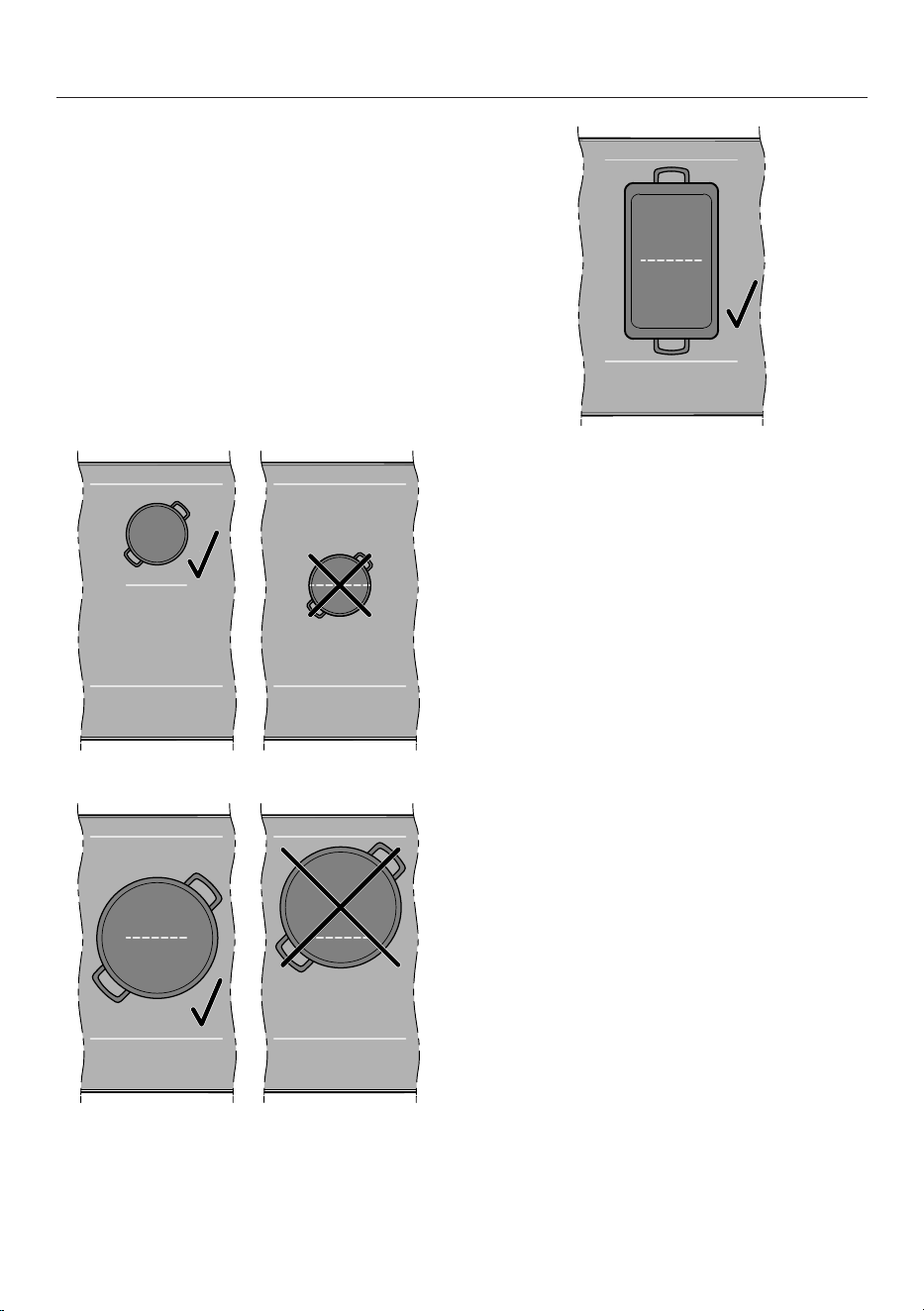
Positioning cookware on
PowerFlex cooking areas:
KM8462FR, KM8462FL,
KM8463FX, KM8483FX,
KM8483FXGlas
Refer to the cooking zone data for your
hob model for information about cook-
ware sizes and the corresponding posi-
tions.
Position the cookware as shown be-
low:
PowerFlex cooking zone
PowerFlex cooking area 1
PowerFlex cooking area 1
1
Permanent pan recognition is activated as
standard. If you position the cookware
correctly, you can control the PowerFlex
cooking area by operating the front cook-
ing zone.
Positioning cookware on
PowerFlexXL cooking areas:
KM8482FR, KM8482FL
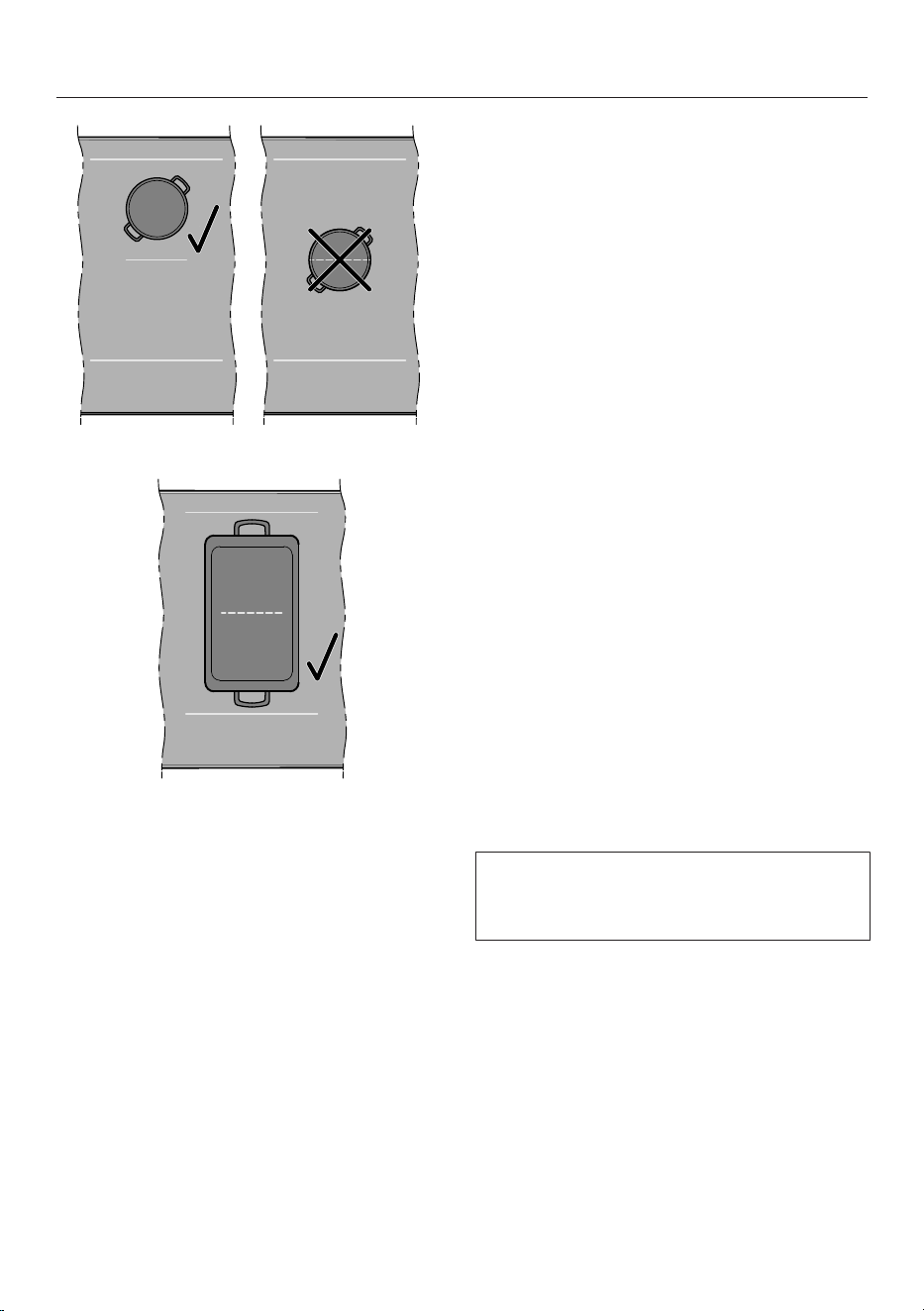
Refer to the cooking zone data for your
hob model for information about cook-
ware sizes and the corresponding posi-
tions.
Position the cookware as shown be-
low:
50
Operation
PowerFlex cooking zone
PowerFlexXL cooking area 1
1
Permanent pan recognition is activated as
standard. If you position the cookware
correctly, you can control the
PowerFlexXL cooking area by operating
the front cooking zone.
Hob power levels
Setting the power level for a cooking
zone
Permanent pan recognition is activated
as standard. When the hob is switched
on and you place an item of cookware
on a cooking zone, the Cooking zone
displaylights up brightly.
Place the cookware on the cooking
zone you want to use.
The corresponding Cooking zone display
lights up brightly.
Swipe to the right or left on the Slider
until the corresponding Cooking zone
display shows the required power
level.
The power level is displayed in the cor-
responding Cooking zone display.
Setting the power level for a cooking
zone – without intermediate levels
Permanent pan recognition is activated
as standard. When the hob is switched
on and you place an item of cookware
on a cooking zone, the Cooking zone
displaylights up brightly.
The setting range for the power levels
without intermediate levels has been
selected in the settings.
Place the cookware on the cooking
zone you want to use.
The corresponding Cooking zone display
lights up brightly.
Swipe to the right or left on the Slider
until the corresponding Cooking zone
display shows the required power
level.
The power level is displayed in the cor-
responding Cooking zone display.
51
Operation
Changing the power level for a cook-
ing zone
Touch the corresponding Cooking
zone display.
The Cooking zone displaylights up
brightly.
Swipe to the right or left on the Slider
until the corresponding Cooking zone
display shows the required power
level.
The power level is changed in the cor-
responding Cooking zone display.
PowerFlex/PowerFlexXL cook-
ing area
Linking/unlinking PowerFlex cooking
zones manually
At least one PowerFlex cooking zone is
selected.
To manually link or unlink the
PowerFlex cooking zones, touch the
PowerFlex
/
PowerFlexXL
.
Booster
Activating the Booster
Permanent pan recognition is activated
as standard. When the hob is switched
on and you place an item of cookware
on a cooking zone, the Cooking zone
displaylights up brightly.
When the Booster is activated, the set-
tings for the linked cooking zone may be
changed.
You can use the Booster:
- On any cooking zone on either side
or
- On both cooking zones on one side
or
- On a PowerFlex cooking area
The Booster function is active for a max-
imum of 15minutes.
Place the cookware on the cooking
zone you want to use.
The corresponding Cooking zone display
lights up brightly.
Select a power level if necessary.
Touch B
Booster
.
The Cooking zone display shows .
Deactivating the Booster
Touch B
Booster
.
or
Set another power level.
If you deactivate the Booster function or
the Booster time comes to an end and
- no power level was selected before
activating the Booster, the cooking
zone will revert automatically to
level9.
- a power level was selected before ac-
tivating the Booster, the cooking zone
will revert automatically to the previ-
ously selected level.
Activating/deactivating
Stop&Go
All timer functions, booster times and
heat-up boost times continue to run.
The timer settings cannot be changed.
The hob can only be switched off.
If the special function is not deactivated
within 1hour, the hob will switch off.
Touch
Stop&Go
.
The active cooking zones are reduced
from the set power level to power level
1.0 or switched back again.
52
Operation
Cooking zones with Keeping warm func-
tion are not changed.
Auto heat-up
The heat-up time depends on which
continued cooking setting has been
chosen:
Continued cook-
ing setting
Heat-up time
[min:sec]
1
1.0 Approx. 0:15
1.5 Approx. 0:15
2.0 Approx. 0:15
2.5 Approx. 0:15
3.0 Approx. 0:25
3.5 Approx. 0:25
4.0 Approx. 0:50
4.5 Approx. 0:50
5.0 Approx. 2:00
5.5 Approx. 5:50
6.0 Approx. 5:50
6.5 Approx. 2:50
7.0 Approx. 2:50
7.5 Approx. 2:50
8.0 Approx. 2:50
8.5 Approx. 2:50
9.0 –
1
If the cookware is temporarily removed
from the cooking zone during the heat-up
time, the heat-up time is extended by the
time without cookware.
Activating auto heat-up
No timer functions can be set during the
heat-up time. If an elapsed time display
is running, it is cancelled.
Touch the Cooking zone display for
the cooking zone you want to use.
Hold down the required continued
cooking setting on the Sliderfor ap-
prox. 3seconds until a buzzer sounds.
The power level pulsates while the heat-
up boost (power level 9) is running.
Deactivating auto heat-up
Touch the Cooking zone display for
the cooking zone you want to use.
Set another power level.
or
Set the same power level again.
Timer functions
There are 3 timer functions:
- Timer
- Duration of a cooking process
- Elapsed time of a cooking process
You can use the functions simultan-
eously.
Setting the time
A time of between 1minute (:) and
9hours 59minutes (:) can be set.
- Times of up to 10minutes are shown
in minutes and seconds.
- Durations of up to 59minutes are
shown in minutes.
- Times of more than 60minutes are
shown in hours and minutes.
53

Operation
The time is entered using the Slider and
can be adjusted using the
Input
.
Move the slider to the left or right un-
til the required time is shown in the
Hob display.
Example:
59minutes = 00:59hours,
80minutes = 1:20hours
Setting the timer
Touch
Timer
.
The Hob displaylights up brightly. The
Timer
lights up brightly and pulsates.
Other sensor controls and displays light
up dimly.
Set the required time.
Touch
Timer
or wait 5seconds to
start the timer.
Timer
will start to flash 10seconds
before the time has elapsed.
Changing the timer
Touch
Timer
.
The Hob display lights up brightly.
Timer
lights up brightly and pulsates.
Other sensor controls and displays light
up dimly.
Set the required time.
Touch
Timer
or wait 5seconds to
start the timer.
Deleting the timer
Hold down
Timer
until the set time
is no longer shown in the Hob display.
or
Set the timer to the value.
Setting the duration of a cooking pro-
cess
A cooking zone will switch off when the
maximum operating time has elapsed,
regardless of the duration that has been
set.
- A power level is set for the desired
cooking zone.
- No elapsed time is measured.
Briefly (<1.5seconds) touch the
Duration
next to the corresponding
Cooking zone display.
The Hob display lights up brightly and
Duration
pulsates. Other sensor con-
trols and displays light up dimly.
Set the required time.
Touch
Duration
or wait 5seconds to
start the duration.
The duration of a cooking process runs
down and
Duration
lights up con-
stantly.
The corresponding
Duration
will start
to flash 10seconds before the time has
elapsed.
Changing the duration of a cooking
process
Briefly (<1.5seconds) touch
Dura-
tion
for the cooking zone you want to
use.
The Hob display lights up brightly and
Duration
pulsates. Other sensor con-
trols and displays light up dimly.
Set the required time.
Touch
Duration
or wait 5seconds to
start the duration.
The duration of a cooking process runs
down and
Duration
lights up con-
stantly.
54

Operation
Deleting the duration of a cooking pro-
cess
Hold down
Duration
for the cook-
ing zone you want to use until the
Hob display shows :.
or
Touch
Duration
for the cooking
zone you want to use.
The Hob display lights up brightly. Other
sensor controls and displays light up
dimly.
Touch on the Slider.
Setting a duration for further cooking
processes
To set a duration for a further cooking
process, follow the same steps as de-
scribed under “Operation – Setting
the duration of a cooking process”.
If a duration is set for further cooking
processes, the time left for the selected
cooking zone is displayed.
Displaying the duration of a cooking
process
If you want to show the time left
which is counting down in the back-
ground, touch the Cooking zone dis-
play for the required cooking zone.
The rounded up time left is displayed
for the required cooking zone.
Starting elapsed time measurement of
a cooking process
- A power level is set for the desired
cooking zone.
- A duration must not be set for the
cooking zone.
Touch and hold (>1.5seconds)
Duration
next to the corresponding
Cooking zone display.
The Hob display shows the time that
has elapsed since activation.
Cancelling elapsed time measurement
of a cooking process
Hold down
Duration
for the cook-
ing zone you want to use until the
Hob display shows :.
Starting elapsed time measurement of
further cooking processes
To set an elapsed time for a further
cooking process, follow the same
steps as described under “Operation
– Starting elapsed time measurement
of a cooking process”.
If the elapsed time is displayed for fur-
ther cooking processes, the elapsed
time for the selected cooking zone is
displayed.
Displaying elapsed time measurement
of a cooking process
If you want to show the elapsed time
which is counting down in the back-
ground, touch the Cooking zone dis-
play for the required cooking zone.
The elapsed time measurement of a
cooking process for the required cook-
ing zone is shown in the Hob display.
55
Operation
Using timer functions simultaneously
The most recently selected timer func-
tion is always shown in the Hob display.
To display the timer running in the
background, touch
Timer
.
The timer time is shown in the Hob dis-
play.
To display the duration or elapsed
time measurement of a cooking pro-
cess, touch
Duration
for the cor-
responding cooking zone.
The duration or elapsed time measure-
ment of a cooking process is shown in
the Hob display.
System lock
Activating the system lock
All sensor controls are locked. A set
timer continues to run.
- The hob is switched on.
- All cooking zones are switched off.
Touch and hold
Timer
and
Stop&Go
for 6seconds.
The seconds can be seen counting
down in the Hob display. Once the time
has elapsed, the Hob display shows
alternating with . The system lock is
activated.
If a disallowed sensor control is touched
while the system lock is activated, the
Hob display will show alternating
with for a few seconds. A buzzer
sounds.
The settings can be adjusted so that
the system lock is activated automat-
ically 5minutes after the hob has been
switched off.
Deactivating the system lock
Touch and hold
Timer
and
Stop&Go
for 6seconds.
The seconds can be seen counting
down in the Hob display. Once the time
has elapsed, the Hob display shows
alternating with . The system lock is
deactivated.
Keypad lock
Activating the keypad lock
When the keypad lock is activated, only
the following actions can be performed:
- The cooking zones and the hob can
only be switched off.
- A set timer can be changed.
At least one cooking zone is switched
on.
Touch and hold
Timer
and
Stop&Go
for 6seconds.
The seconds can be seen counting
down in the Hob display. Once the time
has elapsed, the Hob display shows
alternating with . The keypad lock is
activated.
If a disallowed sensor control is touched
while the keypad lock is activated, the
Hob display will show alternating
with for a few seconds. A buzzer
sounds.
Deactivating the keypad lock
Touch and hold
Timer
and
Stop&Go
for 6seconds.
The seconds can be seen counting
down in the Hob display. Once the time
has elapsed, the Hob display shows
alternating with . The keypad lock is
deactivated.
56
Operation
Recall
Activating the Recall function
The hob must be switched on again
within 10seconds of being switched
off.
Switch the hob on again.
Immediately after switching the hob
on, touch one of the flashing Cooking
zone displays.
All settings are restored.
Discarding the Recall function
Switch the hob on again.
Immediately after switching the hob
on, touch one of the Cooking zone
displays that are NOT flashing.
The new setting is applied; all other set-
tings are discarded.
Hob data
Displaying the model identifier/serial
number
There must not be any cookware on
the hob.
Switch the hob off.
Touch
On/Off
for approx.
6seconds. The seconds can be seen
counting down in the Hob display.
The Hob display shows .
The Cooking zone displays show the fol-
lowing:
- and a number indicate the selected
quick parameter.
- and a number indicate the selected
code of the selected quick parameter.
Other sensor controls light up.
Touch
Input
or Slider repeatedly
until the Cooking zone displays show
the following:
Touch
Timer
.
Touch
Input
repeatedly until the
Cooking zone displays show the fol-
lowing:
Touch
Timer
.
Numbers will appear in the Hob display
one after another, separated by a dash.
Example: (model identifier
KM1234)– (serial num-
ber)
Displaying the software version
There must not be any cookware on
the hob.
Switch the hob off.
Touch
On/Off
for approx.
6seconds. The seconds can be seen
counting down in the Hob display.
The Hob display shows .
The Cooking zone displays show the fol-
lowing:
- and a number indicate the selected
quick parameter.
- and a number indicate the selected
code of the selected quick parameter.
Other sensor controls light up.
Touch
Input
or Slider repeatedly
until the Cooking zone display show
the following:
Touch
Timer
.
Touch
Input
repeatedly until the
Cooking zone displays show the fol-
lowing:
Touch
Timer
.
57

Operation
3 numbers appear in the Hob display:
Example: = software version 1.23.
Activating/deactivating demo
mode
There must not be any cookware on
the hob.
Switch the hob off.
Touch
On/Off
for approx.
6seconds. The seconds can be seen
counting down in the Hob display.
The Hob display shows .
The Cooking zone displays show the fol-
lowing:
- and a number indicate the selected
quick parameter.
- and a number indicate the selected
code of the selected quick parameter.
Other sensor controls light up.
Touch
Input
or Slider repeatedly
until the Cooking zone displays show
the following:
Touch
Timer
.
Touch
Input
repeatedly until the
Cooking zone displays show the fol-
lowing:
Touch
Timer
.
Touch
Input
repeatedly until the
Cooking zone displays show the fol-
lowing:
Touch
Timer
.
The following will flash in the Hob dis-
play for a few seconds:
- alternating with (demo mode
activated)
or
- alternating with (demo mode
deactivated)
58
Setting ranges for the hob power levels
The hob is programmed with 9power levels with intermediate levels at the factory.
If you only want to use the whole-number settings for power levels, you can deac-
tivate intermediate levels via the settings.
Recommended
cookware
1
Setting range
2
Factory set-
ting
9levels
with
intermediate
levels
Whole num-
bers
9levels
without
intermediate
levels
Melting butter
Pot
1.0–1.5 1–2
Melting chocolate
Dissolving gelatine
Keeping warm food which sticks easily
Heating small quantities of liquid
2.0–3.5 2–4
Cooking rice
Defrosting frozen vegetables in a block
Making milk puddings
Warming up liquid and semi-solid food
3.5–5.5 4–6
Steaming fruit
Simmering potatoes
Rendering bacon Frying pan
Making pancakes, omelettes, lightly fried
eggs, etc.
Frying pan with sandwich
base and non-stick coating
5.0–6.0 5–6
Steaming fish
4.5–6.5 5–7
Steaming vegetables
PotCooking pasta and pulses
Thickening sauces, e.g. Hollandaise
Defrosting and reheating frozen food See manufacturer’s in-
structions
Gentle frying (e.g. whole fish) Frying pan with sandwich
base and non-stick coating
6.0–6.5 6
Gentle frying (e.g. meat patties, chicken
breast)
Frying panFrying (e.g. fish fillet, escalopes, fried eggs) 6.0–7.0 6–7
Searing/hot frying (e.g. steak, small quantities
of meat, fried potatoes, hash browns)
7.0–8.5 7–8
Frying, e.g. chips Pot with high rim
8.5–9.0 9
Searing large quantities of meat Pot with high rim or oven
dish
Bringing water to the boil Pot Booster Booster
1
Cook in covered pots and pans if possible. This prevents heat escaping unnecessarily.
2
These settings should only be taken as a guide. The power of the induction coils will vary depending on
the size and material of the cookware. For this reason, the power levels may need to be adjusted slightly
to suit your cookware. As you use the hob, you will get to know which settings suit your cookware best.
When using new cookware that you are not familiar with, set the power level to one level below the one
specified.
59
Setting ranges for the hob power levels
Notes for test institutes
Test food acc. to EN60350-2
Test food
cookware base
(mm)
Lid
Setting range
Pre-heat-
ing
Cooking
Heating oil up 150 No – 1.0–1.5
Pancakes 180
(sandwich base)
No 9.0 5.0–6.0
Frying frozen chips 180
(chip pan)
No 9.0 9.0
Keeping warm a lentil
stew
150
(sandwich base)
Yes
(when
keeping
warm)
7.0 Keeping
warm
60

Good to know
How induction hobs work
An induction coil is located under each
induction cooking zone. The coil creates
a magnetic field that reacts directly with
the base of the cookware and heats it
up. The cooking zone itself is heated up
indirectly by the heat given off by the
cookware.
An induction cooking zone only works
when cookware with a magnetic base is
placed on it. The hob automatically de-
tects the size of the cookware.
Noises
When using induction cooking zones,
the following noises can occur in the
cookware, depending on what it is made
of and how it has been constructed:
Buzzing on the higher power levels. This
will decrease or cease altogether when
the power level is reduced.
If the cookware base is made of layers
of different materials (e.g. in a sand-
wiched base), it might emit a crackling
sound.
Whistling might occur if linked cooking
zones are being used at the same time
and the cookware also has a base made
of layers of different materials (e.g.
sandwich base).
You might hear a clicking sound from
the electronic switches, especially at
lower power levels.
A whirring sound, when the cooling fan
comes on. This switches on to protect
the electronic module when the hob is
being used intensively. The cooling fan
may continue to run after the hob has
been switched off.
Cookware
Suitable cookware
- Stainless steel cookware with a mag-
netic base
- Enamelled steel cookware
- Cast iron
Please be aware that the properties of
the cookware base can affect the even-
ness with which the food heats up (e.g.
when making pancakes). The base of
the cookware must be able to distribute
the heat evenly. Cookware with a base
made from multilayer material (sand-
wich or encapsulated base) is ideal in
this case.
Unsuitable cookware
- Stainless steel cookware without a
magnetic base
- Aluminium or copper cookware
- Glass, ceramic or earthenware cook-
ware
Testing cookware
To test whether a pot or pan is induc-
tion-compatible, hold a magnet to the
base. If the magnet sticks, the pan is
generally suitable.
Cookware tips
- Position the cookware as centrally as
possible on the relevant cooking
zone/cooking area.
- To make optimum use of the cooking
zones, choose cookware with a suit-
able base diameter. If a pan is too
small, it will not be detected.
- Use only pots and pans with smooth
bases. Rough bases can scratch the
ceramic surface.
61
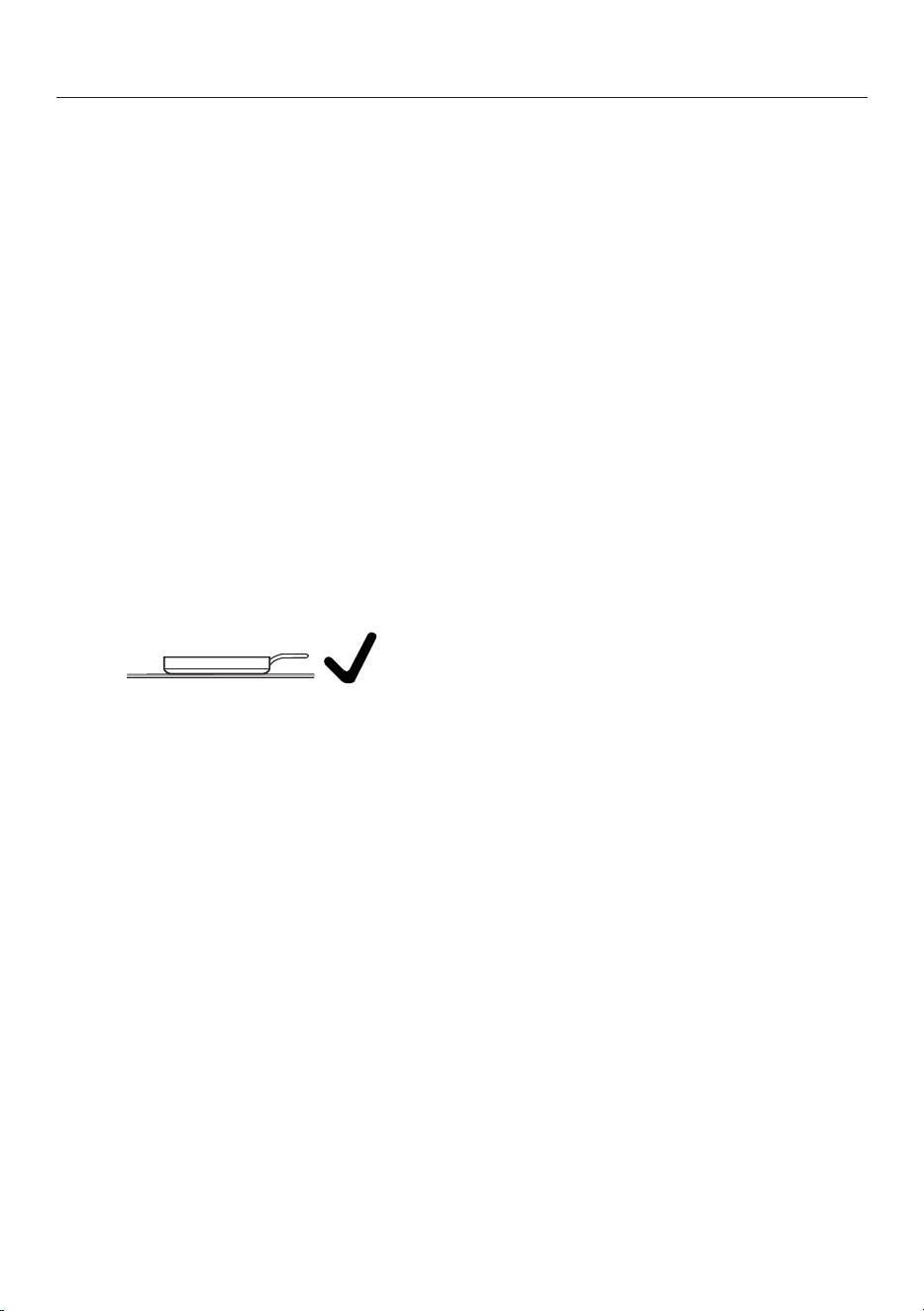
Good to know
- When cooking zones are joined to-
gether, we recommend using cook-
ware which more or less covers the
entire cooking area (e.g. an oven
dish).
- Always lift cookware to move it. This
will help prevent scratching. If any
scratches do appear as a result of
cookware being pushed around, this
will not affect the function of the hob.
These scratches are normal signs of
use and are not grounds for making a
complaint.
- Please note that the cookware dia-
meter quoted by manufacturers often
refers to the maximum diameter or
diameter of the top rim. The diameter
of the base (generally smaller) is more
important.
- Where possible, use cookware with
vertically straight sides. If an item of
cookware has angular sides, induction
also acts on the sides of the item of
cookware. The sides of the item of
cookware may discolour or the coat-
ing may peel off.
62
Adjusting settings
Accessing the Settings menu
There must not be any cookware on
the hob.
Switch the hob off.
Touch
On/Off
for approx.
6seconds. The seconds can be seen
counting down in the Hob display.
The Hob display shows .
The Cooking zone displays show the fol-
lowing:
- and a number indicate the selected
quick parameter.
- and a number indicate the selected
code of the selected quick parameter.
Other sensor controls light up.
Touch
Stop&Go
.
The Hob display shows .
The Cooking zone displays show the fol-
lowing:
- and a number indicate the selected
parameter.
- and a number indicate the selected
code of the selected parameter.
Setting parameters
The Settings menu has been ac-
cessed.
Touch
Input
or Slider repeatedly
until the required parameter number
is displayed in the Cooking zone dis-
plays.
Touch
Timer
.
In the Cooking zone display at the front
left, the lights up brightly. In the Cook-
ing zone display at the front right, the
currently set code number is displayed.
Setting the code
A parameter must have been set.
Touch
Input
repeatedly until the re-
quired code number is displayed in
the Cooking zone display.
Touch
Timer
.
The setting is saved. You can now exit
the settings or adjust further settings.
Closing the Settings menu
Unsaved changes are not applied.
Touch
On/Off
.
63
Adjusting settings
Parameter
1
Code Settings
2
WiFi registration Not active/deactivated
Active but not configured
Active and configured (cannot be se-
lected; displays whether connection
was successful)
Start connection via Bluetooth
WiFi reset to default ()
Restart wireless module
Hob power level setting range 9 power levels
with intermediate levels + Booster
9 power levels
without intermediate levels + Booster
Keypad tone when a sensor con-
trol is touched
Off
3
Quiet
Medium
Loud
Buzzer for timer functions Off
Quiet
Medium
Loud
Extra loud
Buzzer for messages and faults Off (only possible for messages)
Quiet (minimum volume for faults)
Medium
Loud
Maximum operating time Safety setting0
Safety setting1
Safety setting2
System lock System lock can only be activated
manually
System lock activated automatically
64
Adjusting settings
Parameter
1
Code Settings
2
Sensor control reaction speed Fast
Normal
Slow
Reaction speed of Slidersensor
control
Fast
Normal
Slow
Permanent pan recognition Permanent pan recognition off
Permanent pan recognition on
Keeping warm temperature 65–75°C
50–55°C
80–90°C
Contrast of sensor control light-
ing
10%
20%
40%
Resetting settings Reset nothing
Reset all settings
Reset WiFi connection
Factory default settings Do not restore factory default set-
tings
Restore factory default settings
Power management
4
Off
1000W
2000W
3000W
3680W
4000W
4500W
5000W
6000W
7000W
65
Adjusting settings
Parameter
1
Code Settings
2
Demo mode Demo mode off
Demo mode on
5
1
Parameters not shown here have no allocation.
2
The factory default settings are printed in bold.
3
The keypad tone of
On/Off
is not switched off.
4
The total hob power may be reduced in order to meet the local power supply provider’s re-
quirements.
Codes with values above the rated load of the hob are not displayed.
5
After the hob has been switched on, appears alternately with in the Hob display for a
few seconds.
66
Adjusting settings
Displaying the model identifier/
serial number
There must not be any cookware on
the hob.
Switch the hob off.
Touch
On/Off
for approx.
6seconds. The seconds can be seen
counting down in the Hob display.
The Hob display shows .
The Cooking zone displays show the fol-
lowing:
- and a number indicate the selected
quick parameter.
- and a number indicate the selected
code of the selected quick parameter.
Other sensor controls light up.
Touch
Input
or Slider repeatedly
until the Cooking zone displays show
the following:
Touch
Timer
.
Touch
Input
repeatedly until the
Cooking zone displays show the fol-
lowing:
Touch
Timer
.
Numbers will appear in the Hob display
one after another, separated by a dash.
Example: (model identifier
KM1234)– (serial num-
ber)
Displaying the software version
There must not be any cookware on
the hob.
Switch the hob off.
Touch
On/Off
for approx.
6seconds. The seconds can be seen
counting down in the Hob display.
The Hob display shows .
The Cooking zone displays show the fol-
lowing:
- and a number indicate the selected
quick parameter.
- and a number indicate the selected
code of the selected quick parameter.
Other sensor controls light up.
Touch
Input
or Slider repeatedly
until the Cooking zone display show
the following:
Touch
Timer
.
Touch
Input
repeatedly until the
Cooking zone displays show the fol-
lowing:
Touch
Timer
.
3 numbers appear in the Hob display:
Example: = software version 1.23.
67
Cleaning and care
Safety notes on cleaning and
care
Risk of burning due to hot
surfaces.
All parts of the hob may be hot
after use.
Switch the hob off.
Allow the hob to cool down be-
fore cleaning it.
All surfaces could be discol-
oured or damaged if unsuitable
cleaning agents are used or if
residues from suitable cleaning
agents are heated on the hob.
All surfaces are susceptible to
scratching.
Allow the surfaces to cool
down before cleaning the hob.
Remove all cleaning agent
residues immediately.
Never use abrasive sponges or
cleaning agents.
Using washing-up liquid will
not remove all soiling and
residues. An invisible film can
develop that can lead to discol-
ouration of the ceramic glass
surface. This discolouration
cannot be removed.
Clean the glass ceramic sur-
face regularly with a proprietary
ceramic glass cleaner.
Do not use a steam cleaner to
clean the hob.
Do not use pointed objects for
cleaning.
When to clean
Before each use:
Clean the entire hob and the base of
the cookware.
After every use:
Clean the entire hob.
Once a week:
To prevent cleaning agent residue be-
ing burned on, clean the ceramic sur-
face with the Miele ceramic and
stainless steel cleaner or with a pro-
prietary ceramic glass cleaner. Please
follow the cleaning agent manufac-
turer’s instructions.
Cleaning the ceramic glass sur-
faces
Removing light soiling
Clean the entire ceramic surface of
the hob with a damp, soft cloth and a
solution of water and a little washing-
up liquid. Please follow the cleaning
agent manufacturer’s instructions.
Removing stubborn soiling
Remove any coarse soiling with a
damp cleaning cloth and more stub-
born soiling with a glass scraper.
Clean the ceramic surface with the
Miele ceramic and stainless steel
cleaner or with a proprietary ceramic
glass cleaner. Please follow the clean-
ing agent manufacturer’s instructions.
Finishing the cleaning process
Remove all cleaning agent residues
with a damp cleaning cloth.
Dry the ceramic surface of the hob
after cleaning.
68

Cleaning and care
Unsuitable cleaning agents
To avoid damaging the surfaces of the
appliance, do not use:
- Cleaning agents containing soda, al-
kalines, ammonia, acids or chlorides
- Stain and rust removers
- Abrasive cleaning agents, e.g. powder
cleaners and cream cleaners
- Cleaning agents containing solvents
- Dishwasher cleaning agents
- Grill and oven sprays
- Hard, abrasive brushes
- Eraser stain remover blocks
- Sponges
69
Troubleshooting
Many malfunctions and faults can be easily remedied. You can save time and
money in many cases, as you do not need to contact Customer Service.
More information to help you remedy faults yourself can be found at
www.miele.de/support/customer-assistance.
Messages in the display
Problem Cause and remedy
flashes in a Cook-
ing zone display.
No cookware is present on the cooking zone.
Unsuitable cookware is present on the cooking zone.
The diameter of the base of the cookware is too small.
Suitable crockery has been removed from the cooking
zone.
If no cookware or unsuitable cookware is placed on
the cooking zone, the cooking zone will switch off
automatically after 3minutes.
Place a suitable item of cookware on the cooking
zone within 3minutes.
goes out. The cooking process starts/continues with
the previously selected settings.
If you are using a different item of cookware and/or
food, adjust the settings.
After the hob has been
switched on, or after
touching a sensor con-
trol, appears altern-
ately with in the Hob
display for a few
seconds.
The system lock is activated.
Deactivate the system lock.
The keypad lock is activated.
Deactivate the keypad lock.
After the hob has been
switched on, briefly
appears alternately with
in the Hob display.
The cooking zones do
not heat up.
The hob is in demo mode.
Deactivate demo mode.
flashes in the
Hob display and
the hob switches
off automatically.
One or more of the sensor controls are covered, e.g.
by finger contact, food boiling over or an object.
Remove the soiling or obstruction.
70
Troubleshooting
Problem Cause and remedy
flashes alternately
with in the Hob dis-
play.
The overheating protection mechanism has been ac-
tivated.
Allow the hob to cool down.
Rectify the causes of the overheating.
Check that the hob is working.
If this fault message continues to appear in the dis-
play, contact the Customer Service Department.
flashes alternately
with , , or in
the Hob display.
The hob is incorrectly connected.
Disconnect the hob from the mains power supply.
Contact the Customer Service Department. The hob
must be connected to the mains according to the
wiring diagram.
alternately with ,
, or in the
Hob display.
The fan is blocked or defective.
Make sure it has not been blocked by an object.
Remove the obstruction.
If this fault message continues to appear in the Hob
display, contact Customer Service.
A message not listed in
this table is appearing
on the Hob display.
There is an electronic module fault.
Disconnect the power supply to the hob for approx.
1minute.
If the problem persists after the power supply has
been restored, please contact the Customer Service
Department.
Unexpected behaviour
Problem Cause and remedy
Power level9 is auto-
matically reduced if you
also set power level9 for
the connected cooking
zone.
Operating both zones at power level9 exceeds the
permitted maximum power for the two zones.
Use a different cooking zone.
71
Troubleshooting
Problem Cause and remedy
A cooking zone or the
whole hob switches off
automatically.
It has been operated for too long.
Switch the hob or cooking zone on again.
The overheating protection mechanism has been ac-
tivated.
Allow the hob to cool down.
Rectify the causes of the overheating.
Check that the hob is working.
If the problem occurs again, contact the Customer
Service Department.
The cooking zone is not
working in the usual way
with the set power level.
The overheating protection mechanism has been ac-
tivated.
Allow the hob to cool down.
Rectify the causes of the overheating.
Check that the hob is working.
If the problem occurs again, contact the Customer
Service Department.
The Booster level has
deactivated early auto-
matically.
The overheating protection mechanism has been ac-
tivated.
Allow the hob to cool down.
Rectify the causes of the overheating.
Check that the hob is working.
If the problem occurs again, contact the Customer
Service Department.
Unsatisfactory results
Problem Cause and remedy
The food in the cook-
ware does not heat up
when the auto heat-up is
switched on.
Large quantities of food are being cooked.
Start cooking at the highest power level and then
switch back manually.
The cookware is not conducting heat properly.
Use different cookware that is able to better con-
duct heat.
72
Troubleshooting
General problems or technical faults
Problem Cause and remedy
The hob or cooking
zones will not switch on.
There is no power to the hob.
Check whether the circuit breaker has tripped. Con-
tact a qualified electrician or the Miele Customer
Service Department (for the minimum fuse rating,
see data plate).
There may be a technical fault.
Disconnect the hob from the electricity supply for
approx. 1minute. To do this:
– Trip the relevant mains fuse or screw the fine-
wire fuse out completely, or
– Switch off at the residual current device.
If the hob will still not turn on after resetting the trip
switch in the fuse box or the residual current device,
contact a qualified electrician or the Miele Customer
Service Department.
A smell and vapours are
given off when the new
hob is being used.
The metal components have a protective coating.
When the hob is used for the first time, this causes a
smell and possibly also vapour. The material from
which the induction coils are made also gives off an
odour in the first few hours of operation. With each
subsequent use, the odour is reduced until it disap-
pears completely. The odour and any vapours given off
do not indicate a faulty connection or appliance and
they are not hazardous to health.
An operating noise can
be heard after the hob
has been switched off.
The cooling fan runs until the hob has cooled down
and then switches off automatically.
Various problems with
settings, e.g. problems
with networking
Changes to settings can lead to conflicts with each
other.
Fluctuations in the WiFi signal can lead to conflicts.
If you reset settings to factory defaults, existing
settings will be deleted.
Document existing settings to restore existing set-
tings.
Reset the settings to the factory defaults.
You can reset all settings or just individual settings
such as the WiFi settings.
73
Customer Service
Information to help you rectify faults yourself and about Miele spare parts can be
found at www.miele.com/service.
Contact in the event of a fault
In the event of a fault which you cannot remedy yourself, please contact your Miele
dealer or Miele Customer Service.
You can book a Miele Customer Service call-out online at www.miele.com/ser-
vice.
Contact information for Miele Customer Service can be found at the end of this
document.
Please quote the model identifier and serial number of your appliance (SN) when
contacting Miele Customer Service. This information can be found on the data
plate.
Data plate
Stick the extra data plate supplied with the appliance here. Make sure that the
model identifier matches the one specified on the back cover of this document.
Warranty
For information on the appliance warranty specific to your country please contact
Miele. See back cover for address.
In the UK, your appliance warranty is valid for 2 years from the date of purchase.
However, you must activate your cover by calling 0330 160 6640 or registering on-
line at www.miele.co.uk.
74
Technical data
Technical data
Frequency range of the WiFi module 2,400GHz – 2,4835GHz
Transmission power of the WiFi module ≤ 100mW
Power rating in off mode ≤ 0,5W
Power rating in networked standby ≤ 2W
Time until automatic switch to off mode 10Min.
Time until automatic switch to net-
worked standby
10Min.
Product data sheets
The following product data sheets apply to the models described in these operating
and installation instructions.
Information for domestic electric hobs
In acc. with regulation (EU) No. 66/2014
MIELE
Model name/identifier KM8462FR, KM8462FL, KM8463FX
Type of hob built-in
Number of cooking zones and/or areas 4
For circular cooking zones: diameter of useful sur-
face area/cooking zone
For non-circular cooking zones or areas: length and
width of useful surface area per electric cooking
zone or area
1. = Ø 100–160 mm
2. = Ø 120–190 mm
3. = 230x390 mm
Energy consumption per cooking zone or area cal-
culated per kg (EC
electric cooking
)
1. = 172,4 Wh/kg
2. = 171,7 Wh/kg
3. = 176,9 Wh/kg
Energy consumption for the hob calculated per kg
(EC
electric hob
)
173,7 Wh/kg
- Dual-circuit ring / front left / Induction
- Dual-circuit ring / rear left / Induction
- PowerFlex bridge / right / Induction
Information for domestic electric hobs
In acc. with regulation (EU) No. 66/2014
75
Technical data
MIELE
Model name/identifier KM8482FR, KM8482FL
Type of hob built-in
Number of cooking zones and/or areas 4
For circular cooking zones: diameter of useful sur-
face area/cooking zone
For non-circular cooking zones or areas: length and
width of useful surface area per electric cooking
zone or area
1. = Ø 100–160 mm
2. = Ø 140–220 mm
3. = 230x460 mm
Energy consumption per cooking zone or area cal-
culated per kg (EC
electric cooking
)
1. = 172,7 Wh/kg
2. = 173,6 Wh/kg
3. = 176,8 Wh/kg
4. = 171,6 Wh/kg
Energy consumption for the hob calculated per kg
(EC
electric hob
)
173,7 Wh/kg
- Dual-circuit ring / front left / Induction
- Dual-circuit ring / rear centre / Induction
- PowerFlex XL cooking area / right / Induction
Information for domestic electric hobs
In acc. with regulation (EU) No. 66/2014
MIELE
Model name/identifier KM8483FX, KM8483FXGlas
Type of hob built-in
Number of cooking zones and/or areas 4
For circular cooking zones: diameter of useful sur-
face area/cooking zone
For non-circular cooking zones or areas: length and
width of useful surface area per electric cooking
zone or area
1. = Ø 100–160 mm
2. = Ø 140–220 mm
3. = 230x390 mm
Energy consumption per cooking zone or area cal-
culated per kg (EC
electric cooking
)
1. = 172,7 Wh/kg
2. = 173,1 Wh/kg
3. = 177,9 Wh/kg
Energy consumption for the hob calculated per kg
(EC
electric hob
)
174,6 Wh/kg
- Dual-circuit ring / front left / Induction
- Dual-circuit ring / rear centre / Induction
- PowerFlex bridge / right / Induction
EU Conformity declaration
Miele hereby declares that this ceramic induction hob complies with Directive
2014/53/EU.
76
Technical data
The complete text of the EU declaration of conformity is available from one of the
following internet addresses:
- Products, Download from www.miele.ie
- For service, information, operating instructions etc: go to
https://miele.co.uk/manuals and enter the name of the product or the serial num-
ber
UK Conformity declaration
Miele hereby declares that this ceramic induction hob complies with UK Radio
Equipment Regulations 2017, as amended.
The complete text of the UK declaration of conformity is available from one of the
following internet addresses:
- Products, Download from www.miele.co.uk
- For service, information, operating instructions etc: go to https://miele.co.uk/
manuals and enter the name of the product or the serial number
ThisStatement of Compliance confirms this Miele product fully complies with the
Product Security and Telecommunications Infrastructure (Security Requirements
for Relevant Connectable Products) Regulations 2023.
1)
Household Appliance –
2)
Manufactured by: Miele & Cie KG,
Carl Miele Street 29, 33332 Gutersloh Germany
Imported by and contact point: Miele Company Ltd, Fairacres, Marcham Road,
Abingdon, Oxon, OX14 ITW Great Britain
The defined support period at the time of first supply is 10 years
3)
To report vulnerabilities and cybersecurity issues please contact: [email protected]
4)
5)
Signature
Name: Paul Wright
Company Position: Head of Technical Management
Date of signature: 19th March 2024
Place of signature:
Abingdon, Oxfordshire
Inductions hobs IC08-01W
77


United Kingdom
Miele Co. Ltd., Fairacres, Marcham Road, Abingdon, Oxon, OX14 1TW
Tel: 0330 160 6600, Internet: www.miele.co.uk, E-mail: [email protected]
Australia
Miele Australia Pty. Ltd.
ACN 005 635 398
ABN 96 005 635 398
Level 4, 141 Camberwell Road
Hawthorn East, VIC 3123
Tel: 1300 464 353
E-mail: [email protected]
Internet: www.miele.com.au
Miele Electrical Appliances Co. Ltd.
No. 82, Shimenyi Road, JingAn District
Shanghai, China, P.R.C
Post Code: 200040
Phone: +86 21 6157 3500
Fax: +86 21 6157 3511
E-mail: info@miele.cn
Internet: www.miele.cn
China Mainland
Miele (Hong Kong) Ltd.
41/F - 4101, Manhattan Place
23 Wang Tai Road
Kowloon Bay, Hong Kong
Tel: (852) 2610 1025
Fax: (852) 3579 1404
E-mail:
Website: www.miele.hk
Hong Kong, China
Miele India Pvt. Ltd.
1st Floor, Copia Corporate Suites,
Commercial Plot 9, Mathura Road,
Jasola, New Delhi - 110025
E-mail: customercare@miele.in
Website: www.miele.in
India
Miele Ireland Ltd.
2024 Bianconi Avenue
Citywest Business Campus
Dublin 24
Tel: (01) 461 07 10
Fax: (01) 461 07 97
E-mail: [email protected]
Internet: www.miele.ie
Ireland
Malaysia
Miele Sdn Bhd
Suite 12-2, Level 12
Menara Sapura Kencana
Petroleum
Solaris Dutamas No. 1
Jalan Dutamas 1
50480 Kuala Lumpur, Malaysia
Phone: +603-6209-0288
Fax: +603-6205-3768
Miele New Zealand Limited
IRD 98 463 631
8 College Hill
Freemans Bay, Auckland 1011
Tel: 0800 464 353
Internet: www.miele.co.nz
New Zealand
Miele Pte. Ltd.
29 Media Circle
#11-04 ALICE@Mediapolis
Singapore 138565
Tel: +65 6735 1191
Fax: +65 6735 1161
E-mail: [email protected]
Internet: www.miele.sg
Singapore
Miele (Pty) Ltd.
63 Peter Place, Bryanston 2194
Tel: (011) 875 9000
Fax: (011) 875 9035
E-mail: [email protected]
Internet: www.miele.co.za
South Africa
Miele Appliances Ltd.
Showroom 1, Eiffel 1 Building
P.O. Box 114782 - Dubai
Tel. +971 4 3044 999
Fax. +971 4 3418 852
800-MIELE (64353)
E-mail: [email protected]
Website: www.miele.ae
United Arab Emirates
Manufacturer: Miele & Cie. KG, Carl-Miele-Straße 29, 33332 Gütersloh, Germany
Thailand
Miele Appliances Ltd.
BHIRAJ TOWER at EmQuartier
43rd Floor Unit 4301-4303
689 Sukhumvit Road
North Klongton Sub-District
Vadhana District
Bangkok 10110, Thailand
Sheikh Zayed Road, Umm Al Sheif
E-mail: customercare@miele.co.nz
P.O. Box 69434, Bryanston 2021

M.-Nr. 12 985 300 / 01 / 002en-GB
KM 8462 FR, KM 8462 FL, KM 8463 FX, KM 8482 FR,
KM8482 FL, KM 8483 FX, KM 8483 FX Glas

