QUICK START GUIDE
2. GETTING STARTED
• Removable battery: Locate battery and charge until all 3 green LEDs are on.
• Integrated battery: Charge camera until blinking red light on front of camera
turns green.
3. CREATE ACCOUNT
• Use your smartphone camera to scan the QR code.
• Option to upgrade to a Premium Subscription to instantly identify
bird species, get expert insights, share pics and videos, and more
—like games, trivia, your own Bird Book, and unlimited snaps!
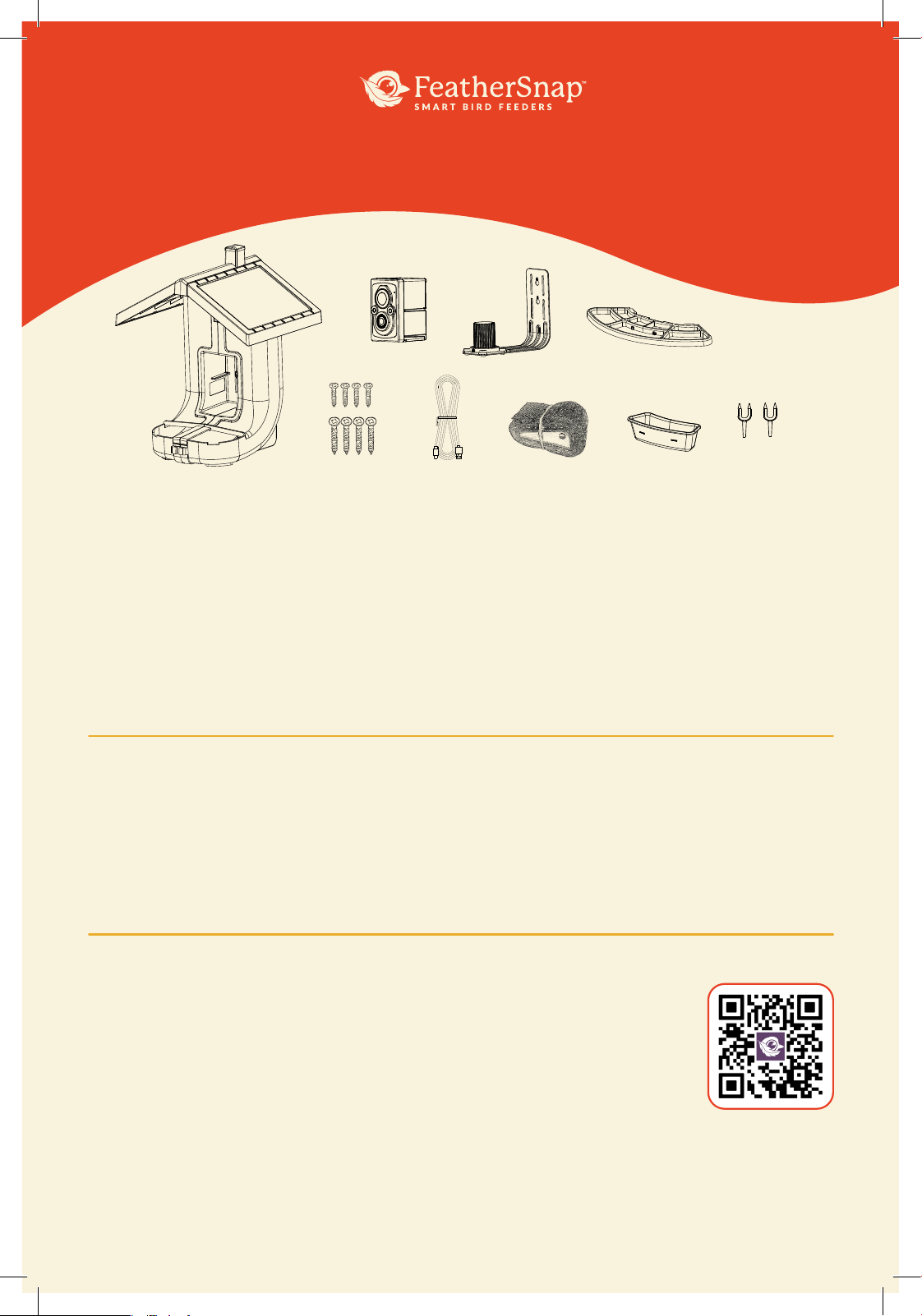
1. WHAT’S IN THE BOX
A. Bird Feeder
B. WiFi Enabled Camera
Note: Some models have Wi-Fi Camera with integrated rechargeable
battery, some models have removable rechargeable battery.
C. Universal Mounting Bracket
D. Perch
E. Mounting Hardware
F. Charging Cable
G. Optional Mounting Strap
H. Jelly Tray
I. Fruit Forks
物料编号
BS0604T023
日期
2025.10.10
A.
B.
E. F. G. H. I.
C. D.
SCAN QR CODE
FOR HOW-TO
VIDEO
4. ADD FEEDER TO APP
• Download the FeatherSnapCam App.
• Open the app, login to your account, and follow in-app prompts
to activate your feeder.
• Your camera should now be connected!
5. FEEDER SETUP
• Ensure camera is activated prior to placing into feeder.
• Slide camera into feeder with power button facing up, camera will flash three
times once connected to feeder.
• Attach perch to feeder.
• Attach desired accessories into perch.
• Choose a mounting location.
6. MOUNTING
• Secure the universal bracket to the feeder, and then mount the feeder
(with hardware or strap) in the location of your choice.
• OR mount the feeder on a standard 1" bird feeder pole.
7. SEED GUIDE
• Fill feeder with the seed of your choice.
• Use the dual chambers for the same seed or two different varieties of seed.
SCAN QR CODE
FOR FULL
OWNER’S
MANUAL
FEEDER OFFLINE?
Here’s how to troubleshoot:
∙ Check to ensure battery is charged
∙ Open up the FeatherSnap App and check to see if
WiFi is connected:
∙ Go to My Feeder > WiFi Settings
to see if WiFi is connected
∙ Select ‘Change WiFi’ and follow instructions in
the app to reconnect
STILL NEED HELP?
Our team of experts is here for you
PHONE: 218-282-712
EMAIL: support@feathersnapcam.com

1.Hereby, Deer Management Systems LLC declares that this device complies with the essential requirements and other
pertinent provisions of Directive 2014/53/ EU (RED), of the European Parliament and of the Council of April 16,2014. The full
text of the EU declaration of conformity is available at the following internet address: TACTACAM.COM
2.It is recommended that users and other individuals maintain a distance of at least 20 cm between themselves and the
Product to avoid exposure.
3.Product band,Max power
BT: 2402-2480,
5.94dBm
WIFI 2.4G: 2412-2472MHz
,17.64
Important information
This device complies with part 15 of the FCC Rules. Operation is subject to the following two conditions:
(1) This device may not cause harmful interference
(2)This device must accept any interference received, including interference that may cause undesired operation.
This equipment has been tested and found to comply with the limits for a Class B digital device, pursuant to part 15 of the FCC
Rules. These limits are designed to provide reasonable protection against harmful interference in a residential installation. This
equipment generates, uses and can radiate radio frequency energy and, if not installed and used in accordance with the
instructions, may cause harmful interference to radio communications. However, there is no guarantee that interference will not
occur in a particular installation. If this equipment does cause harmful interference to radio or television reception, which can be
determined by turning the equipment off and on, the user is encouraged to try to correct the interference by one or more of the
following measures:
—Reorient or relocate the receiving antenna.
—Increase the separation between the equipment and receiver.
—Connect the equipment into an outlet on a circuit different from that to which the receiver is connected.
—Consult the dealer or an experienced radio/ TV technician for help.
Changes or modifications not expressly approved by the manufacturer could void the user’s authority to operate the
equipment.
FCC RF Radiation Exposure Statement
This equipment complies with FCC radiation exposure limits set forth for an uncontrolled environment. To comply with FCC RF
Exposure compliance requirements, this grant is applicable to only Mobile Configurations. The antennas
used for the transmitter must be installed to provide a separation distance of at least 20cm from all persons and must not be
co‐located or operating in conjunction with any other antenna or transmitter.
ISED Statement
This device complies with Industry Canada license-exempt RSS standard(s). Operation is subject to the following two
conditions: (1) this device may not cause interference, and (2) this device must accept any interference, including interference
that may cause undesired operation of the device.
Le présent appareil est conforme aux CNR d'Industrie Canada applicables aux appareils radio exempts de licence.
L'exploitation est autorisée aux deux conditions suivantes: (1) l'appareil ne doit pas produire de brouillage, et (2) l'utilisateur de
l'appareil doit accepter tout brouillage radioélectrique subi, même si le brouillage est susceptible d'en compromettre le
fonctionnement.
In order to avoid the possibility of exceeding the IC radio frequency exposure limits, human proximity to the antenna shall not be
less than 20cm (8 inches) during normal operation.
Afin d'éviter la possibilité de dépasser les limites d'exposition aux fréquences radio de la IC CNR102, la proximité humaine à
l'antenne ne doit pas être inférieure à 20 cm (8 pouces) pendant le fonctionnement normal.