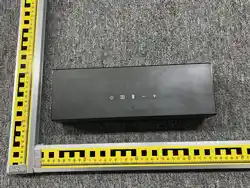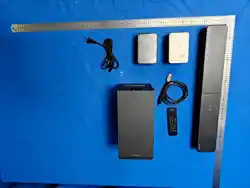
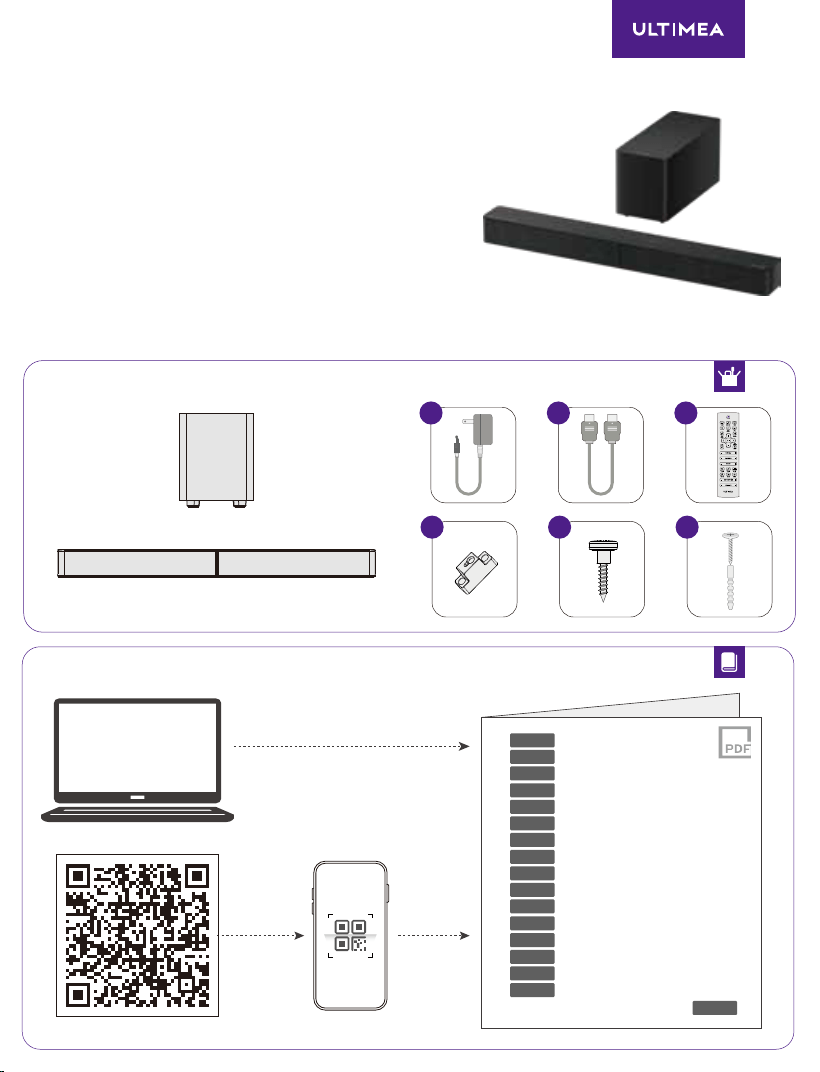
Model No.: U3724
Product Name: Soundbar
×1 ×1 ×1
×2 ×4×2
support.ultimea.com
EN
DE
FR
ES
IT
PT
PL
SV
TR
JP
CN
TC
KO
ID
TH
NL/BE
User Manual
Bedienungsanleitung
Manuel d’utilisation
Manual de usuario
Manuale utente
Manual do utilizador
Gebruikershandleiding
Instrukcja obsługi
Användarhandbok
Kullanım kılavuzu
Panduan Pengguna
คู่มือผู้ใช้
مدختسا ليلد
AR
User Manual / Bedienungsanleitung / Manuel d’utilisation /
Manual de usuario / Manuale utente / Manual do utilizador /
Gebruikershandleiding / Instrukcja obsługi / Användarhandbok /
Kullanım kılavuzu /
Panduan Pengguna / คู่มือผู้ใช้ /
مدختسا ليلد
USER MANUAL
M60
Ultimea Poseidon
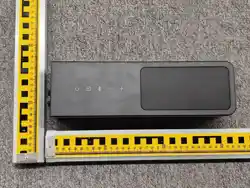
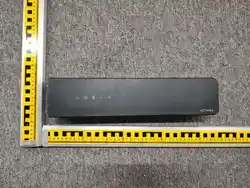
484mm/19.1"
1
2
.ةقاطلا ليغشت ءانثأ ليغشتلاب مقت .لاصتل هريودتب مقو نيأزجلا ب تاماحللا ةاذاح مق
or
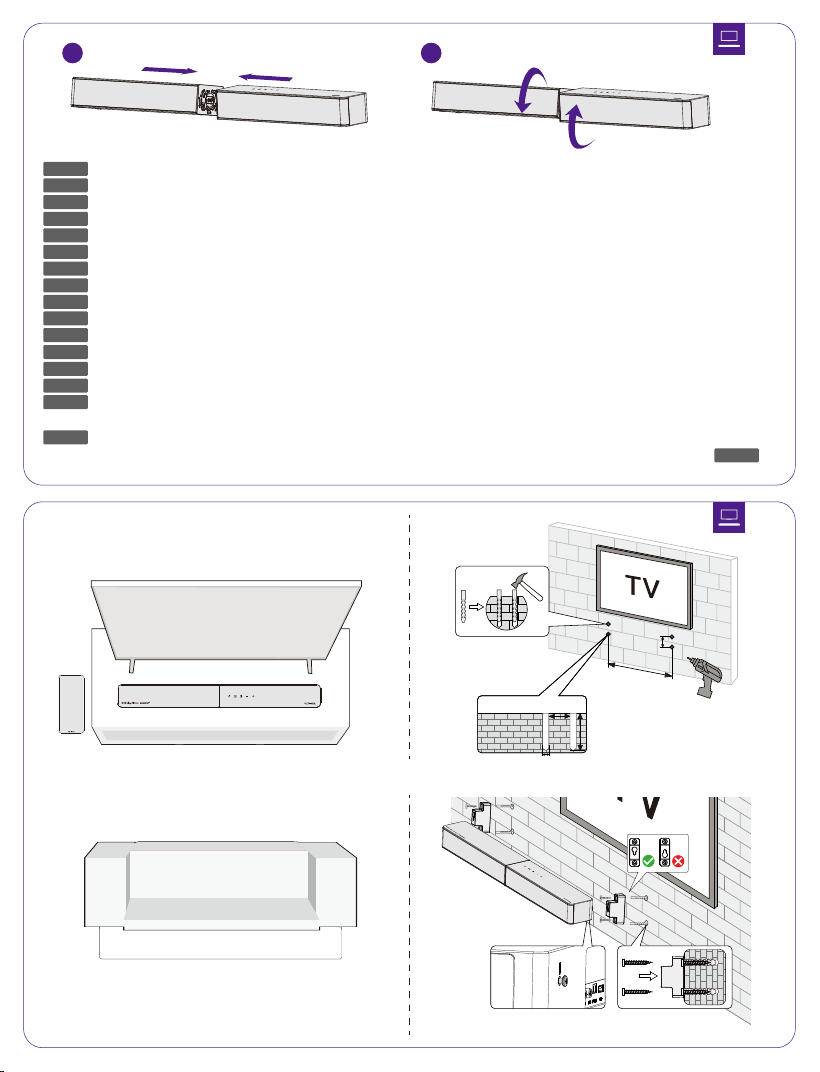
41mm/1.6"
41mm/1.6"
6.5mm/0.26"
30mm / 1.2"
AR
EN
DE
FR
ES
IT
PT
PL
SV
TR
JP
CN
TC
KO
NL/BE
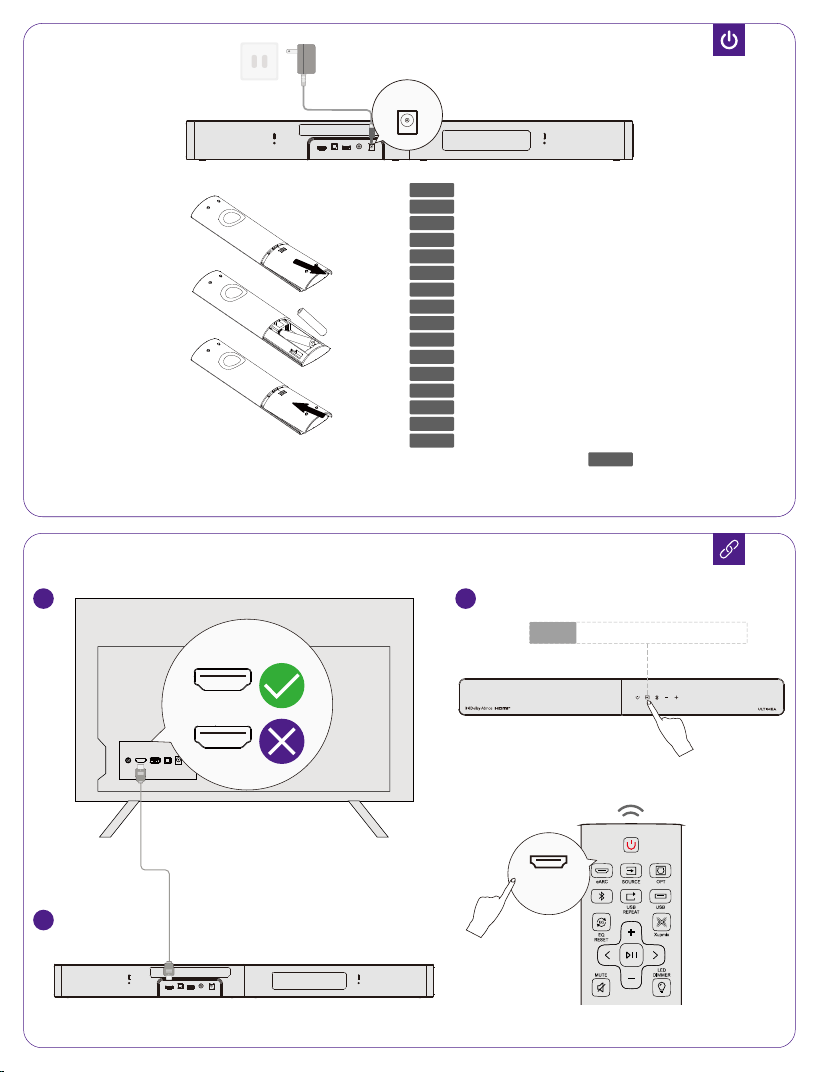
Align the seams of the two parts and rotate to connect. Do not operate with power on.
Richten Sie die Nähte der beiden Teile aus und drehen Sie sie zum Verbinden. Nicht unter Strom betreiben.
Alignez les coutures des deux parties et tournez pour connecter. Ne pas utiliser sous tension.
Alinee las costuras de las dos partes y gírelas para conectar. No opere con la energía encendida.
Allineare le giunzioni delle due parti e ruotare per connettere. Non operare con l'alimentazione accesa.
Alinhe as costuras das duas partes e gire para conectar. Não opere com a energia ligada.
Lijn de naden van de twee delen uit en draai om te verbinden. Niet bedienen met stroom ingeschakeld.
Wyrównaj szwy dwóch części i obróć, aby połączyć. Nie obsługiwać pod napięciem.
Justera sömmarna på de två delarna och rotera för att ansluta. Använd inte med strömmen på.
İki parçanın dikişlerini hizalayın ve bağlamak için döndürün. Güç açıkken çalıştırmayın.
¡¢£¤¥¦§
¨©ª«¬®¯°±¢£¤²§
³´µ¶·¸¹º»¼½¾¿ÀÁ¿ÃÄÅƾǷÈÉÊËÌÍοÏÐÃÄÅÆ
Sejajarkan sambungan dari kedua bagian dan putar untuk menghubungkannya. Jangan mengoperasikan
saat daya menyala.
จัดแนวรอยต่อของชิ้นส่วนสองชิ้นแล้วหมุนเพื่อเชื่อมต่อ อย่าดำเนินการขณะมีไฟฟ้าเข้า
ID
TH
ةقاطلا
1
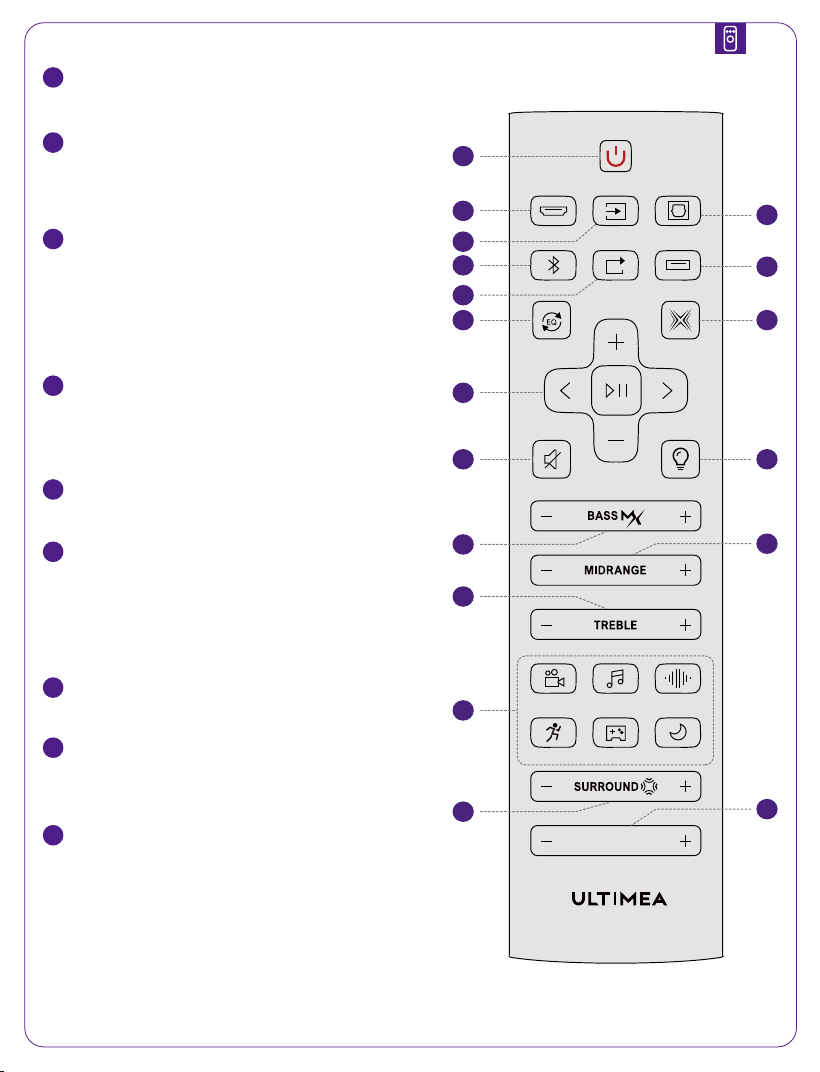
Power / Ein/Aus / Alimentation / Encendido/ Accensione/
Energia/ Aan/uit/ Ström/Güç//Daya/พลังงาน/
فاقيإ/ليغشت Xupmix
رركتا USB ليغشت
ةيبلا ةانقلا
ةانق HDMI eARC
2
HDMI eARC Channel/HDMI-eARC-Kanal/Canal HDMI
eARC/Canale HDMI eARC/HDMI eARC-kanaal/Kanał
HDMI eARC/HDMI eARC-kanal/HDMI eARC kanalı/
/Saluran
HDMI eARC/ ช่องสัญญาณ HDMI eARC/
لاخدا ردصم ليدبت
3
Input Source Switching / Eingangsquellenwechsel /
Changement de source d’entrée / Cambio de fuente
de entrada / Cambio della sorgente di ingresso /
Alteração da fonte de entrada / Ingangsbron wisselen
/ Przełączanie źródła wejścia / Växling av ingångskälla
/ Giriş Kaynağı Değiştirme /
Peralihan Sumber
Input / การสลับแหล่งสัญญาณเข้า /
4
OPTICAL Channel./Optischer Kanal/Canal optique/Ca-
nal óptico/Canale ottico/Optisch kanaal/Kanał
optyczny/Optisk kanal/Optik kanal/
Saluran optik/ช่องสัญญาณออปติคัล/
5
Bluetooth®
6
USB Loop Playback/USB-Wiedergabeschleife/Lecture
USB en boucle/Reproducción USB en bucle/Riproduzi-
one USB in loop/Reprodução USB em loop/USB-her-
haald afspelen/Odtwarzanie USB w pętli/USB-loopup-
pspelning/USB döngüsel oynatma/
¡¢£¤¢£¥¦§¨Pemutaran
ulang USB/การเล่น USB แบบวนซ้ำ/
ةانق USB
7
USB Channel/USB-Kanal/Canal USB/CanaleUSB /
USB-kanaal/Kanał USB/USB Kanalı/
Saluran USB/ช่อง USB/
طبض ةداعإ EQ
8
EQ Reset/EQ zurücksetzen/Réinitialisation de l’EQ/Resta-
blecer EQ/Ripristino EQ/Repor EQ/EQ resetten/Reset
EQ/Återställ EQ/EQ sıfırlama/©ª«¬©ª®¯©ª®°©ª
±²³ รีเซ็ต EQ/
9
Xupmix On/Off / Xupmix Ein/Aus / Xupmix activé/dés-
activé / Xupmix activado/desactivado / Xupmix
attivato/disattivato / Xupmix ligado/desligado /
Xupmix aan/uit / Xupmix Wł./Wył. / Xupmix på/av /
Xupmix açık/kapalı /´µ¶·¸¹ºº»´µ¶·¸¹¼½
´µ¶·¸¹¾¿´µ¶·¸¹À²Á² Xupmix aktif/nonaktif /
เปิด/ปิด Xupmix /
MUTE
MOVIE MUSIC VOICE
SPORT GAME NIGHT
USB
OPT
PROMPT TONE
eARC
EQ
RESET
XUPMIX
USB
REPEAT
SOURCE
LED
DIMMER
Poseidon M60 / M60 Boom
1
3
10
2
8
5
6
11
13
15
16
17
4
7
9
12
14
18

توصلا متك
عوطسلا طبض
هجلا طبض
داحلا توصلا طبض
ةيلاعلا تاددلا طبض
تادادعإ EQ ةقبسا
طيحا توص ىوتسم طبض
هيبنتلا ةمغن طبض
ليغشتلاو توصلا ىوتسم مكحتلا
10
Volume and Playback Controls / Lautstärke- und Wiedergabesteuerung / Contrôle du volume et de la
lecture / Control de volumen y reproducción / Controllo del volume e della riproduzione / Controle de
volume e reprodução / Volume- en afspeelbediening / Sterowanie głośnością i odtwarzaniem / Volym- och
uppspelningskontroller / Ses seviyesi ve oynatma kontrolleri / ÂÃÄÅÆÇÂÃÈ¢£ÉÊÂÃË¢£
ÉÊÌÍΧ¨ÏÐ Kontrol volume dan pemutaran / การควบคุมระดับเสียงและการเล่น /
11
Mute / Stumm / Muet / Silencio / Muto / Silenciar / Dempen / Wyciszenie / Ljud av / Sessiz / ÑÒÓÂ
ÔÂÌÕBisukan / ปิดเสียง /
12
Brightness adjustment/Helligkeitseinstellung/Réglage de la luminosité/Ajuste de brillo/Regolazione della
luminosità/Ajuste de brilho/Helderheidsinstelling/Regulacja jasności/Justering av ljusstyrka/Parlaklık ayarı/
Ö×ØÙÚÛÜÝÞÛÜÙßà²áâPenyesuaian kecerahan/การปรับความสว่าง/
13
Bass adjustment/Basseinstellung/ Réglage des basses/Ajuste de graves/Regolazione dei bassi/Basin-
stelling/Regulacja basów/Basjustering/Bas ayarıãÂÙÚãÂÝÞãÂÙßäÌáåPenyesuaian
bass/การปรับเสียงเบส/
14
Midrange Adjustment/Mitteneinstellung/Réglage des médiums/Ajuste de medios/Regolazione dei
medi/Ajuste de médios/Middenfrequentie-instelling/Regulacja tonów średnich/Mellanregisterjuster-
ing/Orta frekans ayarı/æÂÙÚæÂÝÞæÂÙßçÌáåPenyesuaian midrange/การปรับเสียงกลาง/
15
Treble adjustment/Höheneinstellung/Réglage des aigus/Ajuste de agudos/Regolazione degli
alti/Hoge-toneninstelling/Regulacja tonów wysokich/Diskantjustering/Tiz ayarıèÂÙÚèÂÝÞèÂÙß
éÌáåPenyesuaian treble/การปรับเสียงแหลม/
16
EQ Presets / EQ-Voreinstellungen / Préréglages EQ / Preajustes de EQ / Preimpostazioni EQ/Predefinições
de EQ/EQ-voorinstellingen/Ustawienia wstępne EQ/EQ-förinställningar/EQ ön ayarları©ªê«¬©ªëì
©ªí°©ªîïðPreset EQ/ค่าพรีเซ็ต EQ/
17
Surround volume adjustment/Einstellung der Surround-Lautstärke/Réglage du volume surround/Ajuste
del volumen surround/Regolazione del volume surround/Ajuste do volume surround / Surroundvolume
aanpassen/Regulacja głośności dźwięku przestrzennego/Justering av surroundvolym/Surround ses
seviyesi ayarı/ñòóôÂÃÙÚ¡õÂÃÝÞ¤öÂÃÙß÷øùúÌÍáåPenyesuaian volume
surround/การปรับระดับเสียงเซอร์ราวด์/
18
Prompt tone adjustment/Einstellung des Signaltons/Réglage de la tonalité des invites/Ajuste del tono de
aviso/Regolazione del tono di avviso/Ajuste do tom de aviso/Instelling van de meldingstoon/Regulacja
dźwięku powiadomień/Justering av signalton/Uyarı sesi ayarı/ÆÇÂÙÚûüÂÝÞûüÂÙßýþÌ
áåPenyesuaian nada notifikasi/การปรับเสียงแจ้งเตือน/
ÑÒÓÔÕÖ×Ø
ÙÚÛÜÝÞ
ßà×ÔÝÛá âãä ãâäßâ× ÒÝÔå
eARC/ARC
HDMI
eARC OPT Bluetooth® USB
or
eARC
1 3
2
HDMI to TV
(eARC)
OPTICAL USB SUB OUT ÒÝÔå
DC IN
Notice:Risk of fire or explosion if the battery is replaced by an incorrect type.
.ةلومشم غ تايراطبلا
AR
EN
DE
FR
ES
IT
PT
PL
SV
TR
JP
CN
TC
KO
NL/BE
Batteries Not Included.
Batterien nicht enthalten.
Piles non incluses.
Baterías no incluidas.
Batterie non incluse.
Baterias não incluídas.
Batterijen niet inbegrepen.
Baterie nie są dołączone.
Batterier ingår ej.
Piller dahil değildir.
æçèéêéë
¥æìíè£î
æìíè£ï
ðñòóôõöÏ÷øùúÆ
Baterai tidak termasuk.
แบตเตอรี่ไม่รวมอยู่ด้วย
ID
TH
EN
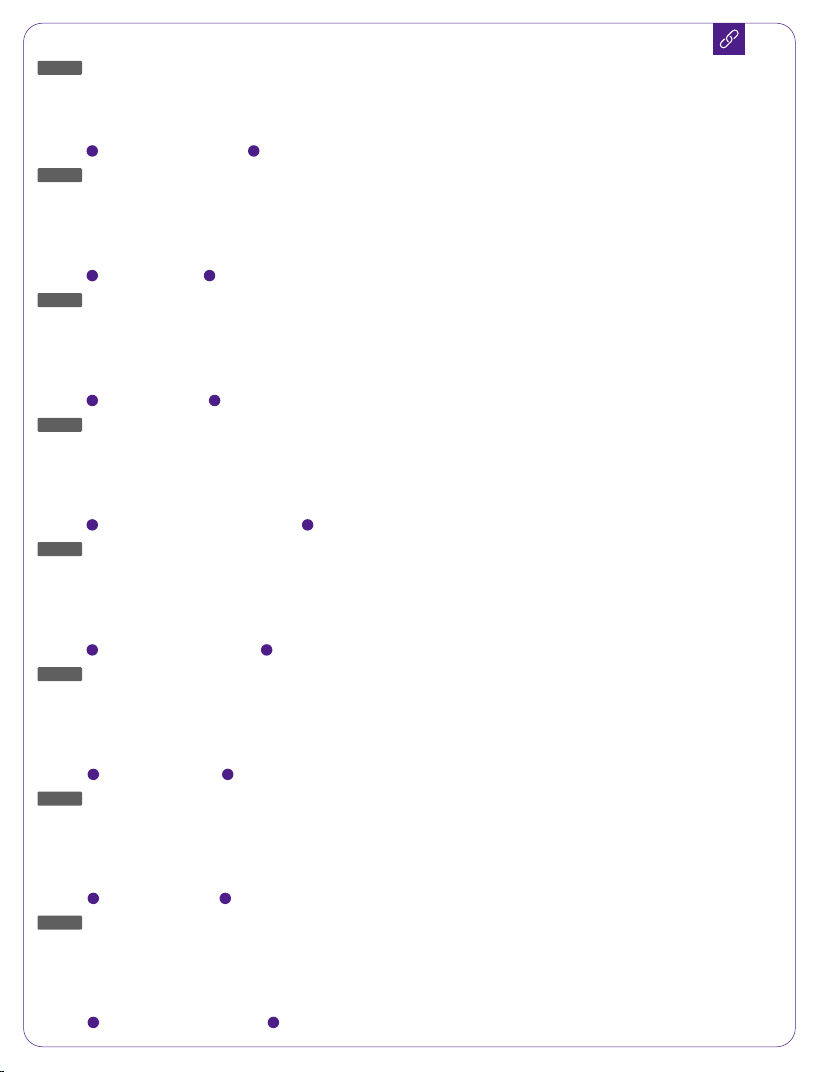
Make sure your TV' s HDMI port supports eARC; otherwise Dolby Atmos audio cannot be transmitted.
When playing Dolby Atmos content, set the TV audio output to Pass Through.
TV Settings > Home > Settings > Sound > Digital Audio Output > Pass Through
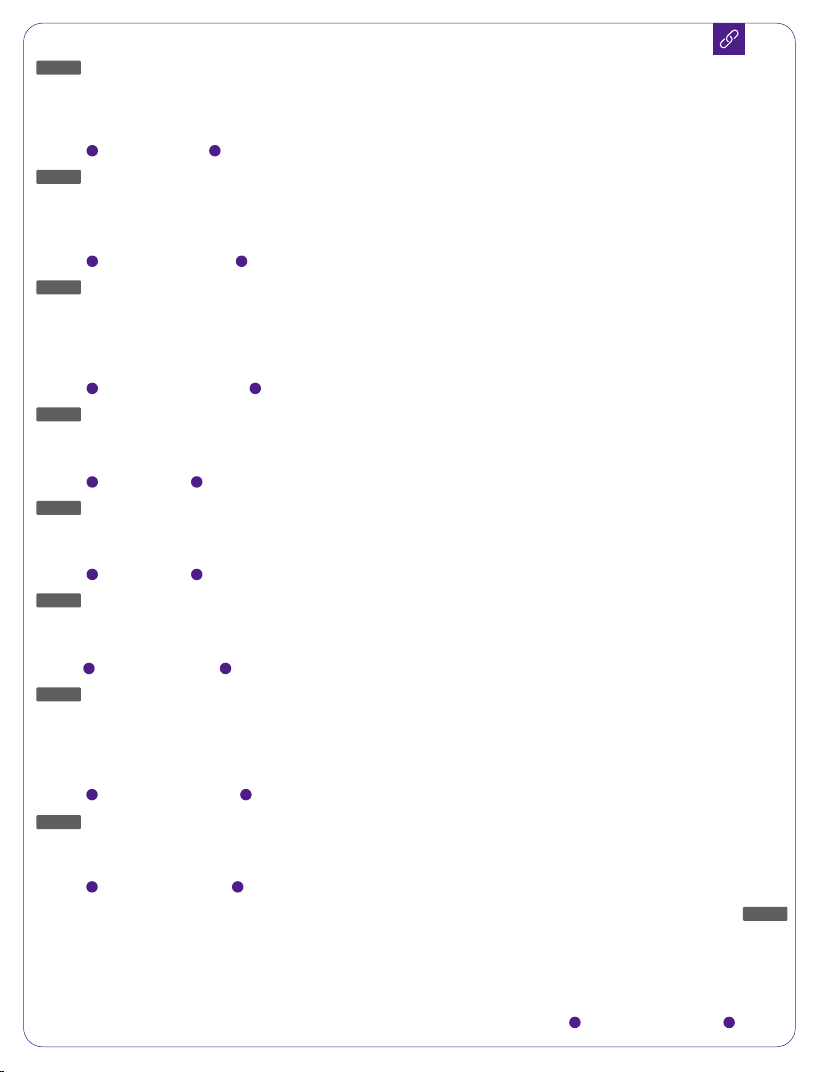
Note: Enable the "CEC" function on your TV. When eARC or ARC is connected, your TV remote can control both
the soundbar and TV simultaneously:
Power On / Standby Adjust Volume
1 2
DE
Stellen Sie sicher, dass der HDMI-Anschluss Ihres Fernsehers eARC unterstützt, da sonst das Dolby-Atmos-Au-
diosignal nicht übertragen werden kann.Dolby Atmos: Wenn Sie Inhalte im Dolby-Atmos-Format ansehen,
stellen Sie den TV-Audioausgang auf Pass Through ein.
TV-Einstellungen > Startseite > Einstellungen > Ton > Digitaler Audioausgang > Pass Through
Hinweis: Aktivieren Sie die „CEC“-Funktion an Ihrem Fernseher. Bei Verbindung über eARC oder ARC kann die
TV-Fernbedienung sowohl Fernseher als auch Soundbar gleichzeitig steuern:
Ein / Standby Lautstärke anpassen
1 2
FR
Assurez-vous que le port HDMI de votre téléviseur prend en charge eARC, sinon le signal audio Dolby Atmos ne
pourra pas être transmis.Dolby Atmos : Si vous regardez un contenu au format Dolby Atmos, réglez la sortie
audio du téléviseur sur Pass Through.
Paramètres TV > Accueil > Paramètres > Son > Sortie audio numérique > Pass Through
Remarque : Activez la fonction « CEC » sur votre téléviseur. Lorsque eARC ou ARC est connecté, la télécommande
du téléviseur peut contrôler simultanément la barre de son et le téléviseur :
Marche / Veille Régler le volume
1 2
ES
Asegúrese de que el puerto HDMI del televisor sea compatible con eARC; de lo contrario, la señal Dolby Atmos
no podrá transmitirse.Dolby Atmos: Si reproduce contenido en formato Dolby Atmos, configure la salida de
audio del televisor en Pass Through.
Configuración > Inicio > Ajustes > Sonido > Salida de audio digital > Pass Through
Nota: Active la función “CEC” en el televisor. Cuando eARC o ARC esté conectado, el mando del televisor puede
controlar simultáneamente la barra de sonido y el televisor:
Encendido / Modo de espera Ajustar volumen
1 2
IT
Assicurarsi che la porta HDMI del televisore supporti eARC; in caso contrario, il segnale audio Dolby Atmos non
potrà essere trasmesso.Dolby Atmos: Se si riproduce contenuto in formato Dolby Atmos, impostare l’uscita
audio del televisore su Pass Through.
Impostazioni TV > Home > Impostazioni > Audio > Uscita audio digitale > Pass Through
Nota: Attivare la funzione “CEC” sul televisore. Quando eARC o ARC è collegato, il telecomando della TV può
controllare contemporaneamente soundbar e televisore:
Accensione / Standby Regolazione del volume
1 2
PT
Certifique-se de que a porta HDMI da TV suporta eARC; caso contrário, o sinal Dolby Atmos não poderá ser
transmitido.Dolby Atmos: Se estiver a reproduzir conteúdo em formato Dolby Atmos, defina a saída de áudio
da TV para Pass Through.
Definições da TV > Início > Definições > Som > Saída de áudio digital > Pass Through
Nota: Ative a função “CEC” na TV. Quando eARC ou ARC estiver ligado, o comando da TV pode controlar
simultaneamente a soundbar e a TV:
Ligar / Standby Ajustar volume
1 2
NL/BE
Controleer of de HDMI-poort van uw tv eARC ondersteunt; anders kan het Dolby Atmos-audiosignaal niet
worden verzonden.Dolby Atmos: Als u content in Dolby Atmos-formaat bekijkt, stel de audio-uitgang van de
tv in op Pass Through.
TV-instellingen > Home > Instellingen > Geluid > Digitale audio-uitgang > Pass Through
Opmerking: Schakel de functie “CEC” in op uw tv. Wanneer eARC of ARC is aangesloten, kan de
tv-afstandsbediening zowel de soundbar als de tv bedienen:
Aan / Stand-by Volume aanpassen
1 2
PL
Upewnij się, że port HDMI w telewizorze obsługuje eARC; w przeciwnym razie sygnał Dolby Atmos nie będzie
przesyłany.Dolby Atmos: W przypadku treści w formacie Dolby Atmos ustaw wyjście audio telewizora na Pass
Through.
Ustawienia TV > Strona główna > Ustawienia > Dźwięk > Cyfrowe wyjście audio > Pass Through
Uwaga: Włącz funkcję „CEC” w telewizorze. Po podłączeniu eARC lub ARC pilot telewizora może sterować
jednocześnie soundbarem i telewizorem:
Włącz / Tryb czuwania Regulacja głośności
1 2
SV
Kontrollera att TV:ns HDMI-port stöder eARC, annars kan Dolby Atmos-ljudsignalen inte överföras.
Dolby Atmos: Om du tittar på innehåll i Dolby Atmos-format, ställ in TV:ns ljudutgång på Pass Through.
TV-inställningar > Hem > Inställningar > Ljud > Digital ljudutgång > Pass Through
Obs: Aktivera funktionen ”CEC” på TV:n. När eARC eller ARC är anslutet kan TV:ns fjärrkontroll styra både
soundbaren och TV:n samtidigt:
På / Standby Justera volym
1 2
TR
TV’nizin HDMI portunun eARC desteklediğinden emin olun; aksi takdirde Dolby Atmos ses sinyali iletilemez.
Dolby Atmos: Dolby Atmos formatında içerik izliyorsanız, TV ses çıkışını Pass Through olarak ayarlayın.
TV Ayarları > Ana Sayfa > Ayarlar > Ses > Dijital Ses Çıkışı > Pass Through
Not: TV’nizde “CEC” fonksiyonunu etkinleştirin. eARC veya ARC bağlıyken, TV kumandası hem soundbar’ı hem de
TV’yi aynı anda kontrol edebilir:
Açma / Bekleme Ses ayarlama
1 2
JP
HDMI
eARC
Dolby Atmos
Dolby Atmos:Dolby Atmos
Pass Through
ûüýþÿ~}|{~þÿ~[\]^~_`@?>=<;~
Pass Through
CEC
eARC
éç
ARC
:ûüý/.-][\]^,|+ûüý
*:)(é'
&]%@],$>#"!
1 2
CN
HDMI
¡¢
eARC
£¤¥¦§¨©
Dolby Atmos
ª«¬
Dolby Atmos:
®¯°
Dolby Atmos
±²³£´ª©µ¶·
Pass Through
¥012~34~12~=>~56>78<~
Pass Through
¸¹º»
CEC
¼½
eARC
9
ARC
AB¥0CDEF*GDH¥0I
Soundbar:
JKLKMN>#
1 2
TC
¾¿
HDMI
ÀÁ¡Â
eARC
£¤ÃħÅÆ
Dolby Atmos
ÇÇÈ
Dolby Atmos:
®¯°
Dolby Atmos
±É³£¾Ê¿ÇÆË
Pass Through
Oþÿ~3P~þÿ~Q>~RS>TU<~
Pass Through
¾ÌÍ¿º
CEC
½°
eARC
9
ARC
VBOWDEF*:DHOX
Soundbar:
YZLZ"!>#
1 2
KO
TV
Î
HDMI
ÏÐÑ
eARC
ÒÓÔÕÖÓ×ØÕÙÚÛÜÓÔÕÓÝÞßà
Dolby Atmos
ÛáÛâãÒäåæçèéêëÜ
Dolby Atmos: Dolby Atmos
ìíÎîïðÒÚñÕÖßàò
TV
ÛáÛóôÞ
Pass Through
õö÷ÕÙÚÛÜ
TV
a~b~a~cd~eÏfÅeÅgh~
Pass Through
øùú
TV
ûü»
CEC
¼ýþÞÿ~}ÕÙÚÛÜ
eARC
ió
ARC
jÁÂök
TV
òlmnocdpq
TV
rsÄÌtuvwxøùúÆ
¾ÇÈyzyÍ
1 2
ID
Pastikan port HDMI TV Anda mendukung eARC; jika tidak, sinyal audio Dolby Atmos tidak dapat
ditransmisikan.Dolby Atmos: Jika Anda menonton konten dalam format Dolby Atmos, atur keluaran audio
TV ke Pass Through.
Pengaturan TV > Beranda > Pengaturan > Suara > Keluaran Audio Digital > Pass Through
Catatan: Aktifkan fungsi “CEC” pada TV Anda. Saat eARC atau ARC terhubung, remote TV dapat mengontrol
soundbar dan TV secara bersamaan:
Nyalakan / Siaga Atur volume
1 2
TH
ตรวจสอบให้แน่ใจว่าพอร์ต
HDMI
ของทีวีรองรับ
eARC
มิฉะนั้นจะไม่สามารถส่งสัญญาณเสียง
Dolby Atmos
ได้
Dolby Atmos:
หากรับชมเนื้อหาในรูปแบบ
Dolby Atmos
ให้ตั้งค่าเอาต์พุตเสียงของทีวีเป็น
Pass Through
การตั้งค่าทีวี > หน้าแรก > การตั้งค่า > เสียง > เอาต์พุตเสียงดิจิทัล >
Pass Through
หมายเหตุ: กรุณาเปิดใช้งานฟังก์ชัน “
CEC
” บนทีวี เมื่อเชื่อมต่อ
eARC
หรือ
ARC
แล้ว รีโมททีวีสามารถควบคุมทั้งซาวด์บาร์และทีวีได้พร้อมกัน:
เปิด / สแตนด์บาย ปรับระดับเสียง
1 2
AR
.ةيتوصلا
Dolby Atmos
ةراشإ لقن نك نلف إو ،
eARC
معدي نويزفلتلا
HDMI
ذفنم نأ نم دكأت
.
Pass Through
ع نويزفلتلا توصلا جرخم طبضا ،
Dolby Atmos
قيسنتب ىوتحم ةدهاشم دنع :
Dolby Atmos
Pass Through
< يمقرلا توصلا جرخم < توصلا < تادادعا < ةيسيئرلا ةحفصلا < نويزفلتلا تادادعإ
نم
ٍ
لك مكحتلا نويزفلتلاب صاخلا مكحتلا زاهجل نك ،
ARC
وأ
eARC
ليصوت دنع .نويزفلتلا “
CEC
” ةفيظو ليعفت ىجري :ةظحم
:هسفن تقولا نويزفلتلاو يطيلا توصلا كم
توصلا ىوتسم طبض دادعتسا عضو / ليغشت
12
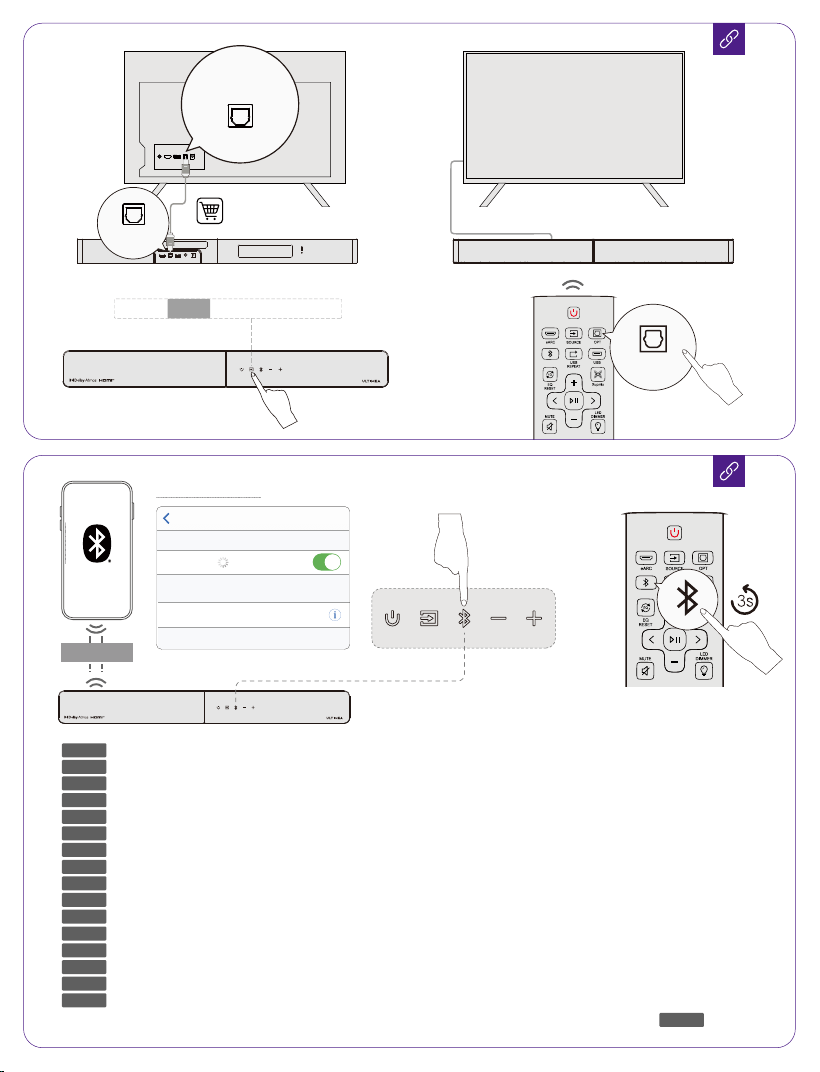
<10m/33ft
Phone Settings
Poseidon M60 Connected
Now Discoverable
Settings Bluetooth®
Bluetooth®
DEVICES
HDMI to TV
(eARC)
OPTICAL USB SUB OUT DC IN
or
DIGITAL AUDIO
OUT
OPTICAL
OPTICAL
eARC OPT
Bluetooth®
USB
OPT
.لاصتا لصفل ةد رارمتسا عم طغضا ؛Bluetooth®ردصم رايتخ طغضا
AR
EN
DE
FR
ES
IT
PT
PL
SV
TR
JP
CN
TC
KO
NL/BE
Short press to select Bluetooth® channel, long press to disconnect.
Kurz drücken, um den Bluetooth®-Kanal auszuwählen, lang drücken, um die Verbindung zu trennen.
Appuyez brièvement pour sélectionner le canal Bluetooth®, appuyez longuement pour déconnecter.
Presione brevemente para seleccionar el canal Bluetooth®, presione prolongadamente para desconectar.
Premere brevemente per selezionare il canale Bluetooth®, premere a lungo per disconnettere.
Pressione rapidamente para selecionar o canal Bluetooth®, pressione longamente para desconectar.
Kort indrukken om het Bluetooth®-kanaal te selecteren, lang indrukken om de verbinding te verbreken.
Krótko naciśnij, aby wybrać kanał Bluetooth®, przytrzymaj, aby rozłączyć.
Tryck kort för att välja Bluetooth®-kanal, tryck länge för att koppla bort.
Kısa basarak Bluetooth® kanalını seçin, uzun basarak bağlantıyı kesin.
äÚÕÖÖÕ]?é'
¤BJ
¤BY°
¹¿¼Á¹t¿Æ
Tekan singkat untuk memilih saluran Bluetooth®, tekan lama untuk memutuskan koneksi.
กดสั้นเพื่อเลือกช่อง Bluetooth® กดค้างเพื่อยกเลิกการเชื่อมต่อ
ID
TH
On your Android™ or iOS device, connect to the soundbar via the Ultimea app.
Verbinden Sie auf Ihrem Android™- oder iOS-Gerät die Soundbar über die Ultimea-App.
Sur votre appareil Android™ ou iOS, connectez-vous à la barre de son via l'application Ultimea.
En su dispositivo Android™ o iOS, conéctese a la barra de sonido a través de la aplicación Ultimea.
Sul tuo dispositivo Android™ o iOS, connettiti alla soundbar tramite l'app Ultimea.
No seu dispositivo Android™ ou iOS, conecte-se à soundbar através do aplicativo Ultimea.
Op uw Android™- of iOS-apparaat verbindt u de soundbar via de Ultimea-app.
Na swoim urządzeniu z systemem Android™ lub iOS połącz się z soundbarem za pomocą aplikacji Ultimea.
Anslut till soundbaren via Ultimea-appen på din Android™- eller iOS-enhet.
Android™ veya iOS cihazınızda, Ultimea uygulaması aracılığıyla soundbara bağlanın.
ÛÖéçßã_,$%âÕÚ/[\]^,|)
£ÛÖ9ßã1B¤âÕÚãÖ
£ÛÖ9ßãþB¤âÕÚ°ãÖ
ÛÖióßãyyÌâÕÚ¹cdpÌÁ¿Æ
Pada perangkat Android™ atau iOS Anda, sambungkan ke soundbar melalui aplikasi Ultimea.
บนอุปกรณ์
Android™
หรือ
iOS
ของคุณ เชื่อมต่อกับ
Soundbar
ผ่านแอป
Ultimea
.Ultimea قيبطت ع توصلا ك لصتا ،كب صاخلا iOS وأ ™Android زاهج ع
<10m/33ft
AR
EN
DE
FR
ES
IT
PT
PL
SV
TR
JP
CN
TC
KO
NL/BE
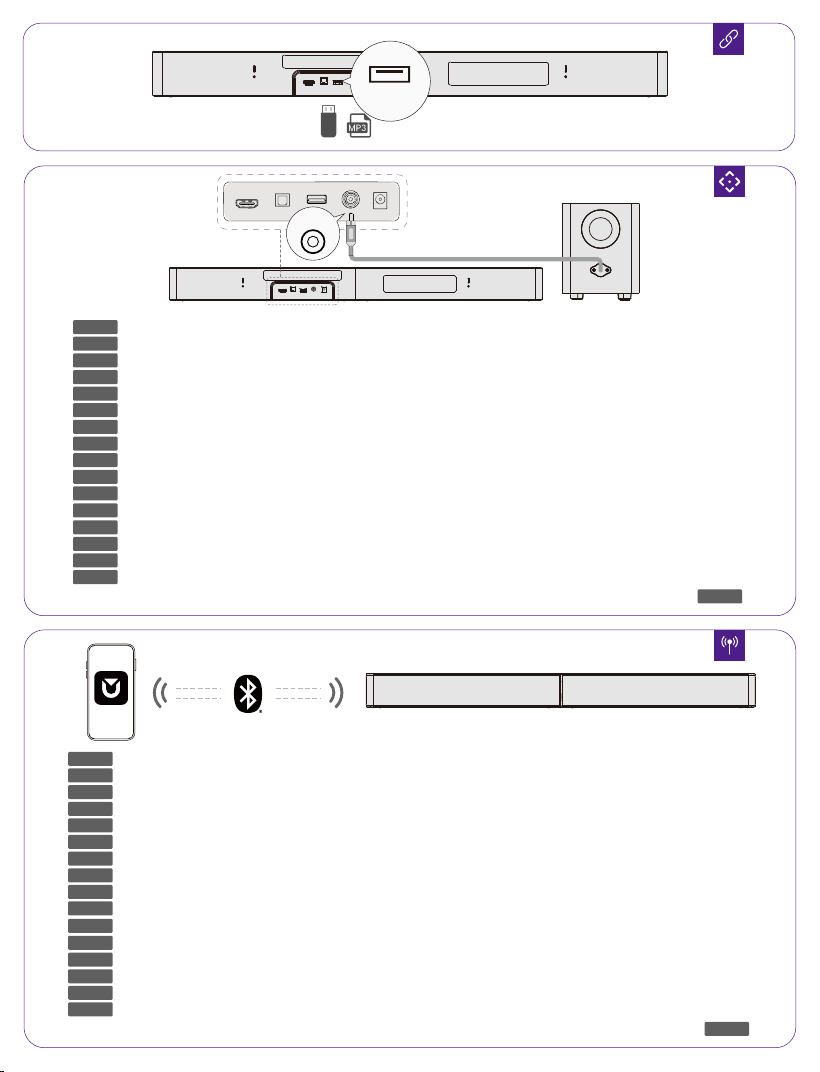
HDMI to TV
(eARC)
OPTICAL USB SUB OUT DC IN
.توصلا طي SUB OUT ذفن توصلا مخضم فلخ دوجوا لباكلل RCA فرط ليصوتب مق
(eARC)
HDMI to TV OPTICAL USB SUB OUT DC IN
SUB OUT
AR
EN
DE
FR
ES
IT
PT
PL
SV
TR
JP
CN
TC
KO
NL/BE
Plug the RCA terminal of the cable behind the subwoofer into the SUB OUT port of the soundbar.
Stecken Sie den RCA-Stecker des Kabels hinter dem Subwoofer in den SUB OUT-Anschluss der Soundbar.
Branchez la prise RCA du câble derrière le subwoofer dans le port SUB OUT de la barre de son.
Conecte el terminal RCA del cable detrás del subwoofer en el puerto SUB OUT de la barra de sonido.
Collega il terminale RCA del cavo dietro il subwoofer alla porta SUB OUT della soundbar.
Conecte o terminal RCA do cabo atrás do subwoofer na porta SUB OUT da soundbar.
Steek de RCA-aansluiting van de kabel achter de subwoofer in de SUB OUT-poort van de soundbar.
Podłącz końcówkę RCA kabla znajdującą się za subwooferem do portu SUB OUT soundbara.
Anslut RCA-kontakten på kabeln bakom subwoofern till SUB OUT-porten på soundbaren.
Subwoofer'un arkasındaki kablonun RCA fişini, soundbar'ın SUB OUT portuna takın.
[\|¡¢|£¤¥|?ÜÝÛ¦§[\]^,|ãâäßâר|©)
ª«>¬A®ÜÝÛ¦§¯ãÖãâäßâצ°
±«>¬V®ÜÝÛ¦§¯ãÖãâäßâצ°
²³´µ¶¶ÜÝÛ·¸rcdp¶ãâäßâ×ô¹ÌºnÆ
Colokkan terminal RCA dari kabel di bagian belakang subwoofer ke port SUB OUT pada soundbar.
เสียบขั้ว RCA ของสายที่ด้านหลังซับวูฟเฟอร์เข้ากับพอร์ต SUB OUT ของซาวด์บาร์.
HDMI to TV
(eARC)
OPTICAL USB SUB OUT DC IN
USB
ID
TH
ID
TH
Product Name: Soundbar
Model No.: U3724
HVIN: U3724
EVATOST CONSULTING LTD
Office 101 32 Threadneedle Street, London, United Kingdom, EC2R 8AY
Ultimea GmbH
Buchenring 57, 22359 Hamburg, Germany
@Ultimea Inc. All rights reserved, registered in the United States and other countries.
801 S. Dupont Ave., Ste G, Ontario, CA, 91761, USA
Made in China
Manufacturer: Ultimea Technology (Shenzhen) Limited
Address: 20th Floor, Building 4, Tianan Cloud Park, Bantian St.,Longgang District, Shenzhen,
China 518000
If you need our support, kindly reach out to our service team.
We are always glad to help.
Manufacturer Contact Information:
support.ultimea.com
Mon-Fri 9am-5pm (CET)
+49 89-628-25828 (EU)
Mon-Fri 9am-5pm (PST)
+1 888-598-8875 (US)
Download Ultimea App
Search for “ULTIMEA” on social
Warranty Extension Plan
Soundbar dimensions (W x H x D):
800 x 70x 90 mm / 31,5'' x 2,76'' x 3,54''
Subwoofer dimensions (W x H x D):
150 x 188 x 350 mm / 5,91" x 7,40" x 13,78"
Packaging dimensions (W x H x D):
445 x 345 x 190 mm / 17.52" x 13.58" x 7,48"
Packaging Weight: 6.4 kg / 14,11 lbs
Dimensions
Model: U3724
Sound system: 5.1 channel
Power supply: 24V 3A DC(Soundbar);
100-240V~50/60Hz AC (Subwoofer)
Drivers: 2.25'' × 5 (Soundbar) + 5.25'' (Subwoofer)
Standby Power: <0.5W
USB Output: 5V 500mA
DC Operating Temperature: -10℃-35℃/14℉-��℉
Operating Altitude: 2000 meters above sea level
Wall Mount Screw: 2.76 × 24 mm / 0.10" × 0.9"
Bracket Screws Diameter: 3 mm / 0.12"
Remote Control Battery Type: 2 x AAA (NOT INCLUDE)
Notice: Risk of fire or explosion if the battery is replaced
by an incorrect type.
General specification (English):
3. If this equipment has the wireless network connections:
How to activate wireless network connections:
• Set up the equipment properly;
• Switch into wireless mode (Bluetooth
®
);
• Connect with energy using products (e.g. players/
game consoles/ STB (Set-Top Boxes)/ phones/ tablets
/PCs). How to deactivate wireless network connections: •
Switch to another channel besides Bluetooth
®
;
• Then long press on the remote control for more than
3 seconds.
Power Consumption and Wireless Connec-
tion Setup Guide
Standby
Networked
standby
When Bluetooth
or the app is
connected.
When the
soundbar is idle
(with no playback
or operation) and
neither Bluetooth
nor the app is
connected.
Switched to
standby mode after
15 minutes.
N/A
Switched to
networked standby
mode after 15
minutes of
inactivity in
operational mode.
Off
1. Information on power consumption
This equipment complies with European COMMISSION
REGULATION (EU) 2023/826.
• Off: N/A
• Standby (when all wireless connections are deactivated):
< 0.5 W
• Networked standby for Soundbar: < 2.0 W
*The duration for the device to enter standby mode can be
set in the app. Changing this setting may lead to a
significant increase in energy consumption, negatively
impacting the environment.
2. The period of time after which the power management
function switches the equipment automatically into:
For other languages of the above content
(DE, FR, ES, IT, PT, NL, PL, SV, TR, JP, CN, TC, KO, ID, TH, AR),
please scan the QR code
IMPORTANT SAFETY INSTRUCTIONS
(English):
1.Please read and retain this manual. Follow all warnings
and operate according to the instructions.
2.Do not use the device near water sources, in damp
environments, or in the rain. Avoid splashing liquids or
placing objects containing liquids (such as vases) on the
device.
3.Clean only with a dry cloth. Do not use liquid cleaners.
4.Do not block ventilation openings or install the device in
an enclosed space. Ensure proper ventilation and install
according to the manufacturer’s instructions.
5.Do not install the device near heat sources such as
radiators, stoves, or amplifiers. Do not cover the
ventilation openings with items such as newspapers or
curtains.
6.Use only attachments, stands, or accessories specified
by the manufacturer. When using a device with wheels,
move with care to avoid tipping.
7.Protect the power cord from being pinched, stepped on,
or bent, especially at plugs, outlets, and the point where it
exits the device.
8.Do not alter the polarized or grounding-type plug. If the
plug does not fit into the outlet, consult an electrician to
replace the outlet.
9.Unplug the device during lightning storms or when
unused for long periods. To fully disconnect power,
unplug the device from the wall outlet and ensure the
plug is accessible.
10.Do not place any open flame sources (such as lit
candles) on or near the device.
11.Do not attempt to open the device. High voltage inside
may be fatal. There are no user-serviceable parts inside.
All servicing must be performed by qualified personnel.
12.The installation height of the device must not exceed 2
meters.
Scan QR for safety info / QR-Code für Infos scannen / Scanner le QR
pour infos / Escanee QR para info / Scansiona il QR per info / Leia o QR
para info / Scan QR-code voor info / Zeskanuj kod QR / Skanna QR för
info / QR kodu tara /ªÿô~}|{[\]^_`@?[\]^
>=ª<ú; Pindai QR untuk informasi keselamatan / สแกน QR เพื่อดู
ข้อมูลความปลอดภัย /
امسحرمز
QR
لمعلوماتالسلامة

PROPER DISPOSAL INSTRUCTIONS
This mark shown on the product or its packaging,
indicates that this product should not be disposed of
with other household waste at the end of its working life.
To prevent possible harm to the environment or human
health from uncontrolled waste disposal, please separate
this from other types of wastes and recycle it responsibly
to promote the sustainable reuse of material resources.
Waste Electrical & Electronic Equipment
Household user should contact either the retailer where they
purchased this product, or their local government office, for
details of where and how they can take this item for
environmentally safe recycling.
Business users should contact their suppliers and check the
terms and conditions of the purchase contract. This product
should not be mixed with other commercial wastes for disposal.
WIRELESS FREQUENCY RANGE AND WIRELESS
OUTPUT POWER:
Frequency: 2.402GHz-2.48GHz
The Max. transmit power (Applies only to the EU): 10 dBm
FCC REGULATORY COMPLIANCE
Any changes or modifications not expressly approved by the
party responsible for compliance could void the user's authority
to operate the equipment.
This device complies with Part 15 of the FCC Rules.
Operation is subject to the following two conditions:
(1) This device may not cause harmful interference.
(2) This device must accept any interference received, including
interference that may cause undesired operation.
NOTE: This equipment has been tested and found to comply
with the limits for a Class B digital device, pursuant to part 15 of
the FCC Rules. These limits are designed to provide reasonable
protection against harmful interference in a residential
installation. This equipment generates, uses, and can radiate
radio frequency energy, and if not installed and used in
accordance with the instructions, may cause harmful
interference to radio communications.
However, there is no guarantee that interference will not occur in
a particular installation. If this equipment does cause harmful
interference to radio or television reception, which can be
determined by turning the equipment off and on, the user is
encouraged to try to correct the interference by one or more of
the following measures:
- Reorient or relocate the receiving antenna.
- Increase the separation between the equipment and the
receiver.
- Connect the equipment to an outlet on a circuit different from
that to which the receiver is connected.
- Consult the dealer or an experienced radio / TV technician for
help.
This equipment complies with FCC radiation exposure limits set
forth for an uncontrolled environment. This equipment should be
installed and operated with a minimum distance of 20cm
between the radiator & your body. This transmitter must not be
co-located or operating in conjunction with any other antenna or
transmitter.
ISED WARNINGS
Wireless Capability Description:
The subwoofer is wired and does not have the ability to receive
or transmit wireless signals.
The remote control uses infrared (IR) technology for device
control and does not support any other wireless signal
transmission or reception capabilities.
CA WARNING: Can expose you to BPA, a carcinogen,
and BPA, a reproductive. toxicant. See zwww.P65Warn-
ings.ca.gov.
This device contains licence-exempt transmitter(s)/receiver(s) that
comply with Innovation, Science and Economic Development
Canada’s licence-exempt RSS(s). Operation is subject to the
following two conditions:
(1) This device may not cause interference.
(2) This device must accept any interference, including
interference that may cause undesired operation of the device.
L'émetteur/récepteur exempt de licence contenu dans le
présent appareil est conforme aux
CNR d'Innovation, Sciences et Développement économique
Canada applicables aux appareils radio exempts de licence.
L'exploitation est autorisée aux deux conditions suivantes :
1) L'appareil ne doit pas produire de brouillage;
2) L'appareil doit accepter tout brouillage radioélectrique subi,
même si le brouillage est susceptible d'en compromettre le
fonctionnement.
3) The device meets the exemption from the routine evaluation
limits in issue6 of RSS 102 and compliance with RSS-102 RF
exposure, users can obtain Canadian information on RF
exposure and compliance.
Le dispositif rencontre l'exemption des limites courantes
d'évaluation dans la numéro 6 de RSS 102 etla conformité à
l'exposition de RSS-102 rf, utilisateurs peut obtenir l'information
canadienne surl'exposition et la conformité de rf.
This transmitter must not be co-located or operating in
conjunction with any other antenna or transmitter. This
equipment should be installed and operated with a minimum
distance of 20 centimeters between the radiator and your body.
Cet émetteur ne doit pas être Co-placé ou ne fonctionnant en
même temps qu'aucune autre antenne ouémetteur. Cet
équipement devrait être installé et actionné avec une distance
minimum de 20 centimètres entre le radiateur et votre corps.
CE WARNINGS
1) Do not install this equipment in a confined or building-in
space such as a book case or similar unit, and remain a well
ventilation conditions. The ventilation should not be impeded
by covering the ventilation openings with items such as
newspaper, table-cloths, curtains etc.
2) WARNING: To reduce the risk of fire or electric shock, do not
expose this apparatus to rain or moisture. The apparatus shall
not be exposed to dripping or splashing and that objects filled
with liquids, such as vases, shall not be placed on apparatus.
3) WARNING: The adapter plug is used as disconnect device, the
disconnect device shall remain readily operable.
4) Frequency: 2.402GHz-2.48GHz
5) The Max. transmit power: 10 dBm

EU Declaration of Conformity
We (Manufacturer is responsible for this declaration)
Ultimea Technology (Shenzhen) Limited
(Company name)
20th Floor, Building 4, Tianan Cloud Park, Bantian St.,
Longgang District Shenzhen, China 518000
(Company address)
Declare under our sole responsibility that the product
Trade Mark: ULTIMEA
Product Name: Soundbar
Model No.: U3724
The product to which this declaration relates is in
conformity with the essential requirements set out
in the Council Directive on the Approximation of the
laws of the Member States relating to the Radio
Equipment Directive (2014/53/EU), the Restriction of
Hazardous Substances Directive (2011/65/EU), the
Electromagnetic Compatibility Directive
(2014/30/EU), and the Low Voltage Directive
(2014/35/EU). The product is responsible for affixing
the CE marking, and the following standards were
applied:
EN 55032:2015/A1:2020
EN 55035:2017/A11:2020
EN IEC 61000-3-2:2019/A1:2021
EN 61000-3-3:2013/A2:2021
ETSI EN 301 489-1 V2.2.3 (2019-11)
ETSI EN 301 489-17 V3.3.1 (2024-09)
ETSI EN 300 328 V2.2.2 (2019-07)
EN 50663: 2017
EN IEC 62368-1:2020+A11:2020
IEC 62321-3-1:2013
IEC 62321-4:2013+A1:2017
IEC 62321-5:2013
IEC 62321-6:2015
IEC 62321-7-1:2015
IEC 62321-7-2:2017
IEC 62321-8:2017
Full Name: Yoyo.Yu
Position: Approbation Manager
Signature:
Place/Date: Shenzhen, China / Sep. 1-2026
Trade Marks:
The Bluetooth® word mark and logos are
registered trademarks owned by Bluetooth
SIG, Inc. and any use of such marks by
Ultimea Technology (Shenzhen) Limited. is
under license. Other trademarks and trade
names are those of their respective owners.
Dolby, Dolby Atmos, and the double-D
symbol are registered trademarks of Dolby
Laboratories Licensing Corporation.
Manufactured under license from Dolby
Laboratories. Confidential unpublished
works. Copyright © 2012–2024
DolbyLaboratories. All rights reserved.
The terms HDMI, HDMI High-Definition
Multimedia Interface, HDMl trade dress
and the HDMI Logos are trademarks or
registered trademarks of HDMI Licensing
Administrator, Inc.