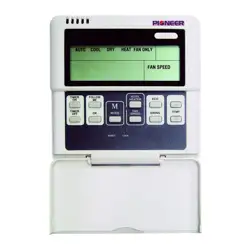
WIRED REMOTE CONTROLLER
Owner’s Manual
MODEL: KJR-12B/DP(T)-F-1
KJR-12B/DP(T)-E-1A
KJR-12B/DP(T)-E-2
IMPORTANT NOTE:
Read this manual carefully before
installing or operating your wired
remote controller. Make sure to save
this manual for future reference.
1
1. Remote Control Buttons ......................................... 01
2. LCD Screen ............................................................ 04
3. Basic Functions ....................................................... 05
4. Troubleshoot your remote control ............................15
Table of Contents
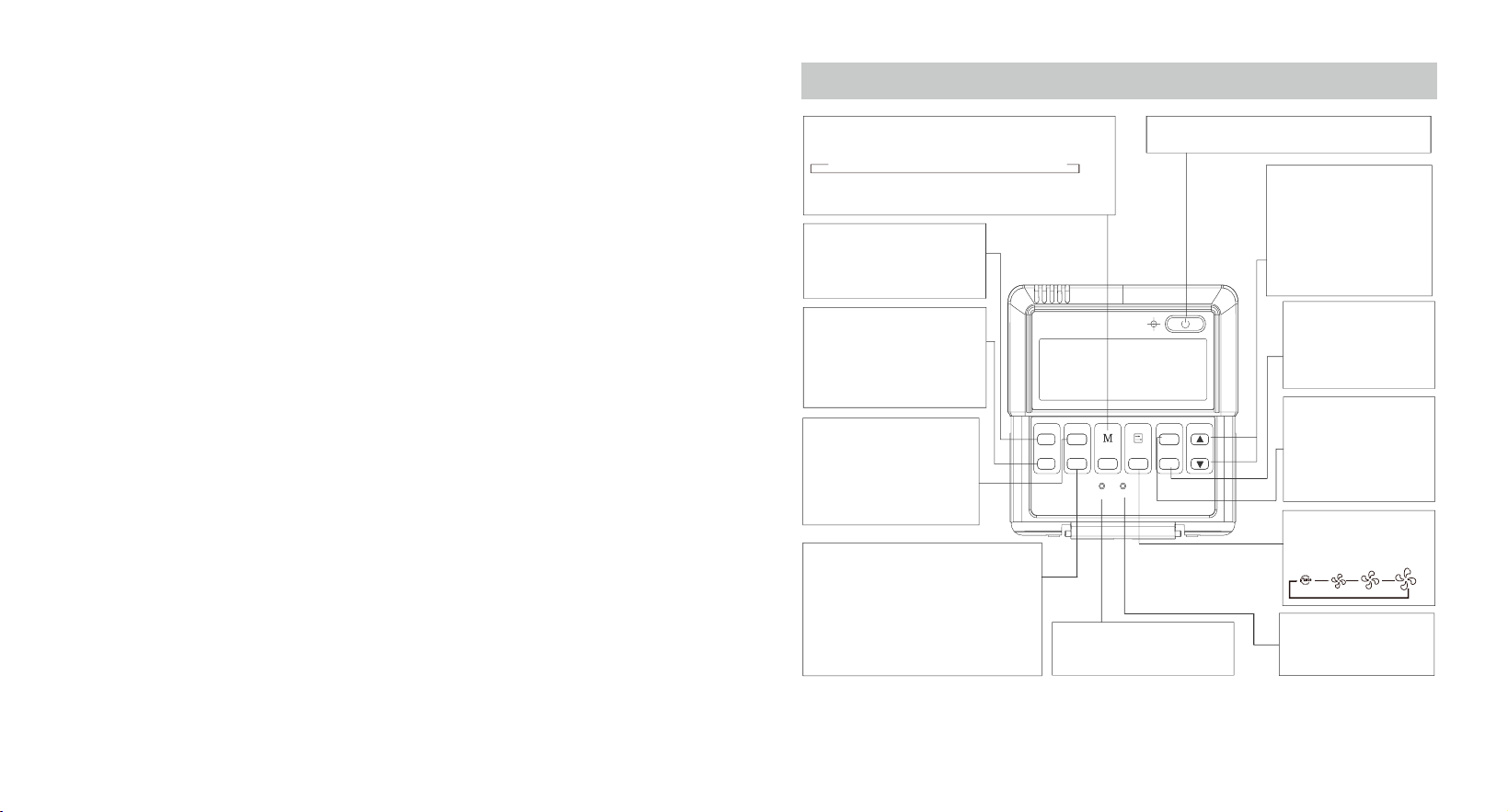
Remote Control Buttons
MODE BUTTON
TIMER ON BUTTON
FOLLOW ME BUTTON
TIMER OFF BUTTON
AUXILIARY ELECTRICAL HEATER
RESET BUTTON
ON/OFF BUTTON
ADJUST BUTTON
SWING BUTTON
ECONOMY BUTTON
FAN SPEED BUTTON
LOCK BUTTON
TIMER
ON
TIMER
OFF
FOLLOW
ME
AUXIL
HEATER
MODE
RESET
LOCK
FAN SPEED
ECO
SWING
TEMP
• Used to select the operating mode
• For cooling-only units, there is no
HEAT function.
• Used to automatically
turn on the air conditioner
at a specif ied time.
• Used to automatically
turn o the air condi-
tioner at a specif ied
time.
• Allows the remote
control to act as a remote
thermostat and relay
temperature information
from its current location.
• The Auxiliary Electric Heater
warms up the unit in cold
climates.
• If pressed during HEAT mode,
the electric heater function
becomes ineective.
• Used to restore the system
to its default settings.
• Used to start/stop the air conditioner.
• The UP (
▲)
and DOWN (▼
)
buttons are used to adjust
the temperature.
• Press these two buttons at
the same time to switch
between Celsius and
Fahrenheit (some models)
• The SWING button starts
and stops the louver
movement and sets the
desired airow direction.
• Used to activate/deacti-
vate ECONOMY Mode, in
which the unit maintains
a comfortable tempera-
ture during sleeping hours.
• Used to select the
fan speed.
• Used to lock/unlock
the current setting.
Low M ed .
High
AUTO COOL DRY HEAT FAN
→→→
→
Fig. 1
23
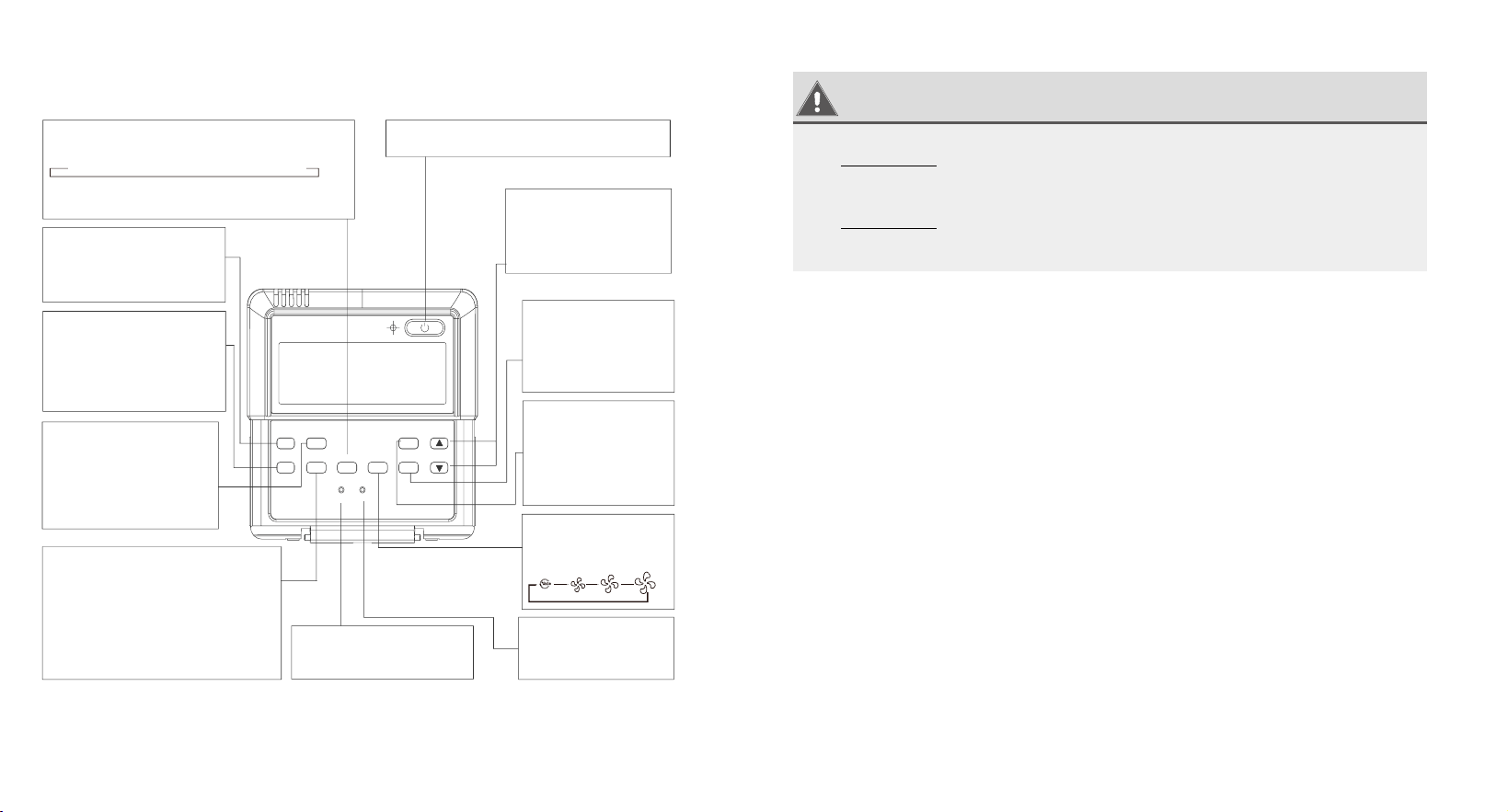
MODE BUTTON
TIMER ON BUTTON
I-FEEL BUTTON
TIMER OFF BUTTON
HEATER BUTTON
RESET BUTTON
ON/OFF BUTTON
ADJUST BUTTON
SWING BUTTON
SLEEP BUTTON
FAN SPEED BUTTON
LOCK BUTTON
TIMER
ON
TIMER
OFF
I-FEEL
HEATER
MODE
RESET
LOCK
FAN SPEED
SLEEP
SWING
TEMP
• Used to select the operating mode
• For cooling-only units, there is no
HEAT function.
• Used to automatically
turn on the air conditioner
at a specif ied time.
• Used to automatically
turn o the air condi-
tioner at a specif ied
time.
• Allows the remote
control to act as a remote
thermostat and relay
temperature information
from its current location.
• The Heater warms up the unit
in cold climates.
• If pressed during HEAT mode,
the electric heater function
becomes ineective.
• Used to restore the system
to its default settings.
• Used to start/stop the air conditioner.
• The UP (
▲)
and DOWN (▼
)
buttons are used to adjust
the temperature.
• The SWING button starts
and stops the louver
movement and sets the
desired airow direction.
• Used to activate/deacti-
vate SLEEP Mode, in
which the unit maintains
a comfortable tempera-
ture during sleeping hours.
• Used to select the
fan speed.
• Used to lock/unlock
the current setting.
Low M ed .
High
AUTO COOL DRY HEAT FAN
→→→
→
Fig. 2
WARNING
•
DO NOT
remove the cover or touch the interior parts
of the remote control.
•
DO NOT use sharp or pointed objects to press the
remote control buttons.
4 5
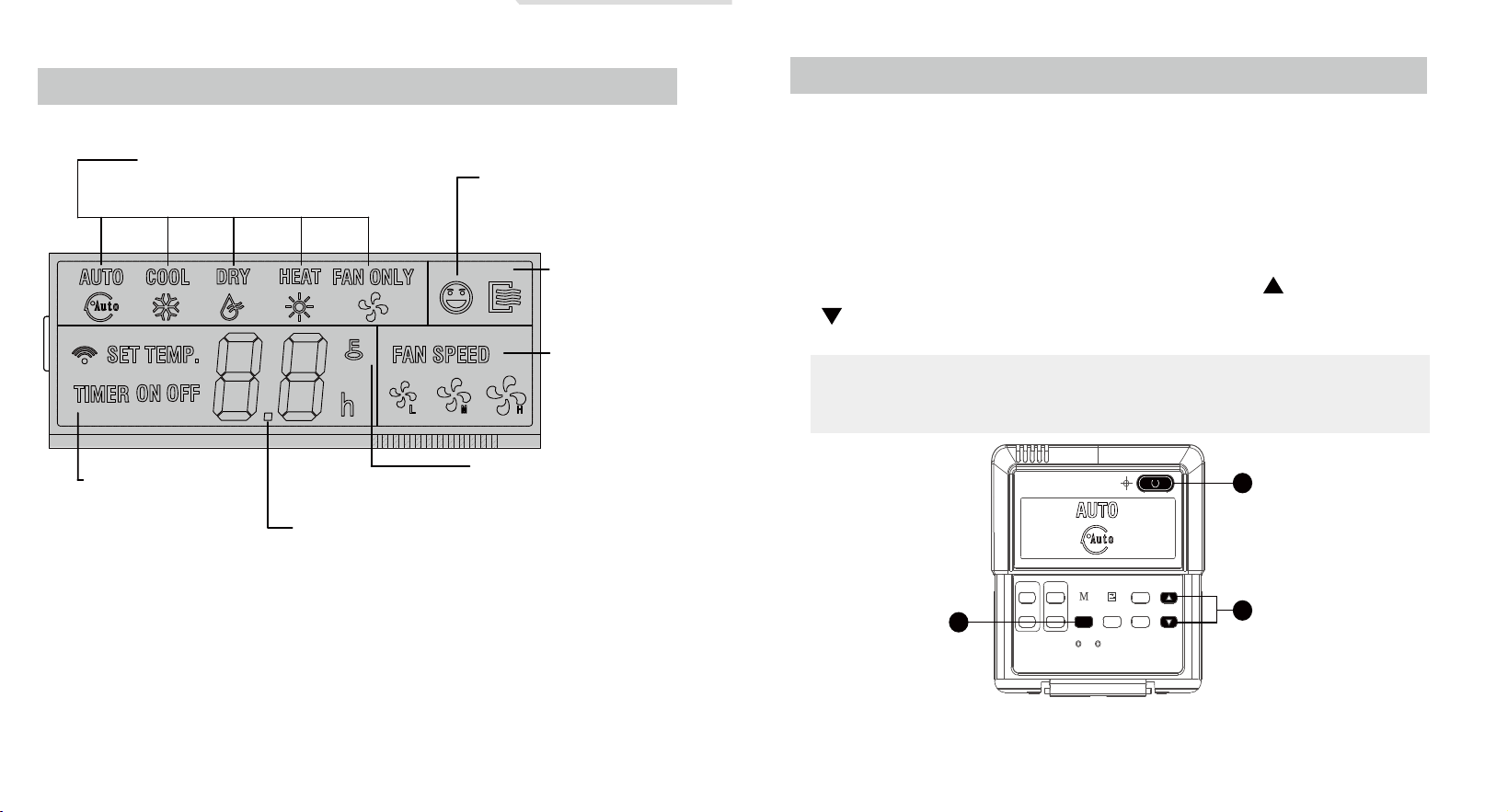
LCD Screen
1
2
1 121 12
Operation mode
Displays the selected
operating mode
Follow me
Displayed when the
FOLLOW ME feature is
activated
ON/OFF
Displayed when the
air conditioner is on
Timer
The “ON” sign lights up
when the TIMER ON
function is activated
The “OFF” sign lights up
when the TIMER OFF
function is activated
Temperature display
Displays the current set
temperature
Lock
Displayed when the LOCK
mode is on
Fan speed
Displays the
selected fan speed
Fig. 3
Basic Functions
The following are instructions for using your air conditioner’s
basic functions.
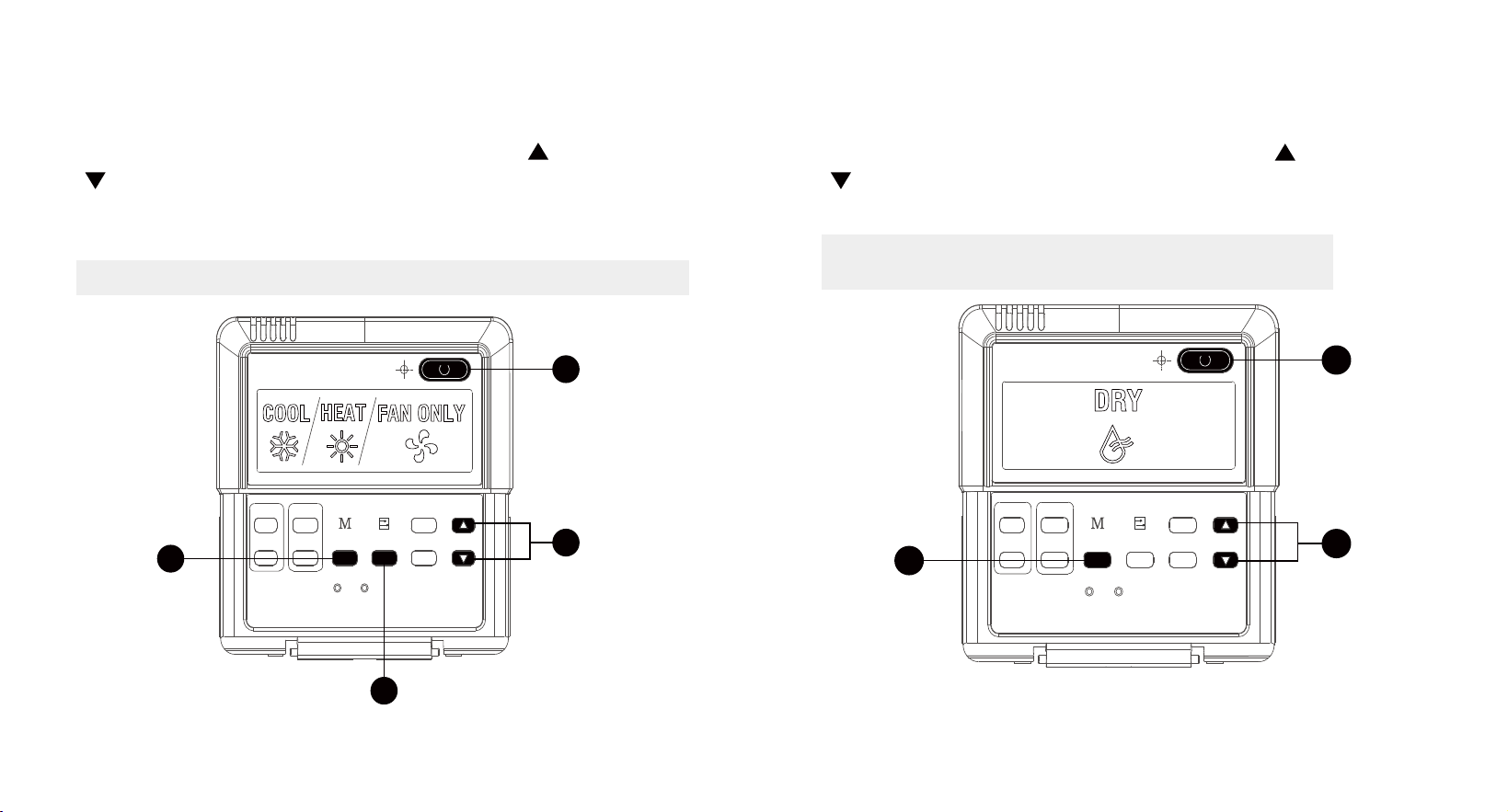
AUTO Function
In AUTO mode, the unit will automatically select the COOL,
HEAT, FAN or DRY function based on the set temperature.
1
Press the MODE button, select AUTO.
2 Set your desired temperature using the UP ( ) and DOWN
( ) buttons.
3
Press the ON/OFF button to start the unit.
NOTE: In AUTO mode, the fan speed is automatically set
on AUTO mode and cannot be changed.ECONOMY Mode
can also be activated.
TIMER
ON
TIMER
OFF
FOLLOW
ME
AUXIL
HEATER
MODE
RESET
LOCK
FAN SPEED
ECO
SWING
TEMP
1
2
3
Fig. 4
67
COOL/HEAT/FAN Function
1 Press the MODE button to select COOL, HEAT or FAN.
2 Set your desired temperature using the UP ( ) and DOWN
( ) buttons.
3 Press the FAN SPEED button to select the fan speed.
4 Press the ON/OFF button to start the unit.
NOTE: In FAN mode, the temperature cannot be changed.
TIMER
ON
TIMER
OFF
FOLLOW
ME
AUXIL
HEATER
MODE
RESET
LOCK
FAN SPEED
ECO
SWING
TEMP
1
2
4
3
Fig. 5
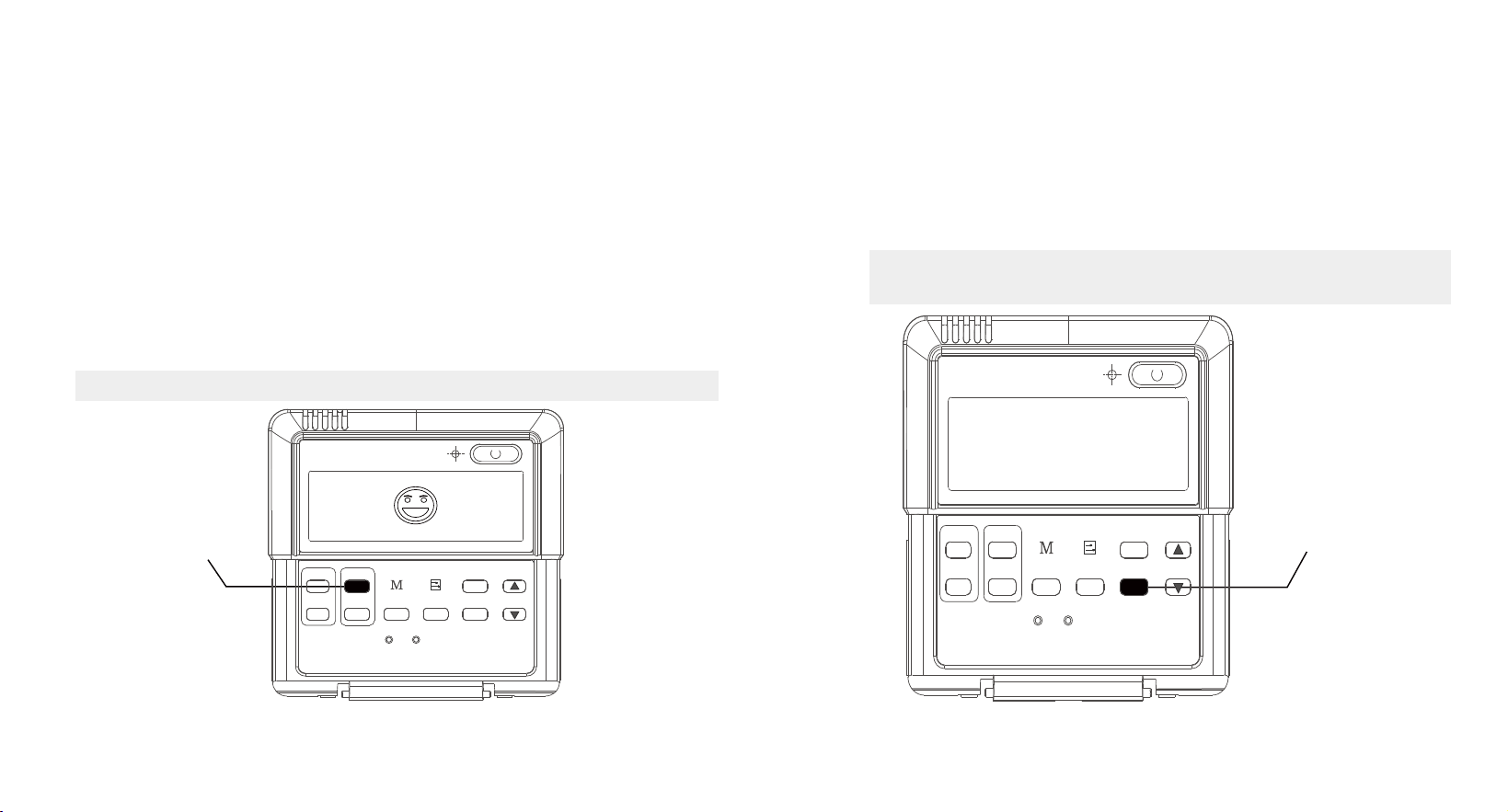
DRY Function
1 Press the MODE button, select DRY.
2 Set your desired temperature using the UP ( ) and DOWN
( ) buttons.
3 Press the ON/OFF button to start the unit.
NOTE: In DRY mode, the ECONOMY and FAN
SPEED buttons cannot be used.
TIMER
ON
TIMER
OFF
FOLLOW
ME
AUXIL
HEATER
MODE
RESET
LOCK
FAN SPEED
ECO
SWING
TEMP
1
2
3
Fig. 6
8
9
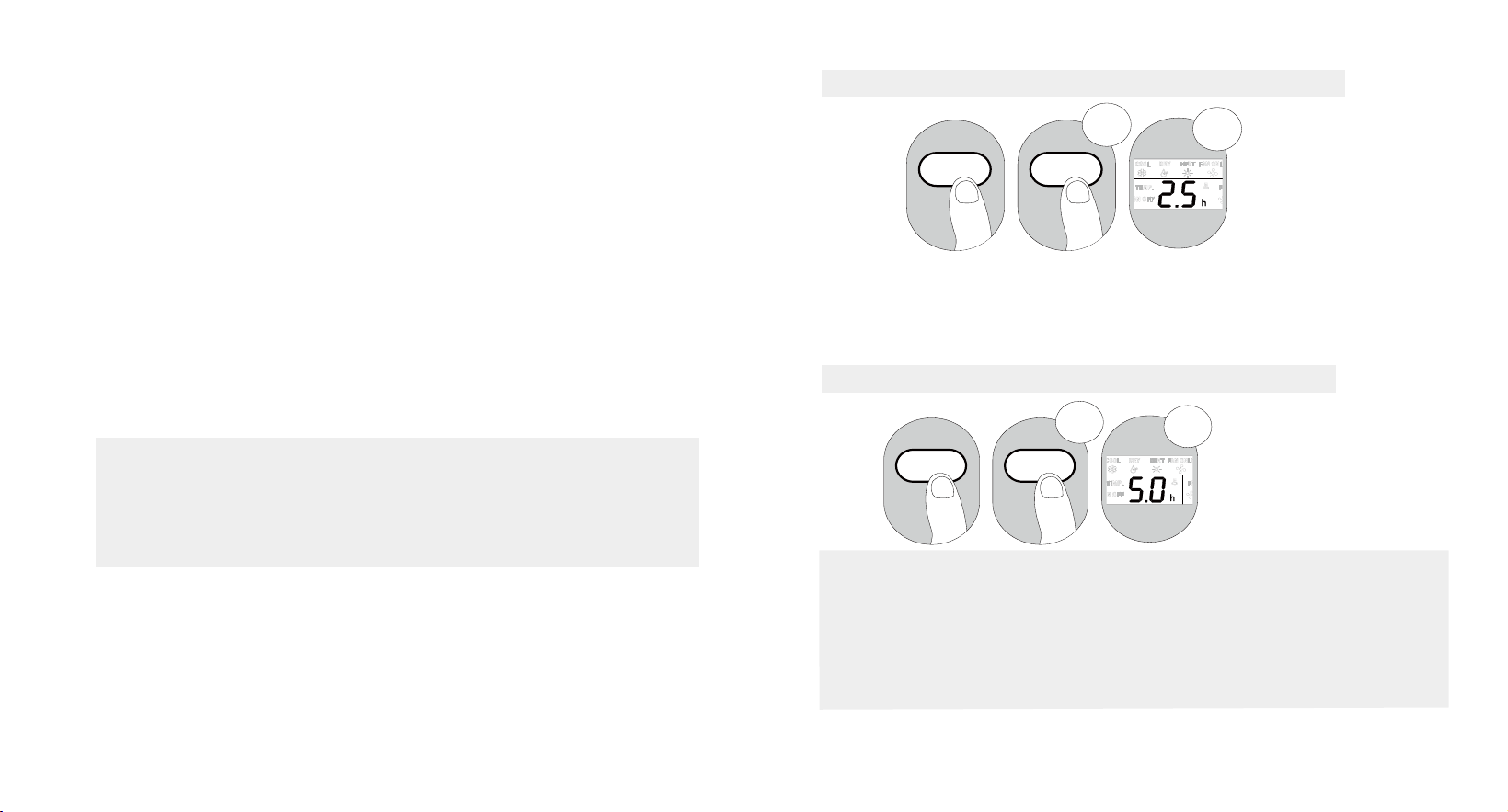
FOLLOW ME Function
The FOLLOW ME function enables the remote control to
measure the temperature at its current location. When using
AUTO, COOL, or HEAT functions, measuring ambient
temperature from the remote control (instead of from the
indoor unit itself) will enable the air conditioner to make sure
that the temperature around you is optimized for your comfort.
1
Press FOLLOW ME button to activate function. The
remote control will send temperature signal to the indoor
unit every three minutes.
2 Press FOLLOW ME button again to turn o this function.
NOTE: The swing function can only be used in SWING mode.
Follow Me Button
TIMER
ON
TIMER
OFF
FOLLOW
ME
AUXIL
HEATER
MODE
RESET
LOCK
FAN SPEED
ECO
SWING
TEMP
Fig. 7
Setting Air Flow Direction
1 Press the SWING button to activate the swing function.
Press this button again to set the louver in the position
you want.
2 Press and hold the SWING button for three seconds to
make the louver move continuously.
NOTE: The swing function can only be used in SWING
mode. The swing range of the louvers is 30°.
Swing Button
TIMER
ON
TIMER
OFF
FOLLOW
ME
AUXIL
HEATER
MODE
RESET
LOCK
FAN SPEED
ECO
SWING
TEMP
Fig. 8
10 11
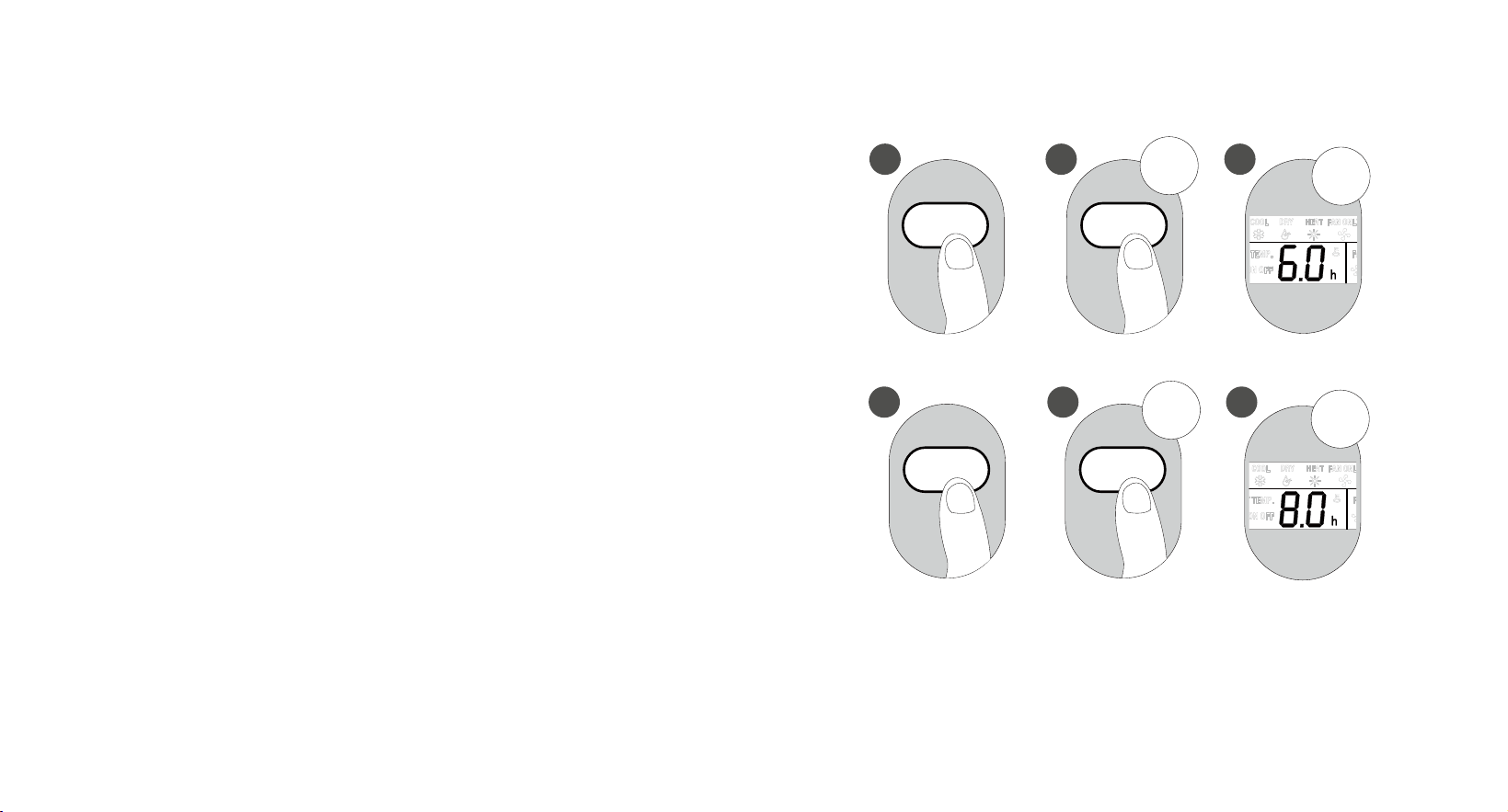
TIMER Function
Your air conditioning unit has two timer-related functions:
• TIMER ON – sets the amount of time after which the
unit will automatically turn on. (Delayed on)
• TIMER OFF – sets the amount of time after which the
unit will automatically turn on. (Delayed o)
1. TIMER ON Function
The TIMER ON function allows you to set a period of time
after which the unit will automatically turn on, such as when
you come home from work.
a Press TIMER ON button. By default, the last time period
that you set and an “H” (indicating hours) will appear on
the display.
NOTE This number indicates the amount of time after
the current time that you want the unit to turn on. For
example, if you set TIMER ON for 2 hours, “2.0 H” will
appear on the screen,and the unit will turn on after 2
hours.
:
b Press TIMER ON button repeatedly to set the time you
want the unit to turn on.
c Wait 3 seconds, then the TIMER ON function will be
activated. The digital display on your remote control will
then return to the temperature display.
Example: Setting unit to turn on after 2.5 hours
3 sec
1
2
x5
TIMER
ON
TIMER
ON
2.
TIMER OFF Function
The TIMER OFF function allows you to set a period of time
after which the unit will automatically turn o, such as
when you wake up.
Example: Setting unit to turn on after 5 hours
NOTE: When setting the TIMER ON or TIMER OFF functions,
up to 10 hours, the time will increase in 30 minute
increments with each press. After 10 hours and up to 24, it
will increase in 1 hour increments. The timer will revert to
zero after 24 hours. You can turn o either function by
setting its timer to “0.0 H.”
3
sec
x10
TIMER
OFF
TIMER
OFF
1
2
Fig. 9
Fig. 10
12 13
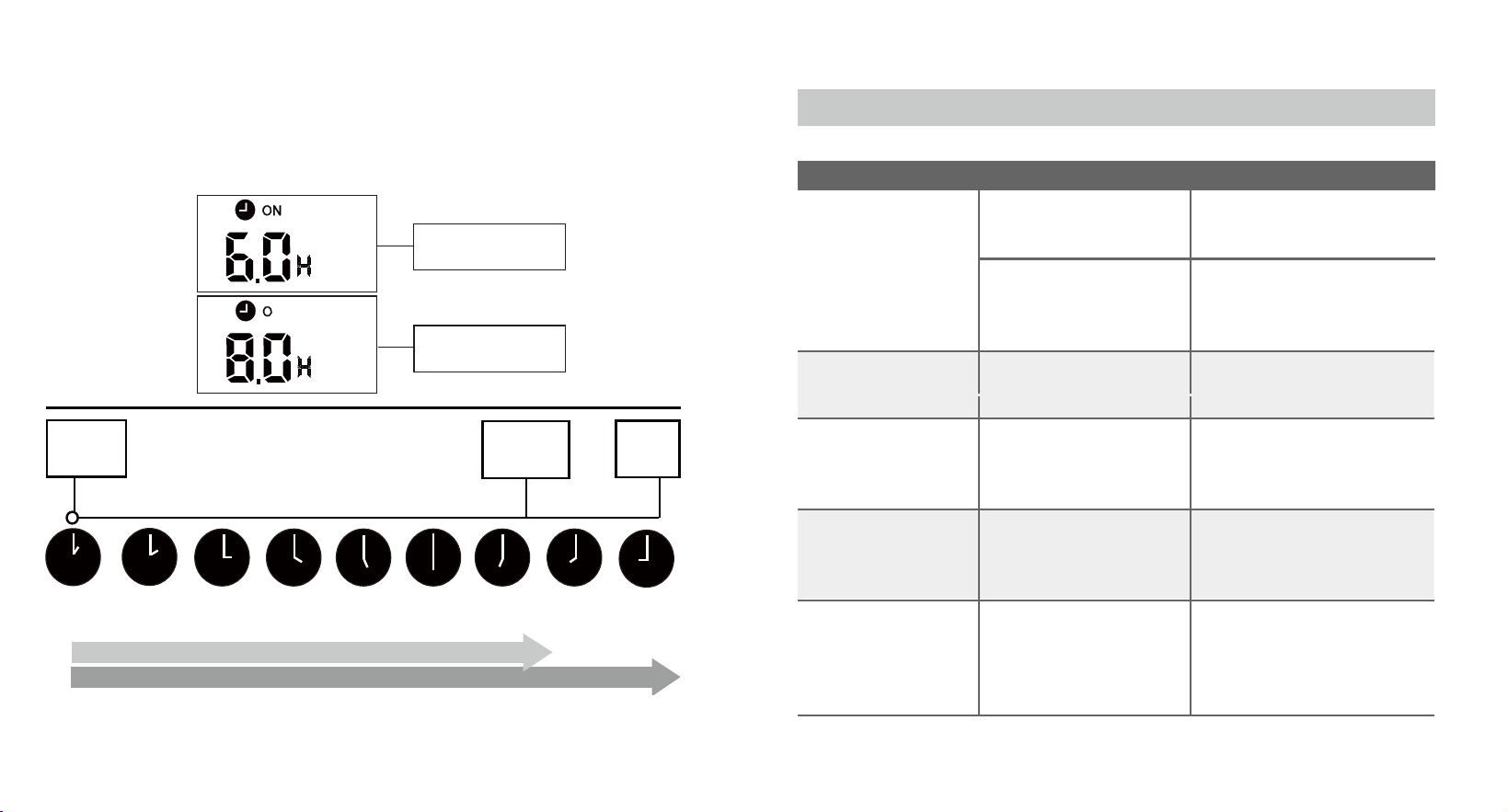
Setting both TIMER ON and TIMER OFF at the same time
(Combined Timer Function)
Keep in mind that the time periods you set for both functions
refer to hours after the current time. For example, say that
the current time is 1:00 PM, and you want the unit to turn
on automatically at 7:00 PM. You want it to operate for 2
hours, then automatically turn o at 9:00 PM.
Do the following:
1.
Press TIMER ON button. The last TIMER ON setting will
appear.
2. Press TIMER ON button repeatedly until “6.0 H” is
displayed on remote control. (6 hours after 1:00 PM,
which is 7:00 PM.)
3. Wait 3 seconds, and the TIMER ON function will be
activated.
4.
Then press TIMER OFF button. The last TIMER OFF
setting will appear.
5. Press TIMER OFF button repeatedly until “8.0 H” is
displayed on remote control. (8 hours after 1:00 PM,
which is 9:00 PM.)
6.
Wait 3 seconds, and the TIMER OFF function will be
activated.
x12
3 sec
1 2 34
TIMER
ON
TIMER
ON
1
2
Fig. 11
x16
3 sec
4 5 6
TIMER
OFF
TIMER
OFF
1
2
14 15
The unit will now turn on after 6 hours (7:00 PM) and turn o
again after 8 hours (9:00 PM). (See Fig. 11)
Fig. 12
Current
time 1PM
2PM 3PM
4PM 5PM
6PM 7PM 8PM 9PM
Timer starts
Unit turns
ON
Unit turns
OFF
6 hours later
8 hours later
Timer is set to turn ON
6 hours from current time
FF
Timer is set to turn OFF
8 hours from current time
Your remote display
Troubleshoot Your Remote Control
Symptoms Possible Causes Solution
The fan speed
cannot be
changed.
Check whether AUTO
mode is selected.
In AUTO mode, the fan speed is
set automatically and cannot be
changed.
Check whether DRY
mode is selected.
In DRY mode, the FAN SPEED
button is ineective.
The fan speed can only be changed
in COOL, FAN and HEAT mode.
The temperature
display is o
Check whether FAN
mode is selected.
In FAN mode, the temperature
cannot be adjusted.
The TIMER OFF
disappears after
a period of time
If the TIMER OFF function
was activated, the operation
may have finished.
The air conditioner will
automatically stop at the set
time and the indicator light will
turn o.
The TIMER ON
indicator disappears
after a period of time
If the TIMER ON function
was activated,the operation
may have finished.
The air conditioner will
automatically start at the set
time and the indicator light will
turn o.
There is no sound
when the ON/OFF
button is pressed.
Check whether the signal
transmitter of the remote
control is properly directed
towards the infrared signal
receiver of the indoor unit.
Point the remote control
directly at the receiver
and press the
ON/OFF
button twice.

16117100000240
QSXU-008AEN
The design and specifications are subject to change without
prior notice for product improvement. Consult with the
sales agency or manufacturer for details.
For Further Details, please go to: www.highseer.com
20160303