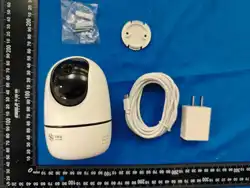

Wi-Fi swivel machine
Quick Start Guide
Scan the QR code to get the electronic version quick start guide
Please read this manual carefully before using the product and keep it properly
Download The “ iCSee” APP
Quick Con figuration
① Powered on camera , it will make a voice “ wait be configured”
after several seconds , you can make the camera pair network.
*
If the camera does not make the voice for long time , please long -press the camera reset
button to restore factory settings .
② Connect your phone to Wi-Fi network and turn on Bluetooth.
③ Login to “iCSee”and click “+”in the upper right corner, and
select “Add Device”.
④ Wait for the device to be added to be found, and click “OK” ,
complete the device network configuration as prompted.
+
+
Click the “+” but to n to
add device
FAQ
Q: How to save camera recordings?
A: 1. Local TF card storage, up to 256G , loop recording.
2. Cloud storage.
Q: How to do if the camera is not connected or offline?
A:1. Check if the camera power or network of router normally.
2.Plug the camera power to restart camera .
3.Restore the camera to factory settings .
Q: Does it support 5G band routers?
A:If 5G band and 2.4 G band of your router are the same
connection hotspot. It can be connected directly. If 5G and 2.4 G
are not the same hotspot , connect your phone to Wi-Fi in the
2. 4 G band for network configuration .
Statement
1. This manual is only used as a guide for relate d produc t s, and may be di fferent
fr o m the ac tua l pro du ct , pl ea se refer to the actual pr o d uc t. It is rec ommend ed
tha t you us e thi s manu al un d e r the guidan ce of a profe ssional.
2. This produc t is an Inter n et product, the mobile phone cli ent and devic e
firmw arewi ll be updated fro m tim e to time , if ther e is an upda te, pl ease update
and upgrad e online.
Des c ript ion of Haz a r do u s Ma t erial Co ntents
Component
Hazardous substances and elements
Lead
(Pb )
Mercu r y
(Hg )
Ca dmi u m
(Cd )
Hex av a l ent
chro m i u m
(Cr (VI ) )
Pol
i
b
p
rom
hen
i
n
y
l
a
s
ted
(PBB)
P
d
i
o
p
l
r
n
o
y
m
le
i
n
t
a
h
te
er
(PBD E)
Metal elements
Plastic elements
Glass elements
Circuit board
Power cable
Annex
This for m is pr e pared in accorda nc e with SJ/ T 1136 4 - 201 4.
It mea ns that the co n t en t of the ha z a rd o u s su b st an c e in al l hom oge neous mate rials of th e
part is below the limit requireme nts speci fi ed in GB/T 26572-20 11.
It m ea n s th a t the co n t en t of the haza r d o u s subst a n c e in at lea s t one of the homog e n e ous
mate ri a l s o f the part exc eeds the limit req u ireme n t s speci fi ed in GB/ T 26572-20 1 1, At pres ent ,
th e r e is no mat u r e al t e rn a t iv e in the ind u s t r y, whi c h meets the environ m e nt al pro t e c tion
require ment s of the EU RoHS direct i ve.
Product Warranty Statement
Thank you for purchasing our products, in order to protect the
rights and interests of the buyer, please fill in this card carefully
and read the following warranty terms carefully.
1. Please kee p this warra nty card prope rly, if the warr anty service card is lost, it will
not be reissued. Please be sure to ke e p the invoice or a copy or re leva n t valid
proof of purc h a se, if you ar e unable to provide a valid pro o f of purchase, the date
of the produc t warran ty period wil l be based on the date of the ca me r a's
man ufactur e .
2. This warrant y card must be provi d ed at the sa me time as th e warranty.
3. The information filled in this warranty card is true, othe rwise it will be invalid.
4. Within 12 mo nths from the sale of this produ c t, if the har dw are failure occurs
unde r no rmal use, fre e afte r -sale s mainten ance servic e can be obtai ned, and the
accessories are guara nt eed for six mont hs (if it excee ds six months or is dam aged
by itself, it must be pu rchas ed separately).
The Company shall have the right to charge for the maintenance
service if the following factors are applied:
1. Due to natural disa sters( floods, fires, earth quake s , li gh tnin g strikes, ty ph oons,
et c .), irre si stible extern a l forc e s or carele ss use of man-ma d e operations
Dama ges caused .
2. Di sass emb le, re p ai r or se nd the pro duct to a non-ce rti fied mai n tenanc e point
for in sp e ctio n and main tenan c e.
3. The com pany's warran ty ident i fi cat i on la bel is tor n or unrecog n izable,
the warran t y servic e card is alt ered or does not match the produc t.
4. Other probl e ms and failure s ca used by abnorm al use.
Pr o d uct warrant y ca rd
Product
name
Model
Where
to buy
Date of
purchase
ID
Dealer
Order
number
Cause of
the failure
Name
Contact
number
Contact
address
Warranty period: One year, this warranty card is applicable to the series
of products you purchased from our company.
① Scan the QR code or search “ iCSee” in
the App store to download.
② Open the “ iCSee” and complete user
registration as prompted.
*If th e devi c e do e s not su ppo r t Blu e to oth pa iri n g , pl ea se
configu re it ac c ord ing to th is metho d .
① Connect your phone to Wi-Fi network .
② Login to “ iCSee” and click “ +” in the upper right corner, and
select “Add Device” .
③ Select “Wi-Fi Camera” .
④ Complete the device network configuration as prompted.
Registe
United States
+1
NEXT
+
+
Click the “+” but to n to
add device
Sear ch for avai la ble
Add device manually
Other ways to con figure
network and add device
Canc el
OK
Visitor Login
Register
We lc ome
!
Devi ces in the queue:
1 dev ices

FCC Warning
15.19 Labeling requirements.
This device complies with part 15 of the FCC
Rules. Operation is subject to the following
two conditions: (1) This device may not
cause harmful interference, and (2) this
device must accept any interference received
, including interference that may cause
undesired operation.
15.21 Information to user.Any Changes or
modifications not expressly approved by
the party responsible for compliance could
void the user's authority to operate the
equipment.
15.105 Information to the user.Note: This
equipment has been tested and found to
comply with the limits for a Class B digital
device, pursuant to part 15 of the FCC Rules.
These limits are designed to provide
reasonable protection against harmful
interference in a residential installation. This
equipment generates uses and can radiate radio
frequency energy and, if not installed and used in
accordance with the instructions, may cause harmful
interference to radio communications. However,
there is no guarantee that interference will not
occur in a particular installation. If this equipment
does cause harmful interference to radio or
television reception, which can be determined by
turning the equipment off and on, the user is
encouraged to try to correct the interference by one
or more of the following measures:
-Reorient or relocate the receiving antenna.
-Increase the separation between the equipment and
receiver.
-Connect the equipment into an outlet on a circuit
different from that to which the receiver is connected.
-Consult the dealer or an experienced radio/TV
technician for help.
FCC RF Radiation Exposure Statement:
1. This Transmitter must not be co-located or
operating in conjunction with any other
antenna or transmitter.
2. This equipment complies with RF radiation
exposure limits set forth for an uncontrolled
environment.
3. This equipment should be installed and operated
with minimum distance 20cmbetween
the radiator and your body.