QUICK GUIDE
GUIDE RAPIDE · KURZANLEITUNG
GUIDA RAPIDA · GUÍA RÁPIDA
DEUTSCH
ITALIANO
ESPAÑOL
ENGLISH
FRANÇAIS
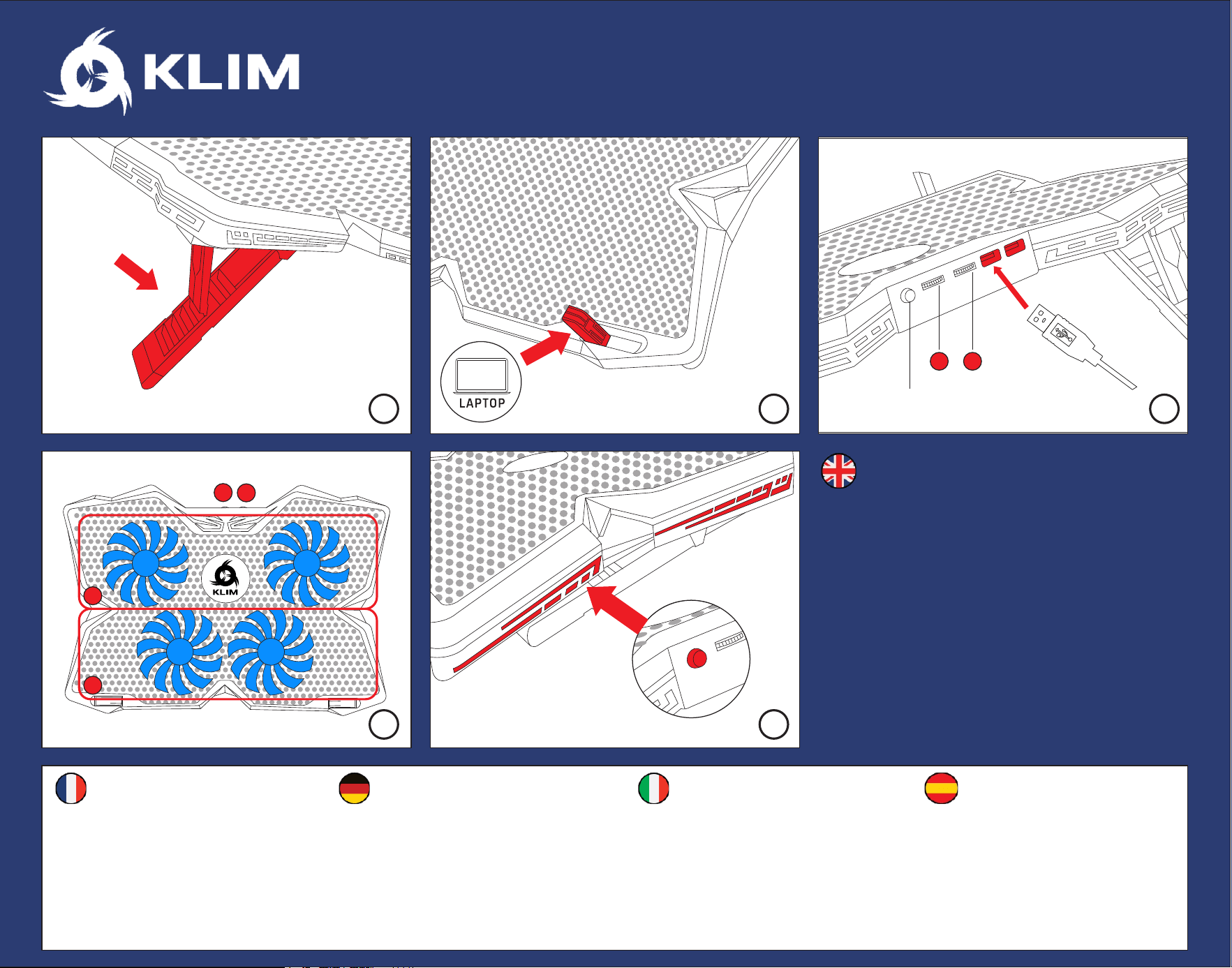
1. Déployez les pieds pour régler l'inclinaison.
2. Placez le PC sur le refroidisseur et relevez les
loquets pour qu'il ne glisse pas.
3. Connectez-le au refroidisseur.
4. Réglez la vitesse des ventilateurs avec les
molettes.
5. Pressez le bouton RGB pour régler l'éclairage.
Pressez-le longuement pour l'allumer/l'éteindre.
1. Hebe die hinteren Halterungen an, um die
Neigung einzustellen.
2. Lege den Laptop auf den Kühler und hebe die
vorderen Laschen an, um ihn in Position zu halten
3. Verbinde den Kühler mit deinem Computer
4. Stelle die Lüftergeschwindigkeit mit den Reglern ein
5. Drücke die RGB-Taste, um die Seitenbeleuchtung zu
ändern. Halte sie gedrückt, um sie ein-/auszuschalten.
1. Rialza i supporti per impostare l'inclinazione.
2. Posiziona il portatile sulla base e ruota I
fermi frontali per fermarlo.
3. Connetti la base di raffreddamento al
computer.
4. Usa le rotelline per regolare la velocità.
5. Premi il pulsante RGB per cambiare l'effetto
delle luci.
Tieni premuto per accendere/spegnere.
1. Levanta las patas para fijar la inclinación.
2. Coloca el portátil en la base y levanta los
topes frontales para que no se mueva.
3. Conecta la base a tu ordenador.
4. Usa las ruedas para controlar la velocidad
de los ventiladores.
5. Pulsa el botón RGB para cambiar las luces
laterales. Mantenlo pulsado para
encenderlas o apagarlas.
1. Lift the rear brackets to set the inclination
2. Place the laptop on the cooler and lift the
frontal tabs to keep it in place
3. Connect the cooling pad to your computer
4. Use the dials to control fan speed
5. Press the RGB button to change the side
lights. Press and hold to turn them on/off.
RGB
1 2
1
2
1
2
R
G
B
1 2 3
4 5
www.klimtechs.com