
Page
1
of
28
Hong Qiangxing (Shenzhen) Electronics Limited.
Wireless TENS&EMS&NMES Heating Stimulator, Models: SM9125
User Manual
Wireless TENS&EMS&NMES Heating Stimulator
Model: SM9125
Hong Qiangxing (Shenzhen) Electronics
Limited.
User Manual
(Version: V1.0, File No.: HQX-TE-UM-002)

Page
2
of
28
Hong Qiangxing (Shenzhen) Electronics Limited.
Wireless TENS&EMS&NMES Heating Stimulator, Models: SM9125
User Manual
Contents
Content
Foreword............................................................................................................................... 3
1.
SAFETY GUIDE ........................................................................................................................ 3
1.1
Warnings..........................................................................................................................3
1.2
Precautions...................................................................................................................... 4
1.3
Contraindications............................................................................................................. 5
1.4
Adverse Reactions...........................................................................................................6
1.5
Special Population........................................................................................................... 6
1.6
Intended Use / Indications for Use...................................................................................6
2.
DEVICE DESCRIPTION............................................................................................................7
2.1
General Description......................................................................................................... 7
2.2
Device Drawing ................................................................................................................7
2.3 Specifications.................................................................................................................12
3.
INSTRUCTION OF USE..........................................................................................................16
3.1
Preparation before use Step 1: Charging ...................................................................... 16
3.2
Treatment site guidance................................................................................................ 19
3.3
Electrode Pads Guideline.............................................................................................. 20
4.
CLEANING AND MAINTENANCE.......................................................................................... 21
5.
TRANSPORT AND STORAGE............................................................................................... 21
6.
TROUBLE SHOOTING........................................................................................................... 22
7.
DISPOSAL...............................................................................................................................22
8.
WARRANTY CARD.................................................................................................................23
9.
LABEL SYMBOLS...................................................................................................................24
10.
EMC DECLARATION ........................................................................................................... 25

Page
3
of
28
Hong Qiangxing (Shenzhen) Electronics Limited.
Wireless TENS&EMS&NMES Heating Stimulator, Models: SM9125
User Manual
Foreword
Thank you very much for your purchase of Wireless TENS&EMS&NMES Heating Stimulator.
Before using the device, please read the User’s manual carefully and pay attention to the
SAFETY GUIDE, so that you can operate it correctly for best results. The User’s manual
should be kept for your future reference.
1.
SAFETY GUIDE
Please read the entire instructional manual before using the Wireless TENS&EMS&NMES
Heating Stimulator. It will give you a better understanding of how the product works. If you are
not sure which kind of medical condition, you should preclude yourself from using this device,
consult your Chiropractor, Physiotherapist, Osteopath or Medical practitioner.
1.1
Warnings
The patient should be the intended operator.
The long-term effects of chronic electrical stimulation are unknown.
Stimulation should not be applied over the carotid sinus nerves, particularly in patients with
a known sensitivity to the carotid sinus reflex.
Stimulation should not be applied over the neck or mouth. Severe spasm of the laryngeal
and pharyngeal muscles may occur and the contractions may be strong enough to close
the airway or cause difficulty in breathing.
Stimulation should not be applied transthoracically in that the introduction of electrical
current into the heart may cause cardiac arrhythmias.
Stimulation should not be applied transcerebrally.
Stimulation should not be applied over swollen, infected, or inflamed areas or skin
eruptions, e.g., phlebitis, thrombophlebitis, varicose veins, etc.
Stimulation should not be applied over, or in proximity to, cancerous lesions.
This device must not be used on persons with cardiac pacemakers, implanted
defibrillator, other implanted metallic or electronic devices. Such use could cause electric
shock, burns, electrical interference, or death.
The device may cause lethal rhythm disturbances in certain susceptible individuals.
MR Unsafe – keep away from magnetic resonance imaging (MRI) equipment.
Implanted with a life-supporting medical electronic device such as an artificial heart or
lung or respirator.
In the presence of electronic monitoring equipment (e. g., cardiac monitors, ECG alarms),
which may not operate properly when the electrical stimulation device is in use.
Over areas of damaged skin, scratched areas or blisters.
Do not apply the pads to your head, face, the front and sides of the neck, the throat, or
on both sides of the thorax at the same time.
Do not share electrode pads with another person. This may cause a skin irritation or skin
infection. Individuals should have their own set of pads for personal use.
Do not leave pads attached to the skin after treatment.
Do not use the unit in the presence of a flammable anesthetic gas mixture, compressed
Oxygen or Nitrous Oxide.
If the unit is not functioning properly or you feel uncomfortable during use, stop using the
device.
Do not use for any other purpose except for what it is intended for.
Do not use the device while wearing other electronic devices as this may damage the
device.
Please keep the device from the reach of infants, children or pets, inhalation or
swallowing of small parts is dangerous and can be potentially fatal.
If you are allergic to plastic, please don’t use this device.
Long cables have the potential to strangulate, therefore, please be careful when using
cables around the neck and shoulder areas.
Do not bend or pull the end of the cord.
Do not use the device in the presence of the following:
a. When there is a tendency to hemorrhage following acute trauma or fracture.
b. Following recommendation of doctor after surgery because stimulation may
disrupt the healing process.
c. Do not use if you are pregnant.
d. Over areas of the skin that are damaged, cut, with rash or blistered.

Page
4
of
28
Hong Qiangxing (Shenzhen) Electronics Limited.
Wireless TENS&EMS&NMES Heating Stimulator, Models: SM9125
User Manual
Do not throw the batteries into fire. The batteries may explode.
The safety system for pregnancy to use electrical stimulation has not been established;
Do not use the stimulator during the pregnancy.
If you have diagnosed heart disease or have any heart problem, you should follow
precautions recommended by your physician.
If you have suspected or diagnosed epilepsy, you should follow precaution
recommended by your physician.
Do not directly Stimulate over the front of your neck or mouth. This could cause severe
muscle spasms resulting in closure of your airway, difficulty in breathing, or adverse
effects on heart rhythm or blood pressure.
Do not place pads directly over the heart. Electrical current into the heart may cause
cardiac arrhythmias.
TENS is not a substitute for pain medications and other pain management therapies.
TENS devices have no curative value.
TENS is a symptomatic treatment and, as such, suppresses the sensation of pain that
would otherwise serve as a protective mechanism.
Effectiveness is highly dependent upon patient selection by a practitioner qualified in the
management of pain patients.
Do not use over areas of skin that lack of normal sensation.
Trans thoracically in that the introduction of electrical current into the heart may cause
cardiac arrhythmias.
Please use the rated voltage required by the product label. If the supply voltage is lower
than or higher than the additional input voltage, the product will not work properly.
Use of this equipment adjacent to or stacked with other equipment should be avoided
because it could result in improper operation. If such use is necessary, this equipment
and the other equipment should be observed to verify that they are operating normally.
Use of accessories, transducers and cables other than those specified or provided by
the manufacturer of this equipment could result in increased electromagnetic emissions
or decreased electromagnetic immunity of this equipment and result in improper
operation.
Portable RF communications equipment (including peripherals such as antenna cables
and external antennas) should be used no closer than 30 cm (12 inches) to any part of
the Wireless TENS&EMS&NMES
Heating Stimulator
, including cables specified by
the manufacturer. Otherwise, degradation of the performance of this equipment could
result.
The replacement of lithium batteries by inadequately trained personnel could result in
hazard.
DO NOT USE THIS DEVICE DURING THESE ACTIVITIES
When in the bath or shower;
The device should not be used while asleep or if intending on falling asleep while
treatment is still occurring.
You have open wounds, rashes, swollen, red, infected or inflamed areas or skin
eruptions; (e. g., phlebitis, thrombophlebitis, varicose veins); On top of, or in proximity to,
cancerous lesions.
1.2
Precautions
No special training is required to use this device. However, users must have
independent reading comprehension and read this manual before using this device
Consult with your physician before using this device.
Safety of the device for use during pregnancy has not been established.
Caution should be used for patients with suspected or diagnosed heart problems.
Caution should be used for patients with suspected or diagnosed epilepsy.
Caution should be used in the presence of the following:
a. When there is a tendency to hemorrhage following acute trauma or fracture;
b. Following recent surgical procedures when muscle contraction may disrupt the
healing process;
c. Over the menstruating or pregnant uterus; and
d. Over areas of the skin which lack normal sensation.
Some patients may experience skin irritation or hypersensitivity due to the electrical
stimulation or electrical conductive medium. The irritation can usually be reduced by using

Page
5
of
28
Hong Qiangxing (Shenzhen) Electronics Limited.
Wireless TENS&EMS&NMES Heating Stimulator, Models: SM9125
User Manual
an alternate conductive medium, or alternate electrode placement.
The device should be kept out of the reach of children.
The device should be used only with the leads and electrodes recommended for use by the
manufacturer.
The device should not be used while driving, operating machinery, or during any activity in
which involuntary muscle contractions may put the user at undue risk of injury.
If you feel abnormal symptoms during the treatment, please stop using the unit and
consult a doctor before resuming treatment.
Against servicing and maintenance while the ME EQUIPMENT is in use
During the treatment, if you wish to move the electrodes to another part of your body,
switch OFF the unit first, and then move the electrodes before resuming treatment.
If you have any problems on setting, maintaining or using this device, please contact
manufacturer or customer service. Please report to manufacturer if the device
malfunctions. Don’t open or repair the device by yourself.
If damage is found to the device casing, please do not use the device and contact the
manufacturer.
Cotton, wool and dust may affect the performance of the unit, please use a soft cloth to
clean the device as needed.
Do not place the device in direct sunlight to avoid affecting its performance.
Please use the device according to the requirement of the Users’ manual, otherwise the
effectiveness of the device will be affected.
Please use accessories that are specified/authorized by manufacturer only. The use of
unauthorized accessories may cause damage to the unit or danger to the
operator/patient.
Use/storage environment, cotton wool, dust, lighting (including sunlight) and other effects
on the equipment
Do not bend or fold the pads frequently, this may cause the pads to not function properly.
Store the pads on the plastic pad holder or on the protective clear plastic sheet when not
in use.
Do not use the unit in areas of high humidity, such as the bathroom or in the shower as
this may cause damage to the unit.
During treatment ensure that metallic items with conductive capabilities such as
necklaces, belts, rings etc. are kept away from the electrodes.
Make sure the wire is securely plugged into the device, the wires are well connected,
and the pads are stuck tightly on the skin area where you wish to treat to ensure
effective therapy. Loose pads on the skin can cause uncomfortable pins and needle
sensations.
Replace the cord when it was broken or damaged.
You may experience skin irritation or hypersensitivity due to the electrical stimulation or
electrically conductive medium (gel).
Electrode placement and simulation settings should be based on the practitioner.
Should be used only with the leads and electrodes recommended for use by the
manufacturer.
Should not use while driving, operating machinery, or during any activity in which in
voluntary muscle contractions may put the user at undue risk of injury.
Do not use to treat one region for extended periods of time (more than 40 minutes a
session, up to 3 times/day) or muscles in that region may become exhausted and sore.
Before operation, ensure that the electrode gel is in good contact with the skin. Improper
attaching to the motor may cause excessive local current density.
WARNINGS AND PRECAUTIONS REGARDING THE PADS
Apply pads to normal, healthy, dry clean skin only. Do not apply pads onto wound or
damaged skin because it will be painful and may disrupt the healing process.
If you experience any skin irritation or redness after using this device, do not continue
stimulating in that area until skin has returned to normal.
Changes or modifications to this unit not expressly approved by the party responsible for
compliance could void the user’s authority to operate the equipment.
1.3
Contraindications
For the following patients, they should not use the device:
Patients who have a cardiac pacemaker, implanted defibrillator, or other implanted

Page
6
of
28
Hong Qiangxing (Shenzhen) Electronics Limited.
Wireless TENS&EMS&NMES Heating Stimulator, Models: SM9125
User Manual
metallic or electronic device. Such use could cause electric shock, burns, electrical
interference, or death.
Patients whose pain syndromes are undiagnosed.
During pregnancy.
Infants or young children.
Those who cannot express themselves.
1.4
Adverse Reactions
You may experience skin irritation and burns beneath the stimulation electrodes applied
to the skin.
You should stop using the device and should consult with their physicians if they
experience adverse reactions from the device.
Note:
Adverse Event Report
MedWatch is the Food and Drug Administration's (FDA) program for reporting serious
reactions, product quality problems, therapeutic inequivalence/failure, and product use errors
with human medical products, including drugs, biologic products, medical devices, dietary
supplements, infant formula, and cosmetics.
If you think you or someone in your family has experienced a serious reaction to a medical
product, you are encouraged to take the reporting form to your doctor. Your health care
provider can provide clinical information based on your medical record that can help FDA
evaluate your report.
However, we understand that for a variety of reasons, you may not wish to have the form
filled out by your health care provider, or your health care provider may choose not to
complete the form. Your health care provider is NOT required to report to the FDA. In these
situations, you may complete the Online Reporting Form yourself.
You will receive an acknowledgement from the FDA when your report is received. Reports are
reviewed by FDA staff. You will be personally contacted only if we need additional information.
Submitting Adverse Event Reports to FDA
Use one of the methods below to submit voluntary adverse event reports to the FDA:
1)
Report Online at
www.accessdata.fda.gov/scripts/medwatch/index.cfm?action=reporting.home
2)
Consumer Reporting Form FDA 3500B. Follow the instructions on the form to either fax or
mail it in for submission. For help filling out the form, see MedWatchLearn. The form is
available at www.fda.gov/downloads/aboutFDA/reportsmanualsforms/forms/ucm349464.pdf
3)
Call FDA at 1-800-FDA-1088 to report by telephone
a) Reporting Form FDA 3500 commonly used by health professionals. The form is available
at www.fda.gov/downloads/aboutFDA/reportmanualsforms/forms/ucm163919.pdf
1.5
Special Population
This device should not be used by patients with:
Pacemakers, Defibrillators or extreme Cardiac Irregularities, Metals Implants or
Electronic Auxiliary Devices
Tendency toward internal Bleeding
Epilepsy
Pregnant Women
1.6
Intended Use / Indications for Use
The device (SM9125) is used for temporary relief of pain associated with sore and aching
muscles in the shoulder, waist, back, arm, leg and feet, due to strain from exercise or normal
household and work activities and also intended for symptomatic relief and management of
chronic, intractable pain and relief of pain associated with arthritis, temporary relief of pain
associated with dysmenorrhea (menstrual cramps) when used with over the-counter pain
medication for mode 3 of model SM9125.
EMS/NMES:
The device (SM9125) is used to stimulate healthy muscles in order to improve and facilitate
Page
7
of
28
Hong Qiangxing (Shenzhen) Electronics Limited.
Wireless TENS&EMS&NMES Heating Stimulator, Models: SM9125
User Manual
muscle performance.
To be used for the improvement of muscle tone and firmness, and for strengthening muscles in
the arms, abdomen, legs, feet and buttocks. Not intended for use in any therapy or for the
treatment of any medical conditions or diseases.
2.
DEVICE DESCRIPTION
2.1
General Description
Wireless TENS&EMS&NMES Heating Stimulator is pain management device with a
combination of TENS and EMS/NMES therapy technology.
TENS: The electrodes placed on the skin send small-scale, low-voltage electrical pulses to
specific nerves. The purpose is to change the way neurons send signals and prevent pain
signals from reaching the brain to relieve pain.
EMS/NMES: A powered muscle stimulator for muscle conditioning is a device used for other
than medical purposes to apply an electrical current to electrodes on a person's skin to
temporarily affect the stimulated muscle's contractile properties, force output, and/or fatigue
resistance. This device is not intended for use in patients with medical conditions and is
intended only for muscle conditioning purposes.
Model SM9125 has eight modes, each with 19 output intensities that can be adjusted. Model
SM9125 is equipped with output main unit, high-end remote control, lower-end remote control,
electrode pads and charging cable. For details, please refer to the accessory list. The main unit
has three buttons, for turning on/off the device, controlling the mode selection and output
intensity. The low-end remote control and high-end remoter control has four buttons, for turning
on/off the device, controlling the mode selection and output intensity. One remote control can
simultaneously control four main units.
2.2
Device Drawing
2.2.1 Components and Accessories List for all package is as below:
For model SM9125:
Item
Components
Function
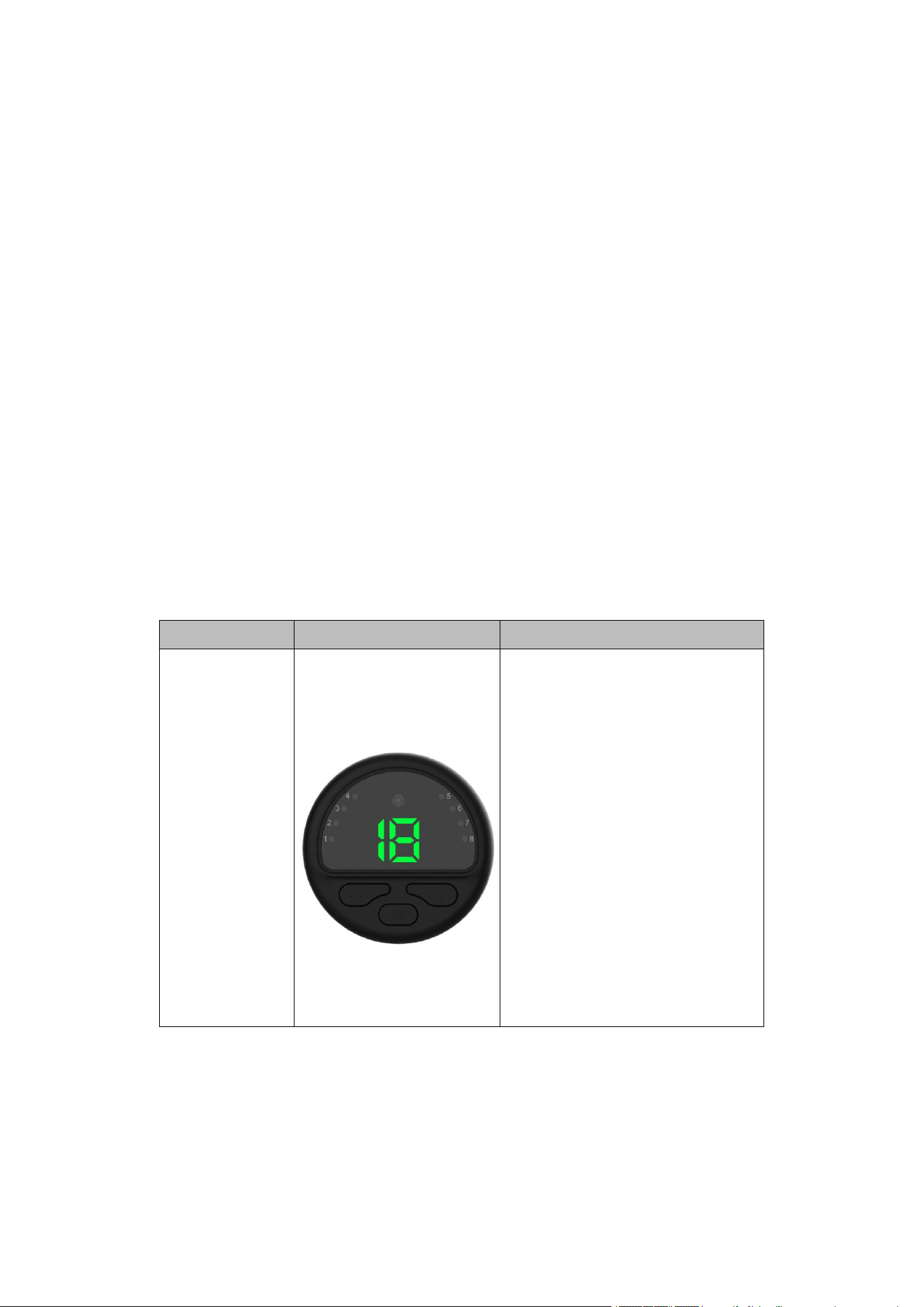
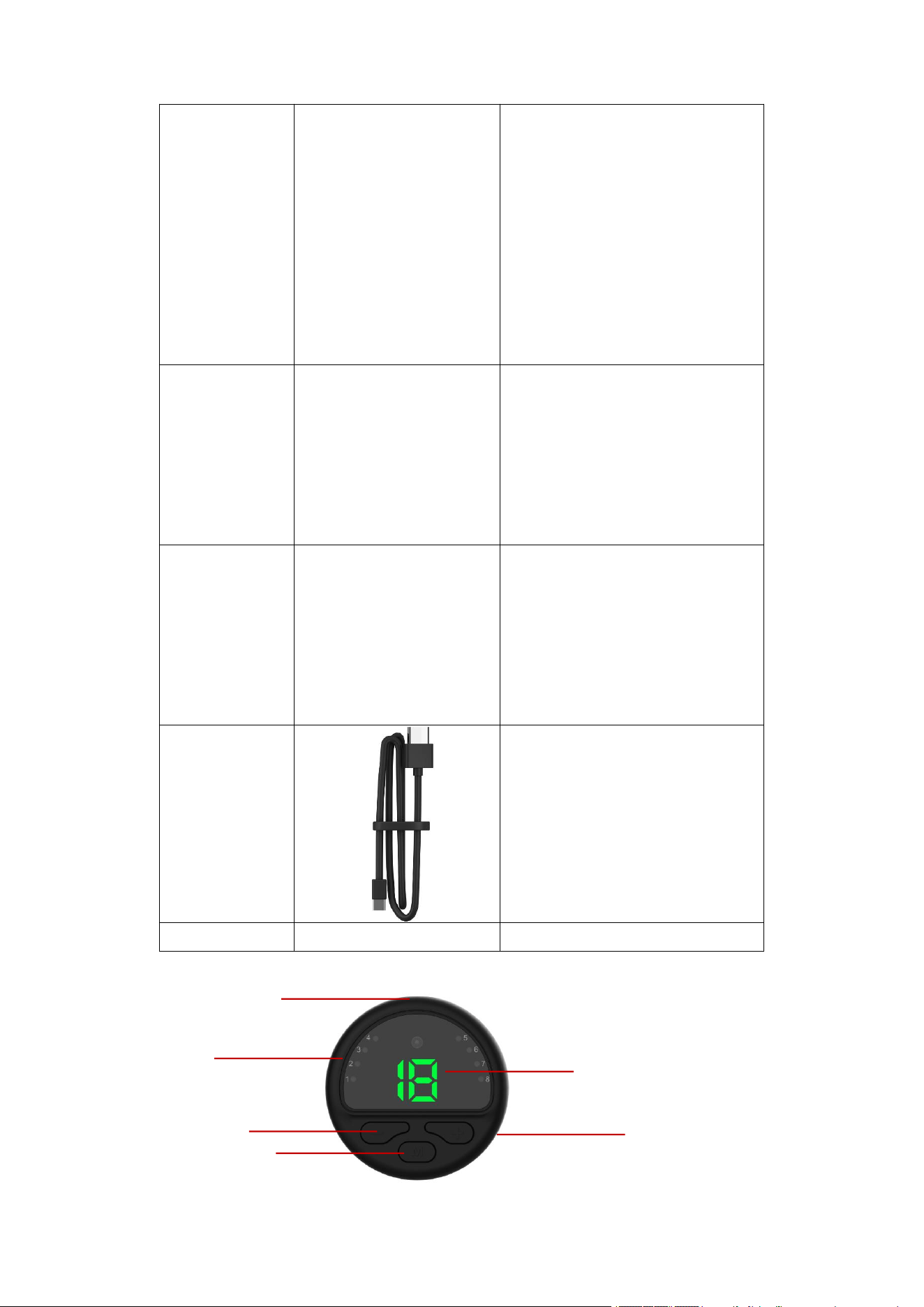
Main Unit
The main unit have three buttons,
for turning on/off the device,
controlling the mode selection and
output intensity. The main unit have
indicator lights to show selected
mode, intensity, charging status
and pairing status. There is a pair
of magnetic clasps on the back of
the device, which are used to
connect the electrode pads to
output current. In addition, there is
a charging contact point for
charging.
Page
8
of
28
Hong Qiangxing (Shenzhen) Electronics Limited.
Wireless TENS&EMS&NMES Heating Stimulator, Models: SM9125
User Manual
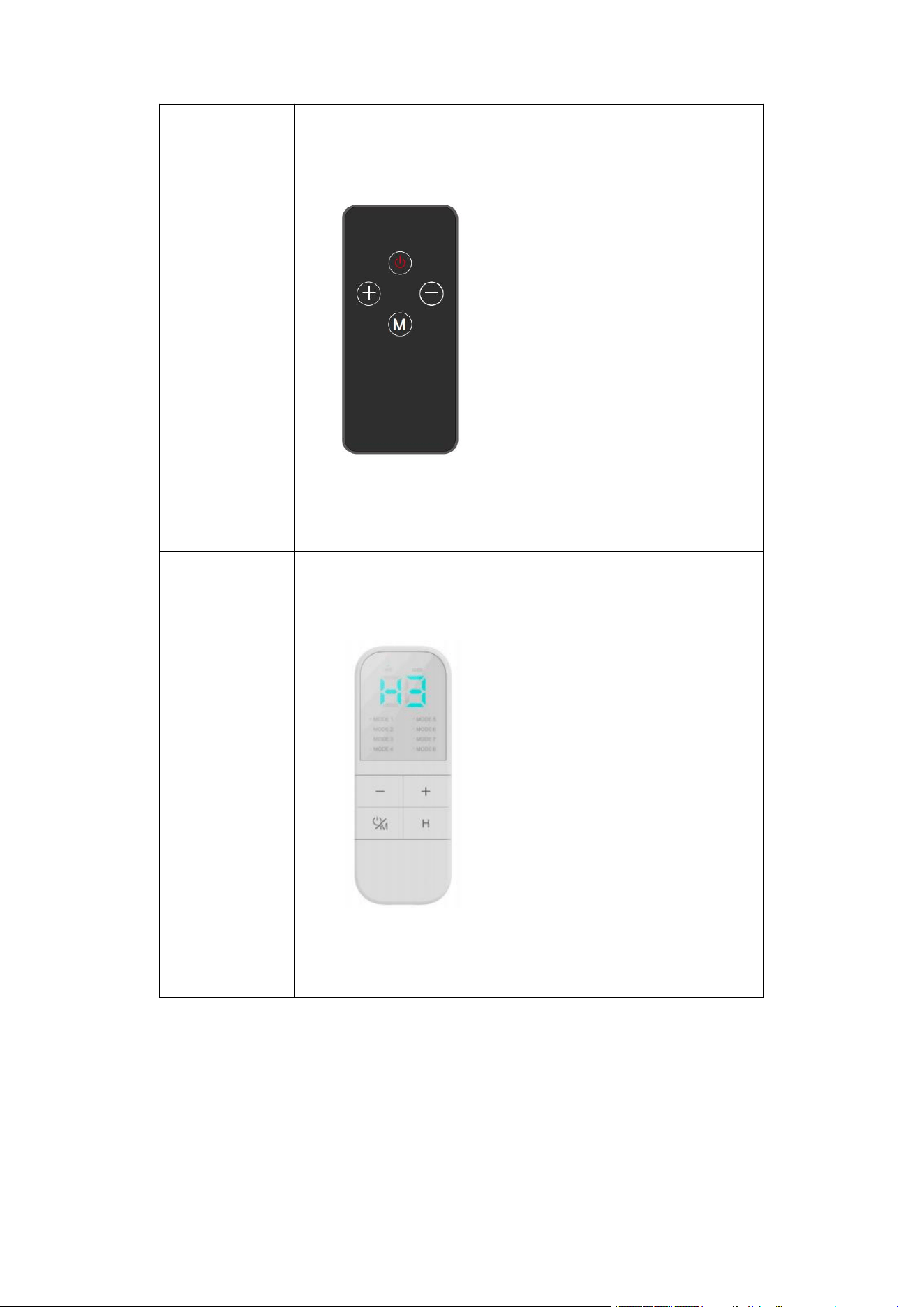
Low-end remote
control
There are four control buttons for
turning on/off the device, controlling
the mode selection and output
intensity, treatment time.
High-end remote
control
There are four control buttons for
turning on/off the device, controlling
the mode selection and output
intensity. The selected mode and
the remaining treatment time will be
displayed above the remote control.
In addition, there is a charging
contact point for charging.
Page
9
of
28
Hong Qiangxing (Shenzhen) Electronics Limited.
Wireless TENS&EMS&NMES Heating Stimulator, Models: SM9125
User Manual
Patch electrode
pad
Size:
The big electrode pad is used to
connect the main unit and stick it
to the human body for stimulation
output. The electrode pad should
be directly connected to the main
unit.
Waist electrode
pad
Size:
The waist electrode pad is used to
connect the main unit and stick it to
the human body for stimulation
output. The electrode pad should
be directly connected to the main
unit.
Foot electrode
pad
Size:
The foot electrode pad is used to
connect the main unit and stick it to
the human body for stimulation
output. The electrode pad should
be directly connected to the main
unit.
Charging cable
The USB cable is used to
connect the remote control or
main unit and the power grid to
charge main unit and remote
control.
Use Manual
/
/
2.2.2
Device Components
①
②
④
③
⑤
⑥
Page
10
of
28
Hong Qiangxing (Shenzhen) Electronics Limited.
Wireless TENS&EMS&NMES Heating Stimulator, Models: SM9125
User Manual
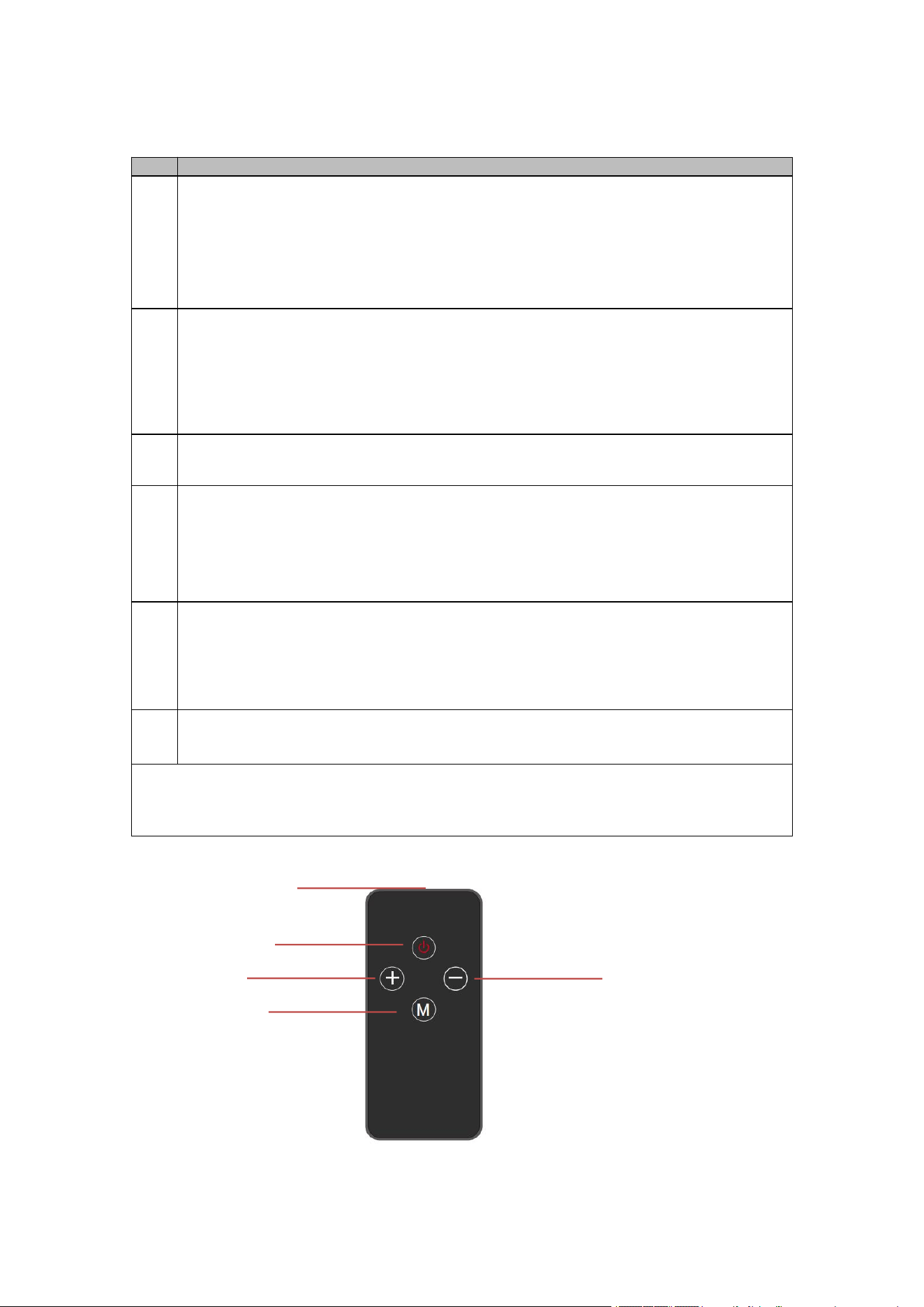
Fig. 2-1 Part Description of Main Unit
EXPLANATION
Item
Function
①
Intensity indicator light:
Indicate the selected intensity: The device has a total of 19 intensity levels, and
each intensity level has a corresponding intensity indicator light. When a certain
intensity level is selected, the corresponding intensity level indicator light will turn
green.
Indicate low battery level: When the battery power is ≤3.2+0.1V, the intensity
indicator light shows “1E”, and the main unit is turned off approximately 10 seconds
later.
②
Mode indicator light:
Indicate the selected mode: The device has a total of 8 modes, and each mode
has a corresponding mode indicator light. When a certain mode is selected, the
corresponding mode indicator light will turn green.
Indicate the charging status: When charging, eight indicator lights show a green
light in the form of flowing water. After full charging, all indicator lights are
constantly green.
③
+ button:
Increase intensity: Each short press of the button increases the intensity by one
level after the main unit is turned on (The maximum level of intensity is 19).
④
- button:
Decrease intensity: Each short press of the button decreases the intensity by one
level after the main unit is turned on. (The minimum level of intensity is 0).
Enter the pairing state: Press this button for more than 6 seconds to enter the
pairing status after the main unit is turned on. After entering the pairing state, if the
connection is successful, it will automatically exit the pairing state (if it is not
connected, turn off the main unit can exit the pairing).
⑤
M button:
Turn on/off the main unit: Press the button for 2 seconds to turn on the main unit;
Press the button for 2 seconds to turn off the main unit when the main unit is
turned on.
Select mode: Press the button briefly 1-8 times to cycle through available Mode 1-
8.
⑥
Charging port: Plug in the cable to charge the device.
Please note:
When the device is paired, all indicator lights will turn green and flash at intervals of
500ms to indicate a prompt. Once pairing is successful, they will flash rapidly at intervals
of 100ms for 800ms to indicate a prompt.
2.2.3
Low-end remote control
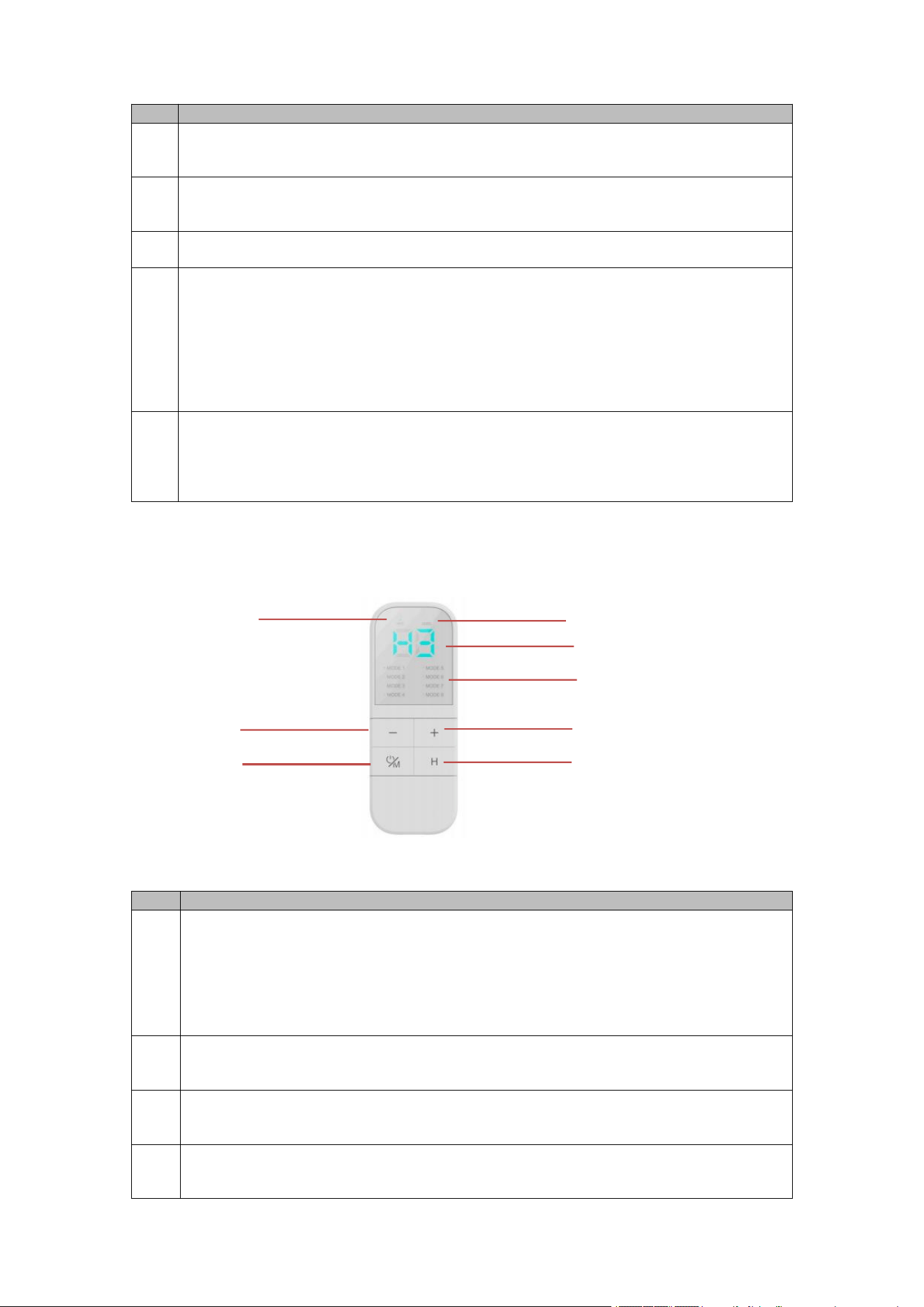
Fig. 2-2 Part Description of low-end remote control
EXPLANATION
①
④
③
②
⑤
Page
11
of
28
Hong Qiangxing (Shenzhen) Electronics Limited.
Wireless TENS&EMS&NMES Heating Stimulator, Models: SM9125
User Manual
Item
Function
①
Power button: Pressing this button can turn on or off the low-end remote control.
Please note that when paired, when both the main unit and the remote control are on,
pressing this button will turn off both the remote control and the main unit together.
②
Intensity increase button: Pressing this button can increase the output intensity. Each
press increases the intensity by one level.
③
Mode selection button: Press the button 1-8 times to cycle through available Mode 1-
8.
④
Intensity decrease button:
Pressing this button can decrease the output intensity. Each press decreases the
intensity by one level.
Press and hold this button for more than 2 seconds. The low-end remote control
will enter the pairing state. After entering the pairing state, if the connection is
successful, it will automatically exit the pairing state (if it is not connected, turn off
the low-end remote control or press again the button for 2 seconds can exit the
pairing).
⑤
Indicator light:
Indicate pairing status: When the low-end remote control is in pairing status, the
indicator light flashes red as a prompt.
Indicate buttons have been pressed: When the four buttons are pressed, the
indicator light will flash red for a moment.
2.2.4
High-end remote control
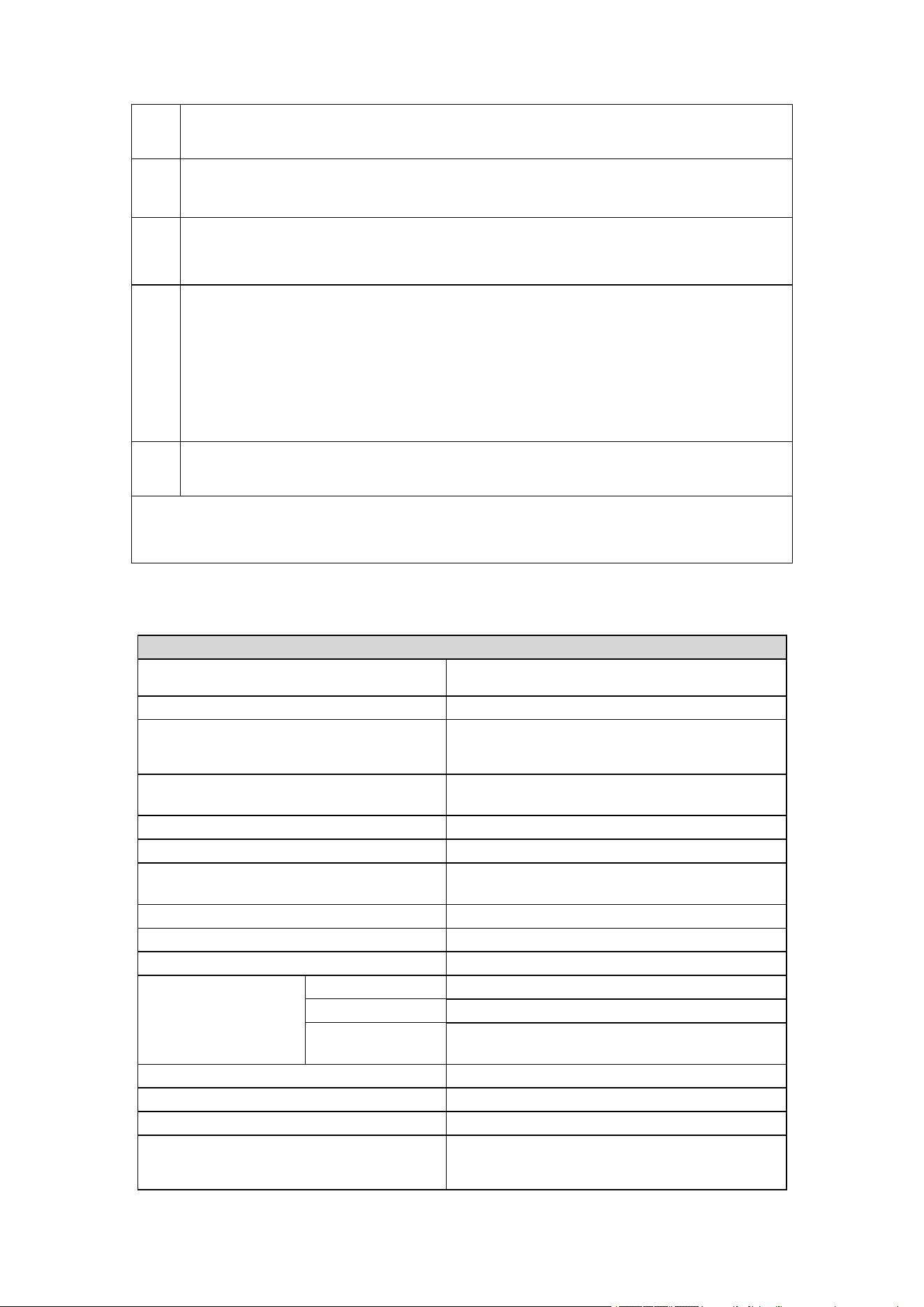
Fig. 2-3 Part Description of Storage bin
EXPLANATION
Item
Function
①
Intensity decrease button:
Pressing this button can decrease the output intensity. Each press decreases the
intensity by one level.
Press and hold this button for more than 6 seconds. The high-end remote control
will enter the pairing state. After entering the pairing state, if the connection is
successful, it will automatically exit the pairing state (if it is not connected, turn off
the high-end remote control can exit the pairing).
②
Intensity increase button: Pressing this button can increase the output intensity. Each
press increases the intensity by one level.
③
Power button: Pressing this button can turn on or off the high-end remote control.
Please note that when both the main unit and the remote control are on, pressing this
button will turn off both the remote control and the main unit together.
④
Heating level button: Because the model has no heating function, the device does not
respond when pressing this button.
①
④
③
②
⑤
⑥
⑦
⑧
Page
12
of
28
Hong Qiangxing (Shenzhen) Electronics Limited.
Wireless TENS&EMS&NMES Heating Stimulator, Models: SM9125
User Manual
⑤
HOT indicator light: Press the heating level button, and this indicator light will turn
green, indicating that the heating level is being adjusted. However, this model does not
have a heating function.
⑥
⑥
⑥
LEVEL indicator light: Press the intensity decrease button or intensity increase button,
and this indicator light will turn green, indicating that the output stimulus intensity level is
being adjusted.
⑦
Intensity indicator light:
The device has a total of 19 intensity levels, and each intensity level has a
corresponding intensity indicator light. When a certain intensity level is selected, the
corresponding intensity level indicator light will turn green.
⑧
Mode indicator light:
Each of the six modes has a corresponding indicator light. When a certain mode is
selected, the indicator light next to the mode will turn green.
Indicate the charging status: When charging, mode indicator lights 1 to 6 show a
green light in the form of flowing water. After full charging, all indicator lights are
constantly green.
Indicate the pairing status: When pairing, all indicator lights will flash at intervals of
500ms to indicate a prompt. Once pairing is successful, they will flash rapidly at
intervals of 100ms for 800ms to indicate a prompt.
⑨
Charging port: Plug in the cable to charge the high-end remote control.
Please note:
When in the pairing state, the all indicator lights will turn on green and flash at intervals of
500ms. After a successful pairing, the all indicator lights will flash rapidly intermittently for
100ms and then flash for 800ms as a prompt before going out.
2.3 Specifications
Specification
Device Name
Wireless TENS&EMS&NMES Heating
Stimulator
Model
SM9125
Power Source(s)
Main unit: 3.7V, 120mAh
High-end remote control: 3.7V, 180mAh
Low-end remote control: 3V
Number of Output Channels
1
Synchronous or alternating
Synchronous
Regulated Current or Regulated Voltage
Regulated Voltage
Software/Firmware/Microprocessor Control?
Software, V1.0
Automatic Overload Trip?
No
Automatic No-Load Trip?
Yes
Automatic shut Off?
Yes
Indication display
ON/Off status?
Yes
Low Battery?
Yes
Voltage /Current
Level?
Yes
Number of Output Modes
For stimulation: 8 modes
Output Intensity Level
For stimulation: 19 levels
Timer Range
20minutes
Weight
Main unit: 17g±2g
High-end remote control: 27.7g±2g
Low-end remote control: 12g±2g
Page
13
of
28
Hong Qiangxing (Shenzhen) Electronics Limited.
Wireless TENS&EMS&NMES Heating Stimulator, Models: SM9125
User Manual
Dimension
Main unit: φ48.5*12.5
Electrode Surface Area
Patch electrode pad:107mm*59mm
Waist electrode pad:27cm*20cm
Foot electrode pad: 31.5cm*28.5cm
Housing Materials and Construction
Main unit: ABS
Patch electrode pad: conductive hydrogel
Waist electrode pad: conductive silicone rubber
Foot electrode pad: conductive carbon paste
Durable period (Service Life)
Main unit: 2 years
High-end Remote controller, Low-end remote
control: 2 years
Electrode pads:
30-50 times (The life of the electrodes varies
depending on skin conditions, storage, amount
of use, type of stimulation, and stimulation site.)
Shelf life
Electrode pads: 2 years
Waveform and Shape
Rectangular
Maximum Output
Voltage
@500Ω
TENS:42V
EMS: 42V
NMES: 42V
Dysmenorrhea: 37V
@2KΩ
TENS:60V
EMS: 56V
NMES: 56V
Dysmenorrhea: 56V
@10KΩ
TENS:62V
EMS: 61V
NMES: 61V
Dysmenorrhea: 62V
Maximum Output
Current
@500Ω
TENS:84mA
EMS: 84mA
NMES: 84mA
Dysmenorrhea: 74mA
@2KΩ
TENS:30mA
EMS: 28mA
NMES: 28mA
Dysmenorrhea: 28mA
@10KΩ
TENS:6.2mA
EMS: 6.1mA
NMES: 6.1mA
Dysmenorrhea: 6.2mA
Pulse Duration
TENS: 200µs
EMS: 200µs
NMES: 200µs
Dysmenorrhea: 100µs
Pulse frequency
TENS: 8~45Hz
EMS: 20~75.7Hz
NMES: 8~66.6Hz
Dysmenorrhea: 100Hz
Maximum Phase Charge (µC @ 500Ω)
TENS: 16.8µC@ 500Ω
EMS: 16.8µC@ 500Ω
Page
14
of
28
Hong Qiangxing (Shenzhen) Electronics Limited.
Wireless TENS&EMS&NMES Heating Stimulator, Models: SM9125
User Manual
NMES: 16.8µC@ 500Ω
Dysmenorrhea: 7.4µC@ 500Ω
Maximum Current Density (mA/cm² @
500Ω)
TENS: 1.819mA/cm²@ 500Ω
EMS: 1.819mA/cm²@ 500Ω
NMES: 1.819mA/cm²@ 500Ω
Dysmenorrhea: 1.602mA/cm²@ 500Ω
Maximum Average Power Density
(mW/ cm
2
@ 500Ω)
TENS: 0.0247mW/ cm
2
@ 500Ω
EMS: 0.0700mW/ cm
2
@ 500Ω
NMES: 0.0542mW/ cm
2
@ 500Ω
Dysmenorrhea: 0.0237mW/ cm
2
@ 500Ω
Operation Environment
Temperature: 5℃~40℃
Humidity: ≤80% RH
Atmospheric pressure: 80 kPa~106 kPa
Storage Environment
Temperature: -20℃~+55℃
Humidity: ≤93%RH
Atmospheric pressure: 50 kPa~106 kPa
Specification of RF Wireless:
Communication methods
user-defined protocol
Working Frequency
2.4GHz
Modulation
FSK
Transfer rate
1Mbps
Transmission power
-2.2dBm
Working voltage
3V
Operating distance
10m
Delay
<=100ms
Treatment Modes Specification
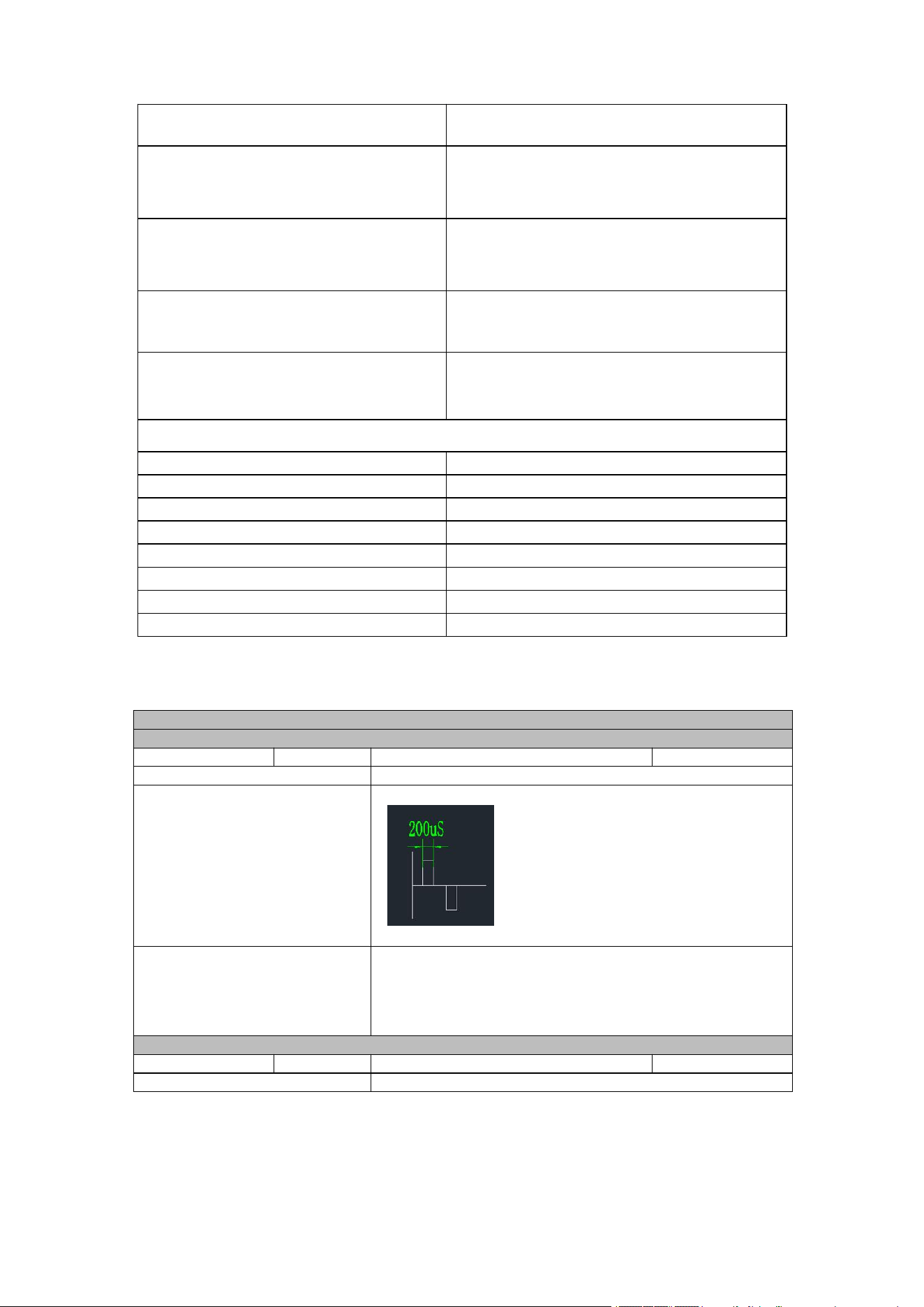
Waveform 8 modes
Mode 1 (TENS)
Pulse duration:
200µs
Maximum Amplitude of output voltage:
42V @ 500Ω
Pulse Frequency:
45Hz
Basic Waveform:
Output of Mode 1
Outputting basic waveform for 28 seconds at a frequency
that gradually increased from 8Hz to 19.1Hz and then
decreased to 8Hz, pause the stimulation for 1.4 seconds.
Output stimuli according to the above cycle until the
scheduled treatment time is reached.
Mode 2 (TENS)
Pulse duration:
200µs
Maximum Amplitude of output voltage:
42V @ 500Ω
Pulse Frequency:
45Hz
Page
15
of
28
Hong Qiangxing (Shenzhen) Electronics Limited.
Wireless TENS&EMS&NMES Heating Stimulator, Models: SM9125
User Manual
Basic Waveform:
Output of Mode 2
Outputting basic waveform for 11.2 seconds, pause the
stimulation for 3.3 seconds. Output stimuli according to the
above cycle until the scheduled treatment time is reached.
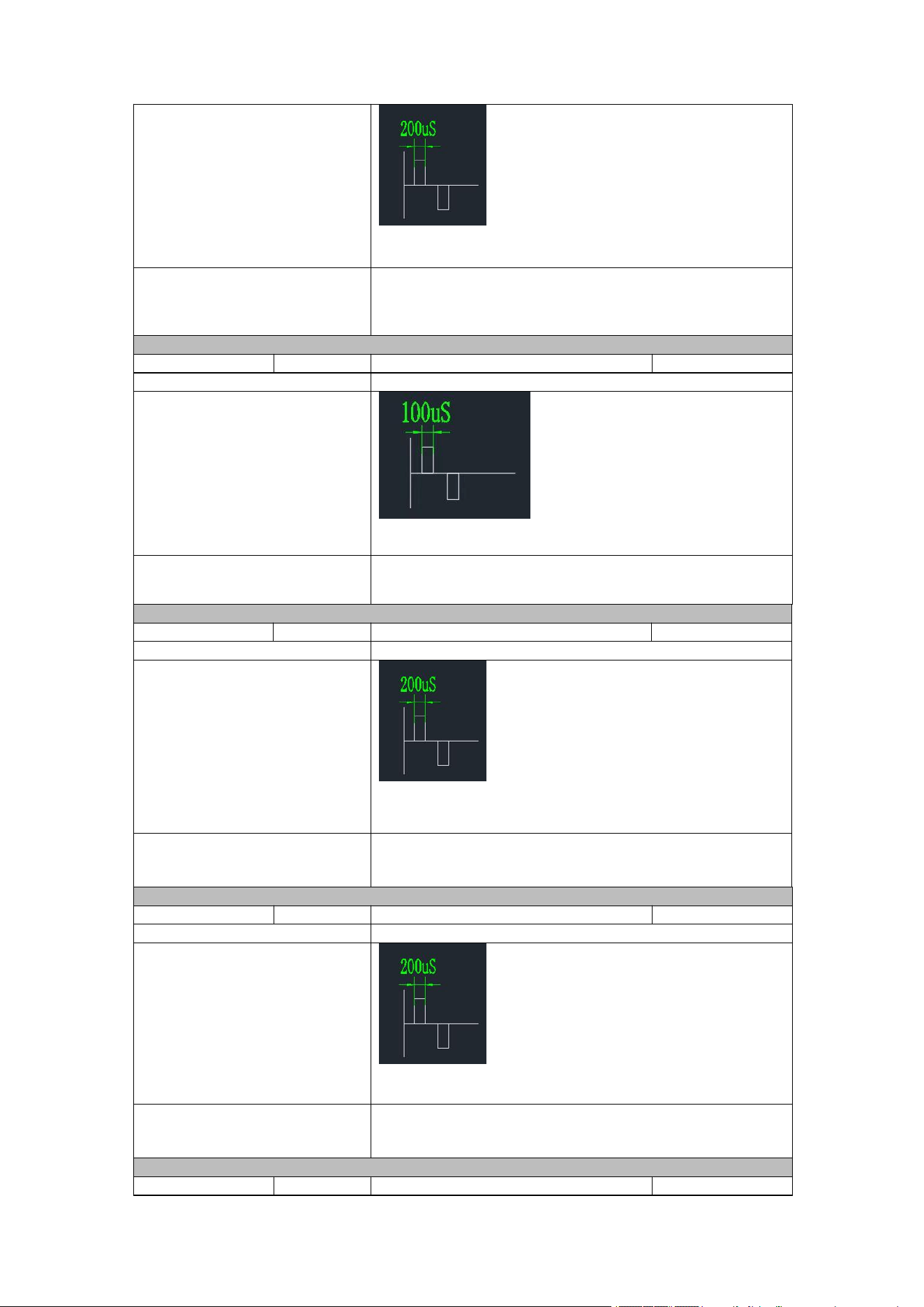
Mode 3 (Treat dysmenorrhea)
Pulse duration:
100µs
Maximum Amplitude of output voltage:
37V @ 500Ω
Pulse Frequency:
100Hz
Basic Waveform:
Output of Mode 3
Continuously output the basic waveform without any pause
time in between. Output stimuli according to the above
cycle until the scheduled treatment time is reached.
Mode 4 (EMS)
Pulse duration:
200µs
Maximum Amplitude of output voltage:
42V @ 500Ω
Pulse Frequency:
37.3Hz
Basic Waveform:
Output of Mode 4
Outputting basic waveform for 1.6 seconds, pause the
stimulation for 1.2 seconds. Output stimuli according to the
above cycle until the scheduled treatment time is reached.
Mode 5 (EMS)
Pulse duration:
200µs
Maximum Amplitude of output voltage:
40V @ 500Ω
Pulse Frequency:
57.3Hz
Basic Waveform:
Output of Mode 5
Outputting basic waveform for 28 seconds, pause the
stimulation for 1 second. Output stimuli according to the
above cycle until the scheduled treatment time is reached.
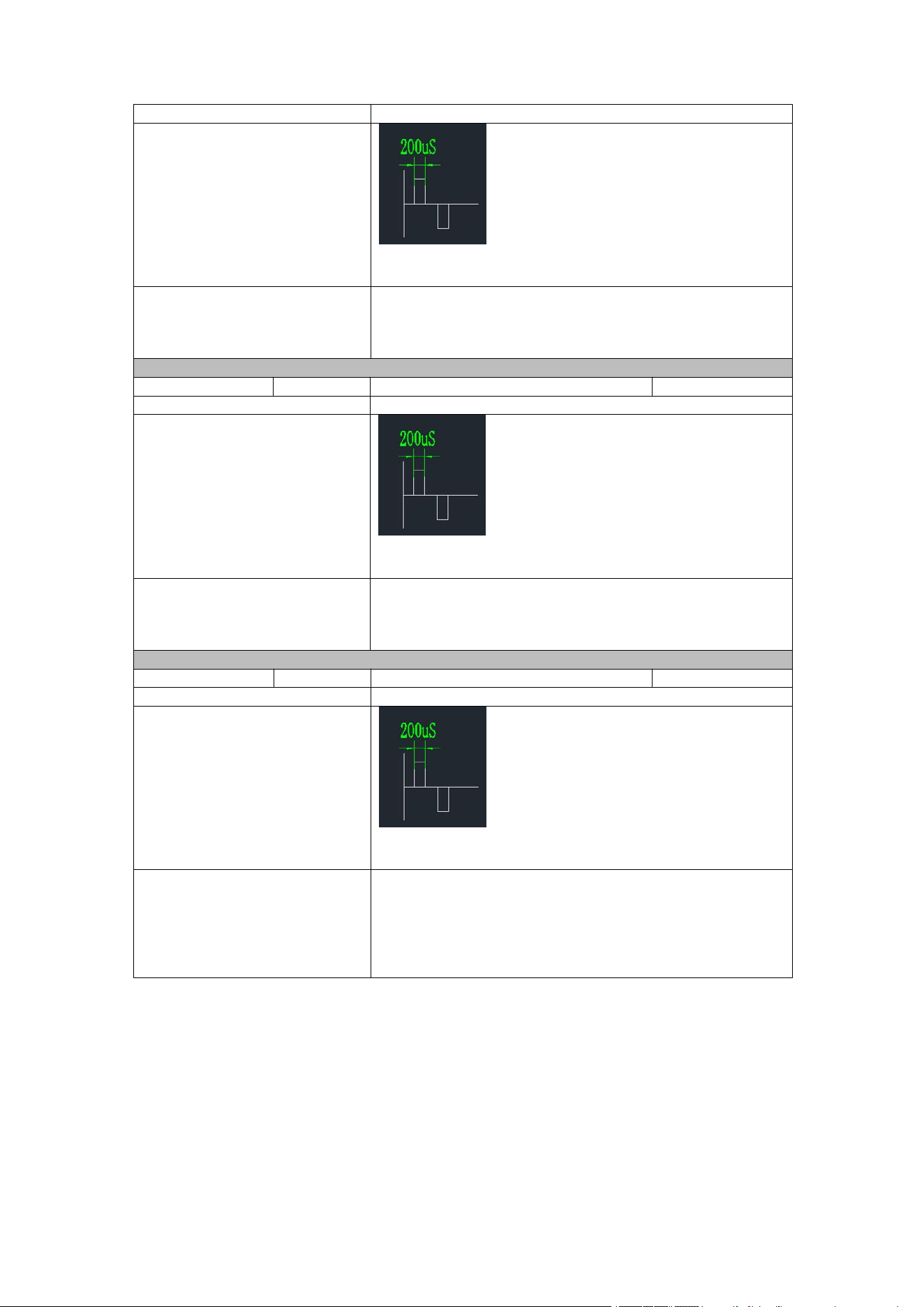
Mode 6 (EMS)
Pulse duration:
200µs
Maximum Amplitude of output voltage:
42V @ 500Ω
Page
16
of
28
Hong Qiangxing (Shenzhen) Electronics Limited.
Wireless TENS&EMS&NMES Heating Stimulator, Models: SM9125
User Manual
Pulse Frequency:
20~75.7Hz
Basic Waveform:
Output of Mode 6
Outputting basic waveform for 11.3 seconds at a frequency
that gradually increased from 20Hz to 75.7Hz, pause the
stimulation for 1.2 seconds. Output stimuli according to the
above cycle until the scheduled treatment time is reached.
Mode 7 (NMES)
Pulse duration:
200µs
Maximum Amplitude of output voltage:
42V @ 500Ω
Pulse Frequency:
8~50Hz
Basic Waveform:
Output of Mode 7
Outputting basic waveform for 15 seconds at a frequency
that gradually increased from 8Hz to 50Hz, pause the
stimulation for 1 second. Output stimuli according to the
above cycle until the scheduled treatment time is reached.
Mode 8 (NMES)
Pulse duration:
200µs
Maximum Amplitude of output voltage:
42V @ 500Ω
Pulse Frequency:
25Hz, 66.6Hz
Basic Waveform:
Output of Mode 8
Outputting basic waveform for 3.12 seconds at a frequency
of 25Hz without any pause time in between; Then outputting
basic waveform for 3 seconds at a frequency of 66.6Hz,
after pause the stimulation for 1.12 second. Output stimuli
according to the above cycle until the scheduled treatment
time is reached.
3.
INSTRUCTION OF USE
3.1
Preparation before use
Step 1: Charging
For main unit
(1) Plug the cable into the main unit. Make sure the main unit is off before charging.
(2) Connect the charger to a power source. The eight mode indicator lights show a green
light in the form of flowing water shows it is charging.
(3) Unplug it when the eight indicator lights are constantly green, it indicates a full charge.
For high-end remote control
(1) Plug the cable into the main unit. Make sure the main unit is off before charging.

Page
17
of
28
Hong Qiangxing (Shenzhen) Electronics Limited.
Wireless TENS&EMS&NMES Heating Stimulator, Models: SM9125
User Manual
(2) Connect the charger to a power source. The mode indicator lights 1 to 6 show a green
light in the form of flowing water shows it is charging.
(3) Unplug it when the mode indicator lights 1 to 6 are constantly green, it indicates a full
charge.
Step 2: Connect electrode pad to the main unit
1) Take out the main unit and an electrode pad with magnetic suction ports, place the
magnetic suction interface of the electrode pad corresponding to the magnetic suction
interface of the main unit.
2) Ensure that the electrode pad is stably connected to the main unit.
Step 3: Electrode placement
Remove the protective film on the electrode and place electrode on clean, dry and healthy
skin near the area with pain.
Please follow the “3.2 Treatment site guidance” to place the electrode pad.
Step 4: Operation
1.
Connect the main unit and remote control
Connect the main unit and low-end remote control
1) After placing the electrode pad, please press the M button on the main unit to turn on the
main unit, and press the - button for more than 6 seconds to enter the pairing state of the
main unit. At this point, all the indicator lights on the main unit flash at intervals of 500ms as a
prompt.
2) Press the power button of the low-end remote control to turn it on. Then, press the intensity
decrease button for more than 2 seconds to put the low-end remote control into pairing state,
and the indicator light on the low-end remote control will turn red and flash slowly.
3) After successful pairing, all the indicator lights on the main unit flash rapidly at intervals of
100ms for 800ms as a prompt, the indicator light of the low-end remote control flashes
red quickly and then go goes out. The low-end remote control and the main unit will
automatically exit the pairing state. If the pairing is not successful, you can also exit the
pairing state by turning off the low-end remote control and the main unit. For low-end remote
controls, you can also exit the pairing state by pressing the intensity decrease button for 2
seconds. If you want to delete the paired remote control, please re-enter the paired state for
pairing.
Connect the main unit and high-end remote control
1) After placing the electrode pad, please press the M button on the main unit to turn on the
main unit, and press the - button for more than 6 seconds to enter the pairing state of the
main unit. At this point, all the indicator lights on the main unit flash at intervals of 500ms as
a prompt.
2) Press the power button of the high-end remote control to turn it on. Then, press the intensity
decrease button for more than 6 seconds to put the high-end remote control into pairing
state. At this point, all the indicator lights on the main unit flash at intervals of 500ms as a
prompt.
3) After successful pairing, all the indicator lights on the main unit flash rapidly at intervals
of 100ms for 800ms as a prompt, all the indicator lights on the high-end remote control
flash rapidly at intervals of 100ms for 800ms as a prompt before going out. The high-end
remote control and the main unit will automatically exit the pairing state. If the pairing is not
successful, you can also exit the pairing state by turning off the high-end remote control and
the main unit. If you want to delete the paired remote control, please re-enter the paired
state for pairing.
Please note:
The main unit can operate normally without being connected to a remote control.
One remote control can control four main units at most, but the mode and intensity of the
four main units cannot be adjusted independently.
2.
Select the treatment mode
The device has 8 output modes. Both the main unit and the remote control are equipped with
Page
18
of
28
Hong Qiangxing (Shenzhen) Electronics Limited.
Wireless TENS&EMS&NMES Heating Stimulator, Models: SM9125
User Manual
mode switch button for select treatment mode. The method of setting the mode is as follows.
Method 1:
Adjust the mode with the main unit:
Press this M button on the main unit briefly, each press will switch the mode once.
After the device is turned on, the initial mode is mode 1. Press this button multiple
times, and the mode changes according to the rule of "mode 1-mode 2-mode 3-
mode 4-mode 5-mode 6- mode 7-mode 8-mode 1……". The device has a total of 8
modes, and each mode has a corresponding mode indicator light. When a certain
mode is selected, the corresponding mode indicator light will turn green.
Method 2:
Adjust the mode with the low-end remote control:
Press mode switch button on the low-end remote control. Each press switches to
the output mode, and the mode changes according to the rule of " mode 1-mode 2-
mode 3-mode 4-mode 5-mode 6- mode 7-mode 8-mode 1……".
Method 3:
Adjust the mode with the high-end remote control:
Press mode switch button briefly on the high-end remote control. Each press
switches to the output mode, and the mode changes according to the rule of "
mode 1-mode 2-mode 3-mode 4-mode 5-mode 6- mode 7-mode 8-mode 1……".
The indicator light is on the high-end remote control will indicate the selected
mode. Each mode has a corresponding indicator light. If a certain mode is
selected, the corresponding indicator light will turn green.
3.
Select the intensity
The device has 19 output intensities. Both the main unit and the remote control are equipped
with intensity decrease button and intensity increase button for increasing and decreasing the
intensity. The method of setting the mode is as follows.
Method 1:
Adjust the intensity with the main unit:
Press + button on the main unit briefly after the main unit is turned on, each press
increases the intensity by one level. When the intensity reaches 19 levels, pressing
this button again will not cause any change. Press - button on the main unit briefly,
each press decreases the intensity by one level. When the intensity reaches 0
level, pressing this button again will not cause any change. Press the + button or -
button to adjust the intensity. The intensity indicator light in the middle of the main
unit will turn green to indicate the selected intensity level.
Method 2:
Adjust the mode with the low-end remote control:
Press intensity decrease button on the low-end remote control after the low-end
remote control is turned on, each press increases the intensity by one level. When
the intensity reaches 19 levels, pressing this button again will not cause any
change. Press intensity decrease button on the low-end remote control, each press
decreases the intensity by one level. When the intensity reaches 0 level, pressing
this button again will not cause any change.
Method 3:
Adjust the mode with the high-end remote control:
Press intensity decrease button on the high-end remote control after the high-end
remote control is turned on, each press increases the intensity by one level. When
the intensity reaches 19 levels, pressing this button again will not cause any
change. Press intensity decrease button on the low-end remote control, each press
decreases the intensity by one level. When the intensity reaches 0 level, pressing
this button again will not cause any change. When adjusting the intensity, the
LEVEL indicator light in the upper right corner of the remote control will turn green,
and the selected intensity will be displayed above the remote control.
It should be noted that each time the mode is switched, the intensity will revert to 0 level.
4.
Time setting
The device is set to a default timer of 20 minutes. The time is not adjustable.
Please note that when there is no load, the main unit will be shut down if there is no operation
for 2 minutes.
5.
Treatment
After setting the above parameters, you can start to enjoy the treatment.
6.
Turn off
Main unit
The main unit can be shut down automatically or manually.

Page
19
of
28
Hong Qiangxing (Shenzhen) Electronics Limited.
Wireless TENS&EMS&NMES Heating Stimulator, Models: SM9125
User Manual
Automatic shutdown:
1) The treatment time is over
After the treatment time is over, the main unit will automatically shut down.
2) No output
When there is no load, the main unit will be shut down if there is no operation for 2 minutes.
Manual shutdown
When the power of the main unit is on, pressing M button for 2 seconds can shut down the
device.
Low-end remote control
Manual shutdown
When the power of the low-end remote control is on, press the power button to turn off the
remote control. If the main unit is on, it will also shut down along with the paired remote control.
High-end remote control
Manual shutdown
When the power of the high-end remote control is on, press the power button to turn off the
remote control. If the main unit is on, it will also shut down along with the paired remote control.
Step 5: Clean
Please refer to section 4.
Step 6: Storage
Please refer to section 5.
NOTE:
1.
Over-long-time treatment and strong stimulation may cause muscular fatigue and may
generate adverse effects. In order to avoid excessive treatment, make sure that at the
beginning select short time (10 minutes) and low intensity to treat fora period, and
gradually increase time and intensity after you adapt to the stimulation, but never exceed
your comfort level. However, each treatment should last less than 60 minutes with at least
2 hours of rest between each use.
2.
Recommended usage is 1-2 times a day with at least 2 hours of rest between each use.
3.
Select the intensity level that feels right for you. If you want to change the position of the
electrode during treatment, turn off the device first before changing the pad position. After
you place the electrode onto the new area, then you can turn on the device to start
treatment. This procedure helps to avoid potential shock and discomfort.
4.
If you want to stop the treatment at any time before the time is up, turn off the device
first and then remove the electrode from your skin.
5.
Never apply the pads to any other surface other than your skin. If the pads become
soiled or dirty, the adhesive power may decrease. In this case, moisten the surface of the
pads with water and wipe away the dirty portion. This will allow a temporary restoration of
the adhesive power. However, too much water will result in loss of the adhesive power. Do
not plunge the pads into water.
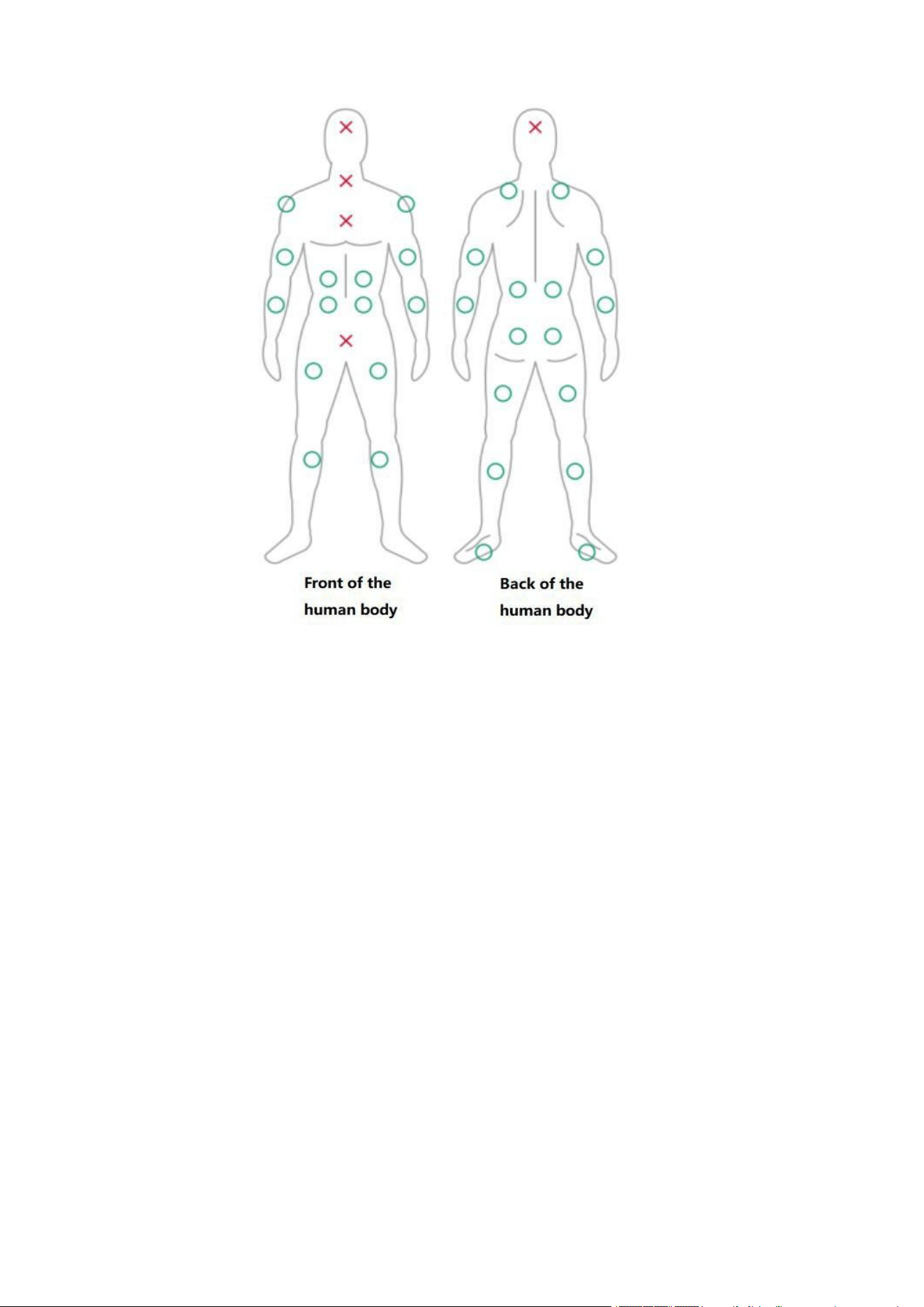
3.2
Treatment site guidance
Page
20
of
28
Hong Qiangxing (Shenzhen) Electronics Limited.
Wireless TENS&EMS&NMES Heating Stimulator, Models: SM9125
User Manual
The device is OTC and patients who are not under clinical supervision should have all the
information and instructions for using the device. Electrodes placement on patient anatomy for
pain application is different than for EMS application. Therefore:
Electrodes placement for TENS application:
TENS:
You can:
place the electrodes directly on the spot of pain; or
place the electrodes directly on opposite sides of the pain; or
placing one electrode on the site of pain and the other 5 or 6 inches away from the site of
pain to achieve pain relief.
Electrodes placement for EMS/NMES application:
EMS/NMES:
You can:
place the electrodes on the middle of the muscle mass; or
place the electrodes on the largest part of the muscle you intend to stimulate; or
place the electrodes on opposite ends of the muscle
for EMS/NMES application, such that you are able to stimulate as many muscle fibers as
possible to achieve muscle simulation.
3.3
Electrode Pads Guideline
1.
Only use the electrode pads supplied by the manufacturer; Using other electrode pads
may pose a risk of incompatibility. This may not be able to connect successfully.
2.
Do share the electrode pads with others to avoid skin reaction or cross infection.
3.
Always turn power off before removing or repositioning the electrodes.
4.
Make sure the skin has been washed thoroughly and keep try before applying the
electrodes.
5.
Apply the whole surface of the electrode pads firmly to the skin. Do not use electrode

Page
21
of
28
Hong Qiangxing (Shenzhen) Electronics Limited.
Wireless TENS&EMS&NMES Heating Stimulator, Models: SM9125
User Manual
pads that do not stick properly to the skin or only partially stick to the skin.
6.
In case of skin redness under the electrode pads after stimulation, do not stimulate in the
same place since the skin turn to normal condition
7.
Please replace the electrode with a new electrode after it loses its viscosity, and you can
purchase the electrode that has already been marketed.
8.
The number of times can be used of our electrode is 30-50 times, and the life of the
electrodes varies depending on skin conditions, storage, amount of use, type of stimulation,
and stimulation site.
4.
CLEANING AND MAINTENANCE
For main unit:
1.
Wiped the main unit by a damp cloth. Do not use thinner or alcohol because they can
cause damage to the main unit.
2.
After cleaning, please allow the main unit to dry naturally.
3.
Visually inspect the main unit for any dirt. If so, repeat steps 1-2. If not, store the device as
required.
For low-end remote control and high-end remote control:
1.
Wiped the remote control by a damp cloth. Do not use thinner or alcohol because they
can cause damage to the remote control.
2.
After cleaning, please allow the remote control to dry naturally.
3.
Visually inspect the remote control for any dirt. If so, repeat steps 1-2. If not, store the
remote control as required.
For electrode pad:
1.
Clean the sticky surface of the electrode pads by spraying water lightly on the surface of
the electrode.
2.
After cleaning, please allow the main unit to dry naturally.
3.
Visually inspect the electrode pad surface for any dirt. If so, repeat steps 1-2. If not, store
the electrode pads as required.
Note:
Each person should use their own set of electrode pads for best hygiene.
It should be replaced after no stickiness at all.
Always place the clear plastic protective film over the Electrodes pads when not in use. Do
not place them on any other surfaces as they will get dirty.
Never stick two electrode pads to each other.
Keep the electrode pads clean, and never put them under high temperature and direct
sunshine.
Do not clean the electrode pads with hot water or any chemical.
Do not touch the sticky surface of the pad, otherwise it will cause the viscosity to
decrease.
Do not clean the electrode pads with any chemical.
5.
TRANSPORT AND STORAGE
Please reapply the release paper to the dry electrode pad and place main unit and remote
control in the storage bin or storage bag to protect it from contamination.
Store the machine in a dry place, out of reach of children. Do not disassemble the device for
any purpose.
Storage Temperature: -20℃~+55℃
Humidity: ≤93%RH
Atmospheric pressure: 50 kPa~106 kPa
When the unit will not be used for a long duration, remove the battery.
Page
22
of
28
Hong Qiangxing (Shenzhen) Electronics Limited.
Wireless TENS&EMS&NMES Heating Stimulator, Models: SM9125
User Manual
6.
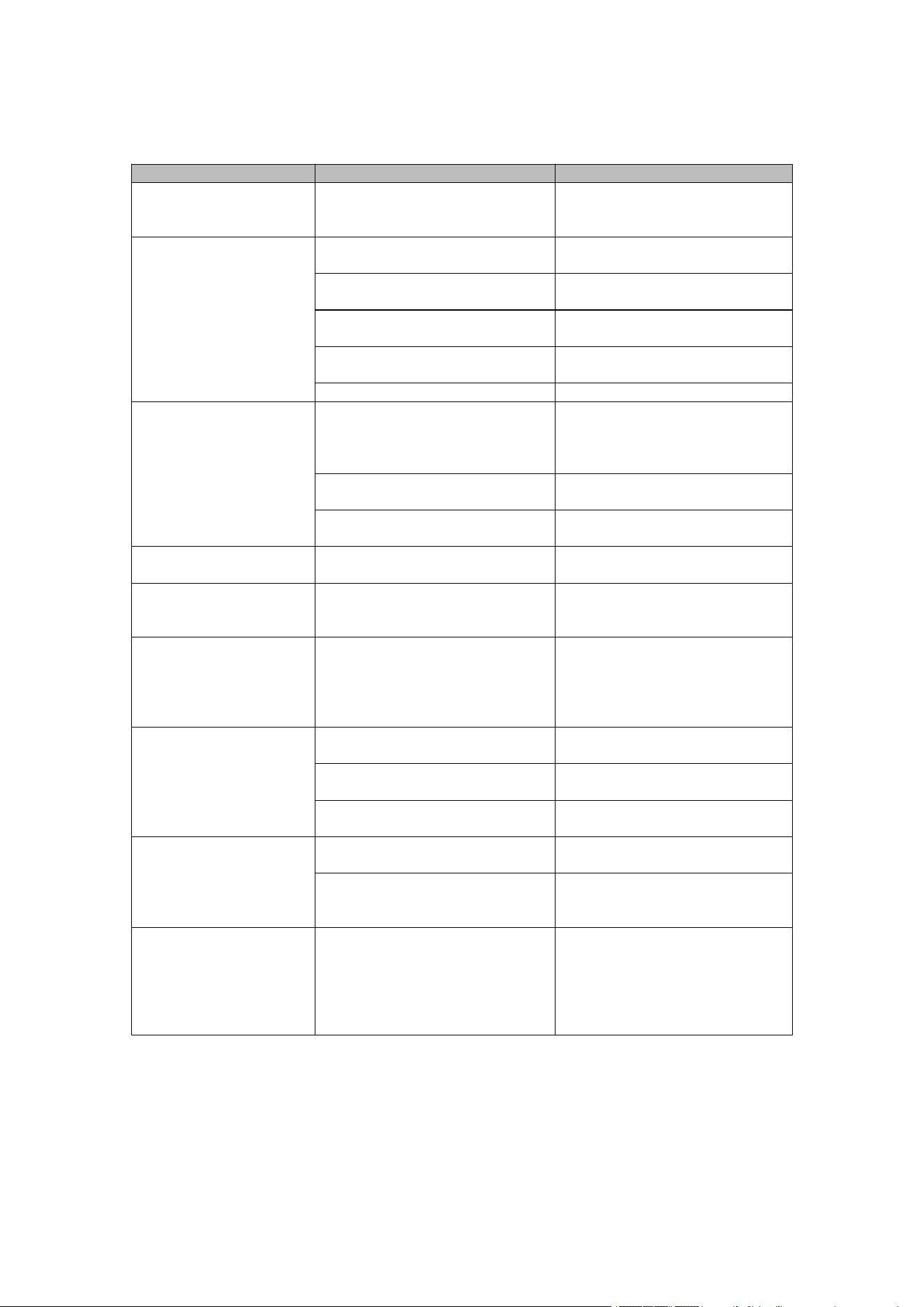
TROUBLE SHOOTING
1) Please keep the device from the reach of infants, children or pets, inhalation or
swallowing of small parts is dangerous or even fatal.
Problem
Possible Causes
Solution
One pad feels stronger
than the other
This is normal. Different areas
of your body will react
differently.
Make sure the pads are sticky
and are making good contact.
The intensity is not felt.
Very weak intensity
level.
Pads are not attached to the
body firmly.
Attach both pads firmly to the
skin.
The transparent films are still
stuck to the pads.
Peel off film on the adhesive
surface of pads.
The pads stacked together or
overlap.
Do not stack pads together or
overlap pads.
The intensity setting is getting
weak.
Increase the intensity level.
The battery capacity is low.
Charge the battery.
The skin turns red or
the skin feels irritated.
The adhesive surface of pads
is dirty or dry
Wash adhesive surface of
pads softly with your finger
tips for about 3 seconds under
slow running water.
The therapy time is too long or
the intensity is set too high.
Reduce the application time or
reduce the intensity.
The electrode pad surface is
worn out
Replace electrode pad
No power source of
the main unit
The battery of the main unit is
depleted.
Charge the main unit.
No display on the
remote control.
The battery of the remote
control is depleted.
Charge the remote control.
The main unit or
remote control can not
to charge.
The main unit or remote
control is not properly placed
in the storage bin or storage
bag.
Place the magnetic suction
interface in the charging
compartment corresponding
to the main unit and remote
control correctly.
It is difficult to attach
the pad to the skin.
Have you removed the
transparent film from the pad?
Peel off film on the adhesive
surface of pads.
Was the pad applied
immediately after washing?
Dry the pad.
ls the adhesive surface of the
pad
Replace the pad.
Adhesive surface of
pads not sticky.
Are you using pad when
perspiring?
Use when not perspiring, in a
cool room.
Were the pads stored under
high temperature, high
humidity, or direct sunshine?
Replace the pad
Treatment interruption
The device was disturbed by
other RF devices.
Wait a few minutes and the
device may recover
automatically: Turn off the
device and wait for a minute
to restart; Move to another
location for treatment.
7.
DISPOSAL
1.
The device and accessories out of shelf life or use life should not be thrown randomly
and should be recycled by the manufacturer.
2.
To dispose of packing materials, take appropriate actions in accordance with the rules
and regulations in force in your area to prevent adverse ecological effects.
Page
23
of
28
Hong Qiangxing (Shenzhen) Electronics Limited.
Wireless TENS&EMS&NMES Heating Stimulator, Models: SM9125
User Manual
8.
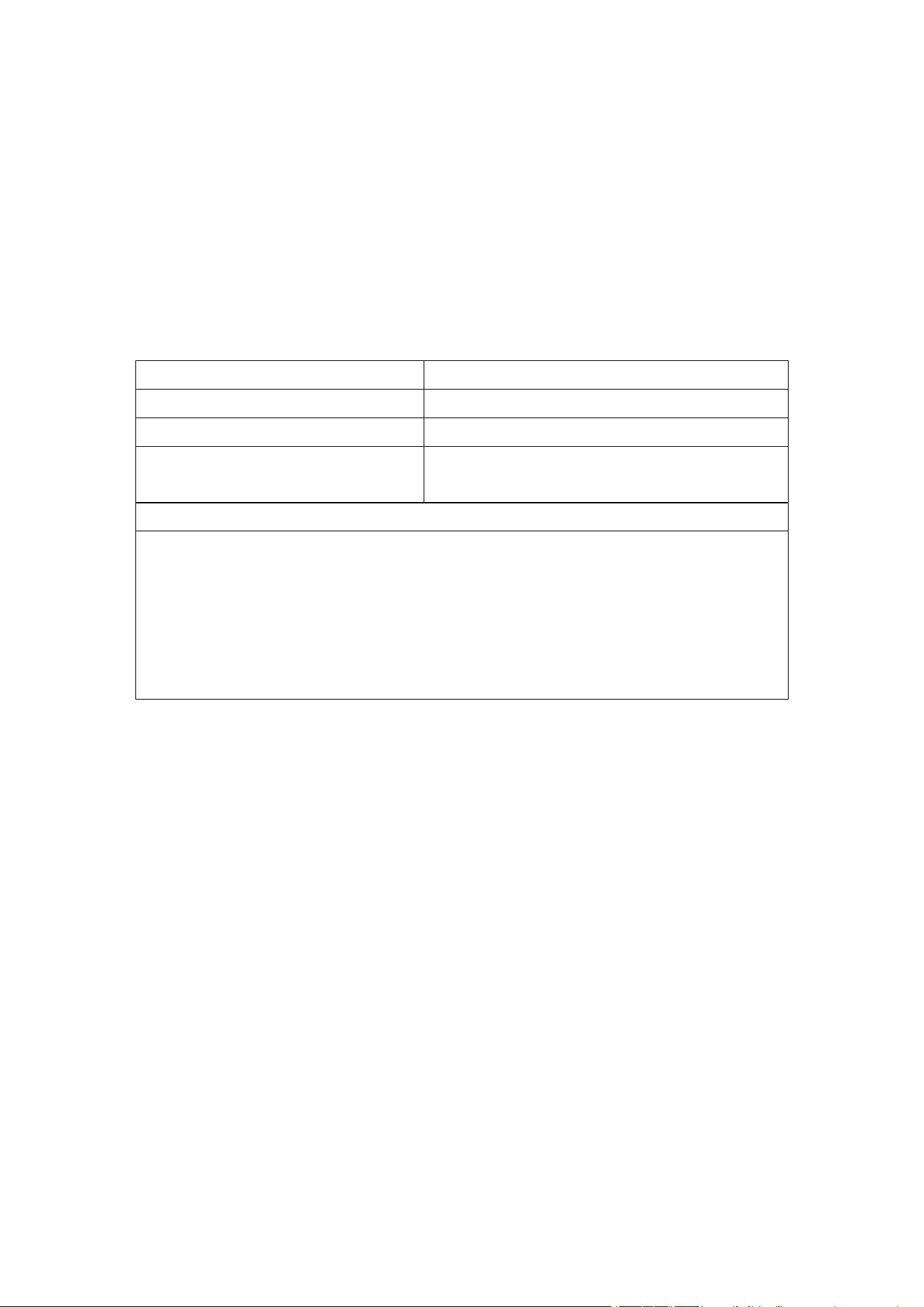
WARRANTY CARD
We hereby guarantee this consumer purchased product, if it is used normally according to
each instruction in manual in a non-commercial setting, in case of failure, please contact us,
Plexus Yoga LLC Dba Chirp, first, we will sort the problem for you, please ship or mail to:
Hong Qiangxing (Shenzhen) Electronics Limited.
Address:2F, Yongcheng Blvd, Xicheng Industrial area, Xixiang Street, Bao'an District, Shenzhen
City, Guangdong Province,518126, China
For exchange, please mail the failed unit along with copy of receipt as proof of purchase to us
or to the local dealer where did you purchase the product. Pack the product carefully to
prevent damage in transit. Because of possible loss in transit, we recommend ensuring the
product with tracking number and return receipt.
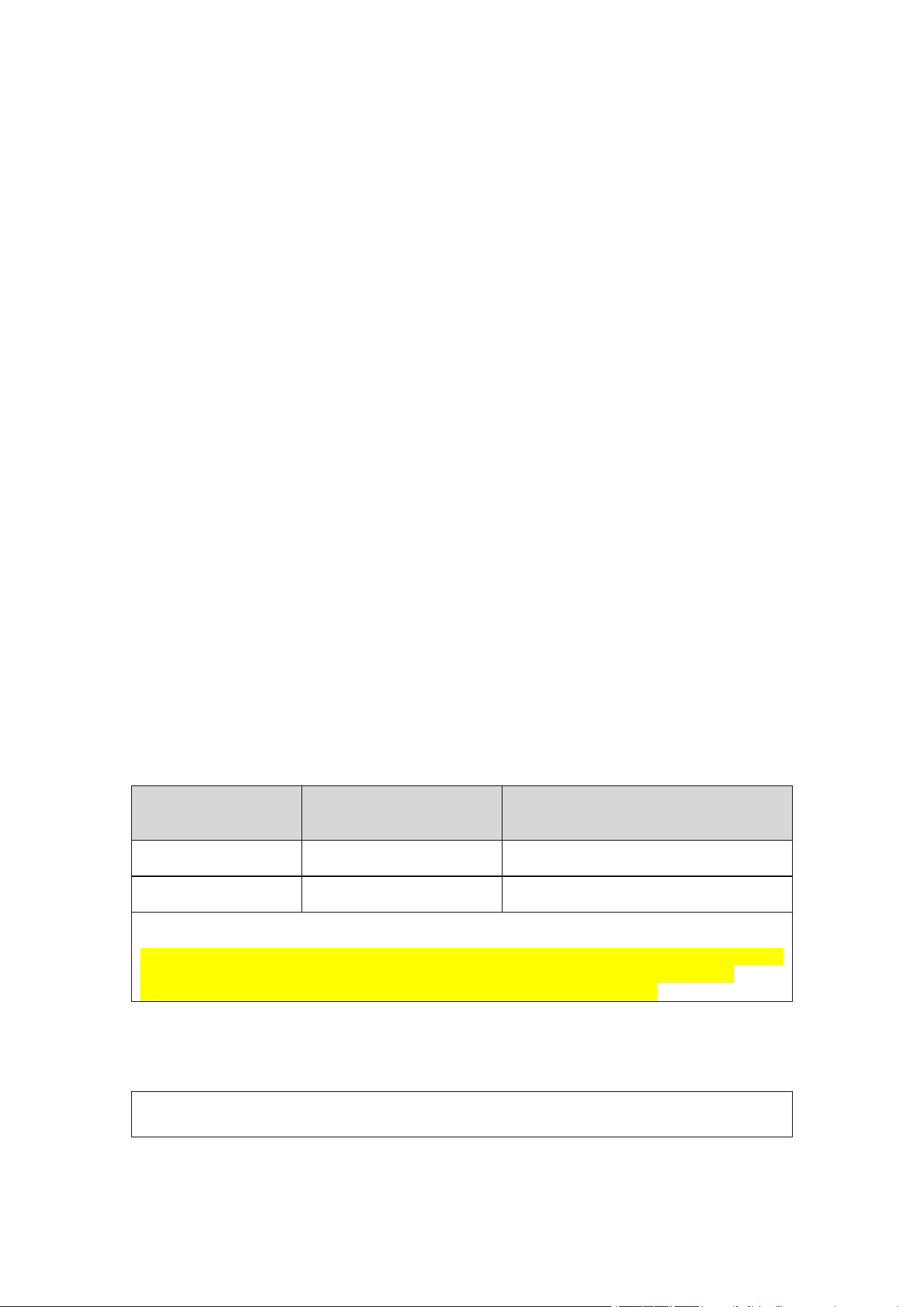
Warranty List
Device Name:
Model:
Purchase date:
User’s address:
Name:
Telephone:
Dealer:
Address:
Telephone:
description of the specific problem:
Stamp:
Page
24
of
28
Hong Qiangxing (Shenzhen) Electronics Limited.
Wireless TENS&EMS&NMES Heating Stimulator, Models: SM9125
User Manual
9.
LABEL SYMBOLS
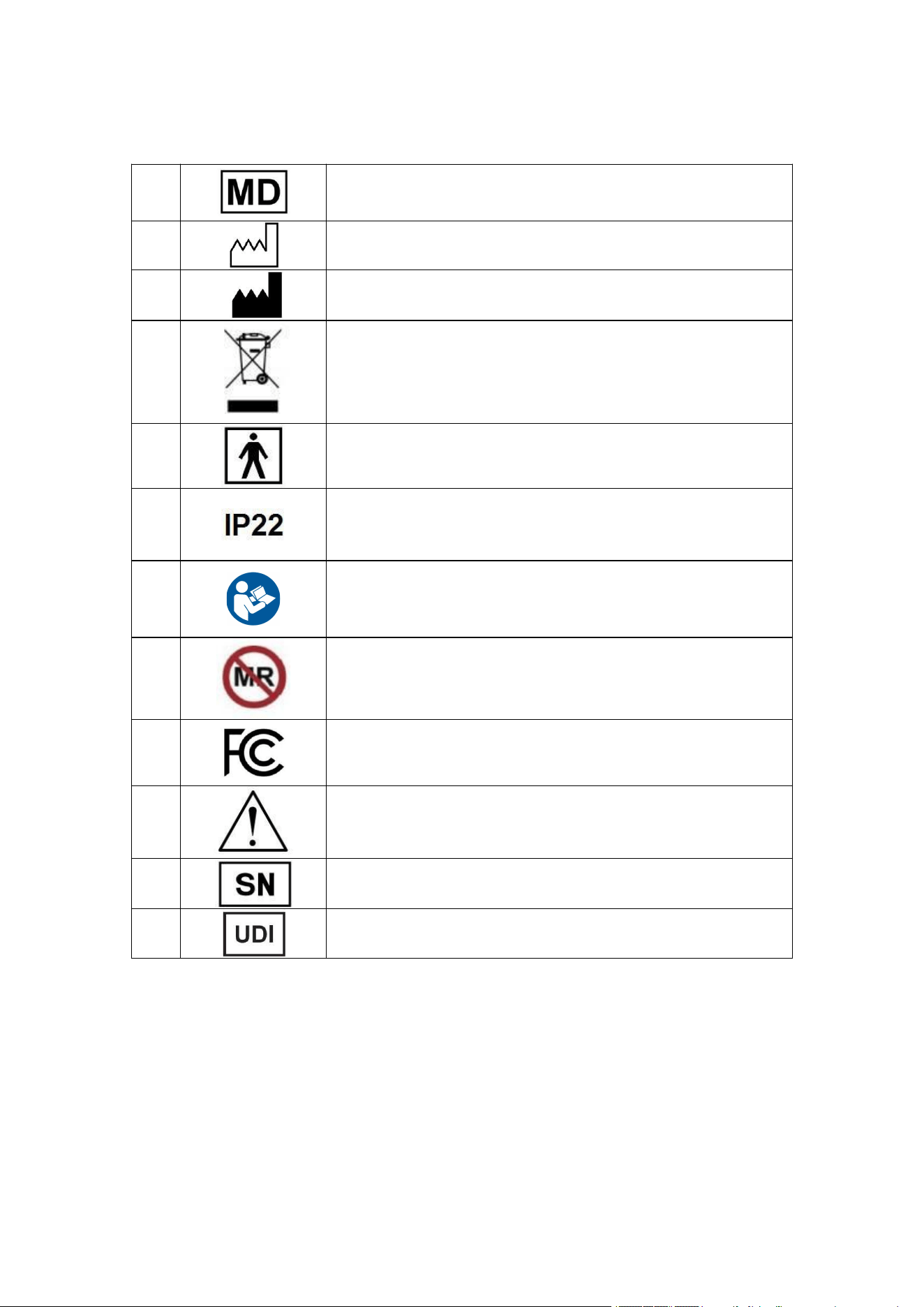
Label symbols are shown in the following table:
1.
Medical device. Indicates the item is a medical device
2.
DATE OF MANUFACTURE. This symbol shall be accompanied by
a date to indicate the date of manufacture.
3.
Symbol for "MANUFACTURER". This symbol shall be accompanied
by the name and the address of the manufacturer.
4.
Collect separately from other household waste
5.
Type BF Applied Part
6.
IP22: The first number 2: Protected against solid foreign objects of
12.5 mm Ф and greater. The second number 2: Protection against
vertically falling water drops when ENCLOSURE tilted up to 15°on
either side of the vertical.
8.
Refer to user manual
9.
MR unsafe
10.
The product has met FCC regulatory requirements and passed
FCC certification testing.
11.
Caution
12.
Serial number
13.
Unique device identifier
Page
25
of
28
Hong Qiangxing (Shenzhen) Electronics Limited.
Wireless TENS&EMS&NMES Heating Stimulator, Models: SM9125
User Manual
10.
EMC DECLARATION
Before installing or using the device or system, keep an appropriate distance from radio
frequency (RF) sources whenever possible. The sources include but not limit to:
Radio and TV stations
Portable and mobile RF communication devices (cell phones, two-way radios, base station,
etc.)
High-frequency surgical units, such as diathermy, electrocautery, argon beam coagulators,
etc.
X-ray, CT, or MRI devices
These devices are also possible sources of interference as they may emit higher levels of
electromagnetic radiation.
WARNING:
EQUIPMENT MALFUNCTION OR INTERFERENCE
Use of this equipment adjacent to or stacked with other equipment should be avoided
because it could result in improper operation. If such use is necessary, this equipment and
the other equipment should be observed to verify that they are operating normally.
Portable RF communications equipment (including peripherals such as antenna cables and
external antennas) should be used no closer than 30 cm (12 inches) to any part of the
Wireless TENS&EMS&NMES Heating Stimulator or system, including cables specified by the
manufacturer. Degradation of the performance of this equipment could result.
Use of accessories, transducers and cables other than those specified or provided by the
Hong Qiangxing (Shenzhen) Electronics Limited. manufacturer of this equipment could result
in increased electromagnetic emissions or decreased electromagnetic immunity of this
equipment and result in improper operation.
Magnetic and electric fields may interfere with the performance of the device or system.
Make sure that all peripheral components operated in the vicinity of the device comply with
the relevant EMC requirements. X-ray equipment, MRI devices, radio systems (cellular
phones) and so forth, are possible sources of interference because they may emit higher
levels of electromagnetic radiation. Verify the performance of the system before use.
ESSENTIAL PERFORMANCE
The essential performance of the system may be lost or degraded because of
electromagnetic disturbances. For expected degradations and instructions of the basic safety
and essential performance maintenance in the case of electromagnetic disturbances, see the
table below:
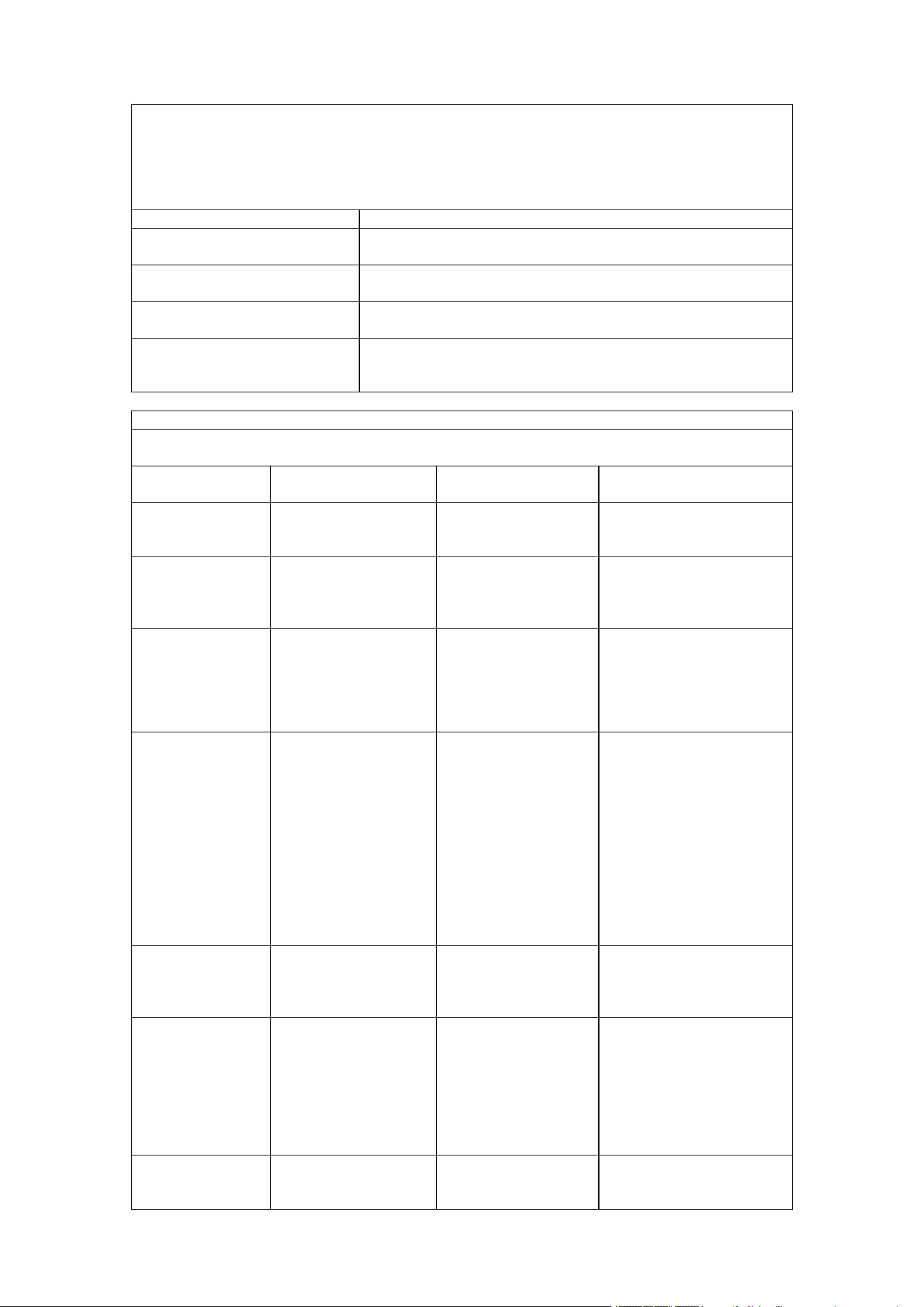
Essential
Performance
Degradation Caused by
Electromagnetic
Disturbances
Essential Performance Maintenance
Produce Protection
No degradation
Not Applicable
Produce Function
No degradation
Not Applicable
Note:
Essential Performance:
The device has two functions are TENS and EMS. For TENS: pulse frequency 6~40Hz, pulse
width 105~200µs, and the maximum voltage is 52V@500Ω. For EMS: pulse frequency
30~180Hz, pulse width 82~240µs, and the maximum voltage is 50V@500Ω.
The following tables provide information on compliance of the equipment according to the
standard IEC 60601-1-2:2014 + A1:2020.
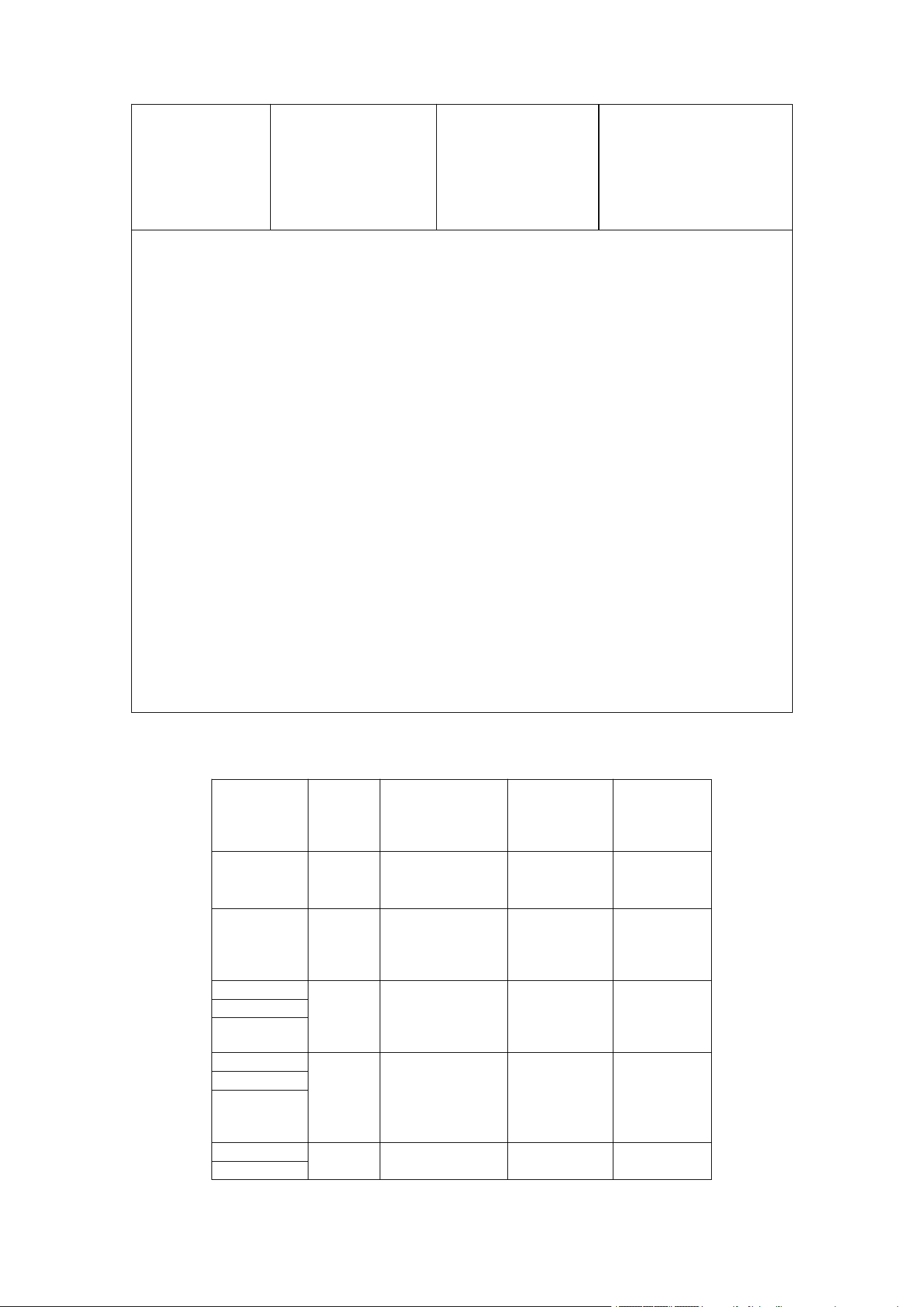
Guidance and manufacturer’s declaration – electromagnetic emissions
Page
26
of
28
Hong Qiangxing (Shenzhen) Electronics Limited.
Wireless TENS&EMS&NMES Heating Stimulator, Models: SM9125
User Manual
This equipment is intended for use in the electromagnetic environments specified below, and
the purchasers or users shall ensure that it is used in these electromagnetic environments.
Emissions
Compliance
RF emissions (Radiated)
CISPR 11
Group 1
Class B
RF emissions (Conducted)
CISPR 11
Group 1
Class B
Harmonic emissions
IEC 61000-3-2
Class A
Voltage fluctuations/flicker
emissions
IEC 61000-3-3
Complies
Guidance and manufacturer’s declaration – electromagnetic immunity
The device is intended for use in the electromagnetic environment specified below. The
customer or the user of the device should assure that it is used in such an environment.
Immunity test
IEC 60601
test level
Compliance level
Environments
Electrostatic
discharge (ESD)
IEC 61000-4-2
±8 kV contact
±2 kV, ±4 kV, ±8 kV,
±15 kV air
±8 kV contact
±2 kV, ±4 kV, ±8 kV,
±15 kV air
HOME HEALTHCARE
environment
Electrical fast
transient/burst
(EFT)
IEC 61000-4-4
±2 kV for power
supply lines
±2 kV for power
supply lines
HOME HEALTHCARE
environment
Surge
IEC 61000-4-5
± 0.5kV, ± 1 kV
line(s) to lines
± 0.5kV, ± 1 kV, ± 2
kV
line(s) to earth
± 0.5kV, ± 1 kV
line(s) to lines
± 0.5kV, ± 1 kV, ± 2
kV
line(s) to earth
HOME HEALTHCARE
environment
Voltage dips, short
interruptions and
Voltage variations
on power supply
input lines
IEC 61000-4-11
0% UT, 0.5 cycle at
0°, 45°, 90°, 135°,
180°, 225°, 270° and
315°
0% UT, 1 cycle at 0°
70% UT, 25 / 30
cycle at 0°
0% UT, 250 / 300
cycle
0% UT, 0.5 cycle at
0°, 45°, 90°, 135°,
180°, 225°, 270° and
315°
0% UT, 1 cycle at 0°
70% UT, 25 / 30
cycle at 0°
°
0% UT, 250 / 300
cycle
HOME HEALTHCARE
environment
Power frequency
(50/60 Hz)
magnetic field
IEC 61000-4-8
30 A/m
30 A/m
HOME HEALTHCARE
environment
Conducted RF
IEC 61000-4-6
3 Vrms
0.15 MHz to 80MHz
6 Vrms in ISM bands
between 0.15 MHz
and 80MHz
6 Vrms in amateur
radio bands between
0.15 MHz and 80MHz
3 Vrms
0.15 MHz to 80MHz
6 Vrms in ISM bands
between 0.15 MHz
and 80MHz
6 Vrms in amateur
radio bands between
0.15 MHz and 80MHz
HOME HEALTHCARE
environment
Radiated RF
IEC 61000-4-3
3 Vrms
80 MHz to 2.7GHz
80% AM at 1KHz
3 Vrms
80 MHz to 2.7GHz
80% AM at 1KHz
HOME HEALTHCARE
environment
Page
27
of
28
Hong Qiangxing (Shenzhen) Electronics Limited.
Wireless TENS&EMS&NMES Heating Stimulator, Models: SM9125
User Manual
Proximity
magnetic fields
IEC 61000-4-39
30 kHz / CW / 8A/m
134.2 kHz / Pulse
modulation 2.1KHz /
65A/m
13.56MHz / Pulse
modulation 50 kHz /
7.5A/m
30 kHz / CW / 8A/m
134.2 kHz / Pulse
modulation 2.1KHz /
65A/m
13.56MHz / Pulse
modulation 50 kHz /
7.5A/m
HOME HEALTHCARE
environment
NOTE
1.
UT is the a.c. mains voltage prior to application of the test level; 25 / 30 and 250 / 300
cycle means 25 / 250 for 50 Hz system and 30 / 300 for 60Hz system.
2. The ISM (industrial, scientific and medical) bands between 0,15 MHz and 80 MHz are
6,765 MHz to 6,795 MHz; 13,553 MHz to 13,567 MHz; 26,957 MHz to 27,283 MHz; and
40,66 MHz to 40,70 MHz. The amateur radio bands between 0,15 MHz and 80 MHz are
1,8 MHz to 2,0 MHz, 3,5 MHz to 4,0 MHz, 5,3 MHz to 5,4 MHz, 7 MHz to 7,3 MHz, 10,1
MHz to 10,15 MHz, 14 MHz to 14,2 MHz, 18,07 MHz to 18,17 MHz, 21,0 MHz to 21,4
MHz, 24,89 MHz to 24,99 MHz, 28,0 MHz to 29,7 MHz and 50,0 MHz to 54,0 MHz.
3. Field strengths from fixed transmitters, such as base stations for radio (cellular/cordless)
telephones and land mobile radio, AM and FM radio broadcast, and TV broadcast cannot,
theoretically, be predicted with accuracy. To assess the electromagnetic environment due
to fixed RF transmitters, consider conducting an electromagnetic site survey. If the
measured field strength in the location the system is used exceeds the applicable RF
compliance level listed in this table, observe the system to verify normal operation. If
abnormal performance is observed, additional measures may be necessary, such as
reorienting or relocating the system.
4.
At 80 MHz and 800 MHz, the higher frequency range applies.
5.
These guidelines may not apply in all situations. Electromagnetic propagation is affected
by the reflection from structures, objects, and people.
6.
Portable and mobile RF communications equipment should be used no closer to any part
of the device, including cables, than the recommended separation distance calculated
from the equation applicable to the frequency of the transmitter.
7. This test is applicable only to ME EQUIPMENT and ME SYSTEM intended for use in the
HOME HEALTHCARE ENVIRONMENT.
8.
The carrier shall be modulated using a 50% duty cycle square wave signal.
9. r.m.s., before modulation is applied.
Test specifications for ENCLOSURE PORT IMMUNITY to RF wireless communications
equipment
Test
frequency
(MHz)
Band a)
(MHz)
Service a)
Modulation
b)
IMMUNITY
TEST
LEVEL
(V/m)
385
380-390
TETRA 400
Pulse
modulation
18 Hz
27
450
430-
470
GMRS 460,
FRS 460
FM c)
±5 kHz
deviation
1 kHz sine
28
710
704-
787
LTE Band
13,17
Pulse
modulation
b)
217Hz
9
745
780
810
800-
960
GSM 800/900,
TETRA 800,
iDEN 820,
CDMA 850,
LTE Band 5
Pulse
modulation
b)
18Hz
28
870
930
1 720
GSM 1800;
CDMA 1900;
Pulse
1 845

Page
28
of
28
Hong Qiangxing (Shenzhen) Electronics Limited.
Wireless TENS&EMS&NMES Heating Stimulator, Models: SM9125
User Manual
1 700-1
900
GSM 1900;
DECT;
LTE Band 1, 3,
4, 25; UMTS
modulation
b)
217Hz
28
1 970
2 450
2 400-2
570
Bluetooth,
WLAN,
802.11 b/g/n,
RFID 2450,
LTE Band 7
Pulse
modulation
b)
217Hz
28
5 240
5 100-5
800
WLAN
802.11a/n
Pulse
modulation
b)
217Hz
9
5 500
5 785
This device complies with part 15 of the FCC Rules. Operation is subject to the two conditions
below:
(1)
This device may not cause harmful interference, and (2) this device must accept any
interference received, including interference that may cause undesired operation.
This equipment has been tested and found to comply with the limits for a Class B digital
device, pursuant to part 15 of the FCC Rules. These limits are designed to provide
reasonable protection against harmful interference in a residential installation. This equipment
generates, uses and can radiate radio frequency energy and, if not installed and used in
accordance with the instructions, may cause harmful interference to radio communications.
However, there is no guarantee that interference will not occur in a particular installation. If
this equipment does cause harmful interference to radio or television reception, which can be
determined by turning the equipment off and on, the user is encouraged to try to correct the
interference by one or more of the measures below:
•
Reorient or relocate the receiving antenna.
•
Increase the separation between the equipment and receiver.
•
Connect the equipment into an outlet on a circuit different from that to which the receiver is
connected.
•
Consult the dealer or an experienced radio/TV technician for help.
WARNING: Changes or modifications to this unit not expressly approved by the party
responsible for compliance could void the user’s authority to operate the equipment. "Harmful
nterference" is defined in 47 CFR §2.1 by the FCC as follows: Interference which endangers
the functioning of a radio navigation service or of other safety services or seriously degrades,
obstructs, or repeatedly interrupts a radio communication service operating in accordance
with the [ITU] Radio Regulations.
RF Exposure:
This device has been evaluated and shown compliant with the FCC portable RF Exposure
limits set forth for an uncontrolled environment. This transmitter must not be co-located or
operated in conjunction with any other antenna or transmitter used in other systems.
Hong Qiangxing (Shenzhen) Electronics Limited.
2F, Yongcheng Blvd, Xicheng Industrial area, Xixiang Street, Bao'an District,
Shenzhen City, Guangdong Province,518126, China