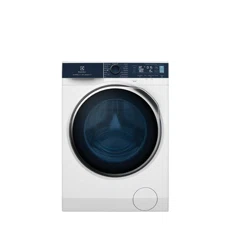
EWF10******
EWF12******
EN
2
USER MANUAL WASHING MACHINE
2 ENGLISH
CUSTOMER CARE AND SERVICE
Get usage advice, brochures, troubleshooter, service information, buy
accessories & spare parts, online product registration: www.electrolux.com
Welcome to Electrolux! Thank you for choosing our appliance.
We recommend the use of original spare parts. When contacting Service, ensure
that you have the following data available. The information can be found on the
rating plate: Model Name, Product Number Code, and Serial Number.
CONTENTS
1. SAFETY INFORMATION . . . . . . . . . . . . . . . . . . . . . . . . . . . . . . . . . . . . . . . . . . . . . . . . . . .3
2. PRODUCT DESCRIPTION . . . . . . . . . . . . . . . . . . . . . . . . . . . . . . . . . . . . . . . . . . . . . . . . .6
3. TECHNICAL DATA . . . . . . . . . . . . . . . . . . . . . . . . . . . . . . . . . . . . . . . . . . . . . . . . . . . . . . .8
4. INSTALLATION . . . . . . . . . . . . . . . . . . . . . . . . . . . . . . . . . . . . . . . . . . . . . . . . . . . . . . . . . .8
5. CONTROL PANEL AND SMARTSELECT . . . . . . . . . . . . . . . . . . . . . . . . . . . . . . . . . . . . 13
6. DIAL AND BUTTONS . . . . . . . . . . . . . . . . . . . . . . . . . . . . . . . . . . . . . . . . . . . . . . . . . . . . 14
7. FIRST TIME START-UP . . . . . . . . . . . . . . . . . . . . . . . . . . . . . . . . . . . . . . . . . . . . . . . . . . . . 17
8. BEFORE FIRST USE . . . . . . . . . . . . . . . . . . . . . . . . . . . . . . . . . . . . . . . . . . . . . . . . . . . . . . 18
9. THE AUTODOSE TECHNOLOGY (AUTODOSING) . . . . . . . . . . . . . . . . . . . . . . . . . . . 19
10. PROGRAMMES . . . . . . . . . . . . . . . . . . . . . . . . . . . . . . . . . . . . . . . . . . . . . . . . . . . . . . . .26
11. WI-FI CONNECTIVITY SETUP . . . . . . . . . . . . . . . . . . . . . . . . . . . . . . . . . . . . . . . . .32
12. OPTIONS . . . . . . . . . . . . . . . . . . . . . . . . . . . . . . . . . . . . . . . . . . . . . . . . . . . . . . . . . . . . 34
13. SETTINGS . . . . . . . . . . . . . . . . . . . . . . . . . . . . . . . . . . . . . . . . . . . . . . . . . . . . . . . . . . . . 38
14. DAILY USE . . . . . . . . . . . . . . . . . . . . . . . . . . . . . . . . . . . . . . . . . . . . . . . . . . . . . . . . . . . 40
15. WASHING HINTS AND TIPS . . . . . . . . . . . . . . . . . . . . . . . . . . . . . . . . . . . . . . . . . . . . . 44
16. INTERNATIONAL WASH CODE SYMBOLS . . . . . . . . . . . . . . . . . . . . . . . . . . . . . . . . .47
17. CARE AND CLEANING . . . . . . . . . . . . . . . . . . . . . . . . . . . . . . . . . . . . . . . . . . . . . . . . . 48
18. TROUBLESHOOTING . . . . . . . . . . . . . . . . . . . . . . . . . . . . . . . . . . . . . . . . . . . . . . . . . . 56
19. ENVIRONMENT CONCERNS . . . . . . . . . . . . . . . . . . . . . . . . . . . . . . . . . . . . . . . . . . . . 60
Warning / Caution-Safety information.
General information and tips.
Environmental information.
The information provided may be subject to change without prior notice due
to updates aimed at improving user experience. For the latest information, please
visit www.electrolux.com.
ENGLISH 3
1. SAFETY INFORMATION
1.1 Conditions Of Use
• staff kitchen areas in shops, offices and other working
environment;
• farm houses;
• by clients in hotels motels, and other residential type
environments;
• bed and breakfast type environments;
• areas for communal use in blocks of flats or in
launderettes.
This appliance is intended to be used in household and
similar applications such as:
In the interest of your safety and to ensure the correct
use, before installing and first using the appliance,
read this user manual carefully, including its hints and
warnings.
To avoid unnecessary mistakes and accidents, it is
important to ensure that all people using the appliance
are thoroughly familiar with its operation and safety
features.
Save these instructions and make sure that they
remain with the appliance if it is moved or sold, so
that everyone using it through its life will be properly
informed on appliance use and safety.
WARNING!
The appliance must not be supplied through an
external switching device, such as timer, or connected
to a circuit that is regularly switched on and off by
utility.

4 ENGLISH
• This machine is not intended for use by children or
infirm persons without supervision.
• The children should be supervised to ensure that they
do not play with the appliance.
• The packaging components (e.g. plastic film,
polystyrene) can be dangerous to children-danger of
suffocation! Keep them out of children’s reach.
• Keep all detergents in a safe place out of children’s
reach.
• Make sure that children or pets do not climb into the
drum.
• This machine is provided with lock option ( ) to
prevent children playing with the control panel.
1.2 Child Safety
1.3 General Safety
• It is dangerous to alter the
specifications or attempt to modify this
product in any way.
• During high temperature wash
programme the door glass may get
hot. Do not touch it!
• Make sure that small pets do not climb
into the drum. To avoid this, please
check inside the drum before using the
appliance.
• Any objects such as coins, safety pins,
nails, screws, stones or any other hard,
sharp
material can cause extensive damage
and must not be placed into the
machine.
• Wash small items such as socks, laces,
washable belts etc. in a washing bag
or pillow case as it is possible for such
items to slip down between the tub
and the inner drum.
• Only use manufacturer’s recommended
quantities of fabric softener and
detergent. Damage to the fabric or
appliance can occur if you exceed the
recommended amount.
• Do not use your machine to wash
articles with whalebones, material
without hems or torn material.
• Always unplug the appliance and turn
off the water supply after use, clean
and maintenance.
• This appliance is not intended for use
by persons (including children) with
reduced physical, sensory or mental
capabilities, or lack of experience
and knowledge, unless they have
been given supervision or instruction
concerning use of the appliance by a
person responsible for their safety.
• Under no circumstances should you
attempt to repair the machine yourself.
Repairs carried out by inexperienced
persons may cause injury or serious
malfunctioning.
Contact your local Service Centre.
Always insist on genuine spare parts.
• Pre-treatment sprays and stain
remover can damage plastic
components on your machine. If you
use pre-treatment sprays or stain
removers, apply them to the clothing
well away from your machine.
ENGLISH 5
1.4 Installation
• This appliance is heavy. Care should
be taken when moving it.
• When unpacking the appliance, check
that it is not damaged. If in doubt,
do not use it and contact the Service
Centre.
• All packing and transit bolts must
be removed before use. Serious
damage can occur to the product
and to property if this is not adhered
to. See relevant section in section
"Unpacking".
• After having installed the appliance,
check that it is not standing on the
inlet and drain hose and the worktop
is not pressing the electrical supply
cable.
• If the appliance is installed on a
carpeted floor, please adjust the feet
in order to allow air to circulate freely.
• Always be sure, that there is no
water leakage from hoses and their
connections after the installation.
• Any plumbing work required to install
this appliance should be carried out
by a qualified plumber.
• Any electrical work required to install
this appliance should be carried out
by a qualified electrician.
1.5 Use
• Only wash fabrics which are designed
to be machine washed. Follow the
instructions on each garment label.
• Do not overload the appliance. See
the relevant section in the user manual.
• Before washing, ensure that all pockets
are empty and buttons and zips are
fastened. Avoid washing frayed or torn
articles and treat stains such as paint,
ink, rust, and grass before washing.
• Garments which have been in contact
with volatile petroleum products
should not be machine washed. If
volatile cleaning fluids are used, care
should be taken to ensure that the fluid
is removed from the garment before
placing in the machine.
• Never pull the power supply cable
to remove the plug from the socket;
always hold the plug itself.
• Never use the machine if the power
supply cable, the control panel, the
working surface, or when the base is
damaged; and where the inside of the
machine is accessible.
• If the supply cord is damaged, it must
be replaced by the manufacturer, its
service agent or similarly qualified
persons in order to avoid a hazard.
1.6 Electrical Connection
Check that your domestic electrical
installation can take the maximum load
required from technical data, also taking
into account any other appliances in use.
When the appliance is installed, the
power supply cable must be easily
accessible.
WARNING!
May cause electric shock! if the
machine is not connected to an
earthed/ground system. DO NOT touch
the wet clothes and metal parts.
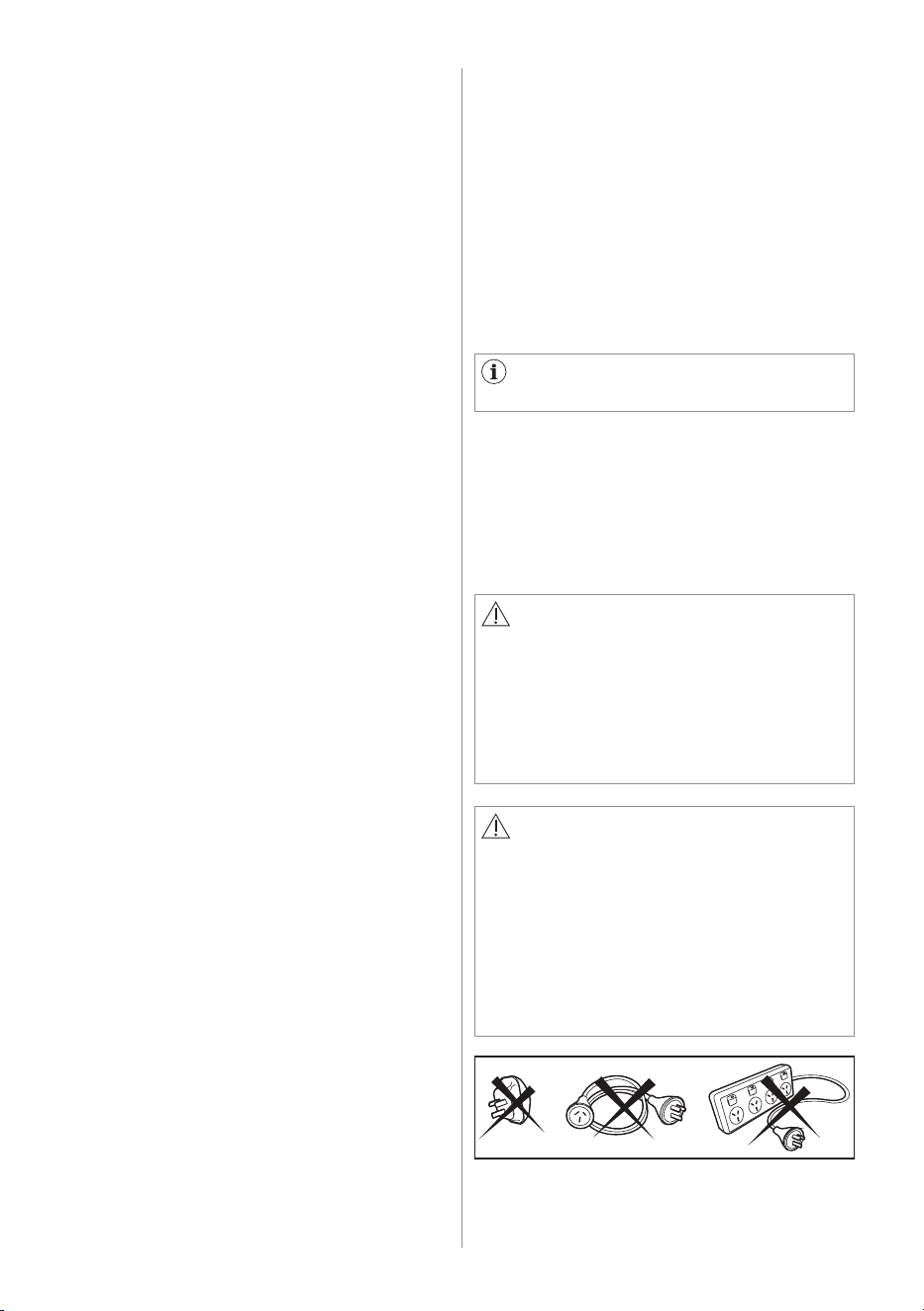
For safety reasons do not use double
adapters, extension cords and multi-
plug adapters.
CAUTION!
Connect the machine to an earthed
socket outlet.
The manufacturer declines any
responsibility for damage or injury
through failure to comply with the
above safety precaution.
Should the appliance power supply
cable need to be replaced, this shall be
carried out by our Service Centre.
"An incorrect power supply may void
your warranty."
6 ENGLISH
I
L
J
K
M
N
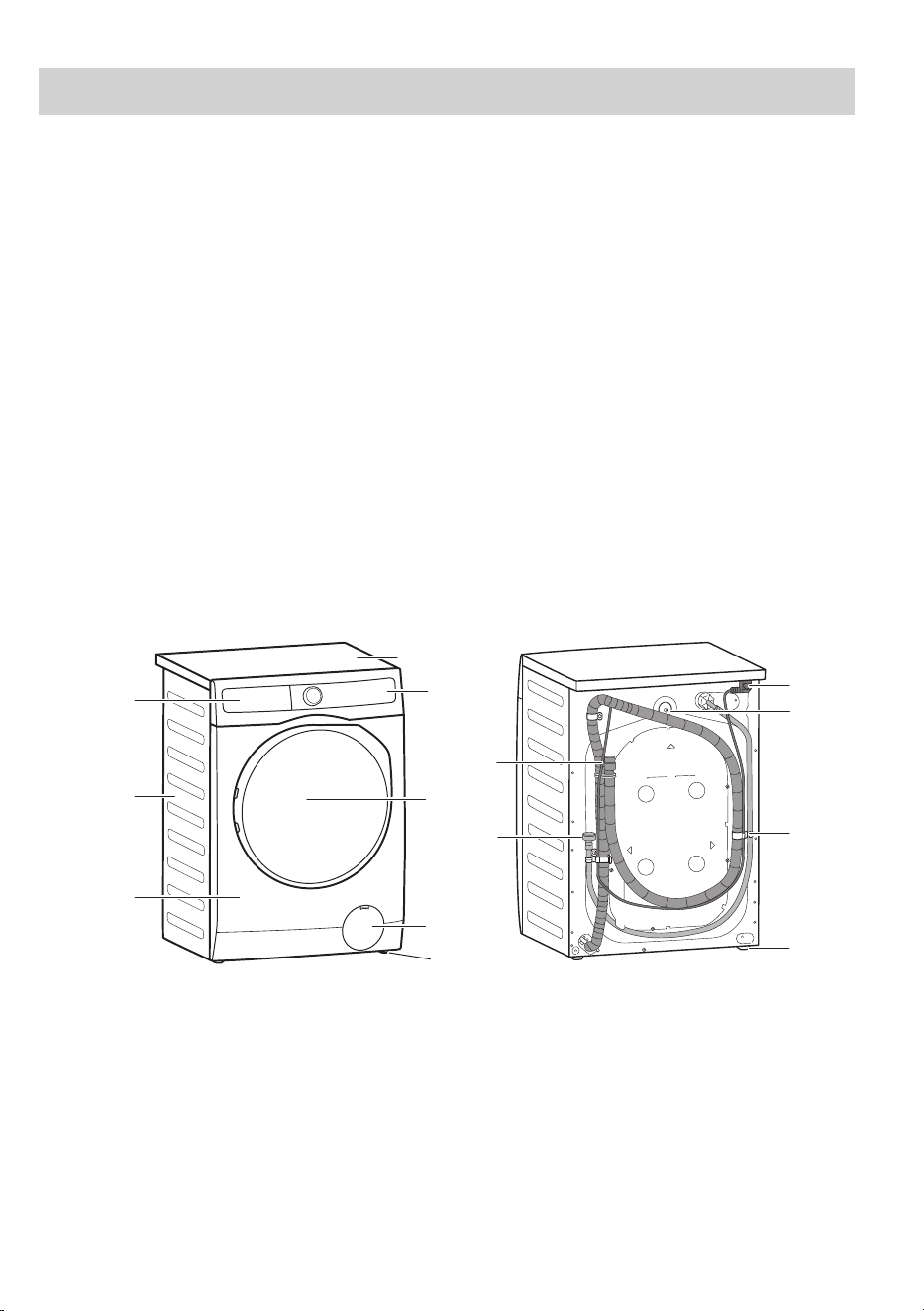
2.2 Appliance overview
2.1 Special features
A
B
D
C
E
H
G
F
2. PRODUCT DESCRIPTION
Your new machine meets all modern
requirements for effective treatment
of laundry with low water, energy and
detergent consumption and proper care
of fabric.
• The interactive touch screen display
makes the setting and the use of
the appliance more immediate and
agreeable.
• The AutoDose technology
automatically dispenses the right
amount of detergent according to the
load; the drawer has two integrated
tanks (detergent + softener) and two
additional compartments for detergent
and additives manual load. It gives
the highest use flexibility.
• The Wi-Fi connection and Remote
Start enable you to start a cycle, to
interact with your washing machine
and to check the washing cycle status
in remote control.
A
Worktop
B
Control Panel
C
Door
D
Drain Pump Filter
E
Level Adjustment Feet
F
Front Panel
G
Cabinet
H
Detergent Dispenser
I
Mains Cable
J
Transit Bolts
K
Transit Bolts & Hose Support
L
Level Adjustment Feet
M
Water Inlet Hose
N
Water Drainage Hose
ENGLISH 7
2.2.2 Door (when open)
2.2.3 Drain Pump Filter (when open)
2.2.4 Level Adjustment feet
Drum
Lifter
Rating
Label
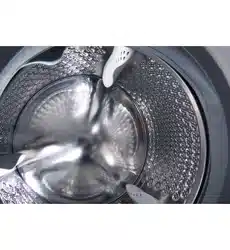
Stainless
Steel
Washing
Drum
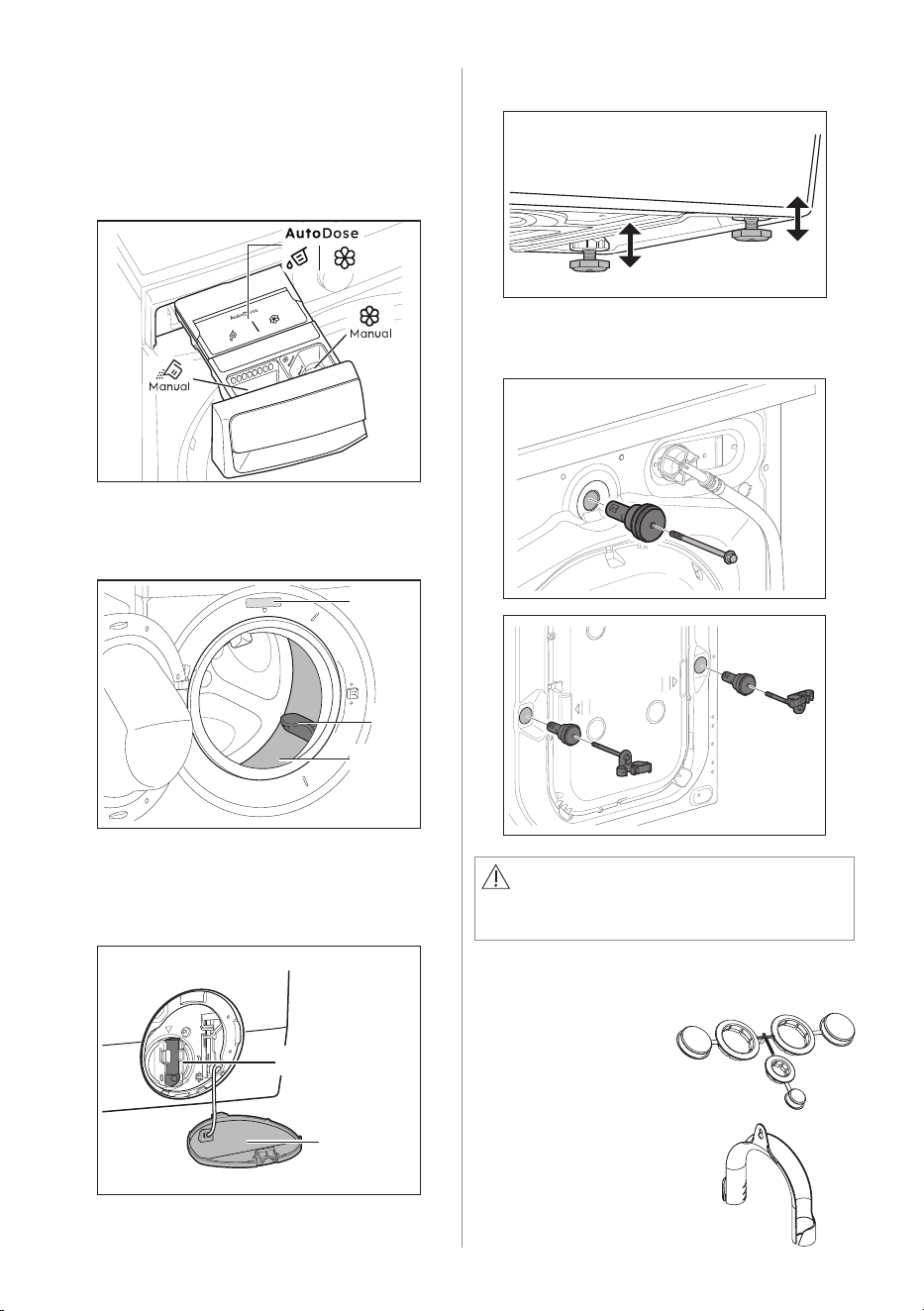
2.2.1 Detergent Dispenser (AutoDose
Tanks and Manual Compartments)
For details about using the Detergent
dispenser with AutoDose tanks and
manual compartments refer to section 9.2
2.3 Accessories
Plastic Hose Guide
To connect the drain
hose on the edge of
a sink.
Plastic Caps
To close the holes
on the rear side of
the cabinet after
the removal of the
transit bolts.
2.2.5 Transit Bolt (when remove)
CAUTION!
Transit bolts must be removed before
using the appliance
Drain Pump Filter
Drain Pump
Filter Door
8 ENGLISH
3. TECHNICAL DATA
4. INSTALLATION
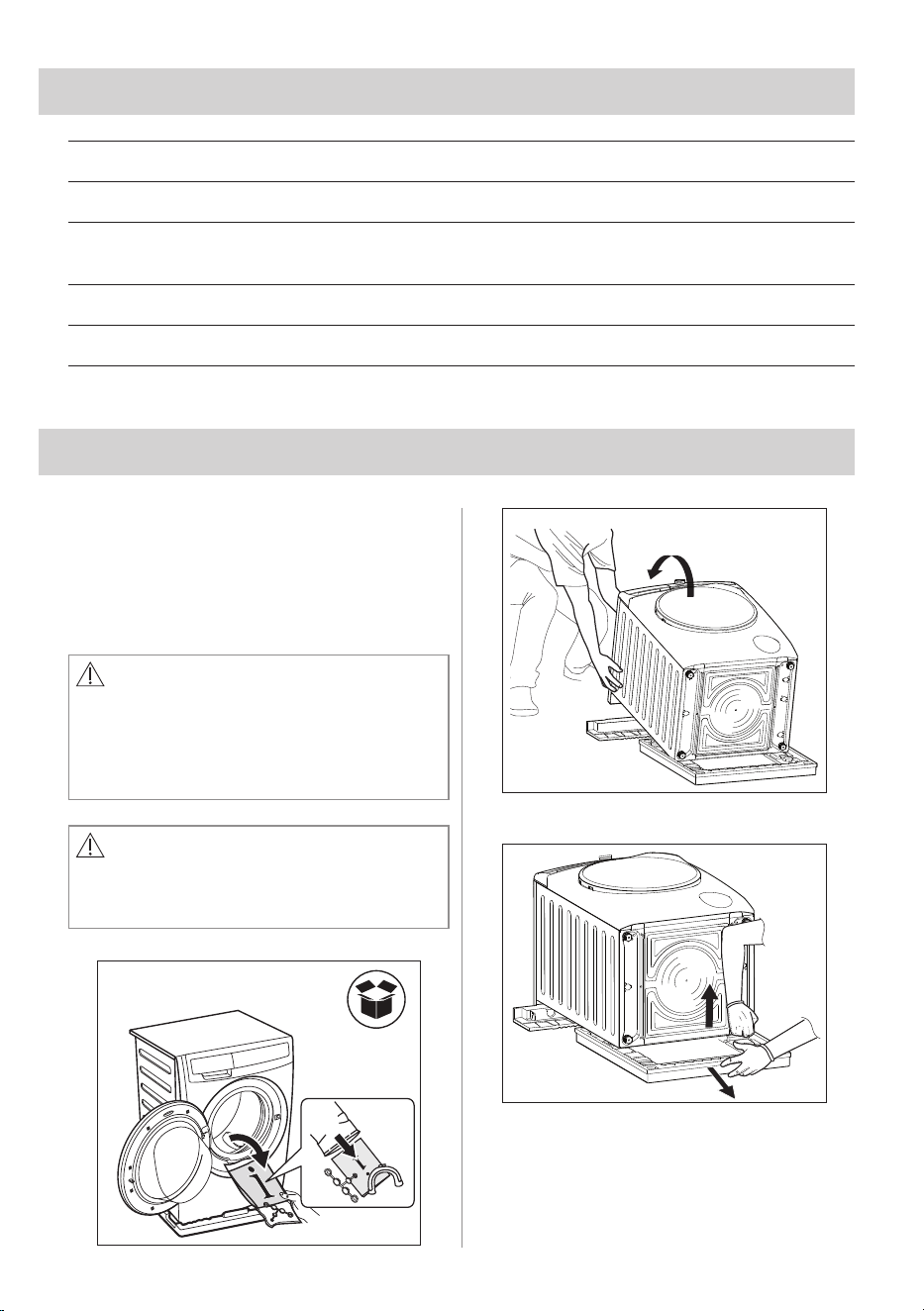
4.1 Unpacking
You are advised to keep all transit
devices so that they can be refitted if
the machine ever has to be transported
again.
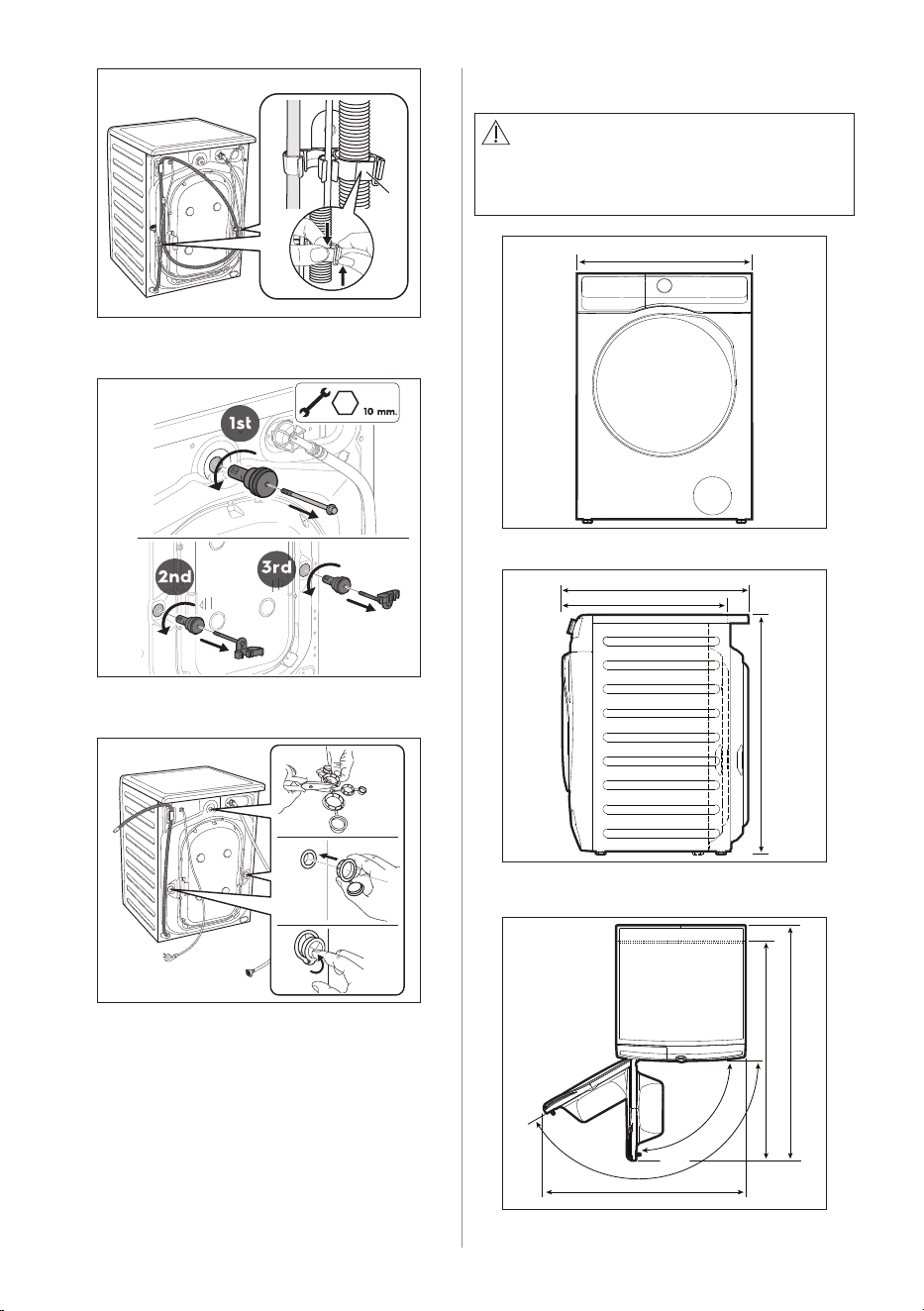
WARNING!
All transit bolts and packing must be
removed before using the appliance.
Requires using a wrench or hexagon
head block number 10 to remove the
transit bolts at all 3 points.
CAUTION!
Carefully put down the appliance with
the rear side on it. Make sure not to
damage the hoses.
1
2
3
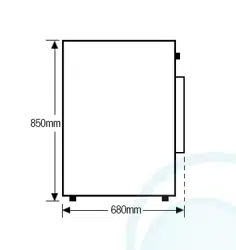
Dimensions (Height / Width / Depth) 850 x 600 x 659 mm
Power supply (Voltage / Frequency) 220 - 240 V~/ 50 Hz
Total power absorbed
EWF10******: 2000 W
EWF12******: 2100 W
Water supply pressure (Maximum / Minimum) 0.8 MPa / 0.05 MPa
Maximum Spin Speed 1400 rpm
ENGLISH 9
A
4
5
1
2
3
6
4.2 Positioning
1
600 mm
659 mm
575 mm
850 mm
2
WARNING!
Before proceeding with installation,
read the safety information, and
dimension preferred.
1017 mm
1102 mm
930 mm
3
150°
90°
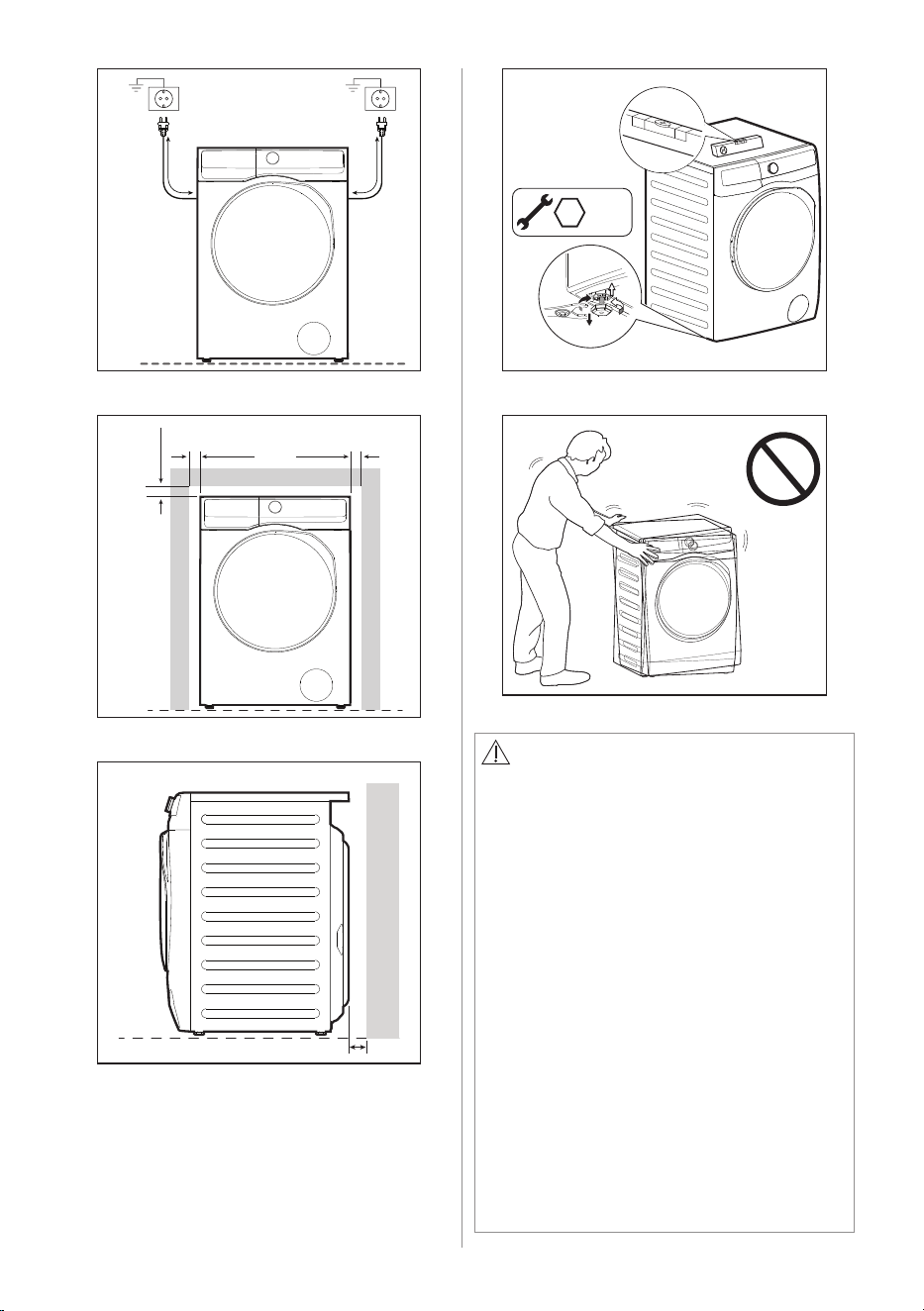
10 ENGLISH
wall
30 mm
6
20 mm
20 mm
20 mm
5
1050 mm
1400 mm
4
30 mm.
7
8
CAUTION!
When installing the product make sure
the levelling feet is not pressing on the
power cord.
When the machine is levelled, try to
rock it from corner to corner.
If it does rock, adjust the legs again
until it is levelled and does not rock.
Never place cardboard, wood, or
similar materials under the machine
to compensate for any unevenness in
the floor. Install the machine on a flat
hard floor. Make sure that air circulation
around the machine is not impeded by
carpets, rugs, etc.
The appliance must not be installed
behind a lockable door, a sliding door,
or a door with a hinge on the opposite
side to that of the machine, in such a
way that a full opening of the door is
restricted.
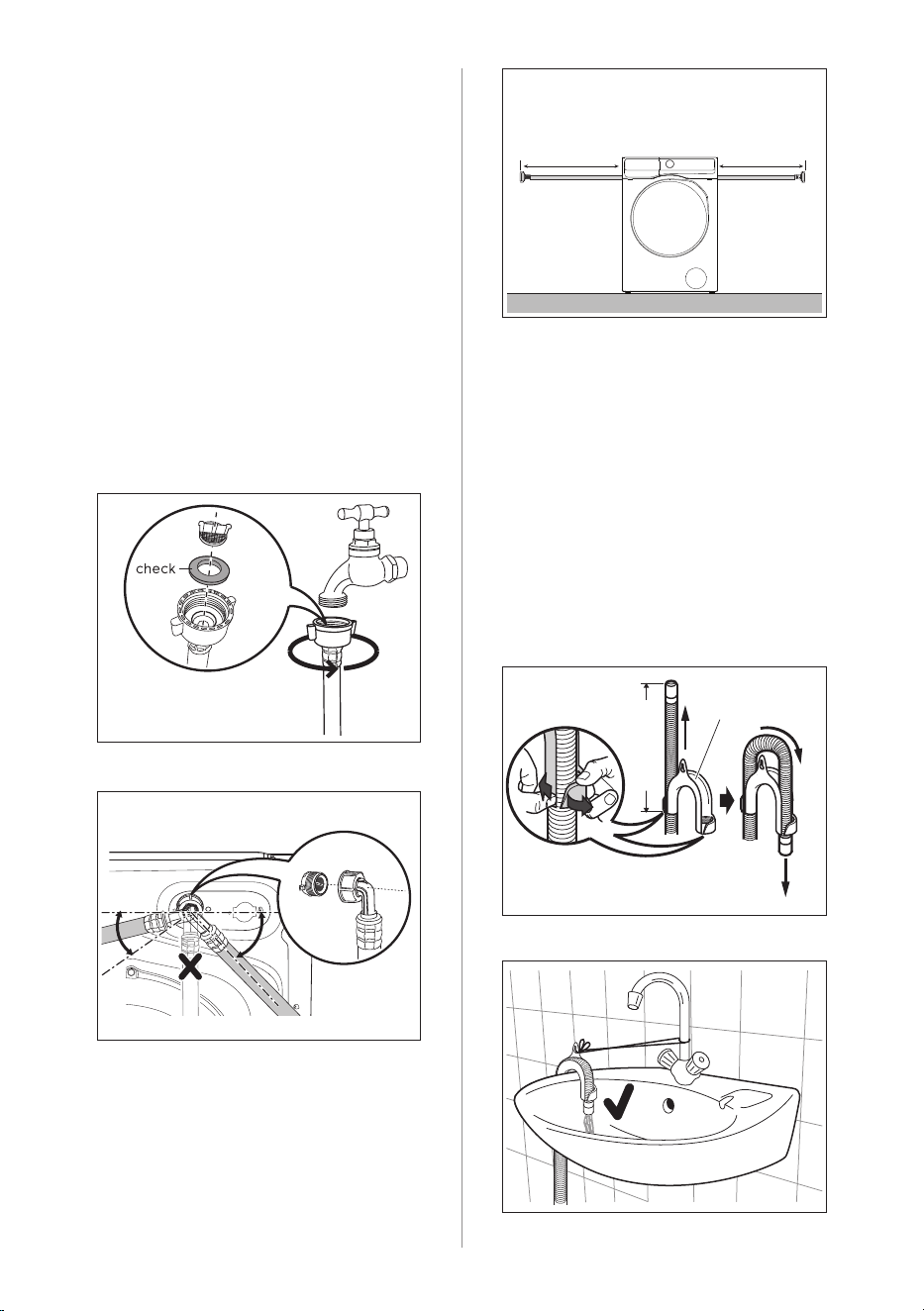
ENGLISH 11
45°
35°
4.3 Water Inlet
Connect the water inlet hose to a tap
with 3/4” BSP thread. Use the hose
supplied with the machine. DO NOT USE
OLD HOSES.
The inlet hose must not be lengthened.
If it is too short and you do not wish to
move the tap, you will have to purchase
a new, longer hose specially designed for
this type of use.
Loosen the ring nut to angle the hose
to the left or right depending on the
position of your water tap. Do not place
the inlet hose downwards.
After positioning the inlet hose, be sure
to tighten the ring nut again to prevent
leaks.
Max.
91 cm
Max.
117 cm
The end of the drain hose can be
positioned in three ways:
• Hooked over the edge of a sink, using
the plastic hose guide supplied with
the machine.
Fitting Hose Guide
In this case, make sure the end cannot
come unhooked when the machine is
being emptied. This could be done by
tying it to the tap with a piece of string
or attaching it to the wall.
4.4 Water Drainage
Pull hose, and adjust
length to suit trough.
Bend
hose
Hose
Guide
Pull apart to
insert hose.
45 cm approx.
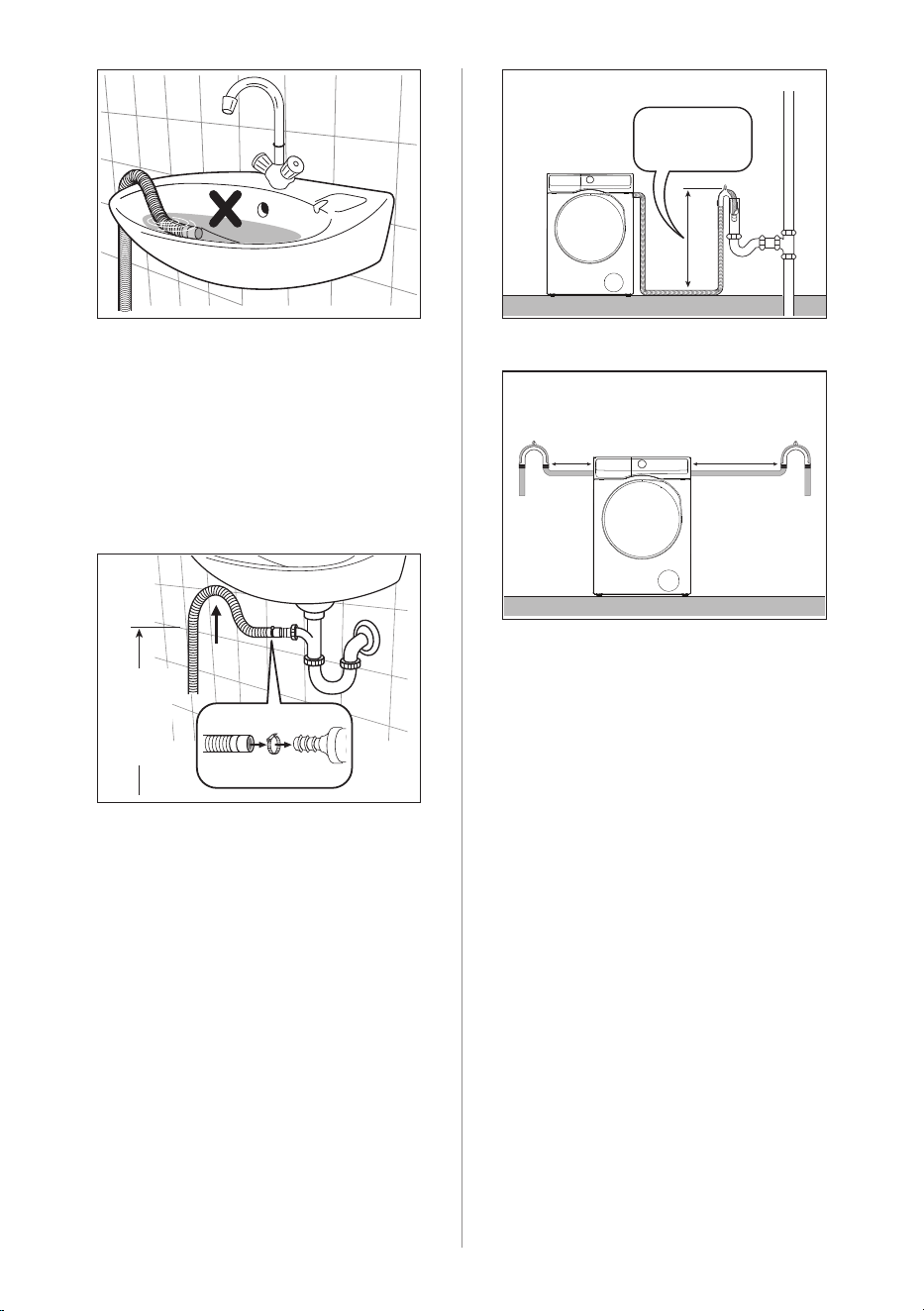
12 ENGLISH
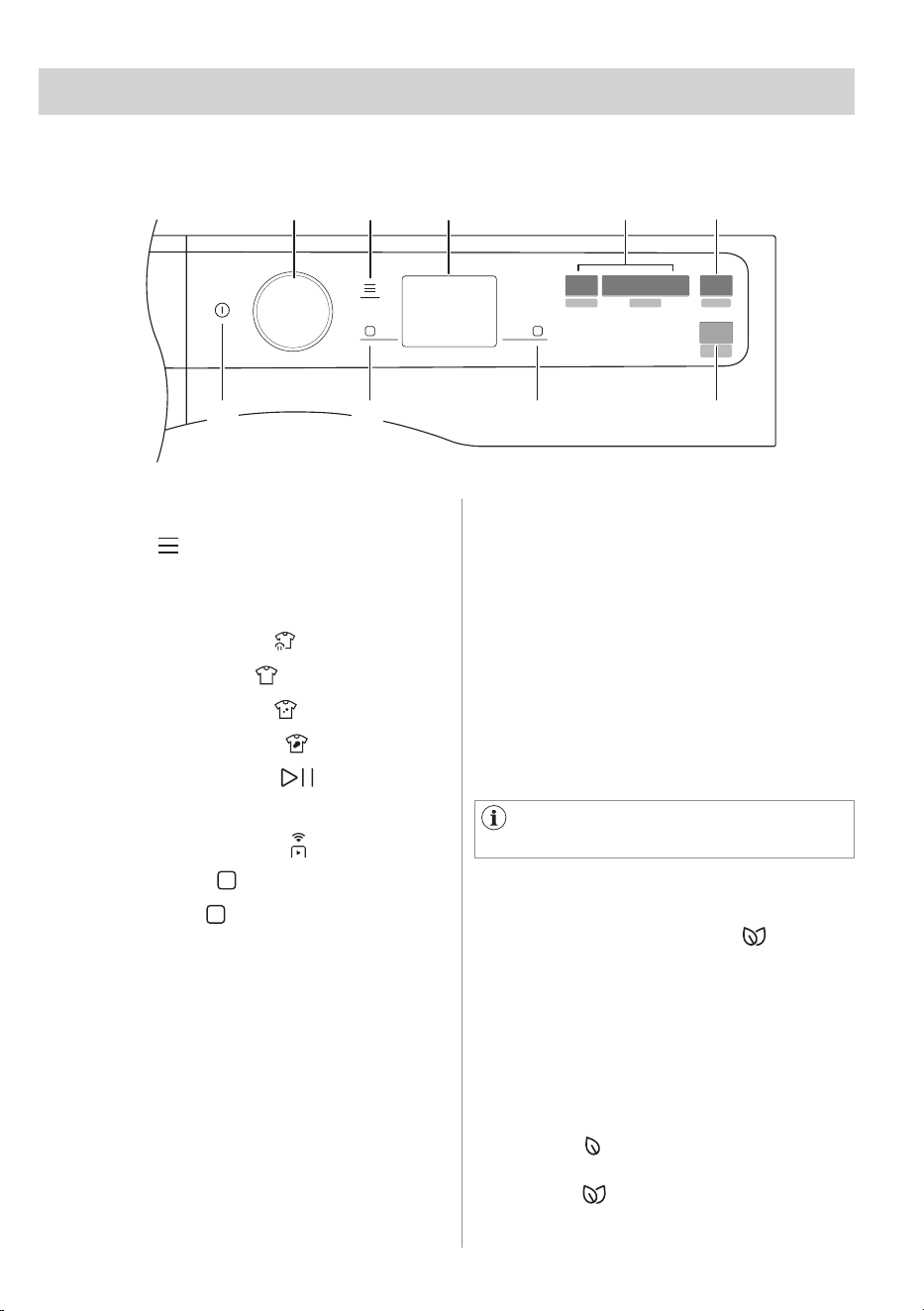
Max.
90 cm
Min.
60 cm
Max. 90 cm
Min. 60 cm
Max.
41 cm
Max.
88 cm
• In a sink, drain pipe branch.
This branch must be above the trap so
that the bend is at least 60 cm above
the ground.
Push the drain hose onto the spigot
and secure with a clip, ensure a loop
is formed in the drain hose to prevent
waste from the sink entering the
appliance.
• Directly into a drain pipe, at a height
of not less than 60 cm and not more
than 90 cm.
The end of the drain hose must always
be ventilated, i.e. the inside diameter
of the drain pipe must be larger than
the outside diameter of the drain hose.
The drain hose must not be twisted or
curled. Run it along the floor; only the
part near the drainage point must be
raised.
For the correct functioning of the
machine, the drain hose must remain
hooked on the proper support piece
situated on the top part of back side
of the appliance.
ENGLISH 13
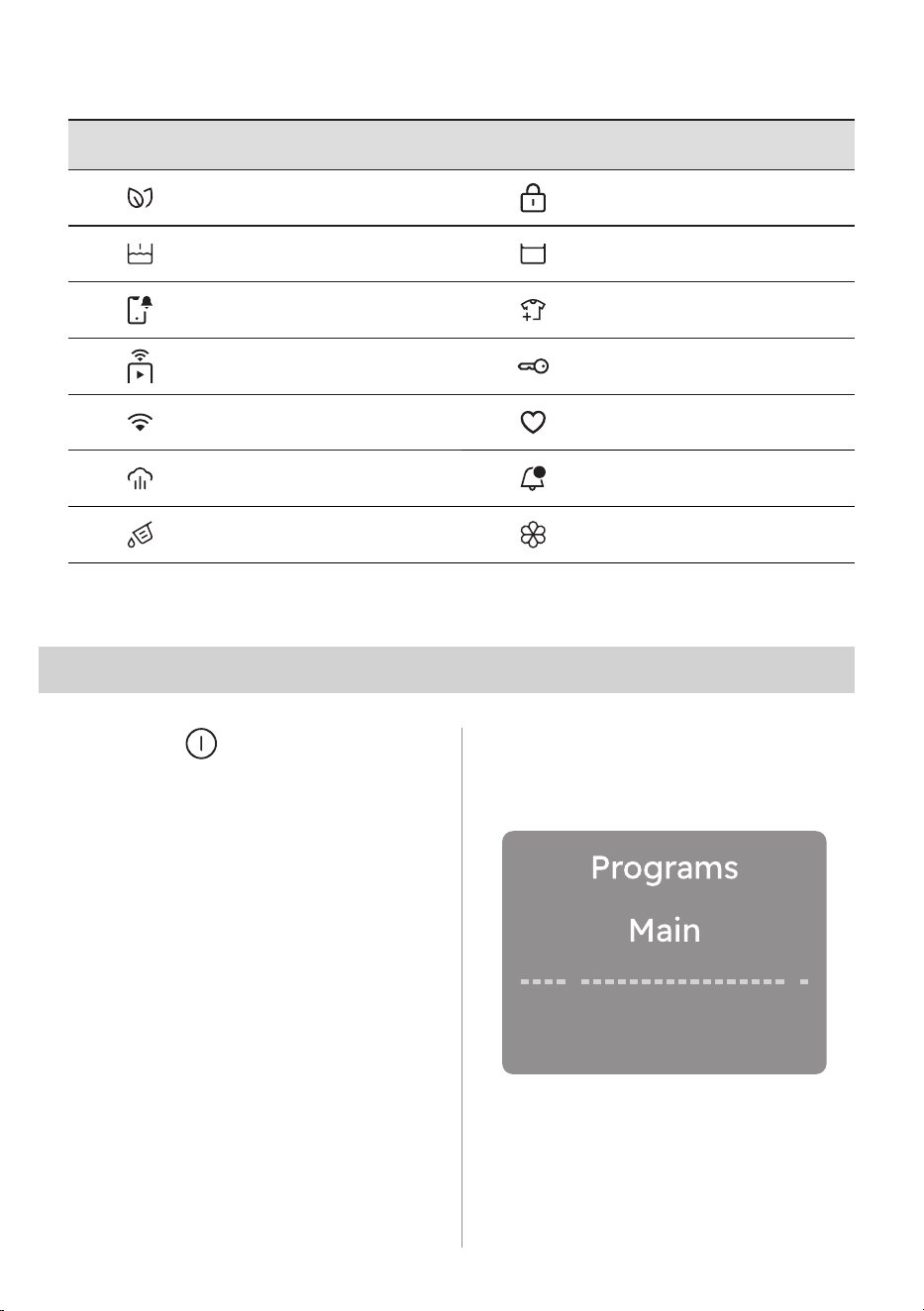
5.1 Control Panel Description
5.3 SmartLeaf feedback
5.2 SmartSelect
5. CONTROL PANEL AND SMARTSELECT
A Programme selector knob
B
Menu touch key
C Display
D SmartSelect touch key
• Refresh touch key
• Light touch key
• Normal touch key
• Intensive touch key
E
Start/Pause touch key
(Pause to add Clothes option)
F
Remote Start touch key
G
Right soft key
H
Left soft key
I On/Off touch key
B
F
A C
E
H GI
D
SmartLeaf feedback shows how energy
efficient a programme is, based on
energy consumption.
There are three different level of
SmartLeaf indicated by the leaf icon
1. No leaf lit indicates an average
consumption level.
2. One leaf icon indicates a good
consumption level.
3. Two leaf icon indicates the best
consumption level.
SmartSelect is a new and unique
feature that allows the user to select the
correct washing settings based on the
soil level of the fabrics, taking care of
the garments and enhancing the user
experience.
The washing temperature adapts to
each SmartSelect level according to
the selected cycle to ensure the best
performance, without the need to
change the temperature manually.
For more detail refer to chapter
"DIAL AND BUTTON" page 14.
14 ENGLISH
5.4 Main symbols legend
6. DIAL AND BUTTONS
6.1 On/Off
Press and hold briefly this button for a
few seconds to activate or deactivate
the appliance. A dedicated jingle sound
while switching the appliance on or off,
lights and display switches on and Start/
Pause button led pulse.
6.2 Programme dial
By rotating the programme dial it
is possible to select the desired
programme.
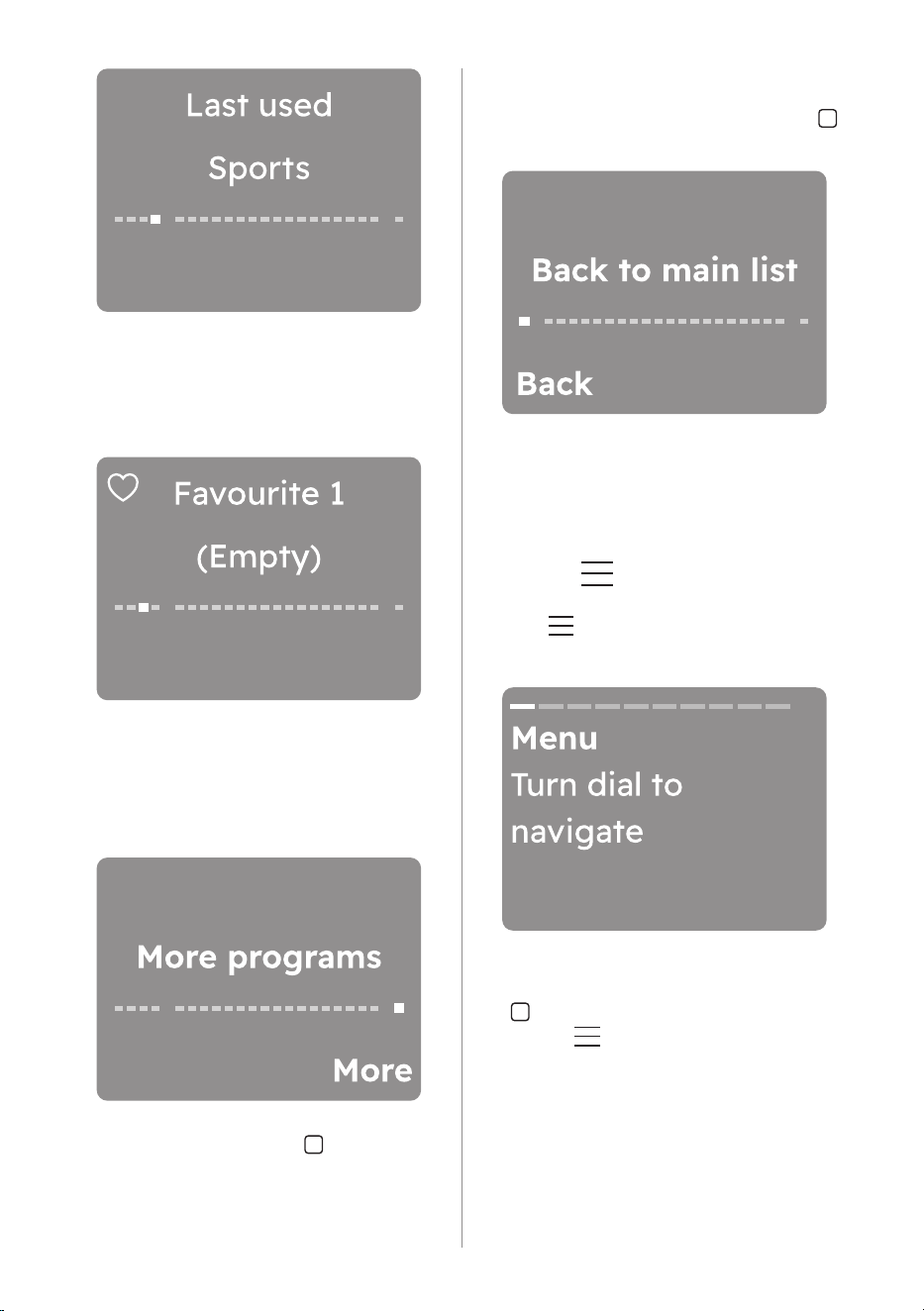
Navigate through the programmes
In the display, by turning the dial,
several dots representing the available
programmes are visible.
• By turning to the right or to the left
it is possible to reach the saved
programmes or scroll through the
entire list.
• Turn the dial to the left until the
fourth point relating to the last used
programme is shown.
Symbol Description Symbol Description
SmartLeaf feedback icon Child Lock icon
Prewash icon Rinse Hold icon
App Shortcut icon Add clothes icon
Remote Start Mode icon Door locked icon
Wi-Fi connection icon Favourite icon
Steam icon Notification icon
Detergent icon Softener icon
ENGLISH 15
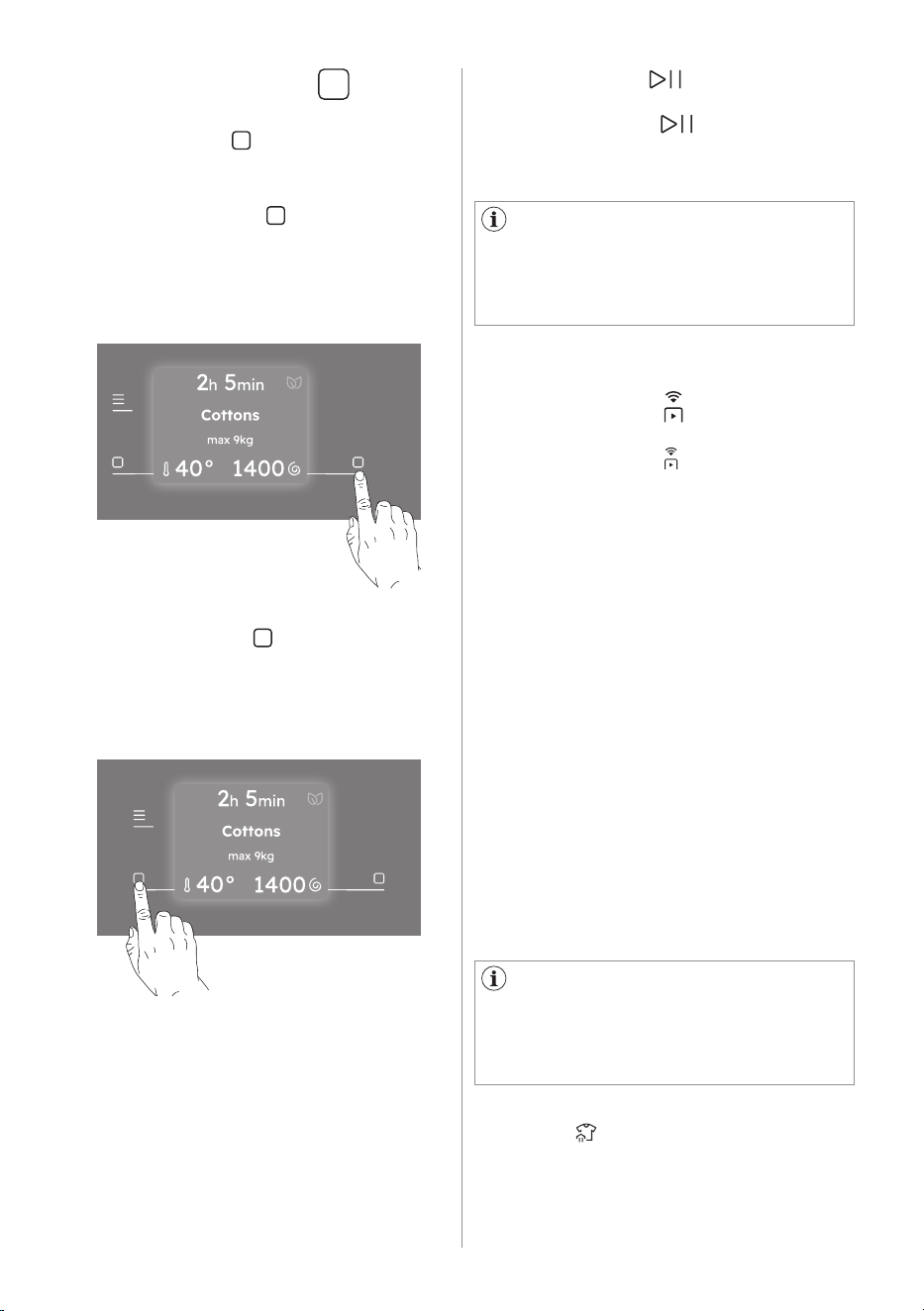
6.3 Menu
Tap the button to enter inside the
option Menu.
• Turn the dial further to the left to view,
from point one to three, the Favourites
programmes to be saved or already
saved.
• Turn the dial to the right to scroll
through the entire programme list until
the last separate point is reached,
which represents access to the
additional programme list.
Press the right soft key next to
More indication to enter the extra
programmes list. Navigating this list
works just like navigating the main list.
• To go back to the main list, turn the
dial to the left to the Back to main list
position and press the left soft key
next to Back indication.
In this view, the last dot represent the
reset list position.
Turn the dial to navigate. To activate/
deactivate an option tap the right soft
key touch button.
To exit the user shall:
• press the menu button again;
• press the SmartSelect button;
• press the remote button;
• wait a time out of 10 seconds.
16 ENGLISH
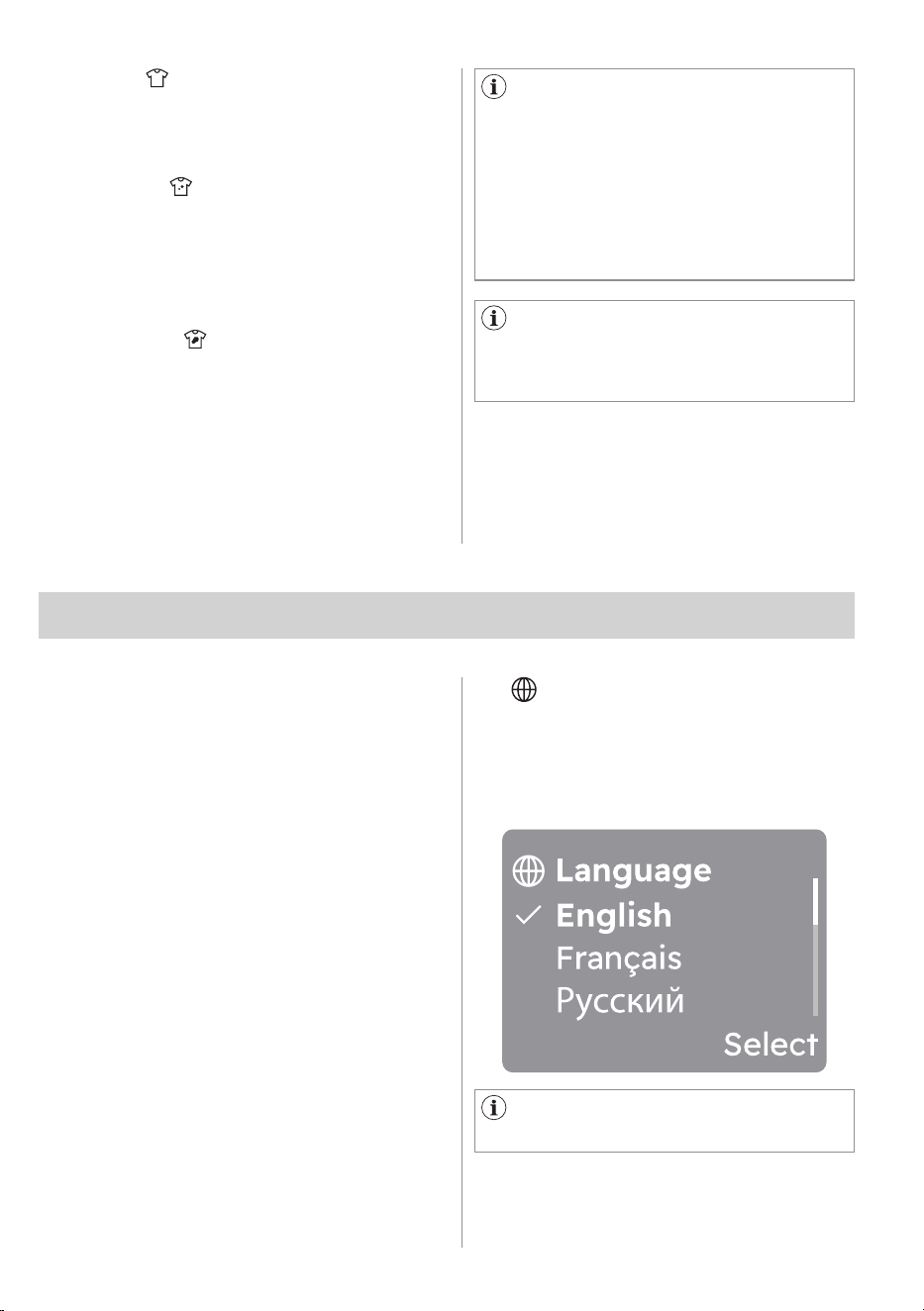
6.4 Right/Left soft key
The two soft keys buttons are located
on the right and the left of the display.
Tap the right soft key to prompt the
action that appears on the right bottom
of the display (ex. adjust spin speed,
activate or deactivate AutoDose tank, go
back in the menu,..).
Tap the left soft key to prompt the
action that appears on the left bottom
of the display (ex. adjust temperature,
activate or deactivate an option,...)
6.5 Start/Pause
A message in the display inform
you that the cycle can pause to add or
remove garments. Read the "Opening
the door - Adding garments" section for
more details.
Tap the Start/Pause button to start,
pause the appliance or interrupt a
running programme.
6.6 Remote Start
A quick touch of this button activates
the Remote Start function that allows you
to start, pause and stop the appliance
remotely.
Activating the Remote start mode the
door will lock and the machine goes in a
stand-by status.
Press and hold 10 second to reset the
Wi-Fi.
For each programme the appliance
suggest a default soil level with a
specific temperature. If you change
the temperature manually, the soil level
could change.
6.7 SmartSelect
This new feature has been created to
guide the user to save energy, time and
water improving the care of fabrics and
consumer experience.
For each washing cycle it is possible
to have different durations and
consumption, based on the level of
soiling of the laundry.
There are four possible options:
1. Refresh
With this SmartSelect level the user
selects Vapour Refresh programme.
It can reduce wrinkles and light odours
and will refresh clothes that does not
need a wash.
ENGLISH 17
To activate one of this options
turn the dial to select the desired
programme.
The default soil level icon light on.
To change it tap on the related icon.
Every SmartSelect level can modify
temperature, spin speed and
programme duration of the selected
cycle.
If a certain soil level is not
available, pressing it will generate an
error, a double beep and symbol blinks
twice.
Each time you turn the appliance on, the
Start-up Screen appears on the touch
screen.
The first time you turn the appliance on,
after the Start-up Screen you are guided
through the initial setup procedure.
The first time you turn the appliance
on, the display guided through some
information related to the appliance.
If user skipped it during first power on,
it will show again on the next power up
after start up. If user has press skipped
for the second time, do not show
anymore.
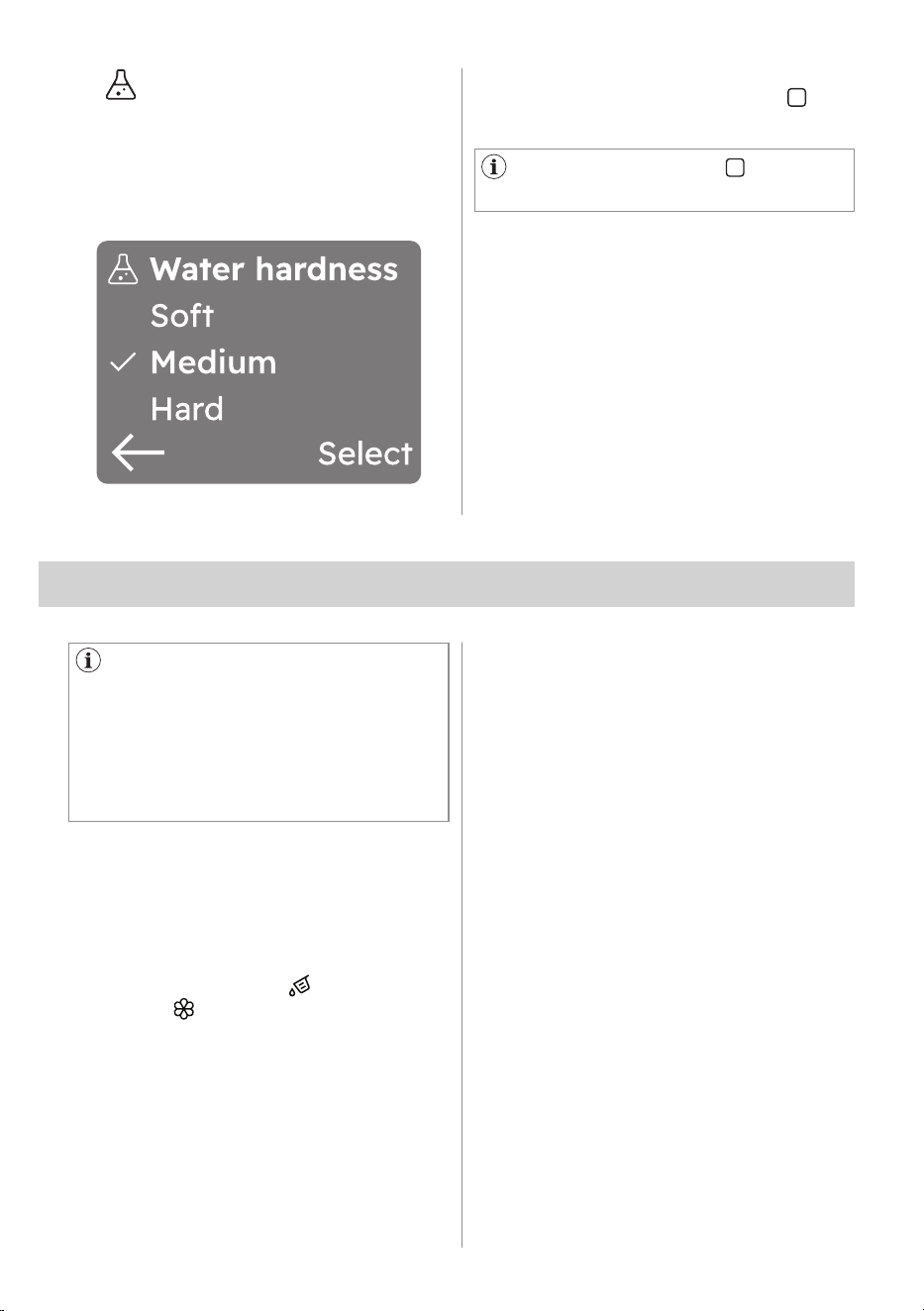
Scroll through the list of languages by
rotating the knob to find the desired
language and select it by pressing the
right soft key.
7. FIRST TIME START-UP
7.2 Language setup
7.1 Discover your appliance
By turning the knob the selected
language will be visible in bold.
2. Light
This option is recommended for very
lightly soiled clothing, without visible
stains. The suggested temperature is
cold.
3. Normal
This option is ideal for everyday
light soiled clothes, with small stains
for example sweat. The suggested
temperature is 30°C.
The normal soil level is the one being
used most in the default setting.
4. Intensive
This option is recommended for
normal/ heavy soiled clothes, with for
example food spills or mud.
To activate one of these options turn the
dial to select the desired programme. The
default soil level icon light on.
To change it tap on the related icon.
18 ENGLISH
The display suggests to set the proper
water hardness level to improve the
washing results.
The following window pops up:
7.3 Water Hardness
Tap on the left soft key
to return
to the previous view.
Rotate the knob to select the right
level and tap on the right soft key to
confirm the default setting.
8. BEFORE FIRST USE
During installation or before first
use you may observe some water in the
machine. This is a residual water left in
the machine after a full functional test
in the factory to ensure the machine
is delivered to customers in perfect
working order and is no cause for
concern.
1. Make sure that all transit bolts have
been removed from the appliance.
2. Ensure that the electrical and
water connections comply with the
installation instructions.
3. Make sure to fill the AutoDose tanks
with liquid detergent and fabric
softener . Refer to "AutoDose basic
setting" paragraph in "The AutoDose
technology" chapter.
4. Pour 2 litres of water inside the drum.
This action activates the drain system.
5. Set and start a programme for cottons
at the highest temperature without
any laundry in the drum.
This removes all possible dirt from the
drum and the tub.
ENGLISH 19
Read this chapter carefully.
9.1 Introduction
Right detergent and fabric softener
dosage takes better care of the laundry
and ensuring good wash performances.
Too much detergent damages your
clothes and too little doesn’t ensure
good wash performances.
This appliance is equipped with an auto
dosing system able to automatically
provide the right detergent and fabric
softener dosage to preserve the fabric
integrity and colour brightness.
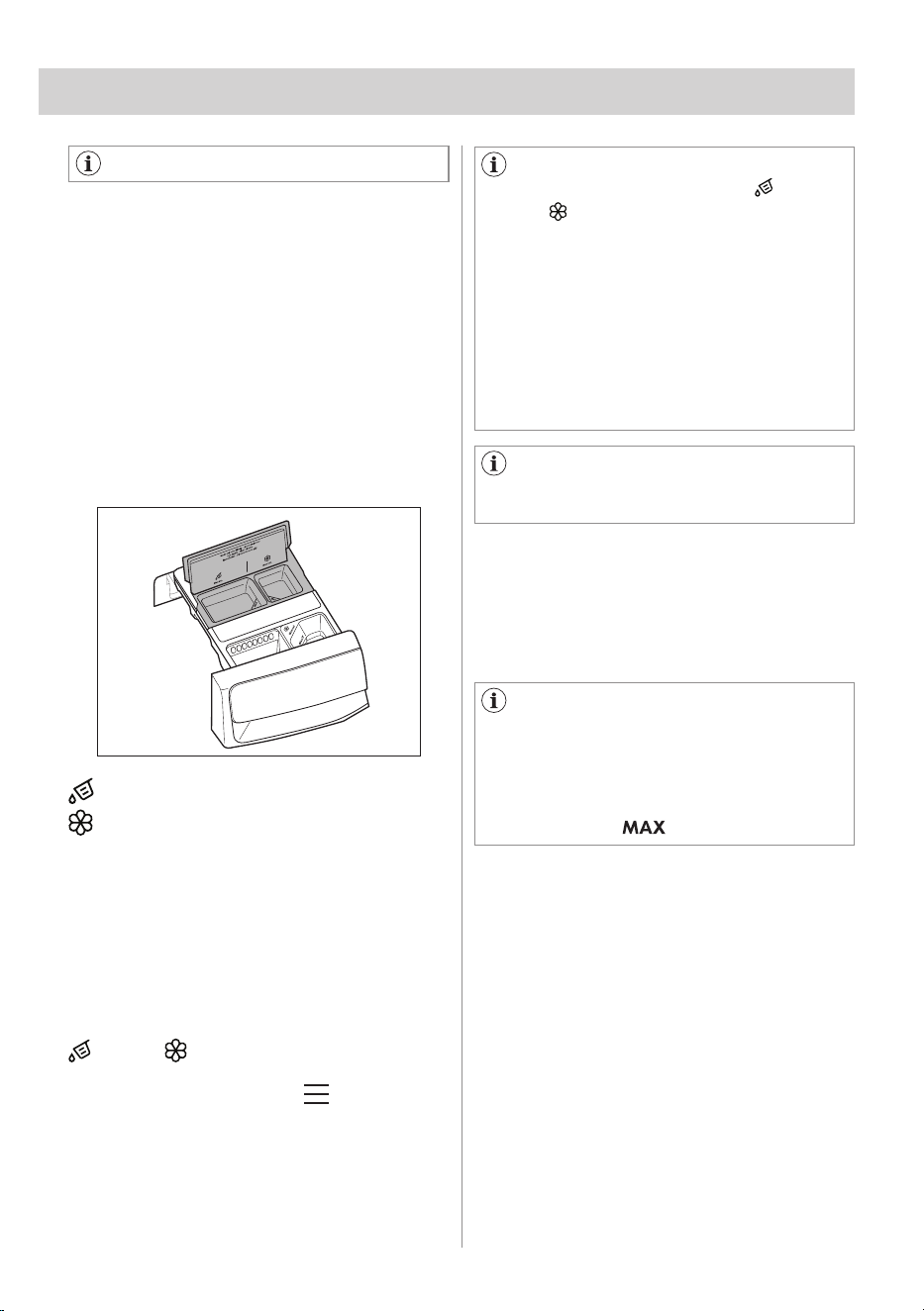
AutoDose Liquid Detergent tank.
AutoDose Fabric Softener tank.
The appliance is pre-set by the factory
to suit most users habits.
Once started the programme, the
appliance will automatically release the
right amount of detergent and softener
according to the real fabric load, if
AutoDose is activated and the indicators
and/or are visible on the display
(detergent and softener indicators are
showed only under Menu view or
just after start key press via a specific
confirmation pop-up view).
In some programmes, AutoDose
is deactivated (the indicators
and/or are not displayed and the
display shows OFF) because there are
garments requiring special detergents
or treatments. If this is the case, pour
the detergent and other treatments in
the proper manual filling compartment.
Please refer to "AutoDose and options
compatibility with programmes" in
"Programmes" chapter.
Further explanations on AutoDose
and activation of advanced settings
are available downloading our app.
9. THE AUTODOSE TECHNOLOGY (AUTODOSING)
When using detergent and any
other treatments, always follow the
instructions that you find on the
packaging of the detergent products.
Anyway, we recommend not to exceed
the maximum indicated level in each
compartment ( ).
9.2 Detergent dispenser with
AutoDose tanks and manual
compartments
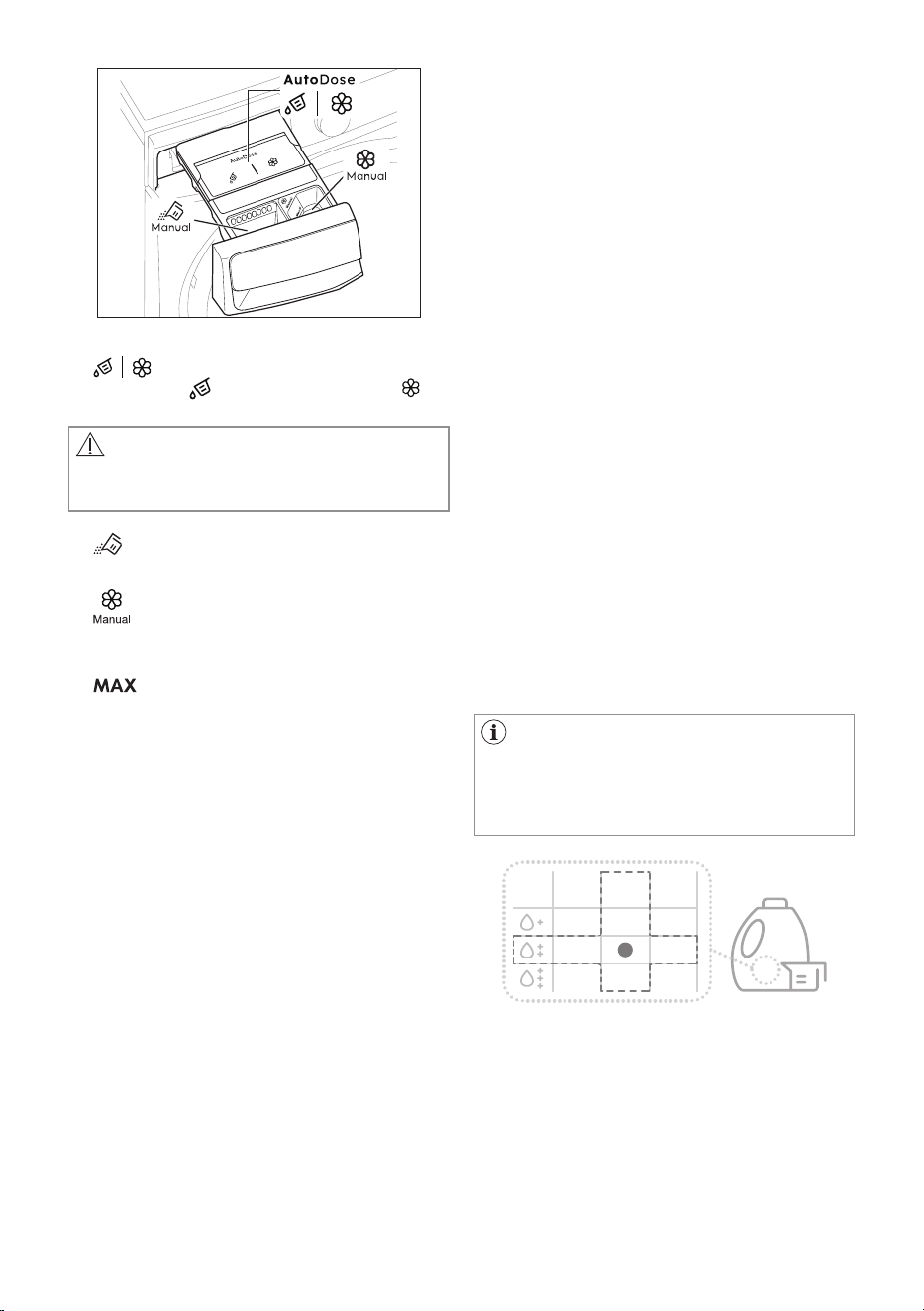
If both AutoDose tanks are enabled in
the set programme , liquid detergent
and fabric softener are automatically
loaded.
If one or both AutoDose tanks are
disabled (OFF) in the set programme,
proceed by manually filling in the
proper manual compartment.
20 ENGLISH
WARNING!
Do not put powder detergent in the
AutoDose compartment.
• AutoDose tanks are for liquid
detergent and fabric softener .
• Manual compartment for powder
or liquid detergent.
• Manual compartment for liquid
additives (fabric softener, fabric
conditioner, starch).
• Maximum level for detergent/
additives quantity.
9.3 AutoDose basic setting
The factory pre-set doses for a large
load are 50 ml for detergent tank and
40 ml for fabric softener tank: the
optimal configuration to meet majority
of use condition. The appliance will use
these settings to calculate the precise
dosage for each wash based on load
size.
However, under extreme conditions (very
soft or very hard water) and particular
type of detergent (such as super
compact), we recommend to adjust
the pre-set dosage by following the
indication given on detergent and fabric
softener container: e.g. when using super
compact detergent you may need to
reduce the pre-set dosage considerably.
If the washing results are not satisfying or
there is too much foam during washing,
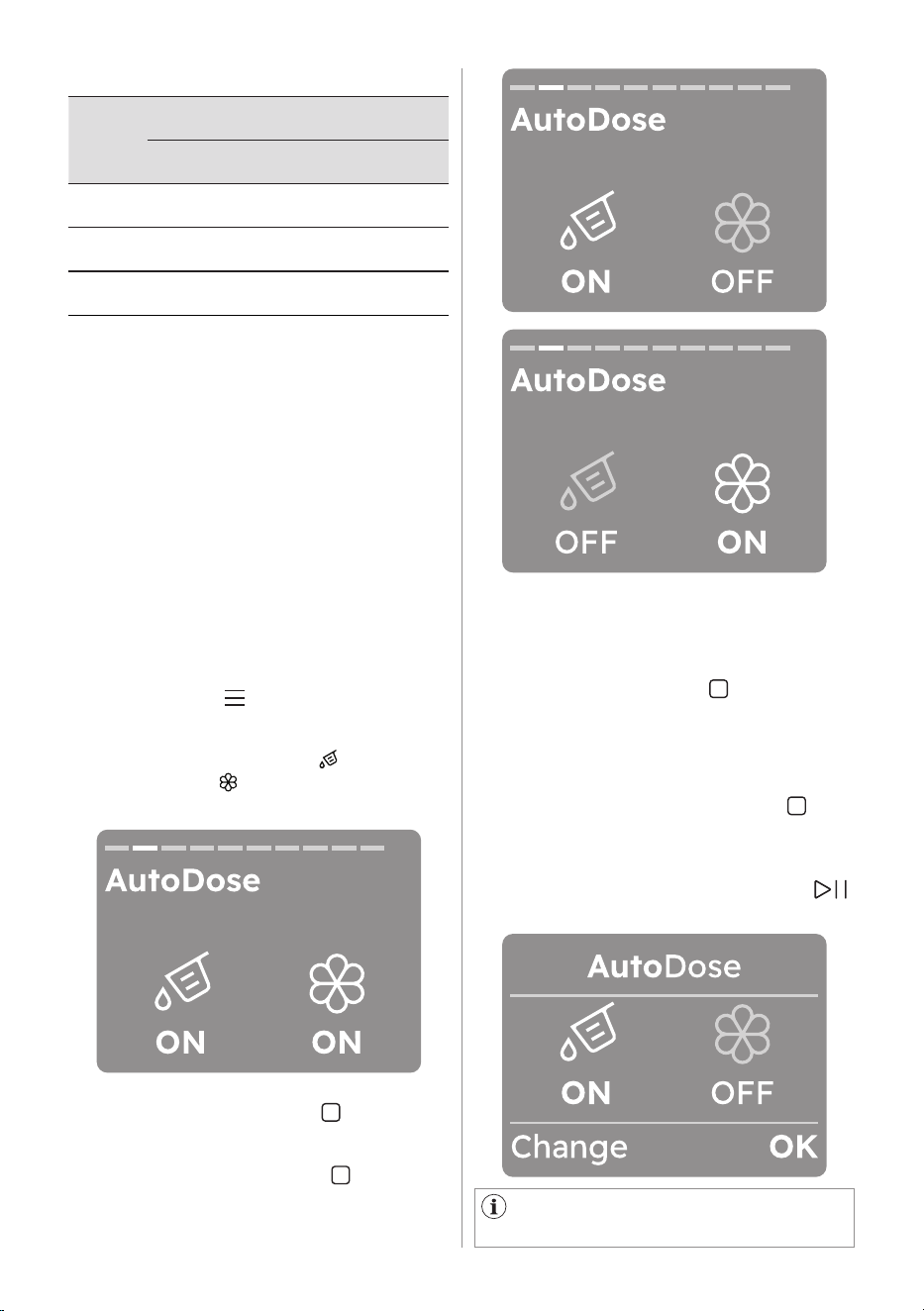
As example for a machine with
rated capacity 8 kg, medium water,
normal soil level the dosage is
recognised by the crossing in the
detergent label dosages.
3-5kg 5-8kg 8+kg
you may need to change the factory
setting. Read in the paragraph 'AutoDose
configuration mode' how to change the
basic setting, but before:
1. Identifying the water hardness level.
Check the water hardness level in
your area. The levels are generally
indicated as: soft, medium and hard.
If necessary, please contact your
local water authority to check the
water hardness in your area.
2. Identifying the customized detergent
dosage.
Check the label in the detergent/
fabric softener container and identify
the quantity to use. For the detergent
the suggested quantity of detergent
is the combination of three different
factors:
• Water hardness level;
• Normal soil level;
• Rated capacity of the appliance
(e.g. maximum load capacity 11 kg).
If the rated capacity on the product
container refers to lower capacity
appliances, the customized dosage
should be increased by 20%
referring to the proposed dosage.
ENGLISH 21
Levels
Water hardness range
˚f
1)
˚d
2)
˚e
3)
mmol/l ppm
Soft < 15 < 8 < 10 < 1.4 < 140
Medium
4)
15-25 8-14 0-17 1.5-2.5 150-250
Hard > 15 > 14 > 17 > 2.5 > 250
Water hardness levels
1)
French degrees
2)
German degrees
3)
English degrees
4)
Factory setting, able to satisfy most of the use
conditions.
9.4 AutoDose - Setup standard
mode
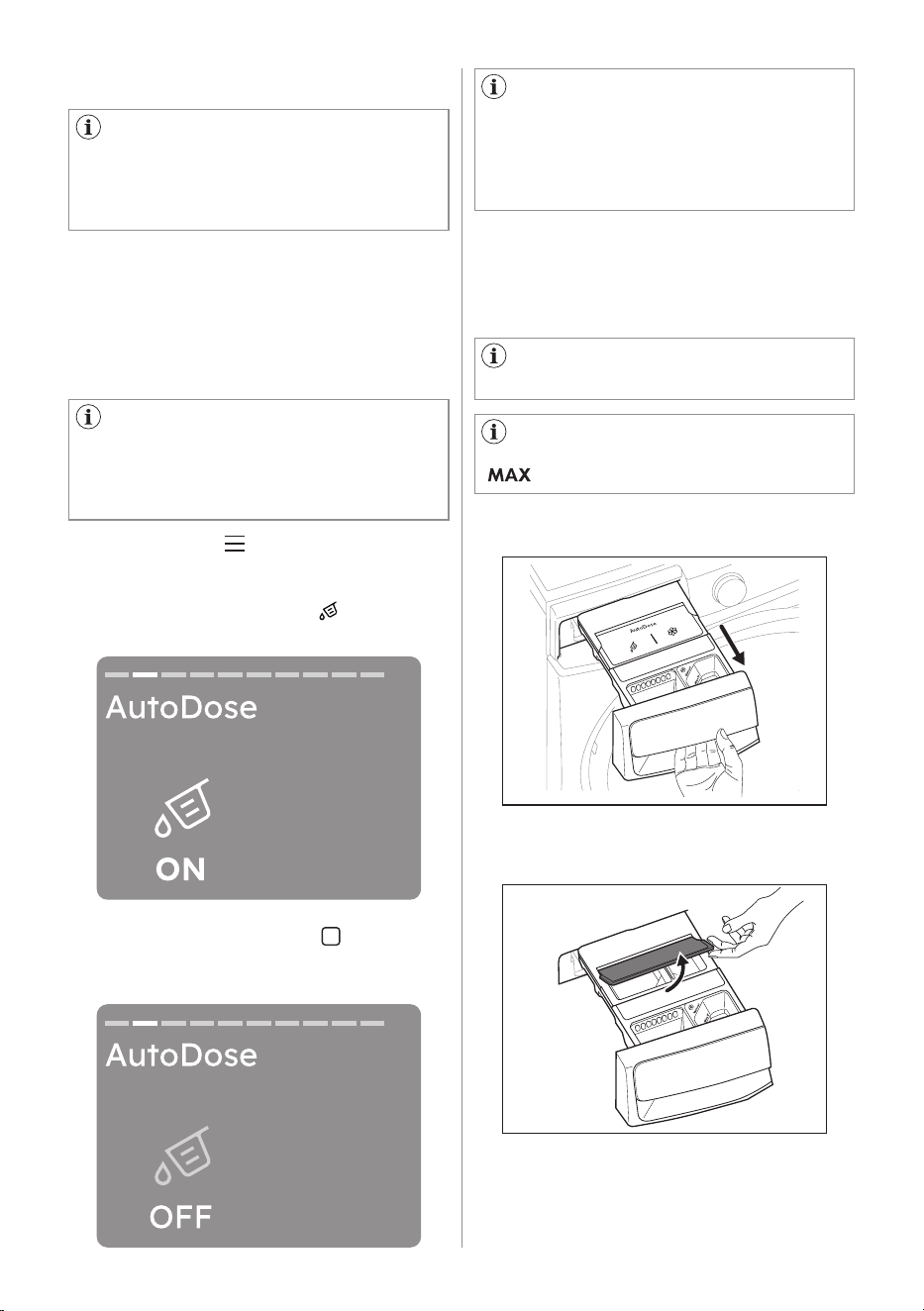
1. Tap the On/Off button for a few
seconds to activate the appliance.
2. Wait about 10 seconds for appliance
internal check.
3. Tap the menu button and turn the
dial to navigate until AutoDose screen
will appear.
The detergent tank icon and the
softener icon are shown as ON.
4. Tapping the left soft key , detergent
tank could be enable/disable and
set in ON or OFF mode. Otherwise,
tapping the right soft key ,softener
tank could be enable/disable and set
in ON or OFF mode.
If AutoDose is turned OFF in the
settings, this pop-up is not shown.
After the first configuration, when starting
a programme, the AutoDose pop-up will
appear.
It can be dismissed by pressing "OK"
tapping the right soft key button.
If no action is taken, the pop-up will
disappear after 7 seconds the machine
will start and the user will see the running
screen.
Pressing Change (tap left soft key
button) will take the user back to the
AutoDose page in the menu. There, the
user can toggle AutoDose on or off. The
user then needs to press Start/Pause
button again to start the programme.
22 ENGLISH
To make this option available on
the control panel, this function must be
enabled in our app.
If it is later disabled in our app, it is no
longer available in the control panel.
If activated, this is option will be
remembered for each programme until
it is changed by the user.
This also applies if the user turns off the
device or if a power failure occurs.
9.5 AutoDose - Setup Linked mode
In Linked mode the two compartments
can be filled with the same detergent to
increase capacity to run more cycles,
from which compartment the detergent
is dispensed is automatically handled by
the appliance.
1. Tap the menu button and turn the
dial to navigate until AutoDose screen
will appear
2. The detergent tank icon is shown
as ON.
3. Tapping the left soft key , detergent
tank could be disable and set in OFF
mode.
If Linked Detergent is not available
for a certain programme, the display
will show "AutoDose OFF" and pressing
the AutoDose key will generate an error
sound and blink the "AutoDose OFF"
symbols three times.
2. Lift up the AutoDose cover lid.
9.6 Filling the detergent and
additives on AutoDose system
Please read "Detergents and other
treatments" in "Washing Hints" chapter.
We recommend that you do not
exceed the maximum indicated level
( ).
1. Open the detergent dispenser.
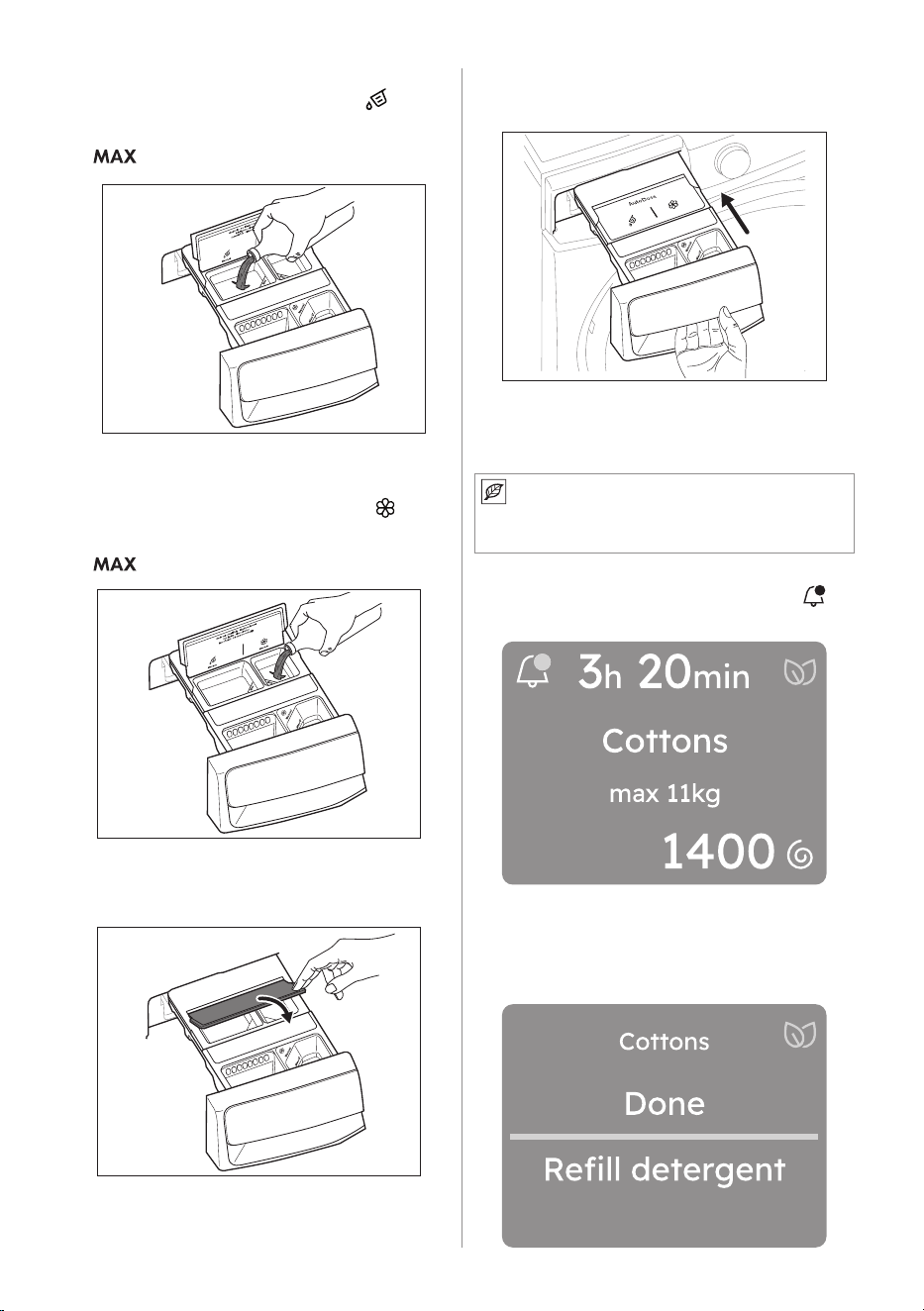
ENGLISH 23
3. Gently pour only liquid detergent in
the AutoDose detergent tank . Fill
up to the maximum indicated level
.
4. Gently pour only liquid softener in the
AutoDose fabric softener tank . Fill
up to the maximum indicated level
.
5. Lift down the AutoDose cover lid.
6. Gently close the detergent dispenser,
till click engagement.
9.7 AutoDose low level indication
Do not refill the AutoDose tanks
unless appliance indicates that one or
both tanks are empty.
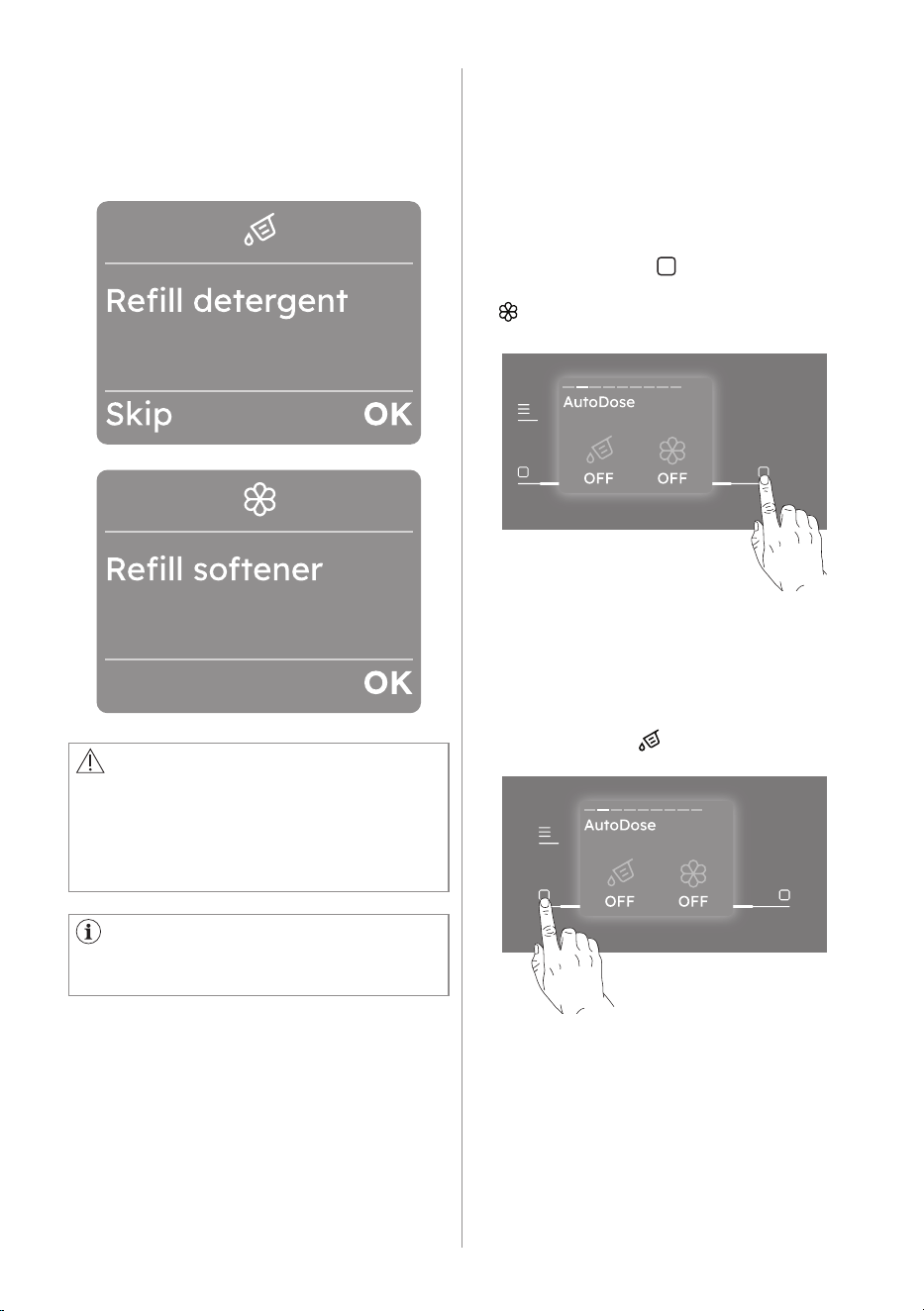
When the activated tank reaches a low
level of detergent, related indicator
appears on the display.
Notifications are often displayed at the
end of cycle, but some messages also
need to be displayed after the machine
goes to standby and is powered on
again.
24 ENGLISH
Notifications are dismissed once
they are viewed, or if the user changes
programme or turns the machine off.
Some notifications have actionable
choices, like the tank refill that takes you
to the AutoDose guide.
The display show clearly if is required the
refill for detergent or softener.
CAUTION!
The tanks refill must be carried out with
the same brand and type of detergent/
fabric softener/additive used before,
otherwise clean the tanks before
refilling.
9.8 Switching from AutoDose to
manual dosing
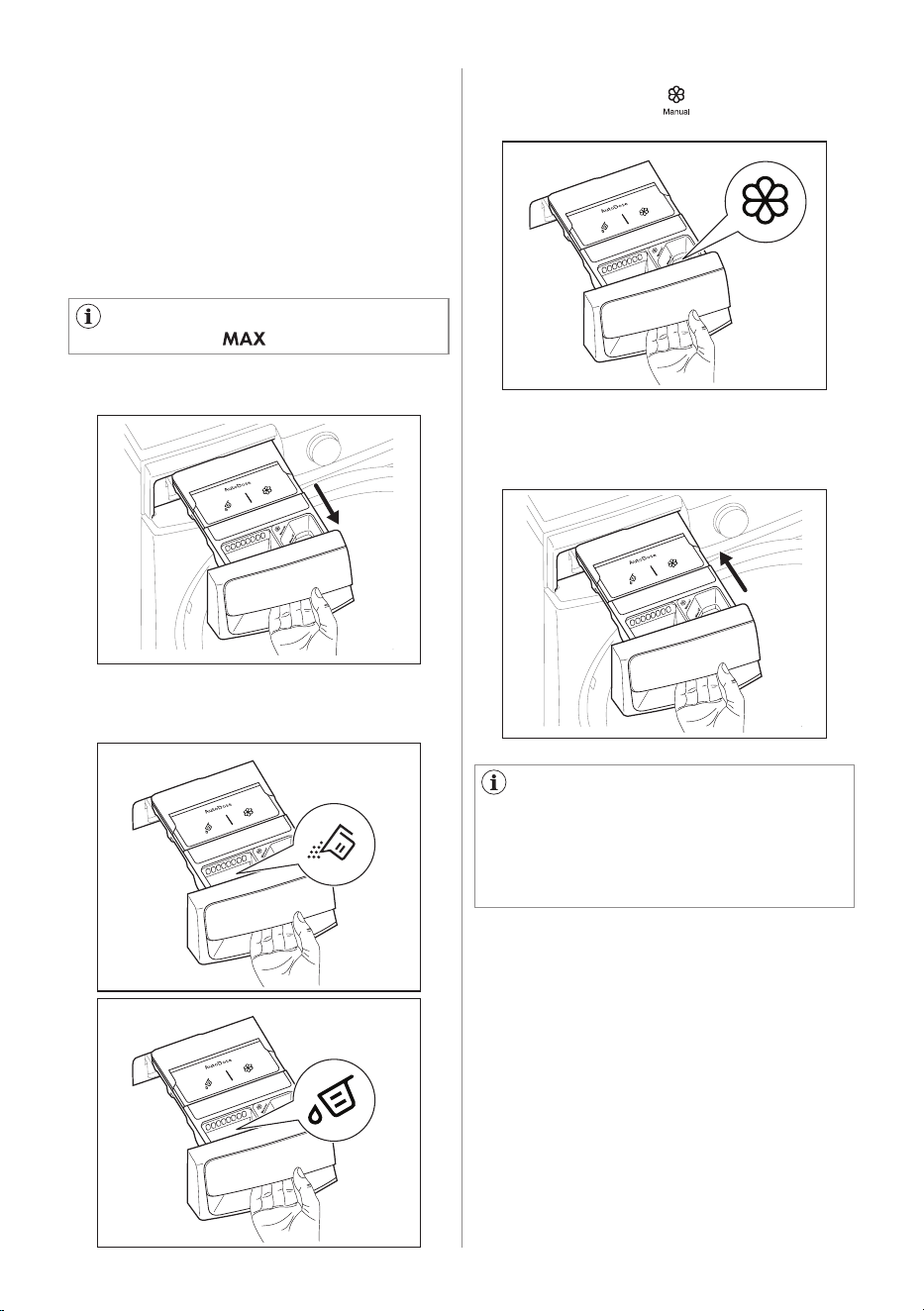
It is possible to disable AutoDose
function for one or both tanks by pressing
related button symbol.
Example:
• To switch fabric softener tank off, press
the right soft key button, until the
display shows OFF under softener icon
.
• If you need to use different detergent
than ones present in AutoDose tanks,
you could switch detergent tank off
by pressing the left soft key button
until the display shows OFF under
detergent icon .
ENGLISH 25
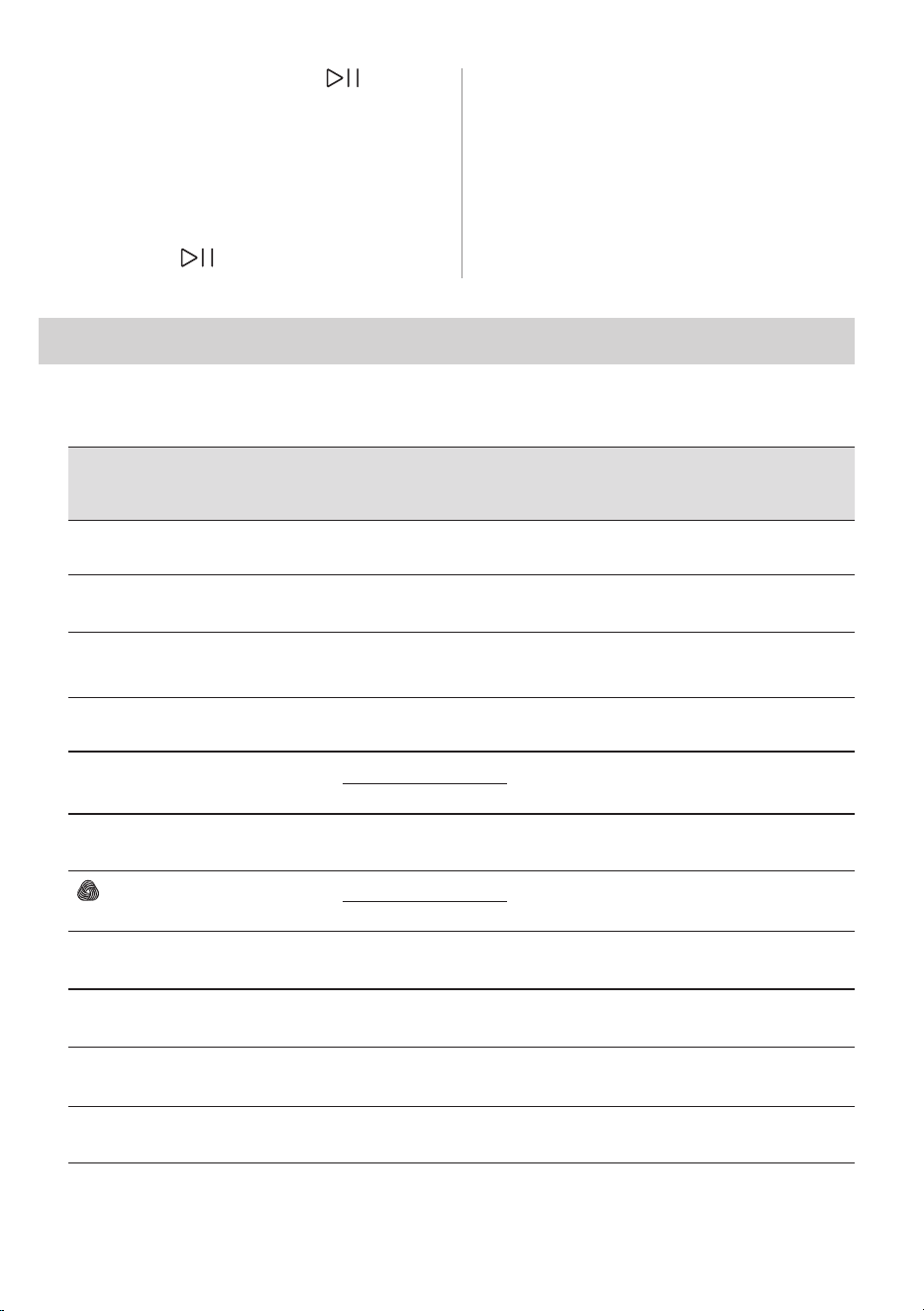
1. Open the detergent dispenser.
9.9 Manual filling the detergent
and additives
You may need to use a different
detergent or fabric softener than the
ones used in the AutoDose tanks.
First, make sure that the AutoDose tanks
are disabled and then pour the detergent
and/or other treatments in the manual
compartments.
Do not exceed the maximum
indicated level ( ).
2. Put the powder or liquid detergent in
the compartment.
If the machine has not been used
for more than 4 weeks with filled
tanks, detergent/softener can become
viscous or dry out. It is needed to clean
the drawer as indicated in "Care and
Cleaning" chapter.
3. If desired, pour the fabric softener in
the compartment .
4. Gently close the detergent dispenser
by pushing all the way in.
9.10 Drawer open indication
When a programme is running, the
detergent drawer must always be closed.
A sensor in the drawer detects if the
drawer is open (or not properly closed)
while the programme is running. In such
case, the appliance will immediately be
paused.
26 ENGLISH
10. PROGRAMMES
10.1 Programme Chart
If you press the Start/Pause button, a
specific popup view is showed indicating
to close the drawer. Then the display
returns to the previous paused state.
This will happen even if the user turned
AutoDose off.
To restart the programme, ensure the
drawer is properly closed and press
Start/Pause button.
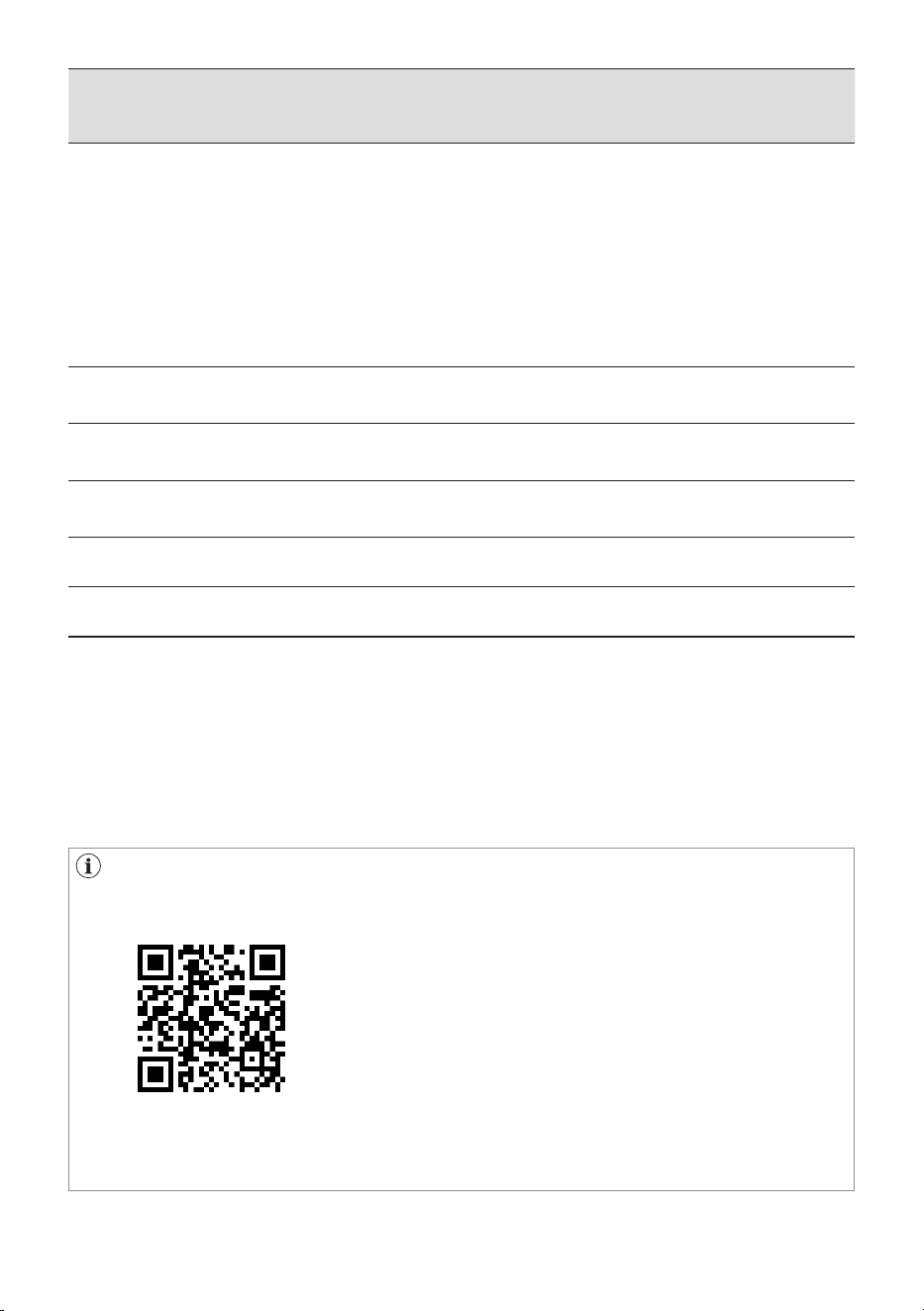
Programme;
Temperature
range
Max. Spin
speed
(rpm)
Max. Load (Dry
Clothes)
Type of load and soil level
Cottons;
Cold to 90°C
1400 Max
1)
White and coloured cotton.
Eco Cottons;
Cold and 40°C
3)
1400 Max
1)
Low-energy programme for cotton. Lowers
temperature, extends duration.
IntelliQuick;
Cold to 30°C
1200 Max
1)
Daily wear coloured cotton clothes such as
shirts, blouses, towels and undergarments.
Ideal for normal level of soil.
Quick 15;
Cold to 30°C
1200 1.5 kg Small, lightly-soiled load. Cottons and
synthetics
DelicatesPlus;
Cold to 40°C
1200
EWF10******
4 kg Protects fabric from pills or tears. For
viscose, rayon, acrylic.
EWF12******
5 kg
Denim;
Cold to 40°C
1200 4 kg Jeans and denim. Reduces fading.
Wool;
Cold to 40°C
1200
EWF10******
2 kg Wool labelled "non-shrink, machine wash".
EWF12******
3 kg
Bedding;
Cold to 60°C
800 3 kg Synthetic blankets, duvets and bedspreads
Sports;
Cold to 40°C
1200 4 kg Rinses and spins the laundry.
Baby Care;
Cold to 40°C
1200 4 kg Delicate cotton baby clothes and knitted
items.
Towels;
Cold to 90°C
1400 Max
1)
Towels and bathrobes.
ENGLISH 27
1)
Maximum capacity depends on a sticker in front of the machine.
Model: EWF1042R9WC 10 kg, EWF1042R9SC 10 kg, EWF1242R9SC 12 kg, EWF1242R9WC 12 kg
2)
Tested for Staphylococcus aureus, Enterococcus faecium, Candida albicans, Pseudomonas
aeruginosa and MS2 Bacteriophage in external test performed by Swissatest Testmaterialien AG in
2021 (Test Report No. 202120117).
3)
The Eco Cottons at 40°C is recommended for normally soiled full load of cotton and is the program
for energy and water label, tested according to AS/NZS2040.1 and labelled according to AS/
NZS2040.2 and AS/NZS 6400
Note for test institutions:
• Loading sequence for Performance testing can be found using the following QR
code.
• Any further data required for performance tests shall be provided upon request.
Request can be made to the following address:
https://www.electrolux.com.au/support/contact-us/
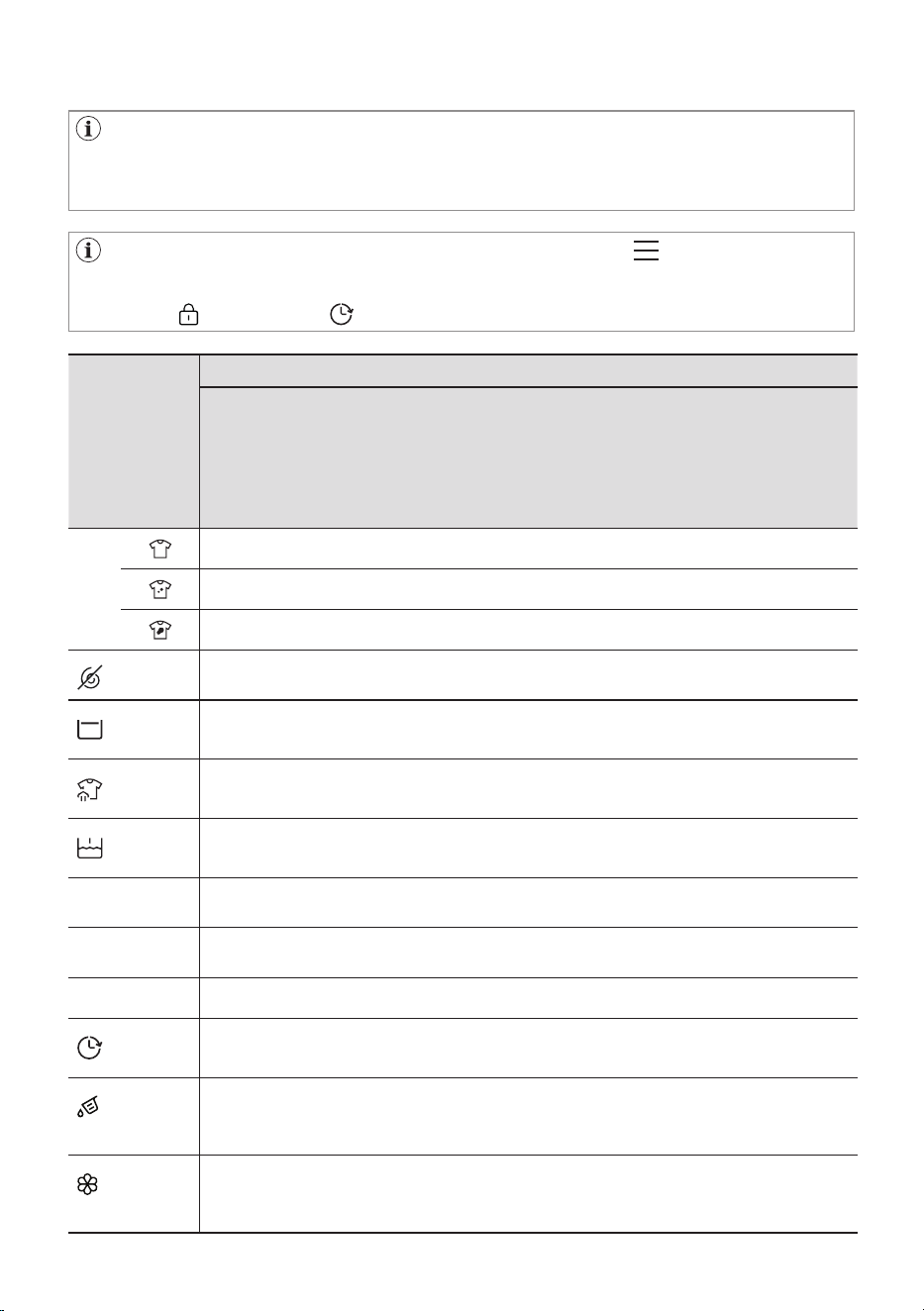
Programme;
Temperature
range
Max. Spin
speed
(rpm)
Max. Load (Dry
Clothes)
Type of load and soil level
Sanitise;
60°C
1400 Max
1)
White cotton items. This high-performance
wash programme combined with steam
vapour, removes more than 99,99%
of bacteria and viruses
2)
keeping the
temperature above 60°C throughout the
washing phase; with an additional action
on the fibres thanks to a vapour phase, an
enhanced rinsing phase ensures a proper
removal of detergent and micro-organism
residues. This programme ensures also
a proper reduction of pollens/allergenic
items.
Easy Iron;
Cold to 60°C
800 4 kg Reduces creases for easier ironing.
Tub Clean;
60°C
- - Removes build-up and odours from drum.
Vapour Refresh - 1.5 kg Removes odours and creases with vapour
only.
Rinse + Spin 1400 Max
1)
Rinses and spins the laundry.
Spin 1400 Max
1)
Spins and drains the laundry.
28 ENGLISH
Options
Programme
Cottons
Eco Cottons
IntelliQuick
Quick 15
DelicatesPlus
Denim
Wool
Bedding
Sports
Baby Care
Towels
Sanitise
Easy Iron
Tub Clean
Vapour Refresh
Rinse + Spin
Spin
SmartSelect
No Spin
Rinse Hold
Refresh
Prewash
SensorWash
1)
Hygienic Care
2)
Stain Pro
3)
Finish In
AutoDose
Detergent
AutoDose
Softener
Programme Options Compatibility
The options are not selectable with all washing programmes, an option can
exclude another one. In this case the appliance doesn't allow you to set the
incompatible preference together.
Make sure the screen and the soft keys are always clean and dry.
When you set a washing programme and enter the Menu , the display shows
the available options.
Child Lock and Finish In are selectable with all programmes.

ENGLISH 29
1)
SensorWash is always on. The machine will automatically check the dirt level and detergent residue*
in your laundry when using this option. It will automatically adjust the washing time and number of
rinses according to the load to ensure your clothes are clean. An affected to increase or decrease in
the operating time of the machine.
2)
"Hygienic Care" option can be with temperature 40 to 90°C only.
3)
"Stain Pro" option can be combined with temperature 40 to 90 °C only.
10.2 More Programmes
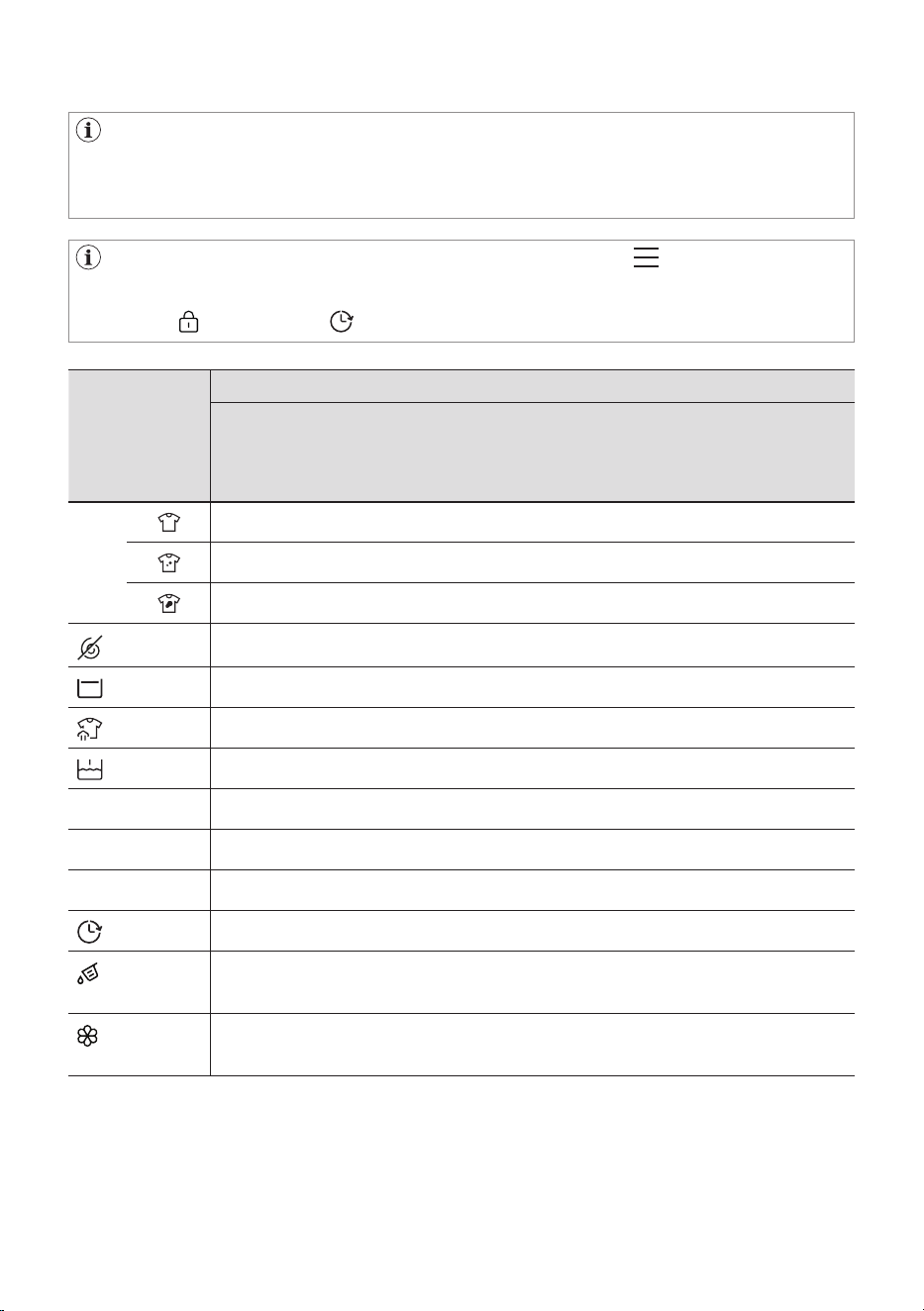
Programme;
Temperature
range
Max. Spin
speed
(rpm)
Max. Load (Dry
Clothes)
Type of load and soil level
Outdoor;
Cold to 40°C
1200 2.5 kg Outdoor clothing, technical, sport fabrics,
waterproof and breathable jackets, shell jackets
with a removable fleece or inner insulation.
The recommended laundry load is 2.0 kg. This
programme can also be used as water repellent
restoring phase, specifically tailored for treating
clothes with a hydrophobic coating.
To perform the water repellent restoring phase,
proceed as follows:
• Pour the washing detergent in the
compartment .
• Pour a special water repellency restorer for
fabric in the drawer compartment for fabric
softener Manual .
Work Wear;
Cold to 90°C
1400 Max
1)
Overalls, dungarees and working clothes.
Intensive cycle with a prewash phase to remove
dirt and solid soils.
Mixed;
Cold to 60°C
1200 4 kg Synthetic items or mixed fabric items. Normally
soiled items.
Curtains;
Cold to 40°C
800 4 kg Delicate cycle with pre-wash to remove dust
from curtains.
Soft Toys;
Cold to 40°C
800 4 kg Delicate drum movements and rinsing suited for
soft toys.
Silk;
30°C
800 0.5 kg Machine, hand washable silk and other delicate
fabrics.
Pillow;
Cold to 40°C
800 3 kg Designed for 2 sofa pillows or 1 bed pillow. It
is recommended to wash bed pillows with own
pillowcase.
Pet Hair;
Cold to 60°C
1200 2 kg Washing programme tailored for removing pet
hair from items
1)
Maximum capacity depends on a sticker in front of the machine.
Model: EWF1042R9WC 10 kg, EWF1042R9SC 10 kg, EWF1242R9SC 12 kg, EWF1242R9WC 12 kg
30 ENGLISH
Programme Options Compatibility
The options are not selectable with all washing programmes, an option can
exclude another one. In this case the appliance doesn't allow you to set the
incompatible preference together.
Make sure the screen and the soft keys are always clean and dry.
When you set a washing programme and enter the Menu , the display shows
the available options.
Child Lock and Finish In are selectable with all programmes.
Options
Programme
Outdoor
Work Wear
Mixed
Curtains
Soft Toys
Silk
Pillow
Pet Hair
SmartSelect
No Spin
Rinse Hold
Refresh
Prewash
SensorWash
1)
Hygienic Care
2)
Stain Pro
3)
Finish In
AutoDose
Detergent
AutoDose
Softener
1)
SensorWash is always on. The machine will automatically check the dirt level and detergent residue*
in your laundry when using this option. It will automatically adjust the washing time and number of
rinses according to the load to ensure your clothes are clean. An affected to increase or decrease in
the operating time of the machine.
2)
"Hygienic Care" option can be with temperature 40 to 90°C only.
3)
"Stain Pro" option can be combined with temperature 40 to 90 °C only.
ENGLISH 31
10.3 Woolmark Apparel Care -
Blue
The wool wash cycle of this machine
has been approved by The Woolmark
Company for the washing of wool
garments labelled as "hand wash"
provided that the products are washed
according to the instructions on the
garment label and those issued by the
manufacturer of this washing machine.
Model: EWF1042R9WC, EWF1042R9SC;
M1361
The wool wash cycle of this machine
has been approved by The Woolmark
Company for the washing of wool
garments labelled as "hand wash"
provided that the products are washed
according to the instructions on the
garment label and those issued by the
manufacturer of this washing machine.
Model: EWF1242R9SC, EWF1242R9WC;
M2423
10.4 Woolmark Apparel Care -
Green
32 ENGLISH
11. WI-FI CONNECTIVITY SETUP
The software in this product
contains components that are based
on free and open source software.
Electrolux gratefully acknowledges
the contributions of the open software
and robotics communities to the
development project. To access the
source code of these free and open
source software components whose
license conditions require publishing,
and to see their full copyright
information and applicable license
terms, please visit:
http://electrolux.pensoftwarerepository.
com (folder NIUS)
This chapter describes how to connect the
smart appliance to the Wi-Fi network and
to link it to a mobile devices.
By this functionality you can receive
notifications, control and monitor your
appliance from your mobile devices.
The Wi-Fi functionality is off as factory
default setting.
To connect the appliance to enjoy the full
range of features and services you need:
• Wireless network at home with internet
connection enabled.
• Mobile device connected to wireless
network.
11.1 Download, installing, and
configuring our app
Wi-Fi module parameter
Frequency/
Protocol
Wi-Fi: 2.4 GHz / 802.11 bgn
Max Power Wi-Fi 2.4 GHz: < 20 dBm
Encryption WPA, WPA2, WEP
1. Go to the App Store/Play Store,
download and install our app on your
smart device.
2. Create an account. This account can
be shared across multiple devices.
3. Follow the instructions on our app
for the appliance registration and
configuration.
Our app allows you to control your
laundry through a mobile device.
It contains a large number of
programmes, useful features and
product information tailored perfectly
to the appliance.
Through our app you can select the
programmes already available from the
appliance control panel, plus unlock
additional programmes available only
from a mobile device.
Additional programmes can change
over the time along with new versions
of the app.
It's personalized laundry care - all from
your mobile device.
Tap the On/Off button for a few seconds to
activate the appliance.
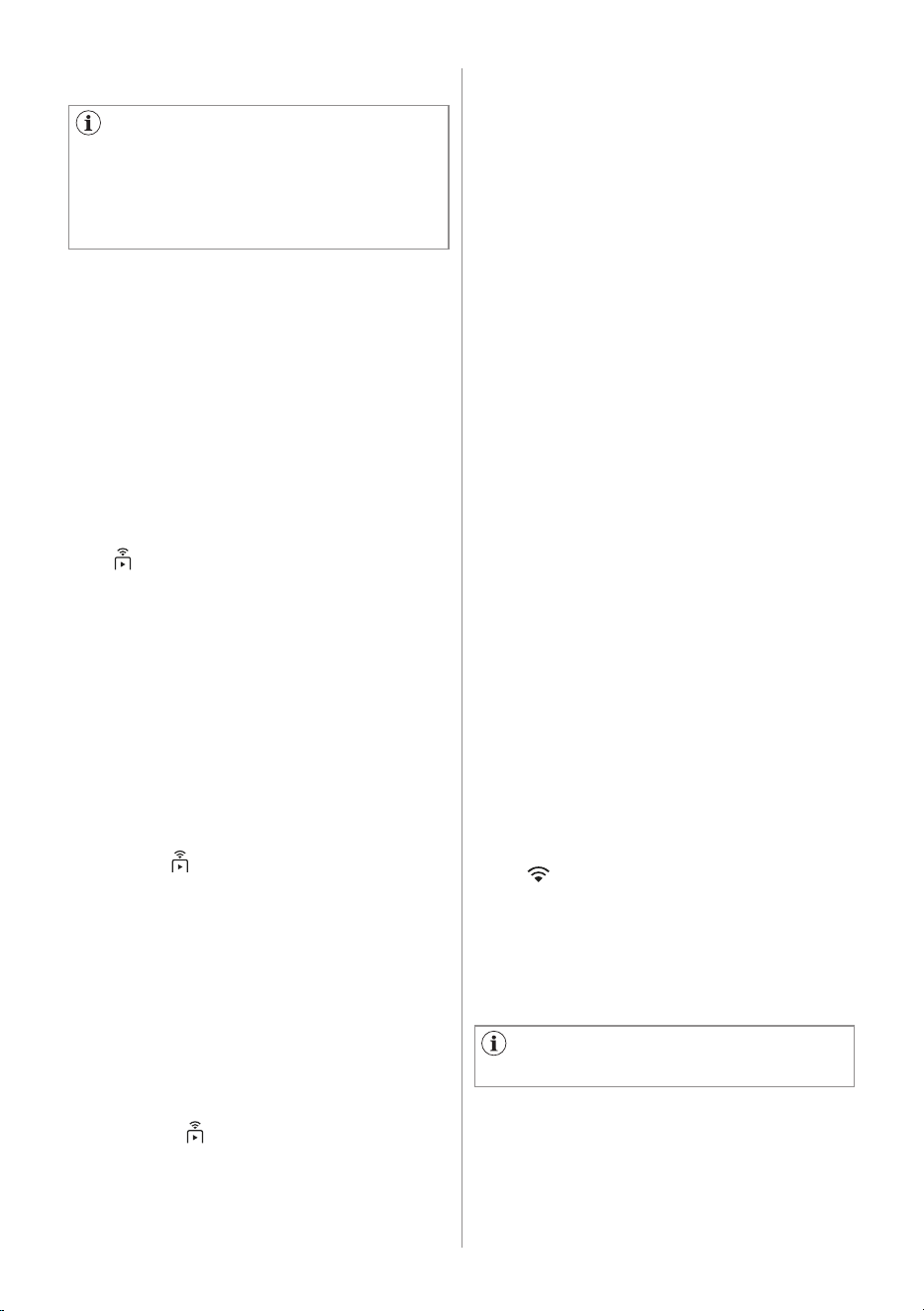
To connect the appliance to a Wi-Fi
network, tap and hold the Remote Start
Mode key button for 5 seconds. It is also
possible to enable Wi-Fi from the machine
settings menu.
During this phase, the display shows Wi-Fi
icon and "Starting up..." message. After
a while "Ready to connect" message and
icon appear.
11.2 Wi-Fi appliance connection
You will need to install our app,
create an account, and accept the
Terms and Conditions and Electrolux’s
Privacy Policy in the app to use the
connected features of the laundry
appliance. Internet and Wi-Fi
connections are required to use the full
features of the App and the laundry
appliance. Minimum operating system
for app refer App FAQ.
ENGLISH 33
Before proceeding with next
steps, be sure that our app has been
downloaded and configured and you
smart device connected to your home
network. Refer to "Download, installing,
and configuring our app" paragraph.
Connecting your appliance
Open our app from your smart device and
follow the instruction displayed to add
your appliance.
During association phase, Our app could
redirects to the smart device Wi-Fi settings
to select the home network and requires
to enter the Wi-Fi password to connect the
appliance.
After Connecting... phase, if successfully
concluded, "Connected" message is shown.
Otherwise, the message "Not connected" is
displayed.
Once connected, tapping on the Remote
Start Mode key button on will enable
users to be able to start cycles remotely on
our app.
Auto connection to registered network
Once the appliance has been successfully
set-up and registered to the home network,
every time it is powered on, it will try to
connect to the network automatically.
There will not be any sound when Wi-Fi
connection is successful.
Connecting to a different network
(Reopening Access Point)
Every time user tap and hold Remote
Start Mode key button for 5 seconds,
the access point will be open and
broadcasted. New network credentials
received at this point will overwrite
previously saved credentials, and the
appliance then connects to the new Wi-Fi
network.
Refer to "Connection your appliance"
section to perform the connection.
Turning Off Wi-Fi
If the user decides to no longer connect the
appliance to Wi-Fi, he can tap and hold
Remote Start Mode key button for 10
seconds and the appliance will reset and
turn off. It is also possible to disable Wi-Fi
from the settings menu.
11.3 Over-the-air update
Application may propose an update for
your appliance.
If a programme is running, our app
notifies that the update will start at the
end of the programme.
During the update, the appliance shows
a message in the display.
Do not switch off or unplug the appliance
during update.
The appliance will be usable again
at the end of the update, without any
notification about successful update.
If an error occurs, the appliance shows
a message in the display: just press any
buttons or turn the knob to return to
normal use.
The Wi-Fi Always On function may
affect your energy consumption.
11.4 Wi-Fi Always On
The Wi-Fi Always On function is available
in our app.
This function keeps the appliance
connected to the network even when the
appliance is turned off.
Wi-Fi icon is on.
The icon blink, Machine can't connect
the network.
It is possible to turn the appliance on by
pressing the On/Off button or through
our app.
After confirming the reset the display shows
the message "Network is reset" and the
Wi- Fi is set off.
34 ENGLISH
Several additional options are available
for each programme. Check compatibility
in the programme table section.
12. OPTIONS
12.2 Soft Key options
12.1 Introduction
12.3 Prewash
After selecting a programme, it
is possible to change the default
Temperature and Spin set.
To modify the Temperature tap the left
soft key :
• The default temperature shown will
decrease to the minimum expected for
the selected cycle.
• Continue pressing and the sequence
will proceed from the maximum
expected temperature.
To modify the Spin tap the right soft
key :
• The default spin shown will decrease
to the minimum expected for the
selected cycle.
• Continue pressing and the sequence
will proceed from the maximum
expected spin.
Use this option to add a pre-wash phase
at 30 °C before the washing phase.
This option is recommended for heavily
soiled laundry, especially if containing
sand, dust, mud and other solid particles.
Tap on the Menu soft key, rotate the
dial until the display shows the Prewash
option.
To activate/deactivate this option:
• Tap the right soft key and the
relevant indicator will turn On/Off.
If Temperature setting is not
available, left soft key led will be off.
If only one option is available, right
soft key led will be off.
After 10 seconds of inactivity the
displays shows the home screen with
selected programme.
The option can increase the
programme duration.
12.4 Stain Pro
Select this option to add an anti-stain
phase to a programme in order to treat
heavily soiled or stained laundry with
stain remover.
Pour the stain remover into compartment.
The stain remover will be added in
the appropriate phase of the washing
programme.
Tap on the Menu soft key, rotate the
dial until the display shows this option.
To activate/deactivate this option:
• Tap the right soft key and the
relevant indicator will turn On/Off.
This option is not available with a
temperature lower than 40 °C.
The option can increase the
programme duration.
ENGLISH 35
12.5 Hygienic Care
Select this option to add approximately
30 minutes of tumbling in vapour after the
rinse cycle. The indicator of this option
will be on.
• Vapour may not necessarily be visible
inside the drum during a vapour cycle.
Vapour is created below the drum
and allowed to naturally rise into the
clothes.
• At the end of the Vapour cycle, the
clothes will be warmer, softer and
detached from the drum.
Tap on the Menu soft key, rotate the
dial until the display shows this option.
To activate/deactivate this option:
• Tap the right soft key and the
relevant indicator will turn On/Off.
If Vapour option is selected, rinse
temperatures will be elevated.
During a vapour cycle, you may notice
vapour exiting from the drain hose of
the machine, this is normal and there is
no cause for alarm.
The proposed time to finish in is
always higher than the programme
duration.
12.6 Finish In
With this option you can set the time to
end of the selected cycle.
To activate this option:
• Tap on the Menu soft key, rotate
the dial until the display shows the Set
timer to finish in.
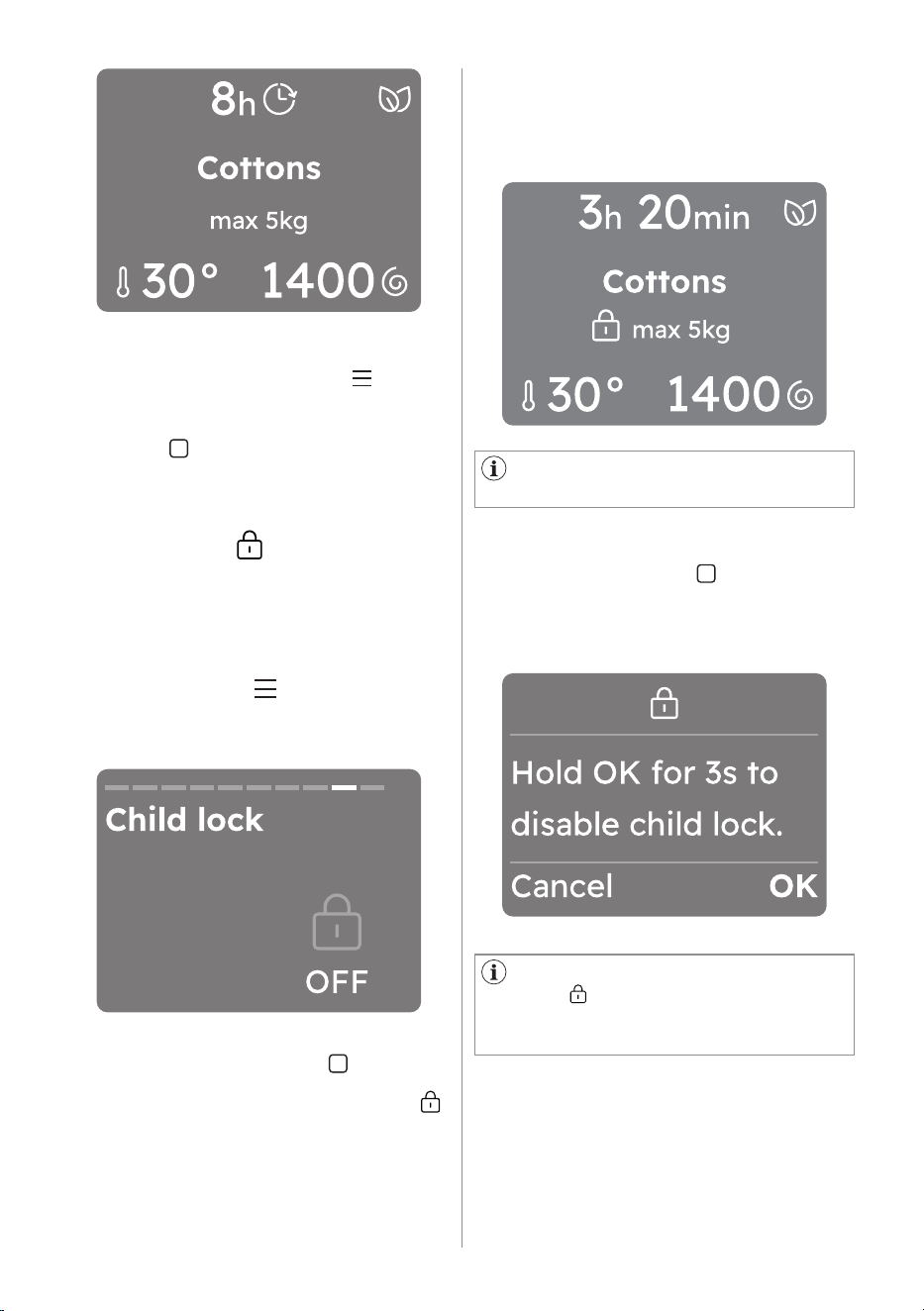
• You can activate this option by
pressing the right soft key . The
display shows the hours of the time to
end starting from 3 hours. (This option
makes it possible to define the end of
the washing programme from minimum
of 1 hour to maximum of 24 hours.)
If programme duration is longer
than 2 hours, minimum Finish In option
starts from 3 hours.
• Pressing the right soft key next to
it is possible to increase the time
by one hour with each tap, up to 24
hours.
• If you want to decrease time tap the
left soft key next to , the duration
will be reduced by one hour with each
tap.
• Once you have selected the desired
timer wait 3 seconds and you will be
redirected to the home screen where
at the top of the display you will be
able to see the countdown.
36 ENGLISH
To remove the Finish In option:
• Navigate through the Menu to the
Finish In option.
• Reduce the time by pressing the left
soft key until the display shows OFF.
12.7 Child Lock
With this option you can prevent the
children from accidentally operating the
appliance.
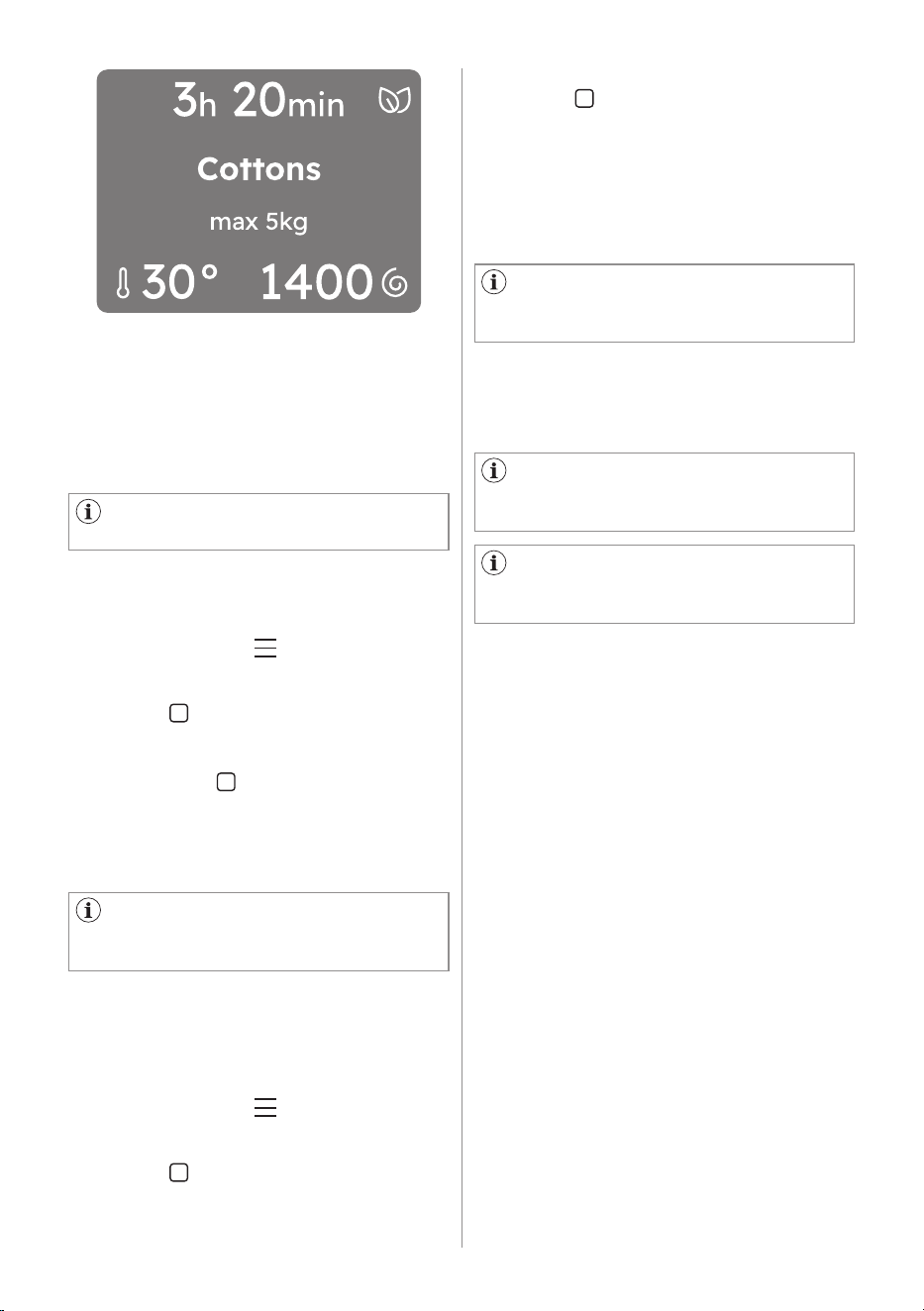
To activate this option:
• Tap on the Menu soft key, rotate
the dial until the display shows the
Child lock.
• You can activate this option by
tapping the right soft key .
(The screen back to the selected
programme with the child lock icon
appear.)
• After you have activated the options
soft keys and the touch screen are
deactivated. It is possible to turn the
appliance off by means of the On/Off
button.
The appliance keeps the selection
of this option after you switch it off.
• Before pressing the Start/Pause button
the appliance cannot start.
The display shows the icon Child Lock in
the middle of the display.
To deactivate this option:
• Tap the right soft key , then press
and hold for 3 seconds. A countdown
will be visible in the display in the
lower right corner.
Once the option is deactivated child
lock icon goes off and the display
will show the information as before
activation.
ENGLISH 37
There are no favourite cycles saved
by default.
When you want to save the next
favourite the first empty slot will be
indicated automatically.
12.8 Favourite
How to set a favourite cycle
Up to three favourite cycles can be
saved.
To save you favourite cycle:
• Select programme and setting
temperature, spin speed, and options.
• Tap on the Menu soft key, rotate
the dial until the display shows the
Save as favourite, tapping the right
soft key to entry.
• Rotate the dial to select one of the
three empty fields and tapping the
right soft key to select and saved.
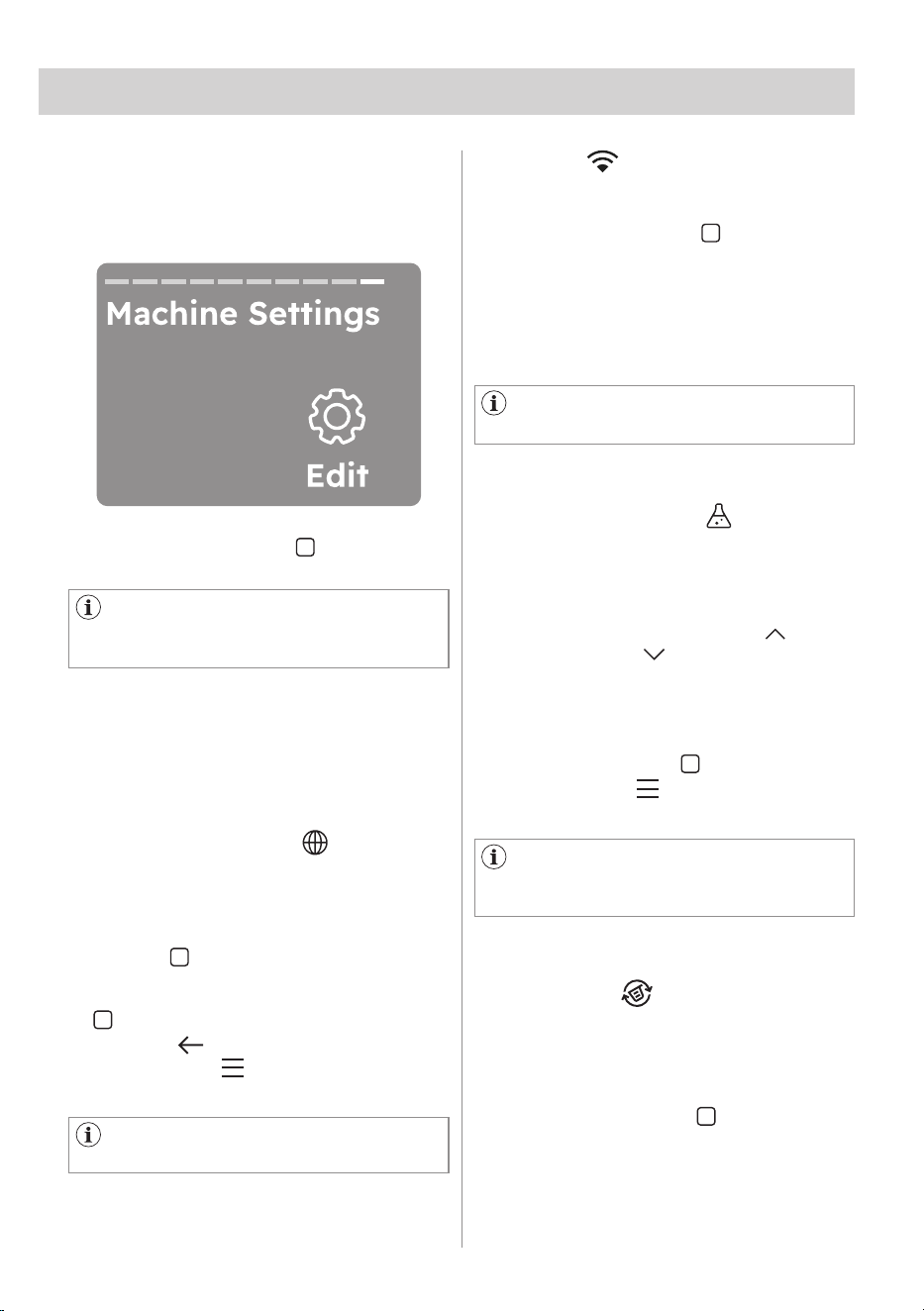
• After two seconds, the display will
show the selected cycle as a favourite
recognizable by a heart at the top of
the screen.
How to replace a favourite cycle
It is possible to replace favourites:
• Select new programme and setting
temperature, spin speed, and options.
• Tap on the Menu soft key, rotate
the dial until the display shows the
Save as favourite, tapping the right
soft key to entry.
• Turn dial to select one of the three
fields to be overwritten.
In order to delete favourites it is
necessary to perform a factory reset of
the appliance or by our app.
If the fields are occupied the first
favourite cycle will be displayed, then
the second and eventually the third.
If the fields are empty, a suggestion
on how to save new favourites will be
displayed.
How to access the favourites cycle
To access the favourites from
programmes list rotate the dial to the left.
• Confirm the row by tapping the right
soft key .
• After two seconds, the display will
show the selected cycle as a favourite
recognizable by a heart at the top of
the screen.
It is not possible to delete you favourite
cycle on the appliance.
38 ENGLISH
After 10 seconds of inactivity the
displays shows the home screen with
selected programme.
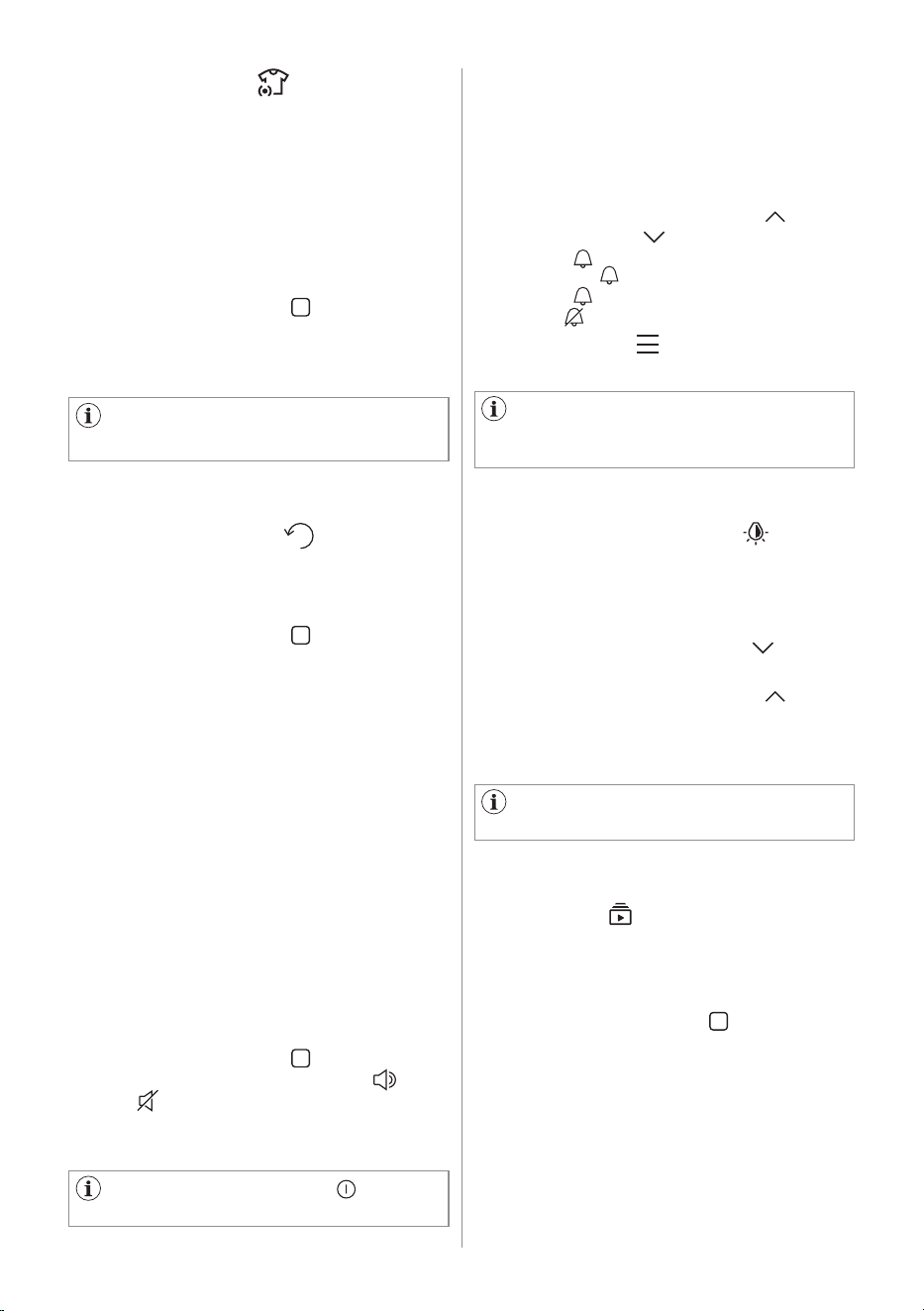
13.1 Machine Setting
13.2 Language setup
13.3 Wi-Fi
In this part are explained the main
settings of the appliance.
AutoDose
For AutoDose functionality refer to the
specific paragraph.
It is possible to change the display
language by
• Select the Language menu, tap right
soft key to select to go to select
the language. Select the language by
rotate the dial then tap right soft key
to Select.
• Go back to the previous view and
tap the Menu soft key to main
screen.
With this option you edit Wi-Fi settings.
Tap on the right soft key to access the
settings. You can:
• Enable Wi-Fi network.
• Connecting to a different Wi-Fi
network.
• Disable Wi-Fi network.
By turning the knob the selected
language will be visible in bold.
For more details refer to "Wi-Fi -
Connectivity setup" chapter
13. SETTINGS
Tap on the right soft key , Edit , to
access the settings.
13.4 Water Hardness
With this setting you can change the
Water Hardness level.
To modify the level:
• Tap the right soft key next to or left
soft key next to visualize the levels:
a. Hard
b. Medium
c. Soft
• Select the desired level by tapping the
right or left soft key .
• Tapping Menu soft key confirm
setting.
A few seconds, the displays
shows the home screen with selected
programme.
This option eliminates detergent residue
on fabrics.
To activate/deactivate the option:
• Tap the right soft key and the
relevant indicator will turn ON /OFF.
Rotate the dial to move to the next
setting.
13.5 Ultramix
ENGLISH 39
Save the last used by enable.
To activate/deactivate the option:
• Tap the right soft key and the
relevant indicator will turn ON /OFF.
Rotate the dial to move to the next
setting.
To ON this option, the last used
programme automatic saved.
How to access the last used programme
To access the Last used by rotate the
dial to the left after you power on the
appliance.
If turning off, may affect the
efficiency of your washing cycle.
13.7 Save last used
13.6 SensorWash
Intelligently assesses the dirt and
detergent residue in your laundry. The
SensorWash adjusts the washing time
and rinse cycles to match the load. This
not only ensures optimal cleanliness
but also helps prevent damage to your
clothes, thereby extending their lifespan.
To activate/deactivate the option:
• Tap the right soft key and the
relevant indicator will turn ON /OFF.
Rotate the dial to move to the next
setting.
13.8 Button sounds
With this setting you can turn off the
sound of the buttons.
To activate/deactivate the sounds:
• Tap the right soft key and the
relevant indicator will turn ON /
OFF .
Rotate the dial to move to the next
setting.
The sound of the On/Off button
cannot be disabled
13.9 End alert
With this setting you can change the
Cycle End Alarm.
To activate/deactivate or modify the
sounds:
• Tap the right soft key next to or left
soft key next to visualize the levels:
a. Long
b. Medium
c. Short
d. OFF
• Tapping Menu soft key confirm
setting.
A few seconds, the displays
shows the home screen with selected
programme.
13.10 Display Brightness
13.11 Guides
With this setting you can change the
Display Brightness.
To modify the level:
• Tap the left soft key next to
indicator to decrease brightness.
• Tap the right soft key next to
indicator to increase brightness.
Rotate the dial to move to the next
setting.
With this option you can see brief
explanations of some features.
Rotate the programme dial and select by
tapping the right soft key one of the
following option:
• Introduction: Learn about the control
panel, the SmartSelect , Vapour
refresh, Menu, Left/right buttons,
Remote start.
• AutoDose: guide about detergent and
softener.
• Wi-Fi: information about the on
boarding.
There are five brightness levels
available.
40 ENGLISH
14. DAILY USE
WARNING!
Refer to Safety chapters.
14.1 Before activating the
appliance
14.2 Activating the appliance
14.3 Activating the appliance
14.4 Setting a programme
1. Make sure that the mains plug is
connected to the mains socket.
2. Make sure that the water tap is open.
1. Open the water tap
2. Press the On/Off button a few
seconds to activate the appliance.
Press the On/Off button to turn the
appliance on. A tune sounds.
The default at first switch on is Cottons
programme.
The information of the selected
programme are visible in the display.
The led of the Start/Pause key button
flashes.
The Cottons is the default proposed
programme when the appliance is
turned on.
Go back to the previous view by
tapping the left soft key .
13.12 Settings reset to factory
default
With this setting you can reset your
appliance to the factory settings.
1. Tap on the right soft key to enter
the option.
Settings reset to factory default
deletes permanent options and
favourites saved.
2. Tap on the left soft key to Cancel.
3. Tap on the right soft key to confirm
the reset.
Performing the reset will take a few
seconds.
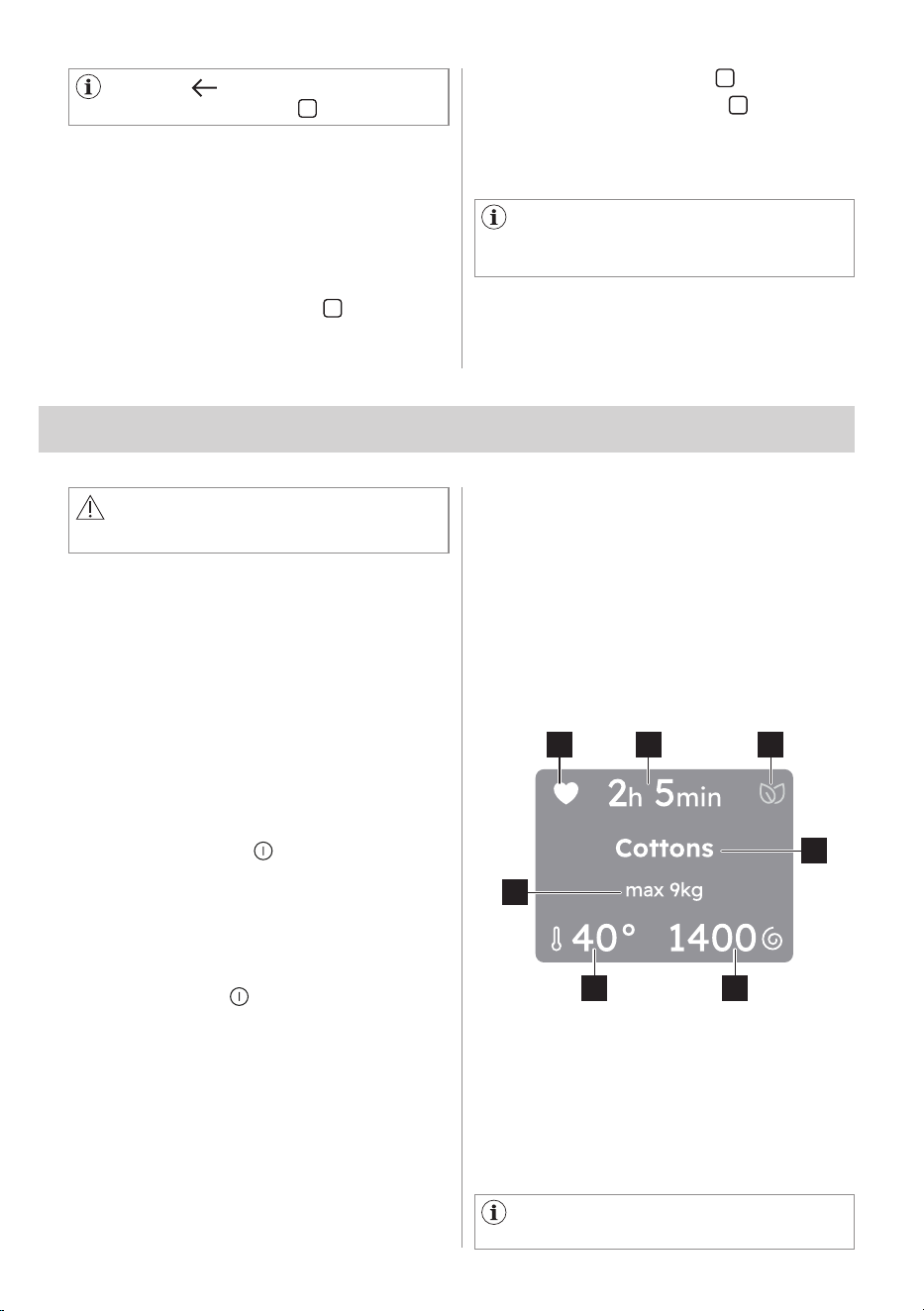
1. Turn the programme dial to set the
desired programme.
After a few seconds the display shows
programme summary view with the
following information:
21 3
5
4
7
6
1. Favourite, if already saved.
2. Programme duration
3. SmartLeaf
4. Selected programme
5. Spin speed
6. Temperature
7. Maximum programme load
Also additional options, if activated,
will be visible in the display.
ENGLISH 41
Every time a different SmartSelect
level is chosen it will be visible for 2
seconds in the display.
Tap on the different soil level of the
SmartSelect to the right on the control
panel.
Vapour Refresh programme can be
selected in the SmartSelect area.
You can also:
1. Tap on the left soft key to change
the Temperature .
2. Tap on the right soft key to change
the Spin speed.
3. Tap on Menu to enter the
additional available options and set
one or more of them.
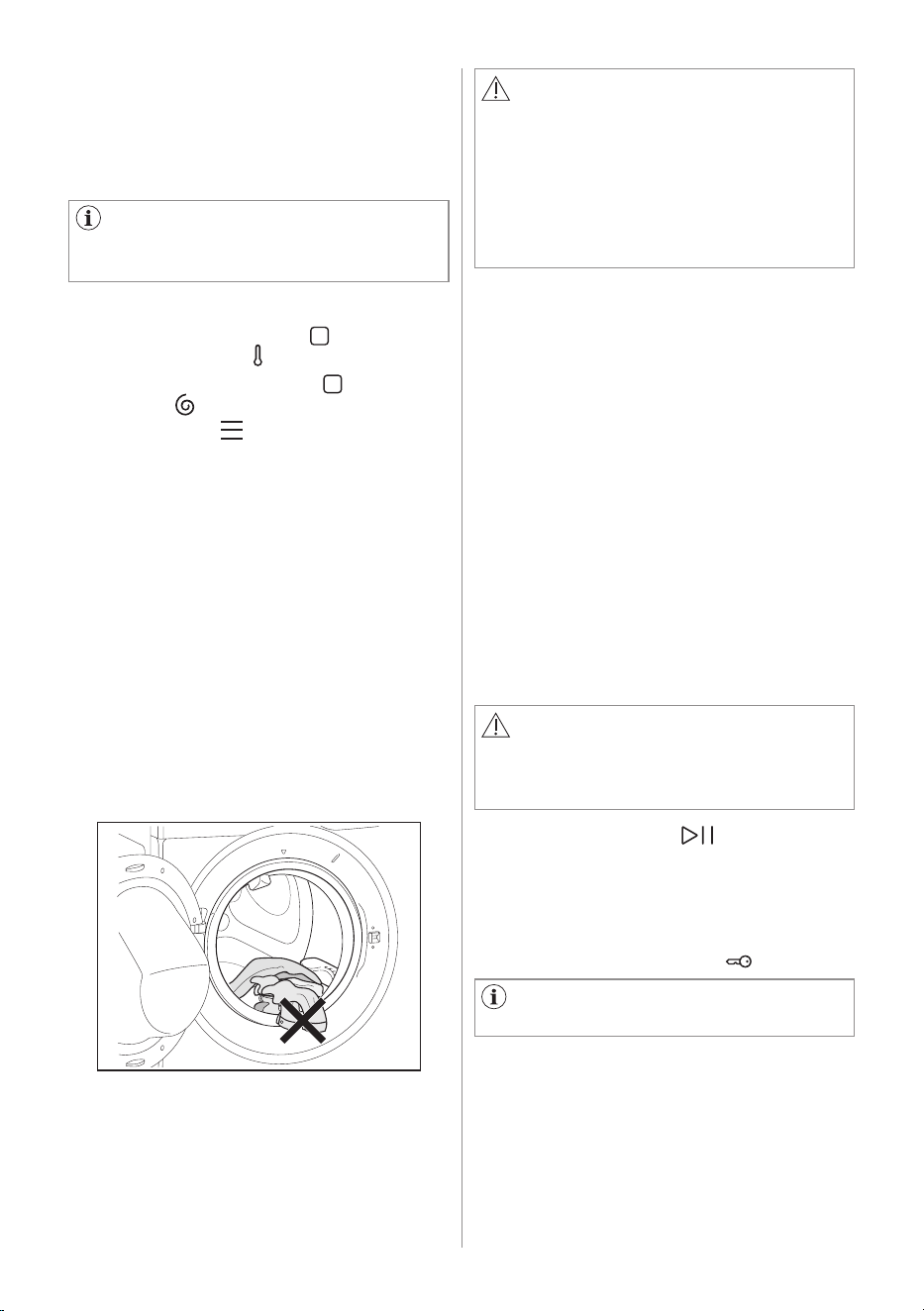
CAUTION!
• Make sure that no laundry stays
between the seal and the door. There
is a risk of water leakage or damage
to the laundry.
• Washing heavily oiled, greasy stains
could cause damage rubber parts of
the appliance.
14.5 Loading the laundry
• Open the appliance door.
• Shake the items before you put them
in the appliance.
• Put the laundry in the drum, one item
at a time.
Make sure not to put too much laundry
in the drum.
• Close the door firmly.
14.6 Using detergent and other
treatments
If both AutoDose tanks are enabled
(ON) in the set programme, detergent
and fabric softener are automatically
loaded.
If one of the AutoDose tank or both are
disabled (OFF) in the set programme,
proceed by manually filling the product
in the proper compartment.
The drain pump can operate shortly
before the appliance fills water.
14.7 Starting a programme
WARNING!
Make sure that the detergent dispenser
is firmly closed, otherwise programme
won't start.
Touch the Start/Pause key button to
start the programme.
The related indicator stops flashing and
stays on.
The programme starts, the door is locked.
The display shows the icon .
42 ENGLISH
14.8 Interrupting a programme
and changing the options
When the programme is running, you can
change only some options:
1. Touch the Start/Pause key button.
The related indicator flashes.
2. Change the options. The given
information in the display changes
accordingly.
3. Touch the Start/Pause key button
again.
The washing programme continues.
14.9 Cancelling a running
programme
1. Press the On/Off button to cancel
the programme and to deactivate the
appliance.
2. Press the On/Off button again to
activate the appliance.
Now, you can set a new washing
programme.
The water and the detergent are not
drained out in order to avoid waste.
The display shows the maximum
duration of the programme, updating
it about 20 minutes after the starting of
the new programme.
If the temperature and level of the
water in the drum are too high and/or
the drum is still rotating you should not
open the door.
14.10 Opening the door - Adding
garments
If a message in the display that inform
you that you can add or remove
garments, you can always open the door.
While a programme or the delay start
operates, the appliance door is locked.
The display shows the icon .
To add or to remove garments:
1. Touch the Start/Pause key button.
In the display the related door lock
icon goes off.
2. Open the appliance door. If
necessary, add or remove the
garments. Close the door and touch
the Start/Pause key button.
The programme or the Finish In
continues.
Depend on last use option is on/off.
If ON, the display shows at the last
use programmes. But OFF, the display
shows Cottons programme.
Turn the programme dial to set a new
cycle.
14.11 End of the programme
When the programme has finished, the
appliance stops automatically. The
acoustic signals operate (if they are
active). The display shows Done, the
completed line of progress and Remove
Garments message.
The indicator of the Start/Pause key
button goes off.
The door unlocks and the indicator
goes off.
1. Press the On/Off button to
deactivate the appliance.
After five minutes from the end of the
programme, the energy saving function
automatically deactivates the appliance.
2. Remove the laundry from the
appliance.
3. Make sure that the drum is empty.
4. Keep the door and the detergent
dispenser slightly open to prevent
mildew and odours.
ENGLISH 43
14.12 Draining water out after end
of cycle
14.13 Stand-by function
If you have chosen a programme or
an option that does not empty out the
water of the last rinse, the programme is
completed, but:
• Draining phase is shown in the display
and the door is locked .
• The indicator of the Start/Pause
key button starts flashing.
• The drum still turns at regular intervals
to prevent creases in the laundry.
• The door stays locked.
• You must drain the water to open the
door.
The Stand-by function automatically
deactivates the appliance to reduce the
energy consumption when:
• You do not use the appliance for
5 minutes when no programme is
running.
- Press the button On/Off to
activate the appliance again.
• 5 minutes after the end of the washing
programme.
- Press the On/Off button to
activate the appliance again.
- The display shows the end of the
last programme.
- Turn the programme dial to set a
new cycle.
If you set a programme or an option
that ends with water in the drum, the
Stand-by function doesn't deactivate
the appliance to remind you to drain
the water.
If the Wi-Fi Always On function is
active, only the indicator goes on.
44 ENGLISH
15.1 Sorting The Laundry
15.2 Temperatures
Follow the wash code symbols on each
garment label and the manufacturer’s
washing instructions. Sort the laundry
as follows: whites, coloureds, synthetics,
delicates, woollens.
15. WASHING HINTS AND TIPS
15.3 Before Loading The Laundry
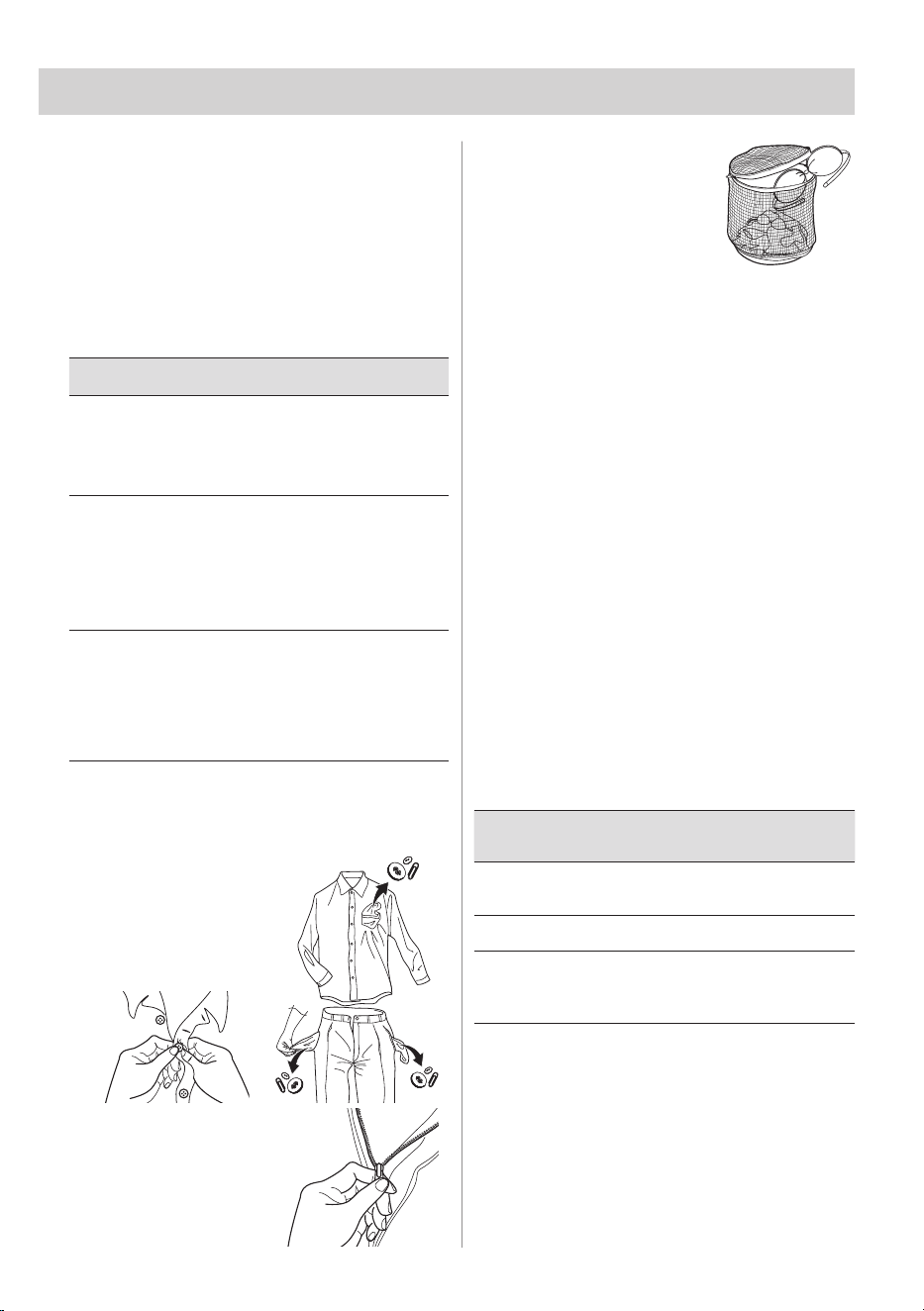
• Make sure that
no metal objects
are left in the
laundry (e.g.
coin, hair clips,
safety pins, pins).
• Button up
pillowcases, close
zip fasteners,
hooks and
poppers. Tie any
belts or long
tapes.
• Wash bras, pantyhose
and other delicates in
a mesh laundry bag,
which you can
purchase from your
supermarket.
• Make sure that you
wash lint collectors separately from lint
producers.
• Never wash whites and coloured
fabrics together. Whites may lose their
"whiteness" in the wash. New coloured
items may run in the first wash; they
should therefore be washed separately
the first time.
• Remove persistent stains before
washing.
• Rub particularly soiled areas with a
special detergent or detergent paste.
Treat curtains with special care.
Remove hooks or tie them up in a bag
or a net.
15.4 Maximum Loads
Recommended loads are indicated in the
chapter "Programmes"
General rules:
Clothes
Load
Quantity
Cottons,
linen
drum full but not too tightly
packed;
Synthetics drum no more than half full;
Delicate
fabrics and
woollens
drum no more than one
third full.
Washing a maximum load makes the
most efficient use of water and energy.
For heavily soiled laundry, reduce the
load size.
Temp Soil level
90°C
For normally soiled
white cottons and linen
(e.g. teacloths, towels,
tablecloths, sheets...).
60°C
50°C
For normally soiled, colourfast
garments (e.g. shirts, night
dresses, pyjamas...) in linen,
cotton or synthetic fibres and
for lightly soiled white cotton
(e.g. underwear).
40°C
30°C
Cold
For delicate items (e.g. net
curtains), mixed laundry
including synthetic fibres and
woollens bearing the label
pure new wool, machine
washable, non-shrink.

ENGLISH 45
15.5 Removing Stains
Stubborn stains may not be removed by
just water and detergent. It is therefore
advisable to treat them prior to washing.
Blood: treat fresh stains with cold water.
For dried stains, soak overnight in water
with a special detergent then rub in the
soap and water.
Oil based paint: moisten with benzine
stain remover, lay the garment on a soft
cloth and dab the stain; treat several
times.
Dried grease stains: moisten with turpen-
tine, lay the garment on a soft surface
and dab the stain with the fingertips and
a cotton cloth.
Rust: oxalic acid dissolved in hot water
or a rust removing product used in cold
water. Be careful with rust stains which
are not recent since the cellulose struc-
ture will already have been damaged
and the fabric tends to hole.
Mould stains: treat with bleach, rinse well
(whites and fast coloureds only). Grass:
soap lightly and treat with bleach (whites
and fast coloureds only).
Ball point pen and glue: moisten with
acetone (*), lay the garment on a soft
cloth and dab the stain.
Lipstick: moisten with acetone (*) as
above, then treat stains with methylated
spirits. Remove any residual marks from
white fabrics with bleach.
Red wine: soak in water and detergent,
rinse and treat with acetic or citric acid,
then rinse. Treat any residual marks with
bleach.
Ink: depending on the type of ink, mois-
ten the fabric first with acetone (*), then
with acetic acid; treat any residual marks
on white fabrics with bleach and then
rinse thoroughly.
Tar stains: first treat with stain remover,
methylated spirits or benzine, then rub
with detergent paste.
(*) do not use acetone on artificial silk.
15.6 Detergents Type and Quantity
Low suds detergent is required for this
machine to prevent over suds problems,
unsatisfactory washing result and harm to
the machine.
Low suds detergents designed for front
load washing machines are labelled
"Front Loading", "High Efficiency", "HE",
such as Cold Power for Front Loaders or
"Matic".
Do not use wrong types of detergent,
such as Top Loading, Hand wash deter-
gent or Soap-Based products in your
front load washing machine. This can
result in excessive suds, longer cycle
time, low spin speeds, poor rinsing and
overloading of the motor.
Quantity of detergent to be used
The choice of detergent and use of cor-
rect quantities not only affects your wash
performance, but also helps to avoid
waste and protect the environment.
Although biodegradable detergents con-
tain substances which in large quantities
can upset the delicate balance of nature.
The choice and quantity of detergent will
depend on ;
• type of fabric (delicates, woollens,
cottons, etc.);
• the colour of clothes;
• size of the load;
• degree of soil;
• wash temperature ; and
• hardness of the water used.
Water hardness is classified by so-called
"degrees" of hardness.
Information on hardness of the water in
your area can be obtained from the rele-
vant water supply company, or from your
local authority.
You may have to try using the detergent
quantity as per manufacturers’ instruc-
tions then compare the wash result to
the list below and adjust the amount of
detergent for your future washes accord-
ingly.
46 ENGLISH
15.7 Saving tips
Not enough detergent causes:
• the wash load to turn grey,
• greasy clothes.
Too much detergent causes:
• over suds,
• reduced washing effect,
• inadequate rinsing.
Use less detergent if:
• you are washing a small load,
• the laundry is lightly soiled,
• large amounts of foam during
washing.
For better result we recommend that you
follow these tips:
• Normally soiled laundry may be
washed without prewash in order to
save detergent, water and time.
• Loading the appliance to the
maximum capacity indicated for each
programmes helps to reduce energy
and water consumption.
• With adequate pre-treatment, stains
and limited soiling can be removed;
the laundry can then be washed at a
lower temperature.
• To use the correct quantity of
detergent, refer to the quantity
suggested by the detergent producer
and check the water hardness of
your domestic system. Refer to 'Water
hardness'.
• If you have a tumble dryer its
suggested to use maximum possible
spin speed for the selected washing
programme in order to save energy
during drying.
• Preferably, use short cycles at lower
temperatures.
Let the SmartSelect function guide
you to save energy and water.
Light and Normal options can be
used the most of the time. Use Vapour
Refresh , to avoid washing and
refresh your clothes with only steam.
15.8 Water hardness
If the water in your area is hard or
medium hard, we recommend that
you use a water softener for washing
machines.
The water is hard or medium hard when
the hardness exceeds 8dH.
In areas where the water is soft it is not
necessary to use a water softener.
To find out the water hardness in your
area, contact your local water authority.
Use the correct quantity of water
softener.
Follow the instructions that you find on
the packaging of the product./or www.
electrolux.com
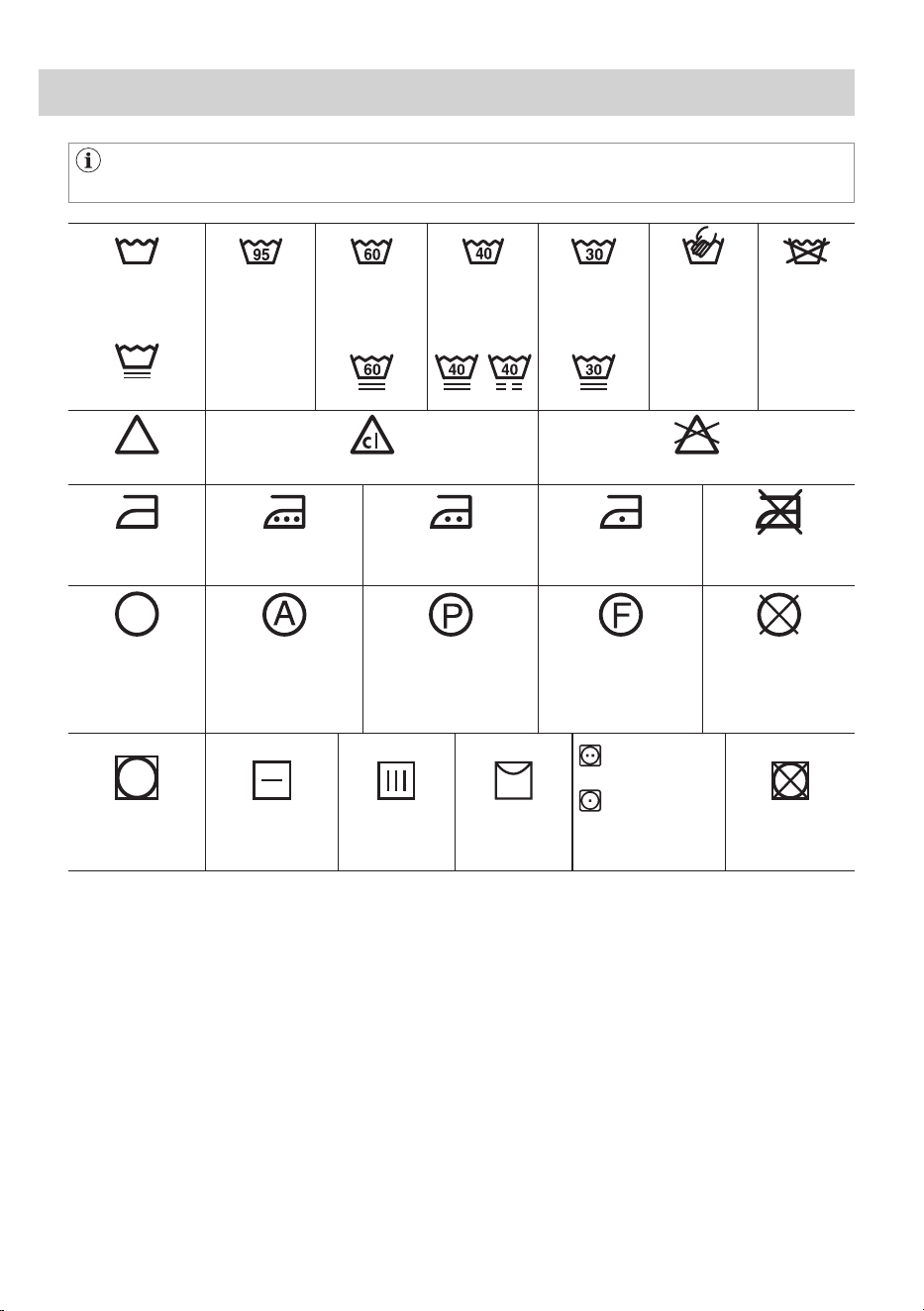
ENGLISH 47
16. INTERNATIONAL WASH CODE SYMBOLS
These symbols appear on fabric labels, in order to help you choose the best
way to treat your laundry.
Energetic wash Max. wash
temperature
95 °C
Max. wash
temperature
60 °C
Max. wash
temperature
40 °C
Max. wash
temperature
30 °C
Hand wash
DO NOT
wash at all
Delicate wash
Bleaching
Bleach with Chlorine DO NOT bleach
Ironing Hot iron
max. 200 °C
Warm iron
max. 150 °C
Lukewarm iron
max. 110 °C
DO NOT iron
Dry cleaning Dry cleaning in all
solvents
Dry cleaning in
perchloroethylene,
petrol, pure alcohol,
R 111 & R 113
Dry cleaning in petrol,
pure alcohol and
R 113
DO NOT
dry clean
Medium
temperature
Low
temperature
Drying Flat On the line On clothes
hanger
Tumble dry DO NOT
tumble dry
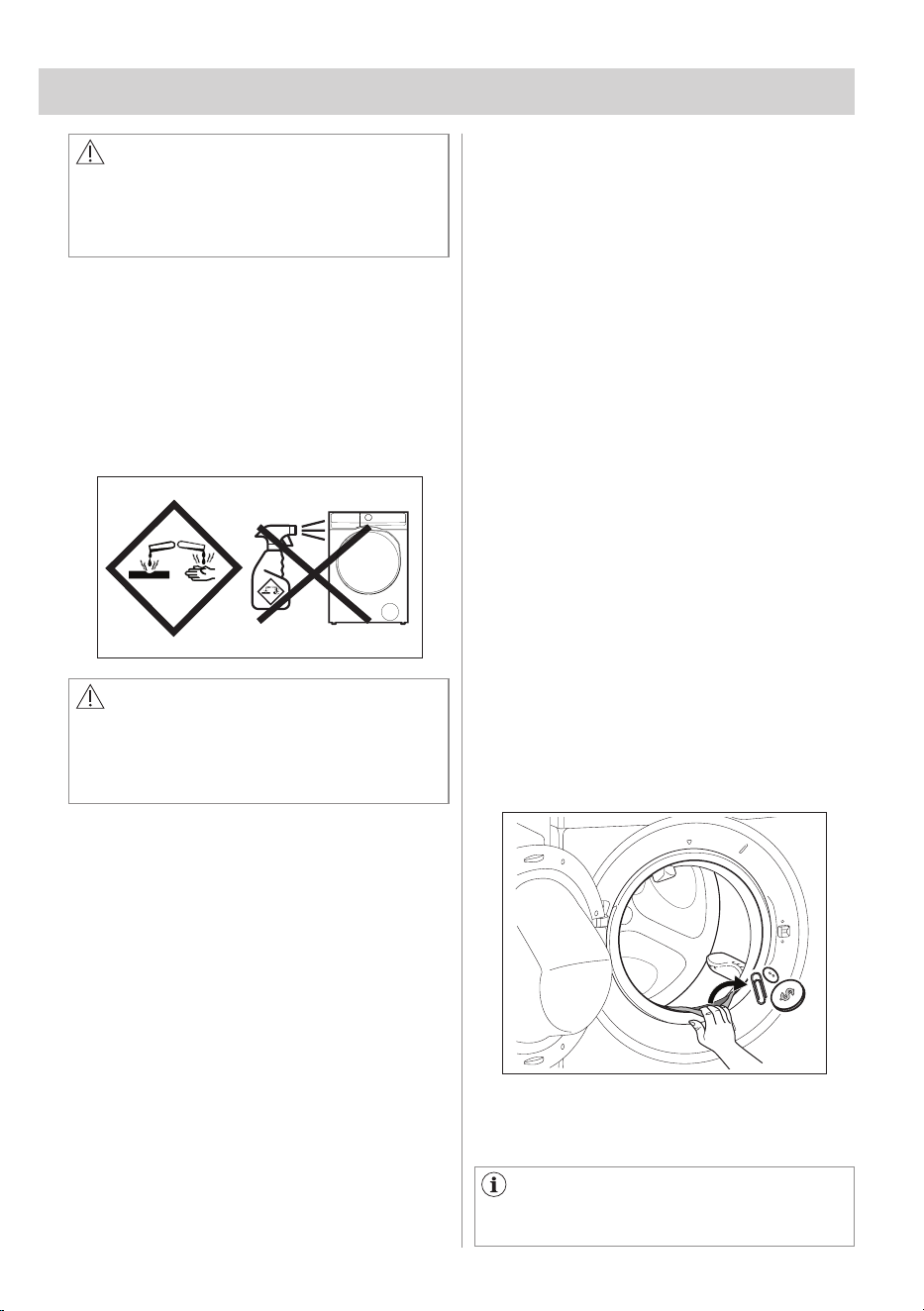
48 ENGLISH
17.2 Descaling
The water we use normally contains lime.
It is a good idea to periodically use a
water softening powder in the machine.
Do this separately from any laundry
washing, and according to the softening
powder manufacturer's instructions.
This will help to prevent the formation of
lime deposits.
17. CARE AND CLEANING
WARNING!
You must DISCONNECT the appliance
from the electricity supply, before
you can carry out any cleaning or
maintenance work.
17.3 After Each Wash
17.4 Maintenance Wash
17.5 Door Seal
Leave the door open for a while. This
helps to prevent mould and stagnant
smells forming inside the appliance.
Keeping the door open after a wash will
also help to preserve the door seal.
This appliance is designed with a self
cleaning draining system, allowing light
fluff fibres that fall off the clothes to be
drained out with the water. Regularly
examine the seal. Coins, buttons, other
small items can be recovered at the end
of the cycle.
The repeated and prolonged use of low
temperature and short programmes can
cause detergent deposits, fluff residues,
bacterial growth and biofilm formation
inside the drum and the tub.
This could generate bad odours and
mildew.
To eliminate these deposits and
hygienize the inner part of the appliance,
run a maintenance wash at least once a
month:
1. Remove all laundry from the drum.
2. Deactivate AutoDose function for
detergent and softener.
3. Run a cottons programme with the
highest temperature with a small
quantity of powder detergent or,
if available, run the Tub Clean
programme.
Clean it when needed, using ammonia
cream cleanser agent without scratching
the seal surface.
Always obey the instructions that
you find on the packaging of the
product.
17.1 External Cleaning
Clean the appliance only with soap and
warm water. Fully dry all the surfaces.
Do not use a scouring pads or any
scratching material.
Do not spray stain remover on garments
near the appliance as it is corrosive to
the plastic parts.
CAUTION!
Do not use alcohol, solvents or
chemical products.
Do not clean the metal surfaces with
chlorine-based detergent.
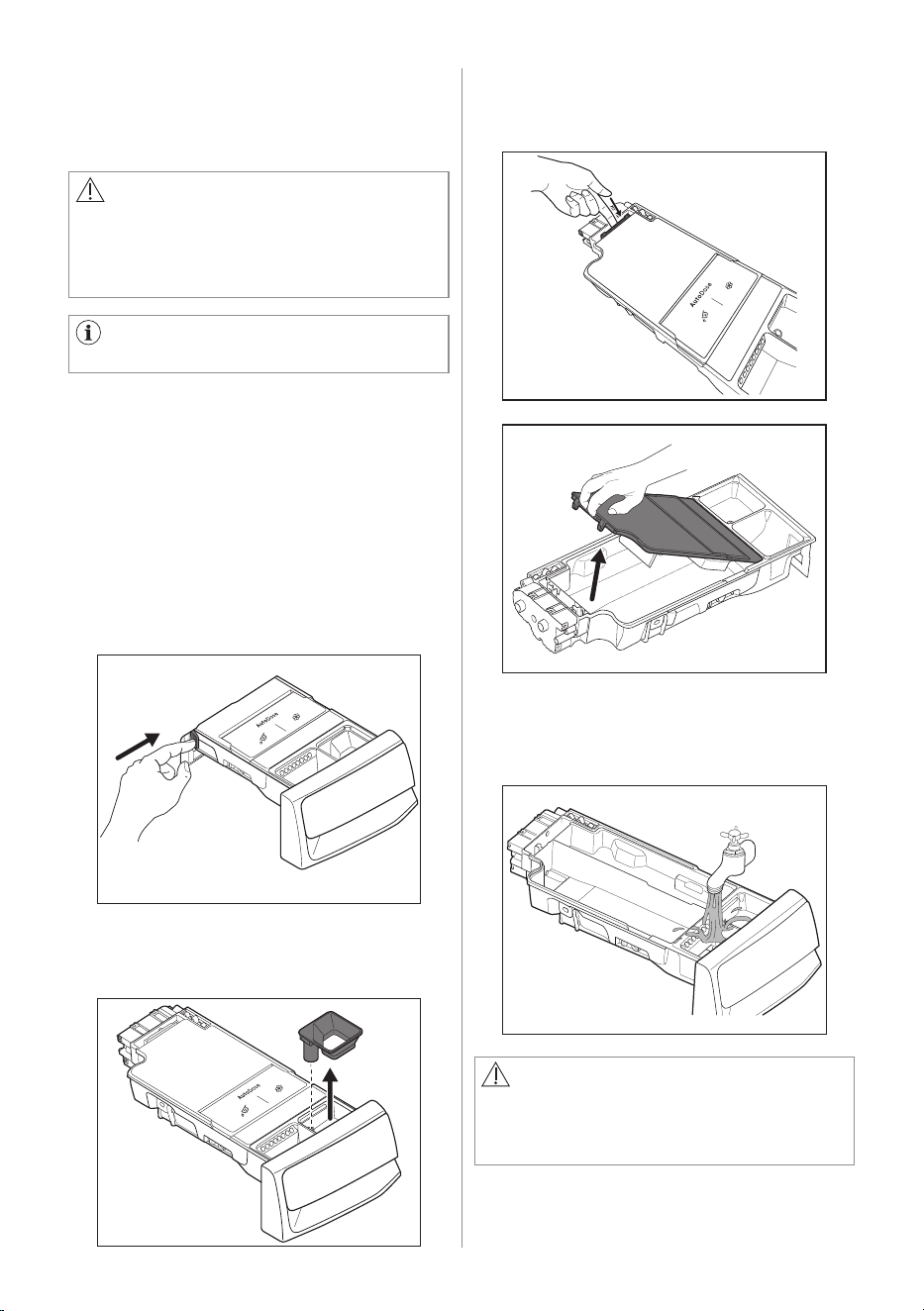
ENGLISH 49
CAUTION!
If you change detergent type as
brand, concentration, and thickness,
then it is suggested to clean the
detergent drawer.
CAUTION!
Do not use sharp or metal brushes and
sponges. Do not wash drawer in the
dish washer.
3. Press the catch on the back as
indicated in the picture and lift up the
top cover to open.
4. Wash the drawer and all inserts under
running water.
17.6 Cleaning The Detergent
Dispenser and The Autodose
Tanks
To prevent possible deposits of dried
detergent, clotted fabric softener,
formation of mould in the detergent
dispenser, and/or clotted liquid additives
in the AutoDose tanks, once in a
while carry out the following cleaning
procedure:
Before cleaning, make sure that the
all compartments are empty.
1. Open the detergent dispenser. Press
the catch as indicated in the picture
and pull the detergent dispenser out.
2. Remove the insert for the softener
and, if inserted.
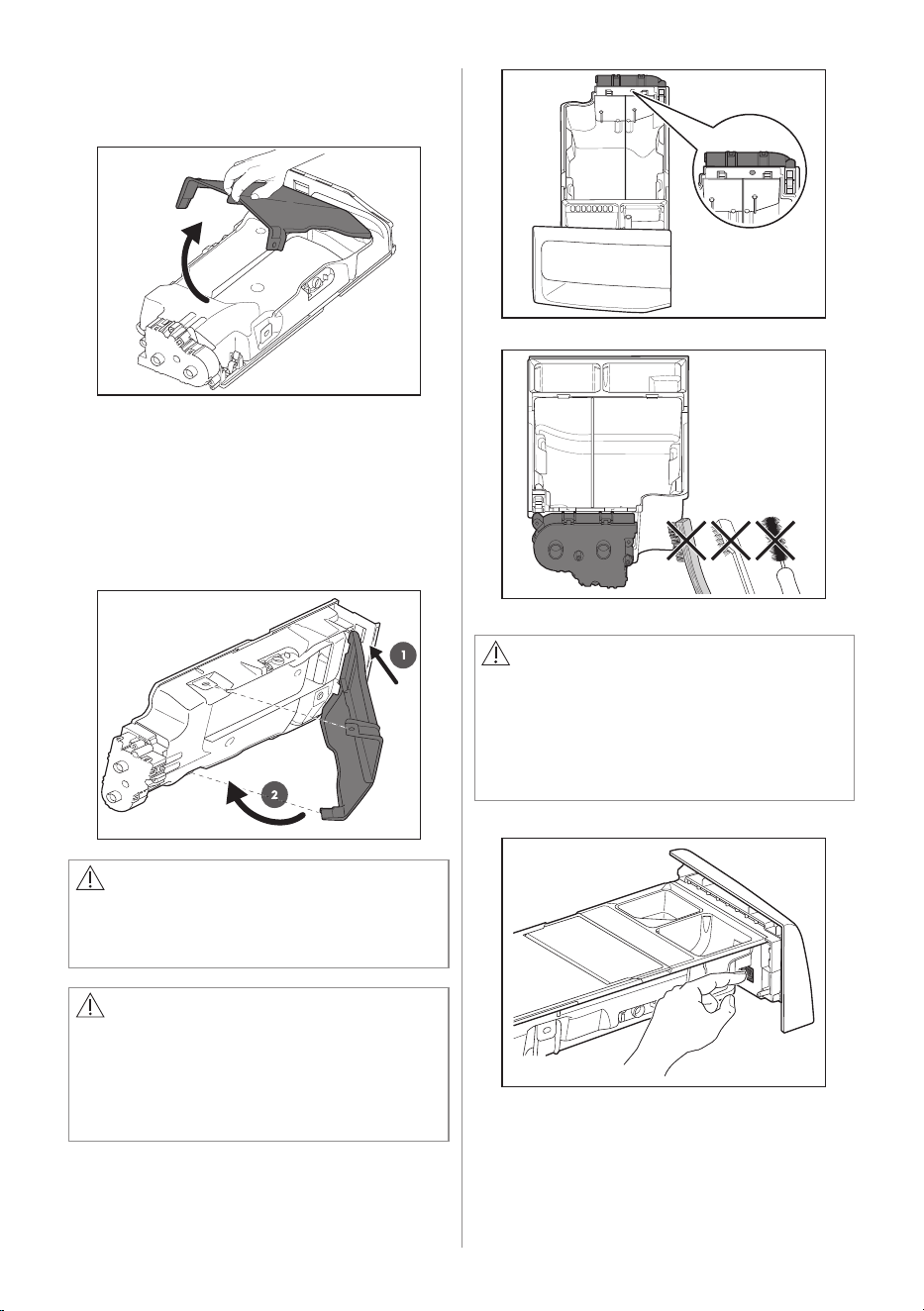
50 ENGLISH
WARNING!
Do not clean with any sharp and metal
brushes or any tools to avoid damaging
pumps and sensors allocated on
the back of the detergent drawer. If
necessary, use only soft damp clothes.
WARNING!
If some residues remain on the back
area of tanks, soak detergent drawer in
a warm water. Do not use tools to clean
it. Before soaking, remove the handle
by pressing the button and slide the
handle as indicated in the picture.
6. Make sure that all detergent residue is
removed from the conveyor. Use only
soft damp clothes.
7. Put bottom cover back to its position
by aligning its holes on drawer hooks
as indicated in the picture. Close it till
"click" sound.
5. Turn the dispenser up side down and
open the bottom cover as indicated in
the picture.
8. Make sure that all detergent residue
is removed from the upper and lower
part of the recess. Use a small brush
to clean the recess.
CAUTION!
Press the bottom cover as indicated in
the picture. Make sure that it is closed
properly.
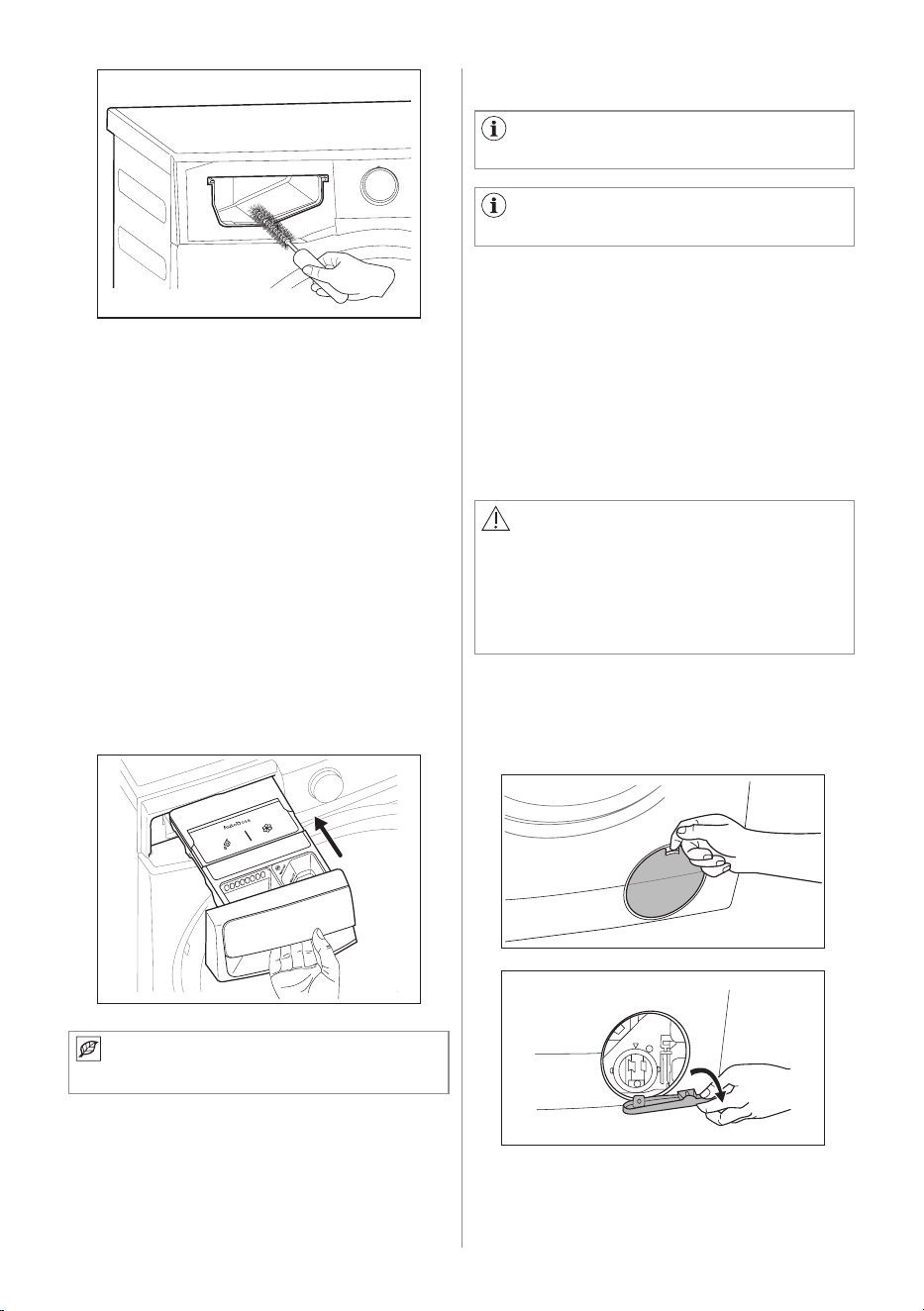
ENGLISH 51
WARNING!
• Do not remove the filter while the
appliance operates.
• Do not clean the pump if the water
in the appliance is hot. Wait until the
water cools down
Regularly examine the drain pump
and make sure that it is clean.
Disconnect the mains plug from the
mains socket.
17.7 Cleaning The Drain Pump
Clean the drain pump if:
• The appliance does not drain the
water.
• The drum cannot turn.
• The appliance makes an unusual noise
because of the blockage of the drain
pump.
• The message Check that the drain
filter is not clogged pops up.
Proceed as follows to clean the pump:
1. Open the drain pump door.
a. Place the handle if was
disassembled.
b. Place the bottom cover and press
till "click" sound.
c. Place the top cover on the tanks
compartment and press till "click"
sound.
d. Replace components on manual
compartment.
9. Reassembly the drawer as follows:
10. Insert the detergent dispenser into
the guide rails and gently close it
till "click" sound. Run the Quick 15
programme without any clothes in the
drum.
To restore the functionality, refill
tanks with detergent and softener.
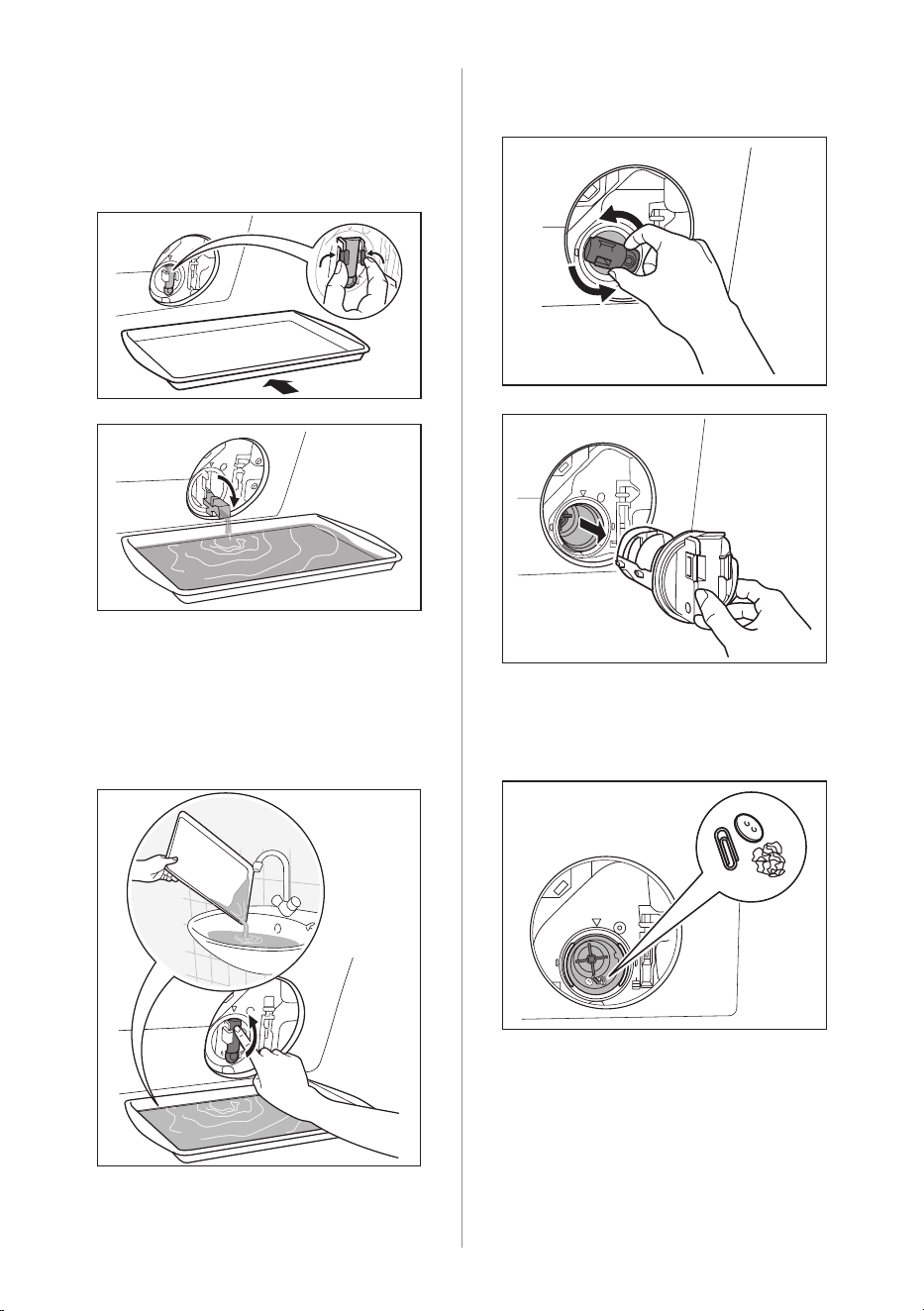
52 ENGLISH
2. Place a suitable water container
below the recess of the drain pump to
collect the water that flows out.
Press the two levers and pull forward
the drainage duct to let the water flow
out.
3. When the container is full of water,
put the drainage duct back again and
empty the container. Repeat the step
2, 3 until no more water flows out.
4. Push back the drainage duct.
Turn the filter counter-clockwise to
remove it.
5. Remove fluff and objects from the
pump (if there are any).
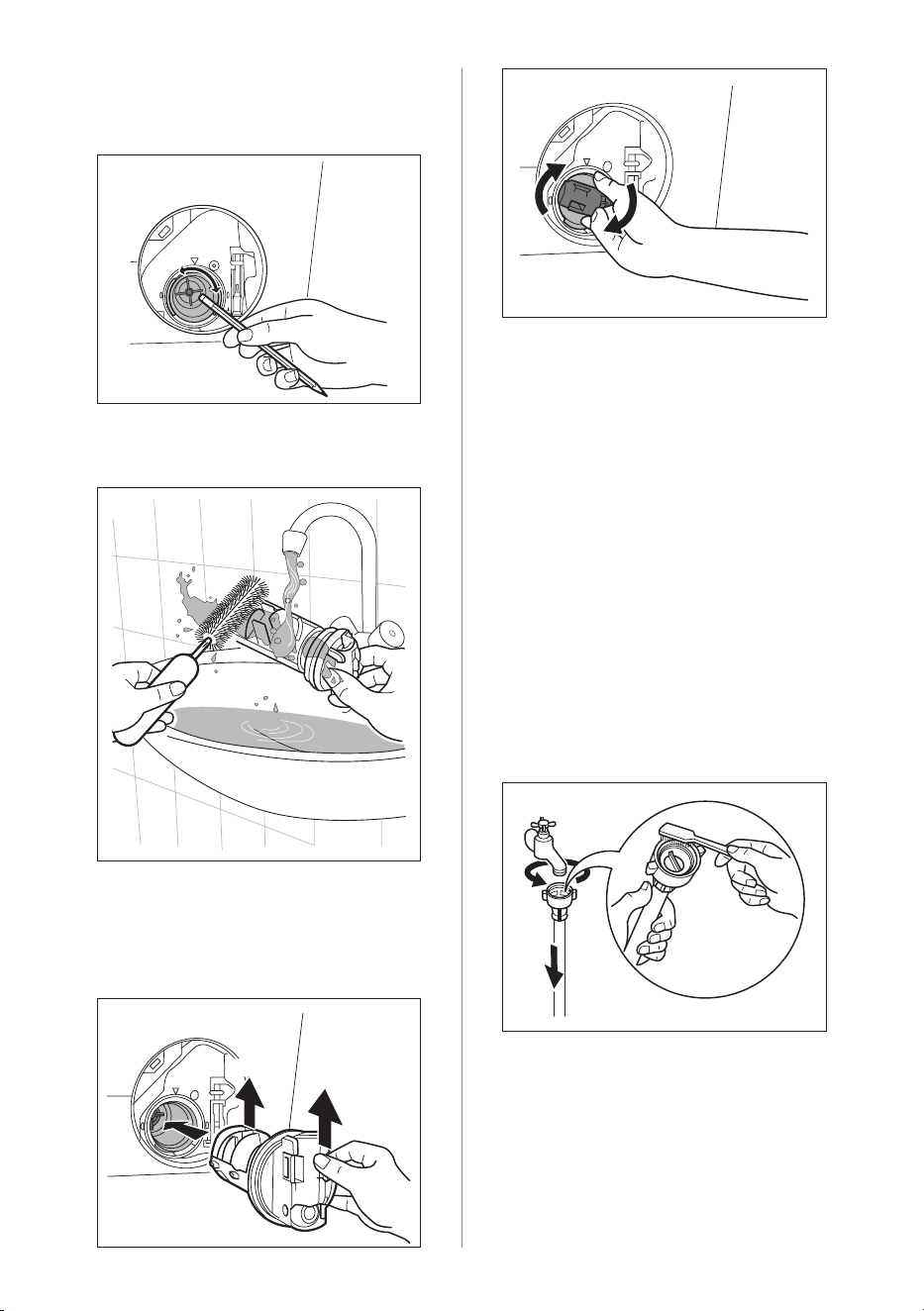
ENGLISH 53
6. Make sure that the impeller of the
pump can turn. If this does not occur,
contact the service centre.
7. Clean the filter under the water tap.
17.8 Cleaning The Water Inlet Filter
If your water is very hard or contains
traces of lime deposit, the water inlet
filter may become clogged. It is therefore
a good idea to clean it from time to time.
To clean the water inlet filters:
1. Close the water tap.
2. Remove the water inlet hose from the
water tap.
3. Clean the filter in the inlet hose with a
stiff brush.
8. Put the filter back into the housing
with exposed section facing up. Make
sure that you correctly tighten the filter
to prevent leakages.
9. Close the drain pump door.
Guide
UP
UP
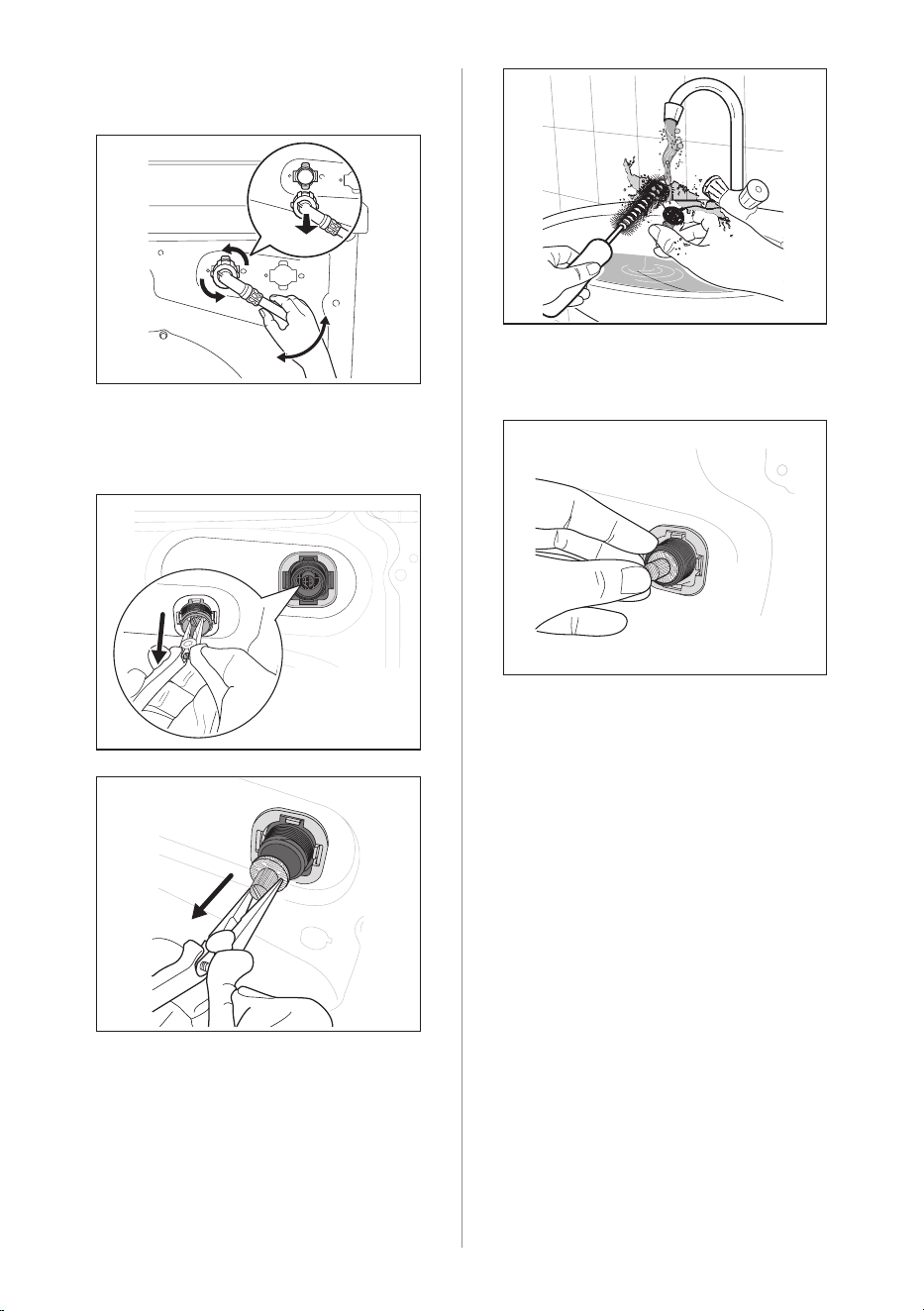
54 ENGLISH
4. Remove the inlet hose behind the
appliance.
5. Use a suitable tool pulling filter from
the valve (e.g. long nose pliers) as
picture.
Clean the filter under the water tap.
Install the valve filter back to the
housing.
6. Install the inlet hose again. Make sure
that the couplings are tight to prevent
leakages.
7. Open the water tap.
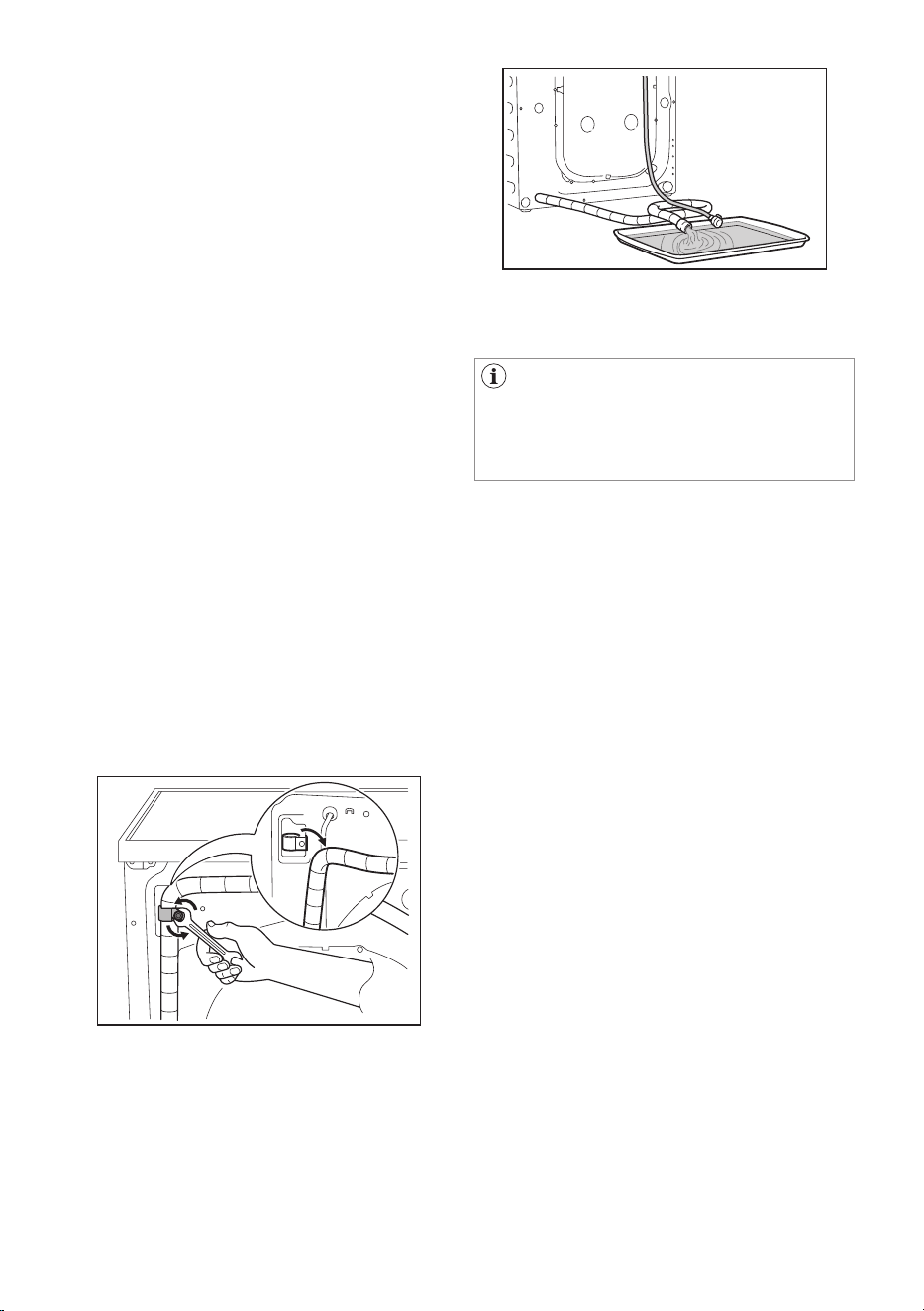
ENGLISH 55
17.10 Frost Precautions
17.9 Emergency Drain
If the appliance is installed in an area
where the temperature can be less than
0 °C, remove the remaining water from
the inlet hose and the drain pump.
1. Disconnect the main plug from the
main socket.
2. Close the water tap.
3. Remove the water inlet hose.
4. Remove the drain hose from the rear
support and unhook it from sink or
spigot.
If the appliance cannot drain the water,
carry out the same procedure, described
in 'Cleaning the drain pump' paragraph.
If necessary, clean the pump.
When you drain the water with the
emergency drain procedure, you must
activate the drain system again:
1. Put 2 litres of water in the main
wash compartment of the detergent
dispenser.
2. Start the programme to drain the
water.
5. Put the end of the drain and inlet hose
in a container. Let the water flow out
of the hoses.
6. When no more water flows, install the
inlet hose again.
Make sure that the temperature
is more than 0 °C before you use the
appliance again.
The manufacturer is not responsible for
damages caused by low temperatures.
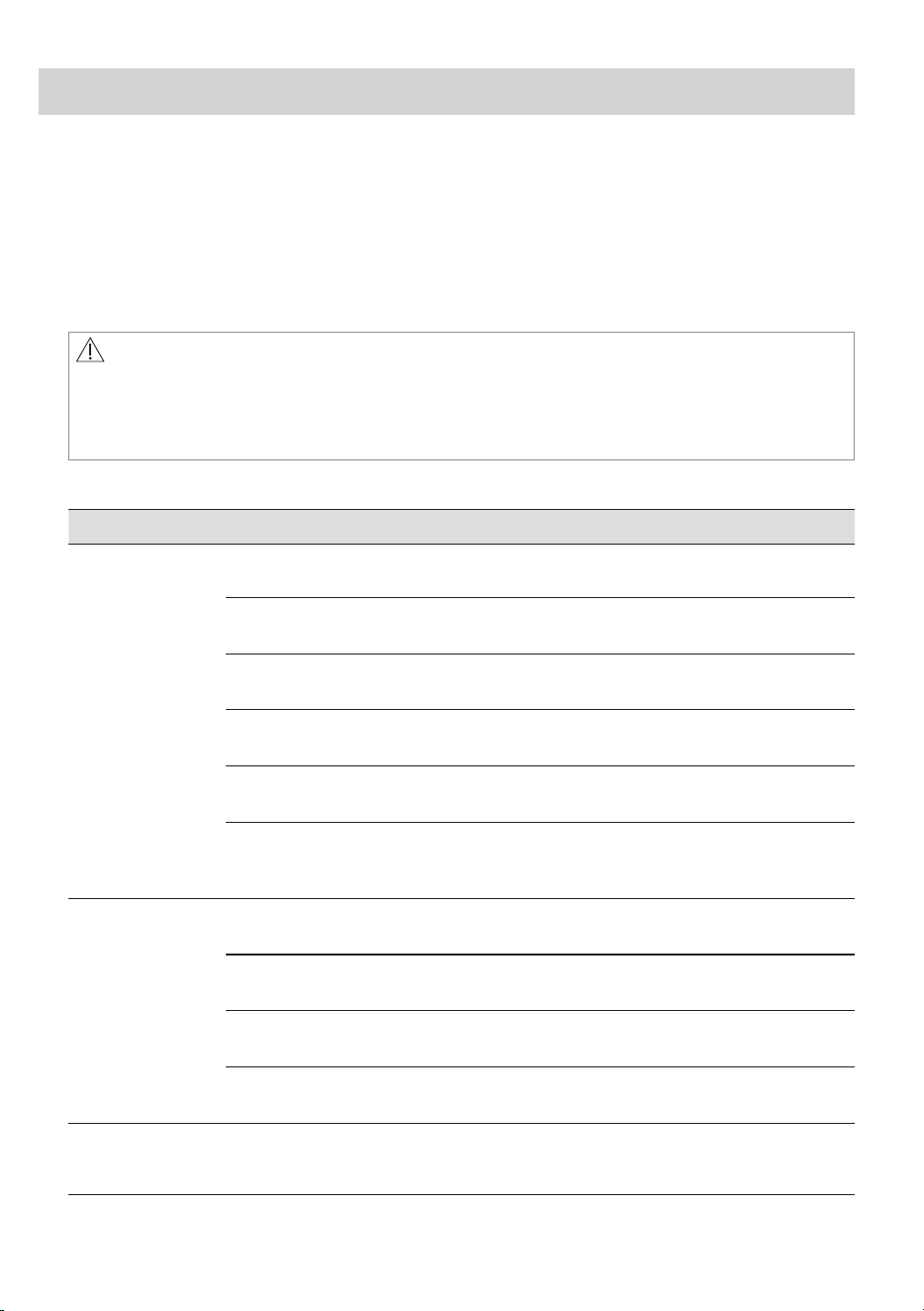
56 ENGLISH
18.1 Possible Failures
18. TROUBLESHOOTING
Malfunction Possible cause Solution
Machine does
not start:
The door has not been closed. Close the door firmly.
The plug is not properly inserted
into the power socket.
Insert the plug into the power
socket.
There is no power at the socket. Please check your domestic
electrical installation.
The Start/Pause touch key has not
been pressed.
Press the Start/Pause touch key.
The "Finish In" has been selected. If the laundry are to be washed
immediately, cancel the "Finish In".
The Main supply is unstable. Wait until the main supply is
stable. Appliance will start
automatically.
Machine does
not fill the
water:
The water tap is closed. Open the water tap.
The inlet hose is squashed or
kinked.
Check the inlet hose connection.
The filter in the inlet hose is
blocked.
Clean the water inlet hose filter.
The door is not properly closed. Close the door firmly.
Machine fills
then empties
immediately:
The end of the drain hose is too
low.
Refer to relevant paragraph in
"water drainage" section.
Certain problems are due to lack of simple maintenance or oversights, which can be
solved easily without calling out an engineer. Before contacting your local Service
Centre, please check troubleshooting below.
Once the problem has been eliminated, press the Start/Pause button to restart the
programme. If after all checks, the problem persists, contact your local Service
Centre.
WARNING!
Deactivate the appliance before you do the checks.
If an error appears on the display, please follow the initial troubleshooting steps as
suggested.
ENGLISH 57
Malfunction Possible cause Solution
Machine does
not empty
and/or does
not spin:
The drain hose is squashed or
kinked.
Check the drain hose connection.
The drain pump is clogged. Clean the drain filter.
The option "Rinse Hold" has been
selected.
Press Start/Pause touch key to
drain the water or select spin
programme.
The laundry is not evenly
distributed in the drum.
Pause the machine and
redistribute laundry manually.
There is water
on the floor:
Too much detergent or unsuitable
detergent (creates too much
foam).
Reduce detergent quantity and
use correct type of detergent (see
page 45).
Water leaks inside the machine. Disconnect the main plug from the
main socket. Close the water tab.
Call Service.
Water leaks from inlet hose
fittings.
Check the water inlet hose
connection.
The drain hose is damaged. Call Service.
Unsatisfac-
tory washing
results:
Too little detergent or unsuitable
detergent has been used.
Increase detergent quantity or
use different detergent (see page
45).
Stubborn stains have not been
treated prior to washing.
Use commercial products to treat
the stubborn stains.
The correct temperature was not
selected.
Check if you have selected the
correct temperature.
Excessive laundry load. Reduce load.
The door will
not open:
The programme is still running. Wait until the end of cycle.
There is water in the drum. You must drain the water to open
the door.
This problem may be caused by a
failure of the appliance.
Contact Service. If you need
to open the door, please read
carefully "Emergency door
opening" on page 59.
Machine
vibrates or is
noisy:
The transit bolts and packing
have not been removed.
Check the correct installation of
the appliance.
The support feet have not been
adjusted.
Check the correct levelling of the
appliance.
The laundry is not evenly
distributed in the drum.
Pause the machine and
redistribute laundry manually.
58 ENGLISH
Malfunction Possible cause Solution
Machine
vibrates or is
noisy:
There is very little laundry in the
drum.
Load more laundry.
Unstable floors e.g. wooden
floors.
Refer to relevant paragraph in
"Positioning" section.
Cycle time
longer than
displayed:
Detergent over dose. Reduce the detergent quantity or
use another one. (see page 45)
Machine unbalance. Redistribute laundry manually in
the drum and start the spin phase
again.
The cycle is
shorter than
the time dis-
played.
The appliance calculated a new time according to the laundry load.
Spinning starts
late or
machine does
not spin:
The electronic unbalance
detection device has cut in
because the laundry is not evenly
distributed in the drum. The
laundry is redistributed by reverse
rotation of the drum.
This may happen several times
before the unbalance disappears
and normal spinning can resume.
If, after 10 minutes, the laundry is
still not evenly distributed in the
drum, the machine will not spin.
In this case, redistribute the load
manually and select the spin
programme.
Pause the machine and
redistribute laundry manually.
Machine makes
an
unusual noise:
Machine not installed properly. Make sure the levelling of the
appliance is correct. Refer to
section "Installation".
Transit bolts or packaging not
removed.
Make sure that the packaging
and/or the transit bolts are
removed. Refer to section
"Unpacking".
The load may be too small. Add more laundry in the drum.
No water is
visible in the
drum:
Machines based on modern technology operate very
economically using very little water without affecting
performance.
Remote
function does
not work:
Registration data lost or
damaged.
Restart machine by turn Off and
turn On again. If problem not
solved, please contact Service
Centre.
Machine does
not start
*AutoDose
models
Sensing circuit of Autodosing
faulty.
Switch off and switch on again.
If still have the problem, please
call Service Centre.
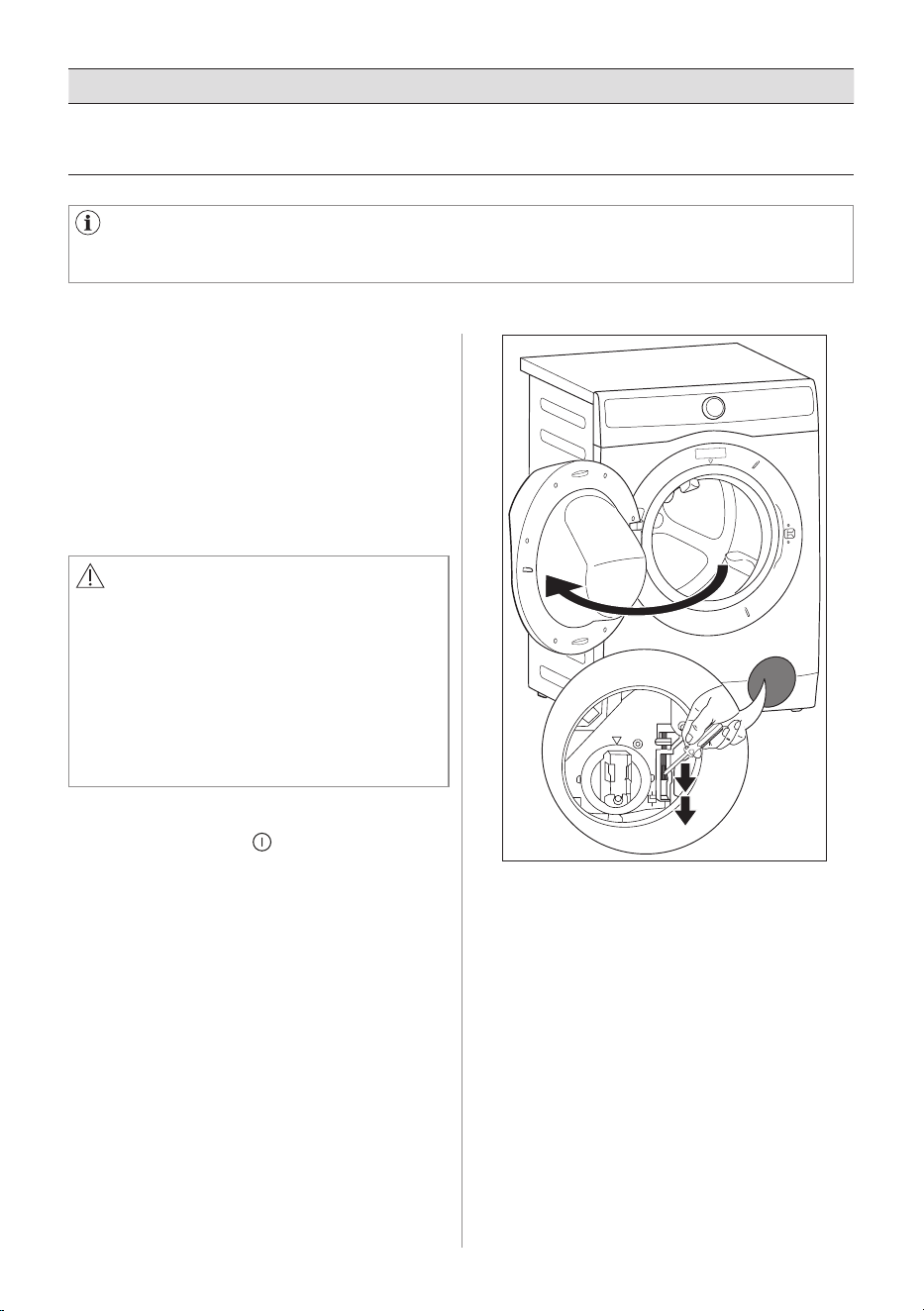
ENGLISH 59
18.2 Emergency Door Opening
In case of power failure or appliance
failure, the appliance door remains
locked. The wash programme continues
when power is restored. If the door
remains locked in case of failure, it is
possible to open it using the emergency
unlock feature.
Before opening the door:
WARNING!
Make sure that the water temperature
and the laundry are not to high. Wait
until they cool down if necessary.
Make sure that the water level inside
the drum is not too high. If necessary,
perform an Emergency Drain chapter.
Make sure that the drum is not rotating.
Wait until the drum stops rotating if
necessary.
If you are unable to identify or solve the problem, contact our service centre.
Before calling, make a note of the model, serial number in the rating label behind
the door when you open, and purchase date of your machine.
To open the door proceed as follows:
1. Press the On/Off button to switch
the appliance off.
2. Disconnect the mains plug from the
mains socket.
3. Open the filter cover.
4. Using a suitable tool to pulling the
emergency unlock strap (red strap)
downward twice (you will hear "click"
sound) and hold it, at the same time
pull the door handle to open the door.
If the door cannot open while holding
the strap, try to release it then open
the door.
5. Take out the laundry.
6. Close the filter door.
Malfunction Possible cause Solution
Display show
"Run Machine
clean program"
This message reminds to run a
cleaning cycle
Run Tub Clean cycle
Note : After finished cycle, please turn off then
turn on the machine again.
60 ENGLISH
19.1 Packaging Materials
19.2 Old Machine
The materials marked with the symbol
are recyclable.
>PE<=polyethylene
>PS<=polystyrene
>PP<=polypropylene.
This means that they can be recycled by
disposing them properly in appropriate
collection containers.
Use authorized disposal sites for your
old appliance. Help to keep your country
tidy!
The symbol on the product or on its
packaging indicates that this product
may not be treated as household waste.
Instead it shall be handed over to the
applicable collection point for the
recycling of electrical and electronic
equipment. By ensuring this product
is disposed of correctly, you will help
prevent potential negative consequences
for the environment and human health,
which could otherwise be caused by
inappropriate waste handling of this
product.
For more detailed information about
recycling of this product, please contact
your local city office, your household
waste disposal service or the shop where
you purchased the product.
19. ENVIRONMENT CONCERNS
19.3 Ecological Hints
To save water, energy and to help
protect the environment, we recommend
that you follow these tips:
• Normally soiled laundry may be
washed without pre-washing in order
to save detergent, water and time (the
environment is protected too!).
• The machine works more economically
if it is fully loaded.
• With adequate pre-treatment, stains
and limited soiling can be removed;
the laundry can then be washed at a
lower temperature.
• Measure out detergent according to
the water hardness, the degree of
soiling and the quantity of laundry
being washed.
ENGLISH 61
62 ENGLISH

ENGLISH 63

electrolux.com
G0044681-002-A28643707