SUPPORT.IONAUDIO.COM
x2
x2
CREATE YOUR SOUND EXPERIENCE
CUSTOMIZE YOUR SOUND EXPERIENCE
CONECTE EL PRODUCTO PARA CARGARLO
POR COMPLETO ANTES DE SU USO Y LUEGO
ENCIÉNDALO
a. Connect phone to speaker via Bluetooth® (Step 4)
b. Download App from Apple App Store or Google Play Store
c. Open the App on your device
ION SOUND CONTROL
TM
APP
BLUETOOTH
a. Asegúrese de que el teléfono esté
conectado al altavoz mediante Bluetooth
(Paso 4)
b. Descarguen la aplicación desde Apple
App Store o Google Play Store
c. Abra la aplicación en su dispositivo
ION SOUND CONTROL
TM
APP
CREE SU EXPERIENCIA DE SONIDO
a. Assurez-vous que le téléphone intelligent
est connecté à l’enceinte par connexion
Bluetooth (Étape 4)
b. Téléchargez l’application à partir de
l’App Store d'Apple ou de Google Play
c. Ouvrez l'application sur votre appareil
Connectez-vous à l'application ION SOUND
CONTROL
MC
pour une expérience plus
dynamique :
CRÉEZ VOTRE EXPÉRIENCE SONORE
Para artículos, videos, sitios web y
soporte por chat
Pour des articles, des vidéos et de
l’assistance technique web
et par clavardage
Para información completa sobre la
garantía
Pour obtenir toutes les informations
relatives à la garantie
GUÍA DE INICIO RÁPIDO (ESPAÑOL)
GUIDE D’UTILISATION RAPIDE (FRANÇAIS)
IONAUDIO.COM/SUPPORT
IONAUDIO.COM/WARRANTY
IONAUDIO.COM/SUPPORT
For articles, videos, web and chat support
IONAUDIO.COM/WARRANTY
For complete warranty information
QUICKSTART GUIDE v1.0 (ENGLISH)
KETTLEBOOM
• Make sure all items listed in the Package Contents are
included in the box.
• Read the included Important Safety Instructions.
• Scan QR code to download the complete User Guide.
• Register your product on ionaudio.com
GETTING STARTED
Package Contents:
Kettleboom
• USB-C® to USB-C® Cable (2.56 ft / 78 cm) • Quickstart Guide
Contenido del paquete:
Kettleboom
USB-C® al cable USB-C® (78 cm)
Guía de inicio rápido
Contenu de l'emballage :
Kettleboom
Câble USB-C® à USB-C® (78 cm)
Guide d’utilisation rapide
PERSONALICE SU EXPERIENCIA DE SONIDO
PERSONNALISEZ VOTRE EXPÉRIENCE
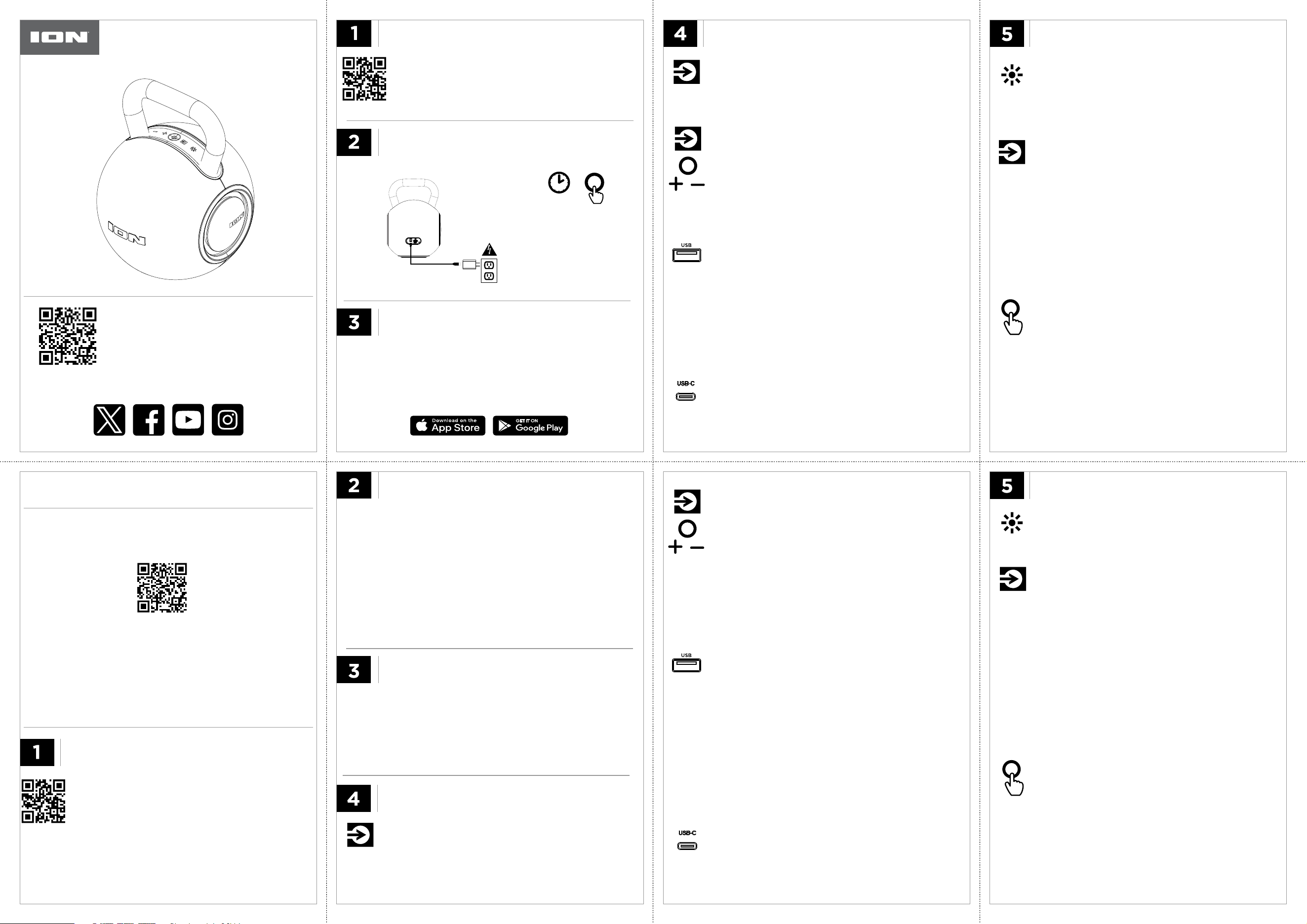
PLUG IN TO FULLY CHARGE PRODUCT
BEFORE USE, AND THEN POWER ON
PARA COMENZAR
MISE EN ROUTE
Conéctese a la aplicación ION SOUND
CONTROL
TM
para una experiencia más
dinámica:
BLUETOOTH BLUETOOTH
REPRODUCCIÓN USB-A
LECTURE USB-A
Connect to the ION SOUND CONTROL
TM
App for a more dynamic
experience:
1. Encienda el altavoz para modo
Bluetooth.
2. Seleccione “KettleBoom” en su menú
de ajustes Bluetooth.
3. Inicie la reproducción en su
aplicación de música de preferencia
en el dispositivo.
1. Pulse y mantenga pulsado el botón
POWER / REPRODUCCIÓN/PAUSA
para encender el KettleBoom.
2. Inserte una unidad USB en el puerto
USB-A del panel posterior para
entrar al modo USB.
3. Pulse y suelte el botón POWER /
REPRODUCCIÓN/PAUSA para
reproducir o detener una pista. Press
and release SOURCE button to cycle
through playback modes.
1. Allumez l’enceinte sous tension pour
en mode jumelage Bluetooth.
2. Sélectionnez “KettleBoom” dans le
menu des paramètres Bluetooth de
votre appareil.
3. Lancez la lecture à partir de
l'application de lecture audio de votre
choix sur votre appareil.
1. Maintenez la touche + enfoncée les
touche
LANCER / INTERROMPRE
LA LECTURE
pour allumez la
KettleBoom.
2. Insérez une clé USB dans le port
USB-A du panneau arrière pour
passer en mode USB.
3. Maintenez les touche
LANCER/IN-
TERROMPRE LA LECTURE
pour
lancer ou interrompre la lecture une
pista. Press and release SOURCE
button to cycle through playback
modes.
BRANCHEZ LE PRODUIT POUR LE CHARGER
COMPLÈTEMENT AVANT SON UTILISATION,
PUIS METTEZ-LE SOUS TENSION
Note: Adapter not included.
Charge Time: TBD (adapter spec - TBD)
For optimal charging, power o the speaker
while charging.
Battery Capacity: 7.4V, 4800mAh, 35.52Wh
Battery Life: XX hours.
To hear a callout of the battery level, press
both of the - and + buttons.
WIRELESS STEREO-LINK™
STEREO-LINK
TM
INALÁMBRICO STEREO-LINK
MC
SANS FIL
1. Encienda todos los altavoces
Hype XL.
2. Pulse y suelte pulsado el botón
SOURCE. Sonará un tono para
indicar que está listo para
conectarse a otros altavoces.
3. Pulse y suelte pulsado el botón
SOURCE para conectar el
siguiente altavoz al altavoz
principal (es necesario
desconectarlo primero de un
dispositivo Bluetooth). Repita
este paso para conectar otros
altavoces.
1. Turn on all KettleBoom speakers.
2. Press and release the SOURCE
button. A tone will indicate it is
ready to connect to other
speakers.
3. Press and release the SOURCE
button to connect the next
speaker to the main speaker
(needs to first be disconnected
from a Bluetooth device). Repeat
this step to connect additional
speakers.
1. Power on speaker for Bluetooth mode.
2. Choose “KettleBoom” in your Bluetooth device settings menu.
3. Press Play in music player App of choice on device.
Nota: No se incluye el adaptador.
Tiempo de Carga: TBD (adapter spec - TBD)
Para lograr una carga óptima, apague el altavoz
mientras lo esté cargando.
Capacidad de la batería: 7.4V, 4800mAh,
35.52Wh
Vida útil de la batería: XX horas.
Para escuchar una indicación del nivel de
batería, presione los botones - y +.
Remarque : Adaptateur non fourni.
Temps de Charge
: TBD (adapter spec - TBD)
Pour une charge optimale, éteignez l'enceinte
pendant la charge.
Capacité de la batterie :
7.4V, 4800mAh, 35.52Wh
Autonomie de la batterie : X heures.
Pour entendre un message indiquant le niveau
de la batterie, appuyez sur les deux touches - et
+.
Models: iSP195, iSP195BK
REPRODUCCIÓN
USB-C USB-C LECTURE
SUPPORT.IONAUDIO.COM
USB-A PLAYBACK
1. Press and hold POWER / PLAY/PAUSE button to power on
KettleBoom.
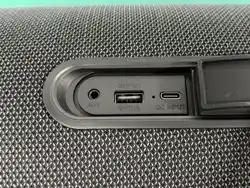
2. Insert a USB drive into the USB-A port on the back panel to enter
USB mode.
3. Press and release POWER / PLAY/PAUSE button to play or pause
a track. Press and release SOURCE button to cycle through
playback modes.
LIGHT MODES
• Press LIGHTS button or use App to switch between light modes,
or to turn the lights o.
MODOS DE ILUMINACIÓN
• Pulse el botón de ILUMINACIÓN o
utilice la aplicación para conmutar
entre los modos iluminación, o
para apagar la iluminación.
MODES D’ÉCLAIRAGE
• Appuyez sur la touche LIGHTS ou
utilisez l'application pour basculer
entre les modes l'éclairage, ou
pour éteindre l'éclairage.
1. Encienda el KettleBoom.
2. Conecte su smartphone, tablet u
otros dispositivos al puerto USB-C
mediante.
3. Stream audio from your device and
use the buttons on KettleBoom to
control functions.
Note: The USB-C port will not play
music from a USB-C flash drive.
1. Allumez la KettleBoom.
2. Connectez votre smartphone, votre
tablette ou d'autres appareils au port
USB-C à l'aide.
3. Stream audio from your device and
use the buttons on KettleBoom to
control functions.
Note: The USB-C port will not play
music from a USB-C flash drive.
VOICE PROMPTS
• Double press the POWER / PLAY/PAUSE button to turn voice
prompts ON/OFF.
1. Turn on all KettleBoom speakers.
2. Press and release SOURCE button on the first (main) speaker.
A tone will indicate it is ready to connect to other speakers.
3. To connect to the next speaker, first ensure it is disconnected
from a Bluetooth device. Then press and release SOURCE
button to connect it to the main speaker. Repeat this step to
connect additional speakers.
AVISOS DE VOZ
• Pulse el botón de ENCENDIDO /
REPRODUCCIÓN/PAUSA dos
veces para activar o desactivar los
avisos de voz.
MESSAGES VOCAUX
• Appuyez deux fois sur la touche
d’ALIMENTATION /
LANCER/INTERROMPRE LA
LECTURE
pour activer ou
désactiver les messages vocaux.
USB-C PLAYBACK
1. Power on KettleBoom.
2. Connect your smartphone, tablet, or other devices to the USB-C
port.
3. Stream audio from your device and use the buttons on KettleBoom
to control functions.
Note: The USB-C port will not play music from a USB-C flash drive.
Note: Press and release SOURCE button to switch between modes
(Bluetooth, USB). If you are connected to a smartphone, press and
hold POWER / PLAY/PAUSE button to disconnect from the
smartphone and the speaker will re-enter Bluetooth pairing mode.
Note: Press and release the
SOURCE button to switch
between modes (Bluetooth,
USB). If you are connected to a
smartphone, press and hold the
POWER / PLAY/PAUSE button
to disconnect from the
smartphone and the speaker will
re-enter Bluetooth pairing mode.
Note: Press and release the SOURCE button to
switch between modes (Bluetooth, USB). If you
are connected to a smartphone, press and hold
the POWER / PLAY/PAUSE button to
disconnect from the smartphone and the
speaker will re-enter Bluetooth pairing mode.
TBD HOURS
• Press - or + to adjust volume.
• Press and hold - to revert to the beginning of the track.
• Press - again within one second to skip to the previous track.
• Press and hold + to skip to the next track.
• Pulse - o + para ajustar el
volumen.
• Mantenga pulsado - para volver al
comienzo de la pista.
• Pulse - nuevamente antes de 1
segundo para saltar a la pista
anterior.
• Mantenga pulsado + para pasar a
la siguiente pista.
• Appuyez sur les touches - ou +
pour régler le volume.
• Maintenez la touche - enfoncée
pour revenir au début de la piste.
• Appuyez de nouveau sur la touche
- en l'espace d'une seconde afin de
retourner à la piste précédente.
• Maintenez la touche + enfoncée
afin de passer à la piste suivante.
• Press and release SOURCE button on the main speaker to
stop all Auracast connections.
• Press and release SOURCE button on one of the secondary
speakers to disconnect from that speaker.
• Press and release the SOURCE
button on the main speaker to
stop all Auracast connections.
• Press and release the SOURCE
button on one of the
secondary speakers to
disconnect from that speaker.
• Pulse y suelte pulsado el botón
SOURCE en el altavoz
principal para detener todas
las conexiones de Auracast.
• Pulse y suelte el botón
SOURCE en uno de los
altavoces secundarios para
desconectarse de ese altavoz.
• Make sure device volume is turned up.
• Press POWER / PLAY/PAUSE button to start or stop audio.
• Press and hold - / + buttons to navigate tracks.
• Double press SOURCE button to disconnect from the current
Bluetooth connection.
• Asegúrese de subir el volumen de
su dispositivo fuente.
• Pulse el botón de POWER /
REPRODUCCIÓN/PAUSA para
reproducir o detener el audio.
• Mantenga pulsado los botones + /
- para navegar entre pistas.
• Double press SOURCE button
to disconnect the current
Bluetooth connection.
• Assurez-vous que le niveau du
volume de l’appareil source est
assez élevé.
• Appuyez sur
la touche
LANCER/INTERROMPRE LA
LECTURE
pour démarrer ou
arrêter le son.
• Maintenez les touches - / + pour
parcourir les pistes.
• Double press SOURCE button to
disconnect the current Bluetooth
connection.
The Bluetooth® word mark and logos are registered trademarks
owned by Bluetooth SIG, Inc. The Auracast™ word mark and
logos are trademarks owned by Bluetooth SIG, Inc. Any use of
such marks by inMusic and its subsidiaries and aliates,
including ION Audio, is under license.
The Bluetooth® word mark and logos
are registered trademarks owned by
Bluetooth SIG, Inc. The Auracast™
word mark and logos are trademarks
owned by Bluetooth SIG, Inc. Any use
of such marks by inMusic and its
subsidiaries and aliates, including
ION Audio, is under license.
The Bluetooth® word mark and logos
are registered trademarks owned by
Bluetooth SIG, Inc. The Auracast™
word mark and logos are trademarks
owned by Bluetooth SIG, Inc. Any use
of such marks by inMusic and its
subsidiaries and aliates, including
ION Audio, is under license.
• Make sure all items listed
in the Package Contents
are included in the box.
• Read the included
Important Safety
Instructions.
• Scan QR code to
download the complete
User Guide.
• Register your product on
ionaudio.com
• Make sure all items listed in
the Package Contents are
included in the box.
• Read the included
Important Safety
Instructions.
• Scan QR code to
download the complete
User Guide.
• Register your product on
ionaudio.com