Product Specifications
Bluetooth Version: V5.4
Input: Type-C 5V/2A
Frequency Response: 100Hz - 18kHz
Bluetooth Range: >10M (Open Field)
Distortion: ≤ 5%
Speaker Power: 2*20W
Speaker Unit: 78mm (3 inches)
Battery: 7.4V/2000mA*2
Full Charge Time: 3-4 Hours
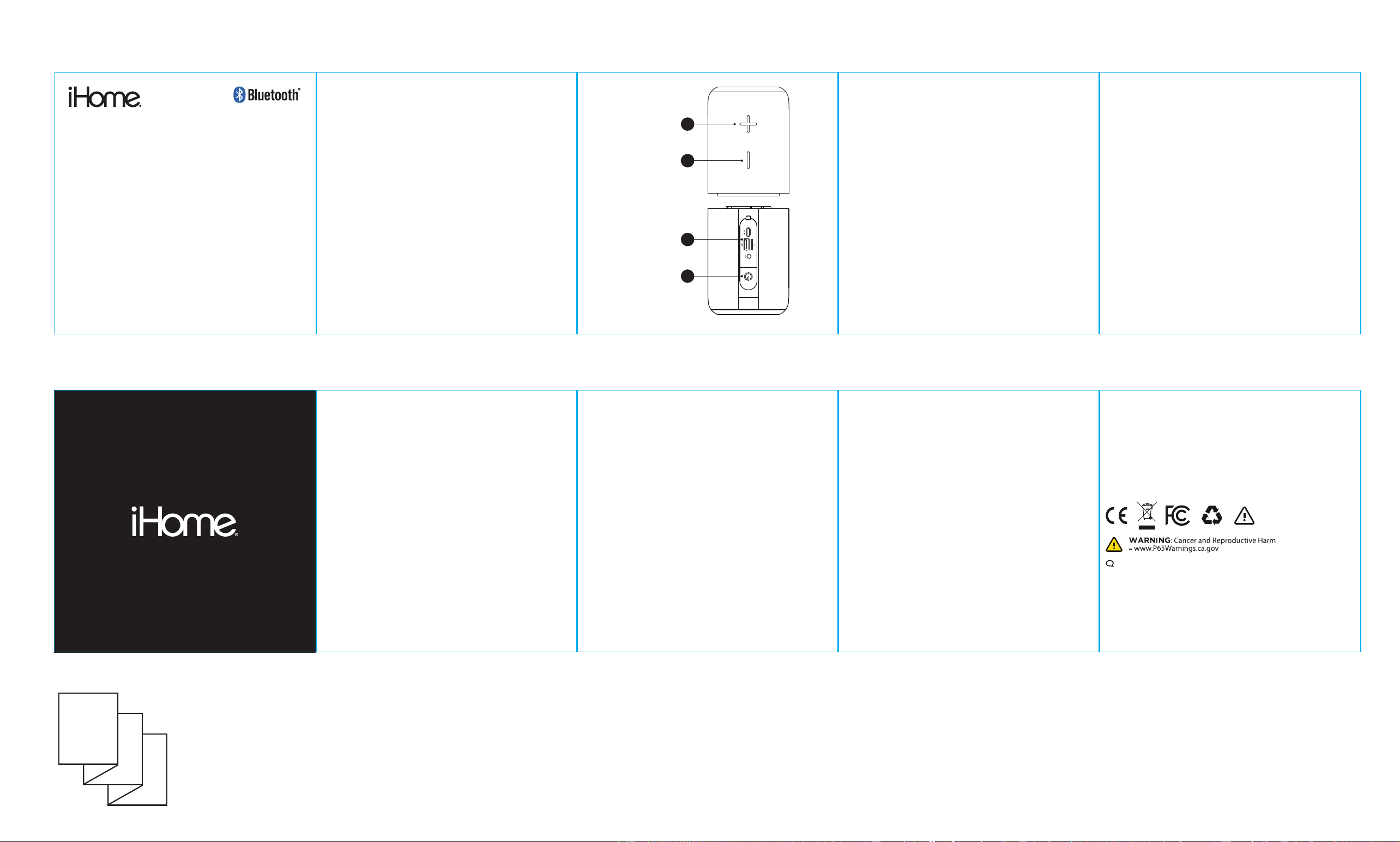
Button Functions & Interfaces
1. Volume + / Next Track: Short press for volume up, long
press for next track.
2. Volume - / Previous Track: Short press for volume down,
long press for previous track. (In Bluetooth mode, long
press the "+" and "-" buttons simultaneously to
disconnect TWS.)
3. Ports: Type-C charging port, TF card slot, USB port, AUX
audio cable jack.
4. Controls: Power On/Off, Switch playback mode,
Play/Pause, Turn Light On/Off.
MODEL: 2IHSK10
17
1
2
3
4
Connection and Playback
Wireless Playback
Turn on the speaker; the light flashes to indicate the Bluetooth
waiting state. Open Bluetooth on your mobile phone, search for
the name "iHome Duo Pro Speaker" and click connect. A beep
indicates a successful connection.
TWS (True Wireless Stereo) Connection and Playback
Turn on two "iHome Duo Pro Speakers" simultaneously; they will
automatically enter TWS pairing mode. Once paired, search for
the Bluetooth name "iHome Duo Pro Speaker" on your phone to
connect.
Note: If the speakers fail to pair automatically, disconnect the
Bluetooth connection on your phone and restart both speakers to
allow them to auto-reconnect.
To disconnect TWS, long press the "+" and "-" buttons
simultaneously. If disconnected, two Bluetooth names will appear,
allowing the devices to be used as independent speakers.
Wired & External Media Playback
AUX: Connect an AUX cable to the device and speaker to play
audio.
TF Card: Insert a TF card; the speaker will beep, automatically read
the card, and the blue light will flash (Supports MP3, WAV
formats).
USB Drive: Insert a USB drive; the speaker will beep, automatically
read the drive, and the blue light will flash (Supports MP3, WAV
formats).
Button Operation Guide
Play/Pause Button:
Short press: Play/Pause music.
Long press (3 seconds): Turn Power On/Off.
Double-click: Switch Playback Mode.
Triple-click: Turn Light On/Off.
Volume/Track Controls:
"+" Button: Short press for Volume Up; Long press for Next Song.
"-" Button: Short press for Volume Down; Long press for Previous
Song.
Battery & Power Maintenance
If the speaker is not used for more than 3 months, it needs to be
charged before use.
Please use a charger that supports 5V/2A or the original Type-C
cable for charging.
Charging Indicator: The red light is always on when charging and
turns off when fully charged.
Low Voltage Warning: There will be a "beep" tone when the
voltage is too low.
Safety Precautions
• The equipment complies with the standard GB 4943.1-2022.
• This product is not a toy; keep it out of the reach of children
to prevent accidents.
• Do not place the machine in high-temperature environments,
including direct sunlight, fire sources, or heaters. Do not use
in humid or rainy environments.
• In addition to the provided charging cable, please do not use
other methods to charge the machine.
• Do not disassemble the machine; prohibit any attempt to
repair or modify the machine.
• Avoid dropping, impacting, scratching, or behaviors that
affect the function of the machine.
• If the battery is improperly replaced, there is a risk of burning
or explosion; replace only with the same type or equivalent
type of battery.
• Using the audio at high volume for a long time may cause
damage to your hearing.
• If there is any damage, water ingress, high-temperature
deformation, abnormal sound/heat, or peculiar smells, stop
using the machine immediately and contact the merchant
FCC Warning
This device complies with part 15 of the FCC Rules. Operation is
subject to the following two conditions: (1) This device may not
cause harmful interference, and (2) this device must accept any
interference received, including interference that may cause
undesired operation.
Any Changes or modifications not expressly approved by the party
responsible for compliance could void the user's authority to
operate the equipment.
Note: This equipment has been tested and found to comply with
the limits for a Class B digital device, pursuant to part 15 of the
FCC Rules. These limits are designed to provide reasonable
protection against harmful interference in a residential installation.
This equipment generates uses and can radiate radio frequency
energy and, if not installed and used in accordance with the
instructions, may cause harmful interference to radio
communications. However, there is no guarantee that interference
will not occur in a particular installation. If this equipment does
cause harmful interference to radio or television reception, which
can be determined by turning the equipment off and on, the user is
encouraged to try to correct the interference by one or more of the
following measures:
-Reorient or relocate the receiving antenna.
-Increase the separation between the equipment and receiver.
-Connect the equipment into an outlet on a circuit different from
that to which the receiver is connected.
-Consult the dealer or an experienced radio/TV technician for help.
* RF warning for Portable device:
The device has been evaluated to meet general RF exposure
requirement. The device can be used in portable exposure
condition without restriction.
According to §15.247(e)(i) and §1.1307(b)(1), systems operating
under the provisions of this section shall be operated in a manner
that ensures that the public is not exposed to radio frequency
energy level in excess of the Commission’s guidelines.
According to KDB 447498 (2)(a)(i)
This device contains licence-exempt transmitter(s)/receiver(s) that
comply with Innovation,
Science and Economic Development Canada’s licence-exempt
RSS(s). Operation is subject to the following two conditions:
(1) This device may not cause interference.
(2) This device must accept any interference, including interference
that may cause undesired operation of the device..
20
26 © Lifeworks Technology Group LLC. New York, NY 10018.
iHome is a registered trademark of SDI Technologies Inc., used
under license. The Bluetooth® word mark and logos are registered
trademarks owned by Bluetooth SIG, Inc., and any use of such
marks by Lifeworks Technology Group LLC. is under license. All
other brands are registered trademarks of their respective
companies. USB Type-C™ and USB-C™ are trademarks of USB
Implementers Forum. Made in China
support: 8
77-543-3540
V
OLUME UP
VOLUME DOWN
TF CARD SLOT
USB-C, USB-A,
AUX PORTS
MULTIFUNCTION
POWER BUTTON
P
ackage Contents:
(1) Speaker, (1) Charging Cable, (1) User Manual
*USB Charger not included.
FRONT
BA
CK
D
ouble sided pritning
Accordian Style Booklet
DUOPRO 2IN1 STEREO TWS SPEAKERS