
— 1 —
soundbar with subwoofer User
Manual
Preface
To Our Users
Welcome to the family of Shengtianlong Electrical appliances! Thank you for your purchase!
To make the most of your player's functions, please read this user manual carefully before
use. This will help you master the system connection methods and operating essentials. You
will also find that we have made various explorations in design, manufacturing processes, and
user-friendly operation to meet your requirements.
Please keep this manual properly for future reference.
Unboxing
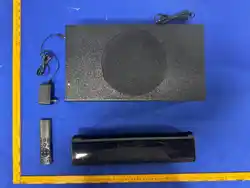
Please carefully open the packaging and confirm the following accessories. Keep them in one
place for use with the machine to prevent loss.
• Machine – 1 unit
• User Manual – 1 copy
• Remote Control – 1 unit
• Power Adapter – 1 unit
• HDMI Cable – 1 cable
Product Introduction
This product is a soundbar speaker that supports HDMI ARC decoding, Bluetooth playback,
optical decoding, USB playback, and external audio input amplification. It uses digital signal
processing technology and is suitable for playing music in different environments such as
offices and homes!

— 2 —
Precautions
Thank you for using our digital audio products.
Before use, please read this manual and use the product correctly. To provide better service,
the content of this user manual may be changed. Due to changes in product performance and
functions, no prior notice will be given.
To maintain optimal performance, do not use the product in too cold, too hot, dusty, or humid
environments. Special attention is required in the following situations:
• Humid or underwater operating environments
• Environments near heaters or high-temperature operations
• Environments exposed to sunlight
• Environments prone to dropping
Do not disassemble or modify the combined audio system without authorization, otherwise
you will lose your warranty rights.
Warnings
1. Please note waterproofing. The product should not be exposed to water droplets or
splashes. Do not place items such as vases filled with liquid on the machine to avoid accidents.
2. To avoid fire or electric shock, please check whether the grid voltage matches the voltage
specified for this machine.
Product Panel Introduction
Button and Jack Definitions:
There are 3 buttons and 6 jacks, defined as follows:
• Power/On: Short press to turn on, long press to turn off; short press to switch function
modes after power-on.
• -: Short press to skip to previous track; long press to decrease volume.
• +: Short press to skip to next track; long press to increase volume.
• AUX IN: External audio input jack (specification: 3.5mm plug)
• HDMI: HDMI receiving device input jack (TV HDMI ARC jack)
• USB: USB flash drive input playback jack
• OPT: Optical digital input playback jack
• SUB: Subwoofer output jack

— 3 —
• DC IN: DC adapter power input jack
Remote Control Usage
Before using the remote control, please install the battery from the accessories into the
battery compartment on the back of the remote control. Pay attention to the battery polarity,
buckle the battery cover, and operate each function on the remote control by aiming it at the
host display screen.
When the remote control battery runs out after long-term use and the function fails, open the
battery cover on the back of the remote control, remove the old battery, and replace it with a
new one. Pay attention to the "+/-" direction when replacing. Replace the battery.
Soundbar Display Description
[Display and indicator light status descriptions based on the product panel]
Operating Instructions
1. Connect the soundbar to your TV or audio source using HDMI ARC, optical cable, Bluetooth,
or AUX IN. 2. Power on the soundbar and select the corresponding input source using the
remote control or panel buttons. 3. Adjust the volume using the "+" and "-" buttons on the
panel or remote control. 4. For USB playback, insert a USB flash drive containing supported
audio files. 5. For Bluetooth pairing, put the soundbar into Bluetooth pairing mode and select
it from your device's Bluetooth list.
Device Compatibility
This soundbar is compatible with:
• TVs with HDMI ARC support
• Devices with optical audio output
• Bluetooth-enabled devices (phones, tablets, computers)
• USB flash drives (FAT32 format recommended)
Main Technical Parameters
• Power Supply: DC 14V,2,0A
• Rated Power: 28.0W
• Frequency Response: 60Hz - 20kHz
• Signal-to-Noise Ratio: ≥80dB
• Bluetooth Version: 5.0

— 4 —
• Supported Audio Formats: MP3, WAV, FLAC, AAC
• Dimensions: 600mm × 80mm × 70mm (approx.)
• Weight: 2.5kg (approx.)
Simple Troubleshooting Guide
Issue Possible Cause Solution
No sound Check connection cables
Ensure all cables are securely
connected
No sound Wrong input source
Select correct input source on
soundbar
Bluetooth not connecting Device not in pairing mode
Put soundbar into Bluetooth pairing
mode
Distorted sound Volume too high Lower the volume
Remote not working Battery depleted Replace remote control battery
USB not recognized Unsupported format Use FAT32 formatted USB drive
This device complies with part 15 of the FCC Rules. Operation is subject to the following two conditions:
(1)This device may not cause harmful interferenc
(2)this device must accept any interference received, including interference that may cause unde operation.
Any Changes or modifications not expressly approved by the party responsible for compliance could void the user's authority to
operate the equipment.
Note: This equipment has been tested and found to comply with the limits for a Class B digital device, pursuant to part 15 of the FCC
Rules. These limits are designed to provide reasonable protection against harmful interference in a residential installation. This
equipment generates uses and can radiate radio frequency energy and, if not installed and used in accordance with the instructions,
may cause harmful interference to radio communications. However, there is no guarantee that interference will not occur in a
particular installation. If this equipment does cause harmful interference to radio or television reception, which can be determined by
turning the equipment off and on, the user is encouraged to try to correct the interference by one or more of the following measures:
-Reorient or relocate the receiving antenna.
-Increase the separation between the equipment and receiver.
-Connect the equipment into an outlet on a circuit different from that to which the receiver is connected.
-Consult the dealer or an experienced radio/TV technician for help.
FCC Radiation Exposure Statement
This device meets the FCC requirements for RF exposure.The device is designed for normal indoor use and complieswith applicable
FCC exposure limits.
This equipment should be installed and operated with minimum distance 20cm between the radiator & your body