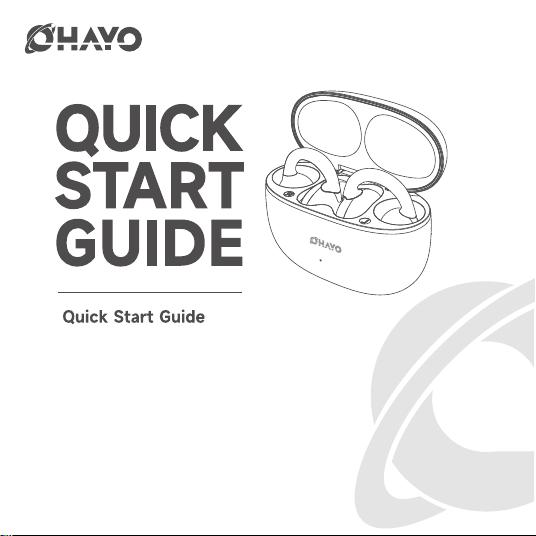
OHAYO A7
Send your Amazon ORDER ID to: [email protected],
we will activate the warranty for your order,
and you can get a bluetooth speaker.
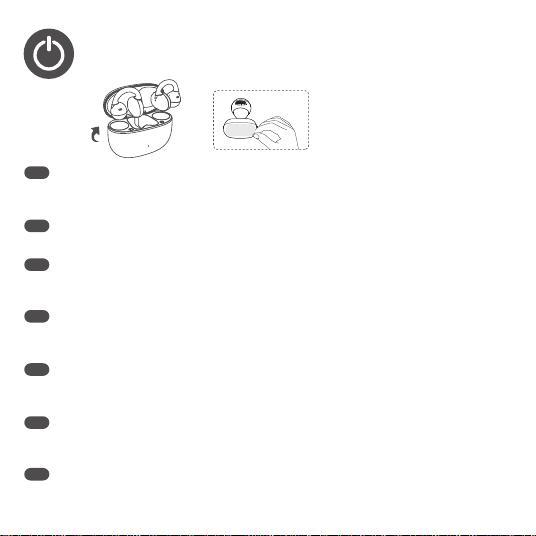
1.POWERING ON
After opening the charging case, take out the earphones, peel off the insulation protector,
place the earphones back into the charging case, and close the lid.Re-open the charging
case to begin Bluetooth connecting.
充電ゲ-スを開いた後、イャホンを取り出して絶縁プロテクタ-をはがし、イャホンを充電ゲ-スに
戾してから、ふたを閉じます。充電ゲ-スを再び開き、Bluetooth接続を開始します。
충전케이스를열면이어폰을충전케이스에충충전케이스에충충전케이스를열고이어폰을
충전충전케이스에다시넣고충충전케이스를충충충전하십시오.충전케이스를다시열어
Bluetooth연결을시작합니다.
Nach Öffnen der Ladebox Ohrhörer herausnehmen, lsolierschutz abziehen,Ohrhörer wieder
in die Ladebox legen und Deckel schlieBen.Ladebox erneut öffnen, um die Bluetooth-
Verbindung herzustellen.
EN
JP
KR
DE
Después de abrir el estuche de carga, extraiga los auriculares, retire la protecciónaislante,
vuelva a colocar los auriculares en el estuche de carga y cierre la tapa.Vuelva a abrir el
estuche de carga para iniciar la conexión Bluetooth.
ES
Après avoir ouvert le boitier de charge, retirez les écouteurs, décollez leprotecteur d’isolation,
replacez les écouteurs dans le boitier de charge etrefermez le boitier.Rouvrez le boitier de
charge pour commencer la connexion Bluetooth.
Dopo aver aperto la custodia di ricarica, estrarre gli auricolari, togliere laprotezione isolante,
rimettere gli auricolari nella custodia di ricarica quindichiudere il coperchio.Riaprire la custodia
di ricarica per iniziare la connessione Bluetooth.
FR
IT
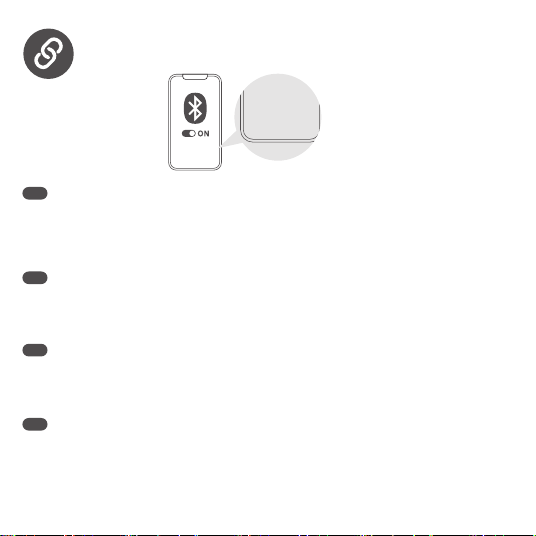
2.PAIRING
OHAYO AiClamp A7
Turn on Bluetooth on your phone and enter connecting mode, select the device model “OHAYO
AiryClamp A7” to pair.
Note: If you have already paired with other devices and need to connect to a new one, hold down
the function key for 2 seconds with the earphone lid open to enter the pairing mode of the new
device.
Bluetooth auf lhrem Telefon einschalten, in den Verbindungsmodus gehen undGerätemodell ,
“OHAYO AiryClamp A7” auswählen, um es zu koppeln.
Anmerkung: alle anderen geräte sind miteinander verbunden. Wenn eine verbindung hergestellt
werden soll, öffnet sich der ohrhörer weiter und knopf 2s, um das neue gerät einzuschalten.
EN
携带電話でBluetoothをオンにして接続モ-ドに入り、デバイスモデル「OHAYO AiryClamp A7」
を選択してペアリングします。
注:すでに他机器とペアリングしていて、新しい机器を接続する必要がある場合は、イヤホンを
開けてファンクションキー2sを長押しして、新しい机器のペアリングモードに入ります。
휴대 전화에서 블루투스를 켜고 연결 모드를 입력하고, 페어링하려는 장치 모델 “OHAYO
AiryClamp A7”을 선택합니다.
주:다른 장치와 페어링되어 있습니다. 새 장치를 연결하려면 헤드폰 덮개를 열고 기능키 2s를 길
게 누르면 새 장치와 페어링 모드로 들어갑니다.
JP
KR
DE
OHAYO
AiClamp A7
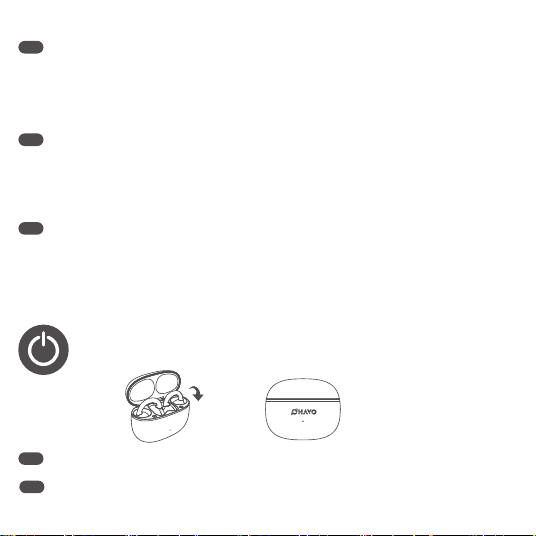
3.POWERING OFF
Place the earphones back into the charging case and close the lid to complete shutdown.EN
Active el Bluetooth en su teléfono, acceda al modo de conexión y seleccione elmodelo de
dispositivo "OHAYO AiryClamp A7" para emparejarlo.
Nota: si ya se ha emparejado con otros dispositivos y necesita conectar un nuevo dispositivo,
presione y mantenga presionado el botón de función 2s en la tapa abierta del auricular para
entrar en el modo de emparejamiento del nuevo dispositivo.
Activez le Bluetooth sur votre téléphone et entrez en mode Connexion,sélectionnez le modèle
d'appareil "OHAYO AiryClamp A7" pourl'appairer.
Remarque: si vous avez déjà jumelé d’autres appareils et que vous devez connecter un nouvel
appareil, appuyez et maintenez la touche de fonction 2s sur le couvercle ouvert du casque pour
entrer en mode de jumelage du nouvel appareil.
ES
FR
Attivare il Bluetooth sul telefono e accedere alla modalità di connessione,selezionare il modello
di dispositivo "OHAYO AiryClamp A7" per eseguirel' associazione.
Nota: se hai già abbinato ad altri dispositivi e hai bisogno di connetterti ad uno nuovo, tieni
premuto il tasto funzione per 2 secondi con il coperchio auricolare aperto per entrare nella
modalità di accoppiamento del nuovo dispositivo.
IT
イャホンを充電ケ-スに戾し、ふたを閉じて、シャットダウンを完了します。JP
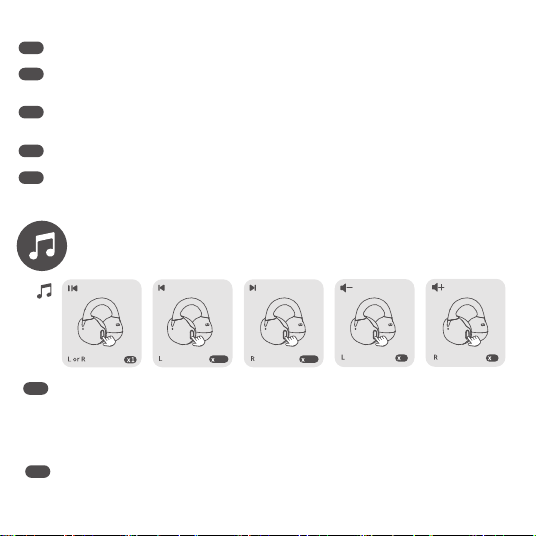
4.MUSIC MODE
Play/Pause: Single tap the left or right earphone (L or R).
Previous Track: Press and hold 1.5s the left earphone (L).
Next Track: Press and hold 1.5s the right earphone (R)
Volume -: Double tap the left earphone (L ).
Volume +: Double tap the right earphone (R).
EN
Vuelya a introducir los auriculares en el estuche de carga y cierre la tapa para completarel
apagado.
Replacez les écouteurs dans le boitier de charge et fermez-le pour terminer l'arrêt.
ES
FR
Riporre gli auricolari nella custodia di ricarica e chiudere il coperchio percompletarel operazione
di spegnimento.
IT
再生/-時停止:左または右のイャホン(LまたはR) を1回タップします。
前のトラック:左のイヤホン(l)を1.5秒長押しします。
次のトラック:右のイヤホン(r)を1.5秒長押しします。
JP
Ohrhörer wieder in die Ladebox legen und den Deckel schlieBen, um denAbschaltvorgang
abzuschlieBen.
이어폰을 다시 어폰을 충전 케이스에 넣고 어폰을 닫으면 종료가 완료됩니다.
KR
DE
1.5s 1.5s
2 2
Reproducción/Pausa: toque una vez el auricular izquierdo o derecho (L o R)
Pista anterior: mantenga pulsado el auricular izquierdo (L).
Pista siguiente: mantenga pulsado el auricular derecho (R).
Bajar volumen:toque dos veces el auricular derecho (L)
Subir volumen:toque dos veces el auricular derecho (R)
Lecture/Pause : touchez une fois l'écouteur gauche ou droit (L ou R).
Piste précédente : appuyez longuement sur l'écouteur gauche (L).
Piste suivante : appuyez longuement sur l'écouteur droit (R).
touchez deux fois l'écouteur gauche ou droit (L ou R).
Volume-:touchez deux fois l'écouteur gauche (L).
Volume +:touchez deux fois l'écouteur droit (R).
ES
FR
Play/Pausa: Toccare con un solo dito l'auricolare destro o sinistro (L o R).
Traccia precedente: Premere e tenere premuto l' auricolare sinistro (L).
Traccia successiva:Premere e tenere premuto l auricolare destro (R).
Volume-: Toccare due volte l'auricolare sinistro (L).
Volume+: Toccare due volte l'auricolare destro (R).
IT
재생/일시 정지:왼쪽 또는 오른쪽 이어폰 (L 또는 R)을 한 번 탭합니다.
이전 트랙:왼쪽 이어폰 (L)을 1.5s 길게 누릅니다.
다음 트랙:오른쪽 이어폰 (R)을 1.5s 길게 누릅니다
볼륨-:왼쪽 이어폰 (L)을 두 번 탭합니다.
볼륨 +:오른쪽 이어폰 (R)을 이중 탭합니다.
音量-:左のイヤホン(l)をダブルタップします。
音量+:右のイヤホン(r)をダブルタップします。
KR
Wiedergabe/Pause: Einmal aufden linken oder rechten Ohrhörer (L oder R) tippen.
Vorheriger Titel:Linken Ohrhörer (L) gedrückt halten.
N¤chster Titel: Rechten Ohrhörer (R) gedrückt halten.
Lautstärke -:Zweimal aufden linken Ohrhörer (L ) tippen.
Lautstärke +: Zweimal aufden rechten Ohrhörer (R) tippen.
DE
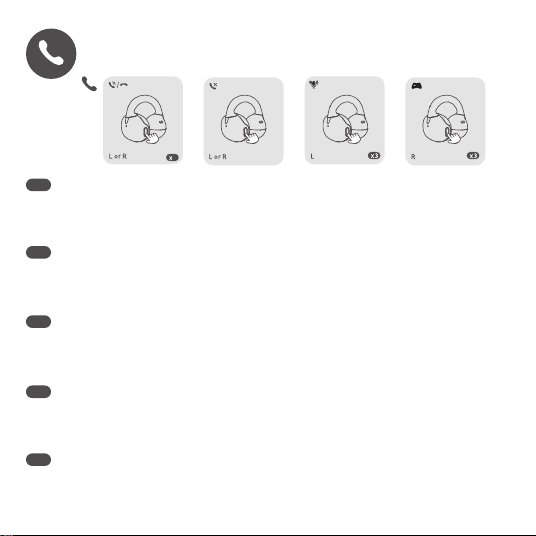
5.CALL MODE
Answer/End Call: single tap the left or right earphone (L or R)
Reject Call: Press and hold the left or right earphone (L or R).
Voice assistant: Triple-tap the right earphone(R)
Game mode:Triple-tap the left earphone(L)
EN
電話に出る/電話を切る:左または右のイャホン(LまたはR) を1回タップします。
着信拒否:左または右のイャホン(LまたはR) を長押しします。
音声アシスタント:右のイヤホン(R)を3回タップします。
ゲームモード:左のイヤホンを3回タップ(L)
JP
Responder/Terminar una llamada: toque una vez el auricular izquierdo o derecho(Lo R).
Rechazar una llamada: mantenga pulsado el auricular izquierdo o derecho (L o R)
Asistente de voz: pulse tres veces el auricular derecho (R)
Modo de juego :Triple-tap en el auricular izquierdo (L)
ES
응답/종료 통화:왼쪽 또는 오른쪽 이어폰 (L 또는 R)을 한 번 탭하기
통화 거부:왼쪽 또는 오른쪽 이어폰 (L 또는 R)을 길게 누릅니다
음성 비서:오른쪽 이어폰 (R)을 트리플 탭하기
게임 모드:왼쪽 이어폰 (L)을 트리플 탭하기
KR
Anrufannehmen/beenden: Einmal aufden linken oder rechten Ohrhörer (L oder R)
tippen.Anruf abweisen: Linken oder rechten Ohrhörer (L oder R) gedrückt halten.
Sprecher: 3 nach rechts für kopfhörer (R)
Spielmodus: klicken auf die linke kopfhörer (L)
DE
1
6.FACTORY RESET
Repondre/terminer l'appel : touchez une fois l'ecouteur gauche ou droit (L ou R).
Refuser l'appel : appuyez longuement sur l'écouteur gauche ou droit (L ou R).
Assistant vocal: triple tapez sur l’écouteur droit (R)
Mode de jeu: triple-appuyez sur l’écouteur gauche (L)
FR
Rispondere/Terminare una chiamata: toccare una volta l'auricolare sinistro o destro(Lo R).
Rifiutare una chiamata: premere e tenere premuto l'auricolare sinistro o destro(L o R).
Assistente vocale :Toccare tre volte l'auricolare sinistro (R).
Modalità gioco :Toccare tre volte l'auricolare destro(L)
IT
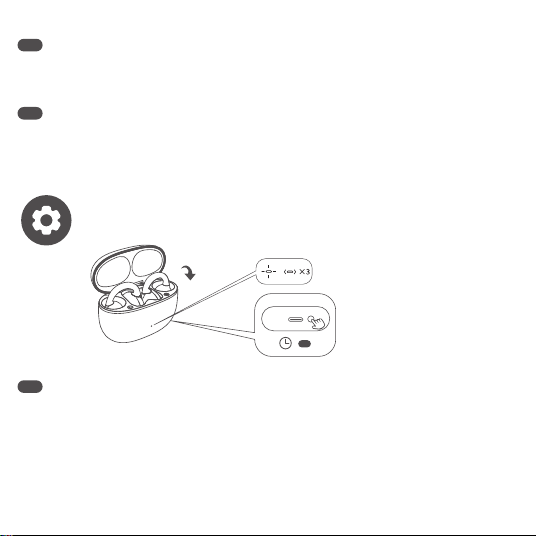
To reset the earphone, turn off Bluetooth or place the earphones into connecting mode, then
placing them in the charging case. Press and hold the charging case button for approximately
10 seconds. The indicator light will flash RED three times and then turn off, completing the
factory reset.
Note:After restoring the factory Settings, the headphones must be reconnected to the Bluetooth
device. Some Bluetooth devices may require the original pair name of the headphones to be
removed in order to connect normally.
EN
10s
イャホンをリセットするには、Bluetoothをオフにするか イャホンを接続モ-ドにしてから充
電ケ-スに入れます。充電ゲ-スのボタンを約10秒間押しますインジゲ-タ-ランプが3回红く点
滅してから消え、エ場出荷時の設定リセットが完了します。
注:工場出荷時の設定を復元した後、ヘッドフォンをbluetoothデバイスに再接続する必要があ
ります。bluetoothデバイスによっては、正常に接続するためにヘッドフォンの元のペア名を
取り外す必要がある場合があります。
JP
Para restablecer el auricular, apagar Bluetooth o colocar los auriculares en modo de conexión,
a continuación, colocarlos en el caso de carga. Mantenga presionado el botón de la carcasa
durante aproximadamente 10 segundos. El indicador de luz parpadeará rojo tres veces y luego
se apag, completando el restablecimiento de la fábrica.
Nota: después de restaurar la configuración de fábrica, los auriculares deben volver a
conectarse al dispositivo Bluetooth. Algunos dispositivos Bluetooth pueden requerir que el
nombre del par original de los auriaurise elimincon el fin de conectarse normalmente.
ES
이어폰을 재설정하려면 Bluetooth를 끄거나 이어폰을 연결 모드로 전환한 다음 충전 케이스에
놓습니다.충전 케이스 버튼을 약 10초 동안 길게 누릅니다.표시등이 빨간색으로 세 번 깜박이다
가 꺼지면 출고 초기화가 완료됩니다.
참고:출고시 설정을 복원하는 후에는 헤드폰을 Bluetooth 기기에 다시 연결해야 합니다.일부
Bluetooth 기기는 정상적으로 연결하려면 헤드폰의 원래 쌍 이름을 제거해야 할 수 있습니다.
KR
Um ein headset zurücksetzen zu können, schalten sie den bluetooth aus Oder platzieren sie
den hoerer in den verbindungsmodus und geben sie ihn unter das laderaum Halten sie den
knopf des ladens für etwa 10 sekunden. Die zündflamme rot flackerte nach drei ausfällen ab
Achtung: nachdem die einstiegseinstellungen wieder hergestellt sind, müssen die headset
wieder mit dem bluetooth verbunden werden. Manche bluetooth-geräte können nur dann
wirklich verbunden werden, wenn der ursprüngliche passenden name für die ohrhörer entfernt
wird.
DE
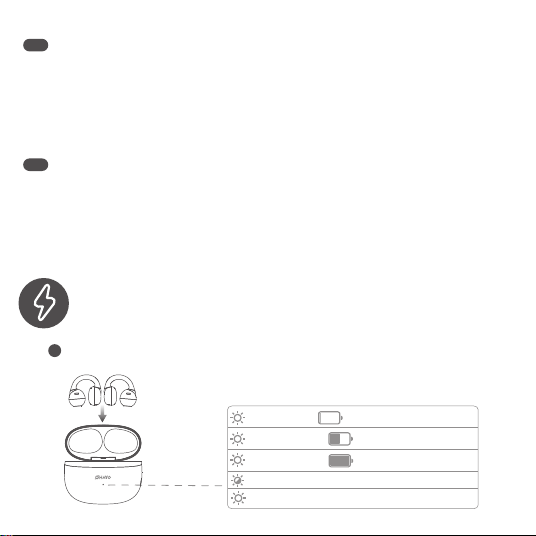
7.CHARGING
Pour réinitialiser l’écouteur, éteignez le Bluetooth ou placez les écouteurs en mode connexion,
puis placez-les dans le boîtier de charge. Appuyez et maintenez le bouton du boîtier de charge
pendant environ 10secondes. Le voyant clignote trois fois en rouge, puis s’éteint, complétant
la réinitialisation d’usine.
Remarque: après avoir restauré les paramètres d’usine, le casque doit être reconnecté à
l’appareil Bluetooth. Certains appareils Bluetooth peuvent nécessiter le nom de la paire d’origine
du casque pour se connecter normalement.
FR
Per reimpostare l’auricolare, disattivare Bluetooth o mettere gli auricolari in modalità di
connessione, quindi posizionarli in caso di ricarica. Premere e tenere premuto il pulsante case
per circa 10 secondi. L’indicatore luminoso lampeggia tre volte e poi si spegne, completando il
reimpianto dell’impianto.
Nota: dopo aver ripristinato le impostazioni di fabbrica, le cuffie devono essere ricollegate al
dispositivo Bluetooth. Alcuni dispositivi Bluetooth potrebbero richiedere la rimozione del nome
originale della coppia delle cuffie per una connessione normale.
IT
Red light 10s Battery level<20%
1
Charge the earphones
Earphone battery level/Pairing status:
(Earphone in the Charging case)
Yellow light 10s Battery level20%-69%
Green light 10s Battery level70%-99%
White light 180s:Pairing
White light 1s:Paired successfully
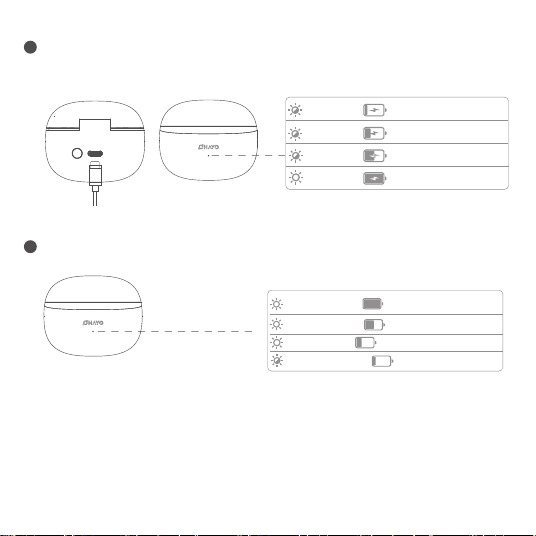
EN
Note: The indicator light is constantly on. The indicator light is flashing.
When the battery of the charging case is extremely low, it will stop charging the headphones. At this
time, the charging case needs to be fully charged before charging the headphones.
JP
注意:インジケータライトは常に点灯しています。表示灯が点滅しています。
充電ケースのバッテリー残量が極端に少なくなると、ヘッドホンの充電が停止します。このとき、
ヘッドフォンを充電する前に、充電ケースを完全に充電しておく必要があります。
Red light 10s Battery level 20%~5%
2
3
Green light Battery level 70%-99%
Green light Battery level 100%
Yellow light Battery level 20%-69%
Red light Battery level<20%
Charging case battery level:
Yellow light 10s Battery level 20%-69%
Green light 10s Battery level 70%-99%
Red light 3 times Battery level 5%~1%
Charging case battery level:
(close the charging case or press charging case button)
Charge the charging case
Non-charging state

8.SPECIFICATIONS
DE
Hinweis: immer eine flamme. Die anzeige flackert.
Wenn der geldbeutel nur wenig strom hat, wird die aufladung der kopfhörer eingestellt. Dazu
muss das ladefeld aufgefüllt werden und die kopfhörer aufgeladen werden.
ES
Nota: la luz indicestá constantemente encendida. La luz indicestá parpadeando.
Cuando la batería de la carcasa es extremadamente baja, se dejará de cargar los auriculares.
En este momento, el caso de carga tiene que ser completamente cargado antes de cargar los
auriculares.
FR
Remarque: le voyant lumineux est constamment allumé. Le voyant clignote.
Lorsque la batterie du boîtier de charge est extrêmement faible, il arrêtera de charger le casque. À ce
moment, le boîtier de charge doit être complètement chargé avant de charger le casque.
IT
Nota: l’indicatore luminoso è costantemente acceso. L’indicatore luminoso sta lampeggiando.
Quando la batteria della scatola di ricarica è estremamente bassa, smetterà di caricare le cuffie. In
questo momento, il caso di ricarica deve essere completamente ricaricato prima di caricare le cuffie.
Bluetooth name:OHAYO AiryClamp A7
Bluetooth Version:5.4
Communication Rage:10m (In open environments )
Battery Capacity:500mAh(Charging Case) 50mAh(Earphones)
Input:DC 5V 1A
EN
KR
참고:표시등은 계속 켜져 있습니다.표시등이 깜박이고 있다.
충전 케이스의 배터리가 극도로 부족하면 헤드폰 충전이 중지됩니다.이때 헤드폰을 충전하기 전에 충
전 케이스를 완전히 충전해야 합니다.
Charging Time:1.5h-2h
Frequency Response:20Hz-20KHz
Weight: 4.2g(Single earphone) 45.6g(all)
Charging Port:TYPE-C
Battery life varies: 6.2h at 60% volume (25°C). At max volume or below 0°C,
expect 30% shorter playback.
Bluetooth名前:OHAYO AiClamp A7
Bluetooth版:5.4
communication rage:10m(オープン環境)
バッテリー容量:500 mAh(充電ケース)50 mAh(イヤホン)
入力:DC 5V 1A
充電時間:1.5h-2h
周波数応答:20Hz-20KHz
重量:4.2g(シングルイヤホン)45.6g(全て)
充電港:TYPE-C
バッテリー持続時間は条件により異なります:60%音量・25℃で6.2時間。
最大音量または0℃以下では最大30%短縮されます。
JP
블루투스 이름:OHAYO AiryClamp A7
블루 투 스 버전:5. 4
커뮤니케이션 분노:10m (개방된 환경에서)
배터리 용량:500mAh(충전 케이스) 50mAh(이어폰)
입력:DC 5V 1A
충전 시간:1.5h-2H
주파수 응답:20Hz-20KHz
무게:4.2g(이어폰 1개) 45.6g(모두)
충전 포트:TYPE-C
배터리 수명은 다양합니다:60% 부피 (25°C)에서 6.2h.최대 볼륨 또는 0°C
이하에서는 30% 짧은 재생을 기대합니다.
KR
Nombre de Bluetooth :OHAYO AiryClamp A7
Versión de Bluetooth :5.4
Rabia de la comunicación :10m (en entornos abiertos)
Capacidad de la batería :500mAh(caso de carga) 50mAh(auriculares)
Entrada :DC 5V 1A
Tiempo de carga :1.5h-2h
Respuesta de frecuencia :20Hz-20KHz
Peso: 4.2g(auricular único) 45.6g(todos)
Puerto de carga: tipo C
Duración de batería variable: 6.2h al 60% volumen (25°C). A volumen máximo o bajo 0°C,
se reduce hasta un 30%.
ES
Nom Bluetooth :OHAYO AiryClamp A7
Version Bluetooth :5.4
Rage de Communication :10m (dans des environnements ouverts)
Capacité de la batterie :500mAh(cas de charge) 50mAh(écouteurs)
Entrée: c.c 5V 1A
Temps de charge :1.5h-2h
Réponse en fréquence :20Hz-20KHz
FR
Bluetooth name: OHAYO AiryClamp A7
Bluetooth version:5.4
Entfernung der kommunikation: 10m (offenes umfeld)
Batteriegröße: 500mAh (spielkasten) 50mAh (headset)
Ein eintrag: direktkanal 5V 1A
Ladezeit: 1,5 h-2h
Aufnahme einer frequenz :20 GHZ und 20 KHZ
Kopf und gewicht: 4,2 g (persönlicher hörer) 45,6 g (vergiß es)
Port of ladung: typ c
Akkulaufzeit abhängig von Nutzung: 6.2h bei 60% Lautstärke (25°C).
Bei Volllautstärke oder unter 0°C bis zu 30% kürzer.
DE
9.TROUBLESHOOTING
1: cannot be turned on.
The battery power is low. Charge the headphones for 1 to 2 hours
2: No indication of charging power
Whether the charging interface of the headphones is in contact with the POGO PIN of the
charging case and whether the insertion method is correct。
Charge the charging case for 2 to 3 hours/Make sure the headphones are placed properly/
remove the stains on the charging copper column
EN
Bluetooth name:OHAYO AiryClamp A7
Versione Bluetooth :5.4
Rabbia della comunicazione :10m (In ambienti aperti)
Capacità della batteria :500mAh(carica) 50mAh(auricolari)
Ingresso :DC 5V 1A
Tempo di ricarica: 1,5h-2h
Risposta in frequenza :20Hz-20KHz
Peso: 4,2g (cuoco singolo) 45,6 g(tutti)
Porto di tariffazione: tipo c
Durata batteria variabile: 6.2h a volume 60% (25°C). Con volume massimo o sotto 0°C,
si riduce fino al 30%.
IT
Poids: 4.2g(écouteur unique) 45.6g(tous)
Port de charge :TYPE-C
Autonomie variable : 6.2h à 60% volume (25°C). En volume max ou sous 0°C,
réduisez vos attentes de 30%.

送付顶く
1. オンにすることはできません。
バッテリーの電力が低い。ヘッドフォンを1 ~ 2時間充電します
2. 充電電力が表示されません
ヘッドフォンの充電インターフェースが充電ケースのpogoピンに接触しているか、挿入方法
が正しいかどうか。
充電ケースを2 ~ 3時間充電してください。/ヘッドフォンが正しく配置されていることを確認
してください
type-c usb充電ケーブルが正しく接続されているか、電源スイッチがオンになっているかを
確認します
3. 1つのイヤホンには音がありません
左と右のイヤホンが接続できませんでした
4. 音質はお使いの端末のBluetooth®バージョンに依存します(5.0以上推奨)。古い機種では
AAC/SBC性能が制限される場合があります。
携帯電話のosを更新し、hdオーディオをサポートする音楽アプリを使用します (e.g. Spotify
Premium)
5. 接続安定性向上:① 端末を10m以内に ② 電子レンジ・Wi-Fi密集区域を回避 ③ 切断時は
ペアリング再設定を
JP
Check whether the TYPE-C to USB charging cable is properly plugged in or whether the power
switch is turned on
3: One earphone has no sound
The left and right earphones failed to connect and pair,Re-pair after restoring the factory
settings
4.Sound quality depends on your phone's Bluetooth® version (5.0+ recommended). Older
devices may limit AAC/SBC performance.
Update phone OS & use music apps supporting HD audio (e.g. Spotify Premium)
5.For stable connection: ① Keep phone within 10m ② Avoid microwaves/crowded Wi-Fi areas
③ Reset pairing if interrupted.

Fehlfunktion eliminiert.
I. ch krieg's nicht auf!
Der strom der batterie ist schwach. Laden sie die kopfhörer für 1 bis 2 stunden
2. die laderleistung ist nicht angezeigt
Frage: berührt die laminierungsfunktion im headset das speichermodul POGO des ladens und
gibt die richtige methode an.
Laderbox laden 2 bis 3 stunden/die kopfhörer aufladen/ausladen der wuerfel
Die anzeige mit dem TYPE C usb-stick ist korrekt. Und der schalter ist eingeschaltet
3. ein headset enthält keinen ton
Die linke und rechte kopfhörer sind nicht angeschlossen und synchronisiert. Bitte gleichen sie
die einlaufeinstellungen wieder ein
4. Klangqualität hängt von der Bluetooth®-Version Ihres Handys ab (5.0+ empfohlen). Ältere
Geräte können AAC/SBC einschränken.
Update phone OS & use music apps supporting HD audio (e.g. Spotify Premium)
DE
문제 해결
1. 켤 수 없습니다.
배터리 전원이 부족합니다.헤드폰을 1~2시간 동안 충전합니다
2. 충전 전력 표시가 없음
헤드폰의 충전 인터페이스가 충전 케이스의 포고 핀과 접촉하고 있는지 및 삽입 방법이 올바
른지 여부.
충전 케이스를 2~3시간 충전/헤드폰이 제대로 놓여 있는지 확인/충전 구리 기둥의 얼룩을
제거합니다
TYPE-C USB 충전 케이블이 제대로 꽂혀 있는지 전원 스위치가 켜져 있는지 확인합니다
3. 이어폰 하나에 소리가 나지 않는다
좌우 이어폰 연결 및 페어링, 공장 설정 복원 후 다시 페어링에 실패했습니다
4. 음질은 휴대폰의 Bluetooth 버전 (5.0+ 권장)에 따라 달라집니다.오래된 기기는
AAC/SBC 성능을 제한할 수 있습니다.
전화 OS 업데이트 & HD audio를 지원하는 음악 앱 사용 (예:Spotify Premium)
5. 안정적인 연결을 위해:㉮ 전화기 10m 이내 유지 ② 전자파/혼잡한 Wi-Fi 지역 피하기
② 중단될 경우 페어링 재설정.
KR

dépannage
1. ne peut pas être allumé.
La batterie est faible. Chargez le casque pendant 1 à 2 heures
2. aucune indication de puissance de charge
Si l’interface de charge du casque est en contact avec la broche POGO du boîtier de charge et
si la méthode d’insertion est correcte.
Chargez le boîtier de Charge pendant 2 à 3 heures/assurez-vous que le casque est placé
correctement/enlevez les taches sur la colonne de cuivre de Charge
Vérifiez si le câble de charge USB TYPE-C est correctement branché ou si l’interrupteur
FR
Solución de problemas
1. no se puede encender.
La potencia de la batería es baja. Cargue los auriculares durante 1 a 2 horas
2. No hay indicación de la potencia de carga
Si la interfaz de carga de los auriauriestá en contacto con el PIN POGO de la carcasa de
carga y si el método de inserción es correcto.
Cargue el estuche de carga durante 2 a 3 horas/asegúrese de que los auriculares están
colocados correctamente/eliminar las manchas en la columna de cobre de carga
Compruebe si el cable de carga USB tipo C está conectado correctamente o si el interruptor de
alimentación está encendido
3. un auricular no tiene sonido
Los auriculares izquierdo y derecho fallaron al conectarse y empare, re-emparedespués de
restaurar los ajustes de fábrica
4. La calidad de sonido depende de la versión Bluetooth® de su teléfono (se recomienda 5.0+).
Dispositivos antiguos pueden limitar el rendimiento AAC/SBC.
Update phone OS & use music apps supporting HD audio (e.g. Spotify Premium)
5.Conexión estable: ① Móvil dentro de 10m ② Evite microondas/zonas Wi-Fi saturadas
③ Reemparejar si se interrumpe.
ES
5.Stabile Verbindung: ① Handy innerhalb 10m ② Mikrowellen/WLAN-Crowds meiden
③ Pairing zurücksetzen bei Abbruch.

Risoluzione problemi
1. non può essere acceso.
La potenza della batteria è bassa. Carica le cuffie da 1 a 2 ore
2. nessuna indicazione della potenza di carica
Se l’interfaccia di ricarica delle cuffie è a contatto con il perno di POGO della cassa di ricarica e
se il metodo di inserimento è corretto.
Carica la carica per 2-3 ore/assicurarsi che le cuffie siano posizionate correttamente/rimuovere
le macchie sulla colonna di rame che carica
Verificare se il cavo di caricamento USB di tipo c è collegato correttamente o se l’interruttore è
acceso
3. un auricolare non ha suono
Le cuffie di sinistra e destra non sono riuscite a connettersi e accoppiare, riaccoppiare dopo aver
ripristinato le impostazioni di fabbrica
4. La qualità audio dipende dalla versione Bluetooth® del telefono (consigliata 5.0+). Dispositivi
vecchi potrebbero limitare le prestazioni AAC/SBC.
Update phone OS & use music apps supporting HD audio (e.g. Spotify Premium)
5.Connessione stabile: ① Telefono entro 10m ② Evitare microonde/aree Wi-Fi affollate
③ Ripristinare pairing se interrotto.
IT
d’alimentation est allumé
3. un écouteur n’a pas de son
Les écouteurs gauche et droit n’ont pas réussi à se connecter et à se coupler, re-coupler après
avoir restauré les paramètres d’usine
4. La qualité sonore dépend de la version Bluetooth® de votre téléphone (5.0+ recommandée).
Les anciens appareils peuvent limiter les performances AAC/SBC.
“limiter Update phone OS & use music apps supporting HD audio (e.g. Spotify Premium)
5.Connexion stable : ① Gardez le téléphone à 10m ② Évitez micro-ondes/zones Wi-Fi
surchargées ③ Réappairez si interrompu.
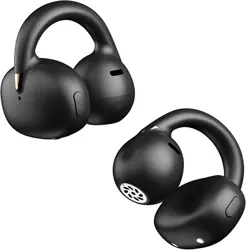
Headphones: Please note that these Bluetooth headphones are worn in the middle of the
earbuds, not the earlobes. You can adjust the height of the ear racks to enhance the comfort of
wearing them. The sound of the headphones is like there is a speaker around your ears.
Therefore, you can move the speaker closer to optimize the sound quality and bass.
EN
TRAGEEMPFEHLUNG: Bitte beachten Sie, diese Bluetooth-Kopfhörer werden in der Mitte der
Ohrmuschel getragen, nicht am Ohrläppchen. Sie können die Höhe des Ohrbügels einstellen,
um den Tragekomfort zu verbessern. Der Klang der Kopfhörer ähnelt dem, als ob Sie einen
Lautsprecher um Ihr Ohr herum hätten. Daher können Sie die Lautsprecher näher an den
Gehörgang bringen, um die Klangqualität und den Bass zu optimieren
DE
Auriculares: tenga en cuenta que estos auriculares Bluetooth se colocan en el centro de los
auriculares, no en los lóbulos de las orejas. Usted puede ajustar la altura de los bastidores del
oído para mejorar la comodidad de usarlos. El sonido de los audífonos es como si hubiera un
altavoz alrededor de sus oídos. Por lo tanto, puede mover el altavoz más cerca para optimizar
la calidad del sonido y el bajo.
ES
ヘッドフォン:これらのbluetoothヘッドフォンは、耳たぶではなく、イヤホンの中央に装着さ
れています。イヤーラックの高さを調節することで、装着時の快適性を高めることができます。
ヘッドフォンの音は、耳の周りにスピーカーがあるような音です。したがって、スピーカー
を近くに移動して、音質と低音を最適化することができます。
JP
헤드폰:이 블루투스 헤드폰은 귓볼이 아닌 이어버드 중간에 착용한다는 점에 유의하십시오.이어
랙의 높이를 조절할 수 있어 착용시 편안함을 높일 수 있습니다.헤드폰의 소리는 마치 귀 주변에
스피커가 있는 것 같습니다.따라서 스피커를 더 가까이 이동하여 음질과 베이스를 최적화할 수
있습니다.
KR
10.WEAR (AS ACCESSORIES)

Écouteurs: veuillez noter que ces écouteurs Bluetooth sont portés au milieu des écouteurs, pas
dans les lobes des oreilles. Vous pouvez ajuster la hauteur des porte-oreilles pour améliorer le
confort de les porter. Le son du casque est comme s’il y avait un haut-parleur autour de vos
oreilles. Par conséquent, vous pouvez rapprocher le haut-parleur pour optimiser la qualité du
son et des basses.
FR
Cuffie: si noti che queste cuffie Bluetooth sono indossate al centro degli auricolari, non degli
oreclobi. È possibile regolare l’altezza delle cuccette per migliorare il comfort del portarle. Il
suono delle cuffie è come se ci fosse un altoparlante intorno alle orecchie. Quindi, puoi spostare
l’altoparlante più vicino per ottimizzare la qualità del suono e il basso.
IT
This device complies with part 15 of the FCC Rules.Operation is subject to the following two
conditions:
1. This device may not cause harmful interference.
2.This device must accept any interference received,including interference that may cause
undesired operation.
This product and, if applicable, the supplied accessories are also marked with "CE" and comply with
the applicable harmonized European standards listed under the EMC Directive 2004/108/EC, the
RoHS Directive 2011/65/EU and the WEEE directive 2012/19/EU. Products marked with this symbol
cannot be disposed of as unsorted municipal waste in the European Union. For proper recycling,
return this product to your local supplier upon the purchase of equivalent new equipment or dispose
of it at designated collection points. For more information, see: www.recyclethis.info.
FCC Conditions
EU Conformity Statement

WARNING
WARNING: Built-in lithium battery! Do not charge in humid, hot or cold environments! Fire danger!
ATTENTION: batterie lithium intégrée! Ne pas charger et utiliser dans un environnement humide, à
haute température ou à basse température! Risque d’incendie!
AVVERTENZA: batteria di litio incorporata! Non usare la carica in ambienti umidi, caldi o freddi!
Incendio!
ADVERTENCIA: ¡Batería de litio incorporada! ¡No cargue y use en ambientes húmedos, de alta
temperatura o de baja temperatura! ¡Peligro de incendio!
WARNUN: Geingebaute lithium-batterie Lädt es nicht in luftfeuchtigkeit, hitze Oder kälte! Feuer ist
gefährlich!
VARNING: Inbyggt litiumbatteri! Får inte laddas för användning i fuktiga, varma eller kalla miljöer!
Brandfara!
OSTRZEŻENIE: Wbudowana bateria litowa! Nie ładować w wilgotnym, gorącym lub zimnym otoczeniu!
Zagrożenie pożarem!
WAARSCHUWING: Ingebouwde lithiumbatterij! Niet opladen voor gebruik in vochtige, warme of koude
omgevingen! Brandgevaar!
WAARSCHUWING: Ingebouwde lithiumbatterij! Gebruik of laad niet op in vochtige, hete of koude
omgevingen! Brandgevaar!
UYARI: Dahili lityum pil! Nemli, sıcak veya soğuk ortamlarda kullanmak için şarj etmeyin! Yangın
tehlikesi!