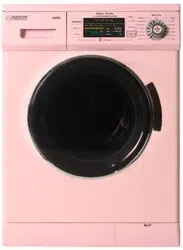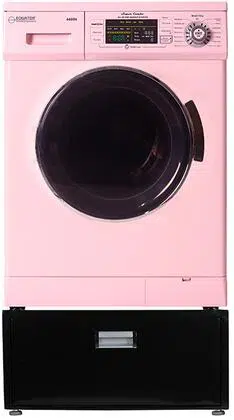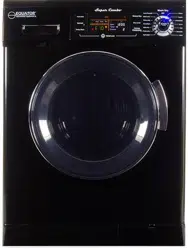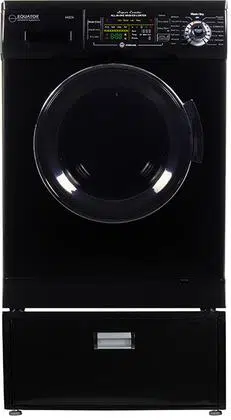
Model: 840
Introduction
Warranty Information
Technical Data
Important Safety Instructions
Diagram of the Washer
Handling and Placement
Remove Shipping Bolts and Level Washer
Electrical
Plumbing
Special Installation Requirements
Operating Instructions
Program Selection Chart
Special Wash Programs
Control Panel
Display Panel
Maintenance
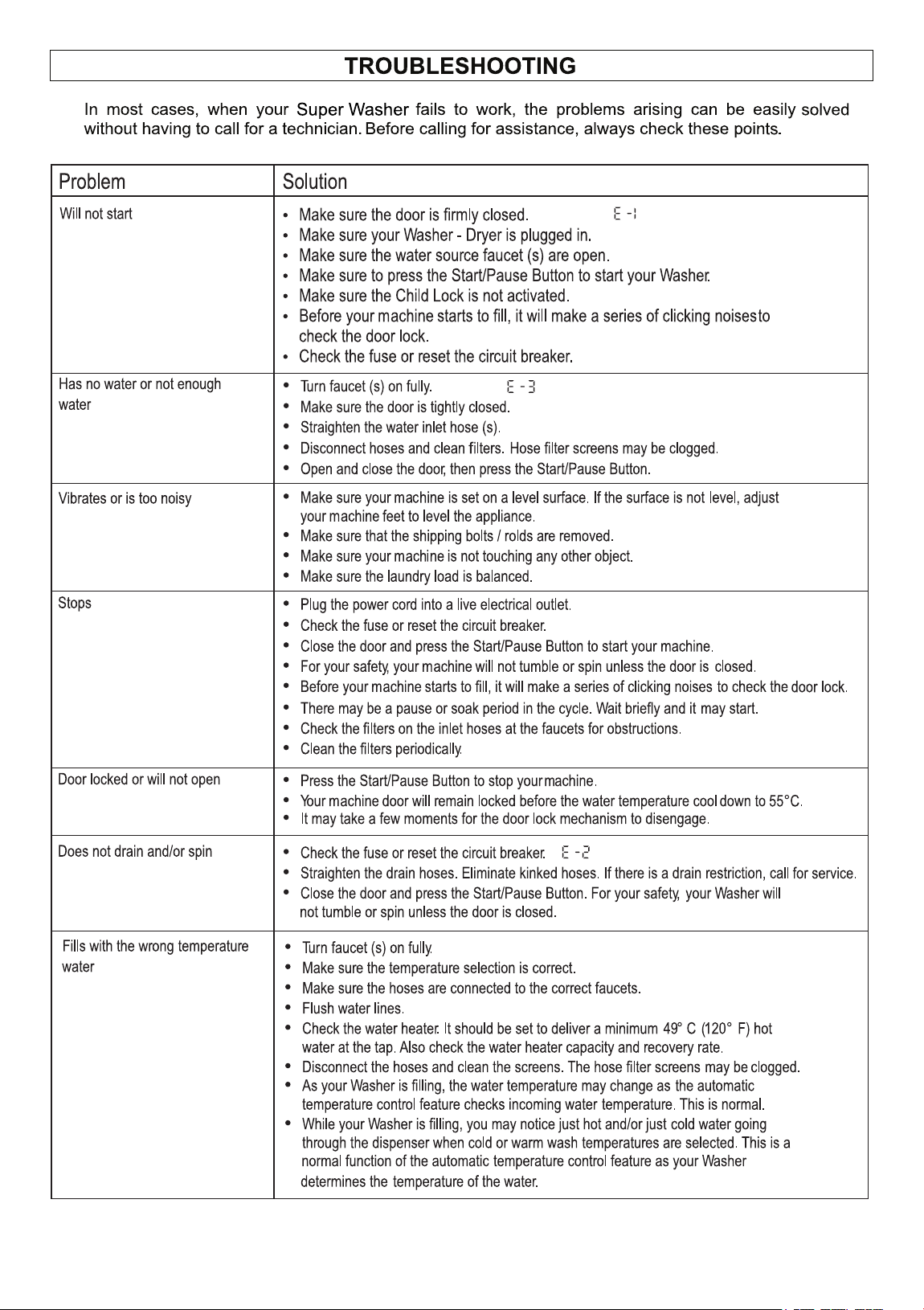
Troubleshooting
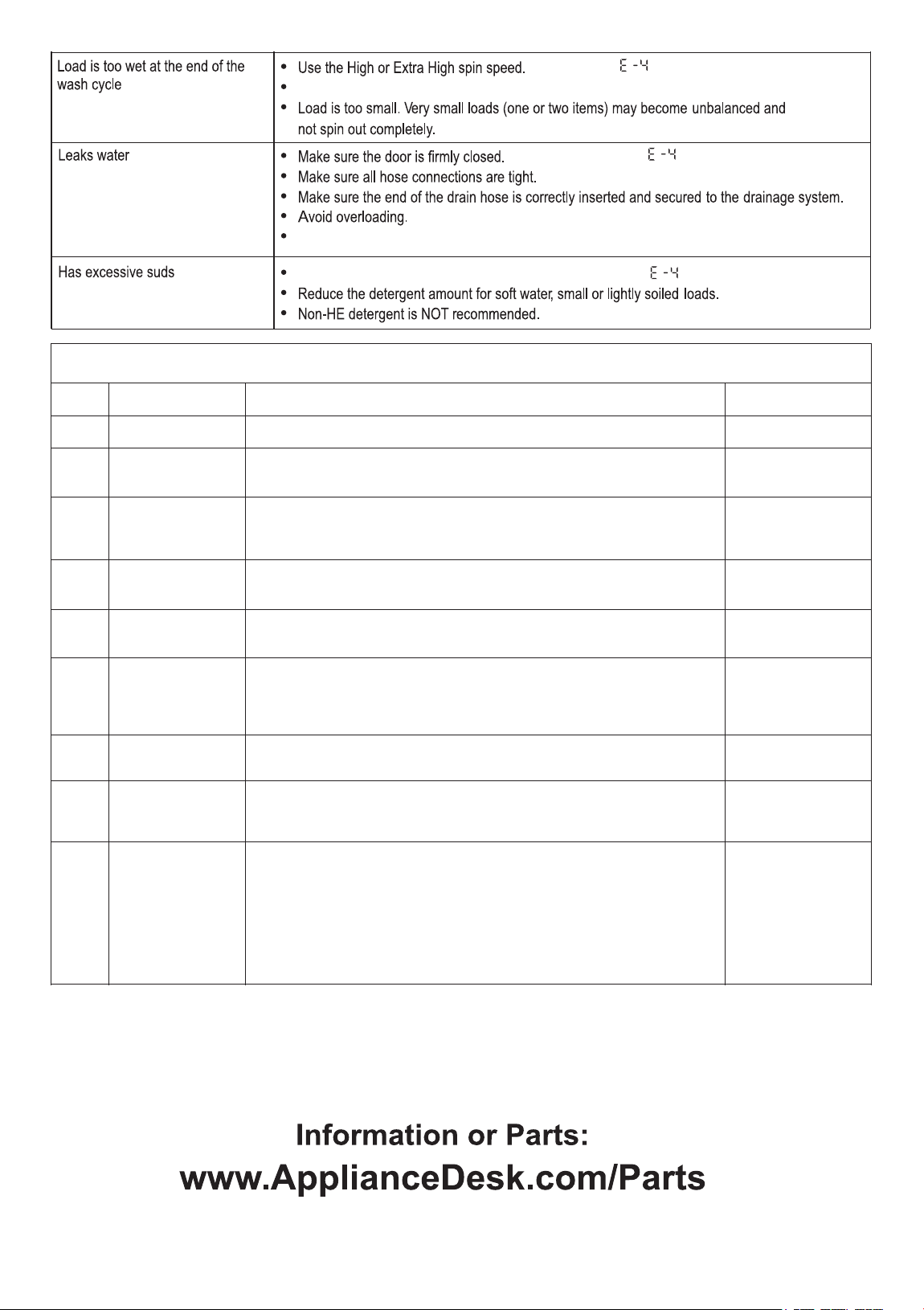
Error Codes
1
2
4
5
6
7
8
9
10
11
12
13
14
15
16
18
20
21
1
1400 rpm
resulting in shorter dry times.
2
WARRANTY INFORMATION
3
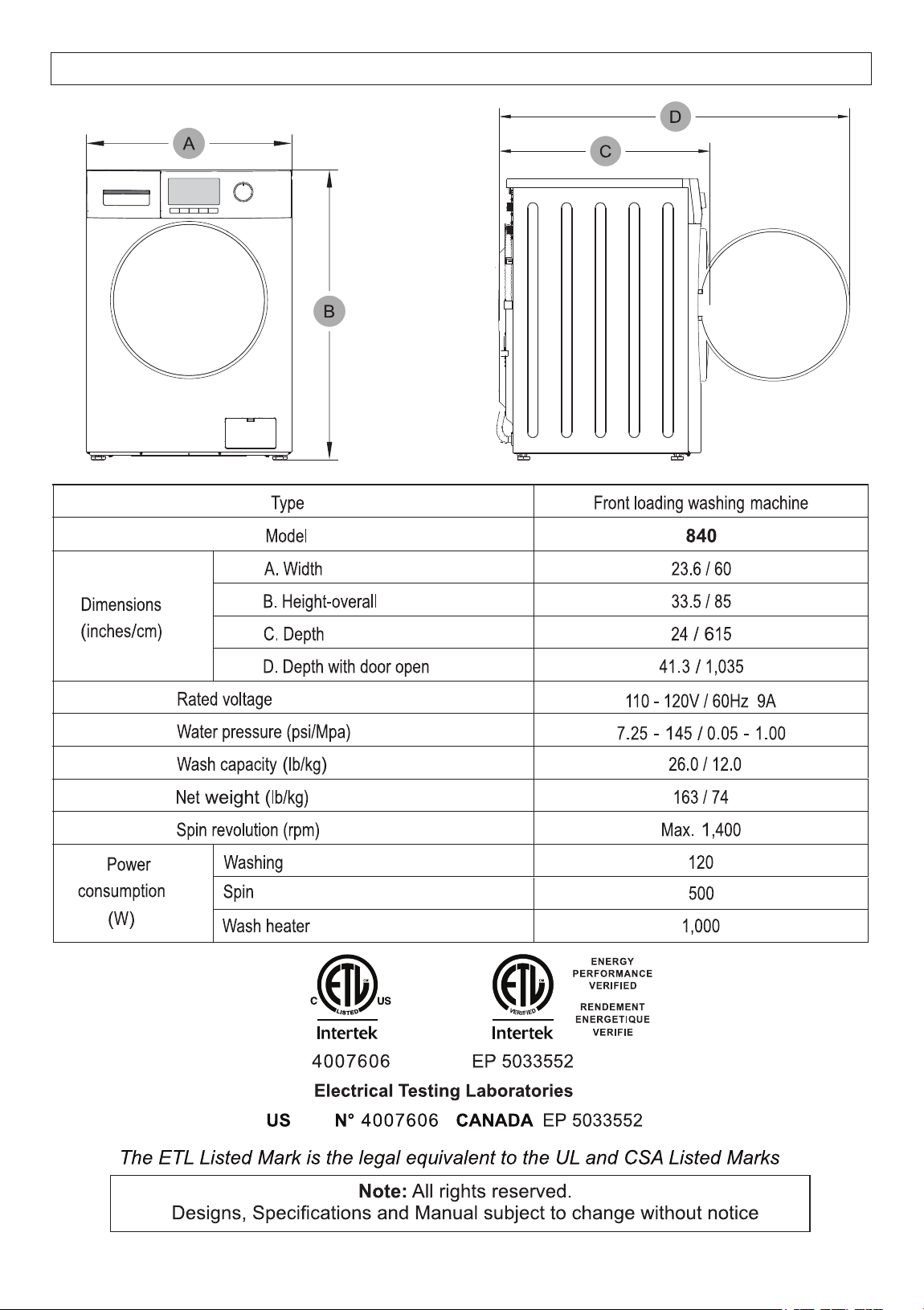
4
TECHNICAL DATA
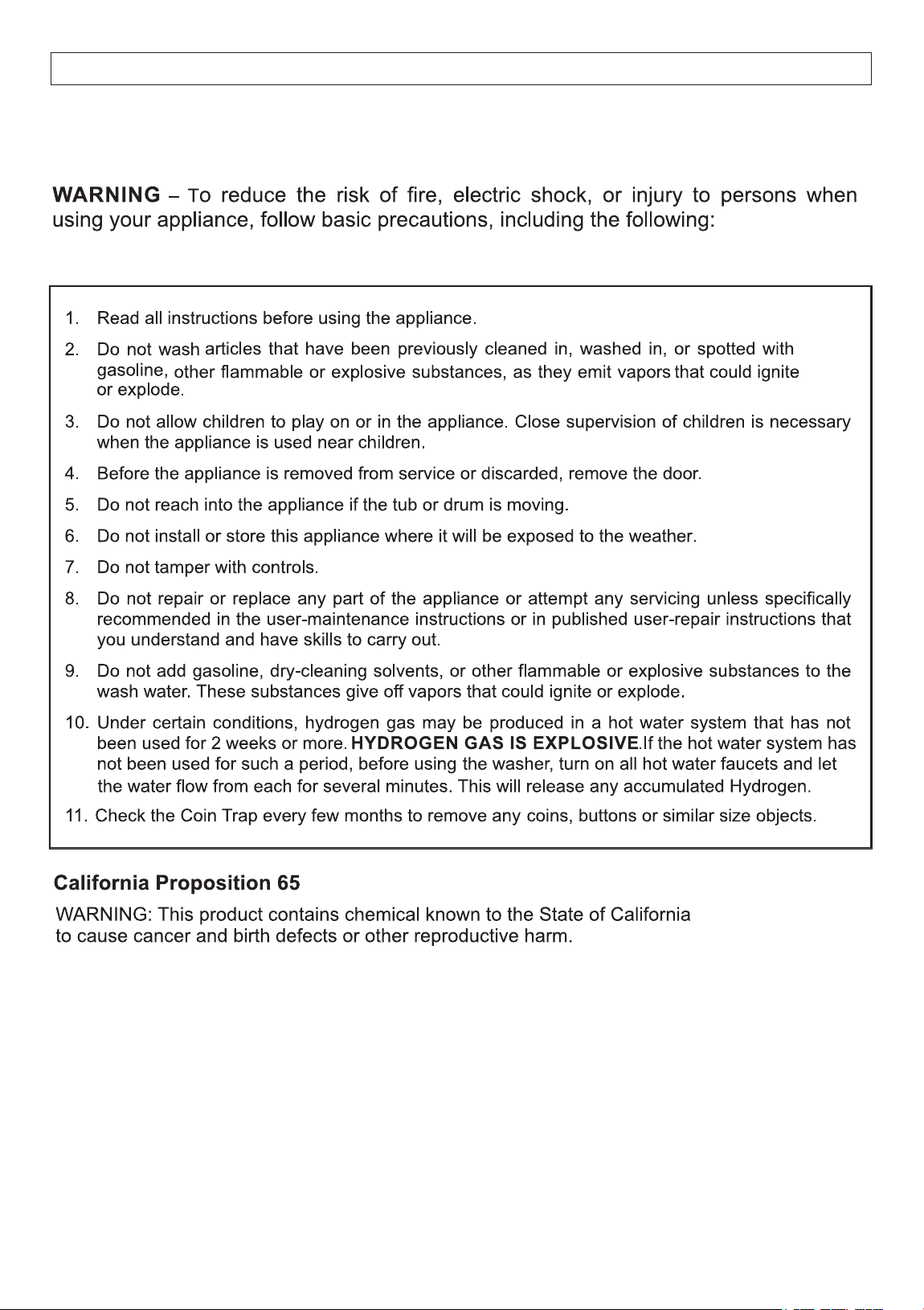
5
Your Washer has been built in compliance with safety regulations,
to protect you and your family.
IMPORTANT SAFETY INSTRUCTIONS
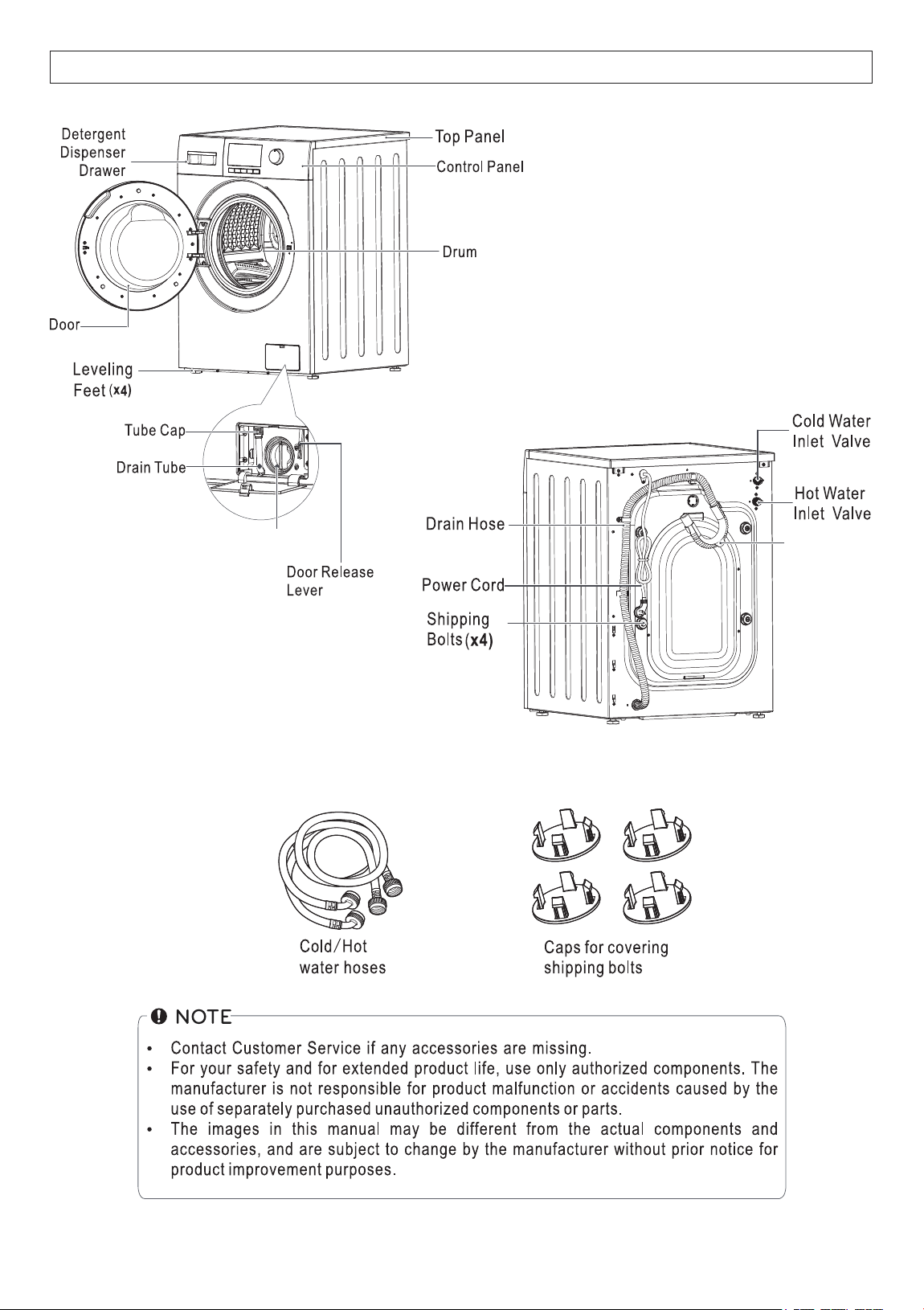
6
Coin Trap / Knob
Included
U-Connector
DIAGRAM OF THE WASHER
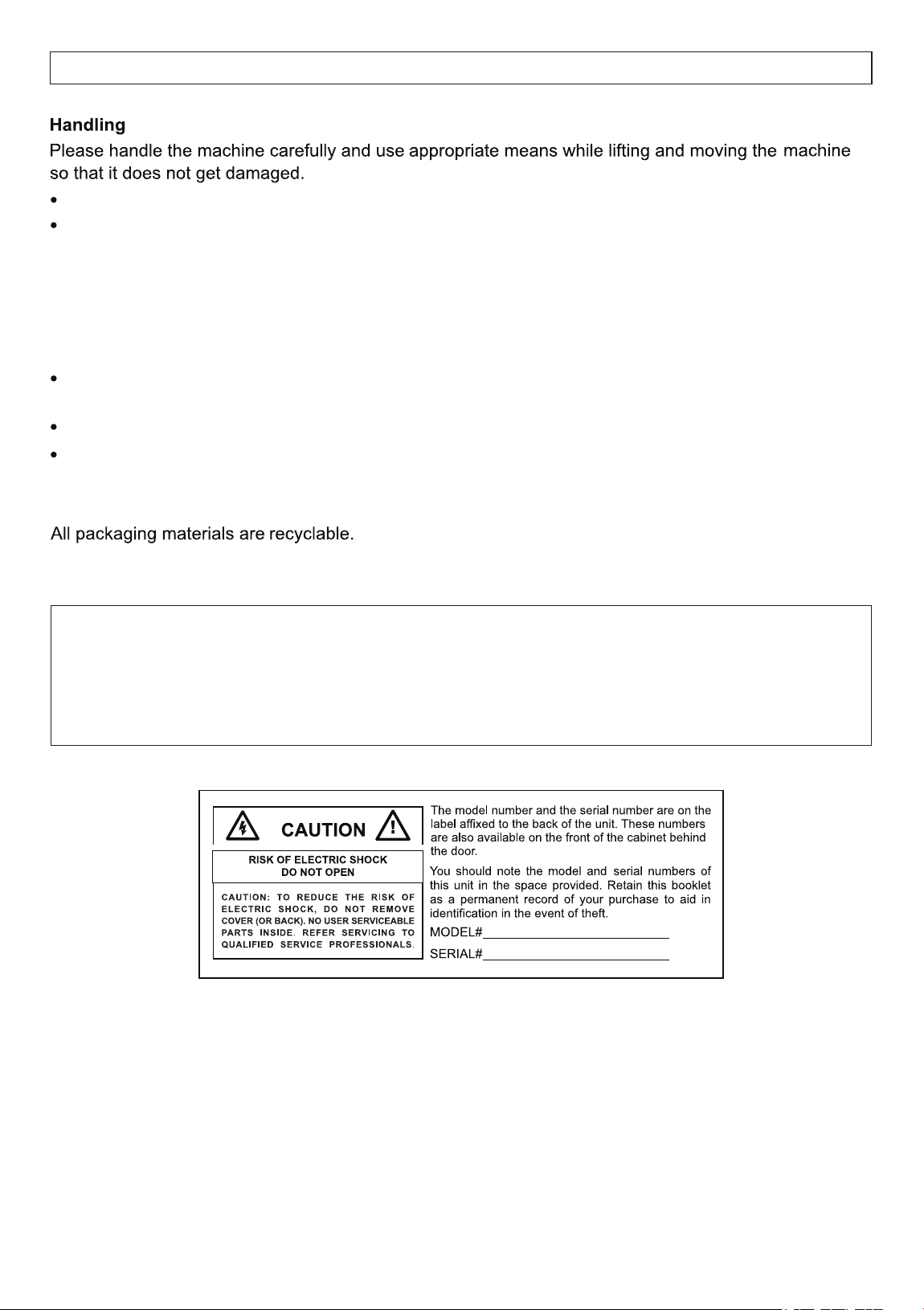
7
HANDLING AND PLACEMENT
Disposal
Suffocation from plastic and folding cartons.
Please dispose of packing material and your old appliance in accordance with local regulations.
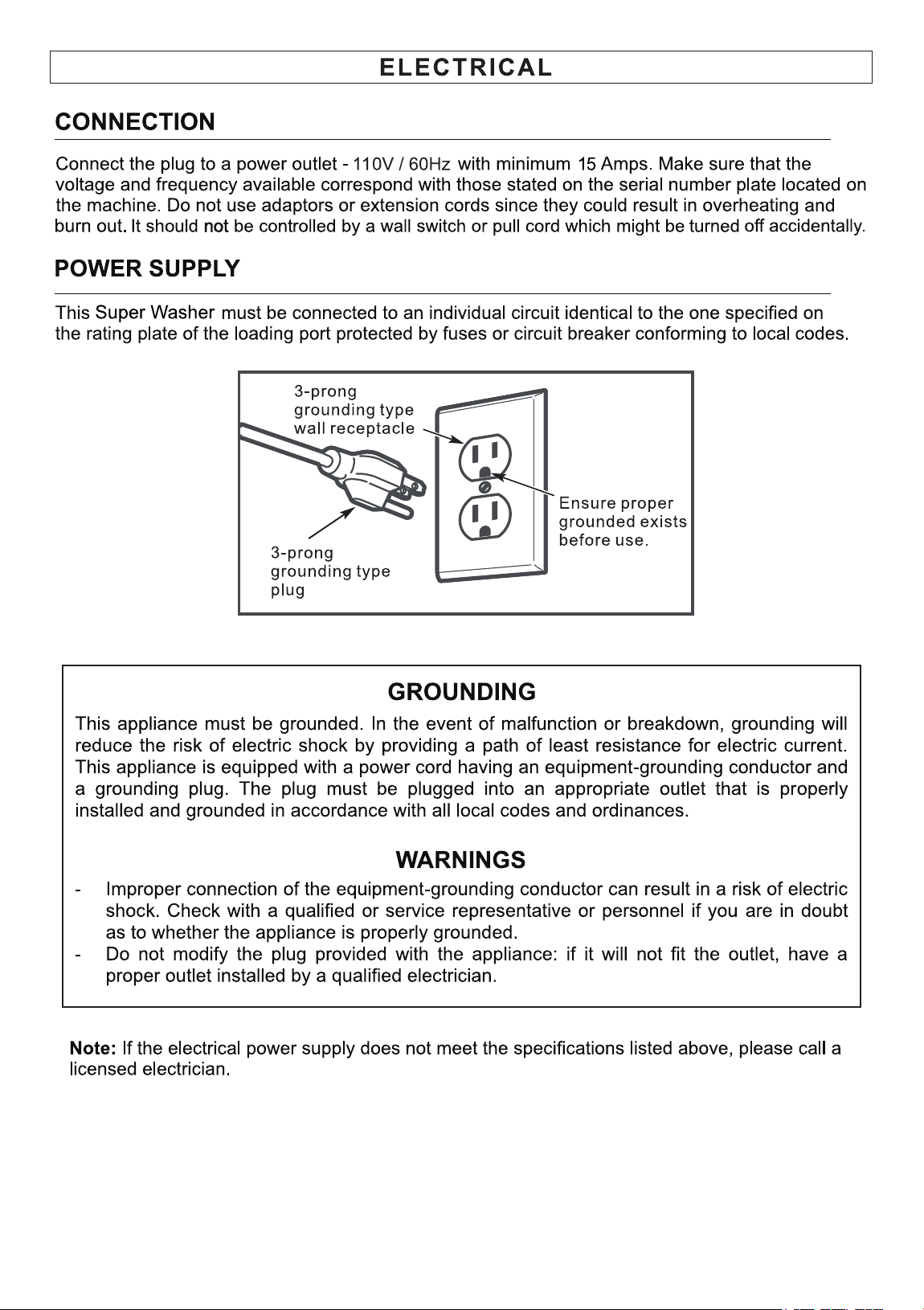
Inspect the Washer to ensure there is no damage.
Placement
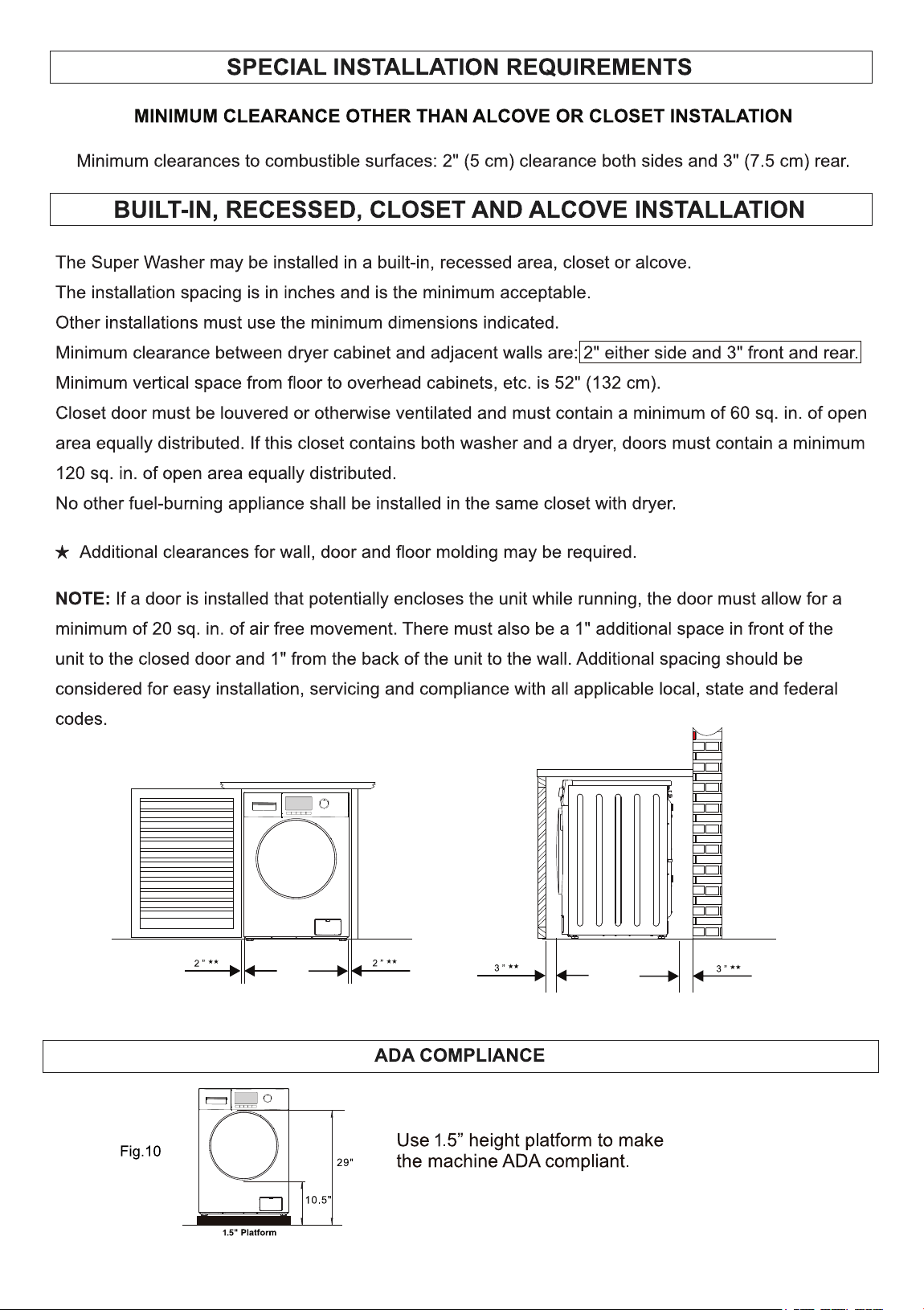
Place the appliance away from direct sunlight, sources of heat and high humidity, and also away
from areas or moisture and exposure to cold temperatures.
Ensure the appliance is placed in a well-ventilated and dry environment.
Ensure that the appliance is placed on flat and stable ground. Adjust the 4 feet to make it level.
Any residual moisture inside the drum is due to the final testing which every washing machine
undergoes before leaving the factory. This is normal.
Ensure not to drag the appliance.
Ensure not to hold on to protruding parts when lifting.
DANGER
Keep children away from the shipping carton and packing material.
Before discarding the appliance, remove the door in order to prevent risk of child entrapment.
8
REMOVE SHIPPING BOLTS AND LEVEL
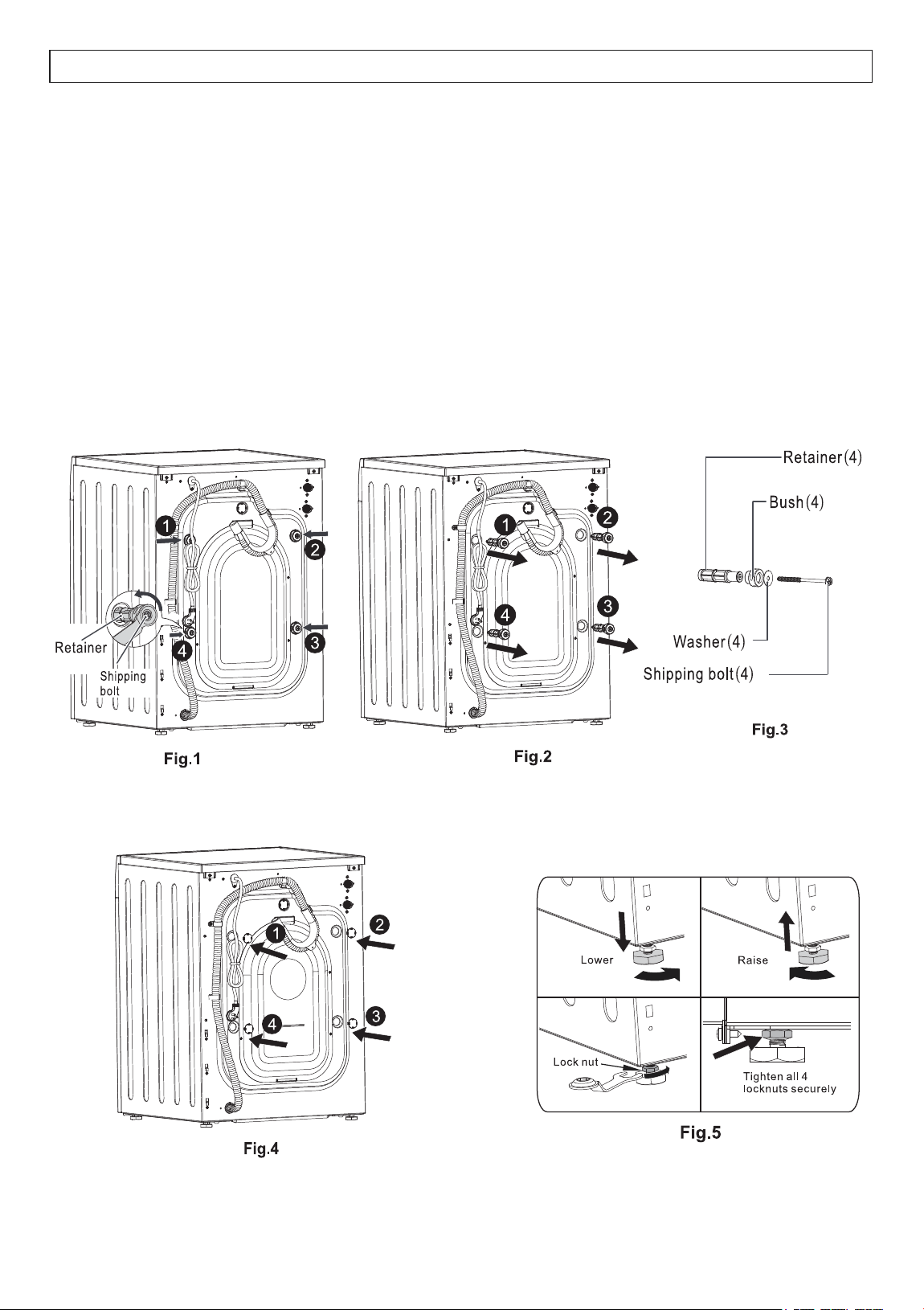
The free-floating drum inside the Combo is held in place during transport with 4 shipping bolts. (Fig. 1.)
Remove each shipping bolt along with the retainer, bush and washer. (Fig. 2.)
Failure to remove shipping bolts may cause severe vibration, noise and can lead
to permanent damage to the machine. IT WILL ALSO VOID THE WARRANTY.
It is important for the machine to be perfectly level. For this reason, the machine is fitted with adjustable
feet used for leveling the machine before use (Fig. 5.)
An adjustable wrench or 17mm open end wrench is required to loosen or tighten the leveling feet.
Close the holes left open by the bolts with the caps provided (Fig. 4).
Store all these parts for future use when moving the Combo to a new location. (Fig. 3.)
DO NOT transport the machine without reinstalling the shipping bolts.
9
10
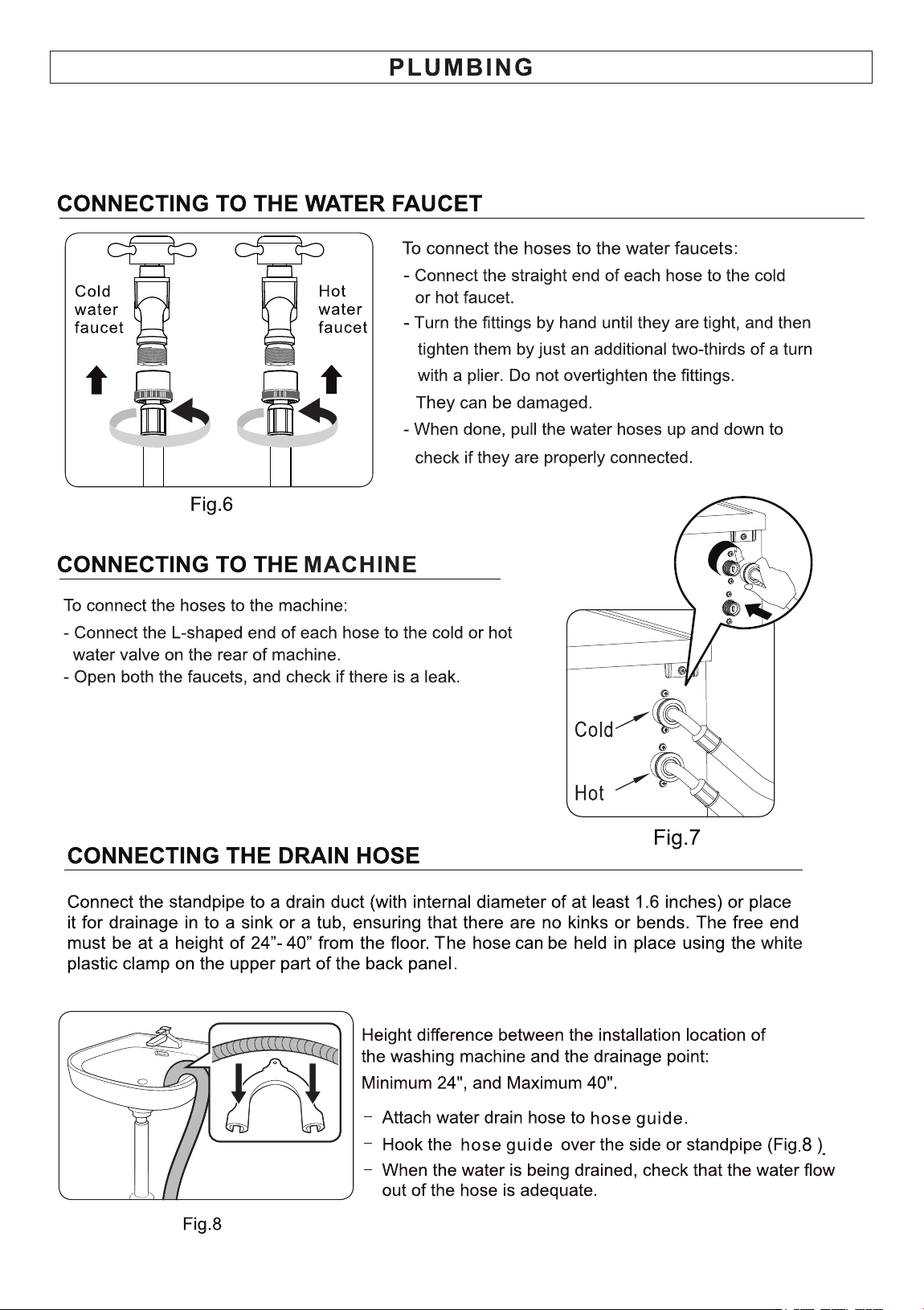
ONLY USE THE WATER INLET HOSES THAT COME WITH THE MACHINE.
Reason: They are custom hoses. The L-Shaped side uses metric thread to fit the valve and the
straight side uses US pipe (NPT) thread. Replacement hoses will not fit the metric thread and will leak.
11
Fig. 9
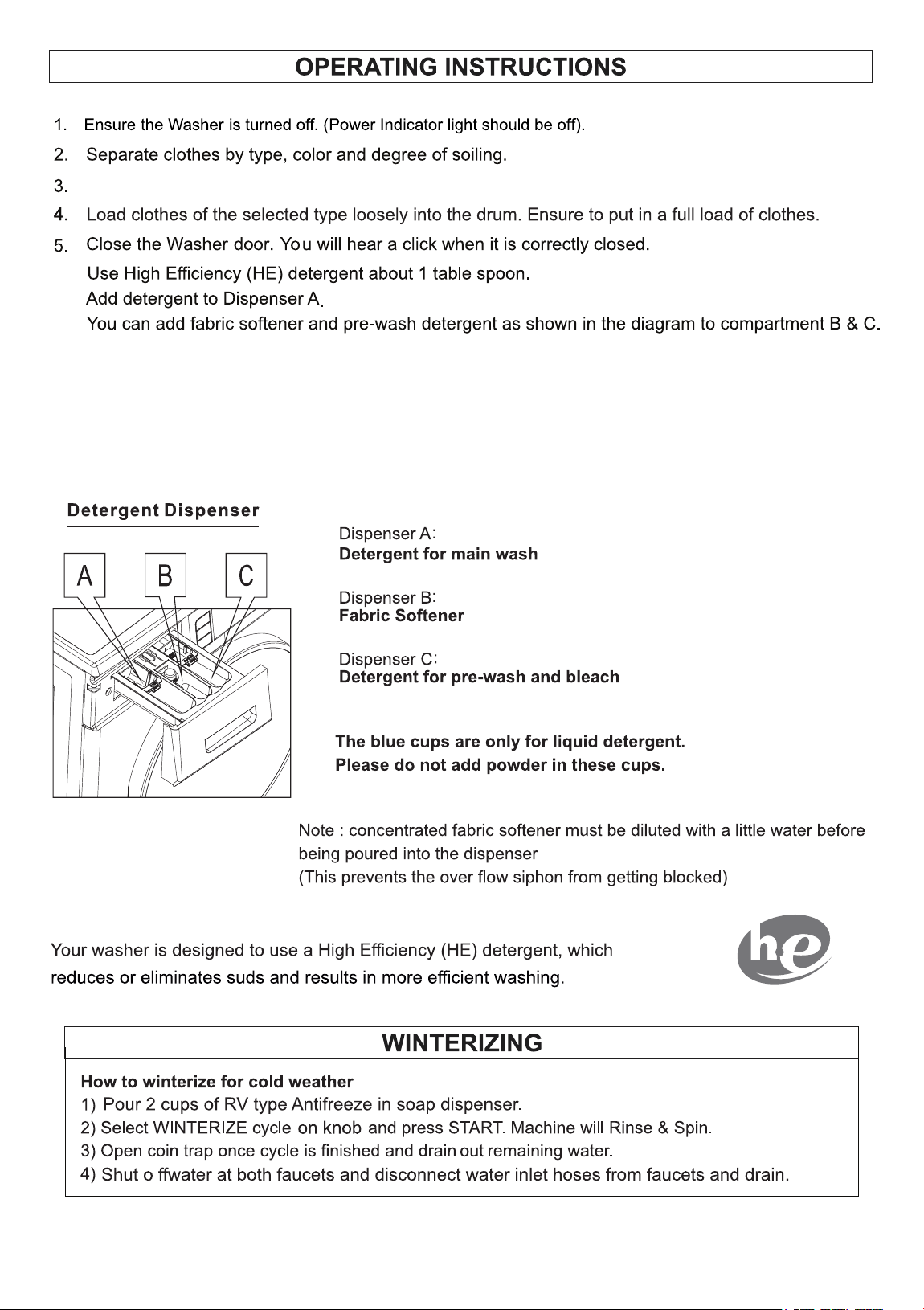
12
For small items such as socks and children’s clothes please use a mesh bag.
Note: The washer is designed to be used with a full and balanced load. If a small or half load of
clothes is put in the washer, it will be unbalanced causing the drum to rotate slowly during the
spin cycle and will not extract sufficient water. This will result in wet clothes at the end of the
cycle and will not be ready to put in the dryer.
Fig. 11
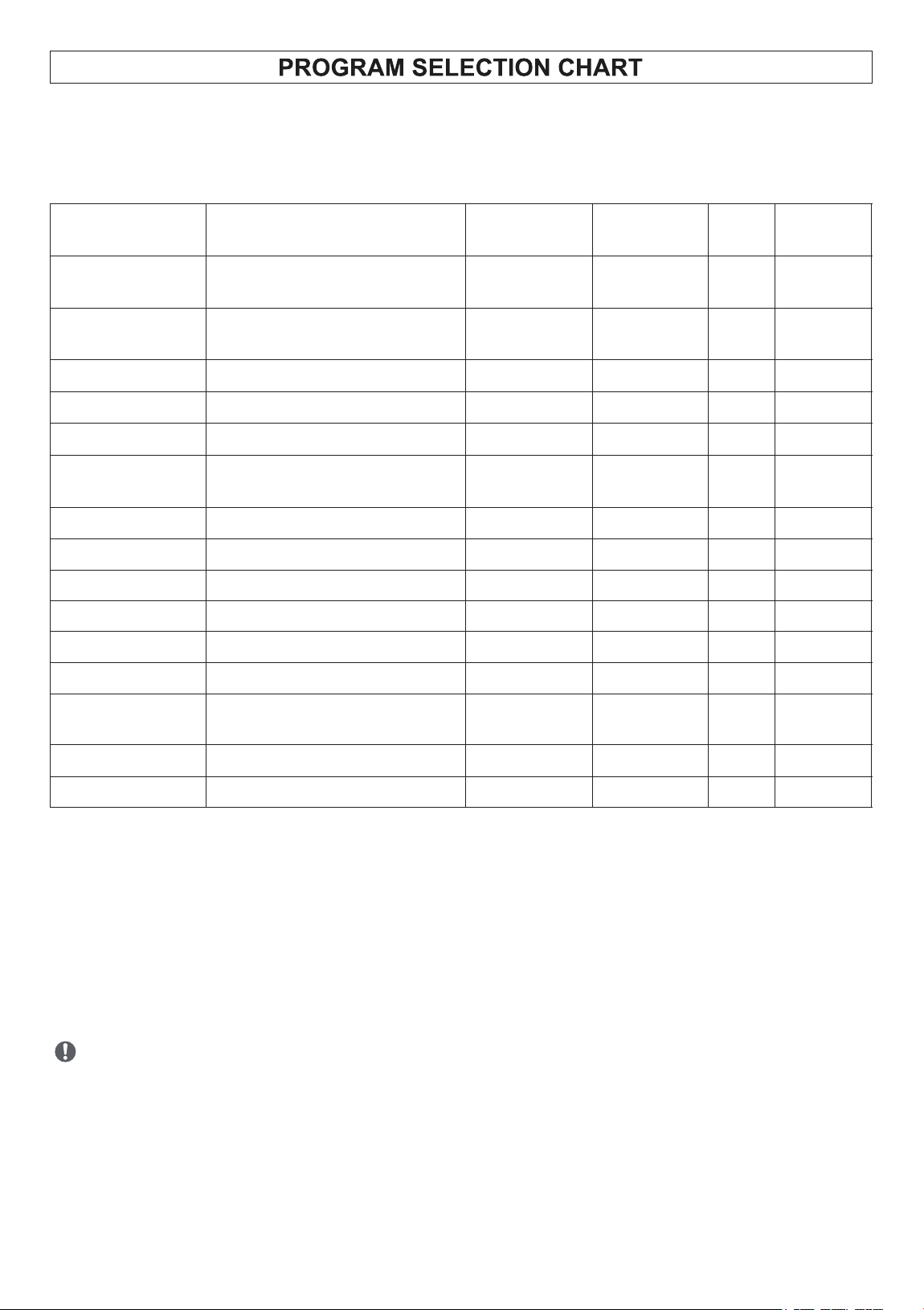
13
Wash Programs
Description of Load
Wash
Temperature
Spin Speed
(rpm)
Rinse
Display
Time min
1. Normal
(Shirts, Trousers, etc)
Mixed Clothes
Warm
1400
1
51
+Prewash
2. Heavy
(T-Shirt, Jeans)
Mixed Cottons
Hot
1400
2
75
3. Quick 20’
Light Sports Wear
Cold
800
1
20
4. ECO
Cotton Blends
Cold
800
1
42
5. Wool
Light Fabrics
Cold
500
1
41
6. Delicate
(Silk, Polyester, Wool)
Machine-Washable
Cold
800
1
36
7. Power Wash
Mixed Cottons
Hot
1400
2
61
8. Drain
-
-
-
-
2
9. Winterize
-
-
-
-
2
o
10. Allergen 131
Mixed Cottons
Hot
1400
2
65
11. Self Clean
-
Hot
400
1
45
12. PET
Mixed Cottons
Warm
1000
2
52
13. Baby
Cotton Blends and Light
Fabrics
Warm
1000
1
60
o
14. Sanitize 165
Mixed Cottons
Hot
1400
2
69
15. Quiet 60 dB
Mixed Cottons
Cold
800
1
49
Wash Cycles
The total working time will vary with the laundry size, water pressure, water temperature and
ambient temperature etc.
Each wash program has default temperature, spin speed and rinse settings. You can use
the buttons on the control panel to changes the defaults for most of the programs.
PET CYCLE
Before loading clothes and sheets into the appliance, remove as much pet hair as possible in
order to prevent buildup and clogging of the drain pump. Wipe the surface of clothes and
sheets with a lint roller or a damp rubber glove to easily remove pet hair.
After the end of the wash cycle, run a quick wash cycle without clothes. After the cycle ends,
wipe down the drum with a damp cloth to collect any pet hair on the drum surface.
14
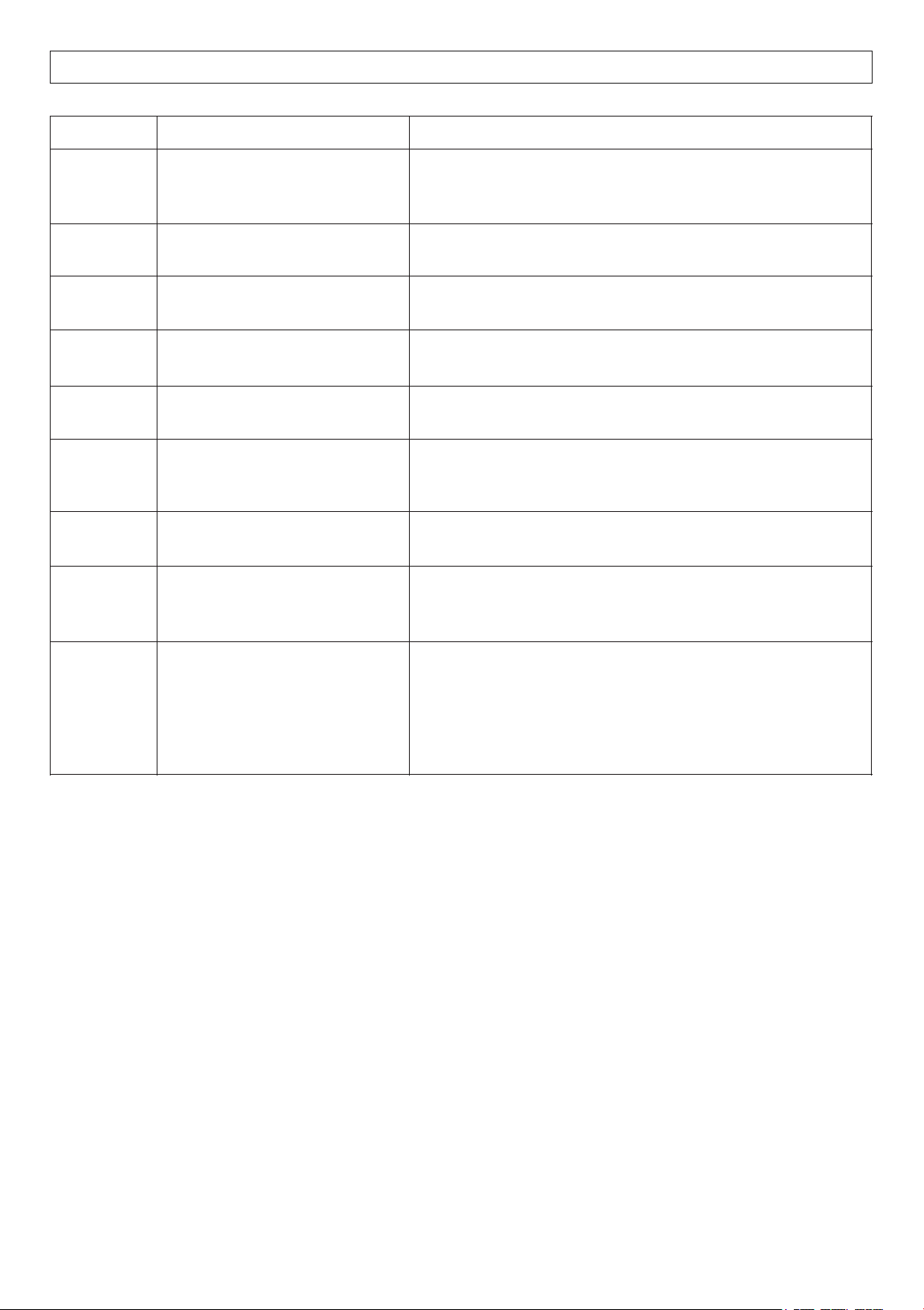
PROGRAM
PURPOSE
HOW IT WORKS
ECO
Energy-efficient wash using
less water and power for
everyday cleaning.
Uses lower wash and rinse temperatures, longer cycle
times, and optimized drum motions to reduce power use.
Power
Wash
Deep cleaning for heavily
soiled items.
Uses higher water levels, stronger agitation, and hotter
water. May include an extra rinse or pre-wash.
Quiet 60’
Minimize noise during
operation.
Reduces spin speed and slows drum movement to lower
vibration and sound.
Sanitize
o
160
Kills germs, bacteria, and
allergens.
Heats water to very high temperatures (up to ~160 -
170°F / 70-75°C).
PET Cycle*
Remove pet hair and odors.
(See instructions below)
Uses extra rinse cycles, higher water levels, and
sometimes soak to loosen fur and dander.
Self Clean
Cleans the washer drum itself.
Runs hot with extra water and strong agitation (empty).
Some machines suggest adding a cleaning tablet or
vinegar.
Allergen
o
131
Reduce common allergens
like dust mites and pollen.
Uses high-temperature water and an extended wash
cycle to break down and flush away allergens.
Winterize
Prepare the machine for cold
weather or storage (to prevent
freezing damage).
Drains all water from the hoses, pump, and internal
parts. Some versions circulate antifreeze through the
system.
Baby Wash
Gently but thoroughly clean
baby clothes, while removing
detergent residues and germs.
Ÿ Uses higher water temperatures (often around 140-
160°F / 60-70°C) to sanitize fabrics and kill bacteria.
Ÿ Includes extra rinse cycles to ensure no detergent
residue remains - important for babies sensitive skin.
Ÿ Gentle drum movements protect delicate fabrics like
cotton and soft baby wear.
SPECIAL WASH PROGRAMS
15
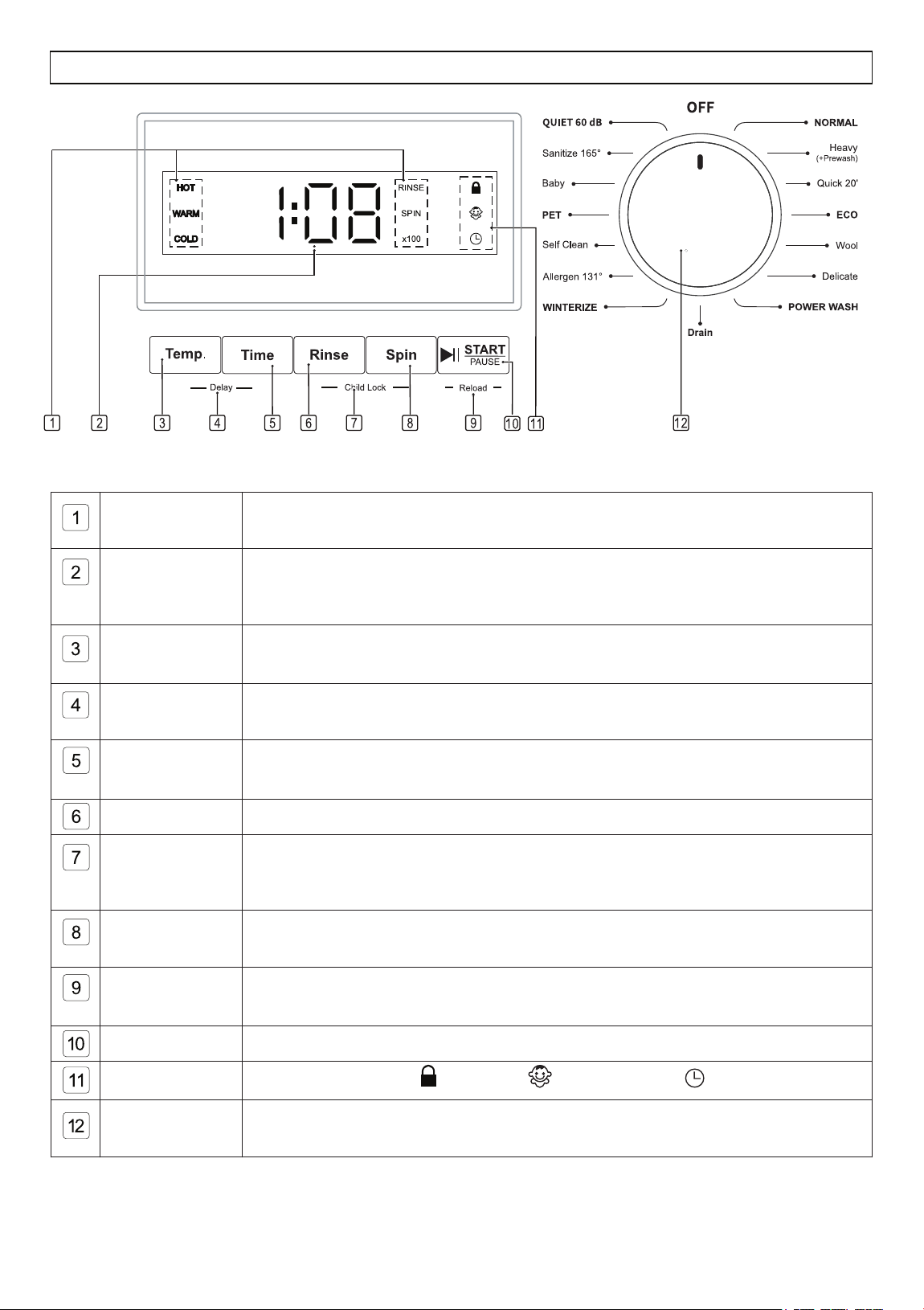
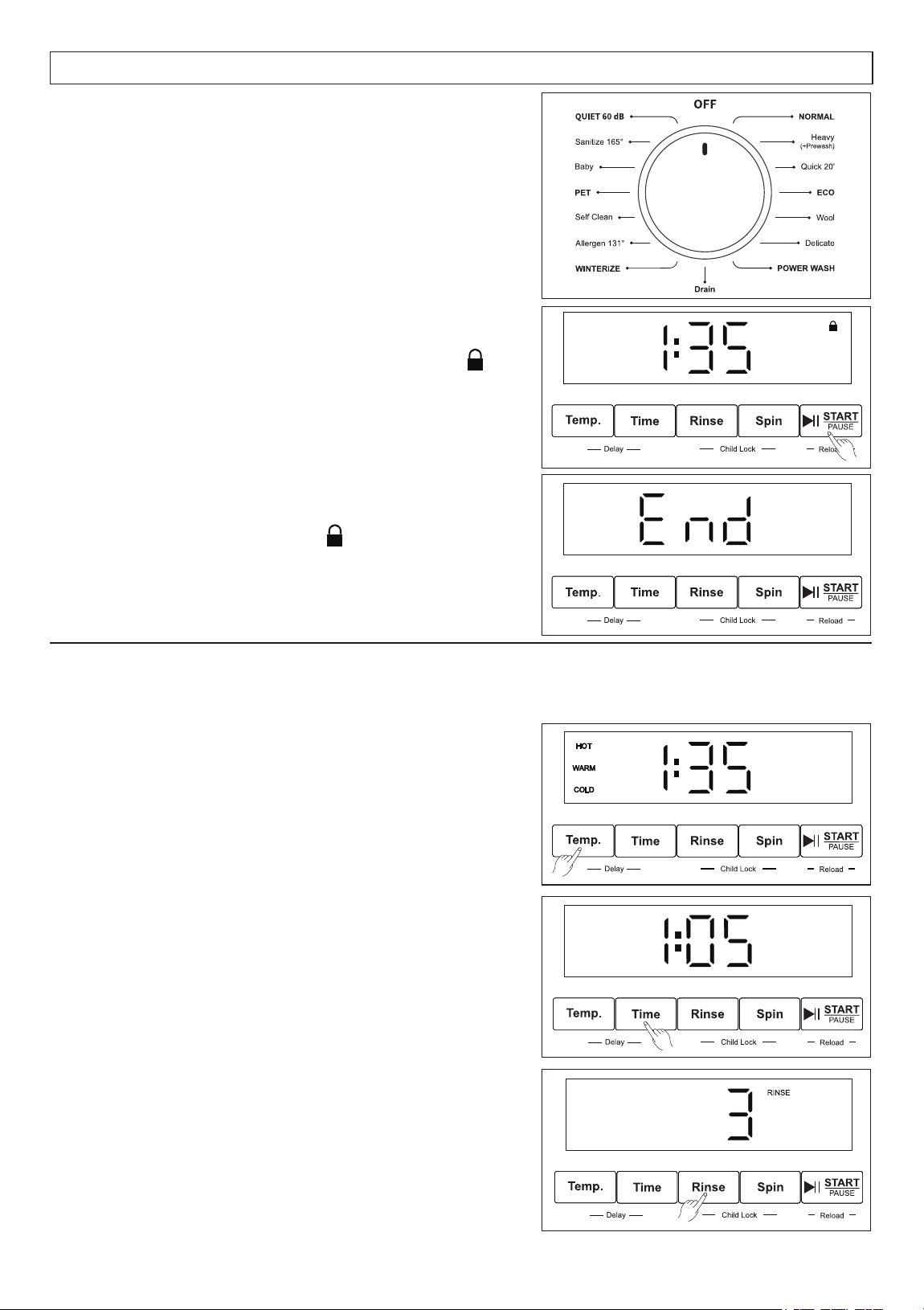
Temperature
Indicators
Highlights the water temperature during the main wash cycle.
Digital Display
Shows the total time of the selected program before and after starting.
It also displays the rinse times, spin speed, and delay time when pressing the
option button(s).
Temperature
Button
Press this button to select the water temperature for the main wash cycle of
the chosen program.
Delay
Press and hold Temp and Time buttons for 3 seconds to set the delay time
from 3 to 24 hours, in one-hour increments, before the start of the wash cycle.
Time Button
Press this button to select the duration of the wash cycle for the chosen
program.
Rinse Button
Press this button to set the number of rinse cycles for the selected program.
Child Lock
Repeat to deactivate this function.
Press and hold Rinse and Spin buttons to activate the Child Lock function,
which prevents children from playing with the buttons.
Spin Button
Press this button to set the spin speed for the last spin cycle of the selected
program.
Reload
Function
Press and hold the START/PAUSE button for 3 seconds to stop the cycle and
add more clothes.
START/PAUSE
Press this button to start or pause the selected wash program.
Indicators
Illuminates door lock , child lock and delay start when applicable.
Program
Selection Knob
Turn the knob clockwise to turn ON and select from 15 programs.
Display Panel and Buttons
CONTROL PANEL
16
DISPLAY PANEL
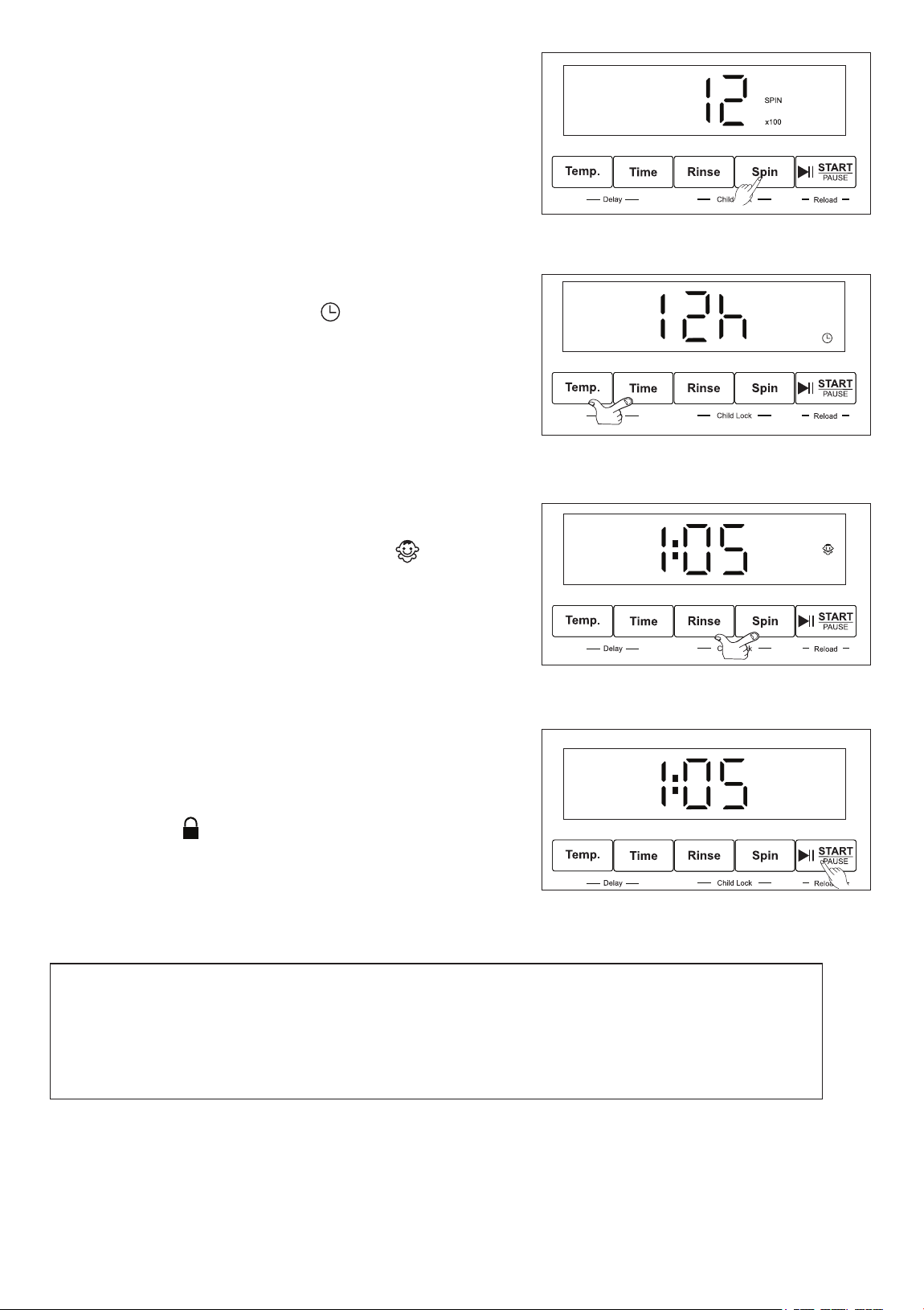
3. When the cycle is completed, “End” will be
displayed, and the Lock icon will go off.
You can now remove clothes from the washer.
How to run a Wash Cycle
1. Rotate the Program Knob clockwise to select a
wash program. Default information for the selected
program will be shown on the Display Panel.
2. Press the START/PAUSE button to start the cycle.
The time will be displayed, and the Lock icon
will illuminate. Please do not try to open the door
while the washer is locked.
Selecting Wash Options
For most of the wash programs, you can change
the default settings to suit your preference by
pressing the buttons below the Display Panel.
Press the Temp button to select hot, warm or cold
water temperature for the main wash.
Press the Time button to add 5, 10 or 15 minutes
to the main wash cycle.
Press the Rinse button repeatedly to select the
number of rinses from 1, 2 or 3.
Press and hold for 3 seconds to select and display
the number on the Display Panel.
17
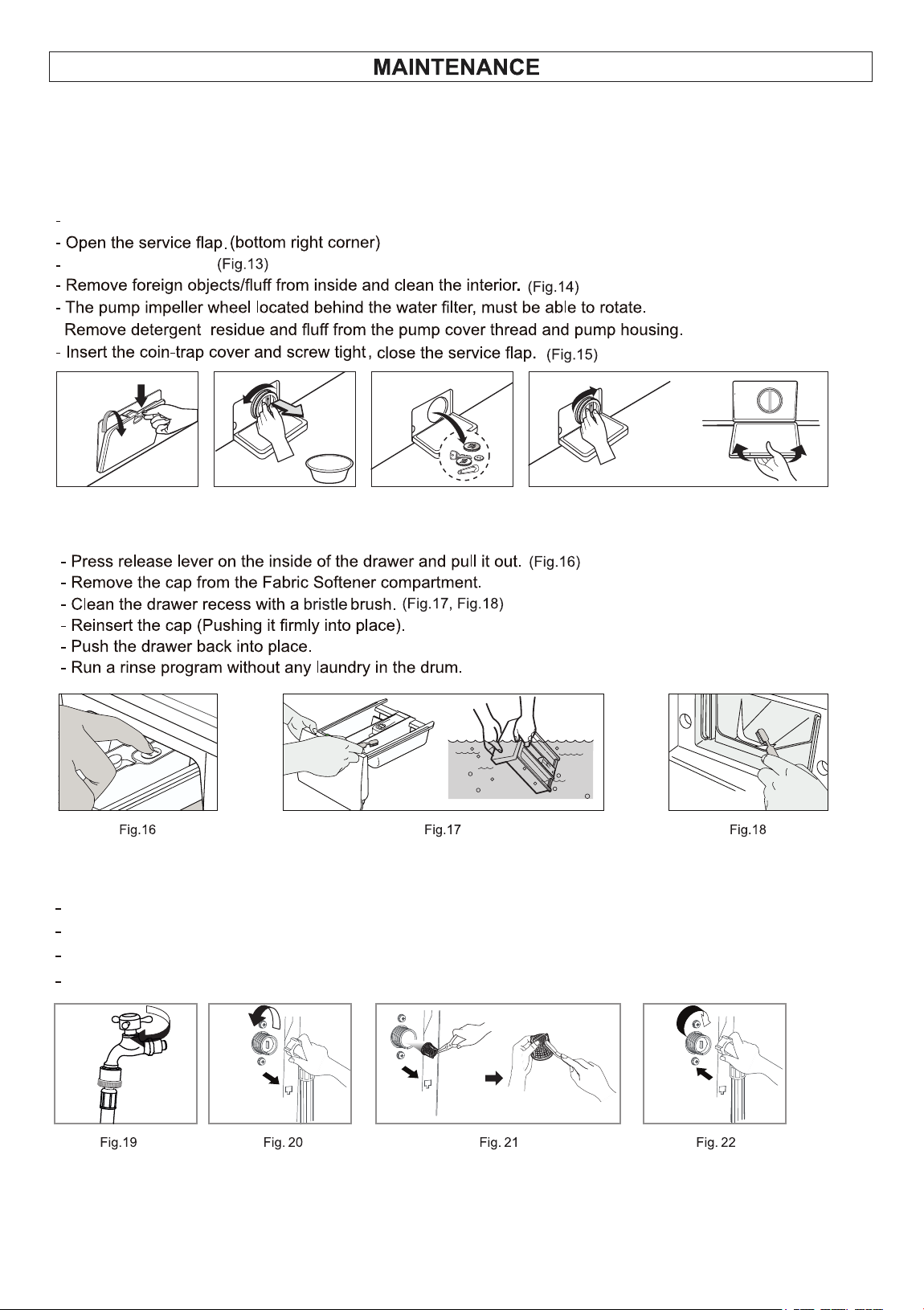
Press the Spin button repeatedly to select the final
spin speed. Press and hold for 3 seconds to select
and display the number on the Display Panel.
1. Press the Temp and Time buttons at the same time
and hold for 3 seconds. The icon will display.
2. Press the Time button to select how many hours to
delay the start. The time increases in one-hour
increments, from 3 – 24 hours.
3. To cancel the delay option, turn the Knob to the
Off position and then reselect the wash program.
To delay the start of the wash cycle:
Press the Rinse and Spin buttons at the same time
and hold for 3 seconds. The Child Lock icon
will display. This feature prevents the program to
be changed during the wash cycle, should a child
play or press the buttons on the washer.
Repeat this process to cancel child lock.
To activate the Child Lock:
To add forgotten items into the washer once the
wash cycle has begun:
Reload Function
1. Press and hold the START/PAUSE button for
3 seconds. The water in the drum will drain and
the lock icon will go off.
2. You can then open the door and load the
additional clothes.
3. Close the door and press START/PAUSE and the
cycle will restart from the point at which it stopped.
Note:
During the wash cycle, if you accidentally turn the Knob, an error will show on
the Display Panel.
The time and “Px” will flash intermittently. Turn the Knob to the Off position and
reselect the wash program.
18
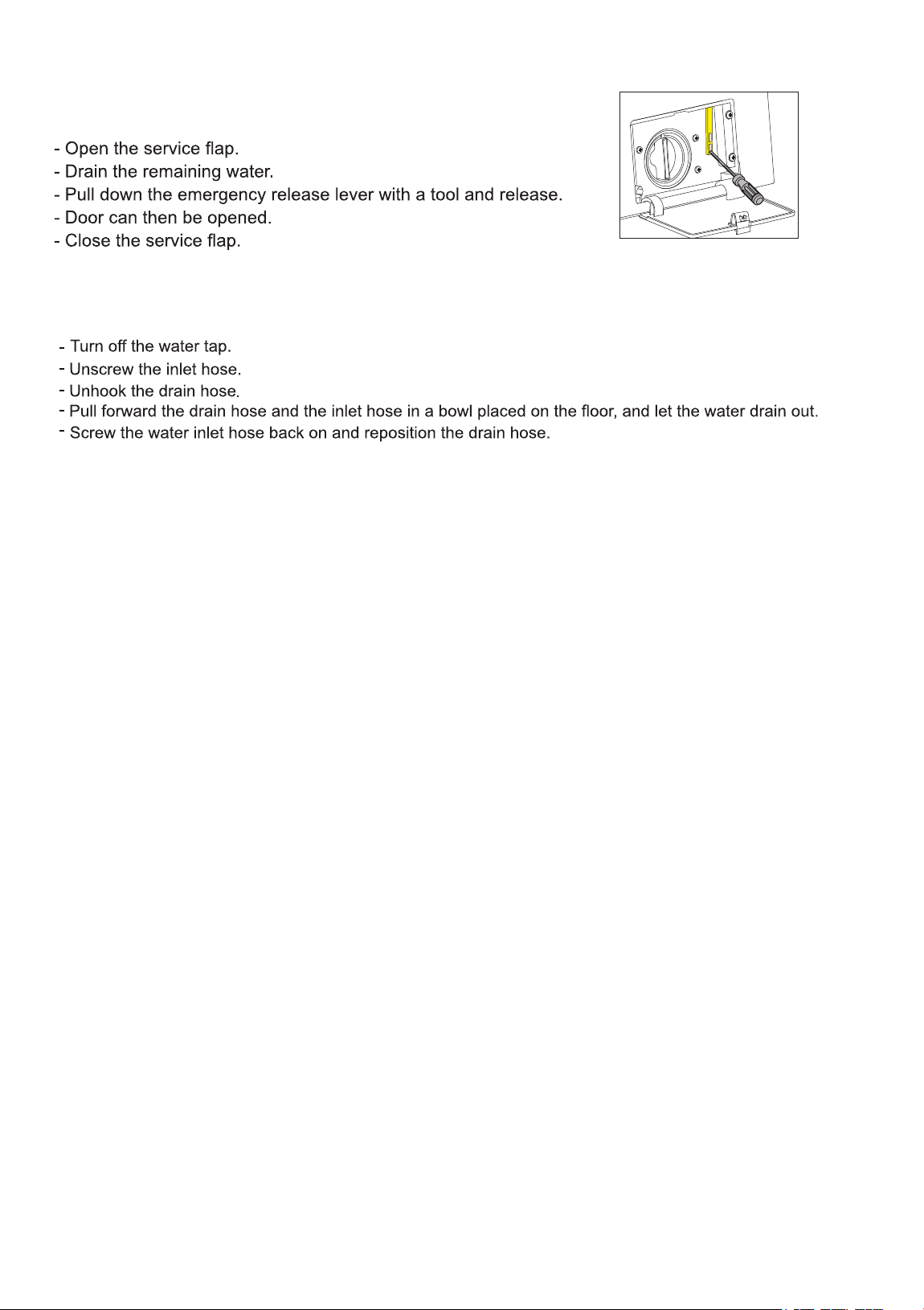
Fig. 12 Fig. 13 Fig. 14 Fig. 15
(Fig. 12)
Clean the outside and inside of the appliance regularly, including the door gasket, using water, mild detergent and
a soft cloth. Please do not use strong chemicals and abrasive materials to clean.
General Cleaning
Turn off the Washer.
Turn knob to the left.
Insert the filter into the valve and tighten up the inlet hose. (Fig. 22)
Turn off the water tap. (Fig.19)
Unscrew the water inlet hose. (Fig. 20)
Clean the filter using a hard bristle brush under the running water. (Fig. 21)
Cleaning the coin trap
Cleaning the Detergent drawers
Cleaning the water inlet filter
19
If the Washer door is locked and clothes need to be removed,
follow this procedure:
If the machine is exposed to freezing temperatures, certain precautions should be taken.
If the Washer is not going to be used for an extended time, ensure that the door is left open to
prevent mold and odors.
Vacation
Emergency Release
The dangers of freezing
20
21
ERROR CODES
Code
Possible Cause
Solution
Component
E1
Door Open
Ensure the door is completely CLOSED and properly latched.
Door Switch
E2
Drain Issue
Ensure the drain HOSE is not kinked, bent, blocked, or crushed.
Clean the drain FILTER thoroughly.
Drain Pump
E3
Water Inlet Valve
Confirm that the WATER FAUCETS are fully turned ON.
Check and clean the inlet valve filter if clogged.
Check if there is any water leakage from water / drain hoses.
Inlet Valves
E4
Excess Water /
Excessive Suds
Use appropriate spin speed and adequate High Efficiency (HE) detergent.
Ensure the door is properly CLOSED.
Inlet Valves
E5
Motor
Ensure the drum is NOT OVERLOADED and select the appropriate wash
program based on the fabric type.
Motor + Electronic
Module
E6
Communication
Error
If the DISPLAY FLICKERS or the unit makes noise while off, perform a
power reset by unplugging and reconnecting after 10–15 minutes.
If the unit is not responding, UNPLUG it for 10 -15 minutes and plug it
back in.
Communication
Cable
E7
Washing Heater
Reduce load size and restart the cycle.
Avoid OVERLOADING the unit.
Washing Heater
E8
Overload /
Temperature
Sensor Malfunction
Reduce load size and distribute clothes evenly.
Connect properly the HOT and COLD faucet.
Temperature Sensor
(@rear-bottom of
Drum)
E10
Water Pressure
Switch
Confirm hoses are not kinked or blocked.
Clean inlet FILTERS if necessary.
Turn OFF & unplug → see if water still enters
Check water pressure (not above 145 PSI)
Clean inlet valve filters / screens
Ensure faucets are FULLY OPEN.
Try a RESET (unplug 5 -10 mins)
Check hoses for tight connection / damage
Water Level Sensor
Use High Efficiency (HE) detergent to prevent over-sudsing.
Use High Efficiency (HE) detergent to prevent over-sudsing.
Use High Efficiency (HE) detergent to prevent over-sudsing.