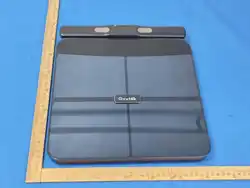
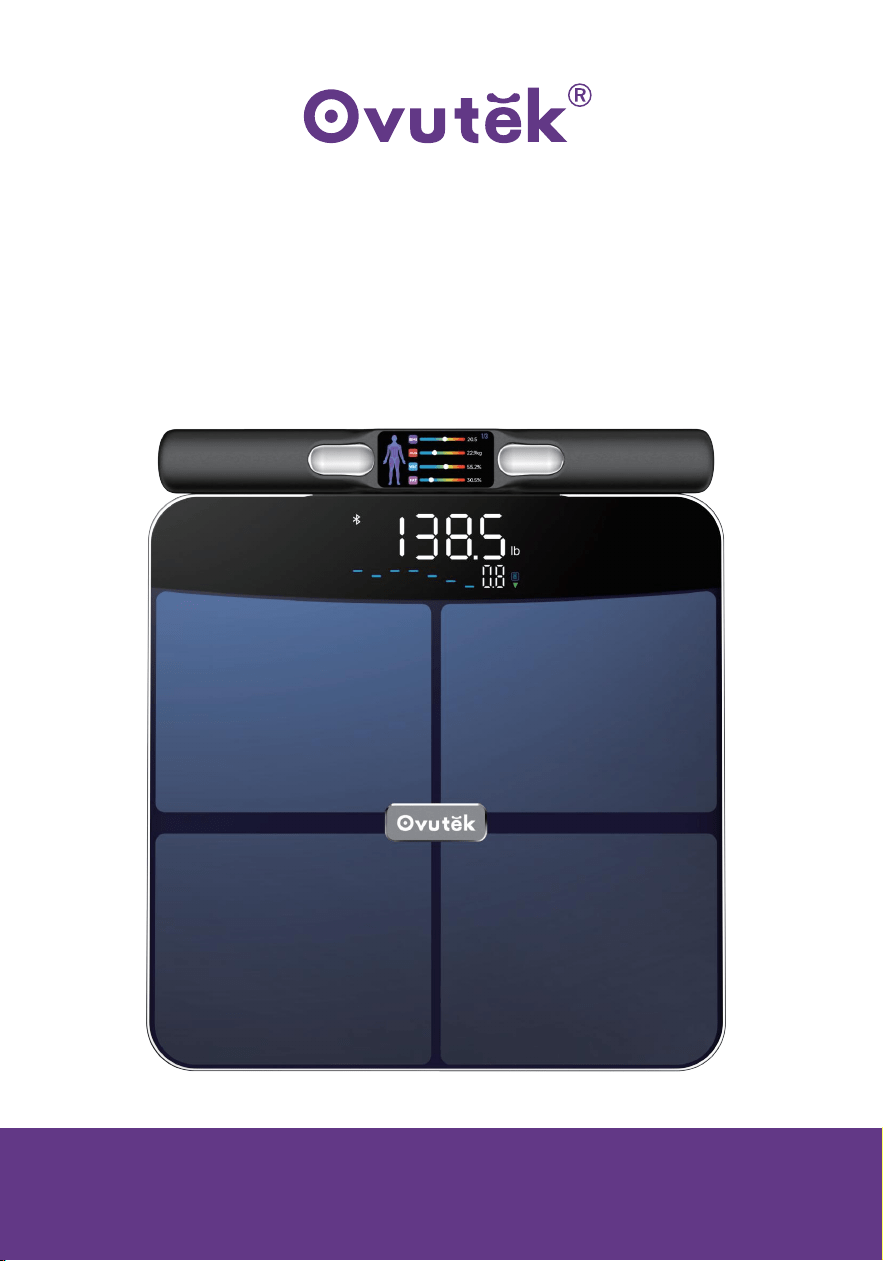
Royyt+ Pro Air
Smart Body Fat Scale
USER MANUAL
Questions or Concerns?
Contact our Customer Support Team:

We want you to be healthy and happy.
Thank you for choosing Ovutek !
If you have any questions or concerns,
please contact freely to our helpful Customer Support Team:
service@ovutek.com
We hope you enjoy your new products!

1
1
1
2
3
3
4
5
5
6
8
9
10
10
10
12
13
13
14
Inhaltsverzeichnis
Package Contents
Specifications
Product functions
Safety Information
Function Diagram
Display Icons
Display-Diagramm
Before Using
Getting Started
Smart Mode
Automatically recognises the user
Special Modes
Replacing the Batteries
Cleaning the Scale
Troubleshooting
Federal Communication Commission Interference Statement – Part 15
Warranty Information
TERMS & POLICY
Customer Support
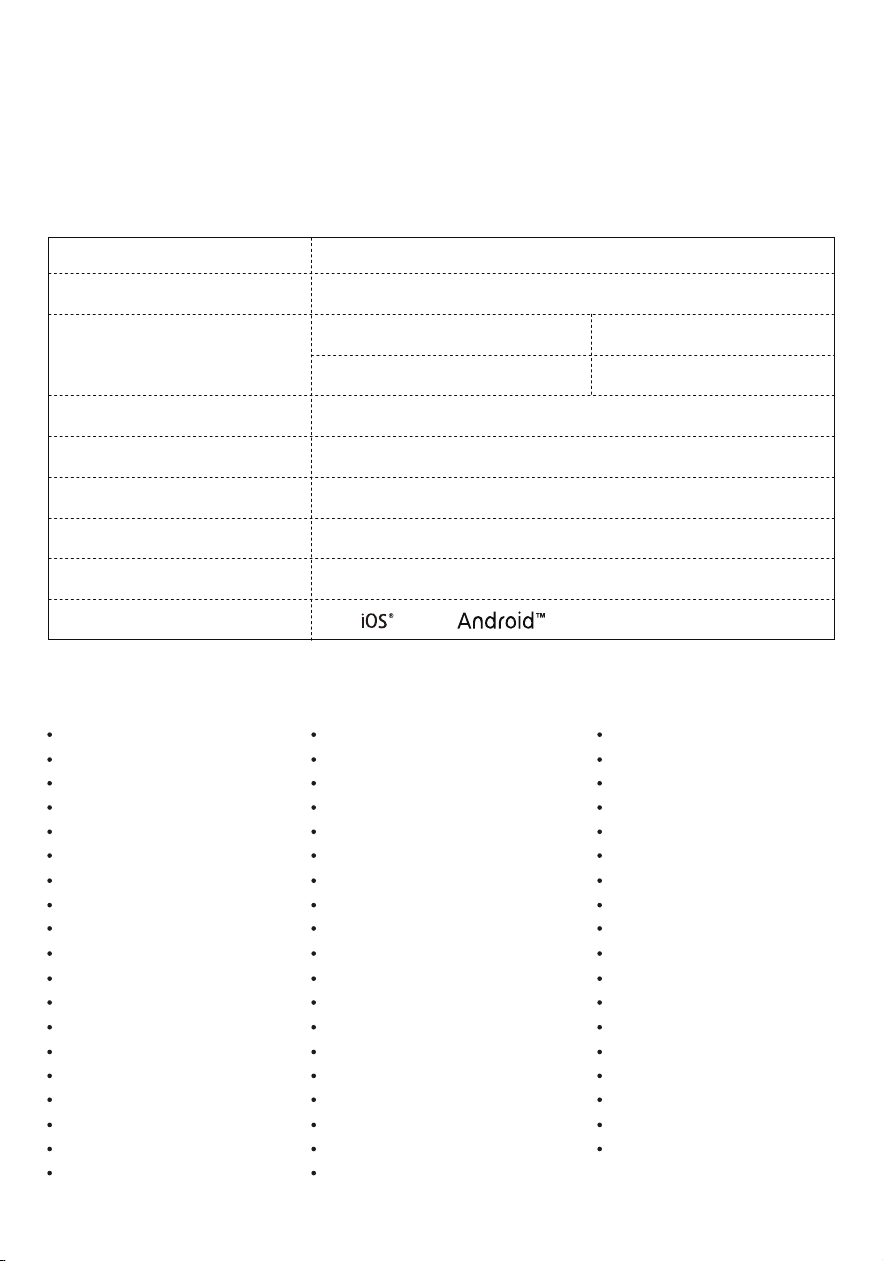
Package Contents
1 x Smart Body Fat Scale
4 x 1.5V AAA Batteries
1 X Quick Start Guide
1 x User Manual
Model
Weight Capacity
Weight Units
Platform
Power Supply
Dimensions
Weight
Operating Systems
Increments
VFS765
450lb / 205kg / 32st
0.2 lb ≤ m < 22 lb
22 lb ≤ m < 450 lb
lb / kg / st:lb
6mm Tempered Glass
4 x 1.5V AAA Batteries
11.8 x 13.2 x 1.6 in / 300 x 334 x 41mm
4.0lb /1.8 kg
12.0+ / 7.0+
D = 0.05 lb / 0.02 kg
D = 0.1 lb / 0.05 kg
Specifications
Product functions
Weight
Bone Mass
Fat-Free BodyWeight
BMR
Muscle control
Fat mass
Subcutaneous fat mass
Body cell mass
Body fat rate
Minerals
Left arm fat mass
Trunk muscle mass
Left leg fat mass
Fat control
Body Type
Health score
Left arm muscle rate
Right foot muscle rate
Trunk muscle rate
Body Fat
Muscle Mass
Subcutaneous Fat
Skeletal Muscles
Metabolic Age
Total body water
Recommended calorie intake
Muscle rate
Right arm fat ratio
Extracellular water
Right leg fat ratio
Right arm muscle mass
Trunk fat mass
Right leg muscle mass
ldeal Weight
Obesity level
Skeletal muscle quality index
Left foot muscle rate
Standard weight
BMI
Body Water
Visceral Fat
Protein
Weight Control
Protein mass
Skeletal muscle mass
Left arm fat ratio
Intracellular water
Left leg fat ratio
Left arm muscle mass
Right arm fat mass
Left leg muscle mass
Right leg fat mass
Adipostiy level
Health evaluation
Waist-hip Ratio
Right arm muscle rate
- 1 -

•
•
Batteries
Do not mix new and old batteries.
If the scale is not in use for a long period of time, remove the batteries to
extend the lifetime of the scale.
•
•
•
Medical
This scale should not be used to diagnose or treat any medical condition.
Scale data should not be used as a substitute for medical advice from a
healthcare professional.
This scale uses a harmless electrical current to measure body fat. Consult a
healthcare professional before using the smart scale if you use electronic
medical equipment such as a pacemaker.
•
•
•
•
•
•
•
•
•
•
•
•
General Use
Check the scale before using. Do not use the scale if it is damaged in any way.
Do not strike or bang on the scale and do not use the scale if there is a slight
crack on the glass. Due to the nature of tempered glass, the glass will shatter if
there is a slight crack. If you see a crack, contact Customer Support (see page 14).
The glass platform is slippery when wet. Always make sure the platform and
your feet are dry before stepping onto the scale.
Place the scale on a hard, flat surface.
To weigh safely and accurately, stand with your feet shoulder width apart while
on the scale. Do not stand on the edge of the scale or jump on the scale.
Avoid standing on the scale for a long period of time.
Do not overload the scale. Maximum weight capacity is 450 lb / 205kg / 32st.
Keep the scale in a cool area with low humidity. Keep the scale away from heat
sources, such as ovens or heaters.
Store the scale horizontally, not vertically.
For household use only. This scale is not intended for commercial use.
Handle with care.
Please read and follow all instructions and safety guidelines in this manual.
Safety Information
- 2 -
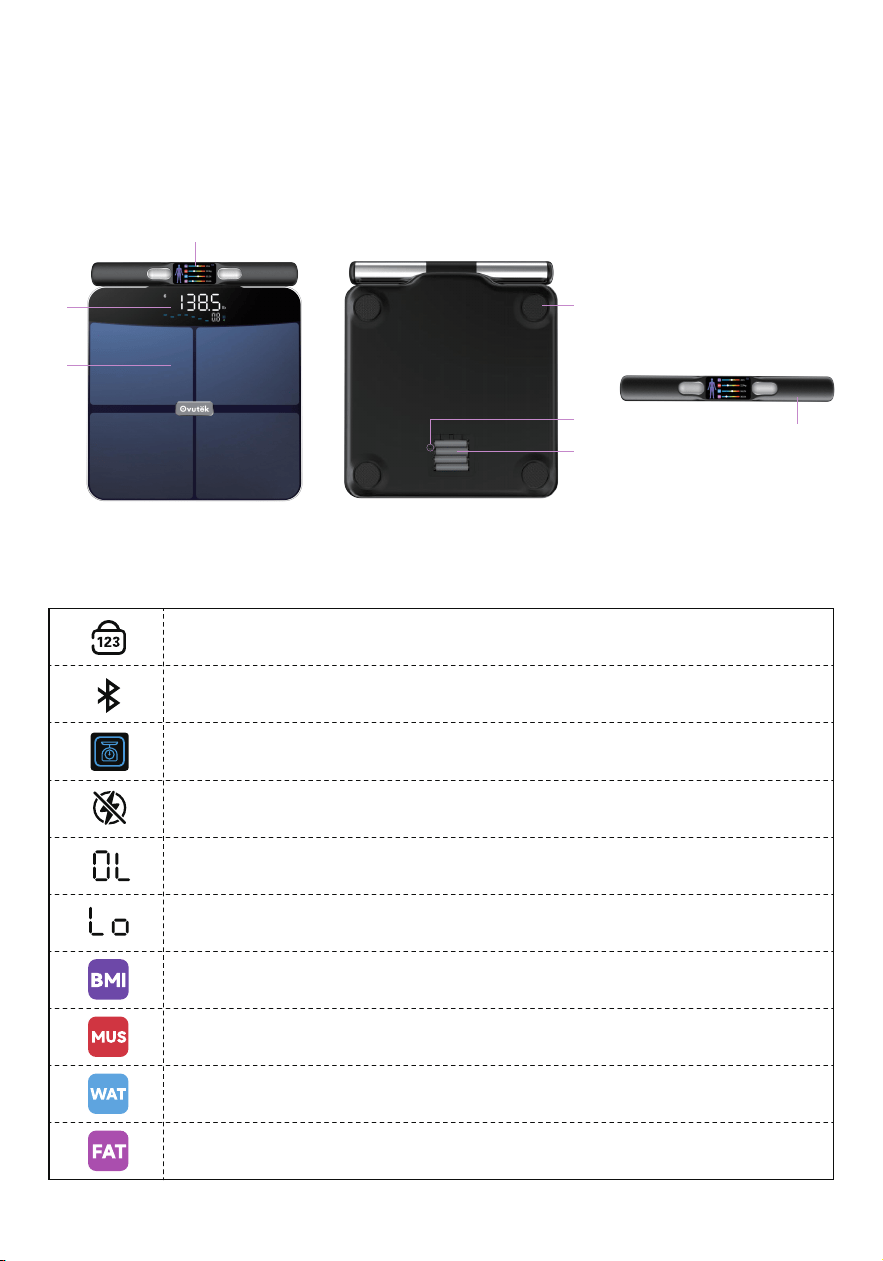
Function Diagram
Conductive Areas
Anti-Skid Padding
Conductive Handles
A.
D.
G.
LED Display
Reset Button
B.
E.
TFT Display
Battery Compartment
C.
F.
Display Icons
No-Number mode activated (Hides body measurement numbers
displayed on scale).
Connection enabled for phone app syncing.
Weight difference record identifier
Zero-Current Mode activated (Electric current disabled. Scale will
only measure weight and BMl).
Overload.Weight exceeds 457.5lb/207.5kg
Not enough power (Need change batt
eries)
BMI (Body Mass Index) is a widely used measure of body fat based
on height and weight.
Muscle mass refers to the total amount of muscle in the human body,
including skeletal muscle, myocardial muscle, and smooth muscle.
Body Water is the percentage of total body weight made up of water.
Body fat rate refers to the percentage of adipose tissue in the human
D
G
B
A
C
E
F
- 3 -
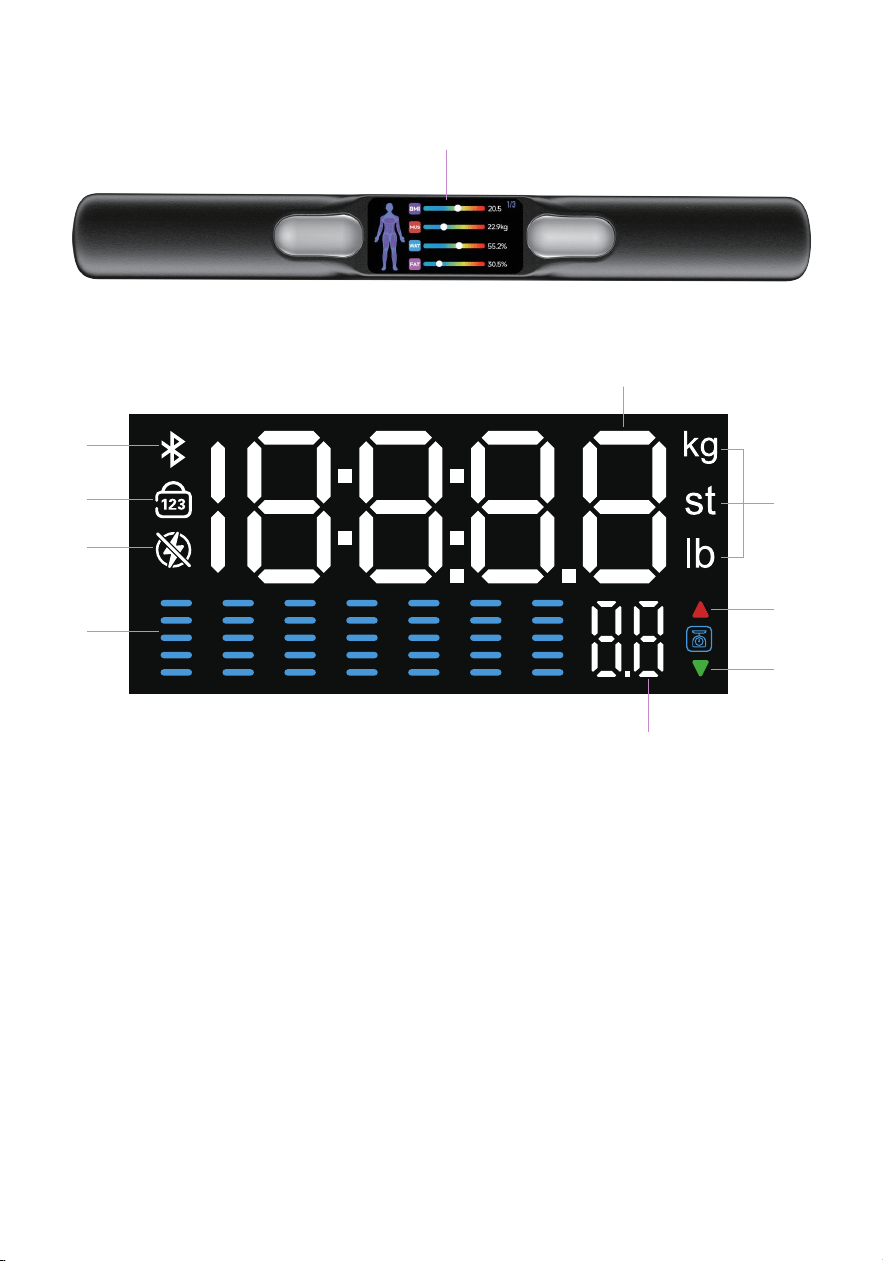
Display-Diagramm
Bluetooth
No-Number
TFT Display:BIA measurement
and results display
Zero Current Mode
Weight Trends
B.
C.
A.
B
F
A
G
H
I
J
C
D
E
D.
E.
Units of measurement:lb/kg/st:lb
Increase Button
G.
H.
Decrease in latest data
I.
Weight change from last
measurement
Weight
J.
F.
- 4 -
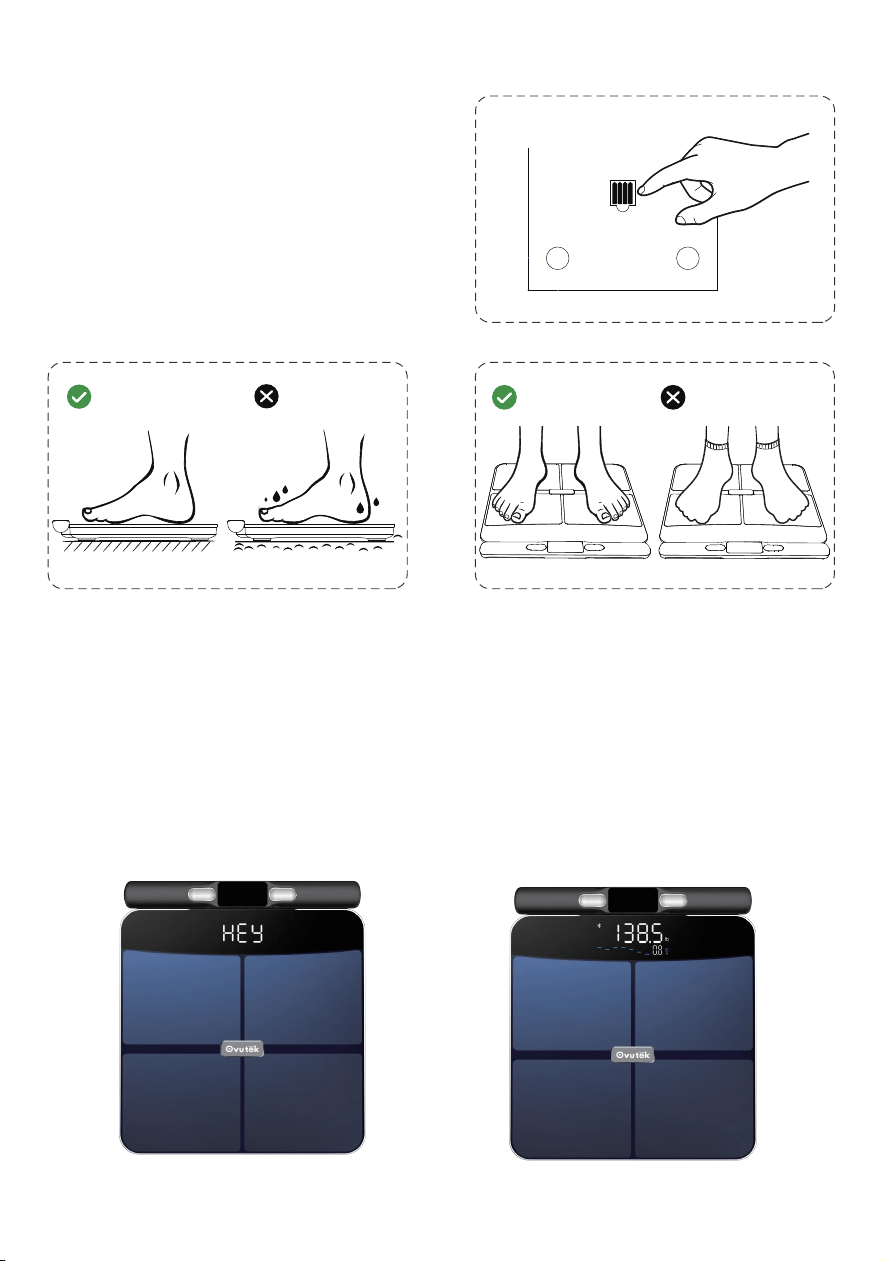
We offer both weighing and BIA measurement modes on this scale to enable
quick and easy use..
Weighing Mode:
We've designed the scale so you can weigh yourself without pulling out the
handles for BIA. The current won't activate, giving you a quick, safe reading
—just the weight.
Before Using
Getting Started
2.
Place the scale on a flat floor.Slippery
when wet ! Do not step on scale with
wet feet.
3.
Step barefoot on the conductivearea
of the scale to accurately measure
body composition.
1 .
Install the battery before use, batteries
are in the package.
Figure 1
Figure 3Figure 2
Figure 2
Figure 1
Figure 3
•
- 5 -
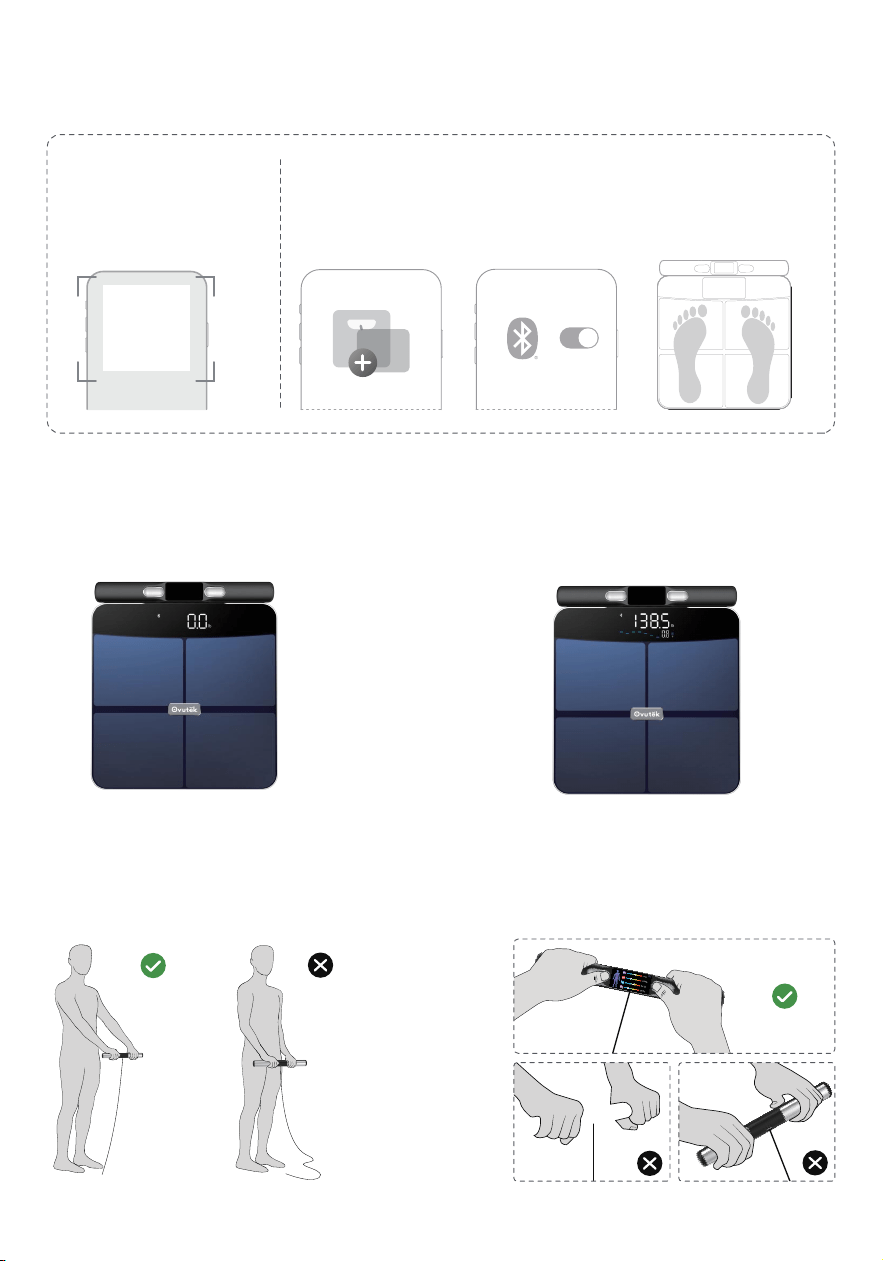
Smart Mode
Ovutek FitPal
Device Managment
Add Device
1 .
2.
3.
Download the Ovutek
FitPal app.
Create an account.
Go to "Devices" and follow
deviceaddition Guidelines.
Step onto the scale to activate
it.When it shows "0.0",stand on
the scale.
When the weight measurement is
complete, the display will flash three
times and show the weight trend.
Tap the "+" buttonin
the app.
Setting
Bluetooth
Ensure the Bluetoothof
your phone is on.
Step on the scale to
activate it.Follow the app
guidelines to complete the
device addition
Step 1: APP Setup
Step 2: Use Device Step 3: Weight Result
Pull out the handles to begin your body
composition measurement.
-Straighten your arms and keep 30°-45°
from your body.
Thumb touching the oval electrode,four
fingers touching the elongated
electrode,with the handle connector wire
facing downwards.
Step 4: Composition Test Step 5: Attention Point 1
- 6 -
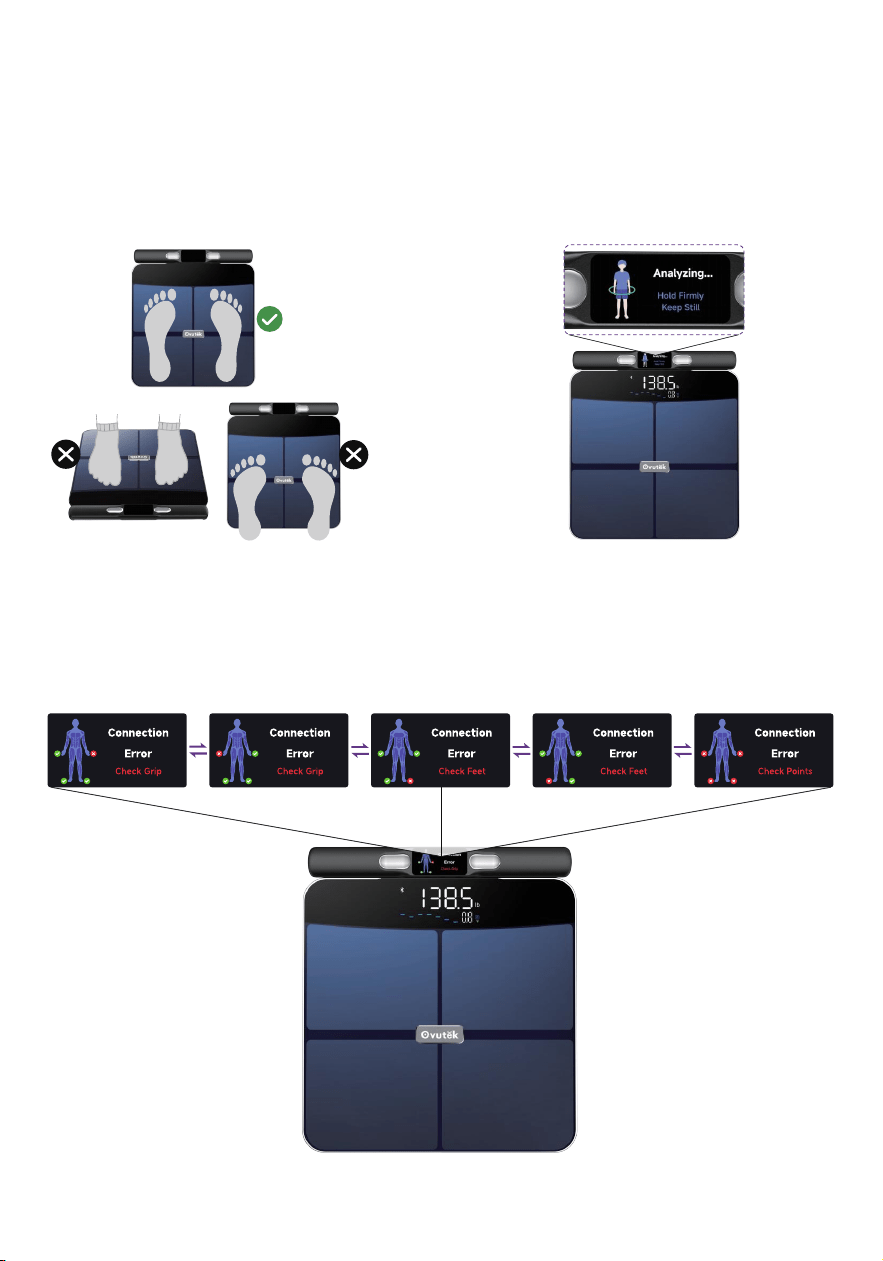
Standing stralght with your feet apart,
make sure soles of feet cover upside
electrodes, and heel cover downside
electrodes.
-Without shoes or socks
Step 6
Error Tips
If an error appears during measurement, check the contact points “X” at the indicated
locations. Ensure they are properly connected, adjust if needed, and retry.
Step 8
Hand and foot contact confirmed. Body
composition analysis is now starting,
indicated by a loading circle on the
display.
- Keep measuring posture for about 10s.
Step 7
- 7 -
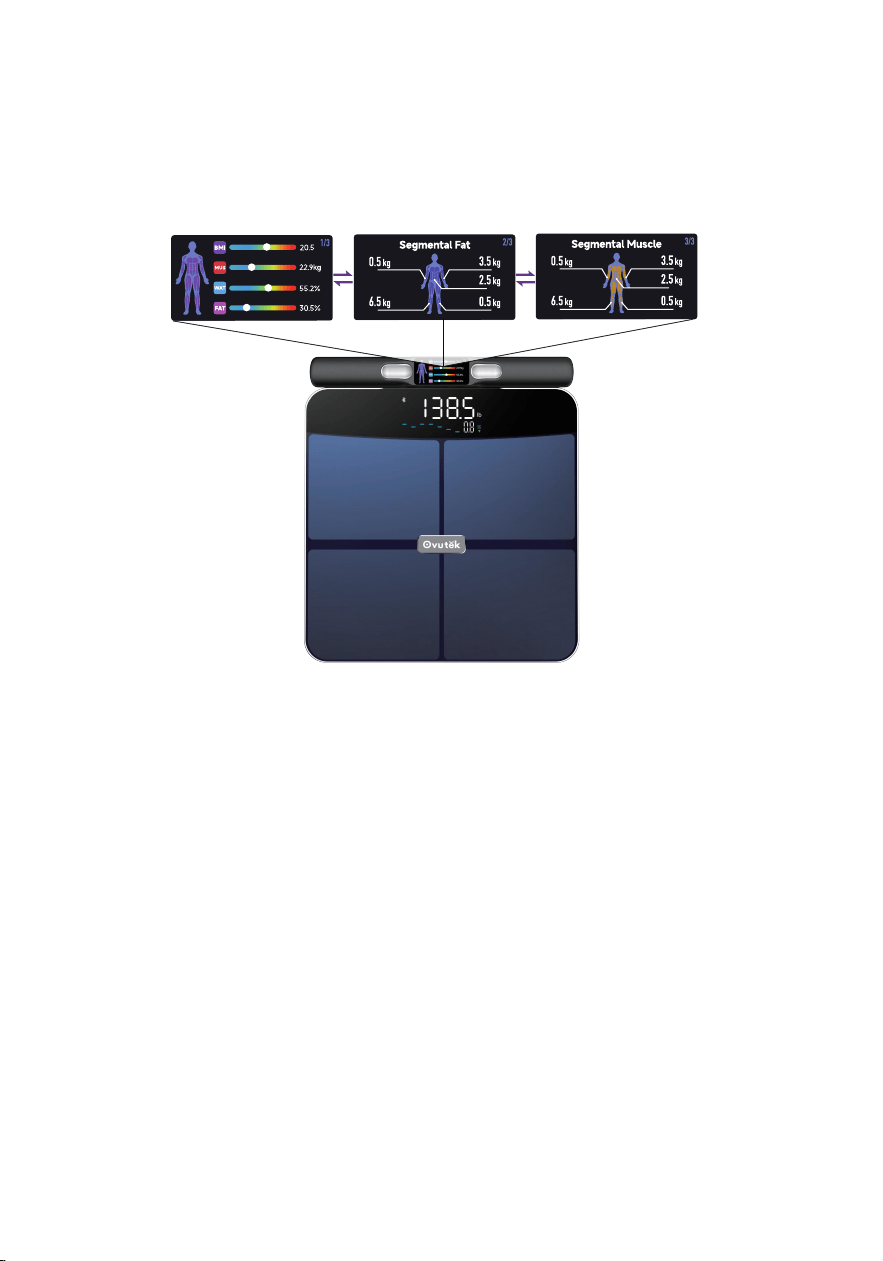
Measurement complete
Your weight appears on the scale display, while body composition metrics are
shown on the handle display.
-For more data, view the full report in the Ovutek Fitpal App.
Step 9
Automatically recognises the user
Weighing without a mobile phone connected, the scale automatically
recognises the user with the closest weight and measures body composi-
tion.
1.
2.
If your weight has changed by more than 2kg (4.4 lbs) or less since your last
weigh-in, the scale may no longer recognise you.
Turning on Ovutek and weighing with the device connected will match the
current user or manually enter your weight data and the device will recog-
nise you again.
•
- 8 -
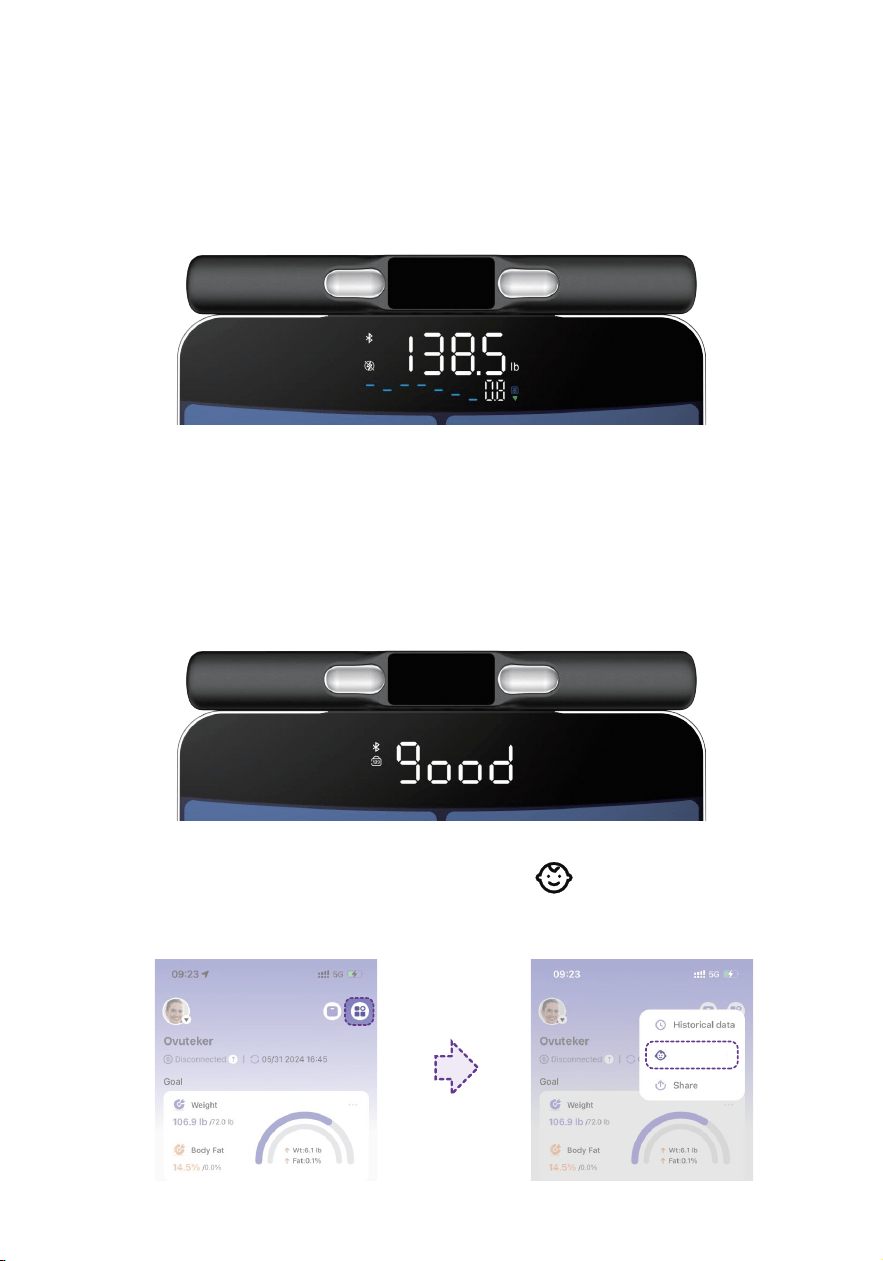
Special Modes
Zero-Current Mode: Suitable for pregnant women or those using implanted
medical devices.
1.
2.
Select Zero-Current Mode in the APP to turn on or off.
When turned on, the current to your scale will be turned off, and your scale
will not be able to calculate body indicators other than weight and BMI.
•
Family Mode: To weigh your baby or pet, tap and follow the in-app instruc-
tions for weighing. Baby Mode will not measure other body metrics and will only
measure weight and BMI.
•
No-Number Mode: Hides numerical body measurements from appearing
on your scale.It allows you to focus on overall weight trends rather than
numbers.
1.
2.
Select No-Number Mode in the APP to turn on or off.
When turned on, Your scale will still measure all your vitals and you'll be able
to find them in the app.
•
step1
step2
Family Mode
- 9 -
Cleaning the Scale
1.
2.
Use a slightly damp cloth to clean the surface of the scale, followed by a soft,
dry cloth to wipe away the remaining moisture.
Do not use chemical or abrasive cleaning agents to clean the scale.
Troubleshooting
Problem Possible Cause Solution
Scale does not
turn on.
Battery not installed
or incorrectly
installed.
Get the included battery from the
package and install it by matching
the + and - terminals according to
the guide in the battery box.
Batteries are dead.
Replace the batteries. See Replacing
the Batteries (page 10).
Scale program error.
Press and hold the reset button for 3
seconds.(Reset button is inside the
battery compartment)
Unable to
measure body
composition
Make sure you are barefoot and
standing on the conductive area of
the scale.
Wearing socks/shoes
or not touching
conductive areas.
1.
2.
3.
4.
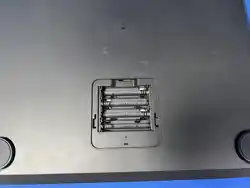
Open the battery compartment on the underside of the scale.
Remove the old batteries and dispose of them properly.
Install 4 new 1.5V AAA batteries. Make sure the polarities match.
Close the battery compartment, place the scale on a hard, flat surface.
•
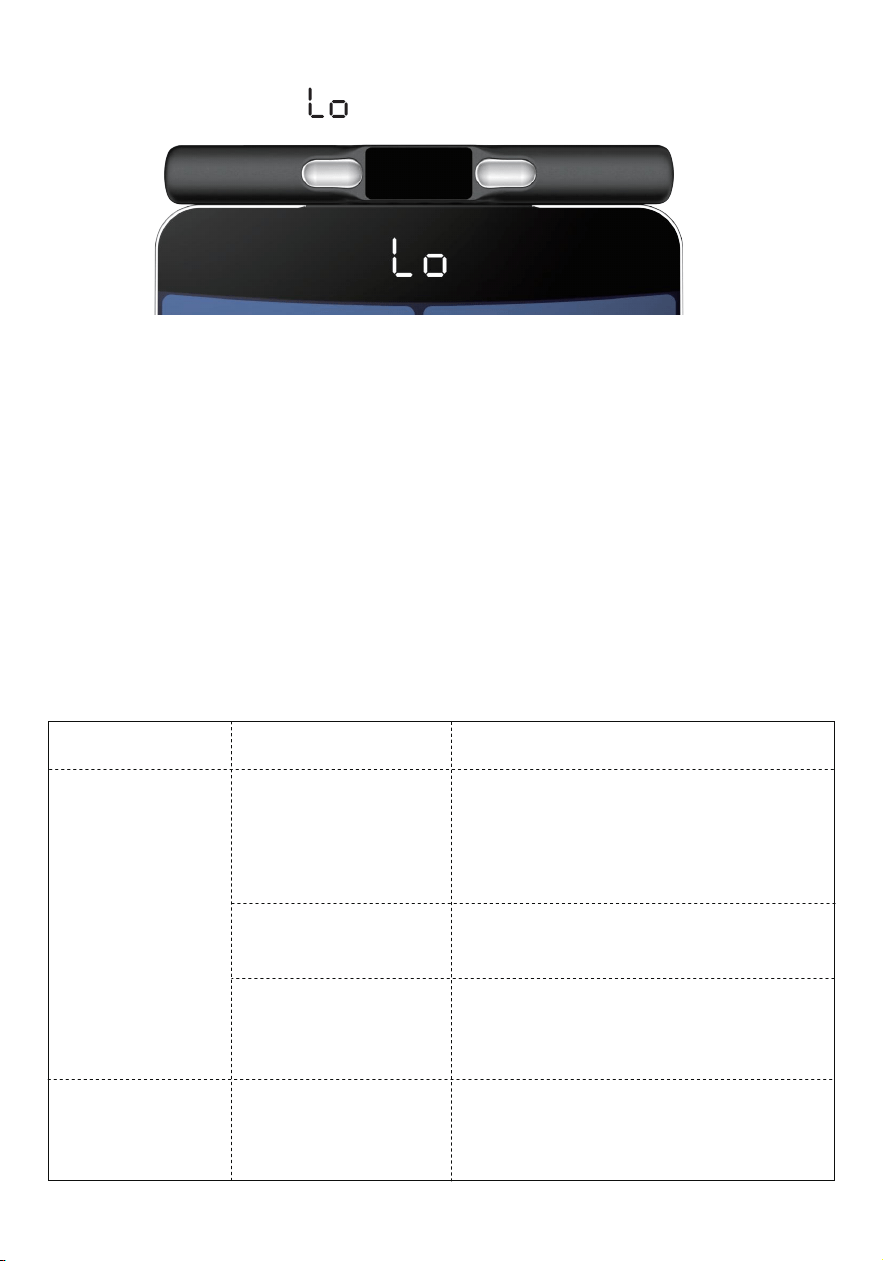
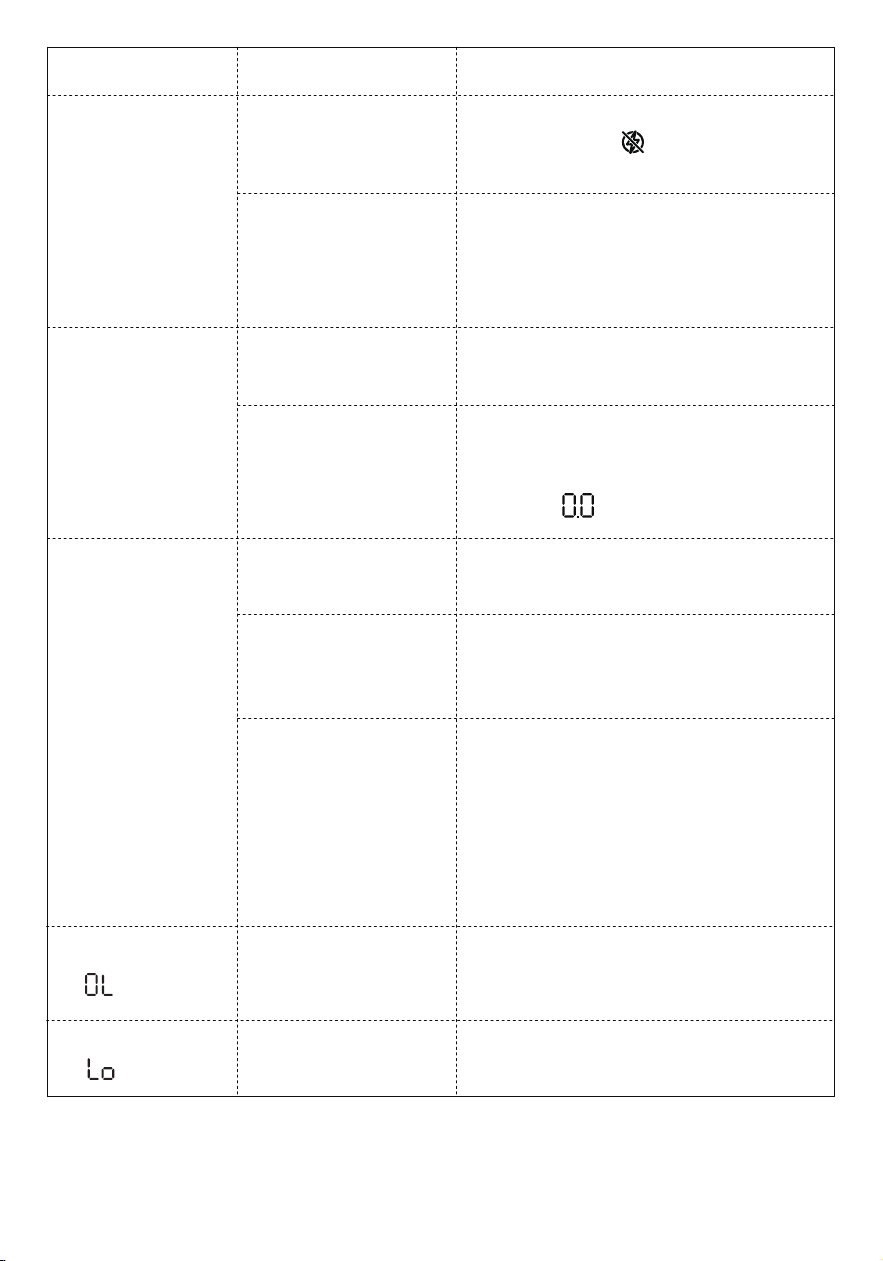
The display will show when the batteries need to be replaced.
Replacing the Batteries
- 10 -
Scale was not
cleared properly.
Problem Possible Cause Solution
Weight exceeds
457.5lb/207.5kg
Remove weight from the scale.
Use a different scale with a higher
weight range.
Wearing
socks/shoes.
Make sure you step on the scale
barefoot.
Incorrectly filled in
user information
Make sure your profile information
such as height, gender, and age are
correctly filled within the Ovutek App.
The data matches
the wrong user
The scale will automatically match
the user with the closest weight and
measure body composition, please
check if there are users with similar
weight in the App.
See Automatically recognises the
user (page 8).
Not enough power.
Replace the batteries. See Replacing
the Batteries (page 10).
Inaccurate
body composi-
tion reading.
If your problem is not listed, please contact Customer Support (see page 14).
Display shows
.
Display shows
.
Unable to
measure body
composition
Try applying some lotion and
re-measure (Feet that are too dry
may prevent bioimpedance informa
tion from being measured)
Zero-Current Mode
is on.
Feet are too dry or
too wet.
Check the APP Zero-Cueent Mode
switch or see if lights up on the
scale display
Scale is not on a
hard, flat surface.
Place scale on a a hard, flat
surface (not a carpet or mat).
Inaccurate
weight
reading.
Remove the battery and reinstall
it, then place it on a hard surface
and weigh again after the scale
displays .
- 11 -

This device complies with Part 15 of the FCC Rules. Operation is
subject to the following two conditions:
1. This device may not cause harmful interference, and 2.This device must
accept any interference received, including interference that may cause
undesired operation.
NOTE: This equipment has been tested and found to comply with the limits for
a Class B digital device, pursuant to Part 15 of the FCC Rules. These limits are
designed to provide reasonable protection against harmful interference in a
residential installation. This equipment generates, uses and can radiate radio
frequency energy and, if not installed and used in accordance with the instruc-
tions, may cause harmful interference to radio communications. However,
there is no guarantee that interference will not occur in a particular installation.
If this equipment does cause harmful interference to radio or television recep-
tion, which can be determined by turning the equipment off and on, the user is
encouraged to try to correct the interference by one or more of the following
measures:
Reorient or relocate the receiving antenna.
Increase the separation between the equipment and receiver.
Connect the equipment into an outlet on a circuit different from that to
which the receiver is connected.
•
•
•
•
Consult the dealer or an experienced radio/TV technician for help.
FCC ID:2A2VUVFS765
FCC Caution: Any changes or modifications not expressly approved by the party
responsible for compliance could void the user’s authority to operate this equip-
ment.
FCC Radiation Exposure Statement
This equipment complies with FCC radiation exposure limits set forth for an
uncontrolled environment. End users must follow the specific operating
instructions for satisfying RF exposure compliance. To maintain compliance
with FCC RF exposure compliance requirements, please follow operation
instructions as documented in this manual. This transmitter must not be co-lo-
cated or operating in conjunction with any other antenna or transmitter. The
availability of some specific channels and/or operational frequency bands are
country dependent and are firmware programmed at the factory to match the
intended destination. The firmware setting is not accessible by the end user.
- 12 -

Warranty Information
Ovutek warrants this product to the original purchaser to be free from defects
in material and workmanship, under normal use and conditions, for a period of
2 years from the date of original purchase.
Ovutek agrees, at our option during the warranty period, to repair any defect in
material or workmanship or furnish an equal product in exchange without
charge, subject to verifica tion of the defect or malfunction and proof of the
date of purchase.
There is no other express warranty. This warranty does not apply:
•
•
•
•
•
•
•
If the product has been modified from its original condition;
If the product has not been used in accordance with directions and instruc-
tions in the user manual;
To damages or defects caused by accident, abuse, misuse or improper or
inadequate maintenance;
To damages or defects caused by service or repair of the product performed
by an unauthorized service provider or by anyone other than Ovutek ;
To damages or defects occurring during commercial use, rental use, or any
use for which the product is not intended;
To damages or defects exceeding the cost of the product.
Product Name:
Model:
Royyt+ Pro Air Smart Body Fat Scale
VFS765
Order ID:
Date of Purchase:
For your own reference, we strongly recommend that you record your
order ID and date of purchase.
TERMS & POLICY
- 13 -

Ovutek will not be liable for indirect, incidental, or consequential damages in
connection with the use of the product covered by this warranty.
This warranty extends only to the original consumer purchaser of the product
and is not transferable to any subsequent owner of the product regardless of
whether the product is transferred during the specified term of the warranty.
This warranty does not extend to products purchased from unauthorized
sellers. Ovutek ’s warranty extends only to products purchased from authorized
sellers that are subject to Ovutek ’s quality controls and have agreed to follow its
quality controls.
All implied warranties are limited to the period of this limited warranty.
This warranty gives you specific legal rights and you may also have other rights
which vary from state to state. Some states do not allow the exclusion or limita-
tion of incidental or consequential damages, so the above limitation or exclu-
sion may not apply to you.
If you discover that your product is defective within the specified warranty
period, please contact Customer Support via service@ovutek.com. DO NOT
dispose of your product before contacting us. Once our Customer Support
Team has approved your request, please return the product with a copy of the
invoice and order ID.
Every Ovutek product automatically includes a 2-year warranty.
This warranty is made by: Ovutek
If you encounter any issues or have any questions regarding your new product,
please contact our helpful Customer Support Team.
Email: service@ovutek.com
• Please have your order invoice and order ID ready before contacting Customer
Support.
Customer Support
- 14 -

MADE IN CHINA
Contact our Customer Support Team
service@ovutek.com