
1
CATALOGUE
Camera AC adapter kit installation instructions
......................................................................
2
Sony AC-PW20
.......................................................................................................................................
3
Sony AC-FZ100
......................................................................................................................................
3
Canon ACK-E18
.....................................................................................................................................
4
Canon ACK-E12/ACK-E17
..................................................................................................................
4
Canon ACK-E5/ACK-E8/ACK-E10/ACK-E15
.................................................................................
5
Canon ACK/E6
.......................................................................................................................................
5
PANASONIC DMW-DCC12
.................................................................................................................
6
PANASONIC DMW-DCC11
.................................................................................................................
6
PANASONIC DMW-DCC8
...................................................................................................................
7
Nikon EP-5A
...........................................................................................................................................
7
Nikon EP-5B
...........................................................................................................................................
8
FUJIFILM CP-W126
..............................................................................................................................
8
Precautions and after-sale guarantee
...................................................................................
9-10
Kimaru
a total of 10 pages

2
Kimaru camera AC adapter
Operating Instructions
Thank you for purchasing the Kimaru AC Adaptor.Before operating the unit, please read
this manual thoroughly andretain it for future reference.
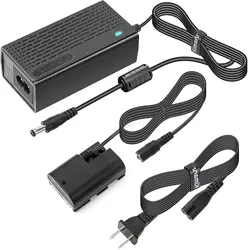
These operating instructions explain how to use the camera AC adaptor
Identifying the parts
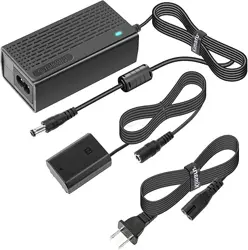
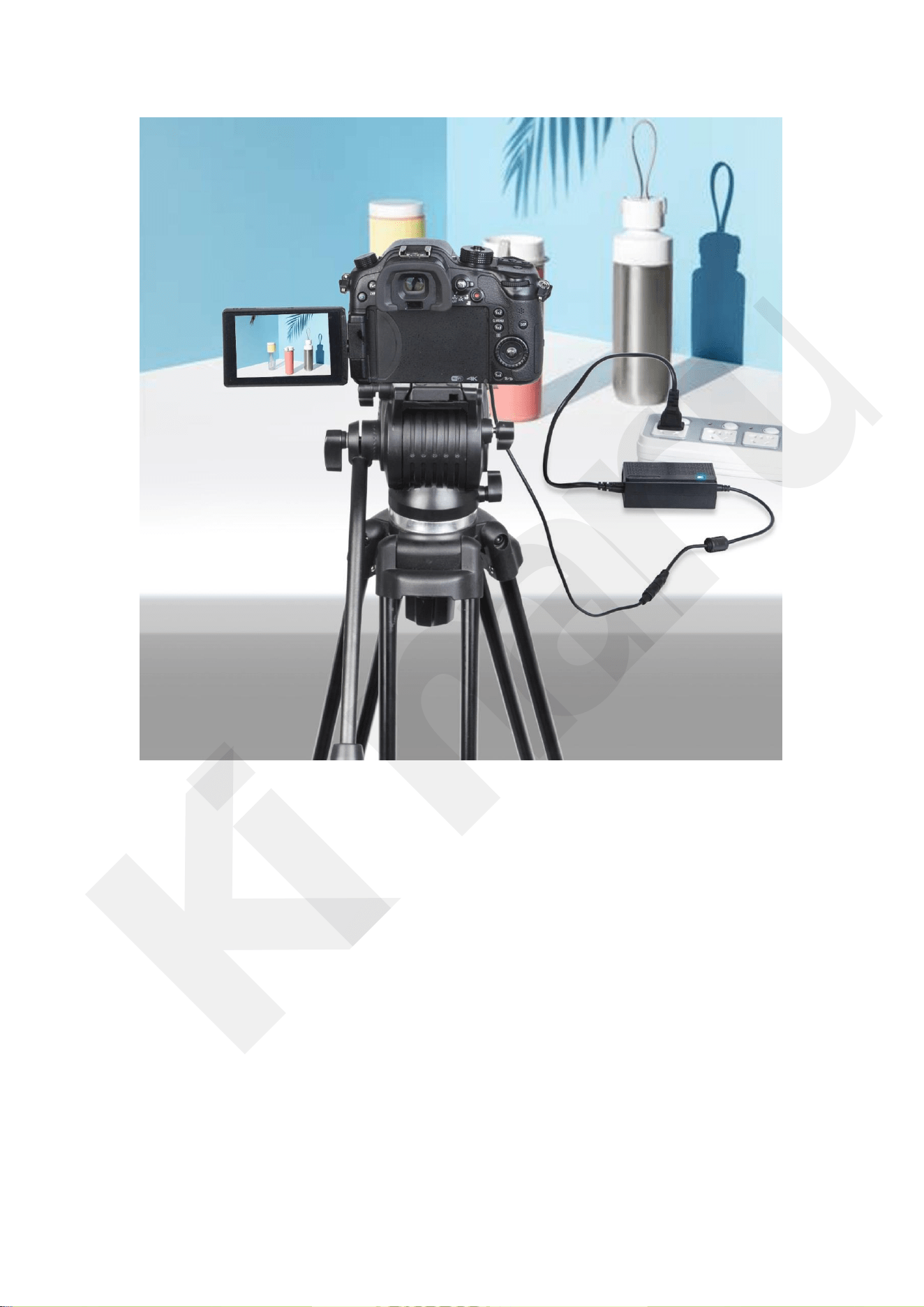
1. AC Adaptor 2. AC Power cord 3. DC coupler
This unit supports worldwide voltages 100 V to 240V,Do not use an electronic voltage
transformer, as this may cause a malfunction.
This power adapter manufactured by Professional OEM factory, all production has
passed many national product quality certifications such as UL CUL CE FCC GS ETL,
Product quality is more stable and durable.
Specifications
Input rating 100 V - 240 V AC 50 Hz/60 Hz
Output rating DC 7.4V / 7.6V / 8V / 8.4V / 9V (Subject to the specifications you buy)
Operating temperature 0 °C to 40 °C (32 °F to 104 °F)
Storage temperature –20 °C to +60 °C (–4 °F to +140 °F)
Dimensions (Approx.) 85mm×42mm×30mm(3.3in.×1.6in.×1.2
in.)/100mm×50mm×30mm(3.9in. × 1.9in.×1.2in.)
(excluding the projecting parts)
Cable length: Approx. 120 mm/4.72q Mass (Weight): Approx. 250 g/0.55 lb
Common installation of cameras DC coulper for your reference(If your
camera model is not shown and you don’t know how to install it correctly,
please email us to consult.)
Kimaru
a total of 10 pages
3
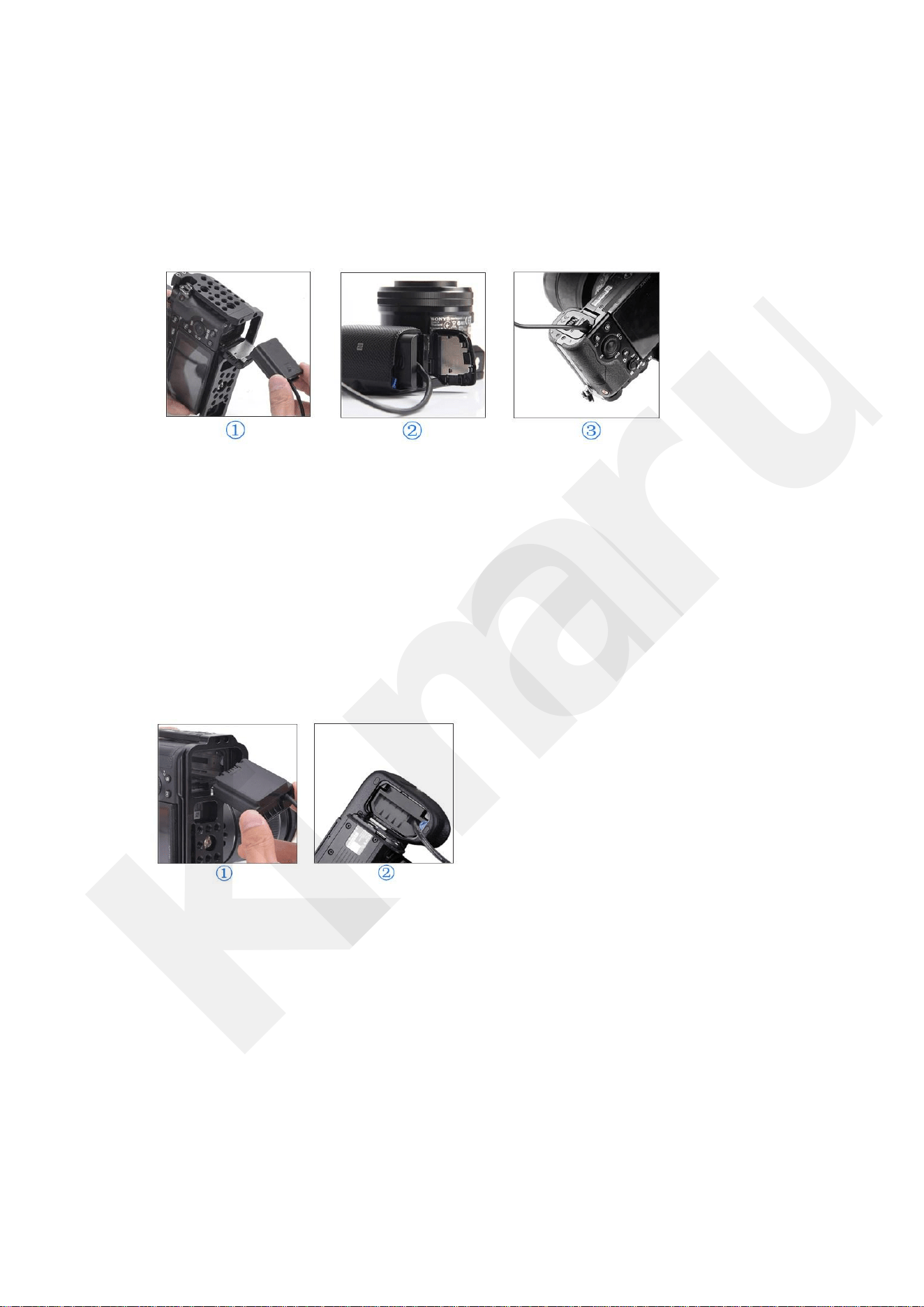
Sony AC-PW20
1.Open the camera battery cover,Find the right direction to Insert PW20 DC
coupler.
2.Pass the dummy battery cable through the slot on the side of the camera
battery compartment
3.Make sure close battery compartment cover
4.Connect to the power adapter,turn on the adapter to power your camera.
Sony AC-FZ100
1.Open the camera battery cover,Find the right direction to Insert NP-FZ100
DC coupler.
2.Pass the dummy battery cable through the slot on the side of the camera
battery compartment
3.Make sure close battery compartment cover
4.Connect to the power adapter,turn on the adapter to power your camera.
Kimaru
a total of 10 pages
4
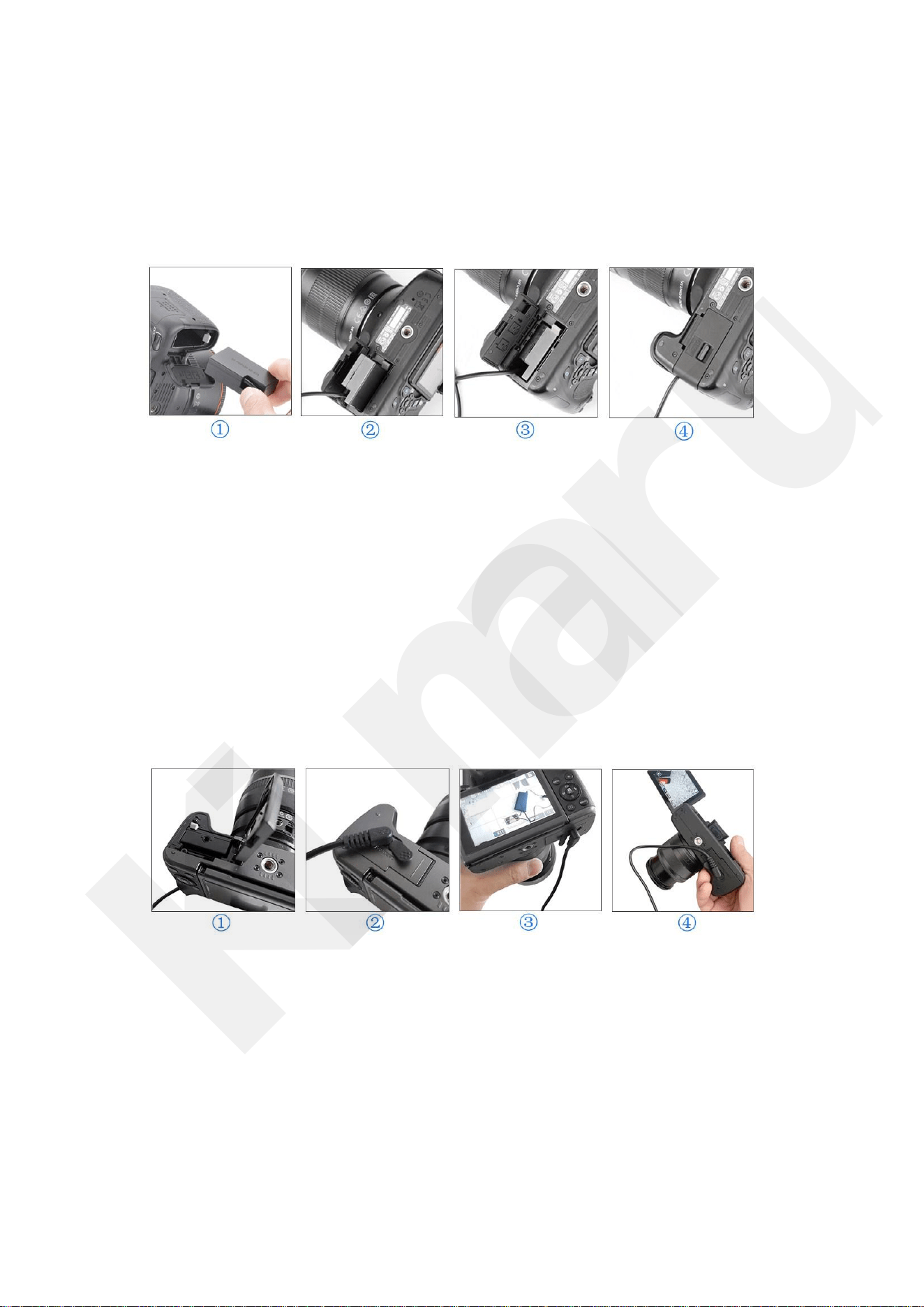
Canon ACK-E18
1.Open the camera battery cover,Find the right direction to Insert DR-E18 DC
coupler.
2.Pass the dummy battery cable through the slot on the side of the camera
battery compartment
3.make sure close battery cove compartment cover.
4.Connect to the power adapter,turn on the adapter to power your camera
Canon ACK-E12/ACK-E17
1.Open the camera battery cover,Find the right direction to Insert
DR-E12/DR-E17 DC coupler.
2.Make sure close battery compartment cover and open the plughole cover
on the top of the battery compartment .
3.As shown in Figure 2,plug in the DC Coulper plug firmly.
4.Connect to the power adapter,turn on the adapter to power your camera
Kimaru
a total of 10 pages
5
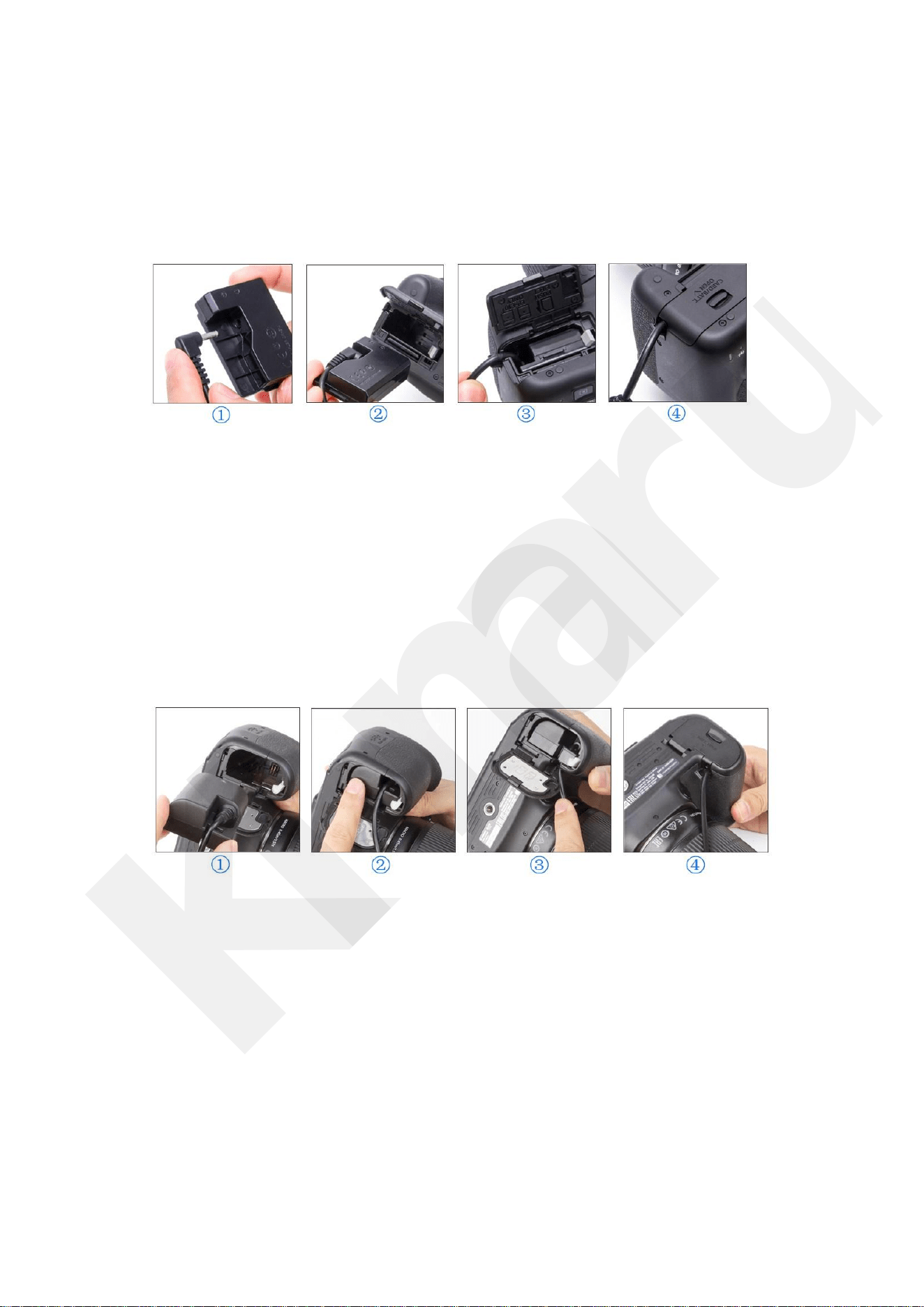
Canon ACK-E5/ACK-E8/ACK-E10/ACK-E15
1.As shown in Figure 1,plug in the DC Coulper plug firmly.
2.Open the camera battery cover,Find the right direction to Insert
DR-E8/DR-E10/ DR-E5/ DR-E15 DC coupler.
3.Pass the dummy battery cable through the slot on the side of the camera
battery compartment and make sure close battery compartment cover.
4.Connect to the power adapter,turn on the adapter to power your camera.
Canon ACK/E6
1.Open the camera battery cover,Find the right direction to Insert DR-E6 DC
coupler.
2.Pass the dummy battery cable through the slot on the side of the camera
battery compartment.
3.make sure close battery compartment cover.
4.Connect to the power adapter,turn on the adapter to power your camera.
Kimaru
a total of 10 pages
6
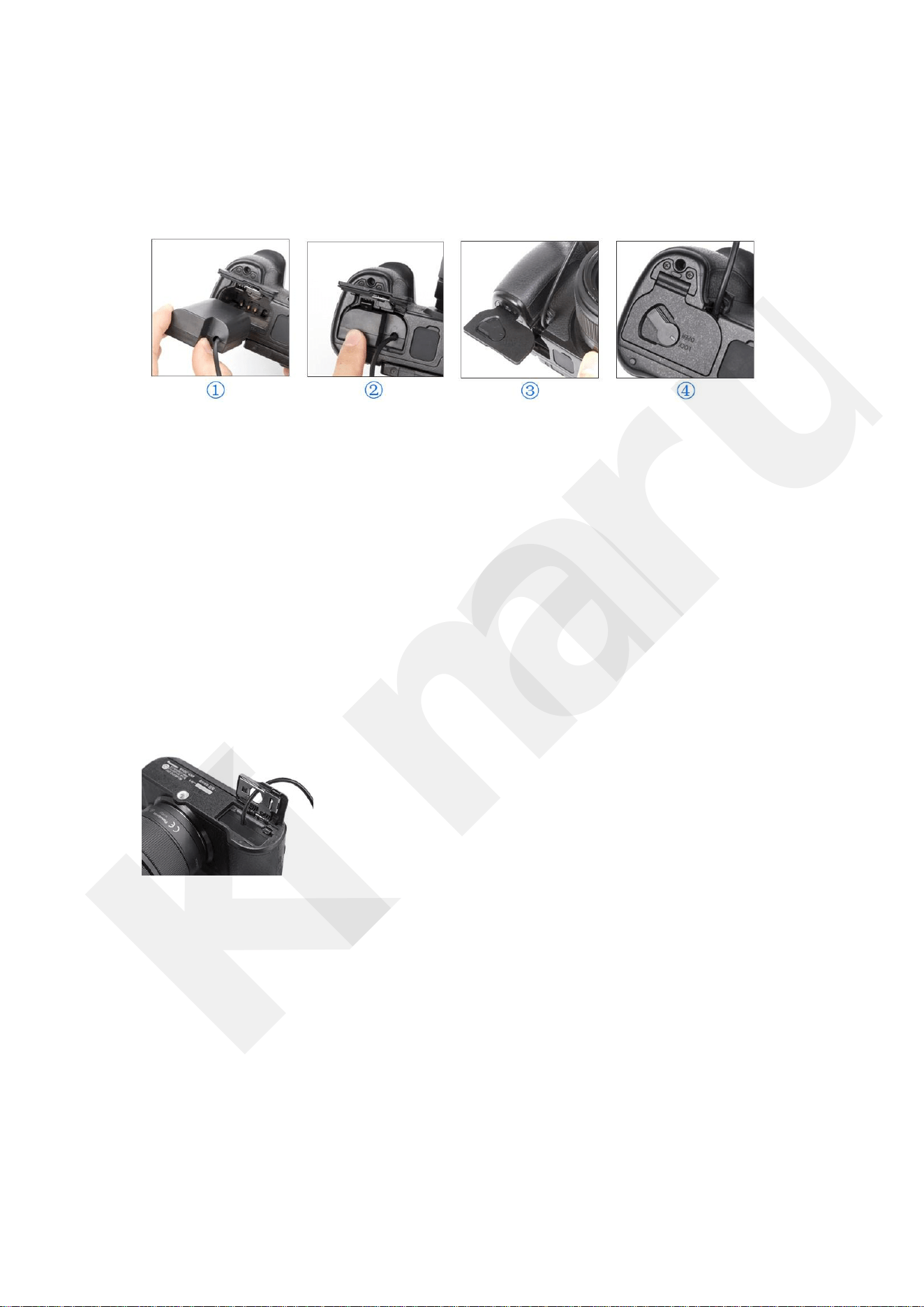
PANASONIC DMW-DCC12
1.Open the camera battery cover,Find the right direction to Insert
DMW-DCC12 DC coupler.
2.Pass the dummy battery cable through the slot on the side of the camera
battery compartment .
3.make sure close battery cove compartment cover.
4.Connect to the power adapter,turn on the adapter to power your camera.
PANASONIC DMW-DCC11
1.Open the camera battery cover,Find the right direction to Insert
DMW-DCC11 DC coupler.
2.Pass the dummy battery cable through the slot on the top of the camera
battery compartment .
3.make sure close battery cove compartment cover.
4.Connect to the power adapter,turn on the adapter to power your camera
Kimaru
a total of 10 pages
7
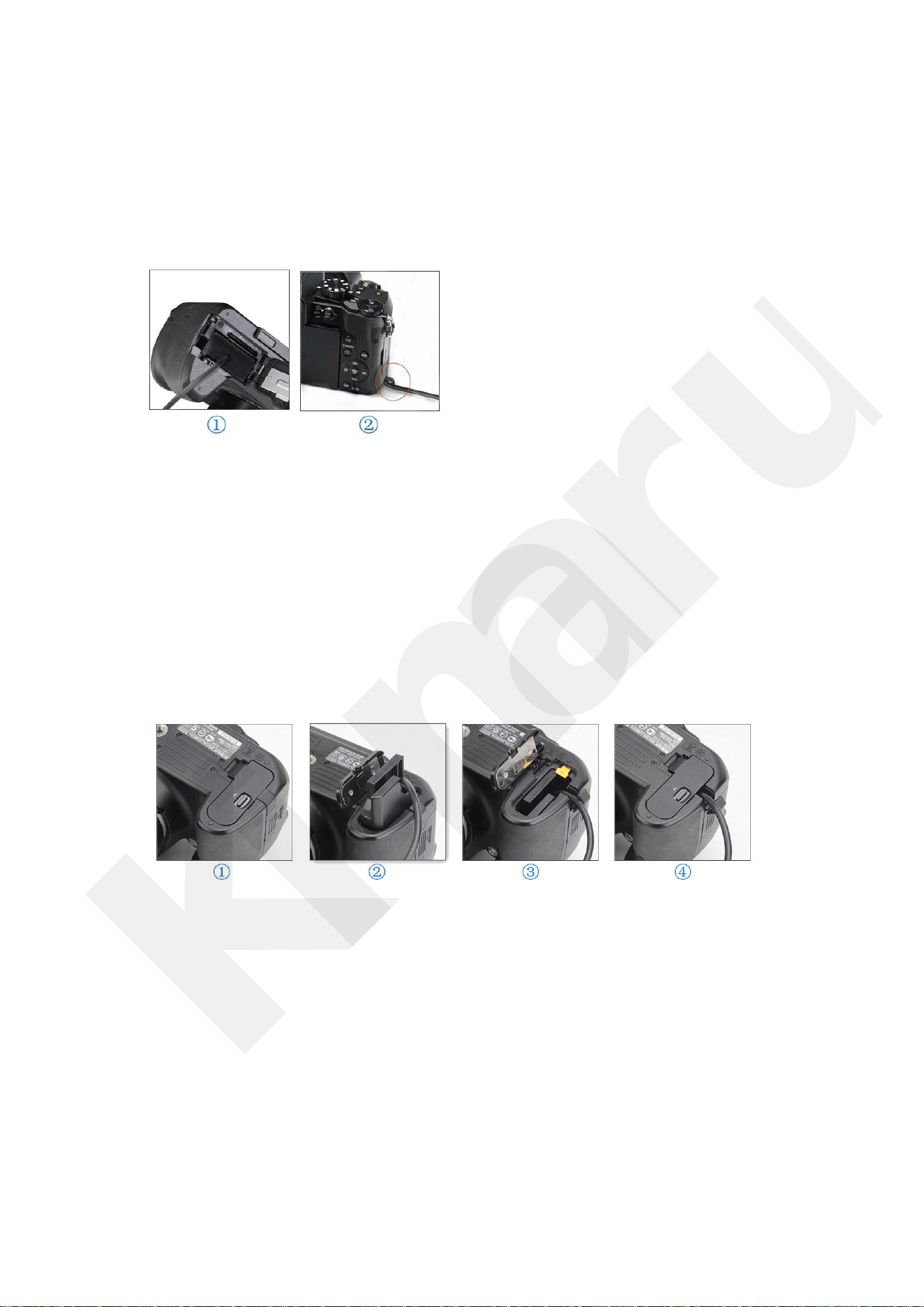
PANASONIC DMW-DCC8
1.Open the camera battery cover,Find the right direction to Insert DMW-DCC
8 DC coupler.
2.Pass the dummy battery cable through the slot on the side of the camera b
attery compartment .
3.make sure close battery cove compartment cover.
4.Connect to the power adapter,turn on the adapter to power your camera.
Nikon EP-5A
1.Open the camera battery cover,Find the right direction to Insert EP-5A DC
Coupler.
2.Pass the dummy battery cable through the slot on the side of the camera
battery compartment and make sure close battery cover.
3.Connect to the power adapter,turn on the adapter to power your camera.
Kimaru
a total of 10 pages
8
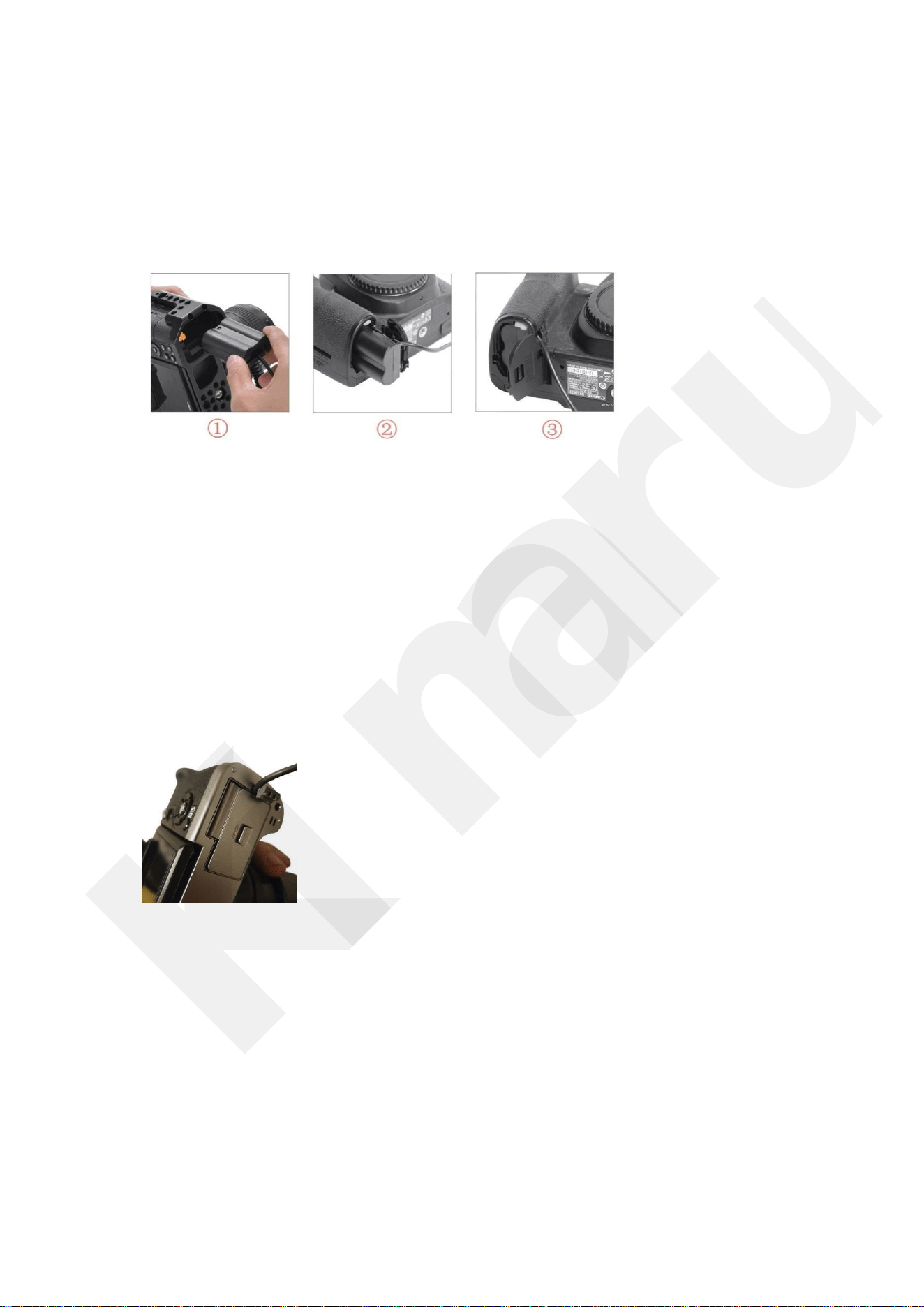
Nikon EP-5B
1.Open the camera battery cover,Find the right direction to Insert EP-5B DC
coupler.
2.Pass the dummy battery cable through the slot on the side of the camera
battery compartment and make sure close battery cover.
3.Connect to the power adapter,turn on the adapter to power your camera.
FUJIFILM CP-W126
1.Open the camera battery cover,Find the right direction to Insert CP-W126
DC coupler.
2.Pass the dummy battery cable through the slot on the side of the camera
battery compartment and make sure close battery cover.
3.Connect to the power adapter,turn on the adapter to power your camer.
Kimaru
a total of 10 pages
9
Matters Needing Attention
1.If the shape of the plug does not fit the power outlet, use an attachment plug adaptor of
the proper configuration for the power outlet.
2.The apparatus shall not be exposed to dripping or splashing and that no objects filled
with liquids, such as vases, shall be placed on the apparatus.
3.The set is not disconnected from the AC power source (mains) as long as it is
connected to the wall outlet, even if the set itself has been turned off.
4. If the DC coupler is not necessary, then remove it from the AC adaptor and the digital
camera.
5. The camera becomes warm during use. This is not a malfunction.
6.Disconnect the AC Adaptor from the wall outlet (wall socket)immediately if any
malfunction occurs while using your Digital Single Lens Reflex Camera
7.Do not place the unit in a location where it is:
– Extremely hot or cold
Kimaru
a total of 10 pages

10
– Dusty or dirty
– Very humid
– Vibrating
8. Unplug the unit from the wall outlet if it will not be used for extended period of time. To
disconnect the cord, pull it out by the plug. Never pull the cord itself.
9. Do not operate the unit with a damaged cord or if it has been dropped or damaged.
10. Always keep the metal contacts clean.
11. Do not disassemble or convert the unit.
12. Do not apply mechanical shock or drop the unit.13. Keep the unit away from AM
receivers, because it will disturb AM reception.
After-sale guarantee
If your product does not work properly due to material or workmanship
defects
a: replace it with a new
b:refund your purchase price
If you have any difficulties, please unplug the power plug and contact us.
Kimaru
a total of 10 pages