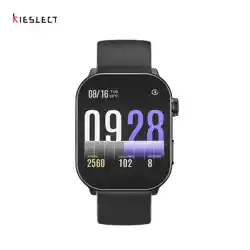

Kieslect Sma Watch
Balancs Series User Manual
Get the manual
in more languages

NOTES:
1. The company resees the right to modify the contents of this manual
without any fuher notication. It is normal that some functions may va
in ceain versions of software.
2. Please refer to this manual before using the product.
3. Before using this watch, you need to connect the APP to synchronize
the time and set your personal information.
4. This product suppos IP68 rank waterproof, not suitable for
swimming and deep sea diving. Hot water, tea and other corrosive
liquids are destructive to the watch, and will not be able to enjoy the
product warranty and free maintenance seices.
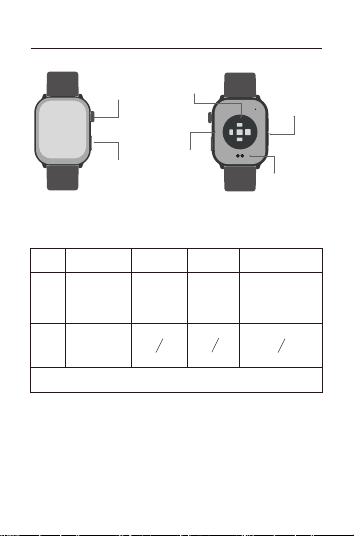
Once Press Double Press Long Press
Tips:
1. Charge for no less than 2 hours before use. Please use the correct
charging adapter of 5V 0.5A or above;
2. If the watch cannot be turned on after a long time,please wipe the
charging contacts of the charging cable clean when using it again to
avoid sweat or water residue.
Revolve
Upper
button
Down
button
Button Functions
01 Appearance & Charging
Item
* Please scan the QR code on the cover to view the specic button functions.
Down
Button
Upper
Button
Charging
Po
Microphone
Hea Rate
Sensor Area
Speaker
Light up /
Turn o screen
/ Back
Power on /
Power o
Changing watch face
/ Page up and down
/ Brightness and
Volume adjustment
Light up the
screen / Workout
SOS
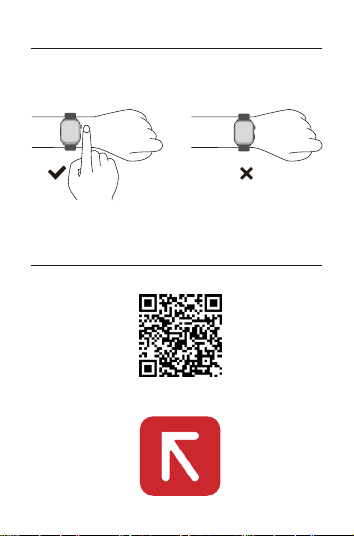
03 Download and Connect APP
03.1 Scan QR code
03.2 Install “Kstyle OS”APP
02 How To Wear
Please wear the device correctly on your wrist, about one nger from
your wrist bone, and adjust it to a comfoable position.
The pictures below are for reference.
Tip: Incorrect wear may result in inaccurate health test data.
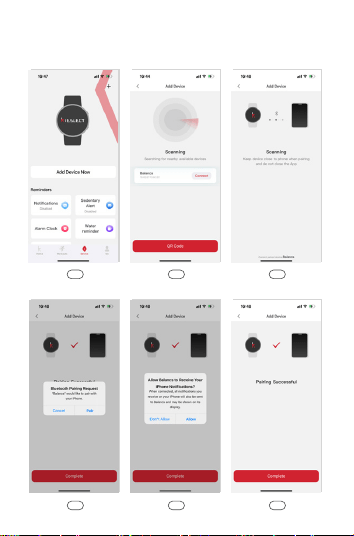
03.3 Open App, Click “ Add Device Now ” - Click to connect. - Click
“ Pair ” to connect with Audio Bluetooth.
060504
030201
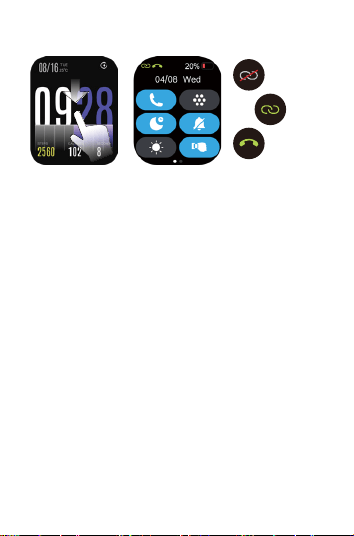
03.4 Check Connection Status
APP
disconnect
*Using BT call and playing music feature on the watch must be
successfully connected to audio Bluetooth.
For more information on setting up and using the watch, please visit:
https://www.kieslect.com/guide/user-manual/
APP
connected
BT call
connected
Tips:
1. Please upgrade the App to the latest version for a better experience.
2. The App is compatible with Andorid 6.0 and iOS 13.0 and above
systems.
3. When connecting to Android for the rst time, a "permission"
reminder will pop up. Please follow the guide and allow the permission
to ensure that all functions are used normally.
4. To connect successfully, open the phone's Bluetooth, GPS, and
network.
5. If the device cannot be searched or connected during use,please
ret after reboot or reset the device.
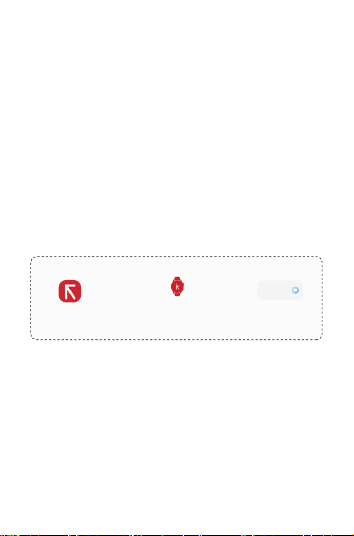
6. If you need to use functions such as message push, please make sure
the App switch is on. The specic operation is as follows.
Open “ Kstyle OS” Select the “Device” Click “ Disabled”
Device
Notification
Disabled
04 Operational Instructions
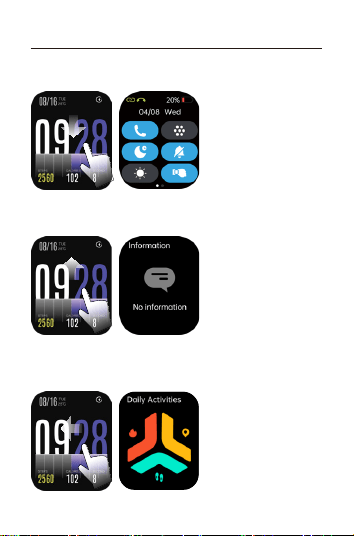
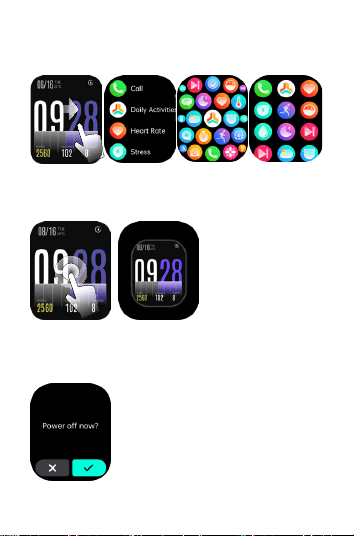
3. Custom Card: Swipe left from the main dial to display the custom
application card, including activity data, one-key measurement,
common exercise, sleep, weather, and music by default.
2. Message Center: Slide up from the main dial to the message center
and down to return.
1. Control Center: Slide down from the main dial to the control center
and up to return.
6. Power on/o: Press the rotating button for 3 seconds.
5. Quick Dial Change: Long press the main dial to enter the selection.
4. Open the main menu: Slide the main page from left to right to enter
the list theme inteace. You can switch between 3 theme styles (list,
honeycomb, and square) in the Settings-Theme inteace.
05 Function Introduction
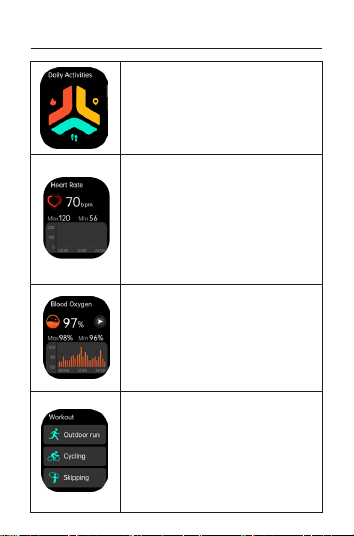
Blood Oxygen
Test the blood oxygen value; monitor and save
data eve ten minutes, more detailed information
analysis and data records can be viewed in the
APP. (The value is for reference only and cannot
be used as a medical basis).
Daily Activities
Record steps, distance, calories for the day. More
detailed information analysis and data records can
be viewed in the APP.
Hea Rate
Hea rate monitor: measure the current hea rate
value; the watch can record and display the 24h
hea rate value throughout the day, monitor the
hea rate in real time throughout the day, and the
APP saves the average hea rate value eve ten
minutes. More detailed information analysis and
data records can be viewed in the APP. (The value
is for reference only and cannot be used as a
medical basis).
Workout
You can choose from 100 spos modes, and then
you can view detailed spos data in the App.
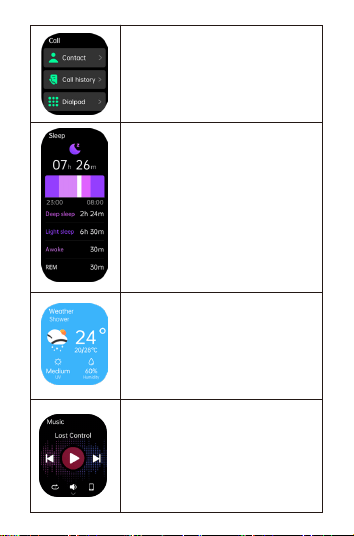
Music
After connecting to the mobile phone, the watch
can control the music play/pause/previous/next
song on the mobile phone, and the volume can
be adjusted.
Sleep
Record and display the total sleep duration, deep
sleep and light sleep duration of the previous
night. More detailed information analysis and
data records can be viewed in the APP.
Call
Dial Pad:You can enter a phone number and call.
Call Logs: Record your call histo.
Contacts: Contacts can be added synchronously
on the APP.
Weather
Displays the weather conditions and the weather
for the next 3 days.The weather information needs
to be connected to the APP before the data can
be obtained. If the connection is disconnected for
a long time, the weather information will not be
updated.
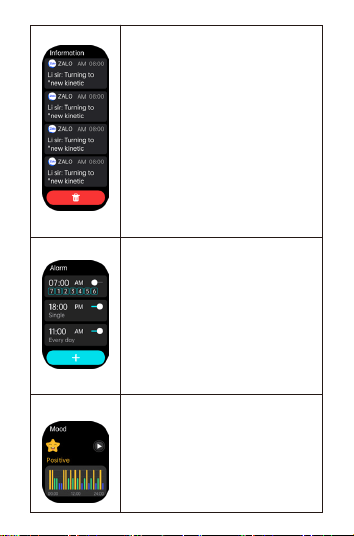
Mood
Test current mood, in app it displays full day 24
hours mood status. More detailed information
and records please check it in app. This value is
for reference only and cannot be used as a
medical basis.
Message
Instant message reminder, 8 latest messages will
be showed.
Alarm clock
8 alarm clocks can be set, watch will vibrate, ring
and display on.
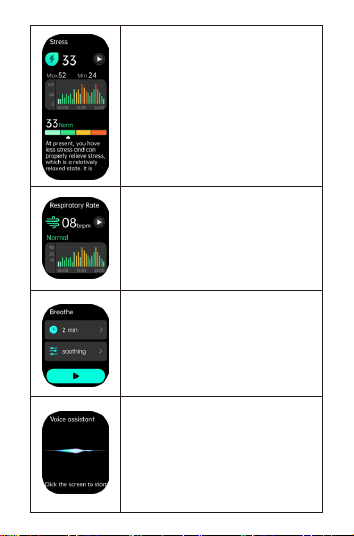
Respirato rate
Measure current Respirato rate.This value is for
reference only and cannot be used as a medical
basis.
Breath training
Set breath rhythm and time, follow instruction
to completed breath training.
AI voice Assistant
Click AI voice function button, speak out wake
up “word” wake-up AI voice assistant (for
example, the wake up word of Xiaomi phone is
“Xiao Ai”), please make sure the bluetooth
function is successfully connected.
Stress
Measure current stress level,in app it records and
display full day 24 hours stress level data,More
detailed information and records please check it
in app. This value is for reference only and cannot
be used as a medical basis.
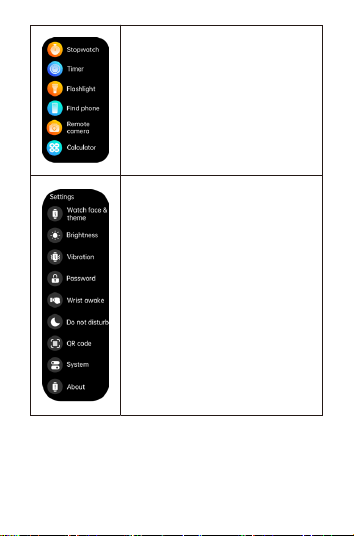
More functions
Stopwatch / Timer / Flashlight / Find phone /
torch / Calculator.
Setting
Watch face & theme / brightness / Vibration /
Sound & vibration / AOD / Password / Do not
disturb / About / QR Code/password lock.
Other functions:
Sedenta reminder、lower batte reminder、incoming call reminder、
shake to take photo、nd watch、watch face/ customized watch face、
12/24h time system、unit setting、turning the wrist to brighten the
screen, physiological cycle reminder、goal achievement reminder.

06 Parameters
07 Warranty
1. The default hardware defect warranty is one year, and the batte and
charging cable are half a year.
2. Defects caused to the following reasons are not free warranty seices:
(1) Self-assemble or disassembly;
(2) Fall and damage during use;
(3) All man-made damage or due to the fault of a third pay, improper use
(such as: sma watch water, external force crushing, scratches in the use
process, etc.);
3. When requiring after-sales seice, please provide the detailed warranty
card;
4. Warranty seices, please contact with the direct dealers;
Please note that all functions of the product are based on physical objects.
BT: 5.2
Screen size: 2.1
Waterproof: IP68
Net weight: 48.9g
Batte type: Polymer
Size: 47.7*39*10.5mm
Charging voltage: 5V
Batte capacity: 300mAh
Working temperature: -10°C~60°C
Tips:
1. The above health data are for reference only and cannot be used as a
medical basis.