1 2 3
To charge your MX Elite mini:
Using the enclosed cable, plug the USB-C connector
into the USB-C port on the speaker and the USB-C
connector into a wall charger (not included). The RED
LED charging indicator light will be on during charging
and turn off when fully charged.
A full charge takes approximately 3 hours.
Connecting/Bluetooth Pairing
1. Make sure the PureBoom MX Elite mini Wireless
Speaker is within 2-3 ft (0.6-0.9m) of the device
you will be connecting to.
2. Turn on your device’s Bluetooth. Most devices will
automatically detect the speaker.
3. Turn on the speaker by long pressing
. You will
hear a prompt, and the light will ash blue.
4. Locate and tap “PureBoom MX Elite mini.” It will
indicate that your speaker is connected.
Note: If your device does not automatically detect
your speaker, ensure Bluetooth is turned on, search for
“PureBoom MX Elite mini” and then press connect.
Pairing Two Speakers:
1. Connect 1 speaker to your phone/device by
following the Connecting/Bluetooth Pairing
instructions.
2. While both speakers are turned on, double click the
“M” button to pair the speakers to each other.
Operating your MX Elite:
This speaker supports USB ash drive, TF card, and
AUX input (AUX cable sold separately).
To answer calls , please use your device.
Features and Specications
• Frequency response: 50HZ — 15KHZ
• Charging Input: DC 5V1A
• Li-ion battery size: 1500mAh * 2
• Drivers: 78mm 20w
• Impedance: 3Ω
English
MX Elite mini
Wireless Speaker User Manual
Altavoz inalámbrico - Manual del usuario
1 2 3 4 5
M
FCC Statement
This device complies with part 15 of the FCC rules.
Operation is subject to the following two conditions:
(1) this device may not cause harmful interference,
(2) this device must accept any interference
received, including interference that may cause
undesired operation.
Warning: Changes or modications not expressly
approved by the party responsible for compliance
could void the user’s authority to operate the
equipment.
NOTE: This equipment has been tested and found
to comply with the limits for a Class B digital device,
pursuant to part 15 of the FCC Rules. These limits are
designed to provide reasonable protection against
harmful interference in a residential installation. This
equipment generates uses and can radiate radio
frequency energy and, if not installed and used in
accordance with the instructions, may cause harmful
interference to radio communications. However, there
is no guarantee that interference will not occur in a
particular installation.
If this equipment does cause harmful interference to
radio or television reception, which can be determined
by turning the equipment off and on, the user is
encouraged to try to correct the interference by one or
more of the following measures:
Reorient or relocate the receiving antenna.
Increase the separation between the equipment and
receiver.
Connect the equipment into an outlet on a circuit
different from that to which the receiver is connected.
Consult the dealer or an experienced radio/TV
technician for help.
The device has been evaluated to meet general RF
exposure requirement. The device can be used in
portable exposure condition without restriction.
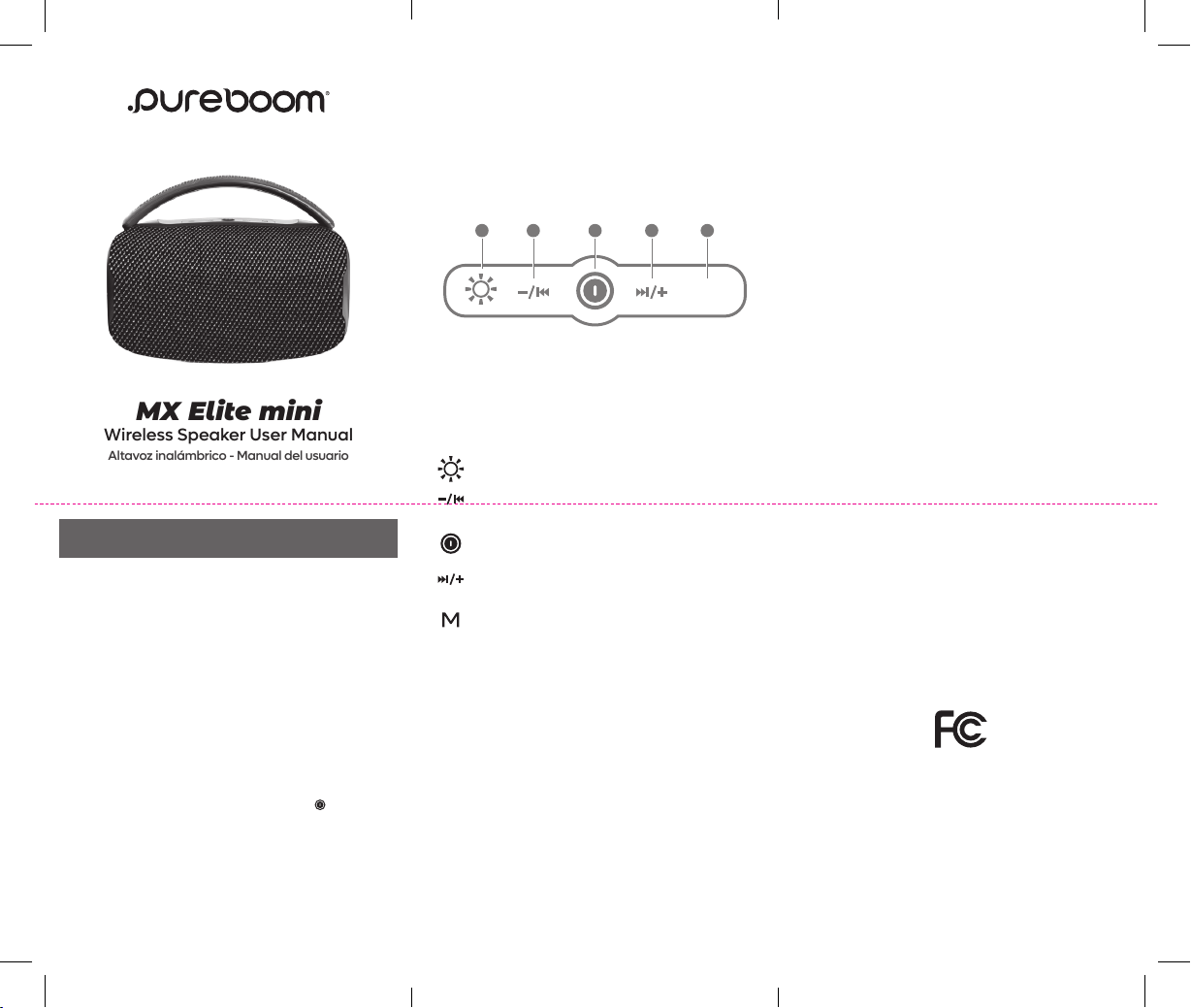
Short Press: Switch lighting modes
Long Press: Light On/Off
Short Press: Volume Down
Long Press: Previous Song
Long Press: Power On/Off
Short Press: Play/Pause
Short Press: Volume Up
Long Press: Next Song
Short Press: Switch between BT/TF/USB/AUX
Long Press: Disconnect/Connect Bluetooth
Double Press: Pair 2 speakers at a time
1. Switch Lighting Modes
2. Previous Song/Volume Down
3. Power On/Off; Play/Pause
4. Next Song/Volume Up
5. Mode
4 5
www.PureBoomAudio.com
©2026 | 67036PG | F00262PG
EspaÑol
Para cargar su MX Elite mini:
Usando el cable incluido, conecte el conector USB-C
al puerto USB-C del altavoz y el conector USB-C a un
cargador de pared (no incluido). La luz indicadora de
carga LED ROJA estará encendida durante la carga y
se apagará cuando estén completamente cargados.
Una carga completa tarda aproximadamente 3 horas.
Conexión/
E
mparejamiento Bluetooth
1. Asegúrese de que el altavoz inalámbrico PureBoom
MX Elite mini esté a una distancia de entre 2 y 3 pies
(0.6 y 0.9 m) del dispositivo al que se conectarán.
2. Encienda el Bluetooth del dispositivo. La mayoría
de los dispositivos detectarán el altavoz de
manera automática.
3. Encienda el altavoz manteniendo presionando
.
Escuchará un mensaje y la luz parpadeará en azul.
4. Localice y toque “PureBoom MX Elite mini.”
Indicará que su altavoz está conectado.
Nota: Si su dispositivo no detecta automáticamente
sus altavoces, asegúrese de que Bluetooth esté
encendido, busque “PureBoom MX Elite mini” y
luego presione conectar.
Emparejamiento de 2 altavoces
1. Conecte un altavoz a su teléfono/dispositivo
siguiendo las instrucciones de Conexión/
Emparejamiento Bluetooth.
2. Mientras ambos altavoces estén encendidos,
presione dos veces el botón “M” para emparejar
los altavoces entre sí.
Cómo operar su PureBoom MX Elite:
Este altavoz admite unidad ash USB, tarjeta TF y
entrada AUX (el cable AUX se vende por separado).
Para responder llamadas, use su dispositivo.
Características y especicaciones
• Respuesta en frecuencia: 50HZ — 15KHZ
• Entrada de carga: CC 5 V 1A
• Batería: 1500mAh * 2
• Potencia: 78mm 20w
• Impedancia: 4 Ω
Cumplimiento con la FCC
Este dispositivo cumple con la Parte 15 de las reglas
de la FCC. La operación está sujeta a las siguientes dos
condiciones:
(1) este dispositivo no puede causar interferencia dañina
(2) este dispositivo deberá aceptar cualquier
interferencia recibida, incluyendo interferencia que
pudiera causar una operación indeseable.
Advertencia: Los cambios o modicaciones a esta
unidad que no estén expresamente aprobados por la
parte responsable del cumplimiento podrían anular la
autoridad del usuario para operar el equipo.
NOTA: Este equipo ha sido probado y se encontró que
cumple con los l ímites establecidos para un dispositivo
digital Clase B, de conformidad con la sección 15 de las
reglas de la FCC. Estos límites están diseñados para
ofrecer protección razonable contra interferencias
perjudiciales cuando el equipo se opere en una
instalación residencial. Este equipo genera, usa y puede
1 2 3 4 5
M
Cumplimiento con la FCC (cont.)
emitir energía de radio frecuencia, y si no se instala y
usa de conformidad con las instrucciones podría
provocar interferencia perjudicial en las comunicaciones
de radio. Sin embargo, no se garantiza que dicha
interferencia no ocurrirá en una instalación especíca.
Si este equipo genera interferencia perjudicial en
la recepción de radio o televisión, lo cual se puede
determinar apagando y encendiendo el equipo, se
sugiere que el usuario intente corregir la interferencia
mediante una o más de las siguientes medidas:
Mover o reorientar la antena receptora.
Aumentar la separación entre el equipo y el receptor.
Conectar el equipo a una salida o circuito distinto al
que está conectado el receptor.
Consultar al proveedor o a un técnico de radio o
televisión con experiencia para que le ayuden.
El dispositivo ha sido evaluado para que cumpla con
los requisitos generales de exposición a RF. El dispositivo
se puede usar en condiciones de exposición portátil
sin restricciones.
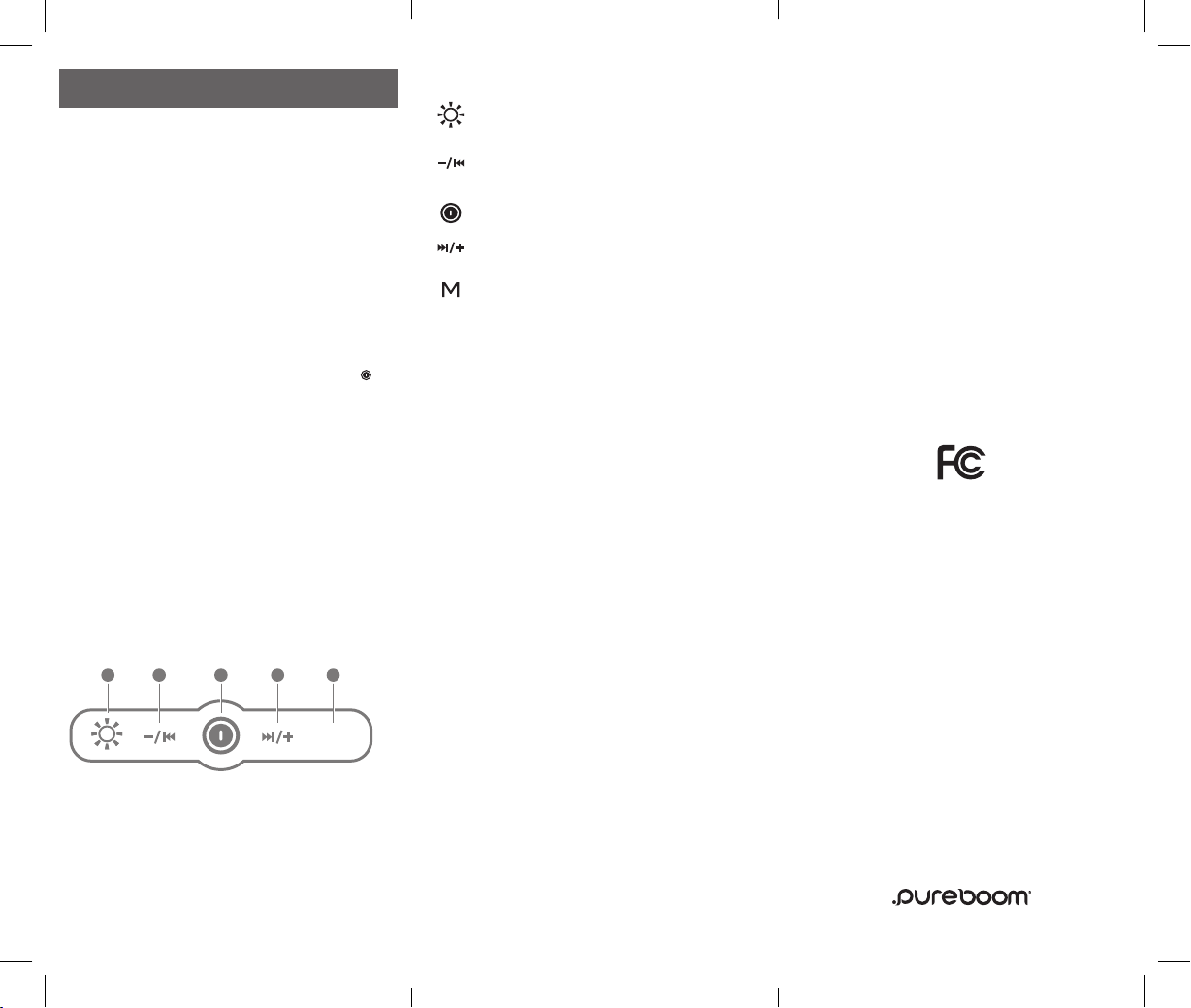
Cómo operar su PureBoom MX Elite:
1. Cambio de modo de iluminación
2. Bajar volumen/Canción anterior
3. Encender/Apagar; Reproducir/Pausar
4. Aumentar volumen/Siguiente canción
5. Modo
Presione brevemente: Cambio de modo
de iluminación
Mantenga oprimido: Encender/Apagar luces
Presione brevemente: Bajar el volumen
Mantenga oprimido: Canción anterior
Mantenga oprimido: Encender/Apagar
Presione brevemente: Reproducir/Pausar
Presione brevemente: Aumentar el volumen
Mantenga oprimido: Canción siguiente
Presione brevemente: Alternar entre
BT/Tarjeta TF/USB/Aux
Mantenga oprimido: Conectar/Desconectar
el Bluetooth
Presione dos veces: Emparejar hasta 2
altavoces a la vez