Paper Feeder/Paper Rewinder
Designer's Guide
M00144300EN
Rev.A

2
Cautions
1. This document shall apply only to the product(s) identified herein.
2. No part of this document may be reproduced, stored in a retrieval system, or transmitted in any form or by any means,
electronic, mechanical, photocopying, recording, or otherwise, without the prior written permission of Seiko Epson
Corporation.
3. The contents of this document are subject to change without notice. Please contact us for the latest information.
4. While every precaution has been taken in the preparation of this document, Seiko Epson Corporation assumes no
responsibility for errors or omissions.
5. Neither is any liability assumed for damages resulting from the use of the information contained herein.
6. Neither Seiko Epson Corporation nor its affiliates shall be liable to the purchaser of this product or third parties for
damages, losses, costs, or expenses incurred by the purchaser or third parties as a result of: accident, misuse, or abuse of
this product or unauthorized modifications, repairs, or alterations to this product, or (excluding the U.S.) failure to
strictly comply with Seiko Epson Corporation's operating and maintenance instructions.
7. Seiko Epson Corporation shall not be liable against any damages or problems arising from the use of any options or any
consumable products other than those designated as Original EPSON Products or EPSON Approved Products by Seiko
Epson Corporation.
8. When this product is used for applications requiring high reliability / safety, such as transportation devices related to
aviation, rail, marine, automotive, etc.; disaster prevention devices; various safety devices, etc.; or functional / precision
devices, etc., you should use this product only after giving consideration to including fail-safes and redundancies into
your design to maintain safety and total system reliability.
Trademarks
EPSON is a registered trademark of Seiko Epson Corporation.
All other trademarks are the property of their respective owners and used for identification purpose only.
©Seiko Epson Corporation 2021.

3
Contents
■ Contents....................................................................................................................................3
■ Paper Feeder/Paper Rewinder Design Guide ....................................................................4
Supported Paper ................................................................................................................................................................4
Label Length ........................................................................................................................................................................ 5
Preparation before Use .................................................................................................................................................... 6
Paper Feed Speed .............................................................................................................................................................. 7
Paper Load............................................................................................................................................................................ 8
Paper Curl.............................................................................................................................................................................. 8
Paper Angle for Feeding and Ejecting........................................................................................................................ 9
Position of Paper Feeder and Paper Rewinder ........................................................................................................ 9
Locations of Holes on the Bottom Case...................................................................................................................10
4
Paper Feeder/Paper Rewinder Design Guide
The CW-C4000 Series is designed to print on roll paper fed from inside the printer or on fanfold paper fed from
outside the printer.
If you use an external large diameter roll paper feeder and/or paper rewinder with the printer, read this section
carefully to know required settings and requirements for using the external devices, and perform adequate
verification before starting actual printing.
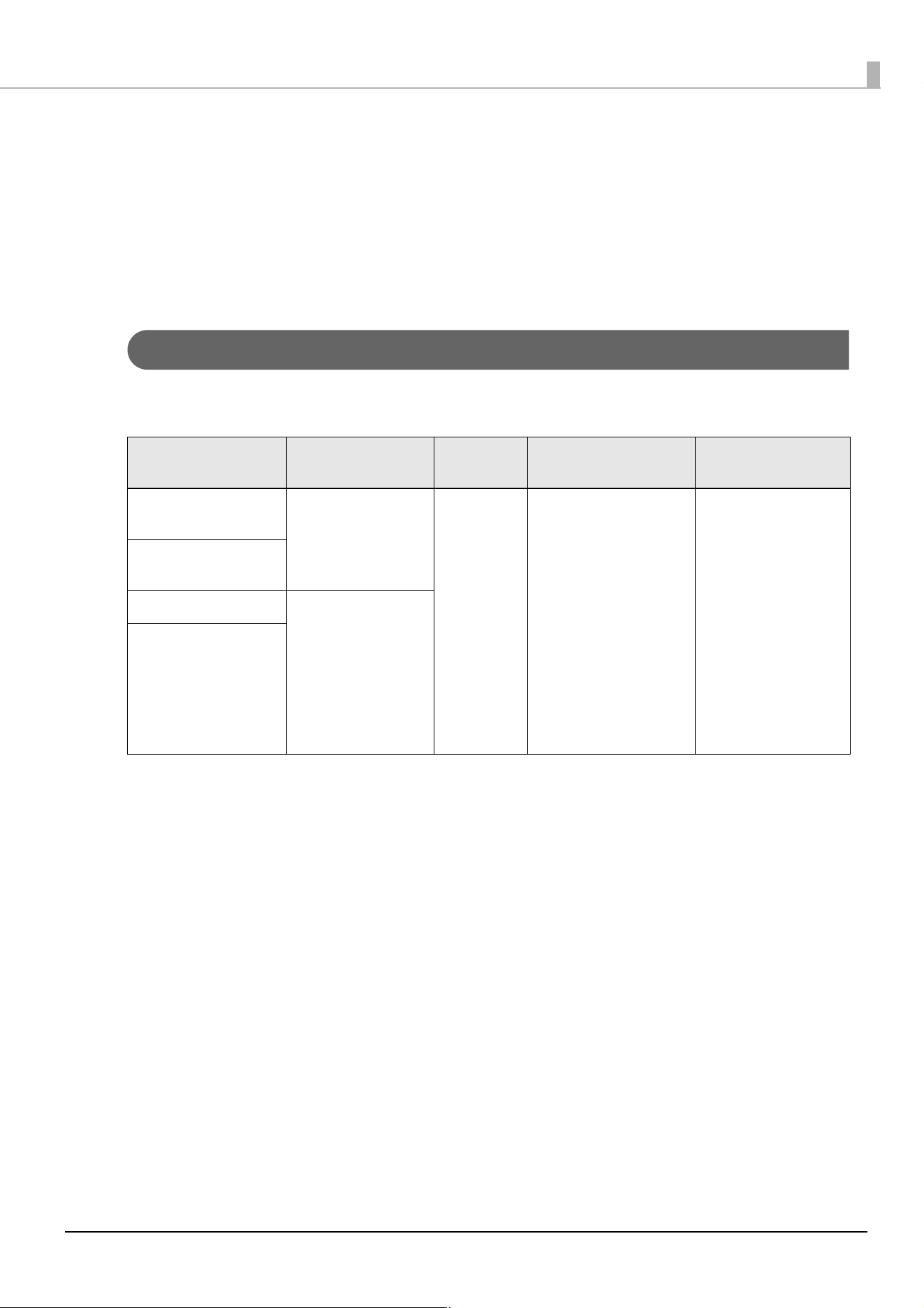
Supported Paper
The following types of paper are supported when using an external large diameter roll paper feeder and/or
paper rewinder with CW-C4000 Series printers.
Forms of paper Paper types Paper
shapes
Roll paper core Label length
Continuous paper
(without black marks)
Plain paper
Matte paper
Glossy paper
Roll paper Outer diameter: φ82 mm
{3.23"}
(Example: Inner diameter:
φ3 inches, paper tube
thickness: 3 mm {0.12"} or
more)
Label length:
Page 5
Continuous paper
(with black marks)
Die-cut label (Gap) Plain paper label
Matte label
Synthetic label
Glossy label
Texture label
Glossy film label
High glossy label
Die-cut label (Black
Marks)
5
Label Length
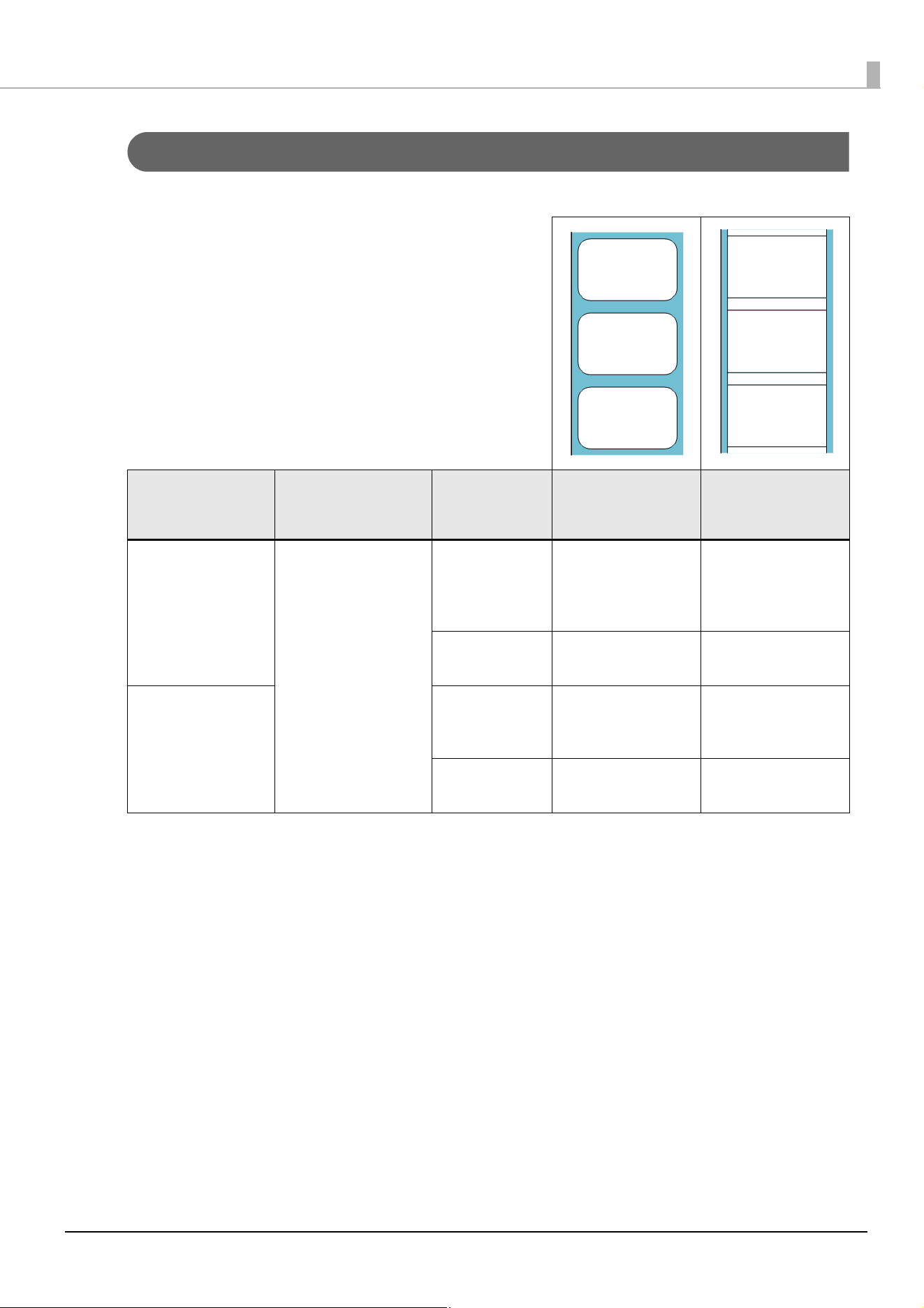
The length of the label that can be used depends on the paper specifications. For details, see the following table.
1. For the latest information on detailed paper specifications and the base paper used in roll paper, contact
qualified service personnel.
2. For details on paper without waste part and paper without waste part on the left and right sides only, see the
CW-C4000 Series Technical Reference Guide.
3. Continuous paper cannot be used with a paper rewinder, because continuous paper must be cut for each
page.
Paper types Forms of paper Label length Paper without waste
part
Paper without waste
part on left and right
sides only
Plain paper label
Matte label
Texture label
Glossy label
High glossy label
Die-cut label (Gap)
Die-cut label (Black
Marks)
8 to less than
25.4 mm
(0.31 to less than
1 inch)
×
Not supported
✓
Supported
25.4 to 406.4 mm
(1 to 16 inch)
✓
Supported
✓
Supported
Synthetic label
Glossy film label
8 to less than
50.8 mm
(0.31 to 2 inch)
×
Not supported
✓
Supported
50.8 to 406.4 mm
(2 to 16 inch)
✓
Supported
✓
Supported
6
Preparation before Use
If you use an external large diameter roll paper feeder and/or paper rewinder with the printer, perform the
following items before use.
Install the Fanfold Paper Feed Guide
Install the "Fanfold Paper Feed Guide". For details on the installation method, see the CW-C4000 Series User's
Guide.
Set the Media Source to [External Feed]
Set the Media Source to [External Feed]. For details on this setting, refer to the CW-C4000 Series User's Guide.
• Do not use [Stop at Peel-Off Position] in the Print Mode.
∗ The printer preforms a back feed operation of a length determined by Print Mode.
∗ If you use an external large diameter roll paper feeder and/or paper rewinder with the printer, a
paper jam might occur when feeding paper backward from the peel-off position. Therefore, do not
use [Print Mode] - [Stop at Peel-Off Position].
∗ Make sure that the external large diameter roll paper feeder and/or paper rewinder does not
interfere with the back feed in the following Print Mode.
- Stop at Cut Position Back feed amount Approx. 32 mm {1.26"}
- Stop at Print End Position Back feed amount Approx. 32 mm {1.26"}
• When using the printer in an environment with high humidity, use the following method to load
paper.
∗ In an environment with high humidity, paper jams might occur when paper is inserted from the rear.
In such cases, use the following method to load paper.
1. Open the front cover.
2. Feed the paper from the rear of the printer to the front.
3. Close the front cover, and then press the (Pause) button.
7
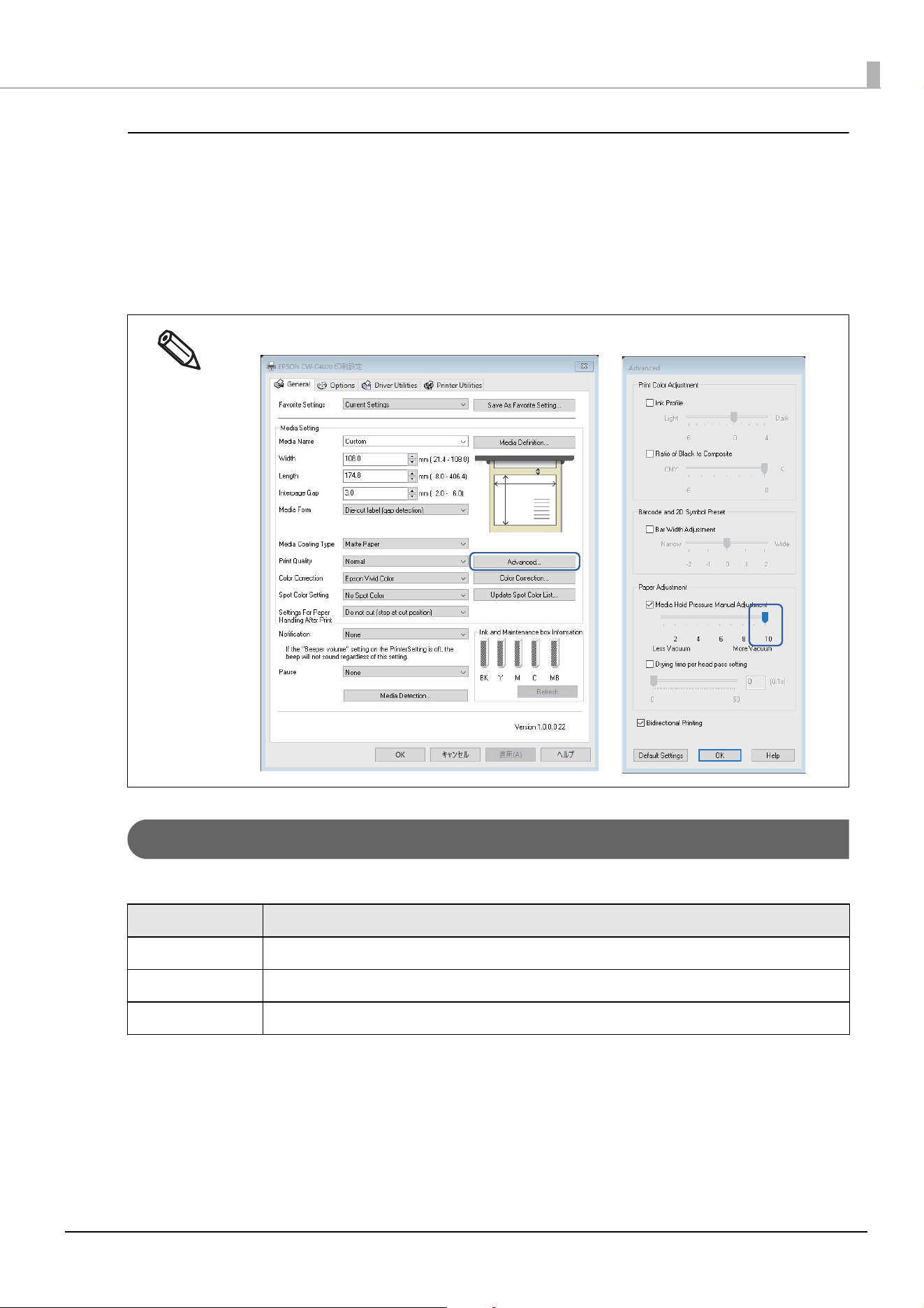
Set the Printer Driver
1
Click [Advanced] on the [General] tab.
2
Select the check box for [Paper Adjustment] - [Paper Vacuum Manual Adjustment].
3
Move the slide bar to adjust the vacuum.
Paper Feed Speed
The following table shows the paper feed speeds of this printer.
It is recommended to select [Strong] for the vacuum.
Paper Feed Speed Example of Use
254 mm {10"}/s Printing, feeding paper before/after printing (paper width detection, cut position movement, etc.)
127 mm {5"}/s Printing, feeding paper when the Feed button is pressed
25.4 mm {1"}/s Printing, feeding paper when it is loaded
8
Paper Load
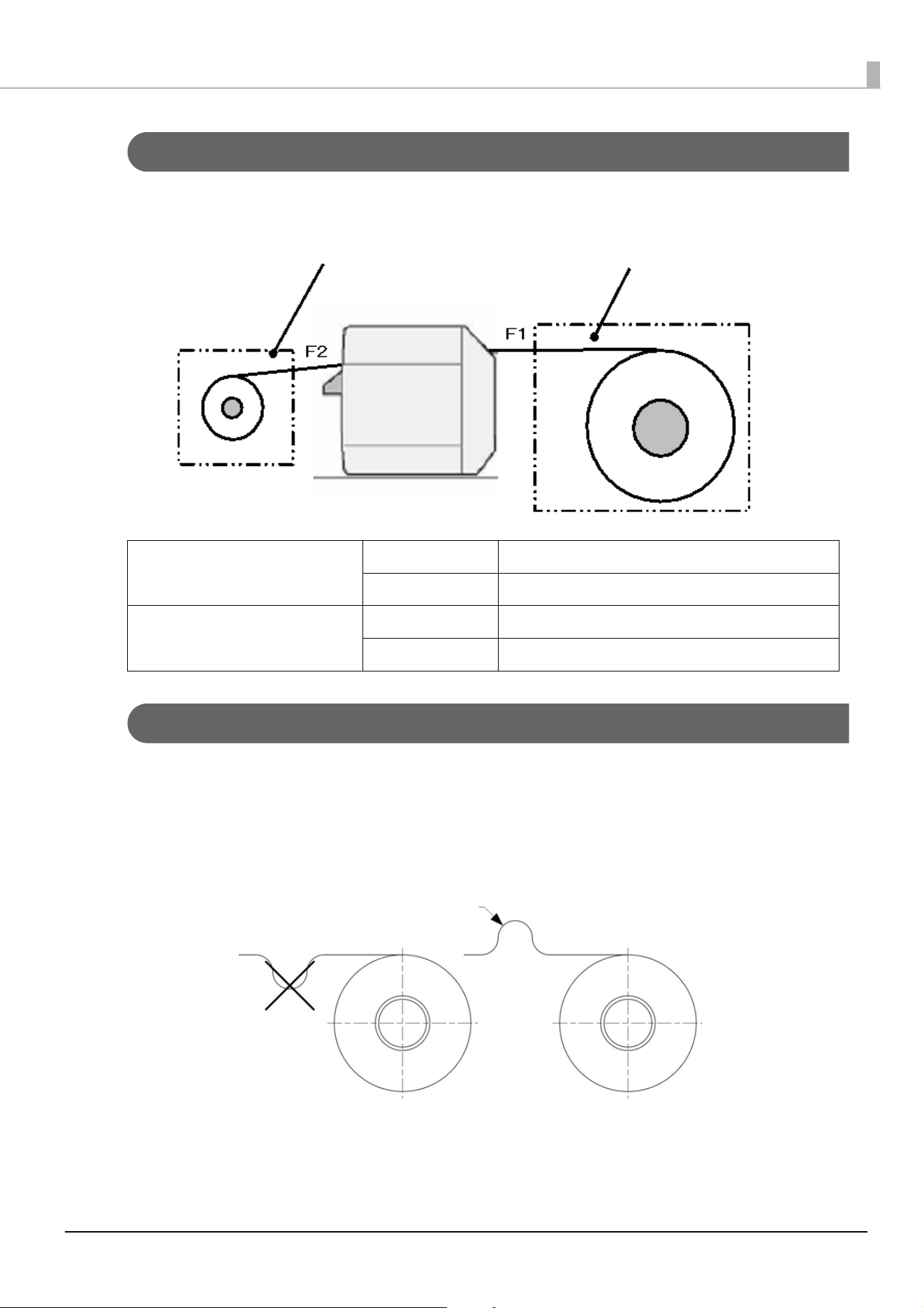
The allowable values of tension (F1, F2) applied to paper between the printer and a paper feeder or rewinder (or
backing paper rewinder) are as follows.
Paper Curl
When using a paper feeder, follow the guidelines below to prevent paper from curling.
When leaving the printer and the paper feeder unused for a long term, place the paper feeder so that paper is
not curled in the direction opposite to the roll winding direction.
In addition, avoid letting the paper curl with a radius of 1.0 inches or less even if the paper is curled in the roll
winding direction.
Paper feeder side Paper tension (F1) 2N or less
Amplitude If there is fluctuation in tension: Set the cycle to 1 inch.
Paper (backing paper) rewinder side Paper tension (F2) 0.2N or less
Amplitude 0.1N or less
Paper rewinder
Paper feeder
R 1 inch or less
9
Paper Angle for Feeding and Ejecting
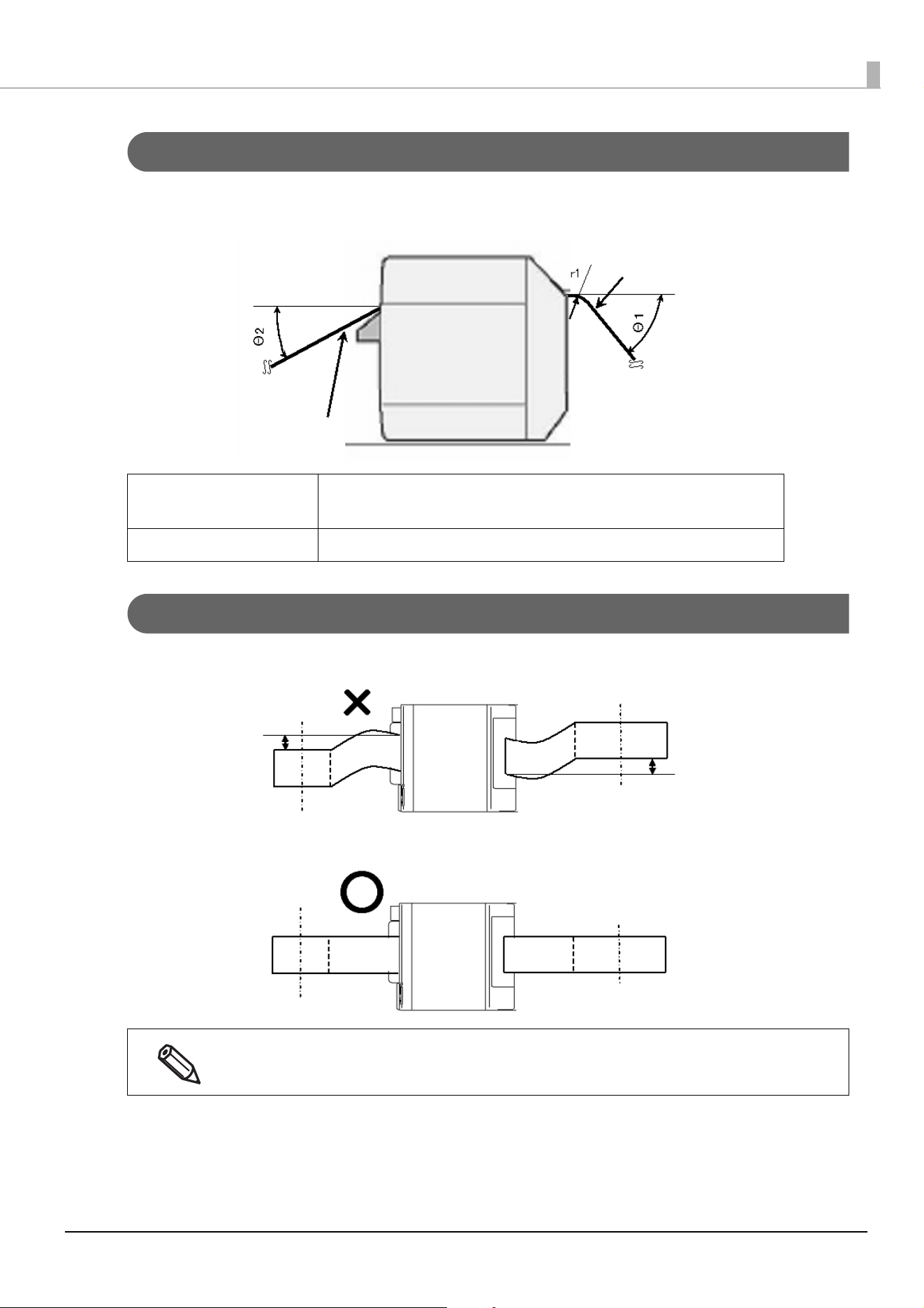
The allowable values of angle for feeding paper from a paper feeder (θ1) and for ejecting paper to a paper
rewinder (θ2) are as follows.
Position of Paper Feeder and Paper Rewinder
Place a paper feeder and paper rewinder so that paper is fed or ejected straight to/from the printer.
Angle for paper feeding: Θ1 0°
When r1 > 1 inch: 0° ≤ Θ1 ≤ 60°
Angle for ejecting paper: Θ2 0° ≤ Θ2 ≤ 30°
If you find that paper is skewed before it reaches the printer or rewinder, adjust the position of the paper
feeder or the paper rewinder.
Paper on rewinder side
Paper on feeder side
10
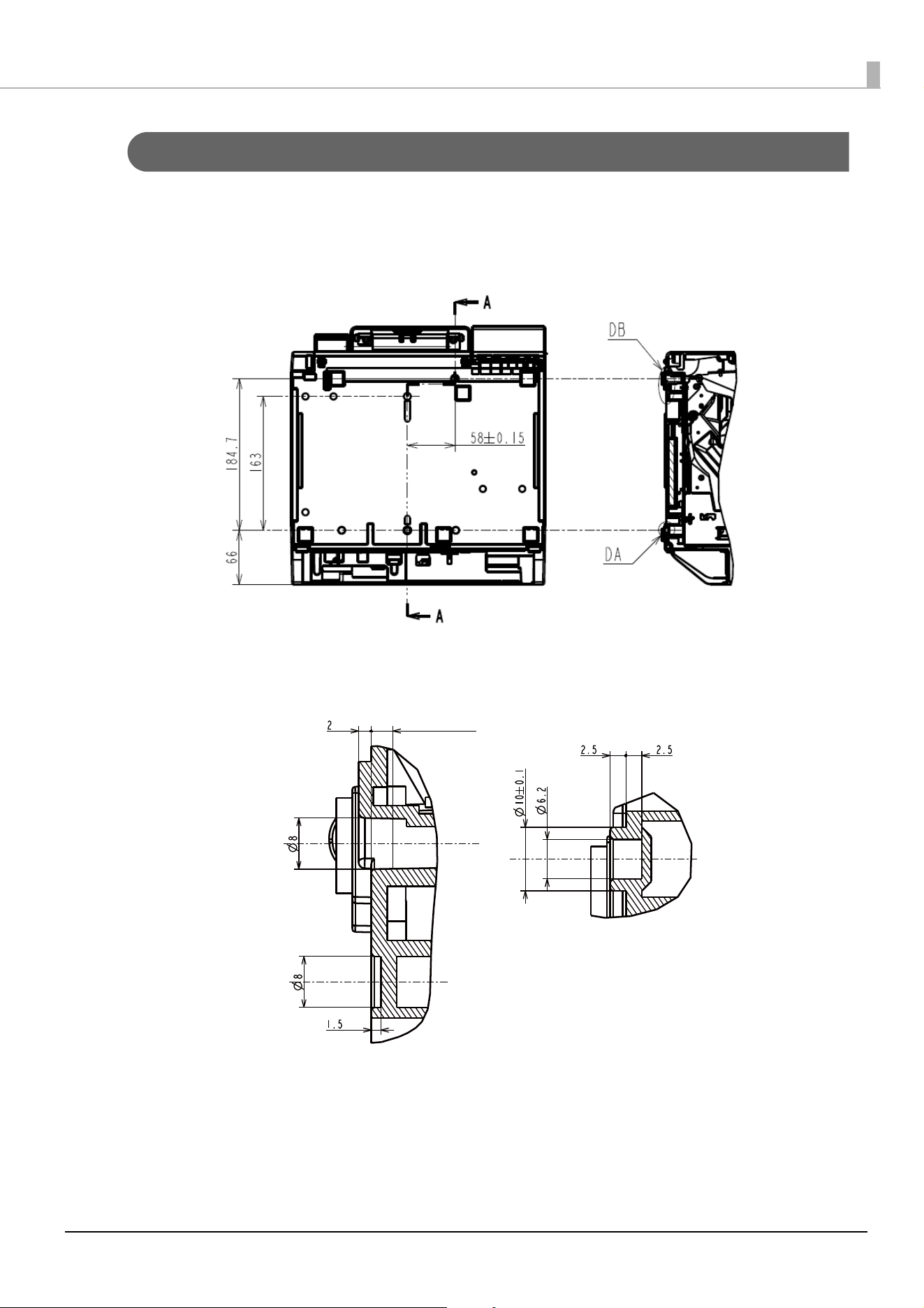
Locations of Holes on the Bottom Case
There are holes in the bottom case of the printer as shown in the figures below. They can be used as necessary
for positioning the printer, etc. Note that the dimensions shown in the figures are for reference only.
Printer Rear
A-A Cross Section
Printer Front
Detailed View of DA
General tolerance: ±0.3
Detailed View of DB
3.4 or greater (Min.)