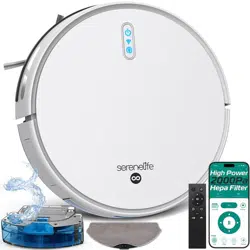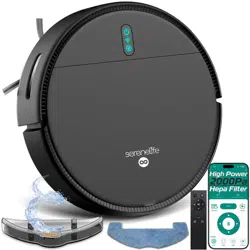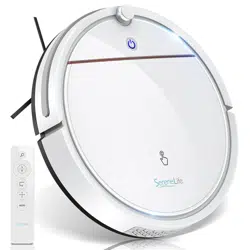
Serene Breeze Robot
Vacuum Cleaner
USER GUIDE
Start Here
Serenelifehome.com/
register
CONTENTS
FEATURES & TECHNICAL SPECS
SAFETY INSTRUCTIONS
CAUTION
PRODUCT INTRODUCTION
CHARGING GUIDE
PRODUCT OPERATION
APP INSTRUCTIONS
PRECAUTIONS BEFORE USE
PRODUCT MAINTENANCE
TROUBLESHOOTING
WARNING CODE TABLE
REGISTER PRODUCT
3
4
4
5
7
9
11
15
16
18
21
21
www.SereneLifeHome.com
2
WARNING:
BE SURE TO READ ALL INSTRUCTIONS, WARNINGS AND
PRECAUTIONS CAREFULLY BEFORE USING THIS PRODUCT.
FAILURE TO DO SO COULD RESULT IN INJURY TO YOU
OR DAMAGE TO THE UNIT.
California Prop 65 Warning
WARNING:
This product may expose you to chemicals, which is known to
the state of California to cause cancer, birth defects and other
reproductive harm. Do not ingest.
For more info go to: www.P65warnings.ca.gov

www.SereneLifeHome.com
3
Features:
•
Keep it Clean: Sweep, Dust and Vacuums
• Versatile & Convenient Floor Cleaning
• Smart, Random Cleaning Path Navigation
• Low-Prole Design Slides Underneath Furniture
• Anti-Fall Sensors & Protective Bumper Housing
• Obstacle Detection Cleans Around Household Objects
• Works on Hardwood, Linoleum, Tile, Low/Hard Carpet Floors
• 3 Cleaning Modes: Auto, Spot, Edge
• App Control with Bluetooth Connection
• Automatic Recharge with Docking Station
• Easy to Maintain
• One Button Operation
• Built-in Rechargeable Battery
• Dual Spinning Side Brush Lifts Debris
• Includes Charging / Power Adapter
• Perfect for the Home or Oce
Technical Specs:
•
Construction Material: ABS + POM + PC (Injection Molding Part)
• Dust Bin Capacity: 0.37L
• Water Tank Capacity: 0.15L
• Average Charge Time: 4-6 Hours
• Vacuum Operation Run-Time: 80 Minutes
• Battery Type: 7.4V Li-ion, 2000mAh - 14.8Wh
• Remote Control Battery Operated, Requires (2) x ‘AAA’ Batteries (Not Included)
• Unit Average Power: 15W
• Suction Power: 700Pa
• Power Supply: AC110-240V, 50-60Hz Power Adapter
• Low Noise: ≤70 dB
• Item Weight: 3.5 lbs.
• Power Cable Length: 6 ft. (1.83m)
• Product Dimensions (L x W x H): 11.41’’ x 11.41’’ x 3.07’’ -inches

www.SereneLifeHome.com
4
Safety Instructions
Please follow the following safety precautions before using the product:
• Please read this manual carefully before using the product and use the product
according to the instructions in this manual.
• Keep it properly.
• If you need to transfer the product to a third party, please attach the manual
together with the product.
• Any operation inconsistent with this manual may lead to damage to the product
and personal injury.
Caution
1. This product can only be dismantled by an authorized technician.
Such behavior without permission is not suggested.
2. Only the power adapter provided by the factory can be used with this product.
The use of an adapter of other specications may cause damage to the product.
3. Don’t touch the cord, charging base, and power adapter with a wet hand.
4. Keep the openings and running parts free of curtains, hair, clothes, or ngers.
5. Don't put the cleaner around burning objects, including cigarettes, lighters, or
anything that is likely to cause re. Don’t use the cleaner to pick up combustible
materials, including gasoline or toner from printers, copiers, and mixers.
Don't use it around ammable substances.
6. Please clean the product after charging, and turn o the product switch
before cleaning.
7. Do not over-bend wires or place heavy or sharp objects on the machine.
8. This product is an indoor household appliance; please don’t use it outdoors.
9. The cleaner can’t be used by children of 8 years and below or persons with
mental disorders, unless they have been given supervision or instruction
concerning the use of this appliance. Don’t let your children ride on or play
with the cleaner.
10. Do not use this product on wet or watery ground.
11. Possible problems in product cleaning shall be eliminated as soon as possible.
Please clear up any power cord or small object on the oor before using the
cleaner in case they hinder the cleaning. Fold over the fringed hem of the
carpet and prevent the curtain or tablecloth from touching the oor.
www.SereneLifeHome.com
5
12. If the room to be cleaned contains a staircase or any suspended structure,
please test rst whether the robot will detect it and not fall o the edge.
If a physical barrier is needed for protection, make sure the facility does not
cause such injuries as tripping.
13. When the product is not used for a long time, the machine shall be charged
every three months to avoid battery failure due to low power for a long time.
14. Don’t use it without the dustbin and lters in place.
15. Make sure the power adapter is connected to the socket or charging base
when charging.
16. Avoid any cold or heat. Operate the robot between 14°F to 122°F.
17. Before discarding the product, disconnect the cleaner from the charging base,
turn o the power and remove the battery.
18. Make sure the product is not powered on when removing the battery.
19. Please remove and discard the battery in accordance with local laws and
regulations before discarding the product.
20. Do not use the product with a damaged power cord or power socket.
Do not use the product when the product cannot work normally due to
falling, damage, outdoor use, or water ingress.
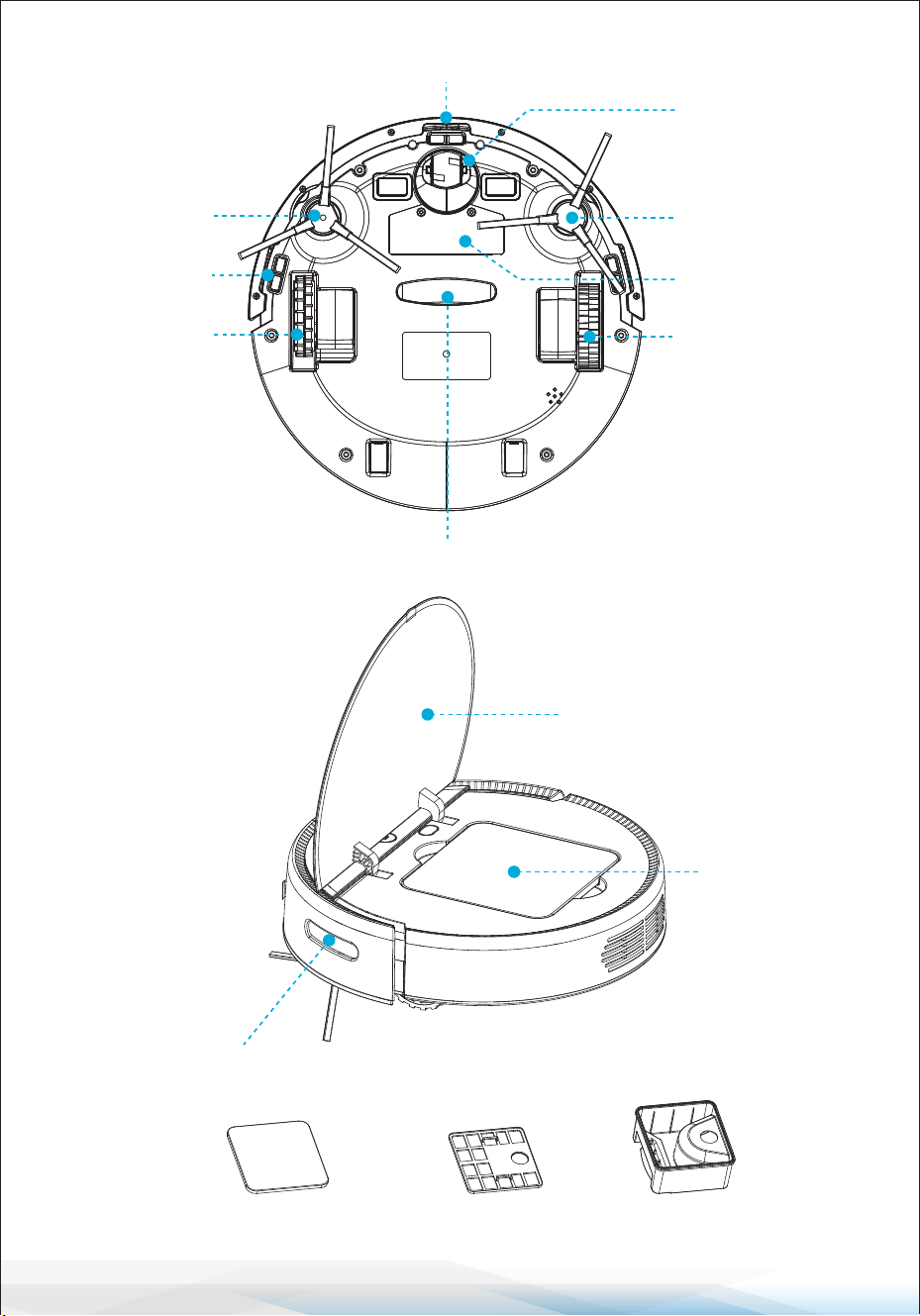
Product Introduction
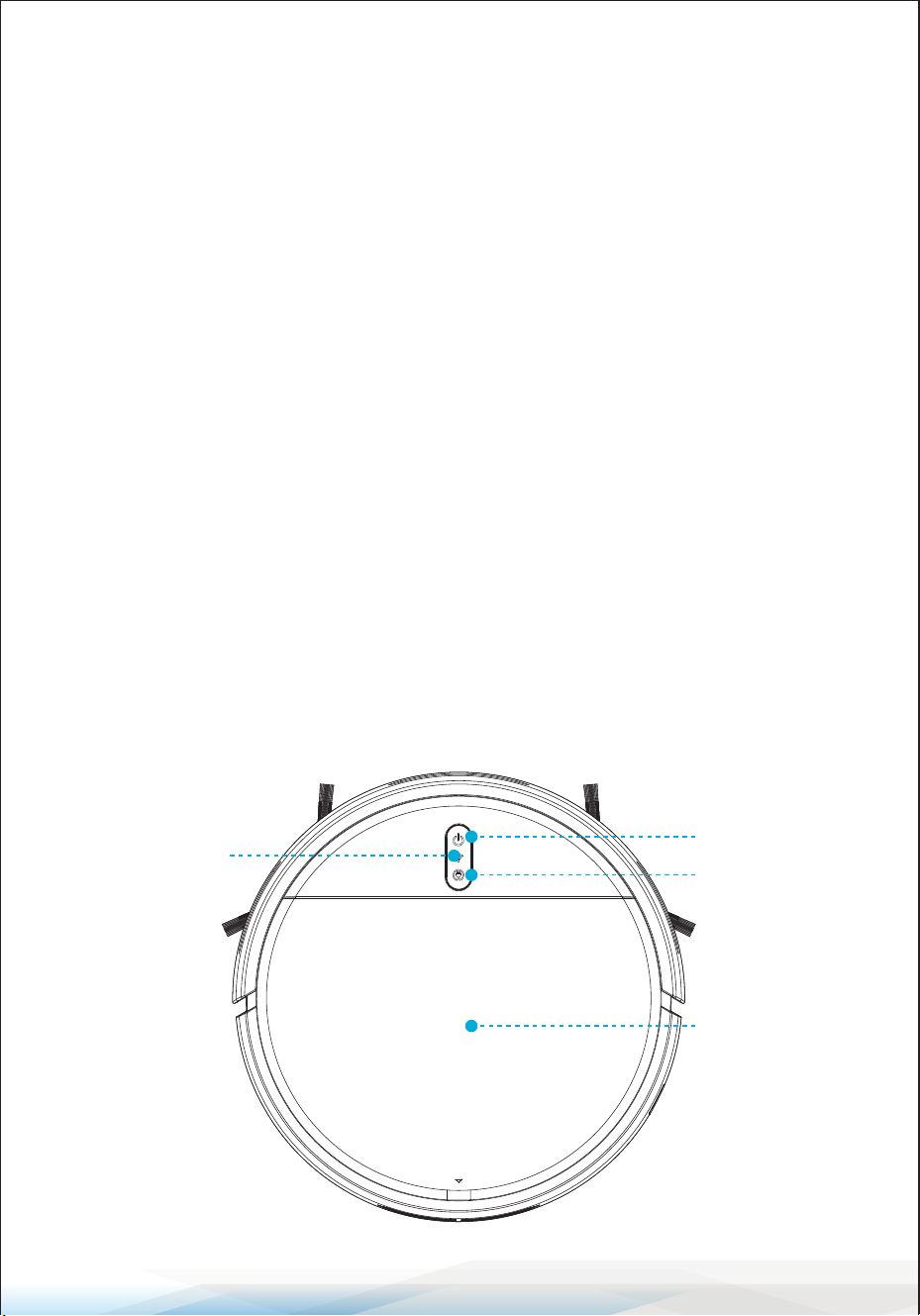
WIFI light
(Some products have
this function)
(Connect to mobile APP)
ON/OFF Button
Recharge
Button
Cover
www.SereneLifeHome.com
6
Side brush
Cli sensor
Right driving
wheel
Universal wheel
Side brush
Battery cover
Suction port
Left driving
wheel
Cli sensor
Dust boxDust box cover Dust box lter
Infrared receiving window
Dust box
Cover
www.SereneLifeHome.com
7
What's in the Box
• Smart Robot Vacuum
• Remote Control
• (1) US Plug/ Power Adapter
• (1) Mop Cloth
• (1) Water Tank
• (1) Pairs Side Brush
• (1) Charging Station
Charging Guide
How to Use the Charging Base
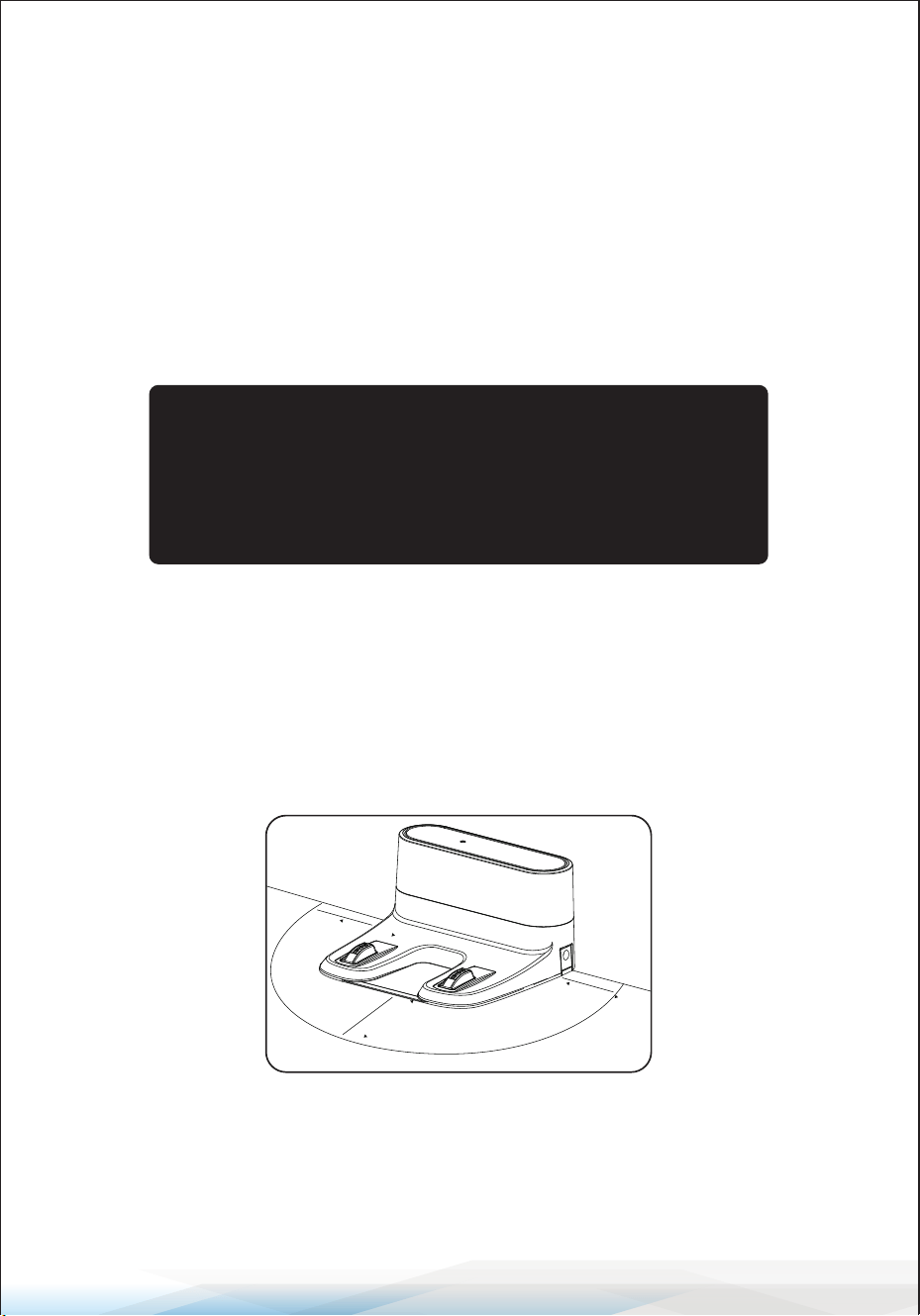
Place the charging base on at ground, then connect the power adapter.
The power indicator will be constantly on. The indicator light of the charging
base will go out during normal charging.
Notes
Place the charging base on at ground, with the back against the wall, and remove
all obstacles around the charging base of about 5 ft (1.5 meters) in width and
6.5 ft (2 meters) in front of the charging base, as shown in the gure.
1.5M
1.5M
2M
• For the purpose of continuous improvement, all rights to
change and interpret are reserved in terms of technology
and design regarding the product.
• The models only dier slightly in color and appearance
without other essential dierences.
www.SereneLifeHome.com
8
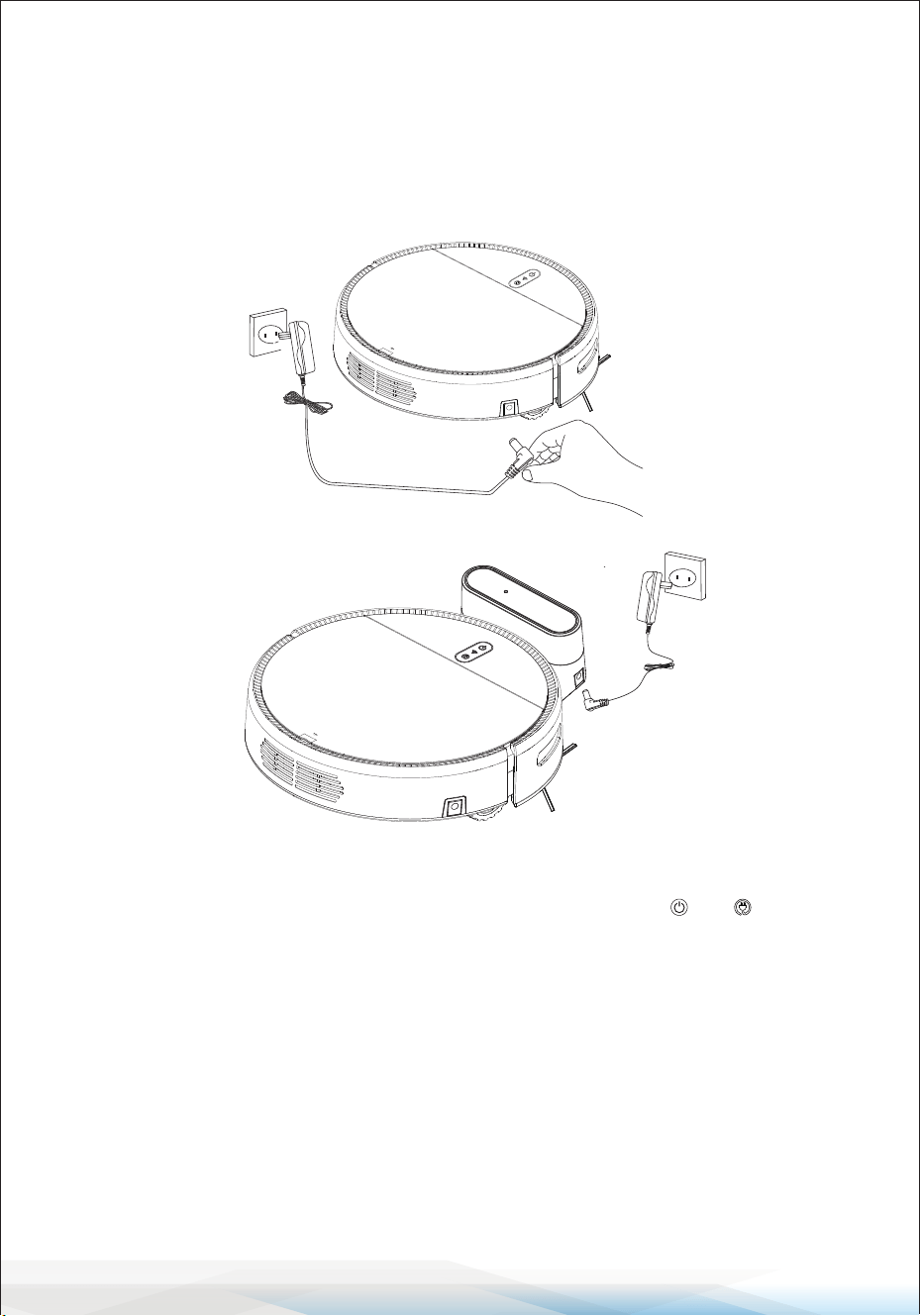
Two Charging Methods
1. Directly plug the power adapter into the machine, with the other end
connecting with the power supply, as shown in gure A.
Please use the power adapter provided.
2. Use the charging base for charging, as shown in gure B.
Notes
A. Please charge the machine for not less than 12 hours when charging for the
rst time, and charge it until the red light of the power key and breathes.
When the battery is fully charged, the green light will be constantly on.
B. For daily use, please store the machine on the charging stand and make sure
the charging stand is powered on.
C. When not in use for a long time, please fully charge the machine, turn o the
power switch and store it in a cool and dry place.
D. When setting the reservation mode, do not use manual charging mode.
It is recommended to use automatic charging mode.
E. After using the mopping function, remove the water tank and rag when
charging.
A
B
www.SereneLifeHome.com
9
Product Operation
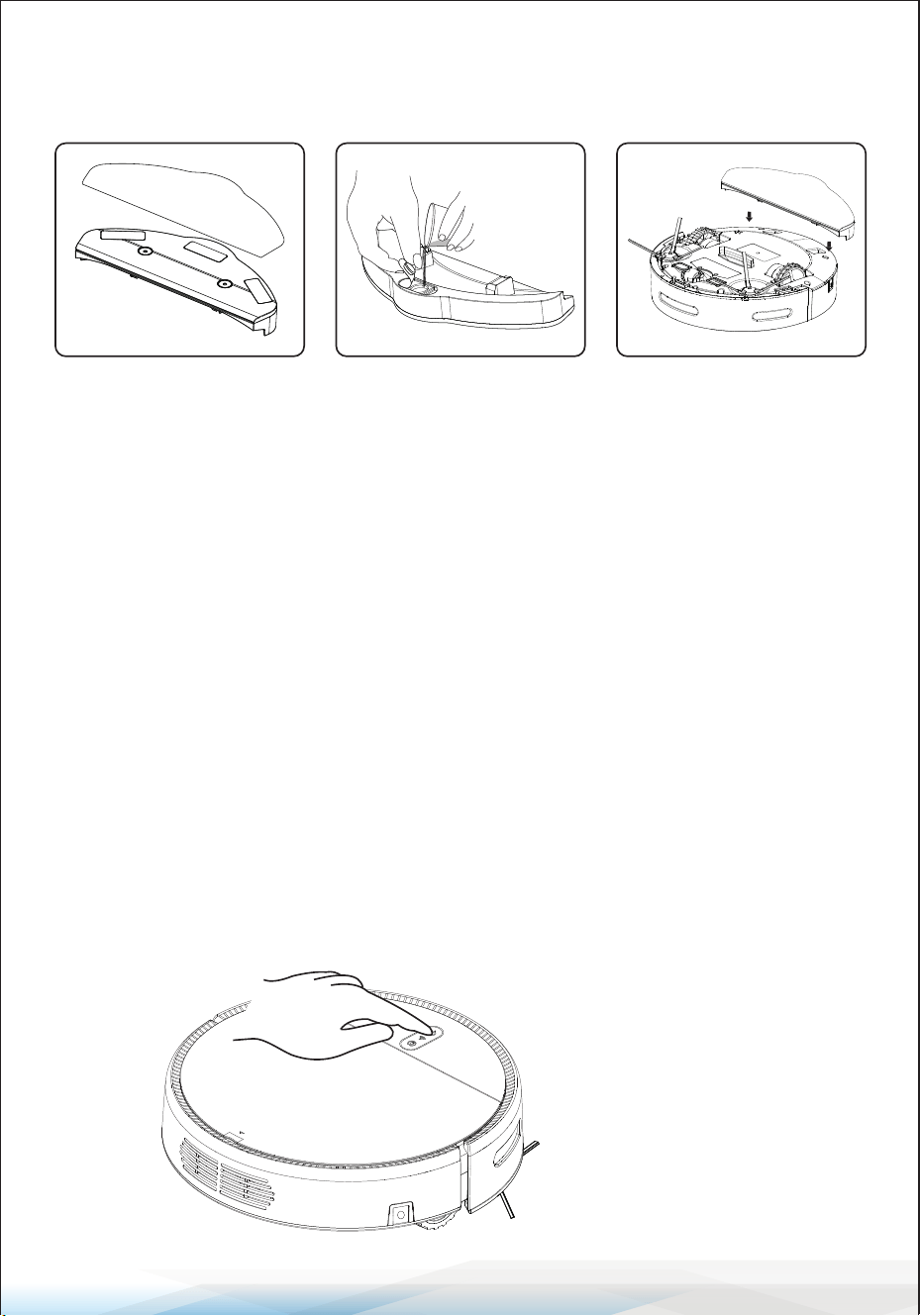
1. Water Tank Installation
Attention
• The water tank will start to seep after water is added.
Please remove the water tank before charging.
• When using the water tank, add water or clean it promptly.
Always remove the tank before adding water.
• Do not use the water tank on carpets. When mopping the oor with the water
tank, fold up the edges of any carpets to avoid contaminating them with dirt
from the mop.
• After cleaning the mop, ensure it is dry and no longer dripping before attaching
it to the water tank. The mop should be at.
2. Power ON
1. Attach the mop to the
Velcro on the water
tank.
2. Open the inlet on the
water tank and slowly
ll it with water.
3. Turn the machine
upside down, align the
positioning column of
the water tank with the
positioning hole at the
bottom of the machine,
and press the water
tank rmly into place.
www.SereneLifeHome.com
10
3. Turn the machine
upside down, align the
positioning column of
the water tank with the
positioning hole at the
bottom of the machine,
and press the water
tank rmly into place.
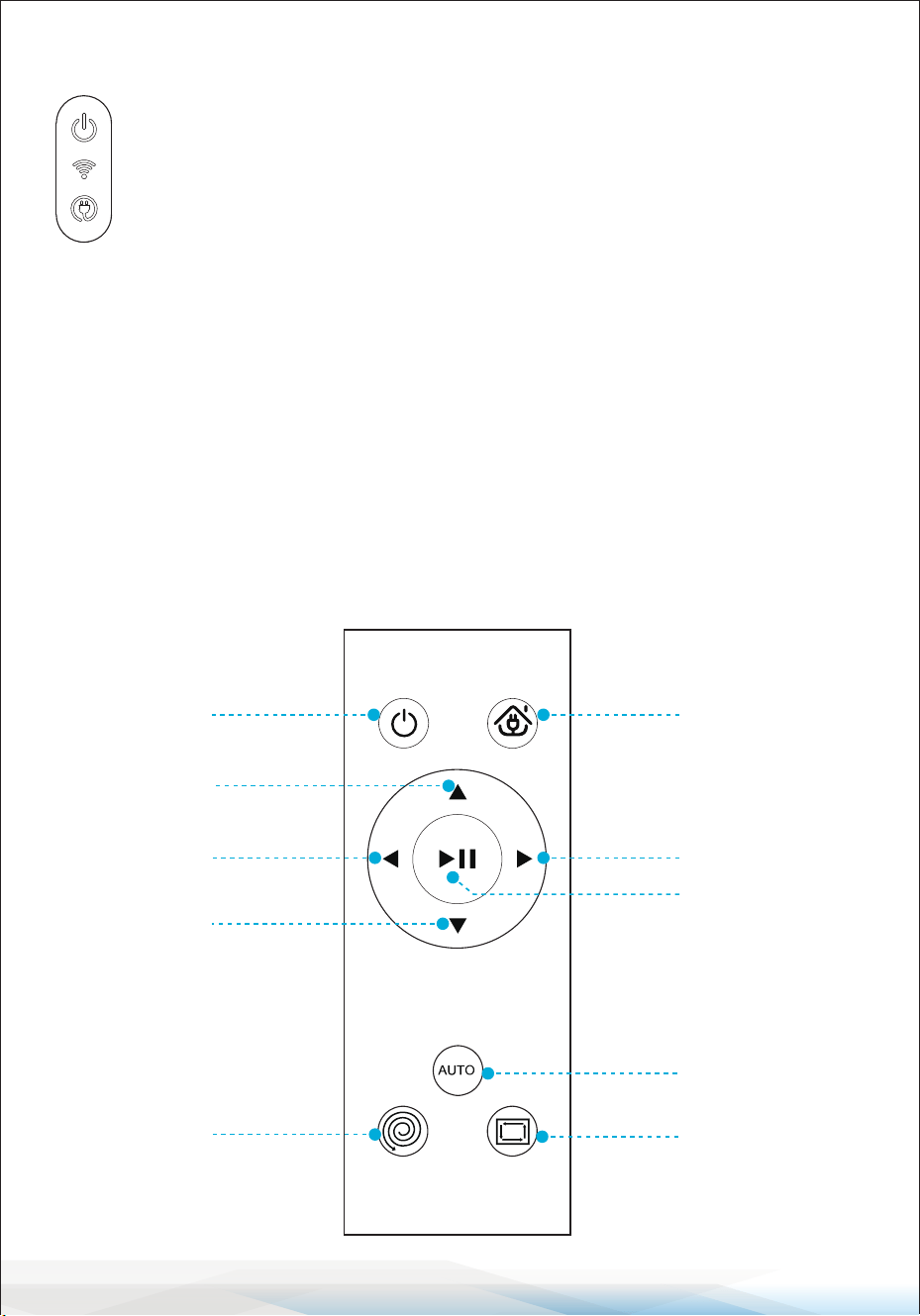
Function Key
On-o key
WIFI light (some products with this function)
Recharge key
Power On: Press and hold the power key for 3 seconds to power on.
Indicator Status:
1. Start: The corresponding function light is green.
2. Exception: The red light blinks.
3. Charging: The red light pulses.
4. Full: The green light is steady.
Remote Control Functions
ON/OFF
Forward
Turn left
Backward
Fixed-point
cleaning
Automatic
charging
Turn right
Pause
Auto cleaning
Edge cleaning
www.SereneLifeHome.com
11
APP INSTRUCTIONS
This app is subject to updates. We reserve the right to update the app without
prior notice.
1. Download the App: Scan the QR code with your cell phone
or search for "Smart Life" in the mobile app market and
download the app. Ensure your cell phone is connected to
WiFi.
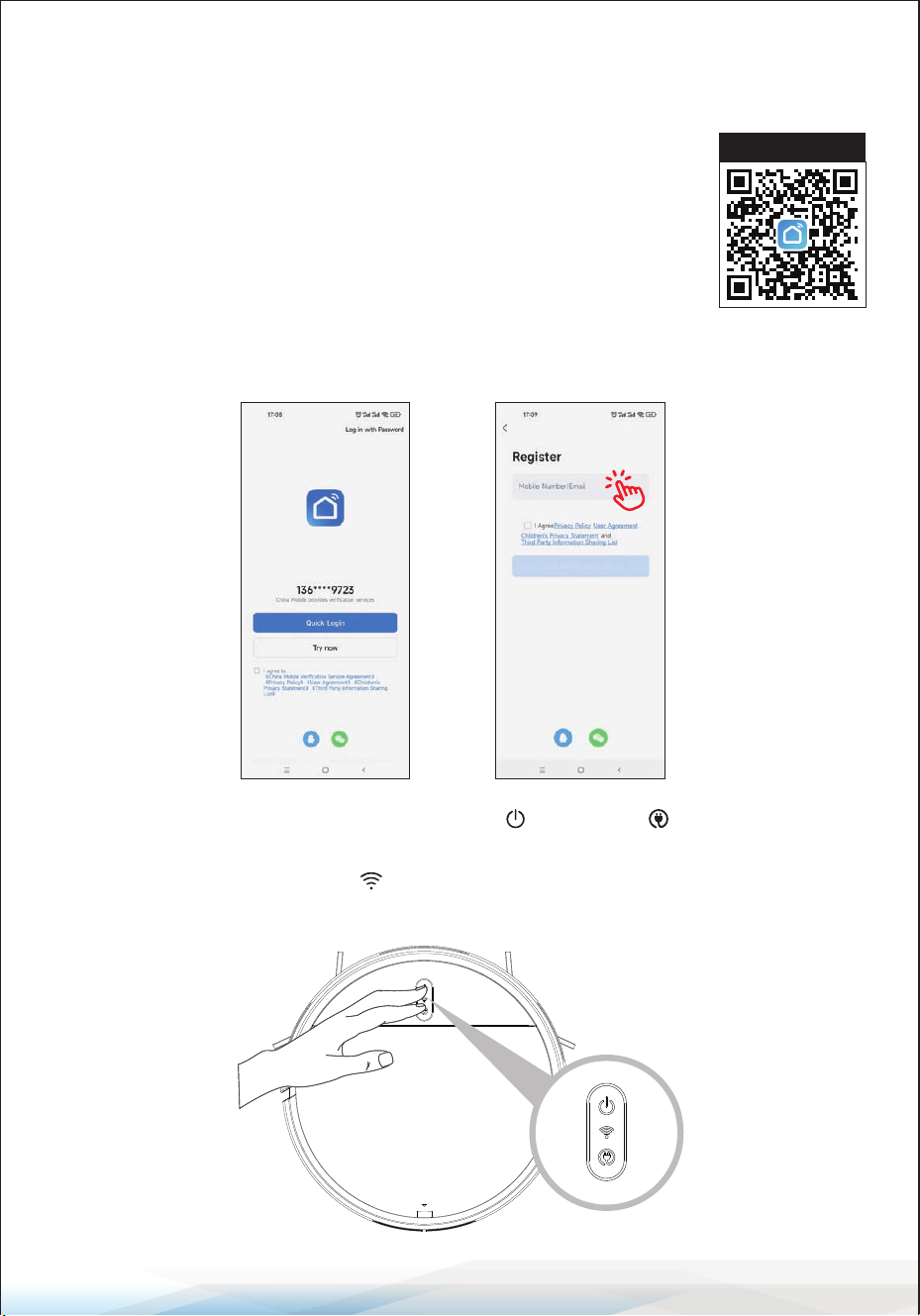
2. Register or Log In: Open the “Smart Life” app and register a new account or
use an existing account.
3. WiFi Fast Connection: Press and hold the button and button
simultaneously for more than 3 seconds. The robot will emit a “beep” sound,
and the blue indicator light will ash quickly, indicating that the robot is in
WiFi fast connection mode.
Mobile APP Download
www.SereneLifeHome.com
12
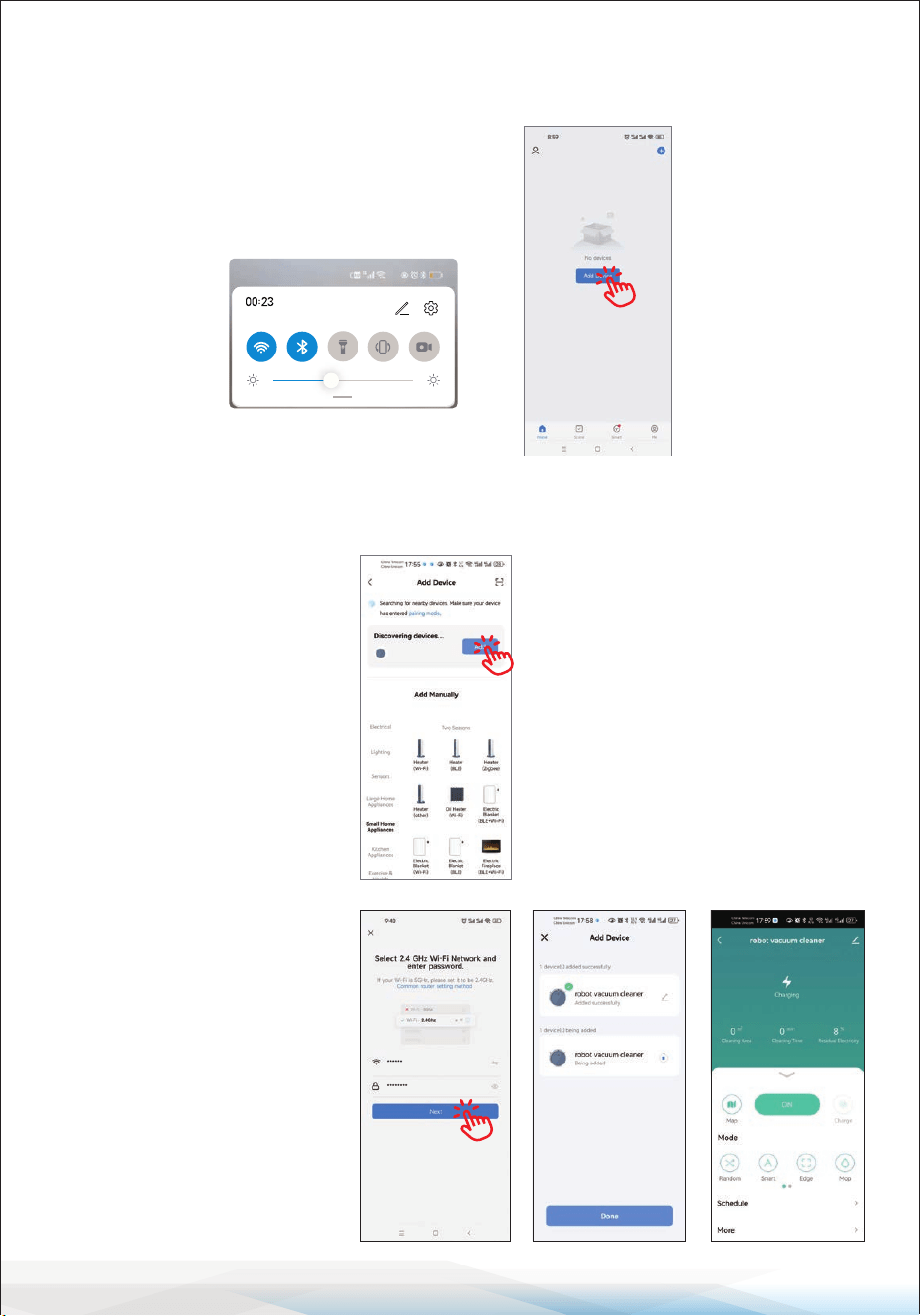
4. Connect WiFi: After registering, connect to WiFi (ensure it’s 2.4GHz) and turn
on Bluetooth. Proceed to the next step, "Add Device."
5. Add Device: Click on the "+" sign in the upper right corner and select "Add"
for the detected product on the next page.
6. Enter WiFi Details:
Ensure the name of your
home WiFi is correct, enter
the WiFi password, and
click NEXT
(note: only 2.4G WiFi
is available). A control
interface will appear once
the device is successfully
bound.
Tuesday, May 25
www.SereneLifeHome.com
13
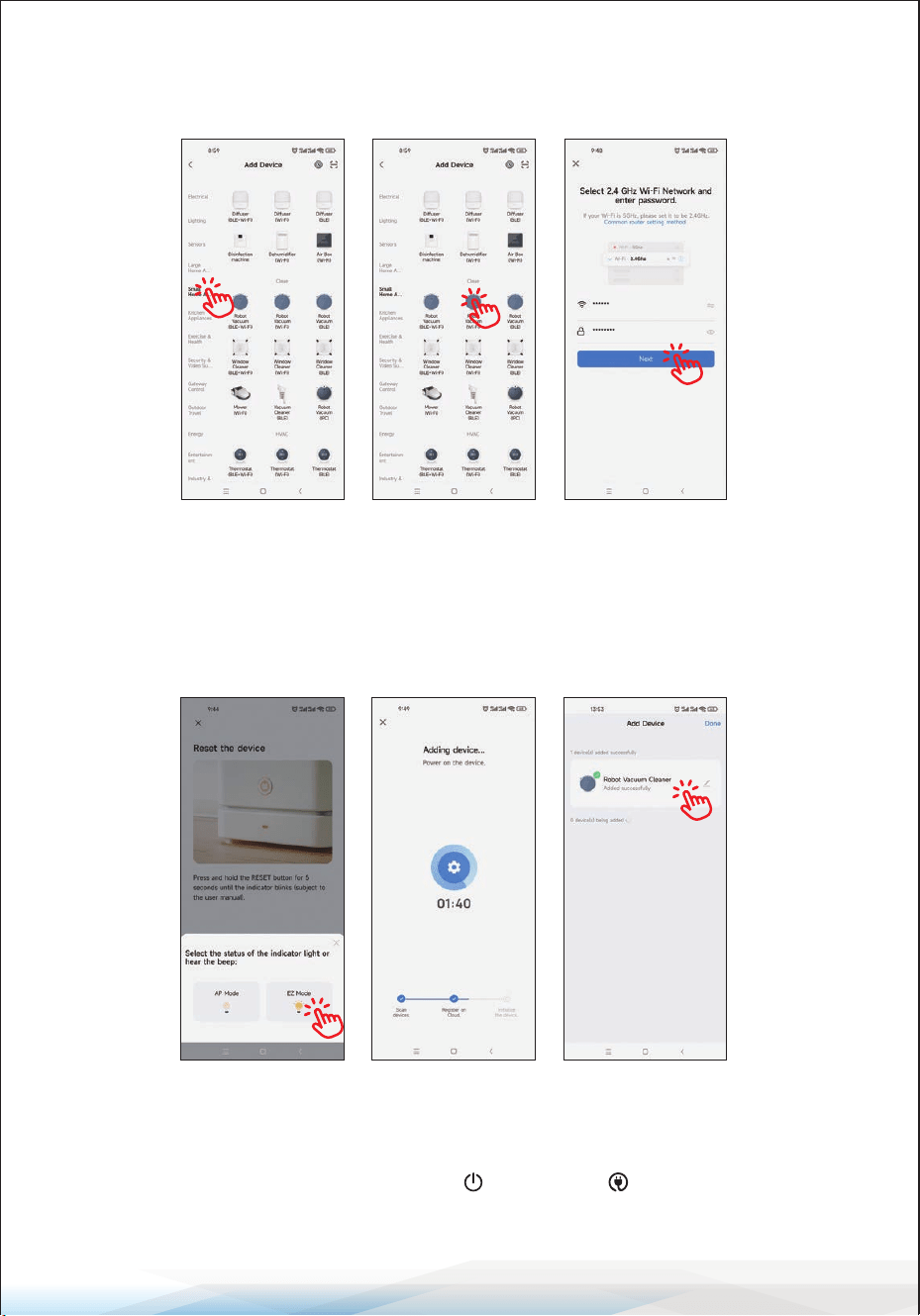
7. Rapid Network Distribution Mode: Select "Small Home Appliances" and
then "Robot Vacuum."
Ensure the WiFi LED indicator is ashing, check "Conrm indicator rapidly
blink," and click NEXT for network connection. Click Finish after the device is
successfully added. It may take several seconds to connect the device to the WiFi
network, depending on signal strength.
Reset WiFi
In case of connection timeout or when connecting another cell phone, rst
switch on the device. Press and hold the button and button simultaneously
for more than 3 seconds, then reconnect to the WiFi network.
www.SereneLifeHome.com
14
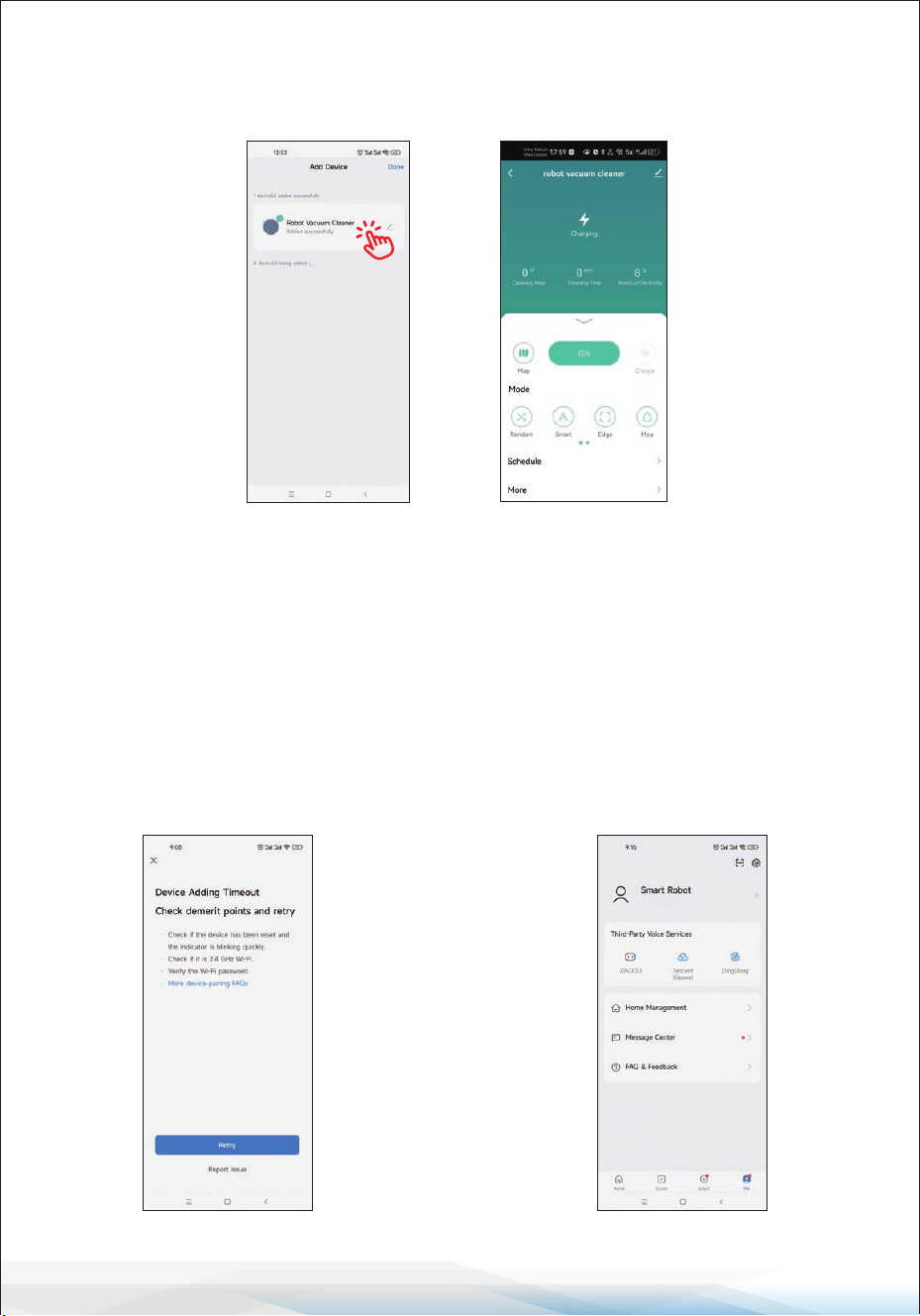
8. Click on "Robot Vacuum Cleaner," as shown in the gure, to enter the control
interface.
9. If the device does not respond, a
page will be displayed, as shown
in the gure. Click on "Switch
Pairing Mode" to check for the
issue, or click on "Retry" to add
the device again.
10. To unbind the device, click on
Me > Home Management >
Home Name > Delete Home at
the lower right corner, as shown
in the gure. (Note: To reconnect
the device after unbinding it,
repeat the previous steps.)
www.SereneLifeHome.com
15
Precautions Before Use
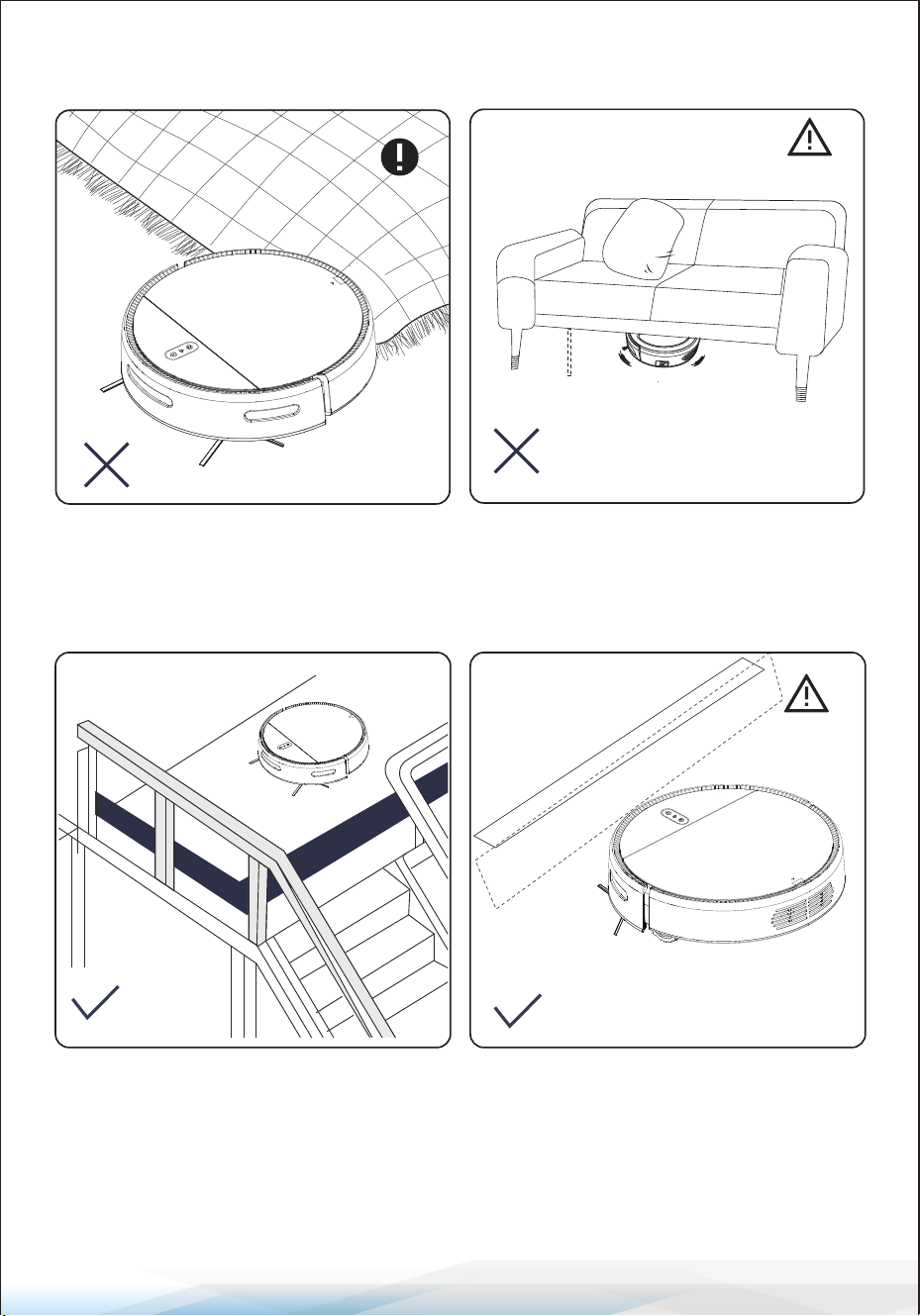
<2.87 in/73 mm
Fold the fringed edge of the carpet to
prevent entanglement with the robot.
The robot cannot be used in a space
lower than 2.87 inches (73mm) in
height.
Use the machine in a fenced environment
to prevent it from hanging or falling.
If dirty or used on reective/dark colored
oors, the robot's performance may be
reduced.
www.SereneLifeHome.com
16
Product Maintenance
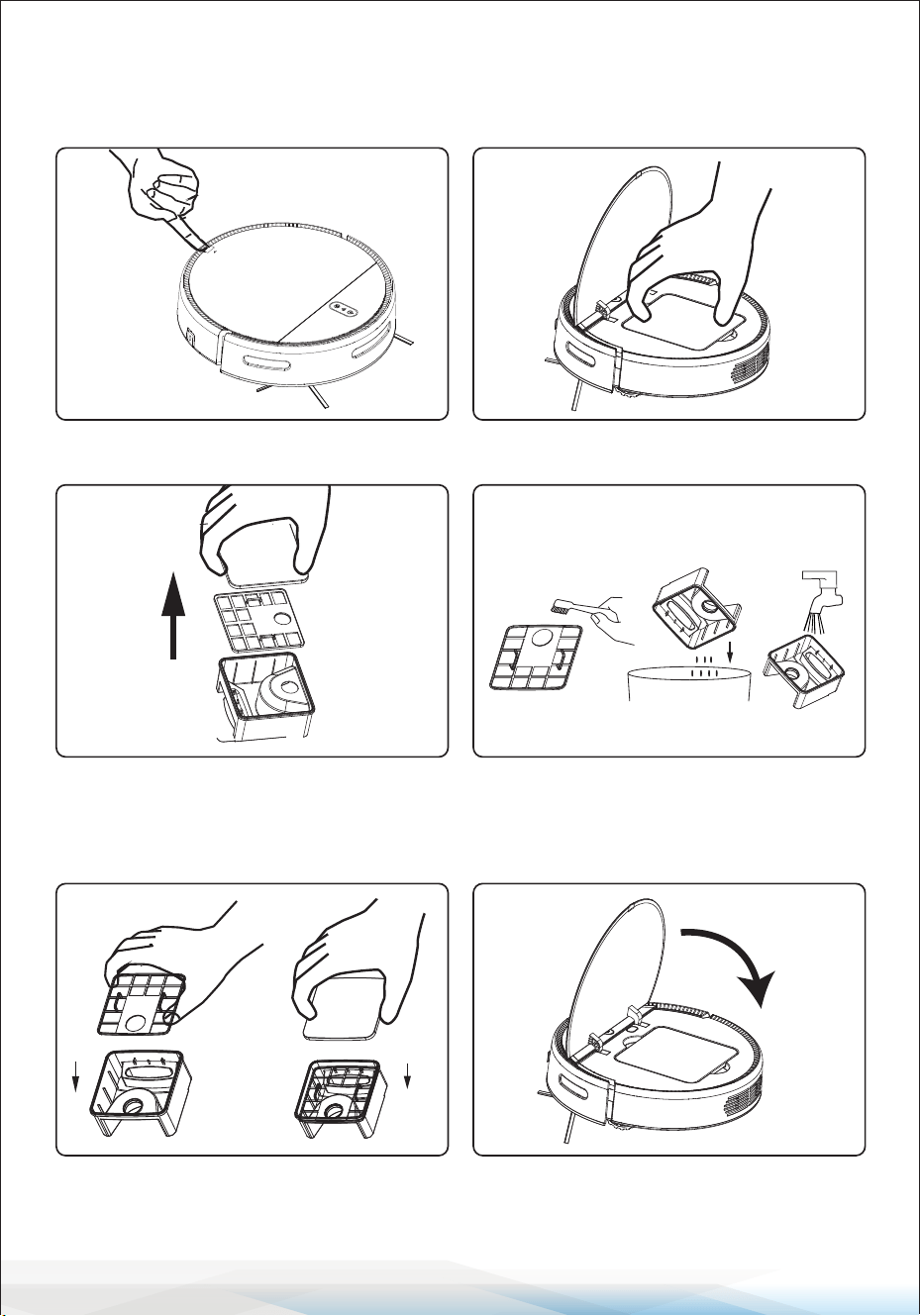
1. Clean the Dust Box
Open the cover Take out the dust box.
Open the dust cover and remove the
air lter.
Clean the dust box with a brush, empty
the dust box, clean it with water, and
wipe it dry.
After cleaning, replace the dust cover
and lter.
Put the dust box back into the sweeper
and close the ap.
www.SereneLifeHome.com
17
2. Clean Other Components
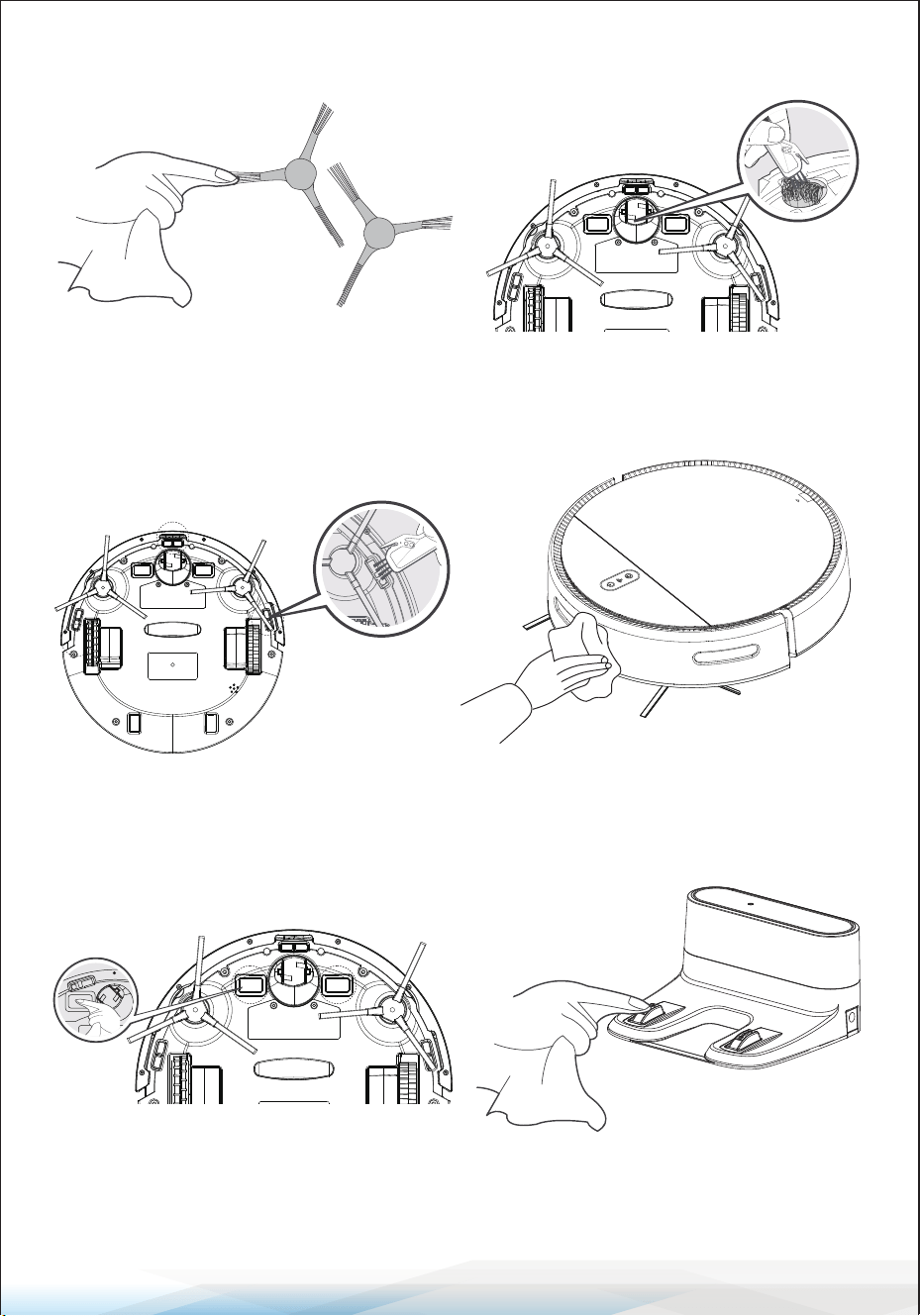
Universal Wheel: Clean the universal
wheel to remove hair entanglement.
Cli Sensor: Clean the cli sensor to
ensure sensitivity.
Side Brush: Remove and wipe the side
brush with a clean cloth.
Sensor Window: If there is dust in the
suction port, clean it with a cloth.
Charging Electrode: Use a dry cloth to clean the bottom of the machine and the
charging electrode on the charging dock.
www.SereneLifeHome.com
18
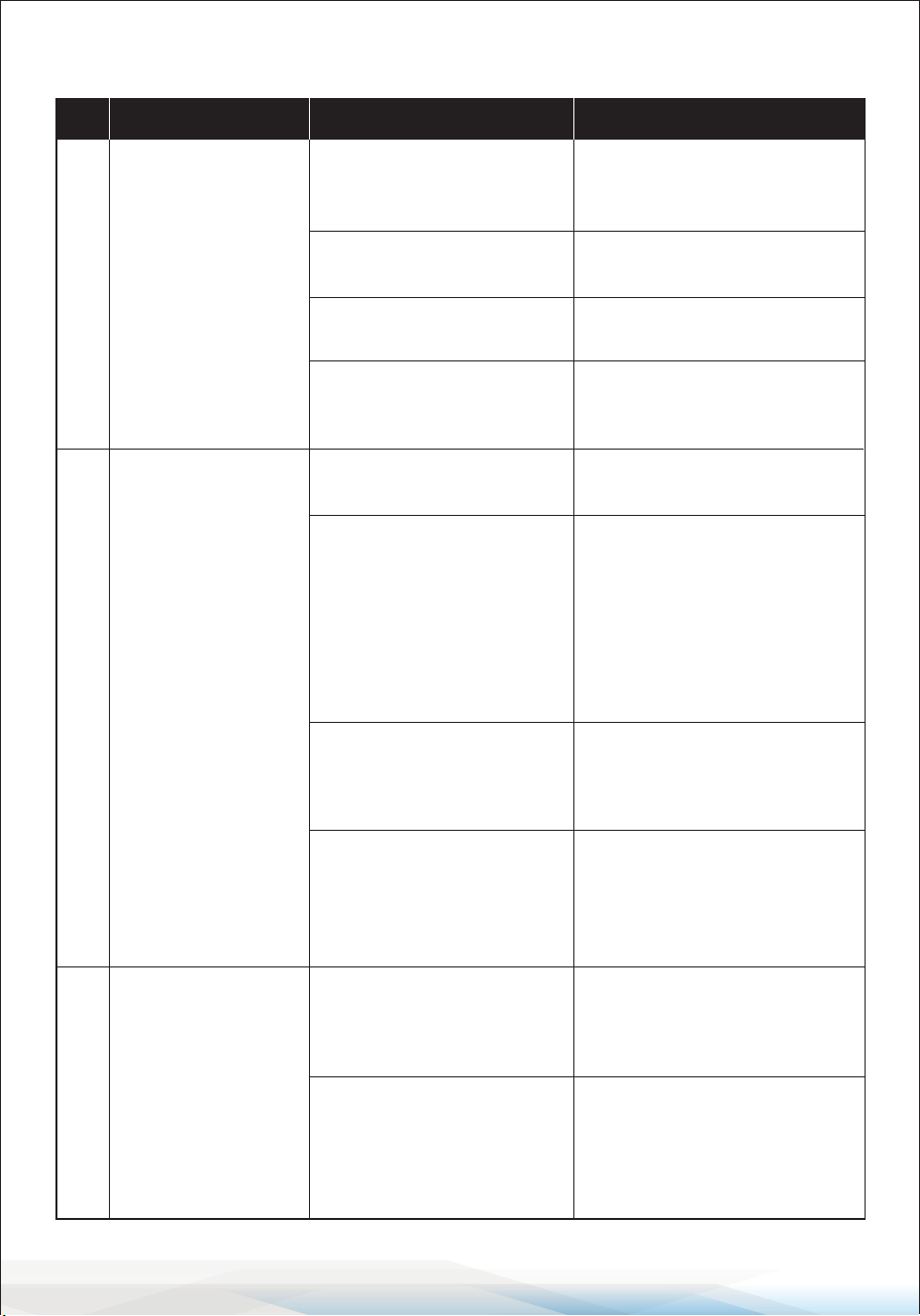
Troubleshooting
No. Fault Condition Possible Reasons Solution
1
Robot fails to
connect to the APP
Incorrect router username
or password.
Reset the router with the
correct username and
password.
Robot is not within the
network signal range.
Ensure the robot is within the
network signal range.
The robot is not congured.
Congure the network for the
robot.
The robot is not connected
to a 2.4GHz network.
The robot cannot connect to
a 5GHz network; please
connect to a 2.4GHz network.
2
Robot fails to
charge
The adapter is not the
original model.
Use the original adapter
model.
Poor contact between the
robot and the charging
dock electrodes.
Ensure that the robot and the
charging dock are properly
aligned and plugged in.
Clean the charging electrodes
on both the dock and the
robot as per the maintenance
instructions.
The charging dock is placed
incorrectly.
Place the charging dock
correctly according to the
instructions.
Long-term non-use leads
to battery over-discharge.
If the battery cannot be
charged due to long-term
non-use, please contact after-
sales service.
The charging dock is not
connected to a power
supply.
Ensure that the charging dock
is properly connected to a
power supply.
The charging dock is
powered o or has been
moved manually.
Check whether the charging
dock is connected to power
and avoid moving it.
3
Robot fails to
return to the
charging dock
www.SereneLifeHome.com
19
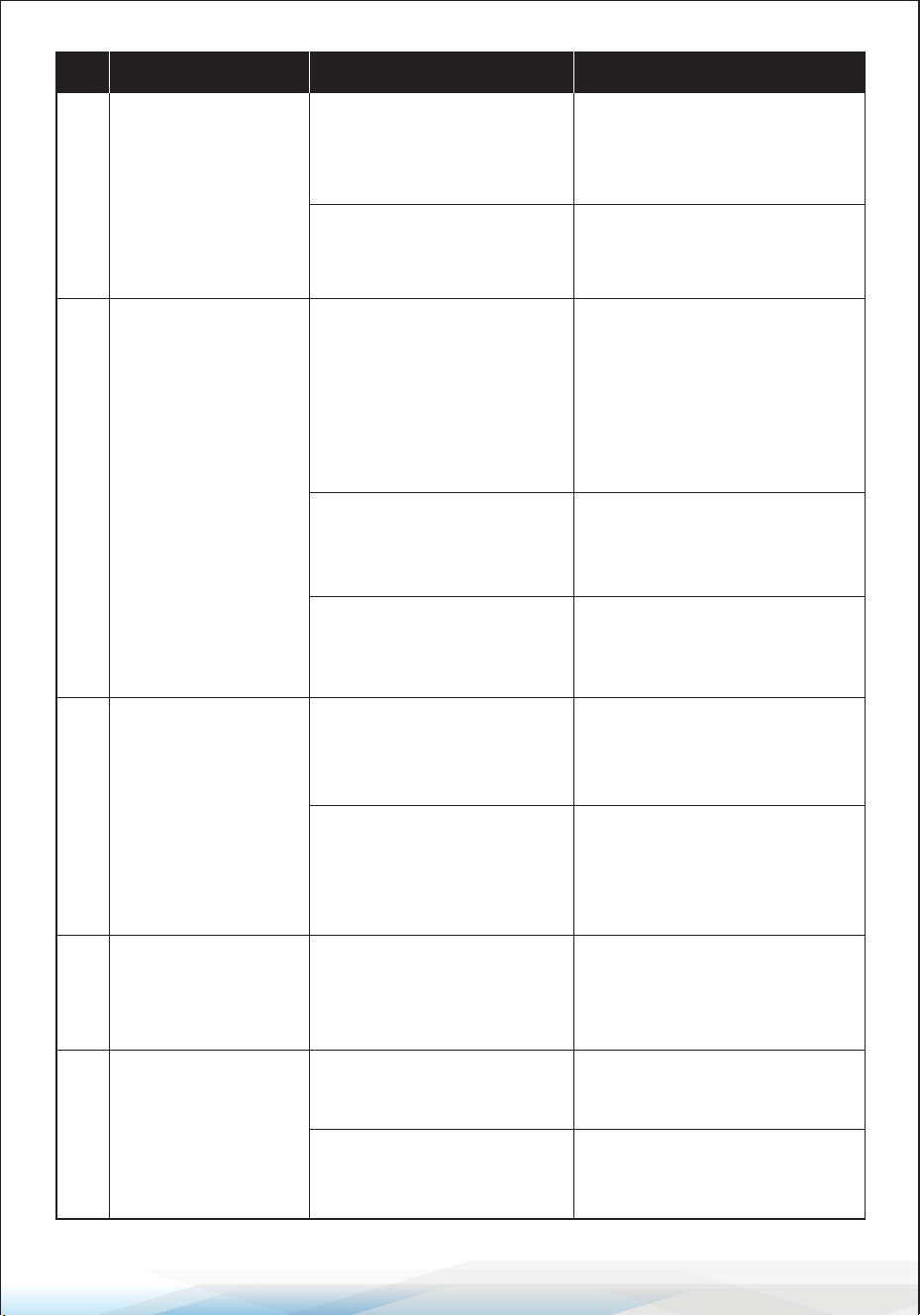
No. Fault Condition Possible Reasons Solution
The machine is obstructed
by ground obstacles such
as wires, carpet corners, or
closed doors.
Remove any ground obstacles
and ensure the recharging
route is clear.
Wires, slippers, or other
objects on the ground are
obstructing the robot.
Remove objects from the
ground before the robot starts
working. If some areas fail to
get cleaned, the robot will
automatically detect and
clean them; do not manually
interfere.
4
Robot displays
abnormal behavior
(e.g., disorderly
route, repeated
cleaning, or small
areas fail to get
cleaned up)
The robot is working on a
newly waxed and polished
oor, reducing friction.
Avoid using the robot on
freshly waxed oors.
The robot may be stuck
under furniture with a
height similar to the robot's
height.
Raise or adjust the furniture
to prevent the robot from
getting stuck.
The robot is entangled or
obstructed by wires,
curtains, carpet edges, etc.
The robot will try to free itself;
if it cannot, manually assist it.
The home environment is
unsuitable for the robot to
clean eectively.
Adjust the home environment
to ensure the robot can work
on the oor.
Side brushes, dust bin, or
lters are blocked.
Regularly clean and maintain
the side brushes, dust bin,
and lters.
The rolling brush is
entangled with hair.
Remove hair from the rolling
brush.
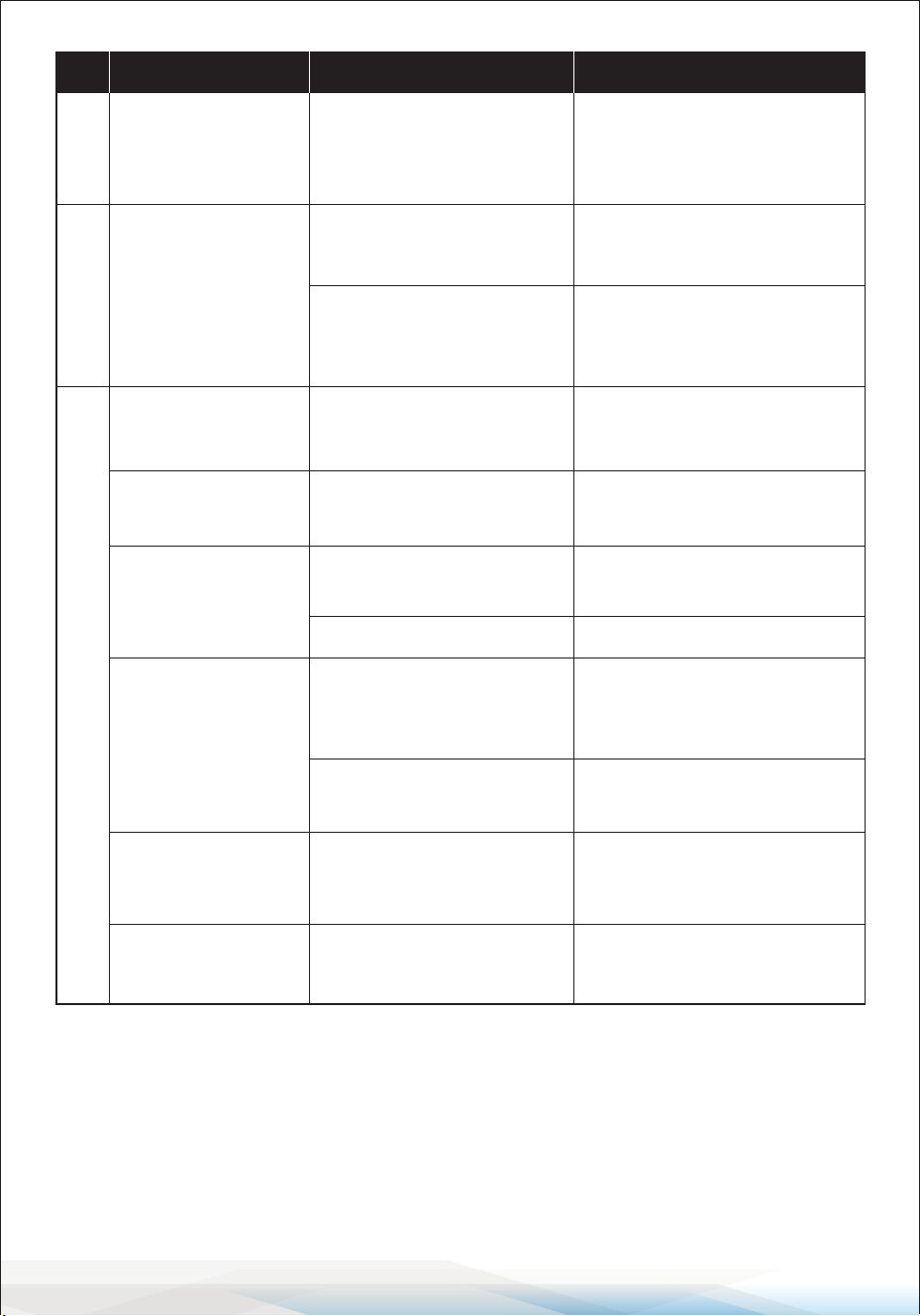
3
Robot fails to
return to the
charging dock
The robot did not start
cleaning from the charging
dock.
Start the robot cleaning from
the charging dock.
5
Robot is stuck
during operation
6
Robot makes loud
noise when
running
7
Rolling brush does
not rotate
Rolling brush and its shield
are installed incorrectly.
Reinstall the rolling brush
assembly correctly.
www.SereneLifeHome.com
20
If the problems cannot be resolved using the above steps, please contact the
after-sales service for further assistance.
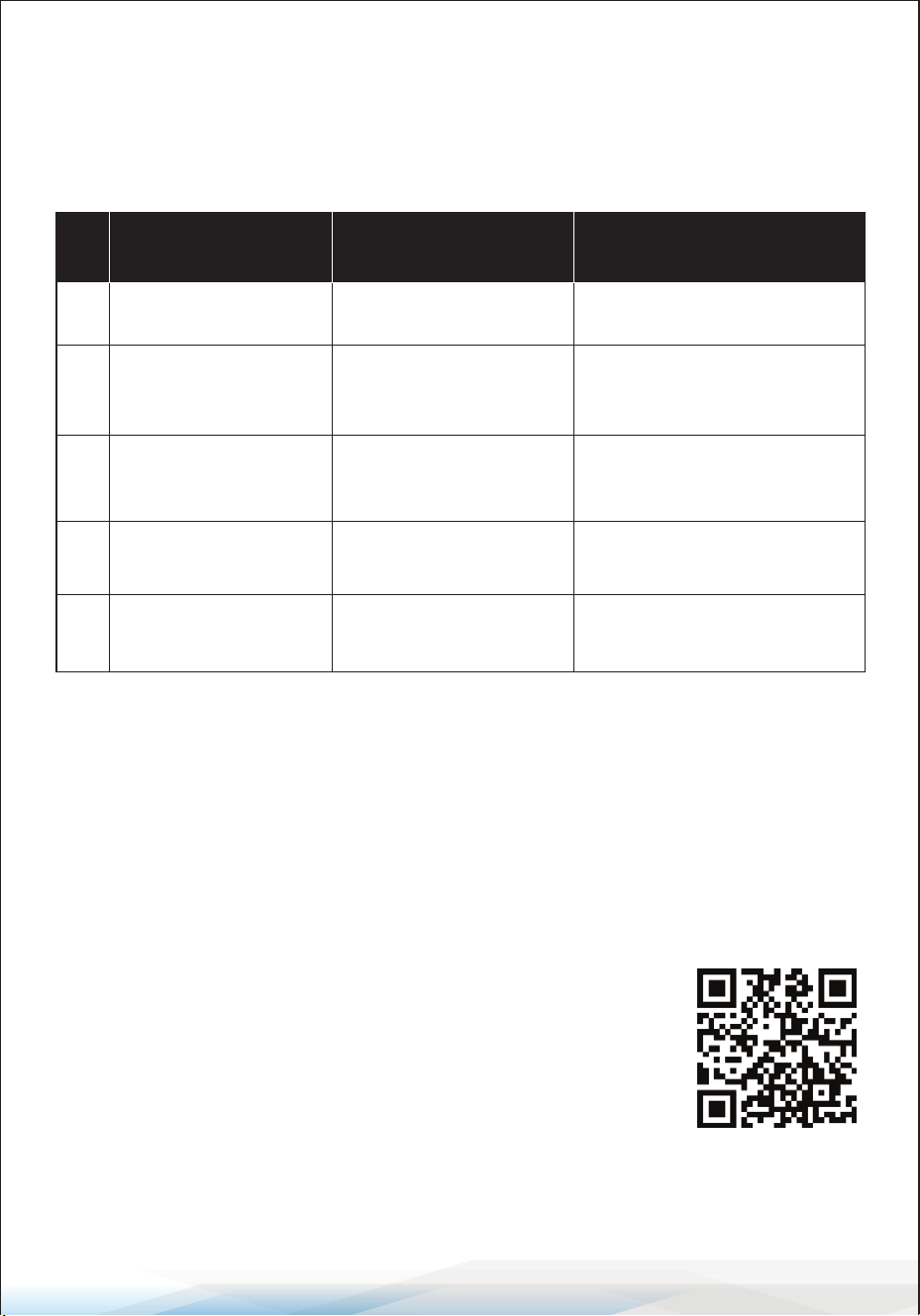
No. Fault Condition Possible Reasons Solution
The rolling brush assembly
has sucked in foreign
matter.
Disassemble the rolling brush
assembly and remove any
foreign matter.
The robot is turned o or
has low battery.
Ensure the robot’s power
switch is on and the battery
is fully charged.
9
Robot fails to start
The robot is out of power
or the power switch is o.
Charge the robot or turn on
the power switch.
The water pump is not
working.
Contact after-sales
maintenance.
The outlet hole of the
water tank is blocked or
the water tank is empty.
Clear the outlet hole and ll
the water tank.
Side brush or caster
tangled with hair.
Remove hairs from the side
brush or the universal wheel.
The oor is too wet.
Wring out the mop cloth and
clean up any water stains on
the oor.
Abnormal cli sensor
behavior.
Clean the surface
7
Rolling brush does
not rotate
Low battery in the remote
controller.
Replace the battery.
8
Remote control
failure
Robot shakes
when running
The intake port is blocked
or the dust bin is full.
Check the suction port and
clean the dust bin.
Abnormal
operating
condition
Water not coming
out
HEPA lter is blocked. Clean or replace the HEPA lter.
Machine skids
Machine keeps
going backwards
www.SereneLifeHome.com
21
Warning Code Table
When the robot encounters an issue, it will emit a series of beeps, and the red
light will either ash or stay on. Refer to the following table to diagnose and
troubleshoot the problem:
Warm Tips:
If the above methods do not resolve the issue, try the following:
1. Restart the machine.
2. If restarting does not solve the problem, please contact the after-sales service
center for maintenance.
No.
Beep Pattern
and Light Status
Issue Solution
Wheel is stuck
Check the wheel gap for any
obstructions and clean it out.
1
Beeps once, red light
stays on
Front bumper is stuck
Check the front bumper for
any obstructions and remove
any foreign matter.
2
Beeps once, red light
keeps ashing
Side brush is abnormal
Check if the side brush is
entangled with hair and
clean it.
3
Beeps twice, red light
keeps ashing
Ground sensor is
abnormal
Check if the ground sensor is
dirty and clean it.
4
Beeps three times, red
light keeps ashing
Power is low
Charge the robot as soon as
possible.
5
Beeps four times, red
light keeps ashing
Register Product
Thank you for choosing SereneLife. By registering your
product, you ensure that you receive the full benets of our
exclusive warranty and personalized customer support.
Complete the form to access expert support and to keep
your SereneLife purchase in perfect condition.
Start Here
Model Number:
PUCRCVAC100BK
Serenelifehome.com/
pages/register

Questions or Comments?
We are here to help!
Phone: 1.718.535.1800
Serenelifehome.com/ContactUs