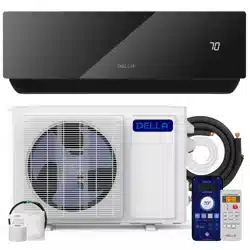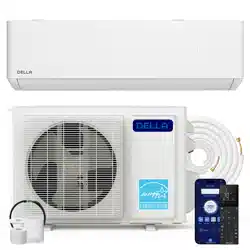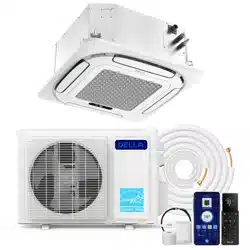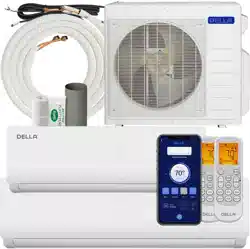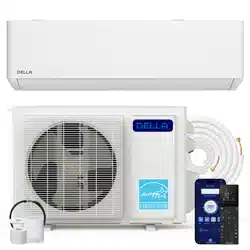
Optima (TP) Series
Instruction Manual
Installation and Operation Guide
Watch video
before Installation
Welcome to
5 Things to know before installation
The installation location is critical
Handle the refrigerant pipes perfectly
Bundle the line set correctly
Vacuum pumping the refrigerant circuit
Safe electrical connection
Not all places are created equal. Only proper placement of the AC will maximize ecency while balancing the interior
aesthetic. As wall requires for the installation, you need to make sure to get the placement and location right the rst time.
-14-
Thank You for trusting Della as your home comfort solution. We know no better how exicting it must be to have a new and functional AC to make
your living space more comfortable. But AC installation, in reality, is far from being simple. Here are a few things you must know before installing
the AC whether by yourself or by a professional HVAC technician. This will give you an idea of what to look out for installing an AC so that it can
perform at its maximum eciency and every dollar you invest in it pays o.
The refrigerant pipe is one of the most important, if not the most important, parts of the mini split AC system. So, be
sure to understand what the entire process entails. You might need special-purpose tools to shorten and bend the
pipe. Purchaseing lengthening pipes to match your connection might also be necessary. Any ow in the handling of the
refrigerant pipes may cause a refrigerant leak or reduced eciency. The cost to repair or re-install the refrigerant pipe
can quickly frustrate and upset any DIYer, especially when trying to save money by not hiring a professional. Additional
refrigerant might also be needed if you used lengthening pipes or nd any leaks during your install. Further more, it's
always a good idea to test for any refrigerant leaks after completing your installation by using soapy spray or professional
detector tools. Please contact us if you need extra refrigerant.
-22-
The line set contains the refrigerant pipes, drain hose, and electrical wires. A good bundling prevent water condensation
and protects it from extermal elements, as well as matching the exact distance of the installation. No one wants extra line
set dangling around.
-18, 30-
Mini-split AC absolutely needs vacuum pumping in order to perform ecently and prevent refrigerant from reacting with
air moisture and damaing the internal parts of the machine. With a vacuum pump and a micron gauge, the process does
not take very long, but it is important to do it right.
-26-
A safe and properly electrical connection is crucial necessity for the installation. The voltage, power breaker protection,
cable requirement and wiring must correspond to the specications of each model. A poor connection can quickly
becomes a re hazard.
-12, 25-
Page 16
Page 24
Page 34
Page 20, 38
Page 14, 27
Most of the problems emerge from incorrect or poor installation. Installation performed by professional HVAC technician can greatly
reduce the chance of having problems for years to come. On top of that, Della provide extended warranty for professional installation.
If you need assistance or have questions, we are here for you.
support.dellahome.com
24/7 Live Chat
800-863-4143
6:00 a.m. - 4:00 p.m. PST
Monday - Friday
Table of Content
Warning and Safety
Name of Parts
Product Specication
04
09
11
61
62
63
66
67
Air Filter
Maintenance Routine
Installation Preview
Installation Info
Indoor Unit Installation
Outdoor Unit Installation
Circuit Diagram
Vacuum Pumping
Finishing Touch
Check List
Test Run
13
14
17
22
29
34
38
39
40
Troubleshooting
Disposal Guideline
Warranty
Power ON / OFF
Operation Modes
- Auto, Cool, Heat, Dry, Fan
Change Temperature
Change Fan Speed
Adjust Airow
48
48
48
49
49
50
Turbo Mode
Quiet Mode
Eco Mode
Sleep Mode
Timer
Vicinity Sensor
Display ON / OFF
Self Cleaning
Child Lock
°F / °C
Force Defrost
Emergency Button
Wi-Fi Set up
51
51
52
52
53
54
54
55
55
56
56
57
60
Operation Tips
Front Panel
Remote Control
41
42
43
Before Installation Care and Maintenance
Having Problems?
Installation
Before Using
Basic Operation
Advance Function
4
Warning and Safety
• Read this guide before installation. Failure to follow the safety instructions may result in property damage, serious injury, or death.
• Please Keep this manual.
Danger:
Indicates an IMMINENTLY hazardous situation that, if not avoided, will result in death, serious injury, or serious property damage.
Warning:
Indicates an POTENTIALLY hazardous situation that, if not avoided, will result in death, serious injury, or serious property damage.
Caution:
Indicates an POTENTIALLY hazardous situation that, if not avoided, will result in minor to moderate injury. It may also be used to
indicate unsafe practice.
About Refrigerant
Attention:
Pay additional attention to the instruction.
DO NOT:
Indicates prohibited actions and / or practice.
• The air conditioner is pre-charged with refrigerant. Handle the air conditioner with care and check if there is any
refrigerant leakage during installation. Refrigerants have no odor and can be toxic and ammable. Rapid evaporation of
refrigerant may cause frostbite, cardiac arrhythmia, and / or irritation, as well as cause environmental damage.
• In the case of refrigerant leakage, shut down the appliance and disconnect from the power supply. An inspection must
be performed by a qualied technician.
DANGER
DANGER
WARNING
CAUTION
Before Installation
Before Installation
5
v.20250729U
Before Installation
Before Installation
Warning and Safety
• In UL/CSA 60335-2-40, R454B refrigerant is classied as class A2L, which is mildly ammable. Therefore, R454B
refrigerant is suitable for system needing additional refrigerant charge and which will limit the area of the rooms being
served by the system. Similarly, the total amount of refrigerant in the system shall be less than or equal to the allowable
maximum refrigerant charge. The allowable maximum refrigerant charge depends on the area of the rooms being
served by the system.
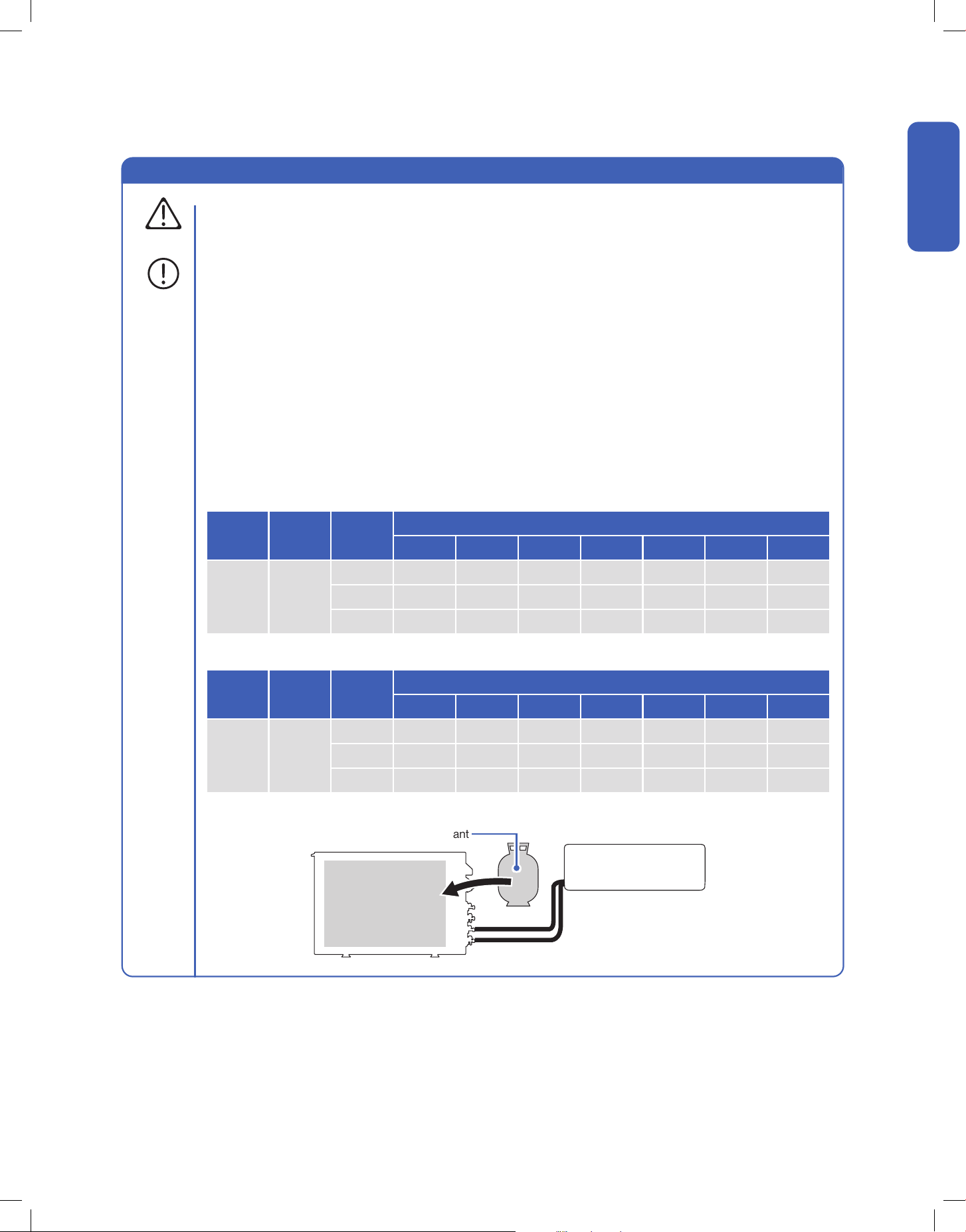
• For R454B refrigerant, the maximum charge in a room shall be in accordance with the following:
• Maximum Charge (kg)
• Minimum Room Area (m2)
• M = Mass
• Mmax = Maximum charge mass
• Mc = Mass charged
• A = Floor area
• LFL = Lower Flammable Limit, for R454B LFL is 0.296 kg / m3
• or the minimum oor area Amin to install an appliance with refrigerange Mc (kg) shall be in accordance with:
• Mmax = SF x LFL x h0 x A
• Amin = Mc / (SF x LFL x h0)
Additional Information About R454B Refrigerant
WARNING
Refrigerant
LFL
(kg/m3)
h0 (m)
Floor Area (m2)
4 7 10 15 20 25 30
R454B 0.296
1.8 1.10 1.90 2.70 3.80 4.40 4.90 5.40
2.5 1.48 2.59 3.70 5.55 7.40 9.25 11.10
2.8 1.66 2.90 4.14 6.22 8.29 10.36 12.43
Refrigerant
LFL
(kg/m3)
h0 (m)
Charge Amount (M)
0.8 kg 1 kg 1.2 kg 1.4 kg 1.6 kg 1.8 kg 2.0 kg
R454B 0.296
1.8 3.00 3.75 4.50 5.26 6.01 6.76 7.51
2.5 2.16 2.70 3.24 3.78 4.32 4.86 5.41
2.8 1.93 2.41 2.90 3.38 3.86 4.34 4.83
• The total refrigerant charge should be calculated by adding the precharge amount and additional amount.
Pre-charged
Refrigerant
Pre-charge Refrigerant + Addition Refrigerant
= Total Refrigerant Amount
Additional Refrigerant
6
Before Installation
Before Installation
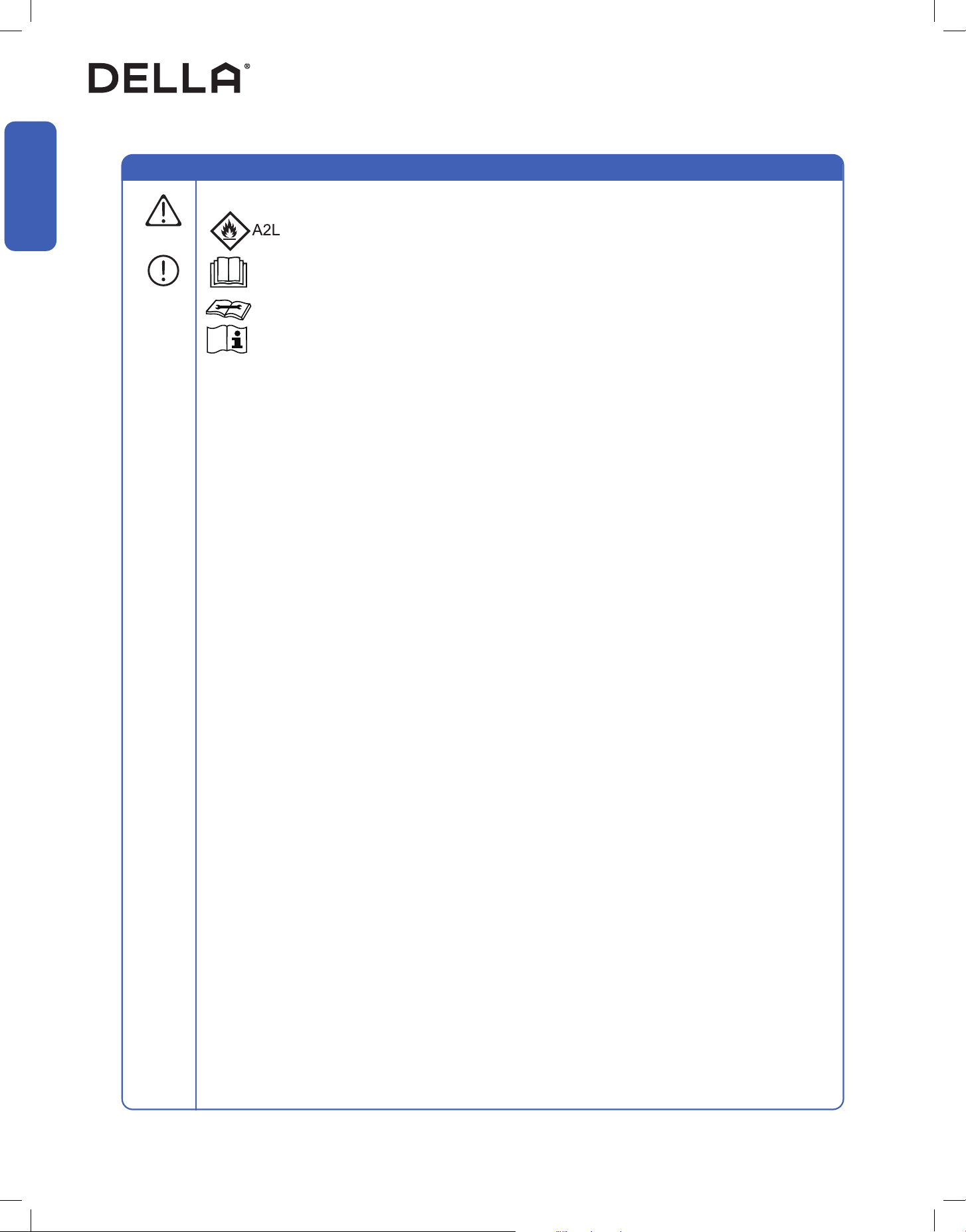
• When Installing or using the appliance with R454B refrigerant, beware of the following symbols.
• This symbol means this appliance uses a ammable rergerant.
If the refrigerant is leaded and exposed to an external ignition source, there is a rist of re.
• This symbol means that read the operation insturction carefully.
• This symbol means that personnel handling the equipment should reference to the installation manual.
• This symbol means information is available in the installation or operation instruction manual.
Warning and Safety
• Prior to any work on systems containing ammable refrigerants, always check the area to ensure that the risk of
ignition is minimized. All possible ignition sources, such as cigarette, should be kept siciently far away from the site
of installation, repairing, removing, and disposal during which refrigerant can possibly be released to the surrounding
space. Prior to work taking place, the area around the equipment should be surveyed to make sure that there are no
ammable hazards or ignition risk. "No smoking" sign shall be displayed.
• Installation or maintenance of refrigerant system shall be taken under a controlled procedure to minimize the risk of
ammable gas or vapor being present while the work is being performed.
• All working personnal and others around the working area shall be instructed on the nature of work being carried out.
Work in conned spaces shall be avoided. The area around the workspace shall be sectioned o, and ensure that the
conditions within the area have been made safe.
• The area shall be checked with an appropriate refrigerant detector prior to and during work to ensure the technician is
aware of potentially ammable atmospheres.
• If any hot work is to be conducted on the refrigeration equipment or any associated parts, appropriate re extinguishing
equipment shall be available to hand.
• Ensure that the area is in the open or it is adequately ventilated before breaking into the system or conducting any work
that will product heat. A degree of ventilation shall continue during the period that the work is carried out.
• The folliwing checks shall be applied to installations using ammable refrigerants:
• The refrigerant charge amount is in accordance with the room size within which the refrigerant containing parts are
installed.
• The ventilation machinery and outlet are operating adequately and are not obstructed.
• If an indirect refrigerating curcuit is being used, the secondary circuit shall be check for the presence of refrigerant.
• Refrigerant pipe or components are installed in a position where they are unlilely to be exposed to any substance
which may corrode refrigerant containing components, unless the components are constructed of materials which
are inherently resistant to being corroded or are suitable protected against being corroded.
• Under no circumstances shall potential sources of ignition be used in the searching for or detection of refrigerant
leaks. A halide torch or any other detector using naked ame shall not be used.
• Electronic leak detectors shall be used to detect ammable refrigerant. Ensure that the detector is not a potential
source of ignition and is suitable for the refrigerant used.
• Leak detection equipment shall be calibrated to the refrigerant employed and the appropriate percentage of gas
(25% maximum) is conrmed.
• Leak detection uids are suitable for use with most refrigerants, but the use of detergents containing chlorine shall
be avoided as chlorine may react with the refrigerant and corrode the pipe work.
• If a leak is suspected, all open ame shall be removed or extinguished.
• If a leakage of refrigerant found which requires brazing, all of the refrigerant shall be recovered from the system, or
isolated (by means of shut o valves) in a part of the system remote from the leak.
• Oxygen free nitogen shall be purged through the system both before and during the brazing process.
• Detection of ammable refrigerants:
Additional Information About R454B Refrigerant
WARNING
7
v.20250729U
Before Installation
Before Installation
• The room for the installation, use, repair, and / or storage of this air conditioner should be greater than 54 sq ft / 5m².
• Stop valve cover must be installed on the air conditioner to prevent possible refrigerant leak.
• Refrigerant leakage or damaged pipelines must be inspected and repaired by a qualied HVAC technician.
• The installation of refrigerant pipe work shall be kept to a minimum length.
• The appliance must be installed in accordance with applicable federal, state, and local regulations.
WARNING
Warning and Safety
About Installation
About Power and Electricity
• Do not install or store this appliance in a room with continuously operating ignition sources such as open ames, gas
appliances, or electric heater.
• Do not install the appliance within 20” / 50cm of ammable substances such as alcohol, etc. Or pressurized containers
such as spray cans.
• Do not alter, change, or modify the appliance.
• Prevent children from accessing the work area during installation to prevent unforeseeable accident.
• The base of the outdoor unit must be rmly xed.
• Carry out a test run after the installation.
• Installation of a mini split AC requires specialized training and equipment. Hire a licensed professional if not familiar with
electrical wiring and HVAC system.
• The packaging materials are recyclable and should be disposed of in a separate waste bins.
• The appliance should not be installed in a location where the air outlet of the indoor or outdoor unit is obstructed.
Obstruction of these opening may cause damage or malfunctions to the appliance.
• Ensure that the power voltage corresponds to that stamped on the rating plate.
• A fuse or overload protection device with a suitable capacity for indoor unit must be installed.
• The appliance must be tted with means for disconnection from the main power supply under
over-voltage category III conditions. All electrical wiring must follow federal, state, or local regulations.
• When working on the electric terminals, ensure the appliance is disconnected from the power supply.
• Make sure the appliance is properly grounded to prevent electric shock.
• Do not bend, tug, or compress the power cord during installation to prevent damaging the power cord. Damaged
electrical cord should be replaced by a qualied electrician.
• Do not use power extensions and / or multi-socket modules for appliance installation.
WARNING
WARNING
WARNING
CAUTION
8
Before Installation
Before Installation
Warning and Safety
About Handling and Maintenance
Encountering Troubles
• Do not attempt to disassemble, alter, or modify the appliance.
• Do not ush the air conditioner with water.
• Do not attempt to repair, relocate, modify or reinstall the air conditioner by yourself. Incorrect work could cause electric
shocks, re or damage. Contact a qualied technician.
• In the case of the appliance emitting smoke, burning smell, leaking water, or making unusual noise, shut down the
appliance and disconnect from the power supply immediately. Contact a qualied technician for inspection and repair.
• Before cleaning the unit, the appliance must by shut down and disconnect from the power supply for at least 5 minutes.
WARNING
WARNING
WARNING
About Operation
• Do not disconnect the appliance from the power supply before shutting o the appliance. This might create a spark and
potentially cause a re.
• Do not place ammable substances near the appliance.
• Do not climb onto or place any objects on the appliance.
• Do not insert any objects into the appliance to prevent damage or injury.
• Do not obstruct the air inlet or outlet.
• Do not operate the appliance with wet hands.
• If the appliance is used in areas without the possibility of ventilation, precautions must be taken to prevent any leaks of
refrigerant.
• Only use the appliance as instructed in this booklet. These instructions are not intended to cover every possible
condition and situation. As with any electrical household appliance, common sense and caution are therefore always
recommended for usage and maintenance.
• This appliance is designed and made for air conditioning in domestic environments only. It must not be used for any
other purpose such as drying clothes or cooling foods.
• This appliance can be used by children 8 years old or above and persons with reduced physical, sensory, or mental
capabilities, or lack of experience and knowledge if they have been given supervision or instruction concerning the use
of the appliance in a safe way and understand the hazards involved.
• Children shall not play with the appliance.
WARNING
CAUTION
9
v.20250729U
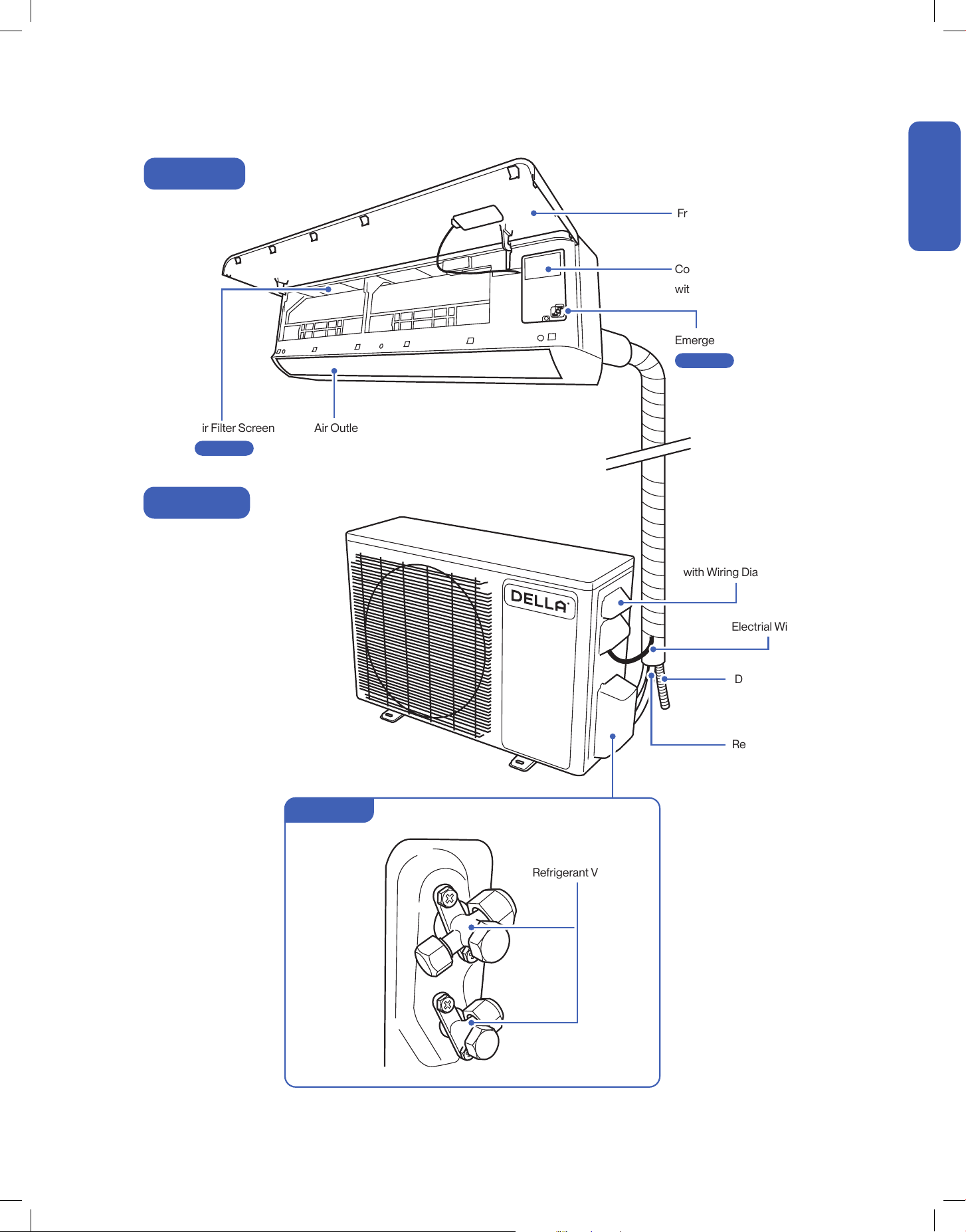
Name of Parts
Air Outlet
Air Deflector and Flap
Air Filter Screen
Front Panel
Control Box
with Wiring Diagram
Wiring Terminal
with Wiring Diagram
Electrial Wire
Drain Hose
Refrigerant Pipe
Emergency ON / OFF Switch
Indoor Unit
Outdoor Unit
Refrigerant Valves
Valve Cover
Before Installation
Before Installation
Page 57
Page 61
NOTE: The graphical representation might have slight differences than the actual product.
10
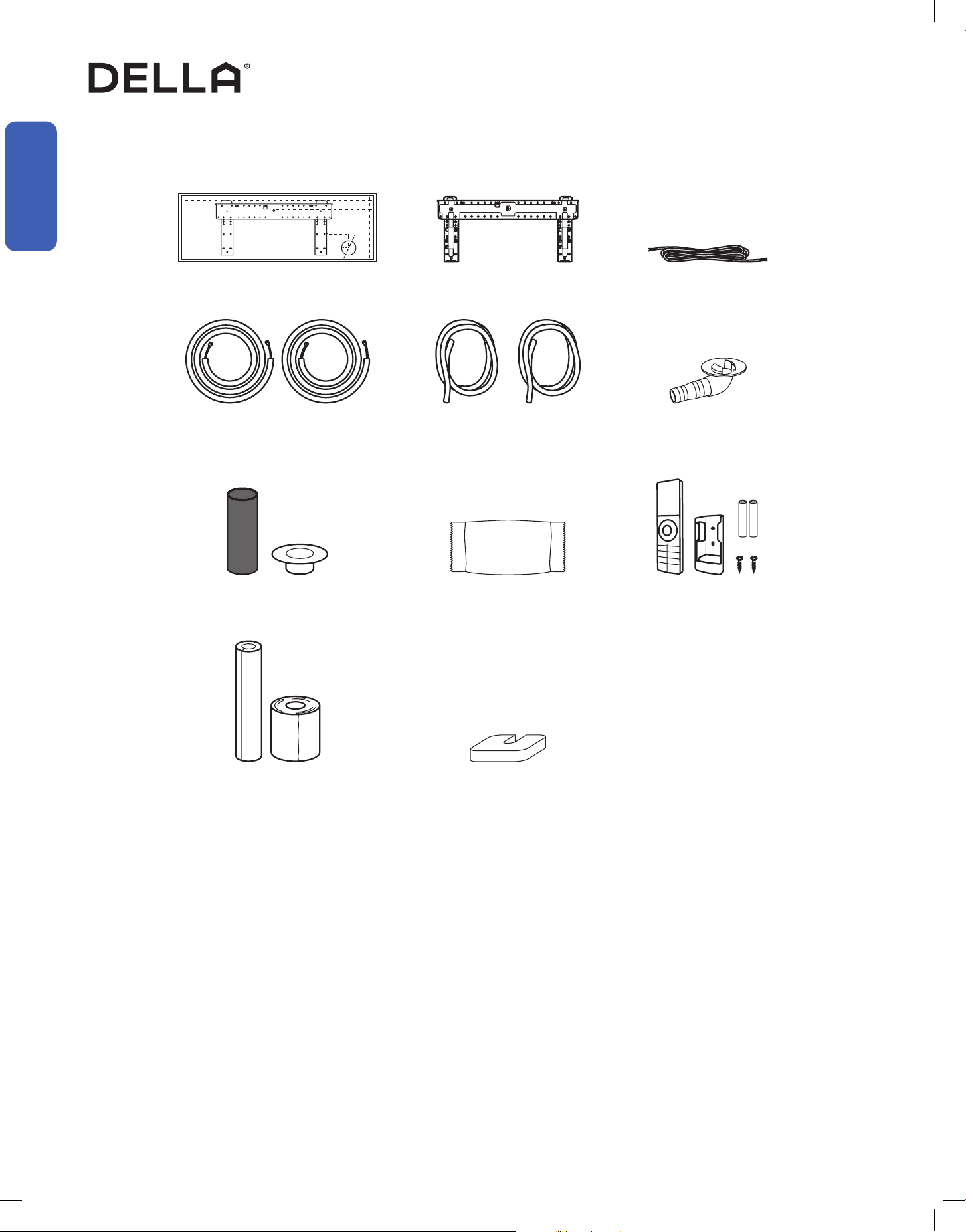
Bracket Template
1x
Mounting Plate
1x
Refrigerant Pipe
Narrow 1x
Thick 1x
Drain Hose
2x
Drainage Joint
1x
Plasticine Putty
1x
Rubber Foot Pad
4x
NOTE: Tools marked with * are needed for shortening the refrigerant pipe and / or electrical wire to the exact desired length.
ONLY a qualied HVAC technician should attempt altering the pipe length and / or the wire length.
Name of Parts
Included Accessories
Tools Needed (Not included)
Before Installation
Before Installation
Wall Sleeve & Cover
1x
Insulation Foam & Wrap
1x
Remote Control, Holder 1x
Battery 2x
Communication Cable
1x
• Screw Driver
• Hole Saw Ø2.75" / Ø70mm
• Refrigerant Leak Detector / Liquid Leak Detector
• Allen Wrench
• Spanner
• Torque Wrench
• Measuring Tape
• Spirit Level
• Stud Finder
• Thermometer
• Vacuum Pump
• Dry Wall Anchors / Molly Bolts
• Wood Screws
• Floor Mounting Base Kit / Wall Mount Kit
• Power Supply Cable
• Micron Gauge / AC manifold Gauge
• Copper Pipe Bender / Spring Bender
• Caulk
• Tubing Cutter*
• Pipe Reamer*
• Tubing Flaring Tool*
• Wire cutter*
11
v.20250729U
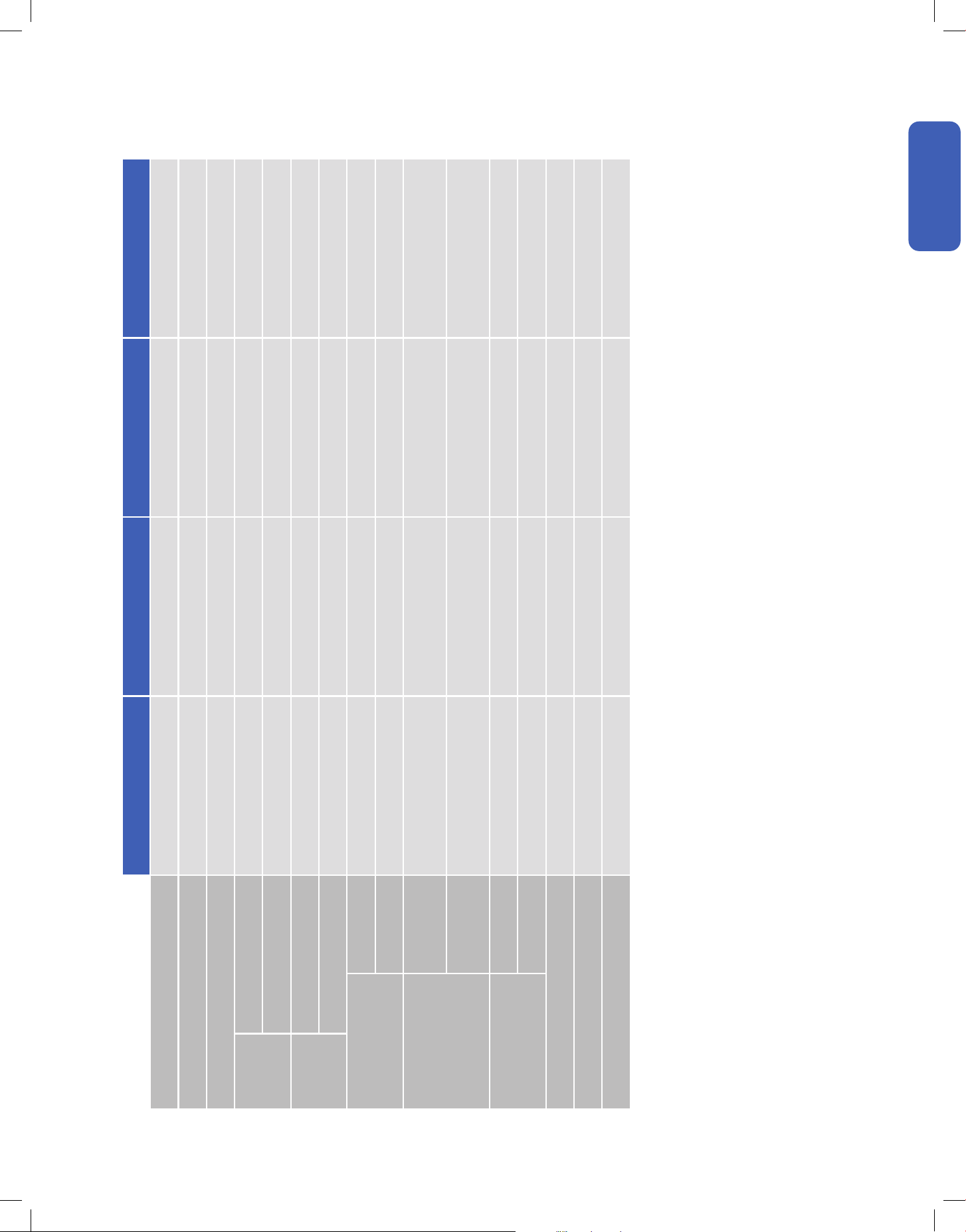
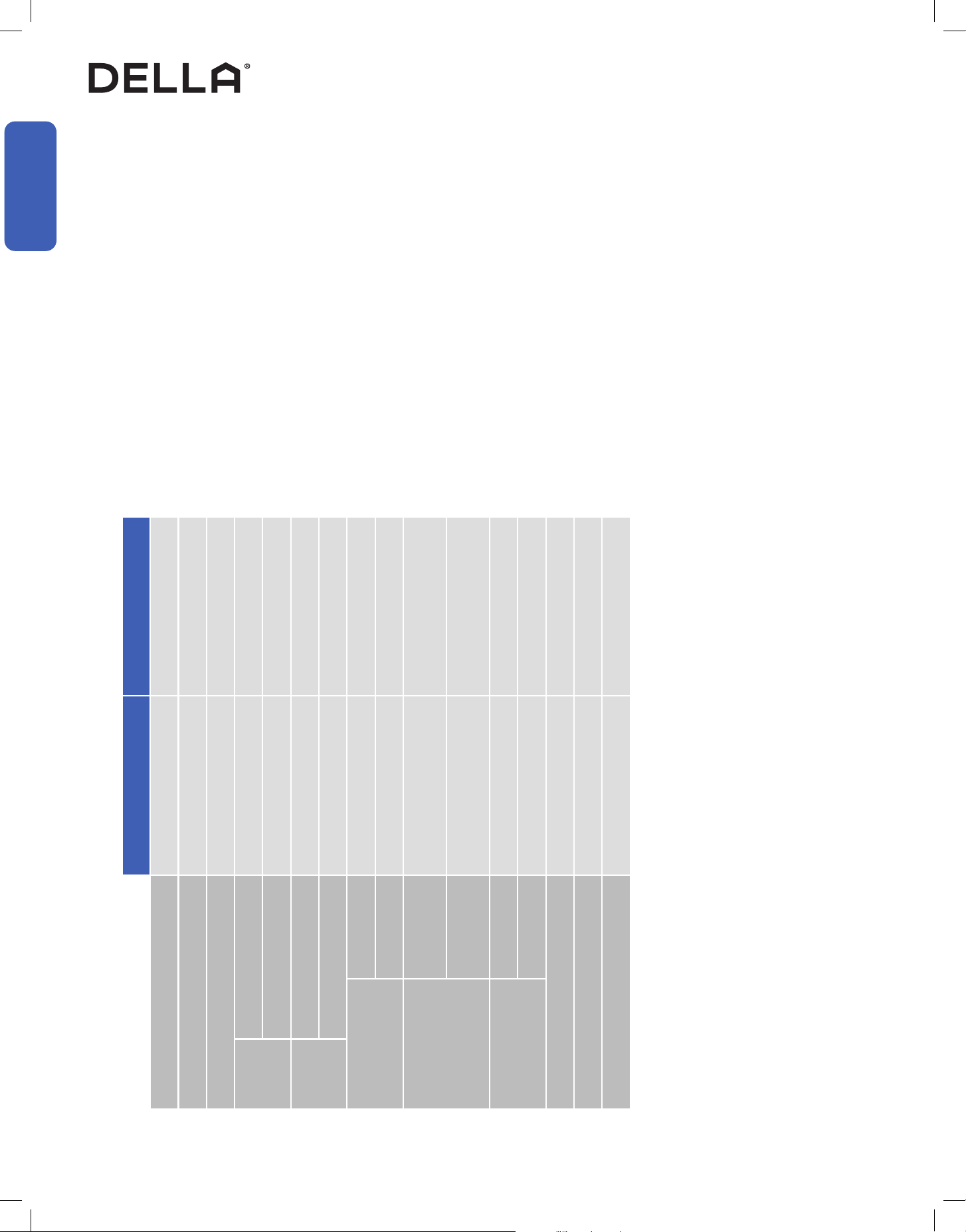
Product Specication
048-TP-9K1V-24S 048-TP-9K2V-24S 048-TP-12K1V-23S 048-TP-12K2V-24S
Power Supply 115 V / 60 Hz / 1P 208 V - 230 V / 60 Hz / 1P 115 V / 60 Hz / 1P 208 V - 230 V / 60 Hz / 1P
Rated Cooling Capacity (Btu / h) 9000 9000 12000 12000
Rated Heating Capacity (Btu / h) 10000 10000 12400 12600
Cooling
Power Consumption 680 W 680 W 960 W 970 W
Rated Current 6.1 A 3.0 A 8.5 A 4.4 A
Heating
Power Consumption 730 W 730 W 945 W 925 W
Rated Current 6.5 A 3.3 A 8.4 A 4.2 A
Noise Level
Indoor Unit 30 - 43 dBA 30 - 43 dBA 30 - 46 dBA 30 - 43 dBA
Outdoor Unit 50 dBA 50 dBA 52 dBA 52 dBA
Dimension
Indoor Unit
32.28" x 12.05" x 7.68"
820 mm x 306 mm x 195 mm
32.28" x 12.05" x 7.68"
820 mm x 306 mm x 195 mm
36.22" x 12.05" x 7.68"
920 mm x 306 mm x 195 mm
36.22" x 12.05" x 7.68"
920 mm x 306 mm x 195 mm
Outdoor Unit
31.88" x 12.00" x 21.61"
810 mm x 305 mm x 549 mm
31.88" x 12.00" x 21.61"
810 mm x 305 mm x 549 mm
31.88" x 12.00" x 21.61"
810 mm x 305 mm x 549 mm
31.88" x 12.00" x 21.61"
810 mm x 305 mm x 549 mm
Net Weight
Indoor Unit 20.7 lb / 9.4 kg 20.7 lb / 9.4 kg 23.1 lb / 10.5 kg 23.1 lb / 10.5 kg
Outdoor Unit 53.6 lb / 24.3 kg 52.7 lb / 23.9 kg 58.4 lb / 26.5 kg 58.4 lb / 26.5 kg
Suitable Area Up to 400 sq. ft Up to 400 sq. ft Up to 550 sq. ft Up to 550 sq. ft
Moisture Removal (per hour) 2.3 pints / 1.1 L 2.3 pints / 1.1 L 3.4 pints / 1.6 L 3.4 pints / 1.6 L
Refrigerant R454B R454B R454B R454B
Before Installation
Before Installation
12
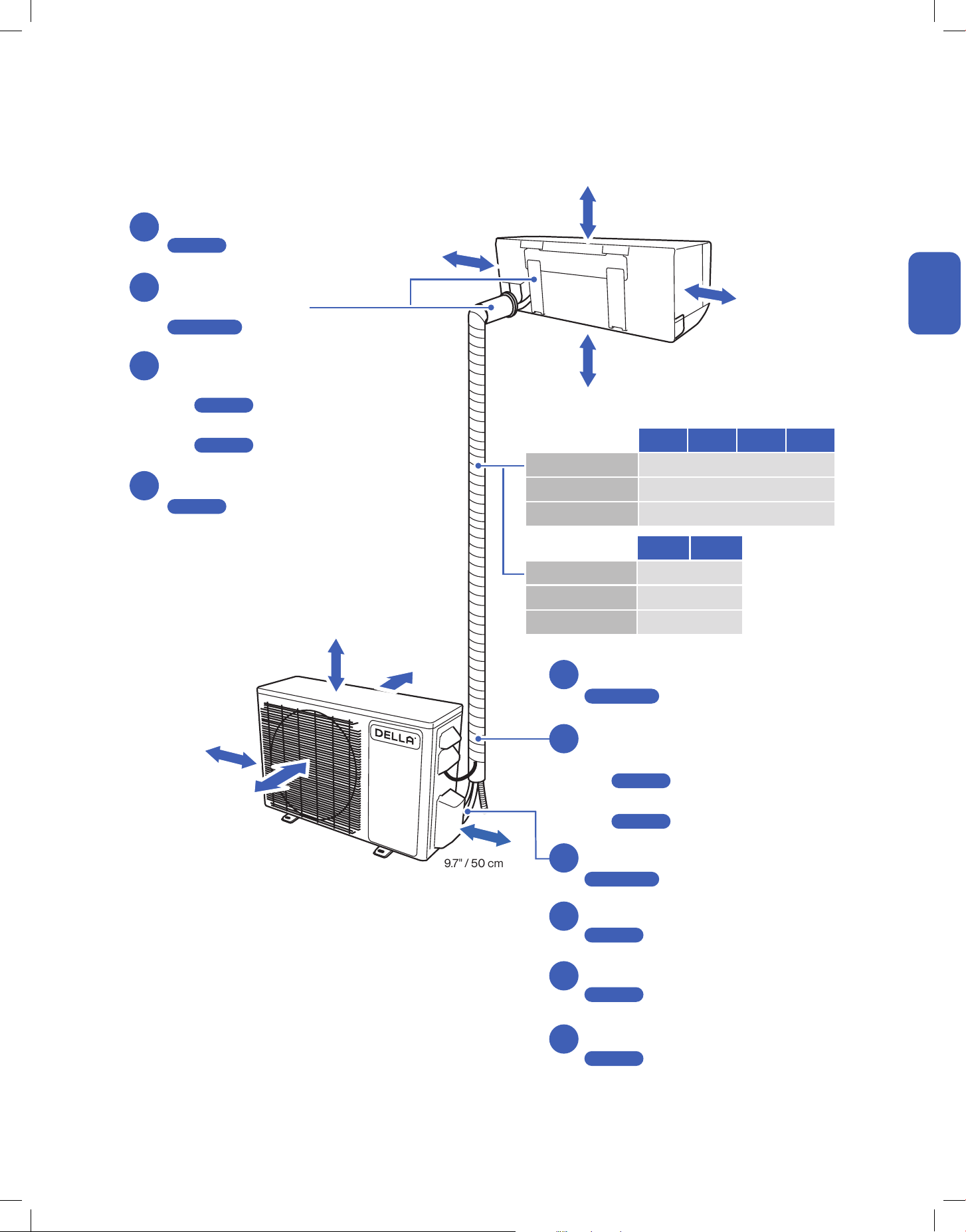
Product Specication
048-TP-18K2V-23S 048-TP-23K2V-23S
Power Supply 208 V - 230 V / 60 Hz / 1P 208 V - 230 V / 60 Hz / 1P
Rated Cooling Capacity (Btu / h) 18000 23000
Rated Heating Capacity (Btu / h) 19000 25000
Cooling
Power Consumption 1390 W 1860 W
Rated Current 6.2 A 8.3 A
Heating
Power Consumption 1360 W 2000 W
Rated Current 6.1 A 9.0 A
Noise Level
Indoor Unit 34 - 50 dBA 34 - 50 dBA
Outdoor Unit 53 dBA 54 dBA
Dimension
Indoor Unit
43.18" x 13.07" x 8.74"
1097 mm x 332 mm x 222 mm
43.18” x 13.07” x 8.74”
1097 mm x 332 mm x 222 mm
Outdoor Unit
36.49" x 14.96" x 27.51"
927 mm x 380 mm x 699 mm
38.50” x 16.57” x 31.61”
978 mm x 421 mm x 803 mm
Net Weight
Indoor Unit 30.9 lb / 14 kg 30.9 lb / 14 kg
Outdoor Unit 90.41 lb / 41 kg 104.7 lb / 47.5 kg
Suitable Area Up to 1000 sq. ft Up to 1500 sq. ft
Moisture Removal 4.6 pints / 2.2 L 5.5 pints / 2.6 L
Refrigerant R454B R454B
Before Installation
Before Installation
13
v.20250729U
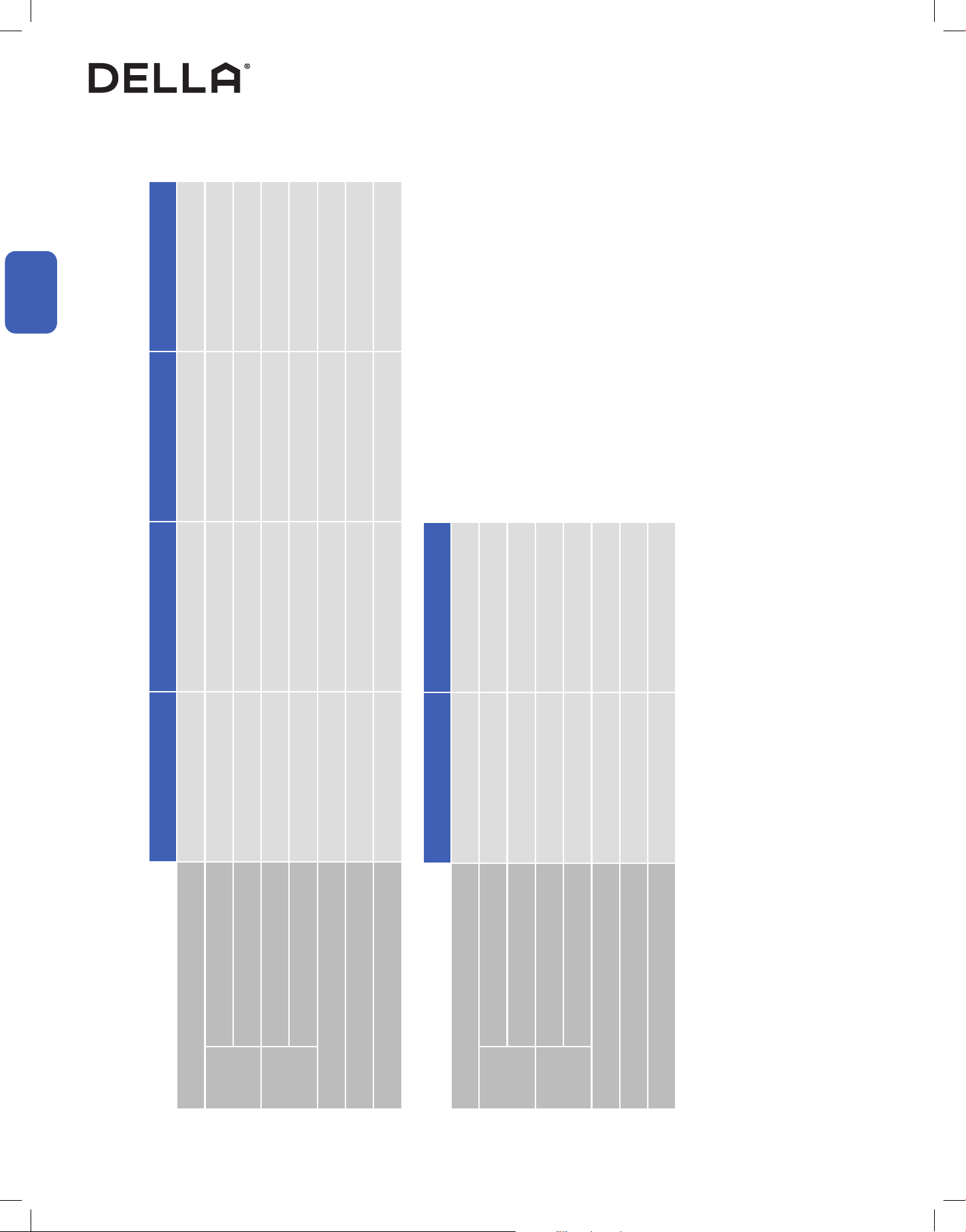
Installation Preview
1
2
3
4
5
≥ 7.9" / 20 cm
≥ 5.1" / 13 cm
≥ 5.1" / 13 cm
≥ 11.8" / 30 cm
≥ 11.8" / 30 cm
≥ 19.7" / 50 cm
≥ 19.7" / 50 cm
18K2V 23K2V
Standard Length 16.4 ft / 5 m
Max. Distance 65 ft / 20 m
Max. Elevation 49 ft / 15 m
9K1V 9K2V 12K1V 12K2V
Standard Length 16.4 ft / 5 m
Max. Distance 49 ft / 15 m
Max. Elevation 33 ft / 10 m
Choose the installation location
-00-
Mount the indoor unit
-00-
Placing the outdoor unit
-00-
Vacuum Pumping
-00-
Finishing
-00-
Check List
-00-
Test Run
-00-
Connection between indoor and outdoor unit
• Connect the refrigerant pipes
-00-
• Connect the electrical wires
-00-
Indoor unit connection
• Connect the drain hose to the indoor unit
-00-
• Pass the electrical wire into the indoor unit
-00-
Drill wall hole and
Install mounting plate
-00-
6
7
8
9
10
Installation
Installation
Page 16
Page 19
Page 20
Page 21
Page 17-18
Page 26
Page 27
Page 38
Page 39
Page 40
Page 22-23
Page 34-37
≥ 79" / 200 cm
≥ 98" / 250 cm
(From the ground)
14
Installation Info (Power Supply and Breaker Size)
Power Supply and Breaker Size
048-TP-9K1V-24S 048-TP-9K2V-24S 048-TP-12K1V-23S 048-TP-12K2V-24S
Power Supply 115 V / 60 Hz / 1P 208 V - 230 V / 60 Hz / 1P 115 V / 60 Hz / 1P 208 V - 230 V / 60 Hz / 1P
Cooling
Power Consumption 680 W 680 W 960 W 970 W
Rated Current 6.1 A 3.0 A 8.5 A 6.2 A
Heating
Power Consumption 730 W 730 W 945 W 925 W
Rated Current 6.5 A 3.3 A 8.4 A 4.4 A
Min. Circuit Ampacity 15 A 10 A 16 A 11 A
Min. Wire Size (American Wire Gauge) 14 AWG 16 AWG 14 AWG 16 AWG
Breaker Size 20 A 15 A 25 A 15 A
048-TP-18K2V-23S 048-TP-23K2V-23S
Power Supply 208 V - 230 V / 60 Hz / 1P 208 V - 230 V / 60 Hz / 1P
Cooling
Power Consumption 1390 W 1860 W
Rated Current 6.2 A 8.3 A
Heating
Power Consumption 1360 W 2000 W
Rated Current 6.1 A 9.0 A
Min. Circuit Ampacity 12 A 17 A
Min. Wire Size (American Wire Gauge) 16 AWG 14 AWG
Breaker Size 20 A 25 A
Installation
Installation
15
v.20250729U
Installation Info (Refrigerant and Pipe Set Info)
Refrigerant and Pipe Set Info
048-TP-9K1V-24S 048-TP-9K2V-24S 048-TP-12K1V-23S 048-TP-12K2V-24S
Stand Length 16.4 ft / 5 m 16.4 ft / 5 m 16.4 ft / 5 m 16.4 ft / 5 m
Max. Distance Between Indoor and Outdoor Unit 49 ft / 15 m 49 ft / 15 m 49 ft / 15 m 49 ft / 15 m
Max. Elevation Between Indoor and Outdoor Unit 33 ft / 10 m 33 ft / 10 m 33 ft / 10 m 33 ft / 10 m
Type of Refrigerant R454B R454B R454B R454B
Factory Refrigerant Pre-charge for up to 25 ft pipe 25.04 oz / 710 g 25.04 oz / 710 g 35.27 oz / 1000 g 35.27 oz / 1000 g
Additional Refrigerant Charge 0.11 oz / ft (10 g / m) 0.11 oz / ft (10 g / m) 0.11 oz / ft (10 g / m) 0.11 oz / ft (10 g / m)
Liquid
Line
Pipe Diameter 1/4" 1/4” 1/4” 1/4”
Torque Parameter
18 - 20 N-M / 13.3 - 14.8 lbf-ft /
1.8 - 2.0 kgf-m
18 - 20 N-M / 13.3 - 14.8 lbf-ft /
1.8 - 2.0 kgf-m
18 - 20 N-M / 13.3 - 14.8 lbf-ft /
1.8 - 2.0 kgf-m
18 - 20 N-M / 13.3 - 14.8 lbf-ft /
1.8 - 2.0 kgf-m
Gas Line
Pipe Diameter 3/8” 3/8” 3/8” 3/8”
Torque Parameter
30 - 35 N-M / 22.1 - 25.8 lbf-ft /
3.0 - 3.6 kgf-m
30 - 35 N-M / 22.1 - 25.8 lbf-ft /
3.0 - 3.6 kgf-m
30 - 35 N-M / 22.1 - 25.8 lbf-ft /
3.0 - 3.6 kgf-m
30 - 35 N-M / 22.1 - 25.8 lbf-ft /
3.0 - 3.6 kgf-m
048-TP-18K2V-23S 048-TP-23K2V-23S
Stand Length 16.4 ft / 5 m 16.4 ft / 5 m
Max. Distance Between Indoor and Outdoor Unit 65 ft / 20 m 65 ft / 20 m
Max. Elevation Between Indoor and Outdoor Unit 49 ft / 15 m 49 ft / 15 m
Type of Refrigerant R454B R454B
Factory Refrigerant Pre-charge for up to 25 ft pipe 45.50 oz / 1290 g 55.03 oz / 1560 g
Additional Refrigerant Charge 0.11 oz / ft (10 g / m) 0.11 oz / ft (10 g / m)
Liquid
Line
Pipe Diameter 1/4" 1/4”
Torque Parameter
18 - 20 N-M / 13.3 - 14.8 lbf-ft /
1.8 - 2.0 kgf-m
18 - 20 N-M / 13.3 - 14.8 lbf-ft /
1.8 - 2.0 kgf-m
Gas Line
Pipe Diameter 1/2” 5/8”
Torque Parameter
45 - 50 N-M / 33.2 - 36.9 lbf-ft /
4.6 - 5.1 kgf-m
60 - 65 N-M / 44.3 - 48.0 lbf-ft /
6.1 - 6.6 kgf-m
Installation
Installation
16
• Ensure the installation complies with the minimum clearance space surrounding the unit and is within the maximum piping length and
maximum elevation defined in the installation information. The lowest moving parts should be at least 98" / 2.5m above the ground.
-00-
• Make sure the wall is strong enough to hold the weight of the indoor unit and prevent it from vibration.
• Make sure the air inlet and outlet are clear of any obstruction.
• Make sure condensation can be easily drained.
• A place where all connections can be easily made to the outdoor unit.
• A place where the indoor unit is out of children’s reach.
• A place where the indoor unit is accessible for maintenance.
• Install the indoor unit 10 ft / 3 m away from TV or radio appliances.
NOTE: Radio interference may occur if appliances are placed too close to each other.
• Do not install in a laundry room or by a swimming pool.
• There should not be any heat source near the indoor unit.
• Do not install the indoor unit near the door way.
To prevent the indoor unit from falling down and blocking exit way in case of an emergency such as fire or earthquake etc.
Installation Info
Picking a Installation Location for the Indoor Unit
Picking a Installation Location for the Outdoor Unit
• Do not install the outdoor unit near a heat source, steam, or flammable gas.
• Do not install the outdoor unit in windy or dusty locations.
• Do not install the outdoor unit in places where people often pass.
• Avoid installing the outdoor unit in places where it will be exposed to direct sunlight.
NOTE: If necessary, build a protection that does not interfere with the airflow.
• Make sure there is enough space around the outdoor unit to circulate air.
-00-
• Outdoor unit must be placed in a safe and solid location.
• The outdoor unit should ideally be placed on a elevated concrete pad.
• If installing in snowy region, it is recommended the outdoor unit to be installed above the seasonal snow level.
Installation
Installation
Page 15
Page 13
17
v.20250729U
Indoor Unit Installation
Install the Mounting Bracket
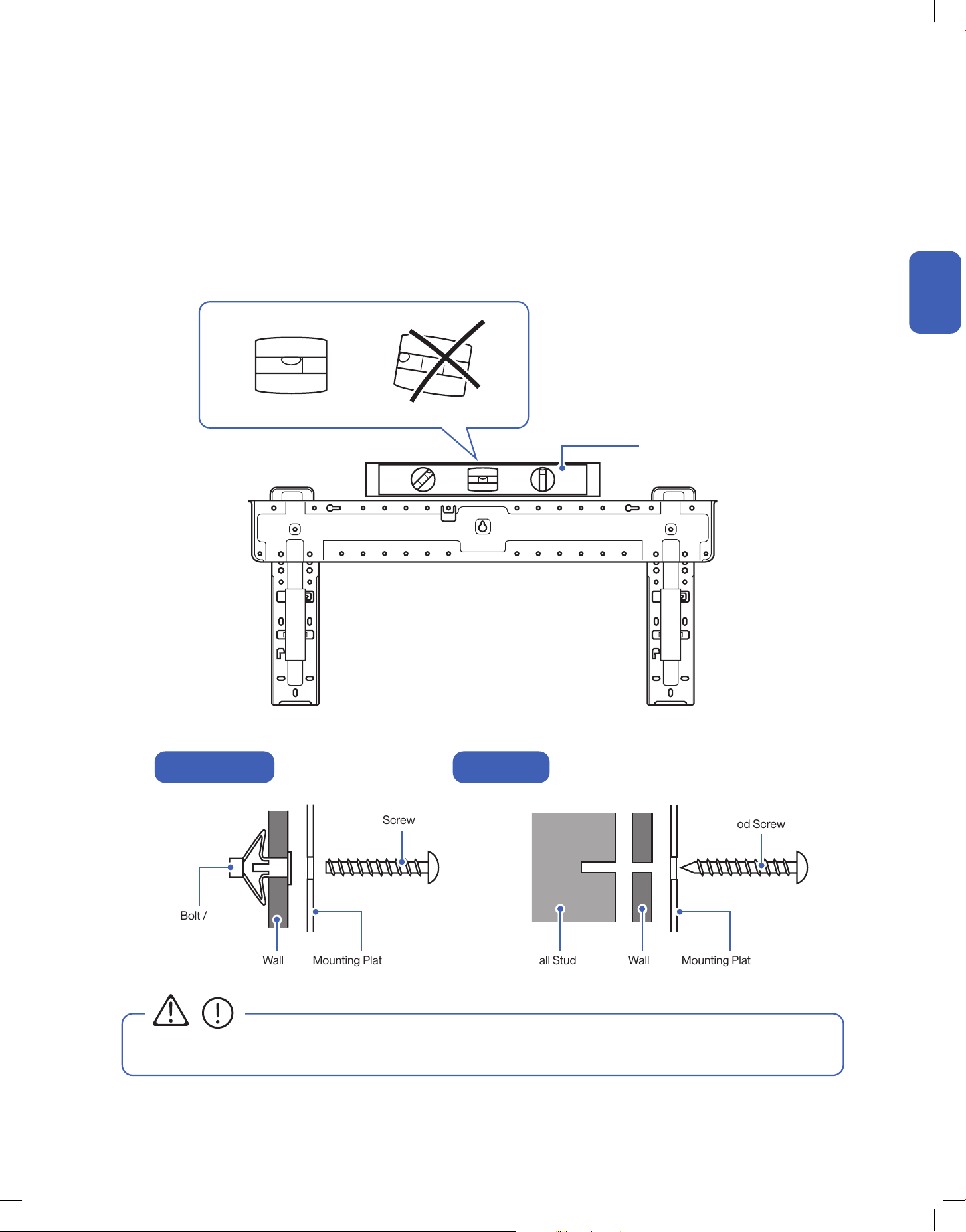
• You must use the correct wall anchor according to the type of the wall.
Spirit Level
Molly Bolt /
Drywall Anchor
Wall Wall
Wall Stud
Mounting Plate Mounting Plate
Screw
Wood Screw
CAUTION
Hollow Drywall Wood Stud
Installation
Installation
1. Locate the studs and electrical wires inside the wall. Then use the template included with the indoor unit or the etched marking on the
mounting plate to determine the exact mounting location.
2. Use a spirit level to level the mounting plate on the wall. Then mark out the pilot hole positions.
3. Insert wall anchors into the pilot holes and affix the mounting plate to the wall using screws.
Use a wood screw if the pilot hole position is directly on a wood stud.
18
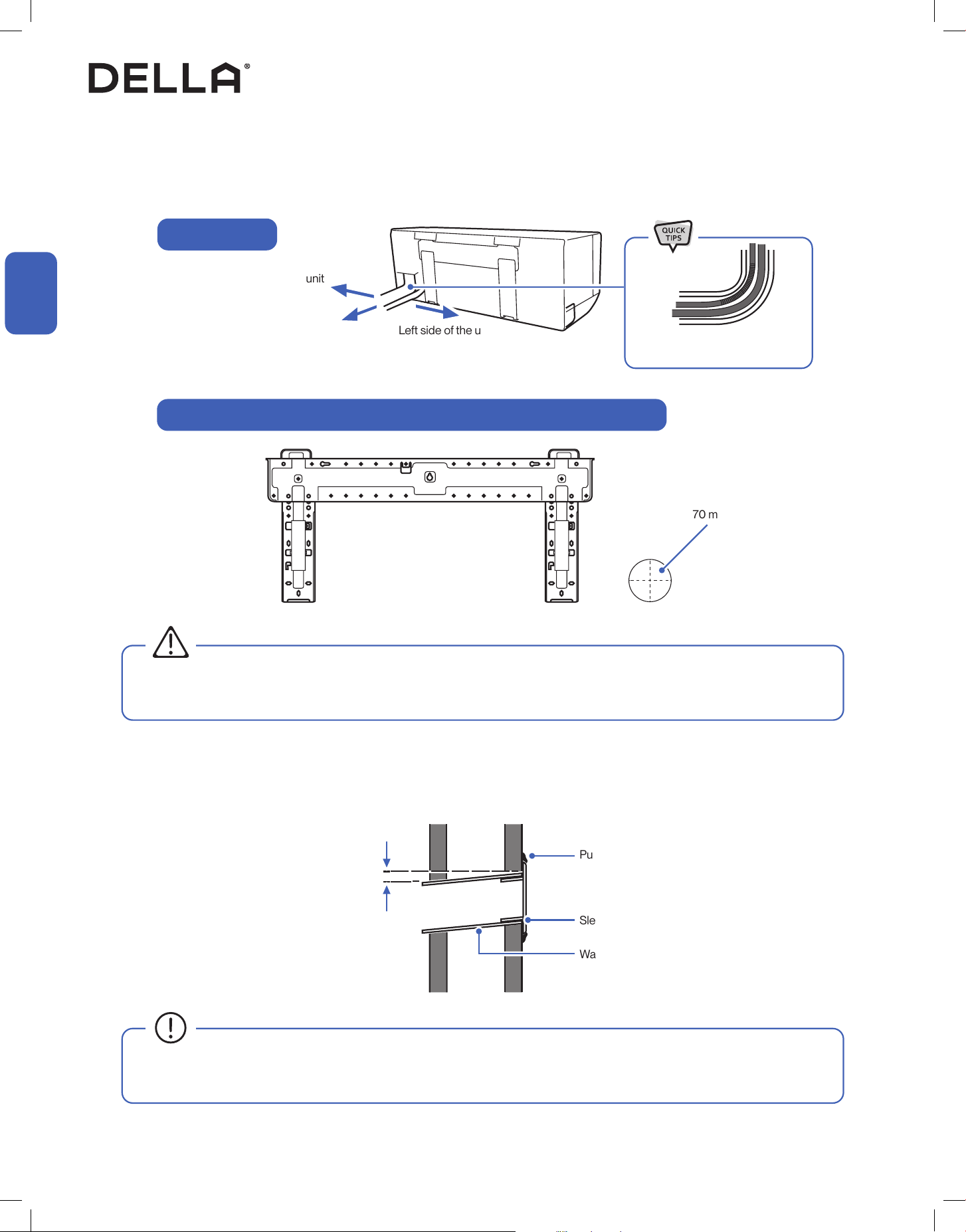
1. Pick 1 of the 3 piping positions on your indoor unit.
2. Mark the position on the wall.
3. Drill a 2.75" / 70 mm hole from the indoor wall to the outdoor wall. The hole must be slanted downward with a small angle.
4. Insert the wall sleeve and sleeve cover into the wall. Then seal off gaps with putty or caulk.
Left side of the unit
0.2" - 0.4" / 5 - 10 mm
Wall Sleeve
Sleeve Cover
Putty / Caulk
Outdoor Indoor
• Make sure there is no building structure pillar, stud, electrical wire, or any water pipes in the way of the drill hole. Drilling into electrical
wires or water pipes inside the wall may cause electric shock, re, or water damage.
• Always insert the sleeve into the wall hole and seal the surrounding with putty / caulk.
This will prevent water, insects, or small animals from getting into the house.
Indoor Unit Installation
Drill Wall Hole and Insert Wall Sleeve
Right side of the unit
Piping Position
Example of Wall Hole Position with Piping Directly Behind the Indoor Unit
WARNING
Ø 2.75" / 70 mm hole
Installation
Installation
Directly behind the unit
(Recommended)
Gently bend the pipe on the
protected area
19
v.20250729U
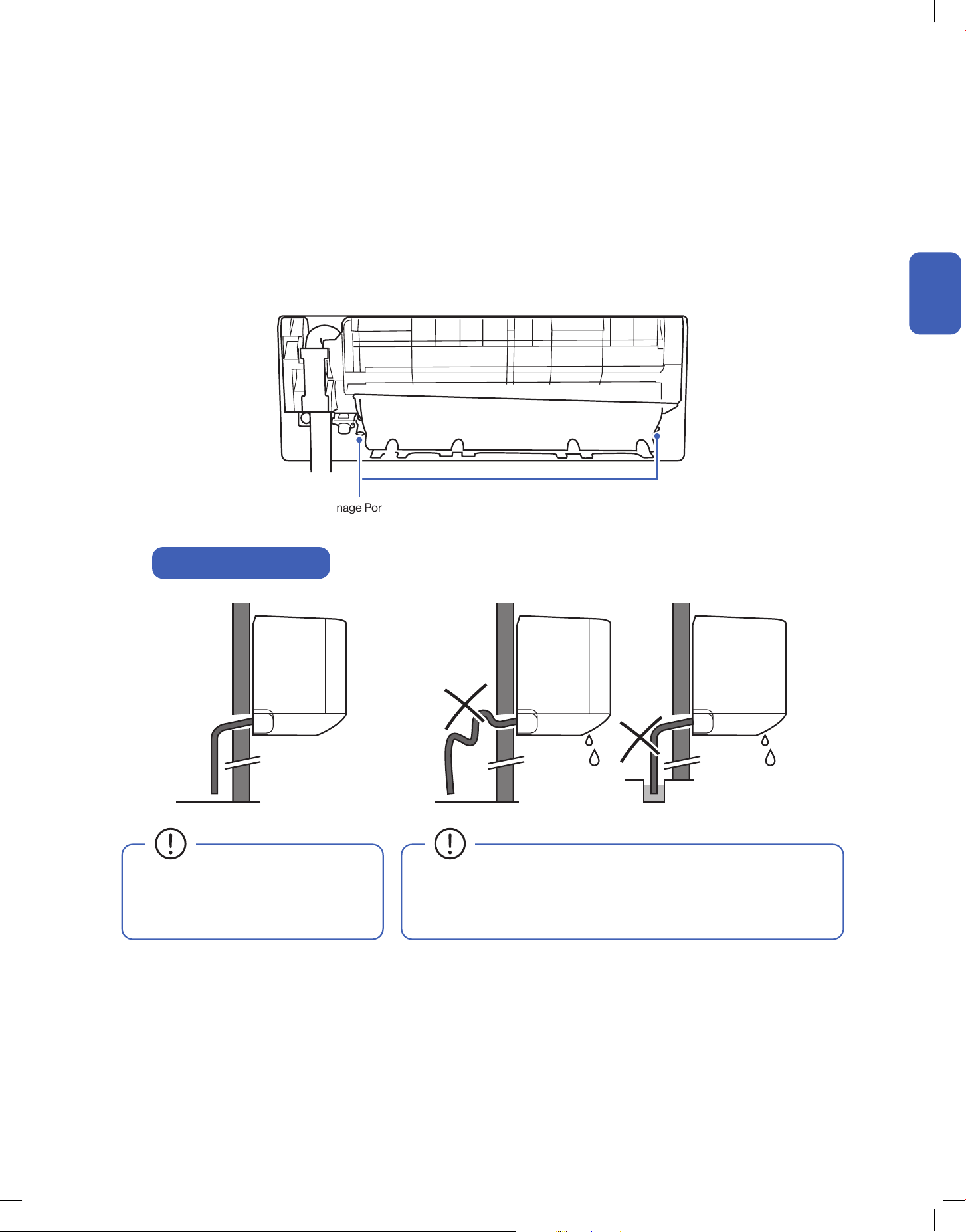
• Drain hose must be slanted downward
and leave a small gap between the
ground and the hose.
• Avoid having bends or dents on the drain hose.
• Do not leave the end of the hose into drainage gutter.
Indoor Unit Installation
Connect the Indoor Unit Drain Hose
Drain Hose Installation
Drainage Ports
1. Connect the drainage hose to the indoor unit drainage port.
NOTE: In some models, drainage ports are available on both sides of the indoor unit. You can choose one side to attach the drain hose and insert a rubber plug
on the unused port. Always pick the side closer to the wall hole.
2. Make sure the joint is firmly connected and has a good seal.
3. Wrap the joint with Teflon tape to prevent any possible leak.
Installation
Installation
20
Indoor Unit Installation
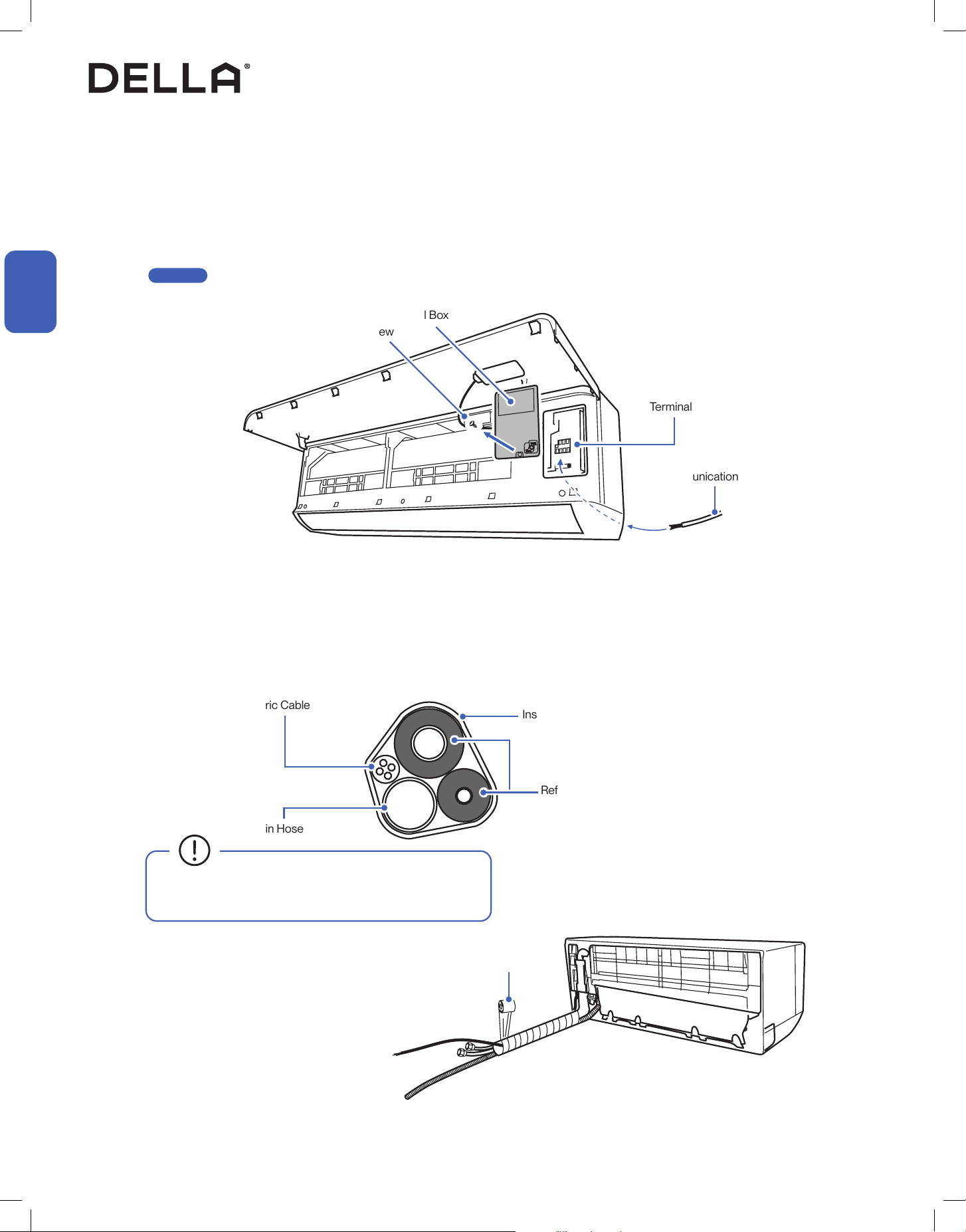
Pass Electric Cable Through the Indoor Unit
Bundle the Indoor Unit Refrigerant Pipes, Hose, and Cable
1. Open the front panel of the indoor unit.
2. Remove the control box cover from the control box.
3. Pass the electric cable (communication cable) from the back of the indoor unit to the control box.
4. Leave enough length of the electric wire in the control box for connection in a later step.
-00-
1. Arrange the refrigerant pipes, drain hose, and electric cable according to the image below.
2. Wrap the bundle with insulation pipe.
Refrigerant Pipes, drain hose, and electric cable must be properly arranged and bundled with insulation tape before passing them through the
wall hole.
Communication Cable
Insulation Tape
Refrigerant Pipes
Drain Hose
Electric Cable
Terminal Block
Control Box Cover
Screw
• Drain hose must positioned at the bottom to prevent
water leakage.
Insulation Tape
Installation
Installation
Page 27
21
v.20250729U
Indoor Unit Installation
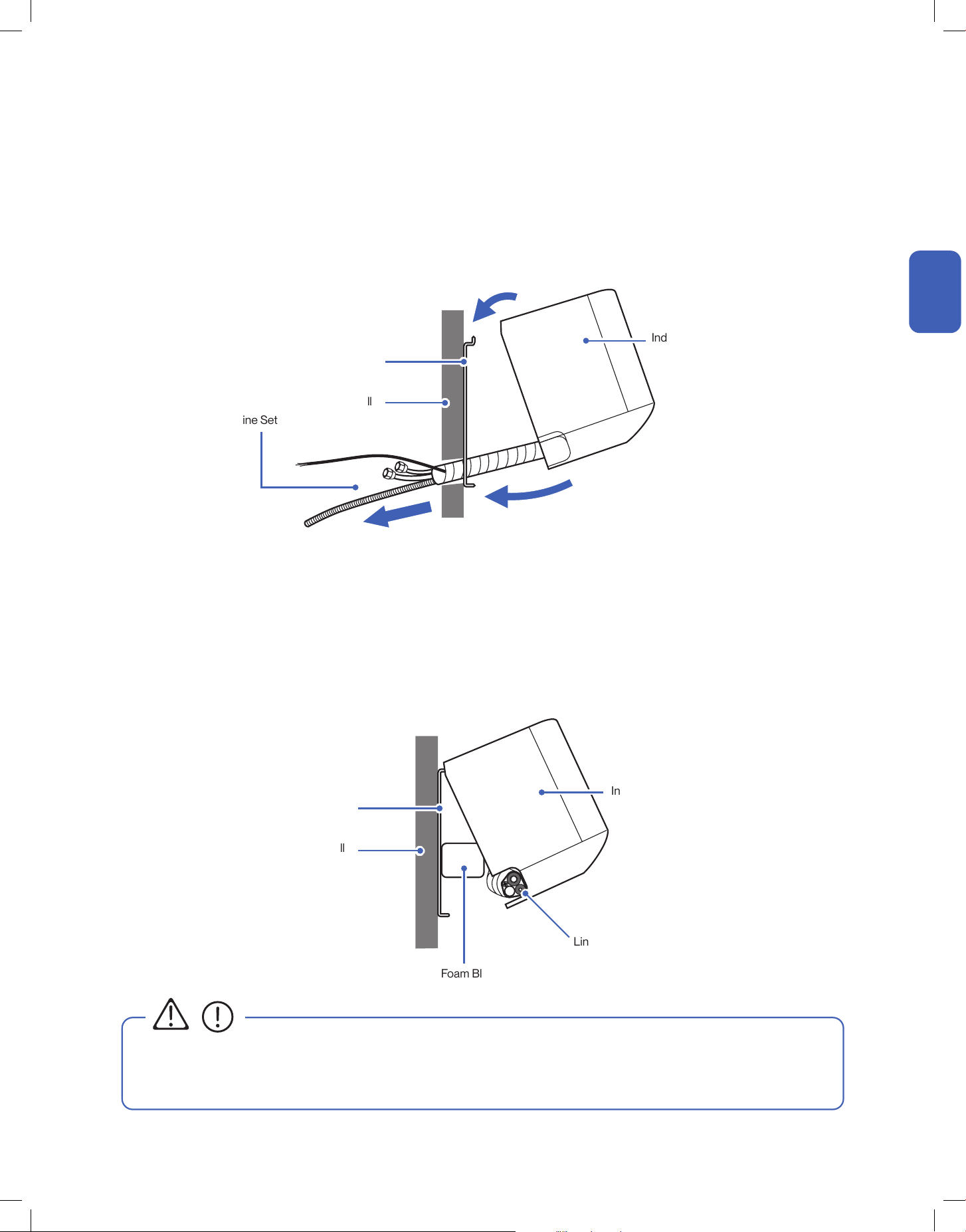
Pass Line Set Through Wall Hole and Mount Indoor Unit
Pass Line Set Through Wall Hole and Mount Indoor Unit (Left Piping Direction)
1. Carefully pass the line set bundle through the wall hole.
2. Hook the top of the indoor unit on the mounting plate.
Push the unit lightly left and right to make sure it is firmly hooked on the mounting plate.
3. Push down the bottom of the indoor unit and snap into the mounting plate.
1. Carefully pass the drain hose and electric cable through the wall hole.
2. Hook the top of the indoor unit on the mounting plate.
Push the unit lightly left and right to make sure it is firmly hooked on the mounting plate.
3. Place a wedge or foam block or something slightly soft between the mounting plate and the indoor unit for a easier installation process in
later steps.
If you choose to have the piping direction on the left side of the indoor unit,
Line Set
Line Set
Wall
Wall
Mounting Plate
Mounting Plate
Indoor Unit
Indoor Unit
1
2
3
Wedge / Foam Block
• The indoor unit is not secured in place at this step for left side piping direction installation.
Handle the unit and line set with caution. It is recommended to have a person looking after the unit and make sure it does not fall
during the later installation process.
CAUTION
Installation
Installation
22
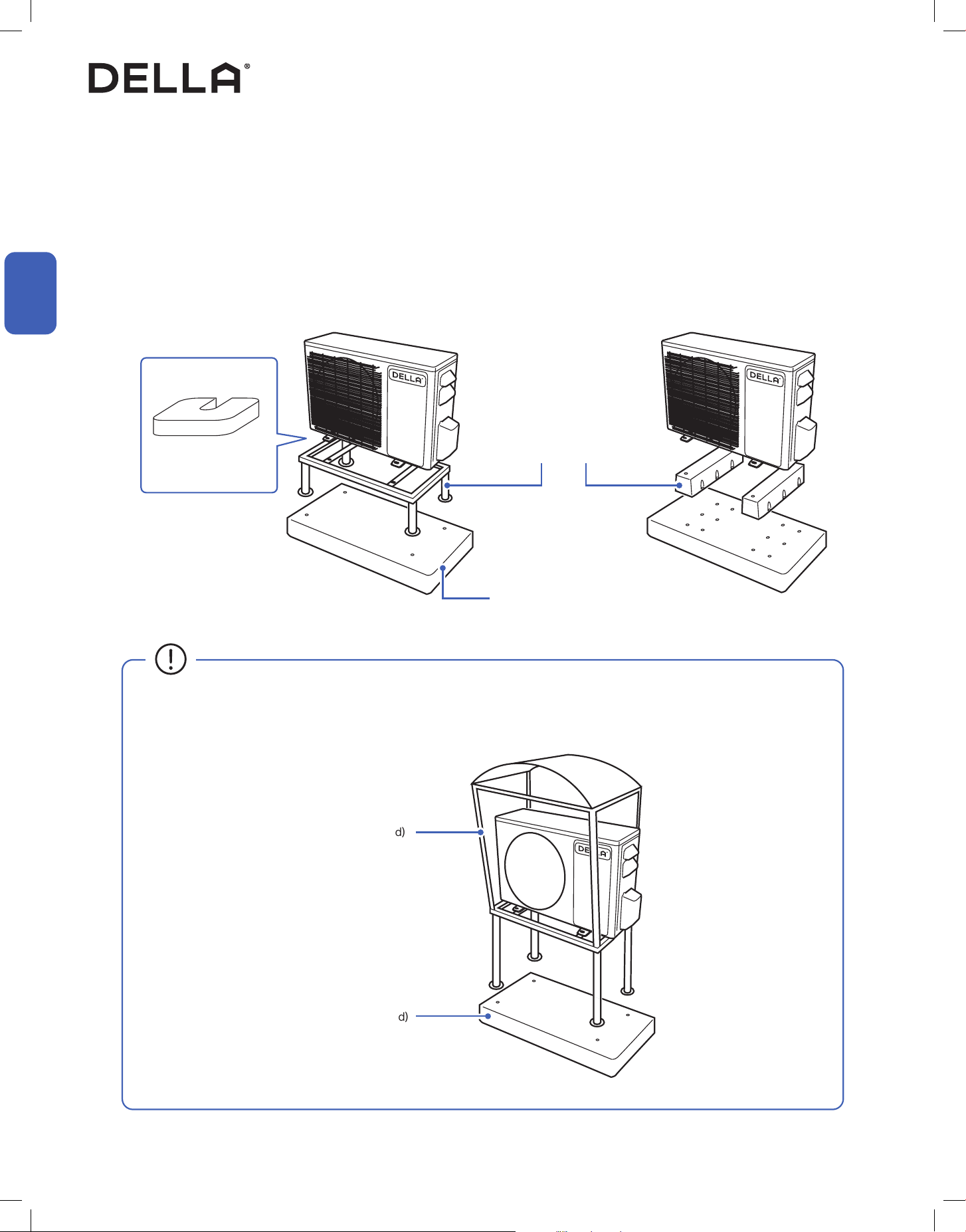
1. Place a concrete pad on the installation location.
NOTE: You do not need a concrete pad if the ground is concrete.
2. Mount the indoor unit on a mounting stand or base kit.
NOTE: Rubber foot pads can be placed between the outdoor unit and the mounting kit to reduce vibration or noise.
3. Drill holes on the concrete pad or concrete ground.
4. Secure the mounting stand or base kit on the concrete with concrete anchor bolts.
Outdoor Unit Installation
Secure the Outdoor Unit (Ground Installation)
Installation
Installation
Concrete Pad (Not Included)
• Outdoor unit should be installed on a elevated mounting stand with snow cover if using in a snowy region.
Elevated snow cover (Not included)
Concrete Pad (Not Included)
Mounting Stand / Base Kit
(Not Included)
Rubber foot pad
(Optional)
23
v.20250729U
Installation
Installation
Outdoor Unit Installation
Secure the Outdoor Unit (Wall Installation)
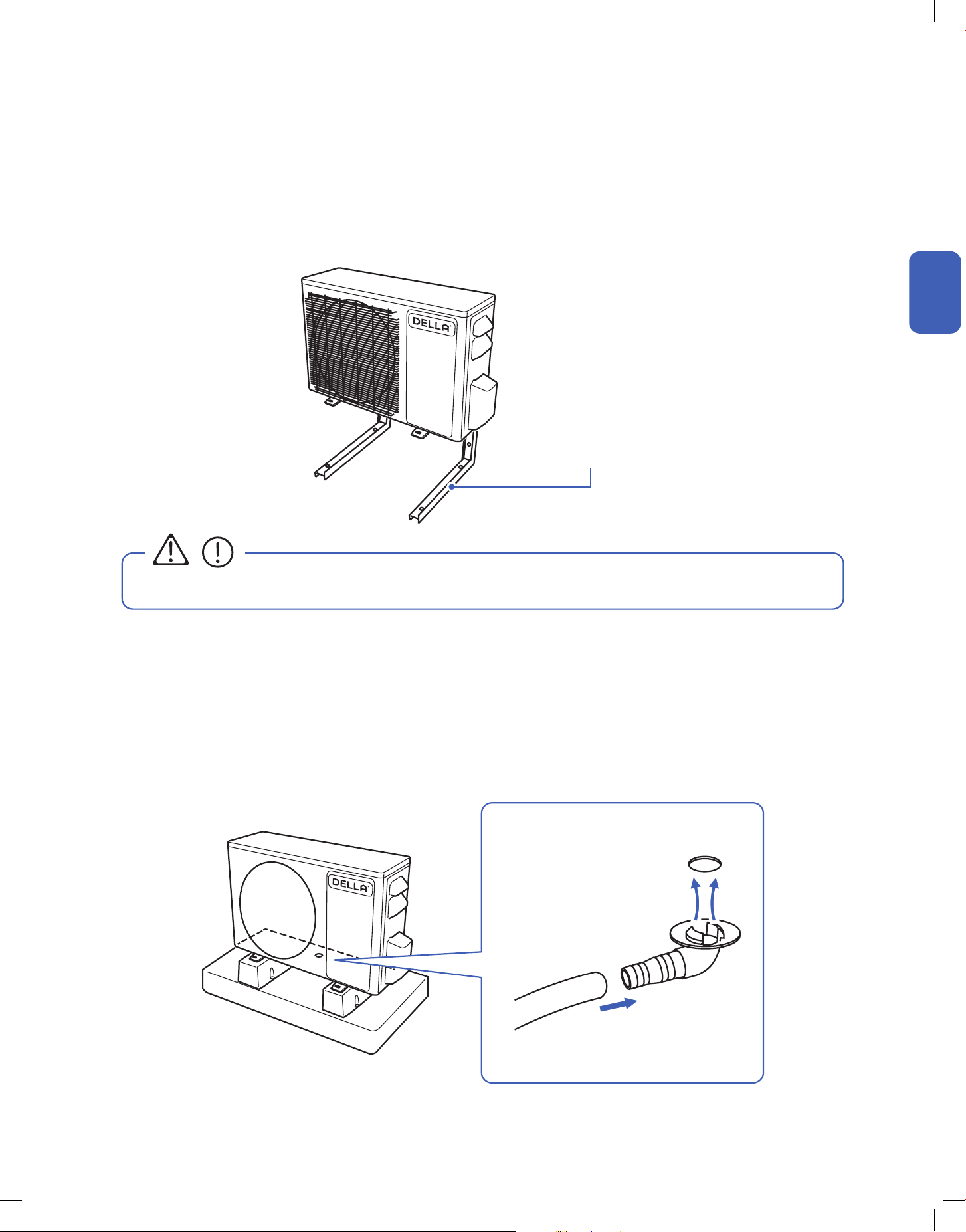
1. Drainage joint installation is recommended for heat pump models.
2. Insert drainage joint into the bottom hole of the outdoor unit.
3. Connect one end of the drain hose to the joint and the other end to your desired drainage point.
1. Measure the distance between the outdoor unit’s legs.
2. Mount the wall mounting bracket on the wall.
3. Secure the outdoor unit on the wall mounting bracket.
The outdoor unit can be fixed on a wall mounting bracket if there is no ground mounting option.
Outdoor unit drainage helps prevent condensation or frost inside the unit during cold weather.
Wall Mount Bracket
(Not Included)
• The wall mounting bracket and the wall must be able to support at least 4 times the weight of the outdoor unit.
Attach Drainage Port and Hose
CAUTION
Drainage Joint
Ø0.6" / Ø15 mm
Drain Hose
24
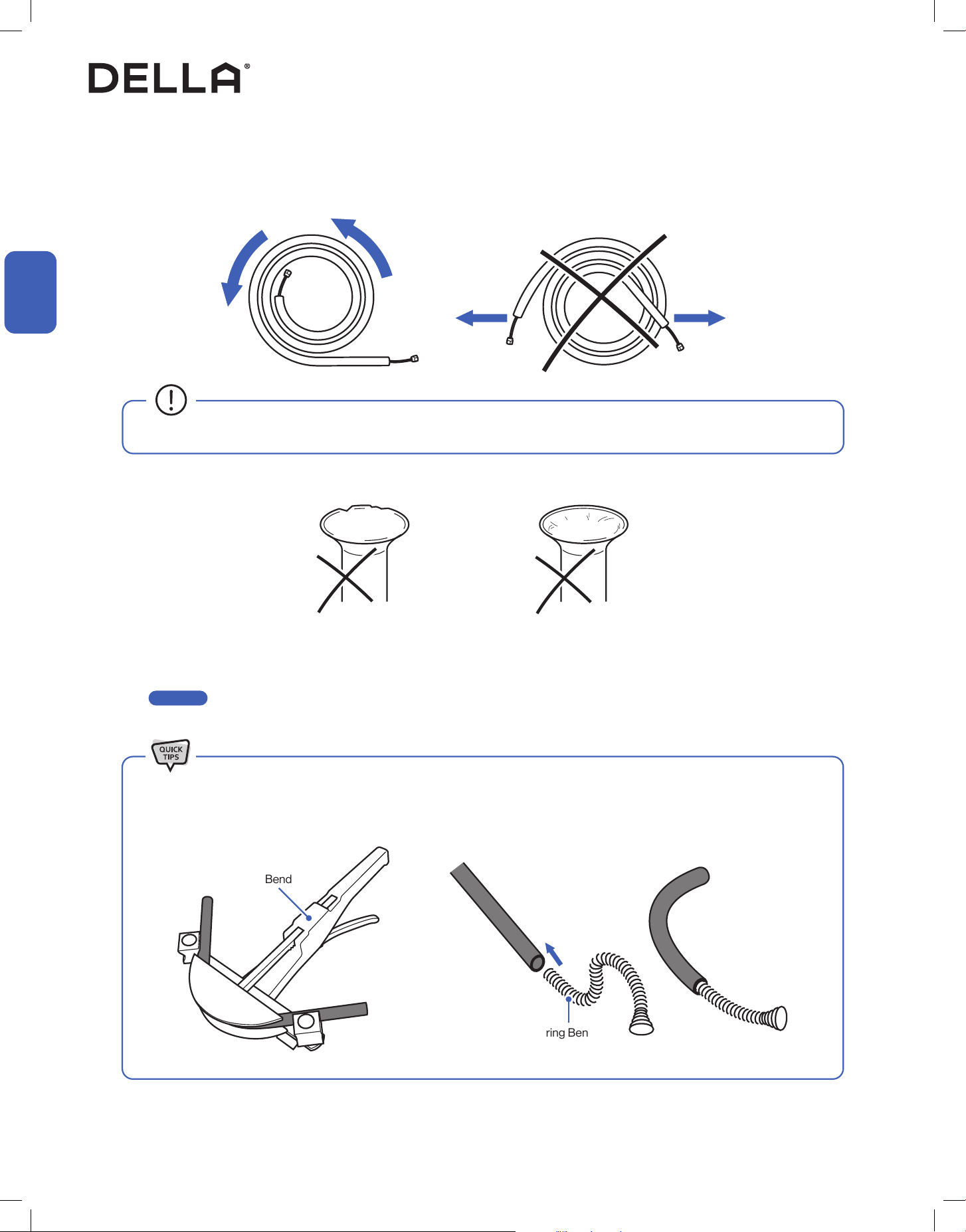
1. Unroll the included refrigerant pipe.
2. Remove the cover and make sure the ports are clean and smooth.
3. In the case of a imperfect flaring or the pipe needs to be shorten for the installation, refrigerant pipe should be cut and flare by qualified
technician.
-00-
Imperfect Flaring Dirty Flaring
• Do not pull the refrigerant pipe to prevent the pipe from kinking or bending.
Indoor and Outdoor Unit Installation
Preparing the Refrigerant Pipe
Installation
Installation
Page 25
Pipe Bender
Spring Bender
• Use a pipe bender or spring bender to shape the refrigerant pipes along wall and corners. Bending the pipe without bending tools
would easily kink or damage the pipe, which would cause refrigerant starvation, or leakage in the system.
25
v.20250729U
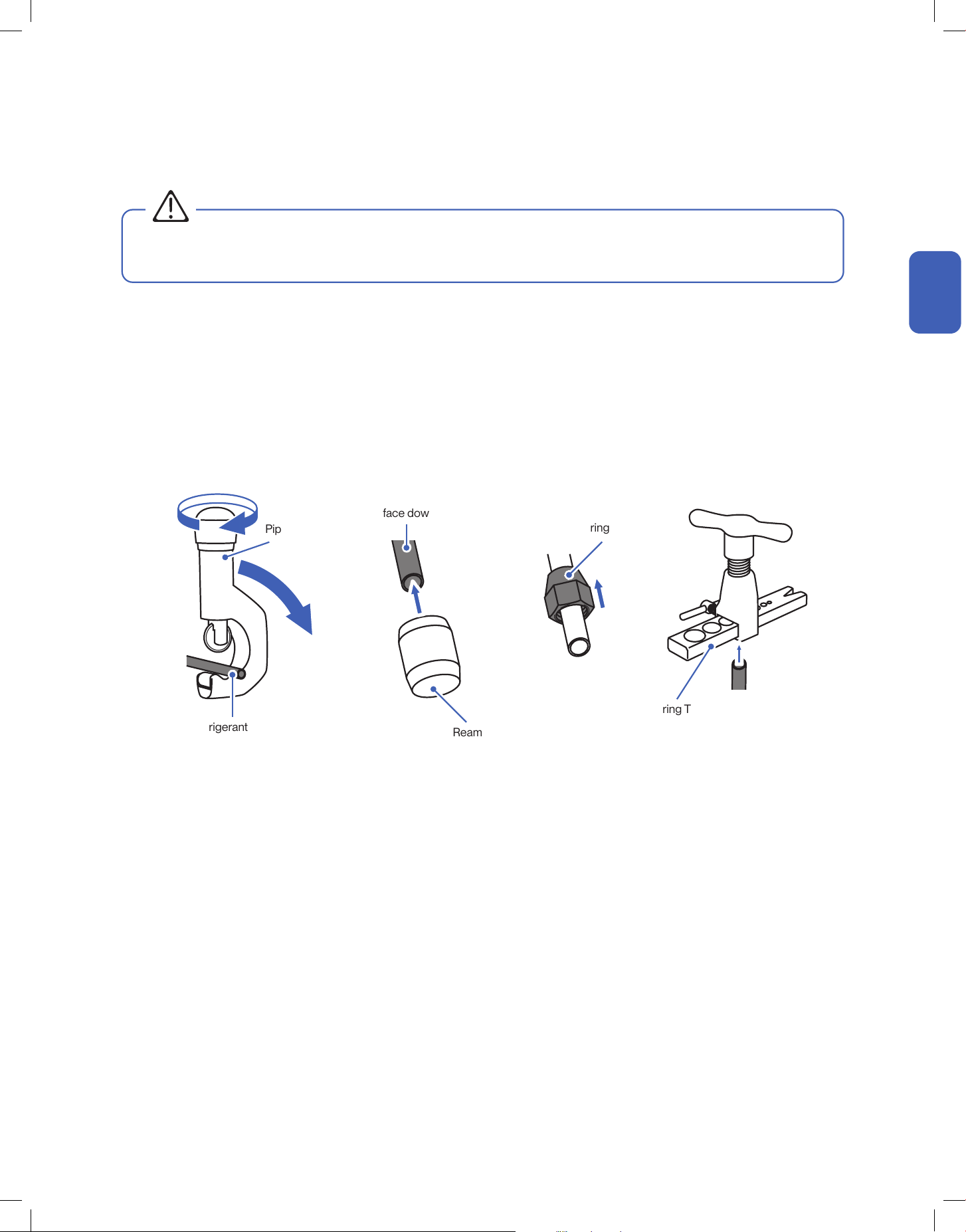
Cutting and Flaring Refrigerant Pipe
1. Cut the copper pipe with a pipe cutter.
2. Remove any burrs or rough edges with a reamer with the pipe facing downward.
NOTE: The opening of the pipe must face toward the ground to prevent chips or dust from entering the pipe.
3. Insert the flare nut to the pipe.
4. Use the flaring tool to flare the copper pipe. The flaring angle must match to that of the refrigerant lines from the unit.
Pipe Cutter
Flaring Nut
Flaring Tool
Refrigerant Pipe
Refrigerant Pipe
(Must face downward)
• Any refrigerant pipe alternation should only be done by qualied technician. Incorrect work may cause refrigerant leak, reduce cooling /
heating eciency, damage to the unit. Warranty does not cover any damage(s) caused by incorrect refrigerant pipe alternation.
Reamer
Indoor and Outdoor Unit Installation
WARNING
Installation
Installation
26
Indoor and Outdoor Unit Installation
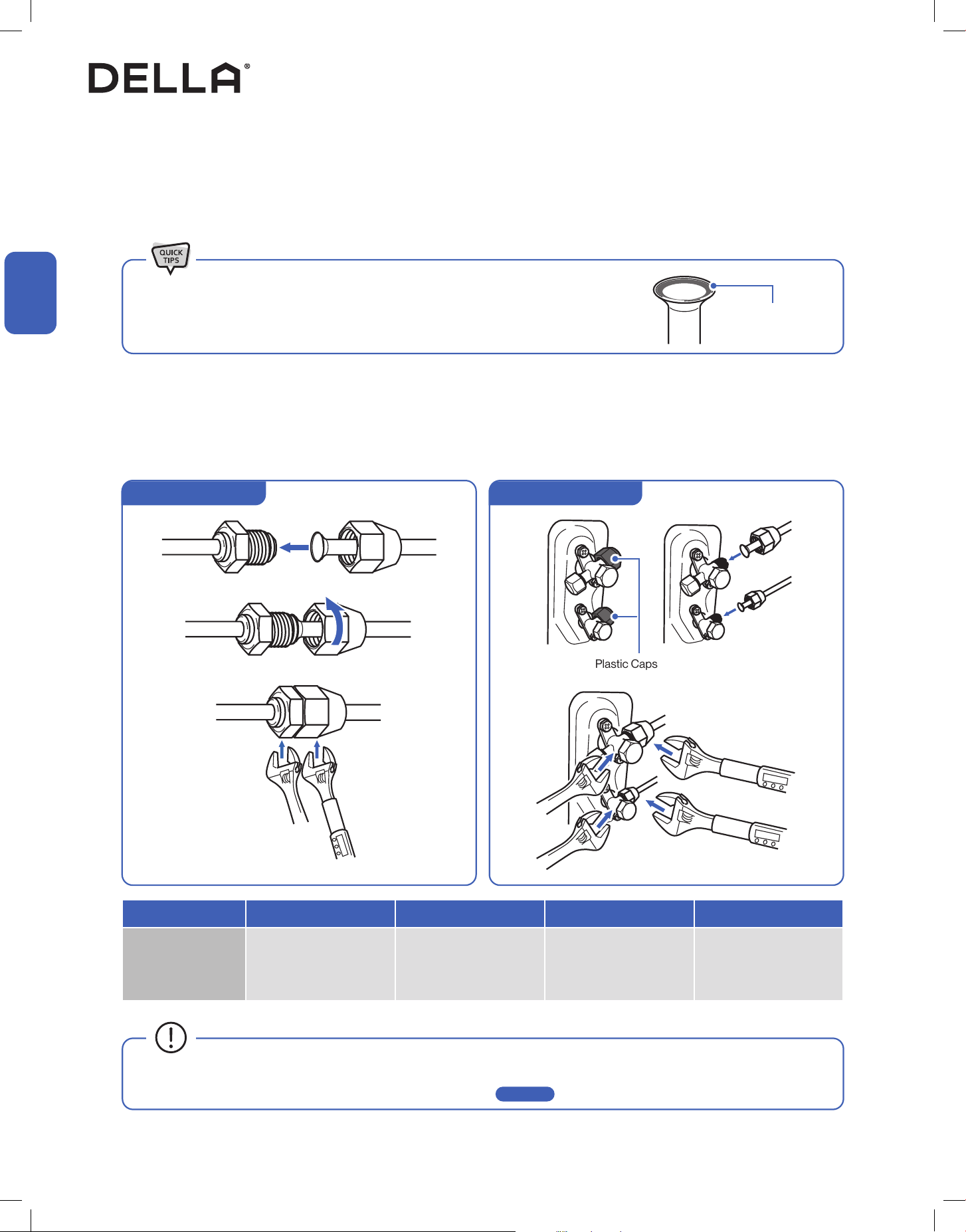
Connect the Refrigerant Pipes to the Outdoor Unit
• Align the refrigerant pipes to that from the indoor unit, then tighten the nut by hand.
• Use a torque wrench to tighten the nut according to the torque requirement.
1. Unscrew the screws on the valve cover, press it down gently and remove the cover from the outdoor unit.
2. Remove plastic caps from the end of the valves.
3. Align the refrigerant pipes to the outdoor unit valve, then tighten the nut by hand.
4. Use a torque wrench to tighten the nut according to the torque requirement.
• A thin layer of nylog can be applied to the inside of the are to provide better seal. (OPTIONAL)
• Make sure no nylog is on the outside of the are.
Thin layer of nylog
(OPTIONAL)
Remove Plastic Caps
Hold
Hold
Torque Tighten
Torque Tighten
Pipe Diameter 1/4" 3/8” 1/2” 5/8”
Torque Parameter
18 - 20 N-M
13.3 - 14.8 lbf-ft
1.8 - 2.0 kgf-m
30 - 35 N-M
22.1 - 25.8 lbf-ft
3.0 - 3.6 kgf-m
45 - 50 N-M
33.2 - 36.9 lbf-ft
4.6 - 5.1 kgf-m
60 - 65 N-M
44.3 - 48.0 lbf-ft
6.1 - 6.6 kgf-m
• Connection must be torque tighten to prevent leak. Do not over tighten.
• Refrigerant piping and torque requirement for specic model is on -00- .
Connect the Refrigerant Pipes to the Indoor Unit
Outdoor Unit Connection
Installation
Installation
Page 15
Hold Torque Tighten
Indoor Unit Connection
27
v.20250729U
Indoor and Outdoor Unit Installation
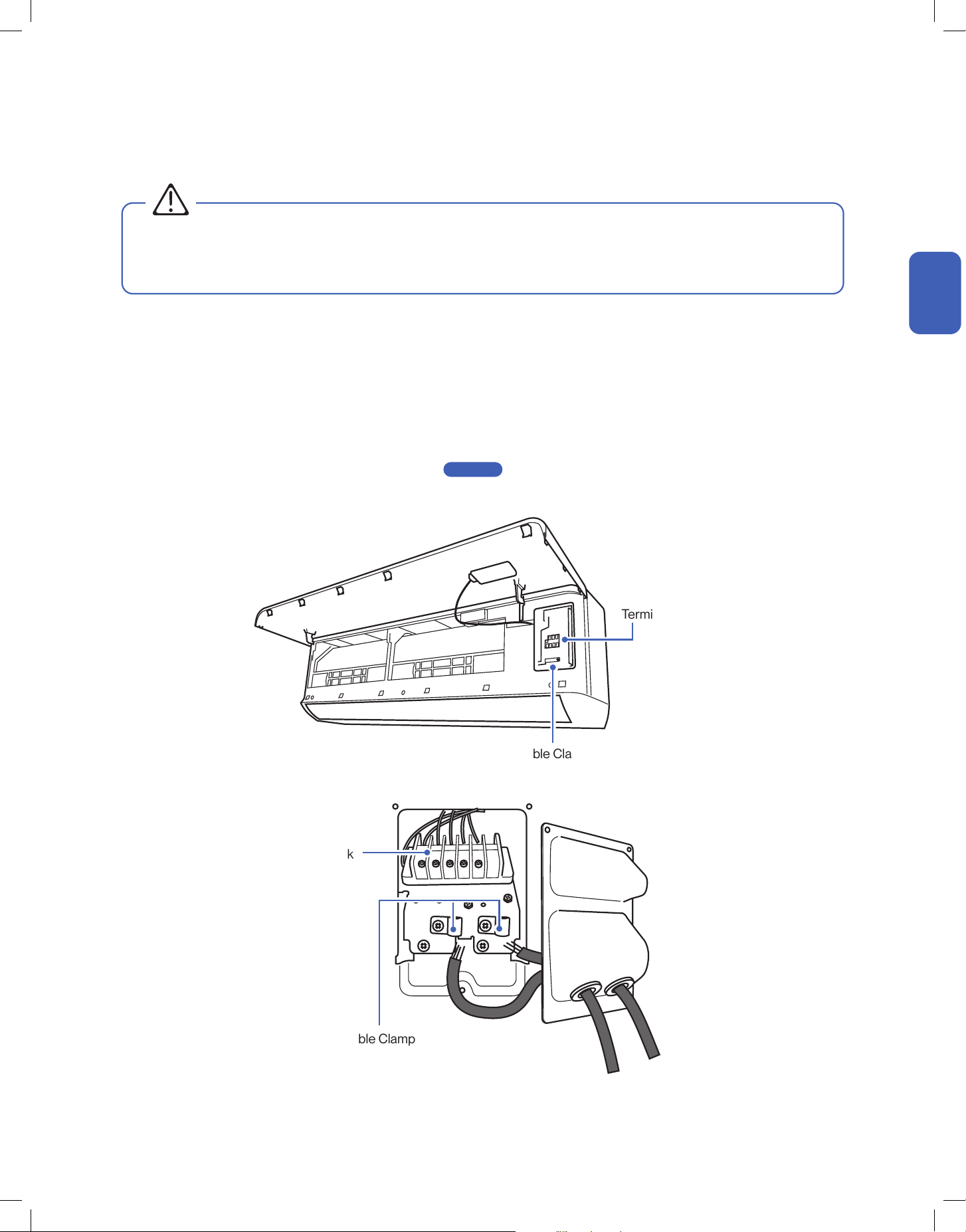
Connect the Electrical Wire
Terminal Block
Terminal Block
Cable Clamp
Cable Clamp
Installation
Installation
1. Unscrew the cable clamp in the indoor unit.
2. Connect wires to the corresponding terminal and secure the cable using the cable clamp.
3. Reinstall the control box cover and close the indoor unit’s front panel.
4. Unscrew the screws from the wiring cover, press the cover downward gently, and remove from the outdoor unit.
5. Unscrew the cable clamp.
6. Insert the electrical cable from the indoor unit through the opening on the cover, then connect the wires to the outdoor unit terminal.
7. Insert power supply cable (not included) to the opening on the cover, then connect the wires to the outdoor unit terminal.
8. Turn off any power from the power supply, and connect the wires to the power supply circuit box.
Exact power supply cable and breaker size requirement on -00-
9. Reinstall the wiring cover to its original place.
Page 14
• Electrical wiring must be done by a qualified technician or electrician. Failing to connect the wires correctly will cause short circuit, a
fire, and property damage.
• Do not use the communication cable as power supply cable.
WARNING
28
Installation
Installation
Indoor and Outdoor Unit Installation
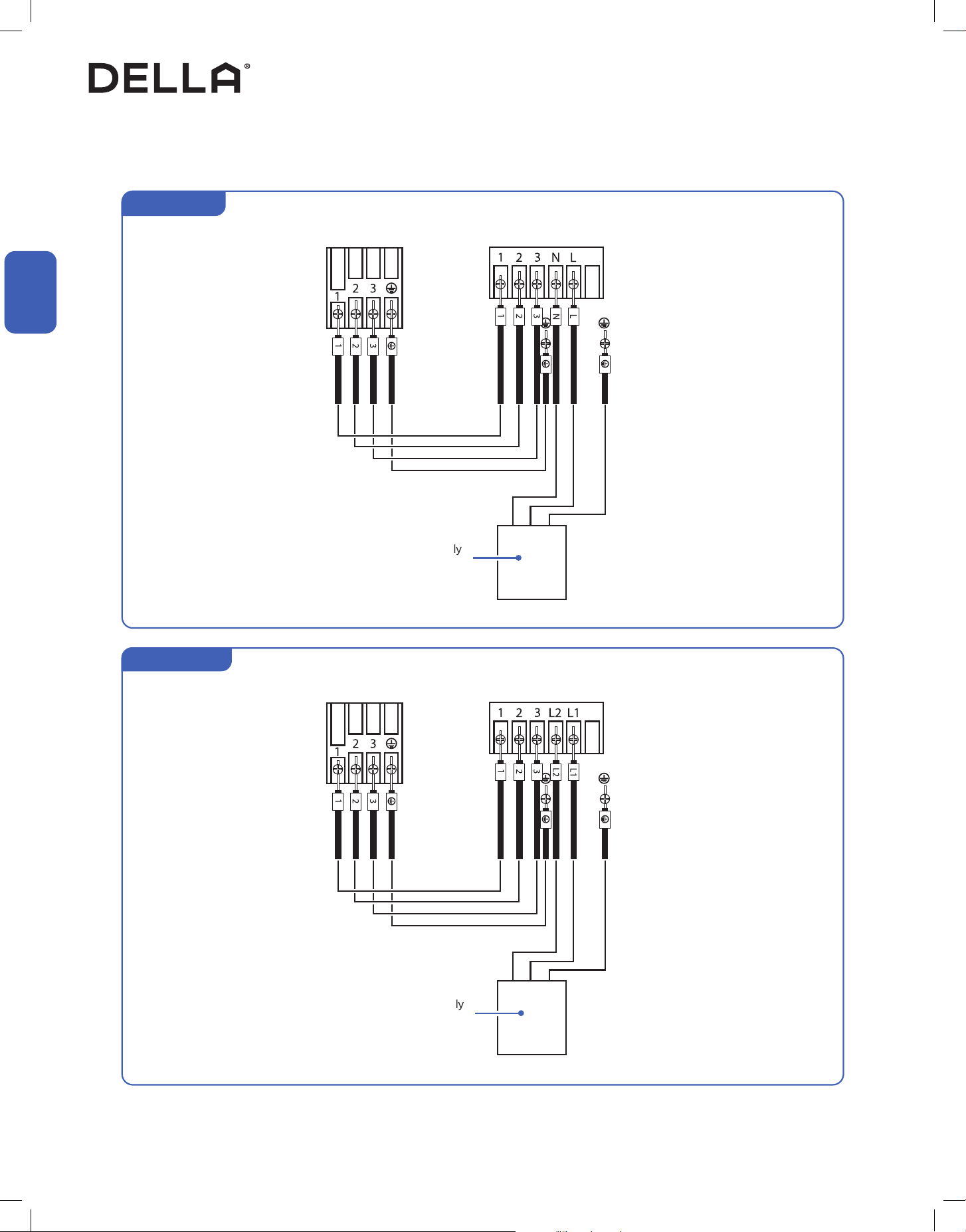
Connect the Electrical Wire
For 115V Unit
For 220V Unit
Indoor Terminal
Indoor Terminal
Outdoor Terminal
Outdoor Terminal
Power Supply
w/ Breaker
Power Supply
w/ Breaker
29
v.20250729U
Indoor and Outdoor Unit Installation
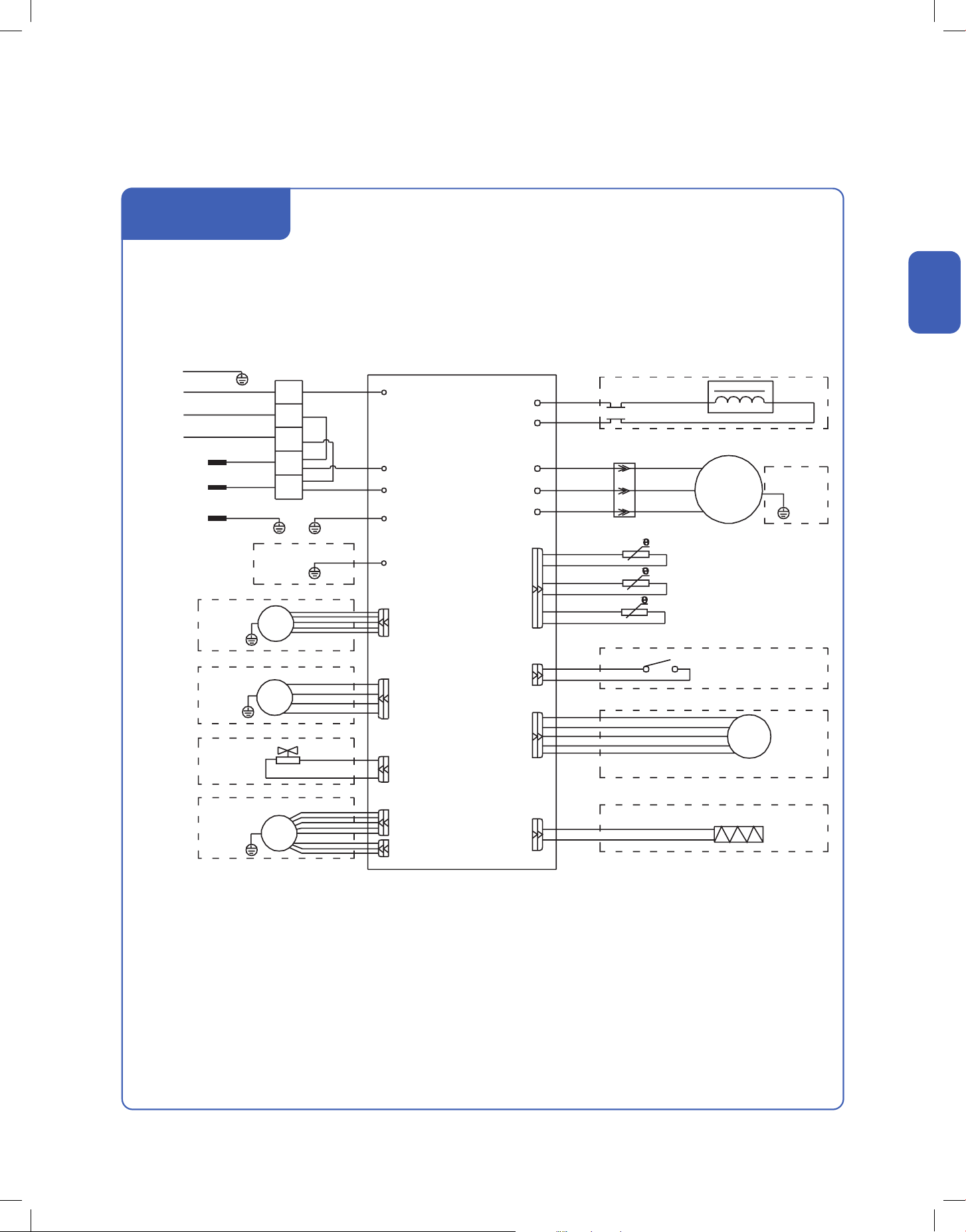
Indoor Unit Circuit Diagram
PCB
Outdoor
Unit
(Optional)
(Optional)
(Optional)
(Optional)
(Optional)
GN
3
2
1
BK
BK
CN3
BN
OUT-L
(Optional)
P1 (P1L) (AC-L)
P2 (N) (AC-N)
PS (S/SIG)
K1
CN3 CN4
MM
M
M
M
M
BU
P0
CN11
(FLZ)
CN27
CN2
RT
IPT
CN6
CN5-4
Tube Temperature
Room Temperature
CN5-3
CN5-2
CN5-1
CN8
CN19
CN14
CN16
CN9
CN14B
TX RX
CN1
PTC-N
PTC-L
BN(RD)
GNYE
GNYE(GN)
Evaporator
Generator
Generator
UV Light
Transformer
Heater (Optional)
AC Fan Motor
(Optional)
Swing Motor
(Optional)
Swing Motor
(Optional)
Swing Motor
(Optional)
Humidity Sensor
(Optional)
People Feel
(Optional)
Wi-Fi
(Optional)
Audio
(Optional)
Infrared Sense
(Optional)
Swing Motor
Display
DC Fan Motor
(Optional)
WH
YE(RD)
Installation
Installation
048-TP-9K1V-24S-IN
048-TP-12K1V-23S-IN
048-TP-12K2V-24S-IN
048-TP-18K2V-23S-IN
30
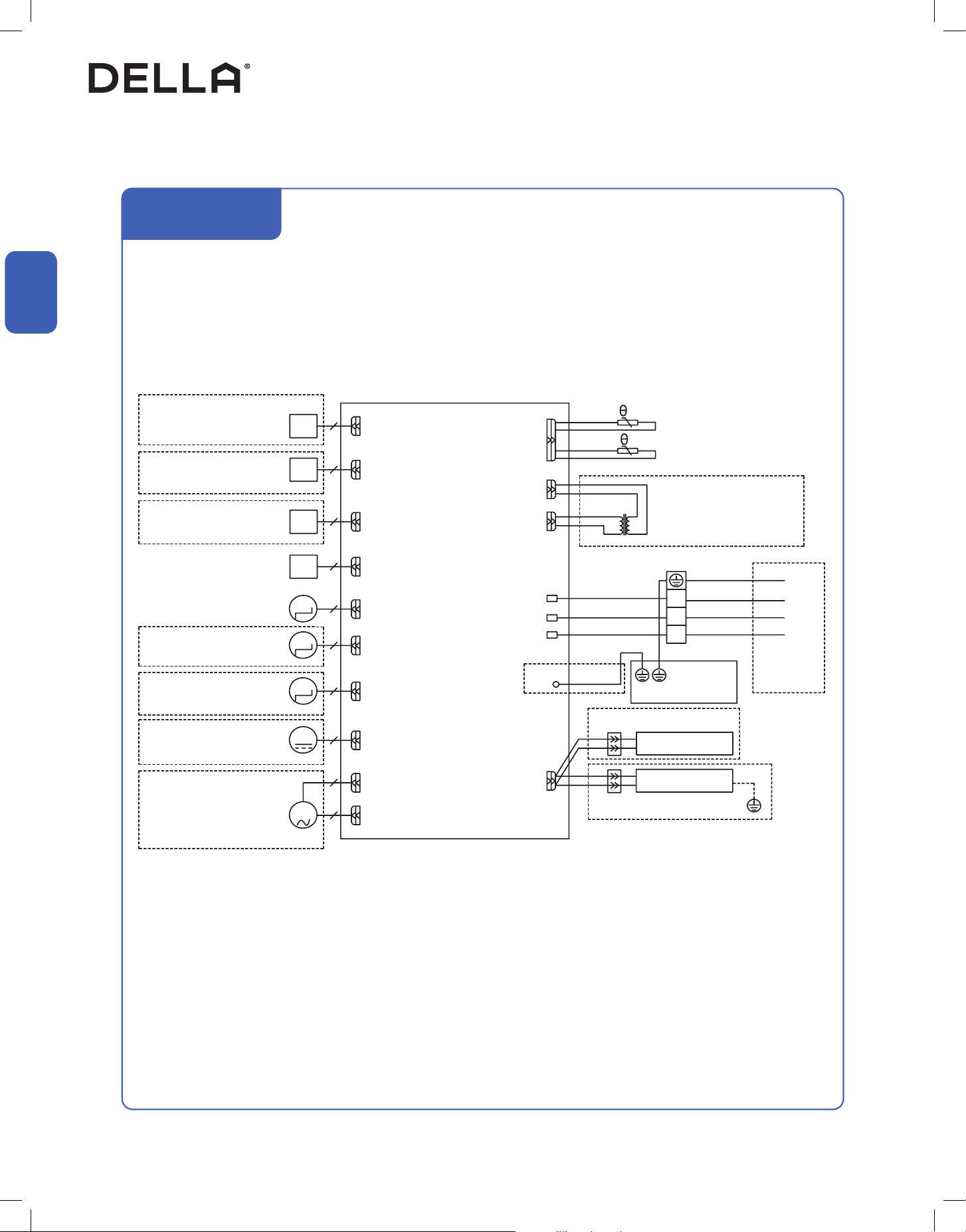
Indoor and Outdoor Unit Installation
PCB
Outdoor
Unit
(Optional)
3
2
1
P2 (N)
PS (S/SIG)
M
M
M
M
M
P0
CN5-3
CN3
CN3
CN4
CN5-2
CN5-1
CN8
CN19
CN14
CN16
Evaporator
Generator
AC Fan Motor
(Optional)
Swing Motor
(Optional)
Swing Motor
(Optional)
Humidity Sensor
(Optional)
People Feel
(Optional)
Wi-Fi
(Optional)
Swing Motor
Display
DC Fan Motor
(Optional)
Indoor Unit Circuit Diagram
Installation
Installation
048-TP-9K2V-24S-IN
048-TP-23K2V-23S-IN
CN27
(CN11)
(FLZ)
(Optional)
UV Light
GN
BK
WH
YE(RD)
BK
RD
WH
BU
BN(RD)
(Optional)
Transformer
Tube Temperature
Room Temperature
RT
IPT
CN6
CN2
CN1
31
v.20250729U
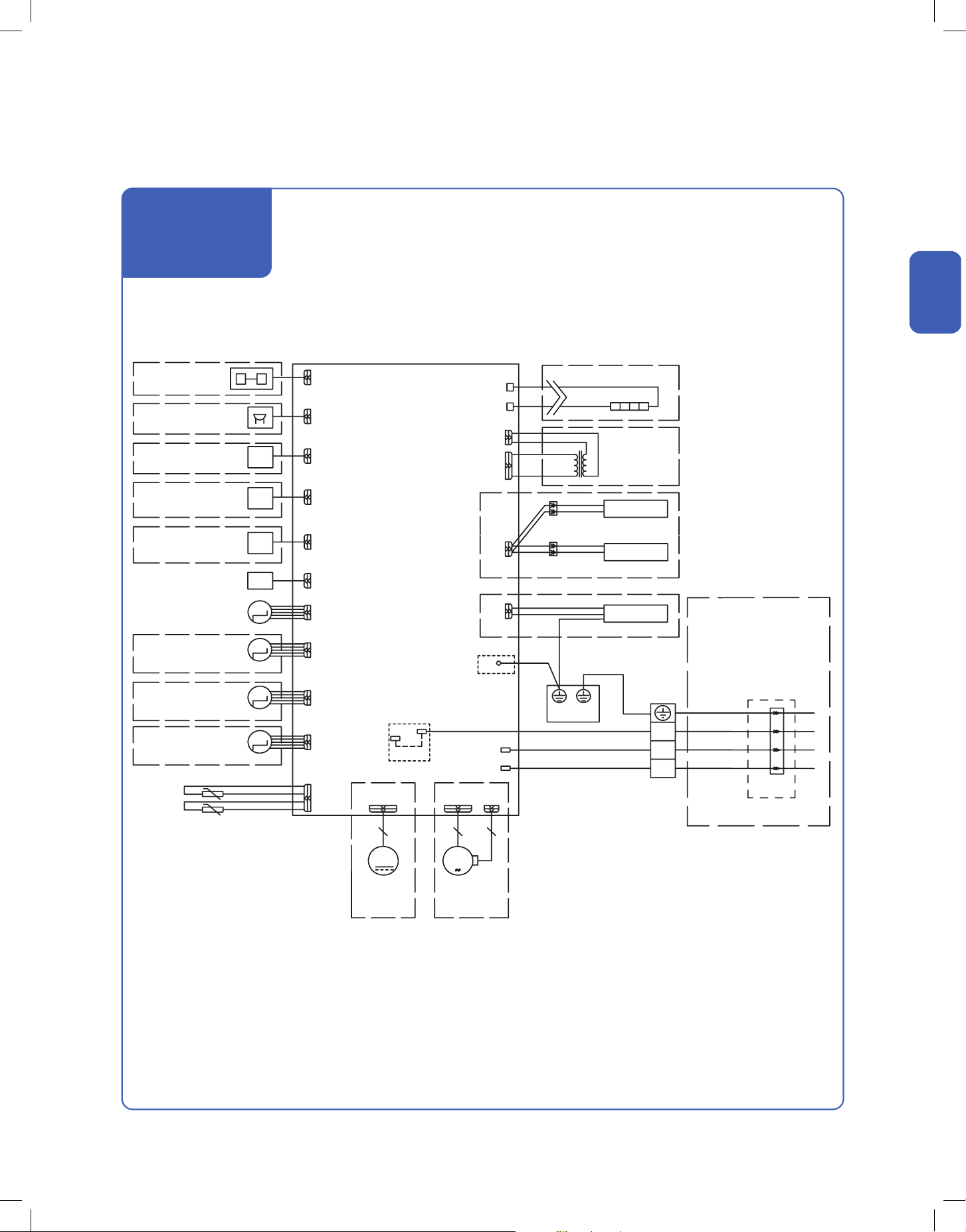
Indoor and Outdoor Unit Installation
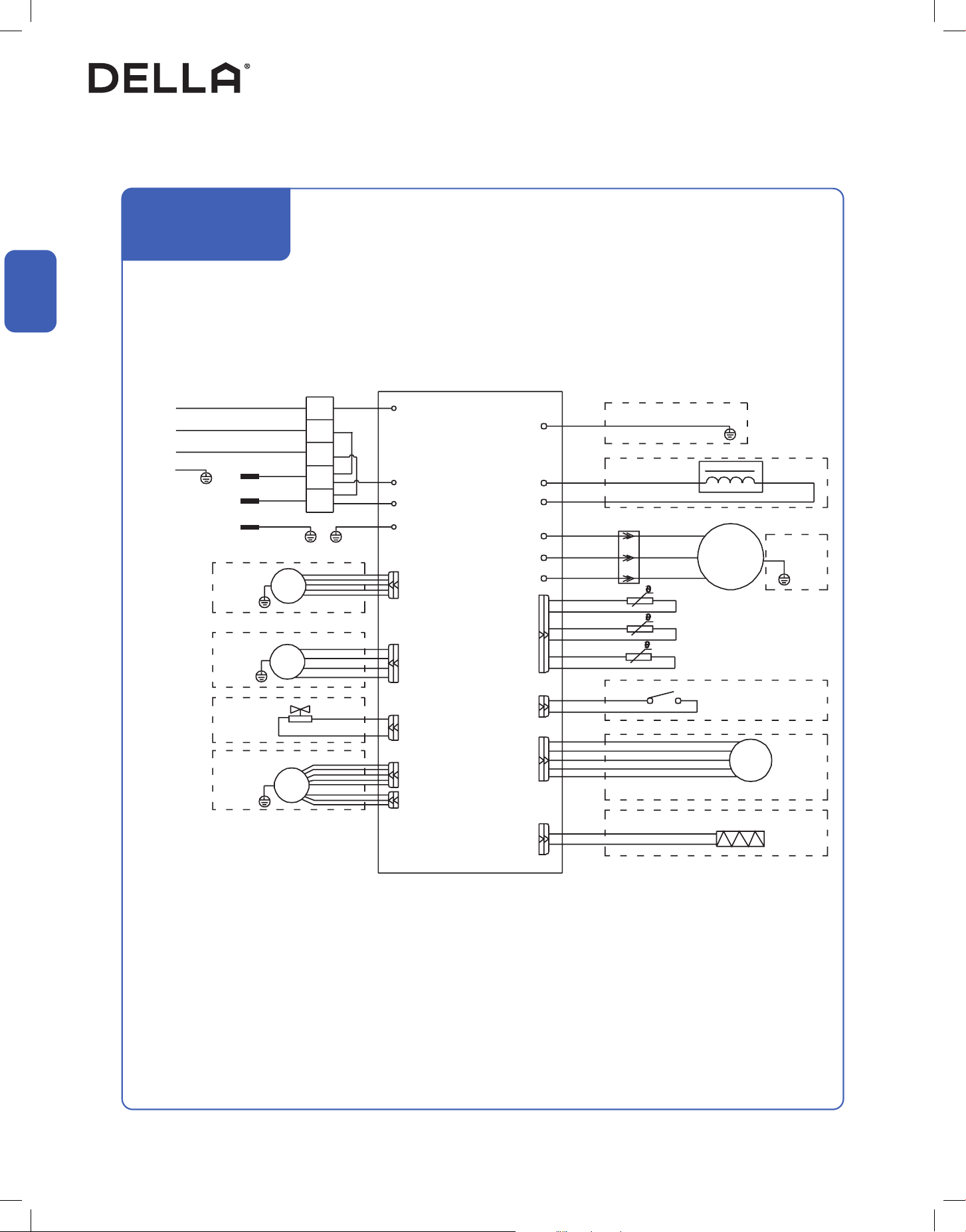
Outdoor Unit Circuit Diagram
Installation
Installation
048-TP-9K1V-24S-OUT
048-TP-12K1V-23S-OUT
PCB
Indoor
Unit
Power
Supply
3
N
L
2
1
CN11
CN7
CN3
W
V
U
P14(L2)
P13(L1)
CN2 / CN1
GN(GNYE)
GN(GNYE) GN(GNYE)
GN(GNYE)
GNYE
GNYE
GNYE
VALVE
DC FAN
MOTOR
DC FAN
MOTOR
AC FAN
MOTOR
YE(BK)
WH(BU)
WH(BU)
BK(BN)
BK(BN)
BN
BN
BU
BU
BK
RD URD
RD
RD
RD(BU)
RD(BU)
WH VWH
BU WBU
(Optional)
(Optional)
(Optional)
(Optional)
(Optional)
(Optional)
(Optional)
(Optional)
(Optional)
CAPACITOR
REACTOR
Outdoor Environment Temp. Sensor
Outdoor Pipe Temp. Sensor
Outdoor Exhaust Temp. Sensor
Compressor Protector
Heater
Electronic Expansion Valve
COMP
(Optional)
CN12-2
CN12-1
P8 (VAL)
P01 (GND)
P1 (AC-L)
P2 (AC-N)
P0 (GND) / P00
P9
(CN410)
CN12-2
(P9)
(External Drive)
32
Indoor and Outdoor Unit Installation
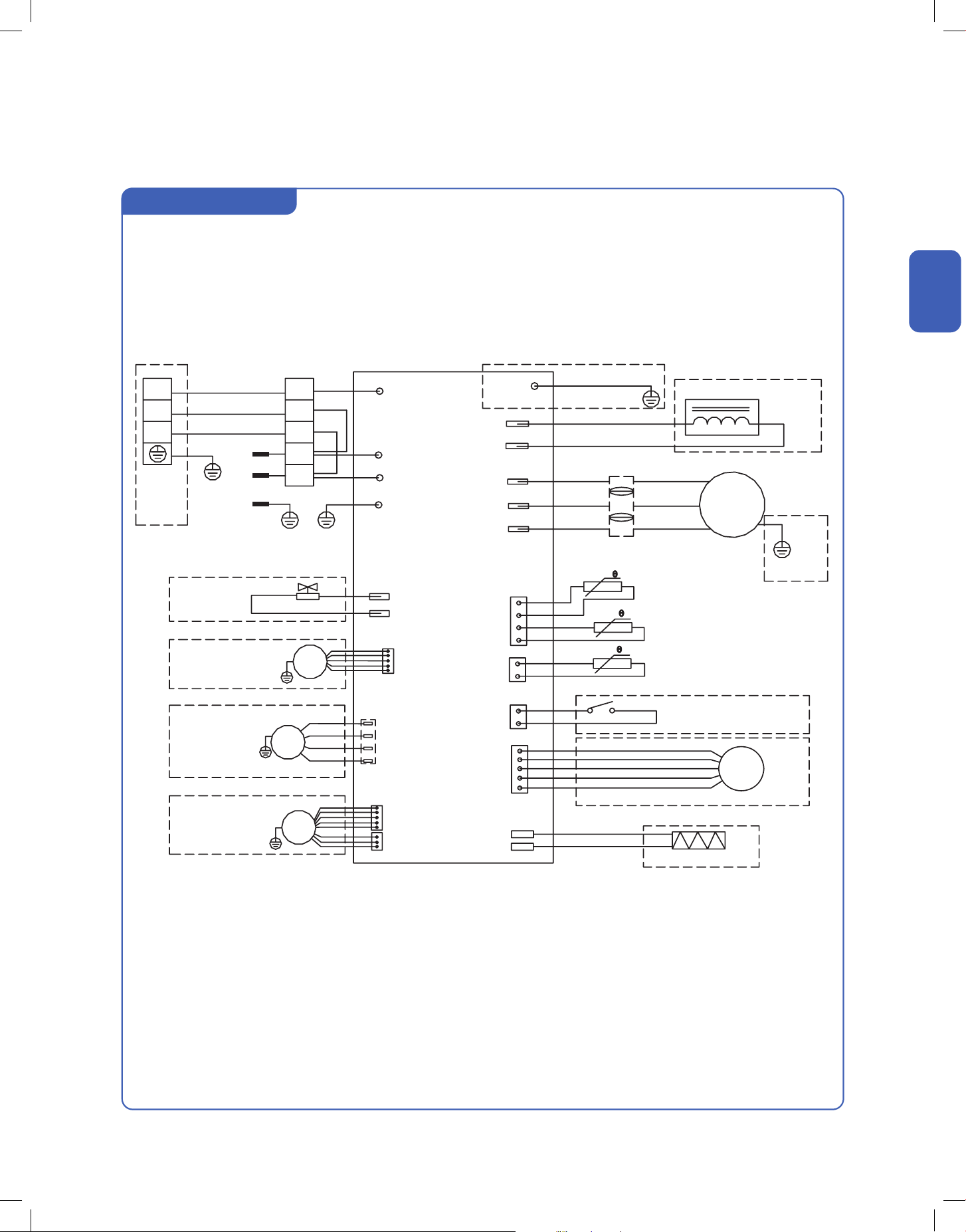
Outdoor Unit Circuit Diagram
Installation
Installation
048-TP-9K2V-24S-OUT
048-TP-12K2V-24S-OUT
048-TP-18K2V-23S-OUT
PCB
Indoor
Unit
Power
Supply
3
L2
L1
2
1
CN11
CN7
CN3
W
V
U
CN2 / CN1
GN(GNYE)
GN(GNYE) GN(GNYE)
GN(GNYE)
GNYE
GNYE
GNYE
VALVE
DC FAN
MOTOR
DC FAN
MOTOR
AC FAN
MOTOR
YE(BK)
WH(BU)
WH(BU)
BK(BN)
BK(BN)
BN
BN
BU
BU
BK
RD URD
RD
RD
WH VWH
BU WBU
(Optional)
(Optional)
(Optional)
(Optional)
(Optional)
(Optional)
(Optional)
(Optional)
REACTOR
Outdoor Environment Temp. Sensor
Outdoor Pipe Temp. Sensor
Outdoor Exhaust Temp. Sensor
Compressor Protector
Heater
Electronic Expansion Valve
COMP
(Optional)
(Optional)
CN12-2
CN12-1
P8 (VAL)
P01 (GND)
P1 (AC-L)
P2 (AC-N)
P3 (S)
P0 (GND) / P00
P9
(CN410)
CN12-2
(P9)
(External Drive)
P14(L2)
P13(L1)
33
v.20250729U
Indoor and Outdoor Unit Installation
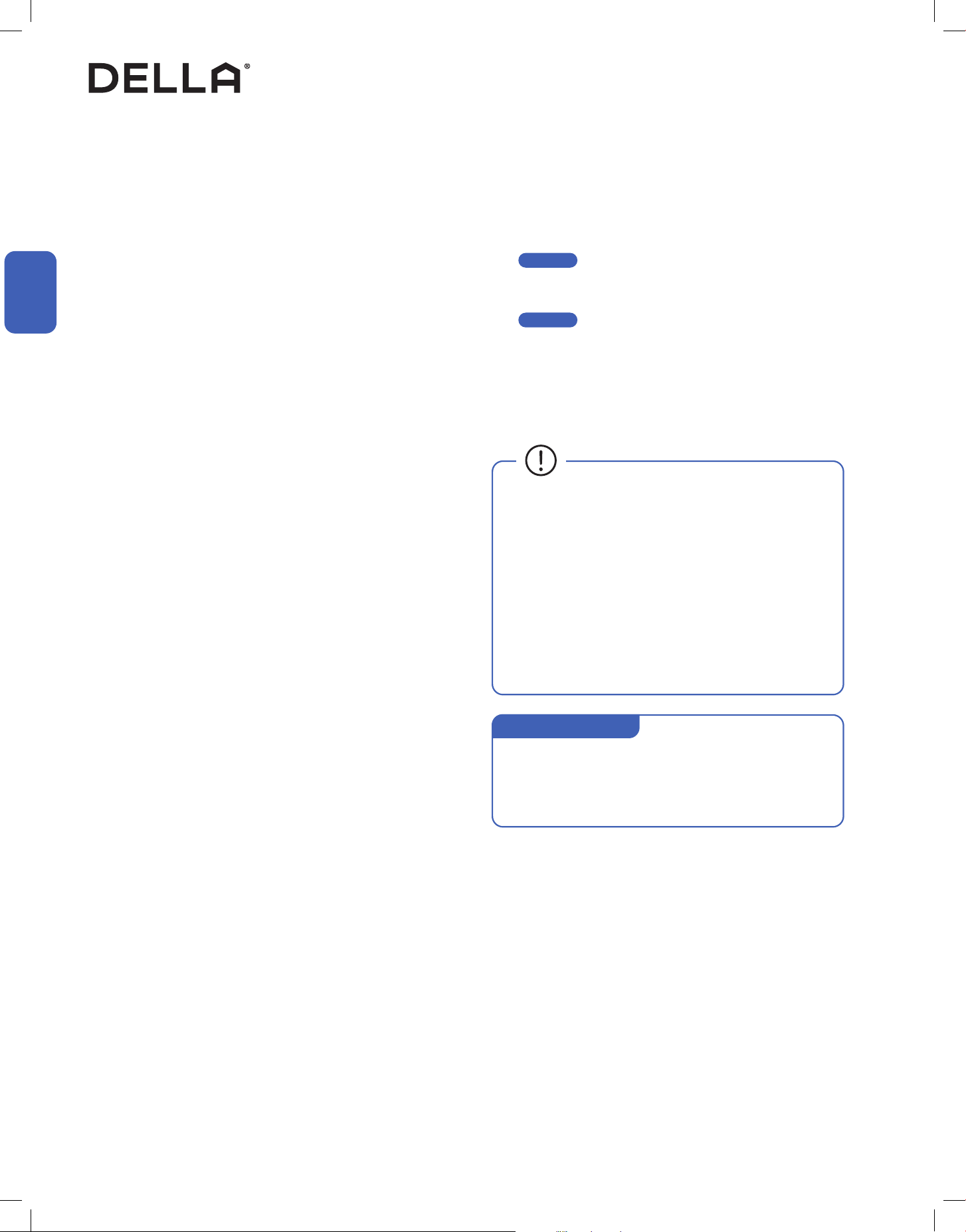
Outdoor Unit Circuit Diagram
Installation
Installation
048-TP-23K2V-23S-OUT
PCB
Indoor
Unit
3
3
L2
L1
2
2
1
1
CN11
VALVE
DC FAN
MOTOR
DC FAN
MOTOR
(Optional)
(Optional)
(Optional)
(Optional)
(Optional)
Heater
P8 (VAL)
P1 (AC-L)
P2 (AC-N)
P10-1 (U)
P10-2 (V)
P10-3 (W)
P3 (S)
P0 / P00 (GND)
P9 (CN410)
P5-1 (N)
P9-3 (C)
P9-1 (H)
P9-2 (L)
N
P9 (CN12-2)
GN(GNYE)
GN(GNYE)
GN(GNYE)
YE
WH
BK
WH(BU)
BU
BU
OR(BK)
BU
BU
BN
BN
BK(BN)
Power Supply
AC FAN
MOTOR
GNYE
GNYE
GNYE
GNYE
(Optional)
(Optional)
(Optional)
CN12-2
CN12-1
(External Drive)
CN7
CN3
CN2
CN1
Electronic Expansion Valve
Compressor Protector
Outdoor Environment Temp. Sensor
Abutment Socket
Outdoor Pipe Temp. Sensor
Outdoor Exhaust Temp. Sensor
COMP
RD U
WH V
BU W
P14(L2)
P13(L1)
RD
RD
REACTOR
(Optional)
GN(GNYE)
(Optional)
P01 (GND)
34
Installation
Installation
Indoor and Outdoor Unit Installation
Vacuum Pumping, Leak Test (Using Micron Gauge) *RECOMMENDED, and Adjust Refrigernat Level
1. Remove the protective caps from the service port, low-pressure
valve (Lo·R), and high-pressure valve (Hi·R).
2. Connect the charging hose with a push pin to the service port.
3. Connect a the vacuum pump to the other end of the charging
hose and the micron gauge in between the service port and the
pump.
4. Open the valve adapter on the charging set, then turn on the
vacuum pump to vacuum the system.
5. Let the vacuum pump run until the micron gauge indicate the
value of 500 micron or lower.
6. Close the valve adapter on the charging set and turn off the
vacuum pump.
7. Leave the system connected with the micron gauge for 5
minutes, then make sure the gauge indication does not exceed
500 micron.
NOTE: In the case of a leak, and the micron level increases above
500 micron, reconnect all the connection joints on the refrigerant
line, and redo the vacuum pumping.
8. Disconnect the pressure hose and the micron gauge from the
service port.
9. The air conditioner comes with enough refrigerant for the
standard length pipe set, add refrigerant charge if you use a
lengthened refrigerant line.
-00-
10. Turn on the air conditioner and confirm it can power on properly,
and then turn it off.
-00-
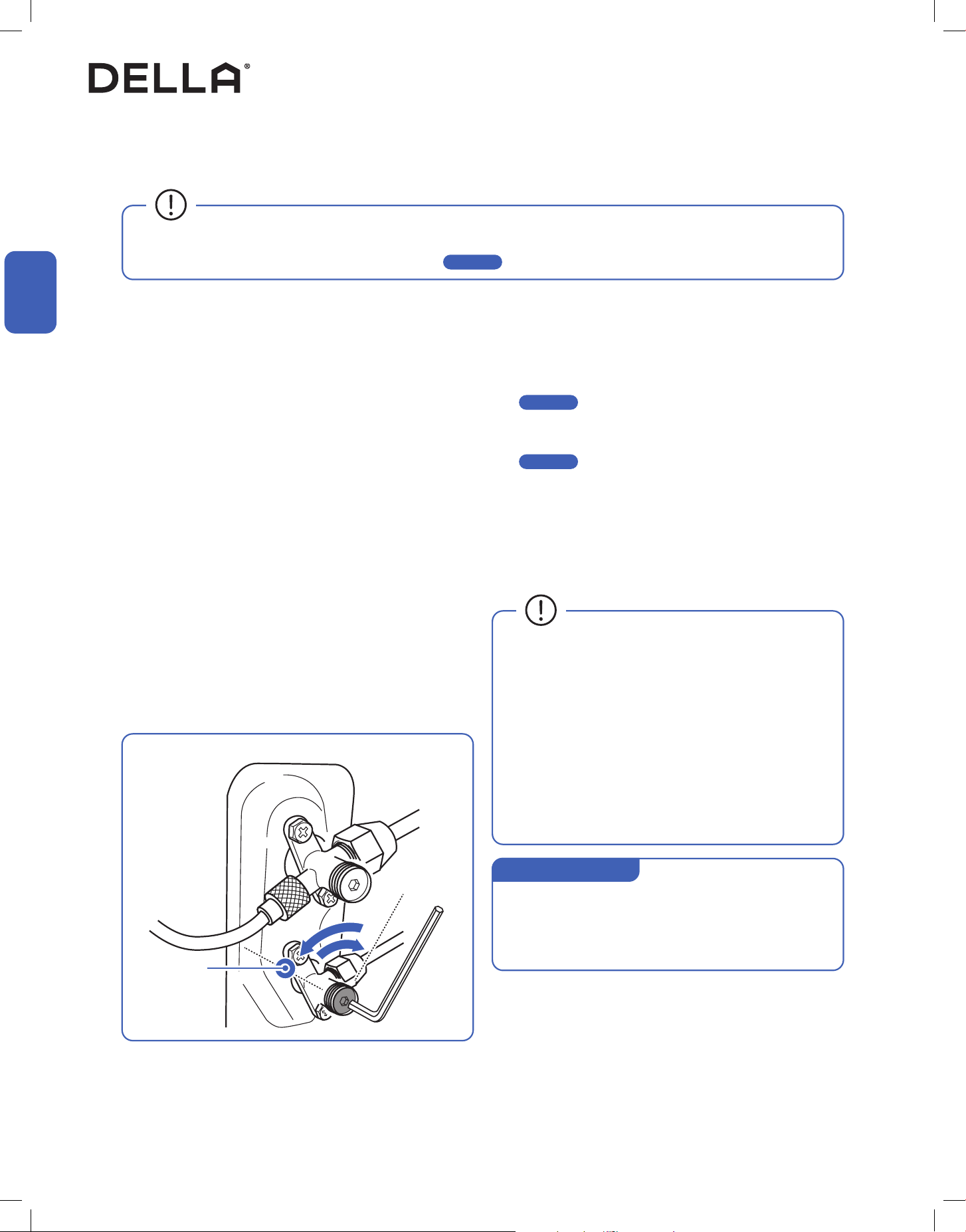
11. Fully open the low pressure valve (Lo·R) and high pressure valve
(Hi·R)
12. Put the protective caps back on the service, low-pressure valve,
and high-pressure valve.
13. Tighten the caps.
Page 15
Page 48
• Only add refrigerant if you use a lengthened refrigerant
line. There is no need to adjust or recover any amount
refrigerant if you use a standard or shortened refrigerant
line.
• Do not open the refrigerant valve until vacuum pumping is
completed.
• Stop and disconnect the vacuum pump from the system
before opening the refrigerant valve.
• Each indoor unit connected to the multizone outdoor unit
must vacuumed respectively.
• Additional Refrigerant Amount (ounce)
[0.11 × (Total Install length (ft) - 25)] oz
• Additional Refrigerant Amount (gram)
[10 × (Total Install length (m) - 7.5)] g
Additional Refrigerant
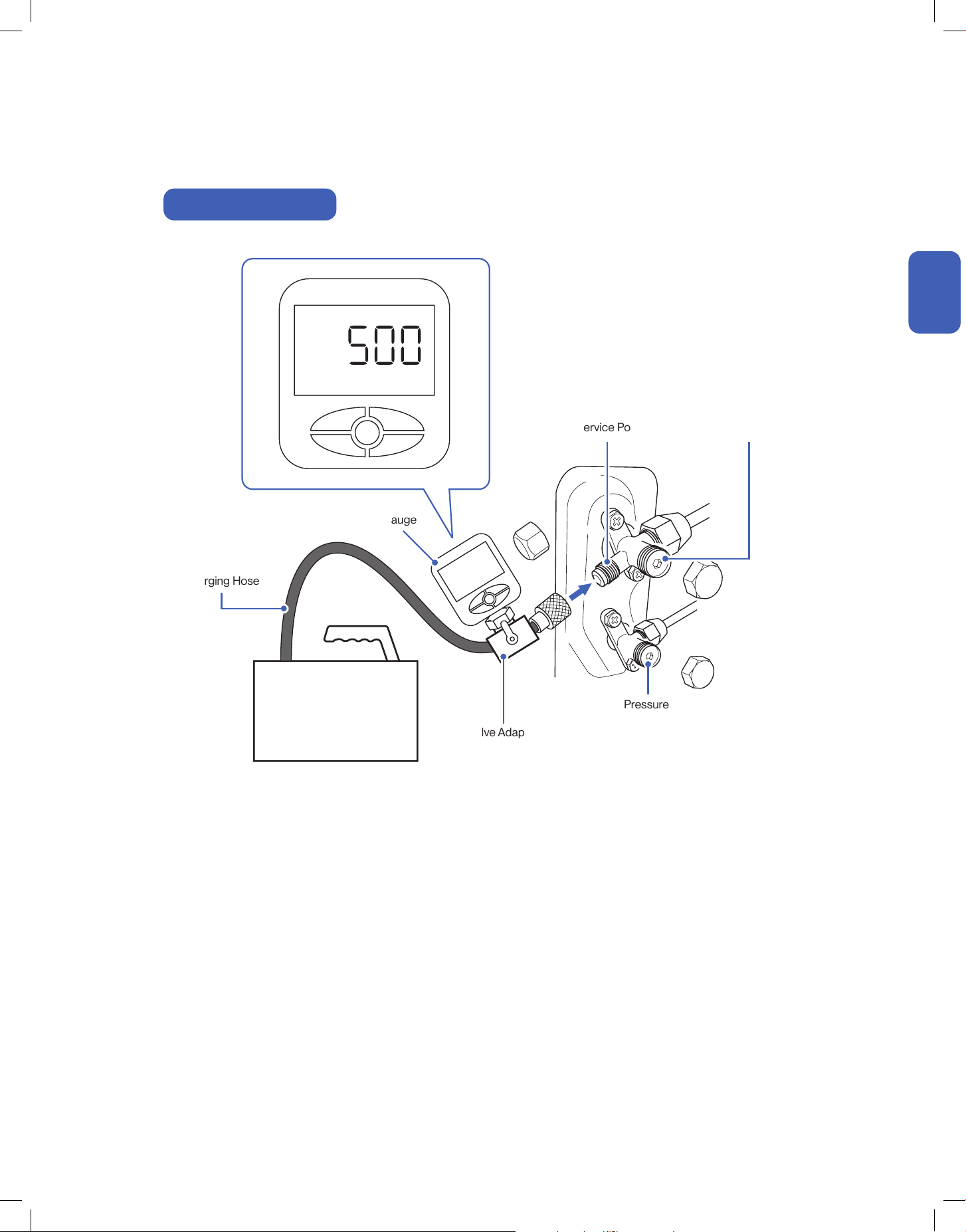
35
v.20250729U
Indoor and Outdoor Unit Installation
Charging Hose
Vacuum Pump
High Pressure Valve
(Hi·R)
Valve Adapter
Low Pressure Valve
(Lo·R)
Micron Gauge
Service Port
Micron
Micron Gauge Connection
Installation
Installation
36
Installation
Installation
1. Remove the protective caps from the service port, low-pressure
valve (Lo·R), and high-pressure valve (Hi·R).
2. Connect the pressure hose with a push pin from the manifold
gauge to the service port.
3. Connect the charging hose from the manifold gauge to the
vacuum pump.
4. OPEN the low-pressure valve (Lo·M) and CLOSE the high
pressure valve (Hi·M) on the manifold gauge.
5. Turn on the vacuum pump to vacuum the system.
6. Let the vacuum pump run for at least 15 minutes and make sure
the gauge indicates −0.1 Mpa (−76 cmHg).
NOTE: Depending on your refrigerant line set length and vacuum
pump power, it might takes longer time.
7. Close the pressure valve (Lo·M) and turn off the vacuum pump.
8. Leave the system connected with the manifold gauge for 5
minutes, then make sure the gauge indication does not exceed
0.005 Mpa.
NOTE: In the case of a leak, and the pressure value increases,
reconnect all the connection joints on the refrigerant line, and
redo the vacuum pumping.
9. Open the high-pressure valve (Hi·R) for 1/4 turn, then close the
valve after 5 seconds.
10. Check all connection joints with refrigerant leak detector or liquid
leak detector.
11. The air conditioner comes with enough refrigerant for the
standard length pipe set, add refrigerant charge if you use a
lengthened refrigerant line.
-00-
12. Turn on the air conditioner and confirm it can power on properly,
and then turn it off.
-00-
13. Disconnect the pressure hose from the service port, then fully
open the low pressure valve (Lo·R) and high pressure valve (Hi·R).
14. Put the protective caps back on the service, low-pressure valve,
and high-pressure valve.
15. Tighten the caps.
• Analog manifold gauge is less accurate and measure vacuum at a lower resolution than a digital micron gauge. DELLA recommend
using micron gauge for vacuum pumping mentioned on -00- .
Page 34
Page 15
Page 48
Indoor and Outdoor Unit Installation
Vacuum Pumping, Leak Test (Using Manifold Gauge), and Adjust Refrigernat Level
Wait 5 sec
• Only add refrigerant if you use a lengthened refrigerant
line. There is no need to adjust or recover any amount
refrigerant if you use a standard or shortened refrigerant
line.
• Do not open the refrigerant valve until vacuum pumping is
completed.
• Stop and disconnect the vacuum pump from the system
before opening the refrigerant valve.
• Each indoor unit connected to the multizone outdoor unit
must vacuumed respectively.
• Additional Refrigerant Amount (ounce)
[0.11 × (Total Install length (ft) - 25)] oz
• Additional Refrigerant Amount (gram)
[10 × (Total Install length (m) - 7.5)] g
Additional Refrigerant
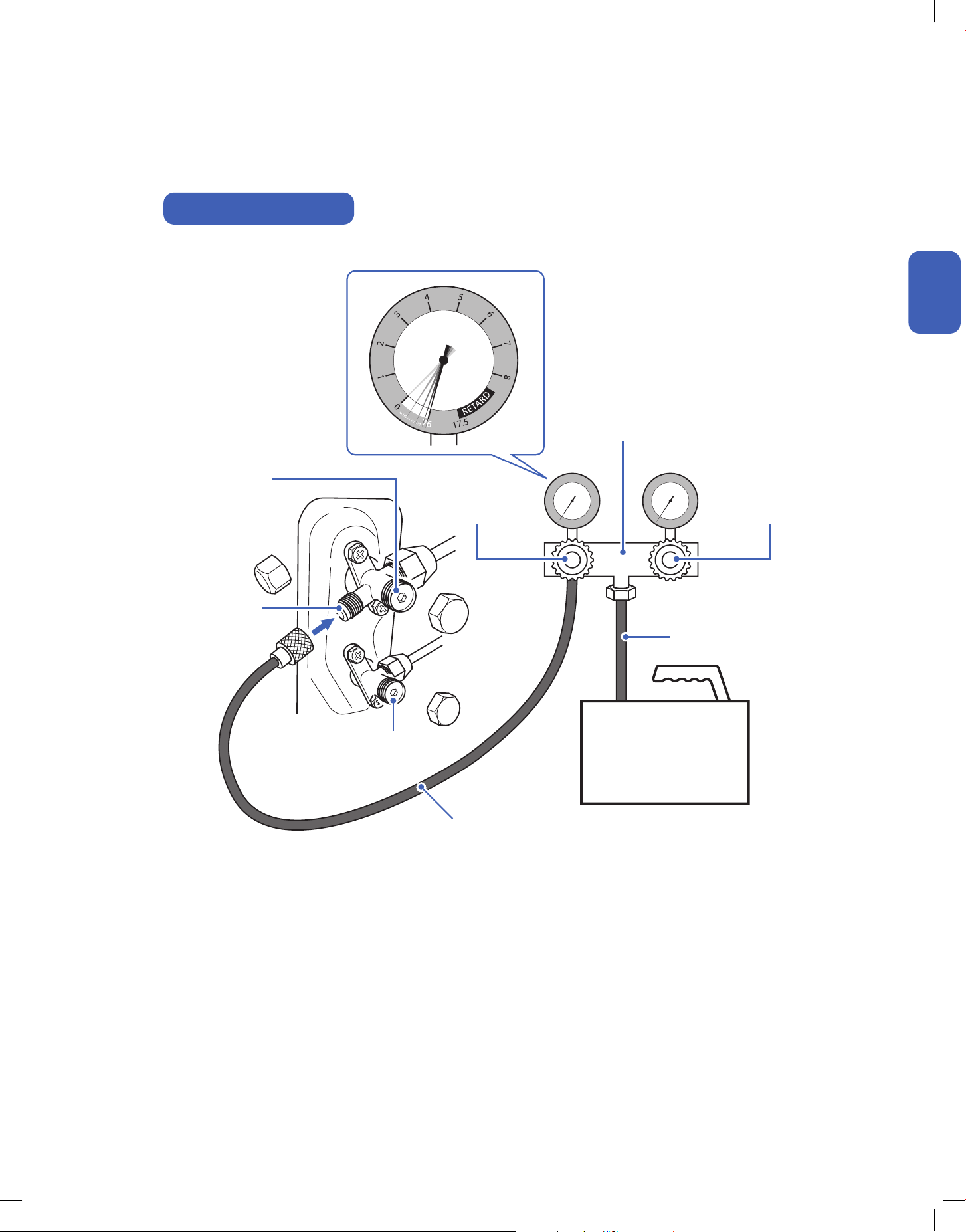
37
v.20250729U
Indoor and Outdoor Unit Installation
kg/cm²
Manifold Gauge Connection
Pressure Hose
Charging Hose
Manifold Gauge
High Pressure Valve
(Hi·R)
High Pressure Valve
(Hi·M)
Low Pressure Valve
(Lo·R)
Low Pressure Valve
(Lo·M)
Service Port
Vacuum Pump
Installation
Installation
38
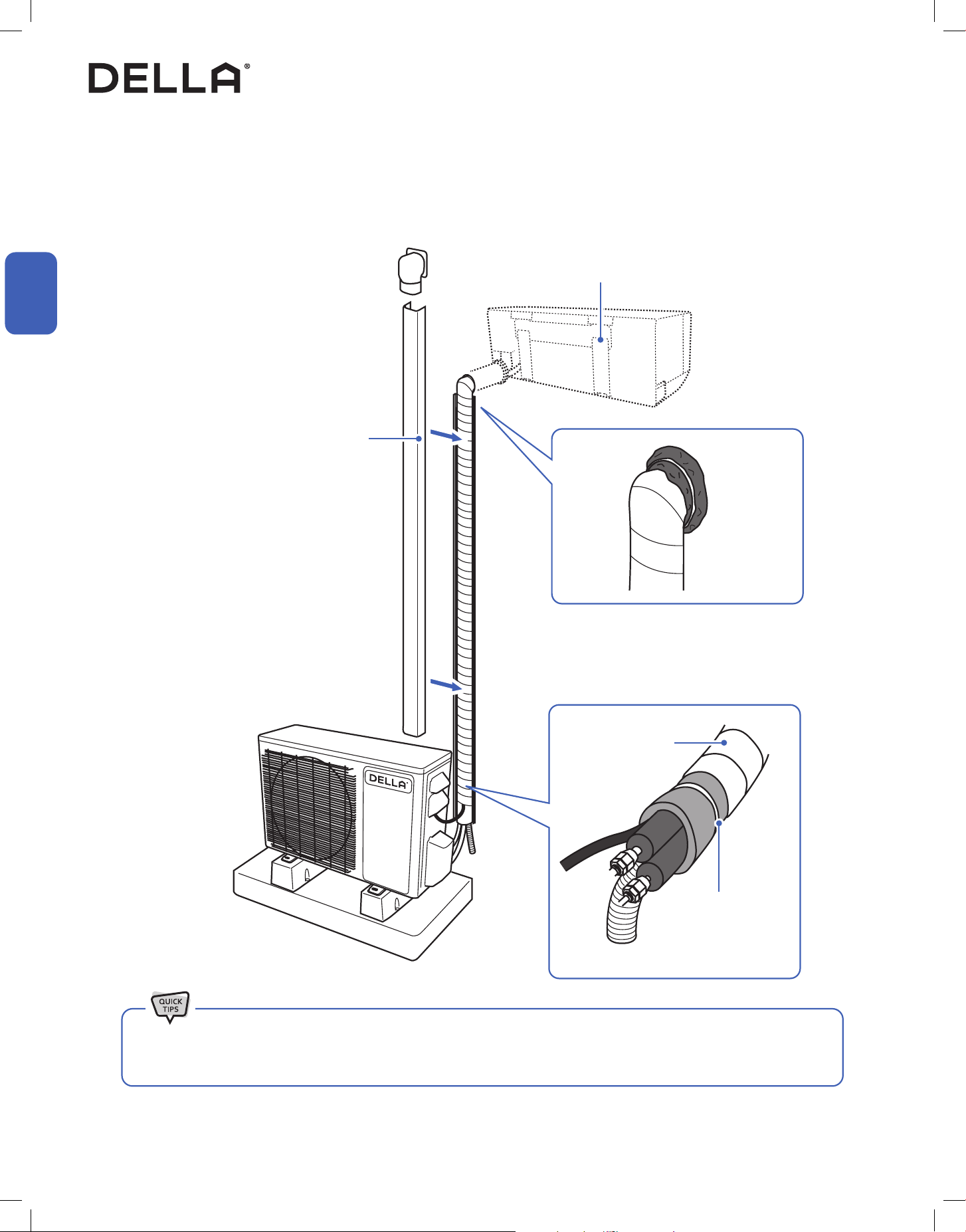
Install a decorative line cover kit (not
included) on the outdoor wall and over the
line bundle to protect it from rain, sunlight,
and other external elements.
Make sure the indoor unit is firmly attached to
the mounting bracket.
Seal the wall penetration with sealant / putty /
caulk etc. (Only putty is included in the package) to
prevent water or insects from getting into the wall.
• When wrapping and bundling the line set, avoid over tightening to prevent the insulating materials from over compression.
• Make sure all connection joints are properly insulated.
Line Set Insulation, Bundling, and Finishing Touch
Refrigerant Pipes, drain hose, and electric cable must be properly arranged and bundled with insulation tape to maximize the unit’s efficiency and
prevent condensation or water leak.
Finishing
Wrapping Tape
Polyethylene Foam,
hold in place with zip ties
or tape
Installation
Installation
39
v.20250729U
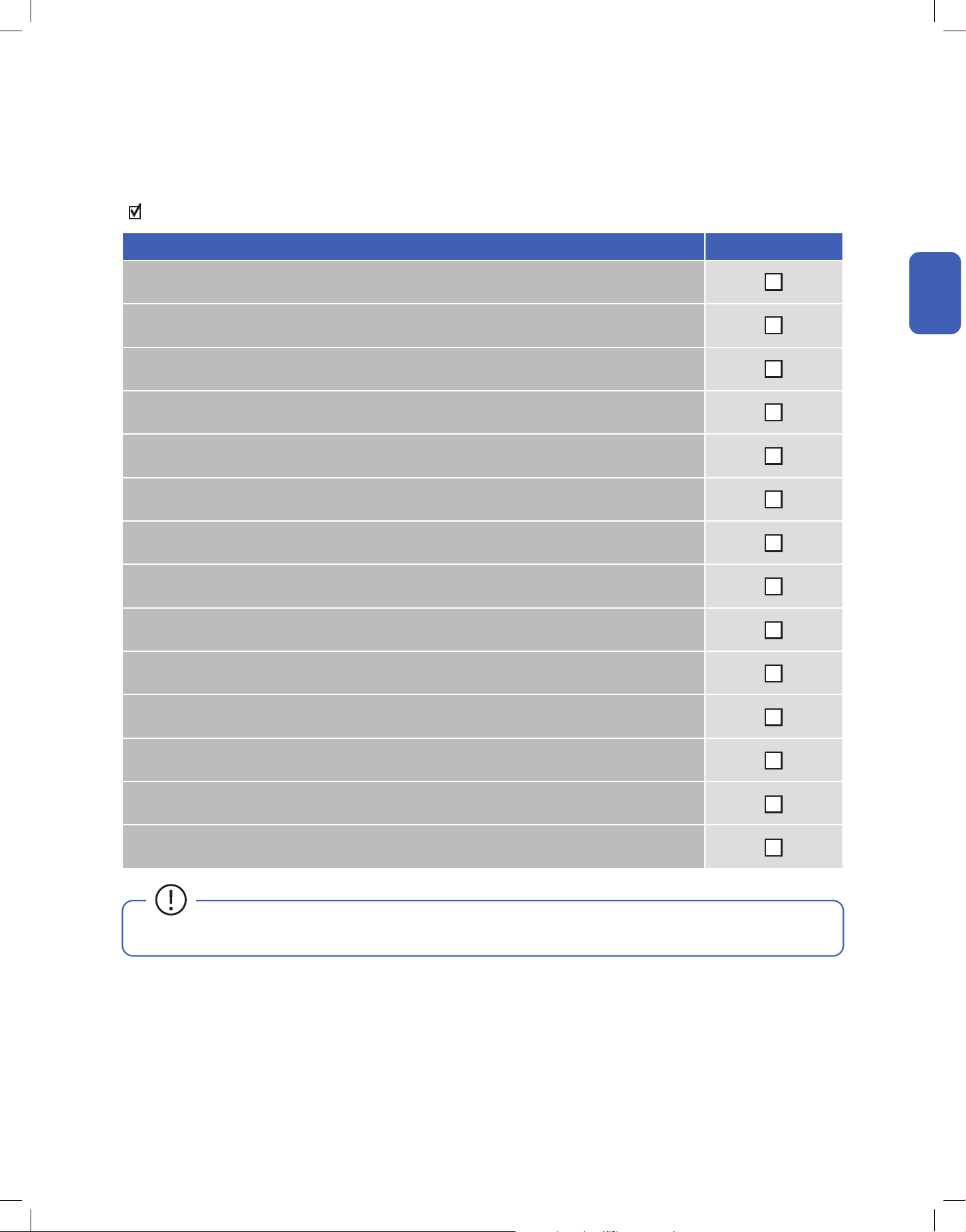
Finishing
Check List
Go through the following list and check your installation.
the check box for each conrmation.
Check List Status
Are the indoor and outdoor unit kept at least the minimum distance away from the closest wall and obstacle?
Is the indoor mounting plate secured?
Are all the panels on the unit secured and would not fall out?
Is the drain hose properly attached?
Are the refrigerant pipes securely connected and no refrigerant leakage?
Are all pipes, hoses, and cable bundled and wrapped with insulation tape?
Is the system properly vacuumed?
Is all the wall opening sealed o?
Are the refrigerant valves fully opened?
Do the power supply and voltage match the unit rating?
(Check before connecting to power supply)
Is the electrical wiring in the unit connected and secured?
Are the units properly grounded?
Is the power breaker, fuse, or protection device installed?
Can the remote control send control commands to the air conditioner?
• Any failures, accidents, or damages caused by improper installation are not covered by the warranty.
Installation
Installation
40
Installation
Installation
Test Run
After the installation, test run the mini split system and take sure it performs and works properly without water leak or abnormal noise.
Finishing
1. Turn on the power supply.
2. Turn on the air conditioner using the remote control.
3. Test the unit at the lowest temperature in COOL mode.
4. Test the unit at the highest temperature in HEAT mode.
5. Test each mode for at least 8 minutes.
- Measure the air temperature at the air outlet.
- Check if water drains properly from the drainage hose.
- Check if the louver and deflectors move properly.
6. If everything is operating normally, return to normal setting and turn off the air conditioner.
7. Inform the user to read the operation instruction before use, and demonstrate to the user how to use the air conditioner, the necessary
knowledge of service and maintenance, and a reminder of accessories storage.
• If the ambient temperature exceed the normal operation range, lift the front panel and use the emergency button to run COOL and
HEAT modes.
Contact us if you encounter any problems during or after the installation.
support.dellahome.com
24/7 Live Chat
800-863-4143
6:00 a.m. - 4:00 p.m. PST
Monday - Friday
41
v.20250729U
Operation Tips
Before Using
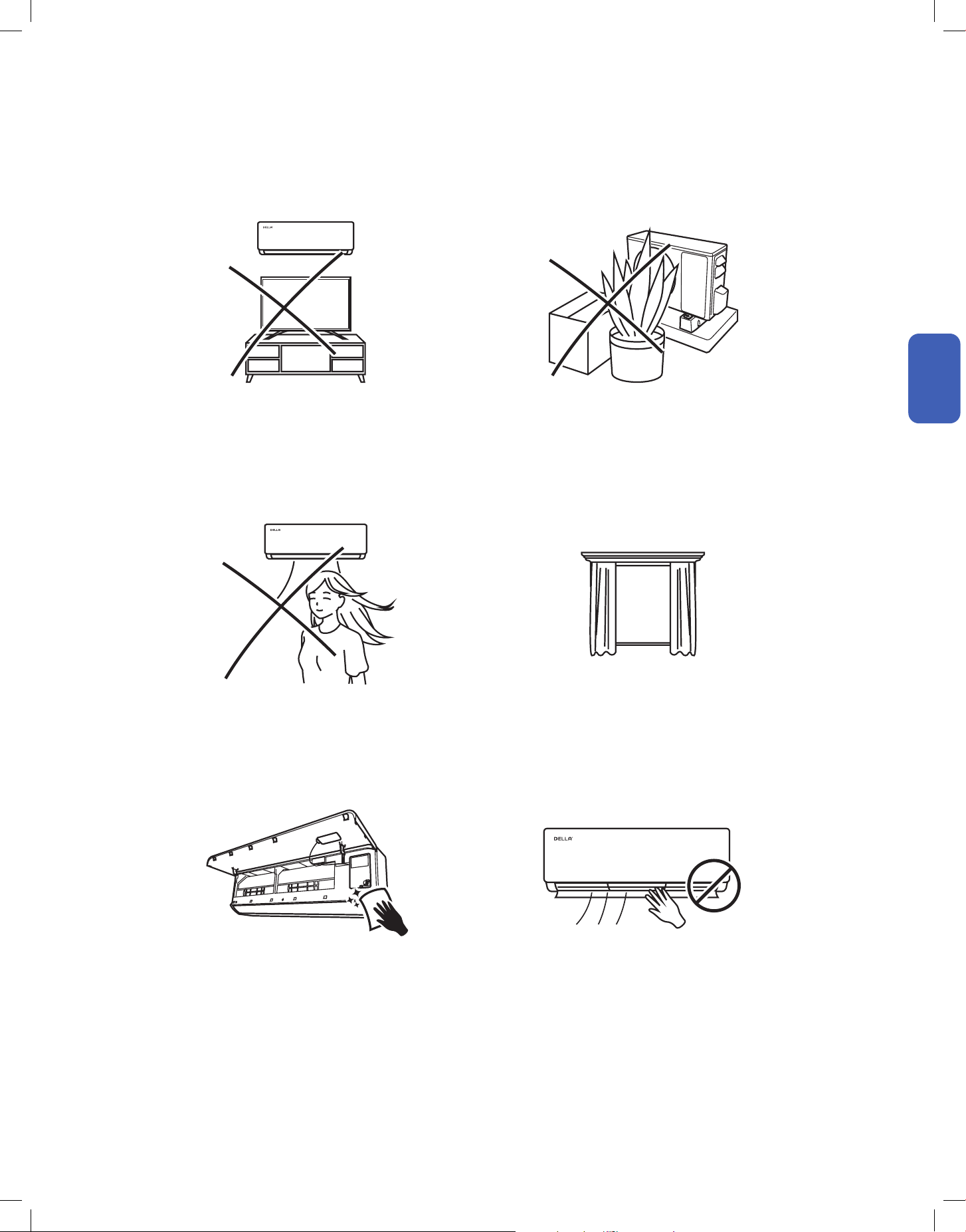
Avoid placing TV, radio or large furniture under the air
conditioner.
Avoid putting plants or objects around the outdoor unit.
Close windows and blinds.
Avoid direct wind flow to people, pets, or plants.
Follow cleaning and maintenance routine. DO NOT manually adjust the deflector and flaps.
• It may block wind flow or interfere with the remote control. • It may lower the air conditioner efficiency or cause malfunction.
• The air conditioner can cool or warm the area with better
efficiency.
• Expose to direct wind flow for extended period of time may
have a negative impact on your health.
• Regular cleaning and maintenance are needed for the best
efficiency and prevent bad odor or water leak.
• It may cause injury to the user and damages to the air
conditioner.
Before Using
Before Using
42
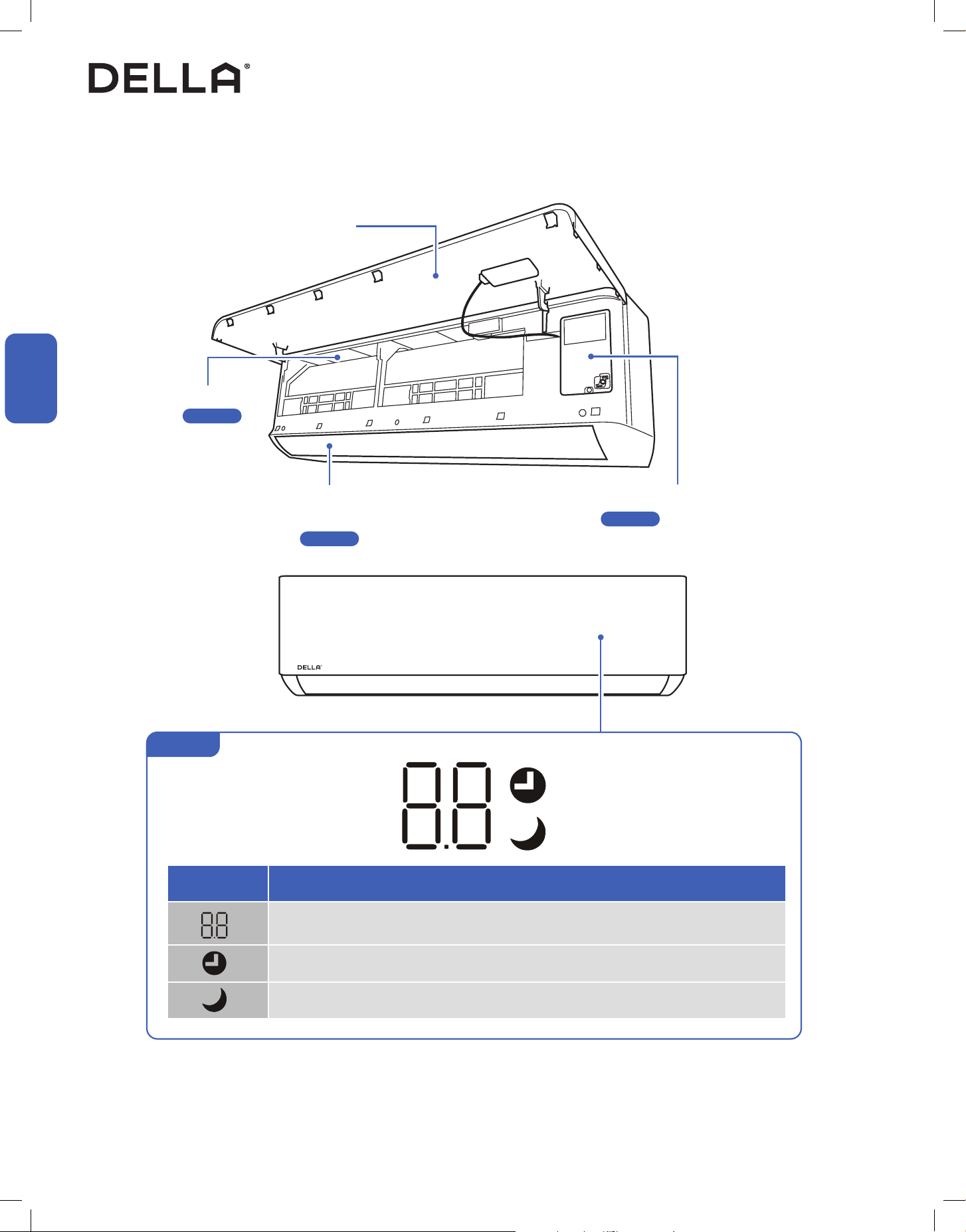
NOTE: The graphical representation might have slight differences than the actual product.
LED Indicator Function
Lights up when the unit is turned on and operating
Indicator for temperature, timer, and error codes
Lights up when timer is enabled
Lights up when SLEEP mode is enabled
Indoor Unit and Front Panel
Before Using
Air Filter
-00-
Air Outlet
Air Deflector and Flaps
-00-
Emergency ON / OFF Switch
-00-
Front Panel
Display
Before Using
Before Using
Page 61
Page 50
Page 57
43
v.20250729U
Before Using
Before Using
Before Using
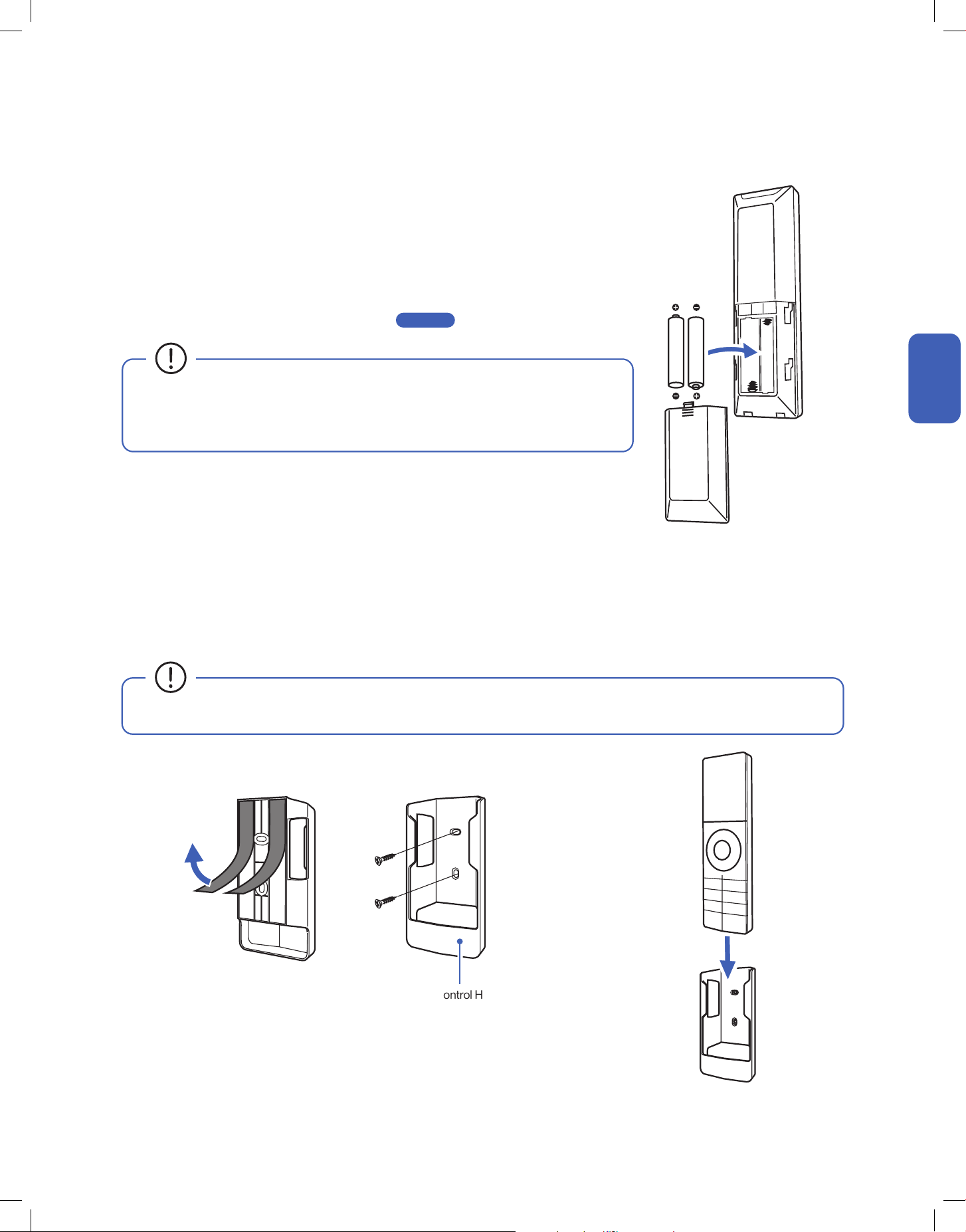
Remote Control Holder
Remote Control (Inserting Battery)
Remote Control (Remote Control Holder)
1. Attach the remote control holder to a wall by using the double sided adhesive tape or provided screws.
NOTE: Wall anchor might needed if you insta ll it on a dry wall.
2. Insert the remote control into the holder.
• After new batteries are inserted into the remote control, the display screen will lights up for 3
seconds. Leave it for 10 seconds, the display will automatically turn off.
• The default temperature unit will automatically turn into degree Fahrenheit.
To change temperature unit, follow instruction on -00- . .
• Do not use rechargeable batteries.
• Replace the old batteries with new ones of the same type.
• Do not dispose batteries as unsorted municipal waste.
• Avoid exposing the remote control to direct sunlight.
Page 56
1. Push and slide the back cover off the remote control.
2. Insert 2 LR03 AAA 1.5 v batteries into the battery compartment.
3. Reinstall the back cover to the remote control.
44

45
v.20250729U
Made to live with you, Della puts controls in your
hands so that you can easily dail in a stress-free
space that helps you feel more you.
Just Right,
Always.
46
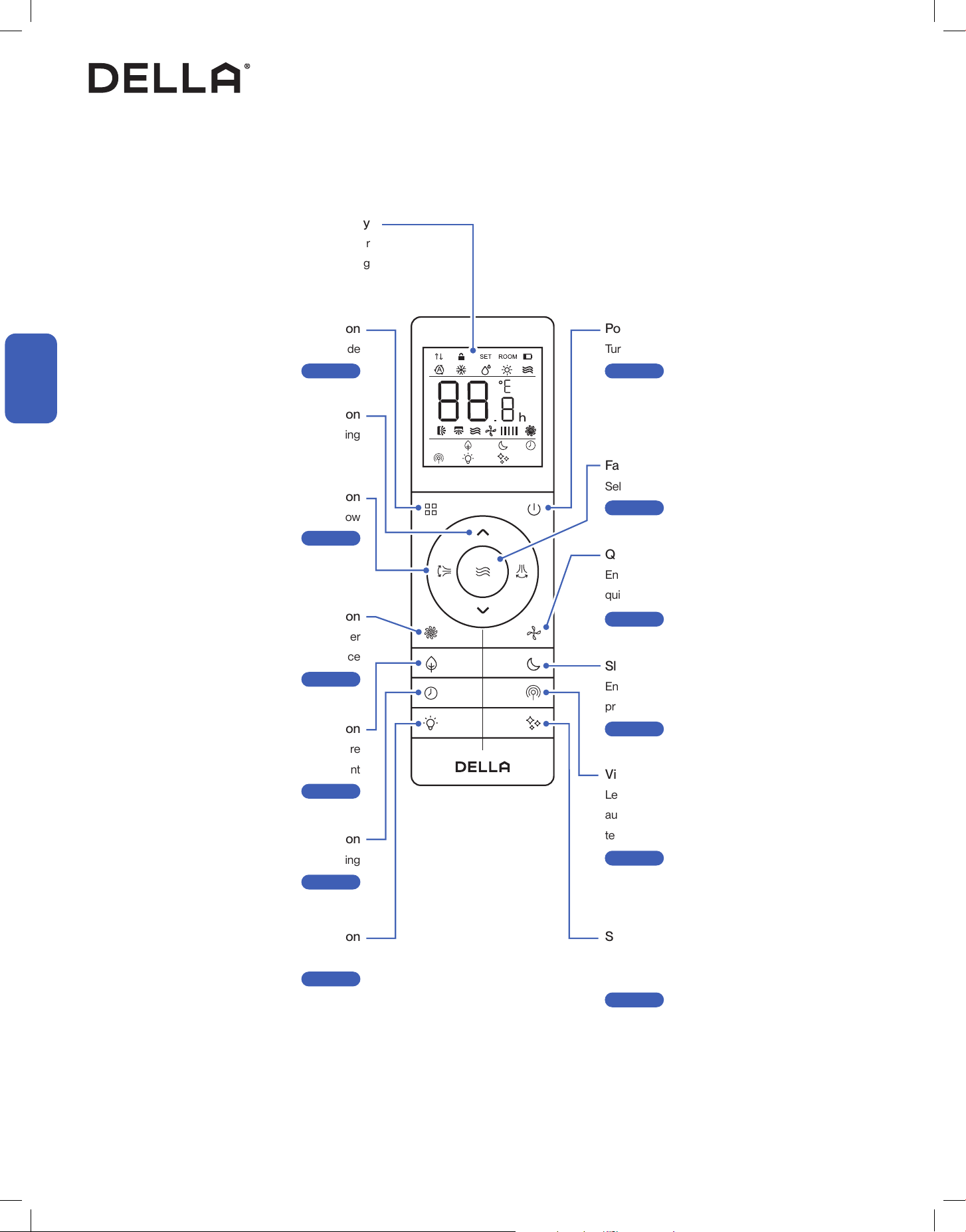
Vicinity Sensor Button
Let the air conditioner adjust temperature
automatically according to the detected
temperature around the remote control
-00-
Self Clean Button
Enable the air conditioner to clean its internal
parts
-00-
Display
Indicate operating status, temperature or
timer setting
Mode Button
Select operation mode
-00-
Power Button
Turn ON / OFF the air conditioner
-00-
Fan Button
Select fan speed
-00-
Quiet Button
Enable the air conditioner to run in
quiet mode
-00-
Sleep Button
Enable the air conditioner to operate a pre-set
program suited for sleep time
-00-
Increase / Decrease Button
Adjust temperature / timer setting
Air Flow Button
Control deflector & flaps to direct air flow
-00-
Turbo Button
Temporary boosting the air conditioner
performance
-00-
ECO Button
Enable the air conditioner to be more
energy efficient
-00-
Display Button
Turn ON / OFF the indoor unit display
-00-
Timer Button
Enable ON / OFF timer setting
-00-
Remote Control
Before Using
Before Using
Before Using
Page 48
Page 50
Page 51
Page 52
Page 53
Page 54
Page 48
Page 49
Page 51
Page 52
Page 54
Page 55
47
v.20250729U
Before Using
Before Using
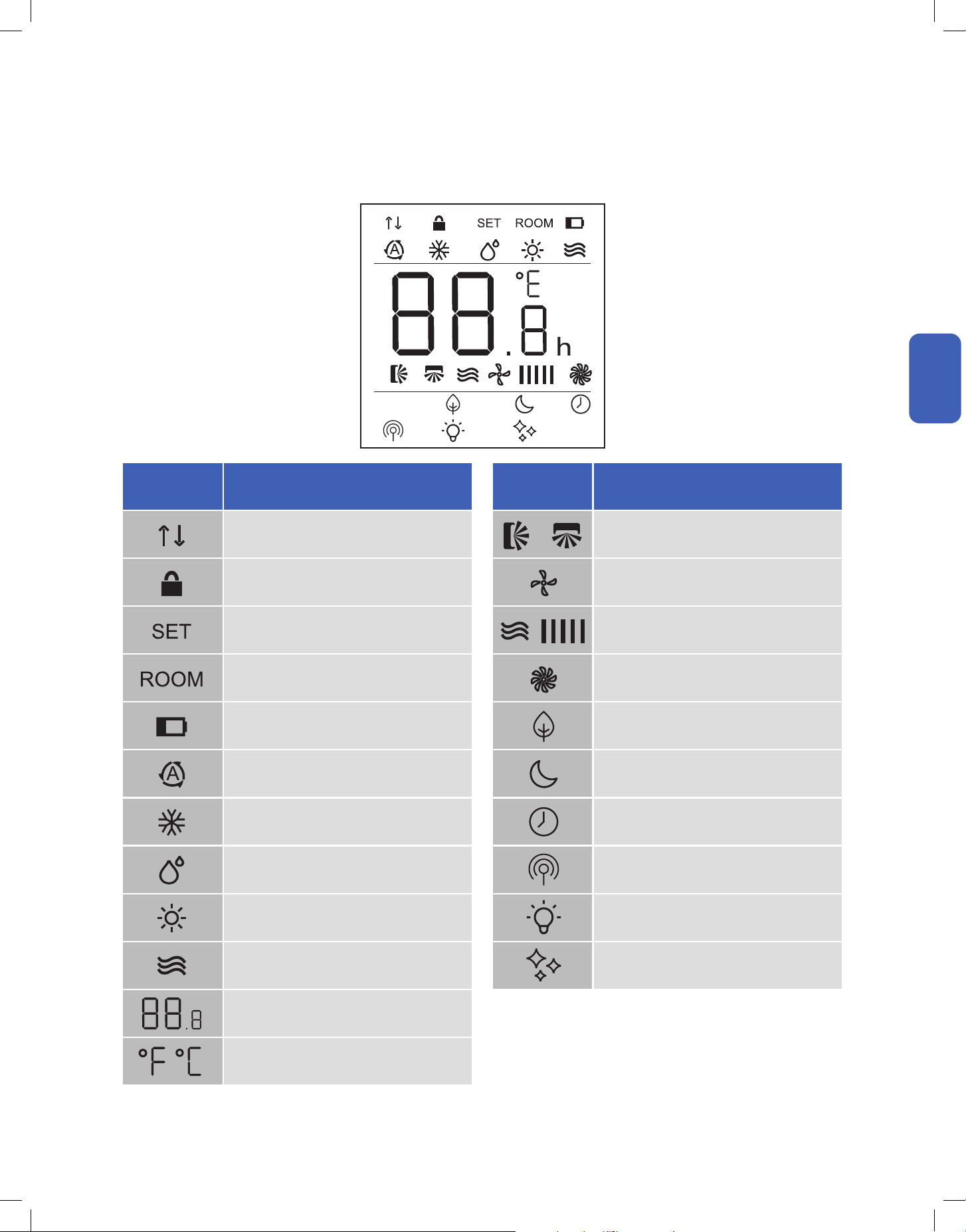
Remote Control
Before Using
LED Indicator Function
Signal Indicator
Child Lock
Indicate Set Temperature
Indicate Room Temperature
Low Battery
Auto Mode
Cool Mode
Dehumidify Mode
Heat Mode
Fan Mode
Indicate Temperature Value
Temperature Unit
Degree Fahrenheit / Celsius
LED Indicator Function
Horizontal & Vertical Air Flow Indicator
Quiet Mode
Fan Speed
Turbo Mode
Eco Mode
Sleep Mode
Timer
Vicinity Sensor Mode
Indoor Unit Display Indicator
Self Clean
48
Basic Operation
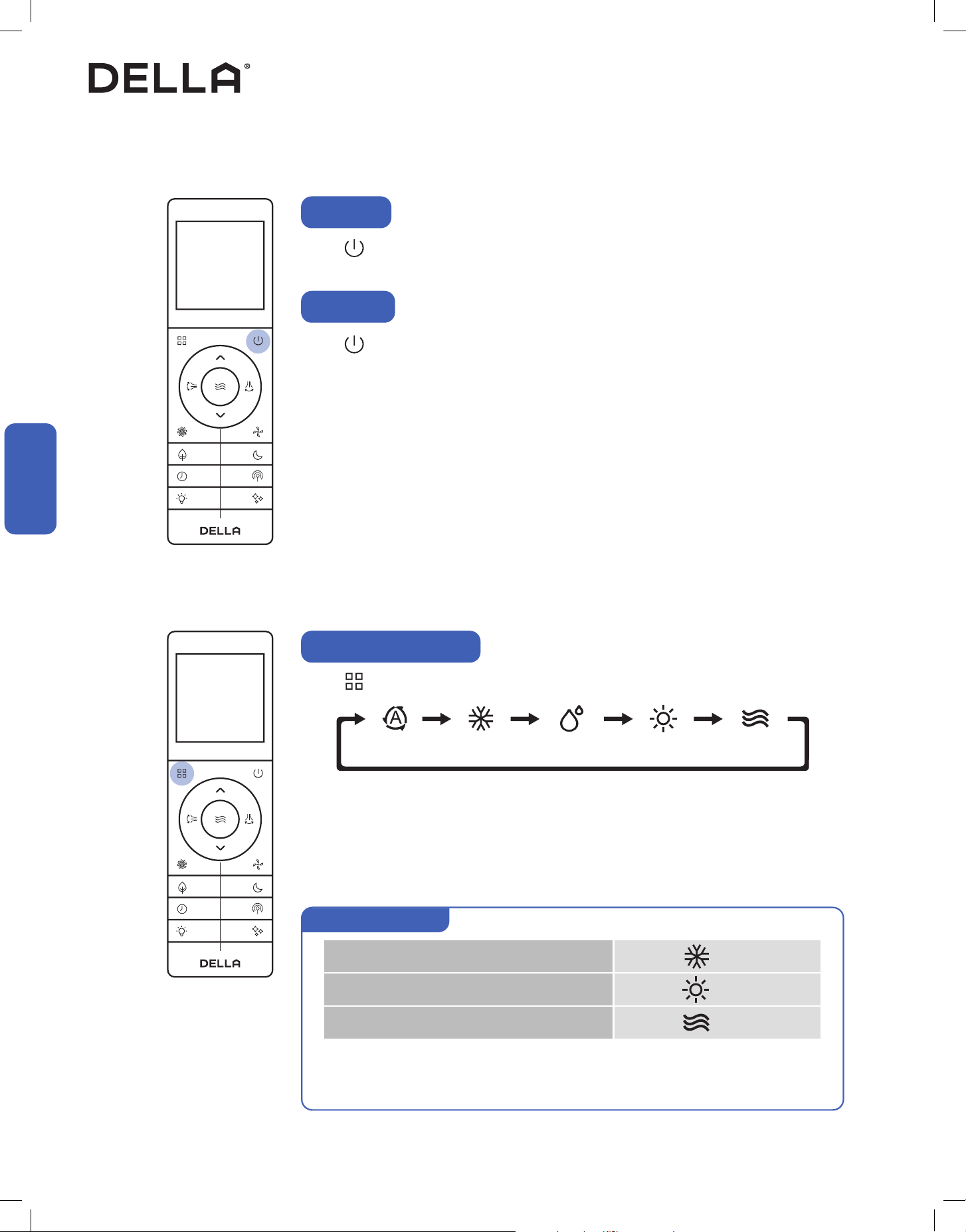
Press .
• The air conditioner will start operating.
Press .
• The air conditioner will stop operating.
Power ON
Power OFF
Basic Operation
Basic Operation
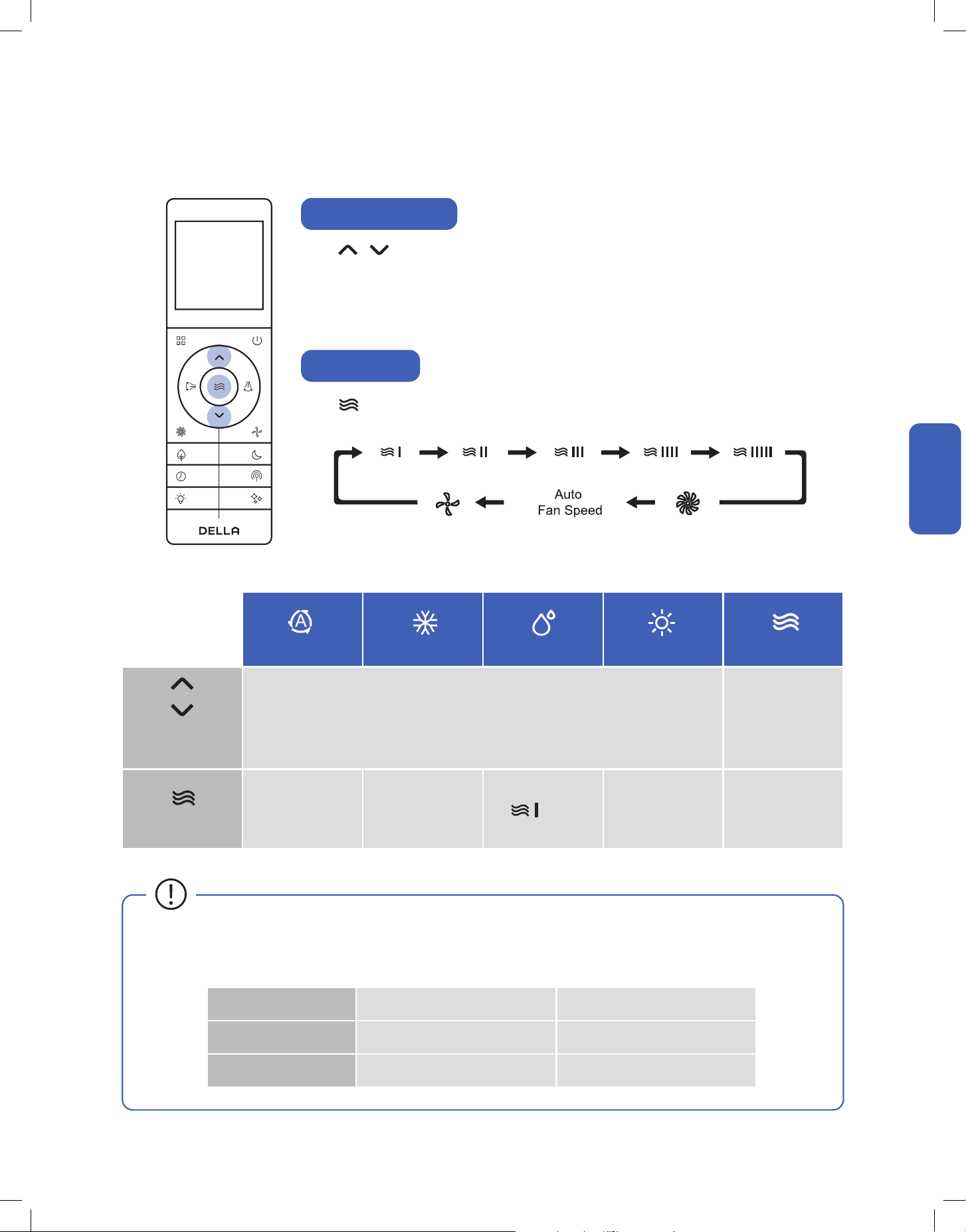
• It may takes a few minutes for the air conditioner to switch between modes.
• During Heat mode, the air conditioner can automatically activate defrost cycle, which is essential
to remove frost on the condenser for heat exchange function. This procedure usually last for 2 - 10
minutes. When defrosting, indoor unit fan will stop operating. Once defrosting is completed, it will
resume heat mode automatically.
• Auto mode allows the AC to automatically select operation mode based on the above logic.
• Each mode will operate for at least 6 minutes before switching.
• Auto mode does not support sleep mode and eco mode operation.
Auto Cool Dehumidify Heat Fan
Press to select operation mode.
Select Operation Mode
Set temp. < Room temp.
Set temp. > Room temp.
Set temp. = Room temp. ± 1.8°F / 1°C
Cool
Heat
Fan
Auto mode operation
49
v.20250729U
Basic Operation
Basic Operation
Basic Operation
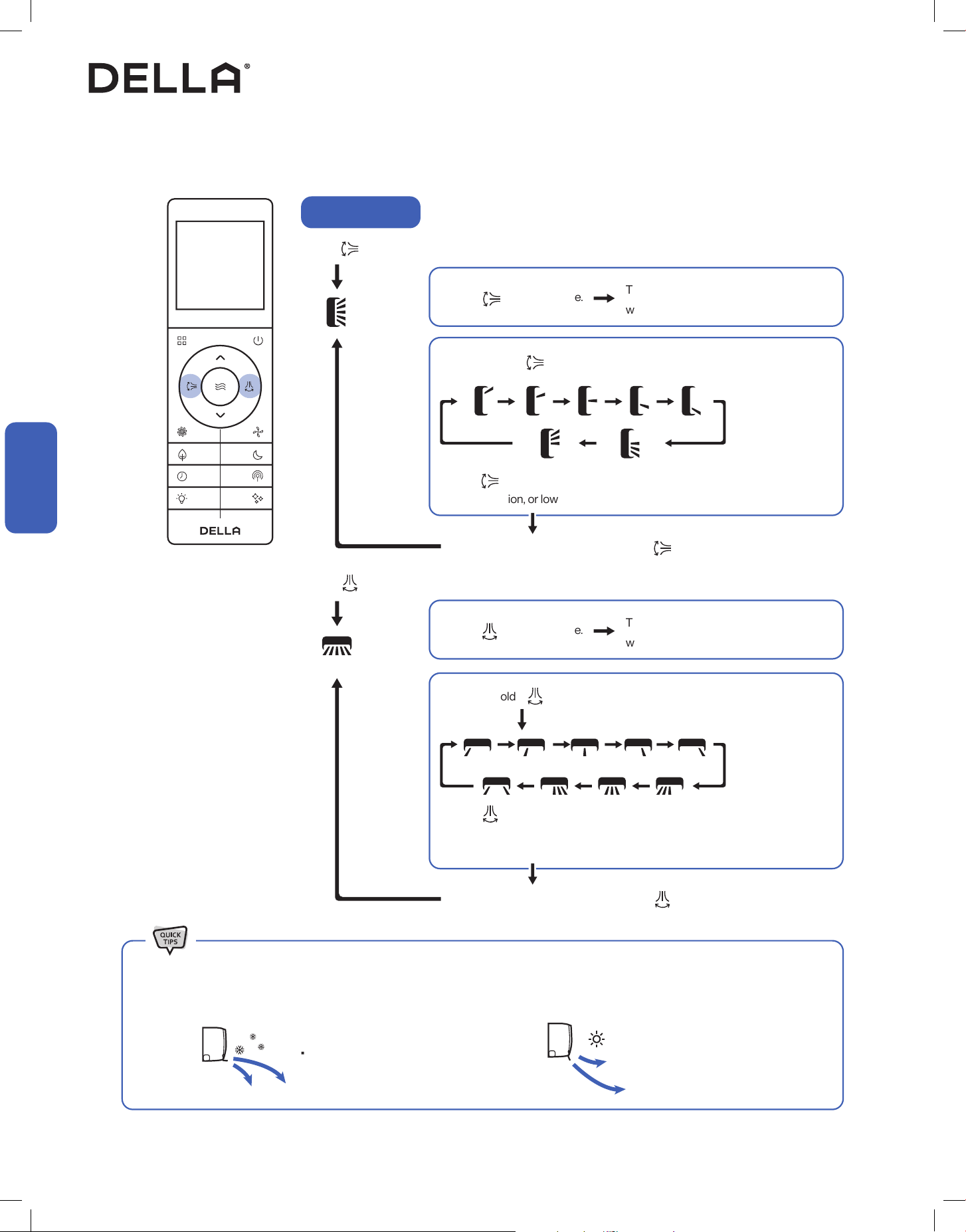
Adjust Temperature
Set Fan Speed
Press to adjust temperature setting .
• Temperature setting will adjust by 1°F / 1°C increment for each time the button is pressed.
• Press and hold the buttons to adjust temperature continuously.
• Temperature can only be set between 61°F - 88°F / 16°C - 31°C.
Press to select your desired fan speed.
61°F - 88°F / 16°C - 31°C N/A
All Fan Speed All Fan Speed All Fan Speed All Fan Speed
Auto
Cool
Dehumidify
Temperature
Setting
Fan Speed
only
Heat
Fan
Indoor Temperature Outdoor Temperature
Cool / Dehumidify Mode 63°F - 90°F / 17°C - 32°C 59°F - 122°F / -15°C - 50°C
Heat Mode 32°F - 80°F / 0°C - 27°C -4°F - 75°F / -20°C - 24°C
• The AC performs the best within operational ambient temperature.
• When the ambient temperature is too high, the AC may trip the circuit breaker protection and cause the system to shut down.
• When the ambient temperature is too low, the AC may generate excessive moisture, leading to water dripping from the outdoor unit.
50
Basic Operation
Basic Operation
Basic Operation
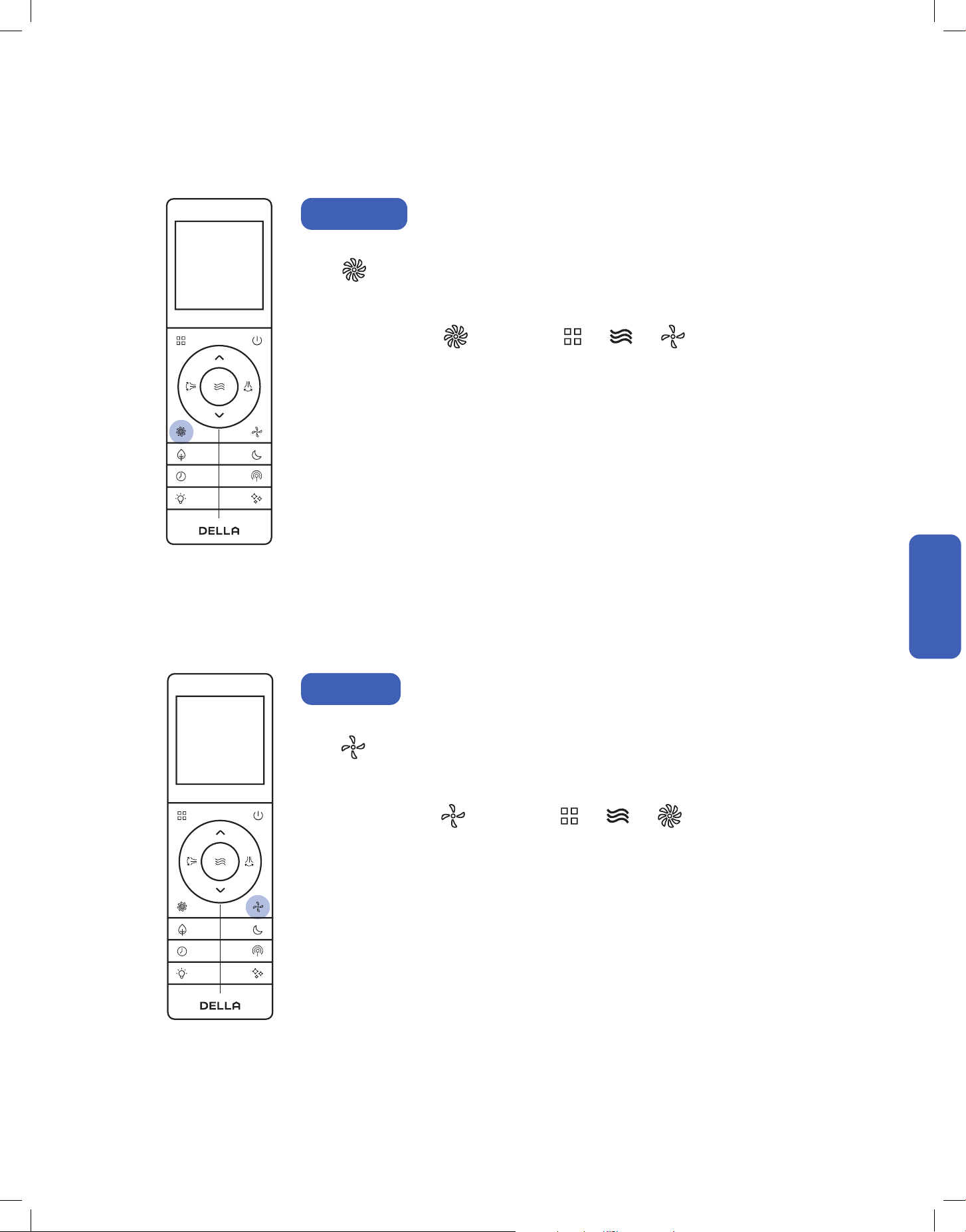
Adjust Air Flow
Press to oscillate horizontal flaps.
Press to oscillate vertical vanes .
Press one more time.
Press one more time.
Press and hold for 3 second.
Press and hold for 3 second.
Press to select 1 of the 5 fixed positions,
upper oscillation, or lower osciallation.
Press to select 1 of the 5 fixed positions, left oscillation, right
oscillation, center oscillation or mirror symmetric oscillation1.
1
The flaps will stop at the position it was in
when you pressed the button.
The vanes will stop at the position it was in
when you pressed the button.
• When holding the horizontal flaps in place. It is recommended to hold the flaps in the up most position during cool mode. Vice versa, it
is recommended to hold the flaps in the down most position during heat mode.
• Cold air tends to sink. • Warm air tends to rise.
Leave setting for 5 seconds and press again.
Leave setting for 5 seconds and press again.
NOTE:
1 Mirror symmetric oscillation is not be avaliable on TL / IF/ TP model.
51
v.20250729U
Advance Function
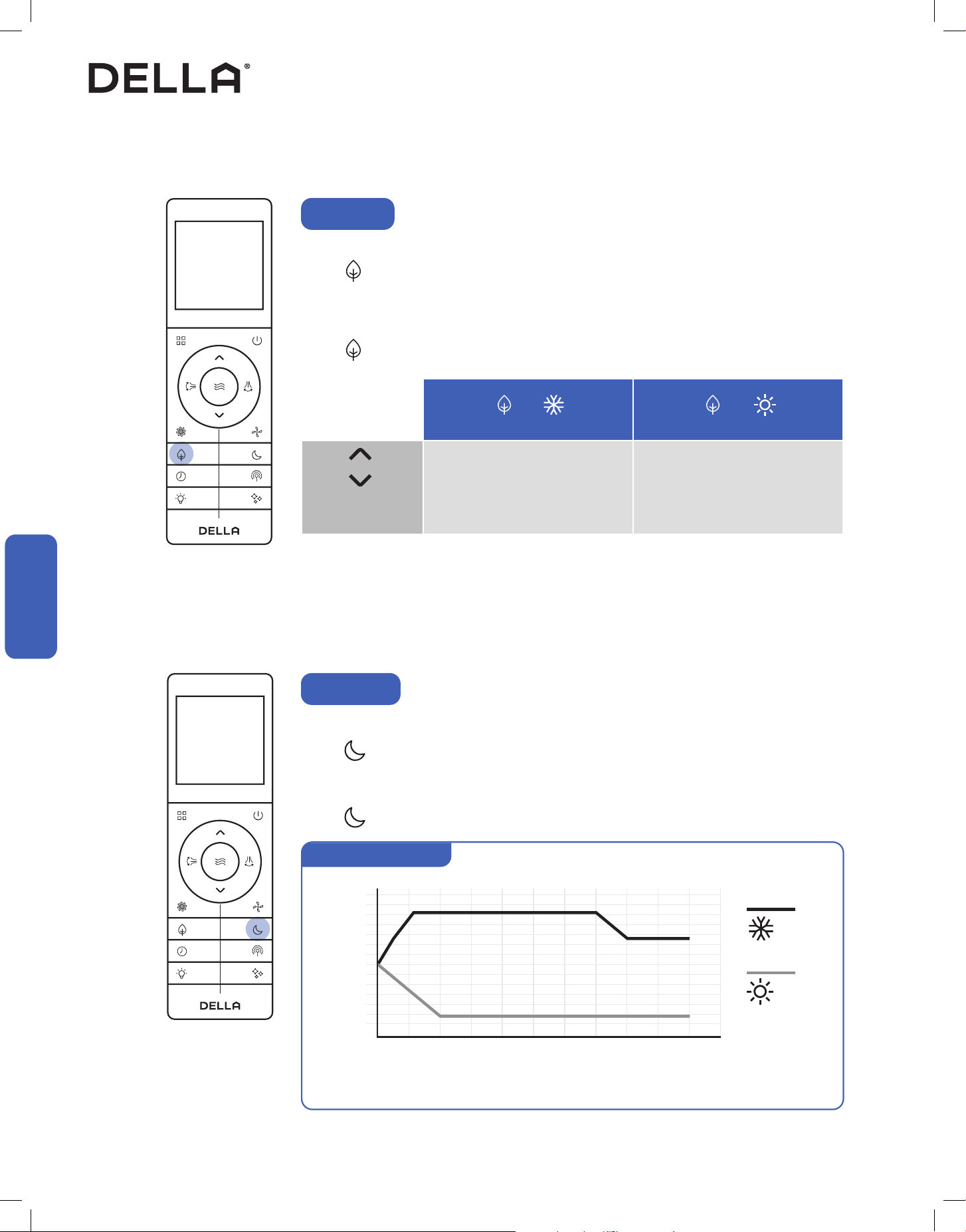
Turbo Mode
Using turbo mode can boost the air conditioner performance in a short amount of time.
Press .
• The air conditioner will operate in boosted fan speed.
• Turbo mode is not available when the air conditioner is operating in dehumidification mode.
The air conditioner will operate at the minimum noise level under quiet mode.
Press .
• The air conditioner will operate in the lowest fan speed.
• Quiet mode is not available when the air conditioner is operating in dehumidification mode.
To stop turbo mode, press again or press / / .
To stop quiet mode, press again or press / / .
Quiet Mode
Advance Function
Advance Function
52
+ +
79°F - 88°F / 26°C - 31°C 61°F - 77°F / 16°C - 25°C
Advance Function
CoolECO
ECO
ECO Mode
The air conditioner will operate with maximum energy efficiency.
Press .
• ECO mode is only available when the air conditioner is operating in cool or heat mode.
• The set temperature for cool mode and heat mode will be limited.
Press again or set the temperature beyond the ECO mode limit to cancel ECO mode.
Heat
Temperature
Setting
Advance Function
Advance Function
In sleep mode, the air conditioner will operate a pre-set program which is suitable during sleep.
Press .
• Sleep mode will operate for 10 hours and then switch back to previously set mode.
• Sleep mode is not available when the air conditioner is operating in auto, dehumidify or fan mode.
Press again to stop sleep mode.
Sleep Mode
75°F
70°F
80°F
0 1 2 3 4 5 6 7 8 9 10
Hour
Temp.
Sleep mode operation
Cool
Heat
NOTE: This graph is for informational reference only. The actual product may changes temperature at a different
rate depending on the initial set temperature in sleep mode.
53
v.20250729U
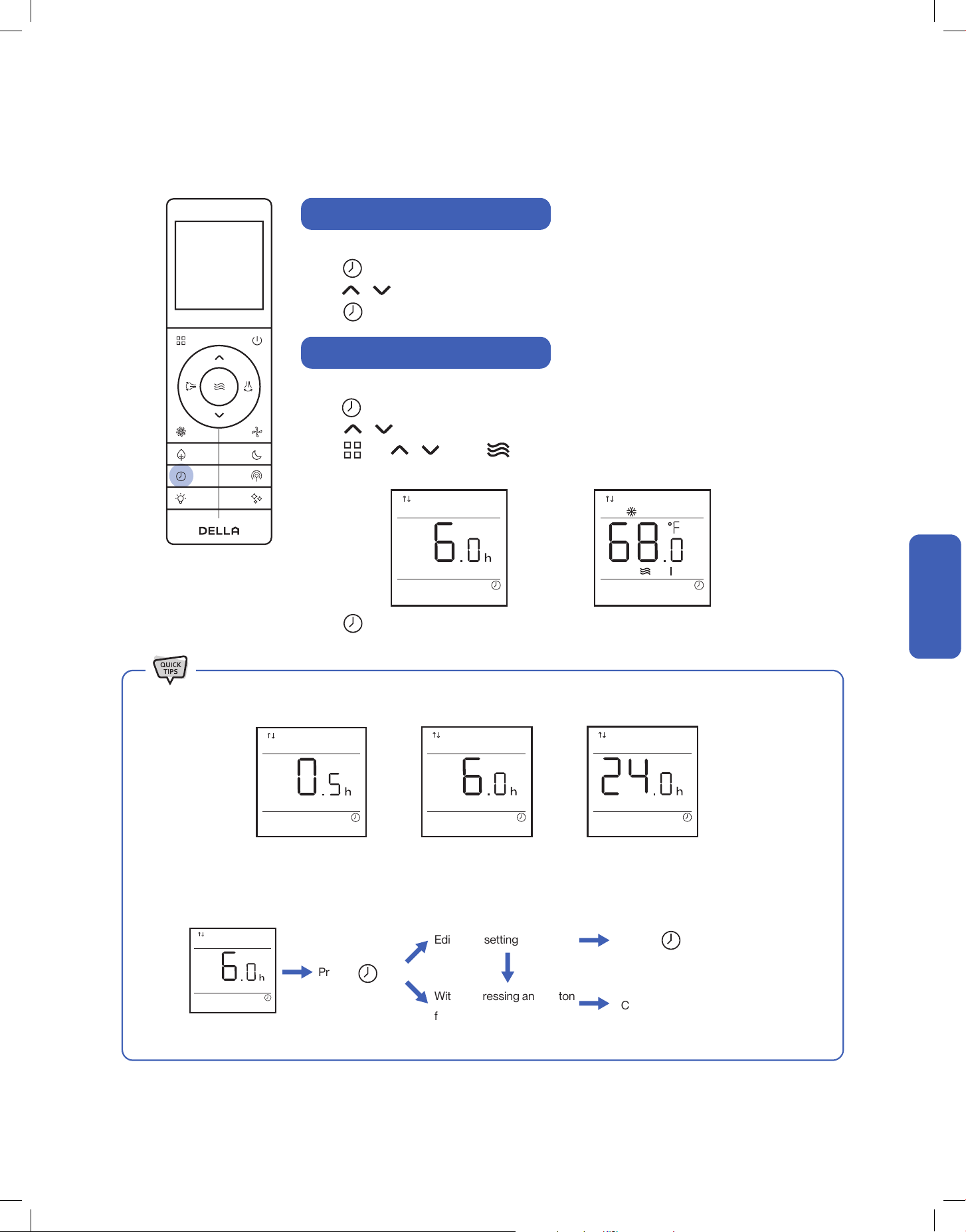
• While entering the setting, make sure to press the button within 5 seconds after the previous button was pressed. otherwise, the
entire process will reset and you will have to start over.
•
Advance Function
Timer Function (Shutdown Timer)
Timer Function (Start-up Timer)
Set a timer to automatically turn OFF the air conditioner.
Press when the air conditioner is ON.
Press to set the desired turn off time.
Press to confirm the timer setting.
Press to confirm the timer setting.
Set a timer to automatically turn ON the air conditioner.
Press when the air conditioner is OFF.
Press to set the desired turn off time.
Press , and to select your desired operation mode, temperature setting, and
fan speed for when the air conditioner is turn ON.
Press
Timer default at 6 h
Timer Set
Edit timer setting
Cancel timer
Without pressing any button
for 5 sec
Press to confirm
• Both the shutdown and start-up timer can be set between 0.5 - 24 hours.
Advance Function
Advance Function
54
Advance Function
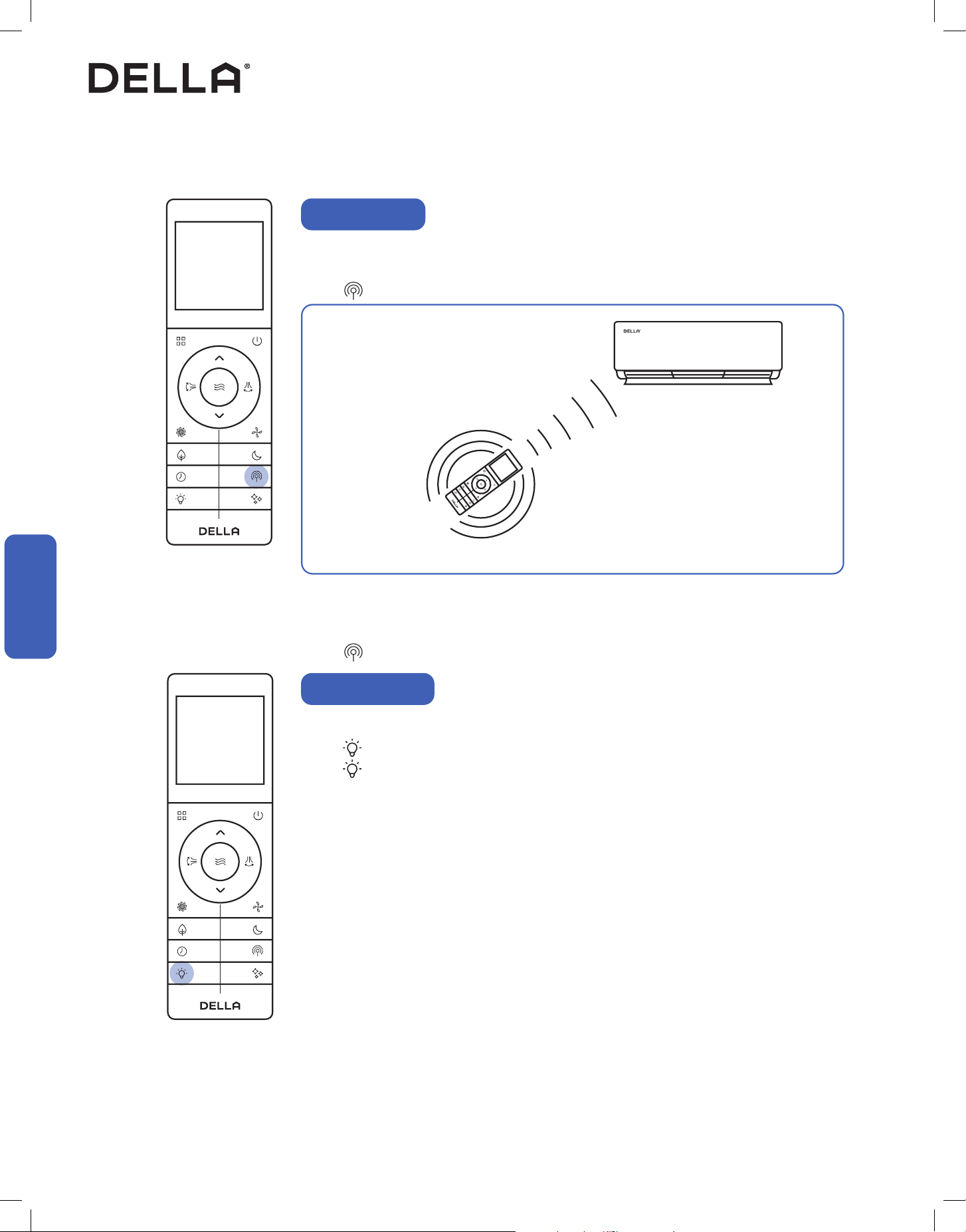
Switch ON / OFF the LED display on the indoor unit front panel.
Press to turn OFF the indoor unit display.
Press again to turn ON the indoor unit display.
Display ON / OFF
Advance Function
Advance Function
Vicinity Sensor
Vicinity sensor function turns your remote control into a portable thermostat that automatically controls the
unit to adjust the temperature of the room you are in.
Press to activate vicinity sensor function.
• In the case of the temperature detected by the remote control and the indoor unit thermostathas has
a difference greater than 11 °F / 6 °C, the AC would use the temperature data from the indoor unit for
temperature adjustment, instead of that from the remote control.
Remote control detect its surrounding
temperature every 3 minutes for 8 hours.
Air conditioner would operate to match the detected
temperature to the set temperature.
NOTE: The remote control must be pointed towards the indoor unit to prevent lost of communication.
Press again to stop vicinity sensor function.
55
v.20250729U
Advance Function
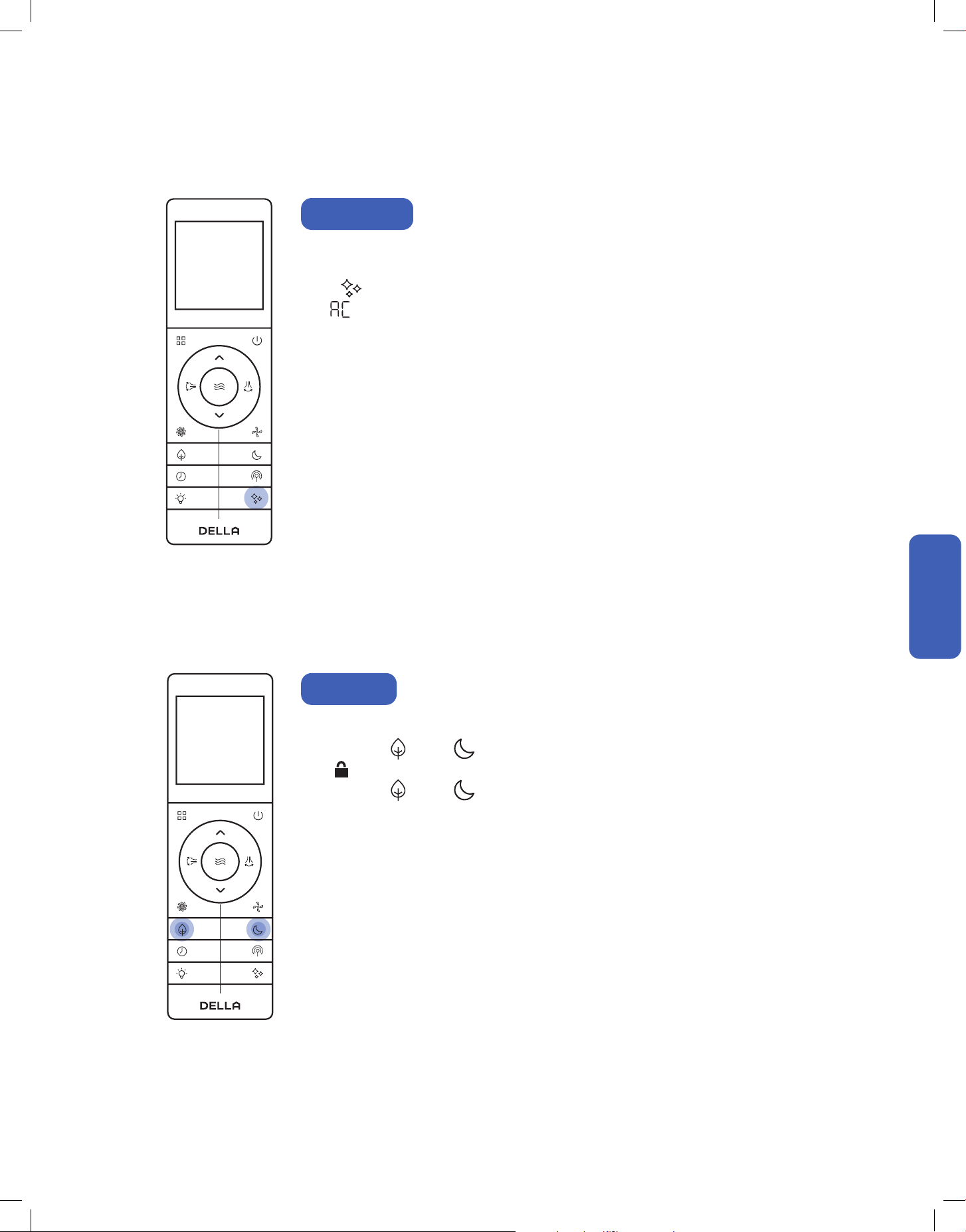
Child lock function will disable all input from the remote control until unlocked.
Press and hold and for 3 seconds to activate child lock.
• will display on the remote control display.
Press and hold and for 3 seconds again to dectivate child lock.
Child Lock
Advance Function
Advance Function
Self cleaning function allows the air conditioner to clean the interior parts and helps carry away the
accumulated dirt, bacteria, etc. from the indoor evaporator.
Press when the air conditioner is OFF.
• will display on the indoor unit display.
• The self cleaning function will run for 30 minutes, then it will return to the previously operating mode
once it is finish.
• It is recommended to operate this function when the indoor ambient temperature is under 86°F / 30°C,
and the outdoor ambient temperature is between 41°F - 86°F / 5°C - 30°C.
• It is suggested to run the self cleaning function once every 3 months.
• It is normal that the unit makes some noise during self cleaning process as plastic materials expand and
contract with temperature change.
Self Cleaning
56
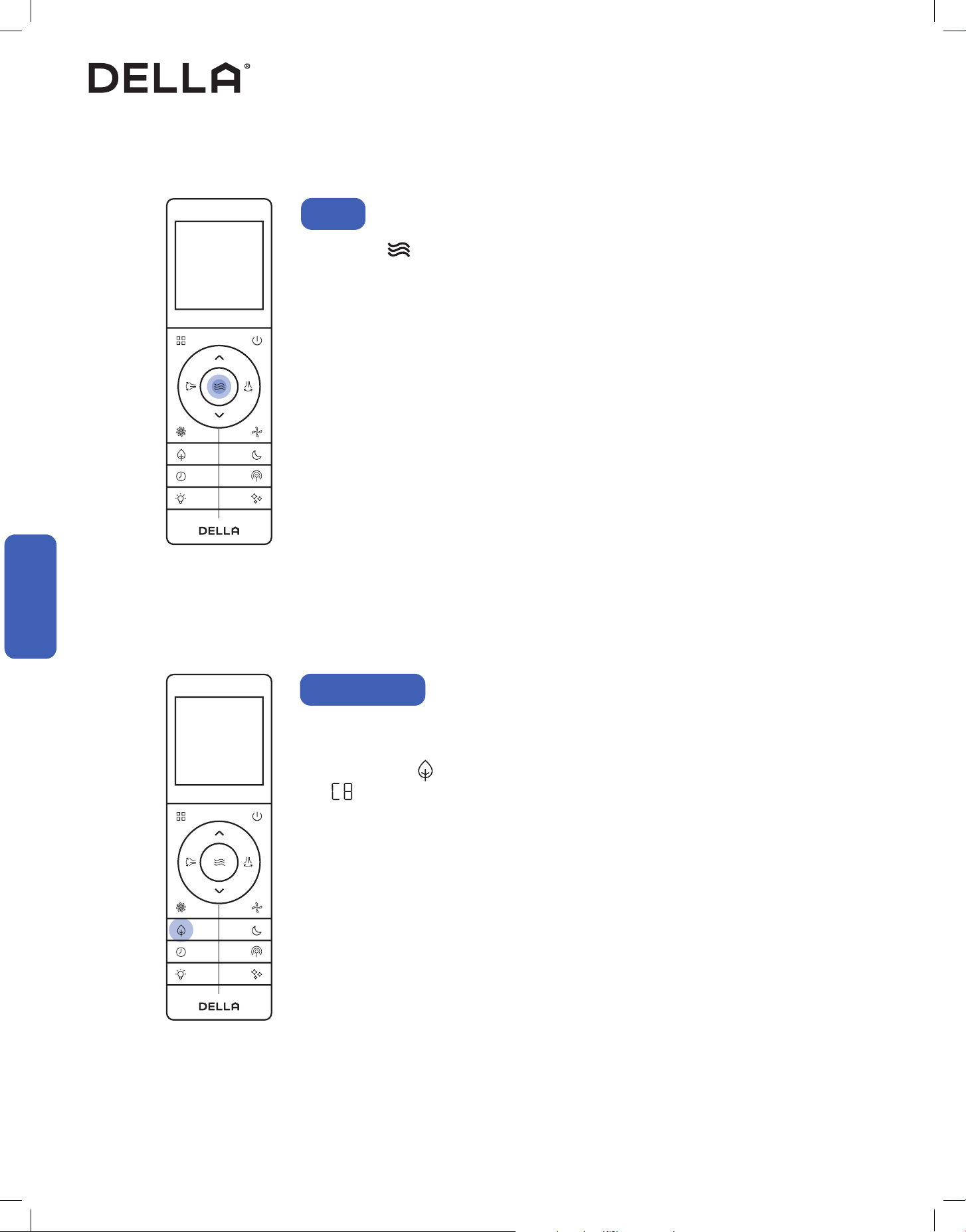
Press and hold for 5 seconds.
• The temperature unit will switch between °F and °C.
Advance Function
°F / °C
To maximize heat efficiency, you can force the outdoor unit to perform a defrost cycle before using heat
mode.
In heat mode, press 10 times within 8 seconds.
• code will display on the indoor unit, and the AC will enter defrost cycle.
During the defrost cycle, your indoor unit will blow cold air temporarily.
Once the defrost cycle ends, the AC will automatically resume heat mode operation.
Forced Defrost
Advance Function
Advance Function
57
v.20250729U
Advance Function
Emergency Buttons
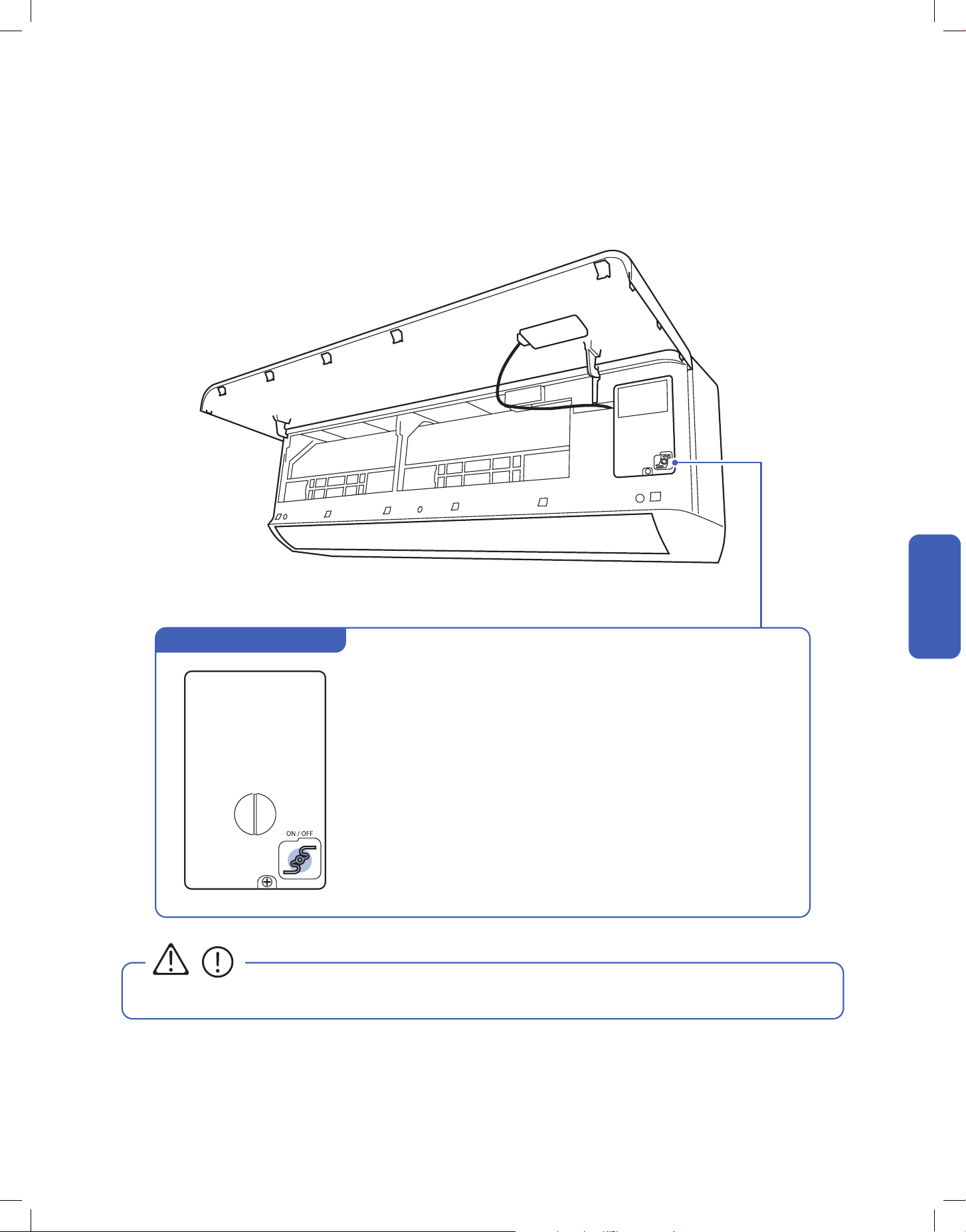
You can use the emergency buttons for limited control of the air conditioner in case the remote control fails or is missing.
• Always wear insulation material when pressing the emergency buttons.
CAUTION
• When the unit is off, press this switch ONCE to start cooling mode.
You will hear a beep.
• When the unit is off, press this switch TWICE within 3 seconds to start heating
mode.
You will hear beep-beep.
• In operation, press this switch ONCE to turn off the unit.
You will hear multiple beeps.
Indoor unit ON / OFF Switch
Advance Function
Advance Function

58
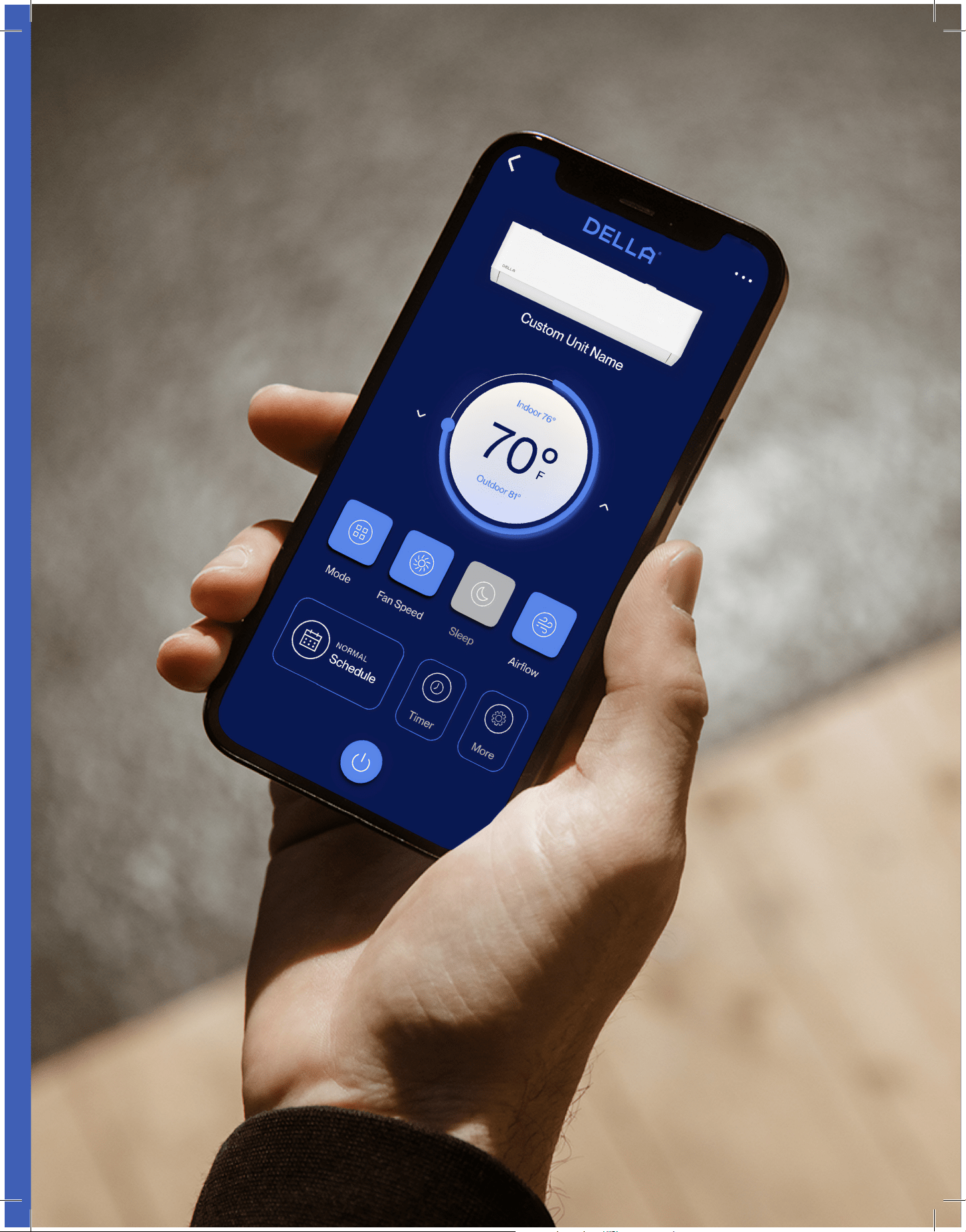
The Della app combines smart technology with simple, user-friendly
design, providing a seemless experience and endless customization.
Automated smart features work behind the scenes to dialin your
environment and improve your everyday, so you can focus on other, more
interesting things.
remotely,
too.
We work
59
v.20250729U
60
Advance Function
Advance Function
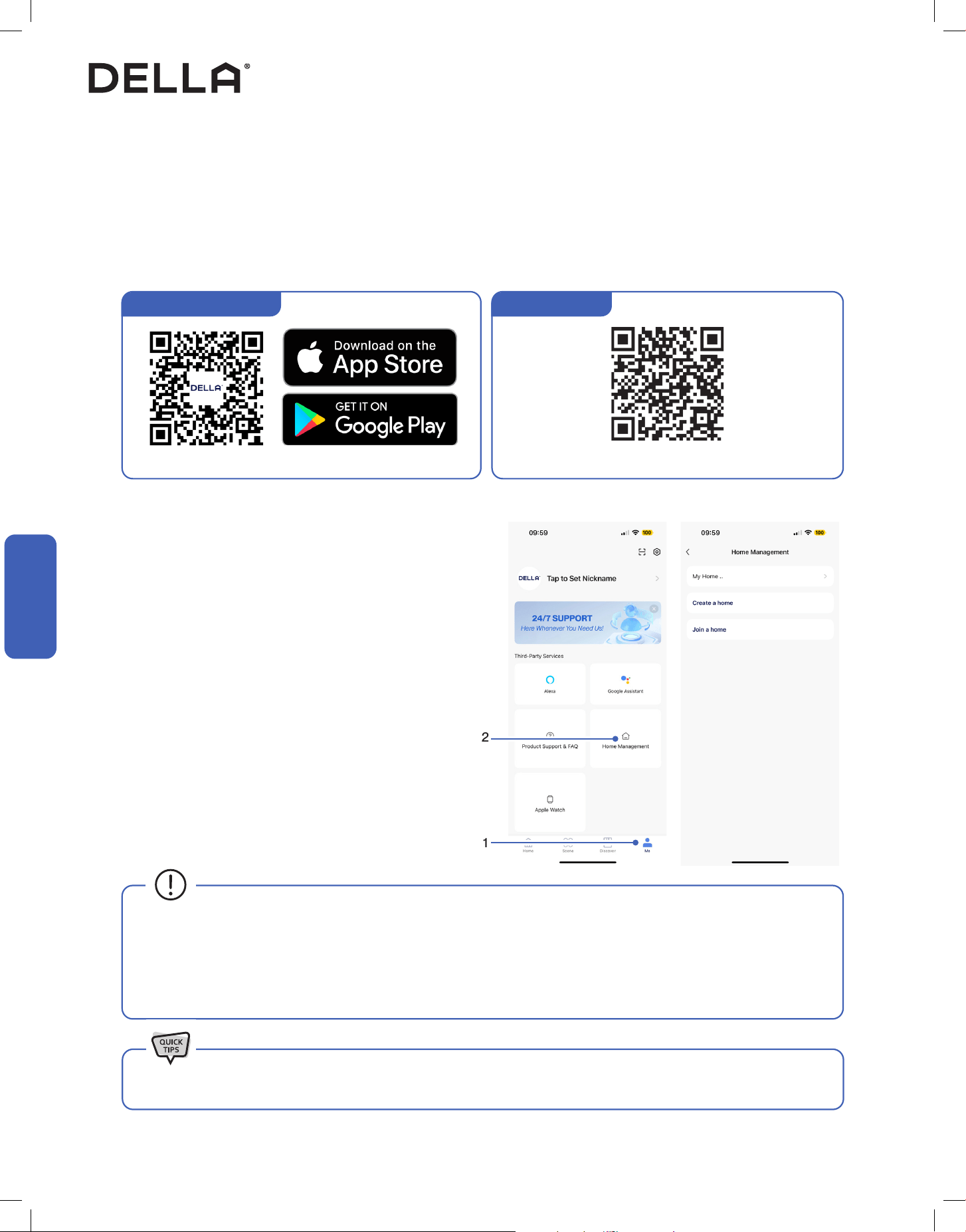
DELLA+ App Download
1. Search “DELLA+” on Apple app store or Google Play, or scan the QR code below to download the application.
2. Register an account in the app.
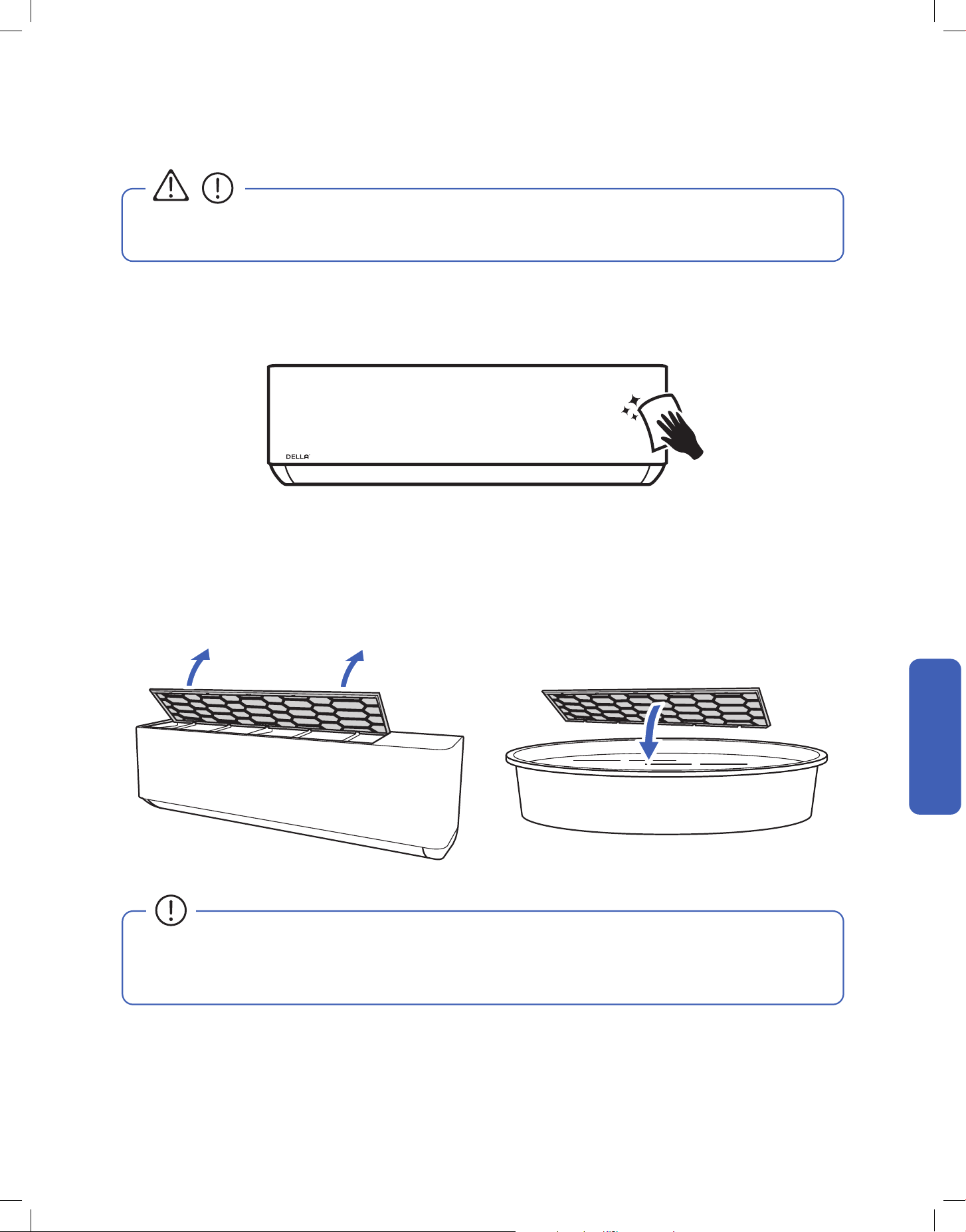
3. Follow the in app instructions to add and pair your Della AC to the app and complete the Wi-Fi set up. You can also scan the device QR code
in the DELLA+ app for a quick device search.
1. Click "Me" on the Della+ app.
2. Choose "Home Management".
3. Follow the in app instructions to create or join a home.
Advance Function
Wi-Fi Set up
Household Set up (Optional)
1
2
To set up the DELLA+ app to control your AC.
Create and Join home to control your Della AC via the Della+ app from
multiple devices and multiple accounts.
NOTE: Pairing your Della AC with a different account outside the
household will remove the original pairing. Only one household can be
paried at a time.
• The Della+ application is free, however, data charges may apply when downloading or using the application.
• Della+ can be altered without notice for quality improvement and also be deleted depending on the circumstances of manufacturing
firms.
• All trademarks, logo, brand names are the property of their respective companies. Use of these names, brands, and trademarks does
not imply endorsement. Della assumes no responsibility with regard to the performance or use of these products.
Check out detailed tutorial on the most updated application on dellahome.com/support.
Scan this QR code in your Della+ app to qucikly add device.You can also scan the download QR code
Device QR code
61
v.20250729U
• Before cleaning the unit, you must shut down the machine and cut o the power supply for at least 5 minutes.
• Never ush the air conditioner with water.
• Do not touch the fins inside the indoor unit with bare hands after removing the filter screen.
• Check and clean the air filter regularly to prevent dust accumulation.
• Clean the air filter frequently if the operating environment is dusty or has bad air quality.
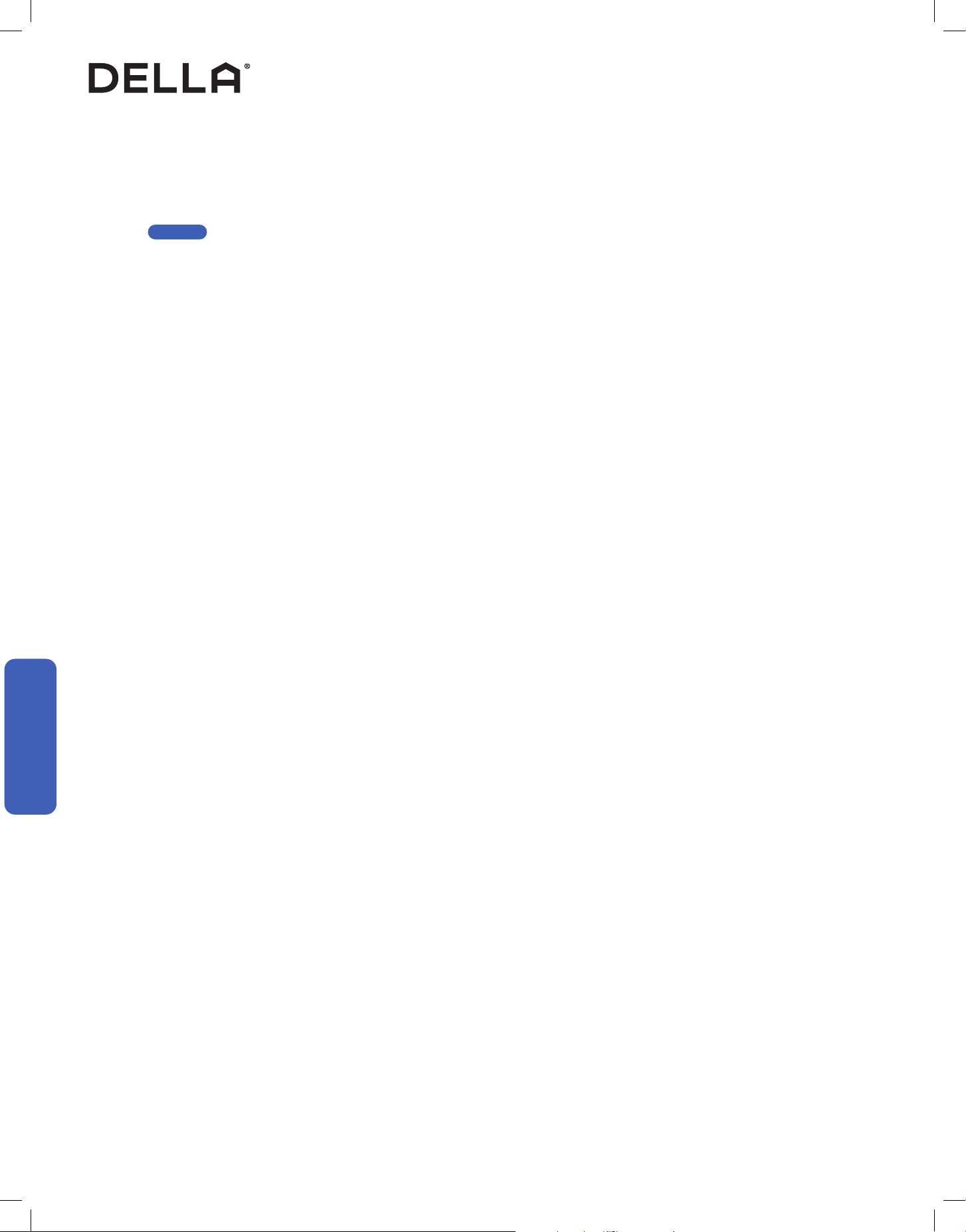
1. Clean the air conditioner with a soft dry cloth or a damped cloth with neutral detergent.
2. Remove any possible debris on the vents and air outlet.
1. Lift the air filter up by it’s tabs.
2. Clean the air filter with soapy water.
3. Air dry the air filter.
4. Put the air filter back to its original position after it is dry.
<104°F / 40°C
Care and Maintenance
CAUTION
Clean the Unit
Clean the Air Filter
Care and Maintenance
Care and Maintenance
62
• Clean the air filter screen every 3 months.
• Use the self clean function to clean the indoor unit every 3 months.
-00-
• Call your HVAC technician to check on the refrigerant level every 3 - 4 years.
• Regularly check and remove any obstacles from the outdoor unit.
• Take out the batteries from the remove control and disconnect the power supply of the air conditioner.
• Clean the unit and the air filter screen.
• Remove any obstacles at the air inlet and outlet of both the indoor and outdoor unit.
• Make sure drain pipe is unobstructed.
• Install batteries into the remove control and connect the power supply to the air conditioner.
Planning to Not Operate the Air Conditioner for a Long Period
Using the Air Conditioner After a Long Idle Period
Care and Maintenance
Maintenance Routine
Care and Maintenance
Care and Maintenance
Page 55
63
v.20250729U
Having Problems?
Having Problems?
Before consulting repair or warranty, please check the following troubleshooting guide.
In the case of an persistent problem, contact a qualified technician for diagnosis and repair.
• When encountering persisting problem, stop operation and turn off the breaker. Continue operation in an abnormal condition may
cause electric shock, fire, or damage to the unit.
• Do not attempt to repair or modify the unit by yourself. Incorrect work may result in electric shock, fire or injury.
Problem Possible Cause / Explanation / Solution
The appliance is non operational
When pressing the power button soon after operation was stopped
- Protective delay switch will delay the operation for 3 - 5 minutes if the air conditioner is turned
on immediately after it is turned o.
When switching between operation modes
- The internal protection is activated, wait for a few minutes for the AC to resume normal
operation.
The unit is currently has a turn ON timer activated.
The circuit breaker is tripped. Reset the circuit breaker.
Faulty electric connection, mismatch outlet voltage, or damaged electronic control board.
Contact a qualied technician.
The appliance suddenly stopped during
operation
An internal protection tripped after a sudden voltage uctuation. Check the circuit breaker and
reset if necessary.
The environment temperature is too high or too low.
The AC automatically activate de-frost process. This is not a malfunction.
Air lter is too dirty. Clean the air lter.
Some objects are obstructing air inlet or outlet of the indoor and / or the outdoor unit. Remove
the obstructing object.
Strange odor from the air ow
Air lter is too dirty. Clean the air lter.
The smells of the room, furniture, or cigarettes are absorbed into the unit and then discharged.
Remove odorous objects from the room.
Strange Noise
In the case of water owing noise
- The noise may caused by the refrigerant ow, or the internal water ow during cold / dry
mode. This is not a malfunction.
In the case of plastic cracking noise
- The noise may caused by the thermal expansion.
Troubleshooting
WARNING
64
Problem Possible Cause / Explanation / Solution
Mist comes out from the air outlet
This occurs when the air in the room becomes cold in cool or dry mode. This does not indicate
a problem.
No cool air in cold mode
When switching between operation modes
- The internal protection is activated, wait for a few minutes for the AC to resume normal
operation.
Check and make sure the temperature setting is below the environment temperature.
No warm air in heat mode
When switching between operation modes
- The internal protection is activated, wait for a few minutes for the AC to resume normal
operation.
Check and make sure the temperature setting is below the environment temperature.
The AC automatically activate de-frost process. This is not a malfunction. Wait 2 - 10 minutes for
the AC to complete defrosting.
Frost built up on the outdoor unit. If the AC does not automatically activate de-frost process,
force defrost process following instruction on page 56.
Insucient air ow, either cold or hot
Some objects are obstructing air inlet or outlet of the indoor and / or the outdoor unit. Remove
the obstructing object.
Other heat source of heat in the room. Remove the heat source.
The fan speed is set to minimum. Try to set at a higher fan speed.
The unit does not respond to the remote
control commands
Remote Control is too far away from the indoor unit.
There is an obstruction between the remote control and the indoor unit.
The battery power has run out in the remote control. Replace the battery.
Child lock function is activated. Deactivate child lock on the remote control.
The display on the indoor unit is not lit
The display is set to o on the remote control. Use the remote control to turn it on.
Power failure. Check the power supply / circuit breaker.
Water dripping from the outdoor unit
The indoor unit internal is too dirty and clogged the drainage port. Contact qualied technician
for cleaning.
Condensation formed on the uninsulated drainage hose / refrigerant pipe in the line set.
Contact qualied technician to properly insulate the water hose / refrigerant pipes.
Improper drainage hose installation.
Troubleshooting
Having Problems?
Having Problems?
65
v.20250729U
WARNING
Switch off the air conditioner immediately and cut off the power supply in the event of:
• Strange, loud noises during operation.
• Faulty electronic control board.
• Faulty fuses or switches.
• Spraying water or objects inside the appliance.
• Frequent circuit breaker tripped during operation.
• Abnormally hot or damaged power cord or plug.
• Very strong smells discharging from the appliance.
Troubleshooting
Error Code
Error Code Description
E1 Indoor room temperature sensor fault
E2 Indoor pipe temperature sensor fault
E3 Outdoor pipe temperature sensor fault
E4 Refrigerant system leakage or fault
E6 Malfunction of indoor fan motor
E7 Outdoor ambient temperature sensor fault
E0 Indoor and outdoor communication fault
E8 Outdoor discharge temperature sensor fault
E9 Outdoor IPM module fault
EA Outdoor current detect fault
EE Outdoor PCB EEPROM fault
EF Outdoor fan motor fault
EH Outdoor suction temperature sensor fault
Having Problems?
Having Problems?
66
Having Problems?
Having Problems?
Troubleshooting
Error codes shown on the air conditioner display panel only indicates communication problems between parts.
For technicians attempt to identify the exact problematic parts or componants, visit our page on
dellahome.com/optima-r454b-troubleshooting for detailed model specific diagnostic handbook.
dellahome.com/optima-r454b-troubleshooting
Disposal Guideline
This appliance contains refrigerant and other potentially hazardous materials. When disposing of the appliance, follow all federal, state, and local
regulations. DO NOT dispose of this product as normal household waste or unsorted municipal waste.
When disposing of this appliance, you have the following options:
• Dispose of the appliance at a designated municipal electronic waste collection facility.
• When buying a new appliance, the retailer will take the old appliance.
• The manufacturer may take back the old appliance.
• Sell the appliance to a certified scrap metal dealer.
67
v.20250729U
Warranty
dellahome.com/pages/warranty
Warranty
Warranty
Scan the QR code or visit our page on dellahome.com/pages/warranty to sign up for warranty coverage on your new DELLA appliance.
68
69
v.20250729U
ID: 2ANDL-TCWBRCU1
FCC Caution
This device complies with part 15 of the FCC Rules. Operation is subject to the following two conditions:
(1) This device may not cause harmful interference, and (2) this device must accept any interference received, including interference that may
cause undesired operation. Any changes or modifications not expressly approved by the party responsible for compliance could void the user's
authority to operate the equipment.
NOTE: This equipment has been tested and found to comply with the limits for a Class B digital device, pursuant to Part 15 of the FCC Rules.
These limits are designed to provide reasonable protection against harmful interference in a residential installation. This equipment generates,
uses and can radiate radio frequency energy and if not installed and used in accordance with the instructions, may cause harmful interference
to radio communications. However, there is no guarantee that interference will not occur in a particular installation. If this equipment does cause
harmful interference to radio or television reception, which can be determined by turning the equipment off and on, the user is encouraged to try
to correct the interference by one or more of the following measures:
• Reorient or relocate the receiving antenna.
• Increase the seperation between the equipment and receiver.
• Connect the equipment into an outlet on a circuit different from that to which the receiver is connected.
• Consult the dealer or an experienced radio / TV technician for help.
Radio Frequency Interference
Model: 048-TP series
Compliance Information
70
Memo
© Della All rights reserved.
The design and specications are subject to change without prior
notice for product improvement. Any updates to the manual will be
uploaded to the della website.
www.dellahome.com
support@dellahome.com
800–863–4143
6:00 a.m. – 4:00 p.m. PST Monday – Friday