READ AND SAVE THESE INSTRUCTIONS
Model: 300168
1
1. SAFETY RULES
1. CAUTION - To reduce the risk of electric
shock, insure electricity has been
turned off at the circuit breaker or fuse
box before beginning.
2. WARNING: All wiring must be in
accordance with the National Electrical
Code and local electrical codes.
Electrical installation should be
performed by a qualified licensed
electrician.
3. WARNING: To reduce the risk of
electric shock, this fan must be installed
with a general-use, isolating wall
control/switch.
4. WARNING: Not Suitable for use with
solid-state speed controls.
5. WARNING: To reduce the risk of fire,
electric shock, or personal injury, mount
to outlet box marked "acceptable for
fan support of 15.8 kg (35 lbs.) or less"
and use mounting screws provided with
the outlet box. Most outlet boxes
commonly used for the support of light
fixtures are not acceptable for fan
support and may need to be replaced.
Due to the complexity of the installation
of this fan, a qualified licensed
electrician is strongly recommended.
6. The outlet box and support structure
must be securely mounted and capable
of reliably supporting a minimum of 50
pounds. Use only ETL Listed outlet
boxes marked "FOR FAN SUPPORT".
7. The fan must be mounted with a
minimum of 7 feet clearance from the
trailing edge of the blades to the floor.
8. To operate the reverse function on this
fan, press the reverse button while the fan
is running.
9. Avoid placing objects in the path of the
blades.
10. To avoid personal injury or damage to the
fan and other items, be cautious when
working around or cleaning the fan.
11. Do not use water or detergents when
cleaning the fan or fan blades. A dry dust
cloth or lightly dampened cloth will be
suitable for most cleaning.
12. After making electrical connections,
spliced conductors should be turned
upward and pushed carefully up into
outlet box. The wires should be spread
apart with the grounded conductor and
the equipment- grounding conductor on
one side of the outlet box and the
ungrounded conductor on the other side
of the outlet box.
13. Electrical diagrams are reference only.
Light kits that are not packed with the fan
must be ETL Listed and marked suitable
for use with the model fan you are
installing. Switches must be ETL General
Use Switches. Refer to the Instructions
packaged with the light kits and switches
for proper assembly.
WARNING
TO REDUCE THE RISK OF FIRE, ELECTRIC
SHOCK OR PERSONAL INJURY, MOUNT
FAN TO OUTLET BOX MARKED
"ACCEPTABLE FOR FAN SUPPORT".
WARNING
TO REDUCE THE RISK OF PERSONAL
INJURY, DO NOT BEND THE BLADE
BRACKETS (ALSO REFERRED TO AS
FLANGES) DURING ASSEMBLY OR AFTER
INSTALLATION. DO NOT INSERT OBJECTS
IN THE PATH OF THE BLADES.
The net weight of this fan is:
N.W.: 11.86 kgs (26.14 LBS),
G.W.: 14.0 kgs (30.86 LBS).
2
1. SAFETY RULES (continued)
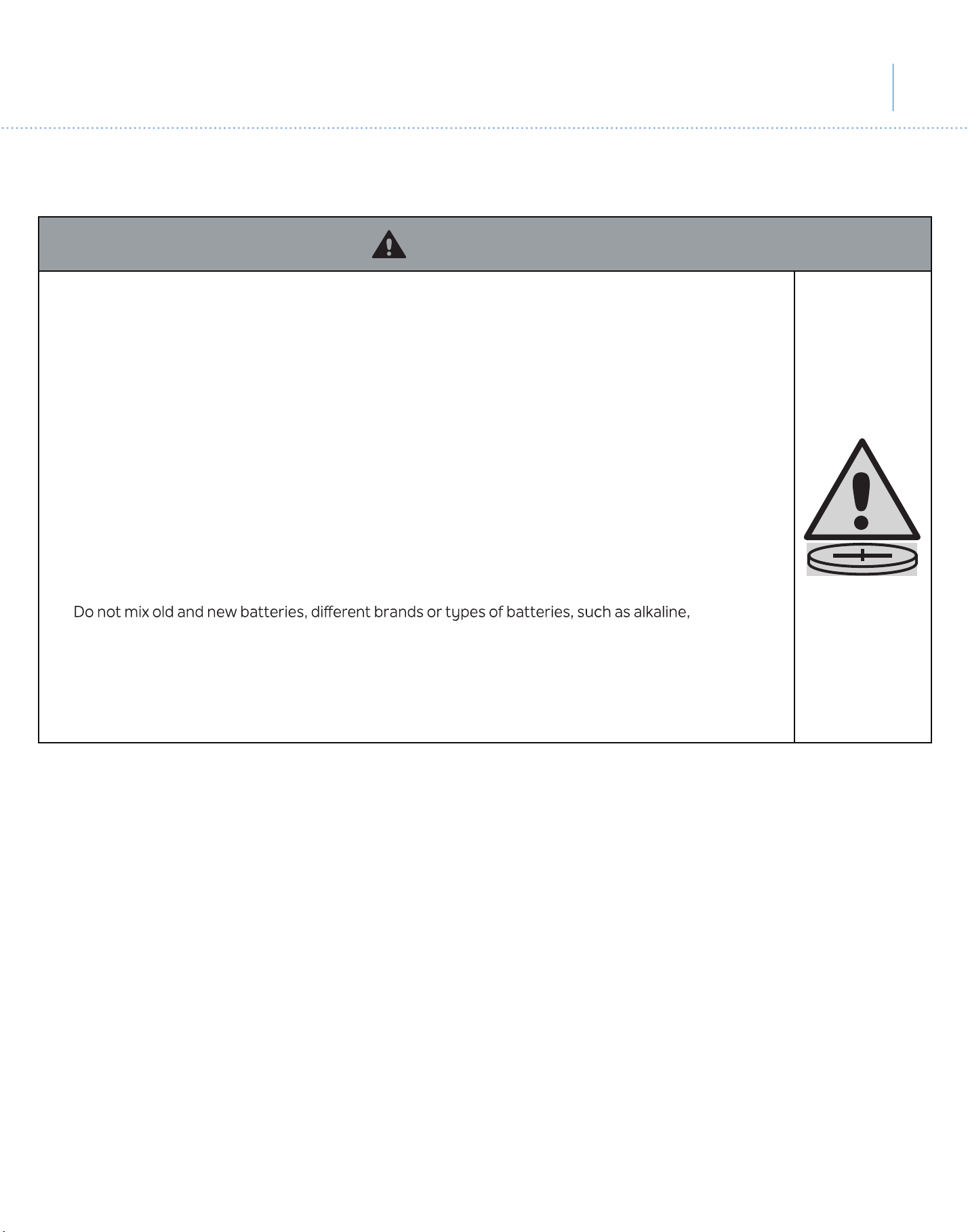
• INGESTION HAZARD: This product contains a button cell or coin battery.
• DEATH or serious injury can occur if ingested.
• A swallowed button cell or coin battery can cause Internal Chemical Burns in as little as 2 hours.
• KEEP new and used batteries OUT OF REACH of CHILDREN.
• Seek immediate medical attention if a battery is suspected to be swallowed or inserted inside any
part of the body.
• Remove and immediately recycle or dispose of used batteries according to local regulations and keep
away from children. Do NOT dispose of batteries in household trash or incinerate.
• Even used batteries may cause severe injury or death.
• Call a local poison control center for treatment information.
• Battery Type: CR2032 and Nominal Battery Voltage: 3V.
• Non-rechargeable batteries are not to be recharged.
• Do not force discharge, recharge, disassemble, heat above 40º C or incinerate. Doing so may result in
injury due to venting, leakage or explosion resulting in chemical burns.
• Ensure the batteries are installed correctly according to polarity (+ and -).
•
carbon-zinc, or rechargeable batteries.
• Remove and immediately recycle or dispose of batteries from equipment not used for an extended
period of time according to local regulations.
• Always completely secure the battery compartment. If the battery compartment does not close
securely, stop using the product, remove the batteries, and keep them away from children.
WARNING
54"Link
TM
1. NORMAS DE SEGURIDAD (continuación)
• RISQUE D’INGESTION : Ce produit contient une pile bouton.
• La MORT ou des blessures graves peuvent survenir en cas d’ingestion.
• Une pile bouton avalée peut provoquer des brûlures chimiques internes en 2 heures seulement.
• GARDER les piles neuves et usagées HORS DE LA PORTÉE DES ENFANTS.
• Consultez immédiatement un médecin si vous soupçonnez qu’une pile a été avalée ou insérée dans
une partie du corps.
• Retirer et recycler ou jeter immédiatement les piles usagées conformément aux réglementations
locales et les garder hors de portée des enfants. NE PAS jeter les piles avec les ordures ménagères ni
les incinérer.
• Même les piles usagées peuvent provoquer des blessures graves, voire la mort.
• Appeler un centre antipoison local pour obtenir des informations sur le traitement.
• Type de pile : CR2032 et tension nominale de la pile : 3 V.
• Ne pas recharger les piles non rechargeables.
• Ne pas forcer la décharg
e, la rec
harge, le démontage, la chaleur au-dessus de 40°C ni l’incinération.
Le non-respect de ces consignes peut entraîner des blessures dues à une ventilation, une fuite ou une
explosion entraînant des brûlures chimiques.
• S’assurer que les piles sont installées correctement en fonction de la polarité (+ et -).
• Ne pas mélanger des piles anciennes avec des piles neuves, des marques ou des types de piles, tels
que des piles alcalines, carbone-zinc ou rechargeables.
• Retirer et recycler ou jeter immédiatement les piles des équipements non utilisés pendant une période
prolongée, conformément aux réglementations locales.
• Toujours bien sécuriser le compartiment des piles. Si le compartiment des piles ne se ferme pas
correctement, ne plus utiliser le produit, retirer les piles et les garder hors de portée des enfants.
AVERTISSEMENT
54” Lehr
TM
1. RÈGLES DE SÉCURITÉ (suite)
• PELIGRO DE INGESTIÓN: Este producto contiene una pila tipo botón o tipo moneda.
• En caso de ingestión puede producirse la MUERTE o lesiones graves.
• La ingestión de una pila tipo botón o tipo moneda puede provocar Quemaduras Químicas Internas en
tan sólo 2 horas.
• MANTENGA las pilas nuevas y usadas FUERA DEL ALCANCE DE LOS NIÑOS.
• Acuda inmediatamente a un médico si sospecha que se ha tragado o introducido una pila en
cualquier parte del cuerpo.
• Retire las pilas usadas y recíclelas o deséchelas inmediatamente de acuerdo con la reglamentación
local y manténgalas fuera del alcance de los niños. NO deseche las pilas en la basura de su casa ni las
incinere.
• Incluso las pilas usadas pueden causar lesiones graves o la muerte.
• Llame a un centro de control de intoxicaciones local para obtener información sobre el tratamiento.
• Tipo de pila: CR2032 y Voltaje nominal de la pila: 3V.
• Las pilas no recar
gables no deben recargarse.
•
No fuerce la descarga, recargue, desarme, caliente por encima de 40° C ni incinere. De lo contrario,
podrían producirse lesiones debido a venteo, fugas o explosiones que provoquen quemaduras
químicas.
• Asegúrese de que las pilas estén instaladas correctamente según la polaridad (+ y -).
• No mezcle pilas nuevas y usadas, ni pilas de marcas o tipos diferentes, como pilas alcalinas, de
carbono-zinc o recargables.
• Retire e inmediatamente recicle o deseche las pilas de los equipos que no haya utilizado durante un
período prolongado de tiempo de acuerdo con las regulaciones locales.
• Asegure siempre completamente el compartimento de las pilas. Si el compartimento de las pilas no
cierra bien, deje de utilizar el producto, retire las pilas y manténgalas fuera del alcance de los niños.
ADVERTENCIA
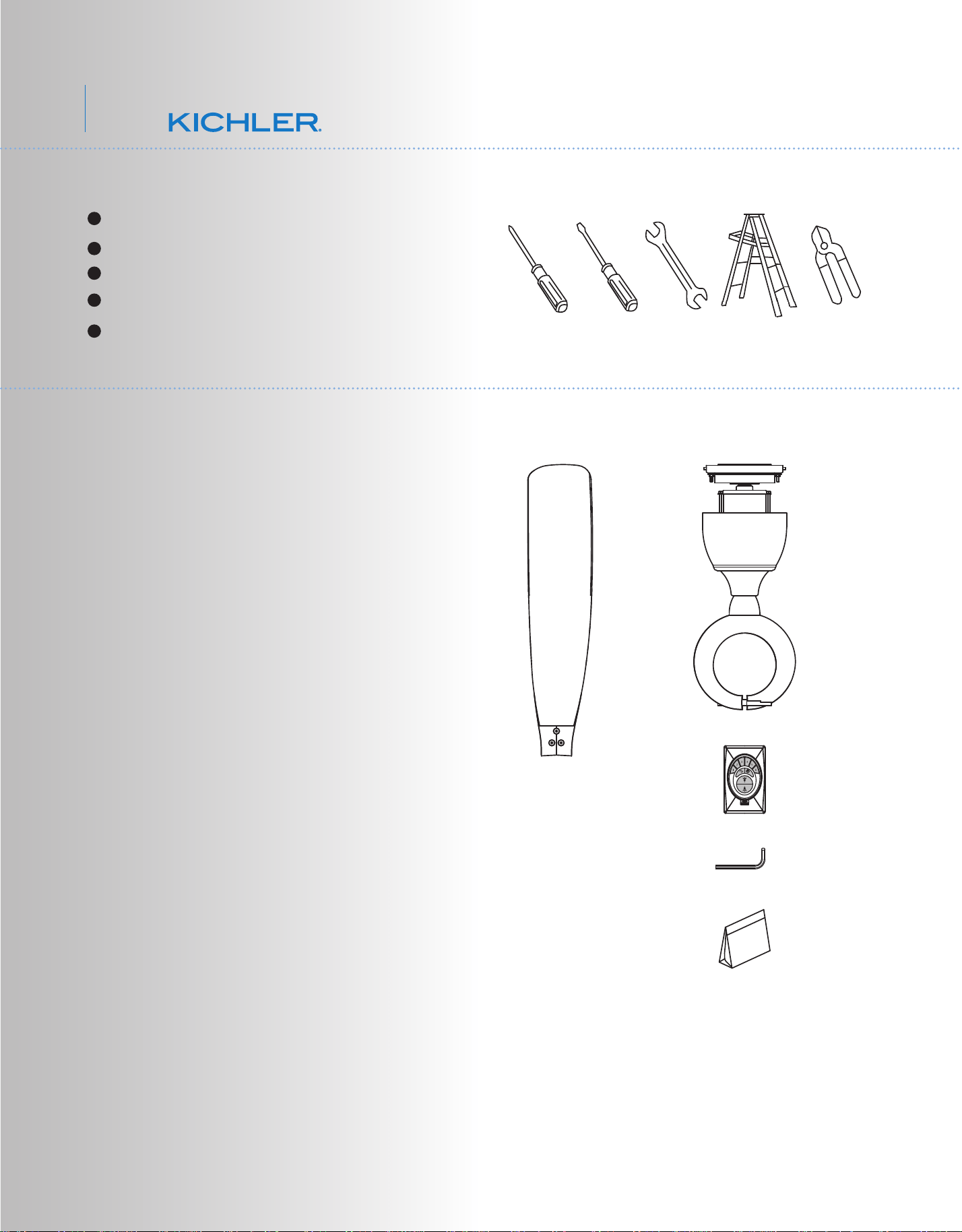
3. PACKAGE CONTENTS
Unpack your fan and check the contents. You
should have the following items:
a. Fan blades (2)
b. Fan motor assembly
c. CoolTouch™ Control System
d. 4mm Allen wrench
e. Part bag contents
1) Mounting hardware :
wire nuts (3)
2) Blade attachment hardware:
Allen screws with lock washers (7),
filat washers (7), gaskets (2)
Philips screw driver
Blade screw driver
11 mm wrench
Step ladder
Wire cutters
2. TOOLS AND MATERIALS REQUIRED
a
b
c
d
e
3
4. MOUNTING OPTIONS
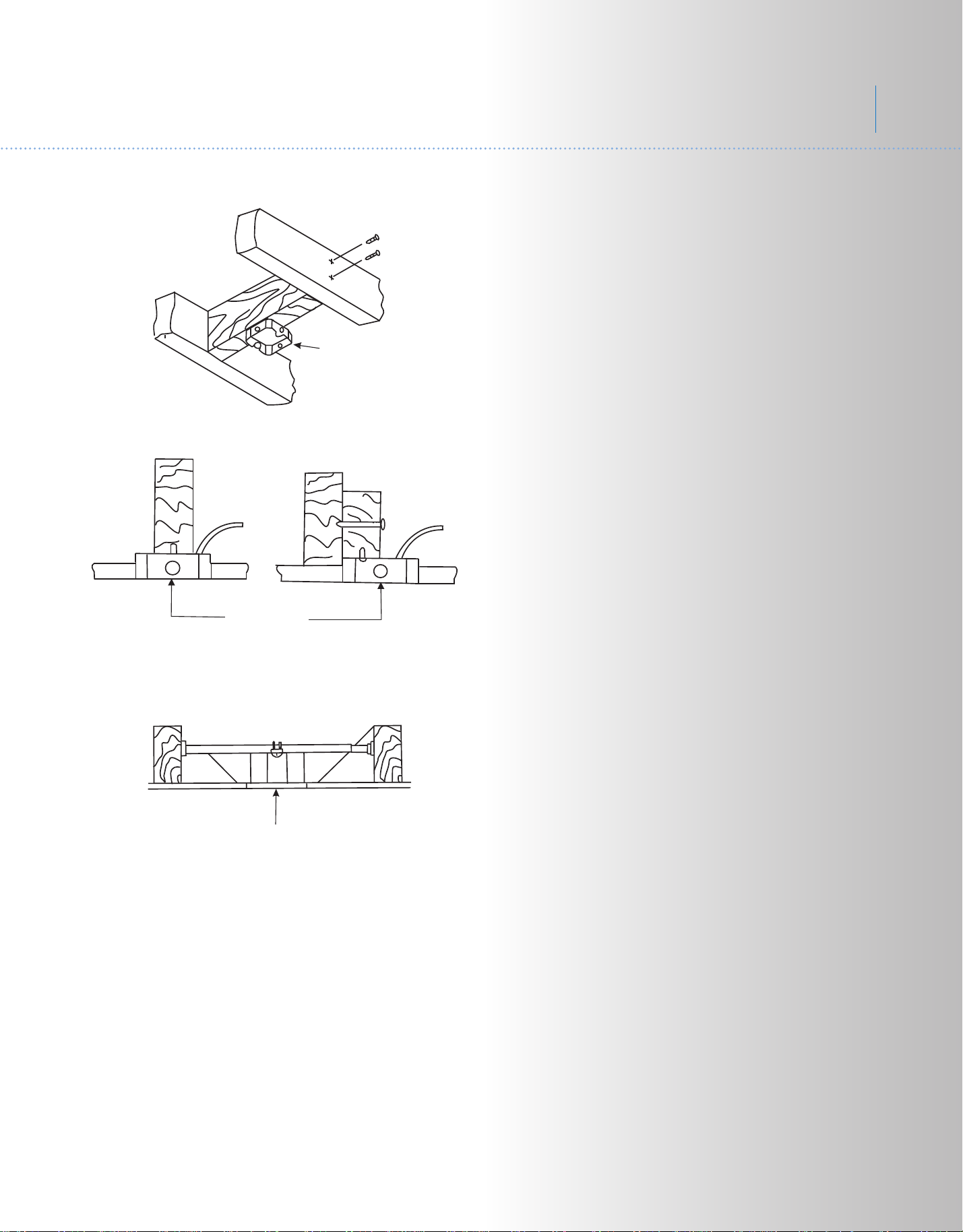
Outlet box
Outlet box
Fig. 1
Fig. 3
Outlet box
Fig. 2
If there isn't an existing ETL listed mounting
box, then read the following instructions.
Disconnect the power by removing fuses or
turning off circuit breakers.
Secure the outlet box directly to the building
structure. Use appropriate fasteners and
building materials. The outlet box and its
support must be able to fully support the
moving weight of the fan (at least 50 lbs). Do
not use plastic outlet boxes.
Figures 1, 2 and 3 are examples of different
ways to mount the outlet box.
NOTE: Depending on the location you have
selected for installation, you may need to
purchase and install a "Joist Hanger" for the
support of the outlet box. Make sure the joist
hanger you purchase has been designed for
use with ceiling fans. (Fig. 3)
4
54"Link
TM
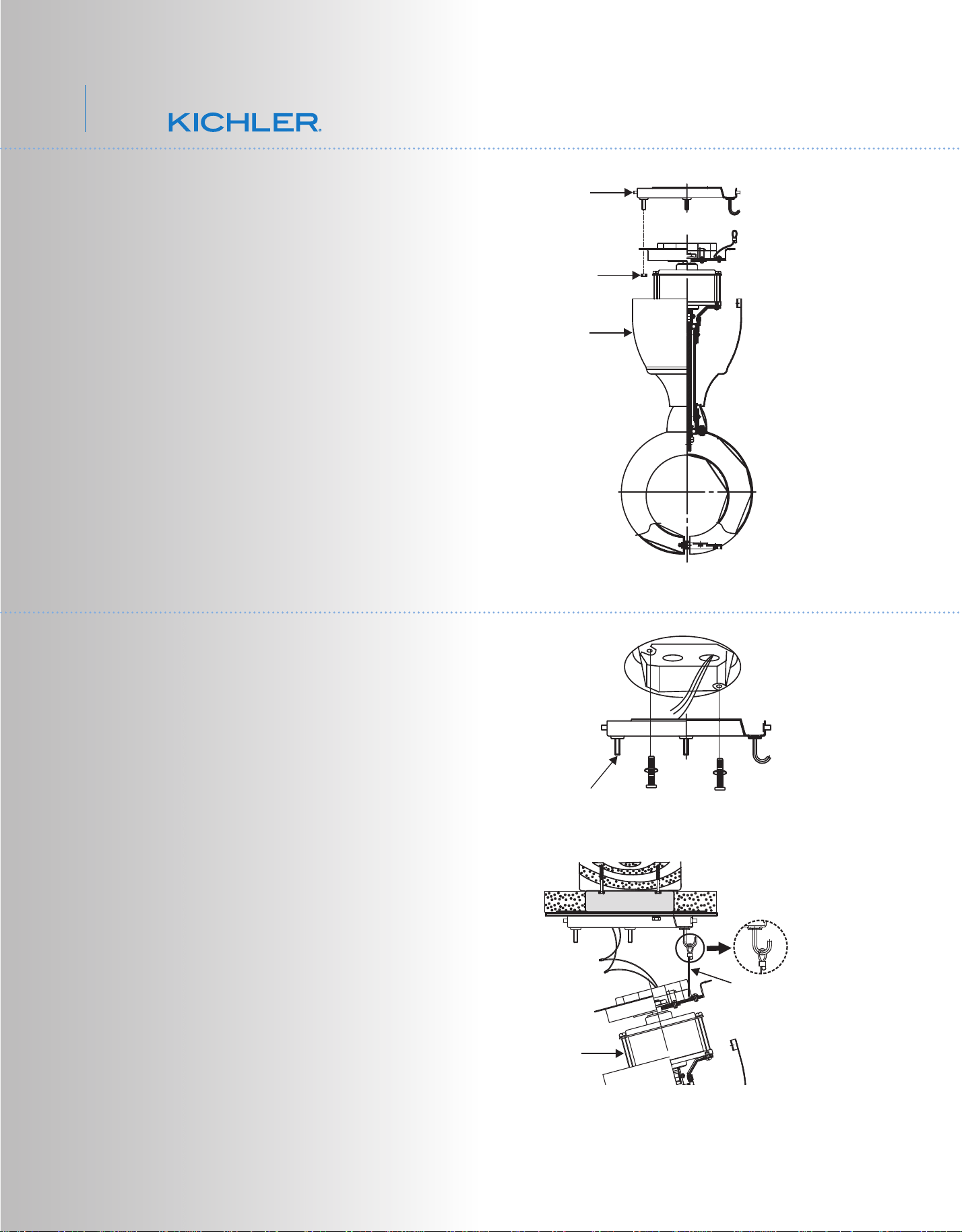
Fig. 6
REMEMBER to turn off the power. Follow the
steps below to hang your fan properly:
Step 1. Attach the mounting plate to the outlet
box with the screws and washers provided
with the outlet box. Make sure the mounting
plate is tight and secured. (Fig. 5)
Step 2. Hang the fan motor assembly and
use the safety cable attached to the mounting
plate. This will allow you to use both hands
while make the electrical connections. (Fig. 6)
REMEMBER to turn off the power. Follow the
steps below to hang your fan properly:
Step 1. Remove the mounting plate from the
fan motor by removing the nuts. (Fig. 4)
Fig. 5
Fig. 4
6. HANGING THE FAN
CUL Listed
electrial
box
Mounting plate
5. REMOVE THE MOUNTING PLATE
Mounting
plate
Nut
Fan motor
Fan motor
Safety cable
5
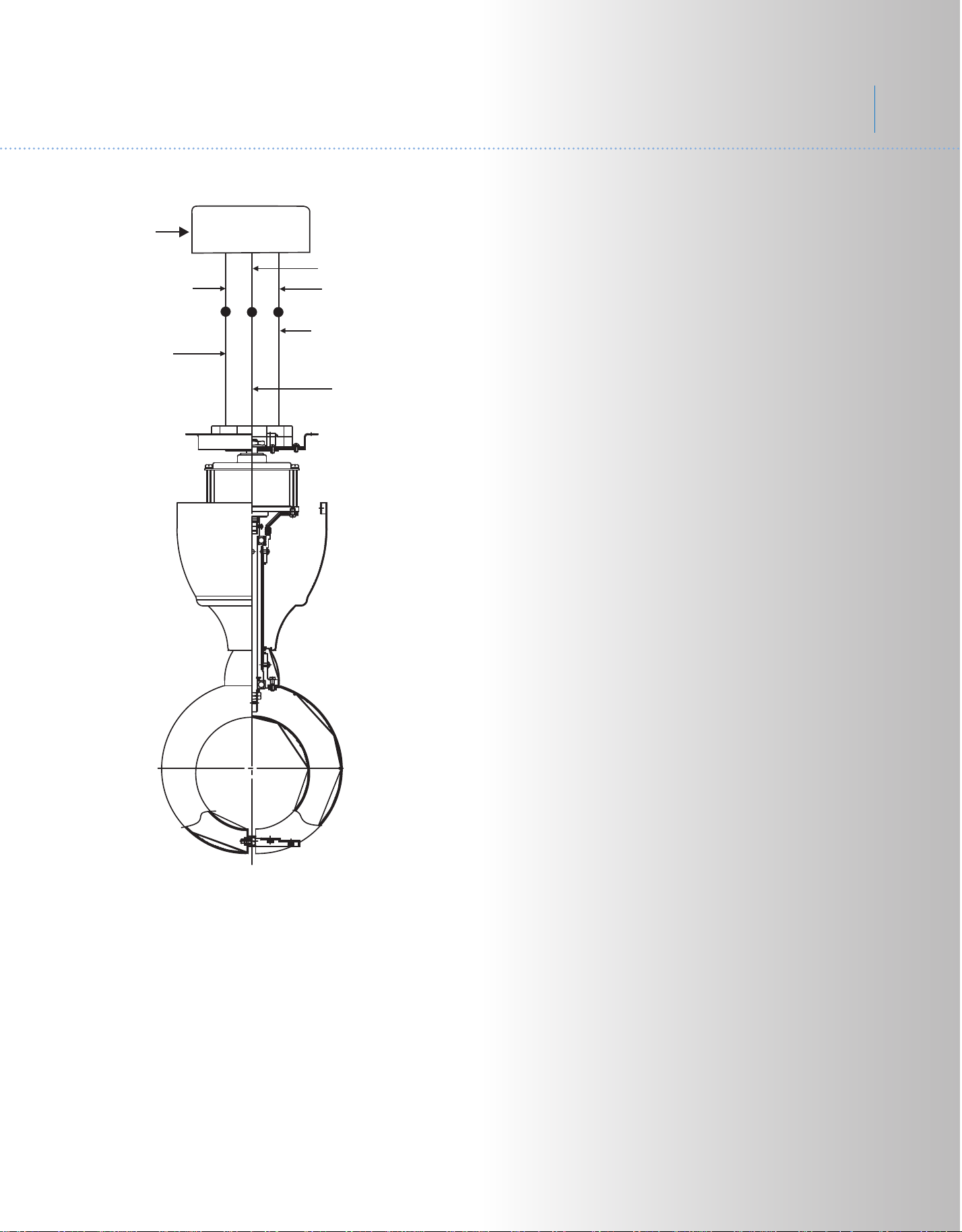
Fig. 7
7. ELECTRICAL CONNECTIONS
WARNING: To avoid possible electrical shock,
be sure you have turned off the power at the
main circuit panel.
Follow the steps below to connect the fan to
your household wiring. Use the wire connecting
nuts suppled with your fan. Secure the
connectors with electrical tape. Make sure
there are no loose wire strands or connections.
Step 1. Connect the fan supply (black) wire to
the black household supply wire as shown in
Figure 12.
Step 2. Connect the neutral fan (white) wire to
the neutral household (white) wire.
Step 3. Connect the fan ground wire (green) to
the household ground wire.
Step 4. After connecting the wires, spread
them apart so that the green and white wires
are on one side of the outlet box and the black
and blue wires are on the other side.
Step 5. Turn the connecting nuts upward and
push the wiring into the outlet box.
White (neutral)
Green or bare
copper (ground)
White ("AC IN N")
Ground (green)
(Connect to ground wire
on hanger bracket if no
house ground wire exists.)
Outlet box
Black ("AC IN L")
Black (motor)
6
54"Link
TM
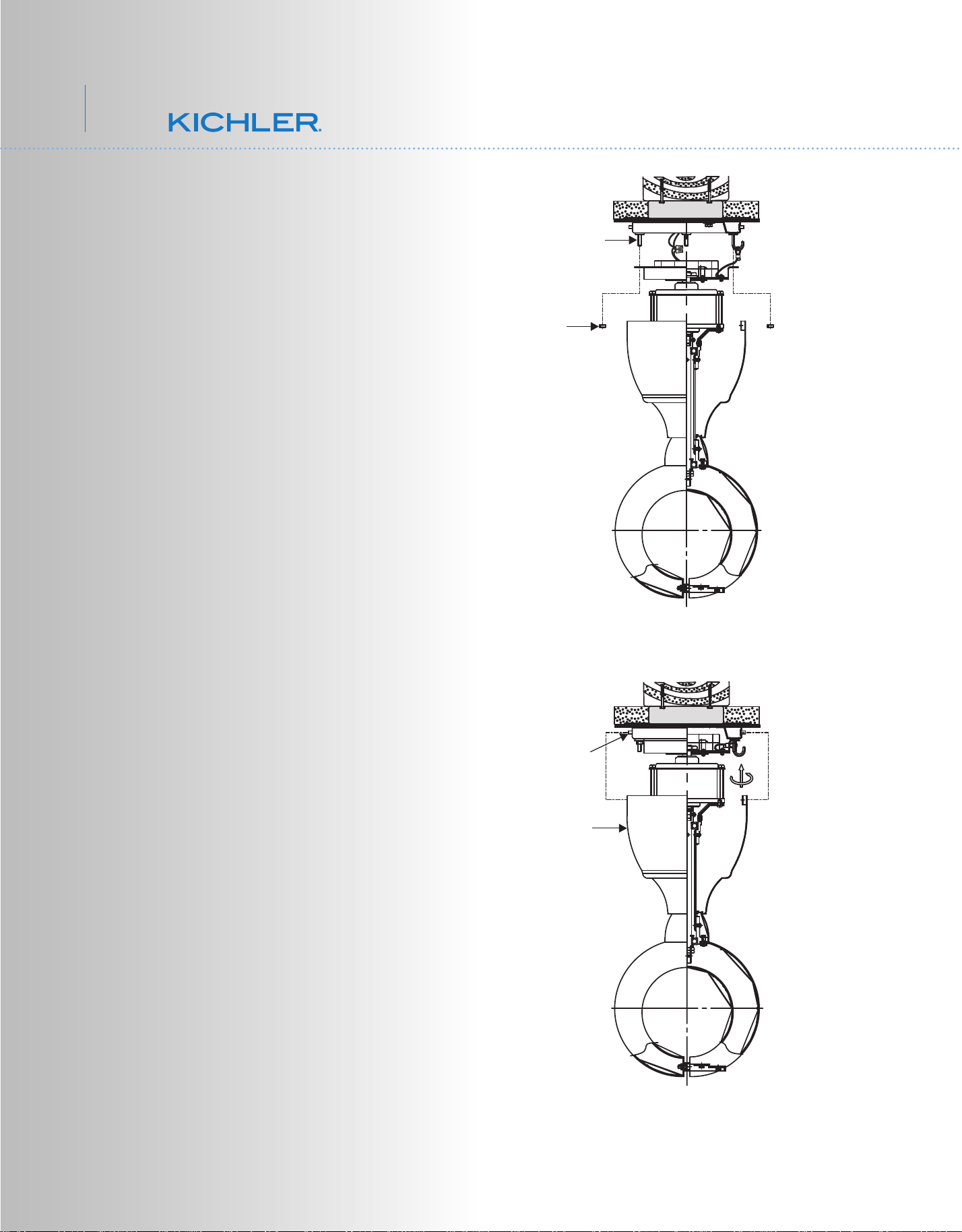
Fig. 8
Fig. 9
8. FINISHING THE INSTALLATION
Step 1. Move fan into position over the four
mounting studs and secure with the provided
nuts. (Fig. 8)
Step 2. Raise the motor housing up against
the mounting plate, the four supports inside
the housing should be placed against the four
studs on mounting plate, twist the housing
clockwise until snug. (Fig. 9)
Studs
Motor
housing
Nuts
Screws
7
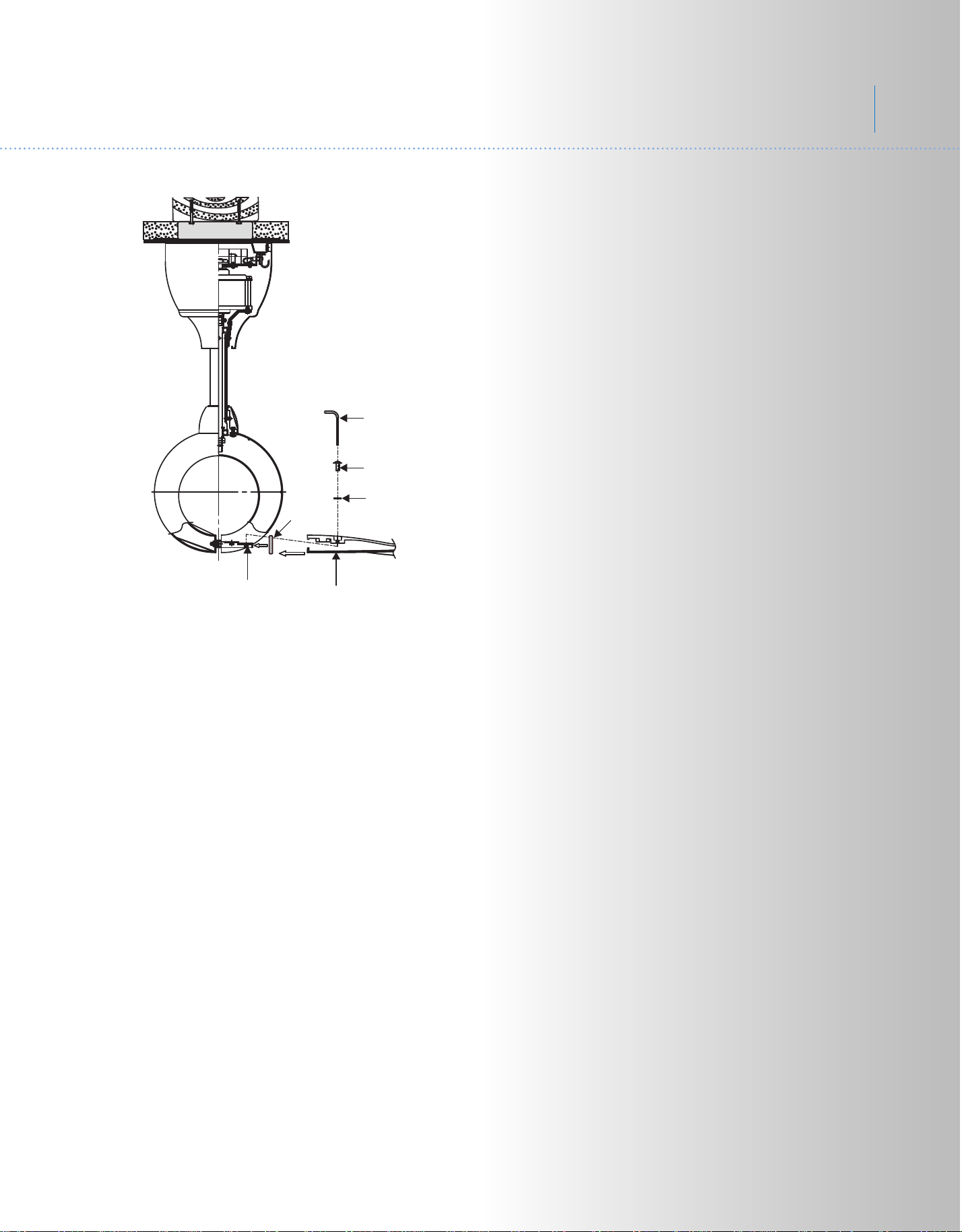
Fig. 10
9. ATTACHING THE FAN BLADES
Step 1. Attach a blade to a blade bracket with
the Allen screws (with lock washers) and filat
washers and fasten using the Allen wranch
provided. (Fig. 10)
Place the gasket into blade bracket. Make
sure the blade is straight when set on the
blade bracket. Tighten each mounting screw
and then repeat this procedure for each blade.
Blade
Blade bracket
Allen screws with
lock washers
Allen wrench
Flat washers
Gasket
8
54"Link
TM
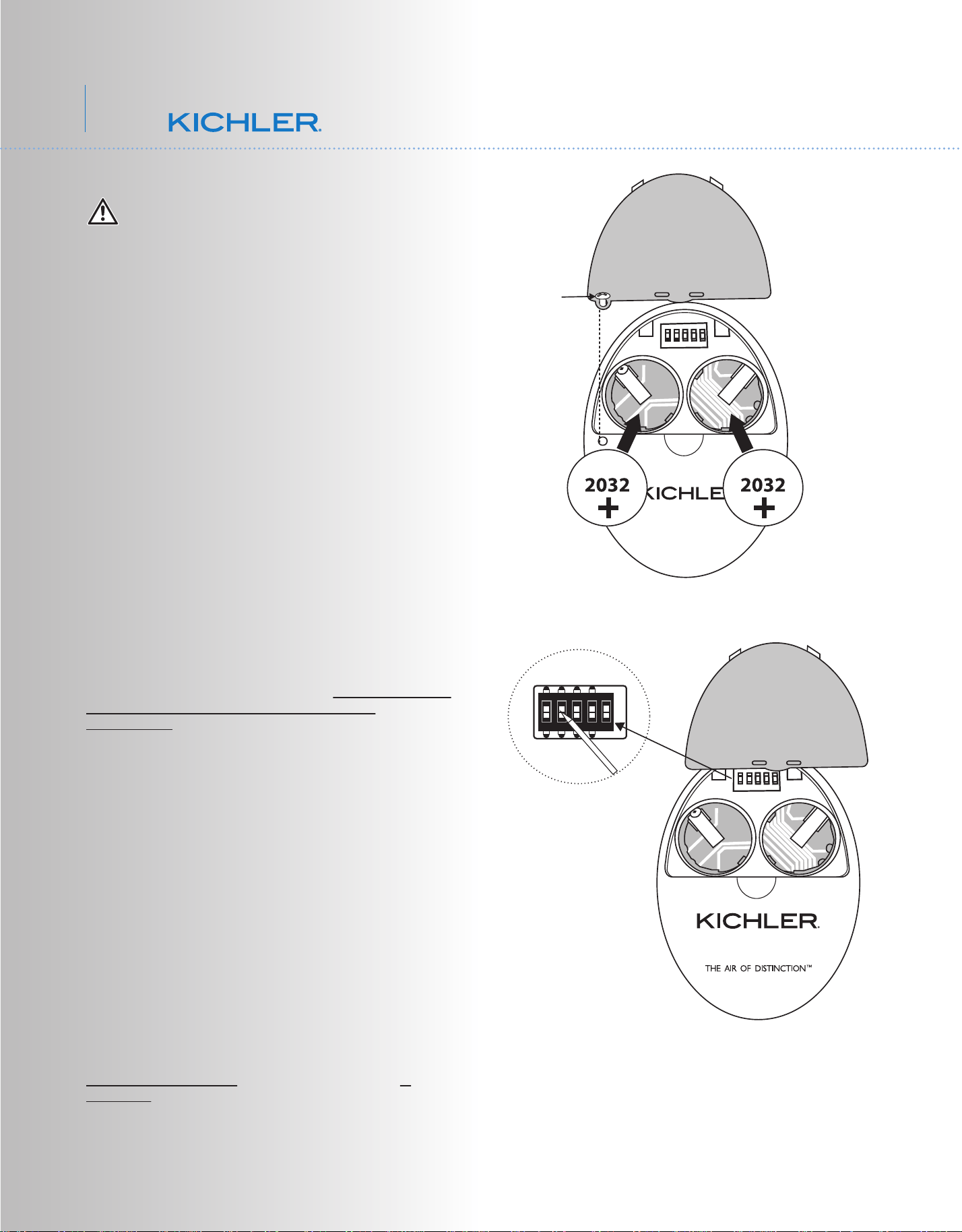
Fig. 11
Fig. 12
10. CONTROL SYSTEM SET-UP
ON
1 2 3 4
D
X
ON
Dip switch
WARNING: Chemical Burn Hazard. Keep
batteries away from children. This product
contains a lithium button/coin cell battery. If a
new or used lithium button/coin cell battery is
swallowed or enters the body, it can cause
severe internal burns and can lead to death in
as little as 2 hours. Always completely secure
the battery compartment. If the battery
compartment does not close securely, stop
using the product, remove the batteries, and
keep it away from children. If you think
batteries might have been swallowed or placed
inside any part of the body, seek immediate
medical attention.
a) The cells shall be disposed of properly,
including keeping them away from children;
and
b) Even used cells may cause injury.
Make sure the power is completely
disconnected before you begin this procedure.
SPECIAL NOTE:
Your new Kichler
®
Ceiling Fan is State of the Art
and employs a High Efficiency DC (direct current)
Motor with an advanced CoolTouch™ Remote
Control System. The DC Motor uses 70% less
energy than a conventional ceiling fan AC
Induction Motor. The DC motor is “Digitally”
controlled and operates differently than
conventional ceiling fans motors. Please read this
portion of the manual completely before
proceeding.
Our CoolTouch™ Control system includes an
“Automatic Frequency Selection” feature. To set
the control frequency and program the control
system, follow these steps.
Open the back of the Transmitter. You need to use
a screwdriver to open or close the battery cover
(figure 11)
The Frequency Selector is a "Dip Switch Block"
inside the Battery compartment of the Transmitter.
(See figure 12) You change frequencies by
arranging the small switches numbered 1 through
4 in a up or down position. 16 possible
frequencies or combinations are possible.
The fifth switch, marked D and X sets the system
for operation with Incandescent or Fluorescent
Lamps. It is essential to set this switch correctly. If
your ceiling fan is equipped with Incandescent
Lamps set this switch to the D Position, for
Fluorescent Lamps, set the switch to the X
Position. If these settings are reversed, the
lighting control system will operate erratically and
could damage your ceiling fan.
9
TM
Set screw
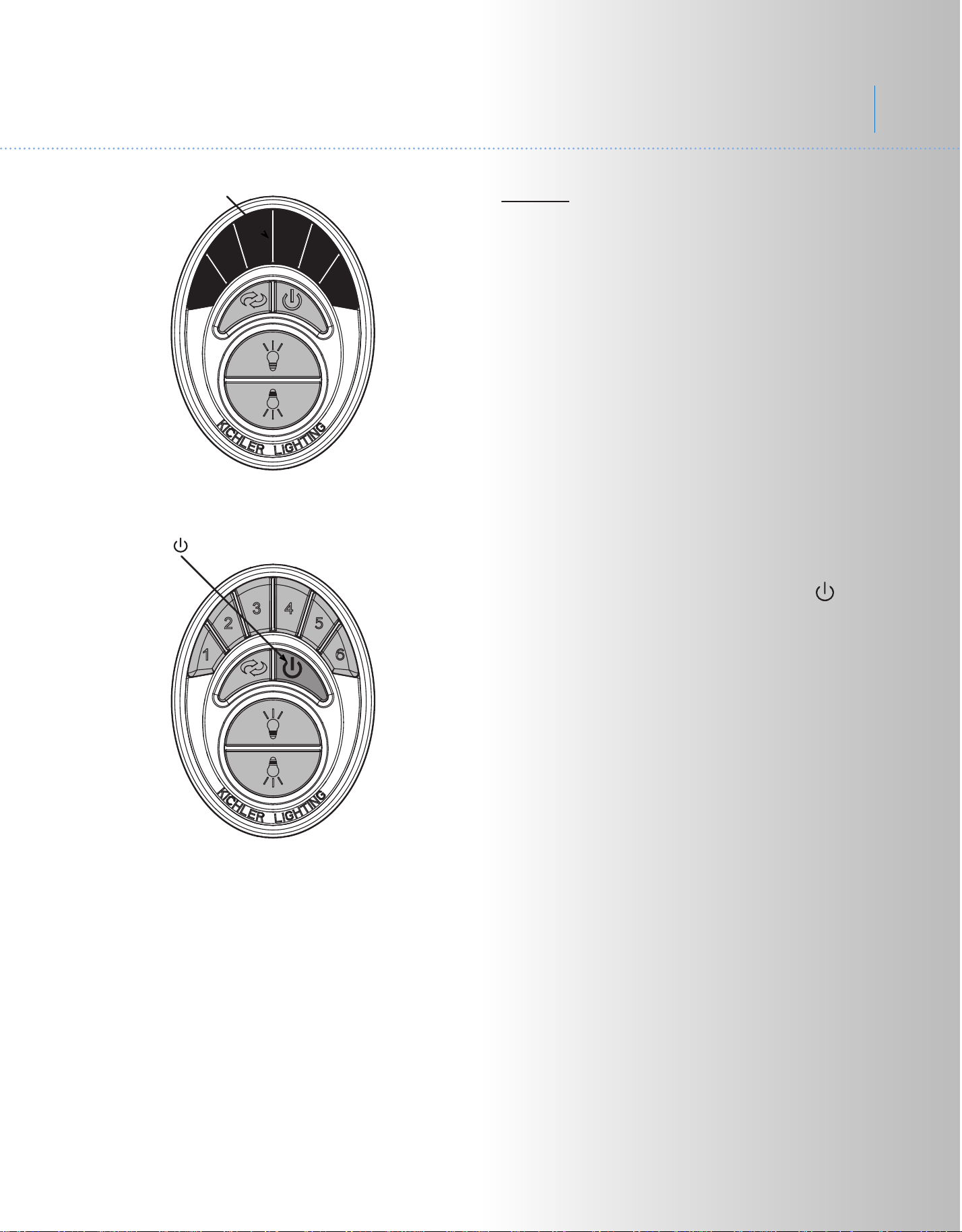
Fig. 13
Fig. 14
Blue Light
Press/hold Button
System Programing: Read all of these steps
BEFORE proceeding. Each step must be followed
exactly to properly program the control system.
1. You can leave the frequency switches at the
factory setting or move them to any combination
of up or down. Use a small flat bladed screwdriver
to move the switches.
2. Insert both batteries and make sure they
are seated correctly in each recess with the
Positive + sign facing up. Replace the battery
cover. (Figure 11)
3. Test the transmitter by pushing and releasing
ANY button briefly. A Blue Light should illuminate
under the 3-4 buttons. (Fig. 13) If not, check to
make sure the batteries are inserted and seated
correctly.
Power Up and Programming:
4. Follow the below steps to set the remote control:
The auto learning function will only mandate within
60 seconds when turning the fan’s AC power ON.
(Figure 14)
5. Select desired frequency from the back of
transmitter.
6. From the back of the transmitter, press “ ”
power button for 3 to 5 seconds. Light will blink
twice. The remote will now be programmed to your
fan and ready for use.
Try different speed setting on wall control to ensure
the fan is now fully functional. If programming is
unsuccessful, retry the process starting from step 6
again.
IMPORTANT: Do not interrupt the conditioning
until the fan comes to a complete stop in
approximately 5 minutes. All functions of the
control will be rejected during conditioning.
NOTE: The learning frequency function and self
calibration test will continue to retain the last set
frequency and calibration set even when the AC
power is shut off. If the frequency is changed the
self calibration test will occur again.
7. Your CoolTouch™ Control System is now
programmed and ready for use. Please see the
follow Operational Instructions.
The receiver provides the following protective
function:
1. Lock position: The DC motor has a built-in safety
against obstruction during operation. If there is an
obstruction, the motor will stop and then the power
will automatically go off in 30 seconds. Remove the
obstruction and reset.
2. Over 80W protection: When the receiver detects
motor power consumption which is greater than
80W, the receiver power will be stopped and
operation will immediately discontinue. Wait for 5
seconds and then turn the receiver power back on.
10
54"Link
TM
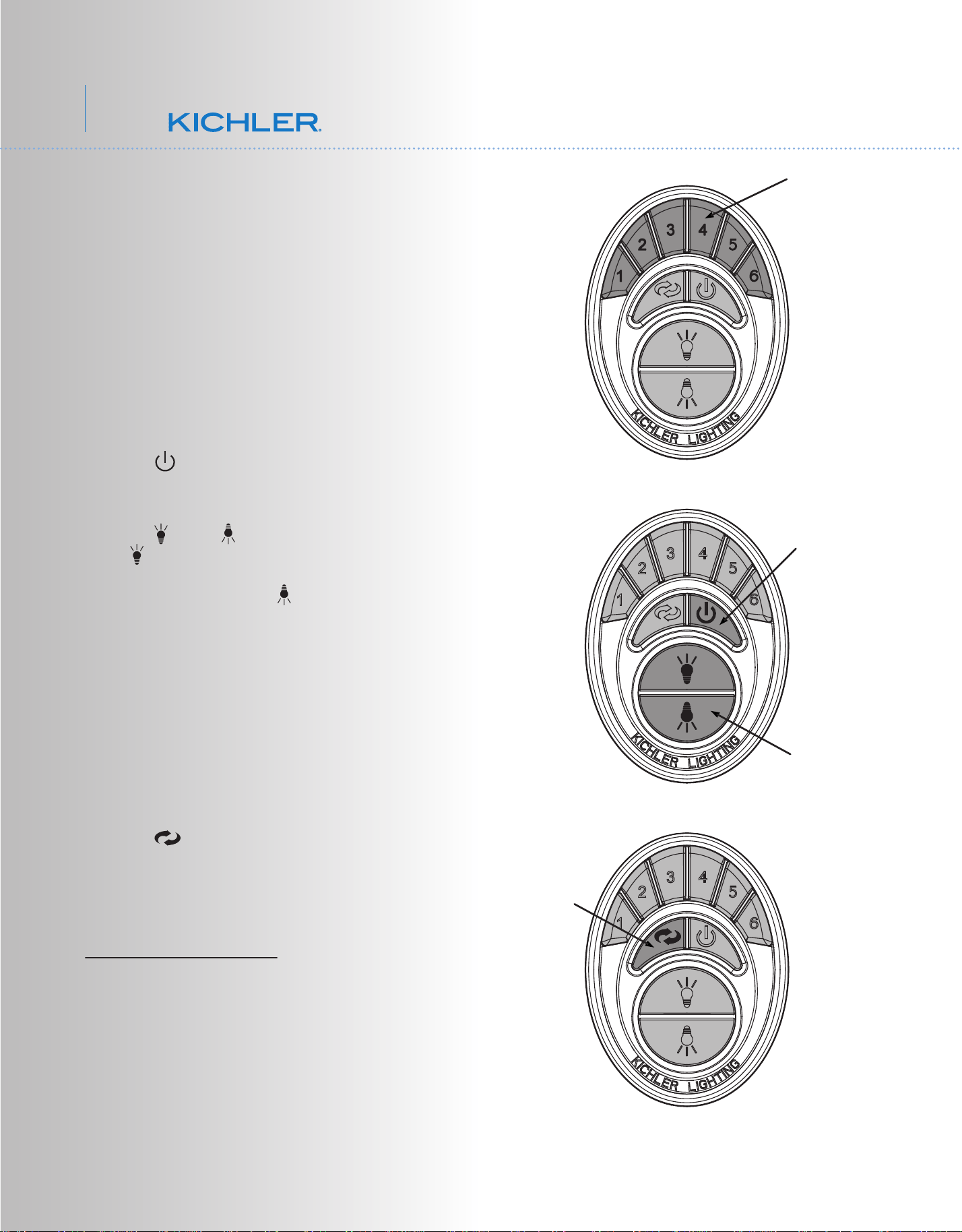
Fig. 15
Figure 15
1. Buttons 1, 2, 3, 4, 5 and 6 are used to set
the blade speed as follows:
1 = Low Speed
2 = Medium Low Speed
3 = Medium Speed
4 = Medium High Speed
5 = High Speed
6 = Extra High Speed
Figure 16
2. The " " button:
This button turns the fan motor off and is also
used in the program procedure.
3. The " " and " " button:
The " " button turns the upper light ON or
OFF and also controls the brightness setting
on some models. The " " button turns the
bottom light ON or OFF and also controls the
brightness setting.
Press and hold either button to set the desired
brightness level. The next time you turn the
light on, the system will remember this setting.
Press and release either button to turn the
light ON or OFF.
Figure 17
4. The " " button is used to set the fan in
forward or reverse operation. Each time you
press this button the fan blades will reverse
direction. This button functions ONLY when
the fan blades are in motion.
OPERATIONAL NOTE: Each time you start
the blades rotating, at any speed or reverse
the direction of the blades the Control System
will do a “Self Check” to insure operational
integrity. The blades will rotate slowly a short
distance (¼ turn), pause, change directions,
rotate ¼ turn, then build up RPM'S to the
selected speed. This is a perfectly normal
procedure and insures normal operating
performance.
11. OPERATING INSTRUCTIONS:
Fig. 16
Fig. 17
Motor Off Button
Light Control Buttons
Forward/Reverse
Button
Speed Buttons
11
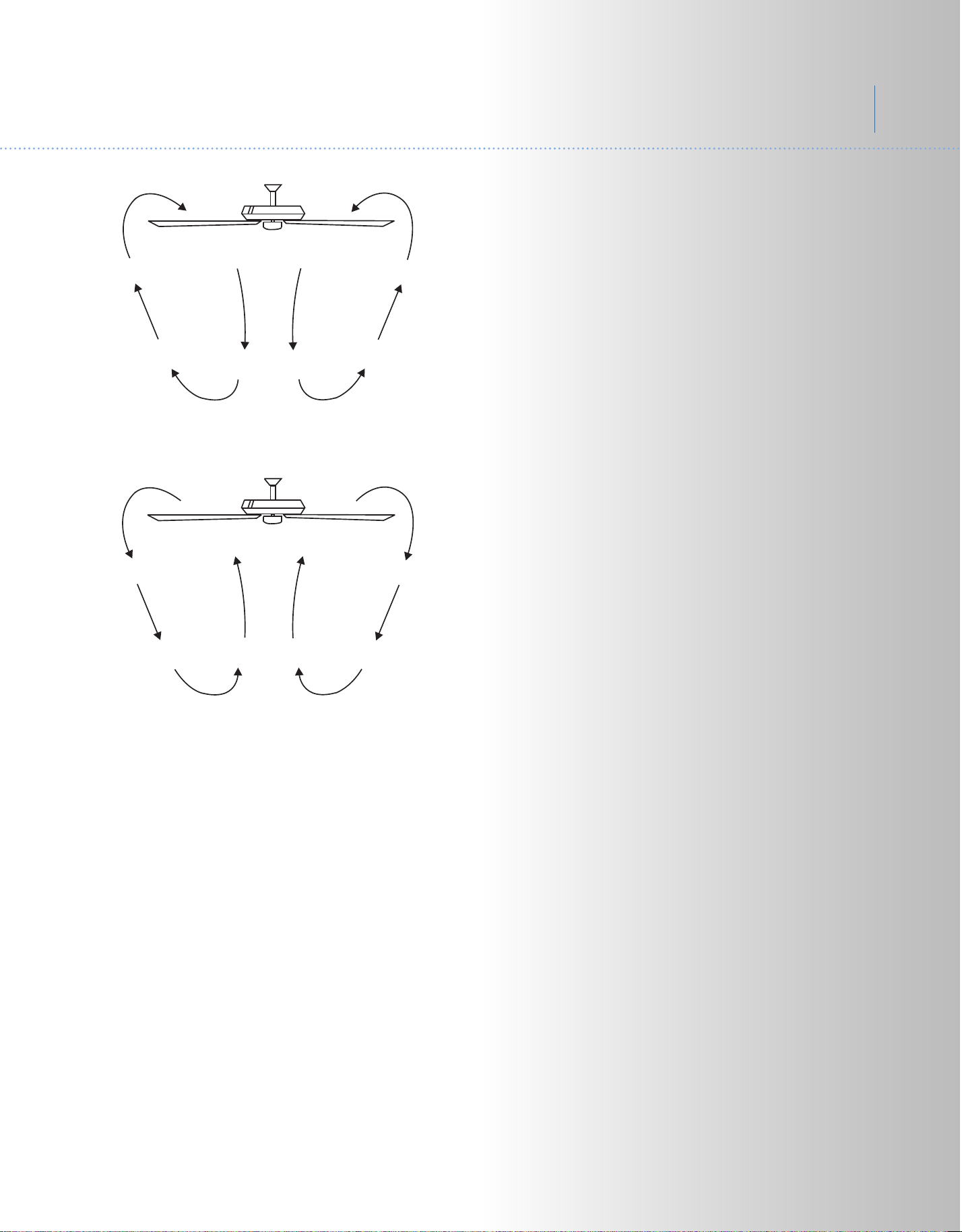
Fig. 18
Fig. 19
NOTE: Please remember your control system
is an RF (Radio Frequency) control system.
You may occasionally experience control
problems because of other radio frequency
interference, i.e. fan turns off, light turns off or
won't turn on, speed changes, etc. If this
should happen, just change the “Control
Frequency” by turning the power off and
repeating steps 1 through 6 under System
Programming.
Speed settings for warm or cool weather
depend on factors such as the room size.
Ceiling height, number of fans and so on.
Warm Weather Operation: Forward (counter
clockwise) A downward airflow creates a
cooling effect as shown in Fig. 18. This allows
you to set your air conditioner on a warmer
setting without affecting your general comfort.
Cool Weather Operation: Reverse (clockwise).
An upward airflow moves warm air off the
ceiling areas as shown in Fig. 19. This allows
you to set your heating unit on a cooler setting
without affecting your general comfort.
12
54"Link
TM
SENSOR DC CONTROL PAIRING PROCEDURES
IMPORTANT: Ceiling fan blades MUST be installed before pairing procedure can
begin.
Step 1. Program the wall control and/or the handset control separately. Once the
following pairing is successfully done, both the wall control and the handset control
can be used for the fan.
For wall control, press the power button to turn off the wall control
(the button will be up). Restore electricity to the ceiling fan branch circuit at the
circuit breaker or fuse box. Within 60 seconds of turning on the power, press the
power button to turn on the wall control (the button will be down), and
then press the " " reverse button for 3 to 5 seconds. Light will blink twice (if
there is a light on the fan) and fan will run for approximately 2 minutes in the upward
direction then reverse direction to down flow for additional 2 minutes. After that the
fan will stop running. The remote will now be programmed to your fan and ready for
use.
For handset control,
restore electricity to the ceiling fan branch circuit at the
circuit breaker or fuse box. Within 60 seconds of turning on the power, press
power button for 3 to 5 seconds. Light will blink twice (if there is a light on the fan)
and fan will run for approximately 2 minutes in the upward direction then reverse
direction to down flow for additional 2 minutes. After that the fan will stop running.
The remote will now be programmed to your fan and ready for use.
IMPORTANT: Do not interrupt the conditioning until the fan comes to a complete
stop in approximately 5 minutes. All functions of the control will be rejected during
conditioning.
Step 2. Try different speed setting on both the wall control and the handset control to
ensure the fan is now fully functional. If programming is unsuccessful, retry the
process starting from step 1 again.
13
14
54"Link
TM
Fig. 20
Fig. 21
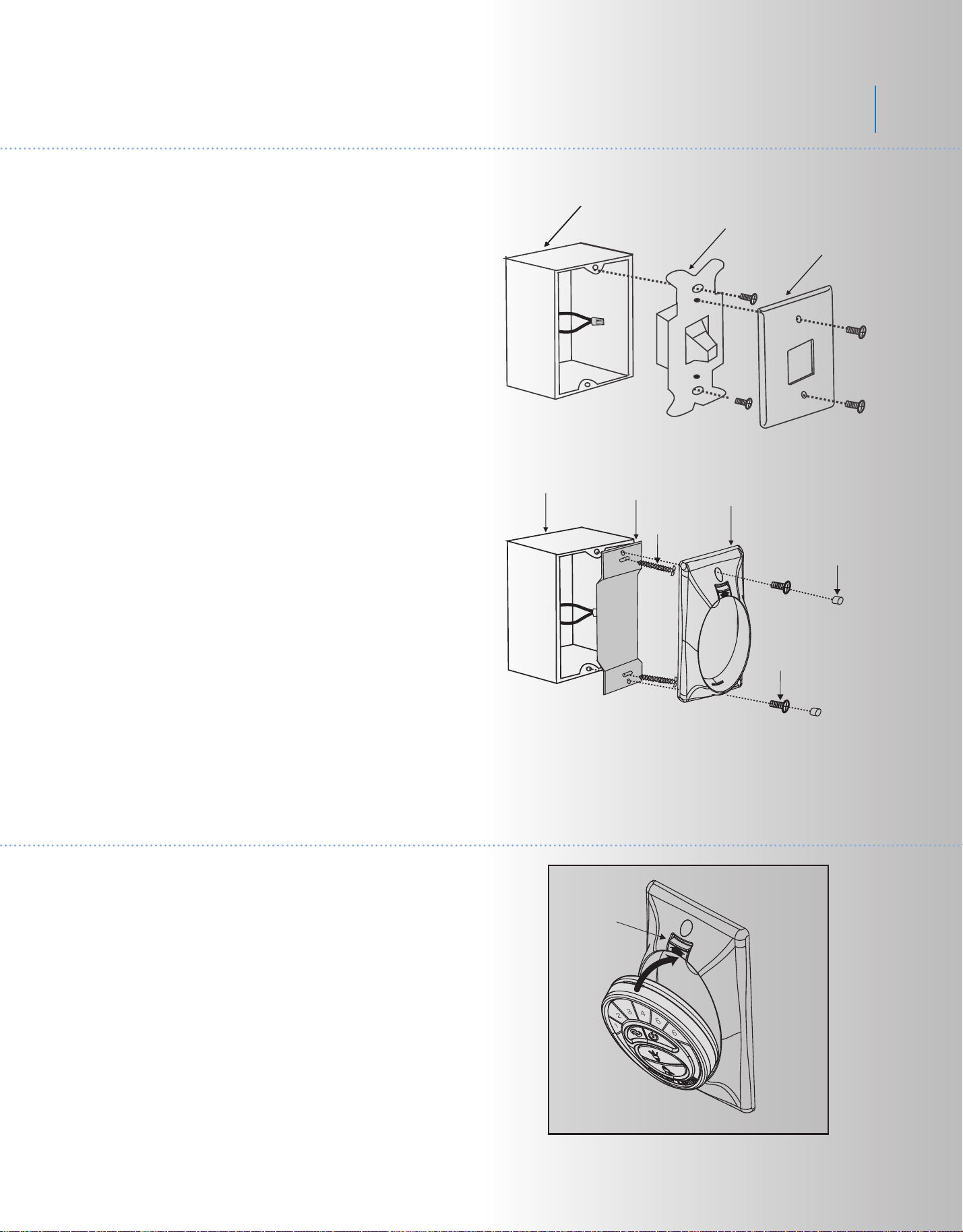
12. INSTALLING THE COOLTOUCH
™
CONTROL SYSTEM WALL PLATE
13. INSTALLING THE TRANSMITTER
1. Insert the transmitter into the wall plate by
inserting the bottom of the transmitter first and
then press the top of the transmitter into the
pocket. The transmitter will fully function from this
location or you can remove the transmitter and
use as a "Hand Held" device. (Fig. 22)
2. To remove the transmitter from the wall plate,
push the release button and the transmitter will fall
into your hand.
Wall plate
Switch
Outlet box
Screws
Screws
Plastic plugs
CoolTouch
™
wall plate
Outlet box
Metal plate
NOTE: All wiring must be in accordance with the
National Electrical Code and local electrical
codes. Electrical installation should be performed
by a qualified licensed electrician.
Select a location to install your CoolTouch™
Control System Transmitter. You can replace an
existing wall switch or, install the transmitter on
ANY flat surface.
Option 1: Install the control system using an
existing wall switch outlet box. Make sure the
electrical power is TURNED OFF at the main panel
before continuing.
NOTE: Switch installation must comply with all
local and national electric code.
Step 1. Remove the existing wall plate and the old
switch from the wall outlet box. Wire nut the
BLACK leads (hot) together and push back inside
the outlet box. (Fig. 20)
Step 2. Install the metal plate and CoolTouch™
wall plate to the existing wall outlet box with 4
screws provided. Then place the two plastic
plugs into the wall plate. (Fig. 21)
Option 2: Install the control system on ANY flat
surface.
Select the desired location and use the CoolTouch
™ wall plate to mark the location for the mounting
holes. Use the dry wall anchors and/or screws
provided and finish the installation.
Release
button
Fig. 22

Problem
Fan will not start.
Fan sounds noisy.
Fan wobble.
Remote control
malfunction.
Solution
1. Check circuit fuses or breakers.
2. Check all electrical connections to insure proper contact. CAUTION: Make
sure the main power is OFF when checking any electrical connection.
3. Make sure the transmitter batteries are installed properly. Positive (+) side
facing out.
4. Insure the batteries have a good charge.
1. Make sure all motor housing screws are snug.
2. Make sure the screws that attach the fan blade brackets to the motor are
tight.
3. Make sure wire nut connections are not rubbing against each other or the
interior wall of the switch housing. CAUTION: Make sure main power is off.
4. Allow a 24-hour "breaking-in" period. Most noise associated with a new fan
disappear during this time.
5. If using an optional light kit, make sure the screws securing the glassware are
tight. Make sure the light bulbs are not touching any other component.
6. Do not connect this fan to wall mounted variable speed control(s). they are
not compatible with ceiling fan motors or remote controls.
7. Make sure the upper canopy is a short distance from the ceiling. It should not
touch the ceiling.
1. Check that all blade and blade arm screws are secure.
2. Most fan wobbling problems are caused when blade levels are unequal.
Check this level by selecting a point on the ceiling above the tip of one of the
blades. Measure this distance. Rotate the fan until the next blade is positioned
for measurement. Repeat for each blade. The distance deviation should be
equal within 1/8".
3. If the blade wobble is still noticeable, interchanging two adjacent (side by
side) blades can redistribute the weight and possibly result in smoother
operation.
1. Ceiling Fans with remote control systems CAN NOT be operated in
conjunction with any other control system EXCEPT a basic On/Off wall switch,
if desired.
14. TROUBLESHOOTING
15
54” Lehr
TM
16
FCC INFORMATION
This device complies with part 15 of the FCC Rules. Operation is subject to the following two conditions:
1) This device may not cause harmful interference, and
2) This device must accept any interference received, including interference that may cause undesired
operation.
Note: This equipment has been tested and found to comply with the limits for a Class B digital device,
pursuant to part 15 of the FCC Rules. These limits are designed to provide reasonable protection against harmful
interference in a residential installation This equipment generates, uses and can radiate radio frequency energy
and, if not installed and used in accordance with the instructions, may cause harmful interference to radio
communications. However, there is no guarantee that interference will not occur in a particular installation. If this
equipment does cause harmful interference to radio or television reception, which can be determined by turning
following measures:
• Reorient or relocate the receiving antenna
• Increase the separation between the equipment and receiver.
from that to which the receiver is
connected.
• Consult the dealer or an experienced radio/TV technician for help.