Required tools (not included)
Ruler
Philips head screwdriver
Hammer
Chisel
+
-
+
-
+
-
+
-
BOTHSTAR
IU-22/IU32 DOUBLE KEYPAD DOOR KNOB
Installation and User Guide
AAA
AAA
AAA
AAA
2-3/8" or 2-3/4"
1"
2-1/8''
60mm/2-3/8"
70mm/2-3/4"
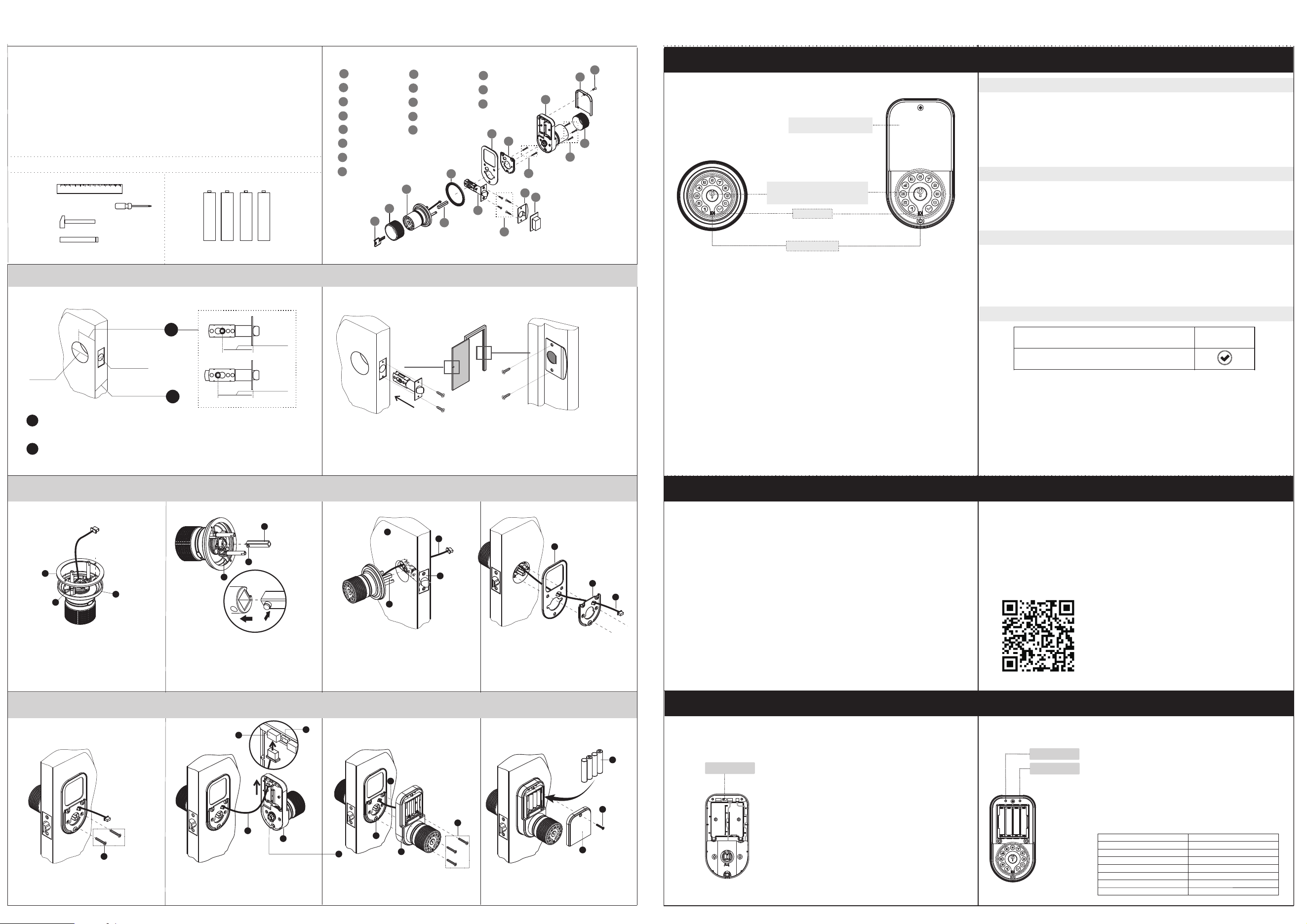
Prepare the door and check dimensions
Install the latch and strike plate
Install the rosette rubber
Install the spindle
Insert the exterior keypad
Install the mounting plate
Fix the mounting plate
Connect the power cable
Install the interior keypad
Install the batteries and cover
A
B
C
D
E
F
G
O
H
I
J
K
L
B
M
N
P
A
B
C
D
E
F
G
H
I
J
K
L
M
N
O
P
Key x 4
Exterior Assembly
Rosette rubber
Latch
Latch screw x 4
(M4*20mm)
Mounting rubber
Interior Assembly
M3*8mm
Strike plate
Plastic box
Mounting Screws x 2
(M4*40mm)
Interior Cover
Mounting Screws x 3
(M4*20mm)
Mounting plate
Spindle
Rubber grip x 2
Backset
Hole for latch
1
2
Door thickness
1-3/8" to 2-3/4"
1
2
Confirm the door is between 1-3/8" to 2-3/4" thick.
Align the rubber(gasket)(1) with the two protrusions(2)
of the rosette(3). then press the rubber(gasket)(1)
along the edge of the rosette(3).
1
2
3
1
2
3
Press the protrusion(2) of the spindle(1) and push
it into the keyway(3) of the exterior assembly.
Align the exterior keypad with the hole of the
door(2). Thread the power cable(1) through the
hole of the door(2) and make sure it is above the
latch(4). The spindle(3) on the exterior keypad
should be aligned with the hole in the center of the
latch. Insert the spindle(3) through this hole as
you press the exterior keypad against the door.
Thread the power cable(1) through the
hole of the mounting rubber(3) and the
mounting plate(2) in turn.
Tighten the two mounting screws(1)evenly.
Plug the power cable(1) into the connector(2)
of the interior assembly(4).
Set the SYNC switch(3)
Please refer to Synchronize Passcode.
Align the interior assembly(3) with the spindle(2).
Press the interior assembly(3) against the door.
Make sure the power cable(1)do not get stuck by
the interior assembly(3), then tighten the three
mounting screws(4) evenly.
Install the batteries(1) and the interior
cover(3). Then tighten the screw(2).
1
3
2
4
1
3
2
1
1
2
4
3
2
3
1
4
1
3
2
5
Synchronize Passcode
Restore Factory Settings
Back of interior assembly
Sync Switch
When the switch is in the sync position
Any changing passcode settings on any keypad will be
synchronized to another keypad. Synchronization is
only applicable to change the passcodes and reset the
lock.
When the switch is not in the sync position
The exterior keypad and the interior keypad are
completely independent. The settings and reset of the
two keypads do not affect each other.
1. Use a screwdriver to remove the screws from
the interior cover.
2. Remove the cover and find the reset button
located on the battery pack.
3. Press and hold the reset button for 7 seconds
until a long beep is heard. The master passcode
will return to the manufacturer default code
'123456'.
To delete all user codes, including the master code, follow the instructions below:
Code synchronization is designed for convenience of passcode settings of
double keypad.
Interior reset
Exterior reset
Settings
Master code
User code
Beeper
Passage mode
Lock mode
Auto-lock timer
Remote code
Default
123456
Not preset
Enable
Disable
Auto-lock mode
4 seconds
Deactivted
Specifications
Interior keypad
Exterior keypad
The code is generated by the website. You can set the unlock times or unlock
time periods on the website page. If it exceeds the set number of times or
time period, it will become invalid automatically. You do not need to program
locks. Therefore, you can remotely authorize this remote code to your
relatives, friends, neighbors, hourly workers, classmates or employees to
enter your home, room or office.
Please visit mylock.iulock.com or scan the QR code below to access the website.
1. Register account.
2. Add lock ( Serial number of the lock).
3. Activate your lock.
4. Use remote code.
For remote code instructions , please visit
www.iulock.com
Mobile remote code
This function is an added security feature which is aimed at preventing passcode theft. With
Passcode Disguise, you may enter up to 40 digits into the keypad. As long as the correct
passcode sequence is entered, regardless of how many digits were entered before or
afterwards, the lock will unlock.
For example, if your user passcode is “112256“, you can successfully unlock the lock by
entering “****112256****”(limit 40 digits).
. The master code MUST EXIST and can be modified, but cannot be deleted.
. The lock comes preset with default master passcode 123456. Make sure to set a new master
code which can be1-15 digits long as soon as you finish installing the lock.
. Used to put the lock in programming mode.
. Can unlock the lock.
. Must be different from all of the User Codes currently in the lock.
If you forget the master passcode, you can reset the lock to factory settings, which restores
the default master passcode. For more information, please see Restore FactorySettings.
Master passcode
Passcode Disguise
User passcode
. User codes can be added, modified, deleted.
. The lock comes preset with no user codes.
. Used to unlock the lock.
. Must be different from the master passcode and other user passcodes.
. Up to 50 possible user codes can be stored in the lock at one time.
. Can be 1-15 digits long.
ENTER
PRESS
master code or user code
Green and one long beep
Red and three short beeps
Indicator light signals and beep
Passcode
Unlock with passcode
Code correct, you can turn the knob to open the door immediately,
AUTO-LOCK MODE
It will be automatically locked later (the automatic locking time depends on the setting of the
automatic locking timer, the default is 4 seconds).
MANUAL-LOCK MODE
It will remain unlocked until any button is pressed.
The code is incorrect, please re-enter the correct code and press the check button to confirm.
The color of the light indicates & beep ,the status of the lock.
. A correct master passcode or user passcode was entered ,one long beep
. The programming process is complete ,one long beep
. An incorrect master passcode or user passcode was entered,three short
beeps
. There was an error in programming, three short beeps
. red blinking and beep after keypad backlit off indicates critically low battery
Green
Red
Cylinder
Exterior knob and interior knob
have the same key
Battery compartment
(using 4 AAA batteries)
LED indicator
USB C-TYPE backup
. Two ways to access: code or key.
. -22 F to +176 F temperature range.
. Low power consumption, 4 AAA for 1 Year Battery Life or 10,000 times unlock.
. Backlit keypad for use in low light environments.
. 1 master code , 50 user codes (each knob).
. Built-in mobile remote code.
. Passage mode for hassle-free entry.
. Programmable Auto-lock mode or Manual-lock mode.
. Low battery warning indication.
For doors thicker than 2 ", please use additional
option spindles.
>>
>>
>>
>>
>>
>>
>>
1
2
3
Measure your door for a backset of the 2-3/8"or 2-3/4". If it is 2-3/4", adjust the latch
as follows: Grasp the spring pin and move it from the 2-3/8" slot to 2-3/4" slot.
Programming
Lifetime Limited Mechanical and Finish Warranty and 1-Year Limited Electronics Warranty Subject to the terms and
conditions of the warranty, IULOCK extends a lifetime limited mechanical and finish warranty and a one-year limited
electronics warranty to the original consumer user (“Original User”) of our IULOCK brand product (“Product”)
against defects in material and workmanship, as long as the Original User occupies the residential premises upon
which the Product was originally installed.See answers www.iulock.com for specific warranty details and limitations
Warranty
Important Safeguards
1. Read all instructions in their entirety.
2. Familiarize yourself with all warning and caution statements.
3. Remind all family members of safety precautions.
4. Protect your user passcode and master passcode.
5. Dispose of used batteries according to local laws and regulations.
This Manufacturer advises that no lock can provide complete security by itself. This lock maybe defeated by forcible or technical means. or
evaded by entry elsewhere on the property. No lock can substitute for caution, awareness of your environment, and common sense. Builder's
hardware is available in multiple performance grades to suit the application. In order to enhance security and reduce risk, you should consult
a qualified locksmith or other security professional.
WARNING:
The lock doesn't work?
Try replacing the battery or using the backup battery. If the lock still does not work, contact customer support.
Why can't I open the door?
You may be waiting too long to open the door. After entering a code, turn the handle to open the door while the lock LED indicator light is green.
Once the LED indicator light is off, the lock will return to locked position immediately.
Why I can open without passcode?
You maybe active the passage mode, use master code access will turn off this function .
I forgot all my codes.
The lock must undergo a hard reset in order to set the master code back to default and erase all other codes. In order to perform a hard
reset,please refer to the above “Restore Factory Settings”.
Why do I try multiple times to unlock?
Please check if the thickness of the door matches the length of the spindle. It is recommended that the spindle be the same length as the door
thickness with a 1/4 inch tolerance. If the spindle length is 1-3/4 inches, the door thickness is from 1-1/2 inches to 2 inches.
If none of the above information resolves your issue, please visit our website at: www.iulock.com
Troubleshooting
Template
www.iulock.com
24hr online service
Φ1inch
1-3/8inch
to
2-1/2inch
2-3/8inch
2-3/4inch
Φ2inch
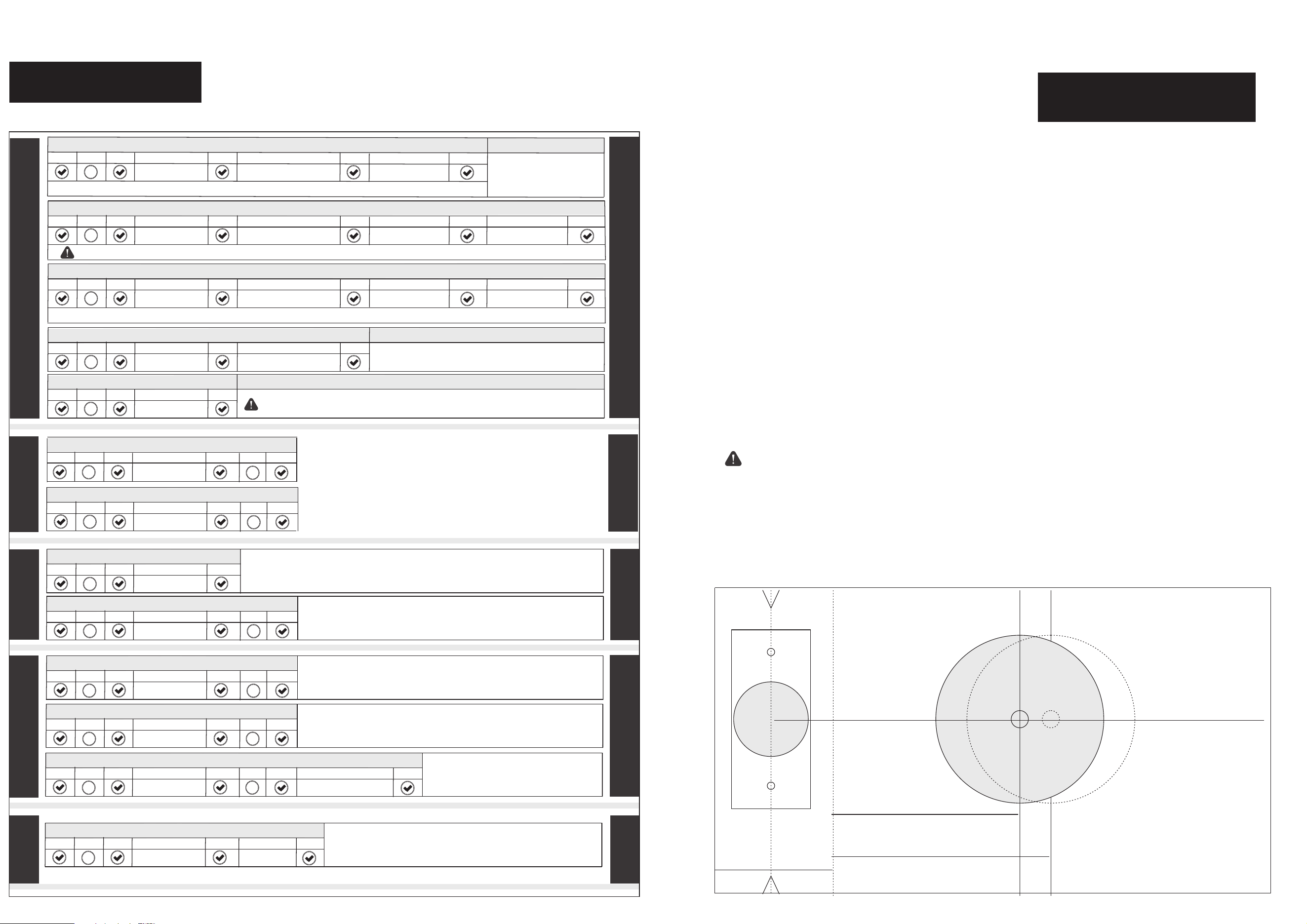
»If you make a mistake during programming,press the check button repeatedly until the keypad lights up. Then start over.
PASSAGE
BEEPER
ADVANCED
PASSCODE
PASSAGE
T
h
e aut
oma
ti
c lock t
im
e uni
t is s
e
co
n
ds.
Mi
n
imu
m is 2 s
e
co
n
d
s.
M
ax
i
mu
m is 4
32
0
0 s
e
c
o
n
d
s (
1
2 h
our
s
).
De
fa
u
l
t i
s 4 se
c
ond
s
.
Note : The master code MUST EXIST in the lock and cannot be deleted, but can ONLY be changed.
A
D
D U
SE
R PA
SS
CODE
Note : The New User Passcode must be different from all of the Passcodes currently in the lock.
P
res
s
Press
P
r
e
ss
P
r
e
s
s
Pr
es
s
E
n
te
r
E
n
t
er
E
n
t
e
r sa
me
Master passcode
New user passcode
New user passcode
P
res
s
1
C
H
A
N
GE MA
STER P
AS
SCO
D
E
P
r
e
s
s
P
res
s
P
res
s
Pr
e
ss
P
re
s
s
E
n
t
er
En
ter
En
t
er s
a
m
e
Master passcode
Pr
es
s
2
master passcode
En
t
er s
a
m
e
New master passcode
New master passcode
P
re
s
s
C
HA
NG
E USE
R P
AS
S
C
O
DE
Note : The New user passcode must be different from all of the passcodes currently in the lock.
Pr
ess
Pr
e
ss
P
re
s
s
P
res
s
P
re
s
s
En
te
r
E
n
te
r
En
ter sa
m
e
Master passcode
P
re
s
s
2
Unwanted user passcode
E
n
te
r
New user passcode
New user passcode
Pr
es
s
D
ELETE
A
U
SE
R P
A
SSC
O
D
E
P
re
s
s
Pr
e
ss
Pr
e
ss
P
re
s
s
Pres
s
En
t
er
Master passcode
3
Unwanted user passcode
En
t
er
DELETE ALL USER PASSCODES
Pr
e
ss
Pr
ess
Pr
e
ss
P
r
e
s
s
E
n
te
r
Master passcode
4
Note : The master code cannot be deleted, but can ONLY be changed.
DISABLE BEEPER
E
N
A
B
L
E
AUDIO
ENABLE BEEPER
P
res
s
P
r
e
s
s
P
res
s
P
res
s
En
t
er
Master passcode
6
Pr
e
ss
Pr
e
ss
1
Pr
e
ss
P
res
s
Pr
e
ss
P
res
s
En
t
er
Master passcode
6
Pres
s
P
res
s
0
ENABLE
A
U
D
I
O
AUTO-LOCK MODE
Pr
e
ss
P
r
e
ss
Pr
e
ss
P
res
s
En
te
r
Master passcode
Press
Pr
ess
E
N
A
B
L
E A
UDIO
ADVANCED PASSAGE MODE
Press
Pres
s
Press
Pr
e
ss
E
n
t
er
Master passcode
P
r
e
s
s
P
re
s
s
1
E
NA
B
L
E
A
UDIO
MANUAL-LOCK MODE
Pr
ess
Press
Pr
ess
Pr
e
ss
Enter
Master passcode
P
re
s
s
P
res
s
0
0
0
0
2
E
N
A
B
L
E A
UDI
O
SET AUTO-LOCK TIMER
Pres
s
P
res
s
Pres
s
Press
E
n
t
e
r
Master passcode
Press
Press
9
3
EN
ABL
E
EASY PASSAGE MODE
Pr
e
ss
Pr
e
ss
Pr
e
ss
P
r
e
s
s
En
te
r
Master passcode
5
Enter
Press
Auto-lock timer
In M
ANU
AL
L
O
CK MO
DE, th
e au
to
-l
o
ck wi
ll t
ur
n off
.
A
ft
er u
n
lo
c
k
i
ng t
he d
o
o
r wit
h a pa
ssco
de o
r fing
er
pr
int
, i
t
w
il
l re
m
a
i
n unl
o
ck
e
d un
ti
l a
ny b
u
t
t
o
n i
s pr
es
s
ed
.
In A
U
T
O-L
O
C
K M
O
D
E, t
h
e doo
r wi
l
l a
ut
o
ma
ti
c
al
ly l
oc
k a
ft
e
r ea
c
h u
nl
oc
k
i
ng
,
t
he a
ut
o-
l
oc
k ti
m
e d
ep
e
nd
s o
n t
he s
ett
in
g o
f t
h
e au
to
-
lo
c
k t
imer.
* P
r
e
s
s th
e c
he
c
k b
ut
t
o
n 4 times i
n a row, t
he d
oo
r w
i
ll be i
m
med
iat
e
ly l
o
c
k
ed
,
whi
c
h ove
r
r
i
de
s an
y w
ork
i
n
g m
o
d
es.
W
ith EA
SY P
AS
S
AGE M
OD
E a
c
t
i
ve
, th
e d
o
o
r w
i
l
l s
tay u
n
lock
e
d.
P
re
s
s a
n
y bu
t
ton to turn o
f
f t
h
i
s f
u
n
c
t
i
o
n w
he
n it is no l
o
n
g
e
r nee
de
d
.
W
i
th
A
DVANC
E
D P
AS
S
A
G
E MODE a
c
t
iv
e,
op
e
n th
e do
o
r by t
w
is
tin
g door h
a
n
d
le
dir
e
ct
ely. Tur
n o
ff thi
s mode onl
y b
y e
n
ter
in
g m
a
s
ter c
ode an
d che
c
k ke
y.
* Press t
he chec
k bu
t
ton 4 ti
m
e
s i
n a r
o
w , t
he d
oor w
il
l be i
mm
e
dia
tely l
oc
ke
d
,
w
h
i
c
h ove
rr
i
d
es a
n
y wo
r
ki
ng m
o
d
e
s
.
The activate code is generated by the website,(www.mylock.iulock.com)
Deactivate remote code function when the activate code is 0.
E
NA
B
L
E
A
U
D
I
O
ACTIVATE REMOTE CODE FEATURE
Press
Press
Press
Press
E
n
te
r
Master passcode
8
Enter
Press
Activate code
PASSCODE
ADVANCED
BEEPER
REMOTE
REMOTE
The beeper can be turned off if desired.
Beepers will still sound to indicate a low batter y.