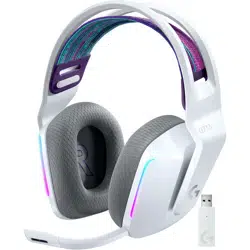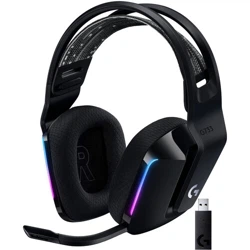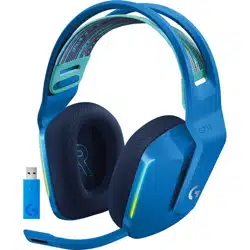
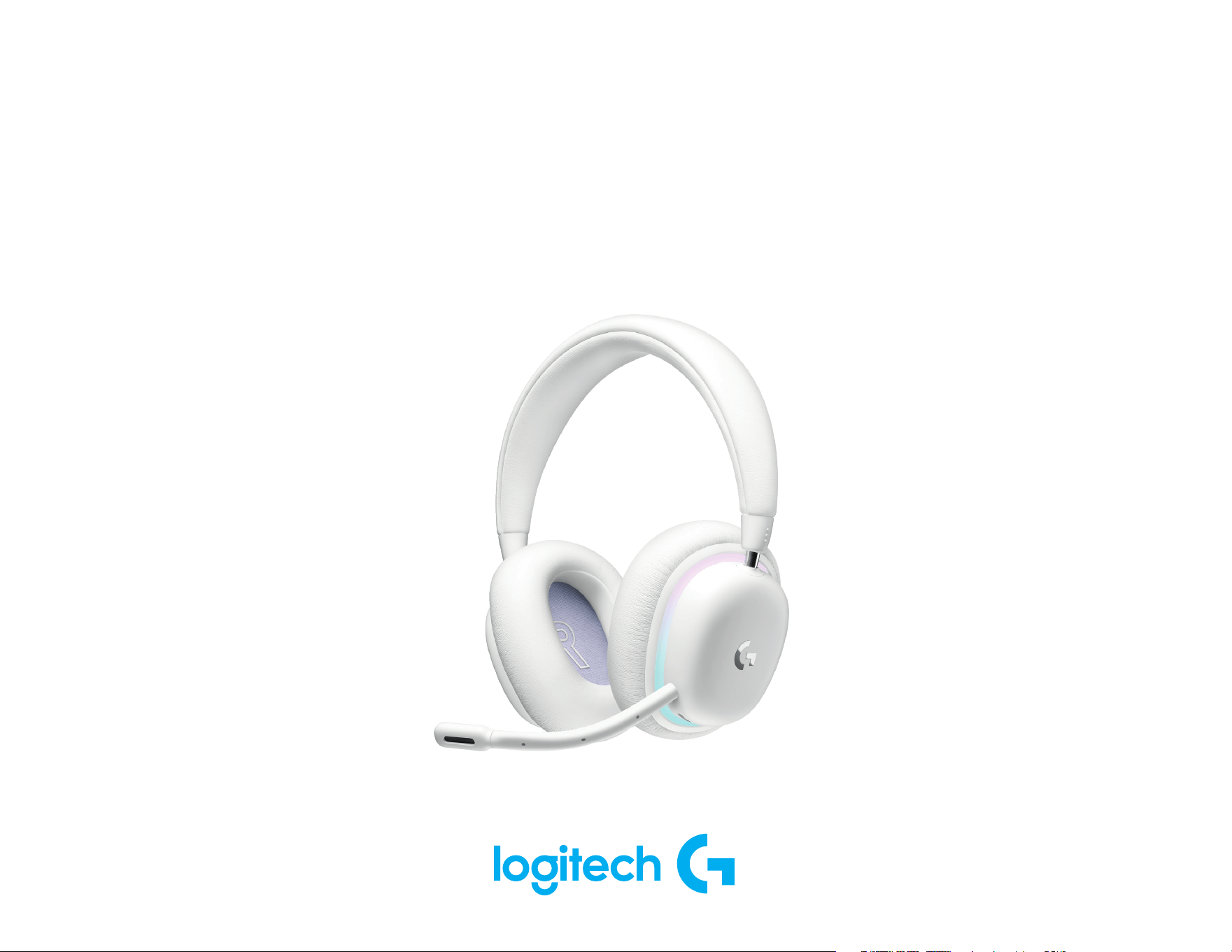
G735 HEADSET
|
CASQUE G735
Wireless Gaming Headset
Casque pour le jeu sans l
SETUP GUIDE
|
GUIDE D’INSTALLATION
ENGLISH ......................3
FRANÇAIS ....................12
ESPAÑOL ....................21
PORTUGUÊS ..................30
3 ENGLISH
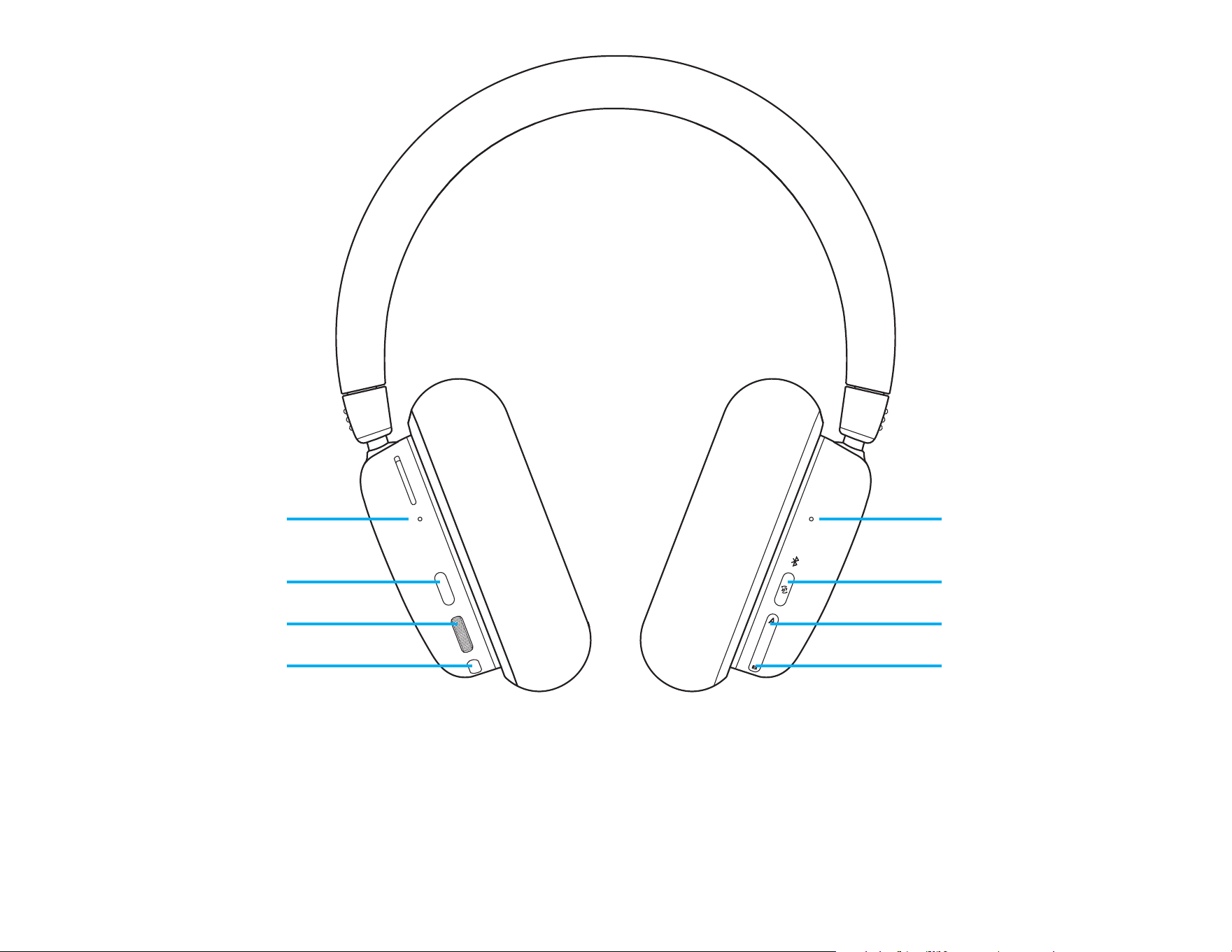
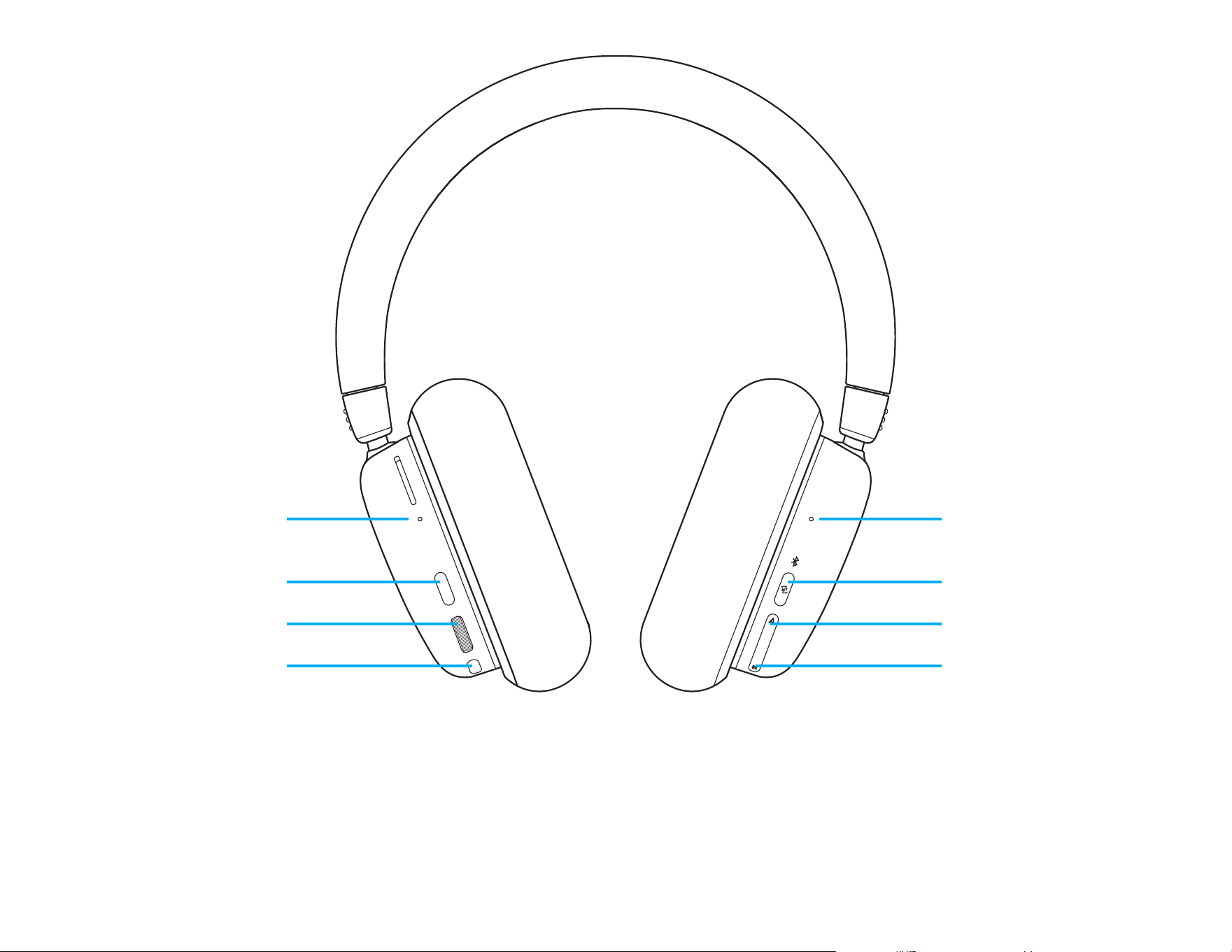
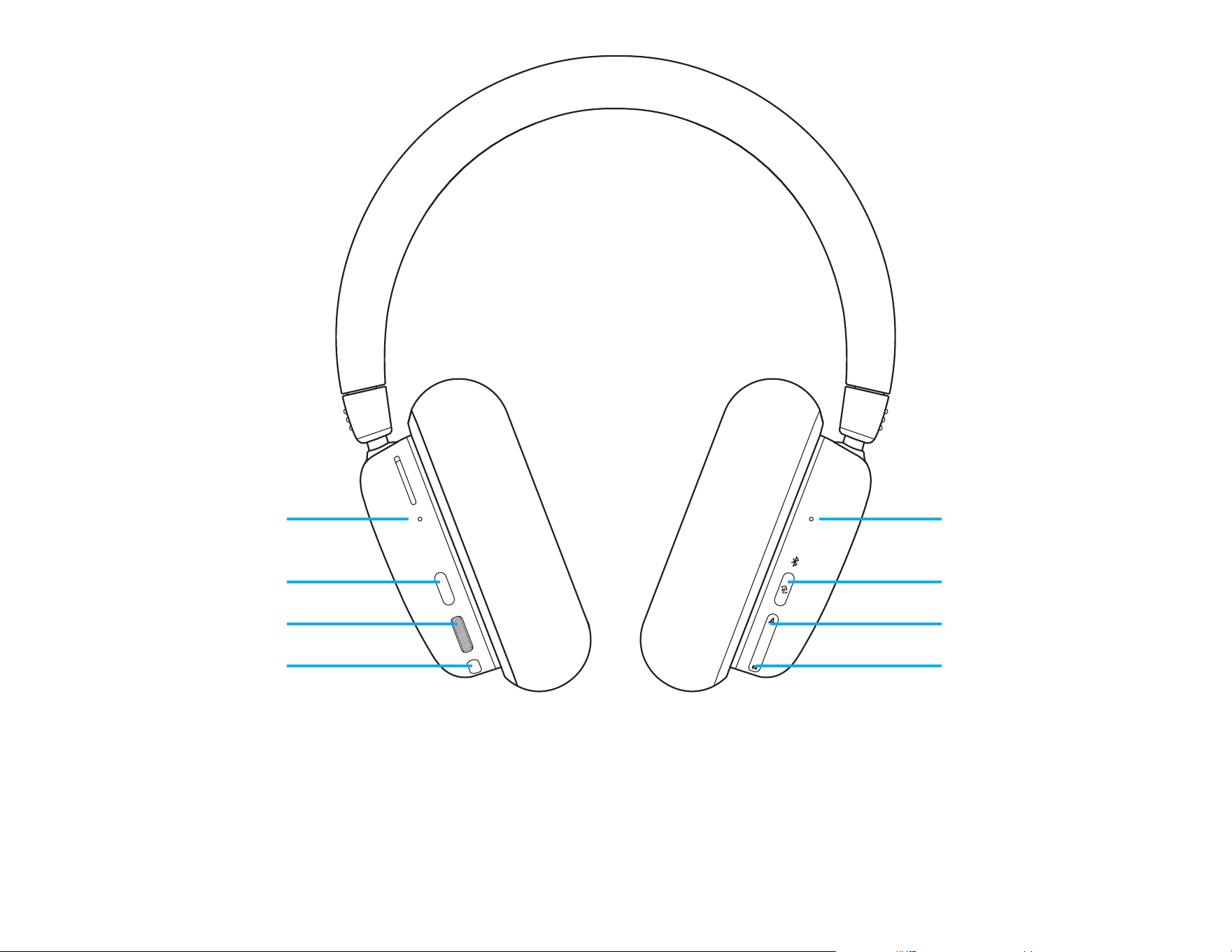
Bluetooth
®
Connectivity/
Active Source LED
Power, Battery,
Charging LED
LIGHTSPEED + Bluetooth
®
/
Auxiliary + Bluetooth
®
Toggle
Power Button
Audio Mixing
Source A (AUX/LIGHTSPEED)
Volume Roller
Audio Mixing
Source B (Bluetooth
®
)
Mute Toggle
3 sec
3 sec
4 ENGLISH
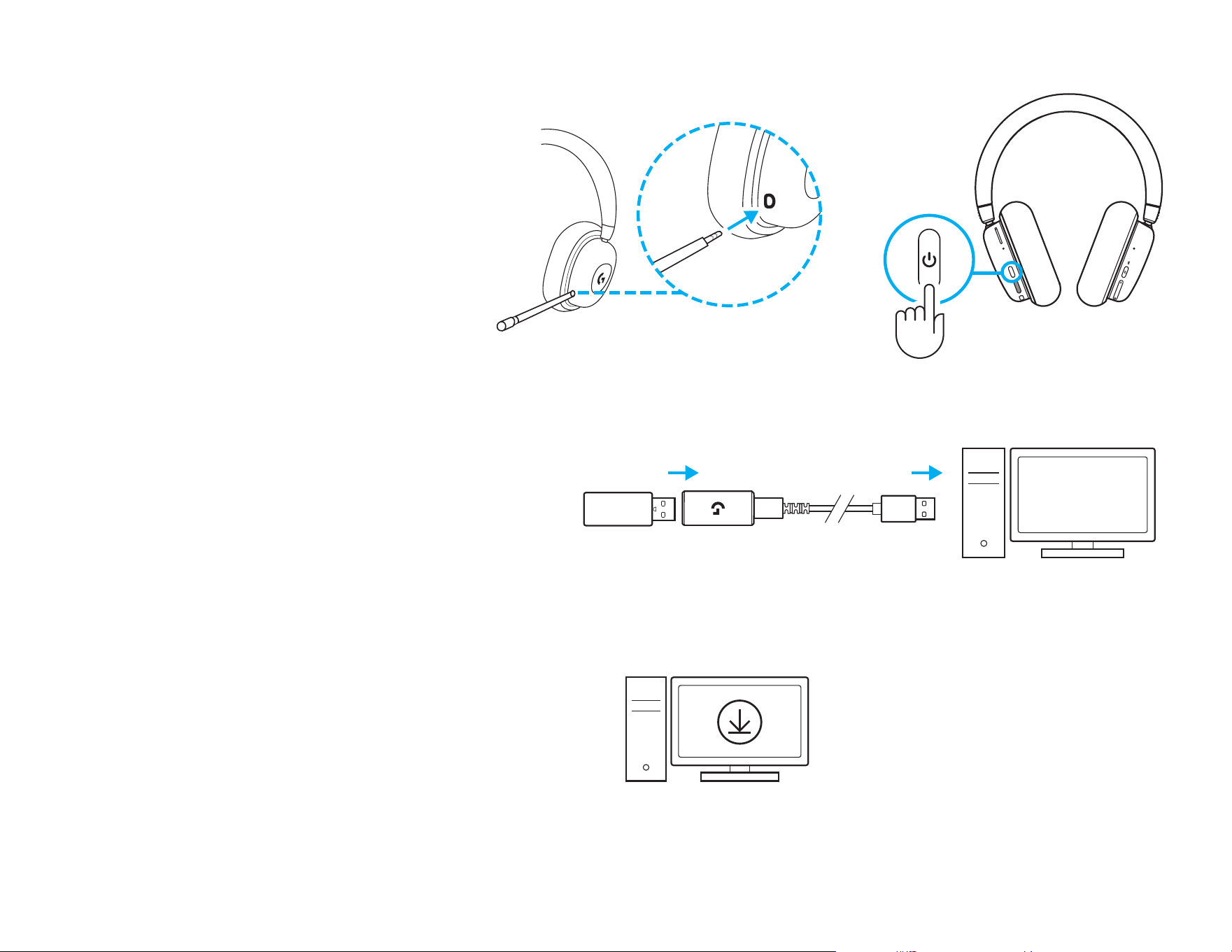
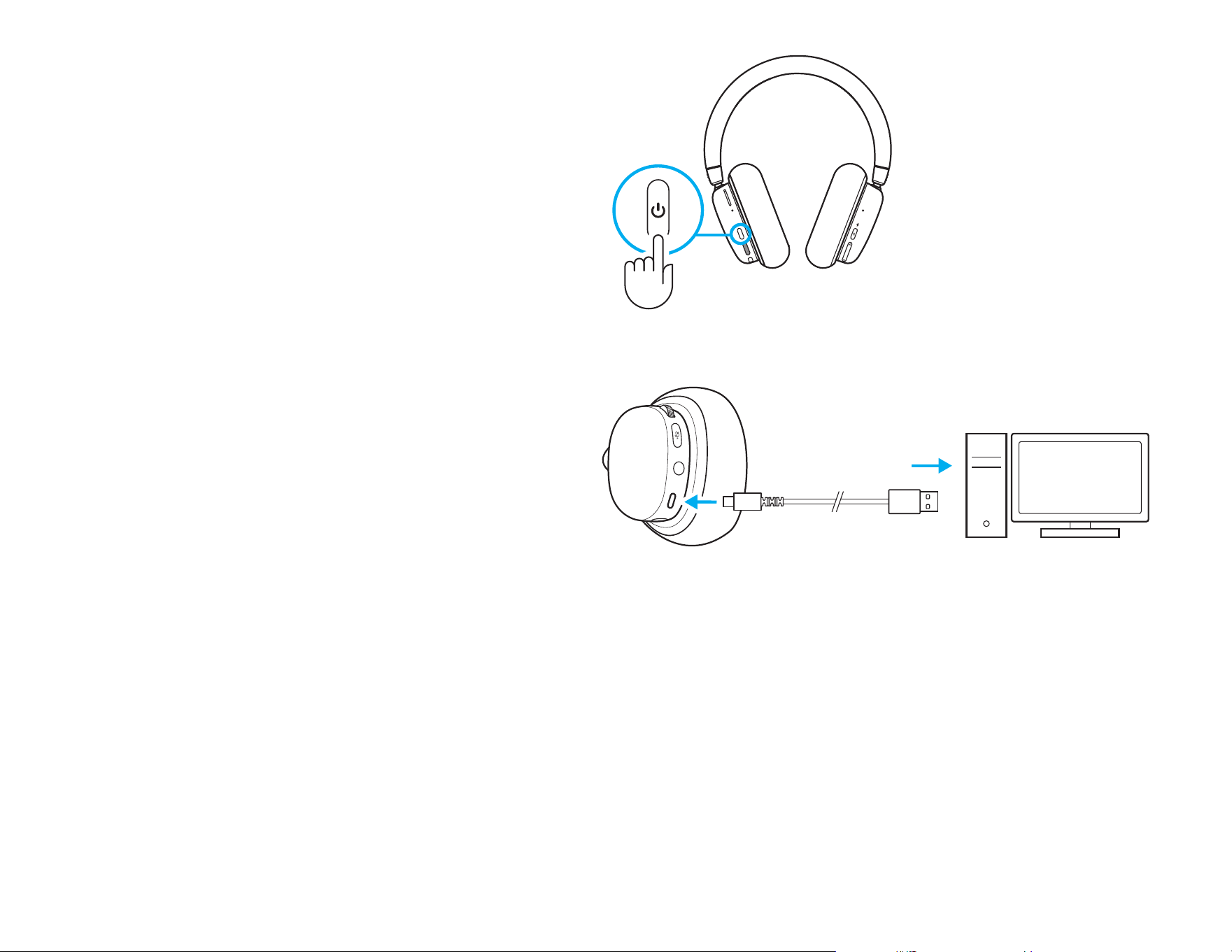
SETUP INSTRUCTIONS
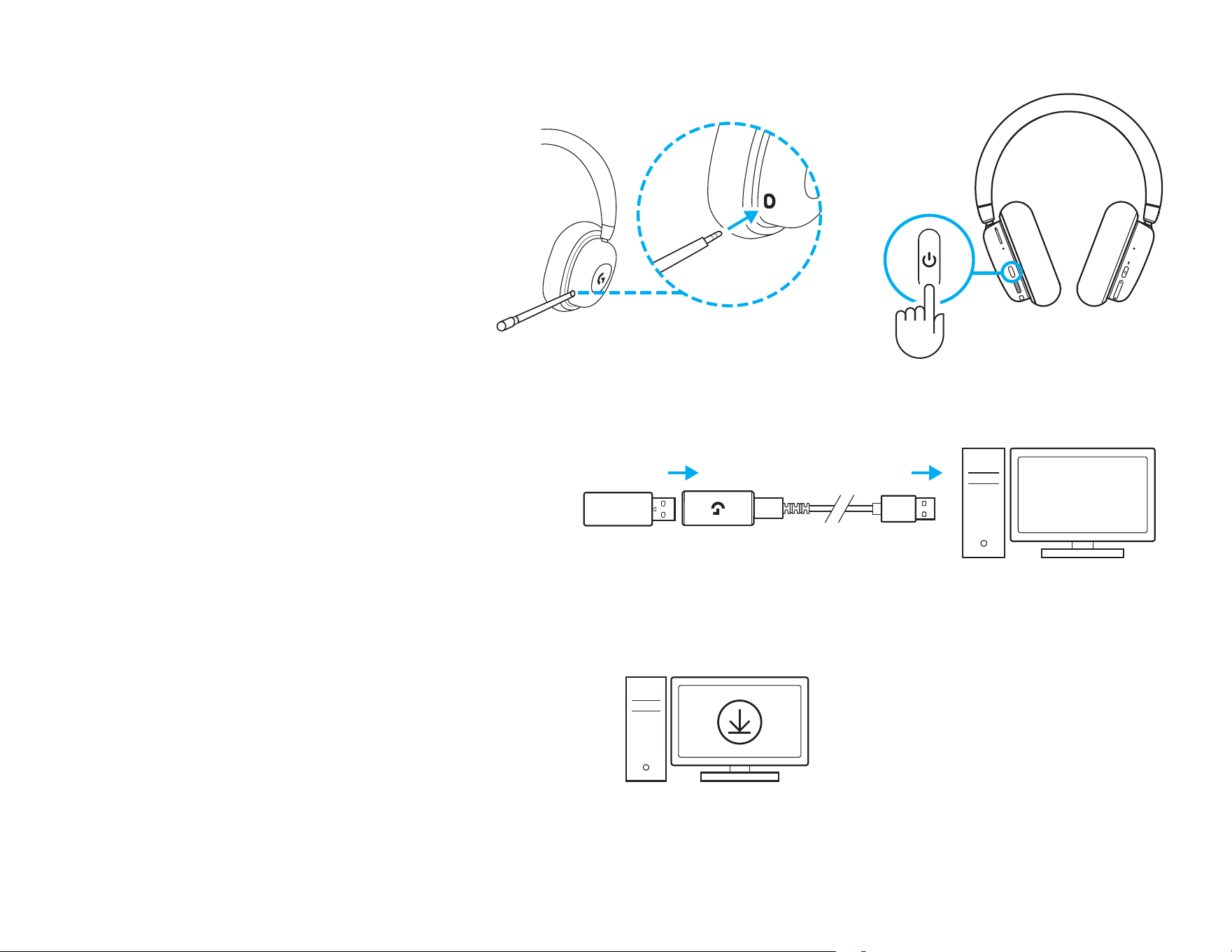
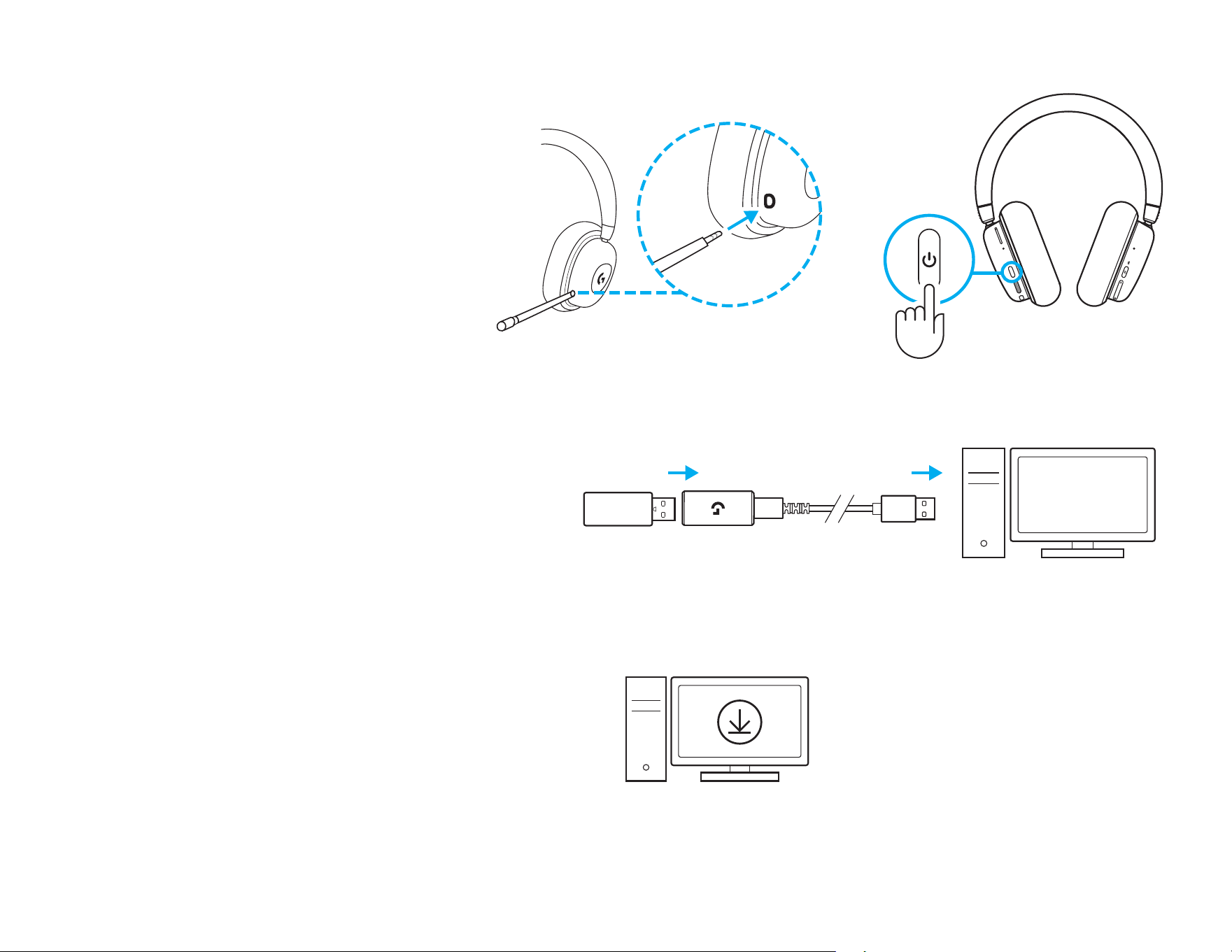
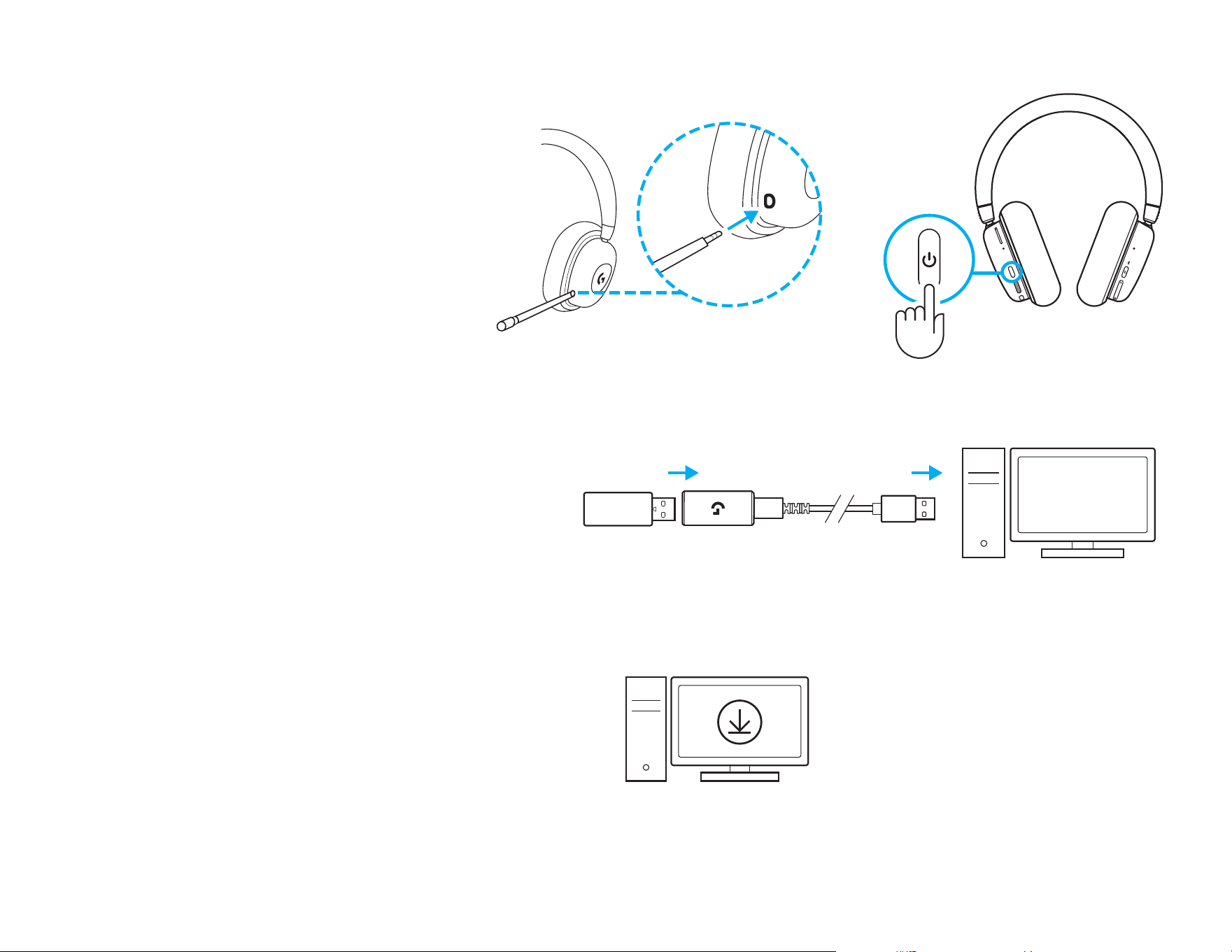
1 Insert the microphone connector into the port on
the left ear cup. It is designed to t in one way.
2 Turn on the G735 headset by pressing and
holding the power button located on the left ear
cup for 3 seconds.
3 Insert the LIGHTSPEED receiver, with extender
and cable into the PC USB port. Receiver can be
used without the extender and cable by inserting
it directly into a USB port if desired.
4 Download and install G HUB software to
yourPC/MAC for the best gaming experience
(GHUB has onboarding story for features).
Gotowww.logitechG.com/ghub
1 2
3
4
www.logitechG.com/ghub
5 ENGLISH
3 sec
3 sec
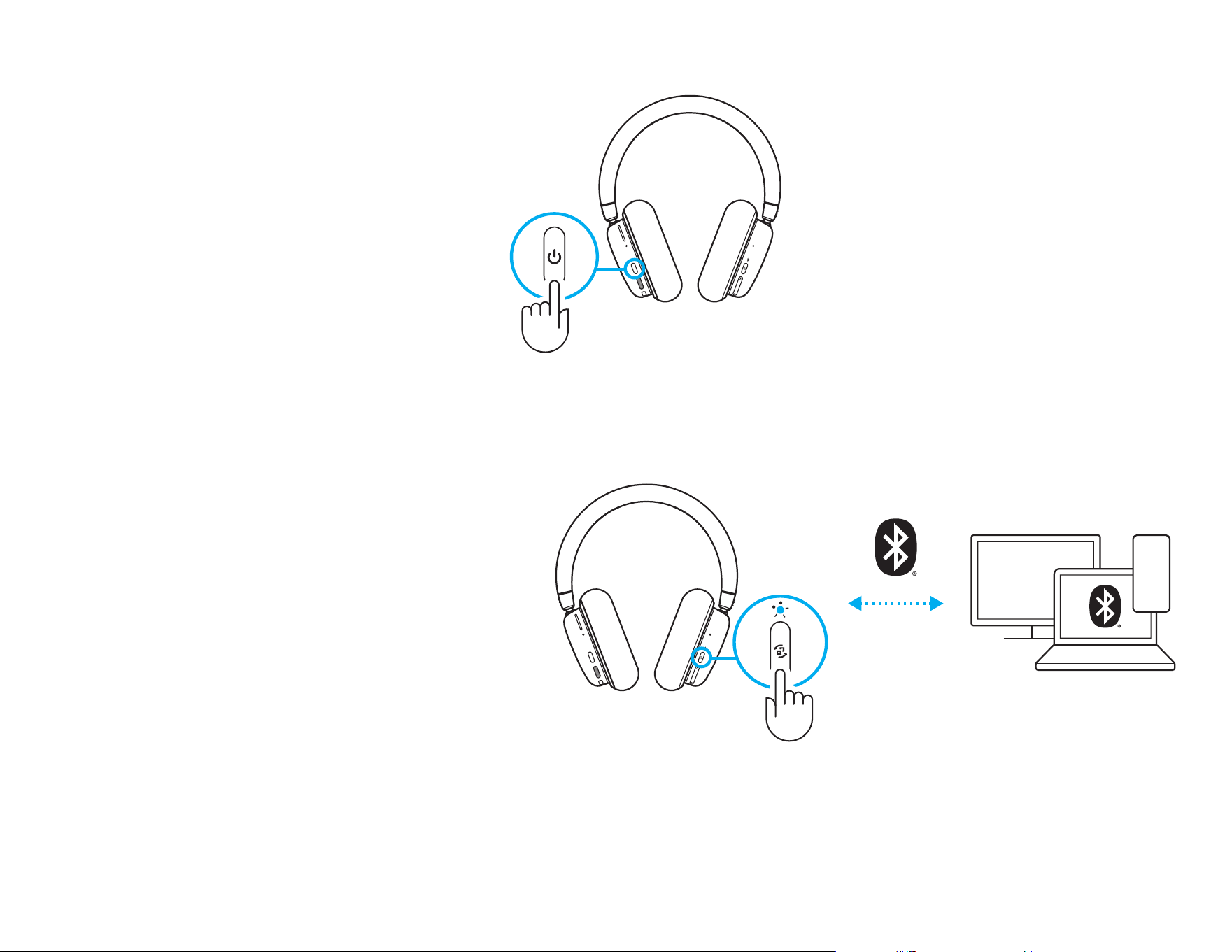
BLUETOOTH
®
CONNECTIVITY
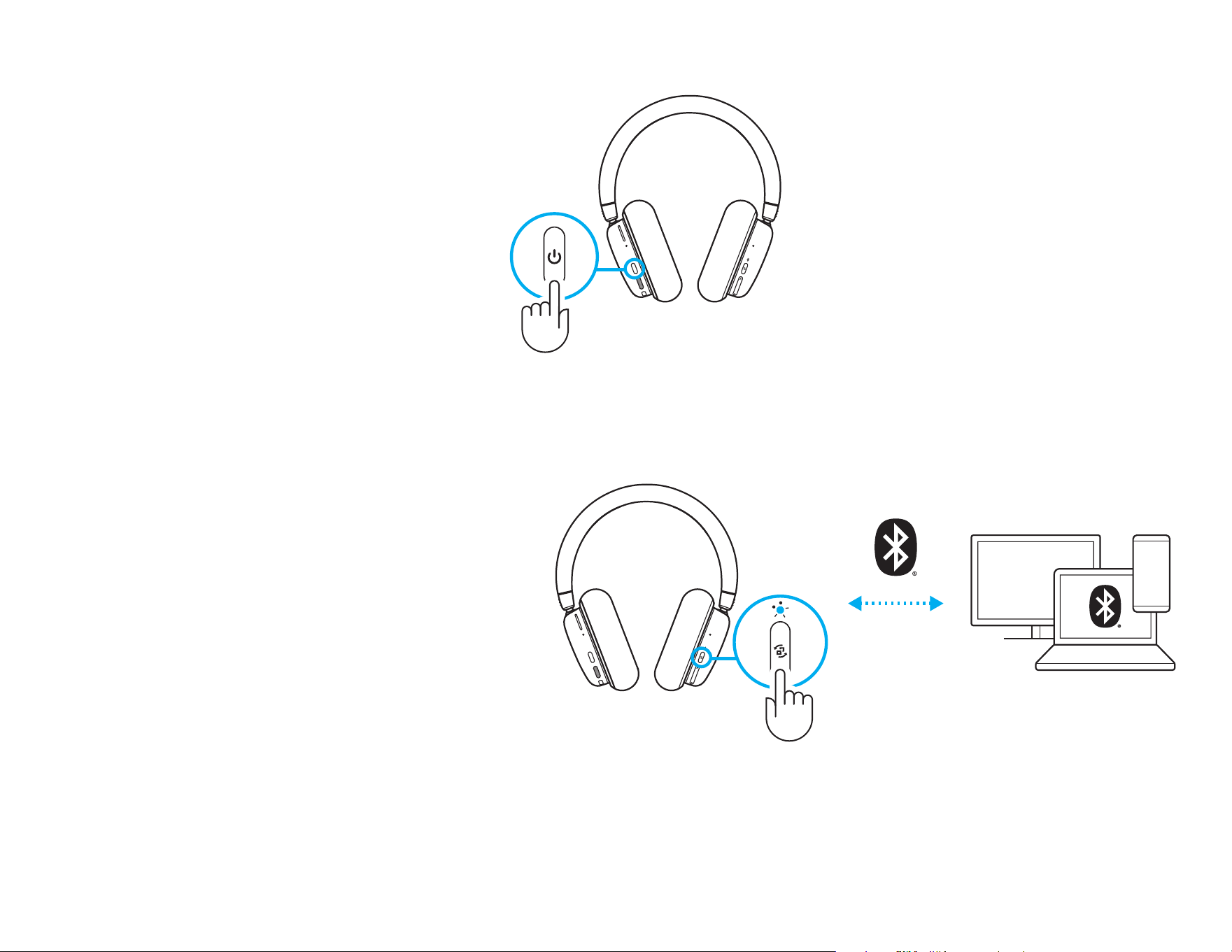
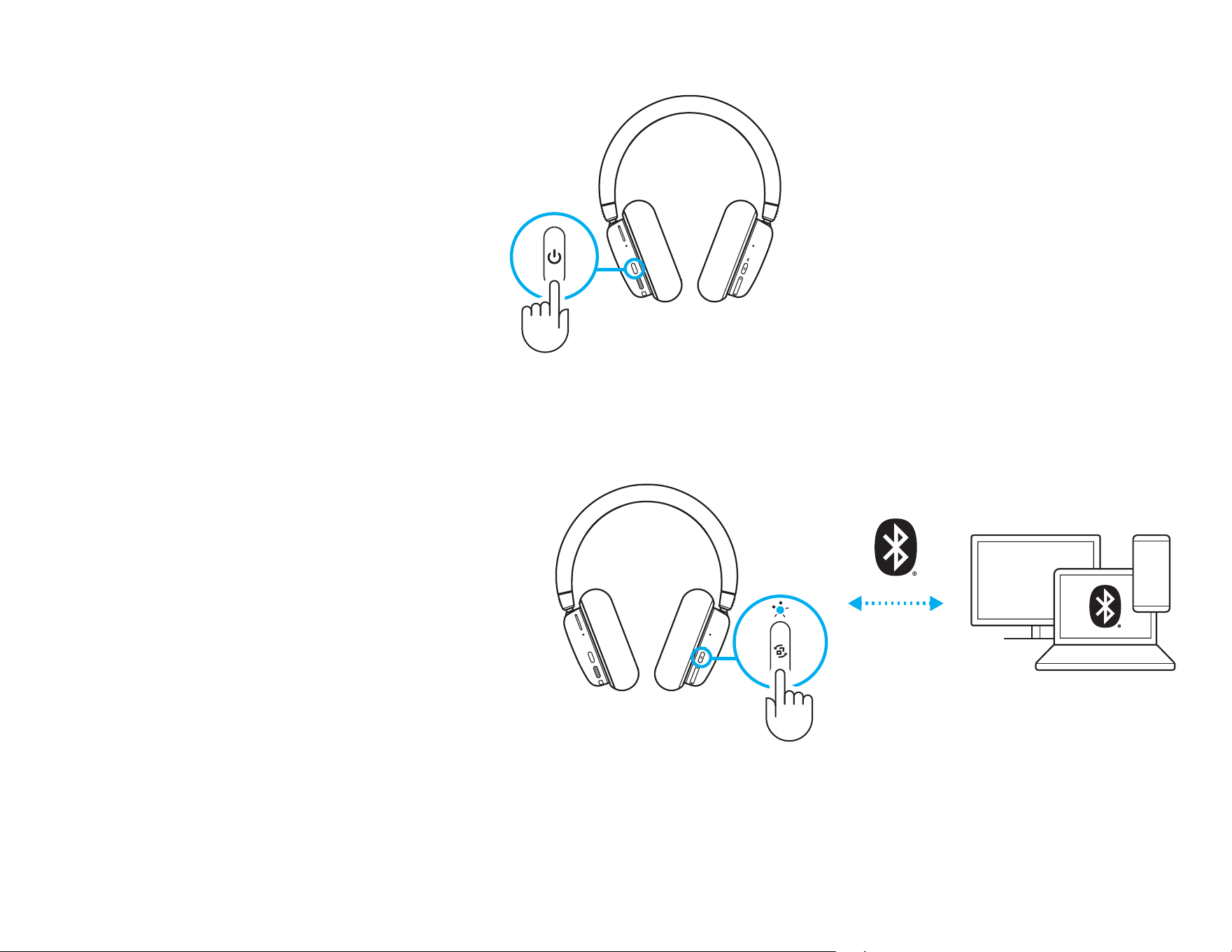
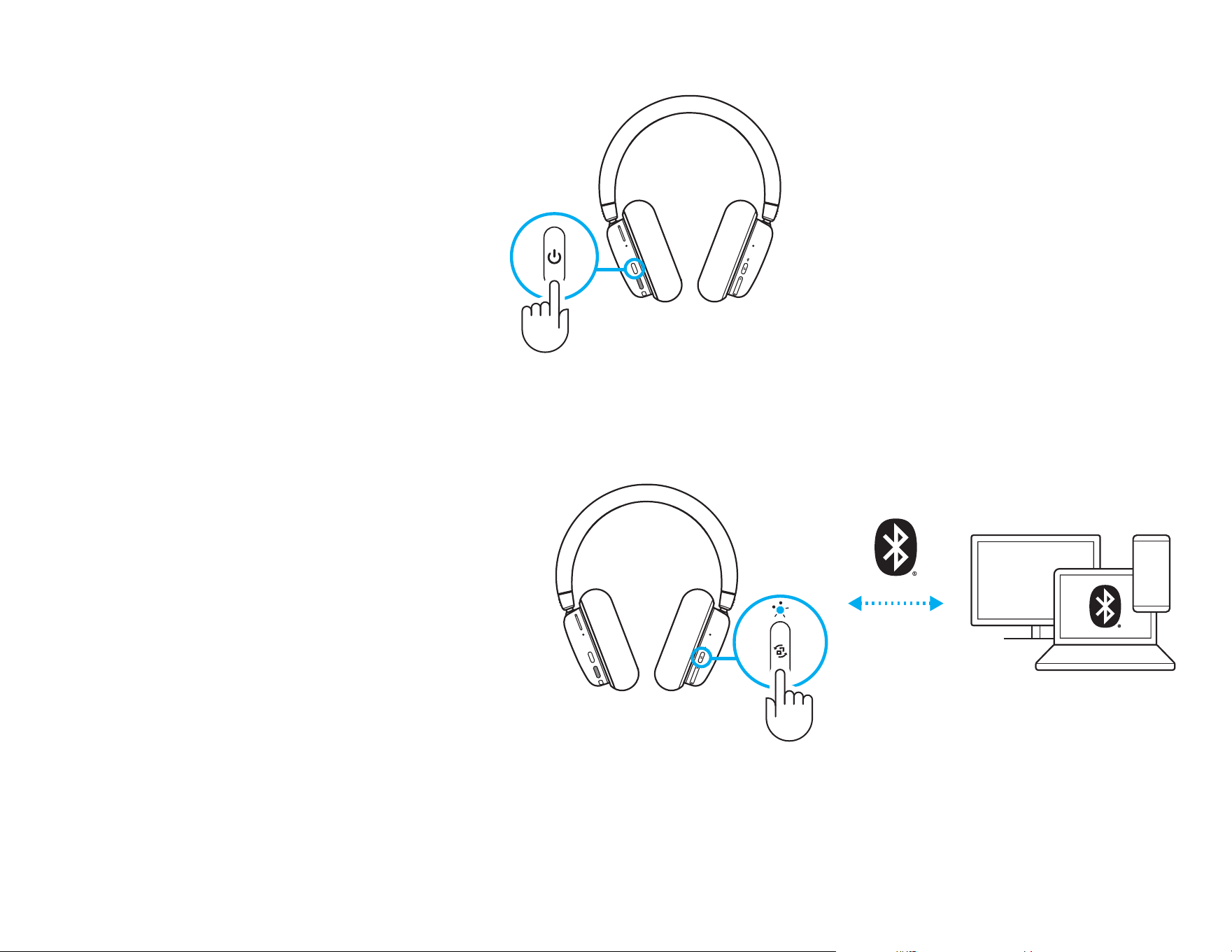
1 Turn on the G735 headset by pressing and
holding the power button for 3 seconds.
2 Press and hold Connectivity button for
3seconds to initiate pairing mode. The blue
light will ash quickly for up to 3 minutes.
3 Follow Bluetooth
®
connection for your device
to pair with the headset.
1
2 3
3 sec
3 sec
6 ENGLISH
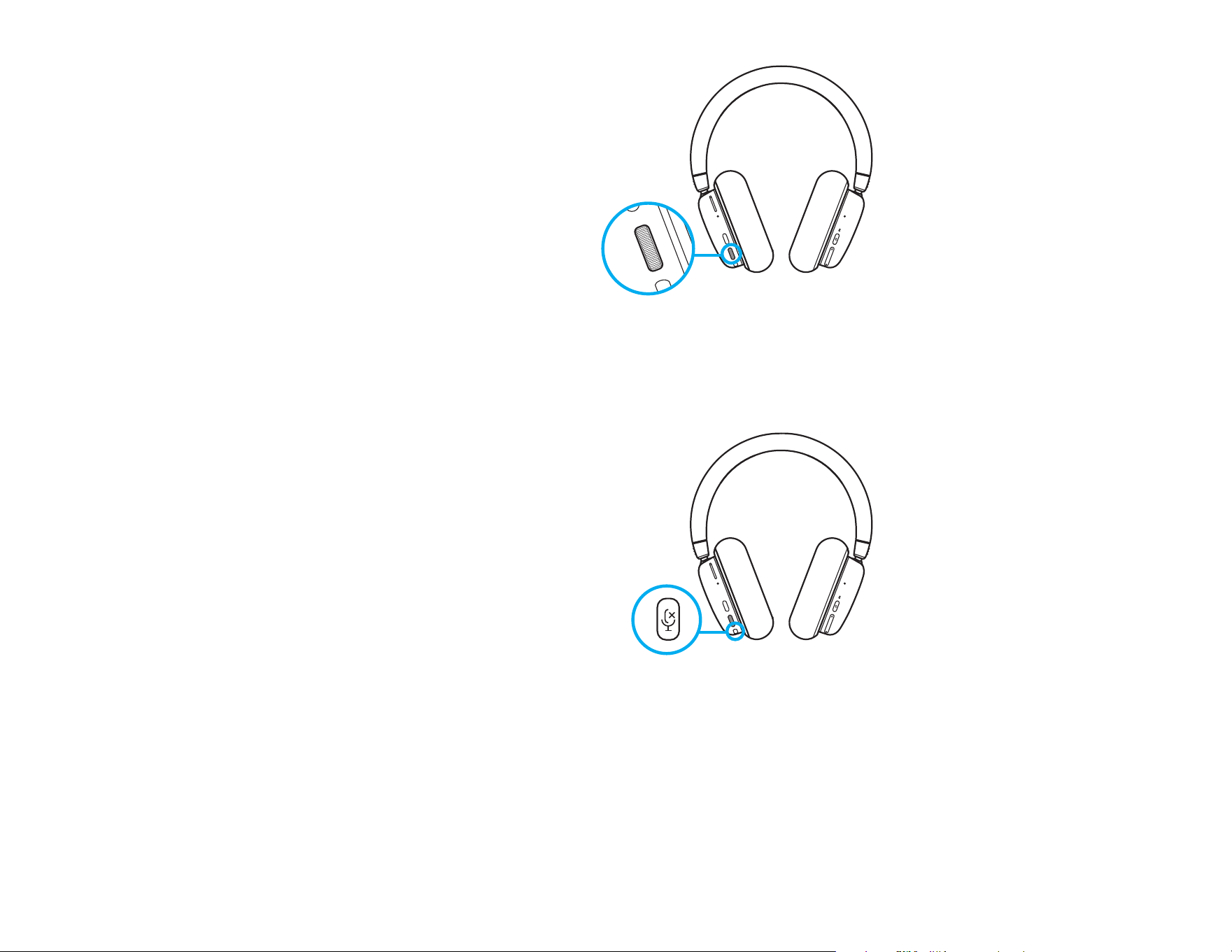
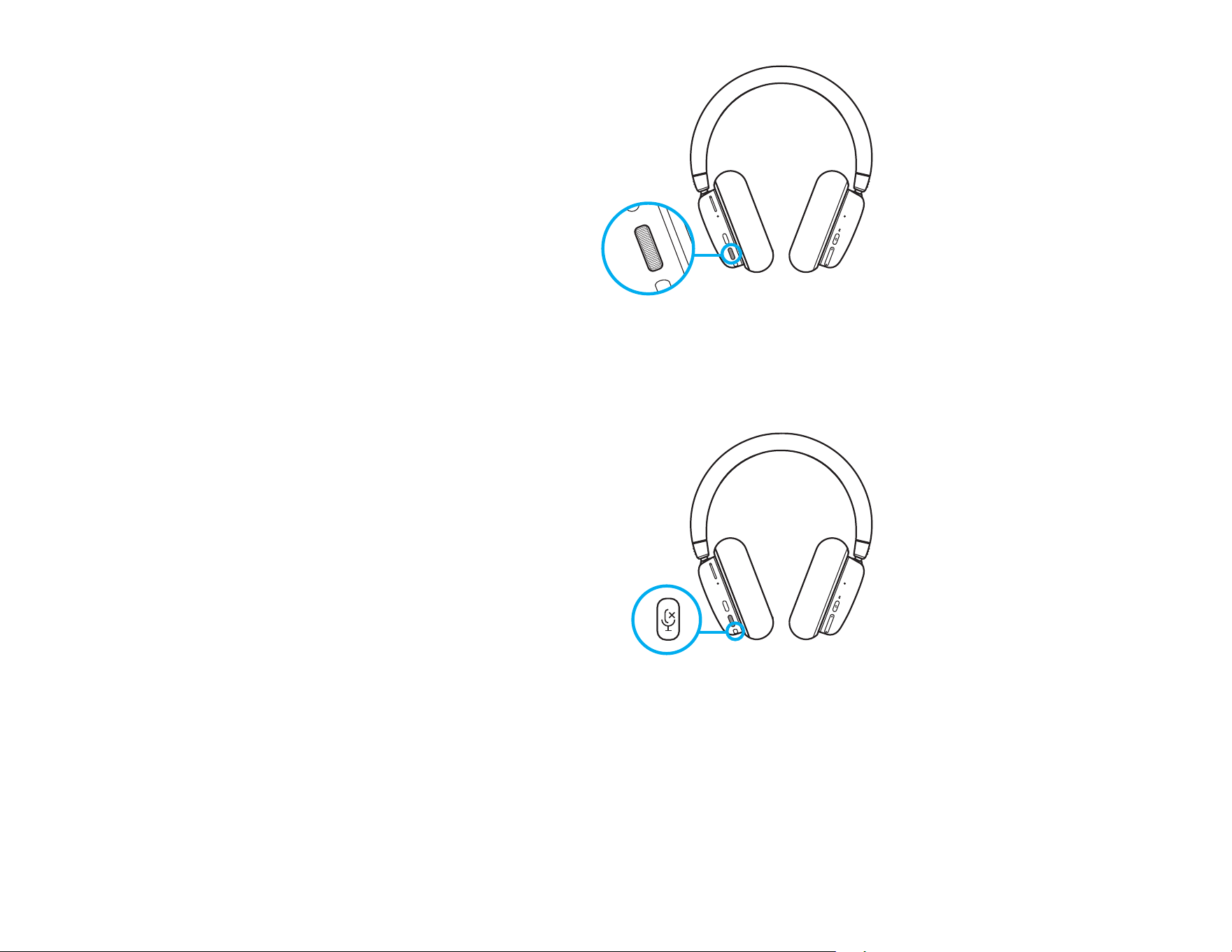
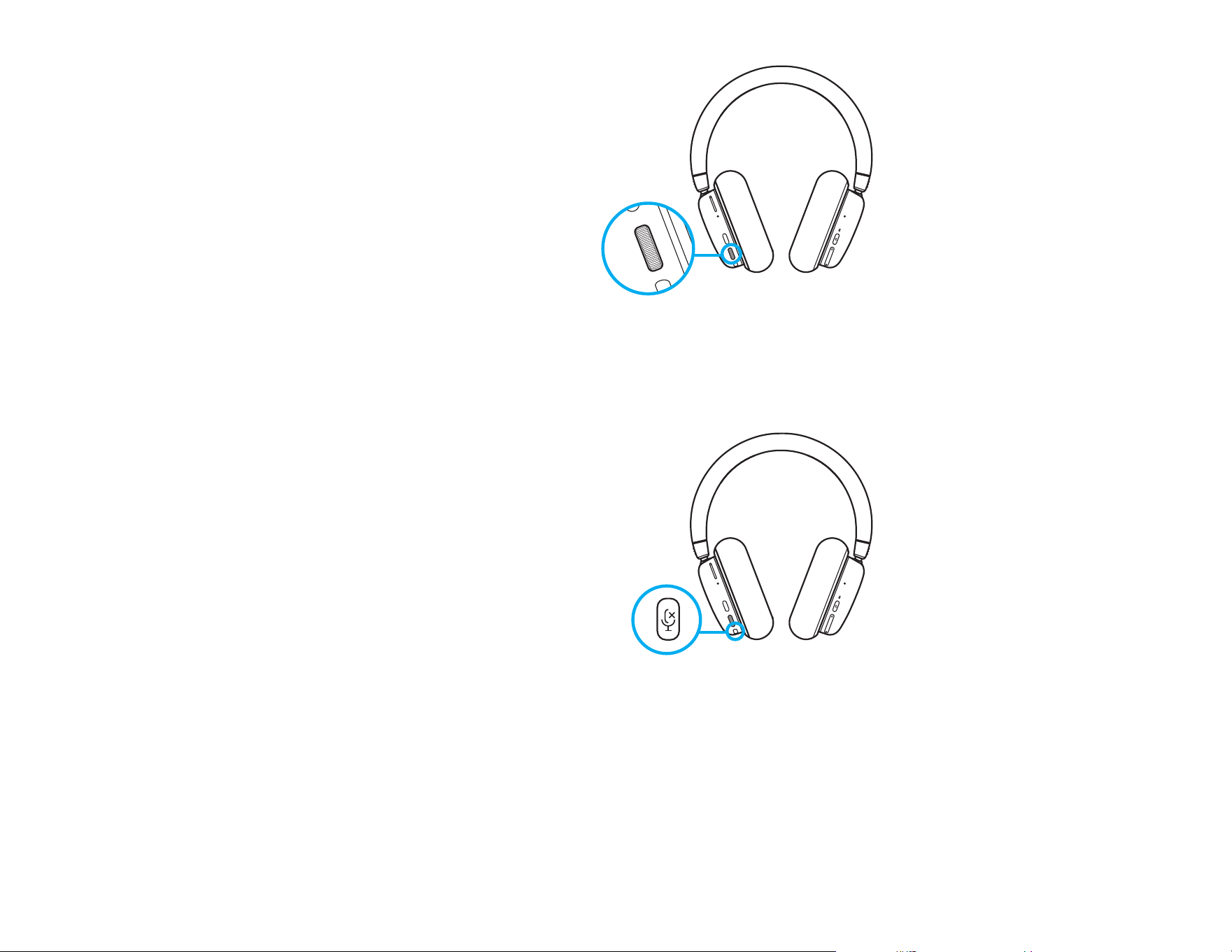
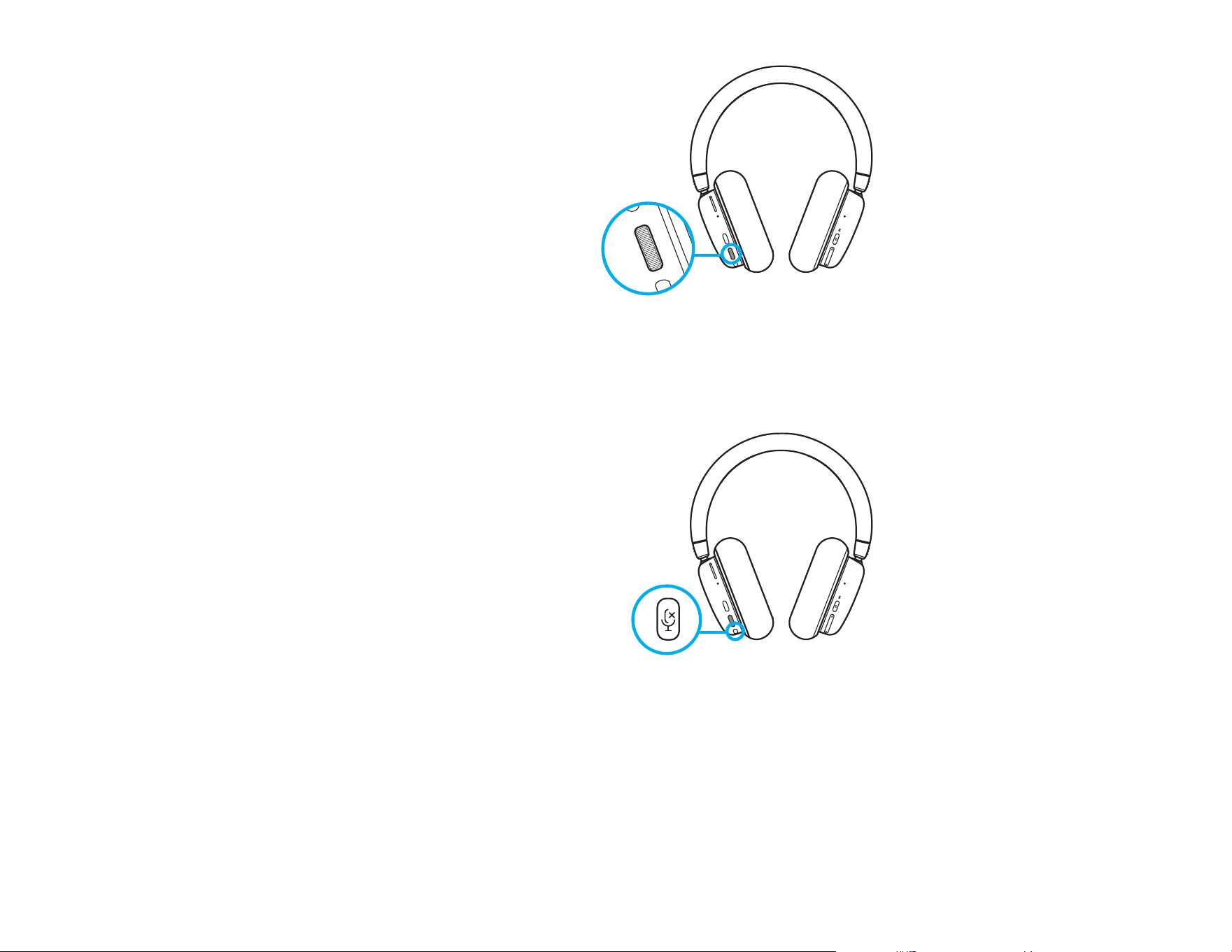
Volume
Adjust volume with the roller on the leftearcup.
This adjusts the headset’s total volume,
notthevolumes of your sources.
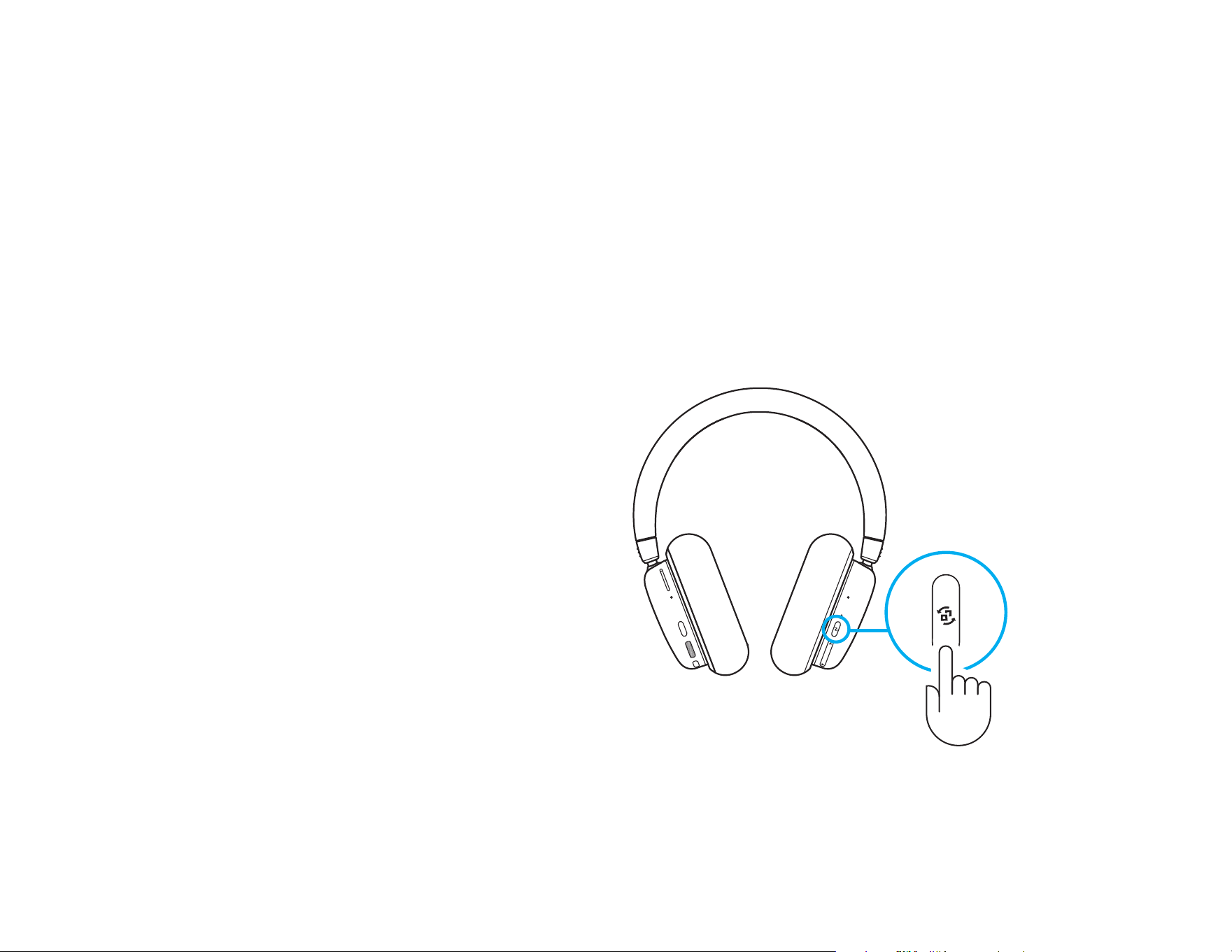
Mute/Unmute Microphone
Press the mute button located below the volume on
the left ear cup. This will mute the microphone.
When muted, the cosmetic RGB will temporarily
ash red.
There will be a mute sound notication.
7 ENGLISH
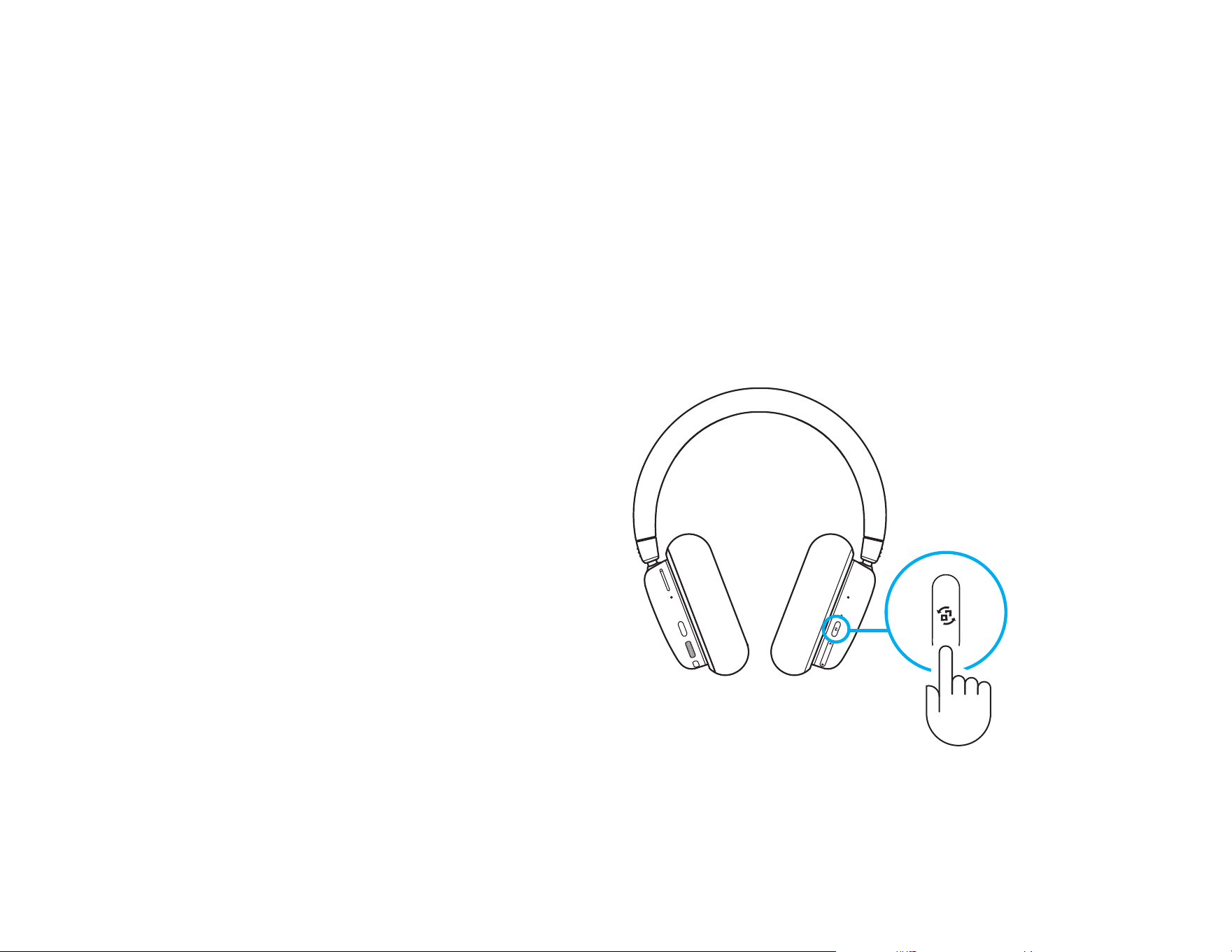
Audio Source Options
G735 can connect to and mix multiple audio sources
at once:
- LIGHTSPEED audio
- Bluetooth
®
audio
- Auxiliary audio via 3.5 mm cable (not supplied)
- LIGHTSPEED + Bluetooth
®
- Auxiliary + Bluetooth
®
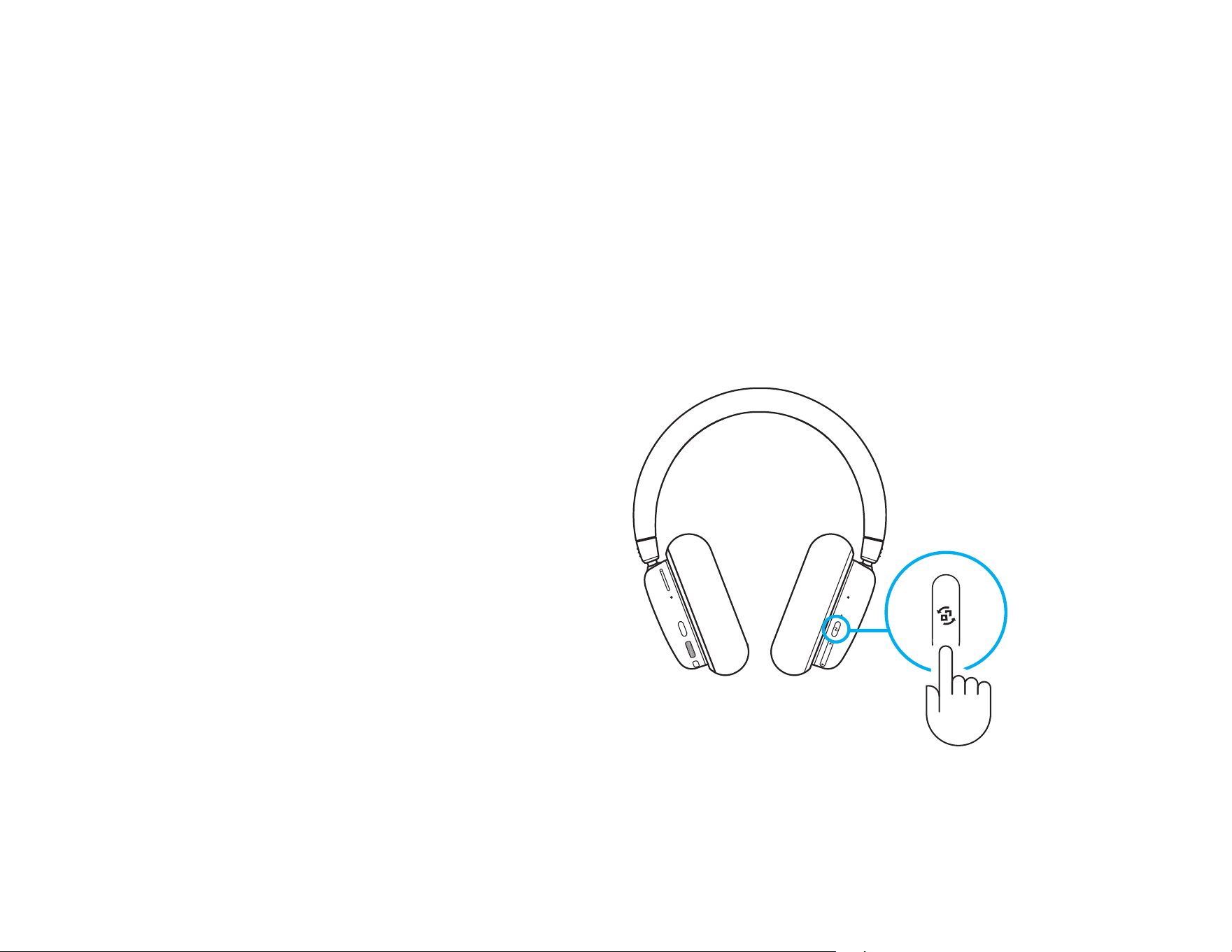
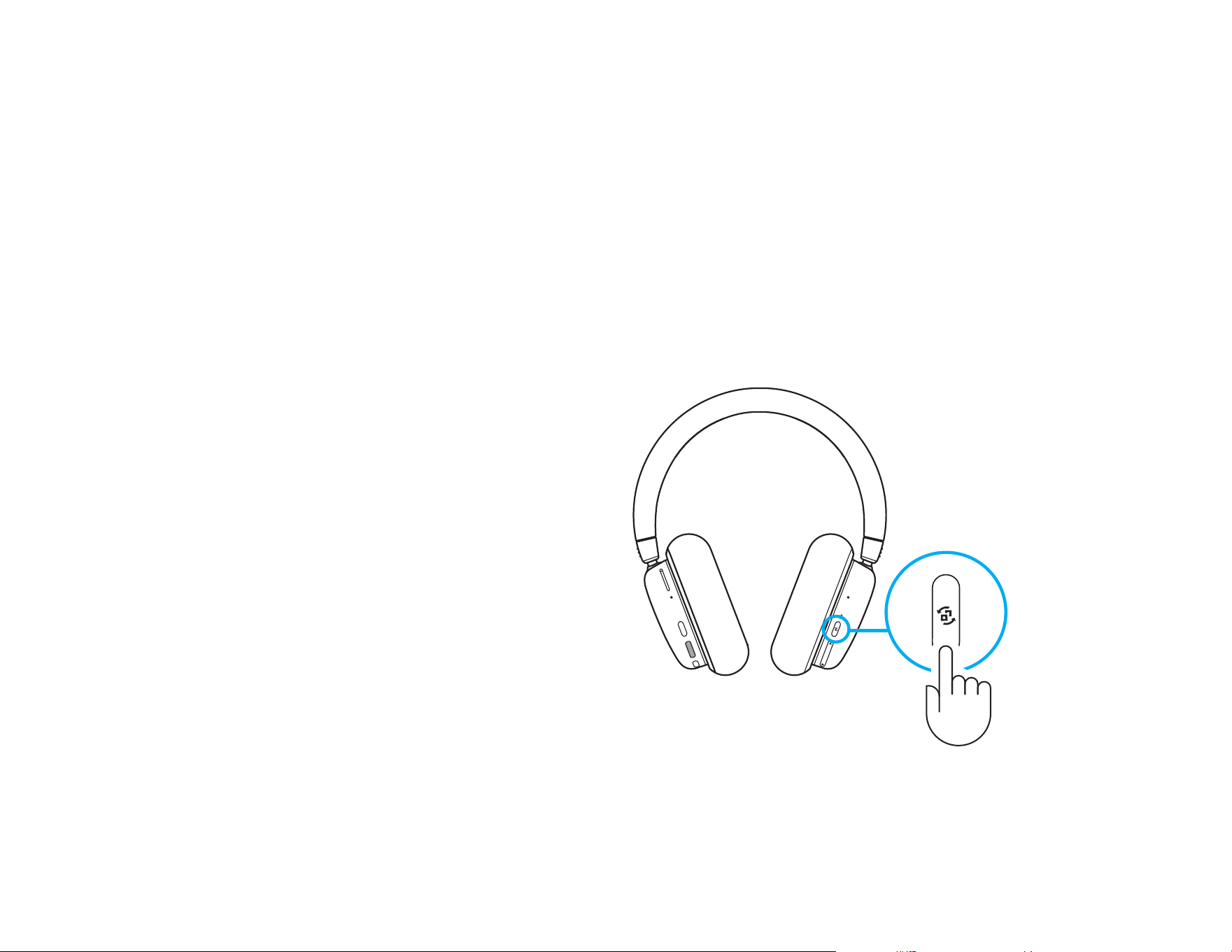
Toggling LIGHTSPEED + Bluetooth
®
/
Auxiliary + Bluetooth
®
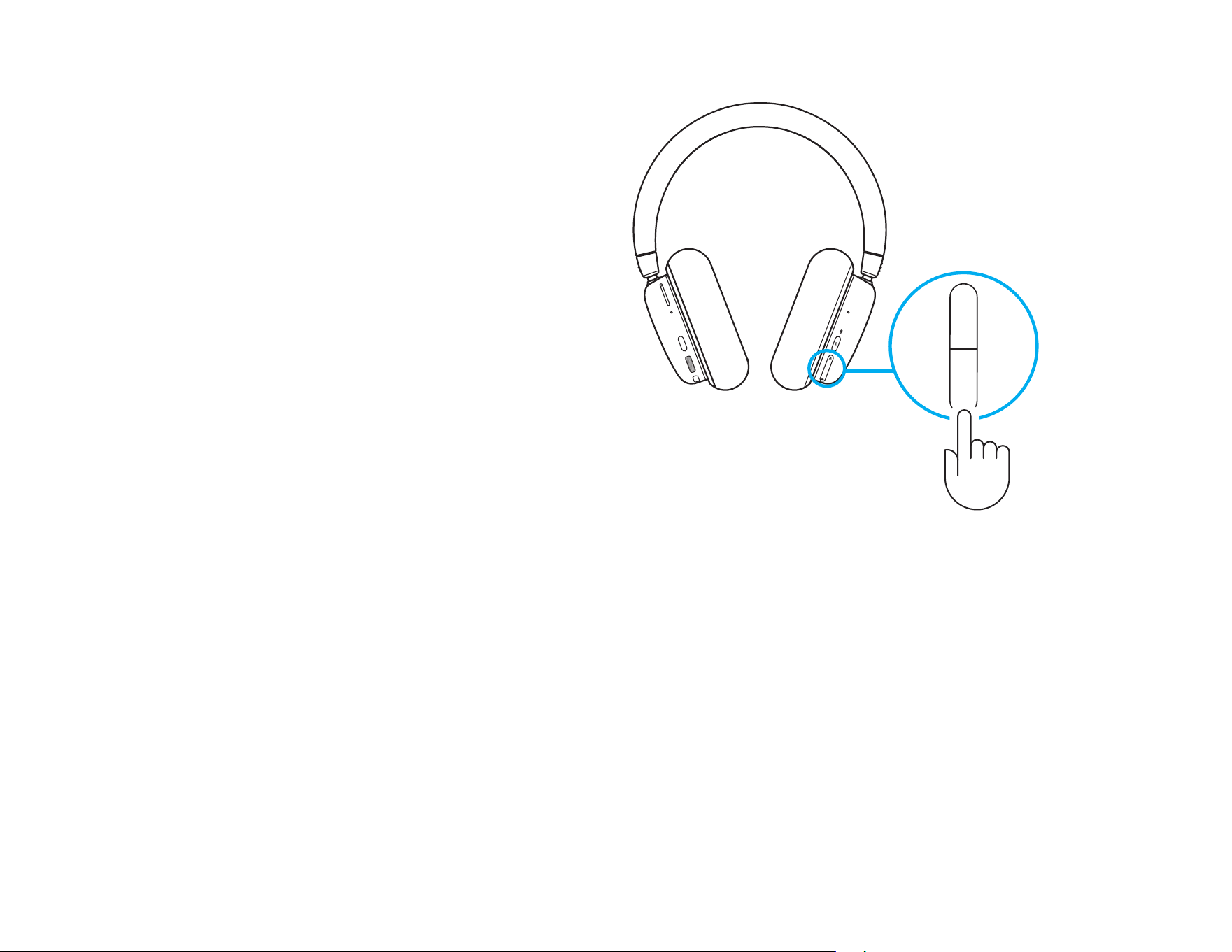
After connecting to both LIGHTSPEED and AUX,
togglebetween LIGHTSPEED and AUX options by
pressing the connectivity button on the right ear cup.
When LIGHTSPEED is active, the LED light above
thebutton will light up cyan for 5 seconds.
When AUX is active, the LED light will light up white
for5 seconds.
AUX only available when a cable is connected.
8 ENGLISH
A
B
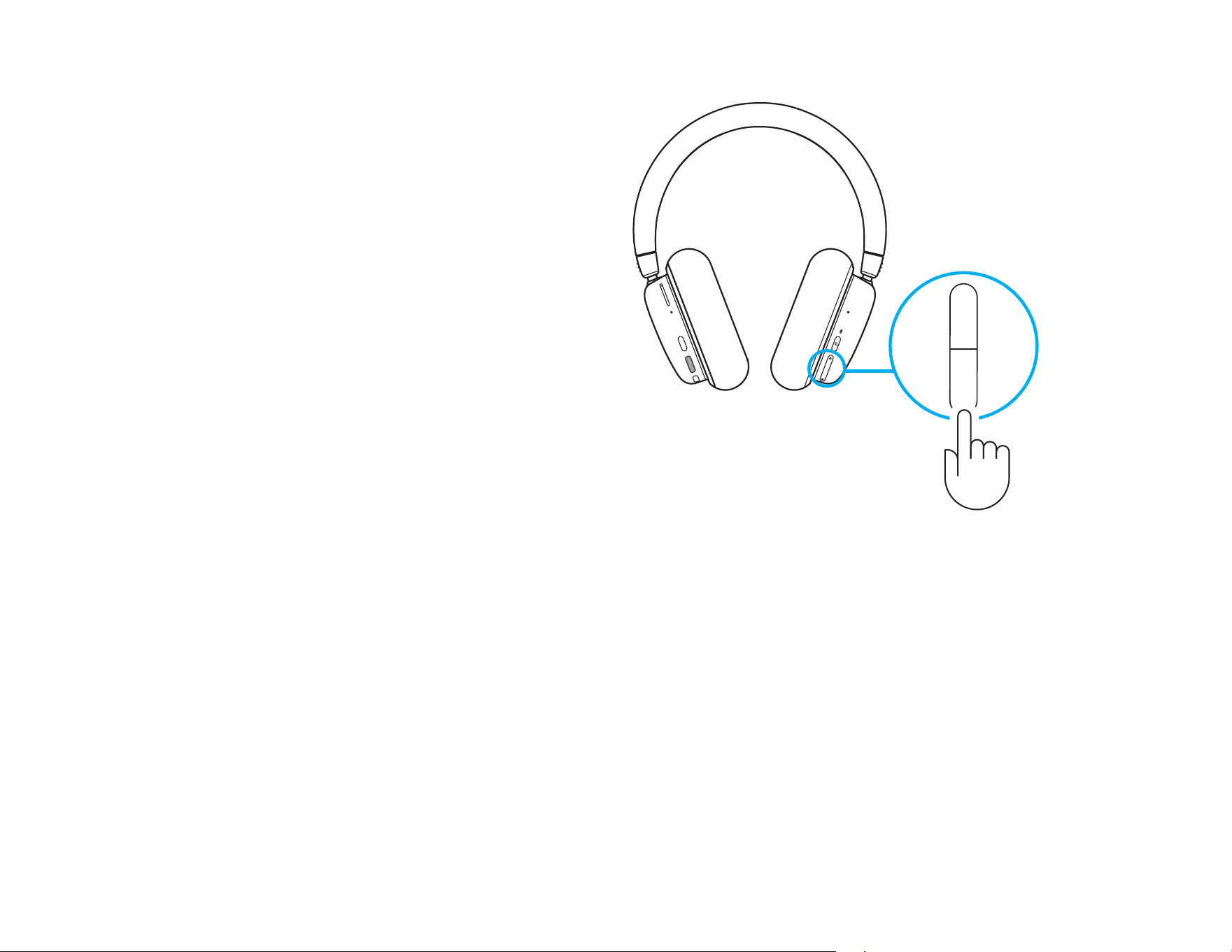
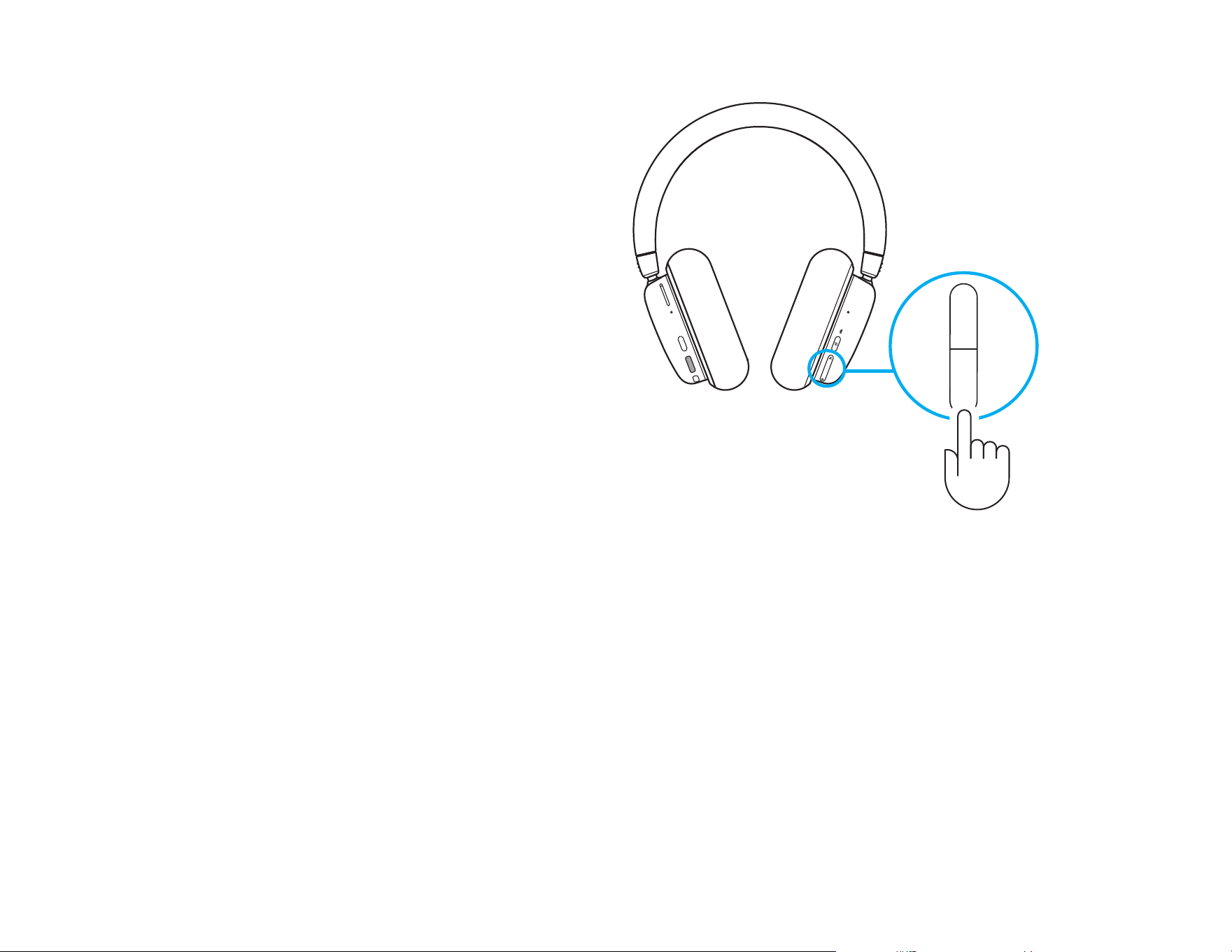
Mixing LIGHTSPEED/AUX & Bluetooth
®
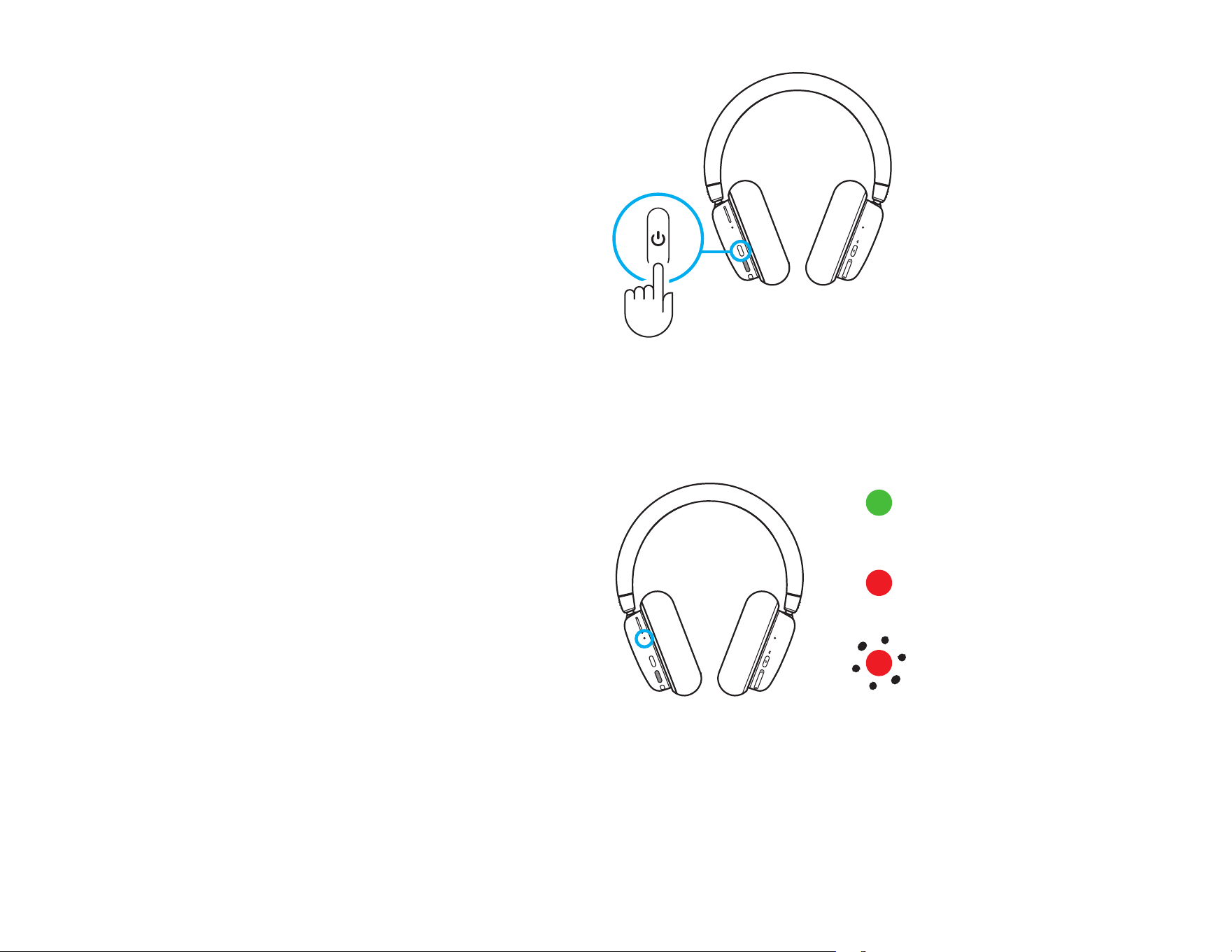
After connecting to 2 sources LIGHTSPEED or AUX,
andBluetooth
®
:
- To adjust source balance, press the up and down
buttons on the right ear cup to paddle.
- Pressing up increases the active (LIGHTSPEED
orAUX) source
- Pressing down increases Bluetooth
®
source
- To reset to equal levels, press and hold both buttons
for 3 seconds.
3 sec
3 sec
9 ENGLISH
Powering O
Turn o G735 headset by pressing the power button
on the left ear cup for 3 seconds.
The headset lighting will turn o after a short
lighting animation. There will be a sound
notication indicating power o.
If the headset is inactive for 10 minutes,
itwillautomatically shut o.
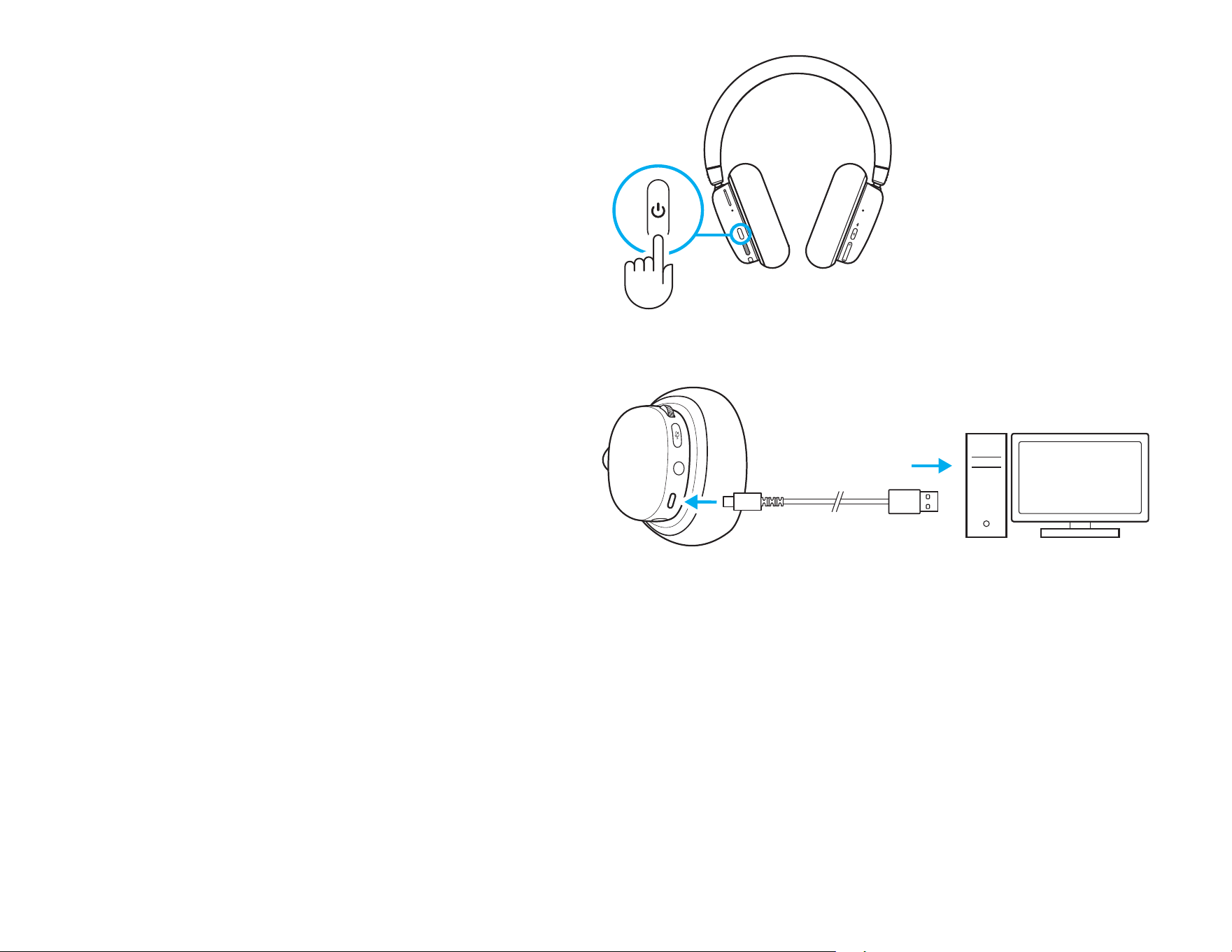
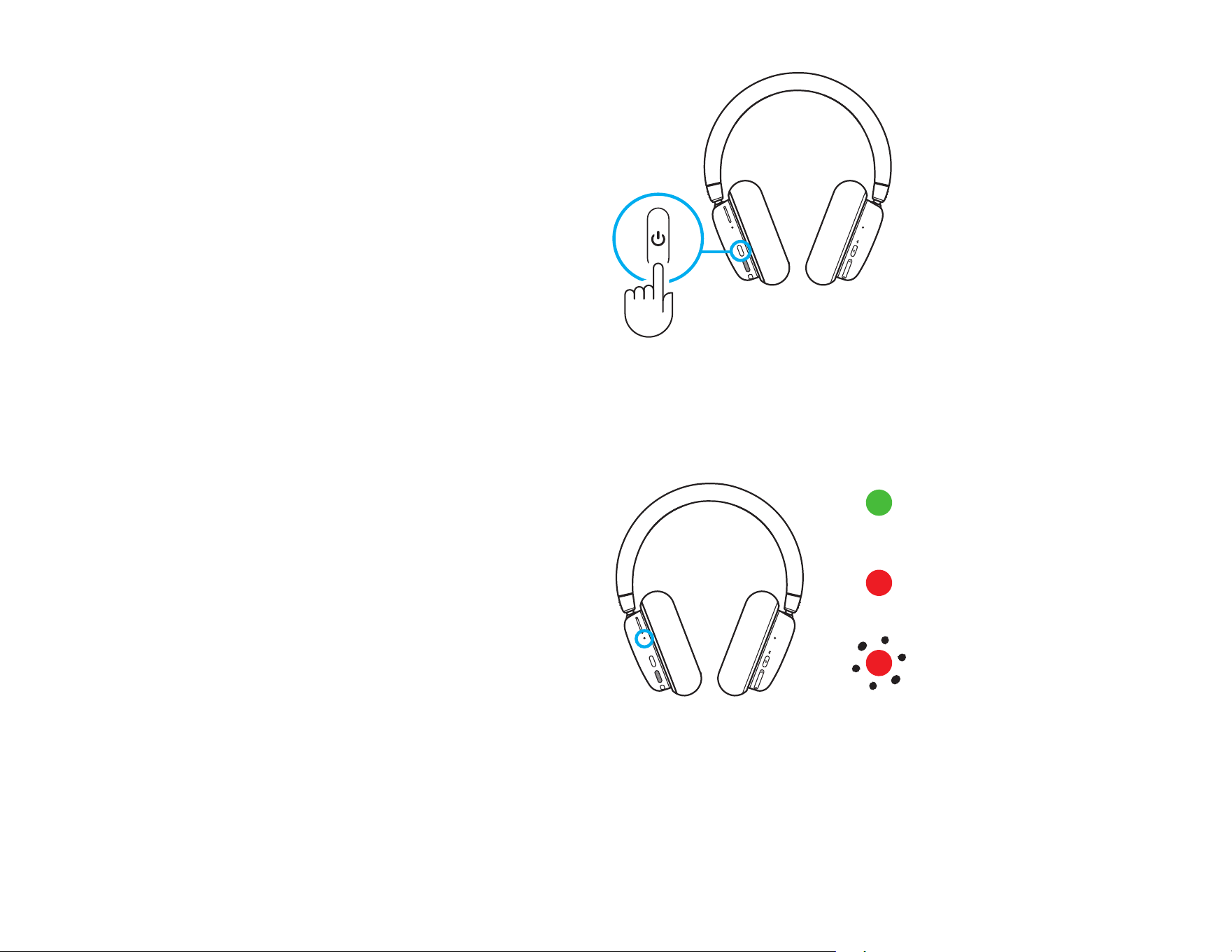
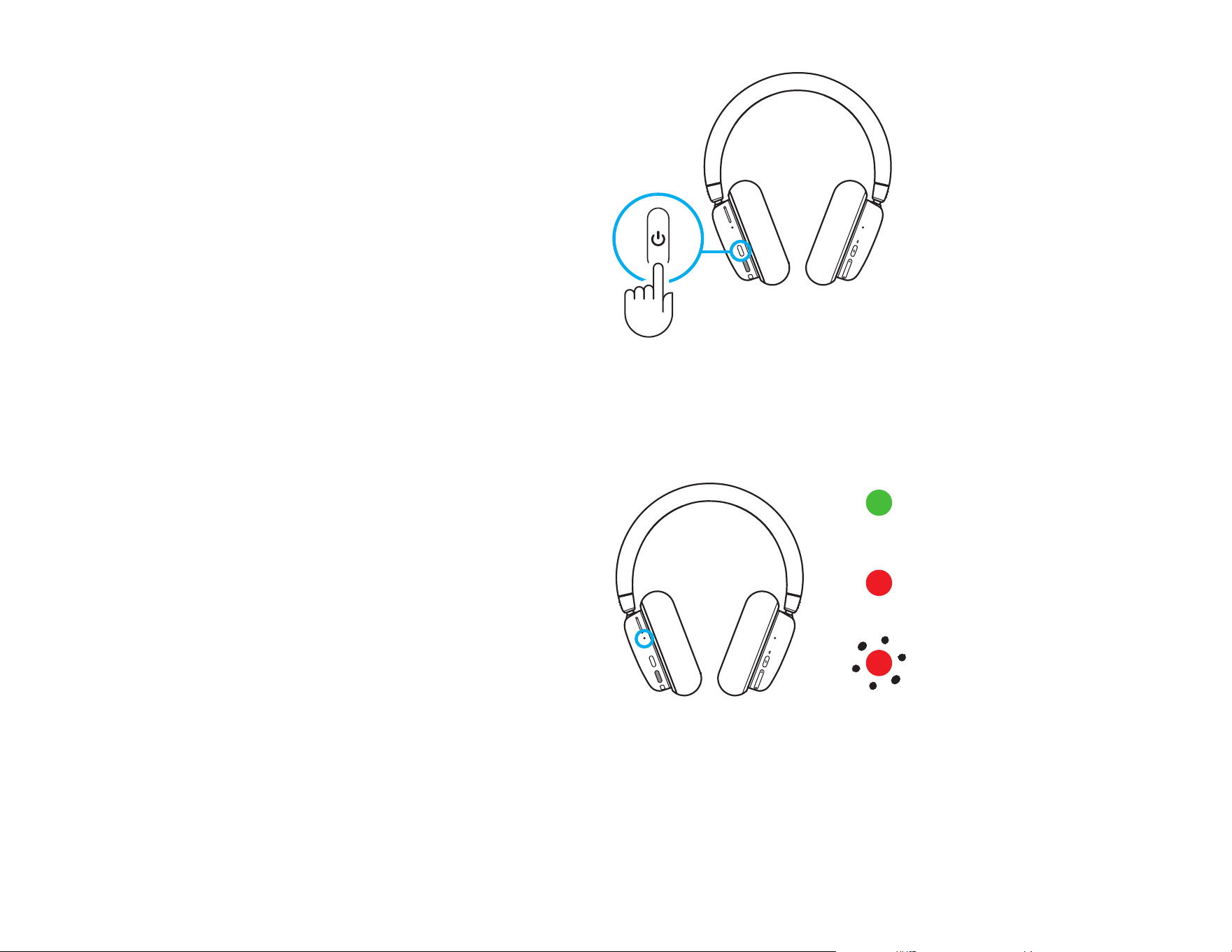
Checking Battery Status
To check the battery status, short press the power
button on the left ear cup.
The LED will be:
- Green when it’s over 30% battery
- Red when it’s under 30% battery
- Blink red when it’s under 15% battery
= >
30% battery
= <
30% battery
= <
15% battery
2x
2x
10 ENGLISH
Lighting ON/OFF
To turn o the cosmetic lighting, double press
thepower button on the left ear cup.
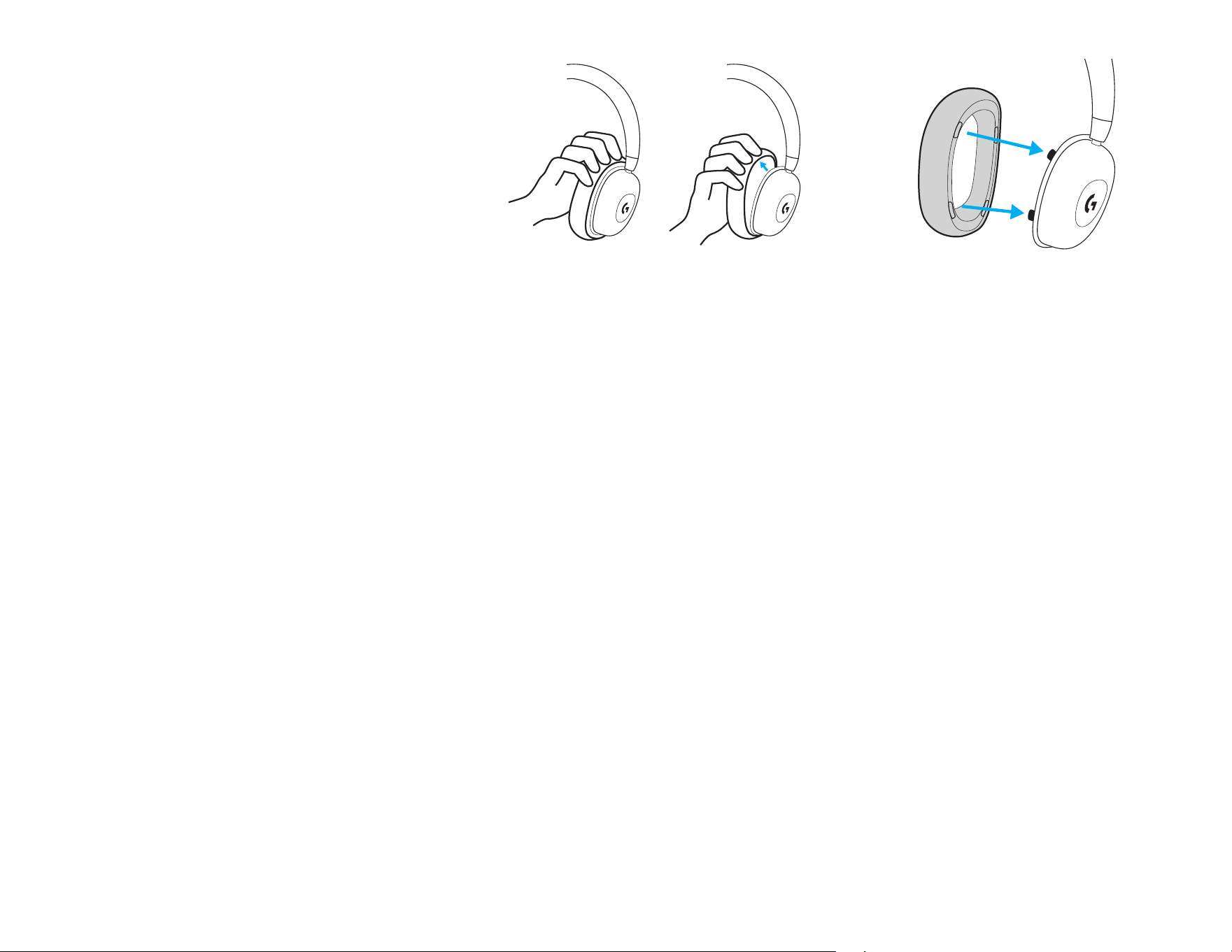
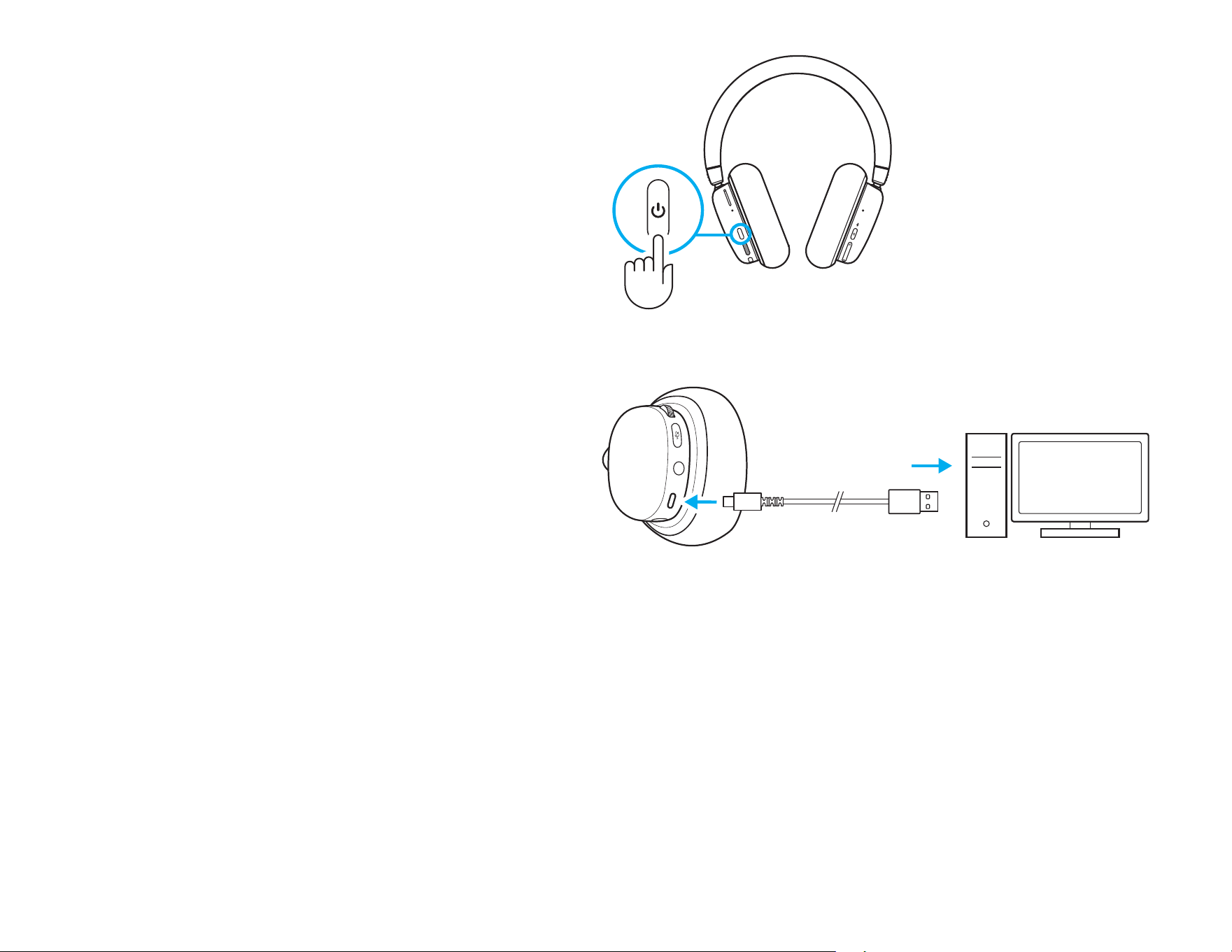
Charging the Battery
Plug the USB-C cable into the port at thebottom
ofthe left ear cup, located between themicrophone
and AUX connector ports. Connect the USB-A end
into a USB port on a PC or USB charging adapter
(not included).
The power light will illuminate green and pulse
whilecharging.
The power light glows red for low battery (<30%).
The G735 headset ships with about 60% charge.
Werecommend charging completely before use.
11 ENGLISH
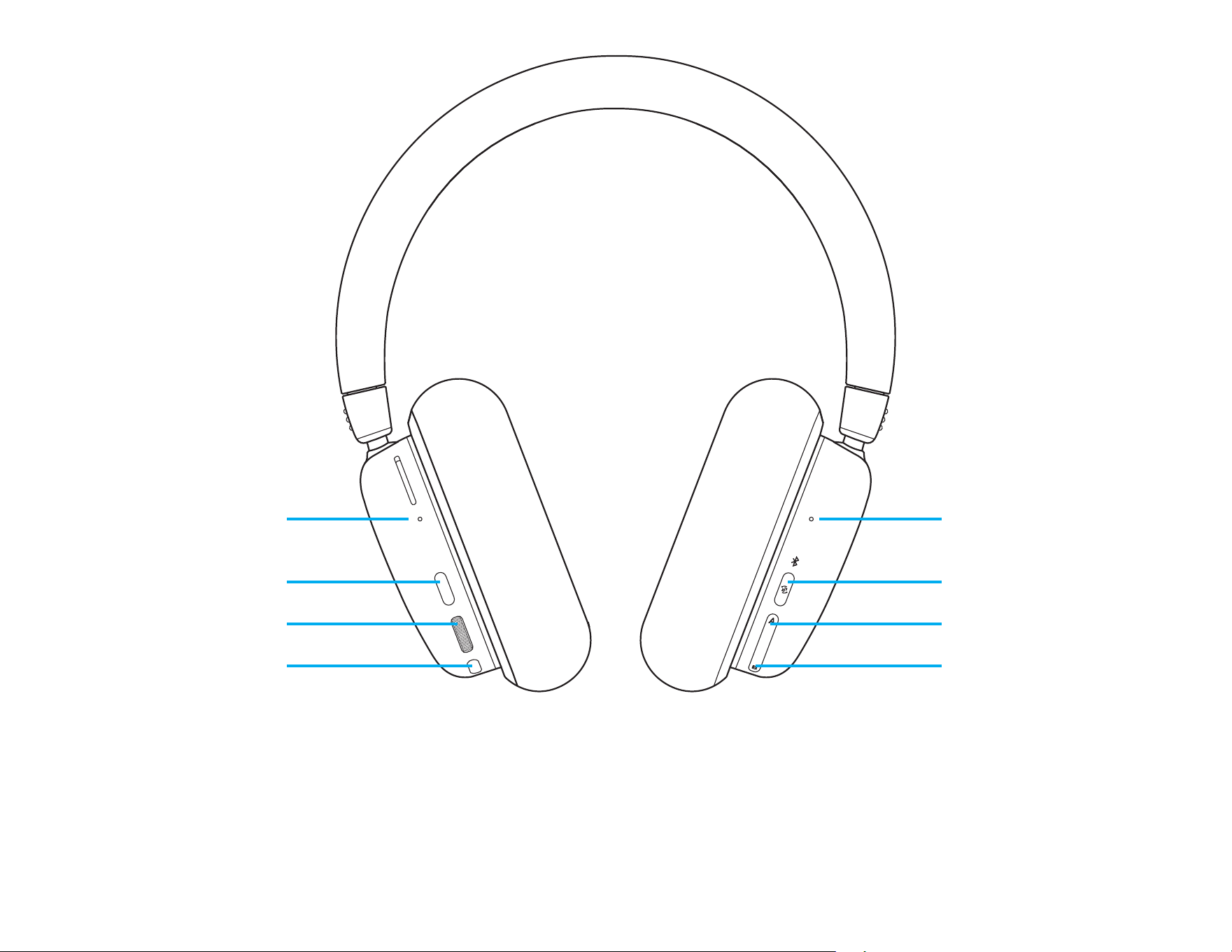
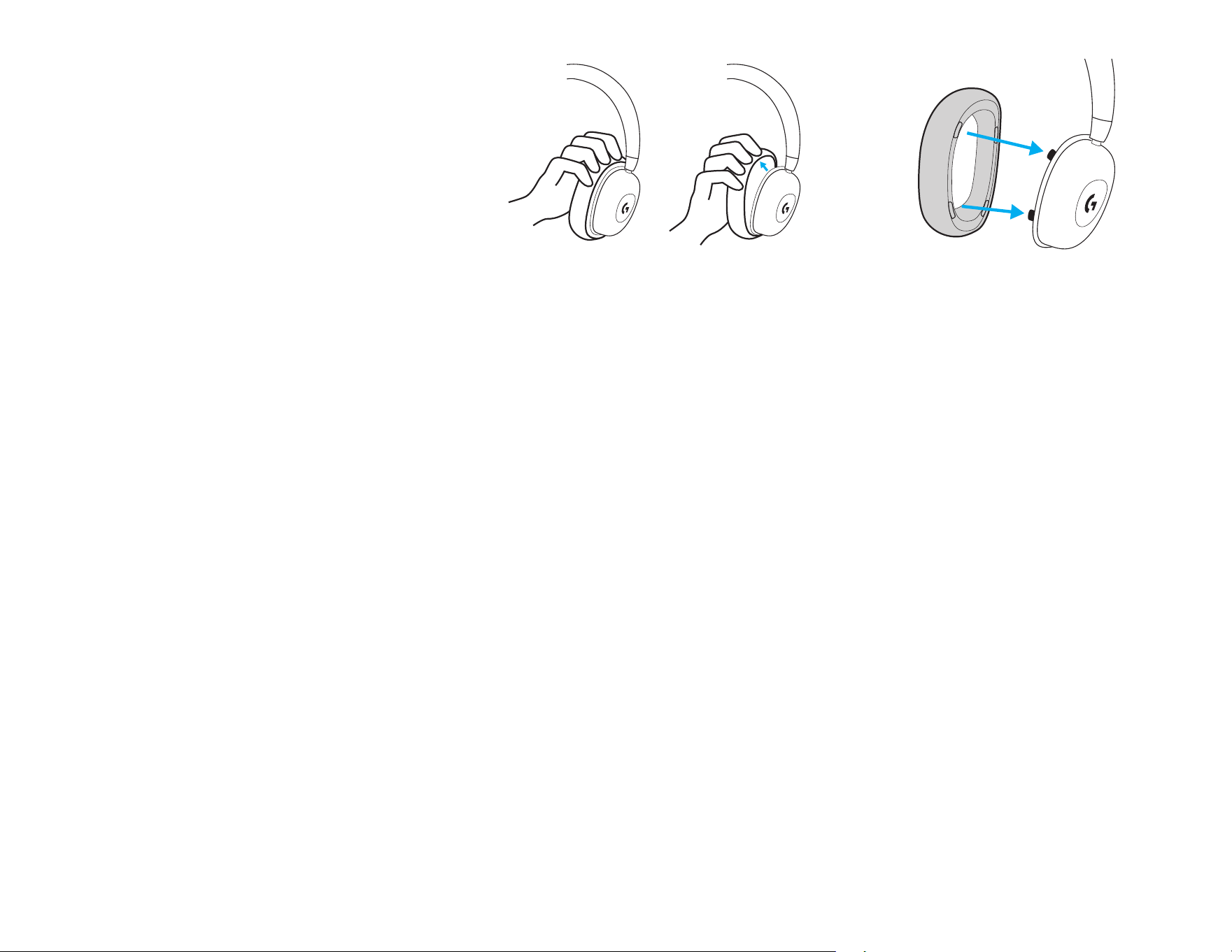
Changing Accessory Cups
Ear pads can be removed and replaced.
Connectivité Bluetooth
®
/
Témoin lumineux de source
active
Alimentation, Batterie,
Témoin lumineux de charge
Activer/désactiver LIGHTSPEED +
Bluetooth
®
/Auxiliary + Bluetooth
®
Bouton d'alimentation
Mixage audio
Source A (AUX/LIGHTSPEED)
Molette de volume
Mixage audio
Source B (Bluetooth
®
)
Bouton de bascule de sourdine
12 FRANÇAIS
3 sec
3 sec.
13 FRANÇAIS
INSTRUCTIONS D'INSTALLATION
1 Insérez le connecteur du microphone dans le port
sur l’écouteur gauche. Il est conçu pour s’insérer
dans un seul sens.
2 Allumez le casque G735 en appuyant sur lebouton
d’alimentation situé sur l’écouteur gauche, puisenle
maintenant enfoncé pendant 3 secondes.
3 Insérez le récepteur LIGHTSPEED, avec la rallonge
et le câble dans le port USB du PC. Le récepteur
peut être utilisé sans la rallonge et le câble
enl'insérant directement dans un port USB si
vous le souhaitez.
4 Téléchargez et installez le logiciel G HUB
sur votrePC/MAC pour uneexpérience
dejeu optimale (G HUB propose
un parcours d’intégration pour les
fonctionnalités). Rendez-vous sur
https://www.logitechg.com/ghub
1 2
3
4
www.logitechG.com/ghub
3 sec
3 sec
CONNECTIVITÉ BLUETOOTH
®
1 Allumez le casque G735 en appuyant sur
lebouton d'alimentation et en le maintenant
enfoncé pendant 3 secondes.
2 Maintenez le bouton Connectivité enfoncé
pendant 3 secondes pour déclencher
lemode de couplage. Letémoin
lumineuxbleu clignote rapidement
pendant3minutes.
3 Suivez la connexion Bluetooth
®
pour que
votre dispositif se couple au casque.
1
2 3
3 sec.
3 sec.
14 FRANÇAIS
15 FRANÇAIS
Volume
Réglez le volume avec la roulette située sur
l’écouteur gauche. Cela permet de régler le volume
total du casque et non celui de vos sources.
Activer/désactiver la sourdine sur
lemicrophone
Appuyez sur le bouton sourdine situé sous le volume
sur l’écouteur gauche. Cela mettra le microphone
en sourdine.
Lorsqu’il est en sourdine, le voyant RVB clignote
provisoirement en rouge.
Une notication de mise en sourdine sera générée.
16 FRANÇAIS
Options de source audio
Le casque G735 peut se connecter et mélanger
plusieurs sources audio en une:
- audio LIGHTSPEED
- audio Bluetooth
®
- audio auxiliaire via un câble de 3,5 mm (non
fourni)
- LIGHTSPEED + Bluetooth
®
- Auxiliaire + Bluetooth
®
Activer/désactiver LIGHTSPEED + Bluetooth
®
/
Auxiliaire + Bluetooth
®
Après la connexion aux sources LIGHTSPEED et AUX,
vous pouvez basculer de l’une à l’autre en appuyant
sur le bouton Connectivité sur l’écouteur droit.
Lorsque LIGHTSPEED est actif, le témoin lumineux
au-dessus du bouton s’allume en cyan pendant 5
secondes.
Lorsque AUX est actif, le témoin lumineux s’allume en
blanc pendant 5 secondes.
AUX est disponible uniquement lorsqu’un câble est
connecté.
17 FRANÇAIS
A
B
Mélanger LIGHTSPEED/AUX et Bluetooth
®
Après avoir connecté 2 sources LIGHTSPEED ou AUX
etBluetooth
®
:
- Pour régler l’équilibre des sources, appuyez sur
lesboutons + et - sur l’écouteur droit.
- Le bouton + permet d’augmenter la source active
(LIGHTSPEED ou AUX)
- Le bouton - permet de diminuer la source Bluetooth
®
- Pour rétablir le niveau d’équilibre, appuyez sur
lesdeux boutons et maintenez-les enfoncés pendant
3 secondes.
3 sec
3 sec.
18 FRANÇAIS
Mise hors tension en cours
Éteignez le casque G735 en appuyant sur le bouton
d’alimentation situé sur l’écouteur gauche, puis en
le maintenant enfoncé pendant 3 secondes.
L’éclairage du casque sera éteint après une courte
animation de l’éclairage. Un son indiquant que
lecasque est éteint sera émis.
Si le casque est inactif pendant 10 minutes,
ilseraautomatiquement éteint.
Vérication du niveau de la batterie
Pour contrôler l’état de la batterie, appuyez
brièvement sur le bouton d’alimentation sur
l’écouteur gauche.
Le témoin lumineux sera:
- Vert au-dessus de 30% de batterie
- Rouge en dessous de 30% de batterie
- Rouge clignotant en dessous de 15% de batterie
= >
30% de batterie
= <
30% de batterie
= >
15% de batterie
2x
2x
19 FRANÇAIS
Éclairage allumé/éteint
Pour éteindre l’éclairage cosmétique, appuyez deux fois
sur le bouton d’alimentation sur l’écouteur gauche.
Charge de la batterie
Branchez la che USB-C dans le port en bas de
l’écouteur gauche, entre les ports du microphone
etdu connecteur AUX. Connectez l’extrémité USB-A
à un port USB sur un PC ou un adaptateur de port
decharge USB (non inclus).
Le témoin d’alimentation s’allume en vert et clignote
pendant la charge.
Le témoin d’alimentation s’allume en rouge en cas
debatterie faible (<30%).
Le casque G735 est livré avec 60% de charge environ.
Nous conseillons de le charger complètement avant
utilisation.
20 FRANÇAIS
Changement des oreillettes
Les oreillettes peuvent être retirées,
puisremplacées.
LED de conectividad
Bluetooth
®
/fuente activa
LED de alimentación,
bateríacarga
Conmutador LIGHTSPEED +
Bluetooth
®
/Auxiliar + Bluetooth
®
Botón de encendido
Mezcla de audio
Fuente A (AUX/LIGHTSPEED)
Control giratorio de volumen
Mezcla de audio
Fuente B (Bluetooth
®
)
Conmutador de silencio
21 ESPAÑOL
3 sec
3 s
22 ESPAÑOL
INSTRUCCIONES DE CONFIGURACIÓN
1 Inserta el conector de micrófono en el puerto
dela copa izquierda. Se diseñó para encajar en
un solo sentido.
2 Enciende los audífonos con micrófono G735.
Paraello, mantén presionado el botón
deencendido situado en la copa izquierda
portres segundos.
3 Inserta el receptor LIGHTSPEED, con el alargador
y el cable, en el puerto USB de la PC. El receptor
también se puede usar sin el alargador y el cable
insertándolo directamente en un puerto USB.
4 Descarga e instala el software G HUB en tu PC/
MAC para una experiencia de juego óptima
(G HUB ofrece integración de funciones).
Veawww.logitechG.com/ghub
1 2
3
4
www.logitechG.com/ghub
23 ESPAÑOL
3 sec
3 sec
CONECTIVIDAD BLUETOOTH
®
1 Enciende los audífonos con micrófono G735.
Para ello, mantén presionado el botón
deencendido por tres segundos.
2 Mantén presionado el botón de conectividad
por 3 segundos para iniciar el modo
deemparejamiento. La luz azul emitirá
destellos rápidos hasta tres minutos.
3 Sigue las instrucciones de conexión
Bluetooth
®
de tu dispositivo para
emparejarlo con los audífonos.
1
2 3
3 s
3 s
24 ESPAÑOL
Volumen
Ajusta el volumen con el control giratorio de
lacopaizquierda. Esto ajusta el volumen total
delos audífonos, no el volumen de tus fuentes.
Silenciar/Reactivar micrófono
Presiona el botón de silencio situado debajo
delvolumen en la copa izquierda. Esto silenciará
elmicrófono.
Cuando esté silenciado, el RGB cosmético emitirá
destellos rojos por cierto tiempo.
Habrá una noticación sonora de silencio.
25 ESPAÑOL
Opciones de fuentes de audio
Los G735 pueden conectarse a varias fuentes
deaudio a la vez y mezclarlas:
- Audio LIGHTSPEED
- Audio Bluetooth
®
- Audio auxiliar por cable con conexión de 3,5 mm
(no se suministra)
- LIGHTSPEED + Bluetooth
®
- Auxiliar + Bluetooth
®
Conmutar LIGHTSPEED + Bluetooth
®
/
Auxiliar + Bluetooth
®
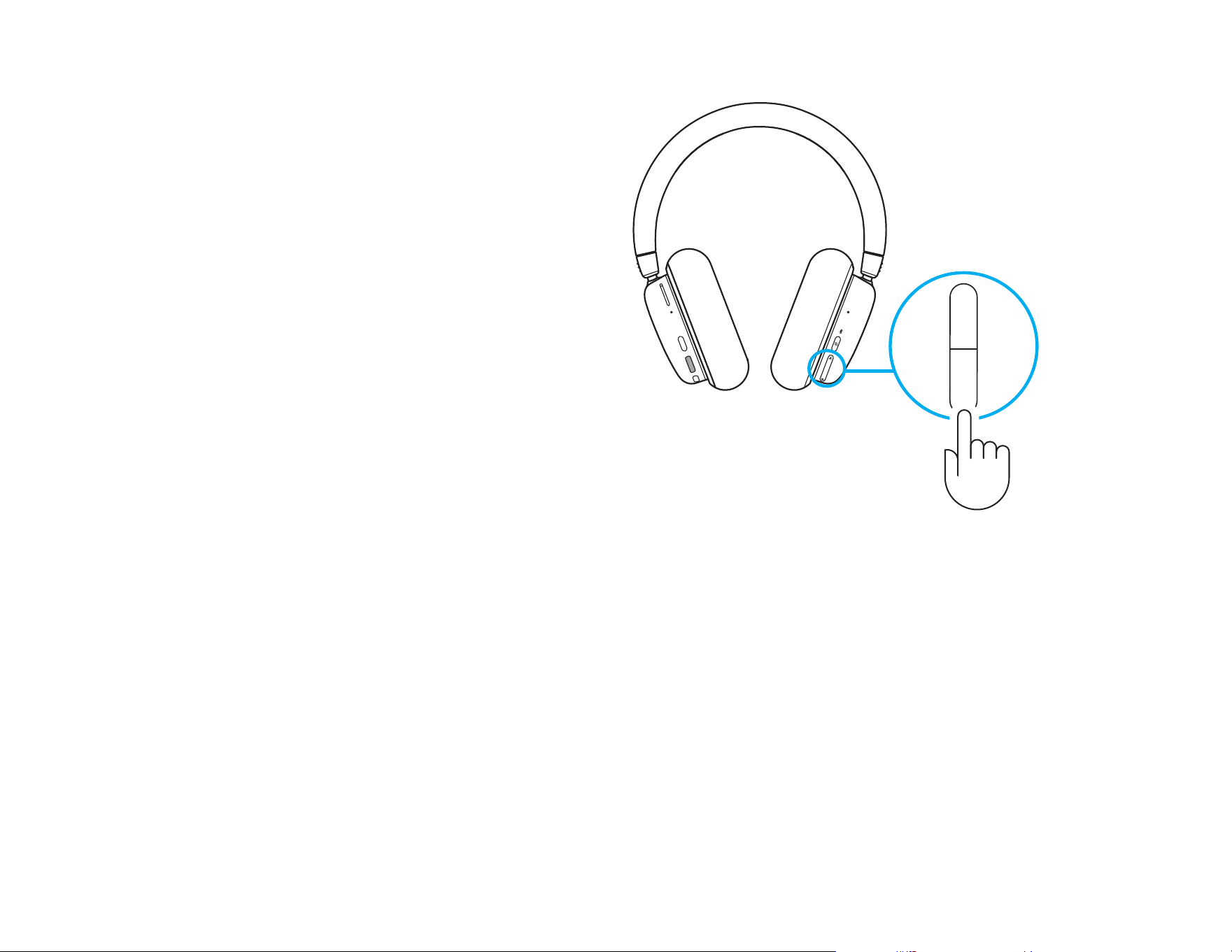
Después de conectar tanto a LIGHTSPEED como
AUX, alterna entre las opciones LIGHTSPEED
yAUXpresionando el botón de conectividad en
lacopa derecha.
Cuando se active LIGHTSPEED, el LED por encima
delbotón se iluminará en cian por cinco segundos.
Cuando se active AUX, el LED se iluminará en blanco
por cinco segundos.
AUX sólo está disponible cuando se conecta un cable.
26 ESPAÑOL
A
B
Mezclar LIGHTSPEED/AUX y Bluetooth
®
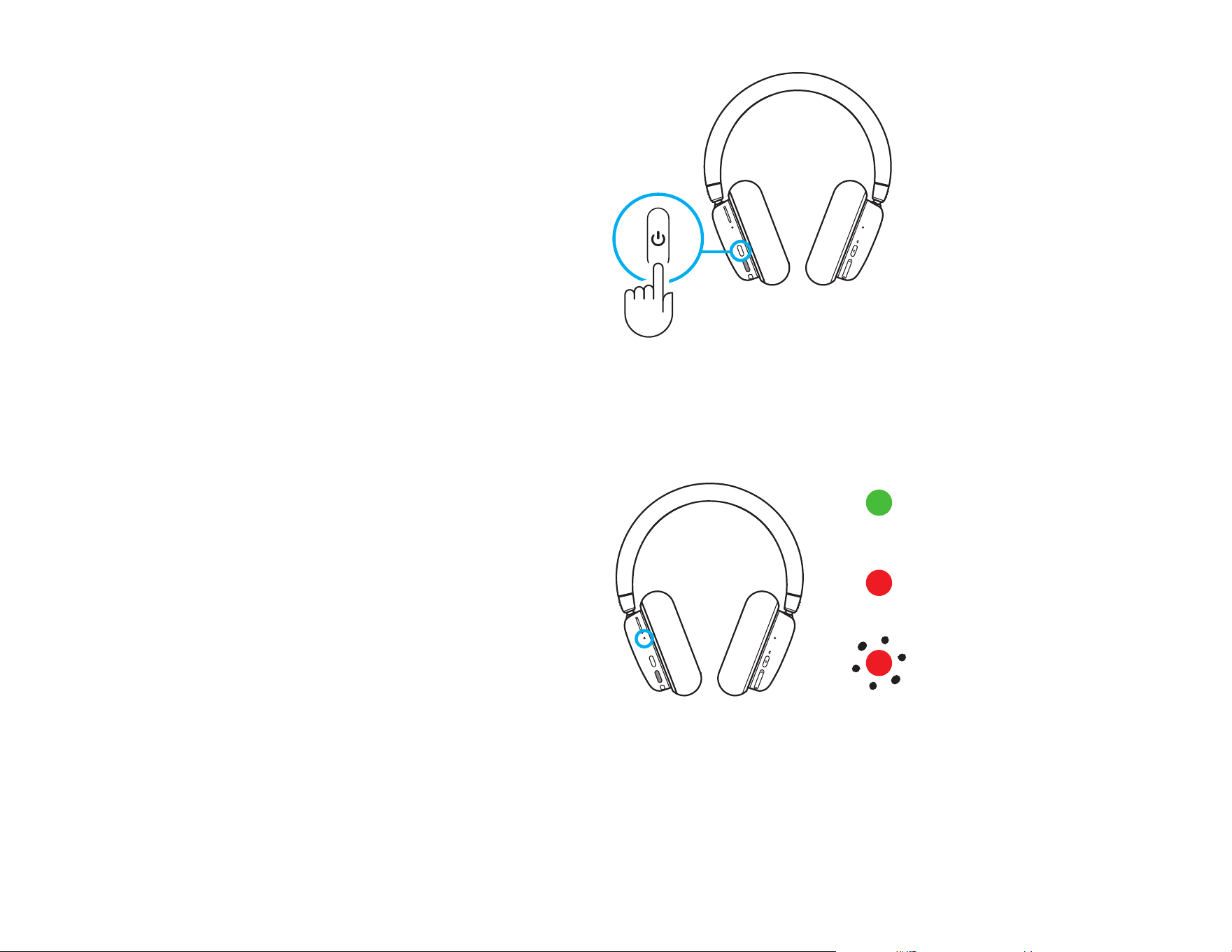
Después de conectar a dos fuentes LIGHTSPEED o AUX,
yBluetooth
®
:
- Para ajustar el equilibrio de fuentes, presiona los botones
arriba y abajo en la copa derecha para ir variando.
- Presionar arriba aumenta la fuente activa (LIGHTSPEED
o AUX)
- Presionar abajo aumenta la fuente Bluetooth
®
- Para restablecer niveles iguales, mantén presionados
ambos botones por tres segundos.
3 sec
3 s
27 ESPAÑOL
Apagar
Apaga los audífonos con micrófono G735. Para ello,
mantén presionado el botón de encendido situado
en la copa izquierda por tres segundos.
La iluminación de los audífonos se apagará
despuésde una breve animación de iluminación.
Habrá una noticación sonora para indicar que
seapagaron.
Si los audífonos permanecen inactivos por diez
minutos, se apagarán automáticamente.
Comprobar el estado de la batería
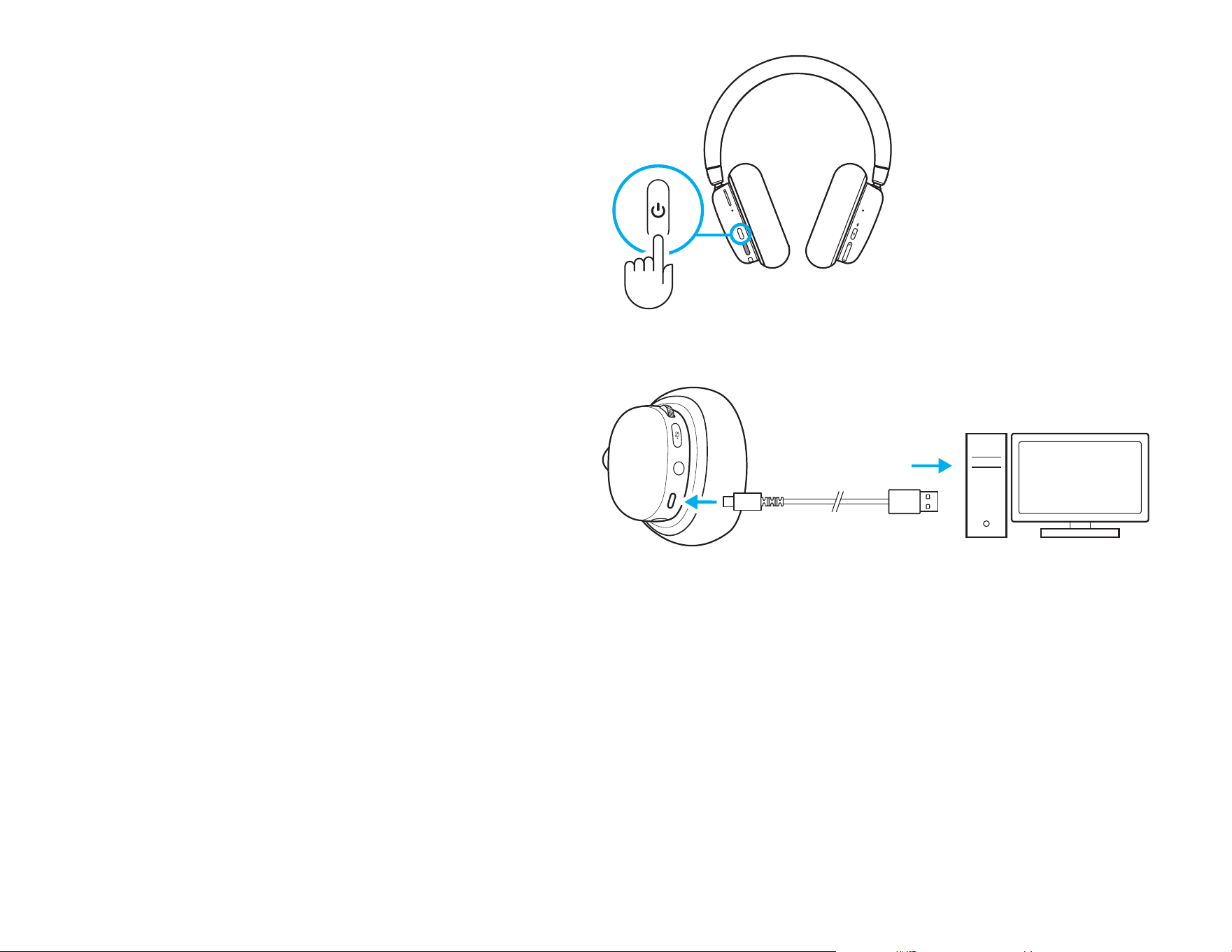
Para comprobar el estado de la batería,
presionabrevemente el botón de encendido en
lacopa izquierda.
El LED estará:
- Verde con la batería a más del 30%
- Rojo con la batería a menos del 30%
- Emitiendo destellos rojos con la batería a menos
del 15%
= >
30% de batería
= <
30% de batería
= <
15% de batería
2x
2x
28 ESPAÑOL
Iluminación ENCENDIDA/APAGADA
Para apagar la iluminación cosmética, presiona dos veces
el botón de encendido en la copa izquierda.
Cargar la batería
Conecta el cable USB-C en el puerto situado en
laparte inferior de la copa izquierda, entre los puertos
de conexión de micrófono y AUX. Conecta el extremo
USB-A a un puerto USB en una PC o un adaptador
decarga USB (no se incluye).
La luz de encendido se iluminará en verde y emitirá
pulsos durante la carga.
La luz de encendido brillará en rojo para indicar carga
baja de batería (<30%).
Los audífonos con micrófono G735 se envían con
unacarga del 60%. Recomendamos cargarlos por
completo antes de usarlos.
29 ESPAÑOL
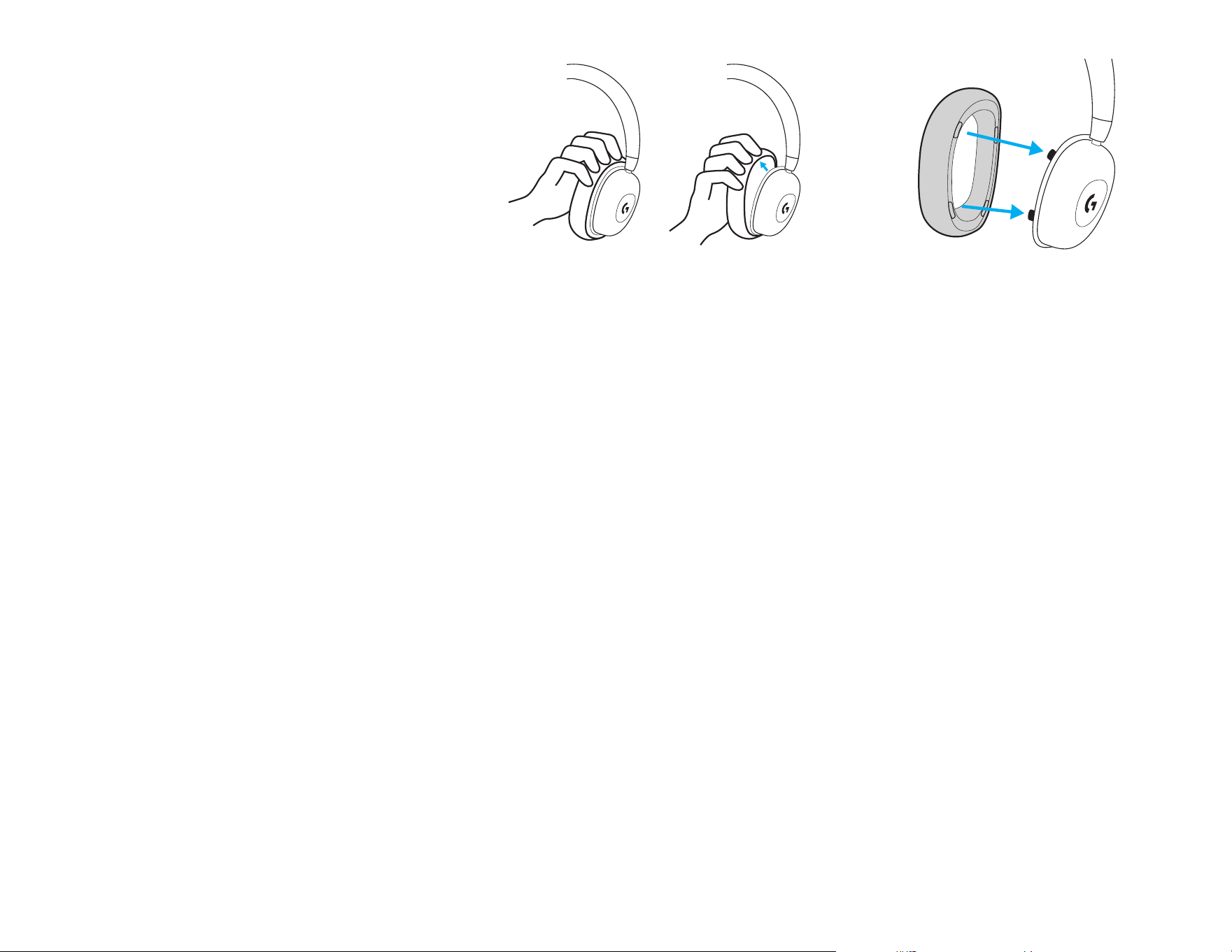
Cambiar copas de accesorios
Las almohadillas se pueden retirar y reemplazar.
Conectividade Bluetooth
®
/
LED de fonte ativa
Energia, bateria,
LED de carregamento
LIGHTSPEED + Bluetooth
®
/Auxiliar
+ Alternador de Bluetooth
®
Botão de ligar e desligar
Mixer de áudio
Fonte A (AUX/LIGHTSPEED)
Rolete de volume
Mixagem de áudio
Fonte B (Bluetooth
®
)
Alternar sem áudio
30 PORTUGUÊS
3 sec
3 s
31 PORTUGUÊS
INSTRUÇÕES DE CONFIGURAÇÃO
1 Insira o conector do microfone na porta do fone
esquerdo. Ele é projetado para seencaixar de
umaforma.
2 Para ligar o headset G735, mantenha pressionado
por 3 segundos o botão de ligar e desligar no fone
esquerdo.
3 Insira o receptor LIGHTSPEED, com extensor
e cabo na porta USB do PC. O receptor pode
ser usado sem o extensor e o cabo, inserindo-o
diretamente em uma porta USB, se desejado.
4 Baixe e instale o software G HUB em seu PC/
MAC para obter a melhor experiência de jogo
(a G HUB tem um histórico integrado para
recursos). Ir para www.logitechG.com/ghub
1 2
3
4
www.logitechG.com/ghub
32 PORTUGUÊS
3 sec
3 sec
CONECTIVIDADE BLUETOOTH
®
1 Para ligar o headset G735, mantenha
pressionado por 3 segundos o botão de ligar
e desligar.
2 Mantenha pressionado o botão
Conectividade por 3 segundos para iniciar
o modo de pareamento. A luz azul piscará
rapidamente por 3 minutos.
3 Siga a conexão Bluetooth
®
para que
seudispositivo se emparelhe com o headset.
1
2 3
3 s
3 s
33 PORTUGUÊS
Volume
Ajuste o volume usando controle de volume no fone
esquerdo. Isso ajusta o volume total do headset,
não o volume de suas fontes.
Silenciar/Ativar som do microfone
Pressione o botão sem áudio localizado abaixo
do volume no fone esquerdo. Isso silenciará
omicrofone.
Quando silenciado, o RGB cosmético piscará
temporariamente em vermelho.
Haverá um som de noticação de mudo.
Opções de fontes de áudio
O G735 pode se conectar a e mixar várias fontes
deáudio ao mesmo tempo.
- Áudio LIGHTSPEED
- Áudio Bluetooth
®
- Áudio auxiliar via cabo de 3,5 mm cable (não
incluído)
- LIGHTSPEED + Bluetooth
®
- Auxiliar + Bluetooth
®
Alternando LIGHTSPEED + Bluetooth
®
/
Auxiliar + Bluetooth
®
Após conectar o LIGHTSPEED e AUX, pressione o botão
de conectividade na concha direita para alternar entre
as opções LIGHTSPEED e AUX.
Quando o LIGHTSPEED estiver ativo, a luz de LED
acima do botão brilhará em ciano por 5 segundos.
Quando o AUX estiver ativo, a luz de LED brilhará
embranco por 5 segundos.
O AUX estará disponível apenas quando um cabo
estiver conectado.
34 PORTUGUÊS
35 PORTUGUÊS
A
B
Alternando entre LIGHTSPEED/AUX
&Bluetooth
®
Após conectar a 2 fontes LIGHTSPEED ou AUX
eBluetooth
®
:
- Para ajustar o balanço da fonte, pressione os botões
para cima e para baixo na concha direita para
balancear.
- Pressionar para cima aumenta a fonte ativa
(LIGHTSPEED ou AUX)
- Pressionar para baixo aumenta a fonte Bluetooth
®
- Para redenir níveis iguais, mantenha pressionados
osdois botões por 3 segundos.
3 sec
3 s
36 PORTUGUÊS
Desligando
Para desligar o headset G735, mantenha pressionado por
3segundos o botão de ligar e desligar no fone esquerdo.
A luz do headset se desligará após uma curta animação
luminosa. Haverá uma noticação sonora indicando
odesligamento.
Se o headset car inativo por 10 minutos, ele se desligará
automaticamente.
Vericação do status de bateria
Para vericar o status de bateria, pressione rapidamente
obotão de ligar e desligar na concha esquerda.
O LED cará:
- Verde quando a bateria estiver acima de 30%
- Vermelho quando a bateria estiver abaixo de 30%
- Vermelho piscante quando a bateria estiver abaixo
de15%
= >
30% de bateria
= <
30% de bateria
= <
15% de bateria
2x
2x
37 PORTUGUÊS
Iluminação ligada/desligada
Para desligar a iluminação cosmética,
pressioneduas vezes o botão de ligar e desligar
nofone esquerdo.
Carregando a bateria
Conecte o cabo USB-C n porta na parte inferior
no fone esquerdo, localizada entre as portas
dosconectores do microfone e AUX. Conecte a ponta
USB-A na porta USB de um PC ou carregador USB
(não incluído).
A luz de energia se iluminará em verde e cará
pulsando enquanto estiver carregando.
A luz de energia brilhará em vermelho quando
abateria estiver baixa (<30%).
O headset G735 é embalado com aproximadamente
60% de carga. Recomendamos o carregamento
completo antes do uso.
38 PORTUGUÊS
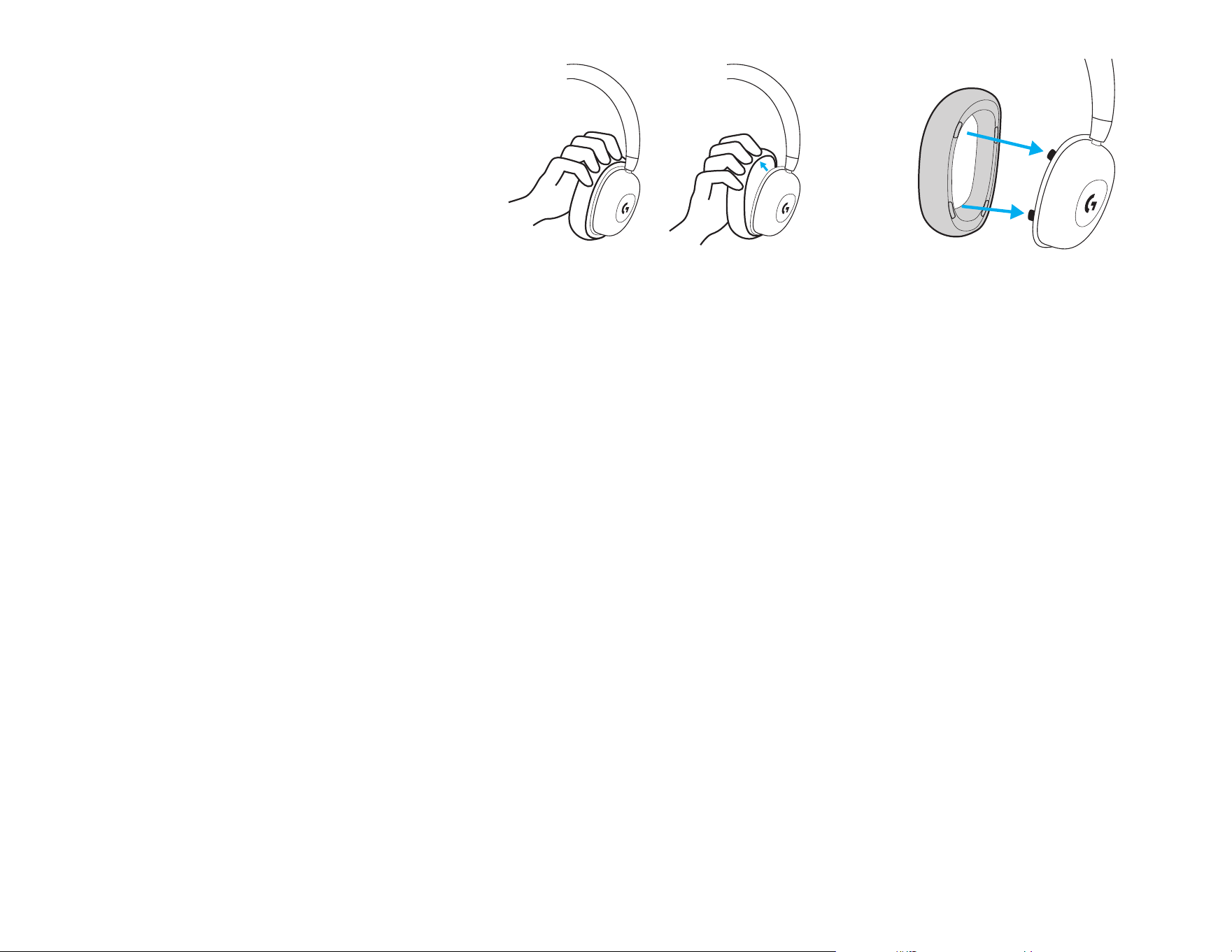
Trocando as conchas acessórias
As almofadas de orelha podem ser removidas
esubstituídas.
WEB-621-002209 004
© 2022 Logitech. Logitech, Logitech G, Logi and their respective logos are trademarks or registered trademarks of Logitech
EuropeS.A. and/or its aliates in the U.S. and other countries. All other trademarks are the property of their respective owners.
Logitech assumes no responsibility for any errors that may appear in this manual. Information contained herein is subject to
change without notice. The Bluetooth
®
word mark and logos are registered trademarks owned by Bluetooth SIG, Inc. and any use
of such marks by Logitech is under license.
© 2022 Logitech. Logitech, Logitech G, Logi et leurs logos respectifs sont des marques commerciales ou déposées de Logitech
Europe S.A. et/ou de ses sociétés aliées aux États-Unis et dans d’autres pays. Toutes les autres marques sont la propriété
exclusive de leurs détenteurs respectifs. Logitech décline toute responsabilité en cas d’erreurs susceptibles de s’être glissées dans
leprésent manuel. Les informations énoncées dans ce document peuvent faire l’objet de modications sans préavis. La marque
etles logos Bluetooth
®
sont des marques déposées détenues par Bluetooth SIG, Inc. et sont utilisés par Logitech sous licence.