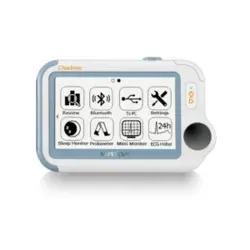
Health Monitor
Quick Guide
Model: Checkme Plus
English|Deutsch|Italiano|Español|Français

Contents
User Manual ........................................... English 1-29
Benutzerhandbuch ............................. Deutsch 30-62
Manuale d'uso ..................................... Italiano 63-92
Manual de usuario ............................. Español 93-122
Manuel de l'utilisateur .................... Français 123-152

1
Table of contents
1. The Basics .......................................................... 2
2. Intended Use ..................................................... 5
3. Unpacking .......................................................... 5
4. About the Main Unit ......................................... 6
5. ViHealth App ..................................................... 6
6. Desktop Software .............................................. 7
7. Set Up ................................................................ 8
8. Exploring More Features ................................. 15
9. Maintenance ................................................... 18
10. Specifications .................................................. 20
11. Symbols ........................................................... 22
12. Electromagnetic Compatibility ........................ 23

2
1. The Basics
This manual contains the instructions necessary to operate
the product safely and in accordance with its function and
intended use. Observance of this manual is a prerequisite for
proper product performance and correct operation and
ensures patient and operator safety.
1.1 Safety
Warnings and Cautionary Advice
Before using the device, please ensure that you have
read this manual thoroughly and fully understand
corresponding precautions and risks.
This device has been designed for practical use, but is
not a substitute for a visit to the doctor.
The data and results displayed on the device are for
reference only and cannot be directly used for
diagnostic interpretation or treatment.
We recommend not to use this device if you have a
pacemaker or other implanted devices. Follow the
advice given by your doctor, if applicable.
Do not use this device with a defibrillator.
Do not use this device during MRI examination.
Do not use the device in a combustible environment
(i.e., oxygen-enriched environment).

3
Never submerge the device in water or other liquids.
Do not clean the device with acetone or other volatile
solutions.
Do not drop this device or subject it to strong impact.
Do not place this device in pressure vessels or gas
sterilization device.
Do not dismantle the device, as this could cause
damage or malfunctions or impede the operation of
the device.
This device is not intended for use by people (including
children) with restricted physical, sensory or mental
skills or a lack of experience and/or a lack of
knowledge, unless they are supervised by a person
who has responsibility for their safety or they receive
instructions from this person on how to use the device.
Children should be supervised around the device to
ensure they do not play with it.
Do not allow the electrodes of the device to come into
contact with other conductive parts (including earth).
Do not use the device with persons with sensitive skin
or allergies.
Do not store the device in the following locations:
locations in which the device is exposed to direct
sunlight, high temperatures or levels of moisture, or
heavy contamination; locations near to sources of
water or fire; or locations that are subject to strong
electromagnetic influences.

4
Do not swing the device with the strip, which may
result in injury.
This device displays changes in the heart rhythm and
blood oxygenation etc. which may have various
different causes. These may be harmless, but may also
be triggered by illnesses or diseases of differing degree
of severity. Please consult a medical specialist if you
believe you may have an illness or disease.
Vital signs measurements, such as those taken with
this device, cannot identify all diseases. Regardless of
the measurement taken using this device, you should
consult your doctor immediately if you experience
symptoms that could indicate acute disease.
Do not self-diagnose or self-medicate on the basis of
this device without consulting your doctor. In
particular, do not start taking any new medication or
change the type and/or dosage of any existing
medication without prior approval.
This device is not a substitute for a medical
examination or your heart or other organ function, or
for medical electrocardiogram recordings, which
require more complex measurements.
It is not possible to use this device to diagnose illness
or diseases. This is exclusively the responsibility of your
doctor.

5
We recommend that you record the ECG curves and
other measurements and provide them to your doctor
if required.
2. Intended Use
The health monitor is intended to be used for measuring,
displaying, reviewing and storing ECG in home or healthcare
facilities environment.
The data and results provided by this device are for pre-
check screening purpose only and cannot be directly used
for diagnostic or treatment.
3. Unpacking
Main Unit; Quick Guide; Charging / Data Cable; ECG Cable;
Reusable ECG Electrodes; Carry Case; Neck Strap
Warnings and Cautionary Advice
Use accessories specified in this chapter. Using other
accessories may cause damage to the device or not
meet the claimed specifications.
6
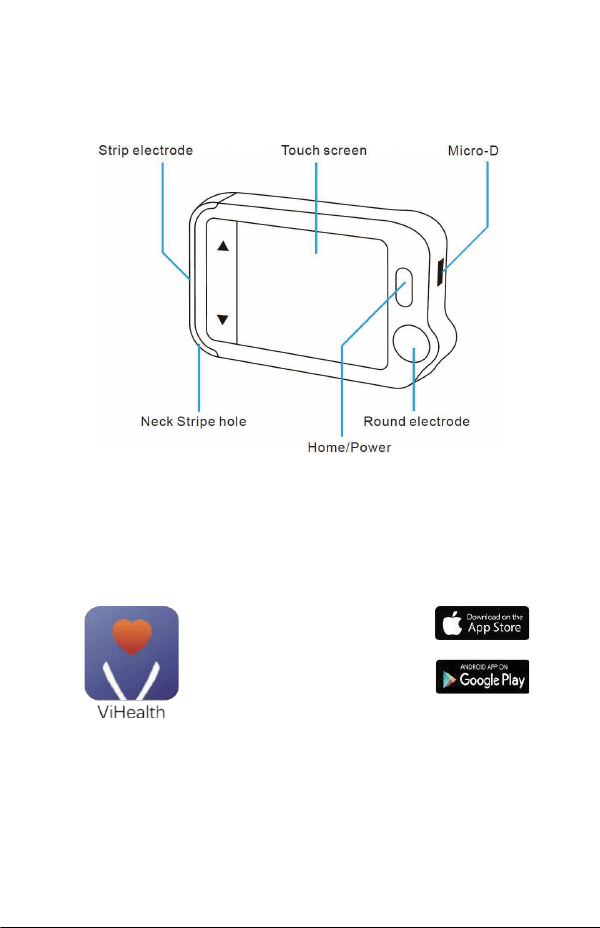
4. About the Main Unit
5. ViHealth App
You can use ViHealth app to synchronize and share your
data.
App name: ViHealth
iOS: App Store
Android: Google Play
Use your mobile phone to search for ViHealth in the App
Store or Google Play.
Download and install the ViHealth mobile app.
7
Caution
:
Uninstalling the app will delete all data!
If you need to reinstall the app, please install the new version
directly, it will automatically update the old version.
6. Desktop Software
Use the desktop software to download your data onto
Windows or Mac.
Download this software from our support page:
www.getwellue.com
Menu: FAQ & Download->PC Software & Mac App
8
7. Set Up
7.1 Charging
Connect the device to a standard USB charging adapter with
the provided charging cable.
7.2 Powering On/Off
Press and hold the home button for 1 second to power on,
and 3 seconds to power off.
It will turn off automatically if it is not measuring or
operating.
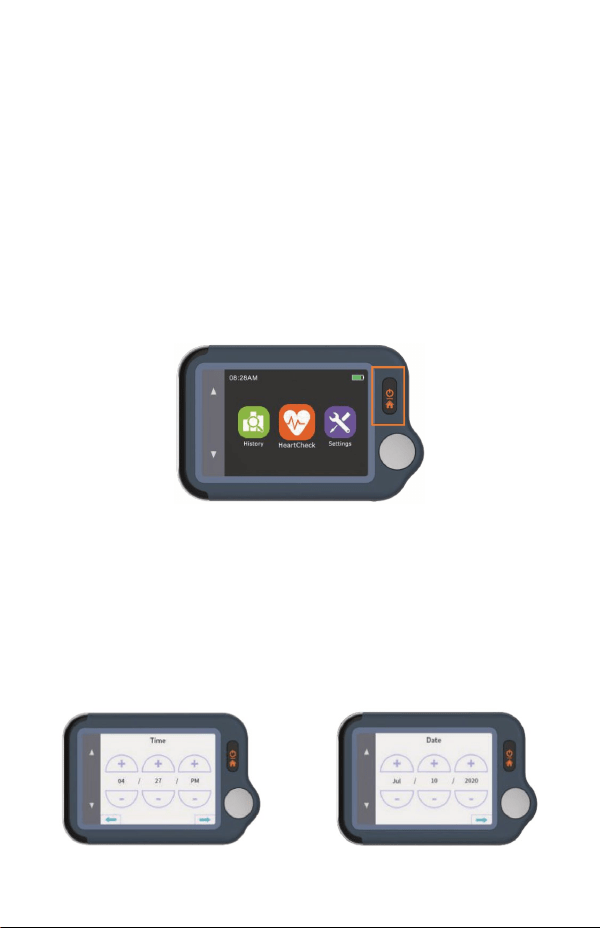
7.3 Initial Settings
When the device is powered on for the first time, please set
the current date and time.
9
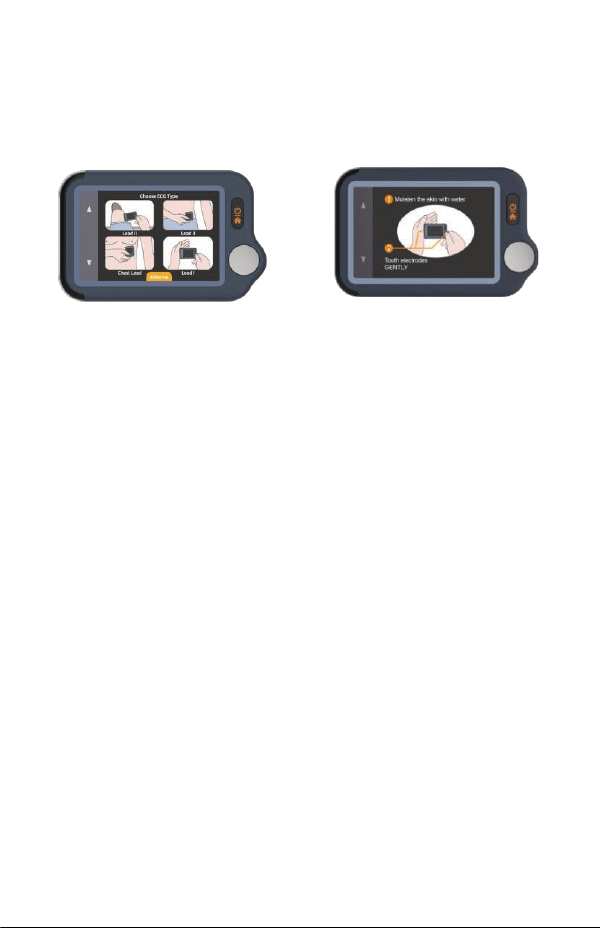
7.4 First Check
1) On the homepage, touch the Heart Check icon, then
choose an ECG Type Lead II (Read notes).
2) Hold the device as shown in the device display.
3) Remain still and relaxed while taking measurements
until complete. Next, the results will be displayed.
Note:
Moisten skin (the area that the electrode touches) may
help to get a better waveform.
You can get different signal amplitudes from Lead I,
Lead II, or Chest Lead. Usually, the signals from Lead II
and Chest Lead are stronger
For Lead I, rest your hands on a table or thigh to help
you keep relax throughout the check. If your hand is
trembling, try your left wrist or bicep instead of your
left hand.
Touching the rectangular electrode on the back of the
device has little influence.
10
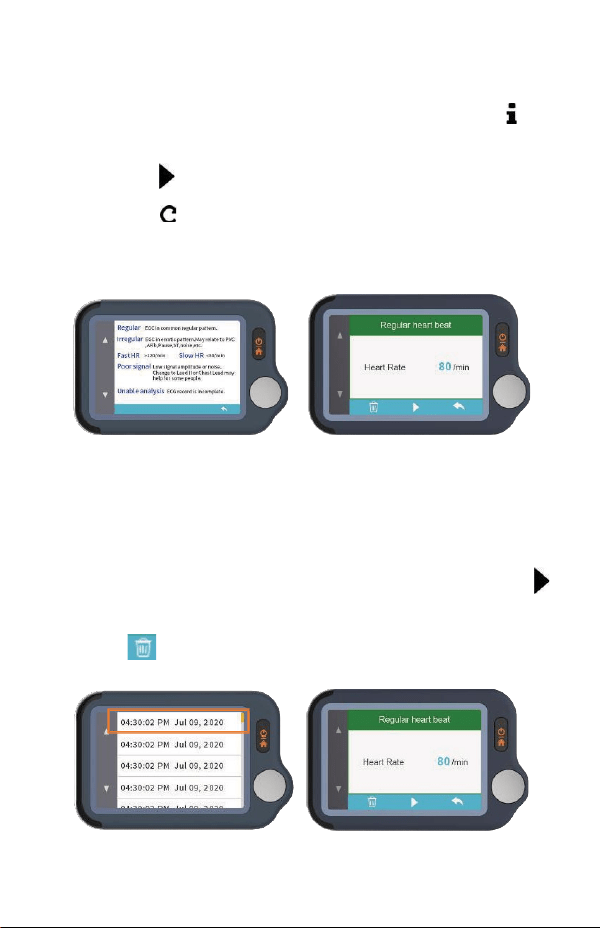
7.5 View Results
There are 6 kinds of measurement results, Touch the " "
icon to view the specific definitions
Touch the “ ” icon to replay the ECG waveform.
Touch the “ ” icon to take new measurements.
You can use the home button at any time to return to the
homepage or cancel taking measurements.
7.6 Reviewing Records
On the homepage, touch the History icon to review your
history results.
You can choose a record to review the results and touch “ ”
icon to replay the recorded ECG waveform.
Touch” ” icon to delete the current record.
11
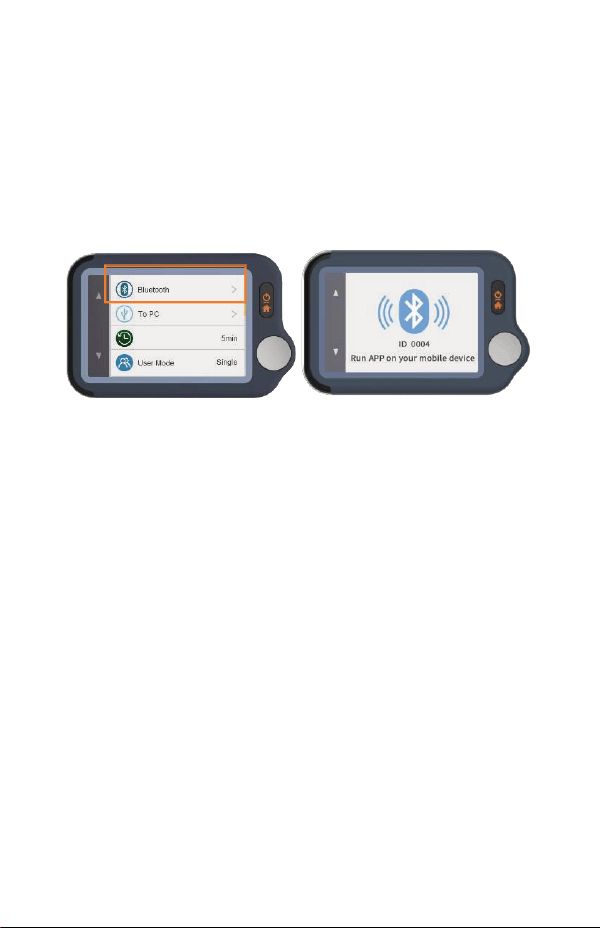
7.7 Syncing Data to ViHealth App
Search for ViHealth in the App Store or Google Play.
Download and install the ViHealth mobile app.
1) On the homepage, choose Settings->Bluetooth to turn
on the device’s Bluetooth.
2) Switch on Bluetooth on your mobile phone.
3) Run ViHealth on your mobile phone. (Please Always
Allow location and storage permissions for the
Bluetooth connection and data storage.)
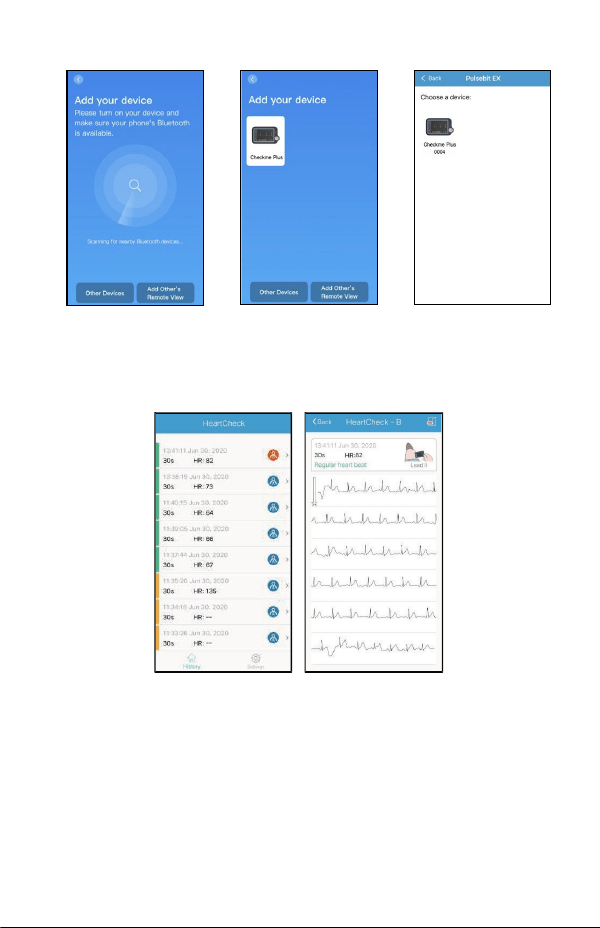
4) Add a new device: The app will automatically search
for devices and display them on the screen. Choose
Checkme Plus and wait for the data to download.
12
5) Review report: Choose a single record, and you can
enter a detailed report.
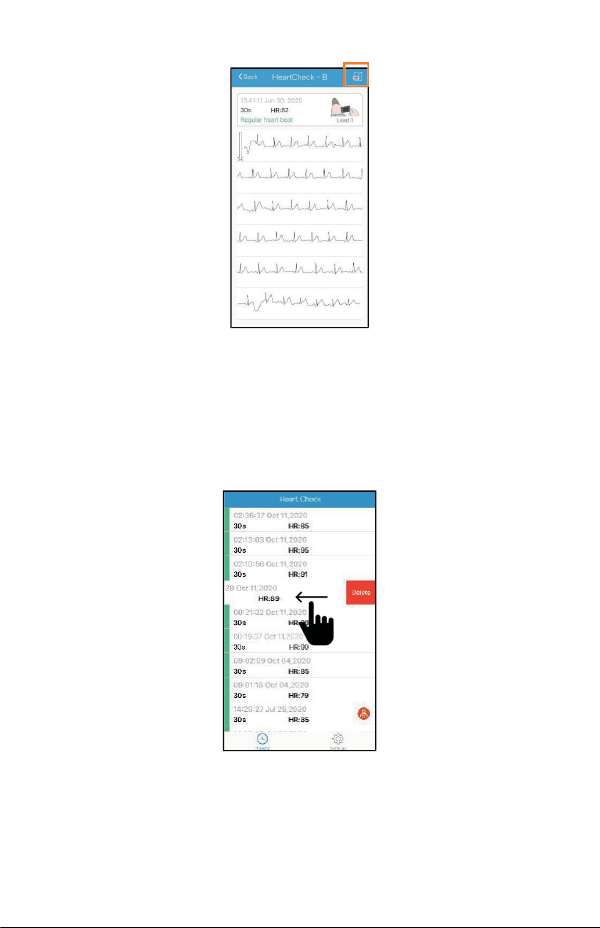
6) Share report: On the report details page, tap the share
button in the upper right corner to share your report.
13
7) Delete a record: Choose a single record, swipe left to
delete it.
Note: This operation will only delete the records in the
app, not the records on the device.

14
7.8 Using the PC Software
Download the latest version from:
www.getwellue.com
Menu: FAQ & Download->PC Software & Mac App
Note:
1) If you have downloaded the software before, please
update it to the latest version.
2) Occasionally, firewall or anti-virus software may block
“Pulsebit Browser”. Allow it.
3) Please check the help document in the software for
more information.
Download and Install Pulsebit Browser Pro on your
computer.
To export data:
1) Connect the device to the PC with the provided cable
2) On the device, enter Settings->To PC
3) Run the software, click the Download Button to export
the data on the device
With the software, you can view and print reports, which can
also be exported as PDF files.
15
8. Exploring More Features
8.1 Choosing Different ECG Types
Before taking measurements, you can choose different ECG
types (Leads). Any results will be marked with the
corresponding type.
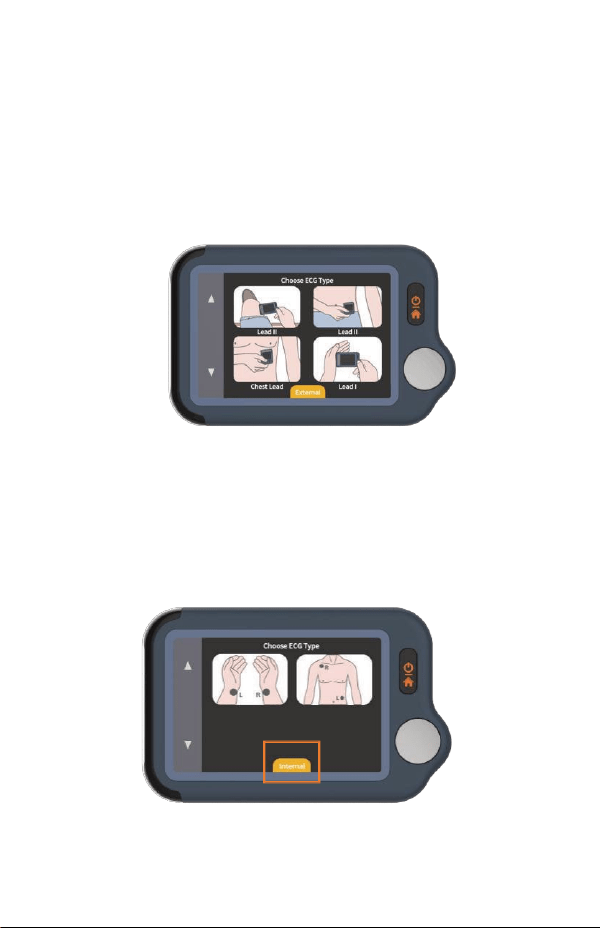
8.2 Using the ECG cable for Heart Checks
1) Touch <HeartCheck> to start taking measurements;
touch the icon at the bottom to switch to External
mode.
16
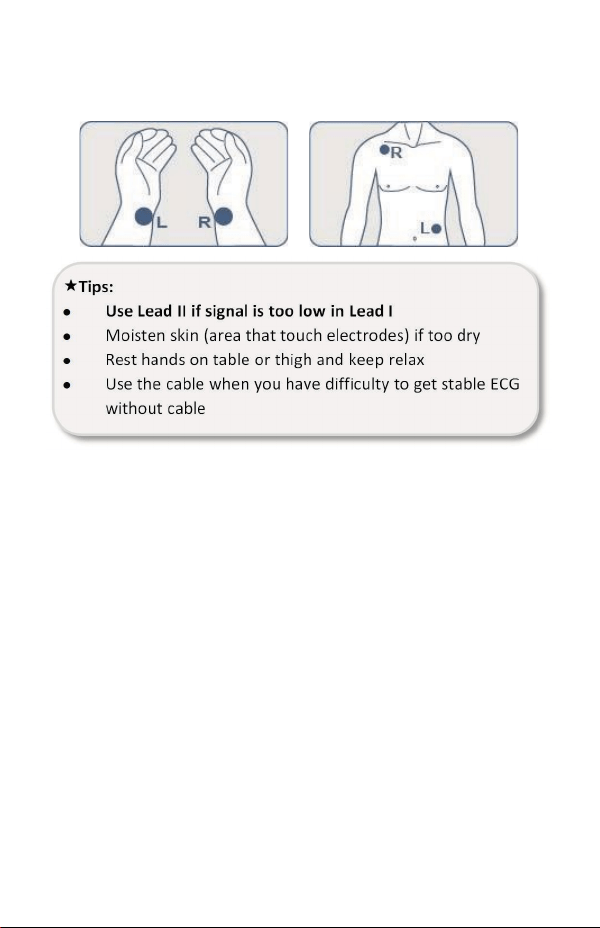
2) Insert the ECG cable into the Micro D port, adhere the
reusable electrodes onto your body as shown below.
8.3 About Reusable Electrodes
Please cover the white protective paperback and seal the
electrode pads in the plastic bag after each use.
We recommend replacing the electrodes after 50 uses.
Electrode performance will decrease after excessive use.
You can purchase more electrodes on Amazon or our
website getwellue.com

17
8.4 Understanding the Results
Heart Rate
The number of times your heart beats per
minute calculated from the ECG.
The reference range for adults is 50-100
beats per minute in a relaxed state and
higher when stimulated. Control your
maximum heart rate during fitness or
exercise to avoid overstressing the heart.
ECG
An electrocardiogram (ECG) is a test that
records the heart’s electrical activity.
Regular heartbeat - the recorded ECG shows
a usual and regular pattern.
Irregular heartbeat - the recorded ECG
shows an erratic pattern. It may be caused by
overstressing the heart or other conditions.
Poor signal
Low signal amplitude or noise. Changing to
Mode II may help.
Unable
to analyze
ECG recording is incomplete.
8.5 Settings
User Mode: Settings->User Mode->touch to choose One-
User/Two-User modes

18
When you switch to Dual User mode, the homepage will
show User A and User B icons. Choose a user to start taking
measurements, and the results will be marked A or B.
In single user mode, the results are not marked.
ECG Length: Settings->ECG Length, for 30s/60s/5 minutes
Note: only measurements through cables are supported in 5-
minute mode
Brightness: Settings-> Touch the brightness meter to adjust
the brightness
Voice: Settings->Touch the Voice switch to turn the
heartbeat voice on and off.
Other settings: Date& Time, Erase Data, Factory Reset,
About.
9. Maintenance
9.1 Care and Cleaning
Warnings and Cautionary Advice
Have the device repaired by authorized service centers only,
otherwise its warranty is invalid.
Clean the device per week, carefully swabbing the device
surface with a soft cloth or cotton swab with rubbing
alcohol. Do not pour alcohol directly on or into the device.

19
9.2 Troubleshooting
Problem Possible Cause Solution
The device does
not turn on.
The battery may be
low.
Charge the battery
and try again.
The device might be
damaged
Please contact your
local distributor.
Low battery
indicator is
blinking
The battery is low.
Charge the battery
and try again.
The ECG
waveform
amplitude is small
The Lead you have
chosen is not suitable.
Swap with another
Lead and try again.
ECG waveform
drifts or
disappears and
“Check Contact”
displays.
The pressure exerted
on the electrode is
not stable or too
great.
Hold the device so
that it is stable.
Hand or body may be
moving.
Try to keep
perfectly still and
retest.
20
10. Specifications
Classifications
EC Directive
MDD, 93/42/EEC
R&TTE, 1999/5/EC
ROHS 2.0, 2011/65/EU
Degree protection against
electrical shock
Type BF
En
v
i
r
on
me
n
ta
l
Item Operating Storage
Temperature 5 to 45°C -25 to 70°C
Relative humidity
(noncondensing)
10% to 95% 10% to 95%
Barometric 700 to 1060 hPa 700 to 1060 hPa
Degree of dust & water
resistance
IP22
Physical
Size 88×56×13 mm
Weight 64 g (main unit)
Display 2.4" touch screen, color, backlit
Connector Micro-D connector
Power Supply
Battery type Rechargeable lithium-polymer battery
Battery run time Heart check: > 800 times
21
Charge time Less than 2 hours to 90%
ECG
Lead type
Integrated ECG electrodes
Lead set Lead I, lead II
Record length 30s, 60s, 5min
Sampling 500 Hz / 16 bit
Display Gain
1.25 mm/mV, 2.5 mm/mV, 5 mm/mV
10 mm/mV, 20 mm/mV
Sweep speed 25 mm/s
Bandwidth 0.67 to 40Hz
Electrode offset potential
tolerance
±300 mV
HR measurement range 30 to 250 bpm
Accuracy
±2 bpm or ±2%, whichever is greater
Heart rate is calculated based on average of
every 5 to 30
QRS complex.
Measurement summary
Heart rate, Rhythm analysis (Regular ECG
Rhythm, Fast Heart Rate, Slow Heart Rate,
Irregular ECG Rhythm, Unable to analyze)
Standards Meet standards of ISO 80601-2-61
Review
Waveform review Full disclosure waveform
Storage 100 pcs of records, 30s per record
22
11. Symbols
Symbol Description
Manufacturer
Date of manufacture
SN Serial number
Indicates a medical device that is not to be disposed of
as unsorted municipal waste.
Follow Instructions for Use.
Type BF Applied Part
MRI unsafe. Presents hazards in all MR environments
as device contains strongly ferromagnetic materials.
IP22 Resistant to liquid ingress
CE marking
Authorized representative in the European community
UKCA marking
Authorized Representative in the United Kingdom
This product complies with the rules and regulations of
the Federal Communication Commission.
Non-ionizing radiation
23
Our products and packaging can be recycled, don't
throw them away!
Find where to drop them off on the
www.quefairedemesdechets.fr site (Only applicable for
French market).
This product complies with verpackG.
12. Electromagnetic Compatibility
The device meets the requirements of EN 60601-1-2. All the
accessories also meet the requirements of EN 60601-1-2
when in use with this device.
Warnings and Cautionary Advice
Using accessories other than those specified in this manual
may result in increased electromagnetic emission or
decreased electromagnetic immunity of the equipment.
The device or its components should not be used adjacent to
or stacked with other equipment.
The device needs special precautions regarding EMC and
needs to be installed and put into service according to the
EMC information provided below.
Other devices may interfere with this device even though
they meet the requirements of CISPR.
When the inputted signal is below the minimum amplitude
provided in technical specifications, erroneous
measurements could result.
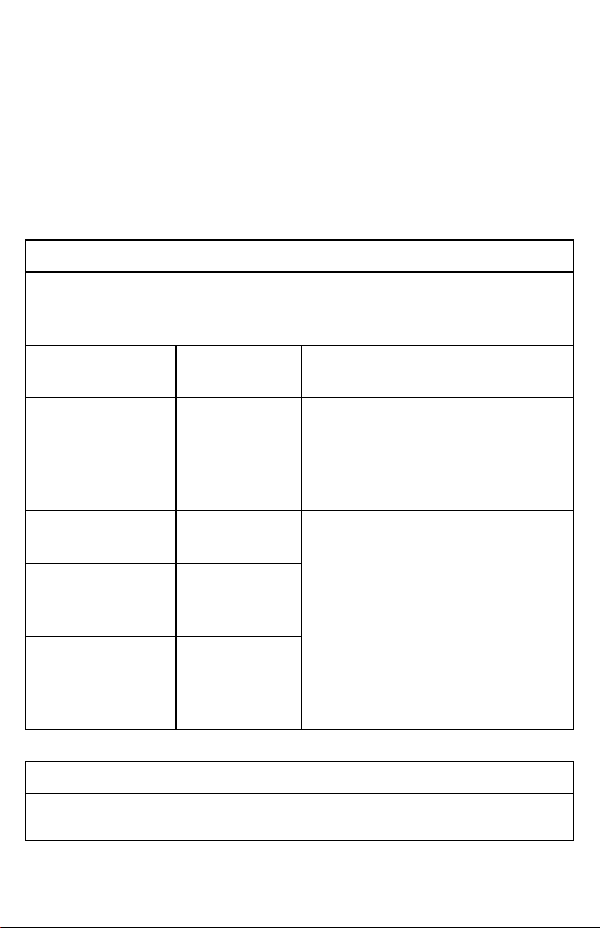
24
Portable and mobile communication equipment may affect
the performance of this device.
Other devices that have RF transmitter or source may affect
this device (e.g. cell phones, PDAs, and PCs with wireless
function).
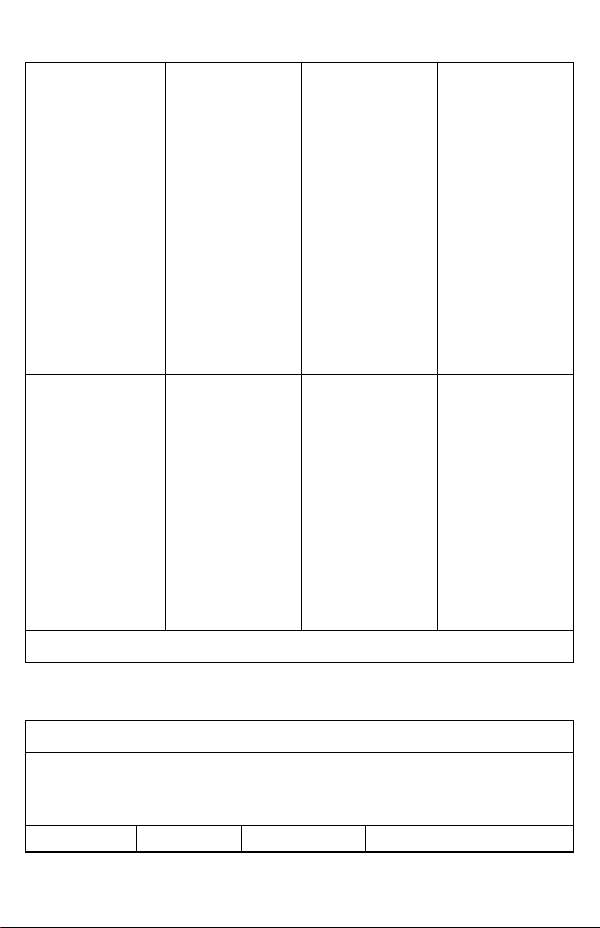
Guidance and Declaration - Electromagnetic Emissions
The Health Monitor is intended for use in the electromagnetic environment
specified below. The customer or the user of the device should assure that it
is used in such an environment.
Emission tests Compliance
Electromagnetic environment -
guidance
RF emissions
CISPR 11
Group 1
The device uses RF energy only for
its internal function. Therefore, its
RF emissions are very low and are
not likely to cause any interference
in nearby electronic equipment.
RF emissions
CISPR 11
Class B
The device is suitable for use in all
establishments, including domestic
establishments and those directly
connected to the public low-voltage
power supply network that supplies
buildings used for domestic
purposes.
Harmonic
emissions
IEC61000-3-2
Class A
Voltage
Fluctuations /
Flicker Emissions
IEC 61000-3-3
Complies
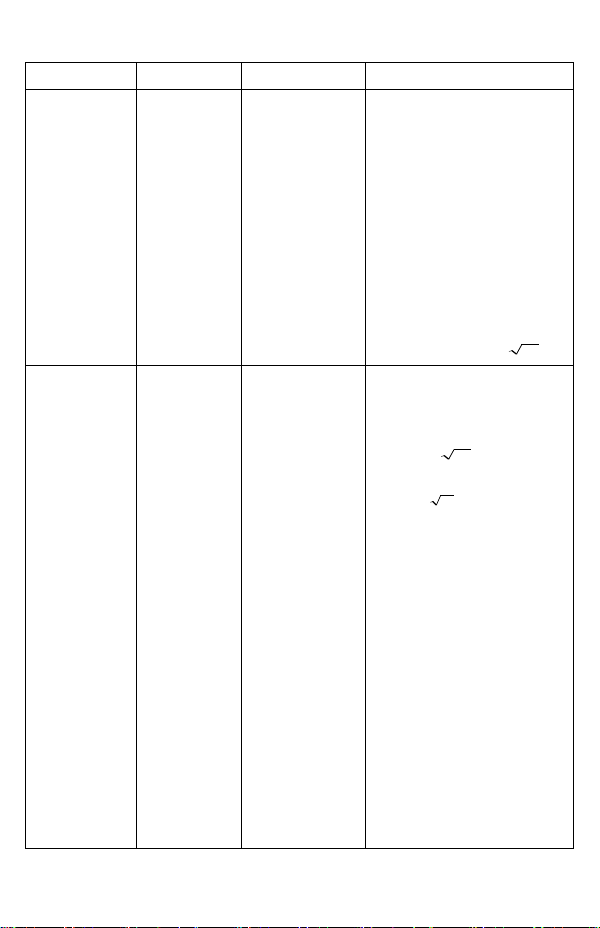
Guidance and Declaration - Electromagnetic Immunity
The Health Monitor is intended for use in the electromagnetic environment
specified below. The customer or the user of the Health Monitor should

25
assure that it is used in such an environment.
Immunity test
IEC60601 test
level
Compliance
level
Electromagnetic
environment -
guidance
Electrostatic
discharge (ESD)
IEC 61000-4-2
± 6 kV contact
± 8 kV air
± 6 kV contact
± 8 kV air
Floors should be
wood, concrete
or ceramic tile.
If floors are
covered with
synthetic
material,
the relative
humidity should
be at
least 30 %.
Electrical fast
transient/burst
IEC 61000-4-4
± 2 kV for
power
supply lines
± 1 kV for
input/output
lines
± 2 kV for
power
supply lines
± 1 kV for
input/output
lines
Mains power
quality should
be that of a
typical
commercial or
hospital
environment.
Surge
IEC 61000-4-5
± 1 kV line(s) to
line(s)
± 2 kV line(s) to
earth
± 1 kV line(s) to
line(s)
± 2 kV line(s) to
earth
Voltage dips,
short
Interruptions
and Voltage
variations on
power supply
input lines
IEC 61000-4-11
<5 % UT
(>95 % dip in
UT)
for 0.5 cycle
40 % UT
(60 % dip in UT)
for 5 cycles
<5 % UT
(>95 % dip in
UT)
for 0.5 cycle
40 % UT
(60 % dip in UT)
for 5 cycles
Mains power
quality should
be that of a
typical
commercial or
hospital
environment. If
the user of our
product
26
70 % UT
(30 % dip in UT)
for 25 cycles
<5 % UT
(>95 % dip in
UT)
for 5 s
70 % UT
(30 % dip in UT)
for 25 cycles
<5 % UT
(>95 % dip in
UT)
for 5 s
requires
continued
operation
during power
mains
interruptions, it
is
recommended
that our
product be
powered from
an
uninterruptible
power supply or
a battery.
Power frequency
(50/60 HZ)
magnetic field
IEC 61000-4-8
3 A/m 3 A/m
Power
frequency
magnetic fields
should be at
levels
characteristic of
a typical
location in a
typical
commercial or
hospital
environment.
Note: UT is the AC mains voltage prior to application of the test level.
Guidance and Declaration - Electromagnetic Immunity
The Health Monitor is intended for use in the specified electromagnetic
environment. The customer or the user of the Health Monitor should assure
that it is used in such an environment as described below.
Immunity
IEC60601
Compliance
Electromagnetic
27
test
test level
level
environment - guidance
Conduced
RF
IEC61000-4-
6
3 Vrms 150
kHz to
80 MHz
outside ISM
bands
3 Vrms 150
kHz to
80 MHz
outside ISM
bands
Portable and mobile RF
communications
equipment should be used
no closer to any part of
the system, including
cables, than the
recommended separation
distance calculated from
the equation appropriate
for the frequency of the
transmitter.
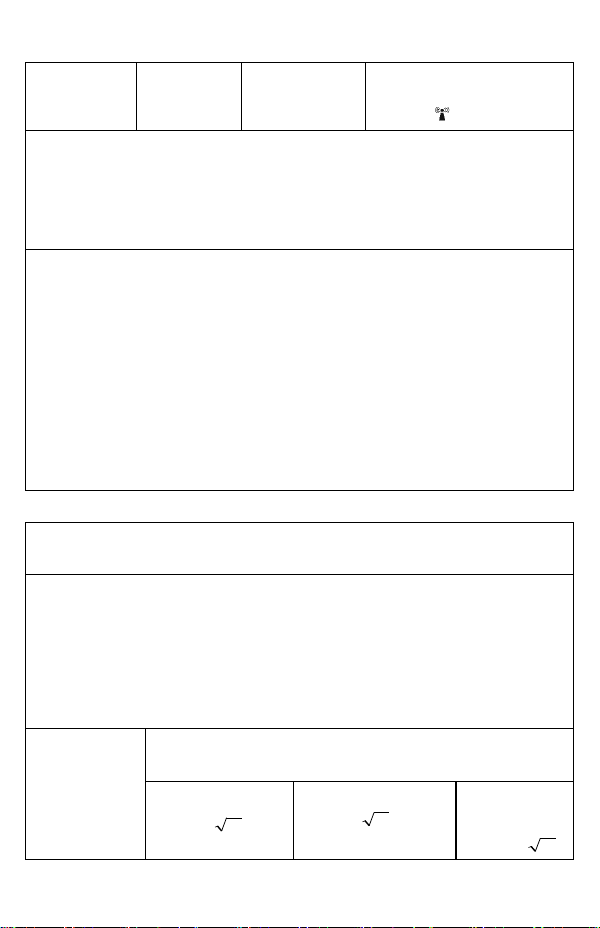
Recommended separation
distances:
Pd 2.1=
Radiated RF
IEC61000-4-
3
3 V/m 80
MHz to
2.5 GHz
3 V/m 80 MHz
to
2.5 GHz
Recommended separation
distances:
80 MHz~800 MHz:
Pd 2.1=
800MHz-2.5GHz:
Pd 3.2=
Where, P is the maximum
output power rating of the
transmitter in watts (W)
according to the
transmitter manufacturer
and d is the recommended
separation distance in
meters (m).
Field strengths from fixed
RF transmitters, as
determined by an
electromagnetic site
survey a, should be less
than the compliance level
in each frequency range b.
Interference may occur in
28
the vicinity of equipment
marked with the following
symbol:
Note 1: At 80 MHz to 800 MHz, the separation distance for the higher
frequency range applies.
Note 2: These guidelines may not apply in all situations. Electromagnetic
propagation is affected by absorption and reflection from structures, objects
and people.
a Field strengths from fixed transmitters, such as base stations for radio
(cellular/cordless) telephones and land mobile radios, amateur radio, AM
and FM radio broadcast and TV broadcast cannot be predicted theoretically
with accuracy. To assess the electromagnetic environment due to fixed RF
transmitters, an electromagnetic site survey should be considered. If the
measured field strength in the location in which the device is used exceeds
the applicable RF compliance level above, the device should be observed to
verify normal operation. If abnormal performance is observed, additional
measures may be necessary, such as re-orienting or relocating the device.
b Over frequency range 150kHz to 80MHz. For Resp field strength should be
less than 1V/m.
Recommended separation distances between portable and mobile RF
communications equipment and the device
The Health Monitor is intended for use in an electromagnetic environment in
which radiated RF disturbances are controlled. The customer or the user of
the Health Monitor can help prevent electromagnetic interference by
maintaining a minimum distance between portable and mobile RF
communications equipment (transmitters) and the monitor as
recommended below, according to the maximum output power of the
communications equipment.
Rated max.
output power
of transmitter
(W)
Separation distance according to frequency of the
transmitter (m)
150 kHz - 80 MHz
80 MHz - 800 MHz
800 MHz -
2.5 GHz
Pd 2.1=
Pd 2.1=
Pd 3.2=

29
0.01 0.12 0.12 0.23
0.1 0.38 0.38 0.73
1 1.20 1.20 2.30
10 3.80 3.80 7.30
100 12.00 12.00 23.00
For transmitters rated at a maximum output power not listed above, the
recommended separation distance d in metres (m) can be estimated using
the equation applicable to the frequency of the transmitter, where P is the
maximum output power rating of the transmitter in watts (W) according to
the transmitter manufacturer.
Note 1: At 80 MHz and 800 MHz, the separation distance for the higher
frequency range applies.
Note 2: These guidelines may not apply in all situations. Electromagnetic
propagation is affected by absorption and reflection from structures, objects
and people.