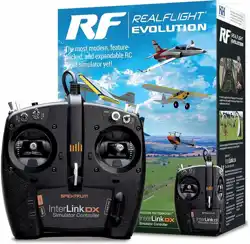

Installation/Aktivierung des funkgesteuerten Flugsimulators
Den Steam
®
Client installieren (falls notwendig)
Die RealFlight Evolution erfordert den Steam Client. Ist Steam nicht installiert:
1 . Im Browser folgende Internetseite aufrufen: store.steampowered.com/about/
2 . Die Schaltäche INSTALL STEAM [Steam installieren] klicken.
3 . Steam mit der heruntergeladenen Datei installieren.
4 . Steam bei Aufforderung ausführen.
5 . Am Steam-Konto anmelden. Bei fehlendem Konto Create a New Account … [Neues Konto erstellen] klicken.
Installieren der RealFlight Evolution
Prüfen, dass der Steam Client ausgeführt wird und die Anmeldung am Konto erfolgt ist.
1 . Wählen Sie im Steam Client das Menüelement „Games“ [Spiele].
2 . Activate a Product on Steam [Ein Produkt auf Steam aktivieren] wählen.
3 . Bei Aufforderung den Schlüssel der RealFlight Trainer-Edition im Feld „Product Code“ [Produktcode] genau so, wie es auf der im Karton enthaltenen Karte steht.
Eine Bestätigung zur erfolgreichen Aktivierung der RealFlight Trainer-Edition wird angezeigt.
4 . FINISH [Fertig stellen] klicken.
5 . Steam wird zur Installation der Software auffordern. Die Installationsoptionen bestätigen und Next [Weiter] klicken.
6 . Der Installationsdialog schließt sich und der Download der RealFlight Trainer-Edition beginnt.
Der Fortschritt wird unten am Steam Client angezeigt.
Starten der RealFlight Trainer-Edition vom Steam Client
1 . Bei ausgeführtem Steam Client die Option Library [Bibliothek] wählen, um die Liste der installierten Spiele/Programme anzuzeigen.
2 . RealFlight Evolution aus der Liste der verfügbaren Optionen wählen.
3 . Play [Abspielen], um die RealFlight Trainer-Edition zu starten.
Fehlbehebung bei RealFlight
Wir empfehlen dringend, die Treiber für die Sound- und Videokarten zu aktualisieren, ehe nach anderen Lösungen gesucht wird.
Veraltete Treiber verursachen häug Schwierigkeiten, selbst bei einem brandneuen Computer. Einige Hersteller fügen ältere Treiber ein, die aktualisiert werden müssen.
Für den Technischen Support oder bei Fragen zur Software der RealFlight Evolution schauen Sie unter: realight.com/support
Sie können die entsprechenden Links verwenden, um auf Knowledge Base, Glossar und andere hilfreiche Informationen zuzugreifen.
Wir empfehlen auch, die Web-Foren von RealFlight zu besuchen, um zusätzliche Informationen zu bekommen und auf die Modell-Swap-Pages zuzugreifen: forums.realight.com
Sie können uns direkt erreichen unter: realight.com/contact.php
Oder über E-Mail unter: rfsupport@horizonhobby.com
Sie können auch den virtuellen Assistenten / Live-Chat auf horizonhobby.com
EN
RC Flight Simulator Installation/Activation
DE
Installing the Steam
®
Client (if necessary)
RealFlight Evolution requires the Steam client. If you do not have Steam installed:
1 . In your internet browser, visit: store.steampowered.com/about/
2 . Click the INSTALL STEAM button.
3 . Install Steam using the downloaded le.
4 . Run Steam when prompted.
5 . Log into your Steam account. If you do not have one, click Create a New Account ….
Installing RealFlight Evolution
Verify the Steam client is running and that you are logged into your account.
1 . In the Steam Client, select the Games menu item.
2 . Select Activate a Product on Steam.
3 . When prompted, type your RealFlight Evolution key into the Product Code eld, exactly as it appears on the card included in the box.
You will receive conrmation that RealFlight Evolution is successfully activated.
4 . Click FINISH.
5 . Steam will prompt you to install the software. Conrm your installation options, and click Next.
6 . The installation dialog will close, and the RealFlight Evolution download will begin.
Progress displays at the bottom of the Steam Client.
Starting RealFlight Evolution from the Steam Client
1 . With the Steam client running, choose the Library option to view the list of installed games/programs.
2 . Select RealFlight Evolution from the list of available options.
3 . Click Play to start RealFlight Evolution.
Troubleshooting Difculty With RealFlight
We strongly suggest that you update the drivers for your sound and video cards prior to attempting any further resolutions.
Outdated drivers are a common cause for difculties, even with a brand new computer. Some manufacturers include older drivers that need to be updated.
For technical support or assistance with the RealFlight Evolution software, please visit: realight.com/support
You can use the corresponding links to access the Knowledge Base, Glossary, and other helpful information.
We also recommend visiting the RealFlight web forums for additional information and to access the model Swap Pages: forums.realight.com
You can contact us directly at: realight.com/contact.php
Or via email at: rfsupport@horizonhobby.com
You can also use the virtual assistant/live chat on horizonhobby.com

207200 | © 2022 Horizon Hobby, LLC. | 08/22 | RealFlight, Horizon Hobby, and the Horizon Hobby logo are trademarks or registered trademarks of Horizon Hobby, LLC.
Installazione/Attivazione del software RC Flight Simulator
Installazione del client di Steam
®
(se necessario)
Il software RealFlight Evolution richiede il client di Steam. Se il client di Steam non è installato:
1 . Accedere, tramite il proprio browser Internet, alla pagina: store.steampowered.com/about/
2 . Fare clic sul pulsante INSTALLA STEAM (Install Steam).
3 . Installare Steam utilizzando il le scaricato.
4 . Quando richiesto, eseguire Steam.
5 . Eseguire l’accesso al proprio account di Steam. Se non si possiede un account di Steam, fare clic sul pulsante Crea un nuovo account… (Create a New Account ...).
Installazione del software RealFlight Evolution
Vericare che il client di Steam sia in esecuzione e di aver effettuato l’accesso al proprio account.
1 . Nel Client Steam, selezionare la voce del menu Games (Giochi).
2 . Selezionare Attiva un prodotto su Steam... (Activate a Product on Steam).
3 . Quando richiesto, immettere il proprio codice di attivazione del software RealFlight Evolution nel campo Codice prodotto (Product Code), esattamente come appare
sulla carta inclusa nella confezione.
Si riceverà una conferma della riuscita dell’attivazione del software RealFlight Evolution.
4 . Fare clic su FINE (Finish).
5 . Steam richiederà di installare il software. Confermare le proprie opzioni di installazione, quindi fare clic su Avanti (Next).
6 . La nestra di dialogo di installazione si chiuderà e inizierà il download del software RealFlight Evolution.
Nella parte inferiore della schermata del client di Steam sarà visualizzato l’avanzamento della procedura.
Avvio del software RealFlight Evolution dal client di Steam
1 . Mentre il client di Steam è in esecuzione, scegliere l’opzione Libreria (Library) per visualizzare l’elenco dei giochi/programmi installati.
2 . Selezionare RealFlight Evolution dall’elenco delle opzioni disponibili.
3 . Fare clic su Gioca (Play) per avviare il software RealFlight Evolution.
Risoluzione dei problemi con RealFlight
Si consiglia vivamente di aggiornare i driver per le schede audio e video prima di tentare eventuali altre soluzioni.
I driver non aggiornati sono una causa frequente di problemi, anche se il computer è completamente nuovo. Alcuni produttori includono driver non recenti che
devono essere aggiornati.
Per supporto tecnico o assistenza in merito al software RealFlight Evolution, visitare: realight.com/support
Puoi utilizzare i link corrispondenti per accedere alla Knowledge Base [Informazioni basilari], al Glossario e ad altre informazioni utili.
Si consiglia inoltre di visitare il forum web di RealFlight per ulteriori informazioni e per accedere alle pagine di scambio dei modelli: forums.realight.com
Puoi anche contattarci direttamente all’indirizzo: realight.com/contact.php
Oppure via e-mail all’indirizzo: rfsupport@horizonhobby.com
Puoi inne utilizzare l’assistente virtuale/live chat su horizonhobby.com
Installation du client Steam
®
(si nécessaire)
RealFlight Evolution nécessite le client Steam. Si Steam n’est pas installé:
1 . Sur votre navigateur Internet, consultez: store.steampowered.com/about/
2 . Cliquez sur le bouton INSTALL STEAM (Installer Steam).
3 . Installez Steam en utilisant le chier téléchargé.
4 . Lancez Steam lorsque vous y êtes invité.
5 . Connectez-vous sur votre compte Steam. Si vous n’en avez pas, cliquez sur Create a New Account (Créer un nouveau compte)
Installation de RealFlight Evolution
Vériez que le client Steam est en cours d'exécution et que vous êtes connecté à votre compte.
1 . Dans le client Steam, sélectionnez l’élément de menu Games (Jeux).
2 . Sélectionnez Activate a Produit on Steam (Activer un produit sur Steam).
3 . Lorsque vous y êtes invité, entrez votre clé RealFlight Evolution dans le champ Product Code (Code de produit), exactement comme il apparaît sur
la carte incluse dans la boîte.
Vous recevrez la conrmation que RealFlight Evolution a été activé avec succès.
4 . Cliquez sur FINISH (Terminer).
5 . Steam va vous demander d’installer le logiciel. Conrmez vos options d’installation, puis cliquez sur Next.(Suivant)
6 . La boîte de dialogue d’installation se ferme, puis le téléchargement de RealFlight Evolution commence.
La progression s’afche en bas du client Steam.
Démarrer RealFlight Evolution depuis le client Steam
1 . Avec le client Steam en cours d'exécution, choisissez l’option Library (Bibliothèque) pour afcher la liste des programmes/jeux installés.
2 . Sélectionnez RealFlight Evolution (Édition Formateur RealFlight) dans la liste des options disponibles.
3 . Cliquez sur Play (Jouer) pour démarrer RealFlight Evolution.
Difculté de dépannage avec RealFlight
Nous vous suggérons vivement de mettre à jour les pilotes de vos cartes son et vidéo avant d’essayer d’autres solutions.
Les pilotes obsolètes sont une cause courante de difcultés, même avec un ordinateur tout neuf. Certains fabricants incluent de vieux pilotes qui doivent être mis à jour.
Pour toute assistance, technique ou non, concernant le logiciel RealFlight Evolution, veuillez consulter : realight.com/support
Vous pouvez utiliser les liens correspondants pour accéder à la base de connaissances, au glossaire et à d’autres informations utiles.
Nous vous recommandons également de consulter les forums Web RealFlight pour plus d’informations et pour accéder aux pages de téléchargement de modèles :
forums.realight.com
Vous pouvez nous contacter directement sur : realight.com/contact.php
Ou par e-mail à l’adresse : rfsupport@horizonhobby.com
Vous pouvez également utiliser l’assistant virtuel/le chat en direct sur horizonhobby.com
Installation/activation du simulateur de vol RC
FRIT