
This manual contains important safety, performance and maintenance
information. Read the manual before taking your first ride on your
new bicycle, and keep the manual handy for future reference.
To register your bike visit
schwinnbikes.com/register
Owner’s Manual
Adult Electric Tricycle

Congratulaons
on your new bicycle! Proper assembly and operaon of your
tricycle is important for your safety and enjoyment.
Our customer service department is dedicated to your
sasfacon with Pacic Cycle and its products. If you have
quesons or need advice regarding assembly, parts,
performance, or returns, please contact the experts at
Pacic Cycle. Enjoy the ride!
Toll free: 1-800-626-2811.
Customer Service hours: Monday - Friday 8 AM- 5 PM Central
Standard Time (CST)
You may also reach us at:
Web: www.pacic-cycle.com
Email: customerservice@pacic-cycle.com
Mail: P. O. Box 344
4730 E. Radio Tower Lane
Olney, IL 62450
Do not return this item to the store. Please call Pacic Cycle
customer service if you need assistance. You will need your
model number and date code located on the service scker near
the boom bracket area. See Appendix D: Purchase Record for
the locaon of the model number on your bicycle.
IMPORTANT:
This manual contains important safety, performance and service
informaon. Read it before you take the rst ride on your new
bicycle, and keep it for reference.
Addional safety, performance and service informaon for spe-
cic components such as suspension or pedals on your bicycle, or
for accessories such as helmets or lights that you purchase, may
also be available. Make sure that your dealer has given you all the
manufacturers’ literature that was included with your bicycle or
accessories. In case of a conict between the instrucons in this
manual and informaon provided by a component manufacturer,
always follow the component manufacturer’s instrucons.
If you have any quesons or do not understand something, take
responsibility for your safety and consult with your dealer or the
bicycle’s manufacturer.
NOTE: This manual is not intended as a comprehensive use,
service, repair or maintenance manual. Please see your dealer
for all service, repairs or maintenance. Your dealer may also be
able to refer you to classes, clinics or books on bicycle use,
service, repair or maintenance.

1 SAFETY ...............................................2
GENERAL WARNING: ..................................2
A SPECIAL NOTE FOR PARENTS: .........................2
1: FIRST . . . . . . . . . . . . . . . . . . . . . . . . . . . . . . . . . . . . . . . . . . . . . 3
1.A: Bike Fit . . . . . . . . . . . . . . . . . . . . . . . . . . . . . . . . . . . . . .3
1.B: Safety First. . . . . . . . . . . . . . . . . . . . . . . . . . . . . . . . . . .4
1.C: Mechanical Safety Check .......................4
1.D: First Ride ....................................7
2: SAFETY ...........................................7
2.A: The Basics. . . . . . . . . . . . . . . . . . . . . . . . . . . . . . . . . . . 7
2.B: Riding Safety. . . . . . . . . . . . . . . . . . . . . . . . . . . . . . . . .9
2.C: O Road Safety. . . . . . . . . . . . . . . . . . . . . . . . . . . . . .10
2.D: Wet Weather Riding .........................10
2.E: Night Riding. . . . . . . . . . . . . . . . . . . . . . . . . . . . . . . . .11
2.F: Extreme, stunt or compeon riding. . . . . . . . . . . .12
2.G: Changing Components or Adding Accessories ...13
3: FIT ..............................................14
3.A: Standover height ............................14
3.B: Saddle posion ..............................15
3.C: Handlebar height and angle ...................18
3.D: Control posion adjustments . . . . . . . . . . . . . . . . . .20
3.E: Brake reach. . . . . . . . . . . . . . . . . . . . . . . . . . . . . . . . .20
4: Pedal Assist Electric Bicycle .........................21
4.A: Operaon ..................................21
4.B: Baery .....................................23
4.C: Storage ....................................24
4.D: Transportaon ..............................24
4.E: Modicaons. . . . . . . . . . . . . . . . . . . . . . . . . . . . . . . .24
4.F: Maintenance ................................25
2 PARTS IDENTIFICATION ................................26
3 ASSEMBLY . . . . . . . . . . . . . . . . . . . . . . . . . . . . . . . . . . . . . . . . . . . 28
1: Tools Required ....................................29
2: Geng Started. . . . . . . . . . . . . . . . . . . . . . . . . . . . . . . . . . . .29
3: e-bike Parts. . . . . . . . . . . . . . . . . . . . . . . . . . . . . . . . . . . . . . .30
4: Aach the Rear Subframe ...........................32
5: Aach the Secondary Chain .........................33
6: Aach the Rear Wheels. . . . . . . . . . . . . . . . . . . . . . . . . . . . .34
7: Aach the Baery Bracket ..........................35
8: Aach the Rear Fenders ............................36
CONTENTS
9: Aach the Front Wheel. . . . . . . . . . . . . . . . . . . . . . . . . . . . .37
10: Aach the Front Fender ...........................39
11: Aach the Handlebar .............................40
12: Aach the Brake Cables ...........................42
13: Aach the Seat ...................................43
14: Aach the pedals . . . . . . . . . . . . . . . . . . . . . . . . . . . . . . . . .44
15: Assemble the Wire Basket .........................45
16: Aach the Wire Basket ............................46
4 THE EBIKE BATTERY ...................................47
1: Charging the Baery ...............................47
1.A: Baery Capacity Levels .......................47
1.B: The Baery Keys .............................48
1.C: Baery Inseron and Removal .................48
1.D: Baery Maintenance .........................49
1.E: Care .......................................49
1.F: Transporng and Storing the Baery ............49
1.G: Baery Troubleshoong. . . . . . . . . . . . . . . . . . . . . . .50
2: The E-bike Display .................................50
2.A: Aach the Display to the Bracket ...............50
2.B: Turning the e-bike On and O ..................51
2.C: e-bike with Power Assist Adjuster ...............51
2.D: e-bike Display Overview .......................53
2.F: Switching Between Modes . . . . . . . . . . . . . . . . . . . . .54
3: Check the Speed Sensor Alignment ...................55
4: bike General Maintenance and Care . . . . . . . . . . . . . . . . . . 56
5: Customer Service informaon . . . . . . . . . . . . . . . . . . . . . . . 56
5 TECH. . . . . . . . . . . . . . . . . . . . . . . . . . . . . . . . . . . . . . . . . . . . . . . . 57
1: Wheels ..........................................57
2: Seat Post Cam Acon Clamp ........................64
2.A: Adjusng the seat post cam acon mechanism ...64
3: Brakes ...........................................65
3.A. Brake controls and features. . . . . . . . . . . . . . . . . . . .66
3.B. How brakes work . . . . . . . . . . . . . . . . . . . . . . . . . . . .69
3C. Shiing gears ................................70
4: Tires and Tubes ...................................73
4.A. Tires ......................................73
4.B. Tire Valves. . . . . . . . . . . . . . . . . . . . . . . . . . . . . . . . . .75
6 SERVICE .............................................81
1: Service Intervals ...................................77
2:
If your bicycle sustains an impact
.....................79

Appendix A. . . . . . . . . . . . . . . . . . . . . . . . . . . . . . . . . . . . . . . . . . . . 80
1: Intended use of your bicycle. . . . . . . . . . . . . . . . . . . . . . . . .80
1.A: High-Performance Road .......................81
1.B: General Purpose Riding .......................82
1.C: Cross-Country, Marathon, Hardtails .............83
1.D: All Mountain ................................84
1.E: Gravity, Freeride, and Downhill . . . . . . . . . . . . . . . . .85
1.F: Dirt Jump ...................................86
1.G: Cyclo-cross .................................87
1.H: Road Tandems ...............................88
1.I: Mountain Tandems ...........................88
Appendix B. . . . . . . . . . . . . . . . . . . . . . . . . . . . . . . . . . . . . . . . . . . . 89
1: The lifespan of your bike and its components . . . . . . . . . .89
1.A: Nothing Lasts Forever, Including Your Bike. .......89
1.B: Perspecve .................................89
1.C: What to look for .............................92
2: Fague Is Not A Perfectly Predictable Science ..........93
2.A: Factors that shorten product life ...............93
2.B: Factors that lengthen product life ...............93
Appendix C. . . . . . . . . . . . . . . . . . . . . . . . . . . . . . . . . . . . . . . . . . . . 94
1. Fastener Torque Recommendaons ...................94
Appendix D. . . . . . . . . . . . . . . . . . . . . . . . . . . . . . . . . . . . . . . . . . . . 96
1: Limited Warranty And Policy on Replacement
Procedures & Responsibilies. . . . . . . . . . . . . . . . . . . . . . . .96
2: Purchase Record ..................................97
2
1 Safety
SAFETY
1
GENERAL WARNING:
Like any sport, bicycling involves risk of injury and damage.
By choosing to ride a bicycle, you assume the responsibility for
that risk, so you need to know — and to pracce — the rules of
safe and responsible riding and of proper use and maintenance.
Proper use and maintenance of your bicycle reduces risk of injury.
This Manual contains many Warnings and Cauons concerning the
consequences of failure to maintain or inspect your bicycle and of
failure to follow safe cycling pracces.
• The combinaon of the
safety alert symbol and the word
WARNING indicates a potenally hazardous situaon which, if
not avoided, could result in serious injury or death.
• The combinaon of the
safety alert symbol and the word
CAUTION indicates a potenally hazardous situaon which, if
not avoided, may result in minor or moderate injury, or is an
alert against unsafe pracces.
• The word CAUTION used without the safety alert symbol
indicates a situaon which, if not avoided, could result in serious
damage to the bicycle or the voiding of your warranty.
Many of the Warnings and Cauons say, “You may lose control and
fall”. Because any fall can result in serious injury or even death, we
do not always repeat the warning of possible injury or death.
Because it is impossible to ancipate every situaon or condion
that can occur while riding, this Manual makes no representaon
about the safe use of the bicycle under all condions. There are
risks associated with the use of any bicycle which cannot be
predicted or avoided, and which are the sole responsibility of
the rider.
A SPECIAL NOTE FOR PARENTS:
As a parent or guardian, you are responsible for the acvies and
safety of your minor child, and that includes making sure that the
bicycle is properly ed to the child; that it is in good repair and
safe operang condion; that you and your child have learned and
understand the safe operaon of the bicycle; and that you and
your child have learned, understand and obey not only the
applicable local motor vehicle, bicycle and trac laws, but also the
common sense rules of safe and responsible bicycling. As a parent,
you should read this manual, as well as review its warnings and the
bicycle’s funcons and operang procedures with your child,
before leng your child ride the bicycle.
Safety 1
3
WARNING!
This manual covers both Adult and Juvenile, BMX and other
types of youth-sized bicycles. Your child may be sold or may ride
an adult-sized bicycle as well.
WARNING!
Make sure that your child always wears an approved bicycle
helmet when riding; but also make sure that your child
understands that a bicycle helmet is for bicycling only, and must
be removed when not riding.
A helmet must not be worn while playing, in play areas, on
playground equipment, while climbing trees, or at any me while
not riding a bicycle. Failure to follow this warning could result in
serious injury or death.
1 FIRST
NOTE: We strongly urge you to read this Manual in its enrety
before your rst ride. At the very least, read and make sure that
you understand each point in this secon, and refer to the cited
secons on any issue that you don’t completely understand. Please
note that not all bicycles have all of the features described in this
Manual. Ask your dealer to point out the features of your bicycle.
1.A: Bike t
1. Is your bike the right size? To check, see Secon 3.A. If your
bicycle is too large or too small for you, You may lose control
and fall. If your new bike is not the right size, ask your dealer to
exchange it before you ride it.
2. Is the saddle at the right height? To check, see Secon 3.B. If
you adjust your saddle height, follow the Minimum Inseron
instrucons in Secon 3.B.
3. Are saddle and seat post securely clamped? A correctly
ghtened saddle will allow no saddle movement in any
direcon. See Secon 3.B.
4. Are the stem and handlebars at the right height for you? If not,
see Secon 3.C.
5. Can you comfortably operate the brakes? If not, you may be
able to adjust their angle and reach. See Secon 3.D and 3.E.
6. Do you fully understand how to operate your new bicycle? If
not, before your rst ride, have your dealer explain any
funcons or features that you do not understand.

4
1 Safety
1.B: Safety rst
1. Always wear an approved helmet when riding your bike, and
follow the helmet manufacturer’s instrucons for t, use and
care.
2. Do you have all the other required and recommended safety
equipment? See Secon 2. It’s your responsibility to familiarize
yourself with the laws of the areas where you ride, and to
comply with all applicable laws.
3. Do you know how to correctly secure your front and rear
wheels? Check Secon 4.A.1 to make sure. Riding with an
improperly secured wheel can cause the wheel to wobble or
disengage from the bicycle, and cause serious injury or death.
4. If your bike has toeclips and straps or clipless (step-in) pedals,
make sure you know how they work (see Secon 4.E). These
pedals require special techniques and skills. Follow the pedal
manufacturer’s instrucons for use, adjustment and care.
5. Do you have toe overlap? On smaller framed bicycles your toe
or toeclip may be able to contact the front wheel when a pedal
is all the way forward and the wheel is turned. Read Secon
4.E. to check whether you have toeclip overlap.
6. Does your bike have suspension? If so, check Secon 4.F.
Suspension can change the way a bicycle performs. Follow the
suspension manufacturer’s instrucons for use, adjustment
and care.
1.C: Mechanical Safety Check
Rounely check the condion of your bicycle before every ride.
Nuts, bolts screws & other fasteners: Because manufacturers
use a wide variety of fastener sizes and shapes made in a
variety of materials, oen diering by model and component,
the correct ghtening force or torque cannot be generalized.
To make sure that the many fasteners on your bicycle are
correctly ghtened, refer to the Fastener Torque Specicaons
in Appendix E of this manual or to the torque specicaons in
the instrucons provided by the manufacturer of the
component in queson.
Correctly ghtening a fastener requires a calibrated torque
wrench. A professional bicycle mechanic with a torque wrench
should torque the fasteners on you bicycle. If you choose to
work on your own bicycle, you must use a torque wrench and
the correct ghtening torque specicaons from the bicycle or
component manufacturer or from your dealer. If you need to
make an adjustment at home or in the eld, we urge you to
exercise care, and to have the fasteners you worked on
checked by your dealer as soon as possible.
Note: there are some components that require special tools
and knowledge. In Secons 3 and 4 we discuss the items that
you may be able to adjust yourself. All other adjustments and
repairs should be done by a qualied bicycle mechanic
Safety 1
5
WARNING! WARNING!
WARNING!
Correct ghtening force on fasteners – nuts, bolts, screws – on
your bicycle is important. Too lile force, and the fastener may
not hold securely. Too much force, and the fastener can strip
threads, stretch, deform or break. Either way, incorrect
ghtening force can result in component failure, which can
cause you to loose control and fall.
Wheels must be true for rim brakes to work eecvely.
Wheel truing is a skill that requires special tools and experience.
Do not aempt to true a wheel unless you have the knowledge,
experience and tools needed to do the job correctly.
Bicycle wheel rims are subject to wear. Contact customer
service regarding wheel rim wear. Some wheel rims have a rim
wear indicator on the side that disappears as the rim’s braking
surface wears. A rim who’s wear indicator has become very
shallow or is no longer visible has reached its maximum usable
life. Riding a wheel that is at the end of its usable life can result
in wheel failure, which can cause you to lose control and fall.
Make sure nothing is loose. Li the front wheel o the ground
by two or three inches, then let it bounce on the ground.
Anything sound, feel or look loose? Do a visual and tacle
inspecon of the whole bike. Any loose parts or accessories?
If so, secure them. If you’re not sure, ask someone with
experience to check.
Tires & Wheels: Make sure res are correctly inated (see
Secon 4.G.). Check by pung one hand on the saddle, one on
the intersecon of the handlebars and stem, then bouncing
your weight on the bike while looking at re deecon.
Compare what you see with how it looks when you know the
res are correctly inated; and adjust if necessary.
Tires in good shape? Spin each wheel slowly and look for cuts
in the tread and sidewall. Replace damaged res before riding
the bike.
Wheels true? Spin each wheel and check for brake clearance
and side-to-side wobble. If a wheel wobbles side to side even
slightly, or rubs against or hits the brake pads, take the bike to a
qualied bike shop to have the wheel trued.
Wheel rims clean and undamaged? Make sure the rims are
clean and undamaged at the re bead and, if you have rim
brakes, along the braking surface. Check to make sure that any
rim wear indicator marking is not visible at any point on the
wheel rim.
6
1 Safety
WARNING!
Loose or damaged handlebar grips or extensions can cause you
to lose control and fall. Unplugged handlebars or extensions can
cut you and cause serious injury in an otherwise minor accident.
Brakes: Check the brakes for proper operaon (see Secon
4.C). Squeeze the brake levers.
• Are the brake quick-releases closed? All control cables
seated and securely engaged?
• If you have rim brakes, do the brake pads contact the
wheel rim squarely and make full contact with the rim?
• Do the brakes begin to engage within an inch of brake
lever movement?
Can you apply full braking force at the levers without
having them touch the handlebar?
• If not, your brakes need adjustment. Do not ride the bike
unl the brakes are properly adjusted by a professional
bicycle mechanic.
Wheel retenon system: Make sure the front and rear wheels
are correctly secured. See Secon 4.A
Seat post: If your seat post has an over-center cam acon
fastener for easy height adjustment, check that it is properly
adjusted and in the locked posion. See Secon 4.B.
Handlebar and saddle alignment: Make sure the saddle and
handlebar stem are parallel to the bike’s center line and
clamped ght enough so that you can’t twist them out of
alignment. See Secons 3.B and 3.C.
VERY IMPORTANT SAFETY NOTE: Please also read and become
thoroughly familiar with the important informaon on the
lifespan of your bicycle and its components in Appendix B on.
Handlebar ends: Make sure the handlebar grips are secure
and in good condion, with no cuts, tears, or worn out areas.
If not, have your dealer replace them. Make sure the handlebar
ends and extensions are plugged. If the handlebars have bar
end extensions, make sure they are clamped ght enough so
you can’t twist them.
Safety 1
7
1.D: First ride
When you buckle on your helmet and go for your rst
familiarizaon ride on your new bicycle, be sure to pick a
controlled environment, away from cars, other cyclists, obstacles
or other hazards. Ride to become familiar with the controls,
features and performance of your new bike.
Familiarize yourself with the braking acon of the bike (see Secon
4.C). Test the brakes at slow speed, pung your weight toward the
rear and gently applying the brakes, rear brake rst. Sudden or
excessive applicaon of the front brake could pitch you over the
handlebars. Applying brakes too hard can lock up a wheel, which
could cause you to lose control and fall. Skidding is an example of
what can happen when a wheel locks up.
If your bicycle has toeclips or clipless pedals, pracce geng in and
out of the pedals. See paragraph above and Secon 4.E.
If your bike has suspension, familiarize yourself with how the
suspension responds to brake applicaon and rider weight shis.
See paragraph B.6 above and Secon 4.F.
Pracce shiing the gears (see Secon 4.D). Remember to never
move the shier while pedaling backward, nor pedal backwards
immediately aer having moved the shier. This could jam the
chain and cause serious damage to the bicycle.
Check out the handling and response of the bike; and check the
comfort.
If you have any quesons, or if you feel anything about the bike is
not as it should be, Contact customer service before you ride again.
2 SAFETY
2.A: The Basics
WARNING!
The area in which you ride may require specic safety devices.
It is your responsibility to familiarize yourself with the laws of
the area where you ride and to comply with all applicable laws,
including properly equipping yourself and your bike as the law
requires.
Observe all local bicycle laws and regulaons. Observe
regulaons about bicycle lighng, licensing of bicycles, riding on
sidewalks, laws regulang bike path and trail use, helmet laws,
child carrier laws, special bicycle trac laws. It’s your
responsibility to know and obey the laws.
1. Always wear a cycling helmet that meets the latest cercaon
standards and is appropriate for the type of riding you do.
Always follow the helmet manufacturer’s instrucons for t,
use and care of your helmet. Most serious bicycle injuries
involve head injuries that might have been avoided if the rider
had worn an appropriate helmet.
WARNING!
Failure to wear a helmet when riding may result in serious injury
or death.
8
1 Safety
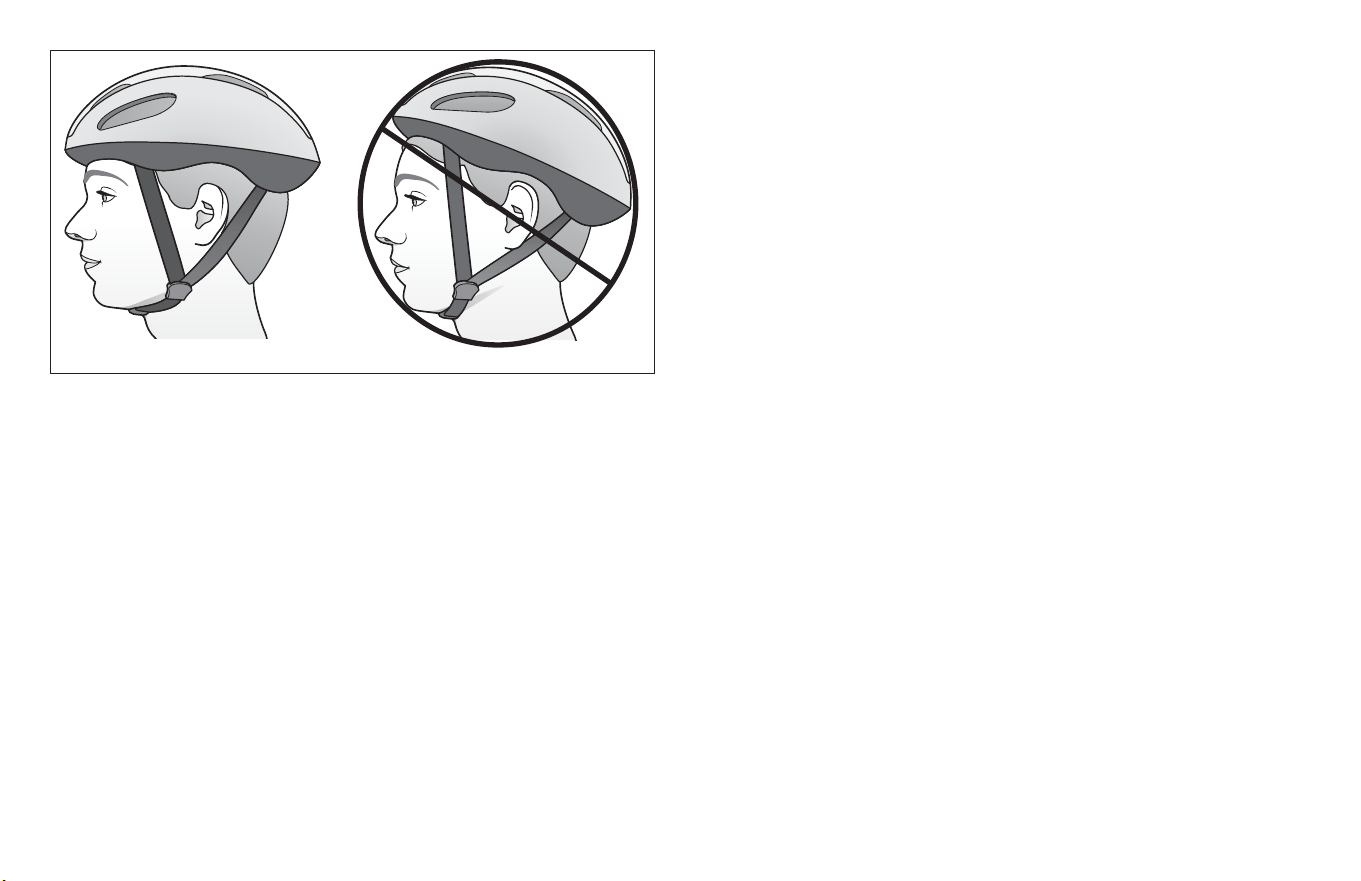
Figure 1.1
You’re helmet should (Figure 1.1):
• U.S. Consumer Product Safety Commission (CPSC) cered
(look for the label on the helmet)
• Properly sized for you
• Properly ed to you
• Properly aached to your head
• Undamaged
2. Always do the Mechanical Safety Check (Secon 1.C) before
you get on a bike.
3. Be thoroughly familiar with the controls of your bicycle: brakes
(Secon 4.C.); pedals (Secon 4.E.); shiing (Secon 4.D.).
4. Be careful to keep body parts and other objects away from the
sharp teeth of chainrings, the moving chain, the turning pedals
and cranks, and the spinning wheels of your bicycle.
5. Always wear:
• Shoes that will stay on your feet and will grip the pedals.
Make sure that shoelaces cannot get into moving parts,
and never ride barefoot or in sandals.
• Bright, visible clothing that is not so loose that it can be
tangled in the bicycle or snagged by objects at the side of
the road or trail.
• Protecve eyewear, to protect against airborne dirt, dust
and bugs-nted when the sun is bright, clear when it’s not.
6. Unless your bicycle was specically designed for jumping
(See Appendix A, Intended Use) don’t jump with your bike.
Jumping a bike, parcularly a BMX or mountain bike, can be
fun; but it can put huge and unpredictable stress on the bicycle
and its components. Riders who insist on jumping their bikes
risk serious damage, to their bicycles as well as to themselves.
Before you aempt to jump, do stunt riding or race with your
bike, read and understand Secon 2.F
7. Ride at a speed appropriate for condions. Higher speed means
higher risk.

Safety 1
9
2.B: Riding Safety
1. Obey all Rules of the Road and all local trac laws.
2. You are sharing the road or the path with others — motorists,
pedestrians and other cyclists. Respect their rights.
3. Ride defensively. Always assume that others do not see you.
4. Look ahead, and be ready to avoid:
• Vehicles slowing or turning, entering the road or your lane
ahead of you, or coming up behind you.
• Parked car doors opening.
• Pedestrians stepping out.
• Children or pets playing near the road.
• Pot holes, sewer grang, railroad tracks, expansion joints,
road or sidewalk construcon, debris and other
obstrucons that could cause you to swerve into trac,
catch your wheel or cause you to have an accident.
• The many other hazards and distracons which can occur
on a bicycle ride.
5. Ride in designated bike lanes, on designated bike paths or as
close to the edge of the road as praccable, in the direcon of
trac ow or as directed by local governing laws.
6. Stop at stop signs and trac lights; slow down and look both
ways at street intersecons. Remember that a bicycle always
loses in a collision with a motor vehicle, so be prepared to yield
even if you have the right of way.
7. Use approved hand signals for turning and stopping.
8. Never ride with headphones. They mask trac sounds and
emergency vehicle sirens, distract you from concentrang on
what’s going on around you, and their wires can tangle in the
moving parts of the bicycle, causing you to lose control.
9. Never carry a passenger; and, before installing a child carrier or
trailer, check with your dealer or the bicycle manufacturer to
make sure the bicycle is designed for it. If the bicycle is suitable
for a child carrier or trailer, make sure that the carrier or trailer
is correctly mounted and the child is secured and wearing an
approved helmet.
10. Never carry anything which obstructs your vision or your
complete control of the bicycle, or which could become
entangled in the moving parts of the bicycle.
11. Never hitch a ride by holding on to another vehicle.
12. Don’t do stunts, wheelies or jumps. If you intend to do stunts,
wheelies, jumps or go racing with your bike despite our advice
not to, read Secon 2.F, Downhill, Stunt or Compeon Biking,
now. Think carefully about your skills before deciding to take
the large risks that go with this kind of riding.
13. Don’t weave through trac or make any moves that may
surprise people with whom you are sharing the road.
14. Observe and yield the right of way.
15. Never ride your bicycle while under the inuence of alcohol
or drugs.
10
1 Safety
16. If possible, avoid riding in bad weather, when visibility is
obscured, at dawn, dusk or in the dark, or when extremely
red. Each of these condions increases the risk of accident.
2.C: O Road Safety
We recommend that children not ride on rough terrain unless they
are accompanied by an adult.
1. The variable condions and hazards of o-road riding require
close aenon and specic skills. Start slowly on easier terrain
and build up your skills. If your bike has suspension, the
increased speed you may develop also increases your risk of
losing control and falling. Get to know how to handle your bike
safely before trying increased speed or more dicult terrain.
2. Wear safety gear appropriate to the kind of riding you plan
to do.
3. Don’t ride alone in remote areas. Even when riding with others,
make sure that someone knows where you’re going and when
you expect to be back.
4. Always take along some kind of idencaon, so that people
know who you are in case of an accident; and take along some
cash for food, a cool drink or an emergency phone call.
5. Yield right of way to pedestrians and animals. Ride in a way that
does not frighten or endanger them, and give them enough
room so that their unexpected moves don’t endanger you.
6. Be prepared. If something goes wrong while you’re riding
o-road, help may not be close.
7. Before you aempt to jump, do stunt riding or race with your
bike, read and understand Secon 2.F.
O Road Respect
Obey the local laws regulang where and how you can ride
o-road, and respect private property. You may be sharing the trail
with others — hikers, trail runners, equestrians, and other cyclists.
Respect their rights. Stay on the designated trail. Don’t contribute
to erosion by riding in mud or with unnecessary sliding. Don’t
disturb the ecosystem by cung your own trail or shortcut through
vegetaon or streams. It is your responsibility to minimize your
impact on the environment. Leave things as you found them; and
always take out everything you brought in.
2.D: Wet Weather Riding
WARNING!
Wet weather impairs tracon, braking and visibility, both for the
bicyclist and for other vehicles sharing the road. The risk of an
accident is dramacally increased in wet condions.
Under wet condions, the stopping power of your brakes (as well
as the brakes of other vehicles sharing the road) is dramacally
reduced and your res don’t grip nearly as well. This makes it
harder to control speed and easier to lose control. To make sure
that you can slow down and stop safely in wet condions, ride
more slowly and apply your brakes earlier and more gradually than
you would under normal, dry condions. See also Secon 4.C.
Safety 1
11
2.E: Night Riding
Riding a bicycle at night is much more dangerous than riding during
the day. A bicyclist is very dicult for motorists and pedestrians to
see. Therefore, children should never ride at dawn, at dusk or at
night. Adults who chose to accept the greatly increased risk of
riding at dawn, at dusk or at night need to take extra care both
riding and choosing specialized equipment that helps reduce that
risk. Consult your dealer about night riding safety equipment.
Bicycle reectors are designed to pick up and reect car lights and
street lights in a way that may help you to be seen and recognized
as a moving bicyclist.
The mounng brackets of front and rear reectors are oen
designed as brake straddle cable safety catches which prevent the
straddle cable from catching on the re tread if the cable jumps
out of its yoke or breaks.
WARNING!
WARNING!
CAUTION!
Reectors are not a substute for required lights. Riding at
dawn, at dusk, at night or at other mes of poor visibility without
an adequate bicycle lighng system and without reectors is
dangerous and may result in serious injury or death.
Do not remove the front or rear reectors or reector brackets
from your bicycle. They are an integral part of the bicycle’s safety
system. Removing the reectors reduces your visibility to others
using the roadway.
Being struck by other vehicles may result in serious injury or
death.
The reector brackets may protect you from a brake straddle
cable catching on the re in the event of brake cable failure. If a
brake straddle cable catches on the re, it can cause the wheel
to stop suddenly, causing you to lose control and fall.
Check reectors and their mounng brackets regularly to make
sure that they are clean, straight, unbroken and securely
mounted. Have your dealer replace damaged reectors and
straighten or ghten any that are bent or loose.
If you choose to ride under condions of poor visibility, check
and be sure you comply with all local laws about night riding, and
take the following strongly recommended addional precauons:
• Purchase and install baery or generator powered head and tail
lights which meet all regulatory requirements for where you live
and provide adequate visibility.
12
1 Safety
WARNING!
• Wear light colored, reecve clothing and accessories, such as a
reecve vest, reecve arm and leg bands, reecve stripes on
your helmet, ashing lights aached to your body and/or your
bicycle ... any reecve device or light source that moves will
help you get the aenon of approaching motorists, pedestrians
and other trac.
• Make sure your clothing or anything you may be carrying on the
bicycle does not obstruct a reector or light.
• Make sure that your bicycle is equipped with correctly
posioned and securely mounted reectors.
While riding at dawn, at dusk or at night:
• Ride slowly.
• Avoid dark areas and areas of heavy or fast-moving trac.
• Avoid road hazards.
• If possible, ride on familiar routes.
If riding in trac:
• Be predictable. Ride so that drivers can see you and predict
your movements.
• Be alert. Ride defensively and expect the unexpected.
• If you plan to ride in trac oen, contact customer service
about trac safety classes or a good book on bicycle trac
safety.
2.F: Extreme, stunt or compeon riding
Whether you call it Aggro, Hucking, Freeride, North Shore,
Downhill, Jumping, Stunt Riding, Racing, Enduro or something else:
if you engage in this sort of extreme, aggressive riding, you
voluntarily assume a greatly increased risk of injury or death.
Not all bicycles are designed for these types of riding, and those
that are may not be suitable for all types of aggressive riding.
Check with your dealer or the bicycle’s manufacturer about the
suitability of your bicycle before engaging in extreme riding.
Although many catalogs, adversements and arcles about
bicycling depict riders engaged in extreme riding, this acvity is
extremely dangerous, increases your risk of injury or death, and
increases the severity of any injury. Remember that the acon
depicted is being performed by professionals with many years
of training and experience. Know your limits and always wear a
helmet and other appropriate safety gear. Even with state-of-
the-art protecve safety gear, you could be seriously injured or
killed when jumping, stunt riding, riding downhill at speed or in
compeon.
Bicycles and bicycle parts have limitaons with regard to
strength and integrity, and this type of riding can exceed those
limitaons or dramacally reduce the length of their safe use.
Safety 1
13
When riding fast down hill, you can reach speeds achieved by
motorcycles, and therefore face similar hazards and risks. Have
your bicycle and equipment carefully inspected by a qualied
mechanic and be sure it is in perfect condion. Consult with expert
riders, area site personnel and race ocials on condions and
equipment advisable at the site where you plan to ride.
Wear appropriate safety gear, including an approved full face
helmet, full nger gloves, and body armor. Ulmately, it is your
responsibility to have proper equipment and to be familiar with
course condions.
We recommend against this type of riding because of the
increased risks; but if you choose to take the risk, at least:
• Take lessons from a competent instructor rst
• Start with easy learning exercises and slowly develop your skills
before trying more dicult or dangerous riding
• Use only designated areas for stunts, jumping, racing or fast
downhill riding
• Wear a full face helmet, safety pads and other safety gear
• Understand and recognize that the stresses imposed on your
bike by this kind of acvity may break or damage parts of the
bicycle and void the warranty
• Take your bicycle to your dealer if anything breaks or bends.
Do not ride your bicycle when any part is damaged.
If you ride downhill at speed, do stunt riding or ride in compeon,
know the limits of your skill and experience. Ulmately, avoiding
injury is your responsibility.
2.G: Changing Components or Adding Accessories
Failure to conrm compability, properly install, operate and
maintain any component or accessory can result in serious
injury or death.
Exposed springs on the saddle of any bicycle ed with a child
seat can cause serious injury to the child.
Changing the components on your bike with other than genuine
replacement parts may compromise the safety of your bicycle
and may void the warranty. Contact customer service before
changing the components on your bike.
WARNING!
There are many components and accessories available to enhance
the comfort, performance and appearance of your bicycle.
However, if you change components or add accessories, you do so
at your own risk. The bicycle’s manufacturer may not have tested
that component or accessory for compability, reliability or safety
on your bicycle.
Before installing any component or accessory, including but not
limited to a dierent size re, a lighng system, a luggage rack, a
child seat, a trailer, etc., make sure that it is compable with your
bicycle by contacng customer service. Be sure to read,
understand and follow the instrucons that accompany the
products you purchase for your bicycle. See also Appendix B,
14
1 Safety
3 FIT
3.A: Standover height
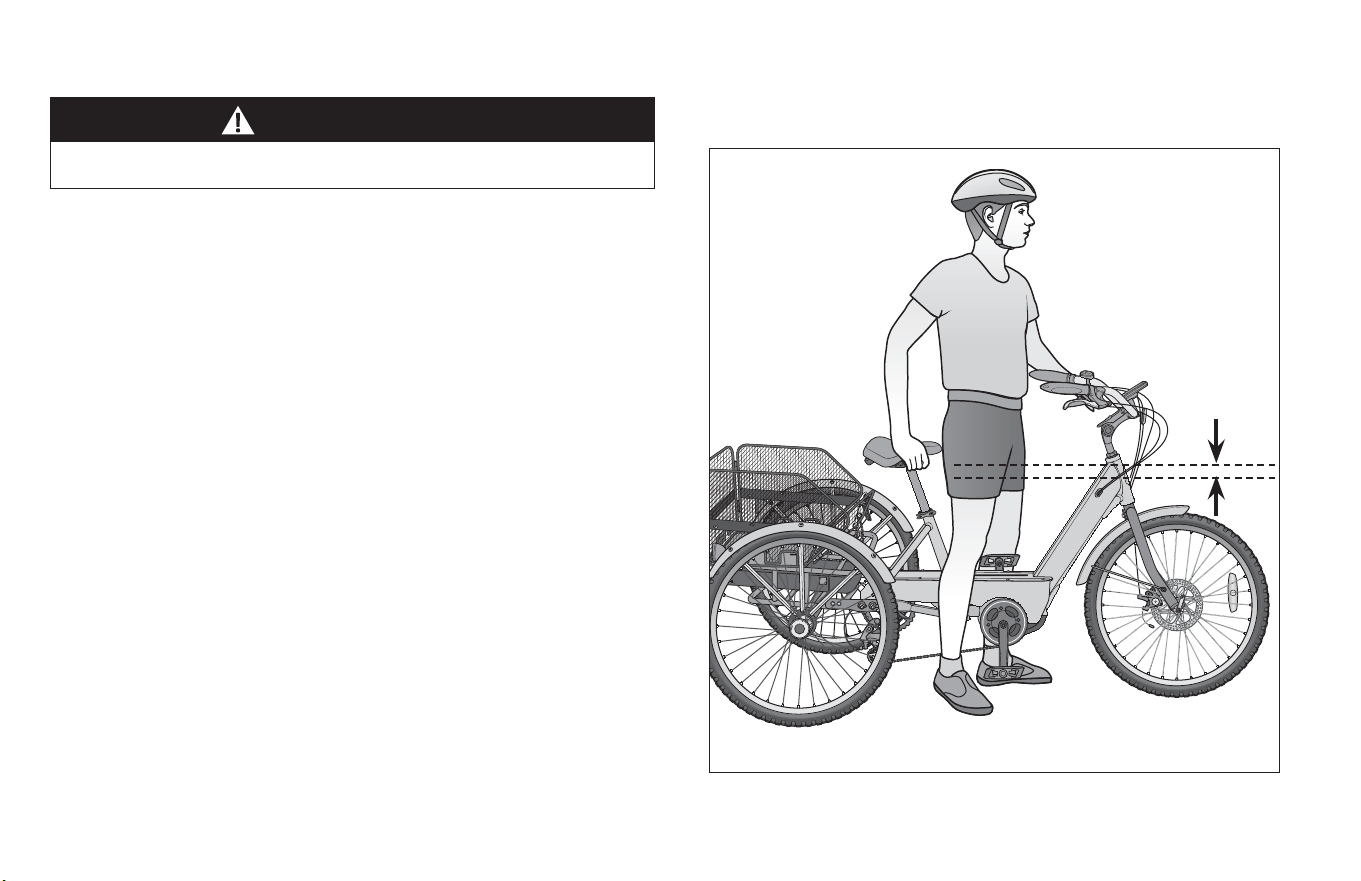
1. Diamond frame bicycles
Standover height is the basic element of bike t. It is the
distance from the ground to the top of the bicycle’s frame at
that point where your crotch is when straddling the bike.
To check for correct standover height, straddle the bike while
wearing the kind of shoes in which you’ll be riding, and bounce
vigorously on your heels. If your crotch touches the frame, the
bike is too big for you. Don’t even ride the bike around the
block. A bike which you ride only on paved surfaces and never
take o-road should give you a minimum standover height
clearance of two inches (5 cm).
A bike that you’ll ride on unpaved surfaces should give you a
minimum of three inches (7.5 cm) of standover height
clearance. And a bike that you’ll use o road should give you
four inches (10 cm) or more of clearance. Figure 1.2
2. Step-through frame bicycles
Standover height does not apply to bicycles with step-through
frames. Instead, the liming dimension is determined by saddle
height range. You must be able to adjust your saddle posion
WARNING!
If your bicycle does not t properly, you may lose control and fall.
as described in 3.B without exceeding the limits set by the
height of the top of the seat tube and the Minimum Inseron
or Maximum Extension mark on the seat post.
Minimum
3 inch (7.5 cm)
clearance
Figure 1.2
Safety 1
15
3.B: Saddle posion
Correct saddle adjustment is an important factor in geng the
most performance and comfort from your bicycle. If the saddle
posion is not comfortable for you, see your dealer.
The saddle can be adjusted in three direcons:
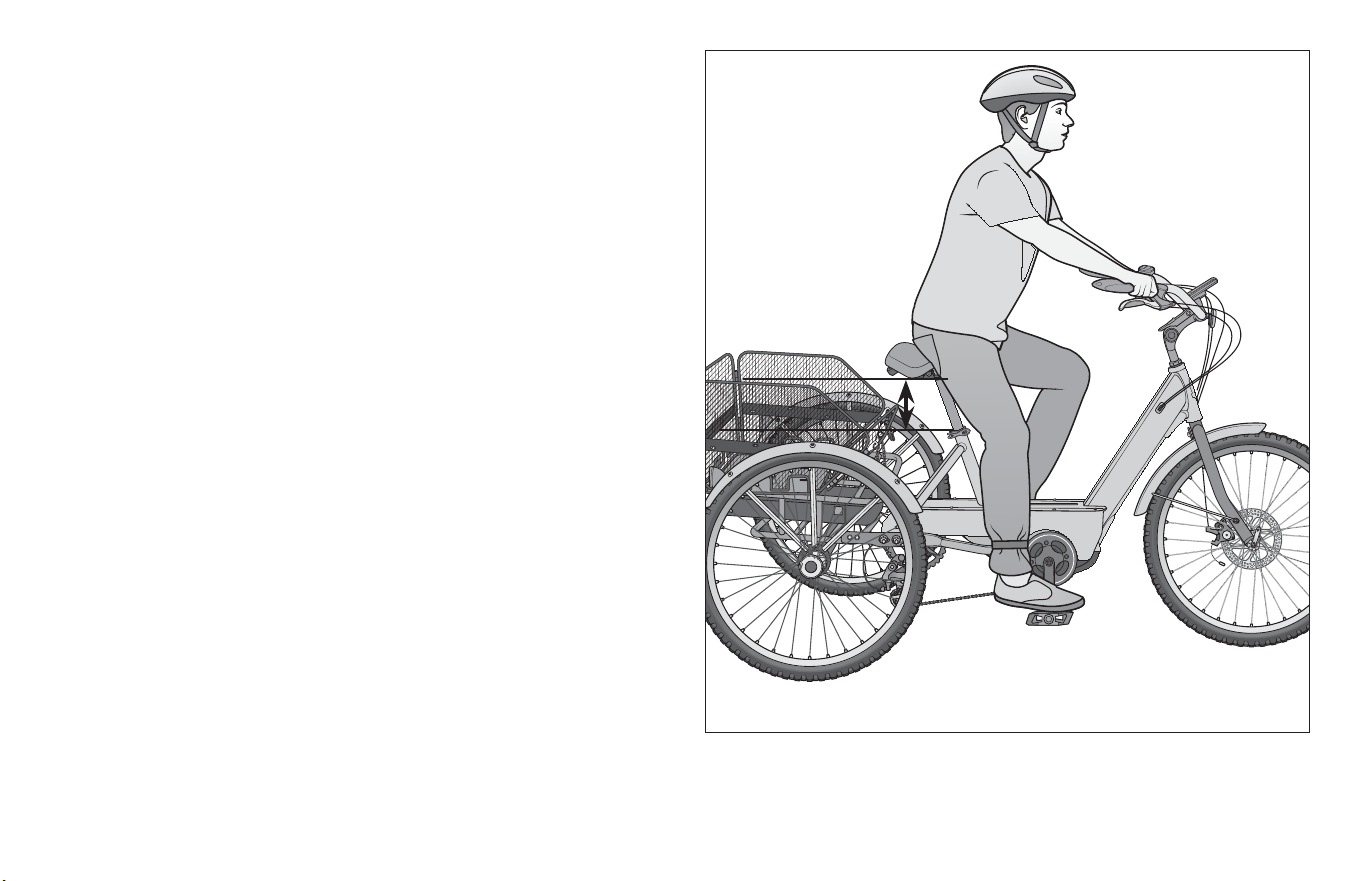
1. Up and down adjustment. To check for correct saddle height:
• sit on the saddle
• place one heel on a pedal;
• rotate the crank unl the pedal with your heel on it is in
the down posion and the crank arm is parallel to the
seat tube.
If your leg is not completely straight, your saddle height needs
to be adjusted. If your hips must rock for the heel to reach the
pedal, the saddle is too high. If your leg is bent at the knee with
your heel on the pedal, the saddle is too low. Figure 1.3
Figure 1.3
16
1 Safety
Ask your dealer to set the saddle for your opmal riding posion
and to show you how to make this adjustment. If you choose to
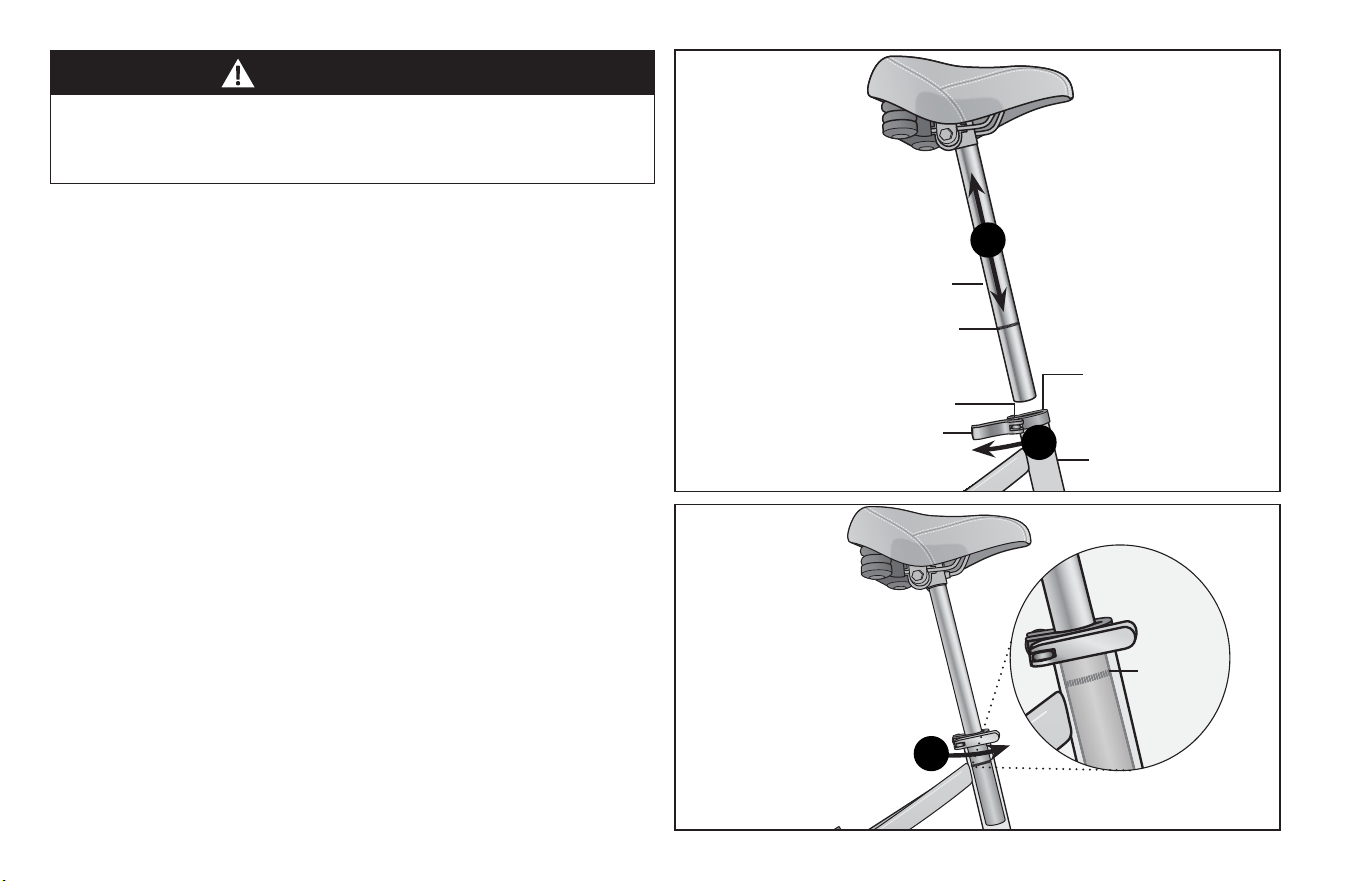
make your own saddle height adjustment: Figure 1.4
❶ loosen the seat post clamp
❷ raise or lower the seat post in the seat tube
❸ make sure the saddle is straight fore and a
❹ re-ghten the seat post clamp to the recommended torque
(Appendix C or the manufacturer’s instrucons).
Once the saddle is at the correct height, make sure that the seat
post does not project from the frame beyond its Minimum
Inseron or Maximum Extension mark. Figure 1.5
NOTE: Some bicycles have a sight hole in the seat tube, the
purpose of which is to make it easy to see whether the seat post is
inserted in the seat tube far enough to be safe. If your bicycle has
such a sight hole, use it instead of the Minimum Inseron or
Maximum Extension mark to make sure the seat post is inserted in
the seat tube far enough to be visible through the sight hole.
If your bike has an interrupted seat tube, as is the case on some
If your seat post is not inserted in the seat tube as described in
B.1 above, the seat post, binder or even frame may break, which
could cause you to lose control and fall.
WARNING!
Figure 1.5
3
Minimum
inseron
marks
Figure 1.4
Minimum inseron
marks on the seat post
Seat post
Quick-release lever
Quick-release
seat clamp
Adjustment nut
2
Seat tube
1
Safety 1
17
WARNING!
WARNING!
When making saddle angle adjustments with a single bolt
saddle clamp, always check to make sure that the serraons on
the mang surfaces of the clamp are not worn. Worn serraons
on the clamp can allow the saddle to move, causing you to lose
control and fall.
Always ghten fasteners to the correct torque. Bolts that are
too ght can stretch and deform. Bolts that are too loose can
move and fague. Either mistake can lead to a sudden failure of
the bolt, causing you to lose control and fall.
suspension bikes, you must also make sure that the seat post is far
enough into the frame so that you can touch it through the boom
of the interrupted seat tube with the p of your nger without
inserng your nger beyond its rst knuckle. Also see NOTE on
previous page.
2. Front and back adjustment. The saddle can be adjusted
forward or back to help you get the opmal posion on the
bike. Ask your dealer to set the saddle for your opmal riding
posion and to show you how to make this adjustment. If you
choose to make your own front and back adjustment, make
sure that the clamp mechanism is clamping on the straight part
of the saddle rails and is not touching the curved part of the
rails, and that you are using the recommended torque on the
clamping fastener(s) (Appendix E or the manufacturer’s
instrucons).
3. Saddle angle adjustment. Most people prefer a horizontal
saddle; but some riders like the saddle nose angled up or down
just a lile. Your dealer can adjust saddle angle or teach you
how to do it. If you choose to make your own saddle angle
adjustment and you have a single bolt saddle clamp on your
seat post, it is crical that you loosen the clamp bolt suciently
to allow any serraons on the mechanism to disengage before
changing the saddle’s angle, and then that the serraons fully
re-engage before you ghten the clamp bolt to the
recommended torque (Appendix E or the manufacturer’s
instrucons).
Aer any saddle adjustment, be sure that the saddle adjusng
mechanism is properly seated and ghtened before riding.
A loose saddle clamp or seat post clamp can cause damage to
the seat post, or can cause you to lose control and fall. A
correctly ghtened saddle adjusng mechanism will allow no
saddle movement in any direcon. Periodically check to make
sure that the saddle adjusng mechanism is properly ghtened.
Note: If your bicycle is equipped with a suspension seat post, the
suspension mechanism may require periodic service or
maintenance. Contact customer service for intervals for your
suspension seat post.
Small changes in saddle posion can have a substanal eect on
performance and comfort. To nd your best saddle posion, make
only one adjustment at a me.
18
1 Safety
If, in spite of carefully adjusng the saddle height, lt and fore-and-
a posion, your saddle is sll uncomfortable, you may need a
dierent saddle design. Saddles, like people, come in many
dierent shapes, sizes and resilience. Your dealer can help you
select a saddle which, when correctly adjusted for your body and
riding style, will be comfortable.
WARNING!
Some people have claimed that extended riding with a saddle
which is incorrectly adjusted or which does not support your
pelvic area correctly can cause short-term or long-term injury to
nerves and blood vessels, or even impotence. If your saddle
causes you pain, numbness or other discomfort, listen to your
body and stop riding unl you can contact customer service
about saddle adjustment or a dierent saddle.
3.C: Handlebar height and angle
Your bike is equipped either with a threadless stem, which clamps
on to the outside of the steerer tube, or with a quill stem, which
clamps inside the steerer tube by way of an expanding binder bolt.
If you aren’t absolutely sure which type of stem your bike has,
contact customer service
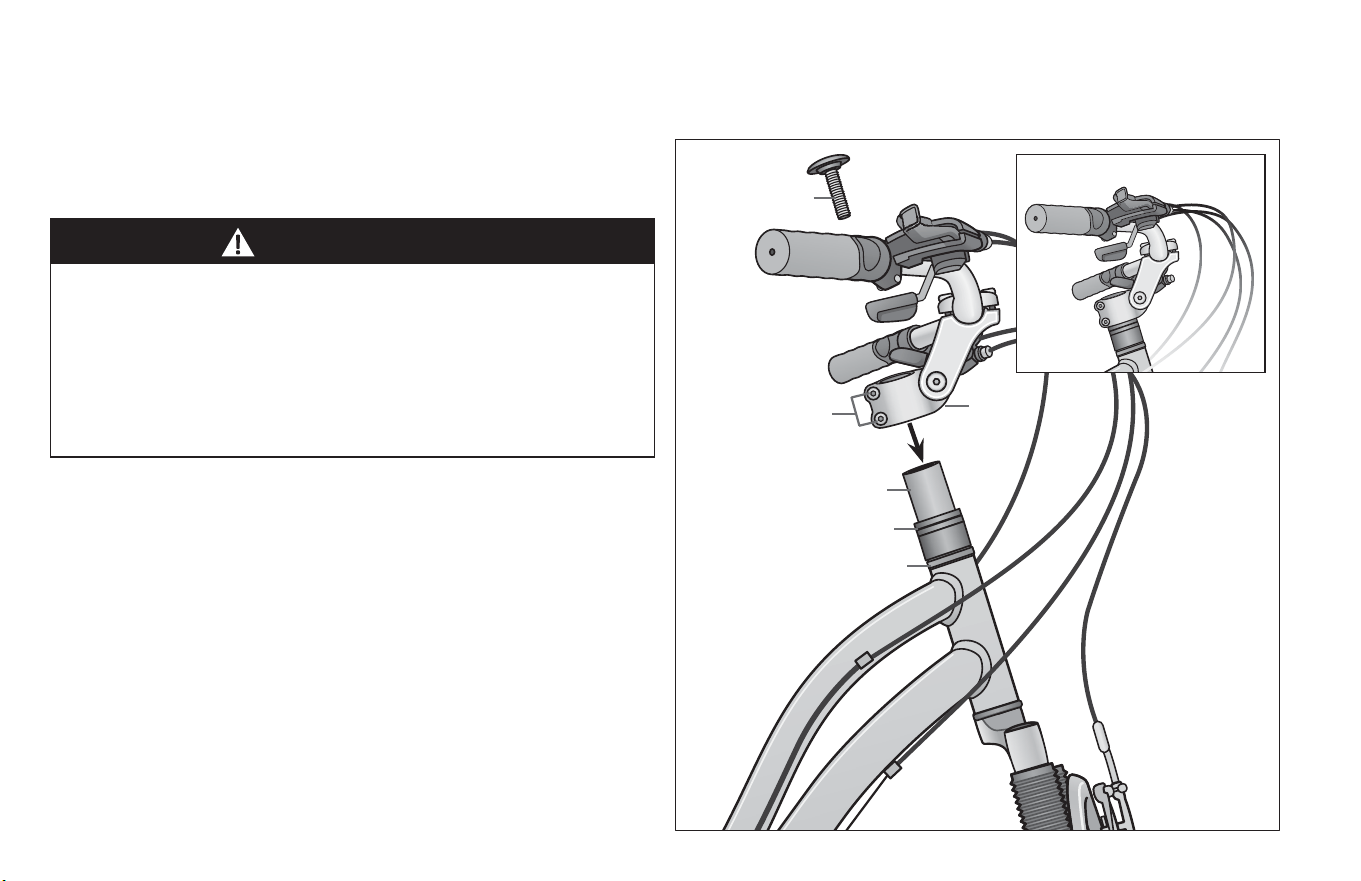
Threadless
If your bike has a threadless stem your dealer may be able to
change handlebar height by moving height adjustment spacers
from below the stem to above the stem, or vice versa.
Otherwise, you’ll have to get a stem of dierent length or rise.
Contact customer service. Do not aempt to do this yourself, as it
requires special knowledge. Figure 1.6
Threadless Stem
Figure 1.6
Top cap
and bolt
Stem pinch bolts
Headset
Steerer tube
Stem
Spacers
Safety 1
19
Quill Stem
If your bike has a quill stem you can contact customer service to
adjust the handlebar height a bit by adjusng stem height.
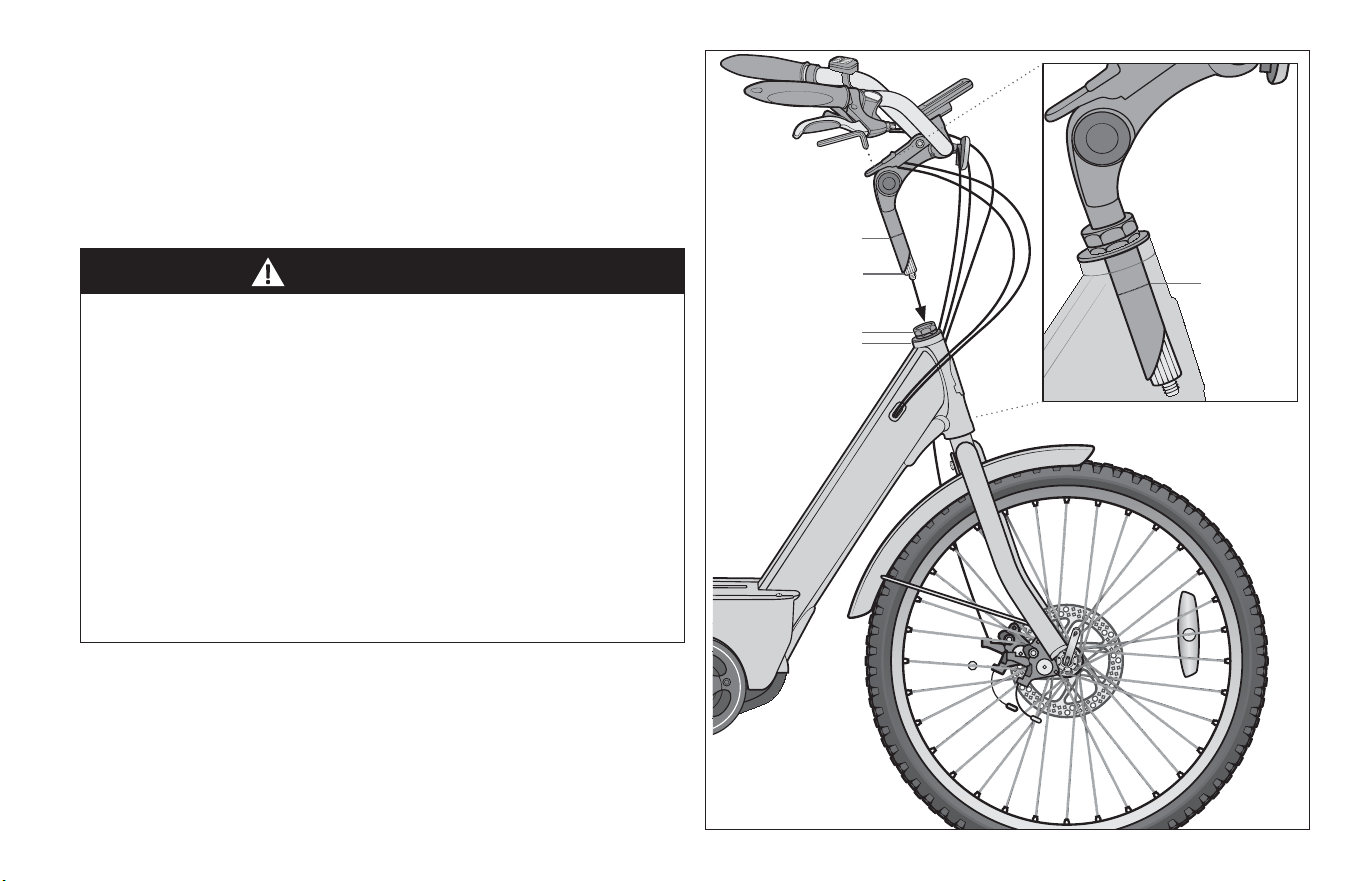
A quill stem has an etched or stamped mark on its sha that
designates the stem’s Minimum Inseron or Maximum Extension.
This mark must not be visible above the headset. Figure 1.7
WARNING!
A quill stem’s Minimum Inseron Mark must not be visible
above the top of the headset. If the stem is extended beyond
the Minimum Inseron Mark the stem may break or damage
the fork’s steerer tube, which could cause you to lose control
and fall.
On some bicycles, changing the stem or stem height can aect
the tension of the front brake cable, locking the front brake or
creang excess cable slack which can make the front brake
inoperable. If the front brake pads move in towards the wheel
rim or out away from the wheel rim when the stem or stem
height is changed, the brakes must be correctly adjusted before
you ride the bicycle.
Quill stem
Headset
Steerer tube
minimum
inseron mark
Li lever to
adjust binder bolt
Quill Stem
minimum
inseron
mark
Figure 1.7
20
1 Safety
WARNING!
Always ghten fasteners to the correct torque. Bolts that are too
ght can stretch and deform. Bolts that are too loose can move
and fague. Either mistake can lead to a sudden failure of the
bolt, causing you to lose control and fall.
WARNING!
An insuciently ghtened stem clamp bolt, handlebar clamp
bolt or bar end extension clamping bolt may compromise
steering acon, which could cause you to lose control and fall.
Place the front wheel of the bicycle between your legs and
aempt to twist the handlebar/stem assembly. If you can twist
the stem in relaon to the front wheel, turn the handlebars in
relaon to the stem, or turn the bar end extensions in relaon to
the handlebar, the bolts are insuciently ghtened.
Be aware that adding aerodynamic extensions to handlebars will
change the steering and braking response of the bicycle.
WARNING!
The shorter the brake lever reach, the more crical it is to have
correctly adjusted brakes, so that full braking power can be
applied within available brake lever travel. Brake lever travel
insucient to apply full braking power can result in loss of
control, which may result in serious injury or death.
Adjustable Angle Stem
Some bicycles are equipped with an adjustable angle stem. If your
bicycle has an adjustable angle stem, contact customer service to
show you how to adjust it. Do not aempt to make the adjustment
yourself, as changing stem angle may also require adjustments to
the bicycle’s controls.
3.D: Control posion adjustments
The angle of the brake and shi control levers and their posion on
the handlebars can be changed. If you choose to make your own
control lever angle adjustment, be sure to re-ghten the clamp
fasteners to the recommended torque (Appendix D or the
manufacturer’s instrucons).
3.E: Brake reach
Many bikes have brake levers that can be adjusted for reach.
If you have small hands or nd it dicult to squeeze the brake
levers, your dealer can either adjust the reach or t shorter reach
brake levers.
Safety 1
21
4 Pedal Assist Electric Bicycle
WARNING!
Disregarding or misunderstanding of the following safety
warnings, the safety warnings in the manuals associated with
the e-bike parts, and safety labels on the e-bike could result in
serious injury or death.
• Anyone assembling, using, maintaining, transporng or storing
this e-bike must read, understand, and follow these safety
warnings before performing any of the acons stated. If you
have any quesons regarding the safety warnings and labels
call Schwinn Customer Service at 1-800-626-2811 before
performing any of the acons stated.
4.A: Operaon
General
• Only use the e-bike and the drive assist system for safe,
recreaonal riding. Use of the e-bike for a purpose it was not
intended for is dangerous and could result in property damage,
serious injury or death.
• Refer to the drive assist system manufacturer’s manual for
instrucons regarding all the components of the drive assist
system (e.g. Baery, Drive Charger, Display/e-bike Computer).
Always follow the manufacturer’s instrucons for intended use
and limitaons.
Personal Restricons
• Use of this e-bike by persons (including children) with reduced
physical, sensory or mental capabilies or persons lacking
experience and knowledge in the use of the e-bike could result
in serious injury or death. The owner of this e-bike must ensure
this product is not used by people with the condions
described above. Always follow the rules, regulaons and laws
(including age limits) related to the use of an e-bike in its area
of use.
• A child may not realize or understand the e-bike has moving
parts and components (e.g. baery). Never allow children to
play or come into contact with the e-bike or its parts. Always
follow all rules, regulaons and laws regarding age limits and
operaon in the e-bike area of use.
22
1 Safety
WARNING!
Drive Assist System
• Turning the drive assist system ON before you are seated and
have both hands on the handlebar could result in loss of
control of the e-bike. Always have total control of the e-bike
and be ready to ride before engaging the drive system.
• The e-bike's drive assist system will increase the acceleraon of
the bike. It is the rider’s responsibility to appropriately judge the
riding condions (e.g. road condions, ght turns) and current
speed of the e-bike before adjusng the drive assist system.
Ancipang changes in speed and providing me to react
appropriately is crical to using the drive assist system.
Always check your surroundings and condions before
accelerang and set the assistance level to lowest assist, or o,
when descending hills.
• The drive assist system will not funcon properly without the
display (e-bike computer) properly aached to the base.
If the display (e-bike computer) becomes disconnected from the
base during a ride, the speed of the e-bike will change.
Unexpected deceleraon may impact your riding condions
and other vehicles near you. Always be prepared to pull o to a
safe area in case the display (e-bike computer) becomes
disconnected from the base.
Riding
• Improper use of the drive assist system may result in riding at
unsafe speeds and cause accidents resulng in serious injury or
death. Do not accelerate using the drive assist system in
situaons where there is a possibility of causing harm to people,
animals, or property. Always maintain control of the e-bike and
operate at a safe speed.
• Riding the e-bike through water could result in loss of control
and damage to the drive assist system. Do not ride into, or
aempt to ride through, water or sub-merge any part of the
e-bike.
• Riding with the kickstand in the down posion may result in
unexpected contact with the ground or other objects causing
loss of control. Always ensure the kickstand is in the up posion
and securely locked in place before riding the e-bike.
• Sing on the e-bike with the kickstand down may result in the
e-bike pping over. Never sit on the e-bike when it is only
supported and stabilized by the kickstand. The kickstand is not
designed to support the weight of a person.
• Overloading a rear basket could create dangerous riding
condions. Always observe the maximum weight limit stated by
the manufacturer. Never overload the rear basket.
• An improperly secured load on a rear rack could create
dangerous riding condions. Always ensure the load on the rear
rack is properly secured before riding.
Safety 1
23
WARNING!
4.B: Baery
Failure to observe the following warnings could result in
electrical res, explosion, severe burns or electrocuon.
General
• The baery and baery charger contain hazardous materials.
Always keep the baery and baery charger away from
children, animals, or persons incapable of understanding the
potenal hazards.
• The baery and baery charger contain no serviceable parts.
Do not open, disassemble, or modify the baery or charger.
• Improper handling of the baery and baery charger may result
in electrical res, explosion, severe burns or electrocuon.
• Do not move the baery or baery charger during
charging
• Do not hold the baery charger during a thunder or
lighng storm
• Do not plug or unplug the baery charger with wet hands
• Do not place any items on the baery charger
• Do not place the baery charger in liquids or metals
• Overcharging the baery could result in electrical res,
explosion, or severe burns. Always disconnect the baery from
the baery charger when the baery is fully charged. Unplug
the baery charger from the wall outlet when not in use.
• A damaged baery or baery charger (e.g. cable, plug or
housing) may result in leakage of hazardous materials or be a
potenal source of sparking and re. Always examine the
baery and baery charger before each use. Never charge a
damaged baery or use a damaged baery charger.
Baery Charger Compability
• Charging the baery with an incompable baery charger may
result in electrical res, explosion, severe burns or
electrocuon. Ensure the baery charger and the A/C outlet
are the same voltage before charging the baery. Only charge
the baery using the baery charger specied by the
manufacturer’s instrucons. Never use the baery charger to
charge any other baeries.
Baery Charging Environment
• Remove the baery from the e-bike before charging and locate
both the baery and baery charger indoors, in a clean, dry
area with good venlaon to charge. Always place the baery
and baery charger on an even surface. Ensure the area is free
from dust, moisture, combusbles and keep the baery charger
venlaon openings unobstructed. If applicable, always turn
the power switch on the baery O before aaching.
• Contact between the baery contacts and metal objects such
as paper clips, coins, keys, nails, screws or other metal items
could result in shorng out the baery and cause electrical
res, explosion, or severe burns.
24
1 Safety
WARNING!
• The baery should be charged, discharged and operated in the
following condions:
• Charge (Temperature Range): 0 – 113º F (0 – 45º C)
• Discharge (Temperature Range): -4 - 113º F (-20 - 45º)
• Operaon (Relave Humidity): <80%
Baery Disposal
• Baery and baery charger contain regulated materials and
must be disposed/discarded in accordance with naonal and/
or local laws. Do not discard the baery and baery charger
into re, water or ordinary household waste/garbage. Always
dispose the baery and baery charger at an approved waste
facility/recycler.
4.C: Storage
• Unexpected acvaon of the drive assist system could result in
serious injury or death. Always turn OFF the drive assist
system, remove the key and display unit, and remove the
baery from the e-bike when storing the bike. Place the parts
in a secure locaon.
• Overheang of the baery could result in electrical res or
explosion. Always store the baery and baery charger in a
well venlated area at moderate temperatures.
4.D: Transportaon
• The baery is subject to hazardous materials regulaons when
in transit. Always contact the proper authories regarding the
requirements to transport the baery. Do not transport the
baery without insulang the baery contacts, properly
packaging the baery, applying required safety labels, and use
of an authorized shipping container. Never transport a
damaged baery.
• The baery must be removed from the e-bike before
transporng the bike on an aircra. Always contact the air
carrier for specic requirements.
4.E: Modicaons
General
• Dealers and owners MUST NOT change, alter, or modify in any
way the original components of the bicycle or drive-assist
system (e.g. modifying the drive unit or soware). Only use
soware updates authorized by Schwinn. Failure to do so may
void the product warranty.
• Aempts to “hot-rod” or “improve” the speed of the bike are
dangerous to the rider. Only use specied Schwinn and/or
manufacturer drive-assist service and replacement parts.
Failure to do so may void the product warranty.
Drive Assist System
• Modifying the e-bike and drive assist system could result in
damage to the drive system, faulty or dangerous operang
condions, or violaon of rules, regulaons and laws related to
the use of an e-bike. Never modify the e-bike or its parts for
any reason.
Safety 1
25
WARNING!
NOTICE
NOTICE
4.F: Maintenance
• There are no user serviceable elements incorporated into the
motor, motor con troller, baery, baery charger, throle, or
wiring harness of your e-bicycle. DO NOT ATTEMPT TO
DISASSEMBLE OR ADJUST ANY OF THESE COMPO NENTS.
Doing so may cause extensive damage to these components,
will void your warranty, and may cause a hazard ous condion.
If you cannot resolve a problem, contact Schwinn Customer
Service at 1-800-626-2811 for all service quesons.
• Performing maintenance on the e-bike with the drive assist
system acve could result accidental acvaon of the drive
assist system. Always remove the baery from the e-bike
before performing maintenance.
• Cleaning ‘live’ electrical components may result in shock,
sparks, physical personal injury and damage to the electrical
component(s). Always de-energize the electrical components
(e.g. baery, display) before cleaning.
Cleaning
• Contact between uids (e.g.: water, cleaning products) and
electrical components may cause damage to the components.
It is recommended that you use a non-stac cloth with a minimal
amount of cleaning uid. Do not soak the cloth with cleaning uid.
• Cleaning and drying the bicycle with a pressure washer or
compressed air may force contaminants into sealed areas,
electrical connecons, and components which may cause
damage, corrosion, or result in accelerated wear. Do not use a
pressure washer or compressed air to clean and dry the bicycle.
• Cleaning the bicycle in an unstable posion may result in
p-over, unexpected movement and cause damage to the
bicycle. Always secure the bicycle so it is in a stable, secured
posion during cleaning.
Compliance / Regulaon
• It is beyond the scope of this manual to idenfy all rules,
regulaons and laws related to the use of an e-bike in its area of
use. Failure to comply with all rules, regulaons and laws may
endanger the e-bike user and other people, animals, and
property. It is the e-bike owner and user’s responsibility to
idenfy, be aware of, and follow all rules, regulaons and laws
necessary for legal compliance in its area of use.
• It is possible that an e-bike has a Vehicle Class Designaon in its
area of use (e.g.: California, USA). The Vehicle Class Designaon
may dene the types of e-bikes, e-bike idencaon and areas
for legal use. They may include any required addional
equipment, registraon, and applicable rider age restricons. It is
the responsibility of the owner and user to understand and
follow all rules, regulaons, and laws specied in the Vehicle
Class Designaon.
26
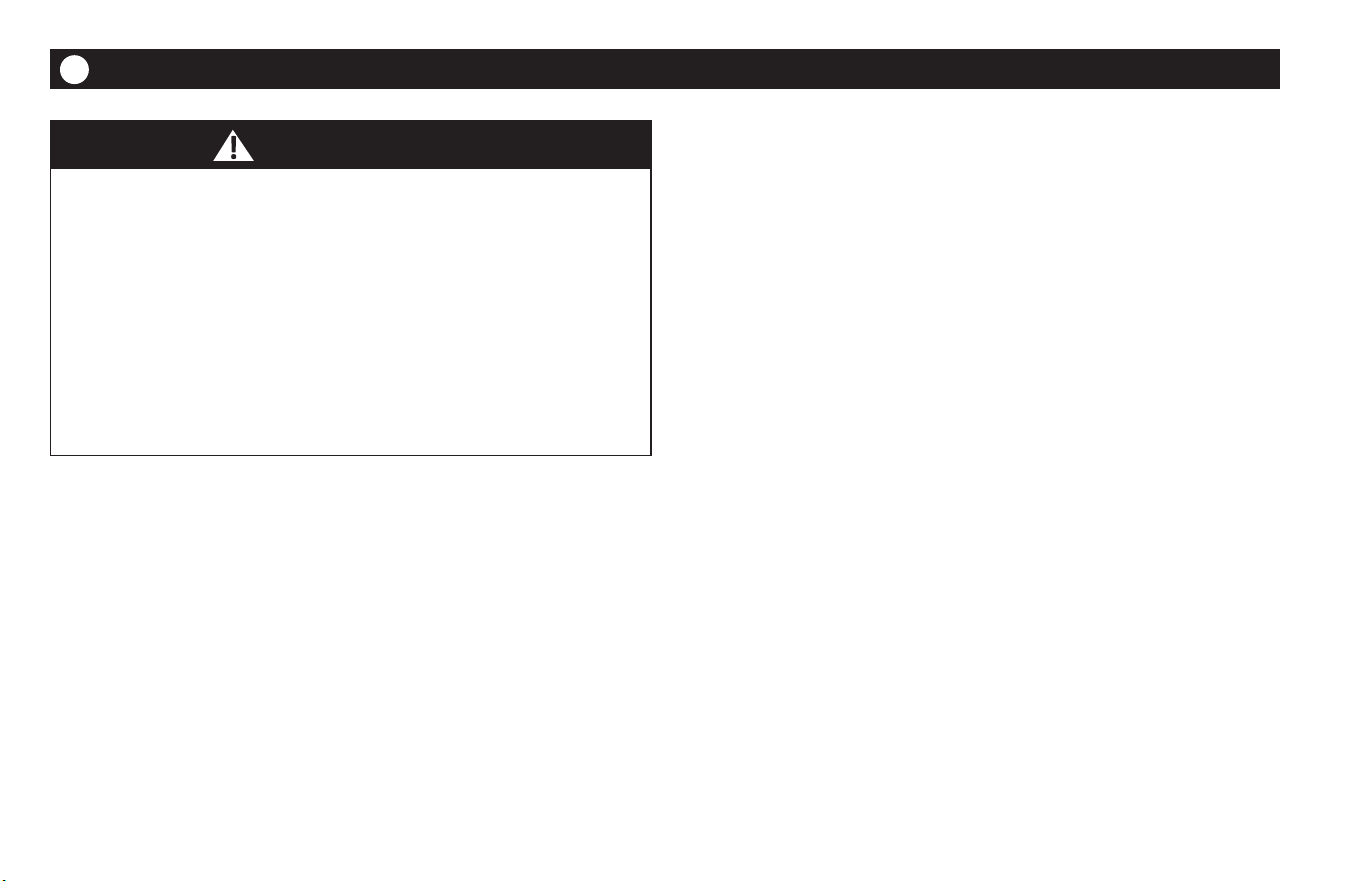
2 Parts Idencaon
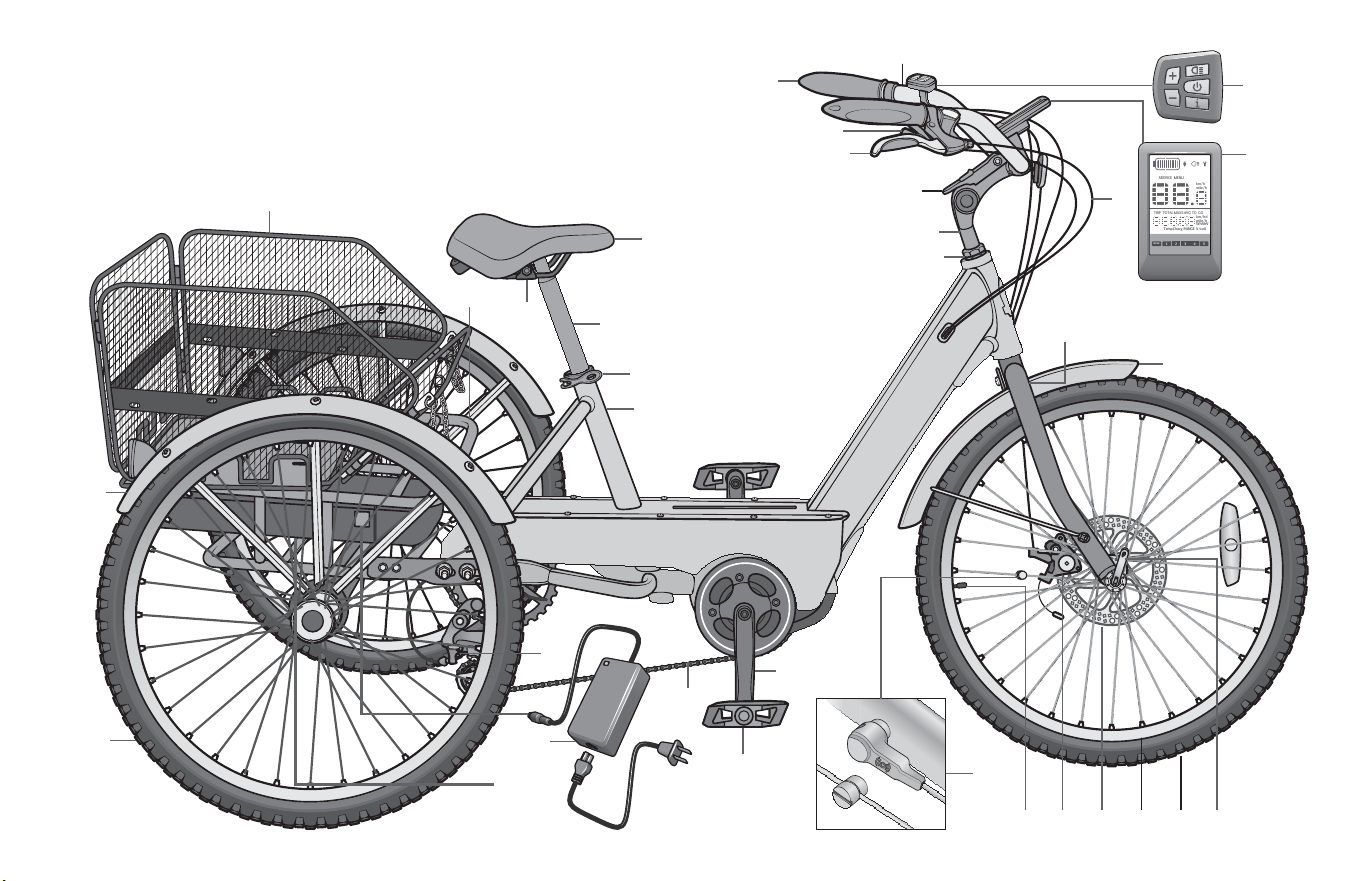
Part name
13 Wheel quick release lever
14 Front re
15 Wheel rim
16 Disc brake rotor
17 Disc brake caliper
18 Air valve stem
19 Speed Sensor and magnet
20 Pedal
21 Crank Arm
22 Chain
23 Seat tube
24 Seat quick release lever
Part name
1 Handlebar
2 Handlebar grip
3 Gear shier
4 Hand brake
5 Stem binder bolt cover
6 Handlebar stem
7 Headset
8 Brake and shier cables
9 Display unit
10 Keypad
11 Front fork
12 Front fender
Part name
25 Seat stem
26 Seat
27 Seat hardware
28 Rear frame sub assembly
29 Basket
30 Rear fender
31 Rear wheel
32 Baery
33 Baery charger and cable
34 Rear derailler
Meridian Adult Tricycle ebike
Get to know the parts of your bicycle. This will help with assembly, maintenance, and troubleshoong. Color, style and parts may vary.
PARTS IDENTIFICATION
2
Parts Idencaon 2
27
SERVICE MENU
TRIP TOTALMAXS AVG
RANGETempCharg V/cell
TO GO
km/h
mile/h
km/hd
mile/h
WhAhV
1
WALK
2 3 4 5
10
9
12
11
13
14
15
1617
19
18
20
21
22
33
34
31
30
32
23
24
25
26
27
28
29
8
1
4
3
5
6
7
2
28
3 Assembly
ASSEMBLY
3
Your new bicycle was assembled and tuned in the factory and then
parally disassembled for shipping. You may have purchased the
bicycle already fully assembled and ready to ride or in the shipping
carton in the parally disassembled form. The following
instrucons will enable you to prepare your bicycle for years of
enjoyable cycling.
For more details on inspecon, lubricaon, maintenance and
adjustment of any area please refer to the relevant secons in
this manual. If you have quesons about your ability to properly
assemble this unit, please consult a qualied bicyclist mechanic
before riding.
If you need replacement parts or have quesons pertaining to the
assembly of your bicycle, call the service line direct at:
1-800-626-2811. Monday - Friday 8:00 am to 5:00 pm Central
Standard Time (CST).
WARNING!
Improper assembly of this product may result in serious injury or
death. Always follow the instrucons in this manual and check
crical components (e.g. wheels, seat, pedals, brakes,
derailleurs, res) before each use.
We recommend that you consult a bicycle specialist if you have
doubts or concerns as to your experience or ability to properly
assemble, repair, or maintain your bicycle. If your bicycle was
obtained assembled, we recommend that you read these
instrucons and perform checks specied in this manual
before riding.
Assembly 3
29
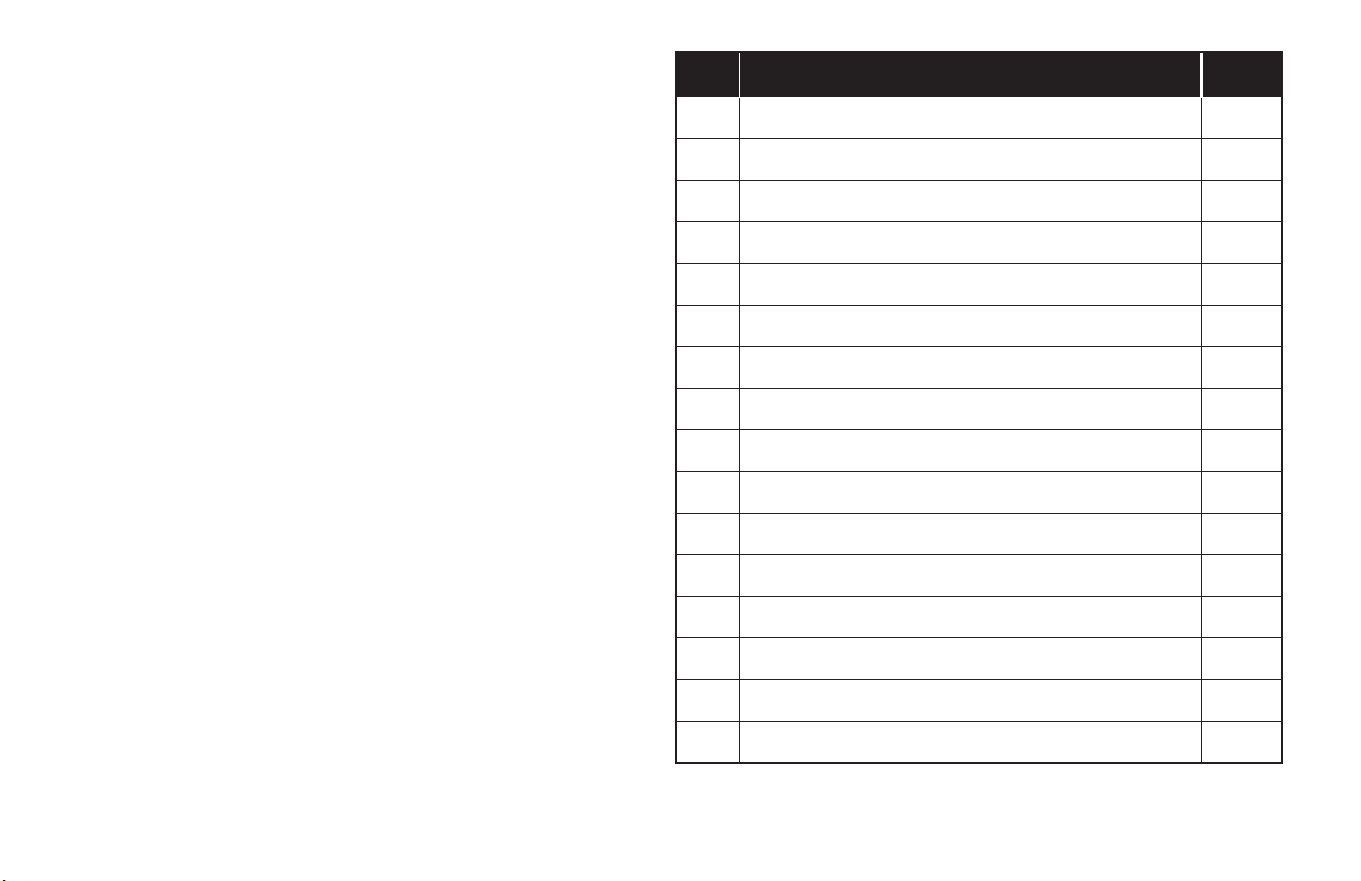
1: TOOLS REQUIRED
• Phillips head screw driver (minimum four inch sha)
• 4 mm, 5 mm, 6 mm 8 mm and 17 mm Allen wrench
• Adjustable wrench or a 9 mm, 10 mm, 14 mm and 15 mm open
and box end wrenches
• A pair of pliers with cable cung ability
• Needle nose pliers with cable cung ability
• Grease (Automove or an-slip copper grease)
2: GETTING STARTED
❶ Open the carton from the top and remove the tricycle parts.
❷ Remove the straps and protecve packaging from the bicycle.
Important! Do not discard packing materials unl assembly is
complete to ensure that no required parts are accidentally
discarded.
❸ Inspect the tricycle and all accessories and parts for possible
shortages. It is recommended that the threads and all moving
parts in the parts package be lubricated prior to installaon.
Note: We recommend using a lithium based grease on the
parts before assembly.
Figure 3.1
30
3 Assembly
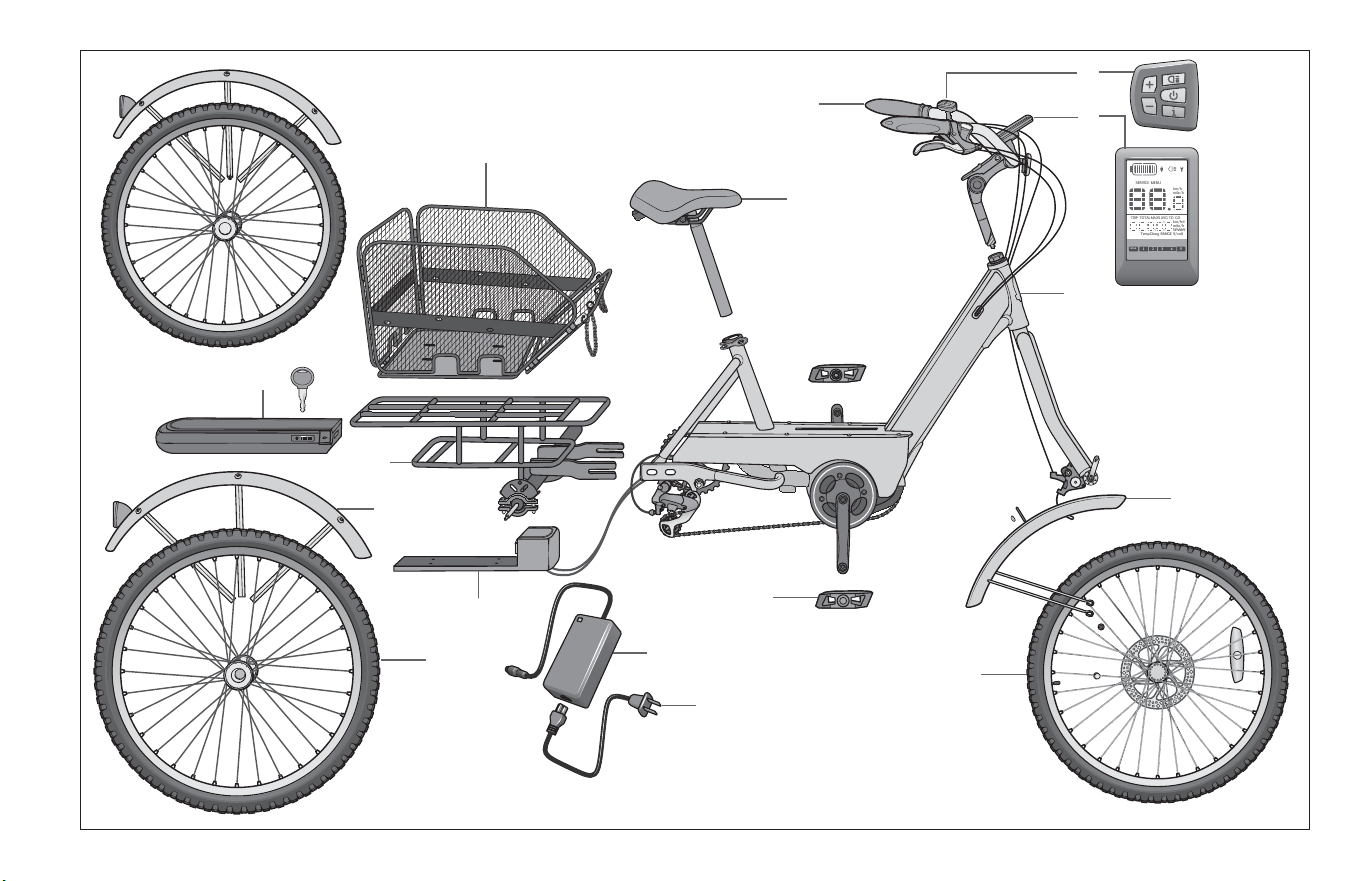
3: E-BIKE PARTS
The following components are exclusive to the Schwinn Meridian
Adult Tricycle ebike. Note: Your e-bike parts will vary depending
on your model. Ensure you have all the following parts. Figure 3.2
No. Part name Qty.
1 Handlebar assembly 1
2 Keypad 1
3 Display unit 1
4 ebike main frame 1
5 Front fender 1
6 Front wheel 1
7 Pedal 2
8 Seat and seat tube 1
9 Basket 1
10 Baery (with key) 1
11 ebike rear subframe 1
12 Rear fender 2
13 Rear wheel 2
14 ebike baery bracket 1
15 ebike baery 1
16
Power cord
1
Assembly 3
31
SERVICE MENU
TRIP TOTALMAXS AVG
RANGETempCharg V/cell
TO GO
km/h
mile/h
km/hd
mile/h
WhAhV
1
WALK
2 3 4 5
Figure 3.2
❶
❷
❸
❹
❺
⓭
⓯
⓰
⓮
❽
❾
❿
⓬
❻
❼
H272
⓫
32
3 Assembly
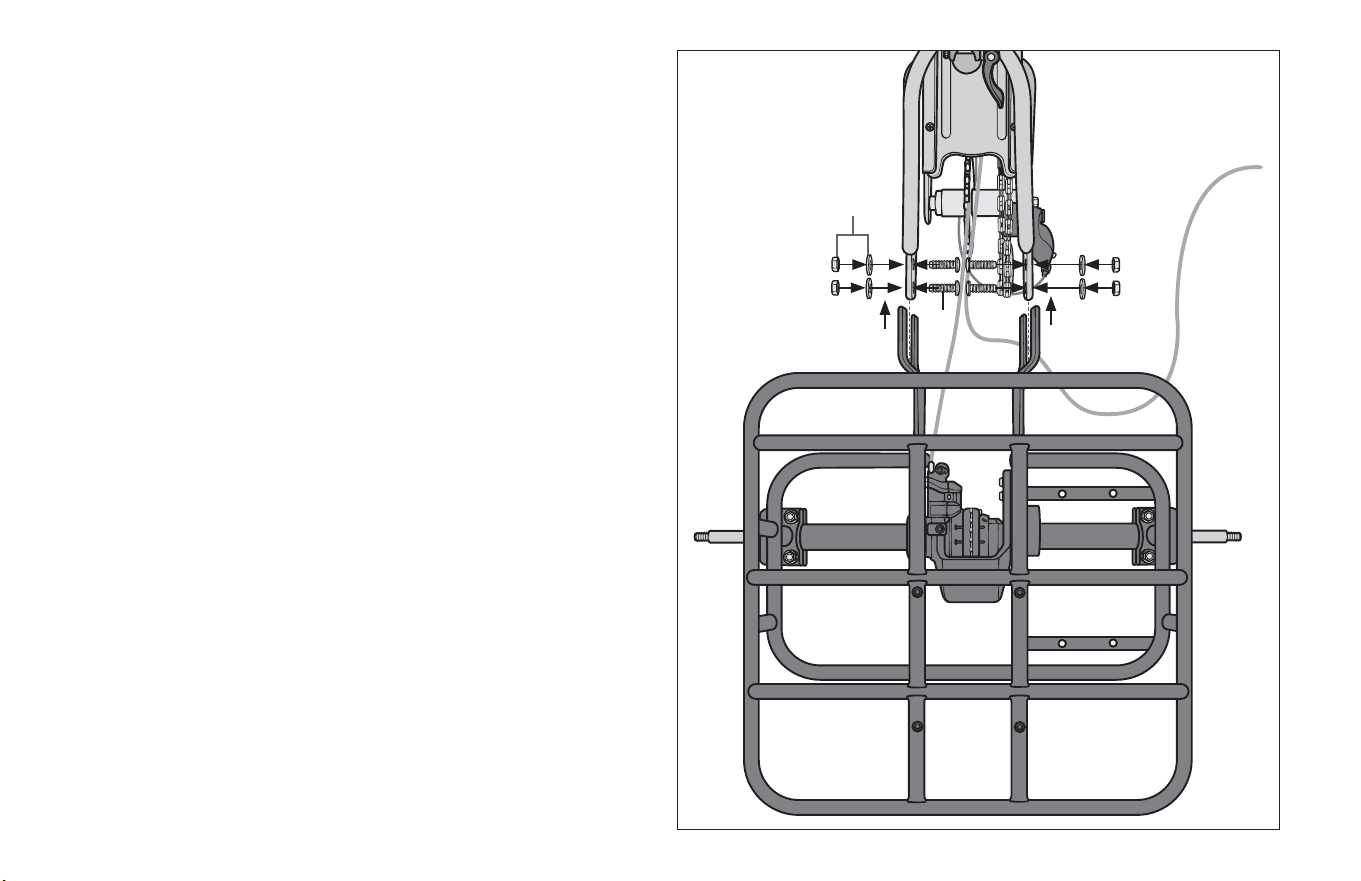
4: ATTACH THE SUBFRAME
Parts: main frame, rear subframe
Hardware: 4 nuts, 4 square bolts, 4 washers
(Hardware is aached to the frame’s)
❶ Join the main frame and the rear subframe together by
aligning the fork on the rear subframe with the holes on the
main frame fork. Figure 3.3
❷ Working from the inside of the main frame, insert a bolt
through each hole on the main frame fork.
❸ Insert a washer and nut on the end of each bolt.
Note: Do not ghten the nuts at this me. This will be done aer
the secondary chain is aached.
Figure 3.3
❶
❶
❸
❷
Assembly 3
33
Ti
p!
Have a second person
pulling the chain taut
while ghtening the bolts.
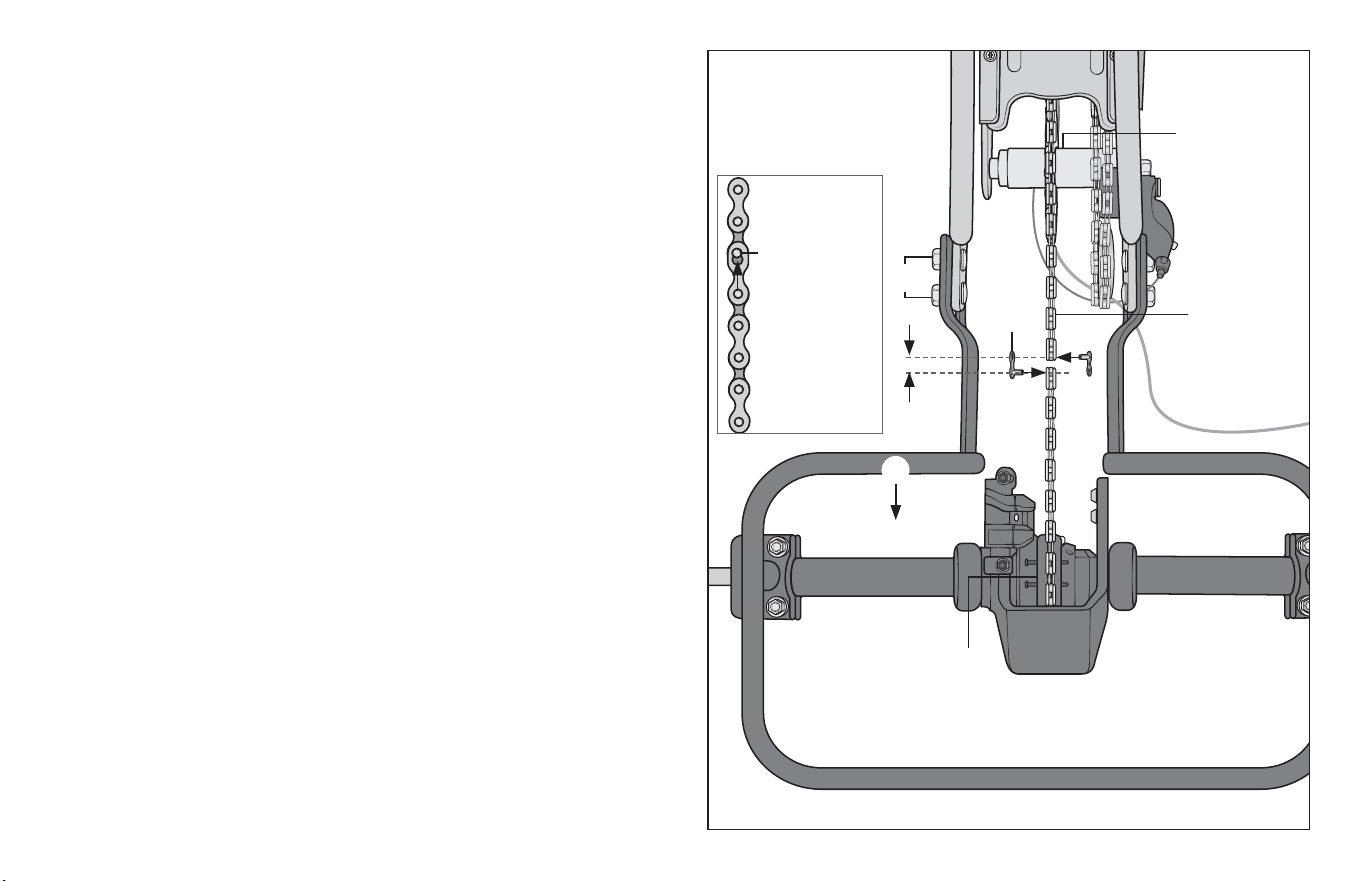
5: ATTACH THE SECONDARY CHAIN
Parts: secondary chain, frame assembly
Hardware: 2 master links
Tools: 17 mm open and box end wrench.
❶ Wrap the secondary chain around the inner sprocket on the
rear hub and drive sprocket on the rear axle. Figure 3.4
❷ Adjust the posion of the rear frame unl the ends of the
secondary chain meet each other, leaving one chain link length
space in between the ends.
❸ To connect the two ends of the chain:
a. Insert the post of a master link through the hole on the
end of the secondary chain link.
b. Insert the post of the other master link through the
opposite end of the secondary chain, and on the
opposite side of the chain.
c. Pull the chain so the posts are inserted into the smaller
hole of the master chain.
❹ Pull the rear subframe back so the secondary chain is taut and
there is less than 5 mm of play up or down.
Important! Be sure the rear axle is perpendicular to main frame.
Failure to square the frames will aect performance of the tricycle.
❺ Firmly ghten the four bolts holding the rear frame to the
main frame.
Figure 3.4
❸
❷
Rear hub with
inner sprocket
Secondary
chain
Master
link
Rear axle with
drive sprocket
❶
Post inserted
into the small
hole on the
link
❺
❹
34
3 Assembly
!
WARNING!
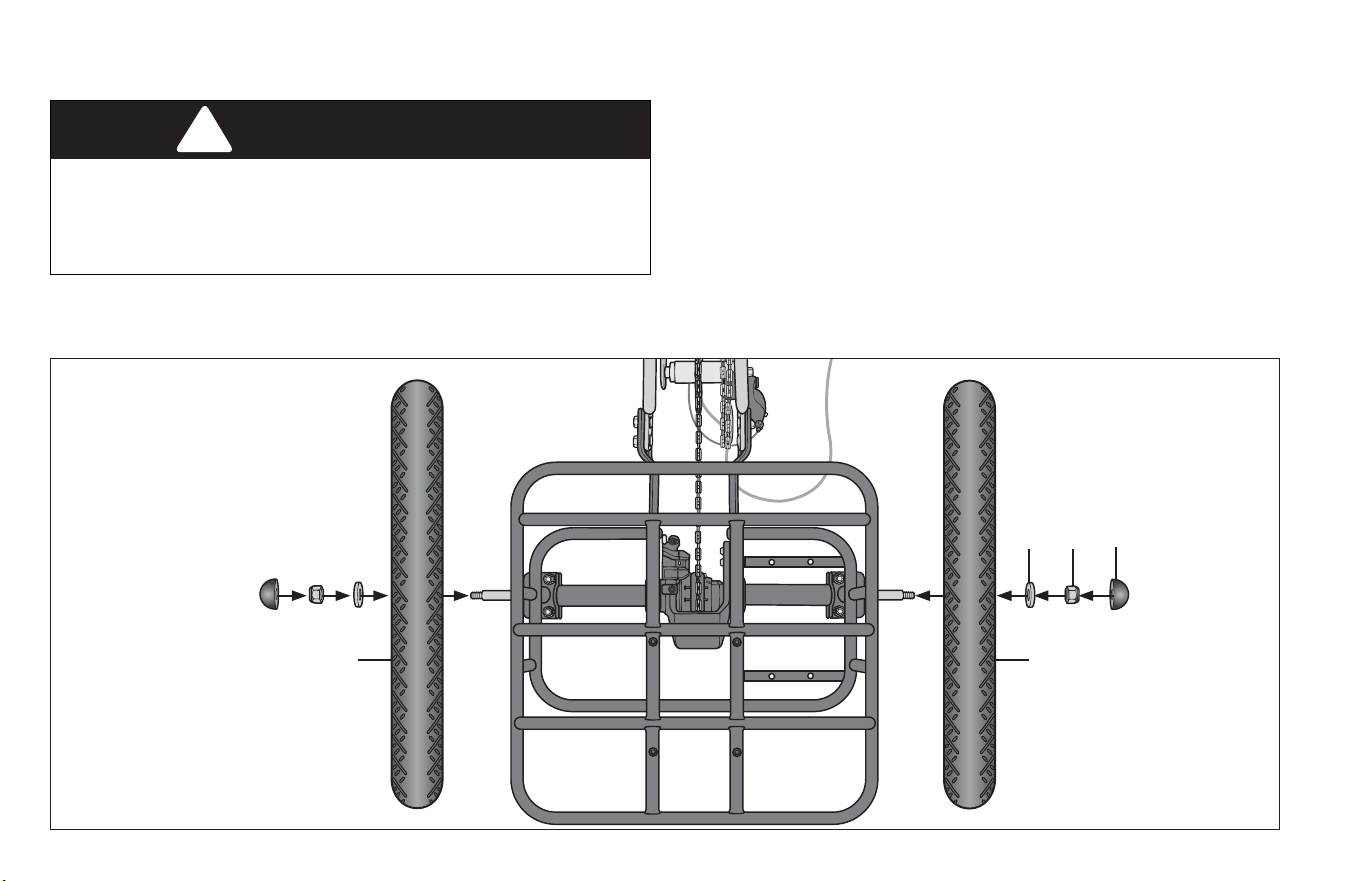
6: ATTACH THE REAR WHEELS
Failure to properly ghten the nuts holding the wheels onto the
tricycle may result in poor riding performance, the re falling o
and serious injury or death. Always be sure the wheels are
securely aached to the frame before using the tricycle.
Parts: Drive wheel, non-drive wheel
Tools: 17 mm socket
Hardware: 2 plasc caps, 2 locknuts, 2 washers.
(Hardware is aached to the rear axle)
❶ Place a wheel on the axle. Figure 3.5
❷ Place the washer on the axle.
❸ Place the locknut on the axle and ghten securely.
❹ Push the plasc caps onto each end of the axles.
❺ To aach the opposite wheel repeat steps 1–4.
Figure 3.5
Note: To prevent the axle from
turning while aaching the
wheels, it is important to hold
the both wheels while
ghtening the locknut on the
non-drive wheel.
❶
❺
❷ ❸
❹
Assembly 3
35
Figure 3.6
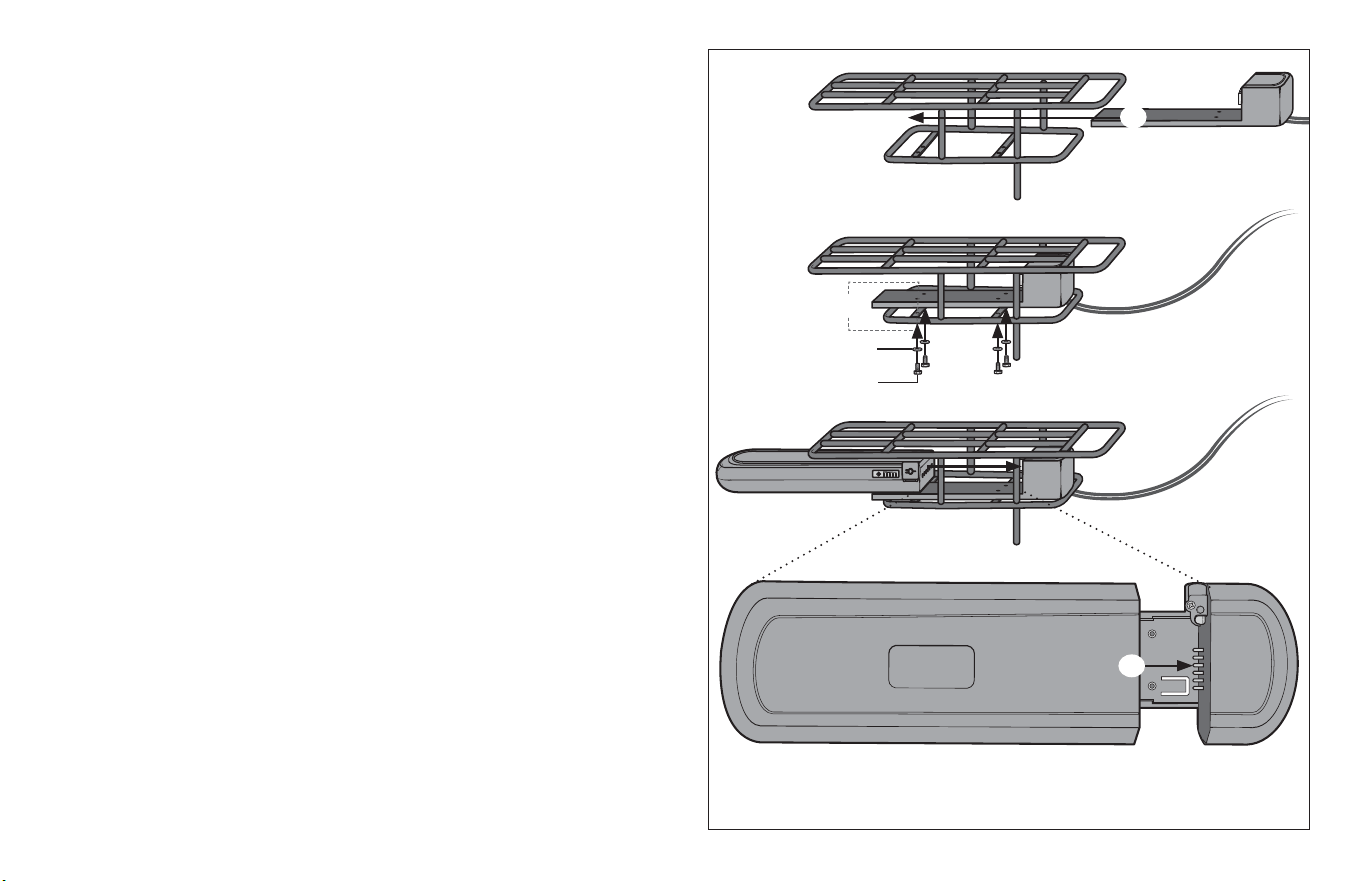
7: ATTACH THE BATTERY BRACKET
Parts: Baery tray, rear subframe, ebike baery
Tools: Hex wrench
Hardware: 4 mounng screws, 4 washers
❶ Slide the baery tray into posion between the lower
plaorm of the rear subframe and the basket mounng
surface. Take care to route the cables away from any moving
parts or sharp edges. Figure 3.6
❷ Align the 4 mounng holes in the baery tray with the
mounng points on the subframe.
❸ Place the washers on the 4 mounng screws.
❹ Place the screw/washer through the mounng holes in the
subframe, and thread into the baery tray..
❺ Slide the ebike baery into the bracket unl the prongs on the
bracket are completely inserted into the baery slots.
❶
❷
❸
❹
❺
36
3 Assembly
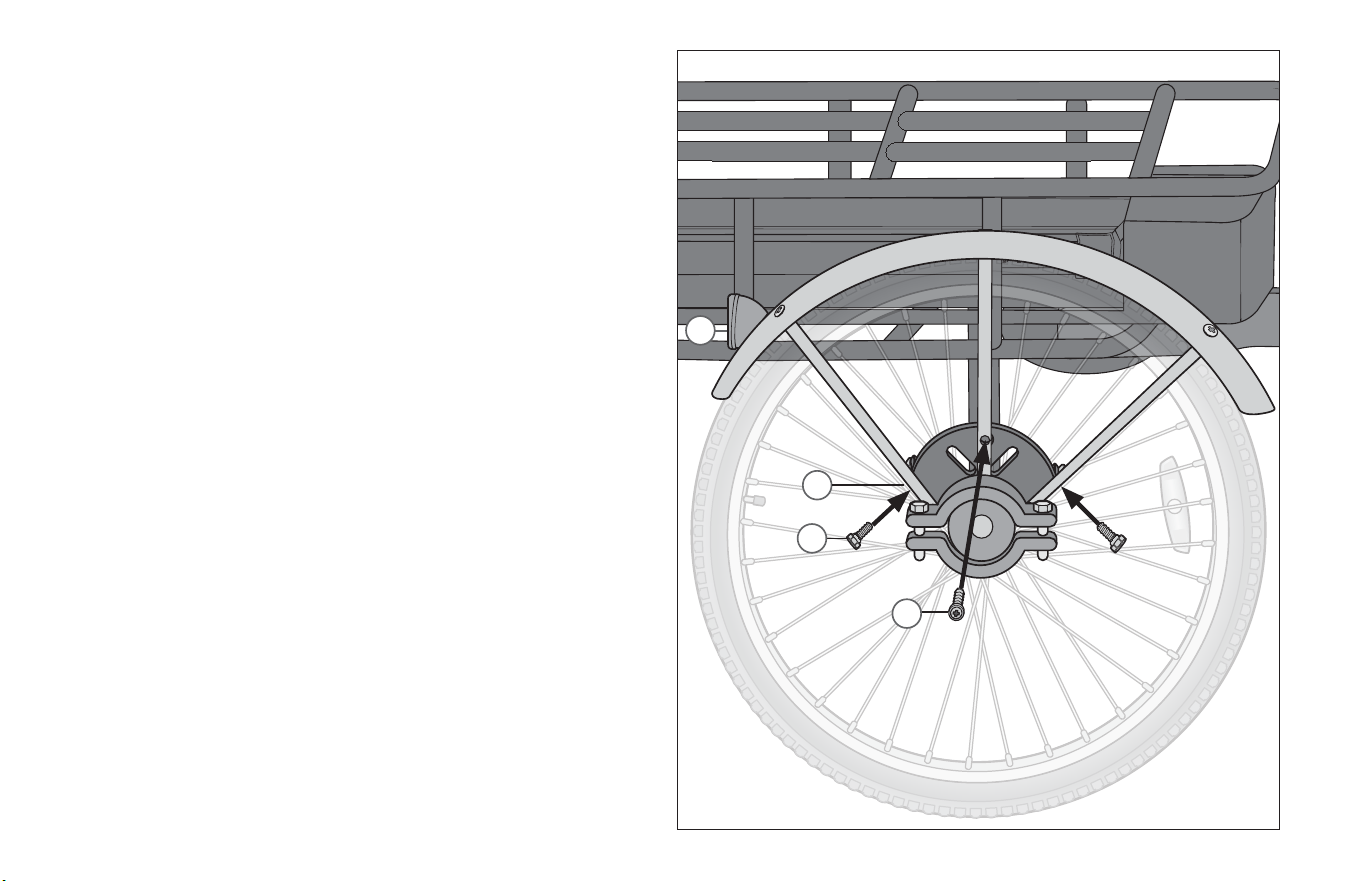
8: ATTACH THE REAR FENDERS
Parts: Rear fenders, rear frame
Tools: Phillips Head screwdriver (minimum 4” sha)
Hardware: 3 small screws
The hardware comes aached to the frame.
❶ Posion the rear fender so the rear reector is facing away
from the tricycle. Figure 3.7
❷ Align the slots on the fender tabs with the slots on the
rear frame tabs. Note: The tabs on the fender should be on
the outside of the tabs on the rear frame tabs.
❸ Working from the inside of the wheel, fasten a screw through
the side holes of the fender tab into the rear frame tabs.
❹ Rotate the rear wheel unl there is adequate space for the
Phillips Head screwdriver to reach through the spokes to the
fender hole.
❺ Working from the outside of the wheel, fasten a screw
through the center fender hole into the center hole of the rear
frame. Note: Be sure that the fender has adequate clearance
from the wheels. It may be necessary to adjust the fender
slightly to properly align with the wheels.
❻ Repeat steps 1–5 for the second fender.
Figure 3.7
❷
❺
❸
❶
Assembly 3
37
9: ATTACH THE FRONT WHEEL
!
WARNING!
All quick-release levers should be inspected before every ride to
be sure they are fully closed and secure. Failure to properly
close a quick-release lever can cause loss of control of the
bicycle resulng in injury or death.
Make sure the wheel is properly seated and the quick-release
lever is properly closed.
Skewer Inner
spring
Quick-release
lever
Front fork
Adjustment
nut
Outer
spring
Caliper body
Disc rotor
Note: Tire tread paerns have a direcon, compare your front re
and rear re of the bicycle so that both tread paerns face the
same direcon.
Parts: Front wheel, main frame assembly
Hardware: Skewer
Tools: 15 mm open and box end wrench, Adjustable Pliers
❶ Locate the skewer from the small parts carton of your bicycle.
Figure 3.8
❷ Unscrew the adjustment nut from the skewer, remove outer
spring and slide the skewer through the front wheel axle so the
quick-release lever is on the same side of the chain.
❸ Slide the outer spring over the end of the skewer. Note: The
smaller end of the spring should be in towards the wheel.
❹ Begin to thread the adjustment nut back onto the skewer, but
do not ghten too far. Allow enough play so you can place the
axle into the fork drop out.
❺ Slide the wheel into the fork dropout slots. Insert the disc
rotor into the center of the disc brake at the same me you
are inserng the wheel axle into the fork drop out. Figure 3.8
Important! Be sure the wheel is as centered as possible
between the fork legs.
Figure 3.8
Figure 3.9
❶
❷
❸
❺
38
3 Assembly
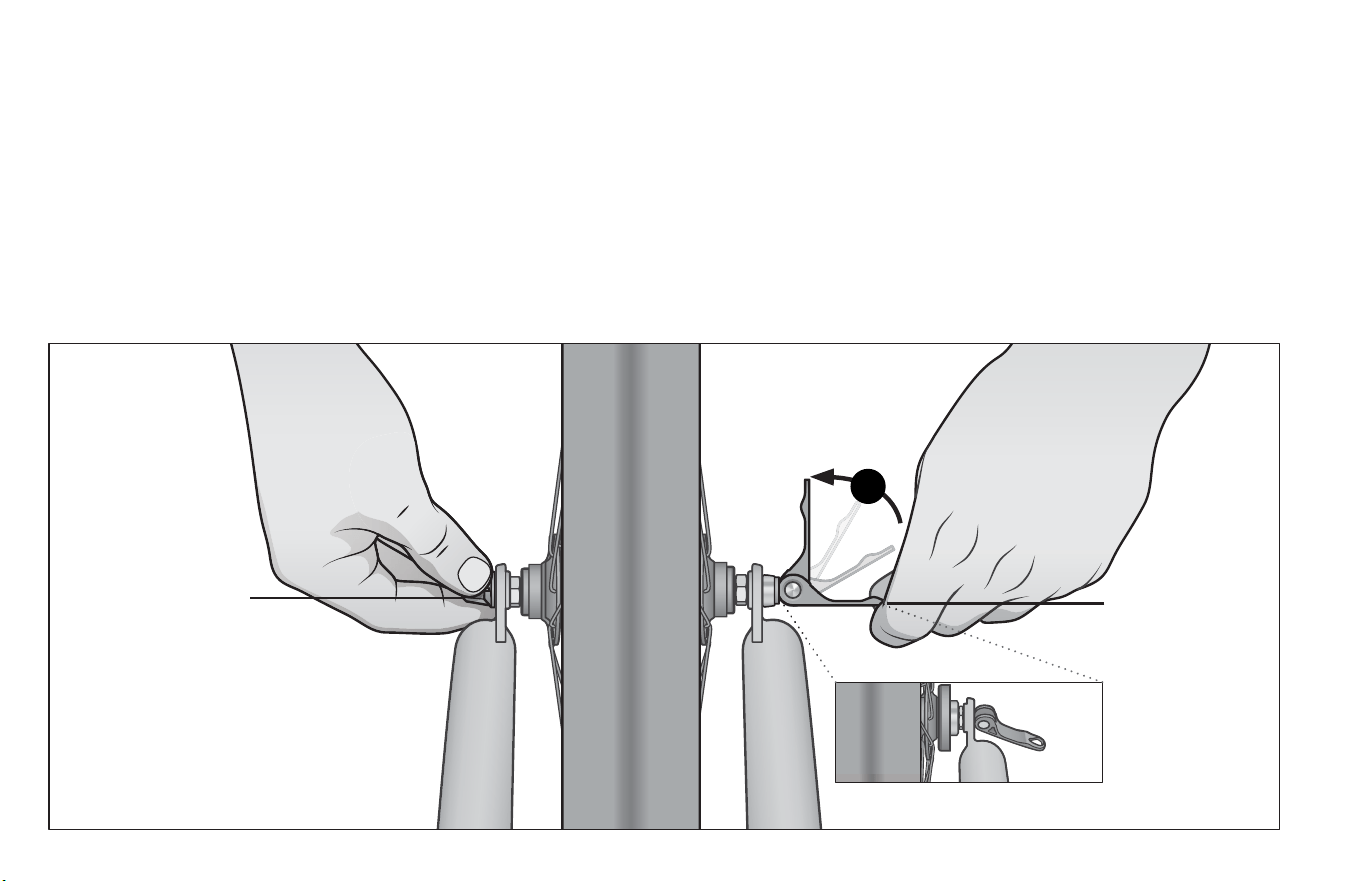
❼ Move the quick-release lever into the open posion. With one
hand on the quick-release lever and one hand on the
adjustment nut, start to hand ghten the adjustment nut unl
you start to feel some resistance against the fork. Figure 3.10
❽ Try to close the quick-release lever. If it closes easily, open it
up and ghten the adjustment nut further. If it is too dicult
to close, open the quick-release lever up and loosen the
adjustment nut a lile and try again. Do not aempt to ghten
by turning the quick-release lever. The quick-release lever is
for closing, the adjustment nut is for adjusng the tension.
Important! You should feel resistance when you close the
quick-release lever that should leave a temporary impression
on your ngers. Open and close the handle to ensure the
wheel is securely locked in place.
❾ Re-check that the handlebars are perpendicular to the front
wheel. Adjust if needed.
Quick-release
lever in closed
posion
Important!
Only ghten the
quick-release with the
adjustment nut.
Quick-release
lever in the
open posion
7
Figure 3.10
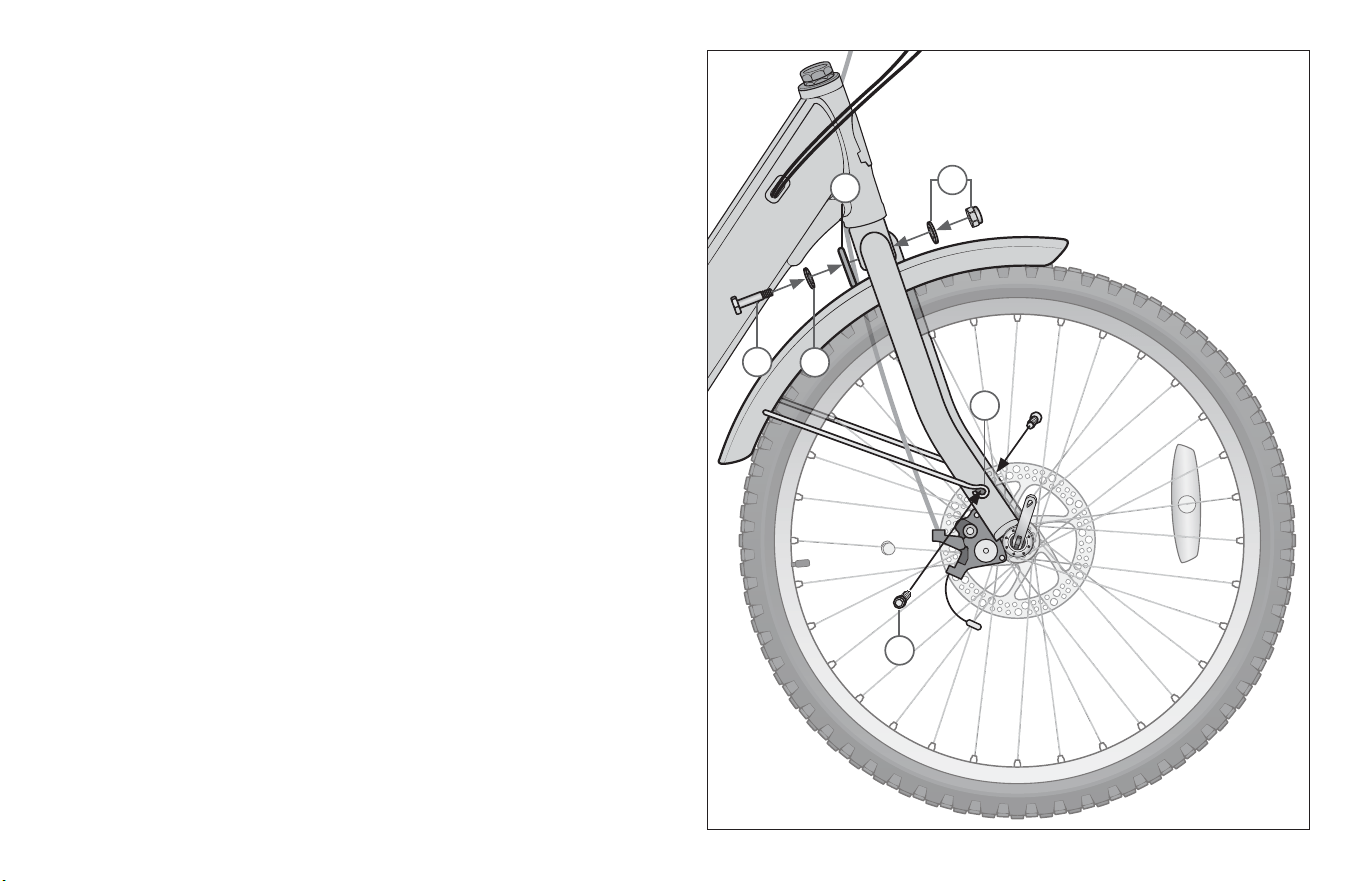
Assembly 3
39
10: ATTACH THE FRONT FENDER
Parts: Front fenders, front wheel
Tools: Phillips Head screwdriver (minimum 4” sha)
Hardware: 2 small screws
❶ Posion the front fender so the fender bracket is on the inside
of the frame. Align the hole in the bracket to the hole in the
fork crown. Figure 3.11
❷ Place a washer on the screw and insert the screw through the
fender bracket.
❸ Place a washer on the screw.
❹ Place the hex nut and washer onto the end of the screw and
ghten.
❺ Place the rounded fender braces over the small hole on the
fork dropout.
❻ Insert the small screws through the rounded fender brace and
fasten to the fork dropout.
Figure 3.11
❷
❹
❺
❻
❶
❸
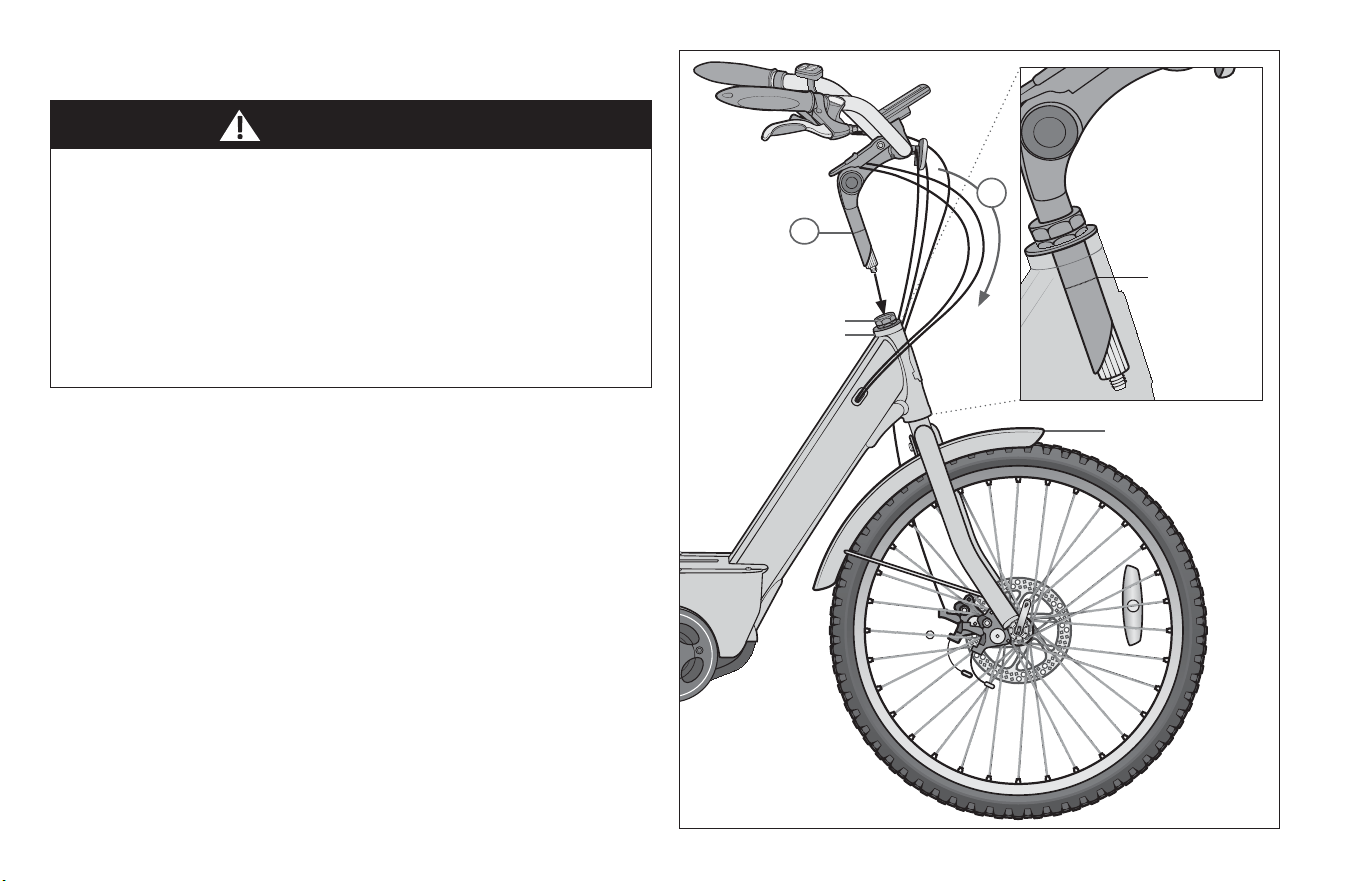
40
3 Assembly
11: ATTACH THE HANDLEBAR
Parts: Handlebar, main frame
Tools: 6 mm allen wrench, grease
❶ Turn the front fork to face forward. Posion the handlebar
assembly over the steerer tube , so that disc brake caliper is on
the non-drive side of the bike. Ensure the cables run in a
smooth arc from the shier or brake lever to the front brake
or cable stop on the frame. Important! If they are twisted or
kinked, the shiing and braking will not work. Figure 3.12
❷ Insert the stem post into the steerer tube and adjust the
handlebar height unl the rider feels they have control of the
bicycle and are comfortable.
Important! Be sure the minimum inseron mark do not go
above the top of the headset and are not visible. Figure 3.13
WARNING!
Improper aachment of the handlebar may result in damage to
the stem post, steerer tube and result in loss of control, serious
injury or death. Ensure the minimum inseron mark on the stem
post are not visible above the top of the headset.
Failure to properly ghten handlebar components may result in
loss of control, serious injury or death. Always check the
handlebar cannot move and is secured to the frame before riding
the tricycle.
Front fork facing
forward
Figure 3.12
Figure 3.13
❶
❷
Headset
Steerer tube
minimum
inseron
mark
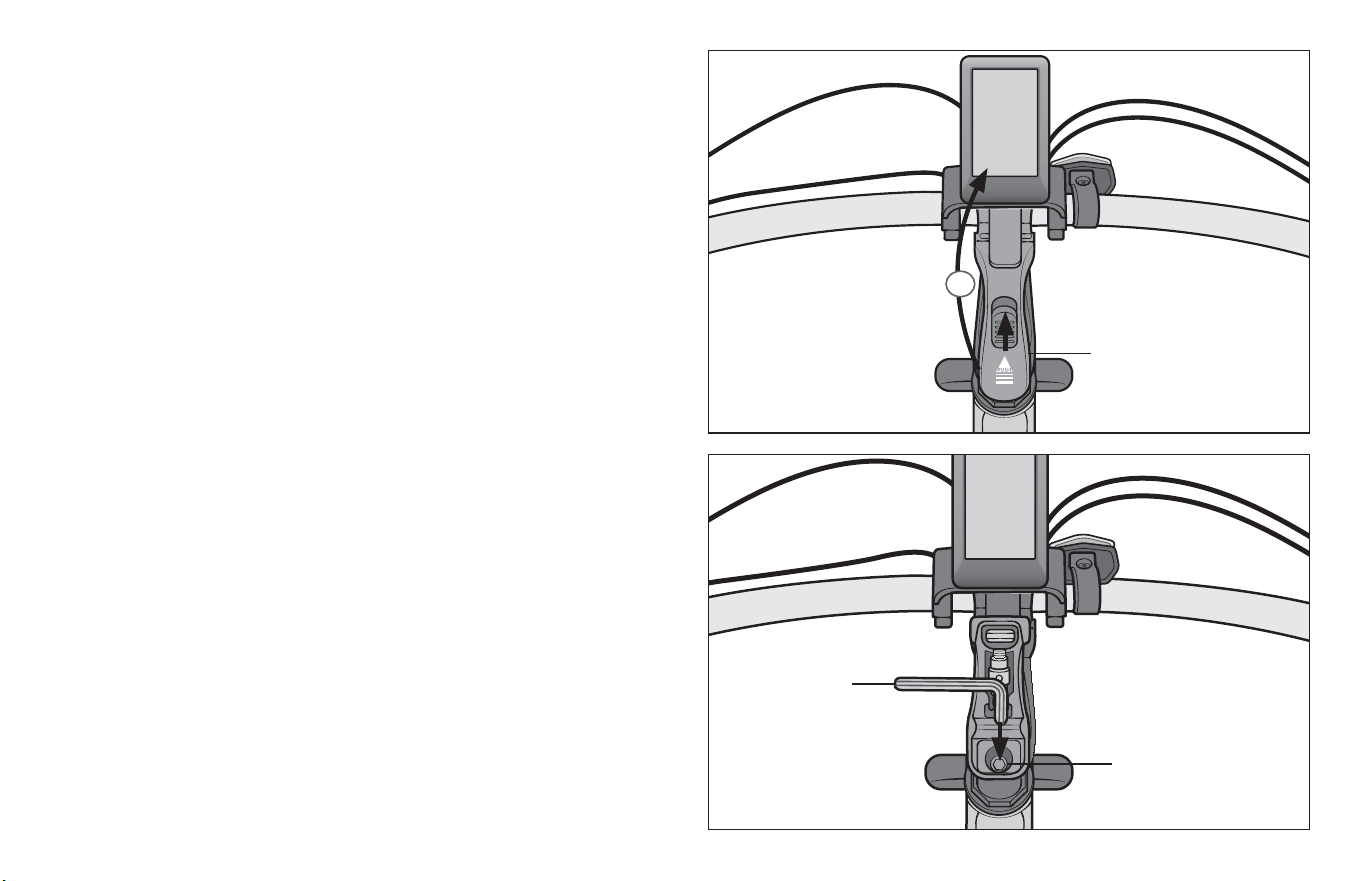
Assembly 3
41
❶ Push the stem bolt lever in and rotate the lever up. Figure 3.14
❷ Using a 6 mm allen wrench ghten the stem binder bolt at the
top of the stem post. Check the handlebar binder bolt(s) to be
sure they are properly ghtened and the handlebar are
clamped in place. Figure 3.15
❸ Lower the binder bolt lever and make sure it is securely
locked in place.
Stem binder bolt
Stem binder bolt lever
❶
❷
Figure 3.14
Figure 3.15
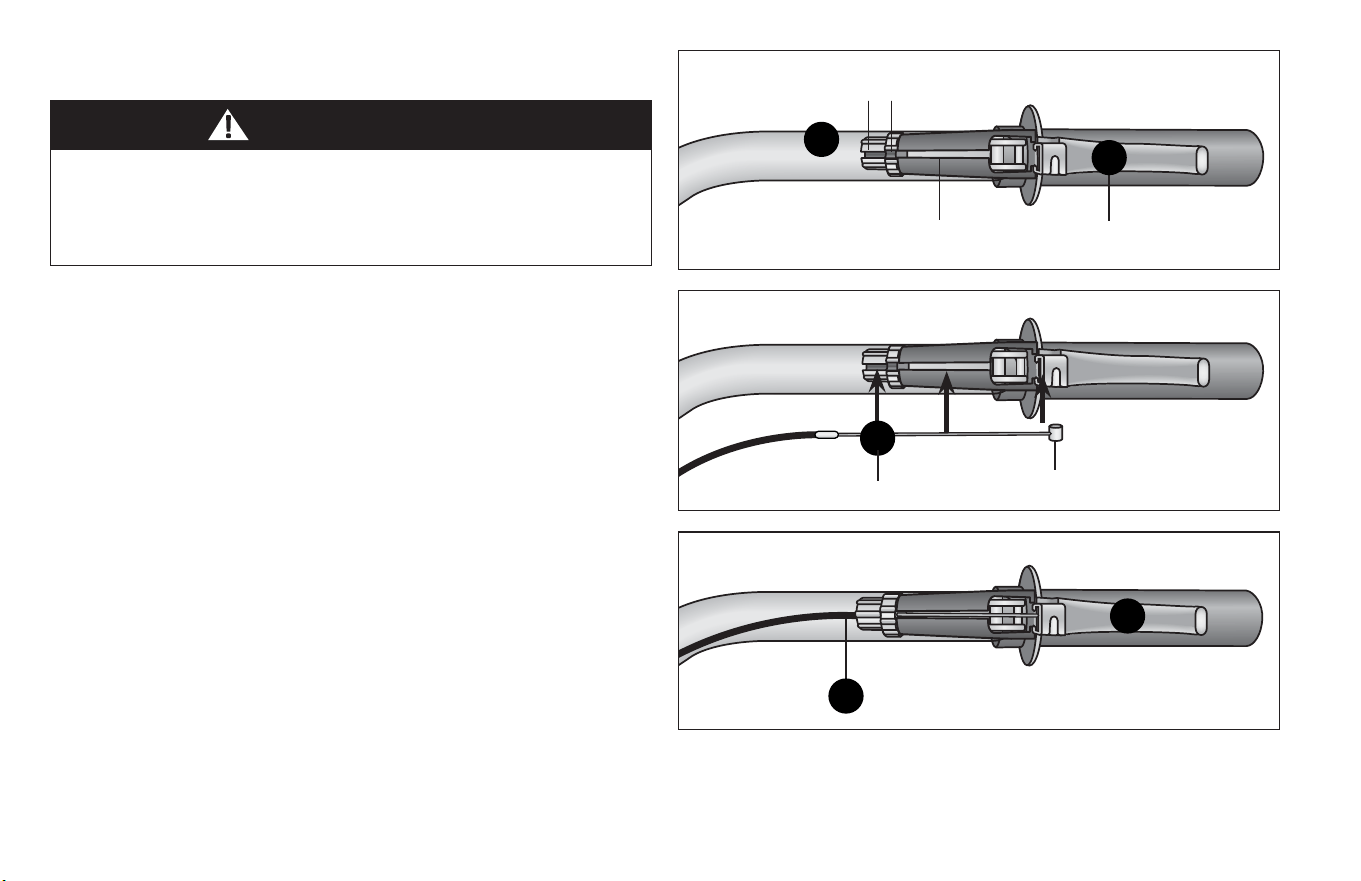
42
3 Assembly
Failure to properly set the brakes may result in the inability to
stop the tricycle movement and cause serious injury or death.
Be sure the brakes are funconing properly before using the
tricycle.
12: ATTACH THE BRAKE CABLES
WARNING!
Cable adjustment
barrel slot
Cable nut slot
Cable head
4
5
1
Follow these steps if the brake cables are not aached to the
brake levers:
❶ Rotate the cable adjustment barrel and cable nut unl the
slots are aligned with the slot on the brake lever body.
Figure 3.16
❷ Press the brake lever towards the grip.
❸ Insert cable head into the brake lever then rotate making sure
cable goes through the slots. Figure 3.17
❹ Release the brake lever. Figure 3.18
❺ Lightly pull on the cable and rotate the cable nut and cable
barrel so they are no longer aligned.
Figure 3.16
Figure 3.17
Figure 3.18
Brake cable slot
Brake lever
2
3
Brake cable
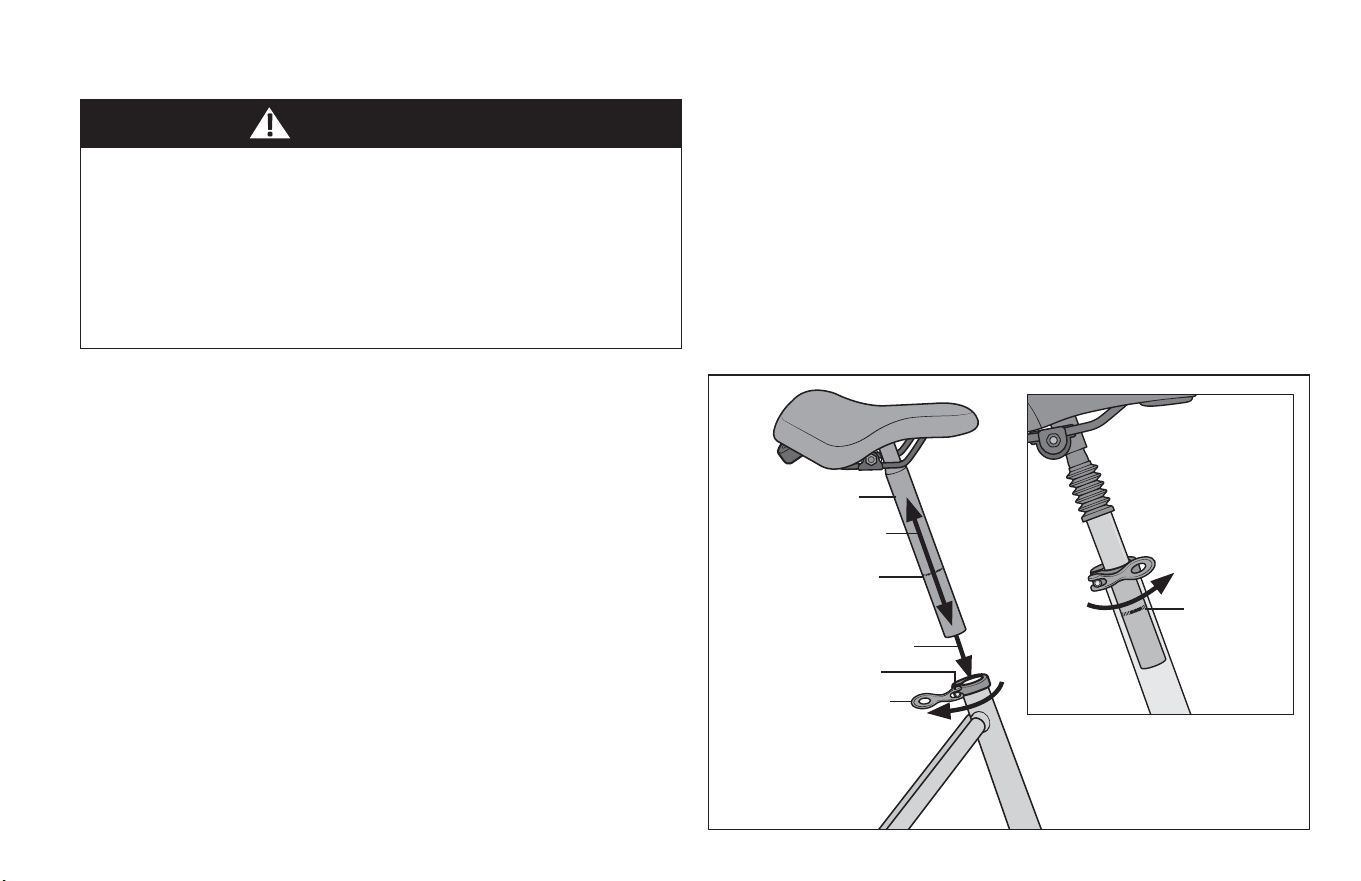
Assembly 3
43
13: ATTACH THE SEAT
Improperly adjusted seat height could aect the rider’s ability
to reach the handlebar and pedals resulng in unexpected
movement, loss of control and serious injury or death. Follow
these guidelines when adjusng the seat height. Always ensure
the seat post minimum inseron marks are below the seat
clamp and cannot be seen. Ensure the seat clamp is locked and
the seat cannot move.
WARNING!
The seat assembly should be adjusted with the seat centered on
the rails and level. It is recommended to add some grease to all
threads and binders on a bicycle, especially on the outside of the
seat post. Otherwise it may corrode over me and not be able to
be adjusted again.
❶ Unlock the quick-release lever and insert the seat post into the
seat tube. Figure 3.19
❷ Adjust the seat height up or down unl the rider feels they
have control of the bicycle and are comfortable.
Important! Be sure the minimum inseron marks do not go
past the top of the seat clamp and are not visible. Figure 3.20
❸ Close the quick-release lever and lock the seat in place.
If there is not enough pressure to hold the seat in place open
the quick-release lever. With one hand on the quick-release
lever and one hand on the adjustment nut, start to hand
ghten the adjustment nut unl you start to feel some
resistance against the post clamp. Do not aempt to ghten
by turning the quick-release lever. The quick-release lever is
for closing, the adjustment nut is for adjusng the pressure.
❹ Try to close the quick-release lever. If it closes easily, open it
up and ghten the adjustment nut further. If it is too dicult
to close, open the quick-release lever up and loosen the
adjustment nut a lile and try again.
Important! You should feel resistance when you close the
quick-release lever that should leave a temporary impression
on your ngers. Open and close the handle to ensure the seat
is securely locked in place.
Figure 3.19
Figure 3.20
❶
❷
❸
❹
Seat post
Adjustment nut
Quick-release lever
Minimum
inseron
marks
Minimum inseron
marks
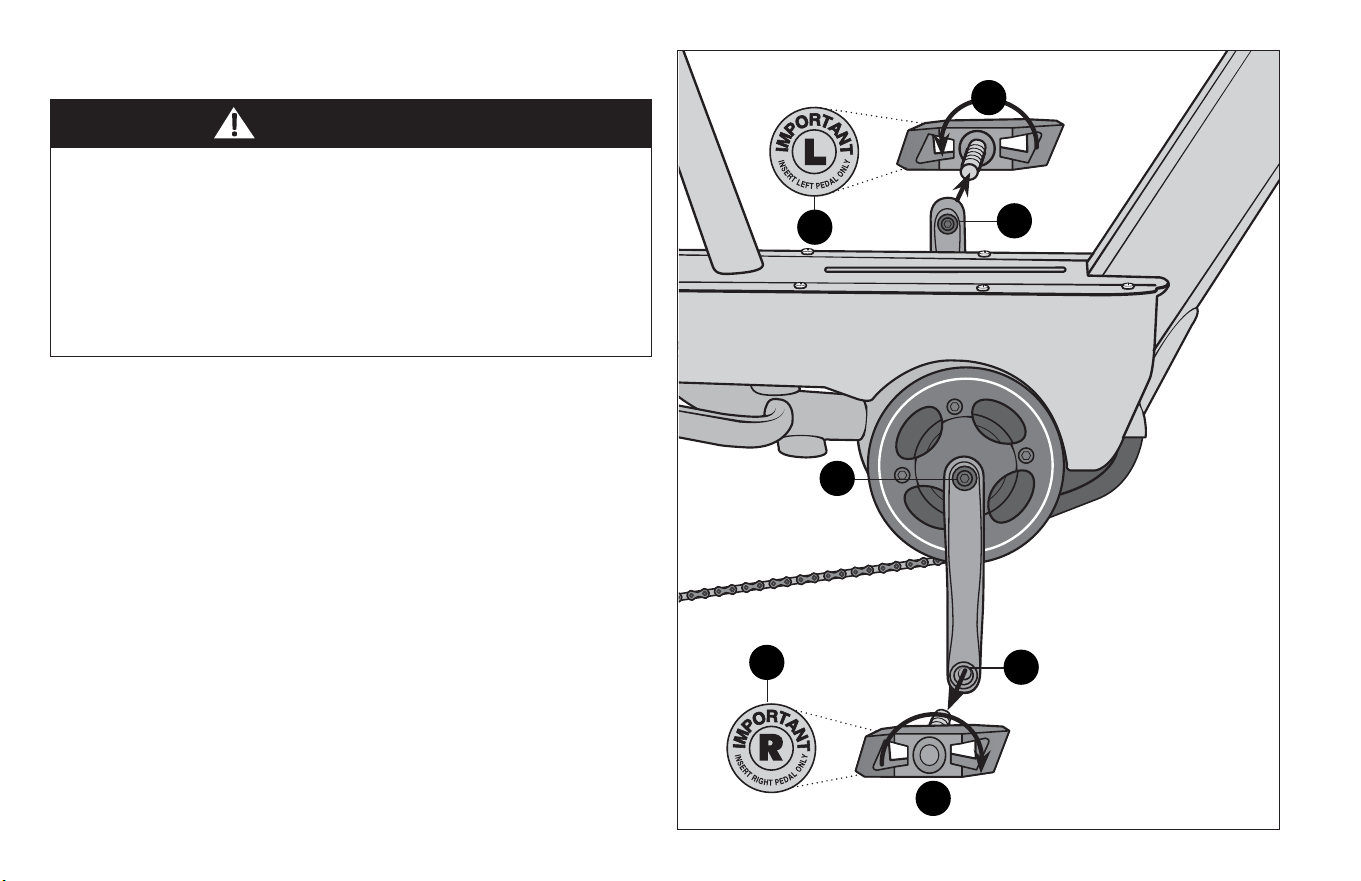
44
3 Assembly
The right pedal turns
clockwise.
Aachment of an incorrect pedal into a crank arm can strip
pedal threads and cause irreparable damage. Visually match the
R and L sckers on the pedal and crank arm before aaching the
pedals. Before your rst ride, please check to ensure your pedals
are aached correctly.
It is very important that you check the crank set for correct
adjustment and ghtness before riding your bicycle.
❶ Match the pedal marked R with the right-hand crank arm and
match the pedal marked L with the le-hand crank arm.
Figure 3.21
❷ Place the threaded pedal into the hole on the crank arm.
❸ By hand, slowly turn the spindle the correct direcon.
Clockwise for right side pedal, counterclockwise for le side
pedal. Important! Stop if you feel resistance! This may be
an indicaon the spindle is entering the hole at an angle.
Remove the spindle and repeat step two.
❹ If the spindle is entering the hole cleanly then use a 15 mm
wrench or pliers to ghten completely.
❺ Tighten the crank axle nuts using a adjustable wrench.
14: ATTACH THE PEDALS
Figure 3.21
WARNING!
3
3
1
1
2
2
5
The left pedal turns
counter-clockwise
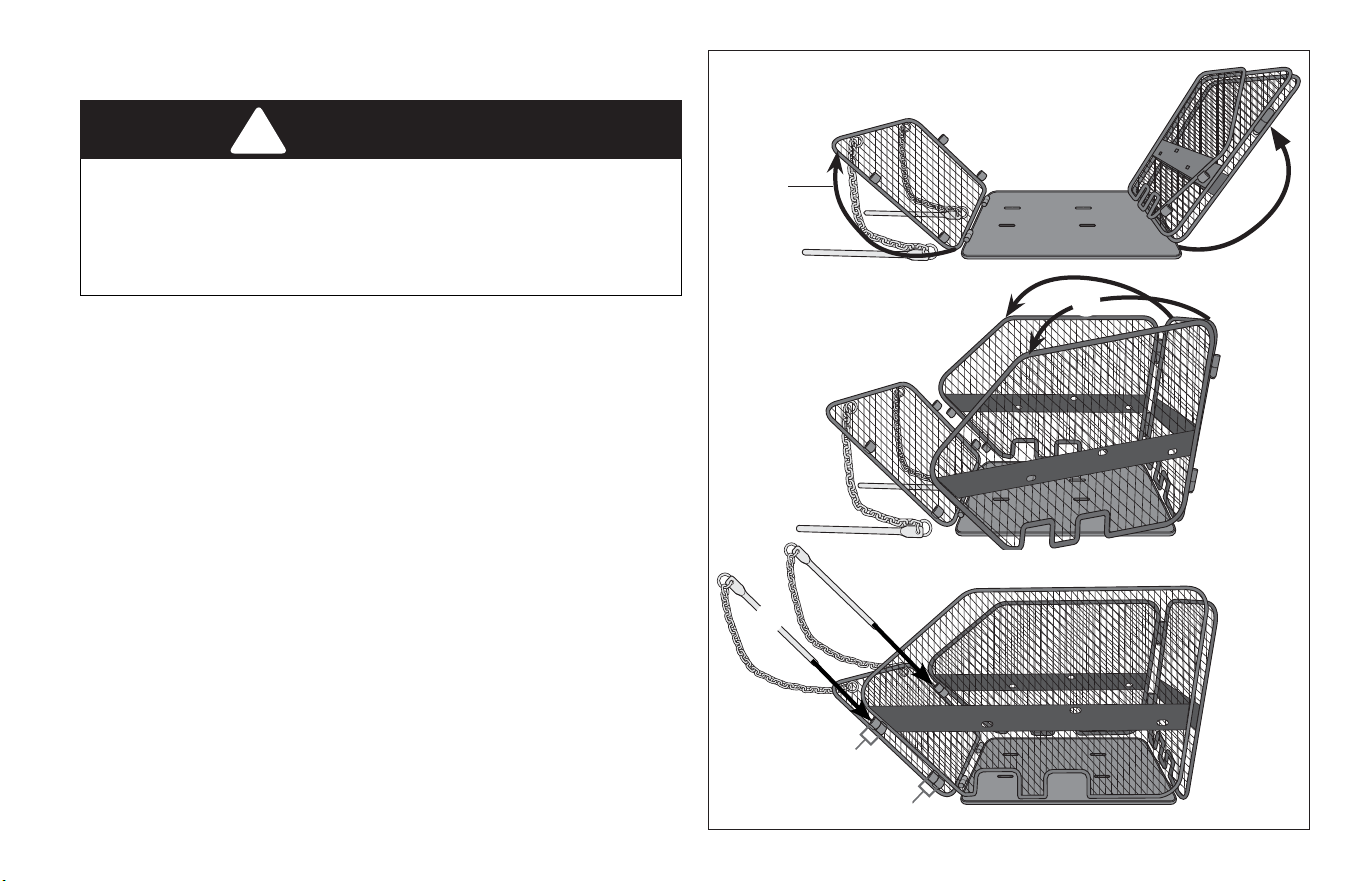
Assembly 3
45
!
WARNING!
Failure to securely aach the basket to the bicycle may cause
the basket to fall o and cause an accident resulng in serious
injury or death. Always make sure the basket is secured before
riding. Do not carry children or pets in the basket or loads
greater than 44lbs (20 kg).
15: ASSEMBLE THE WIRE BASKET
❶ Fold the front and back wire side panels up. Figure 22
❷ Fold the wire side panels out.
❸ Align the sleeves on the front and side panels of the basket.
❹ Fully insert the locking pins through the sleeves on the corners
of the front corners of the basket.
Figure 3.22
❶
❷
❸
❸
❹
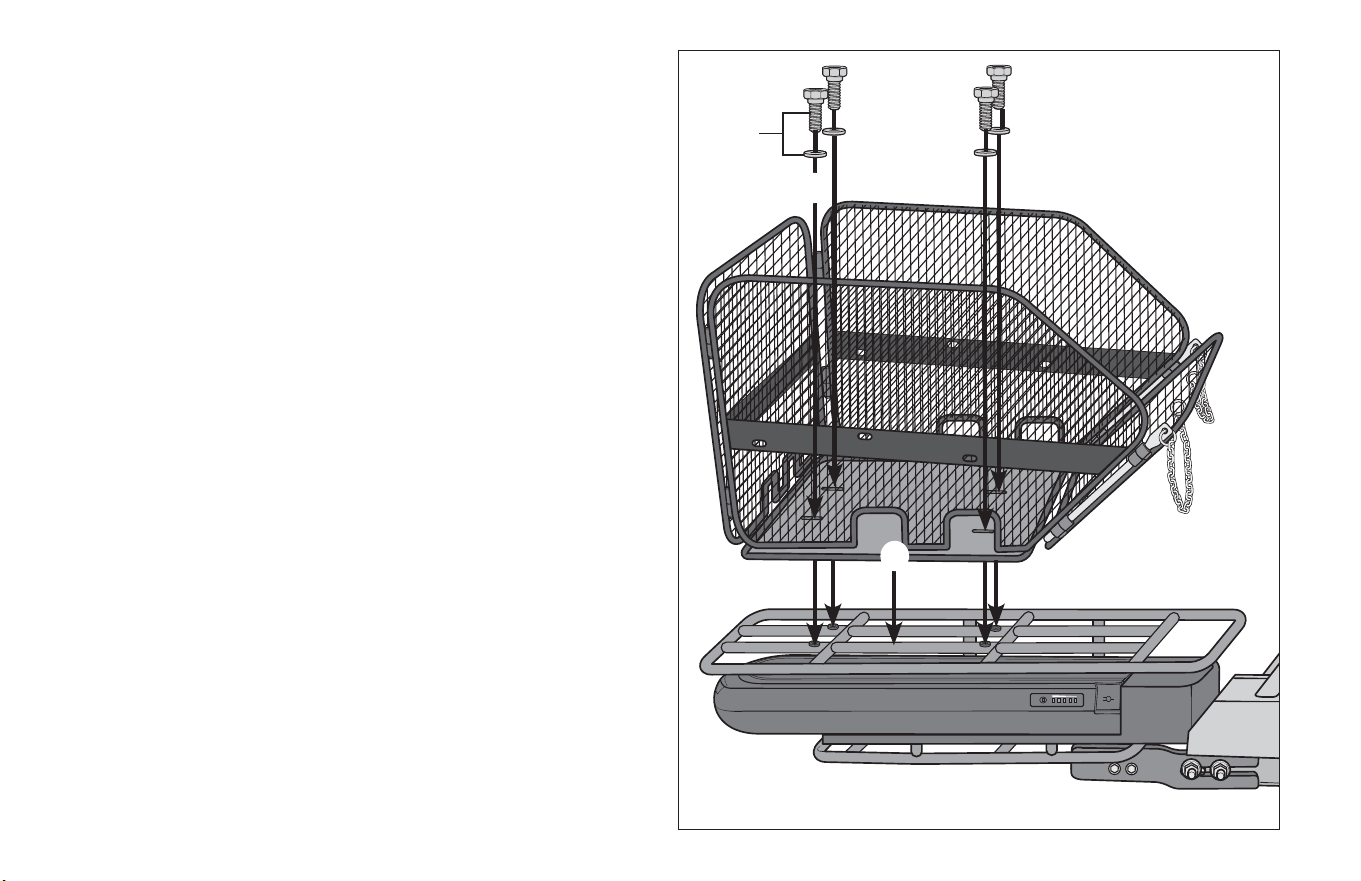
46
3 Assembly
16: ATTACH THE WIRE BASKET
Parts: Wire basket, rear frame
Tools: Phillips Head screwdriver
Hardware: 4 screws, 4 washers
The hardware comes aached to the frame.
❶ Place the wire basket on the rear frame and align the slots on
the basket with the threaded screw holes in the frame.
Figure 3.23
Note: The slots on the wire basket are posioned so the
basket can only be aached one way. If the slots do not line
up properly rotate the basket 180 degrees.
❷ Insert a washer onto the screw.
❸ Insert the screw and washer through the basket slots onto the
threaded screw hole on the rear frame.
❹ Repeat steps 3–4 for the remaining washers and screws.
Figure 3.23
❶
❸
❷
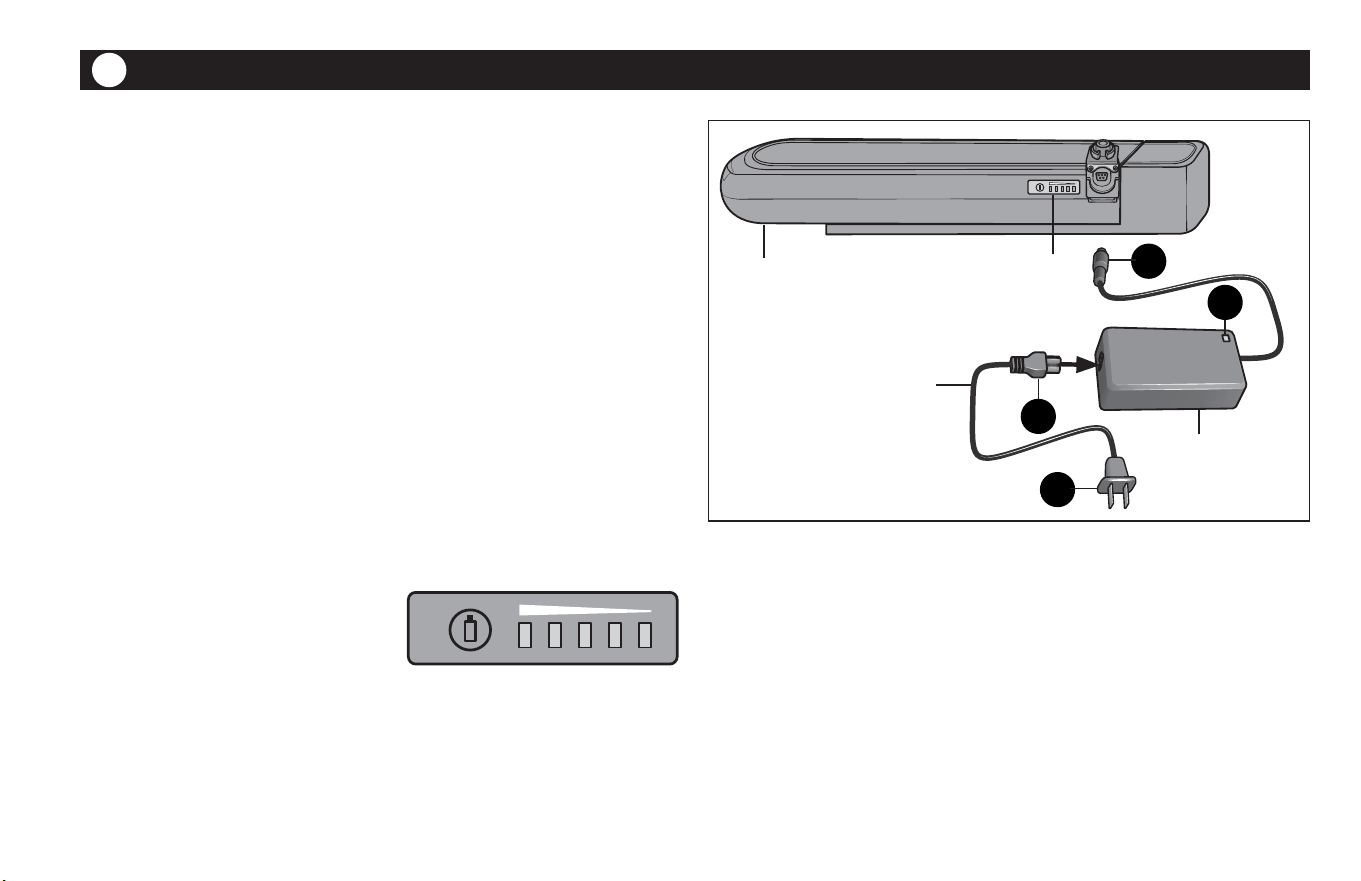
Figure 4.1
1: CHARGING THE BATTERY
❶ Insert the charger probe into the charger port on the e-bike
baery. Figure 4.1
❷ Insert the pronged end of the baery cord into the baery
charger.
❸ Insert the AC plug into an AC outlet.
❹ The red indicator light turns on and will remain red unl it is
fully charged. The indicator light turns green once the baery
is fully charged.
Note: Only use the baery charger that is provided
with your e-bike to charge the baery.
1.A: Baery Capacity Levels
The level indicator on the top of the baery shows
the power level remaining in the baery.
5 Bars: 100% capacity, fully charge
4 Bars: 60-80% capacity
3 Bars: 40-60% capacity
2 Bars: 20-40% capacity
1 Bar: 20% capacity of baery.
The ebike Baery
1
4
3
2
4
The ebike Baery 4
47
Baery
Charger
e-bike baery
Baery capacity
level indicator
Baery cord
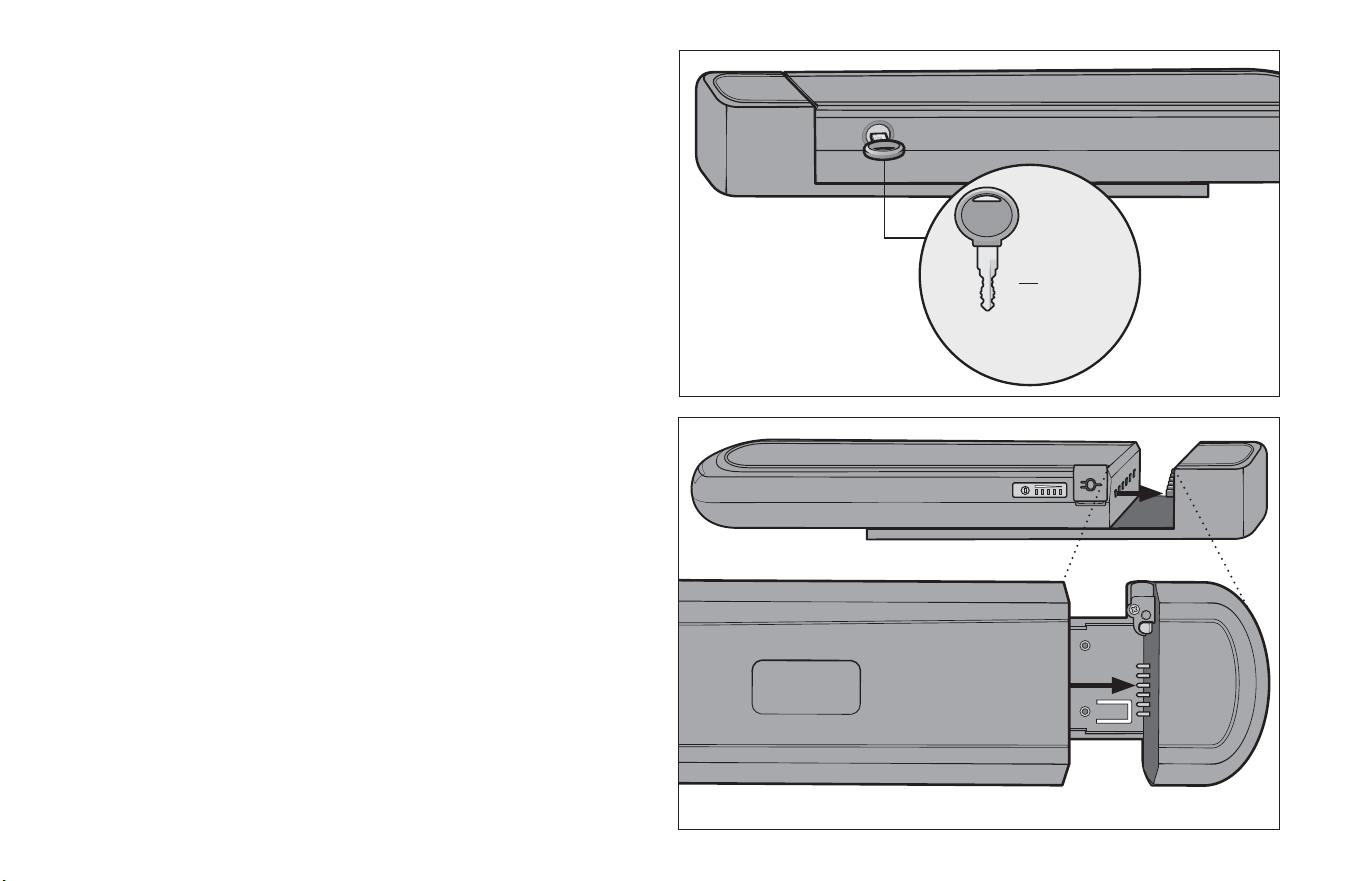
1.B: The Baery Keys
• Do not ride the e-bike while the key is in the baery lock.
• Always keep the baery compartment locked.
• If a replacement baery key is needed, you will need to
provide the number found on the key. Write the key number
down and keep it in a safe place. Figure 4.2
• The baery lock can become dry and dicult to use aer
prolonged riding.
• Tip! Whenever you lubricate your bike chain, place a few drops
of chain oil on the key, insert the key and operate the lock, then
remove and wipe the key clean.
1.C: Baery Inseron and Removal
To Insert the baery: Figure 4.3
❶ Insert the baery into baery bracket unl the prongs on the
bracket are completely inserted into the slots of the baery.
❷ To remove, unlock the baery and pull out.
48
4 The ebike Baery
Figure 4.2
Figure 4.3
H272
Baery key
number
WARNING!
1.D: Baery Maintenance
• Keep the baery away from severe vibraons, impact,
extrusion, direct sunshine and water.
• Examine the baery and charger for damage, especially the
cable, plug and housing. Do not charge the baery if either is
visibly damaged.
1.E: Care
Use a damp cloth to clean the baery and the plasc housing.
1.F: Transporng and Storing the Baery
Before storing for long periods: Fully discharge the baery, then
charge the baery for 2 - 3 hours.
• Store the baery in a well venlated area.
• During storage you should charge the baery every 2 months.
• Store the baery in a clean, dry area.
• Do not store the baery near corrosive materials.
• Do not store the baery near heat sources.
• Disconnect the baery from the power source before storing.
• Store the baery in temperatures between 32º F - 131º F, with
a relave humidity of 5 - 65% RH
• The baery can be transported by sea, air, and automobile.
• The baery should be packed into a carton when transporng
Any changes or modicaons to this unit not expressly
approved by the party responsible for compliance could void
the user's authority to operate the equipment.
Note: This equipment has been tested and found to comply
with the limits for a Class B digital device, pursuant to part 15 of
the FCC Rules. These limits are designed to provide reasonable
protecon against harmful interference in a residenal
installaon. This equipment generates, uses and can radiate
radio frequency energy and, if not installed and used in
accordance with the instrucons, may cause harmful
interference will not occur in a parcular installaon. If this
equipment does cause harmful interference to radio or
television recepon, which can be determined by turning the
equipment o and on, the user is encouraged to try to correct
the interference by one or more of the following measures:
• Reorient or relocate the receiving antenna.
• Increase the separaon between the equipment and
receiver.
• Connect the equipment into an outlet on a circuit dierent
from that to which the receiver is connected.
FCC WARNING
The ebike Baery 4
49
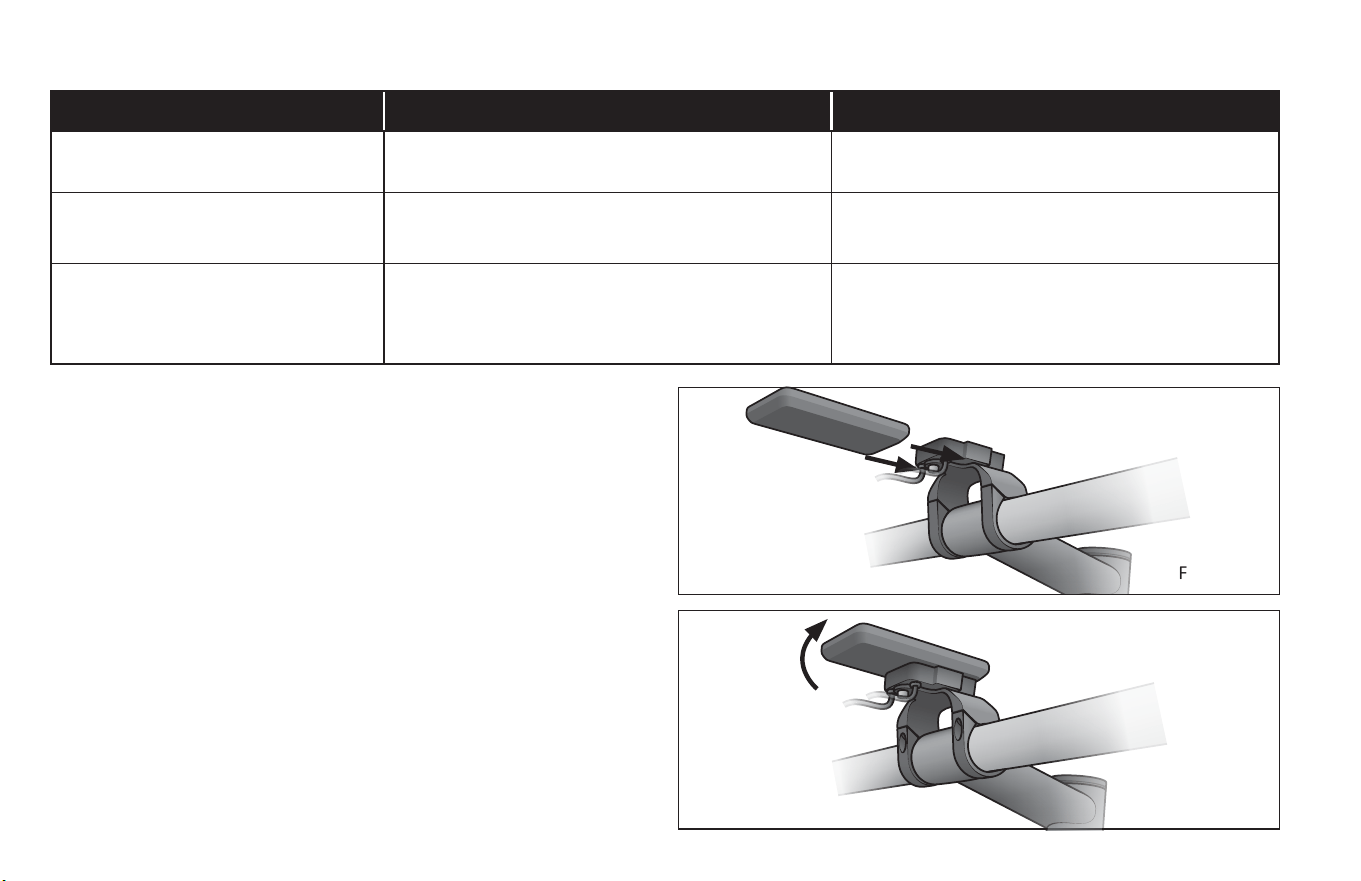
Figure 4.4
Figure 4.5
2: THE E-BIKE DISPLAY
The e-bike comes equipped with dierent styles of computers.
The following informaon may vary depending on your model.
2.A: Aach the Display to the Bracket
Note: Not all models come equipped with a computer display.
❶ Slide the display into the display bracket unl it snaps into
place. Figure 4.4
❷ Adjust the angle of the display so it can be easily viewed
while riding. Figure 4.5
Problem Cause Soluon
No output voltage Cable is disconnected from the baery. Connect the output cable/wire to the baery
according to the manual
Power indicator o Baery is out of power.
Display unit is not fully docked.
Charge the baery
Check display unit is fully docked
The baery cannot be charged The connecons between the charger, baery
and/or outlet are not totally connected.
Baery is already fully-charged.
Check the connecons to the baery, charger
and outlet and make sure they are completely
connected.
1.G: Baery Troubleshoong
❶
❷
50
4 The ebike Baery
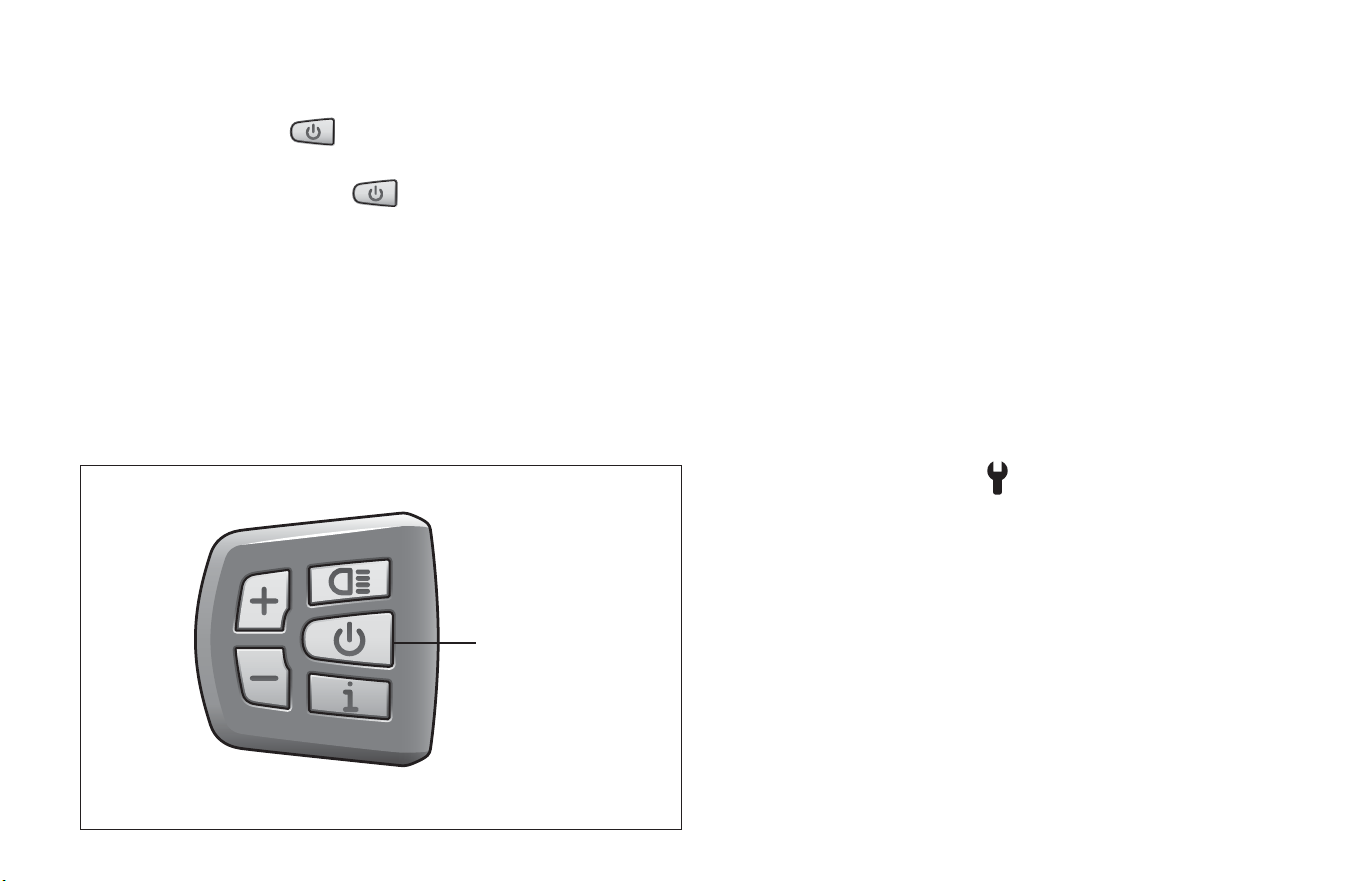
Figure 4.6
2.B: Turning the e-bike On and O
e-bike Display with Keypad
❶ Press and hold the
power buon for 2 seconds to power
on the display. Figure 4.6
❷ Press and hold the power
buon again for two seconds
to power o the display.
Note: If the bike is not used, aer 5 minutes the display will
automacally turn o.
2.C: e-bike with Power Assist Adjuste
r
❶ Press the power buon to power on the computer on.
Figure 4.6
❷ Press the power buon to turn the computer o.
2.D: e-bike Display Overview
For detailed informaon on your e-bike display please see the
e-bike display manual that is shipped with your e-bike.
Note: Display styles and menu modes will vary depending on your
model.
❶ Baery level indicator: The indicator has a 10-bar level
indicator.
❷ USB charge
❸ Headlight indicaon: There are mulple levels of back-lighng
that show when the headlight or backlight are on.
Automac light-sensive lights: If equipped the headlight,
taillight and display light will be automacally turned on/o
depending on lighng condions.
❹ Error Display: The wrench
icon will be appear when service
is needed.
❺ Menu: Sets the various parameter sengs. See your e-bike
display manual for detailed informaon on your model.
❻ Speed display: Indicates the speed in km/h or mph. Displays
the real-me speed as SPEED,
❼ Max and Avg: The maximum speed as the MAX and the
average speed as AVG.
❽ Remaining mileage: Range remaining with current
battery level.
❶
Hold for 2 seconds
The ebike Baery 4
51
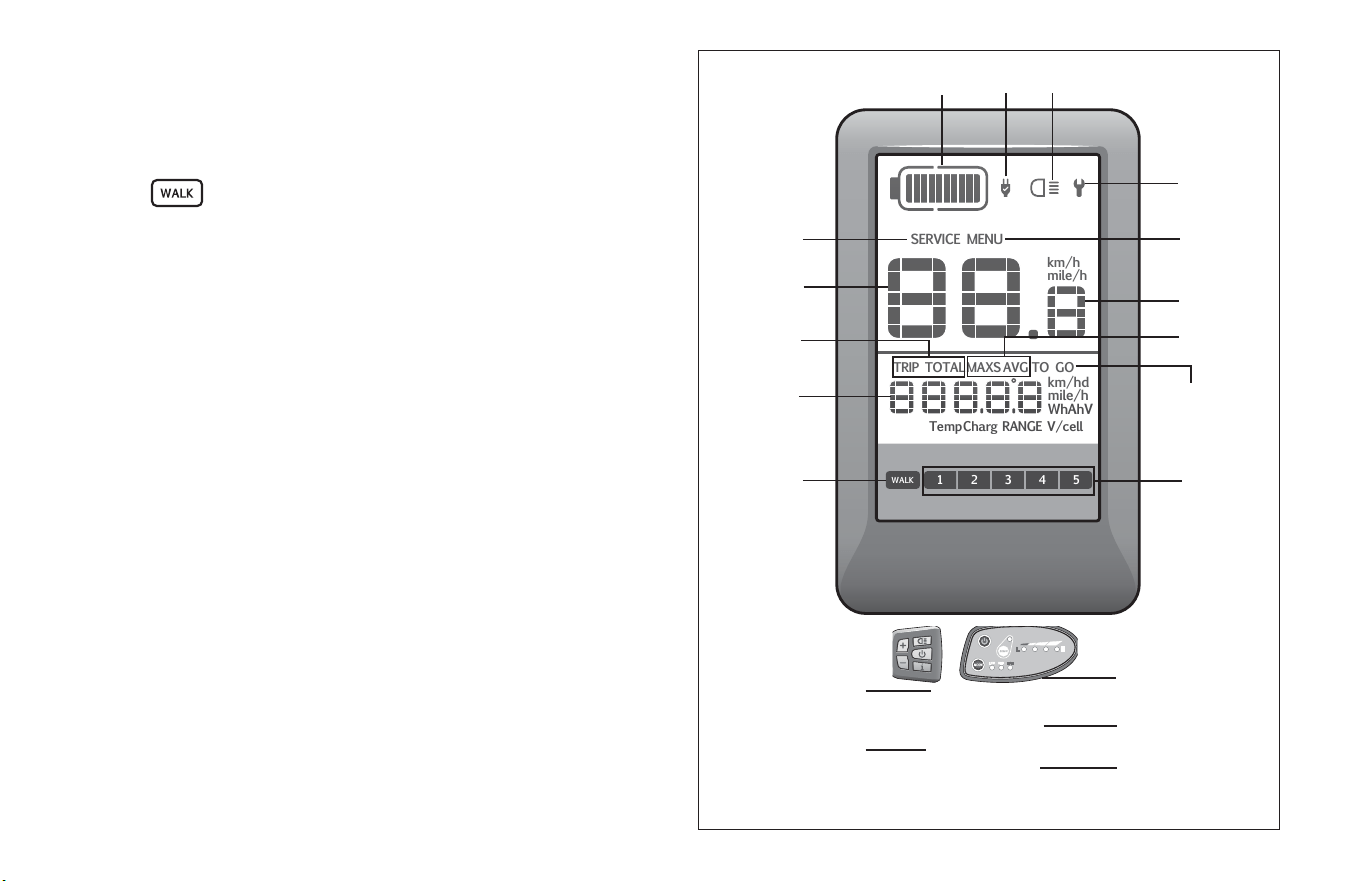
Figure 4.7
❾ Level Indicaon: Sets power levels between 1 to 5. The chosen
level will be displayed. Note: If there is no numeric display, it
means that there is no assistance by
the motor.
❿ Walk assistance: When the rider is walking and pushing the
e-bike
will be displayed.
⓫ Distance Indicaon: Displays the distance depending on the
seng.
⓬ Distance Mode: The maximum distance displayed is 99999.
Single-trip distances TRIP or the total distance TOTAL can be
displayed.
⓭ Speed Mode: Max speed: maximum speed (MAX mph).
Average speed (AVG/mph),
⓮ Service: When there is a need for maintenance SERVICE will be
displayed.
Computer Keypad
⓯ Plus buon: Scrolls up and down. Increases assist.
⓰ Minus buon: Scrolls le to right. Decreases assist.
⓱ Headlight buon: Turns backlight feature on/o
⓲ Power buon: Turns the display on and o.
⓳ Informaon buon: Press to move through modes.
SERVICE MENU
TRIP TOTALMAXS AVG
RANGETempCharg V/cell
TO GO
km/h
mile/h
km/hd
mile/h
WhAhV
1
WALK
2 3 4 5
❶
❹
❷ ❸
❻
❺
❽
❾
❼
⓬
⓫
⓭
❿
⓮
52
4 The ebike Baery
⓱
⓲
⓳
⓯
⓰
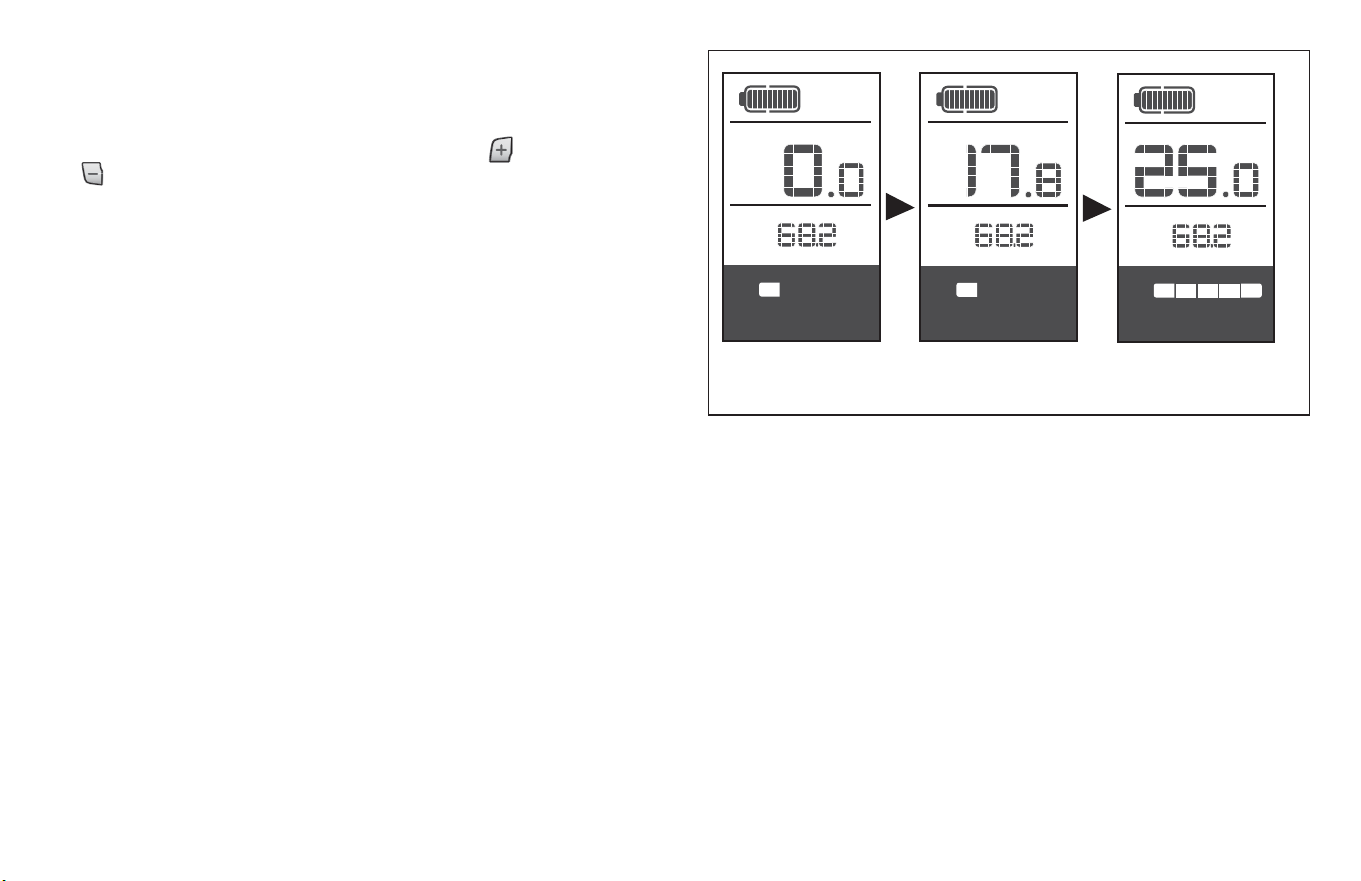
The ebike Baery 4
53
2 3 4 51
TRIP
km/h
km
2 3 4 51
km/h
km
TRIP
1 2 3 4 5
km/h
TRIP
km
Figure 4.8
2.E: Using the Motor Assist Levels
e-bike Display with Keypad
In the manual gearshi mode, press the plus
buon or minus
buon to choose the desired level of support by the motor.
The lowest level is level 1, the highest level is 5. When the display
in on, the default mode is level 1. When there is no numeric mode
display, there in no power assistance. Figure 4.8
Note: Display screens may vary in style.
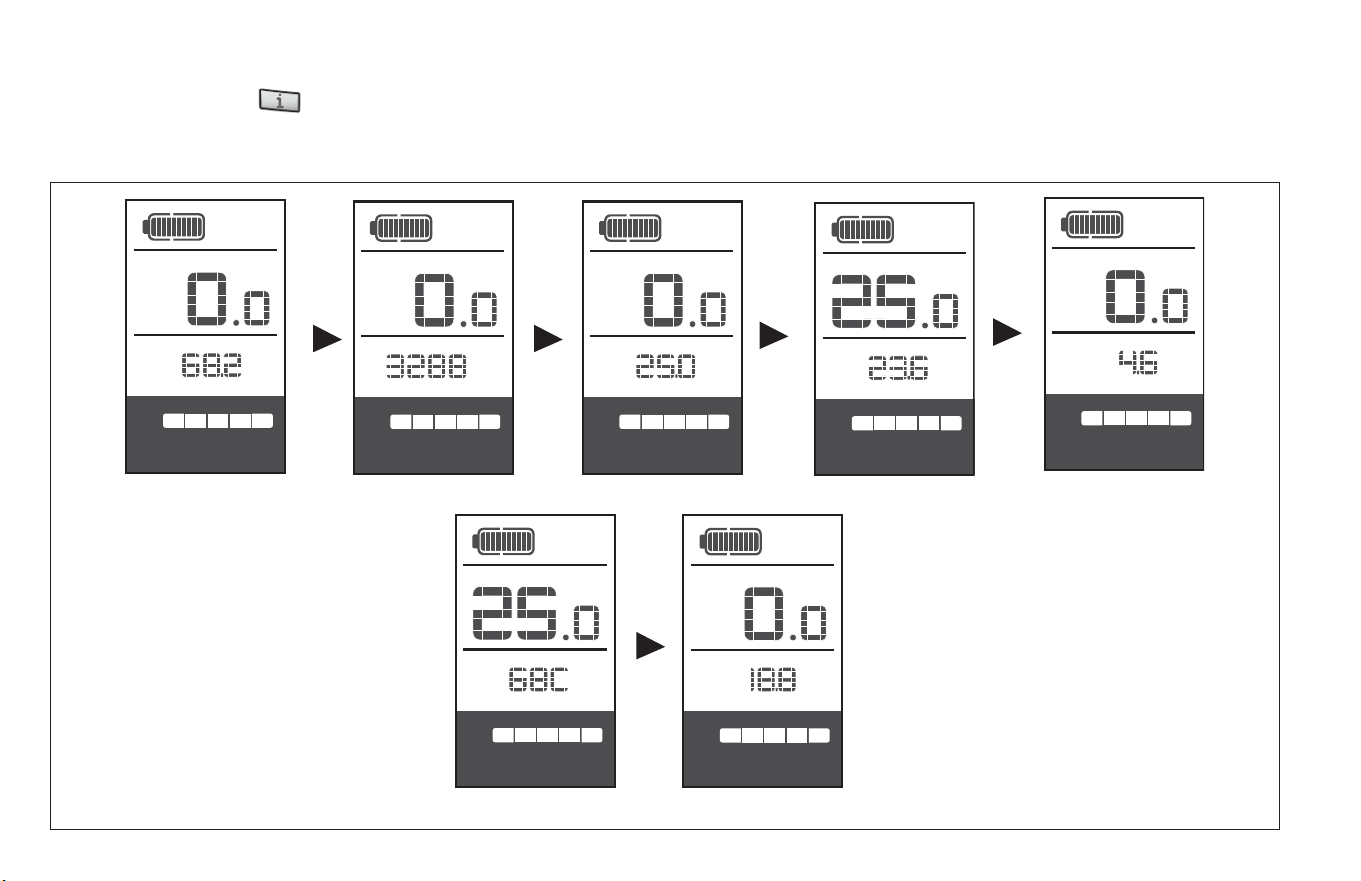
54
4 The ebike Baery
Single-trip distance Total distance Maximum speed
Average riding speed
Remaining range
Power Calorie
1 2 3 4 5
km/h
TRIP
km
1 2 3 4 5
km/h
km
TOTAL
1 2 3 4 5
km/h
km
MAXS
1 2 3 4 5
km/h
km/h
km
AVG
1 2 3 4 5
km/h
km/h
km
TO GO
1 2 3 4 5
km/h
km/h
W
TO GO
1 2 3 4 5
km/h
Figure 4.9
2.F: Switching Between Modes
Briey press the mode buon to switch between distance and speed Single-trip distance (TRIP km) > total distance (TOTAL km) >
maximum speed (MAX mph) > average riding speed (AVG mph) > remaining range (TO GO km) > Power (w) > Calorie (c) are displayed
in successive order. Note: Display screens may vary in style and modes available. Figure 4.9
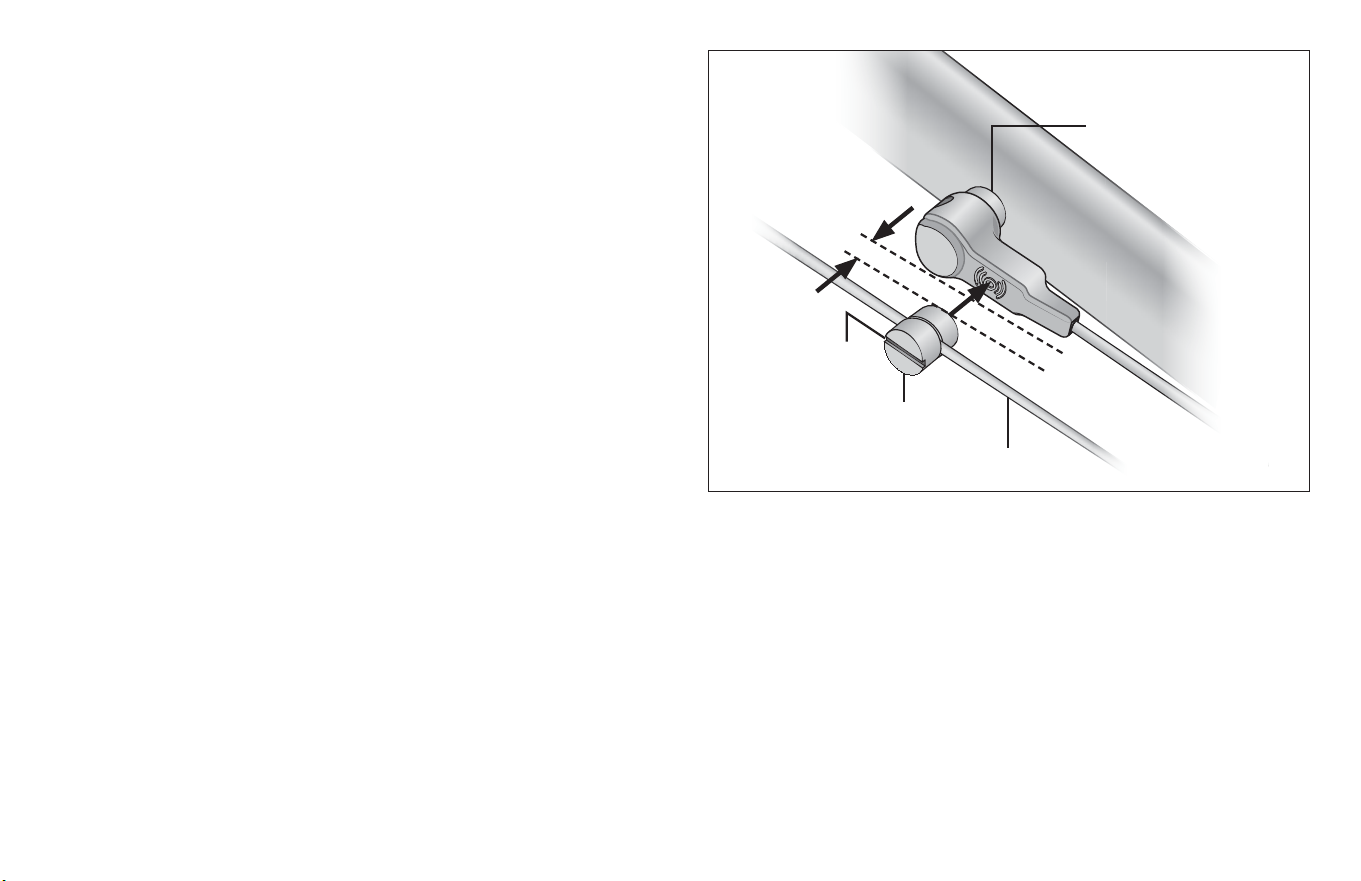
The ebike Baery 4
55
3: CHECK THE SPEED SENSOR ALIGNMENT
If your e-bike is equipped with a speed sensor you may need to
adjust the alignment of the speed sensor to the magnet unit
before using your e-bike. The speed sensor is located on the inside
of your chain stay. Figure 4.10
To make this adjustment:
❶ Slide the magnet along the spoke unl the center of the
magnet is aligned with the center of the speed sensor’s
inducon zone.
❷ Be sure the space between speed sensor and the magnet is
between 5 mm and 25 mm.
❸ Check that the magnet is secured rmly to the spoke. Tighten
if necessary.
5 - 25 mm
❷
Figure 4.10
Magnet
Spoke
Inside the fork
❸
❶
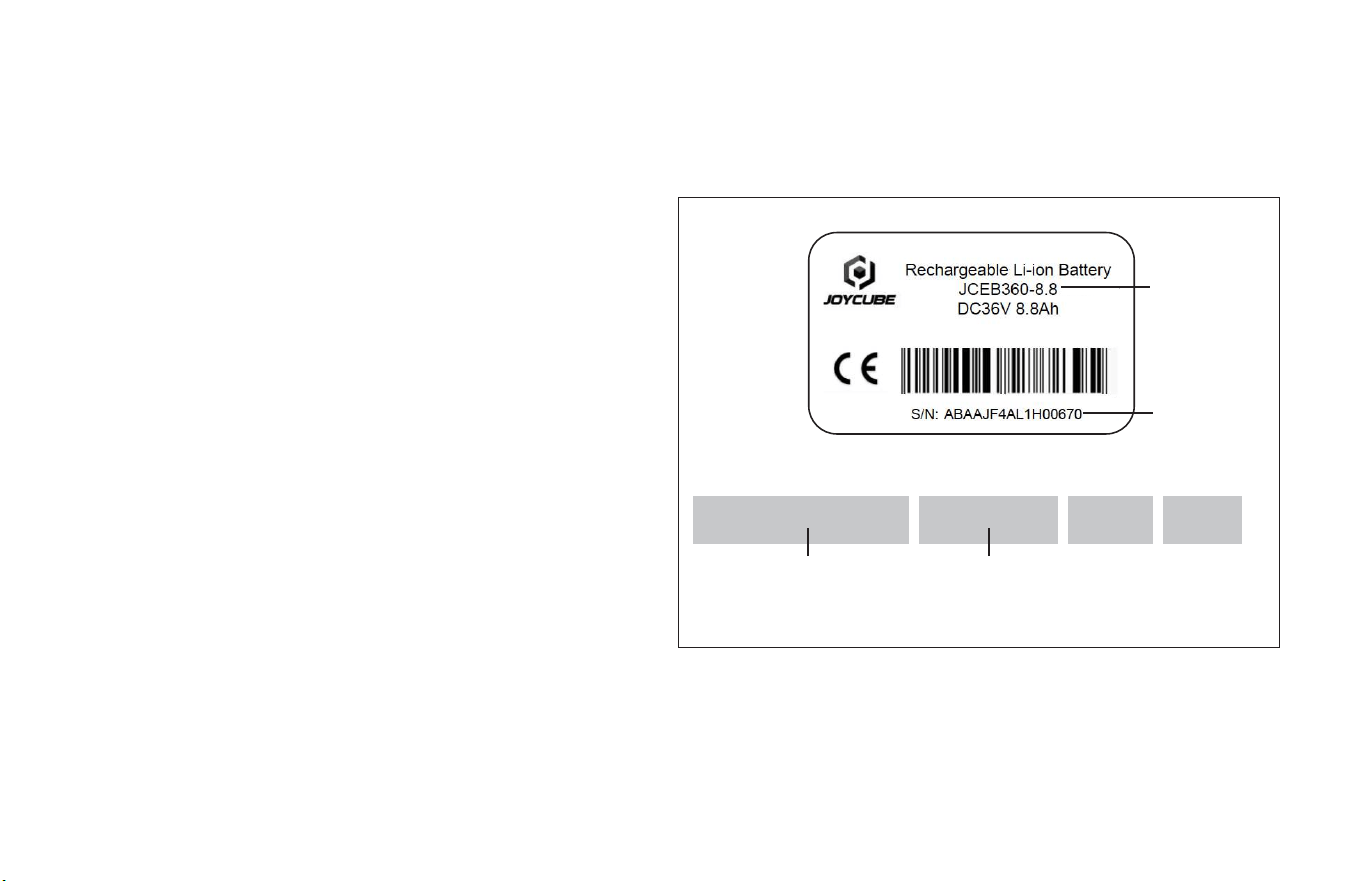
56
4 The ebike Baery
Figure 4.11
Model
Number
Baery Label
Motor Label
Model
Number
Serial
Number
Serial
Number
5 CUSTOMER SERVICE INFORMATION
Servicing Informaon
The label on the baery and motor contain informaon you may
need if servicing is needed. Figure 4.11
4 BIKE GENERAL MAINTENANCE AND CARE
• The e-bike is designed to be totally waterproof to and to
withstand wet riding condions. However, do not deliberately
immerse the ebike in water.
• Handle the e-bike carefully. Avoid subjecng it to any strong
shocks.
• Do not modify the system. Doing so may lead to a malfuncon
of the system. Contact Schwinn Customer Service at
1-800-626-2811 regarding:
• Informaon related to product installaon and adjustments.
• Problems with this product
• Maintenance and use of the product
• Soware updates
14010001
36V 350W
Note: The label shown in Figure 6.14 is for visual reference only.
The label on the baery equipped with your e-bike may dier.
RM G020.350DC
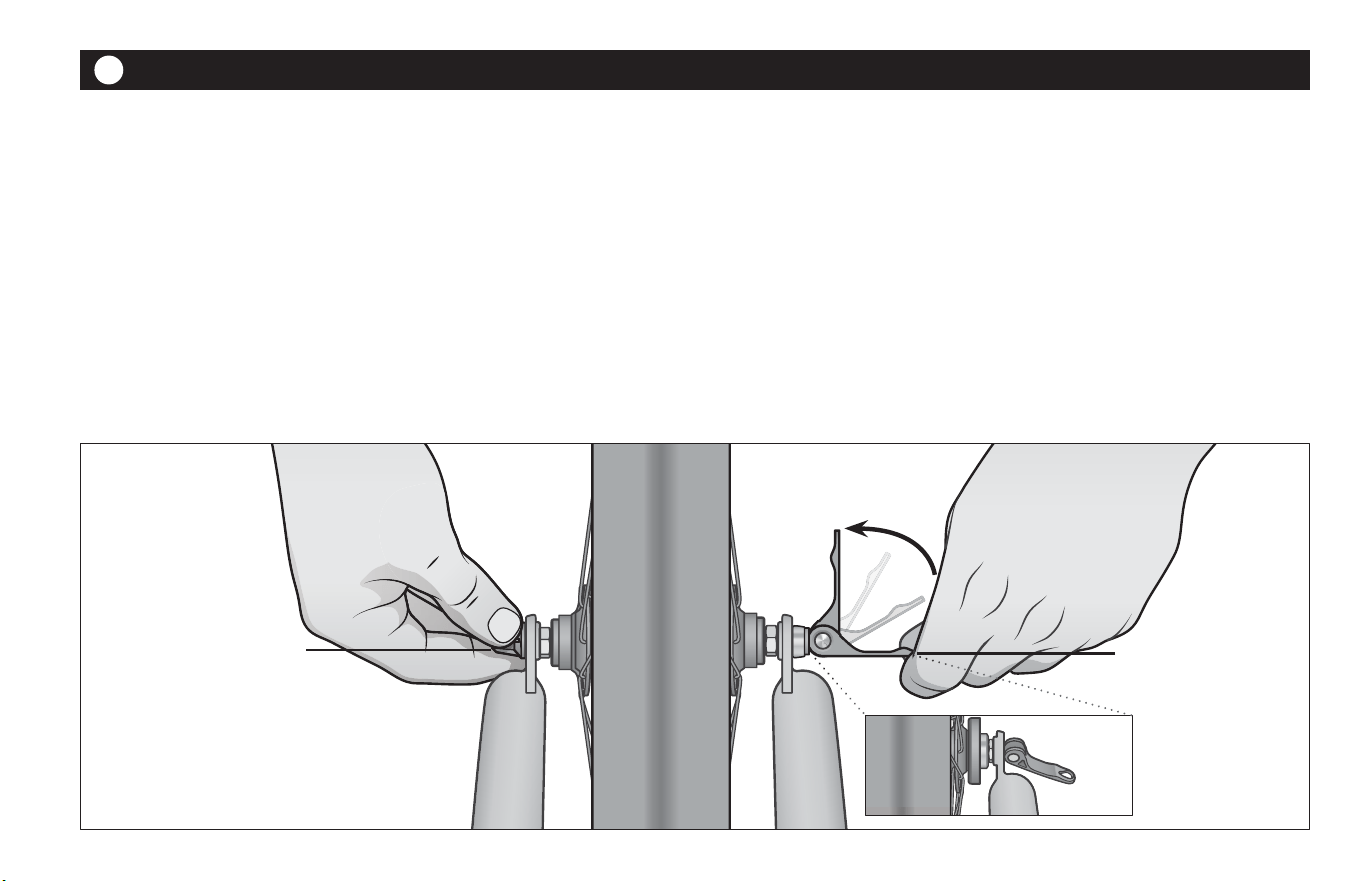
Tech 5
57
TECH
5
It’s important to your safety, performance and enjoyment to
understand how things work on your bicycle. We urge you to
contact customer service for how to do the things described in this
secon before you aempt them yourself. If you have even the
slightest doubt as to whether you understand something in this
secon of the manual, contact customer service. See also Appendix
A, B, C and D of this manual.
1: Wheels
Bicycle wheels are designed to be removable for easier
transportaon and for repair of a re puncture. In most cases, the
wheel axles are inserted into slots, called “dropouts” in the fork
and frame, but some mountain and road bikes use what is called a
“through axle” wheel mounng system.
If you have a mountain or road bike equipped with through axle
front or rear wheels, make sure that your dealer has given you the
manufacturer’s instrucons, and follow those when installing or
removing a through axle wheel. If you don’t know what a through
axle is, contact customer service.
If you do not have a bicycle with a through-axle wheel mounng
system, it will have wheels secured in one of three ways:
Cam lever in
closed posion
Important! Only ghten
the quick-release with the
adjustment nut.
Cam lever in the
open posion
Figure 5.1
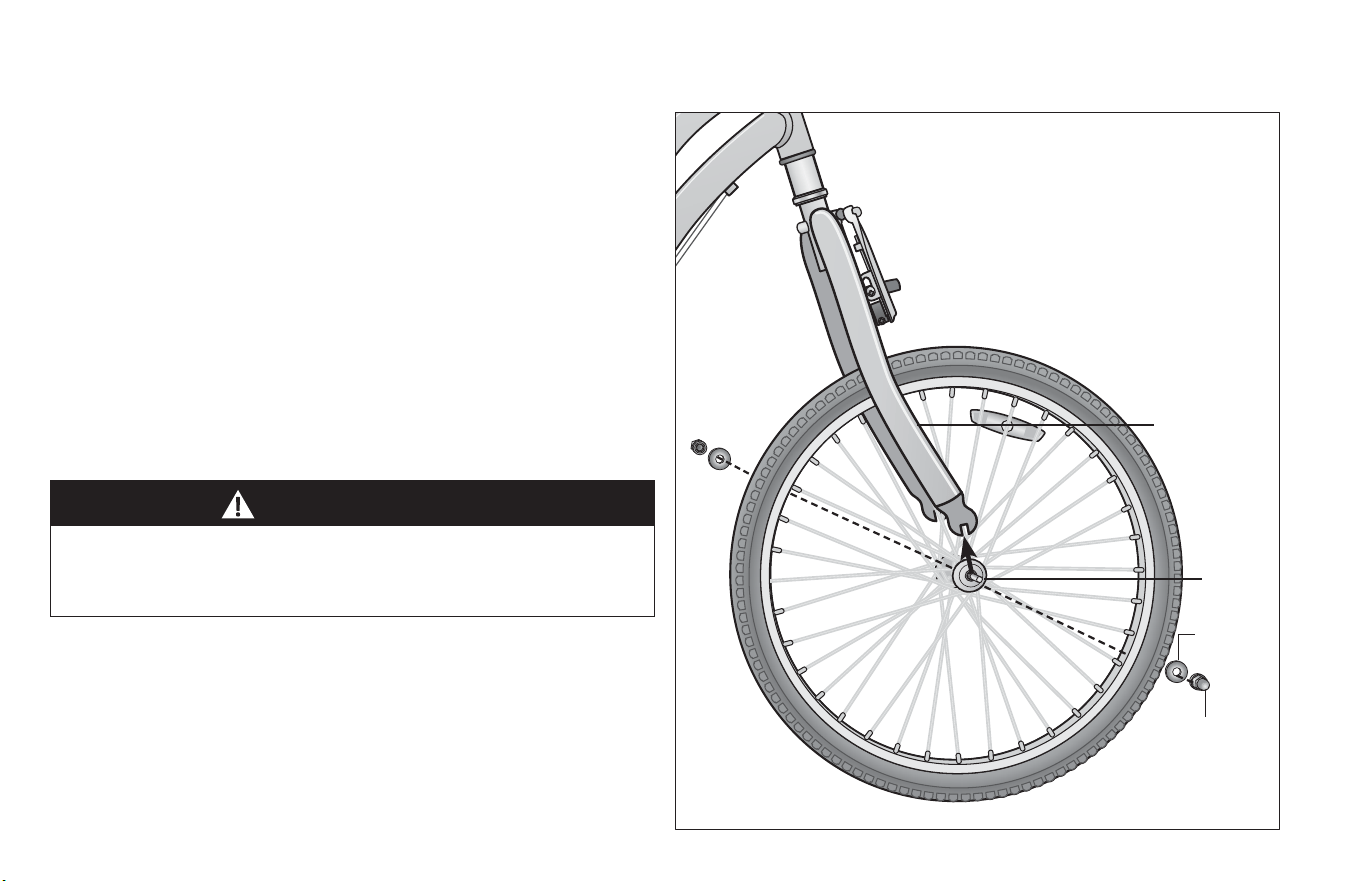
58
5 Tech
WARNING!
Riding with an improperly secured wheel can allow the wheel
to wobble or fall o the bicycle, which can cause serious injury
or death.
1. A hollow axle with a sha skewer running through it which has
an adjustable tension nut on one end and an over-center cam
on the other (cam acon system, Figure 5.1)
2. A hollow axle with a sha skewer running through it which has
a nut on one end and a ng for a hex key, lock lever or other
ghtening device on the other (through bolt, Figure 5.2)
3. Hex nuts or hex key bolts which are threaded on to or into the
hub axle (bolt-on wheel)
It is very important that you understand the type of wheel
securing method on your bicycle, that you know how to secure
the wheels correctly, and that you know how to apply the correct
clamping force that safely secures the wheel. Contact customer
service to instruct you in correct wheel removal and installaon,
and ask him to give you any available manufacturer’s instrucons.
Therefore, it is essenal that you:
1. Understand and apply the correct technique for clamping your
wheel in place.
2. Each me, before you ride the bike, check that the wheel is
securely clamped.
The clamping acon of a correctly secured wheel must emboss
the surfaces of the dropouts.
Figure 5.2
Axle
Fork dropout
Axle
washer
Axle nut
Tech 5
59
WARNING!
1. Front Wheel Secondary Retenon Devices
Most bicycles have front forks that ulize a secondary wheel
retenon device to reduce the risk of the wheel disengaging
from the fork if the wheel is incorrectly secured. Secondary
retenon devices are not a substute for correctly securing
your front wheel.
Secondary retenon devices fall into two basic categories:
A. The clip-on type is a part that the manufacturer adds to
the front wheel hub or front fork.
B. The integral type is molded, cast or machined into the
outer faces of the front fork dropouts.
Contact customer service to explain the parcular secondary
retenon device on your bike.
Do not remove or disable the secondary retenon device. As its
name implies, it serves as a back-up for a crical adjustment. If
the wheel is not secured correctly, the secondary retenon
device can reduce the risk of the wheel disengaging from the
fork. Removing or disabling the secondary retenon device may
also void the warranty.
Secondary retenon devices are not a substute for correctly
securing your wheel. Failure to properly secure the wheel can
cause the wheel to wobble or disengage, which could cause you
to loose control and fall, resulng in serious injury or death.
2. Wheels with cam acon systems
There are currently two types of over-center cam wheel
retenon mechanisms: the tradional over-center cam
(Figure 5.1) and the cam-and-cup system (Figure 5.1). Both use
an over-center cam acon to clamp the bike’s wheel in place.
Your bicycle may have a cam-and-cup front wheel retenon
system and a tradional rear wheel cam acon system.
A. Adjusng the tradional cam acon mechanism
(Figure 5.1)The wheel hub is clamped in place by the force
of the over-center cam pushing against one dropout and
pulling the tension adjusng nut, by way of the skewer,
against the other dropout. The amount of clamping force
is controlled by the tension adjusng nut. Turning the
tension adjusng nut clockwise while keeping the cam
lever from rotang increases clamping force; turning it
counterclockwise while keeping the cam lever from
rotang reduces clamping force. Less than half a turn of
the tension adjusng nut can make the dierence
between safe clamping force and unsafe clamping force.
WARNING!
The full force of the cam acon is needed to clamp the wheel
securely. Holding the nut with one hand and turning the lever
like a wing nut with the other hand unl everything is as ght as
you can get it will not clamp a cam acon wheel safely in the
dropouts. See also the rst WARNING in this Secon.
60
5 Tech
WARNING!
If your bike is equipped with a hub brake such as a rear coaster
brake, front or rear drum, band or roller brake; or if it has an
internal gear rear hub, do not aempt to remove the wheel. The
removal and re-installaon of most hub brakes and internal gear
hubs requires special knowledge. Incorrect removal or assembly
can result in brake or gear failure, which can cause you to lose
control and fall.
B. Adjusng the cam-and-cup mechanism (Figure 5.1)
The cam-and-cup system on your front wheel will have
been correctly adjusted for your bicycle by your dealer.
Ask your dealer to check the adjustment every six
months. Do not use a cam-and-cup front wheel on any
bicycle other than the one for which your dealer
adjusted it.
3. Removing and Installing wheels
CAUTION!
If your bike has a disc brake, exercise care in touching the rotor
or caliper. Disc rotors have sharp edges, and both rotor and
caliper can get very hot during use.
A. Removing a disk brake or rim brake Front Wheel
1. If your bike has rim brakes, disengage the brake’s
quick-release mechanism to increase the clearance
between the re and the brake pads (See Secon
4.C g. 11 through 15).
2. If your bike has cam acon front wheel retenon,
move the cam lever from the locked or CLOSED
posion to the OPEN posion (Figure 5.1). If your
bike has through bolt or bolt-on front wheel
retenon, loosen the fastener(s) a few turns
counter-clockwise using an appropriate wrench,
lock key or the integral lever.
3. If your front fork has a clip-on type secondary
retenon device, disengage it. If your front fork
has an integral secondary retenon device, and a
tradional cam acon system (Figure 5.1) loosen
the tension adjusng nut enough to allow
removing the wheel from the dropouts. If your
front wheel uses a cam-and-cup system, (Figure
5.1) squeeze the cup and cam lever together while
removing the wheel. No rotaon of any part is
necessary with the cam-and-cup system.
You may need to tap the top of the wheel with
the palm of your hand to release the wheel from
the front fork.
B. Installing a disk brake or rim brake Front Wheel
Tech 5
61
CAUTION!
If your bike is equipped with a front disk brake, be careful not to
damage the disk, caliper or brake pads when re-inserng the
disk into the caliper. Never acvate a disk brake’s control lever
unless the disk is correctly inserted in the caliper. See also
Secon 4.C.
1. If your bike has cam acon front wheel retenon, move the
cam lever so that it curves away from the wheel (Figure 5.1).
This is the OPEN posion. If your bike has through bolt or
bolt-on front wheel retenon, go to the next step.
2. With the steering fork facing forward, insert the wheel
between the fork blades so that the axle seats rmly at the top
of the fork dropouts. The cam lever, if there is one, should be
on rider’s le side of the bicycle (Figure 5.1). If your bike has a
clip-on type secondary retenon device, engage it.
3. If you have a tradional cam acon mechanism: holding the
cam lever in the ADJUST posion with your right hand, ghten
the tension adjusng nut with your le hand unl it is nger
ght against the fork dropout (Figure 5.1). If you have a
cam-and-cup system: the nut and cup (Figure 5.1) will have
snapped into the recessed area of the fork dropouts and no
adjustment should be required.
4. While pushing the wheel rmly to the top of the slots in the
fork dropouts, and at the same me centering the wheel rim in
the fork.
A. With a cam acon system, move the cam lever upwards
and swing it into the CLOSED posion (Figure 5.1). The
lever should now be parallel to the fork blade and curved
toward the wheel. To apply enough clamping force, you
should have to wrap your ngers around the fork blade
for leverage, and the lever should leave a clear imprint in
the palm of your hand.
B. With a through-bolt or bolt-on system, ghten the
fasteners to the torque specicaons in Appendix C or
the hub manufacturer’s instrucons.
NOTE: If, on a tradional cam acon system, the lever cannot be
pushed all the way to a posion parallel to the fork blade, return
the lever to the OPEN posion. Then turn the tension adjusng
nut counterclockwise one-quarter turn and try ghtening the
lever again.
5. With a through-bolt or bolt-on system, ghten the fasteners to
the torque specicaons in Appendix C or the hub
manufacturer’s instrucons.
62
5 Tech
WARNING!
Securely clamping the wheel with a cam acon retenon device
takes considerable force. If you can fully close the cam lever
without wrapping your ngers around the fork blade for
leverage, the lever does not leave a clear imprint in the palm of
your hand, and the serraons on the wheel fastener do not
emboss the surfaces of the dropouts, the tension is insucient.
Open the lever; turn the tension adjusng nut clockwise a
quarter turn; then try again. See also the rst WARNING in this
Secon.
6. If you disengaged the brake quick-release mechanism in 3. a. 1,
re-engage it to restore correct brake pad-to-rim clearance.
7. Spin the wheel to make sure that it is centered in the frame and
clears the brake pads; then squeeze the brake lever and make
sure that the brakes are operang correctly.
C. Removing a disk brake or rim brake Rear Wheel
1. If you have a mul-speed bike with a derailleur
gear system: shi the rear derailleur to high gear
(the smallest, outermost rear sprocket).
If you have an internal gear rear hub, consult your
dealer or the hub manufacturer’s instrucons
before aempng to remove the rear wheel.
If you have a single-speed bike with rim or disk
brake, go to step (4) below.
2. If your bike has rim brakes, disengage the brake’s
quick-release mechanism to increase the clearance
between the wheel rim and the brake pads
(see Secon 4.C).
3. On a derailleur gear system, pull the derailleur
body back with your right hand.
4. With a cam acon mechanism, move the quick-
release lever to the OPEN posion (g. 8b). With a
through bolt or bolt on mechanism, loosen the
fastener(s) with an appropriate wrench, lock lever
or integral lever; then push the wheel forward far
enough to be able to remove the chain from the
rear sprocket.
5. Li the rear wheel o the ground a few inches and
remove it from the rear dropouts.
D. Installing a disk brake or rim brake Rear Wheel
CAUTION!
If your bike is equipped with a rear disk brake, be careful not to
damage the disk, caliper or brake pads when re-inserng the
disk into the caliper. Never acvate a disk brake’s control lever
unless the disk is correctly inserted in the caliper.
1. With a cam acon system, move the cam lever to
the OPEN posion (see Figure 5.1). The lever
should be on the side of the wheel opposite the
derailleur and freewheel sprockets.
Tech 5
63
2. On a derailleur bike, make sure that the rear
derailleur is sll in its outermost, high gear,
posion; then pull the derailleur body back with
your right hand. Put the chain on top of the
smallest freewheel sprocket.
3. On single-speed, remove the chain from the front
sprocket, so that you have plenty of slack in the
chain. Put the chain on the rear wheel sprocket.
4. Then, insert the wheel into the frame dropouts
and pull it all the way in to the dropouts.
5. On a single speed or an internal gear hub, replace
the chain on the chainring; pull the wheel back in
the dropouts so that it is straight in the frame and
the chain has about 1/4 inches of up-and-down
play.
6. With a cam acon system, move the cam lever
upwards and swing it into the CLOSED posion (g.
8 a & b). The lever should now be parallel to the
seat stay or chain stay and curved toward the
wheel. To apply enough clamping force, you
should have to wrap your ngers around the fork
blade for leverage, and the lever should leave a
clear imprint in the palm of your hand.
7. With a through-bolt or bolt-on system, ghten the
fasteners to the torque specicaons in Appendix
C or the hub manufacturer’s instrucons.
Note: If, on a tradional cam acon system, the
lever cannot be pushed all the way to a posion
parallel to the seat stay or chain stay, return the
lever to the OPEN posion. Then turn the tension
adjusng nut counterclockwise one-quarter turn
and try ghtening the lever again.
WARNING!
Securely clamping the wheel with a cam acon retenon device
takes considerable force. If you can fully close the cam lever
without wrapping your ngers around the seat stay or chain stay
for leverage, the lever does not leave a clear imprint in the palm
of your hand, and the serraons on the wheel fastener do not
emboss the surfaces of the dropouts, the tension is insucient.
Open the lever; turn the tension adjusng nut clockwise a
quarter turn; then try again. See also the rst WARNING in this
Secon.
8. If you disengaged the brake quick-release
mechanism in 3. c. (2) above, re-engage it to
restore correct brake pad-to-rim clearance.
9. Spin the wheel to make sure that it is centered in
the frame and clears the brake pads; then squeeze
the brake lever and make sure that the brakes are
operang correctly.
64
5 Tech
WARNING!
WARNING!
Riding with an improperly ghtened seat post can allow the
saddle to turn or move and cause you to lose control and fall.
The full force of the cam acon is needed to clamp the seat post
securely. Holding the nut with one hand and turning the lever
like a wing nut with the other hand unl everything is as ght as
you can get it will not clamp the seat post safely.
If you can fully close the cam lever without wrapping your
ngers around the seat post or a frame tube for leverage, and
the lever does not leave a clear imprint in the palm of your
hand, the tension is insucient. Open the lever; turn the tension
adjusng nut clockwise a quarter turn; then try again.
2: Seat Post Cam Acon Clamp
Some bikes are equipped with a cam acon seat post binder.
The seat post cam acon binder works exactly like the tradional
wheel cam acon fastener (Secon 4.A.2). While a cam acon
binder looks like a long bolt with a lever on one end and a nut on
the other, the binder uses an over-center cam acon to rmly
clamp the seat post (see Figure 5.1).
Therefore:
1. Ask your dealer to help you make sure you know how to
correctly clamp your seat post.
2. Understand and apply the correct technique for clamping your
seat post.
3. Before you ride the bike, rst check that the seat post is
securely clamped.
2.A: Adjusng the seat post cam acon mechanism
The acon of the cam squeezes the seat collar around the seat post
to hold the seat post securely in place. The amount of clamping
force is controlled by the tension adjusng nut. Turning the tension
adjusng nut clockwise while keeping the cam lever from rotang
increases clamping force; turning it counterclockwise while keeping
the cam lever from rotang reduces clamping force. Less than half
a turn of the tension adjusng nut can make the dierence
between safe and unsafe clamping force.
Tech 5
65
3: Brakes
There are three general types of bicycle brakes: rim brakes, which
operate by squeezing the wheel rim between two brake pads; disc
brakes, which operate by squeezing a hub-mounted disc between
WARNING!
two brake pads; and internal hub brakes. All three can be operated
by way of a handlebar mounted lever. On some models of bicycle,
the internal hub brake is operated by pedaling backwards.
1. Riding with improperly adjusted brakes, worn brake pads, or
wheels on which the rim wear mark is visible is dangerous and
can result in serious injury or death.
2. Applying brakes too hard or too suddenly can lock up a wheel,
which could cause you to lose control and fall. Sudden or
excessive applicaon of the front brake may pitch the rider
over the handlebars, which may result in serious injury or
death.
3. Some bicycle brakes, such as disc brakes (Figure 5.8) and
linear-pull brakes (Figure 5.8), are extremely powerful.
Take extra care in becoming familiar with these brakes and
exercise parcular care when using them.
4. Some bicycle brakes are equipped with a brake force
modulator, a small, cylindrical device through which the brake
control cable runs and which is designed to provide a more
progressive applicaon of braking force. A modulator makes
the inial brake lever force more gentle, progressively
increasing force unl full force is achieved. If your bike is
equipped with a brake force modulator, take extra care in
becoming familiar with its performance characteriscs. Some
brake force modulators are adjustable. If you don’t like the
feel of your brakes, ask your dealer about adjusng the brake
force modulaon.
5. Disc brakes can get extremely hot with extended use. Be
careful not to touch a disc brake unl it has had plenty of me
to cool.
6. See the brake manufacturer’s instrucons for operaon and
care of your brakes, and for when brake pads must be
replaced. If you do not have the manufacturer’s instrucons,
see your dealer or contact the brake manufacturer.
7. If replacing worn or damaged parts, use only manufacturer-
approved genuine replacement parts.
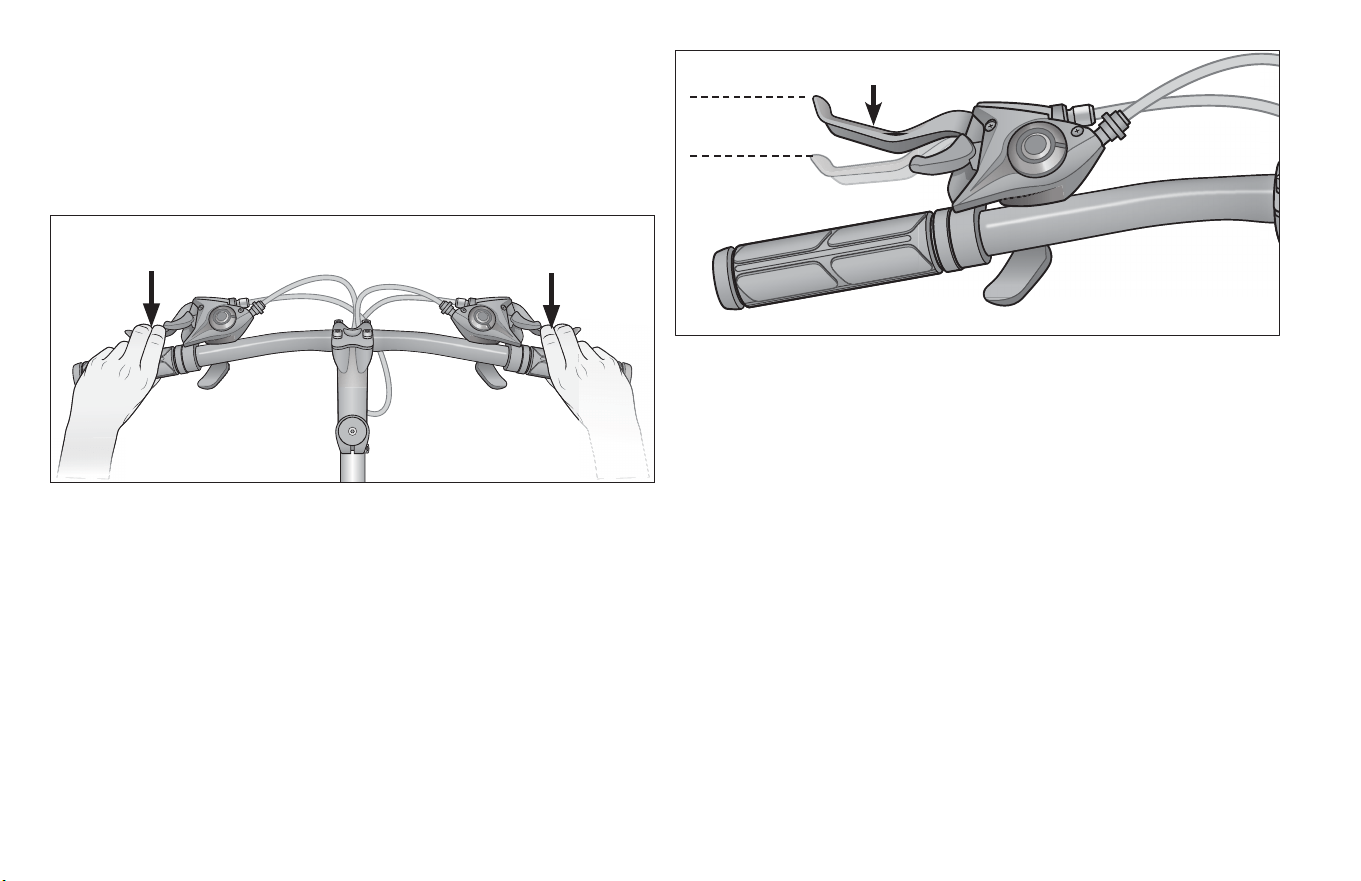
66
5 Tech
3A. Brake controls and features
It’s very important to your safety that you learn and remember
which brake lever controls which brake on your bike. Tradionally,
in the U.S. the right brake lever controls the rear brake and the le
brake lever controls the front brake (Figure 5.4);
3
2
1/3 distance to
handlebar
3
2
8
6
3
Le side brakes the
front wheel
Right side brakes the
rear wheel
to check how your bike’s brakes are set up, squeeze one brake
lever and look to see which brake, front or rear, engages. Now do
the same with the other brake lever.
Make sure that your hands can reach and squeeze the brake levers
comfortably. If your hands are too small to operate the levers
comfortably, consult your dealer before riding the bike. The lever
reach may be adjustable; or you may need a dierent brake lever
design. (Figure 5.5)
Most rim brakes have some form of quick-release mechanism to
allow the brake pads to clear the re when a wheel is removed or
reinstalled. When the brake quick release is in the open posion,
the brakes are inoperave. Ask your dealer to make sure that you
understand the way the brake quick release works on your bike
(see Figure 5.6–5.9) and check each me to make sure both brakes
work correctly before you get on the bike.
Figure 5.4
Figure 5.5
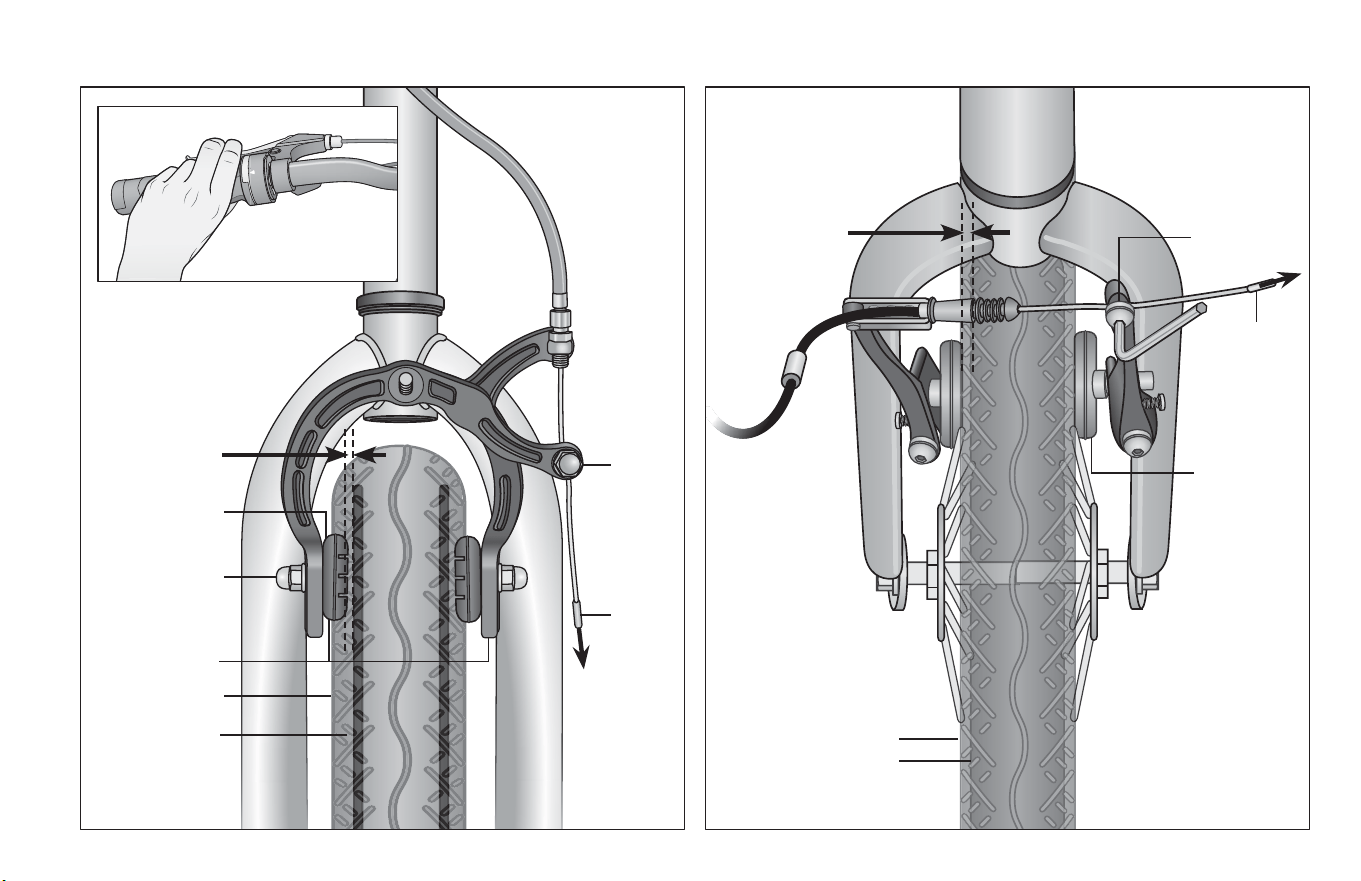
Tech 5
67
1
Example of Linear Pull BrakesExample of Side-pull Caliper Brakes
Figure 5.7Figure 5.6
Brake pad
locknut
Brake pad
Brake pad
Brake pads
Wheel rim
Distance from
brake pad to
wheel rim 1/8”
Cable
anchor
nut
Cable
Cable
Tire
Tire
Cable
anchor bolt
Wheel rim
1/8” gap
(both pads)
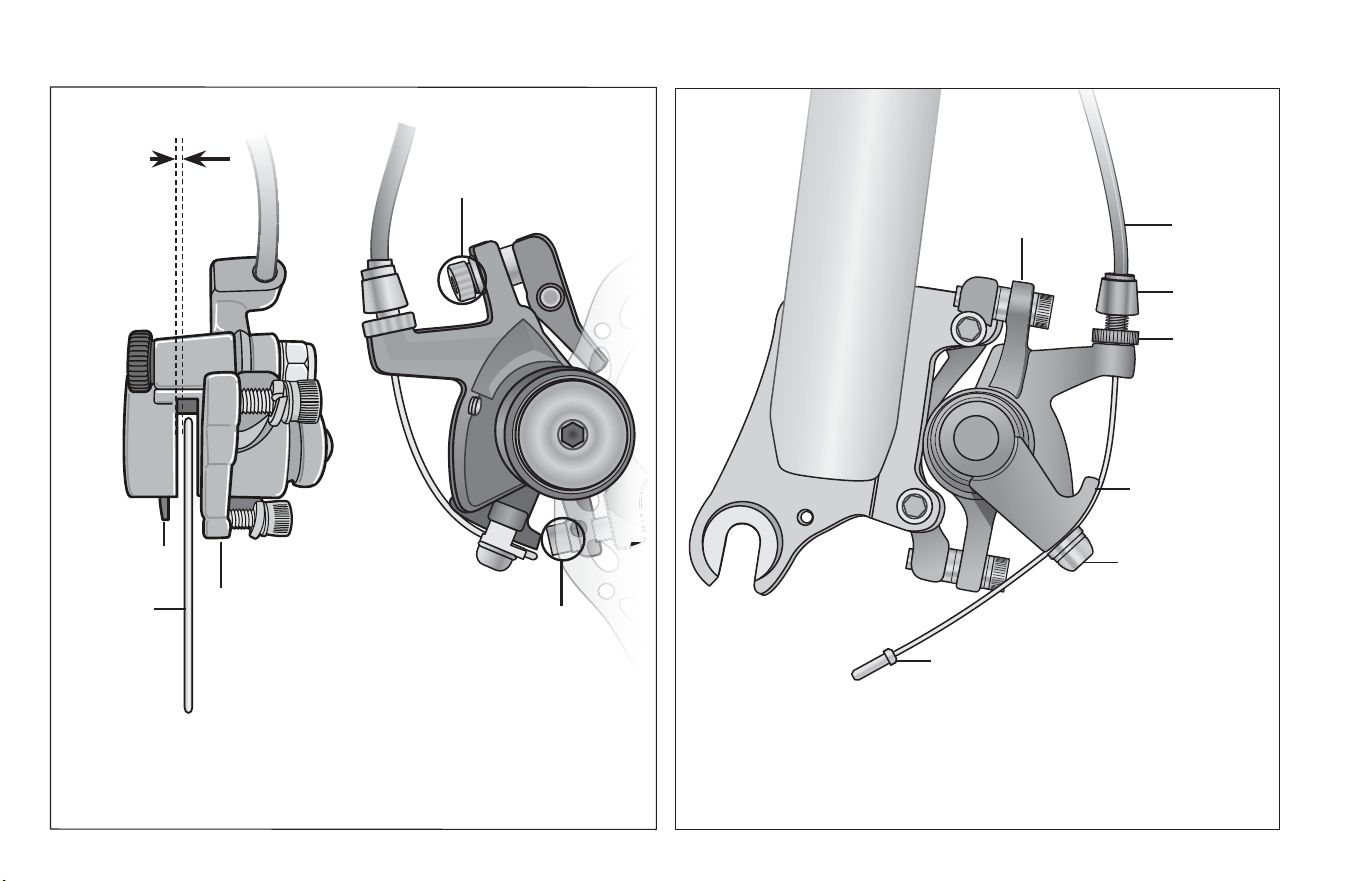
68
5 Tech
Example of Disc Brakes Example of Brake Cable Connected to Brake Arm
Figure 5.8 Figure 5.9
Centering
adjustment screws
1/32 inch
clearance
on each
side of disc
rotor
Disc rotor
Adjust caliper
body so disc
rotor is centered
Centering
adjustment screws
Caliper body
Brake cable wire
Brake arm
Cable anchor bolt
Jam nut
Adjustment
barrel
Brake cable
Brake pad

Tech 5
69
3B. How brakes work
The braking acon of a bicycle is a funcon of the fricon
between the braking surfaces. To make sure that you have
maximum fricon available, keep your wheel rims and brake
pads or the disk rotor and caliper clean and free of dirt,
lubricants, waxes or polishes.
Brakes are designed to control your speed, not just to stop the
bike. Maximum braking force for each wheel occurs at the point
just before the wheel “locks up” (stops rotang) and starts to
skid. Once the re skids, you actually lose most of your
stopping force and all direconal control. You need to pracce
slowing and stopping smoothly without locking up a wheel. The
technique is called progressive brake modulaon. Instead of
jerking the brake lever to the posion where you think you’ll
generate appropriate braking force, squeeze the lever,
progressively increasing the braking force. If you feel the wheel
begin to lock up, release pressure just a lile to keep the wheel
rotang just short of lockup. It’s important to develop a feel for
the amount of brake lever pressure required for each wheel at
dierent speeds and on dierent surfaces. To beer
understand this, experiment a lile by walking your bike and
applying dierent amounts of pressure to each brake lever,
unl the wheel locks.
When you apply one or both brakes, the bike begins to slow,
but your body wants to connue at the speed at which it was
going. This causes a transfer of weight to the front wheel (or,
under heavy braking, around the front wheel hub, which could
send you ying over the handlebars).
A wheel with more weight on it will accept greater brake pressure
before lockup; a wheel with less weight will lock up with less brake
pressure.
So, as you apply brakes and your weight is transferred forward, you
need to shi your body toward the rear of the bike, to transfer
weight back on to the rear wheel; and at the same me, you need
to both decrease rear braking and increase front braking force.
This is even more important on descents, because descents shi
weight forward.
Two keys to eecve speed control and safe stopping are
controlling wheel lockup and weight transfer. This weight transfer
is even more pronounced if your bike has a front suspension fork.
Front suspension “dips/compresses/dives” under braking,
increasing the weight transfer (see also Secon 4.F). Pracce
braking and weight transfer techniques where there is no trac or
other hazards and distracons.
Everything changes when you ride on loose surfaces or in wet
weather. It will take longer to stop on loose surfaces or in wet
weather. Tire adhesion is reduced, so the wheels have less
cornering and braking tracon and can lock up with less brake
force. Moisture or dirt on the brake pads reduces their ability to
grip. The way to maintain control on loose or wet surfaces is to go
more slowly.
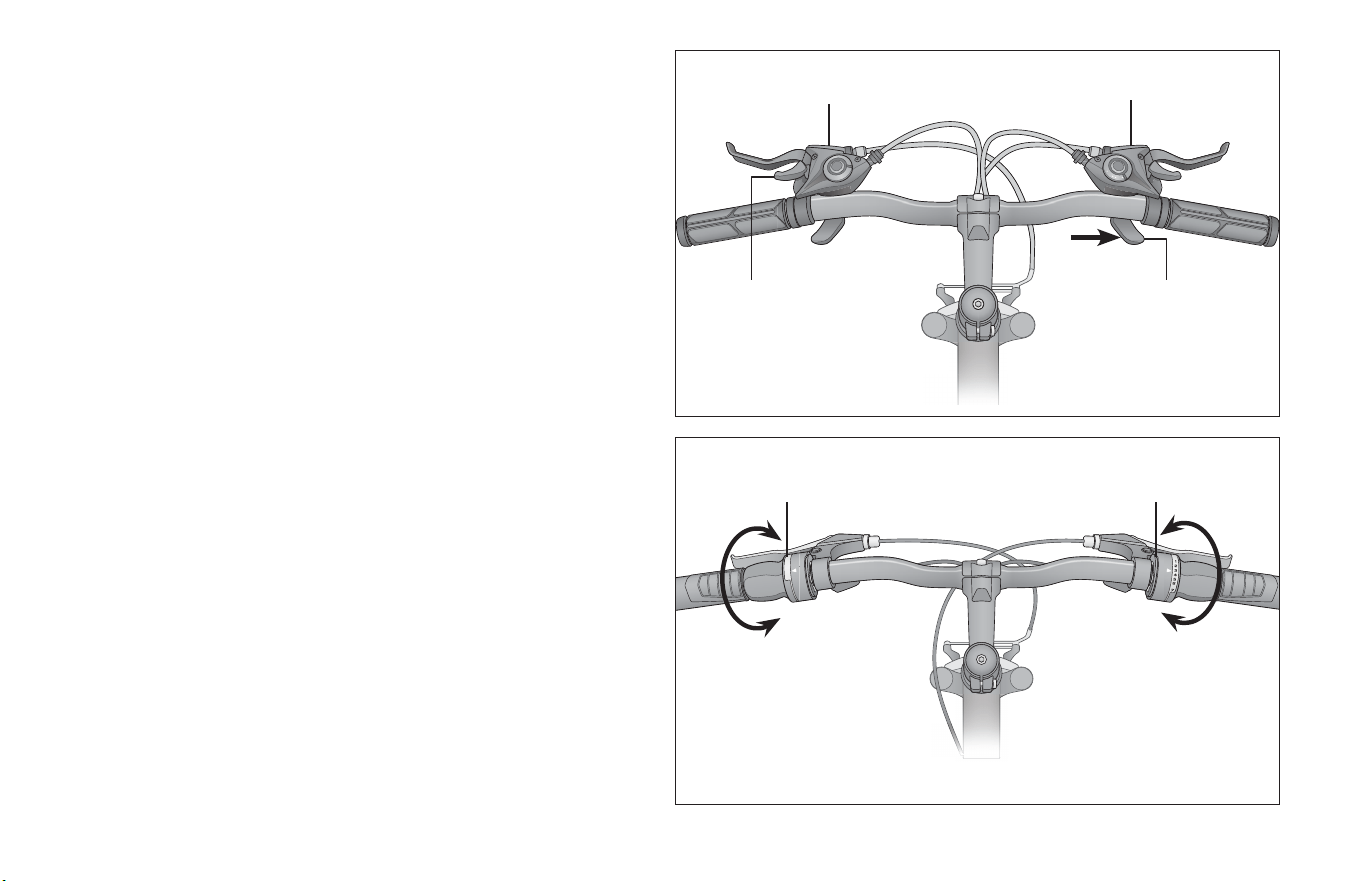
70
5 Tech
3C. Shiing gears
Your mul-speed bicycle will have a derailleur drivetrain (see 1.
below), an internal gear hub drivetrain (see 2. below) or, in some
special cases, a combinaon of the two.
1. How a derailleur drivetrain works
If your bicycle has a derailleur drivetrain, the gear-changing
mechanism will have:
• a rear cassee or freewheel sprocket cluster
• a rear derailleur
• usually a front derailleur
• one or two shiers
• one, two or three front sprockets called chainrings
• a drive chain
A. Shiing Gears
There are several dierent types and styles of shiing
controls: levers, twist grips, triggers, (see Figure 5.10 and
Figure 5.11)combinaon shi/brake controls and push-
buons. Ask your dealer to explain the type of shiing
controls that are on your bike, and to show you how they
work.
The vocabulary of shiing can be prey confusing. A
downshi is a shi to a “lower” or “slower” gear, one that
is easier to pedal. An upshi is a shi to a “higher” or
“faster”, harder to pedal gear. What’s confusing is that
what’s happening at the front derailleur is the opposite of
1
3
2
1
8
6
3
Front shier
Front shier
Rear shier
Twist-style Shier
Trigger-style Shier
Twist to change
gear level
Rear shier
Push in with thumb
to shi gears
Pull down with index
nger to shi gears
Figure 5.10
Figure 5.11
Tech 5
71
what’s happening at the rear derailleur (for details, read
the instrucons on Shiing the Rear Derailleur and
Shiing the Front Derailleur below). For example, you can
select a gear which will make pedaling easier on a hill
(make a downshi) in one of two ways: shi the chain
down the gear “steps” to a smaller gear at the front, or up
the gear “steps” to a larger gear at the rear. So, at the rear
gear cluster, what is called a downshi looks like an
upshi. The way to keep things straight is to remember
that shiing the chain in towards the centerline of the
bike is for accelerang and climbing and is called a
downshi. Moving the chain out or away from the
centerline of the bike is for speed and is called an upshi.
Whether upshiing or downshiing, the bicycle derailleur
system design requires that the drive chain be moving
forward and be under at least some tension.
A derailleur will shi only if you are pedaling forward.
CAUTION!
Never move the shier while pedaling backward, nor pedal
backwards immediately aer having moved the shier. This
could jam the chain and cause serious damage to the bicycle.
B. Shiing the Rear Derailleur
The rear derailleur is controlled by the right shier.
The funcon of the rear derailleur is to move the drive
chain from one gear sprocket to another. The smaller
sprockets on the gear cluster produce higher gear raos.
Pedaling in the higher gears requires greater pedaling
eort, but takes you a greater distance with each
revoluon of the pedal cranks. The larger sprockets
produce lower gear raos. Using them requires less
pedaling eort, but takes you a shorter distance with
each pedal crank revoluon. Moving the chain from a
smaller sprocket of the gear cluster to a larger sprocket
results in a downshi. Moving the chain from a larger
sprocket to a smaller sprocket results in an upshi. In
order for the derailleur to move the chain from one
sprocket to another, the rider must be pedaling forward.
C. Shiing the Front Derailleur:
The front derailleur, which is controlled by the le shier,
shis the chain between the larger and smaller chainrings.
Shiing the chain onto a smaller chainring makes pedaling
easier (a downshi). Shiing to a larger chainring makes
pedaling harder (an upshi).
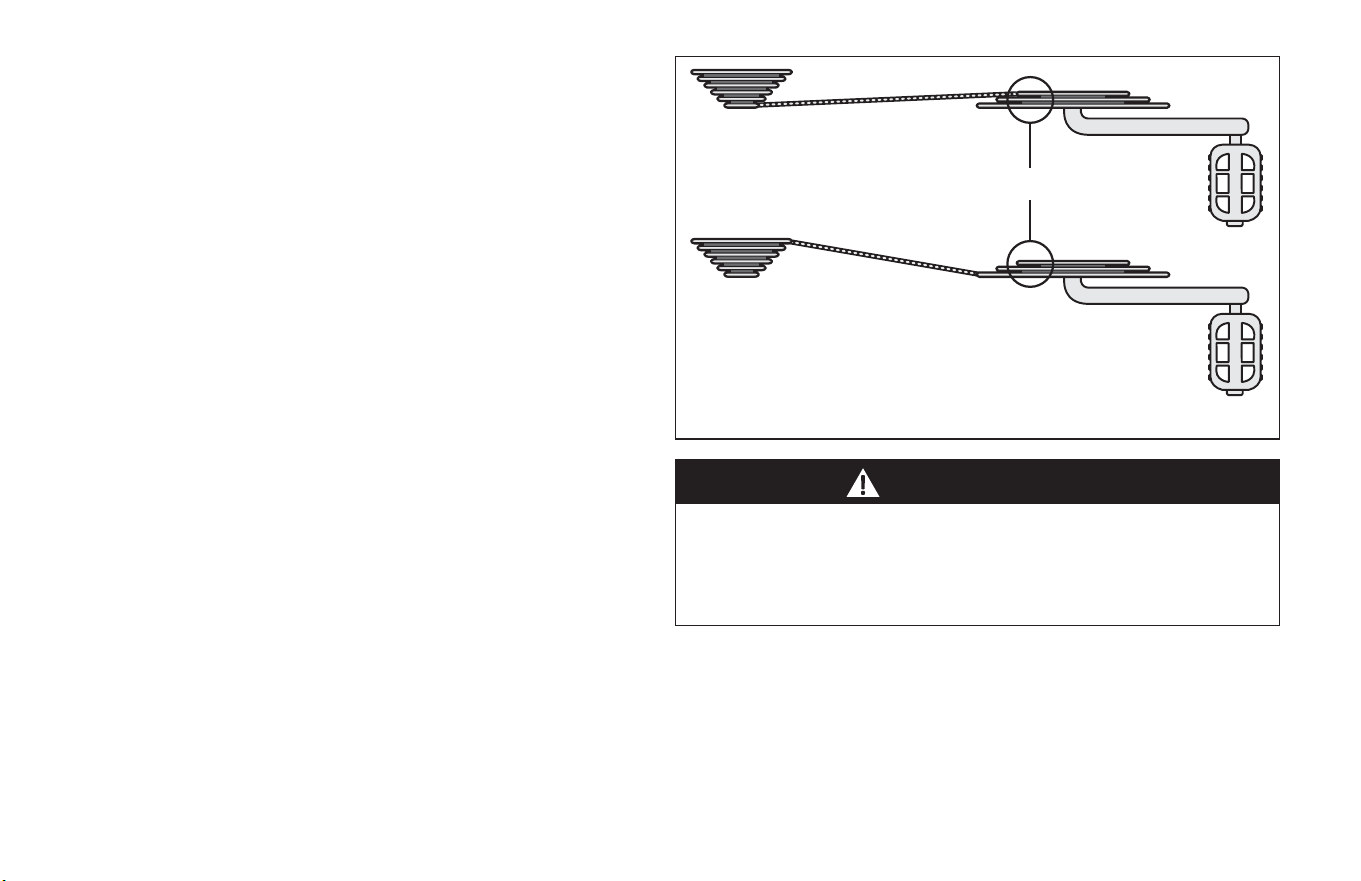
72
5 Tech
WARNING!
D. Which gear should I be in?
The combinaon of largest rear and smallest front gears
(Figure 5.12) is for the steepest hills. The smallest rear
and largest front combinaon is for the greatest speed.
It is not necessary to shi gears in sequence. Instead, nd
the “starng gear” which is right for your level of ability
— a gear which is hard enough for quick acceleraon but
easy enough to let you start from a stop without wobbling
— and experiment with upshiing and downshiing to
get a feel for the dierent gear combinaons. At rst,
pracce shiing where there are no obstacles, hazards or
other trac, unl you’ve built up your condence. Learn
not to use either the “smallest to smallest” or “largest to
largest” gear combinaons because they may cause
unacceptable stress on the drive train. Learn to ancipate
the need to shi, and shi to a lower gear before the hill
gets too steep. If you have dicules with shiing, the
problem could be mechanical adjustment. See your dealer
for help.
E. What if it won’t shi gears?
If moving the shi control one click repeatedly fails to
result in a smooth shi to the next gear chances are that
the mechanism is out of adjustment. Take the bike to your
dealer to have it adjusted.
Avoid these extreme angles of the chain
Three chain rings
Never shi a derailleur onto the largest or the smallest sprocket
if the derailleur is not shiing smoothly. The derailleur may be
out of adjustment and the chain could jam, causing you to lose
control and fall.
Figure 5.12
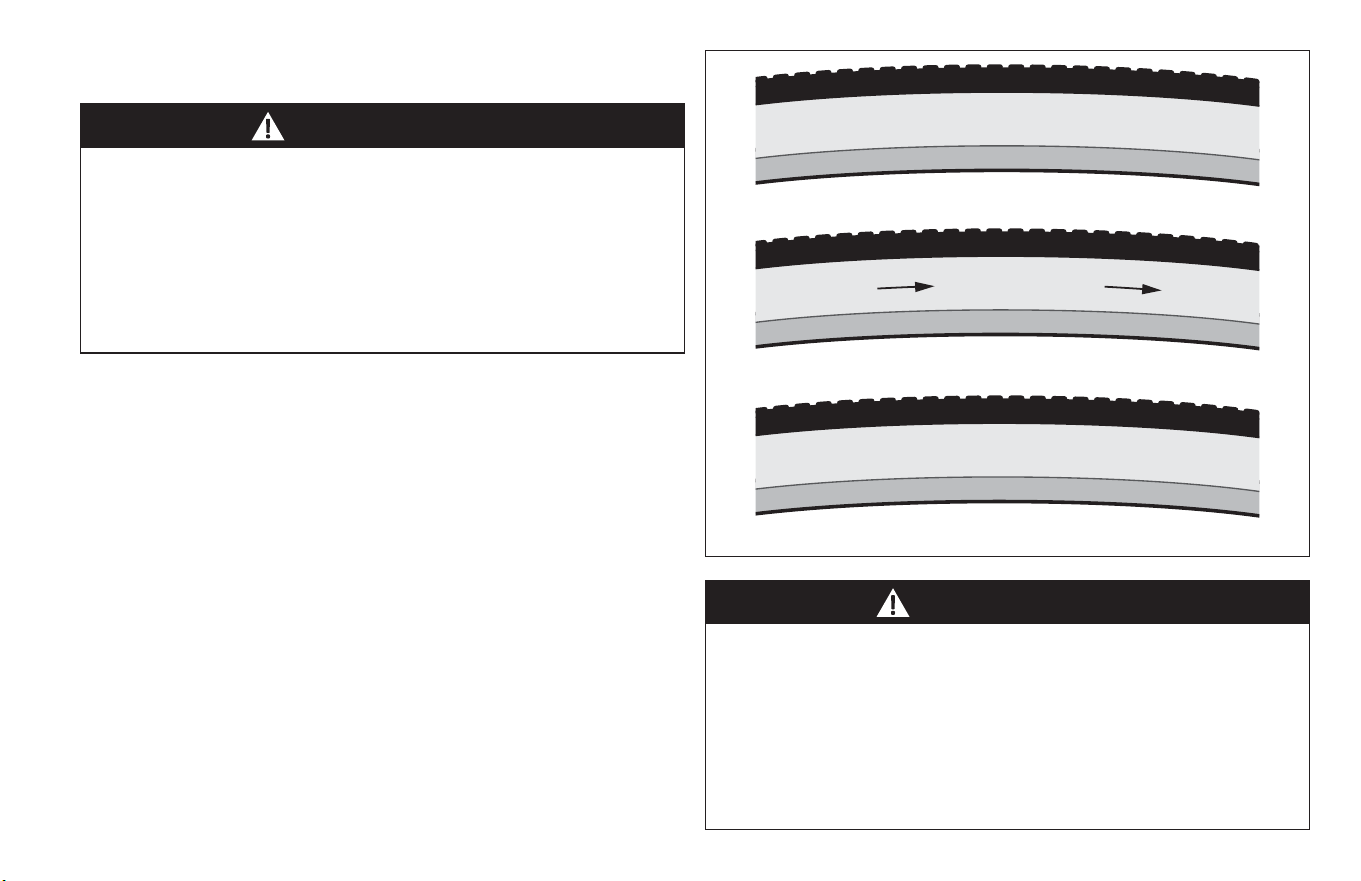
Tech 5
73
WARNING!
WARNING!
4A. Tires
Bicycle res are available in many designs and specicaons,
ranging from general-purpose designs to res designed to perform
best under very specic weather or terrain condions. If, once
you’ve gained experience with your new bike, you feel that a
dierent re might beer suit your riding needs, customer service
can help you select the most appropriate design.
The size, pressure rang, and on some high-performance res the
specic recommended use, are marked on the sidewall of the re
(Figure 5.14). The part of this informaon which is most important
to you is Tire Pressure. But some wheel rim manufacturers also
specify maximum re pressure with a label on the rim.
3
0
-
8
0
P
S
I
(
2
.
5
-
5
.
5
B
A
R
)
5
7
-
5
5
9
(
2
6
x
2
.
1
2
5
)
R
O
T
A
T
I
N
G
D
I
R
E
C
T
I
O
N
4: Tires and Tubes
Some bicycles intended for compeon are ed with res that
are glued on to specially made rims. These are called “sew-up”
or “tubular” res. Properly mounng these res requires
specialized knowledge and skills. Ask your dealer to teach you
how to mount tubulars before you aempt it on your own. An
incorrectly installed tubular re can come o the rim, causing
you to lose control and fall.
Never inate a re beyond the maximum pressure marked on
the re’s sidewall or the wheel rim. If the maximum pressure
rang for the wheel rim is lower than the maximum pressure
shown on the re, always use the lower rang. Exceeding the
recommended maximum pressure may blow the re o the rim
or damage the wheel rim, which could cause damage to the bike
and injury to the rider and bystanders.
Figure 5.14
74
5 Tech
WARNING!
There is a safety risk in using gas staon air hoses or other air
compressors. They are not made for bicycle res. They move a
large volume of air very rapidly, and will raise the pressure in
your re very rapidly, which could cause the tube to explode.
Tire pressure is given either as maximum pressure or as a pressure
range. How a re performs under dierent terrain or weather
condions depends largely on re pressure. Inang the re to
near its maximum recommended pressure gives the lowest rolling
resistance; but also produces the harshest ride. High pressures
work best on smooth, dry pavement.
Very low pressures, at the boom of the recommended pressure
range, give the best performance on smooth, slick terrain such as
hard-packed clay, and on deep, loose surfaces such as deep, dry
sand.
Tire pressure that is too low for your weight and the riding
condions can cause a puncture of the tube by allowing the re to
deform suciently to pinch the inner tube between the rim and
the riding surface. This may also result in rim damage.
The best and safest way to inate a bicycle re to the correct
pressure is with a bicycle pump that has a built-in pressure gauge.
CAUTION!
Pencil type automove re gauges can be inaccurate and should
not be relied upon for consistent, accurate pressure readings.
Instead, use a high quality dial or digital gauge.
Ask your dealer to recommend the best re pressure for the kind
of riding you will most oen do, and have the dealer inate your
res to that pressure. Then, check inaon as described in Secon
1.C so you’ll know how correctly inated res should look and feel
when you don’t have access to a gauge. Some res may need to be
brought up to pressure every week or two, so it is important to
check your re pressures before every ride.
Some special high-performance res have unidireconal treads:
their tread paern is designed to work beer in one direcon than
in the other. The sidewall marking of a unidireconal re will have
an arrow showing the correct rotaon direcon. If your bike has
unidireconal res, be sure that they are mounted to rotate in the
correct direcon.
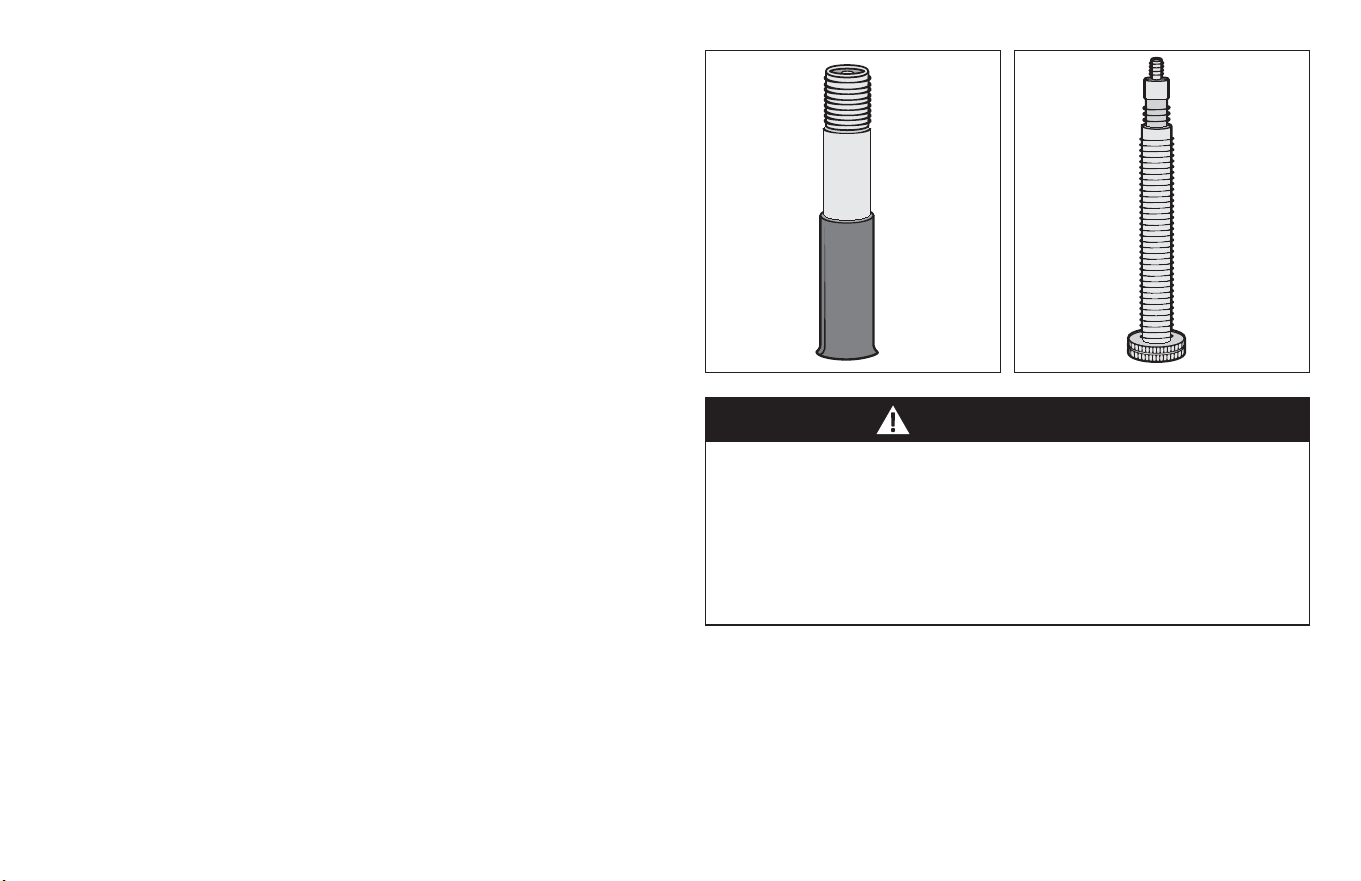
Tech 5
75
WARNING!
4B. Tire Valves
There are primarily two kinds of bicycle re valves: The Schrader
Valve and the Presta Valve. The bicycle pump you use must have
the ng appropriate to the valve stems on your bicycle.
The Schrader valve (Figure 5.15) is like the valve on a car re. To
inate a Schrader valve re, remove the valve cap and clamp the
pump ng onto the end of the valve stem. To let air out of a
Schrader valve, depress the pin in the end of the valve stem with
the end of a key or other appropriate object.
The Presta valve (Figure 5.16) has a narrower diameter and is only
found on bicycle res. To inate a Presta valve re using a Presta
headed bicycle pump, remove the valve cap; unscrew
(counterclockwise) the valve stem lock nut; and push down on the
valve stem to free it up. Then push the pump head on to the valve
head, and inate. To inate a Presta valve with a Schrader pump
ng, you’ll need a Presta adapter (available at your bike shop)
which screws on to the valve stem once you’ve freed up the valve.
The adapter ts into the Schrader pump ng. Close the valve
aer inaon. To let air out of a Presta valve, open up the valve
stem lock nut and depress the valve stem.
We highly recommend that you carry a spare inner tube when
you ride your bike, unless the bike is ed with tubeless res.
Patching a tube is an emergency repair. If you do not apply the
patch correctly or apply several patches, the tube can fail,
resulng in possible tube failure, which could cause you to lose
control and fall. Replace a patched tube as soon as possible
Figure 5.16Figure 5.15
76
6 Service
Service
6
WARNING!
Technological advances have made bicycles and bicycle
components more complex, and the pace of innovaon is
increasing. It is impossible for this manual to provide all the
informaon required to properly repair and/or maintain your
bicycle. In order to help minimize the chances of an accident and
possible injury, it is crical that you have any repair or
maintenance that is not specically described in this manual
performed by your dealer. Equally important is that your
individual maintenance requirements will be determined by
everything from your riding style to geographic locaon. Contact
customer service for help in determining your maintenance
requirements.
Many bicycle service and repair tasks require special knowledge
and tools. Do not begin any adjustments or service on your
bicycle unl you have learned from your dealer how to properly
complete them. Improper adjustment or service may result in
damage to the bicycle or in an accident which can cause serious
injury or death.
If you want to learn to do major service and repair work on
your bike:
1. Contact customer service for copies of the manufacturer’s
installaon and service instrucons for the components on
your bike, or contact the component manufacturer.
2. Contact customer service to recommend a book on bicycle
repair.
3. Contact customer service about the availability of bicycle repair
courses in your area.
We recommend that you ask your dealer to check the quality of
your work the rst me you work on something and before you
ride the bike, just to make sure that you did everything correctly.
Since that will require the me of a mechanic, there may be a
modest charge for this service.
We also recommend that you contact customer service for
guidance on what spare parts, such as res, inner tubes, light
bulbs, baeries, Patch Kit, lubricants etc. it would be appropriate
for you to have once you have learned how to replace such parts
when they require replacement.

Service 6
77
1: Service Intervals
Some service and maintenance can and should be performed by
the owner, and require no special tools or knowledge beyond what
is presented in this manual.
The following are examples of the type of service you should
perform yourself. All other service, maintenance and repair should
be performed in a properly equipped facility by a qualied bicycle
mechanic using the correct tools and procedures specied by the
manufacturer.
1. Break-in Period: Your bike will last longer and work beer if
you break it in before riding it hard. Control cables and wheel
spokes may stretch or “seat” when a new bike is rst used and
may require readjustment by your dealer. Your Mechanical
Safety Check (Secon 1.C) will help you idenfy some things
that need readjustment. But even if everything seems ne to
you, it’s best to take your bike back to the dealer for a checkup.
Dealers typically suggest you bring the bike in for a 30-day
checkup. Another way to judge when it’s me for the rst
checkup is to bring the bike in aer three to ve hours of hard
o-road use, or about 10 to 15 hours of on-road or more casual
o-road use. But if you think something is wrong with the bike,
take it to your dealer before riding it again.
2. Before every ride: Mechanical Safety Check (Secon 1.C)
3. Aer every long or hard ride; if the bike has been exposed to
water or grit; or at least every 100 miles: Clean the bike and
lightly lubricate the chain’s rollers with a good quality bicycle
chain lubricant. Wipe o excess lubricant with a lint-free cloth.
Lubricaon is a funcon of climate. Talk to your dealer about
the best lubricants and the recommended lubricaon
frequency for your area.
4. Aer every long or hard ride or aer every 10 to 20 hours
of riding:
• Squeeze the front brake and rock the bike forward and
back. Everything feel solid? If you feel a clunk with each
forward or backward movement of the bike, you probably
have a loose headset. Have your dealer check it.
• Li the front wheel o the ground and swing it from side
to side. Feel smooth? If you feel any binding or roughness
in the steering, you may have a ght headset. Have your
dealer check it.
• Grab one pedal and rock it toward and away from
the centerline of the bike; then do the same with the
other pedal. Anything feel loose? If so, have your dealer
check it.
• Take a look at the brake pads. Are they worn or not hing
the wheel rim squarely? Time to have the dealer adjust or
replace them.
78
6 Service
• Carefully check the control cables and cable housings. Any
rust? Kinks? Fraying? If so, have your dealer replace them.
• Squeeze each adjoining pair of spokes on either side of
each wheel between your thumb and index nger. Do
they all feel about the same? If any feel loose, have your
dealer check the wheel for tension and trueness.
• Check the res for excess wear, cuts or bruises. Have your
dealer replace them if necessary.
• Check the wheel rims for excess wear, dings, dents and
scratches. Consult your dealer if you see any rim damage.
• Check to make sure that all parts and accessories are sll
secure, and ghten any that are not.
• Check the frame, parcularly in the area around all tube
joints; the handlebars; the stem; and the seatpost for any
deep scratches, cracks or discoloraon. These are signs of
stress-caused fague and indicate that a part is at the end
of its useful life and needs to be replaced. See also
Appendix B.
5. Disc brakes require a dierent set of inspecon steps. Check for
these issues before every ride:
• Pads rubbing on rotors.
• Worn out pads (which can lead to over-extended pistons).
• Pistons that are stuck and/or won’t retract fully.
• Disc rotors that are bent and need straightening. Contact
customer relaons.
• Hydraulic brakes that feel “sponge-y” and/or levers that
can be depressed all the way to the grips w/o generang
adequate stopping power (due to trapped air and/or leaks).
WARNING!
Like any mechanical device, a bicycle and its components are
subject to wear and stress. Dierent materials and mechanisms
wear or fague from stress at dierent rates and have dierent
life cycles. If a component’s life cycle is exceeded, the
component can suddenly and catastrophically fail, causing
serious injury or death to the rider
Scratches, cracks, fraying and discoloraon are signs of stress-
caused fague and indicate that a part is at the end of its useful
life and needs to be replaced. While the materials and
workmanship of your bicycle or of individual components may
be covered by a warranty for a specied period of me by the
manufacturer, this is no guarantee that the product will last the
term of the warranty. Product life is oen related to the kind of
riding you do and to the treatment to which you submit the
bicycle. The bicycle’s warranty is not meant to suggest that the
bicycle cannot be broken or will last forever. It only means that
the bicycle is covered subject to the terms of the warranty.
Please be sure to read Appendix D, Intended Use of your bicycle
and Appendix A, The lifespan of your bike and its components.
Service 6
79
WARNING!
6. As required: If either brake lever fails the Mechanical Safety
Check (Secon 1.C), don’t ride the bike. Have your dealer check
the brakes. If the chain won’t shi smoothly and quietly from
gear to gear, the derailleur is out of adjustment. Contact
customer service.
7. Every 25 (hard o-road) to 50 (on-road) hours of riding: Take
your bike to your dealer for a complete checkup.
2:
If your bicycle sustains an impact:
First, check yourself for injuries, and take care of them as best you
can. Seek medical help if necessary.
Next, check your bike for damage.
Aer any crash, take your bike to your dealer for a thorough check.
Carbon composite components, including fames, wheels,
handlebars, stems, cranksets, brakes, etc. which have sustained an
impact must not be ridden unl they have been disassembled and
thoroughly inspected by a qualied mechanic.
See also Appendix B, Lifespan of your bike and its components.
A crash or other impact can put extraordinary stress on bicycle
components, causing them to fague prematurely. Components
suering from stress fague can fail suddenly and
catastrophically, causing loss of control, serious injury or death.
80
Appendix A
Appendix
1: Intended use of your bicycle
A
WARNING!
Understand your bike and its intended use. Choosing the wrong
bicycle for your purpose can be hazardous. Using your bike the
wrong way is dangerous.
No one type of bicycle is suited for all purposes. Your retailer can
help you pick the “right tool for the job” and help you understand
its limitaons. There are many types of bicycles and many
variaons within each type. There are many types of mountain,
road, racing, hybrid, touring, cyclo-cross and tandem bicycles.
There are also bicycles that mix features. For example, there are
road/racing bikes with triple cranks. These bikes have the low
gearing of a touring bike, the quick handling of a racing bike, but
are not well suited for carrying heavy loads on a tour. For that
purpose you want a touring bike.
Within each of type of bicycle, one can opmize for certain
purposes. Visit your bicycle shop and nd someone with experse
in the area that interests you. Do your own homework. Seemingly
small changes such as the choice of res can improve or diminish
the performance of a bicycle for a certain purpose.
On the following pages, we generally outline the intended uses of
various types of bikes.
Industry usage condions are generalized and evolving. Consult
your dealer about how you intend to use your bike.
Appendix A
81
1A: High-Performance Road
Condion 1
Bikes designed for riding on a paved surface
where the res do not lose ground contact.
Intended To be ridden on paved roads only
Not intended For o-road, cyclo-cross, or touring with racks
or panniers.
Trade o Material use is opmized to deliver both light
weight and specic performance. You must
understand that (1) these types of bikes are
intended to give an aggressive racer or
compeve cyclist a performance advantage
over a relavely short product life, (2) a less
aggressive rider will enjoy longer frame life, (3)
you are choosing light weight (shorter frame
life) over more frame weight and a longer frame
life, (4) you are choosing light weight over more
dent resistant or rugged frames that weigh
more. All frames that are very light need
frequent inspecon. These frames are likely to
be damaged or broken in a crash. They are not
designed to take abuse or be a rugged
workhorse. See also Appendix B.
RIDER lbs/kg LUGGAGE* lbs/kg TOTAL lbs/kg
275 / 125 10 / 4.5 285 / 129
* Seat Bag /Handlebar Bag Only
Maximum Weight Limit
82
Appendix A
1B: General Purpose Riding
Condion 2
Bikes designed for riding Condion 1, plus
smooth gravel roads and improved trails with
moderate grades where the res do not lose
ground contact.
Intended For paved roads, gravel or dirt roads that are in
good condion, and bike paths.
Not intended For o-road or mountain bike use, or for any
kind of jumping. Some of these bikes have
suspension features, but these features are
designed to add comfort, not o-road capability.
Some come with relavely wide res that are
well suited to gravel or dirt paths. Some come
with relavely narrow res that are best suited
to faster riding on pavement. If you ride on
gravel or dirt paths, carry heavier loads or want
more re durability talk to your dealer about
wider res.
RIDER lbs/kg LUGGAGE* lbs/kg TOTAL lbs/kg
300 / 136 30 / 14 285 / 129
for Touring or Trekking
300 / 136 55 / 25 355 / 161
Maximum Weight Limit
Appendix A
83
Intended For cross-country riding and racing which
ranges from mild to aggressive over
intermediate terrain (e.g., hilly with small
obstacles like roots, rocks, loose surfaces and
hard pack and depressions). Cross-country and
marathon equipment (res, shocks, frames,
drive trains) are light weight, favoring nimble
speed over brute force. Suspension travel is
relavely short since the bike is intended to
move quickly on the ground.
RIDER lbs/kg LUGGAGE* lbs/kg TOTAL lbs/kg
300 / 136 5 /2.3 305 / 138
* Seat Bag Only
Front suspension frames manufactured with original equipment
seat stay and dropout rack mounts only
300 / 136 55 / 25 355 / 161
Maximum Weight Limit
1C: Cross-Country, Marathon,
Hardtails
Condion 3
Bikes designed for riding Condions 1 and 2, plus
rough trails, small obstacles, and smooth
technical areas, including areas where
momentary loss of re contact with the ground
may occur. NOT jumping. All mountain bikes
without rear suspension are Condion 3, and so
are some lightweight rear suspension models.
Not intended For o-road or mountain bike use, or for any
kind of jumping. Some of these bikes have
suspension features, but these features are
designed to add comfort, not o-road capability.
Some come with relavely wide res that are
well suited to gravel or dirt paths. Some come
with relavely narrow res that are best suited
to faster riding on pavement. If you ride on
gravel or dirt paths, carry heavier loads or want
more re durability talk to your dealer about
wider res.
Trade o Cross-Country bikes are lighter, faster to ride
uphill, and more nimble than All-Mountain
bikes. Cross-Country and Marathon bikes trade
o some ruggedness for pedaling eciency and
uphill speed.
84
Appendix A
1D: All Mountain
Condion 4
Bikes designed for riding Condions 1, 2, and 3,
plus rough technical areas, moderately sized
obstacles, and small jumps.
Intended For trail and uphill riding. All-Mountain bicycles
are:
1. more heavy duty than cross country bikes,
but less heavy duty than Freeride bikes,
2. lighter and more nimble than Freeride bikes,
3. heavier and have more suspension travel
than a cross country bike, allowing them to
be ridden in more dicult terrain, over larger
obstacles and moderate jumps,
4. intermediate in suspension travel and use
components that t the intermediate
intended use,
5. cover a fairly wide range of intended use, and
within this range are models that are more
or less heavy duty. Talk to your retailer about
your needs and these models.
Not intended For use in extreme forms of jumping/riding such
as hardcore mountain, Freeriding, Downhill,
North Shore, Dirt Jumping, Hucking etc. No large
drop os, jumps or launches (wooden
structures, dirt embankments) requiring long
suspension travel or heavy duty components;
and no spending me in the air landing hard and
hammering through obstacles.
Trade o All-Mountain bikes are more rugged than cross
country bikes, for riding more dicult terrain.
All-Mountain bikes are heavier and harder to
ride uphill than cross country bikes.
All-Mountain bikes are lighter, more nimble and
easier to ride uphill than Freeride bikes.
All-Mountain bikes are not as rugged as Freeride
bikes and must not be used for more extreme
riding and terrain.
RIDER lbs/kg LUGGAGE* lbs/kg TOTAL lbs/kg
300 / 136 5 /2.3 305 / 138
Maximum Weight Limit
* Seat Bag Only
Appendix A
85
Intended For riding that includes the most dicult terrain
that only very skilled riders should aempt.
Gravity, Freeride, and Downhill are terms that
describe hardcore mountain, north shore,
slopestyle. This is “extreme” riding and the
terms describing it are constantly evolving.
Gravity, Freeride, and Downhill bikes are:
1. heavier and have more suspension travel
than All-Mountain bikes, allowing them to be
ridden in more dicult terrain, over larger
obstacles and larger jumps,
2. the longest in suspension travel and use
components that t heavy duty intended
use. While all that is true, there is no
guarantee that extreme riding will not break
a Freeride bike.
The terrain and type of riding that Freeride bikes
are designed for is inherently dangerous.
Appropriate equipment, such as a Freeride bike,
does not change this reality. In this kind of
riding, bad judgment, bad luck, or riding beyond
your capabilies can easily result in an accident,
where you could be seriously injured, paralyzed
or killed.
1E: Gravity, Freeride, and Downhill
Condion 5
Bikes designed for jumping, hucking, high
speeds, or aggressive riding on rougher
surfaces, or landing on at surfaces. However,
this type of riding is extremely hazardous and
puts unpredictable forces on a bicycle which
may overload the frame, fork, or parts. If you
choose to ride in Condion 5 terrain, you
should take appropriate safety precauons
such as more frequent bike inspecons and
replacement of equipment. You should also
wear comprehensive safety equipment such as
a full-face helmet, pads, and body armor.
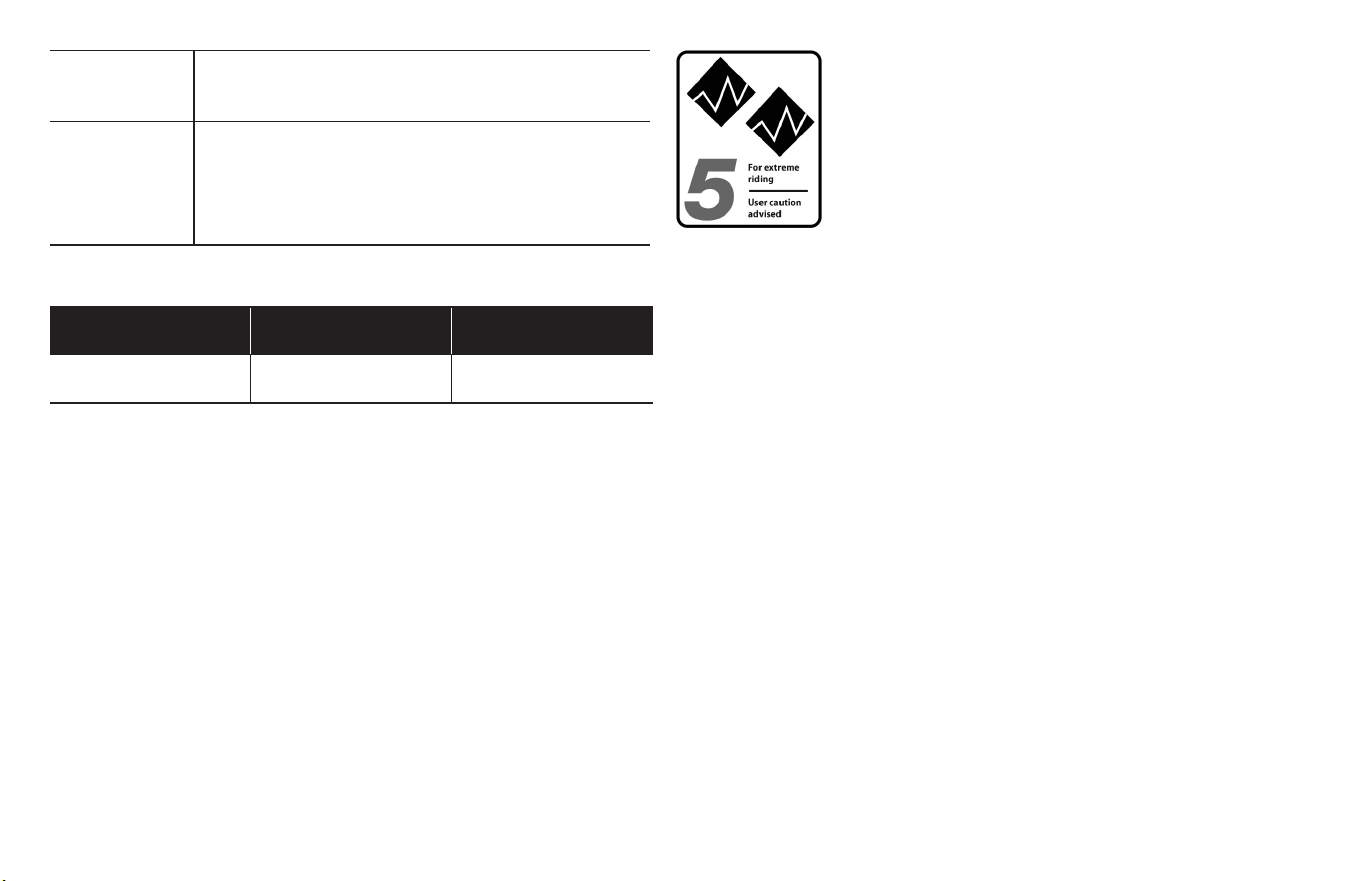
86
Appendix A
Not intended To be an excuse to try anything. Read Secon 2.
F, p. 10.
Trade o Freeride bikes are more rugged than All-
Mountain bikes, for riding more dicult terrain.
Freeride bikes are heavier and harder to ride
uphill than All-Mountain bikes.
RIDER lbs/kg LUGGAGE* lbs/kg TOTAL lbs/kg
300 / 136 5 /2.3 305 / 138
Maximum Weight Limit
* Seat Bag Only
1F: Dirt Jump
Condion 5
Bikes designed for jumping, hucking, high speeds,
or aggressive riding on rougher surfaces, or
landing on at surfaces. However, this type of
riding is extremely hazardous and puts
unpredictable forces on a bicycle which may
overload the frame, fork, or parts. If you choose
to ride in Condion 5 terrain, you should take
appropriate safety precauons such as more
frequent bike inspecons and replacement of
equipment. You should also wear comprehensive
safety equipment such as a full-face helmet,
pads, and body armor.
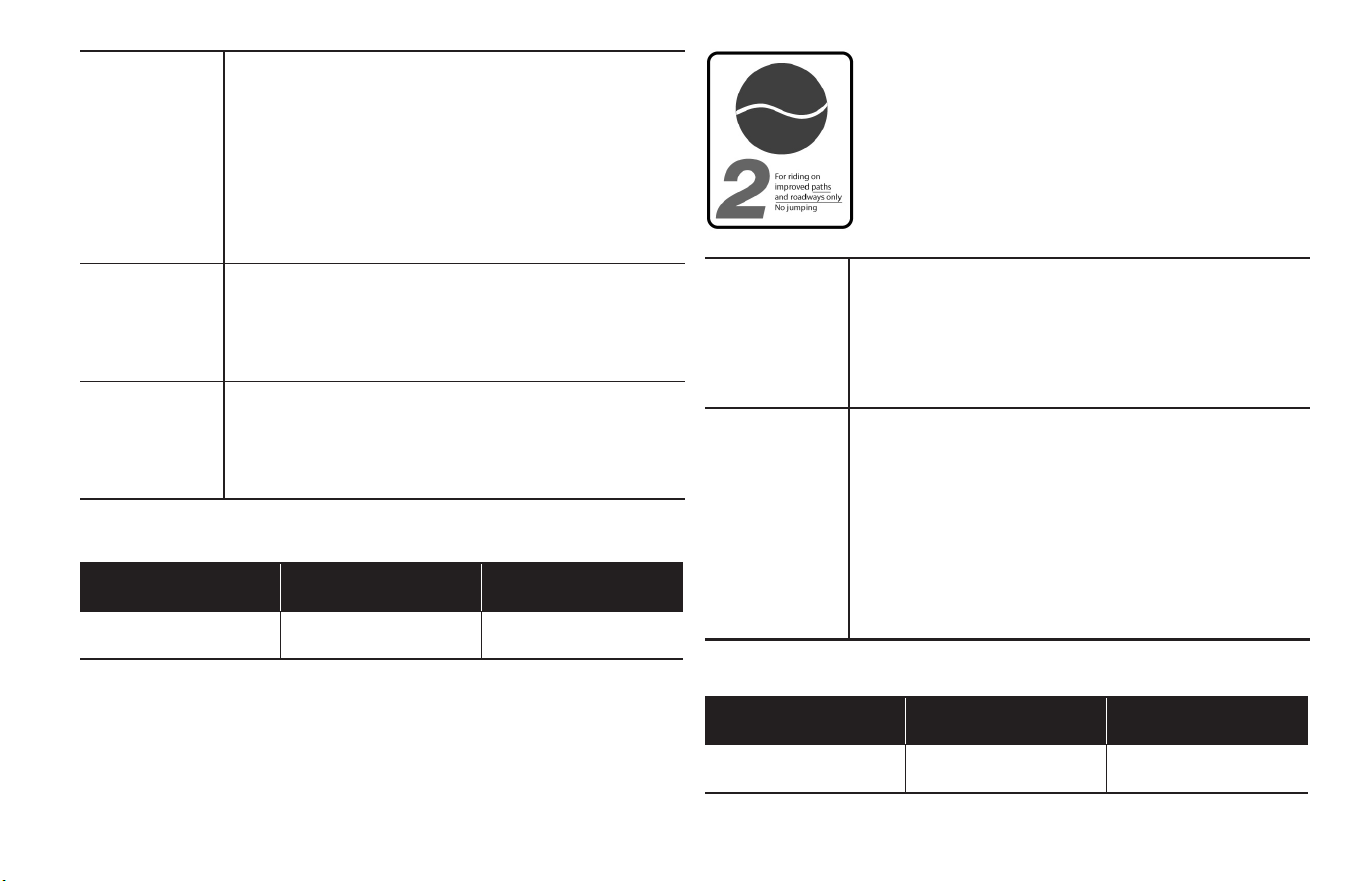
Appendix A
87
RIDER lbs/kg LUGGAGE* lbs/kg TOTAL lbs/kg
300 / 136 0 300 / 136
RIDER lbs/kg LUGGAGE* lbs/kg TOTAL lbs/kg
300 / 136 30 / 13.6 330 / 150
Maximum Weight Limit
Maximum Weight Limit
Intended For man-made dirt jumps, ramps, skate parks
other predictable obstacles and terrain where
riders need and use skill and bike control, rather
than suspension. Dirt Jumping bikes are used
much like heavy duty BMX bikes.
A Dirt Jumping bike does not give you skills to
jump. Read Secon 2. F, p. 10.
Not intended For terrain, drop os or landings where large
amounts of suspension travel are needed to
help absorb the shock of landing and help
maintain control.
Trade o Dirt Jumping bikes are lighter and more nimble
than Freeride bikes, but they have no rear
suspension and the suspension travel in the
front is much shorter.
Intended For cyclo-cross riding, training and racing.
Cyclo-cross involves riding on a variety of terrain
and surfaces including dirt or mud surfaces.
Cyclo-cross bikes also work well for all weather
rough road riding and commung.
Not intended For o road or mountain bike use, or jumping.
Cyclo-cross riders and racers dismount before
reaching an obstacle, carry their bike over the
obstacle and then remount. Cyclo-cross bikes
are not intended for mountain bike use. The
relavely large road bike size wheels are faster
and lighter than mountain bike wheels, but not
as strong.
1G: Cyclo-cross
Condion 2
Bikes designed for riding Condion 1, plus
smooth gravel roads and improved trails with
moderate grades where the res do not lose
ground contact.
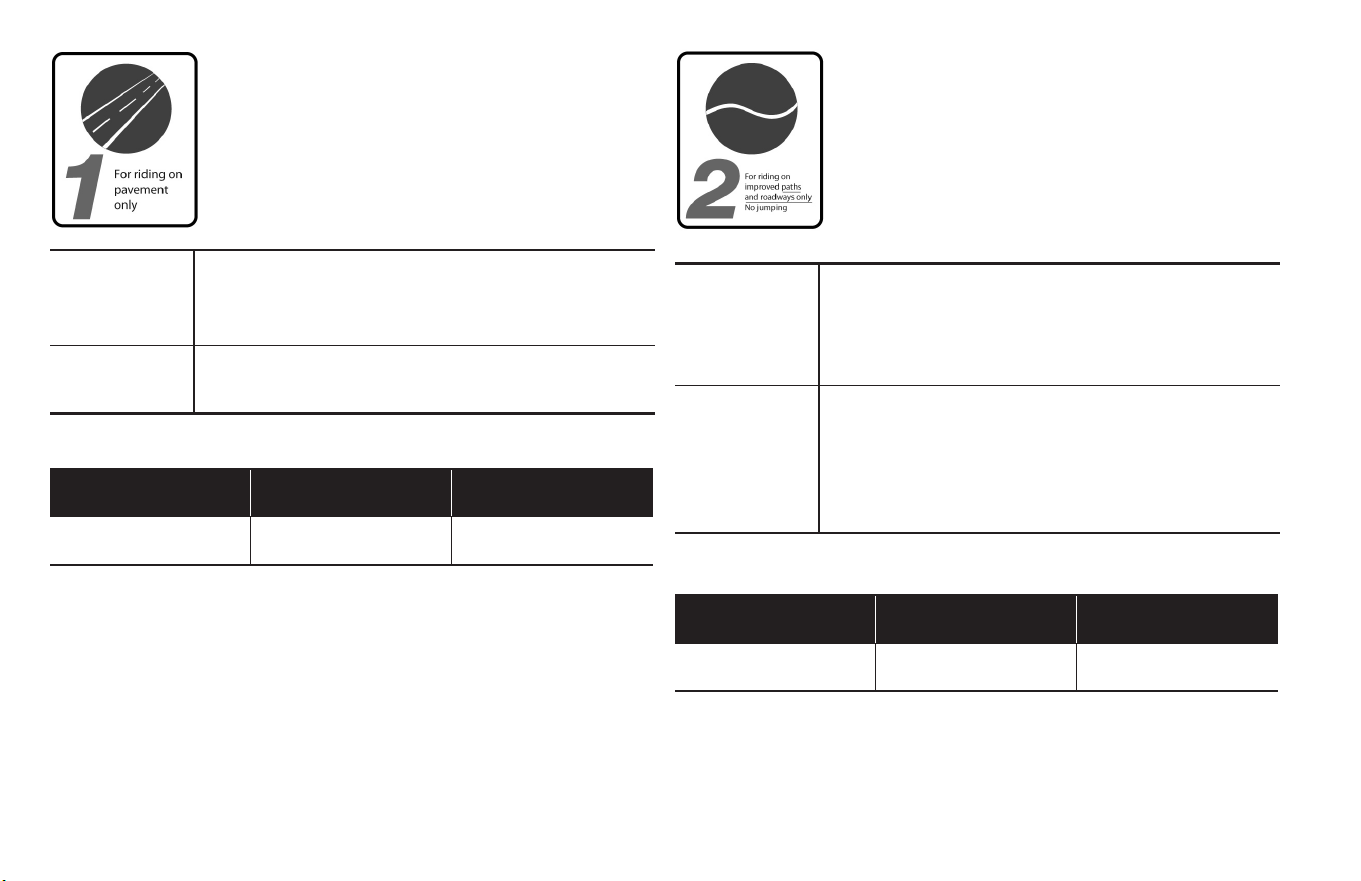
88
Appendix A
1H: Road Tandems
Condion 1
Bikes designed for riding on a paved surface
where the res do not lose ground contact.
Intended Are designed to be ridden on paved roads only.
They are not designed for mountain biking or
o-road use.
Not intended Road tandem should not be taken o-road or
used as a mountain tandem.
Intended The challenges of mountain biking are obvious.
The added challenges of tandem riding mean
that you should limit o-road tandem riding to
easy-moderate terrain.
Not intended For very aggressive mountain bike riding.
Mountain tandems are most denitely NOT for
Downhill, Freeriding, North Shore. Choose
terrain with the abilies of both the Tandem’s
captain and stoker in mind
RIDER lbs/kg LUGGAGE* lbs/kg TOTAL lbs/kg
500 / 227 75 / 34 575 / 261
RIDER lbs/kg LUGGAGE* lbs/kg TOTAL lbs/kg
500 / 227 75 / 34 575 / 261
Maximum Weight Limit
Maximum Weight Limit
1I: Mountain Tandems
Condion 2
Bikes designed for riding Condion 1, plus
smooth gravel roads and improved trails with
moderate grades where the res do not lose
ground contact.
Appendix B
89
Appendix
1. The lifespan of your bike and its components
B
1A: Nothing Lasts Forever, Including Your Bike.
When the useful life of your bike or its components is over,
connued use is hazardous.
Every bicycle and its component parts have a nite, limited
useful life. The length of that life will vary with the construcon
and materials used in the frame and components; the
maintenance and care the frame and components receive over
their life; and the type and amount of use to which the frame
and components are subjected. Use in compeve events, trick
riding, ramp riding, jumping, aggressive riding, riding on severe
terrain, riding in severe climates, riding with heavy loads,
commercial acvies and other types of non-standard use can
dramacally shorten the life of the frame and components.
Any one or a combinaon of these condions may result in an
unpredictable failure.
All aspects of use being idencal, lightweight bicycles and their
components will usually have a shorter life than heavier
bicycles and their components. In selecng a lightweight
bicycle or components you are making a tradeo, favoring the
higher performance that comes with lighter weight over
longevity. So, If you choose lightweight, high performance
equipment, be sure to have it inspected frequently.
You should have your bicycle and its components checked
periodically by your dealer for indicators of stress and/or
potenal failure, including cracks, deformaon, corrosion, paint
peeling, dents, and any other indicators of potenal problems,
inappropriate use or abuse. These are important safety checks
and very important to help prevent accidents, bodily injury to
the rider and shortened product life.
1B: Perspecve
Today’s high-performance bicycles require frequent and careful
inspecon and service. In this Appendix we try to explain some
underlying material science basics and how they relate to your
bicycle. We discuss some of the trade-os made in designing
your bicycle and what you can expect from your bicycle; and
we provide important, basic guidelines on how to maintain and
inspect it. We cannot teach you everything you need to know
to properly inspect and service your bicycle; and that is why we
repeatedly urge you to take your bicycle to your dealer for
professional care and aenon.
90
Appendix B
WARNING!
Frequent inspecon of your bike is important to your safety.
Follow the Mechanical Safety Check in Secon 1.C of this Manual
before every ride.
Periodic, more detailed inspecon of your bicycle is important.
How oen this more detailed inspecon is needed depends
upon you.
You, the rider/owner, have control and knowledge of how oen
you use your bike, how hard you use it and where you use it.
Because your dealer cannot track your use, you must take
responsibility for periodically bringing your bike to your dealer
for inspecon and service. Your dealer will help you decide what
frequency of inspecon and service is appropriate for how and
where you use your bike.
For your safety, understanding and communicaon with your
dealer, we urge you to read this Appendix in its enrety. The
materials used to make your bike determine how and how
frequently to inspect.
Ignoring this WARNING can lead to frame, fork or other
component failure, which can result in serious injury or death.
A. Understanding metals
Steel is the tradional material for building bicycle frames.
It has good characteriscs, but in high performance
bicycles, steel has been largely replaced by aluminum and
some tanium. The main factor driving this change is
interest in lighter bicycles by cycling enthusiasts.
Properes of Metals
Please understand that there is no simple statement that
can be made that characterizes the use of dierent metals
for bicycles. What is true is how the metal chosen is
applied is much more important than the material alone.
One must look at the way the bike is designed, tested,
manufactured, supported along with the characteriscs
of the metal rather than seeking a simplisc answer.
Metals vary widely in their resistance to corrosion. Steel
must be protected or rust will aack it. Aluminum and
Titanium quickly develop an oxide lm that protects the
metal from further corrosion. Both are therefore quite
resistant to corrosion. Aluminum is not perfectly
corrosion resistant, and parcular care must be used
where it contacts other metals and galvanic corrosion can
occur.
Metals are comparavely ducle. Ducle means bending,
buckling and stretching before breaking. Generally
speaking, of the common bicycle frame building materials
steel is the most ducle, tanium less ducle, followed by
aluminum.

Appendix B
91
Metals vary in density. Density is weight per unit of
material. Steel weighs 7.8 grams/cm3 (grams per cubic
cenmeter), tanium 4.5 grams/cm3, aluminum 2.75
grams/cm3. Contrast these numbers with carbon ber
composite at 1.45 grams/cm3.
Metals are subject to fague. With enough cycles of use,
at high enough loads, metals will eventually develop
cracks that lead to failure. It is very important that you
read the basics of metal fague below.
Let’s say you hit a curb, ditch, rock, car, another cyclist or
other object. At any speed above a fast walk, your body
will connue to move forward, momentum carrying you
over the front of the bike. You cannot and will not stay on
the bike, and what happens to the frame, fork and other
components is irrelevant to what happens to your body.
What should you expect from your metal frame? It
depends on many complex factors, which is why we tell
you that crashworthiness cannot be a design criteria.
With that important note, we can tell you that if the
impact is hard enough the fork or frame may be bent or
buckled. On a steel bike, the steel fork may be severely
bent and the frame undamaged. Aluminum is less ducle
than steel, but you can expect the fork and frame to be
bent or buckled. Hit harder and the top tube may be
broken in tension and the down tube buckled. Hit harder
and the top tube may be broken, the down tube buckled
and broken, leaving the head tube and fork separated
from the main triangle.
When a metal bike crashes, you will usually see some
evidence of this duclity in bent, buckled or folded metal.
It is now common for the main frame to be made of metal
and the fork of carbon ber. See Secon B, Understanding
composites below. The relave duclity of metals and the
lack of duclity of carbon ber means that in a crash
scenario you can expect some bending or bucking in the
metal but none in the carbon. Below some load the
carbon fork may be intact even though the frame is
damaged. Above some load the carbon fork will be
completely broken.
The basics of metal fague
Common sense tells us that nothing that is used lasts
forever. The more you use something, and the harder you
use it, and the worse the condions you use it in, the
shorter its life.
Fague is the term used to describe accumulated damage
to a part caused by repeated loading. To cause fague
damage, the load the part receives must be great enough.
A crude, oen-used example is bending a paper clip back
and forth (repeated loading) unl it breaks. This simple
denion will help you understand that fague has
nothing to do with me or age. A bicycle in a garage does
not fague. Fague happens only through use.
So what kind of “damage” are we talking about? On a
microscopic level, a crack forms in a highly stressed area.
As the load is repeatedly applied, the crack grows. At

92
Appendix B
some point the crack becomes visible to the naked eye.
Eventually it becomes so large that the part is too weak to
carry the load that it could carry without the crack. At
that point there can be a complete and immediate failure
of the part.
One can design a part that is so strong that fague life is
nearly innite. This requires a lot of material and a lot of
weight. Any structure that must be light and strong will
• ONCE A CRACKS STARTS IT CAN GROW AND GROW FAST. Think
about the crack as forming a pathway to failure. This means that any
crack is potenally dangerous and will only become more dangerous.
SIMPLE RULE 1:
If you nd crack, replace the part.
• CORROSION SPEEDS DAMAGE. Cracks grow more quickly when they
are in a corrosive environment. Think about the corrosive soluon as
further weakening and extending the crack.
SIMPLE RULE 2:
Clean your bike, lubricate your bike, protect your bike from
salt, remove any salt as soon as you can.
• SIGNIFICANT SCRATCHES, GOUGES, DENTS OR SCORING CREATE
STARTING POINTS FOR CRACKS. Think about the cut surface as a focal
point for stress (in fact engineers call such areas “stress risers,” areas
where the stress is increased). Perhaps you have seen glass cut? Recall
how the glass was scored and then broke on the scored line.
SIMPLE RULE 4:
Do not scratch, gouge or score any surface. If you do, pay
frequent aenon to this area or replace the part.
• SOME CRACKS (parcularly larger ones) MAY MAKE CREAKING
NOISE AS YOU RIDE. Think about such a noise as a serious warning
signal. Note that a well-maintained bicycle will be very quiet and free
of creaks and squeaks.
SIMPLE RULE 5:
Invesgate and nd the source of any noise. It may not a be
a crack, but whatever is causing the noise should be xed
promptly.
have a nite fague life. Aircra, race cars, motorcycles
all have parts with nite fague lives. If you wanted a
bicycle with an innite fague life, it would weigh far
more than any bicycle sold today. So we all make a
tradeo: the wonderful, lightweight performance we
want requires that we inspect the structure.
1C: What to look for
Appendix B
93
2. Fague Is Not A Perfectly
Predictable Science
Fague is not a perfectly predictable science, but here are some
general factors to help you and your dealer determine how oen
your bicycle should be inspected. The more you t the “shorten
product life” prole, the more frequent your need to inspect. The
more you t the “lengthen product life” prole, the less frequent
your need to inspect.
2A: Factors that shorten product life:
Hard, harsh riding style
“Hits”, crashes, jumps, other “shots” to the bike
High mileage
Higher body weight
Stronger, more t, more aggressive rider
Corrosive environment (wet, salt air, winter road salt,
accumulated sweat)
Presence of abrasive mud, dirt, sand, soil in riding environment
2B: Factors that lengthen product life:
Smooth, uid riding style
No “hits”, crashes, jumps, other “shots” to the bike
Low mileage
Lower body weight
Less aggressive rider
Non-corrosive environment (dry, salt-free air)
Clean riding environment
WARNING!
Do not ride a bicycle or component with any crack, bulge or
dent, even a small one. Riding a cracked frame, fork or
component could lead to complete failure, with risk of serious
injury or death.
94
Appendix C
Appendix
1: Fastener Torque Specicaons
C
Correct ghtening torque of threaded fasteners is very important
to your safety. Always ghten fasteners to the correct torque. In
case of a conict between the instrucons in this manual and
informaon provided by a component manufacturer, consult with
your dealer or the manufacturer’s customer service representave
for claricaon. Bolts that are too ght can stretch and deform.
Bolts that are too loose can move and fague. Either mistake can
lead to a sudden failure of the bolt.
Always use a correctly calibrated torque wrench to ghten crical
fasteners on your bike. Carefully follow the torque wrench
manufacturer’s instrucons on the correct way to set and use the
torque wrench for accurate results.
Fastener recommended torque
Component Torque Spec (IN LB ; N m)
Stem Face Plate (1 or 2 bolt)
200 ; 23
Stem face Plate (4 bolt)
135 ; 15
Dropper Post Lever
17 ; 2
eBike Control Pad
17 ; 2
Trigger Shier
25 ; 3
Twist Shier
60 ; 7
Brake Lever
60 ; 7
Quill Stem Expander Bolt
220 ; 25
Quill Stem H-Bar Pinch Bolt
200 ; 23
Threadless Stem Pinch Bolts
50 ; 6
Front Wheel Axle Nuts
320 ; 36
Front Disc Brake Mounng Bolts
(Adapter and Caliper)
60 ; 7
Front Disc Brake Rotor Bolts
40 ; 5
Appendix C
95
Component Torque Spec (IN LB ; N m)
Front Disc Brake cable Pinch Bolt
60 ; 7
Seat Clamp Mechanism
(Pin Type Post)
200 ; 23
Seat Clamp (Micro adjust) Single
Bolt
200 ; 23
Seat Clamp (Micro adjust) 2 Bolt
60 ; 7
Seat Post Binder Bolt
50 ; 6
Front Derailleur Clamp
50 ; 6
Front Derailleur Cable Pinch Bolt
50 ; 6
Boom Bracket Fixed Cup
500 ; 56
Boom Bracket Lock Ring
500 ; 56
Crank Arm
350 ; 40
Pedal
320 ; 36
Rear Wheel Axle Nuts
320 ; 36
Rear Disc Brake Mounng Bolts
(Adapter and Caliper)
60 ; 7
Front Disc Brake Rotor Bolts
40 ; 5
Rear Disc Brake cable Pinch Bolt
60 ; 7
Component Torque Spec (IN LB ; N m)
Rear Derailleur Mounng Bolt
80 ; 9
Rear Derailleur Cable Pinch Bolt
40 ; 5
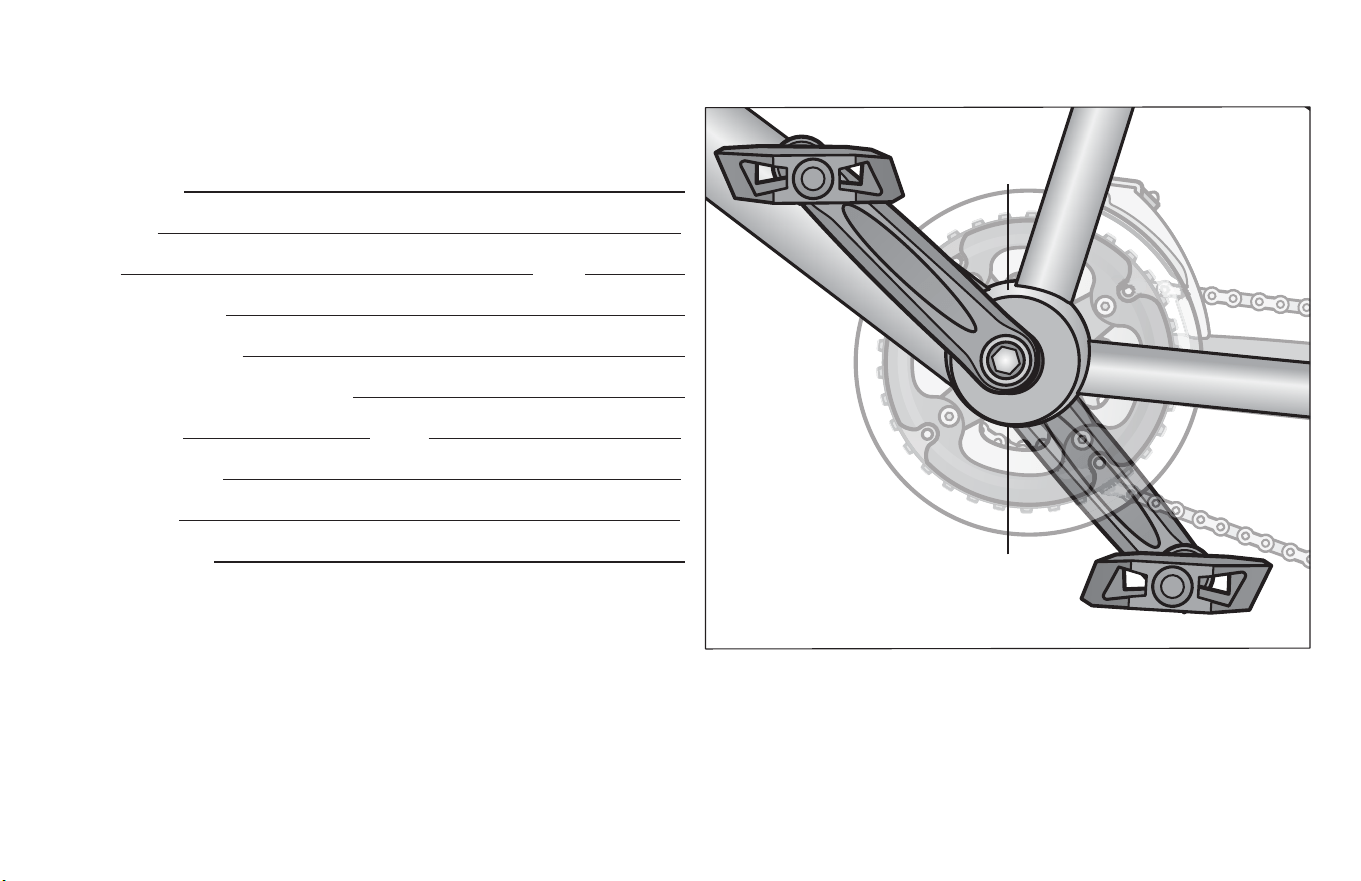
Appendix D
97
2: Purchase Record
Fill in immediately and retain as a record of your purchase. Please
retain your sales receipt for any possible warranty claims.
Your Name:
Address:
City: State:
Date Purchased:
Place of Purchase:
Model and Brand Informaon:
Wheel Size: Color:
Model Number:
Date Code:
Serial Number:
Service scker is
located above the
boom bracket
Serial number is
located below the
boom bracket

US 1-800-626-2811
Canada 1-877-758-4741
schwinnbikes.com
OMEATR
WARNING: This product can expose you to chemicals including lead and lead
compounds, which is known to the State of California to cause cancer, birth defects
and other reproductive harm. For more information go to www.P65Warnings.ca.gov
© 2021 PACIFIC CYCLE, INC. SCHWINN
®
is a registered trademark of Pacic Cycle, Inc.
Limited
Lifetime
Warranty
For as long as you own the bike.
Some restrictions apply.
Details at schwinnbikes.com