Printed in China
1-800-374-2744
Sharper Image® name and logo (including the 77 logo) are trademarks or
registered trademarks. Distributed by and © 2022 MerchSource, LLC. Irvine,
CA 92618. All rights reserved.
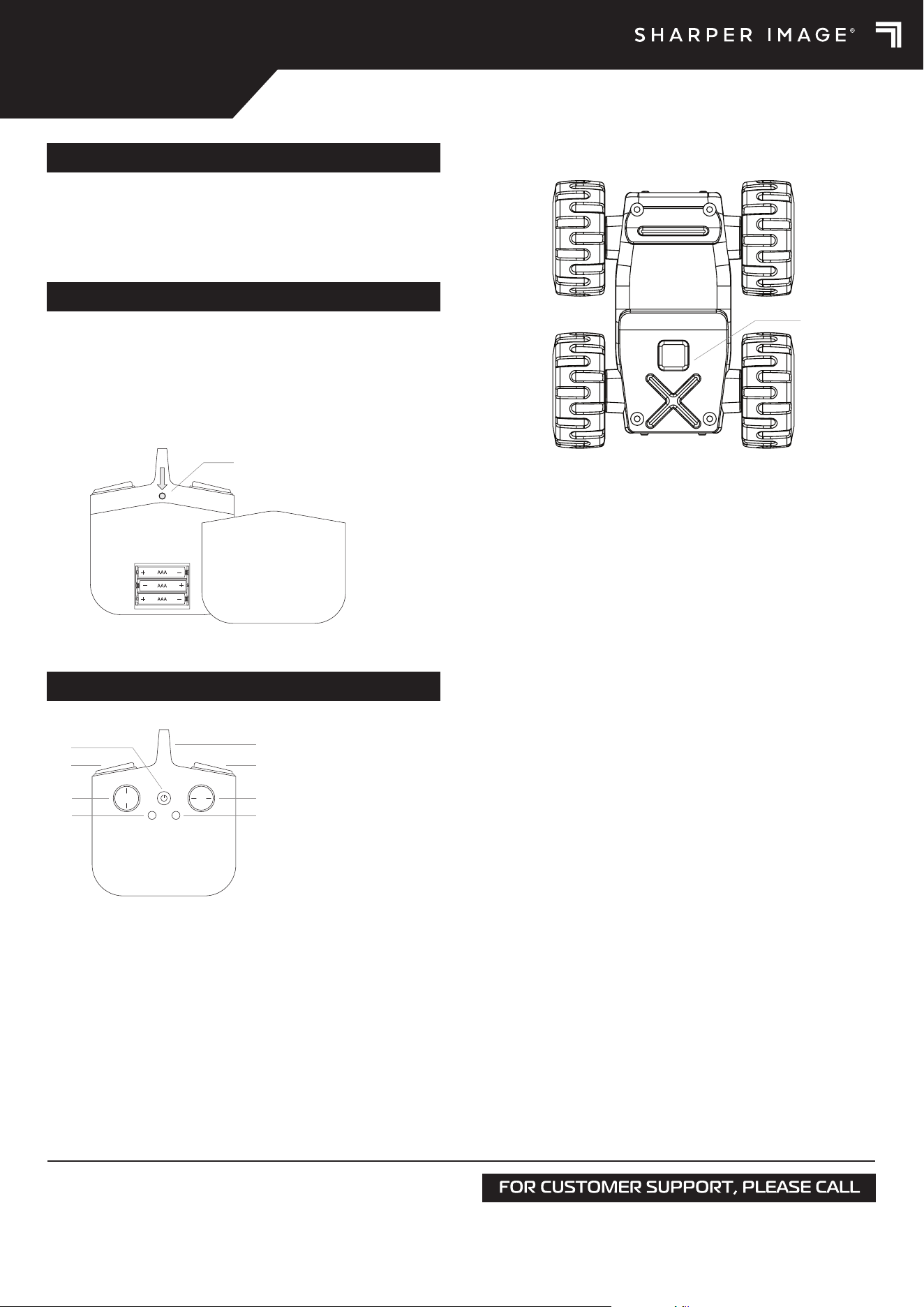
1. The remote control requires 3 AAA 1.5V batteries (not included).
2. Use a tool to press and hold the battery release button on the back of the
remote control.
3. Slide down the battery cover.
4. Insert batteries as indicated in the diagram.
5. Slide the battery cover back into place securely.
CONTENTS
BATTERY INSTALLATION
POWER
• To power on the remote control, press the power button on the front of
the remote control. The power LED on the remote control will light up.
• To power on the vehicle, press the power button on the bottom of the
vehicle. Both sides of the vehicle will light up gradually.
• If there is no input for 5 minutes, both the vehicle and remote control will
automatically shut o.
PAIRING
• Power on both the vehicle and the remote control to automatically enter
pairing mode. The white LEDs will flash slowly.
• Wait up to 10 seconds for the white LEDs to quit flashing and remain
solidly lit. This indicates the vehicle and remote control are successfully
paired.
• If pairing is unsuccessful or the vehicle or remote control disconnect,
restart both the vehicle and remote control to enter pairing mode again.
TRIM MODE
1. If the vehicle drifts left or right while driving, press and hold both the
demo and roll buttons for 3 seconds to enter trim mode. The remote
control LED will flash while trim mode is active.
2. To adjust the speed of the left tires, press the left joystick forwards or
backwards while holding down the demo button.
3. To adjust the speed of the right tires, press the right joystick left or right
while holding down the roll button.
4. After the adjustments are finished, press and hold both the demo and roll
buttons to save the changes and exit trim mode.
X-Treme Roll
Remote Control
USB-C Cable
RC X-TREME ROLL
6+
PLAY
Power Button
Battery Cover Release Button
CONTROLS
A. Push to power on or o.
B. Indicates power status and pairing status.
C. Push forward to drive forward and pull back to drive in reverse.
D. Push left or right to steer the vehicle.
E. Press to make the vehicle spin counterclockwise.
F. Press to make the vehicle spin clockwise.
G. Press to enter demo mode for 6 seconds. Press again to stop.
H. Press to make the vehicle roll.
DEMO ROLL
F
D
H
C
G
E
A
B
A. Power Button
B. Power LED
C. Forward/Backward
D. Left/Right Steering
E. Left Spin
F. Right Spin
G. Demo
H. Roll
CHOKING HAZARD - Small
Parts. Not For Children Under
3 Years of Age.
WARNING:
Model No.: 1016922
KEEP THIS INSTRUCTION MANUAL AS IT CONTAINS IMPORTANT INFORMATION FOR FUTURE REFERENCE.
Due to continuous product improvements, the picture on the manual may dier slightly from the actual product.
Printed in China
1-800-374-2744
Sharper Image® name and logo (including the 77 logo) are trademarks or
registered trademarks. Distributed by and © 2022 MerchSource, LLC. Irvine,
CA 92618. All rights reserved.
RC X-TREME ROLL
6+
CHARGING THE BATTERY
1. The RC X-Treme Roll uses a 3.7V LiPo rechargeable battery. Be sure to
charge before play.
2. Attach the USB type-C cable that came included, into a power brick or
appropriate power outlet.
3. Connect the other end of the cable to the USB-C opening located on the
back of the vehicle.
4. When charging, the red LED on the vehicle will light up. The LED will shut
o when the vehicle is fully charged.
5. When the battery runs low, the vehicle will slow down by 50% and white
LEDs will flash every 5 seconds.
Note: While the vehicle is charging, the vehicle will not take any input from
the remote control even if they are paired.
SAFETY WARNINGS:
PLEASE READ BEFORE USE
• Adult assembly required.
• Do not touch spinning wheels or parts.
• Use this item only for its intended purpose.
• Do not expose to extreme temperatures or moisture.
• Throughly inspect products before every use. If the product appears worn,
frayed/splintered, cracked, or broken in any manner, discontinue use and
discard immediately.
• For indoor use only.
• Use caution and pay attention to your surrounding while operating this
item.
• Always turn o when not in use.
RECHARGEABLE BATTERY WARNINGS:
NON-REPLACEABLE BATTERY
• This product contains batteries that are non-replaceable.
• There is a risk of fire and personal injury if battery is punctured, damaged,
or misused.
• Do not dismantle, crush, incinerate or short-circuit battery.
• Never expose battery to extreme temperatures or moisture.
• Keep away from flammable materials and direct sunlight.
• Only charge using the provided charger, cable, and/or adapters.
• Rechargeable battery is only to be charged by an adult.
• Adult supervision is required while charging the battery.
• Allow battery to cool to room temperature before charging.
• Charge on a non-flammable surface and keep away from flammable
products.
• Discontinue charging if battery becomes hot, swells, smokes, or gives o
a strong odor.
• Battery chargers used with the product are to be regularly examined for
damage to the cord, plug, enclosure, and other parts. In the event of such
damage, chargers must not be used until the damage has been repaired.
• Recycle or dispose of battery according to federal, state, and local laws.
• Keep these instructions for future reference.
BATTERY WARNINGS
FCC STATEMENT
This device complies with Part 15 of the FCC Rules. Operation is subject to
the following two conditions: (1) this device may not cause harmful
interference, and (2) this device must accept any interference received,
including interference that may cause undesired operation.
Warning: Changes or modifications to this unit not expressly approved by
the party responsible for compliance could void the user's authority to
operate the equipment.
Note: This equipment has been tested and found to comply with the limits
for a Class B digital device, pursuant to part 15 of the FCC Rules. These
limits are designed to provide reasonable protection against harmful
interference in a residential installation. This equipment generates, uses
and can radiate radio frequency energy and, if not installed and used in
accordance with the instructions, may cause harmful interference to radio
communications.
However, there is no guarantee that interference will not occur in a
particular installation. If this equipment does cause harmful interference to
radio or television reception, which can be determined by turning the
equipment o and on, the user is encouraged to try to correct the
interference by one or more of the following measures:
— Reorient or relocate the receiving antenna.
— Increase the separation between the equipment and receiver.
— Connect the equipment into an outlet on a circuit dierent from that to which
the receiver is connected.
— Consult the dealer or an experienced radio/TV technician for help.
• Do not mix old and new batteries.
• Do not mix alkaline, standard (carbon-zinc), or rechargeable batteries.
• Insert batteries using the correct polarity. Do not short-circuit the supply
terminal.
• Remove batteries when not in use. Recycle or dispose of exhausted
batteries according to federal, state, and local laws. Do not dispose of
batteries in a fire - they may leak or explode.
• Only use manufacture specified battery(ies), charger(s) and/or adapter, if
applicable, specified by the manufacturer.
• Always use, replace, and recharge (if applicable) batteries under adult
supervision.
• Keep these instructions for future reference.

