VERTUO UP

EN
.
3
SAFET Y
CAUTION: Before operating your coee machine, please refer
to the safety instructions leaflet to avoid any possible harm and
damage.
First read the safety precautions to avoid risks of fatal electrical
shock and fire. Please ensure ground continuity when plugging
the machine in the power outlet.
i
When unpacking the machine, remove the plastic film covering the
machine.
EN
.
5
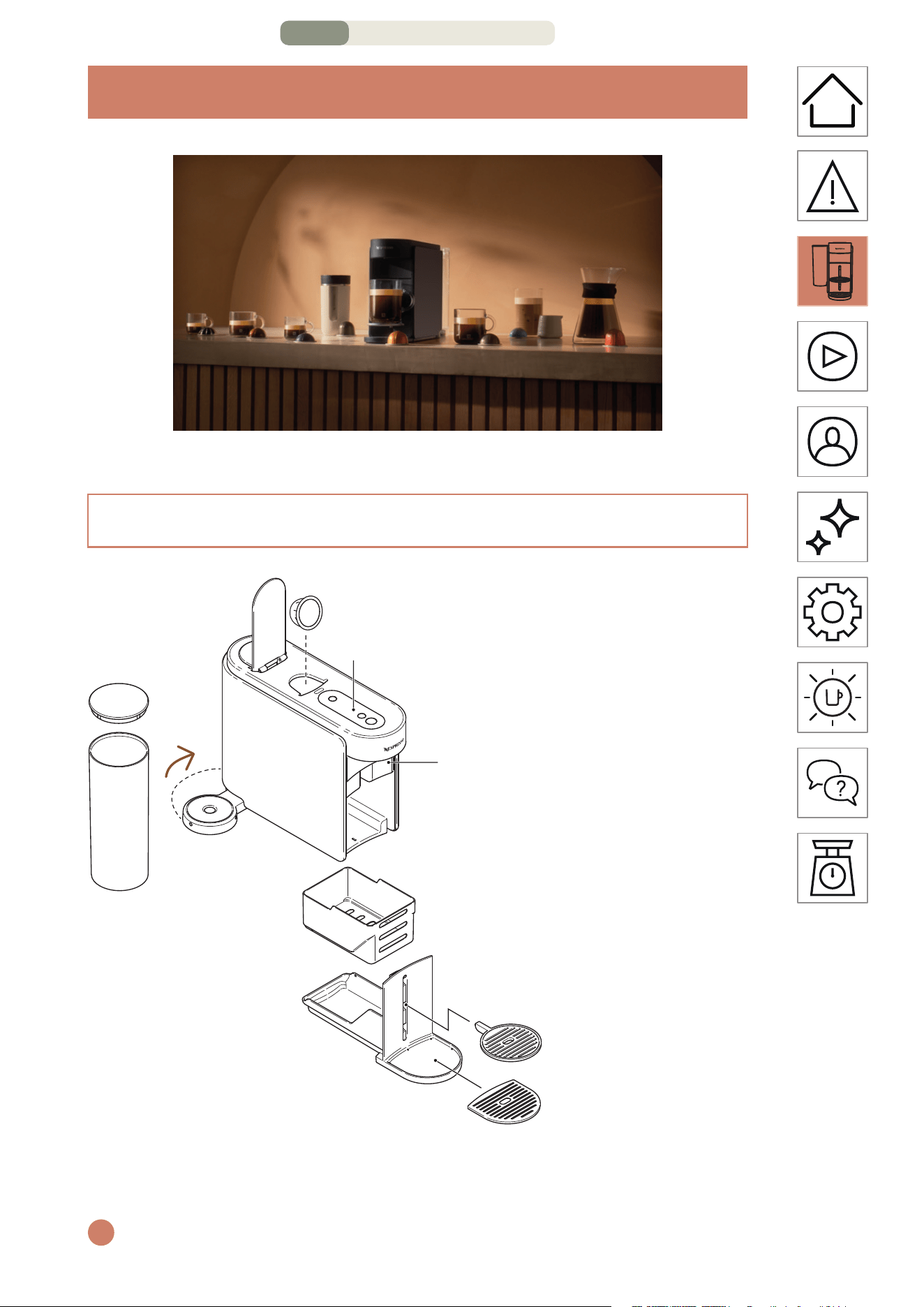
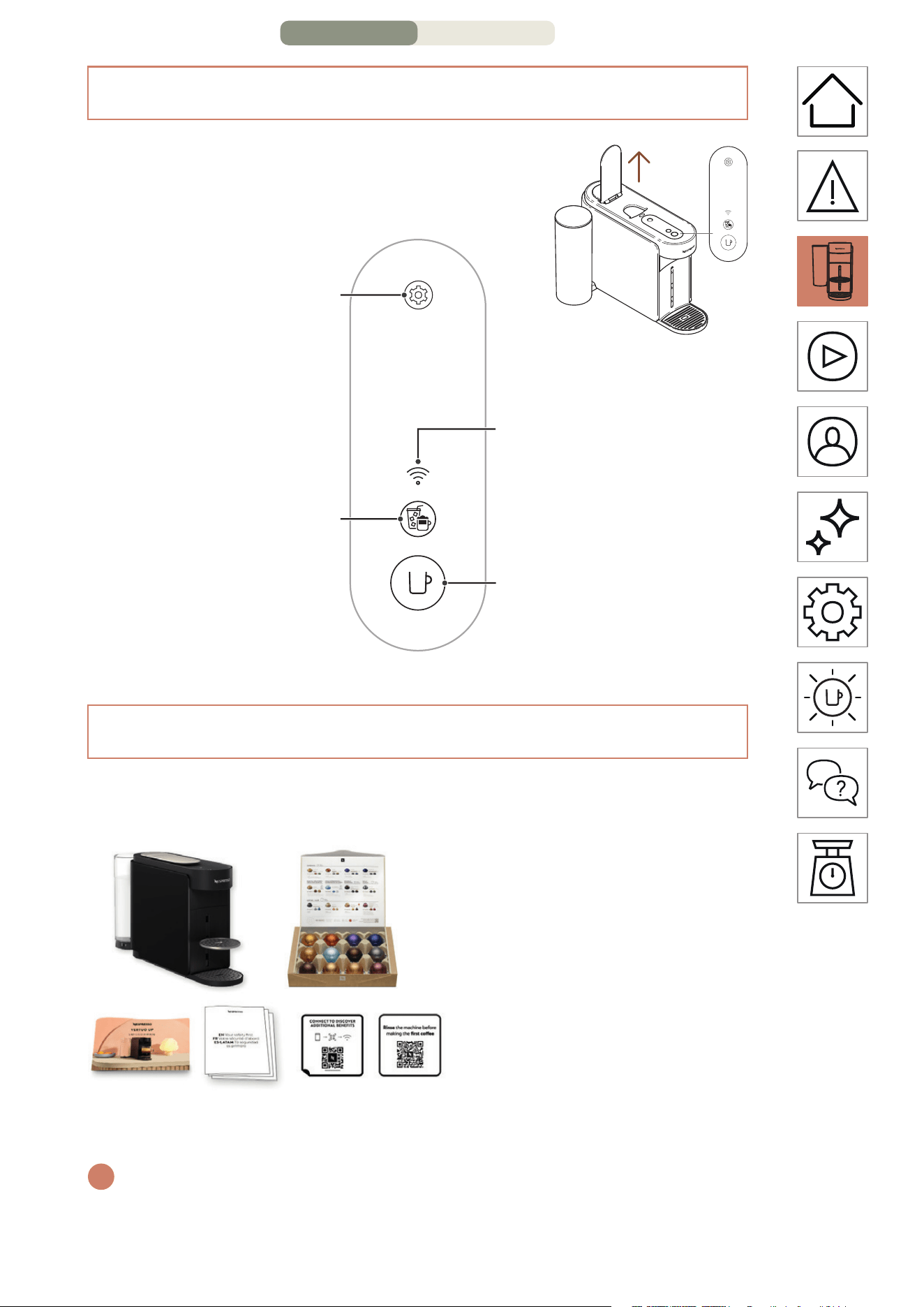
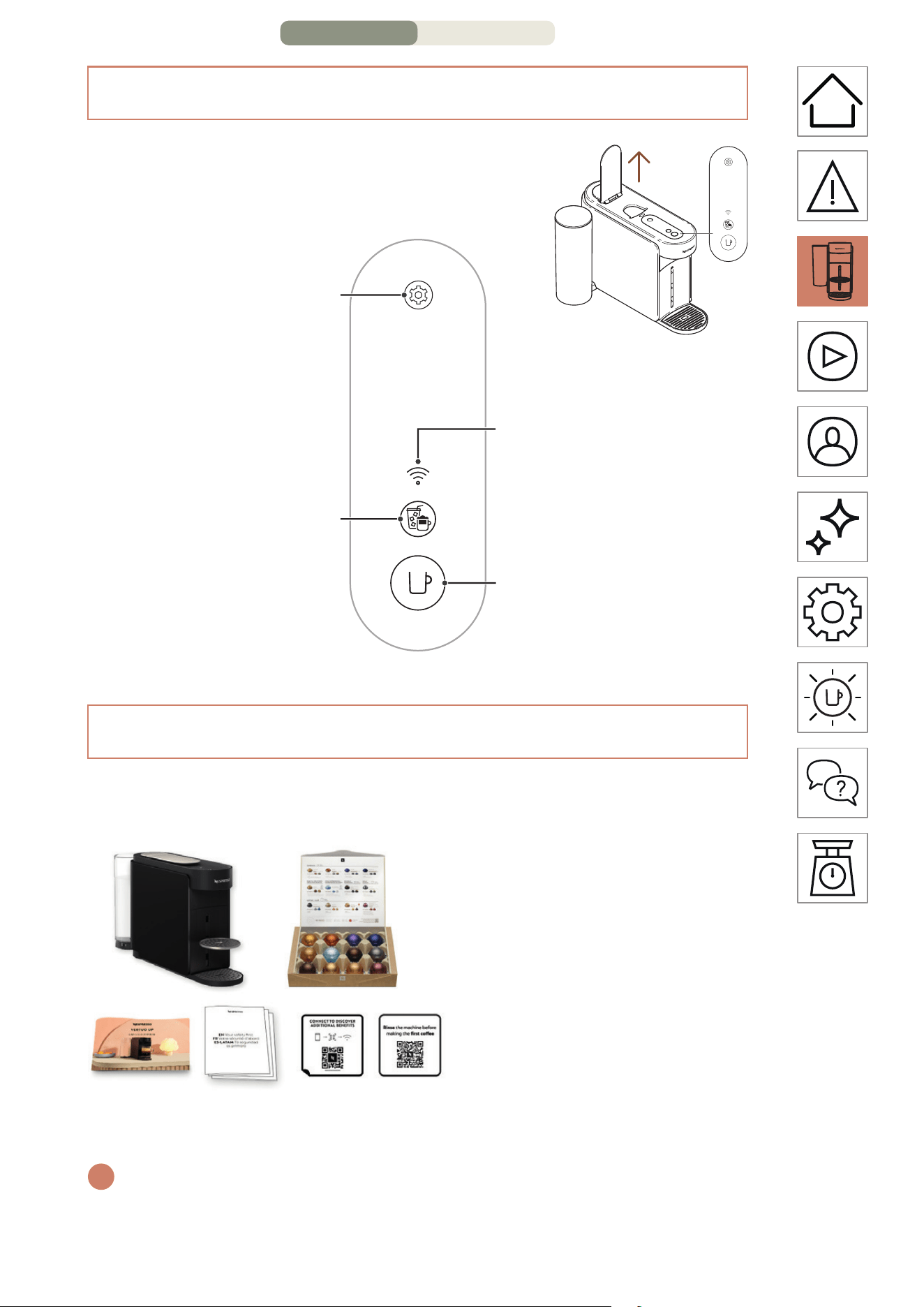
PACKAGING CONTENT
1 Vertuo Up Coee
machine
2 Nespresso capsules set
(12 capsules)
3 Quick start guide
4 Safety instructions and
Warranty
5 Connectivity sticker
6 Rinsing sticker
i
Unboxing: Some dust may be present on the surface of the machine
due to the recycled materials used in the packaging. This is not
dangerous, simply clean with a so tissue.
3
1 2
4 5 6
BUTTONS / LED
Maintenance buon
Connectivity LED
ON/OFF and coee
buon
Coee Creations buon
DISCOVER MY MACHINE – PAGE 2/4
EN
.
6
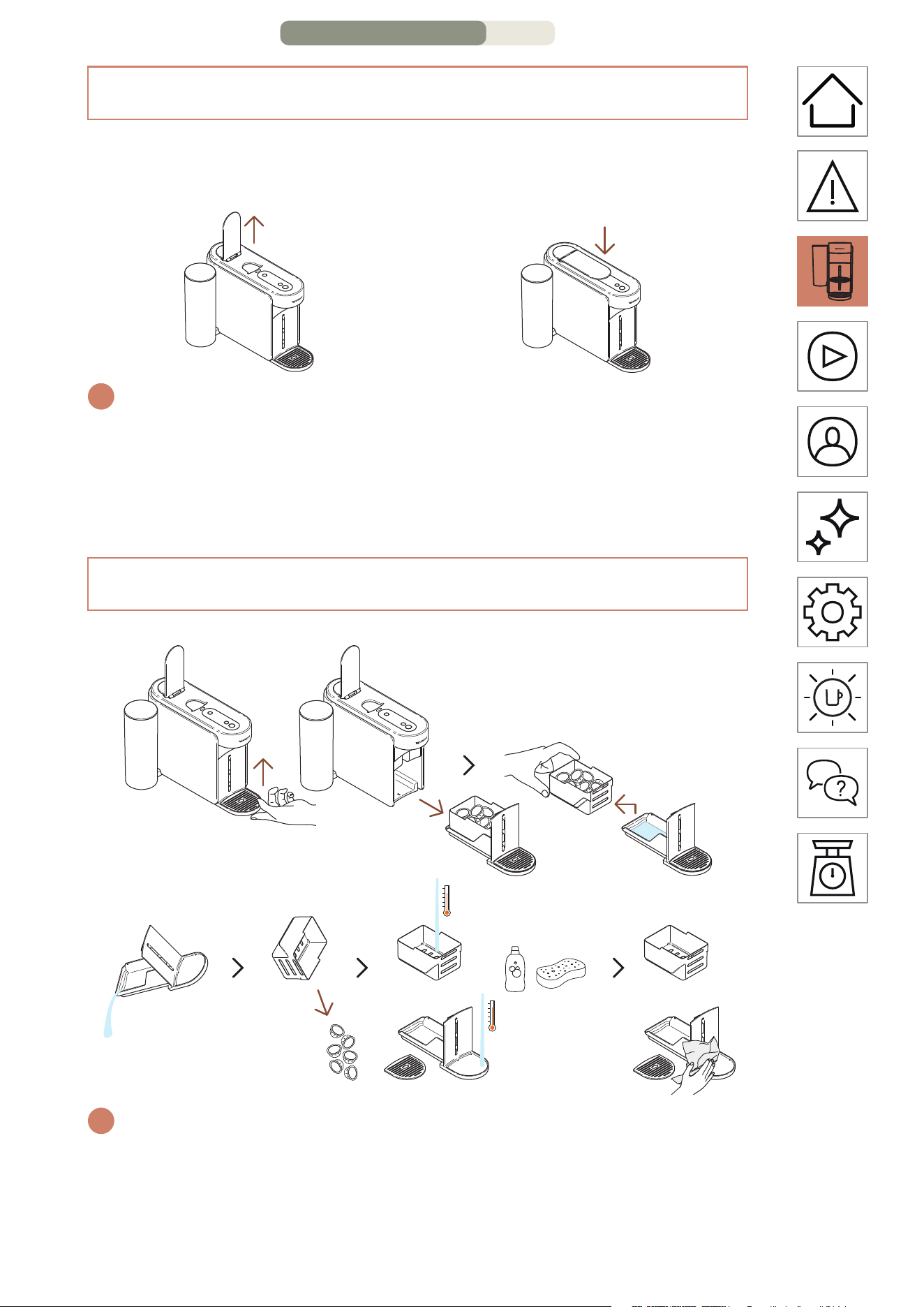
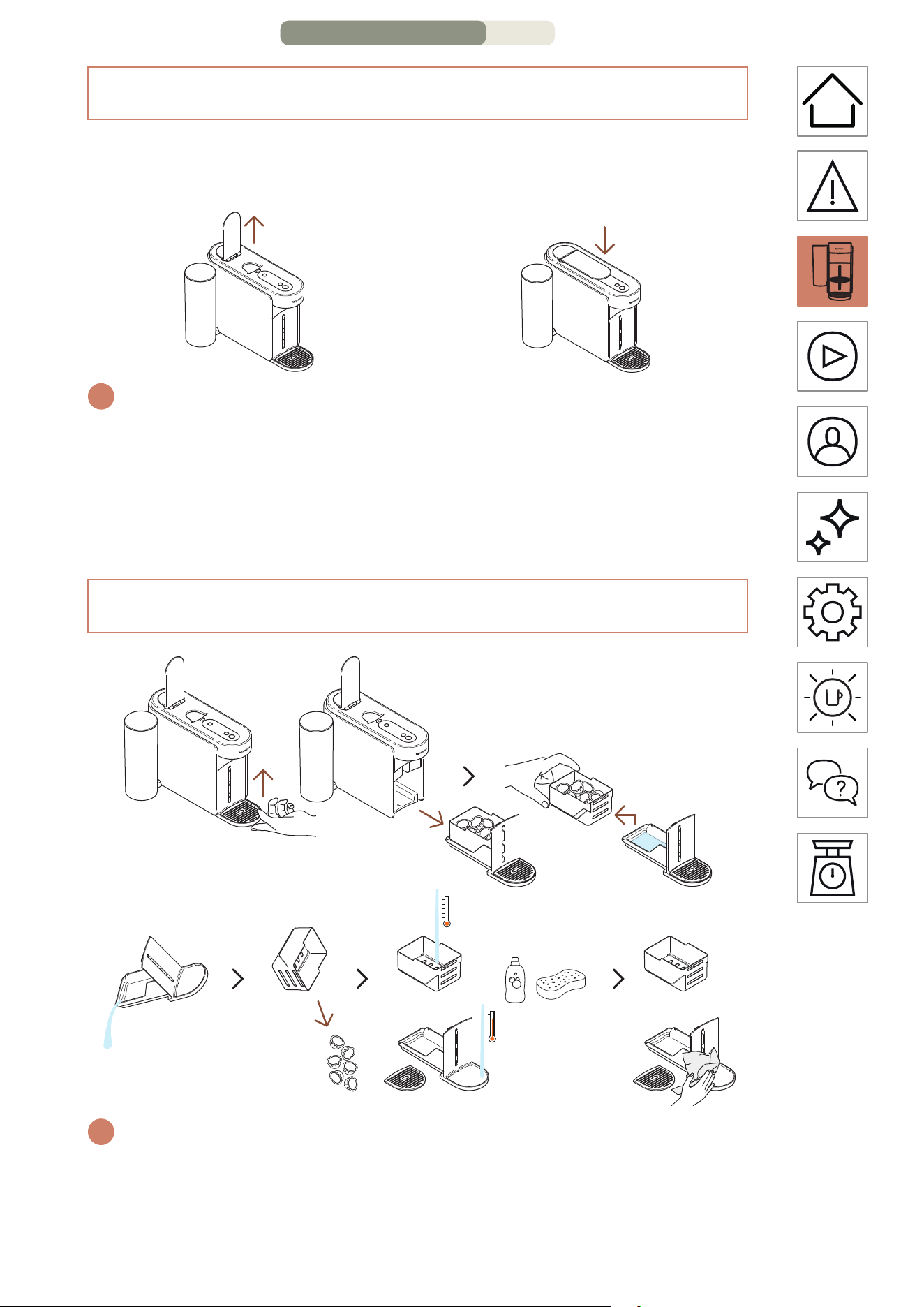
REMOVING AND CLEANING THE MAINTENANCE MODULE
OPEN / CLOSE
OPEN
Open the lever
CLOSE
Close the lever
i
Opening or closing the lever will not turn on the machine.
You will not be able to launch a coee without properly closing the
lever. For the proper usage of your machine, we recommend opening
the lever once the brewing is fully completed (coee buon steady
white). Opening the lever will remove any capsule aer extraction.
i
To remove the maintenance module, gently li it upwards. Carefully
separate the used capsule basket from the rest, recycle the capsules
and empty any remaining coee/water residue. Wash the parts
with hot water and mild odourless detergent then dry them, gently
assemble and place them back in the machine.
DISCOVER MY MACHINE – PAGE 3/4
EN
.
8
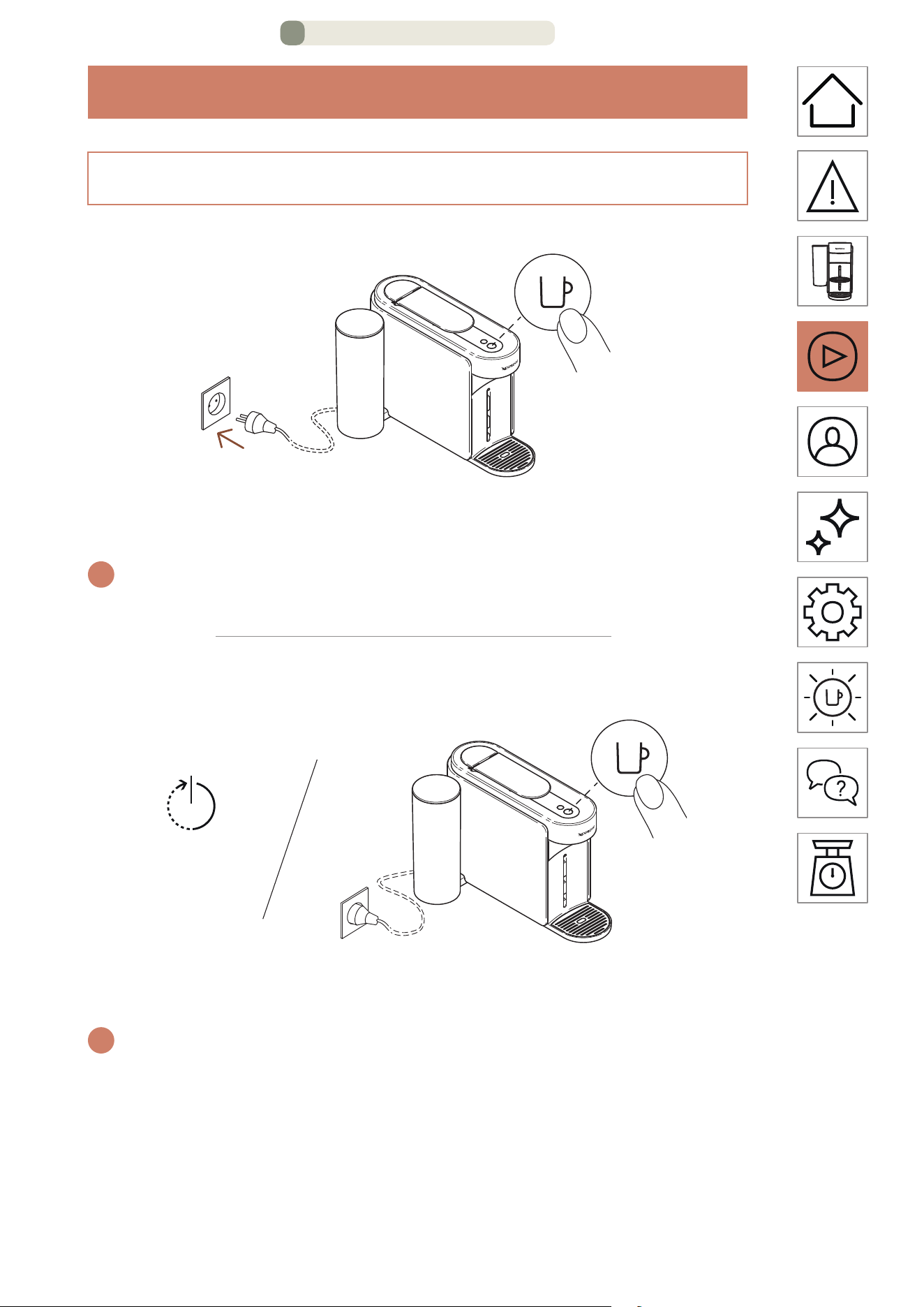
FIRST USE
ON
1 time
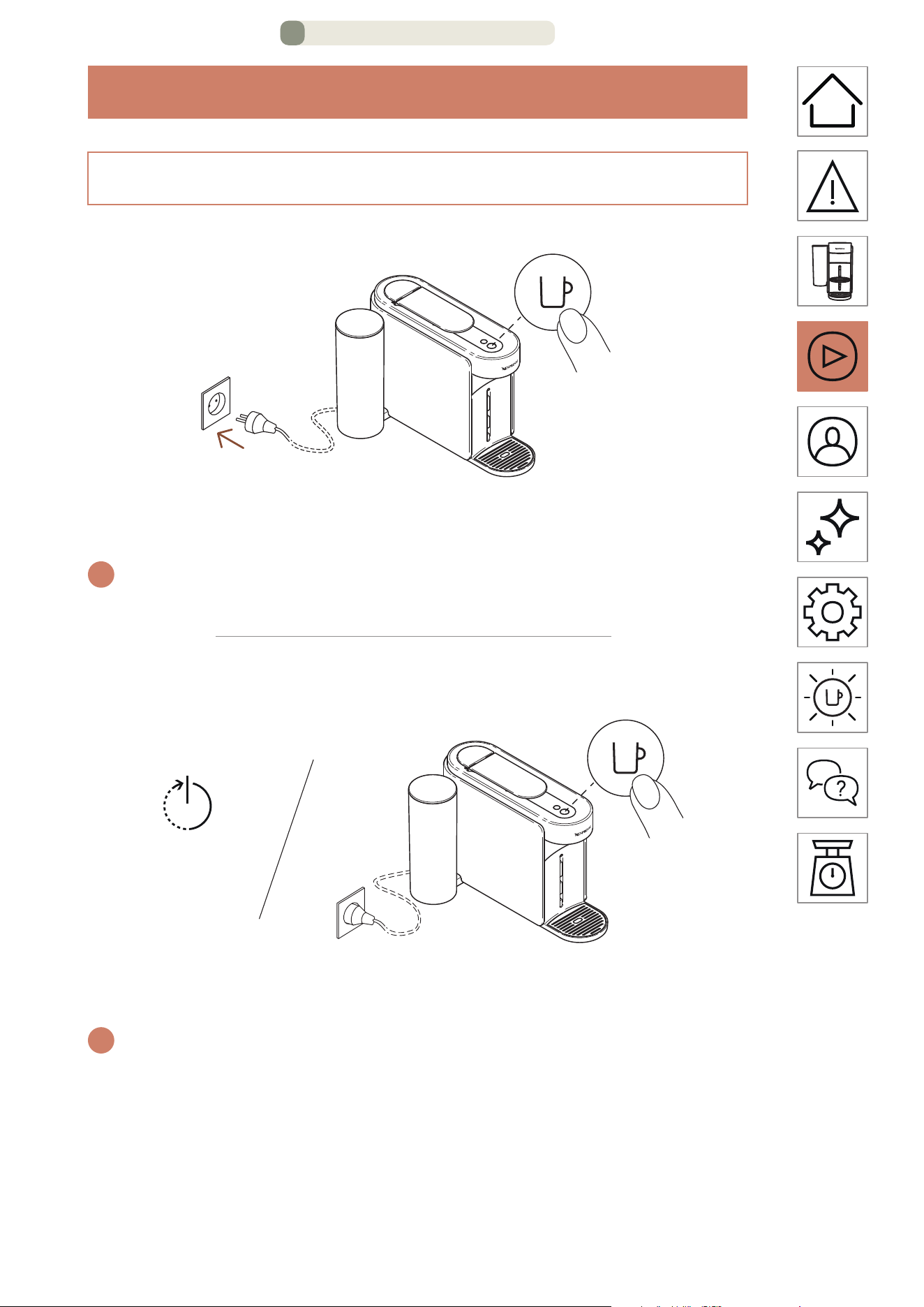
Once the machine is plugged in, turn on by pressing the coee
buon once.
i
The coee buon will glow for 3 seconds while the machine is heating
up. When it is ready, the machine is ready to be used.
OFF
Automatic OFF Manual OFF
2 minutes 2 seconds
To save energy, the machine will turn o automatically aer
2 minutes of non-use.
i
The machine can be turned o manually at any time (when not in
use) by pressing and holding the buon for approximately 2 seconds.
The machine will be powered o aer all the buons and LED have
dimmed down.
If you have paired your machine, please note that a final batch of data
can be sent to the Nespresso Smart App once your machine is turned o.
This process can take a few seconds.
ON /OFF
FIRST USE – PAGE 1/11
EN
.
9
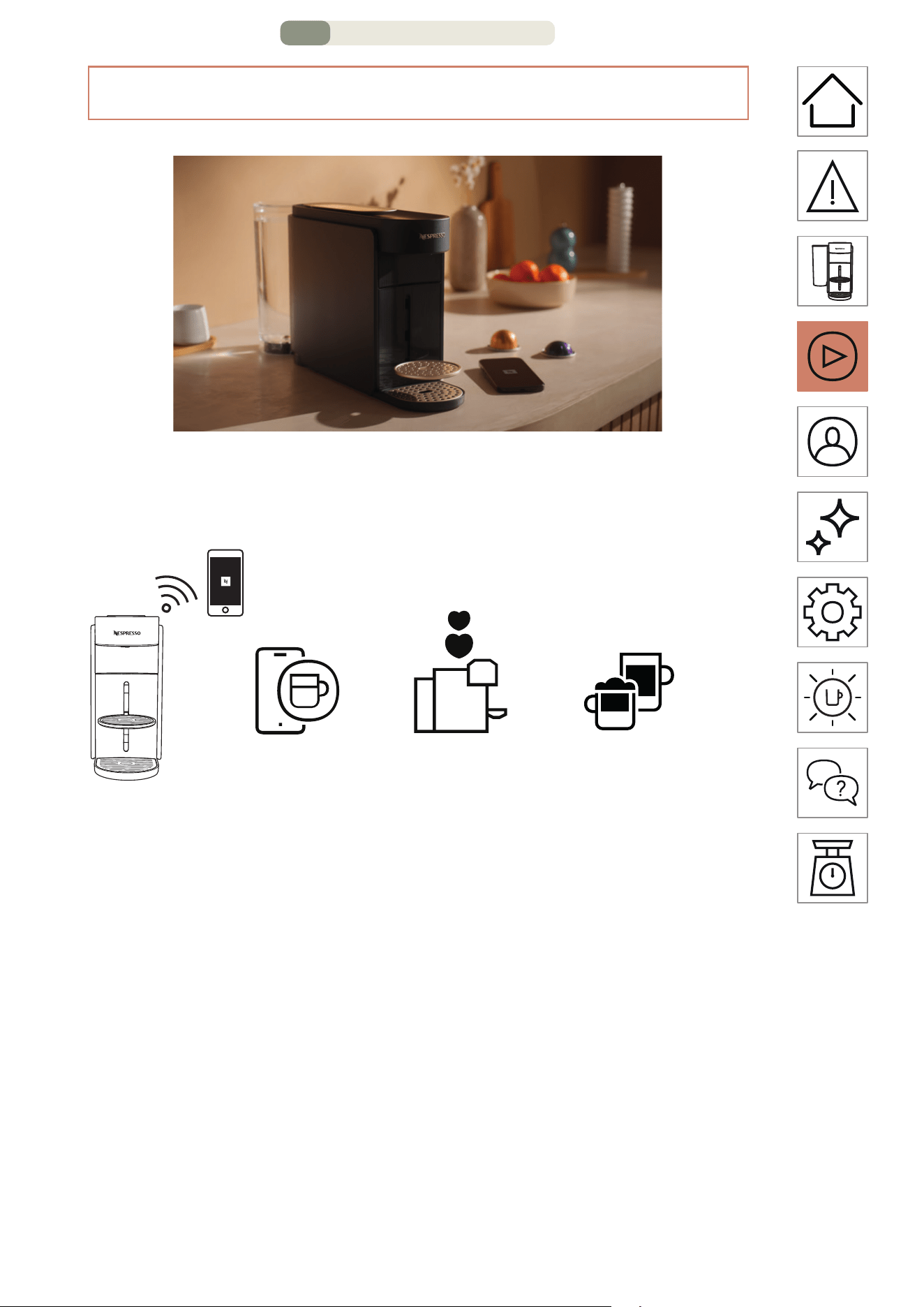
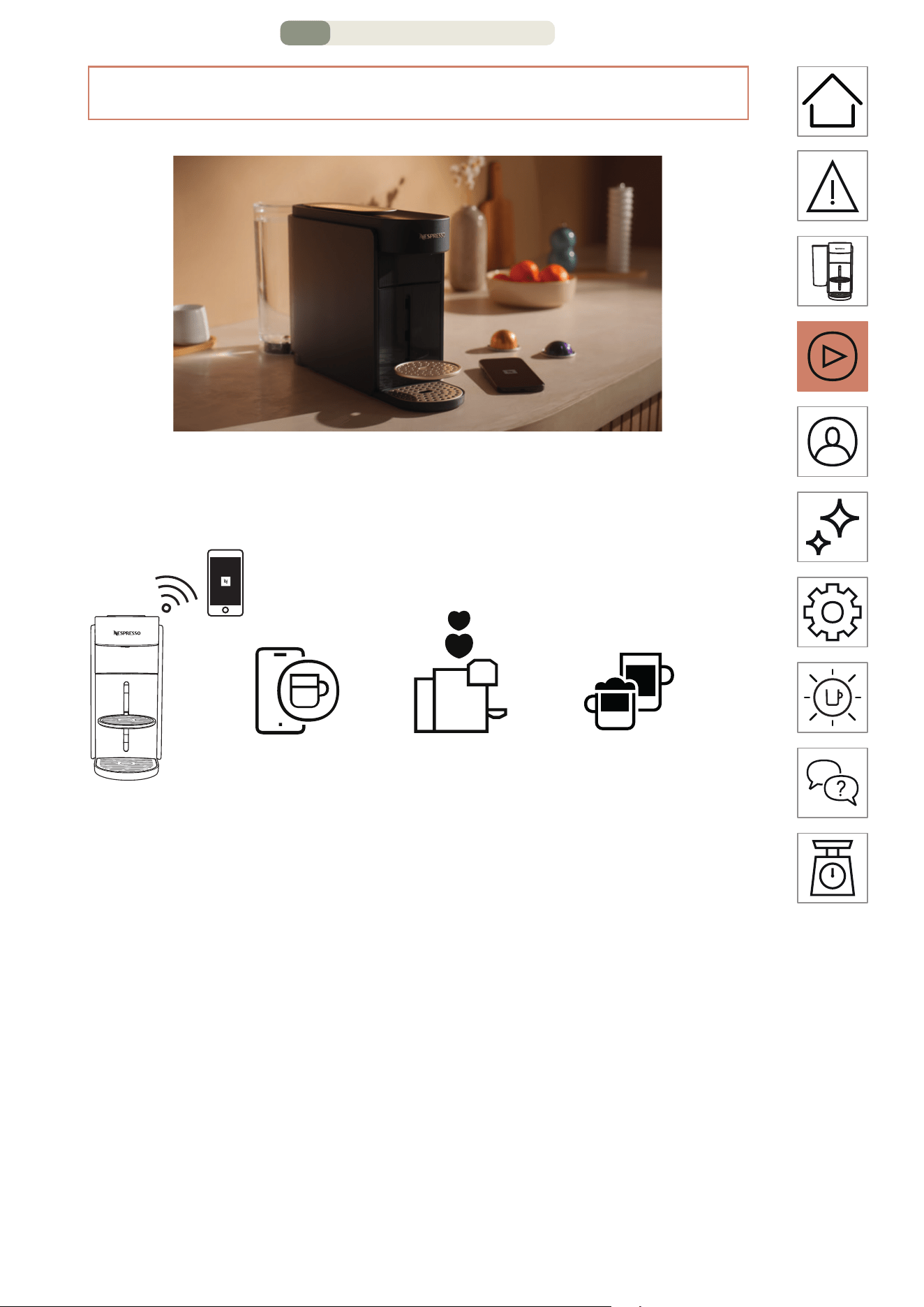
WHY SHOULD YOU PAIR YOUR MACHINE?
Coee volume
and temperature
customization
= + +
=+
=+
Easy machine
maintenance and
real-time alerts
Step-by-step
recipes
& ...
• Coee volume and temperature customization:
Adjust the cup length and customize the temperature of
your coee, with exclusive temperature control available only
through the App.
• Easy machine maintenance and real-time alerts: Experience
eortless cleaning and descaling directly through the App.
Enjoy the benefits of upgrading your machine with the latest
features for a seamless experience.
• Step-by-step recipes: Discover the classic coee recipes to
the trendiest creations.
CONNECT YOUR MACHINE
FIRST USE – PAGE 2/11
EN
.
10
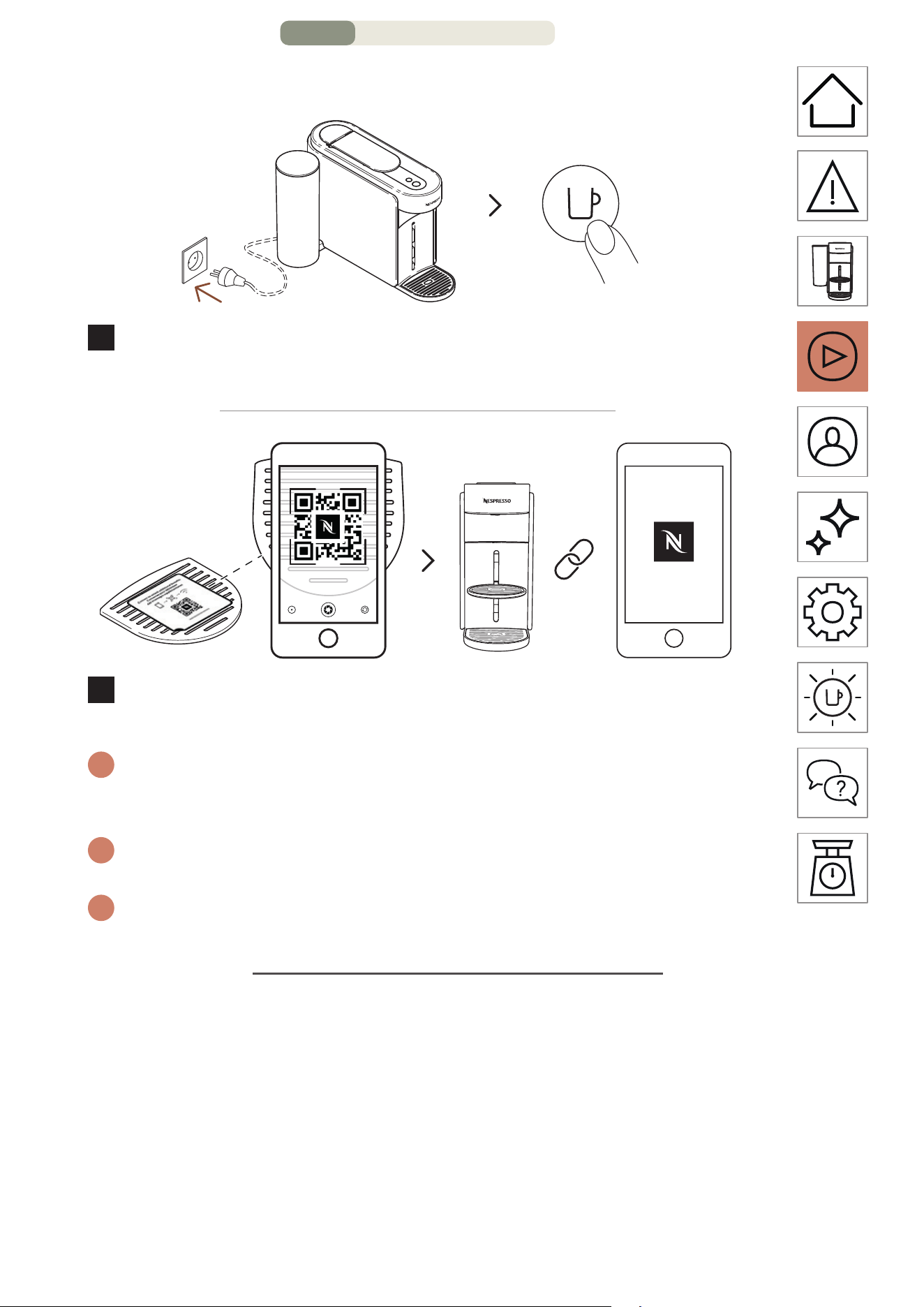
HOW TO CONNECT YOUR MACHINE?
1 time
ON
1
To connect your machine, plug it in, turn it on by pressing the
coee buon once
2
Scan the QR Code available on your machine drip grid or
open the Nespresso Smart App to pair your machine.
i
If you have already downloaded the Nespresso Smart App, it will be
opened. If you don’t have the Nespresso Smart App, you will be able
to download it.
i
If you do not connect your machine, the Connectivity LED will blink
each time you will turn on the machine.
i
If you wish to disable the connectivity module or if your country does
not support connection to the Nespresso Smart App, please refer to
the following “Disable / Re-enable the connectivity module” section.
FIRST USE – PAGE 3/11
EN
.
11
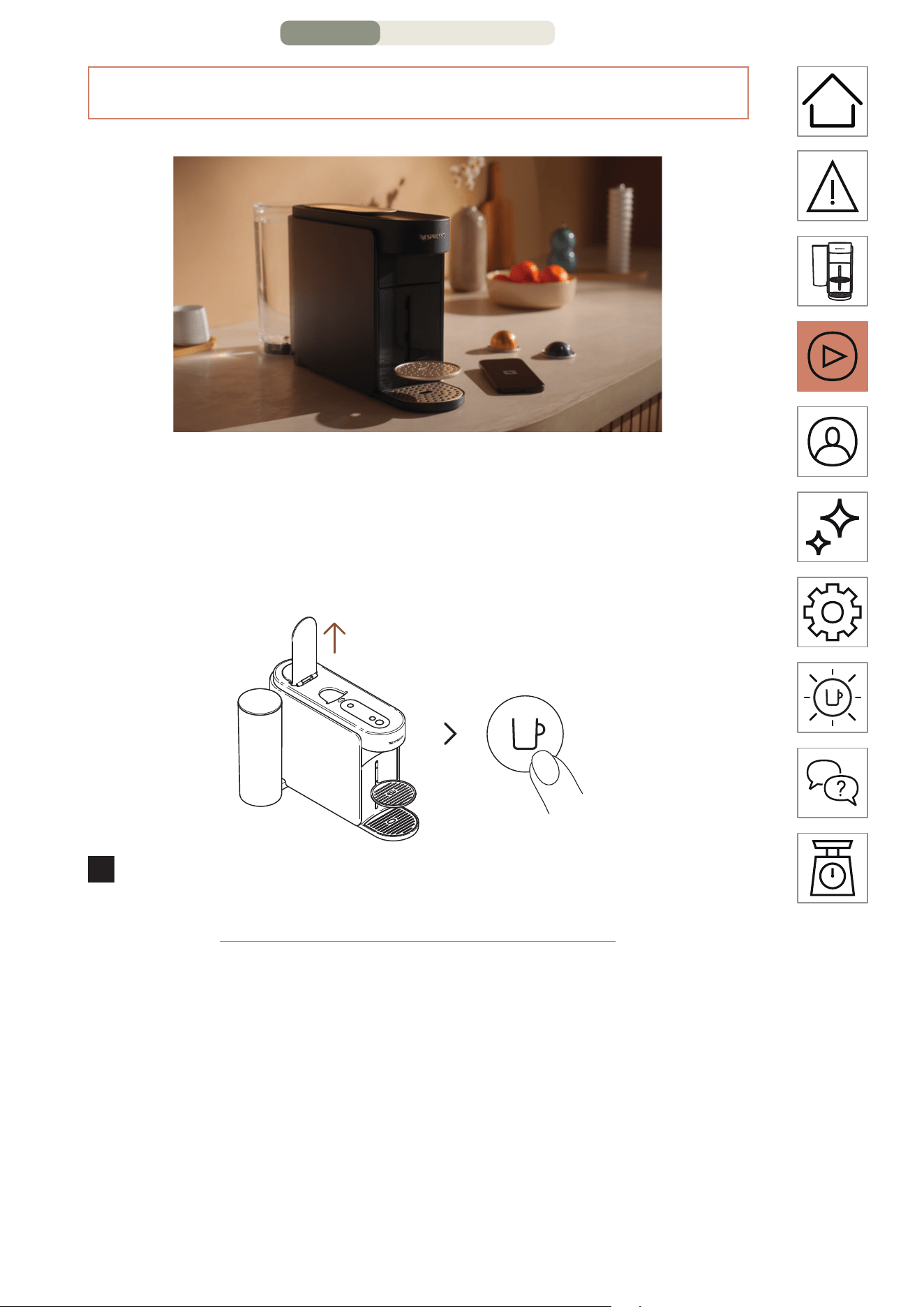
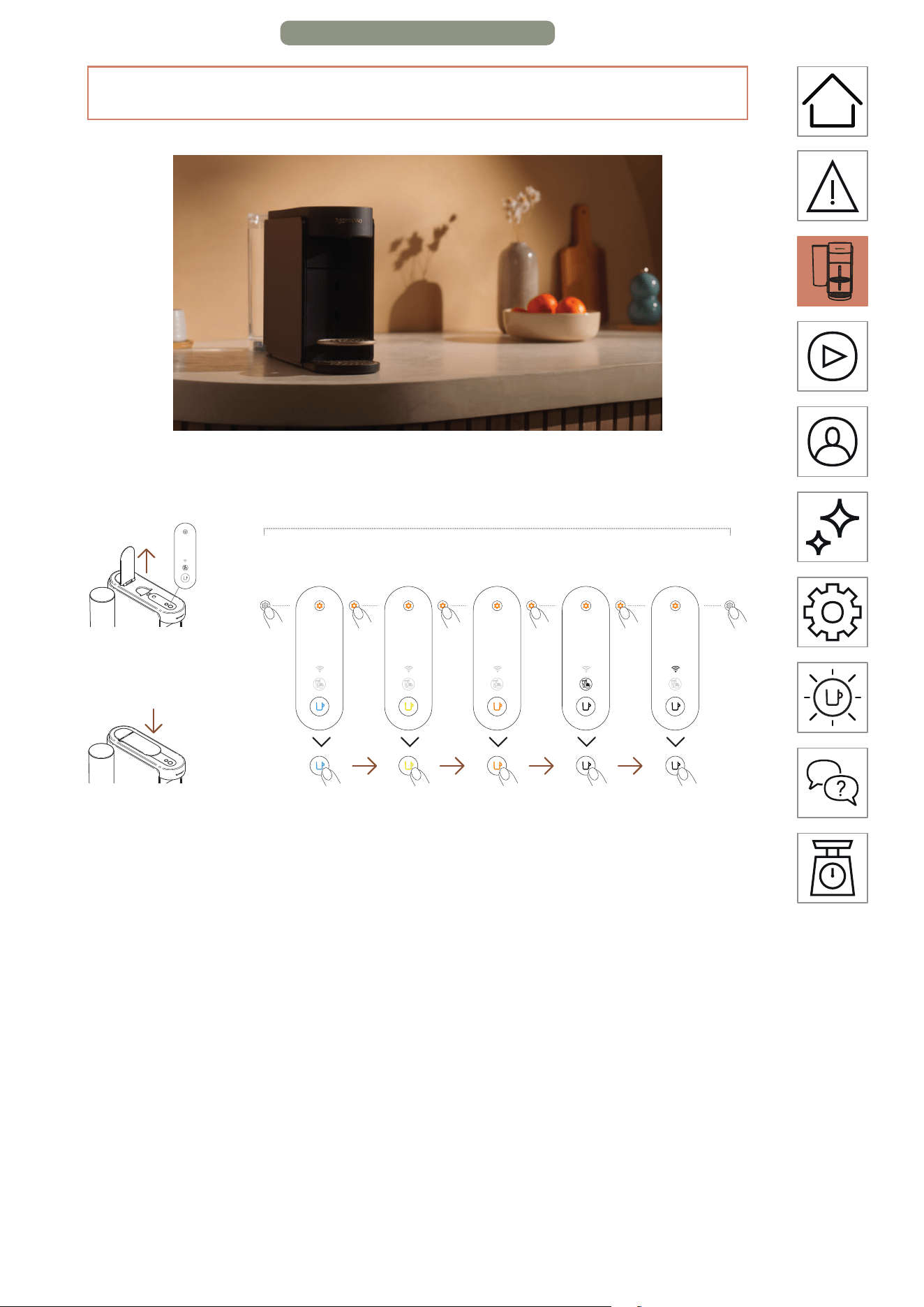
DISABLE / RE-ENABLE THE CONNECTIVITY MODULE
The machine comes with a connectivity module, enabled by
default. It gives access to additional features, enhancing your
coee experience. To disable the connectivity module, follow
these steps:
ON
1 time
1
Open the lever and turn on the machine by pressing the
coee buon once.
FIRST USE – PAGE 4/11
EN
.
12
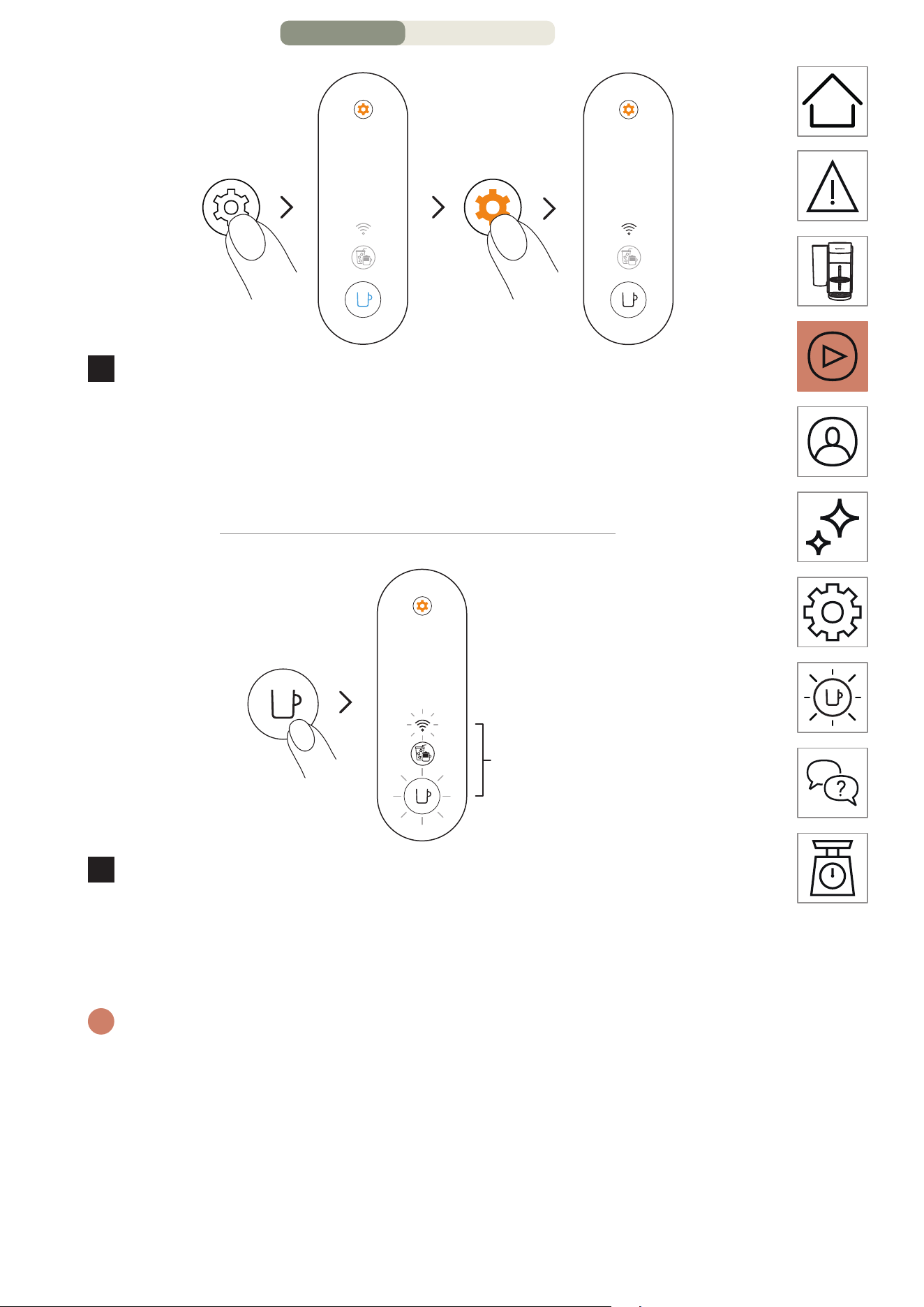
3 seconds 4 times
2
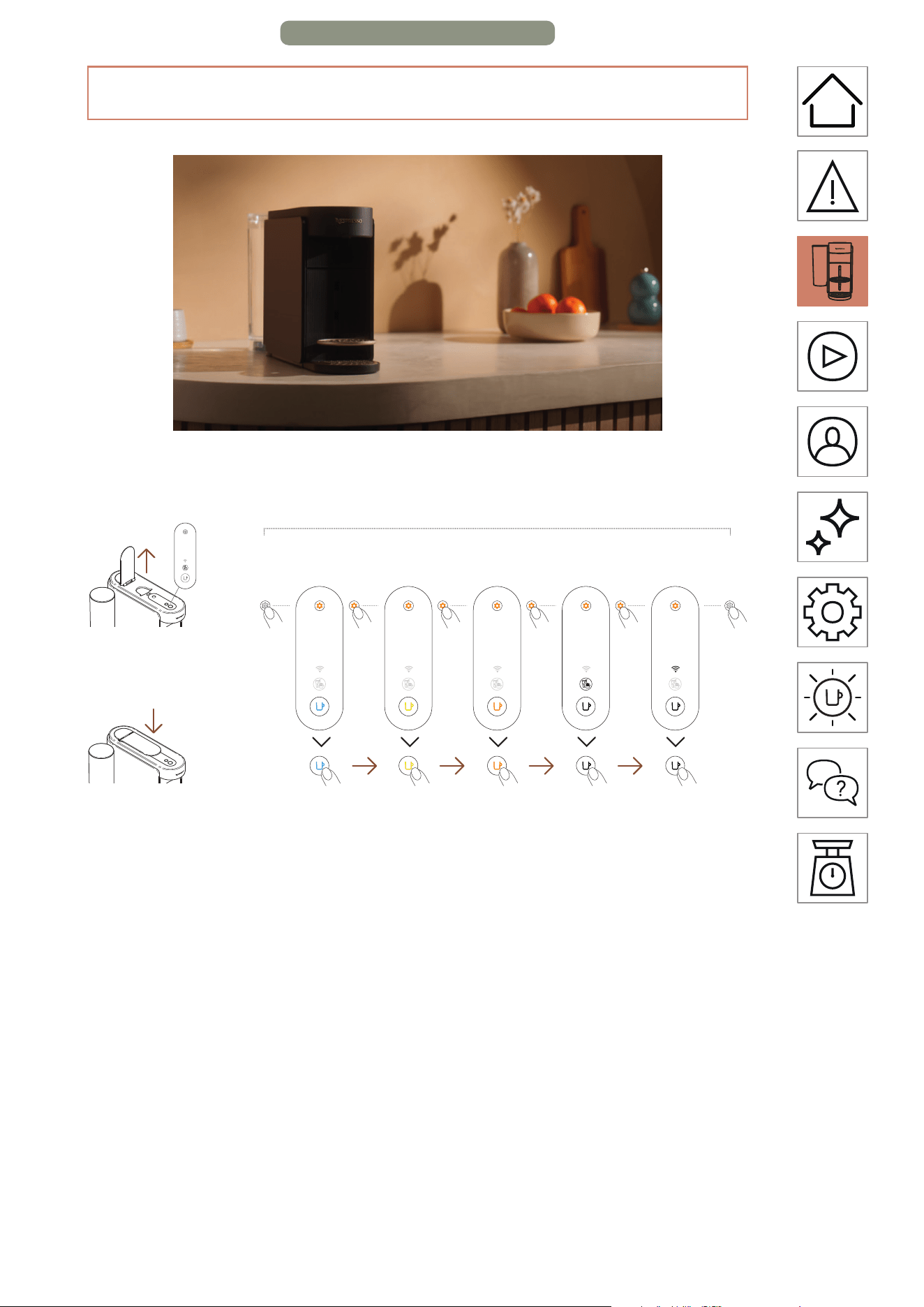
Press and hold the maintenance buon for at least
3 seconds. Once the coee buon is steady blue, release it
and press the maintenance buon 4 times again. The coee
buon and the Connectivity LED should appear steady
white.
1 time
3 times
3
Press the coee buon once to confirm. The coee buon
and the Connectivity LED will blink 3 times to confirm the
connectivity module has now been disabled. Once the
procedure is completed, the machine turns o.
i
If you want to re-enable the connectivity module, you can follow the
same steps.
FIRST USE – PAGE 5/11
EN
.
13
FIRST RINSING / CLEANING
We recommend you clean your machine before its first
use. All the procedures could be easily guided through the
Nespresso Smart App once your machine is connected.
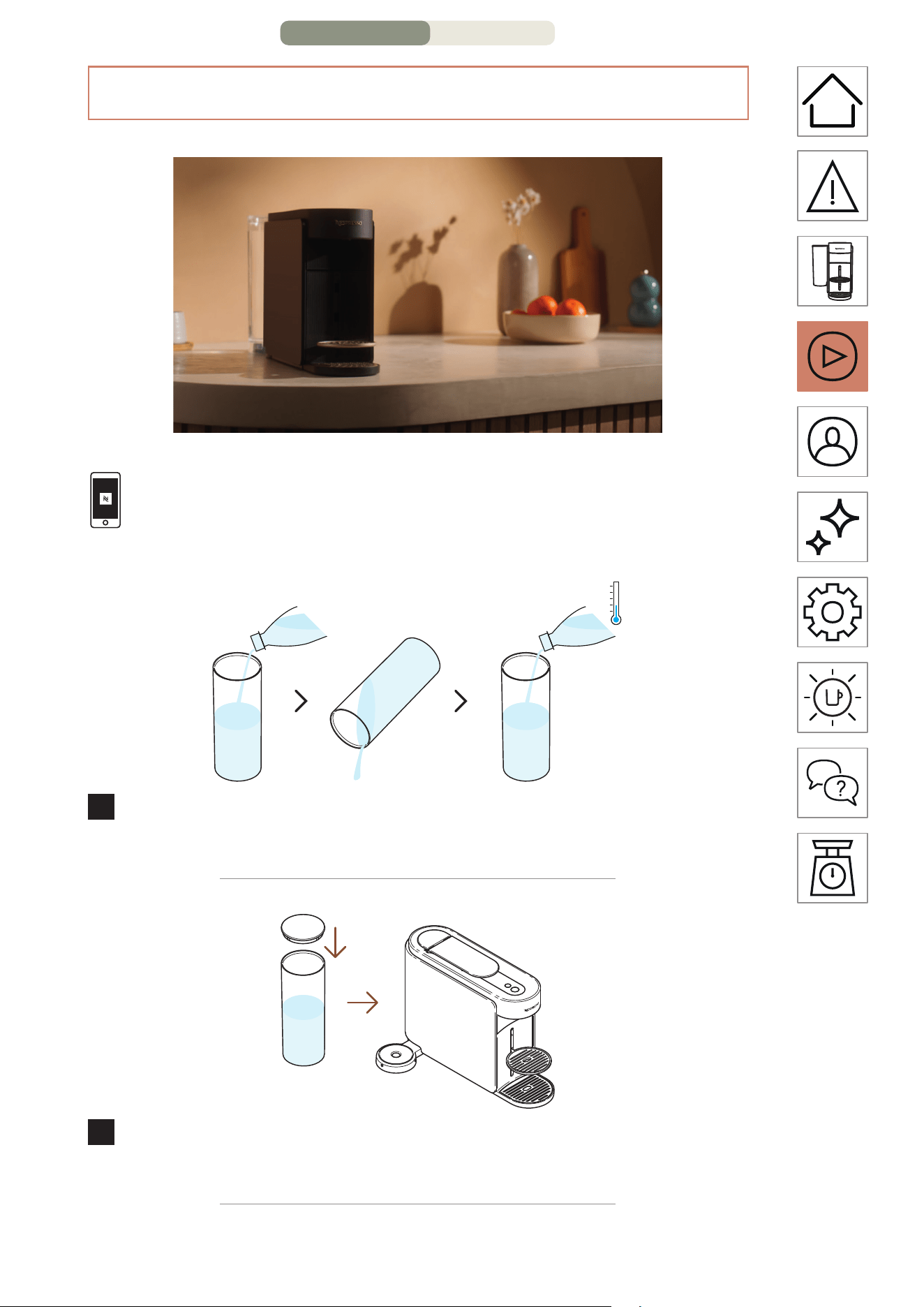
1
Rinse the water tank before filling it with only fresh drinking
water (0.5 L / 17 fl oz).
2
Close the water tank with the lid and put it back in position
on the machine.
FIRST USE – PAGE 6/11
EN
.
14
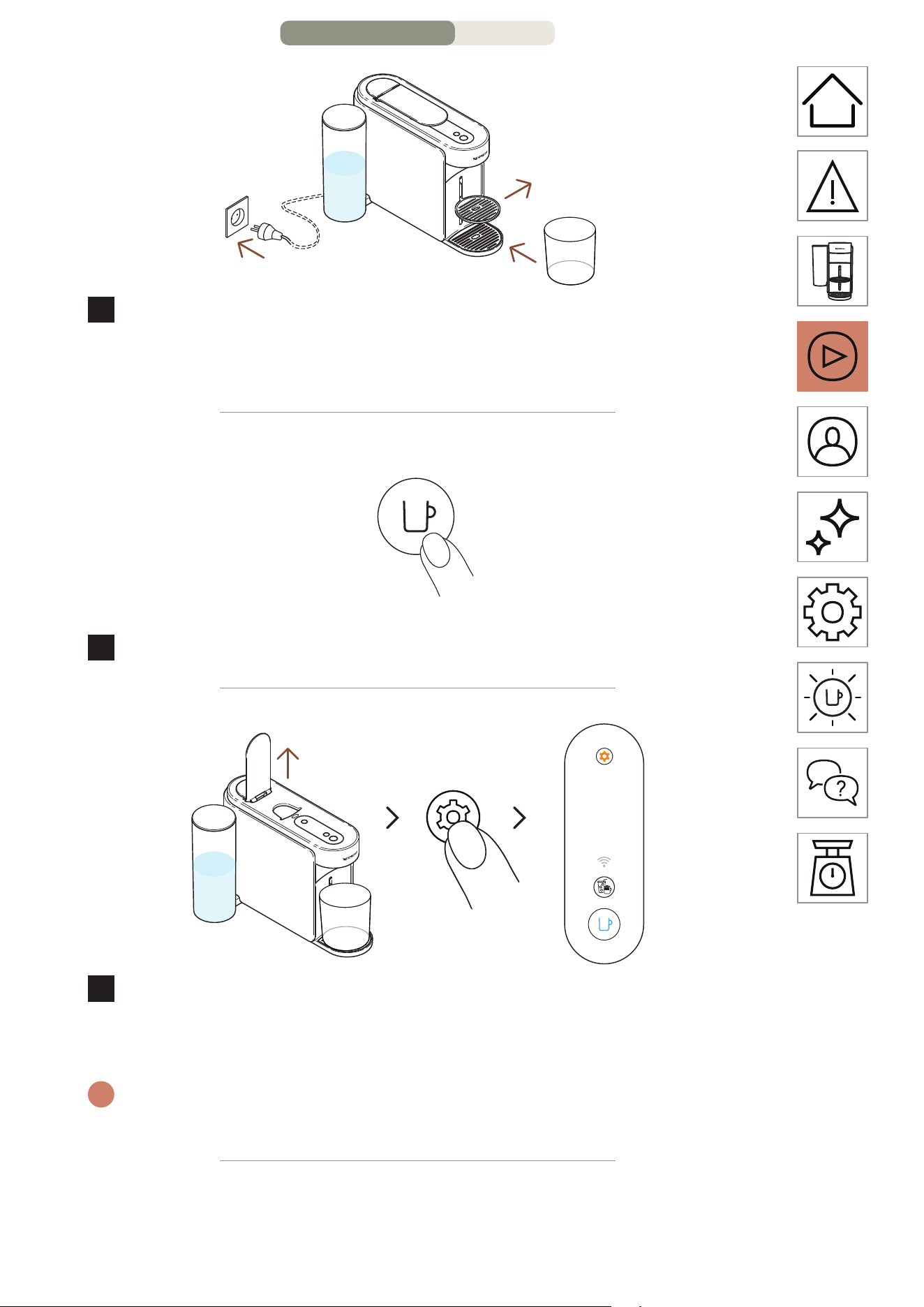
Min. 1 L
34 fl oz
3
Plug in the machine, remove the cup support and place an
empty container (at least 1 L / 34 fl oz) under the coee
outlet.
ON
1 time
4
Turn on the machine by pressing the coee buon once.
3 seconds
5
Open the machine lever. Press and hold the maintenance
buon for at least 3 seconds. Release it when the coee
buon appears steady blue.
i
To leave the maintenance mode before launching any procedure,
please hold again the maintenance buon for at least 3 seconds.
FIRST USE – PAGE 7/11
EN
.
15
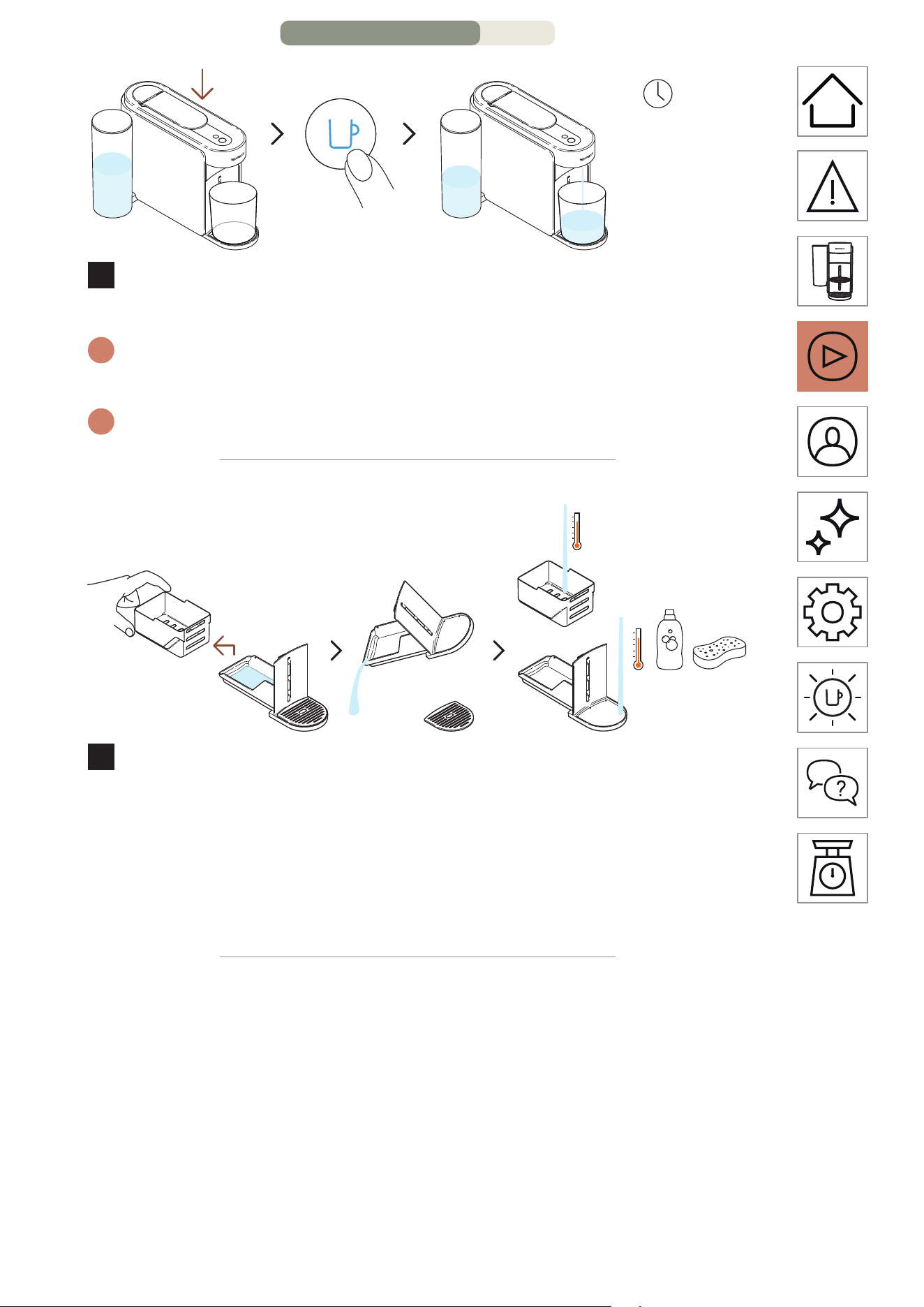
1 time
~3 minutes
6
Close the lever and press the blue coee buon once to
launch the first rinsing process.
i
The machine will start rinsing and the procedure may take up to
3 minutes.
i
Water may accumulate in the maintenance module during rinsing.
7
Separate the capsule basket from the rest and empty any
remaining water. Wash the maintenance module with hot
water and mild odourless detergent.
CAUTION: Do not use any strong or abrasive cleaning agent or solvent
cleaner. Do not put the machine in a dishwasher. Never immerse the
appliance or part of it in water.
FIRST USE – PAGE 8/11
EN
.
16
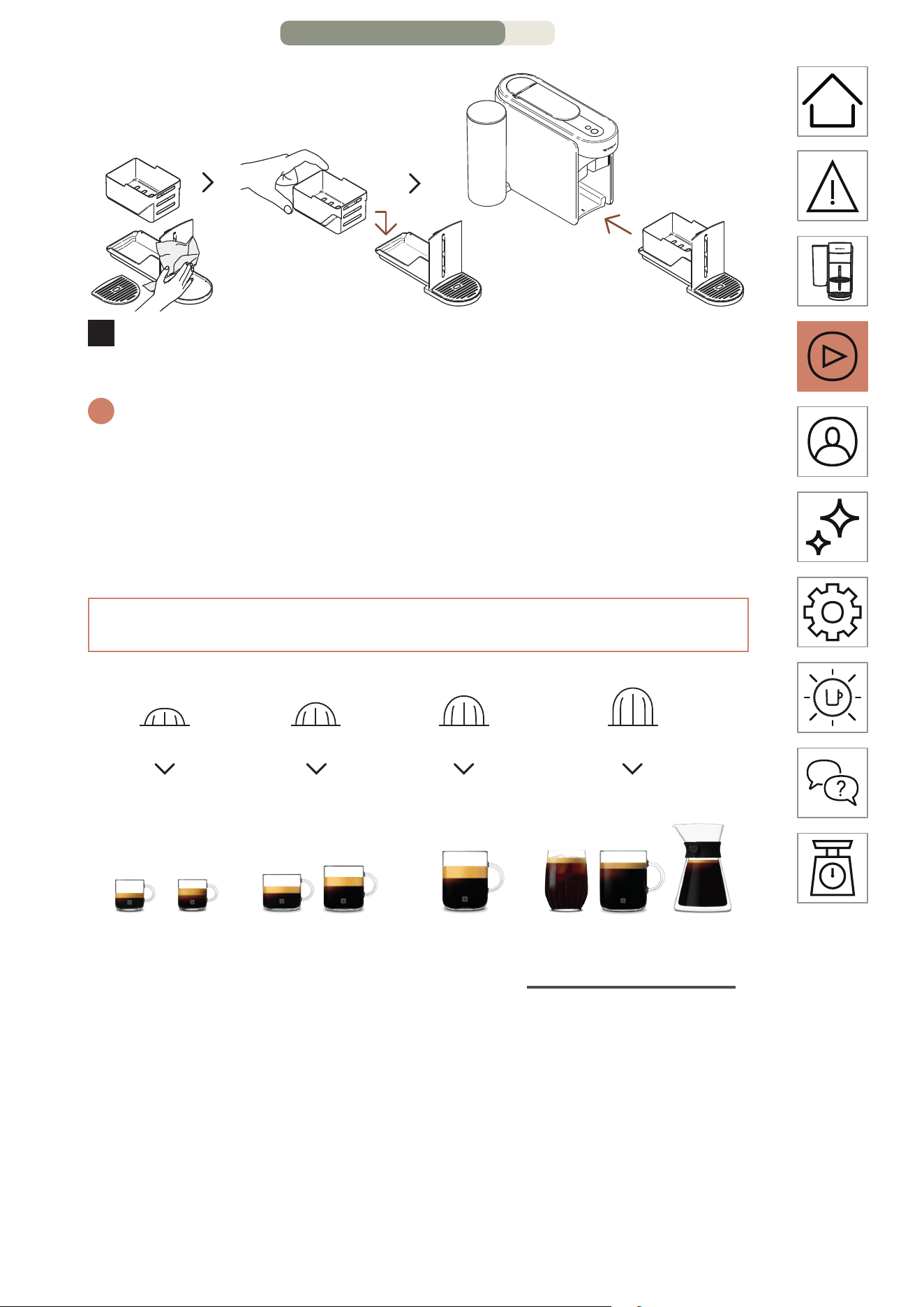
8
Dry the maintenance module with a clean and fresh cloth
and place it back on the machine.
i
The machine will go back to ready mode when the
procedure will be completed (coee buon steady white).
CAUTION: Always use so cloths to clean the machine.
THE VERTUO SYSTEM
25 mL
0.84 fl oz
40 mL
1.35 fl oz
80 mL
2.7 fl oz
150 mL
5.07 fl oz
230 mL
7.77 fl oz
355 m
L
12 fl oz
535 mL
18.09 fl oz
Carafe Pour-Over
Style
Ristreo Espresso
Double
Espresso
Gran
Lungo Mug / Café
Cold Brew
Style Alto
S M L XL
S
S M L XL
M
S M L XL
L
S M L XL
XL
Discover our full collection of accessories on www.nespresso.com
FIRST USE – PAGE 9/11
EN
.
17
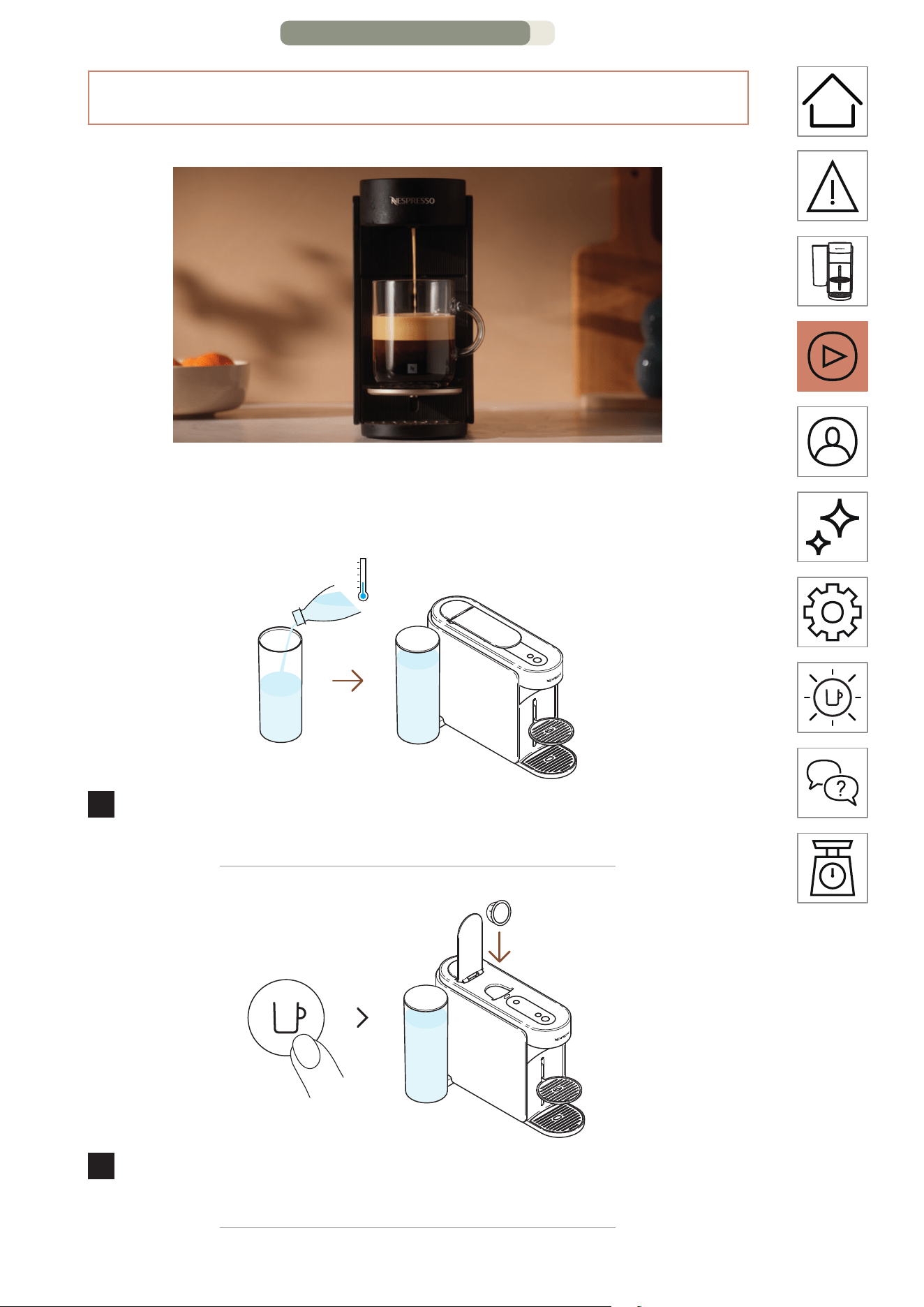
PREPARE VERTUO COFFEE
Vertuo: Incomparable Coee Experiences. Explore a world of coee
styles at the touch of a buon by discovering the 12 best-seller coees
available with your machine.
1
Fill the water tank with fresh drinking water, close with the lid
and put it back in position.
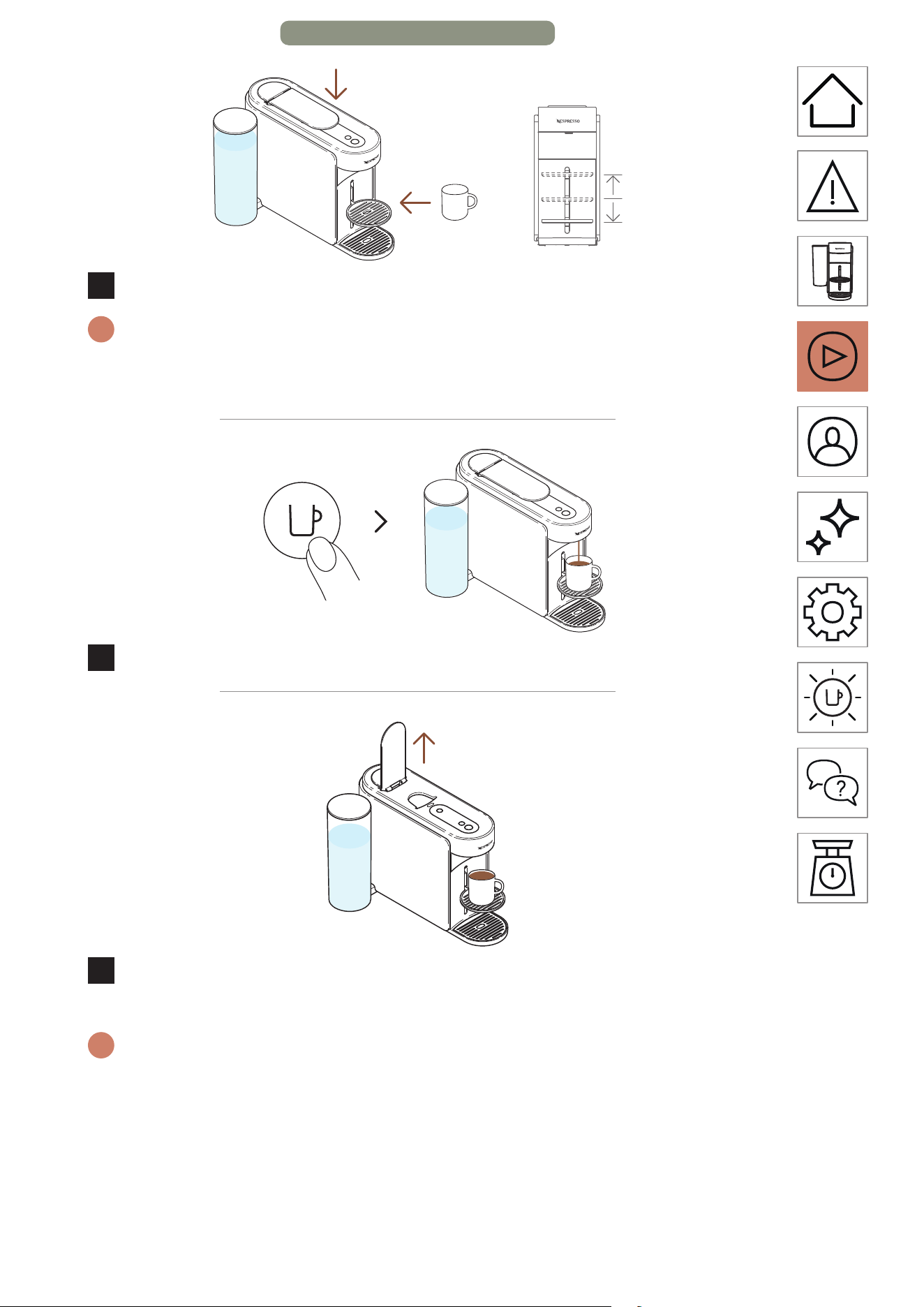
ON
1 time
2
Turn on the machine by pressing the coee buon once.
Open the machine lever and insert one Vertuo capsule.
FIRST USE – PAGE 10/11
EN
.
18
3
Close the machine lever and place a cup.
i
To avoid overflow, please adapt the cup size according to the volume
of the chosen capsule (pre-set or customized). The cup support can be
adjusted to accommodate your cup size.
1 time
4
Start brewing by pressing the coee buon once.
5
When the coee stops brewing, open the machine lever to
eject the capsule and enjoy your coee.
i
You can stop your coee extraction at any time by pressing the coee
buon once.
For the proper usage of your machine, we recommend opening
the lever once the brewing is fully completed (coee buon steady
white). Opening the lever will remove any capsule aer extraction.
Coee/water may remain in the maintenance module. Empty the
capsule basket if needed, along with any remaining coee/water
residue.
FIRST USE – PAGE 11/11
EN
.
19
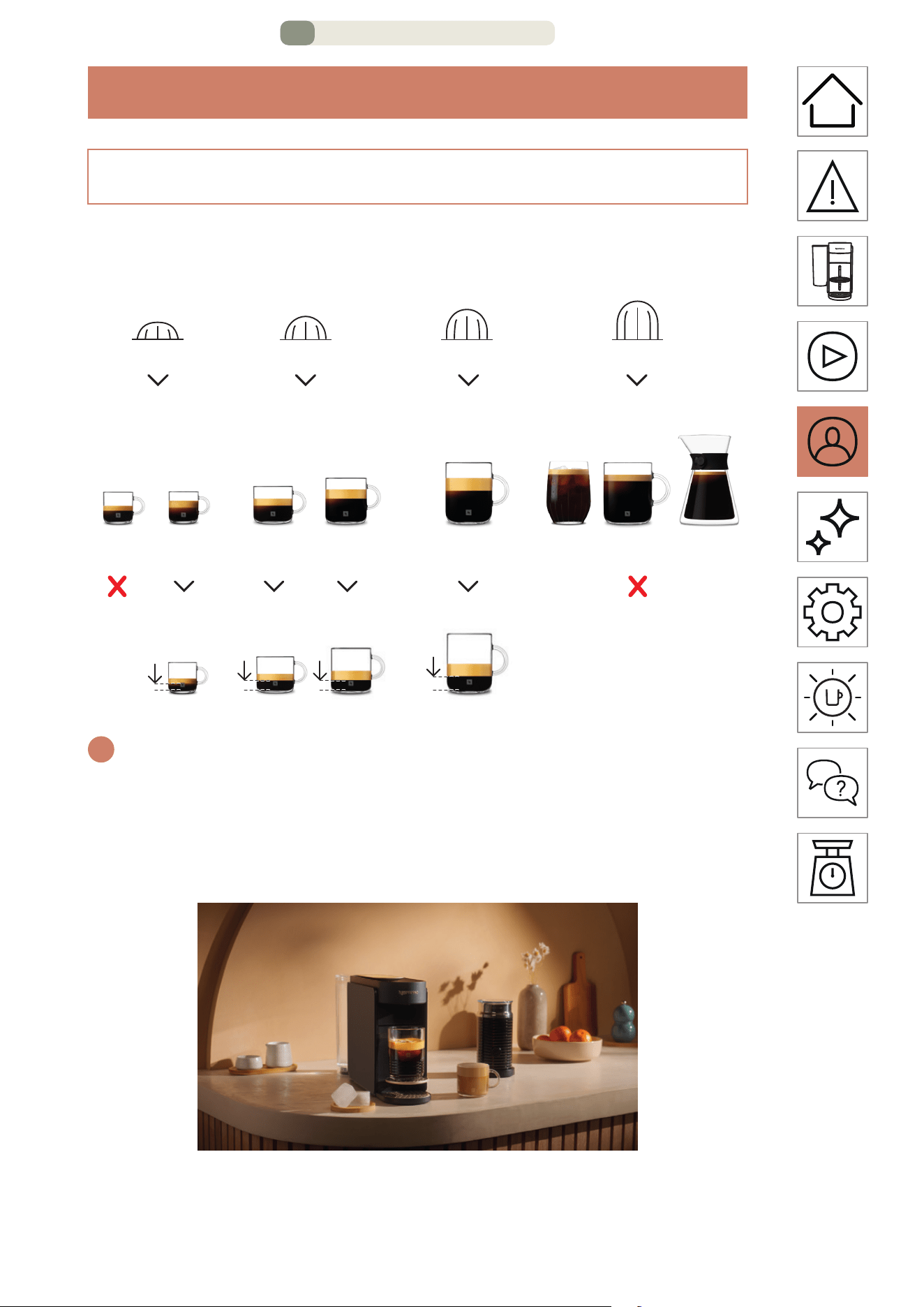
CUSTOMIZE MY COFFEE MOMENTS
COFFEE CREATIONS MODE
Eortlessly brew your concentrated, temperature-adjusted
coee for all your over-ice and milk-based recipes.
i
To fully enjoy the benefits, we recommend brewing our Coee+
range using only the ocial cup sizes. For the best in-cup results, we
do not recommend brewing our Ristreo, XL (Alto Ambrato, Alto
Onice), Cold Brew Style & Carafe Pour Over Style with this mode.
25 mL
0.84 fl oz
40 mL
1.35 fl oz
40 mL
1.35 fl oz
80 mL
2.7 fl oz
25 mL
0.84 fl oz
40 mL
1.35 fl oz
80 mL
2.7 fl oz
150 mL
5.07 fl oz
230 mL
7.77 fl oz
355 mL
12 fl oz
535 mL
18.09 fl oz
Carafe Pour-Over
Style
Ristreo Espresso
Double
Espresso
Gran
Lungo Mug / Café
Cold Brew
Style Alto
S M L XL
S
S M L XL
M
S M L XL
L
S M L XL
XL
CUSTOMIZE MY COFFEE MOMENTS – PAGE 1/8
EN
.
21
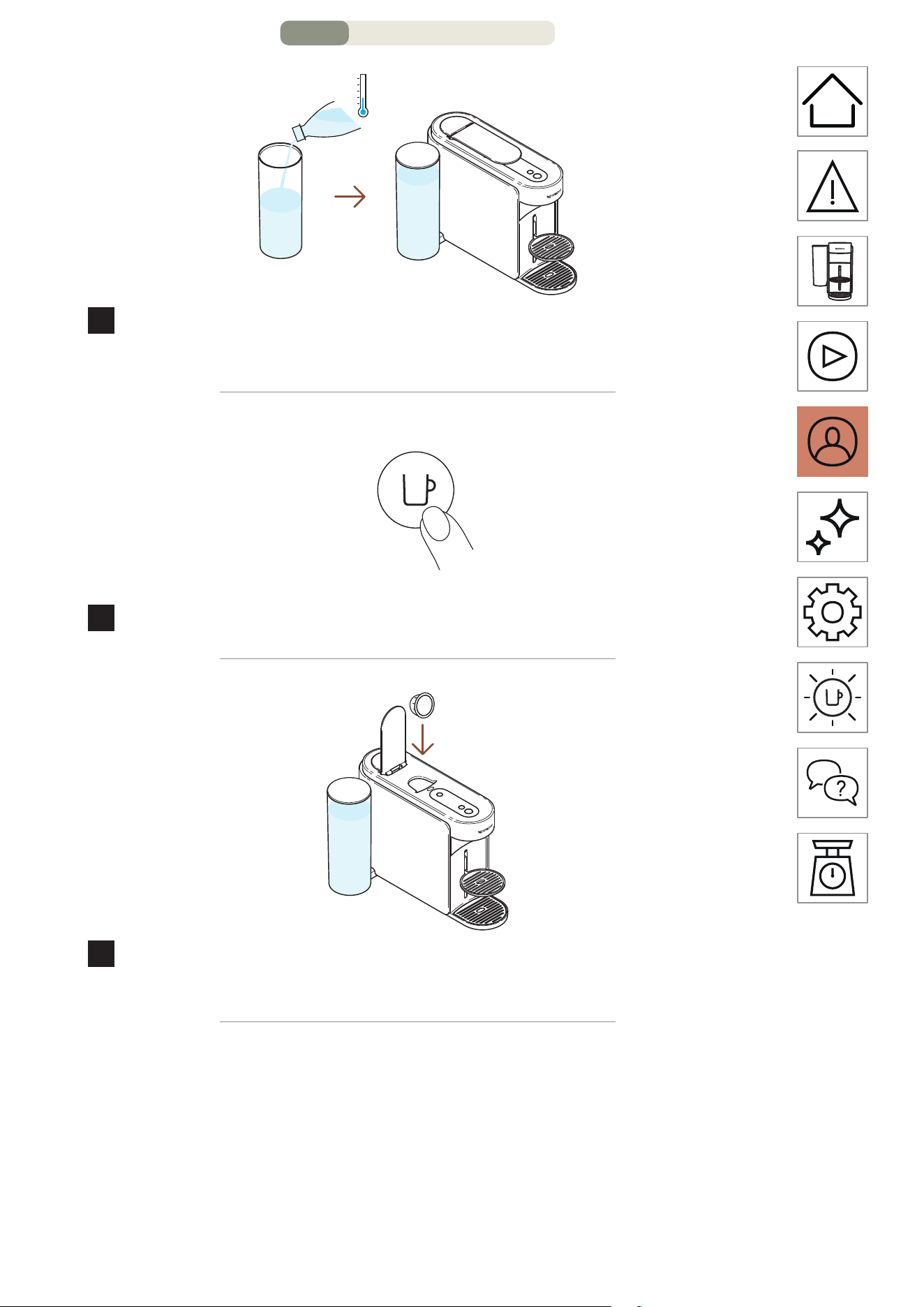
4
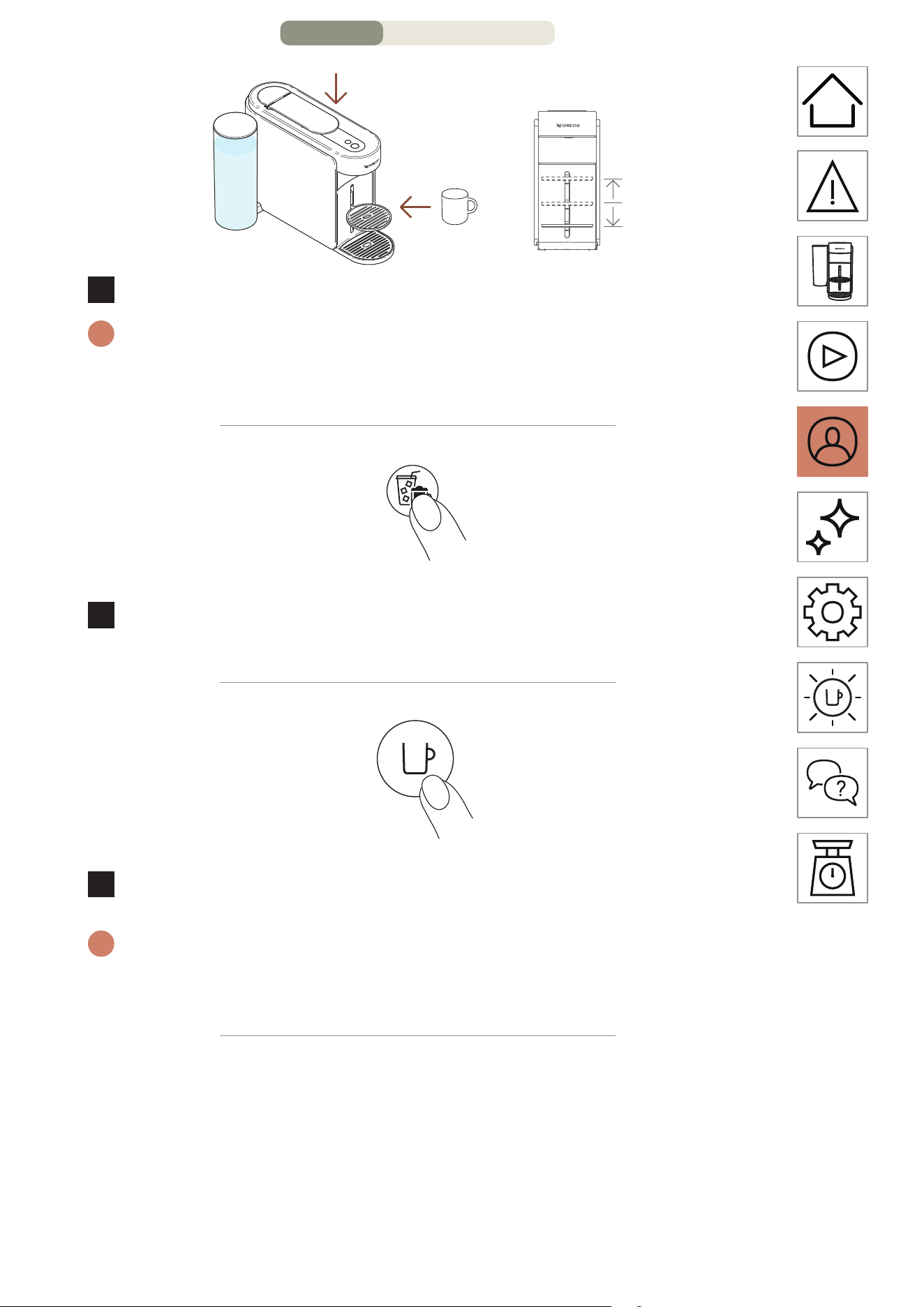
Close the machine lever and place a cup.
i
To avoid overflow, please adapt the cup size according to the volume
of the chosen capsule (pre-set or customized). The cup support can be
adjusted to accommodate your cup size.
1 time
5
To launch this concentrated brew, press the Coee Creations
buon once.
1 time
6
Start brewing by pressing the coee buon once.
i
The Coee Creations buon will turn o if the capsule cannot be
extracted through the mode and your machine will brew the coee at
the preprogrammed cup size.
CUSTOMIZE MY COFFEE MOMENTS – PAGE 3/8
EN
.
22
7
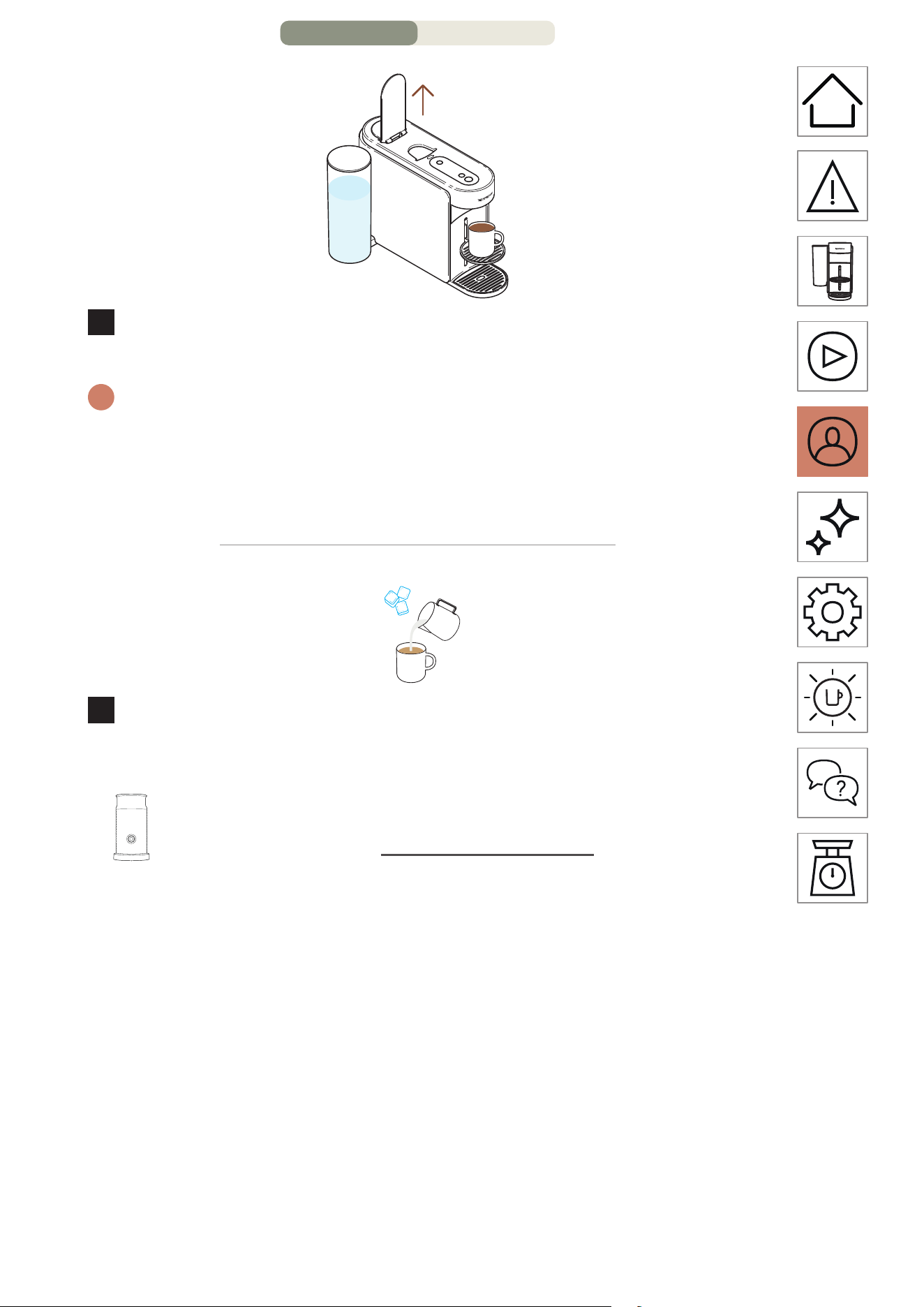
When the coee stops brewing, open the machine lever to
eject the capsule.
i
You can stop your coee extraction at any time by pressing the coee
buon once.
For the proper usage of your machine, we recommend opening
the lever once the brewing is fully completed (coee buon steady
white). Opening the lever will remove any capsule aer extraction.
8
This feature brings you a temperature-adjusted and
concentrated coee brew as a first step to make all your
over-ice and milk-based coee recipes.
Discover how to upgrade your machine with our
Aeroccino range on www.nespresso.com
CUSTOMIZE MY COFFEE MOMENTS – PAGE 4/8
EN
.
23
COFFEE VOLUME & TEMPERATURE CUSTOMISATION
(NESPRESSO SMART APP)
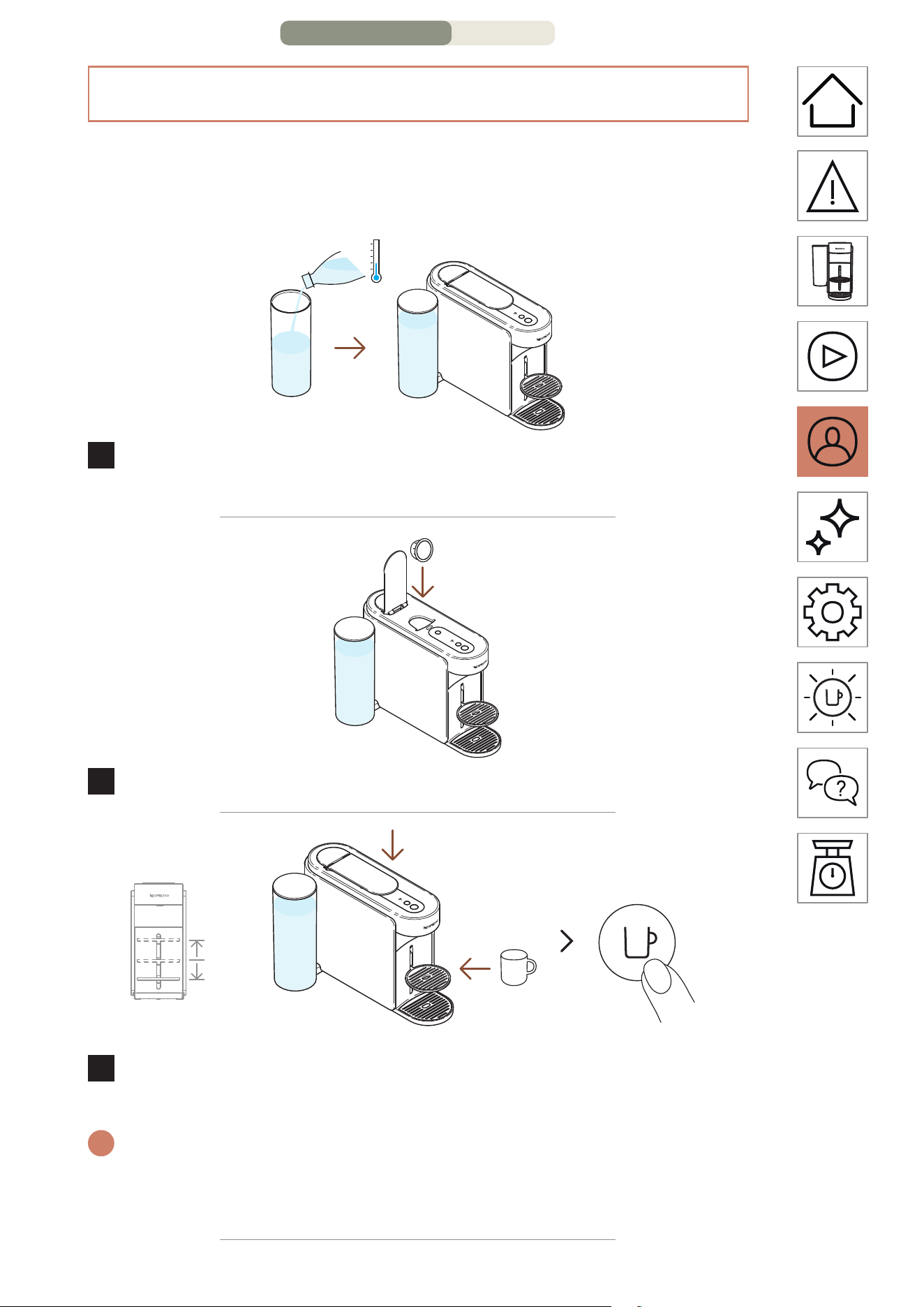
Through the Nespresso Smart App, you will be able to customize
2 main coee extraction parameters: the temperature and the
cup length.
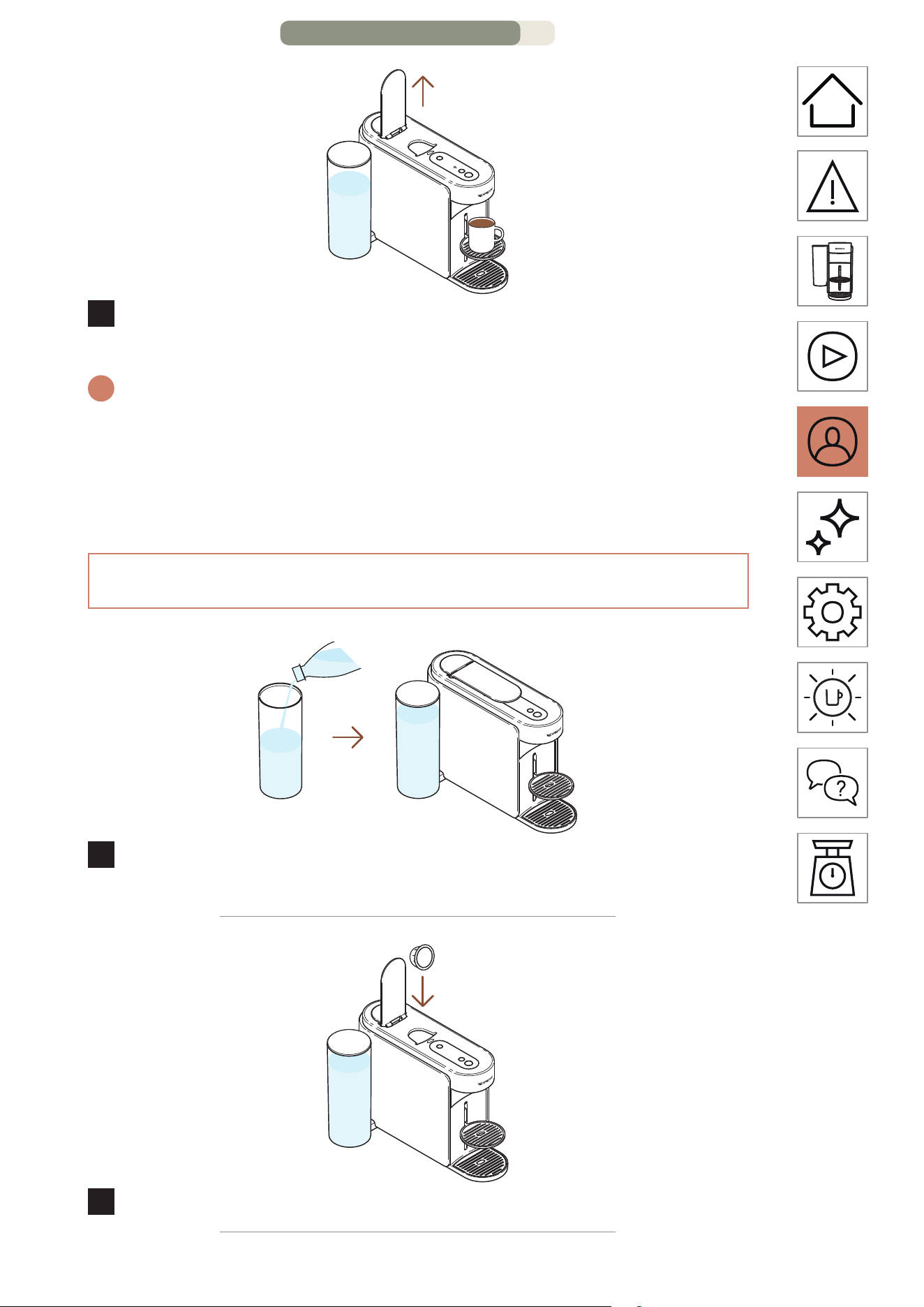
1
With the machine paired, fill the water tank with fresh
drinking water, close with the lid and put it back in position.
2
Open the machine lever and insert one Vertuo capsule.
ON
1 time
3
Close the machine lever, place a cup and turn the machine
on by pressing the coee buon once.
i
To avoid overflow, please adapt the cup size according to the cup
length of the chosen capsule (pre-set or customized). The cup support
can be adjusted to accommodate your cup size.
CUSTOMIZE MY COFFEE MOMENTS – PAGE 5/8
EN
.
24
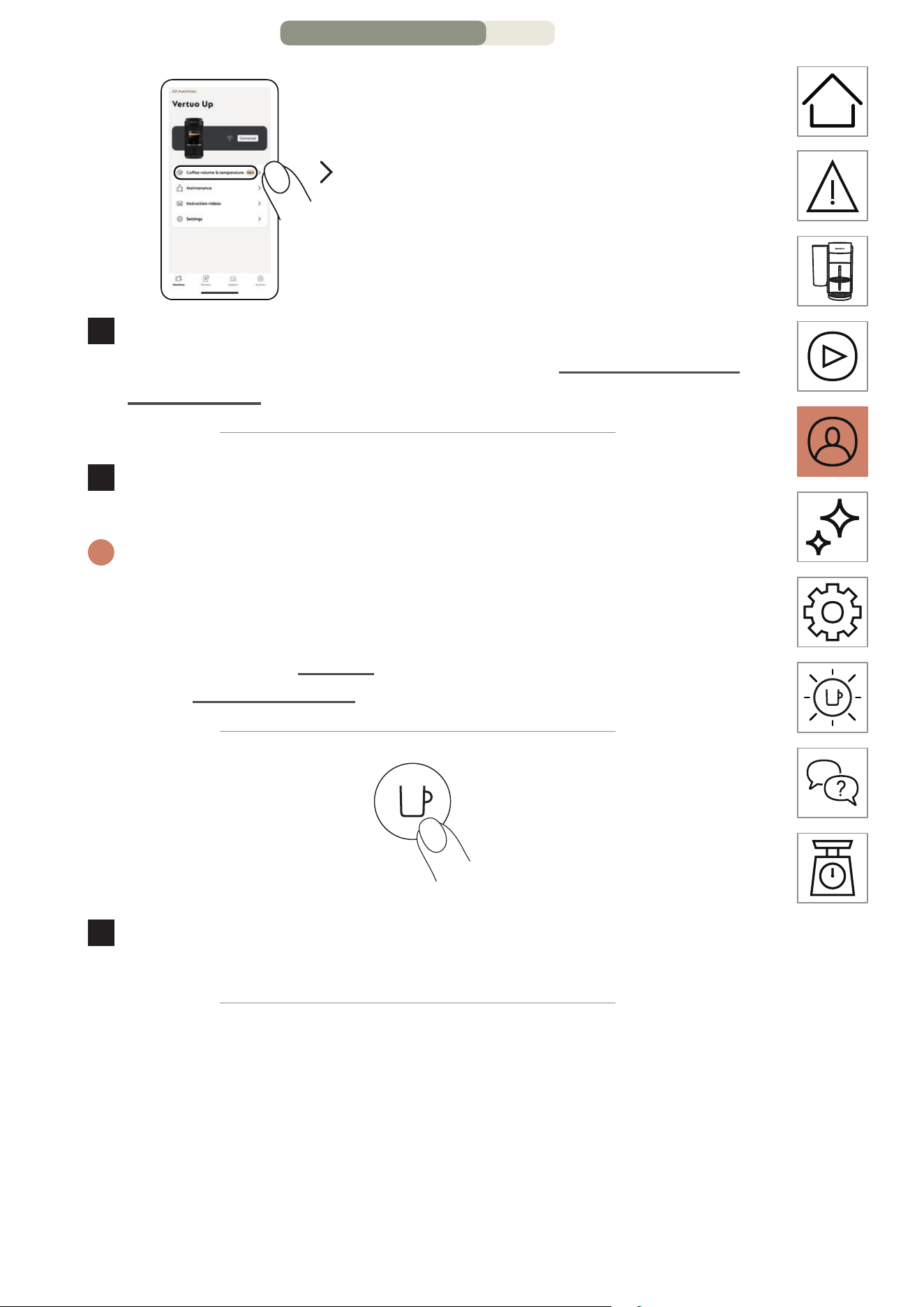
“Coee volume & temperature”
4
Open your Nespresso Smart App (within 2 minutes once
you turned on your machine) and click on “Coee volume &
temperature”.
5
Personalize the temperature or/and the volume according to
your taste and save this configuration.
i
The updated parameters are programmed on the machine by cup
length. Once a customer-specific seing is programmed, every time
the cup length is inserted in the machine, the brewing will stop
at the user-programmed cup length. To come back to the default
parameters, check “Seings” section on the Nespresso Smart App or
on the “Reset my seings” section.
1 time
6
Start brewing your personalized coee by pressing the
coee buon once.
CUSTOMIZE MY COFFEE MOMENTS – PAGE 6/8
EN
.
25
7
When the coee stops brewing, open the machine lever to
eject the capsule and enjoy your coee.
i
For the proper usage of your machine, we recommend opening
the lever once the brewing is fully completed (coee buon steady
white). Opening the lever will remove any capsule aer extraction.
You can stop your coee extraction at any time by pressing the coee
buon once.
ADAPT YOUR COFFEE VOLUMES (ON THE MACHINE)
1
Fill the water tank with fresh drinking water, close with the lid
and put it back in position.
2
Open the machine lever and insert one Vertuo capsule.
CUSTOMIZE MY COFFEE MOMENTS – PAGE 7/8
EN
.
26
ON
1 time
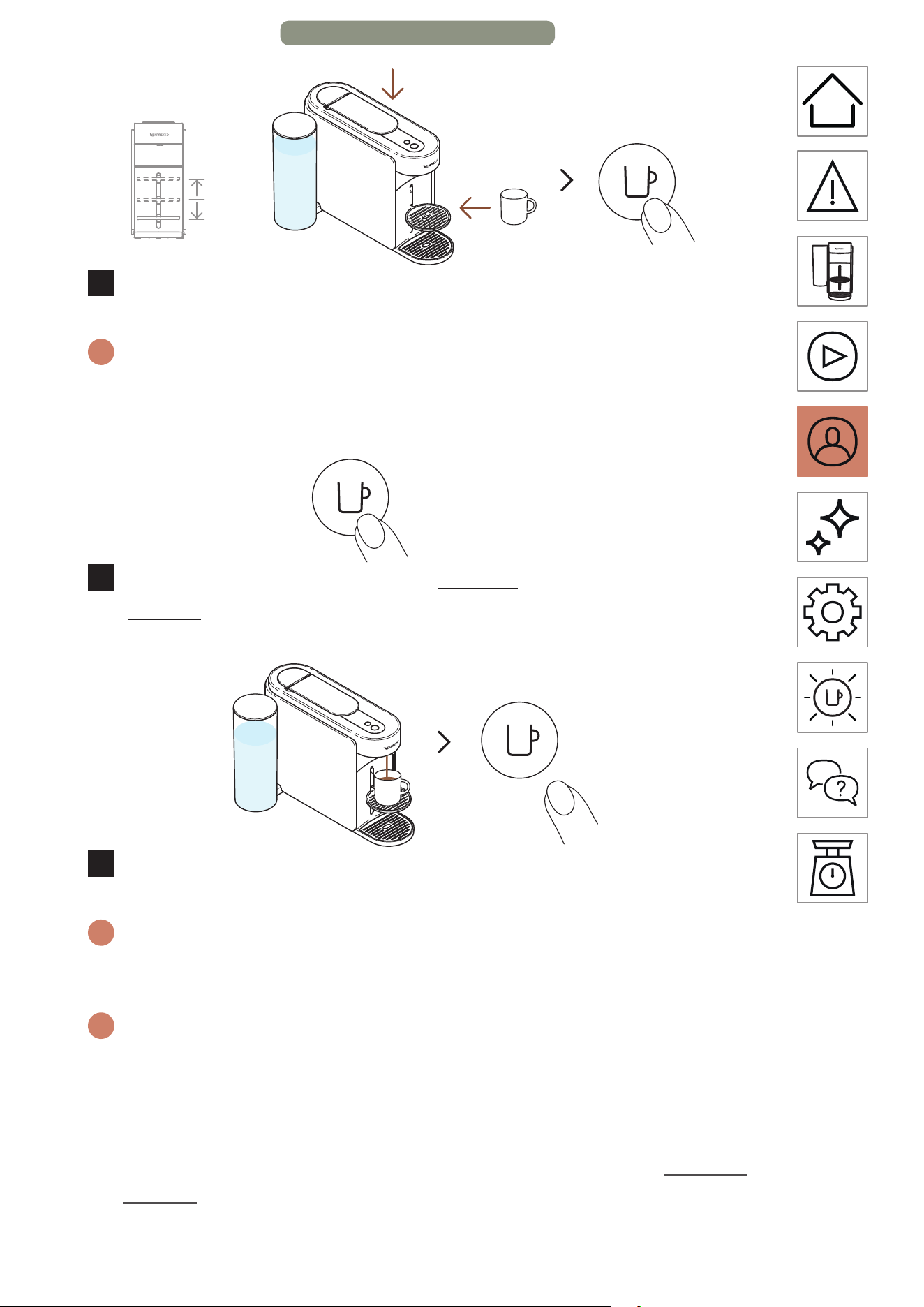
3
Close the machine lever, place a cup and turn the machine
on by pressing the coee buon once.
i
To avoid overflow, please adapt the cup size according to the volume
of the chosen capsule (pre-set or customized). The cup support can be
adjusted to accommodate your cup size.
> 5 seconds
4
Start brewing by pressing and holding the coee buon for
at least 5 seconds.
5
Once the desired volume is reached, release the coee buon.
Some coee drops might continue to flow for a few seconds.
i
For the proper usage of your machine, we recommend opening
the lever once the brewing is fully completed (coee buon steady
white). Opening the lever will remove any capsule aer extraction.
i
The programming is specific to each cup size. The cup sizes may be
programmed from 20 mL (0.7 fl oz) to 500 mL (17 fl oz, except Coee
Pour-Over Style where it can go up to 1 L (34 fl oz). Once a customer-
specific seing is programmed, every time the cup size is inserted in
the machine, the preparation will stop at the same user-programmed
cup size. To come back to the default parameters, check the “Machine
seings” section.
CUSTOMIZE MY COFFEE MOMENTS – PAGE 8/8
EN
.
27
MAINTENANCE
SHORT RINSING
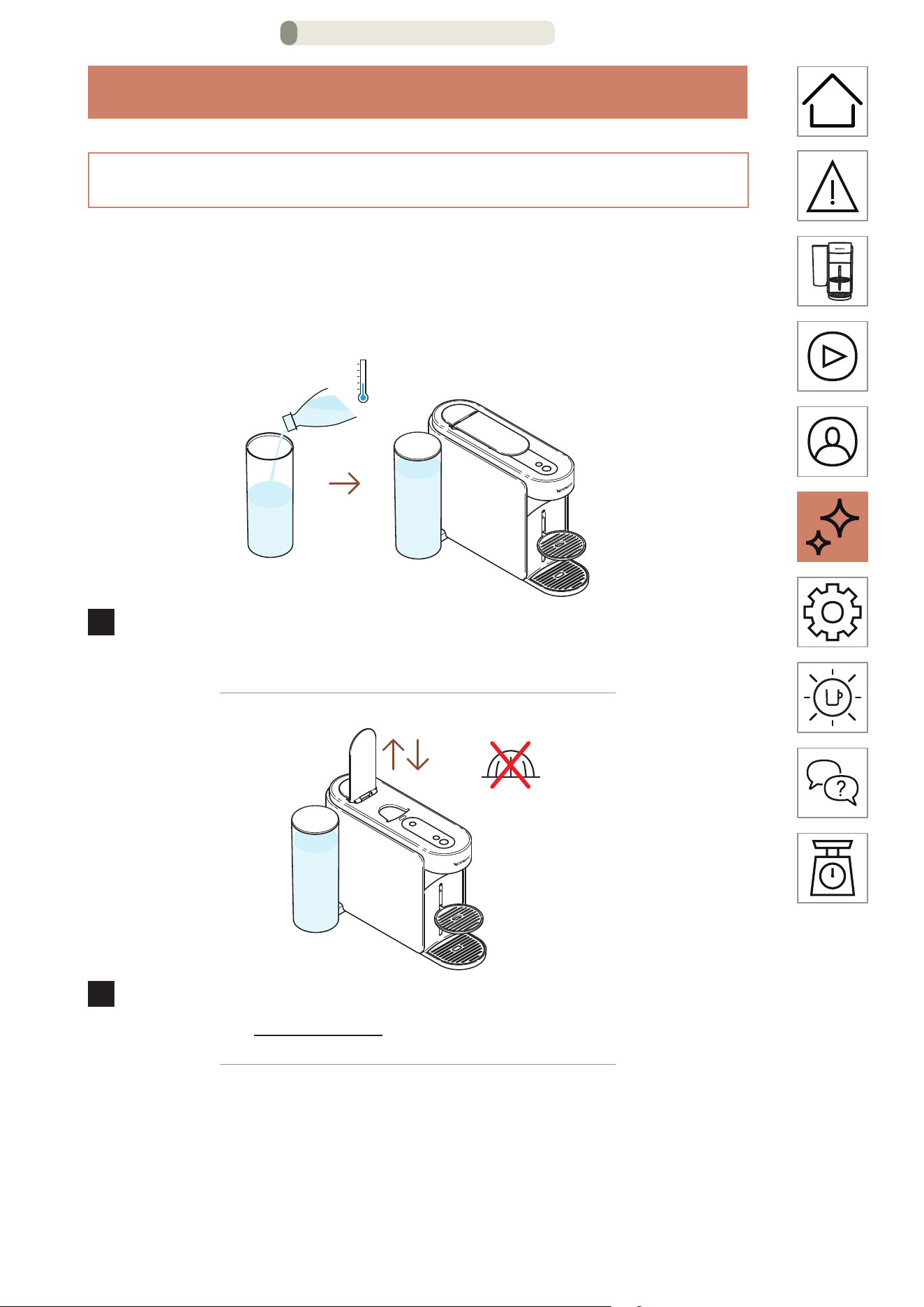
You want to pre-heat your cup or quickly rinse your machine
aer a flavoured coee? Your Vertuo Up machine oers a short
rinsing option.
1
Fill the water tank with fresh drinking water, close with the lid
and put it back in position.
2
Open and close the machine lever to eject the previous
capsule and do not place any new capsule.
MAINTENANCE – PAGE 1/16
EN
.
28
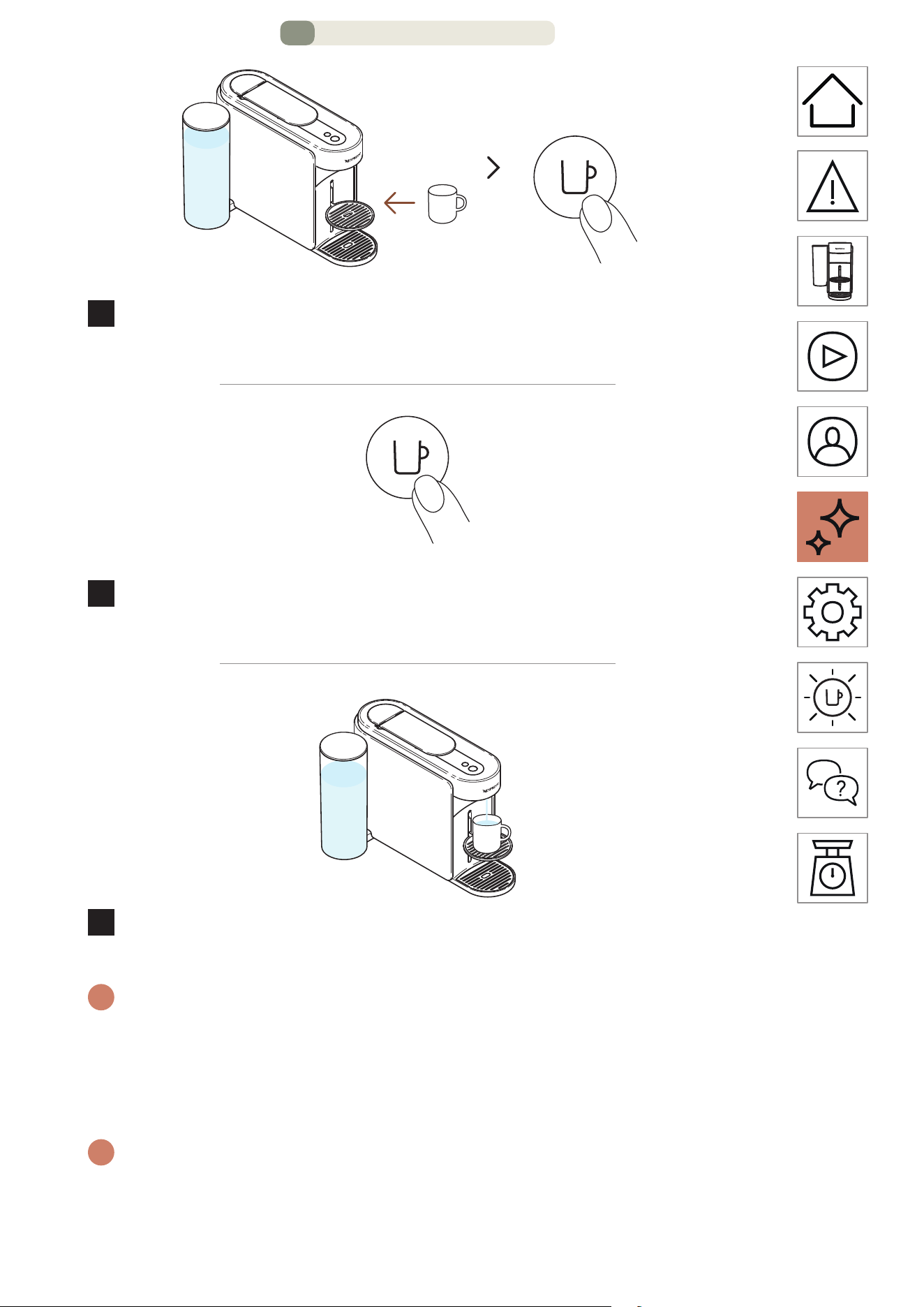
ON
1 time
3
Place a cup and turn the machine on by pressing the coee
buon once.
1 time
4
Start brewing by pressing the coee buon once, without
any capsule.
5
~40 mL (~1.35 fl oz) of hot water will be brewed. This
brewing won’t be drinkable.
i
You can stop the brewing at any time by pressing the coee buon
once.
For the proper usage of your machine, we recommend opening
the lever once the brewing is fully completed (coee buon steady
white).
i
Water may accumulate in the maintenance module during the
process. Please empty the maintenance module when the capsule
basket is full or aer any maintenance process (cleaning, descaling,
emptying, etc.).
MAINTENANCE – PAGE 2/16
EN
.
29
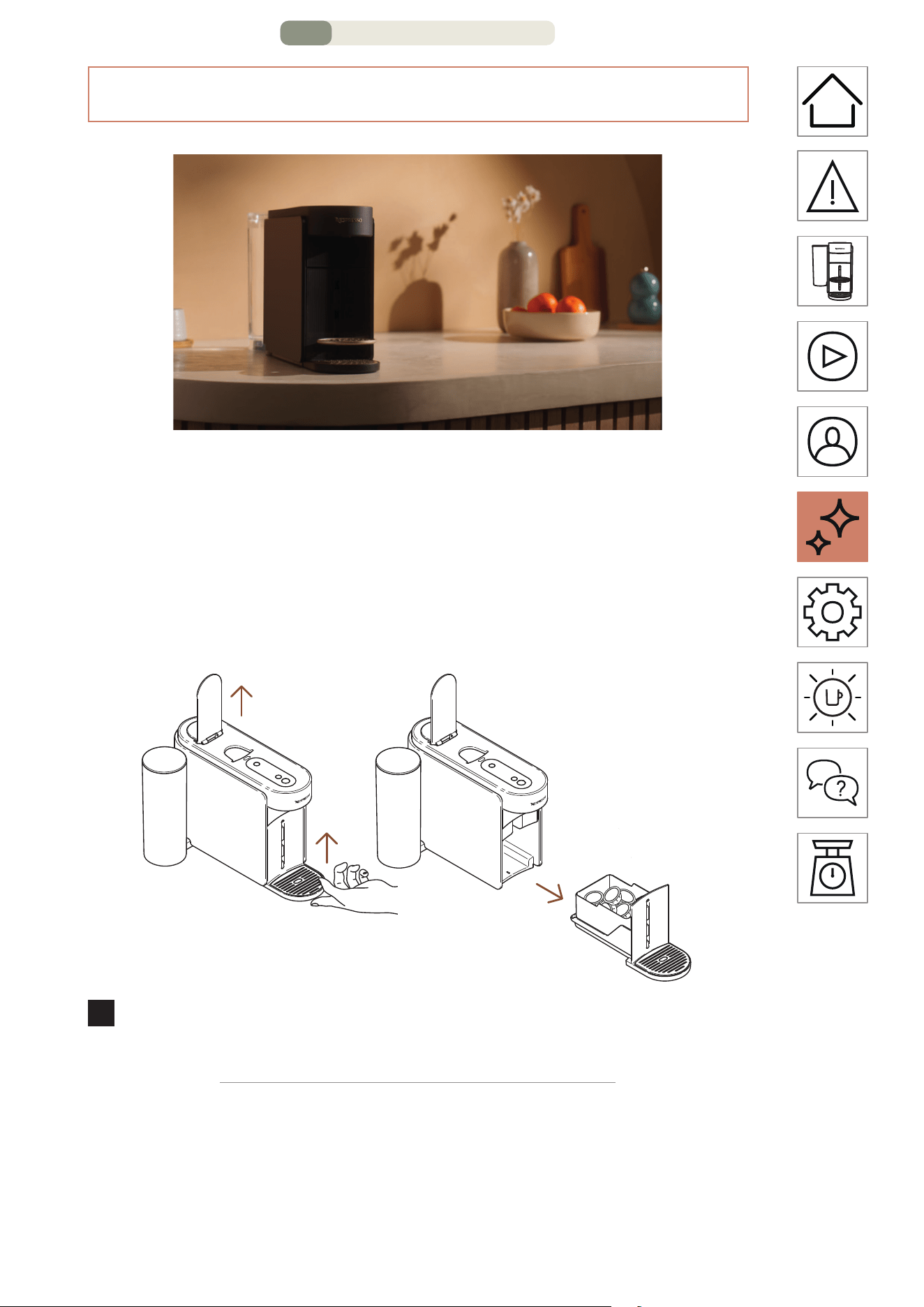
CLEANING
Clean your machine monthly, when you start having coee
residue in your cup or aer a long period of non-use.
This procedure can be easily done through the Nespresso Smart
App once the machine is connected.
1
Open the machine lever to eject the capsule and remove the
maintenance module.
MAINTENANCE – PAGE 3/16
EN
.
30
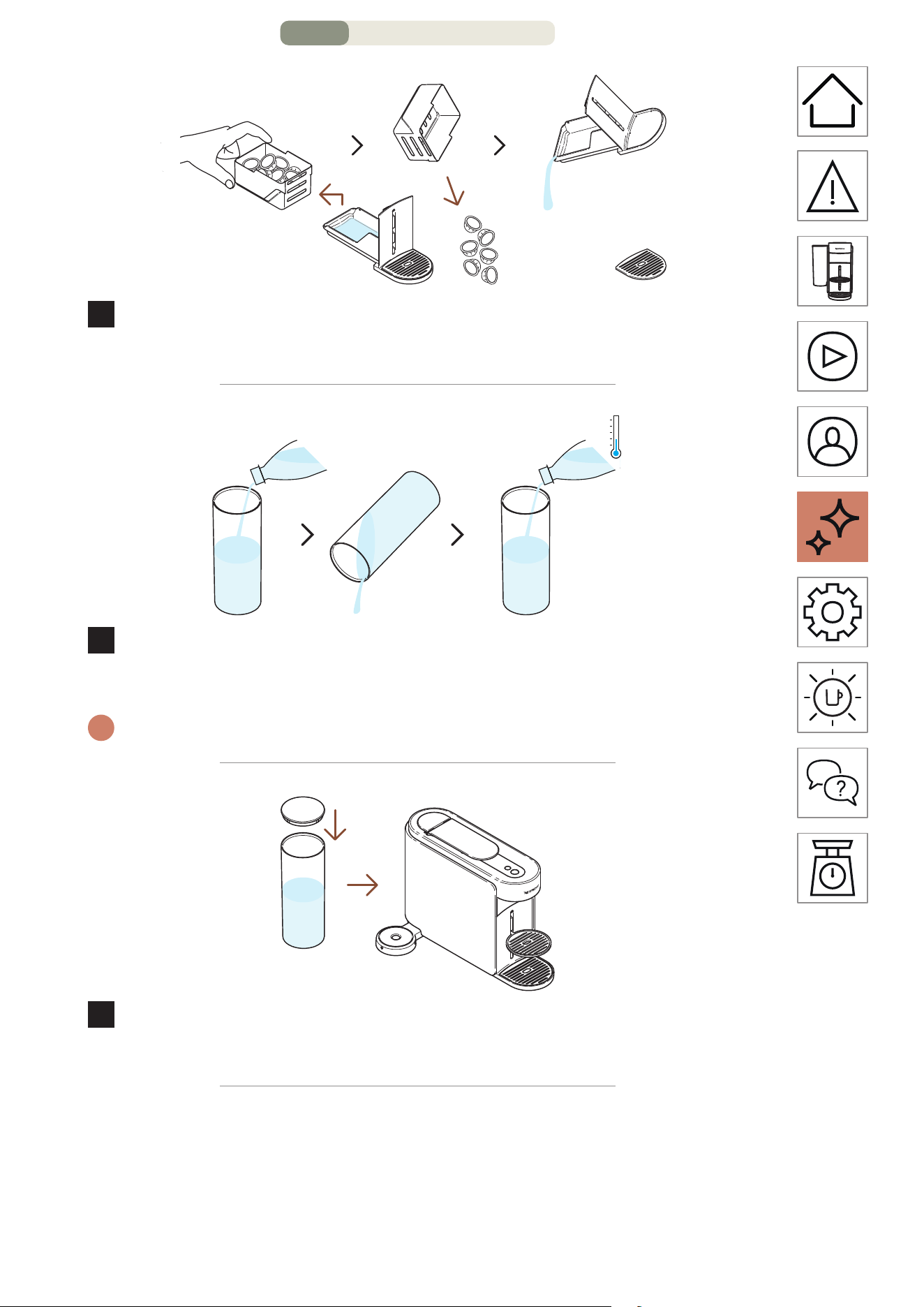
2
Empty the capsule basket if needed, along with any
remaining coee/water residue.
3
Rinse the water tank before filling it only with fresh drinking
water (0.5 L / 17 fl oz).
i
Please ensure the water tank is filled only once during this procedure.
4
Close the water tank with the lid and put it back in position
on the machine.
MAINTENANCE – PAGE 4/16
EN
.
31
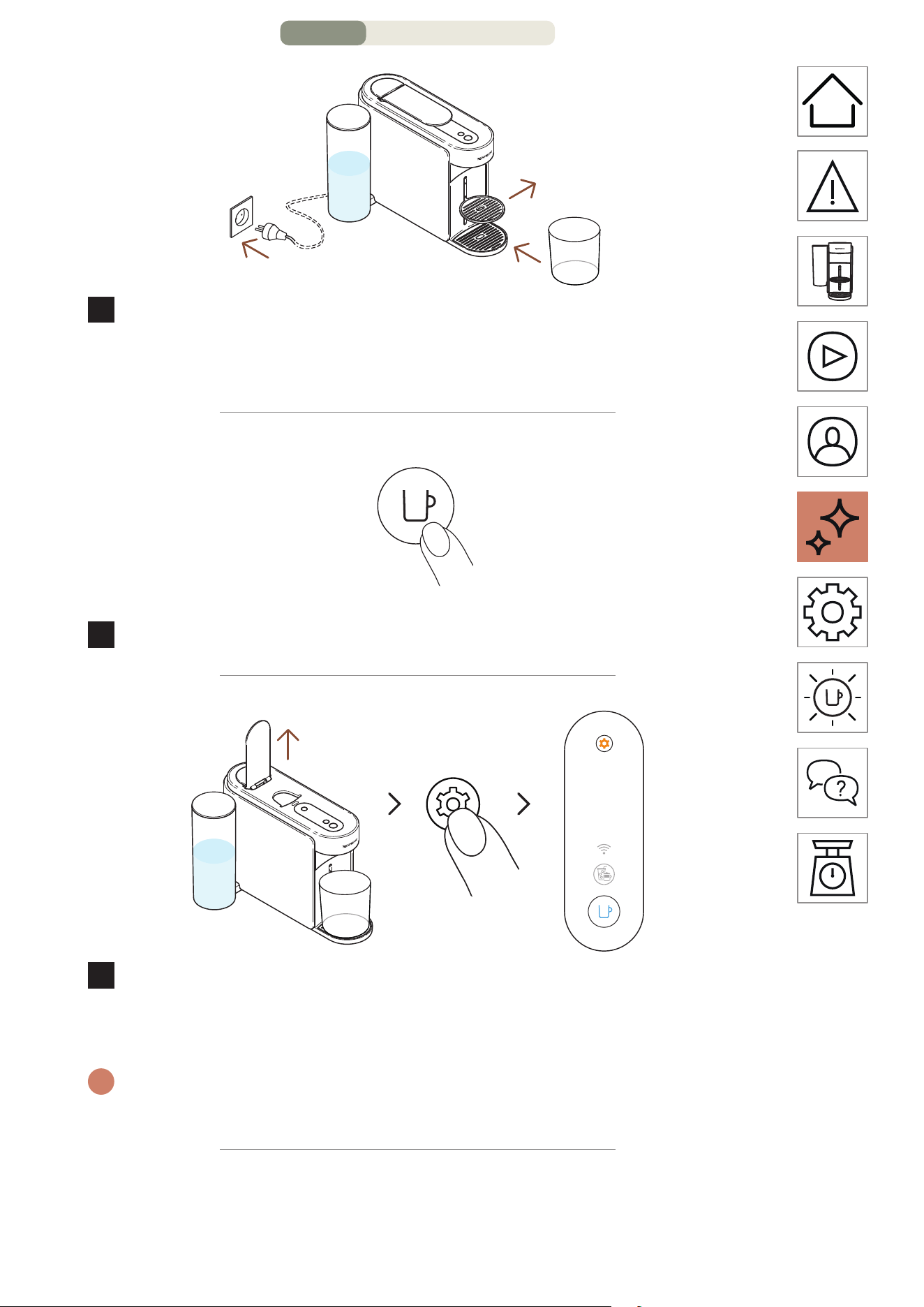
1 L
34 fl oz
5
With the machine plugged in, remove the cup support and
place an empty container (at least 1 L / 34 fl oz) under the
coee outlet.
ON
1 time
6
Turn on the machine by pressing the coee buon once.
3 seconds
7
Open the machine lever. Press and hold the maintenance
buon for at least 3 seconds. Release it when the coee
buon appears steady blue.
i
To leave the maintenance mode before launching any procedure,
please hold again the maintenance buon for at least 3 seconds.
MAINTENANCE – PAGE 5/16
EN
.
32
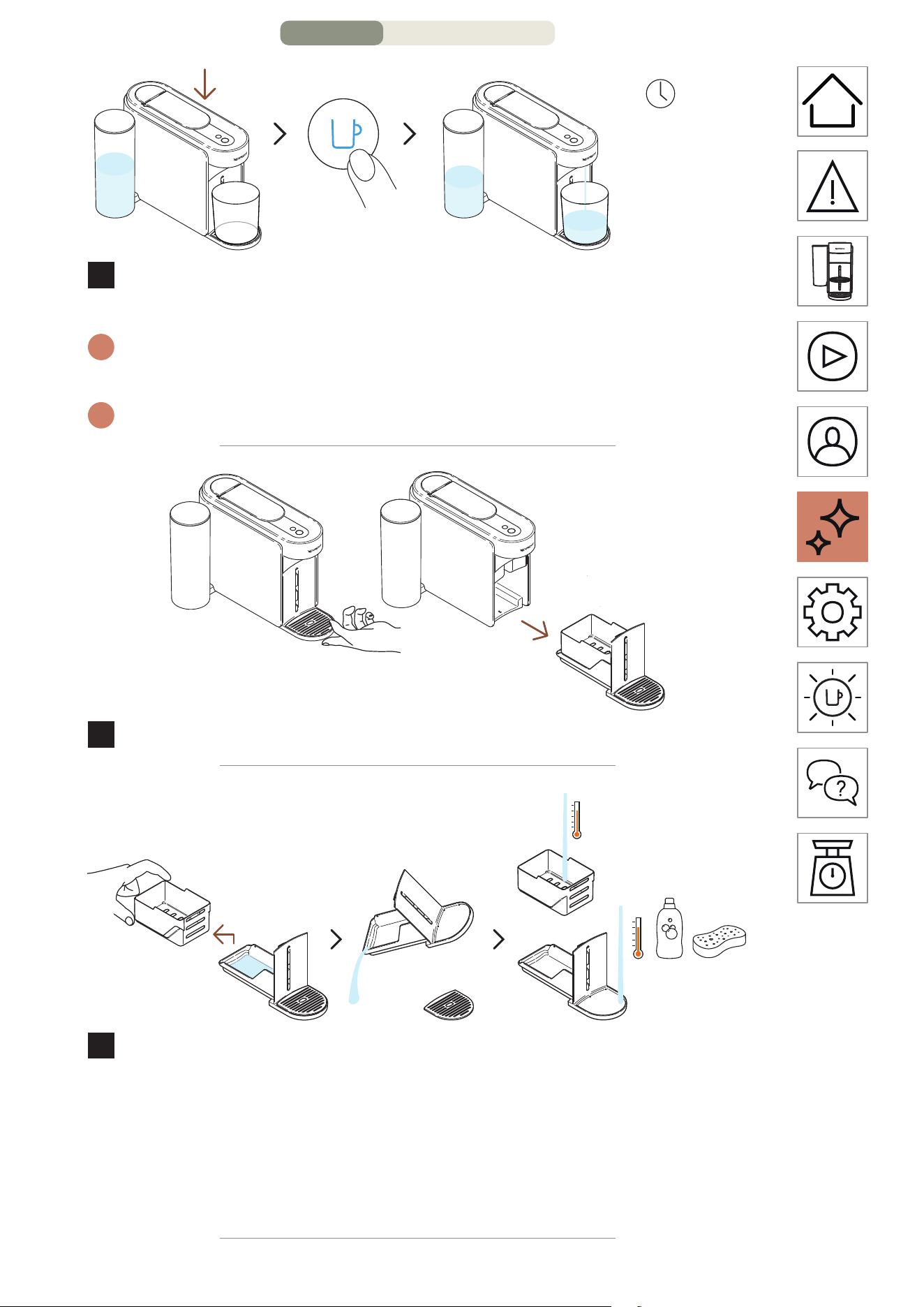
1 time
~3 minutes
8
Close the lever and press the blue coee buon once to
launch the process.
i
The machine will start rinsing and the procedure may take up to
3 minutes.
i
Water may accumulate in the maintenance module during rinsing.
9
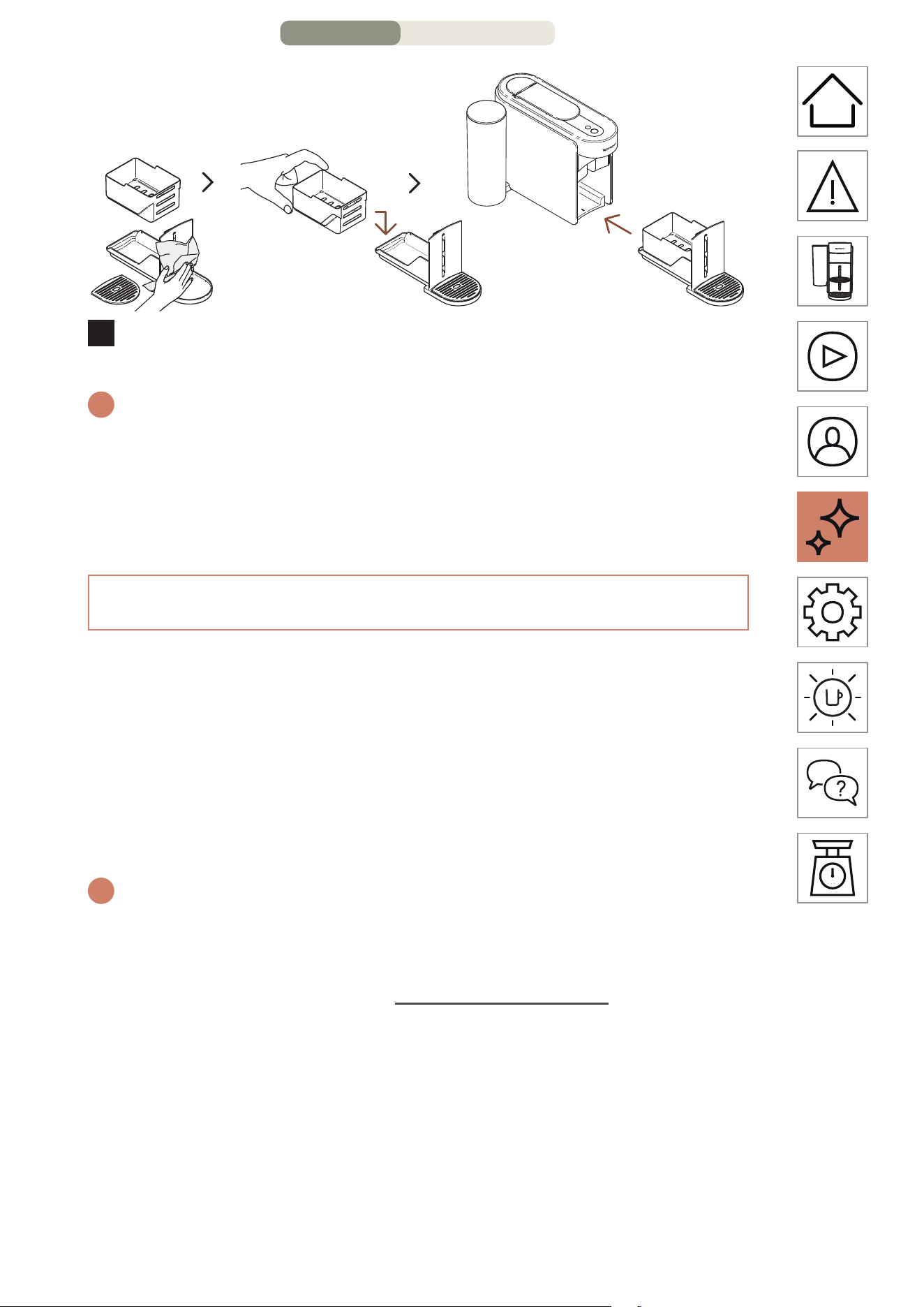
Remove the maintenance module from the machine.
10
Separate the capsule basket from the rest and empty any
remaining water. Wash the maintenance module with hot
water and mild odourless detergent.
CAUTION: Do not use any strong or abrasive cleaning agent or solvent
cleaner. Do not put the machine in a dishwasher. Never immerse the
appliance or part of it in water.
MAINTENANCE – PAGE 6/16
EN
.
33
11
Dry the maintenance module with a clean and fresh cloth
and place it back on the machine.
i
The machine will go back to ready mode when the procedure will be
completed (coee buon steady white).
CAUTION: Clean the coee outlet regularly with clean damp cloth.
Always use so cloths to clean the machine.
DESCALING
Descale your machine will ensure that it functions properly
throughout its lifetime and will make your coee experience as
incomparable as it was the first day. Your machine will indicate
when the descaling is needed when the maintenance buon
will be steady orange.
This procedure can be easily done through the Nespresso Smart
App once the machine is connected.
i
The descaling process takes ~15 minutes and cannot be interrupted
once launched.
You will need:
• A descaling kit available on www.nespresso.com
• An empty container (1.5 L / 51 fl oz)
MAINTENANCE – PAGE 7/16
EN
.
34
1ST CYCLE: DESCALING
1
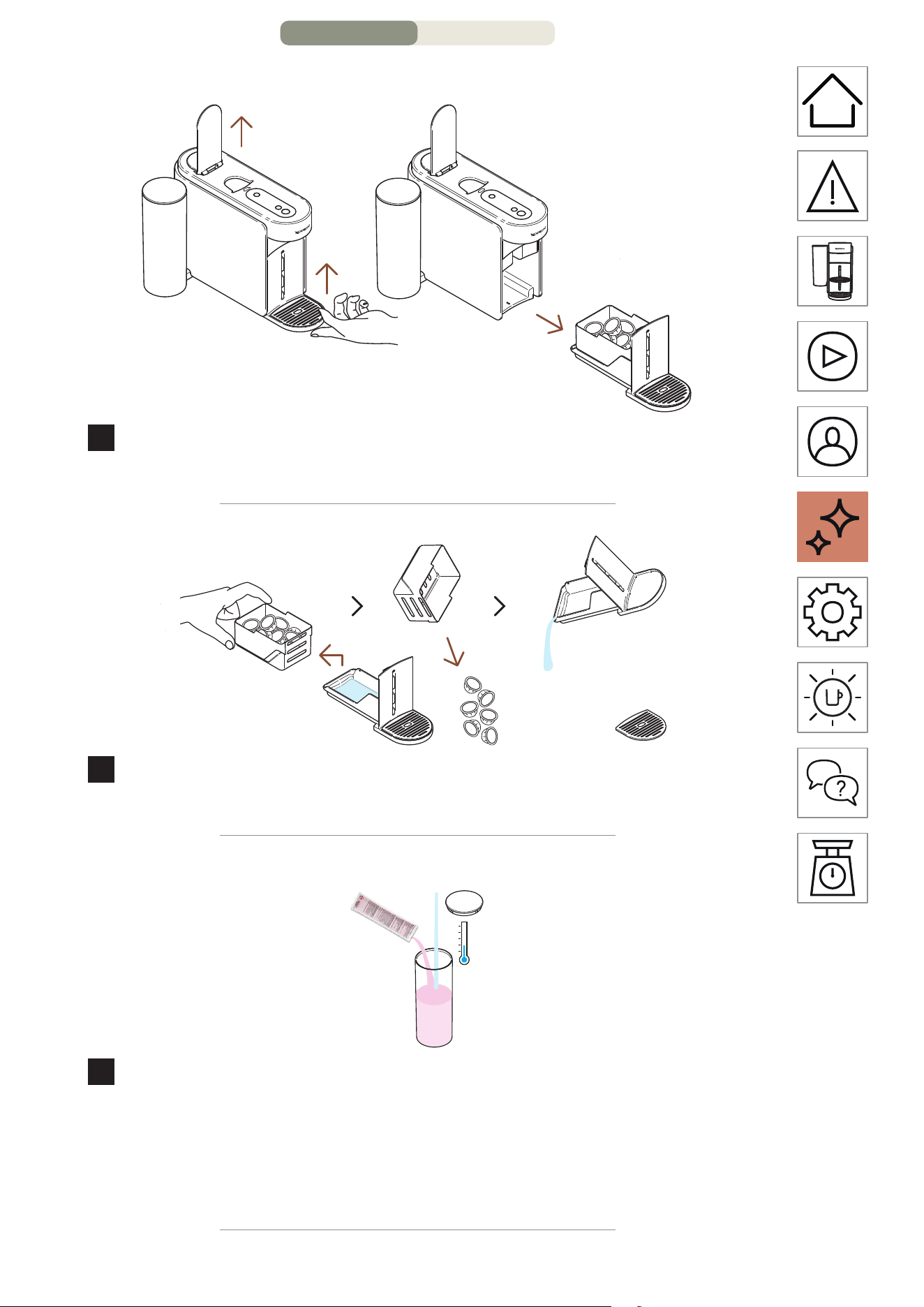
Open the machine lever to eject the used capsule. Remove
the maintenance module from the machine.
2
Separate the capsule basket from the rest and empty any
remaining coee/water residue.
1x
0.6 L
20 fl oz
3
Fill the water tank with 0.6 L / 20 fl oz of water, add 1 unit of
Nespresso descaling liquid and close the water tank with the
lid.
CAUTION: Please note that the descaling liquid can be harmful. Avoid
contact with eyes, skin and surfaces.
MAINTENANCE – PAGE 8/16
EN
.
35
1.5 L
51 fl oz
4
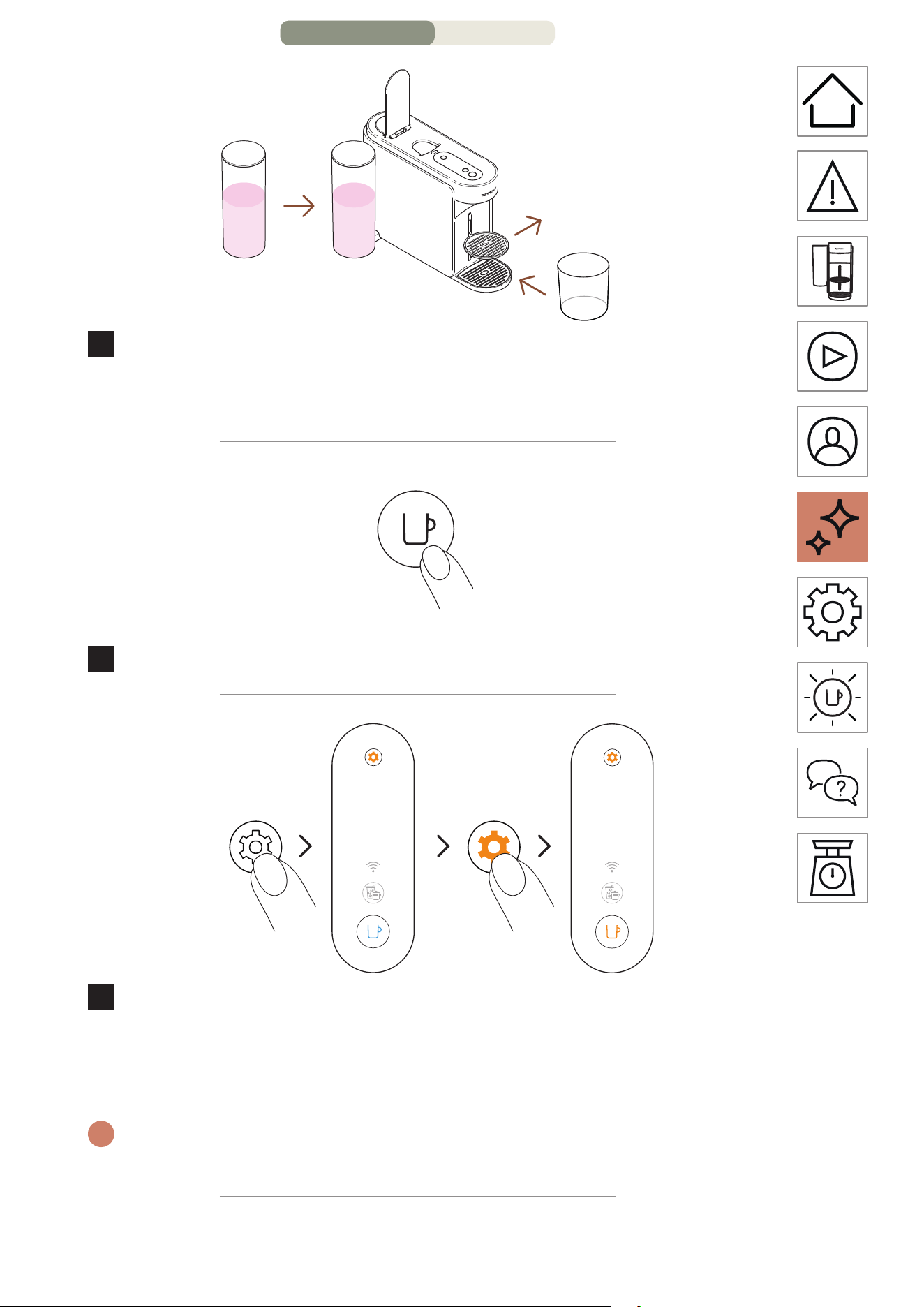
Put the water tank back in position on the machine. Remove
the cup support and place an empty container (at least
1.5 L / 51 fl oz) under the coee outlet.
ON
1 time
5
Turn on the machine by pressing the coee buon once.
2 times
3 seconds
6
Press and hold the maintenance buon for at least
3 seconds. Once the coee buon is steady blue, release
it and press twice on the maintenance buon. The coee
buon should appear steady orange.
i
To leave the maintenance mode before launching any procedure,
please hold again the maintenance buon for at least 3 seconds.
MAINTENANCE – PAGE 9/16
EN
.
36
~5 minutes
1 time
7
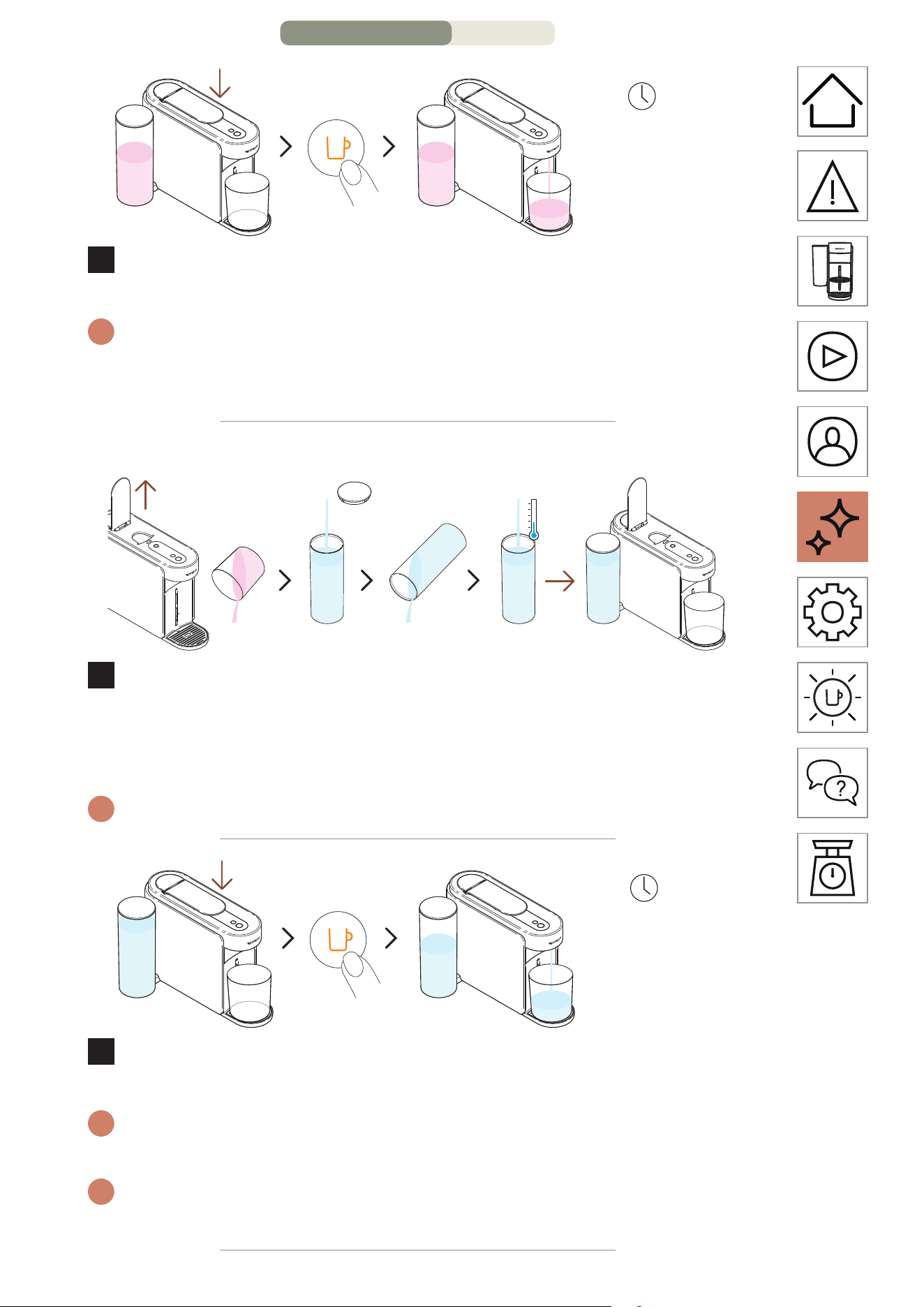
Close the lever and press the orange coee buon once to
launch the first descaling cycle.
i
The machine will start the first descaling cycle; the procedure may
take up to 5 minutes and the machine will pause automatically when
completed.
2ND CYCLE: RINSING
8
Once the first descaling cycle is done, it is time to rinse the
machine. Open the machine lever, empty the container, rinse
the water tank and fill it entirely with fresh drinking water.
Put it back in place.
i
Please ensure the water tank is filled only once during this procedure.
~4 minutes
1 time
9
Close the lever and press the orange coee buon once
again to launch the rinsing phase of the descaling process.
i
The rinsing procedure may take up to 4 minutes and the machine will
stop automatically when completed.
i
Water may accumulate in the maintenance module during the
process.
MAINTENANCE – PAGE 10/16
EN
.
37
10
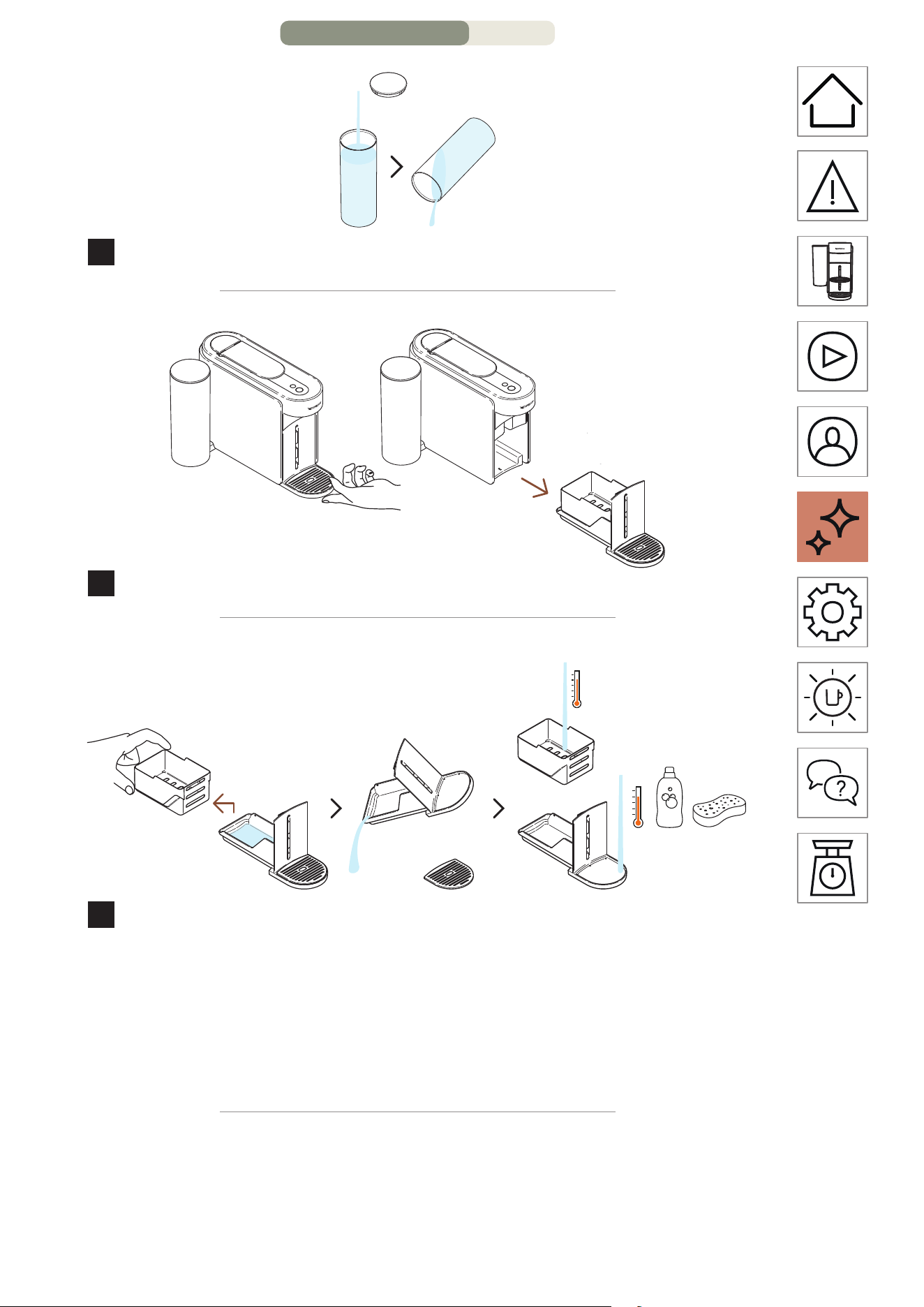
Rinse the water tank.
11
Remove the maintenance module from the machine.
12
Separate the capsule basket from the rest and empty any
remaining water. Wash the maintenance module with hot
water and mild odourless detergent.
CAUTION: Do not use any strong or abrasive cleaning agent or solvent
cleaner. Do not put the machine in a dishwasher. Never immerse the
appliance or part of it in water.
MAINTENANCE – PAGE 11/16
EN
.
38
10 minutes
13
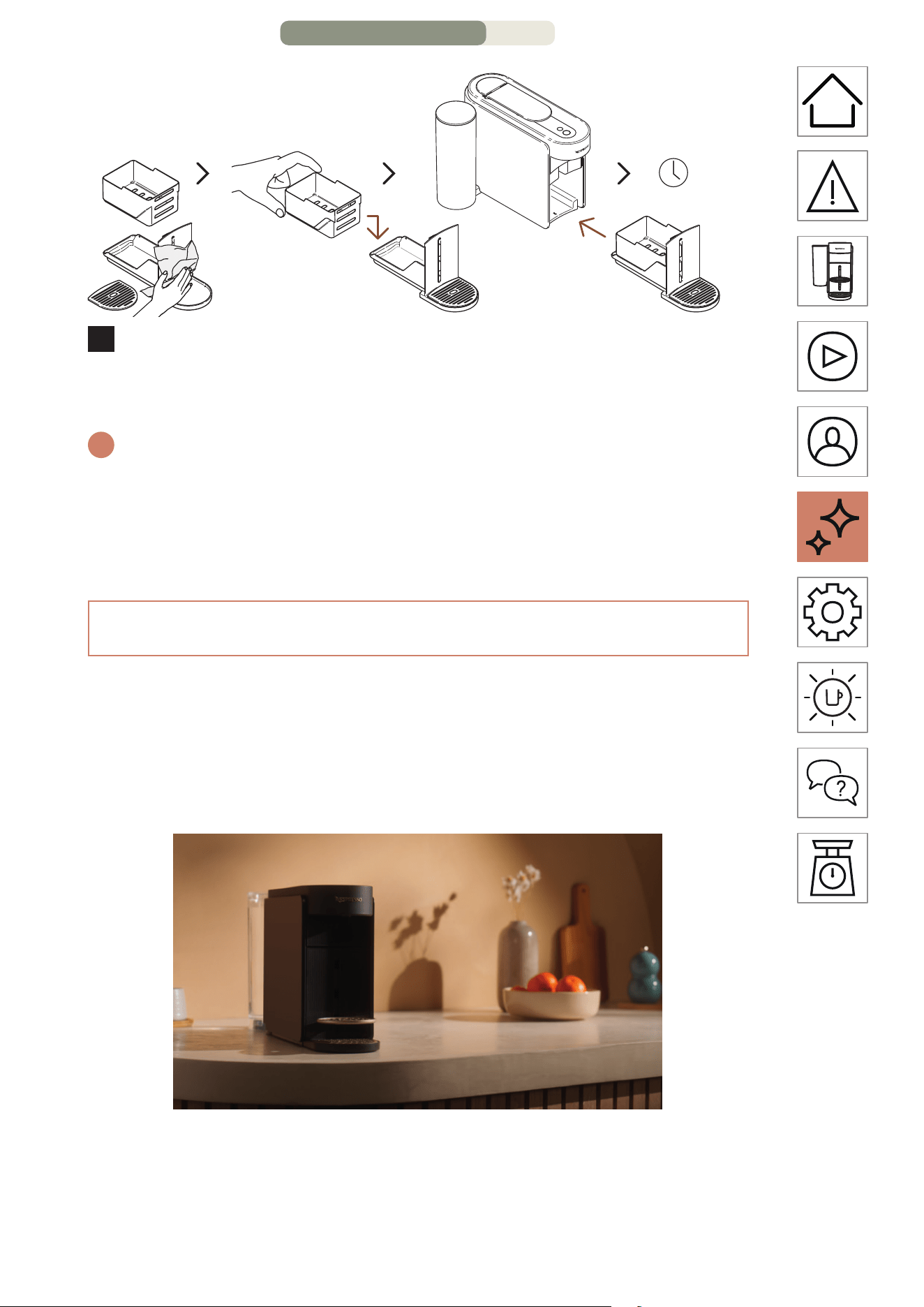
Dry the maintenance module with a clean and fresh cloth
and place it back on the machine. Let the machine rest for 10
minutes before using it.
i
The machine will stop and automatically turn o once the procedure is
completed.
CAUTION: Clean the coee outlet regularly with clean damp cloth.
Always use so cloths to clean the machine.
EMPTYING THE PIPES
Emptying the pipes is a process that could be done before a
period of non-use, for frost protection or prior to sending the
machine for a repair. This procedure can be easily done through
the Nespresso Smart App once the machine is connected.
MAINTENANCE – PAGE 12/16
EN
.
41
3 seconds
1 time
7
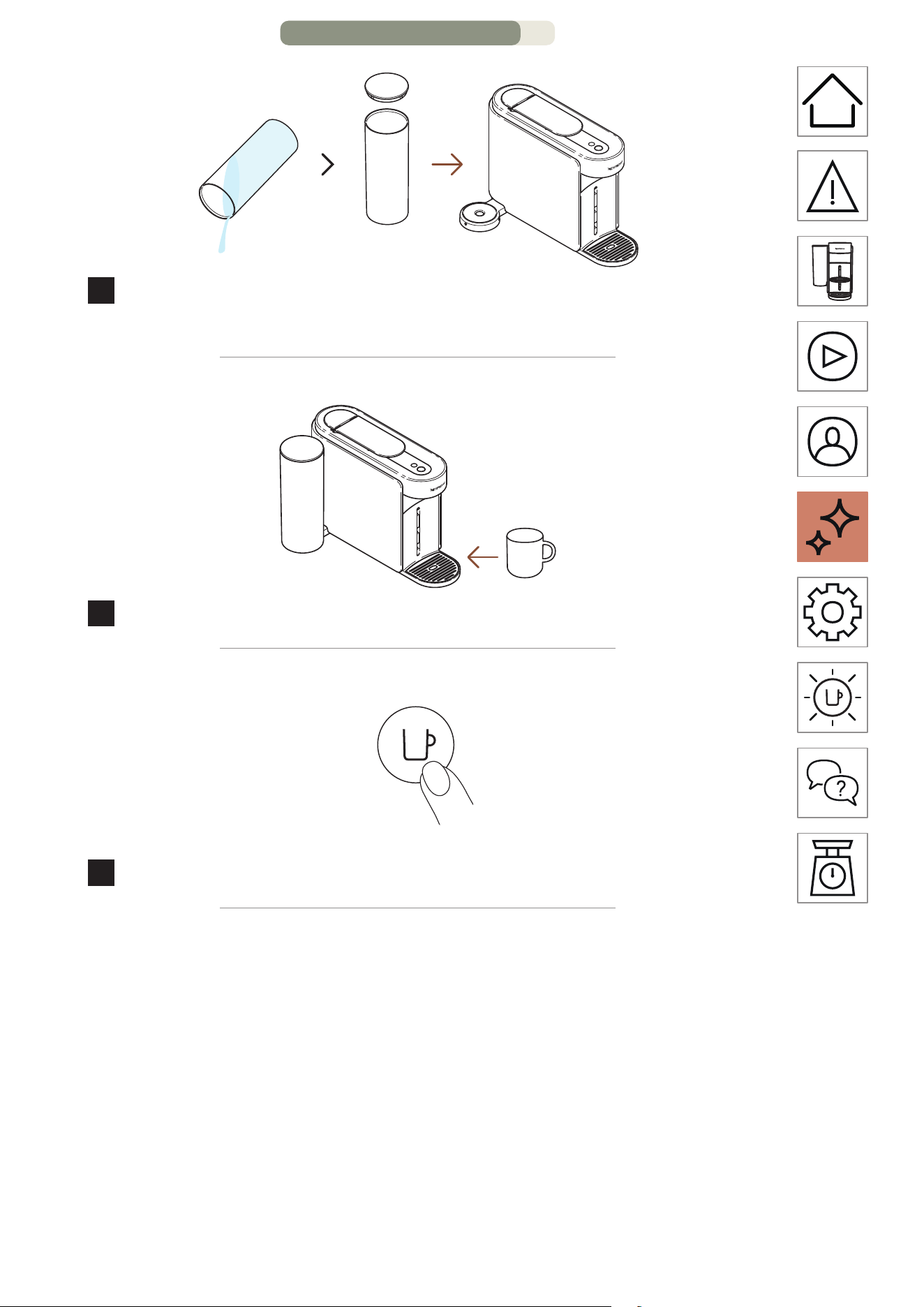
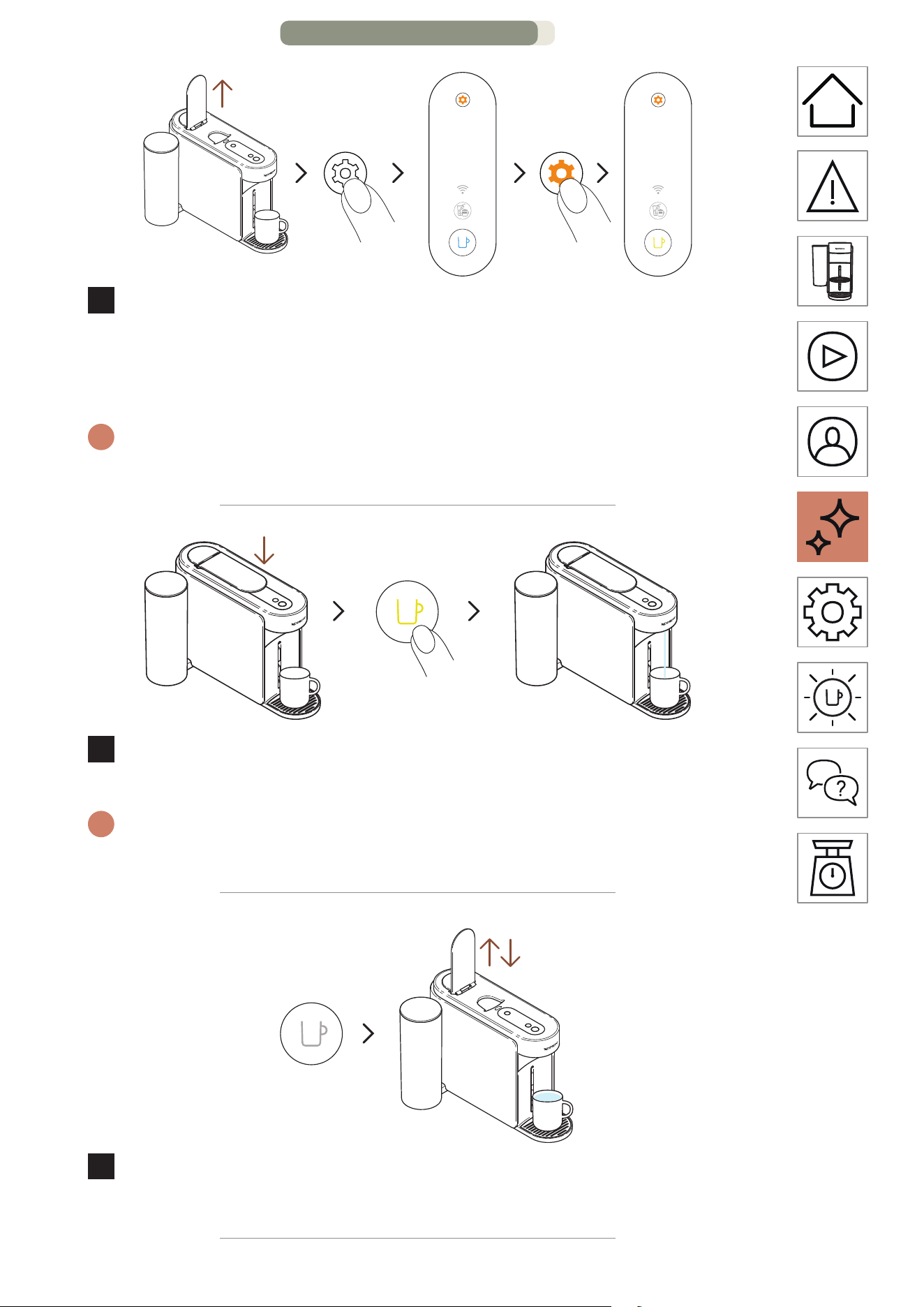
Open the machine lever. Press and hold the maintenance
buon for at least 3 seconds. Once the coee buon is
steady blue, release it and press the maintenance buon
once again. The coee buon should appear steady yellow.
i
To leave the maintenance mode before launching any procedure,
please hold again the maintenance buon for at least 3 seconds.
1 time
8
Close the lever and press the yellow coee buon once to
launch the emptying process.
i
The coee buon will blink yellow during the process and will turn
turn o once the procedure is completed.
9
Once the procedure is completed (coee buon is o),
open and close the machine lever.
MAINTENANCE – PAGE 15/16
EN
.
42
10
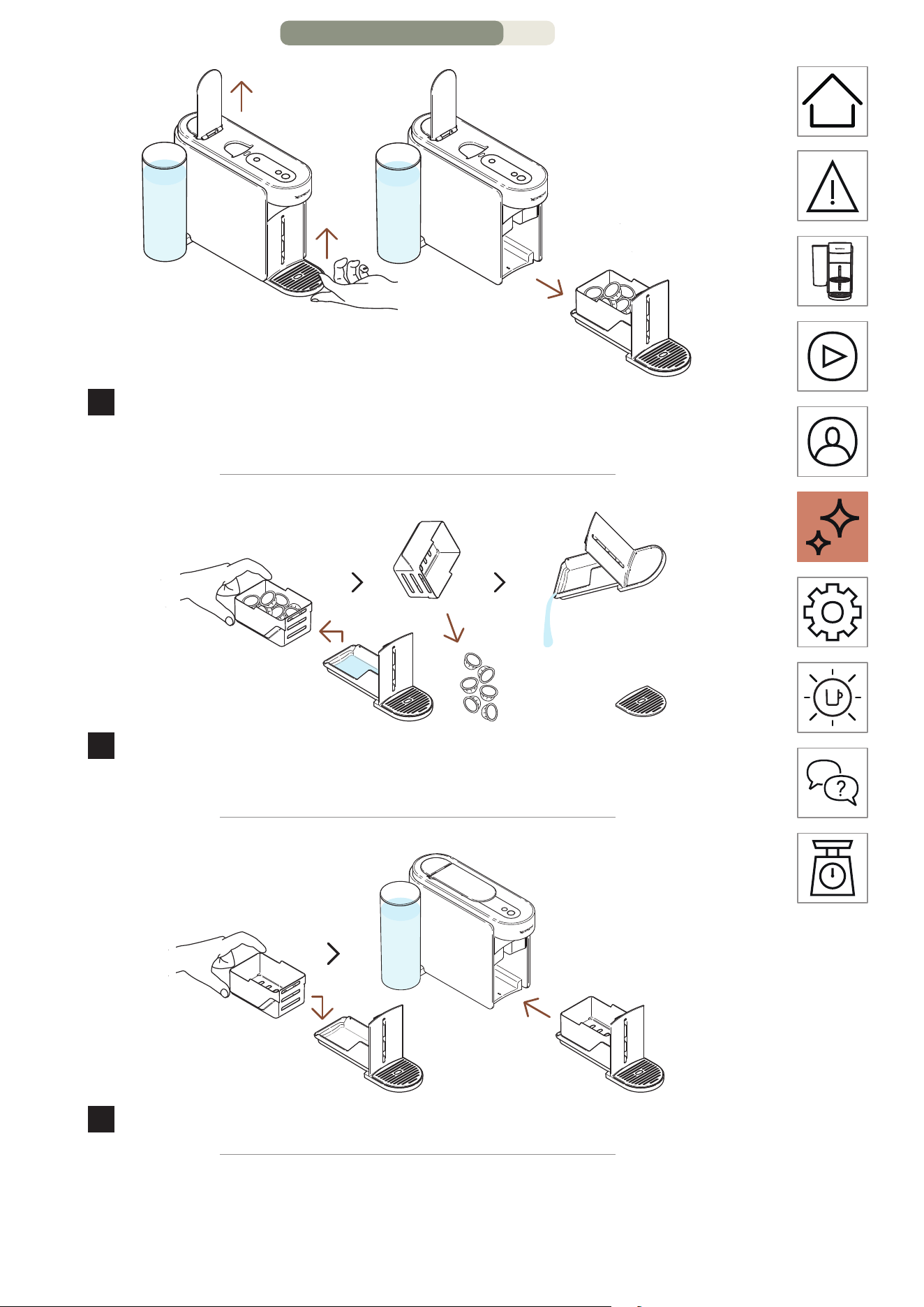
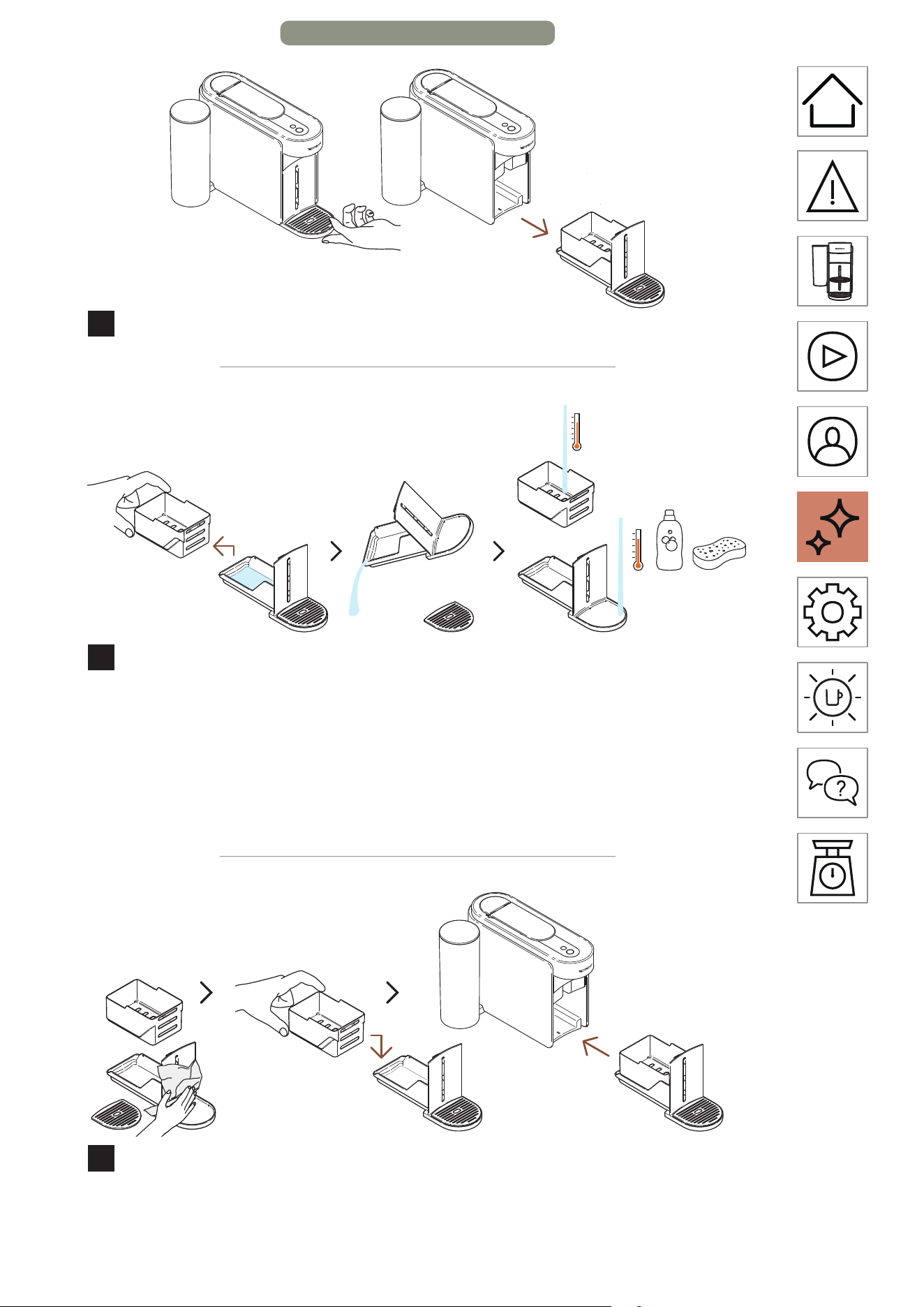
Remove the maintenance module from the machine.
11
Separate the capsule basket from the rest and empty any
remaining water. Wash the maintenance module with hot
water and mild odourless detergent.
CAUTION: Do not use any strong or abrasive cleaning agent or solvent
cleaner. Do not put the machine in a dishwasher. Never immerse the
appliance or part of it in water.
12
Dry the maintenance module with a clean and fresh cloth
and place it back on the machine.
MAINTENANCE – PAGE 16/16
EN
.
43
MACHINE SETTINGS
RESET MY SETTINGS
This procedure allows you to reprogram your machine and
Nespresso Smart App to the factory seings, removing only the
customisation parameters.
ON
1 time
1
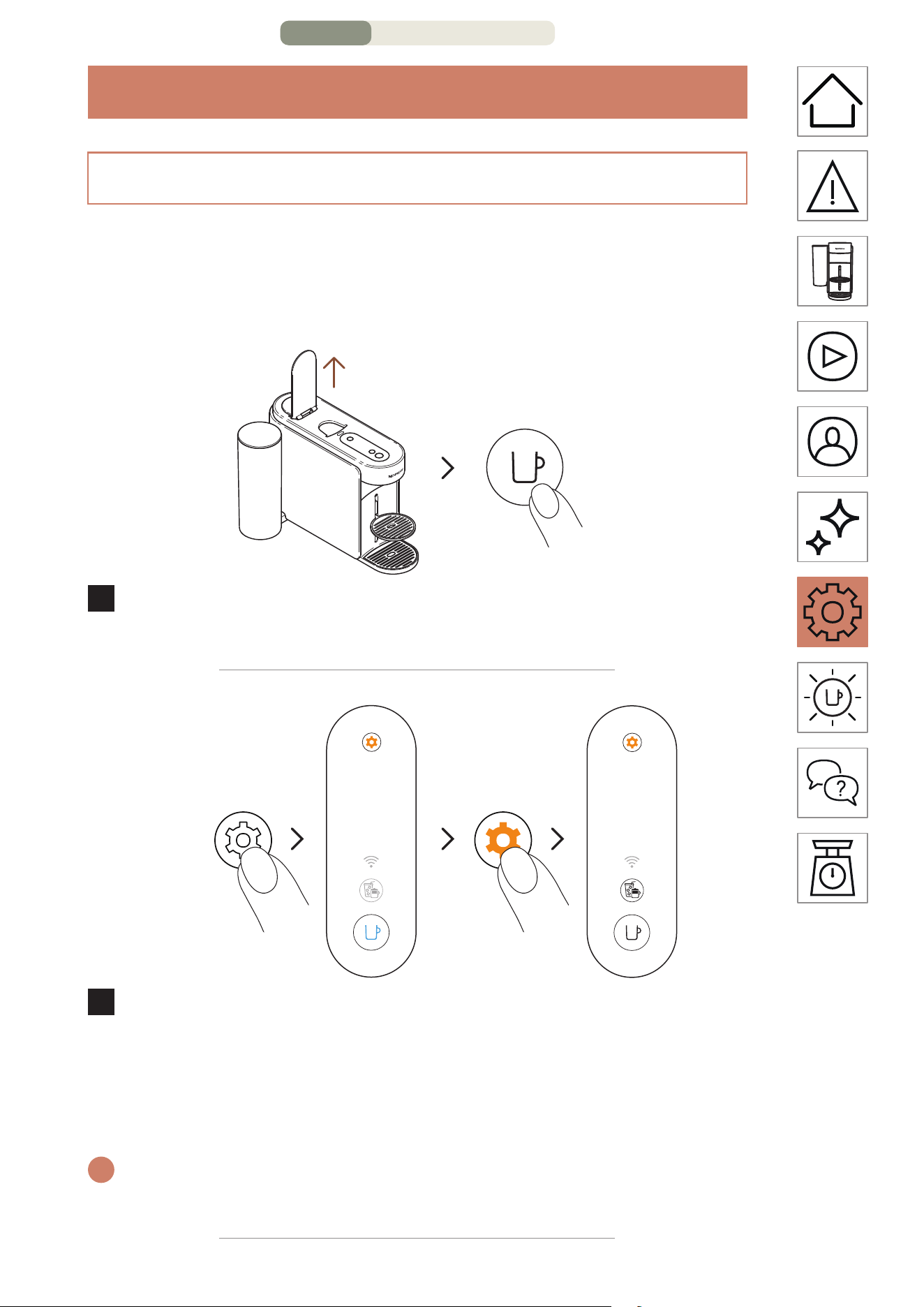
Open the lever and turn on the machine by pressing the
coee buon once.
3 seconds
3 times
2
Press and hold the maintenance buon for at least 3
seconds. Once the coee buon is steady blue, release it
and press the maintenance buon 3 times again. The coee
buon and the Coee Creations buon should appear
steady white.
i
To leave the maintenance mode before launching any procedure,
please hold again the maintenance buon for at least 3 seconds.
MACHINE SETTINGS – PAGE 1/3
EN
.
44
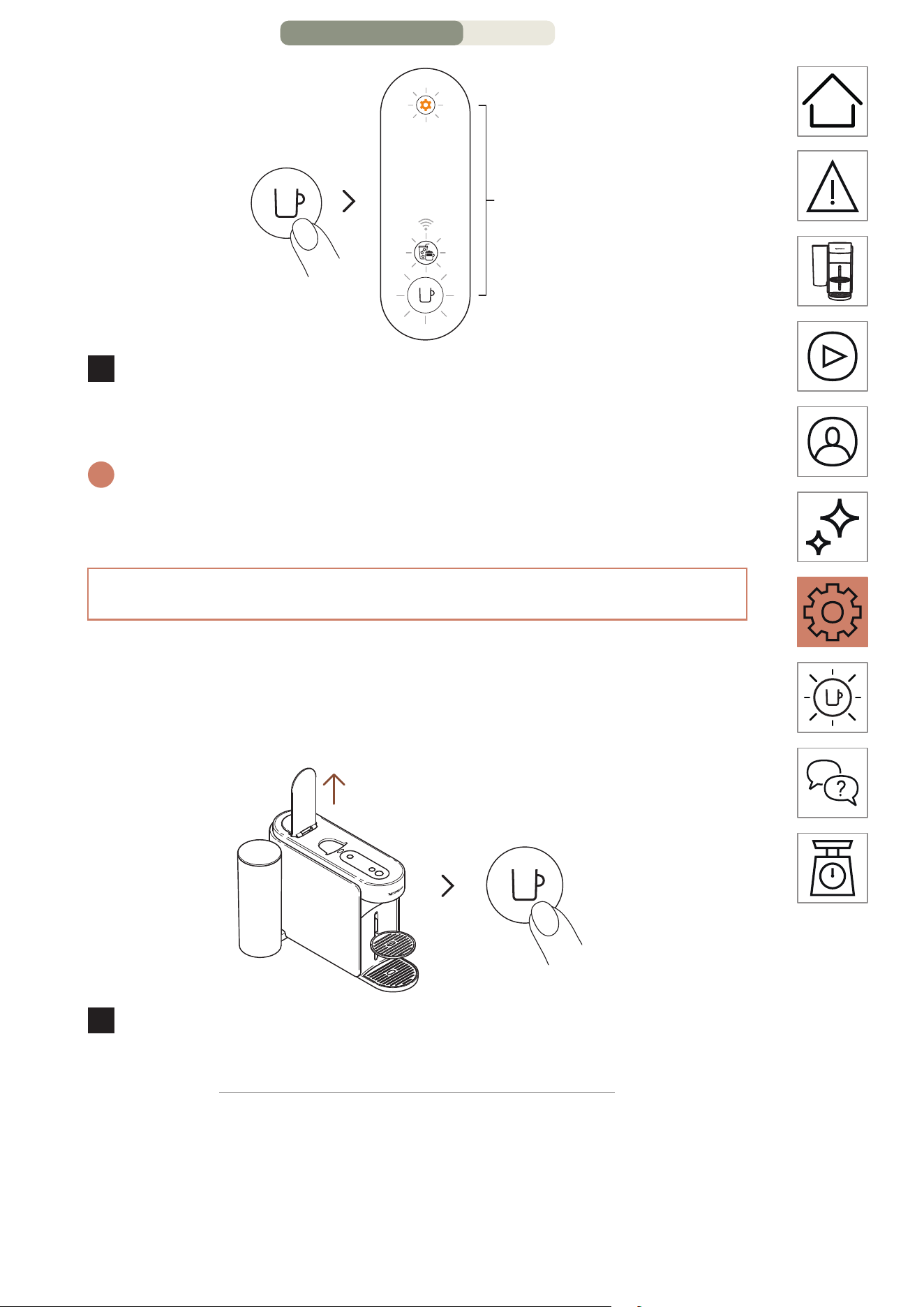
1 time
3 times
3
Press the coee buon once to confirm. The 3 buons will
blink 3 times to confirm the machine is now reprogrammed
with the factory seings.
i
The machine will go back to ready mode when the procedure will be
completed (coee buon steady white).
REMOVE AND RESET THE MACHINE
This procedure will completely reprogram your machine to the
factory seings, removing all your customisation parameters and
your machine from the Nespresso Smart App.
ON
1 time
1
Open the lever and turn on the machine by pressing the
coee buon once.
MACHINE SETTINGS – PAGE 2/3
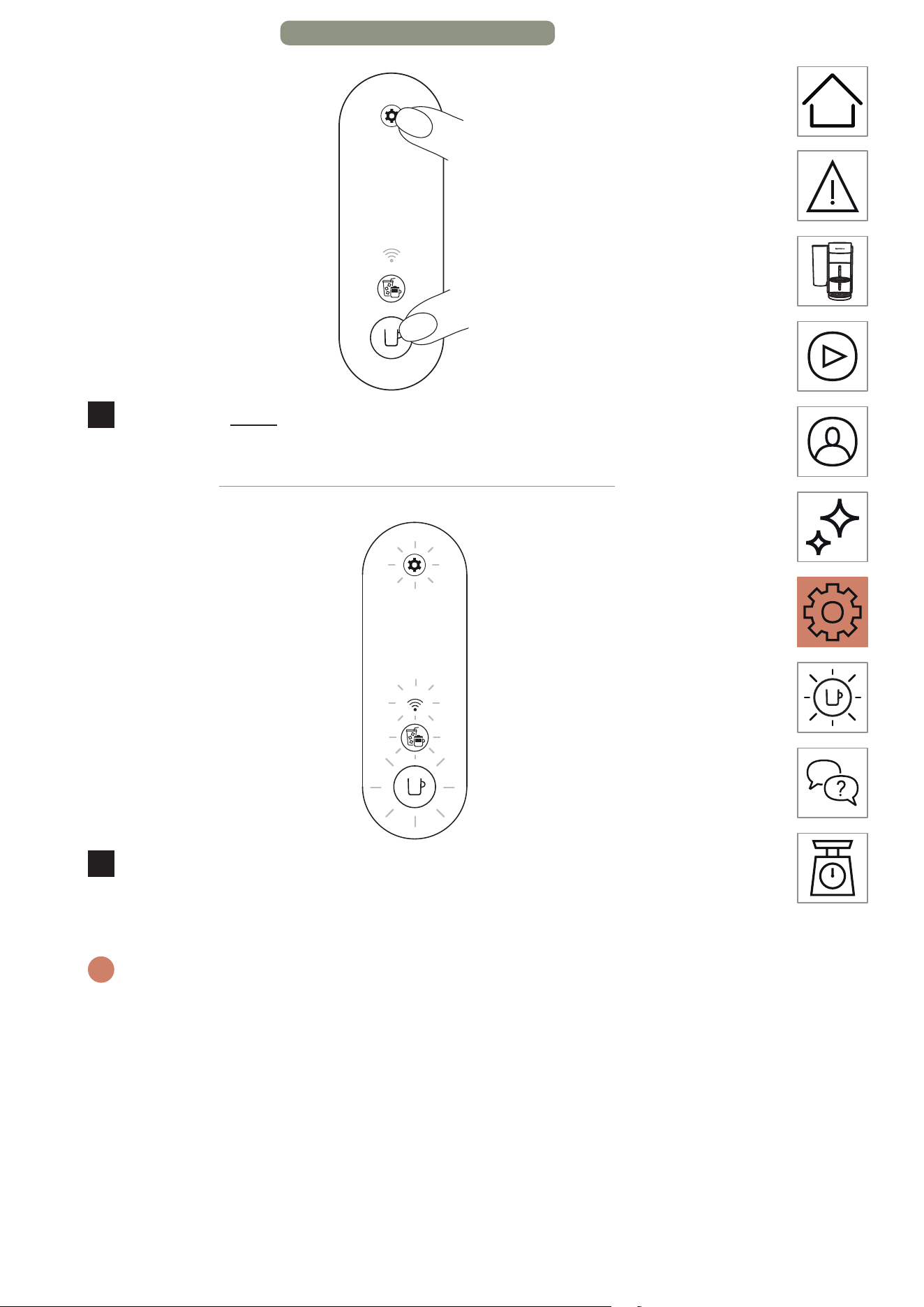
EN
.
45
> 10 seconds
2
Press and hold the coee buon and the maintenance
buon for at least 10 seconds.
5 times
3
All the buons and connectivity LED will blink 5 times to
confirm the machine is now completely reset to factory
seings.
i
The machine will turn o when the procedure will be completed. Now
your machine is removed from your Nespresso Smart App.
MACHINE SETTINGS – PAGE 3/3
EN
.
47
TROUBLESHOOTING
The coee buon is o. • The machine turned o automatically aer
2 minutes of non-use. Press the coee
buon once to turn it on.
• Check the plug connection and voltage
according to the machine label.
No water/coee is
coming out from the
machine outlet.
• Check that the water tank is filled with fresh
potable water and correctly positioned.
• Ensure that a fresh Vertuo capsule is
inserted in the correct position, that the
lever is properly closed, and press the
coee buon once to brew your coee.
• Open the machine lever to eject the
capsule, then perform a cleaning by
following the instructions in the “Cleaning”
section.
• Descale the machine, especially if the
maintenance buon is steady orange, by
following the instructions in the “Descaling”
section.
The coee is not hot
enough.
• The first brews could be more aected by
a lower in-cup temperature, specifically
Ristreo & Espresso cup sizes.
• Follow the “Connect your machine” section
to customize your coee temperature
through the Nespresso Smart App.
• With this machine, you can preheat your
cup by using the Short Rinsing function
(follow the “Short Rinsing” section).
Approximately 40 mL (1.35 fl oz) of hot
water will be brewed. This brewing won’t be
drinkable.
• Descale the machine, especially if the
maintenance buon is steady orange, by
following the instructions in the “Descaling”
section.
TROUBLESHOOTING – PAGE 1/9
EN
.
48
I can see too much
coee/water liquid
in my waste water
container.
• You might find some coee/water liquid
in the drip tray aer each brewing (few
ml per coee), resulting from the machine
technology & design. It’s important to
remove the coee/water liquid from the
waste water container each time you
empty the waste capsule basket and clean
the parts with a mild odourless detergent
and dry them before placing them back in
position on the machine.
• If you press the coee buon without
inserting a capsule, you have launched
the Short Rinsing function. Approximately
40 mL (1.35 fl oz) of hot water will be
brewed. This brewing won’t be drinkable
and the 20 ml will be redirected to your
waste water container.
The machine seems to
be leaking.
• You might find some coee/water liquid
in the drip tray aer each brewing (few
ml per coee), resulting from the machine
technology & design. It’s important to
remove the coee/water liquid from the
waste water container each time you
empty the waste capsule basket and clean
the parts with a mild odourless detergent
and dry them before placing them back in
position on the machine.
• If you press the coee buon without
inserting a capsule, you have launched
the Short Rinsing function. Approximately
40 mL (1.35 fl oz) of hot water will be
brewed. This brewing won’t be drinkable
and the 20 ml will be redirected to your
waste water container.
• Check that the water tank and maintenance
module are well positioned.
• Check that the capsule basket is not full,
empty the waste water container and
ensure that no capsule is stuck into the
machine.
TROUBLESHOOTING – PAGE 2/9
EN
.
49
The machine is brewing
an unusual coee flow.
• First of all, the coee flow speed depends
on the coee variety.
• Ensure that a fresh Vertuo capsule is
inserted in the correct position, that the
lever is properly closed, and press the
coee buon once to brew your coee.
• Check that the water tank is well positioned
on the machine.
• Descale the machine, especially if the
maintenance buon is steady orange, by
following the instructions in the “Descaling”
section.
The machine is only
brewing “water”.
• If the machine cannot read the printed
capsule code, the machine will dispense
40 mL (1.35 fl oz) of non-drinkable water
(short rinsing).
– Ensure that the capsule is not damaged
(including the code). Please do not use
the same capsule more than once.
– Retry with a fresh Vertuo capsule,
inserted in the correct position.
• If the problem persists, please contact the
Nespresso customer service.
The machine turns o.
• The machine turned o automatically aer
2 minutes of non-use. Press the coee
buon once to turn it on. Your machine
will remain on if you are navigating on the
Nespresso Smart App. Please refer to the
“ON/OFF” section if needed.
• The machine can be turned o manually at
any time (when not in use) by pressing and
holding the coee buon for ~1 second.
All buons and LED will blink one last time
before turning o.
• Check the plug connection and voltage
according to the machine label.
• Unplug, wait a few seconds and plug in the
machine again.
TROUBLESHOOTING – PAGE 3/9
EN
.
50
There are some coee
grounds in my cup.
• Ensure that a fresh Vertuo capsule is
inserted in the correct position, that the
lever is properly closed, and press the
coee buon once to brew your coee.
Please do not use the same capsule more
than once.
• Clean the machine when you start having
coee residue in your cup or aer a
long period of non-use by following the
instructions in the “Cleaning” section.
• Descale the machine, especially if the
maintenance buon is steady orange, by
following the instructions in the “Descaling”
section.
The machine is not
launching the brewing
but the coee buon
displays a steady white
light.
• Check that the lever is properly closed.
• Ensure that a fresh Vertuo capsule is
inserted in the correct position, close the
lever properly, and press the buon once to
brew.
• If the machine is connected, it might be
performing an automatic soware update.
Please open the Nespresso Smart App
to check the machine status and/or wait
approximately 5 minutes.
The machine is not
launching the brewing
and the coee buon
displays a steady
orange light.
• Fill the water tank with fresh potable water,
check that it is well positioned on the
machine and press the coee buon once
to start the brewing.
• Descale the machine, especially if the
maintenance buon is steady orange, by
following the instructions in the “Descaling”
section.
My machine has run
out of water. How can
I resume making my
coee?
• Fill the water tank with fresh potable water
and press the coee buon once to restart
the brewing. Your cup will then be filled
with the missing volume if the extraction
had already been started.
TROUBLESHOOTING – PAGE 4/9
EN
.
51
The coee buon is
blinking white while the
machine is brewing.
• If the coee is flowing normally, this
indicates the machine is working properly.
• If clear water (not coee) is flowing out of
the coee machine, you launched a short
rinsing. Please follow the instructions in the
“Short Rinsing” section.
The Coee Creations
buon appears steady
white.
• You pressed the Coee Creations buon
once, activating a mode that helps you
cra your coee recipes.
• By clicking on the dedicated buon, this
feature will bring you a concentrated coee
extraction; the first step to making all the
iced and milk-based coee drinks you want.
• To turn o this buon, press again by
clicking once before launching the brewing.
The Coee Creations
buon turns o before
the brewing starts, and
the coee comes out at
a pre-defined volume.
• Due to the cup size, some capsules cannot
be extracted using this mode (Ristreos,
Cold Brew Style, Carafe Pour-Over Style /
Bianco Piccolo and Bianco Leggero,
already optimized for coee recipes). We
also do not recommend using this mode for
extracting Alto capsules or Coee+ range.
• To prevent the loss of your capsule, your
machine has brewed the coee at the
preprogrammed cup size.
My in-cup volume is not
aligned with the pre-
defined volume set by
Nespresso.
• It is likely that your cup volume has been
customized.
• You can manually reprogram your cup
volume by pressing and holding the coee
buon until the desired volume is reached,
then release the coee buon.
• If your machine is connected, you can also
adjust the cup volume through the “Coee
volume & temperature” section in the
Nespresso Smart App.
• If you wish to return to the Nespresso
pre-defined coee volumes, you can reset
your machine seings by following the
instructions in the “Reset my seings”
section.
• If the issue continues to persist even aer
performing a factory reset, please contact
the Nespresso customer centre.
TROUBLESHOOTING – PAGE 5/9
EN
.
52
Once my brewing is
complete, how can I add
more coee to my cup?
• You can top up your coee by pressing the
coee buon once again without ejecting
the used capsule. The same volume will
be brewed again. If you want to stop the
brewing process before the extraction is
complete, simply press the coee buon
once again.
• If you want to increase the volumes of all
your coee:
– You can manually reprogram your cup
volume by pressing and holding the
coee buon until the desired volume is
reached, then release the coee buon.
– If your machine is connected, you can
also adjust the cup volume through the
“Coee volume & temperature” section
in the Nespresso Smart App.
The maintenance
buon is steady orange.
• Descale the machine by following the
instructions in the “Descaling” section.
• We recommend using the Nespresso
descaling kit available to avoid damage to
your machine. For any additional questions
you may have regarding descaling, please
contact the Nespresso customer service.
The maintenance
buon is glowing
orange.
• You have entered the maintenance mode, a
loop designed to facilitate your interaction
with the machine’s maintenance.
• In this mode, each color/pictogram
combination is associated with a specific
function:
– Coee buon steady blue: Cleaning
– Coee buon steady yellow: Emptying
the pipes
– Coee buon steady orange: Descaling
– Coee and Coee Creations buons
steady white: Reset my machine seings
to factory parameters (customisation
parameters only).
– Coee buon steady white and WiFi
LED on: Toggle on/o the connectivity
module.
TROUBLESHOOTING – PAGE 6/9
EN
.
53
• To enter or exit this mode, please press and
hold the maintenance buon for at least
3 seconds (to enter, until the coee buon
turns blue, and to exit, until the coee
buon turns white).
• To initiate each maintenance function,
simply press the coee buon once,
ensuring that its color corresponds to the
desired action. The buon will then blink
until the process is complete.
• All these maintenance procedures can be
easily guided through the Nespresso Smart
App once your machine is connected.
The coee buon is
blinking blue, orange,
or yellow.
• Your machine is currently undergoing a
maintenance procedure.
• Please refrain from operating the machine
until the procedure is complete.
– Coee buon steady blue: Cleaning
– Coee buon steady yellow: Emptying
the pipes
– Coee buon steady orange: Descaling
The coee buon is
glowing 5 times orange
when I aempt to
launch a maintenance
procedure (cleaning,
descaling, or emptying
the pipes) and
the machine is not
initiating the process.
• Open and close the machine lever to check
that no capsule is inserted before pressing
the coee buon again.
The coee buon is
blinking orange once
when I aempt to
launch a maintenance
procedure (cleaning,
descaling, or emptying
the pipes) and
the machine is not
initiating the process.
• Fill the water tank with fresh potable water,
check that it is well positioned on the
machine and press the coee buon once
to start the maintenance procedure.
• Important: Once initiated, please ensure
that you complete the descaling procedure
using the specified volumes to avoid being
blocked.
TROUBLESHOOTING – PAGE 7/9
EN
.
54
When I turned on my
machine, the WiFi LED
is glowing.
• Your machine is connectable to the
Nespresso Smart App to enhance the full
Vertuo experience.
• Thanks to the Nespresso Smart App, you
will be able to:
– Personalize your coee cup length &
temperature
– Simplify your machine maintenance
– Discover a world of coee recipes
• The WiFi LED is blinking when your
machine is not paired yet to the Nespresso
Smart App or has lost the connection.
• You can smoothly pair your machine by
scanning the QR code, available on your
machine’s drip grid, or manually pair it by
opening, updating, or downloading the
Nespresso Smart App.
• If you do not connect your machine, the
WiFi LED will blink each time you turn on
the machine.
• If you wish to disable the connectivity
module or if your country does not support
connection to the Nespresso Smart
App, please follow the instructions in the
“Disable / Re-enable the connectivity
module” section.
When I turned on my
machine, the WiFi LED
remains o.
• Your connectivity module has been
disabled.
• If you want to connect your machine to the
Nespresso Smart App and enhance the
full Vertuo experience, please follow the
instructions in the “Disable / Re-enable the
connectivity module” section.
When I turned on my
machine, the WiFi LED
is steady white.
• Your machine is connected to the
Nespresso Smart App to enhance the full
Vertuo experience.
• Thanks to the Nespresso Smart App, you
will be able to:
– Personalize your coee cup length &
temperature
– Simplify your machine maintenance
– Discover a world of coee recipes
TROUBLESHOOTING – PAGE 8/9
EN
.
55
How can I perform a
complete factory reset?
• This procedure will completely reprogram
your machine to the factory seings,
removing all your customized parameters
and disconnecting your machine from the
Nespresso Smart App.
• Press the Maintenance buon and the
Coee buon at the same time for at least
10 seconds.
• If you wish to remove only the
customisation parameters, please follow
the light procedure available in the
maintenance mode.
My coee buon is
blinking red (2 times
quickly blinking,
then 1 long break,
continuously repeated).
• The machine displays an error.
– Please wait a few seconds before
operating the machine again.
– Unplug your machine, wait a few
seconds and plug it in again.
– If the issue continues, please contact the
Nespresso customer service.
My coee buon
blinked red quickly;
the Coee Creations
buon and the WiFi
LED blinked white
quickly and then the
machine turns o.
• The machine shuts down following an error
or aer cooling down.
The coee buon is
blinking orange
(2 times quickly
blinking, then 1 long
break, only once).
• The machine displays an emergency stop
following a misuse (for example, if you
opened the lever while the coee was
brewing). To avoid damaging the machine,
we advise against opening the machine
lever while brewing.
The coee buon is
pulsing down red for
2 seconds.
• The machine is cooling down following
an overheating situation. Please keep it
plugged in and wait approximately
10 minutes before using it again.
The coee buon
displays a purple color.
• Your machine is in service mode. Please
contact the Nespresso customer service.
TROUBLESHOOTING – PAGE 9/9
EN
.
56
TECHNICAL SPECIFICATIONS
Power
US/CA: 120 V, 60 Hz, 940 W
IL: 220–240 V, 50/60 Hz, 940–1100 W
Frequency
Bluetooth
®
(LE) 2.402–2.480 GHz
Wi-Fi
®
2.412 – 2.472 GHz
• BR3/MX/TW: 2.412 – 2.462 GHz
• CN: 2.400 – 2.4835 GHz
• JP: 2.412 – 2.484 GHz
RF output power (EIRP)
Bluetooth
®
7.82 dBm max (EIRP) and Wi-Fi
®
<20 dBm (EIRP)
Stand-by mode 0.099 W/h
OFF mode
Aer 2 minutes of non usage
Heat-up time
3 seconds
Movable cup support
3 positions
Cable length
US/CA: 100 cm (+/− 2 cm) / 39.3 in (+/− 0.8 in)
Others: 80 cm (+/− 2 cm) / 31 in (+/− 0.8 in)
Machine weight ~4 kg / 8.8 lbs
Water tank capacity 1.4 L / 47.3 fl oz
Dimensions (W x D x H) 12 x 49.4 x 25.7 cm / 4.7 x 19.45 x 10.12 in
Capsule basket capacity 18 espresso or 13 mug capsules
MACHINE CODES
Nespresso MC1, MD1
Breville BNV620/BNV650
Delonghi ENV200
Krups XN940, XN941
Sage SNV620, SNV650
FR
.
3
SÉCURITÉ
MISE EN GARDE: Avant d’utiliser votre machine à café, veuillez
consulter les instructions de sécurité afin d’éviter tout risque de
blessure ou de dommage.
Dans un premier temps, veuillez prendre connaissance des
mesures de sécurité afin d’éviter tout risque de décharge
électrique et d’incendie. Veuillez vous assurer de la continuité
de la mise à la terre avant de brancher la machine à la prise
électrique.
i
Lors du déballage de la machine, retirez le film plastique qui la
recouvre.
FR
.
4
DÉCOUVRIR MA MACHINE
APERÇU DE LA MACHINE
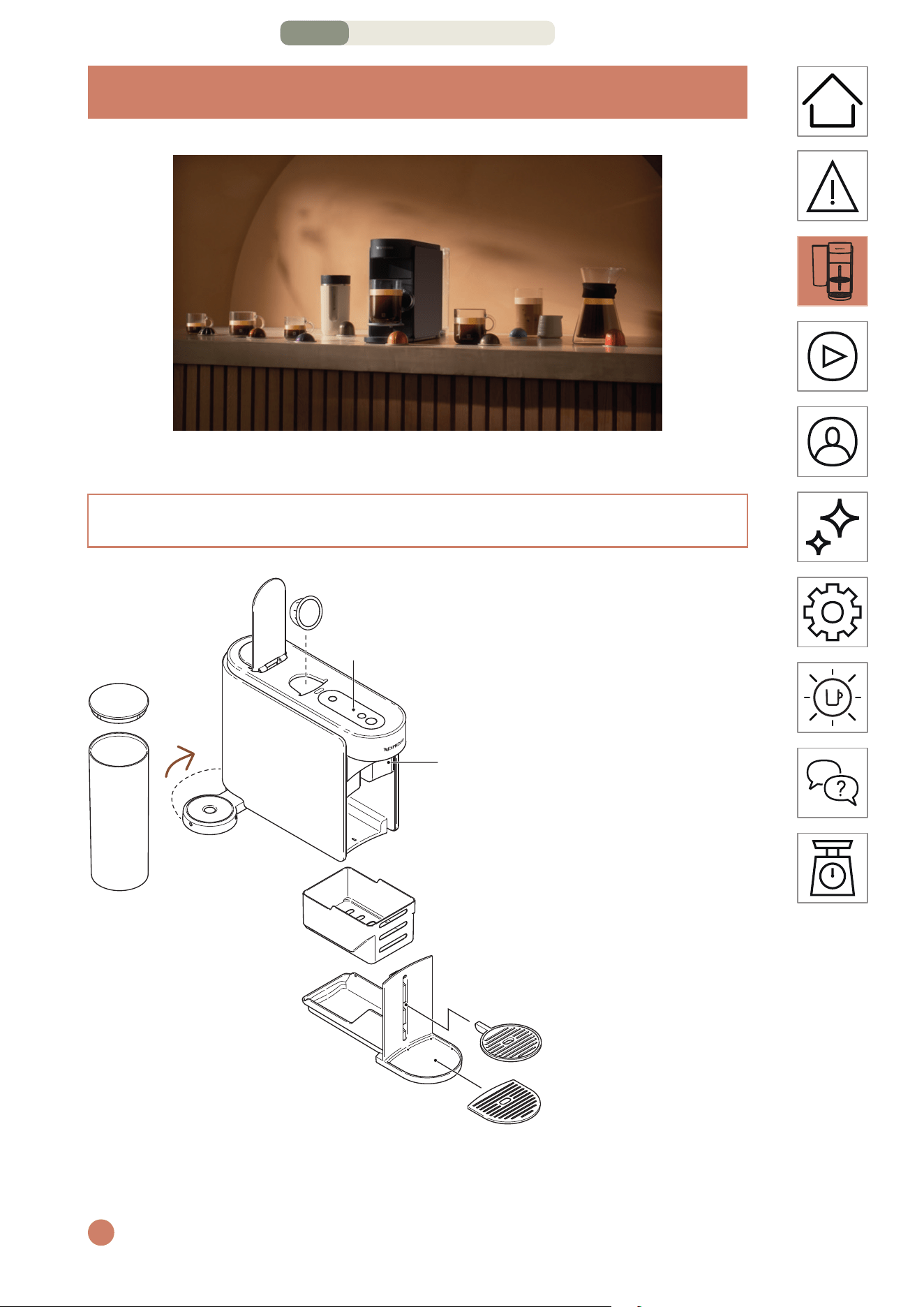
1 Poignée
3 Tête de sortie du café
2 Touches/Voyants DEL
5 Support de tasse
ajustable
6 Grille de bac
d’égouement
4 Module d’entretien
180°
7 Réservoir d’eau
et couvercle
i
Veuillez éviter de placer les pièces amovibles dans le lave-vaisselle.
DÉCOUVRIR MA MACHINE – PAGE 1/4
FR
.
5
CONTENU DE L’EMBALLAGE
1 Machine à café Vertuo Up
2 Assortiment de capsules
Nespresso (12 capsules)
3 Guide de démarrage
rapide
4 Instructions de sécurité et
garantie
5 Autocollant de
connectivité
6 Autocollant de rinçage
i
Déballage: Il se peut qu’il y ait un peu de poussière sur la surface de la
machine en raison des matériaux recyclés utilisés pour l’emballage. Ce
n’est pas dangereux, il faut simplement la neoyer avec un chion doux.
3
1 2
4 5 6
TOUCHES/VOYANTS DEL
Touche entretien
DEL de connectivité
Touche MARCHE/ARRÊT
et Café
Touche Créations café
DÉCOUVRIR MA MACHINE – PAGE 2/4
FR
.
6
RETRAIT ET NETTOYAGE DU MODULE D’ENTRETIEN
LEVER/ABAISSER
LEVER
Lever la poignée
ABAISSER
Abaisser la poignée
i
Le fait de lever ou d’abaisser la poignée n’allume pas la machine.
Vous ne pouvez pas lancer la préparation d’un café sans abaisser
correctement la poignée. Pour une utilisation correcte de votre
machine, nous vous recommandons de lever la poignée une fois la
préparation complètement terminée (touche Café blanche fixe). Le fait
de lever la poignée permet de retirer les capsules après l’extraction.
i
Pour retirer le module d’entretien, tirez-le doucement vers le haut.
Séparez soigneusement le compartiment à capsules usagées du reste,
recyclez les capsules et videz les éventuels résidus de café et d’eau.
Lavez les pièces à l’eau chaude et avec un détergent doux inodore, puis
séchez-les, assemblez-les délicatement et replacez-les dans la machine.
DÉCOUVRIR MA MACHINE – PAGE 3/4
FR
.
8
PREMIÈRE UTILISATION
MARCHE
1 fois
Une fois la machine branchée, allumez-la en appuyant une fois
sur la touche Café.
i
La touche de préparation de café s’allume pendant 3 secondes, le temps
que la machine chaue. Une fois prête, la machine peut être utilisée.
ARRÊT
ARRÊT automatique ARRÊT manuel
2 minutes 2 secondes
Pour économiser de l’énergie, la machine s’éteindra
automatiquement après 2 minutes d’inactivité.
i
Vous pouvez éteindre la machine manuellement à tout moment
(quand vous ne l’utilisez pas) en maintenant enfoncée la touche
correspondante pendant environ deux secondes. La machine s’éteint
une fois tous les touches et voyants DEL éteints.
Si vous avez appairé votre machine, veuillez noter qu’un dernier ensemble
de données peut être envoyé à l’application Nespresso Smart une fois
votre machine éteinte. Ce processus peut prendre quelques secondes.
MARCHE / ARRÊT
PREMIÈRE UTILISATION – PAGE 1/11
FR
.
9
POURQUOI APPAIRER VOTRE MACHINE?
Personnalisation
du volume et de la
température du café
= + +
=+
=+
Entretien facile de la
machine et alertes
en temps réel
Recees étape
par étape
& ...
• Personnalisation du volume et de la température du café:
Ajustez le format de tasse et personnalisez la température
de votre café, grâce au contrôle exclusif de la température
disponible uniquement via l’application.
• Entretien facile de la machine et alertes en temps réel:
Découvrez la simplicité du neoyage et du détartrage
directement sur l’application. Profitez des avantages de la
mise à niveau de votre machine afin de bénéficier des toutes
dernières fonctionnalités et d’une expérience fluide.
• Recees étape par étape: Découvrez les recees de café
classiques et les créations les plus tendance.
CONNECTER VOTRE MACHINE
PREMIÈRE UTILISATION – PAGE 2/11
FR
.
10
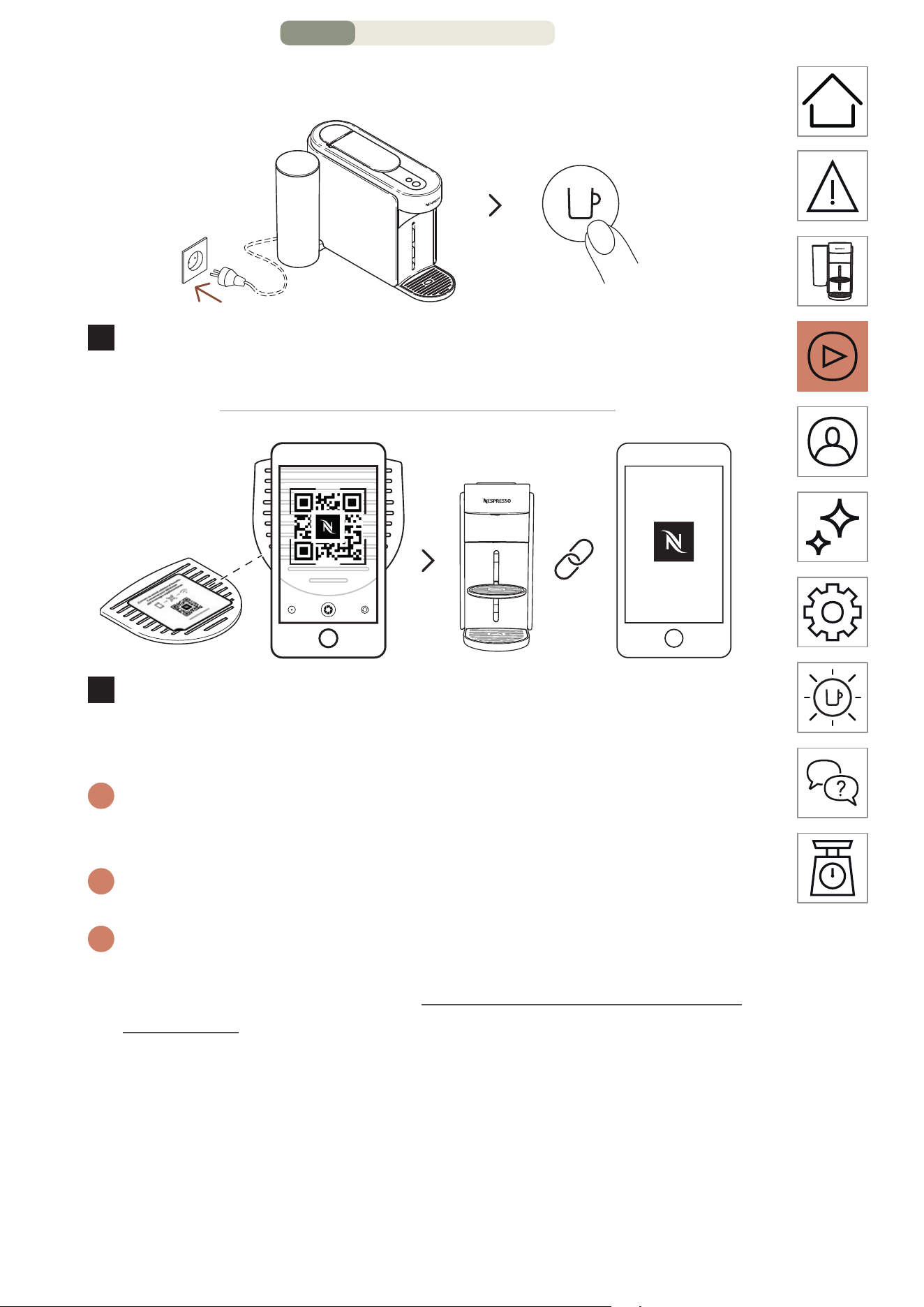
COMMENT CONNECTER VOTRE MACHINE?
1 fois
MARCHE
1
Pour connecter votre machine, branchez-la et allumez-la en
appuyant une fois sur la touche Café.
2
Scannez le code QR figurant sur la grille d’égouage de
votre machine ou ouvrez l’application Nespresso Smart pour
appairer votre machine.
i
Si vous avez déjà téléchargé l’application NespressoSmart, elle
s’ouvrira. Si vous n’avez pas l’application NespressoSmart, vous
pourrez la télécharger.
i
Si vous ne connectez pas votre machine, le voyant DEL de
connectivité clignotera à chaque fois que vous allumerez la machine.
i
Si vous souhaitez désactiver le module de connectivité ou si votre pays
ne prend pas en charge la connexion à l’application Nespresso Smart,
veuillez vous référer à la section « Désactiver/Réactiver le module de
connectivité » ci-après.
PREMIÈRE UTILISATION – PAGE 3/11
FR
.
11
DÉSACTIVER/RÉACTIVER LE MODULE DE CONNECTIVITÉ
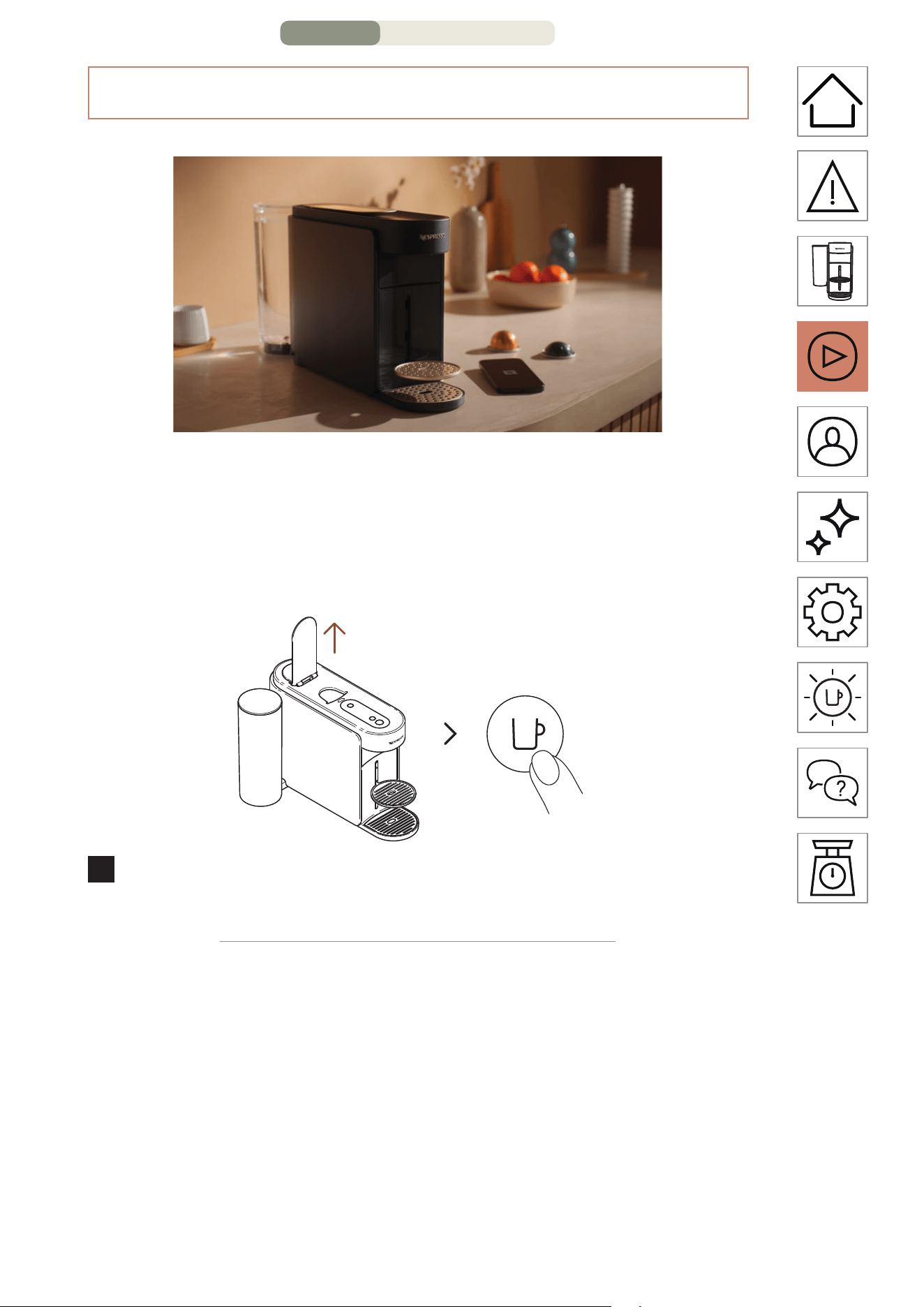
La machine est équipée d’un module de connectivité, activé
par défaut. Il donne accès à des fonctions supplémentaires qui
améliorent votre expérience de café. Pour désactiver le module
de connectivité, procédez comme suit :
MARCHE
1 fois
1
Ouvrez la poignée et allumez la machine en appuyant une
fois sur la touche Café.
PREMIÈRE UTILISATION – PAGE 4/11
FR
.
12
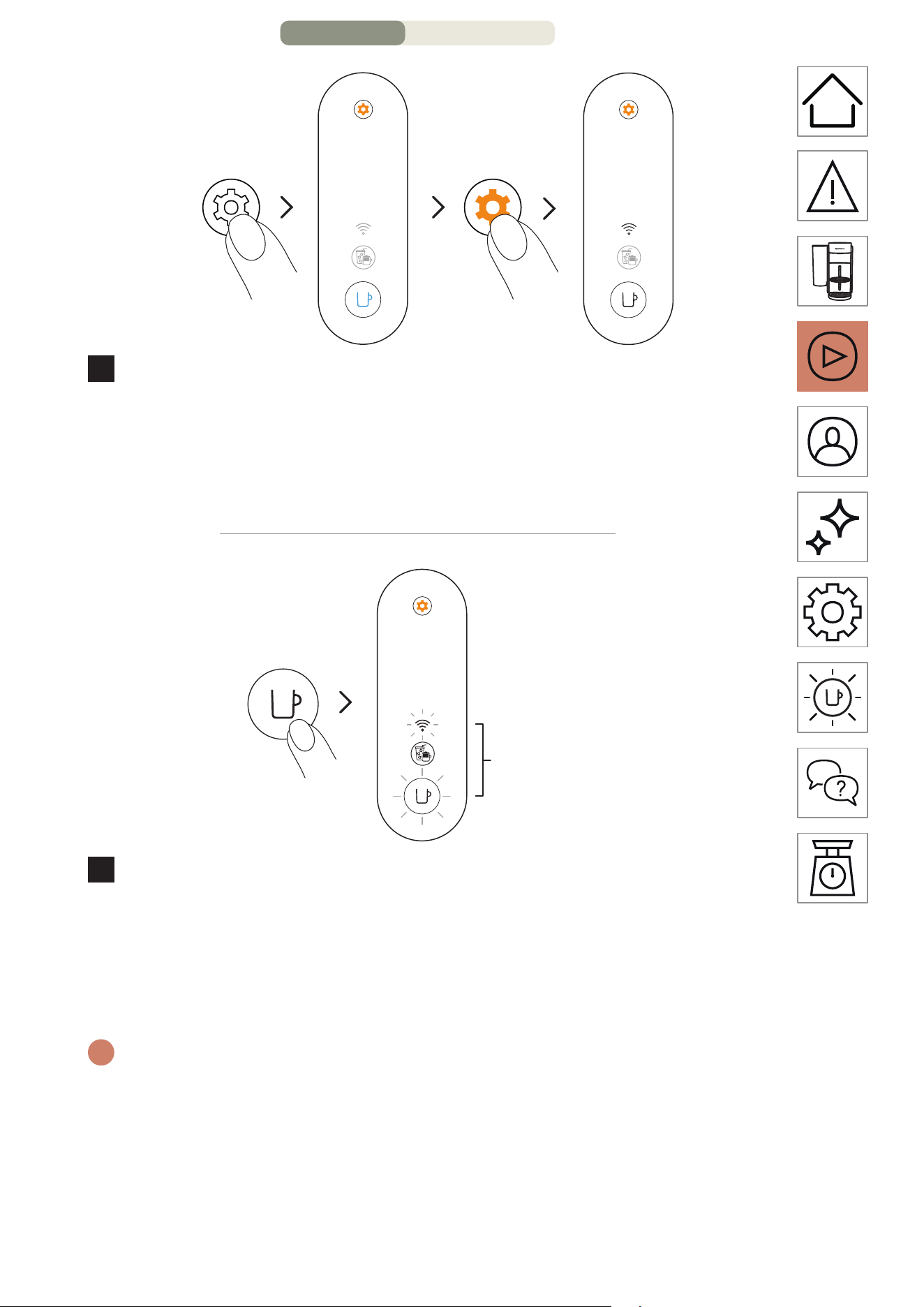
3 secondes 4 fois
2
Appuyez sur la touche Entretien et maintenez-la enfoncée
pendant au moins 3 secondes. Une fois que la touche Café
est bleu fixe, relâchez-la et appuyez à nouveau 4 fois sur
la touche Entretien. La touche Café et le voyant DEL de
connectivité doivent être blanc fixe.
1 fois
3 fois
3
Appuyez sur la touche Café une fois pour confirmer. La
touche Café et le voyant DEL de connectivité clignotent
trois fois pour confirmer que le module de connectivité a
été désactivé. Une fois la procédure terminée, la machine
s’éteint.
i
Si vous souhaitez réactiver le module de connectivité, vous pouvez
suivre les mêmes étapes.
PREMIÈRE UTILISATION – PAGE 5/11
FR
.
13
PREMIER RINÇAGE/NETTOYAGE
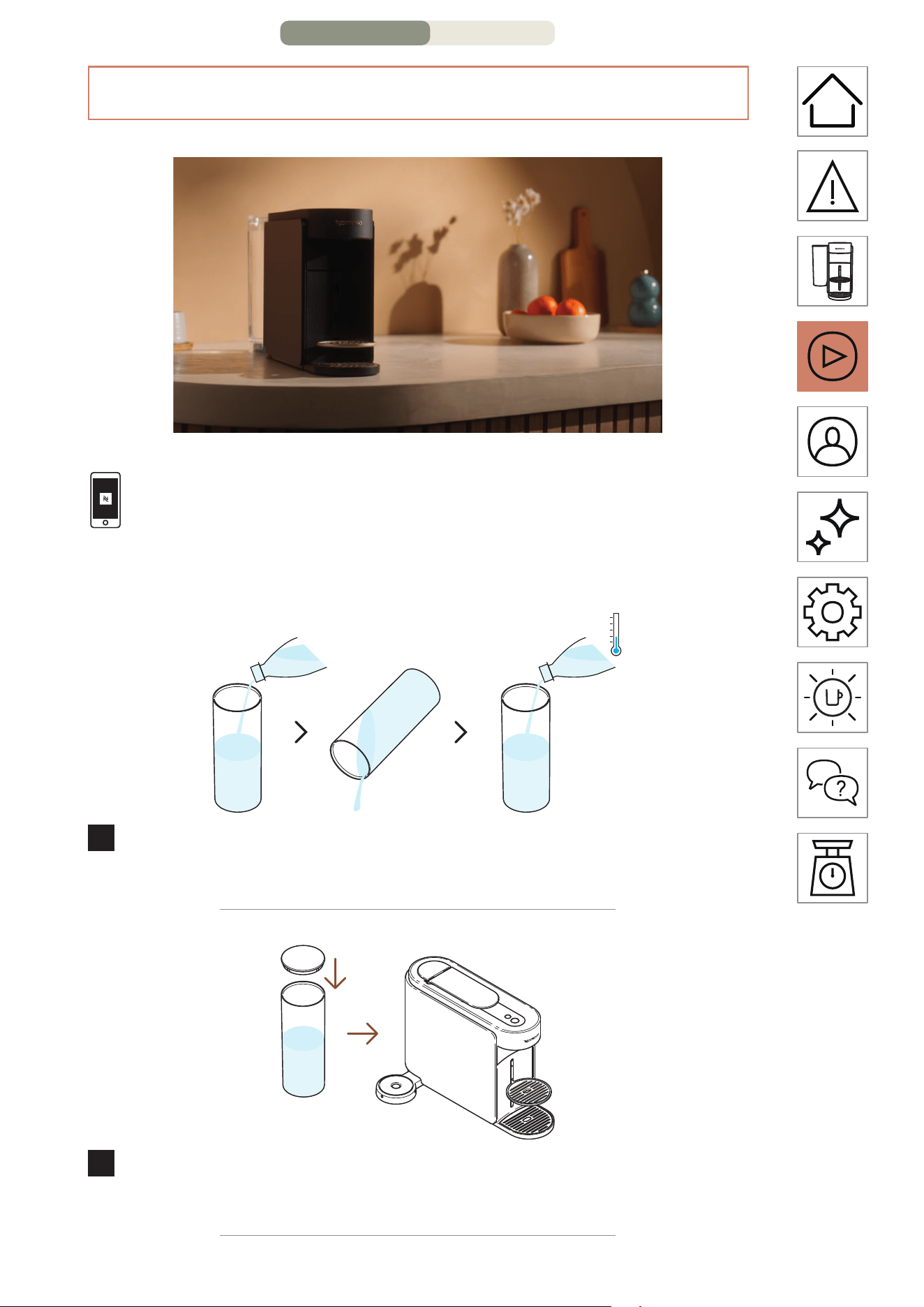
Nous vous recommandons de neoyer votre machine avant
sa première utilisation. Toutes les procédures peuvent être
facilement suivies via l’application Nespresso Smart une fois
votre machine connectée.
1
Rincez le réservoir d’eau avant de le remplir d’eau douce et
potable uniquement (0,5 l/17 oz liq.).
2
Fermez le couvercle du réservoir d’eau et replacez-le sur la
machine..
PREMIÈRE UTILISATION – PAGE 6/11
FR
.
14
1 L min.
34 oz liq.
3
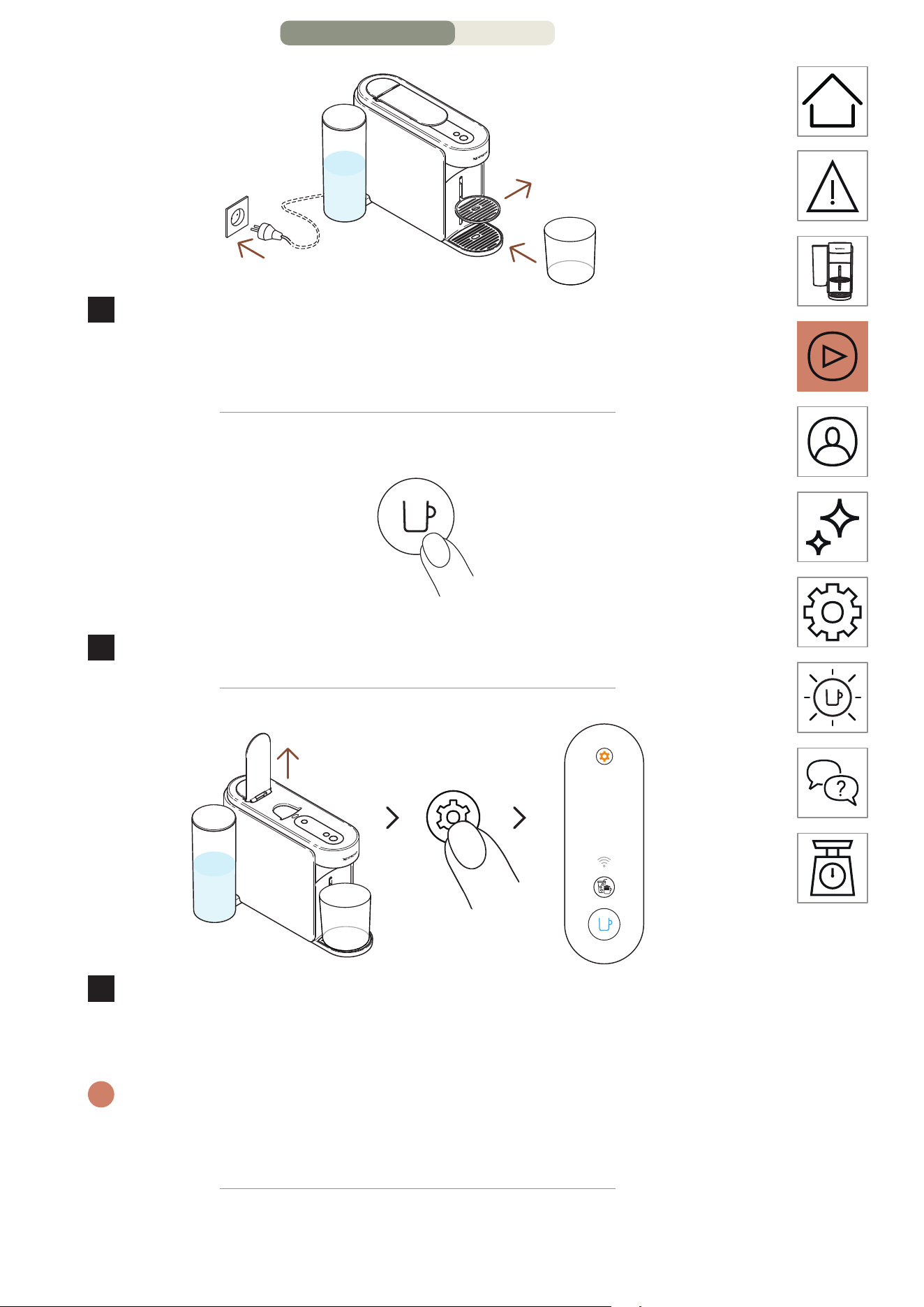
Branchez la machine, retirez le support de tasse et placez un
récipient vide (au moins 1 L/34 oz liq.) sous l’orifice de sortie
du café.
MARCHE
1 fois
4
Allumez la machine en appuyant une fois sur la touche Café.
3 secondes
5
Levez la poignée de la machine. Appuyez sur la touche
Entretien et maintenez-la enfoncée pendant au moins
3 secondes. Relâchez-la lorsque la touche Café est bleu fixe.
i
Pour quier le mode Entretien avant de lancer une procédure, veuillez
maintenir à nouveau la touche Entretien enfoncée pendant au moins
3 secondes.
PREMIÈRE UTILISATION – PAGE 7/11
FR
.
15
1 fois
~3 minutes
6
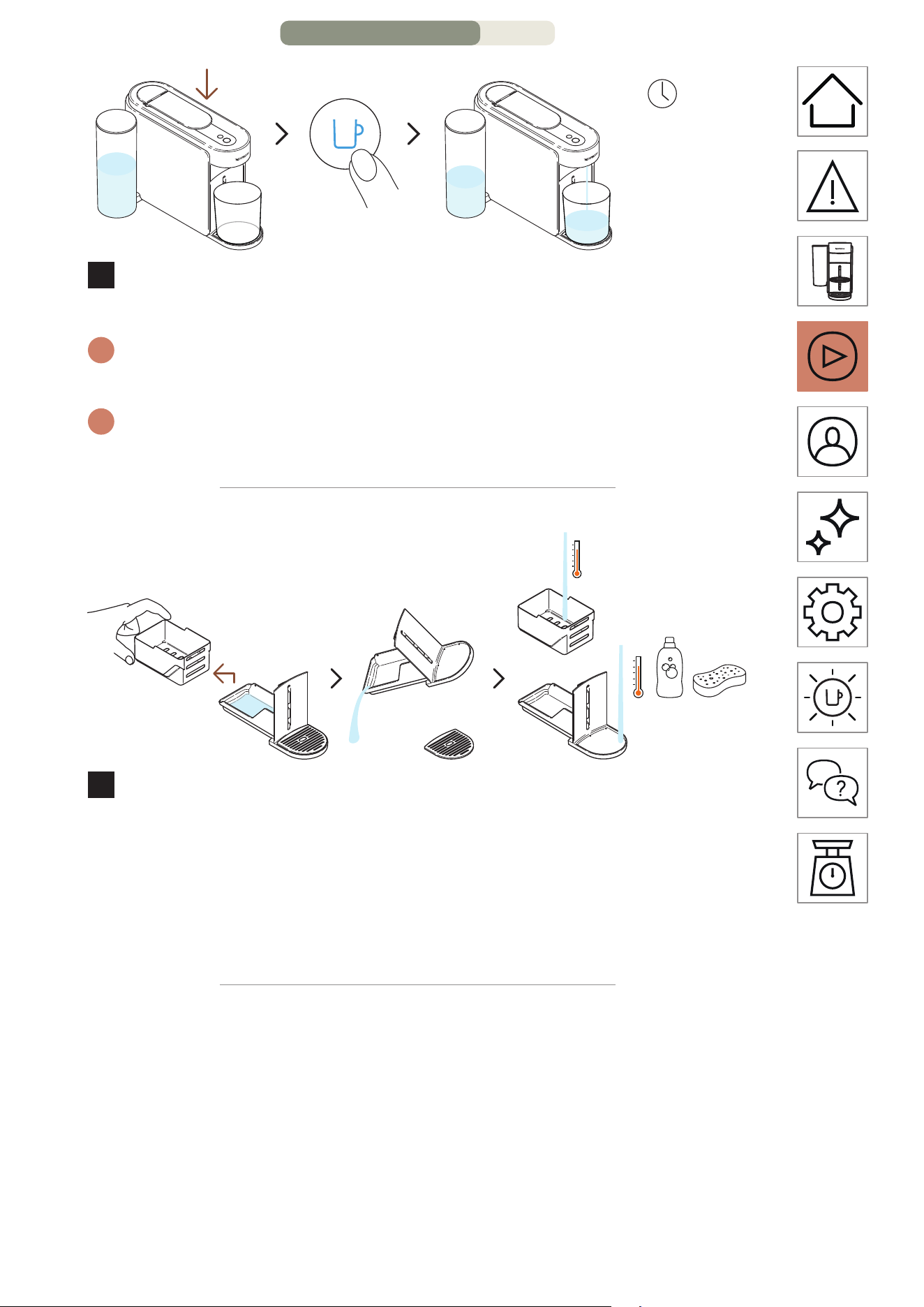
Abaissez la poignée et appuyez une fois sur la touche Café
bleue pour lancer le premier processus de rinçage.
i
La machine commence le rinçage et la procédure peut durer jusqu’à
3 minutes.
i
De l’eau peut s’accumuler dans le module d’entretien pendant le
rinçage.
7
Séparez le compartiment à capsules du reste et videz l’eau
restante. Lavez le module d’entretien à l’eau chaude avec un
détergent doux inodore.
MISE EN GARDE: N’utilisez pas de solvant ou de produit de neoyage
puissant ou abrasif. Ne meez pas la machine au lave-vaisselle.
N’immergez jamais l’appareil ou une partie de l’appareil dans l’eau.
PREMIÈRE UTILISATION – PAGE 8/11
FR
.
16
8
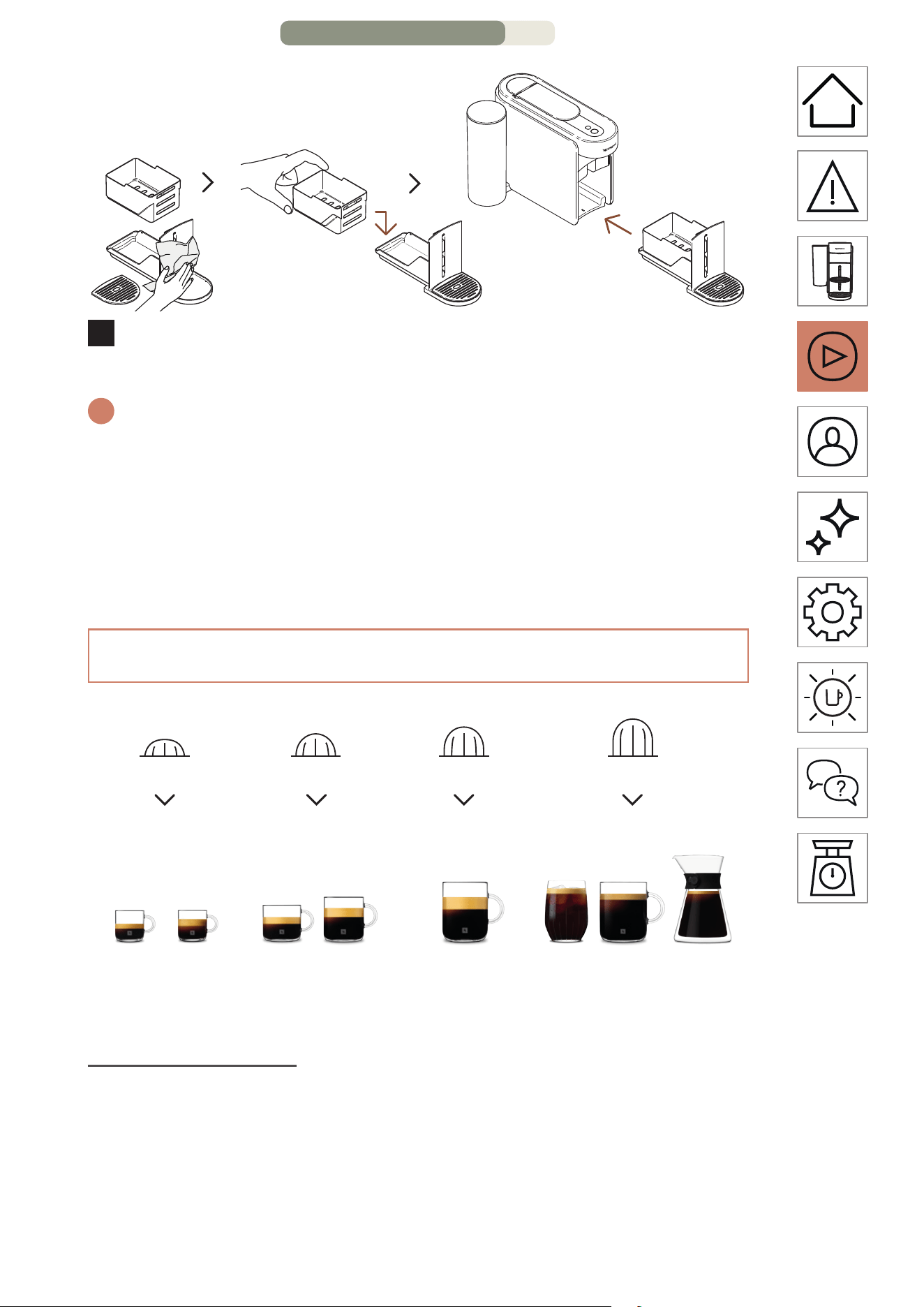
Séchez le module d’entretien avec un chion propre et
replacez-le sur la machine.
i
La machine repasse en mode prêt une fois la procédure
terminée (touche Café blanche fixe).
MISE EN GARDE: Utilisez toujours des chions doux pour neoyer
la machine.
LE SYSTÈME VERTUO
25 ml
0,84 oz liq.
40 ml
1,35 oz liq.
80 ml
2,7 oz liq.
150 ml
5,07 oz liq.
230 ml
7,77 oz liq.
355 ml
12 oz liq.
535 ml
18,09 oz liq.
Carafe Style
Pour-Over
Ristreo Espresso
Double
Espresso
Gran
Lungo T
a
sse/Café
Café style
infusé à froid Alto
S M L XL
P
S M L XL
M
S M L XL
G
S M L XL
TG
Découvrez notre collection complète d’accessoires sur
www.nespresso.com.
PREMIÈRE UTILISATION – PAGE 9/11
FR
.
17
PRÉPARER UN CAFÉ VERTUO
Vertuo: Des expériences de café incomparables. Découvrez une variété
de styles de café, à partir d’une simple touche, avec les 12 cafés les plus
vendus disponibles avec votre machine.
1
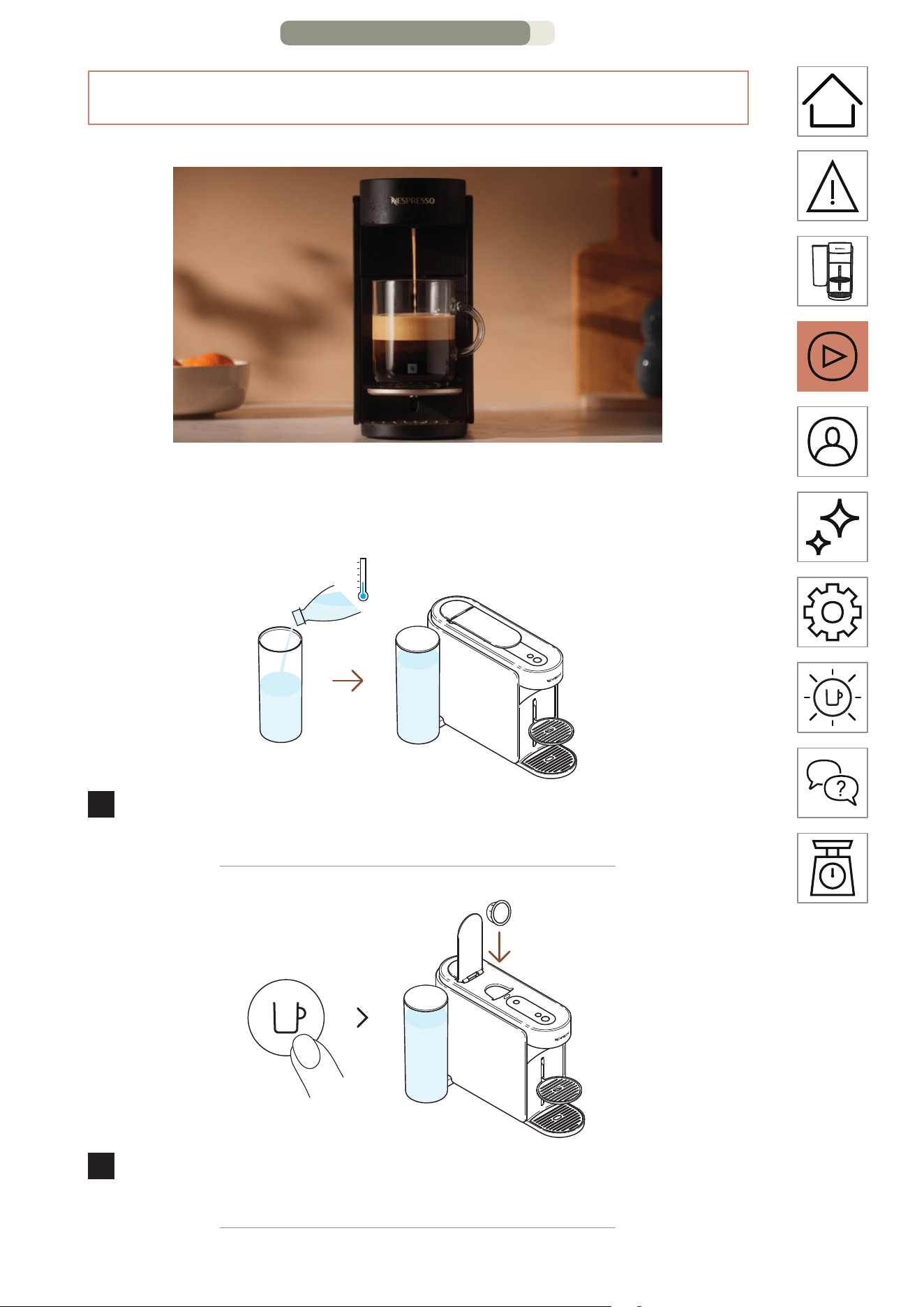
Remplissez le réservoir avec de l’eau douce et potable,
fermez-le avec le couvercle, puis replacez-le sur sa base.
MARCHE
1 fois
2
Allumez la machine en appuyant une fois sur la touche Café.
Levez la poignée de la machine et insérez une capsule Vertuo.
PREMIÈRE UTILISATION – PAGE 10/11
FR
.
18
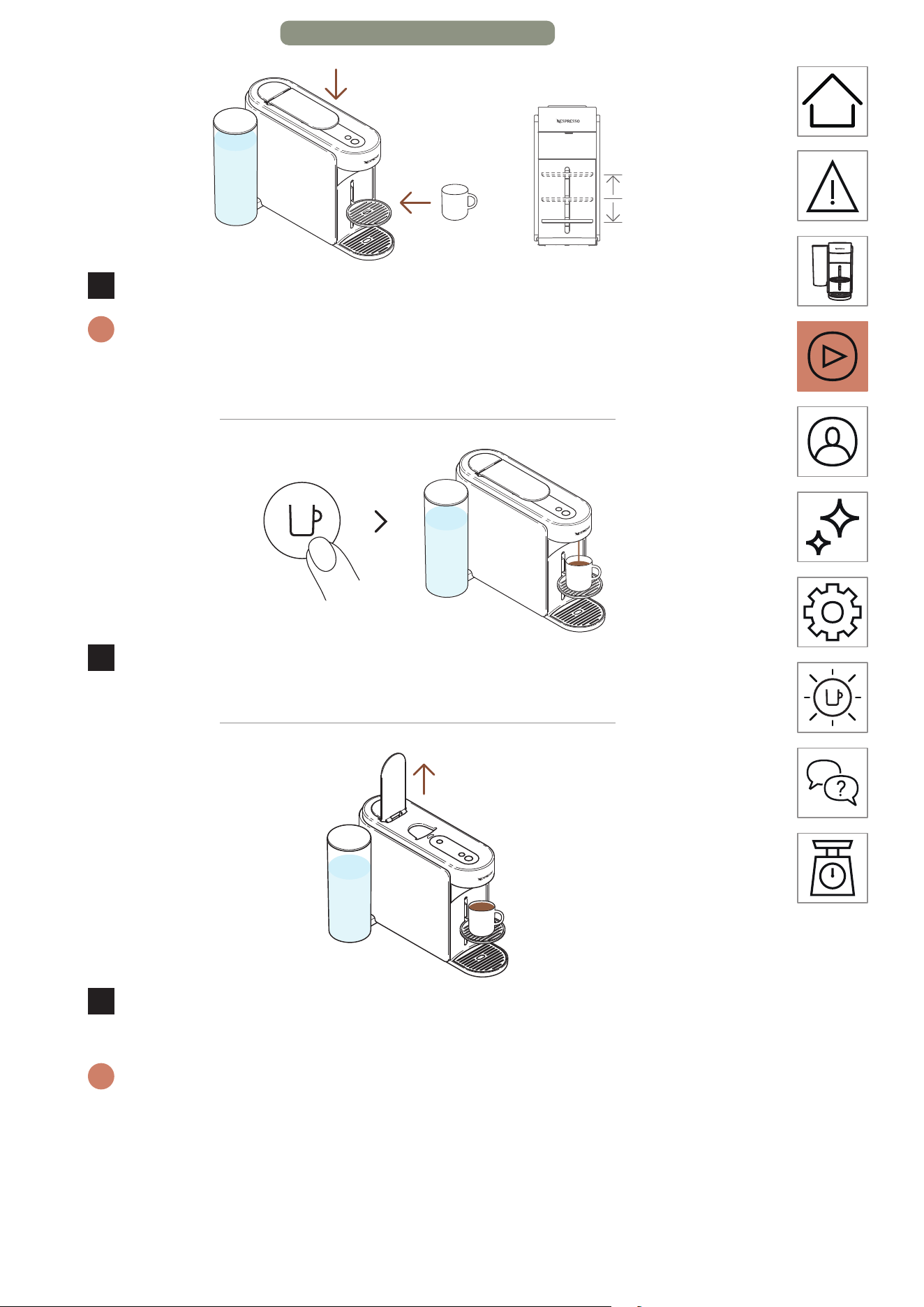
3
Abaissez la poignée de la machine et placez une tasse.
i
Pour éviter tout débordement, adaptez le format de tasse en fonction
du volume de la capsule choisie (prédéfini ou personnalisé). Le
support de tasse peut être ajusté selon votre format de tasse.
1 fois
4
Commencez à préparer du café en appuyant une fois sur la
touche Café.
5
Une fois la préparation terminée, levez la poignée de la
machine pour éjecter la capsule et dégustez votre café.
i
Vous pouvez interrompre l’extraction du café à tout moment en
appuyant une fois sur la touche Café. Pour une utilisation correcte de
votre machine, nous vous recommandons de lever la poignée une fois
la préparation complètement terminée (touche Café blanche fixe).
Le fait de lever la poignée permet de retirer la capsule. Du café ou de
l’eau peut rester dans le module d’entretien. Videz le compartiment à
capsules si nécessaire, ainsi que tout résidu de café ou d’eau.
PREMIÈRE UTILISATION – PAGE 11/11
FR
.
19
PERSONNALISER MES MOMENTS CAFÉ
MODE CRÉATIONS CAFÉ
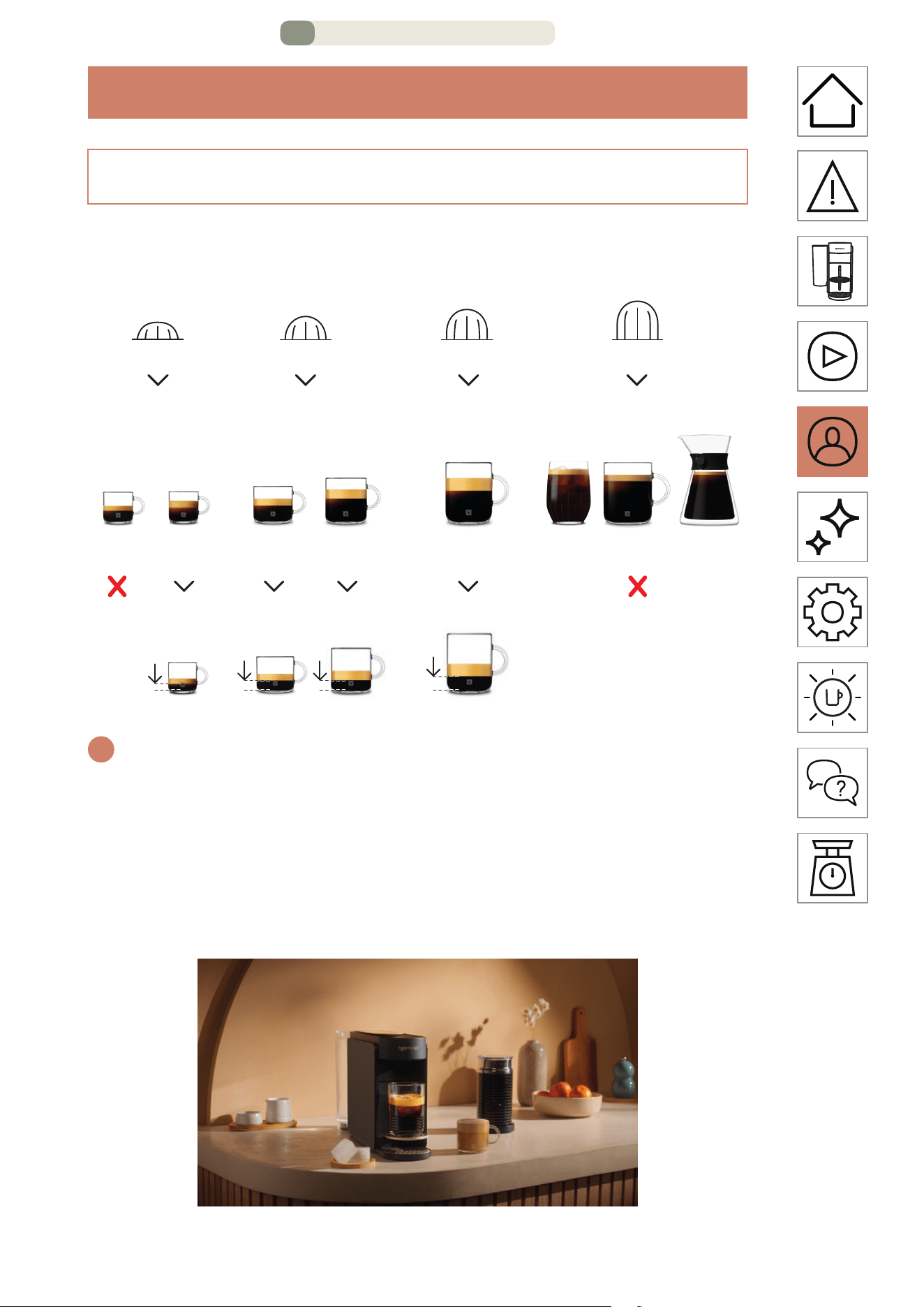
Préparez en toute simplicité votre café concentré, à température
ajustée pour toutes vos recees glacées et à base de lait.
i
Pour profiter pleinement de ses avantages, nous vous recommandons
de préparer les cafés de notre gamme Coee+ uniquement avec les
longueurs de tasse ocielles. Pour obtenir le meilleur café en tasse,
nous vous déconseillons de préparer nos cafés Ristreo, TG (Alto
Ambrato, Alto Onice), Cold Brew Style et Carafe Style Pour-Over dans
ce mode.
25 ml
0,84 oz liq.
40 ml
1,35 oz liq.
40 ml
1,35 oz liq.
80 ml
2,7 oz liq.
25 ml
0,84 oz liq.
40 ml
1,35 oz liq.
80 ml
2,7 oz liq.
150 ml
5,07 oz liq.
230 ml
7,77 oz liq.
355 ml
12 oz liq.
535 ml
18,09 oz liq.
Carafe Style
Pour-Over
Ristreo Espresso
Double
Espresso
Gran
Lungo Tasse/Café
Café style
infusé à froid Alto
S M L XL
P
S M L XL
M
S M L XL
G
S M L XL
TG
PERSONNALISER MES MOMENTS CAFÉ – PAGE 1/8
FR
.
20
1
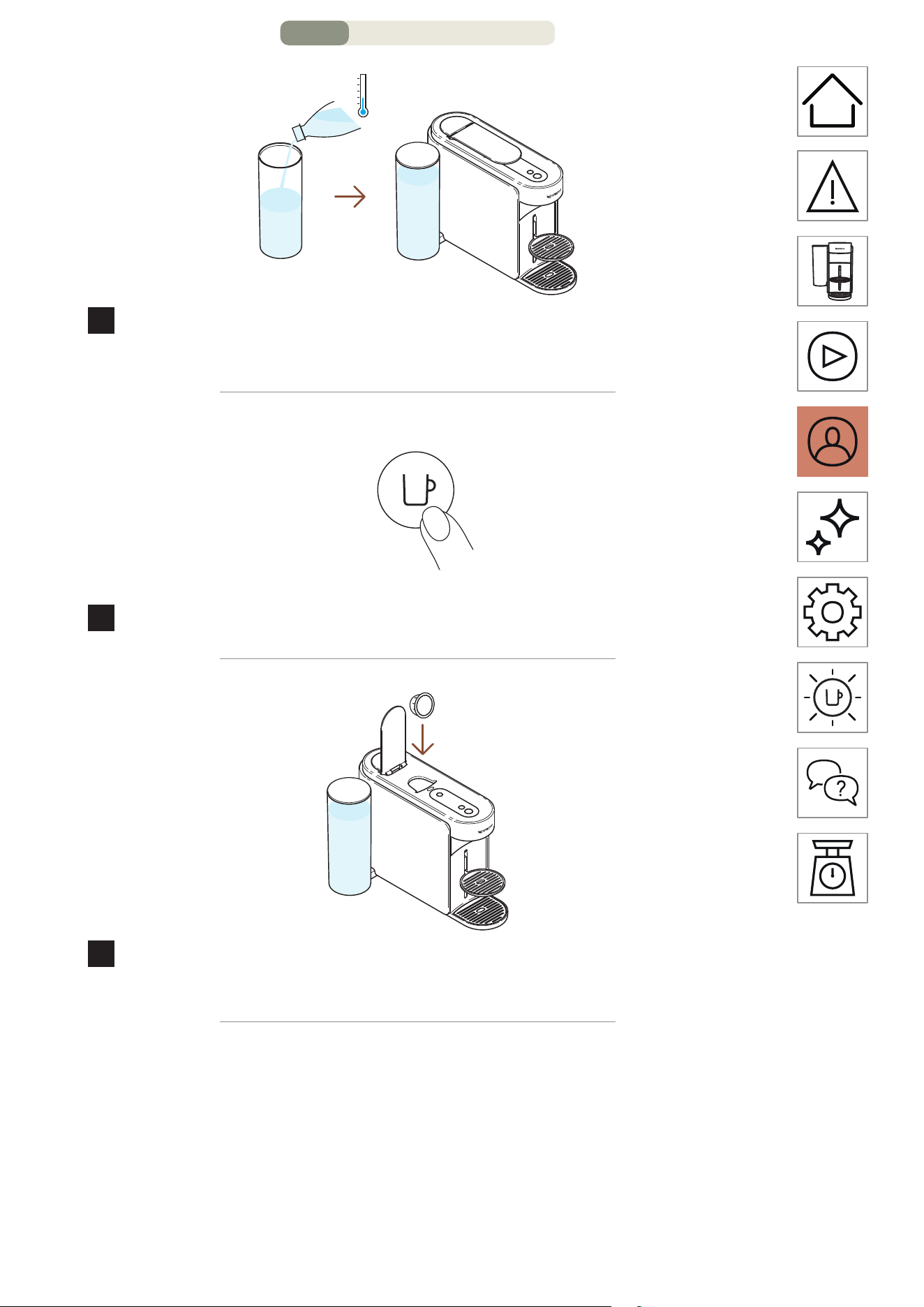
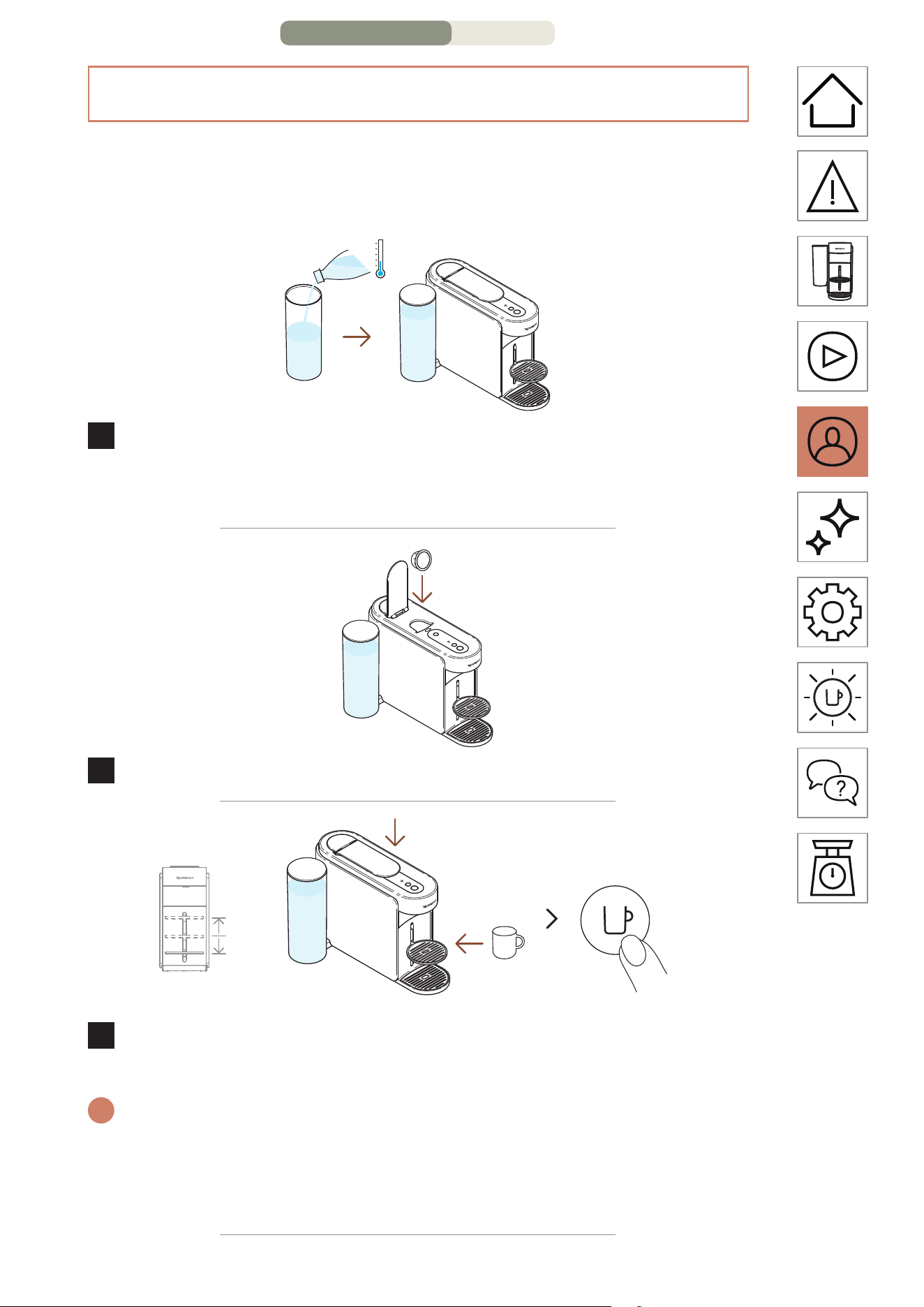
Remplissez le réservoir avec de l’eau douce et potable,
fermez-le avec le couvercle, puis replacez-le sur sa base.
MARCHE
1 fois
2
Allumez la machine en appuyant une fois sur la touche Café.
3
Levez la poignée de la machine et insérez une capsule
Vertuo compatible avec cee fonction.
PERSONNALISER MES MOMENTS CAFÉ – PAGE 2/8
FR
.
21
4
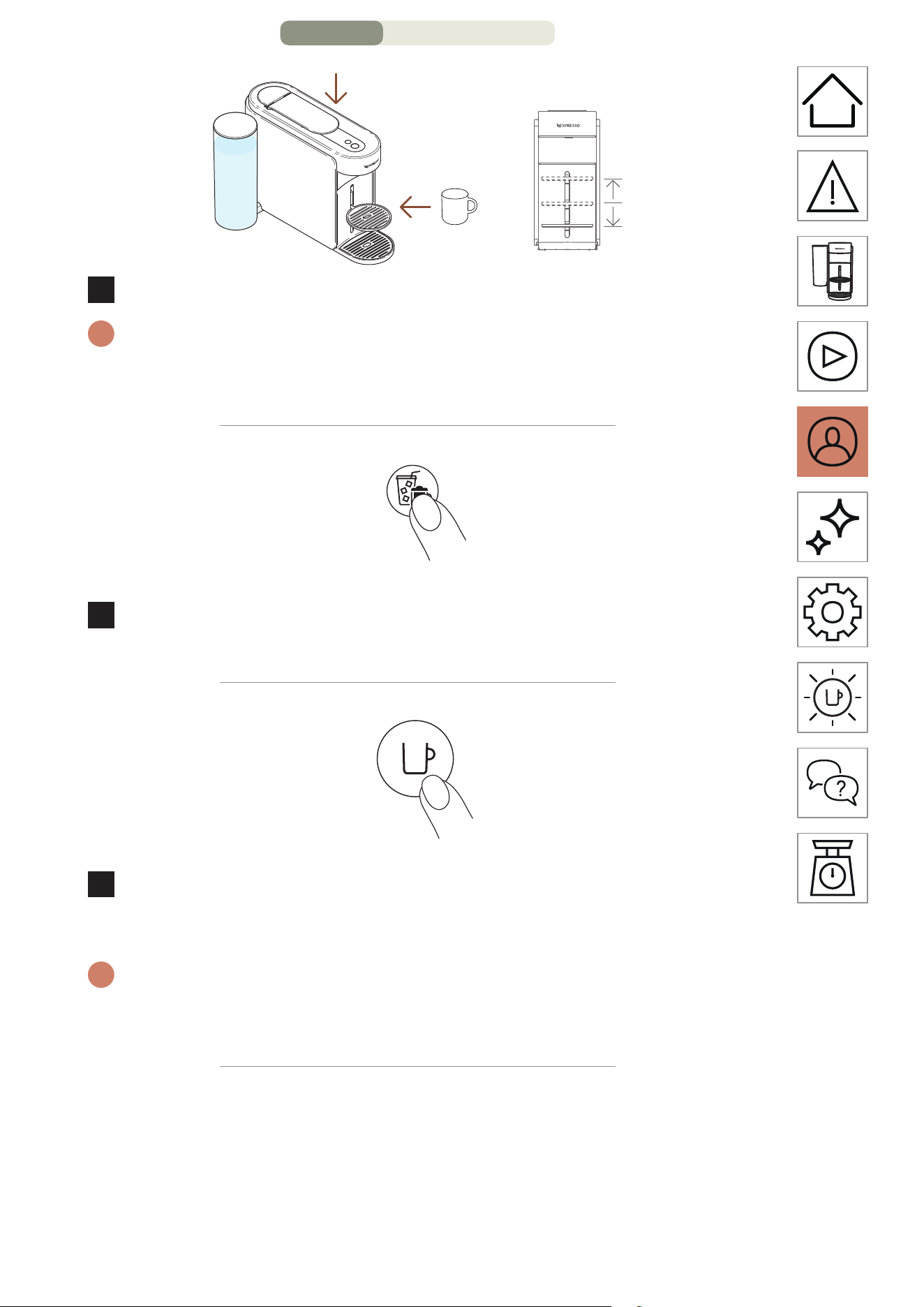
Abaissez la poignée de la machine et placez une tasse.
i
Pour éviter tout débordement, adaptez le format de tasse en fonction
du volume de la capsule choisie (prédéfini ou personnalisé). Le
support de tasse peut être ajusté selon votre format de tasse.
1 fois
5
Pour lancer la préparation de ce café concentré, appuyez
une fois sur la touche Créations café.
1 fois
6
Commencez à préparer du café en appuyant une fois sur la
touche Café.
i
La touche Créations café est désactivée si la capsule ne peut pas
être extraite dans ce mode. Votre machine prépare ainsi le café à la
longueur de tasse préprogrammée.
PERSONNALISER MES MOMENTS CAFÉ – PAGE 3/8
FR
.
22
7
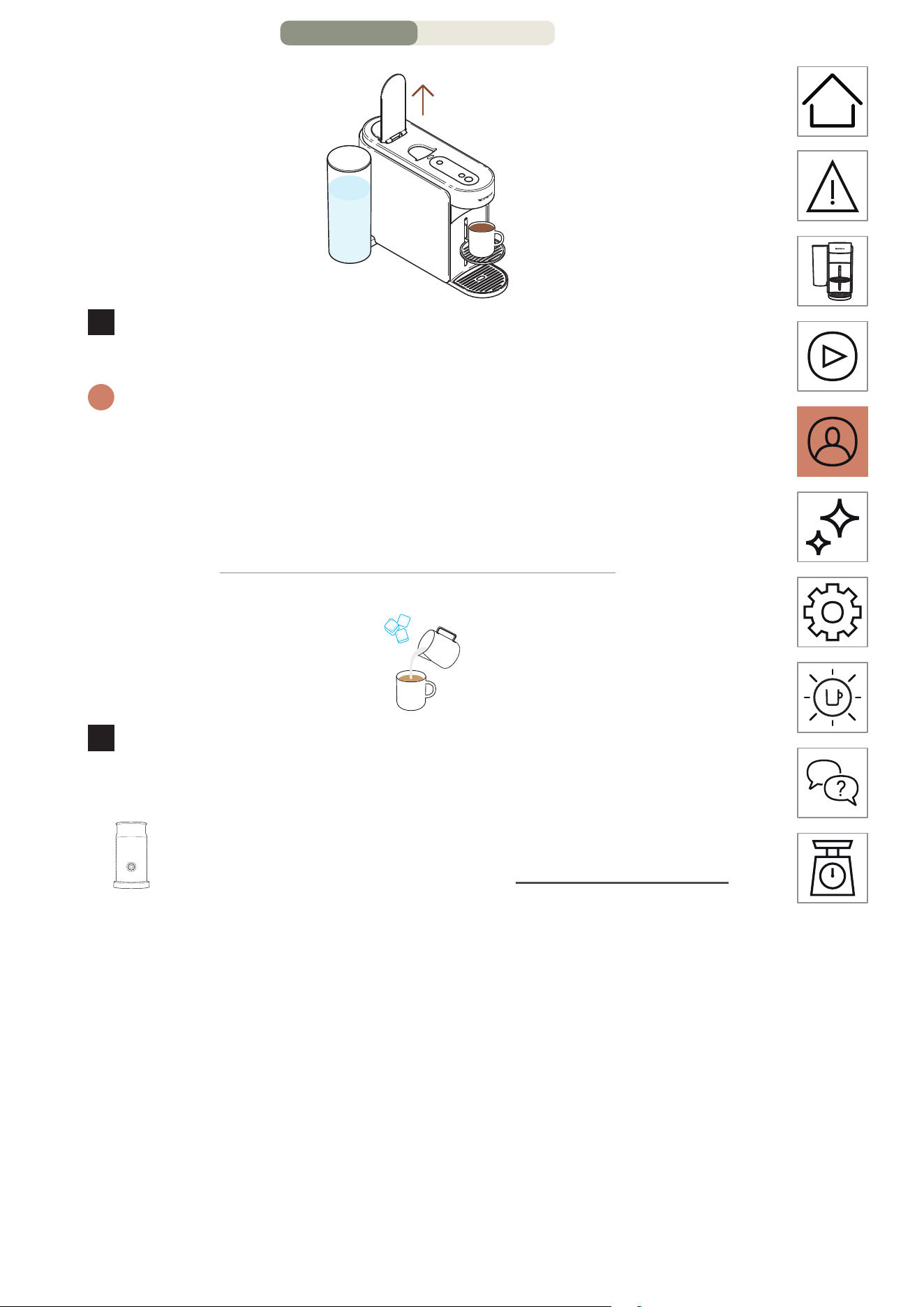
Lorsque le café cesse de couler, relevez le levier de la
machine pour éjecter la capsule.
i
Vous pouvez interrompre l’extraction du café à tout moment en
appuyant une fois sur la touche Café. Pour une utilisation correcte de
votre machine, nous vous recommandons de lever la poignée une
fois la préparation complètement terminée (touche Café blanche
fixe). Le fait de lever la poignée permet de retirer les capsules après
l’extraction.
8
Cee fonctionnalité vous permet de préparer un café
concentré à température ajustée, première étape de toutes
vos recees glacées et à base de lait.
Découvrez comment mere à niveau votre machine
avec notre gamme Aeroccino sur www.nespresso.com
PERSONNALISER MES MOMENTS CAFÉ – PAGE 4/8
FR
.
23
PERSONNALISATION DU VOLUME ET DE LA TEMPÉRATURE
DU CAFÉ (APPLICATION NESPRESSOSMART)
Grâce à l’application Nespresso Smart, vous pourrez
personnaliser deux paramètres principaux d’extraction du café :
la température et le format de tasse.
1
Une fois la machine appairée, remplissez le réservoir d’eau
avec de l’eau douce et potable, fermez-le avec le couvercle,
puis replacez-le sur sa base.
2
Levez la poignée de la machine et insérez une capsule Vertuo.
MARCHE
1 fois
3
Abaissez la poignée de la machine, placez une tasse et
allumez la machine en appuyant une fois sur la touche Café.
i
Pour éviter tout débordement, adaptez la taille de tasse en fonction
de la longueur de tasse de la capsule choisie (préprogrammée ou
personnalisée). Il est possible de régler le support de tasse en fonction
de votre taille de tasse.
PERSONNALISER MES MOMENTS CAFÉ – PAGE 5/8
FR
.
24
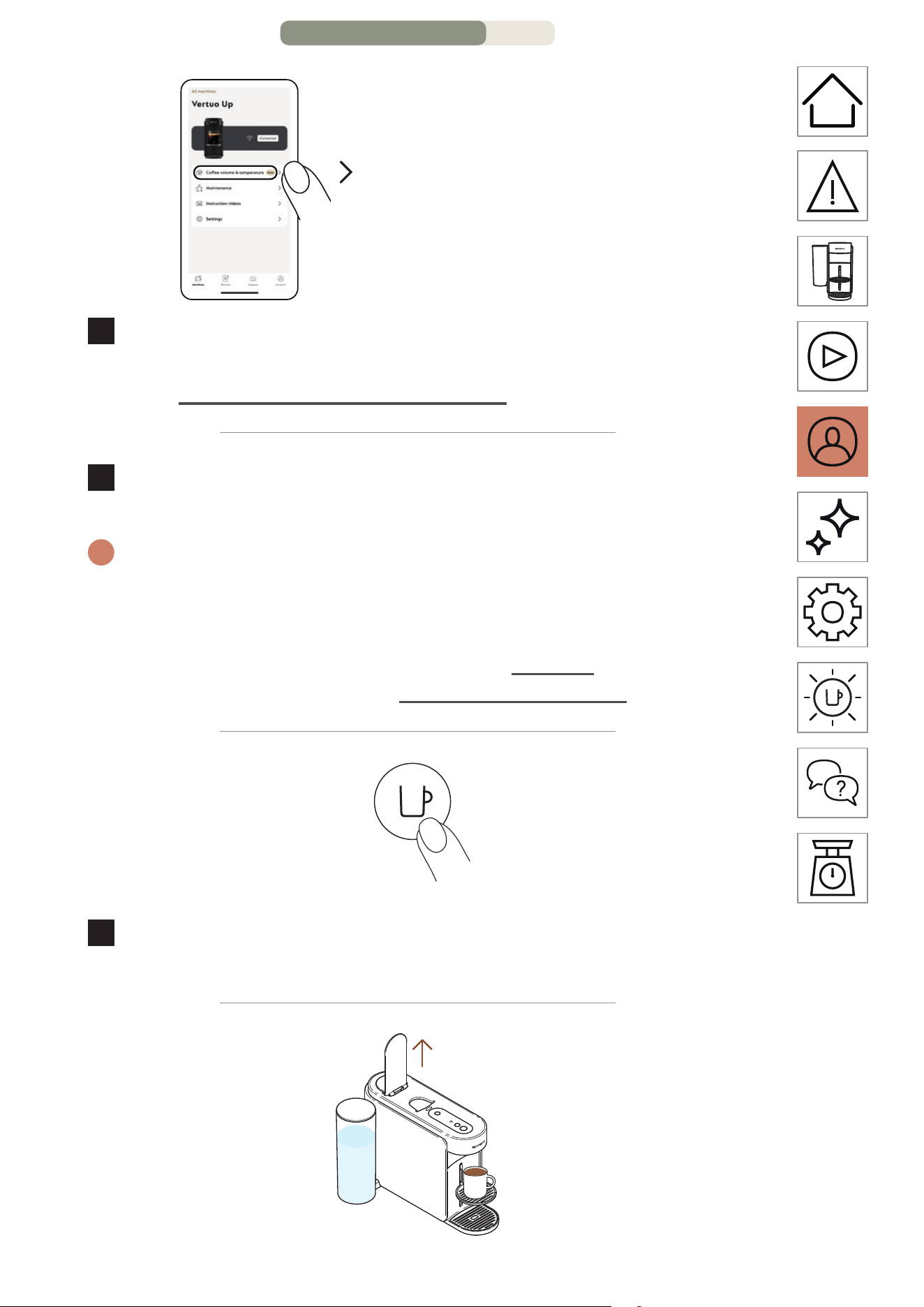
« Volume et température du café »
4
Ouvrez votre application NespressoSmart (dans les
2minutes qui suivent l’allumage de votre machine) et cliquez
sur « Volume et température du café ».
5
Personnalisez la température et/ou le format selon votre
goût et enregistrez cee configuration.
i
Les paramètres mis à jour sont programmés sur la machine en
fonction du format de tasse. Une fois qu’un paramètre spécifique est
programmé, la préparation s’arrêtera selon le format de tasse déterminé
par l’utilisateur à chaque fois que la tasse est insérée. Pour revenir aux
paramètres par défaut, consultez la section « Réglages » sur l’application
NespressoSmart ou la section « Réinitialiser mes réglages ».
1 fois
6
Commencez à préparer votre café personnalisé en appuyant
une fois sur la touche Café.
PERSONNALISER MES MOMENTS CAFÉ – PAGE 6/8
FR
.
25
7
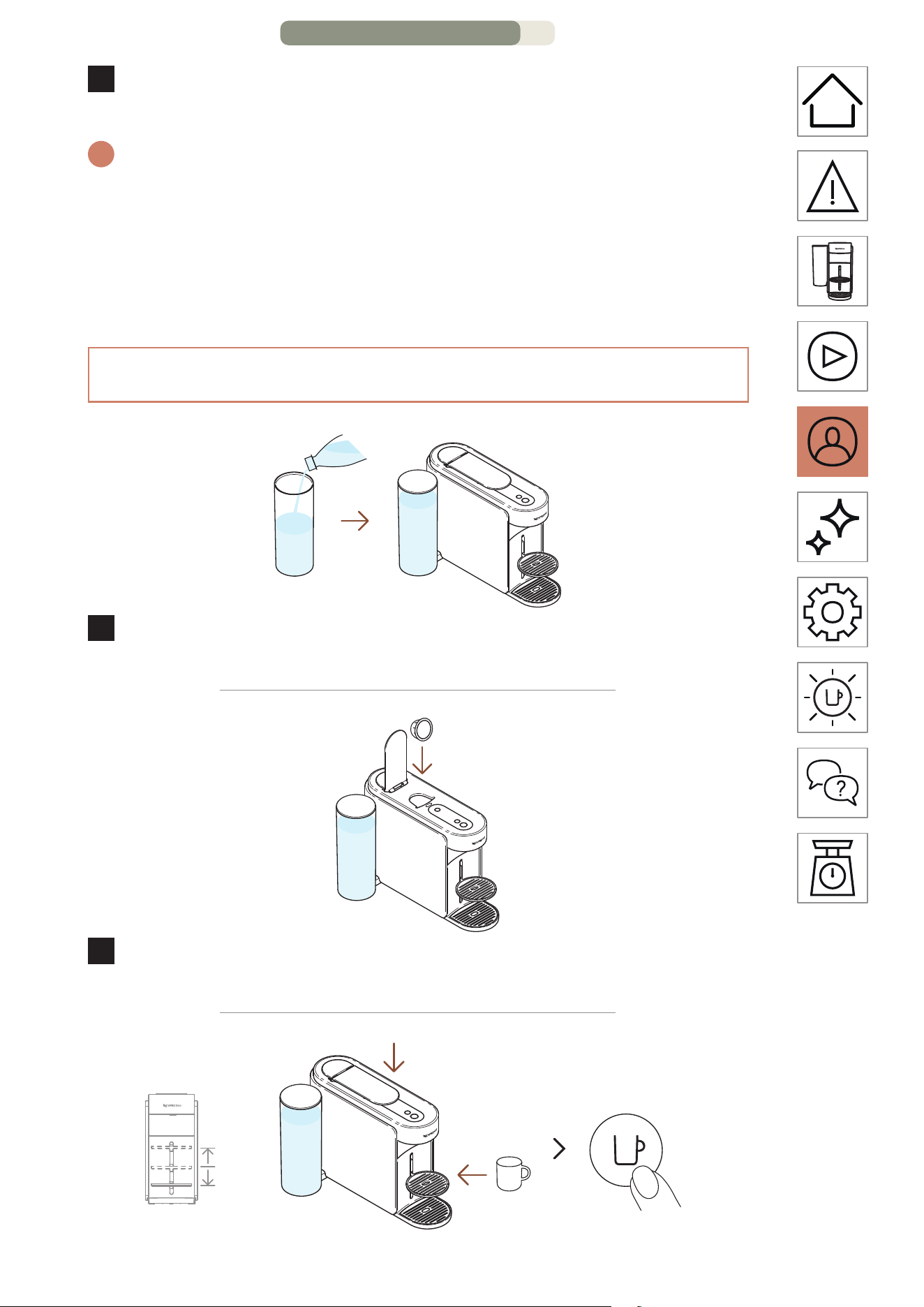
Une fois la préparation terminée, levez la poignée de la
machine pour éjecter la capsule et dégustez votre café.
i
Pour une utilisation correcte de votre machine, nous vous
recommandons de lever la poignée une fois la préparation
complètement terminée (voyant de la touche Café blanc fixe). Le fait
de lever la poignée permet de retirer les capsules après l’extraction.
Vous pouvez interrompre l’extraction du café à tout moment en
appuyant une fois sur la touche Café.
ADAPTER VOS VOLUMES DE CAFÉ (SUR LA MACHINE)
1
Remplissez le réservoir avec de l’eau douce et potable,
fermez-le avec le couvercle, puis replacez-le sur sa base.
2
Levez la poignée de la machine et insérez une capsule
Vertuo.
MARCHE
1 fois
PERSONNALISER MES MOMENTS CAFÉ – PAGE 7/8
FR
.
26
3
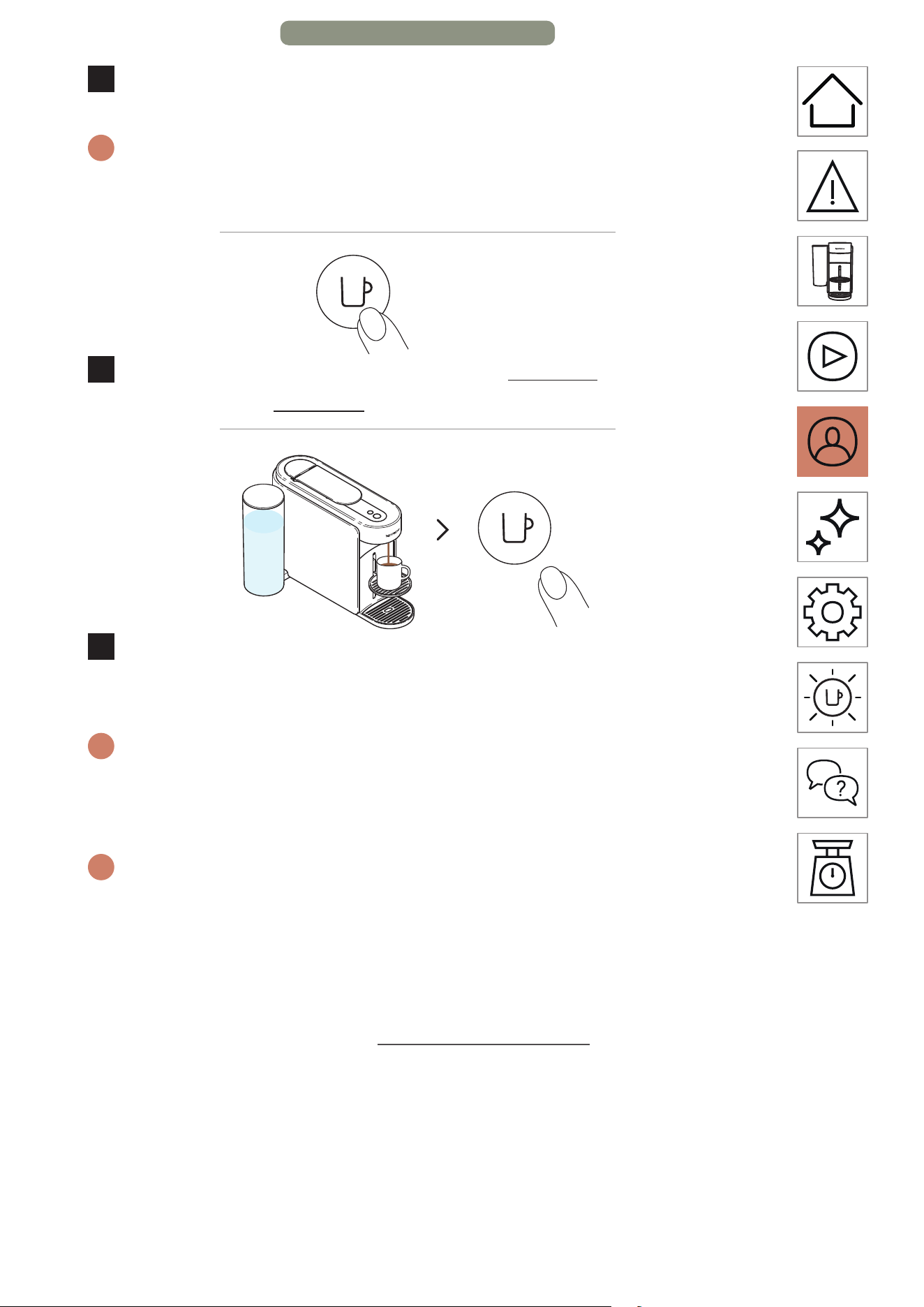
Abaissez la poignée de la machine, placez une tasse et
allumez la machine en appuyant une fois sur la touche Café.
i
Pour éviter tout débordement, adaptez le format de tasse en fonction
du volume de la capsule choisie (prédéfini ou personnalisé). Le
support de tasse peut être ajusté selon votre format de tasse.
> 5 secondes
4
Lancez la préparation en maintenant appuyée la touche
Café pendant au moins 5secondes.
5
Une fois le volume souhaité aeint, relâchez la touche Café.
Des goues de café peuvent continuer à couler pendant
quelques secondes.
i
Pour une utilisation correcte de votre machine, nous vous
recommandons de lever la poignée une fois la préparation
complètement terminée (voyant de la touche Café blanc fixe). Le fait
de lever la poignée permet de retirer les capsules après l’extraction.
i
La programmation est propre à chaque format de tasse. Les formats
de tasse programmables vont de 20 ml (0,7 oz liq.) à 500 ml (17 oz
liq.), à l’exception du café Carafe Style Pour-Over, qui peut aller jusqu’à
1 L (34 oz liq.). Une fois qu’un paramètre spécifique est programmé, la
préparation s’arrêtera selon le format de tasse déterminé par l’utilisateur
à chaque fois que la tasse est insérée. Pour revenir aux paramètres par
défaut, consultez la section « Réglages de la machine ».
PERSONNALISER MES MOMENTS CAFÉ – PAGE 8/8
FR
.
27
ENTRETIEN
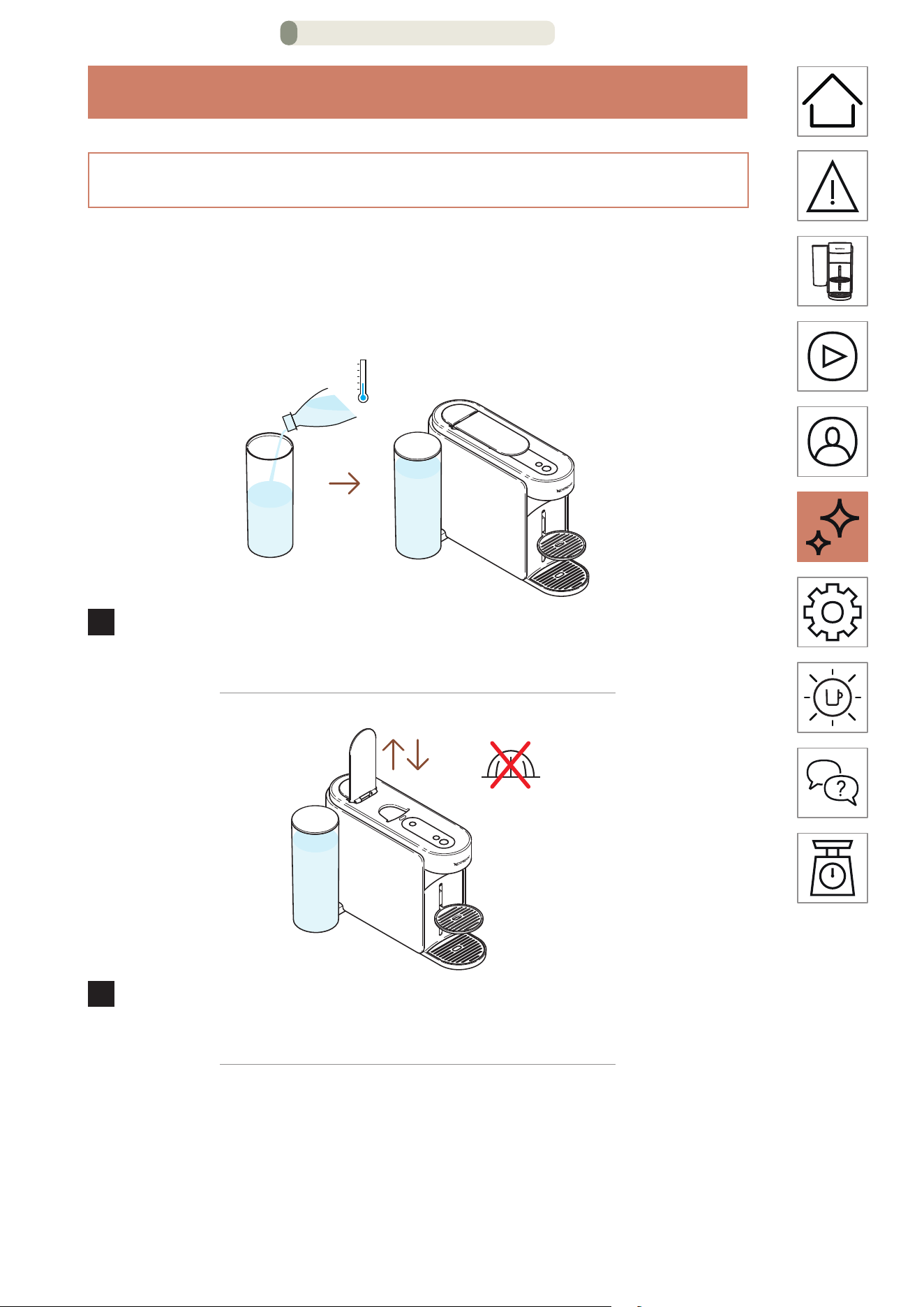
RINÇAGE COURT
Vous souhaitez préchauer votre tasse ou rincer rapidement
votre machine après la préparation d’un café aromatisé ?
Votre machine Vertuo Up ore une option de rinçage court.
1
Remplissez le réservoir avec de l’eau douce et potable,
fermez-le avec le couvercle, puis replacez-le sur sa base.
2
Levez et abaissez la poignée de la machine pour éjecter la
capsule précédente et n’insérez pas de nouvelle capsule.
ENTRETIEN – PAGE 1/16
FR
.
28
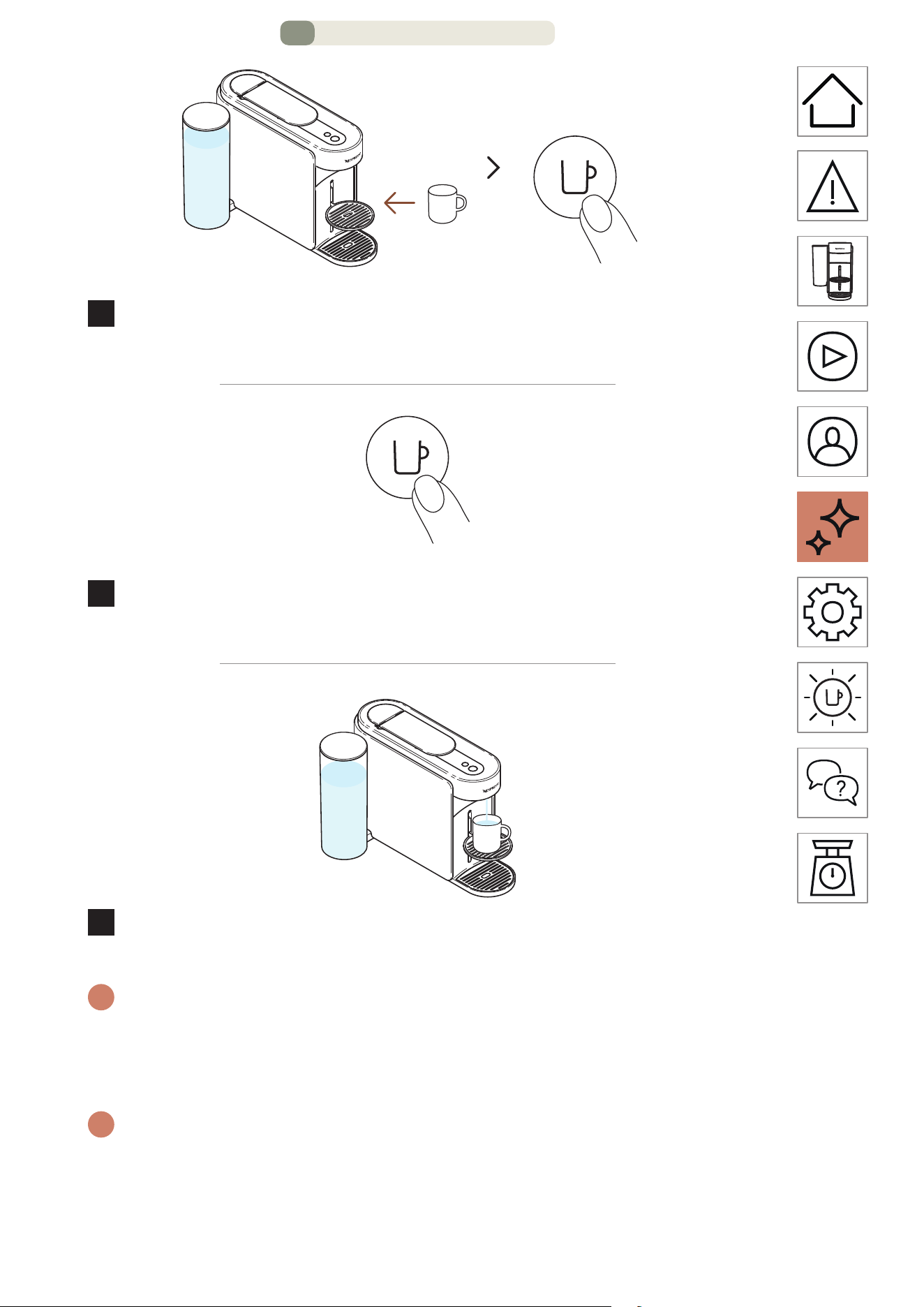
MARCHE
1 fois
3
Placez une tasse et allumez la machine en appuyant une fois
sur la touche Café.
1 fois
4
Commencez à préparer du café en appuyant une fois sur la
touche Café, sans capsule.
5
La machine prépare alors ~40 ml (~1,35 oz liq) d’eau chaude.
Ne buvez pas cee préparation.
i
Vous pouvez interrompre la préparation à tout moment en appuyant une
fois sur la touche Café. Pour une utilisation correcte de votre machine,
nous vous recommandons de lever la poignée une fois la préparation
complètement terminée (voyant de la touche Café blanc fixe).
i
De l’eau peut s’accumuler dans le module de maintenance
pendant le processus. Veuillez vider le module d’entretien lorsque
le compartiment à capsules est plein ou après toute procédure
d’entretien (neoyage, détartrage, vidange, etc.).
ENTRETIEN – PAGE 2/16
FR
.
29
NET TOYAGE
Neoyez votre machine tous les mois, lorsque vous commencez
à avoir des résidus de café dans votre tasse ou après une longue
période de non-utilisation. Cee procédure peut être facilement
eectuée via l’application Nespresso Smart une fois la machine
connectée.
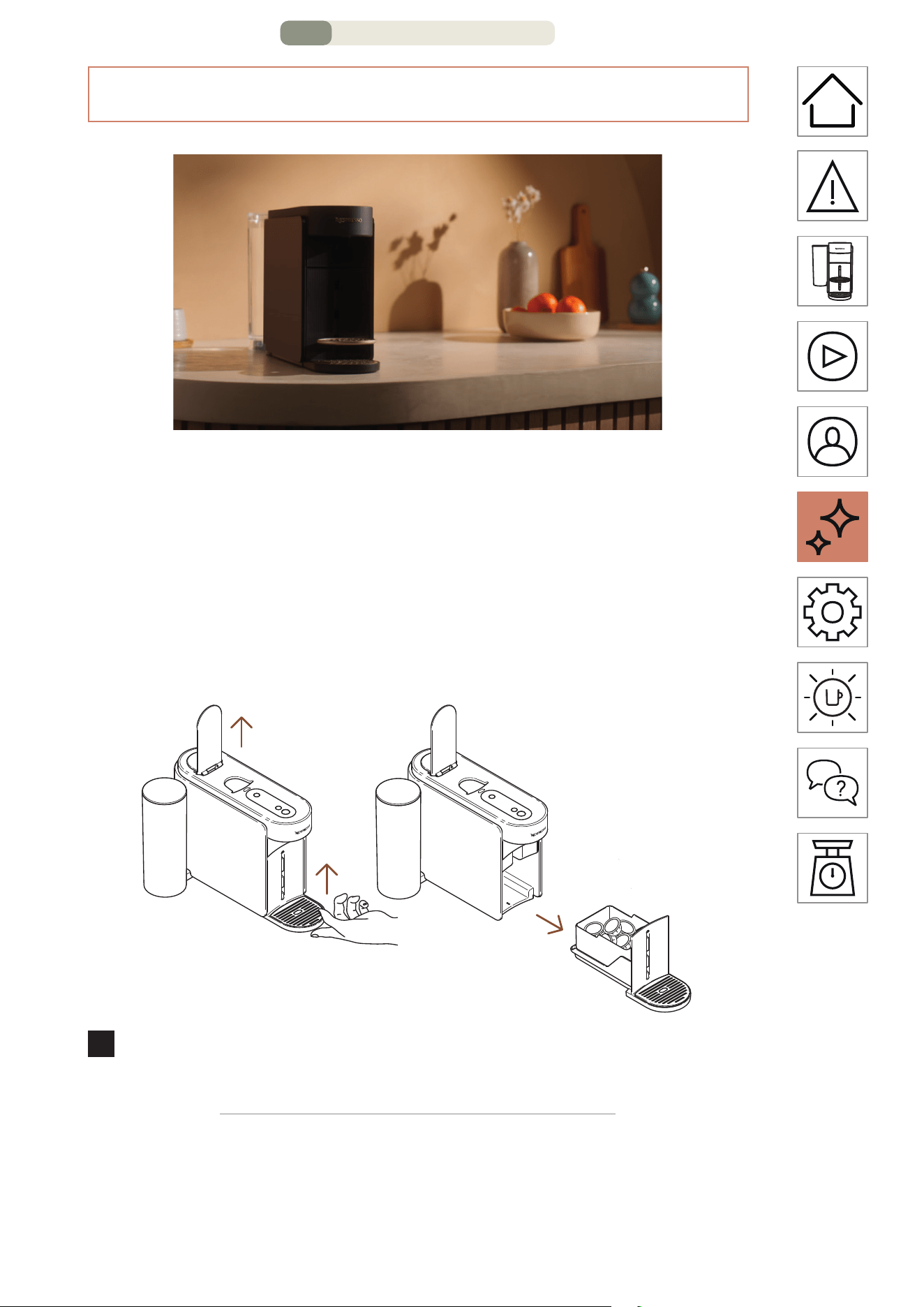
1
Levez la poignée de la machine pour éjecter la capsule et
retirer le module d’entretien.
ENTRETIEN – PAGE 3/16
FR
.
30
2
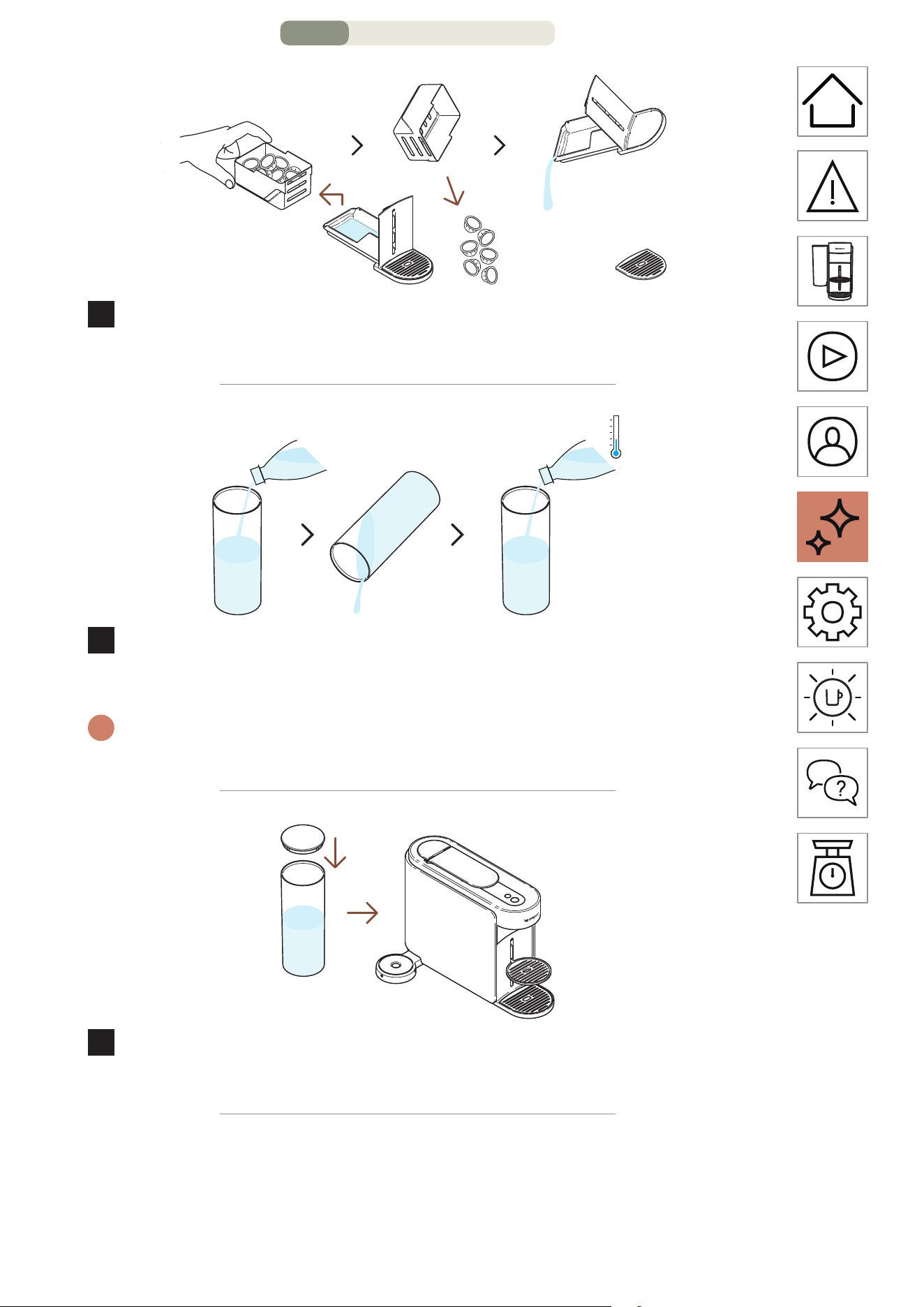
Videz le compartiment à capsules si nécessaire, ainsi que
tout résidu de café ou d’eau.
3
Rincez le réservoir d’eau avant de le remplir d’eau douce et
potable uniquement (0,5 L/17 oz liq).
i
Assurez-vous que le réservoir d'eau ne soit rempli qu'une seule fois
durant la procédure.
4
Fermez le couvercle du réservoir d’eau et replacez-le sur la
machine..
ENTRETIEN – PAGE 4/16
FR
.
31
1 L
34 oz liq.
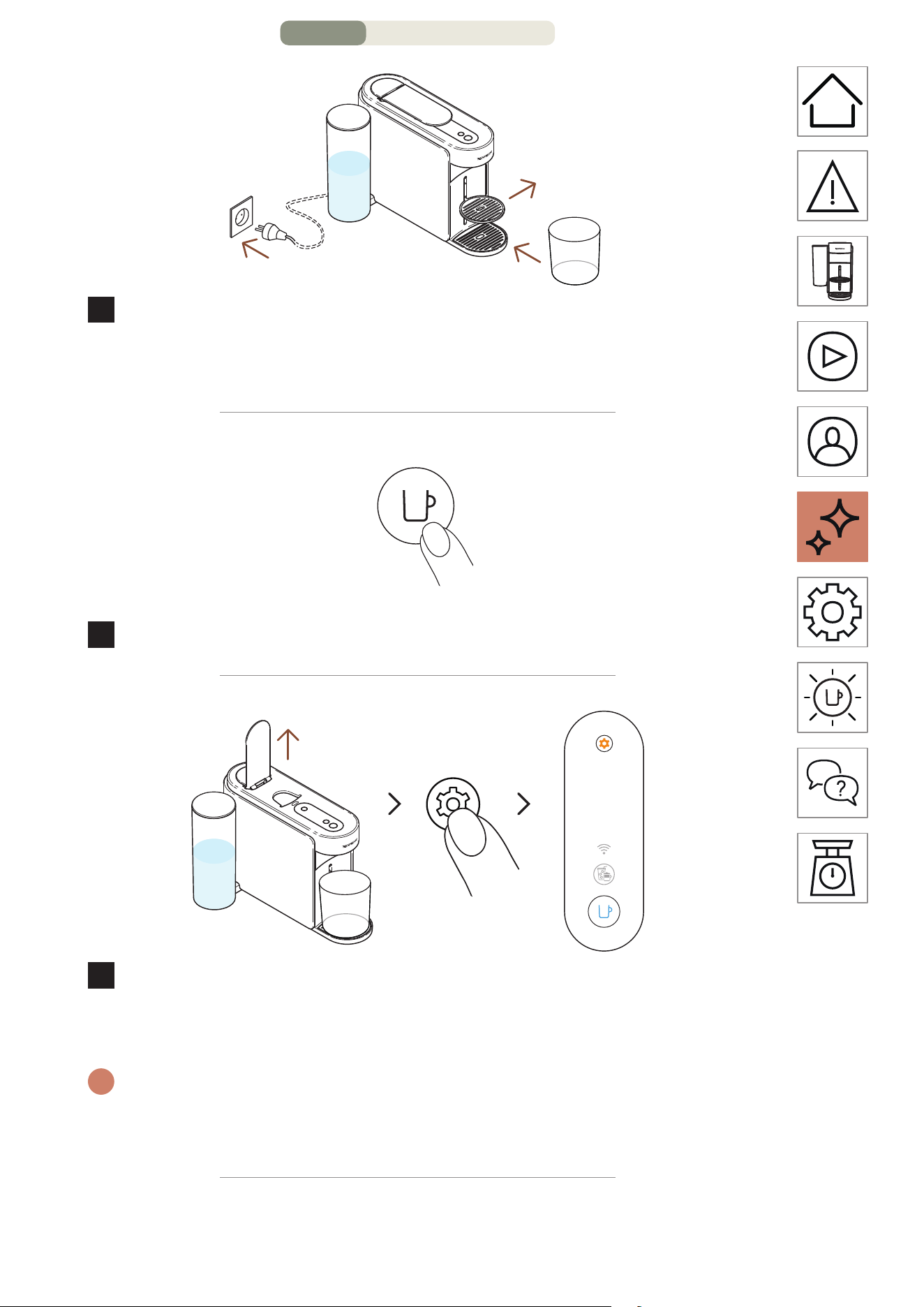
5
Laissez la machine branchée, retirez le support de tasse et
placez un récipient vide (au moins 1 L/34 oz liq.) sous l’orifice
de sortie du café.
MARCHE
1 fois
6
Allumez la machine en appuyant une fois sur la touche Café.
3 secondes
7
Levez la poignée de la machine. Appuyez sur la touche
Entretien et maintenez-la enfoncée pendant au moins
3 secondes. Relâchez-la lorsque la touche Café est bleu fixe.
i
Pour quier le mode Entretien avant de lancer une procédure, veuillez
maintenir à nouveau la touche Entretien enfoncée pendant au moins
3 secondes.
ENTRETIEN – PAGE 5/16
FR
.
32
1 fois
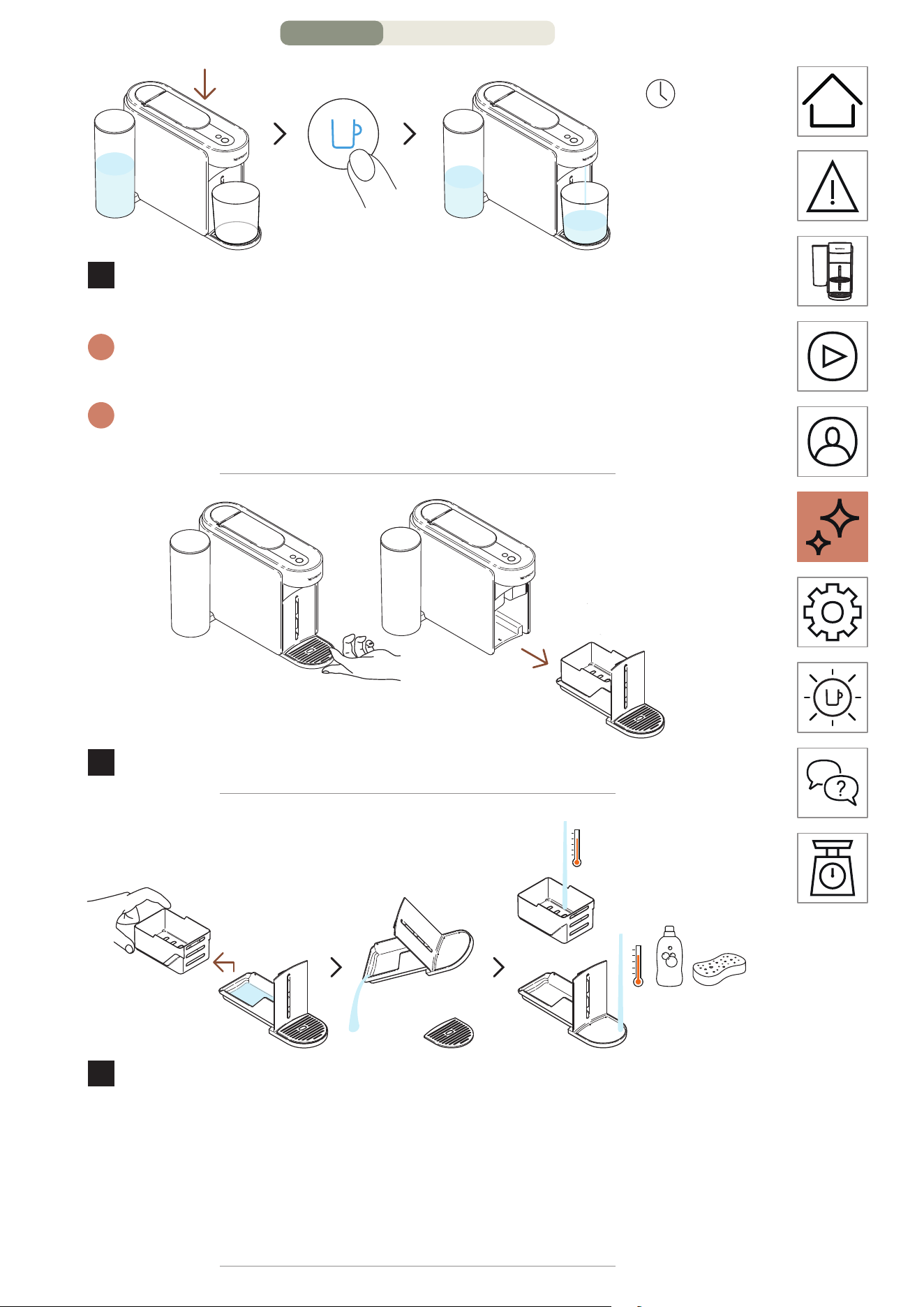
~3 minutes
8
Abaissez la poignée et appuyez une fois sur la touche Café
bleue pour lancer le processus.
i
La machine commence le rinçage et la procédure peut durer jusqu’à
3 minutes.
i
De l’eau peut s’accumuler dans le module d’entretien pendant le
rinçage.
9
Retirez le module d’entretien de la machine.
10
Séparez le compartiment à capsules du reste et videz l’eau
restante. Lavez le module d’entretien à l’eau chaude avec un
détergent doux inodore.
MISE EN GARDE: N’utilisez pas de solvant ou de produit de neoyage
puissant ou abrasif. Ne meez pas la machine au lave-vaisselle.
N’immergez jamais l’appareil ou une partie de l’appareil dans l’eau.
ENTRETIEN – PAGE 6/16
FR
.
33
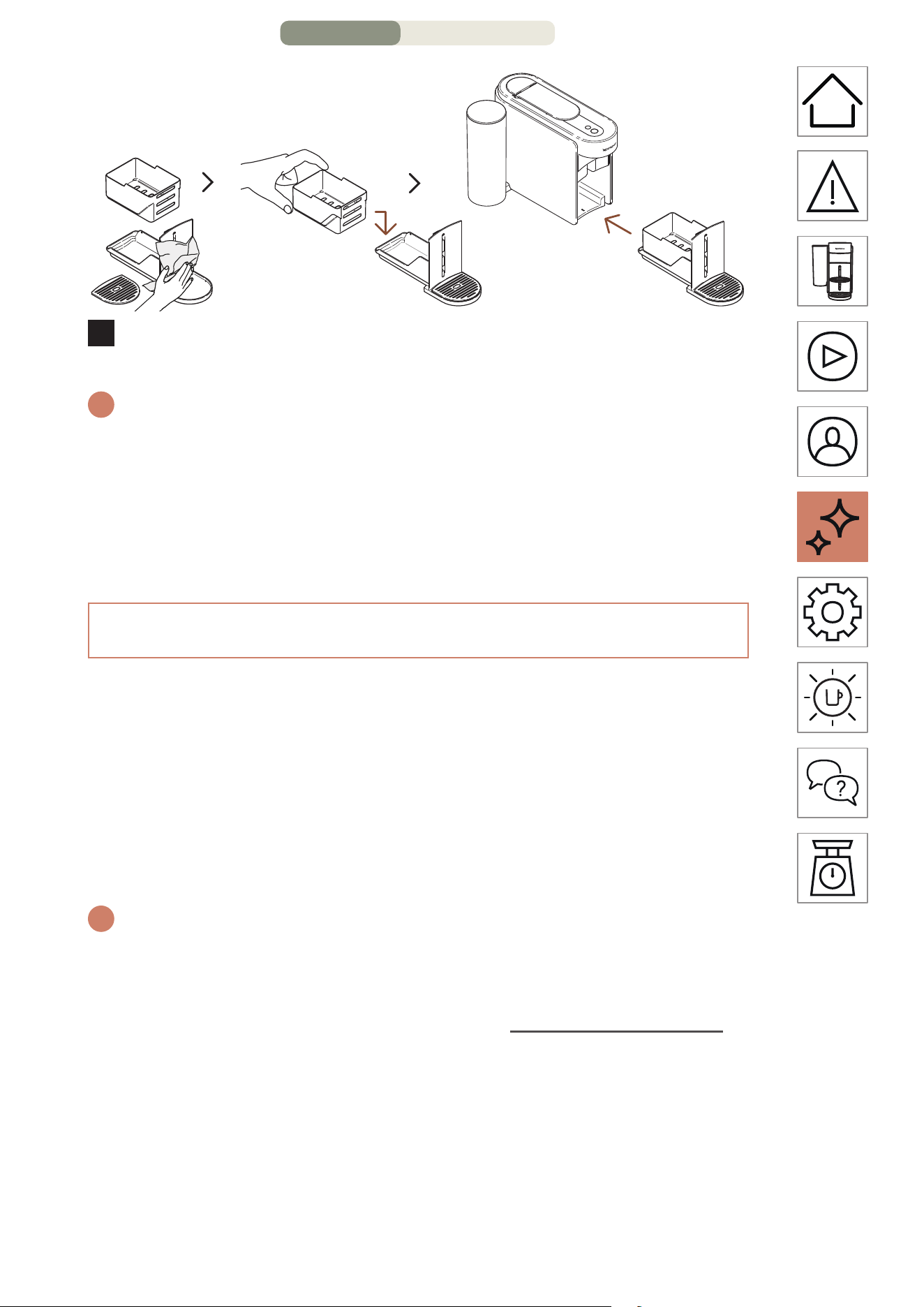
11
Séchez le module d’entretien avec un chion propre et
replacez-le sur la machine.
i
La machine repasse en mode prêt une fois la procédure terminée
(touche Café blanche fixe).
MISE EN GARDE: Neoyez l’orifice de sortie du café régulièrement à
l’aide d’un chion propre et humide. Utilisez toujours des chions doux
pour neoyer la machine.
DÉTARTRAGE
Détartrez votre machine pour assurer son bon fonctionnement
tout au long de sa durée de vie et pour profiter d’une expérience
de café aussi exceptionnelle qu’au premier jour. Votre machine
vous indiquera qu’un détartrage est nécessaire lorsque la touche
Entretien est orange fixe.
Cee procédure peut être facilement eectuée via l’application
Nespresso Smart une fois la machine connectée.
i
Le processus de détartrage dure environ 15 minutes et ne peut être
interrompu une fois lancé.
Vous aurez besoin de:
• Un kit de détartrage est disponible sur www.nespresso.com
• Un récipient vide (1,5 L/51 oz liq.)
ENTRETIEN – PAGE 7/16
FR
.
34
1
ER
CYCLE : DÉTARTRAGE
1
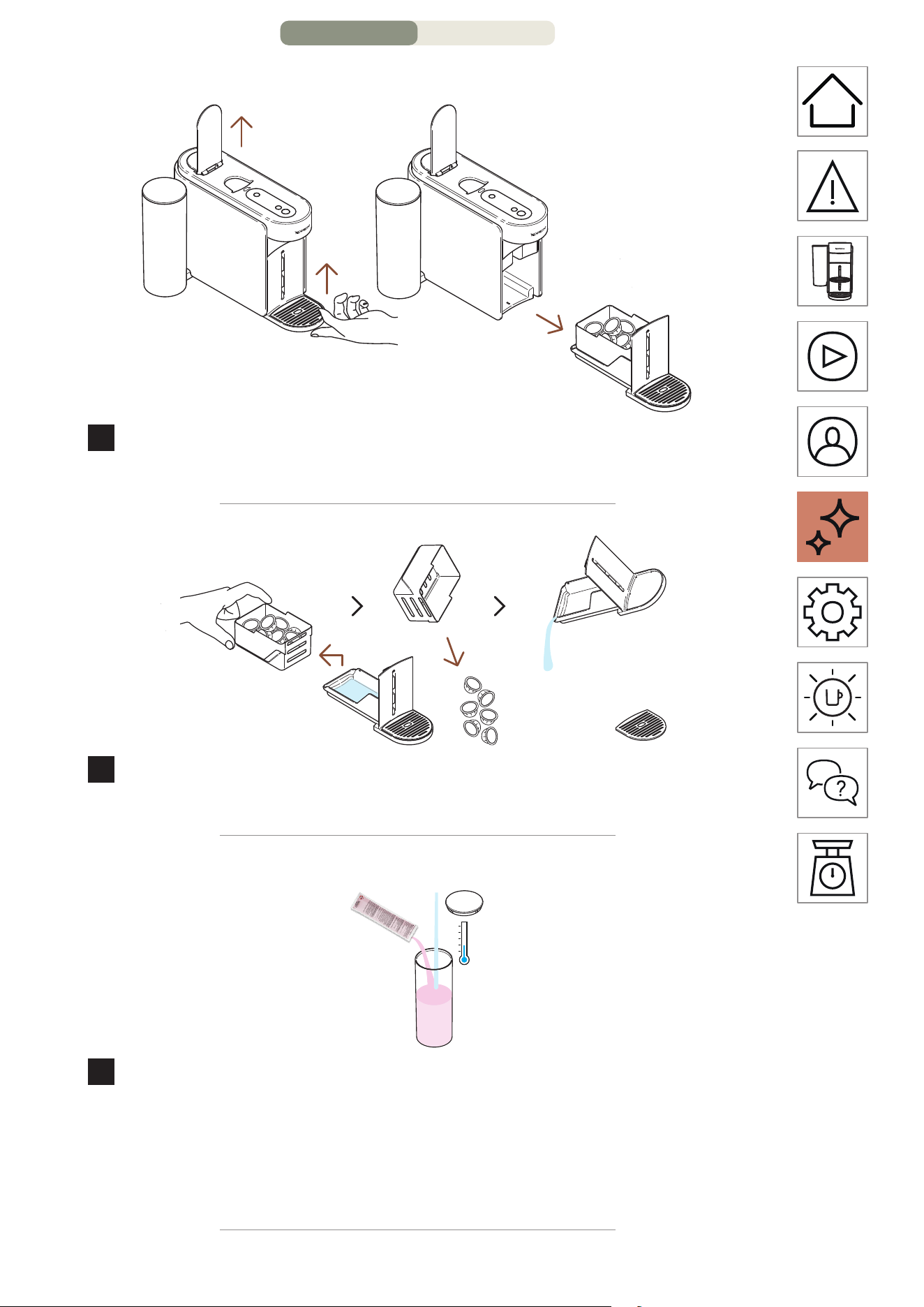
Levez la poignée de la machine pour éjecter la capsule
usagée. Retirez le module d’entretien de la machine.
2
Séparez le compartiment à capsules du reste et videz les
résidus de café/d’eau restants.
1x
0,6 L
20 oz liq.
3
Remplissez le réservoir d’eau avec 0,6 L/20 oz liq. d’eau,
ajoutez 1 unité de liquide de détartrage Nespresso et
replacez le couvercle sur le réservoir d’eau.
MISE EN GARDE: Veuillez noter que le liquide de détartrage peut être
dangereux. Évitez tout contact avec les yeux, la peau et les surfaces.
ENTRETIEN – PAGE 8/16
FR
.
35
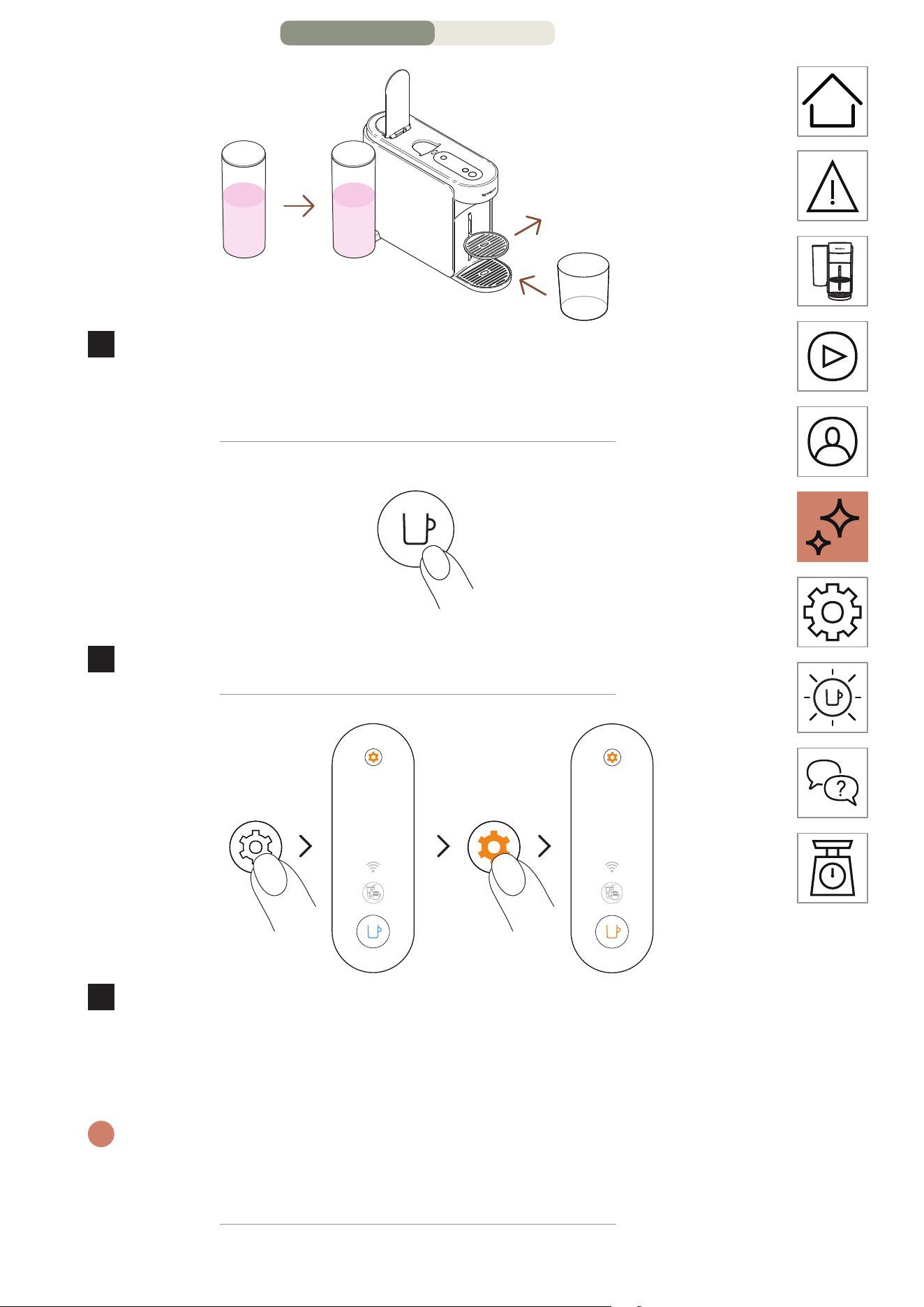
1,5 L
51 oz liq.
4
Remeez le réservoir d’eau en place sur la machine. Retirez
le support de tasse et placez un récipient vide (au moins
1,5 L/51 oz liq.) sous l’orifice de sortie du café.
MARCHE
1 fois
5
Allumez la machine en appuyant une fois sur la touche Café.
2 fois
3 secondes
6
Appuyez sur la touche Entretien et maintenez-la enfoncée
pendant au moins 3 secondes. Une fois que le voyant de la
touche Café est bleu fixe, relâchez-la et appuyez deux fois
sur la touche Entretien. La touche Café doit être orange fixe.
i
Pour quier le mode Entretien avant de lancer une procédure, veuillez
maintenir à nouveau la touche Entretien enfoncée pendant au moins
3 secondes.
ENTRETIEN – PAGE 9/16
FR
.
36
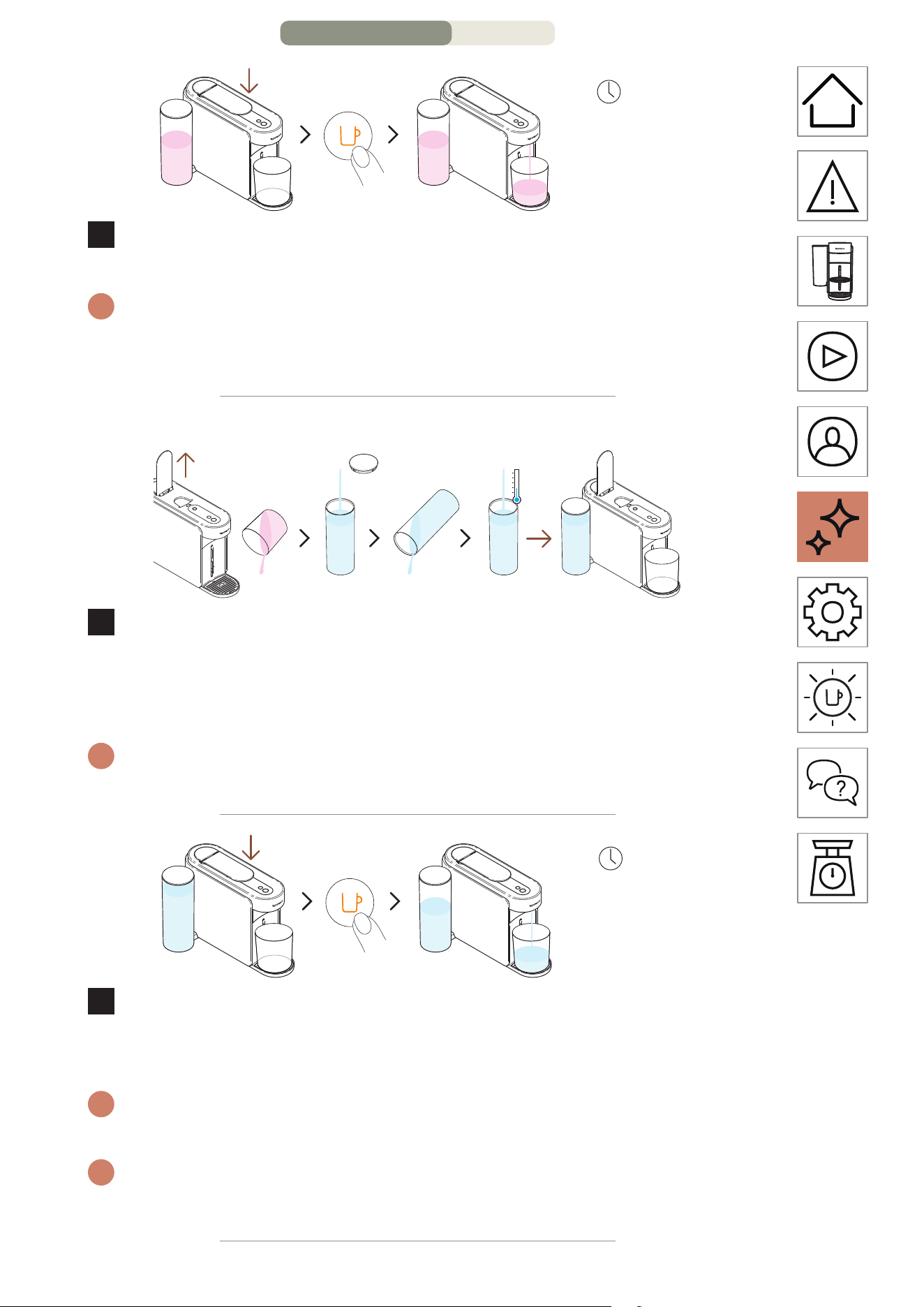
~5 minutes
1
f
ois
7
Abaissez la poignée et appuyez une fois sur la touche Café
orange pour lancer le premier cycle de détartrage.
i
La machine lance le premier cycle de détartrage. La procédure peut
durer jusqu’à 5 minutes et la machine s’arrête automatiquement à la
fin du cycle.
2E CYCLE : RINÇAGE
8
Une fois le premier cycle de détartrage terminé, il est temps
de rincer la machine. Levez la poignée de la machine, videz le
récipient, rincez le réservoir d’eau et remplissez-le entièrement
avec de l’eau potable fraîche. Remeez-le en place.
i
Assurez-vous que le réservoir d'eau ne soit rempli qu'une seule fois
durant la procédure.
~4 minutes
1
f
ois
9
Abaissez la poignée et appuyez une fois sur la touche Café
orange pour lancer la phase de rinçage du processus de
détartrage.
i
La procédure de rinçage peut durer jusqu’à 4 minutes et la machine
s’arrête automatiquement une fois le rinçage terminé.
i
De l’eau peut s’accumuler dans le module de maintenance pendant le
processus.
ENTRETIEN – PAGE 10/16
FR
.
37
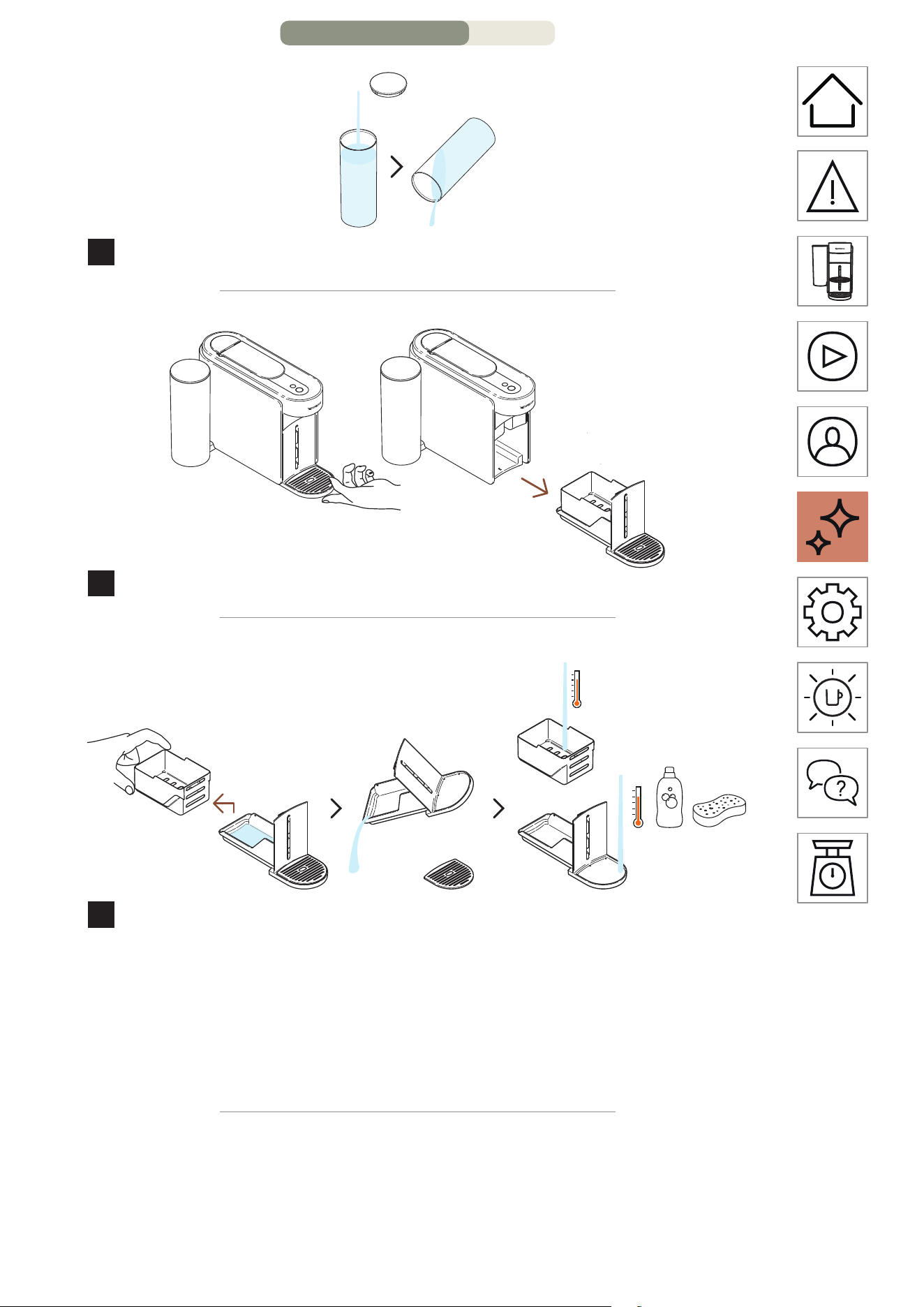
10
Rincez le réservoir d’eau.
11
Retirez le module d’entretien de la machine.
12
Séparez le compartiment à capsules du reste et videz l’eau
restante. Lavez le module d’entretien à l’eau chaude avec un
détergent doux inodore.
MISE EN GARDE: N’utilisez pas de solvant ou de produit de neoyage
puissant ou abrasif. Ne meez pas la machine au lave-vaisselle.
N’immergez jamais l’appareil ou une partie de l’appareil dans l’eau.
ENTRETIEN – PAGE 11/16
FR
.
38
10 minutes
13
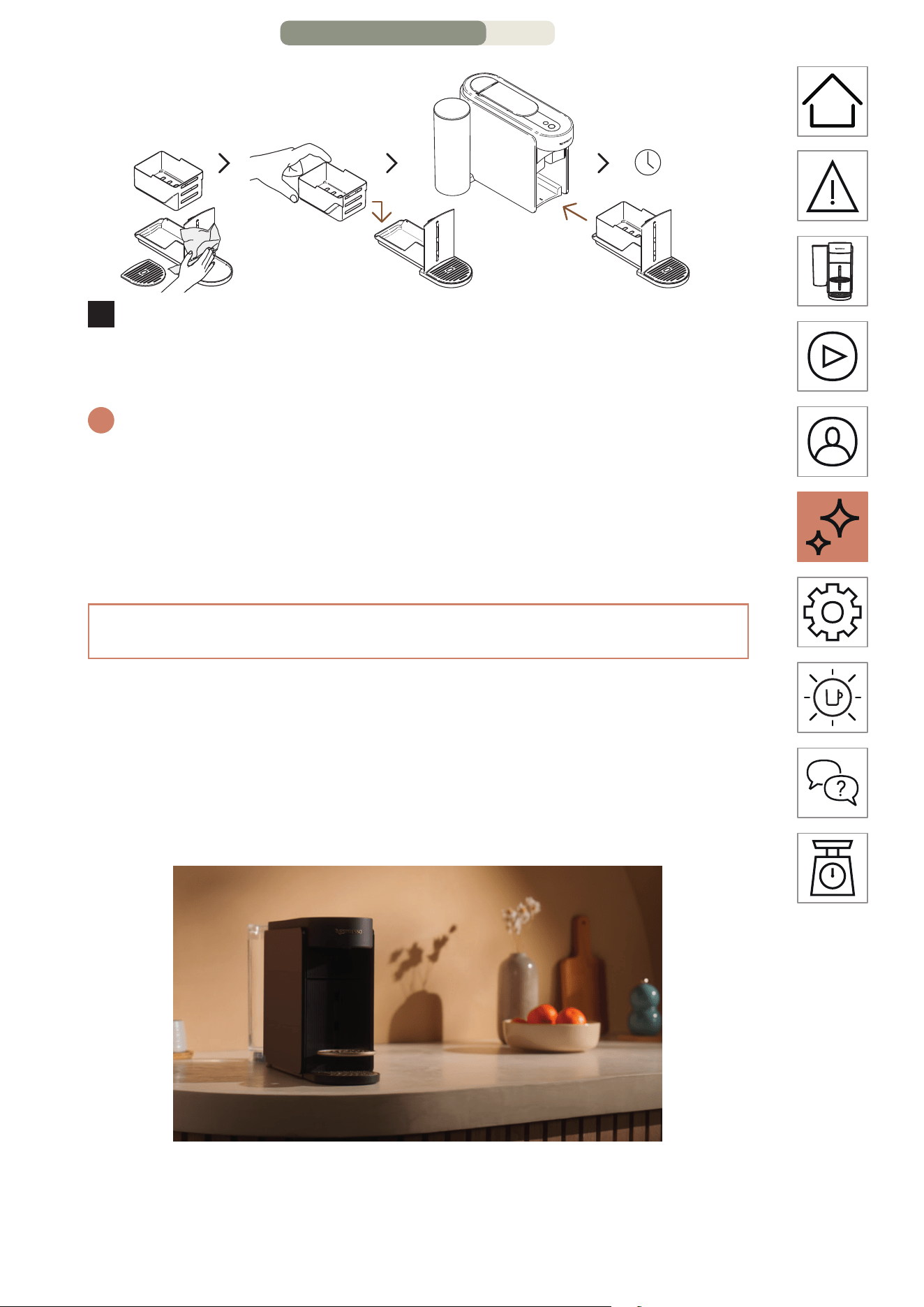
Séchez le module d’entretien avec un chion propre et
replacez-le sur la machine. Laissez reposer la machine
pendant 10 minutes avant de l’utiliser.
i
La machine s’arrête et s’éteint automatiquement une fois la procédure
terminée.
MISE EN GARDE: Neoyez l’orifice de sortie du café régulièrement à
l’aide d’un chion propre et humide. Utilisez toujours des chions doux
pour neoyer la machine.
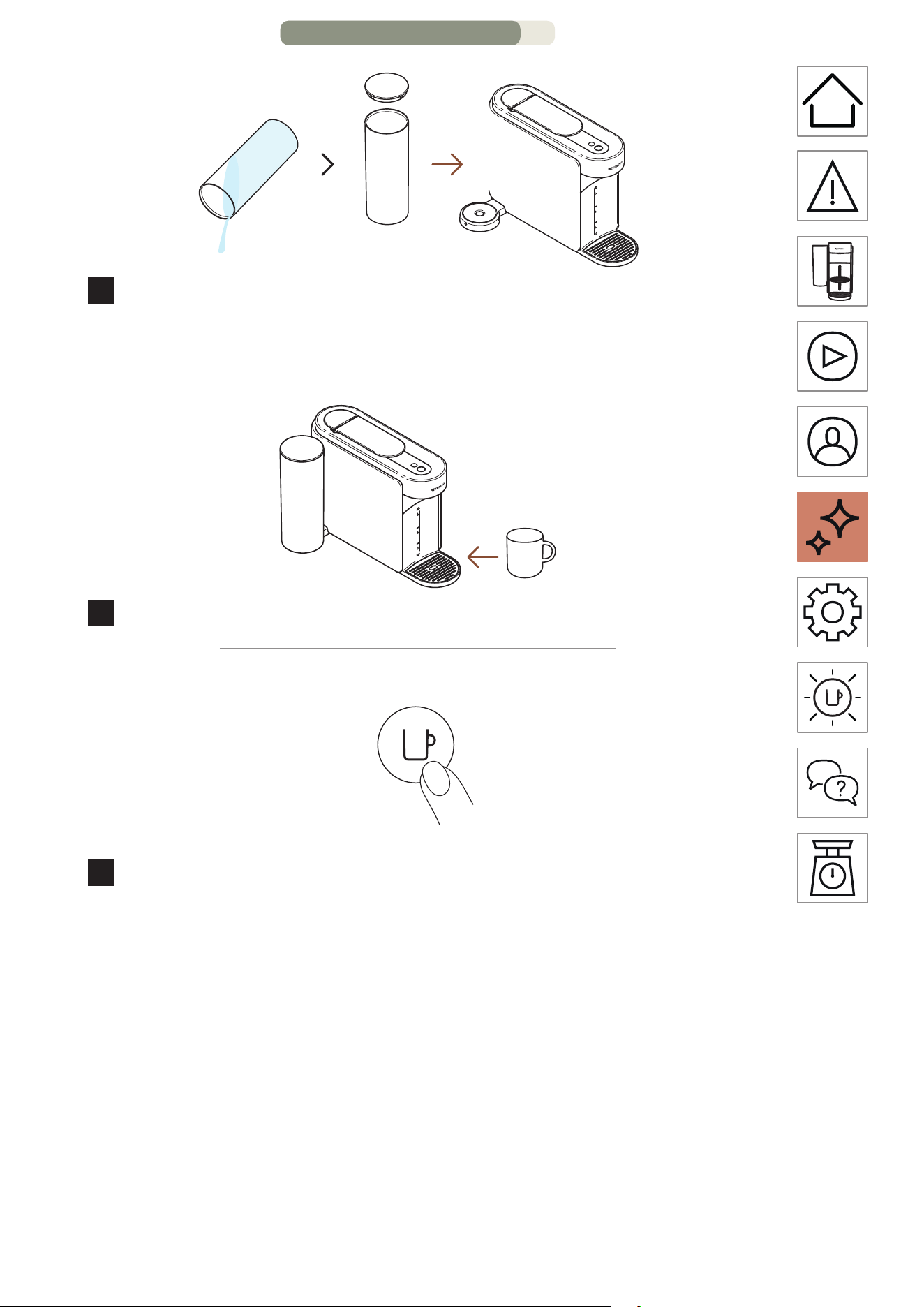
VIDANGE DES TUYAUX
La vidange des tuyaux est une opération qui peut être
eectuée avant une période de non-utilisation, pour assurer
une protection contre le gel ou avant d’envoyer la machine en
réparation. Cee procédure peut être facilement eectuée via
l’application Nespresso Smart une fois la machine connectée.
ENTRETIEN – PAGE 12/16
FR
.
41
3 secondes
1 fois
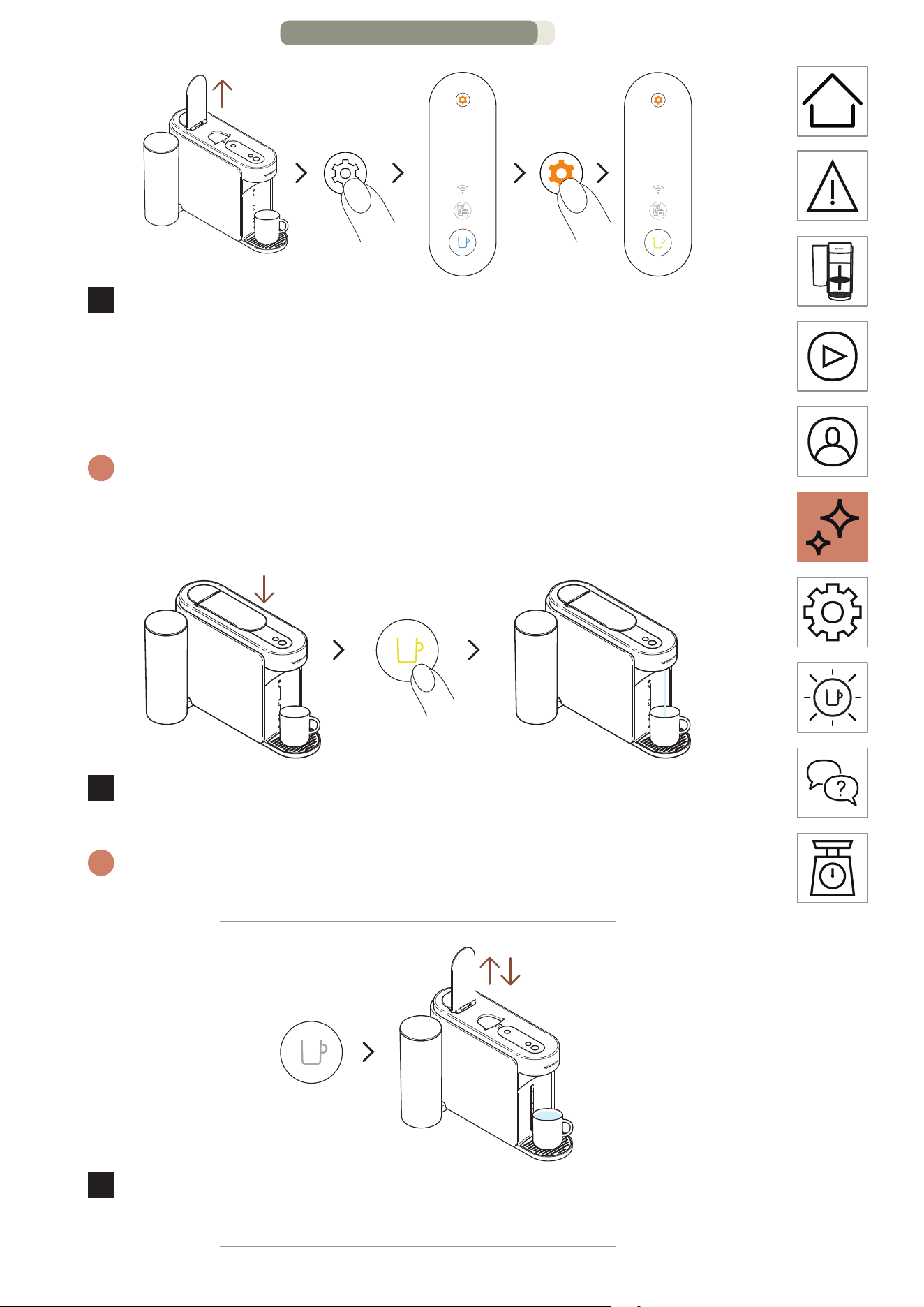
7
Levez la poignée de la machine. Appuyez sur la touche
Entretien et maintenez-la enfoncée pendant au moins
3secondes. Une fois que le voyant de la touche Café est bleu
fixe, relâchez-la et appuyez à nouveau une fois sur la touche
Entretien. La touche Café doit être jaune fixe.
i
Pour quier le mode Entretien avant de lancer une procédure, veuillez
maintenir à nouveau la touche Entretien enfoncée pendant au moins
3 secondes.
1 fois
8
Abaissez la poignée et appuyez une fois sur la touche Café
jaune pour lancer le processus de vidage.
i
La touche Café clignote en jaune pendant le processus et s’éteint une
fois la procédure terminée.
9
Une fois la procédure terminée (touche Café éteinte), levez
et abaissez la poignée de la machine.
ENTRETIEN – PAGE 15/16
FR
.
42
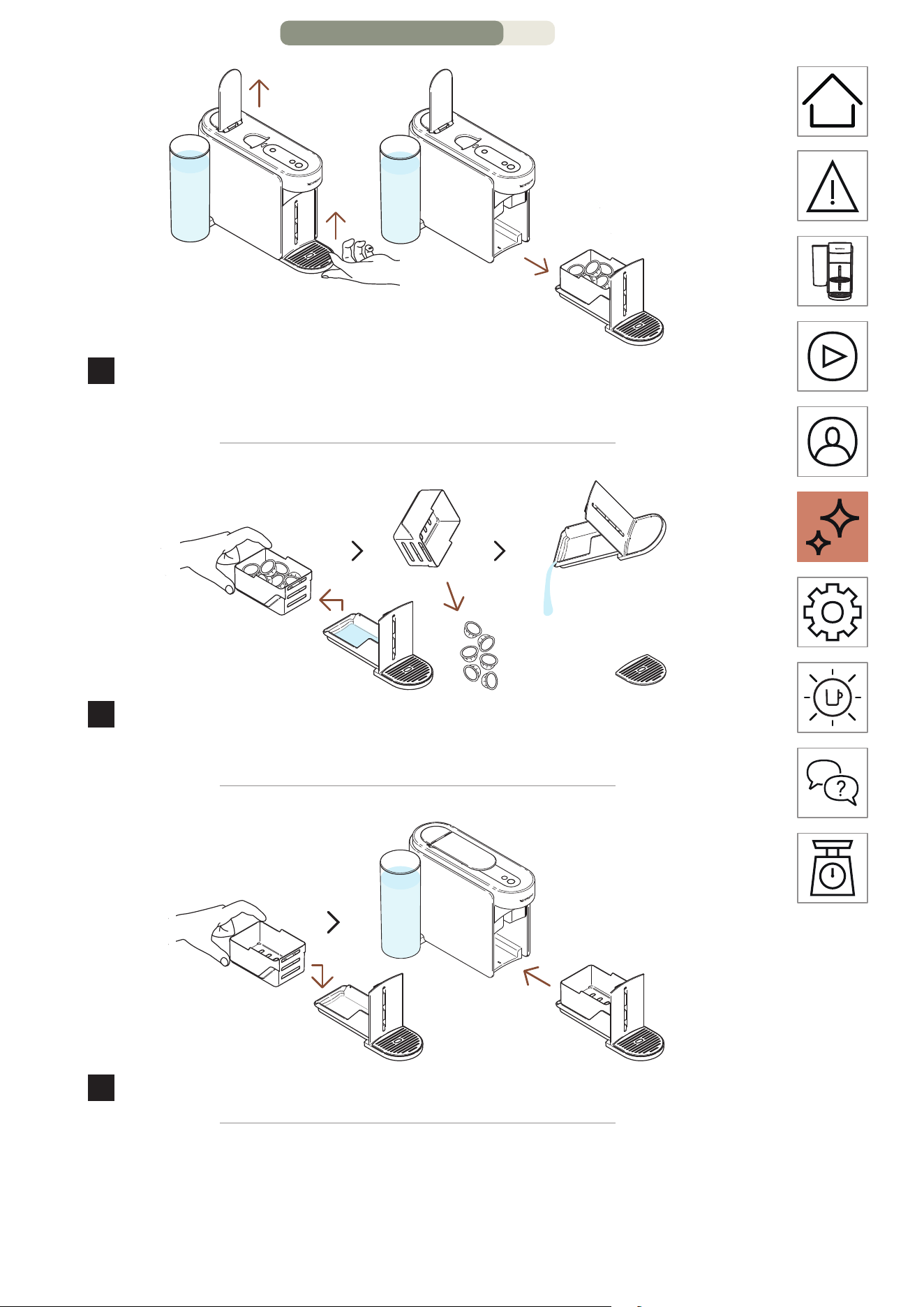
10
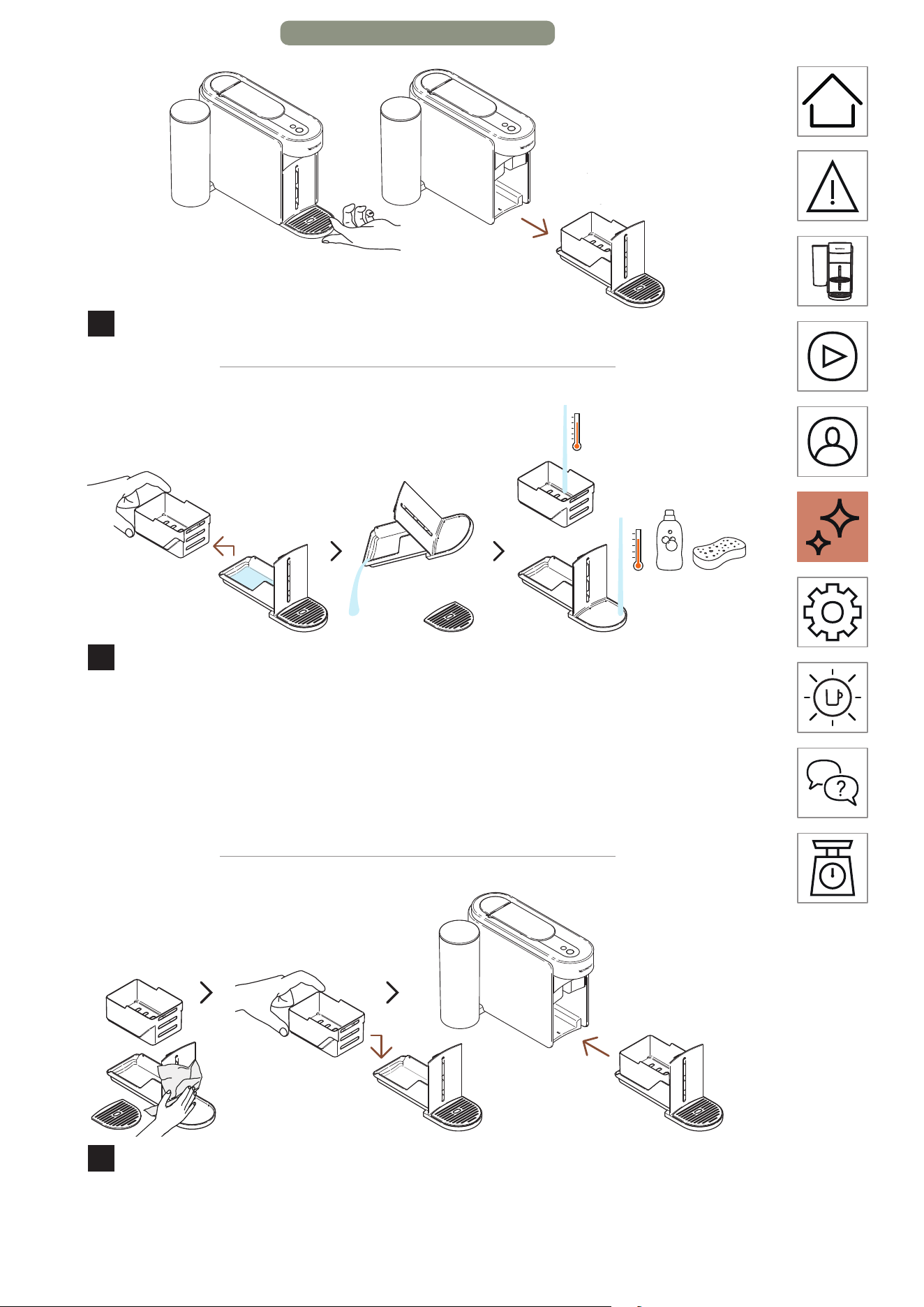
Retirez le module d’entretien de la machine.
11
Séparez le compartiment à capsules du reste et videz l’eau
restante. Lavez le module d’entretien à l’eau chaude avec un
détergent doux inodore.
MISE EN GARDE: N’utilisez pas de solvant ou de produit de neoyage
puissant ou abrasif. Ne meez pas la machine au lave-vaisselle.
N’immergez jamais l’appareil ou une partie de l’appareil dans l’eau.
12
Séchez le module d’entretien avec un chion propre et
replacez-le sur la machine.
ENTRETIEN – PAGE 16/16
FR
.
43
PARAMÈTRES DE LA MACHINE
RÉINITIALISER MES PARAMÈTRES
Cee procédure vous permet de reprogrammer votre machine
et votre application Nespresso Smart aux paramètres d’usine, en
supprimant uniquement les paramètres de personnalisation.
MARCHE
1 fois
1
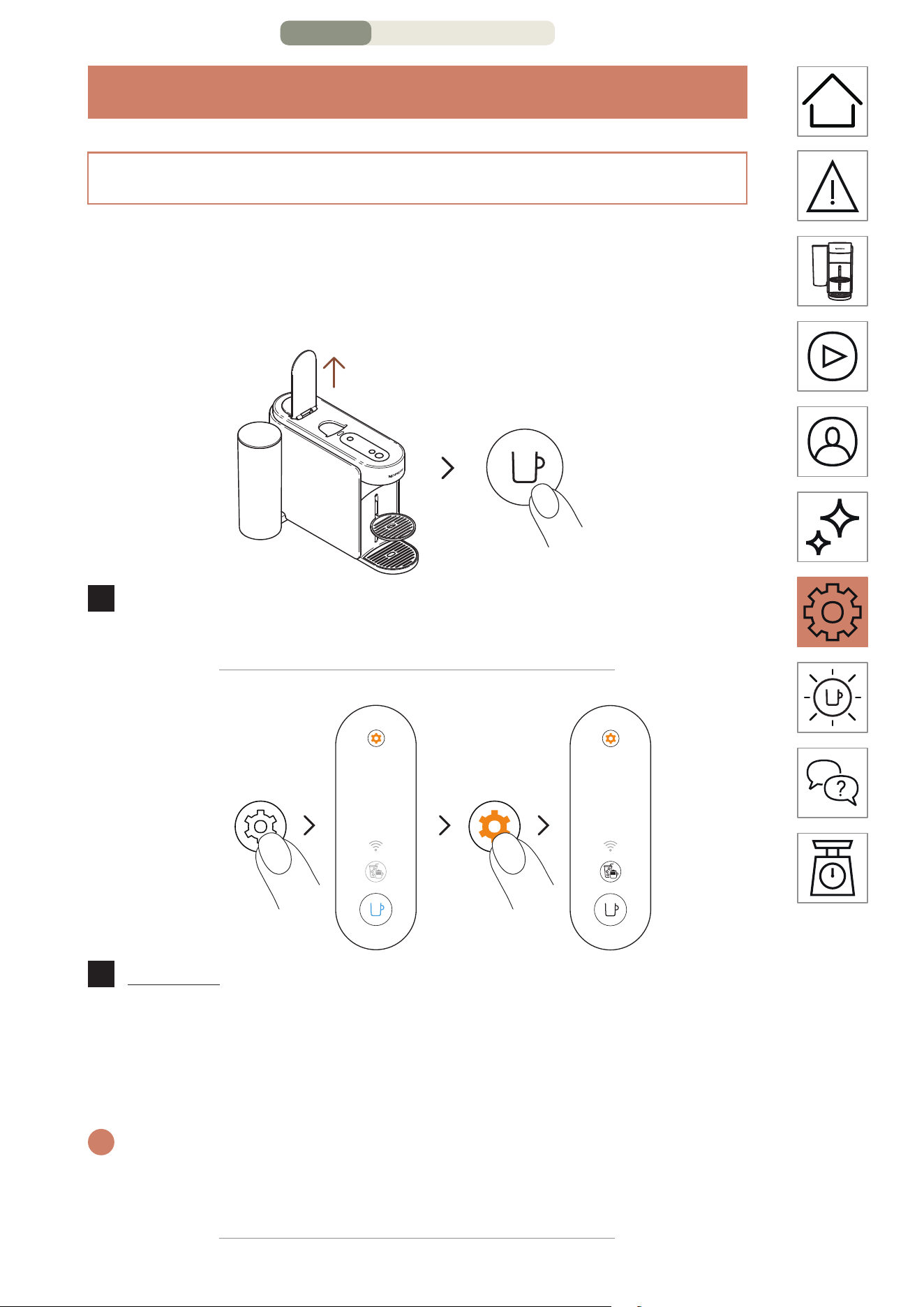
Ouvrez la poignée et allumez la machine en appuyant une
fois sur la touche Café.
3 secondes
3 fois
2
Appuyez sur la touche Entretien et maintenez-la enfoncée
pendant au moins 3 secondes. Une fois que le voyant de la
touche Café est bleu fixe, relâchez-la et appuyez à nouveau
3 fois sur la touche Entretien. Les touches Café et Expert
doivent être blanc fixe.
i
Pour quier le mode Entretien avant de lancer une procédure, veuillez
maintenir à nouveau la touche Entretien enfoncée pendant au moins
3 secondes.
PARAMÈTRES DE LA MACHINE – PAGE 1/3
FR
.
44
1 fois
3 fois
3
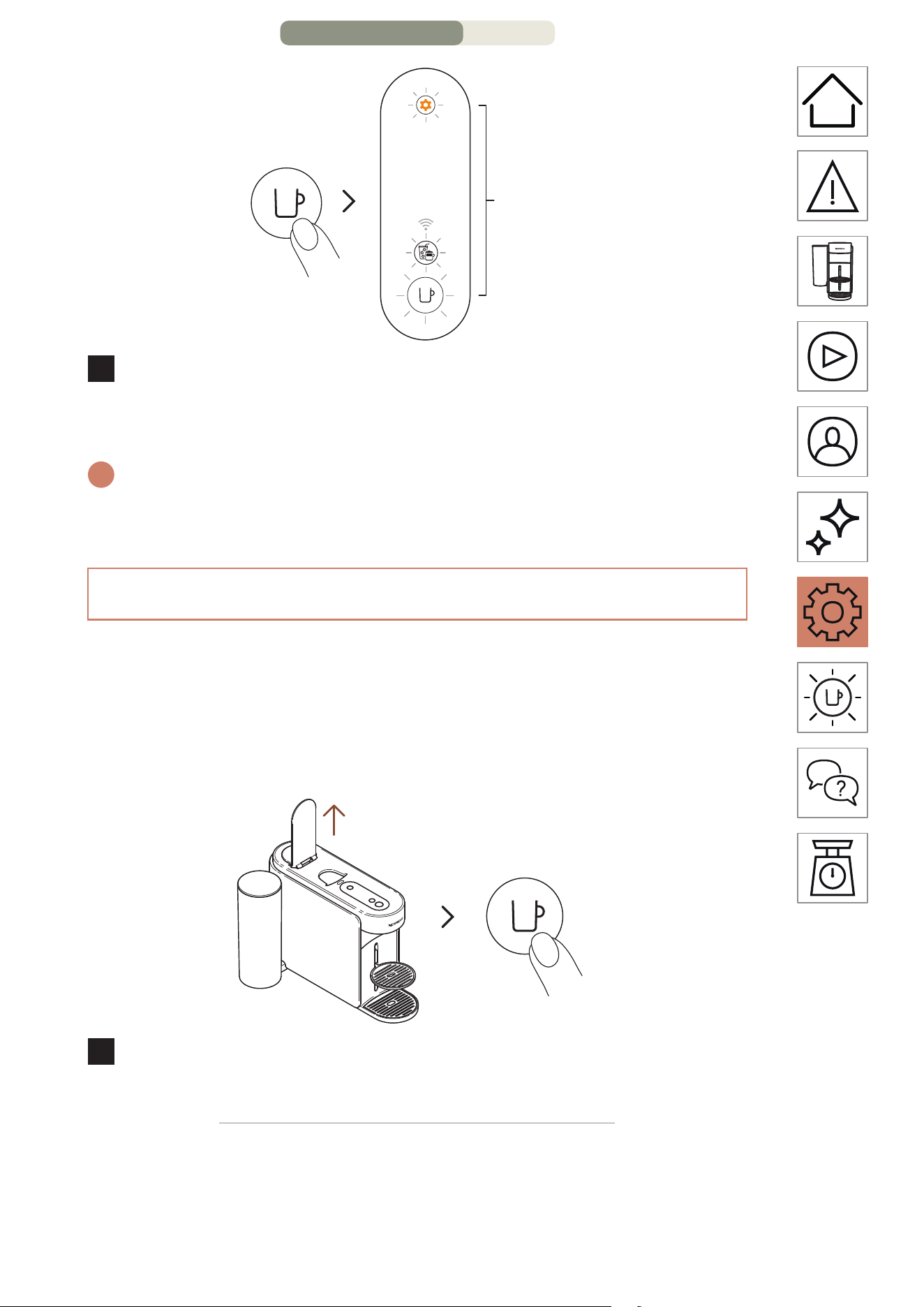
Appuyez sur la touche Café une fois pour confirmer. Les
3 touches clignotent 3 fois pour confirmer que la machine
est reprogrammée aux paramètres d’usine.
i
La machine repasse en mode prêt une fois la procédure terminée
(touche Café blanche fixe).
RETIRER ET RÉINITIALISER LA MACHINE
Cee procédure reprogramme complètement votre machine
aux paramètres d’usine, supprimant tous vos paramètres
de personnalisation et votre machine de l’application
Nespresso Smart.
MARCHE
1 fois
1
Ouvrez la poignée et allumez la machine en appuyant une
fois sur la touche Café.
PARAMÈTRES DE LA MACHINE – PAGE 2/3
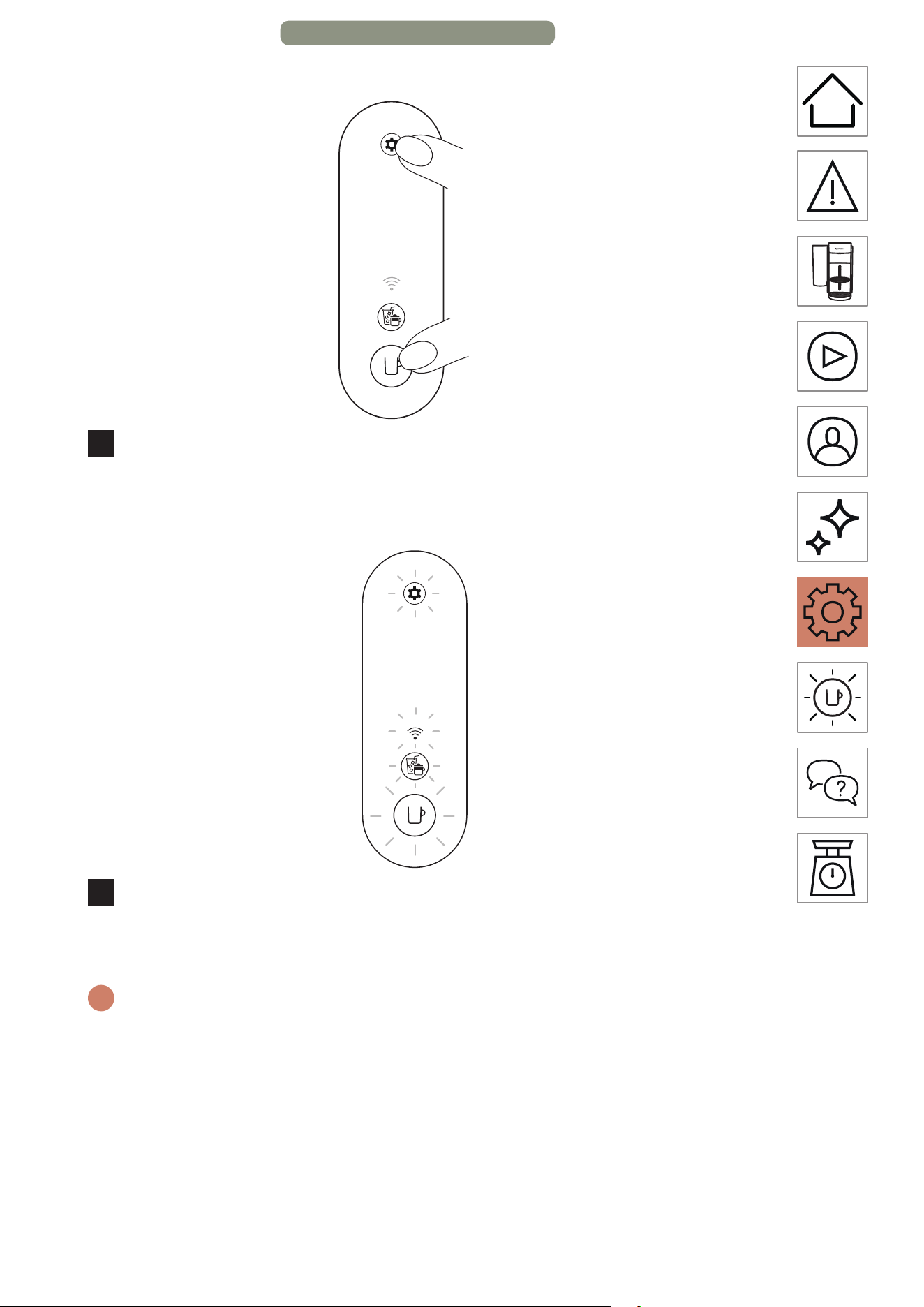
FR
.
45
> 10 secondes
2
Maintenez la touche Café et la touche Entretien enfoncées
pendant au moins 10 secondes.
5 fois
3
Toutes les touches et le voyant DEL de connectivité
clignotent 5fois pour confirmer que la machine est
complètement réinitialisée aux paramètres d’usine.
i
La machine s’éteint une fois la procédure terminée. Votre machine est
maintenant supprimée de votre application NespressoSmart.
PARAMÈTRES DE LA MACHINE – PAGE 3/3
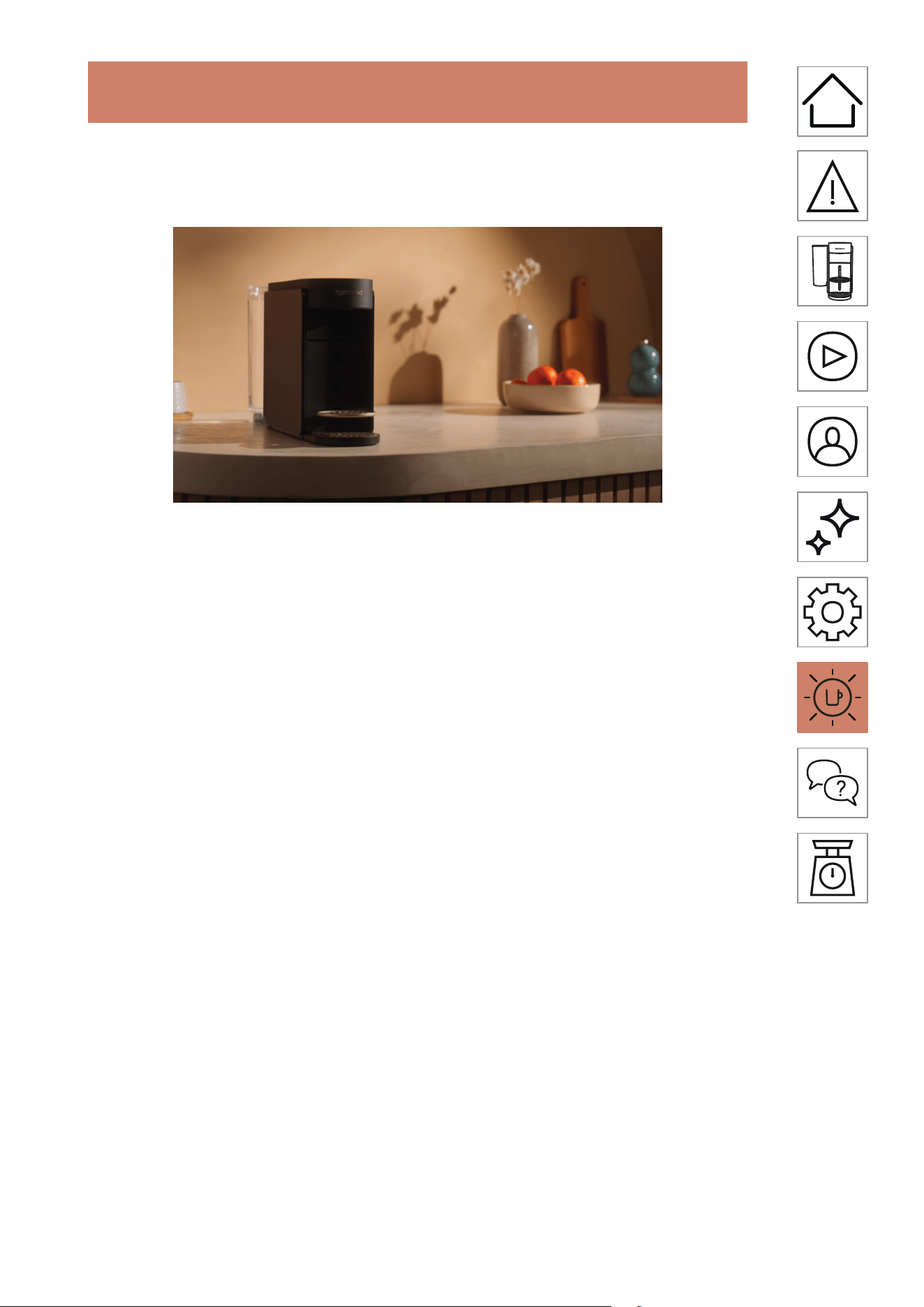
FR
.
47
RÉSOLUTION DES PROBLÈMES
La touche Café est
éteinte.
• La machine s’arrête automatiquement après
2 minutes de non-utilisation. Appuyez une fois
sur la touche Café pour l’allumer.
• Vérifiez que le branchement de la prise et
la tension sont conformes aux informations
figurant sur la plaque signalétique de la
machine.
Il n’y a pas d’eau/de café
qui sort de l’orifice de
sortie de la machine.
• Vérifiez que le réservoir d’eau est rempli
d’eau potable fraîche et qu’il est installé
correctement.
• Assurez-vous qu’une capsule Vertuo neuve
est insérée dans la bonne position et que
la poignée est correctement abaissée, et
appuyez une fois sur la touche Café pour
préparer votre café.
• Levez la poignée de la machine pour éjecter la
capsule, puis eectuez un neoyage en suivant
les instructions contenues dans la section
« Neoyage ».
• Détartrez la machine, surtout si la touche
Entretien est orange fixe, en suivant les
instructions contenues dans la section
« Détartrage ».
Le café n’est pas assez
chaud.
• La température des premières préparations
pourrait être plus basse en tasse, en particulier
avec les formats Ristreo et Espresso.
• Suivez les instructions de la section
« Connexion de votre machine » pour
personnaliser la température de votre café sur
l’application Nespresso Smart.
• Avec cee machine, vous pouvez préchauer
votre tasse à l’aide de la fonction de rinçage
rapide (reportez-vous à la section « Rinçage
rapide »). La machine prépare alors environ
40 ml (1,35 oz liq) d’eau chaude. Ne buvez pas
cee préparation.
• Détartrez la machine, surtout si la touche
Entretien est orange fixe, en suivant les
instructions contenues dans la section
« Détartrage ».
RÉSOLUTION DES PROBLÈMES – PAGE 1/9
FR
.
48
Il y a trop de café/d’eau
dans le contenant pour
l’eau usée.
• Il est possible que vous remarquiez la présence
d’une faible quantité d’eau/de café liquide
dans le bac d’égouage après chaque
préparation (quelques millilitres par café), du
fait de la conception et de la technologie de la
machine. Il est important de retirer l’eau/le café
liquide du bac de récupération de l’eau chaque
fois que vous videz le bac à capsules usagées
et de neoyer les diérents éléments avec
un détergent doux et sans odeur, puis de les
sécher avant de les replacer sur la machine.
• Si vous appuyez sur la touche café sans insérer
une capsule, vous lancez la fonction de rinçage
rapide. La machine prépare alors environ 40 ml
(1,35 oz liq) d’eau chaude. Ne buvez pas cee
préparation, dont les 20 ml s’écouleront dans le
bac de récupération de l’eau.
Il semble que la machine
ait une fuite.
• Il est possible que vous remarquiez la présence
d’une faible quantité d’eau/de café liquide
dans le bac d’égouage après chaque
préparation (quelques millilitres par café), du
fait de la conception et de la technologie de la
machine. Il est important de retirer l’eau/le café
liquide du bac de récupération de l’eau chaque
fois que vous videz le bac à capsules usagées
et de neoyer les diérents éléments avec
un détergent doux et sans odeur, puis de les
sécher avant de les replacer sur la machine.
• Si vous appuyez sur la touche café sans insérer
une capsule, vous lancez la fonction de rinçage
rapide. La machine prépare alors environ 40 ml
(1,35 oz liq) d’eau chaude. Ne buvez pas cee
préparation, dont les 20 ml s’écouleront dans le
bac de récupération de l’eau.
• Vérifiez que le réservoir d’eau et le module
d’entretien sont bien positionnés.
• Vérifiez que le compartiment à capsules n’est
pas plein, videz le contenant pour l’eau usée et
assurez-vous qu’aucune capsule n’est coincée
dans la machine.
RÉSOLUTION DES PROBLÈMES – PAGE 2/9
FR
.
49
L’écoulement du café est
inhabituel.
• Tout d’abord, la vitesse d’écoulement dépend
de la variété de café.
• Assurez-vous qu’une capsule Vertuo neuve
est insérée dans la bonne position et que
la poignée est correctement abaissée, et
appuyez une fois sur la touche Café pour
préparer votre café.
• Vérifiez que le réservoir d’eau est bien
positionné sur la machine.
• Détartrez la machine, surtout si la touche
Entretien est orange fixe, en suivant les
instructions contenues dans la section
« Détartrage ».
La préparation qui
s’écoule de la machine ne
contient que de l’eau.
• Si la machine ne peut pas lire le code imprimé
sur la capsule, 40ml (1,35oz liq.) d’eau non
buvable (rinçage court) s’écouleront de la
machine.
– Assurez-vous que la capsule n’est pas
endommagée (y compris son code).
N’utilisez pas la même capsule plusieurs fois.
– Réessayez avec une nouvelle capsule
Vertuo, insérée dans la bonne position.
• Si le problème persiste, veuillez contacter le
service à la clientèle de Nespresso.
La machine s’éteint.
• La machine s’arrête automatiquement après
2 minutes de non-utilisation. Appuyez une fois
sur la touche Café pour l’allumer. Votre machine
reste allumée si vous naviguez sur l’application
Nespresso Smart. Veuillez vous référer à la
section « MARCHE/ARRÊT » si nécessaire.
• Vous pouvez éteindre la machine
manuellement à tout moment (quand elle
n’est pas en fonctionnement) en maintenant
enfoncée la touche Café pendant 1 seconde.
L’ensemble des touches et voyants DEL
clignotent une dernière fois avant de
s’éteindre.
• Vérifiez que le branchement de la prise et
la tension sont conformes aux informations
figurant sur la plaque signalétique de la
machine.
• Débranchez la machine, aendez quelques
secondes et rebranchez-la.
RÉSOLUTION DES PROBLÈMES – PAGE 3/9
FR
.
50
Il y a du marc de café dans
ma tasse.
• Assurez-vous qu’une capsule Vertuo neuve
est insérée dans la bonne position et que
la poignée est correctement abaissée, et
appuyez une fois sur la touche Café pour
préparer votre café. N’utilisez pas la même
capsule plusieurs fois.
• Neoyez la machine lorsque vous commencez
à avoir des résidus de café dans votre tasse ou
après une longue période de non-utilisation
en suivant les instructions contenues dans la
section « Neoyage ».
• Détartrez la machine, surtout si la touche
Entretien est orange fixe, en suivant les
instructions contenues dans la section
« Détartrage ».
La machine ne lance pas
de préparation, mais la
touche Café ache une
lumière blanche fixe.
• Vérifier que la poignée est correctement
abaissée.
• Assurez-vous qu’une capsule Vertuo neuve
est insérée dans la bonne position, abaissez
la poignée correctement et appuyez sur la
touche une fois pour lancer une préparation.
• Si la machine est connectée, il est possible
qu’elle eectue une mise à jour automatique
du logiciel. Veuillez ouvrir l’application
Nespresso Smart pour vérifier l’état de la
machine et/ou patientez 5 minutes environ.
La machine ne lance
pas de préparation et la
touche Café ache une
lumière orange fixe.
• Remplissez le réservoir d’eau douce et potable,
vérifiez qu’il est bien positionné sur la machine
et appuyez une fois sur la touche café pour
lancer la préparation.
• Détartrez la machine, surtout si la touche
Entretien est orange fixe, en suivant les
instructions contenues dans la section
« Détartrage ».
Ma machine n’a plus
d’eau. Comment
reprendre la préparation
de mon café?
• Remplissez le réservoir d’eau douce et potable
et appuyez une fois sur la touche café pour
relancer la préparation. Votre tasse finira
de se remplir, avec le volume manquant, si
l’extraction avait déjà commencé.
La touche Café clignote
en blanc pendant que la
machine prépare du café.
• Si le café s’écoule normalement, cela indique
que la machine fonctionne correctement.
• Si de l’eau claire (pas du café) s’écoule de la
machine à café, cela signifie que vous avez
lancé un rinçage rapide. Veuillez suivre les
instructions de la section « Rinçage rapide ».
RÉSOLUTION DES PROBLÈMES – PAGE 4/9
FR
.
51
Le voyant de la touche
Créations café est blanc
fixe.
• Vous avez appuyé une fois sur la touche
Créations café, ce qui a activé un mode qui
vous permet d’élaborer vos recees de café.
• Le fait d’appuyer sur la touche dédiée vous
permet d’obtenir une extraction concentrée
du café, la première étape pour préparer
toutes les boissons glacées et à base de lait
que vous souhaitez.
• Pour désactiver cee touche, appuyez à
nouveau une fois dessus avant de lancer la
préparation.
La touche Créations café
s’éteint avant le début
de la préparation et le
café s’écoule à un volume
prédéfini.
• En raison du format de tasse, certaines capsules
ne peuvent pas être extraites avec ce mode
(Ristreo, Café infusé à froid, Carafe Style
Pour-Over/Bianco Piccolo et Bianco Leggero,
déjà optimisés pour les recees de café). Nous
déconseillons également l’utilisation de ce
mode pour extraire des capsules Alto ou de la
gamme Coee+.
• Pour éviter de perdre votre capsule, votre
machine a préparé le café selon le format de
tasse préprogrammé.
Le volume en tasse ne
correspond pas au volume
prédéfini par Nespresso.
• Il est probable que le volume de votre tasse ait
été personnalisé.
• Vous pouvez reprogrammer manuellement le
volume de votre tasse en maintenant appuyée
la touche Café jusqu’à aeindre le volume
souhaité, avant de la relâcher.
• Si votre machine est connectée, vous pouvez
également ajuster le volume de la tasse en
vous reportant à la section « Température et
volume de café » dans l’application Nespresso
Smart.
• Si vous souhaitez revenir aux volumes de
café prédéfinis par Nespresso, vous pouvez
réinitialiser les paramètres de votre machine
en suivant les instructions contenues dans la
section « Réinitialiser mes paramètres ».
• Si le problème persiste même après avoir
eectué une réinitialisation des paramètres
d’usine, veuillez contacter le centre de service à
la clientèle de Nespresso.
RÉSOLUTION DES PROBLÈMES – PAGE 5/9
FR
.
52
Une fois la préparation
terminée, comment
ajouter davantage de café
dans ma tasse?
• Vous pouvez rajouter du café en appuyant une
nouvelle fois sur la touche Café sans éjecter
la capsule usagée. Le même volume sera à
nouveau préparé. Si vous souhaitez arrêter
le processus de préparation avant la fin de
l’extraction, il vous sut de rappuyer sur la
touche Café.
• Si vous souhaitez augmenter les volumes de
tous vos cafés :
– Vous pouvez reprogrammer manuellement
le volume de votre tasse en maintenant
appuyée la touche Café jusqu’à aeindre le
volume souhaité, avant de la relâcher.
– Si votre machine est connectée, vous
pouvez également ajuster le volume de
la tasse en vous reportant à la section
«Température et volume de café» dans
l’application Nespresso Smart.
La touche Entretien est
orange fixe.
• Détartrez la machine en suivant les instructions
contenues dans la section « Détartrage ».
• Nous vous recommandons d’utiliser la trousse
de détartrage Nespresso disponible pour
éviter d’endommager votre machine. Pour
toute question supplémentaire concernant le
détartrage, veuillez contacter le service à la
clientèle de Nespresso.
La touche Entretien
s’allume en orange.
• La machine est entrée en mode de
maintenance, une boucle conçue pour
faciliter votre interaction avec l’entretien de la
machine.
• Dans ce mode, chaque combinaison couleur/
pictogramme est associée à une fonction
spécifique :
– Touche Café bleue fixe: Neoyage
– Touche Café jaune fixe: Vidange des tuyaux
– Touche Café orange fixe: Détartrage
– Touches Café et de la touche Créations
café blanches fixes: Réinitialiser les
paramètres de la machine aux paramètres
d’usine (paramètres de personnalisation
uniquement).
– Touche Café blanche fixe et voyant DEL
Wi-Fi allumé: Permet d’activer ou de
désactiver le module de connectivité.
RÉSOLUTION DES PROBLÈMES – PAGE 6/9
FR
.
53
• Pour activer ou désactiver ce mode, maintenez
appuyée la touche Entretien pendant au moins
3 secondes (jusqu’à ce que la touche Café
devienne bleue pour l’activer et jusqu’à ce
qu’elle devienne blanche pour le désactiver).
• Pour lancer chaque fonction d’entretien, il
sut d’appuyer une fois sur la touche Café,
en veillant à ce que sa couleur corresponde à
l’action souhaitée. La touche clignote ensuite
jusqu’à ce que la fin du processus.
• Toutes ces procédures d’entretien peuvent
être facilement suivies via l’application
Nespresso Smart une fois votre machine
connectée.
La touche Café clignote
en bleu, orange ou jaune.
• Votre machine est en cours d’entretien.
• N’utilisez pas la machine tant que la procédure
n’est pas terminée.
– Touche Café bleue fixe: Neoyage
– Touche Café jaune fixe: Vidange des tuyaux
– Touche Café orange fixe: Détartrage
La touche Café s’allume
5 fois en orange lorsque
j’essaie de lancer une
procédure d’entretien
(neoyage, détartrage
ou vidange des tuyaux) et
la machine ne lance pas la
procédure sélectionnée.
• Levez et abaissez la poignée de la machine
pour vérifier qu’aucune capsule n’est insérée
avant d’appuyer à nouveau sur la touche Café.
La touche Café clignote
1 fois en orange lorsque
j’essaie de lancer une
procédure d’entretien
(neoyage, détartrage
ou vidange des tuyaux) et
la machine ne lance pas la
procédure sélectionnée.
• Remplissez le réservoir d’eau douce et potable,
vérifiez qu’il est bien positionné sur la machine
et appuyez une fois sur la touche café pour
lancer l’entretien.
• Important : Une fois la procédure lancée,
veillez à aller jusqu’au bout du détartrage en
utilisant les volumes spécifiés pour éviter tout
blocage.
RÉSOLUTION DES PROBLÈMES – PAGE 7/9
FR
.
54
Lorsque j’allume ma
machine, le voyant DEL
Wi-Fi s’allume.
• Votre machine peut être connectée à
l’application Nespresso Smart afin de
bénéficier de l’expérience Vertuo complète.
• L’application Nespresso Smart vous permet
d’eectuer les actions suivantes :
– Personnaliser le format et la température de
votre tasse
– Simplifier l’entretien de votre machine
– Découvrir tout un monde de recees de
café
• Le voyant DEL Wi-Fi clignote lorsque
votre machine n’est pas encore appairée à
l’application Nespresso Smart ou n’est plus
connectée.
• Vous pouvez appairer votre machine en
balayant le code QR disponible sur la grille
d’égouage de votre machine, ou l’appairer
manuellement en ouvrant, meant à jour ou
téléchargeant l’application Nespresso Smart.
• Si vous ne connectez pas votre machine, le
voyant DEL Wi-Fi clignotera à chaque fois que
vous allumerez la machine.
• Si vous souhaitez désactiver le module
de connectivité ou si votre pays ne prend
pas en charge la connexion à l’application
Nespresso Smart, veuillez suivre les instructions
contenues dans la section « Désactiver/
Réactiver le module de connectivité ».
Lorsque j’allume ma
machine, le voyant DEL
Wi-Fi reste éteint.
• Votre module de connectivité a été désactivé.
• Si vous souhaitez connecter votre machine
à l’application Nespresso Smart et profiter
pleinement de l’expérience Vertuo, veuillez
suivre les instructions contenues dans la
section « Désactiver/Réactiver le module de
connectivité ».
Lorsque j’allume ma
machine, le voyant DEL
Wi-Fi reste blanc fixe.
• Votre machine est connectée à l’application
Nespresso Smart afin de bénéficier de
l’expérience Vertuo complète.
• L’application Nespresso Smart vous permet
d’eectuer les actions suivantes :
– Personnaliser le format et la température de
votre tasse
– Simplifier l’entretien de votre machine
– Découvrir tout un monde de recees de
café
RÉSOLUTION DES PROBLÈMES – PAGE 8/9
FR
.
55
Comment puis-
je eectuer une
réinitialisation complète
des paramètres d’usine?
• Cee procédure reprogramme complètement
votre machine aux paramètres d’usine,
supprimant tous vos paramètres personnalisés
et déconnectant votre machine de
l’application Nespresso Smart.
• Appuyez simultanément sur la touche
Entretien et la touche Café pendant au moins
10 secondes.
• Si vous souhaitez supprimer uniquement les
paramètres de personnalisation, veuillez suivre
la procédure disponible en mode Entretien.
Ma touche Café
clignote en rouge
(2 clignotements rapides
puis 1 longue pause,
répétés en continu).
• La machine ache une erreur.
– Veuillez aendre quelques secondes avant
de remere la machine en marche.
– Débranchez votre machine pendant
quelques secondes et rebranchez-la.
– Si le problème persiste, veuillez contacter le
service à la clientèle de Nespresso.
Ma touche Café clignote
rapidement en rouge,
la touche Expert et
le voyant DEL Wi-Fi
clignotent rapidement
en blanc, puis la machine
s’éteint.
• La machine s’arrête à la suite d’une erreur ou
après avoir refroidi.
La touche Café
clignote en orange
(2 clignotements rapides
puis 1 longue pause, une
seule fois).
• La machine ache un arrêt d’urgence à la suite
d’un mauvais usage (par exemple, si vous avez
levé la poignée pendant la préparation d’un
café). Pour éviter d’endommager la machine, il
est déconseillé de lever la poignée pendant la
préparation.
La touche Café clignote
en rouge pendant
2 secondes.
• La machine est en train de refroidir à la suite
d’une surchaue. Laissez-la branchée et
aendez 10 minutes environ avant de l’utiliser
à nouveau.
La touche Café ache
une couleur violee.
• Votre machine est en mode de service. Veuillez
contacter le service à la clientèle de Nespresso.
RÉSOLUTION DES PROBLÈMES – PAGE 9/9
FR
.
56
CARAC TÉRISTIQUES TECHNIQUES
Courant électrique
US/CA: 120 V, 60 Hz, 940 W
IL: 220–240 V, 50/60 Hz, 940–1100 W
Fréquence
Bluetooth
®
(LE) 2,402–2,480 GHz
Wi-Fi
®
2,412–2,472GHz
• BR3/MX/TW: 2,412–2,462GHz
• CN: 2,400–2,4835GHz
• JP: 2,412–2,484GHz
Puissance de sortie RF
(EIRP)
Bluetooth
®
7,82 dBm max (EIRP) et Wi-Fi
®
< 20 dBm (EIRP)
Mode veille 0,099 W/h
Mode ARRÊT
Après 2 minutes d’inactivité
Temps de préchauage
3 secondes
Support de tasse amovible
3 positions
Longueur du câble
US/CA : 100 cm (+/− 2 cm) / 39.3 in (+/− 0.8 in)
Autres : 80 cm (+/− 2 cm) / 31 in (+/− 0.8 in)
Poids de la machine ~4 kg/~8,8 livres
Capacité du réservoir d’eau 1,4 L/47,3 oz liq.
Dimensions (l x p x h) 12 x 49,4 x 25,7 cm/4,7 x 19,45 x 10,12 po
Capacité du compartiment à
capsules
Le récupérateur peut contenir 18 capsules
d’espresso ou 13 capsules de grande tasse
usagées.
CODES DE MACHINE
Nespresso MC1, MD1
Breville BNV620/BNV650
Delonghi ENV200
Krups XN940, XN941
Sage SNV620, SNV650
HE
.
56
ינכט טרפמ
CH: 230 V, 50/60 Hz, 1020 W
EU/AU/ME/KR/ZA: 220–240 V, 50/60 Hz,
940–1100 W
BR3: 220 V, 60 Hz, 940 W
MX, BR: 127 V, 60 Hz, 1130 W
CL: 220 V, 50/60 Hz, 940 W
CN: 220 V, 50 Hz, 940 W
JP: 100 V, 50/60 Hz, 990 W
TW: 110 V, 60 Hz, 1130 W
חכ
Bluetooth
®
)LE( 2.402–2.480 GHz
Wi-Fi
®
2.412 – 2.472 GHz
•BR3/MX/TW: 2.412 – 2.462 GHz
•CN: 2.400 – 2.4835 GHz
•JP: 2.412 – 2.484 GHz
למשח רדת
Bluetooth
®
7.82 dBm max )EIRP( and Wi-Fi
®
<20 dBm )EIRP(
)RF )EIRP טלפ קפסה
W/h 0.099 הנתמה בצמ
שומיש רסוח לש תוקד 2 רחאל
יוביכ בצמ
תוינש 3
םומיח ןמז
םימוקימ 3
דיינ סוכ ךמות
MX: 100 cm )+/– 2 cm( / 39.3 in )+/– 0.8 in(
Others: 80 cm )+/– 2 cm( / 31 in )+/– 0.8 in(
לבכ ךרוא
kg / 8.8 lbs 4~ הנוכמ לקשמ
L / 47.3 fl oz 1.4 םימה לכימ חפנ
x 49.4 x 25.7 cm / 4.7 x 19.45 x 10.12 in 12 )W x D x H ( תודימ
גאמ תולוספק 13 וא וסרפסא תולוספק 18
תולוספקה לכימ חפנ
תושמושמה
הנוכמ ידוק
MC1, MD1 Nespresso
BNV620/BNV650 Breville
ENV200 Delonghi
XN940, XN941 Krups
SNV620, SNV650 Sage
HE
.
55
• אל שומיש תובקעב םוריח תריצע תרצוע הנוכמה
הפקהש ןמזב תידיה תא תחתפ םא ,לשמל( ןוכנ
ונא ,הנוכמל קזנ עונמל ידכ .)הנכה ךילהתב היה
איהש ןמזב הנוכמה תידי תא חותפל אל םיצילממ
.הפקה תא הניכמ
בהבהמ הפקה רותפכ
םיימעפ בהבהמ( םותכב
הקספה זאו ,תוריהמב
תחא םעפ ,תחא הכורא
.)דבלב
• אנא .רתי םומיח תובקיעב תררקתמ הנוכמה
ינפל תוקד 10 ןתמהו עקשל תרבוחמ התוא רומש
.בוש הב שמתשתש
בהבהמ הפקה רותפכ
.תוינש 2 ךשמל םודאב
• רוצ אנא .הקוזחת בצמב תאצמנ ךלש הנוכמה
.Nespresso לש תוחוקלה תוריש םע רשק
עבצב ריאמ הפקה רותפכ
.לוגס
9/9 דומע – תויעב ןורתפ
HE
.
54
•.לטוב ךלש הנוכמה תוירושקה בצמ
• תייצקילפאל הנוכמה תא רבחל ךנוצרב םא
היווחהמ תוניהלו Nespresso Smart App
תוארוהה רחא בוקע אנא ,וטרו לש האלמה
."יוביכ/הלעפה תוירושיק בצמ" קלחב
תא קילדמ ינאשכ
ה תירונ ,ילש הנוכמה
.היובכ WiFi
• תייצקילפאל תרבוחמ ךלש הנוכמה
תונהל ידכ Nespresso Smart App
.האלמ וטרוה הפק תיווחמ
• ,Nespresso Smart App תייצקילפאל תודוה
:לכות
הרוטרפמטהו לדוגה תא תישיא םיאתהל –
.ךלש הפקה לש
.תולקב ךלש הנוכמה תא קזחתל –
.הפק ינוכתמ לש םלוע תולגל –
הנוכמה תא קילדמ ינאשכ
הריאמ WiFi ה תרונ ,ילש
.עובק ןבלב
• םאולמב הנוכמה תורדגה תא ספאי הזה ךילהתה
תוישיאה תומאתהה לכ תא ריסי ,ןרציה תורדגהל
תייצקילפאמ ךלש הנוכמה תא קתניו ךלש
.Nespresso Smart App
• רותפכ תאו תורדגהה רותפכ תא קזחהו ץחל
.תוחפל תוינש 10 ךשמל ןמזה ותואב דחי הפקה
• תוישיאה תומאתהה תא ריסהל ךנוצרב םא
בצמב ןימזה לקה ךילהה ירחא בוקע אנא ,דבלב
.הקוזחתה
סופיא עצבל לוכי ינא ךיא
?ןרצי תורדגהל אלמ
•.הנוכמב האיגש תמייק
תא ליעפהל ןויסנ ינפל תוינש המכ ןתמה אנא –
.בוש הנוכמה
תוינש המכ ןתמה ,עקשהמ הנוכמה תא אצוה –
.הרזחב התוא רבחו
תורישל הנפ אנא ,תכשמנ היעבה םא –
.Nespresso לש תוחוקלה
בהבהמ הפקה רותפכ
םיימעפ בהבהמ( םודאב
הכורא הקספה זאו רהמ
)רזוחו תחא
• רחאל וא האיגש יוהיז רחאל הבוכ הנוכמה
.הררקתהש
בהבהמ הפקה רותפכ
רותפכ ;תוריהמב םודאב
ה תרונו הפקה תריצי
ןבלב םיבהבהמ WiFi
הנוכמה זאו תוריהמב
.הבוכ
8/9 דומע – תויעב ןורתפ
HE
.
53
• ןיאש אדוול ידכ הנוכמה תידי תא רוגסו חתפ
לע בוש ץחלתש ינפל הנוכמל הסנכוהש הלוספק
.הפקה רותפכ
בהבהמ הפקה רותפכ
ינאשכ םימעפ 5 םותכב
תלועפב ליחתהל הסנמ
יוקינ ,יוקנ( הקוזחת
)תורוניצ ןוקיר וא ,תינבא
בצמל תסנכנ אל הנוכמהו
.הלועפ
• אדוו ,םיירט היתש ימב םימה לכימ תא אלמ
םעפ הפקה רותפכ לע ץחלו ןוכנ םקוממ אוהש
.הקוזחתה ךילהת לש הלחתהל תחא
• ךילהתש אדוו אנא ,בצמל הסינכ עגרב :בושח
םיחפנב שומיש ךות ואולמב םלשוה תינבאה יוקינ
.המיסח עונמל ידכ םיניוצמה
בהבהמ הפקה רותפכ
ינאשכ םותכב תחא םעפ
ךילהת ליחתהל הסנמ
יוקינ ,יוקינ( הקוזחת
)תורוניצ ןוקיר וא ,תינבא
הליחתמ אל הנוכמהו
.ךילהתב
• תייצקילפאל תרבוחמ ךלש הנוכמה
תיווחמ תונהל ידכ Nespresso Smart App
.האלמ וטרוה הפק
• ,Nespresso Smart App תייצקילפאל תודוה
:לכות
לש הרוטרפמטהו לדוגה תא תישיא םיאתהל –
.ךלש הפקה
.תולקב ךלש הנוכמה תא קזחתל –
.הפק ינוכתמ לש םלוע תולגל –
• אל דוע ךלש הנוכמהכ תבהבהמ WiFi ה תירונ
Nespresso Smart App תייצקילפאל הרבוח
.רוביחה תא הדביא וא
• ידי לע תולקב ךלש הנוכמה תא רבחל ךתלוכיב
זוקינה תשר לע לע ןימזש QR ה דוק לש הקירס
,החיתפ ידי לע תינדי התוא רבחל וא ,הנוכמה לש
תייצקילפא לש הדרוה וא ןוכדע
Nespresso Smart App
• WiFi ה תירונ ,ךלש הנוכמה תא תרביח אל םא
.הנוכמה תא קילדתש םעפ לכב בהבהת
• תוירושיקל רוביחה בצמ תא לטבל ךנוצרב םא
רוביחב תכמות הניא ךלש הנידמה םא וא
אנא ,Nespresso Smart App תייצקילפאל
תוירושיק בצמ" קלחב תוארוהה רחא בוקע
."יוביכ/הלעפה
תא קילדמ ינאשכ
ה תירונ ,ילש הנוכמה
.תקלדנ WiFi
7/9 דומע – תויעב ןורתפ
HE
.
52
• קלחב תוארוהה יפ לע תינבאמ הנוכמה תא הקנ
."תינבא יוקינ"
• לש תינבא יוקנ תכרעב שמתשהל םיצילממ ונא
דועל .ךלש הנוכמל קזנ עונמל ידכ Nespresso
םע רשק רוצ אנ ,תינבאה יוקינב תרושקש תולאש
.Nespresso לש תוחוקלה תוריש
ריאמ תורדגהה רותפכ
:עובק םותכב
• לע לקהל הדעונש תכרעמ ,הקוזחת בצמל תסנכנ
.הנוכמה תקוזחת םע ךלש היצקארטניאה
• ךיושמ םרגוטקיפ/עבצ לש בוליש לכ ,הז בצמב
:תיפיצפס היצקנופל
יוקינ :עובק לוחכב ראומ הפקה רותפכ –
ןוקיר :עובק בוהצב ראומ הפקה רותפכ –
תורוניצה
תינבא יוקינ :עובק םותכב ראומ הפקה רותפכ –
ןבלב םיראומ הפקה תריציו הפקה ירותפכ –
ןרצי תורדגהל הנוכמה תורדגה סופיא :עובק
.)דבלב תישיא תומאתומ תונוכת(
ה תירונו עובק ןבלב ראומ הפקה רותפכ –
רוביחה בצמ תא הבכ/לעפה :הקולד WiFi
.תוירושיקל
ריאמ תורדגהה רותפכ
.םותכב
• תא קזחהו ץחל ,בצמהמ האיצי וא הסינכל
הסינכל( תוחפל תוינש 3 ךשמל תורדגהה רותפכ
האיצילו ,לוחכב ראומ הפקה רותפכש דע -בצמל
.)ןבלב ראומ הפקה רותפכש דע -בצמהמ
• ץחל טושפ ,הקוזחת תלועפ לכ ליחתהל ידכ
רותפכהש אדוו ,הפקה רותפכ לע תדדוב הציחל
דע בהבי רותפכה .היוצרה הלועפל םאתהב ראומ
.םלשוי ךילהתהש
• הקוזחתה תולועפ לכל תוטושפ תויחנה תומייק
תייצקילפאב ולאה
ךלש הנוכמהשכ Nespresso Smart App
.תרבוחמ
• ךילהת עצמאב עגרכ תאצמנ ךלש הנוכמה
.הקוזחת
• ךילהתהש דע הנוכמה תא ליעפהלמ ענמה אנא
.ואולמב םייתסמ
יוקינ :עובק לוחכב ראומ הפקה רותפכ –
ןוקיר :עובק בוהצב ראומ הפקה רותפכ –
תורוניצה
תינבא יוקינ :עובק םותכב ראומ הפקה רותפכ –
בהבהמ הפקה רותפכ
.בוהצ וא םותכ ,לוחכב
6/9 דומע – תויעב ןורתפ
HE
.
51
• ןתינ אלש תולוספק ןנשי ,הלוספקה לדוג יפל
הפק תריצי בצמב זכורמ הפק ןהמ ןיכהל
וקנאיב /ףארק ,ורב-דלוק ,וטרטסירה תובורעת(
ינוכתמל םימאתומ רבכש ,וראגל וקנאיבו ולוקיפ
בצמב שמתשהל םיצילממ אל ונא ןכ ומכ .)הפק
תובורעת וא וטלא תובורעתמ הפק תנכהל הז
.+Coffee תרדסמ
• הניכמ הנוכמה ,הלוספקה לש ןדבוא עונמל ידכ
.ןרציה תורדגהב תנכותמה לדוגה יפל הפקה תא
הבכ הפקה תריצי רותפכ
,הפקה תנכה תליחת ינפל
לדוגה יפל םרוז הפקהו
.ןרצי תורדגהב רדגומש
• תנכות ךלש הלוספקה לדוגש חינהל ריבס
.תישיא המאתהב
• ידי לע סוכה לדוג תא תינדי תנכתל ךתורשפאב
לדוגל העגה דע הפקה רותפכ לש הקזחהו הציחל
.הפקה רותפכ תא בוזעל ןתינ זאו ,יוצרה
• ךתלוכיב ,תוירושיקל תרבוחמ ךלש הנוכמה םא
קלחב תוארוהה יפ לע סוכה לדוג תא תונשל
תייצקילפאב "הרוטרפמטו סוכה לדוג"
.Nespresso Smart App
• לע שארמ תורדגומה תורדגהל רוזחל ךנוצרב םא
תורדגה תא ספאל ךתורשפאב ,Nespresso ידי
קלחב תוארוהה יפ לע הנוכמה
."תורדגה סופיא"
• ,תורדגהה סופיא רחאל םג תכשמנ היעבה םא
לש תוחוקלה תוריש זכרמ רשק רוצ אנ
.Nespresso
ילש סוכב הפקה לדוג
לדוגה תא םאות וניא
ידי לע שארמ רדגומה
.Nespresso
• הציחל ידי לע ךלש הפקה תא לידגהל לוכי התא
תא תרסהש ילבמ הפקה רותפכ לע תפסונ תדדוב
ההז תומכ ןיכת הנוכמה .תשמושמה הלוספקה
הפקה תנכה תא רוצעל ךנוצרב םא .בוש הפק לש
רותפכ לע ץחל טושפ ,המלשוה הנכההש ינפל
.בוש תדדוב הציחל הפקה
• הפקה לש םילדגה לכ תא לידגהל ךנוצרב םא
:ךלש
לע סוכה לדוג תא תינדי תנכתל ךתורשפאב –
העגה דע הפקה רותפכ לש הקזחהו הציחל ידי
.הפקה רותפכ תא בוזעל ןתינ זאו ,יוצרה לדוגל
ךתלוכיב ,תוירושיקל תרבוחמ ךלש הנוכמה םא –
קלחב תוארוהה יפ לע סוכה לדוג תא תונשל
תייצקילפאב "הרוטרפמטו סוכה לדוג"
.Nespresso Smart App
הפקה תנכהש רחאל
יתלוכיב ךיא ,המייתסה
סוכל הפק דוע ףיסוהל
?ילש
5/9 דומע – תויעב ןורתפ
HE
.
50
•.יוארכ הרוגס תידיהש אדוו
• ,הנוכנ הרוצב השדח וטרו תלוספק תסנכהש אדוו
לע תדדוב הציחל ץחלו יוארכ תידיה תא רוגס
.הפקה רותפכ
• איהו ןכתי ,תוירושיקל תרבוחמ הנוכמה םא
תא חתפ אנא .יטמוטוא הנכות ןוכדע תעצבמ
תא קודבו Nespresso Smart App תייצקילפא
.תוקד 5 -כ ןתמה וא/ו הנוכמה סוטטס
הליחתמ אל הנכומה
רותפכ לבא הפקה תנכהב
ןבל רוא גיצמ הפקה
.עובק
• אדוו ,םיירט היתש ימב םימה לכימ תא אלמ
הציחל ץחלו הנוכמב יוארכ םקוממ םימה לכימש
תנכהב ליחתהל ידכ הפקה רותפכ לע תדדוב
.הפקה
• רותפכ םא דחוימב ,הנוכמל תינבא יוקינ עצב
קלחב תוארוהה יפל ,עובק םותכב ראומ תורדגהה
."תינבא יוקינ"
הליחתמ אל הנוכמה
רותפכו הפקה תנכהב
םותכ רוא גיצמ הפקה
.עובק
• ץחלו םיירט היתש ימב םימה לכימ תא אלמ
ליחתהל ידכ הפקה רותפכ לע תדדוב הציחל
חפנב אלמתת ךלש סוכה .שדחמ הפקה תנכהב
.הלחה רבכ הפקה תנכה םא רסחה
.ילש הנוכמב םימה ורמגנ
ךישמהל לוכי ינא ךיא
?הפק ןיכהל
• ךכ לע עיבצמ הז ,הליגר הרוצב םרוז הפקה םא
.יוארכ תלעופ הנוכמהש
• תאיצי חתפ ךרד םימרוז )הפק אלל( םייקנ םימ םא
אנ .הרצק הפיטש ךילהת ליחתה ,הנוכמב הפקה
קלחב תוארוהה רחא בוקע
."הרצק הפיטש"
בהבהמ הפקה רותפכ
הנוכמהש ןמזב ןבלב
.הפקה תא הניכמ
• ליעפת הפקה תריצי רותפכ לע תדדוב הציחל
.הפק ינוכתמ רוציל ךל רזועש בצמ
• ךל קפסת הנוכמה ,הזה רותפכה לע הציחל ידי לע
תואקשמ לכ תנכהל ןושארה דעצה ;זכורמ הפק
.הצרתש בלח לע םיססובמהו רקה הפקה
• הציחל ץחל ,הזה רותפכה תא תובכל תנמ לע
.הפקה תנכה תלחתה ינפל תפסונ תדדוב
ראומ הפקה תריצי רותפכ
.עובק ןבלב
4/9 דומע – תויעב ןורתפ
HE
.
49
• דוקרבה תא ארקל החילצמ אל הנוכמה םא
ל"מ 40 םירזת הנוכמה ,הלוספקה יבג לעש
היתשל םייואר םניאש םימ לש )fl oz 1.35(
)הרצק הפיטש(
.)דוקרבה ללוכ( המוגפ אל הלוספקהש אדוו –
רתוי הלוספקה התואב שמתשת לא אנא
.תחא םעפמ
הסנכוהש ,השדח וטרו תלוספק םע בוש הסנ –
.הנוכנ הרוצב
• תוריש םע רשק רוצ אנא ,תכשמנ היעבה םע
.Nespresso לש תוחוקלה
קר המירזמ הנוכמה
."םימ"
• רסוח לש תוקד 2 רחאל תיטמוטוא הבוכ הנוכמה
תדדוב הציחל ץחל ,התוא קילדהל ידכ .שומיש
הנוכמה תא ריאשהל ךתלוכיב .הפקה רותפכ לע
Nespresso הייצקילפאב טווינ תרזעב הקולד
קלחב ןייע .Smart App
.ךרוצ שי םא "ON/OFF"
• לכב תינדי הרוצב הנוכמה תא תובכל ךתלוכיב
לש הקזחהו הציחל ידי לע )הלועפ ןמזב אל( עגר
םירותפכה לכ .תחא הינשכ ךשמל הפקה רותפכ
.הבכית הנוכמהש ינפל תחא םעפ ובהבהי תירונהו
• םאתהב טלווה תמר תאו עקשה רוביח תא קודב
.הנוכמה תיוותל
• תוינש המכ הכח ,עקשהמ הנוכמה תא אצוה
.הרזחב עקשל התוא רבחו
.התבכ הנוכמה
• הנוכמל הסנכוה השדח וטרוו תלוספקש אדוו
הציחל ץחלו בטיה הרוגס תידיהש ,הנוכנ הרוצב
תא ןיכהל תנמ לע הפקה רותפכ לע תדדוב
רתוי הלוספק התואמ שמתשת לא אנא .הפקה
.תחא םעפמ
• תויראש עיפוהל םיליחתמשכ הנוכמה תא הקנ
רסוח לש הכורא הפוקת רחאל וא סוכב הפק לש
."יוקינ" קלחב תוארוהב ןייע .שומיש
• רותפכ םא דחוימב ,הנוכמל תינבא יוקינ עצב
קלחב תוארוהה יפל ,עובק םותכב ראומ תורדגהה
."תינבא יוקינ"
הפק לש םיריגרג שי
.ילש סוכב
3/9 דומע – תויעב ןורתפ
HE
.
48
• לכימב הפק/םימ לש תמייוסמ הליזנ הארתש ןכתי
סוכ לכל ל"מ רפסמ( הנכה לכ רחאל זוקינה
.הנוכמה בוציעו היגולונכטהמ האצותכ ,)הפק
זוקינה לכיממ הפק/םימ לש תויראש ריסהל בושח
תולוספקה לכימ תא ןקורמ התאש םעפ לכב
ןידע ןובס םע םיקלחה תא תוקנלו תושמושמה
םהלש הרזחה ינפל םתוא שביילו חיר אלל
.הנוכמב םמוקמל
• הסנכוהש ילבמ הפקה רותפכ לע הציחלב
לש המירז .הרצק הפיטש ךילהת ליחתי ,הלוספק
הניא הלא םימ .םימח םימ )fl oz 1.35( ל"מ 40 כ
לכימל ומרזי םימ לש ל"מ 20 ו היתשל םייואר
.זוקינה
/םימ ידימ רתוי האור ינא
לכימל םימרוזש הפק
.זוקינה
• לכימב הפק/םימ לש תמייוסמ הליזנ הארתש ןכתי
סוכ לכל ל"מ רפסמ( הנכה לכ רחאל זוקינה
.הנוכמה בוציעו היגולונכטהמ האצותכ ,)הפק
זוקינה לכיממ הפק/םימ לש תויראש ריסהל בושח
תולוספקה לכימ תא ןקורמ התאש םעפ לכב
ןידע ןובס םע םיקלחה תא תוקנלו תושמושמה
םהלש הרזחה ינפל םתוא שביילו חיר אלל
.הנוכמב םמוקמל
• הסנכוהש ילבמ הפקה רותפכ לע הציחלב
לש המירז .הרצק הפיטש ךילהת ליחתי ,הלוספק
הניא הלא םימ .םימח םימ )fl oz 1.35( ל"מ 40 כ
לכימל ומרזי םימ לש ל"מ 20 ו היתשל םייואר
.זוקינה
• םימקוממ זוקינה תכרעמו םימה לכימש קודב
.הנוכנ הרוצב
• ,אלמ אל תושמושמה תולוספקה לכימש קודב
העוקת הלוספק ןיאש אדוו זוקינה לכימ תא ןקור
.הנוכמב
הפילד שיש הארנ
.הנוכמב
•.הפקה גוסב היולת הפקה תמירז תוריהמ ,תישאר
• הנוכמל הסנכוה השדח וטרוו תלוספקש אדוו
הציחל ץחלו בטיה הרוגס תידיהש ,הנוכנ הרוצב
תא ןיכהל תנמ לע הפקה רותפכ לע תדדוב
.הפקה
•.הנוכמב ןוכנ םקוממ םימה לכימש קודב
• רותפכ םא דחוימב ,הנוכמל תינבא יוקינ עצב
קלחב תוארוהה יפל ,עובק םותכב ראומ תורדגהה
."תינבא יוקינ"
אל םרז המירזמ הנוכמה
.הפק לש ליגר
2/9 דומע – תויעב ןורתפ
HE
.
47
תויעב ןורתפ
• רסוח לש תוקד 2 רחאל תיטמוטוא הבוכ הנוכמה
לע תדדוב הציחל ץחל ,התוא קילדהל ידכ .שומיש
.הפקה רותפכ
• םאתהב טלווה תמר תאו עקשה רוביח תא קודב
.הנוכמה תיוותל
.יובכ הפקה רותפכ
• םקוממו םיירט היתש ימב אלמ םימה לכימש אדוו
.ןוכנ
• הנוכמל הסנכוה השדח וטרוו תלוספקש אדוו
הציחל ץחלו בטיה הרוגס תידיהש ,הנוכנ הרוצב
תא ןיכהל תנמ לע הפקה רותפכ לע תדדוב
.הפקה
• הלוספקה תא ריסהל ידכ הנוכמה תידי תא חתפ
."יוקינ" קלחב יוקינה תוארוה יפל יוקינ עצבו
• רותפכ םא דחוימב ,הנוכמל תינבא יוקינ עצב
קלחב תוארוהה יפל ,עובק םותכב ראומ תורדגהה
."תינבא יוקינ"
הפק/םימ תמירז ןיא
הפקה תאיצי חתפמ
.הנוכמב
• רתוי תעפשומ היהת הנושארה הנכההו ןכתי
םילדגב דחוימב ,סוכה לש הכומנ הרוטרפמטמ
.וסרפסאו וטרטסיר
• םיאתהל ידכ "ךלש הנוכמה תא רבח" קלחב ןייע
תייצקילפא ךרד הפקה תרוטרפמט תא תישיא
.Nespresso Smart App
• תא שארמ םמחל ךתלוכיב ,תאזה הנוכמה םע
הפיטש" קלחב ןייע( הריהמ הפיטש תרזעב סוכה
לש )fl oz 1.35( ל"מ 40 כ לש המירז .)"הריהמ
.היתשל םייואר םניא הלא םימ .םימח םימ
• רותפכ םא דחוימב ,הנוכמל תינבא יוקינ עצב
קלחב תוארוהה יפל ,עובק םותכב ראומ תורדגהה
."תינבא יוקינ"
.קיפסמ םח אל הפקה
1/9 דומע – תויעב ןורתפ
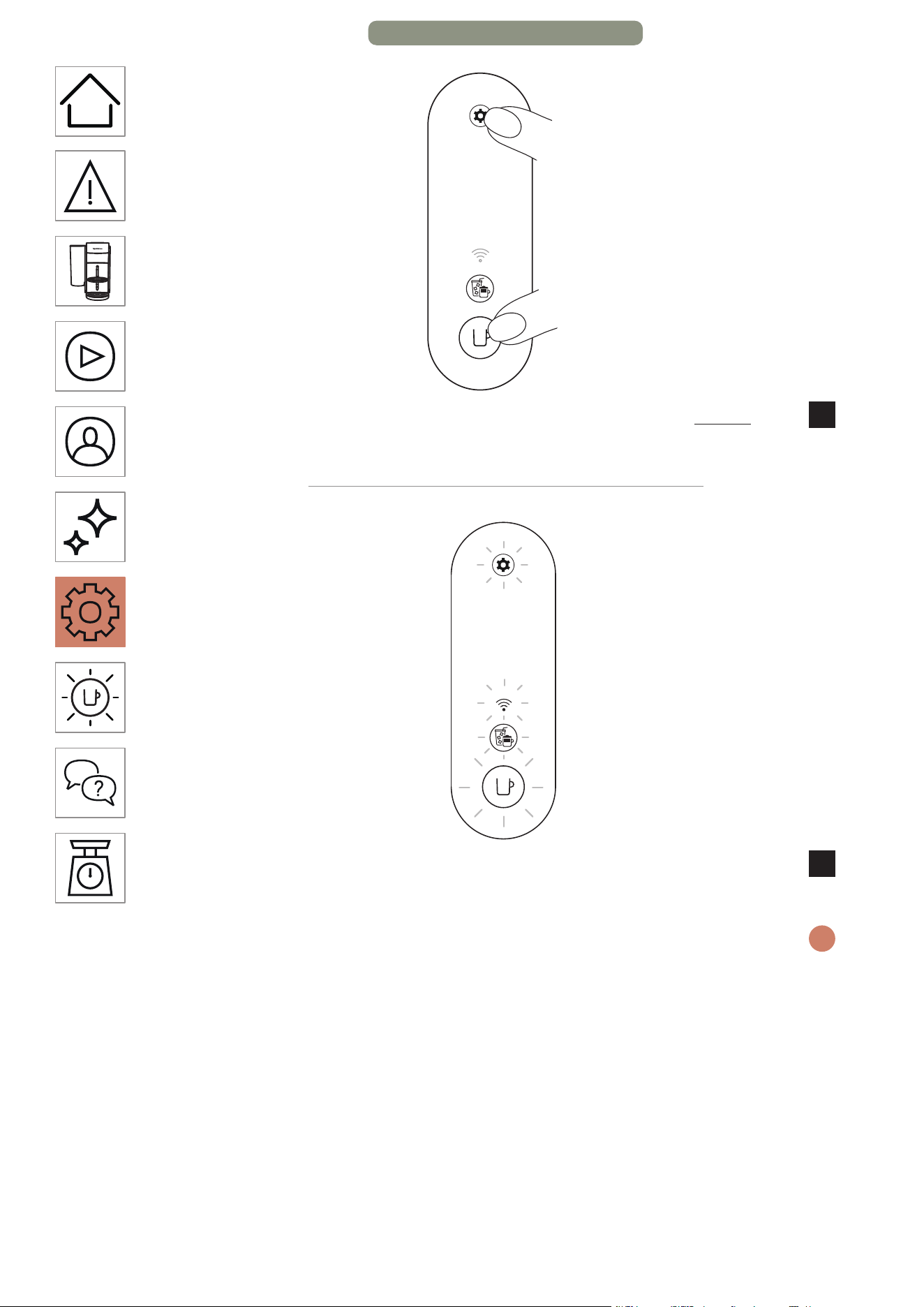
HE
.
45
תוינש 10 >
תוינש 10 ךשמל תורדגהה רותפכ תאו הפקה רותפכ תא קזחהו ץחל
2
.תוחפל
םימעפ 5
ךילהתהש רושיאל םימעפ 5 ובהבהי תוירושיקה תירונו םירותפכה לכ
3
.ןרציה תורדגהל ןיטולחל תספואמ ךלש הנוכמה וישכע .םלשוה
תייצקלפאמ הרסוה ךלש הנוכמה וישכע .םלשוי ךילהתהשכ הבכת הנוכמה
i
.Nespresso Smart App
3/3 דומע – הנוכמ תורדגה
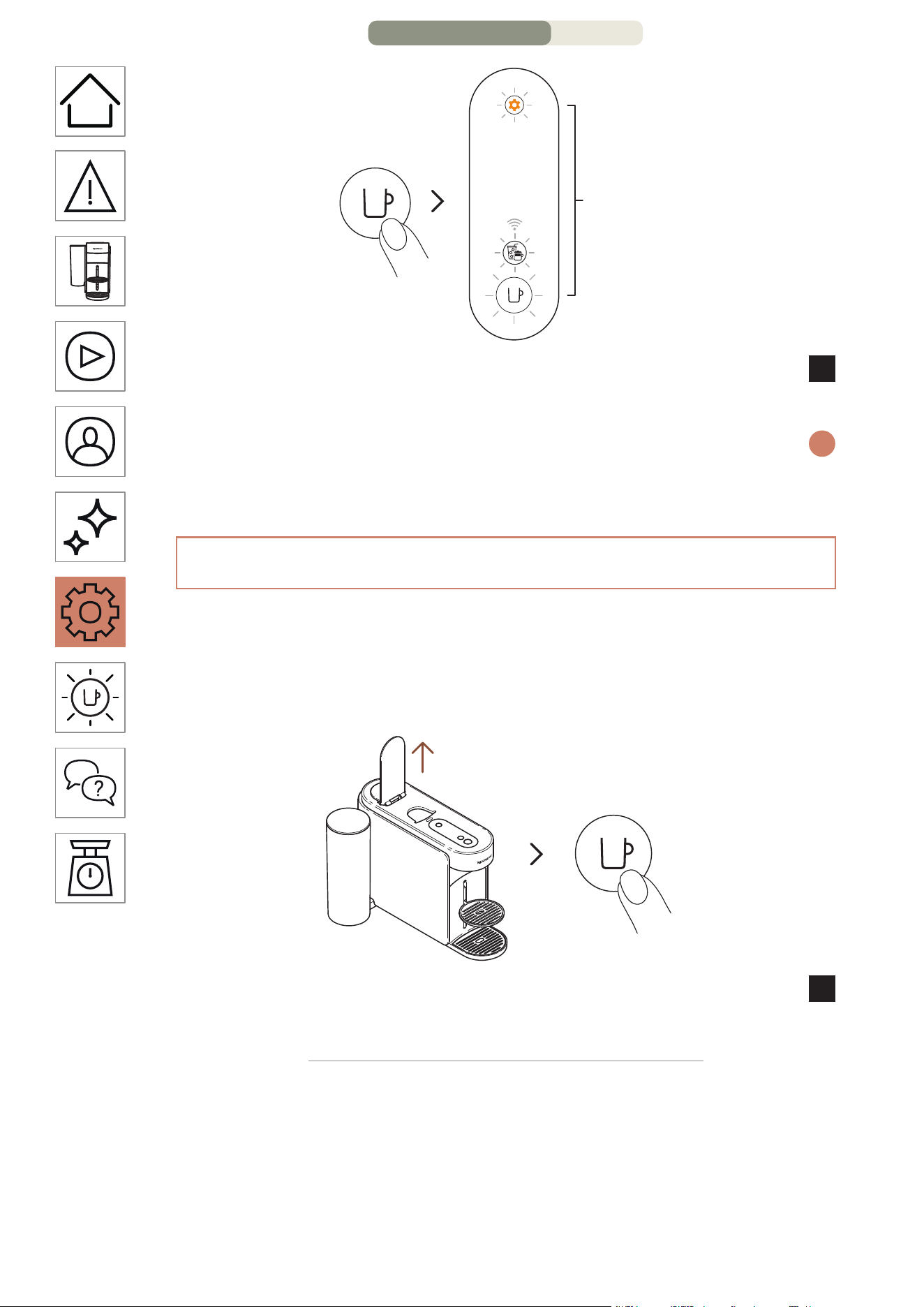
HE
.
44
תחא םעפ
םימעפ 3
םירותפכה תשולש .רושיאל הפקה רותפכ לע תדדוב הציחל ץחל
3
.ןרצי תורדגהל וספוא הנוכמה תורדגהש רושיאל םימעפ 3 ובהבהי
ןבלב ראוי הפקה רותפכ( ואולמב םלשוי ךילהתהשכ ןכומ בצמל רוזחת הנוכמה
i
.)עובק
הנוכמה סופיאו הרסה
ךות ,תומלשב ןרציה תורדגהל הרזח הנוכמה תא תנכתי ךילהתה
ךלש הנוכמה לש הרסהו תישיא תומאתומה תורדגהה לכ לש הרסה
.Nespresso Smart App תייצקילפאמ
הקלדה
תחא םעפ
רותפכ לע תדדוב הציחל ידי לע הנוכמה תא קלדהו תידיה תא חתפ
1
.הפקה
2/3 דומע – הנוכמ תורדגה
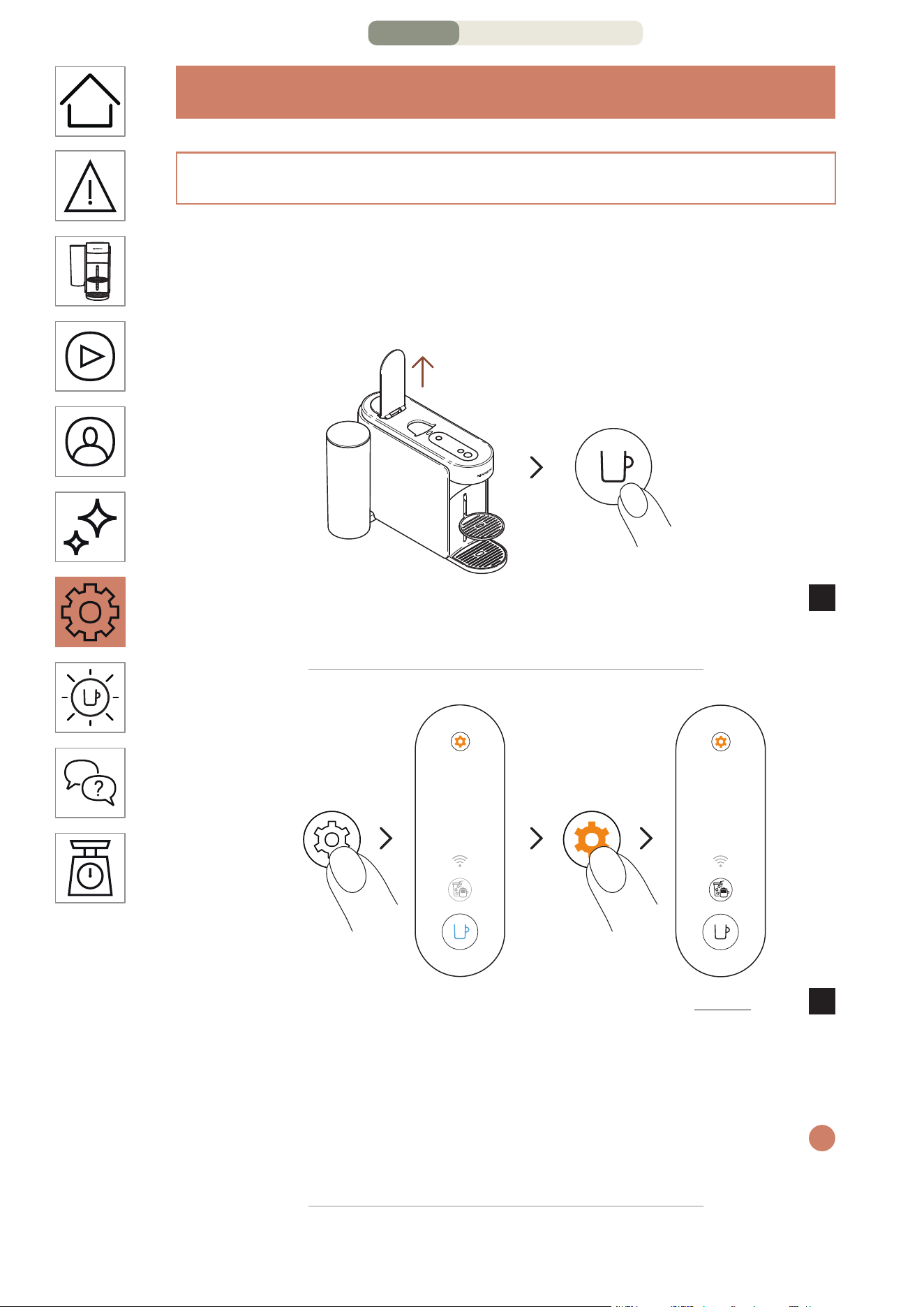
HE
.
43
הנוכמ תורדגה
תורדגה סופיא
תייצקילפא תאו הנוכמה תא תנכתל ךל רשפאמ הז ךילהת
תורדגה תרסה ידי לע ,ןרצי תורדגהל הרזח Nespresso Smart App
.דבלב תישיא ומאתוהש
הקלדה
תחא םעפ
רותפכ לע תדדוב הציחל ידי לע הנוכמה תא קלדהו תידיה תא חתפ
1
.הפקה
תוינש 3
םימעפ 3
עגרב .תוחפל תוינש 3 ךשמל תורדגהה רותפכ תא קזחהו ץחל
2
רותפכ לע בוש ץחלו ררחש ,עובק לוחכב ראומ הפקה רותפכש
םיכירצ הפקה תריצי רותפכו הפקה רותפכ .םימעפ 3 תורדגהה
.עובק ןבלב ריאהל
תא בוש קזחהו ץחל ,ךילהת לכ תלחתה ינפל תורדגה יוניש בצממ תאצל ידכ
i
.תוחפל תוינש 3 ךשמב תורדגהה רותפכ
1/3 דומע – הנוכמ תורדגה
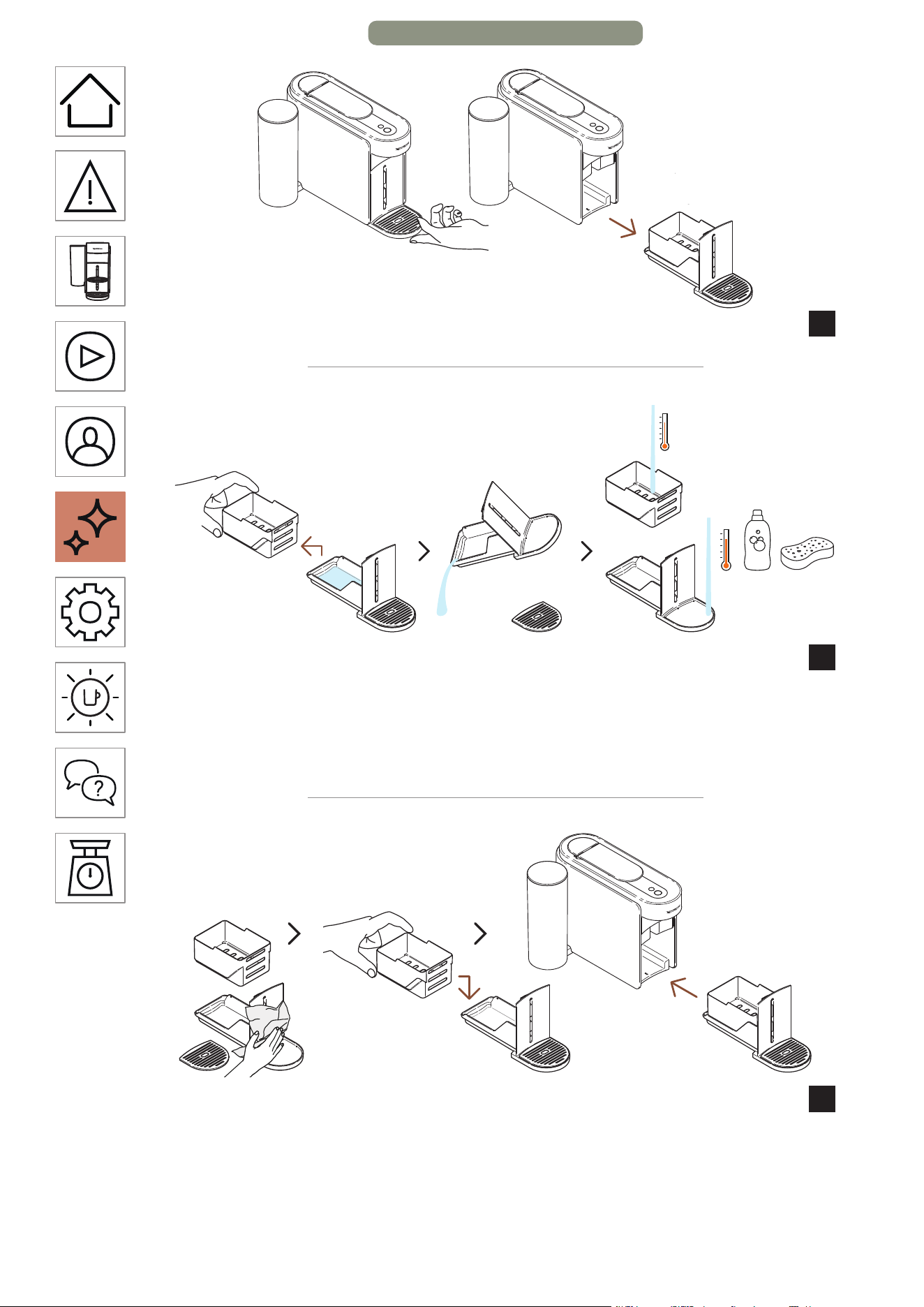
HE
.
42
.הנוכמהמ זוקינה תכרעמ תא רסה
10
.םימ תויראש ןקורו ראשהמ תושמושמה תולוספקה לכימ תא דרפה
11
.חיר רסחו ןידע ןובסבו םימח םימב זוקינה תכרעמ תא ףוטש
םישת לא .סממ יוקינ רמוחב וא קחוש וא קזח יוקינ רמוחב שמתשת לא :תוריהז
.םימב ונממ קלח וא רישכמה תא לובטת לא םלועל .םילכ חידמב הנוכמה תא
הרזחב התוא םקמו השדחו היקנ תילטמ םע זוקינה תכרעמ תא שבי
12
.הנוכמב
16/16 דומע – הקוזחת
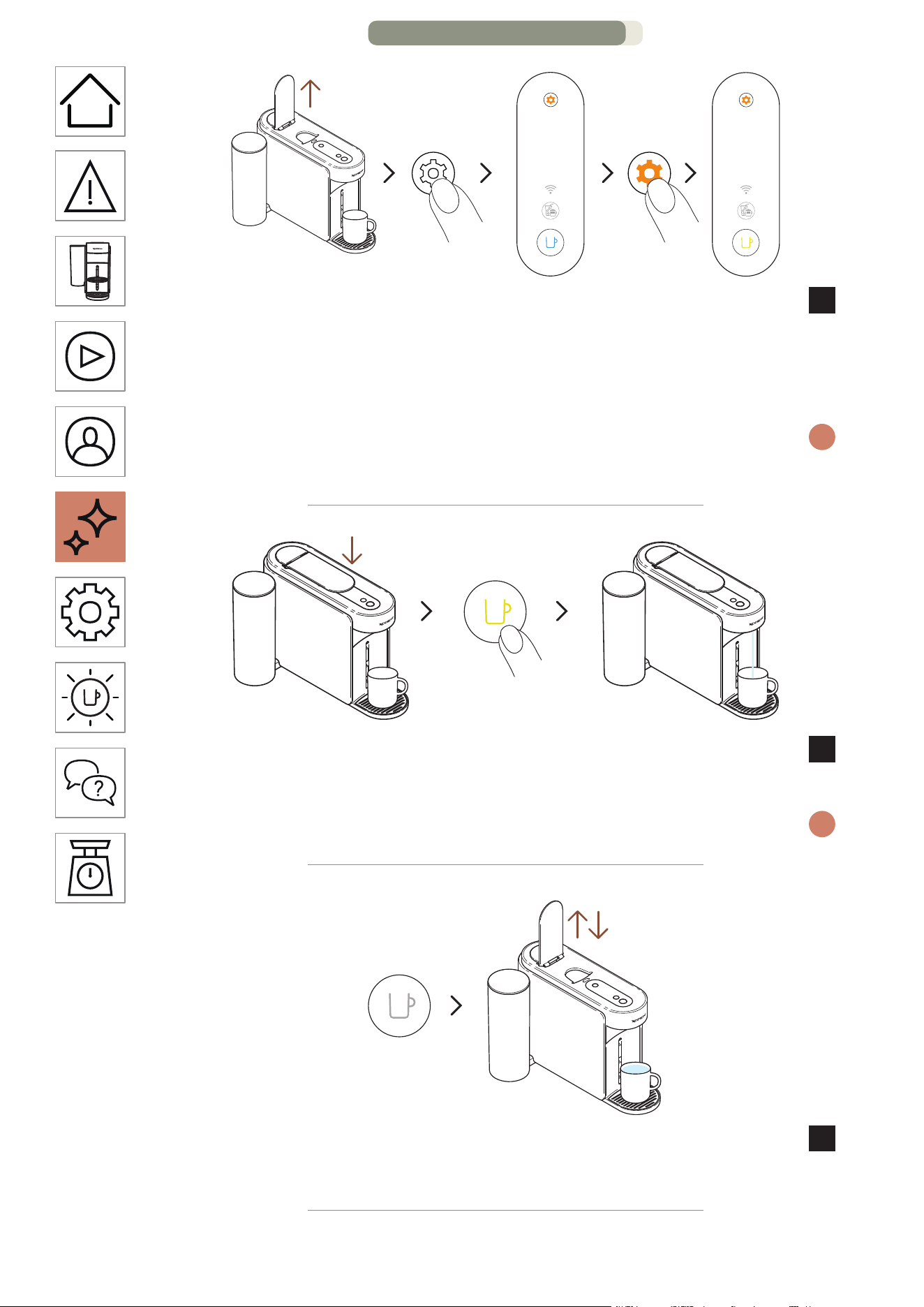
HE
.
41
תוינש 3
תחא םעפ
ךשמל תורדגהה רותפכ תא קזחהו ץחל .הנוכמה תידי תא חתפ
7
ררחש ,עובק לוחכב ראומ הפקה רותפכש עגרב .תוחפל תוינש 3
תויהל ךירצ הפקה רותפכ .תפסונ םעפ תורדגהה רותפכ לע ץחלו
.עובק בוהצב ראומ
תא בוש קזחהו ץחל ,ךילהת לכ תלחתה ינפל תורדגה יוניש בצממ תאצל ידכ
i
.תוחפל תוינש 3 ךשמב תורדגהה רותפכ
תחא םעפ
בוהצב ראומה הפקה רותפכ לע תדדוב הציחל ץחלו תידיה תא רוגס
8
.ןוקירה ךילהתב ליחתהל ידכ
.םייתסי ךילהתהש עגרב הבכיו ךילהתה ךשמב בוהצה בהבהי הפקה רותפכ
i
תידי תא רוגסו חתפ ,)הבכ הפקה רותפכ( םלשוי ךילהתהש עגרב
9
.הנוכמה
15/16 דומע – הקוזחת
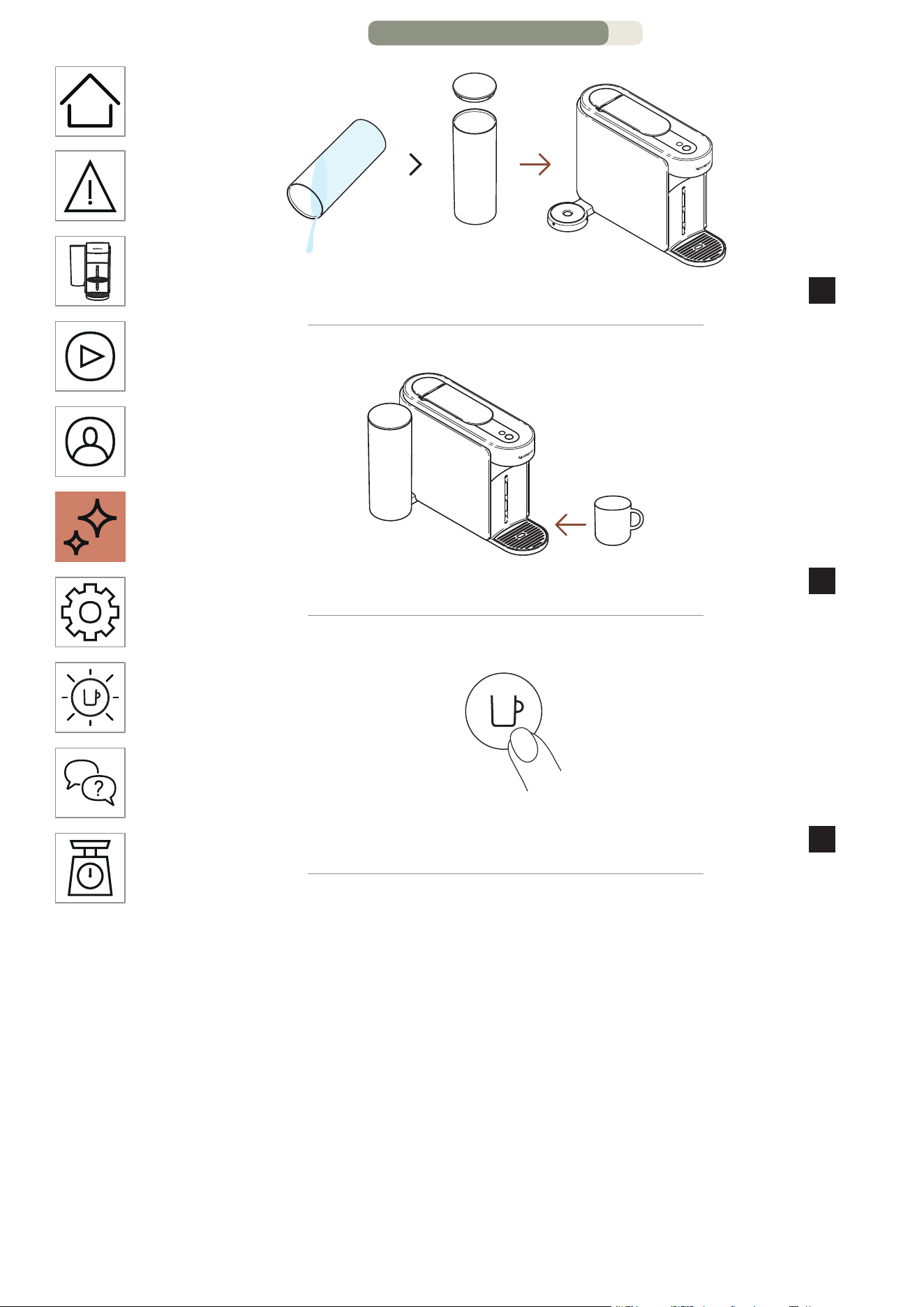
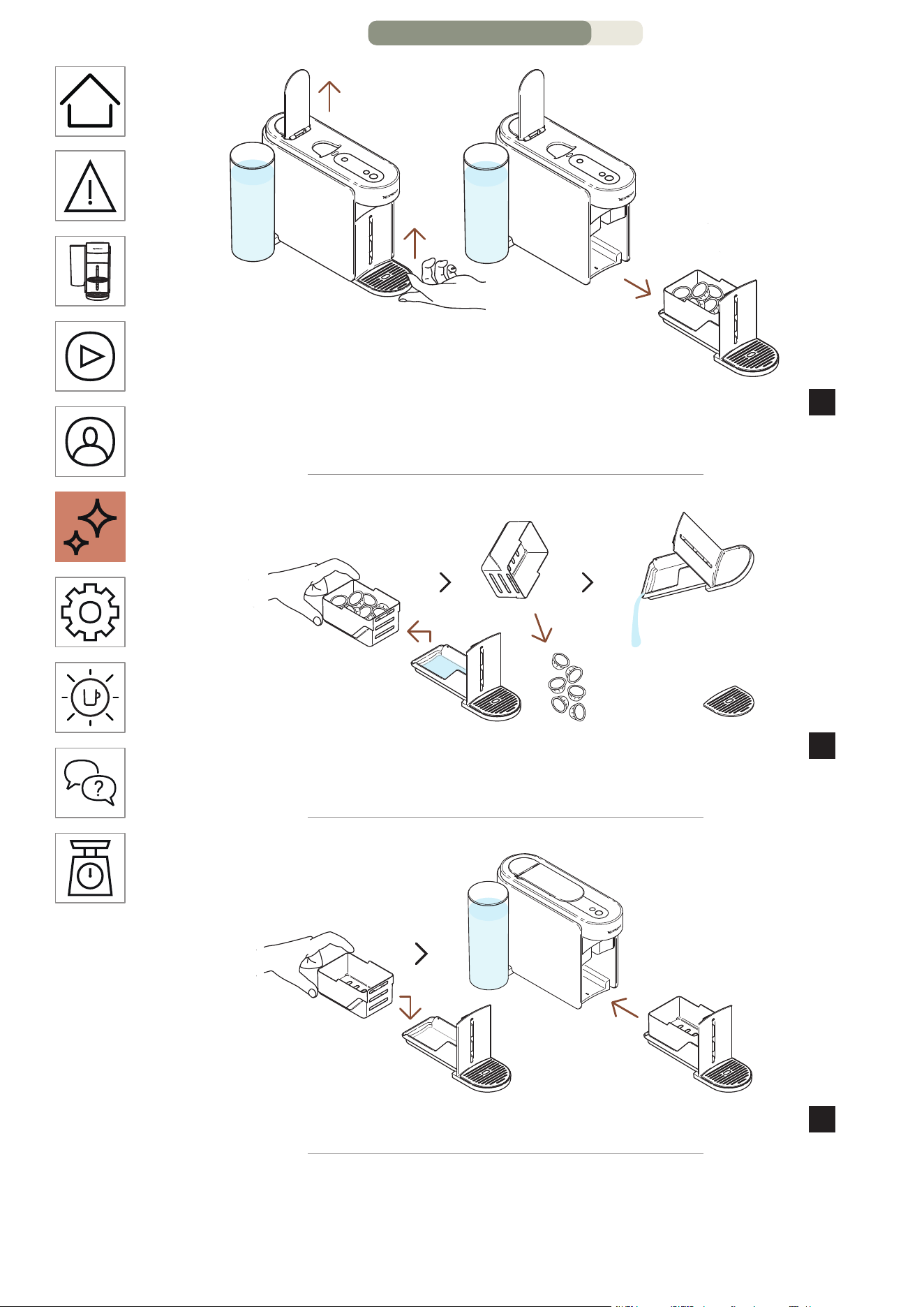
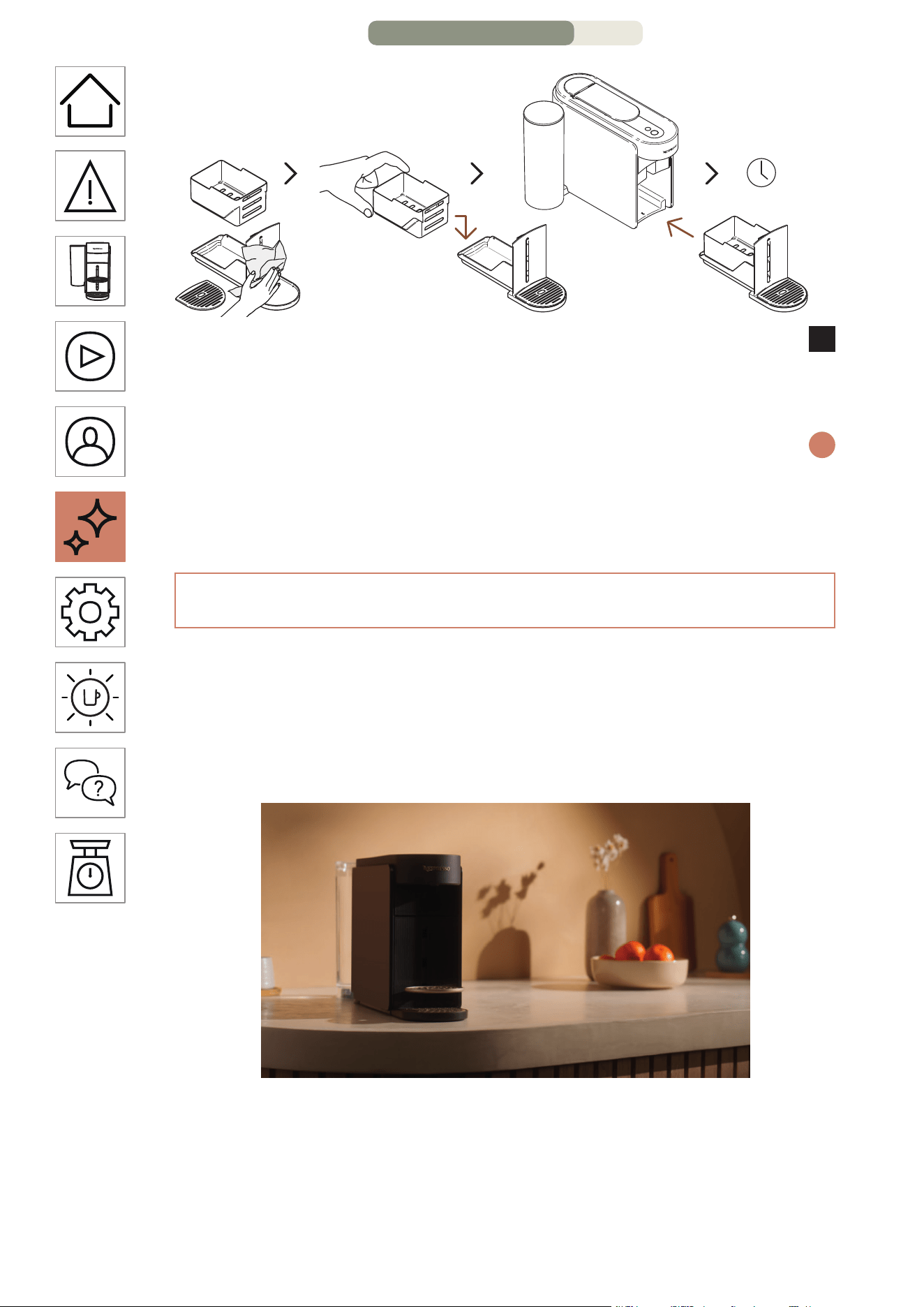
HE
.
38
תוקד 10
הרזחב התוא םקמו השדחו היקנ תילטמ םע זוקינה תכרעמ תא שבי
13
תוקד 10 ל החונמב התוא ראשה הנוכמב שומיש ינפל .הנוכמב
.תוחפל
.ואולמב םלשוי ךילהתהש עגרב תיטמוטוא הבכתו רצעת הנוכמה
i
דימת שמתשה .היקנ תילטמב הפקה תאיצי חתפ תא העובק תורידתב הקנ :תוריהז
.הנוכמה תא תוקנל ידכ תוכר תוילטמב
תורוניצ ןוקיר
,שומיש רסוח לש ןמז קרפ ינפל עצבל ןתינש ךילהת אוה תורוניצה ןוקיר
ןתינ הז ךילהת .ןוקיתל הנוכמה תחילש ינפל וא ןואפק ינפמ הנגהל
עגרב Nespresso Smart App תייצקילפא ךרד תולקב עוציבל
.תרבוחמ הנוכמהש
12/16 דומע – הקוזחת
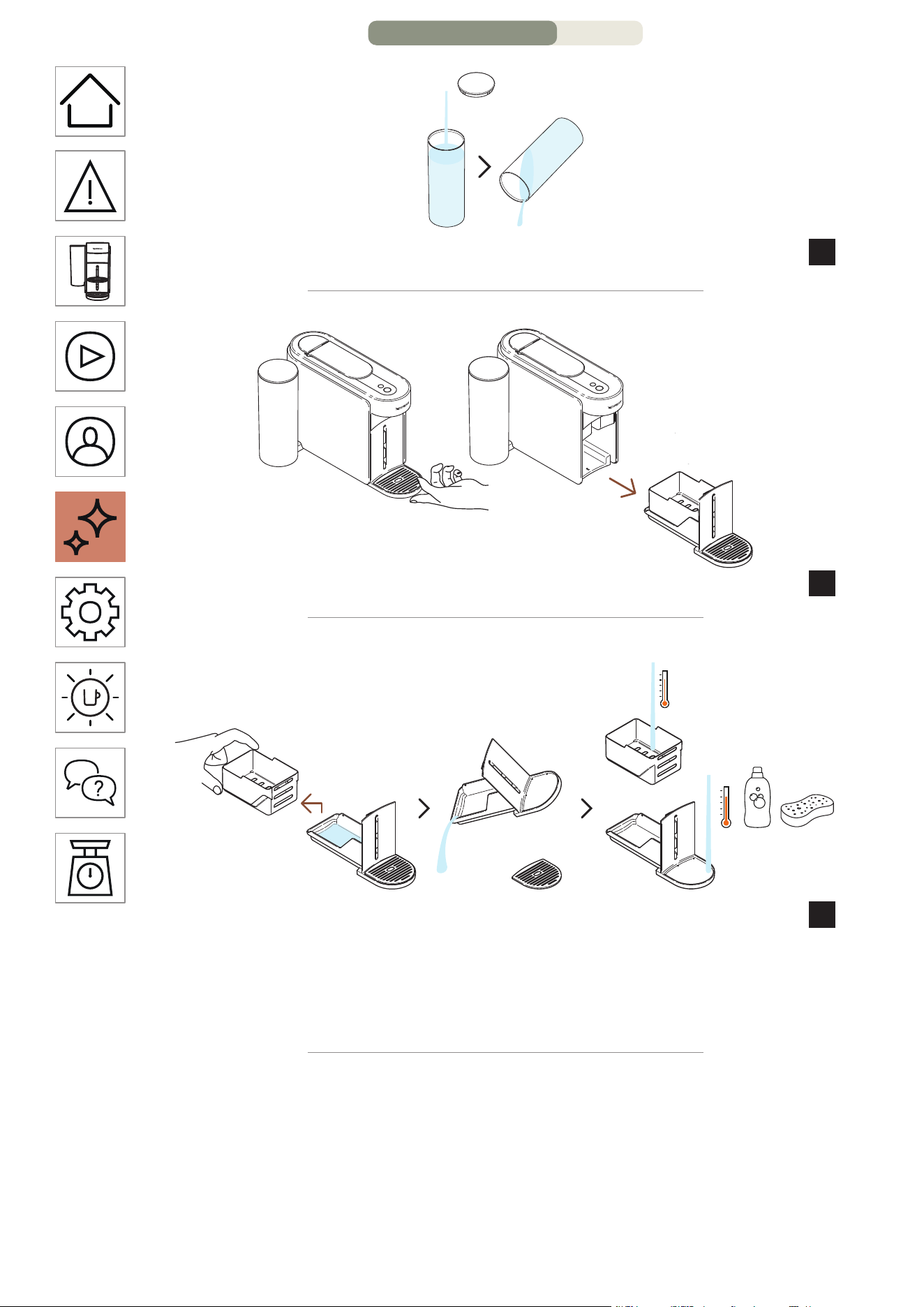
HE
.
37
.םימה לכימ תא ףוטש
10
.הנוכמהמ זוקינה תכרעמ תא רסה
11
.םימ תויראש ןקורו ראשהמ תושמושמה תולוספקה לכימ תא דרפה
12
.חיר רסחו ןידע ןובסבו םימח םימב זוקינה תכרעמ תא ףוטש
םישת לא .סממ יוקינ רמוחב וא קחוש וא קזח יוקינ רמוחב שמתשת לא :תוריהז
.םימב ונממ קלח וא רישכמה תא לובטת לא םלועל .םילכ חידמב הנוכמה תא
11/16 דומע – הקוזחת
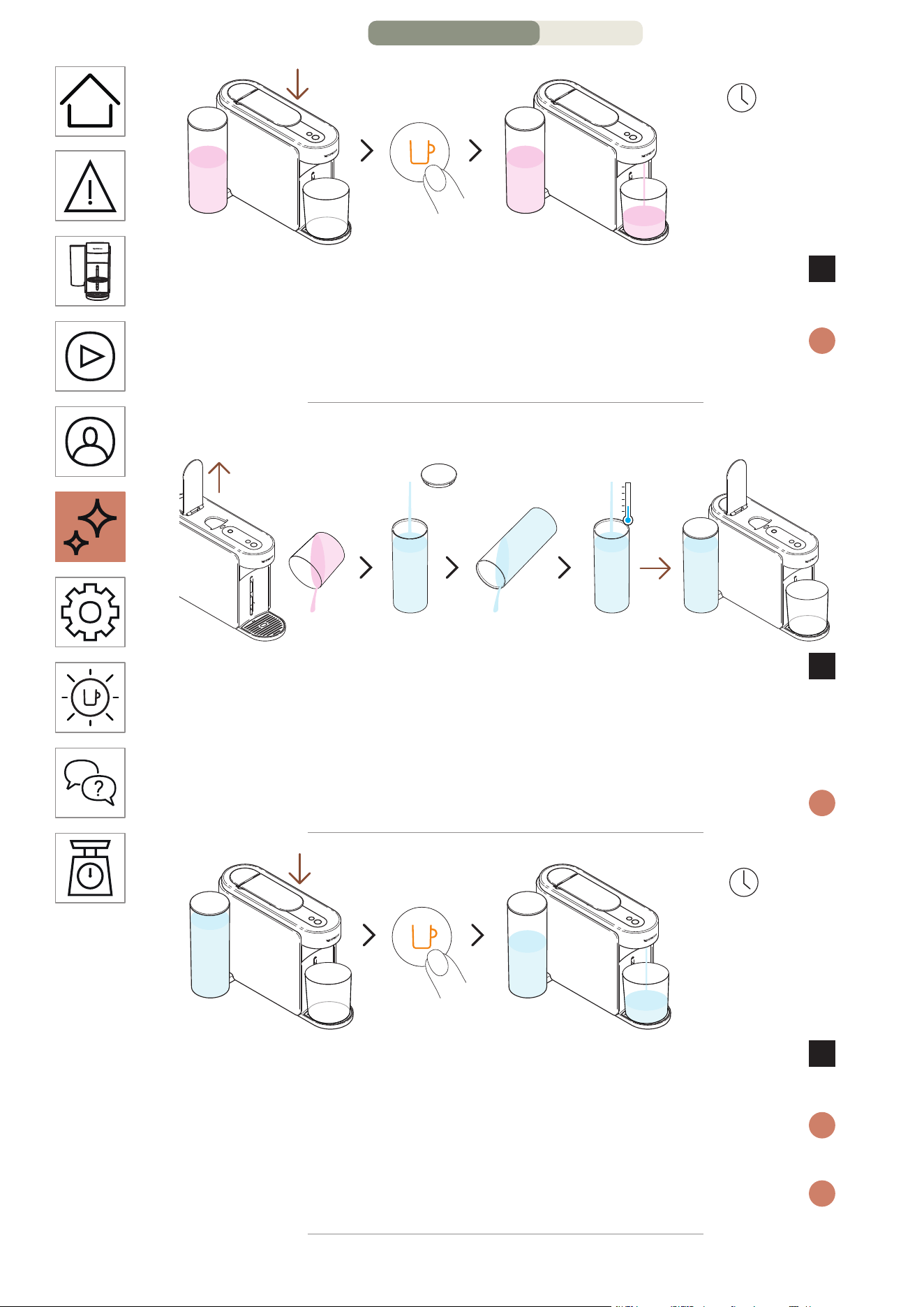
HE
.
36
תוקד 5 ~
תחא םעפ
םותכב ראומה הפקה רותפכ לע תדדוב הציחל ץחלו תידיה תא רוגס
7
.ןושארה תינבאה יוקינ בלש תא ליחתהל ידכ
5 לעמ תחקל לוכי ךילהתה ;תינבאה יוקינ לש ןושארה בלשב ליחתת הנוכמה
i
.םייתסי ךילהתהשכ תיטמוטוא רצעת הנוכמו תוקד
הפיטש :2 בלש
לש הפיטשל ןמזה הז ,םייתסה ןושארה תינבאה יוקינ בלששכ
8
לכימ תא ףוטש ,לכימה תא ןקור ,הנוכמה תידי תא חתפ .הנוכמה
הרזחב ותוא םקמ .םיירט היתש ימב ףוסה דע ותוא אלמו םימה
.ומוקמב
.ךילהתה ךלהמב תחא םעפ קר אלמתי םימה לכימש אדוו אנא
i
תוקד 4~
תחא םעפ
םותכב ראומה הפקה רותפכ לע תפסונ םעפ ץחלו תידיה תא רוגס
9
.תינבאה יוקינ ךילהת לש הפיטשב ליחתהל ידכ
תיטמוטוא רצעת הנוכמהו תוקד 4 לעמ תחקל לוכי הפיטשה ךילהת
i
.םייתסי ךילהתהשכ
.ךילהתה ךלהמב זוקינה תרכעמב רבטצהל םייושע םימ
i
10/16 דומע – הקוזחת
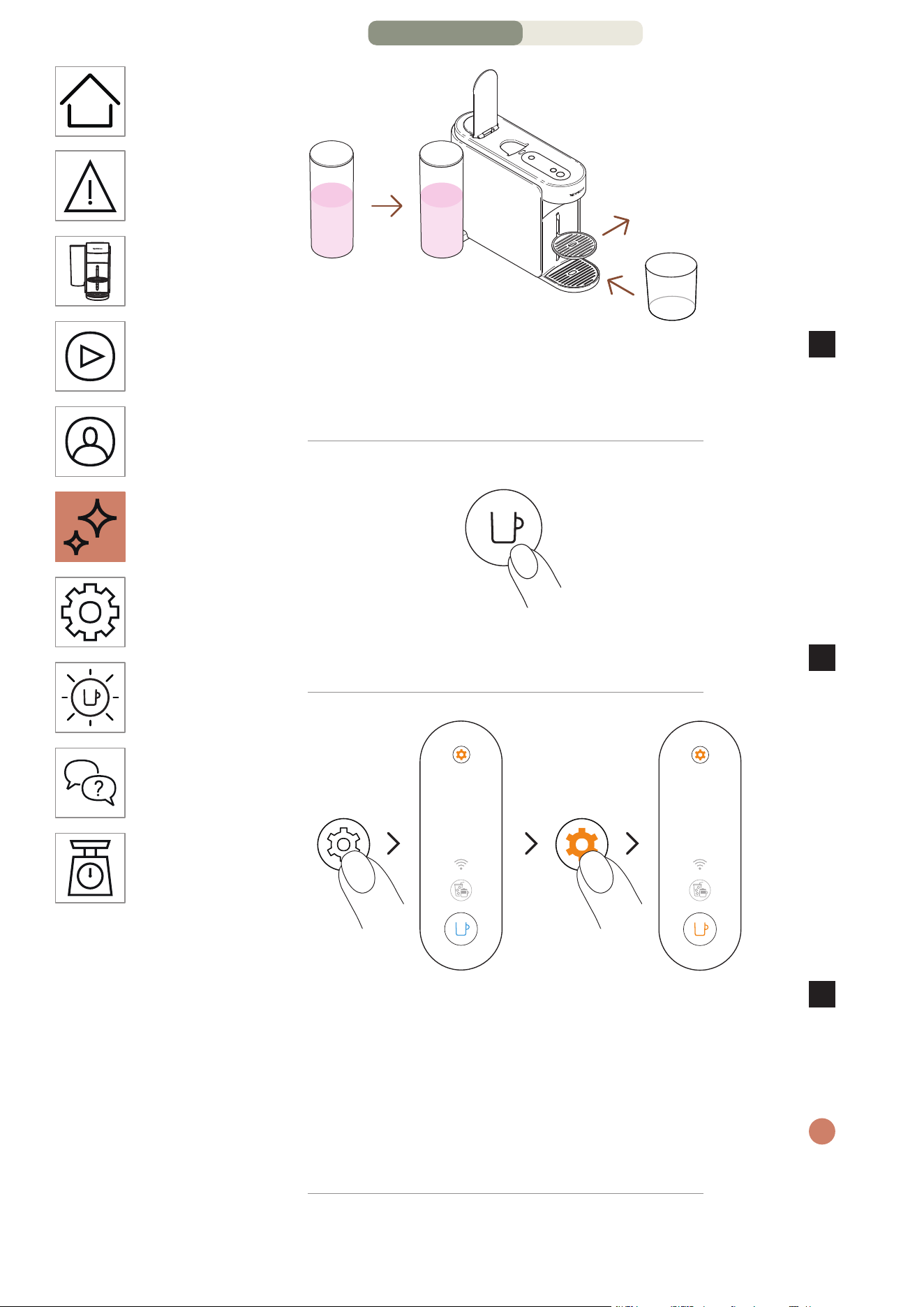
HE
.
35
L 1.5
fl oz 51
סוכה ךמות תא רסה .הנוכמב ומוקמב הרזחב םימה לכימ תא םקמ
4
תאיצי חתפל תחתמ )תוחפל L / 51 fl oz 1.5( קיר לכימ םקמו
.הפקה
הקלדה
תחא םעפ
.הפקה רותפכ לע תדדוב הציחל ידי לע הנוכמה תא קלדה
5
.םימעפ 2
תוינש 3
עגרב .תוחפל תוינש 3 ךשמל תורדגהה רותפכ תא קזחהו ץחל
6
ץחלו רותפכה תא ררחש ,עובק לוחכב ראומ הפקה רותפכש
םותכב ריאהל ךירצ הפקה רותפכ .תורדגהה רותפכ לע םיימעפ
.עובק
תא בוש קזחהו ץחל ,ךילהת לכ תלחתה ינפל תורדגה יוניש בצממ תאצל ידכ
i
.תוחפל תוינש 3 ךשמב תורדגהה רותפכ
9/16 דומע – הקוזחת
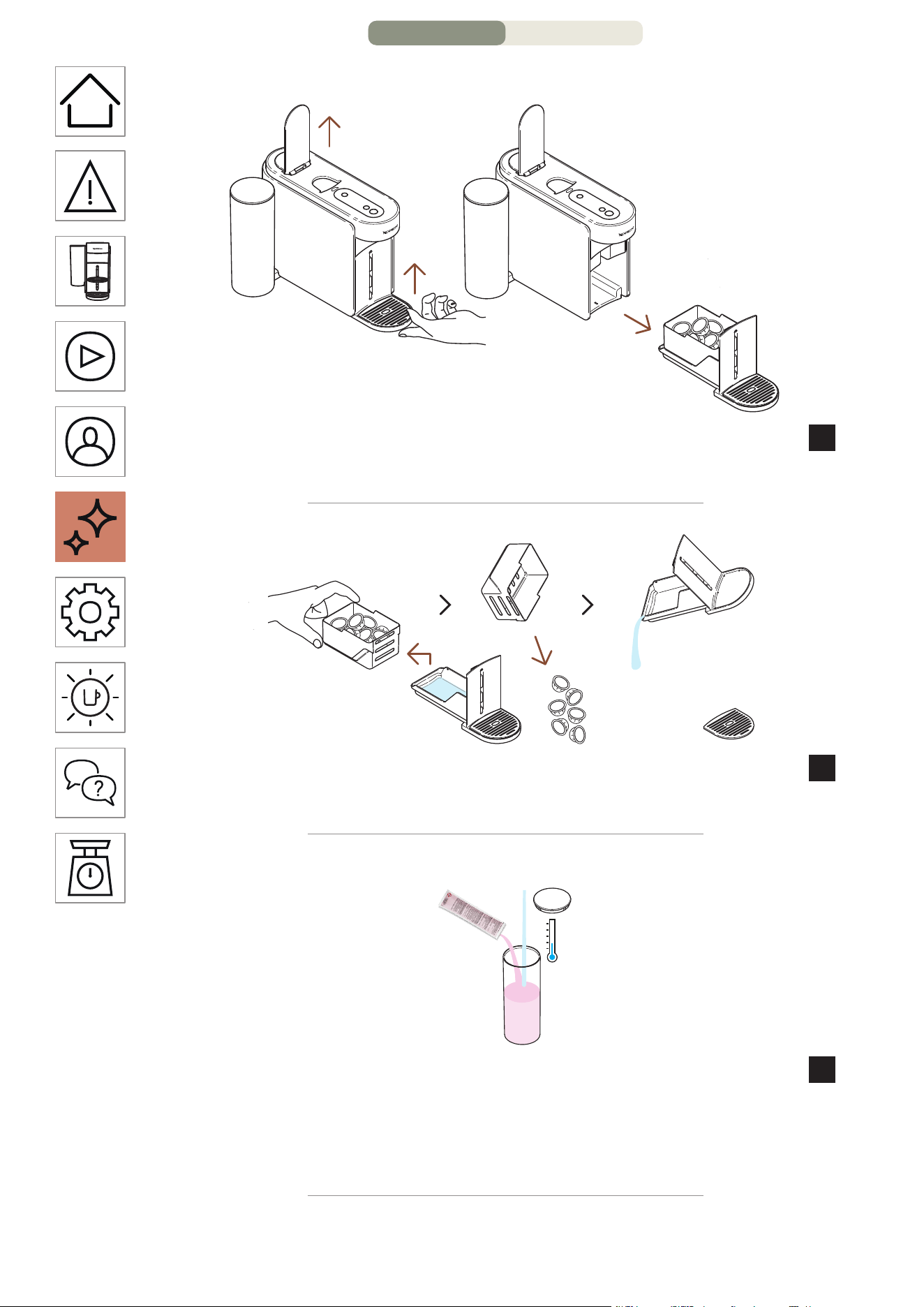
HE
.
34
תינבא יוקינ :1 בלש
.תושמושמ תולוספק ריסהל ידכ הנוכמה תידי תא חתפ
1
.הנוכמהמ זוקינה תכרעמ תא רסה
תויראש ןקורו ראשהמ תושמושמה תולוספקה לכימ תא דרפה
2
.ורתונש םימ/הפק
1x
L 0.6
fl oz 20
לש תחא הדיחי ףסוה ,םימ L / 20 fl oz 0.6 ב םימה לכימ תא אלמ
3
.הסכמב םימה לכימ תא הסכו Nespresso לש תינבא יוקינל לזונ
רועה ,םייניעה םע עגמ ענמ .קיזהל לוכי תינבאה יוקינ לזונש בל םיש :תוריהז
.םיחטשמו
8/16 דומע – הקוזחת
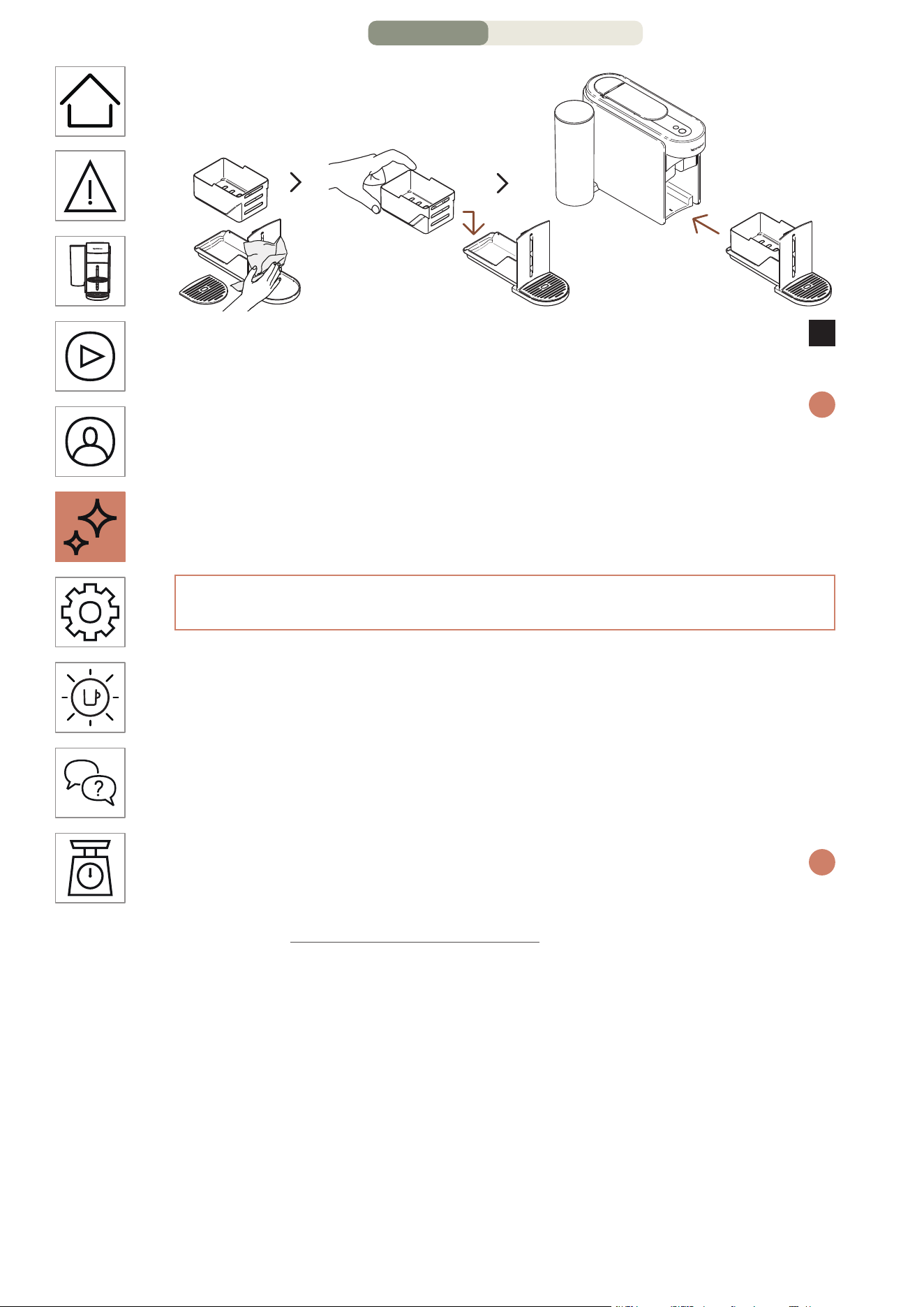
HE
.
33
הרזחב התוא םקמו השדחו היקנ תילטמ םע זוקינה תכרעמ תא שבי
11
.הנוכמב
ןבלב ראוי הפקה רותפכ( ואולמב םלשוי ךילהתהשכ ןכומ בצמל רוזחת הנוכמה
i
.)עובק
דימת שמתשה .היקנ תילטמב הפקה תאיצי חתפ תא העובק תורידתב הקנ :תוריהז
.הנוכמה תא תוקנל ידכ תוכר תוילטמב
תינבא יוקינ
םייחה ןמז לע ךרואל יוארכ לעפת איהש ךל חיטבי תינבאמ הנוכמה יוקינ
ךלש הנוכמה .ןושארה םויב ומכ תידוחי הפקה תיווח לע רומשתו הלש
םותכב ראוי תורדגהה רותפכ רשאכ תינבא יוקינל ךרוצה תעב עירתת
.עובק
Nespresso Smart App תייצקילפא ךרד תולקב עוציבל ןתינ ךילהתה
.תרבוחמ הנוכמהש עגרב
.לחהש רחאל רצעהל לוכי אלו תוקד 15~ חקול תינבאה יוקינ ךילהת
i
:ךרטצת התא
•www.nespresso.com ב הנימז תינבא יוקינל הכרע
•)L / 51 fl oz 1.5( קיר לכימ
7/16 דומע – הקוזחת
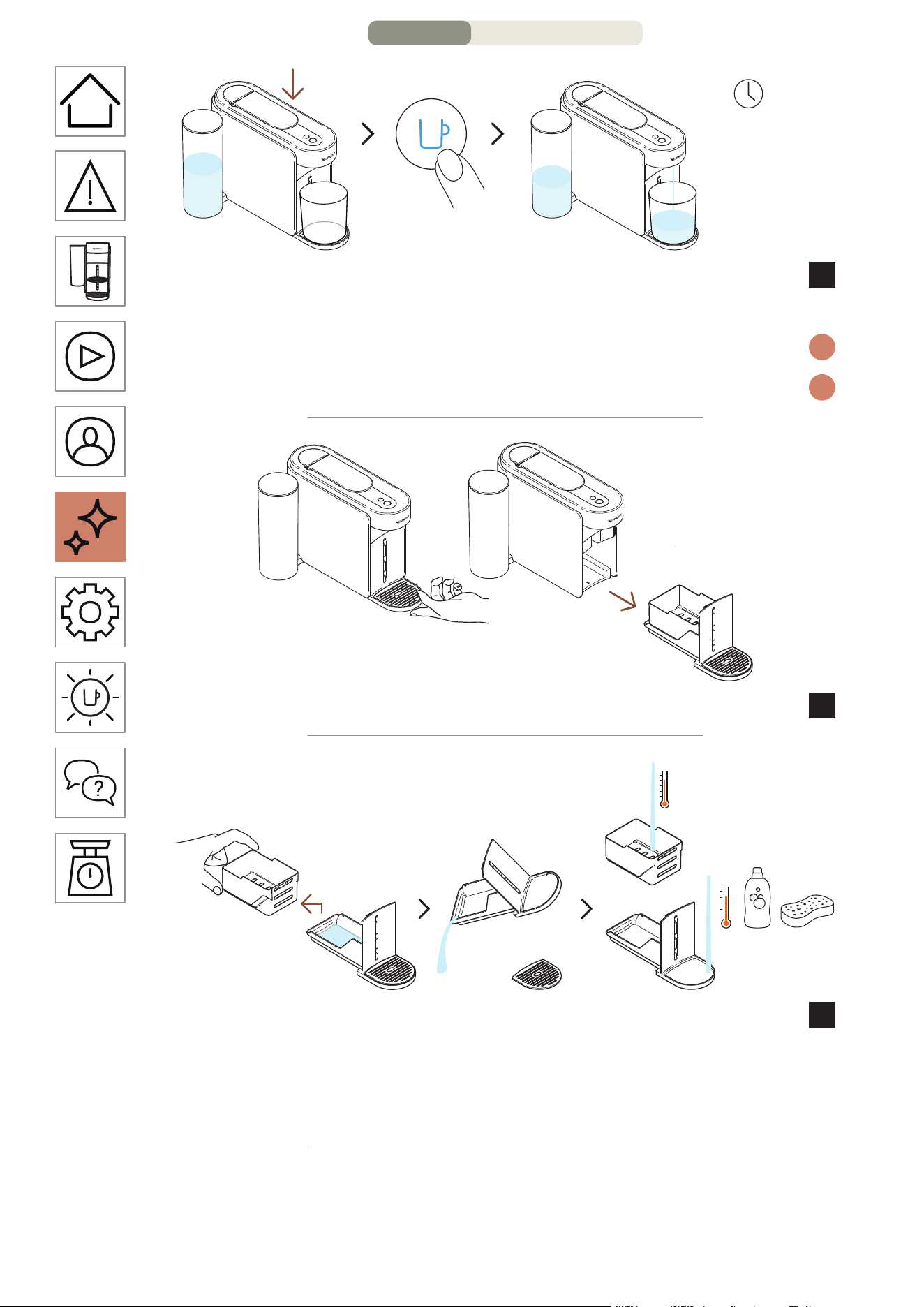
HE
.
32
תחא םעפ
תוקד 3 ~
ליחתהל ידכ לוחכה רותפכה לע תדדוב הציחל ץחלו תידיה תא רוגס
8
.ךילהתב
.תוקד 3 ל דע תחקל לוכי ךילהתהו הפיטשב ליחתת הנוכמה
i
.הפיטשה ךלהמב זוקינה תכרעמב רבטצהל םילוכי םימ
i
.הנוכמהמ זוקינה תכרעמ תא רסה
9
.םימ תויראש ןקורו ראשהמ תושמושמה תולוספקה לכימ תא דרפה
10
.חיר רסחו ןידע ןובסבו םימח םימב זוקינה תכרעמ תא ףוטש
םישת לא .סממ יוקינ רמוחב וא קחוש וא קזח יוקינ רמוחב שמתשת לא :תוריהז
.םימב ונממ קלח וא רישכמה תא לובטת לא םלועל .םילכ חידמב הנוכמה תא
6/16 דומע – הקוזחת
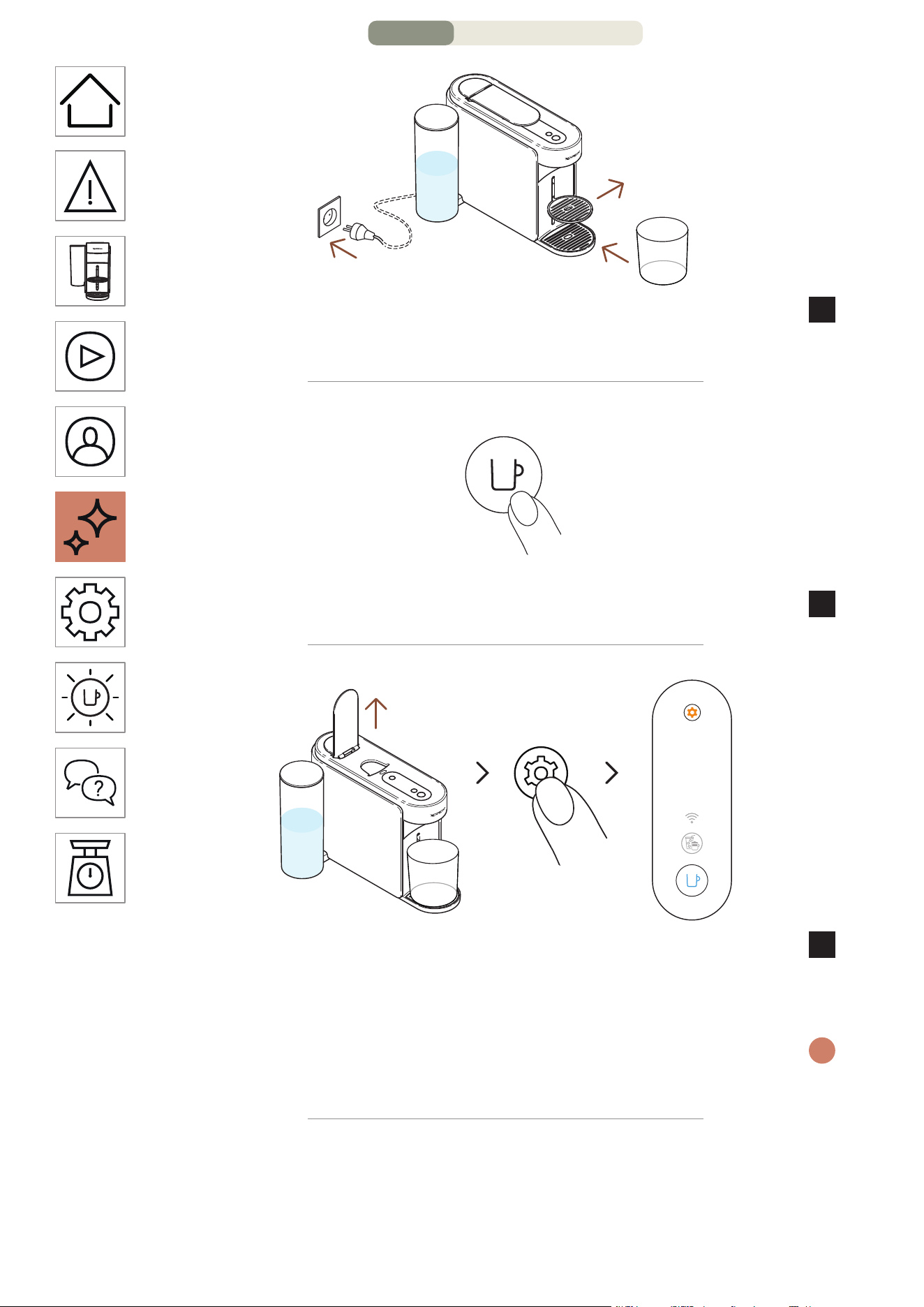
HE
.
31
L 1
fl oz 34
קיר לכימ םקמו סוכה ךמות תא רסה ,עקשל תרבוחמ הנוכמהשכ
5
.הפקה תאיצי חתפל תחתמ )תוחפל L / 34 fl oz 1 חפנב(
הקלדה
תחא םעפ
.הפקה רותפכ לע דדוב הציחל ידי לע הנוכמה תא קלדה
6
תוינש 3
ךשמב תורדגהה רותפכ תא קזחהו ץחל .הנוכמה תידי תא חתפ
7
לוחכב ראומ הפקה רותפכשכ רותפכה תא ררחש .תוחפל תוינש 3
.עובק
תא בוש קזחהו ץחל ,ךילהת לכ תלחתה ינפל תורדגה יוניש בצממ תאצל ידכ
i
.תוחפל תוינש 3 ךשמב תורדגהה רותפכ
5/16 דומע – הקוזחת
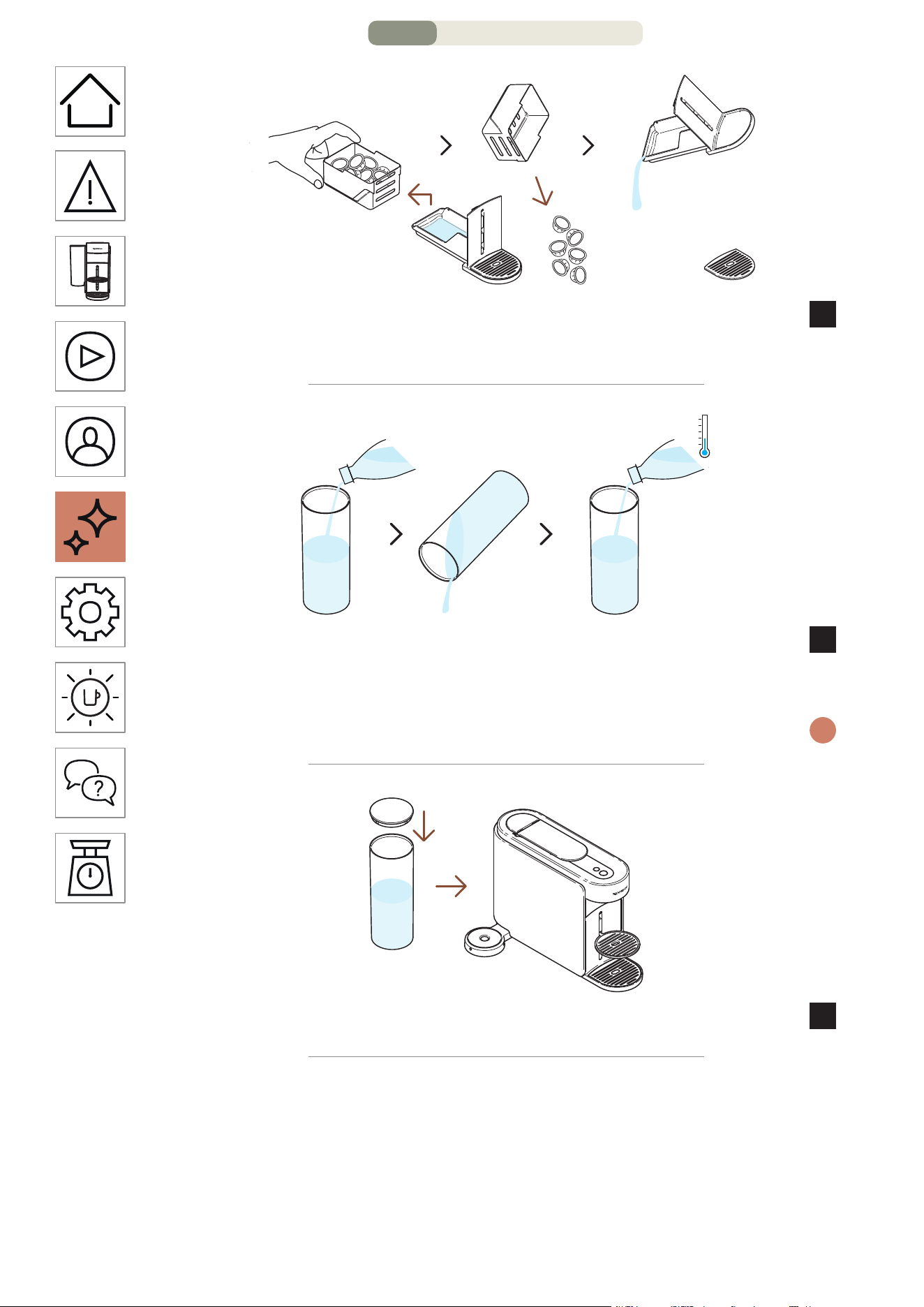
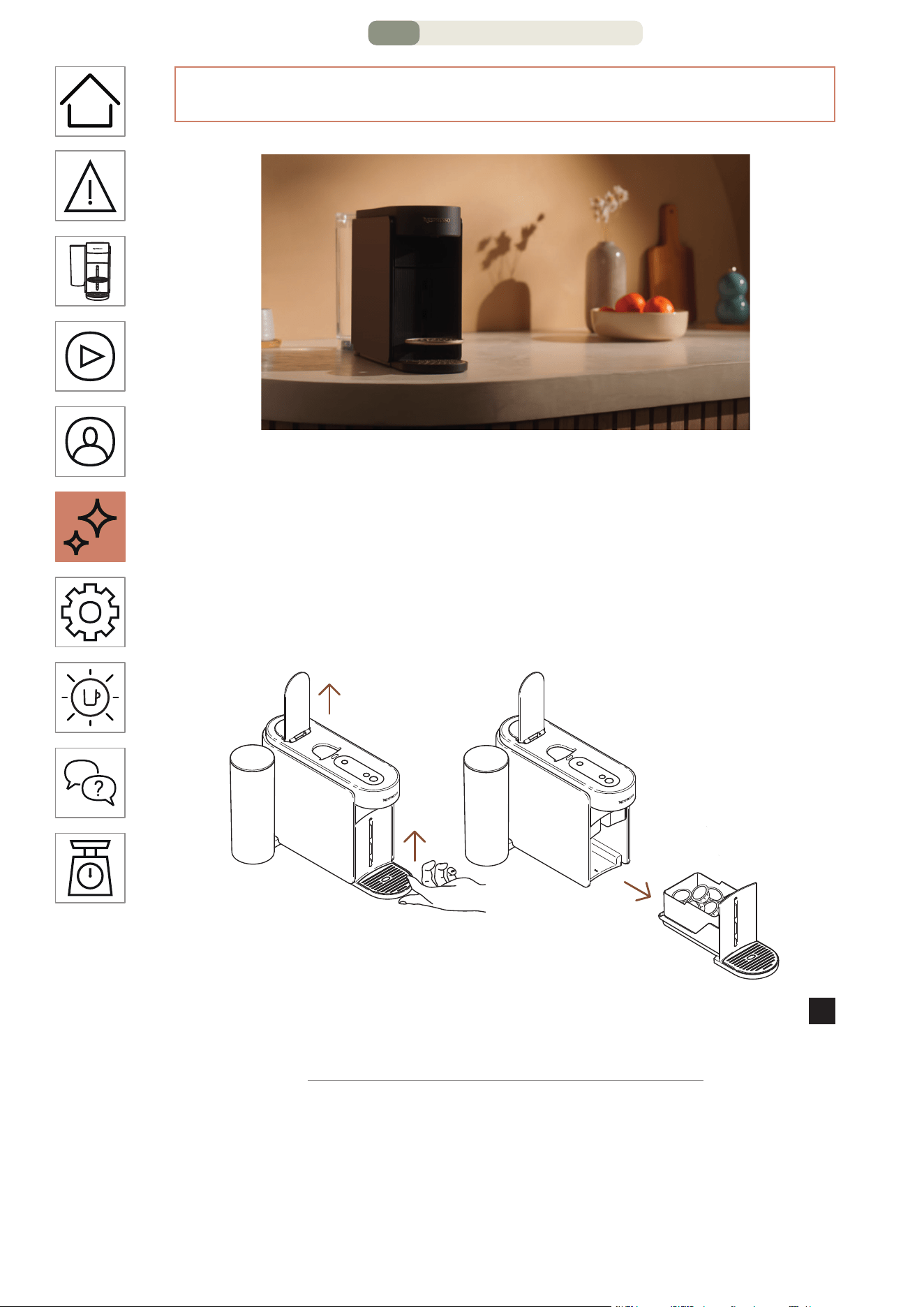
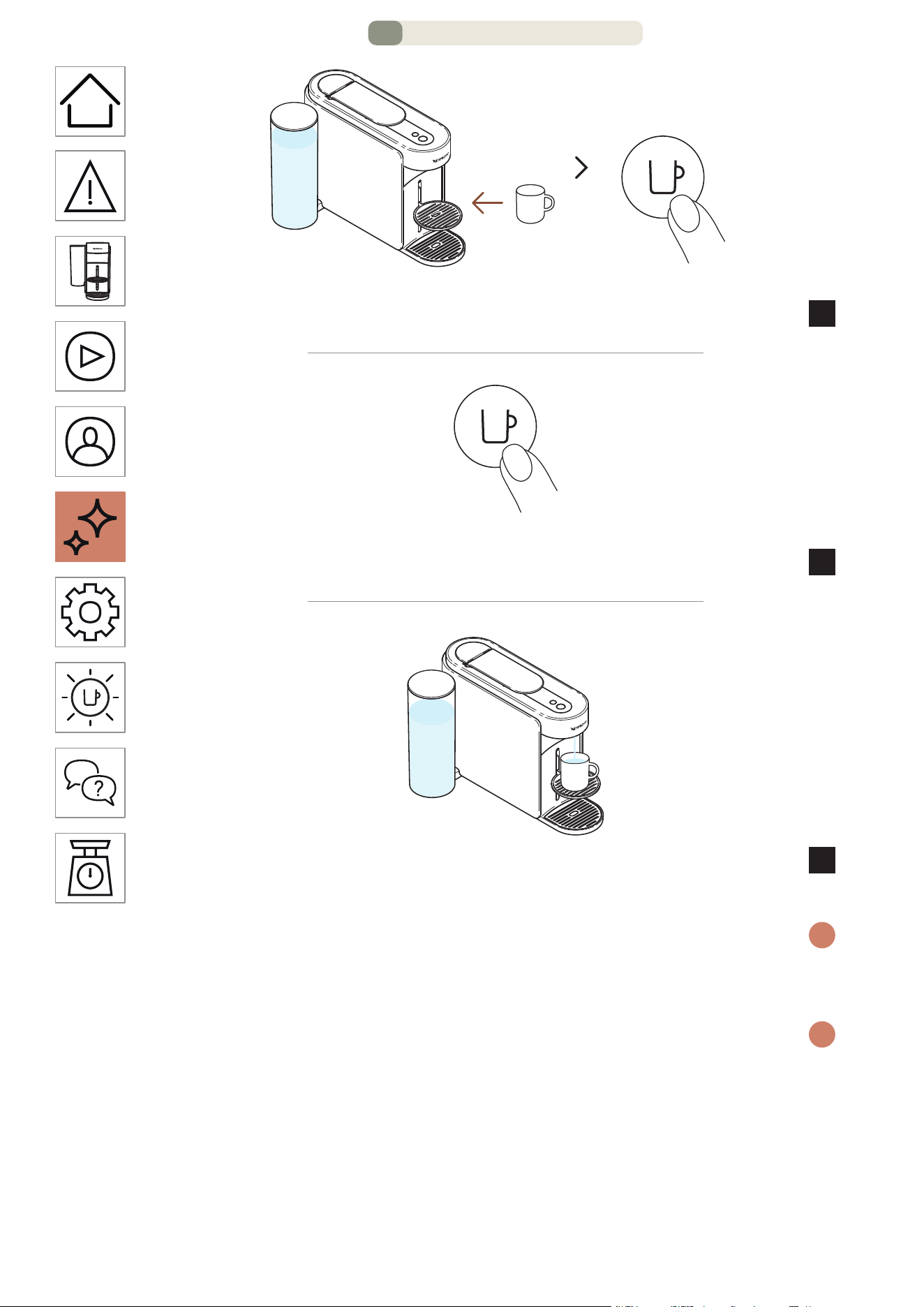
HE
.
28
הקלדה
תחא םעפ
.הפקה רותפכ לע תדדוב הציחל ידי לעהנוכמה תא קלדהו סוכ םקמ
3
תחא םעפ
.הלוספק
4
הלא םימ .םימח םימ לש )ml 40~ )~1.35 fl oz לש המירז היהת
5
.היתשל םייואר םניא
.הפקה רותפכ לע תדדוב הציחל ידי לע ןמז לכב המירזה תא רוצעל ךתלוכיב
i
הפקה תנכהש עגרב תידיה תא חותפל םיצילממ ונא ,הנוכמב ןוכנ שומישל
.)עובק ןבלב ראומ הפקה רותפכ( האולמב המלשוה
תכרעמ תא ןקור אנא .ךילהתה ךלהמב זוקינה תכרעמב רבטצהל םייושע םימ
i
לש הקוזחת ךילהת לכ רחאל וא אלמ תושמושמה תולוספקה לכימשכ זוקינה
.)המודכו ןוקיר ,תינבא יוקינ ,יוקינ( הנוכמה
2/16 דומע – הקוזחת
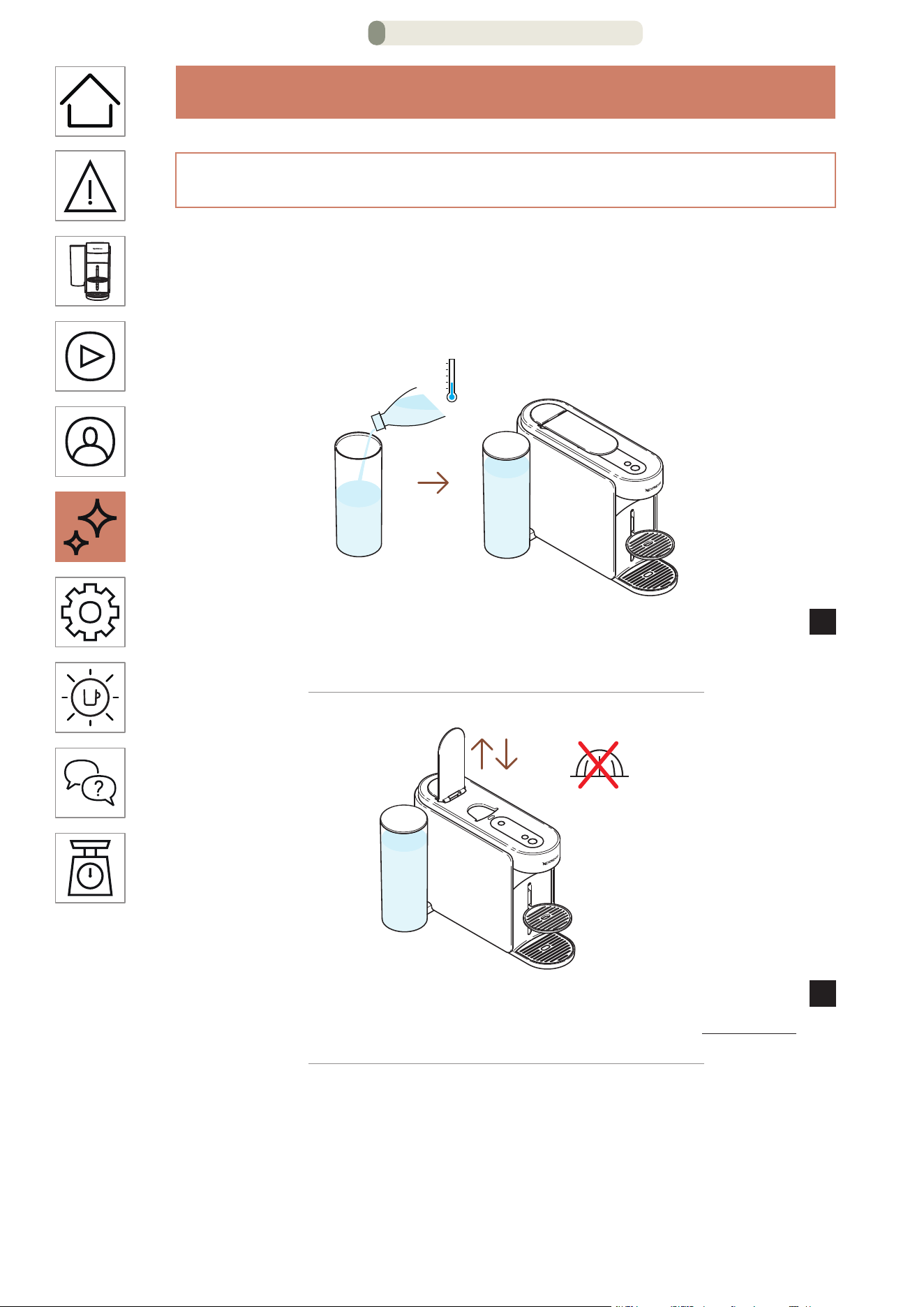
HE
.
27
הקוזחת
הרצק הפיטש
רחאל הנוכמל הריהמ הפיטש עצבל וא סוכל םידקמ םומיח עצבל ךנוצרב
הפיטש עוציב העיצמ Vertuo Up ה תנוכמ ?םימעטב תולוספקב שומיש
.הרצק
ותוא רזחהו הסכמה םע הסכ ,םיירט היתש ימב םימה לכימ תא אלמ
1
.הנוכמב ומוקמל
תמדוקה הלוספקה תא ריסהל ידכ הנוכמה תידי תא רוגסו חתפ
2
.השדח הלוספק םוש סינכת לאו
1/16 דומע – הקוזחת
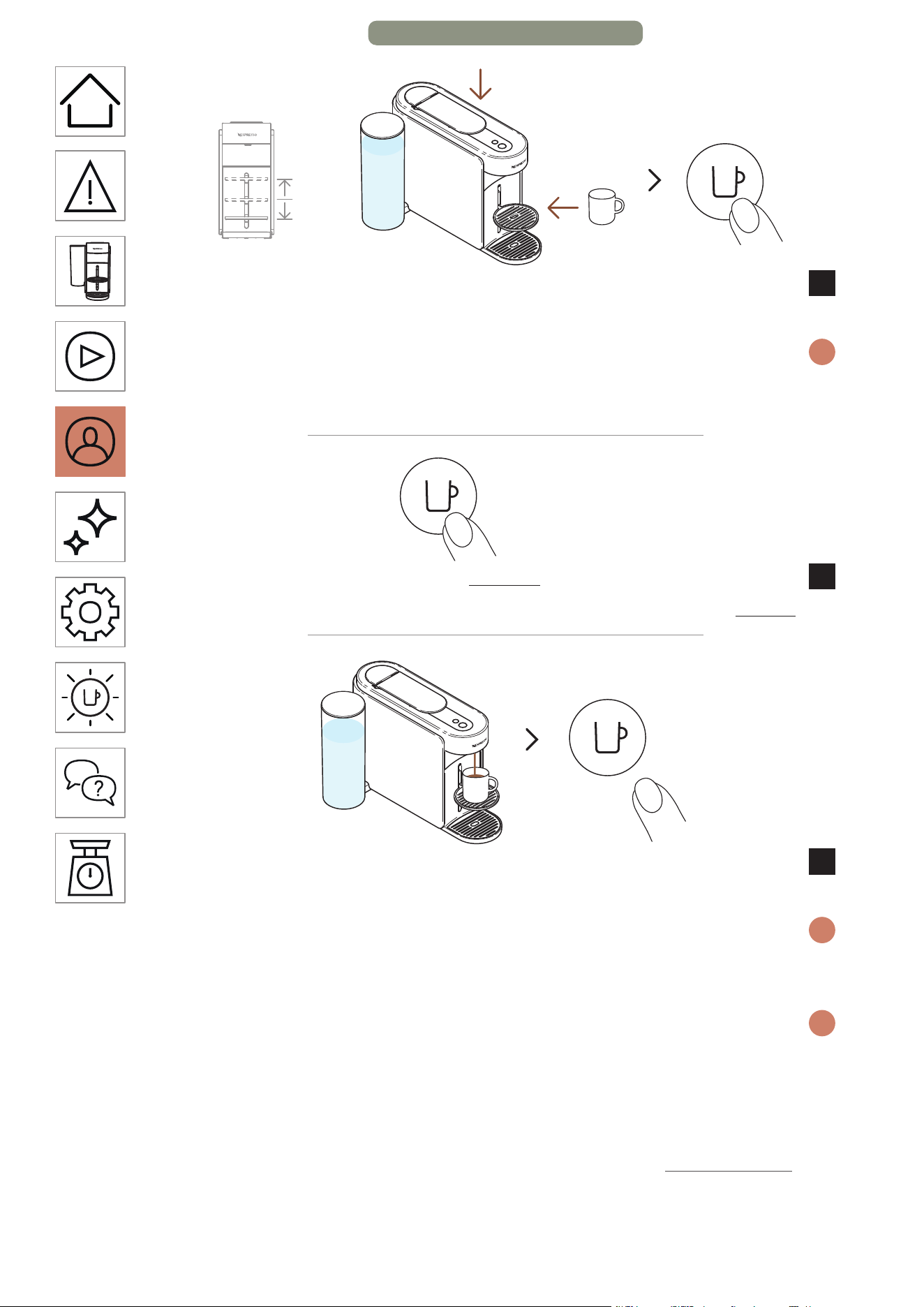
HE
.
26
הקלדה
תחא םעפ
הציחל ידי לע הנוכמה תא קלדהו סוכ םקמ ,הנוכמה תידי תא רוגס
3
.הפקה רותפכ לע תדדוב
הרחבנש הלוספקה חפנל לפסה לדוג תא םאתה אנא ,השילגמ ענמהל ידכ
i
םיאתהל ידכ ןנווכתהל לוכי סוכה ךמות .)תישיא םאתומה וא שארמ רדגומה(
.ךלש לפסה לדוגל
תוינש 5 >
תוינש 5 ל הפקה רותפכ לש הקזחהו הציחל ידי לע הנכהב לחתה
4
.תוחפל
ןכתי .הפקה רותפכ תא ררחש ,היוצרה הפקה תומכ הלבקתהש עגרב
5
.תוינש המכל הפק תופיט המכ ףטפטל וכישמיש
הפקה תנכהש עגרב תידיה תא חותפל םיצילממ ונא ,הנוכמב ןוכנ שומישל
i
לכ ריסת תידיה תחיתפ .)עובק ןבלב ראומ הפקה רותפכ( האולמב המלשוה
.הנכהה רחאל הלוספק
מ םיתנכותמ תויהל םילוכי תוסוכה ילדג .הלוספק לדוג לכל םיוסמ תונכת םייק
i
Pour-Over Style הפק טעמל ,fl oz 17( ל"מ 500 דע )fl oz 0.7( ל"מ -20
,תתנכותמ תיפיצפס הרדגהש עגרב .)fl oz 34( רטיל 1 דע עיגהל ןתינ ותיא
קיספי הטילחה ךילהת ,סוכ-לדוג ותואל תרדגומה הלוספק סנכותש םעפ לכב
קרפב ןייע ,ןרצי תורדגהל הרזחל .שמתשמה ידי לע רדגוהש סוכה לדוגב
."הנוכמ תורדגה"
8/8 דומע – הפקה יעגר תא םאתה
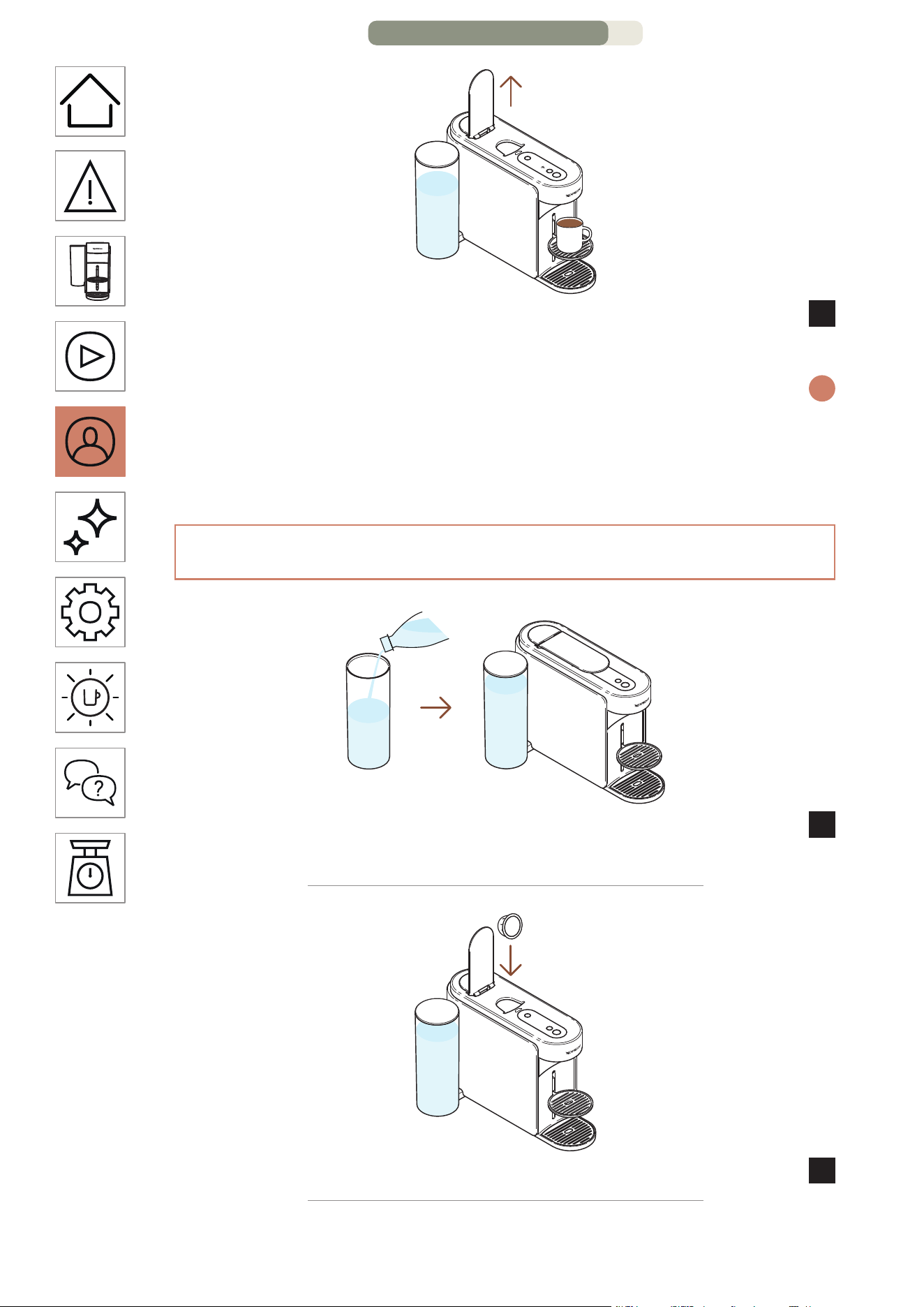
HE
.
25
הלוספקה תדרוהל הנוכמה תידי תא חתפ ,תמייתסמ הפקה תנכהשכ
7
.ךלש הפקהמ הנהתו
הפקה תנכהש עגרב תידיה תא חותפל םיצילממ ונא ,הנוכמב ןוכנ שומישל
i
לכ ריסת תידיה תחיתפ .)עובק ןבלב ראומ הפקה רותפכ( ואולמב המלשוה
הציחל ידי לע ןמז לכב הפקה תנכה תא רוצעל ךתלוכיב .הנכהה רחאל הלוספק
.הפקה רותפכ לע תדדוב
)הנוכמה יבג לע( ךלש הפקה חפנ תא םאתה
ותוא רזחהו הסכמה םע הסכ ,םיירט היתש ימב םימה לכימ תא אלמ
1
.הנוכמב ומוקמל
.תחא וטרו תלוספק סנכהו הנוכמה תידי תא חתפ
2
7/8 דומע – הפקה יעגר תא םאתה
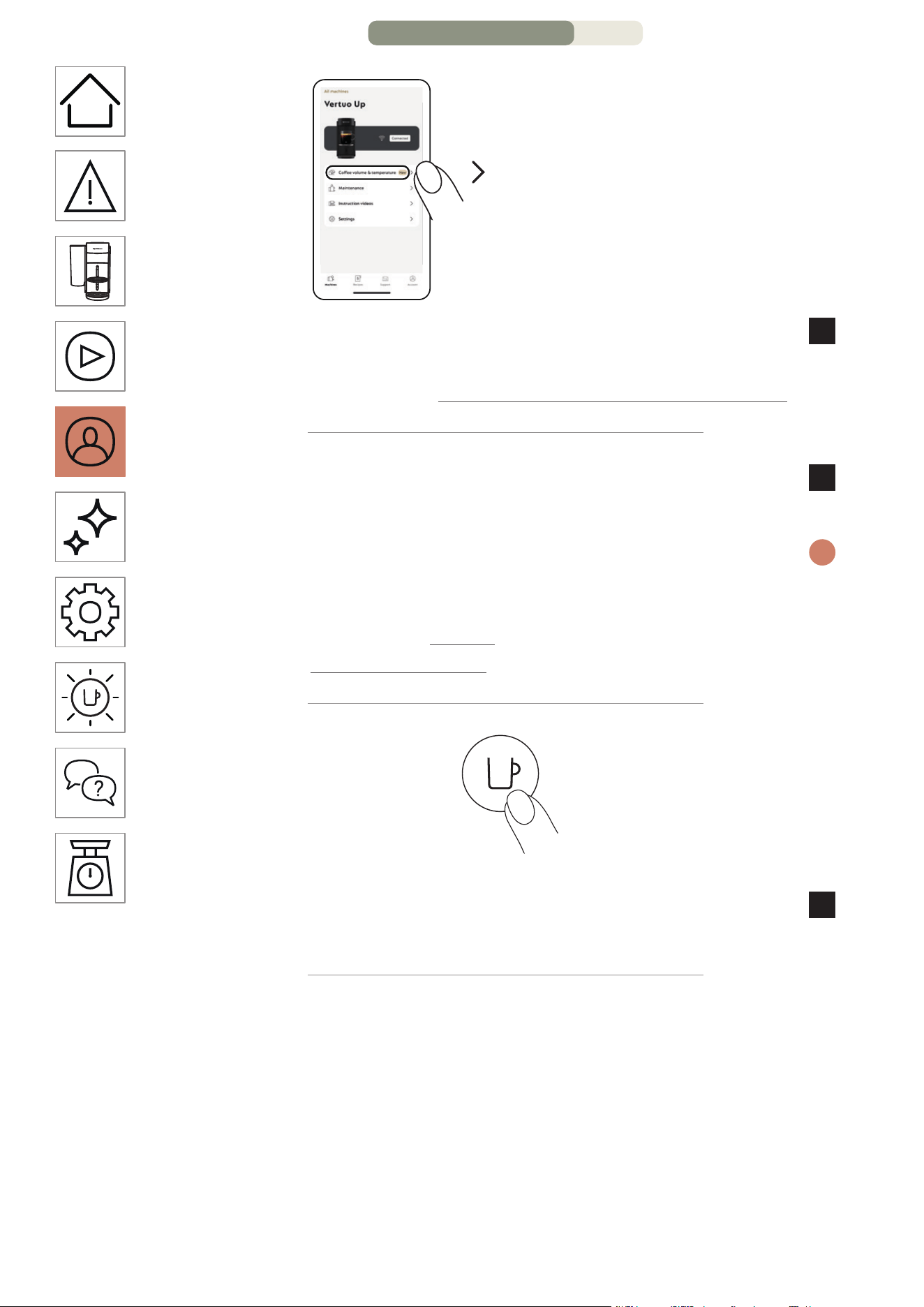
HE
.
24
"הרוטרפמטו הפקה לדוג"
Nespresso Smart App םייצקילפא תא חתפ
4
לע ץחלו )הנוכמה תקלדה עגרמ תוקד 2 ךותב(
."Coffee volume & temperature"
ךלש םעטל םאתהב לדוגה תא וא/ו הרוטרפמטה תא תישיא םאתה
5
.תאזה תישיאה המאתהה תא רומשו
הרדגהש עגרב .סוכה ךרוא יפל הנוכמב םיתנכותמ םינכדועמה םירטמרפה
i
ותואל תרדגומה הלוספק סנכותש םעפ לכב ,תישיא תמאתומ תיפיצפס
.שמתשמה ידי לע רדגוהש סוכה לדוגב קיספי הטילחה ךילהת ,סוכ-לדוג
תייצקילפאב "תורדגה" ףיעסב ןייע ,ןרציה תורדגהל רוזחל ידכ
."ילש תורדגהה סופיא" ףיעסב וא Nespresso Smart App
תחא םעפ
לע תדדוב הציחל ידי לע ךלש תישיא המאתהב הפקה תנכהב לחתה
6
.הפקה רותפכ
6/8 דומע – הפקה יעגר תא םאתה
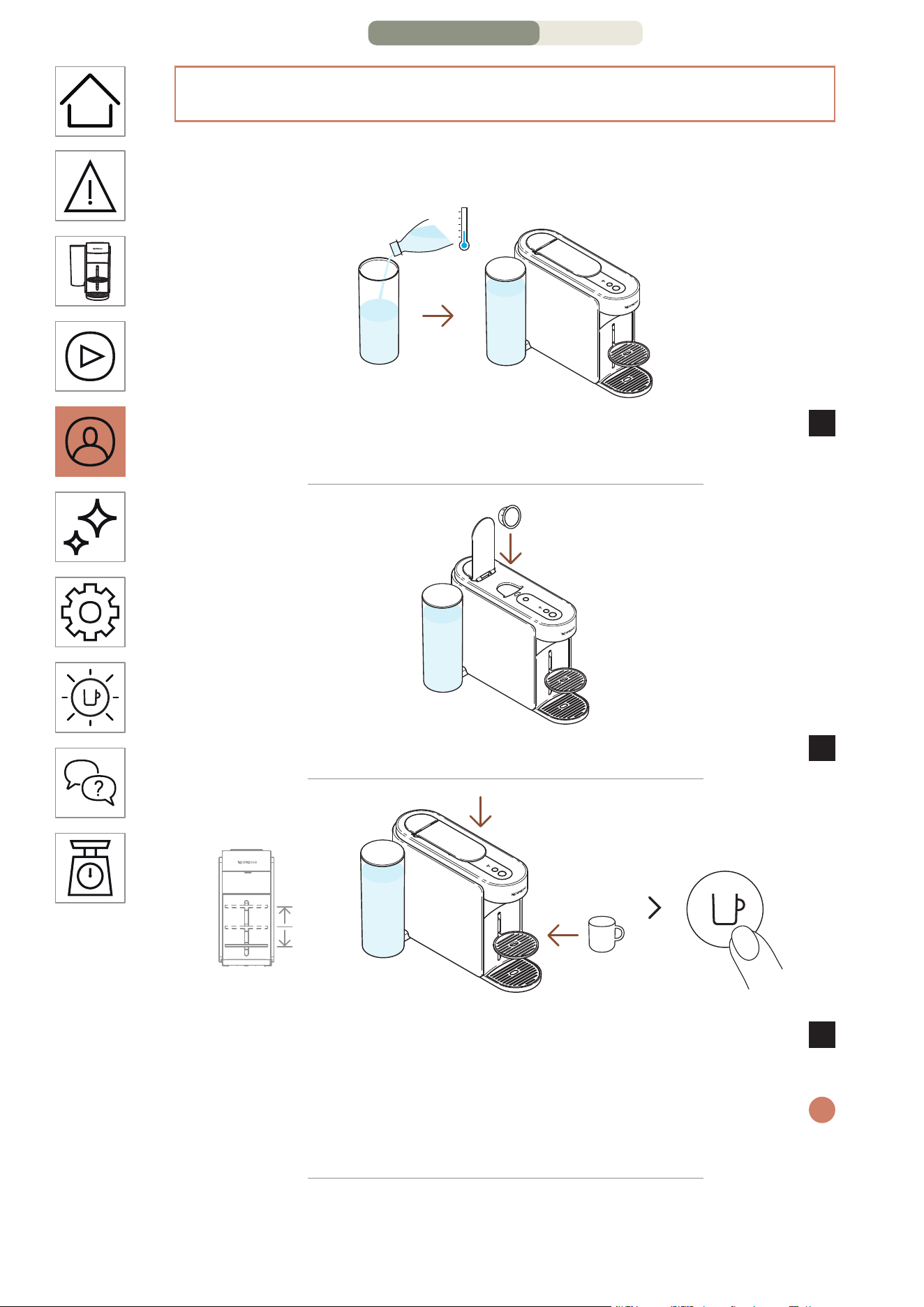
HE
.
23
תייצקילפא( הרוטרפמטהו הפקה לדוג לש תישיא המאתה
)NESPRESSO SMART APP
םיאתהל ךתורשפאב Nespresso Smart App תייצקילפא תרזעב
.הרוטרפמטהו סוכה לדוג :הפקה תנכה לש תוירקיע תונוכת ינש תישיא
ותוא הסכ ,םיירט היתש ימב םימה לכימ תא אלמ ,הנוכמה רוביח םע
1
.הנוכמב ומוקמל ותוא רזחהו הסכמב
.תחא וטרו תלוספק סנכהו הנוכמה תידי תא חתפ
2
הקלדה
תחא םעפ
הציחל ידי לע הנוכמה תא קלדהו סוכ םקמ ,הנוכמה תידי תא רוגס
3
.הפקה רותפכ לע תדדוב
הלוספקה לש סוכה הבוגל םאתהב סוכה ךמות תא ןווכ אנ ,השילגמ ענמהל ידכ
i
.ךלש סוכה לדוג יפל ןנווכתהל לוכי סוכה ךמות .)שארמ רדגומה( תרחבש
5/8 דומע – הפקה יעגר תא םאתה
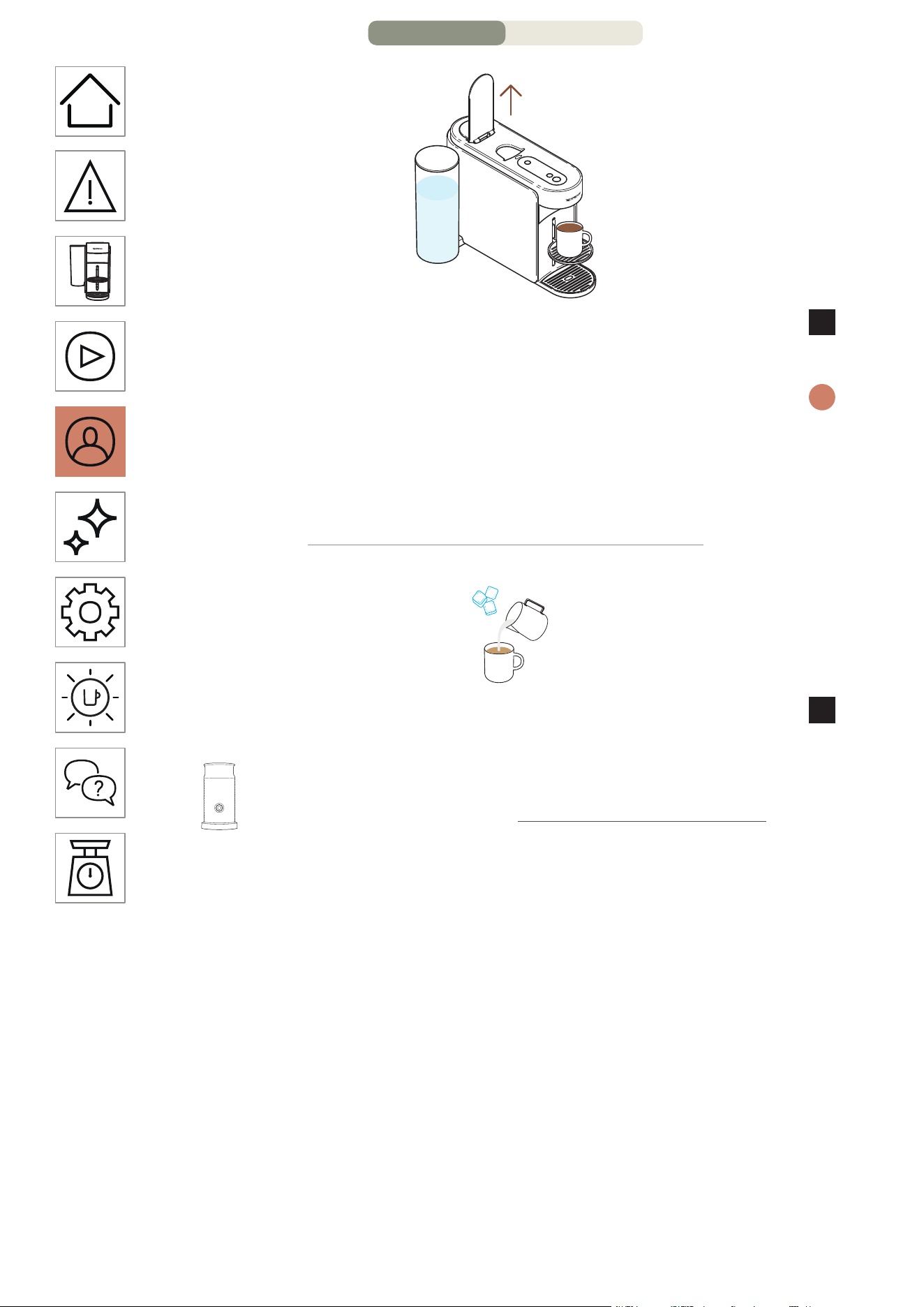
HE
.
22
תא רסהו הנוכמה תידי תא חתפ ,הפקה תנכה תא תמייסמ הנוכמשכ
7
.הלוספקה
רותפכ לע תדדוב הציחל ידי לע ןמז לכב הפקה תנכה תא קיספהל ךתלוכיב
i
.הפקה
המלשוה הפקה תנכהשכ תידיה תא חותפל םיצילממ ונא ,הנוכמב ןוכנ שומישל
לכ ריסת הנוכמה תידי תחיתפ .)עובק ןבלב ראוי הפקה רותפכ( האולמב
.הנכהה רחאל הלוספק
תישיא תמאתומ הרוטרפמטב זכורמ הפק ךל תרשפאמ וז הנוכת
8
בלח ססובמ הפקו רק הפק ינוכתמ תנכהל ןושאר דעצכ
Aeroccino ה תרדס םע הנוכמה תא גרדשל רשפא ךיא הלג
www.nespresso.com ב ונלש
4/8 דומע – הפקה יעגר תא םאתה
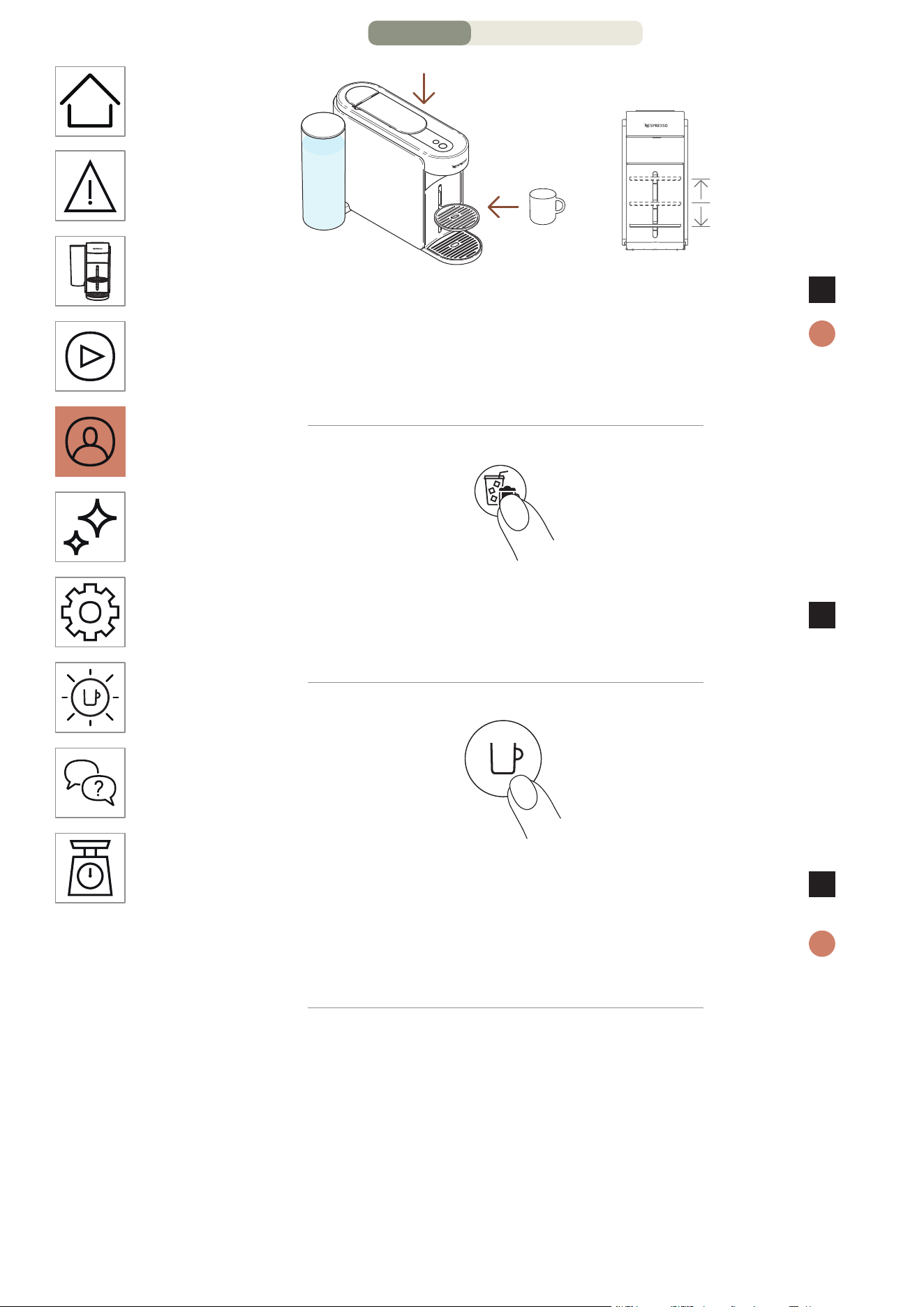
HE
.
21
.סוכ םקמו הנוכמה תידי תא רוגס
4
הרחבנש הלוספקה חפנל לפסה לדוג תא םאתה אנא ,השילגמ ענמהל ידכ
i
םיאתהל ידכ ןנווכתהל לוכי סוכה ךמות .)תישיא םאתומה וא שארמ רדגומה(
.ךלש לפסה לדוגל
תחא םעפ
תריצי רותפכ לע תדדוב הציחל ץחל ,הנכהה ךילהתב ליחתהל ידכ
5
.הפקה
תחא םעפ
.הפקה רותפכ לע תדדוב הציחל ידי לע הפקה תנכהב לחתה
6
ןיכת הנוכמהו תינכותל המיאתמ אל הלוספקה םא הבכי הפקה תריצי רותפכ
i
.שארמ רדגומה לדוגה יפל הפקה תא
3/8 דומע – הפקה יעגר תא םאתה
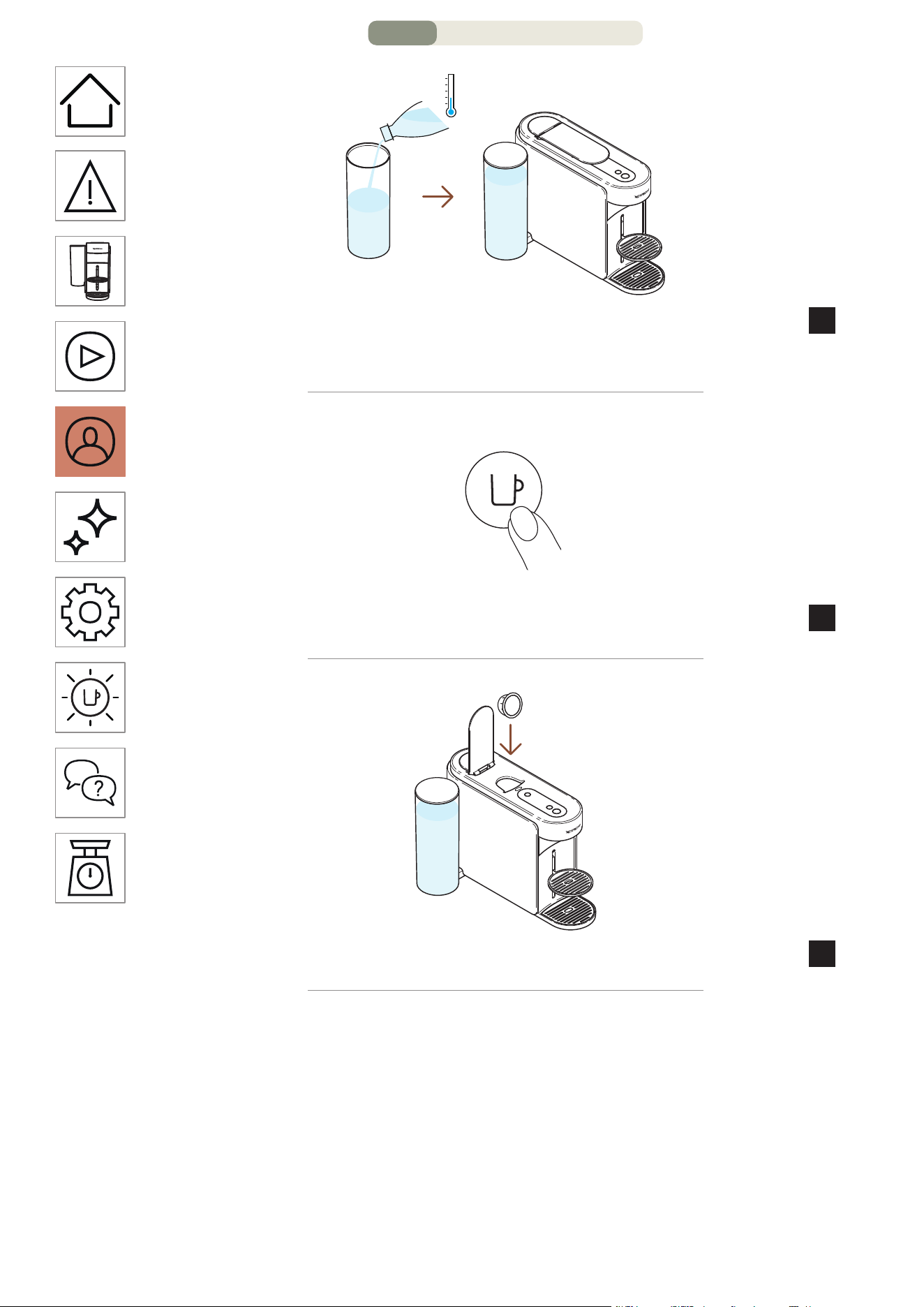
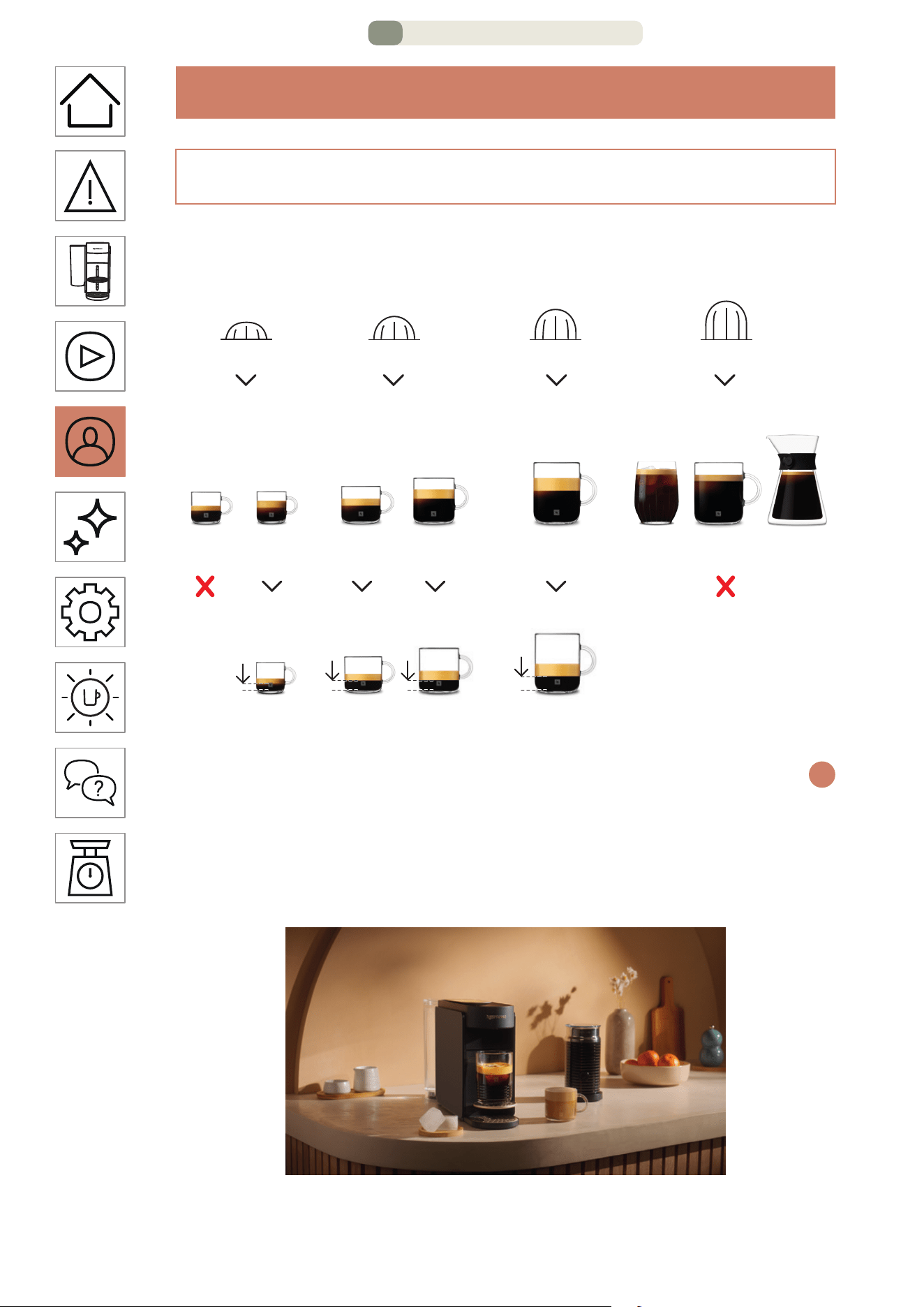
HE
.
19
הפקה יעגר תא םאתה
הפק תנכה בצמ
הפק ינוכתמ לכל תישיא תמאתומ הרוטרפמטב ,זכורמ הפק תולקב ןכה
.בלח ססובמ הפקו רק
+ Coffee ה תרדס תנכה לע םיצילממ ונא ,תונורתההמ תמלשומ האנהל
i
ונחנא ,לפסב רתויב תובוט תואצותל .דבלב םיימשר תוסוכ ילדג שומישב
Ristretto, XL )Alto Ambrato, Alto ה תובורעת תא ןיכהל םיצילממ אל
.הז בצמ םע ,Onice(, Cold Brew Style & Carafe Pour Over Style
ml 25
fl oz 0.84
ml 40
fl oz 1.35
ml 40
fl oz 1.35
ml 80
fl oz 2.7
ml 25
fl oz 0.84
ml 40
fl oz 1.35
ml 80
fl oz 2.7
ml 150
fl oz 5.07
ml 230
fl oz 7.77
ml 355
fl oz 12
ml 535
fl oz 18.09
Carafe ןונגס
Pour-Over
וטרטסיר וסרפסא לופכ וסרפסא וגנול ןארג Café / גאמ
Cold ןונגס
Brew וטלא
S M L XL
S
S M L XL
M
S M L XL
L
S M L XL
XL
1/8 דומע – הפקה יעגר תא םאתה
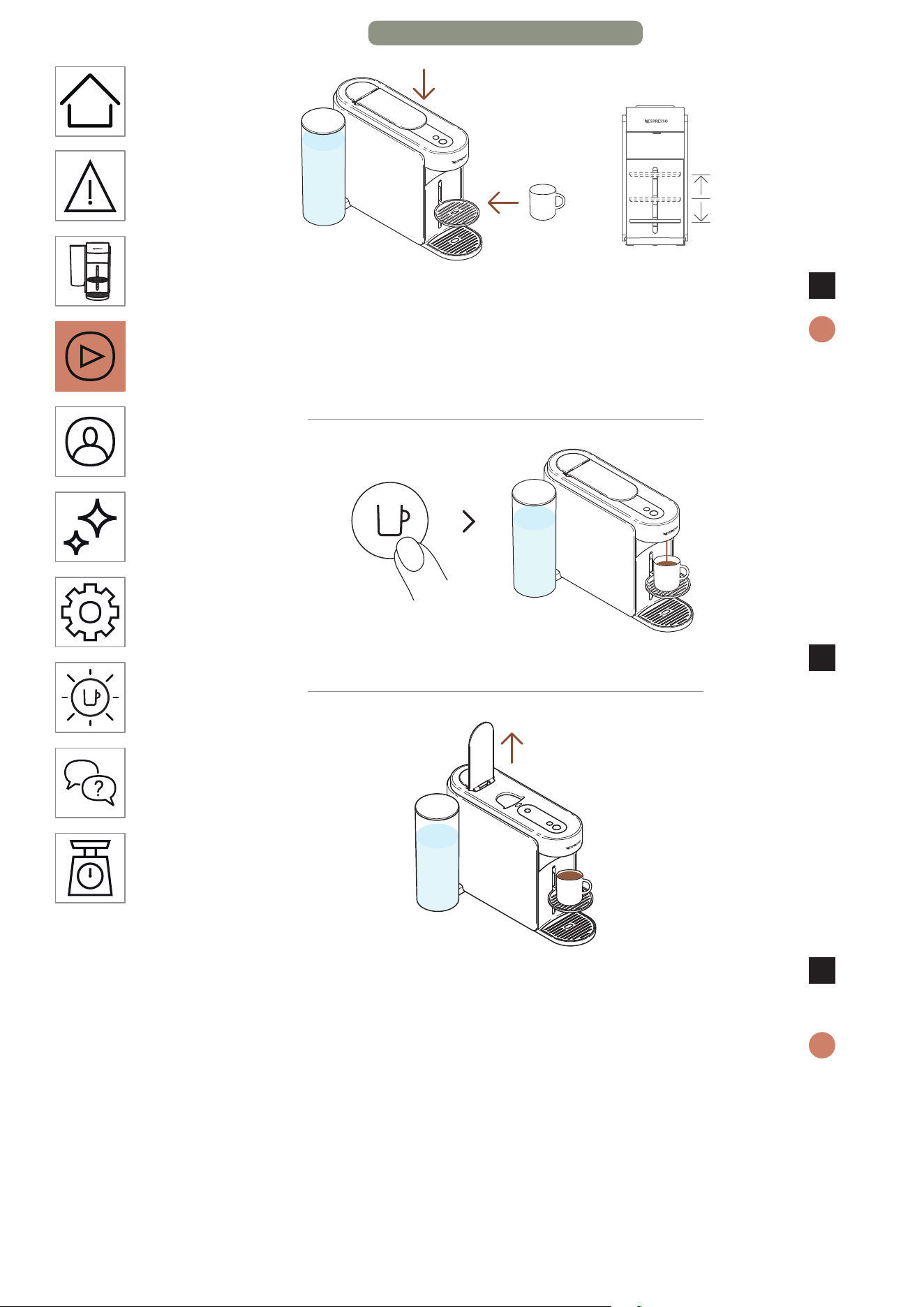
HE
.
18
.סוכ םקמו הנוכמה תידי תא רוגס
3
הרחבנש הלוספקה חפנל לפסה לדוג תא םאתה אנא ,השילגמ ענמהל ידכ
i
םיאתהל ידכ ןנווכתהל לוכי סוכה ךמות .)תישיא םאתומה וא שארמ רדגומה(
.ךלש לפסה לדוגל
תחא םעפ
.הפקה רותפכ לע תדדוב הציחל ידי לע הפקה תנכהב לחתה
4
הלוספקה תדרוהל הנוכמה תידי תא חתפ ,תמייתסמ הפקה תנכהשכ
5
.ךלש הפקהמ הנהתו
רותפכ לע תדדוב הציחל ידי לע עגר לכב הפקה תנכה תא רוצעל ךתלוכיב
i
.הפקה
המלשוה הפקה תנכהשכ תידיה תא חותפל םיצילממ ונא ,הנוכמב ןוכנ שומישל
הלוספק לכ ריסת תידיה תחיתפ .)עובק ןבלב ראוי הפקה רותפכ( האולמב
לכימ תא ןקור .זוקינה תכרעמל ופטפטי םימ/הפקו ןכתי .הנכהה רחאל
.הרתונש םימ/הפק לש תיראש לכ םע דחי ,תושמושמה תולוספקה
11/11 דומע – ןושאר שומיש
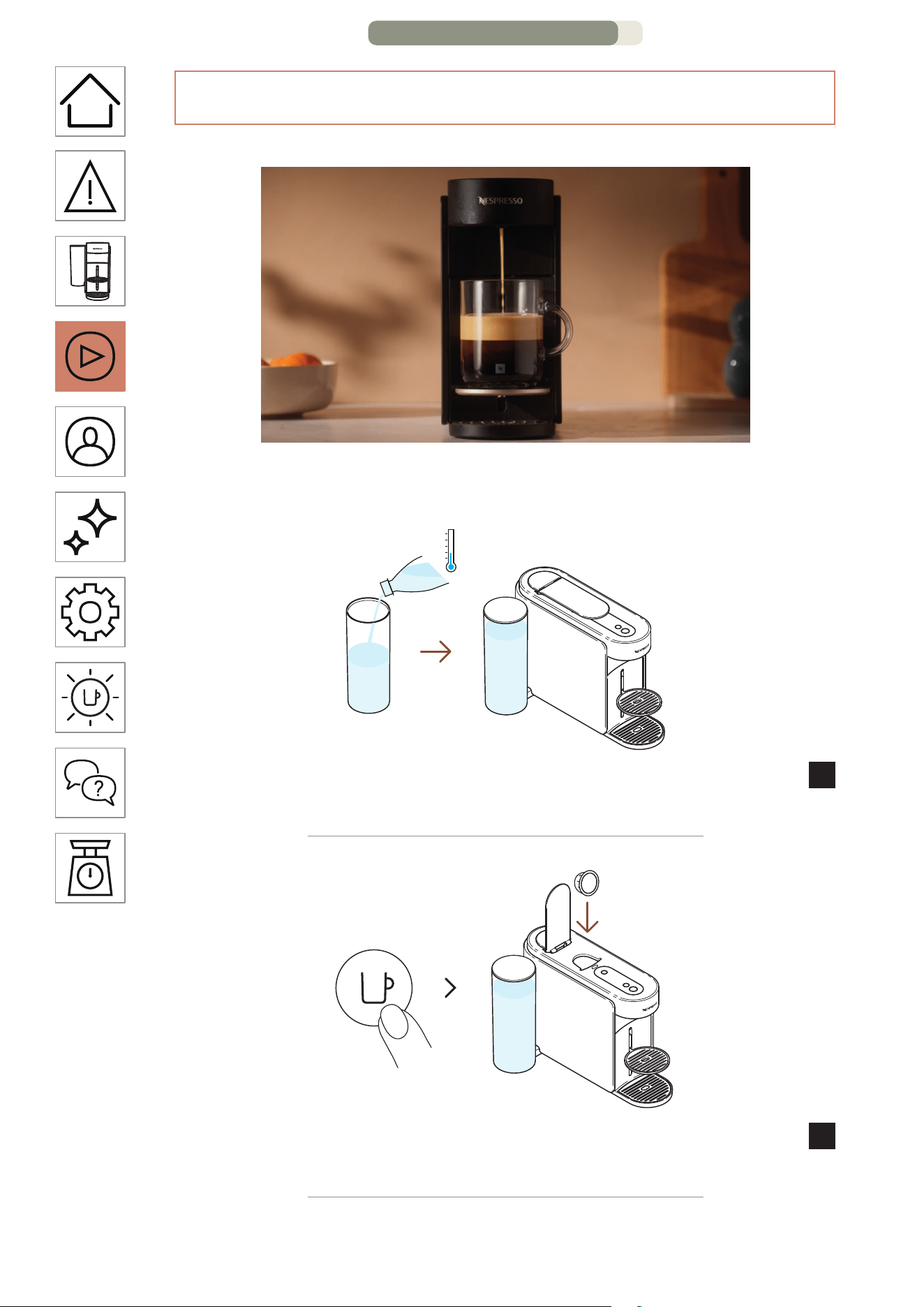
HE
.
17
וטרו הפק תנכה
לע רותפכ תציחלב הפק תונונגס לש םלוע רוקח תוידוחי הפק תויווח :וטרו
.ךלש הנוכמה תזיראב תונימזה רתויב תורכמנה הפקה תובורעת 12 יוליג ידי
ותוא רזחהו הסכמה םע הסכ ,םיירט היתש ימב םימה לכימ תא אלמ
1
.הנוכמב ומוקמל
הקלדה
תחא םעפ
תא חתפ .הפקה רותפכ לע דדוב הציחל ידי לע הנוכמה תא קלדה
2
.תחא וטרו תלוספק סנכהו הנוכמה תידי
10/11 דומע – ןושאר שומיש
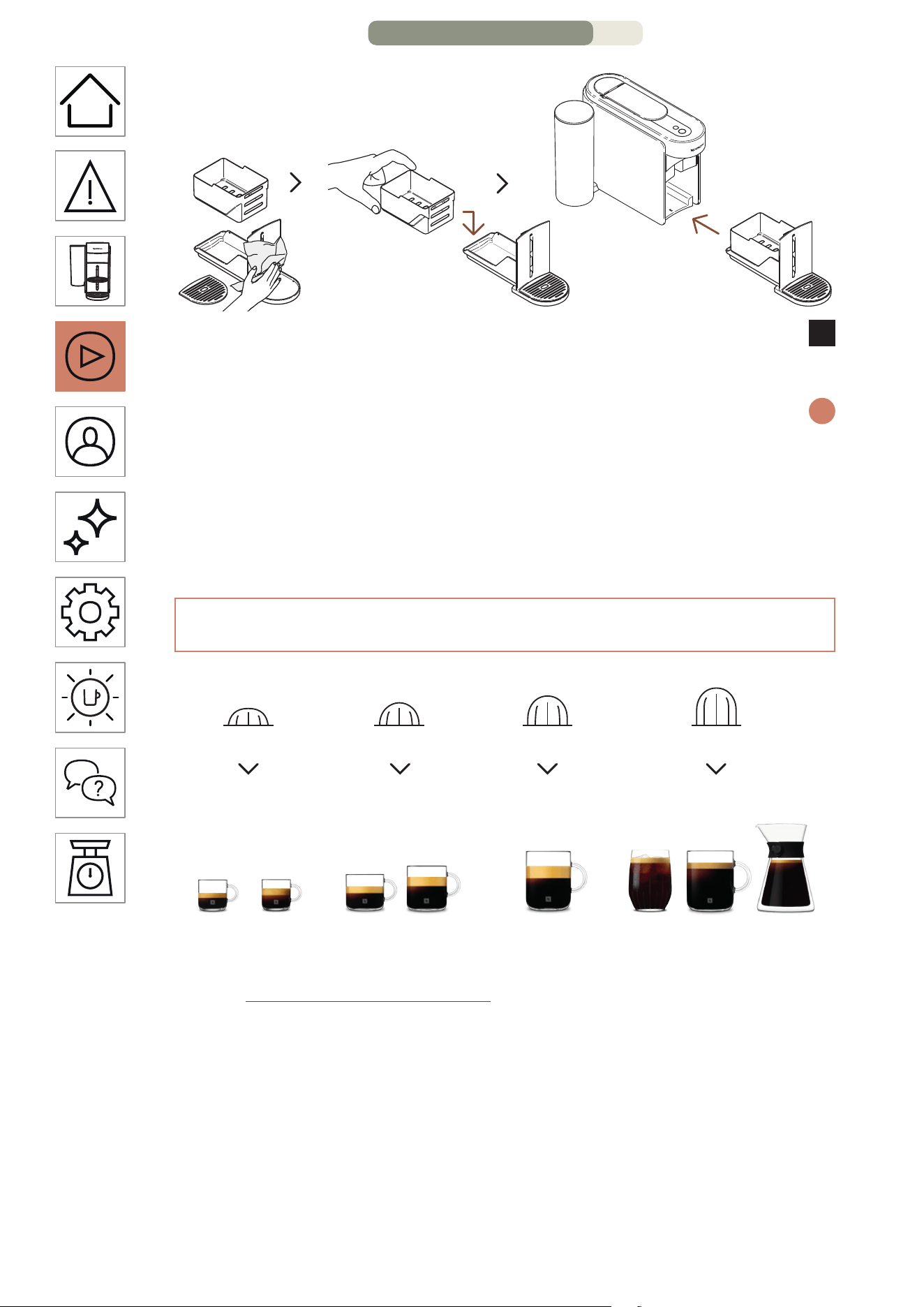
HE
.
16
הרזחב התוא םקמו השדחו היקנ תילטמ םע זוקינה תכרעמ תא שבי
8
.הנוכמב
הפקה רותפכ( ואולמב םלשוי ךילהתהשכ ןכומ בצמל רוזחת הנוכמה
i
.)עובק ןבלב ראוי
.הנוכמה תא תוקנל ידכ הכר תילטמב דימת שמתשה
:תוריהז
וטרו תכרעמ
ml 25
fl oz 0.84
ml
40
fl oz 1.35
ml 80
fl oz 2.7
ml 150
fl 5.07
oz
ml 230
fl oz 7.77
ml 355
fl oz 12
ml 535
fl oz 18.09
Carafe ןונגס
Pour-Over
וטרטסיר וסרפסא לופכ וסרפסאוגנול ןארג Café / גאמ
Cold ןונגס
Brew וטלא
S M L XL
S
S M L XL
M
S M L XL
L
S M L XL
XL
www.nespresso.com ב ונלש םירזיבאה תיצקלוק לכ תא הלג
9/11 דומע – ןושאר שומיש
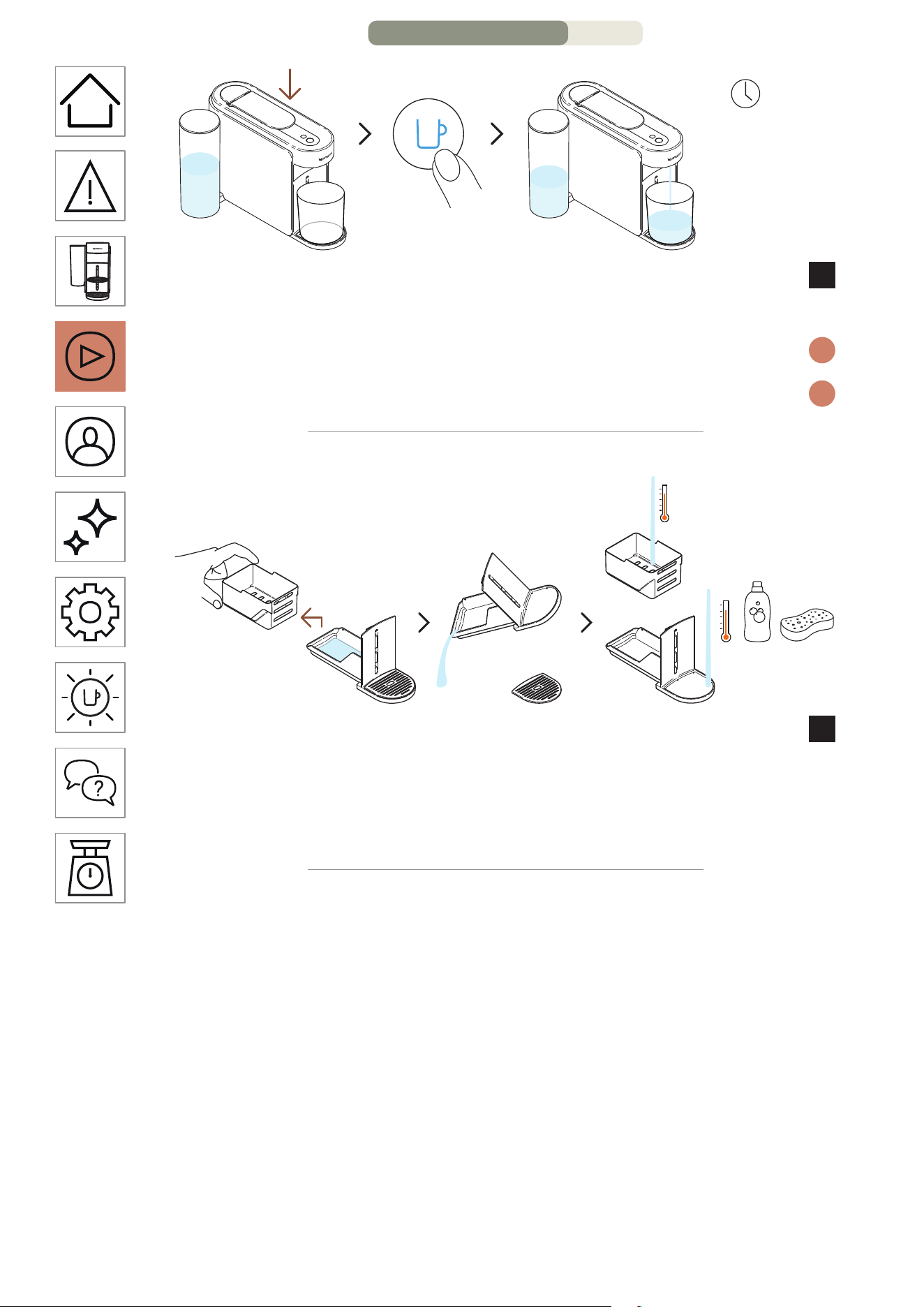
HE
.
15
תחא םעפ
תוקד 3 ~
לוחכב ראומה הפקה רותפכ לע תדדוב הציחל ץחלו תידיה תא רוגס
6
.תינושארה הפיטשה ךילהת תלחתהל
.תוקד 3 ל דע תחקל לוכי ךילהתהו הפיטשב ליחתת הנוכמה
i
.הפיטשה ךלהמב זוקינה תכרעמב רבטצהל םילוכי םימ
i
.םימ תויראש ןקורו ראשהמ תושמושמה תולוספקה לכימ תא דרפה
7
.חיר רסחו ןידע ןובסבו םימח םימב זוקינה תכרעמ תא ףוטש
םישת לא .סממ יוקינ רמוחב וא קחוש וא קזח יוקינ רמוחב שמתשת לא :תוריהז
.םימב ונממ קלח וא רישכמה תא לובטת לא םלועל .םילכ חידמב הנוכמה תא
8/11 דומע – ןושאר שומיש
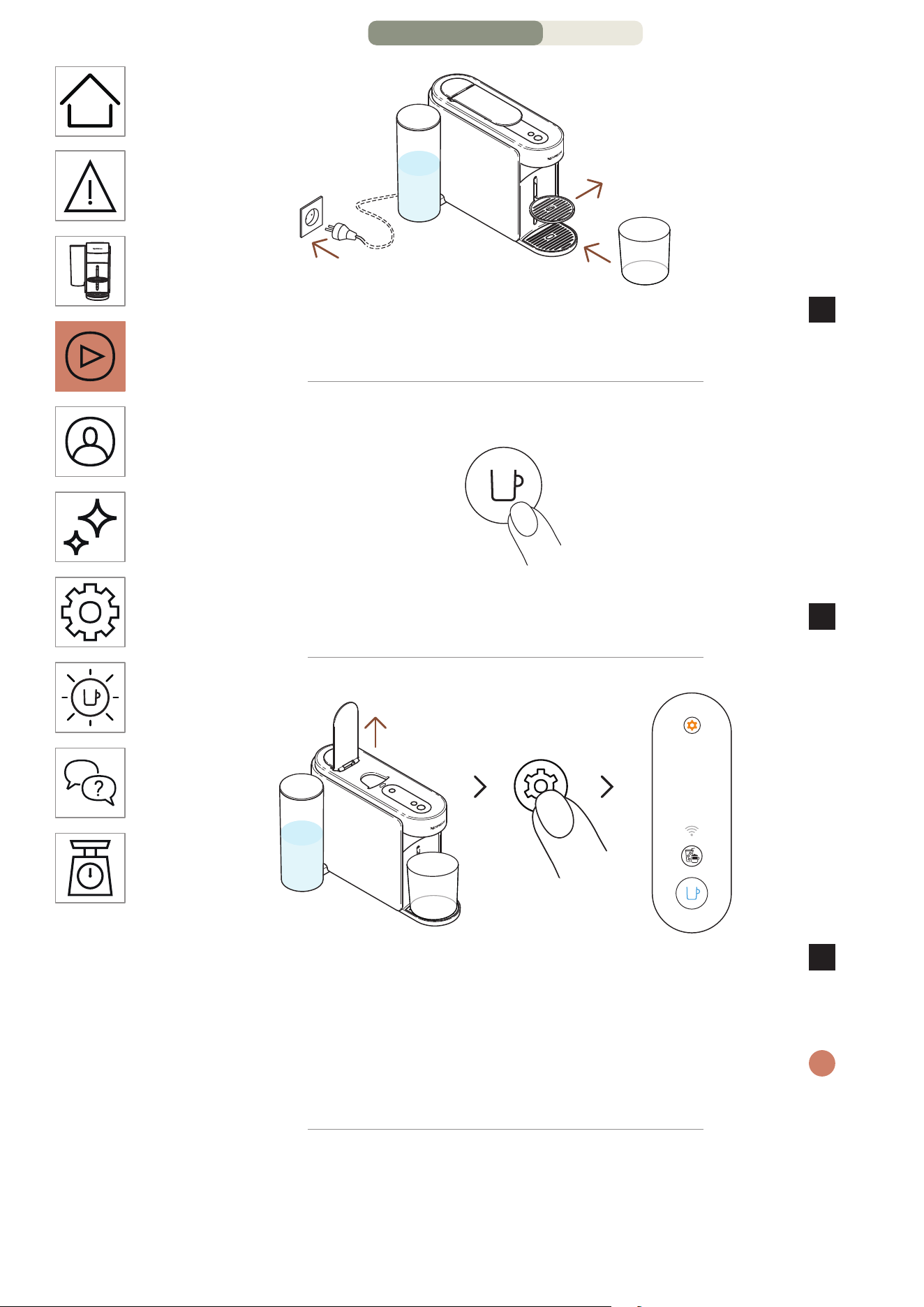
HE
.
14
רטיל 1 םומינימ
fl oz 34
קיר לכימ םקמו סוכה ךמות תא רסה ,עקשל הנוכמה תא רבח
3
.הפקה תאיצי חתפל תחתמ )fl oz 34 / 1 רטיל תוחפל(
הקלדה
תחא םעפ
.הפקה רותפכ לע דדוב הציחל ידי לע הנוכמה תא קלדה
4
תוינש 3
3 ךשמב תורדגהה רותפכ תא קזחהו ץחל .הנוכמה תידי תא חתפ
5
לוחכב ראומ הפקה רותפכשכ רותפכה תא ררחש .תוחפל תוינש
.עובק
תא בוש קזחהו ץחל ,ךילהת לכ תלחתה ינפל תורדגה יוניש בצממ תאצל ידכ
i
.תוחפל תוינש 3 ךשמב תורדגהה רותפכ
7/11 דומע – ןושאר שומיש
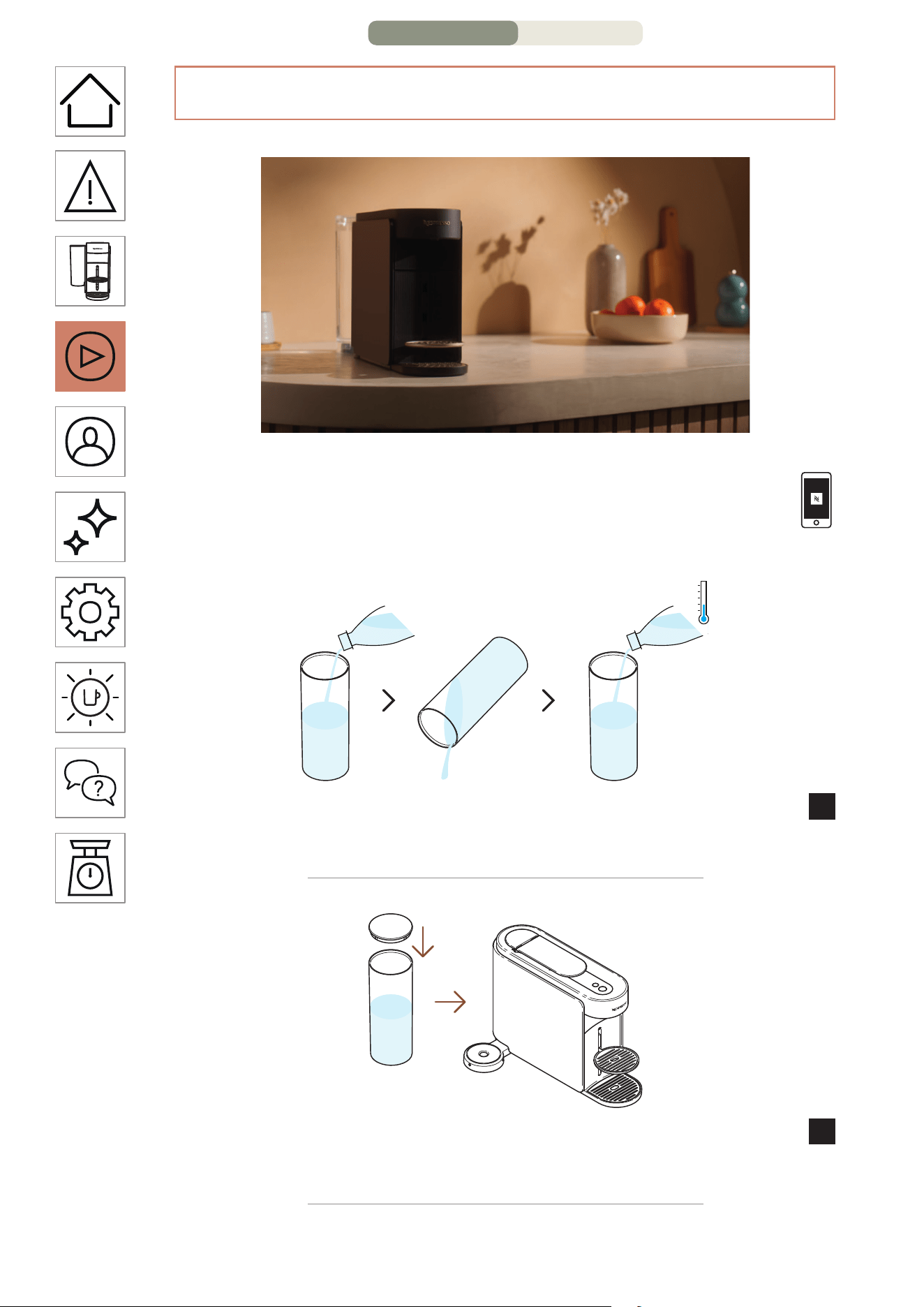
HE
.
13
יוקינ / תינושאר הפיטש
תומייק .ןושארה שומישה ינפל הנוכמה תא ףוטשל םיצילממ ונחנא
תייצקילפאב םיכילהתה לכל תוטושפ תויחנה
.הקולד הנוכמהש עגרב Nespresso Smart App
דבלב םיירט היתש ימב ותוא אלמתש ינפל םימה לכימ תא ףוטש
1
.)L / 17 fl oz 0.5(
.הנוכמב ומוקמל ותוא סנכה הסכמב םימה לכימ תא הסכ
2
6/11 דומע – ןושאר שומיש
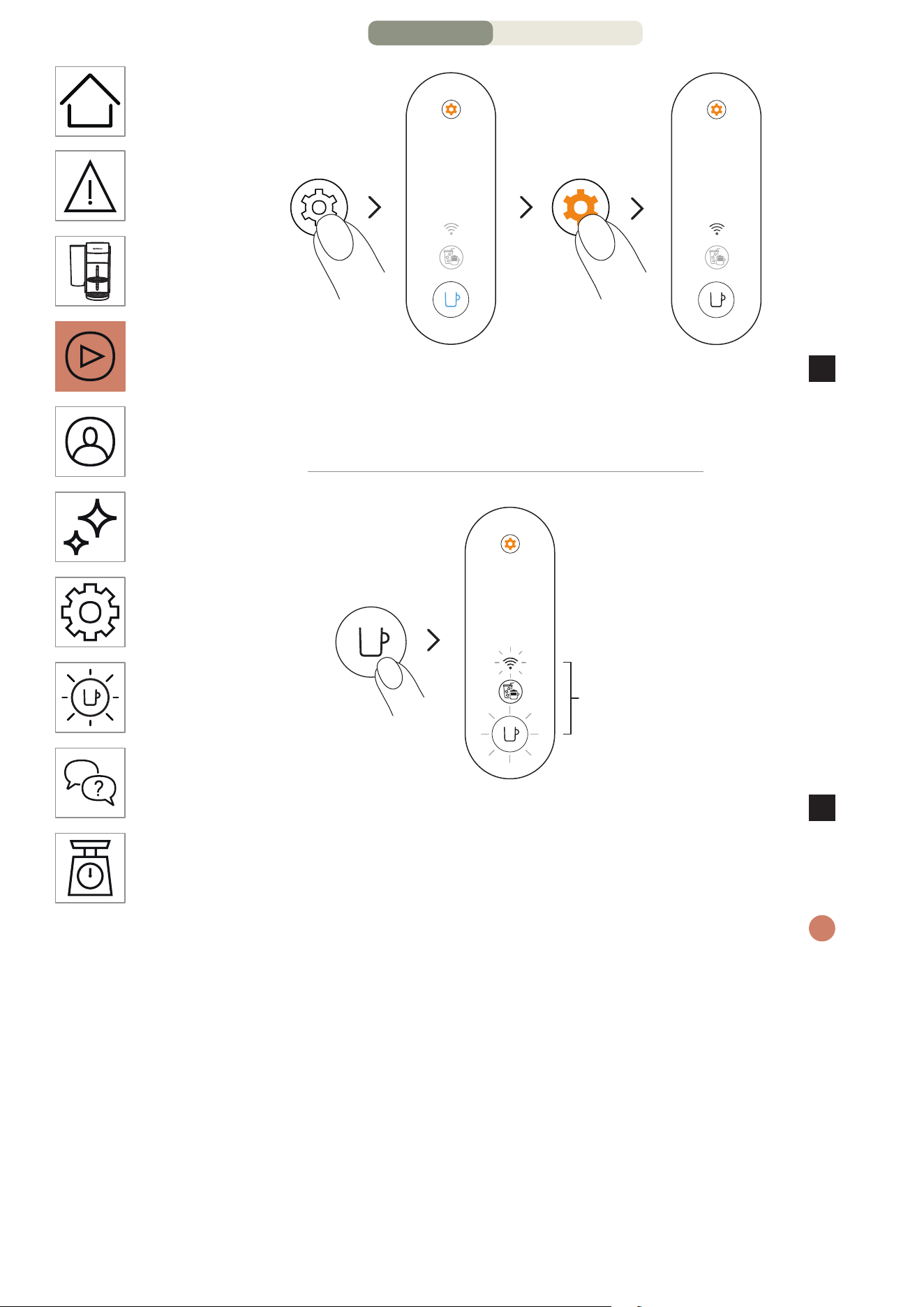
HE
.
12
תוינש 3
םימעפ 4
רותפכהשכ .תוחפל תוינש 3 ךשמב תורדגהה רותפכ תא קזחהו ץחל
2
.תופסונ םימעפ 4 וילע ץחלו רותפכה תא בוזע ,עובק לוחכב ראוי
.עובק ןבלב ריאהל םירומא תוירושקה תרונו הפקה רותפכ
תחא םעפ
םימעפ 3
תירונו הפקה רותפכ .רושיאל הפקה רותפכה לע תחא םעפ ץחל
3
.לטוב תוירושקל רוביחהש רשאל ידכ םימעפ 3 ובהבהי תוירושקה
.הבכית הנוכמה ,םלשוי ךילהתהשכ
םתוא יפל לועפל ךתורשפאב ,תוירושיקל רוביחה תא ליעפהל ךנוצרב םא
i
.םיבלשה
5/11 דומע – ןושאר שומיש
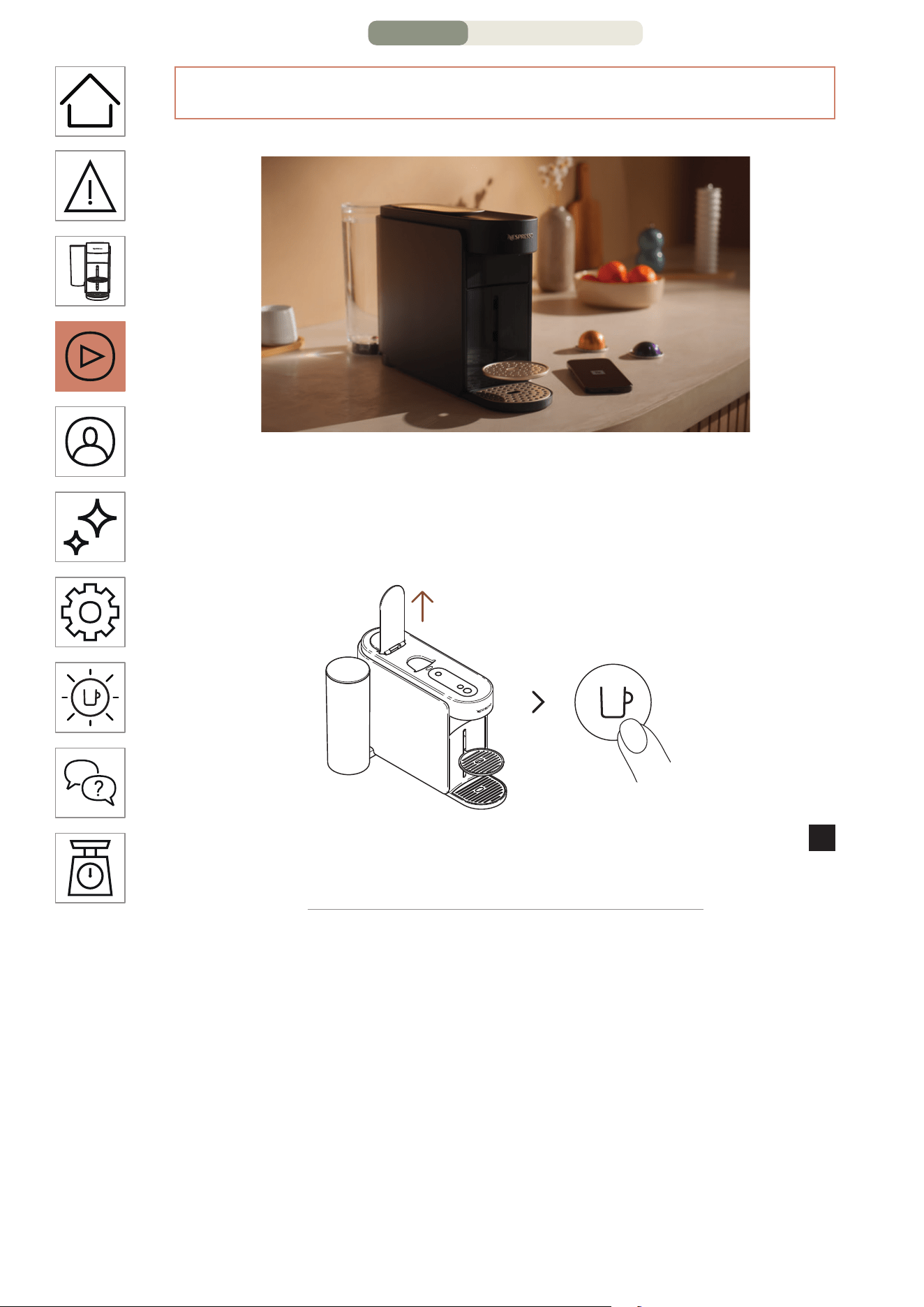
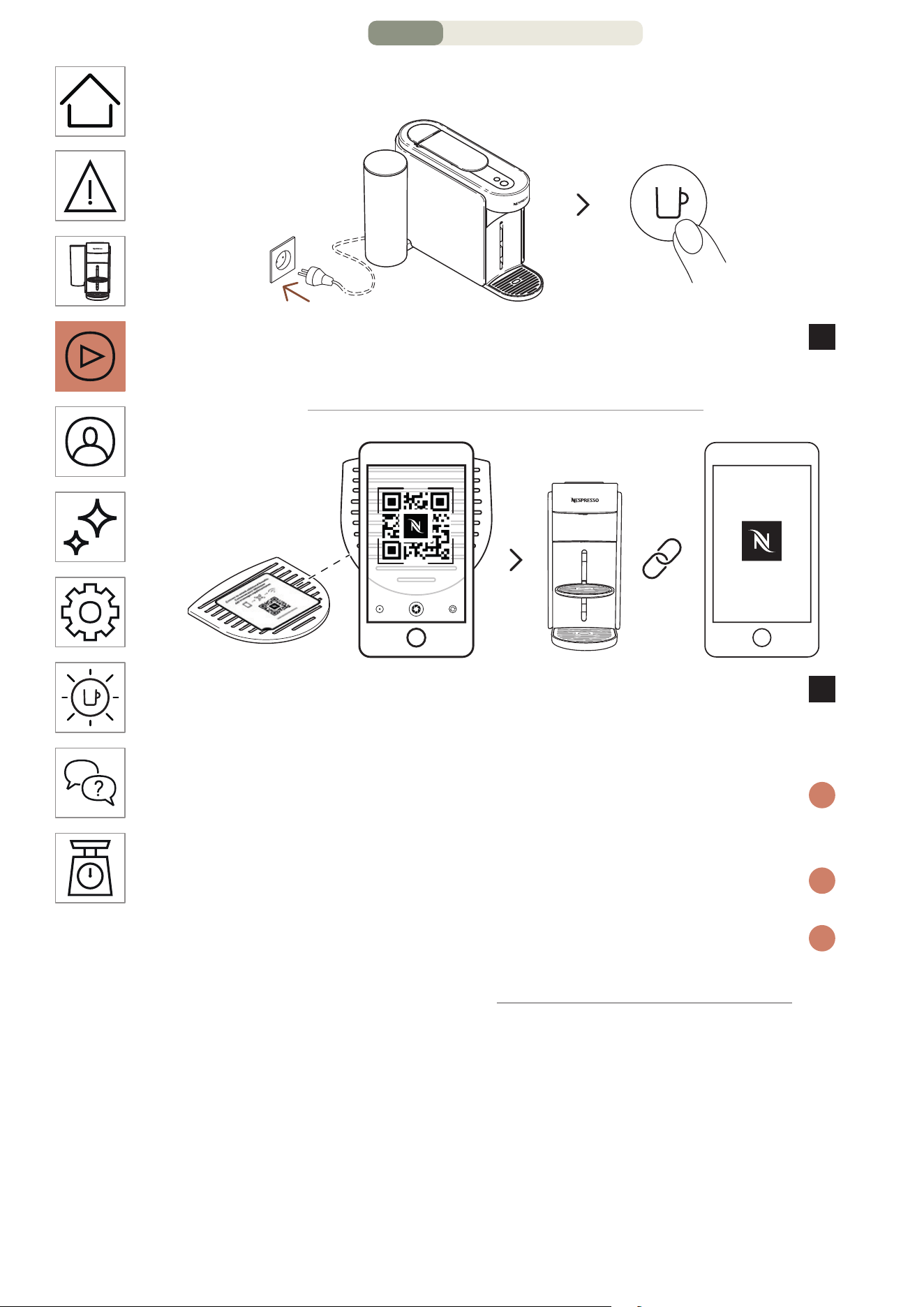
HE
.
10
?הנוכמה תא רבחל ךיא
תחא םעפ
הקלדה
לע התוא קלדהו עקשל הנוכמה תא רבח ,הנוכמה תא רבחל תנמ לע
1
.הפקה רותפכ לע תדדוב הציחל ידי
וא הנוכמה לש זוקינה תשר לע קבדומהה QR ה דוק תא קורס
2
תא רבחל ידכ Nespresso Smart App ה תייצקילפא תא חתפ
.הנוכמה
םא .חתפת איה ,Nespresso Smart App תייצקלפאה תא תדרוה רבכ םא
i
תורשפאה ךל עיפות ,Nespresso Smart App תייצקילפא תא ךתושרב ןיא
.התוא דירוהל
קילדתש םעפ לכב בהבהת תוירושיקה תרונ ,ךלש הנוכמה תא רבחת אל םא
i
.הנוכמה תא
היצקילפאה םא וא תוירושיקל רבחתהל ךנוצרב ןיא םא
i
קלחל גלד השקבב ,ךלש הנידמב הנימז הניא Nespresso Smart App
."תוירושיקל שדחמ הלעפה / לוטיב"
3/11 דומע – ןושאר שומיש
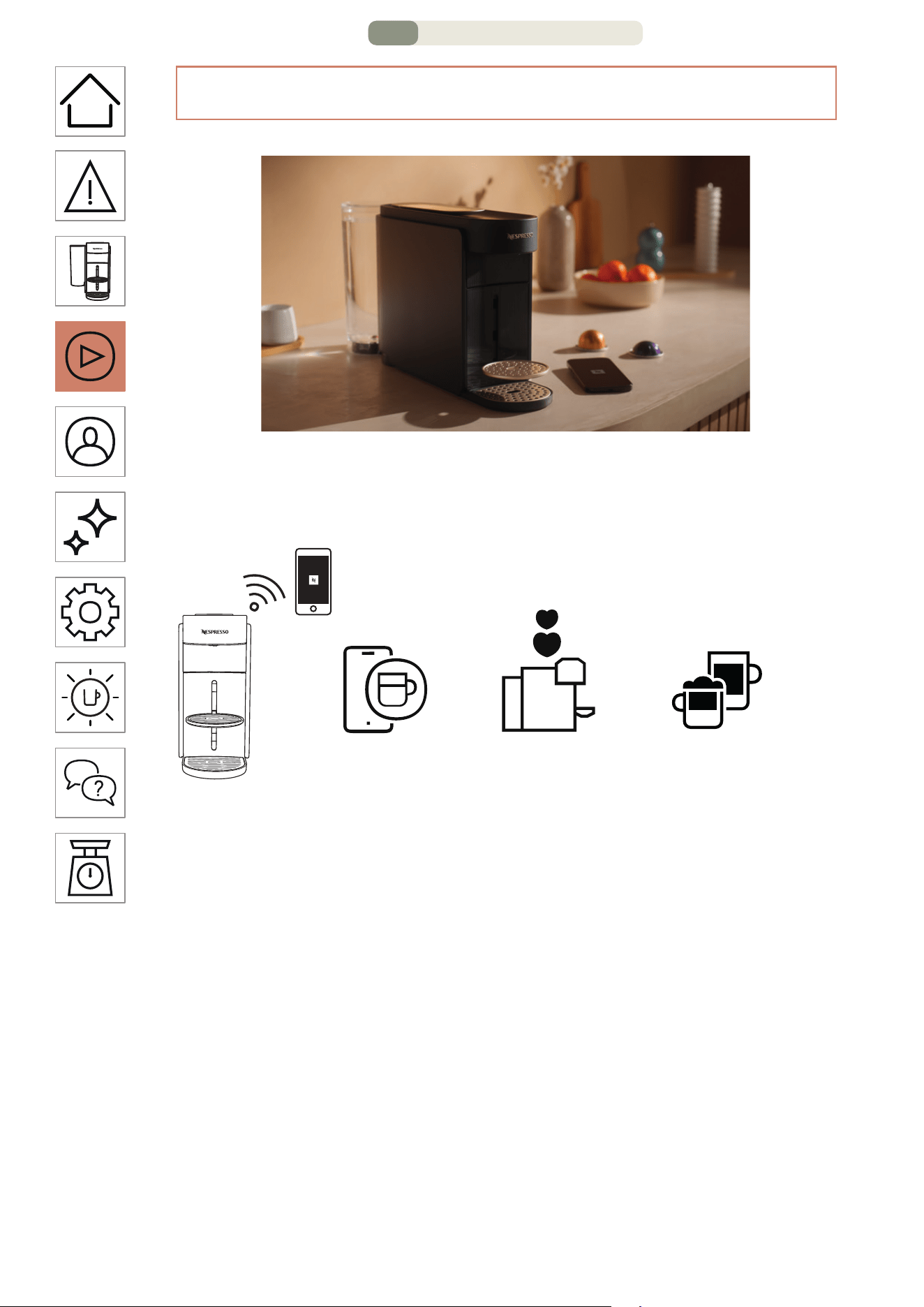
HE
.
9
?הנוכמה תא רבחל יאדכ המל
לדוג לש תישיא המאתה
הרוטרפמטהו הפקה
= + +
=+
=+
לש הלק הקוזחת
תוארתהו הנוכמה
תמא ןמזב
תויחנה םע םינוכתמ
בלש ירחא בלש
... &
• :הרוטרפמטהו הפקה לדוג לש תישיא המאתה
הטילש םע ,הפקה לש הרוטרפמטהו סוכה לדוג לש המאתה
.היצקילפאה ךרד קר הנימזה הרוטרפמטה לע תידוחי
• :תמא ןמזב תוארתהו הנוכמה לש הלק הקוזחת
תונורתיהמ הנהת .היצקילפאהמ תורישי תינבא תרסהו יוקינ תיווח
.תידוחי היווחל םישדחה םינוכדיעה םע הנוכמה גורדש לש
• :בלש ירחא בלש תויחנה םע םינוכתמ
.רתויב םישדחה דעו םייסאלקהמ הפקה ינוכתמ תא הלג
הנוכמה תא רבח
2/11 דומע – ןושאר שומיש
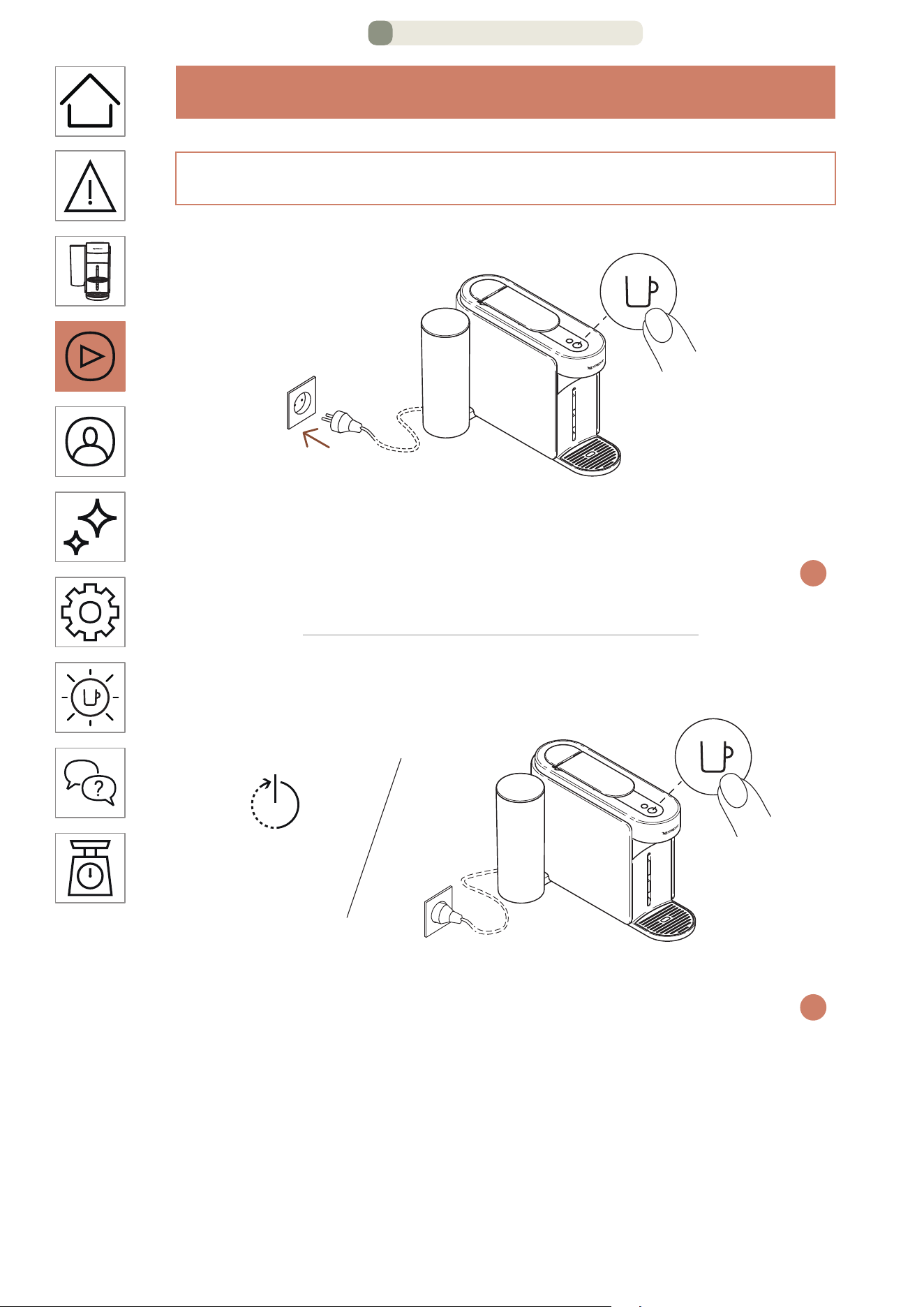
HE
.
8
ןושאר שומיש
הקלדה
תחא םעפ
תא קילדהל ידכ הפקה רותפכ לע ץחל ,למשחל תרבוחמ הנוכמהשכ
.הנוכמה
,עובק רואהשכ .תממחתמ הנוכמהש ןמזב תוינש 3 ל בהבהי הפקה רותפכ
i
.שומישל הנכומ הנוכמה
יוביכ
יטמוטוא יוביכ ינדי יוביכ
תוקד 2 תוינש 2 ~
.שומיש אלל תוקד 2 רחאל תיטמוטוא הבכת הנוכמה ,היגרנאב ןוכסחל
לע )הלועפ בצמב תאצמנ אל איהשכ( תע לכב תינדי הנוכמה תא תובכל ןתינ
i
לכש רחאל הבכת הנוכמה .תוינש 2 ךשמל רותפכה לש הקזחהו הציחל ידי
.ובכי תורונהו םירותפכה
תייצקילפאל חלשהל לוכי שדח יפוס עדימש בל םיש ,ךלש הנוכמה תא תרביח םא
.תוינש המכ ךשמהל לוכי הז .התבכ הנוכמהש עגרב Nespresso Smart App
הקלדה / יוביכ
1/11 דומע – ןושאר שומיש
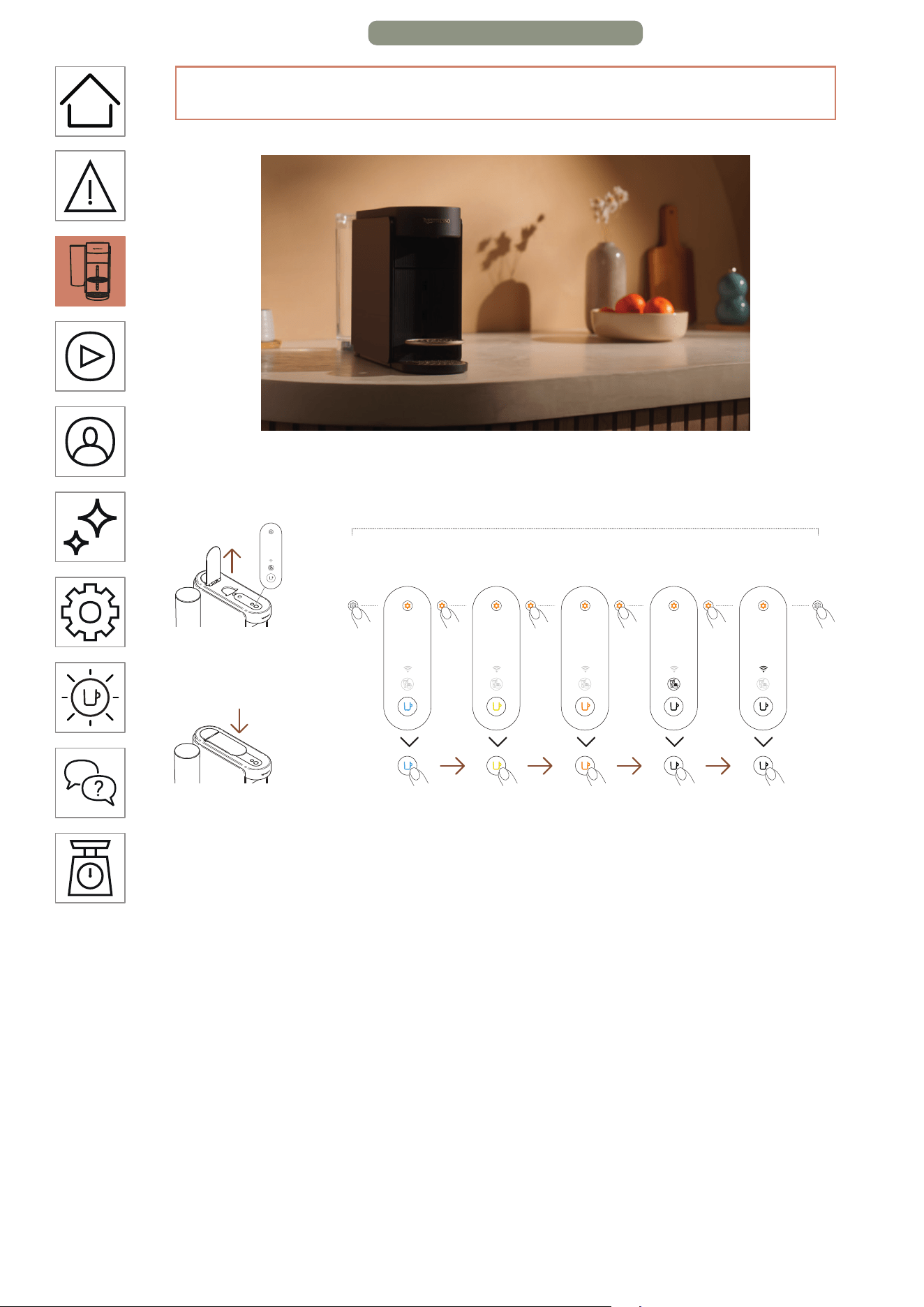
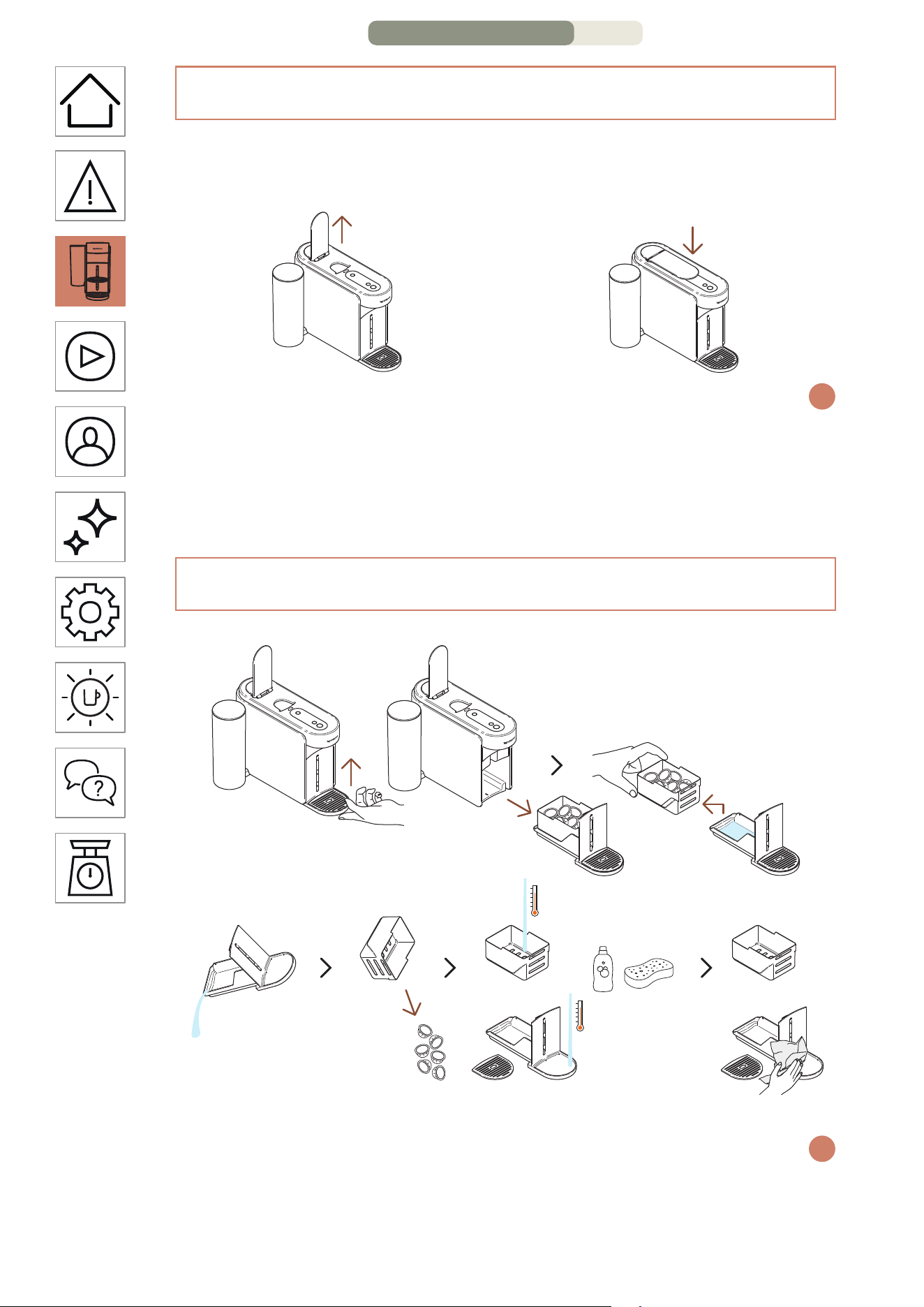
HE
.
6
זוקינה תכרעמ לש יוקינו הרסה
הריגס/החיתפ
החיתפ
תידיה תא חתפ
הריגס
תידיה תא רוגס
הפקמ תונהל היהי ןתינ אל .הנוכמה תא ליעפת אל תידיה לש הריגס וא החיתפ
i
לע םיצילממ ונחנא ,הנוכמה לש ןוכנ שומישל .תידיה לש הנוכנ הריגס אלל
ןבלב ריאמ הפקה רותפכ( המלשוה הפקה תנכהש עגרב תידיה לש החיתפ
.הפקה תנכה רחאל הלוספק לכ ריסת תידיה תחיתפ .)עובק
תא תוריהזב דרפה .הלעמל תונידעב התוא םרה ,זוקינה תכרעמ לש הרסהל
i
םימ/הפק תויראש ןקורו תולוספקה תא רזחמ ,ראשהמ תוקירה תולוספקה לכימ
שביו חיר רסחו ןידע יוקינ רמוח םע םימח םימב םיקלחה תא ףוטש .ורתונש
.הנוכמל רזחהו תונידעב םתוא בכרה ,םתוא
3/4 דומע – הנוכמה תא הלג
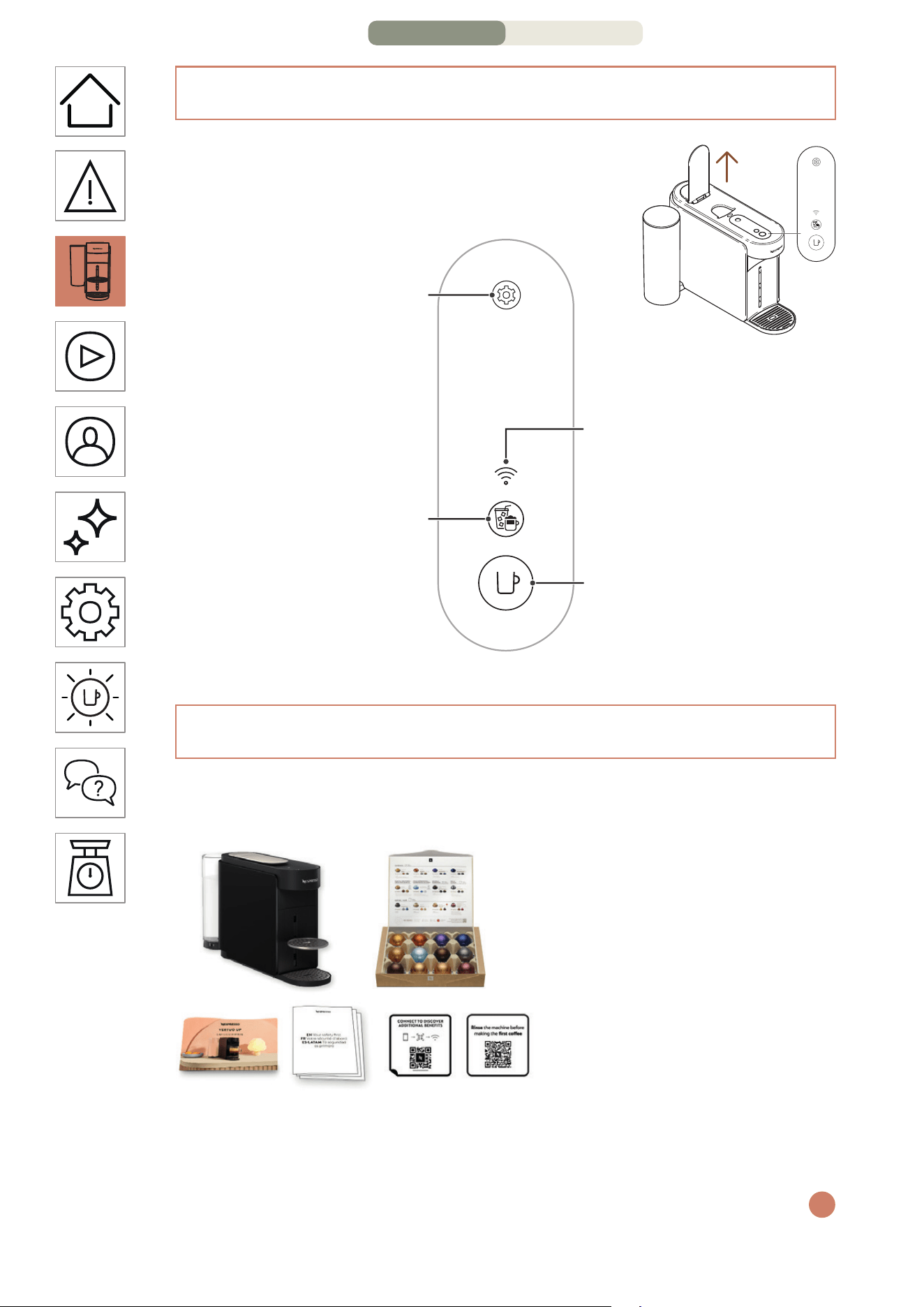
HE
.
5
הזירא תלוכת
1 הפק תנוכמ
Vertuo Up
2 תולוספק תכרע
Nespresso
)תולוספק 12(
3 הריהמ הלחתהל ךירדמ
4 תוחיטב תוארוה
תוירחאו
5 תוירושק תקבדמ
6 הפיטש תקבדמ
םירמוחה לשב הנוכמה לש חטשה ינפ לע קבא היהיש ןכתי :הזירא תחיתפ
i
.הכר תילטמ םע הקנ טושפ ,ןכוסמ אל הז .תוזיראב םיאצמנש םירזחוממה
3
1 2
4 5 6
הרונ / םירותפכ
תורדגה רותפכ
תוירושיק תרונ
הפקו הקלדה / יוביכ רותפכ
הפק תריצי רותפכ
2/4 דומע – הנוכמה תא הלג
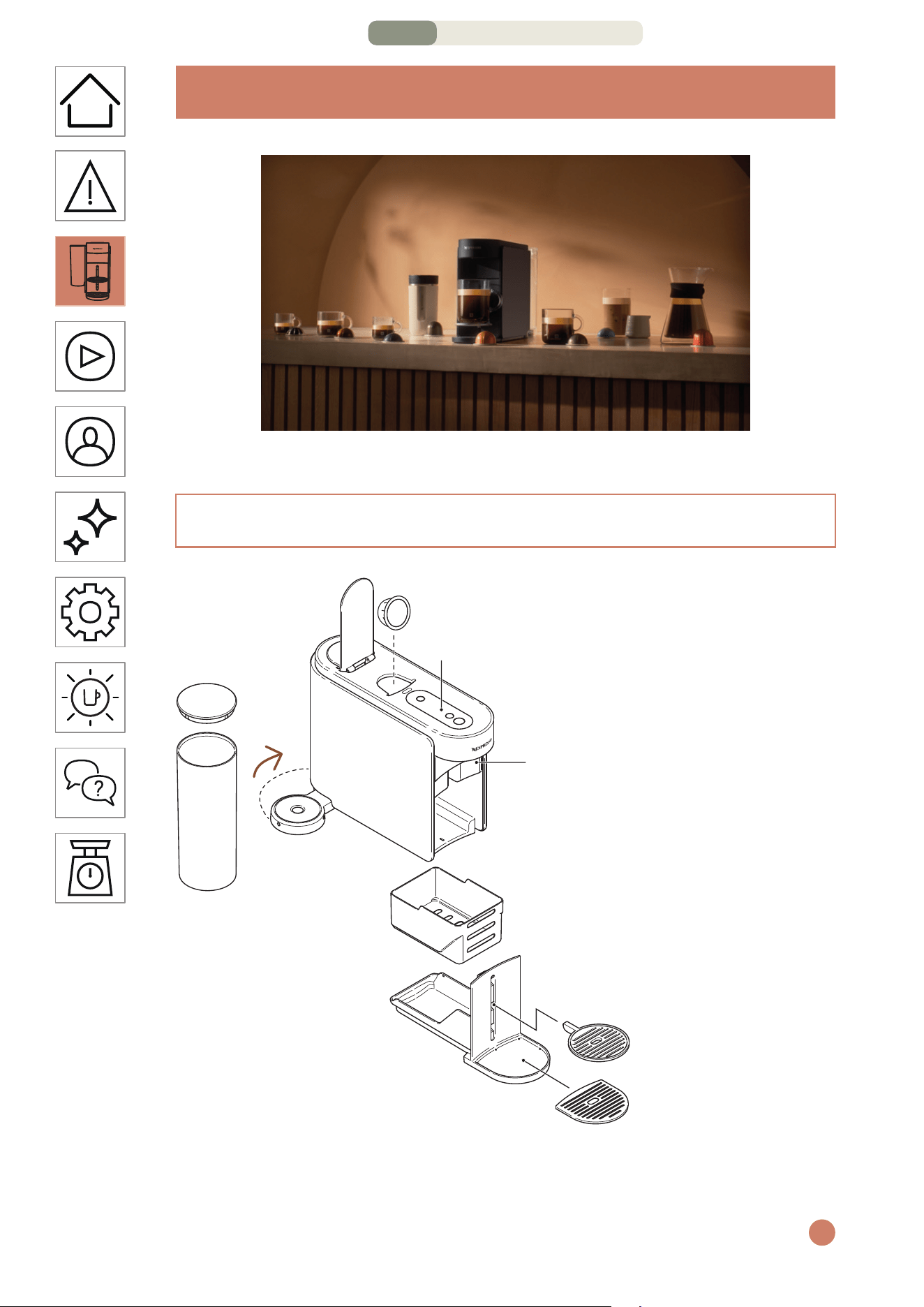
HE
.
3
תוחיטב
ידכ תוחיטבה תוארוה ןולעב ןייע הנא ,הנוכמה תלעפה ינפל :תוריהז
.םיירשפא קזנ וא העיגפ עונמל
תולמשחתה לש םינוכיס עונמל ידכ תוריהזה יעצמא תא הליחת ארק
עקשל הנוכמה רוביח תעב הקראה שיש אדוו אנ הפירשו תינלטק
.הנוכמה תא הסכמש קיטסלפה טרס תא רסה ,הזיראהמ הנוכמה תאצוה תעב
i
הביבסה לע הנגהו יוניפ
הזיראה ירמוח .EC/2012/19 יפוריאה דוחיאה תויחנהב דמוע הז רישכמ
םירמוח ליכמ ךלש רישכמה .רוזחמל םינתינה םירמוח םיליכמ רישכמהו
םירתונה תלוספה ירמוח תדרפה .רוזחמל וא רוזחישל םינתינה ךרע ירקי
רישכמה תא ראשה .ךרע ירקי םלג ירמוח רוזחימ לע הלקמ םינוש םיגוסל
.תוימוקמה תויושרהמ יוניפ לע עדימ לבקל ןתינ .ףוסיא תדוקנב