无线领夹麦克风
中国制造
说明书
产品介绍
ID图示
使用方法 UI功能 包装清单
包装清单内容
感谢您选择我们产品
本产品为智能无线领夹麦克风,可提供专业级别录音输出,
即插即用,无需APP,多种用途:可实现网络直播、视频Vlog
拍摄、节目访谈、采访录音、视频数学等场合的使用。
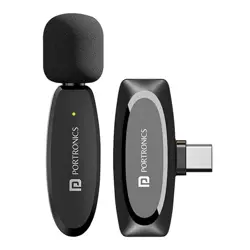
无线领夹麦克风有三部分构成,充电仓,麦克风发射端,接收端。
录音孔
电量指示灯
功能指示灯
开关机/功能键
充电仓电量指示灯
充电仓Type-C充电口
Type-C接口
苹果接口
麦克风夹
(如下图所示)
(充电仓) (发射端) (接收端)
2
1
3
4
5
7
6
8
9
10
接收端指示灯
11
接收端充电口
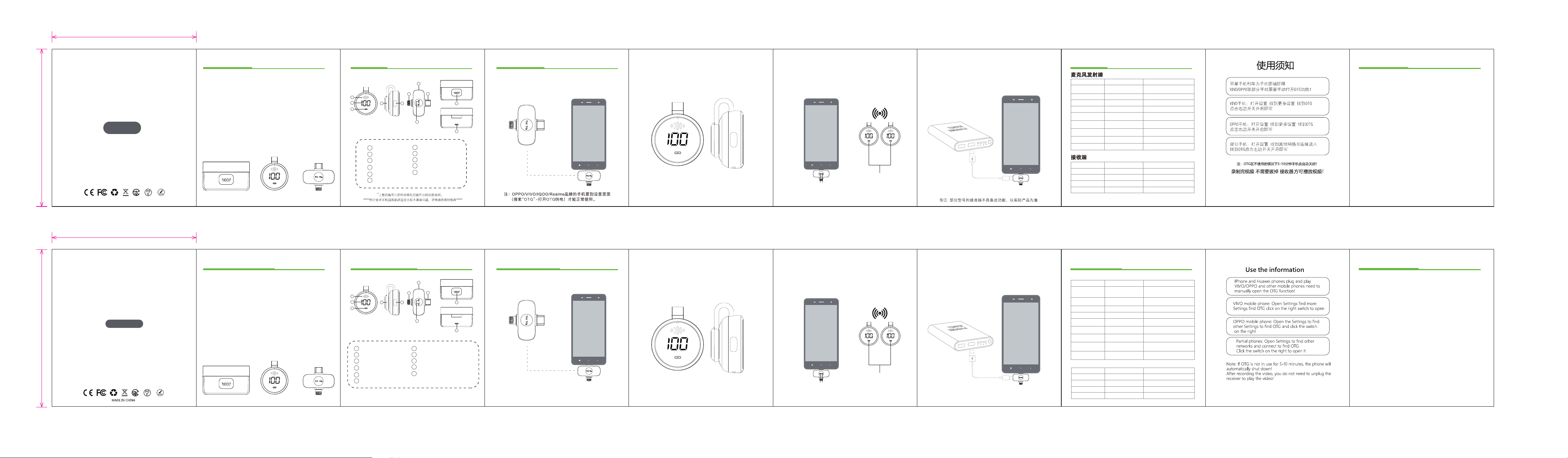
第一步:首先先把接收端从充电仓拿出来,然后一头插入手机第一步:首先先把接收端从充电仓拿出来,然后一头插入手机
充电的接口。
第二步:接着充电仓拿出发射端麦克风就会自动连接。 第三步:接收端和发射端连接指示灯常亮,即连接成功,可以
打开手机相机、直播视频等APP即可使用麦克风收音。
特别说明:
第⑦的使用方法如下:如果直播时,手机电量不足的情况下,\
直接通过接收端的接口给予手机充电。
指示灯常亮
指示灯常亮
(1)充电仓
(2)麦克风发射端
(4)充电线
(3)接收端
(5)用户说明书
长按2S开机键开机
功能/状态 操作 灯效
功能/状态
操作 灯效
关机
开机
关机
长按2S开机键
连接指示灯闪烁
电量指示灯5秒后熄灭
指示灯熄灭
指示灯熄灭
充电100亮起30秒后熄灭
指示灯常亮
指示灯常亮
指示灯慢闪
指示灯慢闪
指示灯慢闪
降噪
静音
混响
放入充电仓充电
低点报警
与RX配对
与TX配对
断开连接
断开连接
插入手机充电端口即可开机
从手机上拔出接收端
开机自动配对
TX关机或者远距离跟RX端断开
开机自动配对
拔掉RX或者TX关机
单击开关键开启降噪
/关闭降噪
双击功能键开启静音
再次双击关闭静音
三连击功能键开启混响
再次三连击关闭混响
/
开启绿灯常亮
关闭绿灯熄灭
开启红灯常亮
关闭红灯熄灭
开启黄灯常亮
关闭黄灯熄灭
显示电量0
Wireless Microphone
User Manual
Introduction
ID Diagram
How to use About UI
microphone port
phone charging port
case battery level light
Function indicator light
Microphone clip
receiver indicator light
Type-C port
Power on/off / function key
(transmitter)
(receiver)
First Step:plug the receiver into the phone Second Step:take out the microphone
Third Step:The light of the receiver is remains on,
and the phone opens apps such as the camera and live
video or other apps to use microphone for recording.
Special Note:
For the use of ⑦ port: If the phone is low power during Live,
it can be recharged directly through ⑦ port.
indicator light remains on
indicator light remains on
Disconnect
/
Thank you for choosing our products!
This product is a smart wireless microphone that can
provide professional-level recording output, no APP
required and multiple uses: it can be used for live
streaming, video Vlog shooting and other occasions.
The wireless microphone consists of three parts:
power case, microphone transmitter and receiver.
(As shown below)
Note: Some models do not have this function. Refer to
the actual product for definitive functionality.
Microphone Transmitter
Connect mic
Power on
Power off
Function How to use Light
Noise reduction
Mute
Reverbration
Low batt alarm
Charging
off
remains onauto-pairing
unplug or power off
click 1 time
Indicator flashes slowly
on: green light and it will stay on.
off: green light and it will stay on.
On: red light stays on
Off: red light goes out
On: yellow light stays on
Off: yellow light goes out
Long press the power
button for 2 seconds
Connection indicator flashes
Battery indicator goes out after
5 seconds
Long press the power
button for 2 seconds
click 2 times
click 3 times
put into power case
Charging 100 lights up and goes
out after 30 seconds
Display battery level 0
Receiver
Function
Power on
How to use Light
Connect mic
Disconnect
plug into phone
unplug off
auto-pairing
remains on
flashing
unplug or power off
Packing List
Packaging List Content
(1)Power case
(2)Microphone transmitter
(4)Charging cable
(3)Receiver
(5)User Manual
(power case)
Note: Some Android devices may experience limited functionality due
to system-specific restrictions.
Note: oppo / vivo / iqoo / realm b
rand mobile phones can be
used normally only when they go to the settings
(search "OTG" - turn on OTG power supply)
1
2
3
4 5
6
7
8
10
11
9
7
2
1
3
4
5
7
6
8
9
10
11
battery light
充电的接口。
receiver iphone port
Charging interface of the receiver
Power off
flashing
1
2
3
4 5
6
7
8
10
11
9
65mm
71mm
65mm
71mm

FCC Warnning:
This equipment has been tested and found to comply with the limits for a Class B digital device,
pursuant to part 15 of the FCC Rules. These limits are designed to provide
reasonable
protection against harmful interference in a residential installation. This equipment generates,
uses and can radiate radio
frequency
energy
and,
if
not
installed
and
used
in
accordance
with
the
instructions,
may cause
harmful
interference
to
radio
communications.
However,
there
is
no
guarantee
that interference
will
not
occur
in
a
particular
installation.
If
this
equipment
does
cause
harmful interference to radio or television reception, which can be
determined by turning the equipment off
and
on,
the
user
is
encouraged
to
try
to
correct
the interference
by
one
or
more
of
the following measures:
•
Reorient or relocate the receiving antenna.
•
Increase the separation between the equipment and receiver.
•
Connect the equipment into an outlet on a circuit different from that to which the receiver is
connected.
• Consult the dealer or an experienced radio/TV technician for help.
Caution:
Any
changes
or
modifications
to
this
device
not
explicitly
approved
by
manufacturer
could void your authority to operate this equipment.
This
device
complies
with
part
15
of
the
FCC
Rules.
Operation
is
subject
to
the
following
two
conditions:
(1)This
device
may
not
cause
harmful
interference,
and
(2)
this
device
must
accept
any
interference received, including interference that may cause undesired operation.
This
equipment
complies
with
FCC
radiation
exposure
limits
set
forth
for
an
uncontrolled
environment.
This
equipment
should
be
installed
and
operated
with
minimum
distance
0cm
between the radiator and your body.