BLUE : Pantone Black C
1:0.7
S0
SCALE: REVPART NAMEPART NUMBER
PROPRIETARY AND CONFIDENTIAL :
THE INFORMATION CONTAINED IN THIS
DRAWING IS THE SOLE PROPERTY OF
ACSYS. ANY REPRODUCTION IN PART
OR AS A WHOLE WITHOUT THE WRITTEN
PERMISSION OF ACSYS IS PROHIBITED.
CONFIDENTIAL INDUSTRY
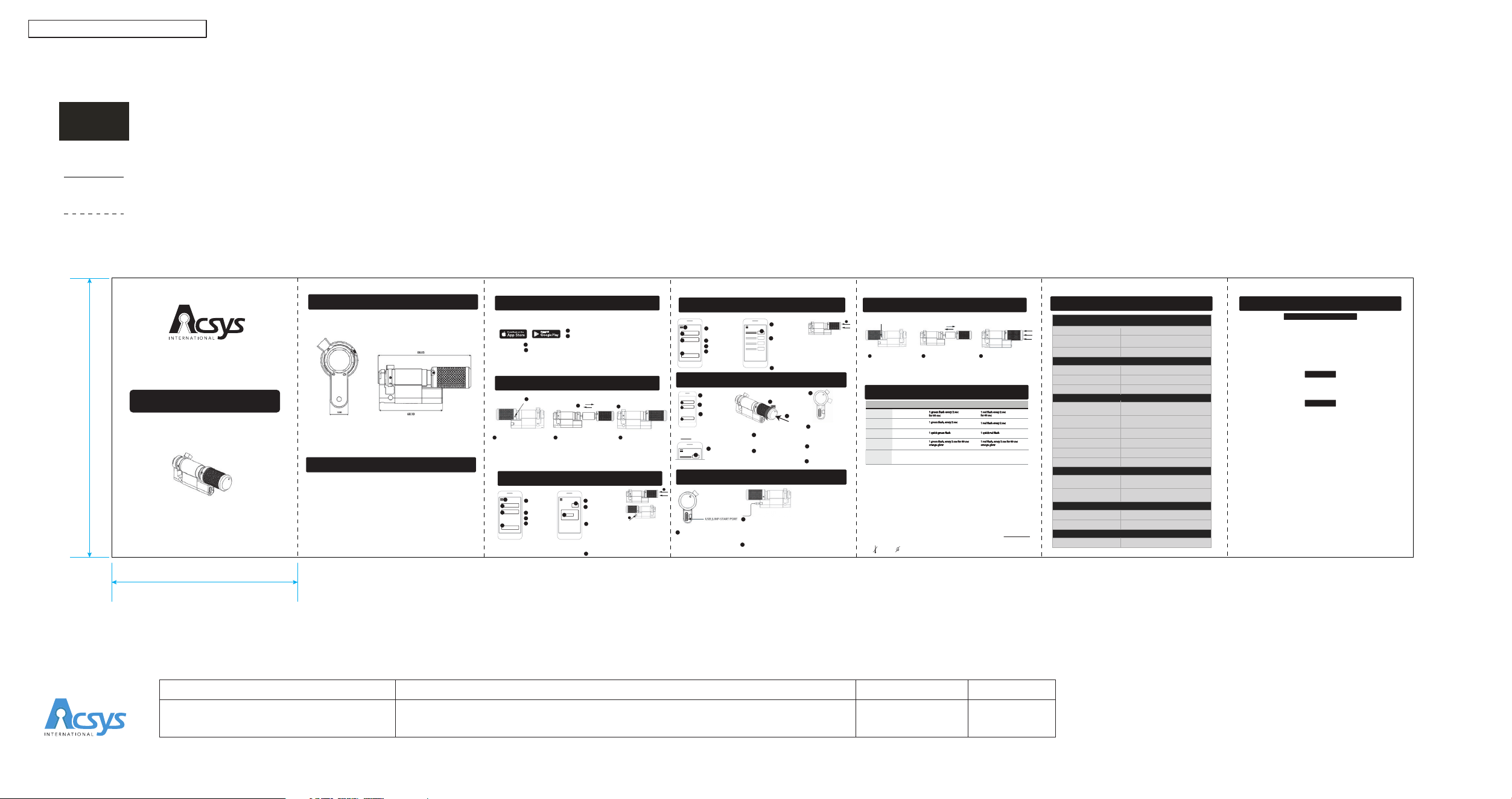
BLE CYLINDER USER MANUAL
421-038A
Folding Marks
Trim Marks
BLE-310B-JE-S2
KEYLESS BLUETOOTH CYLINDER
USER MANUAL
70mm
105mm
[email protected] / www.acsys.com / +852 81914038
22F, Tai Yau Building, 181 Johnston Road, Wanchai, Hong Kong
Copyright © 2020 Acsys International Ltd.
DIMENSIONS
WHAT’S IN THE BOX
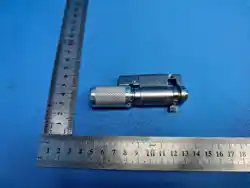
• ACSYS BLE cylinder x 1pcs
• User manual x 1pcs
INSTALL APP
PREPARING THE LOCK FOR USE
• Search for “Acsys Mobile App” on your device app store
• Download and install the app on your device
1
1
2
3
4
• On the welcome screen, select “Acsys iAMS Enterprise” from the available app types
• Register the app by following the on-screen instructions
2
REGISTER LOCK
•7
1
2
3
• Open Main Menu
Add Access Point
• Enter Site ID
• Enter PIN code
• Press Register
1
2
3
4
4
6
• Add Access Point
• Enter Lock ID
5
6
5
•
Lock is registered
8
DELETE LOCK
1
2
3
• Open Main Menu
Delete Access Point
• Enter Site ID
• Enter PIN code
• Press Delete
1
2
3
4
4
•
Press the Delete
button next to the
correct Lock name
5
5
•
Lock is deleted
7
1
2
3
• Enter Site ID
• Enter PIN code
• Press
Check-in
or Check-out
depending on the
operation type.
1
2
3
OPERATE LOCK
• Press the Open button
next to the Lock name
4
4
•
Activate Lock by Push
and holding the knob
in its end position
5
OPEN
JUMP START LOCK
1
•
2
2
While jump-starting, the LED flashes green every 2 seconds
indicating that Bluetooth is advertising during which, the lock
can be opened using the mobile app.
After 60 sec, the lock enters in sleep mode indicated by an
orange LED glow
If the 60 sec have elapsed, press the Knob or remove and
reconnect the USB power to put the lock in Bluetooth
advertising mode again
3
REPLACE BATTERY
SPECIFICATION
1
Remove the knob,Replace
the Battery
Loosen and Remove the
Grub Screws on both sides
of the knob, Using 1.5mm
Hex Allen Screw
Place the knob in position
and push towards end and
position the Screw holes.
Place and the tighten the
screws,Now the lock is
ready for the Operation
2
3
ACTION STATE
INITIALIZED LOCK INDICATION
Bluetooth advertising
Lock is open
for 60 sec
BLANK LOCK INDICATION
1 red
for 60 sec
1 red
1 green
Push the Knob
1 quick red
Battery
Replacement
Bluetooth advertising
Sleep mode
USB
jump start
1
green
orange glow
1 red
orange glow
LED INDICATIONS
2
3
Using a 1.5 mm hex Allen key,
loosen and remove the grub
screws from both sides of the knob.
Remove the battery insulator, reinstall
the battery into the battery holder,
and ensure it is properly seated.
Press the knob fully into
position,align the grub
screws with their holes, and
tighten them securely
Release the knob and verify
that it rotates and operates
smoothly.
1
2
3
•7
•7
•6
•6
Activate the Lock by pushing the Knob till end,
The Led will flash in green for every two seconds
for 60 Seconds(Start of operation)
The green LED flashes continously (Middle of
operation)
The green LED flashes long twice (Operation
Success)
• After the click sound
the Led will flash once in
green color,Turn the knob
towards clockwise direction
6
•
Once the cam is
completely inside
the lock is now in
unlocked condition
7
• If the knob is released
the cam will be retracted
to its Locked position
8
6
•
7
• Repeat the Same for
close operations
9
Insert a Type C USB cable in the
USB port and connect it to USB
wall charger or a portable
power bank
Push and Hold the
Knob
•
5
GENERAL
ENVIRONMENT
ELECTRONICS
COMPATIBILITY
CERTIFICATION
WARRANTY
Dimensions & Weight
Material
Standarad
Storage Temperature
Relative Humidity (RH)
Battery Type
Battery Life
• This user manual is for reference only. Minor differences can be found in user interface.
• Please follow the instructions to set up your device. In case of any issue, please contact
• Specifications may be altered without prior written notice.
NOTE
-20C
+65C
0
95%
without
condensation
92x36x20 mm I 125g
Aluminium Button knob/Brass with
Chrome Plating Cylinder body
Euro-DIN
Operational Temperature
-20 °C to 80 °C
-20 °C to 65 °C
0 to 95% (without Condensation)
Non - Rechargeable I Replaceable I
Jump Start
3 Years
Jump - Start
USB - C
Encryption
AES 128-bit
Audit Trail Access Logs (In-App and Software)
Mobile App
Desktop Software
iAMS Smart Access Mobile Application
(iOS & Android)
iAMS (Intelligent Access Management
System)
Electronics
Mechanical
CE, FCC, RoHS
IP68, EN15684
2 Years (1)
Warranty
Visual Indicator Tricolor LED
Activate Lock by Pushing the Knob till end,Led
will flash in Red color every two seconds for
60 seconds.(Start of operation)
The Red LED flashes continously (Middle of
operation)
The Green LED flashes long twice
(Operation Success)
jump start
In all the end of operations,the green
In all the end of operations,the green
Led flash denotes success,and the orangeLed flash denotes success,and the orange
and red denotes failure of the operation and red denotes failure of the operation
Succes and Failure
indications
FCC Statement
FCC ID : 2AR93-310B2626
This device complies with Part 15 of the FCC Rules. Operation is subject to the following
two conditions:
(1) This device may not cause harmful interference, and
(2) This device must accept any interference received, including interference that may
cause undesired operation.
Warning
Changes or modications not expressly approved by the party responsible for
compliance could void the user's authority to operate the equipment.SPECIFICATIONS
NOTE
This equipment has been tested and found to comply with the limits for a Class B
digital device, pursuant to Part 15 of the FCC Rules. These limits are designed to provide
reasonable protection against harmful interference in a residential installation.
This equipment generates uses and can radiate radio frequency energy and, if not
installed and used in accordance with the instructions, may cause harmful interference to
radio communications. However, there is no guarantee that interference will not occur in a
particular installation. If this equipment does cause harmful interference to radio or
television reception, which can be determined by turning the equipment o and on, the
user is encouraged to try to correct the interference by one or more of the following
measures:
Reorient or relocate the receiving antenna.
Increase the separation between the equipment and receiver.
Connect the equipment into an outlet on a circuit dierent from that to which the receiver
is connected.