
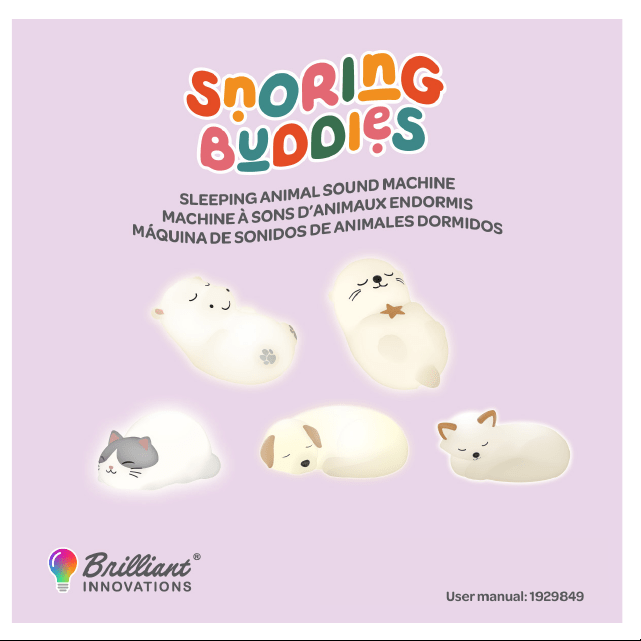

ENGLISH: USER MANUAL — SNORING BUDDY
INTRODUCTION
Thank you for purchasing the Snoring Buddies! This soft, vibrant, and customizable LED light adds fun and comfort
to any room. Please read this manual carefully to ensure safe and proper use.
PACKAGE CONTENTS
- 1x Snoring Buddy Night Light
- 1x Remote Control
- 1x USB Charging Cable Included (4.9 ft (150 cm) USB cable - included)
- 1x User Manual
PRODUCT FEATURES
-Snoring Motion Belly
The animal’s soft silicone belly/back gently rises and falls
to imitate natural breathing movements, accompanied
by soothing snoring sounds for a calming and comforting
sleep experience.
- 9 Built-in Sounds
Ocean, Cave Drip, White Noise,Crackling Fire, Crickets,
Peaceful Ambience, Birdsong, Lullaby, Forest Night
- Bluetooth® Wireless Speaker
Connect via Bluetooth® wirelessly to your smart device
and play music.
- Choose from 16 vibrant colors
- Adjustable brightness levels
- Pat Function: Gently pat the Snoring Buddy to change
the color mode.
- Auto-O Timer: 30/60/90 minute auto-o feature helps
save battery
- Use the remote to operate Snoring Buddy
- Usage Time: Estimated usage time: 6-7 hours on a full
charge (depending on brightness)
- Charging Time: Estimated charging time: 3 hours
PRODUCT SPECIFICATIONS
- Material: High-quality, silicone
- Light Source: RGB LED with 16 color options
- Modes: 16 Static colors, dimmable
- Pat function: to change colors
- Bluetooth Version: v5.1
- Input: USB Type-C
- Power Supply:
• 1200 mAh rechargeable lithium ion battery
• USB charging (4.9 ft (150 cm) USB cable - included)
• Remote control powered by 2x AAA batteries
(not included)
• Color Temperature: 6000K/RGB
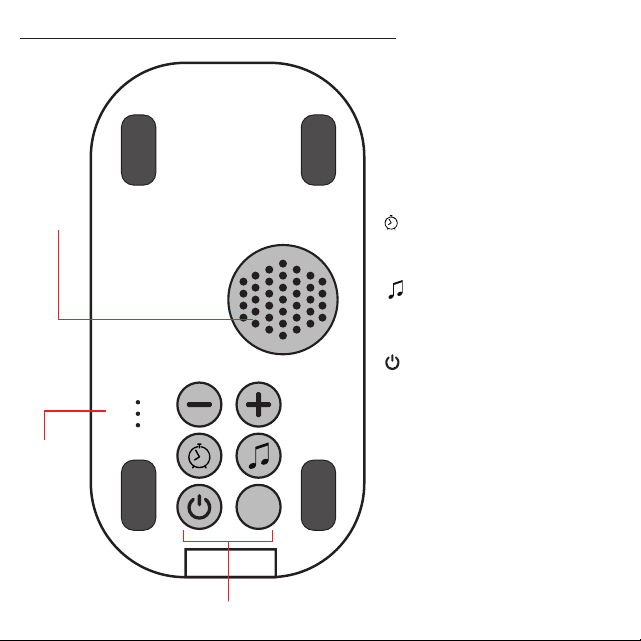
BASE OF SNORING BUDDY BUTTONS
z
z
z
30
60
90
CONTROL BUTTONS:
“–” Button
Long press: Decrease the volume.
Short press: Return to the previous track.
“+” Button
Long press: Increase the volume.
Short press: Skip to the next track.
“ “ Button
Short press: Set the timer to 30, 60, or
90 minutes, or turn the timer o. The
corresponding indicator light will illuminate.
“ “ Button
Short press: Play white noise. Press again briey
to pause playback.
Long press: Turn on Bluetooth® mode.
“ “ Button
Long press: Turn the device on or o. The white
light turns on automatically when powered on
and is set to 50% brightness by default.
“ “ Button
Short press: Turn Snoring Mode on or o.
When activated, the motor creates a gentle
snoring motion and sound eect.
Speaker
Timer
Indicator
Control Buttons
z
z
z
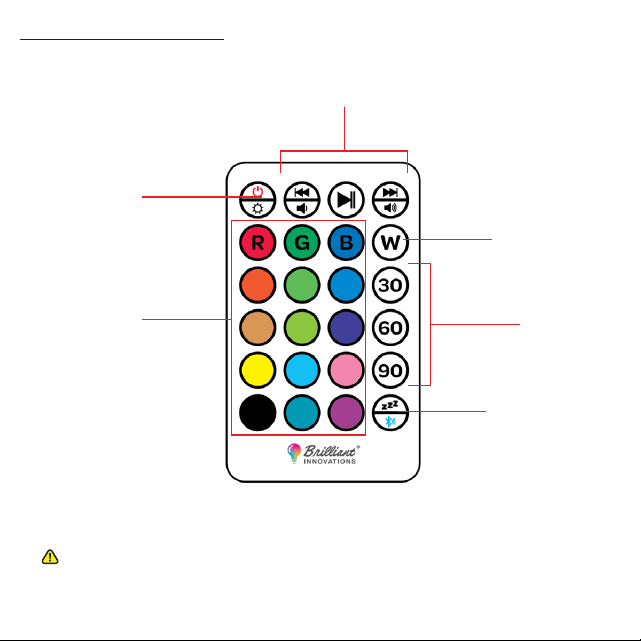
USING THE REMOTE
Switch Between
Snoring & Bluetooth®
Mode
Lighting Color
Control
Sounds & Volume Control
Timer Control
White Light
Power &
Brightness
2 x AAA Batteries (not included)
ATTENTION: The Snoring Buddy unit must be powered on before the remote control can be used.
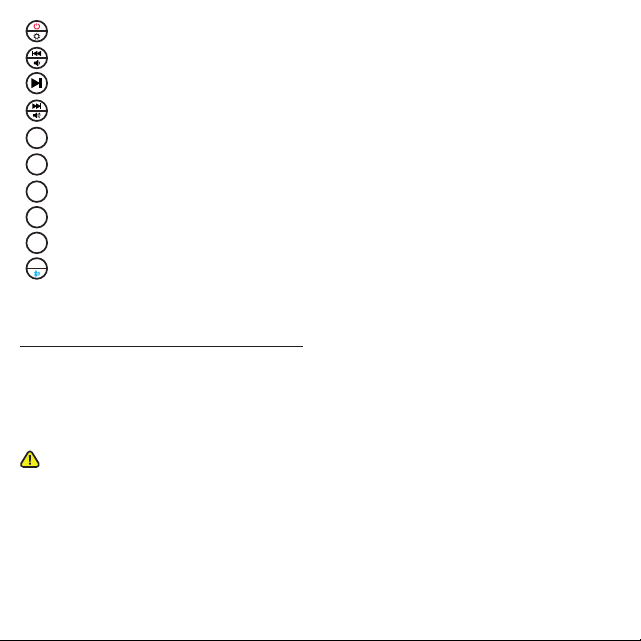
Long press to turn the device on or o; short press to adjust the brightness.
Short press to switch between white noise/music ; long press to adjust the volume.
Short press to play or pause the white noise/music.
Short press to switch between white noise/music; long press to adjust the volume.
RGB light colors corresponding to the colors on the remote control buttons.
White light mode
30-minute timer
60-minute timer
90-minute timer
Short press to turn on/o snoring mode; long press to activate Bluetooth® Mode.
INSERT REMOTE BATTERIES
To use the included remote you must rst insert 2 x AAA batteries (not included) into the remote’s battery
compartment.
1. Open the battery compartment located on the rear of the remote.
2. Insert 2 x AAA batteries. Make sure to insert the batteries with the correct polarity(+ -) as displayed in the battery
compartment.
BATTERY WARNING:
- Keep batteries out of reach of children.
- Do not mix old and new batteries or dierent types (e.g., alkaline, standard, or rechargeable).
- Insert batteries with correct polarity (+/−).
- Do not short-circuit, recharge, disassemble, or dispose of in re.
- Replace all batteries at the same time.
- Remove batteries if the product will not be used for an extended period of time.
- Dispose of used batteries promptly and in accordance with local regulations.
- Do not incinerate.
W
30
60
90
z
z
z
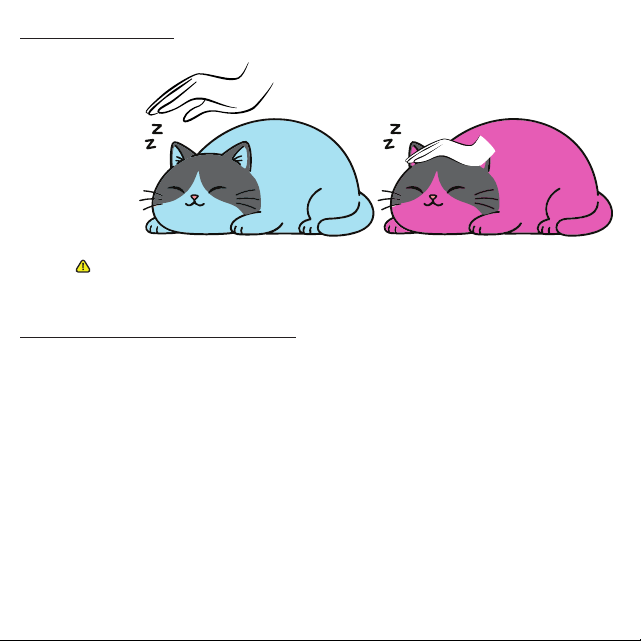
PAT FUNCTION
CONNECT TO BLUETOOTH®
Pat Snoring Buddy to change light colors.
ATTENTION: To help extend the product’s lifespan, avoid pressing or tapping directly
on the moving belly/back area during operation.
1. Turn on the speaker, activate bluetooth® mode using remote or control panel at the base.
2. Enable Bluetooth® on your device.
3. Open your device’s Bluetooth® settings and select “Snoring Buddy” from the list.
4. Once connected, you will hear a conrmation sound or see the device marked as “Connected.”
Note: If the speaker does not appear, make sure it is in pairing mode and try searching again.
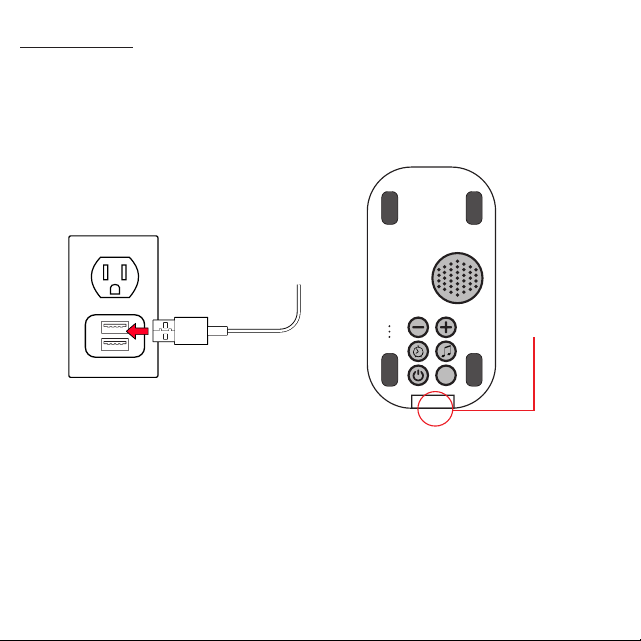
- Plug the USB-C charging cable into the USB-C charging port at the bottom of the Snoring Buddy.
- Insert the other end of the USB cable into a suitable USB charging adapter (not included)
- While charging the charging indicator light will turn red. When fully charged the indicator light will turn green.
ATTENTION: Make sure the product is fully charged before rst use.
USB-C
Charging Port
CHARGING
z
z
z
30
60
90
Power Supply: The power source should meet limited power
source or PS2 requirements according to IEC 62368-1 Standard.
BATTERY WARNING
- The device is equipped with an integrated lithium battery. The battery cannot be replaced. Do not attempt to remove
the battery from the device.
- Do not dispose of in re or expose to excessive heat.
- Do not crush, puncture, incinerate, or short circuit external contacts.
- Please recycle or dispose of the battery properly. Contact your local recycling facilities and/or the manufacturer for
further information.
SAFETY & MAINTENANCE
- Do not disassemble the light or battery
- Avoid immersing in water
- Clean with a soft, damp cloth only
- Keep out of direct sunlight for prolonged periods
TROUBLESHOOTING
Issue Solution
------------------------------------------------------ ------------------------------------------------------------
1. Light doesn’t turn on 1. Charge the unit; check battery connection
2. Remote control not working 2. Replace or check AAA batteries
3. Color doesn’t change on pat 3. Make sure the device is on; pat slightly more rmly

WARRANTY INFORMATION
90-DAY LIMITED WARRANTY
TERRITORY: UNITED STATES/CANADA
LIMITED WARRANTY TO ORIGINAL CONSUMER
This product (including any accessories included in the original packaging) as supplied and distributed new by an
authorized retailer is warranted by MCG Innovations Inc.. to the original consumer purchaser against defects in
materials and workmanship (“Warranty”) as follows:
To obtain warranty service:
Call 848-412-0910 or email [email protected]. Clearly explain the issue that you are having, including the product’s
name, brand, and model number.
Your product will be repaired or replaced, at our option, for the same or similar model of equal value if examination by
the service center determines this product is defective. Products received damaged as a result of shipping will require
you to le a claim with the carrier.
WARRANTY SERVICE NOT PROVIDED
This warranty does not cover damage resulting from accident, misuse, abuse, improper installation or operation, lack
of reasonable care, unauthorized modication including software modications such as the installation of custom
rmware. This warranty is voided in the event any unauthorized person opens, alters or repairs this product. All
products being returned to the authorized service center for repair must be suitably packaged.
NO WARRANTIES, WHETHER EXPRESS OR IMPLIED, INCLUDING, BUT NOT LIMITED TO, ANY IMPLIED WARRANTIES OF MERCHANTABILITY OR
FITNESS FOR A PARTICULAR PURPOSE, OTHER THAN THOSE EXPRESSLY DESCRIBED ABOVE SHALL APPLY. DISTRIBUTOR FURTHER DISCLAIMS ALL
WARRANTIES AFTER THE EXPRESS WARRANTY PERIOD STATED ABOVE. NO OTHER EXPRESS WARRANTY OR GUARANTY GIVEN BY ANY PERSON,
FIRM OR ENTITY WITH RESPECT TO THE PRODUCT SHALL BE BINDING ON DISTRIBUTOR. REPAIR, REPLACEMENT, OR REFUND OF THE ORIGINAL
PURCHASE PRICE – AT DISTRIBUTOR’S SOLE DISCRETION – ARE THE EXCLUSIVE REMEDIES OF THE CONSUMER. IN NO EVENT WILL DISTRIBUTOR
OR ITS MANUFACTURERS BE LIABLE FOR ANY INCIDENTAL, DIRECT, INDIRECT, SPECIAL, PUNITIVE OR CONSEQUENTIAL DAMAGES (SUCH AS, BUT
NOT LIMITED TO, DAMAGES FOR LOSS OF PROFITS, BUSINESS, SAVINGS, DATA OR RECORDS) CAUSED BY THE USE, MISUSE OR INABILITY TO USE
THE PRODUCT. EXCEPT AS STATED HEREIN, NO OTHER WARRANTIES SHALL APPLY. NOT WITHSTANDING THE FOREGOING, CONSUMER’S RECOVERY
AGAINST DISTRIBUTOR SHALL NOT EXCEED THE PURCHASE PRICE OF THE PRODUCT SOLD BY DISTRIBUTOR. THIS WARRANTY SHALL NOT EXTEND TO
ANYONE OTHER THAN THE ORIGINAL CONSUMER WHO PURCHASED THE PRODUCT AND IS NOT TRANSFERABLE.
Some countries, states or provinces do not allow the exclusion or limitation of incidental or consequential damages or
allow limitations on warranties, so limitation or exclusions may not apply to you. This warranty gives you specic legal
rights, and you may have other rights that vary from state to state or province to province. Contact your authorized
retailer to determine if another warranty applies.
All product names, trademarks, and registered trademarks are property of their respective owners. All company,

product, and service names used in this document are for identication purposes only. Use of these names,
trademarks, and brands does not imply endorsement.
COMPLIANCE INFORMATION
FCC INFORMATION
FCC ID: 2BV6M-1929849
This device complies with part 15 of the FCC Rules. Operation is
subject to the following two conditions: (1) This device may not cause
harmful interference, and (2) this device must accept any interference
received, including interference that may cause undesired operation.
CAUTION:
Any changes or modications not expressly approved could void the user’s authority to operate the equipment.
Note: This equipment has been tested and found to comply with the limits for a Class B digital device, pursuant to
part 15 of the FCC Rules. These limits are designed to provide reasonable protection against harmful interference in
a residential installation. This equipment generates, uses and can radiate radio frequency energy and, if not installed
and used in accordance with the instructions, may cause harmful interference to radio communications. However,
there is no guarantee that interference will not occur in a particular installation. If this equipment does cause harmful
interference to radio or television reception, which can be determined by turning the equipment o and on, the user
is encouraged to try to correct the interference by one or more of the following measures:
· Reorient or relocate the receiving antenna.
· Increase the separation between the equipment and receiver.
· Connect the equipment into an outlet on a circuit dierent from that to which the receiver is connected.
· Consult the dealer or an experienced radio/TV technician for help.
This device complies with Part 15 of the FCC Rules. Operation is subject to the following two conditions: (1) This device
may not cause harmful interference, and (2) this device must accept any interference received, including interference
that may cause undesired operation.
RADIATION EXPOSURE INFORMATION:
This device has been evaluated to meet general RF exposure requirements. The device can be used in portable
exposure conditions without restriction.
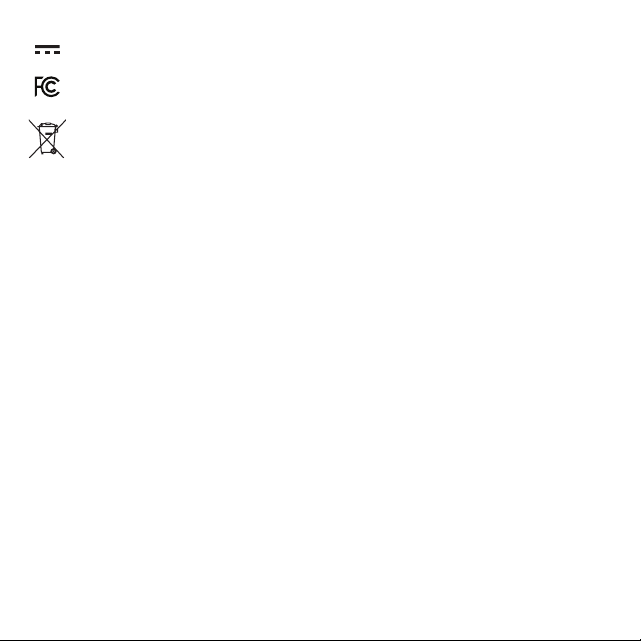
RATING LABEL DEFINITIONS
Direct current symbol.
This symbol represents FCC Declaration of Conformity and
compliance
This symbol signies that the product must not be
discarded as household waste and should be delivered
to an appropriate collection facility for recycling. Proper
disposal and recycling helps protect natural resources,
human health and environment.

Brilliant Innovations® Name and logo are registered
trademarks of MCG Innovations Inc.
Manufactured and marketed under license.
©2026. All rights reserved.
Made in China

