06
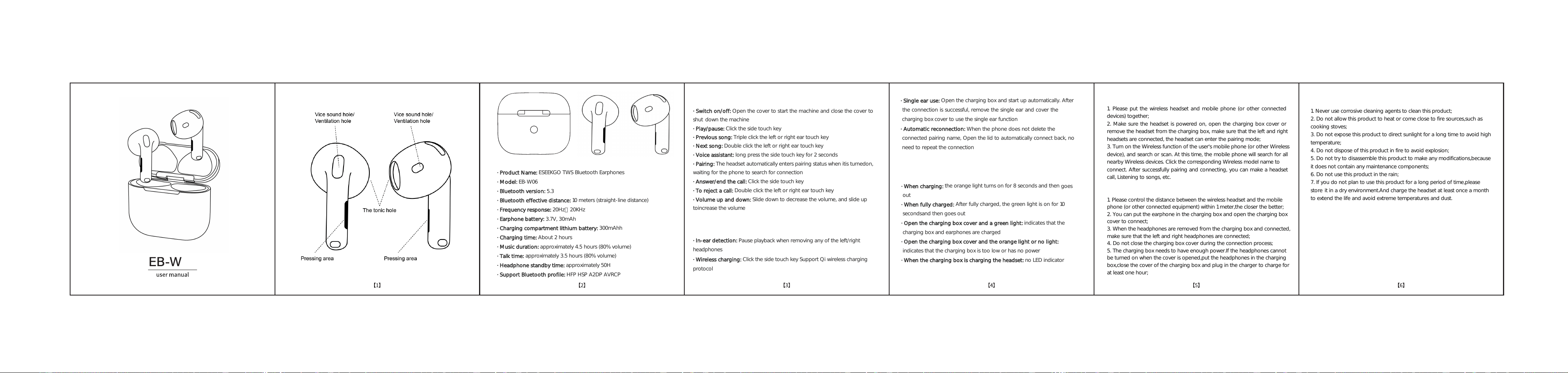
· Switch on/off:
Open the cover to start the machine and close the cover to
shut down the machine
· Play/pause: Click the side touch key
· Previous song:
Triple click the left or right ear touch key
· Next song:
Double click the left or right ear touch key
· Voice assistant:
long press the side touch key for 2 seconds
· Pairing: The headset automatically enters pairing status when itis turnedon,
waiting for the phone to search for connection
· Answer/end the call: Click the side touch key
· To reject a call: Double click the left or right ear touch key
· Volume up and down: Slide down to decrease the volume, and slide up
· Product Name:
ESEEKGO TWS Bluetooth Earphones
· Model: EB-W06
· Bluetooth version: 5.3
· Bluetooth effective distance: 10 meters (straight-line distance)
· Frequency response: 20Hz〜20KHz
· Earphone battery:
3.7V, 30mAh
· Charging compartment lithium battery: 300mAhh
· Charging time: About 2 hours
· Music duration: approximately 4.5 hours (80% volume)
· Talk time: approximately 3.5 hours (80% volume)
· Headphone standby time: approximately 50H
· Support Bluetooth profile:
HFP HSP A2DP AVRCP
toincrease the volume
· Single ear use:
Open the
charging box and start up automatically. After
the connection is successful, remove the single ear and cover the
charging box cover to use the single ear function
· Automatic reconnection: When the phone does not delete the
connected pairing name, Open the lid to automatically connect back, no
· In-ear detection: Pause playback when removing any of the left/right
headphones
· Wireless charging: Click the side touch key Support Qi wireless charging
protocol
need to repeat the connection
· When charging:
the orange light turns on for 8 seconds and then
goes
out
· When fully charged:
After fully charged, the green light is on for 10
secondsand then goes out
· Open the charging box cover and a green light:
indicates that the
charging box and earphones are charged
· Open the charging box cover and the orange light or no light:
indicates that the charging box is too low or has no power
· When the charging box is charging the headset:
no LED indicator
1. Please put the wireless headset and mobile phone (or other connected
devices) together;
2. Make sure the headset is powered on, open the charging box cover or
remove the headset from the charging box, make sure that the left and right
headsets are connected, the headset can enter the pairing mode;
3. Turn on the Wireless function of the user's mobile phone (or other Wireless
device), and search or scan. At this time, the mobile phone will search for all
nearby Wireless devices. Click the corresponding Wireless model name to
connect. After successfully pairing and connecting, you can make a headset
call, Listening to songs, etc.
1. Please control the distance between the wireless headset and the mobile
phone (or other connected equipment) within 1 meter,the closer the better;
2. You can put the earphone in the charging box and open the charging box
cover to connect;
3. When the headphones are removed from the charging box and connected,
make sure that the left and right headphones are connected;
4. Do not close the charging box cover during the connection process;
5. The charging box needs to have enough power.If the headphones cannot
be turned on when the cover is opened,put the headphones in the charging
box,close the cover of the charging box and plug in the charger to charge for
at least one hour;
1. Never use corrosive cleaning agents to clean this product;
2. Do not allow this product to heat or come close to fire sources,such as
cooking stoves;
3. Do not expose this product to direct sunlight for a long time to avoid high
temperature;
4. Do not dispose of this product in fire to avoid explosion;
5. Do not try to disassemble this product to make any modifications,because
it does not contain any maintenance components;
6. Do not use this product in the rain;
7. If you do not plan to use this product for a long period of time,please
store it in a dry environment.And charge the headset at least once a month
to extend the life and avoid extreme temperatures and dust.
Considerations when connecting wirelessly
Universal wireless connection operation
Precautions
Charging box LED indicator status
Basic skil
Touch method
Product parameters

FCC Caution:
This device complies with part 15 of the FCC Rules. Operation is subject to the
following two conditions: (1) This device may not cause harmful interference, and (2)
this device must accept any interference received, including interference that may
cause undesired operation.
Any Changes or modifications not expressly approved by the party responsible for
compliance could void the user's authority to operate the equipment.
Note: This equipment has been tested and found to comply with the limits for a Class
B digital device, pursuant to part 15 of the FCC Rules. These limits are designed to
provide reasonable protection against harmful interference in a residential installation.
This equipment generates uses and can radiate radio frequency energy and, if not
installed and used in accordance with the instructions, may cause harmful interference
to radio communications. However, there is no guarantee that interference will not
occur in a particular installation. If this equipment does cause harmful interference to
radio or television reception, which can be determined by turning the equipment off
and on, the user is encouraged to try to correct the interference by one or more of the
following measures:
-Reorient or relocate the receiving antenna.
-Increase the separation between the equipment and receiver.
-Connect the equipment into an outlet on a circuit different from that to which the
receiver is connected.
-Consult the dealer or an experienced radio/TV technician for help.
The device has been evaluated to meet general RF exposure requirement. The device
can be used in portable exposure condition without restriction.