3-257-265-11(1)
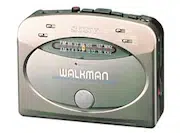
Radio Cassette-Corder
©2001 Sony Corporation Printed in China
WM-GX400
Operating instructions
使用说明书
“WALKMAN” is a registered trademark of Sony Corporation to
represent Headphone Stereo products.
is a trademark of Sony Corporation.
The validity of the CE marking is restricted to only those
countries where it is legally enforced, mainly in the
countries EEA (European Economic Area).
CE 标志的有效性,仅限于那些有法律限制的国家,主要
在 EEA(欧洲经济区)国家。
B
A
Preparations
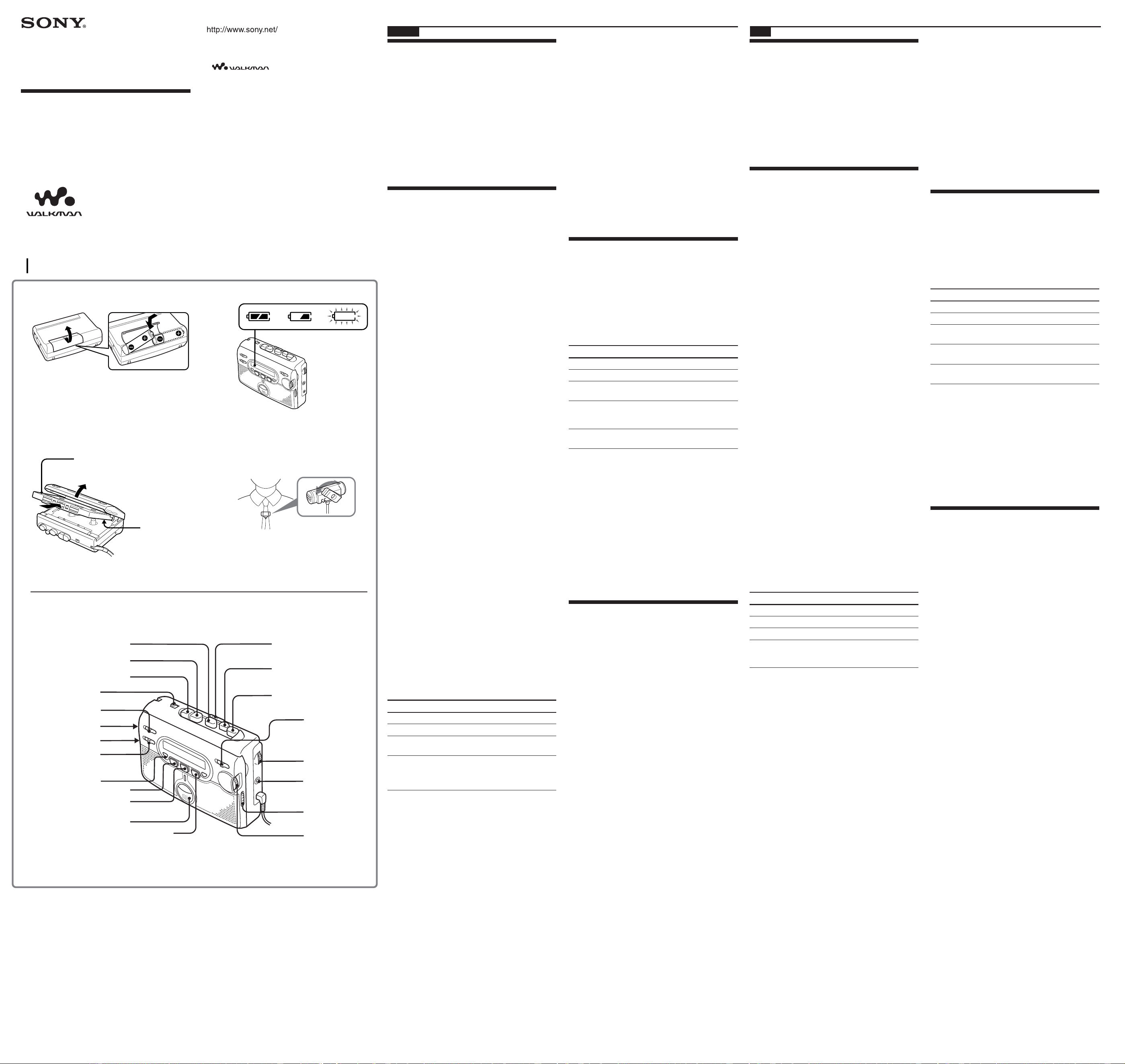
To Insert batteries A
Slide open the battery compartment lid, and insert
two R6 (size AA) dry batteries with correct polarity.
Replace the batteries with new ones when “e”
flashes in the display.
B
Notes
•For maximum performance we recommend that you
use Sony alkaline batteries.
•Be sure to replace both batteries within 2 minutes.
Otherwise, the preset radio stations will be cancelled.
Recording
Notes
•If the record-protect tab is broken, you cannot record
on that side.
•Tapes recorded with the REC TIME switch in the
DOUBLE position cannot be played properly by a tape
recorder without that recording mode function.
• Use new batteries when recording.
•When recording with the microphone, the sound to be
recorded cannot be heard through the speakers and
headphones/earphones.
1 Insert a normal (TYPE I) tape. C
To record on both sides:
Insert the cassette with the side to be first
recorded on as the FWD side, and set DIR to
FWD.
To record on one side only:
Insert the cassette with the side to be
recorded on as the REV side, and set DIR to
REV.
2 Set REC TIME to the desired position.
NORMAL (4.8 cm/s): for optimum sound.
Recommended for normal recordings.
DOUBLE (2.4 cm/s): for double recording
time (for example, 120 minutes using both
sides of a 60-minute cassette). Suitable for
recording conferences, dictations, etc. Not
recommended to record music.
3 Select a recording source.
To record with the built-in microphone:
Place the unit on a hard surface (such as a
desk) with the cassette holder side up, so
that the microphone can record effectively.
To record with the microphone:
Connect the supplied microphone to the
MIC (PLUG IN POWER) jack.
You can attach the microphone to your
clothes.
D
To record from the radio:
Tune in to the station you want to record
(see “Listening to the Radio”).
4 Press z REC. Y PLAY is pressed
simultaneously and recording starts. The
recording level is automatically adjusted.
If you have started recording from the FWD
side, recording will switch to the REV side
automatically when that side of the tape
reaches the end.
To Press/switch
Pause a recording PAUSE
Stop recording x STOP
Start recording during z REC during
playback playback
Review the portion Press and hold REW/
just recorded REVIEW during
recording. Release to
listen.
To reduce noise while recording AM
programs
Set the ISS (Interference Suppress Switch) to the
position that reduces noise the most.
Notes on recording
•The recording level is fixed.
•Adjusting the volume or setting AVLS will not affect
the recording level. These controls only change the
sound level you hear.
•Actual recording will start about 2 seconds after you
press z REC. Press z REC about 2 seconds before the
moment you want to start recording, or you will miss
the beginning of your recording.
•When recording on both sides, recording will not be
made for about 10 seconds while the tape is switching
sides.
•Do not use a high-position (TYPE II) or metal (TYPE
IV) tape. If you do, the sound may be distorted when
you play back the tape, or the previous recording may
not be erased completely.
•Do not connect or disconnect the headphones/
earphones to/from the i jack while recording from the
radio. The recording condition may change abruptly,
or noise may be recorded.
•When recording with the microphone, do not place it
near a lamp cord or a fluorescent lamp as this may
cause interference noise.
•No other operation can be done while recording. For
other operations, stop recording first.
•DIR will not work while recording. Do not force
changing the setting, as the unit may malfunction.
•The frequency will change if you switch TUNING
MODE while recording the radio.
To prevent a tape from being accidentally
recorded over
Break off the tabs from side A and/or B. To reuse the
tape for recording, cover the tab hole with adhesive
tape.
Playing a Tape
1 Insert a normal (TYPE I) tape. C
2 Press OFF to turn off the radio.
3 Set REC TIME to the same position as that
used for recording. (To playback
commercially sold tapes, select NORMAL.)
4 Press Y PLAY.
To Press/switch
Stop playback x STOP
Pause playback PAUSE
Fast-forward or rewind*
FF/
CUE
or REW/
REVIEW
during stop
Fast-forward/rewind while FF/CUE or REW/
monitoring the sound REVIEW during
playback
Switch playback to DIR to FWD or REV
the other side**
* If you leave the unit after the tape has been wound
or rewound, the batteries will be consumed
rapidly. Be sure to press x STOP.
** Playback will switch automatically to the REV side
when the FWD side of the tape reaches the end.
Note
•Do not open the cassette holder while the tape is
running.
To use the speakers
Slide SPEAKER to ON. The sound will play from the
speakers and no sound is heard from the headphones/
earphones.
When the speakers are in use, the AVLS function will
not operate.
Other functions
Protecting Your Hearing
—AVLS (Automatic Volume Limiter
System)
(Only when using headphones/earphones)
Set AVLS to LIMIT. The maximum volume is kept
down to protect your ears.
(turn over)
English
CD
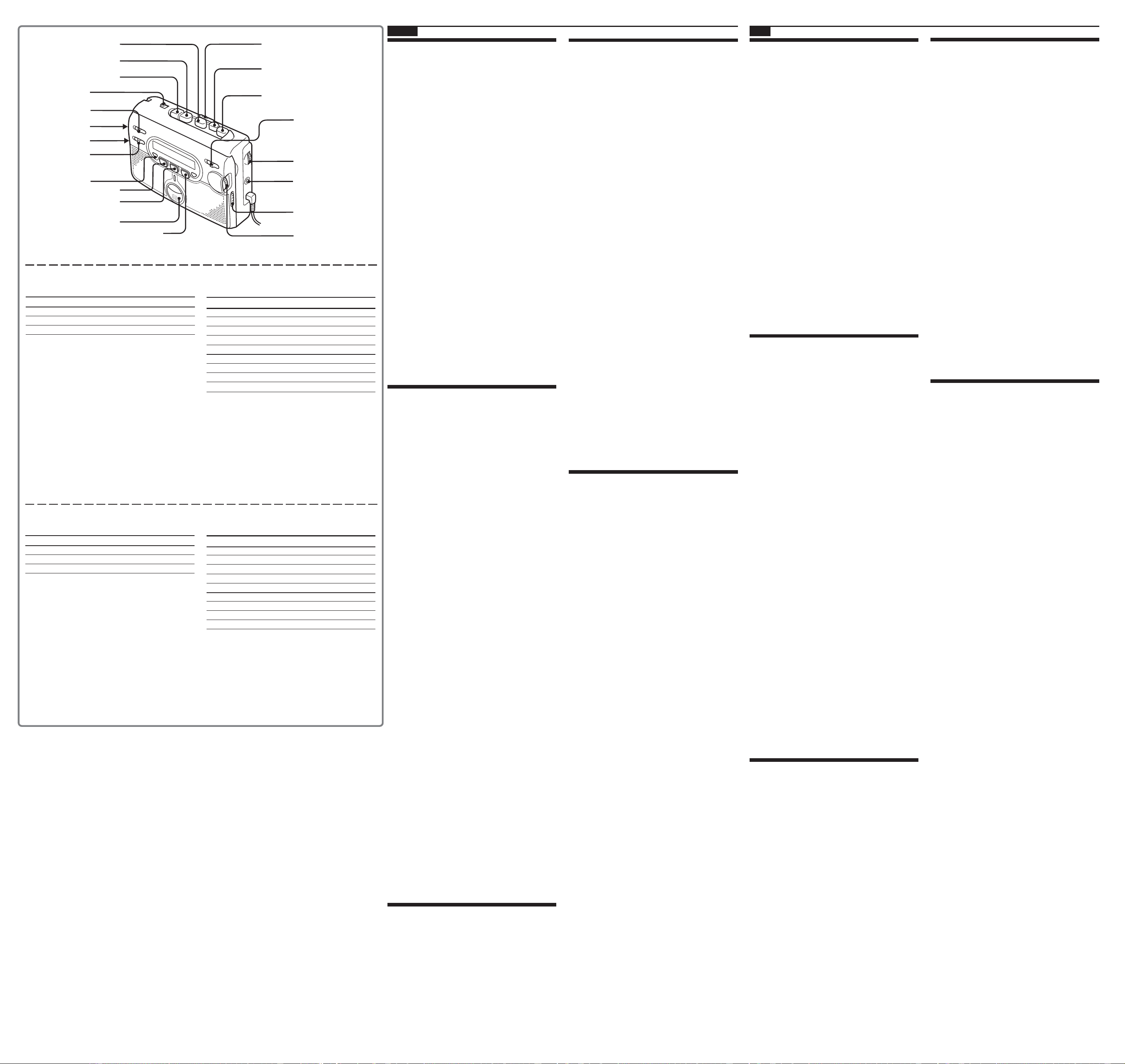
PAUSE
z REC
DIR
REC TIME
AVLS
ISS
SPEAKER
i
x STOP
FF/CUE
REW/REVIEW
Y PLAY
VOL
FM
AM
OFF
TUNING MODE
TUNING
MIC (PLUG IN POWER)
ENTER
c
c
R6(AA) × 2
中文
准备工作
安装电池A
滑开电池盒盖,然后对正确极性装入两个R6
(AA,5号)电池。
“e”在显示窗中闪烁时,即请更换电池。
B
注
• 为获得最佳效果,建议您使用Sony牌碱电池。
•一定要在2分钟内换装好两个电池。否则,预约电台都将
被解除掉。
录音
注
• 如果防误抹小翼已被折断,则无法在该面录音。
•把REC TIME切换到DOUBLE位置所录的录音带是不
能在不带该录音模式功能的磁带录音机上面播放妥当的。
• 录音时,请使用新的电池。
• 当用麦克风录音时,所录的声音是不能通过扬声器和头
戴耳机/耳机听到的。
1 插入一盒标准型(TYPE I)录音带。C
要在两面录音时:
将要先录音的面作为FWD 面插入盒带并把
DIR设定于 FWD。
只要录一面时:
将要录音的面作为REV 面插入盒带并把
DIR设定于 REV。
2 把REC TIME设定于所要位置。
NORMAL(4.8cm/s):用于为获得最佳音响,
最好请用正常模式进行录音。
DOUBLE(2.4cm/s):用于双倍录音时间(例
如,使用60分盒带的双面可录120分钟)。适
用于会议,口授记录等的录音。但,不适用于
录音乐。
3 选择录音源。
要用内装麦克风录音时:
把机器放在结实的面上(例如桌面等)让盒带
座的一面朝上,使麦克风能有效地进行录音。
要用麦克风录音时:
将附带的麦克风连接到MIC(PLUG IN
POWER)插孔。
如图所示,您可以将麦克风夹在您的衣服上。
D
要从收音机录音时:
请调入您想录音的电台(参见“听收音机”)。
4 按 z REC。Y PLAY也同时被按下而开始
录音。录音电平能自动调整
如果您是从FWD(进绕)面开始录音的,在
录完REV(倒绕)面时,录音将自动转换到反
面。
要 请按/切换
暂停录音 PAUSE
停止录音 x STOP
播放中开始录音 播放中按 z REC
检阅刚录的部分 录音中按住REW/
REVIEW。释放了按
钮去听。
要在录AM节目时减小噪声
请将ISS(干扰抑制开关)设定于能将噪声减至最
小的位置。
录音须知
• 录音电平被固定。
• 调整音量或设定AVLS(自动音量限制系统)都不会影
响到录音电平。这些控制器只能改变听赏声音的水平。
• 实际录音将在您滑动 z REC约2秒钟之后开始。请在
您要开始录音时刻的约2秒钟之前滑动 z REC,否则您
将错过录音的开始部分。
•在两面录音时,在录音带换面过程中,录音将有约10秒
钟不进行。
•请勿用高位(TYPE II)或金属(TYPE IV)型的录音
带录音。否则播放录音带时声音可能会失真,以前的录音
内容也可能不会被完全抹消。
• 从收音机录音时,请勿将头戴耳机/耳机接到/拔出i
插孔。否则录音条件可能会突然改变,也可能录下噪音。
•用麦克风录音时,请勿将麦克风靠近电灯线或日光灯,以
避免噪音干扰。
•在录音时所有其他操作都无法进行。要进行其他操作,请
先停止录音。
•录音中,DIR功能是不起作用的。请不要强制设定。否则
机器可能会故障。
•录收音机节目当中,您如果切换了TUNING MODE,频
率即将起变化。
要防止录音带被误录时
请折断A面和/或B面的防误抹小翼。要重新用该
录音带录音,用胶带盖住折断防误抹小翼后的缺口。
播放录音带
1 插入一盒标准型(TYPE I)录音带。C
2 按OFF以关掉收音机。
3 把REC TIME设定于和录音所用的相同位置。
(要播放市售的磁带时,请选择 NORMAL。)
4 按Y PLAY。
要 请按/切换
停止播放 按x STOP
暂停播放 PAUSE
快进绕或重绕* 停止中按FF/CUE或
REW/REVIEW
监听着声音快进绕/重绕 播放中按FF/CUE或
REW/REVIEW
换播放另一面** 把 DIR 切换为 FWD 或
REV
* 当磁带已绕完或重绕完时,如果仍放置机器不管,将
迅速消耗电池。请即按x STOP。
** 当磁带绕到FWD(进绕)面的终端时,播放将自动
地切换到REV(倒绕)面。
注
• 在磁带运转中,不可打开盒带座。
要用扬声器时
把SPEAKER滑到ON。声音将从扬声器放出而头
戴耳机/耳机则听不到声音。
当使用扬声器时,AVLS功能是不起作用的。
其他功能
保护听觉
-AVLS(自动音量限制系统)
(当使用头戴耳机/耳机时为限)
把AVLS设定于LIMIT。便可限制最大的音量以
保护您的耳朵。
(接反面)
FWD (foward) side
FWD(正)面
REV (reverse) side
REV(反)面
built-in microphone
/内装麦克风
FM MODE•ST/MONO
(or/或)
FM MODE•DX/LOCAL
索尼公司
随身听
Specifications
Frequency range
Area* FM (MHz) AM(kHz)
E87.5 - 108 531 - 1 602
U87.5 - 108 530 - 1 710
J 76 - 90 531 - 1 710
* E: European and other countries, U: USA, Canada, and Central
and South America, J:Japan.
Frequency response Playback: 40 - 15 000 Hz
Recording: 100 - 8 000 Hz
Input Microphone (MIC) jack
Output Headphones (i) jack
Load impedance 8 - 300 ohms
Power requirements 3 V DC batteries R6 (size AA) × 2
Power output Speakers 140 mW + 140 mW (JEITA*)
Dimensions (w/h/d) Approx. 112.5 × 87.0 × 39.0 mm
(4
1
/
2
× 3
1
/
2
× 1
9
/
16
inches),
excl. projecting parts and controls
Mass Approx. 190 g (6.8oz) (main unit only)
Supplied accessories Stereo headphones or earphones (1)
Stereo microphone (1)
Sony dry battery R6P(SR) (2) (“Sony
World Model” only)
Design and specifications are subject to change without notice.
English
PAUSE
z REC
DIR
REC TIME
AVLS
ISS
SPEAKER
i
x STOP
FF/CUE
REW/REVIEW
VOL
FM
AM
OFF
TUNING MODE
TUNING
MIC (PLUG IN POWER)
ENTER
Battery life* (Approx. hours)
Sony alkaline LR6(SG)
**
Sony R6P(SR)
(using headphones/earphones)
playback 24 6
radio 48 15
mic recording 20 4.5
radio recording 12 3
(using the speakers)
playback 13 3
radio 23 6
radio recording 8.5 1.5
* Measured value by the standard of JEITA (Japan Electronics
and Information Technology Industries Association). (Using a
Sony HF series cassette tape)
**When using Sony LR6(SG) “STAMINA” alkaline dry batteries
(produced in Japan).
Note
•The battery life may be shorter depending on the
operating condition, the surrounding temperature and
battery type.
Listening to the Radio
Since its cord serves as an FM antenna, connect the
headphones/earphones even when using the
speakers.
Note
For customers who purchased the “Sony World Model”:
Switch the area to “J” when you use this Walkman in
Japan. For operations, refer to “Receiving Stations
Outside Your Country.”
1 Press FM or AM to select the band and to
turn on the radio.
2 For manual tuning
1 Set TUNING MODE to MANUAL.
2 Rotate TUNING to tune in to the desired
station.
To scan for stations, push TUNING until the
frequency digits flash, then briefly rotate it
up/down.
For preset tuning
1 Set TUNING MODE to PRESET.
2 Rotate TUNING to recall the desired
preset station.
To use preset tuning, store the stations first
(see below).
To turn off the radio
Press OFF.
To improve the broadcast reception
•For AM: Reorient the unit itself.
•For FM: Extend the headphone/earphone cord
(antenna). If the reception is still not good, adjust
FM MODE.
Presetting Radio Stations
You can preset up to 25 stations —15 for FM and 10
for AM (for the J area*, up to 16 stations — 8 for FM
and 8 for AM).
* Only if available. See “Receiving Stations Outside Your
Country”.
Presetting Automatically Scanned
Stations
1 Set TUNING MODE to PRESET.
2 Press FM or AM.
3 Press ENTER for more than 2 seconds.
Preset number 1 will flash in the display
and the Walkman starts scanning for
stations from the lower frequencies, and
stops for about 3 seconds when a station is
received.
4 If you wish to preset the received station,
press ENTER while the preset number is
flashing.
The received station is preset on preset
number 1 and the unit starts scanning for
the next receivable station.
5 Repeat step 4 until all receivable stations are
preset.
To stop scanning
Press OFF. The radio is turned off at the same time.
Note
•If stations are already stored, the newly preset stations
replace the old ones when the above procedure is
completed.
Presetting Stations Manually
1 Set TUNING MODE to PRESET.
2 Press FM or AM.
3 Rotate TUNING to select the desired preset
number.
4 Push TUNING until the preset number
flashes in the display.
5 Rotate TUNING to tune in the station.
6 Push TUNING while the display is flashing.
Notes
•
In step 4, if you keep TUNING pushed for too long, the
frequency begins to flash. In this case, first cancel the
flashing frequency by pushing TUNING again, and
repeat step 4.
•If a station is already stored on that number, the newly
preset station will replace the old one.
Receiving Stations
Outside Your Country
(excluding European, Saudi
Arabian, and Chinese models)
1 Press OFF and turn off the radio.
2 Press and hold FM until “J” flashes in the
display.
3 Rotate TUNING to select “E”, “U”, or “J”
and push TUNING.
Note
•If no stations are preset, the preset numbers retain their
former setting.
Precautions
On batteries
•
Do not carry the dry batteries with coins or other metallic objects.
It can generate heat if the positive and negative terminals of the
batteries are accidentally contacted by a metallic object.
• When you are not going to use your Walkman for a long time,
remove the batteries to prevent damage from battery leakage
and corrosion.
On handling
• Do not leave the unit in a location near heat sources, or in a
place subject to direct sunlight, excessive dust or sand,
moisture, rain, mechanical shock, or leave it in a car with its
windows closed.
•We do not recommend the use of tape longer than 90 minutes.
They are very thin and tend to be stretched easily. This may
cause malfunction of the unit or sound deterioration.
• The LCD display may become hard to see or slow down when
using the unit at high temperatures (above 40˚C/104°F) or at
low temperatures (below 0˚C/32°F). At room temperature, the
display will return to its normal operating condition.
• If the unit has not been used for a long time, set it in the
playback mode to warm up for a few minutes before you start
using again.
• Keep personal credit cards using magnetic coding or spring-
wound watches, etc., away from the unit to prevent possible
damage from the magnet used in the speaker.
On headphones/earphones
Road safety
Do not use headphones/earphones while driving, cycling, or
operating any motorized vehicle. It may create a traffic hazard
and is illegal in some areas. It can also be potentially dangerous
to play your headphones/earphones at high volume while
walking, especially at pedestrian crossings.
You should exercise extreme caution or discontinue use in
potentially hazardous situations.
Preventing hearing damage
Do not use headphones/earphones at high volume. Hearing
experts advise against continuous, loud and extended play. If you
experience a ringing in your ears, reduce volume or discontinue
use.
Caring for others
Keep the volume to a moderate level. This will allow you to hear
outside sounds and to be considerate to the people around you.
On maintenance
• Clean the tape head and tape path, using a cotton swab and
commercially available cleaning solvent after every 10 hours of
use.
•To clean the exterior, use a soft cloth slightly moistened in
water. Do not use alcohol, benzine or thinner.
• Clean the headphones/earphones and microphone plugs
periodically.
Troubleshooting
No sound comes out from the speakers.
•Set SPEAKER to ON.
Cannot playback.
•Press OFF to turn off the radio.
The playback speed is too fast/slow.
The playback sound is distorted.
•Set REC TIME at the same position as when the tape
was recorded.
•Replace both batteries with new ones.
Cannot press z REC down.
•If the tab of the tape is broken off, cover the tab hole
with adhesive tape.
The volume cannot be turned up.
•Set AVLS to NORM.
The display and operation are not normal.
•Remove the batteries for 2 minutes or more, and then
insert them again. If this does not solve the problem,
remove the batteries and leave the unit without
batteries for 10 minutes or more, and then insert them
again. In either case, preset the stations again, since the
preset stations are erased from the memory.
Y PLAY
中文
听收音机
因为耳机导线也当FM天线作用,因此虽然是用扬
声器听,也须连接着头戴耳机/耳机使用。
注
购买“Sony世界型号”的顾客:当在日本使用本Walkman
时,请把地区切换到“J”。操作方法,请参看“在国外收
听电台”。
1 按FM或AM 选择波段并打开收音机。
2 要手动调谐时
1 把 TUNING MODE设定于 MANUAL。
2 旋转TUNING以调入所要的电台。
要扫描电台时,请按TUNING至闪烁着频率
数,然后上下旋转使用。
要预约电台时
1 把 TUNING MODE设定于 PRESET。
2 旋转TUNING以选出所要的预约电台。
要使用预约调谐时,请先预约好电台(参见下
列所述)。
要关掉收音机时
请按OFF。
要改善广播接收效果时
•收听AM 节目时:请调转机器本身的方位。
•收听FM 节目时:请拉开头带耳机/耳机导线(天
线)。如果接收效果仍不好,请调整FM MODE。
预约电台
您最多可以预调25个电台-FM 15 个,AM 10
个(在 J 地 区 *,最 多16个电台-FM和AM各8个)。
* 若有所限,请参见“接收国外电台”。
自动预约存储所扫描的电台
1 把TUNING MODE设定于PRESET。
2 按FM或AM。
3 按ENTER 2秒以上。
显示器中将闪烁着预约号而Walkman即从较
低频率开始扫描电台,当接收到电台时,即停
止大约3 秒。
4 如果您要预约接收到的电台,在预约号闪烁时
按ENTER键。
接收到的电台被预约于预约号1,本机开始扫
描下一个可接收的电台。
5 重复步骤4 直至所有可接收电台均被预约。
要停止扫描时
请按OFF。收音机将同时关掉电源。
注
•如果已储存有电台,则当做完上面程序时,新预约电台将
取代旧存有的电台。
手动储存广播电台
1 把TUNING MODE设定于PRESET。
2 按FM或AM。
3 旋转TUNING 以选择所要的预约号。
4 按着TUNING 至显示器中闪烁着预约号。
5 旋转TUNING 以调入电台。
6 当显示闪烁着时,按TUNING。
注
•在步骤4中,如果按住TUNING太久,频率即将开始闪
烁。此时,可再按一次TUNING先解除频率闪烁,然后
重复步骤4 的操作。
•如果该预约号上已储存有电台,则新的预约电台将取代
旧存的电台。
接收国外电台
(欧洲、沙地阿拉伯和中国型号除外)
1 按OFF关掉收音机。
2 按住FM 直至显示器中闪烁着“J”。
3 旋转TUNING 以选择“E”、“U”或“J”并
按 TUNING。
注
•如果没有预约电台,则预约号将保持以前的设定。
使用前须注意
关于电池
• 干电池不要同钱币或其它金属物件放在一起。如果金属物件偶尔
接触电池的正极与负极,就会发热。
• 如果Walkman(本机)长期不用,请取出电池以免本机因电池漏
液、腐蚀而受损。
关于处置
• 不要将本机放在靠近热源或受阳光直射、多尘、多沙、潮湿、雨
淋、机械振动的地方,也不要留在车窗关闭的车内。
• 请不要使用 90 分钟以上长度的磁带,这些磁带很薄,容易被拉
伸。这可能导致本机故障或音质变差。
• 本机在高温(40℃以上)或低温(0℃以下)条件下使用,液晶显
示窗很难看清楚或者显示速度放慢。在室温下,显示窗可恢复到
正常操作状况。
• 如果本机长期未用,在重新开始使用前,请将其设于播放模式加
温几分钟。
• 请将使用磁编码的个人信用卡或发条式钟表等远离本机放置,以
防被扬声器中使用的磁铁损坏。
关于头戴耳机/耳机
路上安全
驾车、骑自行车、摩托车辆时不要使用头戴耳机/耳机,这可能导
致交通事故且在有些地区是违法的。走路特别是穿越马路时用头戴
耳机/耳机大音量听也是有潜在危险的。
在有潜在危险的场合应格外小心,或者停止使用本机。
防止听力受损
不要大音量使用头戴耳机/耳机。听力专家反对持续、大音量收听。
如果有耳鸣经验,请降低音量或不连续使用。
关心他人
请用适当音量收听。这样则既可同时听到外面声音,也不骚扰您周
围人们的安宁。
关于维护
• 每使用了 10 个小时,即请用棉棒和市售清洁液清洁一下磁头和
磁带通道。
• 请用软布轻蘸湿清水擦拭机器外壳。切勿使用酒精,汽油或稀释
剂。
• 请定期地清洁头戴耳机/耳机和麦克风的插头。
故障探寻
扬声器没有声音。
•把 SPEAKER设定于 ON。
不能播放。
•按 OFF以关掉收音机电源。
播放速度太快/太慢。
播放声失真。
•把 REC TIME设定于与该磁带录音时的相同位置。
•两个电池同时换新。
不能按下
z
REC。
•如果磁带的保护小翼已被摘除,可用黏胶带盖住小翼凹
孔。
不能调高音量。
•把 AVLS设定于 NORM。
显示和操作不正常。
•取出电池2分钟或2分钟以上,然后再插入。如果仍不能
解决问题,即请取出电池,让本机10分钟或更长时间处
于没有电池的状态,然后再插入电池。此时,都须重新预
约电台,因为预约电台已从存储器中抹除。
规格
频率范围
地区* FM (MHz) AM(kHz)
E 87.5 - 108 531 - 1 602
U 87.5 - 108 530 - 1 710
J 76 - 90 531 - 1 710
* E:欧洲和其它国家, U:美国、加拿大和中南美,J:日本。
频率范围 放音:40- 15 000Hz
录音:100- 8 000Hz
输入 麦克风(MIC)插孔
输出 头戴耳机(i)插孔
负载阻抗 8- 300 Ω
电源 3V DC电池 R6(5号,AA)×2
功率输出 扬声器140mW+140mW(JEITA*)
尺寸(宽/高/纵深) 大约112.5 × 87.0 ×39.0mm,
不含突起部分和控制器
质量 大约190g(只包括主机)
附件 立体声头戴耳机或耳机 (1)
立体声麦克风 (1)
Sony干电池R6P (SR) (1)(“Sony世界型
号”为限)
设计和规格有所变更时,恕不另行通知。
电池寿命*(大约时数)
Sony碱电池 LR6(SG)
**
Sony R6P(SR)
(使用头带耳机/ 耳机时)
播放 24 6
听收音机 48 15
麦克风录音 20 4.5
收音机录音 12 3
(使用扬声器时)
播放 13 3
听收音机 23 6
收音机录音 8.5 1.5
*按 JEITA (Japan Electronics and Information Technology
Industries Association) 标准测定的值。(使用 Sony HF 系列
磁带)
**使用 LR6 (SG) 型 Sony“STAMINA”碱电池(日本制)时。
注
•电池寿命,可能因操作条件,环境温度和电池型式而缩短
些。
built-in microphone
/内装麦克风
FM MODE•ST/MONO
(or/或)
FM MODE•DX/LOCAL