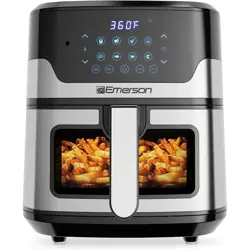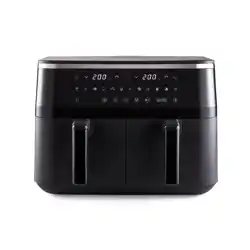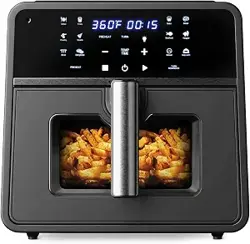

Emerson SmartVoice Air Fryer User Manual
Model ES1003A
Capacity: 10 quarts
Important Notice
Read this manual completely before first use.
Keep this manual for future reference.
Product Overview
The Emerson SmartVoice Air Fryer uses offline voice control. Voice commands work
immediately after plugging in the appliance. No app, Wi-Fi, Bluetooth, or hub is required.
You can control cooking using:
● Voice commands
● The touchscreen control panel
Technical Specifications
● Rated voltage: 120 volts AC
● Rated frequency: 60 hertz
● Rated power: 1700 watts
● Capacity: 10 quarts
● Dimensions: 16.77 inches long, 12.83 inches wide, 12.36 inches high
● Weight: 19.65 pounds
● Temperature range for regular cooking: 170 to 400 degrees Fahrenheit
● Temperature range for dehydrating: 90 to 170 degrees Fahrenheit
● Timer range for regular cooking: 1 minute to 1 hour
● Timer range for dehydrating: 30 minutes to 24 hours

What’s Included
The box contains:
● One air fryer main unit
● One ceramic-coated basket
● One crisper plate
● One crisper rack
● One user manual
● One quick start guide and recipe book
Important Safety Information
General Safety Warnings
Warning. Read all instructions before use.
● This appliance is for household indoor use only.
● Do not use outdoors, in moving vehicles, or on boats.
● Do not allow children to use this appliance.
● Keep the appliance and power cord out of reach of children.
● Do not leave the appliance unattended while plugged in.
● Do not use it for deep frying or with liquid oil.
● Always ensure the basket is fully inserted before operation.
● The air fryer will not operate if the basket is not secured.
Burn and Heat Warnings
● Surfaces become hot during use.
● Use the handle and wear heat-resistant gloves if needed.
● Hot steam is released during cooking.
● Keep hands and face away from air outlets.
● Do not turn the basket upside down while hot.
● Place hot accessories only on heat-resistant surfaces.

Fire Safety Warnings
● Keep at least 4 inches of space around all sides of the air fryer.
● Do not place near walls, curtains, or cabinets.
● Do not block air vents.
● Never operate the appliance while empty, except during preheating.
● Do not overfill the basket.
● Do not place anything on top of the air fryer.
● Never place the air fryer on a stove or hot surface.
Electrical Safety
● Do not use wet hands.
● Do not immerse the cord, plug, or unit in water.
● Do not use damaged cords or plugs.
● Unplug when not in use and before cleaning.
● This appliance uses a polarized plug for safety.
Voice Control Safety
Warning. Voice control activates heating.
● Always unplug when not in use.
● Disable voice control when children are nearby.
● Do not place near TVs or speakers that may trigger commands.
● Always visually confirm the appliance starts or stops correctly.
● Never start cooking by voice unless you are in the same room.
● If the appliance behaves unexpectedly, unplug immediately.
Before First Use
1. Remove all packaging and labels.
2. Pull the basket straight out using the handle.
3. Wash the basket and crisper plate with warm soapy water.
4. Wipe the interior and exterior with a damp cloth.
5. Insert the crisper plate into the basket.
6. Return the basket to the unit.
Note: A slight plastic smell during first use is normal.

Getting Started
1. Place the air fryer on a flat, heat-resistant surface.
2. Insert the basket fully.
3. Plug the unit into a wall outlet.
4. Press the power button to activate the control panel.
5. Add food to the basket.
6. Select a cooking preset or use voice control.
7. Press Start or say a voice command to begin cooking.
Wake Words
The air fryer listens for the following wake words:
● “Hey Emerson”
● “Hey Air Fryer”
● “Hey Fryer”
Using Voice Control
Basic Voice Commands
● Command: “Turn on”
Result: The air fryer powers on.
● Command: “Turn off”
Result: The air fryer powers off.
Cooking with Presets
● Command: “Cook French fries”
Result: Default time and temperature are set.
The air fryer will prompt you to say “Start cooking.”

Custom Cooking
● Command: “Cook chicken nuggets at 300 degrees for 15 minutes”
Result: Time and temperature are confirmed.
Select the food, time, or temperature that fits your preference.
Cook Methods
Here are other cook methods that can be said other than “Cook”:
Air fry
Bake
Reheat
Broil
Keep warm
Dehydrate
Set Custom Timer
● Command: “Set timer to 30 minutes”
Result: Your custom timer will be set.
Set Custom Temperature
● Command: “Set temperature at 350 degrees”
Result: Your custom temperature will be set.
Time/Temp Adjustments During Cooking
● Command: “Increase temperature”
● Command: “Decrease temperature”
● Command: “Increase timer by 10 minutes”

● Command: “Decrease timer by 10 minutes”
Temperature adjusts in 5-degree increments.
Preheat
● Command: “Turn preheat on”
● The air fryer announces when preheating is complete.
Flip Reminder
● Command: “Flip reminder on”
● The air fryer alerts you halfway through cooking.
Status Questions
● “What’s the cooking status?”
● “What is the current temperature?”
● “What is the time remaining?”
Stopping Cooking
● Command: “Stop cooking” or “Cancel”
Result: Cooking stops and the fan runs until cool.
Adjusting the Light
● Command: “Light on”
Result: The light of the air fryer will turn on.
● Command: “Light off”
Result: The light of the air fryer will turn off.

Setting Volume
● Command: “Increase the volume”
Result: The volume of the air fryer will be raised.
● Command: Decrease the volume”
Result: The volume of the air fryer will be lowered.
Voice Control Setting
● Command: “Voice control off”
Result: The voice control function will be turned off. To turn voice control back on, say
“Voice control on.”
Food Chart
Find the full list of voice-compatible foods in the quick start guide.
Cooking Presets
Preset options found on the control panel of the air fryer:
● Fries
● Veggie
● Snack
● Bake
● Meat
● Seafood
● Poultry
● Other
● Dehydrate
● Broil
● Reheat
● Keep Warm
Preset times and temperatures can be adjusted at any time.

Cleaning and Care
● Unplug and allow the unit to cool.
● Clean after every use.
● Basket and crisper plate are dishwasher safe.
● Never immerse the main unit in water.
● Ensure all parts are completely dry before reuse.
Storage
● Unplug and cool completely.
● Clean and dry all parts.
● Store in a cool, dry place.
● Never store while hot or wet.
Troubleshooting (Summary)
● If the unit does not turn on, check the power connection.
● If food is undercooked, reduce batch size or increase time.
● If food is uneven, shake or flip halfway through cooking.
● If the basket does not fit, check crisper plate placement.
Regulatory Information
● ETL listed U.S. safety standards.
● FCC compliant under Part 15.
Warranty and Support
Register your product at emersonsmart.com.

Support phone: 888-886-7188
Hours: 9 a.m. to 7 p.m. Eastern Time
Email: [email protected]
Find us on Social at
Instagram : Emersonsmartglobal