How to program your new SAMCOM hand held radio:
First download the free Customer Service program soware from SAMCOM at
hp://www.sanconsales.com/download.html The name of the download is “SAMCOM Radio_Freq_Tools” and save
the program to your “Downloads” folder of your personal computer.
Important: The SAMCOM program soware will download as an “.rar file” and will have to be “unzipped’.
Unlike regular zip files, Microso Windows does not navely support “.rar files”, so you'll be required to use a dedicated
applicaon for this purpose. Our recommended program to unzip the file is is “7-Zip” for opening RAR files. You may
obtain a free copy of “7-Zip” at hps://www.7-zip.org/.
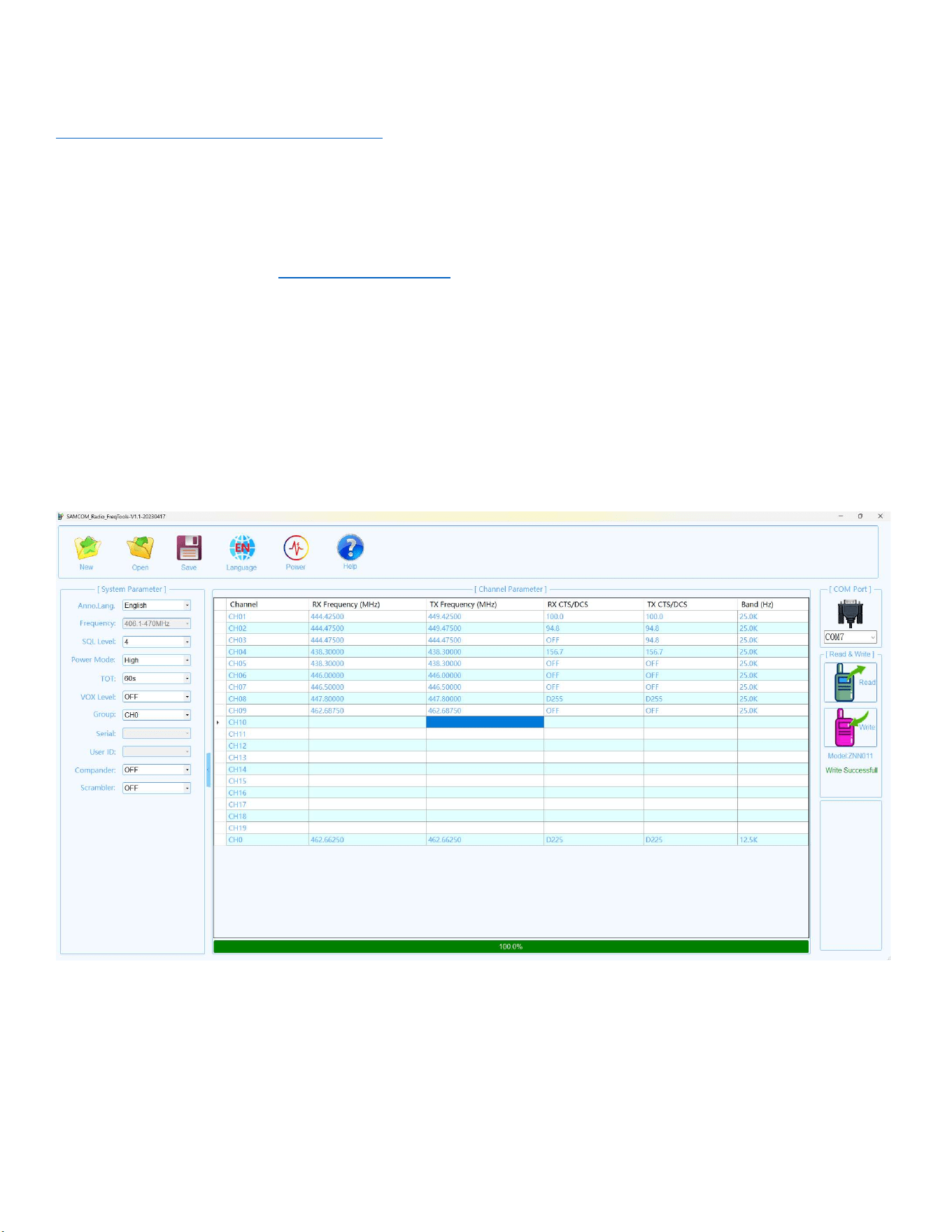
Once the program is unzipped and installed, run the SAMCOM Customer Service Program. A list of pre-programmed
frequencies will be displayed. Plug in your USB program cable into your PC, and the other end of the program cable into
the speaker microphone jack of your SAMCOM radio.
Next, select the proper USB port on the top right of the screen. Press “READ” on the right side of the screen.
The frequencies that are stored on your radio from the factory will now be displayed. Make any necessary changes to the
frequencies that you wish, then the CTS/DCS tones (PL Tones) and select either 12.5K or 25.0K bandwidth (narrowband or
wideband) depending on your radio service. Most commercial radio frequencies and FRS Frequencies are narrowband
(12.5K), while Amateur Radio (HAM Radio) frequencies are wideband (25.0K)
When you are done entering all the frequencies, make any necessary changes on the le side of the program screen to
configure language, squelch, and power levels.
Next write the program into the radio by pressing “WRITE” on the right side of the screen. When 100% appears on the
boom of the screen, the radio is programmed.
If you are programming a fleet or small group of radios, simply plug the program cable into the second radio and press
“WRITE” and connue with however many radios that you have in your group of radios.