
INSTRUCTION MANUAL
If you have questions or comments, contact us.
888-480-9885
DXMA1901200
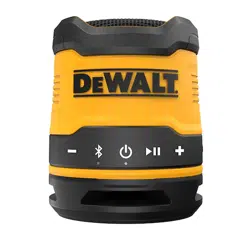
ToughSound Pro
Bluetooth Speaker
WARNING: TO REDUCE THE RISK OF INJURY, USER MUST
READ ALL INSTRUCTIONS BEFORE OPERATING THIS PRODUCT
SAVE THESE INSTRUCTIONS
Thank you for purchasing the ToughSound Pro
Bluetooth Speaker.
With this product, you can:
• Enjoy convenient, wireless music
• Mount to metal surfaces with secure magnetic
back
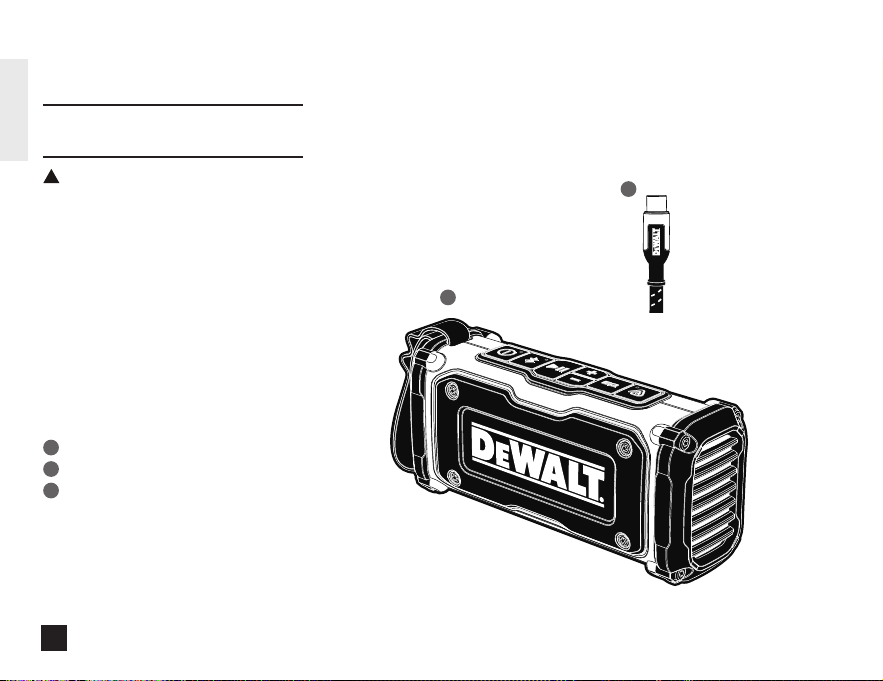
Package Contents
ToughSound Pro Bluetooth Speaker
Type C Charging Cable
User Manual
1
2
3
Instruction Manual
2
ENGLISH
!
1
2
TOUGHSOUND PRO BLUETOOTH SPEAKER
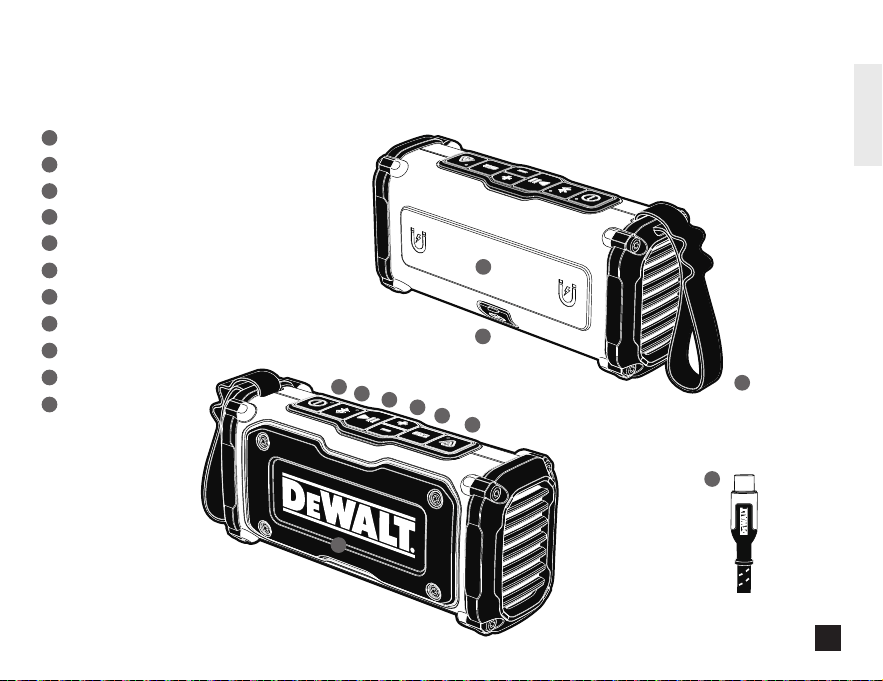
COMPONENTS AT A GLANCE
TOUGHSOUND PRO BLUETOOTH SPEAKER:
Speaker
On/Off Button
Bluetooth Button
Play/Pause Button
Volume/Track Button
EQ Modes Button
Auracast Button
Magnet
Lanyard with Loops
Type C Port
Type C to C Cable
1
10
10
11
11
2
3
2
3
4
5
6
7
8
9
9
8
5
4
6
7
Front
Back
1
3
ENGLISH
DEFINITIONS: SAFETY GUIDELINES
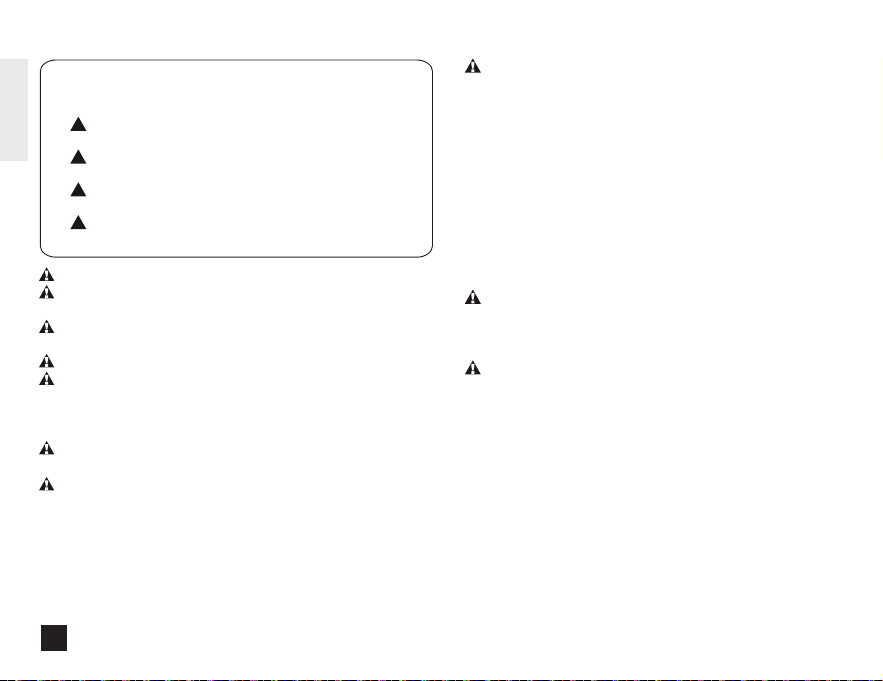
The definitions below describe the level of severity for each signal
word. Please read the manual and pay attention to these symbols.
!
DANGER: Indicates an imminently hazardous situation which,
if not avoided, will result in death or serious injury.
!
WARNING: Indicates a potentially hazardous situation which,
if not avoided, could result in death or serious injury.
!
CAUTION: Indicates a potentially hazardous situation which,
if not avoided, may result in minor or moderate injury.
!
NOTICE: Indicates a practice not related to personal injury
which, if not avoided, may result in property damage.
THE FOLLOWING DIRECTIONS SHOW YOU HOW TO FIND THE SPEAKER
ON BLUETOOTH DEVICE
Turn on the Bluetooth function of your Bluetooth device and select
“DEWALT TOUGHSOUND SPEAKER”. Enter the speaker’s password
“0000” if prompted. For Bluetooth devices featuring Bluetooth 3.0 or
higher, no need to enter a password.
PAIR THE SPEAKER WITH ANOTHER BLUETOOTH DEVICE
If you have another Bluetooth device that you want to pair with the
speaker, make sure the Bluetooth function in any other previously
paired or connected devices are turned off. You will hear
“Disconnected” then follow the steps in “PAIR THE SPEAKER WITH
YOUR BLUETOOTH DEVICES.”
CONTROLS
- To turn speaker ON: Press and hold the ON/OFF button for 2
seconds.
- To turn speaker OFF: Press and hold the ON/OFF button for 2
seconds.
MANAGE YOUR MUSIC
To play or pause music: Press the Play/Pause button once
- Forward (Next Song): Press and hold “+” button for 2 seconds
- Volume Increase: Press “+” button
- Backward (Previous Song): Press and hold “-” button for 2
seconds
- Volume Decrease: Press “-” button
EQ MODE
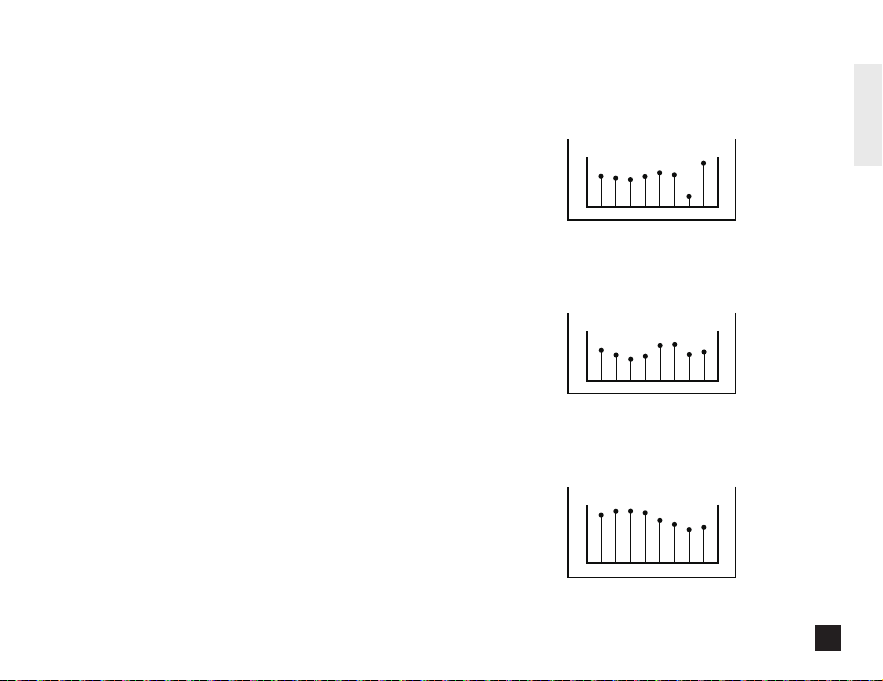
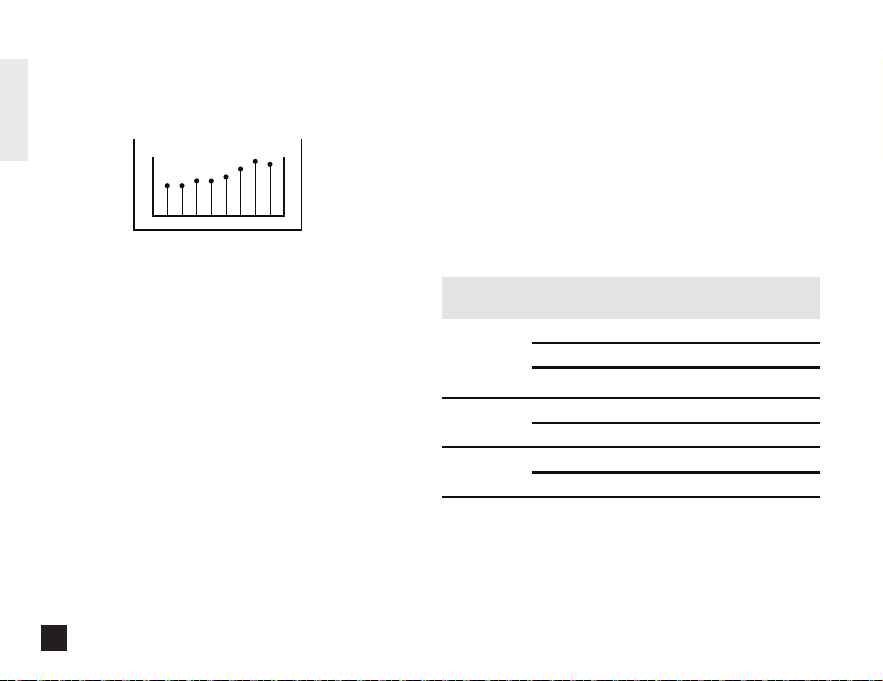
- Press EQ button to toggle EQ setting (Dynamic, Vocal, Bass, Treble).
3-YEAR LIMITED WARRANTY
We're here to help. If you are not satisfied with this product or
have questions on how to use it, please contact us. YOU DO
NOT NEED TO CONTACT THE RETAILER. Please contact one of
our service representatives, using the contact info listed below.
Please provide the product number when contacting us.
PLEASE CALL CUSTOMER SERVICE: 888-480-9885,
8:00 a.m. -5:00 p.m. PT, Monday - Friday, or e-mail us using:
dewaltinfo@efilliate.com
E-filliate, Inc.
11321 White Rock Road
Rancho Cordova, CA 95742 USA
Notes:
a. Secondary speakers need to be disconnected from a mobile
device before activating Auracast™.
b. The Secondary ToughSound speakers’ volume will be
synchronized with Primary speaker.
REMARK:
• SECONDARY TOUGHSOUND SPEAKER COULD BE MUTED/UN-
MUTED BY PRESSING THE PLAY/PAUSE BUTTON
IMPORTANT SAFETY INSTRUCTIONS
FOR RECHARGEABLE BATTERY
• The battery is not fully charged out of the box. Before using the
speaker, read the safety instructions and then follow the charging
procedures outlined.
• Do not incinerate the battery module even if it is severely damaged
or is completely worn out. The battery can explode in a fire. Toxic
fumes and materials are created when lithium batteries are burned.
If battery contents come into contact with the skin, immediately
wash area with mild soap and water.
• If battery liquid gets into the eye, rinse water over the open eye for
15 minutes or until irritation ceases. If medical attention is needed,
the battery electrolyte is composed of a mixture of liquid organic
carbonates and lithium salts. Contents of opened battery cells may
cause respiratory irritation. Provide fresh air. If symptoms persist,
seek medical attention.
IP67 RATING FOR PROTECTION
AGAINST DUST AND WATER
This speaker is splash and water resistant and was tested under
controlled laboratory conditions with a rating of IP67 under IEC
standard 60529. Water resistance is not a permanent condition and
resistance might decrease as a result of normal wear. Do not attempt
to charge wet speaker. To dry your speaker, tap it gently against your
hand with the port cover open to remove excess liquid. Leave your
speaker in a dry area with some airflow. Placing your speaker in front
of a fan blowing cool air directly onto the speaker might help the drying
process. Liquid damage is not covered under warranty.
4
ENGLISH
* If the Secondary speaker is connected to the Bluetooth Device,
user can unpair by pressing the Bluetooth button before activating
the Auracast function.
FACTORY RESET
Long press the ON/OFF button and Play/Pause button for 3
seconds to reset and the speaker will shut down after resetting.
Long press ON/OFF button for 10 seconds for a force restart when
speaker has no response to any click.
TECHNICAL DATA
Music time: Up to 14 hours
Standby time: >10 Days
Charging time: Approximately 2.5 hours
Rechargeable Li-ion battery: 3.7V 3400mAh
Bluetooth version: 5.4
Compatible Bluetooth profiles: HSP / A2DP / AVRCP
Supported audio codec: SBC
Treble
- Enhances high-frequency detail for brighter, clearer sound.
Ideal for acoustic music, classical recordings, and listeners
who prefer extra clarity.
Auracast™ Multi-Speaker
Connection
The ToughSound Bluetooth Speaker supports Auracast™
technology, allowing you to connect multiple ToughSound
speakers for a synchronized audio experience.
1. Ensure all Auracast™-compatible DEWALT speakers are
powered on and within range.
2. Connect one speaker to a smartphone as the Primary
speaker. Then press the Auracast button on up to 100
Auracast™-compatible DEWALT secondary speakers to
synchronize audio.
3. On each Secondary speaker, press the Auracast button to
connect to the Primary speaker.
4. To turn off Auracast, press the Auracast button.
Dynamic
- Optimizes sound automatically for balanced bass, clear vocals,
and crisp highs. Recommended for everyday listening across
different music types and content.
Vocal
- Enhance voice clarity by emphasizing mid-range frequencies
and reducing background bass. Ideal for calls, podcasts, news,
and spoken content.
Bass
- Boosts low-frequency output for deeper, more powerful bass.
Best for bass-driven music, movies, and listening in noisy
environments.
WARNING: DO NOT leave speaker in any location with excessive heat.
WARNING: DO NOT charge or use the battery in explosive atmospheres,
such as in the presence of flammable liquids, gases or dust.
WARNING: DO NOT modify the battery in any way to fit a non-compatible
charger as the battery may rupture causing serious personal injury.
WARNING: DO NOT immerse in water or other liquids.
WARNING: DO NOT store or use the speaker in locations where the
temperature may reach or exceed 105°F(40°C)(such as outside sheds or
metal buildings in summer). For best life, store speaker in a cool, dry
location.
WARNING: Burn hazard. Battery liquid may be flammable if exposed to
spark or flame.
WARNING: Fire hazard. Never attempt to open the battery pack for any
reason. lf the battery pack is cracked or damaged, do not insert the
charging cable. Do not crush, drop or damage the battery. Do not use the
speaker if it has received a sharp blow, been dropped, run over or damaged
in any way (e.g. pierced with a nail, hit with a hammer, stepped on).
Damaged batteries should be returned to a service center for recycling.
WARNING: The speaker should not be disposed of as municipal
solid waste.To recycle it, contact your local hazardous waste processor
or contact Call 2 Recycle
®
on their website, call2recycle.org, or by
phone at 877-273-2925 to find the nearest drop-off location for
lithium-polymer batteries.
GETTING STARTED
CHARGE THE SPEAKER
Connect one Type C end of the charging cable into the speaker and the
other end into a power source. Make sure the speaker is fully
charged before using it for the first time.
*Charger sold separately.
WARNING: Use only with a Listed Class 2 USB power adapter
that is compliant with applicable country regulations and
international/regional safety standards. Using adapters that do not
meet applicable safety standards could result in injury.
WARNING: Observe the safety instructions of the charger being
used to power this device.
PAIR THE SPEAKER WITH YOUR BLUETOOTH DEVICE
Press and hold the speaker's ON/OFF button for 2 seconds to turn the
speaker on. If not previously paired, the speaker will automatically
enter pairing mode. If the speaker has been previously paired, it will
automatically enter pairing mode after 3 minutes of reconnecting
timeout.
Alternatively, you can press the Bluetooth button to enter pairing mode.
THE FOLLOWING DIRECTIONS SHOW YOU HOW TO FIND THE SPEAKER
ON BLUETOOTH DEVICE
Turn on the Bluetooth function of your Bluetooth device and select
“DEWALT TOUGHSOUND SPEAKER”. Enter the speaker’s password
“0000” if prompted. For Bluetooth devices featuring Bluetooth 3.0 or
higher, no need to enter a password.
PAIR THE SPEAKER WITH ANOTHER BLUETOOTH DEVICE
If you have another Bluetooth device that you want to pair with the
speaker, make sure the Bluetooth function in any other previously
paired or connected devices are turned off. You will hear
“Disconnected” then follow the steps in “PAIR THE SPEAKER WITH
YOUR BLUETOOTH DEVICES.”
CONTROLS
- To turn speaker ON: Press and hold the ON/OFF button for 2
seconds.
- To turn speaker OFF: Press and hold the ON/OFF button for 2
seconds.
MANAGE YOUR MUSIC
To play or pause music: Press the Play/Pause button once
- Forward (Next Song): Press and hold “+” button for 2 seconds
- Volume Increase: Press “+” button
- Backward (Previous Song): Press and hold “-” button for 2
seconds
- Volume Decrease: Press “-” button
EQ MODE
- Press EQ button to toggle EQ setting (Dynamic, Vocal, Bass, Treble).
3-YEAR LIMITED WARRANTY
We're here to help. If you are not satisfied with this product or
have questions on how to use it, please contact us. YOU DO
NOT NEED TO CONTACT THE RETAILER. Please contact one of
our service representatives, using the contact info listed below.
Please provide the product number when contacting us.
PLEASE CALL CUSTOMER SERVICE: 888-480-9885,
8:00 a.m. -5:00 p.m. PT, Monday - Friday, or e-mail us using:
dewaltinfo@efilliate.com
E-filliate, Inc.
11321 White Rock Road
Rancho Cordova, CA 95742 USA
Notes:
a. Secondary speakers need to be disconnected from a mobile
device before activating Auracast™.
b. The Secondary ToughSound speakers’ volume will be
synchronized with Primary speaker.
REMARK:
• SECONDARY TOUGHSOUND SPEAKER COULD BE MUTED/UN-
MUTED BY PRESSING THE PLAY/PAUSE BUTTON
IMPORTANT SAFETY INSTRUCTIONS
FOR RECHARGEABLE BATTERY
• The battery is not fully charged out of the box. Before using the
speaker, read the safety instructions and then follow the charging
procedures outlined.
• Do not incinerate the battery module even if it is severely damaged
or is completely worn out. The battery can explode in a fire. Toxic
fumes and materials are created when lithium batteries are burned.
If battery contents come into contact with the skin, immediately
wash area with mild soap and water.
• If battery liquid gets into the eye, rinse water over the open eye for
15 minutes or until irritation ceases. If medical attention is needed,
the battery electrolyte is composed of a mixture of liquid organic
carbonates and lithium salts. Contents of opened battery cells may
cause respiratory irritation. Provide fresh air. If symptoms persist,
seek medical attention.
IP67 RATING FOR PROTECTION
AGAINST DUST AND WATER
This speaker is splash and water resistant and was tested under
controlled laboratory conditions with a rating of IP67 under IEC
standard 60529. Water resistance is not a permanent condition and
resistance might decrease as a result of normal wear. Do not attempt
to charge wet speaker. To dry your speaker, tap it gently against your
hand with the port cover open to remove excess liquid. Leave your
speaker in a dry area with some airflow. Placing your speaker in front
of a fan blowing cool air directly onto the speaker might help the drying
process. Liquid damage is not covered under warranty.
dB
15
0
-15
-31 125 250 500 1,000 2,000 8,000
Hz
dB
15
0
-15
-31 125 250 500 1,000 2,000 8,000
Hz
dB
15
0
-15
-31 125 250 500 1,000 2,000 8,000
Hz
5
ENGLISH
* If the Secondary speaker is connected to the Bluetooth Device,
user can unpair by pressing the Bluetooth button before activating
the Auracast function.
FACTORY RESET
Long press the ON/OFF button and Play/Pause button for 3
seconds to reset and the speaker will shut down after resetting.
Long press ON/OFF button for 10 seconds for a force restart when
speaker has no response to any click.
TECHNICAL DATA
Music time: Up to 14 hours
Standby time: >10 Days
Charging time: Approximately 2.5 hours
Rechargeable Li-ion battery: 3.7V 3400mAh
Bluetooth version: 5.4
Compatible Bluetooth profiles: HSP / A2DP / AVRCP
Supported audio codec: SBC
Treble
- Enhances high-frequency detail for brighter, clearer sound.
Ideal for acoustic music, classical recordings, and listeners
who prefer extra clarity.
Auracast™ Multi-Speaker
Connection
The ToughSound Bluetooth Speaker supports Auracast™
technology, allowing you to connect multiple ToughSound
speakers for a synchronized audio experience.
1. Ensure all Auracast™-compatible DEWALT speakers are
powered on and within range.
2. Connect one speaker to a smartphone as the Primary
speaker. Then press the Auracast button on up to 100
Auracast™-compatible DEWALT secondary speakers to
synchronize audio.
3. On each Secondary speaker, press the Auracast button to
connect to the Primary speaker.
4. To turn off Auracast, press the Auracast button.
Dynamic
- Optimizes sound automatically for balanced bass, clear vocals,
and crisp highs. Recommended for everyday listening across
different music types and content.
Vocal
- Enhance voice clarity by emphasizing mid-range frequencies
and reducing background bass. Ideal for calls, podcasts, news,
and spoken content.
Bass
- Boosts low-frequency output for deeper, more powerful bass.
Best for bass-driven music, movies, and listening in noisy
environments.
THE FOLLOWING DIRECTIONS SHOW YOU HOW TO FIND THE SPEAKER
ON BLUETOOTH DEVICE
Turn on the Bluetooth function of your Bluetooth device and select
“DEWALT TOUGHSOUND SPEAKER”. Enter the speaker’s password
“0000” if prompted. For Bluetooth devices featuring Bluetooth 3.0 or
higher, no need to enter a password.
PAIR THE SPEAKER WITH ANOTHER BLUETOOTH DEVICE
If you have another Bluetooth device that you want to pair with the
speaker, make sure the Bluetooth function in any other previously
paired or connected devices are turned off. You will hear
“Disconnected” then follow the steps in “PAIR THE SPEAKER WITH
YOUR BLUETOOTH DEVICES.”
CONTROLS
- To turn speaker ON: Press and hold the ON/OFF button for 2
seconds.
- To turn speaker OFF: Press and hold the ON/OFF button for 2
seconds.
MANAGE YOUR MUSIC
To play or pause music: Press the Play/Pause button once
- Forward (Next Song): Press and hold “+” button for 2 seconds
- Volume Increase: Press “+” button
- Backward (Previous Song): Press and hold “-” button for 2
seconds
- Volume Decrease: Press “-” button
EQ MODE
- Press EQ button to toggle EQ setting (Dynamic, Vocal, Bass, Treble).
3-YEAR LIMITED WARRANTY
We're here to help. If you are not satisfied with this product or
have questions on how to use it, please contact us. YOU DO
NOT NEED TO CONTACT THE RETAILER. Please contact one of
our service representatives, using the contact info listed below.
Please provide the product number when contacting us.
PLEASE CALL CUSTOMER SERVICE: 888-480-9885,
8:00 a.m. -5:00 p.m. PT, Monday - Friday, or e-mail us using:
dewaltinfo@efilliate.com
E-filliate, Inc.
11321 White Rock Road
Rancho Cordova, CA 95742 USA
Notes:
a. Secondary speakers need to be disconnected from a mobile
device before activating Auracast™.
b. The Secondary ToughSound speakers’ volume will be
synchronized with Primary speaker.
REMARK:
• SECONDARY TOUGHSOUND SPEAKER COULD BE MUTED/UN-
MUTED BY PRESSING THE PLAY/PAUSE BUTTON
CHARGE INDICATOR LED STATUS:
≥40%
20% - 40%
≤20%
0% - 99%
0% - 99%
100%
100%
Green
Green
Yellow
Red and blinking
Red
No illumination
Red
LEVEL OF
CHARGE
CHARGE INDICATOR
LED COLOR
UNIT ON AND
NOT CHARGING
UNIT OFF AND
CHARGING
UNIT ON AND
CHARGING
IMPORTANT SAFETY INSTRUCTIONS
FOR RECHARGEABLE BATTERY
• The battery is not fully charged out of the box. Before using the
speaker, read the safety instructions and then follow the charging
procedures outlined.
• Do not incinerate the battery module even if it is severely damaged
or is completely worn out. The battery can explode in a fire. Toxic
fumes and materials are created when lithium batteries are burned.
If battery contents come into contact with the skin, immediately
wash area with mild soap and water.
• If battery liquid gets into the eye, rinse water over the open eye for
15 minutes or until irritation ceases. If medical attention is needed,
the battery electrolyte is composed of a mixture of liquid organic
carbonates and lithium salts. Contents of opened battery cells may
cause respiratory irritation. Provide fresh air. If symptoms persist,
seek medical attention.
IP67 RATING FOR PROTECTION
AGAINST DUST AND WATER
This speaker is splash and water resistant and was tested under
controlled laboratory conditions with a rating of IP67 under IEC
standard 60529. Water resistance is not a permanent condition and
resistance might decrease as a result of normal wear. Do not attempt
to charge wet speaker. To dry your speaker, tap it gently against your
hand with the port cover open to remove excess liquid. Leave your
speaker in a dry area with some airflow. Placing your speaker in front
of a fan blowing cool air directly onto the speaker might help the drying
process. Liquid damage is not covered under warranty.
dB
15
0
-15
-31 125 250 500 1,000 2,000 8,000
Hz
6
ENGLISH
* If the Secondary speaker is connected to the Bluetooth Device,
user can unpair by pressing the Bluetooth button before activating
the Auracast function.
FACTORY RESET
Long press the ON/OFF button and Play/Pause button for 3
seconds to reset and the speaker will shut down after resetting.
Long press ON/OFF button for 10 seconds for a force restart when
speaker has no response to any click.
TECHNICAL DATA
Music time: Up to 14 hours
Standby time: >10 Days
Charging time: Approximately 2.5 hours
Rechargeable Li-ion battery: 3.7V 3400mAh
Bluetooth version: 5.4
Compatible Bluetooth profiles: HSP / A2DP / AVRCP
Supported audio codec: SBC
Treble
- Enhances high-frequency detail for brighter, clearer sound.
Ideal for acoustic music, classical recordings, and listeners
who prefer extra clarity.
Auracast™ Multi-Speaker
Connection
The ToughSound Bluetooth Speaker supports Auracast™
technology, allowing you to connect multiple ToughSound
speakers for a synchronized audio experience.
1. Ensure all Auracast™-compatible DEWALT speakers are
powered on and within range.
2. Connect one speaker to a smartphone as the Primary
speaker. Then press the Auracast button on up to 100
Auracast™-compatible DEWALT secondary speakers to
synchronize audio.
3. On each Secondary speaker, press the Auracast button to
connect to the Primary speaker.
4. To turn off Auracast, press the Auracast button.
Dynamic
- Optimizes sound automatically for balanced bass, clear vocals,
and crisp highs. Recommended for everyday listening across
different music types and content.
Vocal
- Enhance voice clarity by emphasizing mid-range frequencies
and reducing background bass. Ideal for calls, podcasts, news,
and spoken content.
Bass
- Boosts low-frequency output for deeper, more powerful bass.
Best for bass-driven music, movies, and listening in noisy
environments.
THE FOLLOWING DIRECTIONS SHOW YOU HOW TO FIND THE SPEAKER
ON BLUETOOTH DEVICE
Turn on the Bluetooth function of your Bluetooth device and select
“DEWALT TOUGHSOUND SPEAKER”. Enter the speaker’s password
“0000” if prompted. For Bluetooth devices featuring Bluetooth 3.0 or
higher, no need to enter a password.
PAIR THE SPEAKER WITH ANOTHER BLUETOOTH DEVICE
If you have another Bluetooth device that you want to pair with the
speaker, make sure the Bluetooth function in any other previously
paired or connected devices are turned off. You will hear
“Disconnected” then follow the steps in “PAIR THE SPEAKER WITH
YOUR BLUETOOTH DEVICES.”
CONTROLS
- To turn speaker ON: Press and hold the ON/OFF button for 2
seconds.
- To turn speaker OFF: Press and hold the ON/OFF button for 2
seconds.
MANAGE YOUR MUSIC
To play or pause music: Press the Play/Pause button once
- Forward (Next Song): Press and hold “+” button for 2 seconds
- Volume Increase: Press “+” button
- Backward (Previous Song): Press and hold “-” button for 2
seconds
- Volume Decrease: Press “-” button
EQ MODE
- Press EQ button to toggle EQ setting (Dynamic, Vocal, Bass, Treble).
3-YEAR LIMITED WARRANTY
We're here to help. If you are not satisfied with this product or
have questions on how to use it, please contact us. YOU DO
NOT NEED TO CONTACT THE RETAILER. Please contact one of
our service representatives, using the contact info listed below.
Please provide the product number when contacting us.
PLEASE CALL CUSTOMER SERVICE: 888-480-9885,
8:00 a.m. -5:00 p.m. PT, Monday - Friday, or e-mail us using:
dewaltinfo@efilliate.com
E-filliate, Inc.
11321 White Rock Road
Rancho Cordova, CA 95742 USA
Notes:
a. Secondary speakers need to be disconnected from a mobile
device before activating Auracast™.
b. The Secondary ToughSound speakers’ volume will be
synchronized with Primary speaker.
REMARK:
• SECONDARY TOUGHSOUND SPEAKER COULD BE MUTED/UN-
MUTED BY PRESSING THE PLAY/PAUSE BUTTON
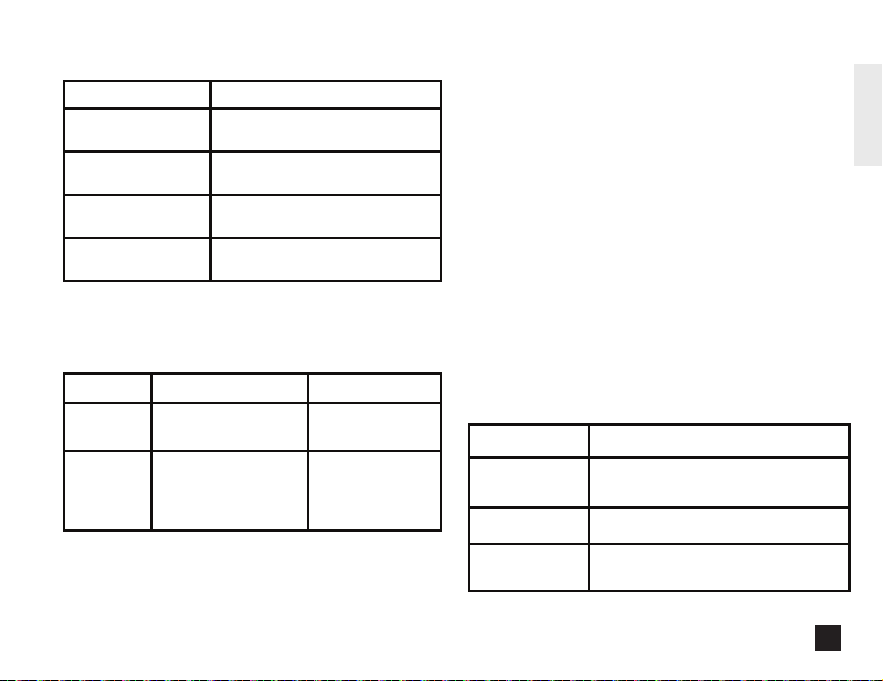
BLUETOOTH
®
STATUS INDICATOR LED
Blink Patterns
Continuous Single
Blinks
Continuous Double
Blinks
Solid Light
No Light
Speaker is in pairing mode and
discoverable by your device
Speaker is connected
with a device
Speaker is off or connected as
secondary speaker in Auracast
Speaker Bluetooth
®
is on
Status/Mode
Auracast™ Status Indicator LED
SPEAKER
Primary
Secondary*
Connected to Primary
- Green
White
Connected to
Bluetooth Device
NOT connected to
Bluetooth Device
Status/Mode Condition
IMPORTANT SAFETY INSTRUCTIONS
FOR RECHARGEABLE BATTERY
• The battery is not fully charged out of the box. Before using the
speaker, read the safety instructions and then follow the charging
procedures outlined.
• Do not incinerate the battery module even if it is severely damaged
or is completely worn out. The battery can explode in a fire. Toxic
fumes and materials are created when lithium batteries are burned.
If battery contents come into contact with the skin, immediately
wash area with mild soap and water.
• If battery liquid gets into the eye, rinse water over the open eye for
15 minutes or until irritation ceases. If medical attention is needed,
the battery electrolyte is composed of a mixture of liquid organic
carbonates and lithium salts. Contents of opened battery cells may
cause respiratory irritation. Provide fresh air. If symptoms persist,
seek medical attention.
IP67 RATING FOR PROTECTION
AGAINST DUST AND WATER
This speaker is splash and water resistant and was tested under
controlled laboratory conditions with a rating of IP67 under IEC
standard 60529. Water resistance is not a permanent condition and
resistance might decrease as a result of normal wear. Do not attempt
to charge wet speaker. To dry your speaker, tap it gently against your
hand with the port cover open to remove excess liquid. Leave your
speaker in a dry area with some airflow. Placing your speaker in front
of a fan blowing cool air directly onto the speaker might help the drying
process. Liquid damage is not covered under warranty.
Environment
Open,
unobstructed
Up to 130 ft (40 m)
Typical indoor ~30–60 ft (10–20 m)
With multiple
walls
~10–20 ft (3–6 m)
Typical Bluetooth/Auracast Range
7
ENGLISH
* If the Secondary speaker is connected to the Bluetooth Device,
user can unpair by pressing the Bluetooth button before activating
the Auracast function.
FACTORY RESET
Long press the ON/OFF button and Play/Pause button for 3
seconds to reset and the speaker will shut down after resetting.
Long press ON/OFF button for 10 seconds for a force restart when
speaker has no response to any click.
TECHNICAL DATA
Music time: Up to 14 hours
Standby time: >10 Days
Charging time: Approximately 2.5 hours
Rechargeable Li-ion battery: 3.7V 3400mAh
Bluetooth version: 5.4
Compatible Bluetooth profiles: HSP / A2DP / AVRCP
Supported audio codec: SBC
Treble
- Enhances high-frequency detail for brighter, clearer sound.
Ideal for acoustic music, classical recordings, and listeners
who prefer extra clarity.
Auracast™ Multi-Speaker
Connection
The ToughSound Bluetooth Speaker supports Auracast™
technology, allowing you to connect multiple ToughSound
speakers for a synchronized audio experience.
1. Ensure all Auracast™-compatible DEWALT speakers are
powered on and within range.
2. Connect one speaker to a smartphone as the Primary
speaker. Then press the Auracast button on up to 100
Auracast™-compatible DEWALT secondary speakers to
synchronize audio.
3. On each Secondary speaker, press the Auracast button to
connect to the Primary speaker.
4. To turn off Auracast, press the Auracast button.
Dynamic
- Optimizes sound automatically for balanced bass, clear vocals,
and crisp highs. Recommended for everyday listening across
different music types and content.
Vocal
- Enhance voice clarity by emphasizing mid-range frequencies
and reducing background bass. Ideal for calls, podcasts, news,
and spoken content.
Bass
- Boosts low-frequency output for deeper, more powerful bass.
Best for bass-driven music, movies, and listening in noisy
environments.

THE FOLLOWING DIRECTIONS SHOW YOU HOW TO FIND THE SPEAKER
ON BLUETOOTH DEVICE
Turn on the Bluetooth function of your Bluetooth device and select
“DEWALT TOUGHSOUND SPEAKER”. Enter the speaker’s password
“0000” if prompted. For Bluetooth devices featuring Bluetooth 3.0 or
higher, no need to enter a password.
PAIR THE SPEAKER WITH ANOTHER BLUETOOTH DEVICE
If you have another Bluetooth device that you want to pair with the
speaker, make sure the Bluetooth function in any other previously
paired or connected devices are turned off. You will hear
“Disconnected” then follow the steps in “PAIR THE SPEAKER WITH
YOUR BLUETOOTH DEVICES.”
CONTROLS
- To turn speaker ON: Press and hold the ON/OFF button for 2
seconds.
- To turn speaker OFF: Press and hold the ON/OFF button for 2
seconds.
MANAGE YOUR MUSIC
To play or pause music: Press the Play/Pause button once
- Forward (Next Song): Press and hold “+” button for 2 seconds
- Volume Increase: Press “+” button
- Backward (Previous Song): Press and hold “-” button for 2
seconds
- Volume Decrease: Press “-” button
EQ MODE
- Press EQ button to toggle EQ setting (Dynamic, Vocal, Bass, Treble).
3-YEAR LIMITED WARRANTY
We're here to help. If you are not satisfied with this product or
have questions on how to use it, please contact us. YOU DO
NOT NEED TO CONTACT THE RETAILER. Please contact one of
our service representatives, using the contact info listed below.
Please provide the product number when contacting us.
PLEASE CALL CUSTOMER SERVICE: 888-480-9885,
8:00 a.m. -5:00 p.m. PT, Monday - Friday, or e-mail us using:
dewaltinfo@efilliate.com
E-filliate, Inc.
11321 White Rock Road
Rancho Cordova, CA 95742 USA
Notes:
a. Secondary speakers need to be disconnected from a mobile
device before activating Auracast™.
b. The Secondary ToughSound speakers’ volume will be
synchronized with Primary speaker.
REMARK:
• SECONDARY TOUGHSOUND SPEAKER COULD BE MUTED/UN-
MUTED BY PRESSING THE PLAY/PAUSE BUTTON
IMPORTANT SAFETY INSTRUCTIONS
FOR RECHARGEABLE BATTERY
• The battery is not fully charged out of the box. Before using the
speaker, read the safety instructions and then follow the charging
procedures outlined.
• Do not incinerate the battery module even if it is severely damaged
or is completely worn out. The battery can explode in a fire. Toxic
fumes and materials are created when lithium batteries are burned.
If battery contents come into contact with the skin, immediately
wash area with mild soap and water.
• If battery liquid gets into the eye, rinse water over the open eye for
15 minutes or until irritation ceases. If medical attention is needed,
the battery electrolyte is composed of a mixture of liquid organic
carbonates and lithium salts. Contents of opened battery cells may
cause respiratory irritation. Provide fresh air. If symptoms persist,
seek medical attention.
IP67 RATING FOR PROTECTION
AGAINST DUST AND WATER
This speaker is splash and water resistant and was tested under
controlled laboratory conditions with a rating of IP67 under IEC
standard 60529. Water resistance is not a permanent condition and
resistance might decrease as a result of normal wear. Do not attempt
to charge wet speaker. To dry your speaker, tap it gently against your
hand with the port cover open to remove excess liquid. Leave your
speaker in a dry area with some airflow. Placing your speaker in front
of a fan blowing cool air directly onto the speaker might help the drying
process. Liquid damage is not covered under warranty.
8
ENGLISH
* If the Secondary speaker is connected to the Bluetooth Device,
user can unpair by pressing the Bluetooth button before activating
the Auracast function.
FACTORY RESET
Long press the ON/OFF button and Play/Pause button for 3
seconds to reset and the speaker will shut down after resetting.
Long press ON/OFF button for 10 seconds for a force restart when
speaker has no response to any click.
TECHNICAL DATA
Music time: Up to 14 hours
Standby time: >10 Days
Charging time: Approximately 2.5 hours
Rechargeable Li-ion battery: 3.7V 3400mAh
Bluetooth version: 5.4
Compatible Bluetooth profiles: HSP / A2DP / AVRCP
Supported audio codec: SBC
Treble
- Enhances high-frequency detail for brighter, clearer sound.
Ideal for acoustic music, classical recordings, and listeners
who prefer extra clarity.
Auracast™ Multi-Speaker
Connection
The ToughSound Bluetooth Speaker supports Auracast™
technology, allowing you to connect multiple ToughSound
speakers for a synchronized audio experience.
1. Ensure all Auracast™-compatible DEWALT speakers are
powered on and within range.
2. Connect one speaker to a smartphone as the Primary
speaker. Then press the Auracast button on up to 100
Auracast™-compatible DEWALT secondary speakers to
synchronize audio.
3. On each Secondary speaker, press the Auracast button to
connect to the Primary speaker.
4. To turn off Auracast, press the Auracast button.
Dynamic
- Optimizes sound automatically for balanced bass, clear vocals,
and crisp highs. Recommended for everyday listening across
different music types and content.
Vocal
- Enhance voice clarity by emphasizing mid-range frequencies
and reducing background bass. Ideal for calls, podcasts, news,
and spoken content.
Bass
- Boosts low-frequency output for deeper, more powerful bass.
Best for bass-driven music, movies, and listening in noisy
environments.

Federal Communications Commission
(FCC) Statement
This device complies with part 15 of the FCC Rules. Operation is
subject to the following two conditions:
(1) This device may not cause harmful interference, and
(2) this device must accept any interference received, including
interference that may cause undesired operation.
Note: This equipment has been tested and found to comply with
the limits for a Class B digital device, pursuant to part 15 of the
FCC Rules. These limits are designed to provide reasonable
protection against harmful interference in a residential installation.
This equipment generates, uses and can radiate radio frequency
energy and, if not installed and used in accordance with the
instructions, may cause harmful interference to radio communica-
tions. However, there is no guarantee that interference will not
occur in a particular installation. If this equipment does cause
harmful interference to radio or television reception, which can be
determined by turning the equipment off and on, the user is
encouraged to try to correct the interference by one or more of the
following measures:
• Reorient or relocate the receiving antenna.
• Increase the separation between the equipment and receiver.
• Connect the equipment into an outlet on a circuit different from
that to which the receiver is connected.
• Consult the dealer or an experienced radio/TV technician for
help.
Warning: Changes or modifications made to this device not
expressly approved by E-filliate Incorporated for compliance may
void the FCC authorization to operate this device.
RF exposure statement:
This device complies with FCC RF radiation exposure limits set
forth for an uncontrolled environment. The device is installed and
operated without restriction.
This device contains licence-exempt transmitter(s)/receiver(s) that
comply with Innovation, Science and Economic Development
Canada’s licence-exempt RSS(s). Operation is subject to the
following two conditions:
1.This device may not cause interference.
2.This device must accept any interference, including interference
that may cause undesired operation of the device.
9
ENGLISH
Part No. DXMA1901200 ©2026 Stanley Black & Decker, Inc
FCC ID: 2ADH6-1901200
ISED Statement
This device contains licence-exempt transmitter(s)/receiver(s) that comply with Innovation, Science and Economic Development Canada's licence-exempt RSS(s
). Operation is subject to the following two conditions:
1. This device may not cause interference.
2. This device must accept any interference, including interference that may cause undesired operation of the device.
Déclaration ise
Cet appareil contient des émetteurs/récepteurs exemptés de licence qui sont conformes aux RSS exemptés de licence d’innovation, sciences et développement
économique Canada. Le fonctionnement est soumis aux deux conditions suivantes:
1. Cet appareil ne peut pas causer d’interférences.
2. Cet appareil doit accepter toute interférence, y compris les interférences qui peuvent causer un fonctionnement indésirable de l’appareil.
For Receiver:
This device meets the exemption from the routine evaluation limits in section 6.3 of RSS 102 and compliance with RSS 102 RF exposure, users can obtain
Canadian information on RF exposure and compliance.
Cet appareil satisfait à l’exemption des limites d’évaluation de routine de la section 6.3 du RSS 102 et conformité au RSS 102 exposition aux RF. Les utilisateurs
peuvent obtenir de l’information canadienne sur l’exposition aux RF et la conformité.
This equipment complies with Canada radiation exposure limits set forth for an uncontrolled environment. The device is installed and operated without restriction.
Cet équipement est conforme Canada limites d'exposition aux radiations dans un environnement non contrôlé. Die Installation und der Betrieb der Ausrüstung
sind uneingeschränkt.
For Transmitter:
This device meets the exemption from the routine evaluation limits in section 6.3 of RSS 102 and compliance with RSS 102 RF exposure, users can obtain
Canadian information on RF exposure and compliance.
cet appareil est conforme à l'exemption des limites d'évaluation courante dans la section 6.3 du cnr - 102 et conformité avec rss 102 de l'exposition aux rf, les
utilisateurs peuvent obtenir des données canadiennes sur l'exposition aux champs rf et la conformité.
This equipment complies with Canada radiation exposure limits set forth for an uncontrolled environment. The device is installed and operated without restriction.
Cet équipement est conforme Canada limites d'exposition aux radiations dans un environnement non contrôlé. Die Installation und der Betrieb der Ausrüstung
sind uneingeschränkt.