闪光灯
摄像头
Glory Glass2 Sport
Glory Glass2 Sport
使用指 南
物品清 单 功能介 绍产品概 况 指示灯 页
安全须 知 A PP下载
开机
按住电源键2秒,直到语音提示:power on
配对连接
手机下载 glory view APP 搜索设备名称:GloryGlass2;
APP和眼镜设备绑定成功后,眼镜蓝灯闪烁2秒
恢复出厂
开机状态下,眼镜设备绑定APP后,在右上角设置栏点击恢
复出厂设置即可完成
关机
长按电源键3s,直到红灯闪烁2秒,语音提示:power off
右按键 (红色电源键)
单击 :1.拍照,提示音:咔嚓
2.如在录像状态中,单击停止录像,提示音:咚咚
双击 :摄像头开启录像,提示音:叮咚;
左按键
长按2秒 :开始录音,提示音:叮咚,正面指示灯呼吸闪烁
单击 :录音状态时,单击结束录音。提示音:咚咚
双击 :拍照识图,提示音:咔嚓。
如未连接,提示失败音:请连接APP
触控媒体控制
双击 :播放/暂停音乐
三击 :下一首
长按2秒 :唤醒语音助手提示音:叮咚
单指 :前后滑动,调整音量大小,向前增大,向后减小
触控通话控制
双击 :1.电话呼入:接听 2.通话状态:挂断
长按 :电话呼入:拒接
语音助手
唤醒方式,参考APP语音助手说明
AI基础功能
例如:AI聊天,AI识图,多国语音翻译,会议转录总结
音乐播放控制,视频直播,新功能陆续新增中......
1. 安全注意事项(必读)
为保障您的人身安全、设备安全及合规使
用,请在使用
设备前完整阅读以下规范:
1.1 拍摄隐私安全规范
本设备搭载第一视角拍摄功能,设备正面配备白色隐私指
示灯。
设备启动拍照、录像、录音、AI实时记录时,隐私灯将持
摄像区域、隐私敏感场景使用拍摄记录功能;请勿遮挡、
改装、屏蔽隐私指示灯,违规使用后果由用户自行承担。
续点亮/闪烁,用于提示周边人员。禁止在涉密场所、禁止
1.2 用眼与佩戴安全
长时间佩戴使用,建议每连续使用2小时休息10分钟,缓
解眼部疲劳。严禁直视强光、烈日、激光光源,避免造成
眼部损伤。本设备非医疗护眼设备,不可用于视力矫正。
1.3 行车与运动安全
驾驶车辆、骑行、高速运动场景下,请勿进行复杂操作、
专注查看画面,仅可使用语音播报、音乐播放等被动听感
功能,优先保障出行安全。
1.4 充电与设备安全
请使用正规5V/1A、5V/2A合规充电器,禁止使用高压快充
头、劣质充电设备。设备支持IP54防尘防泼溅,可应对日常
汗水、雨水飞溅,禁止浸泡、水洗、水下使用。设备内置锂
电池,禁止私自拆机、挤压、穿刺、高温烘
烤。
1.5 环境合规使用
请严格遵守当地法律法规,文明拍摄、合规记录,不得用于
偷拍、窃听、违规取证等违法行为。
白灯常亮,开始提示音:叮咚
录像
白灯亮⼀下,提示音:咔嚓
拍照
白灯呼吸灯闪烁
录音
绿灯呼吸闪烁,充满绿灯常亮
充电
红灯闪烁3秒,关机,提示音:power off
低电量5%
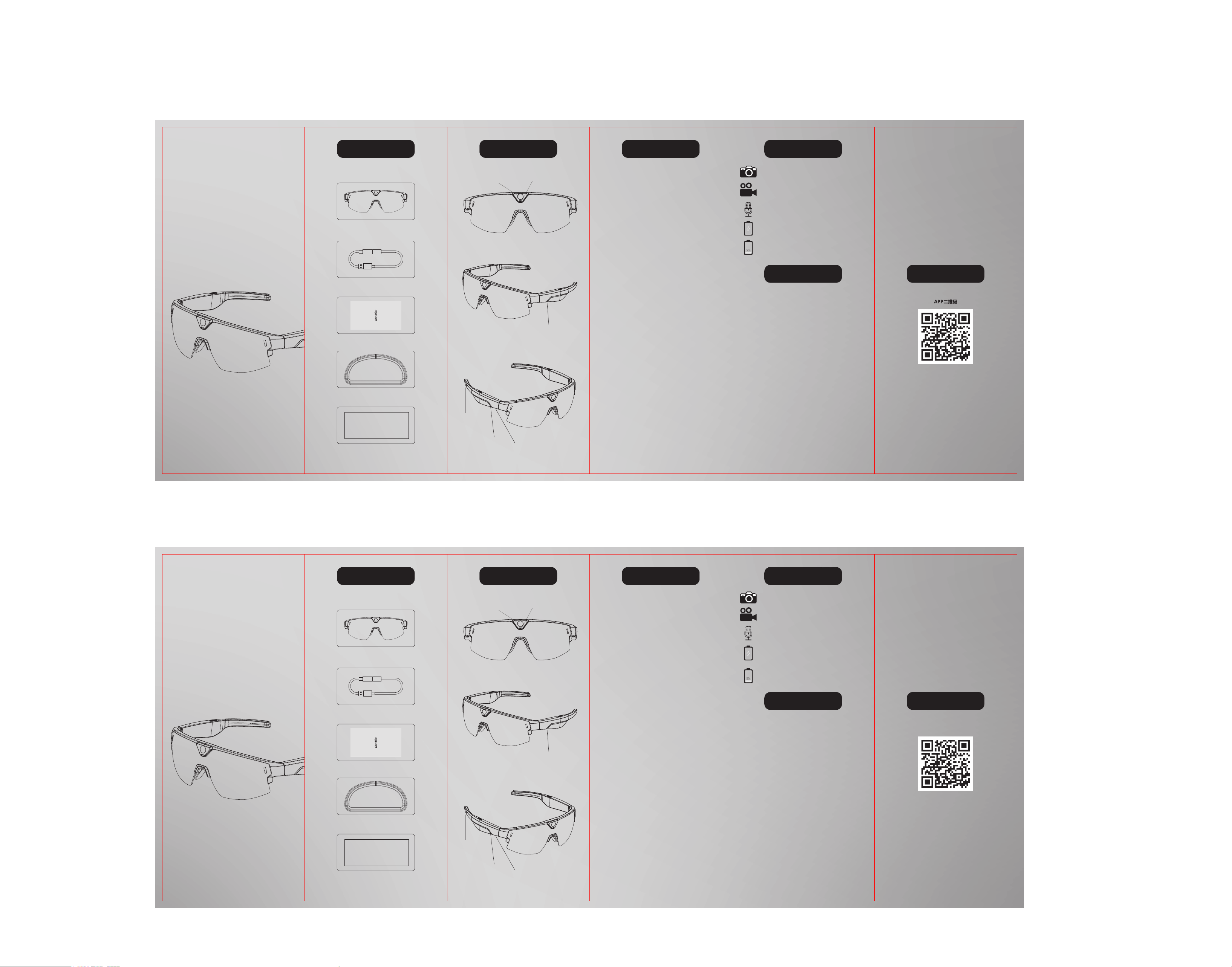
左按键
右按键
触控区
充电口
眼镜
眼镜盒
绒布袋
充电线
使用指南
U s e r M anual
Packing List F uncti o n
Product overview
Indicator Lights
Safety Instructions
APP download
Power on
Hold the power key for 2 seconds until the voice prompt
“Power on” is heard
Connection
Download the glory view App, search for device:
GloryGlass2; Upon successful binding between the App
and the glasses, the blue Led flashes for 2 seconds.
Factory Reset
With the glasses powered on and paired with the App,
tap factory reset in the upper right settings menu to
restore factory defaults.
Power off
Hold the power button for 3 seconds until until the red
indicator flashes for 2 seconds with the voice prompt”
power off”
Right button (Red power key)
Single-click: 1,Take photos with shutter sound: Click.
2,Stop video recording if in recording mode
with prompt sound: Dong-dong.
Double-click: Start video recording of the camera with
prompt sound: Ding
-dong.
Left Button
Hold for 2 seconds: Star audio recording with prompt
sound: Ding-dong: the front indicator light breathes
and flashes.
Single-click: Stop audio recording when in recording
mode with prompt sound: Dong-dong.
Double-click: Take photos for image recognition with
shutter sound: Click.
If not connected, failure prompt tone: Please connect to
the APP
Touch-Controlled Media Control
Double-tap: Play/Pause music
Triple-tap: Next track
Hold for 2 seconds: Activate voice assistant prompt tone
: Ding-dong
Single-finger swipe: Adjust volume by sliding forward/
backward; slide forward to increase volume; slide
backward to decrease volume
Touch call control
Double-tap: 1,Incoming call: Answer
2,During call: Hang up
Press and hold: Incoming call: Reject
Voice Assistant
For wake-up modes, refer to the Voice Assistant
instructions in the APP
AI Basic Functions
AI Chat, AI Image Recognition, Multilingual Voice
Translation, Meeting Transcription & Summary.
Music playback control, live video streaming. More new
functions are coming soon...
1. Safety Precautions (Must Read)
To ensure your personal safety, device safety and c
ompliant use, please read the following specifications
in full before using the device
1.1 Shooting Privacy Safety Specifications
This device is equipped with a first-person shooting
function and a white privacy indicator light on the front.
The privacy light will stay on or flash continuously when
taking photos, recording videos, recording audio or
performing real-time AI recording to notify surrounding
people.Do not use the recording function in confid
ential
places or privacy-sensitive areas. Do not cover, modify or
shield the privacy indicator light. Users shall bear all
consequences for improper use.
1.2 Eye & Wearing Safety
For long-time wearing and use, take a 10-minute break
every 2 consecutive hours to relieve eye strain.Do not
stare directly at strong light, harsh sunlight or laser
sources to avoid eye injury.This device is not a medical
eye-care device and cannot be used for vision correction.
1.3 Driving & Sports Safety
Do not perform complex operations or focus on screen
viewing while driving, cycling or engaging in high-speed
sports. Only use passive audio functions such as voice
broadcast and music playback to ensure travel safety first.
1.4 Charging & Device Safety
Pleas
e use certified 5V/1A or 5V/2A chargers. Do not use
high-voltage fast chargers or inferior charging devices.
The device features IP54 dustproof and splash-proof
performance, suitable for daily sweat and rain splashes.
Do not immerse, wash or use it underwater.Built-in
lithium battery: Do not disassemble, squeeze, puncture
or expose the device to high temperatures
1.5 Environmental Compliance Usage
Please strictly abide by local laws and regulations. Take
photos and make recordings in a civilized and compliant
manner. Do not use the device for illegal activities such
as secret photography, eavesdropping, or illegal
evidence collection
White light stays on, start prompt tone: Ding-dong
Video recording
White light flashes once, prompt tone: Click
Take photo
White light breathes
Audio recording
Green light breathes; steady green light when
fully charged
Charging
Red light flashes for 3 seconds, device powers
off with prompt tone: Power Off
Low battery (5%)
Camera
Flash light
Charging Port
Touch-sensitive Area
Right Button
smart glasses
Eyeglasses box
Velvet pouch
charging cable
User Manual
Q R
App Name:Glory View
名称:Glory View
Left Button
ABA003运动眼镜 使用指南

This device complies with part 15 of the FCC Rules. Operation is subject to the
following two conditions: (1) This device may not cause harmful interference, and (2)
this device must accept any interference received, including interference that may cause
undesired operation.
Any Changes or modifications not expressly approved by the party responsible for
compliance could void the user's authority to operate the equipment.
Note: This equipment has been tested and found to comply with the limits for a Class B
digital device, pursuant to part 15 of the FCC Rules. These limits are designed to
provide reasonable protection against harmful interference in a residential installation.
This equipment generates uses and can radiate radio frequency energy and, if not
installed and used in accordance with the instructions, may cause harmful interference
to radio communications. However, there is no guarantee that interference will not
occur in a particular installation. If this equipment does cause harmful interference to
radio or television reception, which can be determined by turning the equipment off and
on, the user is encouraged to try to correct the interference by one or more of the
following measures:
-Reorient or relocate the receiving antenna.
-Increase the separation between the equipment and receiver.
-Connect the equipment into an outlet on a circuit different from that to which the
receiver is connected.
-Consult the dealer or an experienced radio/TV technician for help.
FCC Radiation Exposure statement
The device has been evaluatec to meel general RF exposure requirement. The device
can be used in portable exposure condition without restriction.