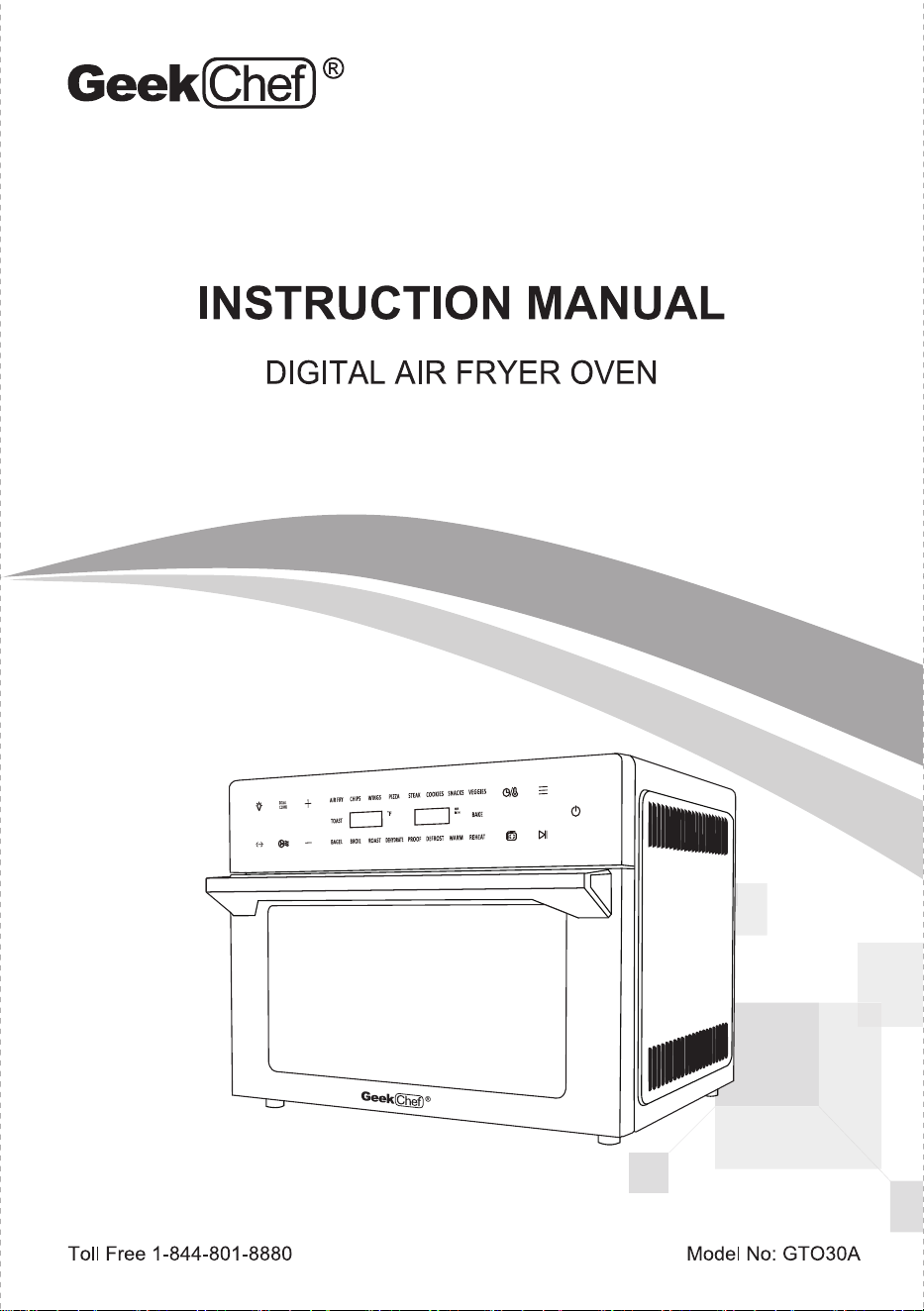
INSTRUCTION MANUAL
DIGITAL AIR FRYER OVEN
vES3E5
Toll Free 1-844-801-8880 Model No: GT030A
TABLE OF CONTENTS
• IMPORTANT SAFETY INSTRUCTIONS
• BEFORE USING YOUR AIR FRYER TOASTER OVEN
• PRODUCT COMPONENTS
• HOW TO USE
• CLEANING AND MAINTENANCE
• TROUBLESHOOTING
• LIMITED WARRANTY
01
02
03
07
14
16
17
IMPORTANT
01
SAFETY INSTRUCTIONS
Always follow basic safety precautions when using your
Air Fryer Toaster Oven.
•
•
•
•
•
•
•
•
•
•
•
READ ALL INSTRUCTIONS BEFORE USE
Unplug from outlet when not in use and before cleaning. Allow to cool before cleaning or handling, putting
on or taking off parts
Do not store any materials other than manufacturer's recommended accessories in thisappliance when
not in use
Do not immerse cord , plug or any parts of Air Fryer Toaster Oven in water or other liquidto prevent
against electrical hazard.
Do not place any of the following materials in this appliance: cardboard, plastic, paper, or anything similar.
Do not clean with metal scouring pads. Pieces can break of the pad and touch electrical parts, involving
a risk of electric shock.
Do not rest cooking utensils or baking dishes on glass door.
Do not operate your appliance in an appliance garage or under a wall cabinet. When storing in an
appliance garage, always unplug the unit from the electrical outlet.
Check if the voltage indicated on the appliance corresponds to the local main voltage before connecting
the appliance.
To avoid potential hazards, please do not put the product next to or used by children
Do not touch hot surfaces without using heat-protective gloves to avoid burns, use extreme caution when
removing hot accessories or disposing of hot grease
Do not let the cord hang over the edge of a surface where the potential of child or pet interaction is present.
Extreme caution should be exercised when using containers constructed of materials other than metal
or glass in the Air Fryer Toaster Oven
Over sized foods and utensils must not be inserted in an Air Fryer Toaster Oven as they may involve
a risk of fire or electric shock
A fire may occur if the appliance is covered or touching flammable materai Is such as curtains,
draperies or walls when in operation
Do not store any items on top of the appliance when in operation
Warning: To avoid possibility of fire, never leave the appliance unattended during use.
Use recommended temperature settings for all function
Do not use outdoors
Do not use this appliance for other than intended use
Do not place on or near a hot gas or electric burner.
Do not operate any appliance with a damaged cord or plug. If the appliance is dropped or damaged,
please return product to original store or retailer for proper inspection and repair.
To avoid potential injury, do not use accessories or attachments not recommended for the unit.
FOR HOUSEHOLD USE ONLY
SAVE THESE INSTRUCTIONS
01
02
1
BEFORE USING YOUR
AIR FRYER TOASTER OVEN
2
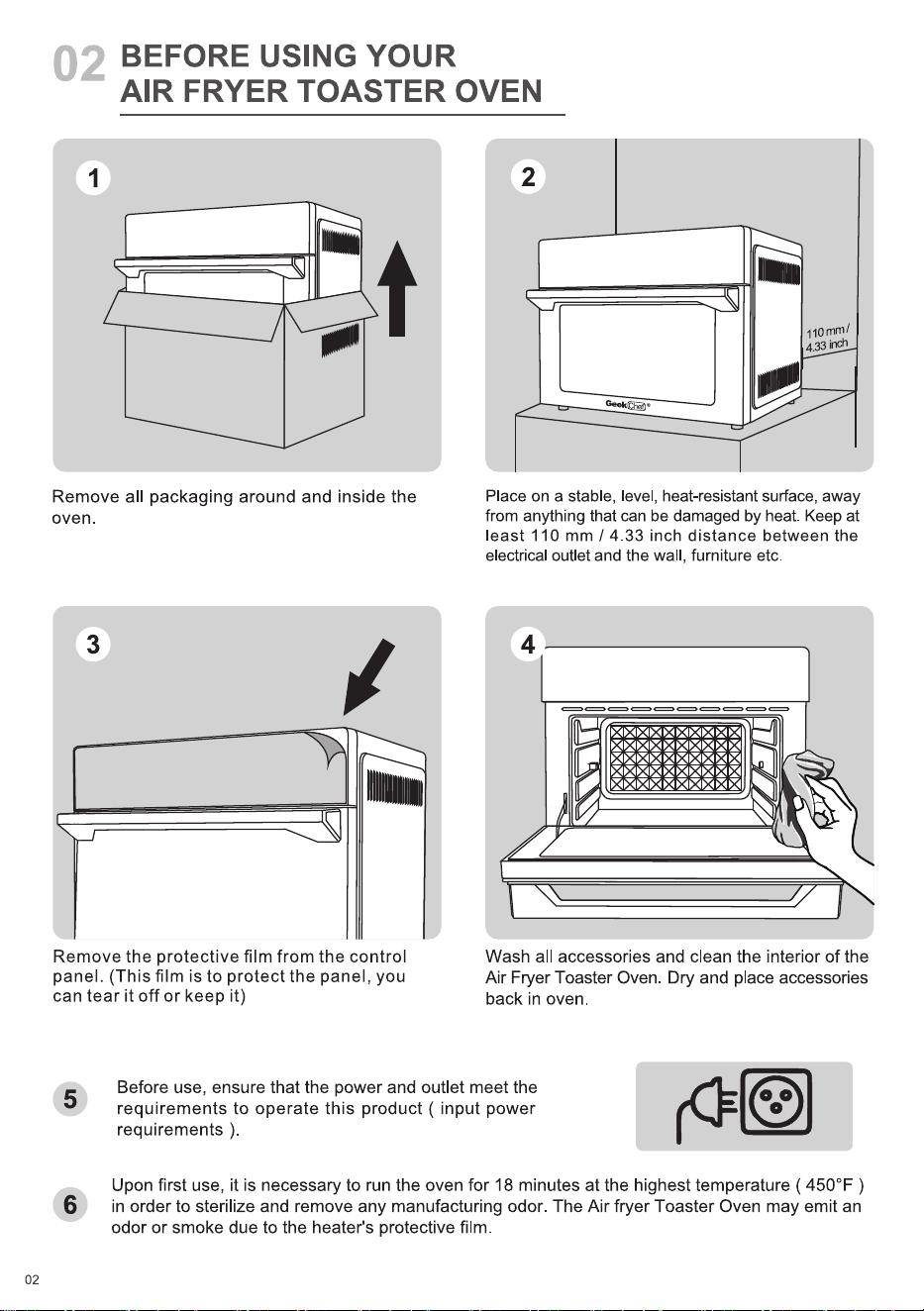
Remove all packaging around and inside the
oven.
3
Remove the protective film from the control
panel. (This film is to protect the panel, you
can tear it off or keep it)
| 10mm/
4.33inch
Place on a stable, level, heat-resistant surface, away
from anything that can be damaged by heat. Keep at
east 110 mm 1 4.33 inch distance between the
electrical outlet and the wall, furniture etc.
4
Wash all accessories and clean the interior of the
Air Fryer Toaster Oven. Dry and place accessories
back in oven
5
6
02
Before use, ensure that the power and outlet meet the
requirements to operate this product ( input power
requirements
Upon first use, it is necessary to run the oven for 18 minutes at the highest temperature ( 4500F )
in order to sterilize and remove any manufacturing odor. The Air fryer Toaster Oven may emit an
odor or smoke due to the heater's protective film
03
PRODUCT COMPONENTS
AR FRY STEM
BROL ROAST PRW *ROSI ARY
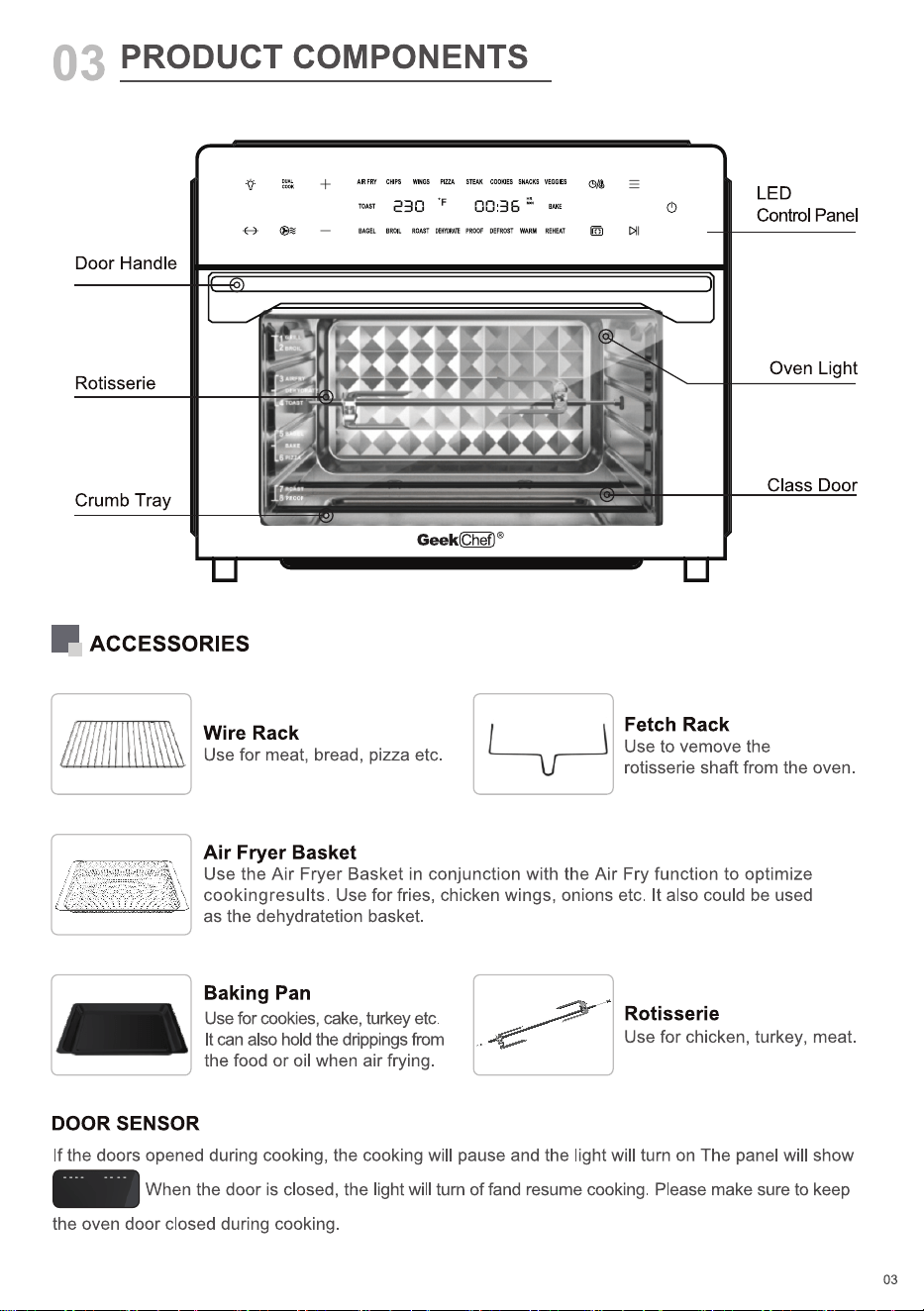
Door Handle
Rotisserie
Crumb Tray
ACCESSORIES
Wire Rack
Use for meat, bread, pizza etc.
Air Fryer Basket
U
LED
Control Panel
Oven Light
Class Door
Fetch Rack
Use to vemove the
rotisserie shaft from the oven.
Use the Air Fryer Basket in conjunction with the Air Fry function to optimize
cookingresults. Use for fries, chicken wings, onions etc. It also could be used
as the dehydratetion basket.
Baking Pan
Use for cookies, cake, turkey etc.
It can also hold the drippings from
the food or oil when air frying.
Rotisserie
Use for chicken, turkey, meat.
DOOR SENSOR
If the doors opened during cooking, the cooking will pause and the light will turn on The panel will show
When the door is closed, the light will tum of fand resume cooking. Please make sure to keep
the oven door closed during cooking.
03
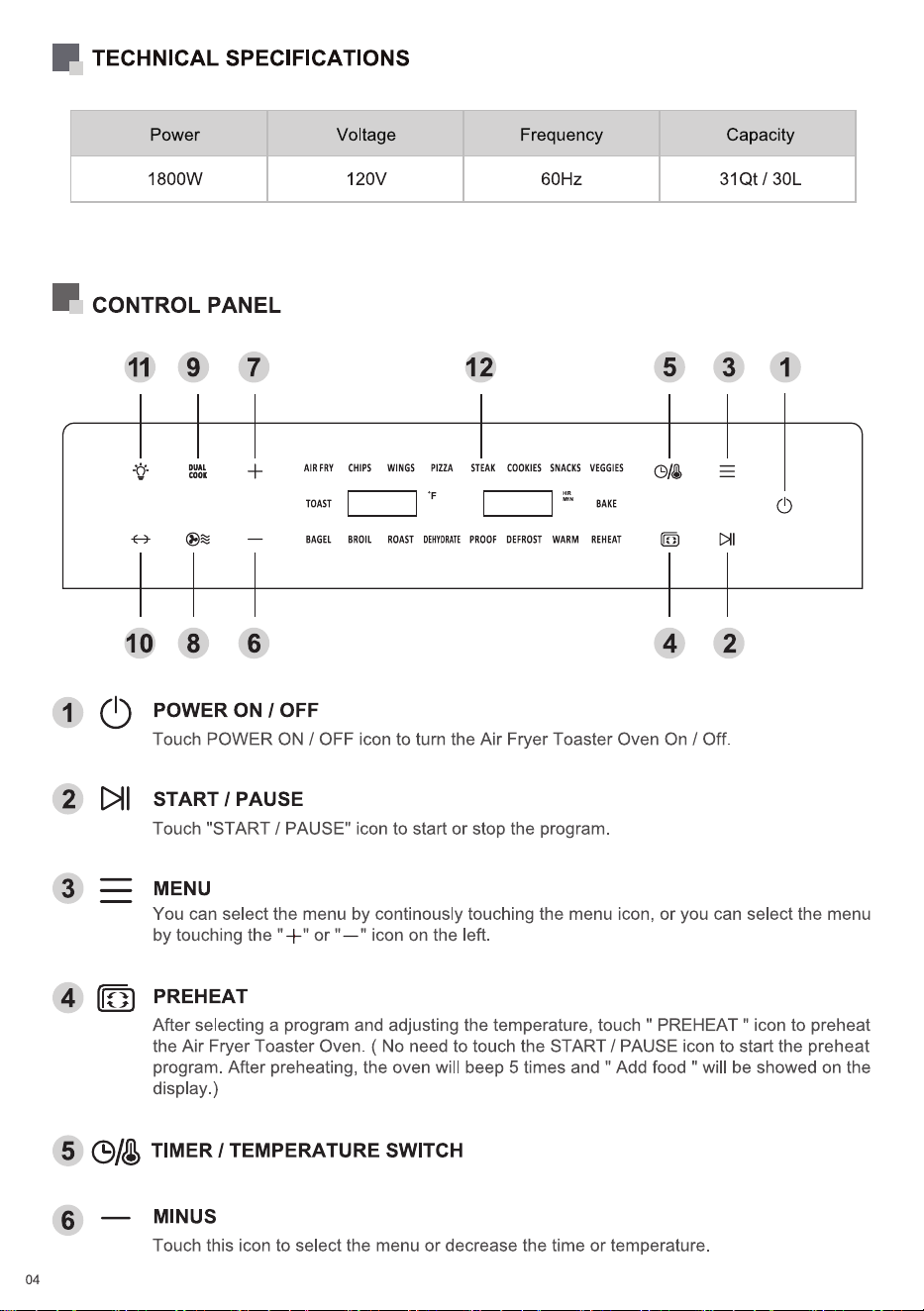
TECHNICAL SPECIFICATIONS
Voltage Frequency
60Hz
12
STEAK COOKIES SNACKS VEGGIES
BAKE
PROOF DEFROST WARM REHEAT
Capacity
31Qt / 30L1800W
CONTROL PANEL
11
10
Q)
9
8
7
6
AIR FRY
TOAST
BAGEL
120V
CHIPS WINGS
BROIL ROAST
5
4
3
2
1
PIZZA
DEHYDRATE
1
2
3
5
6
04
POWER ON 1 OFF
Touch POWER ON / OFF icon to turn the Air Fryer Toaster Oven On / Off.
START 1 PAUSE
Touch "START / PAUSE" icon to start or stop the program
MENU
You can select the menu by continously touching the menu icon, or you can select the menu
by touching the " or " icon on the left.
PREHEAT
After selecting a program and adjusting the temperature, touch " PREHEAT " icon to preheat
the Air Fryer Toaster Oven. ( No need to touch the START / PAUSE icon to start the preheat
program. After preheating, the oven will beep 5 times and " Add food " will be showed on the
display.)
0/0 TIMER1TEMPERATURE SWITCH
MINUS
Touch this icon to select the menu or decrease the time or temperature.
7
8
9
10
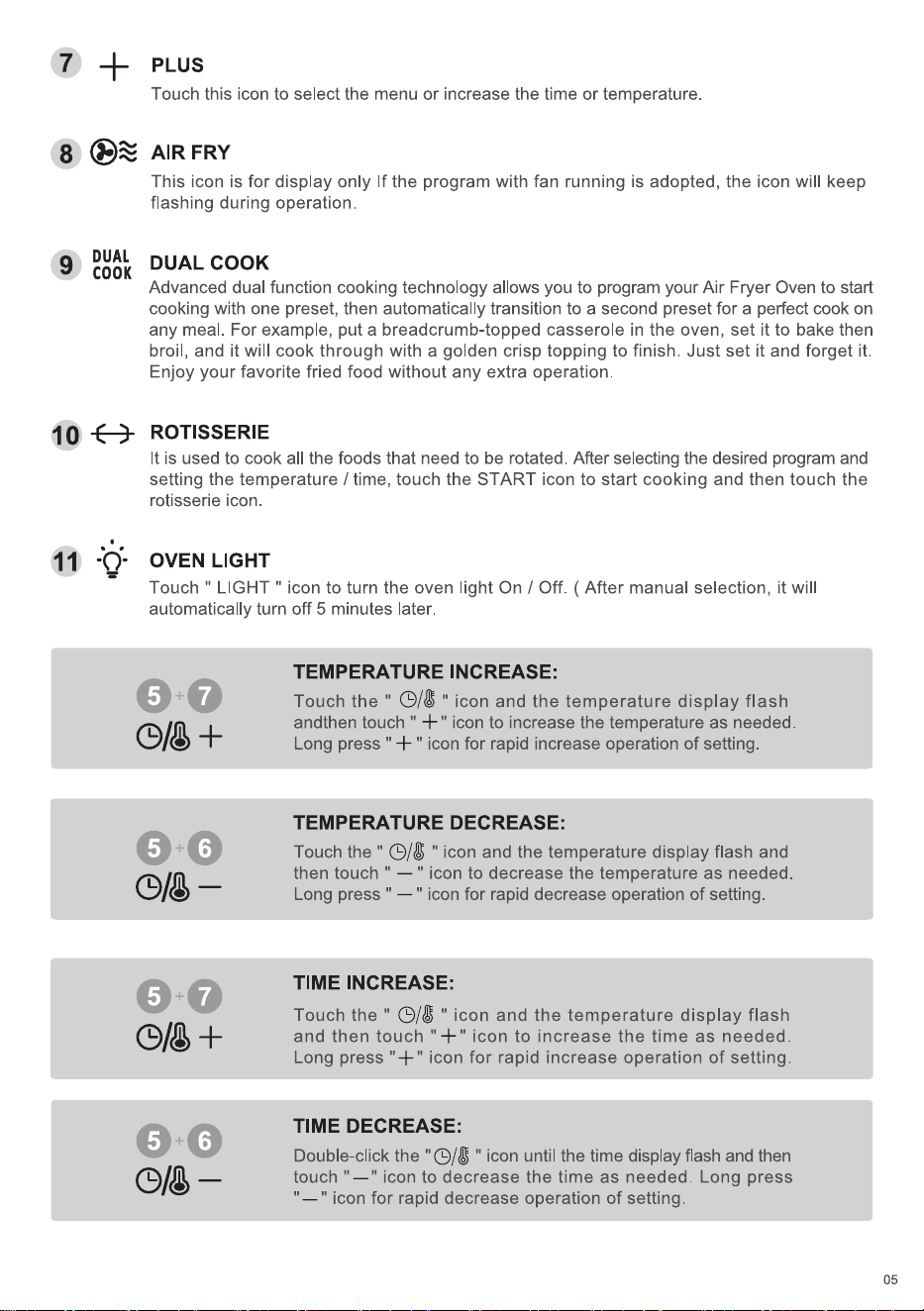
+ PLUS
Touch this icon to select the menu or increase the time or temperature.
AIR FRY
DUAL
COOK
This icon is for display only If the program with fan running is adopted, the icon will keep
flashing during operation.
DUAL COOK
Advanced dual function cooking technology allows you to program your Air Fryer Oven to start
cooking with one preset, then automatically transition to a second preset for a perfect cook on
any meal. For example, put a breadcrumb-topped casserole in the oven, set it to bake then
broil, and it will cook through with a golden crisp topping to finish. Just set it and forget it.
Enjoy your favorite fried food without any extra operation.
ROTISSERIE
It is used to cook all the foods that need to be rotated. After selecting the desired program and
setting the temperature / time, touch the START icon to start cooking and then touch the
rotisserie icon.
OVEN LIGHT
Touch " LIGHT " icon to turn the oven light On / Off. ( After manual selection, it will
automatically turn off 5 minutes later.
0/0 +
0+0
TEMPERATURE INCREASE:
Touch the " 0/8 " icon and the temperature display flash
andthen touch " + " icon to increase the temperature as needed.
Long press " -F " icon for rapid increase operation of setting.
TEMPERATURE DECREASE:
Touch the " 0/0 " icon and the temperature display flash and
then touch '
" icon to decrease the temperature as needed.
Long press " " icon for rapid decrease operation of setting.
TIME INCREASE:
Touch the " 0/8 " icon and the temperature display flash
and then touch "-k" icon to increase the time as needed.
Long press "-F" icon for rapid increase operation of setting.
TIME DECREASE:
Double-clickthe "O/U " icon until the time display flash and then
touch "
" icon to decrease the time as needed. Long press
" icon for rapid decrease operation of setting.
05
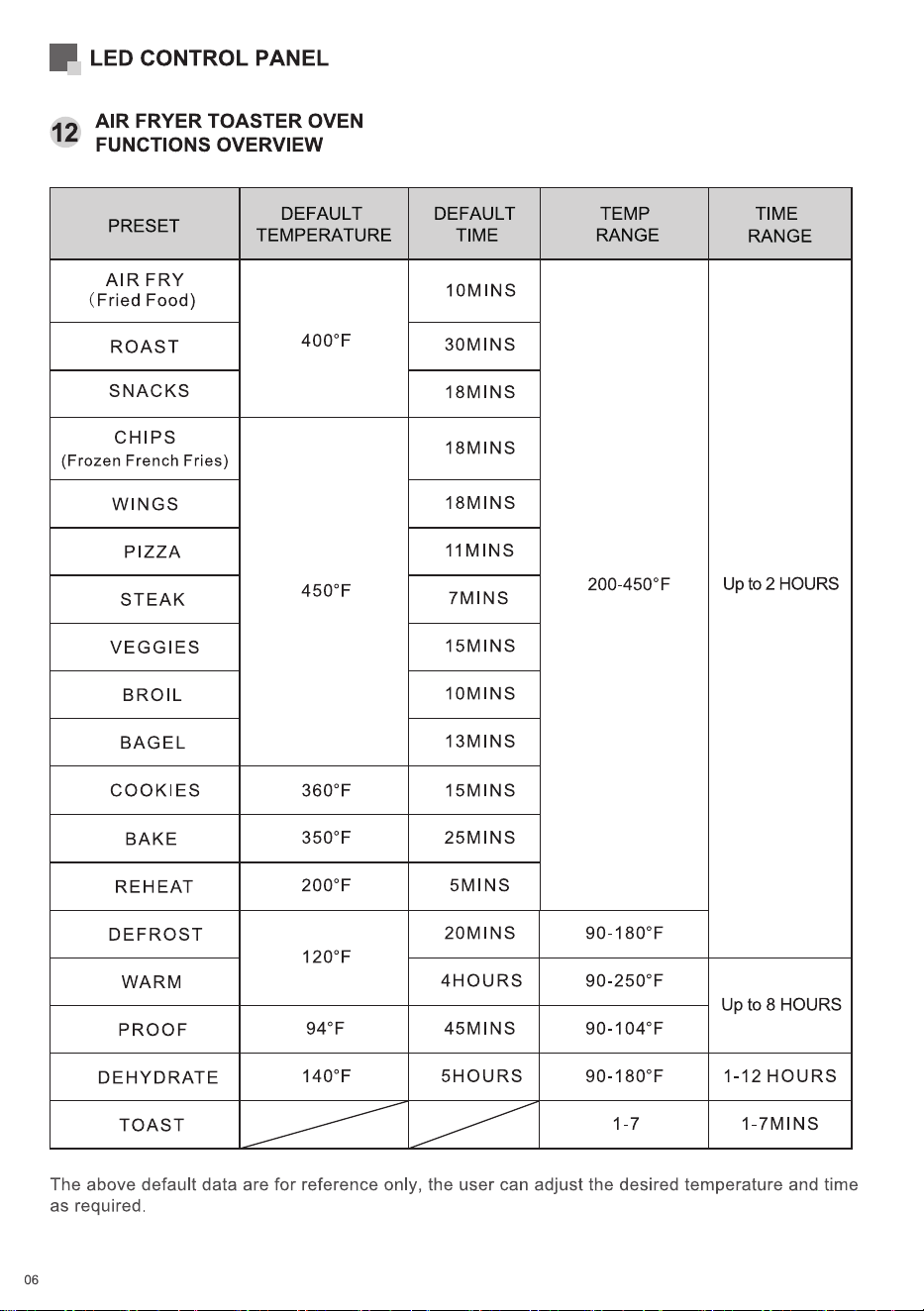
LED CONTROL PANEL
AIR FRYER TOASTER OVEN
12
FUNCTIONS OVERVIEW
PRESET
AIR FRY
(Fried Food)
ROAST
SNACKS
CHIPS
(Frozen French Fries)
WINGS
PIZZA
STEAK
VEGGIES
BROIL
BAGEL
COOKIES
BAKE
REHEAT
DEFROST
WARM
PROOF
DEHYDRATE
TOAST
DEFAULT
TEMPERATURE
4000F
4500 F
3600F
3500F
2000F
1200F
940F
1400F
DEFAULT
TIME
IOMINS
30MlNS
18MlNS
18MlNS
18MlNS
IIMINS
7MlNS
15MlNS
IOMINS
13MlNS
15MlNS
25MlNS
5MlNS
20MlNS
4HOURS
45MlNS
5HOURS
TEMP
RANGE
200-4500F
90-1800F
90-2500F
90-1040F
90-1800F
1-7
TIME
RANGE
Up to 2 HOURS
Up to 8 HOURS
1-12 HOURS
1-7MlNS
The above default data are for reference only, the user can adjust the desired temperature and time
as required
06
04
HOW TO USE
2
AIR FRY
BAGEL
CHIPS WINGS
BROIL ROAST
PIZZA
DEHYDRATE
STEAK COOKIES SNACKS VEGGIES
PROOF DEFROST WARM REHEAT
3
Accessories
Preheat
position
5
1
STARTPOWER ON
MENU
PREHEAT
R dd
MENU
1
2
3
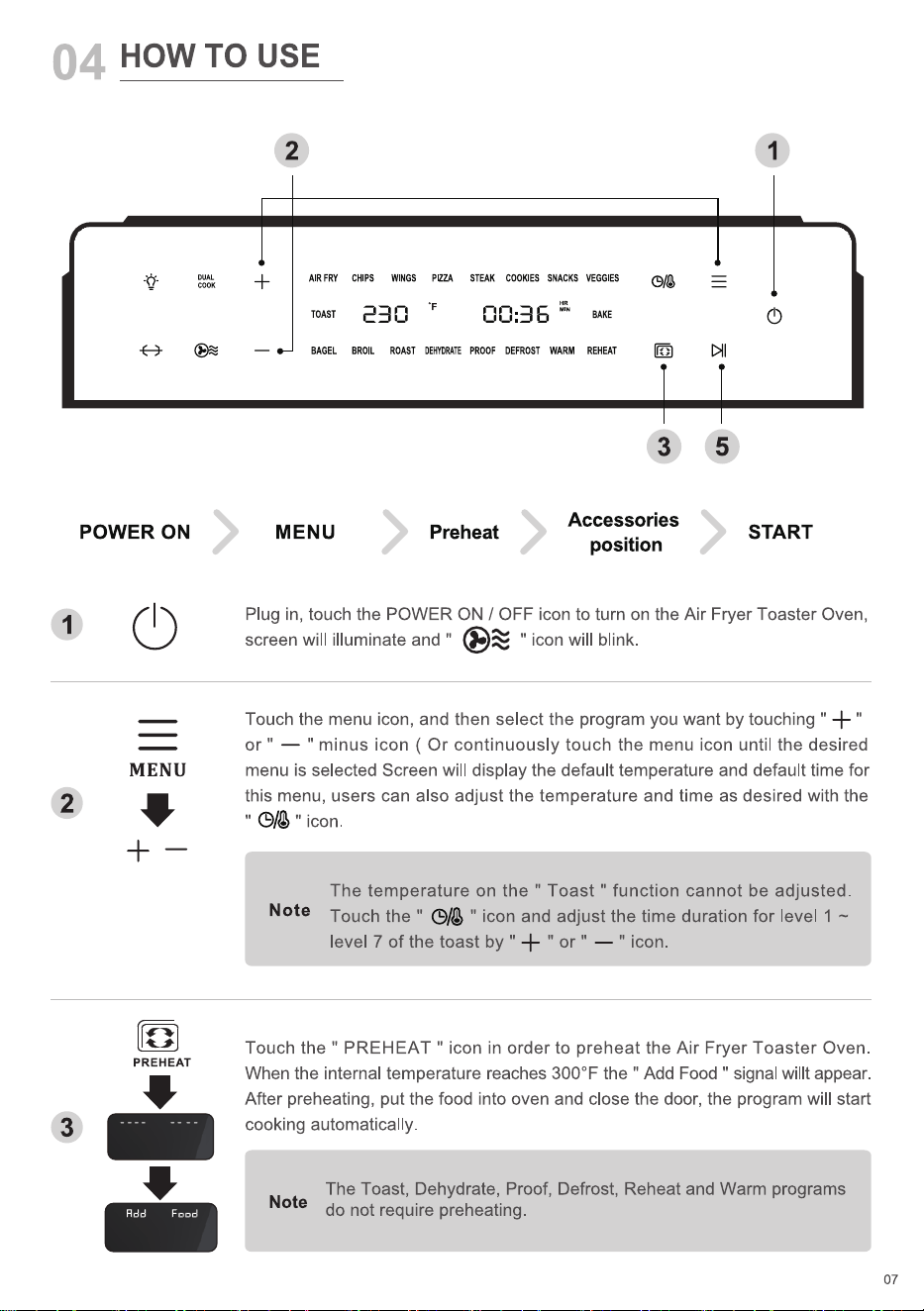
Plug in, touch the POWER ON / OFF icon to turn on the Air Fryer Toaster Oven,
screen will illuminate and " " icon will blink.
Touch the menu icon, and then select the program you want by touching "
or "
" minus icon ( Or continuously touch the menu icon until the desired
menu is selected Screen will display the default temperature and default time for
this menu, users can also adjust the temperature and time as desired with the
" icon.
The temperature on the " Toast " function cannot be adjusted.
Note
" icon and adjust the time duration for level 1 —
Touch the "
level 7 of the toast by "
' or " " icon.
Touch the " PREHEAT " icon in order to preheat the Air Fryer Toaster Oven.
When the internal temperature reaches 3000 F the " Add Food " signal willt appear.
After preheating, put the food into oven and close the door, the program will start
cooking automatically.
The Toast, Dehydrate, Proof, Defrost, Reheat and Warm programs
Note
do not require preheating.
07
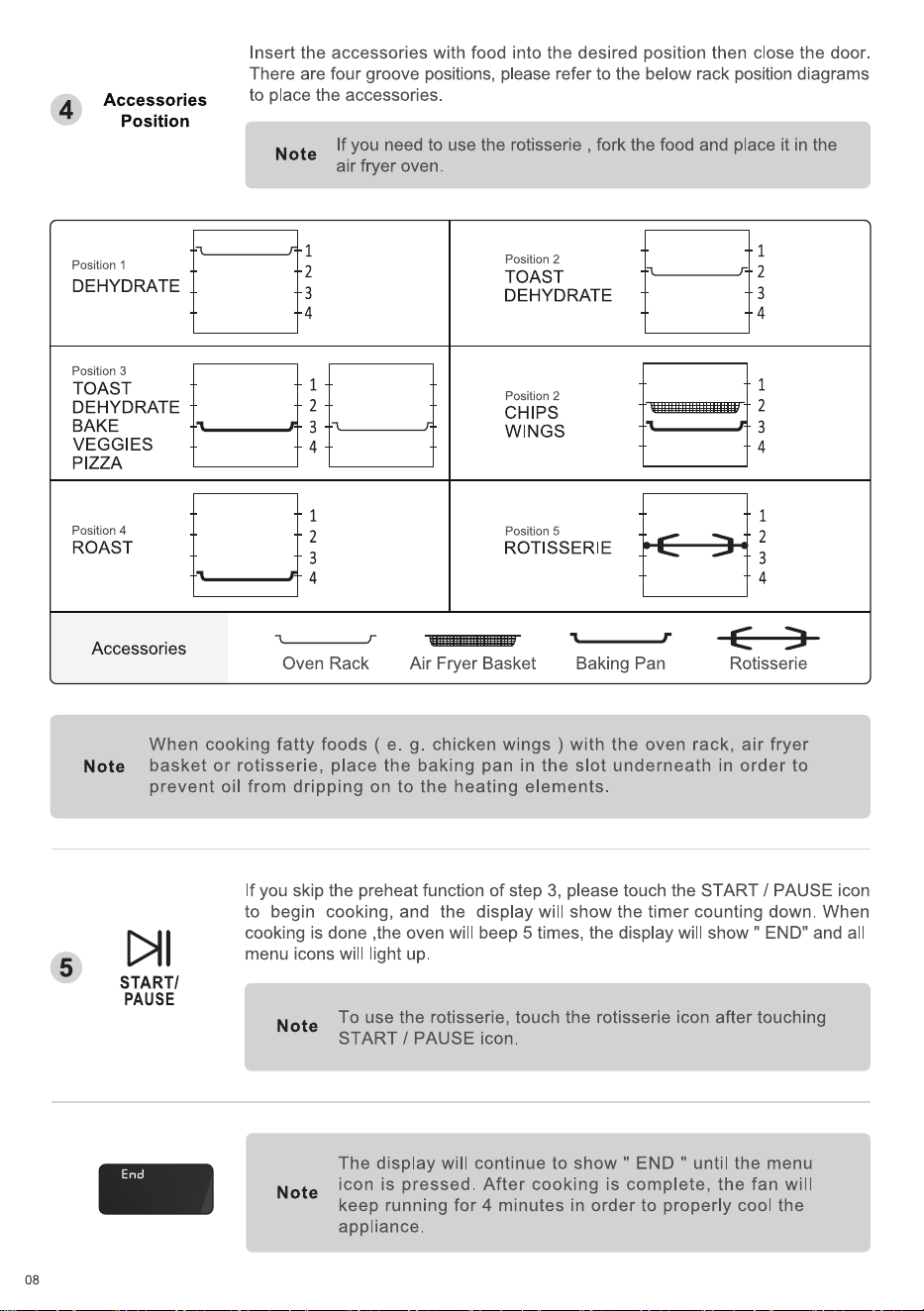
Accessories
4
Position
Position 1
DEHYDRATE
Position 3
TOAST
DEHYDRATE
BAKE
VEGGIES
PIZZA
Position 4
ROAST
Accessories
Insert the accessories with food into the desired position then close the door.
There are four groove positions, please refer to the below rack position diagrams
to place the accessories.
If you need to use the rotisserie , fork the food and place it in the
Note
air fryer oven.
1
2
3
4
1
2
3
4
1
2
3
4
Oven Rack
Position 2
TOAST
DEHYDRATE
Position 2
CHIPS
WINGS
Position 5
ROTISSERIE
Air Fryer Basket Baking Pan
1
3
4
1
2
3
4
1
2
3
4
Rotisserie
Note
When cooking fatty foods ( e. g. chicken wings ) with the oven rack, air fryer
basket or rotisserie, place the baking pan in the slot underneath in order to
prevent oil from dripping on to the heating elements.
If you skip the preheat function of step 3, please touch the START / PAUSE icon
to begin cooking, and the display will show the timer counting down. When
cooking is done ,the oven will beep 5 times, the display will show " END" and all
menu icons will light up
5
START/
PAUSE
End
08
Note
Note
To use the rotisserie, touch the rotisserie icon after touching
START / PAUSE icon.
The display will continue to show " END " until the menu
icon is pressed. After cooking is complete, the fan will
keep running for 4 minutes in order to properly cool the
appliance.
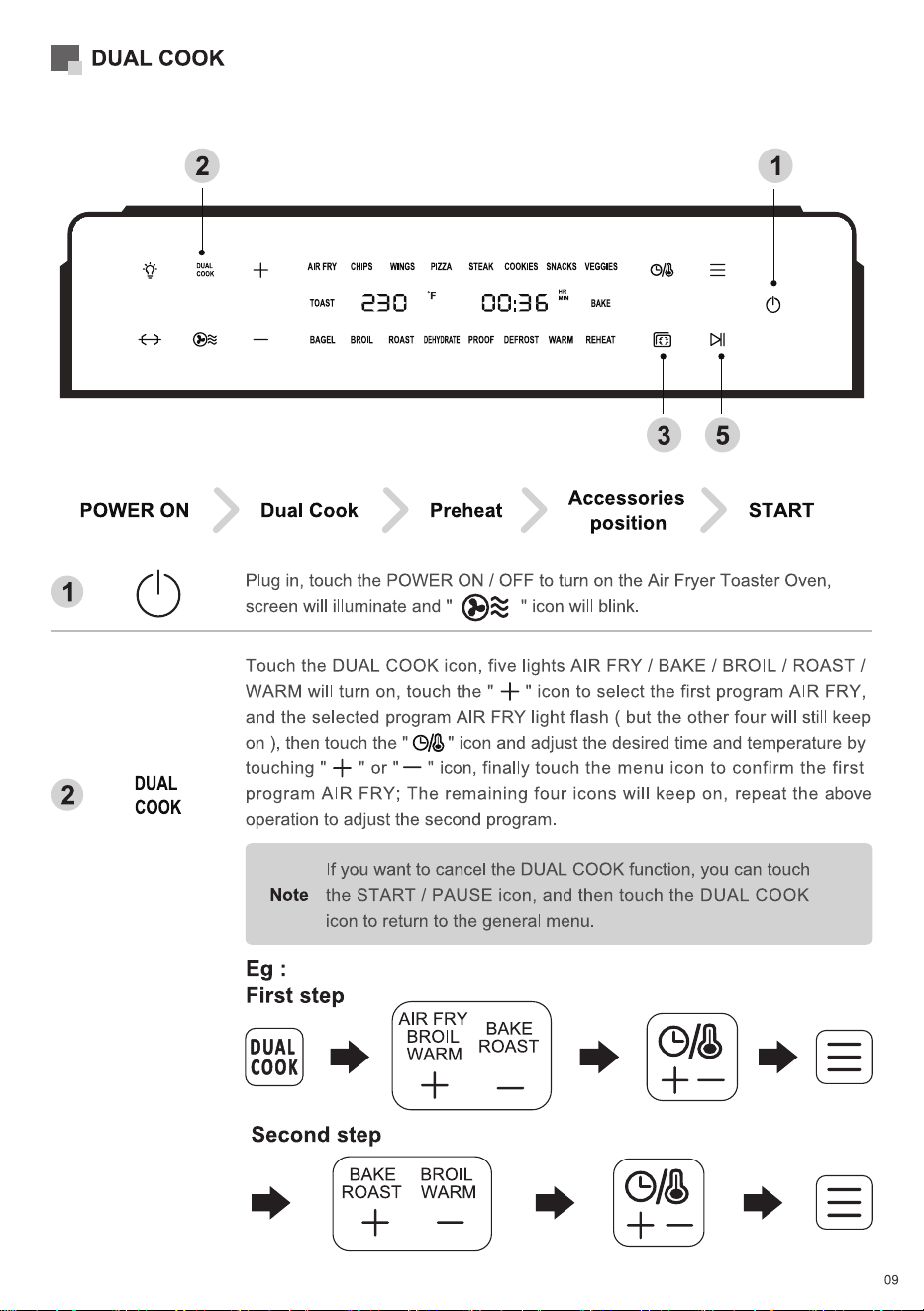
1
2
DUAL COOK
2
POWER ON
DUAL
COOK
AIR FRY CHIPS WINGS PIZZA
æc:
BAGEL BROIL ROAST DEHYDRATE
STEAK COOKIES SNACKS VEGGIES
00:36
PROOF DEFROST WARM REHEAT
Dual Cook Preheat
3
Accessories
position
5
START
Plug in, touch the POWER ON / OFF to turn on the Air Fryer Toaster Oven,
screen will illuminate and ' " icon will blink.
Touch the DUAL COOK icon, five lights AIR FRY / BAKE / BROIL / ROAST /
WARM will turn on, touch the "
" icon to select the first program AIR FRY,
and the selected program AIR FRY light flash ( but the other four will still keep
on ), then touch the "
touching " +
" or "
" icon and adjust the desired time and temperature by
" icon, finally touch the menu icon to confirm the first
program AIR FRY; The remaining four icons will keep on, repeat the above
operation to adjust the second program.
If you want to cancel the DUAL COOK function, you can touch
Note
the START / PAUSE icon, and then touch the DUAL COOK
icon to return to the general menu.
First step
AIR FRY
BAKE
BROIL
DUAL
ROAST
COOK
Second step
BAKE
ROAST
WARM
BROIL
WARM
09
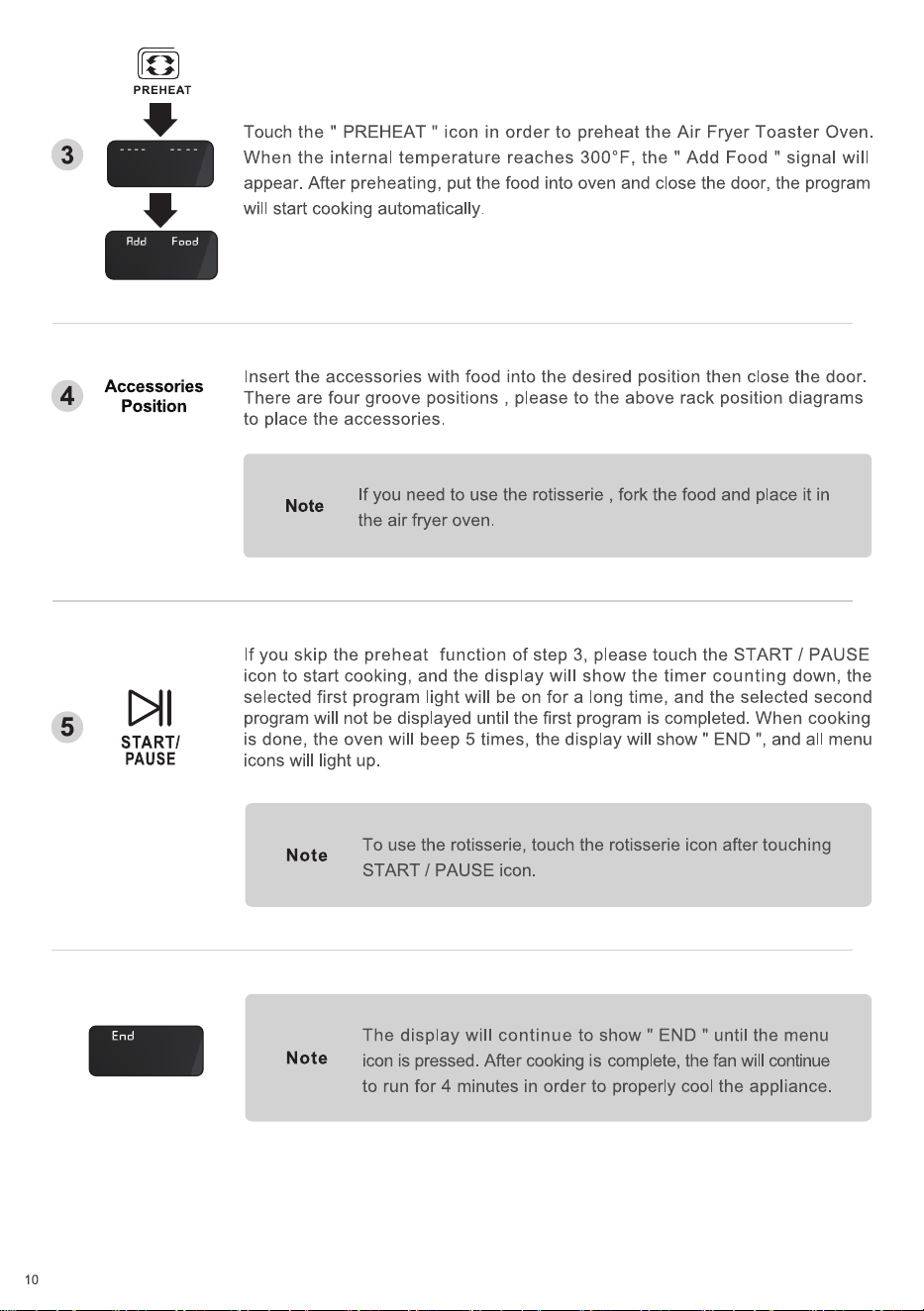
3
4
5
10
PREHEAT
Add F ood
Accessories
Position
START/
PAUSE
End
Touch the " PREHEAT " icon in order to preheat the Air Fryer Toaster Oven.
When the internal temperature reaches 3000F, the " Add Food " signal will
appear. After preheating, put the food into oven and close the door, the program
will start cooking automatically.
Insert the accessories with food into the desired position then close the door.
There are four groove positions , please to the above rack position diagrams
to place the accessories.
If you need to use the rotisserie , fork the food and place it in
Note
the air fryer oven.
If you skip the preheat function of step 3, please touch the START / PAUSE
icon to start cooking, and the display will show the timer counting down, the
selected first program light will be on for a long time, and the selected second
program will not be displayed until the first program is completed. When cooking
is done, the oven will beep 5 times, the display will show " END and all menu
icons will light up.
Note
Note
To use the rotisserie, touch the rotisserie icon after touching
START / PAUSE icon.
The display will continue to show " END " until the menu
icon is pressed. After cooking is complete, the fan will continue
to run for 4 minutes in order to properly cool the appliance.
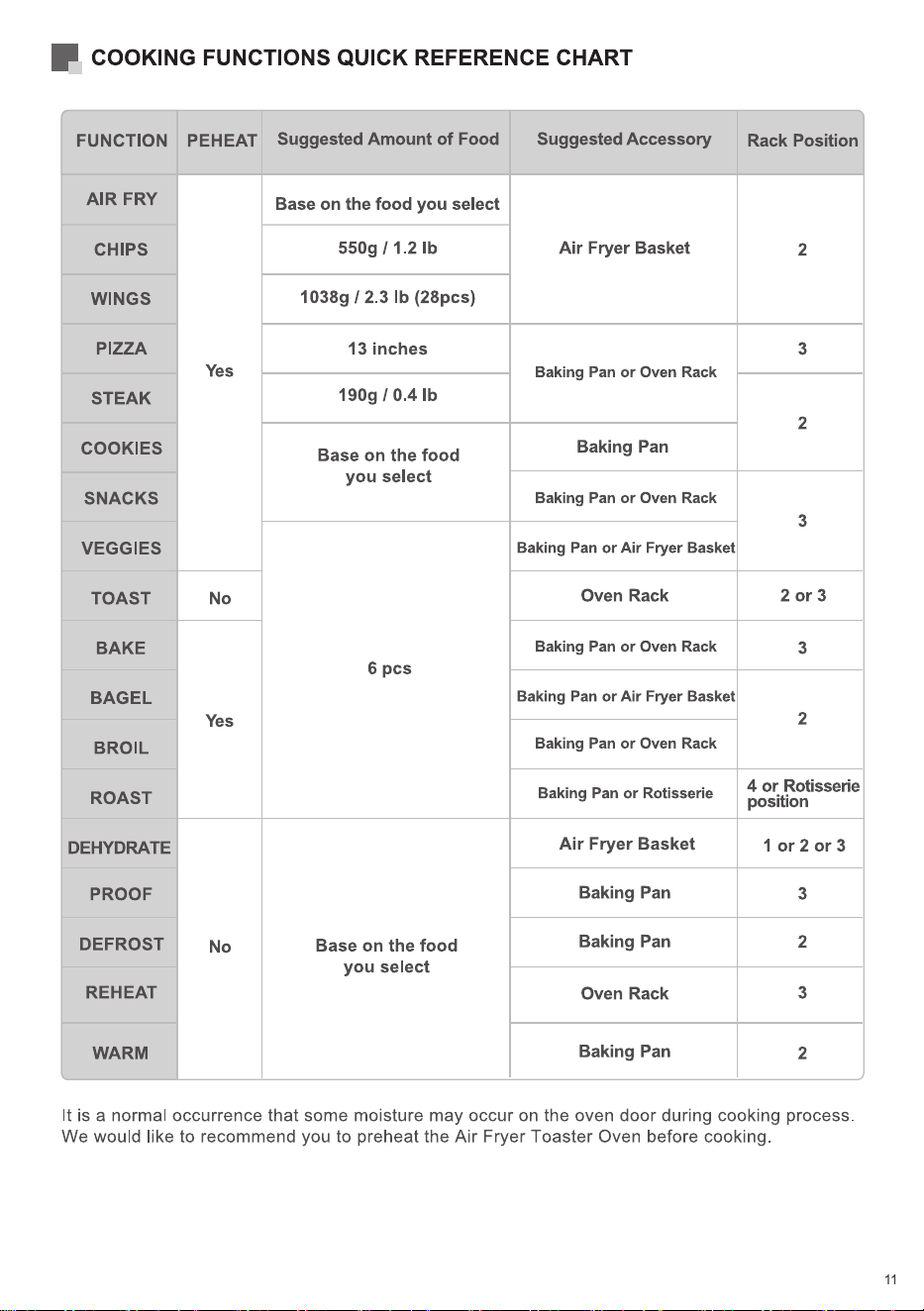
COOKING FUNCTIONS QUICK REFERENCE CHART
FUNCTION
AIR FRY
CHIPS
WINGS
PIZZA
STEAK
COOKIES
SNACKS
VEGGIES
TOAST
BAKE
BAGEL
BROIL
ROAST
DEHYDRATE
PROOF
DEFROST
REHEAT
WARM
PEHEAT
Yes
No
Yes
No
Suggested Amount of Food
Base on the food you select
550g 1 1.2 lb
1038g 12.3 lb (28pcs)
13 inches
190g 1 0.4 lb
Base on the food
you select
6 pcs
Base on the food
you select
Suggested Accessory
Air Fryer Basket
Baking Pan or Oven Rack
Baking Pan
Baking Pan or Oven Rack
Baking Pan or Air Fryer Basket
Oven Rack
Baking Pan or Oven Rack
Baking Pan or Air Fryer Basket
Baking Pan or Oven Rack
Baking Pan or Rotisserie
Air Fryer Basket
Baking Pan
Baking Pan
Oven Rack
Baking Pan
Rack Position
2
3
2
3
2 or 3
3
2
4 or Rotisserie
position
1 or 2 or 3
3
2
3
2
It is a normal occurrence that some moisture may occur on the oven door during cooking process.
We would like to recommend you to preheat the Air Fryer Toaster Oven before cooking
11
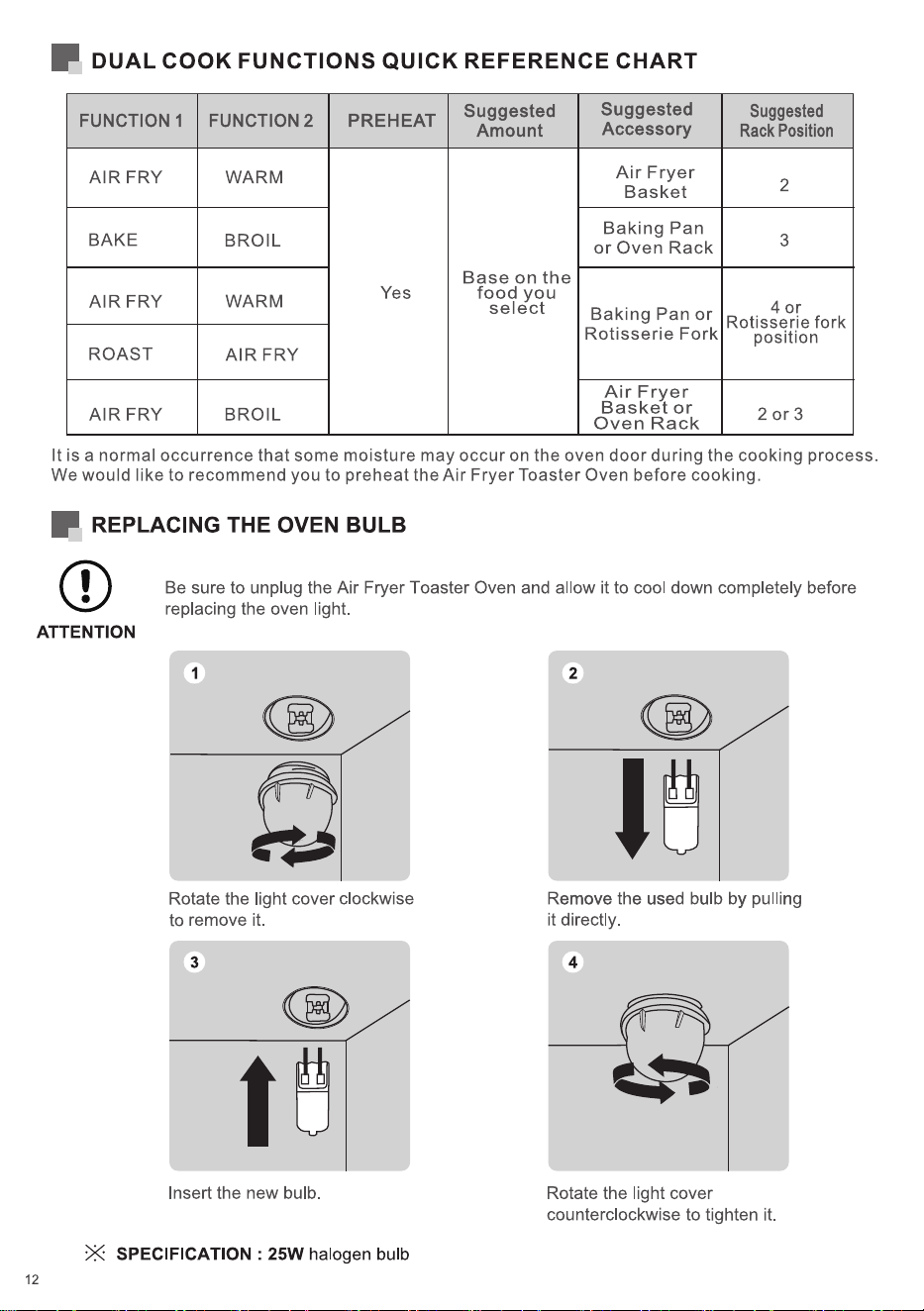
DUAL COOK FUNCTIONS QUICK REFERENCE CHART
FUNCTIONI FUNCTION 2
AIR FRY
BAKE
AIR FRY
ROAST
AIR FRY
WARM
BROIL
WARM
AIR FRY
BROIL
Suggested
PREHEAT
Amount
Base on the
Suggested
Accessory
Air Fryer
Basket
Baking Pan
or Oven Rack
Suggested
Rack Position
2
3
Yes
food you
select
4 or
Baking Pan or
Rotisserie fork
Rotisserie Fork
position
Air Fryer
Basket or
20r3
Oven Rack
It is a normal occurrence that some moisture may occur on the oven door during the cooking process.
We would like to recommend you to preheat the Air Fryer Toaster Oven before cooking.
REPLACING THE OVEN BULB
Be sure to unplug the Air Fryer Toaster Oven and allow it to cool down completely before
replacing the oven light.
ATTENTION
Rotate the light cover clockwise
to remove it.
3
Insert the new bulb.
X SPECIFICATION : 25W halogen bulb
12
2
Remove the used bulb by pulling
it directly.
4
Rotate the light cover
counterclockwise to tighten it.
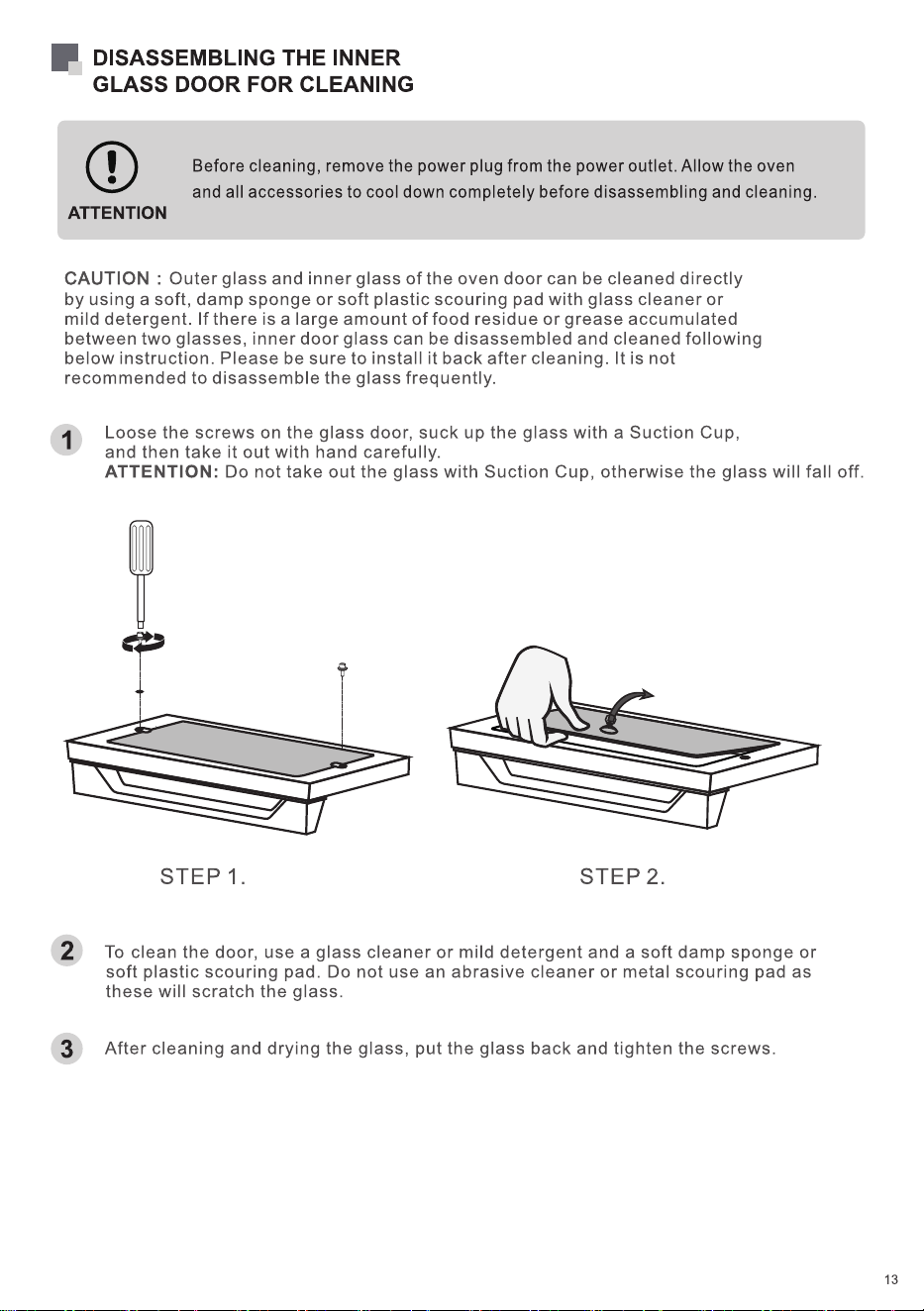
DISASSEMBLING THE INNER
GLASS DOOR FOR CLEANING
Before cleaning, remove the power plug from the power outlet. Allow the oven
and all accessories to cool down completely before disassembling and cleaning.
ATTENTION
CAUTION : Outer glass and inner glass of the oven door can be cleaned directly
by using a soft, damp sponge or soft plastic scouring pad with glass cleaner or
mild detergent. If there is a large amount of food residue or grease accumulated
between two glasses, inner door glass can be disassembled and cleaned following
below instruction. Please be sure to install it back after cleaning. It is not
recommended to disassemble the glass frequently.
1
2
3
Loose the screws on the glass door, suck up the glass with a Suction Cup,
and then take it out with hand carefully.
ATTENTION: Do not take out the glass with Suction Cup, otherwise the glass will fall off.
STEP 1. STEP 2.
To clean the door, use a glass cleaner or mild detergent and a soft damp sponge or
soft plastic scouring pad. Do not use an abrasive cleaner or metal scouring pad as
these will scratch the glass.
After cleaning and drying the glass, put the glass back and tighten the screws.
13
CLEANING AND MAINTENANCE
05
Before cleaning, unplug your Air Fryer Toaster Oven. Allow the oven and all
accessories to cool down completely before disassembling and cleaning.
CLEANING THE HOUSING AND DOOR
a. Wipe the housing with a soft, damp sponge. A non-abrasive liquid cleanser or mild spray
solution may be used to avoid build-up of stains. Apply the cleanser to the sponge, not the
ovens surface, before cleaning.
b. To clean the glass door, use a glass cleaner or mild detergent and a soft , damp sponge or
soft plastic scouring pad. Do not use an abrasive cleanser or metal scouring pad as these will
scratch the oven's surface.
c. Wipe the LED screen with a soft, damp cloth. Apply cleanser to the cloth, do not apply cleanser
directly on to the LED. Cleaning the LED screen surface with a dry cloth and / or abrasive
cleaners may produce scratches.
To prevent electrocution, do not immerse the appliance or power cord
into water or any other liquid.
WARNING
CLEANING THE INTERIOR
To clean any spattering that may occur while cooking, wipe the walls with a soft, damp sponge.
A non-abrasive liquid cleanser or mild spray solution may be used to avoid build-up of stains. Apply
the cleanser to the sponge, not the interior, before cleaning.
Use extreme caution when cleaning the heating elements. Allow the oven
to cool down completely, and then gently rub a soft, damp sponge or cloth
along the length of the heating element. Do not use any type of cleanser
or cleaning agent. Let all surfaces dry thoroughly prior to inserting the power
plug into a power outlet and turning the oven on.
WARNING
14
CLEANING THE CRUMB TRAY
a. After each use, slide out the crumb tray and discard crumbs. Wipe the tray with a soft, damp
sponge. A non-abrasive liquid cleanser or mild spray solution may be used to avoid build-up of
stains. Apply the cleanser to the sponge, not the tray, before cleaning. Dry thoroughly
b. To remove the baked-on grease, soak the tray in warm soapy water then wash with a soft sponge
or soft plastic scouring pad .Rinse and dry thoroughly.
c. Always ensure to re-insert the crumb tray into the oven after cleaning and prior to inserting the power
plug into a power outlet and turning the oven on.
CLEANING THE OVEN RACK, BAKING PAN,
AIR FRYER BASKET, ROTISSERIE AND FETCH RACK.
a. Wash all accessories in warm soapy water with a soft sponge or soft plastic scouring pad. Rinse
and dry thoroughly . Do not use abrasive cleansers, metal scouring pads or metal utensils to clean
any of the accessories as they may damage the surfaces.
b. To extend the life of your accessories, cleaning them in the dishwasher is not recommended.
STORAGE
a. Ensure the oven and all accessories are clean and dry.
b. Ensure the door is closed.
c. Store the appliance in an upright position, standing level and on its supporting legs Do not store
appliance when wet or hot. Do not store in a wet or hot environment.
15
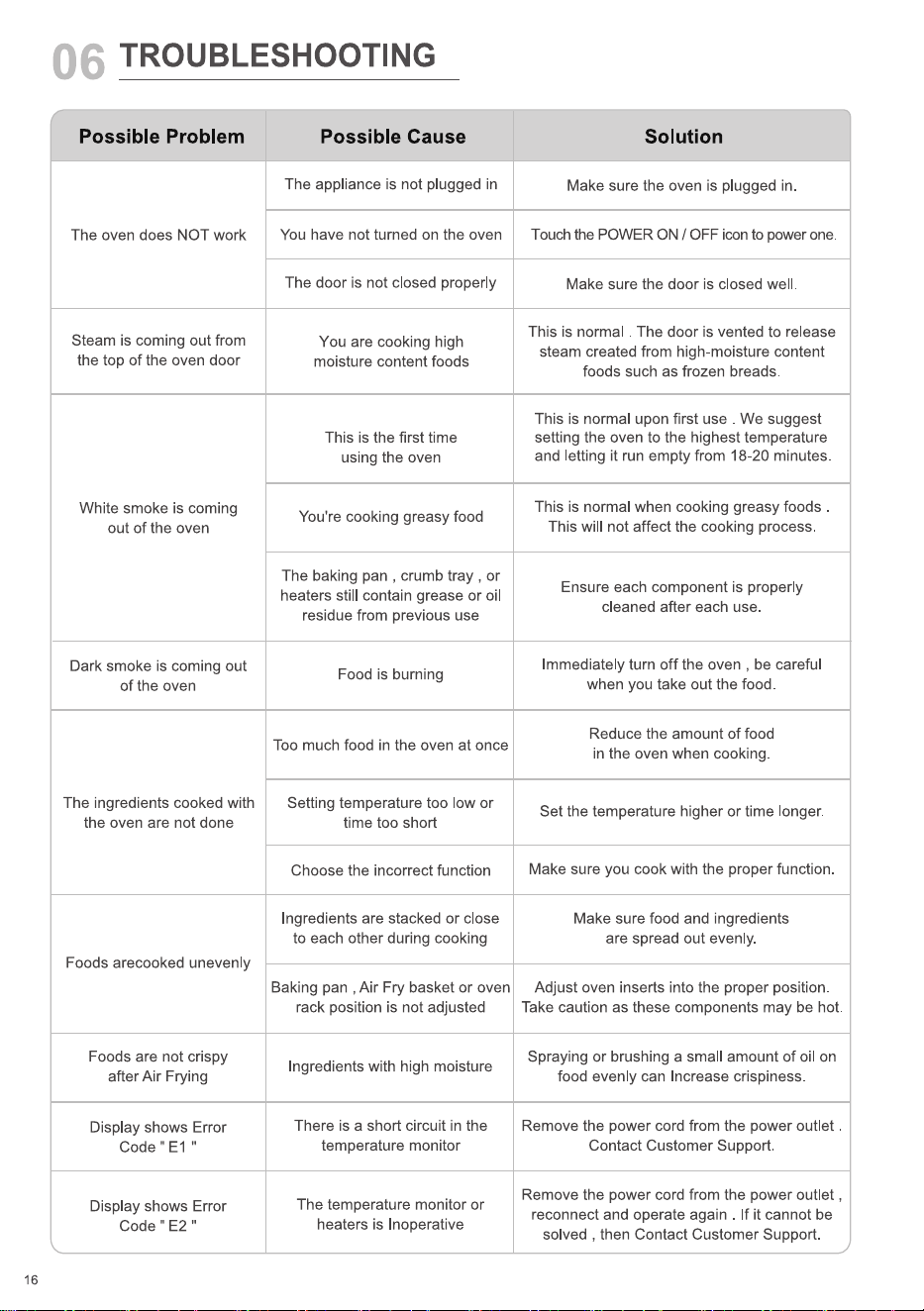
TROUBLESHOOTING
Possible Problem
The oven does NOT work
Steam is coming out from
the top of the oven door
White smoke is coming
out of the oven
Dark smoke is coming out
of the oven
The ingredients cooked with
the oven are not done
Foods arecooked unevenly
Foods are not crispy
after Air Frying
Display shows Error
Code "El "
Display shows Error
Code " E2 "
16
Possible Cause
The appliance is not plugged in
You have not turned on the oven
The door is not closed properly
You are cooking high
moisture content foods
This is the first time
using the oven
You're cooking greasy food
The baking pan , crumb tray , or
heaters still contain grease or oil
residue from previous use
Food is burning
Too much food in the oven at once
Setting temperature too low or
time too short
Choose the incorrect function
Ingredients are stacked or close
to each other during cooking
Baking pan , Air Fry basket or oven
rack position is not adjusted
Ingredients with high moisture
There is a short circuit in the
temperature monitor
The temperature monitor or
heaters is Inoperative
Solution
Make sure the oven is plugged in
Touch the POWER ON / OFF icon to power one
Make sure the door is closed well
This is normal . The door is vented to release
steam created from high-moisture content
foods such as frozen breads.
This is normal upon first use . We suggest
setting the oven to the highest temperature
and letting it run empty from 18-20 minutes
This is normal when cooking greasy foods
This will not affect the cooking process.
Ensure each component is properly
cleaned after each use
Immediately turn off the oven , be careful
when you take out the food.
Reduce the amount of food
in the oven when cooking.
Set the temperature higher or time longer.
Make sure you cook with the proper function.
Make sure food and ingredients
are spread out evenly.
Adjust oven inserts into the proper position
Take caution as these components may be hot
Spraying or brushing a small amount of oil on
food evenly can Increase crispiness
Remove the power cord from the power outlet
Contact Customer Support.
Remove the power cord from the power outlet ,
reconnect and operate again . If it cannot be
solved , then Contact Customer Support
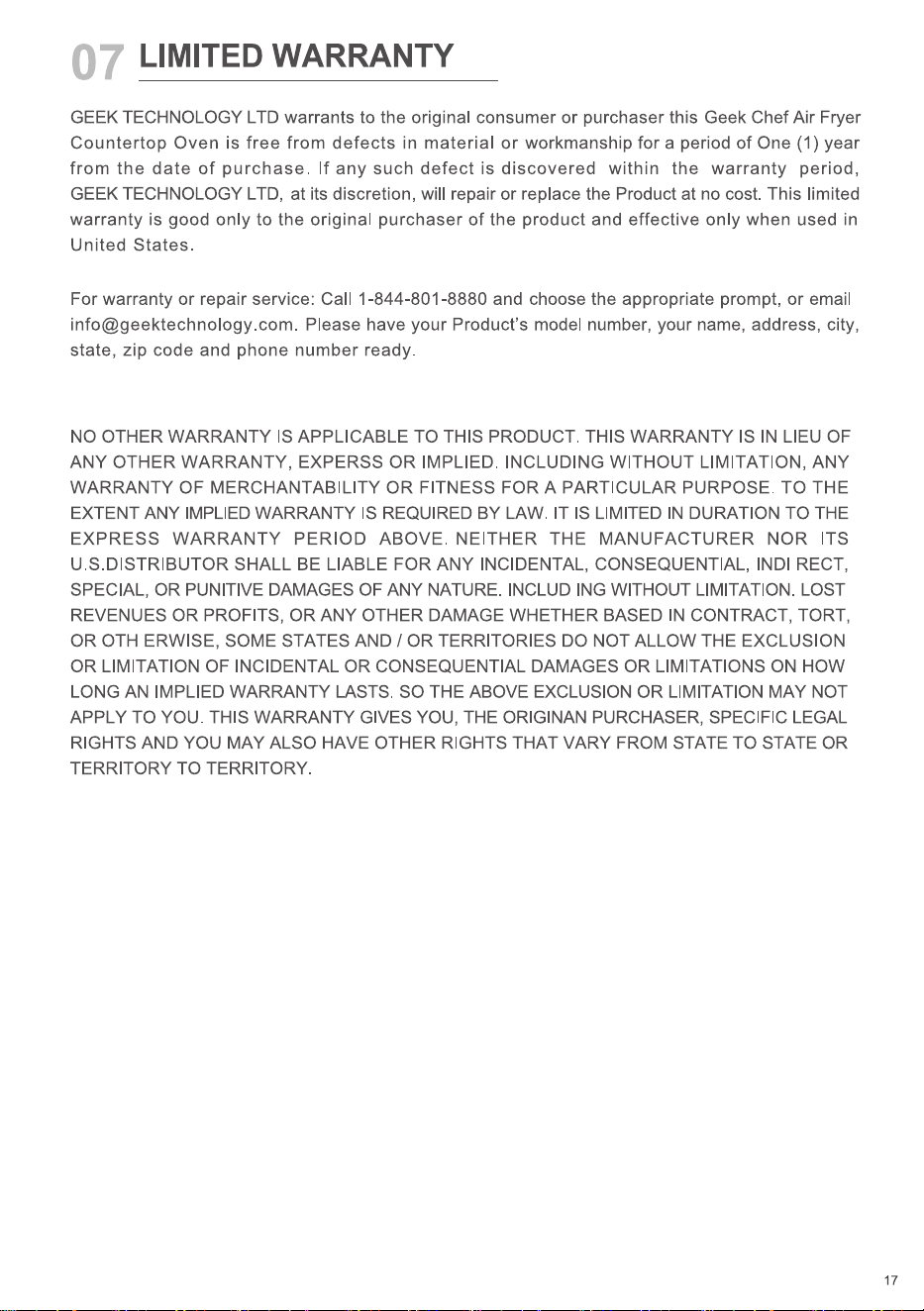
07
LIMITED WARRANTY
GEEK TECHNOLOGY LTD warrants to the original consumer or purchaser this Geek Chef Air Fryer
Countertop Oven is free from defects in material or workmanship for a period of One (1) year
from the date of purchase. If any such defect is discovered within the warranty period,
GEEK TECHNOLOGY LTD, at its discretion, will repair or replace the Product at no cost. This limited
warranty is good only to the original purchaser of the product and effective only when used in
United States
For warranty or repair service: Call 1-844-801-8880 and choose the appropriate prompt, or email
state, zip code and phone number ready.
NO OTHER WARRANTY IS APPLICABLE TO THIS PRODUCT. THIS WARRANTY IS IN LIEU OF
ANY OTHER WARRANTY, EXPERSS OR IMPLIED. INCLUDING WITHOUT LIMITATION, ANY
WARRANTY OF MERCHANTABILITY OR FITNESS FOR A PARTICULAR PURPOSE. TO THE
EXTENT ANY IMPLIED WARRANTY IS REQUIRED BY LAW. IT IS LIMITED IN DURATION TO THE
EXPRESS WARRANTY PERIOD ABOVE. NEITHER THE MANUFACTURER NOR ITS
U.S.DISTRIBUTOR SHALL BE LIABLE FOR ANY INCIDENTAL, CONSEQUENTIAL, INDI RECT,
SPECIAL, OR PUNITIVE DAMAGES OF ANY NATURE. INCLUD ING WITHOUT LIMITATION. LOST
REVENUES OR PROFITS, OR ANY OTHER DAMAGE WHETHER BASED IN CONTRACT, TORT,
OR 0TH ERWISE, SOME STATES AND / OR TERRITORIES DO NOT ALLOW THE EXCLUSION
OR LIMITATION OF INCIDENTAL OR CONSEQUENTIAL DAMAGES OR LIMITATIONS ON HOW
LONG AN IMPLIED WARRANTY LASTS. SO THE ABOVE EXCLUSION OR LIMITATION MAY NOT
APPLY TO YOU. THIS WARRANTY GIVES YOU, THE ORIGINAN PURCHASER, SPECIFIC LEGAL
RIGHTS AND YOU MAY ALSO HAVE OTHER RIGHTS THAT VARY FROM STATE TO STATE OR
TERRITORY TO TERRITORY.
17

Live Your Best Geek Life !
Geek Geek Facebook Geek Youtube
Geek Technology Ltd
1275 Bloomfield Ave
Fairfield, NJ 07004
www.geektechnology.com