Dejana Truck & Utility Equipment Company, LLC.
500 Pulaski Rd. Kings Park, NY 11754
ph: 631.544.9000 fax: 631.544.0942
Dejana Power Lock Module User Manual
Dejana Part Number: VICT VT-503
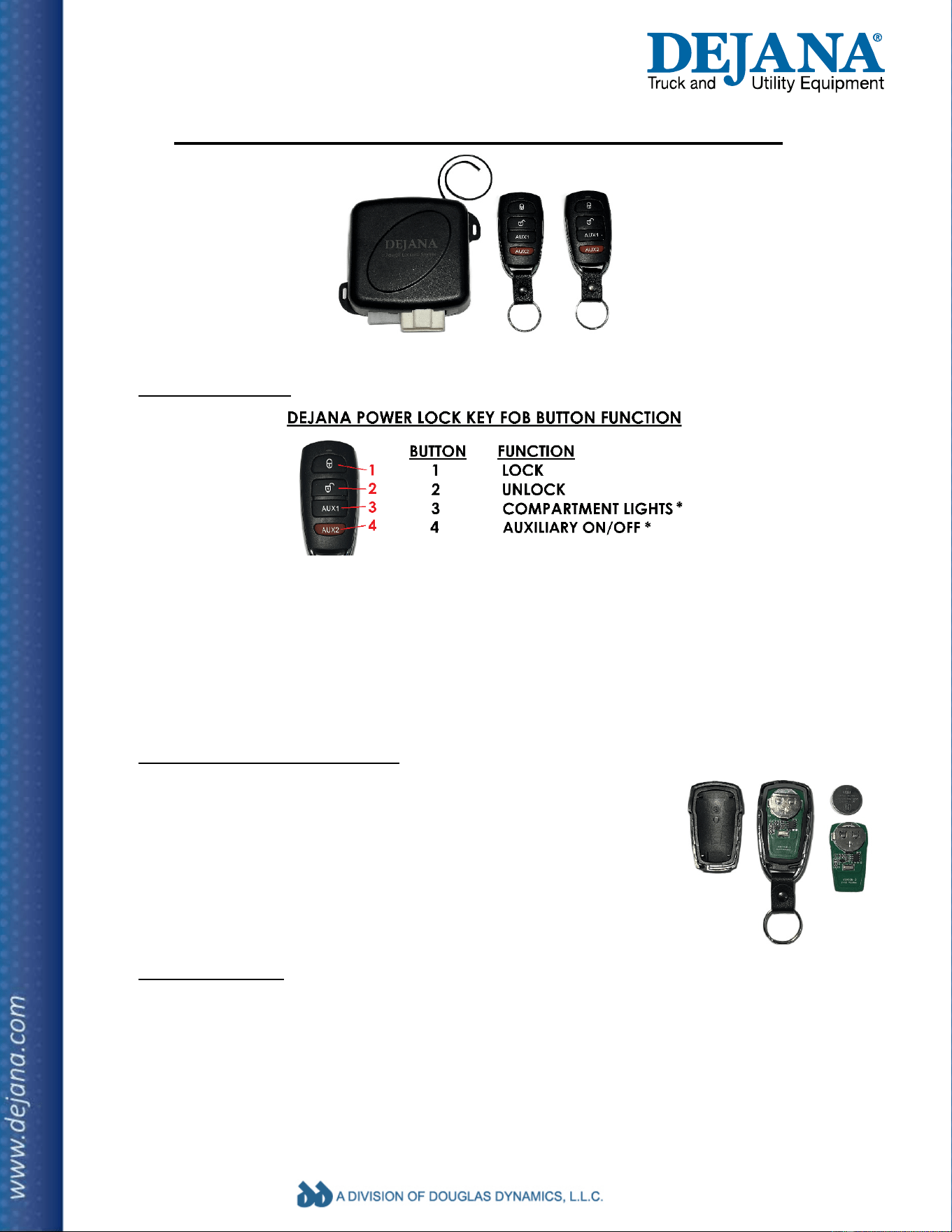
1) Key Fob Function
Lock: Press the lock button once to lock the body compartments.
Unlock: Press the unlock button once to unlock the body compartments.
Compartment Lights*: Press the button once to turn on and again to turn off.
Auxiliary*: Press button once to turn the Aux. output on and again to turn off.
*Note: compartment lighting & auxiliary are optional items and may not be installed.
Time out function: when the lock or unlock button is pressed repeatedly (more than 8 times in
30 seconds). Lock/unlock function will be disabled for 30 seconds before being restored.
2) Key Fob Battery Replacement
Each key fob has one CR2032 button cell battery. Use a flat head
screw driver to pry the back cover off. Remove the circuit board, slide
the battery out of the holder and replace. The battery should be
oriented so that the positive side faces up towards the plus symbol on
the battery holder. Reassemble the fob housing by pressing the two
halves together until they snap into place. Be sure the silicon seal
mates correctly to maintain water resistance.
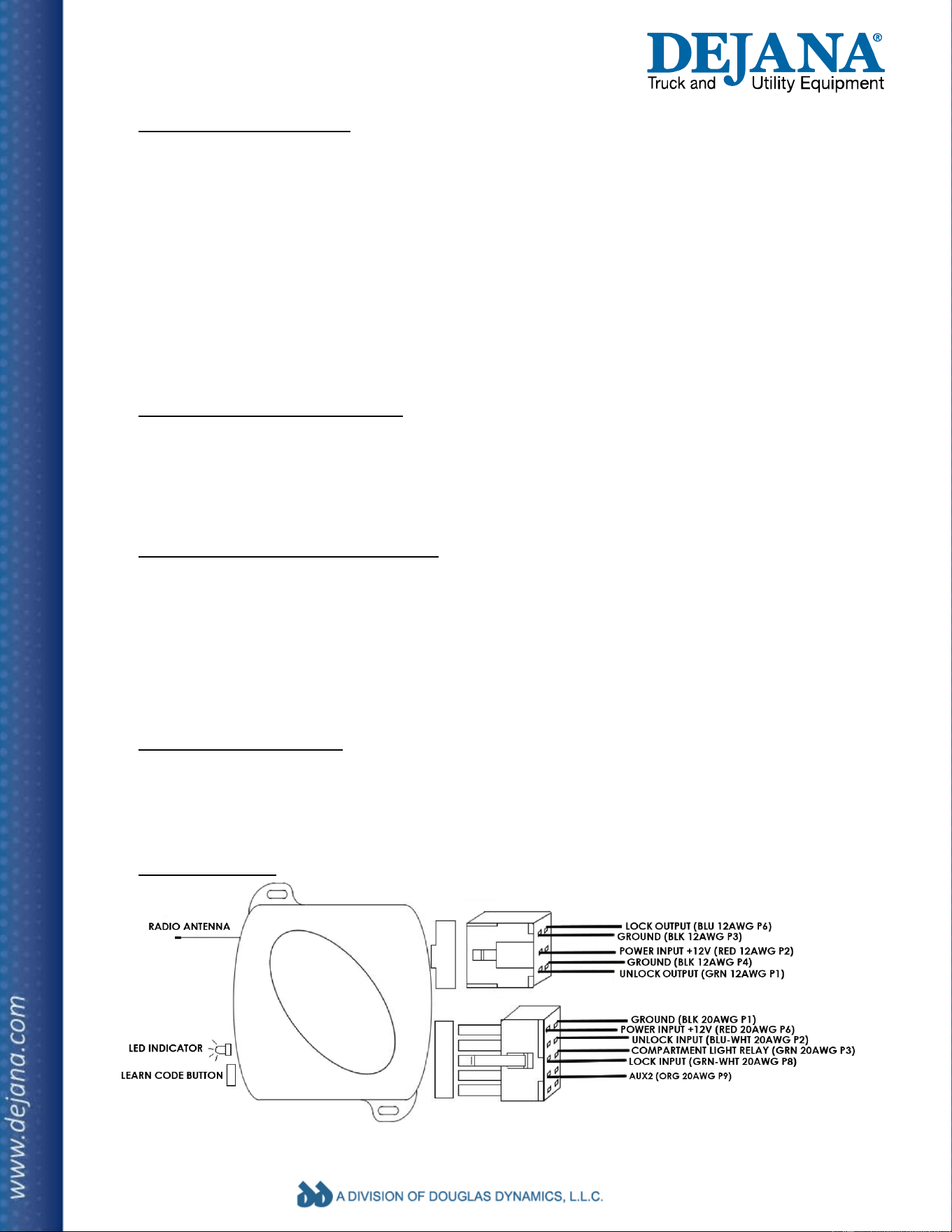
3) LED Flash Signal (LED on module)
1 flash: lock output active
2 flashes: unlock output active
3 flashes: compartment lighting output turned on/off
4 flashes: AUX2 output turned on/off
Continuously on: module in programming mode
Dejana Truck & Utility Equipment Company, LLC.
500 Pulaski Rd. Kings Park, NY 11754
ph: 631.544.9000 fax: 631.544.0942
4) Programming A Key Fob
1) Press the learn code button on the top of the module three times. The LED indicator will turn
on and remain on while the module is in programming mode. It will exit this mode if a remote
is not programmed within 10 seconds. Note: the module must be supplied with 12V power.
2) Press any button on the remote to be programmed. You will see the LED turn off and back
on to indicate the key fob was programmed correctly.
3) Repeat step 2 for all key fobs. The module may be programmed with up to 4 key fobs. Any
remotes not programmed during this process will be removed from memory.
4) The module will exit programming mode automatically after 10 seconds of inactivity or after
a 4
th
key fob has been programmed.
5) Lock/unlock hardwired switch (optional accessory)
The module can be connected to a hardwired momentary lock/unlock switch. Two pins in the
module 10 pin connector are for lock/unlock signal inputs. Lock: pin 8 (20 AWG green-white),
unlock: pin 2 (20 AWG blue-white). When the module receives a momentary positive (12V)
signal on pin 8 or 2, the doors will lock or unlock as if the corresponding button were pressed.
6) AUX1: Compartment Light Output (optional accessory)
The module has an output intended to control a relay which can be used for compartment
lighting. The lights will turn on when the vehicle is unlocked or when activated from the key fob
(press AUX1) and will turn off after 10 minutes or when deactivated by the key fob (press AUX1
again). Pin #3 of the 10 pin connector (GRN 20 AWG) supplies a switched ground signal when
the compartment lights are turned on and an open circuit when the lights are off. Do not wire
the module directly to lights, this circuit must use a relay to handle the lighting load.
7) AUX2: Auxiliary Output (optional accessory)
AUX2 controls a switched ground signal on pin #9 of the 10 pin connector (orange 20 AWG).
This is intended to drive an external relay for any use. The output turns on when AUX2 is
pressed and off when AUX2 is pressed again or after 10 minutes.
8) Wiring Diagram
Note: Wire color and AWG refer to Dejana wiring harness DTH 01-1180-003
Dejana Truck & Utility Equipment Company, LLC.
500 Pulaski Rd. Kings Park, NY 11754
ph: 631.544.9000 fax: 631.544.0942
FCC Warning
This device complies with part
15 of the FCC rules. Operation is subject to the following two conditions: (1) this device may not cause harmful
interference, and (2) this device must accept any inte rference received, including interference that may cause undesired operation.
Changes or modifications not expressly approved by the party responsible for compliance could void the user's authority to operate the
equipment.
NOTE: This equipment has been tested and found to comply with the limits for a Class B digital device, pursuant to part 15 of the FCC Rules.
These limits are designed to provide reasonable protection against harmful interference in a residential installation. This equipment generates
uses and can radiate radio frequency energy and, if not installed and used in accordance with the instructions, may cause harmful interference
to radio communications. However, there is no guarantee that interference will not occur in a particular installation. If this equipment does
cause harmful interferenceto radio or television reception, which can be determined by turning the equipment off and on, the user is
encouraged to try to correct the interference by one or more of the following measures:
• Reorient or relocate the receiving antenna.
• Increase the separation between the equipment and receiver.
• Connect the equipment into an outlet on a circuit different from that to which the receiver is connected.
• Consult the dealer or an experienced radio/TV technician for help.
Radiation Exposure Statement
The device has been evaluated to meet general RF exposure requirement. The device can be used in portable exposure condition without
restriction.