
SYNCO XTALK FAQ
1. Regarding Support
Q1: How to contact SYNCO for after-sales support?
For missing parts, technical issues, or warranty claims, email SYNCO Official
Support at support@syncoaudio.com with your order ID and details.
2. Regarding EasyGo Firmware and Pairing
Q1: Where to Download EasyGo Firmware
EasyGo firmware for Windows and macOS can be downloaded via the
official SYNCO website: https://www.syncoaudio.com/pages/synco-xtalk-easygo
Q2: What Issues Does EasyGo Firmware Upgrade Solve?
One-Tap Pairing: Quickly recognizes and connects individual XTALK
devices for effortless operation.
Upgrade to Low-Latency Version: Optimizes audio synchronization for
real-time communication.
Cross-Model Pairing: Enables interoperability across SYNCO XTALK series
(X/XPro/XMax).
Precautions for EasyGo Firmware Upgrade:

lf the headset fails to connect, please try reversing the Type-C connectoron
the headset end.
To connect XMax to EasyGo, ensure the headset is in INTERCOM MODE
3. Additional Topics
Q1: Why doesn't the XTALK pair automatically when powered
on?
To ensure a successful auto-reconnect, please turn on the headsets in the
sequence of Master → Level 1 → Level 2.
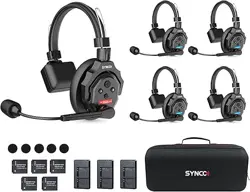
Default Master : Red-labeled headset
Level 1 : Blue-labeled headset with LV.1 sticker
Level 2 : Green-labeled headset with LV.1 sticker
Q2: How many Level 1 headset can Master headset connect to at most?
A Master can connect up to 4 Level 1, and a Level 1 can connect up to 2
Level 2
Q3: Can Level 2 connect directly to the Master headset?
The Level 2 must be paired with the Level 1 before it can connect to the
Master. They cannot directly pair for communication.
Q4: How to reconnect if the XTALK headset suddenly disconnects?

If disconnected, please return to the pairing range with the upper-level
headset for automatic reconnection.
Q5: How to fix unstable signals caused by nearby electronic devices?
Enable Boost Mode to enhance signal strength and stability
Long press Volume– to switch between Mode 1/2/3.