
File No.: IFU-D3-001 Version: 01
Continuous Glucose Monitoring System
Sensor, Transmitter, App
USER MANUAL
Model:D3
Infinovo Medical Co., Ltd.
IFU-D3-001
Version No: 01
Effective Date: 30, August, 2024

File No.: IFU-D3-001 Version: 01
Table of Contents
1. Product Overview ....................................................................................................................... 2
1.1. Working Principle ............................................................................................................... 2
1.2. Component Structure .......................................................................................................... 2
1.3. App Overview .................................................................................................................... 2
2. Safety Information ...................................................................................................................... 3
2.1. Application definition ......................................................................................................... 3
2.2. Important user information ................................................................................................. 4
2.3. Contraindications ................................................................................................................ 4
2.4. Warning .............................................................................................................................. 4
2.5. Precautions ......................................................................................................................... 5
3. Risk and Efficacy ........................................................................................................................ 7
3.1. Risk ..................................................................................................................................... 7
3.2. Efficacy ............................................................................................................................... 7
4. Installation and Use .................................................................................................................... 8
4.1. Installation .......................................................................................................................... 8
4.2. Sensor Application .............................................................................................................. 9
4.3. Start the Monitoring ......................................................................................................... 11
4.4. Remove sensor .................................................................................................................. 12
4.5. Disposal ............................................................................................................................ 12
5. App interface introduction and function application ............................................................ 13
5.1. Main interface ................................................................................................................... 13
5.2. Function Bar ..................................................................................................................... 14
5.3. Alarm/Alert ....................................................................................................................... 15
6. Faults and Troubleshooting ..................................................................................................... 16
7. Maintenance .............................................................................................................................. 18
8. Travel information .................................................................................................................... 18
9. Product Performance ............................................................................................................... 19
10. EMC Statement ......................................................................................................................... 20
11. Technical support Costume service ......................................................................................... 23

File No.: IFU-D3-001 Version: 01
11.1. Technical support .......................................................................................................... 23
11.2. Sales support ................................................................................................................. 23
12. Reporting of serious incidents ................................................................................................. 23
13. The warranty ............................................................................................................................. 24
13.1. The scope and duration of warranty .............................................................................. 24
13.2. The following conditions are not in the scope of warranty ........................................... 24
13.3. Warranty liability .......................................................................................................... 24
13.4. Warranty Statement ....................................................................................................... 24
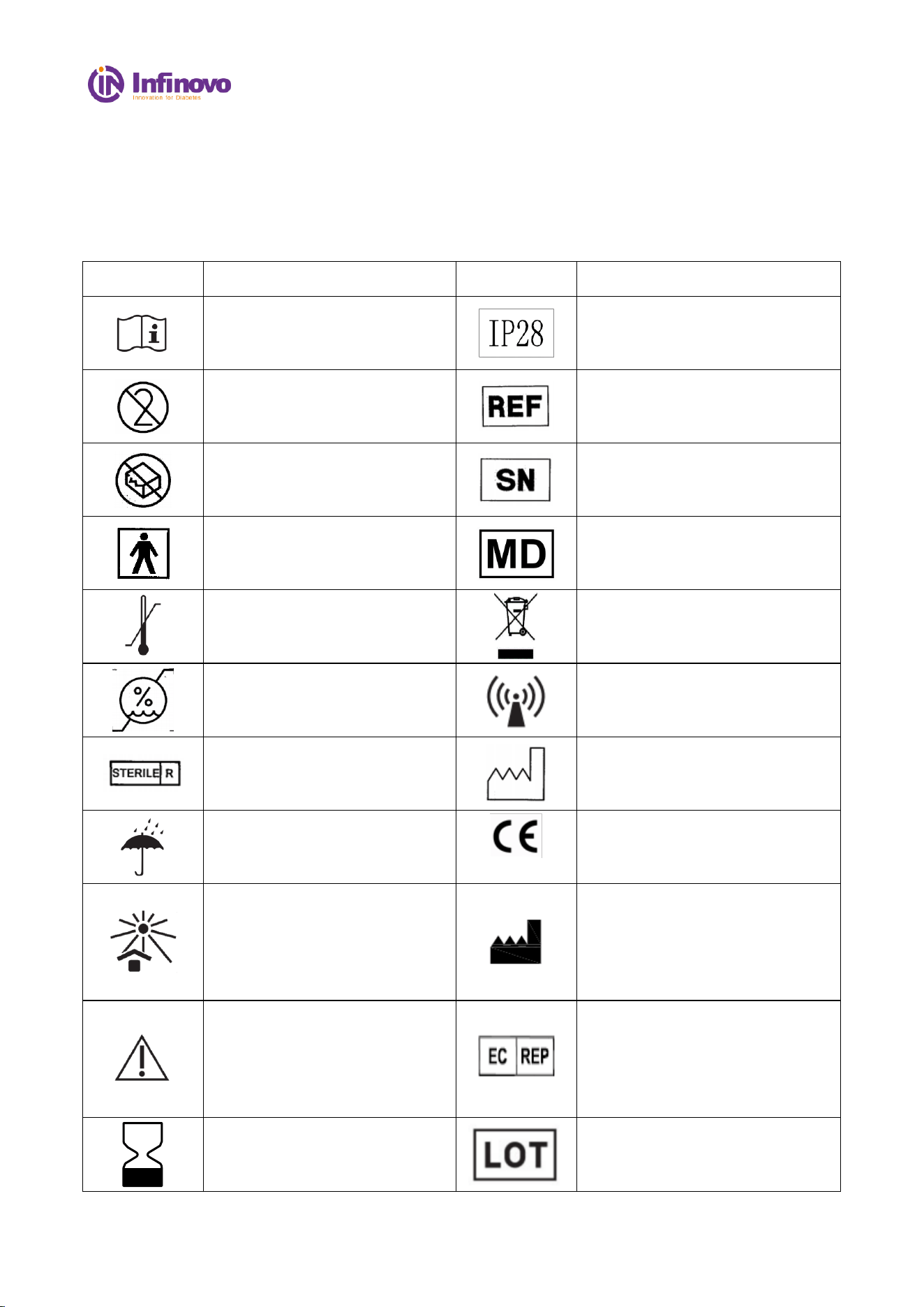
14. Label symbol and graphic description .................................................................................... 25
Appendix-Warranty Card ............................................................................................................... 27
File No.: IFU-D3-001 Version: 01
1 / 27
Terminology
CGMS
Abbreviation for Continuous Glucose Monitoring System, consist of applicator,
(include sensor and transmitter) and App.
Applicator
A disposable component that applies the sensor onto skin.
Sensor
Core component of the Continuous Glucose Monitoring System, built a
transmitter inside, is intended to measure blood glucose level in interstitial
fluids and transmit glucose data to App.
Sensor electrode
A component attached with sensor, is intended to apply under the skin that reacts
with the interstitial fluid and converts biological signals into electrical signals.
Transmitter
The transmitter is built into sensor, used to convert electrical signal into glucose
reading and send the glucose reading wirelessly to the App.
Mobile Application
(App)
The mobile software that receives blood glucose information, displays glucose
condition.
Default value
The values that come with the system.
Calibration
Blood glucose value measured by the blood glucose meter and entered into the
App for calibration to ensure the accuracy of the blood glucose reading.
Blood Glucose
(BG) Meter
A medical device used to measure how much glucose is in blood
Blood Glucose
(BG) value
Blood Glucose value is the amount of glucose in blood measured by blood
glucose meter.
Sensor Reading
The glucose value measured by Continuous Glucose Monitoring System
Data receiving
range
The communication distance between the App and the sensor, which shall be
within 6 m without obstacle.
Repeat prompt
When the first notification is not confirmed, the prompt will be repeated.
File No.: IFU-D3-001 Version: 01
2 / 27
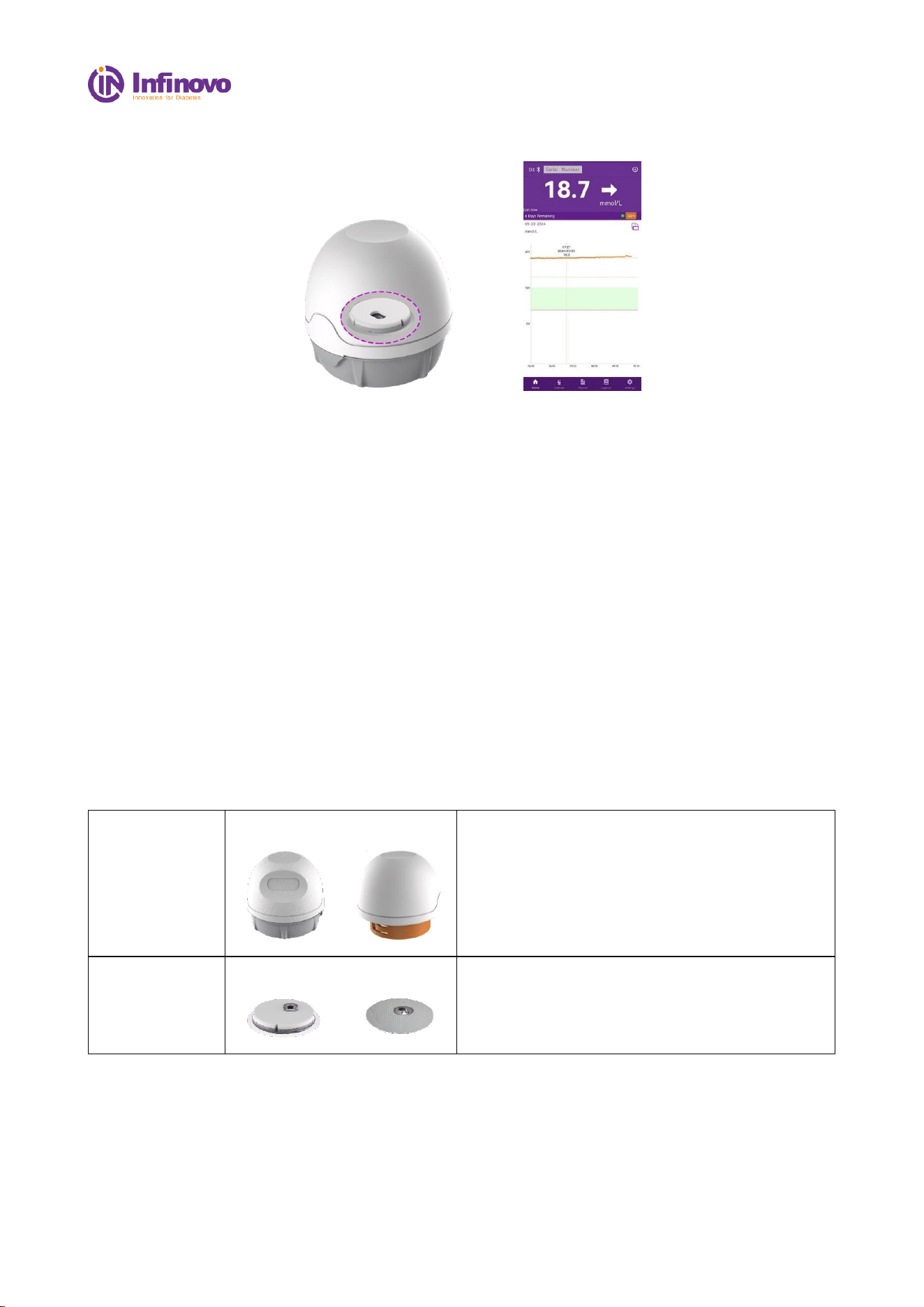
1. Product Overview
1)Applicator
2)Sensor(inside)
App
The D3 Continuous Glucose Monitoring System consists of a fully disposable Applicator (include
sensor and transmitter) and Mobile Application, in which the core component is the Sensor.
Continuous Glucose Monitoring System (D3) can display glucose readings automatically after when
activating the sensor. The CGMS measures a glucose reading every three minutes, making 480
readings in total each day. The system can continuously monitor the blood glucose data for 14 days
and form a continuous blood glucose curve. In addition, dining, sport, medication and other activities
can be recorded as an event.
1.1. Working Principle
The sensor electrode chemically reacts with glucose in the hypodermic interstitial fluid to generate
an electrical signal. Transmitter analyzes and calculates the electrical signal, and generates the blood
glucose values, which is sent to the mobile App.
1.2. Component Structure
Applicator
(disposable)
Intact state
Open state
Applicator, intends to apply the sensor onto
abdomen or onto back of upper arm.
When rotated, applicator will come to open state.
Sensor
(14-day)
Front side
Reverse side
Sensor is a all-in one component, attached with a
sensor electrode on the reverse side.
The transmitter is built into sensor.
1.3. App Overview
The App (Glunovo pro) is a mobile medical application for its continuous glucose monitoring system
to receive and process glucose readings. The software displays blood glucose readings, trend curves,
trend arrows, and transmitter status. It has functions of adding Notes, Alarms/Alerts, Logbook Entries,
Reports, Data Export feature and so on.
File No.: IFU-D3-001 Version: 01
3 / 27
The main interface of App mainly displays blood glucose readings, trend curves and trend arrows.
App and transmitter can be connected through Bluetooth, pairing for data communication.
Operational Requirement
Item
Detail
Operating system
Android 9.0 and above/IOS 13.2 and above
Connection
One App can only connect to one transmitter at
the same time
Data transmission
Transmitter and App (phone) transmit data via
Bluetooth protocol
Storage Format
App export data storage format is Excel file
2. Safety Information
2.1. Application definition
2.1.1. Intended Use
The D3 Continuous Glucose Monitoring System is intended for continuous or periodic recording
of glucose levels in interstitial fluid for patients with diabetes aged 18 or older. The information is
intended to detect trends and track patterns to provide reference information to patients for better
diabetes management. The system provides real-time blood glucose value, which is received and read
by the App.
2.1.2. Intended user:
The users are medical staff, patients, and family members of patients who should be aged 18 and
above with no restrictions on gender, weight, education, professional competence, health condition,
linguistic and cultural background; however, the patients should have minimum knowledge to
understand the content of the IFU, hygiene, and distinguish body parts. Also, patients with disabilities
might need assistance in the process of operating the device.
2.1.3. Intended environment:
Home Healthcare Environment and Professional Healthcare Facility Environment.
2.1.4. Indications
1) Type 1& 2 diabetes mellitus.
2) Special types of diabetes (excluding monogenic diabetes syndromes, diseases of the exocrine
pancreas, and drug or chemical induced diabetes).
3) Abnormal blood glucose levels.
4) Patients requiring improved glycemic control.
5) People requiring frequent or continuous monitoring of blood glucose.

File No.: IFU-D3-001 Version: 01
4 / 27
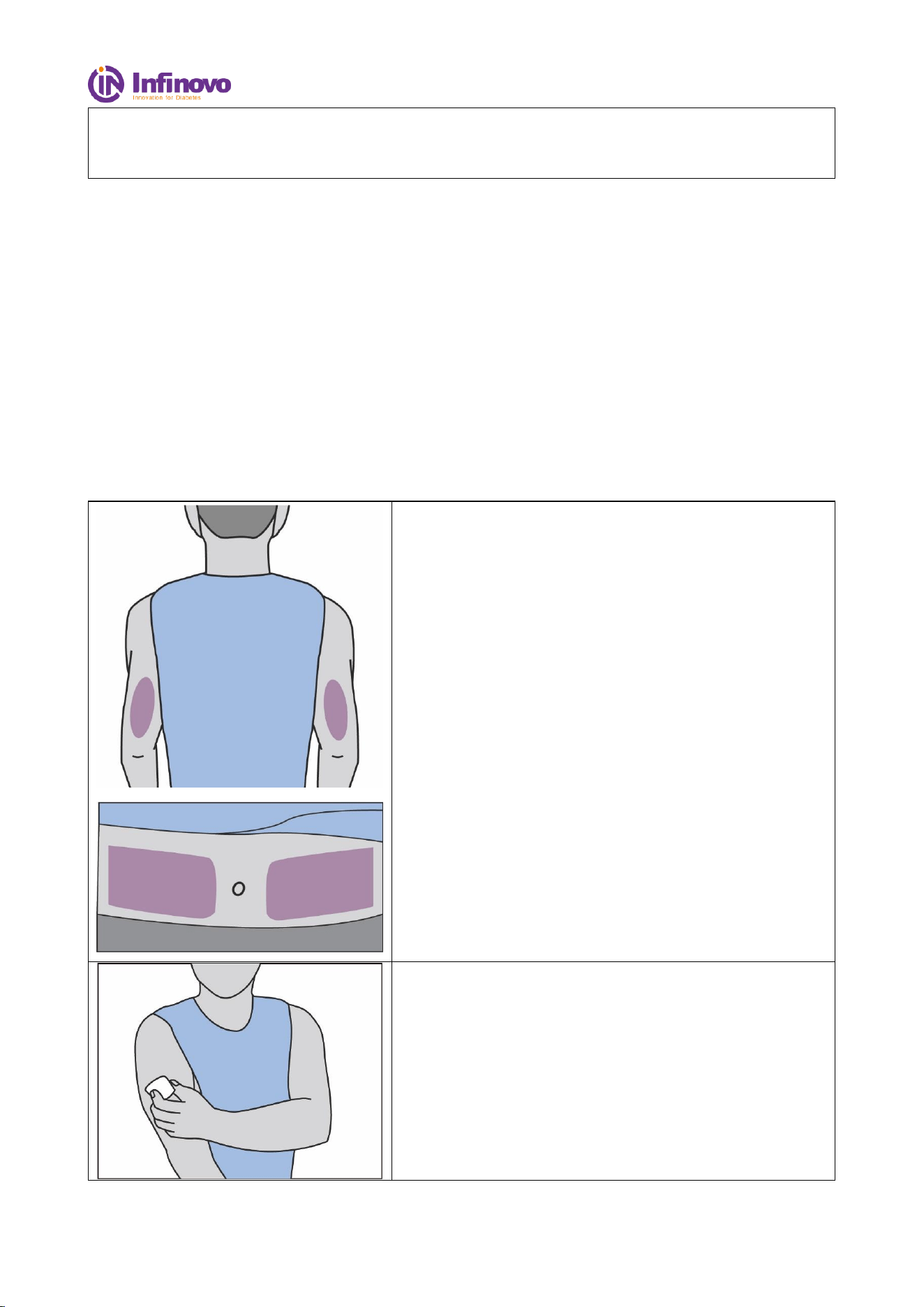
2.1.5. Apply site
Abdomen, back of the upper arm.
2.1.6. Reuse
D3 CGMS is a single-use product, not reusable.
2.2. Important user information
In order to use this product safely, please review your product instructions before using your
Continuous Glucose Monitoring System. The instructions include contraindications, warnings,
cautions, and other important instruction for use. Discuss with your doctor how to use the information
to help you control your blood glucose. The instruction manual contains important information about
system troubleshooting and equipment performance characteristics.
Any serious incident that has occurred in relation to the CGMS (Glunovo) should be reported to
Infinovo and the competent authority of the Member State in which you are established.
2.3. Contraindications
Part of the sensor shall pierce the skin, so it is recommended that people with delicate skin use the
device cautiously.
The product must be removed before you undergo magnetic resonance imaging (MRI, computed
tomography (CT) scan, or high-frequency electrical heat (diathermy) treatment.
Taking higher than the maximum dose of acetaminophen (e.g. > 1 gram every 6 hours in adults) may
affect the CGMS readings and make them look higher than they really are.
Intake of acetaminophen beyond maximum dose while wearing the sensor may falsely raise your
sensor glucose readings.
The CGM System was not evaluated for the following persons:
● Pregnant women
● Peritoneal dialysis patients
● Patients with implanted pacemakers
● Patients with coagulation disorders or those taking anticoagulant drugs
2.4. Warning
● The CGMS should not be used by patients who have diffuse subcutaneous nodules.
● Read the instructions thoroughly before using. Incorrect use of the continuous blood glucose
monitoring system may lead to misunderstanding of the information provided by the system or
affect the performance of the system and miss the low/high blood glucose incidents.
● Talk to your health care professional about how you should use your CGMS glucose information
to help your diabete management.
● Failure to use CGMS may result in your missing severe hypoglycemia (low blood glucose) or

File No.: IFU-D3-001 Version: 01
5 / 27
hyperglycemia (high blood glucose) occurrence and/or making a treatment decision that may
result in injury. If your glucose alerts does not match your symptom or expectation, use a
fingerstick blood glucose (BG) value from your blood glucose meter to make diabetes treatment
decisions. Seek medical attention when appropriate.
● After restarting your phone, please check again if bluetooth is turned on. If it’s turned off, please
enable bluetooth again to ensure real-time data transmission and notifications. Android users,
after enabling airplane mode, please double-check if Bluetooth is turned on. If it’s turned off,
please enable Bluetooth again to ensure real-time data transmission and notifications. iOS users
don’t need to consider this for the time being.
● Avoid areas:
1. With loose skin or without enough fat to avoid muscles and bones.
2. That get bumped, pushed, or you lie on while sleeping.
3. Within 5 cm of infusion or injection site.
4. Near waistband or with irritations, scarring, tattoos, or lots of hair.
5. With moles or scars.
● In rare cases, the sensor electrode may fracture. If the sensor electrode breaks and there is no
visible sensor electrode on the skin, do not attempt to remove it yourself. Seek professional
medical help in the condition of infection or inflammation - redness, swelling or pain.
● Do not use sensors when its sterile packaging is damaged. Using unsterilized sensors may lead
to infection.
● The storage temperature of the sensor is 2oC-30oC. Improper storage results in inaccurate blood
glucose readings and missing low/high blood glucose levels. If the sensor is stored in the
refrigerator, please take it out half an hour before use. The sensor can be used at room temperature.
● Your transmitter communicates with your App via Bluetooth. The communication might be
affected by strong electro-magnetic field, keep your CGMS away from any strong electro-
magnetic field. Otherwise, degradation of the performance of this equipment could result in
malfunctioning of the system.
● With the prompt function off, the App cannot give a prompt (notification) even if the Transmitter
and the App are within communication range.
● The CGMS contains small parts that may cause choking if swallowed, keep them away from the
reach of children.
● Do not use if expiry date has passed.
2.5. Precautions
● No modifications to the CGMS are allowed. Unauthorized modification of the CGMS may cause
the product to malfunction and become unusable.
● Before using this product, you need to read the Instruction Manual or be trained by a professional.
No doctor’s prescription is required for use at home.
● The CGMS contains small parts that can be dangerous if swallowed.
● During rapid changes in blood glucose (more than 0.1 mmol/L per minute), glucose levels
measured in interstitial fluid by the CGMS may not be the same as blood glucose levels. When
blood glucose levels drop rapidly, the CGMS may produce a higher reading than the blood

File No.: IFU-D3-001 Version: 01
6 / 27
glucose level; Conversely, when blood glucose levels rise rapidly, may produce a lower reading
than the blood glucose level. In these cases, the reading should be checked by a fingertip blood
test using a glucose meter.
● Severe dehydration or excessive loss of water may result in inaccurate results. When you suspect
you are dehydrated, consult a health care professional immediately.
● If you think the CGMS sensor reading is inaccurate or inconsistent with the symptoms, use a
blood glucose meter to test your blood glucose level or calibrate the glucose sensor.
● The sensor loosens or takes off may cause the APP to have no readings.
● This product is waterproof and can be worn during showers and swimming, but do not bring it
into water more than 1 meters deep for longer than 120 minutes.
● Before opening the sensor package, wash your hands with soap and water and dry them.
● Before inserting the sensor, clean the skin with alcohol tablets and let it dry up. This helps prevent
infection. Do not insert the sensor until the skin is dry so that the tape on the sensor base can be
better attached to the skin.
● Change the insertion site each time. Using the same insertion site too often may not allow the
skin to heal, and may cause scars or skin allergies.
● To calibrate the system, enter the exact blood glucose value measured by the glucometer within
3 minutes. Inaccurate input or input exceeding 3 minutes may affect the performance of the
sensor and result in missing low/high blood glucose values.
● Rapid changes in blood sugar can affect the accuracy of the system, such as during exercise or
after meals.
● When properly worn, the transmitter and App have a transmission range of 6 m without
obstruction. Wireless connection in the water is not very well, so the range of connections in
places like swimming pools, bathtubs and waterbeds will be reduced. There are no tests for
different types of obstruction. If the distance between the transmitter and App is more than 6 m
or if the distance between them is blocked by an obstruction, they may not be connected or the
connection distance may be shorter. You may miss the low/high blood glucose level. Yet all the
data will still be stored in your transmitter, so your App is able to display all the data when there
is good communication again.
● Intense exercise may cause the sensor to be detached or loosened. If the Sensor is loose, you may
not get a reading or the reading may not be reliable and may not match how you feel. Follow
instructions on selecting the appropriate site for application.
● On rare occasions, patients may experience mild skin redness and swelling on the insertion site.
● You are responsible for properly securing and managing your phone. If you suspect an adverse
cybersecurity event related to the app, contact Customer Service.
● Make sure that your phone and Sensor kit are kept in a safe place, under your control. This is
important to help prevent anyone from accessing or tampering with the System.

File No.: IFU-D3-001 Version: 01
7 / 27
3. Risk and Efficacy
3.1. Risk
• Inaccurate glucose values
Exposure to heat for longtime may cause inaccurate results.
• Mild to severe to sensor related -wear reactions
E.g. allergic reaction, moderate to severe itching, rash, erythema, bleeding, minor infection at the
insertion site, discomfort during insertion.
• Hypo and Hyperglycemia events
Hypo and Hyperglycemia events stemming from missed alerts or sensor inaccuracies.
• Sensor tip broken
In rare cases, the sensor tip may break and remain in the body. This phenomenon did not appear in
the clinical study. If you feel the sensor is broken inside your skin, contact your medical diabetes team
and technical support.
3.2. Efficacy
The potential clinical benefits of CGMS are:
• Improved management of A1C and TIR for tighter glycemic control
• Shortened time spent in hypoglycemia and hyperglycemia
• Reduction in hypo and hyperglycemia events in diabetes patients

File No.: IFU-D3-001 Version: 01
8 / 27
4. Installation and Use
This chapter describes how to use your D3 systems, please read carefully before use, and follow the
indication step-by-step.
4.1. Installation
4.1.1. App installation and setting
1) Download App from Google Play / App Store.
2) After installed, please complete personal information.
3) Setting your target and Alarm/Alert Sound type.
4) Units of measurement:Select Glucose unit mmol/L or mg/dL.
4.1.2. Prerequisites
To optimize your smartphone user experience and ensure real-time access to blood glucose readings
and status in the background, please note the following:
1) Ensure your phone has sufficient battery power: Keep your phone's battery fully charged during
use to avoid disconnection or the inability to receive timely alerts due to low battery.
2) Maintain the distance between your phone and the sensor within a range of 6 meters: To ensure
a stable Bluetooth connection, keep the distance between your phone and the sensor within 6
meters. If the distance is too far, it may lead to disconnection and hinder data transmission.
3) Allow the app to run in the background: Ensure that your phone doesn't forcefully close the app
or put it into power-saving mode. The app can only receive blood glucose readings and sensor
status when it runs in the background.
4) Optimize settings for alert messages:
a) Ensure your phone is not in silent mode.
b) Disable the "Do Not Disturb" mode to receive alert messages promptly.
c) Grant notification permissions for the app in the settings.
d) Enable background refresh for the app to receive the latest data in a timely manner.
e) Disable battery optimization for the app to prevent excessive restrictions on background
operation.
5) Avoid adding the app to the deep sleep app list to ensure it continues running in the background.
6) Exercise caution when setting automatic updates for your phone's operating system: When
configuring automatic updates, pay attention to the compatibility of the updated operating system
to ensure the app functions properly.
File No.: IFU-D3-001 Version: 01
9 / 27
Warning:
If you don't set up your phone according to the instructions above, you may miss alerts for high or
low blood glucose.
4.2. Sensor Application
4.2.1. Check Sensor Information
Before use, please check the packaging, expiration date, and tamper-evident label of the sensor:
1) Do not use if the applicator and/or cap is damaged or already opened.
2) Carefully check the expiration date of the sensor and do not use if it has expired.
3) Do not use if the tamper-evident label on the sensor is damaged.
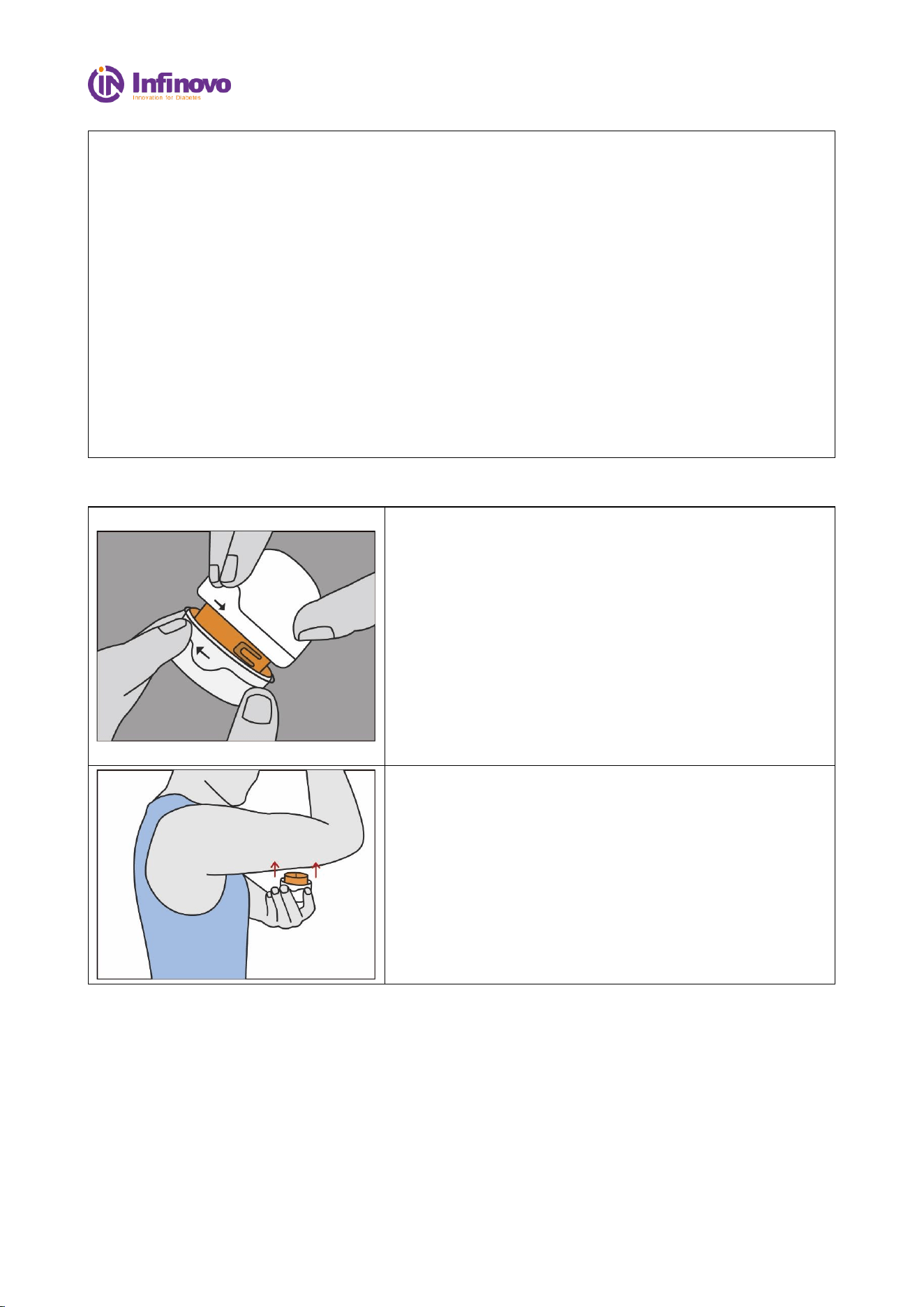
4.2.2. Clean Application Site
Select application site:
The Glunovo D3 can be worn on the back of upper arm
and abdomen.
*It is recommended to consult with a healthcare
professional for advice on the placement.
*Select flat skin to apply, so that it is less prone to impact
or compression.
Clean application site:
Before wearing the sensor, please wash your hands and
wearing area with soap, and dry them with a clean towel.
Wipe the wearing area with an alcohol wipe and allow it
to dry.
*Make sure wearing area is clean and free of lotions,
perfumes, and medications.
File No.: IFU-D3-001 Version: 01
10 / 27
Caution:
Try to avoid wearing the sensor in the following areas:
1) Avoid areas where a CGM (continuous glucose monitor) has recently been worn.
2) Do not wear the sensor in areas where the skin is loose or lacks fat, such as muscle or bony
areas.
3) Do not wear the sensor within a 5cm range of insulin injection sites.
4) Do not wear the sensor on areas with damaged skin, tattoos, or scars.
5) Do not wear the sensor on the waistline or where a belt is worn.
6) Avoid wearing the sensor in areas with excessive hair growth. If chosen, remove the hair
before placement.
7) Do not wear the sensor on areas with fatty nodules.
8) The sensor placement should be at least 5cm away from the navel.
9) If you are pregnant, it is advisable to avoid wearing it on your abdomen. When selecting the
placement site, please consult with your doctor or HCP for guidance.
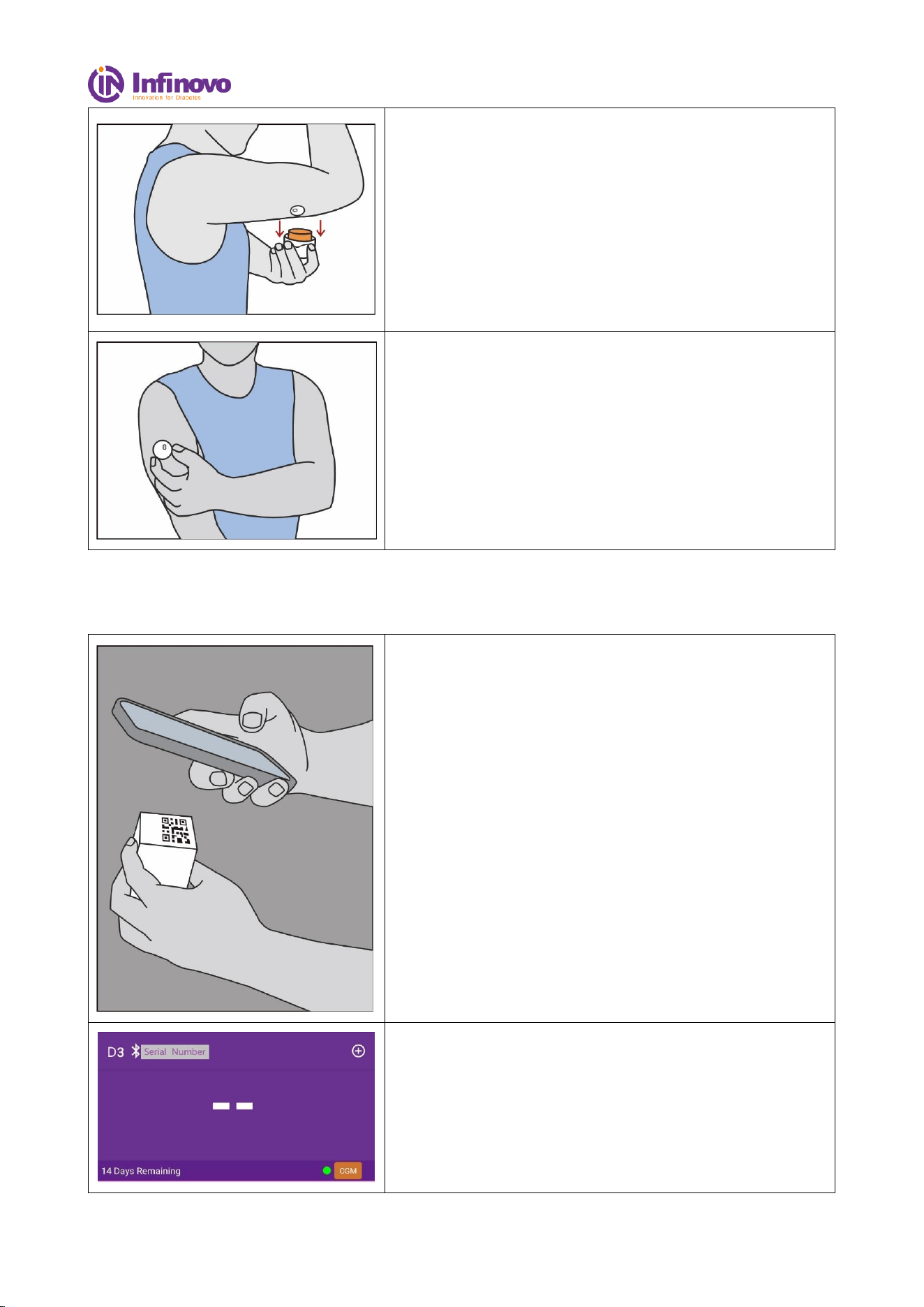
4.2.3. Apply Sensor
Rotate the product casing and open the applicator.
*Do not use the product if it or the tamper-evident label is
damaged.
*After opening the product, do not attempt to reattach the
cover as it may damage the sensor.
*The sensor contains needles, do not touch them with your
hands.
*Do not touch the inside of the applicator.
Place the applicator on the desired wearing site and
press downward with vertical force.
*Do not press down on the sensor before moving it to the
intended wearing position to prevent accident.
File No.: IFU-D3-001 Version: 01
11 / 27
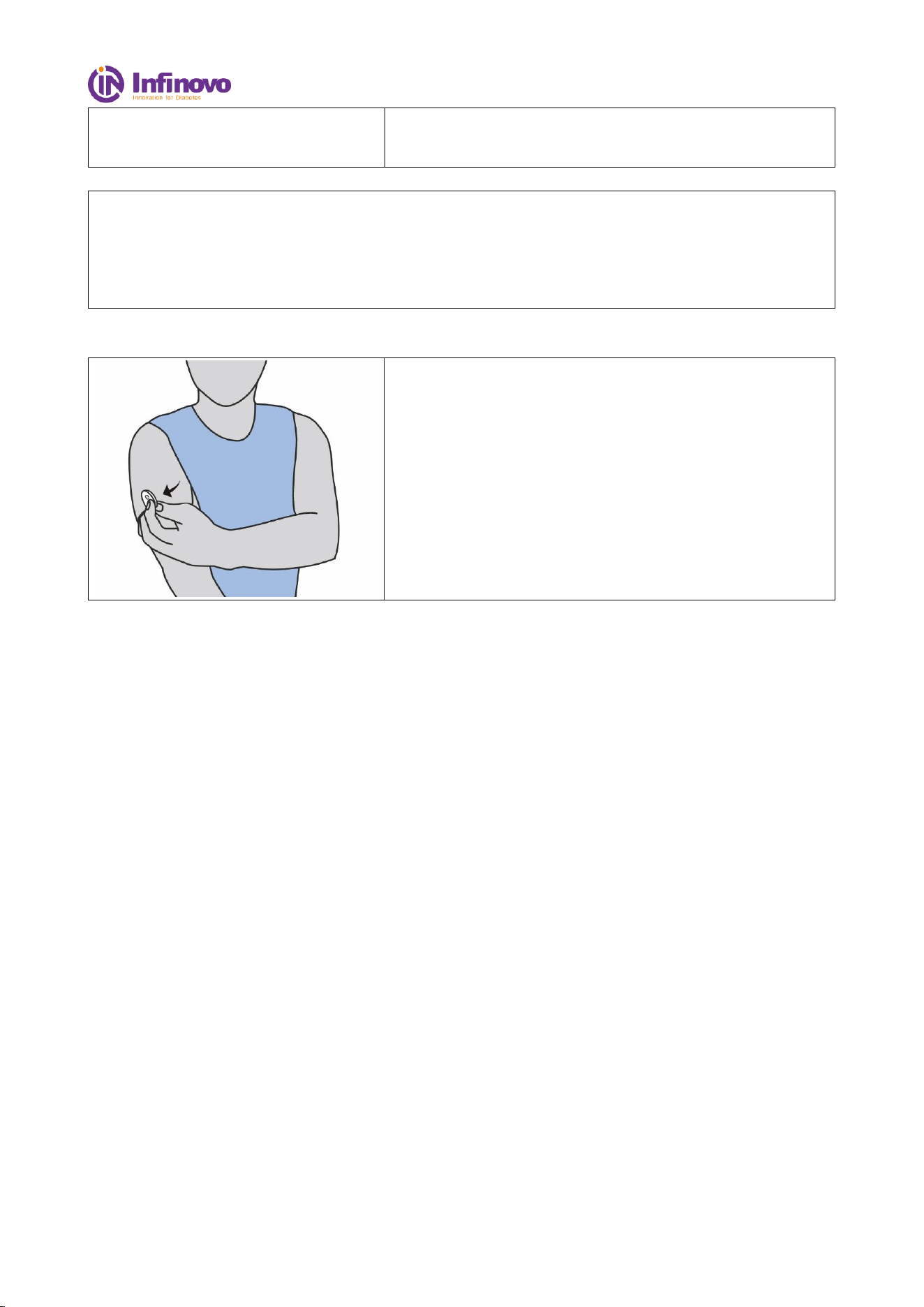
After hearing a "click" sound, wait for 3-5 seconds,
then gently remove the applicator in a vertical
direction.
*The sensor may cause skin abrasion or bleeding. Minor
bleeding does not impact the wearing or monitoring
effectiveness.
After application,gently press the sensor and
surrounding tape.
*Sensor may fall off before your complete 14-day
monitoring without this process.
4.3. Start the Monitoring
Scan the QR code:
Please scan the QR code according to the APP's
instructions.
After a 60-minute warm-up period, blood glucose data
will be displayed.
*There will be no reading or alert during warm-up period.
File No.: IFU-D3-001 Version: 01
12 / 27
*If you feel any discomfort during the warming up, please
use BG meter.
Caution:
If App shows “System stopped, please change sensor”, it is recommended to promptly remove and
replace the sensor.
Continuous blood glucose testing cannot be used as a basis for diabetes diagnosis, such as insulin
injection. It cannot replace the blood glucose meter.
4.4. Remove sensor
When removing the sensor, carefully peel it off along the
edge of the adhesive patch.
*Avoid applying sudden force or pulling, as it may cause
unnecessary injury or discomfort.
Note:
After removing the sensor, it is normal to have a slight residue of adhesive left at the wearing site.
You can gently use soap or water or an alcohol swab to remove it.
After the 14-day monitoring period, the Glunovo Pro application will automatically disconnect
from the sensor. It is important to remove the sensor immediately.
4.5. Disposal
To properly dispose of the removed sensor, please follow the following optimized guidelines:
According to the Directive 2012/19/EU, collect the discarded sensor as electronic waste separately.
Do not dispose of the sensor in the regular municipal waste system.
Since certain parts of the sensor may come into contact with bodily fluids, wipe the sensor with
alcohol or disinfectant before discarding it. This helps reduce the potential risk of transmission.
Please note that the sensor contains non-removable batteries. It is strictly prohibited to incinerate the
sensor as it may lead to explosions or other hazardous situations. Properly handling the batteries can
minimize potential harm to the environment and human health.
File No.: IFU-D3-001 Version: 01
13 / 27
5. App interface introduction and function application
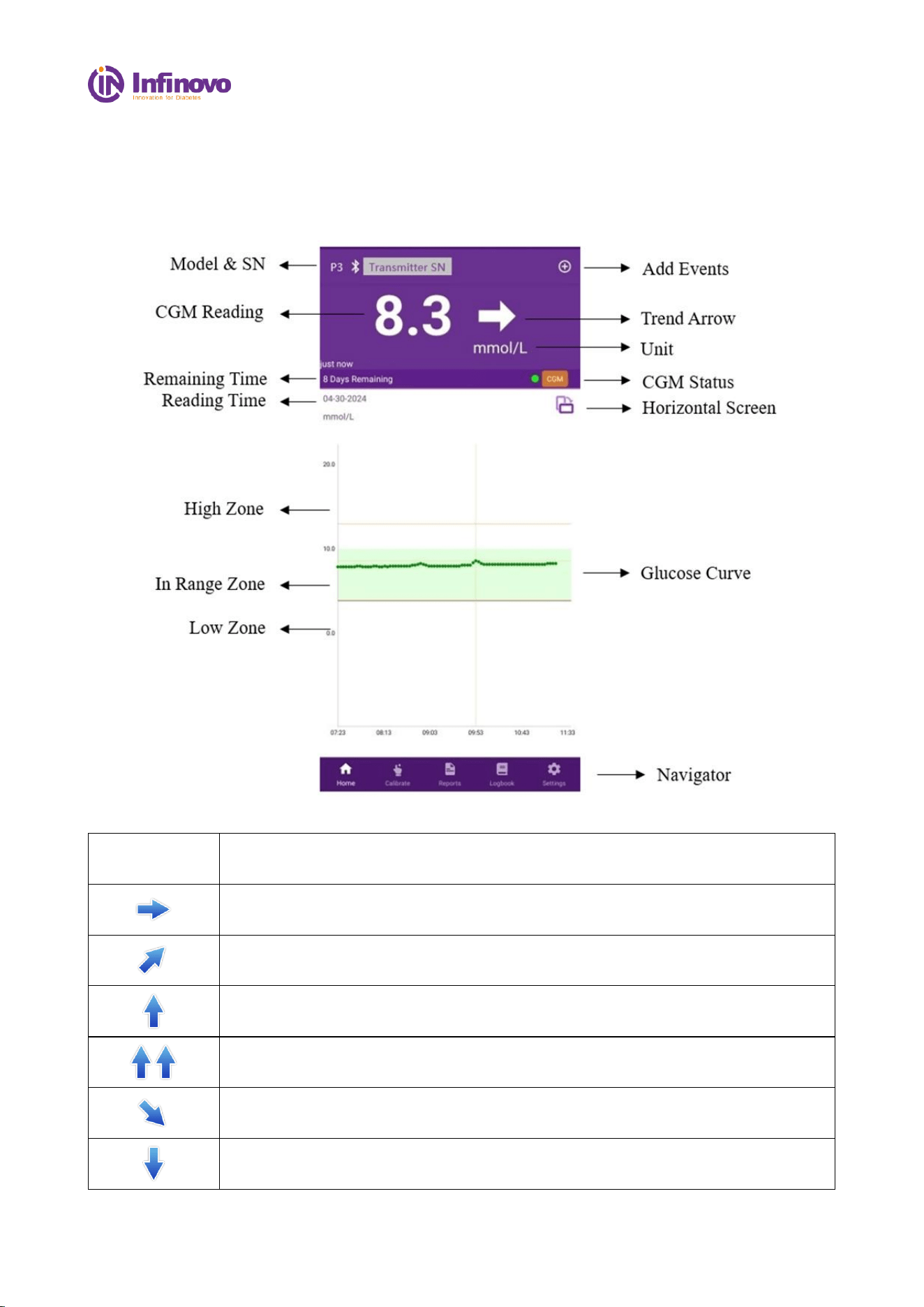
5.1. Main interface
The main interface contains glucose readings, glucose curve, trend arrows, CGM status.
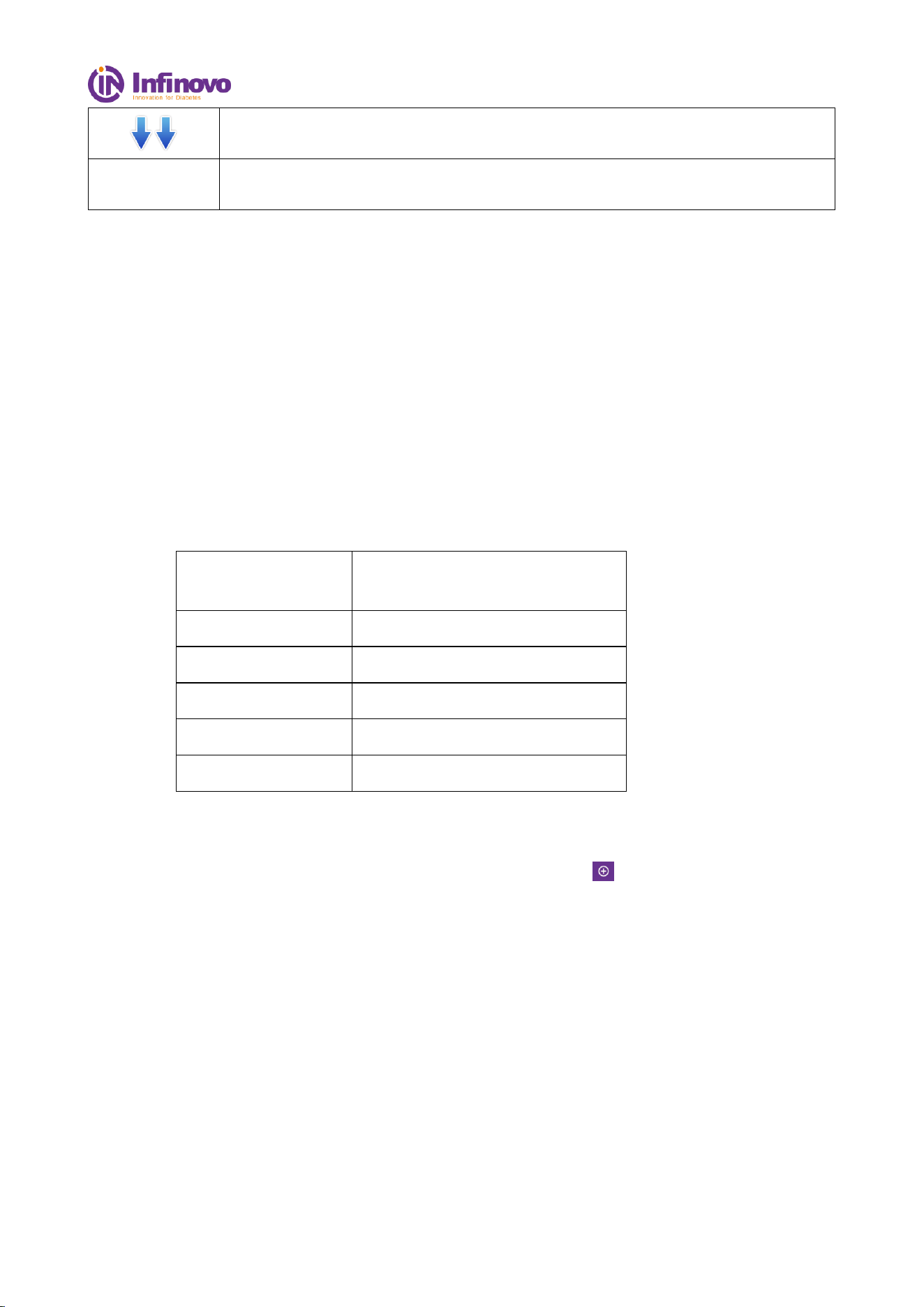
5.1.1 Trend arrows:
Arrows
Definition
Stable: Blood glucose is stable (no more than 0.06 mmol/L rise or fall per
minute).
Slow increase: blood glucose increases by 0.06 to 0.11 mmol/L per minute.
Increase: blood glucose increased by 0.11-0.17 mmol/L per minute.
Rapid increase: blood glucose increased by more than 0.17 mmol/L per minute.
Slow decrease: blood glucose decreased by 0.06 to 0.11 mmol/L per minute.
Decrease: blood glucose decreased by 0.11-0.17 mmol/L per minute.
File No.: IFU-D3-001 Version: 01
14 / 27
Rapid decrease: blood glucose decreased by more than 0.17 mmol/L per minute.
No arrow
App can not calculate the rate of increase or decrease in blood glucose (data
synchronization or disconnection).
5.1.2 Glucose Curve
Glucose curve shows: sensor glucose readings and trends.
Swiping from left to right on the glucose curve, you can review the recent sensor glucose readings.
Sensor glucose reading shows between 2.2-22.2mmol/L. During Sensor Glucose below 2.2mmol/L
or above 22.2mmol/L, there will no record in glucose curve, but sensor glucose reading are still
recorded once every 3 minutes in Logbook.
At the top of the glucose curve, you can tap on the trend view you want to see glucose levels of the
last 3-, 6-, 9-, or 12-hours.
5.1.3 CGM Status
Click “CGM” icon in homepage to enter CGM status, which is showing:
CGM Status:
RUNNING,STOPPED,
SESSION END, LINK LOST
Transmitter SN
Transmitter SN
Sensor LOT
Sensor LOT number
Sensor Current
latest current from sensor
Last Calibration
The latest calibration time
App Version
The full version of App
5.1.4 Events
You can add Events (carbs, insulin, Medication, sport) by clicking “ ”
5.2. Function Bar
Function bar contains: Home, Calibration, Reports, Logbook and Settings.
5.2.1 Calibration
To add calibrations via meter.
Range:2.2-22.2mmol/L.
5.2.2 Report
File No.: IFU-D3-001 Version: 01
15 / 27
Time In Range
TIR (time in range) indicates the percentage of how
long your glucose value was within the target range
during a defined period.
Glucose Profile
A profile displaying glucose fluctuation.
The chart needs at least 24 hours valid data.
5.2.3 Logbook
All calibrations, alarm/alert and sensor readings are recorded in Logbook and marked with different
icons.
5.2.4 Settings
The screen of Settings has three main sections:
a) Export data:CGMS monitoring information can be export as an Excel file in phone’s storage.
Uninstall App may cause data lost.
b) Alarms and Alert:Change alarm and alerts threshold and customize alarm.
c) Device Information:View sensor and transmitter information
5.3. Alarm/Alert
App provides Urgent Low Alarm, High/Low Alarm with sounds, vibrations, view, and notifications.
Alarm/Alert can be snoozed.
Glucose Alarm will still sound, even in phone’s vibration or mute mode for Android.
Note
:
If the Android Phone is in "Do Not Disturb Mode", the urgent low alarm may not be triggered
5.3.1 Thresholds
Alarm
Introduction
Threshold
setting
Default
Low Alarm
If the blood sugar is lower than
this value, app will give an
alarm of hypoglycemia.
3.3 - 5.6
mmol/L (60-
101 mg/dL)
3.9mmol/L
(71 mg/dL)
Urgent Low
If the blood glucose is at or
below 3.1 mmol/l, app will
give an urgent hypoglycemia
alarm
3.1mmol/L
(56 mg/dL)
3.1mmol/L
(56 mg/dL)
File No.: IFU-D3-001 Version: 01
16 / 27
High Alarm
If the blood sugar is higher
than this value, app will
generate hyperglycemia alarm.
7.9 mmol/L -
22.2 mmol/L
(143 - 400
mg/dL)
13.0mmol/L
(234 mg/dL)
5.3.2 Snooze Alarm
You can click the "Turn off current alarm" button during an Alarm to snooze Alarm for 3 mins.
You can click the "Snooze Alarm" button during an Alarm, and the alarm will remain snoozed
during the time interval set by the user.
5.3.3 System Recovering
System recovering, means CGMS is not in normal operation. CGM readings will not be displayed
during this period. Please use glucose meter to check blood glucose; Please press “Help” for help
when you see this notification.
5.3.4 Connecting
When the phone's Bluetooth is off or the app's Bluetooth is disconnected, the app will indicate that
the CGMS is disconnected. No data or alarms will be received when disconnected. When the
disconnect prompt appears, keep the phone at a working distance from the transmitter and remove
any obstructions or check whether the phone's Bluetooth is turned on. The connection will
automatically recover when Bluetooth signal recovers.
6. Faults and Troubleshooting
The Sensor’s adhesive tape is not sticky enough
Issue:
sensor has fallen off from the body, or the adhesive tape is not sticky enough
Solution:
⚫ Before applying the sensor, clean the skin with alcohol wipe and wait for it dry, use soap to
clean the intended applying area when necessary.
⚫ The position of the sensor needs to be shaved and cleaned so that the adhesive tape can be
attached firmly. Use medical adhesive tape to reinforce sensor base, the medical adhesive tape
Warning:
Don’t make medical decision based on sensor glucose levels.
File No.: IFU-D3-001 Version: 01
17 / 27
should be pasted around the white adhesive tape. Do not apply the sensor on the tattoos or
scars.
System stopped, please change sensor
Issue:
Application message: System sopped, please change the senor
Solution:
⚫ Check the shelf life of the item
⚫ Contact your local support if you have further questions
Connecting, please wait
Issue:
Application message: Connecting, please wait
Solution:
⚫ Check Compatibility: check if your smartphone is in the compatibility list
⚫ Reboot your smart phone and reenable Bluetooth
⚫ Check the distance between the smartphone and the transmitter, if there are no obstacles within
the Bluetooth range specified in the manual, and there is no electromagnetic interference
around
System recovering, please wait
Issue:
Application message: System recovering, please wait
Solution:
Most of this kind of situation will resume normal use after about 4 hours, if it doesn’t recover after
4 hours, please contact your local support
⚫ Please use BG Meter during this recovering period
⚫ Please check the installation status of the device
Calibration error
Issue:
The application doesn’t apply the calibration
Solution:
File No.: IFU-D3-001 Version: 01
18 / 27
⚫ The device cannot be calibrated when the application is syncing the historic data from the
device
⚫ The device cannot be calibrated if the system is attempting to recovery
⚫ The transmitter cannot be calibrated for 24 hours after activation
⚫ Calibration is not possible when blood sugar readings fluctuate greatly
Allergy
Issue:
Some people are allergic to related acrylic substances in the tape
Solution:
⚫ Users are not recommended to use the tape if allergy to the acrylic substances
⚫ Slight redness, swelling and itching can generally not be treated, which is a normal
phenomenon when the tape is removed
7. Maintenance
This product has no serviceable parts, thus requiring no maintenance.
8. Travel information
Wearing sensor is safe when passing through metal detectors. If you have concerns or discomfort with
crossing security doors, follow the regulations of the Transportation Security Administration: You
should inform the security inspection agency that you are wearing a continuous blood glucose
monitoring system. You can request a full-body search and visual inspection instead of security door
scanning. Inform the security agency that the sensor cannot be removed because it is applied in the
skin.
If you have any questions or concerns, please visit the website of the travel safety administration.
File No.: IFU-D3-001 Version: 01
19 / 27
9. Product Performance
Model
D3
Measurement range
2.2-22.2 mmol/L
Effective working time
14 days
Size (sensor)
φ24mm*3.5mm
Weight (sensor)
1.7g
Data receiving range
6 m
Calibration method
Factory calibration
Calibration range
2.2-22.2 mmol/L
Storage and Transport conditions
Temperature:2℃-30 ℃;
Relative humidity:15%-85%
Working conditions
Temperature:10℃-40℃;
Relative humidity:10%-95%
Atmospheric pressure
70kPa-106 kPa
Sterile state
Sterile
Sterilization method
Irradiation sterilization (γ-ray)
Validity period
12 months
Display interval
3 minutes
Rated voltage
d.c.1.5V
Classification
Type BF
Power support
Internal power supply
Protection grade
IP28 (Waterproof to 1.0 meter for up to 120
minutes)
Wireless
Bluetooth 5.0, 2402-2480 MHz, GFSK, 0
dBm
File No.: IFU-D3-001 Version: 01
20 / 27
10. EMC Statement
Guidance and Manufacture's declaration – electromagnetic emissions
The Continuous Glucose Monitoring Systems is suitable for use in the specified electromagnetic
environment (s) and it has met the following standard’s emission requirements.
Phenomenon
Home healthcare environment or Professional healthcare
facility environment
Conducted and radiated RF emissions
CISPR 11, Group 1, Class B
Harmonic distortion
N/A
Voltage fluctuations and flicker
N/A
Guidance and manufacture's declaration – electromagnetic immunity
The Continuous Glucose Monitoring Systems is suitable for use in the specified electromagnetic
environment (s) and it has met the following immunity test levels. Higher immunity levels may cause
the Continuous Glucose Monitoring Systems essential performance lost or degraded.
Phenomenon
Basic EMC standard
or test method
Home healthcare facility environment
Electrostatic discharge
IEC 61000-4-2
+/- 8 kV contact
+/- 2 kV, +/- 4 kV, +/- 8 kV, +/- 15 kV air
Radiated RF EM fields
IEC 61000-4-3
10V/m
80MHz-2.7GHz
80%AM at 1kHz
Proximity fields from
RF
wireless
communications
equipment
IEC 61000-4-3
See the RF wireless communication equipment
table in "Recommended minimum separation
distances".
Rated power frequency
magnetic fields
IEC 61000-4-8
30A/m; 50 Hz or 60Hz
Electric fast transients
bursts
IEC 61000-4-4
N/A
Surges
IEC 61000-4-5
N/A
Conducted disturbances
induced by RF fields
IEC 61000-4-6
N/A
Voltage dips
IEC 61000-4-11
N/A
N/A
Voltage interruptions
IEC 61000-4-11
N/A
Recommended minimum separation distances
RF wireless equipment is used in various healthcare locations therefore when the CGMS is used in
close proximity to other medical equipment and/or systems, the medical equipment and/or systems’
basic safety and essential performance may be affected. Continuous Glucose Monitoring Systems
has been tested with the immunity test level in the below table and meet the related requirements of
IEC 60601-1-2:2014. The customer and/or user should help keep a minimum distance between RF
wireless communications equipment and Continuous Glucose Monitoring Systems as recommended
below.
EMC Statement
File No.: IFU-D3-001 Version: 01
21 / 27
Test
frequency
(MHz)
Band
(MHz)
Service
Modulation
Maximum
power
(W)
Distance
(m)
Immunity
test level
(V/m)
385
380-
390
TETRA 400
Pulse modulation
18Hz
1.8
0.3
27
450
430-
470
GMRS 460
FRS 460
FM
± 5 kHz deviation
1 kHz sine
2
0.3
28
710
704-
787
LTE Band 13,
17
Pulse modulation
217Hz
0.2
0.3
9
745
780
810
800-
960
GSM 800/900,
TETRA 800,
iDEN 820,
CDMA 850,
LTE Band 5
Pulse modulation
18Hz
2
0.3
28
870
930
1720
1700-
1990
GSM 1800;
CDMA 1900;
GSM 1900;
DECT;
LTE Band 1,
3,
4, 25; UMTS
Pulse modulation
217Hz
2
0.3
28
1845
1970
2450
2400-
2570
Bluetooth,
WLAN,
802.11 b/g/n,
RFID 2450,
LTE Band 7
Pulse modulation
217Hz
2
0.3
28
5240
5100-
5800
WLAN
802.11
a/n
Pulse modulation
217Hz
0.2
0.3
9
5500
5785
WARNING
Use of this equipment adjacent to or stacked with other equipment should be avoided because it could
result in improper operation. If such use is necessary, this equipment and the other equipment should
be observed to verify that they are operating normally.
Use of accessories, transducers and cables other than those specified or provided by the manufacturer
of this equipment could result in increased electromagnetic emissions or decreased electromagnetic
immunity of this equipment and result in improper operation.
Portable RF communications equipment (including peripherals such as antenna cables and external
antennas) should be used no closer than 30 cm (12 inches) to any part of the Continuous Glucose
Monitoring Systems including cables specified by the manufacturer. Otherwise, degradation of the
performance of this equipment could result.

File No.: IFU-D3-001 Version: 01
22 / 27
FCC STATEMENT
1. This device complies with Part 15 of the FCC Rules. Operation is subject to the following two
conditions:
(1) This device may not cause harmful interference, and
(2) This device must accept any interference received, including interference that may cause
undesired operation.
2. Changes or modifications not expressly approved by the party responsible for compliance could
void the user's authority to operate the equipment.
NOTE: This equipment has been tested and found to comply with the limits for a Class B digital
device, pursuant to Part 15 of the FCC Rules. These limits are designed to provide reasonable
protection against harmful interference in a residential installation.
This equipment generates uses and can radiate radio frequency energy and, if not installed and used
in accordance with the instructions, may cause harmful interference to radio communications.
However, there is no guarantee that interference will not occur in a particular installation. If this
equipment does cause harmful interference to radio or television reception, which can be
determined by turning the equipment off and on, the user is encouraged to try to correct the
interference by one or more of the following measures:
Reorient or relocate the receiving antenna.
Increase the separation between the equipment and receiver.
Connect the equipment into an outlet on a circuit different from that to which the receiver is
connected.
Consult the dealer or an experienced radio/TV technician for help.
RF warning statement:
The device has been evaluated to meet general RF exposure requirement. The device can be used in
portable exposure condition without restriction.

File No.: IFU-D3-001 Version: 01
23 / 27
11. Technical support Costume service
11.1. Technical support
Technical support: INFINOVO MEDICAL CO.,LTD.
Registration and Operation Address: 3rd Floor, 6th Building, No.888, Zhujiang Road, Rudong
226400 Jiangsu China
Tel. +86(513)81900808
ZIP-Code. 226400
11.2. Sales support
Sales support: INFINOVO MEDICAL CO.,LTD.
Registration and Operation Address: 3rd Floor, 6th Building, No.888, Zhujiang Road, Rudong
226400 Jiangsu China
Tel. +86(513)81900808
ZIP-Code. 226400
Website:www.infinovo.com
12. Reporting of serious incidents
In the event of a serious incident involving this device, it is crucial to report it immediately to Infinovo
Medical Co, Ltd. To do so, please email us at [email protected]. Alternatively, you can reach out
to your local support team for assistance.
It is important to note that a 'serious incident' refers to any occurrence that has caused, might have
caused, or could potentially cause:
⚫ The death of a patient, user, or any other individual
⚫ A significant decline in the health condition of a patient, user, or any other individual, whether
temporarily or permanently.
Reporting such incidents ensures that appropriate measures are taken to prevent any recurrence and
safeguard the well-being of patients, users, and others. Our team is committed to investigating each
report promptly and taking necessary corrective actions to address the issue. Thank you for your
cooperation in maintaining a safe and healthy environment.

File No.: IFU-D3-001 Version: 01
24 / 27
13. The warranty
13.1. The scope and duration of warranty
The original purchaser of the device will receive a limited warranty in case of any quality issues with
raw materials and processes during normal use. This warranty will cover a period of 12 months from
the purchase date.
Note: if a warranty replacement is received, all remaining warranty rights of the original purchaser
are transferred to the replacement and the warranty page is invalid.
13.2. The following conditions are not in the scope of warranty
This limited warranty is contingent upon proper usage of the continuous glucose monitoring system
in accordance with the documentation provided by Infinovo. Any use of the system beyond these
guidelines is strictly prohibited.
Any attempts to misuse, tamper with, or access the system or the information it processes and
transmits in an unauthorized manner, including jailbreaking or rooting your continuous glucose
monitoring system or cell phone, may not only result in malfunctioning of the device but also put
your health at risk.
Such unauthorized actions are strictly prohibited and will void your limited warranty. We strongly
advise our users to follow the instructions provided in the documentation to ensure optimal
performance of the system.
This limited warranty does not cover:
The warranty does not cover any defects or damages caused by accidents, misuse, abuse, neglect,
excessive physical, electrical, or electromechanical stress, any modifications to the product, or
cosmetic damage.
13.3. Warranty liability
During the warranty period, Infinovo offers a replacement of any product that has quality problems
without any charge to the purchaser. However, it is important to note that the buyer must notify the
sales support department and return the product in its original packaging. Additionally, a purchase
receipt or sales certificate, containing the date of purchase, seller's name and address should be
furnished alongside the product. The address for the sales support department can be obtained by
contacting them directly. Once the company receives the faulty product, a replacement will promptly
be delivered. However, if the company determines that the product is not covered under the warranty,
the purchaser will be responsible for all shipping charges for the returned product.
13.4. Warranty Statement
The company's limited warranty is a unique and comprehensive replacement for all other warranties,
whether express or implied, and overrides any other legal regulations. With the exception of any
provisions prohibited by law, the company will not be held liable for any special or incidental
damages. This applies even if the company or its agents have recommended or been responsible for
any failures to remedy any issues. The limited warranty is exclusively granted to the original
File No.: IFU-D3-001 Version: 01
25 / 27
purchaser and provides the purchaser with the only form of compensation available. If any part of the
Limited Warranty is deemed illegal or unenforceable, it will not impact the remaining parts'
enforceability. The purchaser acknowledges and accepts that the other parts of the warranty are to be
interpreted as a limited legal license.
14. Label symbol and graphic description
Symbol
Description
Symbol
Description
Refer to the Instructions for Use
Dustproof and Waterproof class
Do not reuse
Catalogue Number
Do not Use if Package is
Damaged
Serial Number
Type BF Applied Part
Medical device
Temperature Limit
Environmental Protection
Humidity Limitation
Non-ionizing Radiation
Sterilized Using Irradiation
Date of Manufacture
Keep Dry
After passed CE certification,
mark the CE-marking on
package;
Keep away from Sunlight
INFINOVO MEDICAL Co.,
LTD.
3rd Floor, 6th Building, No.888,
Zhujiang Road, Rudong 226400
Jiangsu China
Caution
Use-by-date
Batch code
0197
File No.: IFU-D3-001 Version: 01
26 / 27
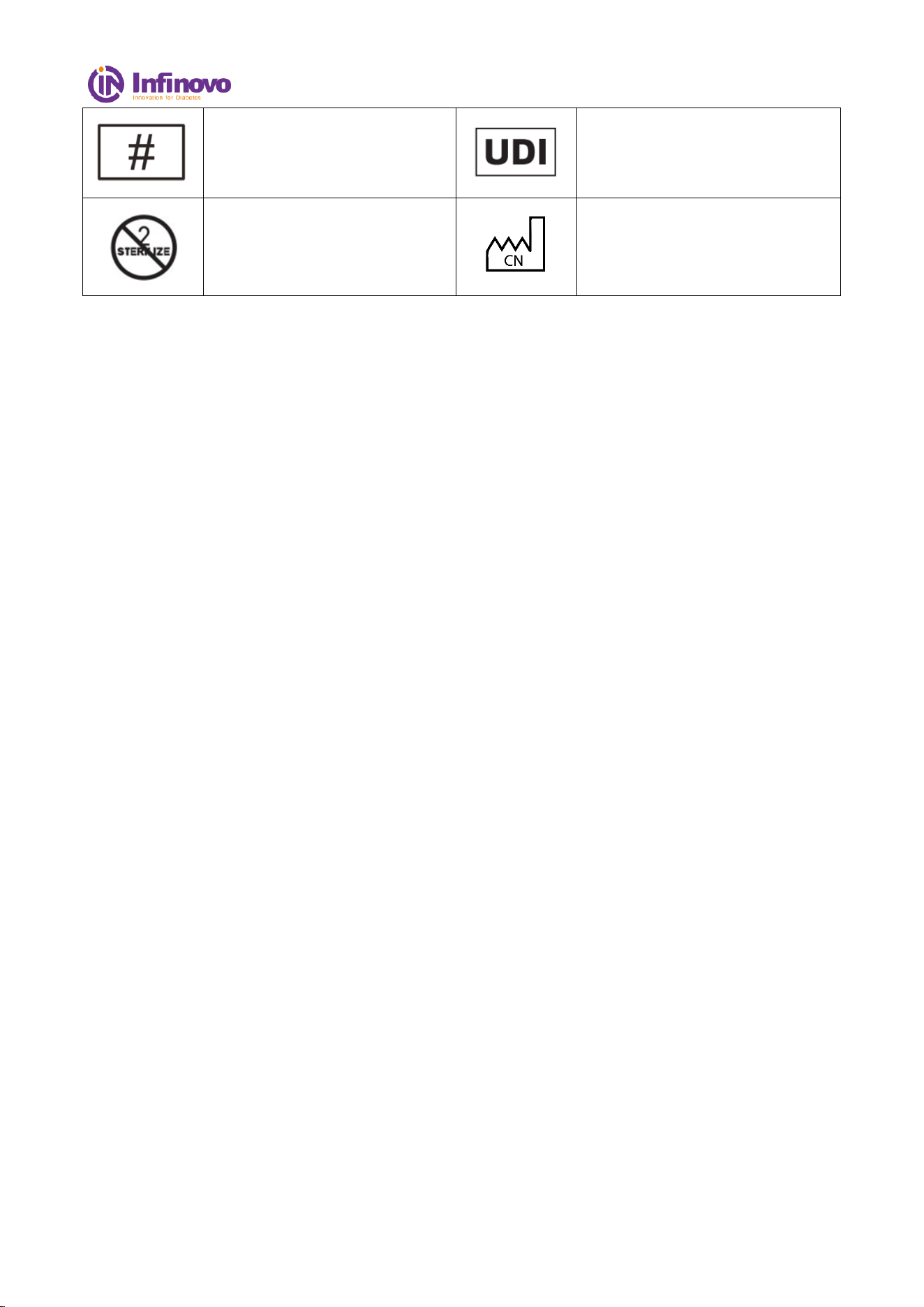
Model Number
Unique device identifier
Do not resterilize
Country of manufacture
File No.: IFU-D3-001 Version: 01
27 / 27
Appendix-Warranty Card
If there is a problem of non-human damage to the product you purchased, please return it to us for
warranty.
Customer service information
Customer name
Contact number
Contact address
Product name
Product model
Date of purchase
Maintenance date
Fault description
Maintenance state