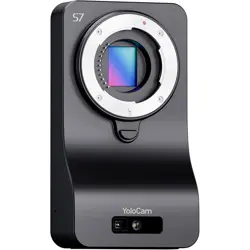
YoloCam
Product Manual

Before using this product, please read this product manual
thoroughly, as it contains all relevant warnings and important
information:
Before starting to shoot, please read the following carefully:
• Do not modify the model label on the product.
• Avoid spilling liquids on the product and do not place containers filled
with liquid on it.
• Do not block the ventilation ports to prevent electric shock. Do not
remove the product's casing or insert anything into the ventilation slots.
• Place the product on a flat surface when in use.
• Ensure the product remains ventilated; do not block the ventilation
slots and avoid direct sunlight or any heat sources.
• Do not expose the product to moisture or fire.
• The manufacturer is not responsible for any damage caused by using
an adapter that does not meet the product's voltage range.
To avoid producing poor-quality images and damaging the product,
first read the "Safety Precautions" and "Operation Precautions." Also,
read this manual carefully to ensure proper use of the product.
Safety Precautions:
The following precautions are intended to prevent you and others from
injury or harm. Before using this product, please thoroughly
understand and follow these precautions. If there are any faults, issues,
or damage to the product, please contact customer service or the
dealer from whom you purchased the product.
01 / Important Information
02 / Product Safety Instructions

• The device requires the use of the original factory-supplied power
adapter, charging cable, and data cable for power supply and
communication. Using non-standard power adapters, charging cables,
and data cables may cause product damage and poor communication.
• Do not insert any metallic foreign objects into the electronic contacts,
accessories, or connecting cables of the product.
• Avoid placing any power cords near heat sources, as this may cause
the cords to deform or melt the insulation, leading to fire or electric
shock incidents.
• Do not hold the product in the same position for an extended period.
Even if the product does not feel very hot, prolonged contact with the
same body part may cause low-temperature burns, resulting in skin
redness or blisters. When using the product in very hot environments,
or for individuals with circulation problems or reduced skin sensitivity, it
is recommended to use a tripod. If there are any faults, issues, or
damage to the product, please contact customer service or the dealer
from whom you purchased the product.
• Do not use or store this product in high-temperature places such as
inside a car on a sunny day. The product may become hot and cause
burns. Doing so may also degrade the performance of the product or
shorten its lifespan.
• After mounting the product on a tripod, do not move it while carrying
it, as this may cause injury or accidents. Also, ensure that the tripod can
securely support the product and the lens.
• Do not leave the product in a low-temperature environment for an
extended period. The product's temperature may drop, and touching it
may cause injury.
• Ensure that the power plug is fully inserted.
• Do not touch the power plug with wet hands.
Safety Precautions:
To avoid fire or electric shock incidents, please follow the
following safety precautions:
Warning
Please adhere to the following warnings.
Failure to do so may result in death or serious injury.
Warning
Please follow the following precautions. Failure to do
so may result in personal injury or property damage.

• When unplugging, grasp the power plug and pull it out, do not pull on
the power cord. Do not scratch, cut, or excessively bend the power
cord, nor place heavy objects on it.
• Do not bend or tie the power cord.
• Do not connect too many power plugs to one power outlet.
• Do not use a power cord with damaged wires or insulation.
• If this device falls and the casing breaks, exposing internal parts, do
not touch the exposed internal parts. Otherwise, there is a risk of
electric shock.
• Do not disassemble or modify this device on your own.
High-voltage components inside can cause electric shock.
• Do not look at the sun or extremely bright light sources through the
product or lens, as it may damage your eyesight.
• Store this device out of reach of children and infants (and do so when
in use as well). Straps or cords can lead to accidental suffocation,
electric shock, or injury. If children or infants accidentally swallow parts
or accessories of the product, it may lead to accidental suffocation. If
this occurs, seek medical attention immediately.
• Do not use or store this device in dusty or humid places. This is to
prevent fire, overheating, electric shock, and burns.
• Before using this product on an airplane or in a hospital, please
confirm whether the product can be used in that location. The
electromagnetic waves emitted by the product may interfere with the
aircraft's instruments or hospital medical equipment.
• Regularly unplug the power plug and use a cloth to clear dust around
the power outlet. If the surrounding environment is dusty, humid, or
greasy, the dust on the power outlet may become damp and cause a
short circuit, leading to a fire.
• Adults need to explain in detail how to use this product to children
and supervise their use. Incorrect use may lead to electric shock or
other injuries.
• Do not place the lens or the product with the lens in direct sunlight
without the lens cap installed. Otherwise, the lens may focus light and
cause a fire.
• Be careful not to get the product wet. If this product falls into water
or if water or metal enters the product, immediately disconnect the
power. This is to prevent fire, electric shock, and burns.
• Do not use paint thinners, benzene, or other organic solvents to clean
this product. Otherwise, it may cause a fire or harm your health.

• This product is a precision instrument. Do not drop it or subject it to
physical impact.
• This product is not waterproof and cannot be used underwater.
• If there is water on the product, wipe it off with a clean, dry cloth. If
the product is dirty, dusty, or salty, wipe it with a wrung-out, clean, wet
cloth.
• Using the product in places with a lot of dirt or dust may cause
malfunctions.
• It is recommended to clean the product promptly after use. If dirt,
dust, moisture, or salt residue remains on the product, it may cause
malfunctions.
• To avoid sand, dust, dirt, or water droplets falling on the product from
accidentally entering the product's interior, try to prevent dirt, dust,
moisture, and salt from falling on the product.
• If the product accidentally falls into water or you are concerned
about moisture (water), dirt, dust, or salt, do not place this product near
objects with strong magnetic fields, such as magnets or motors. Also,
avoid using the product near objects emitting strong radio waves, such
as large antennas. Strong magnetic fields may cause the product to
malfunction or damage image data.
• Do not place this product in excessively hot places, such as inside a
car exposed to direct sunlight. High temperatures may cause the
product to malfunction.
• Use only commercially available air blowers to blow away dust
adhering to the lens, image sensor, and distance sensor, etc. Do not use
cleaning agents containing organic solvents to clean the body and lens.
For stubborn stains, please consult after-sales service for advice.
• The product contains precision electronic circuitry. Do not
disassemble the product yourself.
• Do not touch the product's electronic contacts with your fingers to
avoid corrosion. Corroded contacts may cause the product to
malfunction.
• If the product suddenly moves from a cold place to a warm room,
condensation may form on the product's surface and internal
components. To prevent condensation, first place the product in a
sealed plastic bag and then wait for its temperature to gradually rise
before removing it from the bag.
• If condensation occurs on the product, do not use it to avoid
damaging the product. If there is condensation, remove the lens from
03 /
Operation Precautions
Product Maintenance

Connect the power adapter; the product can be used without turning
it on.
If you have a YoloBox/Instream, you can open YoloLiv Composer on
the device, select the appropriate scene based on your live streaming
needs, and customize settings like resolution, image, exposure, white
balance, etc., to suit your preferences.
If you are using a computer for live streaming, you can connect it
directly via USB. Visit the YoloLiv website and download the YoloLiv
Composer to select scenes and adjust settings.
1.
2.
3.
Main Functions:
This product supports interchangeable lenses compatible with the
M4/3 mount, providing 4K image quality for live streaming. It supports
HDMI and USB audio and video output, which can be directly
connected to YoloBox, InStream, computers, other encoders, switchers,
monitors, etc. Users can customize settings via PC, or the built-in
YoloLiv Composer within YoloBox/InStream to meet individual needs.
Usage Scenarios:
Suitable for various online live streaming scenarios.
Target Audience:
For Vertical Platforms Streamers, Individual Streamers, Live Sellers, and
Content Creators.
Usage:
04 / Function Description
the product and wait until the condensation evaporates before using
the product.
• Avoid storing the product in places like chemical laboratories where
rust and corrosion-causing chemicals are present.
• If the product is used repeatedly for a long time, it may become hot.
This is not a malfunction.
• If there is a bright light source inside or outside the image area,
ghosting may occur.
05/
Product Accessories and
Interface Description
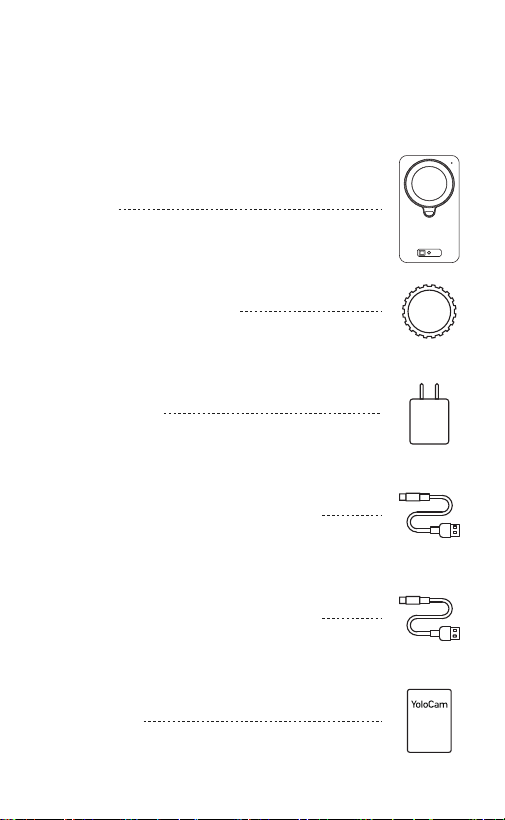
Product Accessories
Product Manual
YoloCam
Lens Cap for the Camera
Power Adapter
USB-A to USB Type-C Data Cable
USB-C to USB Type-C Power Cable
User Manual
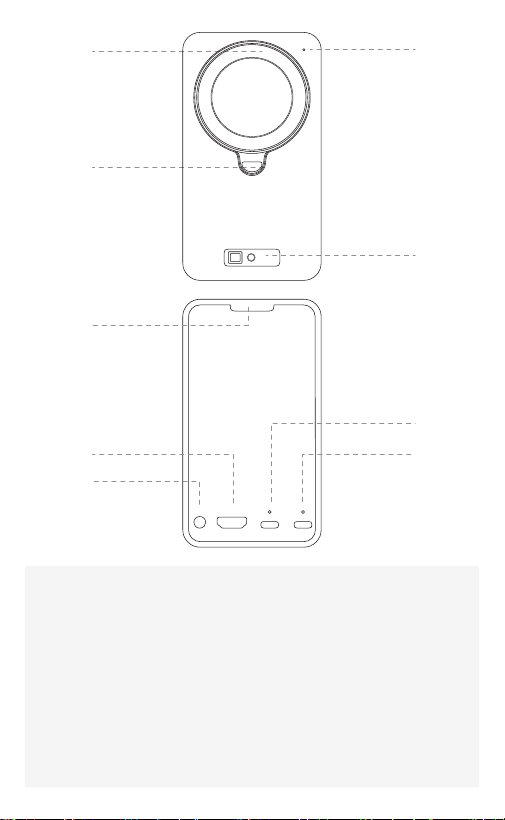
1.Lens Alignment Point
3.Lens Mount Release Button
5.Cold Shoe Mount
7.Audio Input Interface
9.Power Port
2.Indicator Light
4.TOF (Time-of-flight Sensor)
6.HDMI High-DefinitionOutput Interface
8.USB Type-C 3.0 Interface
Interface Description
1
3
5
2
4
7
6
8
9
06 / Product Specifications
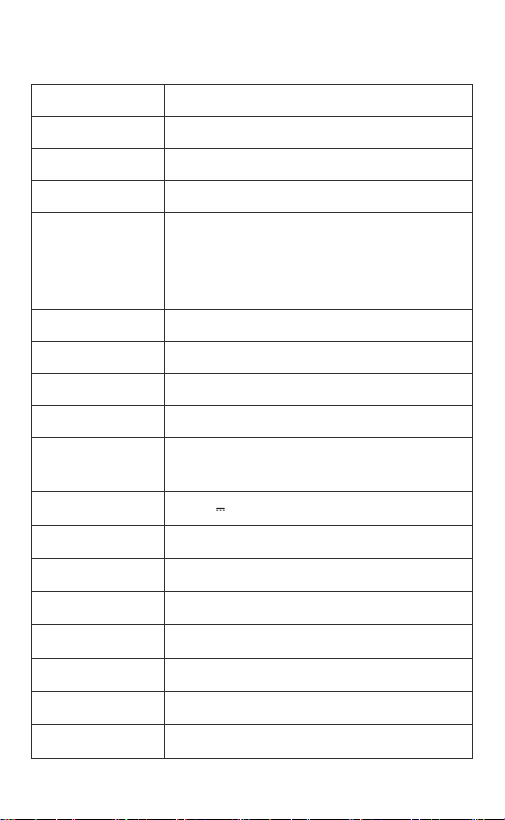
Model
Cmos
Effective Pixels
Lens Mount
Video
Focus mode
ISO
WB
Shutter
Video Output
Interface
1 USB Type-C 3.0 Interface
1 HDMI Interface
Operating Voltage
and Current
Storage
Temperature
Storage Humidity
Operating
Temperature
Operating
Humidity
Power
Consumption
Y-CAM-CN005
4/3"CMOS
1071W
M43
Auto, Manual
Auto, Manual (100~9600)
Auto, Manual (2000K~10000K)
Auto, Manual (1/25 Second~1/8000 Second)
Supports Up To 4k@60fps
*HDMI - Adapted To The Screen's Supported Resolution
*USB3.0 - Supports MJPEG/H.264/NV12/YUY2,
Resolution Can be Set Via Computer
*Note: NV12/YUY2 Supports 1080P Video Output
DC12V 1A
-10°C~+45°C
15%~85%, No Condensation
0°C~+40°C
15%~80%, No Condensation
<12W
132.5*72*37.5mm(L*W*H)
≈439g
Dimensions
Weight

07 / After-Sales Service and Support
The product has a one-year warranty from the date of purchase. If
the product malfunctions within the warranty period due to
component quality or manufacturing defects, we offer free repairs
and part replacements.
A purchase invoice must be provided for warranty service.
For warranty inquiries, please contact the purchase channel or
directly reach us at con[email protected].
1.
2.
3.
Warranty Terms
When purchasing this product, please carefully read the
warranty terms to ensure your product is covered under
warranty.
Damage beyond the specified warranty period;
Damage caused by misuse, accident, modification, improper
physical or operating environment, natural disasters, electrical
surges, improper maintenance or storage;
Faults or damage caused by third-party products, software,
services, or actions;
Normal discoloration, wear, and consumption during product use;
The product's ability to operate continuously or without errors;
Consumable parts, such as cables, which wear out over time;
Inability to present valid warranty credentials and original purchase
invoice or receipt;
Use of the product not in accordance with the accompanying
instructions or manual, or not for its intended function or
environment;
The completeness and appearance of the product are not
guaranteed. You should inspect the product upon acceptance and
raise any discrepancies immediately;
Damage caused by dropping, impact, or other external forces,
water ingress, or motherboard or device failure due to sweat.
1.
2.
3.
4.
5.
6.
7.
8.
9.
10.
The following causes of product damage are not covered by
the warranty.
After the warranty period, users can still receive repair services
from the company but will need to pay the corresponding fees.

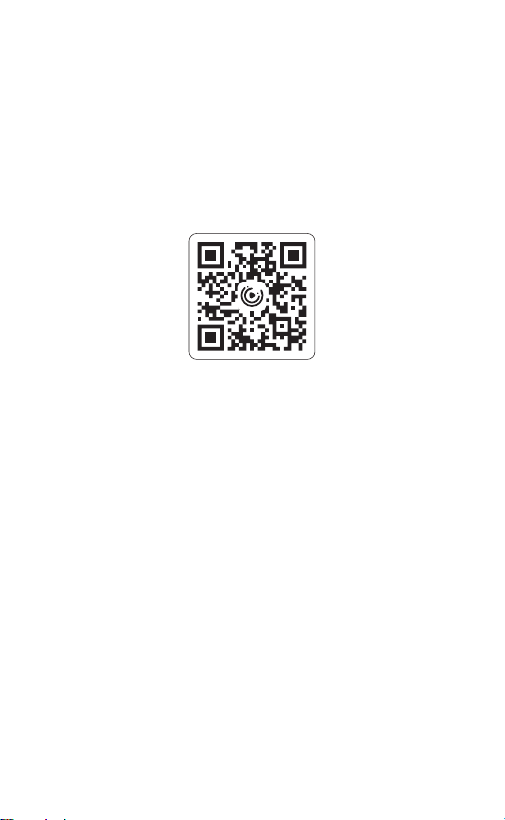
Hangzhou Xingxi Technology Co., Ltd.
Official Website: www.yololiv.com
E-Mail: Contact@yololiv.com
Company Address: Room 112, 112M, Building 1, No. 1818-1, Wenyi West
Road, Yuhang Street, Yuhang District, Hangzhou, Zhejiang Province
SCAN FOR MORE INFO